
Introduction
I gave a
joint presentation with Manoj at
Debconf7 about using distributed version control for
Debian packaging, and I
volunteered to do an on-line workshop
about using
Git for the task, so it's about time that
I should know how to use Git for Debian packaging, but it turns out that
I don't. Or well, didn't.
After I made a pretty good mess out of the
mdadm packaging repository (which is not a big
problem as it's just ugly history up to the point when I start to get it
right), I decided to get down with the topic and figure it out once and for
all. I am writing this post as I put the pieces together. It's been cooking
for a week, simply so I could gather enough feedback. I am aware that
Git is
not exactly a showcase of usability, so
I took some extra care to not add to the confusion.
It may be the first post in a series, because this time, I am just covering
the case of
mdadm, for which upstream also uses Git and where I am the
only maintainer, and I shall pretend that I am importing
mdadm to version
control for the first time, so there won't be any history juggling. Future
posts could well include tracking
Subversion repositories with
git-svn, and importing packages
previously tracked therewith, but this ain't no promise! (well, that last post
is
already being drafted,
but far from finished; you have been warned!)
I realise that
git-buildpackage exists, but imposes a rather
strict branch layout and tagging scheme, which I don't want to adhere to. And
gitpkg (
Romain blogged about it
recently),
deserves another look since, according to its author, it does not impose
anything on its user. But in any case, before using such tools (and
possibly extending them to allow for other layouts), I'd really rather have
done it by hand a couple of times to get the hang of it and find out where the
culprits lie.
Now, enough of the talking, just one last thing: I expect this blog post to
change quite a bit as I get feedback. Changes shall be highlighted in bold
typeface.
Setting up the infrastructure
First, we prepare a shared repository on
git.debian.org for later use (using
collab-maint for
illustration purposes), download the Debian source package we want to import
(version
2.6.3+200709292116+4450e59-3 at time of writing, but I pretend
it's
-2 because we shall create
-3 further down ), set up a local
repository, and link it to the remote repository. Note that there are
other
ways to set up the infrastructure, but
this happens to be the one I prefer, even though it's slightly more
complicated:
$ ssh alioth
$ cd /git/collab-maint
$ ./setup-repository pkg-mdadm mdadm Debian packaging
$ exit
$ apt-get source --download-only mdadm
$ mkdir mdadm && cd mdadm
$ git init
$ git remote add origin ssh://git.debian.org/git/collab-maint/pkg-mdadm
$ git config branch.master.merge refs/heads/master
Now we can use
git-pull and
git-push, except the remote repository is
empty and we can't pull from there yet. We'll save that for later.
Instead, we tell the repository about upstream's Git repository. I am giving
you the
git.debian.org URL though, simply because I don't want upstream
repository (which lives on an ADSL line) hammered in response to this blog
post:
$ git remote add upstream-repo git://git.debian.org/git/pkg-mdadm/mdadm
Since we're using the
upstream branch of the
pkg-mdadm repository as
source (and don't want all the other mess I created in that repository), we'll
first limit the set of branches to be fetched (I could have used the
-t
option in the above
git-remote command, but I prefer to make it explicit
that we're doing things slightly differently to protect upstream's ADSL line).
$ git config remote.upstream-repo.fetch \
    +refs/heads/upstream:refs/remotes/upstream-repo/upstream
And now we can pull down upstream's history and create a local branch off it.
The "no common commits" warning can be safely ignored since we don't have any
commits at all at that point (so there can't be any in common between the
local and remote repository), but we know what we're doing, even to the point
that we can forcefully give birth to a branch, which is because we do not have
a
HEAD commit yet (our repository is still empty):
$ git fetch upstream-repo
warning: no common commits
[ ]
  # in the real world, we'd be branching off upstream-repo/master
$ git checkout -b upstream upstream-repo/upstream
warning: You appear to be on a branch yet to be born.
warning: Forcing checkout of upstream-repo/upstream.
Branch upstream set up to track remote branch
  refs/remotes/upstream-repo/upstream.
$ git branch
* upstream
$ ls   wc -l
77
Importing the Debian package
Now it's time to import Debian's
diff.gz remember how I pretend to use
version control for package maintenance for the first time. Oh, and sorry
about the messy file names, but I decided it's best to stick with real data in
case you are playing along:
Since we're applying the diff against version
2.6.3+200709292116+4450e59,
we ought to make sure to have the repository at the same state. Upstream never
"released" that version, but I encoded the commit ID of the tip when
I snapshotted it:
4450e59, so we branch off there. Since we are actually
tracking the
git.debian.org pkg-mdadm repository instead of upstream,
you can use the tag I made. Otherwise you could consider tagging yourself:
$ #git tag -s mdadm-2.6.3+200709292116+4450e59 4450e59
$ git checkout -b master mdadm-2.6.3+200709292116+4450e59
$ zcat ../mdadm_2.6.3+200709292116+4450e59-2.diff.gz   git apply
The local tree is now "debianised", but Git does not know about the new and
changed files, which you can verify with
git-status. We will split the
changes made by Debian's
diff.gz across several branches.
The idea of feature branches
We could just create a
debian branch, commit all changes made by the
diff.gz there, and be done with it. However, we might want to keep certain
aspects of Debianisation separate, and the way to do that is with feature
branches (also known as "topic" branches). For the sake of this demonstration,
let's create the following four branches in addition to the
master branch,
which holds the standard Debian files, such as
debian/changelog,
debian/control, and
debian/rules:
- upstream-patches will includes patches against the upstream code, which
I submit for upstream inclusion.
- deb/conffile-location makes /etc/mdadm/mdadm.conf the default over
/etc/mdadm.conf and is Debian-specific (thus the deb/ prefix).
- deb/initramfs includes the initramfs hook and script, which I want
to treat separately but not submit upstream.
- deb/docs similarly includes Debian-only documentation I add to the
package as a service to Debian users.
If you're importing a Debian package using
dpatch, you might want to
convert every dpatch into a single branch, or at least collect logical units
into separate branches. Up to you. For now, our simple example suffices. Keep
in mind that it's easy to merge two branch and less trivial to split one into
two.
Why? Well, good question. As you will see further down, the separation between
master and
deb/initramfs actually makes things more complicated when
you are working on an issue spanning across both. However, feature branches
also bring a whole lot of flexibility. For instance, with the above
separation, I could easily create
mdadm packages without
initramfs
integration (see
#434934),
a disk-space-conscious distribution like
grml might
prefer to leave out the extra documentation, and maybe another derivative
doesn't like the fact that the configuration file is in a different place from
upstream. With feature branches, all these issues could be easily addressed by
leaving out unwanted branches from the merge into the integration/build branch
(see further down).
Whether you use feature branches, and how many, or whether you'd like to only
separate upstream and Debian stuff is entirely up to you. For the purpose of
demonstration, I'll go the more complicated way.
Setting up feature branches
So let's commit the individual files to the branches. The output of the
git-checkout command shows modified files that have not been committed yet
(which I trim after the first example); Git keeps these across
checkouts/branch changes. Note that the
./debian/ directory does not show
up as Git does not know about it yet (
git-status will tell you that it's
untracked, or rather: contains untracked files since Git does not track
directories at all):
$ git checkout -b upstream-patches mdadm-2.6.3+200709292116+4450e59
M Makefile
M ReadMe.c
M mdadm.8
M mdadm.conf.5
M mdassemble.8
M super1.c
$ git add super1.c     #444682
$ git commit -s
  # i now branch off master, but that's the same as 4450e59 actually
  # i just do it so i can make this point
$ git checkout -b deb/conffile-location master
$ git add Makefile ReadMe.c mdadm.8 mdadm.conf.5 mdassemble.8
$ git commit -s
$ git checkout -b deb/initramfs master
$ git add debian/initramfs/*
$ git commit -s
$ git checkout -b deb/docs master
$ git add RAID5_versus_RAID10.txt md.txt rootraiddoc.97.html
$ git commit -s
  # and finally, the ./debian/ directory:
$ git checkout master
$ chmod +x debian/rules
$ git add debian
$ git commit -s
$ git branch
  deb/conffile-location
  deb/docs
* master
  upstream
  upstream-patches
At this time, we push our work so it won't get lost if, at this moment, aliens
land on the house, or any other completely plausible event of apocalypse
descends upon you. We'll push our work to
git.debian.org (the
origin,
which is the default destination and thus needs not be specified) by using
git-push --all, which conveniently pushes all local branches, thus
including the upstream code; you may not want to push the upstream code, but
I prefer it since it makes it easier to work with the repository, and since
most of the objects are needed for the other branches anyway after all, we
branched off the
upstream branch.
Specifying
--tags instead of
--all pushes tags instead of heads
(branches); you couldn't have guessed that! See
this thread if you (rightfully) think
that one should be able to do this in a single command (which is not
git
push refs/heads/* refs/tags/*)
$ git push --all
$ git push --tags
Done. Well, almost
Building the package (theory)
Let's build the package. There seem to be two (sensible) ways we could do
this, considering that we have to integrate (merge) the branches we just
created, before we fire off the building scripts:
- by using a temporary (or "throw-away") branch off upstream, where we
integrate all the branches we have just created, build the package, tag our
master branch (it contains debian/changelog), and remove the
temporary branch. When a new package needs to be built, we repeat the
process.
- by using a long-living integration branch off upstream, into which we
merge all our branches, tag the branch, and build the package off the tag.
When a new package comes around, we re-merge our branches, tag, and build.
Both approaches have a certain appeal to me, but I settled for the second, for
two reasons, the first of which leads to the second:
- When I upload a package to the Debian archive, I want to create a tag which
captures the exact state of the tree from which the package was built, for
posterity (I will return to this point later). Since the throw-away
branches are not designed to persist and are not uploaded to the archive,
tagging the merging commit makes no sense. Thus, the only way to properly
identify a source tree across all involved branches would be to run
git-tag $branch/$tagname $branch for each branch, which is purely
semantic and will get messy sooner or later.
- As a result of the above: when Debian makes a new stable release, I would
like to create a branch corresponding to the package in the stable archive
at the time, for security and other proposed updates. I could rename my
throw-away branch, if it still existed, or I could create a new branch and
merge all other branches, using the (semantic) tags, but that seems rather
unfavourable.
So instead, I use a long-living integration branch, notoriously tag the merge
commits which produced the tree from which I built the package I uploaded, and
when a certain version ends up in a stable Debian release, I create
a maintenance branch off the one, single tag which corresponds to the very
version of the package distributed as part of the Debian release.
So much for the theory. Let's build, already!
Building the package (practise)
So we need a long-living integration branch, and that's easier done than
said:
$ git checkout -b build mdadm-2.6.3+200709292116+4450e59
Now we're ready to build, and the following procedure should really be
automated. I thus write it like a script, called
poor-mans-gitbuild, which
takes as optional argument the name of the (upstream) tag to use, defaulting
to
upstream (the tip):
#!/bin/sh
set -eu
git checkout master
debver=$(dpkg-parsechangelog   sed -ne 's,Version: ,,p')
git checkout build
git merge $ 1:-upstream
git merge upstream-patches
git merge master
for b in $(git for-each-ref --format='%(refname)' refs/heads/deb/*); do
  git merge -- $b
done
git tag -s debian/$debver
debuild   # will ignore .git automatically
git checkout master
Note how we are merging each branch in turn, instead of using the octopus
merge strategy (which would create a commit with more than two parents) for
reasons outlined
in this post.
An octopus-merge
would actually work in our situation, but it will not
always work, so better safe than sorry (although you
could still
achieve
the same result).
If you discover during the build that you forgot something, or the build
script failed to run, just remove the tag, undo the merges, checkout the
branch to which you need to commit to fix the issue, and then repeat the above
build process:
$ git tag -d debian/$debver
$ git checkout build
$ git reset --hard upstream
$ git checkout master
$ editor debian/rules    # or whatever
$ git add debian/rules
$ git commit -s
$ poor-mans-gitbuild
Before you upload, it's a good idea to invoke
gitk --all and verify that
all goes according to plan:
When you're done and the package has been uploaded, push your work to
git.debian.org, as before. Instead of using
--all and
--tags,
I now specify exactly which refs to push. This is probably a good habit to get
into to prevent publishing unwanted refs:
$ git push origin build tag debian/2.6.3+200709292116+4450e59-3
Now take your dog for a walk, or play outside, or do something else not
involving a computer or entertainment device.
Uploading a new Debian version
If you are as lucky as I am, the package you uploaded still has a bug in the
upstream code
and someone else fixes it before upstream releases a new
version, then you might be in the position to release a new Debian version. Or
maybe you just need to make some Debian-specific changes against the same
upstream version. I'll let the commands speak for themselves:
$ git checkout upstream-patches
$ git-apply < patch-from-lunar.diff   #444682 again
$ git commit --author 'J r my Bobbio <lunar@debian.org>' -s
  # this should also be automated, see below
$ git checkout master
$ dch -i
$ dpkg-parsechangelog   sed -ne 's,Version: ,,p'
2.6.3+200709292116+4450e59-3
$ git commit -s debian/changelog
$ poor-mans-gitbuild
$ git push
$ git push origin tag debian/2.6.3+200709292116+4450e59-3
That first
git-push may require a short explanation: without any
arguments,
git-push updates only the intersection of local and remote
branches, so it would never push a new local branch (such as
build above),
but it updates all existing ones; thus, you cannot inadvertedly publish
a local branch. Tags still need to be published explicitly.
Hacking on the software
Imagine: on a rainy Saturday afternoon you get bored and decide to implement
a better way to tell
mdadm when to start which array. Since you're a genius, it'll take you only
a day, but you do make mistakes here and there, so what could be better than
to use version control? However, rather than having a branch that will live
forever, you are just creating a local branch, which you will not publish.
When you are done, you'll feed your work back into the existing branches.
Git makes branching really easy and as you may have spotted, the
poor-mans-gitbuild script reserves an entire branch namespace for people
like you:
$ git checkout -b tmp/start-arrays-rework master
Unfortunately (or fortunately), fixing this issue will require work on two
branches, since the
initramfs script and hook are maintained in a separate
branch. There are (again) two ways in which we can (sensibly) approach this:
- create two separate, temporary branches, and switch between them as you
work.
- merge both into the temporary branch and later cherry-pick the commits into
the appropriate branches.
I am undecided on this, but maybe the best would be a combination: merge both
into a temporary branch and later cherry-pick the commits into two additional,
temporary branches until you got it right, and then fast-forward the official
branches to their tips:
$ git merge master deb/initramfs
$ editor debian/mdadm-raid                     #
$ git commit -s debian/mdadm-raid
$ editor debian/initramfs/script.local-top     #
$ git commit -s debian/initramfs/script.local-top
[many hours of iteration pass ]
[  until you are done]
$ git checkout -b tmp/start-arrays-rework-init master
  # for each commit $c in tmp/start-arrays-rework
  # applicable to the master branch:
$ git cherry-pick $c
$ git checkout -b tmp/start-arrays-rework-initramfs deb/initramfs
  # for each commit $c in tmp/start-arrays-rework
  # applicable to the deb/initramfs branch:
$ git cherry-pick $c
This is assuming that all your commits are logical units. If you find several
commits which would better be bundled together into a single commit, this is
the time to do it:
$ git cherry-pick --no-commit <commit7>
$ git cherry-pick --no-commit <commit4>
$ git cherry-pick --no-commit <commit5>
$ git commit -s
Before we now merge this into the official branches, let me briefly intervene
and introduce the concept of a fast-forward. Git will "fast-forward" a branch
to a new tip if it decides that no merge is needed. In the above example, we
branched a temporary branch (T) off the tip of an official branch (O) and then
worked on the temporary one. If we now merge the temporary one into the
official one, Git determines that it can actually squash the ancestry into
a single line and push the official branch tip to the same ref as the
temporary branch tip. In cheap (poor man's), ASCII notation:
- - - O             >> merge T >>     - - - = - - OT
         - - T      >>  into O >>
This works because no new commits have been made on top of O (if there would
be any, we might be able to rebase, but let's not go there quite yet; rebasing
is how you shoot yourself in the foot with Git). Thus we can simply do the
following:
$ git checkout deb/initramfs
$ git merge tmp/start-arrays-rework-initramfs
$ git checkout master
$ git merge tmp/start-arrays-rework-init
and test/build/push the result. Or well, since you are not an
mdadm
maintainer (We^W I have open job positions! Applications welcome!), you'll
want to submit your work as patches via email:
$ git format-patch -s -M origin/master
This will create a number of files in the current directory, one corresponding
for each commit you made since
origin/master. Assuming each commit is
a logical unit, you can now submit these to an email address. The
--compose option lets you write an introductory message, which is
optional:
$ git send-email --compose --to your@email.address <file1> <file2> < >
Once you've verified that everything is alright, swap your email address for
the bug number (or the
pkg-mdadm-devel list address).
Thanks (in advance) for your contribution!
Of course, you may also be working on a feature that you want to go upstream,
in which case you'd probably branch off
upstream-patches (if it depends on
a patch not yet in upstream's repository), or
upstream (if it does not):
$ git checkout -b tmp/cool-feature upstream
[ ]
when a new upstream version comes around
After a while, upstream may have integrated your patches, in addition to
various other changes, to give birth to
mdadm-2.6.4. We thus first fetch
all the new refs and merge them into our upstream branch:
$ git fetch upstream-repo
$ git checkout upstream
$ git merge upstream-repo/master
we
could just as well have executed
git-pull, which with the default
configuration would have done the same; however, I prefer to separate the
process into fetching and merging.
Now comes the point when many Git people think about rebasing. And in fact,
rebasing is exactly what you should be doing, iff you're still working on an
unpublished branch, such as the previous
tmp/cool-feature off
upstream. By rebasing your branch onto the updated
upstream branch,
you are making sure that your patch will apply cleanly when upstream tries it,
because potential merge conflicts would be handled by you as part of the
rebase, rather than by upstream:
$ git checkout tmp/cool-feature
$ git rebase upstream
What rebasing does is quite simple actually: it takes every commit you made
since you branched off the parent branch and records the diff and commit
message. Then, for each diff/commit_message pair, it
creates a new commit on
top of the new parent branch tip, thus rewrites history, and orphans all your
original commits. Thus, you should only do this if your branch has never been
published or else you would leave people who cloned from your published branch
with orphans.
If this still does not make sense, try it out: create a (source) repository,
make a commit (with a meaningful commit message), branch B off the tip, make
a commit on top of B (with a meaningful message), clone that repository and
return to the source repository. There, checkout the master, make a commit
(with a ), checkout B, rebase it onto the tip of master, make a commit
(with a ), and now git-pull from the clone; use gitk to figure out
what's going on.
So you should almost never rebase a published branch, and since all your
branches outside of the
tmp/* namespace are published on
git.debian.org, you should not rebase those.
But then again, Pierre actually
rebases a published branch in his workflow, and
he does so with reason: his
patches branch is just a collection of
branches to go upstream, from which upstream cherry-picks or which upstream
merges, but which no one tracks (or should be tracking).
But we can't (or at least will not at this point) do this for our feature
branches (though we could treat
upstream-patches that way), so we have to
merge. At first, it suffices to merge the new
upstream into the
long-living
build branch, and to call
poor-mans-gitbuild, but if you
run into merge conflicts or find that upstream's changes affect the
functionality contained in your feature branches, you need to actually fix
those.
For instance, let's say that upstream started providing
md.txt (which
I previously provided in the
deb/docs branch), then I need to fix that
branch:
$ git checkout deb/docs
$ git rm md.txt
$ git commit -s
That was easy, since I could evade the conflict. But what if upstream made
a change to
Makefile, which got in the way with my configuration file
location change? Then I'd have to merge
upstream into
deb/conffile-location, resolve the conflicts, and commit the change:
$ git checkout deb/conffile-location
$ git merge upstream
CONFLICT!
$ git-mergetool
$ git commit -s
When all conflicts have been resolved, I can prepare a new release, as
before:
$ git checkout master
$ dch -i
$ dpkg-parsechangelog   sed -ne 's,Version: ,,p'
2.6.3+200709292116+4450e59-3
# git commit -s debian/changelog
$ poor-mans-gitbuild
# git push
$ git push origin tag debian/2.6.3+200709292116+4450e59-3
Note that Git often appears smart about commits that percolated upstream:
since upstream included the two commits in
upstream-patches in his
2.6.4 release, my
upstream-patches branch got effectively annihilated,
and Git was smart enough to figure that out
without a conflict. But before
you rejoice, let it be told that
this does not always work.
Creating and using a maintenance branch
Let's say Debian "lenny" is released with
mdadm 2.7.6-1, then:
$ git checkout -b maint/lenny debian/2.7.6-1
You might do this to celebrate the release, or you may wait until the need
arises. We've already left the domain of reality ("lenny" is not yet
released), so the following is just theory.
Now, assume that a security bug is found in
mdadm 2.7.6 after "lenny"
was released. Upstream is already on
mdadm 2.7.8 and commits
deadbeef and
c0ffee fix the security issue, then you'd cherry-pick
them into the
maint/lenny branch:
$ git checkout upstream
$ git pull
$ git checkout maint/lenny
$ git cherry-pick deadbeef
$ git cherry-pick c0ffee
If there are no merge conflicts (which you'd resolve with
git-mergetool),
we can just go ahead to prepare the new package:
$ dch -i
$ dpkg-parsechangelog   sed -ne 's,Version: ,,p'
2.7.6-1lenny1
$ git commit -s debian/changelog
$ poor-mans-gitbuild
$ git push origin maint/lenny
$ git push origin tag debian/2.7.6-1lenny1
Future directions
It should be trivial to create the Debian source package directly from the
repository, and in fact, in response to a recent blog post of mine on
the
dispensability of pristine upstream tarballs, two
people showed me their scripts to do it.
My post also caused
Joey Hess to clarify his position on pristine tarballs, before he went
out to implement
dpkg-source v3.
This looks very promising.
Yet, as
Romain argues, there
are benefits with simple patch management systems. Exciting times ahead!
In addition to creating source packages from version control, a couple of
other ideas have been around for a while:
- create debian/changelog from commit log summaries when you merge into
the build branch.
- integrate version control with the BTS, bidirectionally:
- given a bug report, create a temporary branch and apply any patches found
in the bug report.
- upon merging the temporary branch back into the feature branch it
modifies, generate a patch, send it to the BTS and tag the bug report
+ pending patch.
And I am sure there are more. If you have any, I'd be interested to hear about
them!
Wrapping up
I hope this post was useful. Thank you for reading to the end, this was
probably my longest blog post ever.
I want to thank Pierre Habouzit, Johannes Schindelin, and all the others on
the
#git/freenode IRC channel for their tutelage. Thanks also to Manoj
Srivastava, whose
pioneering work on packaging with GNU arch got me started on most of
the concepts I use in the above. And of course, the members of the
the
vcs-pkg mailing list for the
various discussions on this subject, especially those who participated in
the
thread leading up to this post.
Finally, thanks to Linus and Junio for
Git and the
continuously outstanding high level of support they give.
If you are interested in the topic of using version control for distro
packaging, I invite you to join
the vcs-pkg mailing list and/or the
#vcs-pkg/irc.oftc.net IRC channel.
NP:
Aphex Twin:
Selected Ambient Works, Volume 2 (at least when I started writing )
 In what I can only assume is a case of "graphic design spec gone horribly
wrong", EBay has decided to portray our lovable penguin friend as the
mascot of the online scam artist:
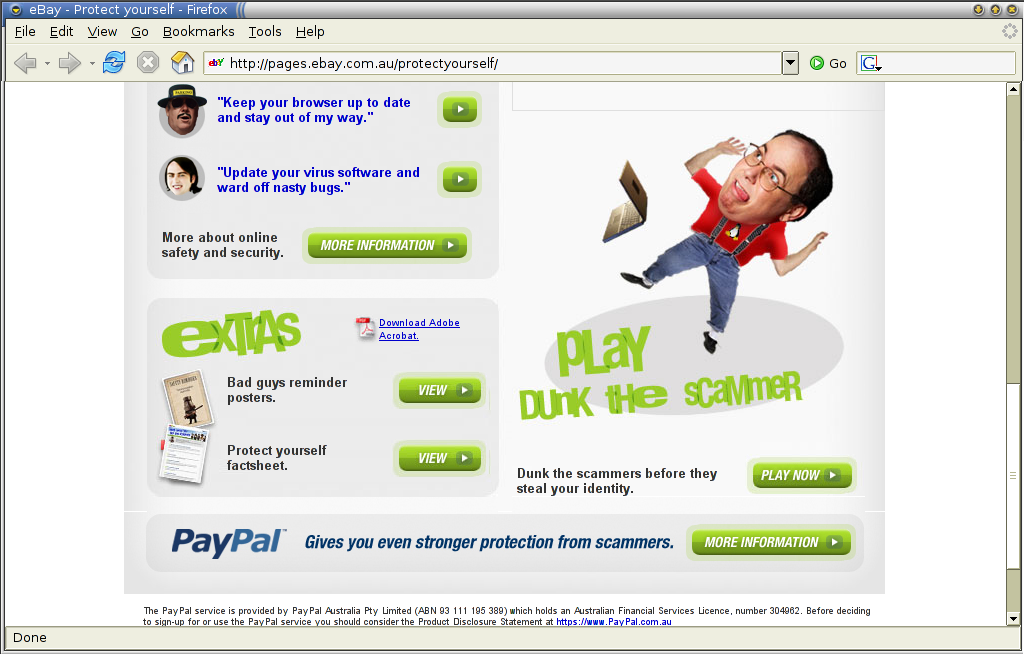 (Click on the image for a full-size version)
Personally, I think the scam artists' best friend is a Windows machine, as
it provides a rich source of untraceable connectivity, but my guess is that
Microsoft has scarier lawyers.
I don't know how long the image has been up there for, but I'd imagine it
won't last long. Linux users may not be that numerous, but we're a noisy
lot. <grin>
 I've been meaning to write this for weeks. Hopefully I can still remember
everything.
So Sarah had a c-section the day before we were scheduled to have our
c-section class. We'd both read a bit though, so it wasn't like we were
going in totally uninformed and unprepared..
Firstly, Stanford Hospital's operating room area is rather mind-blowing.
Sarah was transferred from Lucille Packard Children's Hospital to Stanford
because they could get an operating room there sooner. The transfer was
trivial, just roll the whole bed down the corridor, through the magic double
doors into the operating rooms. The doors in question have a whole heap of
video cameras pointing straight down, so they see everyone that gets wheeled
in and out, which I found interesting. Good for records of patient movements
I guess.
Anyway, through those doors is a maze of corridors. There was a light-up
board hanging from the ceiling in the middle of the main corridor with
lights for all of the ORs. I think there were about 20. The illuminated ones
were available. We went down a corridor, and past a few ORs. Outside of each
one is a big stainless-steel scrub area.
We got to "our" OR, and they transferred Sarah onto the operating table.
Because of her heart condition, they wanted to have an arterial line in her
for the duration of the procedure. This is some sort of gadget that goes
into an artery and monitors your blood pressure beat by beat.
The "interesting" thing with the anaesthesiologist was the New Zealand woman
that we'd seen when we had an anaesthesiologist months prior, but the
appointment was with a different anaesthesiologist, and this New Zealand
woman was "observing". At the time, the anaesthesiologist we had the
appointment with told us that she was going to be on vacation at the time of
the delivery, so she wouldn't be attending. So I don't know if the Kiwi
woman got promoted out of "observing" to "doing" in that period, or what,
but she reintroduced herself to us in LPCH prior to moving to Stanford as
being our anaesthesiologist for the delivery.
Anyway, in the OR, they handed her the arterial line, in it's plastic
packaging, and the first thing she asked was whether it came with anything
else to put it in. At this point I figured she hadn't put one of these in
before. (The answer to her question, by the way, was "no")
She then proceeded to have a terrible time getting the line into Sarah's
arm. Normally intravenous lines go into a vein, but this has to go into an
artery. Apparently when you go poking an artery, it spasms. It then becomes
very hard to get it into a moving target. She had a few goes on one arm,
then gave up, and had to move over to the other arm.
Sarah doesn't like needles at the best of times, and getting this honking
great big thing in was no picnic. The bruising on both her wrists afterwards
was phenomenal. She tends to bruise fairly spectacularly whenever they stick
a needle in her. I almost stepped in and asked if it was really necessary
that she have it, because they were having so much trouble getting it in,
and it was clearly hurting Sarah. I think someone else ended up getting it
in, not the anaesthesiologist. Not "that" one anyway. There were heaps of
people in the OR.
Next, came the epidural. Again, we had the inexperienced anaesthesiologist.
This time she said to someone else how she was so nervous because there were
"too many eyes". Not really reassuring. They gave Sarah a numbing injection
first, and then proceeded to poke her in back with the epidural catheter
needle thing.
Sarah was flinching when they did it, and they kept yelling at her not to
move. Apparently it didn't hurt, but it caused discomfort every
time they tried to get it in. Eventually the associate professor of
anaesthesiology stepped in and got it in. Later, they said that Sarah had a
slightly curved spine or something, and that had made it a bit more
complicated.
I'm not begrudging the obviously inexperienced anaesthesiologist for
anything. Stanford is a teaching hospital, and doctors have to get their
experience somehow, but I think that when the patient is conscious, it's
important to come across a little more confident.
So once they got all of that sorted out, they could get her lying down on
the table and get down to business.
Apparently one of the side-effects of the epidural is that it can cause your
body to think it's got hypothermia. Part way through the procedure, Sarah
started shaking uncontrollably. I can't remember whether she complained
about feeling cold or not. She also got a really itchy face. Apparently
that's a side-effect of morphine.
Sarah also doesn't tolerate anaesthetics very well, and started feeling
nauseous part way through the procedure. Sure enough, as has happened
countless times previously post-operatively, she threw up. At least we had
warning and I got a kidney dish in place in time.
That was about all the eventful surgical stuff. They had the usual screen up
from about her neck area, so I couldn't see what they were doing. After
Joshua was delivered, one of the nurses asked me if I wanted to see him, and
took me around from her left shoulder where I'd been sitting to around below
her right foot, to where they had him in one of those perspex portable crib
things. I could see a lot of red out of the corner of my eye, and I could
have seen a lot more if I'd bothered to look, but I was more interested in
seeing my son at that stage.
They let me bring him back around to where I'd been sitting previously, to
show Sarah, but it was hard getting him up to a point where she could see
him properly, and she was partially out of it by this stage. I think she
dozed off for a little bit not long after that.
I forget what time we got into the OR, but they started the operation in
earnest at about 10:00am, and we were out of there by 10:45am if memory
serves. The nurse in charge of the recovery room really didn't want me
there, so I went back to LPCH with one of the nurses to spend some time with
him while he was weighed and measured, and I took some photos, and held him.
This was good, because I got to have a good cry on my own with him.
So overall, in my "I'll never be squeezing a watermelon out of my nether
regions" blokey perspective, having seen what Sarah went through, and how
much discomfort that it looked like she was going through, both in the OR
and afterwards, I'm not convinced c-sections are any less painful than a
vaginal birth (taking the average case of both). I think you're trading some
"short term" (depends on how long your labour is I guess) pain for some
"long term" pain while you recover from your incision. Granted, Sarah wasn't
really laid up all that badly for all that long, but it still didn't look
all that pleasant.
I guess really only the women who have done both delivery methods can really
comment. All I know is I found it very difficult watching Sarah go through
so much pain. So much so that I'm not really looking forward to that again.
Maybe, hopefully, after her

 Since it's the
 Here are some random links.

 Now that through black magic, voodoo, and a working network driver I have
Avahi working on my NAS and UPnP working on my SoundBridge, I can
get back to the task of learning a bit about


 OK, changes in dpkg-dev 1.14.7 have forced my hand a little and

 ...but, really, Fiji would have deserved the victory. They did put the Stade
Velodrome on fire this afternoon, pushing South-Africa to play....a quite bad
rugby with few imagination and many errors.
In the RSA team, only Steyn emerged and saved his team from sinking (37-20). RSA
scored 5 tries mostly only because they have good four-wheel-driven "trucks".
In the Fiji side, Sisa Koyamaibole and Mosese Rauluni lead their team to
even the score 20-20 on 65th minute...unfortunately, losing in the last 10
minutes despite the support of the entire French crowd.
The Springboks need to improve their play dramatically if they want to have
a chance against Argentina (very probably unless Scotland realises a miracle).
My conclusion today: the Three Nations from southern hemisphere (RSA, NZL,
AUS) should really consider opening their annual tournament to other nations
such as Samoa, Tonga, Fiji or Argentina. That would certainly force them to
play another game than their usual game. Of course, that would mean being
less attractive to players (just count the number of players from Samoa,
Tonga and Fiji who play with New Zealand and Australia) but considerably
widening rugby in the Pacific area.
 After 6 weeks of teaching and over 2 months in my new apartment, I am making a short escape from NYC to visit my mom and sister in PR. In my Impacts of Technology class, we just finished a week on large-scale and complex technological systems, with a focus on industrial farming. We read a few sections of Micahel Pollan’s fanstastic book, The Ominvore’s Dilemma, which combines the odd qualities of being seductively alluring (thanks to his exquisite writing) and repulsive (thanks to the content, well at least the part on factory animal “farming”). I can’t recommend it enough and look forward to reading the rest, when I find the (magical) time to do so.
Now that I am at the airport, I am struck at how little I know about this place, which is also a large and complex technological system and I bet revealing its technological and cultural innards would provide as fascinating (although not quite as gross) of a story as that of factory animal farming.
There are many questions I would love answered: How exactly is coordination secured and what are the toughest elements to airport coordination? Where are the lines of cooperation and those of competition between airlines? What factors and values go into the design of the airport? (I know that for one thing, in American airports, there rarely seems to be enough electrical jacks; I am now sitting under the telephones, the only place with jacks in terminal 8 at JFK, and the funny thing is that there are a row of 7 unused phones and only one jack and I am sure it would be more useful to have 1 pay phone and a row of 7 jacks, instead). What sorts of airport technologies have put people out of jobs? What technologies have created new job opportunities? What sorts of social hierarchies are there in airports? Like who runs the big show? Is it a CEO? Or is something more like a university provost? What is standardized by the FAA, and what elements are more flexible, and thus different airport to airport? Is there a sense of camaraderie among airport employees, or are loyalties built primarily among employees of one airline or among the classes of workers? Given that unions are quite strong among airport employees and from the top (pilots) down (food workers), what is the political culture of airports/employees like? (I remember once overhearing a group of machinist and ground crew talking about the ugly face of globalization and NAFTA over coffee and I was dumbfounded and pretty psyched too). Are airports one of the few last remaining places in th US that provides for decent job security? Why do so many of the ground crew have such athletic, bulging calves?
 Is it a result of the physical demands of the job? Or is it that the type of job ( outdoors with lots of heavy lifting), attract the athletic types? Do they have to pass certain physical standards as to pilots? Was there always first class seats? Or did that come about when flying became cheaper? Are employees trained to deal with irate passengers? In what ways do pilots bitch about the long waits/delays they also have to endure? What can they do when they are waiting, as we did for an hour last night, during the massive traffic jams that are especially noxious in NYC-area airports? Do pilots have any say in the way airports are run? Why do they consistently provide less chairs than are needed in lounges, even in new terminals, as the one I was in tonight? Do air traffic controllers ever meet face-to-face with pilots or do they largely have a virtual relationship? Are programmers who patch, improve, and build traffic control systems housed in the airports, or elsewhere?
Airports are not only fascinating for technological and sociological reasons but I reckon there is a lot of interesting psychological work that must happen in airports. I imagine that during those long, endless waits in the lounge, on the security lines, on the tarmac, people must often take the time to reflect, on where am I going, where am I coming from, and not in the literal sense but the metaphorical one. I know that I have spent many hours in airports letting my mind wander to places and thoughts in ways that don’t happen as easily or often elsewhere. And in many instances, I don’t think that this propensity to indulge in some reflective thinking, is a matter of time, that is waiting. For me at least, it is the fact that many times when I fly, I am moving between worlds.
While I have flown hundreds of times, I never have been shed of the sense of awe I feel about planes and their ability to shrink space and time so quickly. For me, it is less the act of flying itself (that feels boring, tiring, annoying, mostly because of the insane waits and delays and I never seem to get the right amount of sleep the night before) but the visceral contrast it brings. In the morning my life is of a particular tone and rhythm, currently situated in NYC and by evening, I am back at home in PR, surrounded by thick humidity and the loud sound of coquis. Once there, my as currently configured in NYC, has little direct bearing to those around me. Planes don’t just transport, they shift and convert your inner and outer world…
So, if anyone (who got this far) knows of a good social history of the airport, do tell. I would love to read it.
 On Wednesday 17th October the majority of my belongings will leave
Norwich, to arrive in Castlerock at some point the next week (exact day
to be confirmed). I will then start work for