Search Results: "sten"

8 March 2023

Thomas Lange: Launch of new FAI project website

After more than 13 years, I've launched a new design for the FAI project web site https://fai-project.org It now uses Materialize CSS and will work much better on mobile devices. Thanks to Thorsten B lo who did the first part of converting the web pages to the new design. I hope you all enjoy the new layout. FAI

7 March 2023

Robert McQueen: Flathub in 2023

It s been quite a few months since the most recent updates about Flathub last year. We ve been busy behind the scenes, so I d like to share what we ve been up to at Flathub and why and what s coming up from us this year. I want to focus on: Today Flathub is going strong: we offer 2,000 apps from over 1,500 collaborators on GitHub. We re averaging 700,000 app downloads a day, with 898 million HTTP requests totalling 88.3 TB served by our CDN each day (thank you Fastly!). Flatpak has, in my opinion, solved the largest technical issue which has held back the mainstream growth and acceptance of Linux on the desktop (or other personal computing devices) for the past 25 years: namely, the difficulty for app developers to publish their work in a way that makes it easy for people to discover, download (or sideload, for people in challenging connectivity environments), install and use. Flathub builds on that to help users discover the work of app developers and helps that work reach users in a timely manner. Initial results of this disintermediation are promising: even with its modest size so far, Flathub has hundreds of apps that I have never, ever heard of before and that s even considering I ve been working in the Linux desktop space for nearly 20 years and spent many of those staring at the contents of dselect (showing my age a little) or GNOME Software, attending conferences, and reading blog posts, news articles, and forums. I am also heartened to see that many of our OS distributor partners have recognised that this model is hugely complementary and additive to the indispensable work they are doing to bring the Linux desktop to end users, and that having more apps available to your users is a value-add allowing you to focus on your core offering and not a zero-sum game that should motivate infighting. Ongoing Progress Getting Flathub into its current state has been a long ongoing process. Here s what we ve been up to behind the scenes: Development Last year, we concluded our first engagement with Codethink to build features into the Flathub web app to move from a build service to an app store. That includes accounts for users and developers, payment processing via Stripe, and the ability for developers to manage upload tokens for the apps they control. In parallel, James Westman has been working on app verification and the corresponding features in flat-manager to ensure app metadata accurately reflects verification and pricing, and to provide authentication for paying users for app downloads when the developer enables it. Only verified developers will be able to make direct uploads or access payment settings for their apps. Legal So far, the GNOME Foundation has acted as an incubator and legal host for Flathub even though it s not purely a GNOME product or initiative. Distributing software to end users along with processing and forwarding payments and donations also has a different legal profile in terms of risk exposure and nonprofit compliance than the current activities of the GNOME Foundation. Consequently, we plan to establish an independent legal entity to own and operate Flathub which reduces risk for the GNOME Foundation, better reflects the independent and cross-desktop interests of Flathub, and provides flexibility in the future should we need to change the structure. We re currently in the process of reviewing legal advice to ensure we have the right structure in place before moving forward. Governance As Flathub is something we want to set outside of the existing Linux desktop and distribution space and ensure we represent and serve the widest community of Linux users and developers we ve been working on a governance model that ensures that there is transparency and trust in who is making decisions, and why. We have set up a working group with myself and Mart n Abente Lahaye from GNOME, Aleix Pol Gonzalez, Neofytos Kolokotronis, and Timoth e Ravier from KDE, and Jorge Castro flying the flag for the Flathub community. Thanks also to Neil McGovern and Nick Richards who were also more involved in the process earlier on. We don t want to get held up here creating something complex with memberships and elections, so at first we re going to come up with a simple/balanced way to appoint people into a board that makes key decisions about Flathub and iterate from there. Funding We have received one grant for 2023 of $100K from Endless Network which will go towards the infrastructure, legal, and operations costs of running Flathub and setting up the structure described above. (Full disclosure: Endless Network is the umbrella organisation which also funds my employer, Endless OS Foundation.) I am hoping to grow the available funding to $250K for this year in order to cover the next round of development on the software, prepare for higher operations costs (e.g., accounting gets more complex), and bring in a second full-time staff member in addition to Bart omiej Piotrowski to handle enquiries, reviews, documentation, and partner outreach. We re currently in discussions with NLnet about funding further software development, but have been unfortunately turned down for a grant from the Plaintext Group for this year; this Schmidt Futures project around OSS sustainability is not currently issuing grants in 2023. However, we continue to work on other funding opportunities. Remaining Barriers My personal hypothesis is that our largest remaining barrier to Linux desktop scale and impact is economic. On competing platforms mobile or desktop a developer can offer their work for sale via an app store or direct download with payment or subscription within hours of making a release. While we have taken the time to first download time down from months to days with Flathub, as a community we continue to have a challenging relationship with money. Some creators are lucky enough to have a full-time job within the FLOSS space, while a few superstar developers are able to nurture some level of financial support by investing time in building a following through streaming, Patreon, Kickstarter, or similar. However, a large proportion of us have to make do with the main payback from our labours being a stream of bug reports on GitHub interspersed with occasional conciliatory beers at FOSDEM (other beverages and events are available). The first and most obvious consequence is that if there is no financial payback for participating in developing apps for the free and open source desktop, we will lose many people in the process despite the amazing achievements of those who have brought us to where we are today. As a result, we ll have far fewer developers and apps. If we can t offer access to a growing base of users or the opportunity to offer something of monetary value to them, the reward in terms of adoption and possible payment will be very small. Developers would be forgiven for taking their time and attention elsewhere. With fewer apps, our platform has less to entice and retain prospective users. The second consequence is that this also represents a significant hurdle for diverse and inclusive participation. We essentially require that somebody is in a position of privilege and comfort that they have internet, power, time, and income not to mention childcare, etc. to spare so that they can take part. If that s not the case for somebody, we are leaving them shut out from our community before they even have a chance to start. My belief is that free and open source software represents a better way for people to access computing, and there are billions of people in the world we should hope to reach with our work. But if the mechanism for participation ensures their voices and needs are never represented in our community of creators, we are significantly less likely to understand and meet those needs. While these are my thoughts, you ll notice a strong theme to this year will be leading a consultation process to ensure that we are including, understanding and reflecting the needs of our different communities app creators, OS distributors and Linux users as I don t believe that our initiative will be successful without ensuring mutual benefit and shared success. Ultimately, no matter how beautiful, performant, or featureful the latest versions of the Plasma or GNOME desktops are, or how slick the newly rewritten installer is from your favourite distribution, all of the projects making up the Linux desktop ecosystem are subdividing between ourselves an absolutely tiny market share of the global market of personal computers. To make a bigger mark on the world, as a community, we need to get out more. What s Next? After identifying our major barriers to overcome, we ve planned a number of focused initiatives and restructuring this year: Phased Deployment We re working on deploying the work we have been doing over the past year, starting first with launching the new Flathub web experience as well as the rebrand that Jakub has been talking about on his blog. This also will finally launch the verification features so we can distinguish those apps which are uploaded by their developers. In parallel, we ll also be able to turn on the Flatpak repo subsets that enable users to select only verified and/or FLOSS apps in the Flatpak CLI or their desktop s app center UI. Consultation We would like to make sure that the voices of app creators, OS distributors, and Linux users are reflected in our plans for 2023 and beyond. We will be launching this in the form of Flathub Focus Groups at the Linux App Summit in Brno in May 2023, followed up with surveys and other opportunities for online participation. We see our role as interconnecting communities and want to be sure that we remain transparent and accountable to those we are seeking to empower with our work. Whilst we are being bold and ambitious with what we are trying to create for the Linux desktop community, we also want to make sure we provide the right forums to listen to the FLOSS community and prioritise our work accordingly. Advisory Board As we build the Flathub organisation up in 2023, we re also planning to expand its governance by creating an Advisory Board. We will establish an ongoing forum with different stakeholders around Flathub: OS vendors, hardware integrators, app developers and user representatives to help us create the Flathub that supports and promotes our mutually shared interests in a strong and healthy Linux desktop community. Direct Uploads Direct app uploads are close to ready, and they enable exciting stuff like allowing Electron apps to be built outside of flatpak-builder, or driving automatic Flathub uploads from GitHub actions or GitLab CI flows; however, we need to think a little about how we encourage these to be used. Even with its frustrations, our current Buildbot ensures that the build logs and source versions of each app on Flathub are captured, and that the apps are built on all supported architectures. (Is 2023 when we add RISC-V? Reach out if you d like to help!). If we hand upload tokens out to any developer, even if the majority of apps are open source, we will go from this relatively structured situation to something a lot more unstructured and we fear many apps will be available on only 64-bit Intel/AMD machines. My sketch here is that we need to establish some best practices around how to integrate Flathub uploads into popular CI systems, encouraging best practices so that we promote the properties of transparency and reproducibility that we don t want to lose. If anyone is a CI wizard and would like to work with us as a thought partner about how we can achieve this make it more flexible where and how build tasks can be hosted, but not lose these cross-platform and inspectability properties we d love to hear from you. Donations and Payments Once the work around legal and governance reaches a decent point, we will be in the position to move ahead with our Stripe setup and switch on the third big new feature in the Flathub web app. At present, we have already implemented support for one-off payments either as donations or a required purchase. We would like to go further than that, in line with what we were describing earlier about helping developers sustainably work on apps for our ecosystem: we would also like to enable developers to offer subscriptions. This will allow us to create a relationship between users and creators that funds ongoing work rather than what we already have. Security For Flathub to succeed, we need to make sure that as we grow, we continue to be a platform that can give users confidence in the quality and security of the apps we offer. To that end, we are planning to set up infrastructure to help ensure developers are shipping the best products they possibly can to users. For example, we d like to set up automated linting and security scanning on the Flathub back-end to help developers avoid bad practices, unnecessary sandbox permissions, outdated dependencies, etc. and to keep users informed and as secure as possible. Sponsorship Fundraising is a forever task as is running such a big and growing service. We hope that one day, we can cover our costs through some modest fees built into our payments but until we reach that point, we re going to be seeking a combination of grant funding and sponsorship to keep our roadmap moving. Our hope is very much that we can encourage different organisations that buy into our vision and will benefit from Flathub to help us support it and ensure we can deliver on our goals. If you have any suggestions of who might like to support Flathub, we would be very appreciative if you could reach out and get us in touch. Finally, Thank You! Thanks to you all for reading this far and supporting the work of Flathub, and also to our major sponsors and donors without whom Flathub could not exist: GNOME Foundation, KDE e.V., Mythic Beasts, Endless Network, Fastly, and Equinix Metal via the CNCF Community Cluster. Thanks also to the tireless work of the Freedesktop SDK community to give us the runtime platform most Flatpaks depend on, particularly Seppo Yli-Olli, Codethink and others. I wanted to also give my personal thanks to a handful of dedicated people who keep Flathub working as a service and as a community: Bart omiej Piotrowski is keeping the infrastructure working essentially single-handedly (in his spare time from keeping everything running at GNOME); Kolja Lampe and Bart built the new web app and backend API for Flathub which all of the new functionality has been built on, and Filippe LeMarchand maintains the checker bot which helps keeps all of the Flatpaks up to date. And finally, all of the submissions to Flathub are reviewed to ensure quality, consistency and security by a small dedicated team of reviewers, with a huge amount of work from Hubert Figui re and Bart to keep the submissions flowing. Thanks to everyone named or unnamed for building this vision of the future of the Linux desktop together with us. (originally posted to Flathub Discourse, head there if you have any questions or comments)

5 March 2023

Reproducible Builds: Reproducible Builds in February 2023

Welcome to the February 2023 report from the Reproducible Builds project. As ever, if you are interested in contributing to our project, please visit the Contribute page on our website.
FOSDEM 2023 was held in Brussels on the 4th & 5th of February and featured a number of talks related to reproducibility. In particular, Akihiro Suda gave a talk titled Bit-for-bit reproducible builds with Dockerfile discussing deterministic timestamps and deterministic apt-get (original announcement). There was also an entire track of talks on Software Bill of Materials (SBOMs). SBOMs are an inventory for software with the intention of increasing the transparency of software components (the US National Telecommunications and Information Administration (NTIA) published a useful Myths vs. Facts document in 2021).
On our mailing list this month, Larry Doolittle was puzzled why the Debian verilator package was not reproducible [ ], but Chris Lamb pointed out that this was due to the use of Python s datetime.fromtimestamp over datetime.utcfromtimestamp [ ].
James Addison also was having issues with a Debian package: in this case, the alembic package. Chris Lamb was also able to identify the Sphinx documentation generator as the cause of the problem, and provided a potential patch that might fix it. This was later filed upstream [ ].
Anthony Harrison wrote to our list twice, first by introducing himself and their background and later to mention the increasing relevance of Software Bill of Materials (SBOMs):
As I am sure everyone is aware, there is a growing interest in [SBOMs] as a way of improving software security and resilience. In the last two years, the US through the Exec Order, the EU through the proposed Cyber Resilience Act (CRA) and this month the UK has issued a consultation paper looking at software security and SBOMs appear very prominently in each publication. [ ]

Tim Retout wrote a blog post discussing AlmaLinux in the context of CentOS, RHEL and supply-chain security in general [ ]:
Alma are generating and publishing Software Bill of Material (SBOM) files for every package; these are becoming a requirement for all software sold to the US federal government. What s more, they are sending these SBOMs to a third party (CodeNotary) who store them in some sort of Merkle tree system to make it difficult for people to tamper with later. This should theoretically allow end users of the distribution to verify the supply chain of the packages they have installed?

Debian

F-Droid & Android

diffoscope diffoscope is our in-depth and content-aware diff utility. Not only can it locate and diagnose reproducibility issues, it can provide human-readable diffs from many kinds of binary formats. This month, Chris Lamb released versions 235 and 236; Mattia Rizzolo later released version 237. Contributions include:
  • Chris Lamb:
    • Fix compatibility with PyPDF2 (re. issue #331) [ ][ ][ ].
    • Fix compatibility with ImageMagick version 7.1 [ ].
    • Require at least version 23.1.0 to run the Black source code tests [ ].
    • Update debian/tests/control after merging changes from others [ ].
    • Don t write test data during a test [ ].
    • Update copyright years [ ].
    • Merged a large number of changes from others.
  • Akihiro Suda edited the .gitlab-ci.yml configuration file to ensure that versioned tags are pushed to the container registry [ ].
  • Daniel Kahn Gillmor provided a way to migrate from PyPDF2 to pypdf (#1029741).
  • Efraim Flashner updated the tool metadata for isoinfo on GNU Guix [ ].
  • FC Stegerman added support for Android resources.arsc files [ ], improved a number of file-matching regular expressions [ ][ ] and added support for Android dexdump [ ]; they also fixed a test failure (#1031433) caused by Debian s black package having been updated to a newer version.
  • Mattia Rizzolo:
    • updated the release documentation [ ],
    • fixed a number of Flake8 errors [ ][ ],
    • updated the autopkgtest configuration to only install aapt and dexdump on architectures where they are available [ ], making sure that the latest diffoscope release is in a good fit for the upcoming Debian bookworm freeze.

reprotest Reprotest version 0.7.23 was uploaded to both PyPI and Debian unstable, including the following changes:
  • Holger Levsen improved a lot of documentation [ ][ ][ ], tidied the documentation as well [ ][ ], and experimented with a new --random-locale flag [ ].
  • Vagrant Cascadian adjusted reprotest to no longer randomise the build locale and use a UTF-8 supported locale instead [ ] (re. #925879, #1004950), and to also support passing --vary=locales.locale=LOCALE to specify the locale to vary [ ].
Separate to this, Vagrant Cascadian started a thread on our mailing list questioning the future development and direction of reprotest.

Upstream patches The Reproducible Builds project detects, dissects and attempts to fix as many currently-unreproducible packages as possible. We endeavour to send all of our patches upstream where appropriate. This month, we wrote a large number of such patches, including:

Testing framework The Reproducible Builds project operates a comprehensive testing framework (available at tests.reproducible-builds.org) in order to check packages and other artifacts for reproducibility. In February, the following changes were made by Holger Levsen:
  • Add three new OSUOSL nodes [ ][ ][ ] and decommission the osuosl174 node [ ].
  • Change the order of listed Debian architectures to show the 64-bit ones first [ ].
  • Reduce the frequency that the Debian package sets and dd-list HTML pages update [ ].
  • Sort Tested suite consistently (and Debian unstable first) [ ].
  • Update the Jenkins shell monitor script to only query disk statistics every 230min [ ] and improve the documentation [ ][ ].

Other development work disorderfs version 0.5.11-3 was uploaded by Holger Levsen, fixing a number of issues with the manual page [ ][ ][ ].
Bernhard M. Wiedemann published another monthly report about reproducibility within openSUSE.
If you are interested in contributing to the Reproducible Builds project, please visit the Contribute page on our website. You can get in touch with us via:

23 February 2023

Paul Tagliamonte: Announcing hz.tools

Interested in future updates? Follow me on mastodon at @paul@soylent.green. Posts about hz.tools will be tagged #hztools.

If you're on the Fediverse, I'd very much appreciate boosts on my announcement toot!
Ever since 2019, I ve been learning about how radios work, and trying to learn about using them the hard way by writing as much of the stack as is practical (for some value of practical) myself. I wrote my first Hello World in 2018, which was a simple FM radio player, which used librtlsdr to read in an IQ stream, did some filtering, and played the real valued audio stream via pulseaudio. Over 4 years this has slowly grown through persistence, lots of questions to too many friends to thank (although I will try), and the eternal patience of my wife hearing about radios nonstop for years into a number of Go repos that can do quite a bit, and support a handful of radios. I ve resisted making the repos public not out of embarrassment or a desire to keep secrets, but rather, an attempt to keep myself free of any maintenance obligations to users so that I could freely break my own API, add and remove API surface as I saw fit. The worst case was to have this project feel like work, and I can t imagine that will happen if I feel frustrated by PRs that are getting ahead of me solving problems I didn t yet know about, or bugs I didn t understand the fix for. As my rate of changes to the most central dependencies has slowed, i ve begun to entertain the idea of publishing them. After a bit of back and forth, I ve decided it s time to make a number of them public, and to start working on them in the open, as I ve built up a bit of knowledge in the space, and I and feel confident that the repo doesn t contain overt lies. That s not to say it doesn t contain lies, but those lies are likely hidden and lurking in the dark. Beware. That being said, it shouldn t be a surprise to say I ve not published everything yet for the same reasons as above. I plan to open repos as the rate of changes slows and I understand the problems the library solves well enough or if the project dead ends and I ve stopped learning.

Intention behind hz.tools It s my sincere hope that my repos help to make Software Defined Radio (SDR) code a bit easier to understand, and serves as an understandable framework to learn with. It s a large codebase, but one that is possible to sit down and understand because, well, it was written by a single person. Frankly, I m also not productive enough in my free time in the middle of the night and on weekends and holidays to create a codebase that s too large to understand, I hope! I remain wary of this project turning into work, so my goal is to be very upfront about my boundaries, and the limits of what classes of contributions i m interested in seeing. Here s some goals of open sourcing these repos:
  • I do want this library to be used to learn with. Please go through it all and use it to learn about radios and how software can control them!
  • I am interested in bugs if there s a problem you discover. Such bugs are likely a great chance for me to fix something I ve misunderstood or typoed.
  • I am interested in PRs fixing bugs you find. I may need a bit of a back and forth to fully understand the problem if I do not understand the bug and fix yet. I hope you may have some grace if it s taking a long time.
Here s a list of some anti-goals of open sourcing these repos.
  • I do not want this library to become a critical dependency of an important project, since I do not have the time to deal with the maintenance burden. Putting me in that position is going to make me very uncomfortable.
  • I am not interested in feature requests, the features have grown as I ve hit problems, I m not interested in building or maintaining features for features sake. The API surface should be exposed enough to allow others to experiment with such things out-of-tree.
  • I m not interested in clever code replacing clear code without a very compelling reason.
  • I use GNU/Linux (specifically Debian ), and from time-to-time I ve made sure that my code runs on OpenBSD too. Platforms beyond that will likely not be supported at the expense of either of those two. I ll take fixes for bugs that fix a problem on another platform, but not damage the code to work around issues / lack of features on other platforms (like Windows).


I m not saying all this to be a jerk, I do it to make sure I can continue on my journey to learn about how radios work without my full time job becoming maintaining a radio framework single-handedly for other people to use even if it means I need to close PRs or bugs without merging it or fixing the issue. With all that out of the way, I m very happy to announce that the repos are now public under github.com/hztools.

Should you use this? Probably not. The intent here is not to provide a general purpose Go SDR framework for everyone to build on, although I am keenly aware it looks and feels like it, since that what it is to me. This is a learning project, so for any use beyond joining me in learning should use something like GNU Radio or a similar framework that has a community behind it. In fact, I suspect most contributors ought to be contributing to GNU Radio, and not this project. If I can encourage people to do so, contribute to GNU Radio! Nothing makes me happier than seeing GNU Radio continue to be the go-to, and well supported. Consider donating to GNU Radio!

hz.tools/rf - Frequency types The hz.tools/rf library contains the abstract concept of frequency, and some very basic helpers to interact with frequency ranges (such as helpers to deal with frequency ranges, or frequency range math) as well as frequencies and some very basic conversions (to meters, etc) and parsers (to parse values like 10MHz). This ensures that all the hz.tools libraries have a shared understanding of Frequencies, a standard way of representing ranges of Frequencies, and the ability to handle the IO boundary with things like CLI arguments, JSON or YAML. The git repo can be found at github.com/hztools/go-rf, and is importable as hz.tools/rf.
 // Parse a frequency using hz.tools/rf.ParseHz, and print it to stdout.
 freq := rf.MustParseHz("-10kHz")
fmt.Printf("Frequency: %s\n", freq+rf.MHz)
// Prints: 'Frequency: 990kHz'

// Return the Intersection between two RF ranges, and print
 // it to stdout.
 r1 := rf.Range rf.KHz, rf.MHz 
r2 := rf.Range rf.Hz(10), rf.KHz * 100 
fmt.Printf("Range: %s\n", r1.Intersection(r2))
// Prints: Range: 1000Hz->100kHz
These can be used to represent tons of things - ranges can be used for things like the tunable range of an SDR, the bandpass of a filter or the frequencies that correspond to a bin of an FFT, while frequencies can be used for things such as frequency offsets or the tuned center frequency.

hz.tools/sdr - SDR I/O and IQ Types This is the big one. This library represents the majority of the shared types and bindings, and is likely the most useful place to look at when learning about the IO boundary between a program and an SDR. The git repo can be found at github.com/hztools/go-sdr, and is importable as hz.tools/sdr. This library is designed to look (and in some cases, mirror) the Go io idioms so that this library feels as idiomatic as it can, so that Go builtins interact with IQ in a way that s possible to reason about, and to avoid reinventing the wheel by designing new API surface. While some of the API looks (and is even called) the same thing as a similar function in io, the implementation is usually a lot more naive, and may have unexpected sharp edges such as concurrency issues or performance problems. The following IQ types are implemented using the sdr.Samples interface. The hz.tools/sdr package contains helpers for conversion between types, and some basic manipulation of IQ streams.
IQ Format hz.tools Name Underlying Go Type
Interleaved uint8 (rtl-sdr) sdr.SamplesU8 [][2]uint8
Interleaved int8 (hackrf, uhd) sdr.SamplesI8 [][2]int8
Interleaved int16 (pluto, uhd) sdr.SamplesI16 [][2]int16
Interleaved float32 (airspy, uhd) sdr.SamplesC64 []complex64
The following SDRs have implemented drivers in-tree.
SDR Format RX/TX State
rtl u8 RX Good
HackRF i8 RX/TX Good
PlutoSDR i16 RX/TX Good
rtl kerberos u8 RX Old
uhd i16/c64/i8 RX/TX Good
airspyhf c64 RX Exp
The following major packages and subpackages exist at the time of writing:
Import What is it?
hz.tools/sdr Core IQ types, supporting types and implementations that interact with the byte boundary
hz.tools/sdr/rtl sdr.Receiver implementation using librtlsdr.
hz.tools/sdr/rtl/kerberos Helpers to enable coherent RX using the Kerberos SDR.
hz.tools/sdr/rtl/e4k Helpers to interact with the E4000 RTL-SDR dongle.
hz.tools/sdr/fft Interfaces for performing an FFT, which are implemented by other packages.
hz.tools/sdr/rtltcp sdr.Receiver implementation for rtl_tcp servers.
hz.tools/sdr/pluto sdr.Transceiver implementation for the PlutoSDR using libiio.
hz.tools/sdr/uhd sdr.Transceiver implementation for UHD radios, specifically the B210 and B200mini
hz.tools/sdr/hackrf sdr.Transceiver implementation for the HackRF using libhackrf.
hz.tools/sdr/mock Mock SDR for testing purposes.
hz.tools/sdr/airspyhf sdr.Receiver implementation for the AirspyHF+ Discovery with libairspyhf.
hz.tools/sdr/internal/simd SIMD helpers for IQ operations, written in Go ASM. This isn t the best to learn from, and it contains pure go implemtnations alongside.
hz.tools/sdr/stream Common Reader/Writer helpers that operate on IQ streams.

hz.tools/fftw - hz.tools/sdr/fft implementation The hz.tools/fftw package contains bindings to libfftw3 to implement the hz.tools/sdr/fft.Planner type to transform between the time and frequency domain. The git repo can be found at github.com/hztools/go-fftw, and is importable as hz.tools/fftw. This is the default throughout most of my codebase, although that default is only expressed at the leaf package libraries should not be hardcoding the use of this library in favor of taking an fft.Planner, unless it s used as part of testing. There are a bunch of ways to do an FFT out there, things like clFFT or a pure-go FFT implementation could be plugged in depending on what s being solved for.

hz.tools/ fm,am - analog audio demodulation and modulation The hz.tools/fm and hz.tools/am packages contain demodulators for AM analog radio, and FM analog radio. This code is a bit old, so it has a lot of room for cleanup, but it ll do a very basic demodulation of IQ to audio. The git repos can be found at github.com/hztools/go-fm and github.com/hztools/go-am, and are importable as hz.tools/fm and hz.tools/am. As a bonus, the hz.tools/fm package also contains a modulator, which has been tested on the air and with some of my handheld radios. This code is a bit old, since the hz.tools/fm code is effectively the first IQ processing code I d ever written, but it still runs and I run it from time to time.
 // Basic sketch for playing FM radio using a reader stream from
 // an SDR or other IQ stream.

bandwidth := 150*rf.KHz
reader, err = stream.ConvertReader(reader, sdr.SampleFormatC64)
if err != nil  
...
 
demod, err := fm.Demodulate(reader, fm.DemodulatorConfig 
Deviation: bandwidth / 2,
Downsample: 8, // some value here depending on sample rate
 Planner: fftw.Plan,
 )
if err != nil  
...
 
speaker, err := pulseaudio.NewWriter(pulseaudio.Config 
Format: pulseaudio.SampleFormatFloat32NE,
Rate: demod.SampleRate(),
AppName: "rf",
StreamName: "fm",
Channels: 1,
SinkName: "",
 )
if err != nil  
...
 
buf := make([]float32, 1024*64)
for  
i, err := demod.Read(buf)
if err != nil  
...
 
if i == 0  
panic("...")
 
if err := speaker.Write(buf[:i]); err != nil  
...


hz.tools/rfcap - byte serialization for IQ data The hz.tools/rfcap package is the reference implementation of the rfcap spec , and is how I store IQ captures locally, and how I send them across a byte boundary. The git repo can be found at github.com/hztools/go-rfcap, and is importable as hz.tools/rfcap. If you re interested in storing IQ in a way others can use, the better approach is to use SigMF rfcap exists for cases like using UNIX pipes to move IQ around, through APIs, or when I send IQ data through an OS socket, to ensure the sample format (and other metadata) is communicated with it. rfcap has a number of limitations, for instance, it can not express a change in frequency or sample rate during the capture, since the header is fixed at the beginning of the file.

21 February 2023

Freexian Collaborators: Monthly report about Debian Long Term Support, January 2023 (by Anton Gladky)

Like each month, have a look at the work funded by Freexian s Debian LTS offering. This is the first monthly report in 2023.

Debian LTS contributors In January, 17 contributors have been paid to work on Debian LTS. which is possibly the highest number of active contributors per month! Their reports are available:
  • Abhijith PA did 0.0h (out of 3.0h assigned and 11.0h from previous period), thus carrying over 14.0h to the next month.
  • Adrian Bunk did 26.25h (out of 26.25h assigned).
  • Anton Gladky did 11.5h (out of 8.0h assigned and 7.0h from previous period), thus carrying over 3.5h to the next month.
  • Ben Hutchings did 8.0h (out of 24.0h assigned), thus carrying over 16.0h to the next month.
  • Chris Lamb did 18.0h (out of 18.0h assigned).
  • Emilio Pozuelo Monfort did 8.0h (out of 0h assigned and 43.0h from previous period), thus carrying over 35.0h to the next month.
  • Guilhem Moulin did 20.0h (out of 17.5h assigned and 2.5h from previous period).
  • Helmut Grohne did 10.0h (out of 15.0h assigned), thus carrying over 5.0h to the next month.
  • Lee Garrett did 7.5h (out of 20.0h assigned), thus carrying over 12.5h to the next month.
  • Markus Koschany did 26.25h (out of 26.25h assigned).
  • Ola Lundqvist did 4.5h (out of 10.0h assigned and 6.0h from previous period), thus carrying over 11.5h to the next month.
  • Roberto C. S nchez did 3.75h (out of 18.75h assigned and 7.5h from previous period), thus carrying over 22.5h to the next month.
  • Stefano Rivera did 4.5h (out of 0h assigned and 32.5h from previous period), thus carrying over 28.0h to the next month.
  • Sylvain Beucler did 23.5h (out of 0h assigned and 38.5h from previous period), thus carrying over 15.0h to the next month.
  • Thorsten Alteholz did 14.0h (out of 10.0h assigned and 4.0h from previous period).
  • Tobias Frost did 19.0h (out of 19.0h assigned).
  • Utkarsh Gupta did 43.25h (out of 26.25h assigned and 17.0h from previous period).

Evolution of the situation Furthermore, we released 46 DLAs in January, which resolved 146 CVEs. We are working diligently to reduce the number of packages listed in dla-needed.txt, and currently, we have 55 packages listed. We are constantly growing and seeking new contributors. If you are a Debian Developer and want to join the LTS team, please contact us.

Thanks to our sponsors Sponsors that joined recently are in bold.

10 February 2023

Jonathan Dowland: HLedger, 1 year on

It's been a year since I started exploring HLedger, and I'm still going. The rollover to 2023 was an opportunity to revisit my approach. Some time ago I stumbled across Dmitry Astapov's HLedger notes (fully-fledged hledger, which I briefly mentioned in eventual consistency) and decided to adopt some of its ideas. new year, new journal First up, Astapov encourages starting a new journal file for a new calendar year. I do this for other, accounting-adjacent files as a matter of course, and I did it for my GNUCash files prior to adopting HLedger. But the reason for those is a general suspicion that a simple mistake with those softwares could irrevocably corrupt my data. I'm much more confident with HLedger, so rolling over at years end isn't necessary for that. But there are other advantages. A quick obvious one is you can get rid of old accounts (such as expense accounts tied to a particular project, now completed). one journal per import In the first year, I periodically imported account data via CSV exports of transactions and HLedger's (excellent) CSV import system. I imported all the transactions, once each, into a single, large journal file. Astapov instead advocates for creating a separate journal for each CSV that you wish to import, and keep around the CSV, leaving you with a 1:1 mapping of CSV:journal. Then use HLedger's "include" mechanism to pull them all into the main journal. With the former approach, where the CSV data was imported precisely, once, it was only exposed to your import rules once. The workflow ended up being: import transactions; notice some that you could have matched with import rules and auto-coded; write the rule for the next time. With Astapov's approach, you can re-generate the journal from the CSV at any point in the future with an updated set of import rules. tracking dependencies Now we get onto the job of driving the generation of all these derivative journal files. Astapov has built a sophisticated system using Haskell's "Shake", which I'm not yet familiar, but for my sins I'm quite adept at (GNU-flavoured) UNIX Make, so I started building with that. An example rule

import/jon/amex/%.journal: import/jon/amex/%.csv rules/amex.csv.rules
    rm -f $(@D)/.latest.$*.csv $@
    hledger import --rules-file rules/amex.csv.rules -f $@ $<
This captures the dependency between the journal and the underlying CSV but also to the relevant rules file; if I modify that, and this target is run in the future, all dependent journals should be re-generated.1 opening balances It's all fine and well starting over in a new year, and I might be generous to forgive debts, but I can't count on others to do the same. We need to carry over some balance information from one year to the next. Astapov has a more complex (or perhaps featureful) scheme for this involving a custom Haskell program, but I bodged something with a pair of make targets:
import/opening/2023.csv: 2022.journal
    mkdir -p import/opening
    hledger bal -f $< \
                $(list_of_accounts_I_want_to_carry_over) \
        -O csv -N > $@
import/opening/2023.journal: import/opening/2023.csv rules/opening.rules
    rm -f $(@D)/.latest.2023.csv $@
    hledger import --rules-file rules/opening.rules \
        -f $@ $<
I think this could be golfed into a year-generic rule with a little more work. The nice thing about this approach is the opening balances for a given year might change, if adjustments are made in prior years. They shouldn't, for real accounts, but very well could for more "virtual" liabilities. (including: deciding to write off debts.) run lots of reports Astapov advocates for running lots of reports, and automatically. There's a really obvious advantage of that to me: there's no chance anyone except me will actually interact with HLedger itself. For family finances, I need reports to be able to discuss anything with my wife. Extending my make rules to run reports is trivial. I've gone for HTML reports for the most part, as they're the easiest on the eye. Unfortunately the most useful report to discuss (at least at the moment) would be a list of transactions in a given expense category, and the register/aregister commands did not support HTML as an output format. I submitted my first HLedger patch to add HTML output support to aregister: https://github.com/simonmichael/hledger/pull/2000 addressing the virtual posting problem I wrote in my original hledger blog post that I had to resort to unbalanced virtual postings in order to record both a liability between my personal cash and family, as well as categorise the spend. I still haven't found a nice way around that. But I suspect having broken out the journal into lots of other journals paves the way to a better solution to the above. The form of a solution I am thinking of is: some scheme whereby the two destination accounts are combined together; perhaps, choose one as a primary and encode the other information in sub-accounts under that. For example, repeating the example from my hledger blog post:
2022-01-02 ZTL*RELISH
    family:liabilities:creditcard        -3.00
    family:dues:jon                       3.00
    (jon:expenses:snacks)                 3.00
This could become
2022-01-02 ZTL*RELISH
    family:liabilities:creditcard        -3.00
    family:liabilities:jon:snacks
(I note this is very similar to a solution proposed to me by someone responding on twitter). The next step is to recognise that sometimes when looking at the data I care about one aspect, and at other times the other, but rarely both. So for the case where I'm thinking about family finances, I could use account aliases to effectively flatten out the expense category portion and ignore it. On the other hand, when I'm concerned about how I've spent my personal cash and not about how much I owe the family account, I could use aliases to do the opposite: rewrite-away the family:liabilities:jon prefix and combine the transactions with the regular jon:expenses account heirarchy. (this is all speculative: I need to actually try this.) catching errors after an import When I import the transactions for a given real bank account, I check the final balance against another source: usually a bank statement, to make sure they agree. I wasn't using any of the myriad methods to make sure that this remains true later on, and so there was the risk that I make an edit to something and accidentally remove a transaction that contributed to that number, and not notice (until the next import). The CSV data my bank gives me for accounts (not for credit cards) also includes a 'resulting balance' field. It was therefore trivial to extend the CSV import rules to add balance assertions to the transactions that are generated. This catches the problem. There are a couple of warts with balance assertions on every such transaction: for example, dealing with the duplicate transaction for paying a credit card: one from the bank statement, one from the credit card. Removing one of the two is sufficient to correct the account balances but sometimes they don't agree on the transaction date, or the transactions within a given day are sorted slightly differently by HLedger than by the bank. The simple solution is to just manually delete one or two assertions: there remain plenty more for assurance. going forward I've only scratched the surface of the suggestions in Astapov's "full fledged HLedger" notes. I'm up to step 2 of 14. I'm expecting to return to it once the changes I've made have bedded in a little bit. I suppose I could anonymize and share the framework (Makefile etc) that I am using if anyone was interested. It would take some work, though, so I don't know when I'd get around to it.

  1. the rm latest bit is to clear up some state-tracking files that HLedger writes to avoid importing duplicate transactions. In this case, I know better than HLedger.

9 February 2023

Jonathan McDowell: Building a read-only Debian root setup: Part 2

This is the second part of how I build a read-only root setup for my router. You might want to read part 1 first, which covers the initial boot and general overview of how I tie the pieces together. This post will describe how I build the squashfs image that forms the main filesystem. Most of the build is driven from a script, make-router, which I ll dissect below. It s highly tailored to my needs, and this is a fairly lengthy post, but hopefully the steps I describe prove useful to anyone trying to do something similar.
Breakdown of make-router
#!/bin/bash
# Either rb3011 (arm) or rb5009 (arm64)
#HOSTNAME="rb3011"
HOSTNAME="rb5009"
if [ "x$ HOSTNAME " == "xrb3011" ]; then
	ARCH=armhf
elif [ "x$ HOSTNAME " == "xrb5009" ]; then
	ARCH=arm64
else
	echo "Unknown host: $ HOSTNAME "
	exit 1
fi

It s a bash script, and I allow building for either my RB3011 or RB5009, which means a different architecture (32 vs 64 bit). I run this script on my Pi 4 which means I don t have to mess about with QemuUserEmulation.
BASE_DIR=$(dirname $0)
IMAGE_FILE=$(mktemp --tmpdir router.$ ARCH .XXXXXXXXXX.img)
MOUNT_POINT=$(mktemp -p /mnt -d router.$ ARCH .XXXXXXXXXX)
# Build and mount an ext4 image file to put the root file system in
dd if=/dev/zero bs=1 count=0 seek=1G of=$ IMAGE_FILE 
mkfs -t ext4 $ IMAGE_FILE 
mount -o loop $ IMAGE_FILE  $ MOUNT_POINT 

I build the image in a loopback ext4 file on tmpfs (my Pi4 is the 8G model), which makes things a bit faster.
# Add dpkg excludes
mkdir -p $ MOUNT_POINT /etc/dpkg/dpkg.cfg.d/
cat <<EOF > $ MOUNT_POINT /etc/dpkg/dpkg.cfg.d/path-excludes
# Exclude docs
path-exclude=/usr/share/doc/*
# Only locale we want is English
path-exclude=/usr/share/locale/*
path-include=/usr/share/locale/en*/*
path-include=/usr/share/locale/locale.alias
# No man pages
path-exclude=/usr/share/man/*
EOF

Create a dpkg excludes config to drop docs, man pages and most locales before we even start the bootstrap.
# Setup fstab + mtab
echo "# Empty fstab as root is pre-mounted" > $ MOUNT_POINT /etc/fstab
ln -s ../proc/self/mounts $ MOUNT_POINT /etc/mtab
# Setup hostname
echo $ HOSTNAME  > $ MOUNT_POINT /etc/hostname
# Add the root SSH keys
mkdir -p $ MOUNT_POINT /root/.ssh/
cat <<EOF > $ MOUNT_POINT /root/.ssh/authorized_keys
ssh-rsa AAAAB3NzaC1yc2EAAAABIwAAAQEAv8NkUeVdsVdegS+JT9qwFwiHEgcC9sBwnv6RjpH6I4d3im4LOaPOatzneMTZlH8Gird+H4nzluciBr63hxmcFjZVW7dl6mxlNX2t/wKvV0loxtEmHMoI7VMCnrWD0PyvwJ8qqNu9cANoYriZRhRCsBi27qPNvI741zEpXN8QQs7D3sfe4GSft9yQplfJkSldN+2qJHvd0AHKxRdD+XTxv1Ot26+ZoF3MJ9MqtK+FS+fD9/ESLxMlOpHD7ltvCRol3u7YoaUo2HJ+u31l0uwPZTqkPNS9fkmeCYEE0oXlwvUTLIbMnLbc7NKiLgniG8XaT0RYHtOnoc2l2UnTvH5qsQ== noodles@earth.li
ssh-rsa AAAAB3NzaC1yc2EAAAADAQABAAACAQDQb9+qFemcwKhey3+eTh5lxp+3sgZXW2HQQEZMt9hPvVXk+MiiNMx9WUzxPJnwXqlmmVdKsq+AvjA0i505Pp8fIj5DdUBpSqpLghmzpnGuob7SSwXYj+352hjD52UC4S0KMKbIaUpklADgsCbtzhYYc4WoO8F7kK63tS5qa1XSZwwRwPbYOWBcNocfr9oXCVWD9ismO8Y0l75G6EyW8UmwYAohDaV83pvJxQerYyYXBGZGY8FNjqVoOGMRBTUcLj/QTo0CDQvMtsEoWeCd0xKLZ3gjiH3UrknkaPra557/TWymQ8Oh15aPFTr5FvKgAlmZaaM0tP71SOGmx7GpCsP4jZD1Xj/7QMTAkLXb+Ou6yUOVM9J4qebdnmF2RGbf1bwo7xSIX6gAYaYgdnppuxqZX1wyAy+A2Hie4tUjMHKJ6OoFwBsV1sl+3FobrPn6IuulRCzsq2aLqLey+PHxuNAYdSKo7nIDB3qCCPwHlDK52WooSuuMidX4ujTUw7LDTia9FxAawudblxbrvfTbg3DsiDBAOAIdBV37HOAKu3VmvYSPyqT80DEy8KFmUpCEau59DID9VERkG6PWPVMiQnqgW2Agn1miOBZeIQV8PFjenAySxjzrNfb4VY/i/kK9nIhXn92CAu4nl6D+VUlw+IpQ8PZlWlvVxAtLonpjxr9OTw== noodles@yubikey
ssh-rsa AAAAB3NzaC1yc2EAAAADAQABAAABAQC0I8UHj4IpfqUcGE4cTvLB0d2xmATSUzqtxW6ZhGbZxvQDKJesVW6HunrJ4NFTQuQJYgOXY/o82qBpkEKqaJMEFHTCjcaj3M6DIaxpiRfQfs0nhtzDB6zPiZn9Suxb0s5Qr4sTWd6iI9da72z3hp9QHNAu4vpa4MSNE+al3UfUisUf4l8TaBYKwQcduCE0z2n2FTi3QzmlkOgH4MgyqBBEaqx1tq7Zcln0P0TYZXFtrxVyoqBBIoIEqYxmFIQP887W50wQka95dBGqjtV+d8IbrQ4pB55qTxMd91L+F8n8A6nhQe7DckjS0Xdla52b9RXNXoobhtvx9K2prisagsHT noodles@cup
ecdsa-sha2-nistp256 AAAAE2VjZHNhLXNoYTItbmlzdHAyNTYAAAAIbmlzdHAyNTYAAABBBK6iGog3WbNhrmrkglNjVO8/B6m7mN6q1tMm1sXjLxQa+F86ETTLiXNeFQVKCHYrk8f7hK0d2uxwgj6Ixy9k0Cw= noodles@sevai
EOF

Setup fstab, the hostname and SSH keys for root.
# Bootstrap our install
debootstrap \
	--arch=$ ARCH  \
	--include=collectd-core,conntrack,dnsmasq,ethtool,iperf3,kexec-tools,mosquitto,mtd-utils,mtr-tiny,ppp,tcpdump,rng-tools5,ssh,watchdog,wget \
	--exclude=dmidecode,isc-dhcp-client,isc-dhcp-common,makedev,nano \
	bullseye $ MOUNT_POINT  https://deb.debian.org/debian/

Actually do the debootstrap step, including a bunch of extra packages that we want.
# Install mqtt-arp
cp $ BASE_DIR /debs/mqtt-arp_1_$ ARCH .deb $ MOUNT_POINT /tmp
chroot $ MOUNT_POINT  dpkg -i /tmp/mqtt-arp_1_$ ARCH .deb
rm $ MOUNT_POINT /tmp/mqtt-arp_1_$ ARCH .deb
# Frob the mqtt-arp config so it starts after mosquitto
sed -i -e 's/After=.*/After=mosquitto.service/' $ MOUNT_POINT /lib/systemd/system/mqtt-arp.service

I haven t uploaded mqtt-arp to Debian, so I install a locally built package, and ensure it starts after mosquitto (the MQTT broker), given they re running on the same host.
# Frob watchdog so it starts earlier than multi-user
sed -i -e 's/After=.*/After=basic.target/' $ MOUNT_POINT /lib/systemd/system/watchdog.service
# Make sure the watchdog is poking the device file
sed -i -e 's/^#watchdog-device/watchdog-device/' $ MOUNT_POINT /etc/watchdog.conf

watchdog timeouts were particularly an issue on the RB3011, where the default timeout didn t give enough time to reach multiuser mode before it would reset the router. Not helpful, so alter the config to start it earlier (and make sure it s configured to actually kick the device file).
# Clean up docs + locales
rm -r $ MOUNT_POINT /usr/share/doc/*
rm -r $ MOUNT_POINT /usr/share/man/*
for dir in $ MOUNT_POINT /usr/share/locale/*/; do
	if [ "$ dir " != "$ MOUNT_POINT /usr/share/locale/en/" ]; then
		rm -r $ dir 
	fi
done

Clean up any docs etc that ended up installed.
# Set root password to root
echo "root:root"   chroot $ MOUNT_POINT  chpasswd

The only login method is ssh key to the root account though I suppose this allows for someone to execute a privilege escalation from a daemon user so I should probably randomise this. Does need to be known though so it s possible to login via the serial console for debugging.
# Add security to sources.list + update
echo "deb https://security.debian.org/debian-security bullseye-security main" >> $ MOUNT_POINT /etc/apt/sources.list
chroot $ MOUNT_POINT  apt update
chroot $ MOUNT_POINT  apt -y full-upgrade
chroot $ MOUNT_POINT  apt clean
# Cleanup the APT lists
rm $ MOUNT_POINT /var/lib/apt/lists/www.*
rm $ MOUNT_POINT /var/lib/apt/lists/security.*

Pull in any security updates, then clean out the APT lists rather than polluting the image with them.
# Disable the daily APT timer
rm $ MOUNT_POINT /etc/systemd/system/timers.target.wants/apt-daily.timer
# Disable daily dpkg backup
cat <<EOF > $ MOUNT_POINT /etc/cron.daily/dpkg
#!/bin/sh
# Don't do the daily dpkg backup
exit 0
EOF
# We don't want a persistent systemd journal
rmdir $ MOUNT_POINT /var/log/journal

None of these make sense on a router.
# Enable nftables
ln -s /lib/systemd/system/nftables.service \
	$ MOUNT_POINT /etc/systemd/system/sysinit.target.wants/nftables.service

Ensure we have firewalling enabled automatically.
# Add systemd-coredump + systemd-timesync user / group
echo "systemd-timesync:x:998:" >> $ MOUNT_POINT /etc/group
echo "systemd-coredump:x:999:" >> $ MOUNT_POINT /etc/group
echo "systemd-timesync:!*::" >> $ MOUNT_POINT /etc/gshadow
echo "systemd-coredump:!*::" >> $ MOUNT_POINT /etc/gshadow
echo "systemd-timesync:x:998:998:systemd Time Synchronization:/:/usr/sbin/nologin" >> $ MOUNT_POINT /etc/passwd
echo "systemd-coredump:x:999:999:systemd Core Dumper:/:/usr/sbin/nologin" >> $ MOUNT_POINT /etc/passwd
echo "systemd-timesync:!*:47358::::::" >> $ MOUNT_POINT /etc/shadow
echo "systemd-coredump:!*:47358::::::" >> $ MOUNT_POINT /etc/shadow
# Create /etc/.pwd.lock, otherwise it'll end up in the overlay
touch $ MOUNT_POINT /etc/.pwd.lock
chmod 600 $ MOUNT_POINT /etc/.pwd.lock

Create a number of users that will otherwise get created at boot, and a lock file that will otherwise get created anyway.
# Copy config files
cp --recursive --preserve=mode,timestamps $ BASE_DIR /etc/* $ MOUNT_POINT /etc/
cp --recursive --preserve=mode,timestamps $ BASE_DIR /etc-$ ARCH /* $ MOUNT_POINT /etc/
chroot $ MOUNT_POINT  chown mosquitto /etc/mosquitto/mosquitto.users
chroot $ MOUNT_POINT  chown mosquitto /etc/ssl/mqtt.home.key

There are config files that are easier to replace wholesale, some of which are specific to the hardware (e.g. related to network interfaces). See below for some more details.
# Build symlinks into flash for boot / modules
ln -s /mnt/flash/lib/modules $ MOUNT_POINT /lib/modules
rmdir $ MOUNT_POINT /boot
ln -s /mnt/flash/boot $ MOUNT_POINT /boot

The kernel + its modules live outside the squashfs image, on the USB flash drive that the image lives on. That makes for easier kernel upgrades.
# Put our git revision into os-release
echo -n "GIT_VERSION=" >> $ MOUNT_POINT /etc/os-release
(cd $ BASE_DIR  ; git describe --tags) >> $ MOUNT_POINT /etc/os-release

Always helpful to be able to check the image itself for what it was built from.
# Add some stuff to root's .bashrc
cat << EOF >> $ MOUNT_POINT /root/.bashrc
alias ls='ls -F --color=auto'
eval "\$(dircolors)"
case "\$TERM" in
xterm* rxvt*)
	PS1="\\[\\e]0;\\u@\\h: \\w\a\\]\$PS1"
	;;
*)
	;;
esac
EOF

Just some niceties for when I do end up logging in.
# Build the squashfs
mksquashfs $ MOUNT_POINT  /tmp/router.$ ARCH .squashfs \
	-comp xz

Actually build the squashfs image.
# Save the installed package list off
chroot $ MOUNT_POINT  dpkg --get-selections > /tmp/wip-installed-packages

Save off the installed package list. This was particularly useful when trying to replicate the existing router setup and making sure I had all the important packages installed. It doesn t really serve a purpose now.
In terms of the config files I copy into /etc, shared across both routers are the following:
Breakdown of shared config
  • apt config (disable recommends, periodic updates):
    • apt/apt.conf.d/10periodic, apt/apt.conf.d/local-recommends
  • Adding a default, empty, locale:
    • default/locale
  • DNS/DHCP:
    • dnsmasq.conf, dnsmasq.d/dhcp-ranges, dnsmasq.d/static-ips
    • hosts, resolv.conf
  • Enabling IP forwarding:
    • sysctl.conf
  • Logs related:
    • logrotate.conf, rsyslog.conf
  • MQTT related:
    • mosquitto/mosquitto.users, mosquitto/conf.d/ssl.conf, mosquitto/conf.d/users.conf, mosquitto/mosquitto.acl, mosquitto/mosquitto.conf
    • mqtt-arp.conf
    • ssl/lets-encrypt-r3.crt, ssl/mqtt.home.key, ssl/mqtt.home.crt
  • PPP configuration:
    • ppp/ip-up.d/0000usepeerdns, ppp/ipv6-up.d/defaultroute, ppp/pap-secrets, ppp/chap-secrets
    • network/interfaces.d/pppoe-wan
The router specific config is mostly related to networking:
Breakdown of router specific config
  • Firewalling:
    • nftables.conf
  • Interfaces:
    • dnsmasq.d/interfaces
    • network/interfaces.d/eth0, network/interfaces.d/p1, network/interfaces.d/p2, network/interfaces.d/p7, network/interfaces.d/p8
  • PPP config (network interface piece):
    • ppp/peers/aquiss
  • SSH keys:
    • ssh/ssh_host_ecdsa_key, ssh/ssh_host_ed25519_key, ssh/ssh_host_rsa_key, ssh/ssh_host_ecdsa_key.pub, ssh/ssh_host_ed25519_key.pub, ssh/ssh_host_rsa_key.pub
  • Monitoring:
    • collectd/collectd.conf, collectd/collectd.conf.d/network.conf

8 February 2023

Stephan Lachnit: Setting up fast Debian package builds using sbuild, mmdebstrap and apt-cacher-ng

In this post I will give a quick tutorial on how to set up fast Debian package builds using sbuild with mmdebstrap and apt-cacher-ng. The usual tool for building Debian packages is dpkg-buildpackage, or a user-friendly wrapper like debuild, and while these are geat tools, if you want to upload something to the Debian archive they lack the required separation from the system they are run on to ensure that your packaging also works on a different system. The usual candidate here is sbuild. But setting up a schroot is tedious and performance tuning can be annoying. There is an alternative backend for sbuild that promises to make everything simpler: unshare. In this tutorial I will show you how to set up sbuild with this backend. Additionally to the normal performance tweaking, caching downloaded packages can be a huge performance increase when rebuilding packages. I do rebuilds quite often, mostly when a new dependency got introduced I didn t specify in debian/control yet or lintian notices a something I can easily fix. So let s begin with setting up this caching.

Setting up apt-cacher-ng Install apt-cacher-ng:
sudo apt install apt-cacher-ng
A pop-up will appear, if you are unsure how to answer it select no, we don t need it for this use-case. To enable apt-cacher-ng on your system, create /etc/apt/apt.conf.d/02proxy and insert:
Acquire::http::proxy "http://127.0.0.1:3142";
Acquire::https::proxy "DIRECT";
In /etc/apt-cacher-ng/acng.conf you can increase the value of ExThreshold to hold packages for a shorter or longer duration. The length depends on your specific use case and resources. A longer threshold takes more disk space, a short threshold like one day effecitvely only reduces the build time for rebuilds. If you encounter weird issues on apt update at some point the future, you can try to clean the cache from apt-cacher-ng. You can use this script:

Setting up mmdebstrap Install mmdebstrap:
sudo apt install mmdebstrap
We will create a small helper script to ease creating a chroot. Open ~/.local/bin/mmupdate and insert:
#!/bin/sh
mmdebstrap \
  --variant=buildd \
  --aptopt='Acquire::http::proxy "http://127.0.0.1:3142";' \
  --arch=amd64 \
  --components=main,contrib,non-free \
  unstable \
  ~/.cache/sbuild/unstable-amd64.tar.xz \
  http://deb.debian.org/debian
Notes:
  • aptopt enables apt-cacher-ng inside the chroot.
  • --arch sets the CPU architecture (see Debian Wiki).
  • --components sets the archive components, if you don t want non-free pacakges you might want to remove some entries here.
  • unstable sets the Debian release, you can also set for example bookworm-backports here.
  • unstable-amd64.tar.xz is the output tarball containing the chroot, change accordingly to your pick of the CPU architecture and Debian release.
  • http://deb.debian.org/debian is the Debian mirror, you should set this to the same one you use in your /etc.apt/sources.list.
Make mmupdate executable and run it once:
chmod +x ~/.local/bin/mmupdate
mkdir -p ~/.cache/sbuild
~/.local/bin/mmupdate
If you execute mmupdate again you can see that the downloading stage is much faster thanks to apt-cacher-ng. For me the difference is from about 115s to about 95s. Your results may vary, this depends on the speed of your internet, Debian mirror and disk. If you have used the schroot backend and sbuild-update before, you probably notice that creating a new chroot with mmdebstrap is slower. It would be a bit annoying to do this manually before we start a new Debian packaging session, so let s create a systemd service that does this for us. First create a folder for user services:
mkdir -p ~/.config/systemd/user
Create ~/.config/systemd/user/mmupdate.service and add:
[Unit]
Description=Run mmupdate
Wants=network-online.target
[Service]
Type=oneshot
ExecStart=%h/.local/bin/mmupdate
Start the service and test that it works:
systemctl --user daemon-reload
systemctl --user start mmupdate
systemctl --user status mmupdate
Create ~/.config/systemd/user/mmupdate.timer:
[Unit]
Description=Run mmupdate daily
[Timer]
OnCalendar=daily
Persistent=true
[Install]
WantedBy=timers.target
Enable the timer:
systemctl --user enable mmupdate.timer
Now every day mmupdte will be run automatically. You can adjust the period if you think daily rebuilds are a bit excessive. A neat advantage of period rebuilds is that they the base files in your apt-cacher-ng cache warm every time they run.

Setting up sbuild: Install sbuild and (optionally) autopkgtest:
sudo apt install --no-install-recommends sbuild autopkgtest
Create ~/.sbuildrc and insert:
# backend for using mmdebstrap chroots
$chroot_mode = 'unshare';
# build in tmpfs
$unshare_tmpdir_template = '/dev/shm/tmp.sbuild.XXXXXXXX';
# upgrade before starting build
$apt_update = 1;
$apt_upgrade = 1;
# build everything including source for source-only uploads
$build_arch_all = 1;
$build_arch_any = 1;
$build_source = 1;
$source_only_changes = 1;
# go to shell on failure instead of exiting
$external_commands =   "build-failed-commands" => [ [ '%SBUILD_SHELL' ] ]  ;
# always clean build dir, even on failure
$purge_build_directory = "always";
# run lintian
$run_lintian = 1;
$lintian_opts = [ '-i', '-I', '-E', '--pedantic' ];
# do not run piuparts
$run_piuparts = 0;
# run autopkgtest
$run_autopkgtest = 1;
$autopkgtest_root_args = '';
$autopkgtest_opts = [ '--apt-upgrade', '--', 'unshare', '--release', '%r', '--arch', '%a', '--prefix=/dev/shm/tmp.autopkgtest.' ];
# set uploader for correct signing
$uploader_name = 'Stephan Lachnit <stephanlachnit@debian.org>';
You should adjust uploader_name. If you don t want to run autopkgtest or lintian by default you can also disable it here. Note that for packages that need a lot of space for building, you might want to comment the unshare_tmpdir_template line to prevent a OOM build failure. You can now build your Debian packages with the sbuild command :)

Finishing touches You can add these variables to your ~/.bashrc as bonus (with adjusted name / email):
export DEBFULLNAME="<your_name>"
export DEBEMAIL="<your_email>"
export DEB_BUILD_OPTIONS="parallel=<threads>"
In particular adjust the value of parallel to ensure parallel builds. If you are new to signing / uploading your package, first install the required tools:
sudo apt install devscripts dput-ng
Create ~/.devscripts and insert:
DEBSIGN_KEYID=<your_gpg_fingerpring>
USCAN_SYMLINK=rename
You can now sign the .changes file with:
debsign ../<pkgname_version_arch>.changes
And for source-only uploads with:
debsign -S ../<pkgname_version_arch>_source.changes
If you don t introduce a new binary package, you always want to go with source-only changes. You can now upload the package to Debian with
dput ../<filename>.changes

Update Feburary 22nd Jochen Sprickerhof, who originally advised me to use the unshare backend, commented that one can also use --include=auto-apt-proxy instead of the --aptopt option in mmdebstrap to detect apt proxies automatically. He also let me know that it is possible to use autopkgtest on tmpfs (config in the blog post is updated) and added an entry on the sbuild wiki page on how to setup sbuild+unshare with ccache if you often need to build a large package. Further, using --variant=apt and --include=build-essential will produce smaller build chroots if wished. On the contrary, one can of course also use the --include option to include debhelper and lintian (or any other packages you like) to further decrease the setup time. However, staying with buildd variant is a good choice for official uploads.

Resources for further reading https://wiki.debian.org/sbuild
https://www.unix-ag.uni-kl.de/~bloch/acng/html/index.html
https://wiki.ubuntu.com/SimpleSbuild
https://wiki.archlinux.org/title/Systemd/Timers
https://manpages.debian.org/unstable/autopkgtest/autopkgtest-virt-unshare.1.en.html
Thanks for reading!

Thorsten Alteholz: My Debian Activities in January 2023

FTP master This month I accepted 419 and rejected 46 packages. The overall number of packages that got accepted was 429. Looking at these numbers and comparing them to the previous month, one can see: the freeze is near. Everybody wants to get some packages into the archive and I hope nobody is disappointed. Debian LTS This was my hundred-third month that I did some work for the Debian LTS initiative, started by Raphael Hertzog at Freexian. This month my all in all workload has been 14h. During that time I uploaded: I also attended the monthly LTS meeting and did some days of frontdesk duties. Debian ELTS This month was the fifty fourth ELTS month. Last but not least I did some days of frontdesk duties. Debian Astro This month I uploaded improved packages or new versions of: I also uploaded new packages: Debian IoT This month I uploaded improved packages of: Debian Printing This month I uploaded new versions or improved packages of: I also uploaded new packages:

5 February 2023

James Valleroy: A look back at FreedomBox project in 2022

This post is very late, but better late than never! I want to take a look back at the work that was done on FreedomBox during 2022. Several apps were added to FreedomBox in 2022. The email server app (that was developed by a Google Summer of Code student back in 2021) was finally made available to the general audience of FreedomBox users. You will find it under the name Postfix/Dovecot , which are the main services configured by this app. Another app that was added is Janus, which has the description video room . It is called video room instead of video conference because the room itself is persistent. People can join the room or leave, but there isn t a concept of calling or ending the call . Actually, Janus is a lightweight WebRTC server that can be used as a backend for many different types of applications. But as implemented currently, there is just the simple video room app. In the future, more advanced apps such as Jangouts may be packaged in Debian and made available to FreedomBox. RSS-Bridge is an app that generates RSS feeds for websites that don t provide their own (for example, YouTube). It can be used together with any RSS news feed reader application, such as TT-RSS which is also available in FreedomBox. There is now a Privacy page in the System menu, which allows enabling or disabling the Debian popularity-contest tool. If enabled, it reports the Debian packages that are installed on the system. The results can be seen at https://popcon.debian.org, which currently shows over 400 FreedomBoxes are reporting data. A major feature added to FreedomBox in 2022 is the ability to uninstall apps. This feature is still considered experimental (it won t work for every app), but many issues have been fixed already. There is an option to take a backup of the app s data before uninstalling. There is also now an operations queue in case the user starts multiple install or uninstall operations concurrently. XEP-0363 (HTTP File Upload) has been enabled for Ejabberd Chat Server. This allows files to be transferred between XMPP clients that support this feature. There were a number of security improvements to FreedomBox, such as adding fail2ban jails for Dovecot, Matrix Synapse, and WordPress. Firewall rules were added to ensure that authentication and authorization for services proxied through Apache web server cannot be bypassed by programs running locally on the system. Also, we are no longer using libpam-tmpdir to provide temporary folder isolation, because it causes issues for several packages. Instead we use systemd s sandboxing features, which provide even better isolation for services. Some things were removed in 2022. The ez-ipupdate package is no longer used for Dynamic DNS, since it is replaced by a Python implementation of GnuDIP. An option to restrict who can log in to the system was removed, due to various issues that arose from it. Instead there is an option to restrict who can login through SSH. The DNSSEC diagnostic test was removed, because it caused confusion for many users (although use of DNSSEC is still recommended). Finally, some statistics. There were 31 releases in 2022 (including
point releases). There were 68 unique contributors to the git
repository; this includes code contributions and translations (but not
contributions to the manual pages). In total, there were 980 commits to the git repository.

2 February 2023

John Goerzen: Using Yggdrasil As an Automatic Mesh Fabric to Connect All Your Docker Containers, VMs, and Servers

Sometimes you might want to run Docker containers on more than one host. Maybe you want to run some at one hosting facility, some at another, and so forth. Maybe you d like run VMs at various places, and let them talk to Docker containers and bare metal servers wherever they are. And maybe you d like to be able to easily migrate any of these from one provider to another. There are all sorts of very complicated ways to set all this stuff up. But there s also a simple one: Yggdrasil. My blog post Make the Internet Yours Again With an Instant Mesh Network explains some of the possibilities of Yggdrasil in general terms. Here I want to show you how to use Yggdrasil to solve some of these issues more specifically. Because Yggdrasil is always Encrypted, some of the security lifting is done for us.

Background Often in Docker, we connect multiple containers to a single network that runs on a given host. That much is easy. Once you start talking about containers on multiple hosts, then you start adding layers and layers of complexity. Once you start talking multiple providers, maybe multiple continents, then the complexity can increase. And, if you want to integrate everything from bare metal servers to VMs into this well, there are ways, but they re not easy. I m a believer in the KISS principle. Let s not make things complex when we don t have to.

Enter Yggdrasil As I ve explained before, Yggdrasil can automatically form a global mesh network. This is pretty cool! As most people use it, they join it to the main Yggdrasil network. But Yggdrasil can be run entirely privately as well. You can run your own private mesh, and that s what we ll talk about here. All we have to do is run Yggdrasil inside each container, VM, server, or whatever. We handle some basics of connectivity, and bam! Everything is host- and location-agnostic.

Setup in Docker The installation of Yggdrasil on a regular system is pretty straightforward. Docker is a bit more complicated for several reasons:
  • It blocks IPv6 inside containers by default
  • The default set of permissions doesn t permit you to set up tunnels inside a container
  • It doesn t typically pass multicast (broadcast) packets
Normally, Yggdrasil could auto-discover peers on a LAN interface. However, aside from some esoteric Docker networking approaches, Docker doesn t permit that. So my approach is going to be setting up one or more Yggdrasil router containers on a given Docker host. All the other containers talk directly to the router container and it s all good.

Basic installation In my Dockerfile, I have something like this:
FROM jgoerzen/debian-base-security:bullseye
RUN echo "deb http://deb.debian.org/debian bullseye-backports main" >> /etc/apt/sources.list && \
    apt-get --allow-releaseinfo-change update && \
    apt-get -y --no-install-recommends -t bullseye-backports install yggdrasil
...
COPY yggdrasil.conf /etc/yggdrasil/
RUN set -x; \
    chown root:yggdrasil /etc/yggdrasil/yggdrasil.conf && \
    chmod 0750 /etc/yggdrasil/yggdrasil.conf && \
    systemctl enable yggdrasil
The magic parameters to docker run to make Yggdrasil work are:
--cap-add=NET_ADMIN --sysctl net.ipv6.conf.all.disable_ipv6=0 --device=/dev/net/tun:/dev/net/tun
This example uses my docker-debian-base images, so if you use them as well, you ll also need to add their parameters. Note that it is NOT necessary to use --privileged. In fact, due to the network namespaces in use in Docker, this command does not let the container modify the host s networking (unless you use --net=host, which I do not recommend). The --sysctl parameter was the result of a lot of banging my head against the wall. Apparently Docker tries to disable IPv6 in the container by default. Annoying.

Configuration of the router container(s) The idea is that the router node (or more than one, if you want redundancy) will be the only ones to have an open incoming port. Although the normal Yggdrasil case of directly detecting peers in a broadcast domain is more convenient and more robust, this can work pretty well too. You can, of course, generate a template yggdrasil.conf with yggdrasil -genconf like usual. Some things to note for this one:
  • You ll want to change Listen to something like Listen: ["tls://[::]:12345"] where 12345 is the port number you ll be listening on.
  • You ll want to disable the MulticastInterfaces entirely by just setting it to [] since it doesn t work anyway.
  • If you expose the port to the Internet, you ll certainly want to firewall it to only authorized peers. Setting AllowedPublicKeys is another useful step.
  • If you have more than one router container on a host, each of them will both Listen and act as a client to the others. See below.

Configuration of the non-router nodes Again, you can start with a simple configuration. Some notes here:
  • You ll want to set Peers to something like Peers: ["tls://routernode:12345"] where routernode is the Docker hostname of the router container, and 12345 is its port number as defined above. If you have more than one local router container, you can simply list them all here. Yggdrasil will then fail over nicely if any one of them go down.
  • Listen should be empty.
  • As above, MulticastInterfaces should be empty.

Using the interfaces At this point, you should be able to ping6 between your containers. If you have multiple hosts running Docker, you can simply set up the router nodes on each to connect to each other. Now you have direct, secure, container-to-container communication that is host-agnostic! You can also set up Yggdrasil on a bare metal server or VM using standard procedures and everything will just talk nicely!

Security notes Yggdrasil s mesh is aggressively greedy. It will peer with any node it can find (unless told otherwise) and will find a route to anywhere it can. There are two main ways to make sure your internal comms stay private: by restricting who can talk to your mesh, and by firewalling the Yggdrasil interface. Both can be used, and they can be used simultaneously. By disabling multicast discovery, you eliminate the chance for random machines on the LAN to join the mesh. By making sure that you firewall off (outside of Yggdrasil) who can connect to a Yggdrasil node with a listening port, you can authorize only your own machines. And, by setting AllowedPublicKeys on the nodes with listening ports, you can authenticate the Yggdrasil peers. Note that part of the benefit of the Yggdrasil mesh is normally that you don t have to propagate a configuration change to every participatory node that s a nice thing in general! You can also run a firewall inside your container (I like firehol for this purpose) and aggressively firewall the IPs that are allowed to connect via the Yggdrasil interface. I like to set a stable interface name like ygg0 in yggdrasil.conf, and then it becomes pretty easy to firewall the services. The Docker parameters that allow Yggdrasil to run are also sufficient to run firehol.

Naming Yggdrasil peers You probably don t want to hard-code Yggdrasil IPs all over the place. There are a few solutions:
  • You could run an internal DNS service
  • You can do a bit of scripting around Docker s --add-host command to add things to /etc/hosts

Other hints & conclusion Here are some other helpful use cases:
  • If you are migrating between hosts, you could leave your reverse proxy up at both hosts, both pointing to the target containers over Yggdrasil. The targets will be automatically found from both sides of the migration while you wait for DNS caches to update and such.
  • This can make services integrate with local networks a lot more painlessly than they might otherwise.
This is just an idea. The point of Yggdrasil is expanding our ideas of what we can do with a network, so here s one such expansion. Have fun!
Note: This post also has a permanent home on my webiste, where it may be periodically updated.

1 February 2023

Simon Josefsson: Apt Archive Transparency: debdistdiff & apt-canary

I ve always found the operation of apt software package repositories to be a mystery. There appears to be a lack of transparency into which people have access to important apt package repositories out there, how the automatic non-human update mechanism is implemented, and what changes are published. I m thinking of big distributions like Ubuntu and Debian, but also the free GNU/Linux distributions like Trisquel and PureOS that are derived from the more well-known distributions. As far as I can tell, anyone who has the OpenPGP private key trusted by a apt-based GNU/Linux distribution can sign a modified Release/InRelease file and if my machine somehow downloads that version of the release file, my machine could be made to download and install packages that the distribution didn t intend me to install. Further, it seems that anyone who has access to the main HTTP server, or any of its mirrors, or is anywhere on the network between them and my machine (when plaintext HTTP is used), can either stall security updates on my machine (on a per-IP basis), or use it to send my machine (again, on a per-IP basis to avoid detection) a modified Release/InRelease file if they had been able to obtain the private signing key for the archive. These are mighty powers that warrant overview. I ve always put off learning about the processes to protect the apt infrastructure, mentally filing it under so many people rely on this infrastructure that enough people are likely to have invested time reviewing and improving these processes . Simultaneous, I ve always followed the more free-software friendly Debian-derived distributions such as gNewSense and have run it on some machines. I ve never put them into serious production use, because the trust issues with their apt package repositories has been a big question mark for me. The enough people part of my rationale for deferring this is not convincing. Even the simple question of is someone updating the apt repository is not easy to understand on a running gNewSense system. At some point in time the gNewSense cron job to pull in security updates from Debian must have stopped working, and I wouldn t have had any good mechanism to notice that. Most likely it happened without any public announcement. I ve recently switched to Trisquel on production machines, and these questions has come back to haunt me. The situation is unsatisfying and I looked into what could be done to improve it. I could try to understand who are the key people involved in each project, and may even learn what hardware component is used, or what software is involved to update and sign apt repositories. Is the server running non-free software? Proprietary BIOS or NIC firmware? Are the GnuPG private keys on disk? Smartcard? TPM? YubiKey? HSM? Where is the server co-located, and who has access to it? I tried to do a bit of this, and discovered things like Trisquel having a DSA1024 key in its default apt trust store (although for fairness, it seems that apt by default does not trust such signatures). However, I m not certain understanding this more would scale to securing my machines against attacks on this infrastructure. Even people with the best intentions, and the state of the art hardware and software, will have problems. To increase my trust in Trisquel I set out to understand how it worked. To make it easier to sort out what the interesting parts of the Trisquel archive to audit further were, I created debdistdiff to produce human readable text output comparing one apt archive with another apt archive. There is a GitLab CI/CD cron job that runs this every day, producing output comparing Trisquel vs Ubuntu and PureOS vs Debian. Working with these output files has made me learn more about how the process works, and I even stumbled upon something that is likely a bug where Trisquel aramo was imported from Ubuntu jammy while it contained a couple of package (e.g., gcc-8, python3.9) that were removed for the final Ubuntu jammy release. After working on auditing the Trisquel archive manually that way, I realized that whatever I could tell from comparing Trisquel with Ubuntu, it would only be something based on a current snapshot of the archives. Tomorrow it may look completely different. What felt necessary was to audit the differences of the Trisquel archive continously. I was quite happy to have developed debdistdiff for one purpose (comparing two different archives like Trisquel and Ubuntu) and discovered that the tool could be used for another purpose (comparing the Trisquel archive at two different points in time). At this time I realized that I needed a log of all different apt archive metadata to be able to produce an audit log of the differences in time for the archive. I create manually curated git-repositories with the Release/InRelease and the Packages files for each architecture/component of the well-known distributions Trisquel, Ubuntu, Debian and PureOS. Eventually I wrote scripts to automate this, which are now published in the debdistget project. At this point, one of the early question about per-IP substitution of Release files were lingering in my mind. However with the tooling I now had available, coming up with a way to resolve this was simple! Merely have apt compute a SHA256 checksum of the just downloaded InRelease file, and see if my git repository had the same file. At this point I started reading the Apt source code, and now I had more doubts about the security of my systems than I ever had before. Oh boy how the name Apt has never before felt more Apt?! Oh well, we must leave some exercises for the students. Eventually I realized I wanted to touch as little of apt code basis as possible, and noticed the SigVerify::CopyAndVerify function called ExecGPGV which called apt-key verify which called GnuPG s gpgv. By setting Apt::Key::gpgvcommand I could get apt-key verify to call another tool than gpgv. See where I m going? I thought wrapping this up would now be trivial but for some reason the hash checksum I computed locally never matched what was on my server. I gave up and started working on other things instead. Today I came back to this idea, and started to debug exactly how the local files looked that I got from apt and how they differed from what I had in my git repositories, that came straight from the apt archives. Eventually I traced this back to SplitClearSignedFile which takes an InRelease file and splits it into two files, probably mimicking the (old?) way of distributing both Release and Release.gpg. So the clearsigned InRelease file is split into one cleartext file (similar to the Release file) and one OpenPGP signature file (similar to the Release.gpg file). But why didn t the cleartext variant of the InRelease file hash to the same value as the hash of the Release file? Sadly they differ by the final newline. Having solved this technicality, wrapping the pieces up was easy, and I came up with a project apt-canary that provides a script apt-canary-gpgv that verify the local apt release files against something I call a apt canary witness file stored at a URL somewhere. I m now running apt-canary on my Trisquel aramo laptop, a Trisquel nabia server, and Talos II ppc64el Debian machine. This means I have solved the per-IP substitution worries (or at least made them less likely to occur, having to send the same malicious release files to both GitLab and my system), and allow me to have an audit log of all release files that I actually use for installing and downloading packages. What do you think? There are clearly a lot of work and improvements to be made. This is a proof-of-concept implementation of an idea, but instead of refining it until perfection and delaying feedback, I wanted to publish this to get others to think about the problems and various ways to resolve them. Btw, I m going to be at FOSDEM 23 this weekend, helping to manage the Security Devroom. Catch me if you want to chat about this or other things. Happy Hacking!

31 January 2023

Dirk Eddelbuettel: #39: Faster Feedback Systems A Continuous Integration Example

Welcome to the 39th post in the relatively randomly recurring rants, or R4 for short. Today s post picks up where the previous post #38: Faster Feedback Systems started. As we argued in #38, the need for fast feedback loops is fairly universal and widespread. Fairly shortly after we posted #38, useR! 2022 happened and one presentation had the key line
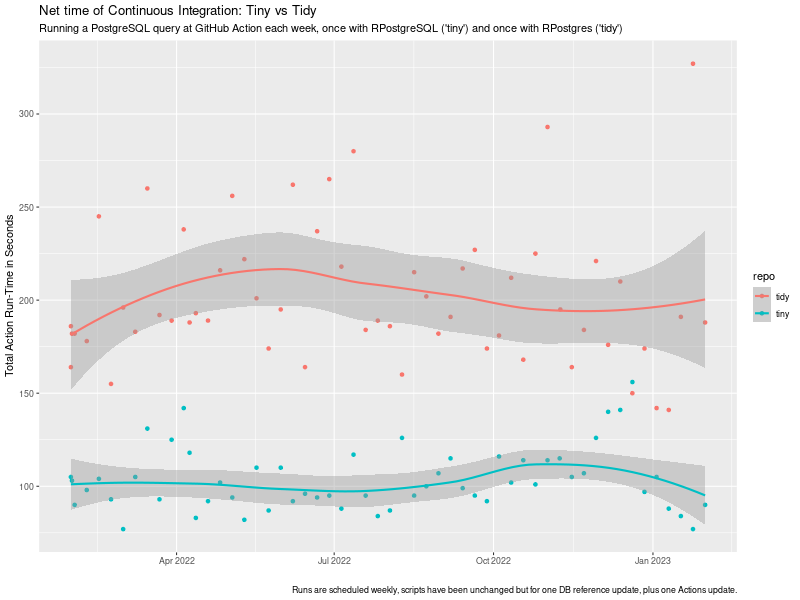
Waiting 1-24 minutes for a build to finish can be a massive time suck.
which we would like to come back to today. Furthermore, the unimitable @b0rk had a fabulous tweet just weeks later stating the same point debugging strategy: shorten your feedback loop as a key in a successful debugging strategy. So in sum: shorter is better. Nobody likes to wait. And shorter i.e. faster is a key and recurrent theme in the R4 series. Today we have a fairly nice illustration of two aspects we have stressed before: The combined effects can be staggering as we show below. The example is motivated by a truly surprising (we are being generous here) comment we received as an aside when discussing the eternal topic of whether R users do, or do not, have a choice when picking packages, or approaches, or verses. To our surprise, we were told that packages are not substitutable . Which is both demonstrably false (see below) and astonishing as it came from an academic. I.e. someone trained and paid to abstract superfluous detail away and recognise and compare core features of items under investigation. Truly stunning. But I digress. CRAN by now has many packages, slowly moving in on 20,000 in total, and is a unique success we commented-on time and time before. By now many packages shadow or duplicate each other, reinvent one another, or revise/review. One example is the pair of packages accessing PostgreSQL databases. There are several, but two are key. The older one is RPostgreSQL which has been around since Sameer Kumar Prayaga wrote it as a Google Summer of Code student in 2008 under my mentorship. The package has now been maintained well (if quietly) for many years by Tomoaki Nishiyama. The other entrant is more recent, though not new, and is RPostgres by Kirill M ller and others. We will for the remainder of this post refer to these two as the tiny and the tidy version as either can been as being a representative of a certain verse . The aforementioned comment on non-substitutability struck us as eminently silly, so we set out to prove just how absurd it really is. So about a year ago we set up pair of GitHub repos with minimal code in a pair we called lim-tiny and lim-tidy. Our conjecture was (and is!) that less is more just as post #34 titled Less Is More argued with respect to package dependencies. Each of the repos just does one thing: a query to a (freely accessible but remote) PostgreSQL database. The tiny version just retrieves a data frame using only the dependencies needed for RPostgreSQL namely DBI and nothing else. The tidy version retrieves a tibble and has access to everything else that comes when installing RPostgres: DBI, dplyr, and magrittr plus of course their respective dependencies. We were able to let the code run in (very default) GitHub Actions on a weekly schedule without intervention apart from one change to the SQL query when the remote server (providing public bioinformatics data) changed its schema slighly, plus one update to the action yaml code version. No other changes. We measure the time a standard continuous integration run takes in total using the default GitHub Action setup in the tidy case (which relies on RSPM/PPM binaries, caching, , and does not rebuild from source each time), and our own r-ci script (introduced in #32 for CI with R. It switched to using r2u during the course of this experiment but already had access to binaries via c2d4u so it is always binaries-based (see e.g. #37 or #13 for more). The chart shows the evolution of these run-times over the course of the year with one weekly run each.
tiny vs tidy ci timing impact chart tiny vs tidy ci timing impact chart
This study reveals a few things: The key point there is that while the net-time to fire off a single PostgreSQL is likely (near-)identical, the net cost of continuous integration is not. In this setup, it is about twice the run-time simply because Less Is More which (in this setup) comes out to about being twice as fast. And that is a valid (and concrete, and verifiable) illustration of the overall implicit cost of adding dependencies to creating and using development, test, or run-time environments. Faster feedback loops make for faster builds and faster debugging. Consider using fewer dependencies, and/or using binaries as provided by r2u.

This post by Dirk Eddelbuettel originated on his Thinking inside the box blog. Please report excessive re-aggregation in third-party for-profit settings.

28 January 2023

Russ Allbery: Review: The Library of the Dead

Review: The Library of the Dead, by T.L. Huchu
Series: Edinburgh Nights #1
Publisher: Tor
Copyright: 2021
Printing: 2022
ISBN: 1-250-76777-6
Format: Kindle
Pages: 329
The Library of the Dead is the first book in a post-apocalyptic (sort of) urban fantasy series set in Edinburgh, written by Zimbabwean author (and current Scotland resident) T.L. Huchu. Ropa is a ghosttalker. This means she can see people who have died but are still lingering because they have unfinished business. She can stabilize them and understand what they're saying with the help of her mbira. At the age of fourteen, she's the sole source of income for her small family. She lives with her grandmother and younger sister in a caravan (people in the US call it an RV), paying rent to an enterprising farmer turned landlord. Ropa's Edinburgh is much worse off than ours. Everything is poorer, more run-down, and more tenuous, but other than a few hints about global warming, we never learn the history. It reminded me a bit of the world in Octavia Butler's Parable of the Sower in the feel of civilization crumbling without a specific cause. Unlike that series, The Library of the Dead is not about the collapse or responses to it. The partial ruin of the city is the mostly unremarked backdrop of Ropa's life. Much of the book follows Ropa's daily life carrying messages for ghosts and taking care of her family. She does discover the titular library when a wealthier friend who got a job there shows it off to her, but it has no significant role in the plot. (That was disappointing.) The core plot, once Ropa is convinced by her grandmother to focus on it, is the missing son of a dead woman, who turns out to not be the only missing child. This is urban fantasy with the standard first-person perspective, so Ropa is the narrator. This style of book needs a memorable protagonist, and Ropa is certainly that. She's a talker who takes obvious delight in narrating her own story alongside a constant patter of opinions, observations, and Scottish dialect. Ropa is also poor. That last may not sound that notable; a lot of urban fantasy protagonists are not well-off. But most of them feel culturally middle-class in a way that Ropa does not. Money may be a story constraint in other books, but it rarely feels like a life constraint and experience the way it does here. It's hard to describe the difference in tone succinctly, since it's a lot of small things: the constant presence of money concerns, the frustration of possessions that are stolen or missing and can't be replaced, the tedious chores one has to do when there's no money, even the language and vulgarity Ropa uses. This is rare in fantasy and excellent characterization work. Given that, I am still frustrated with myself over how much I struggled with Ropa as a narrator. She's happy to talk about what is happening to her and what she's learning about (she listens voraciously to non-fiction while running messages), but she deflects, minimizes, or rushes past any mention of what she's feeling. If you don't like the angst that's common from urban fantasy protagonists, this may be the book for you. I have complained about that angst before, and therefore feel like this should have been the book for me, but apparently I need a minimum level of emotional processing and introspection from the narrator. Ropa is utterly unwilling to do any of that. It's possible to piece together what she's feeling and worrying about, but the reader has to rely on hints and oblique comments that she passes over quickly. It didn't help that Ropa is not interested in the same things in her world that I was interested in. She's not an unreliable narrator in the conventional sense; she doesn't lie to the reader or intentionally hide information. And yet, the experience of reading this book was, for me, similar to reading a book with an unreliable narrator. Ropa consistently refused to look at what I wanted her to look at or think about what I wanted her to think about. For example, when she has an opportunity to learn magic through books from the titular library, her initial enthusiasm is infectious. Huchu does a great job showing the excitement of someone who likes new ideas and likes telling other people about the neat things she just learned. But when things don't work the way she expected from the books, she doesn't follow up, experiment, or try to understand why. When her grandmother tries to explain something to her from a different angle, she blows her off and refuses to pay attention. And when she does get magic to work, she never tries to connect that to her previous understanding. I kept waiting for Ropa to try to build her own mental model of magic, but she would only toy with an idea for a few pages and then put it down and never mention it again. This is not a fault in the book, just a mismatch between the book and what I wanted to read. All of this is consistent with Ropa's defensive strategies, emotional resiliency, and approach to understanding the world. (I strongly suspect Huchu was giving Ropa some ADHD characteristics, and if so, I think he got it spot on.) Given that, I tried to pivot to appreciating the characterization and the world, but that ran into another mismatch I had with this book, and the reason why I passed on it when it initially came out. I tend to avoid fantasy novels about ghosts. This is not because I mind ghosts themselves, but I've learned from experience that authors who write about ghosts usually also write about other things that I don't want to read about. That unfortunately was the case here; The Library of the Dead was too far into horror for me. There's child abuse, drugs, body horror, and similar nastiness here, more than I wanted in my head. Ropa's full-speed-ahead attitude and refusal to dwell on anything made it a bit easier to read, but it was still too much for me. Ropa is a great character who is refreshingly different than the typical urban fantasy protagonist, and the few hints of the magical library and world background we get were intriguing. This book was not for me, but I can see why other people will love it. Followed by Our Lady of Mysterious Ailments. Rating: 6 out of 10

16 January 2023

Russ Allbery: Review: The Truth

Review: The Truth, by Terry Pratchett
Series: Discworld #25
Publisher: Harper
Copyright: November 2000
Printing: August 2014
ISBN: 0-06-230736-3
Format: Mass market
Pages: 435
The Truth is the 25th Discworld novel. Some reading order guides group it loosely into an "industrial revolution" sequence following Moving Pictures, but while there are thematic similarities I'll talk about in a moment, there's no real plot continuity. You could arguably start reading Discworld here, although you'd be spoiled for some character developments in the early Watch novels. William de Worde is paid to write a newsletter. That's not precisely what he calls it, and it's not clear whether his patrons know that he publishes it that way. He's paid to report on news of Ankh-Morpork that may be of interest of various rich or influential people who are not in Ankh-Morpork, and he discovered the best way to optimize this was to write a template of the newsletter, bring it to an engraver to make a plate of it, and run off copies for each of his customers, with some minor hand-written customization. It's a comfortable living for the estranged younger son of a wealthy noble. As the story opens, William is dutifully recording the rumor that dwarfs have discovered how to turn lead into gold. The rumor is true, although not in the way that one might initially assume.
The world is made up of four elements: Earth, Air, Fire, and Water. This is a fact well known even to Corporal Nobbs. It's also wrong. There's a fifth element, and generally it's called Surprise. For example, the dwarfs found out how to turn lead into gold by doing it the hard way. The difference between that and the easy way is that the hard way works.
The dwarfs used the lead to make a movable type printing press, which is about to turn William de Worde's small-scale, hand-crafted newsletter into a newspaper. The movable type printing press is not unknown technology. It's banned technology, because the powers that be in Ankh-Morpork know enough to be deeply suspicious of it. The religious establishment doesn't like it because words are too important and powerful to automate. The nobles and the Watch don't like it because cheap words cause problems. And the engraver's guild doesn't like it for obvious reasons. However, Lord Vetinari knows that one cannot apply brakes to a volcano, and commerce with the dwarfs is very important to the city. The dwarfs can continue. At least for now. As in Moving Pictures, most of The Truth is an idiosyncratic speedrun of the social effects of a new technology, this time newspapers. William has no grand plan; he's just an observant man who likes to write, cares a lot about the truth, and accidentally stumbles into editing a newspaper. (This, plus being an estranged son of a rich family, feels very on-point for journalism.) His naive belief is that people want to read true things, since that's what his original patrons wanted. Truth, however, may not be in the top five things people want from a newspaper. This setup requires some narrative force to push it along, which is provided by a plot to depose Vetinari by framing him for murder. The most interesting part of that story is Mr. Pin and Mr. Tulip, the people hired to do the framing and then dispose of the evidence. They're a classic villain type: the brains and the brawn, dangerous, terrifying, and willing to do horrible things to people. But one thing Pratchett excels at is taking a standard character type, turning it a bit sideways, and stuffing in things that one wouldn't think would belong. In this case, that's Mr. Tulip's deep appreciation for, and genius grasp of, fine art. It should not work to have the looming, awful person with anger issues be able to identify the exact heritage of every sculpture and fine piece of goldsmithing, and yet somehow it does. Also as in Moving Pictures (and, in a different way, Soul Music), Pratchett tends to anthropomorphize technology, giving it a life and motivations of its own. In this case, that's William's growing perception of the press as an insatiable maw into which one has to feed words. I'm usually dubious of shifting agency from humans to things when doing social analysis (and there's a lot of social analysis here), but I have to concede that Pratchett captures something deeply true about the experience of feedback loops with an audience. A lot of what Pratchett puts into this book about the problematic relationship between a popular press and the truth is obvious and familiar, but he also makes some subtle points about the way the medium shapes what people expect from it and how people produce content for it that are worthy of Marshall McLuhan. The interactions between William and the Watch were less satisfying. In our world, the US press is, with only rare exceptions, a thoughtless PR organ for police propaganda and the exonerative tense. Pratchett tackles that here... sort of. William vaguely grasps that his job as a reporter may be contrary to the job of the Watch to maintain order, and Vimes's ambivalent feelings towards "solving crimes" push the story in that direction. But this is also Vimes, who is clearly established as one of the good sort and therefore is a bad vehicle for talking about how the police corrupt the press. Pratchett has Vimes and Vetinari tacitly encourage William, which works within the story but takes the pressure off the conflict and leaves William well short of understanding the underlying politics. There's a lot more that could be said about the tension between the press and the authorities, but I think the Discworld setup isn't suitable for it. This is the sort of book that benefits from twenty-four volumes of backstory and practice. Pratchett's Ankh-Morpork cast ticks along like a well-oiled machine, which frees up space that would otherwise have to be spent on establishing secondary characters. The result is a lot of plot and social analysis shoved into a standard-length Discworld novel, and a story that's hard to put down. The balance between humor and plot is just about perfect, the references and allusions aren't overwhelming, and the supporting characters, both new and old, are excellent. We even get a good Death sequence. This is solid, consistent stuff: Discworld as a mature, well-developed setting with plenty of stories left to tell. Followed by Thief of Time in publication order, and later by Monstrous Regiment in the vaguely-connected industrial revolution sequence. Rating: 8 out of 10

Freexian Collaborators: Monthly report about Debian Long Term Support, December 2022 (by Anton Gladky)

Like each month, have a look at the work funded by Freexian s Debian LTS offering.

Debian LTS contributors In December, 17 contributors have been paid to work on Debian LTS, their reports are available:
  • Abhijith PA did 3.0h (out of 0h assigned and 14.0h from previous period), thus carrying over 11.0h to the next month.
  • Anton Gladky did 8.0h (out of 6.0h assigned and 9.0h from previous period), thus carrying over 7.0h to the next month.
  • Ben Hutchings did 24.0h (out of 9.0h assigned and 15.0h from previous period).
  • Chris Lamb did 18.0h (out of 18.0h assigned).
  • Dominik George did 0.0h (out of 10.0h assigned and 14.0h from previous period), thus carrying over 24.0h to the next month.
  • Emilio Pozuelo Monfort did 8.0h in December, 8.0h in November (out of 1.5h assigned and 49.5h from previous period), thus carrying over 43.0h to the next month.
  • Enrico Zini did 0.0h (out of 0h assigned and 8.0h from previous period), thus carrying over 8.0h to the next month.
  • Guilhem Moulin did 17.5h (out of 20.0h assigned), thus carrying over 2.5h to the next month.
  • Helmut Grohne did 15.0h (out of 15.0h assigned, 2.5h were taken from the extra-budget and worked on).
  • Markus Koschany did 40.0h (out of 40.0h assigned).
  • Ola Lundqvist did 10.0h (out of 7.5h assigned and 8.5h from previous period), thus carrying over 6.0h to the next month.
  • Roberto C. S nchez did 24.5h (out of 20.25h assigned and 11.75h from previous period), thus carrying over 7.5h to the next month.
  • Stefano Rivera did 2.5h (out of 20.5h assigned and 14.5h from previous period), thus carrying over 32.5h to the next month.
  • Sylvain Beucler did 20.5h (out of 37.0h assigned and 22.0h from previous period), thus carrying over 38.5h to the next month.
  • Thorsten Alteholz did 10.0h (out of 14.0h assigned), thus carrying over 4.0h to the next month.
  • Tobias Frost did 16.0h (out of 16.0h assigned).
  • Utkarsh Gupta did 51.5h (out of 42.5h assigned and 9.0h from previous period).

Evolution of the situation In December, we have released 47 DLAs, closing 232 CVEs. In the same year, in total we released 394 DLAs, closing 1450 CVEs. We are constantly growing and seeking new contributors. If you are a Debian Developer and want to join the LTS team, please contact us.

Thanks to our sponsors Sponsors that joined recently are in bold.

12 January 2023

Jonathan McDowell: Building a read-only Debian root setup: Part 1

I mentioned in the post about upgrading my home internet that part of the work I did was creating a read-only Debian root with a squashfs image. This post covers the details of how I boot with that image; a later post will cover how I build the squashfs image. First, David Reader kindly pointed me at his rodebian setup, which was helpful in making me think about the whole problem but ultimately not the direction I went. Primarily because on the old router (an RB3011) I am space constrained, with only 120M of usable flash, and so ideally I wanted as much as possible of the system in a well compressed filesystem. squashfs seemed like the best option for that, and ultimately I ended up with a 39M image. I ve then used overlayfs to mount a tmpfs, so I get what looks like a writeable system without having to do too many tweaks to the actual install. On the plus side I can then see exactly what is getting written where and decide whether I need to update something in the squashfs. I don t boot with an initrd - for initial testing I booted directly off a USB stick. I ve actually ended up continuing to do this in production, because I ve had no pressing reason to move it all to booting off internal flash (I ve ended up with a Sandisk SDCZ430-032G-G46 which is tiny). However nothing I m going to describe is dependent on that - this would work perfectly well for a initial UBIFS rootfs on internal NAND. So the basic overview is I boot off a minimal rootfs, mount a squashfs, create an appropriate tmpfs, mount an overlayfs that combines the two, then pivotroot into the overlayfs and exec its init so it becomes the rootfs. For the minimal rootfs I started with busybox, in particular I used the armhf busybox-static package from Debian. My RB5009 is an ARM64, but I wanted to be able to test on the RB3011 as well, which is ARMv7. Picking an armhf binary for the minimal rootfs lets me use the same image for both. Using the static build helps reduce the number of pieces involved in putting it all together. The busybox binary goes in /bin. I was able to cheat and chroot into the empty rootfs and call busybox --install -s to create symlinks for all the tools it provides, but I could have done this manually. There s only a handful that are actually needed, but it s amazing how much is crammed into a 1.2M binary. /sbin/init is a shell script:
Contents
#!/bin/ash
# Make sure we have a sane date
if [ -e /data/saved-date ]; then
        CURRENT_DATE=$(date -Iseconds)
        if [ "$ CURRENT_DATE:0:4 " -lt "2022" -o \
                        "$ CURRENT_DATE:0:4 " -gt "2030" ]; then
                echo Setting initial date
                date -s "$(cat /data/saved-date)"
        fi
fi
# Work out what platform we're on
ARCH=$(uname -m)
if [ "$ ARCH " == "aarch64" ]; then
        ARCH=arm64
else
        ARCH=armhf
fi
# Mount a tmpfs to store the changes
mount -t tmpfs root-rw /mnt/overlay/rw
# Make the directories we need in the tmpfs
mkdir /mnt/overlay/rw/upper
mkdir /mnt/overlay/rw/work
# Mount the squashfs and build an overlay root filesystem of it + the tmpfs
mount -t squashfs -o loop /data/router.$ ARCH .squashfs /mnt/overlay/lower
mount -t overlay \
        -o lowerdir=/mnt/overlay/lower,upperdir=/mnt/overlay/rw/upper,workdir=/mnt/overlay/rw/work \
        overlayfs-root /mnt/root
# Build the directories we need within the new root
mkdir /mnt/root/mnt/flash
mkdir /mnt/root/mnt/overlay
mkdir /mnt/root/mnt/overlay/lower
mkdir /mnt/root/mnt/overlay/rw
# Copy any stored state
if [ -e /data/state.$ ARCH .tar ]; then
        echo Restoring stored state
        cd /mnt/root
        tar xf /data/state.$ ARCH .tar
fi
cd /mnt/root
pivot_root . mnt/flash
echo Switching into root filesystem
exec chroot . sh -c "$(cat <<END
mount --move /mnt/flash/mnt/overlay/lower /mnt/overlay/lower
mount --move /mnt/flash/mnt/overlay/rw /mnt/overlay/rw
exec /sbin/init
END
)"
Most of what the script is doing is sorting out the squashfs + tmpfs backed overlayfs that becomes the full root filesystems, but there are a few other bits to note. First, we pick up a saved date from /data/saved-date - the router has no RTC and while it ll sort itself out with NTP once it gets networking up it s useful to make sure we don t end up comically far in the past or future. Second, the script looks at what architecture we re running and picks up an appropriate squashfs image from /data based on that. This let me use the same USB stick for testing on both the RB3011 and the RB5011. Finally we allow for a /data/state.$ ARCH .tar file to let us pick up changes to the rootfs at boot time - this prevents having to rebuild the squashfs image every time there s a persistent change. The other piece that doesn t show up in the script is that the kernel and its modules are all installed into this initial rootfs (and then symlinked from the squashfs). This lets me build a mostly modular kernel, as long as all the necessary drivers to mount the USB stick are built in. Once the system is fully booted the initial rootfs is available at /mnt/flash, by default mounted read-only (to avoid inadvertent writes), but able to be remounted to update the squashfs image, install a new kernel, or update the state tarball. /mnt/overlay/rw/upper/ is where updates to the overlayfs are written, which provides an easy way to see what files are changing, initially to determine what might need tweaked in the squashfs creation process and subsequently to be able to see what needs updated in the state tarball.

10 January 2023

Matthew Garrett: Integrating Linux with Okta Device Trust

I've written about bearer tokens and how much pain they cause me before, but sadly wishing for a better world doesn't make it happen so I'm making do with what's available. Okta has a feature called Device Trust which allows to you configure access control policies that prevent people obtaining tokens unless they're using a trusted device. This doesn't actually bind the tokens to the hardware in any way, so if a device is compromised or if a user is untrustworthy this doesn't prevent the token ending up on an unmonitored system with no security policies. But it's an incremental improvement, other than the fact that for desktop it's only supported on Windows and MacOS, which really doesn't line up well with my interests.

Obviously there's nothing fundamentally magic about these platforms, so it seemed fairly likely that it would be possible to make this work elsewhere. I spent a while staring at the implementation using Charles Proxy and the Chrome developer tools network tab and had worked out a lot, and then Okta published a paper describing a lot of what I'd just laboriously figured out. But it did also help clear up some points of confusion and clarified some design choices. I'm not going to give a full description of the details (with luck there'll be code shared for that before too long), but here's an outline of how all of this works. Also, to be clear, I'm only going to talk about the desktop support here - mobile is a bunch of related but distinct things that I haven't looked at in detail yet.

Okta's Device Trust (as officially supported) relies on Okta Verify, a local agent. When initially installed, Verify authenticates as the user, obtains a token with a scope that allows it to manage devices, and then registers the user's computer as an additional MFA factor. This involves it generating a JWT that embeds a number of custom claims about the device and its state, including things like the serial number. This JWT is signed with a locally generated (and hardware-backed, using a TPM or Secure Enclave) key, which allows Okta to determine that any future updates from a device claiming the same identity are genuinely from the same device (you could construct an update with a spoofed serial number, but you can't copy the key out of a TPM so you can't sign it appropriately). This is sufficient to get a device registered with Okta, at which point it can be used with Fastpass, Okta's hardware-backed MFA mechanism.

As outlined in the aforementioned deep dive paper, Fastpass is implemented via multiple mechanisms. I'm going to focus on the loopback one, since it's the one that has the strongest security properties. In this mode, Verify listens on one of a list of 10 or so ports on localhost. When you hit the Okta signin widget, choosing Fastpass triggers the widget into hitting each of these ports in turn until it finds one that speaks Fastpass and then submits a challenge to it (along with the URL that's making the request). Verify then constructs a response that includes the challenge and signs it with the hardware-backed key, along with information about whether this was done automatically or whether it included forcing the user to prove their presence. Verify then submits this back to Okta, and if that checks out Okta completes the authentication.

Doing this via loopback from the browser has a bunch of nice properties, primarily around the browser providing information about which site triggered the request. This means the Verify agent can make a decision about whether to submit something there (ie, if a fake login widget requests your creds, the agent will ignore it), and also allows the issued token to be cross-checked against the site that requested it (eg, if g1thub.com requests a token that's valid for github.com, that's a red flag). It's not quite at the same level as a hardware WebAuthn token, but it has many of the anti-phishing properties.

But none of this actually validates the device identity! The entire registration process is up to the client, and clients are in a position to lie. Someone could simply reimplement Verify to lie about, say, a device serial number when registering, and there'd be no proof to the contrary. Thankfully there's another level to this to provide stronger assurances. Okta allows you to provide a CA root[1]. When Okta issues a Fastpass challenge to a device the challenge includes a list of the trusted CAs. If a client has a certificate that chains back to that, it can embed an additional JWT in the auth JWT, this one containing the certificate and signed with the certificate's private key. This binds the CA-issued identity to the Fastpass validation, and causes the device to start appearing as "Managed" in the Okta device management UI. At that point you can configure policy to restrict various apps to managed devices, ensuring that users are only able to get tokens if they're using a device you've previously issued a certificate to.

I've managed to get Linux tooling working with this, though there's still a few drawbacks. The main issue is that the API only allows you to register devices that declare themselves as Windows or MacOS, followed by the login system sniffing browser user agent and only offering Fastpass if you're on one of the officially supported platforms. This can be worked around with an extension that spoofs user agent specifically on the login page, but that's still going to result in devices being logged as a non-Linux OS which makes interpreting the logs more difficult. There's also no ability to choose which bits of device state you log: there's a couple of existing integrations, and otherwise a fixed set of parameters that are reported. It'd be lovely to be able to log arbitrary material and make policy decisions based on that.

This also doesn't help with ChromeOS. There's no real way to automatically launch something that's bound to localhost (you could probably make this work using Crostini but there's no way to launch a Crostini app at login), and access to hardware-backed keys is kind of a complicated topic in ChromeOS for privacy reasons. I haven't tried this yet, but I think using an enterprise force-installed extension and the chrome.enterprise.platformKeys API to obtain a device identity cert and then intercepting requests to the appropriate port range on localhost ought to be enough to do that? But I've literally never written any Javascript so I don't know. Okta supports falling back from the loopback protocol to calling a custom URI scheme, but once you allow that you're also losing a bunch of the phishing protection, so I'd prefer not to take that approach.

Like I said, none of this prevents exfiltration of bearer tokens once they've been issued, and there's still a lot of ecosystem work to do there. But ensuring that tokens can't be issued to unmanaged machines in the first place is still a step forwards, and with luck we'll be able to make use of this on Linux systems without relying on proprietary client-side tooling.

(Time taken to code this implementation: about two days, and under 1000 lines of new code. Time taken to figure out what the fuck to write: rather a lot longer)

[1] There's also support for having Okta issue certificates, but then you're kind of back to the "How do I know this is my device" situation

comment count unavailable comments

8 January 2023

Anuradha Weeraman: Parallelizing and running distributed builds with distcc

Parallelizing the compilation of a large codebase is a breeze with distcc, which allows you to spread the load across multiple nodes and speed up the compilation time.Here s a sample network topology for a distributed build:
Install distcc on the three Debian/Ubuntu-based nodes:
# apt install distcc
Edit /etc/default/distcc and set:
STARTDISTCC="true"

# Customize for your environment
ALLOWEDNETS="192.168.2.0/24"

# Specify your network device
LISTENER="192.168.2.146"
Additionally, the JOBS and NICE variables can be tweaked to suit the compute power that you have available.Start distcc:
# systemctl start distcc
Do the same all the nodes, and if you have a firewall enabled with ufw, you will need to open up the port 3632 to the master node.
# ufw allow 3632/tcp
Additionally, if you d like to use ssh over untrusted networks so code and communication with the worker nodes happen over a secure channel, ensure that SSH is running and is opened up to the master node in the same manner as above with the key of the master node in ~/.ssh/authorized_keys of the worker nodes. Opening port 3632 in this manner is a security hole, so take precautions over untrusted networks.Back in the master node, setup a DISTCC_HOSTS environment variable that lists the worker nodes, including the master node. Note the order of the hosts, as it is important. The first host will be more heavily used, and distcc has no way of knowing the capacity and capability of the hosts, so specify the most powerful host first.
export DISTCC_HOSTS='localhost 192.168.2.107 192.168.2.91'
At this point, you re ready to compile.Go to your codebase, in this case we use the Linux kernel source code for the purpose of example.
$ make tinyconfig
$ time make -j$(nproc) CC=distcc bzImage
On another terminal, you can monitor the status of the distributed compilation with distmoncc-text or tools such as top or bpytop.Network throughput and latency will be a big factor in how much distcc will help speed up your build process. Using ssh may additionally introduce overhead, so play with the variables to see how much distcc can help speed up or optimize the build for your specific scenario. You may want to additionally consider ccache to speed up the build process.There are some aspects of the build process that are not effectively parallizable in this manner, such as the final linking step of the executable, for which you will not see any performance improvement with distcc.Give distcc a spin, and put any spare compute you have lying around in your home lab to good use.

7 January 2023

Dirk Eddelbuettel: RcppSpdlog 0.0.12 on CRAN: Added Stopwatch

Version 0.0.12 of RcppSpdlog is now on CRAN and in Debian. RcppSpdlog bundles spdlog, a wonderful header-only C++ logging library with all the bells and whistles you would want that was written by Gabi Melman, and also includes fmt by Victor Zverovich. This release adds support for the stopwatch object, a simple container around a std::chrono object. It makes (simple) time measurements of routines and code segments trivially easy. Instantiate a stopwatch object, and formatting it in a logging string displays elapsed time. And given that the whole mojo of RcppSpdlog (and its sibbling package spdl) is to make use easy in both R and C++ we can do this nicely and consistently in both languages. The vignette has an added section with a concrete example. The NEWS entry for this release follows.

Changes in RcppSpdlog version 0.0.12 (2023-01-07)
  • Addeed support for 'stopwatch' object allowing for simple timing (from both C++ and R) via the logging framework.
  • The spdlog logging pattern is documented via a reference.

Courtesy of my CRANberries, there is also a diffstat report. More detailed information is on the RcppSpdlog page, or the package documention site. If you like this or other open-source work I do, you can sponsor me at GitHub.

This post by Dirk Eddelbuettel originated on his Thinking inside the box blog. Please report excessive re-aggregation in third-party for-profit settings.

Next.

Previous.