Search Results: "spa"

18 March 2025

Matthew Garrett: Failing upwards: the Twitter encrypted DM failure

Almost two years ago, Twitter launched encrypted direct messages. I wrote about their technical implementation at the time, and to the best of my knowledge nothing has changed. The short story is that the actual encryption primitives used are entirely normal and fine - messages are encrypted using AES, and the AES keys are exchanged via NIST P-256 elliptic curve asymmetric keys. The asymmetric keys are each associated with a specific device or browser owned by a user, so when you send a message to someone you encrypt the AES key with all of their asymmetric keys and then each device or browser can decrypt the message again. As long as the keys are managed appropriately, this is infeasible to break.

But how do you know what a user's keys are? I also wrote about this last year - key distribution is a hard problem. In the Twitter DM case, you ask Twitter's server, and if Twitter wants to intercept your messages they replace your key. The documentation for the feature basically admits this - if people with guns showed up there, they could very much compromise the protection in such a way that all future messages you sent were readable. It's also impossible to prove that they're not already doing this without every user verifying that the public keys Twitter hands out to other users correspond to the private keys they hold, something that Twitter provides no mechanism to do.

This isn't the only weakness in the implementation. Twitter may not be able read the messages, but every encrypted DM is sent through exactly the same infrastructure as the unencrypted ones, so Twitter can see the time a message was sent, who it was sent to, and roughly how big it was. And because pictures and other attachments in Twitter DMs aren't sent in-line but are instead replaced with links, the implementation would encrypt the links but not the attachments - this is "solved" by simply blocking attachments in encrypted DMs. There's no forward secrecy - if a key is compromised it allows access to not only all new messages created with that key, but also all previous messages. If you log out of Twitter the keys are still stored by the browser, so if you can potentially be extracted and used to decrypt your communications. And there's no group chat support at all, which is more a functional restriction than a conceptual one.

To be fair, these are hard problems to solve! Signal solves all of them, but Signal is the product of a large number of highly skilled experts in cryptography, and even so it's taken years to achieve all of this. When Elon announced the launch of encrypted DMs he indicated that new features would be developed quickly - he's since publicly mentioned the feature a grand total of once, in which he mentioned further feature development that just didn't happen. None of the limitations mentioned in the documentation have been addressed in the 22 months since the feature was launched.

Why? Well, it turns out that the feature was developed by a total of two engineers, neither of whom is still employed at Twitter. The tech lead for the feature was Christopher Stanley, who was actually a SpaceX employee at the time. Since then he's ended up at DOGE, where he apparently set off alarms when attempting to install Starlink, and who today is apparently being appointed to the board of Fannie Mae, a government-backed mortgage company.

Anyway. Use Signal.

comment count unavailable comments

Dirk Eddelbuettel: RcppArmadillo 14.4.0-1 on CRAN: New Upstream

armadillo image Armadillo is a powerful and expressive C++ template library for linear algebra and scientific computing. It aims towards a good balance between speed and ease of use, has a syntax deliberately close to Matlab, and is useful for algorithm development directly in C++, or quick conversion of research code into production environments. RcppArmadillo integrates this library with the R environment and language and is widely used by (currently) 1234 other packages on CRAN, downloaded 38.8 million times (per the partial logs from the cloud mirrors of CRAN), and the CSDA paper (preprint / vignette) by Conrad and myself has been cited 617 times according to Google Scholar. Conrad released a new minor version 14.4.0 last month. That was preceding by several extensive rounds of reverse-dependency checks covering the 1200+ packages at CRAN. We eventually narrowed the impact down to just eight packages, and I opened issue #462 to manage the transition along with GitHub-only release 14.4.0-0 of RcppArmadillo. Several maintainers responded very promptly and updated within days this is truly appreciated. Yesterday the last package updated at CRAN coinciding nicely with our planned / intended upload to CRAN one month after the release. So this new release, at version -1, is now on CRAN. It brings the usual number of small improvements to Armadillo itself as well as updates to packaging. The changes since the last CRAN release are summarised below.

Changes in RcppArmadillo version 14.4.0-1 (2025-03-17)
  • CRAN release having given a few packages time to catch-up to small upstream change as discussed and managed in #462
  • Updated bibliography, and small edits to sparse matrix vignette
  • Switched continuous integration action to r-ci with implicit bootstrap

Changes in RcppArmadillo version 14.4.0-0 (2025-02-17) (GitHub Only)
  • Upgraded to Armadillo release 14.4.0 (Filtered Espresso)
    • Faster handling of pow() and square() within accu() and sum() expressions
    • Faster sort() and sort_index() for complex matrices
    • Expanded the field class with .reshape() and .resize() member functions
    • More efficient handling of compound expressions by sum(), reshape(), trans()
    • Better detection of vector expressions by pow(), imag(), conj()
  • The package generator helper function now supports additional DESCRIPTIONs
  • This release revealed a need for very minor changes for a handful reverse-dependency packages which will be organized via GitHub issue tracking

Courtesy of my CRANberries, there is a diffstat report relative to previous release. More detailed information is on the RcppArmadillo page. Questions, comments etc should go to the rcpp-devel mailing list off the Rcpp R-Forge page.

This post by Dirk Eddelbuettel originated on his Thinking inside the box blog. If you like this or other open-source work I do, you can sponsor me at GitHub.

Sergio Talens-Oliag: Using actions to build this site

As promised on my previous post, on this entry I ll explain how I ve set up forgejo actions on the source repository of this site to build it using a runner instead of doing it on the public server using a webhook to trigger the operation.

Setting up the systemThe first thing I ve done is to disable the forgejo webhook call that was used to publish the site, as I don t want to run it anymore. After that I added a new workflow to the repository that does the following things:
  • build the site using my hugo-adoc image.
  • push the result to a branch that contains the generated site (we do this because the server is already configured to work with the git repository and we can use force pushes to keep only the last version of the site, removing the need of extra code to manage package uploads and removals).
  • uses curl to send a notification to an instance of the webhook server installed on the remote server that triggers a script that updates the site using the git branch.

Setting up the webhook serviceOn the server machine we have installed and configured the webhook service to run a script that updates the site. To install the application and setup the configuration we have used the following script:
#!/bin/sh
set -e
# ---------
# VARIABLES
# ---------
ARCH="$(dpkg --print-architecture)"
WEBHOOK_VERSION="2.8.2"
DOWNLOAD_URL="https://github.com/adnanh/webhook/releases/download"
WEBHOOK_TGZ_URL="$DOWNLOAD_URL/$WEBHOOK_VERSION/webhook-linux-$ARCH.tar.gz"
WEBHOOK_SERVICE_NAME="webhook"
# Files
WEBHOOK_SERVICE_FILE="/etc/systemd/system/$WEBHOOK_SERVICE_NAME.service"
WEBHOOK_SOCKET_FILE="/etc/systemd/system/$WEBHOOK_SERVICE_NAME.socket"
WEBHOOK_TML_TEMPLATE="/srv/blogops/action/webhook.yml.envsubst"
WEBHOOK_YML="/etc/webhook.yml"
# Config file values
WEBHOOK_USER="$(id -u)"
WEBHOOK_GROUP="$(id -g)"
WEBHOOK_LISTEN_STREAM="172.31.31.1:4444"
# ----
# MAIN
# ----
# Install binary from releases (on Debian only version 2.8.0 is available, but
# I need the 2.8.2 version to support the systemd activation mode).
curl -fsSL -o "/tmp/webhook.tgz" "$WEBHOOK_TGZ_URL"
tar -C /tmp -xzf /tmp/webhook.tgz
sudo install -m 755 "/tmp/webhook-linux-$ARCH/webhook" /usr/local/bin/webhook
rm -rf "/tmp/webhook-linux-$ARCH" /tmp/webhook.tgz
# Service file
sudo sh -c "cat >'$WEBHOOK_SERVICE_FILE'" <<EOF
[Unit]
Description=Webhook server
[Service]
Type=exec
ExecStart=webhook -nopanic -hooks $WEBHOOK_YML
User=$WEBHOOK_USER
Group=$WEBHOOK_GROUP
EOF
# Socket config
sudo sh -c "cat >'$WEBHOOK_SOCKET_FILE'" <<EOF
[Unit]
Description=Webhook server socket
[Socket]
# Set FreeBind to listen on missing addresses (the VPN can be down sometimes)
FreeBind=true
# Set ListenStream to the IP and port you want to listen on
ListenStream=$WEBHOOK_LISTEN_STREAM
[Install]
WantedBy=multi-user.target
EOF
# Config file
BLOGOPS_TOKEN="$(uuid)" \
  envsubst <"$WEBHOOK_TML_TEMPLATE"   sudo sh -c "cat >$WEBHOOK_YML"
chmod 0640 "$WEBHOOK_YML"
chwon "$WEBHOOK_USER:$WEBHOOK_GROUP" "$WEBHOOK_YML"
# Restart and enable service
sudo systemctl daemon-reload
sudo systemctl stop "$WEBHOOK_SERVICE_NAME.socket"
sudo systemctl start "$WEBHOOK_SERVICE_NAME.socket"
sudo systemctl enable "$WEBHOOK_SERVICE_NAME.socket"
# ----
# vim: ts=2:sw=2:et:ai:sts=2
As seen on the code, we ve installed the application using a binary from the project repository instead of a package because we needed the latest version of the application to use systemd with socket activation. The configuration file template is the following one:
- id: "update-blogops"
  execute-command: "/srv/blogops/action/bin/update-blogops.sh"
  command-working-directory: "/srv/blogops"
  trigger-rule:
    match:
      type: "value"
      value: "$BLOGOPS_TOKEN"
      parameter:
        source: "header"
        name: "X-Blogops-Token"
The version on /etc/webhook.yml has the BLOGOPS_TOKEN adjusted to a random value that has to exported as a secret on the forgejo project (see later). Once the service is started each time the action is executed the webhook daemon will get a notification and will run the following update-blogops.sh script to publish the updated version of the site:
#!/bin/sh
set -e
# ---------
# VARIABLES
# ---------
# Values
REPO_URL="ssh://git@forgejo.mixinet.net/mixinet/blogops.git"
REPO_BRANCH="html"
REPO_DIR="public"
MAIL_PREFIX="[BLOGOPS-UPDATE-ACTION] "
# Address that gets all messages, leave it empty if not wanted
MAIL_TO_ADDR="blogops@mixinet.net"
# Directories
BASE_DIR="/srv/blogops"
PUBLIC_DIR="$BASE_DIR/$REPO_DIR"
NGINX_BASE_DIR="$BASE_DIR/nginx"
PUBLIC_HTML_DIR="$NGINX_BASE_DIR/public_html"
ACTION_BASE_DIR="$BASE_DIR/action"
ACTION_LOG_DIR="$ACTION_BASE_DIR/log"
# Files
OUTPUT_BASENAME="$(date +%Y%m%d-%H%M%S.%N)"
ACTION_LOGFILE_PATH="$ACTION_LOG_DIR/$OUTPUT_BASENAME.log"
# ---------
# Functions
# ---------
action_log()  
  echo "$(date -R) $*" >>"$ACTION_LOGFILE_PATH"
 
action_check_directories()  
  for _d in "$ACTION_BASE_DIR" "$ACTION_LOG_DIR"; do
    [ -d "$_d" ]   mkdir "$_d"
  done
 
action_clean_directories()  
  # Try to remove empty dirs
  for _d in "$ACTION_LOG_DIR" "$ACTION_BASE_DIR"; do
    if [ -d "$_d" ]; then
      rmdir "$_d" 2>/dev/null   true
    fi
  done
 
mail_success()  
  to_addr="$MAIL_TO_ADDR"
  if [ "$to_addr" ]; then
    subject="OK - updated blogops site"
    mail -s "$ MAIL_PREFIX $ subject " "$to_addr" <"$ACTION_LOGFILE_PATH"
  fi
 
mail_failure()  
  to_addr="$MAIL_TO_ADDR"
  if [ "$to_addr" ]; then
    subject="KO - failed to update blogops site"
    mail -s "$ MAIL_PREFIX $ subject " "$to_addr" <"$ACTION_LOGFILE_PATH"
  fi
  exit 1
 
# ----
# MAIN
# ----
ret="0"
# Check directories
action_check_directories
# Go to the base directory
cd "$BASE_DIR"
# Remove the old build dir if present
if [ -d "$PUBLIC_DIR" ]; then
  rm -rf "$PUBLIC_DIR"
fi
# Update the repository checkout
action_log "Updating the repository checkout"
git fetch --all >>"$ACTION_LOGFILE_PATH" 2>&1   ret="$?"
if [ "$ret" -ne "0" ]; then
  action_log "Failed to update the repository checkout"
  mail_failure
fi
# Get it from the repo branch & extract it
action_log "Downloading and extracting last site version using 'git archive'"
git archive --remote="$REPO_URL" "$REPO_BRANCH" "$REPO_DIR" \
    tar xf - >>"$ACTION_LOGFILE_PATH" 2>&1   ret="$?"
# Fail if public dir was missing
if [ "$ret" -ne "0" ]   [ ! -d "$PUBLIC_DIR" ]; then
  action_log "Failed to download or extract site"
  mail_failure
fi
# Remove old public_html copies
action_log 'Removing old site versions, if present'
find $NGINX_BASE_DIR -mindepth 1 -maxdepth 1 -name 'public_html-*' -type d \
  -exec rm -rf   \; >>"$ACTION_LOGFILE_PATH" 2>&1   ret="$?"
if [ "$ret" -ne "0" ]; then
  action_log "Removal of old site versions failed"
  mail_failure
fi
# Switch site directory
TS="$(date +%Y%m%d-%H%M%S)"
if [ -d "$PUBLIC_HTML_DIR" ]; then
  action_log "Moving '$PUBLIC_HTML_DIR' to '$PUBLIC_HTML_DIR-$TS'"
  mv "$PUBLIC_HTML_DIR" "$PUBLIC_HTML_DIR-$TS" >>"$ACTION_LOGFILE_PATH" 2>&1  
    ret="$?"
fi
if [ "$ret" -eq "0" ]; then
  action_log "Moving '$PUBLIC_DIR' to '$PUBLIC_HTML_DIR'"
  mv "$PUBLIC_DIR" "$PUBLIC_HTML_DIR" >>"$ACTION_LOGFILE_PATH" 2>&1  
    ret="$?"
fi
if [ "$ret" -ne "0" ]; then
  action_log "Site switch failed"
  mail_failure
else
  action_log "Site updated successfully"
  mail_success
fi
# ----
# vim: ts=2:sw=2:et:ai:sts=2

The hugo-adoc workflowThe workflow is defined in the .forgejo/workflows/hugo-adoc.yml file and looks like this:
name: hugo-adoc
# Run this job on push events to the main branch
on:
  push:
    branches:
      - 'main'
jobs:
  build-and-push:
    if: $  vars.BLOGOPS_WEBHOOK_URL != '' && secrets.BLOGOPS_TOKEN != ''  
    runs-on: docker
    container:
      image: forgejo.mixinet.net/oci/hugo-adoc:latest
    # Allow the job to write to the repository (not really needed on forgejo)
    permissions:
      contents: write
    steps:
      - name: Checkout the repo
        uses: actions/checkout@v4
        with:
          submodules: 'true'
      - name: Build the site
        shell: sh
        run:  
          rm -rf public
          hugo
      - name: Push compiled site to html branch
        shell: sh
        run:  
          # Set the git user
          git config --global user.email "blogops@mixinet.net"
          git config --global user.name "BlogOps"
          # Create a new orphan branch called html (it was not pulled by the
          # checkout step)
          git switch --orphan html
          # Add the public directory to the branch
          git add public
          # Commit the changes
          git commit --quiet -m "Updated site @ $(date -R)" public
          # Push the changes to the html branch
          git push origin html --force
          # Switch back to the main branch
          git switch main
      - name: Call the blogops update webhook endpoint
        shell: sh
        run:  
          HEADER="X-Blogops-Token: $  secrets.BLOGOPS_TOKEN  "
          curl --fail -k -H "$HEADER" $  vars.BLOGOPS_WEBHOOK_URL  
The only relevant thing is that we have to add the BLOGOPS_TOKEN variable to the project secrets (its value is the one included on the /etc/webhook.yml file created when installing the webhook service) and the BLOGOPS_WEBHOOK_URL project variable (its value is the URL of the webhook server, in my case http://172.31.31.1:4444/hooks/update-blogops); note that the job includes the -k flag on the curl command just in case I end up using TLS on the webhook server in the future, as discussed previously.

ConclusionNow that I have forgejo actions on my server I no longer need to build the site on the public server as I did initially, a good thing when the server is a small OVH VPS that only runs a couple of containers and a web server directly on the host. I m still using a notification system to make the server run a script to update the site because that way the forgejo server does not need access to the remote machine shell, only the webhook server which, IMHO, is a more secure setup.

Dima Kogan: Eigen macro specializations crashes

There's an issue in the Eigen linear algebra library where linking together objects compiled with different flags causes the resulting binary to crash. Some details are written-up in this mailing list thread. I just encountered a situation where a large application sometimes crashes for unknown reasons, and needed a method to determine whether this Eigen issue could be the cause. I ended up doing this by using the DWARF data to see if the linked binary contains the different incompatible flavors of malloc / free or not. I downloaded the small demo program showing the problem. I built it:
CCXXXFLAGS=-g make
Here if you run ./main, the bug is triggered, and a crash occurs. I looked at the debug info for the code in question:
for o (main lib.so)  
  echo "======== $o";
  readelf --debug-dump=decodedline $o \
    awk \
    '$1 ~ /^Memory.h/
      
       if(180 <= $2 && $2 <= 186)  
         have["malloc_glibc"]=1
        
       if(188 == $2)  
         have["malloc_handmade"]=1
        
       if(201 <= $2 && $2 <= 204)  
         have["free_glibc"]=1
        
       if(206 == $2)  
         have["free_handmade"]=1
        
      
     END
      
       for (var in have)  
         print(var);
        
      '
 
It says:
======== main
free_handmade
======== lib.so
malloc_glibc
free_glibc
Here I looked at main and lib.so (the build products from this little demo). In a real case you'd look at every shared library linked into the binary and the binary itself. On my machine /usr/include/eigen3/Eigen/src/Core/util/Memory.h looks like this, starting on line 174:
174 EIGEN_DEVICE_FUNC inline void* aligned_malloc(std::size_t size)
175  
176   check_that_malloc_is_allowed();
177 
178   void *result;
179   #if (EIGEN_DEFAULT_ALIGN_BYTES==0)   EIGEN_MALLOC_ALREADY_ALIGNED
180 
181     EIGEN_USING_STD(malloc)
182     result = malloc(size);
183 
184     #if EIGEN_DEFAULT_ALIGN_BYTES==16
185     eigen_assert((size<16   (std::size_t(result)%16)==0) && "System's malloc returned an unaligned pointer. Compile with EIGEN_MALLOC_ALREADY_ALIGNED=0 to fallback to handmade aligned memory allocator.");
186     #endif
187   #else
188     result = handmade_aligned_malloc(size);
189   #endif
190 
191   if(!result && size)
192     throw_std_bad_alloc();
193 
194   return result;
195  
196 
197 /** \internal Frees memory allocated with aligned_malloc. */
198 EIGEN_DEVICE_FUNC inline void aligned_free(void *ptr)
199  
200   #if (EIGEN_DEFAULT_ALIGN_BYTES==0)   EIGEN_MALLOC_ALREADY_ALIGNED
201 
202     EIGEN_USING_STD(free)
203     free(ptr);
204 
205   #else
206     handmade_aligned_free(ptr);
207   #endif
208  
The above awk script looks at the two malloc paths and the two free paths, and we can clearly see that it only ever calls malloc_glibc(), but has both flavors of free(). So this can crash. We want to see that the whole executable (shared libraries and all) should only have one type of malloc() and free(), and that would guarantee no crashing. There are a more functions in that header that should be instrumented (realloc() for instance) and the different alignment paths should be instrumented similarly (as described in the mailing list thread above), but here we see that this technique works.

17 March 2025

Sergio Talens-Oliag: Configuring forgejo actions

Last week I decided I wanted to try out forgejo actions to build this blog instead of using webhooks, so I looked the documentation and started playing with it until I had it working as I wanted. This post is to describe how I ve installed and configured a forgejo runner, how I ve added an oci organization to my instance to build, publish and mirror container images and added a couple of additional organizations (actions and docker for now) to mirror interesting actions. The changes made to build the site using actions will be documented on a separate post, as I ll be using this entry to test the new setup on the blog project.

Installing the runnerThe first thing I ve done is to install a runner on my server, I decided to use the OCI image installation method, as it seemed to be the easiest and fastest one. The commands I ve used to setup the runner are the following:
$ cd /srv
$ git clone https://forgejo.mixinet.net/blogops/forgejo-runner.git
$ cd forgejo-runner
$ sh ./bin/setup-runner.sh
The setup-runner.sh script does multiple things:
  • create a forgejo-runner user and group
  • create the necessary directories for the runner
  • create a .runner file with a predefined secret and the docker label
The setup-runner.sh code is available here. After running the script the runner has to be registered with the forgejo server, it can be done using the following command:
$ forgejo forgejo-cli actions register --name "$RUNNER_NAME" \
    --secret "$FORGEJO_SECRET"
The RUNNER_NAME variable is defined on the setup-runner.sh script and the FORGEJO_SECRET must match the value used on the .runner file.

Starting it with docker-composeTo launch the runner I m going to use a docker-compose.yml file that starts two containers, a docker in docker service to run the containers used by the workflow jobs and another one that runs the forgejo-runner itself. The initial version used a TCP port to communicate with the dockerd server from the runner, but when I tried to build images from a workflow I noticed that the containers launched by the runner were not going to be able to execute another dockerd inside the dind one and, even if they were, it was going to be expensive computationally. To avoid the issue I modified the dind service to use a unix socket on a shared volume that can be used by the runner service to communicate with the daemon and also re-shared with the job containers so the dockerd server can be used from them to build images.
Warning: The use of the same docker server that runs the jobs from them has security implications, but this instance is for a home server where I am the only user, so I am not worried about it and this way I can save some resources (in fact, I could use the host docker server directly instead of using a dind service, but just in case I want to run other containers on the host I prefer to keep the one used for the runner isolated from it). For those concerned about sharing the same server an alternative would be to launch a second dockerd only for the jobs (i.e. actions-dind) using the same approach (the volume with its socket will have to be shared with the runner service so it can be re-shared, but the runner does not need to use it).
The final docker-compose.yaml file is as follows:
services:
  dind:
    image: docker:dind
    container_name: 'dind'
    privileged: 'true'
    command: ['dockerd', '-H', 'unix:///dind/docker.sock', '-G', '$RUNNER_GID']
    restart: 'unless-stopped'
    volumes:
      - ./dind:/dind
  runner:
    image: 'data.forgejo.org/forgejo/runner:6.2.2'
    links:
      - dind
    depends_on:
      dind:
        condition: service_started
    container_name: 'runner'
    environment:
      DOCKER_HOST: 'unix:///dind/docker.sock'
    user: $RUNNER_UID:$RUNNER_GID
    volumes:
      - ./config.yaml:/config.yaml
      - ./data:/data
      - ./dind:/dind
    restart: 'unless-stopped'
    command: '/bin/sh -c "sleep 5; forgejo-runner daemon -c /config.yaml"'
There are multiple things to comment about this file:
  1. The dockerd server is started with the -H unix:///dind/docker.sock flag to use the unix socket to communicate with the daemon instead of using a TCP port (as said, it is faster and allows us to share the socket with the containers started by the runner).
  2. We are running the dockerd daemon with the RUNNER_GID group so the runner can communicate with it (the socket gets that group which is the same used by the runner).
  3. The runner container mounts three volumes: the data directory, the dind folder where docker creates the unix socket and a config.yaml file used by us to change the default runner configuration.
The config.yaml file was originally created using the forgejo-runner:
$ docker run --rm data.forgejo.org/forgejo/runner:6.2.2 \
    forgejo-runner generate-config > config.yaml
The changes to it are minimal, the runner capacity has been increased to 2 (that allows it to run two jobs at the same time) and the /dind/docker.sock value has been added to the valid_volumes key to allow the containers launched by the runner to mount it when needed; the diff against the default version is as follows:
@@ -13,7 +13,8 @@
   # Where to store the registration result.
   file: .runner
   # Execute how many tasks concurrently at the same time.
-  capacity: 1
+  # STO: Allow 2 concurrent tasks
+  capacity: 2
   # Extra environment variables to run jobs.
   envs:
     A_TEST_ENV_NAME_1: a_test_env_value_1
@@ -87,7 +88,9 @@
   # If you want to allow any volume, please use the following configuration:
   # valid_volumes:
   #   - '**'
-  valid_volumes: []
+  # STO: Allow to mount the /dind/docker.sock on the containers
+  valid_volumes:
+    - /dind/docker.sock
   # overrides the docker client host with the specified one.
   # If "-" or "", an available docker host will automatically be found.
   # If "automount", an available docker host will automatically be found and ...
To start the runner we export the RUNNER_UID and RUNNER_GID variables and call docker-compose up to start the containers on the background:
$ RUNNER_UID="$(id -u forgejo-runner)" RUNNER_GID="$(id -g forgejo-runner)" \
    docker compose up -d
If the server was configured right we are now able to start using actions with this runner.

Preparing the system to run things locallyTo avoid unnecessary network traffic we are going to create a multiple organizations in our forgejo instance to maintain our own actions and container images and mirror remote ones. The rationale behind the mirror use is that we reduce a lot the need to connect to remote servers to download the actions and images, which is good for performance and security reasons. In fact, we are going to build our own images for some things to install the tools we want without needing to do it over and over again on the workflow jobs.

Mirrored actionsThe actions we are mirroring are on the actions and docker organizations, we have created the following ones for now (the mirrors were created using the forgejo web interface and we have disabled manually all the forgejo modules except the code one for them):
To use our actions by default (i.e., without needing to add the server URL on the uses keyword) we have added the following section to the app.ini file of our forgejo server:
[actions]
ENABLED = true
DEFAULT_ACTIONS_URL = https://forgejo.mixinet.net

Setting up credentials to push imagesTo be able to push images to the oci organization I ve created a token with package:write permission for my own user because I m a member of the organization and I m authorized to publish packages on it (a different user could be created, but as I said this is for personal use, so there is no need to complicate things for now). To allow the use of those credentials on the actions I have added a secret (REGISTRY_PASS) and a variable (REGISTRY_USER) to the oci organization to allow the actions to use them. I ve also logged myself on my local docker client to be able to push images to the oci group by hand, as I it is needed for bootstrapping the system (as I m using local images on the worflows I need to push them to the server before running the ones that are used to build the images).

Local and mirrored imagesOur images will be stored on the packages section of a new organization called oci, inside it we have created two projects that use forgejo actions to keep things in shape:
  • images: contains the source files used to generate our own images and the actions to build, tag and push them to the oci organization group.
  • mirrors: contains a configuration file for the regsync tool to mirror containers and an action to run it.
On the next sections we are going to describe the actions and images we have created and mirrored from those projects.

The oci/images projectThe images project is a monorepo that contains the source files for the images we are going to build and a couple of actions. The image sources are on sub directories of the repository, to be considered an image the folder has to contain a Dockerfile that will be used to build the image. The repository has two workflows:
  • build-image-from-tag: Workflow to build, tag and push an image to the oci organization
  • multi-semantic-release: Workflow to create tags for the images using the multi-semantic-release tool.
As the workflows are already configured to use some of our images we pushed some of them from a checkout of the repository using the following commands:
registry="forgejo.mixinet.net/oci"
for img in alpine-mixinet node-mixinet multi-semantic-release; do
  docker build -t $registry/$img:1.0.0 $img
  docker tag $registry/$img:1.0.0 $registry/$img:latest
  docker push $registry/$img:1.0.0
  docker push $registry/$img:latest
done
On the next sub sections we will describe what the workflows do and will show their source code.

build-image-from-tag workflowThis workflow uses a docker client to build an image from a tag on the repository with the format image-name-v[0-9].[0-9].[0-9]+. As the runner is executed on a container (instead of using lxc) it seemed unreasonable to run another dind container from that one, that is why, after some tests, I decided to share the dind service server socket with the runner container and enabled the option to mount it also on the containers launched by the runner when needed (I only do it on the build-image-from-tag action for now). The action was configured to run using a trigger or when new tags with the right format were created, but when the tag is created by multi-semantic-release the trigger does not work for some reason, so now it only runs the job on triggers and checks if it is launched for a tag with the right format on the job itself. The source code of the action is as follows:
name: build-image-from-tag
on:
  workflow_dispatch:
jobs:
  build:
    # Don't build the image if the registry credentials are not set, the ref is not a tag or it doesn't contain '-v'
    if: $  vars.REGISTRY_USER != '' && secrets.REGISTRY_PASS != '' && startsWith(github.ref, 'refs/tags/') && contains(github.ref, '-v')  
    runs-on: docker
    container:
      image: forgejo.mixinet.net/oci/node-mixinet:latest
      # Mount the dind socket on the container at the default location
      options: -v /dind/docker.sock:/var/run/docker.sock
    steps:
      - name: Extract image name and tag from git and get registry name from env
        id: job_data
        run:  
          echo "::set-output name=img_name::$ GITHUB_REF_NAME%%-v* "
          echo "::set-output name=img_tag::$ GITHUB_REF_NAME##*-v "
          echo "::set-output name=registry::$(
            echo "$  github.server_url  "   sed -e 's%https://%%'
          )"
          echo "::set-output name=oci_registry_prefix::$(
            echo "$  github.server_url  /oci"   sed -e 's%https://%%'
          )"
      - name: Checkout the repo
        uses: actions/checkout@v4
      - name: Export build dir and Dockerfile
        id: build_data
        run:  
          img="$  steps.job_data.outputs.img_name  "
          build_dir="$(pwd)/$ img "
          dockerfile="$ build_dir /Dockerfile"
          if [ -f "$dockerfile" ]; then
            echo "::set-output name=build_dir::$build_dir"
            echo "::set-output name=dockerfile::$dockerfile"
          else
            echo "Couldn't find the Dockerfile for the '$img' image"
            exit 1
          fi
      - name: Login to the Container Registry
        uses: docker/login-action@v3
        with:
          registry: $  steps.job_data.outputs.registry  
          username: $  vars.REGISTRY_USER  
          password: $  secrets.REGISTRY_PASS  
      - name: Set up Docker Buildx
        uses: docker/setup-buildx-action@v3
      - name: Build and Push
        uses: docker/build-push-action@v6
        with:
          push: true
          tags:  
            $  steps.job_data.outputs.oci_registry_prefix  /$  steps.job_data.outputs.img_name  :$  steps.job_data.outputs.img_tag  
            $  steps.job_data.outputs.oci_registry_prefix  /$  steps.job_data.outputs.img_name  :latest
          context: $  steps.build_data.outputs.build_dir  
          file: $  steps.build_data.outputs.dockerfile  
          build-args:  
            OCI_REGISTRY_PREFIX=$  steps.job_data.outputs.oci_registry_prefix  /
Some notes about this code:
  1. The if condition of the build job is not perfect, but it is good enough to avoid wrong uses as long as nobody uses manual tags with the wrong format and expects things to work (it checks if the REGISTRY_USER and REGISTRY_PASS variables are set, if the ref is a tag and if it contains the -v string).
  2. To be able to access the dind socket we mount it on the container using the options key on the container section of the job (this only works if supported by the runner configuration as explained before).
  3. We use the job_data step to get information about the image from the tag and the registry URL from the environment variables, it is executed first because all the information is available without checking out the repository.
  4. We use the job_data step to get the build dir and Dockerfile paths from the repository (right now we are assuming fixed paths and checking if the Dockerfile exists, but in the future we could use a configuration file to get them, if needed).
  5. As we are using a docker daemon that is already running there is no need to use the docker/setup-docker-action to install it.
  6. On the build and push step we pass the OCI_REGISTRY_PREFIX build argument to the Dockerfile to be able to use it on the FROM instruction (we are using it in our images).

multi-semantic-release workflowThis workflow is used to run the multi-semantic-release tool on pushes to the main branch. It is configured to create the configuration files on the fly (it prepares things to tag the folders that contain a Dockerfile using a couple of template files available on the repository s .forgejo directory) and run the multi-semantic-release tool to create tags and push them to the repository if new versions are to be built. Initially we assumed that the tag creation pushed by multi-semantic-release would be enough to run the build-tagged-image-task action, but as it didn t work we removed the rule to run the action on tag creation and added code to trigger the action using an api call for the newly created tags (we get them from the output of the multi-semantic-release execution). The source code of the action is as follows:
name: multi-semantic-release
on:
  push:
    branches:
      - 'main'
jobs:
  multi-semantic-release:
    runs-on: docker
    container:
      image: forgejo.mixinet.net/oci/multi-semantic-release:latest
    steps:
      - name: Checkout the repo
        uses: actions/checkout@v4
      - name: Generate multi-semantic-release configuration
        shell: sh
        run:  
          # Get the list of images to work with (the folders that have a Dockerfile)
          images="$(for img in */Dockerfile; do dirname "$img"; done)"
          # Generate a values.yaml file for the main packages.json file
          package_json_values_yaml=".package.json-values.yaml"
          echo "images:" >"$package_json_values_yaml"
          for img in $images; do
            echo " - $img" >>"$package_json_values_yaml"
          done
          echo "::group::Generated values.yaml for the project"
          cat "$package_json_values_yaml"
          echo "::endgroup::"
          # Generate the package.json file validating that is a good json file with jq
          tmpl -f "$package_json_values_yaml" ".forgejo/package.json.tmpl"   jq . > "package.json"
          echo "::group::Generated package.json for the project"
          cat "package.json"
          echo "::endgroup::"
          # Remove the temporary values file
          rm -f "$package_json_values_yaml"
          # Generate the package.json file for each image
          for img in $images; do
            tmpl -v "img_name=$img" -v "img_path=$img" ".forgejo/ws-package.json.tmpl"   jq . > "$img/package.json"
            echo "::group::Generated package.json for the '$img' image"
            cat "$img/package.json"
            echo "::endgroup::"
          done
      - name: Run multi-semantic-release
        shell: sh
        run:  
          multi-semantic-release   tee .multi-semantic-release.log
      - name: Trigger builds
        shell: sh
        run:  
          # Get the list of tags published on the previous steps
          tags="$(
            sed -n -e 's/^\[.*\] \[\(.*\)\] .* Published release \([0-9]\+\.[0-9]\+\.[0-9]\+\) on .*$/\1-v\2/p' \
              .multi-semantic-release.log
          )"
          rm -f .multi-semantic-release.log
          if [ "$tags" ]; then
            # Prepare the url for building the images
            workflow="build-image-from-tag.yaml"
            dispatch_url="$  github.api_url  /repos/$  github.repository  /actions/workflows/$workflow/dispatches"
            echo "$tags"   while read -r tag; do
              echo "Triggering build for tag '$tag'"
              curl \
                -H "Content-Type:application/json" \
                -H "Authorization: token $  secrets.GITHUB_TOKEN  " \
                -d " \"ref\":\"$tag\" " "$dispatch_url"
            done
          fi
Notes about this code:
  1. The use of the tmpl tool to process the multi-semantic-release configuration templates comes from previous uses, but on this case we could use a different approach (i.e. envsubst could be used) but we left it because it keeps things simple and can be useful in the future if we want to do more complex things with the template files.
  2. We use tee to show and dump to a file the output of the multi-semantic-release execution.
  3. We get the list of pushed tags using sed against the output of the multi-semantic-release execution and for each one found we use curl to call the forgejo API to trigger the build job; as the call is against the same project we can use the GITHUB_TOKEN generated for the workflow to do it, without creating a user token that has to be shared as a secret.
The .forgejo/package.json.tmpl file is the following one:
 
  "name": "multi-semantic-release",
  "version": "0.0.0-semantically-released",
  "private": true,
  "multi-release":  
    "tagFormat": "$ name -v$ version "
   ,
  "workspaces":   .images   toJson  
 
As can be seen it only needs a list of paths to the images as argument (the file we generate contains the names and paths, but it could be simplified). And the .forgejo/ws-package.json.tmpl file is the following one:
 
  "name": "  .img_name  ",
  "license": "UNLICENSED",
  "release":  
    "plugins": [
      [
        "@semantic-release/commit-analyzer",
         
          "preset": "conventionalcommits",
          "releaseRules": [
              "breaking": true, "release": "major"  ,
              "revert": true, "release": "patch"  ,
              "type": "feat", "release": "minor"  ,
              "type": "fix", "release": "patch"  ,
              "type": "perf", "release": "patch"  
          ]
         
      ],
      [
        "semantic-release-replace-plugin",
         
          "replacements": [
             
              "files": [ "  .img_path  /msr.yaml" ],
              "from": "^version:.*$",
              "to": "version: $ nextRelease.version ",
              "allowEmptyPaths": true
             
          ]
         
      ],
      [
        "@semantic-release/git",
         
          "assets": [ "msr.yaml" ],
          "message": "ci(release):   .img_name  -v$ nextRelease.version \n\n$ nextRelease.notes "
         
      ]
    ],
    "branches": [ "main" ]


The oci/mirrors projectThe repository contains a template for the configuration file we are going to use with regsync (regsync.envsubst.yml) to mirror images from remote registries using a workflow that generates a configuration file from the template and runs the tool. The initial version of the regsync.envsubst.yml file is prepared to mirror alpine containers from version 3.21 to 3.29 (we explicitly remove version 3.20) and needs the forgejo.mixinet.net/oci/node-mixinet:latest image to run (as explained before it was pushed manually to the server):
version: 1
creds:
  - registry: "$REGISTRY"
    user: "$REGISTRY_USER"
    pass: "$REGISTRY_PASS"
sync:
  - source: alpine
    target: $REGISTRY/oci/alpine
    type: repository
    tags:
      allow:
        - "latest"
        - "3\\.2\\d+"
        - "3\\.2\\d+.\\d+"
      deny:
        - "3\\.20"
        - "3\\.20.\\d+"

mirror workflowThe mirror workflow creates a configuration file replacing the value of the REGISTRY environment variable (computed by removing the protocol from the server_url), the REGISTRY_USER organization value and the REGISTRY_PASS secret using the envsubst command and running the regsync tool to mirror the images using the configuration file. The action is configured to run daily, on push events when the regsync.envsubst.yml file is modified on the main branch and can also be triggered manually. The source code of the action is as follows:
.forgejo/workflows/mirror.yaml
name: mirror
on:
  schedule:
    - cron: '@daily'
  push:
    branches:
      - main
    paths:
      - 'regsync.envsubst.yml'
  workflow_dispatch:
jobs:
  mirror:
    if: $  vars.REGISTRY_USER != '' && secrets.REGISTRY_PASS != ''  
    runs-on: docker
    container:
      image: forgejo.mixinet.net/oci/node-mixinet:latest
    steps:
      - name: Checkout
        uses: actions/checkout@v4
      - name: Sync images
        run:  
          REGISTRY="$(echo "$  github.server_url  "   sed -e 's%https://%%')" \
          REGISTRY_USER="$  vars.REGISTRY_USER  " \
          REGISTRY_PASS="$  secrets.REGISTRY_PASS  " \
            envsubst <regsync.envsubst.yml >.regsync.yml
          regsync --config .regsync.yml once
          rm -f .regsync.yml

ConclusionWe have installed a forgejo-runner and configured it to run actions for our own server and things are working fine. This approach allows us to have a powerful CI/CD system on a modest home server, something very useful for maintaining personal projects and playing with things without needing SaaS platforms like github or gitlab.

James Valleroy: What s New for FreedomBox in Debian 13 trixie

FreedomBox is a Debian blend that makes it easier to run your own server. Approximately every two years, there is a new stable release of Debian. This year s release will be called Debian 13 "trixie". This post will provide an overview of changes between FreedomBox 23.6 (the version that shipped in Debian 12 "bookworm") and 25.5 (the latest release). Note: Debian 13 "trixie" is not yet released, so things may still change, be added or removed, before the official release. General Diagnostics Name Services Networks Privacy Users and Groups Deluge Ejabberd Feather Wiki GitWeb GNOME ikiwiki Kiwix Matrix Synapse MediaWiki MiniDLNA Miniflux Nextcloud OpenVPN Postfix/Dovecot Shadowsocks Server SOGo TiddlyWiki Tor Proxy Transmission Conclusion Over the past two years, FreedomBox has been increasing the number of features and applications available to its users. We have also focused on improving the reliability of the system, detecting unexpected situations, and providing means to return to a known good state. With these improvements, FreedomBox has become a good solution for people with limited time or energy to set up and start running a personal server, at home or in the cloud. Looking forward, we would like to focus on making more powerful hardware available with FreedomBox pre-installed and ready to be used. This hardware would also support larger storage devices, making it suitable as a NAS or media server. We are also very interested in exploring new features such as atomic updates, which will further enhance the reliability of the system.

Vincent Bernat: Offline PKI using 3 YubiKeys and an ARM single board computer

An offline PKI enhances security by physically isolating the certificate authority from network threats. A YubiKey is a low-cost solution to store a root certificate. You also need an air-gapped environment to operate the root CA.
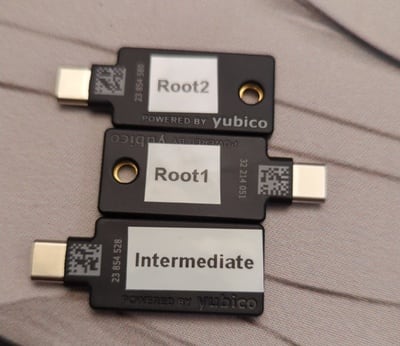
PKI relying on a set of 3 YubiKeys: 2 for the root CA and 1 for the intermediate CA.
Offline PKI backed up by 3 YubiKeys
This post describes an offline PKI system using the following components: It is possible to add more YubiKeys as a backup of the root CA if needed. This is not needed for the intermediate CA as you can generate a new one if the current one gets destroyed.

The software part offline-pki is a small Python application to manage an offline PKI. It relies on yubikey-manager to manage YubiKeys and cryptography for cryptographic operations not executed on the YubiKeys. The application has some opinionated design choices. Notably, the cryptography is hard-coded to use NIST P-384 elliptic curve. The first step is to reset all your YubiKeys:
$ offline-pki yubikey reset
This will reset the connected YubiKey. Are you sure? [y/N]: y
New PIN code:
Repeat for confirmation:
New PUK code:
Repeat for confirmation:
New management key ('.' to generate a random one):
WARNING[pki-yubikey] Using random management key: e8ffdce07a4e3bd5c0d803aa3948a9c36cfb86ed5a2d5cf533e97b088ae9e629
INFO[pki-yubikey]  0: Yubico YubiKey OTP+FIDO+CCID 00 00
INFO[pki-yubikey] SN: 23854514
INFO[yubikit.management] Device config written
INFO[yubikit.piv] PIV application data reset performed
INFO[yubikit.piv] Management key set
INFO[yubikit.piv] New PUK set
INFO[yubikit.piv] New PIN set
INFO[pki-yubikey] YubiKey reset successful!
Then, generate the root CA and create as many copies as you want:
$ offline-pki certificate root --permitted example.com
Management key for Root X:
Plug YubiKey "Root X"...
INFO[pki-yubikey]  0: Yubico YubiKey CCID 00 00
INFO[pki-yubikey] SN: 23854514
INFO[yubikit.piv] Data written to object slot 0x5fc10a
INFO[yubikit.piv] Certificate written to slot 9C (SIGNATURE), compression=True
INFO[yubikit.piv] Private key imported in slot 9C (SIGNATURE) of type ECCP384
Copy root certificate to another YubiKey? [y/N]: y
Plug YubiKey "Root X"...
INFO[pki-yubikey]  0: Yubico YubiKey CCID 00 00
INFO[pki-yubikey] SN: 23854514
INFO[yubikit.piv] Data written to object slot 0x5fc10a
INFO[yubikit.piv] Certificate written to slot 9C (SIGNATURE), compression=True
INFO[yubikit.piv] Private key imported in slot 9C (SIGNATURE) of type ECCP384
Copy root certificate to another YubiKey? [y/N]: n
You can inspect the result:
$ offline-pki yubikey info
INFO[pki-yubikey]  0: Yubico YubiKey CCID 00 00
INFO[pki-yubikey] SN: 23854514
INFO[pki-yubikey] Slot 9C (SIGNATURE):
INFO[pki-yubikey]   Private key type: ECCP384
INFO[pki-yubikey]   Public key:
INFO[pki-yubikey]     Algorithm:  secp384r1
INFO[pki-yubikey]     Issuer:     CN=Root CA
INFO[pki-yubikey]     Subject:    CN=Root CA
INFO[pki-yubikey]     Serial:     1
INFO[pki-yubikey]     Not before: 2024-07-05T18:17:19+00:00
INFO[pki-yubikey]     Not after:  2044-06-30T18:17:19+00:00
INFO[pki-yubikey]     PEM:
-----BEGIN CERTIFICATE-----
MIIBcjCB+aADAgECAgEBMAoGCCqGSM49BAMDMBIxEDAOBgNVBAMMB1Jvb3QgQ0Ew
HhcNMjQwNzA1MTgxNzE5WhcNNDQwNjMwMTgxNzE5WjASMRAwDgYDVQQDDAdSb290
IENBMHYwEAYHKoZIzj0CAQYFK4EEACIDYgAERg3Vir6cpEtB8Vgo5cAyBTkku/4w
kXvhWlYZysz7+YzTcxIInZV6mpw61o8W+XbxZV6H6+3YHsr/IeigkK04/HJPi6+i
zU5WJHeBJMqjj2No54Nsx6ep4OtNBMa/7T9foyMwITAPBgNVHRMBAf8EBTADAQH/
MA4GA1UdDwEB/wQEAwIBhjAKBggqhkjOPQQDAwNoADBlAjEAwYKy/L8leJyiZSnn
xrY8xv8wkB9HL2TEAI6fC7gNc2bsISKFwMkyAwg+mKFKN2w7AjBRCtZKg4DZ2iUo
6c0BTXC9a3/28V5aydZj6rvx0JqbF/Ln5+RQL6wFMLoPIvCIiCU=
-----END CERTIFICATE-----
Then, you can create an intermediate certificate with offline-pki yubikey intermediate and use it to sign certificates by providing a CSR to offline-pki certificate sign. Be careful and inspect the CSR before signing it, as only the subject name can be overridden. Check the documentation for more details. Get the available options using the --help flag.

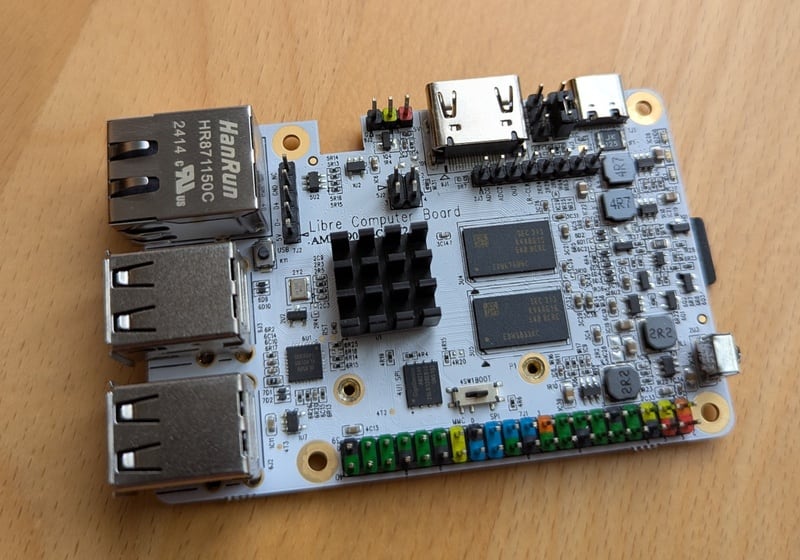
The hardware part To ensure the operations on the root and intermediate CAs are air-gapped, a cost-efficient solution is to use an ARM64 single board computer. The Libre Computer Sweet Potato SBC is a more open alternative to the well-known Raspberry Pi.1
Libre Computer Sweet Potato single board computer relying on the Amlogic S905X SOC
Libre Computer Sweet Potato SBC, powered by the AML-S905X SOC
I interact with it through an USB to TTL UART converter:
$ tio /dev/ttyUSB0
[16:40:44.546] tio v3.7
[16:40:44.546] Press ctrl-t q to quit
[16:40:44.555] Connected to /dev/ttyUSB0
GXL:BL1:9ac50e:bb16dc;FEAT:ADFC318C:0;POC:1;RCY:0;SPI:0;0.0;CHK:0;
TE: 36574
BL2 Built : 15:21:18, Aug 28 2019. gxl g1bf2b53 - luan.yuan@droid15-sz
set vcck to 1120 mv
set vddee to 1000 mv
Board ID = 4
CPU clk: 1200MHz
[ ]

The Nix glue To bring everything together, I am using Nix with a Flake providing:
  • a package for the offline-pki application, with shell completion,
  • a development shell, including an editable version of the offline-pki application,
  • a NixOS module to setup the offline PKI, resetting the system at each boot,
  • a QEMU image for testing, and
  • an SD card image to be used on the Sweet Potato or another ARM64 SBC.
# Execute the application locally
nix run github:vincentbernat/offline-pki -- --help
# Run the application inside a QEMU VM
nix run github:vincentbernat/offline-pki\#qemu
# Build a SD card for the Sweet Potato or for the Raspberry Pi
nix build --system aarch64-linux github:vincentbernat/offline-pki\#sdcard.potato
nix build --system aarch64-linux github:vincentbernat/offline-pki\#sdcard.generic
# Get a development shell with the application
nix develop github:vincentbernat/offline-pki

  1. The key for the root CA is not generated by the YubiKey. Using an air-gapped computer is all the more important. Put it in a safe with the YubiKeys when done!

14 March 2025

Dima Kogan: Getting precise timings out of RS-232 output

For uninteresting reasons I need very regular 58Hz pulses coming out of an RS-232 Tx line: the time between each pulse should be as close to 1/58s as possible. I produce each pulse by writing an \xFF byte to the device. The start bit is the only active-voltage bit being sent, and that produces my pulse. I wrote this obvious C program:
#include <stdio.h>
#include <stdlib.h>
#include <stdbool.h>
#include <sys/ioctl.h>
#include <unistd.h>
#include <fcntl.h>
#include <termios.h>
#include <stdint.h>
#include <sys/time.h>
static uint64_t gettimeofday_uint64()
 
    struct timeval tv;
    gettimeofday(&tv, NULL);
    return (uint64_t) tv.tv_sec * 1000000ULL + (uint64_t) tv.tv_usec;
 
int main(int argc, char* argv[])
 
    // open the serial device, and make it as raw as possible
    const char* device = "/dev/ttyS0";
    const speed_t baud = B9600;
    int fd = open(device, O_WRONLY O_NOCTTY);
    tcflush(fd, TCIOFLUSH);
    struct termios options =  .c_iflag = IGNBRK,
                              .c_cflag = CS8   CREAD   CLOCAL ;
    cfsetspeed(&options, baud);
    tcsetattr(fd, TCSANOW, &options);
    const uint64_t T_us = (uint64_t)(1e6 / 58.);
    const uint64_t t0 = gettimeofday_uint64();
    for(int i=0; ; i++)
     
        const uint64_t t_target = t0 + T_us*i;
        const uint64_t t1       = gettimeofday_uint64();
        if(t_target > t1)
            usleep(t_target - t1);
        write(fd, &((char) '\xff' ), 1);
     
    return 0;
 
This tries to make sure that each write() call happens at 58Hz. I need these pulses to be regular, so I need to also make sure that the time between each userspace write() and when the edge actually hits the line is as short as possible or, at least, stable. Potential reasons for timing errors:
  1. The usleep() doesn't wake up exactly when it should. This is subject to the Linux scheduler waking up the trigger process
  2. The write() almost certainly ends up scheduling a helper task to actually write the \xFF to the hardware. This helper task is also subject to the Linux scheduler waking it up.
  3. Whatever the hardware does. RS-232 doesn't give you any guarantees about byte-byte timings, so this could be an unfixable source of errors
The scheduler-related questions are observable without any extra hardware, so let's do that first. I run the ./trigger program, and look at diagnostics while that's running. I look at some device details:
# ls -lh /dev/ttyS0
crw-rw---- 1 root dialout 4, 64 Mar  6 18:11 /dev/ttyS0
# ls -lh /sys/dev/char/4:64/
total 0
-r--r--r-- 1 root root 4.0K Mar  6 16:51 close_delay
-r--r--r-- 1 root root 4.0K Mar  6 16:51 closing_wait
-rw-r--r-- 1 root root 4.0K Mar  6 16:51 console
-r--r--r-- 1 root root 4.0K Mar  6 16:51 custom_divisor
-r--r--r-- 1 root root 4.0K Mar  6 16:51 dev
lrwxrwxrwx 1 root root    0 Mar  6 16:51 device -> ../../../0000:00:16.3:0.0
-r--r--r-- 1 root root 4.0K Mar  6 16:51 flags
-r--r--r-- 1 root root 4.0K Mar  6 16:51 iomem_base
-r--r--r-- 1 root root 4.0K Mar  6 16:51 iomem_reg_shift
-r--r--r-- 1 root root 4.0K Mar  6 16:51 io_type
-r--r--r-- 1 root root 4.0K Mar  6 16:51 irq
-r--r--r-- 1 root root 4.0K Mar  6 16:51 line
-r--r--r-- 1 root root 4.0K Mar  6 16:51 port
drwxr-xr-x 2 root root    0 Mar  6 16:51 power
-rw-r--r-- 1 root root 4.0K Mar  6 16:51 rx_trig_bytes
lrwxrwxrwx 1 root root    0 Mar  6 16:51 subsystem -> ../../../../../../../class/tty
-r--r--r-- 1 root root 4.0K Mar  6 16:51 type
-r--r--r-- 1 root root 4.0K Mar  6 16:51 uartclk
-rw-r--r-- 1 root root 4.0K Mar  6 16:51 uevent
-r--r--r-- 1 root root 4.0K Mar  6 16:51 xmit_fifo_size
Unsurprisingly, this is a part of the tty subsystem. I don't want to spend the time to really figure out how this works, so let me look at all the tty kernel calls and also at all the kernel tasks scheduled by the trigger process, since I suspect that the actual hardware poke is happening in a helper task. I see this:
# bpftrace -e 'k:*tty* /comm=="trigger"/
                 printf("%d %d %s\n",pid,tid,probe);  
               t:sched:sched_wakeup /comm=="trigger"/
                 printf("switching to %s(%d); current backtrace:", args.comm, args.pid); print(kstack());   '
...
3397345 3397345 kprobe:tty_ioctl
3397345 3397345 kprobe:tty_check_change
3397345 3397345 kprobe:__tty_check_change
3397345 3397345 kprobe:tty_wait_until_sent
3397345 3397345 kprobe:tty_write
3397345 3397345 kprobe:file_tty_write.isra.0
3397345 3397345 kprobe:tty_ldisc_ref_wait
3397345 3397345 kprobe:n_tty_write
3397345 3397345 kprobe:tty_hung_up_p
switching to kworker/0:1(3400169); current backtrace:
        ttwu_do_activate+268
        ttwu_do_activate+268
        try_to_wake_up+605
        kick_pool+92
        __queue_work.part.0+582
        queue_work_on+101
        rpm_resume+1398
        __pm_runtime_resume+75
        __uart_start+85
        uart_write+150
        n_tty_write+1012
        file_tty_write.isra.0+373
        vfs_write+656
        ksys_write+109
        do_syscall_64+130
        entry_SYSCALL_64_after_hwframe+118
3397345 3397345 kprobe:tty_update_time
3397345 3397345 kprobe:tty_ldisc_deref
... repeated with each pulse ...
Looking at the sources I see that uart_write() calls __uart_start(), which schedules a task to call serial_port_runtime_resume() which eventually calls serial8250_tx_chars(), which calls some low-level functions to actually send the bits. I look at the time between two of those calls to quantify the scheduler latency:
pulserate=58
sudo zsh -c \
  '( echo "# dt_write_ns dt_task_latency_ns";
     bpftrace -q -e "k:vfs_write /comm==\"trigger\" && arg2==1/
                      \$t=nsecs(); if(@t0)   @dt_write = \$t-@t0;   @t0=\$t; 
                     k:serial8250_tx_chars /@dt_write/
                      \$t=nsecs(); printf(\"%d %d\\n\", @dt_write, \$t-@t0); "
   )' \
  vnl-filter                  \
    --stream -p dt_write_ms="dt_write_ns/1e6 - 1e3/$pulserate",dt_task_latency_ms=dt_task_latency_ns/1e6 \
  feedgnuplot  \
    --stream   \
    --lines    \
    --points   \
    --xlen 200 \
    --vnl      \
    --autolegend \
    --xlabel 'Pulse index' \
    --ylabel 'Latency (ms)'
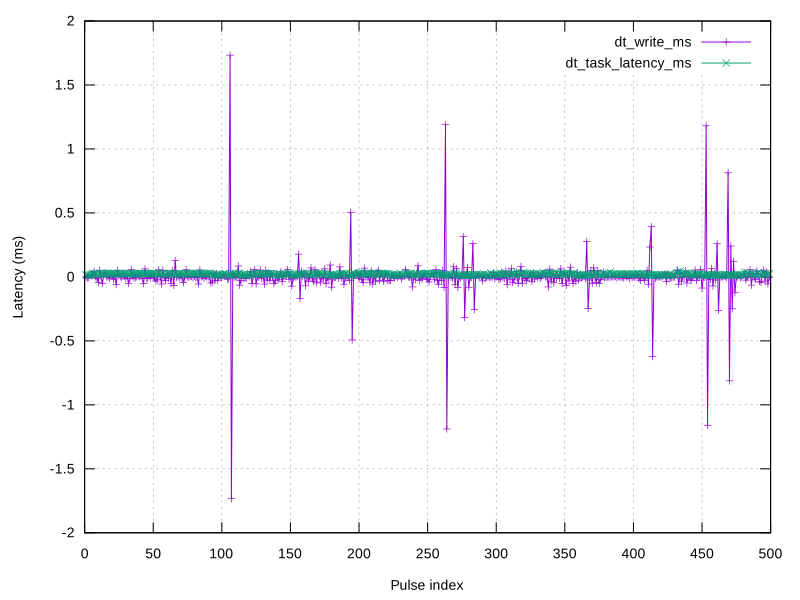
Here I'm making a realtime plot showing The raw data as I tweak things lives here. Initially I see big latency spikes:
timings.scheduler.1.noise.svg
These can be fixed by adjusting the priority of the trigger task. This tells the scheduler to wake that task up first, even if something else is currently using the CPU. I do this:
sudo chrt -p 90  pidof trigger 
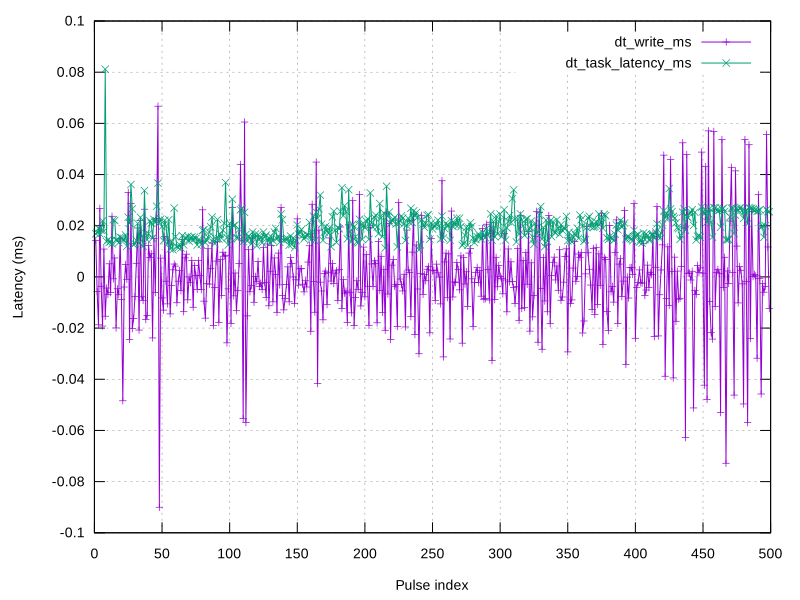
And I get better-looking latencies:
timings.scheduler.2.clean.svg
During some experiments (not in this dataset) I would see high helper-task timing instabilities as well. These could be fixed by prioritizing the helper task. In this kernel (6.12) the helper task is called kworker/N where N is the CPU index. I tie the trigger process to cpu 0, and priorities all the relevant helpers:
taskset -c 0 ./trigger 58
pgrep -f kworker/0   while   read pid     sudo chrt -p 90 $pid  
This fixes the helper-task latency spikes. OK, so it looks like on the software side we're good to within 0.1ms of the true period. This is in the ballpark of the precision I need; even this might be too high. It's possible to try to push the software to do better: one could look at the kernel sources a bit more, to do smarter things with priorities or to try an -rt kernel. But all this doesn't matter if the serial hardware adds unacceptable delays. Let's look. Let's look at it with a logic analyzer. I use a saleae logic analyzer with sigrok. The tool spits out the samples as it gets them, and an awk script finds the edges and reports the timings to give me a realtime plot.
samplerate=500000;
pulserate=58.;
sigrok-cli -c samplerate=$samplerate -O csv --continuous -C D1 \
  mawk -Winteractive  \
    "prev_logic==0 && \$0==1 \
       
       iedge = NR;
       if(prev_iedge)
        
         di = iedge -prev_iedge;
         dt = di/$samplerate;
         print(dt*1000);
        
       prev_iedge = iedge;
      
      
       prev_logic=\$0;
       "   feedgnuplot --stream --ylabel 'Period (ms)' --equation "1000./$pulserate title \"True $ pulserate Hz period\""
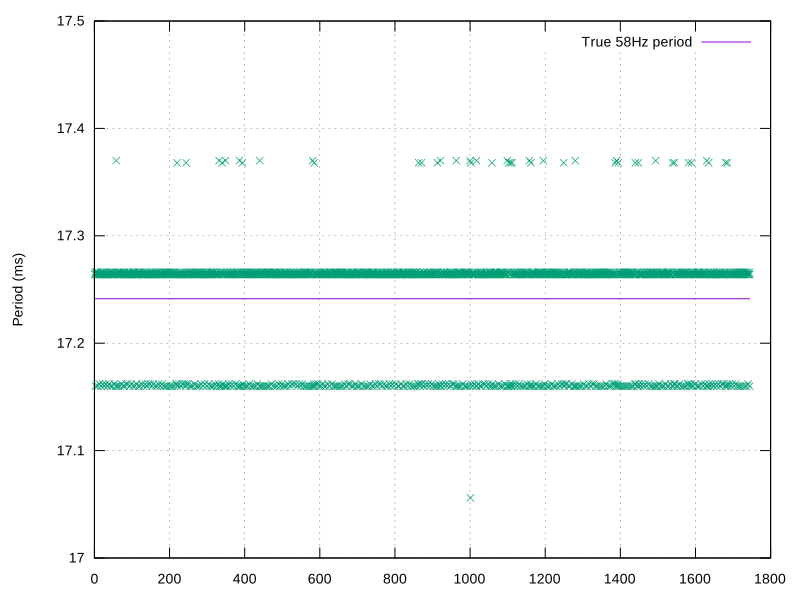
On the server I was using (physical RS-232 port, ancient 3.something kernel):
timings.hw.serial-server.svg
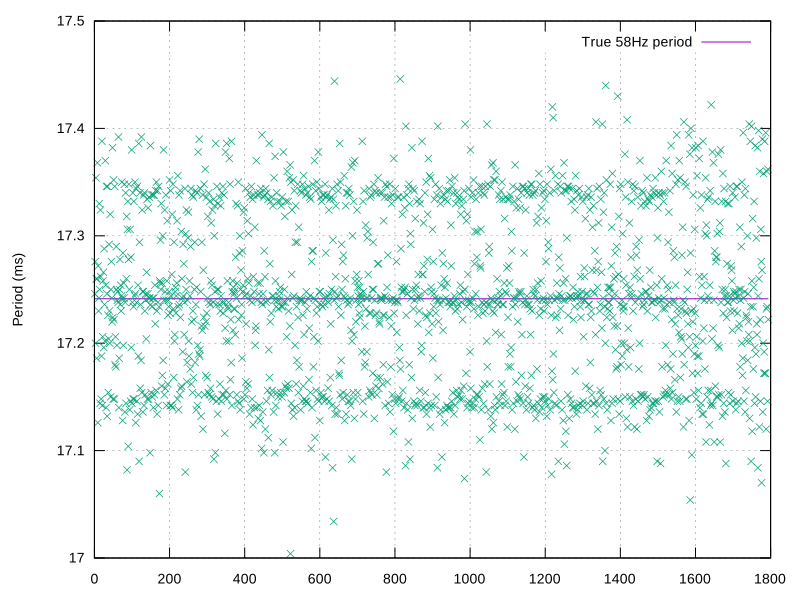
OK This is very discrete for some reason, and generally worse than 0.1ms. What about my laptop (physical RS-232 port, recent 6.12 kernel)?
timings.hw.serial-laptop.svg
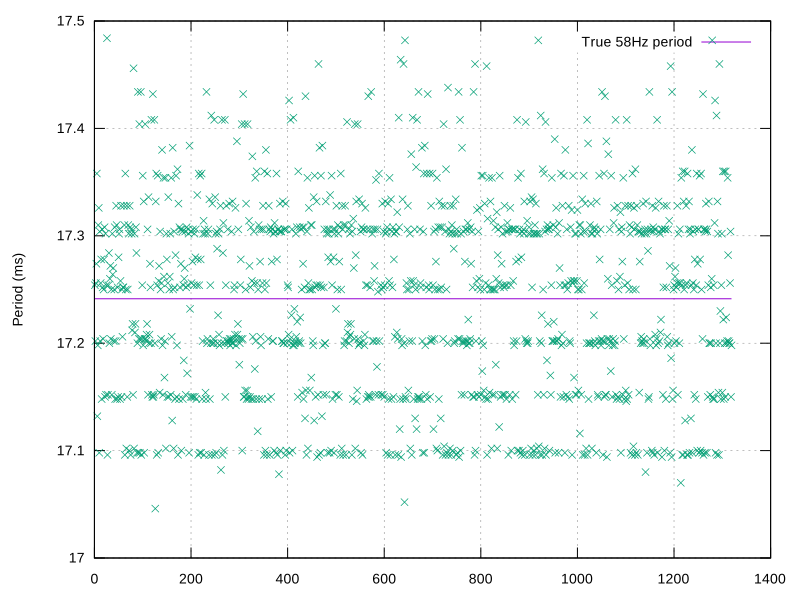
Not discrete anymore, but not really any more precise. What about using a usb-serial converter? I expect this to be worse.
timings.hw.usbserial.svg
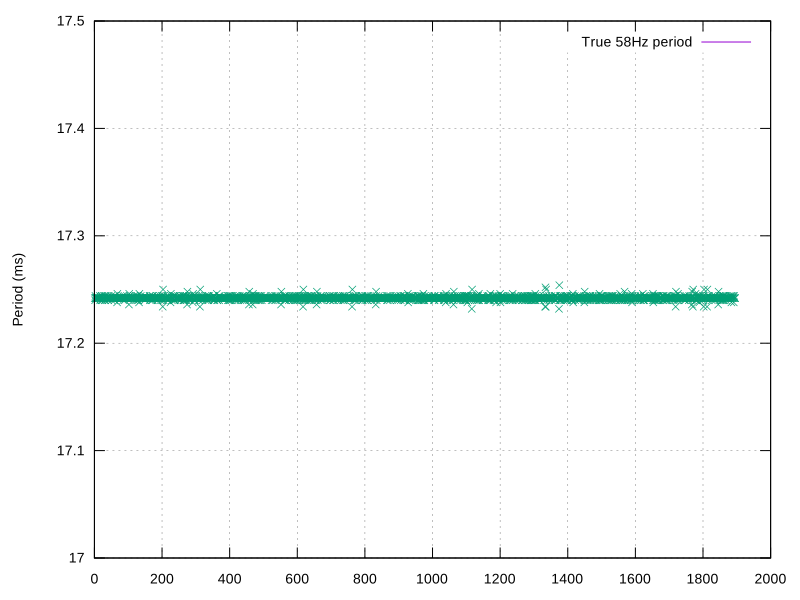
Yeah, looks worse. For my purposes, an accuracy of 0.1ms is marginal, and the hardware adds non-negligible errors. So I cut my losses, and use an external signal generator:
timings.hw.generator.svg
Yeah. That's better, so that's what I use.

10 March 2025

Thorsten Alteholz: My Debian Activities in February 2025

Debian LTS This was my hundred-twenty-eighth month that I did some work for the Debian LTS initiative, started by Raphael Hertzog at Freexian. During my allocated time I uploaded or worked on: Last but not least I did some days of FD this month and attended the monthly LTS/ELTS meeting. Debian ELTS This month was the seventy-ninth ELTS month. During my allocated time I uploaded or worked on: Last but not least I did some days of FD this month and attended the monthly LTS/ELTS meeting. Debian Printing This month I uploaded new packages or new upstream or bugfix versions of: This work is generously funded by Freexian! Debian Matomo This month I uploaded new packages or new upstream or bugfix versions of: Finally matomo was uploaded. Thanks a lot to Utkarsh Gupta and William Desportes for doing most of the work to make this happen. This work is generously funded by Freexian! Debian Astro Unfortunately I didn t found any time to upload packages.Have you ever heard of poliastro? It was a package to do calculations related to astrodynamics and orbital mechanics? It was archived by upstream end of 2023. I am now trying to revive it under the new name boinor and hope to get it back into Debian over the next months. This is almost the last month that Patrick, our Outreachy intern for the Debian Astro project, is handling his tasks. He is working on automatic updates of the indi 3rd-party driver. Debian IoT Unfortunately I didn t found any time to work on this topic. Debian Mobcom This month I uploaded new packages or new upstream or bugfix versions of: misc Unfortunately I didn t found any time to work on this topic. FTP master This month I accepted 437 and rejected 64 packages. The overall number of packages that got accepted was 445.

9 March 2025

Dirk Eddelbuettel: RcppNLoptExample 0.0.2: Minor Updates

An update to our package RcppNLoptExample arrived on CRAN earlier today marking the first update since the intial release more than four year ago. The nloptr package, created by Jelmer Ypma, has long been providing an excellent R interface to NLopt, a very comprehensive library for nonlinear optimization. In particular, Jelmer carefully exposed the API entry points such that other R packages can rely on NLopt without having to explicitly link to it (as one can rely on R providing sufficient function calling and registration to make this possible by referring back to nloptr which naturally has the linking information and resolution). This package demonstrates this in a simple-to-use Rcpp example package that can serve as a stanza. More recent NLopt versions appear to have changed behaviour a little so that an example we relied upon in simple unit test now converges to a marginally different numerical value, so we adjusted a convergence treshold. Other than that we did a number of the usual small updates to package metadata, to the README.md file, and to continuous integration. The (very short) NEWS entry follows:

Changes in version 0.0.2 (2025-03-09)
  • Updated tolerance in simple test as newer upstream nlopt change behaviour ever so slightly leading to an other spurious failure
  • Numerous small and standard updates to DESCRIPTION, README.md, badges, and continuous integration setup

Courtesy of my CRANberries, there is also a diffstat report for this release. For questions, suggestions, or issues please use the issue tracker at the GitHub repo.

This post by Dirk Eddelbuettel originated on his Thinking inside the box blog. If you like this or other open-source work I do, you can now sponsor me at GitHub.

Lisandro Dami n Nicanor P rez Meyer: Bah a Blanca floods - Mother nature says: no Nuremberg for you today

Update 20250309 13:20-03:00 - How to help A friend of mine living in the USA sent me this link to help the flood victims: Support Bah a Blanca (Argentina) Flood Victims Original blog post These are not good news. In fact, much the contrary. Compared to the real issue, the fact that I'm not able to attend Embedded World at Nuremberg is, well, a detail. Or at least that's what I'm forcing myself to believe, as I REALLY wanted to be there. But mother nature said otherwise. Plaza Dr. Alberto Martinelli - Barrio Parque Las Ca itas Park "D. Alberto Martinelli", Las Ca itas, Bah a Blanca (Google Maps) Bah a Blanca , the city I live, has received a lot on rainfall. Really, a lot. Let me introduce the number like this: the previous highest recorded measurement was 170mm (6.69 inch)... in a month. Yesterday Friday 07 we had more than 400mm (15.75 inch) in 9 hours. But those are just numbers. Some things are better seen in images. I'll start with some soft ones. Streetk sink 1 Streetk sink 2 Sink in Fournier street near Cambaceres (Google Maps) I also happen to do figure skating in the same school of the 4 times world champions (where "world" means the whole world) Roller Dreams precision skating team - Instagram, from Club El Nacional. Our skating rink got severely damaged with the hail we had like 3 weeks ago (yes, we had hail too!!!). Now it's just impossible: Roller Dreams CEN skating rink The "real" thing Let's get to the heavy, heartbreaker part. I did go to downtown Bah a Blanca, but during night, so let me share some links, most of them in Spanish, but images are images: My alma matter, Universidad Nacional del Sur, lost its main library, great part of the Physics department and a lot of labs :-( A nearby town, General Cerri, had even worst luck. In Bah a Blanca, a city of 300k+ people, has around 400 evacuated people. General Cerri, a town of 3000? people, had at least 800. Bah a Blanca, devil's land Every place has its legends. We do too. This land was called "Huecuv Map ", something like "Devil's land" by the original inhabitants of the zone, due to its harsh climate: string winters and hot summers, couple with fierce wind. But back in 1855 the Cacique (chief) Jos Mar a Bulnes Yanquetruz had a peace agreement with commander Nicanor Otamendi. But a battle ensued, which Yanquetruz won. At this point history defers depending upon who tells it. Some say Yanquetruz was assigned a military grade as Captain of the indigenous auxiliary forces and provided a military suit, some say he stole it, some say this was a setup of another chief wanting to disrupt peace. But what is known is that Yanquetruz was killed, and his wife, the "machi" (sorceress), issued a curse over the land that would last 1000 years, and the curse was on the climate. Aftermath No, we are not there yet. This has just happened. The third violent climate occurrence in 15 months. The city needs to mourn and start healing itself. Time will say.

Niels Thykier: Improving Debian packaging in Kate

The other day, I noted that the emacs integration with debputy stopped working. After debugging for a while, I realized that emacs no longer sent the didOpen notification that is expected of it, which confused debputy. At this point, I was already several hours into the debugging and I noted there was some discussions on debian-devel about emacs and byte compilation not working. So I figured I would shelve the emacs problem for now. But I needed an LSP capable editor and with my vi skills leaving much to be desired, I skipped out on vim-youcompleteme. Instead, I pulled out kate, which I had not been using for years. It had LSP support, so it would fine, right? Well, no. Turns out that debputy LSP support had some assumptions that worked for emacs but not kate. Plus once you start down the rabbit hole, you stumble on things you missed previously.
Getting started First order of business was to tell kate about debputy. Conveniently, kate has a configuration tab for adding language servers in a JSON format right next to the tab where you can see its configuration for built-in LSP (also in JSON format9. So a quick bit of copy-paste magic and that was done. Yesterday, I opened an MR against upstream to have the configuration added (https://invent.kde.org/utilities/kate/-/merge_requests/1748) and they already merged it. Today, I then filed a wishlist against kate in Debian to have the Debian maintainers cherry-pick it, so it works out of the box for Trixie (https://bugs.debian.org/1099876). So far so good.
Inlay hint woes Since July (2024), debputy has support for Inlay hints. They are basically small bits of text that the LSP server can ask the editor to inject into the text to provide hints to the reader. Typically, you see them used to provide typing hints, where the editor or the underlying LSP server has figured out the type of a variable or expression that you did not explicitly type. Another common use case is to inject the parameter name for positional arguments when calling a function, so the user do not have to count the position to figure out which value is passed as which parameter. In debputy, I have been using the Inlay hints to show inherited fields in debian/control. As an example, if you have a definition like:
Source: foo-src
Section: devel
Priority: optional
Package: foo-bin
Architecture: any
Then foo-bin inherits the Section and Priority field since it does not supply its own. Previously, debputy would that by injecting the fields themselves and their value just below the Package field as if you had typed them out directly. The editor always renders Inlay hints distinctly from regular text, so there was no risk of confusion and it made the text look like a valid debian/control file end to end. The result looked something like:
Source: foo-src
Section: devel
Priority: optional
Package: foo-bin
Section: devel
Priority: optional
Architecture: any
With the second instances of Section and Priority being rendered differently than its surrendering (usually faded or colorlessly). Unfortunately, kate did not like injecting Inlay hints with a newline in them, which was needed for this trick. Reading into the LSP specs, it says nothing about multi-line Inlay hints being a thing and I figured I would see this problem again with other editors if I left it be. I ended up changing the Inlay hints to be placed at the end of the Package field and then included surrounding () for better visuals. So now, it looks like:
Source: foo-src
Section: devel
Priority: optional
Package: foo-bin  (Section: devel)  (Priority: optional)
Architecture: any
Unfortunately, it is no longer 1:1 with the underlying syntax which I liked about the previous one. But it works in more editors and is still explicit. I also removed the Inlay hint for the Homepage field. It takes too much space and I have yet to meet someone missing it in the binary stanza. If you have any better ideas for how to render it, feel free to reach out to me.
Spurious completion and hover As I was debugging the Inlay hints, I wanted to do a quick restart of debputy after each fix. Then I would trigger a small change to the document to ensure kate would request an update from debputy to render the Inlay hints with the new code. The full outgoing payloads are sent via the logs to the client, so it was really about minimizing which LSP requests are sent to debputy. Notably, two cases would flood the log:
  • Completion requests. These are triggered by typing anything at all and since I wanted to a change, I could not avoid this. So here it was about making sure there would be nothing to complete, so the result was a small as possible.
  • Hover doc requests. These are triggered by mouse hovering over field, so this was mostly about ensuring my mouse movement did not linger over any field on the way between restarting the LSP server and scrolling the log in kate.
In my infinite wisdom, I chose to make a comment line where I would do the change. I figured it would neuter the completion requests completely and it should not matter if my cursor landed on the comment as there would be no hover docs for comments either. Unfortunately for me, debputy would ignore the fact that it was on a comment line. Instead, it would find the next field after the comment line and try to complete based on that. Normally you do not see this, because the editor correctly identifies that none of the completion suggestions start with a \#, so they are all discarded. But it was pretty annoying for the debugging, so now debputy has been told to explicitly stop these requests early on comment lines.
Hover docs for packages I added a feature in debputy where you can hover over package names in your relationship fields (such as Depends) and debputy will render a small snippet about it based on data from your local APT cache. This doc is then handed to the editor and tagged as markdown provided the editor supports markdown rendering. Both emacs and kate support markdown. However, not all markdown renderings are equal. Notably, emacs's rendering does not reformat the text into paragraphs. In a sense, emacs rendering works a bit like <pre>...</pre> except it does a bit of fancy rendering inside the <pre>...</pre>. On the other hand, kate seems to convert the markdown to HTML and then throw the result into an HTML render engine. Here it is important to remember that not all newlines are equal in markdown. A Foo<newline>Bar is treated as one "paragraph" (<p>...</p>) and the HTML render happily renders this as single line Foo Bar provided there is sufficient width to do so. A couple of extra newlines made wonders for the kate rendering, but I have a feeling this is not going to be the last time the hover docs will need some tweaking for prettification. Feel free to reach out if you spot a weirdly rendered hover doc somewhere.
Making quickfixes available in kate Quickfixes are treated as generic code actions in the LSP specs. Each code action has a "type" (kind in the LSP lingo), which enables the editor to group the actions accordingly or filter by certain types of code actions. The design in the specs leads to the following flow:
  1. The LSP server provides the editor with diagnostics (there are multiple ways to trigger this, so we will keep this part simple).
  2. The editor renders them to the user and the user chooses to interact with one of them.
  3. The interaction makes the editor asks the LSP server, which code actions are available at that location (optionally with filter to only see quickfixes).
  4. The LSP server looks at the provided range and is expected to return the relevant quickfixes here.
This flow is really annoying from a LSP server writer point of view. When you do the diagnostics (in step 1), you tend to already know what the possible quickfixes would be. The LSP spec authors realized this at some point, so there are two features the editor provides to simplify this.
  1. In the editor request for code actions, the editor is expected to provide the diagnostics that they received from the server. Side note: I cannot quite tell if this is optional or required from the spec.
  2. The editor can provide support for remembering a data member in each diagnostic. The server can then store arbitrary information in that member, which they will see again in the code actions request. Again, provided that the editor supports this optional feature.
All the quickfix logic in debputy so far has hinged on both of these two features. As life would have it, kate provides neither of them. Which meant I had to teach debputy to keep track of its diagnostics on its own. The plus side is that makes it easier to support "pull diagnostics" down the line, since it requires a similar feature. Additionally, it also means that quickfixes are now available in more editors. For consistency, debputy logic is now always used rather than relying on the editor support when present. The downside is that I had to spend hours coming up with and debugging a way to find the diagnostics that overlap with the range provided by the editor. The most difficult part was keeping the logic straight and getting the runes correct for it.
Making the quickfixes actually work With all of that, kate would show the quickfixes for diagnostics from debputy and you could use them too. However, they would always apply twice with suboptimal outcome as a result. The LSP spec has multiple ways of defining what need to be changed in response to activating a code action. In debputy, all edits are currently done via the WorkspaceEdit type. It has two ways of defining the changes. Either via changes or documentChanges with documentChanges being the preferred one if both parties support this. I originally read that as I was allowed to provide both and the editor would pick the one it preferred. However, after seeing kate blindly use both when they are present, I reviewed the spec and it does say "The edit should either provide changes or documentChanges", so I think that one is on me. None of the changes in debputy currently require documentChanges, so I went with just using changes for now despite it not being preferred. I cannot figure out the logic of whether an editor supports documentChanges. As I read the notes for this part of the spec, my understanding is that kate does not announce its support for documentChanges but it clearly uses them when present. Therefore, I decided to keep it simple for now until I have time to dig deeper.
Remaining limitations with kate There is one remaining limitation with kate that I have not yet solved. The kate program uses KSyntaxHighlighting for its language detection, which in turn is the basis for which LSP server is assigned to a given document. This engine does not seem to support as complex detection logic as I hoped from it. Concretely, it either works on matching on an extension / a basename (same field for both cases) or mime type. This combined with our habit in Debian to use extension less files like debian/control vs. debian/tests/control or debian/rules or debian/upstream/metadata makes things awkward a best. Concretely, the syntax engine cannot tell debian/control from debian/tests/control as they use the same basename. Fortunately, the syntax is close enough to work for both and debputy is set to use filename based lookups, so this case works well enough. However, for debian/rules and debian/upstream/metadata, my understanding is that if I assign these in the syntax engine as Debian files, these rules will also trigger for any file named foo.rules or bar.metadata. That seems a bit too broad for me, so I have opted out of that for now. The down side is that these files will not work out of the box with kate for now. The current LSP configuration in kate does not recognize makefiles or YAML either. Ideally, we would assign custom languages for the affected Debian files, so we do not steal the ID from other language servers. Notably, kate has a built-in language server for YAML and debputy does nothing for a generic YAML document. However, adding YAML as a supported language for debputy would cause conflict and regressions for users that are already happy with their generic YAML language server from kate. So there are certainly still work to be done. If you are good with KSyntaxHighlighting and know how to solve some of this, I hope you will help me out.
Changes unrelated to kate While I was working on debputy, I also added some other features that I want to mention.
  1. The debputy lint command will now show related context to diagnostic in its terminal report when such information is available and is from the same file as the diagnostic itself (cross file cases are rendered without related information). The related information is typically used to highlight a source of a conflict. As an example, if you use the same field twice in a stanza of debian/control, then debputy will add a diagnostic to the second occurrence. The related information for that diagnostic would provide the position of the first occurrence. This should make it easier to find the source of the conflict in the cases where debputy provides it. Let me know if you are missing it for certain diagnostics.

  2. The diagnostics analysis of debian/control will now identify and flag simple duplicated relations (complex ones like OR relations are ignored for now). Thanks to Matthias Geiger for suggesting the feature and Otto Kek l inen for reporting a false positive that is now fixed.

Closing I am glad I tested with kate to weed out most of these issues in time before the freeze. The Debian freeze will start within a week from now. Since debputy is a part of the toolchain packages it will be frozen from there except for important bug fixes.

8 March 2025

Debian Brasil: MiniDebConf Belo Horizonte 2024 - a brief report

From April 27th to 30th, 2024, MiniDebConf Belo Horizonte 2024 was held at the Pampulha Campus of UFMG - Federal University of Minas Gerais, in Belo Horizonte city. MiniDebConf BH 2024 banners This was the fifth time that a MiniDebConf (as an exclusive in-person event about Debian) took place in Brazil. Previous editions were in Curitiba (2016, 2017, and 2018), and in Bras lia 2023. We had other MiniDebConfs editions held within Free Software events such as FISL and Latinoware, and other online events. See our event history. Parallel to MiniDebConf, on 27th (Saturday) FLISOL - Latin American Free Software Installation Festival took place. It's the largest event in Latin America to promote Free Software, and It has been held since 2005 simultaneously in several cities. MiniDebConf Belo Horizonte 2024 was a success (as were previous editions) thanks to the participation of everyone, regardless of their level of knowledge about Debian. We value the presence of both beginner users who are familiarizing themselves with the system and the official project developers. The spirit of welcome and collaboration was present during all the event. MiniDebConf BH 2024 flisol 2024 edition numbers During the four days of the event, several activities took place for all levels of users and collaborators of the Debian project. The official schedule was composed of: MiniDebConf BH 2024 palestra The final numbers for MiniDebConf Belo Horizonte 2024 show that we had a record number of participants. Of the 224 participants, 15 were official Brazilian contributors, 10 being DDs (Debian Developers) and 05 (Debian Maintainers), in addition to several unofficial contributors. The organization was carried out by 14 people who started working at the end of 2023, including Prof. Lo c Cerf from the Computing Department who made the event possible at UFMG, and 37 volunteers who helped during the event. As MiniDebConf was held at UFMG facilities, we had the help of more than 10 University employees. See the list with the names of people who helped in some way in organizing MiniDebConf Belo Horizonte 2024. The difference between the number of people registered and the number of attendees in the event is probably explained by the fact that there is no registration fee, so if the person decides not to go to the event, they will not suffer financial losses. The 2024 edition of MiniDebconf Belo Horizonte was truly grand and shows the result of the constant efforts made over the last few years to attract more contributors to the Debian community in Brazil. With each edition the numbers only increase, with more attendees, more activities, more rooms, and more sponsors/supporters. MiniDebConf BH 2024 grupo

MiniDebConf BH 2024 grupo Activities The MiniDebConf schedule was intense and diverse. On the 27th, 29th and 30th (Saturday, Monday and Tuesday) we had talks, discussions, workshops and many practical activities. MiniDebConf BH 2024 palestra On the 28th (Sunday), the Day Trip took place, a day dedicated to sightseeing around the city. In the morning we left the hotel and went, on a chartered bus, to the Belo Horizonte Central Market. People took the opportunity to buy various things such as cheeses, sweets, cacha as and souvenirs, as well as tasting some local foods. MiniDebConf BH 2024 mercado After a 2-hour tour of the Market, we got back on the bus and hit the road for lunch at a typical Minas Gerais food restaurant. MiniDebConf BH 2024 palestra With everyone well fed, we returned to Belo Horizonte to visit the city's main tourist attraction: Lagoa da Pampulha and Capela S o Francisco de Assis, better known as Igrejinha da Pampulha. MiniDebConf BH 2024 palestra We went back to the hotel and the day ended in the hacker space that we set up in the events room for people to chat, packaging, and eat pizzas. MiniDebConf BH 2024 palestra Crowdfunding For the third time we ran a crowdfunding campaign and it was incredible how people contributed! The initial goal was to raise the amount equivalent to a gold tier of R$ 3,000.00. When we reached this goal, we defined a new one, equivalent to one gold tier + one silver tier (R$ 5,000.00). And again we achieved this goal. So we proposed as a final goal the value of a gold + silver + bronze tiers, which would be equivalent to R$ 6,000.00. The result was that we raised R$7,239.65 (~ USD 1,400) with the help of more than 100 people! Thank you very much to the people who contributed any amount. As a thank you, we list the names of the people who donated. MiniDebConf BH 2024 doadores Food, accommodation and/or travel grants for participants Each edition of MiniDebConf brought some innovation, or some different benefit for the attendees. In this year's edition in Belo Horizonte, as with DebConfs, we offered bursaries for food, accommodation and/or travel to help those people who would like to come to the event but who would need some kind of help. In the registration form, we included the option for the person to request a food, accommodation and/or travel bursary, but to do so, they would have to identify themselves as a contributor (official or unofficial) to Debian and write a justification for the request. Number of people benefited: The food bursary provided lunch and dinner every day. The lunches included attendees who live in Belo Horizonte and the region. Dinners were paid for attendees who also received accommodation and/or travel. The accommodation was held at the BH Jaragu Hotel. And the travels included airplane or bus tickets, or fuel (for those who came by car or motorbike). Much of the money to fund the bursaries came from the Debian Project, mainly for travels. We sent a budget request to the former Debian leader Jonathan Carter, and He promptly approved our request. In addition to this event budget, the leader also approved individual requests sent by some DDs who preferred to request directly from him. The experience of offering the bursaries was really good because it allowed several people to come from other cities. MiniDebConf BH 2024 grupo Photos and videos You can watch recordings of the talks at the links below: Thanks We would like to thank all the attendees, organizers, volunteers, sponsors and supporters who contributed to the success of MiniDebConf Belo Horizonte 2024. MiniDebConf BH 2024 grupo Sponsors Gold: Silver: Bronze: Organizers

Dirk Eddelbuettel: RcppTOML 0.2.3 on CRAN: Compiler Nag, Small Updates

A new (mostly maintenance) release 0.2.3 of RcppTOML is now on CRAN. TOMLis a file format that is most suitable for configurations, as it is meant to be edited by humans but read by computers. It emphasizes strong readability for humans while at the same time supporting strong typing as well as immediate and clear error reports. On small typos you get parse errors, rather than silently corrupted garbage. Much preferable to any and all of XML, JSON or YAML though sadly these may be too ubiquitous now. TOML is frequently being used with the projects such as the Hugo static blog compiler, or the Cargo system of Crates (aka packages ) for the Rust language. This release was tickled by another CRAN request: just like yesterday s and the RcppDate release two days ago, it responds to the esoteric whitespace in literal operator depreceation warning. We alerted upstream too. The short summary of changes follows.

Changes in version 0.2.3 (2025-03-08)
  • Correct the minimum version of Rcpp to 1.0.8 (Walter Somerville)
  • The package now uses Authors@R as mandated by CRAN
  • Updated 'whitespace in literal' issue upsetting clang++-20
  • Continuous integration updates including simpler r-ci setup

Courtesy of my CRANberries, there is also a diffstat report for this release. For questions, suggestions, or issues please use the issue tracker at the GitHub repo.

This post by Dirk Eddelbuettel originated on his Thinking inside the box blog. If you like this or other open-source work I do, you can now sponsor me at GitHub.

Vincent Bernat: Auto-expanding aliases in Zsh

To avoid needless typing, the fish shell features command abbreviations to expand some words after pressing space. We can emulate such a feature with Zsh:
# Definition of abbrev-alias for auto-expanding aliases
typeset -ga _vbe_abbrevations
abbrev-alias()  
    alias $1
    _vbe_abbrevations+=($ 1%%\=* )
 
_vbe_zle-autoexpand()  
    local -a words; words=($ (z)LBUFFER )
    if (( $  #_vbe_abbrevations[(r)$ words[-1] ]  )); then
        zle _expand_alias
    fi
    zle magic-space
 
zle -N _vbe_zle-autoexpand
bindkey -M emacs " " _vbe_zle-autoexpand
bindkey -M isearch " " magic-space
# Correct common typos
(( $+commands[git] )) && abbrev-alias gti=git
(( $+commands[grep] )) && abbrev-alias grpe=grep
(( $+commands[sudo] )) && abbrev-alias suod=sudo
(( $+commands[ssh] )) && abbrev-alias shs=ssh
# Save a few keystrokes
(( $+commands[git] )) && abbrev-alias gls="git ls-files"
(( $+commands[ip] )) &&  
  abbrev-alias ip6='ip -6'
  abbrev-alias ipb='ip -brief'
 
# Hard to remember options
(( $+commands[mtr] )) && abbrev-alias mtrr='mtr -wzbe'
Here is a demo where gls is expanded to git ls-files after pressing space:
Auto-expanding gls to git ls-files
I don t auto-expand all aliases. I keep using regular aliases when slightly modifying the behavior of a command or for well-known abbreviations:
alias df='df -h'
alias du='du -h'
alias rm='rm -i'
alias mv='mv -i'
alias ll='ls -ltrhA'

7 March 2025

Dirk Eddelbuettel: RcppSimdJson 0.1.13 on CRAN: Compiler Nag, New Upsteam

A new release 0.1.13 of the RcppSimdJson package is now on CRAN. RcppSimdJson wraps the fantastic and genuinely impressive simdjson library by Daniel Lemire and collaborators. Via very clever algorithmic engineering to obtain largely branch-free code, coupled with modern C++ and newer compiler instructions, it results in parsing gigabytes of JSON parsed per second which is quite mindboggling. The best-case performance is faster than CPU speed as use of parallel SIMD instructions and careful branch avoidance can lead to less than one cpu cycle per byte parsed; see the video of the talk by Daniel Lemire at QCon. This release was tickled by another CRAN request: just like yesterday s RcppDate release, it responds to the esoteric whitespace in literal operator depreceation warning. Turns out that upstream simdjson had this fixed a few months ago as the node bindings package ran into it. Other changes include a bit of earlier polish by Daniel, another CRAN mandated update, CI improvements, and a move of two demos to examples/ to avoid having to add half a dozen packages to Suggests: for no real usage gain in the package. The short NEWS entry for this release follows.

Changes in version 0.1.13 (2025-03-07)
  • A call to std::string::erase is now guarded (Daniel)
  • The package now uses Authors@R as mandated by CRAN (Dirk)
  • simdjson was upgraded to version 3.12.2 (Dirk)
  • Continuous integration updated to more compilers and simpler setup
  • Two demos are now in inst/examples to not inflate Suggests

Courtesy of my CRANberries, there is also a diffstat report for this release. For questions, suggestions, or issues please use the issue tracker at the GitHub repo.

This post by Dirk Eddelbuettel originated on his Thinking inside the box blog. If you like this or other open-source work I do, you can now sponsor me at GitHub.

Paulo Henrique de Lima Santana: Bits from FOSDEM 2025

This year I was at FOSDEM 2025, and it was the fifth edition in a row that I participated in person (before it was in 2019, 2020, 2023 and 2024). The event took place on February 1st and 2nd, as always at the ULB campus in Brussels. We arrived on Friday at lunchtime and went straight to the hotel to drop off our bags. This time we stayed at Ibis in the city center, very close to the hustle and bustle. The price was good and the location was really good for us to be able to go out in the city center and come back late at night. We found a Japanese restaurant near the hotel and it was definitely worth having lunch there because of the all-you-can-eat price. After taking a nap, we went out for a walk. Since January 31st is the last day of the winter sales in the city, the streets in the city center were crowded, there were lots of people in the stores, and the prices were discounted. We concluded that if we have the opportunity to go to Brussels again at this time, it would be better wait to buy clothes for cold weather there.
Fosdem 2025
Unlike in 2023 and 2024, the FOSDEM organization did not approve my request for the Translations DevRoom,so my goal was to participate in the event and collaborate at the Debian booth. And also as I always do, I volunteered to operate the broadcast camera in the main auditorium on both days, for two hours each. The Debian booth:
Fosdem 2025
Me in the auditorium helping with the broadcast:
Fosdem 2025
2 weeks before the event, the organization put out a call for interested people to request a room for their community s BoF (Birds of a Feather), and I requested a room for Debian and it was approved :-) It was great to see that people were really interested in participating at the BoF and the room was packed! As the host of the discussions, I tried to leave the space open for anyone who wanted to talk about any subject related to Debian. We started with a talk from MiniDebConf25 organizers, that will be taking place this year in France. Then other topics followed with people talking, asking and answering questions, etc. It was worth organizing this BoF. Who knows, the idea will remain in 2026.
Fosdem 2025
Carlos (a.k.a Charles), Athos, Ma ra and Melissa talked at Fosdem, and Kanashiro was one for organizers of Distributions DevRoom
Fosdem 2025
During the two days of the event, it didn t rain or get too cold. The days were sunny (and people celebrated the weather in Brussels). But I have to admit that it would have been nice to see snow like I did in 2019. Unlike last year, this time I felt more motivated to stay at the event the whole time. Deixo meu agradecimento especial para o Andreas Tille, atual L der do Debian que aprovou o meu pedido de passagens para que eu pudesse participar dos FOSDEM 2025. Como sempre, essa ajuda foi essencial para viabilizar a minha viagem para Bruxelas. I would like to give my special thanks to Andreas Tille, the current Debian Leader, who approved my request for flight tickets so that I could join FOSDEM 2025. As always, this help was essential in making my trip to Brussels possible. And once again Jandira was with me on this adventure. On Monday we went for a walk around Brussels and we also traveled to visit Bruges again. The visit to this city is really worth it because walking through the historic streets is like going back in time. This time we even took a boat trip through the canals, which was really cool.
Fosdem 2025

Fosdem 2025

Valhalla's Things: MOAR Slippers

Posted on March 7, 2025
Tags: madeof:atoms, craft:sewing, FreeSoftWear
A pair of espadrille-style slippers in black denim with a shiny black design on the uppers and twine soles. A couple of years ago, I made myself a pair of slippers in linen with a braided twine sole and then another pair of hiking slippers: I am happy to report that they have been mostly a success. Now, as I feared, the white linen fabric wasn t a great choice: not only it became dirt-grey linen fabric in a very short time, the area under the ball of the foot was quickly consumed by friction, just as it usually happens with bought slippers. I have no pictures for a number of reasons, but trust me when I say that they look pretty bad. The same slippers, one of them is turned upside down to show the sole made from a twine braid, sewn in a spiral until it is the shape of a sole. However, the sole is still going strong, and the general concept has proved valid, so when I needed a second pair of slippers I used the same pattern, with a sole made from the same twine but this time with denim taken from the legs of an old pair of jeans. To make them a bit nicer, and to test the technique, I also added a design with a stencil and iridescent black acrylic paint (with fabric medium): I like the tone-on-tone effect, as it s both (relatively) subtle and shiny. A pair of open-heeled slippers in faded blue jeans. Then, my partner also needed new slippers, and I wanted to make his too. His preference, however, is for open heeled slippers, so I adjusted the pattern into a new one, making it from an old pair of blue jeans, rather than black as mine. A braided twine sole, showing how an heel has been made in the same technique and sewn under the sole with blanket stitches. He also finds completely flat soles a bit uncomfortable, so I made an heel with the same braided twine technique: this also seems to be working fine, and I ve also added these instructions to the braided soles ones Both of these have now been work for a few months: the jeans is working much better than the linen (which isn t a complete surprise) and we re both finding them comfortable, so if we ll ever need new slippers I think I ll keep using this pattern. Now the plan is to wash the linen slippers, and then look into repairing them, either with just a new fabric inner sole + padding, or if washing isn t as successful as I d like by making a new fabric part in a different material and reusing just the twine sole. Either way they are going back into use.

6 March 2025

Dirk Eddelbuettel: RcppDate 0.0.5: Address Minor Compiler Nag

RcppDate wraps the featureful date library written by Howard Hinnant for use with R. This header-only modern C++ library has been in pretty wide-spread use for a while now, and adds to C++11/C++14/C++17 what will is (with minor modifications) the date library in C++20. The RcppDate adds no extra R or C++ code and can therefore be a zero-cost dependency for any other project; yet a number of other projects decided to re-vendor it resulting in less-efficient duplication. Oh well. C est la via. This release sync wuth the (already mostly included) upstream release 3.0.3, and also addresses a new fresh (and mildly esoteric) nag from clang++-20. One upstream PR already addressed this in the files tickled by some CRAN packages, I followed this up with another upstream PR addressing this in a few more occurrences.

Changes in version 0.0.5 (2025-03-06)
  • Updated to upstream version 3.0.3
  • Updated 'whitespace in literal' issue upsetting clang++-20; this is also fixed upstream via two PRs

Courtesy of my CRANberries, there is also a diffstat report for the most recent release. More information is available at the repository or the package page.

This post by Dirk Eddelbuettel originated on his Thinking inside the box blog. If you like this or other open-source work I do, you can sponsor me at GitHub.

5 March 2025

Dima Kogan: Shop scheduling with PuLP

I recently used the PuLP modeler to solve a work scheduling problem to assign workers to shifts. Here are notes about doing that. This is a common use case, but isn't explicitly covered in the case studies in the PuLP documentation. Here's the problem: The tool is supposed to allocate workers to the shifts to try to cover all the shifts, give everybody work, and try to match their preferences. I implemented the tool:
#!/usr/bin/python3
import sys
import os
import re
def report_solution_to_console(vars):
    for w in days_of_week:
        annotation = ''
        if human_annotate is not None:
            for s in shifts.keys():
                m = re.match(rf' w  - ', s)
                if not m: continue
                if vars[human_annotate][s].value():
                    annotation = f" ( human_annotate  SCHEDULED)"
                    break
            if not len(annotation):
                annotation = f" ( human_annotate  OFF)"
        print(f" w annotation ")
        for s in shifts.keys():
            m = re.match(rf' w  - ', s)
            if not m: continue
            annotation = ''
            if human_annotate is not None:
                annotation = f" ( human_annotate   shifts[s][human_annotate] )"
            print(f"    ----  s[m.end():] annotation ")
            for h in humans:
                if vars[h][s].value():
                    print(f"          h  ( shifts[s][h] )")
def report_solution_summary_to_console(vars):
    print("\nSUMMARY")
    for h in humans:
        print(f"--  h ")
        print(f"   benefit:  benefits[h].value():.3f ")
        counts = dict()
        for a in availabilities:
            counts[a] = 0
        for s in shifts.keys():
            if vars[h][s].value():
                counts[shifts[s][h]] += 1
        for a in availabilities:
            print(f"    counts[a]   a ")
human_annotate = None
days_of_week = ('SUNDAY',
                'MONDAY',
                'TUESDAY',
                'WEDNESDAY',
                'THURSDAY',
                'FRIDAY',
                'SATURDAY')
humans = ['ALICE', 'BOB',
          'CAROL', 'DAVID', 'EVE', 'FRANK', 'GRACE', 'HEIDI', 'IVAN', 'JUDY']
shifts =  'SUNDAY - SANDING 9:00 AM - 4:00 PM':
           'ALICE': 'NEUTRAL',
           'BOB':   'NEUTRAL',
           'CAROL': 'PREFERRED',
           'DAVID': 'PREFERRED',
           'EVE':   'PREFERRED',
           'FRANK': 'PREFERRED',
           'GRACE': 'DISFAVORED',
           'HEIDI': 'DISFAVORED',
           'IVAN':  'PREFERRED',
           'JUDY':  'NEUTRAL' ,
          'WEDNESDAY - SAWING 7:30 AM - 2:30 PM':
           'ALICE': 'NEUTRAL',
           'BOB':   'NEUTRAL',
           'CAROL': 'PREFERRED',
           'DAVID': 'PREFERRED',
           'FRANK': 'PREFERRED',
           'GRACE': 'NEUTRAL',
           'HEIDI': 'DISFAVORED',
           'IVAN':  'PREFERRED',
           'EVE':   'REFUSED',
           'JUDY':  'REFUSED' ,
          'THURSDAY - SANDING 9:00 AM - 4:00 PM':
           'ALICE': 'NEUTRAL',
           'BOB':   'NEUTRAL',
           'CAROL': 'PREFERRED',
           'DAVID': 'PREFERRED',
           'EVE':   'PREFERRED',
           'FRANK': 'PREFERRED',
           'GRACE': 'PREFERRED',
           'HEIDI': 'DISFAVORED',
           'IVAN':  'PREFERRED',
           'JUDY':  'PREFERRED' ,
          'SATURDAY - SAWING 7:30 AM - 2:30 PM':
           'ALICE': 'NEUTRAL',
           'BOB':   'NEUTRAL',
           'CAROL': 'PREFERRED',
           'DAVID': 'PREFERRED',
           'FRANK': 'PREFERRED',
           'HEIDI': 'DISFAVORED',
           'IVAN':  'PREFERRED',
           'EVE':   'REFUSED',
           'JUDY':  'REFUSED',
           'GRACE': 'REFUSED' ,
          'SUNDAY - SAWING 9:00 AM - 4:00 PM':
           'ALICE': 'NEUTRAL',
           'BOB':   'NEUTRAL',
           'CAROL': 'PREFERRED',
           'DAVID': 'PREFERRED',
           'EVE':   'PREFERRED',
           'FRANK': 'PREFERRED',
           'GRACE': 'DISFAVORED',
           'IVAN':  'PREFERRED',
           'JUDY':  'PREFERRED',
           'HEIDI': 'REFUSED' ,
          'MONDAY - SAWING 9:00 AM - 4:00 PM':
           'ALICE': 'NEUTRAL',
           'BOB':   'NEUTRAL',
           'CAROL': 'PREFERRED',
           'DAVID': 'PREFERRED',
           'EVE':   'PREFERRED',
           'FRANK': 'PREFERRED',
           'GRACE': 'PREFERRED',
           'IVAN':  'PREFERRED',
           'JUDY':  'PREFERRED',
           'HEIDI': 'REFUSED' ,
          'TUESDAY - SAWING 9:00 AM - 4:00 PM':
           'ALICE': 'NEUTRAL',
           'BOB':   'NEUTRAL',
           'CAROL': 'PREFERRED',
           'DAVID': 'PREFERRED',
           'EVE':   'PREFERRED',
           'FRANK': 'PREFERRED',
           'GRACE': 'NEUTRAL',
           'IVAN':  'PREFERRED',
           'JUDY':  'PREFERRED',
           'HEIDI': 'REFUSED' ,
          'WEDNESDAY - PAINTING 7:30 AM - 2:30 PM':
           'ALICE': 'NEUTRAL',
           'BOB':   'NEUTRAL',
           'CAROL': 'PREFERRED',
           'FRANK': 'PREFERRED',
           'GRACE': 'NEUTRAL',
           'HEIDI': 'DISFAVORED',
           'IVAN':  'PREFERRED',
           'EVE':   'REFUSED',
           'JUDY':  'REFUSED',
           'DAVID': 'REFUSED' ,
          'THURSDAY - SAWING 9:00 AM - 4:00 PM':
           'ALICE': 'NEUTRAL',
           'BOB':   'NEUTRAL',
           'CAROL': 'PREFERRED',
           'DAVID': 'PREFERRED',
           'EVE':   'PREFERRED',
           'FRANK': 'PREFERRED',
           'GRACE': 'PREFERRED',
           'IVAN':  'PREFERRED',
           'JUDY':  'PREFERRED',
           'HEIDI': 'REFUSED' ,
          'FRIDAY - SAWING 9:00 AM - 4:00 PM':
           'ALICE': 'NEUTRAL',
           'BOB':   'NEUTRAL',
           'CAROL': 'PREFERRED',
           'DAVID': 'PREFERRED',
           'EVE':   'PREFERRED',
           'FRANK': 'PREFERRED',
           'GRACE': 'PREFERRED',
           'IVAN':  'PREFERRED',
           'JUDY':  'DISFAVORED',
           'HEIDI': 'REFUSED' ,
          'SATURDAY - PAINTING 7:30 AM - 2:30 PM':
           'ALICE': 'NEUTRAL',
           'BOB':   'NEUTRAL',
           'CAROL': 'PREFERRED',
           'FRANK': 'PREFERRED',
           'HEIDI': 'DISFAVORED',
           'IVAN':  'PREFERRED',
           'EVE':   'REFUSED',
           'JUDY':  'REFUSED',
           'GRACE': 'REFUSED',
           'DAVID': 'REFUSED' ,
          'SUNDAY - PAINTING 9:45 AM - 4:45 PM':
           'ALICE': 'NEUTRAL',
           'BOB':   'NEUTRAL',
           'CAROL': 'NEUTRAL',
           'EVE':   'PREFERRED',
           'FRANK': 'PREFERRED',
           'GRACE': 'DISFAVORED',
           'IVAN':  'PREFERRED',
           'JUDY':  'PREFERRED',
           'HEIDI': 'REFUSED',
           'DAVID': 'REFUSED' ,
          'MONDAY - PAINTING 9:45 AM - 4:45 PM':
           'ALICE': 'NEUTRAL',
           'BOB':   'NEUTRAL',
           'CAROL': 'NEUTRAL',
           'EVE':   'PREFERRED',
           'FRANK': 'PREFERRED',
           'GRACE': 'PREFERRED',
           'IVAN':  'PREFERRED',
           'JUDY':  'NEUTRAL',
           'HEIDI': 'REFUSED',
           'DAVID': 'REFUSED' ,
          'TUESDAY - PAINTING 9:45 AM - 4:45 PM':
           'ALICE': 'NEUTRAL',
           'BOB':   'NEUTRAL',
           'CAROL': 'NEUTRAL',
           'EVE':   'PREFERRED',
           'FRANK': 'PREFERRED',
           'GRACE': 'NEUTRAL',
           'IVAN':  'PREFERRED',
           'JUDY':  'PREFERRED',
           'HEIDI': 'REFUSED',
           'DAVID': 'REFUSED' ,
          'WEDNESDAY - SANDING 9:45 AM - 4:45 PM':
           'ALICE': 'NEUTRAL',
           'BOB':   'NEUTRAL',
           'CAROL': 'NEUTRAL',
           'DAVID': 'PREFERRED',
           'FRANK': 'PREFERRED',
           'GRACE': 'NEUTRAL',
           'HEIDI': 'DISFAVORED',
           'IVAN':  'PREFERRED',
           'JUDY':  'NEUTRAL',
           'EVE':   'REFUSED' ,
          'THURSDAY - PAINTING 9:45 AM - 4:45 PM':
           'ALICE': 'NEUTRAL',
           'BOB':   'NEUTRAL',
           'CAROL': 'NEUTRAL',
           'EVE':   'PREFERRED',
           'FRANK': 'PREFERRED',
           'GRACE': 'NEUTRAL',
           'IVAN':  'PREFERRED',
           'JUDY':  'PREFERRED',
           'HEIDI': 'REFUSED',
           'DAVID': 'REFUSED' ,
          'FRIDAY - PAINTING 9:45 AM - 4:45 PM':
           'ALICE': 'NEUTRAL',
           'BOB':   'NEUTRAL',
           'CAROL': 'NEUTRAL',
           'EVE':   'PREFERRED',
           'FRANK': 'PREFERRED',
           'GRACE': 'PREFERRED',
           'IVAN':  'PREFERRED',
           'JUDY':  'DISFAVORED',
           'HEIDI': 'REFUSED',
           'DAVID': 'REFUSED' ,
          'SATURDAY - SANDING 9:45 AM - 4:45 PM':
           'ALICE': 'NEUTRAL',
           'BOB':   'NEUTRAL',
           'CAROL': 'NEUTRAL',
           'DAVID': 'PREFERRED',
           'FRANK': 'PREFERRED',
           'HEIDI': 'DISFAVORED',
           'IVAN':  'PREFERRED',
           'EVE':   'REFUSED',
           'JUDY':  'REFUSED',
           'GRACE': 'REFUSED' ,
          'SUNDAY - PAINTING 11:00 AM - 6:00 PM':
           'ALICE': 'NEUTRAL',
           'BOB':   'NEUTRAL',
           'CAROL': 'NEUTRAL',
           'EVE':   'DISFAVORED',
           'FRANK': 'NEUTRAL',
           'GRACE': 'NEUTRAL',
           'HEIDI': 'PREFERRED',
           'IVAN':  'NEUTRAL',
           'JUDY':  'NEUTRAL',
           'DAVID': 'REFUSED' ,
          'MONDAY - PAINTING 12:00 PM - 7:00 PM':
           'ALICE': 'NEUTRAL',
           'BOB':   'NEUTRAL',
           'CAROL': 'NEUTRAL',
           'EVE':   'DISFAVORED',
           'FRANK': 'NEUTRAL',
           'GRACE': 'PREFERRED',
           'IVAN':  'NEUTRAL',
           'JUDY':  'NEUTRAL',
           'HEIDI': 'REFUSED',
           'DAVID': 'REFUSED' ,
          'TUESDAY - PAINTING 12:00 PM - 7:00 PM':
           'ALICE': 'NEUTRAL',
           'BOB':   'NEUTRAL',
           'CAROL': 'NEUTRAL',
           'EVE':   'DISFAVORED',
           'FRANK': 'NEUTRAL',
           'GRACE': 'NEUTRAL',
           'IVAN':  'NEUTRAL',
           'HEIDI': 'REFUSED',
           'JUDY':  'REFUSED',
           'DAVID': 'REFUSED' ,
          'WEDNESDAY - PAINTING 12:00 PM - 7:00 PM':
           'ALICE': 'NEUTRAL',
           'BOB':   'NEUTRAL',
           'CAROL': 'NEUTRAL',
           'FRANK': 'NEUTRAL',
           'GRACE': 'NEUTRAL',
           'IVAN':  'NEUTRAL',
           'JUDY':  'PREFERRED',
           'EVE':   'REFUSED',
           'HEIDI': 'REFUSED',
           'DAVID': 'REFUSED' ,
          'THURSDAY - PAINTING 12:00 PM - 7:00 PM':
           'ALICE': 'NEUTRAL',
           'BOB':   'NEUTRAL',
           'CAROL': 'NEUTRAL',
           'EVE':   'DISFAVORED',
           'FRANK': 'NEUTRAL',
           'GRACE': 'NEUTRAL',
           'IVAN':  'NEUTRAL',
           'JUDY':  'PREFERRED',
           'HEIDI': 'REFUSED',
           'DAVID': 'REFUSED' ,
          'FRIDAY - PAINTING 12:00 PM - 7:00 PM':
           'ALICE': 'NEUTRAL',
           'BOB':   'NEUTRAL',
           'CAROL': 'NEUTRAL',
           'EVE':   'DISFAVORED',
           'FRANK': 'NEUTRAL',
           'GRACE': 'NEUTRAL',
           'IVAN':  'NEUTRAL',
           'JUDY':  'DISFAVORED',
           'HEIDI': 'REFUSED',
           'DAVID': 'REFUSED' ,
          'SATURDAY - PAINTING 12:00 PM - 7:00 PM':
           'ALICE': 'NEUTRAL',
           'BOB':   'NEUTRAL',
           'CAROL': 'NEUTRAL',
           'FRANK': 'NEUTRAL',
           'IVAN':  'NEUTRAL',
           'JUDY':  'DISFAVORED',
           'EVE':   'REFUSED',
           'HEIDI': 'REFUSED',
           'GRACE': 'REFUSED',
           'DAVID': 'REFUSED' ,
          'SUNDAY - SAWING 12:00 PM - 7:00 PM':
           'ALICE': 'PREFERRED',
           'BOB':   'PREFERRED',
           'CAROL': 'NEUTRAL',
           'EVE':   'DISFAVORED',
           'FRANK': 'NEUTRAL',
           'GRACE': 'NEUTRAL',
           'IVAN':  'NEUTRAL',
           'JUDY':  'PREFERRED',
           'HEIDI': 'REFUSED',
           'DAVID': 'REFUSED' ,
          'MONDAY - SAWING 2:00 PM - 9:00 PM':
           'ALICE': 'PREFERRED',
           'BOB':   'PREFERRED',
           'CAROL': 'DISFAVORED',
           'EVE':   'DISFAVORED',
           'FRANK': 'NEUTRAL',
           'GRACE': 'NEUTRAL',
           'IVAN':  'DISFAVORED',
           'JUDY':  'DISFAVORED',
           'HEIDI': 'REFUSED',
           'DAVID': 'REFUSED' ,
          'TUESDAY - SAWING 2:00 PM - 9:00 PM':
           'ALICE': 'PREFERRED',
           'BOB':   'PREFERRED',
           'CAROL': 'DISFAVORED',
           'EVE':   'DISFAVORED',
           'FRANK': 'NEUTRAL',
           'GRACE': 'NEUTRAL',
           'IVAN':  'DISFAVORED',
           'HEIDI': 'REFUSED',
           'JUDY':  'REFUSED',
           'DAVID': 'REFUSED' ,
          'WEDNESDAY - SAWING 2:00 PM - 9:00 PM':
           'ALICE': 'PREFERRED',
           'BOB':   'PREFERRED',
           'CAROL': 'DISFAVORED',
           'FRANK': 'NEUTRAL',
           'GRACE': 'NEUTRAL',
           'IVAN':  'DISFAVORED',
           'JUDY':  'DISFAVORED',
           'EVE':   'REFUSED',
           'HEIDI': 'REFUSED',
           'DAVID': 'REFUSED' ,
          'THURSDAY - SAWING 2:00 PM - 9:00 PM':
           'ALICE': 'PREFERRED',
           'BOB':   'PREFERRED',
           'CAROL': 'DISFAVORED',
           'EVE':   'DISFAVORED',
           'FRANK': 'NEUTRAL',
           'GRACE': 'NEUTRAL',
           'IVAN':  'DISFAVORED',
           'JUDY':  'DISFAVORED',
           'HEIDI': 'REFUSED',
           'DAVID': 'REFUSED' ,
          'FRIDAY - SAWING 2:00 PM - 9:00 PM':
           'ALICE': 'PREFERRED',
           'BOB':   'PREFERRED',
           'CAROL': 'DISFAVORED',
           'EVE':   'DISFAVORED',
           'FRANK': 'NEUTRAL',
           'GRACE': 'NEUTRAL',
           'IVAN':  'DISFAVORED',
           'HEIDI': 'REFUSED',
           'JUDY':  'REFUSED',
           'DAVID': 'REFUSED' ,
          'SATURDAY - SAWING 2:00 PM - 9:00 PM':
           'ALICE': 'PREFERRED',
           'BOB':   'PREFERRED',
           'CAROL': 'DISFAVORED',
           'FRANK': 'NEUTRAL',
           'IVAN':  'DISFAVORED',
           'JUDY':  'DISFAVORED',
           'EVE':   'REFUSED',
           'HEIDI': 'REFUSED',
           'GRACE': 'REFUSED',
           'DAVID': 'REFUSED' ,
          'SUNDAY - PAINTING 12:15 PM - 7:15 PM':
           'ALICE': 'NEUTRAL',
           'BOB':   'NEUTRAL',
           'CAROL': 'PREFERRED',
           'EVE':   'DISFAVORED',
           'FRANK': 'NEUTRAL',
           'GRACE': 'NEUTRAL',
           'HEIDI': 'NEUTRAL',
           'IVAN':  'DISFAVORED',
           'JUDY':  'NEUTRAL',
           'DAVID': 'REFUSED' ,
          'MONDAY - PAINTING 2:00 PM - 9:00 PM':
           'ALICE': 'NEUTRAL',
           'BOB':   'NEUTRAL',
           'CAROL': 'DISFAVORED',
           'EVE':   'DISFAVORED',
           'FRANK': 'NEUTRAL',
           'GRACE': 'NEUTRAL',
           'HEIDI': 'NEUTRAL',
           'IVAN':  'DISFAVORED',
           'JUDY':  'DISFAVORED',
           'DAVID': 'REFUSED' ,
          'TUESDAY - PAINTING 2:00 PM - 9:00 PM':
           'ALICE': 'NEUTRAL',
           'BOB':   'NEUTRAL',
           'CAROL': 'DISFAVORED',
           'EVE':   'DISFAVORED',
           'FRANK': 'NEUTRAL',
           'GRACE': 'NEUTRAL',
           'HEIDI': 'NEUTRAL',
           'IVAN':  'DISFAVORED',
           'JUDY':  'REFUSED',
           'DAVID': 'REFUSED' ,
          'WEDNESDAY - PAINTING 2:00 PM - 9:00 PM':
           'ALICE': 'NEUTRAL',
           'BOB':   'NEUTRAL',
           'CAROL': 'DISFAVORED',
           'FRANK': 'NEUTRAL',
           'GRACE': 'NEUTRAL',
           'HEIDI': 'NEUTRAL',
           'IVAN':  'DISFAVORED',
           'JUDY':  'DISFAVORED',
           'EVE':   'REFUSED',
           'DAVID': 'REFUSED' ,
          'THURSDAY - PAINTING 2:00 PM - 9:00 PM':
           'ALICE': 'NEUTRAL',
           'BOB':   'NEUTRAL',
           'CAROL': 'DISFAVORED',
           'EVE':   'DISFAVORED',
           'FRANK': 'NEUTRAL',
           'GRACE': 'NEUTRAL',
           'HEIDI': 'NEUTRAL',
           'IVAN':  'DISFAVORED',
           'JUDY':  'DISFAVORED',
           'DAVID': 'REFUSED' ,
          'FRIDAY - PAINTING 2:00 PM - 9:00 PM':
           'ALICE': 'NEUTRAL',
           'BOB':   'NEUTRAL',
           'CAROL': 'DISFAVORED',
           'EVE':   'DISFAVORED',
           'FRANK': 'NEUTRAL',
           'GRACE': 'NEUTRAL',
           'HEIDI': 'NEUTRAL',
           'IVAN':  'DISFAVORED',
           'JUDY':  'REFUSED',
           'DAVID': 'REFUSED' ,
          'SATURDAY - PAINTING 2:00 PM - 9:00 PM':
           'ALICE': 'NEUTRAL',
           'BOB':   'NEUTRAL',
           'CAROL': 'DISFAVORED',
           'FRANK': 'NEUTRAL',
           'HEIDI': 'NEUTRAL',
           'IVAN':  'DISFAVORED',
           'JUDY':  'DISFAVORED',
           'EVE':   'REFUSED',
           'GRACE': 'REFUSED',
           'DAVID': 'REFUSED' 
availabilities = ['PREFERRED', 'NEUTRAL', 'DISFAVORED']
import pulp
prob = pulp.LpProblem("Scheduling", pulp.LpMaximize)
vars = pulp.LpVariable.dicts("Assignments",
                             (humans, shifts.keys()),
                             None,None, # bounds; unused, since these are binary variables
                             pulp.LpBinary)
# Everyone works at least 2 shifts
Nshifts_min = 2
for h in humans:
    prob += (
        pulp.lpSum([vars[h][s] for s in shifts.keys()]) >= Nshifts_min,
        f" h  works at least  Nshifts_min  shifts",
    )
# each shift is ~ 8 hours, so I limit everyone to 40/8 = 5 shifts
Nshifts_max = 5
for h in humans:
    prob += (
        pulp.lpSum([vars[h][s] for s in shifts.keys()]) <= Nshifts_max,
        f" h  works at most  Nshifts_max  shifts",
    )
# all shifts staffed and not double-staffed
for s in shifts.keys():
    prob += (
        pulp.lpSum([vars[h][s] for h in humans]) == 1,
        f" s  is staffed",
    )
# each human can work at most one shift on any given day
for w in days_of_week:
    for h in humans:
        prob += (
            pulp.lpSum([vars[h][s] for s in shifts.keys() if re.match(rf' w  ',s)]) <= 1,
            f" h  cannot be double-booked on  w "
        )
#### Some explicit constraints; as an example
# DAVID can't work any PAINTING shift and is off on Thu and Sun
h = 'DAVID'
prob += (
    pulp.lpSum([vars[h][s] for s in shifts.keys() if re.search(r'- PAINTING',s)]) == 0,
    f" h  can't work any PAINTING shift"
)
prob += (
    pulp.lpSum([vars[h][s] for s in shifts.keys() if re.match(r'THURSDAY SUNDAY',s)]) == 0,
    f" h  is off on Thursday and Sunday"
)
# Do not assign any "REFUSED" shifts
for s in shifts.keys():
    for h in humans:
        if shifts[s][h] == 'REFUSED':
            prob += (
                vars[h][s] == 0,
                f" h  is not available for  s "
            )
# Objective. I try to maximize the "happiness". Each human sees each shift as
# one of:
#
#   PREFERRED
#   NEUTRAL
#   DISFAVORED
#   REFUSED
#
# I set a hard constraint to handle "REFUSED", and arbitrarily, I set these
# benefit values for the others
benefit_availability = dict()
benefit_availability['PREFERRED']  = 3
benefit_availability['NEUTRAL']    = 2
benefit_availability['DISFAVORED'] = 1
# Not used, since this is a hard constraint. But the code needs this to be a
# part of the benefit. I can ignore these in the code, but let's keep this
# simple
benefit_availability['REFUSED' ] = -1000
benefits = dict()
for h in humans:
    benefits[h] = \
        pulp.lpSum([vars[h][s] * benefit_availability[shifts[s][h]] \
                    for s in shifts.keys()])
benefit_total = \
    pulp.lpSum([benefits[h] \
                for h in humans])
prob += (
    benefit_total,
    "happiness",
)
prob.solve()
if pulp.LpStatus[prob.status] == "Optimal":
    report_solution_to_console(vars)
    report_solution_summary_to_console(vars)
The set of workers is in the humans variable, and the shift schedule and the workers' preferences are encoded in the shifts dict. The problem is defined by a vars dict of dicts, each a boolean variable indicating whether a particular worker is scheduled for a particular shift. We define a set of constraints to these worker allocations to restrict ourselves to valid solutions. And among these valid solutions, we try to find the one that maximizes some benefit function, defined here as:
benefit_availability = dict()
benefit_availability['PREFERRED']  = 3
benefit_availability['NEUTRAL']    = 2
benefit_availability['DISFAVORED'] = 1
benefits = dict()
for h in humans:
    benefits[h] = \
        pulp.lpSum([vars[h][s] * benefit_availability[shifts[s][h]] \
                    for s in shifts.keys()])
benefit_total = \
    pulp.lpSum([benefits[h] \
                for h in humans])
So for instance each shift that was scheduled as somebody's PREFERRED shift gives us 3 benefit points. And if all the shifts ended up being PREFERRED, we'd have a total benefit value of 3*Nshifts. This is impossible, however, because that would violate some constraints in the problem. The exact trade-off between the different preferences is set in the benefit_availability dict. With the above numbers, it's equally good for somebody to have a NEUTRAL shift and a day off as it is for them to have DISFAVORED shifts. If we really want to encourage the program to work people as much as possible (days off discouraged), we'd want to raise the DISFAVORED threshold. I run this program and I get:
....
Result - Optimal solution found
Objective value:                108.00000000
Enumerated nodes:               0
Total iterations:               0
Time (CPU seconds):             0.01
Time (Wallclock seconds):       0.01
Option for printingOptions changed from normal to all
Total time (CPU seconds):       0.02   (Wallclock seconds):       0.02
SUNDAY
    ---- SANDING 9:00 AM - 4:00 PM
         EVE (PREFERRED)
    ---- SAWING 9:00 AM - 4:00 PM
         IVAN (PREFERRED)
    ---- PAINTING 9:45 AM - 4:45 PM
         FRANK (PREFERRED)
    ---- PAINTING 11:00 AM - 6:00 PM
         HEIDI (PREFERRED)
    ---- SAWING 12:00 PM - 7:00 PM
         ALICE (PREFERRED)
    ---- PAINTING 12:15 PM - 7:15 PM
         CAROL (PREFERRED)
MONDAY
    ---- SAWING 9:00 AM - 4:00 PM
         DAVID (PREFERRED)
    ---- PAINTING 9:45 AM - 4:45 PM
         IVAN (PREFERRED)
    ---- PAINTING 12:00 PM - 7:00 PM
         GRACE (PREFERRED)
    ---- SAWING 2:00 PM - 9:00 PM
         ALICE (PREFERRED)
    ---- PAINTING 2:00 PM - 9:00 PM
         HEIDI (NEUTRAL)
TUESDAY
    ---- SAWING 9:00 AM - 4:00 PM
         DAVID (PREFERRED)
    ---- PAINTING 9:45 AM - 4:45 PM
         EVE (PREFERRED)
    ---- PAINTING 12:00 PM - 7:00 PM
         FRANK (NEUTRAL)
    ---- SAWING 2:00 PM - 9:00 PM
         BOB (PREFERRED)
    ---- PAINTING 2:00 PM - 9:00 PM
         HEIDI (NEUTRAL)
WEDNESDAY
    ---- SAWING 7:30 AM - 2:30 PM
         DAVID (PREFERRED)
    ---- PAINTING 7:30 AM - 2:30 PM
         IVAN (PREFERRED)
    ---- SANDING 9:45 AM - 4:45 PM
         FRANK (PREFERRED)
    ---- PAINTING 12:00 PM - 7:00 PM
         JUDY (PREFERRED)
    ---- SAWING 2:00 PM - 9:00 PM
         BOB (PREFERRED)
    ---- PAINTING 2:00 PM - 9:00 PM
         ALICE (NEUTRAL)
THURSDAY
    ---- SANDING 9:00 AM - 4:00 PM
         GRACE (PREFERRED)
    ---- SAWING 9:00 AM - 4:00 PM
         CAROL (PREFERRED)
    ---- PAINTING 9:45 AM - 4:45 PM
         EVE (PREFERRED)
    ---- PAINTING 12:00 PM - 7:00 PM
         JUDY (PREFERRED)
    ---- SAWING 2:00 PM - 9:00 PM
         BOB (PREFERRED)
    ---- PAINTING 2:00 PM - 9:00 PM
         ALICE (NEUTRAL)
FRIDAY
    ---- SAWING 9:00 AM - 4:00 PM
         DAVID (PREFERRED)
    ---- PAINTING 9:45 AM - 4:45 PM
         FRANK (PREFERRED)
    ---- PAINTING 12:00 PM - 7:00 PM
         GRACE (NEUTRAL)
    ---- SAWING 2:00 PM - 9:00 PM
         BOB (PREFERRED)
    ---- PAINTING 2:00 PM - 9:00 PM
         HEIDI (NEUTRAL)
SATURDAY
    ---- SAWING 7:30 AM - 2:30 PM
         CAROL (PREFERRED)
    ---- PAINTING 7:30 AM - 2:30 PM
         IVAN (PREFERRED)
    ---- SANDING 9:45 AM - 4:45 PM
         DAVID (PREFERRED)
    ---- PAINTING 12:00 PM - 7:00 PM
         FRANK (NEUTRAL)
    ---- SAWING 2:00 PM - 9:00 PM
         ALICE (PREFERRED)
    ---- PAINTING 2:00 PM - 9:00 PM
         BOB (NEUTRAL)
SUMMARY
-- ALICE
   benefit: 13.000
   3 PREFERRED
   2 NEUTRAL
   0 DISFAVORED
-- BOB
   benefit: 14.000
   4 PREFERRED
   1 NEUTRAL
   0 DISFAVORED
-- CAROL
   benefit: 9.000
   3 PREFERRED
   0 NEUTRAL
   0 DISFAVORED
-- DAVID
   benefit: 15.000
   5 PREFERRED
   0 NEUTRAL
   0 DISFAVORED
-- EVE
   benefit: 9.000
   3 PREFERRED
   0 NEUTRAL
   0 DISFAVORED
-- FRANK
   benefit: 13.000
   3 PREFERRED
   2 NEUTRAL
   0 DISFAVORED
-- GRACE
   benefit: 8.000
   2 PREFERRED
   1 NEUTRAL
   0 DISFAVORED
-- HEIDI
   benefit: 9.000
   1 PREFERRED
   3 NEUTRAL
   0 DISFAVORED
-- IVAN
   benefit: 12.000
   4 PREFERRED
   0 NEUTRAL
   0 DISFAVORED
-- JUDY
   benefit: 6.000
   2 PREFERRED
   0 NEUTRAL
   0 DISFAVORED
So we have a solution! We have 108 total benefit points. But it looks a bit uneven: Judy only works 2 days, while some people work many more: David works 5 for instance. Why is that? I update the program with =human_annotate = 'JUDY'=, run it again, and it tells me more about Judy's preferences:
Objective value:                108.00000000
Enumerated nodes:               0
Total iterations:               0
Time (CPU seconds):             0.01
Time (Wallclock seconds):       0.01
Option for printingOptions changed from normal to all
Total time (CPU seconds):       0.01   (Wallclock seconds):       0.02
SUNDAY (JUDY OFF)
    ---- SANDING 9:00 AM - 4:00 PM (JUDY NEUTRAL)
         EVE (PREFERRED)
    ---- SAWING 9:00 AM - 4:00 PM (JUDY PREFERRED)
         IVAN (PREFERRED)
    ---- PAINTING 9:45 AM - 4:45 PM (JUDY PREFERRED)
         FRANK (PREFERRED)
    ---- PAINTING 11:00 AM - 6:00 PM (JUDY NEUTRAL)
         HEIDI (PREFERRED)
    ---- SAWING 12:00 PM - 7:00 PM (JUDY PREFERRED)
         ALICE (PREFERRED)
    ---- PAINTING 12:15 PM - 7:15 PM (JUDY NEUTRAL)
         CAROL (PREFERRED)
MONDAY (JUDY OFF)
    ---- SAWING 9:00 AM - 4:00 PM (JUDY PREFERRED)
         DAVID (PREFERRED)
    ---- PAINTING 9:45 AM - 4:45 PM (JUDY NEUTRAL)
         IVAN (PREFERRED)
    ---- PAINTING 12:00 PM - 7:00 PM (JUDY NEUTRAL)
         GRACE (PREFERRED)
    ---- SAWING 2:00 PM - 9:00 PM (JUDY DISFAVORED)
         ALICE (PREFERRED)
    ---- PAINTING 2:00 PM - 9:00 PM (JUDY DISFAVORED)
         HEIDI (NEUTRAL)
TUESDAY (JUDY OFF)
    ---- SAWING 9:00 AM - 4:00 PM (JUDY PREFERRED)
         DAVID (PREFERRED)
    ---- PAINTING 9:45 AM - 4:45 PM (JUDY PREFERRED)
         EVE (PREFERRED)
    ---- PAINTING 12:00 PM - 7:00 PM (JUDY REFUSED)
         FRANK (NEUTRAL)
    ---- SAWING 2:00 PM - 9:00 PM (JUDY REFUSED)
         BOB (PREFERRED)
    ---- PAINTING 2:00 PM - 9:00 PM (JUDY REFUSED)
         HEIDI (NEUTRAL)
WEDNESDAY (JUDY SCHEDULED)
    ---- SAWING 7:30 AM - 2:30 PM (JUDY REFUSED)
         DAVID (PREFERRED)
    ---- PAINTING 7:30 AM - 2:30 PM (JUDY REFUSED)
         IVAN (PREFERRED)
    ---- SANDING 9:45 AM - 4:45 PM (JUDY NEUTRAL)
         FRANK (PREFERRED)
    ---- PAINTING 12:00 PM - 7:00 PM (JUDY PREFERRED)
         JUDY (PREFERRED)
    ---- SAWING 2:00 PM - 9:00 PM (JUDY DISFAVORED)
         BOB (PREFERRED)
    ---- PAINTING 2:00 PM - 9:00 PM (JUDY DISFAVORED)
         ALICE (NEUTRAL)
THURSDAY (JUDY SCHEDULED)
    ---- SANDING 9:00 AM - 4:00 PM (JUDY PREFERRED)
         GRACE (PREFERRED)
    ---- SAWING 9:00 AM - 4:00 PM (JUDY PREFERRED)
         CAROL (PREFERRED)
    ---- PAINTING 9:45 AM - 4:45 PM (JUDY PREFERRED)
         EVE (PREFERRED)
    ---- PAINTING 12:00 PM - 7:00 PM (JUDY PREFERRED)
         JUDY (PREFERRED)
    ---- SAWING 2:00 PM - 9:00 PM (JUDY DISFAVORED)
         BOB (PREFERRED)
    ---- PAINTING 2:00 PM - 9:00 PM (JUDY DISFAVORED)
         ALICE (NEUTRAL)
FRIDAY (JUDY OFF)
    ---- SAWING 9:00 AM - 4:00 PM (JUDY DISFAVORED)
         DAVID (PREFERRED)
    ---- PAINTING 9:45 AM - 4:45 PM (JUDY DISFAVORED)
         FRANK (PREFERRED)
    ---- PAINTING 12:00 PM - 7:00 PM (JUDY DISFAVORED)
         GRACE (NEUTRAL)
    ---- SAWING 2:00 PM - 9:00 PM (JUDY REFUSED)
         BOB (PREFERRED)
    ---- PAINTING 2:00 PM - 9:00 PM (JUDY REFUSED)
         HEIDI (NEUTRAL)
SATURDAY (JUDY OFF)
    ---- SAWING 7:30 AM - 2:30 PM (JUDY REFUSED)
         CAROL (PREFERRED)
    ---- PAINTING 7:30 AM - 2:30 PM (JUDY REFUSED)
         IVAN (PREFERRED)
    ---- SANDING 9:45 AM - 4:45 PM (JUDY REFUSED)
         DAVID (PREFERRED)
    ---- PAINTING 12:00 PM - 7:00 PM (JUDY DISFAVORED)
         FRANK (NEUTRAL)
    ---- SAWING 2:00 PM - 9:00 PM (JUDY DISFAVORED)
         ALICE (PREFERRED)
    ---- PAINTING 2:00 PM - 9:00 PM (JUDY DISFAVORED)
         BOB (NEUTRAL)
SUMMARY
-- ALICE
   benefit: 13.000
   3 PREFERRED
   2 NEUTRAL
   0 DISFAVORED
-- BOB
   benefit: 14.000
   4 PREFERRED
   1 NEUTRAL
   0 DISFAVORED
-- CAROL
   benefit: 9.000
   3 PREFERRED
   0 NEUTRAL
   0 DISFAVORED
-- DAVID
   benefit: 15.000
   5 PREFERRED
   0 NEUTRAL
   0 DISFAVORED
-- EVE
   benefit: 9.000
   3 PREFERRED
   0 NEUTRAL
   0 DISFAVORED
-- FRANK
   benefit: 13.000
   3 PREFERRED
   2 NEUTRAL
   0 DISFAVORED
-- GRACE
   benefit: 8.000
   2 PREFERRED
   1 NEUTRAL
   0 DISFAVORED
-- HEIDI
   benefit: 9.000
   1 PREFERRED
   3 NEUTRAL
   0 DISFAVORED
-- IVAN
   benefit: 12.000
   4 PREFERRED
   0 NEUTRAL
   0 DISFAVORED
-- JUDY
   benefit: 6.000
   2 PREFERRED
   0 NEUTRAL
   0 DISFAVORED
This tells us that on Monday Judy does not work, although she marked the SAWING shift as PREFERRED. Instead David got that shift. What would happen if David gave that shift to Judy? He would lose 3 points, she would gain 3 points, and the total would remain exactly the same at 108. How would we favor a more even distribution? We need some sort of tie-break. I want to add a nonlinearity to strongly disfavor people getting a low number of shifts. But PuLP is very explicitly a linear programming solver, and cannot solve nonlinear problems. Here we can get around this by enumerating each specific case, and assigning it a nonlinear benefit function. The most obvious approach is to define another set of boolean variables: vars_Nshifts[human][N]. And then using them to add extra benefit terms, with values nonlinearly related to Nshifts. Something like this:
benefit_boost_Nshifts = \
     2: -0.8,
     3: -0.5,
     4: -0.3,
     5: -0.2 
for h in humans:
    benefits[h] = \
        ... + \
        pulp.lpSum([vars_Nshifts[h][n] * benefit_boost_Nshifts[n] \
                    for n in benefit_boost_Nshifts.keys()])
So in the previous example we considered giving David's 5th shift to Judy, for her 3rd shift. In that scenario, David's extra benefit would change from -0.2 to -0.3 (a shift of -0.1), while Judy's would change from -0.8 to -0.5 (a shift of +0.3). So the balancing out the shifts in this way would work: the solver would favor the solution with the higher benefit function. Great. In order for this to work, we need the vars_Nshifts[human][N] variables to function as intended: they need to be binary indicators of whether a specific person has that many shifts or not. That would need to be implemented with constraints. Let's plot it like this:
#!/usr/bin/python3
import numpy as np
import gnuplotlib as gp
Nshifts_eq  = 4
Nshifts_max = 10
Nshifts = np.arange(Nshifts_max+1)
i0 = np.nonzero(Nshifts != Nshifts_eq)[0]
i1 = np.nonzero(Nshifts == Nshifts_eq)[0]
gp.plot( # True value: var_Nshifts4==0, Nshifts!=4
         ( np.zeros(i0.shape),
           Nshifts[i0],
           dict(_with     = 'points pt 7 ps 1 lc "red"') ),
         # True value: var_Nshifts4==1, Nshifts==4
         ( np.ones(i1.shape),
           Nshifts[i1],
           dict(_with     = 'points pt 7 ps 1 lc "red"') ),
         # False value: var_Nshifts4==1, Nshifts!=4
         ( np.ones(i0.shape),
           Nshifts[i0],
           dict(_with     = 'points pt 7 ps 1 lc "black"') ),
         # False value: var_Nshifts4==0, Nshifts==4
         ( np.zeros(i1.shape),
           Nshifts[i1],
           dict(_with     = 'points pt 7 ps 1 lc "black"') ),
        unset=('grid'),
        _set = (f'xtics ("(Nshifts== Nshifts_eq ) == 0" 0, "(Nshifts== Nshifts_eq ) == 1" 1)'),
        _xrange = (-0.1, 1.1),
        ylabel = "Nshifts",
        title = "Nshifts equality variable: not linearly separable",
        hardcopy = "/tmp/scheduling-Nshifts-eq.svg")
scheduling-Nshifts-eq.svg
So a hypothetical vars_Nshifts[h][4] variable (plotted on the x axis of this plot) would need to be defined by a set of linear AND constraints to linearly separate the true (red) values of this variable from the false (black) values. As can be seen in this plot, this isn't possible. So this representation does not work. How do we fix it? We can use inequality variables instead. I define a different set of variables vars_Nshifts_leq[human][N] that are 1 iff Nshifts <= N. The equality variable from before can be expressed as a difference of these inequality variables: vars_Nshifts[human][N] = vars_Nshifts_leq[human][N]-vars_Nshifts_leq[human][N-1] Can these vars_Nshifts_leq variables be defined by a set of linear AND constraints? Yes:
#!/usr/bin/python3
import numpy as np
import numpysane as nps
import gnuplotlib as gp
Nshifts_leq = 4
Nshifts_max = 10
Nshifts = np.arange(Nshifts_max+1)
i0 = np.nonzero(Nshifts >  Nshifts_leq)[0]
i1 = np.nonzero(Nshifts <= Nshifts_leq)[0]
def linear_slope_yintercept(xy0,xy1):
    m = (xy1[1] - xy0[1])/(xy1[0] - xy0[0])
    b = xy1[1] - m * xy1[0]
    return np.array(( m, b ))
x01     = np.arange(2)
x01_one = nps.glue( nps.transpose(x01), np.ones((2,1)), axis=-1)
y_lowerbound = nps.inner(x01_one,
                         linear_slope_yintercept( np.array((0, Nshifts_leq+1)),
                                                  np.array((1, 0)) ))
y_upperbound = nps.inner(x01_one,
                         linear_slope_yintercept( np.array((0, Nshifts_max)),
                                                  np.array((1, Nshifts_leq)) ))
y_lowerbound_check = (1-x01) * (Nshifts_leq+1)
y_upperbound_check = Nshifts_max - x01*(Nshifts_max-Nshifts_leq)
gp.plot( # True value: var_Nshifts_leq4==0, Nshifts>4
         ( np.zeros(i0.shape),
           Nshifts[i0],
           dict(_with     = 'points pt 7 ps 1 lc "red"') ),
         # True value: var_Nshifts_leq4==1, Nshifts<=4
         ( np.ones(i1.shape),
           Nshifts[i1],
           dict(_with     = 'points pt 7 ps 1 lc "red"') ),
         # False value: var_Nshifts_leq4==1, Nshifts>4
         ( np.ones(i0.shape),
           Nshifts[i0],
           dict(_with     = 'points pt 7 ps 1 lc "black"') ),
         # False value: var_Nshifts_leq4==0, Nshifts<=4
         ( np.zeros(i1.shape),
           Nshifts[i1],
           dict(_with     = 'points pt 7 ps 1 lc "black"') ),
         ( x01, y_lowerbound, y_upperbound,
           dict( _with     = 'filledcurves lc "green"',
                 tuplesize = 3) ),
         ( x01, nps.cat(y_lowerbound_check, y_upperbound_check),
           dict( _with     = 'lines lc "green" lw 2',
                 tuplesize = 2) ),
        unset=('grid'),
        _set = (f'xtics ("(Nshifts<= Nshifts_leq ) == 0" 0, "(Nshifts<= Nshifts_leq ) == 1" 1)',
                'style fill transparent pattern 1'),
        _xrange = (-0.1, 1.1),
        ylabel = "Nshifts",
        title = "Nshifts inequality variable: linearly separable",
        hardcopy = "/tmp/scheduling-Nshifts-leq.svg")
scheduling-Nshifts-leq.svg
So we can use two linear constraints to make each of these variables work properly. To use these in the benefit function we can use the equality constraint expression from above, or we can use these directly:
# I want to favor people getting more extra shifts at the start to balance
# things out: somebody getting one more shift on their pile shouldn't take
# shifts away from under-utilized people
benefit_boost_leq_bound = \
     2: .2,
     3: .3,
     4: .4,
     5: .5 
# Constrain vars_Nshifts_leq variables to do the right thing
for h in humans:
    for b in benefit_boost_leq_bound.keys():
        prob += (pulp.lpSum([vars[h][s] for s in shifts.keys()])
                 >= (1 - vars_Nshifts_leq[h][b])*(b+1),
                 f" h  at least  b  shifts: lower bound")
        prob += (pulp.lpSum([vars[h][s] for s in shifts.keys()])
                 <= Nshifts_max - vars_Nshifts_leq[h][b]*(Nshifts_max-b),
                 f" h  at least  b  shifts: upper bound")
benefits = dict()
for h in humans:
    benefits[h] = \
        ... + \
        pulp.lpSum([vars_Nshifts_leq[h][b] * benefit_boost_leq_bound[b] \
                    for b in benefit_boost_leq_bound.keys()])
In this scenario, David would get a boost of 0.4 from giving up his 5th shift, while Judy would lose a boost of 0.2 from getting her 3rd, for a net gain of 0.2 benefit points. The exact numbers will need to be adjusted on a case by case basis, but this works. The full program, with this and other extra features is available here.

Next.

Previous.