Sergio Talens-Oliag: ArgoCD Autopilot
 For a long time I ve been wanting to try GitOps tools, but I haven t had the chance to try them for real on the projects
I was working on.
As now I have some spare time I ve decided I m going to play a little with Argo CD,
Flux and Kluctl to test them and be able to use one of them in a real project
in the future if it looks appropriate.
On this post I will use Argo-CD Autopilot to install
For a long time I ve been wanting to try GitOps tools, but I haven t had the chance to try them for real on the projects
I was working on.
As now I have some spare time I ve decided I m going to play a little with Argo CD,
Flux and Kluctl to test them and be able to use one of them in a real project
in the future if it looks appropriate.
On this post I will use Argo-CD Autopilot to install argocd on a
k3d local cluster installed using OpenTofu to test the autopilot approach of
managing argocd and test the tool (as it manages argocd using a git repository it can be used to test argocd as
well).
Installing tools locally with arkadeRecently I ve been using the arkade tool to install kubernetes related
applications on Linux servers and containers, I usually get the applications with it and install them on the
/usr/local/bin folder.
For this post I ve created a simple script that checks if the tools I ll be using are available and installs them on the
$HOME/.arkade/bin folder if missing (I m assuming that docker is already available, as it is not installable with
arkade):
#!/bin/sh
# TOOLS LIST
ARKADE_APPS="argocd argocd-autopilot k3d kubectl sops tofu"
# Add the arkade binary directory to the path if missing
case ":$ PATH :" in
  *:"$ HOME /.arkade/bin":*) ;;
  *) export PATH="$ PATH :$ HOME /.arkade/bin" ;;
esac
# Install or update arkade
if command -v arkade >/dev/null; then
  echo "Trying to update the arkade application"
  sudo arkade update
else
  echo "Installing the arkade application"
  curl -sLS https://get.arkade.dev   sudo sh
fi
echo ""
echo "Installing tools with arkade"
echo ""
for app in $ARKADE_APPS; do
  app_path="$(command -v $app)"   true
  if [ "$app_path" ]; then
    echo "The application '$app' already available on '$app_path'"
  else
    arkade get "$app"
  fi
done
cat <<EOF
Add the ~/.arkade/bin directory to your PATH if tools have been installed there
EOF
The rest of scripts will add the binary directory to the PATH if missing to make sure things work if something was
installed there.
#!/bin/sh
# TOOLS LIST
ARKADE_APPS="argocd argocd-autopilot k3d kubectl sops tofu"
# Add the arkade binary directory to the path if missing
case ":$ PATH :" in
*:"$ HOME /.arkade/bin":*) ;;
*) export PATH="$ PATH :$ HOME /.arkade/bin" ;;
esac
# Install or update arkade
if command -v arkade >/dev/null; then
echo "Trying to update the arkade application"
sudo arkade update
else
echo "Installing the arkade application"
curl -sLS https://get.arkade.dev sudo sh
fi
echo ""
echo "Installing tools with arkade"
echo ""
for app in $ARKADE_APPS; do
app_path="$(command -v $app)" true
if [ "$app_path" ]; then
echo "The application '$app' already available on '$app_path'"
else
arkade get "$app"
fi
done
cat <<EOF
Add the ~/.arkade/bin directory to your PATH if tools have been installed there
EOFCreating a k3d cluster with opentofuAlthough using k3d directly will be a good choice for the creation of the cluster, I m using tofu to do it because
that will probably be the tool used to do it if we were working with Cloud Platforms like AWS or Google.
The main.tf file is as follows:
terraform
  required_providers
    k3d =
      source  = "moio/k3d"
      version = "0.0.12"

    sops =
      source = "carlpett/sops"
      version = "1.2.0"


data "sops_file" "secrets"
    source_file = "secrets.yaml"

resource "k3d_cluster" "argocd_cluster"
  name    = "argocd"
  servers = 1
  agents  = 2
  image   = "rancher/k3s:v1.31.5-k3s1"
  network = "argocd"
  token   = data.sops_file.secrets.data["token"]
  port
    host_port      = 8443
    container_port = 443
    node_filters = [
      "loadbalancer",
    ]

  k3d
    disable_load_balancer     = false
    disable_image_volume      = false

  kubeconfig
    update_default_kubeconfig = true
    switch_current_context    = true

  runtime
    gpu_request = "all"
The k3d configuration is quite simple, as I plan to use the default traefik ingress controller with TLS I publish
the 443 port on the hosts 8443 port, I ll explain how I add a valid certificate on the next step.
I ve prepared the following script to initialize and apply the changes:
#!/bin/sh
set -e
# VARIABLES
# Default token for the argocd cluster
K3D_CLUSTER_TOKEN="argocdToken"
# Relative PATH to install the k3d cluster using terr-iaform
K3D_TF_RELPATH="k3d-tf"
# Secrets yaml file
SECRETS_YAML="secrets.yaml"
# Relative PATH to the workdir from the script directory
WORK_DIR_RELPATH=".."
# Compute WORKDIR
SCRIPT="$(readlink -f "$0")"
SCRIPT_DIR="$(dirname "$SCRIPT")"
WORK_DIR="$(readlink -f "$SCRIPT_DIR/$WORK_DIR_RELPATH")"
# Update the PATH to add the arkade bin directory
# Add the arkade binary directory to the path if missing
case ":$ PATH :" in
  *:"$ HOME /.arkade/bin":*) ;;
  *) export PATH="$ PATH :$ HOME /.arkade/bin" ;;
esac
# Go to the k3d-tf dir
cd "$WORK_DIR/$K3D_TF_RELPATH"   exit 1
# Create secrets.yaml file and encode it with sops if missing
if [ ! -f "$SECRETS_YAML" ]; then
  echo "token: $K3D_CLUSTER_TOKEN" >"$SECRETS_YAML"
  sops encrypt -i "$SECRETS_YAML"
fi
# Initialize terraform
tofu init
# Apply the configuration
tofu apply
Adding a wildcard certificate to the k3d ingressAs an optional step, after creating the k3d cluster I m going to add a default wildcard certificate for the traefik
ingress server to be able to use everything with HTTPS without certificate issues.
As I manage my own DNS domain I ve created the lo.mixinet.net and *.lo.mixinet.net DNS entries on my public and
private DNS servers (both return 127.0.0.1 and ::1) and I ve created a TLS certificate for both entries using
Let s Encrypt with Certbot.
The certificate is updated automatically on one of my servers and when I need it I copy the contents of the
fullchain.pem and privkey.pem files from the /etc/letsencrypt/live/lo.mixinet.net server directory to the local
files lo.mixinet.net.crt and lo.mixinet.net.key.
After copying the files I run the following file to install or update the certificate and configure it as the default
for traefik:
#!/bin/sh
# Script to update the
secret="lo-mixinet-net-ingress-cert"
cert="$ 1:-lo.mixinet.net.crt "
key="$ 2:-lo.mixinet.net.key "
if [ -f "$cert" ] && [ -f "$key" ]; then
  kubectl -n kube-system create secret tls $secret \
    --key=$key \
    --cert=$cert \
    --dry-run=client --save-config -o yaml    kubectl apply -f -
  kubectl apply -f - << EOF
apiVersion: traefik.containo.us/v1alpha1
kind: TLSStore
metadata:
  name: default
  namespace: kube-system
spec:
  defaultCertificate:
    secretName: $secret
EOF
else
  cat <<EOF
To add or update the traefik TLS certificate the following files are needed:
- cert: '$cert'
- key: '$key'
Note: you can pass the paths as arguments to this script.
EOF
fi
Once it is installed if I connect to https://foo.lo.mixinet.net:8443/ I get a 404 but the certificate is valid.
terraform
required_providers
k3d =
source = "moio/k3d"
version = "0.0.12"
sops =
source = "carlpett/sops"
version = "1.2.0"
data "sops_file" "secrets"
source_file = "secrets.yaml"
resource "k3d_cluster" "argocd_cluster"
name = "argocd"
servers = 1
agents = 2
image = "rancher/k3s:v1.31.5-k3s1"
network = "argocd"
token = data.sops_file.secrets.data["token"]
port
host_port = 8443
container_port = 443
node_filters = [
"loadbalancer",
]
k3d
disable_load_balancer = false
disable_image_volume = false
kubeconfig
update_default_kubeconfig = true
switch_current_context = true
runtime
gpu_request = "all"
#!/bin/sh
set -e
# VARIABLES
# Default token for the argocd cluster
K3D_CLUSTER_TOKEN="argocdToken"
# Relative PATH to install the k3d cluster using terr-iaform
K3D_TF_RELPATH="k3d-tf"
# Secrets yaml file
SECRETS_YAML="secrets.yaml"
# Relative PATH to the workdir from the script directory
WORK_DIR_RELPATH=".."
# Compute WORKDIR
SCRIPT="$(readlink -f "$0")"
SCRIPT_DIR="$(dirname "$SCRIPT")"
WORK_DIR="$(readlink -f "$SCRIPT_DIR/$WORK_DIR_RELPATH")"
# Update the PATH to add the arkade bin directory
# Add the arkade binary directory to the path if missing
case ":$ PATH :" in
*:"$ HOME /.arkade/bin":*) ;;
*) export PATH="$ PATH :$ HOME /.arkade/bin" ;;
esac
# Go to the k3d-tf dir
cd "$WORK_DIR/$K3D_TF_RELPATH" exit 1
# Create secrets.yaml file and encode it with sops if missing
if [ ! -f "$SECRETS_YAML" ]; then
echo "token: $K3D_CLUSTER_TOKEN" >"$SECRETS_YAML"
sops encrypt -i "$SECRETS_YAML"
fi
# Initialize terraform
tofu init
# Apply the configuration
tofu applyAdding a wildcard certificate to the k3d ingressAs an optional step, after creating the k3d cluster I m going to add a default wildcard certificate for the traefik
ingress server to be able to use everything with HTTPS without certificate issues.
As I manage my own DNS domain I ve created the lo.mixinet.net and *.lo.mixinet.net DNS entries on my public and
private DNS servers (both return 127.0.0.1 and ::1) and I ve created a TLS certificate for both entries using
Let s Encrypt with Certbot.
The certificate is updated automatically on one of my servers and when I need it I copy the contents of the
fullchain.pem and privkey.pem files from the /etc/letsencrypt/live/lo.mixinet.net server directory to the local
files lo.mixinet.net.crt and lo.mixinet.net.key.
After copying the files I run the following file to install or update the certificate and configure it as the default
for traefik:
#!/bin/sh
# Script to update the
secret="lo-mixinet-net-ingress-cert"
cert="$ 1:-lo.mixinet.net.crt "
key="$ 2:-lo.mixinet.net.key "
if [ -f "$cert" ] && [ -f "$key" ]; then
kubectl -n kube-system create secret tls $secret \
--key=$key \
--cert=$cert \
--dry-run=client --save-config -o yaml kubectl apply -f -
kubectl apply -f - << EOF
apiVersion: traefik.containo.us/v1alpha1
kind: TLSStore
metadata:
name: default
namespace: kube-system
spec:
defaultCertificate:
secretName: $secret
EOF
else
cat <<EOF
To add or update the traefik TLS certificate the following files are needed:
- cert: '$cert'
- key: '$key'
Note: you can pass the paths as arguments to this script.
EOF
fi
Once it is installed if I connect to https://foo.lo.mixinet.net:8443/ I get a 404 but the certificate is valid.
#!/bin/sh
# Script to update the
secret="lo-mixinet-net-ingress-cert"
cert="$ 1:-lo.mixinet.net.crt "
key="$ 2:-lo.mixinet.net.key "
if [ -f "$cert" ] && [ -f "$key" ]; then
kubectl -n kube-system create secret tls $secret \
--key=$key \
--cert=$cert \
--dry-run=client --save-config -o yaml kubectl apply -f -
kubectl apply -f - << EOF
apiVersion: traefik.containo.us/v1alpha1
kind: TLSStore
metadata:
name: default
namespace: kube-system
spec:
defaultCertificate:
secretName: $secret
EOF
else
cat <<EOF
To add or update the traefik TLS certificate the following files are needed:
- cert: '$cert'
- key: '$key'
Note: you can pass the paths as arguments to this script.
EOF
fiInstalling argocd with argocd-autopilotCreating a repository and a token for autopilotI ll be using a project on my forgejo instance to manage argocd, the repository I ve created is on the URL
https://forgejo.mixinet.net/blogops/argocd and I ve created a private user named argocd that only has write access to
that repository.
Logging as the argocd user on forgejo I ve created a token with permission to read and write repositories that I ve
saved on my pass password store on the mixinet.net/argocd@forgejo/repository-write
entry.
Bootstrapping the installationTo bootstrap the installation I ve used the following script (it uses the previous GIT_REPO and GIT_TOKEN values):
#!/bin/sh
set -e
# VARIABLES
# Relative PATH to the workdir from the script directory
WORK_DIR_RELPATH=".."
# Compute WORKDIR
SCRIPT="$(readlink -f "$0")"
SCRIPT_DIR="$(dirname "$SCRIPT")"
WORK_DIR="$(readlink -f "$SCRIPT_DIR/$WORK_DIR_RELPATH")"
# Update the PATH to add the arkade bin directory
# Add the arkade binary directory to the path if missing
case ":$ PATH :" in
  *:"$ HOME /.arkade/bin":*) ;;
  *) export PATH="$ PATH :$ HOME /.arkade/bin" ;;
esac
# Go to the working directory
cd "$WORK_DIR"   exit 1
# Set GIT variables
if [ -z "$GIT_REPO" ]; then
  export GIT_REPO="https://forgejo.mixinet.net/blogops/argocd.git"
fi
if [ -z "$GIT_TOKEN" ]; then
  GIT_TOKEN="$(pass mixinet.net/argocd@forgejo/repository-write)"
  export GIT_TOKEN
fi
argocd-autopilot repo bootstrap --provider gitea
The output of the execution is as follows:
  bin/argocd-bootstrap.sh
INFO cloning repo: https://forgejo.mixinet.net/blogops/argocd.git
INFO empty repository, initializing a new one with specified remote
INFO using revision: "", installation path: ""
INFO using context: "k3d-argocd", namespace: "argocd"
INFO applying bootstrap manifests to cluster...
namespace/argocd created
customresourcedefinition.apiextensions.k8s.io/applications.argoproj.io created
customresourcedefinition.apiextensions.k8s.io/applicationsets.argoproj.io created
customresourcedefinition.apiextensions.k8s.io/appprojects.argoproj.io created
serviceaccount/argocd-application-controller created
serviceaccount/argocd-applicationset-controller created
serviceaccount/argocd-dex-server created
serviceaccount/argocd-notifications-controller created
serviceaccount/argocd-redis created
serviceaccount/argocd-repo-server created
serviceaccount/argocd-server created
role.rbac.authorization.k8s.io/argocd-application-controller created
role.rbac.authorization.k8s.io/argocd-applicationset-controller created
role.rbac.authorization.k8s.io/argocd-dex-server created
role.rbac.authorization.k8s.io/argocd-notifications-controller created
role.rbac.authorization.k8s.io/argocd-redis created
role.rbac.authorization.k8s.io/argocd-server created
clusterrole.rbac.authorization.k8s.io/argocd-application-controller created
clusterrole.rbac.authorization.k8s.io/argocd-applicationset-controller created
clusterrole.rbac.authorization.k8s.io/argocd-server created
rolebinding.rbac.authorization.k8s.io/argocd-application-controller created
rolebinding.rbac.authorization.k8s.io/argocd-applicationset-controller created
rolebinding.rbac.authorization.k8s.io/argocd-dex-server created
rolebinding.rbac.authorization.k8s.io/argocd-notifications-controller created
rolebinding.rbac.authorization.k8s.io/argocd-redis created
rolebinding.rbac.authorization.k8s.io/argocd-server created
clusterrolebinding.rbac.authorization.k8s.io/argocd-application-controller created
clusterrolebinding.rbac.authorization.k8s.io/argocd-applicationset-controller created
clusterrolebinding.rbac.authorization.k8s.io/argocd-server created
configmap/argocd-cm created
configmap/argocd-cmd-params-cm created
configmap/argocd-gpg-keys-cm created
configmap/argocd-notifications-cm created
configmap/argocd-rbac-cm created
configmap/argocd-ssh-known-hosts-cm created
configmap/argocd-tls-certs-cm created
secret/argocd-notifications-secret created
secret/argocd-secret created
service/argocd-applicationset-controller created
service/argocd-dex-server created
service/argocd-metrics created
service/argocd-notifications-controller-metrics created
service/argocd-redis created
service/argocd-repo-server created
service/argocd-server created
service/argocd-server-metrics created
deployment.apps/argocd-applicationset-controller created
deployment.apps/argocd-dex-server created
deployment.apps/argocd-notifications-controller created
deployment.apps/argocd-redis created
deployment.apps/argocd-repo-server created
deployment.apps/argocd-server created
statefulset.apps/argocd-application-controller created
networkpolicy.networking.k8s.io/argocd-application-controller-network-policy created
networkpolicy.networking.k8s.io/argocd-applicationset-controller-network-policy created
networkpolicy.networking.k8s.io/argocd-dex-server-network-policy created
networkpolicy.networking.k8s.io/argocd-notifications-controller-network-policy created
networkpolicy.networking.k8s.io/argocd-redis-network-policy created
networkpolicy.networking.k8s.io/argocd-repo-server-network-policy created
networkpolicy.networking.k8s.io/argocd-server-network-policy created
secret/autopilot-secret created
INFO pushing bootstrap manifests to repo
INFO applying argo-cd bootstrap application
INFO pushing bootstrap manifests to repo
INFO applying argo-cd bootstrap application
application.argoproj.io/autopilot-bootstrap created
INFO running argocd login to initialize argocd config
Context 'autopilot' updated
INFO argocd initialized. password: XXXXXXX-XXXXXXXX
INFO run:
    kubectl port-forward -n argocd svc/argocd-server 8080:80
Now we have the argocd installed and running, it can be checked using the port-forward and connecting to
https://localhost:8080/ (the certificate will be wrong, we are going to fix that in the next step).
Creating a repository and a token for autopilotI ll be using a project on my forgejo instance to manage argocd, the repository I ve created is on the URL
https://forgejo.mixinet.net/blogops/argocd and I ve created a private user named argocd that only has write access to
that repository.
Logging as the argocd user on forgejo I ve created a token with permission to read and write repositories that I ve
saved on my pass password store on the mixinet.net/argocd@forgejo/repository-write
entry.
Bootstrapping the installationTo bootstrap the installation I ve used the following script (it uses the previous GIT_REPO and GIT_TOKEN values):
#!/bin/sh
set -e
# VARIABLES
# Relative PATH to the workdir from the script directory
WORK_DIR_RELPATH=".."
# Compute WORKDIR
SCRIPT="$(readlink -f "$0")"
SCRIPT_DIR="$(dirname "$SCRIPT")"
WORK_DIR="$(readlink -f "$SCRIPT_DIR/$WORK_DIR_RELPATH")"
# Update the PATH to add the arkade bin directory
# Add the arkade binary directory to the path if missing
case ":$ PATH :" in
*:"$ HOME /.arkade/bin":*) ;;
*) export PATH="$ PATH :$ HOME /.arkade/bin" ;;
esac
# Go to the working directory
cd "$WORK_DIR" exit 1
# Set GIT variables
if [ -z "$GIT_REPO" ]; then
export GIT_REPO="https://forgejo.mixinet.net/blogops/argocd.git"
fi
if [ -z "$GIT_TOKEN" ]; then
GIT_TOKEN="$(pass mixinet.net/argocd@forgejo/repository-write)"
export GIT_TOKEN
fi
argocd-autopilot repo bootstrap --provider gitea
The output of the execution is as follows:
bin/argocd-bootstrap.sh
INFO cloning repo: https://forgejo.mixinet.net/blogops/argocd.git
INFO empty repository, initializing a new one with specified remote
INFO using revision: "", installation path: ""
INFO using context: "k3d-argocd", namespace: "argocd"
INFO applying bootstrap manifests to cluster...
namespace/argocd created
customresourcedefinition.apiextensions.k8s.io/applications.argoproj.io created
customresourcedefinition.apiextensions.k8s.io/applicationsets.argoproj.io created
customresourcedefinition.apiextensions.k8s.io/appprojects.argoproj.io created
serviceaccount/argocd-application-controller created
serviceaccount/argocd-applicationset-controller created
serviceaccount/argocd-dex-server created
serviceaccount/argocd-notifications-controller created
serviceaccount/argocd-redis created
serviceaccount/argocd-repo-server created
serviceaccount/argocd-server created
role.rbac.authorization.k8s.io/argocd-application-controller created
role.rbac.authorization.k8s.io/argocd-applicationset-controller created
role.rbac.authorization.k8s.io/argocd-dex-server created
role.rbac.authorization.k8s.io/argocd-notifications-controller created
role.rbac.authorization.k8s.io/argocd-redis created
role.rbac.authorization.k8s.io/argocd-server created
clusterrole.rbac.authorization.k8s.io/argocd-application-controller created
clusterrole.rbac.authorization.k8s.io/argocd-applicationset-controller created
clusterrole.rbac.authorization.k8s.io/argocd-server created
rolebinding.rbac.authorization.k8s.io/argocd-application-controller created
rolebinding.rbac.authorization.k8s.io/argocd-applicationset-controller created
rolebinding.rbac.authorization.k8s.io/argocd-dex-server created
rolebinding.rbac.authorization.k8s.io/argocd-notifications-controller created
rolebinding.rbac.authorization.k8s.io/argocd-redis created
rolebinding.rbac.authorization.k8s.io/argocd-server created
clusterrolebinding.rbac.authorization.k8s.io/argocd-application-controller created
clusterrolebinding.rbac.authorization.k8s.io/argocd-applicationset-controller created
clusterrolebinding.rbac.authorization.k8s.io/argocd-server created
configmap/argocd-cm created
configmap/argocd-cmd-params-cm created
configmap/argocd-gpg-keys-cm created
configmap/argocd-notifications-cm created
configmap/argocd-rbac-cm created
configmap/argocd-ssh-known-hosts-cm created
configmap/argocd-tls-certs-cm created
secret/argocd-notifications-secret created
secret/argocd-secret created
service/argocd-applicationset-controller created
service/argocd-dex-server created
service/argocd-metrics created
service/argocd-notifications-controller-metrics created
service/argocd-redis created
service/argocd-repo-server created
service/argocd-server created
service/argocd-server-metrics created
deployment.apps/argocd-applicationset-controller created
deployment.apps/argocd-dex-server created
deployment.apps/argocd-notifications-controller created
deployment.apps/argocd-redis created
deployment.apps/argocd-repo-server created
deployment.apps/argocd-server created
statefulset.apps/argocd-application-controller created
networkpolicy.networking.k8s.io/argocd-application-controller-network-policy created
networkpolicy.networking.k8s.io/argocd-applicationset-controller-network-policy created
networkpolicy.networking.k8s.io/argocd-dex-server-network-policy created
networkpolicy.networking.k8s.io/argocd-notifications-controller-network-policy created
networkpolicy.networking.k8s.io/argocd-redis-network-policy created
networkpolicy.networking.k8s.io/argocd-repo-server-network-policy created
networkpolicy.networking.k8s.io/argocd-server-network-policy created
secret/autopilot-secret created
INFO pushing bootstrap manifests to repo
INFO applying argo-cd bootstrap application
INFO pushing bootstrap manifests to repo
INFO applying argo-cd bootstrap application
application.argoproj.io/autopilot-bootstrap created
INFO running argocd login to initialize argocd config
Context 'autopilot' updated
INFO argocd initialized. password: XXXXXXX-XXXXXXXX
INFO run:
kubectl port-forward -n argocd svc/argocd-server 8080:80
Now we have the argocd installed and running, it can be checked using the port-forward and connecting to
https://localhost:8080/ (the certificate will be wrong, we are going to fix that in the next step).
#!/bin/sh
set -e
# VARIABLES
# Relative PATH to the workdir from the script directory
WORK_DIR_RELPATH=".."
# Compute WORKDIR
SCRIPT="$(readlink -f "$0")"
SCRIPT_DIR="$(dirname "$SCRIPT")"
WORK_DIR="$(readlink -f "$SCRIPT_DIR/$WORK_DIR_RELPATH")"
# Update the PATH to add the arkade bin directory
# Add the arkade binary directory to the path if missing
case ":$ PATH :" in
*:"$ HOME /.arkade/bin":*) ;;
*) export PATH="$ PATH :$ HOME /.arkade/bin" ;;
esac
# Go to the working directory
cd "$WORK_DIR" exit 1
# Set GIT variables
if [ -z "$GIT_REPO" ]; then
export GIT_REPO="https://forgejo.mixinet.net/blogops/argocd.git"
fi
if [ -z "$GIT_TOKEN" ]; then
GIT_TOKEN="$(pass mixinet.net/argocd@forgejo/repository-write)"
export GIT_TOKEN
fi
argocd-autopilot repo bootstrap --provider gitea bin/argocd-bootstrap.sh
INFO cloning repo: https://forgejo.mixinet.net/blogops/argocd.git
INFO empty repository, initializing a new one with specified remote
INFO using revision: "", installation path: ""
INFO using context: "k3d-argocd", namespace: "argocd"
INFO applying bootstrap manifests to cluster...
namespace/argocd created
customresourcedefinition.apiextensions.k8s.io/applications.argoproj.io created
customresourcedefinition.apiextensions.k8s.io/applicationsets.argoproj.io created
customresourcedefinition.apiextensions.k8s.io/appprojects.argoproj.io created
serviceaccount/argocd-application-controller created
serviceaccount/argocd-applicationset-controller created
serviceaccount/argocd-dex-server created
serviceaccount/argocd-notifications-controller created
serviceaccount/argocd-redis created
serviceaccount/argocd-repo-server created
serviceaccount/argocd-server created
role.rbac.authorization.k8s.io/argocd-application-controller created
role.rbac.authorization.k8s.io/argocd-applicationset-controller created
role.rbac.authorization.k8s.io/argocd-dex-server created
role.rbac.authorization.k8s.io/argocd-notifications-controller created
role.rbac.authorization.k8s.io/argocd-redis created
role.rbac.authorization.k8s.io/argocd-server created
clusterrole.rbac.authorization.k8s.io/argocd-application-controller created
clusterrole.rbac.authorization.k8s.io/argocd-applicationset-controller created
clusterrole.rbac.authorization.k8s.io/argocd-server created
rolebinding.rbac.authorization.k8s.io/argocd-application-controller created
rolebinding.rbac.authorization.k8s.io/argocd-applicationset-controller created
rolebinding.rbac.authorization.k8s.io/argocd-dex-server created
rolebinding.rbac.authorization.k8s.io/argocd-notifications-controller created
rolebinding.rbac.authorization.k8s.io/argocd-redis created
rolebinding.rbac.authorization.k8s.io/argocd-server created
clusterrolebinding.rbac.authorization.k8s.io/argocd-application-controller created
clusterrolebinding.rbac.authorization.k8s.io/argocd-applicationset-controller created
clusterrolebinding.rbac.authorization.k8s.io/argocd-server created
configmap/argocd-cm created
configmap/argocd-cmd-params-cm created
configmap/argocd-gpg-keys-cm created
configmap/argocd-notifications-cm created
configmap/argocd-rbac-cm created
configmap/argocd-ssh-known-hosts-cm created
configmap/argocd-tls-certs-cm created
secret/argocd-notifications-secret created
secret/argocd-secret created
service/argocd-applicationset-controller created
service/argocd-dex-server created
service/argocd-metrics created
service/argocd-notifications-controller-metrics created
service/argocd-redis created
service/argocd-repo-server created
service/argocd-server created
service/argocd-server-metrics created
deployment.apps/argocd-applicationset-controller created
deployment.apps/argocd-dex-server created
deployment.apps/argocd-notifications-controller created
deployment.apps/argocd-redis created
deployment.apps/argocd-repo-server created
deployment.apps/argocd-server created
statefulset.apps/argocd-application-controller created
networkpolicy.networking.k8s.io/argocd-application-controller-network-policy created
networkpolicy.networking.k8s.io/argocd-applicationset-controller-network-policy created
networkpolicy.networking.k8s.io/argocd-dex-server-network-policy created
networkpolicy.networking.k8s.io/argocd-notifications-controller-network-policy created
networkpolicy.networking.k8s.io/argocd-redis-network-policy created
networkpolicy.networking.k8s.io/argocd-repo-server-network-policy created
networkpolicy.networking.k8s.io/argocd-server-network-policy created
secret/autopilot-secret created
INFO pushing bootstrap manifests to repo
INFO applying argo-cd bootstrap application
INFO pushing bootstrap manifests to repo
INFO applying argo-cd bootstrap application
application.argoproj.io/autopilot-bootstrap created
INFO running argocd login to initialize argocd config
Context 'autopilot' updated
INFO argocd initialized. password: XXXXXXX-XXXXXXXX
INFO run:
kubectl port-forward -n argocd svc/argocd-server 8080:80Updating the argocd installation in gitNow that we have the application deployed we can clone the argocd repository and edit the deployment to disable TLS
for the argocd server (we are going to use TLS termination with traefik and that needs the server running as insecure,
see the Argo CD documentation)
  ssh clone ssh://git@forgejo.mixinet.net/blogops/argocd.git
  cd argocd
  edit bootstrap/argo-cd/kustomization.yaml
  git commit -m 'Disable TLS for the argocd-server'
The changes made to the kustomization.yaml file are the following:
--- a/bootstrap/argo-cd/kustomization.yaml
+++ b/bootstrap/argo-cd/kustomization.yaml
@@ -11,6 +11,11 @@ configMapGenerator:
         key: git_username
         name: autopilot-secret
   name: argocd-cm
+  # Disable TLS for the Argo Server (see https://argo-cd.readthedocs.io/en/stable/operator-manual/ingress/#traefik-v30)
+- behavior: merge
+  literals:
+  - "server.insecure=true"
+  name: argocd-cmd-params-cm
 kind: Kustomization
 namespace: argocd
 resources:
Once the changes are pushed we sync the argo-cd application manually to make sure they are applied:
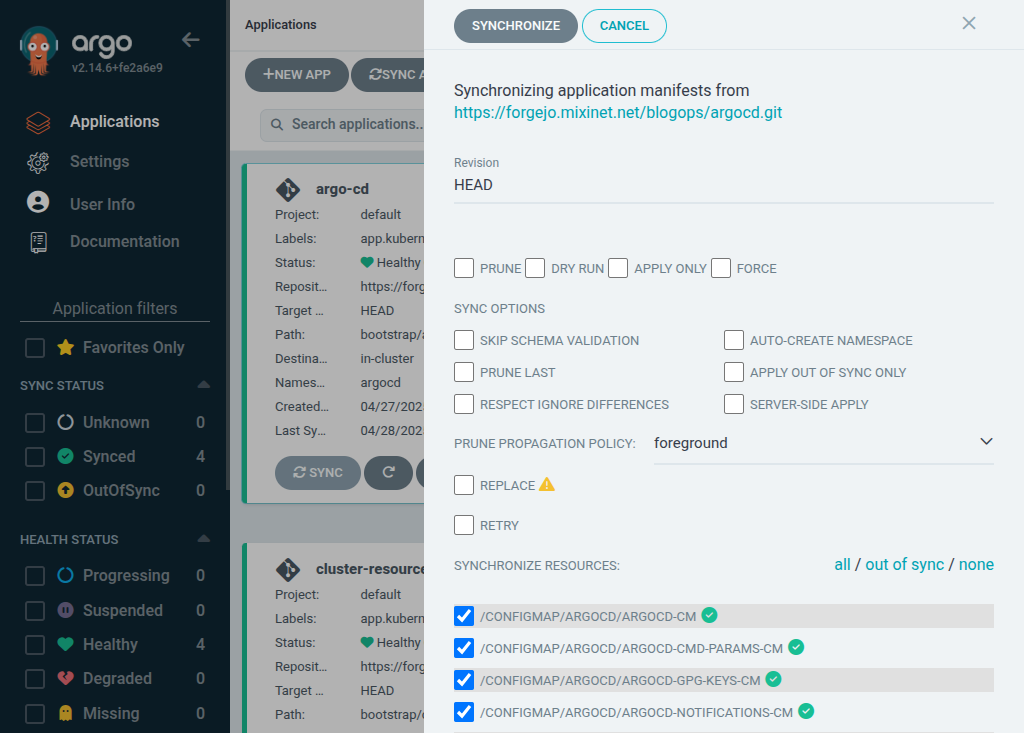 As a test we can download the
 argocd-cmd-params-cm ConfigMap to make sure everything is OK:
apiVersion: v1
data:
  server.insecure: "true"
kind: ConfigMap
metadata:
  annotations:
    kubectl.kubernetes.io/last-applied-configuration:
       "apiVersion":"v1","data": "server.insecure":"true" ,"kind":"ConfigMap","metadata": "annotations": ,"labels": "app.kubernetes.io/instance":"argo-cd","app.kubernetes.io/name":"argocd-cmd-params-cm","app.kubernetes.io/part-of":"argocd" ,"name":"argocd-cmd-params-cm","namespace":"argocd"
  creationTimestamp: "2025-04-27T17:31:54Z"
  labels:
    app.kubernetes.io/instance: argo-cd
    app.kubernetes.io/name: argocd-cmd-params-cm
    app.kubernetes.io/part-of: argocd
  name: argocd-cmd-params-cm
  namespace: argocd
  resourceVersion: "16731"
  uid: a460638f-1d82-47f6-982c-3017699d5f14
As this simply changes the ConfigMap we have to restart the argocd-server to read it again, to do it we delete the
server pods so they are re-created using the updated resource:
kubectl delete pods -n argocd -l app.kubernetes.io/name=argocd-server
After doing this the port-forward command is killed automatically, if we run it again the connection to get to the
argocd-server has to be done using HTTP instead of HTTPS.
Instead of testing that we are going to add an ingress definition to be able to connect to the server using HTTPS and
GRPC against the address argocd.lo.mixinet.net using the wildcard TLS certificate we installed earlier.
To do it we to edit the bootstrap/argo-cd/kustomization.yaml file to add the ingress_route.yaml file to the
deployment:
--- a/bootstrap/argo-cd/kustomization.yaml
+++ b/bootstrap/argo-cd/kustomization.yaml
@@ -20,3 +20,4 @@ kind: Kustomization
 namespace: argocd
 resources:
 - github.com/argoproj-labs/argocd-autopilot/manifests/base?ref=v0.4.19
+- ingress_route.yaml
The ingress_route.yaml file contents are the following:
apiVersion: traefik.io/v1alpha1
kind: IngressRoute
metadata:
  name: argocd-server
  namespace: argocd
spec:
  entryPoints:
    - websecure
  routes:
    - kind: Rule
      match: Host( argocd.lo.mixinet.net )
      priority: 10
      services:
        - name: argocd-server
          port: 80
    - kind: Rule
      match: Host( argocd.lo.mixinet.net ) && Header( Content-Type ,  application/grpc )
      priority: 11
      services:
        - name: argocd-server
          port: 80
          scheme: h2c
  tls:
    certResolver: default
After pushing the changes and waiting a little bit the change is applied and we can access the server using HTTPS and
GRPC, the first way can be tested from a browser and the GRPC using the command line interface:
  argocd --grpc-web login argocd.lo.mixinet.net:8443
Username: admin
Password:
'admin:login' logged in successfully
Context 'argocd.lo.mixinet.net:8443' updated
  argocd app list -o name
argocd/argo-cd
argocd/autopilot-bootstrap
argocd/cluster-resources-in-cluster
argocd/root
So things are working fine and that is all on this post, folks!
ssh clone ssh://git@forgejo.mixinet.net/blogops/argocd.git
cd argocd
edit bootstrap/argo-cd/kustomization.yaml
git commit -m 'Disable TLS for the argocd-server'--- a/bootstrap/argo-cd/kustomization.yaml
+++ b/bootstrap/argo-cd/kustomization.yaml
@@ -11,6 +11,11 @@ configMapGenerator:
key: git_username
name: autopilot-secret
name: argocd-cm
+ # Disable TLS for the Argo Server (see https://argo-cd.readthedocs.io/en/stable/operator-manual/ingress/#traefik-v30)
+- behavior: merge
+ literals:
+ - "server.insecure=true"
+ name: argocd-cmd-params-cm
kind: Kustomization
namespace: argocd
resources:apiVersion: v1
data:
server.insecure: "true"
kind: ConfigMap
metadata:
annotations:
kubectl.kubernetes.io/last-applied-configuration:
"apiVersion":"v1","data": "server.insecure":"true" ,"kind":"ConfigMap","metadata": "annotations": ,"labels": "app.kubernetes.io/instance":"argo-cd","app.kubernetes.io/name":"argocd-cmd-params-cm","app.kubernetes.io/part-of":"argocd" ,"name":"argocd-cmd-params-cm","namespace":"argocd"
creationTimestamp: "2025-04-27T17:31:54Z"
labels:
app.kubernetes.io/instance: argo-cd
app.kubernetes.io/name: argocd-cmd-params-cm
app.kubernetes.io/part-of: argocd
name: argocd-cmd-params-cm
namespace: argocd
resourceVersion: "16731"
uid: a460638f-1d82-47f6-982c-3017699d5f14 kubectl delete pods -n argocd -l app.kubernetes.io/name=argocd-server--- a/bootstrap/argo-cd/kustomization.yaml
+++ b/bootstrap/argo-cd/kustomization.yaml
@@ -20,3 +20,4 @@ kind: Kustomization
namespace: argocd
resources:
- github.com/argoproj-labs/argocd-autopilot/manifests/base?ref=v0.4.19
+- ingress_route.yamlapiVersion: traefik.io/v1alpha1
kind: IngressRoute
metadata:
name: argocd-server
namespace: argocd
spec:
entryPoints:
- websecure
routes:
- kind: Rule
match: Host( argocd.lo.mixinet.net )
priority: 10
services:
- name: argocd-server
port: 80
- kind: Rule
match: Host( argocd.lo.mixinet.net ) && Header( Content-Type , application/grpc )
priority: 11
services:
- name: argocd-server
port: 80
scheme: h2c
tls:
certResolver: default argocd --grpc-web login argocd.lo.mixinet.net:8443
Username: admin
Password:
'admin:login' logged in successfully
Context 'argocd.lo.mixinet.net:8443' updated
argocd app list -o name
argocd/argo-cd
argocd/autopilot-bootstrap
argocd/cluster-resources-in-cluster
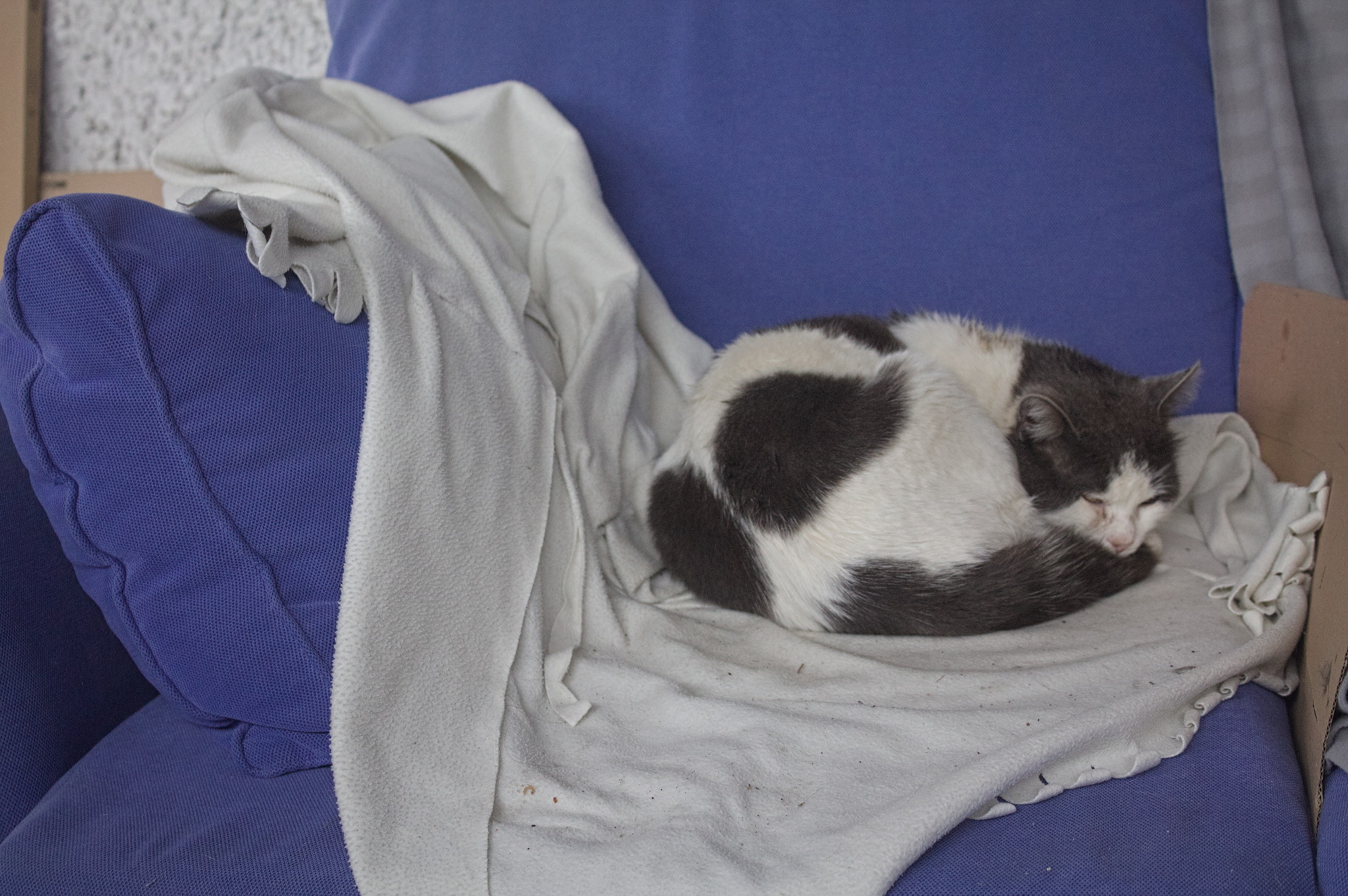
argocd/root Years ago I made myself a quick dressing gown from a white fleece IKEA
throw and often wore it in the morning between waking up and changing
into day clothes.
One day I want to make myself a fancy victorian wrapper, to use in its
place, but that s still in the early planning stage, and will require
quite some work.
Years ago I made myself a quick dressing gown from a white fleece IKEA
throw and often wore it in the morning between waking up and changing
into day clothes.
One day I want to make myself a fancy victorian wrapper, to use in its
place, but that s still in the early planning stage, and will require
quite some work.
 Then last autumn I discovered that the taxes I owed to the local lord (who
provides protection from mice and other small animals) included not just
a certain amount of kibbles, but also some warm textiles, and the
dressing gown (which at this time was definitely no longer pristine) had
to go.
For a while I had to do without a dressing gown, but then in the second
half of this winter I had some time for a quick machine sewing
project. I could not tackle the big victorian thing, but I still had a
second POLARVIDE throw from IKEA (this time in a more sensible dark
grey) I had bought with sewing intents.
The fabric in a throw isn t that much, so I needed something pretty
efficient, and rather than winging it as I had done the first time I
decided I wanted to try the Modular Jacket from
Then last autumn I discovered that the taxes I owed to the local lord (who
provides protection from mice and other small animals) included not just
a certain amount of kibbles, but also some warm textiles, and the
dressing gown (which at this time was definitely no longer pristine) had
to go.
For a while I had to do without a dressing gown, but then in the second
half of this winter I had some time for a quick machine sewing
project. I could not tackle the big victorian thing, but I still had a
second POLARVIDE throw from IKEA (this time in a more sensible dark
grey) I had bought with sewing intents.
The fabric in a throw isn t that much, so I needed something pretty
efficient, and rather than winging it as I had done the first time I
decided I wanted to try the Modular Jacket from  Since I didn t have enough fabric for the belt I also skipped the belt
loops, but I have been wearing this with random belts and I don t feel
the need for them anyway. I ve also been thinking about adding a button
just above the bust and use that to keep it closed, but I m still not
100% sure about it.
Another thing I still need to do is to go through the few scraps of
fleece that are left and see if I can piece together a serviceable
pocket or two.
Since I didn t have enough fabric for the belt I also skipped the belt
loops, but I have been wearing this with random belts and I don t feel
the need for them anyway. I ve also been thinking about adding a button
just above the bust and use that to keep it closed, but I m still not
100% sure about it.
Another thing I still need to do is to go through the few scraps of
fleece that are left and see if I can piece together a serviceable
pocket or two.
 Because of the size of the fabric, I ended up having quite long sleeves:
I m happy with them because they mean that I can cover my hands when
it s cold, or fold them back to make a nice cuff.
If I ll make a real jacket with this patter I ll have to take this in
consideration, and either make the sleeves shorter or finish the seam in
a way that looks nice when folded back.
Will I make a real jacket? I m not sure, it s not really my style of
outer garment, but as a dressing gown it has already been used quite a
bit (as in, almost every morning since I ve made it :) ) and will
continue to be used until too worn to be useful, and that s a good
thing.
Because of the size of the fabric, I ended up having quite long sleeves:
I m happy with them because they mean that I can cover my hands when
it s cold, or fold them back to make a nice cuff.
If I ll make a real jacket with this patter I ll have to take this in
consideration, and either make the sleeves shorter or finish the seam in
a way that looks nice when folded back.
Will I make a real jacket? I m not sure, it s not really my style of
outer garment, but as a dressing gown it has already been used quite a
bit (as in, almost every morning since I ve made it :) ) and will
continue to be used until too worn to be useful, and that s a good
thing.

 Like each month, have a look at the work funded by

 The new FAI release 6.4 comes with some nice new features.
It now supports installing the Xfce edition of Linux Mint
22.1 'Xia'. There's now an additional
The new FAI release 6.4 comes with some nice new features.
It now supports installing the Xfce edition of Linux Mint
22.1 'Xia'. There's now an additional  Hi, I m Melissa, a GPU kernel driver developer at Igalia and today I ll be
giving a very inclusive talk to not let your motivation go by saving time with
kworkflow.
Hi, I m Melissa, a GPU kernel driver developer at Igalia and today I ll be
giving a very inclusive talk to not let your motivation go by saving time with
kworkflow.
 So, you re a kernel developer, or you want to be a kernel developer, or you
don t want to be a kernel developer. But you re all united by a single need:
you need to validate a custom kernel with just one change, and you need to
verify that it fixes or improves something in the kernel.
So, you re a kernel developer, or you want to be a kernel developer, or you
don t want to be a kernel developer. But you re all united by a single need:
you need to validate a custom kernel with just one change, and you need to
verify that it fixes or improves something in the kernel.

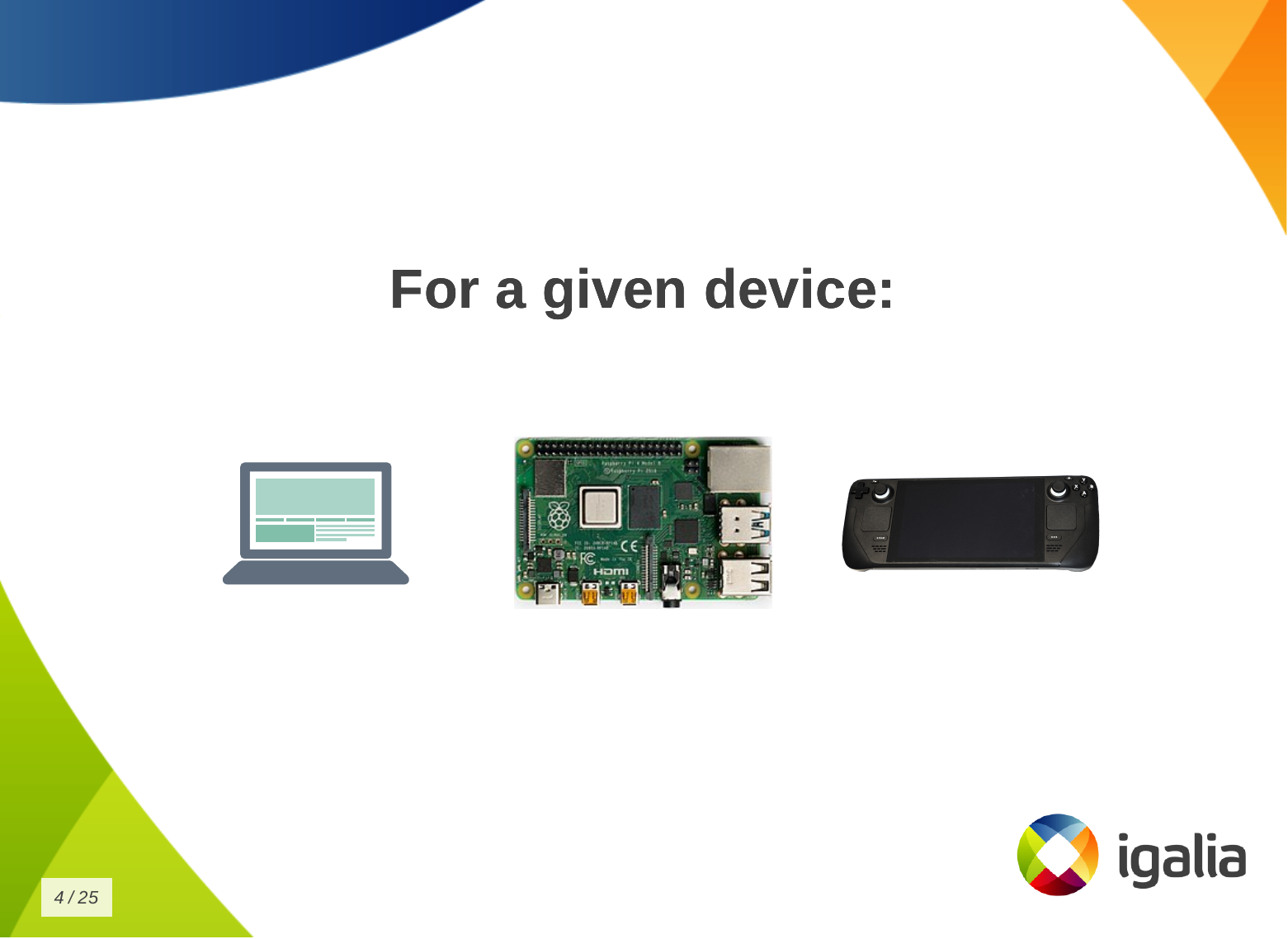
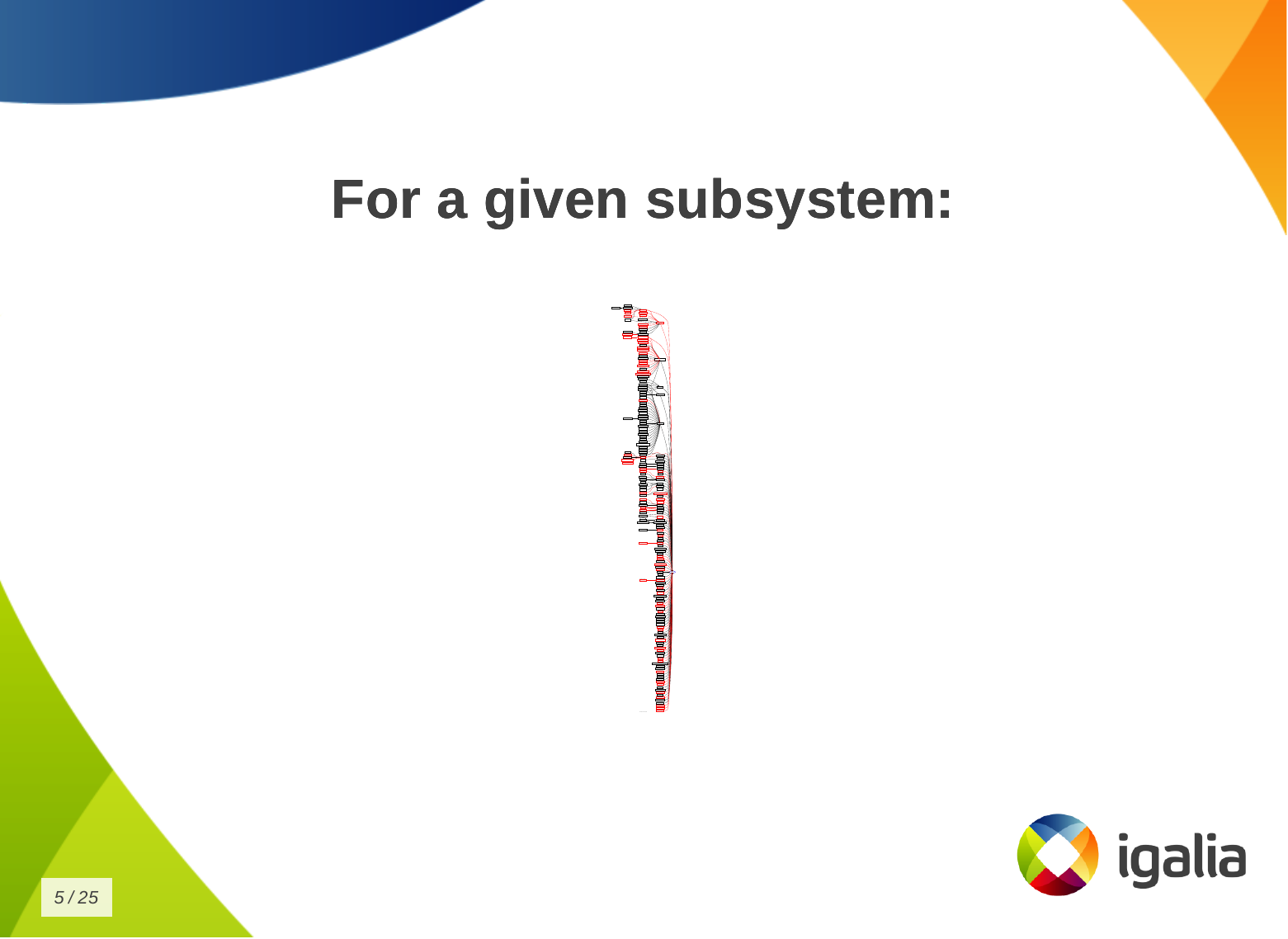 And that s a given change for a given distribution, or for a given device, or
for a given subsystem
And that s a given change for a given distribution, or for a given device, or
for a given subsystem
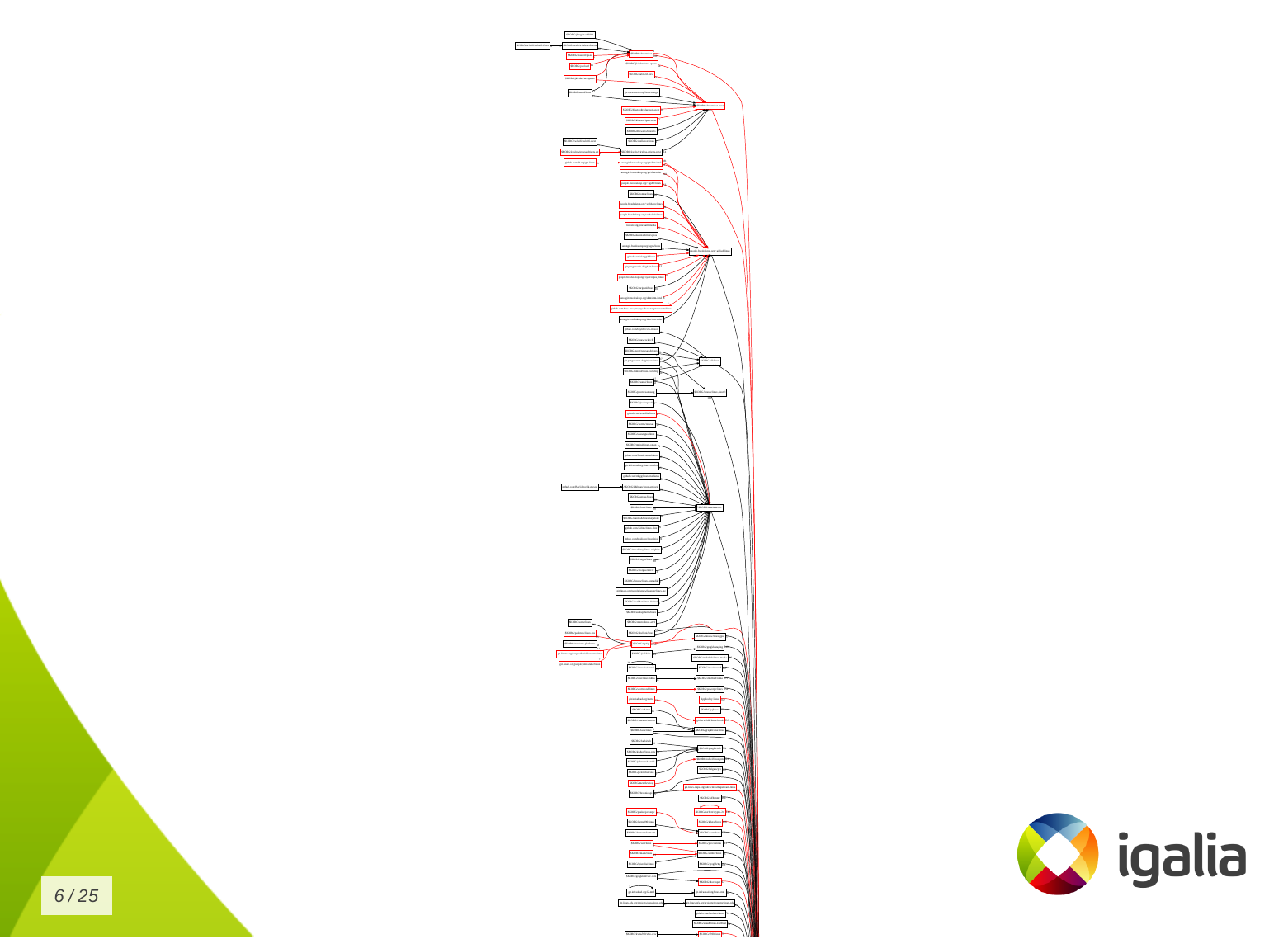 Look to this diagram and try to figure out the number of subsystems and related
work trees you can handle in the kernel.
Look to this diagram and try to figure out the number of subsystems and related
work trees you can handle in the kernel.
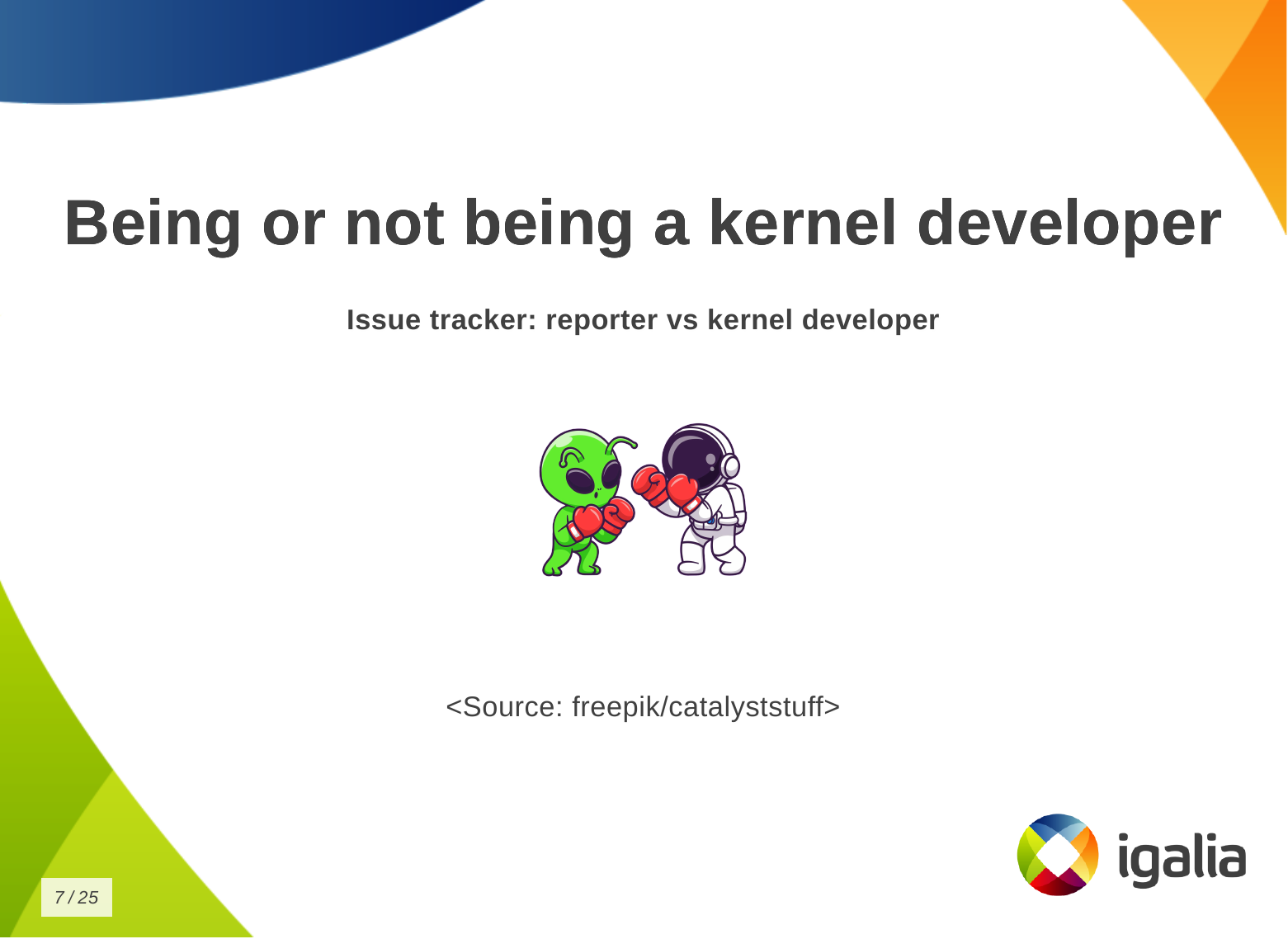 So, whether you are a kernel developer or not, at some point you may come
across this type of situation:
So, whether you are a kernel developer or not, at some point you may come
across this type of situation:
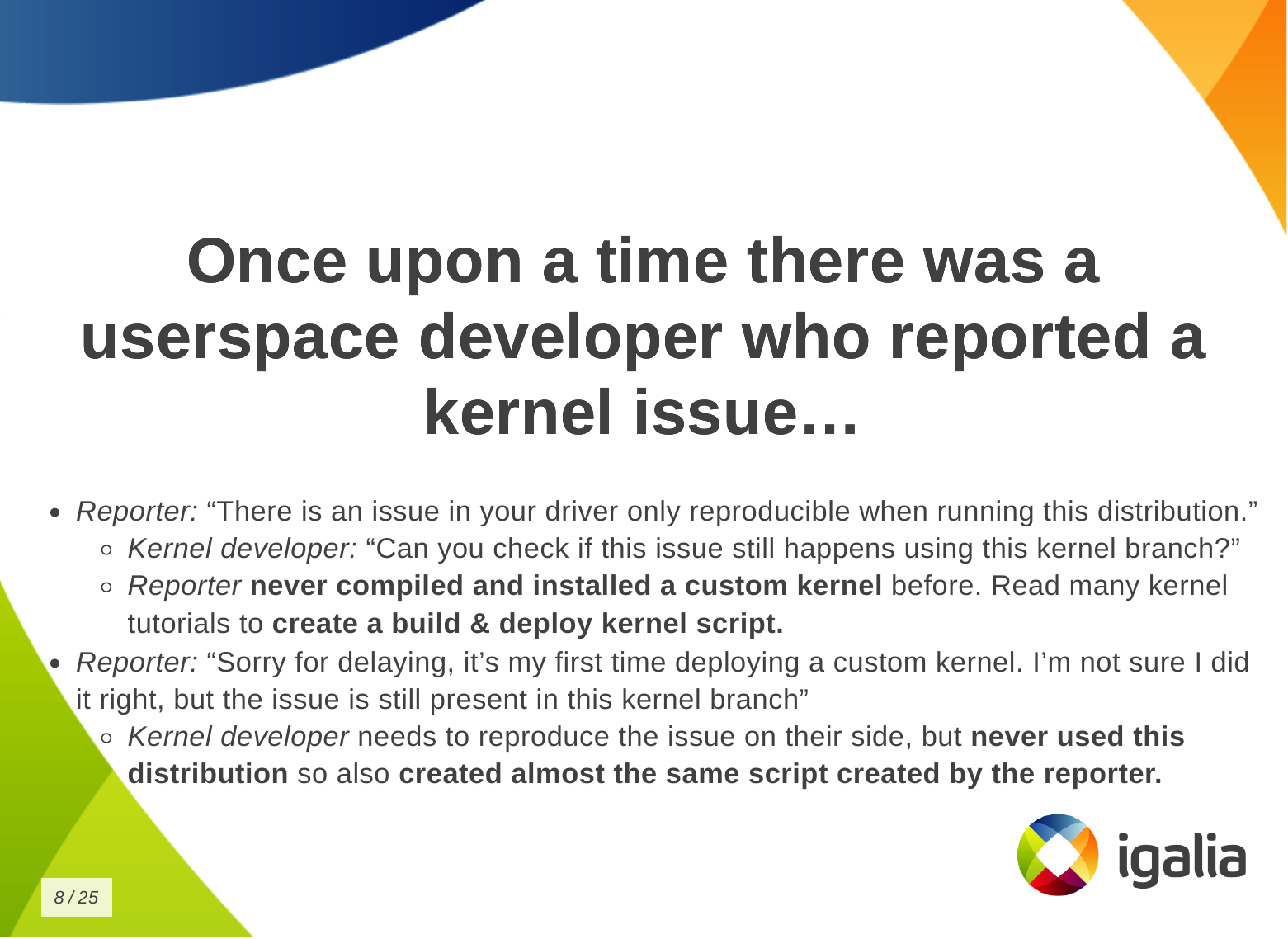 There is a userspace developer who wants to report a kernel issue and says:
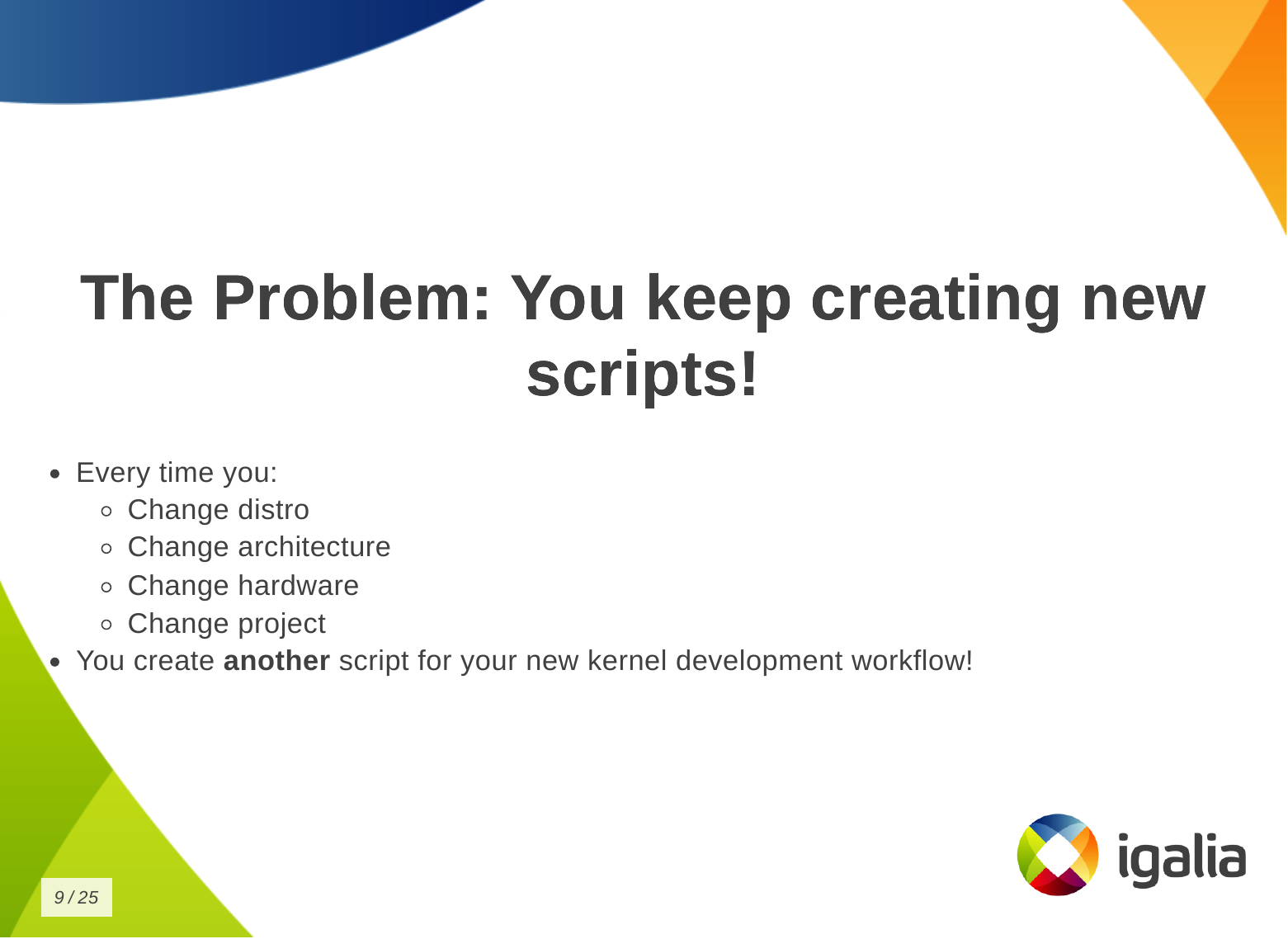 What s the problem of this situation? The problem is that you keep creating new
scripts!
Every time you change distribution, change architecture, change hardware,
change project - even in the same company - the development setup may change
when you switch to a different project, you create another script for your new
kernel development workflow!
What s the problem of this situation? The problem is that you keep creating new
scripts!
Every time you change distribution, change architecture, change hardware,
change project - even in the same company - the development setup may change
when you switch to a different project, you create another script for your new
kernel development workflow!
 You know, you have a lot of babies, you have a collection of my precious
scripts , like Sm agol (Lord of the Rings) with the precious ring.
You know, you have a lot of babies, you have a collection of my precious
scripts , like Sm agol (Lord of the Rings) with the precious ring.
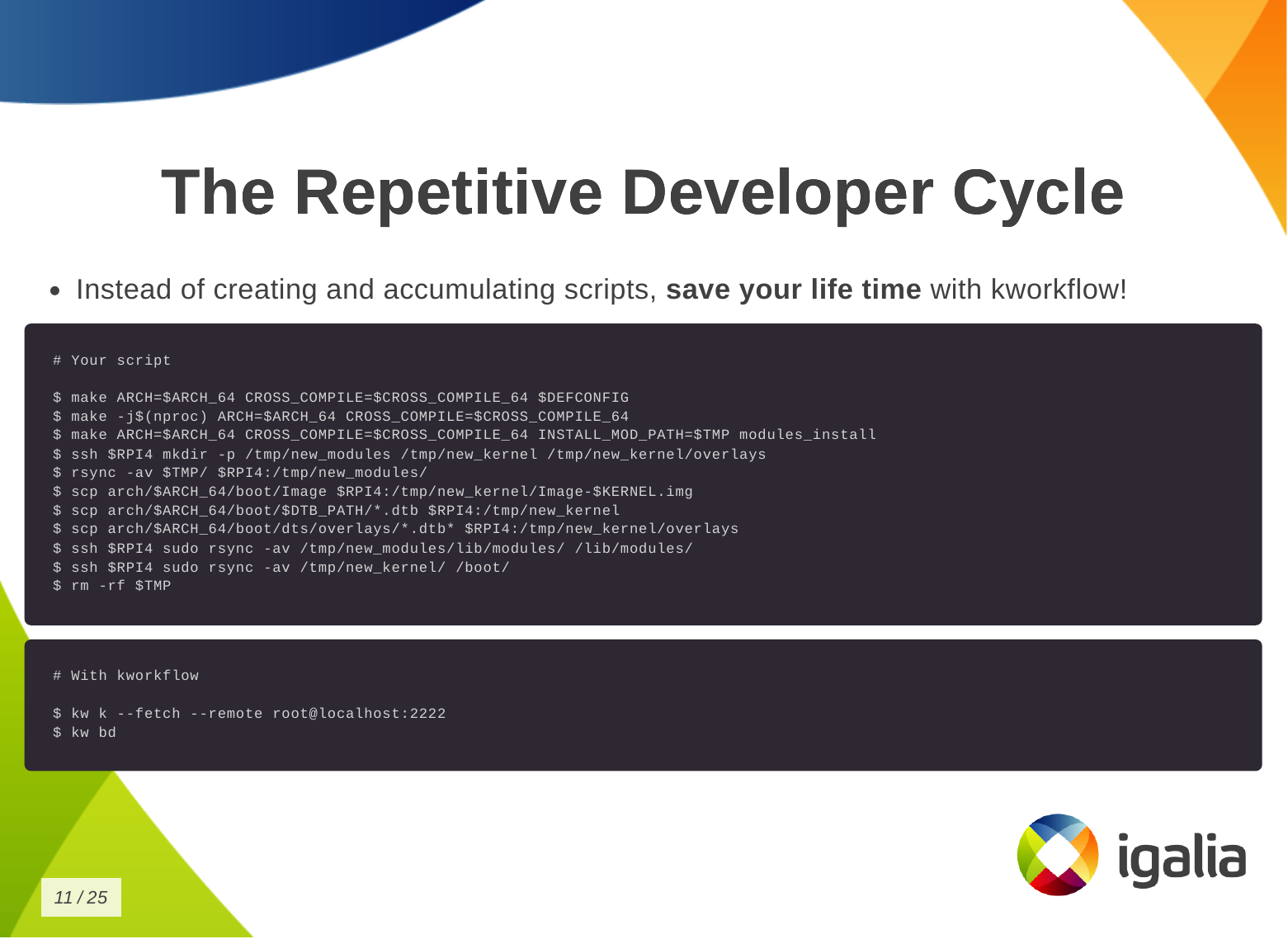 Instead of creating and accumulating scripts, save yourself time with
kworkflow. Here is a typical script that many of you may have. This is a
Raspberry Pi 4 script and contains everything you need to memorize to compile
and deploy a kernel on your Raspberry Pi 4.
With kworkflow, you only need to memorize two commands, and those commands are
not specific to Raspberry Pi. They are the same commands to different
architecture, kernel configuration, target device.
Instead of creating and accumulating scripts, save yourself time with
kworkflow. Here is a typical script that many of you may have. This is a
Raspberry Pi 4 script and contains everything you need to memorize to compile
and deploy a kernel on your Raspberry Pi 4.
With kworkflow, you only need to memorize two commands, and those commands are
not specific to Raspberry Pi. They are the same commands to different
architecture, kernel configuration, target device.
 I don t know if you will get this analogy, but kworkflow is for me a megazord
of scripts. You are combining all of your scripts to create a very powerful
tool.
I don t know if you will get this analogy, but kworkflow is for me a megazord
of scripts. You are combining all of your scripts to create a very powerful
tool.
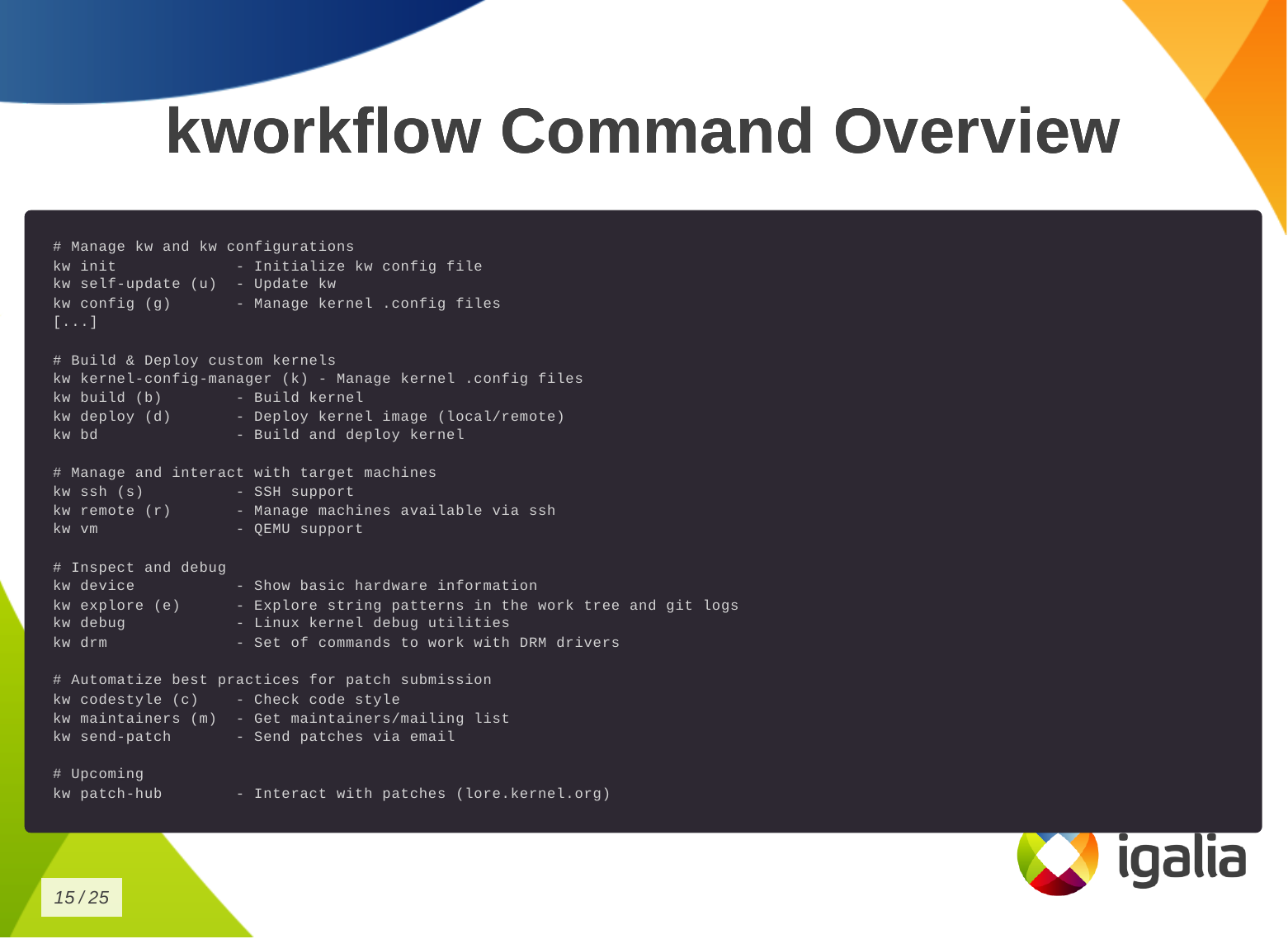 This is the list of commands you can run with kworkflow.
The first subset is to configure your tool for various situations you may face
in your daily tasks.
This is the list of commands you can run with kworkflow.
The first subset is to configure your tool for various situations you may face
in your daily tasks.
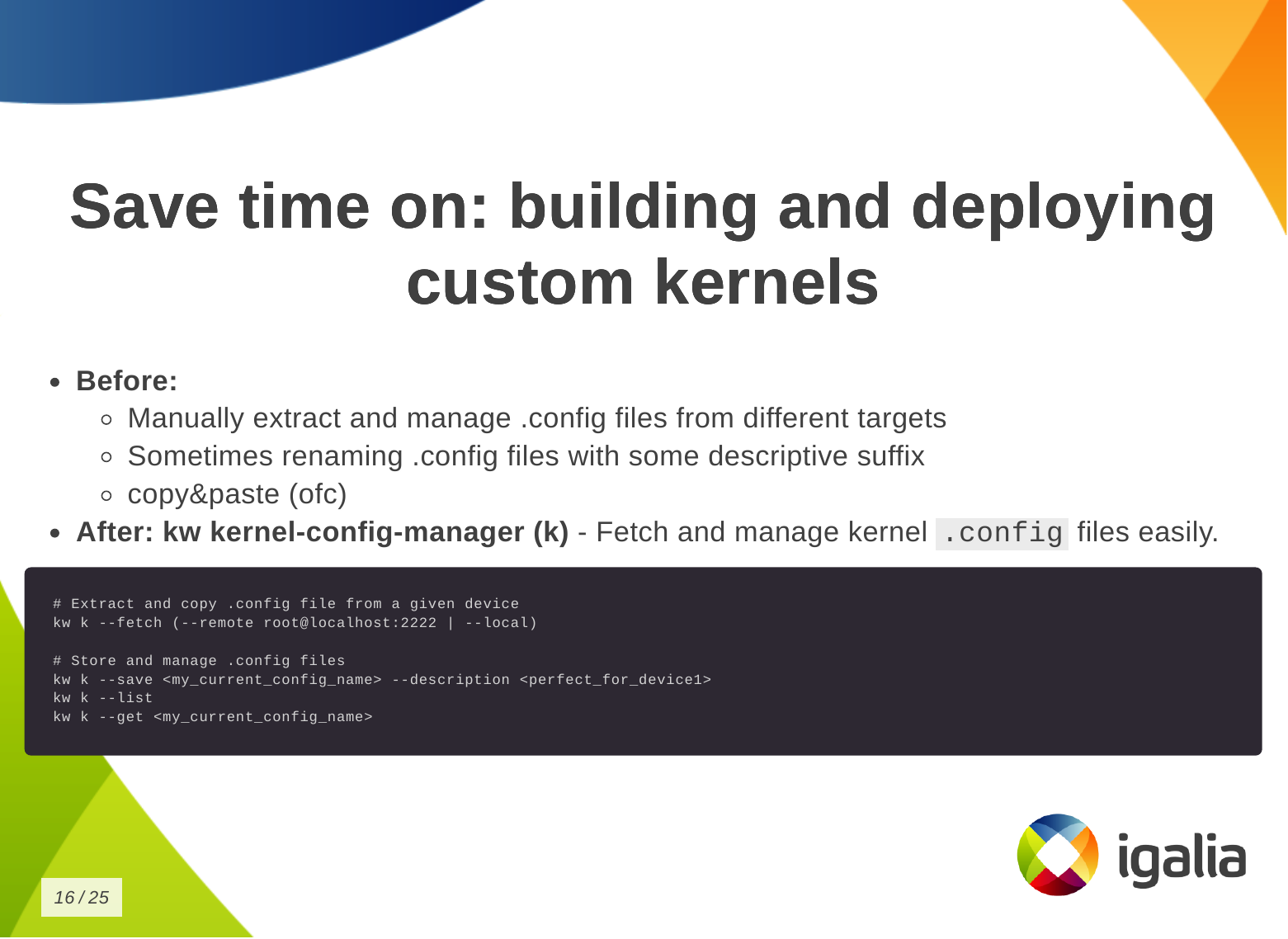 So how can you save time building and deploying a custom kernel?
First, you need a .config file.
So how can you save time building and deploying a custom kernel?
First, you need a .config file.
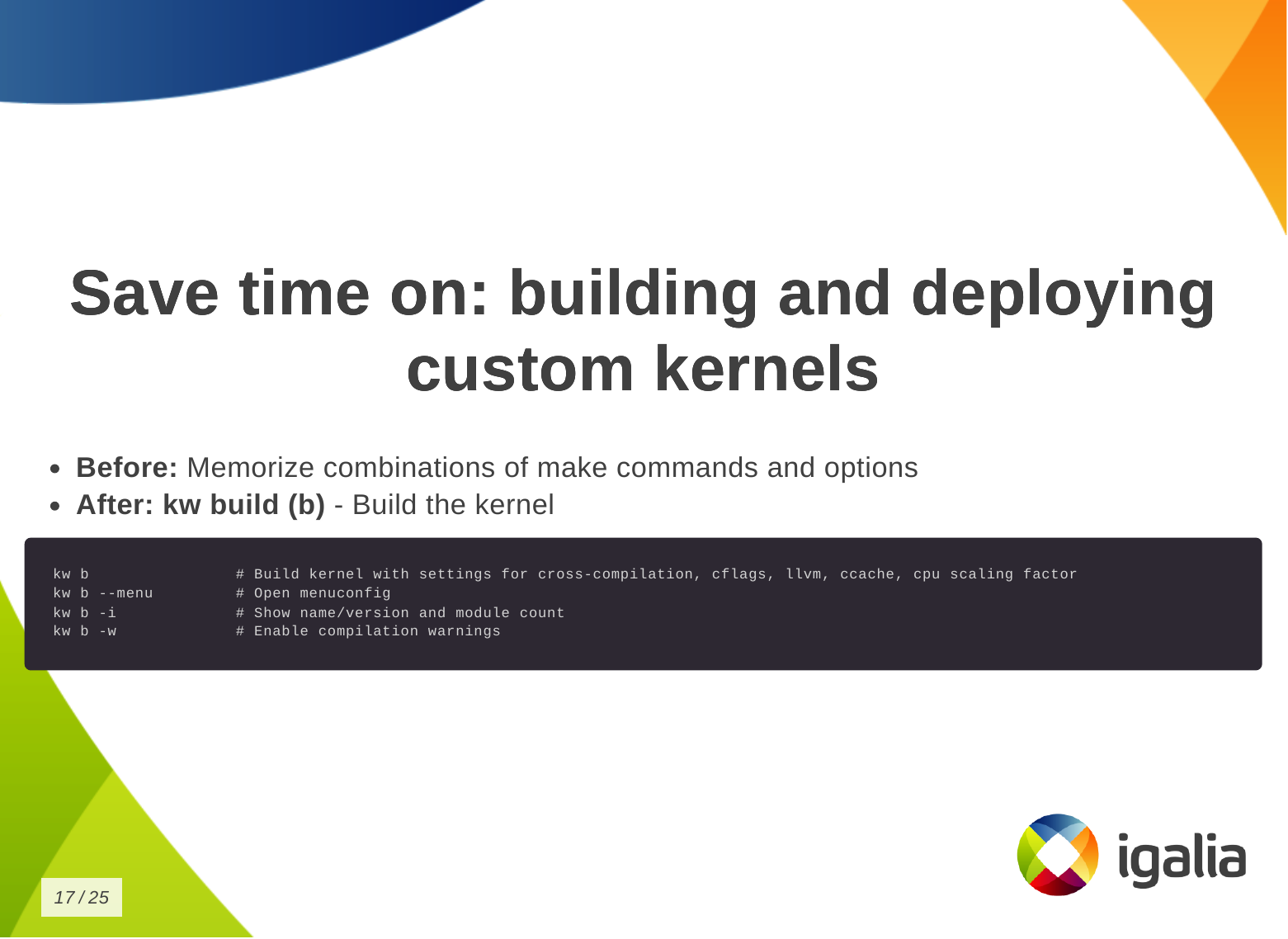 Then you want to build the kernel:
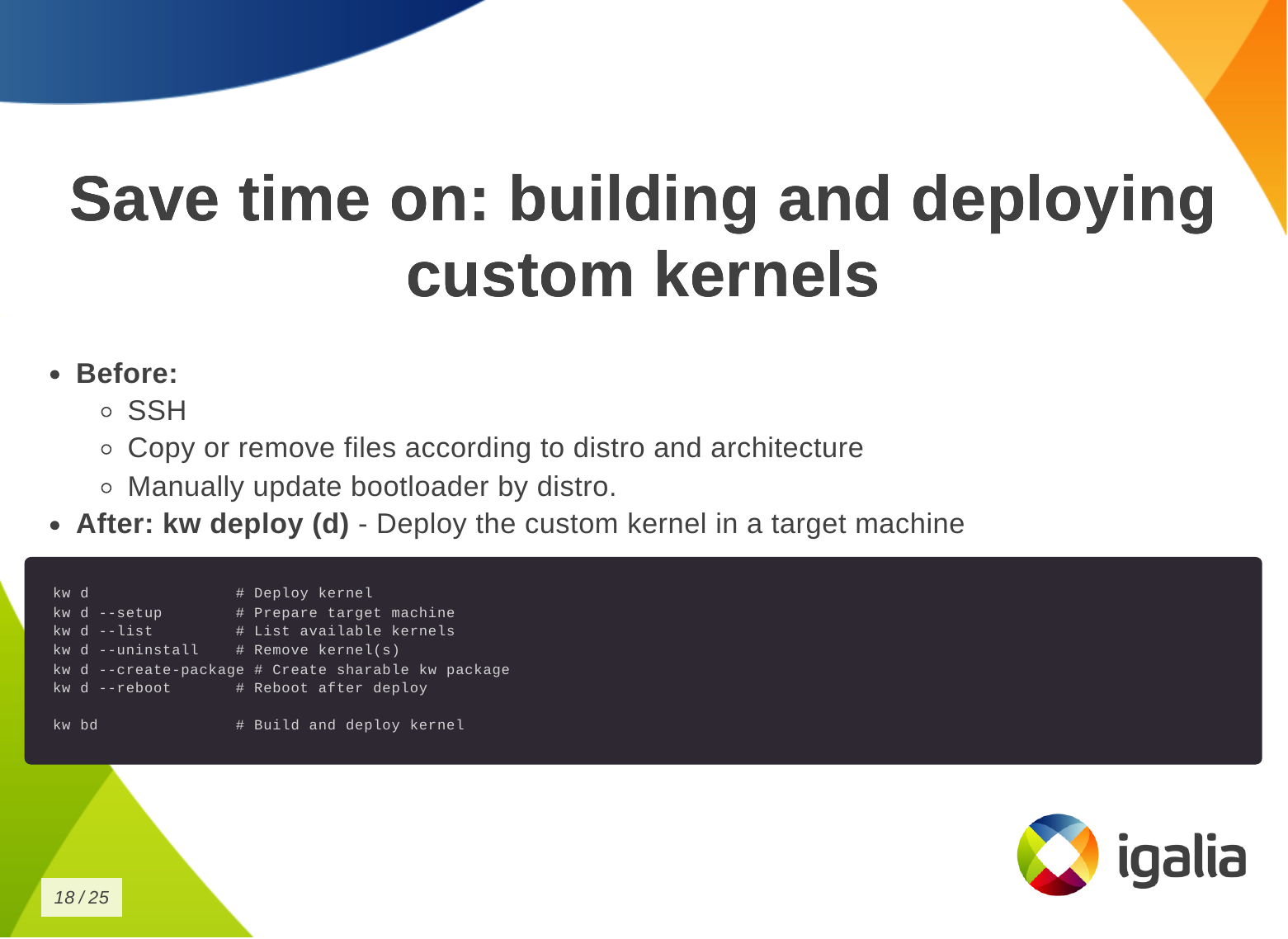 Finally, to deploy the kernel in a target machine.
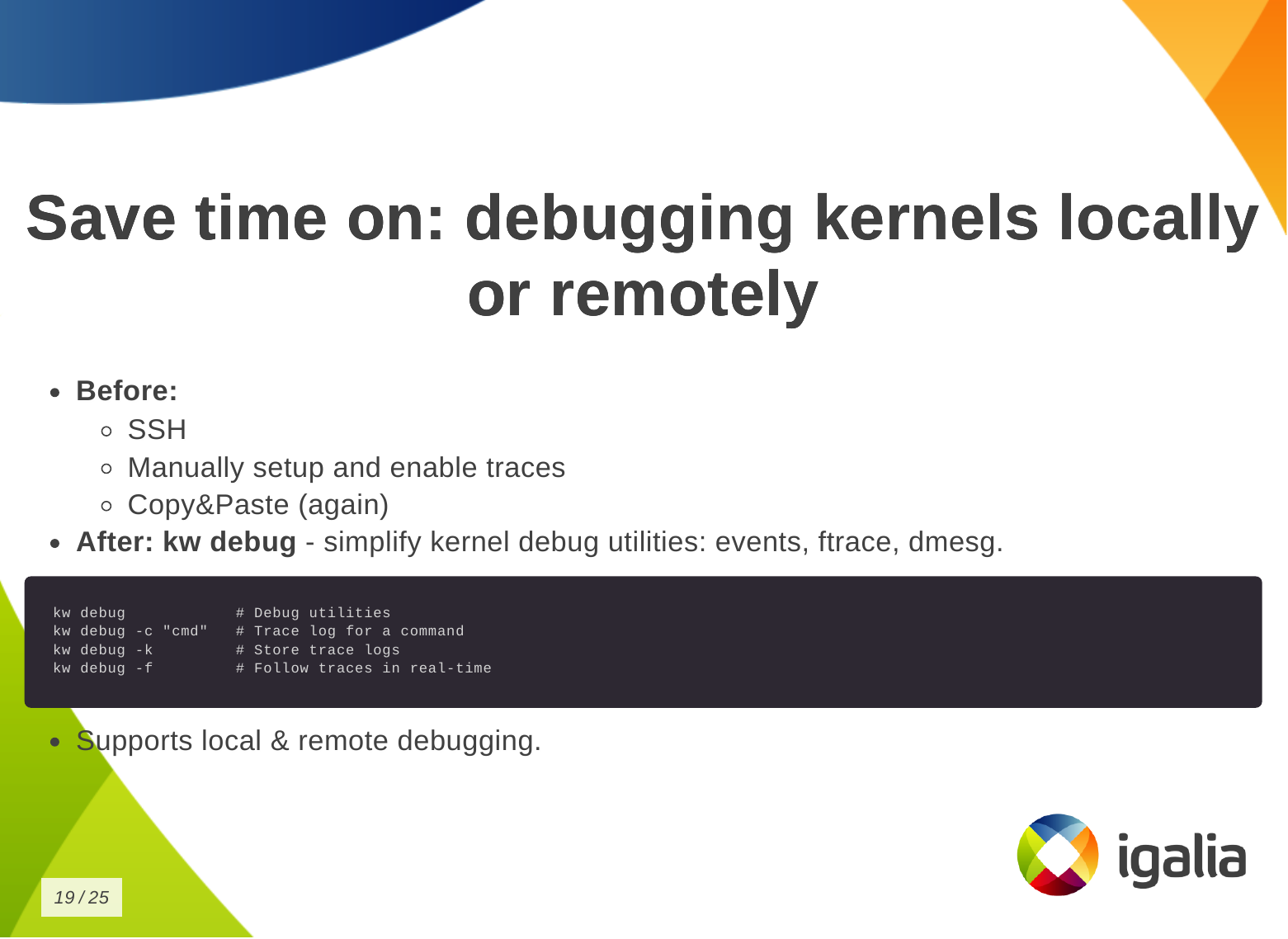 You can also save time on debugging kernels locally or remotely.
 You can save time on managing multiple kernel images in the same work tree.
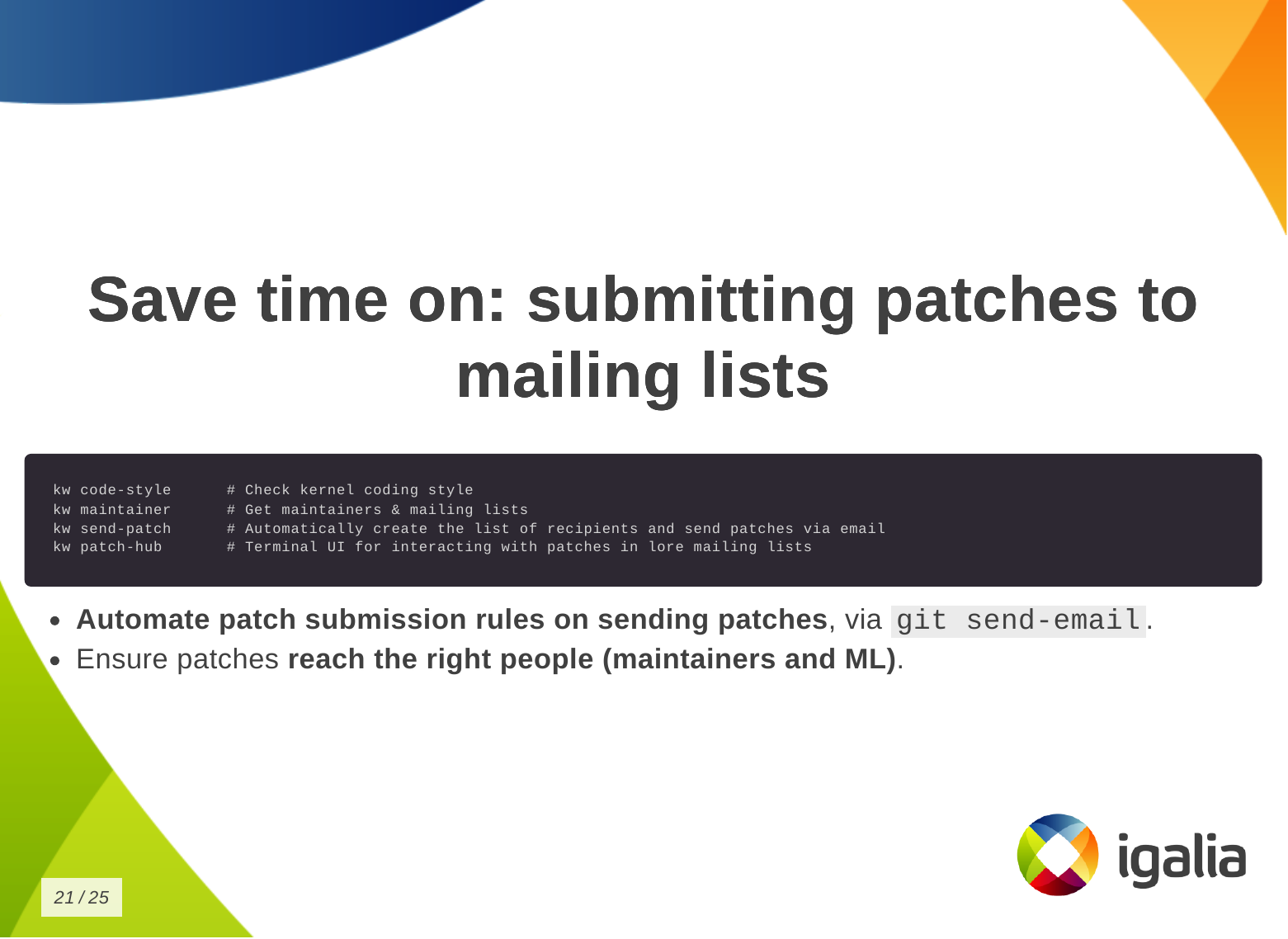 Finally, you can save time when submitting kernel patches. In kworkflow, you
can find everything you need to wrap your changes in patch format and submit
them to the right list of recipients, those who can review, comment on, and
accept your changes.
Finally, you can save time when submitting kernel patches. In kworkflow, you
can find everything you need to wrap your changes in patch format and submit
them to the right list of recipients, those who can review, comment on, and
accept your changes.
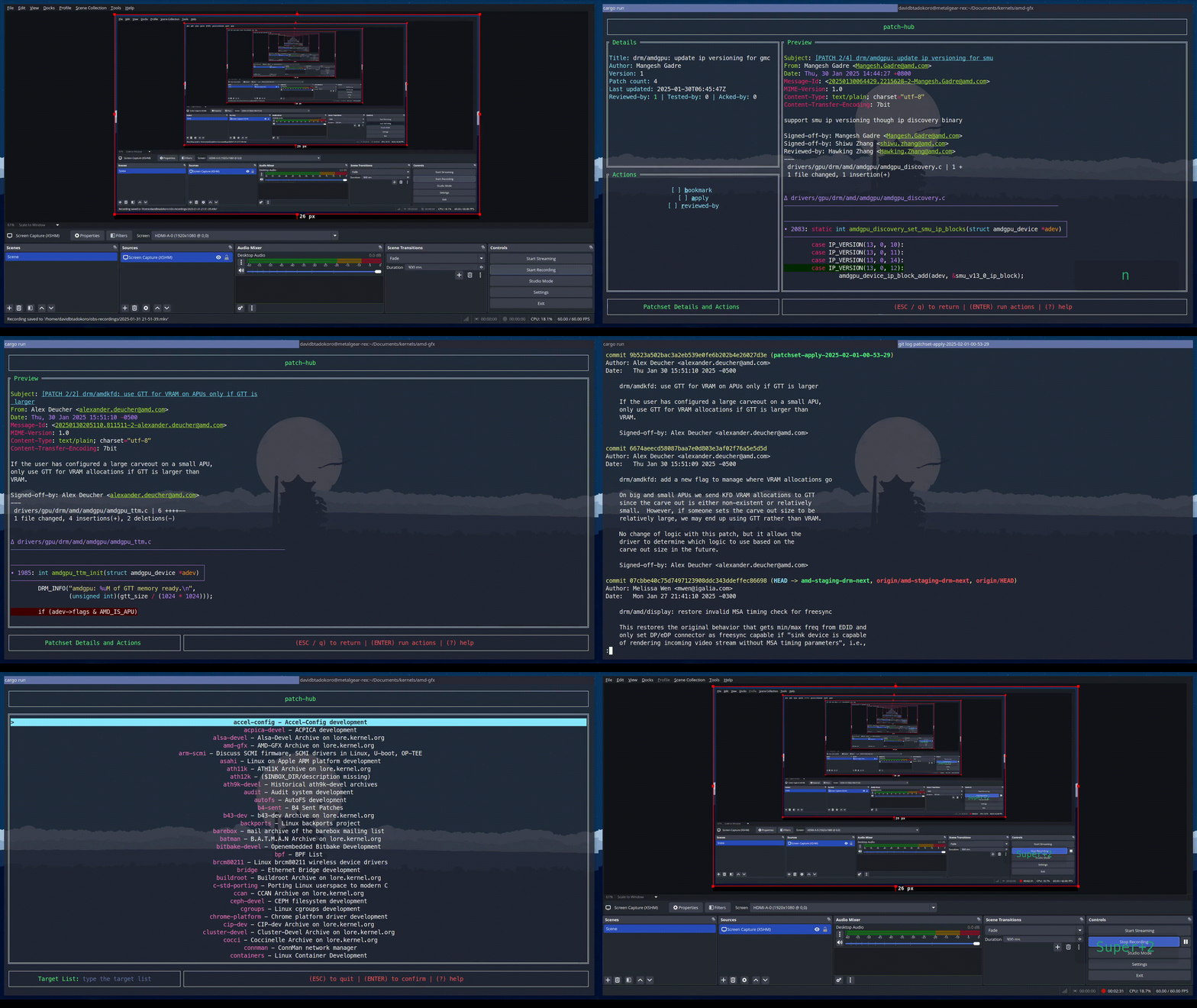 This is a demo that the lead developer of the kw patch-hub feature sent me.
With this feature, you will be able to check out a series on a specific mailing
list, bookmark those patches in the kernel for validation, and when you are
satisfied with the proposed changes, you can automatically submit a reviewed-by
for that whole series to the mailing list.
This is a demo that the lead developer of the kw patch-hub feature sent me.
With this feature, you will be able to check out a series on a specific mailing
list, bookmark those patches in the kernel for validation, and when you are
satisfied with the proposed changes, you can automatically submit a reviewed-by
for that whole series to the mailing list.
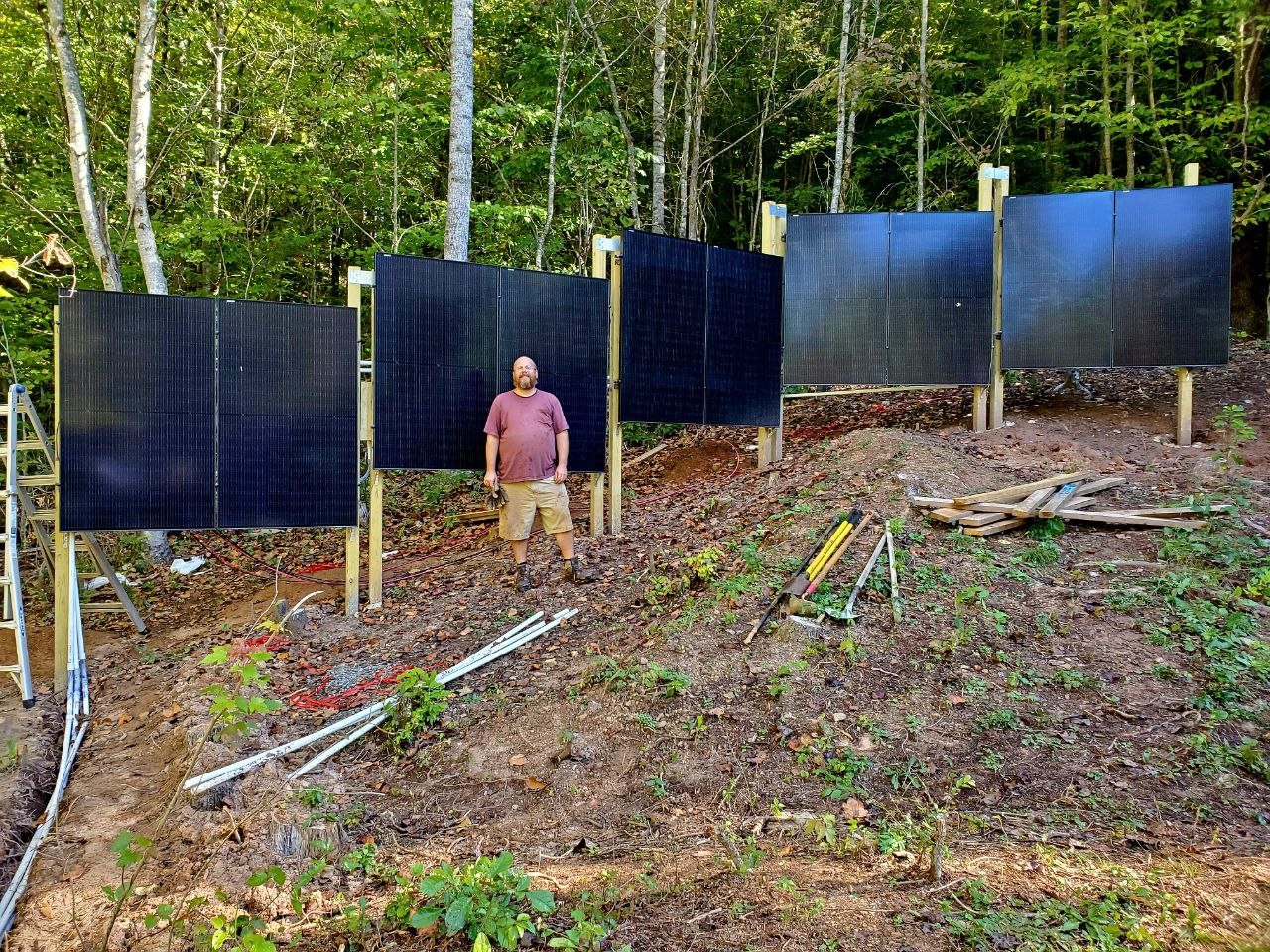
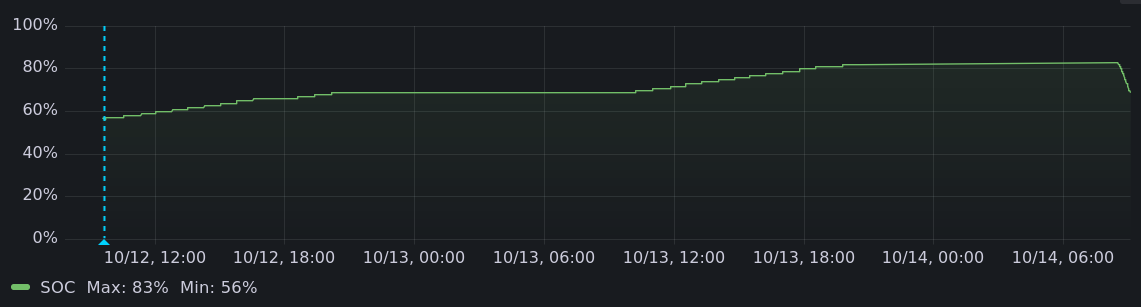
 Eight months ago I came up my rocky driveway in an electric car, with the
back full of solar panel mounting rails. I didn't know how I'd manage to
keep it charged. I got the car earlier than planned, with my
Eight months ago I came up my rocky driveway in an electric car, with the
back full of solar panel mounting rails. I didn't know how I'd manage to
keep it charged. I got the car earlier than planned, with my

 Hello, hello, hello!
This report for the
Hello, hello, hello!
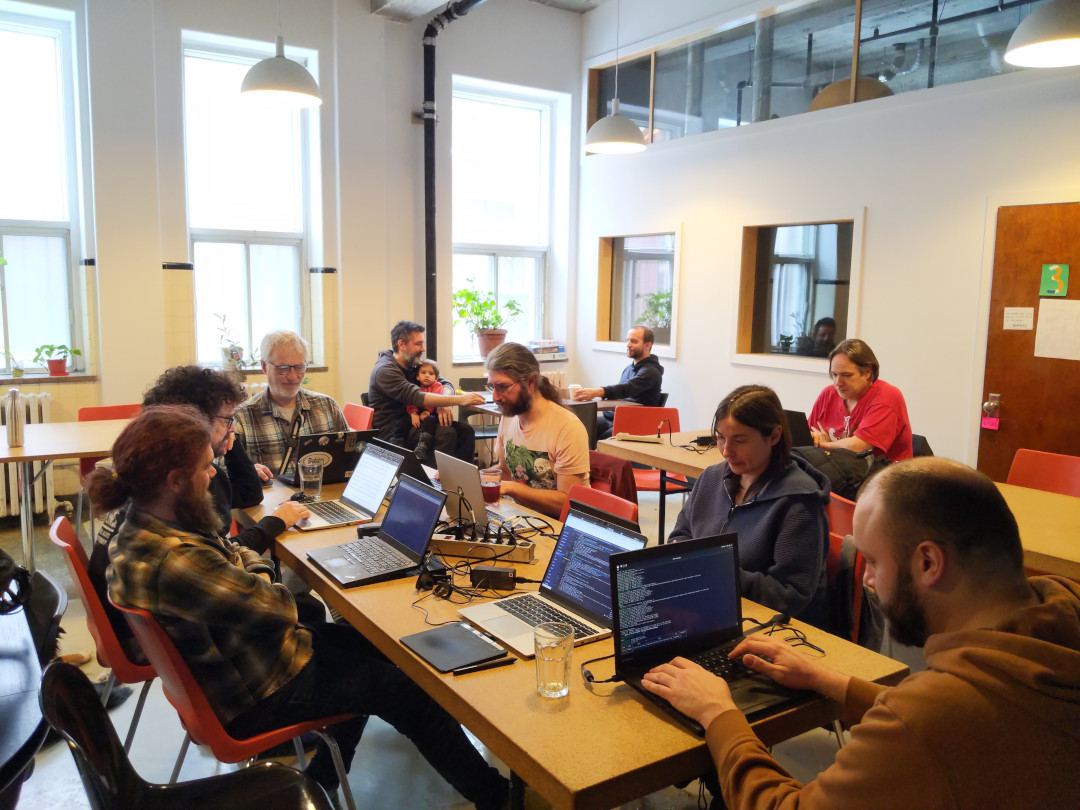
This report for the  BSPs are great and this one was no exception. You should try to






 Last year, I decided to start participating in the Debian LTS and ELTS projects. It was a great opportunity to engage in
something new within the Debian community. I had been following these projects for many years, observing their evolution
and how they gained traction both within the ecosystem and across the industry.
I was curious to explore how contributors were working internally especially how they managed security patching and
remediation for older software. I ve always felt this was a particularly challenging area, and I was fortunate to
experience it firsthand.
As of April 2025, the
Last year, I decided to start participating in the Debian LTS and ELTS projects. It was a great opportunity to engage in
something new within the Debian community. I had been following these projects for many years, observing their evolution
and how they gained traction both within the ecosystem and across the industry.
I was curious to explore how contributors were working internally especially how they managed security patching and
remediation for older software. I ve always felt this was a particularly challenging area, and I was fortunate to
experience it firsthand.
As of April 2025, the  Fun with -fsanitize=undefined and Picolibc
Both GCC and Clang support the -fsanitize=undefined flag which
instruments the generated code to detect places where the program
wanders into parts of the C language specification which are either
undefined or implementation defined. Many of these are also common
programming errors. It would be great if there were sanitizers for
other easily detected bugs, but for now, at least the undefined
sanitizer does catch several useful problems.
Supporting the sanitizer
The sanitizer can be built to either trap on any error or call
handlers. In both modes, the same problems are identified, but when
trap mode is enabled, the compiler inserts a trap instruction and
doesn't expect the program to continue running. When handlers are in
use, each identified issue is tagged with a bunch of useful data and
then a specific sanitizer handling function is called.
The specific functions are not all that well documented, nor are the
parameters they receive. Maybe this is because both compilers provide
an implementation of all of the functions they use and don't really
expect external implementations to exist? However, to make these useful in an
embedded environment, picolibc needs to provide a complete set of
handlers that support all versions both gcc and clang as the
compiler-provided versions depend upon specific C (and C++) libraries.
Of course, programs can be built in trap-on-error mode, but that makes
it much more difficult to figure out what went wrong.
Fixing Sanitizer Issues
Once the sanitizer handlers were implemented, picolibc could be
built with them enabled and all of the picolibc tests run to uncover
issues within the library.
As with the static analyzer adventure from last year, the vast bulk of
sanitizer complaints came from invoking undefined or
implementation-defined behavior in harmless ways:
Fun with -fsanitize=undefined and Picolibc
Both GCC and Clang support the -fsanitize=undefined flag which
instruments the generated code to detect places where the program
wanders into parts of the C language specification which are either
undefined or implementation defined. Many of these are also common
programming errors. It would be great if there were sanitizers for
other easily detected bugs, but for now, at least the undefined
sanitizer does catch several useful problems.
Supporting the sanitizer
The sanitizer can be built to either trap on any error or call
handlers. In both modes, the same problems are identified, but when
trap mode is enabled, the compiler inserts a trap instruction and
doesn't expect the program to continue running. When handlers are in
use, each identified issue is tagged with a bunch of useful data and
then a specific sanitizer handling function is called.
The specific functions are not all that well documented, nor are the
parameters they receive. Maybe this is because both compilers provide
an implementation of all of the functions they use and don't really
expect external implementations to exist? However, to make these useful in an
embedded environment, picolibc needs to provide a complete set of
handlers that support all versions both gcc and clang as the
compiler-provided versions depend upon specific C (and C++) libraries.
Of course, programs can be built in trap-on-error mode, but that makes
it much more difficult to figure out what went wrong.
Fixing Sanitizer Issues
Once the sanitizer handlers were implemented, picolibc could be
built with them enabled and all of the picolibc tests run to uncover
issues within the library.
As with the static analyzer adventure from last year, the vast bulk of
sanitizer complaints came from invoking undefined or
implementation-defined behavior in harmless ways:
