Search Results: "hug"

8 March 2017

Matthew Garrett: The Internet of Microphones

So the CIA has tools to snoop on you via your TV and your Echo is testifying in a murder case and yet people are still buying connected devices with microphones in and why are they doing that the world is on fire surely this is terrible?

You're right that the world is terrible, but this isn't really a contributing factor to it. There's a few reasons why. The first is that there's really not any indication that the CIA and MI5 ever turned this into an actual deployable exploit. The development reports[1] describe a project that still didn't know what would happen to their exploit over firmware updates and a "fake off" mode that left a lit LED which wouldn't be there if the TV were actually off, so there's a potential for failed updates and people noticing that there's something wrong. It's certainly possible that development continued and it was turned into a polished and usable exploit, but it really just comes across as a bunch of nerds wanting to show off a neat demo.

But let's say it did get to the stage of being deployable - there's still not a great deal to worry about. No remote infection mechanism is described, so they'd need to do it locally. If someone is in a position to reflash your TV without you noticing, they're also in a position to, uh, just leave an internet connected microphone of their own. So how would they infect you remotely? TVs don't actually consume a huge amount of untrusted content from arbitrary sources[2], so that's much harder than it sounds and probably not worth it because:

YOU ARE CARRYING AN INTERNET CONNECTED MICROPHONE THAT CONSUMES VAST QUANTITIES OF UNTRUSTED CONTENT FROM ARBITRARY SOURCES

Seriously your phone is like eleven billion times easier to infect than your TV is and you carry it everywhere. If the CIA want to spy on you, they'll do it via your phone. If you're paranoid enough to take the battery out of your phone before certain conversations, don't have those conversations in front of a TV with a microphone in it. But, uh, it's actually worse than that.

These days audio hardware usually consists of a very generic codec containing a bunch of digital analogue converters, some analogue digital converters and a bunch of io pins that can basically be wired up in arbitrary ways. Hardcoding the roles of these pins makes board layout more annoying and some people want more inputs than outputs and some people vice versa, so it's not uncommon for it to be possible to reconfigure an input as an output or vice versa. From software.

Anyone who's ever plugged a microphone into a speaker jack probably knows where I'm going with this. An attacker can "turn off" your TV, reconfigure the internal speaker output as an input and listen to you on your "microphoneless" TV. Have a nice day, and stop telling people that putting glue in their laptop microphone is any use unless you're telling them to disconnect the internal speakers as well.

If you're in a situation where you have to worry about an intelligence agency monitoring you, your TV is the least of your concerns - any device with speakers is just as bad. So what about Alexa? The summary here is, again, it's probably easier and more practical to just break your phone - it's probably near you whenever you're using an Echo anyway, and they also get to record you the rest of the time. The Echo platform is very restricted in terms of where it gets data[3], so it'd be incredibly hard to compromise without Amazon's cooperation. Amazon's not going to give their cooperation unless someone turns up with a warrant, and then we're back to you already being screwed enough that you should have got rid of all your electronics way earlier in this process. There are reasons to be worried about always listening devices, but intelligence agencies monitoring you shouldn't generally be one of them.

tl;dr: The CIA probably isn't listening to you through your TV, and if they are then you're almost certainly going to have a bad time anyway.

[1] Which I have obviously not read
[2] I look forward to the first person demonstrating code execution through malformed MPEG over terrestrial broadcast TV
[3] You'd need a vulnerability in its compressed audio codecs, and you'd need to convince the target to install a skill that played content from your servers

comment count unavailable comments

2 March 2017

Antoine Beaupr : A short history of password hashers

These are notes from my research that led to the publication of the password hashers article. This article is more technical than the previous ones and compares the various cryptographic primitives and algorithms used in the various software I have reviewed. The criteria for inclusion on this list is fairly vague: I mostly included a password hasher if it was significantly different from the previous implementations in some way, and I have included all the major ones I could find as well.

The first password hashers Nic Wolff claims to be the first to have written such a program, all the way back in 2003. Back then the hashing algorithm was MD5, although Wolff has now updated the algorithm to use SHA-1 and still maintains his webpage for public use. Another ancient but unrelated implementation, is the Standford University Applied Cryptography's pwdhash software. That implementation was published in 2004 and unfortunately, that implementation was not updated and still uses MD5 as an hashing algorithm, but at least it uses HMAC to generate tokens, which makes the use of rainbow tables impractical. Those implementations are the simplest password hashers: the inputs are simply the site URL and a password. So the algorithms are, basically, for Wolff's:
token = base64(SHA1(password + domain))
And for Standford's PwdHash:
token = base64(HMAC(MD5, password, domain)))

SuperGenPass Another unrelated implementation that is still around is supergenpass is a bookmarklet that was created around 2007, originally using MD5 as well but now supports SHA512 now although still limited to 24 characters like MD5 (which needlessly limits the entropy of the resulting password) and still defaults MD5 with not enough rounds (10, when key derivation recommendations are more generally around 10 000, so that it's slower to bruteforce). Note that Chris Zarate, the supergenpass author, actually credits Nic Wolff as the inspiration for his implementation. Supergenpass is still in active development and is available for the browser (as a bookmarklet) or mobile (as an webpage). Supergenpass allows you to modify the password length, but also add an extra profile secret which adds to the password and generates a personalized identicon presumably to prevent phishing but it also introduces the interesting protection, the profile-specific secret only found later in Password Hasher Plus. So the Supergenpass algorithm looks something like this:
token = base64(SHA512(password + profileSecret + ":" + domain, rounds))

The Wijjo Password Hasher Another popular implementation is the Wijjo Password Hasher, created around 2006. It was probably the first shipped as a browser extension which greatly improved the security of the product as users didn't have to continually download the software on the fly. Wijjo's algorithm also improved on the above algorithms, as it uses HMAC-SHA1 instead of plain SHA-1 or HMAC-MD5, which makes it harder to recover the plaintext. Password Hasher allows you to set different password policies (use digits, punctuation, mixed case, special characters and password length) and saves the site names it uses for future reference. It also happens that the Wijjo Password Hasher, in turn, took its inspiration on different project, hashapass.com, created in 2006 and also based on HMAC-SHA-1. Indeed, hashapass "can easily be generated on almost any modern Unix-like system using the following command line pattern":
echo -n parameter \
  openssl dgst -sha1 -binary -hmac password \
  openssl enc -base64 \
  cut -c 1-8
So the algorithm here is obviously:
token = base64(HMAC(SHA1, password, domain + ":" + counter)))[:8]
... although in the case of Password Hasher, there is a special routine that takes the token and inserts random characters in locations determined by the sum of the values of the characters in the token.

Password Hasher Plus Years later, in 2010, Eric Woodruff ported the Wijjo Password Hasher to Chrome and called it Password Hasher Plus. Like the original Password Hasher, the "plus" version also keeps those settings in the extension and uses HMAC-SHA-1 to generate the password, as it is designed to be backwards-compatible with the Wijjo Password Hasher. Woodruff did add one interesting feature: a profile-specific secret key that gets mixed in to create the security token, like what SuperGenPass does now. Stealing the master password is therefore not enough to generate tokens anymore. This solves one security concern with Password Hasher: an hostile page could watch your keystrokes and steal your master password and use it to derive passwords on other sites. Having a profile-specific secret key, not accessible to the site's Javascript works around that issue, but typing the master password directly in the password field, while convenient, is just a bad idea, period. The final algorithm looks something like:
token = base64(HMAC(SHA1, password, base64(HMAC(SHA1, profileSecret, domain + ":" + counter))))
Honestly, that seems rather strange, but it's what I read from the source code, which is available only after decompressing the extension nowadays. I would have expected the simplest version:
token = base64(HMAC(SHA1, HMAC(SHA1, profileSecret, password), domain + ":" + counter))
The idea here would be "hide" the master password from bruteforce attacks as soon as possible... But maybe this is all equivalent. Regardless, Password Hasher Plus then takes the token and applies the same special character insertion routine as the Password Hasher.

LessPass Last year, Guillaume Vincent a french self-described "humanist and scuba diving fan" released the lesspass extension for Chrome, Firefox and Android. Lesspass introduces several interesting features. It is probably the first to include a commandline version. It also uses a more robust key derivation algorithm (PBKDF2) and takes into account the username on the site, allowing multi account support. The original release (version 1) used only 8192 rounds which is now considered too low. In the bug report it was interesting to note that LessPass couldn't do the usual practice of running the key derivation for 1 second to determine the number of rounds needed as the results need to be deterministic. At first glance, the LessPass source code seems clear and easy to read which is always a good sign, but of course, the devil is in the details. One key feature that is missing from Password Hasher Plus is the profile-specific seed, although it should be impossible, for a hostile web page to steal keystrokes from a browser extension, as far as I know. The algorithm then gets a little more interesting:
entropy = PBKDF2(SHA256, masterPassword, domain + username + counter, rounds, length)
where
    rounds=10000
    length=32
entropy is then used to pick characters to match the chosen profile. Regarding code readability, I got quickly confused by the PBKDF2 implementation: SubtleCrypto.ImportKey() doesn't seem to support PBKDF2 in the API, yet it's how it is used there... Is it just something to extract key material? We see later what looks like a more standard AES-based PBKDF2 implementation, but this code looks just strange to me. It could be me unfamilarity with newer Javascript coding patterns, however. There is also a lesspass-specific character picking routing that is also not base64, and different from the original Password Hasher algorithm.

Master Password A review of password hashers would hardly be complete without mentioning the Master Password and its elaborate algorithm. While the applications surrounding the project are not as refined (there is no web browser plugin and the web interface can't be easily turned into a bookmarklet), the algorithm has been well developed. Of all the password managers reviewed here, Master Password uses one of the strongest key derivation algorithms out there, scrypt:
key = scrypt( password, salt, cost, size, parallelization, length )
where
salt = "com.lyndir.masterpassword" + len(username) + name
cost = 32768
size = 8
parallelization = 2
length = 64
entropy = hmac-sha256(key, "com.lyndir.masterpassword" + len(domain) + domain + counter )
Master Password the uses one of 6 sets of "templates" specially crafted to be "easy for a user to read from a screen and type using a keyboard or smartphone" and "compatible with most site's password policies", our "transferable" criteria defined in the first passwords article. For example, the default template mixes vowels, consonants, numbers and symbols, but carefully avoiding possibly visibly similar characters like O and 0 or i and 1 (although it does mix 1 and l, oddly enough). The main strength of Master Password seems to be the clear definition of its algorithm (although Hashpass.com does give out OpenSSL commandline examples...), which led to its reuse in another application called freepass. The Master Password app also doubles as a stateful password manager...

Other implementations I have also considered including easypasswords, which uses PBKDF2-HMAC-SHA1, in my list of recommendations. I discovered only recently that the author wrote a detailed review of many more password hashers and scores them according to their relative strength. In the end, I ended up covering more LessPass since the design is very similar and LessPass does seem a bit more usable. Covering LessPass also allowed me to show the contrast and issues regarding the algorithm changes, for example. It is also interesting to note that the EasyPasswords author has criticized the Master Password algorithm quite severely:
[...] scrypt isn t being applied correctly. The initial scrypt hash calculation only depends on the username and master password. The resulting key is combined with the site name via SHA-256 hashing then. This means that a website only needs to break the SHA-256 hashing and deduce the intermediate key as long as the username doesn t change this key can be used to generate passwords for other websites. This makes breaking scrypt unnecessary[...]
During a discussion with the Master Password author, he outlined that "there is nothing "easy" about brute-force deriving a 64-byte key through a SHA-256 algorithm." SHA-256 is used in the last stage because it is "extremely fast". scrypt is used as a key derivation algorithm to generate a large secret and is "intentionnally slow": "we don't want it to be easy to reverse the master password from a site password". "But it' unnecessary for the second phase because the input to the second phase is so large. A master password is tiny, there are only a few thousand or million possibilities to try. A master key is 8^64, the search space is huge. Reversing that doesn't need to be made slower. And it's nice for the password generation to be fast after the key has been prepared in-memory so we can display site passwords easily on a mobile app instead of having to lock the UI a few seconds for every password." Finally, I considered covering Blum's Mental Hash (also covered here and elsewhere). This consists of an algorithm that can basically be ran by the human brain directly. It's not for the faint of heart, however: if I understand it correctly, it will require remembering a password that is basically a string of 26 digits, plus compute modulo arithmetics on the outputs. Needless to say, most people don't do modulo arithmetics every day...

21 February 2017

Arturo Borrero Gonz lez: About process limits, round 2

htop I was wrong. After the other blog post About process limits, some people contacted me with additional data and information. I myself continued to investigate on the issue, so I have new facts. I read again the source code of the slapd daemon and the picture seems clearer now. A new message appeared in the log files:
[...]
Feb 20 06:26:03 slapd[18506]: daemon: 1025 beyond descriptor table size 1024
[...]
This message is clearly produced by the daemon itself, and searching for the string leads to this source code, in servers/slapd/daemon.c:
[...]
sfd = SLAP_SOCKNEW( s );
/* make sure descriptor number isn't too great */
if ( sfd >= dtblsize )  
	Debug( LDAP_DEBUG_ANY,
		"daemon: %ld beyond descriptor table size %ld\n",
		(long) sfd, (long) dtblsize, 0 );
	tcp_close(s);
	ldap_pvt_thread_yield();
	return 0;
 
[...]
In that same file, dtblsize is set to:
[...]
#ifdef HAVE_SYSCONF
        dtblsize = sysconf( _SC_OPEN_MAX );
#elif defined(HAVE_GETDTABLESIZE)
        dtblsize = getdtablesize();
#else /* ! HAVE_SYSCONF && ! HAVE_GETDTABLESIZE */
        dtblsize = FD_SETSIZE;
#endif /* ! HAVE_SYSCONF && ! HAVE_GETDTABLESIZE */
[...]
If you keep pulling the string, the first two options use system limits to know the value, getrlimit(), and the last one uses a fixed value of 4096 (set at build time). It turns out that this routine slapd_daemon_init() is called once, at daemon startup (see main() function at servers/slapd/main.c). So the daemon is limiting itself to the limit imposed by the system at daemon startup time. That means that our previous limits settings at runtime was not being read by the slapd daemon. Let s back to the previous approach of establishing the process limits by setting them on the user. The common method is to call ulimit in the init.d script (or systemd service file). One of my concerns of this approach was that slapd runs as a different user, usually openldap. Again, reading the source code:
[...]
if( check == CHECK_NONE && slapd_daemon_init( urls ) != 0 )  
	rc = 1;
        SERVICE_EXIT( ERROR_SERVICE_SPECIFIC_ERROR, 16 );
        goto stop;
 
#if defined(HAVE_CHROOT)
	if ( sandbox )  
		if ( chdir( sandbox ) )  
			perror("chdir");
			rc = 1;
			goto stop;
		 
		if ( chroot( sandbox ) )  
			perror("chroot");
			rc = 1;
			goto stop;
		 
	 
#endif
#if defined(HAVE_SETUID) && defined(HAVE_SETGID)
	if ( username != NULL   groupname != NULL )  
		slap_init_user( username, groupname );
	 
#endif
[...]
So, the slapd daemon first reads the limits and then change user to openldap, (the slap_init_user() function). We can then asume that if we set the limits to the root user, calling ulimit in the init.d script, the slapd daemon will actually inherint them. This is what is originally suggested in debian bug #660917. Let s use this solution for now. Many thanks to John Hughes john@atlantech.com for the clarifications via email.

15 February 2017

Antoine Beaupr : A look at password managers

As we noted in an earlier article, passwords are a liability and we'd prefer to get rid of them, but the current reality is that we do use a plethora of passwords in our daily lives. This problem is especially acute for technology professionals, particularly system administrators, who have to manage a lot of different machines. But it also affects regular users who still use a large number of passwords, from their online bank to their favorite social-networking site. Despite the remarkable memory capacity of the human brain, humans are actually terrible at recalling even short sets of arbitrary characters with the precision needed for passwords. Therefore humans reuse passwords, make them trivial or guessable, write them down on little paper notes and stick them on their screens, or just reset them by email every time. Our memory is undeniably failing us and we need help, which is where password managers come in. Password managers allow users to store an arbitrary number of passwords and just remember a single password to unlock them all. But there is a large variety of password managers out there, so which one should we be using? At my previous job, an inventory was done of about 40 different free-software password managers in different stages of development and of varying quality. So, obviously, this article will not be exhaustive, but instead focus on a smaller set of some well-known options that may be interesting to readers.

KeePass: the popular alternative The most commonly used password-manager design pattern is to store passwords in a file that is encrypted and password-protected. The most popular free-software password manager of this kind is probably KeePass. An important feature of KeePass is the ability to auto-type passwords in forms, most notably in web browsers. This feature makes KeePass really easy to use, especially considering it also supports global key bindings to access passwords. KeePass databases are designed for simultaneous access by multiple users, for example, using a shared network drive. KeePass has a graphical interface written in C#, so it uses the Mono framework on Linux. A separate project, called KeePassX is a clean-room implementation written in C++ using the Qt framework. Both support the AES and Twofish encryption algorithms, although KeePass recently added support for the ChaCha20 cipher. AES key derivation is used to generate the actual encryption key for the database, but the latest release of KeePass also added using Argon2, which was the winner of the July 2015 password-hashing competition. Both programs are more or less equivalent, although the original KeePass seem to have more features in general. The KeePassX project has recently been forked into another project now called KeePassXC that implements a set of new features that are present in KeePass but missing from KeePassX like:
  • auto-type on Linux, Mac OS, and Windows
  • database merging which allows multi-user support
  • using the web site's favicon in the interface
So far, the maintainers of KeePassXC seem to be open to re-merging the project "if the original maintainer of KeePassX in the future will be more active and will accept our merge and changes". I can confirm that, at the time of writing, the original KeePassX project now has 79 pending pull requests and only one pull request was merged since the last release, which was 2.0.3 in September 2016. While KeePass and derivatives allow multiple users to access the same database through the merging process, they do not support multi-party access to a single database. This may be a limiting factor for larger organizations, where you may need, for example, a different password set for different technical support team levels. The solution in this case is to use separate databases for each team, with each team using a different shared secret.

Pass: the standard password manager? I am currently using password-store, or pass, as a password manager. It aims to be "the standard Unix password manager". Pass is a GnuPG-based password manager that features a surprising number of features given its small size:
  • copy-paste support
  • Git integration
  • multi-user/group support
  • pluggable extensions (in the upcoming 1.7 release)
The command-line interface is simple to use and intuitive. The following, will, for example, create a pass repository, a 20 character password for your LWN account and copy it to the clipboard:
    $ pass init
    $ pass generate -c lwn 20
The main issue with pass is that it doesn't encrypt the name of those entries: if someone were to compromise my machine, they could easily see which sites I have access to simply by listing the passwords stored in ~/.password-store. This is a deliberate design decision by the upstream project, as stated by a mailing list participant, Allan Odgaard:
Using a single file per item has the advantage of shell completion, using version control, browse, move and rename the items in a file browser, edit them in a regular editor (that does GPG, or manually run GPG first), etc.
Odgaard goes on to point out that there are alternatives that do encrypt the entire database (including the site names) if users really need that feature. Furthermore, there is a tomb plugin for pass that encrypts the password store in a LUKS container (called a "tomb"), although it requires explicitly opening and closing the container, which makes it only marginally better than using full disk encryption system-wide. One could also argue that password file names do not hold secret information, only the site name and username, perhaps, and that doesn't require secrecy. I do believe those should be kept secret, however, as they could be used to discover (or prove) which sites you have access to and then used to perform other attacks. One could draw a parallel with the SSH known_hosts file, which used to be plain text but is now hashed so that hosts are more difficult to discover. Also, sharing a database for multi-user support will require some sort of file-sharing mechanism. Given the integrated Git support, this will likely involve setting up a private Git repository for your team, something which may not be accessible to the average Linux user. Nothing keeps you, however, from sharing the ~/.password-store directory through another file sharing mechanism like (say) Syncthing or Dropbox. You can use multiple distinct databases easily using the PASSWORD_STORE_DIR environment variable. For example, you could have a shell alias to use a different repository for your work passwords with:
    alias work-pass="PASSWORD_STORE_DIR=~/work-passwords pass"
Group support comes from a clever use of the GnuPG multiple-recipient encryption support. You simply have to specify multiple OpenPGP identities when initializing the repository, which also works in subdirectories:
    $ pass init -p Ateam me@example.com joelle@example.com
    mkdir: created directory '/home/me/.password-store/Ateam'
    Password store initialized for me@example.com, joelle@example.com
    [master 0e3dbe7] Set GPG id to me@example.com, joelle@example.com.
     1 file changed, 2 insertions(+)
     create mode 100644 Ateam/.gpg-id
The above will configure pass to encrypt the passwords in the Ateam directory for me@example.com and joelle@example.com. Pass depends on GnuPG to do the right thing when encrypting files and how those identities are treated is entirely delegated to GnuPG's default configuration. This could lead to problems if arbitrary keys can be injected into your key ring, which could confuse GnuPG. I would therefore recommend using full key fingerprints instead of user identifiers. Regarding the actual encryption algorithms used, in my tests, GnuPG 1.4.18 and 2.1.18 seemed to default to 256-bit AES for encryption, but that has not always been the case. The chosen encryption algorithm actually depends on the recipient's key preferences, which may vary wildly: older keys and versions may use anything from 128-bit AES to CAST5 or Triple DES. To figure out which algorithm GnuPG chose, you may want to try this pipeline:
    $ echo test   gpg -e -r you@example.com   gpg -d -v
    [...]
    gpg: encrypted with 2048-bit RSA key, ID XXXXXXX, created XXXXX
      "You Person You <you@example.com>"
    gpg: AES256 encrypted data
    gpg: original file name=''
    test
As you can see, pass is primarily a command-line application, which may make it less accessible to regular users. The community has produced different graphical interfaces that are either using pass directly or operate on the storage with their own GnuPG integration. I personally use pass in combination with Rofi to get quick access to my passwords, but less savvy users may want to try the QtPass interface, which should be more user-friendly. QtPass doesn't actually depend on pass and can use GnuPG directly to interact with the pass database; it is available for Linux, BSD, OS X, and Windows.

Browser password managers Most users are probably already using a password manager through their web browser's "remember password" functionality. For example, Chromium will ask if you want it to remember passwords and encrypt them with your operating system's facilities. For Windows, this encrypts the passwords with your login password and, for GNOME, it will store the passwords in the gnome-keyring storage. If you synchronize your Chromium settings with your Google account, Chromium will store those passwords on Google's servers, encrypted with a key that is stored in the Google Account itself. So your passwords are then only as safe as your Google account. Note that this was covered here in 2010, although back then Chromium didn't synchronize with the Google cloud or encrypt with the system-level key rings. That facility was only added in 2013. In Firefox, there's an optional, profile-specific master password that unlocks all passwords. In this case, the issue is that browsers are generally always open, so the vault is always unlocked. And this is for users that actually do pick a master password; users are often completely unaware that they should set one. The unlocking mechanism is a typical convenience-security trade-off: either users need to constantly input their master passwords to login or they don't, and the passwords are available in the clear. In this case, Chromium's approach of actually asking users to unlock their vault seems preferable, even though the developers actually refused to implement the feature for years. Overall, I would recommend against using a browser-based password manager. Even if it is not used for critical sites, you will end up with hundreds of such passwords that are vulnerable while the browser is running (in the case of Firefox) or at the whim of Google (in the case of Chromium). Furthermore, the "auto-fill" feature that is often coupled with browser-based password managers is often vulnerable to serious attacks, which is mentioned below. Finally, because browser-based managers generally lack a proper password generator, users may fail to use properly generated passwords, so they can then be easily broken. A password generator has been requested for Firefox, according to this feature request opened in 2007, and there is a password generator in Chrome, but it is disabled by default and hidden in the mysterious chrome://flags URL.

Other notable password managers Another alternative password manager, briefly mentioned in the previous article, is the minimalistic Assword password manager that, despite its questionable name, is also interesting. Its main advantage over pass is that it uses a single encrypted JSON file for storage, and therefore doesn't leak the name of the entries by default. In addition to copy/paste, Assword also supports automatically entering passphrases in fields using the xdo library. Like pass, it uses GnuPG to encrypt passphrases. According to Assword maintainer Daniel Kahn Gillmor in email, the main issue with Assword is "interaction between generated passwords and insane password policies". He gave the example of the Time-Warner Cable registration form that requires, among other things, "letters and numbers, between 8 and 16 characters and not repeat the same characters 3 times in a row". Another well-known password manager is the commercial LastPass service which released a free-software command-line client called lastpass-cli about three years ago. Unfortunately, the server software of the lastpass.com service is still proprietary. And given that LastPass has had at least two serious security breaches since that release, one could legitimately question whether this is a viable solution for storing important secrets. In general, web-based password managers expose a whole new attack surface that is not present in regular password managers. A 2014 study by University of California researchers showed that, out of five password managers studied, every one of them was vulnerable to at least one of the vulnerabilities studied. LastPass was, in particular, vulnerable to a cross-site request forgery (CSRF) attack that allowed an attacker to bypass account authentication and access the encrypted database.

Problems with password managers When you share a password database within a team, how do you remove access to a member of the team? While you can, for example, re-encrypt a pass database with new keys (thereby removing or adding certain accesses) or change the password on a KeePass database, a hostile party could have made a backup of the database before the revocation. Indeed, in the case of pass, older entries are still in the Git history. So access revocation is a problematic issue found with all shared password managers, as it may actually mean going through every password and changing them online. This fundamental problem with shared secrets can be better addressed with a tool like Vault or SFLvault. Those tools aim to provide teams with easy ways to store dynamic tokens like API keys or service passwords and share them not only with other humans, but also make them accessible to machines. The general idea of those projects is to store secrets in a central server and send them directly to relevant services without human intervention. This way, passwords are not actually shared anymore, which is similar in spirit to the approach taken by centralized authentication systems like Kerberos. If you are looking at password management for teams, those projects may be worth a look. Furthermore, some password managers that support auto-typing were found to be vulnerable to HTML injection attacks: if some third-party ad or content is able to successfully hijack the parent DOM content, it masquerades as a form that could fool auto-typing software as demonstrated by this paper that was submitted at USENIX 2014. Fortunately, KeePass was not vulnerable according to the security researchers, but LastPass was, again, vulnerable.

Future of password managers? All of the solutions discussed here assume you have a trusted computer you regularly have access to, which is a usage pattern that seems to be disappearing with a majority of the population. You could consider your phone to be that trusted device, yet a phone can be lost or stolen more easily than a traditional workstation or even a laptop. And while KeePass has Android and iOS ports, those do not resolve the question of how to share the password storage among those devices or how to back them up. Password managers are fundamentally file-based, and the "file" concept seems to be quickly disappearing, faster than we technologists sometimes like to admit. Looking at some relatives' use of computers, I notice it is less about "files" than images, videos, recipes, and various abstract objects that are stored in the "cloud". They do not use local storage so much anymore. In that environment, password managers lose their primary advantage, which is a local, somewhat offline file storage that is not directly accessible to attackers. Therefore certain password managers are specifically designed for the cloud, like LastPass or web browser profile synchronization features, without necessarily addressing the inherent issues with cloud storage and opening up huge privacy and security issues that we absolutely need to address. This is where the "password hasher" design comes in. Also known as "stateless" or "deterministic" password managers, password hashers are emerging as a convenient solution that could possibly replace traditional password managers as users switch from generic computing platforms to cloud-based infrastructure. We will cover password hashers and the major security challenges they pose in a future article.
Note: this article first appeared in the Linux Weekly News.

Antoine Beaupr : A look at password managers

As we noted in an earlier article, passwords are a liability and we'd prefer to get rid of them, but the current reality is that we do use a plethora of passwords in our daily lives. This problem is especially acute for technology professionals, particularly system administrators, who have to manage a lot of different machines. But it also affects regular users who still use a large number of passwords, from their online bank to their favorite social-networking site. Despite the remarkable memory capacity of the human brain, humans are actually terrible at recalling even short sets of arbitrary characters with the precision needed for passwords. Therefore humans reuse passwords, make them trivial or guessable, write them down on little paper notes and stick them on their screens, or just reset them by email every time. Our memory is undeniably failing us and we need help, which is where password managers come in. Password managers allow users to store an arbitrary number of passwords and just remember a single password to unlock them all. But there is a large variety of password managers out there, so which one should we be using? At my previous job, an inventory was done of about 40 different free-software password managers in different stages of development and of varying quality. So, obviously, this article will not be exhaustive, but instead focus on a smaller set of some well-known options that may be interesting to readers.

KeePass: the popular alternative The most commonly used password-manager design pattern is to store passwords in a file that is encrypted and password-protected. The most popular free-software password manager of this kind is probably KeePass. An important feature of KeePass is the ability to auto-type passwords in forms, most notably in web browsers. This feature makes KeePass really easy to use, especially considering it also supports global key bindings to access passwords. KeePass databases are designed for simultaneous access by multiple users, for example, using a shared network drive. KeePass has a graphical interface written in C#, so it uses the Mono framework on Linux. A separate project, called KeePassX is a clean-room implementation written in C++ using the Qt framework. Both support the AES and Twofish encryption algorithms, although KeePass recently added support for the ChaCha20 cipher. AES key derivation is used to generate the actual encryption key for the database, but the latest release of KeePass also added using Argon2, which was the winner of the July 2015 password-hashing competition. Both programs are more or less equivalent, although the original KeePass seem to have more features in general. The KeePassX project has recently been forked into another project now called KeePassXC that implements a set of new features that are present in KeePass but missing from KeePassX like:
  • auto-type on Linux, Mac OS, and Windows
  • database merging which allows multi-user support
  • using the web site's favicon in the interface
So far, the maintainers of KeePassXC seem to be open to re-merging the project "if the original maintainer of KeePassX in the future will be more active and will accept our merge and changes". I can confirm that, at the time of writing, the original KeePassX project now has 79 pending pull requests and only one pull request was merged since the last release, which was 2.0.3 in September 2016. While KeePass and derivatives allow multiple users to access the same database through the merging process, they do not support multi-party access to a single database. This may be a limiting factor for larger organizations, where you may need, for example, a different password set for different technical support team levels. The solution in this case is to use separate databases for each team, with each team using a different shared secret.

Pass: the standard password manager? I am currently using password-store, or pass, as a password manager. It aims to be "the standard Unix password manager". Pass is a GnuPG-based password manager that features a surprising number of features given its small size:
  • copy-paste support
  • Git integration
  • multi-user/group support
  • pluggable extensions (in the upcoming 1.7 release)
The command-line interface is simple to use and intuitive. The following, will, for example, create a pass repository, a 20 character password for your LWN account and copy it to the clipboard:
    $ pass init
    $ pass generate -c lwn 20
The main issue with pass is that it doesn't encrypt the name of those entries: if someone were to compromise my machine, they could easily see which sites I have access to simply by listing the passwords stored in ~/.password-store. This is a deliberate design decision by the upstream project, as stated by a mailing list participant, Allan Odgaard:
Using a single file per item has the advantage of shell completion, using version control, browse, move and rename the items in a file browser, edit them in a regular editor (that does GPG, or manually run GPG first), etc.
Odgaard goes on to point out that there are alternatives that do encrypt the entire database (including the site names) if users really need that feature. Furthermore, there is a tomb plugin for pass that encrypts the password store in a LUKS container (called a "tomb"), although it requires explicitly opening and closing the container, which makes it only marginally better than using full disk encryption system-wide. One could also argue that password file names do not hold secret information, only the site name and username, perhaps, and that doesn't require secrecy. I do believe those should be kept secret, however, as they could be used to discover (or prove) which sites you have access to and then used to perform other attacks. One could draw a parallel with the SSH known_hosts file, which used to be plain text but is now hashed so that hosts are more difficult to discover. Also, sharing a database for multi-user support will require some sort of file-sharing mechanism. Given the integrated Git support, this will likely involve setting up a private Git repository for your team, something which may not be accessible to the average Linux user. Nothing keeps you, however, from sharing the ~/.password-store directory through another file sharing mechanism like (say) Syncthing or Dropbox). You can use multiple distinct databases easily using the PASSWORD_STORE_DIR environment variable. For example, you could have a shell alias to use a different repository for your work passwords with:
    alias work-pass="PASSWORD_STORE_DIR=~/work-passwords pass"
Group support comes from a clever use of the GnuPG multiple-recipient encryption support. You simply have to specify multiple OpenPGP identities when initializing the repository, which also works in subdirectories:
    $ pass init -p Ateam me@example.com joelle@example.com
    mkdir: created directory '/home/me/.password-store/Ateam'
    Password store initialized for me@example.com, joelle@example.com
    [master 0e3dbe7] Set GPG id to me@example.com, joelle@example.com.
     1 file changed, 2 insertions(+)
     create mode 100644 Ateam/.gpg-id
The above will configure pass to encrypt the passwords in the Ateam directory for me@example.com and joelle@example.com. Pass depends on GnuPG to do the right thing when encrypting files and how those identities are treated is entirely delegated to GnuPG's default configuration. This could lead to problems if arbitrary keys can be injected into your key ring, which could confuse GnuPG. I would therefore recommend using full key fingerprints instead of user identifiers. Regarding the actual encryption algorithms used, in my tests, GnuPG 1.4.18 and 2.1.18 seemed to default to 256-bit AES for encryption, but that has not always been the case. The chosen encryption algorithm actually depends on the recipient's key preferences, which may vary wildly: older keys and versions may use anything from 128-bit AES to CAST5 or Triple DES. To figure out which algorithm GnuPG chose, you may want to try this pipeline:
    $ echo test   gpg -e -r you@example.com   gpg -d -v
    [...]
    gpg: encrypted with 2048-bit RSA key, ID XXXXXXX, created XXXXX
      "You Person You <you@example.com>"
    gpg: AES256 encrypted data
    gpg: original file name=''
    test
As you can see, pass is primarily a command-line application, which may make it less accessible to regular users. The community has produced different graphical interfaces that are either using pass directly or operate on the storage with their own GnuPG integration. I personally use pass in combination with Rofi to get quick access to my passwords, but less savvy users may want to try the QtPass interface, which should be more user-friendly. QtPass doesn't actually depend on pass and can use GnuPG directly to interact with the pass database; it is available for Linux, BSD, OS X, and Windows.

Browser password managers Most users are probably already using a password manager through their web browser's "remember password" functionality. For example, Chromium will ask if you want it to remember passwords and encrypt them with your operating system's facilities. For Windows, this encrypts the passwords with your login password and, for GNOME, it will store the passwords in the gnome-keyring storage. If you synchronize your Chromium settings with your Google account, Chromium will store those passwords on Google's servers, encrypted with a key that is stored in the Google Account itself. So your passwords are then only as safe as your Google account. Note that this was covered here in 2010, although back then Chromium didn't synchronize with the Google cloud or encrypt with the system-level key rings. That facility was only added in 2013. In Firefox, there's an optional, profile-specific master password that unlocks all passwords. In this case, the issue is that browsers are generally always open, so the vault is always unlocked. And this is for users that actually do pick a master password; users are often completely unaware that they should set one. The unlocking mechanism is a typical convenience-security trade-off: either users need to constantly input their master passwords to login or they don't, and the passwords are available in the clear. In this case, Chromium's approach of actually asking users to unlock their vault seems preferable, even though the developers actually refused to implement the feature for years. Overall, I would recommend against using a browser-based password manager. Even if it is not used for critical sites, you will end up with hundreds of such passwords that are vulnerable while the browser is running (in the case of Firefox) or at the whim of Google (in the case of Chromium). Furthermore, the "auto-fill" feature that is often coupled with browser-based password managers is often vulnerable to serious attacks, which is mentioned below. Finally, because browser-based managers generally lack a proper password generator, users may fail to use properly generated passwords, so they can then be easily broken. A password generator has been requested for Firefox, according to this feature request opened in 2007, and there is a password generator in Chrome, but it is disabled by default and hidden in the mysterious chrome://flags URL.

Other notable password managers Another alternative password manager, briefly mentioned in the previous article, is the minimalistic Assword password manager that, despite its questionable name, is also interesting. Its main advantage over pass is that it uses a single encrypted JSON file for storage, and therefore doesn't leak the name of the entries by default. In addition to copy/paste, Assword also supports automatically entering passphrases in fields using the xdo library. Like pass, it uses GnuPG to encrypt passphrases. According to Assword maintainer Daniel Kahn Gillmor in email, the main issue with Assword is "interaction between generated passwords and insane password policies". He gave the example of the Time-Warner Cable registration form that requires, among other things, "letters and numbers, between 8 and 16 characters and not repeat the same characters 3 times in a row". Another well-known password manager is the commercial LastPass service which released a free-software command-line client called lastpass-cli about three years ago. Unfortunately, the server software of the lastpass.com service is still proprietary. And given that LastPass has had at least two serious security breaches since that release, one could legitimately question whether this is a viable solution for storing important secrets. In general, web-based password managers expose a whole new attack surface that is not present in regular password managers. A 2014 study by University of California researchers showed that, out of five password managers studied, every one of them was vulnerable to at least one of the vulnerabilities studied. LastPass was, in particular, vulnerable to a cross-site request forgery (CSRF) attack that allowed an attacker to bypass account authentication and access the encrypted database.

Problems with password managers When you share a password database within a team, how do you remove access to a member of the team? While you can, for example, re-encrypt a pass database with new keys (thereby removing or adding certain accesses) or change the password on a KeePass database, a hostile party could have made a backup of the database before the revocation. Indeed, in the case of pass, older entries are still in the Git history. So access revocation is a problematic issue found with all shared password managers, as it may actually mean going through every password and changing them online. This fundamental problem with shared secrets can be better addressed with a tool like Vault or SFLvault. Those tools aim to provide teams with easy ways to store dynamic tokens like API keys or service passwords and share them not only with other humans, but also make them accessible to machines. The general idea of those projects is to store secrets in a central server and send them directly to relevant services without human intervention. This way, passwords are not actually shared anymore, which is similar in spirit to the approach taken by centralized authentication systems like Kerberos). If you are looking at password management for teams, those projects may be worth a look. Furthermore, some password managers that support auto-typing were found to be vulnerable to HTML injection attacks: if some third-party ad or content is able to successfully hijack the parent DOM content, it masquerades as a form that could fool auto-typing software as demonstrated by this paper that was submitted at USENIX 2014. Fortunately, KeePass was not vulnerable according to the security researchers, but LastPass was, again, vulnerable.

Future of password managers? All of the solutions discussed here assume you have a trusted computer you regularly have access to, which is a usage pattern that seems to be disappearing with a majority of the population. You could consider your phone to be that trusted device, yet a phone can be lost or stolen more easily than a traditional workstation or even a laptop. And while KeePass has Android and iOS ports, those do not resolve the question of how to share the password storage among those devices or how to back them up. Password managers are fundamentally file-based, and the "file" concept seems to be quickly disappearing, faster than we technologists sometimes like to admit. Looking at some relatives' use of computers, I notice it is less about "files" than images, videos, recipes, and various abstract objects that are stored in the "cloud". They do not use local storage so much anymore. In that environment, password managers lose their primary advantage, which is a local, somewhat offline file storage that is not directly accessible to attackers. Therefore certain password managers are specifically designed for the cloud, like LastPass or web browser profile synchronization features, without necessarily addressing the inherent issues with cloud storage and opening up huge privacy and security issues that we absolutely need to address. This is where the "password hasher" design comes in. Also known as "stateless" or "deterministic" password managers, password hashers are emerging as a convenient solution that could possibly replace traditional password managers as users switch from generic computing platforms to cloud-based infrastructure. We will cover password hashers and the major security challenges they pose in a future article.
Note: this article first appeared in the Linux Weekly News.

Jamie McClelland: Re-thinking Web App Security

An organizer friend interested in activating a rapid response network to counter Trump-era ICE raids on immigrants asked me about any existing simple and easy tools that could send out emergency SMS/text message alerts. I thought about it and ended up writing my first pouchdb web application to accomplish the task. For the curious, you can see it in action and browse the source code. To use it to send SMS, you have to register for a Twilio account - you can get a free account that has very restricted SMS sending capability or pay for full functionality. The project is unlike anything I have done before. I chose pouchdb because it stores all of your contacts in your browser not on a server somewhere in the so-called cloud. (You can also choose to sync to a server, a feature I have not yet implemented.) The implications of storing your data locally are quite profound. Classic Web App Let's first consider the more common web application: You visit a web site (the same web site that your colleagues visit, or in the case of a massive application like gmail.com, the same web site that everyone in the world visits). Then, you login with your own unique username and password, which grants you access to the portion the database that you are suppose to have access to. For most use-cases, this model is fairly ideal: However, there are some downsides: pouchdb no sync Assuming you are accessing your database on a device with an encrypted disk and you manage your own backups, pouchdb without synchoronizing provides the most privacy and autonomy. You have complete control of your data and you are not dependent on any server operator. However, the trade-offs are harsh: It seems this model is fairly useless except in very tight corner cases. pouchdb that synchronizes to a server With this model, you avoid the trade-offs of the no sync model (hooray!). However, you also lose all of the privacy benefits, and it's even worse: your data can be compromised either via a server breach or via a compromise of any of the devices you are using. If any of these devices lack encrypted disks, then it's borderline reckless. On the other hand, you gain a huge benefit in terms of reliability. If the server goes down, loses your data, fails to backup or is taken offline by a legal order, you can still function perfectly well and can optionally choose to sync to a different host. Conclusions Ultimately, we need to better evaluate the trade-offs between privacy and availability for each given use of a database and try to make the best decision. And... keep working on new models. For example, it seems an ideal middle ground would be to sync in a peer-to-peer fashion with our colleagues (see PeerPouch) or sync to a server under your control in your office.

13 February 2017

Rapha&#235;l Hertzog: Freexian s report about Debian Long Term Support, January 2017

A Debian LTS logoLike each month, here comes a report about the work of paid contributors to Debian LTS. Individual reports In January, about 159 work hours have been dispatched among 13 paid contributors. Their reports are available: Evolution of the situation The number of sponsored hours increased slightly thanks to Exonet joining us. The security tracker currently lists 37 packages with a known CVE and the dla-needed.txt file 36. The situation is roughly similar to last month even though the number of open issues increased slightly. Thanks to our sponsors New sponsors are in bold.

No comment Liked this article? Click here. My blog is Flattr-enabled.

Dirk Eddelbuettel: RcppTOML 0.1.1

Following up on the somewhat important RcppTOML 0.1.0 releaseas which brought RcppTOML to Windows, we have a first minor update 0.1.1. Two things changed: once again updated upstream code from Chase Geigle's cpptoml which now supports Date types too, and we added the ability to parse TOML from strings as opposed to only from files. TOML is a file format that is most suitable for configurations, as it is meant to be edited by humans but read by computers. It emphasizes strong readability for humans while at the same time supporting strong typing as well as immediate and clear error reports. On small typos you get parse errors, rather than silently corrupted garbage. Much preferable to any and all of XML, JSON or YAML -- though sadly these may be too ubiquitous now.
TOML is making good inroads with newer and more flexible projects such as the Hugo static blog compiler, or the Cargo system of Crates (aka "packages") for the Rust language.

Changes in version 0.1.1 (2017-xx-yy)
  • Synchronized multiple times with ccptoml upstream adding support for local datetime and local date and more (PR #9, #10, PR #11)
  • Dates are now first class types, some support for local versus UTC times was added (though it may be adviseable to stick with UTC)
  • Parsing from (R) character variables is now supported as well
  • Output from print.toml no longer prints extra newlines

Courtesy of CRANberries, there is a diffstat report for this release. More information and examples are on the RcppTOML page. Issues and bugreports should go to the GitHub issue tracker.

This post by Dirk Eddelbuettel originated on his Thinking inside the box blog. Please report excessive re-aggregation in third-party for-profit settings.

12 February 2017

Stefano Zacchiroli: Opening the Software Heritage archive

... one API (and one FOSDEM) at a time [ originally posted on the Software Heritage blog, reposted here with minor adaptations ] Last Saturday at FOSDEM we have opened up the public API of Software Heritage, allowing to programmatically browse its archive. We posted this while I was keynoting with Roberto at FOSDEM 2017, to discuss the role Software Heritage plays in preserving the Free Software commons. To accompany the talk we released our first public API, which allows to navigate the entire content of the Software Heritage archive as a graph of connected development objects (e.g., blobs, directories, commits, releases, etc.). Over the past months we have been busy working on getting source code (with full development history) into the archive, to minimize the risk that important bits of Free/Open Sources Software that are publicly available today disappear forever from the net, due to whatever reason --- crashes, black hat hacking, business decisions, you name it. As a result, our archive is already one of the largest collections of source code in existence, spanning a GitHub mirror, injections of important Free Software collections such as Debian and GNU, and an ongoing import of all Google Code and Gitorious repositories. Up to now, however, the archive was deposit-only. There was no way for the public to access its content. While there is a lot of value in archival per se, our mission is to Collect, Preserve, and Share all the material we collect with everybody. Plus, we totally get that a deposit-only library is much less exciting than a store-and-retrieve one! Last Saturday we took a first important step towards providing full access to the content of our archive: we released version 1 of our public API, which allows to navigate the Software Heritage archive programmatically. You can have a look at the API documentation for full details about how it works. But to briefly recap: conceptually, our archive is a giant Merkle DAG connecting together all development-related objects we encounter while crawling public VCS repositories, source code releases, and GNU/Linux distribution packages. Examples of the objects we store are: file contents, directories, commits, releases; as well as their metadata, such as: log messages, author information, permission bits, etc. The API we have just released allows to pointwise navigate this huge graph. Using the API you can lookup individual objects by their IDs, retrieve their metadata, and jump from one object to another following links --- e.g., from a commit to the corresponding directory or parent commits, from a release to the annotated commit, etc. Additionally, you can retrieve crawling-related information, such as the software origins we track (usually as VCS clone/checkout URLs), and the full list of visits we have done on any known software origin. This allows, for instance, to know when we took snapshots of a Git repository you care about and, for each visit, where each branch of the repo was pointing to at that time. Our resources for offering the API as a public service are still quite limited. This is the reason why you will encounter a couple of limitations. First, no download of the actual content of files we have stored is possible yet --- you can retrieve all content-related metadata (e.g., checksums, detected file types and languages, etc.), but not the actual content as a byte sequence. Second, some pretty severe rate limits apply; API access is entirely anonymous and users are identified by their IP address, each "user" will be able to do a little bit more than 100 requests/hour. This is to keep our infrastructure sane while we grow in capacity and focus our attention to developing other archive features. If you're interested in having rate limits lifted for a specific use case or experiment, please contact us and we will see what we can do to help. If you'd like to contribute to increase our resource pool, have a look at our sponsorship program!

6 February 2017

Martin Pitt: Migrated blog from WordPress to Hugo

My WordPress blog got hacked two days ago and now twice today. This morning I purged MySQL and restored a good backup from three days ago, changed all DB and WordPress passwords (both the old and new ones were long and autogenerated ones), but not even an hour after the redeploy the hack was back. (It can still be seen on Planet Debian and Planet Ubuntu. Neither the Apache logs nor the Journal had anything obvious, nor were there any new files in global or user www directories, so I m a bit stumped how this happened. Certainly not due to bruteforcing a password, that would both have shown in the logs and also have triggered ban2fail, so this looks like an actual vulnerability. I upgraded to WordPress 4.7.1 a few days ago, and apparently 4.7.2 fixes a few vulnerabilities, although all of them don t sound like they would match my situation. jessie-backports is still at 4.7.1, so I missed that update. But either way, all WordPress blogs hosted on my server are down for the time being. I took this as motivation to finally migrate to something more robust. WordPress has tons of features that I never need, and also a lot of overhead (dynamic generation, MySQL, its own user/passwords, etc.). I had a look around, and it seems Hugo and Blogofile are nice contenders no privileges, no database, outputting static files, input is Markdown (so much nicer to type than HTML!), and maintaining your blog in git and previewing the changes on my local laptop are straightforward. I happened to try Hugo first, and like it enough to give it an extended try you have plenty of themes to choose from and they are straightforward to customize, so I don t need to spend a lot of time learning and crafting CSS. I ran the WordPress to Hugo Exporter, and it produced remarkable results fairly usable HTML Markdown and metadata conversion, it keeps all the original URLs, and it s painless to use. Nicely done! So here it is, on to a much more secure server now! \o/

3 February 2017

Benjamin Mako Hill: New Dataset: Five Years of Longitudinal Data from Scratch

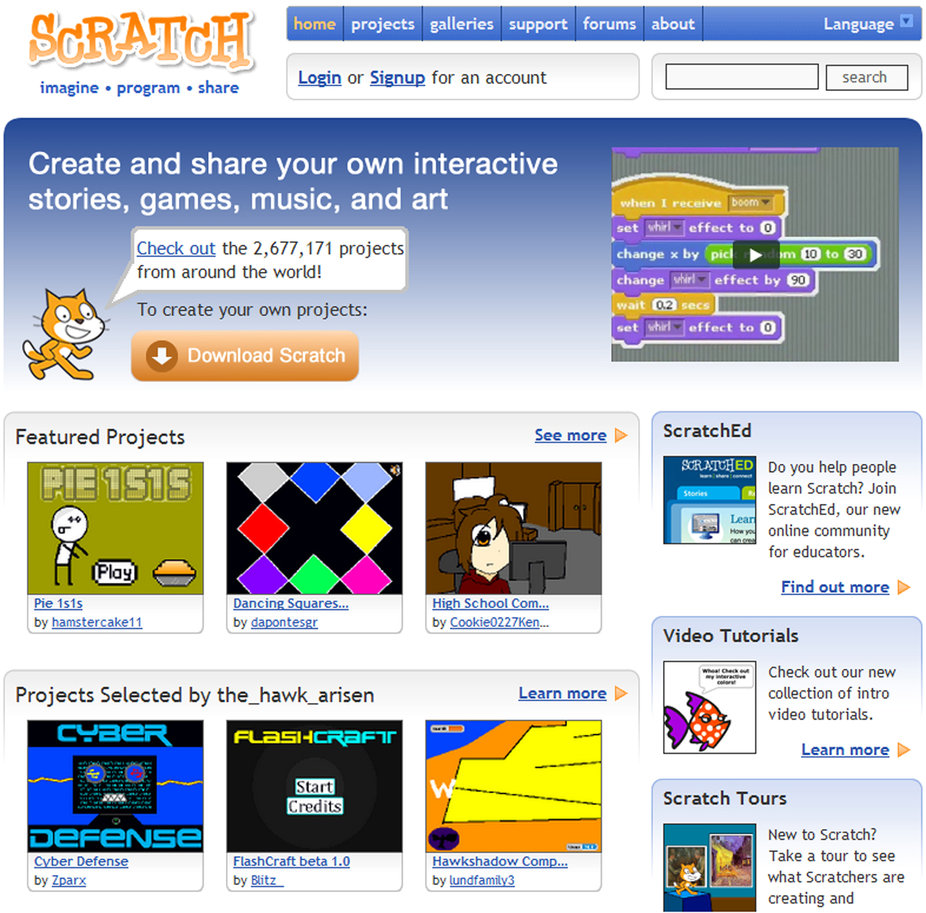
Scratch is a block-based programming language created by the Lifelong Kindergarten Group (LLK) at the MIT Media Lab. Scratch gives kids the power to use programming to create their own interactive animations and computer games. Since 2007, the online community that allows Scratch programmers to share, remix, and socialize around their projects has drawn more than 16 million users who have shared nearly 20 million projects and more than 100 million comments. It is one of the most popular ways for kids to learn programming and among the larger online communities for kids in general.
Front page of the Scratch online community (https://scratch.mit.edu) during the period covered by the dataset.
Since 2010, I have published a series of papers using quantitative data collected from the database behind the Scratch online community. As the source of data for many of my first quantitative and data scientific papers, it s not a major exaggeration to say that I have built my academic career on the dataset. I was able to do this work because I happened to be doing my masters in a research group that shared a physical space ( The Cube ) with LLK and because I was friends with Andr s Monroy-Hern ndez, who started in my masters cohort at the Media Lab. A year or so after we met, Andr s conceived of the Scratch online community and created the first version for his masters thesis project. Because I was at MIT and because I knew the right people, I was able to get added to the IRB protocols and jump through the hoops necessary to get access to the database. Over the years, Andr s and I have heard over and over, in conversation and in reviews of our papers, that we were privileged to have access to such a rich dataset. More than three years ago, Andr s and I began trying to figure out how we might broaden this access. Andr s had the idea of taking advantage of the launch of Scratch 2.0 in 2013 to focus on trying to release the first five years of Scratch 1.x online community data (March 2007 through March 2012) most of the period that the codebase he had written ran the site. After more work than I have put into any single research paper or project, Andr s and I have published a data descriptor in Nature s new journal Scientific Data. This means that the data is now accessible to other researchers. The data includes five years of detailed longitudinal data organized in 32 tables with information drawn from more than 1 million Scratch users, nearly 2 million Scratch projects, more than 10 million comments, more than 30 million visits to Scratch projects, and much more. The dataset includes metadata on user behavior as well the full source code for every project. Alongside the data is the source code for all of the software that ran the website and that users used to create the projects as well as the code used to produce the dataset we ve released. Releasing the dataset was a complicated process. First, we had navigate important ethical concerns about the the impact that a release of any data might have on Scratch s users. Toward that end, we worked closely with the Scratch team and the the ethics board at MIT to design a protocol for the release that balanced these risks with the benefit of a release. The most important features of our approach in this regard is that the dataset we re releasing is limited to only public data. Although the data is public, we understand that computational access to data is different in important ways to access via a browser or API. As a result, we re requiring anybody interested in the data to tell us who they are and agree to a detailed usage agreement. The Scratch team will vet these applicants. Although we re worried that this creates a barrier to access, we think this approach strikes a reasonable balance. Beyond the the social and ethical issues, creating the dataset was an enormous task. Andr s and I spent Sunday afternoons over much of the last three years going column-by-column through the MySQL database that ran Scratch. We looked through the source code and the version control system to figure out how the data was created. We spent an enormous amount of time trying to figure out which columns and rows were public. Most of our work went into creating detailed codebooks and documentation that we hope makes the process of using this data much easier for others (the data descriptor is just a brief overview of what s available). Serializing some of the larger tables took days of computer time. In this process, we had a huge amount of help from many others including an enormous amount of time and support from Mitch Resnick, Natalie Rusk, Sayamindu Dasgupta, and Benjamin Berg at MIT as well as from many other on the Scratch Team. We also had an enormous amount of feedback from a group of a couple dozen researchers who tested the release as well as others who helped us work through through the technical, social, and ethical challenges. The National Science Foundation funded both my work on the project and the creation of Scratch itself. Because access to data has been limited, there has been less research on Scratch than the importance of the system warrants. We hope our work will change this. We can imagine studies using the dataset by scholars in communication, computer science, education, sociology, network science, and beyond. We re hoping that by opening up this dataset to others, scholars with different interests, different questions, and in different fields can benefit in the way that Andr s and I have. I suspect that there are other careers waiting to be made with this dataset and I m excited by the prospect of watching those careers develop. You can find out more about the dataset, and how to apply for access, by reading the data descriptor on Nature s website.

1 February 2017

Daniel Pocock: Going to FOSDEM, Brussels this weekend

This weekend I'm going to FOSDEM, one of the largest gatherings of free software developers in the world. It is an extraordinary event, also preceded by the XSF / XMPP Summit For those who haven't been to FOSDEM before and haven't yet made travel plans, it is not too late. FOSDEM is a free event and no registration is required. Many Brussels hotels don't get a lot of bookings on weekends during the winter so there are plenty of last minute offers available, often cheaper than what is available on AirBNB. I was speaking to somebody in London on Sunday who commutes through St Pancras (the Eurostar terminal) every day and didn't realize it goes to Brussels and only takes 2 hours to get there. One year I booked a mini-van at the last minute and made the drive from the UK with a stop in Lille for dinner on the way back, for 5 people that was a lot cheaper than the train. In other years I've taken trains from Switzerland through Paris or Luxembourg. Real-time Communication (RTC) dev-room on Saturday, 4 February On Saturday, we have a series of 23 talks about RTC topics in the RTC dev-room, including SIP, XMPP, WebRTC, peer-to-peer (with Ring) and presentations from previous GSoC students and developers coming from far and wide. The possibilities of RTC with free software will also be demonstrated and discussed at the RTC lounge in the K building, near the dev-room, over both Saturday and Sunday. Please come and say hello. Please come and subscribe to the Free-RTC-Announce mailing list for important announcements on the RTC theme and join the Free-RTC discussion list if you have any questions about the activities at FOSDEM, dinners for RTC developers on Saturday night or RTC in general. Software Defined Radio (SDR) and the Debian Hams project At 11:30 on Saturday I'll be over at the SDR dev-room to meet other developers of SDR projects such as GNU Radio and give a brief talk about the Debian Hams project and the relationship between our diverse communities. Debian Hams (also on the Debian Ham wiki) provides a ready-to-run solution for ham radio and SDR is just one of its many capabilities. If you've ever wondered about trying the RTL-SDR dongle or similar projects Debian Hams provides a great way to get started quickly. I've previously given talks on this topic at the Vienna and Cambridge mini-DebConfs (video). Ham Radio (also known as amateur radio) offers the possibility to gain exposure to every aspect of technology from the physical antennas and power systems through to software for a range of analog and digital communications purposes. Ham Radio and the huge community around it is a great fit with the principles and philosophy of free software development. In a world where hardware vendors are constantly exploring ways to limit their users with closed and proprietary architectures, such as DRM, a broad-based awareness of the entire technology stack empowers society to remain in control of the technology we are increasingly coming to depend on in our every day lives.

Russ Allbery: Review: A Closed and Common Orbit

Review: A Closed and Common Orbit, by Becky Chambers
Series: Wayfarers #2
Publisher: Harper Voyager
Copyright: October 2016
ISBN: 0-06-256942-2
Format: Kindle
Pages: 384
A Closed and Common Orbit has two threads, one that takes place twenty years in the past and one that happens simultaneously with the very end of The Long Way to a Small, Angry Planet. That second part is the motivating plot thread, but it's unfortunately impossible to talk about in any depth without seriously spoiling the previous book. You could otherwise read them out of order, but I think the previous book is too good to spoil, so you want to carefully avoid reading any descriptions of this book until after you've read The Long Way to a Small, Angry Planet. Per my normal review policy, I'm going to try to avoid spoilers, but just about everything about half of this book would give away spoilers if you're paying attention. So you may want to just go read the other book before reading this review. (It's excellent!) The part that I can safely say is that half this book is about Pepper, her partner Blue, Pepper's store and Blue's art, and her attempt to help a friend find a place and a sense of identity that she'd never asked for or expected, while keeping a very dangerous secret. That friend starts somewhat passive, but one of the things I liked the most about this story is that Pepper is neither always right in her advice nor always wrong. Sidra is wrong about some of the limitations that she thinks she has and some of the things she thinks she wants, but she's also right about other things where Pepper is wrong. She has a complicated, careful, and courageous journey. The best part of this book for me, though, was the other half, told in alternating chapters with Sidra's story. This is Pepper's own backstory, which is rather awful (although Chambers does avoid being too graphic about the most horrible parts), but is also an amazing story of someone finding her own power, her own skills, and her own identity. And building a relationship that's something quite special. At first, this seems only vaguely related to Sidra's story and the other half of the book, but they both come together in a way that's both heartbreaking and wonderful. I found this story particularly wonderful because one of my favorite SF tropes is sentient computers or sentient ships, which play a significant role in Pepper's backstory. And one of my favorite characters to read about is the technician who can cobble together fixes to things and who is always finding something to repair. Pepper is a delight, her story explains so much about how she became the person she is (and adds so much emotional heft to it), and she has a relentless, practical determination that I loved reading about. A Closed and Common Orbit doesn't have the sprawling cast of The Long Way to a Small, Angry Planet. The story is tightly focused on five characters. I think I liked that even better than the previous book, even when I was finding Sidra a bit too passive and not as interesting. Chambers's characters have so much depth, thoughtfulness, and basic decency, while still being uniquely themselves, that I feel like I could read about them for months and keep uncovering new, interesting facets. I particularly loved the occasional excerpts from the chat system where Pepper hangs out (and would have loved about three times more of them). Speaking as someone who spends a lot of time in chat, Chambers got the tone just about perfect. Just about the only complaint I have about this book is that I thought the ending was too abrupt. It's so important, the climax of Pepper's story and a hugely significant piece of character development, and I wanted more than the short scene and aftermath we got. I really wanted to spend some time feeling with the characters, savoring the emotional release. Another three or four pages would have been greatly appreciated. The Long Way to a Small, Angry Planet was a happy surprise in 2015. A Closed and Common Orbit is fully as good, if not better. If you liked the previous book, you will definitely want to read this. I pre-ordered it and then read it within months after it was released, something that I almost never do. I can hardly wait to read whatever Chambers writes next. Rating: 9 out of 10

30 January 2017

Shirish Agarwal: Different strokes

Delhi Metro - courtesy wikipedia.org Statutory warning It s a long read. I start by sharing I regret, I did not hold onto the Budget and Economics 101 blog post for one more day. I had been holding/thinking on to it for almost couple of weeks before posting, if I had just waited a day more, I would have been able to share an Indian Express story . While I thought that the work for the budget starts around 3 months before the budget, I came to learn from that article that it takes 6 months. As can be seen in the article, it is somewhat of a wasted opportunity, part of it probably due to the Government (irrespective of any political party, dynasty etc.) mismanagement. What has not been stated in the article is what I had shared earlier, reading between the lines, it seems that the Government isn t able to trust what it hears from its advisers and man on the street. Unlike Chanakya and many wise people before him who are credited with advising about good governance, that a good king is one who goes out in disguise, learns how his/er subjects are surviving, seeing what ills them and taking or even not taking corrective steps after seeing the problem from various angles. Of course it s easier said then done, though lot of Indian kings did try and ran successful provinces. There were also some who were more interested in gambling, women and threw/frittered away their kingdoms. The 6-month things while not being said in the Express article is probably more about checking and re-checking figures and sources to make sure they are able to read whatever pattern the various Big Businesses, Industry, Social Welfare schemes and people are saying I guess. And unless mass digitalization as well as overhaul of procedures, Right to Information (RTI) happens, don t see any improvement in the way the information is collected, interpreted and shared with the public at large. It would also require people who are able to figure out how things work sharing the inferences (right or wrong) through various media so there is discussion about figures and policy-making. Such researchers and their findings are sadly missing in Indian public discourses and only found in glossy coffee table books :(. One of the most basic question for instance is, How much of any policy should be based on facts and figures and how much giving fillip to products and services needed in short to medium term ? Also how much morality should play a part in Public Policy ? Surprisingly, or probably not, most Indian budgets are populist by nature with some scientific basis but most of the times there is no dialog about how the FM came to some conclusion or Policy-making. I am guessing a huge part of that has also to do with basic illiteracy as well as Economic and Financial Illiteracy. Just to share a well-known world-over example, one of the policies where the Government of India has been somewhat lethargic is wired broadband penetration. As have shared umpteen times, while superficially broadband penetration is happening, most of the penetration is the unreliable and more expensive mobile broadband penetration. While this may come as a shock to many of the users of technology, BSNL, a Government company who provides broadband for almost 70-80% of the ADSL wired broadband subscribers gives 50:1 contention ratio to its customers. One can now understand the pathetic speeds along with very old copper wiring (20 odd years) on which the network is running. The idea/idiom of running network using duct-tape seems pretty apt in here  Now, the Government couple of years ago introduced FFTH Fiber-to-the-home but because the charges are so high, it s not going anywhere. The Government could say 10% discount in your Income Tax rates if you get FFTH. This would force people to get FFTH and would also force BSNL to clean up its act. It has been documented that a percentage increase in broadband equals a similar percentage rise in GDP. Having higher speeds of broadband would mean better quality of streaming video as well as all sorts of remote teaching and sharing of ideas which will give a lot of fillip to all sorts of IT peripherals in short, medium and long-term as well. Not to mention, all the software that will be invented/coded to take benefit of all that speed. Although, realistically speaking I am cynical that the Government would bring something like this  Moving on Behind a truck - Courtesy TheEconomist.com Another interesting story which I had shared was a bit about World History Now the Economist sort of confirmed how things are in Pakistan. What is and was interesting that the article is made by a politically left-leaning magazine which is for globalization, business among other things . So, there seem to be only three options, either I and the magazine are correct or we both are reading it wrong. The third and last option is that the United States realize that Pakistan can no longer be trusted as Pakistan is siding more and more with Chinese and Russians, hence the article. Atlhough it seems a somewhat far-fetched idea as I don t see the magazine getting any brownie points with President Trump. Unless, The Economist becomes more hawkish, more right-wingish due to the new establishment. I can t claim to have any major political understanding or expertise but it does seem that Pakistan is losing friends. Even UAE have been cautiously building bridges with us. Now how this will play out in the medium to long-term depends much on the personal equations of the two heads of state, happenings in geopolitics around the world and the two countries, decisions they take, it is a welcome opportunity as far they (the Saudis) have funds they want to invest and India can use those investments to make new infrastructure. Now, I need a bit of help of Java and VCS (Version control system) experts . There is a small game project called Mars-Sim. I asked probably a few more questions than I should have and the result was that I was made a member of the game team even though I had shared with them that I m a non-coder. I think such a game is important as it s foss. Both the game itself is foss as well as its build-tools with a basic wiki. Such a game would be useful not only to Debian but all free software distributions. Journeying into the game Unfortunately, the game as it is currently, doesn t work with openjdk8 but private conversations with the devs. have shared they will work on getting it to work on OpenJDK 9 which though is sometime away. Now as it is a game, I knew it would have multiple multimedia assets. It took me quite sometime to figure out where most of the multimedia assets are. I was shocked to find that there aren t any tool/s in Debian as well a GNU/Linux to know about types of content is there inside a directory and its sub-directories. I framed it in a query and found a script as an answer . I renamed the script to file-extension-information.sh (for lack of imagination of better name). After that, I downloaded a snapshot of the head of the project from https://sourceforge.net/p/mars-sim/code/HEAD/tree/ where it shows a link to download the snapshot. https://sourceforge.net/code-snapshots/svn/m/ma/mars-sim/code/mars-sim-code-3847-trunk.zip unzipped it and then ran the script on it [$] bash file-extension-information.sh mars-sim-code-3846-trunk
theme: 1770
dtd: 31915
py: 10815
project: 5627
JPG: 762476
fxml: 59490
vm: 876
dat: 15841044
java: 13052271
store: 1343
gitignore: 8
jpg: 3473416
md: 5156
lua: 57
gz: 1447
desktop: 281
wav: 83278
1: 2340
css: 323739
frag: 471
svg: 8948591
launch: 9404
index: 11520
iml: 27186
png: 3268773
json: 1217
ttf: 2861016
vert: 712
ogg: 12394801
prefs: 11541
properties: 186731
gradle: 611
classpath: 8538
pro: 687
groovy: 2711
form: 5780
txt: 50274
xml: 794365
js: 1465072
dll: 2268672
html: 1676452
gif: 38399
sum: 23040
(none): 1124
jsx: 32070
It gave me some idea of what sort of file were under the repository. I do wish the script defaulted to showing file-sizes in KB if not MB to better assess how the directory is made up but not a big loss . The above listing told me that at the very least theme, JPG, dat, wav, png, ogg and lastly gif files. For lack of better tools and to get an overview of where those multimedia assets used ncdu [shirish@debian] - [~/games/mars-sim-code-3846-trunk] - [10210]
[$] ncdu mars-sim/
--- /home/shirish/games/mars-sim-code-3846-trunk/mars-sim --------------------------------------------------------------------------------------
46.2 MiB [##########] /mars-sim-ui
15.2 MiB [### ] /mars-sim-mapdata
8.3 MiB [# ] /mars-sim-core
2.1 MiB [ ] /mars-sim-service
500.0 KiB [ ] /mars-sim-main
188.0 KiB [ ] /mars-sim-android
72.0 KiB [ ] /mars-sim-network
16.0 KiB [ ] pom.xml
12.0 KiB [ ] /.settings
4.0 KiB [ ] mars-sim.store
4.0 KiB [ ] mars-sim.iml
4.0 KiB [ ] .project
I found that all the media is distributed randomly and posted a ticket about it. As I m not even a java newbie, could somebody look at mokun s comment and help out please ? On the same project, there has been talk of migrating to github.com Now whatever little I know of git, it makes a copy of the whole repository under .git/ folder/directory so having multimedia assets under git is a bad, bad idea, as each multimedia binary format file would be unique and no possibility of diff. between two binary files even though they may be the same file with some addition or subtraction from earlier version. I did file a question but am unhappy with the answers given. Can anybody give some definitive answers if they have been able to do how I am proposing , if yes, how did they go about it ? And lastly Immigrants of the United States in 2000 by country of birth America was founded by immigrants. Everybody knows the story about American Indians, the originals of the land were over-powered by the European settlers. So any claim, then and now that immigration did not help United States is just a lie. This came due to a conversation on #debconf by andrewsh
[18:37:06] I d be more than happy myself to apply for an US tourist not transit visa when I really need it, as a transit visa isn t really useful, is just as costly as a tourist visa, and nearly as difficult to get as a tourist visa
[18:37:40] I m not entirely sure I wish to transit through the US in its Trumplandia incarnation either
[18:38:07] likely to be more difficult and unfun
FWIW I am in complete agreement with Andrew s assessment of how it might be with foreigners. It has been on my mind and thoughts for quite some time although andrewsh put it eloquently. But as always I m getting ahead of myself. The conversation is because debconf this year would be in Canada. For many a cheap flight, one of the likely layovers/stopover can be the United States. I actually would have gone one step further, even if it was cheap transit visa, it would equally be unfun as it would discriminate. About couple of years back, a friend of mine while explaining what visa is, put it rather succinctly the visa officer looks at only 3 things a. Your financial position something which tells that you can take care of your financial needs if things go south b. You are not looking to settle there unlawfully c. You are not a criminal. While costs do matter, what is disturbing more is the form of extremism being displayed therein. While Indians from the South Asian continent in US have been largely successful, love to be in peace (one-off incidents do and will happen anywhere) if I had to take a transit or tourist visa in this atmosphere, it would leave a bad taste in the mouth. When one of my best friends is a Muslim, 20% of the population in India is made of Muslims and 99% of the time both of us co-exist in peace I simply can t take any alternative ideology. Even in Freakonomics 2.0 the authors when they shared that it s less than 0.1 percent of Muslims who are engaged in terrorist activities, if they were even 1 percent than all the world s armed forces couldn t fight them and couldn t keep anyone safe. Which simply means that 99.99% of even all Muslims are good. This resonates strongly with me for number of reasons. One of my uncles in early to late 80 s had an opportunity for work to visit Russia for official work. He went there and there were Secret Police after him all the time. While he didn t know it, I later read it, that it was SOP (Standard Operating Procedure) when all and any foreigners came visiting the country, and not just foreigners, they had spies for their own citizens. Russka a book I read several years ago explained the paranoia beautifully. While U.S. in those days was a more welcoming place for him. I am thankful as well as find it strange that Canada and States have such different visa procedures. While Canada would simply look at the above things, probably discreetly inquire about you if you have been a bad boy/girl in any way and then make a decision which is fine. For United States, even for a transit visa I probably would have to go to Interview where my world view would probably be in conflict with the current American world view. Interestingly, while I was looking at conversations on the web and one thing that is missing there is that nobody has talked about intelligence community. What Mr. Trump is saying in not so many words is that our intelligence even with all the e-mails we monitor and everything we do, we still can t catch you. It almost seems like giving a back-handed compliment to the extremists saying you do a better job than our intelligence community. This doesn t mean that States doesn t have interesting things to give to the world, Star Trek conventions, Grand Canyon (which probably would require me more than a month or more to explore even a little part), NASA, Intel, AMD, SpaceX, CES (when it s held) and LPC (Linux Plumber s conference where whose who come to think of roadmap for GNU/Linux). What I wouldn t give to be a fly in the wall when LPC, CES happens in the States. What I actually found very interesting is that in the current Canadian Government, if what I read and heard is true, then Justin Trudeau, the Prime Minister of Canada made 50 of his cabinet female. Just like in the article, studies even in Indian parliament have shown that when women are in power, questions about social justice, equality, common good get asked and policies made. If I do get the opportunity to be part of debconf, I would like to see, hear, watch, learn how the women cabinet is doing things. I am assuming that reporting and analysis standards of whatever decisions are more transparent and more people are engaged in the political process to know what their elected representatives are doing. Mountain biking in British Columbia, Canada - source wikipedia.org One another interesting point I came to know is that Canada is home to bicycling paths. While I stopped bicycling years ago  as it has been becoming more and more dangerous to bicycle here in Pune as there is no demarcation for cyclists, I am sure lot of Canadians must be using this opportunity fully. Lastly, on the debconf preparation stage, things have started becoming a bit more urgent and hectic. From a monthly IRC meet, it has now become a weekly meet. Both the wiki and the website are slowly taking up shape. http://deb.li/dc17kbp is a nice way to know/see progress of the activities happening . One important decision that would be taken today is where people would stay during debconf. There are options between on-site and two places around the venue, one 1.9 km around, the other 5 km. mark. Each has its own good and bad points. It would be interesting to see which place gets selected and why.
Filed under: Miscellenous Tagged: #budget, #Canada, #debconf organization, #discrimination, #Equal Opportunity, #Fiber, #svn, #United States, #Version Control, Broadband, Git, Pakistan, Subversion

29 January 2017

Elena 'valhalla' Grandi: One Liberated Laptop

One Liberated Laptop

Immagine/fotohttp://social.gl-como.it/photos/valhalla/image/5a480cd2d5842101fc8975d927d030f3

After many days of failed attempts, yesterday @Diego Roversi finally managed to setup SPI on the BeagleBone White , and that means that today at our home it was Laptop Liberation Day!

We took the spare X200, opened it, found the point we were on in the tutorial installing libreboot on x200 https://libreboot.org/docs/install/x200_external.html, connected all of the proper cables on the clip and did some reading tests of the original bios.

Immagine/fotohttp://social.gl-como.it/photos/valhalla/image/77e61745d9c43833b7c0a4a919d17222

While the tutorial mentioned a very conservative setting (512kHz), just for fun we tried to read it at different speed and all results up to 16384 kHz were equal, with the first failure at 32784 kHz, so we settled on using 8192 kHz.

Then it was time to customize our libreboot image with the right MAC address, and that's when we realized that the sheet of paper where we had written it down the last time had been put in a safe place somewhere

Luckily we also had taken a picture, and that was easier to find, so we checked the keyboard map , followed the instructions to customize the image https://libreboot.org/docs/hcl/gm45_remove_me.html#ich9gen, flashed the chip, partially reassembled the laptop, started it up and a black screen, some fan noise and nothing else.

We tried to reflash the chip (nothing was changed), tried the us keyboard image, in case it was the better tested one (same results) and reflashed the original bios, just to check that the laptop was still working (it was).

It was lunchtime, so we stopped our attempts. As soon as we started eating, however, we realized that this laptop came with 3GB of RAM, and that surely meant "no matching pairs of RAM", so just after lunch we reflashed the first image, removed one dimm, rebooted and finally saw a gnu-hugging penguin!

We then tried booting some random live usb key https://tails.boum.org/ we had around (failed the first time, worked the second and further one with no changes), and then proceeded to install Debian.

Running the installer required some attempts and a bit of duckduckgoing: parsing the isolinux / grub configurations from the libreboot menu didn't work, but in the end it was as easy as going to the command line and running:


linux (usb0)/install.amd/vmlinuz
initrd (usb0)/install.amd/initrd.gz
boot


From there on, it was the usual debian installation and a well know environment, and there were no surprises. I've noticed that grub-coreboot is not installed (grub-pc is) and I want to investigate a bit, but rebooting worked out of the box with no issue.

Next step will be liberating my own X200 laptop, and then if you are around the @Gruppo Linux Como area and need a 16 pin clip let us know and we may bring everything to one of the LUG meetings

yes, white, and most of the instructions on the interwebz talk about the black, which is extremely similar to the white except where it isn't

wait? there are keyboard maps? doesn't everybody just use the us one regardless of what is printed on the keys? Do I *live* with somebody who doesn't? :D

the breadboard in the picture is only there for the power supply, the chip on it is a cheap SPI flash used to test SPI on the bone without risking the laptop :)

disclaimer: it worked for us. it may not work on *your* laptop. it may brick it. it may invoke a tentacled monster, it may bind your firstborn son to a life of servitude to some supernatural being. Whatever happens, it's not our fault.

(edit: added tags)

#coreboot #libreboot

17 January 2017

Ritesh Raj Sarraf: Linux Tablet-Mode Usability

In my ongoing quest to get Tablet-Mode working on my Hybrid machine, here's how I've been living with it so far. My intent is to continue using Free Software for both use cases. My wishful thought is to use the same software under both use cases.
  • Browser: On the browser front, things are pretty decent. Chromium has good support for Touchscreen input. Most of the Touchscreen use cases work well with Chromium. On the Firefox side, after a huge delay, finally, Firefox seems to be catching up. Hopefully, with Firefox 51/52, we'll have a much more usable Touchscreen browser.
  • Desktop Shell: One of the reason of migrating to GNOME was its touch support. From what I've explored so far, GNOME is the only desktop shell that has touch support natively done. The feature isn't complete yet, but is fairly well usable.
    • Given that GNOME has touchscreen support native, it is obvious to be using GNOME equivalent of tools for common use cases. Most of these tools inherit the touchscreen capabilities from the underneath GNOME libraries.
    • File Manager: Nautilus has decent support for touch, as a file manager. The only annoying bit is a right-click equivalent. Or in touch input sense, a long-press.
    • Movie Player: There's a decent movie player, based on GNOME libs; GNOME MPV. In my limited use so far, this interface seems to have good support. Other contenders are:
      • SMPlayer is based on Qt libs. So initial expectation would be that Qt based apps would have better Touch support. But I'm yet to see any serious Qt application with Touch input support. Back to SMPlayer, the dev is pragmatic enough to recognize tablet-mode users and as such has provided a so called "Tablet Mode" view for SMPlayer (The tooltip did not get captured in the screenshot).
      • MPV doesn't come with a UI but has basic management with OSD. And in my limited usage, the OSD implementation does seem capable to take touch input.
  • Books / Documents: GNOME Documents/Books is very basic in what it has to offer, to the point that it is not much useful. But since it is based on the same GNOME libraries, it enjoys native touch input support. Calibre, on the other hand, is feature rich. But it is based on (Py)Qt. Touch input is told to work for Windows. For Linux, there's no support yet. The good thing about Calibre is that it has its own UI, which is pretty decent in a Tablet-Mode Touch workflow.
  • Photo Management: With compact digital devices commonly available, digital content (Both Photos and Videos) is on the rise. The most obvious names that come to mind are Digikam and Shotwell.
    • Shotwell saw its reincarnation in the recent past. From what I recollect, it does have touch support but was lacking quite a bit in terms of features, as compared to Digikam.
    • Digikam is an impressive tool for digital content management. While Digikam is a KDE project, thankfully it does a great job in keeping its KDE dependencies to a bare minimum. But given that Digikam builds on KDE/Qt libs, I haven't had any much success in getting a good touch input solution for Tablet Mode. To make it barely usable in Table-Mode, one could choose a theme preference with bigger toolbars, labels and scrollbars. This helps in making a touch input workaround use case. As you can see, I've configured the Digikam UI with Text alongside Icons for easy touch input.
  • Email: The most common use case. With Gmail and friends, many believe standalone email clients are no more a need. But there always are users like us who prefer emails offline, encrypted emails and prefer theis own email domains. Many of these are still doable with free services like Gmail, but still.
    • Thunderbird shows its age at times. And given the state of Firefox in getting touch support (and GTK3 port), I see nothing happening with TB.
    • KMail was something I discontinued while still being on KDE. The debacle that KDEPIM was, is something I'd always avoid, in the future. Complete waste of time/resource in building, testing, reporting and follow-ups.
    • Geary is another email client that recently saw its reincarnation. I recently had explored Geary. It enjoys similar benefits like the rest applications using GNOME libraries. There was one touch input bug I found, but otherwise Geary's featureset was limited in comparison to Evolution.
    • Migration to Evolution, when migrating to GNOME, was not easy. GNOME's philosophy is to keep things simple and limited. In doing that, they restrict possible flexibilities that users may find obvious. This design philosophy is easily visible across all applications of the GNOME family. Evolution is no different. Hence, coming from TB to E was a small unlearning + newLearning curve. And since Evolution is using the same GNOME libraries, it enjoys similar benefits. Touch input support in Evolution is fairly good. The missing bit is the new Toolbar and Menu structure that many have noticed in the newer GNOME applications (Photos, Documents, Nautilus etc). If only Evolution (and the GNOME family) had the option of customization beyond the developer/project's view, there wouldn't be any wishful thoughts.
      • Above is a screenshot of 2 windows of Evoluiton. In its current form too, Evolution is a gem at times. For my RSS feeds, they are stored in a VFolder in Evolution, so that I can read them when offline. RSS feeds are something I read up in Tablet-mode. On the right is an Evolution window with larger fonts, while on the left, Evoltuion still retains its default font size. This current behavior helps me get Table-Mode Touch working to an extent. In my wishful thoughts, I wish if Evolution provided flexibility to change Toolbar icon sizes. That'd really help easily touch the delete button when in Tablet Mode. A simple button, Tablet Mode, like what SMPlayer has done, would keep users sticky with Evolution.
My wishful thought is that people write (free) software, thinking more about usability across toolkits and desktop environments. Otherwise, the year of the Linux desktop, laptop, tablet; in my opinion, is yet to come. And please don't rip apart tools, in porting them to newer versions of the toolkits. When you rip a tool, you also rip all its QA, Bug Reporting and Testing, that was done over the years. Here's an example of a tool (Goldendict), so well written. Written in Qt, Running under GNOME, and serving over the Chromium interface. In this whole exercise of getting a hybrid working setup, I also came to realize that there does not seem to be a standardized interface, yet, to determine the current operating mode of a running hybrid machine. From what we explored so far, every product has its own way to doing it. Most hybrids come pre-installed and supported with Windows only. So, their mode detection logic seems to be proprietary too. In case anyone is awaer of a standard interface, please drop a note in the comments.

Categories:

Keywords:

Like:

16 January 2017

Rapha&#235;l Hertzog: Freexian s report about Debian Long Term Support, December 2016

A Debian LTS logoLike each month, here comes a report about the work of paid contributors to Debian LTS. Individual reports In December, about 175 work hours have been dispatched among 14 paid contributors. Their reports are available: Evolution of the situation The number of sponsored hours did not increase but a new silver sponsor is in the process of joining. We are only missing another silver sponsor (or two to four bronze sponsors) to reach our objective of funding the equivalent of a full time position. The security tracker currently lists 31 packages with a known CVE and the dla-needed.txt file 27. The situation improved a little bit compared to last month. Thanks to our sponsors New sponsors are in bold.

No comment Liked this article? Click here. My blog is Flattr-enabled.

6 January 2017

Elena 'valhalla' Grandi: Candy from Strangers

Candy from Strangers

A few days ago I gave a talk at ESC https://www.endsummercamp.org/ about some reasons why I think that using software and especially libraries from the packages of a community managed distribution is important and much better than alternatives such as pypi, nmp etc. This article is a translation of what I planned to say before forgetting bits of it and luckily adding it back as an answer to a question :)

When I was young, my parents taught me not to accept candy from strangers, unless they were present and approved of it, because there was a small risk of very bad things happening. It was of course a simplistic rule, but it had to be easy enough to follow for somebody who wasn't proficient (yet) in the subtleties of social interactions.

One of the reasons why it worked well was that following it wasn't a big burden: at home candy was plenty and actual offers were rare: I only remember missing one piece of candy because of it, and while it may have been a great one, the ones I could have at home were also good.

Contrary to candy, offers of gratis software from random strangers are quite common: from suspicious looking websites to legit and professional looking ones, to platforms that are explicitly designed to allow developers to publish their own software with little or no checks.

Just like candy, there is also a source of trusted software in the Linux distributions, especially those lead by a community: I mention mostly Debian because it's the one I know best, but the same principles apply to Fedora and, to some measure, to most of the other distributions. Like good parents, distributions can be wrong, and they do leave room for older children (and proficient users) to make their own choices, but still provide a safe default.

Among the unsafe sources there are many different cases and while they do share some of the risks, they have different targets with different issues; for brevity the scope of this article is limited to the ones that mostly concern software developers: language specific package managers and software distribution platforms like PyPi, npm and rubygems etc.

These platforms are extremely convenient both for the writers of libraries, who are enabled to publish their work with minor hassles, and for the people who use such libraries, because they provide an easy way to install and use an huge amount of code. They are of course also an excellent place for distributions to find new libraries to package and distribute, and this I agree is a good thing.

What I however believe is that getting code from such sources and using it without carefully checking it is even more risky than accepting candy from a random stranger on the street in an unfamiliar neighbourhood.

The risk aren't trivial: while you probably won't be taken as an hostage for ransom, your data could be, or your devices and the ones who run your programs could be used in some criminal act causing at least some monetary damage both to yourself and to society at large.

If you're writing code that should be maintained in time there are also other risks even when no malice is involved, because each package on these platform has a different policy with regards to updates, their backwards compatibility and what can be expected in case an old version is found to have security issues.

The very fact that everybody can publish anything on such platforms is both their biggest strength and their main source of vulnerability: while most of the people who publish their libraries do so with good intentions, attacks have been described and publicly tested, such as the fun typo-squatting http://incolumitas.com/2016/06/08/typosquatting-package-managers/ one (archived on http://web.archive.org/web/20160801161807/http://incolumitas.com/2016/06/08/typosquatting-package-managers) that published harmless malicious code under common typos for famous libraries.

Contrast this with Debian, where everybody can contribute, but before they are allowed full unsupervised access to the archive they have to establish a relationship with the rest of the community, which includes meeting other developers in real life, at the very least to get their gpg keys signed.

This doesn't prevent malicious people from introducing software, but raises significantly the effort required to do so, and once caught people can usually be much more effectively prevented from repeating it than a simple ban on an online-only account can do.

It is true that not every Debian maintainer actually does a full code review of everything that they allow in the archive, and in some cases it would be unreasonable to expect it, but in most cases they are at least reasonably familiar with the code to do at least bug triage, and most importantly they are in an excellent position to establish a relationship of mutual trust with the upstream authors.

Additionally, package maintainers don't work in isolation: a growing number of packages are being maintained by a team of people, and most importantly there are aspects that involve potentially the whole community, from the fact that new packages that enter the distribution are publicity announced on a mailing list to the various distribution-wide QA efforts.

Going back to the language specific distribution platforms, sometimes even the people who manage the platform themselves can't be fully trusted to do the right thing: I believe everybody in the field remembers the npm fiasco https://lwn.net/Articles/681410/ where a lawyer letter requesting the removal of a package started a series of events that resulted in potentially breaking a huge amount of automated build systems.

Here some of the problems were caused by some technical policies that caused the whole ecosystem to be especially vulnerable, but one big issue was the fact that the managers of the npm platform are a private entity with no oversight from the user community.

Here not all distributions are equal, but contrast this with Debian, where the distribution is managed by a community that is based on a social contract https://www.debian.org/social_contract and is governed via democratic procedures established in its https://www.debian.org/devel/constitution.

Additionally, the long history of the distribution model means that many issues have already been met, the errors have already been done, and there are established technical procedures to deal with them in a better way.

So, shouldn't we use language specific distribution platforms at all? No! As developers we aren't children, we are adults who have the skills to distinguish between safe and unsafe libraries just as well as the average distribution maintainer can do. What I believe we should do is stop treating them as a safe source that can be used blindly and reserve that status to actual trustful sources like Debian, falling back to the language specific platforms only when strictly needed, and in that case:

actually check carefully what we are using, both by reading the code and by analysing the development and community practices of the authors;
if possible, share that work by becoming ourselves maintainers of that library in our favourite distribution, to prevent duplication of effort and to give back to the community whose work we get advantage from.

Edit: fixed broken typosquatting url

Dirk Eddelbuettel: RcppTOML 0.1.0

Big news: RcppTOML now works on Windows too! This package had an uneventful 2016 without a single update. Release 0.0.5 had come out in late 2015 and we had no bugs or issues to fix. We use the package daily in production: a key part of our parameterisation is in TOML files In the summer, I took one brief stab at building on Windows now that R sports itself a proper C++11 compiler on Windows too. I got stuck over the not-uncommon problem of incomplete POSIX and/or C++11 support with MinGW and g++-4.9. And sadly ... I appears I wasn't quite awake enough to realize that the missing functionality was right there exposed by Rcpp! Having updated that date / datetime functionality very recently, I was in a better position to realize this when Devin Pastoor asked two days ago. I was able to make a quick suggestion which he tested, which I then refined ... here we are: RcppTOML on Windows too! (For the impatient: CRAN has reported that it has built the Windows binaries, they should hit mirrors such as this CRAN package for RcppTOML shortly.) So what is this TOML thing, you ask? A file format, very suitable for configurations, meant to be edited by humans but read by computers. It emphasizes strong readability for humans while at the same time supporting strong typing as well as immediate and clear error reports. On small typos you get parse errors, rather than silently corrupted garbage. Much preferable to any and all of XML, JSON or YAML -- though sadly these may be too ubiquitous now. But TOML is making good inroads with newer and more flexible projects. The Hugo static blog compiler is one example; the Cargo system of Crates (aka "packages") for the Rust language is another example. The new release updates the included cpptoml template header by Chase Geigle, brings the aforementioned Windows support and updates the Travis configuration. We also added a NEWS file for the first time so here are all changes so far:

Changes in version 0.1.0 (2017-01-05)
  • Added Windows support by relying on Rcpp::mktime00() (#6 and #8 closing #5 and #3)
  • Synchronized with cpptoml upstream (#9)
  • Updated Travis CI support via newer run.sh

Changes in version 0.0.5 (2015-12-19)
  • Synchronized with cpptoml upstream (#4)
  • Improved and extended examples

Changes in version 0.0.4 (2015-07-16)
  • Minor update of upstream cpptoml.h
  • More explicit call of utils::str()
  • Properly cope with empty lists (#2)

Changes in version 0.0.3 (2015-04-27)
  • First CRAN release after four weeks of initial development

Courtesy of CRANberries, there is a diffstat report for this release. More information and examples are on the RcppTOML page. Issues and bugreports should go to the GitHub issue tracker.

This post by Dirk Eddelbuettel originated on his Thinking inside the box blog. Please report excessive re-aggregation in third-party for-profit settings.

31 December 2016

Sean Whitton: Burkeman on time management

Burkeman: Why time management is ruining our lives Over the past semester I ve been trying to convince one graduate student and one professor in my department to use Inbox Zero to get a better handle on their e-mail inboxes. The goal is not to be more productive. The two of them get far more academic work done than I do. However, both of them are far more stressed than I am. And in the case of the graduate student, I have to add items to my own to-do list to chase up e-mails that I ve sent him, which only spreads this stress and tension around. The graduate student sent me this essay by Oliver Burkeman about how these techniques can backfire, creating more stress, tension and anxiety. It seems to me that this happens when we think of these techniques as having anything to do with productivity. Often people will say use this technique and you ll be less stressed, more productive, and even more productive because you re less stressed. Why not just say use this technique and you ll be less anxious and stressed ? This is a refusal to treat lower anxiety as merely a means to some further end. People can autonomously set their own ends, and they ll probably do a better job of this when they re less anxious. Someone offering a technique to help with their sense of being overwhelmed need not tell them what to do with their new calm. It might be argued that this response to Burkeman fails to address the huge sense of obligation that an e-mail inbox can generate. Perhaps the only sane response to this infinite to-do list is to let it pile up. If we follow a technique like Inbox Zero, don t we invest our inbox with more importance than it has? Like a lot of areas of life, the issue is that the e-mails that will advance truly valuable projects and relationships, projects of both ourselves and of others, are mixed in with reams of stuff that doesn t matter. We face this situation whenever we go into a supermarket, or wonder what to do during an upcoming vacation. In all these situations, we have a responsibility to learn how to filter the important stuff out, just as we have a responsibility to avoid reading celebrity gossip columns when we are scanning through a newspaper. Inbox Zero is a technique to do that filtering in the case of e-mail. Just letting our inbox pile up is an abdication of responsibility, rather than an intelligent response to a piece of technology that most of the world abuses.

Next.

Previous.