Search Results: "ag"

28 January 2026

C.J. Collier: Dataproc GPUs, Secure Boot, & Proxies

Part
1: Building a Secure Network Foundation for Dataproc with GPUs &
SWP Welcome to the first post in our series on running GPU-accelerated
Dataproc workloads in secure, enterprise-grade environments. Many
organizations need to operate within VPCs that have no direct internet
egress, instead routing all traffic through a Secure Web Proxy (SWP).
Additionally, security mandates often require the use of Shielded VMs
with Secure Boot enabled. This series will show you how to meet these
requirements for your Dataproc GPU clusters. In this post, we ll focus on laying the network foundation using
tools from the LLC-Technologies-Collier/cloud-dataproc
repository (branch proxy-sync-2026-01).

The Challenge: Network
Isolation & Control Before we can even think about custom images or GPU drivers, we need
a network environment that:
  1. Prevents direct internet access from Dataproc cluster nodes.
  2. Forces all egress traffic through a manageable and auditable
    SWP.
  3. Provides the necessary connectivity for Dataproc to function and for
    us to build images later.
  4. Supports Secure Boot for all VMs.

The Toolkit:
LLC-Technologies-Collier/cloud-dataproc To make setting up and tearing down these complex network
environments repeatable and consistent, we ve developed a set of bash
scripts within the gcloud directory of the
cloud-dataproc repository. These scripts handle the
creation of VPCs, subnets, firewall rules, service accounts, and the
Secure Web Proxy itself. Key Script:
gcloud/bin/create-dpgce-private This script is the cornerstone for creating the private, proxied
environment. It automates:
  • VPC and Subnet creation (for the cluster, SWP, and management).
  • Setup of Certificate Authority Service and Certificate Manager for
    SWP TLS interception.
  • Deployment of the SWP Gateway instance.
  • Configuration of a Gateway Security Policy to control egress.
  • Creation of necessary firewall rules.
  • Result: Cluster nodes in this VPC have NO default
    internet route and MUST use the SWP.
Configuration via env.json We use a single env.json file to drive the
configuration. This file will also be used by the
custom-images scripts in Part 3. This env.json
should reside in your custom-images repository clone, and
you ll symlink it into the cloud-dataproc/gcloud
directory. Running the Setup:
# Assuming you have cloud-dataproc and custom-images cloned side-by-side
# And your env.json is in the custom-images root
cd cloud-dataproc/gcloud
# Symlink to the env.json in custom-images
ln -sf ../../custom-images/env.json env.json
# Run the creation script, but don't create a cluster yet
bash bin/create-dpgce-private --no-create-cluster
cd ../../custom-images

Node
Configuration: The Metadata Startup Script for Runtime For the Dataproc cluster nodes to function correctly in this proxied
environment, they need to be configured to use the SWP on boot. We
achieve this using a GCE metadata startup script. The script startup_script/gce-proxy-setup.sh (from the
custom-images repository) is designed to be run on each
cluster node at boot. It reads metadata like http-proxy and
http-proxy-pem-uri (which our cluster creation scripts in
Part 4 will pass) to configure the OS environment, package managers, and
other tools to use the SWP. Upload this script to your GCS bucket:
# Run from the custom-images repository root
gsutil cp startup_script/gce-proxy-setup.sh gs://$(jq -r .BUCKET env.json)/custom-image-deps/
This script is essential for the runtime behavior of the
cluster nodes.

Conclusion of Part 1 With the cloud-dataproc scripts, we ve laid the
groundwork by provisioning a secure VPC with controlled egress through
an SWP. We ve also prepared the essential node-level proxy configuration
script (gce-proxy-setup.sh) in GCS, ready to be used by our
clusters. Stay tuned for Part 2, where we ll dive into the
install_gpu_driver.sh initialization action from the
LLC-Technologies-Collier/initialization-actions repository
(branch gpu-202601) and how it s been adapted to install
all GPU-related software through the proxy during the image build
process.

Sven Hoexter: Decrypt TLS Connection with wireshark and curl

With TLS 1.3 more parts of the handshake got encrypted (e.g. the certificate), but sometimes it's still helpful to look at the complete handshake. curl uses the somewhat standardized env variable for the key log file called SSLKEYLOGFILE, which is also supported by Firefox and Chrome. wireshark hides the setting in the UI behind Edit -> Preferences -> Protocols -> TLS -> (Pre)-Master-Secret log filename which is uncomfortable to reach. Looking up the config setting in the Advanced settings one can learn that it's called internally tls.keylog_file. Thus we can set it up with:
sudo wireshark -o "tls.keylog_file:/home/sven/curl.keylog"
SSLKEYLOGFILE=/home/sven/curl.keylog curl -v https://www.cloudflare.com/cdn-cgi/trace
Depending on the setup root might be unable to access the wayland session, that can be worked around by letting sudo keep the relevant env variables:
$ cat /etc/sudoers.d/wayland 
Defaults   env_keep += "XDG_RUNTIME_DIR"
Defaults   env_keep += "WAYLAND_DISPLAY"
Or setup wireshark properly and use the wireshark group to be able to dump traffic. Might require a sudo dpkg-reconfigure wireshark-common. Regarding curl: In some situations it could be desirable to force a specific older TLS version for testing, which requires a minimal and maximal version. E.g. to force TLS 1.2 only:
curl -v --tlsv1.2 --tls-max 1.2 https://www.cloudflare.com/cdn-cgi/trace

27 January 2026

Sergio Cipriano: Query Debian changelogs by keyword with the FTP-Master API

Query Debian changelogs by keyword with the FTP-Master API In my post about tracking my Debian uploads, I used the ProjectB database directly to retrieve how many uploads I had so far. I was pleasantly surprised to receive a message from Joerg Jaspert, who introduced me to the Debian Archive Kit web API (dak), also known as the FTP-Master API. Joerg gave the idea of integrating the query I had written into the dak API, so that anyone could obtain the same results without needing to use the mirror host, with a simple http request. I liked the idea and I decided to work on it. The endpoint is already available and you can try by yourself by doing something like this:
$ curl https://api.ftp-master.debian.org/changelogs?search_term=almeida+cipriano
WARNING: Check v2: https://people.debian.org/~gladk/blog/posts/202601_ftp-master-changelog-v2/
The query provides a way to search through the changelogs of all Debian packages currently published. The source code is available at Salsa. I'm already using it to track my uploads, I made this page that updates every day. If you want to setup something similar, you can use my script and just change the search_term to the name you use in your changelog entries. I m running it using a systemd timer. Here s what I ve got:
# .config/systemd/user/track-uploads.service
[Unit]
Description=Track my uploads using the dak API
StopWhenUnneeded=yes
[Service]
Type=oneshot
WorkingDirectory=/home/cipriano/public_html/uploads
ExecStart=/usr/bin/python3 generate.py
# .config/systemd/user/track-uploads.timer
[Unit]
Description=Run track-uploads script daily
[Timer]
OnCalendar=daily
Persistent=true
[Install]
WantedBy=timers.target
After placing every file in the right place you just need to run:
$ systemctl --user daemon-reload
$ systemctl --user enable --now track-uploads.timer
$ systemctl --user start track-uploads.service # generates the html now
If you want to get a bit fancier, I m also using an Ansible playbook for that. The source code is available on my GitLab repository. If you want to learn more about dak, there is a web docs available. I d like to thank Joerg once again for suggesting the idea and for reviewing and merging the change so quickly.

Elana Hashman: A beginner's guide to improving your digital security

In 2017, I led a series of workshops aimed at teaching beginners a better understanding of encryption, how the internet works, and their digital security. Nearly a decade later, there is still a great need to share reliable resources and guides on improving these skills. I have worked professionally in computer security one way or another for well over a decade, at many major technology companies and in many open source software projects. There are many inaccurate and unreliable resources out there on this subject, put together by well-meaning people without a background in security, which can lead to sharing misinformation, exaggeration and fearmongering. I hope that I can offer you a trusted, curated list of high impact things that you can do right now, using whichever vetted guide you prefer. In addition, I also include how long it should take, why you should do each task, and any limitations. This guide is aimed at improving your personal security, and does not apply to your work-owned devices. Always assume your company can monitor all of your messages and activities on work devices. What can I do to improve my security right away? I put together this list in order of effort, easiest tasks first. You should be able to complete many of the low effort tasks in a single hour. The medium to high effort tasks are very much worth doing, but may take you a few days or even weeks to complete them. Low effort (<15 minutes) Upgrade your software to the latest versions Why? I don't know anyone who hasn't complained about software updates breaking features, introducing bugs, and causing headaches. If it ain't broke, why upgrade, right? Well, alongside all of those annoying bugs and breaking changes, software updates also include security fixes, which will protect your device from being exploited by bad actors. Security issues can be found in software at any time, even software that's been available for many years and thought to be secure. You want to install these as soon as they are available. Recommendation: Turn on automatic upgrades and always keep your devices as up-to-date as possible. If you have some software you know will not work if you upgrade it, at least be sure to upgrade your laptop and phone operating system (iOS, Android, Windows, etc.) and web browser (Chrome, Safari, Firefox, etc.). Do not use devices that do not receive security support (e.g. old Android or iPhones). Guides: Limitations: This will prevent someone from exploiting known security issues on your devices, but it won't help if your device was already compromised. If this is a concern, doing a factory reset, upgrade, and turning on automatic upgrades may help. This also won't protect against all types of attacks, but it is a necessary foundation. Use Signal Why? Signal is a trusted, vetted, secure messaging application that allows you to send end-to-end encrypted messages and make video/phone calls. This means that only you and your intended recipient can decrypt the messages and someone cannot intercept and read your messages, in contrast to texting (SMS) and other insecure forms of messaging. Other applications advertise themselves as end-to-end encrypted, but Signal provides the strongest protections. Recommendation: I recommend installing the Signal app and using it! My mom loves that she can video call me on Wi-Fi on my Android phone. It also supports group chats. I use it as a secure alternative to texting (SMS) and other chat platforms. I also like Signal's "disappearing messages" feature which I enable by default because it automatically deletes messages after a certain period of time. This avoids your messages taking up too much storage. Guides: Limitations: Signal is only able to protect your messages in transit. If someone has access to your phone or the phone of the person you sent messages to, they will still be able to read them. As a rule of thumb, if you don't want someone to read something, don't write it down! Meet in person or make an encrypted phone call where you will not be overheard. If you are talking to someone you don't know, assume your messages are as public as posting on social media. Set passwords and turn on device encryption Why? Passwords ensure that someone else can't unlock your device without your consent or knowledge. They also are required to turn on device encryption, which protects your information on your device from being accessed when it is locked. Biometric (fingerprint or face ID) locking provides some privacy, but your fingerprint or face ID can be used against your wishes, whereas if you are the only person who knows your password, only you can use it. Recommendation: Always set passwords and have device encryption enabled in order to protect your personal privacy. It may be convenient to allow kids or family members access to an unlocked device, but anyone else can access it, too! Use strong passwords that cannot be guessed avoid using names, birthdays, phone numbers, addresses, or other public information. Using a password manager will make creating and managing passwords even easier. Disable biometric unlock, or at least know how to disable it. Most devices will enable disk encryption by default, but you should double-check. Guides: Limitations: If your device is unlocked, the password and encryption will provide no protections; the device must be locked for this to protect your privacy. It is possible, though unlikely, for someone to gain remote access to your device (for example through malware or stalkerware), which would bypass these protections. Some forensic tools are also sophisticated enough to work with physical access to a device that is turned on and locked, but not a device that is turned off/freshly powered on and encrypted. If you lose your password or disk encryption key, you may lose access to your device. For this reason, Windows and Apple laptops can make a cloud backup of your disk encryption key. However, a cloud backup can potentially be disclosed to law enforcement. Install an ad blocker Why? Online ad networks are often exploited to spread malware to unsuspecting visitors. If you've ever visited a regular website and suddenly seen an urgent, flashing pop-up claiming your device was hacked, it is often due to a bad ad. Blocking ads provides an additional layer of protection against these kinds of attacks. Recommendation: I recommend everyone uses an ad blocker at all times. Not only are ads annoying and disruptive, but they can even result in your devices being compromised! Guides: Limitations: Sometimes the use of ad blockers can break functionality on websites, which can be annoying, but you can temporarily disable them to fix the problem. These may not be able to block all ads or all tracking, but they make browsing the web much more pleasant and lower risk! Some people might also be concerned that blocking ads might impact the revenue of their favourite websites or creators. In this case, I recommend either donating directly or sharing the site with a wider audience, but keep using the ad blocker for your safety. Enable HTTPS-Only Mode Why? The "S" in "HTTPS" stands for "secure". This feature, which can be enabled on your web browser, ensures that every time you visit a website, your connection is always end-to-end encrypted (just like when you use Signal!) This ensures that someone can't intercept what you search for, what pages on websites you visit, and any information you or the website share such as your banking details. Recommendation: I recommend enabling this for everyone, though with improvements in web browser security and adoption of HTTPS over the years, your devices will often do this by default! There is a small risk you will encounter some websites that do not support HTTPS, usually older sites. Guides: Limitations: HTTPS protects the information on your connection to a website. It does not hide or protect the fact that you visited that website, only the information you accessed. If the website is malicious, HTTPS does not provide any protection. In certain settings, like when you use a work-managed computer that was set up for you, it can still be possible for your IT Department to see what you are browsing, even over an HTTPS connection, because they have administrator access to your computer and the network. Medium to high effort (1+ hours) These tasks require more effort but are worth the investment. Set up a password manager Why? It is not possible for a person to remember a unique password for every single website and app that they use. I have, as of writing, 556 passwords stored in my password manager. Password managers do three important things very well:
  1. They generate secure passwords with ease. You don't need to worry about getting your digits and special characters just right; the app will do it for you, and generate long, secure passwords.
  2. They remember all your passwords for you, and you just need to remember one password to access all of them. The most common reason people's accounts get hacked online is because they used the same password across multiple websites, and one of the websites had all their passwords leaked. When you use a unique password on every website, it doesn't matter if your password gets leaked!
  3. They autofill passwords based on the website you're visiting. This is important because it helps prevent you from getting phished. If you're tricked into visiting an evil lookalike site, your password manager will refuse to fill the password.
Recommendation: These benefits are extremely important, and setting up a password manager is often one of the most impactful things you can do for your digital security. However, they take time to get used to, and migrating all of your passwords into the app (and immediately changing them!) can take a few minutes at a time... over weeks. I recommend you prioritize the most important sites, such as your email accounts, banking/financial sites, and cellphone provider. This process will feel like a lot of work, but you will get to enjoy the benefits of never having to remember new passwords and the autofill functionality for websites. My recommended password manager is 1Password, but it stores passwords in the cloud and costs money. There are some good free options as well if cost is a concern. You can also use web browser- or OS-based password managers, but I do not prefer these. Guides: Limitations: Many people are concerned about the risk of using a password manager causing all of their passwords to be compromised. For this reason, it's very important to use a vetted, reputable password manager that has passed audits, such as 1Password or Bitwarden. It is also extremely important to choose a strong password to unlock your password manager. 1Password makes this easier by generating a secret to strengthen your unlock password, but I recommend using a long, memorable password in any case. Another risk is that if you forget your password manager's password, you will lose access to all your passwords. This is why I recommend 1Password, which has you set up an Emergency Kit to recover access to your account. Set up two-factor authentication (2FA) for your accounts Why? If your password is compromised in a website leak or due to a phishing attack, two-factor authentication will require a second piece of information to log in and potentially thwart the intruder. This provides you with an extra layer of security on your accounts. Recommendation: You don't necessarily need to enable 2FA on every account, but prioritize enabling it on your most important accounts (email, banking, cellphone, etc.) There are typically a few different kinds: email-based (which is why your email account's security is so important), text message or SMS-based (which is why your cell phone account's security is so important), app-based, and hardware token-based. Email and text message 2FA are fine for most accounts. You may want to enable app- or hardware token-based 2FA for your most sensitive accounts. Guides: Limitations: The major limitation is that if you lose access to 2FA, you can be locked out of an account. This can happen if you're travelling abroad and can't access your usual cellphone number, if you break your phone and you don't have a backup of your authenticator app, or if you lose your hardware-based token. For this reason, many websites will provide you with "backup tokens" you can print them out and store them in a secure location or use your password manager. I also recommend if you use an app, you choose one that will allow you to make secure backups, such as Ente. You are also limited by the types of 2FA a website supports; many don't support app- or hardware token-based 2FA. Remove your information from data brokers Why? This is a problem that mostly affects people in the US. It surprises many people that information from their credit reports and other public records is scraped and available (for free or at a low cost) online through "data broker" websites. I have shocked friends who didn't believe this was an issue by searching for their full names and within 5 minutes being able to show them their birthday, home address, and phone number. This is a serious privacy problem! Recommendation: Opt out of any and all data broker websites to remove this information from the internet. This is especially important if you are at risk of being stalked or harassed. Guides: Limitations: It can take time for your information to be removed once you opt out, and unfortunately search engines may have cached your information for a while longer. This is also not a one-and-done process. New data brokers are constantly popping up and some may not properly honour your opt out, so you will need to check on a regular basis (perhaps once or twice a year) to make sure your data has been properly scrubbed. This also cannot prevent someone from directly searching public records to find your information, but that requires much more effort. "Recommended security measures" I think beginners should avoid We've covered a lot of tasks you should do, but I also think it's important to cover what not to do. I see many of these tools recommended to security beginners, and I think that's a mistake. For each tool, I will explain my reasoning around why I don't think you should use it, and the scenarios in which it might make sense to use. "Secure email" What is it? Many email providers, such as Proton Mail, advertise themselves as providing secure email. They are often recommended as a "more secure" alternative to typical email providers such as GMail. What's the problem? Email is fundamentally insecure by design. The email specification (RFC-3207) states that any publicly available email server MUST NOT require the use of end-to-end encryption in transit. Email providers can of course provide additional security by encrypting their copies of your email, and providing you access to your email by HTTPS, but the messages themselves can always be sent without encryption. Some platforms such as Proton Mail advertise end-to-end encrypted emails so long as you email another Proton user. This is not truly email, but their own internal encrypted messaging platform that follows the email format. What should I do instead? Use Signal to send encrypted messages. NEVER assume the contents of an email are secure. Who should use it? I don't believe there are any major advantages to using a service such as this one. Even if you pay for a more "secure" email provider, the majority of your emails will still be delivered to people who don't. Additionally, while I don't use or necessarily recommend their service, Google offers an Advanced Protection Program for people who may be targeted by state-level actors. PGP/GPG Encryption What is it? PGP ("Pretty Good Privacy") and GPG ("GNU Privacy Guard") are encryption and cryptographic signing software. They are often recommended to encrypt messages or email. What's the problem? GPG is decades old and its usability has always been terrible. It is extremely easy to accidentally send a message that you thought was encrypted without encryption! The problems with PGP/GPG have been extensively documented. What should I do instead? Use Signal to send encrypted messages. Again, NEVER use email for sensitive information. Who should use it? Software developers who contribute to projects where there is a requirement to use GPG should continue to use it until an adequate alternative is available. Everyone else should live their lives in PGP-free bliss. Installing a "secure" operating system (OS) on your phone What is it? There are a number of self-installed operating systems for Android phones, such as GrapheneOS, that advertise as being "more secure" than using the version of the Android operating system provided by your phone manufacturer. They often remove core Google APIs and services to allow you to "de-Google" your phone. What's the problem? These projects are relatively niche, and don't have nearly enough resourcing to be able to respond to the high levels of security pressure Android experiences (such as against the forensic tools I mentioned earlier). You may suddenly lose security support with no notice, as with CalyxOS. You need a high level of technical know-how and a lot of spare time to maintain your device with a custom operating system, which is not a reasonable expectation for the average person. By stripping all Google APIs such as Google Play Services, some useful apps can no longer function. And some law enforcement organizations have gone as far as accusing people who install GrapheneOS on Pixel phones to be engaging in criminal activity. What should I do instead? For the best security on an Android device, use a phone manufactured by Google or Samsung (smaller manufacturers are more unreliable), or consider buying an iPhone. Make sure your device is receiving security updates and up-to-date. Who should use it? These projects are great for tech enthusiasts who are interested in contributing to and developing them further. They can be used to give new life to old phones that are not receiving security or software updates. They are also great for people with an interest in free and open source software and digital autonomy. But these tools are not a good choice for a general audience, nor do they provide more practical security than using an up-to-date Google or Samsung Android phone. Virtual Private Network (VPN) Services What is it? A virtual private network or VPN service can provide you with a secure tunnel from your device to the location that the VPN operates. This means that if I am using my phone in Seattle connected to a VPN in Amsterdam, if I access a website, it appears to the website that my phone is located in Amsterdam. What's the problem? VPN services are frequently advertised as providing security or protection from nefarious bad actors, or helping protect your privacy. These benefits are often far overstated, and there are predatory VPN providers that can actually be harmful. It costs money and resources to provide a VPN, so free VPN services are especially suspect. When you use a VPN, the VPN provider knows the websites you are visiting in order to provide you with the service. Free VPN providers may sell this data in order to cover the cost of providing the service, leaving you with less security and privacy. The average person does not have the knowledge to be able to determine if a VPN service is trustworthy or not. VPNs also don't provide any additional encryption benefits if you are already using HTTPS. They may provide a small amount of privacy benefit if you are connected to an untrusted network with an attacker. What should I do instead? Always use HTTPS to access websites. Don't connect to untrusted internet providers for example, use cellphone network data instead of a sketchy Wi-Fi access point. Your local neighbourhood coffee shop is probably fine. Who should use it? There are three main use cases for VPNs. The first is to bypass geographic restrictions. A VPN will cause all of your web traffic to appear to be coming from another location. If you live in an area that has local internet censorship policies, you can use a VPN to access the internet from a location that lacks such policies. The second is if you know your internet service provider is actively hostile or malicious. A trusted VPN will protect the visibility of all your traffic, including which websites you visit, from your internet service provider, and the only thing they will be able to see is that you are accessing a VPN. The third use case is to access a network that isn't connected to the public internet, such as a corporate intranet. I strongly discourage the use of VPNs for "general-purpose security." Tor What is it? Tor, "The Onion Router", is a free and open source software project that provides anonymous networking. Unlike with a VPN, where the VPN provider knows who you are and what websites you are requesting, Tor's architecture makes it extremely difficult to determine who sent a request. What's the problem? Tor is difficult to set up properly; similar to PGP-encrypted email, it is possible to accidentally not be connected to Tor and not know the difference. This usability has improved over the years, but Tor is still not a good tool for beginners to use. Due to the way Tor works, it is also extremely slow. If you have used cable or fiber internet, get ready to go back to dialup speeds. Tor also doesn't provide perfect privacy and without a strong understanding of its limitations, it can be possible to deanonymize someone despite using it. Additionally, many websites are able to detect connections from the Tor network and block them. What should I do instead? If you want to use Tor to bypass censorship, it is often better to use a trusted VPN provider, particularly if you need high bandwidth (e.g. for streaming). If you want to use Tor to access a website anonymously, Tor itself might not be enough to protect you. For example, if you need to provide an email address or personal information, you can decline to provide accurate information and use a masked email address. A friend of mine once used the alias "Nunya Biznes" Who should use it? Tor should only be used by people who are experienced users of security tools and understand its strengths and limitations. Tor also is best used on a purpose-built system, such as Tor Browser or Freedom of the Press Foundation's SecureDrop. I want to learn more! I hope you've found this guide to be a useful starting point. I always welcome folks reaching out to me with questions, though I might take a little bit of time to respond. You can always email me. If there's enough interest, I might cover the following topics in a future post: Stay safe out there!

26 January 2026

Otto Kek l inen: Ubuntu Pro subscription - should you pay to use Linux?

Featured image of post Ubuntu Pro subscription - should you pay to use Linux?Ubuntu Pro is a subscription offering for Ubuntu users who want to pay for the assurance of getting quick and high-quality security updates for Ubuntu. I tested it out to see how it works in practice, and to evaluate how well it works as a commercial open source service model for Linux. Anyone running Ubuntu can subscribe to it at ubuntu.com/pro/subscribe by selecting the setup type Desktops for the price of $25 per year (+applicable taxes) for Enterprise users. There is also a free version for personal use. Once you have an account, you can find your activation token at ubuntu.com/pro/dashboard, and use it to activate Ubuntu Pro on your desktop or laptop Ubuntu machine by running sudo pro attach <token>:
$ sudo pro attach aabbcc112233aabbcc112233
Enabling default service esm-apps
Updating package lists
Ubuntu Pro: ESM Apps enabled
Enabling default service esm-infra
Updating package lists
Ubuntu Pro: ESM Infra enabled
Enabling default service livepatch
Installing canonical-livepatch snap
Canonical livepatch enabled.
Unable to determine current instance-id
This machine is now attached to 'Ubuntu Pro Desktop'
You can at any time confirm the Ubuntu Pro status by running:
$ sudo pro status --all
SERVICE ENTITLED STATUS DESCRIPTION
anbox-cloud yes disabled Scalable Android in the cloud
cc-eal yes n/a Common Criteria EAL2 Provisioning Packages
esm-apps yes enabled Expanded Security Maintenance for Applications
esm-infra yes enabled Expanded Security Maintenance for Infrastructure
fips yes n/a NIST-certified FIPS crypto packages
fips-preview yes n/a Preview of FIPS crypto packages undergoing certification with NIST
fips-updates yes disabled FIPS compliant crypto packages with stable security updates
landscape yes enabled Management and administration tool for Ubuntu
livepatch yes disabled Canonical Livepatch service
realtime-kernel yes disabled Ubuntu kernel with PREEMPT_RT patches integrated
  generic yes disabled Generic version of the RT kernel (default)
  intel-iotg yes n/a RT kernel optimized for Intel IOTG platform
  raspi yes n/a 24.04 Real-time kernel optimised for Raspberry Pi
ros yes n/a Security Updates for the Robot Operating System
ros-updates yes n/a All Updates for the Robot Operating System
usg yes disabled Security compliance and audit tools
Enable services with: pro enable <service>
Account: Otto Kekalainen
Subscription: Ubuntu Pro Desktop
Valid until: Thu Mar 3 08:08:38 2026 PDT
Technical support level: essential
For a regular desktop/laptop user the most relevant service is the esm-apps, which delivers extended security updates to many applications typically used on desktop systems. Another relevant command to confirm the current subscription status is:
$ sudo pro security-status
2828 packages installed:
2143 packages from Ubuntu Main/Restricted repository
660 packages from Ubuntu Universe/Multiverse repository
13 packages from third parties
12 packages no longer available for download
To get more information about the packages, run
pro security-status --help
for a list of available options.
This machine is receiving security patching for Ubuntu Main/Restricted
repository until 2029.
This machine is attached to an Ubuntu Pro subscription.
Ubuntu Pro with 'esm-infra' enabled provides security updates for
Main/Restricted packages until 2034.
Ubuntu Pro with 'esm-apps' enabled provides security updates for
Universe/Multiverse packages until 2034. You have received 26 security
updates.
This confirms the scope of the security support. You can even run sudo pro security-status --esm-apps to get a detailed breakdown of the installed software packages in scope for Expanded Security Maintenance (ESM).

Experiences from using Ubuntu Pro for over a year Personally I have been using it on two laptop systems for well over a year now and everything seems to have worked well. I see apt is downloading software updates from https://esm.ubuntu.com/apps/ubuntu, but other than that there aren t any notable signs of Ubuntu Pro being in use. That is a good thing after all one is paying for assurance that everything works with minimum disruptions, so the system that enables smooth sailing should stay in the background and not make too much noise of itself.

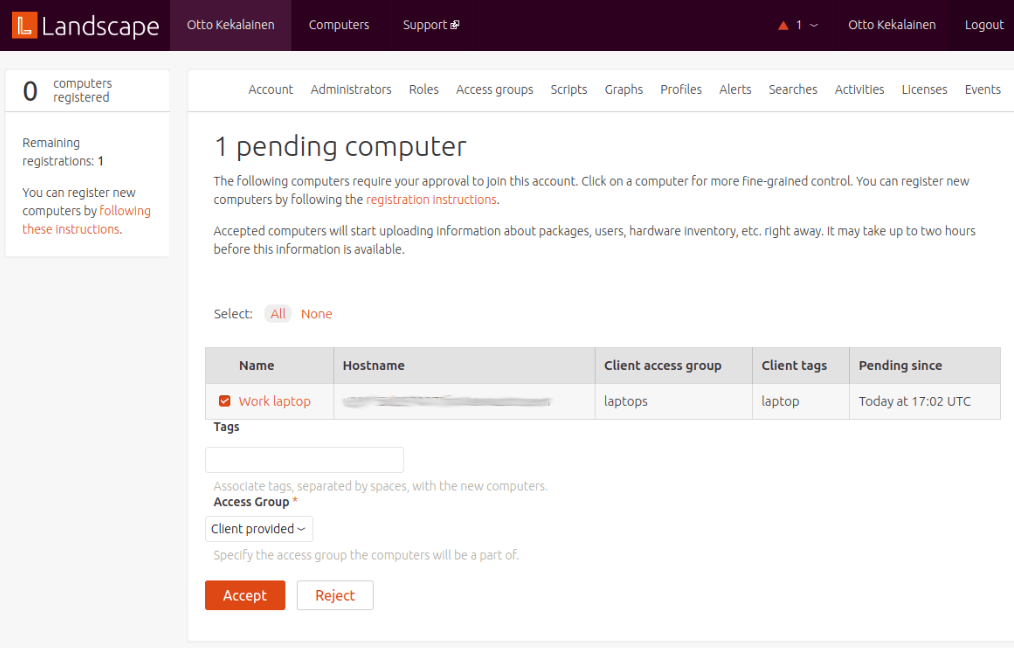
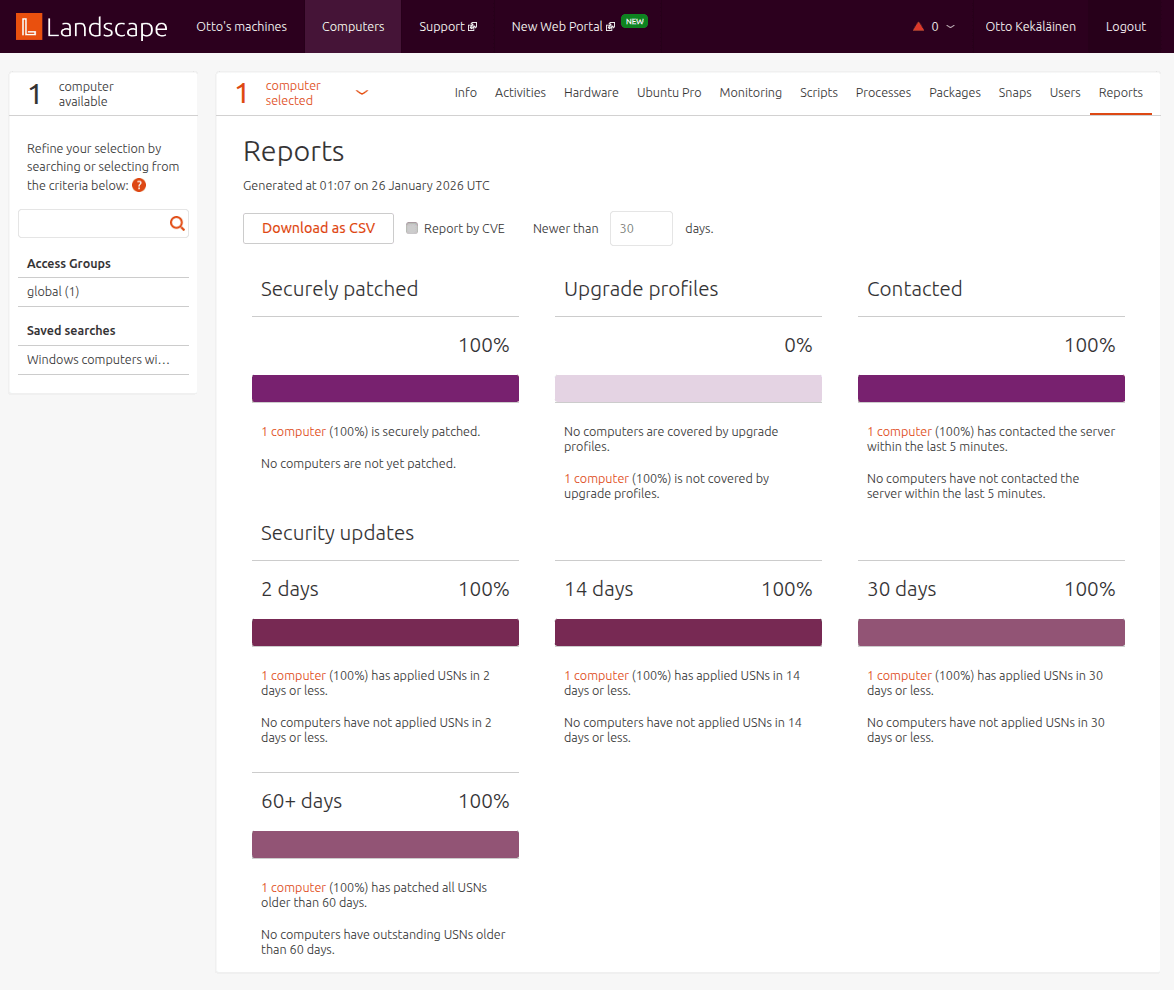
Using Landscape to manage multiple Ubuntu laptops Landscape portal reports showing security update status and resource utilization Landscape.canonical.com is a fleet management system that shows information like security update status and resource utilization for the computers you administer. Ubuntu Pro attached systems under one s account are not automatically visible in Landscape, but have to be enrolled in it. To enroll an Ubuntu Pro attached desktop/laptop to Landscape, first install the required package with sudo apt install landscape-client and then run sudo landscape-config --account-name <account name> to start the configuration wizard. You can find your account name in the Landscape portal. On the last wizard question Request a new registration for this computer now? [y/N] hit y to accept. If successful, the new computer will be visible on the Landscape portal page Pending computers , from where you can click to accept it. Landscape portal page showing pending computer registration If I had a large fleet of computers, Landscape might come in useful. Also it is obvious Landscape is intended primarily for managing server systems. For example, the default alarm trigger on systems being offline, which is common for laptops and desktop computers, is an alert-worthy thing only on server systems. It is good to know that Landscape exists, but on desktop systems I would probably skip it, and only stick to the security updates offered by Ubuntu Pro without using Landscape.

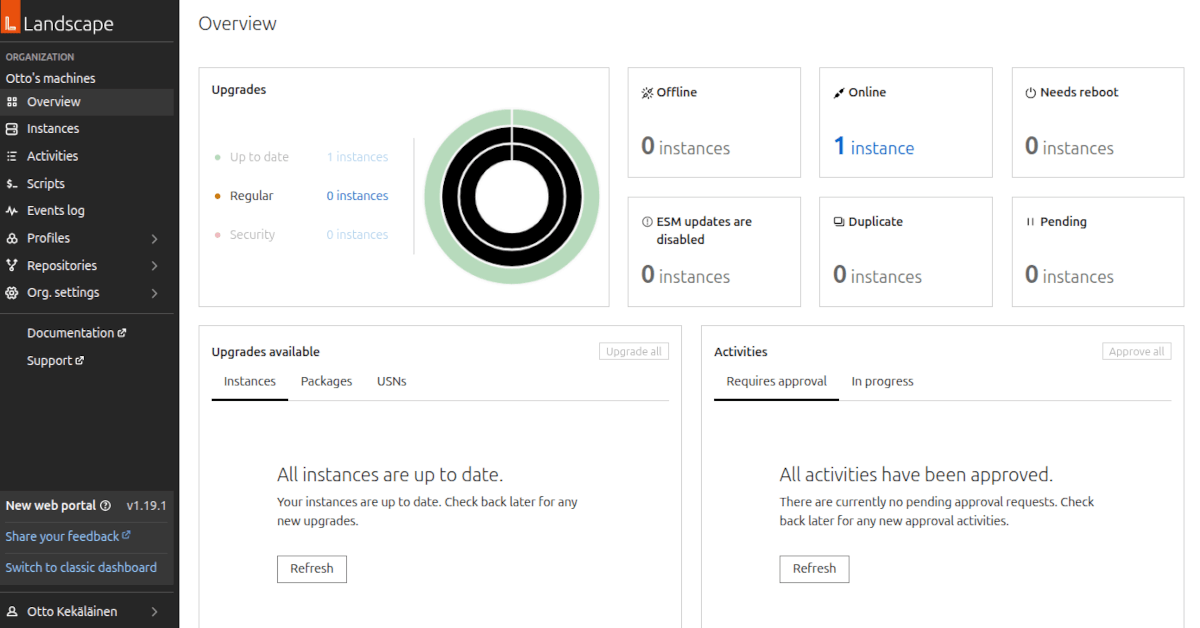
Landscape is evolving The screenshots above are from the current Landscape portal which I have been using so far. Recently Canonical has also launched a new web portal, with a fresh look: New Landscape dashboard with fresh look This shows Canonical is actively investing in the service and it is likely going to sit at the center of their business model for years to come.

Other offerings by Canonical for individual users Canonical, the company behind the world s most popular desktop Linux distribution Ubuntu, has been offering various commercial support services for corporate customers since the company launched back in 2005, but there haven t been any offerings available to individual users since Ubuntu One, with file syncing, a music store and more, was wound down back in 2014. Canonical and the other major Linux companies, Red Hat and SUSE, have always been very enterprise-oriented, presumably because achieving economies of scale is much easier when maintaining standardized corporate environments compared to dealing with a wide range of custom configurations that individual consumer customers might have. I remember some years ago Canonical offered desktop support under the Ubuntu Advantage product name, but the minimum subscription was for 5 desktop systems, which typically isn t an option for a regular home consumer. I am glad to see Ubuntu Pro is now available and I honestly hope people using Ubuntu will opt into it. The more customers it has, the more it incentivizes Canonical to develop and maintain features that are important for desktop and home users.

Pay for Linux because you can, not because you have to Open source is a great software development model for rapid innovation and adoption, but I don t think the business models in the space are yet quite mature. Users who get long-term value should participate more in funding open source maintenance work. While some donation platforms like GitHub Sponsors, OpenCollective and the like have gained popularity in recent years, none of them seem to generate recurring revenue comparable to the scale of how popular open source software is now in 2026. I welcome more paid schemes, such as Ubuntu Pro, as I believe it is beneficial for the whole ecosystem. I also expect more service providers to enter this space and experiment with different open source business models and various forms of decentralized funding. Linux and open source are primarily free as in speech, but as a side effect license fees are hard to enforce and many use Linux without paying for it. The more people, corporations and even countries rely on it to stay sovereign in the information society, the more users should think about how they want to use Linux and who they want to pay to maintain it and other critical parts of the open source ecosystem.

24 January 2026

Gunnar Wolf: Finally some light for those who care about Debian on the Raspberry Pi

Finally, some light at the end of the tunnel! As I have said in this blog and elsewhere, after putting quite a bit of work into generating the Debian Raspberry Pi images between late 2018 and 2023, I had to recognize I don t have the time and energy to properly care for it. I even registered a GSoC project for it. I mentored Kurva Prashanth, who did good work on the vmdb2 scripts we use for the image generation but in the end, was unable to push them to be built in Debian infrastructure. Maybe a different approach was needed! While I adopted the images as they were conceived by Michael Stapelberg, sometimes it s easier to start from scratch and build a fresh approach. So, I m not yet pointing at a stable, proven release, but to a good promise. And I hope I m not being pushy by making this public: in the #debian-raspberrypi channel, waldi has shared the images he has created with the Debian Cloud Team s infrastructure. So, right now, the images built so far support Raspberry Pi families 4 and 5 (notably, not the 500 computer I have, due to a missing Device Tree, but I ll try to help figure that bit out Anyway, p400/500/500+ systems are not that usual). Work is underway to get the 3B+ to boot (some hackery is needed, as it only understands MBR partition schemes, so creating a hybrid image seems to be needed). Debian Cloud images for Raspberries Sadly, I don t think the effort will be extended to cover older, 32-bit-only systems (RPi 0, 1 and 2). Anyway, as this effort stabilizes, I will phase out my (stale!) work on raspi.debian.net, and will redirect it to point at the new images.

Comments Andrea Pappacoda tachi@d.o 2026-01-26 17:39:14 GMT+1 Are there any particular caveats compared to using the regular Raspberry Pi OS? Are they documented anywhere? Gunnar Wolf gwolf.blog@gwolf.org 2026-01-26 11:02:29 GMT-6 Well, the Raspberry Pi OS includes quite a bit of software that s not packaged in Debian for various reasons some of it because it s non-free demo-ware, some of it because it s RPiOS-specific configuration, some of it I don t care, I like running Debian wherever possible Andrea Pappacoda tachi@d.o 2026-01-26 18:20:24 GMT+1 Thanks for the reply! Yeah, sorry, I should ve been more specific. I also just care about the Debian part. But: are there any hardware issues or unsupported stuff, like booting from an SSD (which I m currently doing)? Gunnar Wolf gwolf.blog@gwolf.org 2026-01-26 12:16:29 GMT-6 That s beyond my knowledge Although I can tell you that:
  • Raspberry Pi OS has hardware support as soon as their new boards hit the market. The ability to even boot a board can take over a year for the mainline Linux kernel (at least, it has, both in the cases of the 4 and the 5 families).
  • Also, sometimes some bits of hardware are not discovered by the Linux kernels even if the general family boots because they are not declared in the right place of the Device Tree (i.e. the wireless network interface in the 02W is in a different address than in the 3B+, or the 500 does not fully boot while the 5B now does). Usually it is a matter of just declaring stuff in the right place, but it s not a skill many of us have.
  • Also, many RPi hats ship with their own Device Tree overlays, and they cannot always be loaded on top of mainline kernels.
Andrea Pappacoda tachi@d.o 2026-01-26 19:31:55 GMT+1
That s beyond my knowledge Although I can tell you that: Raspberry Pi OS has hardware support as soon as their new boards hit the market. The ability to even boot a board can take over a year for the mainline Linux kernel (at least, it has, both in the cases of the 4 and the 5 families).
Yeah, unfortunately I m aware of that I ve also been trying to boot OpenBSD on my rpi5 out of curiosity, but been blocked by my somewhat unusual setup involving an NVMe SSD as the boot drive :/
Also, sometimes some bits of hardware are not discovered by the Linux kernels even if the general family boots because they are not declared in the right place of the Device Tree (i.e. the wireless network interface in the 02W is in a different address than in the 3B+, or the 500 does not fully boot while the 5B now does). Usually it is a matter of just declaring stuff in the right place, but it s not a skill many of us have.
At some point in my life I had started reading a bit about device trees and stuff, but got distracted by other stuff before I could develop any familiarity with it. So I don t have the skills either :)
Also, many RPi hats ship with their own Device Tree overlays, and they cannot always be loaded on top of mainline kernels.
I m definitely not happy to hear this! Guess I ll have to try, and maybe report back once some page for these new builds materializes.

23 January 2026

Reproducible Builds (diffoscope): diffoscope 311 released

The diffoscope maintainers are pleased to announce the release of diffoscope version 311. This version includes the following changes:
[ Chris Lamb ]
* Fix test compatibility with u-boot-tools 2026-01. Thanks, Jelle!
* Bump Standards-Version to 4.7.3.
* Drop implied "Priority: optional" from debian/control.
* Also drop implied "Rules-Requires-Root: no" entry in debian/control.
* Update copyright years.
You find out more by visiting the project homepage.

19 January 2026

Dirk Eddelbuettel: RApiDatetime 0.0.11 on CRAN: Micro-Maintenance

A new (micro) maintenance release of our RApiDatetime package is now on CRAN, coming only a good week after the 0.0.10 release which itself had a two year gap to its predecessor release. RApiDatetime provides a number of entry points for C-level functions of the R API for Date and Datetime calculations. The functions asPOSIXlt and asPOSIXct convert between long and compact datetime representation, formatPOSIXlt and Rstrptime convert to and from character strings, and POSIXlt2D and D2POSIXlt convert between Date and POSIXlt datetime. Lastly, asDatePOSIXct converts to a date type. All these functions are rather useful, but were not previously exported by R for C-level use by other packages. Which this package aims to change. This release adds a single (and ) around one variable as the rchk container and service by Tomas now flagged this. Which is somewhat peculiar, as this is old code also borrowed from R itself but no point arguing so I just added this. Details of the release follow based on the NEWS file.

Changes in RApiDatetime version 0.0.11 (2026-01-19)
  • Add PROTECT (and UNPROTECT) to appease rchk

Courtesy of my CRANberries, there is also a diffstat report for this release.

This post by Dirk Eddelbuettel originated on his Thinking inside the box blog. If you like this or other open-source work I do, you can sponsor me at GitHub.

Isoken Ibizugbe: Mid-Point Project Progress

Halfway There

Hurray!  I have officially reached the 6-week mark, the halfway point of my Outreachy internship. The time has flown by incredibly fast, yet it feels short because there is still so much exciting work to do.

I remember starting this journey feeling overwhelmed, trying to gain momentum. Today, I feel much more confident. I began with the apps_startstop task during the contribution period, writing manual test steps and creating preparation Perl scripts for the desktop environments. Since then, I ve transitioned into full automation and taken a liking to reading openQA upstream documentation when I have issues or for reference.

In all of this, I ve committed over 30 hours a week to the project. This dedicated time has allowed me to look in-depth into the Debian ecosystem and automated quality assurance.

The Original Roadmap vs. Reality

Reviewing my 12-week goal, which included extending automated tests for live image testing, installer testing, and documentation, I am happy to report that I am right on track. My work on desktop apps tests has directly improved the quality of both the Live Images and the netinst (network installer) ISOs.

Accomplishments

I have successfully extended the apps_startstop tests for two Desktop Environments (DEs): Cinnamon and LXQt. These tests ensure that common and DE specific apps launch and close correctly across different environments.

  • Merged Milestone: My Cinnamon tests have been officially merged into the upstream repository! [MR !84]
  • LXQt & Adaptability: I am in the final stages of the LXQt tests. Interestingly, I had to update these tests mid-way through because of a version update in the DE. This required me to update the needles (image references) to match the new UI, a great lesson in software maintenance.

Solving for Synergy

One of my favorite challenges was suggested by my mentor, Roland: synergizing the tests to reduce redundancy. I observed that some applications (like Firefox and LibreOffice) behave identically across different desktops. Instead of duplicating Perl scripts/code for every single DE, I used symbolic links. This allows the use of the same Perl script and possibly the same needles, making the test suite lighter and much easier to maintain.

The Contributor Guide

During the contribution phase, I noticed how rigid the documentation and coding style requirements are. While this ensures high standards and uniformity, it can be intimidating for newcomers and time-consuming for reviewers.

To help, I created a contributor guide [MR !97]. This guide addresses the project s writing style. My goal is to reduce the back-and-forth during reviews, making the process more efficient for everyone and helping new contributors.

Looking Forward

For the second half of the internship, I plan to:

  1. Assist others: Help new contributors extend apps start-stop tests to even more desktop environments.
  2. Explore new coverage: Move beyond start-stop tests into deeper functional testing.

This journey has been an amazing experience of learning and connecting with the wider open-source community, especially Debian Women and the Linux QA team.

I am deeply grateful to my mentors, Tassia Camoes Araujo, Roland Clobus, and Philip Hands, for their constant guidance and for believing in my ability to take on this project.

Here s to the next 6 weeks

Hellen Chemtai: Internship Highlights at Outreachy: My Journey with Debian OpenQA

Highlights

Hello world  . I am an intern here at Outreachy working with Debian OpenQA Image testing team. The work consists of testing Images with OpenQA. The internship has reached midpoint and here are some of the highlights that I have had so far.

  1. The mentors : Roland Clobus, Tassia Camoes and Philip Hands are very good mentors. I like the constant communication and the help I get while working on the project. I enjoy working with this team.
  2. The community : The contributors, mentors and the greater SUSE OpenQA community are constantly in communication. I learn a lot from these meetings.
  3. The women network : The women of Debian meet and network . The meetings are interactive and we are encouraged to interact.
  4. The project : We are making progress one step at a time. Isoken Ibizugbe is my fellow intern working on start-stop tests. I am working on live installers tests.

Communication

I have learned a lot during my internship. I have always been on the silent path of life with little communication. I once told myself being a developer would hide me behind a computer to avoid socializing. Being in open source especially this internship has helped me out with communication and networking. The team work in the project has helped me a lot

  1. My mentors encourage communication. Giving project updates and stating when we get stuck.
  2. My mentors have scheduled weekly meetings to communicate about the project
  3. We are constantly invited to the SUSE meetings by mentors or by Sam Thursfield who is part of the team.
  4. Female contributors are encouraged to join Debian women monthly meetings for networking

Lessons so far

I have had challenges , solved problems and learned new skills all this while

  1. I have learned Perl, OpenQA configuration, needle editing and improved my Linux and Git skills
  2. I have known how various Images are installed , booted and run through live viewing of tests
  3. I have solved many test errors and learned to work with applications that are needed in the OS installations. e.g. rufus
  4. I have learned how virtual machines work and how to solve errors in regards to them

So far so good. I am grateful to be a contributor towards the project and hope to continue learning.

Jonathan Dowland: FOSDEM 2026

I'm going to FOSDEM 2026! I'm presenting in the Containers dev room. My talk is Java Memory Management in Containers and it's scheduled as the first talk on the first day. I'm the warm-up act! The Java devroom has been a stalwart at FOSDEM since 2004 (sometimes in other forms), but sadly there's no Java devroom this year. There's a story about that, but it's not mine to tell. Please recommend to me any interesting talks! Here's a few that caught my eye: Debian/related: Containers: Research: Other:

Francesco Paolo Lovergine: A Terramaster NAS with Debian, take two.

After experimenting at home, the very first professional-grade NAS from Terramaster arrived at work, too, with 12 HDD bays and possibly a pair of M2s. NVME cards. In this case, I again installed a plain Debian distribution, but HDD monitoring required some configuration adjustments to run smartd properly.A decent approach to data safety is to run regularly scheduled short and long SMART tests on all disks to detect potential damage. Running such tests on all disks at once isn't ideal, so I set up a script to create a staggered configuration and test multiple groups of disks at different times. Note that it is mandatory to read the devices at each reboot because their names and order can change.Of course, the same principle (short/long test at regular intervals along the week) should be applied for a simpler configuration, as in the case of my home NAS with a pair of RAID1 devices.What follows is a simple script to create a staggered smartd.conf at boot time:
#!/bin/bash
#
# Save this as /usr/local/bin/create-smartd-conf.sh
#
# Dynamically generate smartd.conf with staggered SMART test scheduling
# at boot time based on discovered ATA devices
# HERE IS A LIST OF DIRECTIVES FOR THIS CONFIGURATION FILE.
# PLEASE SEE THE smartd.conf MAN PAGE FOR DETAILS
#
#   -d TYPE Set the device type: ata, scsi[+TYPE], nvme[,NSID],
#           sat[,auto][,N][+TYPE], usbcypress[,X], usbjmicron[,p][,x][,N],
#           usbprolific, usbsunplus, sntasmedia, sntjmicron[,NSID], sntrealtek,
#           ... (platform specific)
#   -T TYPE Set the tolerance to one of: normal, permissive
#   -o VAL  Enable/disable automatic offline tests (on/off)
#   -S VAL  Enable/disable attribute autosave (on/off)
#   -n MODE No check if: never, sleep[,N][,q], standby[,N][,q], idle[,N][,q]
#   -H      Monitor SMART Health Status, report if failed
#   -s REG  Do Self-Test at time(s) given by regular expression REG
#   -l TYPE Monitor SMART log or self-test status:
#           error, selftest, xerror, offlinests[,ns], selfteststs[,ns]
#   -l scterc,R,W  Set SCT Error Recovery Control
#   -e      Change device setting: aam,[N off], apm,[N off], dsn,[on off],
#           lookahead,[on off], security-freeze, standby,[N off], wcache,[on off]
#   -f      Monitor 'Usage' Attributes, report failures
#   -m ADD  Send email warning to address ADD
#   -M TYPE Modify email warning behavior (see man page)
#   -p      Report changes in 'Prefailure' Attributes
#   -u      Report changes in 'Usage' Attributes
#   -t      Equivalent to -p and -u Directives
#   -r ID   Also report Raw values of Attribute ID with -p, -u or -t
#   -R ID   Track changes in Attribute ID Raw value with -p, -u or -t
#   -i ID   Ignore Attribute ID for -f Directive
#   -I ID   Ignore Attribute ID for -p, -u or -t Directive
#   -C ID[+] Monitor [increases of] Current Pending Sectors in Attribute ID
#   -U ID[+] Monitor [increases of] Offline Uncorrectable Sectors in Attribute ID
#   -W D,I,C Monitor Temperature D)ifference, I)nformal limit, C)ritical limit
#   -v N,ST Modifies labeling of Attribute N (see man page)
#   -P TYPE Drive-specific presets: use, ignore, show, showall
#   -a      Default: -H -f -t -l error -l selftest -l selfteststs -C 197 -U 198
#   -F TYPE Use firmware bug workaround:
#           none, nologdir, samsung, samsung2, samsung3, xerrorlba
#   -c i=N  Set interval between disk checks to N seconds
#    #      Comment: text after a hash sign is ignored
#    \      Line continuation character
# Attribute ID is a decimal integer 1 <= ID <= 255
# except for -C and -U, where ID = 0 turns them off.
set -euo pipefail
# Test schedule configuration
BASE_SCHEDULE="L/../../6"  # Long test on Saturdays
TEST_HOURS=(01 03 05 07)   # 4 time slots: 1am, 3am, 5am, 7am
DEVICES_PER_GROUP=3
main()  
    # Get array of device names (e.g., sda, sdb, sdc)
    mapfile -t devices < <(ls -l /dev/disk/by-id/   grep ata   awk ' print $11 '   grep sd   cut -d/ -f3   sort -u)
    if [[ $ #devices[@]  -eq 0 ]]; then
        exit 1
    fi
    # Start building config file
    cat << EOF
# smartd.conf - Auto-generated at boot
# Generated: $(date '+%Y-%m-%d %H:%M:%S')
#
# Staggered SMART test scheduling to avoid concurrent disk load
# Long tests run on Saturdays at different times per group
#
EOF
    # Process devices into groups
    local group=0
    local count_in_group=0
    for i in "$ !devices[@] "; do
        local dev="$ devices[$i] "
        local hour="$ TEST_HOURS[$group] "
        # Add group header at start of each group
        if [[ $count_in_group -eq 0 ]]; then
            echo ""
            echo "# Group $((group + 1)) - Tests at $ hour :00 on Saturdays"
        fi
        # Add device entry
        #echo "/dev/$ dev  -a -o on -S on -s ($ BASE_SCHEDULE /$ hour ) -m root"
        echo "/dev/$ dev  -a -o on -S on -s (L/../../6/$ hour ) -s (S/../.././$(((hour + 12) % 24))) -m root"
        # Move to next group when current group is full
        count_in_group=$((count_in_group + 1))
        if [[ $count_in_group -ge $DEVICES_PER_GROUP ]]; then
            count_in_group=0
            group=$(((group + 1) % $ #TEST_HOURS[@] ))
        fi
    done
 
main "$@"
To run such a script at boot, add a unit file to the systemd configuration.
sudo systemctl  edit --full /etc/systemd/system/regenerate-smartd-conf.service
sudo systemctl enable regenerate-smartd-conf.service
Where the unit service is the following:
[Unit]
Description=Generate smartd.conf with staggered SMART test scheduling
# Wait for all local filesystems and udev device detection
After=local-fs.target systemd-udev-settle.service
Before=smartd.service
Wants=systemd-udev-settle.service
DefaultDependencies=no
[Service]
Type=oneshot
# Only generate the config file, don't touch smartd here
ExecStart=/bin/bash -c '/usr/local/bin/create-smartd-config.sh > /etc/smartd.conf'
StandardOutput=journal
StandardError=journal
RemainAfterExit=yes
[Install]
WantedBy=multi-user.target

Russell Coker: Furilabs FLX1s

The Aim I have just got a Furilabs FLX1s [1] which is a phone running a modified version of Debian. I want to have a phone that runs all apps that I control and can observe and debug. Android is very good for what it does and there are security focused forks of Android which have a lot of potential, but for my use a Debian phone is what I want. The FLX1s is not going to be my ideal phone, I am evaluating it for use as a daily-driver until a phone that meets my ideal criteria is built. In this post I aim to provide information to potential users about what it can do, how it does it, and how to get the basic functions working. I also evaluate how well it meets my usage criteria. I am not anywhere near an average user. I don t think an average user would ever even see one unless a more technical relative showed one to them. So while this phone could be used by an average user I am not evaluating it on that basis. But of course the features of the GUI that make a phone usable for an average user will allow a developer to rapidly get past the beginning stages and into more complex stuff. Features The Furilabs FLX1s [1] is a phone that is designed to run FuriOS which is a slightly modified version of Debian. The purpose of this is to run Debian instead of Android on a phone. It has switches to disable camera, phone communication, and microphone (similar to the Librem 5) but the one to disable phone communication doesn t turn off Wifi, the only other phone I know of with such switches is the Purism Librem 5. It has a 720*1600 display which is only slightly better than the 720*1440 display in the Librem 5 and PinePhone Pro. This doesn t compare well to the OnePlus 6 from early 2018 with 2280*1080 or the Note9 from late 2018 with 2960*1440 which are both phones that I ve run Debian on. The current price is $US499 which isn t that good when compared to the latest Google Pixel series, a Pixel 10 costs $US649 and has a 2424*1080 display and it also has 12G of RAM while the FLX1s only has 8G. Another annoying thing is how rounded the corners are, it seems that round corners that cut off the content are a standard practice nowadays, in my collection of phones the latest one I found with hard right angles on the display was a Huawei Mate 10 Pro which was released in 2017. The corners are rounder than the Note 9, this annoys me because the screen is not high resolution by today s standards so losing the corners matters. The default installation is Phosh (the GNOME shell for phones) and it is very well configured. Based on my experience with older phone users I think I could give a phone with this configuration to a relative in the 70+ age range who has minimal computer knowledge and they would be happy with it. Additionally I could set it up to allow ssh login and instead of going through the phone support thing of trying to describe every GUI setting to click on based on a web page describing menus for the version of Android they are running I could just ssh in and run diff on the .config directory to find out what they changed. Furilabs have done a very good job of setting up the default configuration, while Debian developers deserve a lot of credit for packaging the apps the Furilabs people have chosen a good set of default apps to install to get it going and appear to have made some noteworthy changes to some of them. Droidian The OS is based on Android drivers (using the same techniques as Droidian [2]) and the storage device has the huge number of partitions you expect from Android as well as a 110G Ext4 filesystem for the main OS. The first issue with the Droidian approach of using an Android kernel and containers for user space code to deal with drivers is that it doesn t work that well. There are 3 D state processes (uninterrupteable sleep which usually means a kernel bug if the process remains in that state) after booting and doing nothing special. My tests running Droidian on the Note 9 also had D state processes, in this case they are D state kernel threads (I can t remember if the Note 9 had regular processes or kernel threads stuck in D state). It is possible for a system to have full functionality in spite of some kernel threads in D state but generally it s a symptom of things not working as well as you would hope. The design of Droidian is inherently fragile. You use a kernel and user space code from Android and then use Debian for the rest. You can t do everything the Android way (with the full OS updates etc) and you also can t do everything the Debian way. The TOW Boot functionality in the PinePhone Pro is really handy for recovery [3], it allows the internal storage to be accessed as a USB mass storage device. The full Android setup with ADB has some OK options for recovery, but part Android and part Debian has less options. While it probably is technically possible to do the same things in regard to OS repair and reinstall the fact that it s different from most other devices means that fixes can t be done in the same way. Applications GUI The system uses Phosh and Phoc, the GNOME system for handheld devices. It s a very different UI from Android, I prefer Android but it is usable with Phosh. IM Chatty works well for Jabber (XMPP) in my tests. It supports Matrix which I didn t test because I don t desire the same program doing Matrix and Jabber and because Matrix is a heavy protocol which establishes new security keys for each login so I don t want to keep logging in on new applications. Chatty also does SMS but I couldn t test that without the SIM caddy. I use Nheko for Matrix which has worked very well for me on desktops and laptops running Debian. Email I am currently using Geary for email. It works reasonably well but is lacking proper management of folders, so I can t just subscribe to the important email on my phone so that bandwidth isn t wasted on less important email (there is a GNOME gitlab issue about this see the Debian Wiki page about Mobile apps [4]). Music Music playing isn t a noteworthy thing for a desktop or laptop, but a good music player is important for phone use. The Lollypop music player generally does everything you expect along with support for all the encoding formats including FLAC0 a major limitation of most Android music players seems to be lack of support for some of the common encoding formats. Lollypop has it s controls for pause/play and going forward and backward one track on the lock screen. Maps The installed map program is gnome-maps which works reasonably well. It gets directions via the Graphhopper API [5]. One thing we really need is a FOSS replacement for Graphhopper in GNOME Maps. Delivery and Unboxing I received my FLX1s on the 13th of Jan [1]. I had paid for it on the 16th of Oct but hadn t received the email with the confirmation link so the order had been put on hold. But after I contacted support about that on the 5th of Jan they rapidly got it to me which was good. They also gave me a free case and screen protector to apologise, I don t usually use screen protectors but in this case it might be useful as the edges of the case don t even extend 0.5mm above the screen. So if it falls face down the case won t help much. When I got it there was an open space at the bottom where the caddy for SIMs is supposed to be. So I couldn t immediately test VoLTE functionality. The contact form on their web site wasn t working when I tried to report that and the email for support was bouncing. Bluetooth As a test of Bluetooth I connected it to my Nissan LEAF which worked well for playing music and I connected it to several Bluetooth headphones. My Thinkpad running Debian/Trixie doesn t connect to the LEAF and to headphones which have worked on previous laptops running Debian and Ubuntu. A friend s laptop running Debian/Trixie also wouldn t connect to the LEAF so I suspect a bug in Trixie, I need to spend more time investigating this. Wifi Currently 5GHz wifi doesn t work, this is a software bug that the Furilabs people are working on. 2.4GHz wifi works fine. I haven t tested running a hotspot due to being unable to get 4G working as they haven t yet shipped me the SIM caddy. Docking This phone doesn t support DP Alt-mode or Thunderbolt docking so it can t drive an external monitor. This is disappointing, Samsung phones and tablets have supported such things since long before USB-C was invented. Samsung DeX is quite handy for Android devices and that type feature is much more useful on a device running Debian than on an Android device. Camera The camera works reasonably well on the FLX1s. Until recently for the Librem 5 the camera didn t work and the camera on my PinePhone Pro currently doesn t work. Here are samples of the regular camera and the selfie camera on the FLX1s and the Note 9. I think this shows that the camera is pretty decent. The selfie looks better and the front camera is worse for the relatively close photo of a laptop screen taking photos of computer screens is an important part of my work but I can probably work around that. I wasn t assessing this camera t find out if it s great, just to find out if I have the sorts of problems I had before and it just worked. The Samsung Galaxy Note series of phones has always had decent specs including good cameras. Even though the Note 9 is old comparing to it is a respectable performance. The lighting was poor for all photos. FLX1s
Note 9
Power Use In 93 minutes having the PinePhone Pro, Librem 5, and FLX1s online with open ssh sessions from my workstation the PinePhone Pro went from 100% battery to 26%, the Librem 5 went from 95% to 69%, and the FLX1s went from 100% to 99%. The battery discharge rate of them was reported as 3.0W, 2.6W, and 0.39W respectively. Based on having a 16.7Wh battery 93 minutes of use should have been close to 4% battery use, but in any case all measurements make it clear that the FLX1s will have a much longer battery life. Including the measurement of just putting my fingers on the phones and feeling the temperature (FLX1s felt cool and the others felt hot). The PinePhone Pro and the Librem 5 have an optional Caffeine mode which I enabled for this test, without that enabled the phone goes into a sleep state and disconnects from Wifi. So those phones would use much less power with caffeine mode enabled, but they also couldn t get fast response to notifications etc. I found the option to enable a Caffeine mode switch on the FLX1s but the power use was reported as being the same both with and without it. Charging One problem I found with my phone is that in every case it takes 22 seconds to negotiate power. Even when using straight USB charging (no BC or PD) it doesn t draw any current for 22 seconds. When I connect it it will stay at 5V and varying between 0W and 0.1W (current rounded off to zero) for 22 seconds or so and then start charging. After the 22 second display the phone will make the tick sound indicating that it s charging and the power meter will measure that it s drawing some current. I added the table from my previous post about phone charging speed [6] with an extra row for the FLX1s. For charging from my PC USB ports the results were the worst ever, the port that does BC did not work at all it was looping trying to negotiate after a 22 second negotiation delay the port would turn off. The non-BC port gave only 2.4W which matches the 2.5W given by the spec for a High-power device which is what that port is designed to give. In a discussion on the Purism forum about the Librem5 charging speed one of their engineers told me that the reason why their phone would draw 2A from that port was because the cable was identifying itself as a USB-C port not a High-power device port. But for some reason out of the 7 phones I tested the FLX1s and the One Plus 6 are the only ones to limit themselves to what the port is apparently supposed to do. Also the One Plus 6 charges slowly on every power supply so I don t know if it is obeying the spec or just sucking. On a cheap AliExpress charger the FLX1s gets 5.9V and on a USB battery it gets 5.8V. Out of all 42 combinations of device and charger I tested these were the only ones to involve more than 5.1V but less than 9V. I welcome comments suggesting an explanation. The case that I received has a hole for the USB-C connector that isn t wide enough for the plastic surrounds on most of my USB-C cables (including the Dell dock). Also to make a connection requires a fairly deep insertion (deeper than the One Plus 6 or the Note 9). So without adjustment I have to take the case off to charge it. It s no big deal to adjust the hole (I have done it with other cases) but it s an annoyance.
Phone Top z640 Bottom Z640 Monitor Ali Charger Dell Dock Battery Best Worst
FLX1s FAIL 5.0V 0.49A 2.4W 4.8V 1.9A 9.0W 5.9V 1.8A 11W 4.8V 2.1A 10W 5.8V 2.1A 12W 5.8V 2.1A 12W 5.0V 0.49A 2.4W
Note9 4.8V 1.0A 5.2W 4.8V 1.6A 7.5W 4.9V 2.0A 9.5W 5.1V 1.9A 9.7W 4.8V 2.1A 10W 5.1V 2.1A 10W 5.1V 2.1A 10W 4.8V 1.0A 5.2W
Pixel 7 pro 4.9V 0.80A 4.2W 4.8V 1.2A 5.9W 9.1V 1.3A 12W 9.1V 1.2A 11W 4.9V 1.8A 8.7W 9.0V 1.3A 12W 9.1V 1.3A 12W 4.9V 0.80A 4.2W
Pixel 8 4.7V 1.2A 5.4W 4.7V 1.5A 7.2W 8.9V 2.1A 19W 9.1V 2.7A 24W 4.8V 2.3A 11.0W 9.1V 2.6A 24W 9.1V 2.7A 24W 4.7V 1.2A 5.4W
PPP 4.7V 1.2A 6.0W 4.8V 1.3A 6.8W 4.9V 1.4A 6.6W 5.0V 1.2A 5.8W 4.9V 1.4A 5.9W 5.1V 1.2A 6.3W 4.8V 1.3A 6.8W 5.0V 1.2A 5.8W
Librem 5 4.4V 1.5A 6.7W 4.6V 2.0A 9.2W 4.8V 2.4A 11.2W 12V 0.48A 5.8W 5.0V 0.56A 2.7W 5.1V 2.0A 10W 4.8V 2.4A 11.2W 5.0V 0.56A 2.7W
OnePlus6 5.0V 0.51A 2.5W 5.0V 0.50A 2.5W 5.0V 0.81A 4.0W 5.0V 0.75A 3.7W 5.0V 0.77A 3.7W 5.0V 0.77A 3.9W 5.0V 0.81A 4.0W 5.0V 0.50A 2.5W
Best 4.4V 1.5A 6.7W 4.6V 2.0A 9.2W 8.9V 2.1A 19W 9.1V 2.7A 24W 4.8V 2.3A 11.0W 9.1V 2.6A 24W
Conclusion The Furilabs support people are friendly and enthusiastic but my customer experience wasn t ideal. It was good that they could quickly respond to my missing order status and the missing SIM caddy (which I still haven t received but believe is in the mail) but it would be better if such things just didn t happen. The phone is quite user friendly and could be used by a novice. I paid $US577 for the FLX1s which is $AU863 by today s exchange rates. For comparison I could get a refurbished Pixel 9 Pro Fold for $891 from Kogan (the major Australian mail-order company for technology) or a refurbished Pixel 9 Pro XL for $842. The Pixel 9 series has security support until 2031 which is probably longer than you can expect a phone to be used without being broken. So a phone with a much higher resolution screen that s only one generation behind the latest high end phones and is refurbished will cost less. For a brand new phone a Pixel 8 Pro which has security updates until 2030 costs $874 and a Pixel 9A which has security updates until 2032 costs $861. Doing what the Furilabs people have done is not a small project. It s a significant amount of work and the prices of their products need to cover that. I m not saying that the prices are bad, just that economies of scale and the large quantity of older stock makes the older Google products quite good value for money. The new Pixel phones of the latest models are unreasonably expensive. The Pixel 10 is selling new from Google for $AU1,149 which I consider a ridiculous price that I would not pay given the market for used phones etc. If I had a choice of $1,149 or a feature phone I d pay $1,149. But the FLX1s for $863 is a much better option for me. If all I had to choose from was a new Pixel 10 or a FLX1s for my parents I d get them the FLX1s. For a FOSS developer a FLX1s could be a mobile test and development system which could be lent to a relative when their main phone breaks and the replacement is on order. It seems to be fit for use as a commodity phone. Note that I give this review on the assumption that SMS and VoLTE will just work, I haven t tested them yet. The UI on the FLX1s is functional and easy enough for a new user while allowing an advanced user to do the things they desire. I prefer the Android style and the Plasma Mobile style is closer to Android than Phosh is, but changing it is something I can do later. Generally I think that the differences between UIs matter more when on a desktop environment that could be used for more complex tasks than on a phone which limits what can be done by the size of the screen. I am comparing the FLX1s to Android phones on the basis of what technology is available. But most people who would consider buying this phone will compare it to the PinePhone Pro and the Librem 5 as they have similar uses. The FLX1s beats both those phones handily in terms of battery life and of having everything just work. But it has the most non free software of the three and the people who want the $2000 Librem 5 that s entirely made in the US won t want the FLX1s. This isn t the destination for Debian based phones, but it s a good step on the way to it and I don t think I ll regret this purchase.

Vincent Bernat: RAID 5 with mixed-capacity disks on Linux

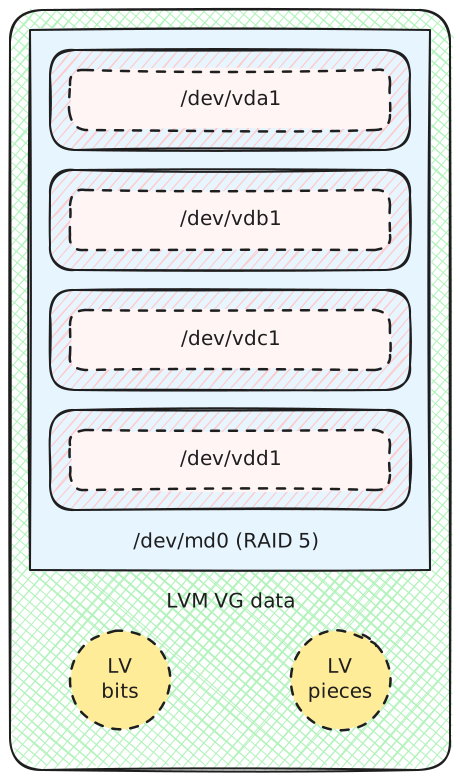
Standard RAID solutions waste space when disks have different sizes. Linux software RAID with LVM uses the full capacity of each disk and lets you grow storage by replacing one or two disks at a time.1 We start with four disks of equal size:
$ lsblk -Mo NAME,TYPE,SIZE
NAME TYPE  SIZE
vda  disk  101M
vdb  disk  101M
vdc  disk  101M
vdd  disk  101M
We create one partition on each of them:
$ sgdisk --zap-all --new=0:0:0 -t 0:fd00 /dev/vda
$ sgdisk --zap-all --new=0:0:0 -t 0:fd00 /dev/vdb
$ sgdisk --zap-all --new=0:0:0 -t 0:fd00 /dev/vdc
$ sgdisk --zap-all --new=0:0:0 -t 0:fd00 /dev/vdd
$ lsblk -Mo NAME,TYPE,SIZE
NAME   TYPE  SIZE
vda    disk  101M
 vda1 part  100M
vdb    disk  101M
 vdb1 part  100M
vdc    disk  101M
 vdc1 part  100M
vdd    disk  101M
 vdd1 part  100M
We set up a RAID 5 device by assembling the four partitions:2
$ mdadm --create /dev/md0 --level=raid5 --bitmap=internal --raid-devices=4 \
>   /dev/vda1 /dev/vdb1 /dev/vdc1 /dev/vdd1
$ lsblk -Mo NAME,TYPE,SIZE
    NAME          TYPE    SIZE
    vda           disk    101M
   vda1        part    100M
    vdb           disk    101M
   vdb1        part    100M
    vdc           disk    101M
   vdc1        part    100M
    vdd           disk    101M
   vdd1        part    100M
  md0           raid5 292.5M
$ cat /proc/mdstat
md0 : active raid5 vdd1[4] vdc1[2] vdb1[1] vda1[0]
      299520 blocks super 1.2 level 5, 512k chunk, algorithm 2 [4/4] [UUUU]
      bitmap: 0/1 pages [0KB], 65536KB chunk
We use LVM to create logical volumes on top of the RAID 5 device.
$ pvcreate /dev/md0
  Physical volume "/dev/md0" successfully created.
$ vgcreate data /dev/md0
  Volume group "data" successfully created
$ lvcreate -L 100m -n bits data
  Logical volume "bits" created.
$ lvcreate -L 100m -n pieces data
  Logical volume "pieces" created.
$ mkfs.ext4 -q /dev/data/bits
$ mkfs.ext4 -q /dev/data/pieces
$ lsblk -Mo NAME,TYPE,SIZE
    NAME          TYPE    SIZE
    vda           disk    101M
   vda1        part    100M
    vdb           disk    101M
   vdb1        part    100M
    vdc           disk    101M
   vdc1        part    100M
    vdd           disk    101M
   vdd1        part    100M
  md0           raid5 292.5M
     data-bits   lvm     100M
     data-pieces lvm     100M
$ vgs
  VG   #PV #LV #SN Attr   VSize   VFree
  data   1   2   0 wz--n- 288.00m 88.00m
This gives us the following setup:
One RAID 5 device built from four partitions from four disks of equal capacity. The RAID device is part of an LVM volume group with two logical volumes.
RAID 5 setup with disks of equal capacity
We replace /dev/vda with a bigger disk. We add it back to the RAID 5 array after copying the partitions from /dev/vdb:
$ cat /proc/mdstat
md0 : active (auto-read-only) raid5 vdb1[1] vdd1[4] vdc1[2]
      299520 blocks super 1.2 level 5, 512k chunk, algorithm 2 [4/3] [_UUU]
      bitmap: 0/1 pages [0KB], 65536KB chunk
$ sgdisk --replicate=/dev/vda /dev/vdb
$ sgdisk --randomize-guids /dev/vda
$ mdadm --manage /dev/md0 --add /dev/vda1
$ cat /proc/mdstat
md0 : active raid5 vda1[5] vdb1[1] vdd1[4] vdc1[2]
      299520 blocks super 1.2 level 5, 512k chunk, algorithm 2 [4/4] [UUUU]
      bitmap: 0/1 pages [0KB], 65536KB chunk
We do not use the additional capacity: this setup would not survive the loss of /dev/vda because we have no spare capacity. We need a second disk replacement, like /dev/vdb:
$ cat /proc/mdstat
md0 : active (auto-read-only) raid5 vda1[5] vdd1[4] vdc1[2]
      299520 blocks super 1.2 level 5, 512k chunk, algorithm 2 [4/3] [U_UU]
      bitmap: 0/1 pages [0KB], 65536KB chunk
$ sgdisk --replicate=/dev/vdb /dev/vdc
$ sgdisk --randomize-guids /dev/vdb
$ mdadm --manage /dev/md0 --add /dev/vdb1
$ cat /proc/mdstat
md0 : active raid5 vdb1[6] vda1[5] vdd1[4] vdc1[2]
      299520 blocks super 1.2 level 5, 512k chunk, algorithm 2 [4/4] [UUUU]
      bitmap: 0/1 pages [0KB], 65536KB chunk
We create a new RAID 1 array by using the free space on /dev/vda and /dev/vdb:
$ sgdisk --new=0:0:0 -t 0:fd00 /dev/vda
$ sgdisk --new=0:0:0 -t 0:fd00 /dev/vdb
$ mdadm --create /dev/md1 --level=raid1 --bitmap=internal --raid-devices=2 \
>   /dev/vda2 /dev/vdb2
$ cat /proc/mdstat
md1 : active raid1 vdb2[1] vda2[0]
      101312 blocks super 1.2 [2/2] [UU]
      bitmap: 0/1 pages [0KB], 65536KB chunk
md0 : active raid5 vdb1[6] vda1[5] vdd1[4] vdc1[2]
      299520 blocks super 1.2 level 5, 512k chunk, algorithm 2 [4/4] [UUUU]
      bitmap: 0/1 pages [0KB], 65536KB chunk
We add /dev/md1 to the volume group:
$ pvcreate /dev/md1
  Physical volume "/dev/md1" successfully created.
$ vgextend data /dev/md1
  Volume group "data" successfully extended
$ vgs
  VG   #PV #LV #SN Attr   VSize   VFree
  data   2   2   0 wz--n- 384.00m 184.00m
$  lsblk -Mo NAME,TYPE,SIZE
       NAME          TYPE    SIZE
       vda           disk    201M
      vda1        part    100M
     vda2        part    100M
       vdb           disk    201M
      vdb1        part    100M
     vdb2        part    100M
  md1           raid1  98.9M
       vdc           disk    101M
      vdc1        part    100M
       vdd           disk    101M
      vdd1        part    100M
     md0           raid5 292.5M
        data-bits   lvm     100M
        data-pieces lvm     100M
This gives us the following setup:3
One RAID 5 device built from four partitions and one RAID 1 device built from two partitions. The two last disks are smaller. The two RAID devices are part of a single LVM volume group.
Setup mixing both RAID 1 and RAID 5
We extend our capacity further by replacing /dev/vdc:
$ cat /proc/mdstat
md1 : active (auto-read-only) raid1 vda2[0] vdb2[1]
      101312 blocks super 1.2 [2/2] [UU]
      bitmap: 0/1 pages [0KB], 65536KB chunk
md0 : active (auto-read-only) raid5 vda1[5] vdd1[4] vdb1[6]
      299520 blocks super 1.2 level 5, 512k chunk, algorithm 2 [4/3] [UU_U]
      bitmap: 0/1 pages [0KB], 65536KB chunk
$ sgdisk --replicate=/dev/vdc /dev/vdb
$ sgdisk --randomize-guids /dev/vdc
$ mdadm --manage /dev/md0 --add /dev/vdc1
$ cat /proc/mdstat
md1 : active (auto-read-only) raid1 vda2[0] vdb2[1]
      101312 blocks super 1.2 [2/2] [UU]
      bitmap: 0/1 pages [0KB], 65536KB chunk
md0 : active raid5 vdc1[7] vda1[5] vdd1[4] vdb1[6]
      299520 blocks super 1.2 level 5, 512k chunk, algorithm 2 [4/4] [UUUU]
      bitmap: 0/1 pages [0KB], 65536KB chunk
Then, we convert /dev/md1 from RAID 1 to RAID 5:
$ mdadm --grow /dev/md1 --level=5 --raid-devices=3 --add /dev/vdc2
mdadm: level of /dev/md1 changed to raid5
mdadm: added /dev/vdc2
$ cat /proc/mdstat
md1 : active raid5 vdc2[2] vda2[0] vdb2[1]
      202624 blocks super 1.2 level 5, 64k chunk, algorithm 2 [3/3] [UUU]
      bitmap: 0/1 pages [0KB], 65536KB chunk
md0 : active raid5 vdc1[7] vda1[5] vdd1[4] vdb1[6]
      299520 blocks super 1.2 level 5, 512k chunk, algorithm 2 [4/4] [UUUU]
      bitmap: 0/1 pages [0KB], 65536KB chunk
$ pvresize /dev/md1
$ vgs
  VG   #PV #LV #SN Attr   VSize   VFree
  data   2   2   0 wz--n- 482.00m 282.00m
This gives us the following layout:
Two RAID 5 devices built from four disks of different sizes. The last disk is smaller and contains only one partition, while the others have two partitions: one for /dev/md0 and one for /dev/md1. The two RAID devices are part of a single LVM volume group.
RAID 5 setup with mixed-capacity disks using partitions and LVM
We further extend our capacity by replacing /dev/vdd:
$ cat /proc/mdstat
md0 : active (auto-read-only) raid5 vda1[5] vdc1[7] vdb1[6]
      299520 blocks super 1.2 level 5, 512k chunk, algorithm 2 [4/3] [UUU_]
      bitmap: 0/1 pages [0KB], 65536KB chunk
md1 : active (auto-read-only) raid5 vda2[0] vdc2[2] vdb2[1]
      202624 blocks super 1.2 level 5, 64k chunk, algorithm 2 [3/3] [UUU]
      bitmap: 0/1 pages [0KB], 65536KB chunk
$ sgdisk --replicate=/dev/vdd /dev/vdc
$ sgdisk --randomize-guids /dev/vdd
$ mdadm --manage /dev/md0 --add /dev/vdd1
$ cat /proc/mdstat
md0 : active raid5 vdd1[4] vda1[5] vdc1[7] vdb1[6]
      299520 blocks super 1.2 level 5, 512k chunk, algorithm 2 [4/4] [UUUU]
      bitmap: 0/1 pages [0KB], 65536KB chunk
md1 : active (auto-read-only) raid5 vda2[0] vdc2[2] vdb2[1]
      202624 blocks super 1.2 level 5, 64k chunk, algorithm 2 [3/3] [UUU]
      bitmap: 0/1 pages [0KB], 65536KB chunk
We grow the second RAID 5 array:
$ mdadm --grow /dev/md1 --raid-devices=4 --add /dev/vdd2
mdadm: added /dev/vdd2
$ cat /proc/mdstat
md0 : active raid5 vdd1[4] vda1[5] vdc1[7] vdb1[6]
      299520 blocks super 1.2 level 5, 512k chunk, algorithm 2 [4/4] [UUUU]
      bitmap: 0/1 pages [0KB], 65536KB chunk
md1 : active raid5 vdd2[3] vda2[0] vdc2[2] vdb2[1]
      303936 blocks super 1.2 level 5, 64k chunk, algorithm 2 [4/4] [UUUU]
      bitmap: 0/1 pages [0KB], 65536KB chunk
$ pvresize /dev/md1
$ vgs
  VG   #PV #LV #SN Attr   VSize   VFree
  data   2   2   0 wz--n- 580.00m 380.00m
$ lsblk -Mo NAME,TYPE,SIZE
       NAME          TYPE    SIZE
       vda           disk    201M
      vda1        part    100M
     vda2        part    100M
       vdb           disk    201M
      vdb1        part    100M
     vdb2        part    100M
       vdc           disk    201M
      vdc1        part    100M
     vdc2        part    100M
       vdd           disk    301M
      vdd1        part    100M
      vdd2        part    100M
     md0           raid5 292.5M
        data-bits   lvm     100M
        data-pieces lvm     100M
  md1           raid5 296.8M
You can continue by replacing each disk one by one using the same steps.

  1. This is the same approach Synology uses for its Hybrid RAID and what the OpenMediaVault community calls a Sliced Hybrid RAID.
  2. Write-intent bitmaps speed up recovery of the RAID array after a power failure by marking unsynchronized regions as dirty. They have an impact on performance, but I did not measure it myself. An alternative is to use a partial parity log with --consistency-policy=ppl.
  3. In the lsblk output, /dev/md1 appears unused because the logical volumes do not use any space from it yet. Once you create more logical volumes or extend them, lsblk will reflect the usage.

Dima Kogan: mrcal 2.5 released!

mrcal 2.5 is out: the release notes. Once again, this is mostly a bug-fix release en route to the big new features coming in 3.0. One cool thing is that these tools have now matured enough to no longer be considered experimental. They have been used with great success in lots of contexts across many different projects and organizations. Some highlights: Some of the above is new, and not yet fully polished and documented and tested, but it works. In mrcal 2.5, most of the implementation of some new big features is written and committed, but it's still incomplete. The new stuff is there, but is lightly tested and documented. This will be completed eventually in mrcal 3.0: mrcal is quite good already, and will be even better in the future. Try it today!

17 January 2026

Simon Josefsson: Backup of S3 Objects Using rsnapshot

I ve been using rsnapshot to take backups of around 10 servers and laptops for well over 15 years, and it is a remarkably reliable tool that has proven itself many times. Rsnapshot uses rsync over SSH and maintains a temporal hard-link file pool. Once rsnapshot is configured and running, on the backup server, you get a hardlink farm with directories like this for the remote server:
/backup/serverA.domain/.sync/foo
/backup/serverA.domain/daily.0/foo
/backup/serverA.domain/daily.1/foo
/backup/serverA.domain/daily.2/foo
...
/backup/serverA.domain/daily.6/foo
/backup/serverA.domain/weekly.0/foo
/backup/serverA.domain/weekly.1/foo
...
/backup/serverA.domain/monthly.0/foo
/backup/serverA.domain/monthly.1/foo
...
/backup/serverA.domain/yearly.0/foo
I can browse and rescue files easily, going back in time when needed. The rsnapshot project README explains more, there is a long rsnapshot HOWTO although I usually find the rsnapshot man page the easiest to digest. I have stored multi-TB Git-LFS data on GitLab.com for some time. The yearly renewal is coming up, and the price for Git-LFS storage on GitLab.com is now excessive (~$10.000/year). I have reworked my work-flow and finally migrated debdistget to only store Git-LFS stubs on GitLab.com and push the real files to S3 object storage. The cost for this is barely measurable, I have yet to run into the 25/month warning threshold. But how do you backup stuff stored in S3? For some time, my S3 backup solution has been to run the minio-client mirror command to download all S3 objects to my laptop, and rely on rsnapshot to keep backups of this. While 4TB NVME s are relatively cheap, I ve felt that this disk and network churn on my laptop is unsatisfactory for quite some time. What is a better approach? I find S3 hosting sites fairly unreliable by design. Only a couple of clicks in your web browser and you have dropped 100TB of data. Or by someone else who steal your plaintext-equivalent cookie. Thus, I haven t really felt comfortable using any S3-based backup option. I prefer to self-host, although continously running a mirror job is not sufficient: if I accidentally drop the entire S3 object store, my mirror run will remove all files locally too. The rsnapshot approach that allows going back in time and having data on self-managed servers feels superior to me. What if we could use rsnapshot with a S3 client instead of rsync? Someone else asked about this several years ago, and the suggestion was to use the fuse-based s3fs which sounded unreliable to me. After some experimentation, working around some hard-coded assumption in the rsnapshot implementation, I came up with a small configuration pattern and a wrapper tool to implement what I desired. Here is my configuration snippet:
cmd_rsync    /backup/s3/s3rsync
rsync_short_args    -Q
rsync_long_args    --json --remove
lockfile    /backup/s3/rsnapshot.pid
snapshot_root    /backup/s3
backup    s3:://hetzner/debdistget-gnuinos    ./debdistget-gnuinos
backup    s3:://hetzner/debdistget-tacos  ./debdistget-tacos
backup    s3:://hetzner/debdistget-diffos ./debdistget-diffos
backup    s3:://hetzner/debdistget-pureos ./debdistget-pureos
backup    s3:://hetzner/debdistget-kali   ./debdistget-kali
backup    s3:://hetzner/debdistget-devuan ./debdistget-devuan
backup    s3:://hetzner/debdistget-trisquel   ./debdistget-trisquel
backup    s3:://hetzner/debdistget-debian ./debdistget-debian
The idea is to save a backup of a couple of S3 buckets under /backup/s3/. I have some scripts that take a complete rsnapshot.conf file and append my per-directory configuration so that this becomes a complete configuration. If you are curious how I roll this, backup-all invokes backup-one appending my rsnapshot.conf template with the snippet above. The s3rsync wrapper script is the essential hack to convert rsnapshot s rsync parameters into something that talks S3 and the script is as follows:
#!/bin/sh
set -eu
S3ARG=
for ARG in "$@"; do
    case $ARG in
    s3:://*) S3ARG="$S3ARG "$(echo $ARG   sed -e 's,s3:://,,');;
    -Q*) ;;
    *) S3ARG="$S3ARG $ARG";;
    esac
done
echo /backup/s3/mc mirror $S3ARG
exec /backup/s3/mc mirror $S3ARG
It uses the minio-client tool. I first tried s3cmd but its sync command read all files to compute MD5 checksums every time you invoke it, which is very slow. The mc mirror command is blazingly fast since it only compare mtime s, just like rsync or git. First you need to store credentials for your S3 bucket. These are stored in plaintext in ~/.mc/config.json which I find to be sloppy security practices, but I don t know of any better way to do this. Replace AKEY and SKEY with your access token and secret token from your S3 provider:
/backup/s3/mc alias set hetzner AKEY SKEY
If I invoke a sync job for a fully synced up directory the output looks like this:
root@hamster /backup# /run/current-system/profile/bin/rsnapshot -c /backup/s3/rsnapshot.conf -V sync
Setting locale to POSIX "C"
echo 1443 > /backup/s3/rsnapshot.pid 
/backup/s3/s3rsync -Qv --json --remove s3:://hetzner/debdistget-gnuinos \
    /backup/s3/.sync//debdistget-gnuinos 
/backup/s3/mc mirror --json --remove hetzner/debdistget-gnuinos /backup/s3/.sync//debdistget-gnuinos
 "status":"success","total":0,"transferred":0,"duration":0,"speed":0 
/backup/s3/s3rsync -Qv --json --remove s3:://hetzner/debdistget-tacos \
    /backup/s3/.sync//debdistget-tacos 
/backup/s3/mc mirror --json --remove hetzner/debdistget-tacos /backup/s3/.sync//debdistget-tacos
 "status":"success","total":0,"transferred":0,"duration":0,"speed":0 
/backup/s3/s3rsync -Qv --json --remove s3:://hetzner/debdistget-diffos \
    /backup/s3/.sync//debdistget-diffos 
/backup/s3/mc mirror --json --remove hetzner/debdistget-diffos /backup/s3/.sync//debdistget-diffos
 "status":"success","total":0,"transferred":0,"duration":0,"speed":0 
/backup/s3/s3rsync -Qv --json --remove s3:://hetzner/debdistget-pureos \
    /backup/s3/.sync//debdistget-pureos 
/backup/s3/mc mirror --json --remove hetzner/debdistget-pureos /backup/s3/.sync//debdistget-pureos
 "status":"success","total":0,"transferred":0,"duration":0,"speed":0 
/backup/s3/s3rsync -Qv --json --remove s3:://hetzner/debdistget-kali \
    /backup/s3/.sync//debdistget-kali 
/backup/s3/mc mirror --json --remove hetzner/debdistget-kali /backup/s3/.sync//debdistget-kali
 "status":"success","total":0,"transferred":0,"duration":0,"speed":0 
/backup/s3/s3rsync -Qv --json --remove s3:://hetzner/debdistget-devuan \
    /backup/s3/.sync//debdistget-devuan 
/backup/s3/mc mirror --json --remove hetzner/debdistget-devuan /backup/s3/.sync//debdistget-devuan
 "status":"success","total":0,"transferred":0,"duration":0,"speed":0 
/backup/s3/s3rsync -Qv --json --remove s3:://hetzner/debdistget-trisquel \
    /backup/s3/.sync//debdistget-trisquel 
/backup/s3/mc mirror --json --remove hetzner/debdistget-trisquel /backup/s3/.sync//debdistget-trisquel
 "status":"success","total":0,"transferred":0,"duration":0,"speed":0 
/backup/s3/s3rsync -Qv --json --remove s3:://hetzner/debdistget-debian \
    /backup/s3/.sync//debdistget-debian 
/backup/s3/mc mirror --json --remove hetzner/debdistget-debian /backup/s3/.sync//debdistget-debian
 "status":"success","total":0,"transferred":0,"duration":0,"speed":0 
touch /backup/s3/.sync/ 
rm -f /backup/s3/rsnapshot.pid 
/run/current-system/profile/bin/logger -p user.info -t rsnapshot[1443] \
    /run/current-system/profile/bin/rsnapshot -c /backup/s3/rsnapshot.conf \
    -V sync: completed successfully 
root@hamster /backup# 
You can tell from the paths that this machine runs Guix. This was the first production use of the Guix System for me, and the machine has been running since 2015 (with the occasional new hard drive). Before, I used rsnapshot on Debian, but some stable release of Debian dropped the rsnapshot package, paving the way for me to test Guix in production on a non-Internet exposed machine. Unfortunately, mc is not packaged in Guix, so you will have to install it from the MinIO Client GitHub page manually. Running the daily rotation looks like this:
root@hamster /backup# /run/current-system/profile/bin/rsnapshot -c /backup/s3/rsnapshot.conf -V daily
Setting locale to POSIX "C"
echo 1549 > /backup/s3/rsnapshot.pid 
mv /backup/s3/daily.5/ /backup/s3/daily.6/ 
mv /backup/s3/daily.4/ /backup/s3/daily.5/ 
mv /backup/s3/daily.3/ /backup/s3/daily.4/ 
mv /backup/s3/daily.2/ /backup/s3/daily.3/ 
mv /backup/s3/daily.1/ /backup/s3/daily.2/ 
mv /backup/s3/daily.0/ /backup/s3/daily.1/ 
/run/current-system/profile/bin/cp -al /backup/s3/.sync /backup/s3/daily.0 
rm -f /backup/s3/rsnapshot.pid 
/run/current-system/profile/bin/logger -p user.info -t rsnapshot[1549] \
    /run/current-system/profile/bin/rsnapshot -c /backup/s3/rsnapshot.conf \
    -V daily: completed successfully 
root@hamster /backup# 
Hopefully you will feel inspired to take backups of your S3 buckets now!

Jonathan Dowland: Honest Jon's lightly-used Starships

No man s Sky (or as it s known in our house, "spaceship game") is a space exploration/sandbox game that was originally released 10 years ago. Back then I tried it on my brother s PS4 but I couldn t get into it. In 2022 it launched for the Nintendo Switch1 and the game finally clicked for me. I play it very casually. I mostly don t play at all, except sometimes when there are time-limited expeditions running, which I find refreshing, and usually have some exclusives as a reward for play. One of the many things you can do in the game is collect star ships. I started keeping a list of notable ones I ve found, and I ve decided to occasionally blog about them.
The Horizon Vector NX spaceship
The Horizon Vector NX is a small sporty ship that players on Nintendo Switch could claim within the first month or so after it launched. The colour scheme resembles the original neon switch controllers. Although the ship type occurs naturally in the game in other configurations, I think differently-painted wings are unique to this ship. For most of the last 4 years, my copy of this ship was confined to the Switch, until November 2024, when they added cross-save capability to the game. I was then able to access the ship when playing on Linux (or Mac).

  1. The game runs very well natively on Mac, flawlessly on Steam for Linux, but struggles on the origins switch. It s a marvel it runs there at all.

Ravi Dwivedi: My experiences in Brunei

This post covers my friend Badri and my experiences in Brunei. Brunei officially Brunei Darussalam is a country in Southeast Asia, located on Borneo island. It is one of the few remaining absolute monarchies on Earth. On the morning of the 10th of December 2024, Badri and I reached Brunei International Airport by taking a flight from Kuala Lumpur. Upon arrival at the airport, we had to go through the immigration, of course. However, I forgot to fill my arrival card, which I filled while I was in the queue for my immigration. The immigration officer asked me how much cash I was carrying of each currency. After completing the formalities, the immigration officer stamped my passport and let me in. Take a look at Brunei s entry stamp in my passport.
Brunei entry stamp Brunei entry stamp on my passport. Picture by Ravi Dwivedi, released under CC-BY-SA 4.0.
We exchanged Singapore dollars to get some Brunei dollars at the airport. The Brunei dollar was pegged 1:1 with the Singapore dollar, meaning 1 Singapore dollar equals 1 Brunei dollar. The exchange rate we received at the airport was the same. Our (pre-booked) accommodation was located near Gadong mall. So, we went to the information center at the airport to ask how to get there by public transport. However, the person at the information center told us that they didn t know the public transport routes and suggested we take a taxi instead. We came out of the airport and came across an Indian with a mini bus. He offered to drop us at our accommodation for 10 Brunei dollars ( 630). As we were tired after a sleepless night, we didn t negotiate and took the offer. It felt a bit weird using the minibus as our private taxi. In around half-an-hour, we reach our accommodation. The place was more like a guest house than a hotel. In addition to the rooms, it had common space consisting of a hall, a kitchen and a balcony.
Our room in Brunei Our room in Brunei. Picture by Ravi Dwivedi, released under CC-BY-SA 4.0

Upon reaching the place, we paid for our room in cash, which was 66.70 Singapore dollars (4200 Indian rupees) for two nights. We reached before the check-in time, so we had to wait for our room to get ready before we entered. The room had a double bed and also a place to hang clothes. We slept for a few hours before going out at night. We went into Gadong mall and had coffee at a caf named The Coffee Bean & Tea Leaf. The regular caffe latte I had here been 5.20 Brunei dollars. On another note, the snacks we got us from Kuala Lumpur covered us for the dinner. The next day 11th of December 2024 we went to a nearby restaurant named Nadj for lunch. The owner was from Kerala. Here we ordered: So, our lunch cost a total of 12.80 Brunei dollars (825 rupees). The naan was unusually thick, and didn t like the taste. After the lunch, we planned to visit Brunei s famous Omar Ali Saifuddien Mosque. However, a minibus driver outside of Gadong Mall told us that the mosque would be closed in half-an-hour and suggested we visit the nearby Jame Asr Hassanil Bolkiah Mosque instead.
Jame' Asr Hassanil Bolkiah Mosque Jame Asr Hassanil Bolkiah Mosque. Picture by Ravi Dwivedi, released under CC-BY-SA 4.0

He dropped us there for 1 Brunei dollar per person. The person hailed from Uttar Pradesh and told us about bus routes in Hindi. Buses routes in Brunei were confusing, so the information he gave us was valuable. It was evening, and we had an impression that the mosque and its premises were closed. However, soon enough, we stumbled across an open gate entering the mosque complex. We walked inside for some time, took pictures and exited. Walking in Bandar Seri Begawan wasn t pleasant, though. The pedestrian infrastructure wasn t good. Then we walked back to our place and bought some souvenirs. For dinner and breakfast, we bought bread, fruits and eggs from local shops as we had a kitchen to cook for ourselves. The guest house also had a washing machine (free of charge) which we wanted to use. However, they didn t have detergent. Therefore, we went outside to get some detergent. It was 8 o clock, and most of the shops were closed already. Others had had detergents in large sizes, the ones you would use if you lived there. We ended up getting a small packet at a supermarket. The next day 12th of December we had a flight to Ho Chi Minh City in Vietnam with a long layover in Kuala Lumpur. We had breakfast in the morning and took a bus to Omar Ali Saifuddien Mosque. The mosque was in prayer session, so it was closed for Muslims. Therefore, we just took pictures from the outside and took a bus for the airport.
Omar Ali Saifuddien Mosque Omar Ali Saifuddien Mosque. Picture by Ravi Dwivedi, released under CC-BY-SA 4.0

When the bus reached near the airport, the bus went straight rather than taking a left turn for the airport. Initially, I thought the bus would just take a turn and come back. However, the bus kept going away from the airport. Confused by this, I asked other passengers if the bus was going to the airport. The driver stopped the bus at Muara Town terminal 20 km from the airport. At this point, everyone alighted, except for us. The driver went to a nearby restaurant to have lunch. I felt very uncomfortable stranded in a town which was 20 km from the airport. We had a lot of time, but I was still worried about missing our flight, as I didn t want to get stuck in Brunei. After waiting for 15 minutes, I went inside the restaurant and reminded the driver that we had a flight in a couple of hours and needed to go to the airport. He said he will leave soon. When he was done with his lunch, he drove us to the airport. It was incredibly frustrating. On a positive note, we saw countryside of Brunei that we would have seen otherwise. The bus ride cost us 1 Brunei dollar each.
A couple of houses with trees in the background. A shot of Brunei s countryside. Picture by Ravi Dwivedi, released under CC-BY-SA 4.0.
That s it for this one. Meet you in the next one. Stay tuned for the Vietnam post!

16 January 2026

Dirk Eddelbuettel: RcppSpdlog 0.0.26 on CRAN: Another Microfix

Version 0.0.26 of RcppSpdlog arrived on CRAN moments ago, and will be uploaded to Debian and built for r2u shortly. The (nice) documentation site has been refreshed too. RcppSpdlog bundles spdlog, a wonderful header-only C++ logging library with all the bells and whistles you would want that was written by Gabi Melman, and also includes fmt by Victor Zverovich. You can learn more at the nice package documention site. Brian Ripley noticed an infelicity when building under C++20 which he is testing hard and fast. Sadly, this came a day late for yesterday s upload of release 0.0.25 with another trivial fix so another incremental release was called for. We already accommodated C++20 and its use of std::format (in lieu of the included fmt::format) but had not turned it on unconditionally. We do so now, but offer an opt-out for those who prefer the previous build type. The NEWS entry for this release follows.

Changes in RcppSpdlog version 0.0.26 (2026-01-16)
  • Under C++20 or later, switch to using std::format to avoid a compiler nag that CRAN now complains about

Courtesy of my CRANberries, there is also a diffstat report detailing changes. More detailed information is on the RcppSpdlog page, or the package documention site.

This post by Dirk Eddelbuettel originated on his Thinking inside the box blog. If you like this or other open-source work I do, you can sponsor me at GitHub.

Kentaro Hayashi: Budgie Desktop 10.10 is out, but not for me yet :(

Introduction I'm one of a Budgie Desktop user since 2020. (Budgie Desktop 10.5 or so) Recently Budgie Desktop 10.10 had been available from Debian experimental. I've tried it and realized that not for me yet.

What is the requirement for desktop environment
  • Screen sharing with specifying the specific window/application for web meeting
  • Sharing keyboard input smoothly with deskflow
  • Switch focus with mouse movement
  • and ...

Is Budgie Desktop 10.10 suitable? Short answer: No, not yet. It seems that Budgie Desktop 10.10 (wayland) lost the functionality - screen sharing with specifying the specific window/application for web meeting. Of course, you can share your screen itself. It also can't sharing keyboard input smoothly with deskflow. Both of them seems that they are supported in GNOME? or KDE?. In contrast to Budgie Desktop 10.9 (X11), Budgie Desktop 10.10 seems missing effective wayland + xdg-desktop-portal support for them yet. It might be supported in the future release, but it might be 11.x.

Alternatives? Budgie Desktop 10.x will come into maintenance mode, so they will not be fixed in 10.x releases (guess). buddiesofbudgie.org Switching DE might be an option - GNOME or KDE. but I don't have much the energy to make the transition for now. I decided to take the conservative option and go back to 10.9. Note that if you upgrade to Budgie Desktop 10.10, it is hard to downgrade to Budgie Desktop 10.9 because python3-gi, python3-gi-cairo dependency blocks budgie-desktop. See https://bugs.debian.org/cgi-bin/bugreport.cgi?bug=1120138 for details. #1120138 - budgie-extras: Several applets are incompatible with pygobject 3.54/libpeas 1.36.0-8 - Debian Bug report logs As a dirty hack, you can modify python3-gi dependency and install it as your own risk for downgrading.

Conclusion It was still too early to adopt Budgie Desktop (wayland) for me. I'll stay with Budgie Desktop 10.9 for a while. That said, it's unclear how long Budgie Desktop 10.9 will remain unstable and usable. There might be a case that sticking to Budgie Desktop 10.9 might be problematic when other packages are updated. When that happens, I'd like to reconsider this issue again.

Next.

Previous.