Search Results: "ina"

28 May 2015

Steve Kemp: A brief examination of tahoe-lafs

Continuing the theme from the last post I made, I've recently started working my way down the list of existing object-storage implementations. tahoe-LAFS is a well-established project which looked like a good fit for my needs: Getting the system up and running, on four nodes, was very simple. Setup a single/simple "introducer" which is a well-known node that all hosts can use to find each other, and then setup four deamons for storage. When files are uploaded they are split into chunks, and these chunks are then distributed amongst the various nodes. There are some configuration settings which determine how many chunks files are split into (10 by default), how many chunks are required to rebuild the file (3 by default) and how many copies of the chunks will be created. The biggest problem I have with tahoe is that there is no rebalancing support: Setup four nodes, and the space becomes full? You can add more nodes, new uploads go to the new nodes, while old ones stay on the old. Similarly if you change your replication-counts because you're suddenly more/less paranoid this doesn't affect existing nodes. In my perfect world you'd distribute blocks around pretty optimistically, and I'd probably run more services: The storage nodes would have the primitives "List all blocks", "Get block", "Put block", and using that you could ensure that each node had sent its data to at least N other nodes. This could be done in the background. The indexer would be responsible for keeping track of which blocks live where, and which blocks are needed to reassemble upload N. There's probably more that it could do.

27 May 2015

Norbert Preining: USB stick update: TAILS 1.4, GParted 0.22, SysResCD 4.5.2, Debian Jessie

I have posted a view times (here and here) about how to get a multi-boot/multi-purpose USB stick working. Now that TAILS has seens a major upgrade, and Debian 8.0 Jessie has been released, I think it is time to update the procedure to reflect the latest releases. That turned out to be a painful experience, in particular since Debian removed support for any reasonable boot method.

(Update: See this post for fixes to get Debian working again)
multi-usb-stick So going through these explanations one will end up with a usable USB stick that can boot you into TAILS, System Rescue CD, GNU Parted Live CD, but unfortunately not anymore to boot into an installation of Debian 8.0 Jessie installation. But the USB stick will still be usable as normal media. Let us repeat some things from the original post concerning the wishlist and the main players: I have a long wishlist of items a boot stick should fulfill This time I have added the GNOME/GNU Partition Editor gparted as it came in useful at times. Requirements A USB stick, the iso images of TAILS 1.4, SystemRescueCD 4.5.2, GParted Lice CD 0.22.0, and some tool to access iso images, for example ISOmaster (often available from your friendly Linux distribution). I assume that you have already an USB stick prepared as described previously. If this is not the case, please go there and follow the section on preparing your usb stick. Two types of boot options We will employ two different approaches to boot special systems: the one is directly from an iso image, the other via extraction of the necessary kernels and images. At the moment we have the following status with respect to boot methods: What is a pity is that during the testing phase, booting and installation from testing images worked for Debian as documented previously. But with the final images (and my guess it has to do with systemd, wouldn t surprise me), there is no Debian CD detected as it cannot find the iso image on the USB stick. Bummer. That means that for having a Debian/USB stick you need a dedicated one. Booting from ISO image Grub has gained quite some time ago the ability to boot directly from an ISO image. In this case the iso image is mounted via loopback, and the kernel and initrd are specified relatively to the iso image root. For both SystemRescueCD and GNOME Partition Live CD, just drop the iso files into /boot/iso/, in my case /boot/iso/systemrescuecd-x86-4.5.2.iso and /boot/iso/gparted-live-0.22.0-1-i586.iso. After that, entries like the following have to be added to grub.cfg. For the full list see grub.cfg:
submenu "System Rescue CD 4.5.2 (via ISO) ---> "  
  set isofile="/boot/iso/systemrescuecd-x86-4.5.2.iso"
  menuentry "SystemRescueCd (64bit, default boot options)"  
        set gfxpayload=keep
        loopback loop (hd0,1)$isofile
        linux   (loop)/isolinux/rescue64 isoloop=$isofile
        initrd  (loop)/isolinux/initram.igz
   
  ...
 
 
submenu "GNU/Gnome Parted Live CD 0.22.0 (via ISO) ---> "  
  set isofile="/boot/iso/gparted-live-0.22.0-1-i586.iso"
  menuentry "GParted Live (Default settings)" 
    loopback loop (hd0,1)$isofile
    linux (loop)/live/vmlinuz boot=live username=user config components quiet noswap noeject  ip=  nosplash findiso=$isofile
    initrd (loop)/live/initrd.img
   
  ...
 
Note the added isoloop=$isofile and findiso=$isofile that helps the installer find the iso images. Booting via extraction of kernels and images This is a bit more tedious, but still not too bad. Installation of TAILS files Assuming you have access to the files on the TAILS CD via the directory ~/tails, execute the following commands:
mkdir -p /usbstick/boot/tails
cp -a ~/tails/live/* /usbstick/boot/tails/
The grub.cfg entries look now similar to the following:
submenu "TAILS Environment 1.4 ---> "  
  menuentry "Tails64 Live System"  
        linux   /boot/tails/vmlinuz2 boot=live live-media-path=/boot/tails config live-media=removable nopersistent noprompt timezone=Etc/UTC block.events_dfl_poll_msecs=1000 splash noautologin module=Tails  libata.force=noncq
        initrd  /boot/tails/initrd2.img
   
  ...
 
The important part here is the live-media-path=/boot/tails, otherwise TAILS will not find the correct files for booting. The rest of the information was extracted from the boot setup of TAILS itself. Current status of USB stick Just to make sure, the usb stick should contain at the current stage the following files:
/boot/
    iso/
        gparted-live-0.22.0-1-i586.iso
        systemrescuecd-x86-4.5.2.iso
    tails/
        vmlinuz Tails.module initrd.img ....
    grub/
        fonts/
            lots of files
        locale/
            lots of files
        x86_64-efi/
            lots of files
        font.pf2
        grubenv
        grub.cfg            *this file we create in the next step!!*
/EFI
    BOOT/
        BOOTX64.EFI
The Grub config file grub.cfg The final step is to provide a grub config file in /usbstick/boot/grub/grub.cfg. I created one by looking at the isoboot.cfg files both in the SystemRescueCD, TAILS iso images, GParted iso image, and the Debian/Jessie image, and converting them to grub syntax. Excerpts have been shown above in the various sections. I spare you all the details, grab a copy here: grub.cfg Conclusion That s it. Now you can anonymously provide data about your evil government, rescue your friends computer, fix a forgotten Windows password, and above all, install a proper free operating system. If you have any comments, improvements or suggestions, please drop me a comment. I hope this helps a few people getting a decent USB boot stick running. Enjoy. Postscriptum concerning Debian/Jessie Working method is now described in this post. So I have first tried to boot directly into the Debian Jessie firmware ISO image by dropping the ISO into /boot/iso/firmware-8.0.0-amd64-i386-netinst.iso and adding a grub entry like:
submenu "Debian 8.0 Jessie NetInstall ---> "  
    set isofile="/boot/iso/firmware-8.0.0-amd64-i386-netinst.iso"
 
    menuentry '64 bit Install'  
        set background_color=black
        loopback loop (hd0,1)$isofile
        linux    (loop)/install.amd/vmlinuz iso-scan/ask_second_pass=true iso-scan/filename=$isofile vga=788 -- quiet 
        initrd   (loop)/install.amd/initrd.gz
     
    ...
 
That was a no go. I have added the iso-scan/ask_second_pass=true iso-scan/filename=$isofile thingy after some research in forum and web, without any change. Of course I have also tried the official ISO image debian-8.0.0-amd64-netinst.iso, with the same effect. Although I was sure it doesn t make any difference, I have also tried to extract the kernel and initrd, and boot directly from it, i.e., copying the files to /usbstick/boot/debian/ as follows:
mkdir -p /usbstick/boot/debian
cp -a ~/tails/install.amd /usbstick/boot/debian/
cp -a ~/tails/install.386 /usbstick/boot/debian/
In addition, copy the iso image itself into /usbstick/boot/iso (or directly into the root of the usb stick, didn t change anything), and added a grub.cfg entry as follows:
submenu "Debian 8.0 Jessie NetInstall ---> "  
  menuentry '64 bit Install'  
    set background_color=black
    linux    /boot/debian/install.amd/vmlinuz vga=788 -- quiet 
    initrd   /boot/debian/install.amd/initrd.gz
   
  ...
 
All these were without success, always ending up in error messages like: Mounting sdb, this is not a Debian Installation CD, etc etc. I have also submitted a bug report to the installation reports, unfortunately no answer (not that I expected one). In case someone has a better idea, please let me know! It is very sad that these kind of support is removed. The Installation Manual lists some options to install from USB, and the only difference is that there syslinux on a FAT16 system is used. This restricts the USB stick size a lot, and does not allow for easy multi boot via grub. As reported here, I had this actually running. Unfortunately, I stupidly removed the old iso image and replaced it with the current Jessie ISO image, assuming that there will be no regression. Wrong assumption. Now I cannot even investigate the changes by looking into the initrd. Looking at the date of the original post I see that it is more or less one year ago, so before the Systemd introduction. I don t know whether this has any effect, I doubt, as the installer is separate. But something happened in the mean time. Bad for us.

Jonathan Carter: Of course I support Jonathan

riddel-support-banner-300x82 Spending yesterday mostly away from the computer screen, I was shocked this morning when I read about the Ubuntu Community Council s request for Jonathan Ridell to step down from the Kubuntu Council. I knew that things have been rough lately and honestly there were some situations that Jonathan could have handled better, but I didn t expect anything as drastic and sudden as this without seeing any warning signs. Looking at the mails that Scott Kitterman posted sent by the Kubuntu Council, it seems like it s been a surprise to KC as well. I m disappointed in the way the Ubuntu Community Council has handled this and I think the way they treated Jonathan is appalling, even taking into account that he could ve communicated his grievances better. I m also unconvinced that the Ubuntu Community Council is as beneficial to the Ubuntu community in its current form as it could be. The way it is structured and reports to the SABDFL makes that it will always favour Canonical when there s a conflict of interest. I brought this up with two different CC members last year who both provided shruggy answers in the vein of Sorry, but we have a framework that s set up on how we can work in here and there s just so much we can do about it. they seem to fear the leadership too much to question it, and it s a pity, because everyone makes mistakes. This request to step down is probably going to sour the Ubuntu project s relationship with Jonathan Ridell even more, which is especially sad because he s one of the really good community guys left that keeps both the CoC and the original Ubuntu manifesto ethos in high regard while striving for technical excellence. On top of that, it seems like it may result in at least another such person leaving. I hope that the CC also takes this opportunity to take a step back and re-avaluate it s structure and purpose, instead of just shrugging it off with a corporate-sounding statement. I d also urge them to retract their statement to Jonathan Ridell and attempt to find a more amicable solution.

Dirk Eddelbuettel: drat 0.0.4: Yet more features and documentation

A new version, now at 0.0.4, of the drat package arrived on CRAN yesterday. Its name stands for drat R Archive Template, and it helps with easy-to-create and easy-to-use repositories for R packages, and is finding increasing by other projects. Version 0.0.4 brings both new code and more documentation: Courtesy of CRANberries, there is a comparison to the previous release. More detailed information is on the drat page.

This post by Dirk Eddelbuettel originated on his Thinking inside the box blog. Please report excessive re-aggregation in third-party for-profit settings.

Matthew Garrett: This is not the UEFI backdoor you are looking for

This is currently the top story on the Linux subreddit. It links to this Tweet which demonstrates using a System Management Mode backdoor to perform privilege escalation under Linux. This is not a story.

But first, some background. System Management Mode (SMM) is a feature in most x86 processors since the 386SL back in 1990. It allows for certain events to cause the CPU to stop executing the OS, jump to an area of hidden RAM and execute code there instead, and then hand off back to the OS without the OS knowing what just happened. This allows you to do things like hardware emulation (SMM is used to make USB keyboards look like PS/2 keyboards before the OS loads a USB driver), fan control (SMM will run even if the OS has crashed and lets you avoid the cost of an additional chip to turn the fan on and off) or even more complicated power management (some server vendors use SMM to read performance counters in the CPU and adjust the memory and CPU clocks without the OS interfering).

In summary, SMM is a way to run a bunch of non-free code that probably does a worse job than your OS does in most cases, but is occasionally helpful (it's how your laptop prevents random userspace from overwriting your firmware, for instance). And since the RAM that contains the SMM code is hidden from the OS, there's no way to audit what it does. Unsurprisingly, it's an interesting vector to insert malware into - you could configure it so that a process can trigger SMM and then have the resulting SMM code find that process's credentials structure and change it so it's running as root.

And that's what Dmytro has done - he's written code that sits in that hidden area of RAM and can be triggered to modify the state of the running OS. But he's modified his own firmware in order to do that, which isn't something that's possible without finding an existing vulnerability in either the OS or (or more recently, and) the firmware. It's an excellent demonstration that what we knew to be theoretically possible is practically possible, but it's not evidence of such a backdoor being widely deployed.

What would that evidence look like? It's more difficult to analyse binary code than source, but it would still be possible to trace firmware to observe everything that's dropped into the SMM RAM area and pull it apart. Sufficiently subtle backdoors would still be hard to find, but enough effort would probably uncover them. A PC motherboard vendor managed to leave the source code to their firmware on an open FTP server and copies leaked into the wild - if there's a ubiquitous backdoor, we'd expect to see it there.

But still, the fact that system firmware is mostly entirely closed is still a problem in engendering trust - the means to inspect large quantities binary code for vulnerabilities is still beyond the vast majority of skilled developers, let alone the average user. Free firmware such as Coreboot gets part way to solving this but still doesn't solve the case of the pre-flashed firmware being backdoored and then installing the backdoor into any new firmware you flash.

This specific case may be based on a misunderstanding of Dmytro's work, but figuring out ways to make it easier for users to trust that their firmware is tamper free is going to be increasingly important over the next few years. I have some ideas in that area and I hope to have them working in the near future.

comment count unavailable comments

26 May 2015

Ricardo Mones: Downgrading to stable

This weekend I had to downgrade my home desktop to stable thanks to a strange Xorg bug which I've been unable to identify among the current ones. Both testing and sid versions seem affected and all you can see after booting is this:


The system works fine otherwise and can be accessed via ssh, but restarting kdm doesn't help to fix it, it just changes the pattern. Anyway, as explaining a toddler he cannot watch his favourite youtube cartoons because suddenly the computer screen has become an abstract art work is not easy I quickly decided to downgrade.

Downgrading went fine, using APT pinning to fix stable and apt-get update/upgrade/dist-upgrade after that, but today I noticed libreoffice stopped working with this message:

Warning: failed to launch javaldx - java may not function correctly
/usr/lib/libreoffice/program/soffice.bin: error while loading shared libraries: libreglo.so: cannot open shared object file: No such file or directory


All I found related to that is a post on forums, which didn't help much (neither the original poster nor me). But just found the library was not missing, it was installed:

# locate libreglo.so
/usr/lib/ure/lib/libreglo.so


But that was not part of any ldconfig conf file, hence the fix was easy:

# echo '/usr/lib/ure/lib' > /etc/ld.so.conf.d/libreoffice-ure.conf
# ldconfig


And presto! libreoffice is working again :-)

Norbert Preining: Debian/TeX Live 2015 preparations

I have uploaded a preliminary version of the texlive-bin based on the 2015 sources (plus the first fixes) to the Debian archive, targeting experimental. As there are four new packages built from the sources (libtexlua52, -dev, libtexluajit2, -dev) the packages have to go through the NEW queue, which at the moment is an impressive 500+ entries long (nearly top in total history). But ftp-masters are currently very active and I hope they continue for some time. Debian - TeX Live 2015 Anyway, there are still many things to work out, especially a rework of tex-common for the new fmtutil, in the same way we did some time ago for updmap That also means that all packages shipping formats will need to be rebuild with the new tex-common. Fortunately there are not many additional formats shipped, I think all of them are under my control, so that should be easy. For those who want to peak at the current packages, here they are compiled for amd64. Also available as apt-sources:
deb http://people.debian.org/~preining/TeX/ exp/
deb-src http://people.debian.org/~preining/TeX/ exp/
WARNING Do not try to actually run these binaries unless you know what you are doing  In case you have some spare time and bit of programming experience, the Debian TeX Team is looking for a bit of support in these days.

24 May 2015

Norbert Preining: TeX Live 2015 DVD preparation starts

As the last step in the preparation of the TeX Live 2015 release we have now completely frozen updates to the repository and built the (hopefully) final image. The following weeks will see more testing and preparation of the gold master for DVD preparation. texlive2015 The last weeks were full of frantic rebuilds of binaries, in particular due to the always in the last minute found bugs in several engines. Also already after the closing time we found a serious problem with Windows installations in administrator mode, where unprivileged users didn t have read access to the format dumps. This was due to the File::Temp usage on Windows which sets too restrictive ACLs. Unless really serious bugs show up, further changes will have to wait till after the release. Let s hope for some peaceful two weeks. So, it is time to prepare for release parties  Enjoy!
Email this to someonePrint this pageShare on FacebookShare on Google+Tweet about this on TwitterShare on LinkedInFlattr the author

23 May 2015

Eddy Petrișor: Linksys NSLU2 adventures into the NetBSD land passed through JTAG highlands - part 1

About 2 months ago I set a goal to run some kind of BSD on the spare Linksys NSLU2 I had. This was driven mostly by curiosity, after listening to a few BSDNow episodes and becoming a regular listener, but it was a really interesting experience (it was also somewhat frustrating, mostly due to lacking documentation or proprietary code).

Looking for documentation on how to install any BSD flavour on the Linksys NSLU2, I have found what appears to be some too-incomplete-to-be-useful-for-a-BSD-newbie information about installing FreeBSD, no information about OpenBSD and some very detailed information about NetBSD on the Linksys NSLU2.

I was very impressed by the NetBSD build.sh script which can be used to cross-compile the entire NetBSD system - to do that, it also builds the appropriate toolchain - NetBSD kernel and the base system, even when ran on a Linux host. Having some experience with cross compilation for GNU/Linux embedded systems I can honestly say this is immensely impressive, well done NetBSD!

Gone were a few failed attempts to properly follow the instruction and lots of hours of (re)building, but then I had the kernel and the sets (the NetBSD system is split into several parts which are grouped by functionality, these are the sets), so I was in the position to have to set things up to be able to net boot - kernel loading via TFTP and rootfs on NFS.

But it wouldn't be challenging if the instructions were followed to the letter, so the first thing I wanted to change was that I didn't want to run dhcpd just to pass the DHCP boot configuration to the NSLU2, that seemed like a waste of resources since I already had dnsmasq running.

After some effort and struggling with missing documentation, I managed to use dnsmasq to pass DHCP boot parameters to the slug, but also use it as TFTP server - after some time I documented this for future reference on my blog and expect to refer to it in the future.

Setting up NFS wasn't a problem, but, when trying to boot, I found that I managed to misread at least 3 or 4 times some of the NSLU2 related information on the NetBSD wiki. To be able to debug what was happening I concluded the slug should have a serial console attached to it, which helped a lot.

Still the result was that I wasn't able to boot the trunk version of the NetBSD code on my NSLU2.

Long story short, with the help of some people from the #netbsd IRC channel on Freenode and from the port-arm NetBSD mailing list I found out that I might have a better chance with specific older versions. In practice what really worked was the code from the netbsd_6_1 branch.

Discussions on the port-arm mailing list, some digging into the (recently found) PR (problem reports), and a successful execution of the trunk kernel (at the time, version 7.99.4) together with 6.1.5 userspace lead me to the conclusion the NetBSD userspace for armbe was broken in the trunk branch.

And since I concluded this would be a good occasion to learn a few details about NetBSD, I set out to git bisect through the trunk history to identify when this happened. But that meant being able to easily load kernels and run them from TFTP, which was not how the RedBoot bootloader flashed into the slug behaves by default.

Be default, the RedBoot bootloader flashed into the NSLU2 waits for 2 seconds for a manual interaction (it waits for a ^C) on the serial console or on the telnet RedBoot prompt, then, if no such event happens, it copies the Linux image it has in flash starting with adress 0x50060000 into RAM at address 0x01d00000 (after stripping the Sercomm header) and then executes the copied code from RAM.

Of course, this is not a very handy way to try to boot things from TFTP, so my first idea to overcome this limitation was to use a second stage bootloader which would do the loading via TFTP of the NetBSD kernel, then execute it from RAM. Flashing this second stage bootloader instead of the Linux kernel at 0x50060000 would make sure that no manual intervention except power on would be necessary when a new kernel+userspace pair is ready to be tested.

Another advantage was that I would not risk bricking the NSLU2 since I would not be changing RedBoot, the original bootloader.

I knew Apex was used as the second stage bootloader in Debian, so I started configuring my own version of the APEX bootloader to make it work for the netbsd-nfs.bin image to be loaded via TFTP.

My first disappointment was that Apex was did not support receiving the boot parameters via DHCP, but only via RARP (it was clear it was less tested with BOOTP or DHCP) and TFTP was documented in the code as being problematic. That meant that I would have to hard code the boot configuration or configure RARP, but that wasn't too bad.

Later I found out that I wasted time on that avenue because the network driver in Apex was some Intel code (NPE Access Library) which can't be freely distributed, but could have been downloaded from Intel's site back in 2008-2009. The bad news was that current versions did not work at all with the old patch work that was done in Apex to allow for the driver made for Linux to compile in a world of its own so it could be incorporated in Apex.

I was stuck and the only options I were:
  1. Fight with the available Intel code and make it compile in Apex
  2. Incorporate the NPE driver from NetBSD into a rump kernel which will be included in Apex, since I knew the NetBSD driver only needed a very easily obtainable binary blob, instead of the entire driver as was in Apex before
  3. Hack together an Apex version that simulates the typing of the necessary commands to load the netbsd-nfs.bin image inside RedBoot, or in other words, call from Apex the RedBoot functions necessary to load from TFTP and execute NetBSD.
Option 1 did not look that appealing after looking into the horrible Intel build system and its endless dependencies into a specific Linux kernel version.

Option 2 was more appealing, but since I didn't knew NetBSD and only tried once to build and run a NetBSD rump kernel, it seemed like a doable project only for an experienced NetBSD developer or at least an experienced NetBSD user, which I was not.

So I was left with option 3, which meant I had to do some reverse engineering of the code, because, although RedBoot is GPL, Linksys did not publish the source from which the running RedBoot was built from.


(continues here)

Eddy Petrișor: Linksys NSLU2 adventures into the NetBSD land passed through JTAG highlands - part 2 - RedBoot reverse engineering and APEX hacking

(continuation of Linksys NSLU2 adventures into the NetBSD land passed through JTAG highlands - part 1; meanwhile, my article was mentioned briefly in BSDNow Episode 89 - Exclusive Disjunction around minute 36:25)

Choosing to call RedBoot from a hacked Apex
As I was saying in my previous post, in order to be able to automate the booting of the NetBSD image via TFTP, I opted for using a 2nd stage bootloader (planning to flash it in the NSLU2 instead of a Linux kernel), and since Debian was already using Apex, I chose Apex, too.

The first problem I found was that the networking support in Apex was relying on an old version of the Intel NPE library which I couldn't find on Intel's site. The new version was incompatible/not building with the old build wrapper in Apex, so I was faced with 3 options:
  1. Fight with the availabel Intel code and try to force it to compile in Apex
  2. Incorporate the NPE driver from NetBSD into a rump kernel to be included in Apex instead of the original Intel code, since the NetBSD driver only needed an easily compilable binary blob
  3. Hack together an Apex version that simulates the typing necessary RedBoot commands to load via TFTP the netbsd image and execute it.
After taking a look at the NPE driver buildsystem, I concluded there were very few options less attractive that option 1, among which was hammering nails through my forehead as a improvement measure against the severe brain damage which I would probably be likely to be inflicted with after dealing with the NPE "build system".

Option 2 looked like the best option I could have, given the situation, but my NetBSD foo was too close to 0 to even dream to endeavor on such a task. In my opinion, this still remains the technically superior solution to the problem since is very portable and a flexible way to ensure networking works in spite of the proprietary NPE code.

But, in practice, the best option I could implement at the time was option 3. I initially planned to pre-fill from Apex my desired commands into the RedBoot buffer that stored the keyboard strokes typed by the user:

load -r -b 0x200000 -h 192.168.0.2 netbsd-nfs.bin
g
Since this was the first time ever for me I was going to do less than trivial reverse engineering in order to find the addresses and signatures of interesting functions in the RedBoot code, it wasn't bad at all that I had a version of the RedBoot source code.

When stuck with reverse engineering, apply JTAG
The bad thing was that the code Linksys published as the source of the RedBoot running inside the NSLU2 was, in fact, a different code which had some significant changes around the code pieces I was mostly interested in. That in spite of the GPL terms.

But I thought that I could manage. After all, how hard could it be to identify the 2-3 functions I was interested in and 1 buffer? Even if I only had the disassembled code from the slug, it shouldn't be that hard.

I struggled with this for about 2-3 weeks on the few occasions I had during that time, but the excitement of leaning something new kept me going. Until I got stuck somewhere between the misalignment between the published RedBoot code and the disassembled code, the state of the system at the time of dumping the contents from RAM (for purposes of disassemby), the assembly code generated by GCC for some specific C code I didn't have at all, and the particularities of ARM assembly.

What was most likely to unblock me was to actually see the code in action, so I decided attaching a JTAG dongle to the slug and do a session of in-circuit-debugging was in order.

Luckily, the pinout of the JTAG interface was already identified in the NSLU2 Linux project, so I only had to solder some wires to the specified places and a 2x20 header to be able to connect through JTAG to the board.


JTAG connections on Kinder (the NSLU2 targeting NetBSD)

After this was done I tried immediately to see if when using a JTAG debugger I could break the execution of the code on the system. The answer was sadly, no.

The chip was identified, but breaking the execution was not happening. I tried this in OpenOCD and in another proprietary debugger application I had access to, and the result was the same, breaking was not happening.
$ openocd -f interface/ftdi/olimex-arm-usb-ocd.cfg -f board/linksys_nslu2.cfg
Open On-Chip Debugger 0.8.0 (2015-04-14-09:12)
Licensed under GNU GPL v2
For bug reports, read
http://openocd.sourceforge.net/doc/doxygen/bugs.html
Info : only one transport option; autoselect 'jtag'
adapter speed: 300 kHz
Info : ixp42x.cpu: hardware has 2 breakpoints and 2 watchpoints
0
Info : clock speed 300 kHz
Info : JTAG tap: ixp42x.cpu tap/device found: 0x29277013 (mfg: 0x009,
part: 0x9277, ver: 0x2)
[..]

$ telnet localhost 4444
Trying ::1...
Trying 127.0.0.1...
Connected to localhost.
Escape character is '^]'.
Open On-Chip Debugger
> halt
target was in unknown state when halt was requested
in procedure 'halt'
> poll
background polling: on
TAP: ixp42x.cpu (enabled)
target state: unknown
Looking into the documentation I found a bit of information on the XScale processors[X] which suggested that XScale processors might necessarily need the (otherwise optional) SRST signal on the JTAG interface to be able to single step the chip.

This confused me a lot since I was sure other people had already used JTAG on the NSLU2.

The options I saw at the time were:
  1. my NSLU2 did have a fully working JTAG interface (either due to the missing SRST signal on the interface or maybe due to a JTAG lock on later generation NSLU-s, as was my second slug)
  2. nobody ever single stepped the slug using OpenOCD or other JTAG debugger, they only reflashed, and I was on totally new ground
I even contacted Rod Whitby, the project leader of the NSLU2 project to try to confirm single stepping was done before. Rod told me he never did that and he only reflashed the device.

This confused me even further because, from what I encountered on other platforms, in order to flash some device, the code responsible for programming the flash is loaded in the RAM of the target microcontroller and that code is executed on the target after a RAM buffer with the to be flashed data is preloaded via JTAG, then the operation is repeated for all flash blocks to be reprogrammed.

I was aware it was possible to program a flash chip situated on the board, outside the chip, by only playing with the chip's pads, strictly via JTAG, but I was still hoping single stepping the execution of the code in RedBoot was possible.

Guided by that hope and the possibility the newer versions of the device to be locked, I decided to add a JTAG interface to my older NSLU2, too. But this time I decided I would also add the TRST and SRST signals to the JTAG interface, just in case single stepping would work.

This mod involved even more extensive changes than the ones done on the other NSLU, but I was so frustrated by the fact I was stuck that I didn't mind poking a few holes through the case and the prospect of a connector always sticking out from the other NSLU2, which was doing some small, yet useful work in my home LAN.

It turns out NOBODY single stepped the NSLU2 After biting the bullet and soldering JTAG interface with also the TRST and the SRST signals connected as the pinout page from the NSLU2 Linux wiki suggested, I was disappointed to observe that I was not able to single step the older NSLU2 either, in spite of the presence of the extra signals.

I even tinkered with the reset configurations of OpenOCD, but had not success. After obtaining the same result on the proprietary debugger, digging through a presentation made by Rod back in the hay day of the project and the conversations on the NSLU2 Linux Yahoo mailing list, I finally concluded:
Actually nobody single stepped the NSLU2, no matter the version of the NSLU2 or connections available on the JTAG interface!
So I was back to square 1, I had to either struggle with disassembly, reevaluate my initial options, find another option or even drop entirely the idea. At that point I was already committed to the project, so dropping entirely the idea didn't seem like the reasonable thing to do.

Since I was feeling I was really close to finish on the route I had chosen a while ago, I was not any significantly more knowledgeable in the NetBSD code, and looking at the NPE code made me feel like washing my hands, the only option which seemed reasonable was to go on.

Digging a lot more through the internet, I was finally able to find another version of the RedBoot source which was modified for Intel ixp42x systems. A few checks here and there revealed this newly found code was actually almost identical to the code I had disassembled from the slug I was aiming to run NetBSD on. This was a huge step forward.

Long story short, a couple of days later I had a hacked Apex that could go through the RedBoot data structures, search for available commands in RedBoot and successfully call any of the built-in RedBoot commands!

Testing with loading this modified Apex by hand in RAM via TFTP then jumping into it to see if things woked as expected revealed a few small issues which I corrected right away.

Flashing a modified RedBoot?! But why? Wasn't Apex supposed to avoid exactly that risky operation?
Since the tests when executing from RAM were successful, my custom second stage Apex bootloader for NetBSD net booting was ready to be flashed into the NSLU2.

I added two more targets in the Makefile in the code on the dedicated netbsd branch of my Apex repository to generate the images ready for flashing into the NSLU2 flash (RedBoot needs to find a Sercomm header in flash, otherwise it will crash) and the exact commands to be executed in RedBoot are also print out after generation. This way, if the command is copy-pasted, there is no risk the NSLU2 is bricked by mistake.

After some flashing and reflashing of the apex_nslu2.flash image into the NSLU2 flash, some manual testing, tweaking and modifying the default built in APEX commands, checking that the sequence of commands 'move', 'go 0x01d00000' would jump into Apex, which, in turn, would call RedBoot to transfer the netbsd-nfs.bin image from a TFTP to RAM and then execute it successfully, it was high time to check NetBSD would boot automatically after the NSLU was powered on.

It didn't. Contrary to my previous tests, no call made from Apex to the RedBoot code would return back to Apex, not even the execution of a basic command such as the 'version' command.

It turns out the default commands hardcoded into RedBoot were 'boot; exec 0x01d00000', but I had tested 'boot; go 0x01d0000', which is not the same thing.

While 'go' does a plain jump at the specified address, the 'exec' command also does some preparations so it allows a jump into the Linux kernel and those preparations break some environment the RedBoot commands expect. I don't know which those are and didn't had the mood or motivation to find out.

So the easiest solution was to change the RedBoot's built-in command and turn that 'exec' into a 'go'. But that meant this time I was actually risking to brick the NSLU, unless I
was able to reflash via JTAG the NSLU2.


(to be continued - next, changing RedBoot and bisecting through the NetBSD history)

[X] Linksys NSLU2 has an XScale IXP420 processor which is compatible at ASM level with the ARMv5TEJ instruction set

DebConf team: Second Call for Proposals and Approved Talks for DebConf15 (Posted by DebConf Content Team)

DebConf15 will be held in Heidelberg, Germany from the 15th to the 22nd of August, 2015. The clock is ticking and our annual conference is approaching. There are less than three months to go, and the Call for Proposals period closes in only a few weeks. This year, we are encouraging people to submit half-length 20-minute events, to allow attendees to have a broader view of the many things that go on in the project in the limited amount of time that we have. To make sure that your proposal is part of the official DebConf schedule you should submit it before June 15th. If you have already sent your proposal, please log in to summit and make sure to improve your description and title. This will help us fit the talks into tracks, and devise a cohesive schedule. For more details on how to submit a proposal see: http://debconf15.debconf.org/proposals.xhtml. Approved Talks We have processed the proposals submitted up to now, and we are proud to announce the first batch of approved talks. Some of them: If you have already submitted your event and haven t heard from us yet, don t panic! We will contact you shortly. We would really like to hear about new ideas, teams and projects related to Debian, so do not hesitate to submit yours. See you in Heidelberg,
DebConf Team

Francois Marier: Usual Debian Server Setup

I manage a few servers for myself, friends and family as well as for the Libravatar project. Here is how I customize recent releases of Debian on those servers.

Hardware tests
apt-get install memtest86+ smartmontools e2fsprogs
Prior to spending any time configuring a new physical server, I like to ensure that the hardware is fine. To check memory, I boot into memtest86+ from the grub menu and let it run overnight. Then I check the hard drives using:
smartctl -t long /dev/sdX
badblocks -swo badblocks.out /dev/sdX

Configuration
apt-get install etckeepr git sudo vim
To keep track of the configuration changes I make in /etc/, I use etckeeper to keep that directory in a git repository and make the following changes to the default /etc/etckeeper/etckeeper.conf:
  • turn off daily auto-commits
  • turn off auto-commits before package installs
To get more control over the various packages I install, I change the default debconf level to medium:
dpkg-reconfigure debconf
Since I use vim for all of my configuration file editing, I make it the default editor:
update-alternatives --config editor

ssh
apt-get install openssh-server mosh fail2ban
Since most of my servers are set to UTC time, I like to use my local timezone when sshing into them. Looking at file timestamps is much less confusing that way. I also ensure that the locale I use is available on the server by adding it the list of generated locales:
dpkg-reconfigure locales
Other than that, I harden the ssh configuration and end up with the following settings in /etc/ssh/sshd_config (jessie):
HostKey /etc/ssh/ssh_host_ed25519_key
HostKey /etc/ssh/ssh_host_rsa_key
HostKey /etc/ssh/ssh_host_ecdsa_key
KexAlgorithms curve25519-sha256@libssh.org,ecdh-sha2-nistp521,ecdh-sha2-nistp384,ecdh-sha2-nistp256,diffie-hellman-group-exchange-sha256
Ciphers chacha20-poly1305@openssh.com,aes256-ctr,aes192-ctr,aes128-ctr
MACs hmac-sha2-512-etm@openssh.com,hmac-sha2-256-etm@openssh.com,umac-128-etm@openssh.com,hmac-sha2-512,hmac-sha2-256,umac-128@openssh.com
UsePrivilegeSeparation sandbox
AuthenticationMethods publickey
PasswordAuthentication no
PermitRootLogin no
AcceptEnv LANG LC_* TZ
LogLevel VERBOSE
AllowGroups sshuser
or the following for wheezy servers:
HostKey /etc/ssh/ssh_host_rsa_key
HostKey /etc/ssh/ssh_host_ecdsa_key
KexAlgorithms ecdh-sha2-nistp521,ecdh-sha2-nistp384,ecdh-sha2-nistp256,diffie-hellman-group-exchange-sha256
Ciphers aes256-ctr,aes192-ctr,aes128-ctr
MACs hmac-sha2-512,hmac-sha2-256
On those servers where I need duplicity/paramiko to work, I also add the following:
KexAlgorithms ...,diffie-hellman-group-exchange-sha1
MACs ...,hmac-sha1
Then I remove the "Accepted" filter in /etc/logcheck/ignore.d.server/ssh (first line) to get a notification whenever anybody successfully logs into my server. I also create a new group and add the users that need ssh access to it:
addgroup sshuser
adduser francois sshuser
and add a timeout for root sessions by putting this in /root/.bash_profile:
TMOUT=600

Security checks
apt-get install logcheck logcheck-database fcheck tiger debsums corekeeper
apt-get remove john john-data rpcbind tripwire
Logcheck is the main tool I use to keep an eye on log files, which is why I add a few additional log files to the default list in /etc/logcheck/logcheck.logfiles:
/var/log/apache2/error.log
/var/log/mail.err
/var/log/mail.warn
/var/log/mail.info
/var/log/fail2ban.log
while ensuring that the apache logfiles are readable by logcheck:
chmod a+rx /var/log/apache2
chmod a+r /var/log/apache2/*
and fixing the log rotation configuration by adding the following to /etc/logrotate.d/apache2:
create 644 root adm
I also modify the main logcheck configuration file (/etc/logcheck/logcheck.conf):
INTRO=0
FQDN=0
Other than that, I enable daily checks in /etc/default/debsums and customize a few tiger settings in /etc/tiger/tigerrc:
Tiger_Check_RUNPROC=Y
Tiger_Check_DELETED=Y
Tiger_Check_APACHE=Y
Tiger_FSScan_WDIR=Y
Tiger_SSH_Protocol='2'
Tiger_Passwd_Hashes='sha512'
Tiger_Running_Procs='rsyslogd cron atd /usr/sbin/apache2 postgres'
Tiger_Listening_ValidProcs='sshd mosh-server ntpd'

General hardening
apt-get install harden-clients harden-environment harden-servers apparmor apparmor-profiles apparmor-profiles-extra
While the harden packages are configuration-free, AppArmor must be manually enabled:
perl -pi -e 's,GRUB_CMDLINE_LINUX="(.*)"$,GRUB_CMDLINE_LINUX="$1 apparmor=1 security=apparmor",' /etc/default/grub
update-grub

Entropy and timekeeping
apt-get install haveged rng-tools ntp
To keep the system clock accurate and increase the amount of entropy available to the server, I install the above packages and add the tpm_rng module to /etc/modules.

Preventing mistakes
apt-get install molly-guard safe-rm sl
The above packages are all about catching mistakes (such as accidental deletions). However, in order to extend the molly-guard protection to mosh sessions, one needs to manually apply a patch.

Package updates
apt-get install apticron unattended-upgrades deborphan debfoster apt-listchanges update-notifier-common aptitude popularity-contest
These tools help me keep packages up to date and remove unnecessary or obsolete packages from servers. On Rackspace servers, a small configuration change is needed to automatically update the monitoring tools. In addition to this, I use the update-notifier-common package along with the following cronjob in /etc/cron.daily/reboot-required:
#!/bin/sh
cat /var/run/reboot-required 2> /dev/null   true
to send me a notification whenever a kernel update requires a reboot to take effect.

Handy utilities
apt-get install renameutils atool iotop sysstat lsof mtr-tiny
Most of these tools are configure-free, except for sysstat, which requires enabling data collection in /etc/default/sysstat to be useful.

Apache configuration
apt-get install apache2-mpm-event
While configuring apache is often specific to each server and the services that will be running on it, there are a few common changes I make. I enable these in /etc/apache2/conf.d/security:
<Directory />
    AllowOverride None
    Order Deny,Allow
    Deny from all
</Directory>
ServerTokens Prod
ServerSignature Off
and remove cgi-bin directives from /etc/apache2/sites-enabled/000-default. I also create a new /etc/apache2/conf.d/servername which contains:
ServerName machine_hostname

Mail
apt-get install postfix
Configuring mail properly is tricky but the following has worked for me. In /etc/hostname, put the bare hostname (no domain), but in /etc/mailname put the fully qualified hostname. Change the following in /etc/postfix/main.cf:
inet_interfaces = loopback-only
myhostname = (fully qualified hostname)
smtp_tls_security_level = may
smtp_tls_protocols = !SSLv2, !SSLv3
Set the following aliases in /etc/aliases:
  • set francois as the destination of root emails
  • set an external email address for francois
  • set root as the destination for www-data emails
before running newaliases to update the aliases database. Create a new cronjob (/etc/cron.hourly/checkmail):
#!/bin/sh
ls /var/mail
to ensure that email doesn't accumulate unmonitored on this box. Finally, set reverse DNS for the server's IPv4 and IPv6 addresses and then test the whole setup using mail root.

Network tuning To reduce the server's contribution to bufferbloat I change the default kernel queueing discipline (jessie or later) by putting the following in /etc/sysctl.conf:
net.core.default_qdisc=fq_codel

21 May 2015

Dirk Eddelbuettel: BH release 1.58.0-1

A new released of BH is now on CRAN. BH provides a large part of the Boost C++ libraries as a set of template headers for use by R and Rcpp. This release both upgrades the version of Boost to the current release, and adds a new library: Boost MultiPrecision . A brief summary of changes from the NEWS file is below.
Changes in version 1.58.0-1 (2015-05-21)
  • Upgraded to Boost 1.58 installed directly from upstream source
  • Added Boost MultiPrecision as requested in GH ticket #12 based on rcpp-devel request by Jordi Molins Coronado
Courtesy of CRANberries, there is also a diffstat report for the most recent release. Comments and suggestions are welcome via the mailing list or the issue tracker at the GitHubGitHub repo.

This post by Dirk Eddelbuettel originated on his Thinking inside the box blog. Please report excessive re-aggregation in third-party for-profit settings.

Yves-Alexis Perez: Followup on Debian grsec kernels for Jessie

So, following the previous post, I've indeed updated the way I'm making my grsec kernels. I wanted to upgrade my server to Jessie, and didn't want to keep the 3.2 kernel indefinitely, so I had to update to at least 3.14, and find something to make my life (and maybe some others) easier. In the end, like planned, I've switched to the make deb-pkg way, using some scripts here and there to simplify stuff. The scripts and configs can be found in my debian-grsec-config repository. The repository layout is pretty much self-explaining: The bin/ folder contains two scripts: The configs/ folder contains the various configuration bits: I'm currently building amd64 kernels for Jessie and i386 kernels will follow soon, using config-3.14 + hardening + grsec. I'm hosting them on my apt repository. You're obviously free to use them, but considering how easy it is to rebuild a kernel, you might want to use a personal configuration (instead of mine) and rebuild the kernel yourself, so you don't have to trust my binary packages. Here's a very quick howto (adapt it to your needs):
mkdir linux-grsec && cd linux-grsec
git clone git://git.kernel.org/pub/scm/linux/kernel/git/stable/linux-stable.git
git clone git://anonscm.debian.org/users/corsac/grsec/debian-grsec-config.git
mkdir build
cd linux-stable
../debian-grsec-config/bin/get-grsec.sh stable2 # for 3.14 branch
../debian-grsec-config/bin/kconfig.py ../build/.config ../debian-grsec-config/configs/config-3.14-2-amd64 ../debian-grsec-config/configs/hardening ../debian-grsec-config/configs/grsec
make KBUILD_OUTPUT=../build -j4 oldconfig
make KBUILD_OUTPUT=../build -j4 deb-pkg
Then you can use the generated Debian binary packages. If you use the Debian config, it'll need a lot of disk space for compilation and generate a huge linux-image debug package, so you might want to unset CONFIG_DEBUG_INFO locally if you're not interested. Right now only the deb files are generated but I've submitted a patch to have a .changes file which can be then used to manipulate them more easily (for example for uploading them a local Debian repository). Note that, obviously, this is not targeted for inclusion to the official Debian archive. This is still not possible for various reasons explained here and there, and I still don't have a solution for that. I hope this (either the scripts and config or the generated binary packages) can be useful. Don't hesitate to drop me a mail if needed.

Jonathan McDowell: I should really learn systemd

As I slowly upgrade all my machines to Debian 8.0 (jessie) they re all ending up with systemd. That s fine; my laptop has been running it since it went into testing whenever it was. Mostly I haven t had to care, but I m dimly aware that it has a lot of bits I should learn about to make best use of it. Today I discovered systemctl is-system-running. Which I m not sure why I d use it, but when I ran it it responded with degraded. That s not right, thought I. How do I figure out what s wrong? systemctl --state=failed turned out to be the answer.
# systemctl --state=failed
  UNIT                         LOAD   ACTIVE SUB    DESCRIPTION
  systemd-modules-load.service loaded failed failed Load Kernel Modules
LOAD   = Reflects whether the unit definition was properly loaded.
ACTIVE = The high-level unit activation state, i.e. generalization of SUB.
SUB    = The low-level unit activation state, values depend on unit type.
1 loaded units listed. Pass --all to see loaded but inactive units, too.
To show all installed unit files use 'systemctl list-unit-files'.
Ok, so it s failed to load some kernel modules. What s it trying to load? systemctl status -l systemd-modules-load.service led me to /lib/systemd/systemd-modules-load which complained about various printer modules not being able to be loaded. Turned out this was because CUPS had dropped them into /etc/modules-load.d/cups-filters.conf on upgrade, and as I don t have a parallel printer I hadn t compiled up those modules. One of my other machines had also had an issue with starting up filesystem quotas (I think because there d been some filesystems that hadn t mounted properly on boot - my fault rather than systemd). Fixed that up and then systemctl is-system-running started returning a nice clean running. Now this is probably something that was silently failing back under sysvinit, but of course nothing was tracking that other than some output on boot up. So I feel that I ve learnt something minor about systemd that actually helped me cleanup my system, and sets me in better stead for when something important fails.

Dirk Eddelbuettel: RInside 0.2.13

A new release 0.2.13 of RInside is now on CRAN. RInside provides a set of convenience classes which facilitate embedding of R inside of C++ applications and programs, using the classes and functions provided by Rcpp. This release works around a bug in R 3.2.0, and addressed in R 3.2.0-patched. The NEWS extract below has more details.
Changes in RInside version 0.2.13 (2015-05-20)
  • Added workaround for a bug in R 3.2.0: by including the file RInterface.h only once we do not getting linker errors due to multiple definitions of R_running_as_main_program (which is now addressed in R-patched as well).
  • Small improvements to the Travis CI script.
CRANberries also provides a short report with changes from the previous release. More information is on the RInside page. Questions, comments etc should go to the rcpp-devel mailing list off the Rcpp R-Forge page.

This post by Dirk Eddelbuettel originated on his Thinking inside the box blog. Please report excessive re-aggregation in third-party for-profit settings.

20 May 2015

Rhonda D'Vine: Berge

I wrote well over one year ago about Earthlings. It really did have some impact on my life. Nowadays I try to avoid animal products where possible, especially for my food. And in the context of vegan information that I tracked I stumbled upon a great band from Germany: Berge. They recently started a deal with their record label which says that if they receive one million clicks within the next two weeks on their song 10.000 Tr nen their record label is going to donate 10.000,- euros to a German animal rights organization. Reason enough for me to share this band with you! :)
(For those who are puzzled by the original upload date of the video: Don't let yourself get confused, the call for it is from this monday) Like always, enjoy!

/music permanent link Comments: 3 Flattr this

Norbert Preining: Shishiodoshi or Us and They On the perceived exclusivity of Japanese

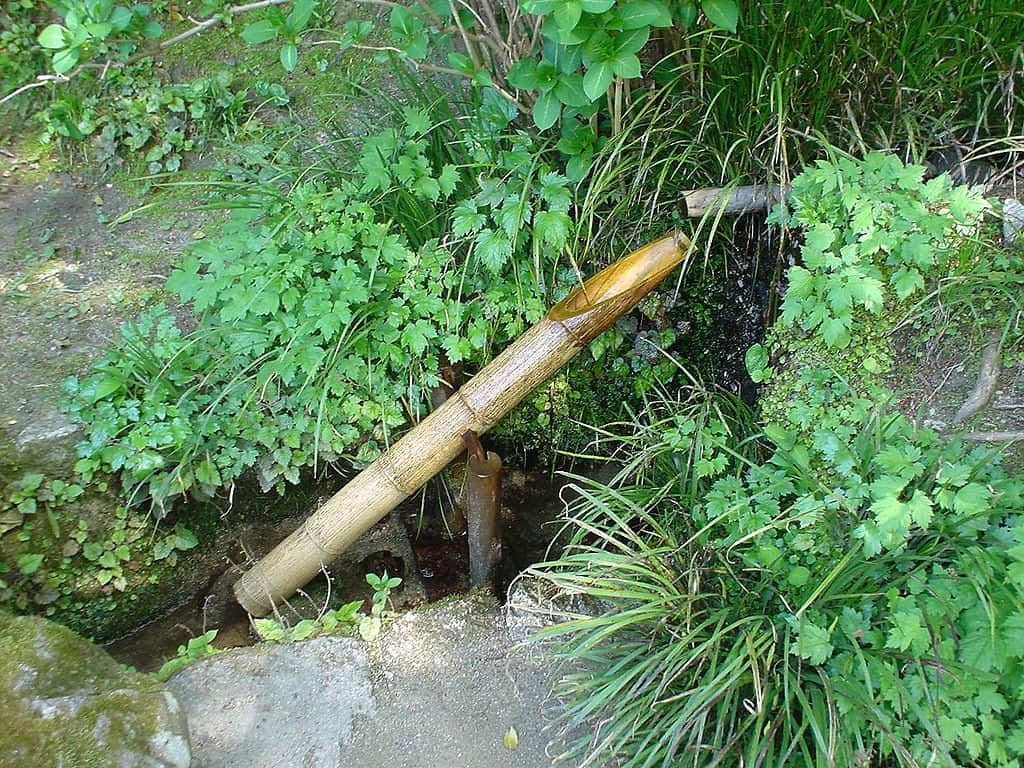
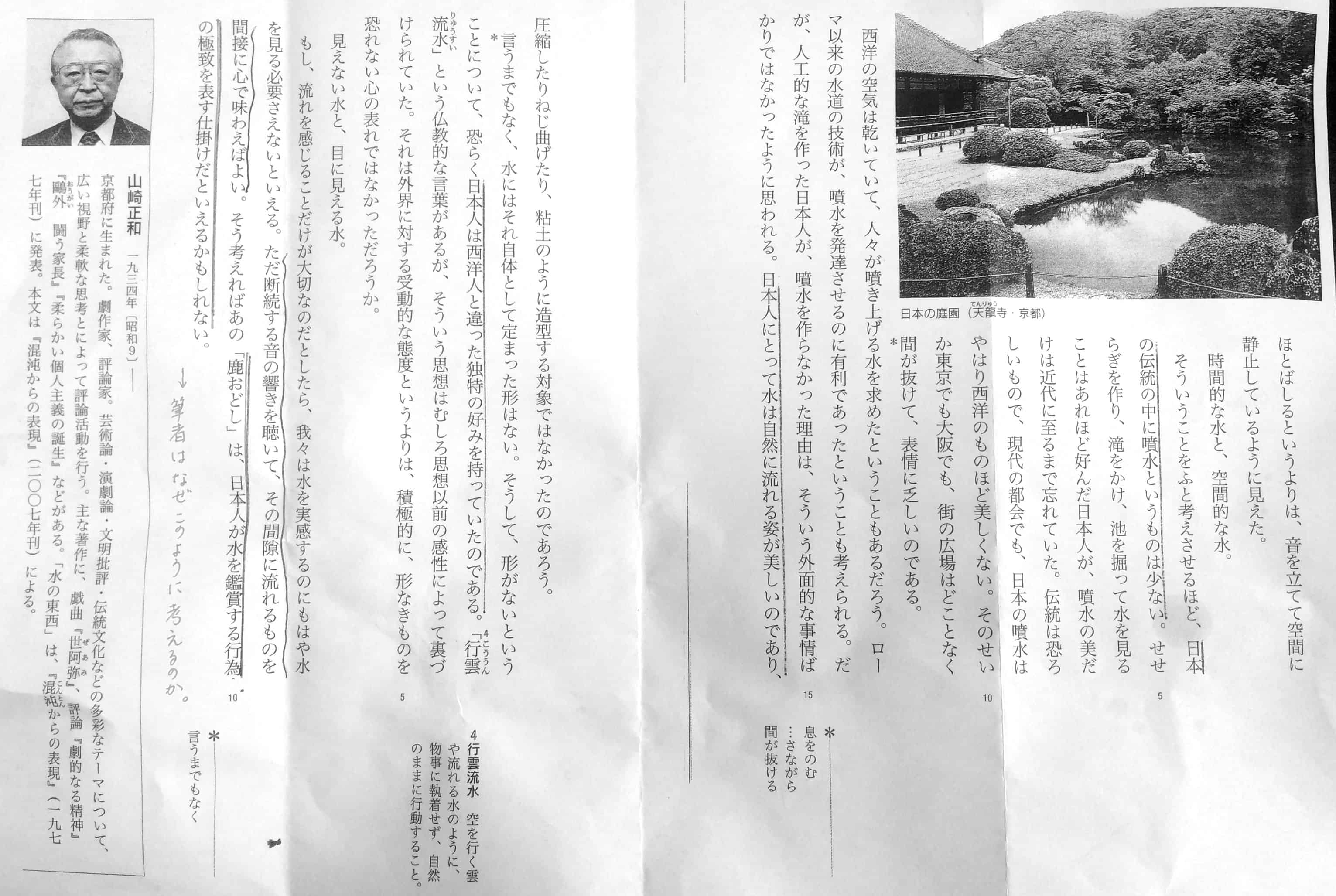
The other day I received from my Japanese teacher an interesting article by Yamazaki Masakazu comparing garden styles, and in particular the attitude towards and presentation of water in Japanese and European gardens (page 1, page 2). The author s list of achievements is long, various professorships, dramatist, literature critique, recognized as Person of Cultural Merit, just to name a view. I was looking forward to an interesting and high quality article! The article itself introduces the reader to Shishiodoshi, one of the standard ingredients of a Japanese garden: It is a device where water drips into a bamboo tube that is also a seesaw. At some point the water in the bamboo tube makes the seesaw switch over and the water pours out, after which the seesaw returns to the original position and a new cycle begins. Shishiodoshi The author describes his feelings and thoughts about the shishiodoshi, in particular connects human life (stress and relieve, cycles), the flow of time, and some other concepts with the shishiodoshi. Up to here it is a wonderful article providing interesting insights into the way the author thinks. Unfortunately, then the author tries to underline his ideas by comparing the Japanese shishiodoshi with European style water fountains, describing the former with all favorable properties and full of deep meaning, while the latter is qualified as beautiful and nice, but bare of any deeper meaning. I don t go into details that the whole comparison is anyway a bad one, as he is comparing Baroque style fountains, a very limited period, and furthermore ignores the fact that water fountains are not genuinely European (isn t there one in the Kenrokuen, one of the three most famous gardens in Japan!?), nor does he consider any other water-installation that might be available. What really destroys the in principle very nice article is the tone: The general tone of the article then can be summarized into: The shishiodoshi is rich on meaning, connects to the life of humans, instigates philosophical reflections, represents nature, the flow of time etc. The water fountain is beautiful and gorgeous, but that is all. I don t think that this separation, or this negative undertone, was created on purpose by the author. A person of his stature is supposedly above this level of primitive comparison. I believe that it is nothing else but a consequence of upbringing and the general attitude that permeates the whole society with this feeling of separateness. Us and They Repeatedly providing sentences like Japanese people and Western people have different tastes.. ( ). About 10 times in this short article expressions like Japanese and Westerner appear, leaving the reader with a bitter taste of an author that considers first the Japanese a people (what about Ainu, Ryukyu, etc?), and second that the Japanese are exclusive in the sense that they are set apart from the rest of the world in their way of thinking, living, being. What puzzles me is that this is not only a singular opinion, but a very general straight in the Japanese media, TV, radio, newspaper, books. Everyone considers Japan and Japanese as something that is fundamentally and profoundly different from everyone else in the world. There is We the Japanese (and that doesn t mean nationality of passport, but blood line!), and there are They the Rest or, as the way of writing and and description on many occasion suggestions, They the Barbarians . A short anecdote will underly this: One of the favorite TV talk show / pseudo-documentary style is about Japanese living abroad. That day a lady married in Paris was interviewed. What followed was a guided tour through Paris showing: Dirt in the gutter, street cleaning cars, waste disposal places. Yes, that was all. Just about the dirt . Of course, at length the (unfortunately only apparent) cleanliness of Japanese cities and neighborhoods are mentioned and shown to remind everyone how wonderful Japan is and how dirty the Barbarians. I don t want to say that I consider Japan more dirty than most other countries just the visible part is clean, the moment you step a bit aside and around the corner, there are the worst trash just thrown away without consideration. Anyway. To return to the topic of Us and They I consider us all humans, first and foremost, and nationality, birthplace, and all that are just by chance. I do NOT reject cultural differences, they are here, of course. But cultural differences are one thing, separating one self and one s perceived people from the rest of the world is another. Conclusion I repeat, I don t think that the author had any ill intentions, but it would have been nicer if the article wouldn t make such a stark distinction. He could have written about Shishiodoshi and water fountains without using the Us They categorization. He could have compared other water installations, could have discussed the long tradition of small ponds in European gardens, just to name a few things. But the author choose to highlight differences instead of commonalities. It is the Us against Them feeling that often makes life in Japan for a foreigner difficult. Japanese are not special, Austrians, too, are not special, nor are Americans, Russians, Tibetans, or any other nationality. No nationality is special, we are all humans. Maybe at some point this will arrive also in the Japanese society and thinking.
Email this to someonePrint this pageShare on FacebookShare on Google+Tweet about this on TwitterShare on LinkedInFlattr the author

19 May 2015

Gunnar Wolf: Feeling somewhat special

Today I feel more special than I have ever felt. Or... Well, or something like that. Thing is, there is no clear adjective for this But I successfully finished my Specialization degree! Yes, believe it or not, today I can formally say I am Specialist in Informatic Security and Information Technologies (Especialista en Seguridad Inform tica y Tecnolog as de la Informaci n), as awarded by the Higher School of Electric and Mechanic Engineering (Escuela Superior de Ingenier a Mec nica y El ctrica) of the National Polytechnical Institute (Instituto Polit cnico Nacional). In Mexico and most Latin American countries, degrees are usually incorporated to your name as if they were a nobiliary title. Thus, when graduating from Engineering studies (pre-graduate universitary level), I became "Ingeniero Gunnar Wolf". People graduating from further postgraduate programs get to introduce themselves as "Maestro Foobar Baz" or "Doctor Quux Noox". And yes, a Specialization is a small posgraduate program (I often say, the smallest possible posgraduate). And as a Specialist... What can I brag about? Can say I am Specially Gunnar Wolf? Or Special Gunnar Wolf? Nope. The honorific title for a Specialization is a pointer to null, and when casted into a char* it might corrupt your honor-recognizing function. So I'm still Ingeniero Gunnar Wolf, for information security reasons. So that's the reason I am now enrolled in the Masters program. I hope to write an addenda to this message soonish (where soonish 18 months) saying I'm finally a Maestro. As a sidenote, many people asked me: Why did I take on the specialization, which is a degree too small for most kinds of real work recognition? Because it's been around twenty years since I last attended a long-term scholar program as a student. And my dish is quite full with activities and responsabilities. I decided to take a short program, designed for 12 months (I graduated in 16, minus two months that the university was on strike... Quite good, I'd say ;-) ) to see how I fared on it, and only later jumping on the full version. Because, yes, to advance my career at the university, I finally recognized and understood that I do need postgraduate studies. Oh, and what kind of work did I do for this? Besides the classes I took, I wrote a thesis on a model for evaluating covert channels for establishing secure communications.

Simon Josefsson: Scrypt in IETF

Colin Percival and I have worked on an internet-draft on scrypt for some time. I realize now that the -00 draft was published over two years ago, turning this effort today somewhat into archeology rather than rocket science. Still, having a published RFC that is easy to refer to from other Internet protocols will hopefully help to establish the point that PBKDF2 alone no longer provides state-of-the-art protection for password hashing. I have written about password hashing before where I give a quick introduction to the basic concepts in the context of the well-known PBKDF2 algorithm. The novelty in scrypt is that it is designed to combat brute force and hardware accelerated attacks on hashed password databases. Briefly, scrypt expands the password and salt (using PBKDF2 as a component) and then uses that to create a large array (typically tens or hundreds of megabytes) using the Salsa20 core hash function and then de-references that large array in a random and sequential pattern. There are three parameters to the scrypt function: a CPU/Memory cost parameter N (varies, typical values are 16384 or 1048576), a blocksize parameter r (typically 8), and a parallelization parameter p (typically a low number like 1 or 16). The process is described in the draft, and there are further discussions in Colin s original scrypt paper. The document has been stable for some time, and we are now asking for it to be published. Thus now is good time to provide us with feedback on the document. The live document on gitlab is available if you want to send us a patch.

Next.

Previous.