Search Results: "cas"

22 December 2011

Jeff Licquia: Time Flies

18 years ago, I carried a baby out of a delivery room. MY baby. What a rush. Looking down on him in the baby warmer, amazement and fear dominated my thoughts, clamoring for my attention. I was a father. What would I do now? My life was REALLY not just my own anymore; I had this little one that was counting on me. Was I up to the challenge? And what about when he wasn t a little one anymore? What would he be like as an adult? Would he be a good person? What would he care about? When he turned 18, what would we do, and what would his plans be for the future? That day was something I thought about often in that nursery all those years ago. And now, that day has arrived. Jon is now a young adult. And looking at the ultimate result of the last 18 years of worry, I feel immeasurably proud. He has made his mistakes, and no doubt will make more mistakes in the future. But he has not let those mistakes dampen his confident optimism, or drag down his sense of what s right. More importantly, he has a heart for others that expresses itself with everyone he s around. Often, the topics of our disagreements center around his fierce protective instinct, and on more than one occasion, he s challenged me to improve myself. I have not been a perfect father. At times, I ve been far from perfect. But I am grateful that I ve been a part of raising a young man I can admire and, yes, even learn from. Happy 18th birthday, Jon. Have an excellent life. I ll cherish the rest of the time you re still at home, miss you when the time comes for you to leave, and always be there for you as long as I live. Your mom and I are your biggest fans; never forget that.

Lars Wirzenius: Cafe coding and other productivity hacks

I've come to realize that I quite like coding in cafes, from time to time, and it can be very productive for me. This is strange, since I'm usually very sensitive to noise when I work. Almost any unpredictable sounds at the office distract me, which is why I often listen to music. However, in a cafe, I don't need that, I just automatically block out everything but my laptop. At the office, everything that happens around me might concern or interest me. In a cafe, nobody says anything that I'm interested in. Another distraction that cafes lack is the Internet. Even when there's Internet access, I tend to turn my laptop's wifi off so that I have a longer battery life. I might occasionally check mail or IRC, but only for a few minutes at a time. The rest of the time I crank the widget and write code or take care of other things from my next actions list.

20 December 2011

Mark Brown: What s wrong with switch statements?

Recently I ve been noticing a surprising pattern in code I m reviewing for the kernel. A lot of people seem to have taken to writing code that I d expect to look like this:
switch (thing)  
case VALUE:
        /* Stuff */
        break;
case BAR:
        /* Nonsense */
        break;
default:
        /* Whatever */
        break;
 
with if statements instead:
if (thing == VALUE)  
        /* Stuff */
  else if (thing == BAR)  
        /* Nonsense */
  else  
        /* Whatever */
 
(where stuff, nonsense and whatever are usually a bit larger). I really don t understand where this has come from the if based form isn t nearly so idiomatic for selecting between a range of values and this seems to have come from nowhere pretty much. Is there some code base out there where this is common practice or something?

19 December 2011

Jonathan Wiltshire: Reinstalling at arm s length

Recently I had need to re-purpose a server and for convenience, I decided to do a complete wipe and reinstall since it had previously been used for all sorts of package testing, experiments, dak debugging, the list goes on. I took a careful backup and then cooked up some USB installation media, but it took so long to boot (USB1.1, yay) I ran out of time before the building was locked. Since this box has two hard disks, and not being one to back down from a challenge, I eventually reinstalled it over the weekend with nothing no install media, no reinstall robot or intelligent hands just a reliable internet connection and a healthy dose of courage. Here s how. Target: reinstalled machine with the same network settings, ssh host keys, and other minor configuration ported. The disk layout is to be RAID-1 containing LVM, with separate /var volume and separate /boot partition, also RAID-1.
  1. One disk in the box contained old data, so I cleared that out and wiped it (including the MBR for good measure) and partitioned it.
  2. I set up a degraded RAID-1 array for a small /boot partition, a large RAID-1 array for the LVM and a swap partition.
  3. I mounted the new partitions in the correct layout in /mnt and used debootstrap(8) to get a very basic root set up. I also bind-mounted /sys, /proc, /dev and /dev/pts for now, they can be done properly when the root is a bit more mature.
  4. Next, I copied into the new root /etc/apt/sources.list and chroot(8)ed into it. Now I could apt-get update and tasksel install standard to get an almost fully-functional base system. At this point it is also sensible to install locales, tzdata and console-data and dpkg-reconfigure them, followed by mdadm and lvm2 if required and openssh-server so you can get back in after rebooting. Some or all of these may already be installed by tasksel.
  5. Time to install a kernel before leaving the chroot: apt-get install linux-image-2.6, followed by grub-pc which should detect both installations and set up menu entries for them.
  6. Back in the old system, I copied in the network, hosts, resolv and hostname configuration files, and set up /etc/fstab to my liking.
  7. Install grub to both hard disks if it isn t already so (dpkg-reconfigure grub-pc) and again check that it detects both installations and creates the right menu entries. At this stage, booting from either hard disk will allow the loading of either the new or old installations, which is exactly what we want. It s now time to umount the new installation.
  8. Now I followed the excellent guide for remote kernel upgrades at http://ariekanarie.nl, except in this case we are using the same method to try booting the new system and fall back to the old one if it s a disaster.
  9. Reboot and hope!
At this point I rebooted to find myself back in the old kernel, which was disappointing this means the new kernel has panicked and rebooted, and grub has fallen back to the old system (exactly as planned). It turned out there was nothing in /dev at boot time, and udev doesn t start early enough to populate it before panic. That s easily solved by mounting the installation again and using MAKEDEV as a seed.
  1. With a bit of luck, you re now in the new installation and can dpkg-reconfigure grub-pc again to install grub to both hard disks again. This isn t strictly necessary, but it records this choice in debconf so future upgrades will automatically upgrade the bootloader everywhere it s needed.
  2. Now I could do some tidying up, mount the old installation and copy over all the data I wanted, and after careful checking wipe the first disk clean ready to be added into the RAID arrays.
  3. Finally, add the old disk to the RAID arrays so they are fully redundant.
Sources:
http://www.michael-hammer.at/server_config/debootstrap/
http://d-i.alioth.debian.org/tmp/en.i386/apds03.html
http://www.debian.org/releases/stable/amd64/apds03.html.en
https://wiki.archlinux.org/index.php/Convert_a_single_drive_system_to_RAID
http://ariekanarie.nl/archives/211/remote-kernel-upgrade-with-debianubuntu-and-grub2
Comments
Reinstalling at arm s length is a post from: jwiltshire.org.uk Flattr

18 December 2011

Nikita Youshchenko: Life after n900

Since post about lost n900 was on the top of this blog for almost a year, I should probably write a few words about what was next. Since I do need mobile phone every day, I had to get some replacement quickly. Given Maemo was dead and Meego device not available, I decided to go Android. Since after n900 hardware keyboard became a must for me, I decided to try HTC Desire Z. That device made me angry every day, both because of hardware (what a silly idea to place volume buttons such that they are below hardware keyboard when it s opened? they got pressed almost every time when I used keyboard!) and Android itself. I think quite a few things are broken in Android, but most annoying is broken multitasking. I can t live with dialog elements content get lost when I switch to other app and back. Please don t tell me that it s app fault: maybe technically it is, however too many apps have it so I have to generalize. I will likely write more about this later. At the same time, exciting things have been happening in Maemo community. It was the time when Community SSU raised, also several mapping applications went out of dark, and more. I was still subscribed to Maemo resources so I read about all that and got more and more frustrated with my new Android device. And on one sunday evening, after reading more exciting news from Maemo side, I decided that enough is enough. And ordered a new n900. Few days later, I ve sold HTC for about 80% of it s original price. That was an emotional solution, and of course it could not play well in the long term. Despite of individual exciting news, Maemo community was becoming weaker. Device itself had major usability issues (e.g. it could occasionally unlock while being in my pocket, and call a random number from address book and I have quite a few addresses abroad so such calls not only bother people, but also are expensive). There was not many applications, and those available had problems. There was a visible difference between my friends who could just take a phone and quickly do something, and myself who had to struggle with incomplete and buggy software. Also skype quality was very bad. Also when I was planning a 2-week trip to location without mobile network, I tried to preload map of planned route, but it preloaded only part and I was unable to make it preload the rest. Also many similar issues. So it became clear that if I want usability, I have to go to a standard platform. And as such, Android still is the only option. I searched for a device that runs more or less modern Android version, has hardware keyboard, and is not HTC Desire Z. There was not much to choose from. I ordered SonyEricsson sk17i. I m already using it for about 4 months. For common use cases, such as locating a business nearby, or routing to a given address, or quickly browsing a web page, it works. However, all Android flaws including broken multitasking and no-undo-in-text-fields are here, causing everyday frustration. My conclusion is that no smartphone-like devices without major usability issues are available today. What is available probably could be used to somehow satisfy immediate communication needs, but nothing above that. Bells and whistles are there, but I m not interested in those. I want a linux-based pocket-sized mobile computer that will handle both my communication needs and other interests. That could be hacked when I want to, but just works at the rest of time. Something like my Debian desktop. Openmoko was a big hope but it failed. Maemo was a big hope but incompetence of Nokia killed it. Meego was dead before it was born. There is still some life around several mobile linux projects (GTA04, Maemo, Meego, some others), but hopes for it to grow into something that could be used without huge hacking are little. :(

Kai Wasserb ch: Miscellaneous stuff #1

This year is in its last throes and a few things, that don't really warrant their own blog post, have piled up here. To get them out of the door before 2012 starts, I'd like to go over them in the next few lines. First: there seem to be a group of rather cheap people who want to have the Humble Indie Bundle #4, but don't like to give at least 0.01 USD. Really guys, you seem to have enough money for a fast-enough computer and a (broadband) internet connection (otherwise downloading the circa 2.8 GB of games won't be a lot of fun), but you don't have the 0.01 USD to spare? If you don't like closed-source games (a sentiment I can truly understand, in fact, that was something I really pondered before buying) then just don't play them. But searching for a torrent for the HIB#4 while it is still being sold to just avoid paying the minimal fee, I can't understand. Now, some might wonder how I know this. The easy answer is, I blogged about buying the HIB#4 and mentioned, that I downloaded the games through a torrent (you can choose between direct downloads and torrents on your "login page") and a lot of people started hitting the blog entry with a referrer from a search engine, showing they'd searched for "humble indie bundle 4 torrent". Please make a decision: don't play the games or if you wish to, then pay something. The people behind those games make it easy and, in comparison to many other game studios, a fair offer. That should be worth something. For those of you who loved Josephine, there is a new awesome piece of art, Creative Commons licensed, by An-U (German homepage). The title (and the drawing) are derived from the equally awesome Katzenjammer song "On the Devil's Back" (in case you're still looking for a present, you might want to consider one of their CDs or a ticket to their next concert near you). Then, I wanted to thank all those people, who donated something over the course of 2011! Thanks a lot, especially for showing me, that you liked my services/work enough to even consider a donation! It means a lot to me, to know this. At year's end everybody is doing statistics and while I won't bore you with long in-depth analysis, I thought I throw out, what the top posts/things where (so far). Maybe you find yourself represented in there or maybe you find something new. In no particular order: I hope your 2011 was a good year and I wish you all the best for 2012! I'm pretty sure Debian will continue to grow, but there is also a lot of work ahead, maybe you can join the effort and make Debian that much more awesome!

17 December 2011

Russell Coker: Some Notes on DRBD

DRBD is a system for replicating a block device across multiple systems. It s most commonly used for having one system write to the DRBD block device such that all writes are written to a local disk and a remote disk. In the default configuration a write is not complete until it s committed to disk locally and remotely. There is support for having multiple systems write to disk at the same time, but naturally that only works if the filesystem drivers are aware of this. I m installing DRBD on some Debian/Squeeze servers for the purpose of mirroring a mail store across multiple systems. For the virtual machines which run mail queues I m not using DRBD because the failure conditions that I m planning for don t include two disks entirely failing. I m planning for a system having an outage for a while so it s OK to have some inbound and outbound mail delayed but it s not OK for the mail store to be unavailable. Global changes I ve made in /etc/drbd.d/global_common.conf In the common section I changed the protocol from C to B , this means that a write() system call returns after data is committed locally and sent to the other node. This means that if the primary node goes permanently offline AND if the secondary node has a transient power failure or kernel crash causing the buffer contents to be lost then writes can be lost. I don t think that this scenario is likely enough to make it worth choosing protocol C and requiring that all writes go to disk on both nodes before they are considered to be complete. In the net section I added the following: sndbuf-size 512k;
data-integrity-alg sha1; This uses a larger network sending buffer (apparently good for fast local networks although I d have expected that the low delay on a local Gig-E would give a low bandwidth delay product) and to use sha1 hashes on all packets (why does it default to no data integrity). Reserved Numbers The default port number that is used is 7789. I think it s best to use ports below 1024 for system services so I ve setup some systems starting with port 100 and going up from there. I use a different port for every DRBD instance, so if I have two clustered resources on a LAN then I ll use different ports even if they aren t configured to ever run on the same system. You never know when the cluster assignment will change and DRBD port numbers seems like something that could potentially cause real problems if there was a port conflict. Most of the documentation assumes that the DRBD device nodes on a system will start at /dev/drbd0 and increment, but this is not a requirement. I am configuring things such that there will only ever be one /dev/drbd0 on a network. This means that there is no possibility of a cut/paste error in a /etc/fstab file or a Xen configuration file causing data loss. As an aside I recently discovered that a Xen Dom0 can do a read-write mount of a block device that is being used read-write by a Xen DomU, there is some degree of protection against a DomU using a block device that is already being used in the Dom0 but no protection against the Dom0 messing with the DomU s resources. It would be nice if there was an option of using some device name other than /dev/drbdX where X is a number. Using meaningful names would reduce the incidence of doing things to the wrong device. As an aside it would be nice if there was some sort of mount helper for determining which devices shouldn t be mounted locally and which mount options are permitted it MIGHT be OK to do a read-only mount of a DomU s filesystem in the Dom0 but probably all mounting should be prevented. Also a mount helper for such things would ideally be able to change the default mount options, for example it could make the defaults be nosuid,nodev (or even noexec,nodev) when mounting filesystems from removable devices. Initial Synchronisation After a few trials it seems to me that things generally work if you create DRBD on two nodes at the same time and then immediately make one of them primary. If you don t then it will probably refuse to accept one copy of the data as primary as it can t seem to realise that both are inconsistent. I can t understand why it does this in the case where there are two nodes with inconsistent data, you know for sure that there is no good data so there should be an operation to zero both devices and make them equal. Instead there The solution sometimes seems to be to run drbdsetup /dev/drbd0 primary - (where drbd0 is replaced with the appropriate device). This seems to work well and allowed me to create a DRBD installation before I had installed the second server. If the servers have been connected in Inconsistent/Inconsistent state then the solution seems to involve running drbdadm -- --overwrite-data-of-peer primary db0-mysql (for the case of a resource named db0-mysql defined in /etc/drbd.d/db0-mysql.res). Also it seems that some commands can only be run from one node. So if you have a primary node that s in service and another node in Secondary/Unknown state (IE disconnected) with data state Inconsistent/DUnknown then while you would expect to be able to connect from the secondary node is appears that nothing other than a drbdadm connect command run from the primary node will get things going.

16 December 2011

Kai Wasserb ch: Humble Indie Bundle #4 rocks!

Yesterday I bought my copy of the Humble Indie Bundle #4. And while the donation part is a good thing, I directed most of my payment to the developers of the games to allow them to make more games, which run natively on Linux. I haven't played much yet (no time) and just tried out the game for which the Torrent finished first (Bit.Trip.Runner). The nice thing about that game is, it is available as a Debian package, the not-so-nice thing about said package is, that it installs stuff in places where it shouldn't and has tons of wrong file properties like ownership of the files... The Depends line is also more or less pointless, as it just lists the needed packages, but not the minimal versions. Hopefully these things will be fixed in a future package version. Apart from that, the game in its retro look is sort of addictive. Yes, it's "just" simple Jump'n'Run, but it is a lot of fun to play. Partly because you "play" a simple melody, when you clear obstacles and collect the gold and other goodies. Anyway, long story short, if you want a few nice DRM-free games running natively on Linux (in my case with the Mesa3D drivers for my Radeon), I can recommend this bundle. And maybe the games get open-sourced in the future as has been done previously. None of these games are so called AAA titles, but that doesn't mean they can't provide some fun hours. And to top it off you don't need Wine or something else to run them on your Linux system.

Kai Wasserb ch: QApt was accepted into Debian's archives

Today QApt was accepted into Debian's archives. It took me some time, in fact a lot more than I hoped it'd take, to get the final pieces into place [UPDATE](the inital work was done by Jos , the co-maintainer of QApt)[/UPDATE], but now you're able to use QApt as a simple-to-use wrapper around the whole APT, DPKG and Xapian stack. The target users are C++ programs using the Qt framework. The use cases range from graphical package manager to allowing easy updates of certain packages from within another program. My interest in QApt comes from me being co-maintainer of Kingston, the update notification Plasmoid for KDE. We have a wishlist bug open against Kingston, requesting the addition of a "do update" button. We could have used the update-manager infrastructure, but both Sune and myself weren't too thrilled with that. Luckily there is an alternative in the form of QApt. I'll hope I find some time during the next weeks to implement the update mechanism for Kingston. The next things to come for QApt will be minor cleanups, already waiting in Git, a new upstream bug fix release (no date is set yet) and a multiarchification (already partly done in a local branch).

15 December 2011

Raphaël Hertzog: 3.0 (quilt) is the most widely used Debian source package format

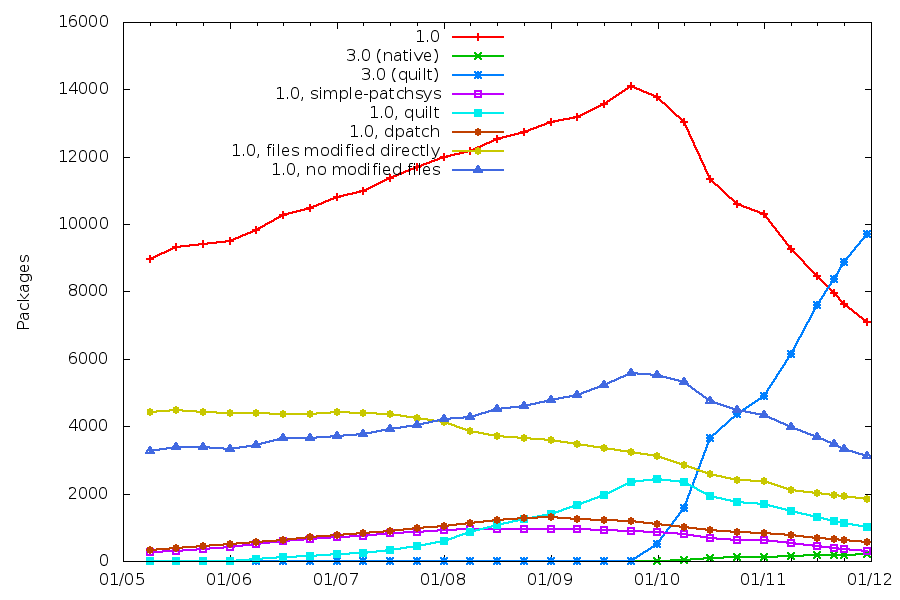
My goal with the 3.0 (quilt) source format has always been to standardize the patch management in Debian source packages. This message seems to have been well understood. dbs and dpatch have been deprecated by their respective maintainers. I made numerous efforts to make this source format useful in as many use cases as possible (but some improvements are still possible) and I have added hints to encourage maintainers to switch. Thanks to this, the adoption rate of this new source format has been very good and it s now the most widely used source package format in Debian only two years after its introduction in Debian unstable. With 9829 source package using 3.0 (quilt) , it surpassed the number of source package still using 1.0 (7368). (Those numbers have been taken from http://upsilon.cc/~zack/stuff/dpkg-v3/ on december 13th 2011.) The number of source packages using 3.0 (quilt) doubled this year.

(Click on the picture to see it full size) Of the 7368 packages using the old format, 6816 packages trigger the missing-debian-source-format lintian tag. This means that only 552 source packages have explicitly opted to keep using the old format and that the bulk of the remaining packages are rarely updated packages that have not been switched yet.

3 comments Liked this article? Click here. My blog is Flattr-enabled.

14 December 2011

Patrick Schoenfeld: Facebook aggressively advertising dubious features

Yesterday some confusion arised on my side when I saw a new facebook advertising campaign in my facebook account (yes, I am a member of facebook, although I'm aware of the privacy concerns). Basically it was saying that I should try the friends finder and that some of my friends (showing and naming me three of them) would have used it already.

Some background:
The friends finder feature of facebook is a feature that asks for the password of your e-mail account. It will then crawl through your emails to find contacts that might already be on facebook but not connected to you (in a facebook sense).

My first feeling was: Oh my god. How can it be that friends (and family) of mine are so naive? Especially since there were people included which I consider to be quiet clever. But honestly: Who would be so naive to give an unknown company direct unsupervised (you can't tell what they really do) access to your mail account? Would you give it to your friend? Your husband? Your father? I guess the answer will be "No" in the most cases and these people are most likely people you trust. Well, I know, you could state similar things for Googlemail who crawl your mails to show you personalized advertising. And in fact you are right. But if one decides to use gmail for your email hosting you have to trust them anyway. Like you have to trust anybody else you retain to host your mails (who could do the same but just don't tell you). But in this case its a third party, Facebook.

But if you now think that this becomes a rant against my friends: You are wrong. Over the day I found out that it basically shows up all my friends in a rotation. Every time I open the start page it randomly picks three people from my friend list and shows them to me, telling the same lie to me all over again.

So what do we have here? Facebook tries to advertise the most dubious feature they have in the most aggressive way one could imagine. By pretending wrong facts. Wouldn't that even be an element of crime in Germany ("Irref hrung" 5 UWG or maybe also 4 UWG, "unsachliche Beeinflussung")?

Facebook, you can do better.

Update: Stefano raised a good point. I didn't actually make clear that it has been verified that those people actually did not use the "feature":

1. I asked some of them. They said, they didn't use it and were in fact surprised that I asked.
2. Others told me they saw that ad stating that I used the feature. I definitely did not use this "feature".
3. Probably weak: IMHO its highly unlikely that all of my friends used that feature and at the point I've written this it had already shown my whole friend list.

Patrick Schoenfeld: Ubuntu considering critical bugs an "invalid" bug?

I just discovered that bug report over at Ubuntu.
Short summary:
They have a script in upstart which is not meant to be run manually and if you do it will erase your whole file system. Additionally it seems that the fact that you shall not run that script is not communicated anywhere.

That alone isn't the most spectacular about it. Bugs happen. Whats spectacular about it is how a Canonical employee and member of the TechBoard (for people who don't know it: The people who decide about the technical direction Ubuntu takes) handles that bug. One quote of him to reflect it all:
Sorry, the only response here is "Don't Do That Then"

So what we have here is a classical case of bad programming. The problem in question is that the script expects a certain environment variable to be set. Fair enough. However it does not check if its set at all and instead of failing or using a sensible default it simply sticks to undefined behaviour. What we have here is a classical programming mistake every beginner tends to do. People who start programming often forget (or don't know) that every external value we rely on must be considered untrustworthy. Therefore a good practice is to check those values.In this case someone decided that this is useless because they suffer from the wrong assumption that nobody ever calls it manually and the other wrong assumption that caller of the scriptwill always set the environment variable correctly. This is a double-fail.
Now the developer in question does not accept that (someone else indicated why the behaviour of the script is dangerous), he simply says that the bug is invalid. Thats really a pity.

Patrick Schoenfeld: Struggling with Advanced Format during a LVM to RAID migration

Recently I decided to invest in another harddisk for my atom system. That system, I built up almost two years ago, has become the central system in my home network, serving as a fileserver to host my personal data, some git repositories etc., streaming server and since I switched to a cable internet connection it also serves as a router/firewall.Originally, I bought that disk to backup some data, of the systems in the network, but I realized that all data on this system were hosted on a single 320GB 2,5" disk and it became clear to me, that, in absense of a proper backup strategy, I at least should provide some redundancy. So I decided, once the disk was in place, that the whole system should move to a RAID1 over the two disks. Basically this is not that hard as it may seem at a first glance, but I had some problems due to a new sector size in some recent harddisks, which is called Advanced Format. But lets begin from the start. The basic idea of such a migration is:
  1. Install mdadm with apt-get. Make sure to answer 'all' to the question which devices need to be activated in order to boot the system.

  2. Partition the new disk (almost) identical.Because the new drive is somewhat bigger that wouldn't make sense, but at least the two partitions which should be mirrored on the second disk, need to be identical.Usually this is achieved easily by using
    sfdisk -d /dev/sda sfdisk /dev/second/sdb
    In this case, it wasn't that easy. But I will come to that in a minute.

  3. Change the type of the partitions to 'FD' (Linux RAID autodetect) with fdisk

  4. Erase evidence of an eventual old RAID from the partitions, which is probably pointless on a brand-new disk, but we want to be sure:
    mdadm --zero-superblock /dev/sdb1mdadm --zero-superblock /dev/sdb2
  5. Create two DEGRADED raid1 arrays from the partitions:
    mdadm --create /dev/md0 --level=1 --raid-devices=2 /dev/sdb1 missingmdadm --create /dev/md1 --level=1 --raid-devices=2 /dev/sdb2 missing
  6. Create filesystem on the first raid device, which will become /boot.

  7. Mount that filesystem somewhere temporary and move the contents of /boot to it:
    mount /dev/md0 /mnt/somewhere
  8. Unmount /boot, edit fstab to mount /boot from /dev/md0 and re-mount /boot (from md0)

  9. Create mdadm configuration with mdadm and append it to /etc/mdadm/mdadm.conf:
    mdadm --examine --scan >> /etc/mdadm/mdadm.conf
  10. Update the initramfs and grub (no manual modification needed with grub2 on my system)and install grub into the MBR of the second disk.
    update-initramfs -uupdate-grubgrub-install /dev/sdb
  11. The first point to pray: Reboot the system to verify it can boot from the new /boot.

  12. Create a physical volume on /dev/md1:
    pvcreate /dev/md1
  13. Extend the volume group to contain that device:
    vgextend <volgroup_name> /dev/md1</volgroup_name>
  14. Move the whole volume group physically from the first disk to the degraded RAID:
    vgmove <volgroup_name> /dev/md1</volgroup_name>
    (Wait for it to complete... takes some time ;)

  15. Reduce first disk from the VG:
    vgreduce <volgroup_name> /dev/sda2</volgroup_name>
  16. Prepare it for addition to the RAID (see step 3 and 4) and add it:
    mdadm --add /dev/md0 /dev/sda1mdadm --add /dev/md1 /dev/sda2
  17. Hooray! Watch into /proc/mdstat. You should see that the RAID is recovering.

  18. When recovery is finished pray another time and hope that system is still booting with it running from the RAID entirely. If it does: Finished :-)
Now to the problem with the advanced format:There is some action taking place with the hardware vendors to move to a new sector size. Physically my new device has a size of 4096 bytes per sector. Somewhat different to the 512 bytes disks used to have the last decade. Logically it still has 512 bytes per sector. As far as I understand this is achieved by placing 8 logical sectors into one physical sector, so when partitioning a new disk the alignment of the disk has to be so that partitions start in a sector which is a multiple of 8. That, obviously, wasn't the case with the old partitioning on my first disk. So I had to manually create partitions by specifying start points manually and making sure they are dividable by 8.Otherwise fdisk would complain about the layout on the disk.This does not work with cfdisk, because it does not accept manual alignment parameters and unfortunately the partitions it creates do have a wrong alignment. So good old fdisk and some calculations how many sectors are needed and where to start, to the rescue. So the layout is now:

Device Boot Start End Blocks Id System
/dev/sdb1 2048 291154 144553+ fd Linux raid autodetect
/dev/sdb2 291160 625139334 312424087+ fd Linux raid autodetect

Michal &#268;iha&#345;: GePeS internationalisation

After some fight with qmake and lrelease/lupdate, I've finally managed to allow translations in GePeS. I see no clear reason why QML translating is that poorly supported within Qt tools, however with some hacks it seems to be doable. As usual with my software, besides using sources (Qt's translation files in this case), you can use translation server to do online translation. As there are only few words to translate, I hope some languages will be translated soon. Of course to give you good example, I've completed Czech translation immediately :-).

Filed under: English Meego 0 comments Flattr this!

13 December 2011

Bastian Venthur: How to get a list of manually installed packages (and remove the other ones)

The Good Every other year or so I feel the need to clean up my Debian system and remove the installed packages I m not interested in anymore. I remember there was a nice aptitude pattern to search for packages which I have manually installed (i.e. which were not installed to satisfy a dependency). Ideally I would then go through the (presumably short) list of packages and remove the ones I don t need any more. Since I always forget the aptitude pattern to search for those packages, I google for something like list of manually installed packages and find a solution like: aptitude search ~i !~M . Although this solution is not wrong, it is not quite what I was looking for. Sure, it will find you all packages which are installed and not installed to satisfy a dependency, but it also contains packages of priorities: required, important and standard which you usually don t want to deinstall. So the actual solution should also exclude those packages.
aptitude search '~i !~M !~pstandard !~pimportant !~prequired'
The above line will do the trick and present you a list of packages which are: installed and not dragged in to satisfy a dependency and not of priority standard, important or required. If you where only interested in the solution of the quest of getting a list of all manually installed packages you can stop reading here. The Bad If you re running your system for longer than, say, a few weeks you will probably notice that the list is very long and contains much more packages than you actually installed manually. You will probably notice a lot of libs and other packages in this list and wonder why they aren t marked auto as they should since you didn t install them on purpose. Unfortunately I don t have an answer for that question. I m using aptitude exclusively to install packages and rely on the fact that aptitude does install the dependencies automatically and more importantly: also removes them if not needed any more. But it seems like something is broken in aptitude (or somewhere else) and packages simply lose their auto status instead of being removed and thus stay on your system forever if you don t manually clean your system. The Ugly To solve that issue I started aptitude and filtered the package tree with the above pattern (press l in aptitude and enter ~i !~M !~pstandard !~pimportant !~prequired). Now the package view shows only packages which are safe to remove since they are not of of priority standard or higher and manually installed by you. Now I navigate with the cursor to the list of installed packages an mark all of them as auto by pressing M. For each package in this list, aptitude will try to find an installed package which depends on that package and mark that package auto. The remaining packages which no other packages depend on, aptitude will mark for deletion. If you now press g one time, aptitude will show you which packages will be removed. I then go through that list and mark every single of the remaining packages I really want on my system with + as manually installed. After I m done I proceed by pressing g again which will remove all remaining packages. In my case nearly 600 packages (1GB) where removed. Bugreport! I assume there is a bug in aptitude or some related package which sometimes(!) removes a packages auto status instead of removing it. Unfortunately I did not find a way to reproduce that (except that it obviously does happen). If someone could find a way to reproduce that problem, one could fill a bugreport and help to get that bug fixed. Right now, a Debian system suffers (like many other operating systems) from a slow but steadily growing bloat of installed software. In my case 600 packages with 1GB accumulated over one or two years.

Vincent Bernat: Tuning Linux IPv4 route cache

The route cache is a Linux kernel component enabling route lookups to be faster by caching the results in some table and checking it before issuing a regular lookup in the route tables. When using Linux as a router, the inefficiency of the route cache can hinder the performances of your box. The documentation on this component is scarce and it is difficult to find up-to-date bits on how the route cache works and how to tune it. The book Understanding Linux Network Internals from O Reilly is an exception and contains valuable information on how the route cache works. Even if the book is targeted at 2.6.12, the part on the route cache is still quite accurate. Unfortunately, it fails to provide appropriate tips on how to monitor and tune the route cache. I hope to provide here a concise view of the route cache, as it is implemented in Linux 3.1. It is protocol-dependent1 and I will cover only the IPv4 version here.

Overview of the route cache subsystem To handle an incoming or outgoing IP datagram, the kernel needs to issue a lookup in the route tables. While it seems to be quite trivial, several questions need to be answered:
  • Does the source address and the destination address appear to be valid?
  • Is the source address a martian address2?
  • Is the destination address mine or should I forward the packet?
  • Which route table should I use?
  • Does the destination address match this route? And this one?
  • Can I currently contact the gateway that I should use?
Those checks can be a bit time consuming, even for small route tables. To avoid them for each packets, Linux maintains a route cache which is queried before doing a regular lookup and updated after each one. You can dump it with ip -s route show cache:
$ ip -s route show cache
198.51.100.7 from 203.0.113.2 via 192.0.2.1 dev eth1
  cache used 7 age 2sec ipid 0x1fce rtt 131ms rttvar 45ms cwnd 10
198.51.100.17 from 203.0.113.15 via 192.0.2.1 dev eth1
  cache used 3 age 0sec ipid 0xc3bd
local 192.0.2.18 from 203.0.113.15 dev lo src 192.0.2.18
  cache <local> used 154 age 1sec iif eth0
Here are two examples:
  • If Linux receives a packet from 198.51.100.17 to 203.0.113.15, it will find this flow in the route cache. Therefore, it already knows that it should forward the packet to 192.0.2.1. No checks needed.
  • If it receives a packet from 198.51.100.16 to 203.0.113.15, there is no appropriate entry in the route cache and therefore, the system will have to look at the route tables. It is likely to use the exact same entry than if the source was 198.51.100.17 but maybe there is some policy routing requesting the use of a special route table or 198.51.100.16 is a local address and the packet will therefore be classified as martian.
The schema below shows how this cache is implemented3. It uses a separate hash table (BSD systems keep the cache in the routing table). Each bucket is a chained list of route cache entries. Schema of the route cache hash table Once an entry has been added to the route cache, there are several ways to remove it. Most entries are removed by the garbage collector which will scan the route cache and remove invalid and older entries. It will be triggered when the route cache is full or at regular interval, once a certain threshold has been met.

Available knobs There are several values you can tune. Most of them are available in sysctl.
  • rhash_entries is the size of the hash table4. If you don t specify it on the kernel command line, it is computed dynamically based on the memory available on your system. You can view its value by looking at something like IP route cache hash table entries: 262144 (order: 9, 2097152 bytes) in the kernel logs.
  • net.ipv4.route.max_size is the maximum number of entries in the route cache. Except under exceptional circumstances, this value is never exceeded.
  • net.ipv4.route.gc_elasticity is the target average length of a chain in the route cache. The garbage collector will work harder if this value is exceeded. This means that if you multiply this value by the value of rhash_entries, you will get the target average number of entries in the route cache.
  • net.ipv4.route.gc_min_interval_ms is the minimum delay between two runs of the garbage collector, except when the cache is full. The default value should be fine.
  • net.ipv4.route.gc_thresh is a threshold triggering the garbage collector every net.ipv4.route.gc_min_interval_ms milliseconds.
  • net.ipv4.route.gc_timeout is the base value to determine if an entry is old enough to be removed or not. Whatever its value, the garbage collector will attempt to remove the same number of entries. However, this value could potentially influence its efficiency. See below for more details on this.
You may find documentation about those obsolete sysctl values:
  • net.ipv4.route.secret_interval has been removed in Linux 2.6.35; it was used to trigger an asynchronous flush at fixed interval to avoid to fill the cache.
  • net.ipv4.route.gc_interval has been removed in Linux 2.6.38. It is still present until Linux 3.2 but has no effect. It was used to trigger an asynchronous cleanup of the route cache (but in a different way of what the garbage collector does). The garbage collector is now considered efficient enough for the job.

Statistics & monitoring Linux maintains some statistics about the use of the route cache. You can find them in /proc/net/stat/rt_cache. The command lnstat can print them nicely for you:
$ lnstat -s1 -i1 -c-1 -f rt_cache
rt_cache rt_cache rt_cache rt_cache rt_cache rt_cache rt_cache rt_cache rt_cache rt_cache rt_cache rt_cache rt_cache rt_cache rt_cache rt_cache rt_cache 
 entries   in_hit in_slow_ in_slow_ in_no_ro   in_brd in_marti in_marti  out_hit out_slow out_slow gc_total gc_ignor gc_goal_ gc_dst_o in_hlist out_hlis 
                       tot       mc      ute            an_dst   an_src              _tot      _mc                ed     miss  verflow  _search t_search 
 3096848    42309      686        0        0        0        0        0        3        0        0      674      672        0        0    27644        8 
 3096984    41405      636        0        0        0        0        0        3        0        0      623      621        0        0    28189        8 
 3097160    42483      700        0        0        0        0        0        5        0        0      694      692        0        0    29506       12 
Except for the first column, lnstat outputs values in units per second. Let s review some of those values:
  • rt_cache_entries is the number of entries in the route cache. You should compare it with net.ipv4.route.max_size and ensure that the cache is never full to avoid triggering the garbage collector too often.
  • rt_cache_in_hit and rt_cache_out_hit are the number of regular lookups avoided because the result was found in the cache for incoming and outgoing packets, respectively. When the system is a router, most lookups only happen on the incoming side. You should compare this value with rt_cache_in_slow_tot and rt_cache_in_out_slow_tot which are the number of lookups in the route tables. On this system, the efficiency of the route cache is more than 98% which is quite good.
  • rt_cache_gc_total is how often the garbage collector was requested to be triggered while rt_cache_gc_ignored corresponds to how often it was finally not run because it has already been triggered shortly beforehand (less than net.ipv4.route.gc_min_interval_ms milliseconds). The difference between those two values should be very small to ensure that the garbage collector does not run more a handful of times per second.
  • rt_cache_gc_goal_miss is how often the garbage collector was not able to fulfill its goal. This value should rarely be different of 0.
  • rt_cache_gc_dst_overflow is how often the route cache is bigger than the allowed maximum size. This should never happen except when you try to shrink the cache.
  • rt_cache_in_hlist_search and rt_cache_out_hlist_search is how often a lookup in the cache had to look at the next entry in the chain for the computed bucket: each time Linux has to follow the next pointer in a cache entry, it increments one of those counters. It is a clue on the average length of chains in the route cache hash table. Compare those values with the number of cache lookups (hit and miss).
As an illustration, here is a plot of the various statistics exposed above for a router whose route cache receives about 1000 routes par second: Plot of various statistics for the route cache rhash_entries is 1,048,576, as is net.ipv4.route.gc_thresh. Therefore, the garbage collector was requested to be run when the number of entries goes above this level. Because the cache is not full, it is only really run twice per seconds (the value of net.ipv4.gc_interval_ms is 500). net.ipv4.gc_elasticity is set to 3. This explains why the garbage collector is aggressive when the number of entries reached 3,145,728. As you can see, the efficiency is near 100% all the time. The percentage of collisions is rt_cache_in_hlist_search ratio to the sum of rt_cache_in_hit and rt_cache_in_slow_tot.

Tuning Do you need to modify any of those values? You have two questions to ask yourself:
  1. How much efficiency do you want to get from the route cache?
  2. How much memory do you want to dedicate to the route cache?
As a rule of thumb, two millions entries eat about 500 MB of memory on a 64bit system. You should be able to compute the average memory usage and the maximum memory usage from the values of net.ipv4.route.max_size, rhash_entries and net.ipv4.route.gc_elasticity. For example, if the route cache hash table has 262,144 buckets, the maximum allowed number of entries in the cache is 4,194,304 and net.ipv4.route.gc_elasticity is set to 8, the memory usage will be 500 MB on average and 1 GB max. If this is too much, you will need to lower some values. Look at the previous section to compute the current efficiency of your route cache. It should be above 90%. If you are dissatisfied with that, you could increase the cache size. If you want to double the number of entries, double net.ipv4.route.max_size, net.ipv4.route.gc_thresh and rhash_entries but keep net.ipv4.route.gc_elasticity to 8. For the garbage collector to be efficient, the route cache should not be filled too fast. The garbage collector should be able to cope with this situation but this may impact performance because it needs to walk several times the route cache to find entries to expire. Watching gc_goal_miss may give you a hint about this: if this value starts to be different of 0, lower net.ipv4.gc_timeout.

In-depth look into the garbage collector Those different pieces of advice may have puzzled you. We need to understand how the garbage collector works to better cope with them. The garbage collector is triggered when a new entry needs to be added to the cache and the number of entries is superior to net.ipv4.route.gc_thresh. It is implemented in rt_garbage_collect() function. It will do nothing if it has been called less than net.ipv4.route.gc_interval_ms milliseconds and the cache is not full (more than net.ipv4.route.max_size entries).

Setting a goal The garbage collector will first assess the situation. It will look how the number of entries currently in the cache compares to the product of rhash_entries and net.ipv4.gc_elasticity:
  1. Above this limit, it will try to remove at least rhash_entries entries.
  2. Otherwise, it will try to remove no more than half the difference.
If you look at the previous plot, you can easily see the difference when the garbage collector is not aggressive (above 1,048,576 entries but below 3,145,728) and when it is (above 3,145,728 entries). If we assume the garbage collector is able to meet its goal, we can easily simulate its algorithm: Plot showing influence of various kernel parameters The first plot shows what would happen if about 2000 routes are added per second with rhash_entries equal to 262,144 and net.ipv4.route.gc_elasticity set to 8. When net.ipv4.route.gc_threshold is met, the garbage collector has almost no effect. However, when the number of entries reaches 2,097,152, the garbage collector sets its goal to 262,144. From this point, the number of entries oscillates around 2 millions entries. On the second plot, rhash_entries is now equal to 1,048,576 but net.ipv4.route.gc_elasticity has been set to 2. Therefore, the aggressive part of the garbage collectors kicks at the same threshold than for the previous plot. However, its goal is now four times larger and the oscillations have a larger amplitude. The fact that the aggressive part of the garbage collector kicks less often is nullified by the fact that it needs to remove more entries each time. Because of the slight impact on cache efficiency, it seems better to keep net.ipv4.route.gc_elasticity around 8, or 4 if we want to keep shorter chains (but there seems to be no improvement to do so). The other plots show what happens when there is a sudden surge in the number of routes added or when there is a pause.

Meeting the goal Now that we understand how rhash_entries, net.ipv4.route.gc_elasticity and net.ipv4.route.gc_threshold interact, let s look at net.ipv4.route.gc_timeout. Once the garbage collector has set its goal and if it is positive, it needs to choose which entries to remove from the cache. It walks the hash table from the position of its last run and remove entries until its goal is met. If the entry is not current anymore (for example, the network interface associated to it has changed its IP configuration), it is removed. Otherwise, the system looks at the age of the entry and its position in the chain. If the entry is the first in the chain, it is kept only if its age is below net.ipv4.route.gc_timeout. If it is second, it is kept only if its age is below half of net.ipv4.route.gc_timeout. If it is third, the threshold is a quarter of net.ipv4.route.gc_timeout, and so on. The garbage collector will favor short chains. If after a full run of the hash table, the garbage collector was not able to meet its goal, it will start again but will behave more aggressively, as if net.ipv4.route.gc_timeout is set to half of its value. It will do as many passes as necessary until its goal is met or until there is no way to remove any entry (or until it has spent too much time). Once the garbage collector has switched to this more aggressive behavior, it will keep being aggressive for a few cycles (a bit less for each cycle). With a very large value of net.ipv4.route.gc_timeout, the garbage collector will have a hard time to find entries to expire. It will need to do several passes until it is able to expire some entries. On the other hand, if you choose a very small value, the garbage collector may remove entries that were just added, even if there are older entries further in the hash table. For a more in-depth coverage of how the route cache works, look at chapter 33 of Understanding Linux Network Internals. Just be aware that multipath route caching has been removed (and was never really used) and asynchronous cleanup (rt_periodic_timer) does not exist anymore.

Conclusion When tuning the route cache, rhash_entries, net.ipv4.route.gc_elasticity, net.ipv4.route.max_size and net.ipv4.route.gc_threshold are related and should not be modified independently. net.ipv4.route.gc_thresh should be below the product of net.ipv4.route.gc_elasticity and rhash_entries while net.ipv4.route.max_size should be above this value. Linux exposes several interesting metrics related to the route cache. Monitoring them allows one to watch the efficiency of the route cache and may uncover some anomalies (garbage collector running too often, difficulty to remove routes from the cache, ). The route cache subsystem still evolves and some old behaviors have been dismissed. The best documentation is, unfortunately, still the code and other documentations tend to become obsolete. The IPv6 route cache is quite different of the one presented here. Don t blindly apply the same tuning for IPv6.

  1. Linux provides a protocol-independent destination cache subsystem (DST). This component is not a generic cache layer and only enables loose coupling with external subsystems.
  2. Martian addresses are addresses that cannot be used as a source address, either because they are reserved for special-use (like a multicast address) or because of the use of reverse path filtering which checks if a packet received on one interface would be answered on the same interface, as defined in RFC 3704. This feature is enabled by setting rp_filter in Linux.
  3. For more details, you may want to look at include/net/dst.h, include/net/route.h and net/ipv4/route.c.
  4. In fact, the size of the hash table is always a power of two. If specified, rhash_entries is rounded to the next power of two and, internally, is stored as rt_hash_mask + 1.

Rapha&#235;l Hertzog: People behind Debian: Ben Hutchings, member of the kernel team

Ben Hutchings, photo by Andrew Mc Millan, license CC-BY-2.0

Ben Hutchings is a rather unassuming guy but hiding behind his hat, there s a real kernel hacker who backports new drivers for the kernel in Debian stable so that our flagship release supports very recent hardware. Read on to learn more about Ben and the kernel team s projects for Debian Wheezy! Raphael: Who are you? Ben: I m a professional programmer, living in Cambridge, England with my long-suffering wife Nattie. In Debian, I mostly work on the Linux kernel and related packages. Raphael: How did you start contributing to Debian? Ben: I started using Debian in 1998 and at some point I subscribed to Debian Weekly News. So in 2003 I heard about the planned Debian 10th birthday party in Cambridge, and thought I would like to go to that. Somehow I persuaded Nattie that we should go, even though it was on the day of our wedding anniversary! We both enjoyed it; we made new friends and met some old ones (small world). From then on we have
both been socially involved in Debian UK. In 2004 there was a bug-squashing party in Cambridge, and we attended that as well. That s where I really started contributing fixing bugs and learning about Debian packaging. Then in 2005 I made my first package (sgt-puzzles), attended DebConf, and was persuaded to enter the New Maintainer process. NM involved a lot of waiting, but by the time I was given questions and tasks to do I had learned enough to get through quite quickly. In April 2006 I was approved as a Debian Developer. Meanwhile, I looked at the videos from DebConf 5 and thought that it would be useful to distribute them on a DVD. That led me to start writing video software and to get involved in the video team for the next year s DebConf. Raphael: You have been one the main driver behind the removal of non-free firmwares from the kernel. Explain us what you did and what s the status nowadays? Ben: That s giving me a bit more credit than I deserve. For a long time the easy way for drivers to load firmware programs was to include them as a blob in their static data, but more recently the kernel has included a simple method for drivers to request a named blob at run-time. These requests are normally handled by udev by reading from files on disk, although there is a build-time option to include blobs in the kernel. Several upstream and distribution developers worked to convert the older drivers to use this method. I converted the last few of these drivers that Debian included in its binary packages. In the upstream Linux source, those blobs have not actually been removed; they have been moved to a firmware subdirectory. The long-term plan is to remove this while still allowing the inclusion of blobs at build-time from the separate linux-firmware repository. For now, the Debian source package excludes this subdirectory from the upstream tarball, so it is all free software. There are still a few drivers that have not been converted, and in Debian we just exclude the firmware from them (so they cannot be built). And from time to time a driver will be added to the staging section of Linux that includes firmware in the old way. But it s understood in the kernel community that it s one of the bugs that will have to be fixed before the driver can move out of staging . Raphael: Do you believe that Debian has done enough to make it easy for users to install the non-free firmwares that they need? Ben: The installer, the Linux binary packages and initramfs-tools will warn about specific files that may be needed but are missing. Users who have enabled the non-free section should then be able to find the necessary package with apt-cache search, because each of the
binaries built from the firmware-nonfree source package includes driver and file names within its description. For the installer, there is a single tarball that provides everything. We could make this easier, but I think we have gone about as far as we can while following the Debian Social Contract and Debian policy. Raphael: At some point in the past, the Debian kernel team was not working very well. Did the situation improve? Ben: Back in 2008 when I started working on the Linux kernel package to sort out the firmware issues, I think there were some problems of communication and coordination, and quite possibly some members were burned-out. Since then, many of the most active kernel team members have been able to meet face-to-face to discuss future plans at LPC 2009 in Portland and the 2010 mini-DebConf in Paris. We generally seem to have productive discussions on the debian-kernel mailing list and elsewhere, and I think the team is working quite well. Several new contributors have joined after me. I would say our biggest problem today is that we just don t have enough time to do all we want to. Certainly, almost all my Debian time is now taken up with integrating upstream kernel releases and handling some fraction of the incoming bug reports. Occasionally I can take the time to work on actual features or the other packages I m neglecting!
Our biggest problem today is that we just don t have enough time to do all we want to.
Raphael: It is widely known that Linux is maintained in a git repository. But the Debian kernel team is using Subversion. I believe a switch is planned. Why was not git used from the start? Ben: The linux-2.6 source package dates from the time when Linus made his first release using git. I wasn t part of the team back then so I don t know for sure why it was imported to Subversion. However, at that time hardly anyone knew how to use git, no-one had experience hosting public git repositories, and Alioth certainly didn t offer that option. Today there are no real blockers: everyone on the kernel team is familiar with using git; Alioth is ready to host it; we don t have per-architecture patches that would require large numbers of branches. But it still takes time to plan such a conversion for what is a relatively complex source package (actually a small set of related source packages). Raphael: What are your plans for Debian Wheezy? Ben: Something I ve already done, in conjunction with the installer team, is to start generating udebs from the linux-2.6 source package. The kernel and modules have to be repacked into lots of little udebs to avoid using too much memory during installation. The configuration for this used to be in a bunch of separate source packages; these could get out of step with the kernel build configuration and this would only be noticed some time later. Now we can update them both at the same time, they are effectively cross-checked on every upload, and the installer can always be built from the latest kernel version in testing or unstable. I think that we should be encouraging PC users to install the 64-bit build (amd64), but many users will still use 32-bit (i386) for backward compatibility or out of habit. On i386, we ve slightly reduced the variety of kernel flavours by getting rid of 686 and making 686-pae the default (previously this was called 686-bigmem ). This means that the NX security feature will be used on all systems that support it. It should also mean that the first i386 CD can have suitable kernel packages for all systems. I have been trying to work on providing a full choice of Linux Security Modules (LSMs). Despite their name, they cannot be built as kernel modules, so every enabled LSM is a waste of memory on the systems that don t use it. This is a significant concern for smaller Debian systems. My intent is to allow all unused LSMs to be freed at boot time so that we can happily enable all of them. I recently proposed to drop support for older x86 systems, starting with 486-class processors in wheezy. In general, this would allow the use of more compiler optimisations throughout userland and the kernel. However it seems that there isn t that much to be gained unless we also drop 586-class processors, and there are still quite a few of those in use. So I think this will have to wait. Uwe Kleine-K nig has been working to include real-time support (also known as PREEMPT_RT). This can provide low and very predictable I/O latency, which is useful for live audio synthesis, for example. It still requires a number of patches and a build configuration change, resulting in a separate binary package. We re currently only building that for 64-bit PCs. (You may notice this is missing for Linux 3.1, because the real-time developers skipped this release.) Raphael: What s the biggest problem of Debian? Ben: I think we try too hard to accommodate every possible option, without regard for the cost to developers and users in general. As an example, we now have sysvinit, file-rc, upstart and systemd all in testing. Daemon maintainers can t rely on any advanced features of upstart or systemd because we refuse to choose between them. And the decision to support the FreeBSD kernel means that we cannot choose upstart or systemd as the only option. So all daemon maintainers will have to maintain those baroque init scripts for the indefinite future. We really should be able to decide as a distribution that when one option is technically good and popular then it can be made the only option. But no-one really has the authority to do that, so we muddle along with the pretence that all the options are equally valid and functional, while none of them is supported as well as they should be.
We try too hard to accommodate every possible option, without regard for the cost to developers and users in general.
We also try to build every package on every architecture, in general. I m quite sure there are many (package, architecture) combinations that have no users, ever. But if at some point that combination FTBFS, developers will waste time investigating and fixing that time that could have been spent working on bugs and features that users actually care about. Yes, sure, portability is good but you can t prove portability just by making a package compile on every architecture. This also applies to the selection of drivers for the kernel, by the way. Raphael: Is there someone in Debian that you admire for their contributions? Well, there are many people, but I will pick out just a few: Steve McIntyre, for his work as DPL to improve communication with the various Debian derivatives and to bring fresh blood into various core teams. Also for being a generous host for countless Debian social and bug-squashing events. Stefano Zacchiroli, for improving further on communications with both downstream and upstream projects, and for regularly exercising his power to lead discussions to the benefit of the project. Julien Cristau, for maintaining good humour while not only fighting against the tide of graphics driver regressions in X and the Linux kernel but also working on release management. Jonathan Nieder, for taking on the unglamorous and frustrating task of kernel bug triage as a non-maintainer and developing it to a fine art.
Thank you to Ben for the time spent answering my questions. I hope you enjoyed reading his answers as I did.

Subscribe to my newsletter to get my monthly summary of the Debian/Ubuntu news and to not miss further interviews. You can also follow along on Identi.ca, Google+, Twitter and Facebook .

4 comments Liked this article? Click here. My blog is Flattr-enabled.

Alastair McKinstry: Study debunks myths about gender and math performance

<p><a href="http://www.physorg.com/news/2011-12-debunks-myths-gender-%0Amath.html">Study debunks myths about gender and math performance</a></p> <p><a href="/tags/math" class="tag">#math</a> , <a href="/tags/gender" class="tag">#gender</a>, <a href="/tags/physorg" class="tag">#physorg</a></p> <blockquote> <p>A major study of recent international data on school mathematics performance casts doubt on some common assumptions about gender and math achievement in particular, the idea that girls and women have less ability due to a difference in biology.</p> <p>&quot;We found that boys as well as girls tend to do better in math when raised in countries where females have better equality, and that&#39;s new and important,&quot; says Kane. &quot;It makes sense that when women are well-educated and earn a good income, the math scores of their children of both genders benefit.&quot;</p> <p>Mertz adds, &quot;Many folks believe gender equity is a win-lose zero-sum game: If females are given more, males end up with less. Our results indicate that, at least for math achievement, gender equity is a win-win situation.&quot;</p> </blockquote>

12 December 2011

NeuroDebian: Chroot workaround for fslview (HOWTO)

Chroot workaround for fslview (HOWTO)
Preamble Sometimes research software lags behind developments in libraries it relies upon, because necessary changes to the code might require considerable effort, and thus time. That leads to difficulties building those tools using up-to-date library versions due API incompatibility. That is what happened with fslview from the FSL suite. Today, at the end of 2011, it still relies on Qt3 and VTK GUI support for it.

Note Last version of Qt3, 3.3.8, was released in February 2007, with official support by Trolltech terminated later that year.

Qt4 was first released in 2005, and current stable series 4.7 released appeared in September 2010.

Because of its age and discontinued upstream support, Qt3 was orphaned in Debian, and tools relying on it were encouraged to migrate to use Qt4. As a result, although Qt3 itself is still present in Debian (and thus Ubuntu), VTK GUI support for Qt3 (package libvtk5.4-qt3) which fslview uses, was removed from Debian due to Qt3 deprecation. It should be made clear that it was not removed to annoy people, but rather because it became unfeasible to maintain its robust building and functioning. So nowadays fslview is present only in those previous releases of Debian and Ubuntu which carry the libvtk5.4-qt3 library. Those are Debian squeeze (stable), Ubuntu nutty and maverick. If you upgraded your system from one of those releases, chances are that you still have fslview (and required libraries) installed although not they are not available from the APT repository anymore. Therefore fresh systems installations will not have them at all.
Workaround While everyone is waiting for a new release of fslview compatible with Qt4 there are possible workarounds to keep research going on bleeding edge Debian-based operating systems. The first, obvious choice for a FOSS enthusiast, is to build fslview from source by first building VTK Qt3 bindings, possibly after building Qt3 itself. While it might be educationally valuable and exciting, we are afraid in the end it might be more frustrating than useful. Therefore we would like to suggest another, much more straightforward and hopefully painless approach lightweight virtualization, or chroot jailing, which exists in Unix-land since 1970s. With this exercise in 4 simple steps we will install a complete (minimalistic) installation of Debian stable into a separate directory without harming the original system installation. We will provide a convenience wrapper to run fslview as if it was installed on the main system. So your system will stay intact while you would enhance it with additional software in a stable Debian environment. Moreover if security or critical fixes to any components of that installation become available, this chroot environment, being a complete Debian installation, could be as easily upgraded as your main system, thus guaranteeing robust performance. Although we demonstrate this setup with fslview in mind, such approach is generally useful for various use cases. For example, we have used it in the opposite situation on stable Debian systems we needed to run some software available only from Debian unstable or testing, and backporting of all required dependencies was either cumbersome or just impossible without sacrificing stability of the system.
Prerequisites For this exercise you would need
  • 3 20 minutes depending on the bandwidth to the Debian mirror and efficiency in cut/paste operations
  • root access to the system while performing this setup, although end-users of fslview would not need root access after everything is set up
  • 2 additional tools debootstrap to install Debian in a directory and a convenience utility schroot to enable such an environment
Procedure
  • Install the tools:

    sudo apt-get install debootstrap schroot
  • Choose a location with enough space (600 MB should be enough) and install a complete Debian squeeze installation with fslview:

    sudo debootstrap --include=fslview squeeze /srv/chroots/squeeze http://ftp.us.debian.org/debian

    Note

    You might like to adjust the URL to a Debian mirror closer to you

  • Create schroot configuration file /etc/schroot/chroot.d/squeeze with the following content:

    [squeeze]
    description=Debian squeeze (6.x stable)
    type=directory
    directory=/srv/chroots/squeeze
    users=YOURLOGIN
    aliases=debian,default
    Replace YOURLOGIN with a comma separated list of users who should be allowed to access this chroot environment (see man schroot.conf for more options, e.g. how to specify whole groups with groups=..., etc.)
  • At this point you should already be able to invoke any command within the chroot environment, so just create a little shell script /usr/local/bin/fslview, make it executable and be all set:

    echo -e '#!/bin/sh\nschroot -p -c squeeze /usr/bin/fslview "$@"' > /usr/local/bin/fslview
    chmod a+x /usr/local/bin/fslview

    Note

    You might need to become root for the above.

Optional steps Although at this point you can run fslview from the chroot-ed environment, we would suggest a few additional steps. For some of them (marked with chroot-root) you would need to become root in a chroot environment via following steps:
  • enter chroot using schroot -c squeeze -p
  • become root (via su command, root password should be the same as on the main system)
So here are recommended optional additions:
  • chroot-root: Enable NeuroDebian repository. Choose squeeze release and mirror of preference (remove sudo from provided cmdline).

  • chroot-root: Enable security and functionality updates:

    sed -e 's,squeeze,squeeze-updates,g' /etc/apt/sources.list > /etc/apt/sources.list.d/updates.list
    echo 'deb http://security.debian.org/ stable/updates main' > /etc/apt/sources.list.d/security.list
    apt-get update
    apt-get upgrade
  • Make fsl atlases accessible within the chroot environment. There are two ways and you must choose only one of them, otherwise you might damage your main system installation.

    • chroot-root: Install atlases packages in the chroot-ed environment:

      apt-get install fsl-atlases
      Although this is the best/correct way it would require additional 200MB of space, possibly duplicating what you already have installed in the main system. Also it requires enabling of NeuroDebian repository in chroot environment.
    • Alternatively you can bind-mount those directories with atlases installed on the main system within chroot. For that edit (as root on the main system) /etc/schroot/default/fstab and add following entries:

      /usr/share/fsl/data/atlases /usr/share/fsl/data/atlases none rw,bind 0 0
      /usr/share/data             /usr/share/data             none rw,bind 0 0
      You need to be aware of the potential consequences of this second approach: Any package that installs files under /usr/share/data will modify files in the same directory outside the chroot as well. If you don t want to risk that don t use this method and simply install the necessary data packages inside the chroot environment too, as describe before.

      Note

      Similarly you can bind-mount any other directory you would like to make visible in chroot. Just be careful to not overlap with system directories in chroot which already carry something.

Also you might like to read man schroot on how to enable persistent sessions so that chroot initiation could be done ones during boot instead of per each fslview invocation If you have any comments (typos, improvements, etc) feel welcome to leave a comment below, or just email us@NeuroDebian .

Simon Josefsson: Small syslog server

My home network has several devices that do not have large persistent storage to keep log files. For example, my wireless routers based on OpenWRT doesn t log to the limited local storage it has, and a Flukso energy metering device log power readings to a ramdisk. These devices log a fair amount of information that I ideally would like to keep for later analysis. I have never before seen a need to setup a syslogd server, thinking that storing logs locally and keeping regular backups of the machine is good enough. However, it appears like this situation calls for a syslogd server. I found an old NSLU2 in my drawer and installed Debian Squeeze on it following Martin Michlmayr s instructions. I m using a 4GB USB memory stick for storage, which should hold plenty of log data. I keep backups of the machine in case the USB memory stick wears out. After customizing the installation to my preferences (disable ssh passwords, disable portmap/rpc.statd/exim4, installing etckeeper, emacs23-nox, etc) I am ready to configure Rsyslog. I found what looked like the perfect configuration example, Storing messages from a remote system into a specific file , but it requires me to hard code a bit too much information in the configuration file for my taste. Instead, I found the DynFile concept. With a file /etc/rsyslogd.d/logger.conf as below I can point any new device to my log server and it will automatically create a new file for it. And since the dates are embedded into the filename, I get log rotation suitable for rsync-style backups for free.
$ModLoad imudp
$UDPServerRun 514 $ModLoad imtcp
$InputTCPServerRun 514 $template DynFile, /var/log/network-%HOSTNAME%-%$year%-%$month%-%$day%.log
:fromhost-ip, !isequal, 127.0.0.1 ?DynFile
:fromhost-ip, !isequal, 127.0.0.1 ~

flattr this!

Next.

Previous.