Search Results: "mak"

22 October 2014

Steve Kemp: On writing test-cases and testsuites.

Last night I mostly patched my local copy of less to build and link against the PCRE regular expression library. I've wanted to do that for a while, and reading Raymond Chen's blog post last night made me try it out. The patch was small and pretty neat, and I'm familiar with GNU less having patched it in the past. But it doesn't contain tests. Test cases are hard. Many programs, such as less, are used interactively which makes writing a scaffold hard. Other programs suffer from a similar fate - I'm not sure how you'd even test a web browser such as Firefox these days - mangleme would catch some things, eventually, but the interactive stuff? No clue. In the past MySQL had a free set of test cases, but my memory is that Oracle locked them up. SQLite is famous for its decent test coverage. But off the top of my head I can't think of other things. As a topical example there don't seem to be decent test-cases for either bash or openssl. If it compiles it works, more or less. I did start writing some HTTP-server test cases a while back, but that was just to automate security attacks. e.g. Firing requests like:
GET /../../../etc/passwd HTTP/1.0
GET //....//....//....//etc/passwd HTTP/1.0
etc
(It's amazing how many toy HTTP server components included in projects and products don't have decent HTTP-servers.) I could imagine that being vaguely useful, especially because it is testing the protocol-handling rather than a project-specific codebase. Anyway, I'm thinking writing test cases for things is good, but struggling to think of a decent place to start. The project has to be: Comments welcome; but better yet why not think about the test-coverage of any of your own packages and projects...?

Junichi Uekawa: Migrating my diary system to some new server.

Migrating my diary system to some new server. I took the chance to migrate my system from CVS-based system to Git-based system. It no longer relies on a chain of CVS commit hooks, and now I have a makefile to publish. I also took the chance to rewrite my 15 year old elisp so that I can use UTF-8 instead of a mix of ISO-2022-JP and EUC-JP. Dusting off some old code. No test exists, what could go wrong!

21 October 2014

Lucas Nussbaum: Tentative summary of the amendments of the init system coupling GR

This is an update of my previous attempt at summarizing this discussion. As I proposed one of the amendments, you should not blindly trust me, of course. :-) First, let s address two FAQ: What is the impact on jessie?
On the technical level, none. The current state of jessie already matches what is expected by all proposals. It s a different story on the social level. Why are we voting now, then?
Ian Jackson, who submitted the original proposal, explained his motivation in this mail. We now have four different proposals: (summaries are mine) [plessy] is the simplest, and does not discuss the questions that the other proposals are answering, given it considers that the normal Debian decision-making processes have not been exhausted. In order to understand the three other proposals, it s useful to break them down into several questions. Q1: support for the default init system on Linux
A1.1: packages MUST work with the default init system on Linux as PID 1.
(That is the case in both [iwj] and [lucas]) A1.2: packages SHOULD work with the default init system on Linux as PID 1.
With [dktrkranz], it would no longer be required to support the default init system, as maintainers could choose to require another init system than the default, if they consider this a prerequisite for its proper operation; and no patches or other derived works exist in order to support other init systems. That would not be a policy violation. (see this mail and its reply for details). Theoretically, it could also create fragmentation among Debian packages requiring different init systems: you would not be able to run pkgA and pkgB at the same time, because they would require different init systems. Q2: support for alternative init systems as PID 1
A2.1: packages MUST work with one alternative init system (in [iwj])
(Initially, I thought that one here should be understood as sysvinit , as this mail, Ian detailed why he chose to be unspecific about the target init system. However, in that mail, he later clarified that a package requiring systemd or uselessd would be fine as well, given that in practice there aren t going to be many packages that would want to couple specifically to systemd _or_ uselessd, but where support for other init systems is hard to provide.)
To the user, that brings the freedom to switch init systems (assuming that the package will not just support two init systems with specific interfaces, but rather a generic interface common to many init systems).
However, it might require the maintainer to do the required work to support additional init systems, possibly without upstream cooperation.
Lack of support is a policy violation (severity >= serious, RC).
Bugs about degraded operation on some init systems follow the normal bug severity rules. A2.2: packages SHOULD work with alternative init systems as PID 1. (in [lucas])
This is a recommendation. Lack of support is not a policy violation (bug severity < serious, not RC). A2.3: nothing is said about alternative init systems (in [dktrkranz]). Lack of support would likely be a wishlist bug. Q3: special rule for sysvinit to ease wheezy->jessie upgrades
(this question is implicitly dealt with in [iwj], assuming that one of the supported init systems is sysvinit)
A3.1: continue support for sysvinit (in [lucas])
For the jessie release, all software available in Debian wheezy that supports being run under sysvinit should continue to support sysvinit unless there is no technically feasible way to do so. A3.2: no requirement to support sysvinit (in [dktrkranz])
Theoretically, this could require two-step upgrades: first reboot with systemd, then upgrade other packages Q4: non-binding recommendation to maintainers
A4.1: recommend that maintainers accept patches that add or improve
support for alternative init systems. (in both [iwj] and [lucas], with a different wording) A4.2: say nothing (in [dktrkranz]) Q5: support for init systems with are the default on non-Linux ports
A5.1: non-binding recommendation to add/improve support with a high priority (in [lucas]) A5.2: say nothing (in [iwj] and [dktrkranz]) Comments are closed: please discuss by replying to that mail.

Erich Schubert: Avoiding systemd isn't hard

Don't listen to trolls. They lie.
Debian was and continues to be about choice. Previously, you could configure Debian to use other init systems, and you can continue to do so in the future.
In fact, with wheezy, sysvinit was essential. In the words of trolls, Debian "forced" you to install SysV init!
With jessie, it will become easier to choose the init system, because neither init system is essential now. Instead, there is an essential meta-package "init", which requires you to install one of systemd-sysv sysvinit-core upstart. In other words, you have more choice than ever before.
Again: don't listen to trolls.
However, notice that there are some programs such as login managers (e.g. gdm3) which have an upstream dependency on systemd. gdm3 links against libsystemd0 and depends on libpam-systemd; and the latter depends on systemd-sysv systemd-shim so it is in fact a software such as GNOME that is pulling systemd onto your computer.
IMHO you should give systemd a try. There are some broken (SysV-) init scripts that cause problems with systemd; but many of these cases have now been fixed - not in systemd, but in the broken init script.
However, here is a clean way to prevent systemd from being installed when you upgrade to jessie. (No need to "fork" Debian for this, which just demonstrates how uninformed some trolls are ... - apart from Debian being very open to custom debian distributions, which can easily be made without "forking".)
As you should know, apt allows version pinning. This is the proper way to prevent a package from being installed. All you need to do is create a file named e.g. /etc/apt/preferences.d/no-systemd with the contents:
Package: systemd-sysv
Pin: release o=Debian
Pin-Priority: -1
from the documentation, a priority less than 0 disallows the package from being installed. systemd-sysv is the package that would enable systemd as your default init (/sbin/init).
This change will make it much harder for aptitude to solve dependencies. A good way to help it to solve the dependencies is to install the systemd-shim package explicitly first:
aptitude install systemd-shim
After this, I could upgrade a Debian system from wheezy to jessie without being "forced" to use systemd...
In fact, I could also do an aptitude remove systemd systemd-shim. But that would have required the uninstallation of GNOME, gdm3 and network-manager - you may or may not be willing to do this. On a server, there shouldn't be any component actually depending on systemd at all. systemd is mostly a GNOME-desktop thing as of now.
As you can see, the trolls are totally blaming the wrong people, for the wrong reasons... and in fact, the trolls make up false claims (as a fact, systemd-shim was updated on Oct 14). Stop listening to trolls, please.
If you find a bug - a package that needlessly depends on systemd, or a good way to remove some dependency e.g. via dynamic linking, please contribute a patch upstream and file a bug. Solve problems at the package/bug level, instead of wasting time doing hate speeches.

Thomas Goirand: OpenStack Juno is out, Debian (and Ubuntu Trusty ports) packages ready

This is just a quick announce: Debian packages for Juno are out. In fact, they were ready the day of the release, on the 16th of October. I uploaded it all (to Experimental) the same day, literally a few hours after the final released was git tagged. But I had no time to announce it. This week-end, I took the time to do an Ubuntu Trusty port, which I also publish (it s just a mater of rebuilding all, and it should work out of the box). Here are the backports repositories. For Wheezy: deb http://archive.gplhost.com/debian juno-backports main deb http://archive.gplhost.com/debian juno main For trusty: deb http://archive.gplhost.com/debian trusty-juno-backports main But of course, everything is also available directly in Debian. Since Sid/Jessie contains OpenStack Icehouse (which has more chance to receive long enough security support), and it will be like this until Jessie is released. So I have uploaded all of Juno into Debian Experimental. This shows on the OpenStack qa page (you may also notice that the team is nearly reaching 200 packages though am planning to off-load some of that to the Python module team, when the migration to Git will be finished). On the QA page, you may also see that I uploaded all of the last Icehouse point release to Sid, and that all packages migrated to Jessie. There s only a few minor issues with some Python modules which I fixed, that haven t migrated to Jessie yet. I can already tell that all packages can be installed without an issue, and that I know Horizon at least works as expected. But I didn t have time to test it all just yet. I m currently working on doing even more installation automation at the package level (by providing some OVS bridging init script and such, to make it more easy to run Tempest functional testing). I ll post more about this when it s ready.

20 October 2014

Francois Marier: LXC setup on Debian jessie

Here's how to setup LXC-based "chroots" on Debian jessie. While this is documented on the Debian wiki, I had to tweak a few things to get the networking to work on my machine. Start by installing (as root) the necessary packages:
apt-get install lxc libvirt-bin debootstrap

Network setup I decided to use the default /etc/lxc/default.conf configuration (no change needed here):
lxc.network.type = veth
lxc.network.flags = up
lxc.network.link = virbr0
lxc.network.hwaddr = 00:FF:AA:xx:xx:xx
lxc.network.ipv4 = 0.0.0.0/24
but I had to make sure that the "guests" could connect to the outside world through the "host":
  1. Enable IPv4 forwarding by putting this in /etc/sysctl.conf:
    net.ipv4.ip_forward=1
    
  2. and then applying it using:
    sysctl -p
    
  3. Ensure that the network bridge is automatically started on boot:
    virsh -c lxc:/// net-start default
    virsh -c lxc:/// net-autostart default
    
  4. and that it's not blocked by the host firewall, by putting this in /etc/network/iptables.up.rules:
    -A INPUT -d 224.0.0.251 -s 192.168.122.1 -j ACCEPT
    -A INPUT -d 192.168.122.255 -s 192.168.122.1 -j ACCEPT
    -A INPUT -d 192.168.122.1 -s 192.168.122.0/24 -j ACCEPT
    
  5. and applying the rules using:
    iptables-apply
    

Creating a container Creating a new container (in /var/lib/lxc/) is simple:
sudo MIRROR=http://http.debian.net/debian lxc-create -n sid64 -t debian -- -r sid -a amd64
You can start or stop it like this:
sudo lxc-start -n sid64 -d
sudo lxc-stop -n sid64

Connecting to a guest using ssh The ssh server is configured to require pubkey-based authentication for root logins, so you'll need to log into the console:
sudo lxc-stop -n sid64
sudo lxc-start -n sid64
then install a text editor inside the container because the root image doesn't have one by default:
apt-get install vim
then paste your public key in /root/.ssh/authorized_keys. Then you can exit the console (using Ctrl+a q) and ssh into the container. You can find out what IP address the container received from DHCP by typing this command:
sudo lxc-ls --fancy

Fixing Perl locale errors If you see a bunch of errors like these when you start your container:
perl: warning: Setting locale failed.
perl: warning: Please check that your locale settings:
LANGUAGE = (unset),
LC_ALL = (unset),
LANG = "fr_CA.utf8"
    are supported and installed on your system.
perl: warning: Falling back to the standard locale ("C").
then log into the container as root and use:
dpkg-reconfigure locales
to enable the same locales as the ones you have configured in the host.

19 October 2014

Dirk Eddelbuettel: littler 0.2.1

max-heap image A new maintenance release of littler is available now. The main change are a few updates and extensions to the examples provided along with littler. Several of those continue to make use of the wonderful docopt package by Edwin de Jonge. Carl Boettiger and I are making good use of these littler examples, particularly to install directly from CRAN or GitHub, in our Rocker builds of R for Docker (about which we should have a bit more to blog soon too). Full details for the littler release are provided as usual at the ChangeLog page. The code is available via the GitHub repo, from tarballs off my littler page and the local directory here. A fresh package has gone to the incoming queue at Debian; Michael Rutter will probably have new Ubuntu binaries at CRAN in a few days too. Comments and suggestions are welcome via the mailing list or issue tracker at the GitHub repo.

This post by Dirk Eddelbuettel originated on his Thinking inside the box blog. Please report excessive re-aggregation in third-party for-profit settings.

Benjamin Mako Hill: Another Round of Community Data Science Workshops in Seattle

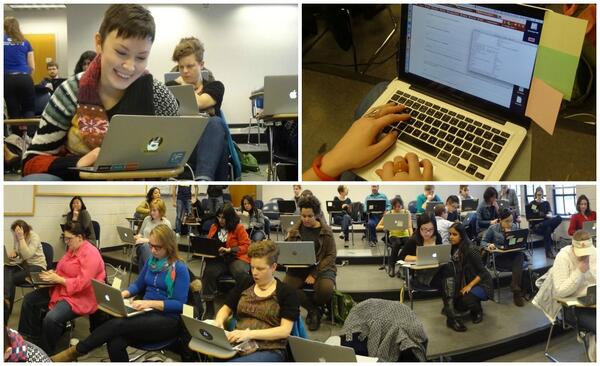
Pictures from the CDSW sessions in Spring 2014Pictures from the CDSW sessions in Spring 2014
I am helping coordinate three and a half day-long workshops in November for anyone interested in learning how to use programming and data science tools to ask and answer questions about online communities like Wikipedia, free and open source software, Twitter, civic media, etc. This will be a new and improved version of the workshops run successfully earlier this year. The workshops are for people with no previous programming experience and will be free of charge and open to anyone. Our goal is that, after the three workshops, participants will be able to use data to produce numbers, hypothesis tests, tables, and graphical visualizations to answer questions like: If you are interested in participating, fill out our registration form here before October 30th. We were heavily oversubscribed last time so registering may help. If you already know how to program in Python, it would be really awesome if you would volunteer as a mentor! Being a mentor will involve working with participants and talking them through the challenges they encounter in programming. No special preparation is required. If you re interested, send me an email.

18 October 2014

Steve Kemp: On the names we use in email

Yesterday I received a small rush of SPAM mails, all of which were 419 scams, and all of them sent by "Mrs Elizabeth PETERSEN". It struck me that I can't think of ever receiving a legitimate mail from a "Mrs XXX [YYY]", but I was too busy to check. Today I've done so. Of the 38,553 emails I've received during the month of October 2014 I've got a hell of a lot of mails with a From address including a "Mrs" prefix:
"Mrs.Clanzo Amaki" <marilobouabre14@yahoo.co.jp>
"Mrs Sarah Mamadou"<investment@payment.com>
"Mrs Abia Abrahim" <missfatimajinnah@yahoo.co.jp>
"Mrs. Josie Wilson" <linn3_2008@yahoo.co.jp>
"Mrs. Theresa Luis"<tomaslima@jorgelima.com>
There are thousands more. Not a single one of them was legitimate. I have one false-positive when repeating the search for a Mr-prefix. I have one friend who has set his sender-address to "Mr Bob Smith", which always reads weirdly to me, but every single other email with a Mr-prefix was SPAM. I'm not going to use this in any way, since I'm happy with my mail-filtering setup, but it was interesting observation. Names are funny. My wife changed her surname post-marriage, but that was done largely on the basis that introducing herself as "Doctor Kemp" was simpler than "Doctor Foreign-Name", she'd certainly never introduce herself ever as Mrs Kemp. Trivia: In Finnish the word for "Man" and "Husband" is the same (mies), but the word for "Woman" (nainen) is different than the word for "Wife" (vaimo).

17 October 2014

Erich Schubert: Google Earth on Linux

Google Earth for Linux appears to be largely abandoned by Google, unfortunately. The packages available for download cannot be installed on a modern amd64 Debian or Ubuntu system due to dependency issues.
In fact, the adm64 version is a 32 bit build, too. The packages are really low quality, the dependencies are outdated, locales support is busted etc.
So here are hacky instructions how to install nevertheless. But beware, these instructions are a really bad hack.
  1. These instructions are appropriate for version 7.1.2.2041-r0. Do not use them for any other version. Things will have changed.
  2. Make sure your system has i386 architecture enabled. Follow the instructions in section "Configuring architectures" on the Debian MultiArch Wiki page to do so
  3. Install lsb-core, and try to install the i386 versions of these packages, too!
  4. Download the i386 version of the Google Earth package
  5. Install the package by forcing dependencies, via
    sudo dpkg --force-depends -i google-earth-stable_current_i386.deb
    
  6. As of now, your package manager will complain, and suggest to remove the package again. To make it happy, we have to hack the installed packages list. This is ugly, and you should make a backup. You can totally bust your system this way... Fortunately, the change we're doing is rather simple. As admin, edit the file /var/lib/dpkg/status. Locate the section Package: google-earth-stable. In this section, delete the line starting with Depends:. Don't add in extra newlines or change anything else!
  7. Now the package manager should believe the dependencies of Google Earth are fulfilled, and no longer suggest removal. But essentially this means you have to take care of them yourself!
Some notes on using Google Earth:

16 October 2014

Bits from Debian: Help empower the Debian Outreach Program for Women

Debian is thrilled to participate in the 9th round of the GNOME FOSS Outreach Program. While OPW is similar to Google Summer of Code it has a winter session in addition to a summer session and is open to non-students. Back at DebConf 14 several of us decided to volunteer because we want to increase diversity in Debian. Shortly thereafter the DPL announced Debian's participation in OPW 2014. We have reached out to several corporate sponsors and are thrilled that so far Intel has agreed to fund an intern slot (in addition to the slot offered by the DPL)! While that makes two funded slots we have a third sponsor that has offered a challenge match: for each dollar donated by an individual to Debian the sponsor will donate another dollar for Debian OPW. This is where we need your help! If we can raise $3,125 by October 22 that means we can mentor a third intern ($6,250). Please spread the word and donate today if you can at: http://debian.ch/opw2014/ If you'd like to participate as intern, the application deadline is the same (October 22nd). You can find out more on the Debian Wiki.

14 October 2014

Joachim Breitner: Switching to systemd-networkd

Ever since I read about systemd-networkd being in the making I was looking forward to try it out. I kept watching for the package to appear in Debian, or at least ITP bugs. A few days ago, by accident, I noticed that I already have systemd-networkd on my machine: It is simply shipped with the systemd package! My previous setup was a combination of ifplugd to detect when I plug or unplug the ethernet cable with a plain DHCP entry in /etc/network/interface. A while ago I was using guessnet to do a static setup depending on where I am, but I don t need this flexibility any more, so the very simple approach with systemd-networkd is just fine with me. So after stopping ifplugd and
$ cat > /etc/systemd/network/eth.network <<__END__
[Match]
Name=eth0
[Network]
DHCP=yes
__END__
$ systemctl enable systemd-networkd
$ systemctl start systemd-networkd
I was ready to go. Indeed, systemd-networkd, probably due to the integrated dhcp client, felt quite a bit faster than the old setup. And what s more important (and my main motivation for the switch): It did the right thing when I put it to sleep in my office, unplug it there, go home, plug it in and wake it up. ifplugd failed to detect this change and I often had to manually run ifdown eth0 && ifup eth0; this now works. But then I was bitten by what I guess some people call the viral nature of systemd: systemd-networkd would not update /etc/resolve.conf, but rather relies on systemd-resolved. And that requires me to change /etc/resolve.conf to be a symlink to /run/systemd/resolve/resolv.conf. But of course I also use my wireless adapter, which, at that point, was still managed using ifupdown, which would use dhclient which updates /etc/resolve.conf directly. So I investigated if I can use systemd-networkd also for my wireless account. I am not using NetworkManager or the like, but rather keep wpa_supplicant running in roaming mode, controlled from ifupdown (not sure how that exactly works and what controls what, but it worked). I found out that this setup works just fine with systemd-networkd: I start wpa_supplicant with this service file (which I found in the wpasupplicant repo, but not yet in the Debian package):
[Unit]
Description=WPA supplicant daemon (interface-specific version)
Requires=sys-subsystem-net-devices-%i.device
After=sys-subsystem-net-devices-%i.device
[Service]
Type=simple
ExecStart=/sbin/wpa_supplicant -c/etc/wpa_supplicant/wpa_supplicant-%I.conf -i%I
[Install]
Alias=multi-user.target.wants/wpa_supplicant@%i.service
Then wpa_supplicant will get the interface up and down as it goes, while systemd-networkd, equipped with
[Match]
Name=wlan0
[Network]
DHCP=yes
does the rest. So suddenly I have a system without /etc/init.d/networking and without ifup. Feels a bit strange, but also makes sense. I still need to migrate how I manage my UMTS modem device to that model. The only thing that I m missing so far is a way to trigger actions when the network configuration has changes, like I could with /etc/network/if-up.d/ etc. I want to run things like killall -ALRM tincd and exim -qf. If you know how to do that, please tell me, or answer over at Stack Exchange.

Joachim Breitner: Switching to sytemd-networkd

Ever since I read about sytemd-networkd being in the making I was looking forward to try it out. I kept watching for the package to appear in Debian, or at least ITP bugs. A few days ago, by accident, I noticed that I already have systemd-networkd on my machine: It is simply shipped with the systemd package! My previous setup was a combination of ifplugd to detect when I plug or unplug the ethernet cable with a plain DHCP entry in /etc/network/interface. A while ago I was using guessnet to do a static setup depending on where I am, but I don t need this flexibility any more, so the very simple approach with systemd-networkd is just fine with me. So after stopping ifplugd and
$ cat > /etc/systemd/network/eth.network <<__END__
[Match]
Name=eth0
[Network]
DHCP=yes
__END__
$ systemctl enable systemd-networkd
$ systemctl start systemd-networkd
I was ready to go. Indeed, systemd-networkd, probably due to the integrated dhcp client, felt quite a bit faster than the old setup. And what s more important (and my main motivation for the switch): It did the right thing when I put it to sleep in my office, unplug it there, go home, plug it in and wake it up. ifplugd failed to detect this change and I often had to manually run ifdown eth0 && ifup eth0; this now works. But then I was bitten by what I guess some people call the viral nature of systemd: sytemd-networkd would not update /etc/resolve.conf, but rather relies on systemd-resolved. And that requires me to change /etc/resolve.conf to be a symlink to /run/systemd/resolve/resolv.conf. But of course I also use my wireless adapter, which, at that point, was still managed using ifupdown, which would use dhclient which updates /etc/resolve.conf directly. So I investigated if I can use systemd-networkd also for my wireless account. I am not using NetworkManager or the like, but rather keep wpa_supplicant running in roaming mode, controlled from ifupdown (not sure how that exactly works and what controls what, but it worked). I found out that this setup works just fine with systemd-networkd: I start wpa_supplicant with this service file (which I found in the wpasupplicant repo, but not yet in the Debian package):
[Unit]
Description=WPA supplicant daemon (interface-specific version)
Requires=sys-subsystem-net-devices-%i.device
After=sys-subsystem-net-devices-%i.device
[Service]
Type=simple
ExecStart=/sbin/wpa_supplicant -c/etc/wpa_supplicant/wpa_supplicant-%I.conf -i%I
[Install]
Alias=multi-user.target.wants/wpa_supplicant@%i.service
Then wpa_supplicant will get the interface up and down as it goes, while systemd-networkd, equipped with
[Match]
Name=wlan0
[Network]
DHCP=yes
does the rest. So suddenly I have a system without /etc/init.d/networking and without ifup. Feels a bit strange, but also makes sense. I still need to migrate how I manage my UMTS modem device to that model. The only thing that I m missing so far is a way to trigger actions when the network configuration has changes, like I could with /etc/network/if-up.d/ etc. I want to run things like killall -ALRM tincd and exim -qf. If you know how to do that, please tell me, or answer over at Stack Exchange.

Gunnar Wolf: When Open Access meets the Napster anniversary

Two causally unrelated events which fit in together in the greater scheme of things ;-) In some areas, the world is better aligning to what we have been seeking for many years. In some, of course, it is not. In this case, today I found our article on the Network of Digital Repositories for our University, in the Revista Digital Universitaria [en l nea] was published. We were invited to prepare an article on this topic because this month's magazine would be devoted to Open Access in Mexico and Latin America This, because a law was recently passed that makes conditions much more interesting for the nonrestricted publication of academic research. Of course, there is still a long way to go, but this clearly is a step in the right direction. On the other hand, after a long time of not looking in that direction (even though it's a lovely magazine), I found that this edition of FirstMonday takes as its main topic Napster, 15 years on: Rethinking digital music distribution. I know that nonrestricted academic publishing via open access and nonauthorized music sharing via Napster are two very different topics. However, there is a continuous push and trend towards considering and accepting open licensing terms, and they are both points in the same struggle. An interesting data point to add is that, although many different free licenses have existed over time, Creative Commons (which gave a lot of visibility and made the discussion within the reach of many content creators) was created in 2001 13 years ago today, two years after Napster. And, yes, there are no absolute coincidences.

12 October 2014

Iustin Pop: Day trip on the Olympic Peninsula

Day trip on the Olympic Peninsula TL;DR: drove many kilometres on very nice roads, took lots of pictures, saw sunshine and fog and clouds, an angry ocean and a calm one, a quiet lake and lots and lots of trees: a very well spent day. Pictures at http://photos.k1024.org/Daytrips/Olympic-Peninsula-2014/. Sometimes I travel to the US on business, and as such I've been a few times in the Seattle area. Until this summer, when I had my last trip there, I was content to spend any extra days (weekend or such) just visiting Seattle itself, or shopping (I can spend hours in the REI store!), or working on my laptop in the hotel. This summer though, I thought - I should do something a bit different. Not too much, but still - no sense in wasting both days of the weekend. So I thought maybe driving to Mount Rainier, or something like that. On the Wednesday of my first week in Kirkland, as I was preparing my drive to the mountain, I made the mistake of scrolling the map westwards, and I saw for the first time the Olympic Peninsula; furthermore, I was zoomed in enough that I saw there was a small road right up to the north-west corner. Intrigued, I zoomed further and learned about Cape Flattery ( the northwestern-most point of the contiguous United States! ), so after spending a bit time reading about it, I was determined to go there. Easier said than done - from Kirkland, it's a 4h 40m drive (according to Google Maps), so it would be a full day on the road. I was thinking of maybe spending the night somewhere on the peninsula then, in order to actually explore the area a bit, but from Wednesday to Saturday it was a too short notice - all hotels that seemed OK-ish were fully booked. I spent some time trying to find something, even not directly on my way, but I failed to find any room. What I did manage to do though, is to learn a bit about the area, and to realise that there's a nice loop around the whole peninsula - the 104 from Kirkland up to where it meets the 101N on the eastern side, then take the 101 all the way to Port Angeles, Lake Crescent, near Lake Pleasant, then south toward Forks, crossing the Hoh river, down to Ruby Beach, down along the coast, crossing the Queets River, east toward Lake Quinault, south toward Aberdeen, then east towards Olympia and back out of the wilderness, into the highway network and back to Kirkland. This looked like an awesome road trip, but it is as long as it sounds - around 8 hours (continuous) drive, though skipping Cape Flattery. Well, I said to myself, something to keep in mind for a future trip to this area, with a night in between. I was still planning to go just to Cape Flattery and back, without realising at that point that this trip was actually longer (as you drive on smaller, lower-speed roads). Preparing my route, I read about the queues at the Edmonds-Kingston ferry, so I was planning to wake up early on the weekend, go to Cape Flattery, and go right back (maybe stop by Lake Crescent). Saturday comes, I - of course - sleep longer than my trip schedule said, and start the day in a somewhat cloudy weather, driving north from my hotel on Simonds Road, which was quite nicer than the usual East-West or North-South roads in this area. The weather was becoming nicer, however as I was nearing the ferry terminal and the traffic was getting denser, I started suspecting that I'll spend a quite a bit of time waiting to board the ferry. And unfortunately so it was (photo altered to hide some personal information): Waiting for the ferry. The weather at least was nice, so I tried to enjoy it and simply observe the crowd - people were looking forward to a weekend relaxing, so nobody seemed annoyed by the wait. After almost half an hour, time to get on the ferry - my first time on a ferry in US, yay! But it was quite the same as in Europe, just that the ship was much larger. Once I secured the car, I went up deck, and was very surprised to be treated with some excellent views: Harbour view Looking towards the sun   and away from it The crossing was not very short, but it seemed so, because of the view, the sun, the water and the wind. Soon we were nearing the other shore; also, see how well panorama software deals with waves :P! Near the other shore And I was finally on the "real" part of the trip. The road was quite interesting. Taking the 104 North, crossing the "Hood Canal Floating Bridge" (my, what a boring name), then finally joining the 101 North. The environment was quite varied, from bare plains and hills, to wooded areas, to quite dense forests, then into inhabited areas - quite a long stretch of human presence, from the Sequim Bay to Port Angeles. Port Angeles surprised me: it had nice views of the ocean, and an interesting port (a few big ships), but it was much smaller than I expected. The 101 crosses it, and in less than 10 minutes or so it was already over. I expected something nicer, based on the name, but Anyway, onwards! Soon I was at a crossroads and had to decide: I could either follow the 101, crossing the Elwha River and then to Lake Crescent, then go north on the 113/112, or go right off 101 onto 112, and follow it until close to my goal. I took the 112, because on the map it looked "nicer", and closer to the shore. Well, the road itself was nice, but quite narrow and twisty here and there, and there was some annoying traffic, so I didn't enjoy this segment very much. At least it had the very interesting property (to me) that whenever I got closer to the ocean, the sun suddenly disappeared, and I was finding myself in the fog: Foggy road So my plan to drive nicely along the coast failed. At one point, there was even heavy smoke (not fog!), and I wondered for a moment how safe was to drive out there in the wilderness (there were other cars though, so I was not alone). Only quite a bit later, close to Neah Bay, did I finally see the ocean: I saw a small parking spot, stopped, and crossing a small line of trees I found myself in a small cove? bay? In any case, I had the impression I stepped out of the daily life in the city and out into the far far wilderness: Dead trees on the beach Trees growing on a rock Small panorama of the cove There was a couple, sitting on chairs, just enjoying the view. I felt very much intruding, behaving like I did as a tourist: running in, taking pictures, etc., so I tried at least to be quiet . I then quickly moved on, since I still had some road ahead of me. Soon I entered Neah Bay, and was surprised to see once more blue, and even more blue. I'm a sucker for blue, whether sky blue or sea blue , so I took a few more pictures (watch out for the evil fog in the second one): View towards Neah Bay port Sea view from Neah Bay Well, the town had some event, and there were lots of people, so I just drove on, now on the last stretch towards the cape. The road here was also very interesting, yet another environment - I was driving on Cape Flattery Road, which cuts across the tip of the peninsula (quite narrow here) along the Waatch River and through its flooding plains (at least this is how it looked to me). Then it finally starts going up through the dense forest, until it reaches the parking lot, and from there, one goes on foot towards the cape. It's a very easy and nice walk (not a hike), and the sun was shining very nicely through the trees: Sunny forest Sun shinning down Wooden path But as I reached the peak of the walk, and started descending towards the coast, I was surprised, yet again, by fog: Ugly fog again! I realised that probably this means the cape is fully in fog, so I won't have any chance to enjoy the view. Boy, was I wrong! There are three viewpoints on the cape, and at each one I was just "wow" and "aah" at the view. Even thought it was not a sunny summer view, and there was no blue in sight, the combination between the fog (which was hiding the horizon and even the closer islands), the angry ocean which was throwing wave after wave at the shore, making a loud noise, and the fact that even this seemingly inhospitable area was just teeming with life, was both unexpected and awesome. I took here waay to many pictures, here are just a couple inlined: First view at the cape Birds 'enjoying' the weather Foggy shore I spent around half an hour here, just enjoying the rawness of nature. It was so amazing to see life encroaching on each bit of land, even though it was not what I would consider a nice place. Ah, how we see everything through our own eyes! The walk back was through fog again, and at one point it switched over back to sunny. Driving back on the same road was quite different, knowing what lies at its end. On this side, the road had some parking spots, so I managed to stop and take a picture - even though this area was much less wild, it still has that outdoors flavour, at least for me: Waatch River Back in Neah Bay, I stopped to eat. I had a place in mind from TripAdvisor, and indeed - I was able to get a custom order pizza at "Linda's Woodfired Kitchen". Quite good, and I ate without hurry, looking at the people walking outside, as they were coming back from the fair or event that was taking place. While eating, a somewhat disturbing thought was going through my mind. It was still early, around two to half past two, so if I went straight back to Kirkland I would be early at the hotel. But it was also early enough that I could - in theory at least - still do the "big round-trip". I was still rummaging the thought as I left On the drive back I passed once more near Sekiu, Washington, which is a very small place but the map tells me it even has an airport! Fun, and the view was quite nice (a bit of blue before the sea is swallowed by the fog): Sekiu view After passing Sekiu and Clallam Bay, the 112 curves inland and goes on a bit until you are at the crossroads: to the left the 112 continues, back the same way I came; to the right, it's the 113, going south until it meets the 101. I looked left - remembering the not-so-nice road back, I looked south - where a very appealing, early afternoon sun was beckoning - so I said, let's take the long way home! It's just a short stretch on the 113, and then you're on the 101. The 101 is a very nice road, wide enough, and it goes through very very nice areas. Here, west to south-west of the Olympic Mountains, it's a very different atmosphere from the 112/101 that I drove on in the morning; much warmer colours, a bit different tree types (I think), and more flat. I soon passed through Forks, which is one of the places I looked at when searching for hotels. I did so without any knowledge of the town itself (its wikipedia page is quite drab), so imagine my surprise when a month later I learned from a colleague that this is actually a very important place for vampire-book fans. Oh my, and I didn't even stop! This town also had some event, so I just drove on, enjoying the (mostly empty) road. My next planned waypoint was Ruby Beach, and I was looking forward to relaxing a bit under the warm sun - the drive was excellent, weather perfect, so I was watching the distance countdown on my Garmin. At two miles out, the "Near waypoint Ruby Beach" message appeared, and two seconds later the sun went out. What the I was hoping this is something temporary, but as I slowly drove the remaining mile I couldn't believe my eyes that I was, yet again, finding myself in the fog I park the car, thinking that asking for a refund would at least allow me to feel better - but it was I who planned the trip! So I resigned myself, thinking that possibly this beach is another special location that is always in the fog. However, getting near the beach it was clear that it was not so - some people were still in their bathing suits, just getting dressed, so it seems I was just unlucky with regards to timing. However, I the beach itself was nice, even in the fog (I later saw online sunny pictures, and it is quite beautiful), the the lush trees reach almost to the shore, and the way the rocks are sitting on the beach: A lonely dinghy Driftwood  and human construction People on the beach Since the weather was not that nice, I took a few more pictures, then headed back and started driving again. I was soo happy that the weather didn't clear at the 2 mile mark (it was not just Ruby Beach!), but alas - it cleared as soon as the 101 turns left and leaves the shore, as it crosses the Queets river. Driving towards my next planned stop was again a nice drive in the afternoon sun, so I think it simply was not a sunny day on the Pacific shore. Maybe seas and oceans have something to do with fog and clouds ! In Switzerland, I'm very happy when I see fog, since it's a somewhat rare event (and seeing mountains disappearing in the fog is nice, since it gives the impression of a wider space). After this day, I was a bit fed up with fog for a while Along the 101 one reaches Lake Quinault, which seemed pretty nice on the map, and driving a bit along the lake - a local symbol, the "World's largest spruce tree". I don't know what a spruce tree is, but I like trees, so I was planning to go there, weather allowing. And the weather did cooperate, except that the tree was not so imposing as I thought! In any case, I was glad to stretch my legs a bit: Path to largest spruce tree Largest spruce tree, far view Largest spruce tree, closer view Very short path back to the road However, the most interesting thing here in Quinault was not this tree, but rather - the quiet little town and the view on the lake, in the late afternoon sun: Quinault Quinault Lake view The entire town was very very quiet, and the sun shining down on the lake gave an even stronger sense of tranquillity. No wind, not many noises that tell of human presence, just a few, and an overall sense of peace. It was quite the opposite of the Cape Flattery and a very nice way to end the trip. Well, almost end - I still had a bit of driving ahead. Starting from Quinault, driving back and entering the 101, driving down to Aberdeen: Afternoon ride then turning east towards Olympia, and back onto the highways. As to Aberdeen and Olympia, I just drove through, so I couldn't make any impression of them. The old harbour and the rusted things in Aberdeen were a bit interesting, but the day was late so I didn't stop. And since the day shouldn't end without any surprises, during the last profile change between walking and driving in Quinault, my GPS decided to reset its active maps list and I ended up with all maps activated. This usually is not a problem, at least if you follow a pre-calculated route, but I did trigger recalculation as I restarted my driving, so the Montana was trying to decide on which map to route me - between the Garmin North America map and the Open StreeMap one, the result was that it never understood which road I was on. It always said "Drive to I5", even though I was on I5. Anyway, thanks to road signs, and no thanks to "just this evening ramp closures", I was able to arrive safely at my hotel. Overall, a very successful, if long trip: around 725 kilometres, 10h:30m moving, 13h:30m total: Track picture There were many individual good parts, but the overall think about this road trip was that I was able to experience lots of different environments of the peninsula on the same day, and that overall it's a very very nice area. The downside was that I was in a rush, without being able to actually stop and enjoy the locations I visited. And there's still so much to see! A two nights trip sound just about right, with some long hikes in the rain forest, and afternoons spent on a lake somewhere. Another not so optimal part was that I only had my "travel" camera (a Nikon 1 series camera, with a small sensor), which was a bit overwhelmed here and there by the situation. It was fortunate that the light was more or less good, but looking back at the pictures, how I wish that I had my "serious" DSLR So, that means I have two reasons to go back! Not too soon though, since Mount Rainier is also a good location to visit . If the pictures didn't bore you yet, the entire gallery is on my smugmug site. In any case, thanks for reading!

John Goerzen: First impressions of systemd, and they re not good

Well, I finally bit the bullet. My laptop, which runs jessie, got dist-upgraded for the first time in a few months. My brightness keys stopped working, and it no longer would suspend to RAM when the lid was closed, and upon chasing things down from XFCE to policykit, eventually it appears that suddenly major parts of the desktop breaks without systemd in jessie. Sigh. So apt-get install systemd-sysv (and watch sysvinit-core get uninstalled) and reboot. Only, my system doesn t come back up. In fact, over several hours of trying to make it boot with systemd, it failed in numerous spectacular and hilarious (or, would be hilarious if my laptop would boot) ways. I had text obliterating the cryptsetup password prompt almost every time. Sometimes there were two processes trying to read a cryptsetup password at once. Sometimes a process was trying to read that while another one was trying to read an emergency shell password. Many times it tried to write to /var and /tmp before they were mounted, meaning they *wouldn t* mount because there was stuff there. I noticed it not doing much with ZFS, complaining of a dependency loop between zfs-mount and $local-fs. I fixed that, but it still wouldn t boot. In fact, it simply hung after writing something about wall passwords. I ve dug into systemd, finding a unit generator for fstab (whatever the hack that is, it s not at all made clear by systemd-fstab-generator(8)). In some cases, there s info in journalctl, but if I can t even get to an emergency mode prompt, the practice of hiding all stdout and stderr output is not all that pleasant. I remember thinking what s all the flaming about? systemd wasn t my first choice (I always thought if it ain t broke, don t fix it about sysvinit), but basically ignored the thousands of messages, thinking whatever happens, jessie will still boot. Now I m not so sure. Even if the thing boots out of the box, it seems like the boot process with systemd is colossally fragile. For now, at least zfs rollback can undo upgrades to 800 packages in about 2 seconds. But I can t stay at some early jessie checkpoint forever. Have we made a vast mistake that can t be undone? (If things like even *brightness keys* now require systemd )

10 October 2014

Matthias Klumpp: Listaller + Glick: Some new ideas

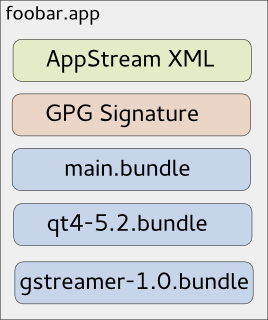
As you might know, due to invasive changes in PackageKit, I am currently rewriting the 3rd-party application installer Listaller. Since I am not the only one looking at the 3rd-party app-installation issue (there is a larger effort going on at GNOME, based on Lennarts ideas), it makes sense to redesign some concepts of Listaller. Currently, dependencies and applications are installed into directories in /opt, and Listaller contains some logic to make applications find dependencies, and to talk to the package manager to install missing things. This has some drawbacks, like the need to install an application before using it, the need for applications to be relocatable, and application-installations being non-atomic. Glick2 There is/was another 3rd-party app installer approach on the GNOME side, by Alexander Larsson, called Glick2. Glick uses application bundles (do you remember Klik from back in the days?) mounted via FUSE. This allows some neat features, like atomic installations and software upgrades, no need for relocatable apps and no need to install the application. However, it also has disadvantages. Quoting the introduction document for Glick2: Bundling isn t perfect, there are some well known disadvantages. Increased disk footprint is one, although current storage space size makes this not such a big issues. Another problem is with security (or bugfix) updates in bundled libraries. With bundled libraries its much harder to upgrade a single library, as you need to find and upgrade each app that uses it. Better tooling and upgrader support can lessen the impact of this, but not completely eliminate it. This is what Listaller does better, since it was designed to do a large effort to avoid duplication of code. Also, currently Glick doesn t have support for updates and software-repositories, which Listaller had. Combining Listaller and Glick ideas So, why not combine the ideas of Listaller and Glick? In order to have Glick share resources, the system needs to know which shared resources are available. This is not possible if there is one huge Glick bundle containing all of the application s dependencies. So I modularized Glick bundles to contain just one software component, which is e.g. GTK+ or Qt, GStreamer or could even be a larger framework (e.g. GNOME 3.14 Platform ). These components are identified using AppStream XML metadata, which allows them to be installed from the distributor s software repositories as well, if that is wanted. If you now want to deploy your application, you first create a Glick bundle for it. Then, in a second step, you bundle your application bundle with it s dependencies in one larger tarball, which can also be GPG signed and can contain additional metadata. The resulting metabundle will look like this: glick-libundle This doesn t look like we share resources yet, right? The dependencies are still bundled with the application requiring them. The trick lies in the installation step: While the application above can be executed right away without installing it, there will also be an option to install it. For the user, this will mean that the application shows up in GNOME-Shell s overview or KDEs Plasma launcher, gets properly registered with mimetypes and is if installed for all users available system-wide. Technically, this will mean that the application s main bundle is extracted and moved to a special location on the file system, so are the dependency-bundles. If bundles already exist, they will not be installed again, and the new application will simply use the existing software. Since the bundles contain information about their dependencies, the system is able to determine which software is needed and which can simply be deleted from the installation directories. If the application is started now, the bundles are combined and mounted, so the application can see the libraries it depends on. Additionally, this concept allows secure updates of applications and shared resources. The bundle metadata contains an URL which points to a bundle repository. If new versions are released, the system s auto-updater can automatically pick these up and install them this means e.g. the Qt bundle will receive security updates, even if the developer who shipped it with his/her app didn t think of updating it. Conclusion So far, no productive code exists for this I just have a proof-of-concept here. But I pretty much like the idea, and I am thinking about going further in that direction, since it allows deploying applications on the Linux desktop as well as deploying software on servers in a way which plays nice with the native package manager, and which does not duplicate much code (less risk of having not-updated libraries with security flaws around). However, there might be issues I haven t thought about yet. Also, it makes sense to look at GNOME to see how the whole 3rd-party app deployment issue develops. In case I go further with Listaller-NEXT, it is highly likely that it will make use of the ideas sketched above (comments and feedback are more than welcome!).

8 October 2014

Ian Donnelly: A Comparison of Elektra Merge and Git Merge

Hi everybody, We have gotten some inquires about how Elektra s merge functionality compares to the merge functionality built into git: git merge-file. I am glad to say that Elektra outperforms git s merge functionality in the same ways it outperforms diff3 when applied to configuration files. Obviously, git s merge functionality does a much better job with source-code as that is not the goal of elektra. In that previous example, I showed that because diff3 is lined based, where Elektra is not (unless you mount a file using the line plugin). The example I used before, and I will go over again, is using smb.conf and in-line comments. Many of our storage plug-ins understand the difference between comments and actual configuration data. So if a configuration file has an inline comment like so:
max log size = 10000 ; Controls the size of the log file (in KiB)
we can compare the actual Keys, value pairs between versions max log size = 10000 and deal with the comments separately. As a result, if we have a base:
max log size = 1000 ; Size in KiB

Ours:
max log size = 10000 ; Size in KiB

Theirs:
max log size = 1000 ; Controls the size of the log file (in KiB)

The result using elektra-merge would be:
max log size = 10000 ; Controls the size of the log file (in KiB)
Just like diff3, git merge-file can only compare these lines as lines, and thus there is a conflict. When running git merge-file smb.conf.ours smb.conf.base smb.conf.theirs we get the following output showing a conflict:
<<<<<<< smb.conf.ours
max log size = 2000 ; Size in KiB
=======
max log size = 1000 ; Controls the size of the log file (in KiB)
>>>>>>> smb.conf.theirs
This really shows the strength of Elektra s plugin system and why it makes merge an obvious use-case of Elektra. I hope this example makes it clear why using Elektra s merge functionality is advantageous over git s merge functionality. Once again I would like to stress the importance of quality storage plug-ins for Elektra. The more quality plugins we have the more powerful Elektra can be. If you are interested in plugins and would like to help us by adding functionality to Elektra by creating a new plug-in be sure to read my basic tutorial on how to do so. Sincerely,
Ian Donnelly

Michal &#268;iha&#345;: Wammu 0.37

It has been more than three years since last release of Wammu and I've decided it's time to push changes made in the Git repos to the users. So here comes Wammu 0.37. The list of changes is not really huge, but in total that means 1470 commits in git (most of that are translations): I will not make any promises for future releases (if there will be any) as the tool is not really in active development.

Filed under: English Gammu Wammu 0 comments Flattr this!

7 October 2014

Joachim Breitner: New website layout

After 10 years I finally got around to re-decorating my website. One reason was ICFP, where just too many people told me that I don t look like on my old website any more (which is very true). Another reason was that I was visting my brother, who is very good at web design (check out his portfolio), who could help me a bit. I wanted something practical and maybe a bit staid, so I drew inspiration from typical Latex typography, and also from Edward Z. Yang s blog: A serif font (Utopia) for the main body, justified and hyphenated text. Large section headers in a knobbly bold sans-serif font (Latin Modern Sans, which reasonably resembles Computer Modern). To intensify that impression, I put the main text on a white box that lies like a paper on the background. As a special gimmic the per-page navigation (or, in the case of the blog, the list of categories) is marked up like a figure in a paper. Of course this would be very dire without a suitable background. I really like the procedural art by Jared Tarbell, espcially substrate and interAggregate. Both have been turned into screensavers shipped with xscreensaver, so I hacked the substrate code to generate a seamless tile and took a screenshot of the result. I could not make up my mind yet how dense it has to be to look good, so I for every page I randomly pick one of six variants randomly for now. I simplified the navigation a bit. The old News section has been removed recently already. The Links section is gone I guess link lists on homepages are so 90s. The section Contact and About me are merged and awaiting some cleanup. The link to the satire news Heisse News is demoted to a mention on the Contents section. This hopefully helps to make the site navigatable on mobile devices (the old homepage was unusable). CSS media queries adjust the layout slightly on narrow screens, and separately for print devices. Being the nostaltic I am, I still keep the old design, as well as the two designs before that, around and commented their history.

Next.

Previous.