Search Results: "ron"

30 December 2012

Neil McGovern: Fleeing Google

For some time, I have been concerned about the amount of data I store on Google. This post aims to show alternatives to the service. This is primarily for two reasons. The first is simple. I would like to avoid a single point of failure, and the risk that I could be suspended for a number of months with no recourse. The second if more political. I'm worried about the way that certain governments can subpoena information which they may not be able to collect directly. Now, don't get me wrong. Google is good at transparency. They also provide a very useful service that works incredibly well. In fact, the quality of the integration and services provided is the primary reason I have not changed previously. Calendaring is something that I naturally feel shouldn't be hard, but somehow is. Google Calendaring service is rather good, and far outstrips anything open source I've found so far. However, I've managed to migrate to Zoho which offers a very similar level of functionality. It's also very easy to extract your entire calendar from Google, which makes the transition easier. Reader is a service provided to subscribe and read RSS feeds. In the past, I've used Gregarius as a self hosted solution, but this seems to have disappeared recently. I briefly flirted with NetVibes, which works well once you turn off the frustrating 'widget' mode, but has completely failed to address the need to have native tablet apps. In the end, I settled for NewsBlur which also has the clever use of hotkeys for navigation which I found essential in Google's products. Picasa has stood me well for hosting photos for some time. And photo hosting is something I have quite a large amount of professional experience with :) Despite having previously been in competition with them, I can heartily recommend Flickr, even with it's dogmatic reliance to creating a Yahoo! email address for each account. Search still has some way to go to find a viable replacement. I've tried DuckDuckGo, but found it lacking. Much like the mistake that Apple seem to have made with the launch of Apple Maps, there seems to be a misunderstanding that search is actually HARD.
There are two camps when it comes to searching. You can be dumb, or you can be smart. By being dumb, the user can provide enough information to help narrow the results down to a single (or at least manageable) result set. This works fine, and is a traditional model. The opposite is to be smart. Simply get the results right, using a variety of metrics to work out what the user wanted in the first place. This is obviously more difficult, but infinitely more valuable, and is something that Google excels at. The problem lies when you fall in between these stalls. Unfortunately, it seems that there is no viable alternative to the big G at the moment.

Russ Allbery: Term::ANSIColor 4.00

Term::ANSIColor is a Perl core module that provides a few different interfaces to get at the ANSI color and text attribute escape sequences. It can be used to, for example, print out bold text or colorize output. This is a major new feature release, incorporating patches sent to me by Kurt Starsinic and Stephen Thirlwall. Kurt Starsinic contributed support for 256-color emulators. These hang special extended sequences off the otherwise-unused 38 and 48 sequences, providing an alternative naming of the base 16 colors, 216 colors arranged in an RGB namespace, and 24 shades of grey. Those colors are now available via all the normal Term::ANSIColor interfaces. He also contributed a program to print out test data for 256-color emulators that I enhanced to print out test data for the basic and 16-color sets as well, which allowed me to get rid of the static test files in the distribution. Stephen Thirlwall contributed support for creating aliases for the standard colors via an environment variable. I extended his patch to also provide a coloralias() function interface. This feature probably won't be that widely used, but it allows a user to set up custom color names for applications that take color names from user configuration (which might be handy for doing things like using the Solarized color scheme), or to define an alias like "alert" or "warning" in one place and then use it throughout the code. With the new 256-color support, it may be useful to set up more human-readable aliases for some of the RGB colors. Since I was working on this project anyway, I also redid the whole module in the new Perl coding style that I've been experimenting, based on Damian Conway's Perl Best Practices, and added a ton of new tests. There are a lot of great CPAN modules out there to do automated tests of various aspects of Perl code, and most of them don't require much effort to use. I'll probably write a separate post about that later. That sort of comprehensive review of course uncovered a bunch of microbugs and lack of clarity in the code, which is now hopefully much improved. I'm pleased to report that the test suite achieves 100% code coverage as reported by Devel::Cover (and in fact there's a maintainer-only test to ensure that it stays that way). You can get the latest version from the Term::ANSIColor distribution page.

Eddy Petrișor: Looking for a backup application for a small home network

I have been looking at backup solution for the last few days and I am stuck, so I am asking for pointers or suggestions.

Since all backup solutions are appropriate to various needs, here are my requirements for my home network (two laptops backup on a very low powered server with a 3TiB HDD):
These are the basic requirements, and bonus-points requirements include:
According to the info I found, candidates for these criteria are Amanda and BackupPC. I like the rsnapshot idea of deduplication and incremental backups, but it's not available for Windows. BackupPC seems to be OK-ish, but it sounds too much like a bunch of Perl scripts and Windows support sounds like an after-thought and I dislike the idea of installing Cygwin just to provide some *nix tools.

I discarded Bacula, because the general impression I got from what I read is that it is hard to set up, has its own storage and has heavy needs for both clients and server. It sounds like overkill.

So what do other people recommend for my setup? Is Amanda OK? Did I get the wrong impression regarding BackupPC?

Keith Packard: MicroPeakSerial

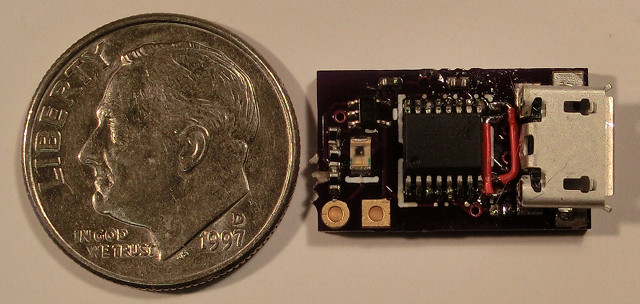
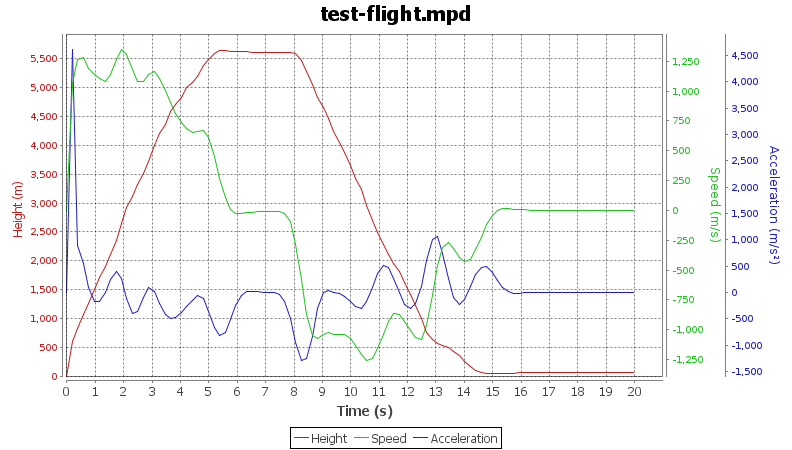
MicroPeak Serial Interface Flight Logging for MicroPeak MicroPeak was original designed as a simple peak-recording altimeter. It displays the maximum height of the last flight by blinking out numbers on the LED. Peak recording is fun and easy, but you need a log across apogee to check for unexpected bumps in baro data caused by ejection events. NAR also requires a flight log for altitude records. So, we wondered what could be done with the existing MicroPeak hardware to turn it into a flight logging altimeter. Logging the data The 8-bit ATtiny85 used in MicroPeak has 8kB of flash to store the executable code, but it also has 512B (yes, B as in bytes ) of eeprom storage for configuration data. Unlike the code flash, the little eeprom can be rewritten 100,000 times, so it should last for a lifetime of rocketry. The original MicroPeak firmware already used that to store the average ground pressure and minimum pressure (in Pascals) seen during flight; those are used to compute the maximum height that is shown on the LED. If we store just the two low-order bytes of the pressure data, we d have room left for 251 data points. That means capturing data at least every 32kPa, which is about 3km at sea level. 251 points isn t a whole lot of storage, but we really only need to capture the ascent and arc across apogee, which generally occurs within the first few seconds of flight. MicroPeak samples air pressure once every 96ms, if we record half of those samples, we ll have data every 192ms. 251 samples every 192ms captures 48 seconds of flight. A flight longer than that will just see the first 48 seconds. Of course, if apogee occurs after that limit, MicroPeak will still correctly record that value, it just won t have a continuous log. Downloading the data Having MicroPeak record data to the internal eeprom is pretty easy, but it s not a lot of use if you can t get the data into your computer. However, there aren t a whole lot of interfaces avaialble on MicroPeak. We ve only got: First implementation I changed the MicroPeak firmware to capture data to eeprom and made a test flight using my calibrated barometric chamber (a large syringe). I was able to read out the flight data using the AVR programming pins and got the flight logging code working that way. The plots I created looked great, but using an AVR programmer to read the data looked daunting for most people as it requires: With the hardware running at least $120 retail, and requiring a pile of software installed from various places around the net, this approach didn t seem like a great way to let people easily capture flight data from their tiny altimeter. The Blinking LED The only other interface available is the MicroPeak LED. It s a nice LED, bright and orange and low power. But, it s still just a single LED. However, it seemed like it might be possible to have it blink out the data and create a device to watch the LED and connect that to a USB port. The simplest idea I had was to just blink out the data in asynchronous serial form; a start bit, 8 data bits and a stop bit. On the host side, I could use a regular FTDI FT230 USB to serial converter chip. Those even have a 3.3V regulator and can supply a bit of current to other components on the board, eliminating the need for an external power supply. To see the LED blink, I needed a photo-transistor that actually responds to the LED s wavelength. Most photo-transistors are designed to work with infrared light, which nicely makes the whole setup invisible. There are a few photo-transistors available which do respond in the visible range, and ROHM RPM-075PT actually has its peak sensitivity right in the same range as the LED. In between the photo-transistor and the FT230, I needed a detector circuit which would send a 1 when the light was present and a 0 when it wasn t. To me, that called for a simple comparator made from an op-amp. Set the voltage on the negative input to somewhere between light and dark and then drive the positive input from the photo-transistor; the output would swing from rail to rail. Bit-banging async The ATtiny85 has only a single serial port , which is used on MicroPeak to talk to the barometric sensor in SPI mode. So, sending data out the LED requires that it be bit-banged directly modulated with the CPU. I wanted the data transmission to go reasonably fast, so I picked a rate of 9600 baud as a target. That means sending one bit every 104 S. As the MicroPeak CPU is clocked at only 250kHz, that leaves only about 26 cycles per bit. I need all of the bits to go at exactly the same speed, so I pack the start bit, 8 data bits and stop bit into a single 16 bit value and then start sending. Of course, every pass around the loop would need to take exactly the same number of cycles, so I carefully avoided any conditional code. With that, 14 of the 26 cycles were required to just get the LED set to the right value. I padded the loop with 12 nops to make up the remaining time. At 26 cycles per bit, it s actually sending data at a bit over 9600 baud, but the FT230 doesn t seem to mind. A bit of output structure I was a bit worried about the serial converter seeing other light as random data, so I prefixed the data transmission with MP ; that made it easy to ignore anything before those two characters as probably noise. Next, I decided to checksum the whole transmission. A simple 16-bit CRC would catch most small errors; it s easy enough to re-try the operation if it fails after all. Finally, instead of sending the data in binary, I displayed each byte as two hex digits, and sent some newlines along to keep the line lengths short. This makes it easy to ship flight logs in email or whatever. Here s a sample of the final data format:
MP
dc880100fec000006800f56d8f63b059
73516447273fa93728301927d91b7712
730bbf0491fe88f7c5ee8ee896e3fadc
9dd9d3d502d1afcea2cbafc6b4c34ec1
bfbfcabf10c03dc05dc070c084c08fc0
9cc0abc0b9c0c1c0ccc0dcc020c152c4
71c9a6cf45d623db7de05ee758edd9f2
b4f9fd00aa074311631a9221c4291330
c035873b2943084bbb52695c0c67eb6b
d26ee5707472fb74a4781f7dee802b84
09860a87e786ad868a866e8659865186
4e8643863e863986368638862e862d86
2f862d86298628862a86268629862686
28862886258625862486
d925
Making the photo-transistor go fast enough The photo-transistor acts as one half of a voltage divider on the positive op-amp terminal, with a resistor making the other half. However, the photo-transistor acts a bit like a capacitor, so when I initially chose a fairly large value for the resistor, it actually took too long to switch between on and off the transistor would spend a bunch of time charging and discharging. I had to reduce the resistor to 1k for the circuit to work. Remaining hardware design I prototyped the circuit on a breadboard using a through-hole op-amp that my daughter designed into her ultrasonic guided robot and a prefabricated FTDI Friend board. I wanted to use the target photo-transistor, so I soldered a couple of short pieces of wire onto the SMT pads and stuck that into the breadboard. Once I had that working, I copied the schematic to gschem, designed a board and had three made at OSHPark for the phenomenal sum of $1.35. Aside from goofing up on the FT230 USB data pins (swapping D+ and D-), the board worked perfectly. The final hardware design includes an LED connected to the output of the comparator that makes it easier to know when things are lined up correctly, otherwise it will be essentially the same. Host software Our AltosUI code has taught us a lot about delivering code that runs on Linux, Mac OS X and Windows, so I m busy developing something based on the same underlying Java bits to support MicroPeak. Here s a sample of the graph results so far: Production plans I ve ordered a couple dozen raw boards from OSH Park, and once those are here, I ll build them and make them available for sale in a couple of weeks. The current plan is to charge $35 for the MicroPeak serial interface board, or sell it bundled with MicroPeak for $75.

Luca Falavigna: Spare Parts TV Set

I don t like watching videos sitting in front of a computer, I usually store them into a USB key to plug into my Samsung LE37 TV set. It s not an easy task, though, as I have to fight with other components of my family who usually like watching something completely different than DebConf videos ;) I could have invested 200 to buy a new one, but I tried a different approach first. Recycling a netbook I received a Tweety device as Christmas gift, and I tried to connect it to my netbook to see how it worked. I was quite impressed by the good quality of the sound (if compared to the really poor quality of the netbook speakers), and I realized I could have recycled the netbook as a brand new TV set with some little adjustments. I plugged my SyncMaster 920n PC monitor into the netbook VGA port, switched Totem to fullscreen mode, and here it is my TV set! Remote control OK, that was quite straightforward to accomplish. A real TV set has a remote control too, but my netbook is not equipped with an IrDA port, so I had to think about a different solution. My BlackBerry is equipped with a cool app called BBSSH, which allows you to connect to any SSH server, this could be a good starting point to implement a remote control device. Then, I had to write an interface to Totem using Python and DBus binding to allow my SSH remote control to issue commands to start and pause the player. I published a first working implementation: at the moment the only supported operations are play, pause, stop and volume adjustments, but there are a lot of opportunities by implementing full MPRIS specification. Just to avoid typing a long command each time, I finally created a set of bash aliases, one for each command, so I just have to type one letter to have the desired function, as much as a real remote control :)

Russ Allbery: Review: Countdown

Review: Countdown, by Mira Grant
Publisher: Orbit
Copyright: August 2011
ISBN: 0-316-20448-X
Format: Kindle
Pages: 75
Countdown is a novella that tells the "origin story" of Grant's Newsflesh universe, the setting for Feed and sequels. It's the story of the initial creation of Kellis-Amberlee and the first zombie Rising, mixed with a small bit of backstory for the Mason family. There are two ways to read this novella that work. It's possible to read it prior to reading any of the Newsflesh books as a sort of teaser. It sets up the universe, shows the devastation of society, and raises the question of how society will respond. Alternately, and I think more effectively, it can be read as an appendix to the Newsflesh trilogy that fills in the backstory. Reading it after all three books led to some fun moments of "oh, that's how that happened." It shows the accidents and bad decisions that led to the Rising, and provides a bit of a counterbalance to some of Georgia and Shaun's snarky comments about the government, scientists, and the media. The way to read it that doesn't work is to try to read it as a stand-alone work. Countdown has very little in the way of a story. It's told in the disaster epic style of brief scenes following numerous characters, some who are only seen once. There are small plot arcs following the Kellis virus, the Amberlee virus, and the Masons, but none of them are satisfying when read as a traditional story. Some events, particularly in the Masons' thread, have no real meaning by themselves and only acquire significance as part of Georgia and Shaun's backstory. The reason to read this novella is because you're invested in the universe, either to whet your appetite for more or to fill in some of the background. With that caveat, I think Countdown is more effective as horror than the Newsflesh trilogy itself is. Feed and its sequels are more action novels that become political thrillers, and the confident first-person narration and snark undermines most of the sense of dread or horror in the world. (Please note: not being a horror fan, I consider this a feature.) Countdown doesn't have that strong narrative presence. Instead, it covers events that are both horrific and inevitable and towards which the characters are largely helpless. Some of the scenes towards the end are haunting. Grant still isn't very subtle, but I think she does a good job writing quiet desperation and leaving some of the emotions for the reader to interpolate. Countdown could be read after Feed, if you're interested enough in the world to want more, but I think it works best after Blackout (for reasons that are minor spoilers). It could be read before the whole series, but I recommend reading it as an appendix instead. Don't expect too much of it it's background filler rather than more story but I thought it was effective and enjoyed the additional filling-in of the world. Rating: 7 out of 10

29 December 2012

Russ Allbery: Review: Blackout

Review: Blackout, by Mira Grant
Series: Newsflesh #3
Publisher: Orbit
Copyright: 2012
ISBN: 0-316-20218-5
Format: Kindle
Pages: 631
Blackout is the third book in the Newsflesh series that started with Feed. As with the second book, Deadline, you do not want to read this book out of order. All the emotional heavy lifting is done in Feed, and the book won't mean as much without that. Also, as with Deadline, be very careful about any information you read bout the sequels if you've not yet read Feed, since it's very easy to spoil that book and most information about subsequent books will do so. I'm going to try to write this review without spoilers. That's going to be a bit tricky due to events in Feed, so bear with me if I'm less specific than normal. This is the grand finale of the series, and it is a firm conclusion. As you might expect, particularly from Deadline, that involves a lot more politics, a few more big revelations, some reunions, escalating scale, and a lot of fighting. Unfortunately, it also involves setup. A lot of setup. I didn't expect that, given that Deadline ended at a run, but it takes about half of Blackout and a whole lot of pages before we get to the events that logically follow from the end of Blackout. And those pages dragged for me. There are some great moments. The banter continues to be strong, there are some deeply affecting scenes with Shaun, and Maggie continues to be wonderful. Grant also introduces some new secondary characters (Monkey and the rest of his household) who are brilliant and feel like they could have come directly from Borderlands. All of Blackout has a bit more of that mad scientist feel, full of slightly deranged people who take the fight to the world in their own ways. But it still drags. One branch of the book has the protagonists going here, there, and everywhere in several roundabout attempts to advance the plot. The other branch is more psychologically tense, but it takes too long to get moving and therefore turns into a repetition of the same emotions and the same complaints. I wanted to get to the key events that happen about halfway through the book in about half as many pages as they took. Thankfully, things do pick up when the two strands of the book come together. Some of the emotional dynamics strengthen as well, which I'd been missing. Grant does a great job here tying the whole series together in a way that shows the differences between Feed and Deadline and digs into their nature a bit more. There is one big reveal that I found disappointing, both because it had been obvious since early in Deadline and yet was treated as a big reveal and because I think it put the book and series onto slightly more conventional territory in a place where it had previously been interestingly distinct. (I'm being vague because of spoilers.) But that didn't bother me too much, and the surrounding character dynamics I think made up for it. The final ending isn't exactly bad, but neither did it entirely work for me. The whole series seems a touch too naive. This worked in Feed (at least for me; some other reviewers disliked it) since the naivete felt like part of the dynamic of the story and the characters, and the stakes were mostly kept small enough that it was believable. The stakes are large enough here that I needed the world to be a touch more complicated and the villains less hissable. (If there's been one consistent flaw throughout this series, it's that Grant's villains are too purely evil.) And, in the end, I didn't quite buy the conflict at the heart of the story; after everything that had happened, I wanted something more complex and nuanced. I'm a bit unsatisfied, but, like Deadline, Blackout is still a good book. Neither of them live up to Feed, but they're both enjoyable, action-filled, and creative looks at a zombie apocalypse. I think Blackout is at its best when it's being Fallout or Borderlands and emphasizing the mad scientist angle of Grant's world, and I would have happily read several more chapters about Monkey. The mix of wacky risk-taking and serious political idealism doesn't quite gel, and the latter never worked for me in Blackout, but I still had a lot of fun with the core character interactions. If you read Deadline, you certainly want to read Blackout. If you stopped at Feed, Blackout is probably not a persuasive argument to continue. Rating: 7 out of 10

Russell Coker: Samsung Galaxy Camera a Quick Review

I recently had a chance to briefly play with the new Samsung Galaxy Camera [1]. The Galaxy Camera is an Android device with a 4.8 display (the same size as the Samsung Galaxy S3) that has a fairly capable camera (IE nothing like a typical phone camera). It runs Android 4.1 (Jelly Bean) and the camera has 21* zoom with a 16 megapixel sensor. Camera Features It seems that professional photographers are often annoyed when they see someone with a DSLR set in auto mode. It s widely regarded that auto mode is a waste of a good camera, although the better lenses used with DSLRs will usually give a better result than any compact camera even when it s in auto mode. The problem is that photography is quite complex, in an earlier post about digital cameras I summarised some of the technical issues related to cameras and even without any great detail it became a complex issue [2]. The Galaxy Camera has a reasonably friendly GUI for changing camera settings which even includes help on some of the terms, I expect that most people who use it will end up using most of the features which could make it a good training camera for someone who is going to move to a DSLR. A DSLR version of the Galaxy Camera could also be an interesting product. The camera also has modes such as Waterfall and Panorama , hopefully the settings for those would be exposed to the user so they could devise their own similar groups of settings. I ve seen the phone criticised for the lack of physical controls as the expert mode in software is inherently slower than manually turning dials on a DSLR. But it seems obvious to me that anyone who knows how to use the controls manually should be using a DSLR or bridge camera and anyone who doesn t already know how to do such things will be better suited by the software controls. It supports 120fps video at 720*480 resolution (with a file format stating that it s 30fps to give 1/4 speed) which could be useful. I used to have a LG Viewty smart-phone that did 120fps video but the resolution was too low to be useful. 720*480 is enough resolution to see some detail and has the potential for some interesting video, one use that I ve heard of is filming athletes to allow them to analyse their performance in slow motion. It also does 60fps video at 720p (1280*720) resolution. One down-side to the device is that the lens cover doesn t seem particularly sturdy. It s quite OK for a device that will be stored in a camera case but not so good for a device that will be used as a tablet. I didn t get to poke at the lens cover (people don t like it if you mess with their Christmas presents) but it s design is a couple of thin flaps that automatically retract when the camera is enabled which looks quite weak. I d like to see something solid which doesn t look like it will slide back if the device is treated as roughly as a phone. I think that the lack of a solid lens cover could be the one factor that prevents it from being used as a replacement for a smart phone. Apart from that a Galaxy Camera and a cheap GSM phone could perform all the functions of a high end phone such as the Galaxy S3 while also producing great pictures. It would probably make sense for retailers to bundle a cheap phone with a Galaxy Camera for this purpose. Tablet Features The device boasts WiFi Direct to allow multiple cameras and phones to talk to each other without a regular WiFi access point [3]. I didn t test this and I don t think it would be particularly useful to me, but it seems like a handy feature for less technical users. It can connect to the Internet via Wifi or 3G, supports automatic upload of pictures (it comes with Dropbox support by default like the Galaxy S3), and has a suite of photo and video editing software. I don t expect that any photo editing software that runs on an Android device would be much good (I think that you really need fine cursor control with a mouse and a high resolution screen), but it would probably be handy for sending out a first draft of photos. Most Android apps should just work, the exceptions being apps that rely on a camera that faces the user or full phone functionality. So the Galaxy Camera can do almost anything that an Android phone or tablet can do. Value The RRP for the Galaxy Camera is $599, that puts it in the same price range as a DSLR with a single lens. While that s not a bad price when compared to smart-phones (it s cheaper than the LTE version of the Galaxy S3 phone) it s still quite expensive for a camera that s not a DSLR. Fortunately Kogan is selling it for $469 and has free shipping at the moment [4]. This still makes it more expensive than some of Bridge Cameras which probably have significantly better optical features, but in terms of what the typical user can do with a camera the Galaxy Camera will probably give a much better result. The sensor in the Galaxy Camera is smaller than that in the Nokia 808 PureView [5] (1/2.3 vs 1/1.2 ) so the Nokia PureView should be able to take better pictures in some situations. Unfortunately the Nokia 808 doesn t run Android, I d probably own one if it did. Some of the reviews are rather harsh, the Verge has a harsh but fair review by Aaron Souppouris which makes a number of negative comparisons to cheaper cameras [6]. I really recommend reading Aaron s review as there s a lot of good information there. But I think that Aaron is missing some things, for example he criticises the inclusion of ebook software by saying that he wouldn t read a book on a camera. But the device is a small tablet computer which also has a compact camera included. I can easily imagine someone reading a book or playing Angry Birds on their camera/tablet while in transit to where they are will photograph something. I can also imagine a Galaxy Camera being a valuable tool for a journalist who wants to be able to write short articles and upload pictures and video when out of the office. Aaron concludes by suggesting that the Galaxy Camera is a $200 camera with $300 of editing features. I think of it as $200 in camera hardware with software that allows less skilled users to take full advantage of the hardware and the ability to do all the software/Internet things that you would do on a $450+ smart-phone. Would I Buy One? No. The Galaxy Camera is among other things a great toy, I d love to have one to play with but I can t spare $469 on one. Part of the reason for this is that my wife just bought a DSLR and is getting lessons from a professional photographer, so I really won t get better pictures from a Galaxy Camera. The DSLR on auto mode will allow me to take pictures that will usually be better than a Galaxy Camera can achieve (sometimes you just can t beat a good lens). For more demanding pictures my wife can tweak the DSLR. The 120fps video is a really nice feature, I don t know if my wife s DSLR can do that, but it s a toy feature not something I really need. I ve just bought a Galaxy S3 which is a great little tablet computer (most of the time it won t be used for phone calls). I don t need another 4.8 tablet so a significant part of the use of the Galaxy Camera doesn t apply to me. I recommend the Galaxy Camera to anyone who wants to take good photos but can t get a DSLR and lessons on how to use it properly. But if you would rather get a 35mm camera with interchangeable lenses that runs Android then it might be worth waiting. I expect that the Galaxy Camera will be a great success in the market (it s something you will love when you see it). That will drive the development of similar products, if Samsung doesn t release a 35mm Android camera soon then someone else will (for example Sony develops both high end cameras and Android phones). If my wife didn t have a DSLR then I d probably have bought a Galaxy Camera already. I will recommend it to my parents and many other people I know who want an OK camera and can benefit from a tablet, but don t know how to use a DSLR properly (or don t want to carry a bulky camera).

Russ Allbery: Review: Dragonhaven

Review: Dragonhaven, by Robin McKinley
Publisher: Ace
Copyright: September 2007
Printing: October 2008
ISBN: 0-441-01643-X
Format: Mass market
Pages: 338
With a title like Dragonhaven from a well-established fantasy author like Robin McKinley, one's first expectations are probably some variety of medieval fantasy, perhaps with a boy or girl who encounters a rare dragon and befriends them. To some extent, those expectations are right: there is a boy, a rare dragon, and a friendship. But they're mostly wrong. Dragonhaven could easily pass for science fiction if one allowed a bit of handwaving, and the setting is contemporary. Jake is the first-person narrator and the center of this story. He lives with his father and a small group of park rangers and other scientists at Smokehill National Park, one of the few remaining reserves for dragons in the world. McKinley's world is much like ours, with the same politics and governments, except that dragons exist: huge, flying dragons that breathe fire. But they've been hunted to near-extinction, including via an actual war in Australia, and are now dwindling in a small handful of isolated reserves. No one is entirely sure how many are left since, for huge creatures, they're remarkably hard to find and document. The Smokehill staff mostly estimate them from prey kills and other indirect signs. This book is Jake's telling of his story, and McKinley goes to quite a bit of effort to find the right tone for a teenage boy. It's more verbal than written in style, with lots of capital letters, italics, tangents, digressions, and short sentences. He's also trying to tell the story in order without skipping ahead but sometimes failing, which turns into a mechanism to do foreshadowing as he slips in comments or mentions things he wasn't aware of at the time. The voice McKinley constructs is very strong and makes this book read unlike any other books of hers I've read. How much you enjoy the book will probably depend heavily on your opinion of Jake's storytelling style. The story proper starts when Jake, on his first overnight trip in the park, encounters a dying dragon and a dead poacher. This is a catastrophe for the park: the dead poacher will provide ammunition for everyone who thinks dragons are too dangerous and should be wiped out. But for Jake, it's a more immediately life-changing event. The dragon was a mother with newborn infants, one of whom has survived and who promptly bonds with Jake. This may sound like it's moving back into traditional fantasy territory, but it's not. Jake's relationship with Lois (the name he gives the baby dragon) is very unlike fantasy bonds with baby hatchlings and quite a bit like taking care of an actual infant. Except the infant is hot enough to burn the skin. And wants to be in a pouch (McKinley's dragons are marsupial, sort of) and therefore needs to crawl inside Jake's clothing and press against skin. And that's not mentioning the smell. Or the excretions. The vast majority of the book is concerned with Jake raising Lois, so you'd better be prepared for lots of description of this. Thankfully, Jake is not the sort to describe in gruesome detail (at least most of the time), and some of the description is quite funny. I was particularly fond of his account of the Smell being so intense and overwhelming that it became a third person in the room. But still, it is a lot of pages of, essentially, child-rearing, and I got tired of it before it was over. Also frustrating is that Jake obviously has never read any science fiction or fantasy. He doesn't even guess at certain aspects of the situation that are immediately obvious to any experienced SFF reader early on. One of those reveals is dragged out until nearly the end of the book. (I'll refrain from spoiling it, but I'll be very surprised if any regular reader of my reviews takes long to pick up on it.) McKinley does a good job with that part of the plot when Jake finally figures out what's going on, but it was still exasperating to have it take so long. Dragonhaven is already somewhat slow-paced due its detailed descriptions of Lois's rearing, and adding an obvious plot element that the protagonist is too dense to figure out makes the pace feel even slower. About a third of the way into this book, I didn't care for it. It was sort of gross, Lois wasn't very interesting, Jake was more frustrating than entertaining, and nothing was happening. But then it started to win me over, and the last part of the book wasn't bad at all. McKinley's best talent is her ability to mix the fantastic with the quotidian and give them equal weight and importance, to embed the reader so thoroughly with the character that one thinks about all the day-to-day impact of fantastic events that is normally skimmed over in books of this type. If you get engrossed in that angle of Jake and Lois's story, Dragonhaven can be quite enjoyable. When you're waiting for the plot to advance, it's a bit painful. Probably the best thing to do with this book, if you can, is read the first chapter or so and see what you think of Jake's voice. If you enjoy reading it, that's probably a good sign for the rest of the book. I do like McKinley's dragons: she avoids the traps of both making them too human and making them too much like animals, and manages to give Lois (once she's a bit older) a sort of intelligence that's inhuman but still canny and clearly sharper than a dog's. You'll likely get tired, as I did, of Jake's omnipresent headache and Lois's endless upbringing, but there is a payoff in the end. Rating: 7 out of 10

28 December 2012

Petter Reinholdtsen: A Christmas present for Skolelinux / Debian Edu

I was happy to discover a few days ago that the Skolelinux / Debian Edu project also this year received a Christmas present from Another Agency in Trondheim. NOK 1000,- showed up on our donation account December 24th. I want to express our thanks for this very welcome present. As the Debian Edu / Skolelinux project is very short on funding these days, and thus lack the money to do regular developer gatherings, this donation was most welcome. One developer gathering cost around NOK 15 000,-, so we need quite a lot more to keep the development pace we want. Thus, I hope their example this year is followed by many others. :) The public list of donors can be found on the donation page for the project, which also contain instructions if you want to donate to the project.

Russ Allbery: Review: Perl Best Practices

Review: Perl Best Practices, by Damian Conway
Publisher: O'Reilly
Copyright: July 2005
Printing: April 2011
ISBN: 0-596-00173-8
Format: Trade paperback
Pages: 492
I had a rather bad first reaction to this book or, rather, the existence of this book. Some time ago, I started hearing about a new program named perlcritic that served as a lint program for Perl and decided to give it a try. I was taken aback by the flood of diagnostics, but even more taken aback by the fact that most of them were apparently explained only by a reference to a book that I didn't own. It struck me wrong in an open source project and gave me a negative reaction towards the book, which lingered for years. That was exacerbated by discovering that it recommended using use English in some circumstances, something that I consider to be a horrible idea. So, when a coworker recommended it and suggested I really should read it, I was dubious. I'm glad I gave it a chance, since it turns out that nearly all of my objections were based on misunderstandings or false information. (Well, except for the use English part, but more on that in a moment.) Perl Best Practices does provide a lot of advice, explaining that flood of diagnostics, but perlcritic also warns about the same thing repeatedly, inflating a handful of issues into a lot of messages. Most of the recommendations in Perl Best Practices were things I was doing already; most of the rest are entirely sensible. Also, perlcritic does come with complete explanations of its diagnostics once you know where they're hidden (the perldoc of Perl::Critic::Policy modules whose names you can get at by insisting perlcritic divulge them). And, even more delightfully, once I got past my objections, I discovered that Perl Best Practices is one of the best books on coding style that I've read. Coding style is a notoriously difficult subject, since nearly everyone is convinced their personal style is the best (or at least that they don't want to change). Conway acknowledges that up-front, and acknowledges that some things are just arbitrary and consistency with any rule set is better than following some specific rule set. He then spends surprisingly little time on the sorts of things that dominate most coding style discussions (indentation, spacing, commenting, etc.). Instead, this is primarily a book about how to write efficient and transparent Perl code, one that focuses much more on the content and structure of that code than on how it is indented. The best part is that there are no undefended rules here. Perl Best Practices contains 256 separate guidelines, some quite general ("Provide an optimal interface, rather than a minimal one") and some quite specific ("Pass constructor arguments as labeled values, using a hash reference"), but every one of them has a supporting argument and specific reasons behind it. Conway backs up every recommendation with code samples and practical scenarios showing the pluses and minuses of different approaches. This is a book unconcerned with being an authority; rather, it reads like optional advice from a good mentor, complete with insightful discussions on each point raised. You may come away from it disagreeing with Conway's specific recommendation (and I did, in several places), but you'll almost certainly be better-informed about the problem for having read it. Plus, this book is just fun to read. Admittedly, I love this sort of thing; I spend lots of time thinking about coding style in any language, and a lot more time refactoring coding style when working on my own projects to try to achieve clarity and simplicity. But even without sharing my love of the material, I think this book will be a delight for any practicing Perl programmer who hasn't yet read it. Conway clearly has a wealth of experience and years in the trenches of working with other people's Perl code. The examples he draws on are brief, comprehensible, and illuminating. He also gave me a tour of a variety of helper modules and libraries that I didn't know existed. List::Util is the most prominant example; this incredibly helpful supply of list manipulation functions that I've always half-known I wanted but never bothered to write is now part of Perl core (as of 5.7.3), so there's no reason to avoid it. You too can stop using grep when you actually mean first, or rewriting max in ad hoc ways. That does raise two of the rare flaws in this book, though. One is that I disagree (partially) with Conway's willingness to recommend non-core modules. He is a particular champion of the Readonly module over either normal file global variables or use constant, for very good reasons. But making Readonly a prerequisite for all other Perl code that one releases seems a bit annoying (speaking as someone who used to maintain local Perl installations). Maybe this isn't as big of a deal in these days of ubiquitous Linux distributions and willingness to use the CPAN shell, but I still dislike releasing code that depends on a half-dozen (or more) other CPAN modules for reasons of coding convenience and minor readability rather than core functionality. (His advocacy of Sub::Install raised similar objections.) The second flaw is not something Conway could have done anything about: this book is from 2005, and it's now 2012. Now, the Perl ecosystem is now quite mature, so that hampers the book much less than it would a corresponding book about Ruby or even Python. I also aim for compatibility with the oldest thing out there I know someone is still running, so I'm still hesitant to require anything newer than Perl 5.8. But still, this book was written seven years ago, and Perl is now at 5.14. In the meantime, we've seen core language features like given/when added, the addition of state variables, the need for substantial reworking of how Unicode I/O is handled, the addition of the new // operator, and the new package syntax, among many other things. The Perl taught here is a bit dated, and I would love to hear Conway's opinion about when (or if) to use say. Maybe someday we'll get a second edition. There are two other points that I do have to argue with. One is that Conway does advocate, in a limited way, use English. I could almost go along with his recommendation to use it only for those variables that one has to look up, except that in nearly every case there are other options and one can take the much better approach of simply not using those variables at all. But he then writes the remaining examples in the book using $EVAL_ERROR rather than $@, and I'm sorry, but no. One could not construct a more frustrating annoyance for an experienced Perl programmer than sending them on a futile hunt for where the global variable $EVAL_ERROR is defined. One can debate the merits of Larry Wall's original decision to use variables like $_, @_, $?, $!, and $?, but for better or ill this is Perl, and marginal readability gains for inexperienced programmers do not warrant confusing experienced programmers. This is particularly true when the use English variables are completely indistinguishable from normal global variables, and not infrequently look like a global variable that a programmer might choose. The second is more of an amusement that a real disagreement. Conway rightfully points out that Perl OO, and particularly the way that Perl stores object instance data, is awkward, and none of the commonly-used techniques are particularly satisfying. He then introduces a completely new way of doing instance data that, while having some advantages, has a very strange syntax and is utterly unlike how any OO code one finds in the wild is written. While the discussion of the problem that he's trying to solve is still interesting, I think the solutions he proposes will be more of a curiosity than a style that most programmers will adopt. But, those disagreements aside, I thoroughly enjoyed this book. I found it so engrossing that I kept reading it straight through a long train ride rather than switching to fiction halfway, like I do with most programming books. I've since recommended it to several other coworkers, and we're in the process of revising our internal Perl coding style based heavily on it. It's the sort of book that I expect to re-read several times to refresh my memory of Conway's analysis. If you've been avoiding this one due to misconceptions like I had, or because you think it might be too dry, or even just because you're afraid it's outdated, I strongly recommend it. If you're worried about the price of a printed (or electronic) book on this topic and you do Perl programming as part of your job, see if your employer will buy you a copy as training. It's worth it. I've been writing Perl professionally for more than fifteen years, and I learned a ton from this book. (And if it inspires you to change your coding style, take a look at perlcritic. It requires some configuration, and getting started is quite frustrating, but it reliably detects a surprisingly high percentage of the issues discussed here and can help a great deal in making the coding style shift stick until you can build new habits.) Rating: 9 out of 10

Matthew Garrett: Booting signed versions of Linux on Windows 8 machines

Some people have complained that they can't install Linux on new machines because their firmware won't let them choose a boot device. This is part of Windows 8's fast boot support - the keyboard may not be initialised until after the OS has started. To deal with this, insert the install media and reboot your computer. Wait for Windows 8 to start. While holding down shift, click on the power icon and click on restart. When the menu appears, click "Use a device" and then click your install media. If it's listed more than once, choose the one that says "UEFI" in front of it. Your system will now restart and boot off the install media.

comment count unavailable comments

27 December 2012

Russ Allbery: Charity review

I'm thankfully in a place where I can afford to give money to charity, and I've slowly built up a set of charities that I give money to. But I've never been that systematic about it. I've had a vague target for how much I want to give, I add new charities when they seem neat, I'll rarely drop a charity when it doesn't seem to be effective, and I probably spread my money out too much. Recently, I followed a chain of blog references and discovered GiveWell, a site that's devoted to doing more in-depth analysis of charities than the basic financial analysis done by sites like Charity Navigator. In particular, they do literature surveys to try to dig into the effectiveness of particular interventions and take a closer look at how effectively a charity can use new donations. After reading quite a bit on their site and some related sites, I sat down yesterday and did a comprehensive review of my goals and principles and then put together a new plan. Some of that may be interesting to other people, so I'll write up that process here. This will be somewhat US-centric, since charities vary a lot by tax regime, but I think some of the general principles will still apply elsewhere. (But most of my specific examples will be US charities.) First, a few basic principles about charitable giving:
  1. Charity goals cannot be evaluated uniformly. Different types of organizations need different criteria. I've found that charities divide generally into ones that are trying to accomplish a specific task and ones that are trying to create political change. For the former, small and quiet organizations are often the best. For the latter, the charity has to get to a certain size before it's part of the conversation, and that involves a different set of tradeoffs.
  2. When you care about efficiency (number of lives saved or quality of life improvement per dollar spent), don't give money to organizations you've heard about via means other than word of mouth or third-party evaluations. This is for a simple reason: if the charity has successfully made you aware of it, that means they're advertising themselves to you. Advertising generally costs quite a bit of money. That's money they're not spending on whatever they're trying to accomplish. Excellent examples are many of the health research and education charities, such as the American Heart Association and the American Lung Association, or the massive disaster relief organizations like the American Red Cross. These are not efficient organizations. If you're trying to get the most impact for your dollar, this isn't a good place to spend it. As a special case of this, please don't ever give money to any organization that produces TV commercials showing starving children in Africa. If the commercial makes you want to give money, that's great; just don't give it to the organization on TV. TV commercials are extremely expensive, and those organizations are notorious for being some of the least efficient charities in existence (in some cases bordering on scams). You'll be lucky if 50% of your money actually goes to Africa, and the money that is spent probably isn't spent wisely.
  3. If your donation gets you a membership that comes with a glossy magazine, remember that means that the organization is spending your money producing that magazine. This is counted as program funding, not administrative costs, in sites like Charity Navigator because the charity probably counts the magazine as part of their educational mission. If you want to subscribe to the magazine and enjoy it, there's not necessarily anything wrong with this. But if you were giving them money to do something else, be aware that money is being used to produce the magazine (and the Christmas cards and the mailing labels and the tote bag) instead of doing things that you might consider program funding. For example, I stopped giving money to the Audubon Foundation because I want my environmental giving to go directly to protecting the environment, not towards printing calendars and making a glossy magazine full of bird pictures. As a counter-example, I consider the Southern Poverty Law Center to be one of the most effective US political charities, despite the fact that they produce a glossy magazine. That's because a large part of their mission is investigative reporting and research, and that magazine is how they publish that research. In this case, I both want to read the magazine and consider the magazine something that I'm happy to fund.
  4. Efficiency isn't everything. For some types of charities, the charity has to be huge in order to be effective. This is particularly true of political charities. For example, the ACLU is not a particularly efficient charity and has several fund-raising practices that I dislike. However, what the ACLU does requires that they have extensive media access and respect from legislators and the judicial system. It cannot be done effectively by a smaller and more efficient organization. Similar principles apply to a lot of political and environmental charities, and to some international aid charities such as Doctors without Borders (M decins Sans Fronti res).
If you're looking to increase the efficiency and effectiveness of your giving according to objective measures, I highly recommend reading through GiveWell's site. They recommend charities that avoid all the pitfalls above. You've probably never heard of them because they don't spend their money on advertising and marketing. However, keep in mind that efficiency isn't everything. With those principles in mind, and after doing a lot of reading on GiveWell, I redid my charity plan by dividing my giving up into five categories with different goals. Services. There are some things that I use that I think should be paid for by tax dollars but aren't, and are instead funded by charitable donations. I don't consider this charity in the same sense as the rest of this list. Rather, I'm paying for what I use plus some extra so that other people who can't afford it can use the service for free. Efficiency doesn't matter as much because there's usually only one organization supporting the thing that I personally use. Examples include my local PBS (public broadcasting) station, the non-profit that works with city government to support the local library system, and the trust that helps maintain the state parks where I go on vacation. Education. This is a special category for me since I regularly give money to the community college I attended. I know the region and the college and have some idea of what they need and what matters to the students there, so I can make specific choices. I give all the money in this category to the same place. Free software. Here, I know that my donations won't be used as efficiently in terms of quality of life as they could be if sent somewhere else, but this is my community and I want to support it because it's my community. Here, as with education, I have a lot more data and can pick and choose places that I think can use my money. Examples here are the Ada Initiative and the Free Software Foundation. Politics. This is the hardest area for efficiency, since it's so difficult to measure effectiveness in any organization where much of the goal of the organization is to persuade politicians or the general public. I try to measure effectiveness by how many concrete actions the organization takes (rather than press releases), which is easiest for organizations like the ACLU or the EFF that file lawsuits or legal documents and requests. As mentioned above, I think the standout in this area is the Southern Poverty Law Center, but political charities are so targeted that I give to multiple charities to cover my range of interests. I've found environmental charities particularly difficult to evaluate, but the one that appears the most effective to me so far is the Environmental Defense Fund, so that's where I concentrate my environmental money. I used to give to small political charities but have given up on that as basically useless, at least for national politics. I think the charity has to be of a minimum size to get anyone in government to listen to them. Poverty and Health. This is where efficiency matters much more than size. GiveWell's analysis is very interesting here, and sadly shows that most interventions either don't work or at least can't be proven to work. Here, I abandoned nearly all of my traditional large charities and have gone almost entirely with GiveWell's recommendations, with two exceptions. I still cycle money through Kiva (a microfinance support charity) because I have a bit of an emotional attachment to it, although microfinance is looking increasingly suspect as an effective charity method and I may yet drop them. And I still give money to Doctors without Borders because, despite being less efficient, I think their size and history has won them an international credibility that lets them get into areas that smaller, more efficient charities wouldn't be able to help. One of GiveWell's recommendations is my new favorite charity: GiveDirectly. All aid charities run a serious risk of having a colonialist bent, where rich countries come into poor countries and build things or tell them how to do things following the priorities of the rich countries. (This is one of the reasons why I prefer medical charities, since they're less susceptible to this.) GiveDirectly identifies the poorest people in a region (using a very transparent process) and transfers money to them directly using the M-Pesa cell system to spend however they choose, with no strings attached other than some due diligence to protect against fraud. This is refreshingly non-paternalistic and makes me far more comfortable than typical aid projects. Originally, I was going to assign money into those buckets and then break the buckets down further, but I ended up not quite doing that. The services bucket is more driven by the services I use than by an even allocation. Of the rest, it goes approximately three shares to poverty and health, two to politics, and one each to education and free software. I think I've managed to eliminate most of the places where I'm giving money to multiple organizations that do the same thing, but I'm still spreading my money rather widely and could stand to focus it more. That's hard, though; there are a lot of different things that I care about, and political charities in particular aren't very interchangeable. I'm currently not giving locally very much, which might be worth changing. The easiest way to do so would be to find a good local food bank and start donating to them (giving cash, not food). For a more comprehensive list of charities I support, see my charities link page.

Tanguy Ortolo: Tiling window managers

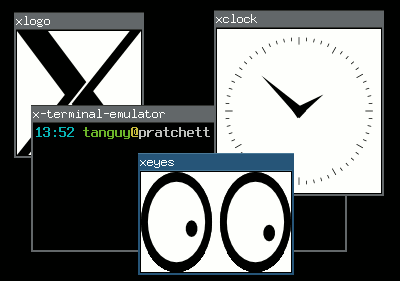
Floating and tiling window managers In the X Window System, the window manager is that piece of software that places your windows and allows you to move them, resize them, hide them, etc. If your windows have titles on top of them, with buttons to close them or reduce them, it is thanks to the window manager. There are two major types of window managers:
Floating window managers
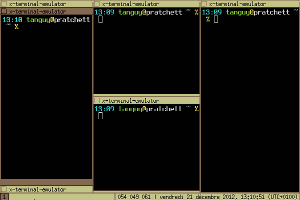
They are the most usual window managers, that allow you to place an size your windows freely on the screen, in a way where they are independent of each other, possibly overlapping, just as you would be able to place sheets of paper on your desk.
Tiling window managers
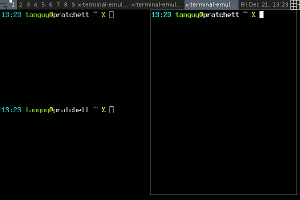
They are a more elitist type of window manager, that adjust the size and position of the windows so there is no overlapping and no space lost between windows, thus tiling the screen.
Four computer windows managed in floating mode

Floating window management

Four computer windows managed in tiling mode

Tiling window management

The frontier between these two types is not very tight, because some floating window managers have limited tiling features, and almost all the tiling window manager have floating modes for programs that are not adapted to tiling. For what it is worth, here is a report on my experience with three tiling window managers. Perhaps it may help people that are still hesitating to switch to tiling window management?Using tiling window managers Five years ago I switched to tiling window management, feeling that managing windows was the window manager's job (a quote from larswm). At that time, I started using wmii, then switched to awesome, and now I am trying i3.
Screenshot of the wmii window manager

wmii: three columns, first one stacked ()

Screenshot of the awesome window manager

awesome: fair layout

screenshot of the i3 window manager

i3: three containers, second one stacked, third one tabbed

For people in a hurry, here is a comparative table:
wmii awesome i3
Configuration Shell script Lua script config file
Scriptability any language, 9P-based Lua, API-based any language, socket-based
Layout simple, column-based automatic layout-based flexible, manual tiling-based
Multi-monitor sucks OK OK
Modern stuff XCB, Xft, notification area, dock windows XCB, Xft, notification area
Special features
  • tag-based workspace system
  • XDG convention to locate the config file
  • real framework for customization
  • powerful status bar
wmii wmii is a rather minimalist window manager which used to be part of the suckless project, but is now hosted at Google Code and seems to have lost all its documentation during the move (why is it that all the software I have seen hosted at Google Code or worst, at Launchpad, have almost not documentation, and never, ever a single screenshot?). It uses a column-based layout: you place windows in a number of columns, and for each column you can choose either vertical split, stacking or full column mode. This system is very simple to control flexible enough for most situations, but it does not allow for arbitrary tiling. It is fully scriptable in any language, in an interesting way: it exposes all its functions on a 9P virtual filesystem. In fact, wmii itself only implements window management functions, and all the user interaction logic takes place in a distinct script which calls that functions using that 9P filesystem. wmii comes with a default script, written in shell, which makes it a bit hard to extend, and slow if you start calling external programs such as grep, sed and co. You can script it in any language you like however, and there are some already made implementations in Ruby and Python IIRC. A special feature of wmii is that its workspaces are in fact tags, and that you can tag a window so that it will appear in several ones. While this is interesting, in practice I did not find much use for that feature. It is explicitly minimalist, and the developers used to impose themselves a limit on its numbers of lines of codes (not sure if this is still true with the switch to Google Code). While I was using it, it had no notification area, no support for Xft fonts and it sucked with multiple monitors, which is the reason I switched to awesome. awesome awesome is a very flexible window manager that provides advanced automatic layouts. It has become quite popular, and it has a very well documented wiki. It is not officially a tiling window manager but a framework window manager, and to emphasize on that it start in floating mode by default. I think most people use it in tiling mode however. It uses automatic layouts, that place your windows according to rules, for instance the fair layout, which tiles in columns and rows so that each window occupies a similar space. Thanks to that automation, this system is very easy to control and to get used to, and although it certainly does not allow arbitrary tiling, you can cycle between several available layouts which are suitable for most situations (most of them are entirely automatic, but some have parameters you can modify, such as the number and width of columns), and if you miss one, I think you can even code your own. It is fully scriptable using the Lua language. In fact, just as wmii, the user interaction logic is defined in the configuration file, which allows efficient customization. The Lua API is fully documented, and there is a series of useful libraries to extend the basic configuration in any way you like, which is why awesome calls itself a framework window manager . It is not designed to be minimalist, and it implements some modern stuff, such as using XCB rather than Xlib, a notification area, and specific support for dock or utility-type windows such as GIMP's tools. i3 i3 is a window manager inspired by wmii, although they do not have much in common in my opinion. for what I have seen, I think it would be closer the defunct Ion. It uses a layout based on manual splitting: as you open windows you can choose to split an existing window either vertically or horizontally, leading to arbitrarily complex layouts. In addition to that you can tab or stack windows in containers instead of splitting them. This system is very flexible but it requires more user intervention. In its standard mode of operation, i3 is simply configured in a regular way, which allows to customize the user interaction but not to script it in an arbitrary way. It offers an IPC system that can be used for that however, by the mean of a Unix socket, so it can actually be scripted in any language too if needed, although this possibility is probably not as popular and easy as with wmii and awesome. It implements modern features such as XCB, a notification area and a powerful status bar that uses the standard output of a dedicated program that is easy to replace by your own if you need.

Jamie McClelland: Live video streaming using vp8enc and webm on Debian

The vp8 video codec and webm container format (which are alternates for theora/ogg and h264/flv) are getting lots of attention, especially as more web browsers are supporting html5 - which includes a new video tag that plays video directly in a web page, rather than requiring a plugin. With Google fully behind these new formats (and converting YouTube videos) and even skype using vp8, it seems as though it could supplant h264/flash as the default video codec and container. After years under the boot of the proprietary flash video, this change could usher in a lot of exciting developments. While the shift in formats is also significant for on-demand video, I'm focusing on live streaming in this blog. There are a lot of tools needed to successfully stream a live video. Enough of them support vp8 and webm to create a live video stream, however, not all of the right versions of these tools have landed in Debian. Without any patches or changes, if you try to send a live video stream to icecast using vp8 encoding and webm, you'll get something like this:
0 jamie@animal:~$ gst-launch v4l2src ! video/x-raw,width=320,height=240 ! vp8enc ! webmmux ! shout2send ip=icecast.server port=8000 password=secret mount=/test.webm
WARNING: erroneous pipeline: could not link webmmux0 to shout2send0
1 jamie@animal:~$
I've documented the steps for patching/upgrading gstreamer and icecast2 so you can get a live video stream using vp8 encoding and the webmc container that originates on a Debian wheezy machine using gstreamer and streams to a Debian squeeze server running icecast2. On the workstation, you'll need libshout3 version 2.3.0 or higher, which is at the moment available in experimental and installable without bringing in any dependencies. In addition, you will need to bring in gstreamer1.0 from sid and you will need to rebuild gstreamer1.0-plugins-good after libshout-dev has been installed from experimental. So, begin by adding experimental and sid to your sources list by creating the files /etc/apt/sources.list.d/experimental.list and /etc/apt/sources/lists.d/sid.list with the respective contents:
deb http://mirror.cc.columbia.edu/debian experimental main
and
deb http://mirror.cc.columbia.edu/debian sid main 
deb-src http://mirror.cc.columbia.edu/debian sid main
In order to avoid upgrading your entire machine to sid (experimental packages won't upgrade by default), you'll also need to add the file /etc/apt/preferences.d/sid:
Package: *
Pin: release n=sid
Pin-Priority: 200
Then update and install:
apt-get update
apt-get install -t experimental libshout3
apt-get install gir1.2-clutter-gst-1.0 gir1.2-gst-plugins-base-1.0 gir1.2-gstreamer-1.0 gstreamer0.10-ffmpeg  gstreamer1.0-libav:amd64 gstreamer1.0-plugins-bad:amd64 gstreamer1.0-plugins-base:amd64 gstreamer1.0-plugins-base-apps gstreamer1.0-plugins-good:amd64 gstreamer1.0-pulseaudio:amd64 gstreamer1.0-tools gstreamer1.0-x:amd64 libclutter-gst-1.0-0:amd64 libgstreamer-plugins-bad1.0-0:amd64 libgstreamer-plugins-base1.0-0:amd64 libgstreamer-plugins-base1.0 libgstreamer1.0-0:amd64 libgstreamer1.0
Fortunately, the version of gstreamer1.0-plugins-good in sid includes a fix for a bug patched on November 31, 2012 that allows the use of the webm container. However, for it to work properly gstreamer1.0-plugins-good has to be built against libshout version 2.3.0 or higher (which is in experimental, not sid). Therefore, you have install libshout-dev from experimental and then rebuild gstreamer1.0-plugins-good.
sudo apt-get build-dep gstreamer1.0-plugins-good
sudo apt-get -t experimental install libshout-dev
apt-get source gstreamer1.0-plugins-good
cd gst-plugins-good1.0-1.0.4
dch -v 1.0.4-1+webmmux
fakeroot debian/rules binary
sudo dpkg -i ../gstreamer1.0-plugins-good_1.0.4-1+webmmux_amd64.deb
Now if you try the command, things should work on the client side. When streaming to an icecast2 server running squeeze, I don't get any errors, however, when opening the streaming page via the icecast URL, there is a play button, which can be clicked, but no picture is shown. That's because the version of Icecast2 in squeeze doesn't support either vp8 or webm. On the server side, you will need icecast2 version 2.4beta or higher. This version hasn't landed anywhere in Debian as of this writing. However, you can build it from source by following these steps (the patches I'm removing have all been applied to the new upstream version).
apt-get source icecast2
wget http://downloads.xiph.org/releases/icecast/icecast-2.4-beta.tar.gz
tar -xzvf icecast-2.4-beta.tar.gz
cp -r icecast2-2.3.2/debian icecast-2.3.99.0/
cd icecast-2.3.99.0/
rm debian/patches/ 1001_autotools_avoid_debian-subdir.patch,1002_add_missing_xspf_file,1003_fix_memory_leak.patch,series 
dch -v 2.3.99.0-1
fakeroot debian/rules binary
When you install it, be sure to replace the icecast2.xml configuration file and update it with your server-specific customizations. Hopefully this version of icecast2 will make it to experimental soon. And now... you can successfully stream via:
gst-launch-1.0 v4l2src ! video/x-raw,width=320,height=240 ! vp8enc ! webmmux !  shout2send ip=icecast.server port=8000 password=secret mount=/test.webm
If you want full audio and video, here's a more complete pipeline: gst-launch-1.0 v4l2src ! queue ! video/x-raw,width=320,height=240 ! tee name=tscreen ! queue ! autovideosink tscreen. ! queue ! videorate ! video/x-raw,framerate=25/2 ! queue ! vp8enc ! queue ! webmmux name=mux pulsesrc ! queue ! audioconvert ! vorbisenc ! queue ! queue ! mux. mux. ! queue ! shout2send ip=hobo port=8000 mount=jamie.webm password=secret Unfortunately, since I'm not sure how to deal with the python2.7 vs python3 dependecies, my elegant mobi python script that creates this pipeline for you using python-gtk as been reduced to a crude bash script. Another item on the todo list is opus audio encoding. gstreamer doesn't seem able to use opus in the webm container (although it seems to work with ogg). In the course of this research I found directions for getting gstreamer-1.0 installed on debian independent of packages installed on the system. If you follow the directions above, these steps should not be necessary. I'm including in case you need the latest sources for another reason. Extra steps I needed were:

26 December 2012

Gunnar Wolf: Brazilian electronic booths hacked in a real election Surprised, anyone?

Doing my regular news scan, I stumbled across this: Hacker reveals in Rio how he rigged an election (in Portuguese; you can try the Google-translated version). Why am I reposting this? Because, even after the reported studies by Diego Aranha and the information disclosure exploited by Sergio Freitas, Brazil is still portrayed as the biggest example on how electronic voting can be 100% secure and tamper-proof. Well, in this case, Rangel (his full name ahs not yet been disclosed), a 19 year old hacker, not only demonstrated how elections could be rigged, but admitted on doing so together with a small group, and even pointed at who was benefitted from this. Rangel's attack was done during the transmission phase After ~50% of the electoral results had been sent over the Oi network. And yes, the provider will most likely close the hole that was pointed at, but this basically shows (again!) that no system can be 100% tamperproof, and that the more electronic devices are trusted for fundamental democratic processes, the more we as a society will be open to such attacks. The security-minded among us will not doubt even for a second that, as this attack was crafted, new attacks will continue to be developed. And while up to some years ago the attack surface was quite smaller (i.e. booths didn't have a communications phase, just stored the votes, and communication was done by personal means), earlier booths have been breached as well. And so will future booths be breached. So, the news of this attack are indeed very relevant for the field. The presentation I am quoting was held around two weeks ago And December will surely dillute attention from this topic. Anyway, I will look for further details on the mechanism that was used, as well as to the process that follows in the TSE (Supreme Electoral Tribunal). I hope we have news to talk about soon!

Gregor Herrmann: goodbye nanoblogger, hello chronicle

after having used nanoblogger since august 2005, I decided to switch my blog engine. the reason was mainly that nanoblogger gets terribly slow with more than a handful of entries. inspired by nhandler, I took another look at chronicle, which had caught my interest before already. it's simple, produces static html pages from text files that I can keep in git, & it's written in perl :) let's see how many years chronicle will accompany me

Russ Allbery: Review: Code Name Verity

Review: Code Name Verity, by Elizabeth Wein
Publisher: Hyperion
Copyright: 2012
ISBN: 1-4231-5219-0
Format: Hardcover
Pages: 339
I don't read very much historical fiction, and I mostly avoid historical fiction from the 20th century. I'm particularly uninterested in reading about Nazis after the saturation programming in places like the History Channel and the number of alternative histories that involve them. I've read enough about World War II to last me a lifetime, and I also avoid books about people being tortured. When Code Name Verity showed up in reviews I read, I was therefore rather dubious: a book set during World War II featuring someone being tortured by Nazis seemed unlikely to appeal to me. But after two steller reviews from reviewers who don't give out top marks easily, I bought a copy with some trepidation. That was one of the best decisions that I've ever made. This is the sort of book that is severely hurt by spoilers. In a moment, I'm going to attempt the impossible dance of giving you a feeling for the book and why I love it so much without spoiling anything. But if you trust my taste in books, let me give you a short warning, and then I suggest you stop reading this review and just go read the book. I avoided as much information about it as possible before reading it and never regretted it. The short warning: This is a book that hurts. lightreads describes it as searing. I think that's a very good term. It's not that it's gruesome; there is torture, but most of it happens off-camera and the focus is on emotional reactions rather than physical description. But the story sneaks up on you with sudden flashes of insight, and parts of it are a gut punch. It's the kind of book that had me in tears for a quarter of the book. It's the kind of book that nearly has me in tears remembering it to write this review. So, you may want to save this one until you are in the mood for that kind of book. But, that warning aside, Code Name Verity is unspeakably brilliant. This is one of the best books I have ever read in my life. I will try to explain more, but if your tastes mostly align with mine, just stop here and go read it.
I AM A COWARD.
That's how Code Name Verity starts: the words of a captured female British agent in Nazi-occupied France. The book opens near the end of her interrogation (and torture). The important information has already been discussed, and now she's likely destined to be executed. For the last set of wireless codes, she's bought herself paper and two weeks to write, and is expected to record everything that she remembers about the British war effort. The pages of this book are that writing (quite literally in the frontpiece and part of the cover, which are beautifully designed). The way she chooses to approach that task is to tell a story about the person whose ID she had when she was captured, a story that becomes the recounting of how she ended up where she is. That story is the heart and soul of this book. It's about the war, yes, and about British operations during the war. But it's a story about airplanes, too, and about the Air Transport Auxiliary, and about women finding a place in the war (with just a bit of a fictional push, detailed by the author in an afterword, although not quite as much of one as you might expect). And it's a story of a friendship, an amazing friendship of two women who would have never met each other if it weren't for the war and its leveling and transcending of normal social separations. It's a story about a friendship of opposites, about two people who find ways to support each other, about two people who see the best in each other. This is quite possibly the best novel about a friendship that I've ever read. This story, by itself, is wonderful. The tone starts light and irreverant, with an undertone of complex despair and defiance that's hard to analyze. One wonders where it's going and whether any of this is relevant, and then it slowly draws in the reader and becomes utterly compelling. But that's only the start of what this book has in store. Wein does some amazing structural things here that turn and broaden and transform, things that absolutely should not be spoiled because experiencing them without advance knowledge is a breathtaking reading experience. And all the parts play off against each other with a confidence that lets Wein understate and even hint at deeper emotions and be completely confident that the reader is right where she wants them to be. It's not a one-trick book, nor is it one that's going to lose you in the structure, but it's a book that opens up layers as you read it and tempts you re-read it immediately with new eyes once you finish it. Except it hurts so much that re-reading it immediately might be more than your heart can take. Perhaps the most astonishing part of this book is the way it hits its emotional notes. It is a masterpiece of showing rather than telling. Wein undersells the emotions in exactly the right way to make them stronger and more effective, avoiding, in the process, multiple traps that I've rarely seen avoided. The ending is absolutely note-perfect to everything that's happened before in a way that I thought, five pages from the end, was going to be impossible to pull off, and gets even better the more that one thinks about it. And the whole book is like that. It's been a month and a half since I read this book, in part because I wasn't sure how to write this review, and I did not, in fact, manage to finish writing it without crying. If I didn't have to be on a train in eight hours from when I'm writing this (a few days before I post it), I'd start reading it again right now. I can't talk about most of the things that make it amazing with anyone who hasn't read it, but it really is that good. Rating: 10 out of 10

Russ Allbery: git-pbuilder 1.29

git-pbuilder is a shell script suitable for use as the builder command in git-buildpackage that simplifies using pbuilder, cowbuilder, or qemubuilder to build packages in a chroot. It's now part of the git-buildpackage Debian package, but I maintain it somewhat separately. This version supports a new environment variable, GIT_PBUILDER_OUTPUT_DIR, that can be set to override the default output location of ".." (the parent directory). It also changes the script to be a bash script and uses arrays to handle the options passed to the builder command so that shell metacharacters in the GIT_PBUILDER_OPTIONS environment variable will hopefully be handled correctly. As part of that change, it also tries to escape any options that will be passed to --debbuildopts to hopefully protect them from the additional layer of shell parsing that they'll be subject to. Thanks to Guido G nther and paul cannon for the patches. I hate having to make the script bash-specific, but trying to get the shell expansion right is otherwise a huge headache. That probably means that it's outlived the usefulness of the original implementation language (which was shell only because this started life as a quick hack). I should probably take the time to rewrite it in either Perl (which I know best) or Python (which is the language the rest of git-buildpackage is written in). But that's for another day. (Here's an excellent case in point for why one shouldn't embed language-specific extensions in the name of an executable that's part of a user interface or configuration interface.) You can get the latest version from my scripts page.

25 December 2012

Petter Reinholdtsen: How to backport bitcoin-qt version 0.7.2-2 to Debian Squeeze

Let me start by wishing you all marry Christmas and a happy new year! I hope next year will prove to be a good year. Bitcoin, the digital decentralised "currency" that allow people to transfer bitcoins between each other with minimal overhead, is a very interesting experiment. And as I wrote a few days ago, the bitcoin situation in Debian is about to improve a bit. The new debian source package (version 0.7.2-2) was uploaded yesterday, and is waiting in the NEW queue for one of the ftpmasters to approve the new bitcoin-qt package name. And thanks to the great work of Jonas and the rest of the bitcoin team in Debian, you can easily test the package in Debian Squeeze using the following steps to get a set of working packages:
git clone git://git.debian.org/git/collab-maint/bitcoin
cd bitcoin
DEB_MAINTAINER_MODE=1 DEB_BUILD_OPTIONS=noupnp fakeroot debian/rules clean
DEB_BUILD_OPTIONS=noupnp git-buildpackage --git-ignore-new
You might have to install some build dependencies as well. The list of commands should give you two packages, bitcoind and bitcoin-qt, ready for use in a Squeeze environment. Note that the client will download the complete set of bitcoin "blocks", which need around 5.6 GiB of data on my machine at the moment. Make sure your ~/.bitcoin/ directory have lots of spare room if you want to download all the blocks. The client will warn if the disk is getting full, so there is not really a problem if you got too little room, but you will not be able to get all the features out of the client. As usual, if you use bitcoin and want to show your support of my activities, please send Bitcoin donations to my address 15oWEoG9dUPovwmUL9KWAnYRtNJEkP1u1b.

Next.

Previous.