Search Results: "ms"

21 January 2016

Jonathan Dowland: Network Attached Storage

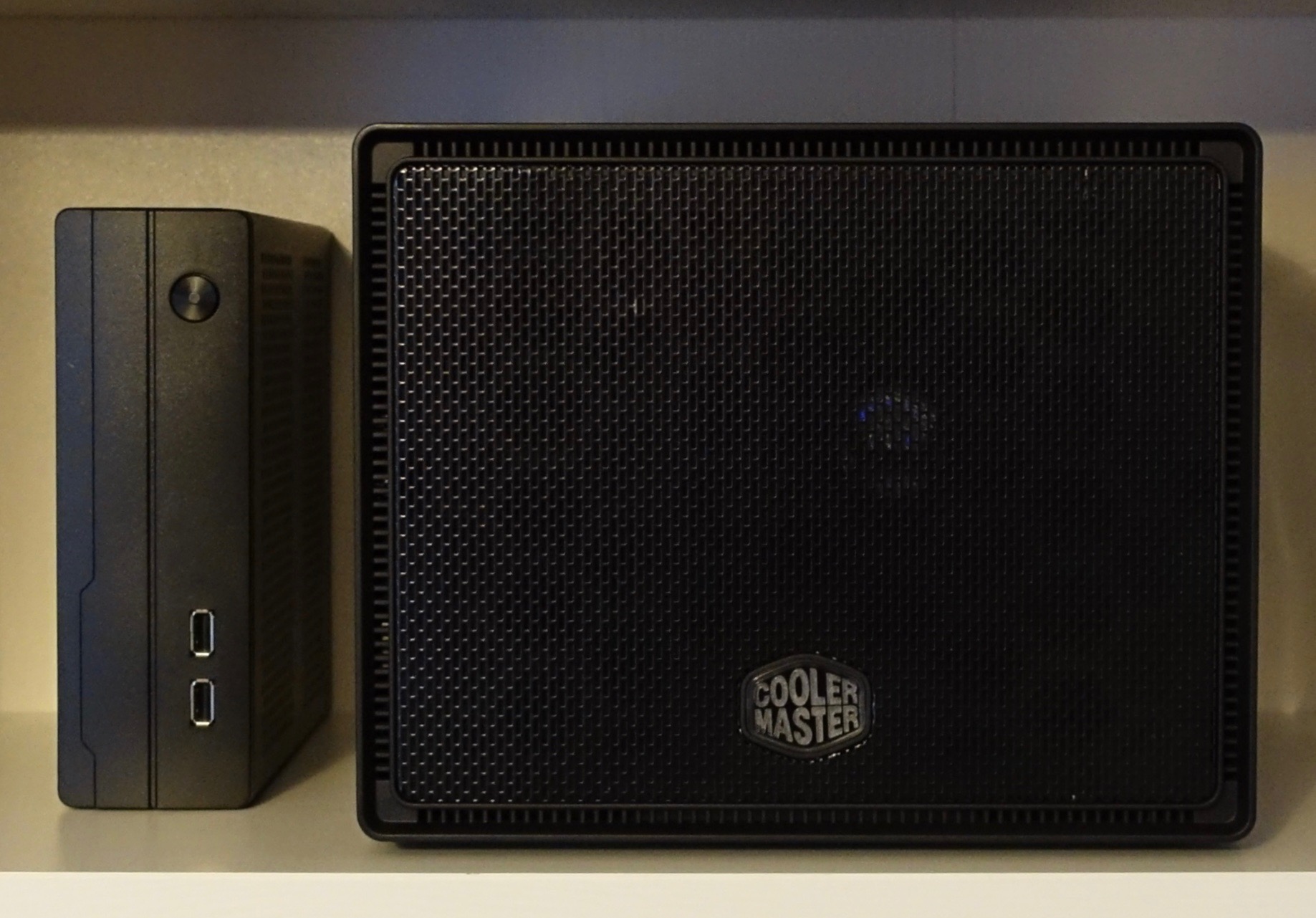
little and large little and large

I've just upgraded my home Network Storage box. Until now, it was very discreet, about the size of a car radio. It lived on one of my bookcases and I was very happy with it but it could only take 2.5" sized hard drives and I've outgrown what you can fit on them. I've ended up moving to 2x4T 3.5" drives, a Coolermaster Elite 110 case and re-using the mainboard/CPU and RAM. This is hopefully enough capacity that I don't need to look at another upgrade for a few years, and the case could take more drives if I need it to. The Elite 110 is - by Mini-ITX case terms - pretty small, but still 6 times larger in volume than the old case. In the consumer NAS market, there are plenty of appliances that takes two 3.5" drives and are much smaller than that (such as the WD MyBook Duo, or Synology DS214). Unfortunately I could not find any cases that were of this size for a DIY build. Did I miss anything obvious? (As to why I choose DIY, that could be the subject for a future post.) The full boring details of the build are on the NAS system page.

Jan Wagner: Using nginx as reverse proxy (for containered Ghost)

In some cases it might be a good idea to use a reverse proxy in front of a web application. Nginx is a very common solution for this scenario these days. As I started with containers for some of my playgrounds, I decided to go this route.

Container security When looking around to implement a nginx in front of a Docker web application, in most cases nginx itself is also a Docker container.

In my eyes Docker containers have a huge disadvantage. To get updated software (at least security related) into production, you have to hope that your container image is well maintained or you have to care about it yourself. If this not the case, you might worry.
As long as you don't have container solutions deployed in large scale (and make use of automatically rebuilding and deploying your container images) I would recommend to keep the footprint of your containered applications as small as possible from security point of view. So I decided to run my nginx on the same system where the Docker web applications are living, but you can also have it placed on a system in front of your container systems. Updates are supplied via usual Distribution security updates.

Installing nginx
# aptitude install nginx
I don't will advise you on the usual steps about setting up nginx, but will focus on things required to proxy into your container web application.

Configuration of nginx As our Docker container for Ghost exposes port 2368, we need to define our upstream server. I've done that in conf.d/docker-ghost.conf.
upstream docker-ghost    
  server localhost:2368;
 
The vHost configuration can be taken into /etc/nginx/nginx.conf but I would recommend to use a config file in /etc/nginx/sites-available/ instead.
server    
  listen 80;
  server_name log.cyconet.org;
  include /etc/nginx/snippets/ghost_vhost.conf;
  location /  
    proxy_pass                          http://docker-ghost;
    proxy_set_header  Host              $http_host;   # required for docker client's sake
    proxy_set_header  X-Real-IP         $remote_addr; # pass on real client's IP
    proxy_set_header  X-Forwarded-For   $proxy_add_x_forwarded_for;
    proxy_set_header  X-Forwarded-Proto $scheme;
    proxy_read_timeout                  900;
   
 
Let's enable the configuration and reload nginx:
# ln -s ../sites-available/ghost.conf /etc/nginx/sites-enabled/ghost.conf && \
 service nginx configtest && service nginx reload

Going further This is a very basic configuration. You might think about delivering static content (like images) directly from your Docker data volume, caching and maybe encryption.

Zlatan Todori : Two short notes

First: I am in Heidelberg next ~10 days so if anyone wants to meet up for a beer, keysigning and chats about FLOSS world, I am very happy to do that. Mail or ping me! Second: After partnership with Microsoft, I lost interest and a bit of trust in Linux Foundation. After this move I am in total distrust with them and don't want them even represent Linux at all. If you really care about FLOSS world and your community (thus being socially responsible person) please do donate to Software Freedom Conservancy.

Jonas Smedegaard: IT@school

Siri and I are on a journey through India and Nepal, with the aim of learning about needs of Debian derivatives, to improve Debian and encourage closer integration.

Distribution IT@school is a distribution originally based on Debian, later rebased on Ubuntu. Next release will possibly again be a direct derivative of Debian, or maybe even - time will tell - a Debian pure blend.

Aim is education As its name indicates, IT@school is targeted at schools: The system is used in 8th - 10th grades of most (or all?) public primary schools in Kerala, Together with KEK members Anto and Fayad, Siri and I met with former and current key participants in the project where we learned about its history and current status, and discussed some differences between Ubuntu and Debian. IT@school has a strong emphasis on the educational aspect, arguably setting it apart from Skolelinux/DebianEdu which emphasizes the technical aspect of relieving teachers from admin tasks. In the early years of deployment the project faced many hardware issues - e.g. in getting sound cards to work. This was seen not as problems but as beneficial learning for the teachers facing those issues. Kerala public school system has set the standard for other states in India, but sadly political support within the state has been weak in recent years. It is hoped that next election - this April - will bring a positive change.

School book IT@school is accompagnied by a school book written specifically for use of the included tools. No explicit license is applied to the book (which means it defaults to classic copyright). Possibly it will get Creative Commons licensed. If the school book gets a DFSG-free license, several collaboration opportunities emerge: Currently the book is drafted in LibreOffice but then - due to state procedures - finalized with PageMaker. Would be interesting to setup an alternate process using only Free tools - either with Scribus or XeLaTeX. An important detail here is to ensure that the process supports malayalam script.

Curriculum Work is in progress mapping FLOSS tools to the state curriculum. I recommended to share that work publicly with a Free license, to encourage comparisons across countries, and invite collaboration e.g. with Skolelunux/DebianEdu.

Blend for SBCs Some Kerala higher education schools (sorry, don't remember which) have bought some thousands of RaspberryPi2. I suggested to create a Debian Blend for SBCs (Single Board Computers) - we will see what comes of that idea

Blend for education I also suggested to make a Debian blend around IT@school distribution itself, with its strong focus on educational content - i.e. not just as addon to technical tools but the primary purpose pulling in tools as needed.

Russell Coker: Finding Storage Performance Problems

Here are some basic things to do when debugging storage performance problems on Linux. It s deliberately not an advanced guide, I might write about more advanced things in a later post. Disk Errors When a hard drive is failing it often has to read sectors several times to get the right data, this can dramatically reduce performance. As most hard drives aren t monitored properly (email or SMS alerts on errors) it s quite common for the first notification about an impending failure to be user complaints about performance. View your kernel message log with the dmesg command and look in /var/log/kern.log (or wherever your system is configured to store kernel logs) for messages about disk read errors, bus resetting, and anything else unusual related to the drives. If you use an advanced filesystem like BTRFS or ZFS there are system commands to get filesystem information about errors. For BTRFS you can run btrfs device stats MOUNTPOINT and for ZFS you can run zpool status . Most performance problems aren t caused by failing drives, but it s a good idea to eliminate that possibility before you continue your investigation. One other thing to look out for is a RAID array where one disk is noticeably slower than the others. For example if you have a RAID-5 or RAID-6 array every drive should have almost the same number of reads and writes, if one disk in the array is at 99% performance capacity and the other disks are at 5% then it s an indication of a failing disk. This can happen even if SMART etc don t report errors. Monitoring IO The iostat program in the Debian sysstat package tells you how much IO is going to each disk. If you have physical hard drives sda, sdb, and sdc you could run the command iostat -x 10 sda sdb sdc to tell you how much IO is going to each disk over 10 second periods. You can choose various durations but I find that 10 seconds is long enough to give results that are useful. By default iostat will give stats on all block devices including LVM volumes, but that usually gives too much data to analyse easily. The most useful things that iostat tells you are the %util (the percentage utilisation anything over 90% is a serious problem), the reads per second r/s , and the writes per second w/s . The parameters to iostat for block devices can be hard drives, partitions, LVM volumes, encrypted devices, or any other type of block device. After you have discovered which block devices are nearing their maximum load you can discover which of the partitions, RAID arrays, or swap devices on that disk are causing the load in question. The iotop program in Debian (package iotop) gives a display that s similar to that of top but for disk io. It generally isn t essential (you can run ps ax grep D to get most of that information), but it is handy. It will tell you which programs are causing IO on a busy filesystem. This can be good when you have a busy system and don t know why. It isn t very useful if you have a system that is used for one task, EG a database server that is known to be busy doing database stuff. It s generally a good idea to have sysstat and iotop installed on all systems. If a system is experiencing severe performance problems you might not want to wait for new packages to be installed. In Debian the sysstat package includes the sar utility which can give historical information on system load. One benefit of using sar for diagnosing performance problems is that it shows you the time of day that has the most load which is the easiest time to diagnose performance problems. Swap Use Swap use sometimes confuses people. In many cases swap use decreases overall disk use, this is the design of the Linux paging algorithms. So if you have a server that accesses a lot of data it might swap out some unused programs to make more space for cache. When you have multiple virtual machines on one system sharing the same disks it can be difficult to determine the best allocation for RAM. If one VM has some applications allocating a lot of RAM but not using it much then it might be best to give it less RAM and force those applications into swap so that another VM can cache all the data it accesses a lot. The important thing is not the amount of swap that is allocated but the amount of IO that goes to the swap partition. Any significant amount of disk IO going to a swap device is a serious problem that can be solved by adding more RAM. Reads vs Writes The ratio of reads to writes depends on the applications and the amount of RAM. Some applications can have most of their reads satisfied from cache. For example an ideal configuration of a mail server will have writes significantly outnumber reads (I ve seen ratios of 5:1 for writes to reads on real mail servers). Ideally a mail server will cache all new mail for at least an hour and as the most prolific users check their mail more frequently than that most mail will be downloaded before it leaves the cache. If you have a mail server with reads outnumbering writes then it needs more RAM. RAM is cheap nowadays so if you don t want to compete with Gmail it should be cheap to buy enough RAM to cache all recent mail. The ratio of reads to writes is important because it s one way of quickly determining if you have enough RAM and adding RAM is often the cheapest way of improving performance. Unbalanced IO One common performance problem on systems with multiple disks is having more load going to some disks than to others. This might not be a problem (EG having cron jobs run on disks that are under heavy load while the web server accesses data from lightly loaded disks). But you need to consider whether it s desirable to have some disks under more load than others. The simplest solution to this problem is to just have a single RAID array for all data storage. This is also the solution that gives you the maximum available disk space if you use RAID-5 or RAID-6. A more complex option is to use some SSDs for things that require performance and disks for things that don t. This can be done with the ZIL and L2ARC features of ZFS or by just creating a filesystem on SSD for the data that is most frequently accessed. What Did I Miss? I m sure that I missed something, please let me know of any other basic things to do or suggestions for a post on more advanced things.

20 January 2016

Matthew Garrett: Linux Foundation quietly drops community representation

The Linux Foundation is an industry organisation dedicated to promoting, protecting and standardising Linux and open source software[1]. The majority of its board is chosen by the member companies - 10 by platinum members (platinum membership costs $500,000 a year), 3 by gold members (gold membership costs $100,000 a year) and 1 by silver members (silver membership costs between $5,000 and $20,000 a year, depending on company size). Up until recently individual members ($99 a year) could also elect two board members, allowing for community perspectives to be represented at the board level.

As of last Friday, this is no longer true. The by-laws were amended to drop the clause that permitted individual members to elect any directors. Section 3.3(a) now says that no affiliate members may be involved in the election of directors, and section 5.3(d) still permits at-large directors but does not require them[2]. The old version of the bylaws are here - the only non-whitespace differences are in sections 3.3(a) and 5.3(d).

These changes all happened shortly after Karen Sandler announced that she planned to stand for the Linux Foundation board during a presentation last September. A short time later, the "Individual membership" program was quietly renamed to the "Individual supporter" program and the promised benefit of being allowed to stand for and participate in board elections was dropped (compare the old page to the new one). Karen is the executive director of the Software Freedom Conservancy, an organisation involved in the vitally important work of GPL enforcement. The Linux Foundation has historically been less than enthusiastic about GPL enforcement, and the SFC is funding a lawsuit against one of the Foundation's members for violating the terms of the GPL. The timing may be coincidental, but it certainly looks like the Linux Foundation was willing to throw out any semblance of community representation just to ensure that there was no risk of someone in favour of GPL enforcement ending up on their board.

Much of the code in Linux is written by employees paid to do this work, but significant parts of both Linux and the huge range of software that it depends on are written by community members who now have no representation in the Linux Foundation. Ignoring them makes it look like the Linux Foundation is interested only in promoting, protecting and standardising Linux and open source software if doing so benefits their corporate membership rather than the community as a whole. This isn't a positive step.

[1] Article II of the bylaws
[2] Other than in the case of the TAB representative, an individual chosen by a board elected via in-person voting at a conference

comment count unavailable comments

Steve Kemp: So life in Finland goes on

So after living here in Finland for 6 months I've now bought a flat. We have a few days to sort out mortgage paperwork, and assuming there are no problems we'll be moving into the new place on/around the 1st of March. Finally I'll be living in Finland, with a sauna of my very own. Interesting times. In more developer-friendly news I made a new release of Lumail with the integrated support for IMAP. Let us hope people like it.

Craig Sanders: lm-sensors configs for Asus Sabertooth 990FX and M5A97 R2.0

I had to replace a motherboard and CPU a few days ago (bought an Asus M5A97 R2.0), and wanted to get lm-sensors working properly on it. Got it working eventually, which was harder than it should have been because the lm-sensors site is MIA, seems to have been rm -rf -ed. For anyone else with this motherboard, the config is included below. This inspired me to fix the config for my Asus Sabertooth 990FX motherboard. Also included below. To install, copy-paste to a file under /etc/sensors.d/ and run sensors -s to make sensors evaluate all of the set statemnents.
# Asus M5A97 R2.0
# based on Asus M5A97 PRO from http://blog.felipe.lessa.nom.br/?p=93
chip "k10temp-pci-00c3"
     label temp1 "CPU Temp (rel)"
chip "it8721-*"
     label  in0 "+12V"
     label  in1 "+5V"
     label  in2 "Vcore"
     label  in2 "+3.3V"
     ignore in4
     ignore in5
     ignore in6
     ignore in7
     ignore fan3
     compute in0  @ * (515/120), @ / (515/120)
     compute in1  @ * (215/120), @ / (215/120)
     label temp1 "CPU Temp"
     label temp2 "M/B Temp"
     set temp1_min 30
     set temp1_max 70
     set temp2_min 30
     set temp2_max 60
     label fan1 "CPU Fan"
     label fan2 "Chassis Fan"
     label fan3 "Power Fan"
     ignore temp3
     set in0_min  12 * 0.95
     set in0_max  12 * 1.05
     set in1_min  5 * 0.95
     set in1_max  5 * 1.05
     set in3_min  3.3 * 0.95
     set in3_max  3.3 * 1.05
     ignore intrusion0
#Asus Sabertooth 990FX
# modified from the version at http://www.spinics.net/lists/lm-sensors/msg43352.html
chip "it8721-isa-0290"
# Temperatures
    label temp1  "CPU Temp"
    label temp2  "M/B Temp"
    label temp3  "VCORE-1"
    label temp4  "VCORE-2"
    label temp5  "Northbridge"         # I put all these here as a reference since the
    label temp6  "DRAM"                # Asus Thermal Radar tool on my Windows box displays
    label temp7  "USB3.0-1"            # all of them.
    label temp8  "USB3.0-2"            # lm-sensors ignores all but the CPU and M/B temps.
    label temp9  "PCIE-1"              # If that is really what they are.
    label temp10 "PCIE-2"
    set temp1_min 0
    set temp1_max 70
    set temp2_min 0
    set temp2_max 60
    ignore temp3
# Fans
    label fan1 "CPU Fan"
    label fan2 "Chassis Fan 1"
    label fan3 "Chassis Fan 2"
    label fan4 "Chassis Fan 3"
#    label fan5 "Chassis Fan 4"      # lm-sensor complains about this
    ignore fan2
    ignore fan3
    set fan1_min 600
    set fan2_min 600
    set fan3_min 600
# Voltages
    label in0 "+12V"
    label in1 "+5V"
    label in2 "Vcore"
    label in3 "+3.3V"
    label in5 "VDDA"
    compute  in0  @ * (50/12), @ / (50/12)
    compute  in1  @ * (205/120), @ / (205/120)
    set in0_min  12 * 0.95
    set in0_max  12 * 1.05
    set in1_min  5 * 0.95
    set in1_max  5 * 1.05
    set in2_min  0.80
    set in2_max  1.6
    set in3_min  3.20
    set in3_max  3.6
    set in5_min  2.2
    set in5_max  2.8
    ignore in4
    ignore in6
    ignore in7
    ignore intrusion0
chip "k10temp-pci-00c3"
     label temp1 "CPU Temp"
lm-sensors configs for Asus Sabertooth 990FX and M5A97 R2.0 is a post from: Errata

18 January 2016

Norbert Preining: Debian/TeX Live 2015.20160117-1 and biber 2.3-1

About one month has passed and here is the usual updated of TeX Live packages for Debian, this time also with an update to biber to accompany the updated version of biblatex. Nothing spectacular here besides fixes for some broken links of fonts. Debian - TeX Live 2015 As a bonus this time, I provide (auto-generated) links to the packages on CTAN, so that one can check the package descriptions and manuals. Updated packages academicons, acro, apnum, babel, babel-french, babel-icelandic, babel-spanish, babel-vietnamese, bclogo, biblatex, bibtexperllibs, calxxxx-yyyy, chemformula, chemgreek, chess-problem-diagrams, chickenize, cjk-gs-integrate, cmcyr, csplain, datatool, dvips, embrac, enotez, etex-pkg, fibeamer, fithesis, invoice, isodoc, l3kernel, latexdiff, luamplib, mathastext, mcf2graph, media9, nameauth, newpx, newtx, newtxsf, nucleardata, paralist, pdftex, pgfplots, pict2e, pmxchords, prftree, ptex, reledmac, schwalbe-chess, siunitx, tempora, tetex, tex4ht, texinfo, texlive-cz, texlive-docindex, texlive-scripts, thalie, thuthesis, tkz-orm, uantwerpendocs, unicode-data, xassoccnt, xespotcolor. New packages continue, ecobiblatex, econometrics, getitems, librebodoni, lshort-estonian, moodle, nimbus15, seuthesix, uantwerpendocs. Enjoy.


17 January 2016

Lars Wirzenius: Obnam survey (January 2016)

Survey URL: http://goo.gl/forms/hdoQZKjs80 I am doing an Obnam survey. The goal of this survey is to collect feedback from those who use Obnam, or have tried it, to guide the project in the future. The survey will run until February 29, 2016. Goals: All questions in this survey are optional. I do not collect personal information at all. The survey is implemented using Google Forms, and so Google probably collects some information; sorry. You don't need to log in to Google to fill in the survey, though, and I encourage you to use all the privacy protection tools you have. I hope as many Obnam users as possible fill in the survey.

16 January 2016

Russ Allbery: podlators 4.05

Getting all the details right in a highly portable Perl core module that tries to support very old versions of Perl is tricky! And I clearly didn't do a good job of documenting previous decisions. This release reintroduces pod2man.PL and pod2text.PL generator scripts to get the right Perl invocation. I thought ExtUtils::MakeMaker and Module::Build now took care of this, but apparently they only take care of this on UNIX platforms, not on the non-UNIX platforms that require special execution logic. Thanks to a patch by Niko Tyni, this version of Pod::Man also falls back to non-utf8 behavior if the utf8 option is specified but the Encode module doesn't exist. This can help with some cross-build situations. I also finally figured out the problem with occasional test failures on random platforms: I was trying to clean up the temporary directory used by tests after each test, but the CPAN test systems run all the tests in parallel, so the tests were racing with each other. This release just leaves the temporary directory around and deletes it in make clean. You can get the latest version from the podlators distribution page.

Mike Hommey: Announcing git-cinnabar 0.3.1

This is a brown paper bag release. It turns out I managed to break the upgrade
path only 10 commits before the release. What s new since 0.3.0?

15 January 2016

Lars Wirzenius: Obnam 1.19 released (backup software)

I have just released version 1.19 of Obnam, the backup program. See the website at http://obnam.org for details on what the program does. The new version is available from git (see http://git.liw.fi) and as Debian packages from http://code.liw.fi/debian, and uploaded to Debian, and soon in unstable. The NEWS file extract below gives the highlights of what's new in this version. NOTE: Obnam has an EXPERIMENTAL repository format under development, called green-albatross. It is NOT meant for real use. It is likely to change in incompatible ways without warning. Do not use it unless you're willing to lose your backup. Version 1.19, released 2016-01-15 Bug fixes: Improvements to the manual: Improvements to functionality:

Ian Wienand: Australia, ipv6 and dd-wrt

It seems that other than Internode, no Australian ISP has any details at all about native IPv6 deployment. Locally I am on Optus HFC, which I believe has been sold to the NBN, who I believe have since discovered that it is not quite what they thought it was. i.e. I think they have more problems than rolling out IPv6 and I won't hold my breath. So the only other option is to use a tunnel of some sort, and it seems there is really only one option with local presence via SixXS. There are other options, notably He.net, but they do not have Australian tunnel-servers. SixXS is the only one I could find with a tunnel in Sydney. So first sign up for an account there. The process was rather painless and my tunnel was provided quickly. After getting this, I got dd-wrt configured and working on my Netgear WNDR3700 V4. Here's my terse guide, cobbled together from other bits and pieces I found. I'm presuming you have a recent dd-wrt build that includes the aiccu tool to create the tunnel, and are pretty familiar with logging into it, etc. Firstly, on dd-wrt make sure you have JFFS2 turned on for somewhere to install scripts. Go Administration, JFFS2 Support, Internal Flash Storage, Enabled. Next, add the aiccu config file to /jffs/etc/aiccu.conf
# AICCU Configuration
# Login information
username USERNAME
password PASSWORD
# Protocol and server listed on your tunnel
protocol tic
server tic.sixxs.net
# Interface names to use
ipv6_interface sixxs
# The tunnel_id to use
# (only required when there are multiple tunnels in the list)
#tunnel_id <your tunnel id>
# Be verbose?
verbose false
# Daemonize?
daemonize true
# Require TLS?
requiretls true
# Set default route?
defaultroute true
Now you can add a script to bring up the tunnel and interface to /jffs/config/sixxs.ipup (make sure you make it executable) where you replace your tunnel address in the ip commands.
# wait until time is synced
while [  date +%Y  -eq 1970 ]; do
sleep 5
done
# check if aiccu is already running
if [ -n " ps grep etc/aiccu grep -v grep " ]; then
aiccu stop
sleep 1
killall aiccu
fi
# start aiccu
sleep 3
aiccu start /jffs/etc/aiccu.conf
sleep 3
ip -6 addr add 2001:....:....:....::/64 dev br0
ip -6 route add 2001:....:....:....::/64 dev br0
sleep 5
#### BEGIN FIREWALL RULES ####
WAN_IF=sixxs
LAN_IF=br0
#flush tables
ip6tables -F
#define policy
ip6tables -P INPUT DROP
ip6tables -P FORWARD DROP
ip6tables -P OUTPUT ACCEPT
# Input to the router
# Allow all loopback traffic
ip6tables -A INPUT -i lo -j ACCEPT
#Allow unrestricted access on internal network
ip6tables -A INPUT -i $LAN_IF -j ACCEPT
#Allow traffic related to outgoing connections
ip6tables -A INPUT -i $WAN_IF -m state --state RELATED,ESTABLISHED -j ACCEPT
# for multicast ping replies from link-local addresses (these don't have an
# associated connection and would otherwise be marked INVALID)
ip6tables -A INPUT -p icmpv6 --icmpv6-type echo-reply -s fe80::/10 -j ACCEPT
# Allow some useful ICMPv6 messages
ip6tables -A INPUT -p icmpv6 --icmpv6-type destination-unreachable -j ACCEPT
ip6tables -A INPUT -p icmpv6 --icmpv6-type packet-too-big -j ACCEPT
ip6tables -A INPUT -p icmpv6 --icmpv6-type time-exceeded -j ACCEPT
ip6tables -A INPUT -p icmpv6 --icmpv6-type parameter-problem -j ACCEPT
ip6tables -A INPUT -p icmpv6 --icmpv6-type echo-request -j ACCEPT
ip6tables -A INPUT -p icmpv6 --icmpv6-type echo-reply -j ACCEPT
# Forwarding through from the internal network
# Allow unrestricted access out from the internal network
ip6tables -A FORWARD -i $LAN_IF -j ACCEPT
# Allow some useful ICMPv6 messages
ip6tables -A FORWARD -p icmpv6 --icmpv6-type destination-unreachable -j ACCEPT
ip6tables -A FORWARD -p icmpv6 --icmpv6-type packet-too-big -j ACCEPT
ip6tables -A FORWARD -p icmpv6 --icmpv6-type time-exceeded -j ACCEPT
ip6tables -A FORWARD -p icmpv6 --icmpv6-type parameter-problem -j ACCEPT
ip6tables -A FORWARD -p icmpv6 --icmpv6-type echo-request -j ACCEPT
ip6tables -A FORWARD -p icmpv6 --icmpv6-type echo-reply -j ACCEPT
#Allow traffic related to outgoing connections
ip6tables -A FORWARD -i $WAN_IF -m state --state RELATED,ESTABLISHED -j ACCEPT
Now you can reboot, or run the script, and it should bring the tunnel up and you should be correclty firewalled such that packets get out, but nobody can get in. Back to the web-interface, you can now enable IPv6 with Setup, IPV6, Enable. You leave "IPv6 Type" as Native IPv6 from ISP. Then I enabled Radvd and added a custom config in the text-box to get DNS working with google DNS on hosts with:
interface br0
 
AdvSendAdvert on;
prefix 2001:....:....:....::/64
  
  ;
 RDNSS 2001:4860:4860::8888 2001:4860:4860::8844
  
  ;
 ;
(again, replace the prefix with your own) That is pretty much it; at this point, you should have an IPv6 network and it's most likely that all your network devices will "just work" with it. I got full scores on the IPv6 test sites on a range of devices. Unfortunately, even a geographically close tunnel still really kills latency; compare these two traceroutes:
$ mtr -r -c 1 google.com
Start: Fri Jan 15 14:51:18 2016
HOST: jj                          Loss%   Snt   Last   Avg  Best  Wrst StDev
1.  -- 2001:....:....:....::      0.0%     1    1.4   1.4   1.4   1.4   0.0
2.  -- gw-163.syd-01.au.sixxs.ne  0.0%     1   12.0  12.0  12.0  12.0   0.0
3.  -- ausyd01.sixxs.net          0.0%     1   13.5  13.5  13.5  13.5   0.0
4.  -- sixxs.sydn01.occaid.net    0.0%     1   13.7  13.7  13.7  13.7   0.0
5.  -- 15169.syd.equinix.com      0.0%     1   11.5  11.5  11.5  11.5   0.0
6.  -- 2001:4860::1:0:8613        0.0%     1   14.1  14.1  14.1  14.1   0.0
7.  -- 2001:4860::8:0:79a0        0.0%     1  115.1 115.1 115.1 115.1   0.0
8.  -- 2001:4860::8:0:8877        0.0%     1  183.6 183.6 183.6 183.6   0.0
9.  -- 2001:4860::1:0:66d6        0.0%     1  196.6 196.6 196.6 196.6   0.0
10. -- 2001:4860:0:1::72d         0.0%     1  189.7 189.7 189.7 189.7   0.0
11. -- kul01s07-in-x09.1e100.net  0.0%     1  194.9 194.9 194.9 194.9   0.0
$ mtr -4 -r -c 1 google.com
Start: Fri Jan 15 14:51:46 2016
HOST: jj                          Loss%   Snt   Last   Avg  Best  Wrst StDev
1. -- gateway                    0.0%     1    1.3   1.3   1.3   1.3   0.0
2. -- 10.50.0.1                  0.0%     1   11.0  11.0  11.0  11.0   0.0
3. -- ???                       100.0     1    0.0   0.0   0.0   0.0   0.0
4. -- ???                       100.0     1    0.0   0.0   0.0   0.0   0.0
5. -- ???                       100.0     1    0.0   0.0   0.0   0.0   0.0
6. -- riv4-ge4-1.gw.optusnet.co  0.0%     1   12.1  12.1  12.1  12.1   0.0
7. -- 198.142.187.20             0.0%     1   10.4  10.4  10.4  10.4   0.0
When you watch what is actually using ipv6 (the ipvfoo plugin for Chrome is pretty cool, it shows you what requests are going where), it's mostly all just traffic to really big sites (Google/Google Analytics, Facebook, Youtube, etc) who have figured out IPv6. Since these are exactly the type of places that have made efforts to get caching as close as possible to you (Google's mirror servers are within Optus' network, for example) and so you're really shooting yourself in the foot going around it using an external tunnel. The other thing is that I'm often hitting IPv6 mirrors and downloading larger things for work stuff (distro updates, git clones, image downloads, etc) which is slower and wasting someone else's bandwith for really no benefit. So while it's pretty cool to have an IPv6 address (and a fun experiment) I think I'm going to turn it off. One positive was that after running with it for about a month, nothing has broken -- which suggests that most consumer level gear in a typical house (phones, laptops, TVs, smart-watches, etc) is either ready or ignores it gracefully. Bring on native IPv6!

14 January 2016

Lunar: Reproducible builds: week 37 in Stretch cycle

What happened in the reproducible builds effort between January 3rd and January 9th 2016:

Toolchain fixes David Bremner uploaded dh-elpa/0.0.18 which adds a --fix-autoload-date option (on by default) to take autoload dates from changelog. Lunar updated and sent the patch adding the generation of .buildinfo to dpkg.

Packages fixed The following packages have become reproducible due to changes in their build dependencies: aggressive-indent-mode, circe, company-mode, db4o, dh-elpa, editorconfig-emacs, expand-region-el, f-el, geiser, hyena, js2-mode, markdown-mode, mono-fuse, mysql-connector-net, openbve, regina-normal, sml-mode, vala-mode-el. The following packages became reproducible after getting fixed: Some uploads fixed some reproducibility issues, but not all of them: Patches submitted which have not made their way to the archive yet:
  • #809780 on flask-restful by Chris Lamb: implement support for SOURCE_DATE_EPOCH in the build system.
  • #810259 on avfs by Chris Lamb: implement support for SOURCE_DATE_EPOCH in the build system.
  • #810509 on apt by Mattia Rizzolo: ensure a stable file order is given to the linker.

reproducible.debian.net Add 2 more armhf build nodes provided by Vagrant Cascadian. This added 7 more armhf builder jobs. We now run around 900 tests of armhf packages each day. (h01ger) The footer of each page now indicates by which Jenkins jobs build it. (h01ger)

diffoscope development diffoscope 45 has been released on January 4th. It features huge memory improvements when comparing large files, several fixes of squashfs related issues that prevented comparing two Tails images, and improve the file list of tar and cpio archive to be more precise and consistent over time. It also fixes a typo that prevented the Mach-O to work (Rainer M ller), improves comparisons of ELF files when specified on the command line, and solves a few more encoding issues.

Package reviews 134 reviews have been removed, 30 added and 37 updated in the previous week. 20 new fail to build from source issues were reported by Chris Lamb and Chris West. prebuilder will now skip installing diffoscope to save time if the build results are identical. (Reiner Herrmann)

Jan Wagner: Running Ghost blogging platform via Docker

When I was thinking about using Ghost, I did read the installations guide and then I just closed the browser window.
I didn't wanted to install npm, yet another package manager, and just hack init scripts. Not speaking about updating Ghost itself. Some weeks later I did think about using Ghost again. It has a nice Markdown Editor and some nice other features. Since everybody is jumping on the Docker band wagon actually and I had used it for some tests already, I thought trying the Ghost Docker image might be a good idea. If you are interested into how I did that, read on. I suppose you have installed a stock Debian Jessie.

Installing Docker

Pulling the Docker image Just in case you didn't, you need to (re)start docker to work with service docker restart
# docker pull ghost

Making Ghost (container image) run forever I did not like systemd in the first place for many reasons. But in some circumstances it makes sense. In case of handling a Docker container, using a systemd unit file makes life much easier.
# mkdir -p /srv/docker/ghost/
# cat > /etc/systemd/system/ghost.service << EOF
[Unit]
Description=GHost Service  
After=docker.service  
Requires=docker.service
[Service]
ExecStartPre=-/usr/bin/docker kill ghost  
ExecStartPre=-/usr/bin/docker rm ghost  
ExecStartPre=-/usr/bin/docker pull ghost  
ExecStart=/usr/bin/docker run  --name ghost --publish 2368:2368 --env 'NODE_ENV=production' --volume /srv/docker/ghost/:/var/lib/ghost ghost  
ExecStop=/usr/bin/docker stop ghost
[Install]
WantedBy=multi-user.target  
EOF  
# systemctl enable ghost && systemctl daemon-reload && systemctl start ghost 
This will start your container on start and even is looking for a new Docker image and is fetching it, if needed. If you don't like this behavior, just comment out the line in the config and reread it with systemctl daemon-reload. Now you should have listening something on port 2368:
# netstat -tapn   grep 2368
tcp6       0      0 :::2368                 :::*                    LISTEN      7061/docker-proxy  
Update: Jo l Dinel did send me a mail, that starting your Docker container with --restart always will take care that it is brought up again if Docker or (even) the whole system will get restarted. For real I used that before and might be a lightweight solution, but I liked the systemd unit file solution a lot more.

Persistent Data Thanks to the Docker mount option you can find all your data in /srv/docker/ghost/. So your blog will still have content, even if the ghost Docker images is updated:
# ls /srv/docker/ghost/
apps  config.js  data  images  themes  

Accessing the container To kick your ghost into production, it might be useful if you make it available on port 80 at least. This can be done for example by changing your Docker publish configuration or adding a DNAT to your firewall. But I would recommand using a proxy in front of your Docker container. This might be part of one of my next articles.

Rapha&#235;l Hertzog: Working as a paid LTS contributor

A Debian LTS logoWhile the details about how to join the set of paid contributors have always been public (here) we did not advertise this fact very much outside of the people already interested in LTS (and thus subscribed to debian-lts@lists.debian.org). But right now we would like to have a few more paid contributors on board and I m thus posting this call for volunteers. Who can apply? You need to meet those requirements: Even though Freexian is located in France and requires you to provide invoice in EUR, there are no conditions on your nationality or country of residence. For contributors outside of the Euro zone, Freexian is using Transferwise to pay them with minimal currency conversion costs (Paypal is also possible if nothing else works). The rate offered to paid contributors is the same for all (75 EUR/hour), it s based on a correct rate for independent contractors in western Europe. If the rate is very high for your own country, then be happy to be able to invoice Freexian at this rate and use this opportunity to work less (for money) and contribute more to Debian on your (now copious) free time. How does the work look like? If you apply, you will have to send us an SSH key so that you can have access to the internal git repository used for work. It contains a ledger file to track the hours funded by sponsors and how they have been dispatched to the various contributors. You can always know how many hours are assigned to you, how many can be invoiced, and so on. You will have to update it once a month to record the work you did (and indicate us where the report has been published). The repository also contains a README with many explanations about the workflow (how hours are dispatched, the delay you have to publish your report, etc) and a small helper script (./find-work) to match up the pending updates (registered in dla-needed.txt) with the popularity of the package among the sponsors. Now the work itself is relatively well documented in the LTS wiki. You will have to provide updates for packages that need an update. You have some freedom in selecting the packages but at some point you will have to work on packages that you don t know that are written in a language that you have almost not used. So you must be able to go out of your comfort zone and still do a good work. You must also be able to multi-task because in some cases you will get stuck on a particular update and you will have to seek help from the upstream developer (or from the Debian package maintainer). Don t expect to be able to do all your work hours in a single run thus don t wait until the last days of the month. Start early and dispatch your work hours over the month. From time to time, you will also have to handle the LTS frontdesk for one week. During this week, you need to spend a bit of time every day to triage the new CVE, to respond to questions on the mailing list, and to sponsor updates prepared by volunteers who do not have upload rights. Questions? Ask your questions in the comments and I will update this section with your questions and our answers. What if I have no prior experience with security updates? Start getting some experience. The LTS and security teams are open for anyone to join. Read their documentation and provide some updates that other contributors can sponsor. Before accepting you as paid contributor, we generally ask you to prepare one or two DLA on your free time just to make sure that you know the workflow and that you are up to the task. What if I have only X hours available for paid LTS work? In the git repository there s a file where you document how many work hours you can handle. You might get less than this amount, but we generally never assign less than 8 hours (to make sure that you can handle one complicated update from start to end, or your possible week of LTS frontdesk). You can adjust it each month or even opt-out if you are not available for whatever reason. But once you have been assigned work hours, it s important to actually do the work that you requested! How do I apply? Get in touch with me (as documented).

One comment Liked this article? Click here. My blog is Flattr-enabled.
Elena 'valhalla' Grandi: Conservancy supporter, at last!

Conservancy supporter, at last!

Yesterday I've finally donated to become a Conservancy Supporter http://sfconservancy.org/supporter/.

The reasons to donate have already been explained many times both on Planet Debian http://planet.debian.org/ and elsewhere; a few weeks ago I wrote a post (in Italian) on the Ninux community blog https://blog.ninux.org/2015/12/03/causa-vmware-per-violazione-gpl-sponsor-ritirano-fondi-a-software-freedom-conservancy/ to spread the word about it.

So, why I haven't donated earlier?

Trying to donate via PayPal from Italy (and, it seems, from Europe in general) requires a PayPal account, which I don't have and don't want to have, so I contacted them to ask for bank transfer instructions.
The first instructions I received were too complex for my online-only bank account, so I asked my bank for help, there was an exchange of emails, further simpler instructions from their bank, a small donation to test everything and time passed.

Finally, the good news: it is possible to donate to Conservancy from Italy (and probably from elsewhere in EU) using a SEPA transfer with minimal commissions and usually available from the home banking websites, so that it doesn't require significantly more effort than using paypal.
You can contact Conservancy via e-mail mailto:accounting@sfconservancy.org to get the relevant payment data.

(Conservancy has an account in EUR which is then used to pay for expenses in EUR, so no currency conversion commission are involved.)

Zlatan Todori : Happy New Year (again?)

Yes again, I like it that way. Twice! Anyway, we have here what is called Serbian New Year (it is again, Orthodox by Julian calendar). So, if you missed or think you can do better New Year's resolutions - feel free to join the party (just a notice, besides firework we have a lot of gun fire here during that time. A LOT.). Advice for everyone's resolution list: be better version of yourself, have more happy days. Cheers. (oh, yes, get more involved in Debian)

Vincent Sanders: Ampere was the Newton of Electricity.

I think Maxwell was probably right, certainly the unit of current Ampere gives his name to has been a concern of mine recently.

Regular readers may have possibly noticed my unhealthy obsession with single board computers. I have recently rehomed all the systems into my rack which threw up a small issue of powering them all. I had been using an ad-hoc selection of USB wall warts and adapters but this ended up needing nine mains sockets and short of purchasing a very expensive PDU for the rack would have needed a lot of space.

Additionally having nine separate convertors from mains AC to low voltage DC was consuming over 60Watts for 20W of load! The majority of these supplies were simply delivering 5V either via micro USB or DC barrel jack.

Initially I considered using a ten port powered USB hub but this seemed expensive as I was not going to use the data connections, it also had a limit of 5W per port and some of my systems could potentially use more power than that so I decided to build my own supply.

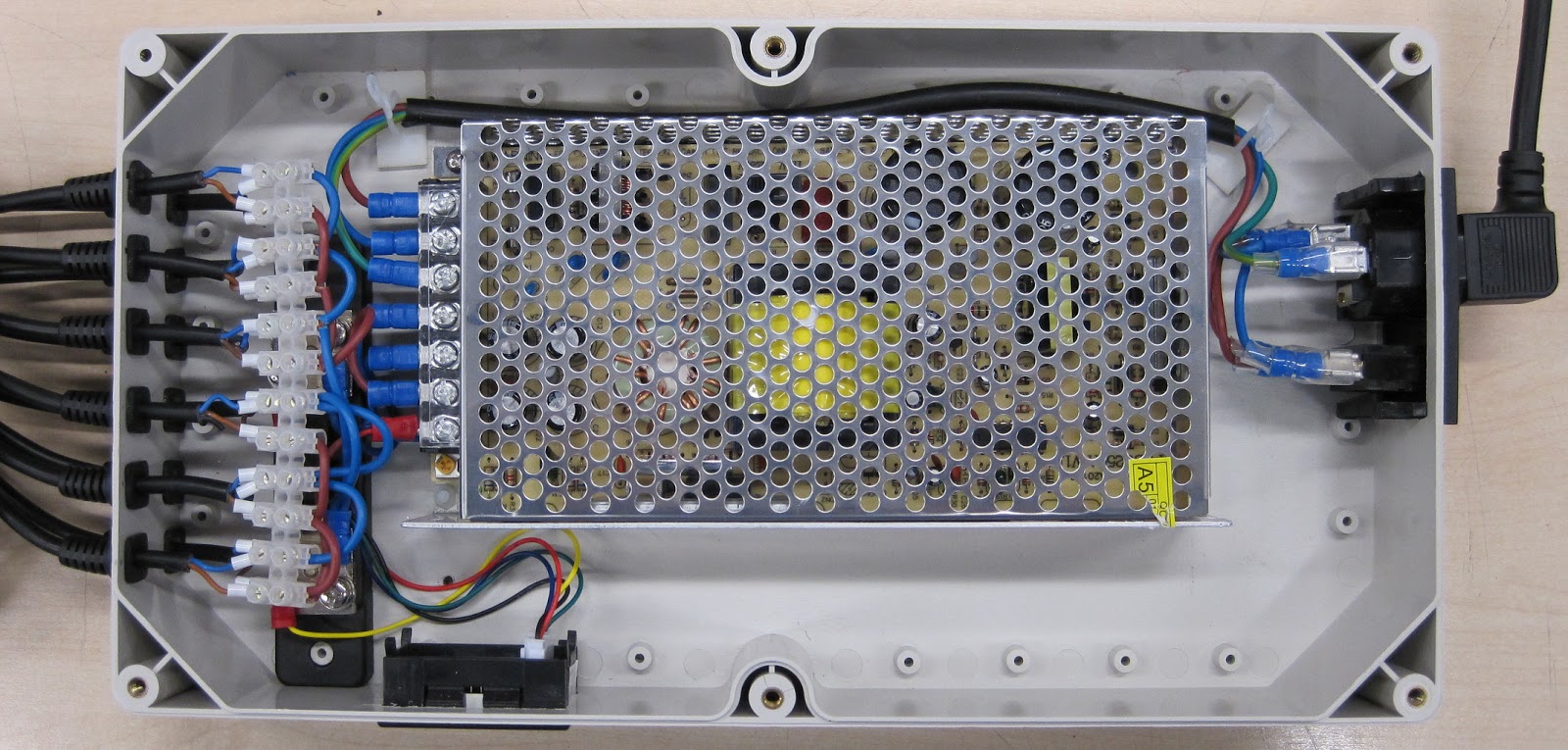
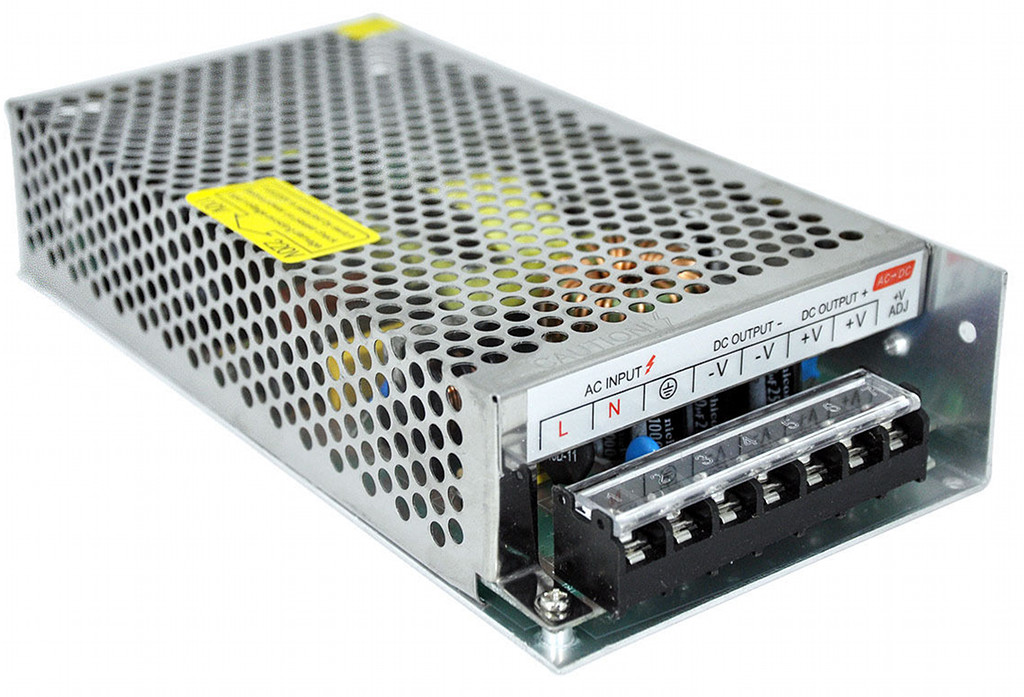
PSU module from ebay
A quick look on ebay revealed that a 150W (30A at 5V) switching supply could be had from a UK vendor for 9.99 which seemed about right. An enclosure, fused and switched IEC inlet, ammeter/voltmeter with shunt and suitable cables were acquired for another 15

Top view of the supply all wired up
A little careful drilling and cutting of the enclosure made openings for the inlets, cables and display. These were then wired together with crimped and insulated spade and ring connectors. I wanted this build to be safe and reliable so care was taken to get the neatest layout I could manage with good separation between the low and high voltage cabling.

Completed supply with all twelve outputs wired up
The result is a neat supply with twelve outputs which i can easily extend to eighteen if needed. I was pleasantly surprised to discover that even with twelve SBC connected generating 20W load the power drawn by the supply was 25W or about 80% efficiency instead of the 33% previously achieved.

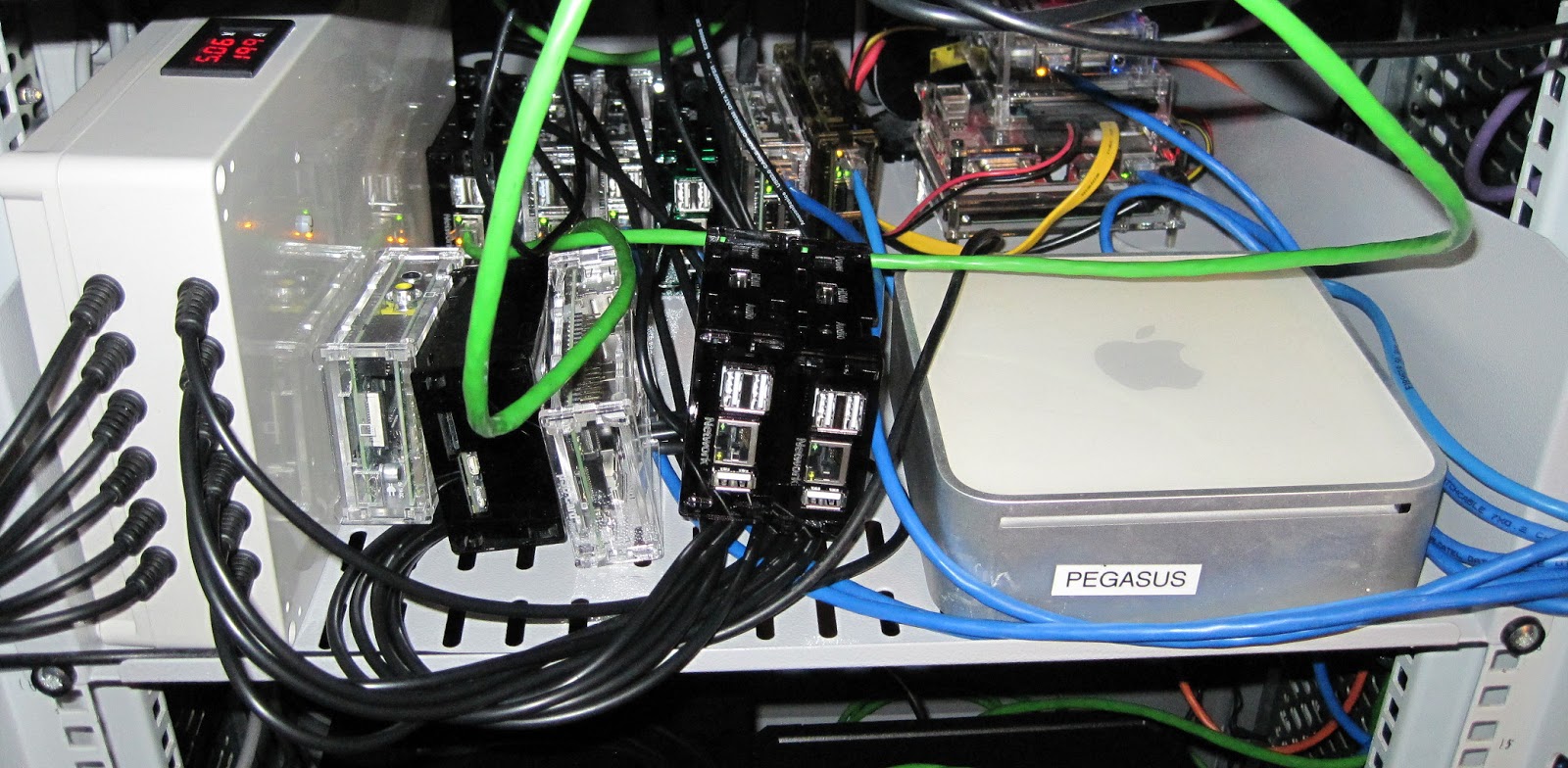
The inbuilt meter allows me to easily see the load on the supply which so far has not risen above 5A even at peak draw, despite the cubitruck and BananaPi having spinning rust hard drives attached, so there is plenty of room for my SBC addiction to grow (I already pledged for a Pine64).

Supply installed in the rack with some of the SBC connected
Overall I am pleased with how this turned out and while there are no detailed design files for this project it should be easy to follow if you want to repeat it. One note of caution though, this project has mains wiring and while I am confident in my own capabilities dealing with potentially lethal voltages I cannot be responsible for anyone else so caveat emptor!

Next.

Previous.