Search Results: "sto"

27 May 2014

Jon Dowland: 2012 In Review

2013 is nearly all finished up and so I thought I'd spend a little time writing up what was noteable in the last twelve months. When I did so I found an unfinished draft from the year before. It would be a shame for it to go to waste, so here it is. 2012 was an interesting year in many respects with personal highs and lows. Every year I see a lots of "round-up"-style blog posts on the web, titled things like "2012 in music", which attempt to summarize the highlights of the year in that particular context. Here's JWZ's effort, for example. Often they are prefixed with statements like "2012 was a strong year for music" or whatever. For me, 2012 was not a particularly great year. I discovered quite a lot of stuff that I love that was new to me, but not new in any other sense. In Music, there were a bunch of come-back albums that made the headlines. I picked up both of Orbital's Wonky and Brian Eno's Lux (debatably a comeback: his first ambient record since 1983, his first solo effort since 2005, but his fourth collaborative effort on Warp in the naughties). I've enjoyed them both, but I've already forgotten Wonky and I still haven't fully embraced Lux (and On Land has not been knocked from the top spot when I want to listen to ambience.) There was also Throbbing Gristle's (or X-TG) final effort, a semi/post-TG, partly posthumous double-album swan song effort which, even more than Lux, I still haven't fully digested. In all honesty I think it was eclipsed by the surprise one-off release of a live recording of a TG side project featuring Nik Void of Factory Floor: Carter Tutti Void's Transverse, which is excellent. Ostensibly a four-track release, there's a studio excerpt V4 studio (Slap 1) which is available from (at least) Amazon. There's also a much more obscure fifth "unreleased" track cruX which I managed to "buy" from one of the web shops for zero cost. The other big musical surprise for me last year was Beth Jeans Houghton and the Hooves of Destiny: Yours Truly, Cellophane Nose. I knew nothing of BJH, although it turns out I've heard some of her singles repeatedly on Radio 6, but her band's guitarist Ed Blazey and his partner lived in the flat below me briefly. In that time I managed to get to the pub with him just once, but he kindly gave me a copy of their album on 12" afterwards. It reminds me a bit of Goldfrapp circa "Seventh Tree": I really like it and I'm looking forward to whatever they do next. Reznor's How To Destroy Angels squeezed out An Omen EP which failed to set my world on fire as a coherent collection, despite a few strong songs individually. In movies, sadly once again I'd say most of the things I recall seeing would be "also rans". Prometheus was a disappointment, although I will probably rewatch it in 2D at least once. The final Batman was fun although not groundbreaking to me and it didn't surpass Ledger's efforts in The Dark Knight. Inception remains my favourite Nolan by a long shot. Looper is perhaps the stand-out, not least because it came from nowhere and I managed to avoid any hype. In games, I moaned about having moaning about too many games, most of which are much older than 2012. I started Borderlands 2 after enjoying Borderlands (disqualified on age grounds) but to this day haven't persued it much further. I mostly played the two similar meta-games: The Playstation Plus download free games in a fixed time period and the more sporadic but bountiful humble bundle whack-a-mole. More on these another time. In reading, as is typical I mostly read stuff that was not written in 2012. Of that which was, Charles Stross's The Apocalypse Codex was an improvement over The Fuller Memorandum which I did not enjoy much, but in general I'm finding I much prefer Stross's older work to his newer; David Byrne's How Music Works was my first (and currently last) Google Books ebook purchase, and I read it entirely on a Nexus 7. I thoroughly enjoyed the book but the experience has not made a convert of me away from paper. He leans heavily on his own experiences which is inevitable but fortunately they are wide and numerous. Iain Banks' Stonemouth was an enjoyable romp around a fictional Scottish town (one which, I am reliably informed, is incredibly realistical rendered). One of his "mainstream" novels, It avoided a particular plot pattern that I've grown to dread with Banks, much to my suprise (and pleasure). Finally, the stand-out pleasant surprise novel of the year was Pratchett and Baxter's The Long Earth. With a plot device not unlike Banks' Transition or Stross's Family Trade series, the pair managed to write a journey-book capturing the sense-of-wonder that these multiverse plots are good for. (Or perhaps I have a weakness for them). It's hard to find the lines between Baxter and Pratchett's writing, but the debatably-reincarnated Tibetan Monk-cum-Artificial Intelligence 'Lobsang' must surely be Pratchett's. Pratchett managed to squeeze out another non-Discworld novel (Dodger) as well as a long-overdue short story collection, although I haven't read either of them yet. On to 2013's write-up...

26 May 2014

Clint Adams: Before the tweet in Grand Cayman

Jebediah boarded the airplane. It was a Bombardier CRJ900 with two turbofan jet engines. Run by SPARK, a subset of Ada. He sat down in his assigned seat and listened to the purser inform him that he was free to use his phone door-to-door on all Delta Connection flights. As long as the Airplane Mode was switched on. Jebediah knew that this was why Delta owned 49% of Virgin Atlantic. On the plane ride, a woman in too much makeup asked Jebediah to get the man next to him so she could borrow his copy of the Economist. The man said she could keep it and that it was old. He had stubby little fingers. She was foreign. At Terminal 2, they passed by Kids on the Fly, an exhibit of the Chicago Children's Museum at Chicago O'Hare International Airport. A play area. Jebediah thought of Dennis. The Blue Line of the Chicago Transit Authority was disrupted by weekend construction, so they had to take a small detour through Wicker Park. Wicker Park is a neighborhood. In Chicago. Jebediah looked at Glazed & Infused Doughnuts. He wondered if they made doughnuts there. Because of the meeting, he knocked someone off a Divvy bike and pedaled it to the Loop. The Berghoff was opened in 1898 by Herman Joseph Berghoff. Once he got to the Berghoff, he got a table for seven on the west wall. He eyed the electrical outlet and groaned. He had brought 3 cigarette lighter adapters with him, but nothing to plug into an AC outlet. How would he charge his device? An older gentleman came in. And greeted him. Hello, I'm Detective Chief Inspector Detweiler. Did you bring the evidence? Said the man. Jebediah coughed and said that he had to go downstairs. He went downstairs and looked at the doors. He breathed a sigh of relief. Seeing the word washroom in print reminded him of his home state of Canada. Back at the table he opened a bag, glared angrily at a cigarette lighter adapter, and pulled out a Palm m125. Running Palm OS 4.0. He noticed a third person at the table. It was the ghost of Bob Ross. , said the ghost of Bob Ross. It was good for him to communicate telepathically with Sarah Palin. This has eight megabytes of RAM, Jebediah informed the newcomer. Bob Ross's ghost right-clicked on his face and rated him one star. Jebediah looked angrily at the AC outlet and fidgeted with two of his cigarette lighter adapters. DCI Detweiler said, I had a Handspring Visor Deluxe, and pulled out a Samsung Galaxy Tab 3 8.0 eight-inch Android-based tablet computer running the Android 4.2.2 Jelly Bean operating system by Google. This also has eight megabytes of RAM, he continued. As you requested, I brought the video of your nemesis at the Robie House. Jebediah stared at the tablet. He could see a compressed video file, compressed with NetBSD compression and GNU encryption. It was on the tablet. Some bridges you just don't cross, he hissed. Meanwhile, in Gloucestershire, someone who looked suspiciously like Bobby Rainsbury opened up a MacBook Air and typed in a three-digit passcode. Across the street a wall safe slid out of the wall. And dropped onto someone's head. She closed the laptop. And went to Dumfries. Not far from the fallen safe, a group of men held a discussion. FBI: Why are we here on this junket? CIA: Where are we? DIA: We're here. JIA: This is confusing. NSA: I have to get back to that place in Germany where I don't work. ATF: We're talking about giant robots here, people. EPA: Huh? Part 2 AUD:USD 1.0645 donuts:dozen 12 Gold $1318.60 Giant robot spiders fought each other in a supermarket parking lot. Detective Seabiscuit sucked on a throat lozenge. Who are you again? he asked the toll-booth operator. I said my name is Rogery Sterling, replied the toll-booth operator. Rajry what? I said my name is Rogery Sterling, replied the toll-booth operator. Again. Where am I? Look, I'm telling you that that murder you're investigating was caused by software bugs in the software. Are we on a boat? Look at the diagram. This agency paid money to introduce, quite deliberately, weaknesses in the security of this library, through this company here, and this company here. Library, oh no. I have overdue fees. And they're running a PR campaign to increase use of this library. Saying that the competing options are inferior. But don't worry, they're trying to undermine those too. Detective Seabiscuit wasn't listening. He had just remembered that he needed to stop by the Robie House.

24 May 2014

Wouter Verhelst: kFreeBSD and ZFS

At one particular customer, increasing storage needs require that we add a large file server which should be as fast as possible. In that context, I'm currently evaluating using Debian GNU/kFreeBSD ("Debian," from now on) on ZFS. Not being hampered by a large degree of knowledge on the subject, here's a blog post with things I've learned so far. For context, the system on which we'll be installing will have 64 gigs of RAM, about two dozen SAS disks connected to a RAID controller of which I'm reasonably sure (though not 100% so) that it supports JBOD mode, and a PCIe-attached solid state storage device of several terabytes. If it turns out the RAID controller doesn't support JBOD mode, I'll probably create as many RAID0 devices as possible and hand those over to ZFS as "hard disks", instead; this wouldn't be an ideal solution, but I don't have much of a choice of hard disk attachment, unfortunately. That being said, the system on which I'm testing right now is the latest incantation of samba, an HP ProLiant ML115 server. A system with far more modest hardware specifications, it has 2G of RAM (which isn't really enough for ZFS), a single 160G SATA hard disk, and a dual-core AMD processor of about half a decade ago. And oh yes, no SSD. So for evaluating ZFS performance it's not ideal, but for evaluating Debian and ZFS features, it will do. Anyway, what I've found so far on samba: We'll see what else I learn.

John Goerzen: End of a year

AAAAHHH! LOOK OUT! A SHARK! Such were the cries a few first graders raised Monday. Laura and I had gone to school to eat lunch with Jacob this was his last week of first grade. We stayed for recess after lunch, and Jacob and his friend told us to pretend to be a shark lurking underneath the bridges and things of the playground. I was told that adults are too old to climb up here. So Laura and I started chasing Jacob and his friend around the playground equipment. And, much to their delight, they were usually able to evade us. And, to their even greater delight, sometimes I could reach up and brush a shoe or leg. Pretty soon Laura had enough of the game, but about then other kids started to notice what was going on. Shark-taunting began ( nana-booboo! ), and pretty soon half a dozen first-graders were running away from the shark! Eventually, it was time to go in, and it had been a great time. Jacob had been proud to have Laura and me there to eat lunch with him. He got to be the first in his class to go to lunch, happily slipping into the tour guide role he loves. Sometimes he would tell us in exacting detail what would happen. Other times, I d ask something like how will we know when lunch is over, and he d get a sly smile and say, You will see! The next day was Jacob s last at school, and Oliver had also recently finished preschool. So Laura and I planned a graduation party . We came up with some ideas of things they might like to do, and let them choose. Thankfully they both agreed on a choice: water slide. My parents gave them water slides one time, and we got one out, hooked it up to the hose, and let them have fun. And boy, did they ever! IMG_3222 And after the better part of an hour running with delight on the water slide, they decided to turn another slide into a water slide. So I helped them rig up a hose on our slide, and they d slide down it, and splash into a giant mud puddle at the bottom. Or, as the case may be, just stand in the mud, enjoying it. IMG_3275 We then went out to eat at one of their favorite restaurants and even had time to play in a park. Yes, a wonderful celebration. All four of us were wearing smiles that day. It reminded me of Jacob s school year, but also of the past year it was about a year ago that Jacob and Oliver first had the chance to really meet Laura. I have many photos and stories from the past year that I ll be sharing in the next little while. What an incredible year it has been!

23 May 2014

Steve Kemp: Using a cubox as a media platform.

Somebody recent got in touch offering to mail me a Cubox, in exchange for me experimenting with it and writing about it. In the past I've written book reviews in exchange for receiving free copies, and while I don't want to make a habit of it I don't see a problem providing I'm up-front and honest. So, what is the cubox-i? It's another one of those "small computers", roughly similar to the Raspberry Pi, but with slightly different hardware, and a really neat little case design, as the name suggests it just looks like a tiny two inch cube, only spoiled by the mass of cabling attached to the back. Me? I was cheeky and said I'd have no use for one, unless it was the fancy-model. The hardware comes in 4 different versions, which you can read about on the Cubox-i product page. Ignoring the smaller/cheaper models the fancy version is the CuBox-i4Pro, and this differentiates itself from the Rasberry Pi: I had two uses for this toy; the first was to be a random NAS-box hosting local backups, the second was to be a media-center. In the past I used a Rasberry PI as a media-box, but unfortunately performance was appalling, largely because of the low-spead of the USB WiFi dongle I bought. The video playback would stall at times, even though the hardware could display full HD-output, the network constraints seemed to be a limiting factor. In the end I abandoned it and these days use it sporadically for emulation, and little else. I've been meaning to do something more interesting with it, but never quite got round to it. By contrast the Cubox-i is wonderful at being a media-box. I've exported some shares of MP4/AVI files from my desktop host, via NFS, then downloaded a binary image of the geexbox (XBMC) distribution which I installed onto the MicroSD card via dd. The box boots in about seven seconds, was configured to use WiFi (via "Programs Settings"), and was streaming media in less than two minutes. There is a Debian disitribution available for download from the cubox-i wiki, but sadly it is an ancient snapshot of Jessie from December last year. It did install, but there was no WiFi out of the box. Gunnar Wolf wrote about bootstrapping an image from sources, rather than using a binary snapshot. He's kindly shared the resulting image he built, but again sadly no WiFi support, so for the moment I'm just enjoying the media-suport. In the future I need to decide what to do: I also need to look at running Pure Debian, for obvious reasons, but if I can't use WiFi the machine is no good to me. (The TV is in a different room to the office which contains our Linux hosts.) Either way I've not been excited about new hardware for a while, not since I bought a Logitech Squeezebox, and we're both enjoying watching media on the TV.

Floris Stoica-Marcu: GSoC2014 Debianizing Muon [Week 1]

Hello, My name is Floris (FlowRiser) and during GSoC I will be working at the project Getting Muon ready . I am guided by two awesome mentors: Sune Vuorela (svuorela) and Aleix Pol (apol). Essentially what we are trying to accomplish is not only port Muon to Debian, but also make it part of Debian; making users that use and love Debian confortable with it. Some of our goals are: integrating apt-listbugs into muon, making installing updates easier and contributing to both KDE and Debian at the same time. The exact plan (week by week), subject to change is here: https://wiki.debian.org/SummerOfCode2014/StudentApplications/FlorisAndreiStoicaMarcu. This week, we focused on getting the core functionality of Muon for Debian; Browsing packages, installing/updating, getting update notifications; Today I will also be making some packaging work, so that other people can begin testing Muon. The exact changes so far:
*changes to the .desktop files parsing, so you can browse packages as expected
*changes to the way more than one backend interract
*created a new releasechecker script for future use Plans for next week include:
*fixing kdesudo use
*fixing use of specific backend resources Cheers,
Floris.

Emanuele Rocca: A (very) brief history of Australia

This post is mostly a sum-up of the Wikipedia page History of Australia, with some content taken from History of the British Empire. Both texts are available under the Creative Commons Attribution-ShareAlike License. I do not seem to be able to learn about a new topic without taking notes: in this case I have decided to publish my work, hoping that someone will find it useful. Some very important themes such as the Gold Rush and Australian History during the World Wars have been impudently ignored.
Indigenous Australians The ancestors of Indigenous Australians are believed to have arrived in Australia 40,000 to 60,000 years ago, and possibly as early as 70,000 years ago. By 1788, the population of Australia existed as 250 individual nations, many of which were in alliance with one another, and within each nation there existed several clans, from as few as five or six to as many as 30 or 40. Each nation had its own language and a few had multiple, thus over 250 languages existed, around 200 of which are now extinct. Permanent European settlers arrived at Sydney in 1788 and came to control most of the continent by end of the 19th century. Bastions of largely unaltered Aboriginal societies survived, particularly in Northern and Western Australia into the 20th century, until finally, a group of Pintupi people of the Gibson Desert became the last people to be contacted by outsider ways in 1984.
European explorers Terra Australis (Latin for South Land) is one of the names given to a hypothetical continent which appeared on European maps between the 15th and 18th centuries. Although the landmass was drawn onto maps, Terra Australis was not based on any actual surveying of such a landmass but rather based on the hypothesis that continents in the Northern Hemisphere should be balanced by land in the south. The first documented European landing in Australia was made in 1606 by a Dutch ship led by Willem Janszoon. Hence the ancient name "Nova Hollandia". The same year, a Spanish expedition had landed in the New Hebrides and, believing them to be the fabled southern continent, named the land: "Terra Austral del Espiritu Santo". Hence the current name "Australia". Although various proposals for colonisation were made, notably by Pierre Purry from 1717 to 1744, none was officially attempted. Indigenous Australians were less able to trade with Europeans than were the peoples of India, the East Indies, China, and Japan. The Dutch East India Company concluded that there was "no good to be done there". In 1769, Lieutenant James Cook tried to locate the supposed Southern Continent. This continent was not found, and Cook decided to survey the east coast of New Holland, the only major part of that continent that had not been charted by Dutch navigators. Cook charted and took possession of the east coast of New Holland. He noted the following in his journal:
"I can land no more upon this Eastern coast of New Holland, and
 on the Western side I can make no new discovery the honour of
 which belongs to the Dutch Navigators and as such they may lay
 Claim to it as their property, but the Eastern Coast from the
 Latitude of 38 South down to this place I am confident was never
 seen or viseted by any European before us and therefore by the
 same Rule belongs to great Brittan."
Colonisation The American Revolutionary War (1775-1783) saw Great Britain lose most of its North American colonies and consider establishing replacement territories. The British colony of New South Wales was established with the arrival of the First Fleet of 11 vessels in January 1788. It consisted of over a thousand settlers, including 778 convicts (192 women and 586 men). A few days after arrival at Botany Bay the fleet moved to the more suitable Port Jackson where a settlement was established at Sydney Cove on 26 January 1788. This date later became Australia's national day, Australia Day. Between 1788 and 1868, approximately 161,700 convicts (of whom 25,000 were women) were transported to the Australian colonies of New South Wales, Van Diemen's land and Western Australia. Early colonial administrations were anxious to address the gender imbalance in the population brought about by the importation of large numbers of convict men. In 1835, the British Colonial Office issued the Proclamation of Governor Bourke, implementing the legal doctrine of terra nullius upon which British settlement was based, reinforcing the notion that the land belonged to no one prior to the British Crown taking possession of it and quashing any likelihood of treaties with Aboriginal peoples, including that signed by John Batman. Its publication meant that from then, all people found occupying land without the authority of the government would be considered illegal trespassers. A group in Britain led by Edward Gibbon Wakefield sought to start a colony based on free settlement and political and religious freedoms, rather than convict labour. The South Australia Act [1834], passed by the British Government which established the colony reflected these desires and included a promise of representative government when the population reached 50,000 people. Significantly, the Letters Patent enabling the South Australia Act 1834 included a guarantee of the rights of 'any Aboriginal Natives' and their descendants to lands they 'now actually occupied or enjoyed'. In 1836, two ships of the South Australia Land Company left to establish the first settlement on Kangaroo Island. The foundation of South Australia is now generally commemorated as Governor John Hindmarsh's Proclamation of the new Province at Glenelg, on the mainland, on 28 December 1836. By 1851 the colony was experimenting with a partially elected council.
Development of Australian democracy Traditional Aboriginal society had been governed by councils of elders and a corporate decision making process, but the first European-style governments established after 1788 were autocratic and run by appointed governors. The reformist attorney general, John Plunkett, sought to apply Enlightenment principles to governance in the colony, pursuing the establishment of equality before the law. Plunkett twice charged the colonist perpetrators of the Myall Creek massacre of Aborigines with murder, resulting in a conviction and his landmark Church Act of 1836 disestablished the Church of England and established legal equality between Anglicans, Catholics, Presbyterians and later Methodists. In 1840, the Adelaide City Council and the Sydney City Council were established. Men who possessed 1,000 pounds worth of property were able to stand for election and wealthy landowners were permitted up to four votes each in elections. Australia's first parliamentary elections were conducted for the New South Wales Legislative Council in 1843, again with voting rights (for males only) tied to property ownership or financial capacity. Voter rights were extended further in New South Wales in 1850 and elections for legislative councils were held in the colonies of Victoria, South Australia and Tasmania. Women became eligible to vote for the Parliament of South Australia in 1895. This was the first legislation in the world permitting women also to stand for election to political office and, in 1897, Catherine Helen Spence became the first female political candidate for political office, unsuccessfully standing for election as a delegate to the Federal Convention on Australian Federation. Western Australia granted voting rights to women in 1899. Early federal parliamentary reform and judicial interpretation sought to limit Aboriginal voting in practice, a situation which endured until rights activists began campaigning in the 1940s.
Road to independence Despite suspicion from some sections of the colonial community (especially in smaller colonies) about the value of nationhood, improvements in inter-colonial transport and communication, including the linking of Perth to the south eastern cities by telegraph in 1877, helped break down inter-colonial rivalries. New South Wales Premier Henry Parkes addressed a rural audience in his 1889 Tenterfield Oration, stating that the time had come to form a national executive government:
"Australia [now has] a population of three and a half millions,
 and the American people numbered only between three and four
 millions when they formed the great commonwealth of the United
 States. The numbers were about the same, and surely what the
 Americans had done by war, the Australians could bring about in
 peace, without breaking the ties that held them to the mother
 country."
Though Parkes would not live to see it, his vision would be achieved within a little over a decade, and he is remembered as the "father of federation". The Commonwealth of Australia came into being when the Federal Constitution was proclaimed by the Governor-General, Lord Hopetoun, on 1 January 1901. Australia took part in WWI. The contributions of Australian and New Zealand troops during the 1915 Gallipoli Campaign against the Ottoman Empire had a great impact on the national consciousness at home, and marked a watershed in the transition of Australia and New Zealand from colonies to nations in their own right. The countries continue to commemorate this occasion on ANZAC Day. Australia achieved independent Sovereign Nation status after World War I, under the Statute of Westminster, which defined Dominions of the British empire in the following way:
"They are autonomous Communities within the British Empire, equal
 in status, in no way subordinate one to another in any aspect of
 their domestic or external affairs, though united by a common
 allegiance to the Crown, and freely associated as members of the
 British Commonwealth of Nations."
The parliaments of Canada, Australia, New Zealand, the Union of South Africa, the Irish Free State and Newfoundland (currently part of Canada) were now independent of British legislative control, they could nullify British laws and Britain could no longer pass laws for them without their consent. The Australia Act 1986 removed any remaining links between the British Parliament and the Australian states.

22 May 2014

Martín Ferrari: Yakker, part 4: the client application

This is the fourth post in a series of posts (part 1, part 2, part 3) describing a secure alternative to applications like WhatsApp. I started with the following statement:
I believe it is possible to build a system with the simplicity and functionality of WhatsApp or Viber, which provides end-to-end encryption, is built on free software and open protocols, that supports federation and is almost decentralised, and that would allow interested companies to turn a profit without compromising any of these principles.
Now that most of the infrastructure has been described, in this post I will talk about the user-visible part: a mobile SIP client specially tailored for this architecture.

Features For Yakker to be successful, an application that is visually attractive and simple to use, while providing excellent call quality and stability, is critical. This idea is useless if only geeks adopt it: I want my parents to use it, I want my non-techie friends to use it. I want to tell them to switch from any of the other applications, not only because it is more secure, open and community-based, but also because it is better. For Android, there is already some excellent free applications that could be used as a starting point: Lumicall, CSipSimple and Linphone. I haven't tried it yet, but Linphone has a port to iOS too. Apart from the quality considerations, the following features must be added:
  • Certificate creation and proper storage in the mobile device.
  • An account creation wizard that interacts with the directory service and the account providers. Lumicall currently does something like this already, but only for their own ENUM and SIP server only.
  • Proper DNSSEC validating resolver to securely get the callee's certificate and ENUM record.
  • Optionally, use the directory service API to query records instead of DNS, to enhance privacy.
  • Periodic verification of the user's own ENUM and certificate records in DNS.
  • Use of those certificates to set up the SRTP stream, instead of unauthenticated encryption. Text messages must be encrypted in the same way, but included in the SIP message. SIPs encryption is not enough, as the proxies and service providers can read them.
  • Integration with the system's address book.
  • ENUM lookup, and SIP SRV lookup to detect phones with an associated SIP account.
  • When the called party does not have a SIP account, the client must offer to call using the PSTN gateway at service provider, if it provides one, and to call using the GSM network. It needs to be fast and reliable, so people can use it as the default texting and calling application.
  • Provide an interface to query account's balance, calling rates, and to buy credit. Possibly, offer this by opening a web browser, but negotiating authentication first, so the user does not need to enter an user name or password.
  • Capabilities to migrate to a different service provider.
  • A secure way to share the key pair with another trusted device.
  • A way to import a key pair created by the user manually.
I am probably missing a bunch of other capabilities that need to be implemented. It is a lot of work. Some of these features would only be useful for participants of the Yakker network, but there are others that could be useful for every SIP user, and therefore, implemented first. For example, SIP accounts that are not associated with a phone number could publish certificates under the same domain, and have the client use them to have secure communications with legacy infrastructure.

Funding I am aware that this amount of work is not going to happen overnight. In fact, without a bunch of people from the community interested in the project, it is never going to happen. The good news is that I think that companies might be interested in investing in this. A company could create their own branded version of the client, and use advertisements or service provider preference (the provider the user gets unless they choose one manually) to generate income. As long as the code remains free, and the client is compatible with the whole system, there could many competing clients out there. Their own promotion schemes would work for the benefit of the whole system, by bringing more users.

Risks The biggest threat would be of one client monopolising the network, and then changing the protocols to make the system a walled garden. It has already happened with GTalk, so there is precedent for this. I don't think there is any way to stop a big company from doing this, but one strategy to mitigate the risk a bit would be to create a brand (Yakker or whatever this ends up being called) and have it managed by a trusted community organisation, which can revoke the right to use the brand when a party is not behaving.

21 May 2014

Russell Coker: Why I Use BTRFS

I ve just had to do yet another backup/format/restore operation on my workstation due to a BTRFS corruption problem, but as usual I didn t lose any data. The BTRFS data integrity features work reasonably well even when the filesystem gets into a state where the kernel will only accept a read-only mount. Given that the BTRFS tag on my blog is mostly about problems with BTRFS I think it s time that I explain why I use it in spite of the problems before people start to worry about my sanity or competence. The first thing to note is that BTRFS is fairly resiliant toward errors when mounted in read-only mode. When mounting a filesystem read-write there are a number of ways in which things can break which are often due to kernel code not being able to handle corrupt metadata I don t know how much of this is inherent to the design of BTRFS and how much is simply missing features in filesystem error handling. Some of the errors that I have had weren t entirely the fault of BTRFS, I twice had to do a backup/format/restore of my workstation due to a faulty DIMM corrupting memory (that has the potential to mess up any filesystem), but I still didn t lose any data AFAIK. The next thing to note is that I don t use BTRFS when doing paid sysadmin work. ZFS is a solid and reliable filesystem and it is working really well for my clients while BTRFS has too many issues at the moment. As an aside I m not interested in any comments about the ZFS license situation from anyone who s not officially representing Oracle. I also don t use BTRFS on systems that I can t access easily. The servers I have running BTRFS are all within an hour s drive from home, while driving for an hour on account of a kernel or filesystem error is really annoying it s not as bad as dealing with a remote server where I have no direct access. Reasons to Use BTRFS The benefits of BTRFS right now are snapshots (which are good for a first-line backup) and the basic data integrity features. I ve found these features to work well in real use. According to the comparison of Filesystems Wikipedia page ZFS and BTRFS are the only general purpose filesystems (IE for disks not tapes, NVRAM, or a cluster) that support checksums for all data and compression. Given that ZFS license issues will never allow it to be included in the Linux kernel tree it seems clear that BTRFS is the next significant filesystem for Linux. More testing of BTRFS is a good thing, while there are a number of known problems that the developers are working on it seems that more testing is needed now to find corner cases. Also we need a lot of testing to find bugs related to interactions with other software. I ve recently filed bug reports against the Debian installer because it can t install to a BTRFS RAID-1 (fortunately BTRFS supports changing to RAID-1 after installation) and because it doesn t support formatting an existing BTRFS filesystem (the mkfs program needs a -f option in that case). I also sent in a patch for the magic database used by file(1) to provide more information on BTRFS filesystems (which is in Debian/testing but not Debian/Wheezy). These are the sorts of things you encounter when routinely using software that you don t necessarily notice in basic testing. As an aside the Debian installation process failed at the GRUB step when I manually balanced a filesystem to use RAID-1 while the Debian installation was in progress. I didn t file a bug report because the best advice is to not mess with filesystems while the installer is running. I ll do a lot more testing of this when the Debian installer supports a BTRFS RAID-1 installation. A final thing that we need to work on is developing sysadmin best practices and scripts for managing BTRFS filesystems. I ve done some work on scripts to create snapshots for online backups but there are issues of managing free space etc. But working out how to best manage a new filesystem is something that takes years because there are many corner cases you may only encounter after a system has been running for a long time. So I really wouldn t want to be in the situation of using a new filesystem on an important server without having practice running it on less important systems, I did that with ZFS and now have a hacky first install that I have to support for years.

20 May 2014

Laura Arjona: Some experiences, and TODO, about fonts

TL;DR I don t know much about fonts, I just use the stock ones that come with my system. From time to time I have issues with docs that others create, and use other fonts. This post is about my plans on learning a bit more and, at least, know how to solve those issues, if it s possible, while staying in the bright side (the free-software / free font side). Long version The context I use Debian, LibreOffice, sometimes Inkscape, and LaTeX. One of my favorite hashtags is #iloveplaintext, I don t know much about design in general, and fonts and typography in particular. I didn t change the fonts in my desktops (only reduced the size in the laptop, to be able to read a bit more in my low resolution screen), I rarely change the font in Writer (maybe from Liberation Serif to Liberation Sans), I never changed the font in a LaTeX document or LaTeX beamer presentation (I write boring documents, I know) and when I paste from the web, it s usually because I want to read a long article so I paste as plain text in gedit and print it or save it. So I ve never felt to learn more about fonts, it just works, and covers my needs, (or not, but I mostly could live with the issues). Then a friend in the Pump.io network, Adri n Perales, published a blog post about Typography (in Spanish) that I liked very much, and I began to think (and remember) some of the issues that I have from time to time with fonts. Issue #1: League Gothic: a free font that was not installed in my system Today, again in the Pump.io network, I discover that the FSF published a poster Privacy is impossible without free software , in SVG format, but it didn t look well when I opened it with GIMP, clearly due to some missing font. Nice that SVG format is a plain text format (XML)! So I opened the file with gedit and searched for the text string whose font was missing. It was League Gothic font, of course a free software font, but not packaged in Debian, it seems. No problem. I downloaded the font, copied the files in /usr/share/fonts and problem solved. Issue #2: Book Antiqua: a non-free font (must find equivalent) A document made with Microsoft Word that one friend sends to me so I review and resend (in PDF format) to other people. It s a leaflet, and it has text in Arial, in Tahoma, and in Book Antiqua. When I open it with LibreOffice the aspect is wrong (the substitutes are not the same size so some breaking lines and so). Book Antiqua is not free. I learned that it s an imitation of the Palatino font, and that a similar font in the free software systems is URW Palladio . In Writer (LibreOffice), I went to Tools > Options > Fonts and declared the equivalence of the two fonts, so the program would use URW Palladio as a substitute of Book Antiqua. I opened again the document and it was quite better, very similar to the original aspect. I didn t bother in changing the text in Arial or Tahoma, since the substitutes that LibreOffice used were quite good. But I bookmarked this page: A Web Designer Guide to Linux Fonts for remembering the different fonts that I can try to emulate the Windows ones. I also know that I can install the Microsoft Core Fonts for the web since they are packaged for Debian in the contrib archive. But I ll try to survive without them for now (until now, I didn t bother, why should I now that I have the substituting guide?). In other news, I got impressed that MS Core Fonts is #4 in Most downloads all over the time in SourceForge, with more than 450 million downloads \o/ Issue #3: Installing a new free font in Debian So I decided to install one of the fonts that Adri n Perales recommended in his blog post, Linux Libertine . Since it is packaged for Debian, it s super easy:
# apt-get install ttf-linux-libertine
(my LibreOffice was opened, so I closed it and opened again, and the font was there ready for use). Issue #4: Use a different font in LaTeX Well, as always, there is not one but many ways to do that in LaTeX. My intuition tells me that if there is a LaTeX package for the font that I want to use, it s probably a nice idea to just use it. So I searched about Linux Libertine in LaTeX and yes, there is a package (and you can find a very interesting font guide in The LaTeX font catalogue ). I installed the package texlive-fonts-extra, and then, I added two lines in my LaTeX document:
\usepackage libertine 
\usepackage[T1] fontenc 
Compiled, and the resultant PDF was using Libertine font instead of Computer Modern. TODO (and/or wishlist) When opening a document that uses a font not present in my system, I maybe wouldn t notice that a font is missing and I see a substitute (and maybe not the best one)!. It would be nice that the program tells the user This file uses the font X, and it seems it s not in your system. I ll use font Y as a substitute . I m not sure if there is a standard way to know which package contains a certain font. I use a web search engine to try to find out, and the websites that I linked in the article. I have to investigate and learn a bit more about free fonts equivalents to the ones that other people use, and fonts in general, so my documents are more beautiful and people gets interested to know about the tools that I use to produce them. Well, I ve written a long blog post (thanks if you read until here!), solved some issues, and try some things, but not even capturing a snapshot to show here! It seems that I m still lazy, forgive me I hope at least this #plaintext is useful for you :)
Filed under: My experiences and opinion, Uncategorized Tagged: Debian, English, Fonts, Free Software, LaTeX, libre software, LibreOffice, Moving into free software, pump.io

19 May 2014

Russell Coker: My First Ingress Anomaly

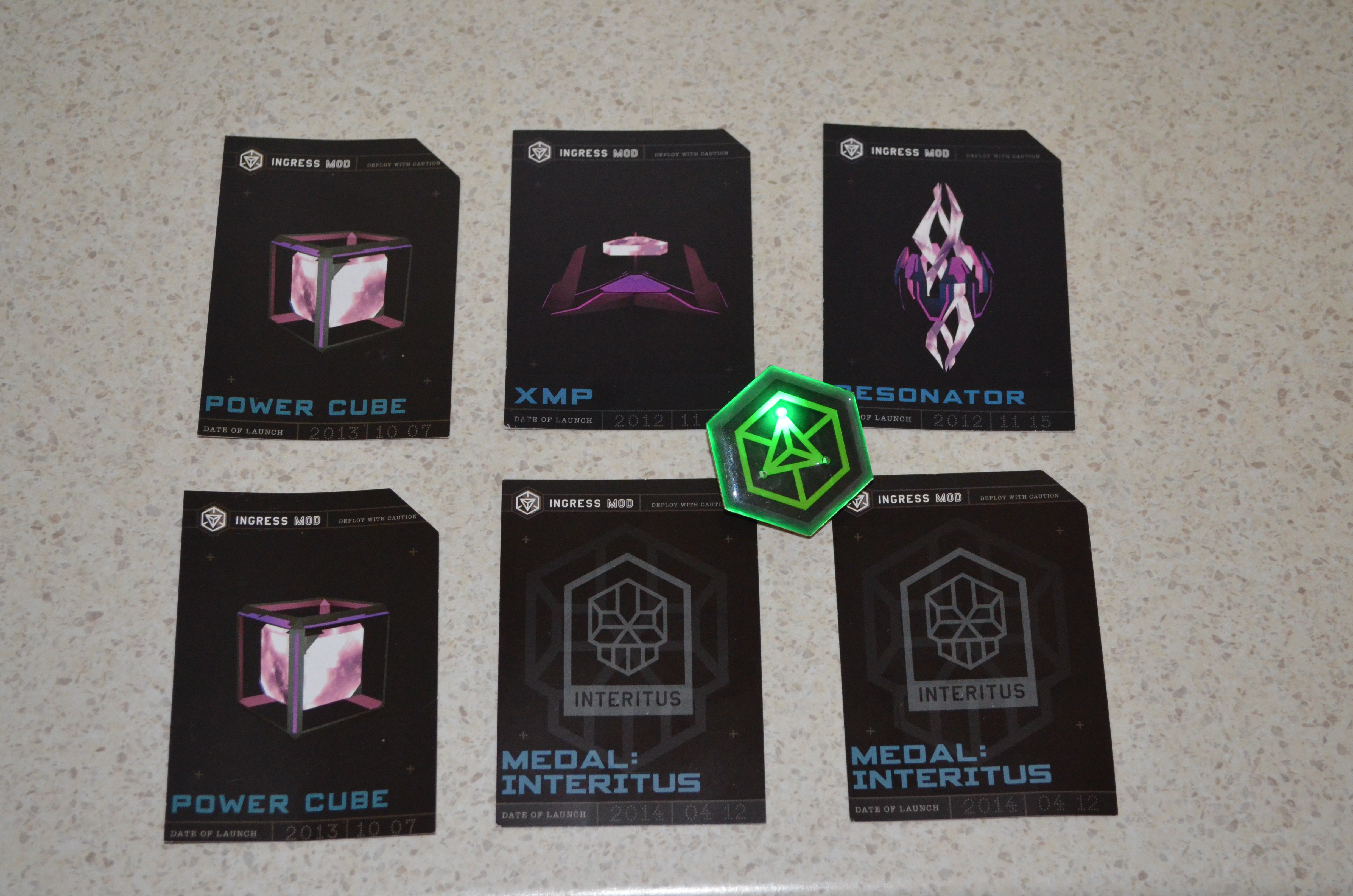
schwag from Ingress Anomaly Ingress is an Android phone game developed by Google where you have to go to various places to capture portals which are based on landmarks or places of note. There s a sci-fi back story which I haven t cared much about (my local library has a heap of good sci-fi books I don t have time to read). But if you are interested in low quality sci-fi you can start with the Youtube channel for Ingress [1]. But the best thing to do is to download the Ingress client program from the Google play store if you have an Android phone [2]. Periodically they have special events in the game called Anomalies , which usually involve many people competing to capture a small number of special portals. Usually a portal is fairly easy to capture so a high level player can easily capture a portal in at most a few minutes, but when there is a large group of players defending a portal by replacing the resonators as quickly as they are destroyed it becomes more challenging. I m not going to try to explain this properly as I presume that readers either already know or don t care. The Wikipedia page about Ingress has more information. On Saturday there was an Anomaly where the main city was Melbourne. My team (Enlightened) won the event in Australia but apparently the event in the US at the same time was won by the other team (Resistance). I had hoped that our event would be similar to some of the ones I ve seen on the Ingress Report (a fictional news service on youtube) in which actors from the sci-fi videos about Ingress attended. But unfortunately it seems that the actors stay in the US. Every player who was registered for the anomaly received a gift pack that contained three cards and a badge. The picture above shows the cards that my wife and I received along with one of our badges. The badges are green for Enlightened and blue for Resistance (the in-game colors) and have three flashing LEDs the photo has one of the LEDs lit up. The three cards have passcodes which can be redeemed for in-game items, the XMP, Power Cubes, and Resonators weren t that useful (10 not particularly rare items that I could get through 10 minutes of game playing). The Medal cards are for in-game badges showing the anomalies that we have played at, but they are bronze badges which again aren t much use as nothing less than silver will help in leveling up. Overall it was a good experience, we won, had a good after-party (with free snacks and one free drink per person), and the badges are nice. I recommend attending if there s an event in your area, and note that you don t need to be a high level player to attend, even L6 players were able to contribute.

18 May 2014

Benjamin Mako Hill: Installing GNU/Linux on a 2014 Lenovo Thinkpad X1 Carbon

I recently bought a new Lenovo X1 Carbon. It is the new second-generation, type 20A7 laptop, based on Intel s Haswell microarchiteture with the adaptive keyboard. It is the version released in 2014. I also ordered the Thinkpad OneLink Dock which I have returned for the OneLink Pro Dock which I have not yet received. The system is still very new, challenging, and different, but seems to support GNU/Linux reasonably well if you are willing to run a bleeding edge version and/or patch your kernel and if you are not afraid to spend an afternoon or two tweaking things. What follows are my installation notes for Debian testing (jessie) when I installed it in early May 2014. My general impressions about the laptop as a GNU/Linux system and overall are at the end of this write-up.
System Description The X1 Carbon I ordered included the 512GB SSD, the 14.0 inch WQHD (2560 1440) 260 nit touchscreen, and the maximum 8GB of memory. I believe the rest is not particularly negotiable but includes a 720p HD Camera, a 45.2Wh battery, and an Intel Dual Band Wireless 7260AC with Bluetooth 4.0. For those that are curious Here is the output of lspci on the system:
00:00.0 Host bridge: Intel Corporation Haswell-ULT DRAM Controller (rev 0b)
00:02.0 VGA compatible controller: Intel Corporation Haswell-ULT Integrated Graphics Controller (rev 0b)
00:03.0 Audio device: Intel Corporation Haswell-ULT HD Audio Controller (rev 0b)
00:14.0 USB controller: Intel Corporation Lynx Point-LP USB xHCI HC (rev 04)
00:16.0 Communication controller: Intel Corporation Lynx Point-LP HECI #0 (rev 04)
00:16.3 Serial controller: Intel Corporation Lynx Point-LP HECI KT (rev 04)
00:19.0 Ethernet controller: Intel Corporation Ethernet Connection I218-LM (rev 04)
00:1b.0 Audio device: Intel Corporation Lynx Point-LP HD Audio Controller (rev 04)
00:1c.0 PCI bridge: Intel Corporation Lynx Point-LP PCI Express Root Port 6 (rev e4)
00:1c.1 PCI bridge: Intel Corporation Lynx Point-LP PCI Express Root Port 3 (rev e4)
00:1d.0 USB controller: Intel Corporation Lynx Point-LP USB EHCI #1 (rev 04)
00:1f.0 ISA bridge: Intel Corporation Lynx Point-LP LPC Controller (rev 04)
00:1f.2 SATA controller: Intel Corporation Lynx Point-LP SATA Controller 1 [AHCI mode] (rev 04)
00:1f.3 SMBus: Intel Corporation Lynx Point-LP SMBus Controller (rev 04)
BIOS/Firmware The BIOS firmware is non-free and proprietary as it the case with all ThinkPads and nearly all laptops. According to this thread there is a bug in the default BIOS that means that suspend to RAM is broken in GNU/Linux. You can get updated BIOS at the Lenovo s ThinkPad X1 Carbon (Type 20A7, 20A8) Drivers and software page by looking in the the BIOS section. Honestly, the easiest approach is probably to download the Windows BIOS Update utility (documentation is here) which you can use to run the BIOS update from within Windows before you install GNU/Linux. If that s not an option (e.g., if you ve already installed GNU/Linux) the best method is to download the bootable CD ISO from the same page. Of course, since the X1 Carbon has no optical media, you have to find another way to boot the CD image. I struggled to get the ISO to boot from USB using the usually reliable dd method. This message suggest that the issue had to do with the El Torito wrapper:
I had to dump the eltorito image from the ISO they provide, after that I was able to dd the resulting image to a flash drive and the bios update went well, no cdrom needed.
I updated to version 1.13 of the BIOS which fixes the suspend/resume bug. By the time you read this, there may be newer versions that fix other things so check the Lenovo website.
Installing Debian I installed Debian testing using the March 19, 2014 Alpha 1 release of the Debian Installer for Jessie (currently testing). I installed in graphical mode. With the WQHD screen, everything was extremely tiny but it worked flawlessly. I downloaded the amd64 net install image from the normal place and installed the rest of the system using the built-in Ethernet port which required no firmware or extra drivers. I did the normal dd if=FILENAME.iso of=/dev/sdX method of getting the installer onto the a USB stick to boot. I turned off restricted boot in BIOS first. In general, the latest version of the Debian installation guide is always a good source of guidance on installing Debian. I used the Debian installer wizard to partition and selected Use entire disk and partition it for LVM and encrypted data which kept the UEFI partitions around. The system installed with no errors or issues and booted up normally afterward. The grub menu is hilariously narrow on the WQHD screen. If you want to use the built-in wireless and/or Bluetooth, you will need to install the non-free iwlwifi firmware package. It is very lame that we still have to do this to use hardware we have purchased.
What Works and Doesn t The following stuff works the first time I booted into the GNOME 3 desktop and logged in:
  • The WQHD 2560 1440 screen
  • The touchscreen
  • Both the TrackPoint and the touchpad
  • Built-in e1000e Ethernet using the dongle
  • The keyboard plus the adaptive row of F1-F12 keys.
  • External monitor using the full HDMI or mini-DisplayPort connectors
  • Audio (both speakers and microphone)
  • The camera/webcam
The following stuff works if you install non-free firmware:
  • Internal Wireless
  • Bluetooth 4.0
The following stuff works with qualifications:
  • Suspend to RAM Works once you have updated the firmware.
  • The adaptive keyboard The F1-F12 keys work but the button that theoretically lets you switch to different sets of function buttons (e.g., volume, brightness) does nothing.
  • Disabling the touchpad There is a BIOS option to disable the touchpad. It works in Windows and does nothing at all in GNU/Linux.
I have not tried:
  • The fingerprint reader
Disabling the touchpad As a long-term ThinkPad user, I love the TrackPoint pointing stick. If you plan on using this, the built-in touchpad is incredibly aggravating because it is very easy to brush against it while using the TrackPoint. In BIOS, there is an option to disable the touchpad. Although this works in Windows, it does absolutely nothing in GNU/Linux. Part of the issue is that, unlike the older X1 Carbon and other ThinkPads, there are no TrackPoint buttons. Instead of buttons, there are regions at the top of the touchpad which are configured, in software, to act like buttons. If you want to be able to click, the touchpad can never be truly turned off. This is not problem unique to the Haswell X1 Carbon and a number of people have been struggling with this issue on other Lenovo laptops. Essentially, what you need to do is configure your touchpad so that the buttons are where you want them and so that it ignores any input for the purposes of cursor movement. There are a few ways of doing this but this answer from an askubuntu.com question has the solution I ended up using:

Open file /usr/share/X11/xorg.conf.d/50-synaptics.conf for edit.

Find Section InputClass which the following line is Identifier Default clickpad buttons .

Edit option for SoftButtonAreas to values 64% 0 1 42% 36% 64% 1 42%, this is size of the right and middle button.

Enable option AreaBottomEdge and change value to 1, this will disable touchpad movement.

If everything done right, your class should looks like:

Section "InputClass"
     Identifier "Default clickpad buttons"
     MatchDriver "synaptics"
     Option "SoftButtonAreas" "64% 0 1 42% 36% 64% 1 42%"
     Option "AreaBottomEdge" "1"
EndSection
Essentially, the first Option line will create a middle button that is 32% of the width and 42% of the height, and a right button that is 32% of the width and 42% of the height. The synaptics manpage (man synpatics) will give you more detail on the general way this works. Of course, something does feel very wrong about editing a file in /usr/share.
Fixing the Adaptive Keyboard The most wild feature of the laptop is the adaptive keyboard strip. The strip is a back-lit LCD that looks almost like E Ink screen and acts as a touchscreen keyboard. The default mode gives you the F1-F12 keys. If you press the keys (since they aren t buttons, you just put your finger on top of them) they act like normal F-keys. You can Ctrl-Alt-F1, etc., to switch to virtual terminals out of the box. There are four modes: Function (i.e., normal F-keys), Home, Web, and Chat. The last three overlap quite a bit (e.g., they all have brightness and volume). You can play with an example on the Lenovo homepage. In Windows, switching programs will apparently change these keys so that an appropriate set of buttons is shown for the application you are using. You can also change these keys manually with a big Fn button at the far left of the adaptive keyboard strip. As I write this this, released kernels do not support the adaptive keyboard Fn button which means you cannot use anything other than the F-keys out of the box. I believe it also means that resuming from suspend to RAM breaks these keys. That said, Shuduo Sang from Canonical has released several versions of a patch to to the thinkpad_acpi kernel module which adds support for the Home mode. The other modes (web and chat) do not seem to be supported. The latest version of the patch is on on the Linux Kernel Mailing List and the relevant commits are:
330947b save and restore adaptive keyboard mode for suspend and,resume
3a9d20b support Thinkpad X1 Carbon 2nd generation's adaptive keyboard
Although this is not supported in Debian testing at the time of writing, a bug was filed in Debian and quickly fixed by Ben Hutchings in Debian kernel version 3.14.2-1 which is currently in sid/unstable. As a result, if you install the latest version kernel from Debian unstable (3.14.2-1 or later), the adaptive keyboard just works. If you aren t using Debian and if kernel you are using does not have support, you might be patching your kernel.
General Impressions As I have described in my interview with The Setup, I have been a user of ThinkPad X-series laptops for many years. This is my sixth X-series ThinkPad. Overall, I quite like the hardware! Once things mature a little bit, I think that this will be a great laptop for running GNU/Linux. That said, I ordered the laptop without realizing that the X1 Carbon had gone through a major revision! The keyboard was quite a suprise. I think that changing a system so radically without changing the model name/number is a very bad move on Lenovo s part. There are two remaining issues with the system I m still struggling with: (1) the keyboard layout is freaky and weird, and (2) the super high resolution screen breaks many things. The quality of the keyboard itself is great and worthy of the ThinkPad name. That said, there are two ways in which it is strange. The first is the adaptive keyboard strip. Overall, it works surprisingly well and I think it is a clever idea. My sense is that the strip is more annoying in Windows because it changes out from under you all the time. In GNU/Linux, only manual changing of modes is supported. This, in my opinion, is a feature. I do miss the real feedback you get from pressing keys but for F-keys and volume-keys that I don t use often this isn t too important. On the downside, I have realized several times that I had been holding down a button for several seconds and not noticed. The more annoying issue with the keyboard is the way that the other keys have moved around. Getting rid of the CapsLock is wonderful! How has this taken so long? Replacing it with a split Home and End keys is nuts. I ve remapped the Home and End to put Control back where it should be. My right Control to now Home but I still don t have an End key. The split Backspace and Delete is not a problem for me. The tilde/apostrophe is in a very bad place. There is no Insert, Print Screen/SysRq, Scroll Lock, Pause/Break or NumLock. They are all just gone. Surprisingly, I haven t missed any of them. The second issue is the 2560 1440 resolution on the 14 inch screen. I use a 27 inch external monitor with the same native resolution laptop but, by my arithmetic, the pixel density on the laptop is 210 DPI instead 109 DPI on the external monitor. The result is the scaling problem and it s a huge pain that seems mostly unsolved on any operating system. Fonts and widgets that look good on the laptop look huge on my external monitor. Stuff that looks good on my external monitor looks minuscule on the laptop. I routinely move windows between my laptop screen and my large monitor. Until I find a display system that can handle this kind of scaling effectively, this requires changing font size and zooming all the time. At the moment, I m shrinking and expanding my font size using the built in hot keys in Emacs, Gnome Terminal, and Firefox/Iceweasel. I love the high resolution screen but the current situation is crazy-making. Finally, this setup will not get you into the Church of Emacs and it s not about to find its way onto the FSF s list of endorsed hardware. For one, I paid the Windows tax. Beyond that, there is the non-free BIOS and the need for non-free firmware to use the wireless and Bluetooth. This is standard for ThinkPads but it isn t getting any easier to swallow. There are alternatives in the form of Gluglug s X60 laptops running CoreBoot, Lemote Yeelong laptops, Bunnie Huang s Novena and others that are better in these regards. I am very excited for these projects but, for a number of reasons, these just weren t an option for the laptop I use for my research computing.

16 May 2014

Christoph Berg: PostgreSQL 9.4 on Debian

Yesterday saw the first beta release of the new PostgreSQL version 9.4. Along with the sources, we uploaded binary packages to Debian experimental and apt.postgresql.org, so there's now packages ready to be tested on Debian wheezy, squeeze, testing/unstable, and Ubuntu trusty, saucy, precise, and lucid. If you are using one of the release distributions of Debian or Ubuntu, add this to your /etc/apt/sources.list.d/pgdg.list to have 9.4 available: deb http://apt.postgresql.org/pub/repos/apt/ codename-pgdg main 9.4 On Debian jessie and sid, install the packages from experimental. Happy testing!

15 May 2014

Russell Coker: Mobile Phones and Cognitive Costs

I previously wrote about the case for a Basic Income in Australia [1]. Since then I read an interesting article by Rutger Bregman in the Dutch site The Correspondent discussing the benefit that such Basic Income schemes have given in various places [2], he makes a great case for giving a Basic Income to poor people. However I believe that it should be provided to everyone. I believe that government payments shouldn t be means tested because the proportion of the population who earn more than the cutoff is usually very small (IE it doesn t save much money), because the money will be recovered from wealthy people in tax, and because the bureaucracy involved in determining who is eligible involves spending tax money to pay bureaucrats and costing everyone time in dealing with the process. The concept of an Attention Economy has been getting some interest recently. But discussions of it seem to be mostly concerned with the needs of fairly wealthy people, how to advertise to them, how to filter out unwanted ads for them, etc. But the costs in attention can be even worse for people on low incomes or social security because they have many attention costs that could be solved by money. Many common essential purchases (EG soap, basic foods, and purely functional clothes) can become difficult decisions if saving a few dollars is important. The amount of thought involved in buying such items can result in someone who s not well off having little energy to concentrate on other things. I think that to have an effective social security system we need to consider how much cognitive effort is being required of people who are receiving benefits. Last month I wrote yet another review of mobile phone plans in Australia [3]. Every time I do this it takes a significant amount of time because the Telcos devise overly complex plans to make it difficult to compare their offerings. It seems that they aim to make their offerings somewhat competitive if you can interpret them but confusing enough to allow many (most?) of their customers to pay needlessly high bills. I could just pick a random telco and pay whatever it takes, spending an extra $10 or $20 per month isn t such a big deal for me. Even though I advise a number of my relatives on the cheapest phone plan it s probably only barely saving enough money to be worth the effort, a major motivation for me is being stubborn and not wanting telcos to rip people off. The Importance of Mobile Phones A mobile phone seems to be essential for most people. Mobile phones are used for making medical appointments and for applying for work, so in almost every case some of the financial assistance paid to a job seeker or person on a disability pension will go towards mobile phone costs. The aims of the social security benefits seem to clearly involve a phone service. Given that most people who receive social security payments spend some of that money on mobile phone bills the government has a direct financial interest in not having such money wasted on needlessly expensive phone plans. As we also don t want to have people on social security spending time and attention trying to find the best phone plan it makes sense to have the government help manage this process. Good communications is regarded as essential to education and economic development. A huge amount of taxpayer money was spent on the NBN (and then wasted by Tony Abbott when he cancelled the original plans) for these benefits. Good phone access is also an issue of personal safety. While it is possible to call emergency services from a mobile phone that doesn t have a valid SIM there are probably few people who keep a spare phone charged for that purpose. Also there are a variety of issues that can impact life or health which can best be resolved by calling friends or relatives. Free Phones I think that the best solution to these problems is for the government to directly pay mobile phone bills. If we are going to have a Basic Income then the government should make the base payment for mobile phone calls for every resident, if not then the government should make the base payment for everyone who receives any form of social security payment. Obviously the amount of data that could be transferred over a 3G network is greatly in excess of the amount that any plans allow and offering true unlimited calling leads to people using mobile phones as baby-monitors, so some limits are necessary. But the government could cheaply pay for a phone plan that exceeds the requirements of most people and then allow anyone who wants more data or calls to pay extra. Which Plan? The cheapest all-inclusive mobile phone plan in recent times was Kogan who charged $299 per annum for 6G of data per month and unlimited calls. The cheapest current offer for unlimited calls seems to be Lebara s $30 per month offer which includes 2G of data. My observation is that people who use 3G Internet just for phone use (as opposed to tethering a laptop or providing home Internet), who use a home Wifi network for installing Android programs and don t play Ingress tend to use a lot less than 1G of data per month. I would use between 400M and 700M per month if I wasn t playing Ingress and didn t use my phone as a Wifi access point. In terms of call volume, 600 minutes a month should be enough to cover the basic needs of most people judging by the number of plans on offer with limits smaller than that. As a current Lebara offer is $30 per month for unlimited calls and 2G of data (and there are similar offers from other telcos), it should be possible for a telco to offer 600 minutes of calls and 1G of data for less than $15 per month. When the government is paying (no bad debts) and many of the users will use much less than the quota such a plan should be profitable at $10 per month or less. Implementation The way to implement this would be to start with a tender that has a hard requirement for the minimum amount of service provided. This would include the number of minutes per month for calls, the number of SMS sent, and the amount of data transfer. To avoid excessive billing (a standard telco scam) there should be a requirement that fees for extra use not exceed some small multiple of the base rate, for example if the government was paying $10 for 600 minutes of calls and 1G of data the excess usage charges could be capped at 3 cents per meg and 5 cents per minute (3* the base rate) which would be profitable for the telco but not a scam. If the telcos act in a market driven competitive manner they will compete to provide the most attractive offerings for $10 per month. If the build cost of the NBN had been invested at government bond rates (for any of the rates used for current bonds) then it would pay for the mobile phone bills for every resident forever, so the cost of providing phones for everyone is in the range of government telecommunications programs. If people who are working were to pay an extra $10 in tax and people who are on social security had their benefits reduced by $10 then that would be a great deal if it saved them the $20 or more that most people spend on a basic phone plan. Government Phone Delays A friend who s a single mother pays for an unlimited mobile phone plan because calls to the social security office are usually kept on hold for more than an hour. It s likely that she could save money over the course of a year by paying for a cheaper plan and just dealing with the occasional big bill, but she needs to budget carefully and feels that she can t take that risk. It seems stupid that government phone delays (partly caused by cutting funds for staff) cause increased expenses for people who are receiving social security payments. If the government implemented a smart queuing system that allowed them to call people back instead of making them wait on hold then it would save money overall. So there are obviously other ways that the government can save money on phone calls and time for everyone.

Paul Tagliamonte: Linode pv-grub chaining

I've been using Linode since 2010, and many of my friends have heard me talk about how big a fan I am of linode. I've used Debian unstable on all my Linodes, since I often use them as a remote shell for general purpose Debian development. I've found my linodes to be indispensable, and I really love Linode. The Problem Recently, because of my work on Docker, I was forced to stop using the Linode kernel in favor of the stock Debian kernel, since the stock Linode kernel has no aufs support, and the default LVM-based devicemapper backend can be quite a pain. I tried loading in btrfs support, and using that to host the Docker instance backed with btrfs, but it was throwing errors as well. Stuck with unstable backends, I wanted to use the aufs backend, which, dispite problems in aufs internally, is quite stable with Docker (and in general). I started to run through the Linode Library's guide on PV-Grub, but that resulted in a cryptic error with xen not understanding the compression of the kernel. I checked for recent changes to the compresson, and lo, the Debian kernel has been switched to use xz compression in sid. Awesome news, really. XZ compression is awesome, and I've been super impressed with how universally we've adopted it in Debian. Keep it up! However, it appears only a newer pv-grub than the Linode hosts have installed will fix this. After contacting the (ever friendly) Linode support, they were unable to give me a timeline on adding xz support, which would entail upgrading pv-grub. It was quite disapointing news, to be honest. Workarounds were suggested, but I'm not quite happy with them as proper solutions. After asking in #debian-kernel, waldi was able to give me a few pointers, and the following is very inspired by him, the only thing that changed much was config tweaking, which was easy enough. Thanks, Bastian! The Constraints I wanted to maintain a 100% stock configuration from the kernel up. When I upgraded my kernel, I wanted to just work. I didn't want to unpack and repack the kernel, and I didn't want to install software outside main on my system. It had to be 100% Debian and unmodified. The Solution Left unable to run my own kernel directly in the Linode interface, the tact here was to use Linode's old pv-grub to chain-load grub-xen, which loaded a modern kernel. Turns out this works great. Let's start by creating a config for Linode's pv-grub to read and use.
sudo mkdir -p /boot/grub/
Now, since pv-grub is legacy grub, we can write out the following config to chain-load in grub-xen (which is just Grub 2.0, as far as I can tell) to /boot/grub/menu.lst. And to think, I almost forgot all about menu.lst. Almost.
default 1
timeout 3
title grub-xen shim
root (hd0)
kernel /boot/xen-shim
boot
Just like riding a bike! Now, let's install and set up grub-xen to work for us.
sudo apt-get install grub-xen
sudo update-grub
And, let's set the config for the GRUB image we'll create in the next step in the /boot/load.cf file:
configfile (xen/xvda)/boot/grub/grub.cfg
Now, lastly, let's generate the /boot/xen-shim file that we need to boot to:
grub-mkimage --prefix '(xen/xvda)/boot/grub' -c /boot/load.cf -O x86_64-xen /usr/lib/grub/x86_64-xen/*.mod > /boot/xen-shim
Next, change your boot configuration to use pv-grub, and give the machine a kick. Should work great! If you run into issues, use the lish shell to debug it, and let me know what else I should include in this post! Hack on!

14 May 2014

Martín Ferrari: Yakker, part 2: the directory service

This is the second post in a series of posts describing a secure alternative to applications like WhatsApp. I started with the following statement:
I believe it is possible to build a system with the simplicity and functionality of WhatsApp or Viber, which provides end-to-end encryption, is built on free software and open protocols, that supports federation and is almost decentralised, and that would allow interested companies to turn a profit without compromising any of these principles.
In this post, I will outline the concepts behind the most critical component of the architecture: the directory service.

Outline I say this is the most critical component, because here lies what makes this architecture different, but also because this is the weakest link in the whole idea. I expect criticism, specially on some security trade-offs, and I hope that people that know better than me can help me improve it. The directory service is what allows the users to register easily, without using passwords, to be able to receive calls and messages from other users, even if they are not part of the network, and to do all this with a reasonable security model.

Let's get technical The directory service is basically a DNSSEC-protected DNS zone serving ENUM records, along with public keys associated with each user identifier. A TLS-enabled API will enable account creation and validation, DNS records publishing, and encrypted records querying. Applications not supporting that API use standard ENUM querying, and the user manually uses traditional web-based methods for account and records management. This allows interoperability with any existing clients and SIP services. The service will authenticate users by using the usual methods to probe ownership of phone numbers: sending an encrypted SMS with a secret that the client application uses then to claim the phone number. This same method can be used to validate ownership of identifiers that are not phone numbers, like pre-existing SIP or email addresses. Once the user is authenticated, the directory service will publish the user's public key and SIP address, both associated with the phone number. When a user wants to place a call or send a message, it uses a DNSSEC-enabled resolver to get securely the other party's public key and SIP address. The user can also perform bulk look-ups, to discover which people on theirs address book is already in the system. These operations disclose an important amount of private data, and I don't think this can be mitigated in an acceptable manner, and therefore the directory service needs to forget the queries as soon as possible, and not to store any logs of these. Also, DNS queries are not encrypted, and are thus vulnerable to snooping by third parties. To mitigate this, the service needs to implement an encrypted but anonymous API to perform queries, and thus offer extra privacy to clients that support the API. The idea is to have more than one service running on different domain names, but not many: they need to keep consistency and replicate among them, and the security and privacy implications of one service not being properly implemented or administered are too big. Therefore, there must not be more than a handful of these, they need to be properly audited, and must not be operated by any for-profit organisation.

Security The Web of Trust is hard. End users don't like hard. Traditional PKI is prohibitely costly, and broken. OTR is good, but is still not hassle-free. Using one of the proposed extensions to DANE, we can solve this problem: using DNSSEC, we can have each users' public key published where everybody can retrieve it securely. This published key can then be used for end-to-end encryption and client authentication with all the components of this architecture. Who creates the key pair? In the simple case, the client application creates the key pair, and stores it in an appropriate container in the mobile device. It then chooses one of many cooperating directory services, and gets the public key associated with the phone number. If the private key is lost (lost your phone?), a new pair is generated and published, after passing the same checks of number ownership, and the old keys are discarded. This opens the door for some attacks, but those can be mitigated by having the client application verify the public records periodically, and the service requiring extra checks for key replacement. For example, by also using a challenge sent by email. What if I want to do things my way? Perfect, you create your keys, and then use the same mechanisms to register with the identity service. Also, you use the service to tell other users to connect to your own SIP server when they want to talk to your phone number. Does this sound like ENUM? It is ENUM, but better. Just by adding DNSSEC, an unified API, and the capability of publishing key material along with the routing information, you got yourself a reasonably secure way of distributing keys and locating users.

Interaction with other components Once the user records are published, the SIP server can use the public key to authenticate the user, and removes the need for passwords. The same principle applies to account creation: if the user has published key material under a phone number's record, the SIP server must accept account creation requests for the same phone number, provided these are authenticated with the private key. If the user wants to switch providers, it is as simple as creating a new account in the new provider, and then updating the ENUM record. The client application queries the service (and possibly other ENUM providers) before placing a call or sending a message. If the peer has keys published, the client can refuse to communicate if the keys don't match, or the peer is not offering call encryption. When public keys are not found, the client can downgrade to traditional unauthenticated encryption, or unencrypted communications.

To be continued In the next posts, I will talk about the overseeing organisation, the SIP service providers, and the client application, and how they all fit together. Stay tuned!

Olivier Berger: Using RDFAlchemy together with RDFLib s SPARQLStore to query DBPedia and process resources in OO way

I ve been searching for interesting ways to manipulate RDF graphs in Python, to create an application that would handle Linked Data Resources in an OO-way, i.e. using Python classes and not tables/sets/lists of triples. The data will be persisted in graphs in a triple store, accessed through a SPARQL enpoint. In this post, I ll illustrate how I managed to tie RDFLib s SPARQLStore plugin and RDFAlchemy to reach a rather nice looking result.
RDFLib provides tools to manipulate graphs, but most of the examples I found didn t load Graph instances from SPARQL, and generally used SPARQLWrapper results (tables) manually. Here comes a first tool to the rescue : SPARQLStore, which allows to dynamically query a remote SPARQL endpoint when navigating an RDFLib graph. I couldn t find a lot of documentation about it, but I found some hints in slide 51 of the excellent presentation by Tatiana Al-Chueyr Linking the world with Python and Semantics. Now, I know how I can manipulate the RDFLib Graphs queried from a remote SPARQL endpoint with the usual methods, I m still not satisfied, because I want OO stuff, not lists of (predicate, object) tuples. Here comes the second tool, RDFAlchemy, which allows to create descriptor classes mapping RDF Resources to Python classes. Here again, there isn t much docs available, but I found the excellent tutorial by Ted Lawless Reading and writing RDF for VIVO with RDFAlchemy. Now we can put the 2 pieces together, modulo a few precautions : the SPARQLStore plugin of RDFLib will generate SPARQL queries everytime a graph is navigated, whereas RDFAlchemy expects the graph to be in memory (at least AFAIU). So we ll have to manually pre-load the contents of the graphs that we need for all the attributes of the descriptor classes. I ve written an example code that illustrates this by trying to query french films in Wikipedia. Here s a copy of the gist. Attention, it will query DBPedia a lot, so pay attention to the bandwidth and memory if you change parameters. It isn t perfect, and I still need to investigate benefits and limitations of the approach. On clear limitation is the number of SPARQL queries made on the endpoint, instead of a smarter pre-loading. Also, on a side note, during tests I could spot a few issues with SPARQLStore, which seems lagging behind probably not used by so many people. The RDFAlchemy project doesn t seem to be in great health, mostly unmaintained from what I can see (and notice that I linked to the GitHub clone/fork that seemed to be the latest maintained while the original author s seems dead), but nevertheless, the code works with a more recent RDFLib, so that s not so bad. Stay tuned for more adventures in Linked Data land in Python.

Francesca Ciceri: A month with Mozilla

Random thoughts of a new contributor I've started to contribute to Mozilla - and particularly to the Firefox Desktop QA team - at the end of March, in order to apply for the OPW with Mozilla as Bug Wrangler.
While being already part of the Free Software world as contributor clearly helps, it's always difficult to find your way at first in such a big project, no matter how helpful the people you're working with are. It's about trying to understand how the project is organized and who works on what, what is expected from you as contributor and the specific style of interaction and contribution accepted in the project. So, here's a couple of thought about it: the necessary disclaimer is that I'm a long-time Debian contributor meaning that, inevitably, Debian is my reference model. Also, everything I'm writing here regards only the specific part of the project I've been working in: Desktop QA and Bugmastering. Documentation The first thing that I noticed is the huge amount of documentation. Everything is very well documented and while this is definitely a plus in my book, it's sometimes difficult to keep track of all this resources. AFAICT, there are basically three main sources of documentation:
  1. the wiki
  2. the Mozilla Developer Network
  3. the site of the QA team
Some of the documents on these three different places are sometimes similar, making them redundant and it's difficult to remember where you read what. At least for me. My workaround has been to bookmark pages as a mad woman, and also to make a list on my wikipage of the pages I found more useful.
My top five of useful pages? Here we go!
  1. a bug's life: lifecycle of bugs in BMO
  2. Tyler's BMO survival guide (parts 1, 2 and 3)
  3. Tyler's Triage Guidelines
  4. on reducing testcases
  5. bug verification walkthrough
And speaking of triage, special shout-out for the most useful addon ever for Mozilla triagers/testers: Nightly Tester Tools. Community interaction For someone coming from Debian, where everything is done via public mailing lists and/or IRC chans, Mozilla was a bit of a cultural shock. The mailing lists are not very much used, at least in the QA community (or I'm not subscribed to the right ones ;)). As for IRC, while there are many channels, they are not very active: meetings and important discussions are held using a proprietary videoconference software (Vidyo), and are mostly restricted to employees (but other people can join if they have a guest URL). On the other hand, every time I asked for help - even the most stupid question - on IRC, I got a useful reply. And thanks to the folks on #testdays and #qa (especially petruta and Aleksej) I was able to speed up the learning process and understand how things work in the project. So, while I'd like to see more public meetings, it's also true that the community is working well on interaction among contributors. Community outreach This is where I think Debian could borrow a couple of ideas. Mozilla basically got me hooked thanks to their Bugdays: every Monday and Wednesday are - respectively - dedicated to Triage and Verification of bugs. The events are open to everyone, the wikipages for the events provide a good tutorial explaining the workflow in detail, and if you have any doubts there are always people willing to help you on the dedicated IRC chan. Every bug worked on during these events is also tagged: so that later it's possible to check how successful the day was in terms of participation. Bugzilla and the triaging/verification workflow About Bugzilla I can only say that I like it. I like how flexible is for search queries, I like the possibility to have custom tags on the whiteboard (as the [bugday-xxxxxx] one) and the smart way to interact among people in the bug without making the bug go stale (ie, mostly the needinfo feature). But beside the software used as BTS, I must admit that I really like the workflow and the whole concept of triaging in Mozilla. The granularity of rights (everyone, canconfirm, editbugs) and the clear procedure for a permission upgrade; the presence of a team constantly working on cleaning the incoming bugs, regardless of the product/component, to make easier for the developers the filtering and the resolution as well; the attention to details of the verification process: each bug marked as Resolved Fixed need to be Verified, to be sure that it's been actually fixed... All these things are really impressive. This, obviously, is something that can be done inside an upstream project where there are people doing paid work, and where the products are not too many. I cannot see how this kind of QA process can be applied to bugs against an entire OS.
But there are some things we (as in Debian) could take inspiration from. Organizing regular Bugdays, for instance. Creating a team of triagers to help both with incoming and with very old bugs. And this, again, is a kind of work that can be done by everyone, not only coding contributors: meaning that an additional effect would be to increase the diversity in the contributors pool. As a side note: I'll start my OPW internship next Monday, and will spend three months playing with bugs and learning how to be a Bug Wrangler! \o/\o/

Martín Ferrari: Introducing Yakker: an open, secure and distributed alternative to WhatsApp

Did I get your attention with the title? Good. In this post I will outline something that I have been thinking about for some months:
I believe it is possible to build a system with the simplicity and functionality of WhatsApp or Viber, which provides end-to-end encryption, is built on free software and open protocols, that supports federation and is almost decentralised, and that would allow interested companies to turn a profit without compromising any of these principles.

Introduction This is the first post of a series that I will be publishing in the next few days. Many parts of these posts will be technical, but I expect that the main concepts can be understood by a wider audience. What I am proposing seems like a bold statement, I know. Maybe there is some fatal flaw somewhere in my thinking, and that is why I am publishing this: I hope to get constructive feedback, and maybe get enough traction to start implementing it Real Soon Now . I have been thinking about this problem since February, when I discussed this extensively with friends at FOSDEM. I have already published a critique of Telegram, which had way more impact than I ever imagined, showing that there is people out there interested in this kind of stuff. The last posts about DNSSEC and DANE were part of my musings about this, too. There are many components that need to be built for this to happen. But more importantly, this can only be useful if it gains a critical mass. And that's why I think making this a viable business tool is very important. At the same time, that means I need to think extra carefully to make it impossible for any for-profit company to mutate this effort into Just Another Walled Garden. My goals for this architecture are:
  • First and foremost, target the same people that nowadays is using a plethora of walled gardens for their instant communication needs. That is WhatsApp, Viber, Skype, Facebook messenger, etc.
  • It must focus on mobile, that is what people care about, without forgetting about other use cases.
  • Creating an account and placing the first call/text message should be as easy as it is currently with the competition.
  • All communication must be encrypted end-to-end with public-key cryptography; nobody but the user has access to the private keys.
  • Most components must be decentralised, and allow for competition.
  • There should be as little trust as possible placed on any part of the system.
  • Anybody can set up a compatible service provider and offer it to its users, while having full interoperability with other providers.
  • Compatible services which are not part of the network must be able to interoperate.
  • Contacting a person should happen even if they are not subscribed to the service. The client application must fall-back seamlessly to using interoperability gateways, PSTN termination, or the mobile network.
  • Interoperability with the competition is desirable, but possibly is better left to be implemented by the client applications.

Components I have identified a few components needed for this to work, I will expand on each one later.
  1. A flagship mobile application for Android and iOS, based on Lumicall or CSIPSimple, but with several important modifications.
  2. One or many directory and authentication services, based on ENUM and DNSSEC. These are the most critical piece of this idea, and possibly must only be operated by community-governed non-profits.
  3. One or many service providers, that offer simple account creation, registration, and optionally PSTN termination (which can be the main way of generating profit). An API needs to be defined for operations that are not part of the communications protocol, like account creation, credit purchasing, and balance querying.
  4. A network governing charter, and a trusted non-profit organisation that oversees that any participating parties are following the charter. This organisation defines which directory services are to be trusted (and possibly operates one of them), and which service providers the client application can use to create accounts.

Key points Some of the issues that need to be solved are:
  • How to handle and distribute public keys securely without the user understanding anything about security.
  • How to make registration painless and password-free, while offering an acceptable level of security.
  • How to fund development of the client application, and maintenance of the directory services.
  • How to get companies interested in this, so them would bring users to the network.
  • How to allow the user to migrate from one service provider to another, to improve competition.
  • How to prevent any party from subverting the spirit of the network.
  • How to make the client application work everywhere and have reasonably quality.

To be continued I think I have answers to most of these problems. I will elaborate in the next few days, stay tuned! :-)

Footnotes The name is something I've chosen a name in less than 2 minutes, while starting this post, so probably is awful. The distributed part is only half true, as the directory services need to be centralised, but I think it's good enough. I am aware that Lumicall seems to be trying to build something similar. I only found about that recently, when I was thinking about this design. Sadly, I think it has several shortcomings, but it is definitely one of the building blocks of this project.

13 May 2014

Lars Wirzenius: Obnam 1.8 (backup program)

I have just tagged Obnam (my backup program) 1.8 in git, and built and uploaded Debian packages to code.liw.fi and Debian unstable. NEWS snippet below. Version 1.8, released 2014-05-13 Security issues: Bug fixes:

Next.

Previous.