Vincent Bernat: Debian on Thinkpad Edge 11"
 This has been several months since I didn t use much my laptop, an
Asus S5N: it was crippled by a short battery life and was hit by
several bugs, most of them targeting the i855GME graphic chipset
thanks to the use of GEM and KMS in the latest Xorg. I did
not want to invest too much in a laptop and I have found
a rebate from Lenovo for Thinkpad Edge series. Voil , I have a
Thinkpad Edge 11 .
Hardware
Thinkpad Edge is a entry-level notebook from Lenovo. In France, it is
available for around 500 , thanks to the usual parity between dollar
and euro.

Hardware configuration
Lenovo do not sell directly in France. Therefore, you cannot configure
your laptop as you want. There is two or three configurations
available. This can be a bit frustrating if you want something specific.
 Here is the configuration that I bought:
- Intel Core i3 380UM at 1.33 GHz CPU.
- 11.6 LED screen, with a resolution of 1366x768.
- 4 GB RAM.
- 320 GB hard drive.
- Wireless network (Centrino Wireless-N) and bluetooth.
- Broadband modem (WWAN)
It s a small laptop but it is not as light as it should be (1.5 kg or
3.3 pounds). Apart from the power supply, you don t get any extra. My
Asus was shipped with a wireless mouse, a transport bag, a sleeve, an
USB key and a CD burner.
On one side, you get two USB ports and on the other side, one USB
port, an HDMI port, a network outlet and a speaker jack. The VGA
connector is placed on the rear.

BIOS
First step: checking BIOS settings. WiMAX can be disabled as well as
any other component that you may not need. The keyboard can be
configured so that function keys are available directly instead of
having to use the Fn key.
There is an option called Computrace from AbsoluteSoftware
which seems targeted at find back your laptop in case it gets stolen
or just let the FBI know where you are. I have disabled it.
Debian installation
Debian can be installed from an USB stick. This is really easy
now. You grab the ISO image you want to use (I take the
one for AMD64 in testing because I will run unstable) and to
copy it on the USB stick:
Here is the configuration that I bought:
- Intel Core i3 380UM at 1.33 GHz CPU.
- 11.6 LED screen, with a resolution of 1366x768.
- 4 GB RAM.
- 320 GB hard drive.
- Wireless network (Centrino Wireless-N) and bluetooth.
- Broadband modem (WWAN)
BIOS
First step: checking BIOS settings. WiMAX can be disabled as well as
any other component that you may not need. The keyboard can be
configured so that function keys are available directly instead of
having to use the Fn key.
There is an option called Computrace from AbsoluteSoftware
which seems targeted at find back your laptop in case it gets stolen
or just let the FBI know where you are. I have disabled it.
Debian installation
Debian can be installed from an USB stick. This is really easy
now. You grab the ISO image you want to use (I take the
one for AMD64 in testing because I will run unstable) and to
copy it on the USB stick:
1 | # dd if=debian-testing-amd64-netinst.iso of=/dev/sdb |
/usr
in the root partition since having a separate /usr is less and less
supported, especially with piece of software like udev.
The partitioning tool in Debian installer do not allow to resize
volumes, you need to destroy them and recreate them as well as their
content. However, this is still faster than writing a patch for this.
When the installation is finished, the laptop boots on a 2.6.38
kernel, asks for the passphrase to decrypt the LUKS volume and display
the login prompt a few seconds later.
Software configuration
Most of the hardware seems to be supported. No obscure commands to run
to get a working network. Therefore, I start by setting up my usual environment.
Setting up the desktop
First, I change /etc/apt/sources.list to get unstable:
deb http://ftp.fr.debian.org/debian/ unstable main
deb-src http://ftp.fr.debian.org/debian/ unstable main
deb http://ftp.fr.debian.org/debian/ experimental main contrib non-free
I also want that everything that is installed from experimental to
be upgraded if an update is available in experimental. This is done
by creating a file /etc/apt/preferences.d/experimental:
Package: *
Pin: release experimental
Pin-Priority: 101
Then, I install the following packages:
zsh, my favourite shell with my hand-made maturating
configuration. I should put it on
GitHub one day.mg, is the editor that I use to quickly edit a configuration
file. I don t like vi. I have used jed for a long time but its
default configuration can be cumbersome and it misses some emacs keybinding.emacs, my work environment. I use it as a text editor and mail
reader (with Gnus). I don t use it as a
browser nor as a terminal. As for zsh, I have my configuration
files ready to be copied anywhere.fvwm, my window manager since quite some time. I use
fvwm-crystal on top of it. My configuration is
described in another post. I also use conky.rxvt-unicode, a terminal. It has a very good terminal emulation
and some fancy features like transparency (using compositing or
not). It is light and fast and allows to search in the
backbuffer. It can use a client/server system that will close all
your windows when the server crashes. This almost never happens.unison, a synchronisation tool that allows me to keep the same
files on my different computers.gdm3 is the only display manager that is able to talk correctly
to ConsoleKit and get the rights set correctly without adding
yourself to a lot of groups.
Nowadays, I use the kernel from Debian and I do not have to run my own
configuration for it. The glory days where I had to recompile the
kernel before plugging a new USB toy have passed.
I remove rpcbind and nfs-common. I use ferm to setup a simple
firewall. Here is my ferm.conf:
domain (ip ip6)
  table filter
chain INPUT
    policy DROP;
    mod state state INVALID DROP;
    mod state state (ESTABLISHED RELATED) ACCEPT;
    interface lo ACCEPT;
    proto tcp dport ssh ACCEPT;

chain OUTPUT
    policy ACCEPT;
    mod state state (ESTABLISHED RELATED) ACCEPT;

chain FORWARD
    policy DROP;
unison will then sync my configuration files and my documents. After
this step, my environment is ready.
Hardware configuration
This is usually the most troublesome part. However, looking at the
output of lspci and lsusb, everything seems pretty easy to get supported.
Here is lspci output:
00:00.0 Host bridge: Intel Corporation Core Processor DRAM Controller (rev 02)
00:02.0 VGA compatible controller: Intel Corporation Core Processor Integrated Graphics Controller (rev 02)
00:16.0 Communication controller: Intel Corporation 5 Series/3400 Series Chipset HECI Controller (rev 06)
00:1a.0 USB Controller: Intel Corporation 5 Series/3400 Series Chipset USB2 Enhanced Host Controller (rev 06)
00:1b.0 Audio device: Intel Corporation 5 Series/3400 Series Chipset High Definition Audio (rev 06)
00:1c.0 PCI bridge: Intel Corporation 5 Series/3400 Series Chipset PCI Express Root Port 1 (rev 06)
00:1c.1 PCI bridge: Intel Corporation 5 Series/3400 Series Chipset PCI Express Root Port 2 (rev 06)
00:1c.5 PCI bridge: Intel Corporation 5 Series/3400 Series Chipset PCI Express Root Port 6 (rev 06)
00:1d.0 USB Controller: Intel Corporation 5 Series/3400 Series Chipset USB2 Enhanced Host Controller (rev 06)
00:1e.0 PCI bridge: Intel Corporation 82801 Mobile PCI Bridge (rev a6)
00:1f.0 ISA bridge: Intel Corporation Mobile 5 Series Chipset LPC Interface Controller (rev 06)
00:1f.2 SATA controller: Intel Corporation 5 Series/3400 Series Chipset 4 port SATA AHCI Controller (rev 06)
00:1f.3 SMBus: Intel Corporation 5 Series/3400 Series Chipset SMBus Controller (rev 06)
00:1f.6 Signal processing controller: Intel Corporation 5 Series/3400 Series Chipset Thermal Subsystem (rev 06)
03:00.0 Network controller: Intel Corporation Centrino Wireless-N 1000
09:00.0 Ethernet controller: Realtek Semiconductor Co., Ltd. RTL8111/8168B PCI Express Gigabit Ethernet controller (rev 03)
ff:00.0 Host bridge: Intel Corporation Core Processor QuickPath Architecture Generic Non-core Registers (rev 02)
ff:00.1 Host bridge: Intel Corporation Core Processor QuickPath Architecture System Address Decoder (rev 02)
ff:02.0 Host bridge: Intel Corporation Core Processor QPI Link 0 (rev 02)
ff:02.1 Host bridge: Intel Corporation Core Processor QPI Physical 0 (rev 02)
ff:02.2 Host bridge: Intel Corporation Core Processor Reserved (rev 02)
ff:02.3 Host bridge: Intel Corporation Core Processor Reserved (rev 02)
And lsusb output (I disabled the broadband modem in the BIOS and
therefore, it does not appear here):
Bus 001 Device 001: ID 1d6b:0002 Linux Foundation 2.0 root hub
Bus 002 Device 001: ID 1d6b:0002 Linux Foundation 2.0 root hub
Bus 001 Device 002: ID 8087:0020 Intel Corp. Integrated Rate Matching Hub
Bus 002 Device 002: ID 8087:0020 Intel Corp. Integrated Rate Matching Hub
Bus 001 Device 003: ID 0bda:0158 Realtek Semiconductor Corp. USB 2.0 multicard reader
Bus 001 Device 004: ID 0a5c:217f Broadcom Corp. Bluetooth Controller
Bus 002 Device 003: ID 5986:01a7 Acer, Inc Lenovo Integrated Webcam
There is
a dedicated page for the Thinkpad Edge 11 on ThinkWiki. This
wiki is one of the best source of information when you get a Thinkpad.
The kernel as shipped by Debian kernel team contains every module that
you may need. One of them, thinkpad_acpi will handle most of the
perks under the hood.
I do not use a complete desktop like Gnome. I usually prefer to use
command line tools and put them in .xsession for persistence. There
is usually some graphical utility to do the same thing. There are
however some configuration steps that are now far easier to do with a
graphical tool. Since I use X all the time, I just rely on those tools
when necessary.
BIOS upgrade
From lshw output, I see that I already have the latest BIOS
available. No need to update then. In case you need to update, yours,
ThinkWiki has a documentation to upgrade. You can find
memdisk image in syslinux package.
Graphic card
The graphic card is integrated into the CPU. Intel usually ships
graphic cards well supported by open source drivers. ThinkWiki
tells us:
A very recent Linux distribution with kernel 2.6.33 and Intel Xorg
driver 2.11 or newer is recommended. Note that XVideo (Xv) playback
at certain frame sizes does not work properly unless you have at
least version 2.12 of the Intel Xorg driver.
With Debian Wheezy, you get version 2.15. Therefore, configuring the
graphic card is just a matter of installing xserver-xorg-video-intel
and that s all. No /etc/X11/xorg.conf needed.
HDMI and VGA outputs are detected without configuring anything. They
can be enabled with xrandr. I did not try if it was possible to use
both of them at the same time.
Screen 0: minimum 320 x 200, current 1366 x 768, maximum 8192 x 8192
LVDS1 connected 1366x768+0+0 (normal left inverted right x axis y axis) 256mm x 144mm
   1366x768       60.0*+   50.0
   1360x768       59.8     60.0
   1024x768       60.0
   800x600        60.3     56.2
   640x480        59.9
VGA1 disconnected (normal left inverted right x axis y axis)
HDMI1 disconnected (normal left inverted right x axis y axis)
DP1 disconnected (normal left inverted right x axis y axis)
Compositing works without any problem. I use only transparency and
therefore, I don t know what the speed is on a desktop with all
effects turned on.
Regarding video acceleration, XVideo is supported but the graphic
card also features hardware decoding with i965-va-driver
package. Here is the output of vainfo:
libva: libva version 0.32.0
libva: va_getDriverName() returns 0
libva: Trying to open /usr/lib/dri/i965_drv_video.so
libva: va_openDriver() returns 0
vainfo: VA API version: 0.32
vainfo: Driver version: i965 Driver 0.1
vainfo: Supported profile and entrypoints
  VAProfileMPEG2Simple            : VAEntrypointVLD
  VAProfileMPEG2Main              : VAEntrypointVLD
  VAProfileH264Baseline           : VAEntrypointVLD
  VAProfileH264Main               : VAEntrypointVLD
  VAProfileH264High               : VAEntrypointVLD
With Debian, VLC can make use of this if you put ffmpeg-hw=1
in your ~/.config/vlc/vlcrc. We are then greeted by this:
[0x2629040] avcodec decoder: Using VA API version 0.32 for hardware decoding.
Network
The network card works out of the box. ThinkWiki tells us that
there can be stability problems with 2.6.36 kernel. During the
installation, a 2.6.37 was used without any problem. I am now running
a 2.6.38 and never got a glitch. It is likely that the described
problem was solved with 2.6.37.
UltraNav
UltraNav is the combination of the usual touchpad and the
trackpoint which is a small joystick in the center of the
keyboard and is well known to Thinkpad users since most of them have
one. The trackpoint is a great input device.
Nowadays, all input devices are configured with the help of xinput
command. Here is the output of xinput list:
  Virtual core pointer                      id=2    [master pointer  (3)]
      Virtual core XTEST pointer                id=4    [slave  pointer  (2)]
      SynPS/2 Synaptics TouchPad                id=11   [slave  pointer  (2)]
      TPPS/2 IBM TrackPoint                     id=12   [slave  pointer  (2)]
  Virtual core keyboard                     id=3    [master keyboard (2)]
  Virtual core XTEST keyboard               id=5    [slave  keyboard (3)]
  Power Button                              id=6    [slave  keyboard (3)]
  Video Bus                                 id=7    [slave  keyboard (3)]
  Power Button                              id=8    [slave  keyboard (3)]
  Integrated Camera                         id=9    [slave  keyboard (3)]
  AT Translated Set 2 keyboard              id=10   [slave  keyboard (3)]
  ThinkPad Extra Buttons                    id=13   [slave  keyboard (3)]
The command xinput list-props will give you additional information
on each input device listed above. You can then configure any settings
using xinput set-prop. For example, if you want to enable scrolling
by using the edges of the touchpad and enable palm detection, you can
use the following commands:
/etc/apt/sources.list to get unstable:
deb http://ftp.fr.debian.org/debian/ unstable main deb-src http://ftp.fr.debian.org/debian/ unstable main deb http://ftp.fr.debian.org/debian/ experimental main contrib non-free
/etc/apt/preferences.d/experimental:
Package: * Pin: release experimental Pin-Priority: 101
zsh, my favourite shell with my hand-made maturating configuration. I should put it on GitHub one day.mg, is the editor that I use to quickly edit a configuration file. I don t likevi. I have usedjedfor a long time but its default configuration can be cumbersome and it misses some emacs keybinding.emacs, my work environment. I use it as a text editor and mail reader (with Gnus). I don t use it as a browser nor as a terminal. As forzsh, I have my configuration files ready to be copied anywhere.fvwm, my window manager since quite some time. I usefvwm-crystalon top of it. My configuration is described in another post. I also useconky.rxvt-unicode, a terminal. It has a very good terminal emulation and some fancy features like transparency (using compositing or not). It is light and fast and allows to search in the backbuffer. It can use a client/server system that will close all your windows when the server crashes. This almost never happens.unison, a synchronisation tool that allows me to keep the same files on my different computers.gdm3is the only display manager that is able to talk correctly to ConsoleKit and get the rights set correctly without adding yourself to a lot of groups.
rpcbind and nfs-common. I use ferm to setup a simple
firewall. Here is my ferm.conf:
domain (ip ip6) table filter chain INPUT policy DROP; mod state state INVALID DROP; mod state state (ESTABLISHED RELATED) ACCEPT; interface lo ACCEPT; proto tcp dport ssh ACCEPT; chain OUTPUT policy ACCEPT; mod state state (ESTABLISHED RELATED) ACCEPT; chain FORWARD policy DROP;
unison will then sync my configuration files and my documents. After
this step, my environment is ready.
Hardware configuration
This is usually the most troublesome part. However, looking at the
output of lspci and lsusb, everything seems pretty easy to get supported.
Here is lspci output:
00:00.0 Host bridge: Intel Corporation Core Processor DRAM Controller (rev 02)
00:02.0 VGA compatible controller: Intel Corporation Core Processor Integrated Graphics Controller (rev 02)
00:16.0 Communication controller: Intel Corporation 5 Series/3400 Series Chipset HECI Controller (rev 06)
00:1a.0 USB Controller: Intel Corporation 5 Series/3400 Series Chipset USB2 Enhanced Host Controller (rev 06)
00:1b.0 Audio device: Intel Corporation 5 Series/3400 Series Chipset High Definition Audio (rev 06)
00:1c.0 PCI bridge: Intel Corporation 5 Series/3400 Series Chipset PCI Express Root Port 1 (rev 06)
00:1c.1 PCI bridge: Intel Corporation 5 Series/3400 Series Chipset PCI Express Root Port 2 (rev 06)
00:1c.5 PCI bridge: Intel Corporation 5 Series/3400 Series Chipset PCI Express Root Port 6 (rev 06)
00:1d.0 USB Controller: Intel Corporation 5 Series/3400 Series Chipset USB2 Enhanced Host Controller (rev 06)
00:1e.0 PCI bridge: Intel Corporation 82801 Mobile PCI Bridge (rev a6)
00:1f.0 ISA bridge: Intel Corporation Mobile 5 Series Chipset LPC Interface Controller (rev 06)
00:1f.2 SATA controller: Intel Corporation 5 Series/3400 Series Chipset 4 port SATA AHCI Controller (rev 06)
00:1f.3 SMBus: Intel Corporation 5 Series/3400 Series Chipset SMBus Controller (rev 06)
00:1f.6 Signal processing controller: Intel Corporation 5 Series/3400 Series Chipset Thermal Subsystem (rev 06)
03:00.0 Network controller: Intel Corporation Centrino Wireless-N 1000
09:00.0 Ethernet controller: Realtek Semiconductor Co., Ltd. RTL8111/8168B PCI Express Gigabit Ethernet controller (rev 03)
ff:00.0 Host bridge: Intel Corporation Core Processor QuickPath Architecture Generic Non-core Registers (rev 02)
ff:00.1 Host bridge: Intel Corporation Core Processor QuickPath Architecture System Address Decoder (rev 02)
ff:02.0 Host bridge: Intel Corporation Core Processor QPI Link 0 (rev 02)
ff:02.1 Host bridge: Intel Corporation Core Processor QPI Physical 0 (rev 02)
ff:02.2 Host bridge: Intel Corporation Core Processor Reserved (rev 02)
ff:02.3 Host bridge: Intel Corporation Core Processor Reserved (rev 02)
And lsusb output (I disabled the broadband modem in the BIOS and
therefore, it does not appear here):
Bus 001 Device 001: ID 1d6b:0002 Linux Foundation 2.0 root hub
Bus 002 Device 001: ID 1d6b:0002 Linux Foundation 2.0 root hub
Bus 001 Device 002: ID 8087:0020 Intel Corp. Integrated Rate Matching Hub
Bus 002 Device 002: ID 8087:0020 Intel Corp. Integrated Rate Matching Hub
Bus 001 Device 003: ID 0bda:0158 Realtek Semiconductor Corp. USB 2.0 multicard reader
Bus 001 Device 004: ID 0a5c:217f Broadcom Corp. Bluetooth Controller
Bus 002 Device 003: ID 5986:01a7 Acer, Inc Lenovo Integrated Webcam
There is
a dedicated page for the Thinkpad Edge 11 on ThinkWiki. This
wiki is one of the best source of information when you get a Thinkpad.
The kernel as shipped by Debian kernel team contains every module that
you may need. One of them, thinkpad_acpi will handle most of the
perks under the hood.
I do not use a complete desktop like Gnome. I usually prefer to use
command line tools and put them in .xsession for persistence. There
is usually some graphical utility to do the same thing. There are
however some configuration steps that are now far easier to do with a
graphical tool. Since I use X all the time, I just rely on those tools
when necessary.
BIOS upgrade
From lshw output, I see that I already have the latest BIOS
available. No need to update then. In case you need to update, yours,
ThinkWiki has a documentation to upgrade. You can find
memdisk image in syslinux package.
Graphic card
The graphic card is integrated into the CPU. Intel usually ships
graphic cards well supported by open source drivers. ThinkWiki
tells us:
A very recent Linux distribution with kernel 2.6.33 and Intel Xorg
driver 2.11 or newer is recommended. Note that XVideo (Xv) playback
at certain frame sizes does not work properly unless you have at
least version 2.12 of the Intel Xorg driver.
With Debian Wheezy, you get version 2.15. Therefore, configuring the
graphic card is just a matter of installing xserver-xorg-video-intel
and that s all. No /etc/X11/xorg.conf needed.
HDMI and VGA outputs are detected without configuring anything. They
can be enabled with xrandr. I did not try if it was possible to use
both of them at the same time.
Screen 0: minimum 320 x 200, current 1366 x 768, maximum 8192 x 8192
LVDS1 connected 1366x768+0+0 (normal left inverted right x axis y axis) 256mm x 144mm
1366x768 60.0*+ 50.0
1360x768 59.8 60.0
1024x768 60.0
800x600 60.3 56.2
640x480 59.9
VGA1 disconnected (normal left inverted right x axis y axis)
HDMI1 disconnected (normal left inverted right x axis y axis)
DP1 disconnected (normal left inverted right x axis y axis)
Compositing works without any problem. I use only transparency and
therefore, I don t know what the speed is on a desktop with all
effects turned on.
Regarding video acceleration, XVideo is supported but the graphic
card also features hardware decoding with i965-va-driver
package. Here is the output of vainfo:
libva: libva version 0.32.0
libva: va_getDriverName() returns 0
libva: Trying to open /usr/lib/dri/i965_drv_video.so
libva: va_openDriver() returns 0
vainfo: VA API version: 0.32
vainfo: Driver version: i965 Driver 0.1
vainfo: Supported profile and entrypoints
VAProfileMPEG2Simple : VAEntrypointVLD
VAProfileMPEG2Main : VAEntrypointVLD
VAProfileH264Baseline : VAEntrypointVLD
VAProfileH264Main : VAEntrypointVLD
VAProfileH264High : VAEntrypointVLD
With Debian, VLC can make use of this if you put ffmpeg-hw=1
in your ~/.config/vlc/vlcrc. We are then greeted by this:
[0x2629040] avcodec decoder: Using VA API version 0.32 for hardware decoding.
Network
The network card works out of the box. ThinkWiki tells us that
there can be stability problems with 2.6.36 kernel. During the
installation, a 2.6.37 was used without any problem. I am now running
a 2.6.38 and never got a glitch. It is likely that the described
problem was solved with 2.6.37.
UltraNav
UltraNav is the combination of the usual touchpad and the
trackpoint which is a small joystick in the center of the
keyboard and is well known to Thinkpad users since most of them have
one. The trackpoint is a great input device.
Nowadays, all input devices are configured with the help of xinput
command. Here is the output of xinput list:
Virtual core pointer id=2 [master pointer (3)]
Virtual core XTEST pointer id=4 [slave pointer (2)]
SynPS/2 Synaptics TouchPad id=11 [slave pointer (2)]
TPPS/2 IBM TrackPoint id=12 [slave pointer (2)]
Virtual core keyboard id=3 [master keyboard (2)]
Virtual core XTEST keyboard id=5 [slave keyboard (3)]
Power Button id=6 [slave keyboard (3)]
Video Bus id=7 [slave keyboard (3)]
Power Button id=8 [slave keyboard (3)]
Integrated Camera id=9 [slave keyboard (3)]
AT Translated Set 2 keyboard id=10 [slave keyboard (3)]
ThinkPad Extra Buttons id=13 [slave keyboard (3)]
The command xinput list-props will give you additional information
on each input device listed above. You can then configure any settings
using xinput set-prop. For example, if you want to enable scrolling
by using the edges of the touchpad and enable palm detection, you can
use the following commands:
00:00.0 Host bridge: Intel Corporation Core Processor DRAM Controller (rev 02) 00:02.0 VGA compatible controller: Intel Corporation Core Processor Integrated Graphics Controller (rev 02) 00:16.0 Communication controller: Intel Corporation 5 Series/3400 Series Chipset HECI Controller (rev 06) 00:1a.0 USB Controller: Intel Corporation 5 Series/3400 Series Chipset USB2 Enhanced Host Controller (rev 06) 00:1b.0 Audio device: Intel Corporation 5 Series/3400 Series Chipset High Definition Audio (rev 06) 00:1c.0 PCI bridge: Intel Corporation 5 Series/3400 Series Chipset PCI Express Root Port 1 (rev 06) 00:1c.1 PCI bridge: Intel Corporation 5 Series/3400 Series Chipset PCI Express Root Port 2 (rev 06) 00:1c.5 PCI bridge: Intel Corporation 5 Series/3400 Series Chipset PCI Express Root Port 6 (rev 06) 00:1d.0 USB Controller: Intel Corporation 5 Series/3400 Series Chipset USB2 Enhanced Host Controller (rev 06) 00:1e.0 PCI bridge: Intel Corporation 82801 Mobile PCI Bridge (rev a6) 00:1f.0 ISA bridge: Intel Corporation Mobile 5 Series Chipset LPC Interface Controller (rev 06) 00:1f.2 SATA controller: Intel Corporation 5 Series/3400 Series Chipset 4 port SATA AHCI Controller (rev 06) 00:1f.3 SMBus: Intel Corporation 5 Series/3400 Series Chipset SMBus Controller (rev 06) 00:1f.6 Signal processing controller: Intel Corporation 5 Series/3400 Series Chipset Thermal Subsystem (rev 06) 03:00.0 Network controller: Intel Corporation Centrino Wireless-N 1000 09:00.0 Ethernet controller: Realtek Semiconductor Co., Ltd. RTL8111/8168B PCI Express Gigabit Ethernet controller (rev 03) ff:00.0 Host bridge: Intel Corporation Core Processor QuickPath Architecture Generic Non-core Registers (rev 02) ff:00.1 Host bridge: Intel Corporation Core Processor QuickPath Architecture System Address Decoder (rev 02) ff:02.0 Host bridge: Intel Corporation Core Processor QPI Link 0 (rev 02) ff:02.1 Host bridge: Intel Corporation Core Processor QPI Physical 0 (rev 02) ff:02.2 Host bridge: Intel Corporation Core Processor Reserved (rev 02) ff:02.3 Host bridge: Intel Corporation Core Processor Reserved (rev 02)
Bus 001 Device 001: ID 1d6b:0002 Linux Foundation 2.0 root hub Bus 002 Device 001: ID 1d6b:0002 Linux Foundation 2.0 root hub Bus 001 Device 002: ID 8087:0020 Intel Corp. Integrated Rate Matching Hub Bus 002 Device 002: ID 8087:0020 Intel Corp. Integrated Rate Matching Hub Bus 001 Device 003: ID 0bda:0158 Realtek Semiconductor Corp. USB 2.0 multicard reader Bus 001 Device 004: ID 0a5c:217f Broadcom Corp. Bluetooth Controller Bus 002 Device 003: ID 5986:01a7 Acer, Inc Lenovo Integrated Webcam
lshw output, I see that I already have the latest BIOS
available. No need to update then. In case you need to update, yours,
ThinkWiki has a documentation to upgrade. You can find
memdisk image in syslinux package.
Graphic card
The graphic card is integrated into the CPU. Intel usually ships
graphic cards well supported by open source drivers. ThinkWiki
tells us:
A very recent Linux distribution with kernel 2.6.33 and Intel Xorg
driver 2.11 or newer is recommended. Note that XVideo (Xv) playback
at certain frame sizes does not work properly unless you have at
least version 2.12 of the Intel Xorg driver.
With Debian Wheezy, you get version 2.15. Therefore, configuring the
graphic card is just a matter of installing xserver-xorg-video-intel
and that s all. No /etc/X11/xorg.conf needed.
HDMI and VGA outputs are detected without configuring anything. They
can be enabled with xrandr. I did not try if it was possible to use
both of them at the same time.
Screen 0: minimum 320 x 200, current 1366 x 768, maximum 8192 x 8192
LVDS1 connected 1366x768+0+0 (normal left inverted right x axis y axis) 256mm x 144mm
1366x768 60.0*+ 50.0
1360x768 59.8 60.0
1024x768 60.0
800x600 60.3 56.2
640x480 59.9
VGA1 disconnected (normal left inverted right x axis y axis)
HDMI1 disconnected (normal left inverted right x axis y axis)
DP1 disconnected (normal left inverted right x axis y axis)
Compositing works without any problem. I use only transparency and
therefore, I don t know what the speed is on a desktop with all
effects turned on.
Regarding video acceleration, XVideo is supported but the graphic
card also features hardware decoding with i965-va-driver
package. Here is the output of vainfo:
libva: libva version 0.32.0
libva: va_getDriverName() returns 0
libva: Trying to open /usr/lib/dri/i965_drv_video.so
libva: va_openDriver() returns 0
vainfo: VA API version: 0.32
vainfo: Driver version: i965 Driver 0.1
vainfo: Supported profile and entrypoints
VAProfileMPEG2Simple : VAEntrypointVLD
VAProfileMPEG2Main : VAEntrypointVLD
VAProfileH264Baseline : VAEntrypointVLD
VAProfileH264Main : VAEntrypointVLD
VAProfileH264High : VAEntrypointVLD
With Debian, VLC can make use of this if you put ffmpeg-hw=1
in your ~/.config/vlc/vlcrc. We are then greeted by this:
[0x2629040] avcodec decoder: Using VA API version 0.32 for hardware decoding.
Network
The network card works out of the box. ThinkWiki tells us that
there can be stability problems with 2.6.36 kernel. During the
installation, a 2.6.37 was used without any problem. I am now running
a 2.6.38 and never got a glitch. It is likely that the described
problem was solved with 2.6.37.
UltraNav
UltraNav is the combination of the usual touchpad and the
trackpoint which is a small joystick in the center of the
keyboard and is well known to Thinkpad users since most of them have
one. The trackpoint is a great input device.
Nowadays, all input devices are configured with the help of xinput
command. Here is the output of xinput list:
Virtual core pointer id=2 [master pointer (3)]
Virtual core XTEST pointer id=4 [slave pointer (2)]
SynPS/2 Synaptics TouchPad id=11 [slave pointer (2)]
TPPS/2 IBM TrackPoint id=12 [slave pointer (2)]
Virtual core keyboard id=3 [master keyboard (2)]
Virtual core XTEST keyboard id=5 [slave keyboard (3)]
Power Button id=6 [slave keyboard (3)]
Video Bus id=7 [slave keyboard (3)]
Power Button id=8 [slave keyboard (3)]
Integrated Camera id=9 [slave keyboard (3)]
AT Translated Set 2 keyboard id=10 [slave keyboard (3)]
ThinkPad Extra Buttons id=13 [slave keyboard (3)]
The command xinput list-props will give you additional information
on each input device listed above. You can then configure any settings
using xinput set-prop. For example, if you want to enable scrolling
by using the edges of the touchpad and enable palm detection, you can
use the following commands:
Screen 0: minimum 320 x 200, current 1366 x 768, maximum 8192 x 8192 LVDS1 connected 1366x768+0+0 (normal left inverted right x axis y axis) 256mm x 144mm 1366x768 60.0*+ 50.0 1360x768 59.8 60.0 1024x768 60.0 800x600 60.3 56.2 640x480 59.9 VGA1 disconnected (normal left inverted right x axis y axis) HDMI1 disconnected (normal left inverted right x axis y axis) DP1 disconnected (normal left inverted right x axis y axis)
libva: libva version 0.32.0 libva: va_getDriverName() returns 0 libva: Trying to open /usr/lib/dri/i965_drv_video.so libva: va_openDriver() returns 0 vainfo: VA API version: 0.32 vainfo: Driver version: i965 Driver 0.1 vainfo: Supported profile and entrypoints VAProfileMPEG2Simple : VAEntrypointVLD VAProfileMPEG2Main : VAEntrypointVLD VAProfileH264Baseline : VAEntrypointVLD VAProfileH264Main : VAEntrypointVLD VAProfileH264High : VAEntrypointVLD
[0x2629040] avcodec decoder: Using VA API version 0.32 for hardware decoding.
UltraNav
UltraNav is the combination of the usual touchpad and the
trackpoint which is a small joystick in the center of the
keyboard and is well known to Thinkpad users since most of them have
one. The trackpoint is a great input device.
Nowadays, all input devices are configured with the help of xinput
command. Here is the output of xinput list:
Virtual core pointer id=2 [master pointer (3)]
Virtual core XTEST pointer id=4 [slave pointer (2)]
SynPS/2 Synaptics TouchPad id=11 [slave pointer (2)]
TPPS/2 IBM TrackPoint id=12 [slave pointer (2)]
Virtual core keyboard id=3 [master keyboard (2)]
Virtual core XTEST keyboard id=5 [slave keyboard (3)]
Power Button id=6 [slave keyboard (3)]
Video Bus id=7 [slave keyboard (3)]
Power Button id=8 [slave keyboard (3)]
Integrated Camera id=9 [slave keyboard (3)]
AT Translated Set 2 keyboard id=10 [slave keyboard (3)]
ThinkPad Extra Buttons id=13 [slave keyboard (3)]
The command xinput list-props will give you additional information
on each input device listed above. You can then configure any settings
using xinput set-prop. For example, if you want to enable scrolling
by using the edges of the touchpad and enable palm detection, you can
use the following commands:
Virtual core pointer id=2 [master pointer (3)] Virtual core XTEST pointer id=4 [slave pointer (2)] SynPS/2 Synaptics TouchPad id=11 [slave pointer (2)] TPPS/2 IBM TrackPoint id=12 [slave pointer (2)] Virtual core keyboard id=3 [master keyboard (2)] Virtual core XTEST keyboard id=5 [slave keyboard (3)] Power Button id=6 [slave keyboard (3)] Video Bus id=7 [slave keyboard (3)] Power Button id=8 [slave keyboard (3)] Integrated Camera id=9 [slave keyboard (3)] AT Translated Set 2 keyboard id=10 [slave keyboard (3)] ThinkPad Extra Buttons id=13 [slave keyboard (3)]
1 2 | $ xinput set-int-prop "SynPS/2 Synaptics TouchPad" 'Synaptics Edge Scrolling' 8 1 1 0 $ xinput set-int-prop "SynPS/2 Synaptics TouchPad" 'Synaptics Palm Detection' 8 1 |
1 | $ xinput set-int-prop "SynPS/2 Synaptics TouchPad" 'Synaptics Off' 8 1 |
man 4 synaptics. The same applies
for the trackpoint but the correct manual page is man 4 evdev. For
example, if you want to enable scrolling using the middle button, use:
1 2 | $ xinput set-int-prop "TPPS/2 IBM TrackPoint" "Evdev Wheel Emulation" 8 1 $ xinput set-int-prop "TPPS/2 IBM TrackPoint" "Evdev Wheel Emulation Button" 8 2 |
~/.xsession.
Keyboard hot keys
Thinkpad laptops usually have a lot of hot keys. This is not the case
of the Thinkpad Edge which only features a few of them:
- volume control
- brightness control
- webcam and external screen toggle
- wireless toggle
- multimedia keys
All those keys trigger an event in one of the keyboard listed in
xinput list. Therefore, your window manager or any other application
can intercept them and act upon. You can use evtest to check which
key triggers which event on which keyboard.
The acpid daemon listen on those keyboards and can also trigger some
actions. For example, it will run ibm-wireless.sh when you hit the
wireless toggle. By default, this will enable or disable your wireless
card. But you can configure the script to use a multistate toggle and
disable or enable the bluetooth card as well.
Sound card
As for the network card, the sound card works out of the box.
I use PulseAudio because it allows per-application volume
control and per-application sound card selection. It comes handy if
you have some bluetooth headset. To make PulseAudio the default
application for most applications, I put this in my ~/.asoundrc:
pcm.!default
  type pulse

ctl.!default
  type pulse
Wireless card
A firmware is needed to make this card work. On Debian, you need to
install firmware-iwlwifi package. Then, iwlagn module needs to be
loaded. You can check with rfkill list that the wireless card has
not been disabled. iw list will then give the status:
Wiphy phy0
Band 1:
    Capabilities: 0x872
        HT20/HT40
        Static SM Power Save
        RX Greenfield
        RX HT20 SGI
        RX HT40 SGI
        No RX STBC
        Max AMSDU length: 3839 bytes
        No DSSS/CCK HT40
    Maximum RX AMPDU length 65535 bytes (exponent: 0x003)
    Minimum RX AMPDU time spacing: 4 usec (0x05)
    HT RX MCS rate indexes supported: 0-15, 32
    TX unequal modulation not supported
    HT TX Max spatial streams: 1
    HT TX MCS rate indexes supported may differ
    Frequencies:
        * 2412 MHz [1] (14.0 dBm)
        * 2417 MHz [2] (14.0 dBm)
        * 2422 MHz [3] (14.0 dBm)
        * 2427 MHz [4] (14.0 dBm)
        * 2432 MHz [5] (14.0 dBm)
        * 2437 MHz [6] (14.0 dBm)
        * 2442 MHz [7] (14.0 dBm)
        * 2447 MHz [8] (14.0 dBm)
        * 2452 MHz [9] (14.0 dBm)
        * 2457 MHz [10] (14.0 dBm)
        * 2462 MHz [11] (14.0 dBm)
        * 2467 MHz [12] (14.0 dBm) (passive scanning, no IBSS)
        * 2472 MHz [13] (14.0 dBm) (passive scanning, no IBSS)
    Bitrates (non-HT):
        * 1.0 Mbps
        * 2.0 Mbps (short preamble supported)
        * 5.5 Mbps (short preamble supported)
        * 11.0 Mbps (short preamble supported)
        * 6.0 Mbps
        * 9.0 Mbps
        * 12.0 Mbps
        * 18.0 Mbps
        * 24.0 Mbps
        * 36.0 Mbps
        * 48.0 Mbps
        * 54.0 Mbps
max # scan SSIDs: 20
Supported interface modes:
     * IBSS
     * managed
     * monitor
I don t know why, but 802.11a channels have been disabled. I don t
have interest in them and therefore I did not search why this happens.
iwlagn 0000:03:00.0: Detected Intel(R) Centrino(R) Wireless-N 1000 BGN, REV=0x6C
iwlagn 0000:03:00.0: device EEPROM VER=0x15d, CALIB=0x6
iwlagn 0000:03:00.0: Device SKU: 0X9
iwlagn 0000:03:00.0: Valid Tx ant: 0X1, Valid Rx ant: 0X3
iwlagn 0000:03:00.0: Tunable channels: 13 802.11bg, 0 802.11a channels
iwlagn 0000:03:00.0: irq 44 for MSI/MSI-X
iwlagn 0000:03:00.0: loaded firmware version 128.50.3.1 build 13488
Wireless is one of the thing that make me use graphical applications
like Network Manager. Command line tools are too low level to
quickly connect to some random wireless network.
There was a large debate in debian-devel@ldo to determine if
Network Manager was ready to replace ifup and ifdown commands,
even for servers. It seems that this is not something impossible and
therefore, I think it has become flexible enough to ensure most of the
configuration tasks I need.
Bluetooth
The bluetooth chipset is hosted on the USB bus. hci_usb module will
take care of it. It supports AD2P and can be used to listen to music
with a compatible headset. hciconfig will tell us if the chipset is working.
Again, bluetooth is easier to configure with a graphical
tool. BlueZ, the bluetooth stack in Linux, uses DBus to
communicate with other applications. The command line tools have been
deprecated and therefore, you need to fight with some DBus binding to
pair your computer to your headset.
gnome-bluetooth package comes with an applet which allows you to
quickly pair to any device. If you install
pulseaudio-module-bluetooth package, any bluetooth headset should
work out of the box.
Broadband (WWAN)
To configure the broadband modem, the most difficult thing to do is to
grab the appropriate firmware. ThinkWiki comes with various
instructions to get it. I did not keep my Windows installation and
therefore, I grabbed the
Qualcomm Gobi 2000 Wireless WAN driver and I unpacked it
with some Windows host with msiexec as instructed (I did have to
execute the installation program first, otherwise, msiexec tells
that the file is invalid). I choosed the default firmware since my
laptop is unlocked. ThinkWiki page explains which firmware to
choose in which situation.
The package gobi-loader needs to be installed. The firmware files
amss.mbn, apps.mbn and UQCN.mbn should be placed in
/lib/firmware/gobi. They will be loaded by udev. To avoid to
reboot, I used this command:
~/.asoundrc:
pcm.!default type pulse ctl.!default type pulse
Wireless card
A firmware is needed to make this card work. On Debian, you need to
install firmware-iwlwifi package. Then, iwlagn module needs to be
loaded. You can check with rfkill list that the wireless card has
not been disabled. iw list will then give the status:
Wiphy phy0
Band 1:
Capabilities: 0x872
HT20/HT40
Static SM Power Save
RX Greenfield
RX HT20 SGI
RX HT40 SGI
No RX STBC
Max AMSDU length: 3839 bytes
No DSSS/CCK HT40
Maximum RX AMPDU length 65535 bytes (exponent: 0x003)
Minimum RX AMPDU time spacing: 4 usec (0x05)
HT RX MCS rate indexes supported: 0-15, 32
TX unequal modulation not supported
HT TX Max spatial streams: 1
HT TX MCS rate indexes supported may differ
Frequencies:
* 2412 MHz [1] (14.0 dBm)
* 2417 MHz [2] (14.0 dBm)
* 2422 MHz [3] (14.0 dBm)
* 2427 MHz [4] (14.0 dBm)
* 2432 MHz [5] (14.0 dBm)
* 2437 MHz [6] (14.0 dBm)
* 2442 MHz [7] (14.0 dBm)
* 2447 MHz [8] (14.0 dBm)
* 2452 MHz [9] (14.0 dBm)
* 2457 MHz [10] (14.0 dBm)
* 2462 MHz [11] (14.0 dBm)
* 2467 MHz [12] (14.0 dBm) (passive scanning, no IBSS)
* 2472 MHz [13] (14.0 dBm) (passive scanning, no IBSS)
Bitrates (non-HT):
* 1.0 Mbps
* 2.0 Mbps (short preamble supported)
* 5.5 Mbps (short preamble supported)
* 11.0 Mbps (short preamble supported)
* 6.0 Mbps
* 9.0 Mbps
* 12.0 Mbps
* 18.0 Mbps
* 24.0 Mbps
* 36.0 Mbps
* 48.0 Mbps
* 54.0 Mbps
max # scan SSIDs: 20
Supported interface modes:
* IBSS
* managed
* monitor
I don t know why, but 802.11a channels have been disabled. I don t
have interest in them and therefore I did not search why this happens.
iwlagn 0000:03:00.0: Detected Intel(R) Centrino(R) Wireless-N 1000 BGN, REV=0x6C
iwlagn 0000:03:00.0: device EEPROM VER=0x15d, CALIB=0x6
iwlagn 0000:03:00.0: Device SKU: 0X9
iwlagn 0000:03:00.0: Valid Tx ant: 0X1, Valid Rx ant: 0X3
iwlagn 0000:03:00.0: Tunable channels: 13 802.11bg, 0 802.11a channels
iwlagn 0000:03:00.0: irq 44 for MSI/MSI-X
iwlagn 0000:03:00.0: loaded firmware version 128.50.3.1 build 13488
Wireless is one of the thing that make me use graphical applications
like Network Manager. Command line tools are too low level to
quickly connect to some random wireless network.
There was a large debate in debian-devel@ldo to determine if
Network Manager was ready to replace ifup and ifdown commands,
even for servers. It seems that this is not something impossible and
therefore, I think it has become flexible enough to ensure most of the
configuration tasks I need.
Bluetooth
The bluetooth chipset is hosted on the USB bus. hci_usb module will
take care of it. It supports AD2P and can be used to listen to music
with a compatible headset. hciconfig will tell us if the chipset is working.
Again, bluetooth is easier to configure with a graphical
tool. BlueZ, the bluetooth stack in Linux, uses DBus to
communicate with other applications. The command line tools have been
deprecated and therefore, you need to fight with some DBus binding to
pair your computer to your headset.
gnome-bluetooth package comes with an applet which allows you to
quickly pair to any device. If you install
pulseaudio-module-bluetooth package, any bluetooth headset should
work out of the box.
Broadband (WWAN)
To configure the broadband modem, the most difficult thing to do is to
grab the appropriate firmware. ThinkWiki comes with various
instructions to get it. I did not keep my Windows installation and
therefore, I grabbed the
Qualcomm Gobi 2000 Wireless WAN driver and I unpacked it
with some Windows host with msiexec as instructed (I did have to
execute the installation program first, otherwise, msiexec tells
that the file is invalid). I choosed the default firmware since my
laptop is unlocked. ThinkWiki page explains which firmware to
choose in which situation.
The package gobi-loader needs to be installed. The firmware files
amss.mbn, apps.mbn and UQCN.mbn should be placed in
/lib/firmware/gobi. They will be loaded by udev. To avoid to
reboot, I used this command:
Wiphy phy0 Band 1: Capabilities: 0x872 HT20/HT40 Static SM Power Save RX Greenfield RX HT20 SGI RX HT40 SGI No RX STBC Max AMSDU length: 3839 bytes No DSSS/CCK HT40 Maximum RX AMPDU length 65535 bytes (exponent: 0x003) Minimum RX AMPDU time spacing: 4 usec (0x05) HT RX MCS rate indexes supported: 0-15, 32 TX unequal modulation not supported HT TX Max spatial streams: 1 HT TX MCS rate indexes supported may differ Frequencies: * 2412 MHz [1] (14.0 dBm) * 2417 MHz [2] (14.0 dBm) * 2422 MHz [3] (14.0 dBm) * 2427 MHz [4] (14.0 dBm) * 2432 MHz [5] (14.0 dBm) * 2437 MHz [6] (14.0 dBm) * 2442 MHz [7] (14.0 dBm) * 2447 MHz [8] (14.0 dBm) * 2452 MHz [9] (14.0 dBm) * 2457 MHz [10] (14.0 dBm) * 2462 MHz [11] (14.0 dBm) * 2467 MHz [12] (14.0 dBm) (passive scanning, no IBSS) * 2472 MHz [13] (14.0 dBm) (passive scanning, no IBSS) Bitrates (non-HT): * 1.0 Mbps * 2.0 Mbps (short preamble supported) * 5.5 Mbps (short preamble supported) * 11.0 Mbps (short preamble supported) * 6.0 Mbps * 9.0 Mbps * 12.0 Mbps * 18.0 Mbps * 24.0 Mbps * 36.0 Mbps * 48.0 Mbps * 54.0 Mbps max # scan SSIDs: 20 Supported interface modes: * IBSS * managed * monitor
iwlagn 0000:03:00.0: Detected Intel(R) Centrino(R) Wireless-N 1000 BGN, REV=0x6C iwlagn 0000:03:00.0: device EEPROM VER=0x15d, CALIB=0x6 iwlagn 0000:03:00.0: Device SKU: 0X9 iwlagn 0000:03:00.0: Valid Tx ant: 0X1, Valid Rx ant: 0X3 iwlagn 0000:03:00.0: Tunable channels: 13 802.11bg, 0 802.11a channels iwlagn 0000:03:00.0: irq 44 for MSI/MSI-X iwlagn 0000:03:00.0: loaded firmware version 128.50.3.1 build 13488
hci_usb module will
take care of it. It supports AD2P and can be used to listen to music
with a compatible headset. hciconfig will tell us if the chipset is working.
Again, bluetooth is easier to configure with a graphical
tool. BlueZ, the bluetooth stack in Linux, uses DBus to
communicate with other applications. The command line tools have been
deprecated and therefore, you need to fight with some DBus binding to
pair your computer to your headset.
gnome-bluetooth package comes with an applet which allows you to
quickly pair to any device. If you install
pulseaudio-module-bluetooth package, any bluetooth headset should
work out of the box.
Broadband (WWAN)
To configure the broadband modem, the most difficult thing to do is to
grab the appropriate firmware. ThinkWiki comes with various
instructions to get it. I did not keep my Windows installation and
therefore, I grabbed the
Qualcomm Gobi 2000 Wireless WAN driver and I unpacked it
with some Windows host with msiexec as instructed (I did have to
execute the installation program first, otherwise, msiexec tells
that the file is invalid). I choosed the default firmware since my
laptop is unlocked. ThinkWiki page explains which firmware to
choose in which situation.
The package gobi-loader needs to be installed. The firmware files
amss.mbn, apps.mbn and UQCN.mbn should be placed in
/lib/firmware/gobi. They will be loaded by udev. To avoid to
reboot, I used this command:
1 | # /lib/udev/gobi_loader -2000 /dev/ttyUSB0 /lib/firmware/gobi
|
rfkill list that your WWAN card is not blocked. I did
not test the GPS part that needs to be enabled on Windows.
Webcam
Nowadays, USB webcam are UVC device and there is a
driver to support this class of devices. Check that the
uvcvideo module is correctly loaded and you should have something
like this in your dmesg:
uvcvideo: Found UVC 1.00 device Integrated Camera (5986:01a7)
cheese is a small application that can be used to check if the
webcam operates as expected.
Card reader
Nothing to do. This works out of the box.
Suspend to memory and disk
Install the uswsusp package which will also pull pm-utils. You
will get pm-suspend and pm-hibernate commands.
pm-suspend will enable suspend to memory. On resume, the system
takes a whole minute to become operational. I get the following message:
r8169 0000:09:00.0: eth0: unable to apply firmware patch
PM: resume of devices complete after 60786.035 msecs
PM: Finishing wakeup.
Installing firmware-realtek package solves this issue. It should
also be solved by a future kernel. I also have this message when I
come back from sleep:
[drm:i915_hangcheck_ring_idle] *ERROR* Hangcheck timer elapsed... render ring idle [waiting on 9297, at 9297], missed IRQ?
The X server is then slow as hell. The message can be fixed by using
i915.semaphores=1 as a kernel parameter but the X server is still
slow. It seems that running powertop restores the original
speed. This is a known problem.
On sleep, the battery loses 2% every 6 hours. This allows you to keep
your laptop on sleep for several days if needed.
pm-hibernate enable suspend to disk. The suspend part works well but
on resume, the kernel freezes after reading back the image into
memory. There are some documentation to debug this problem
but I prefer to wait for 2.6.39 which may just solves this issue.
Power management
Let s see on how we could enhance battery life. First, cpufrequtils
package will slow down the processor when it is not used by using the
ondemand governor. The frequency will drop from 1.33 GHz to 666 MHz.
Several tools are then available:
pm-utils package comes with scripts to enable some powersaving
features. Those scripts are run on ACPI events (for example, when
you unplug the AC adapater). There is no way to put the laptop to
sleep after two hours of inactivity for example. You need something
like sleepd to handle this part. I have found nothing that could
dim the screen on inactivity.laptop-mode-tools is also a set of script to be run on ACPI
events. It is therefore somewhat superseded by pm-utils.gnome-power-manager is a daemon that makes use of
upowerd. Despite its name, you can run it outside of the Gnome
environment. It will put your laptop to sleep on inactivity and
will dim the screen when needed. All other functionalities are
handled to upowerd. This seems the way to go on today Linux desktops.
Behing the scene, upowerd will call at some point pm-powersave
from pm-utils. This allows to run scripts when unplugging the AC
adapter. There are some scripts shipped in
/usr/lib/pm-utils/power.d. You can add your own in
/etc/pm/power.d. Some scripts are configurable. For example, if you
create /etc/pm/config.d/local and put SATA_ALPM_ENABLE=true in it,
this will enable SATA ALPM mode on battery.
You can check what needs to be done with powertop or go to a website
like Less Watts to get some tips on what to configure to
get a better battery life.
Without adding any script, I get 5 hours of battery life with the
laptop doing almost nothing. Lenovo tells that you should get 6 hours
of battery life. I think that on moderate workloads, you should get 4 hours.
Conclusion
This Lenovo Edge has a good value for money. It features a great
keyboard for a laptop of its size. It could be lighter and
thinner. Its battery life is pretty good.
Almost everything works out of the box with GNU/Linux. I hope that
2.6.39 kernel will solve the remaining issues like the suspend on disk issue.
uvcvideo: Found UVC 1.00 device Integrated Camera (5986:01a7)
Suspend to memory and disk
Install the uswsusp package which will also pull pm-utils. You
will get pm-suspend and pm-hibernate commands.
pm-suspend will enable suspend to memory. On resume, the system
takes a whole minute to become operational. I get the following message:
r8169 0000:09:00.0: eth0: unable to apply firmware patch
PM: resume of devices complete after 60786.035 msecs
PM: Finishing wakeup.
Installing firmware-realtek package solves this issue. It should
also be solved by a future kernel. I also have this message when I
come back from sleep:
[drm:i915_hangcheck_ring_idle] *ERROR* Hangcheck timer elapsed... render ring idle [waiting on 9297, at 9297], missed IRQ?
The X server is then slow as hell. The message can be fixed by using
i915.semaphores=1 as a kernel parameter but the X server is still
slow. It seems that running powertop restores the original
speed. This is a known problem.
On sleep, the battery loses 2% every 6 hours. This allows you to keep
your laptop on sleep for several days if needed.
pm-hibernate enable suspend to disk. The suspend part works well but
on resume, the kernel freezes after reading back the image into
memory. There are some documentation to debug this problem
but I prefer to wait for 2.6.39 which may just solves this issue.
Power management
Let s see on how we could enhance battery life. First, cpufrequtils
package will slow down the processor when it is not used by using the
ondemand governor. The frequency will drop from 1.33 GHz to 666 MHz.
Several tools are then available:
pm-utils package comes with scripts to enable some powersaving
features. Those scripts are run on ACPI events (for example, when
you unplug the AC adapater). There is no way to put the laptop to
sleep after two hours of inactivity for example. You need something
like sleepd to handle this part. I have found nothing that could
dim the screen on inactivity.laptop-mode-tools is also a set of script to be run on ACPI
events. It is therefore somewhat superseded by pm-utils.gnome-power-manager is a daemon that makes use of
upowerd. Despite its name, you can run it outside of the Gnome
environment. It will put your laptop to sleep on inactivity and
will dim the screen when needed. All other functionalities are
handled to upowerd. This seems the way to go on today Linux desktops.
Behing the scene, upowerd will call at some point pm-powersave
from pm-utils. This allows to run scripts when unplugging the AC
adapter. There are some scripts shipped in
/usr/lib/pm-utils/power.d. You can add your own in
/etc/pm/power.d. Some scripts are configurable. For example, if you
create /etc/pm/config.d/local and put SATA_ALPM_ENABLE=true in it,
this will enable SATA ALPM mode on battery.
You can check what needs to be done with powertop or go to a website
like Less Watts to get some tips on what to configure to
get a better battery life.
Without adding any script, I get 5 hours of battery life with the
laptop doing almost nothing. Lenovo tells that you should get 6 hours
of battery life. I think that on moderate workloads, you should get 4 hours.
Conclusion
This Lenovo Edge has a good value for money. It features a great
keyboard for a laptop of its size. It could be lighter and
thinner. Its battery life is pretty good.
Almost everything works out of the box with GNU/Linux. I hope that
2.6.39 kernel will solve the remaining issues like the suspend on disk issue.
r8169 0000:09:00.0: eth0: unable to apply firmware patch PM: resume of devices complete after 60786.035 msecs PM: Finishing wakeup.
[drm:i915_hangcheck_ring_idle] *ERROR* Hangcheck timer elapsed... render ring idle [waiting on 9297, at 9297], missed IRQ?
cpufrequtils
package will slow down the processor when it is not used by using the
ondemand governor. The frequency will drop from 1.33 GHz to 666 MHz.
Several tools are then available:
pm-utilspackage comes with scripts to enable some powersaving features. Those scripts are run on ACPI events (for example, when you unplug the AC adapater). There is no way to put the laptop to sleep after two hours of inactivity for example. You need something likesleepdto handle this part. I have found nothing that could dim the screen on inactivity.laptop-mode-toolsis also a set of script to be run on ACPI events. It is therefore somewhat superseded bypm-utils.gnome-power-manageris a daemon that makes use ofupowerd. Despite its name, you can run it outside of the Gnome environment. It will put your laptop to sleep on inactivity and will dim the screen when needed. All other functionalities are handled toupowerd. This seems the way to go on today Linux desktops.
upowerd will call at some point pm-powersave
from pm-utils. This allows to run scripts when unplugging the AC
adapter. There are some scripts shipped in
/usr/lib/pm-utils/power.d. You can add your own in
/etc/pm/power.d. Some scripts are configurable. For example, if you
create /etc/pm/config.d/local and put SATA_ALPM_ENABLE=true in it,
this will enable SATA ALPM mode on battery.
You can check what needs to be done with powertop or go to a website
like Less Watts to get some tips on what to configure to
get a better battery life.
Without adding any script, I get 5 hours of battery life with the
laptop doing almost nothing. Lenovo tells that you should get 6 hours
of battery life. I think that on moderate workloads, you should get 4 hours.
 As previously announced in
 Images Moved
 That was a damn busy week.
It was mostly centered about attending
 With two screens, the organization is different. The two icon managers
at the bottom are on their own screens. The pager is between the two
screens and the other elements are on the upper left of the right screen.
 If I am using a single screen and I plug another one, I do something
like this to get my setup updated:
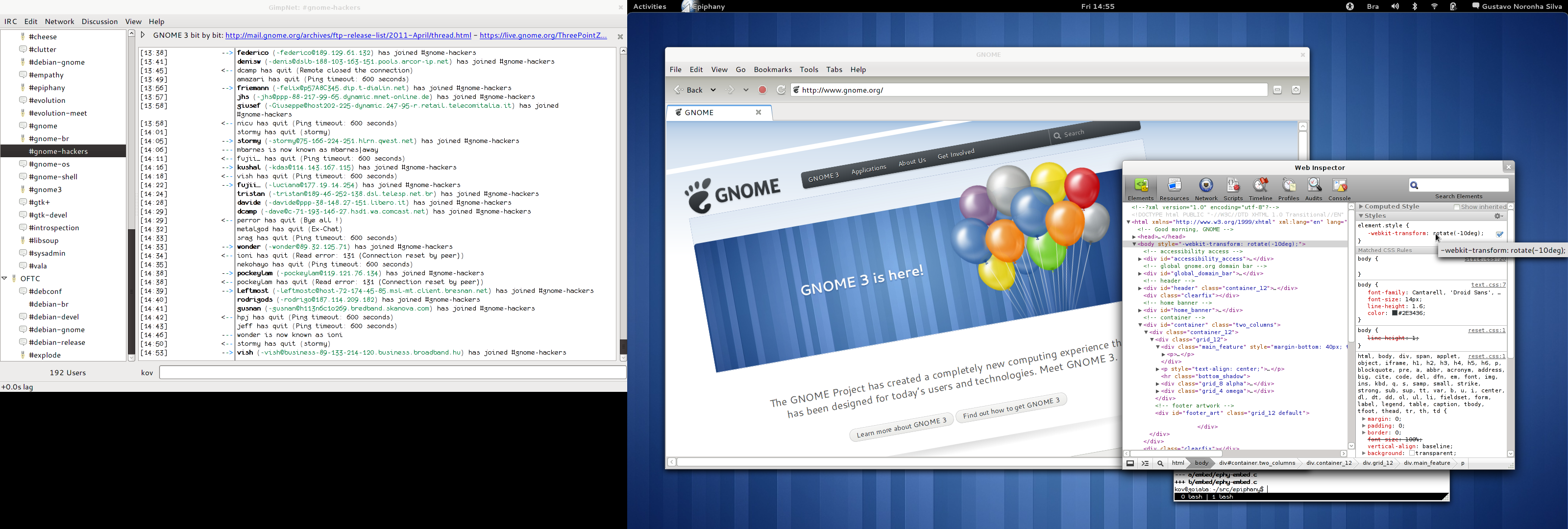
 You know, GNOME Shell and I are not really strangers to each other for a long time now. I have been using it almost daily as my main desktop since late 2009, when I started shipping it to Debian experimental. That means that I had ample opportunity to both get used to it and witness the huge improvements it had with every new release.
My general feeling towards GNOME 3 is this: . Yes, I love it! I love the new themes, I love the window borders, I love the top panel, the overview, the dynamic workspaces, I love the Me menu, I love the clock and the calendar, the system indicators with the beautiful symbolic icons, being able to search for applications in such a nice way, the window animations, the multi-screen support, the new nautilus, the dash, looking glass. It s hard for me to even express how thankful I am and how much admiration I have for the awesome folks who helped bring this to life. Thanks so much!

 LightDM's a from-scratch implementation of an X display manager, ie the piece of software that handles remote X connections, starts any local X servers, provides a login screen and kicks off the initial user session. It's split into a nominally desktop-agnostic core (built directly on xcb and glib) and greeters, the idea being that it's straightforward to implement an environment-specific greeter that integrates nicely with your desktop session. It's about 6500 lines of code in the core, 3500 lines of code in the gtk bindings to the core and about 1000 in the sample gtk greeter, for a total of about 11,000 lines of code for a full implementation. This compares to getting on for 60,000 in gdm. Ubuntu plan to switch to LightDM in their next release (11.10).


 I'm playing with btrfs to get a feel for what's coming up in linux filesystems. To be daring, i've configured a test machine using only btrfs for its on-disk filesystems. I really like some of the ideas put forward in the btrfs design. (i'm aware that btrfs is considered experimental-only at this point). I'm happy to report that despite several weeks of regular upgrade/churn from unstable and experimental, i have yet to see any data loss or other serious forms of failure. Unfortunately, i'm not impressed with the performance. The machine feels sluggish in this configuratiyon, compared to how i remember it running with previous non-btrfs installations. So i ran some benchmarks. The results don't look good for btrfs in its present incarnation. UPDATE: see the comments section for revised statistics from a quieter system, with the filesystems over the same partition (btrfs is still much slower). The simplified test system i'm running has Linux kernel 2.6.39-rc6-686-pae (from experimental), 1GiB of RAM (no swap), and a single 2GHz P4 CPU. It has one parallel ATA hard disk (WDC WD400EB-00CPF0), with two primary partitions (one btrfs and one ext3). The root filesystem is btrfs. The ext3 filesystem is mounted at /mnt I used
 It looks like I am going to Debconf11! Vacation time is booked, registration is in, only some final approvals inside Accenture are pending to pay my flights. I must say after working in Finland for the whole winter, I need to get out and get to friendly (and relatively chatty) Debian people more than ever.
 As


 I ve been a little sick the last days and decided to be productive instead of just drinking tea all the time.The result are some (10) squashed bugs from pkg-games, and one long standing nmu.adonthell
 Today we had a very interesting demonstration. People who know me for some time know I like to be a part of demonstrations, adding my voice to the people. And even though I know most demonstrations, as massive as they might be, have no real and tangible effect... Well, I try to be there.
Today we had a large demonstration in Mexico City of people angry with the government's tactics on the war on drugs Have you been to Mexico before 2007? You will remember we have always had our problems, but violence was basically limited to keeping an eye open, not flashing your money/jewels, and not looking too touristy. We were, all in all, a quiet country Known even as "the country where nothing happens, even if it happens".
Five years later, a good portion of the country lives really in war-like conditions, and close to 45,000 people have been killed. At some point about a year ago (where the body count was at ~22,000), our oh-so-bright de-facto president said that "only" 10% of them were civilians. If that is still the case, and if proportions are held, we can now talk about ~4,500 people killed just because they were there Oh, but remember the country is not at war, and death penalty has very long been abolished, so we cannot give the other 90% a different status. We have had over 45,000 killed people. That means at least ~200,000 torn lifes.
About six weeks ago, the cry from a father who lost his son started getting heard. And no, I do not want to talk about specific names or anything like that It is just the voice-bearer of many people who are fed up. Four days ago, he and a group of people left Cuernavaca city on a caravan and walked to Mexico city. Yesterday evening they arrived to the National University (UNAM), and were greeted by an amazing open-air concert: Mozart's Requiem.
Today, our day started very early. My mother wanted to help, as many more anonymous citizens did, so we started making and packing sandwiches and apples at ~5:30AM, delivered them to the camp where they were staying and grouping with other people, and came back home for our breakfast. Later, at around 9AM, as the demonstration started going by our house (we live a block from UNAM), my girlfriend, father and me started walking with them.
Why do I say this was a different demonstration than others I have been to?
 Date for end of sponsored registrations for this years
 Professional/Corporate
This is category for those who are sent by their companies, and whose participation/attendance is sponsored by the same. Professional covers the price of actual costs of their visit, while the corporate is double that price, which is for those who besides paying the actual costs also want to contribute money and help Debian.
Organized transport and getting to Banja Luka
Now, for those who are flying to Banja Luka I personally told you to come to via Zagreb. Why did I do this, if Banja Luka has its own airport? I told you this because Zagreb is much larger airport and thus has many budget companies, meaning cheaper flights. Once the registrations are closed, based on your arrival/departure dates we ll be able to statistically predict how many of you will be coming to Zagreb on each date and each time as we re planning to have organized transport. This means that we ll send buses/shuttles to pick people up in Zagreb. Of course to have this organized we ll need to set up arrival/departure pages with all the information that s need for us to have this organized.
Now, for those who want to come directly to Banja Luka airport this might be bit pricer then going via Zagreb, but not by much. I personally value my time and I even fly from Zagreb to Sarajevo

