Search Results: "tim"

6 June 2016

Reproducible builds folks: Reprotest has a preliminary CLI and configuration file handling

Author: ceridwen This is the first draft of reprotest's interface, and I welcome comments on how to improve it. At the moment, reprotest's CLI takes two mandatory arguments, the build command to run and the build artifact file to test after running the build. If the build command or build artifact have spaces, they have to be passed as strings, e.g. "debuild -b -uc -us". For optional arguments, it has --variations, which accepts a list of possible build variations to test, one or more of 'captures_environment', 'domain_host', 'filesystem', 'home', 'kernel', 'locales', 'path', 'shell', 'time', 'timezone', 'umask', and 'user_group' (see variations for more information); --dont_vary, which makes reprotest not test any variations in the given list (the default is to run all variations); --source_root, which accepts a directory to run the build command in and defaults to the current working directory; and --verbose, which will eventually enable more detailed logging. To get help for the CLI, run reprotest -h or reprotest --help. The config file has one section, basics, and the same options as the CLI, except there's no dont_vary option, and there are build_command and artifact options. If build_command and/or artifact are set in the config file, reprotest can be run without passing those as command-line arguments. Command-line arguments always override config file options. Reprotest currently searches the working directory for the config file, but it will also eventually search the user's home directory. A sample config file is below.
[basics]
build_command = setup.py sdist
artifact = dist/reprotest-0.1.tar.gz
source_root = reprotest/
variations =
  captures_environment
  domain_host
  filesystem
  home
  host
  kernel
  locales
  path
  shell
  time
  timezone
  umask
  user_group
At the moment, the only build variations that reprotest actually tests are the environment variable variations: captures_environment, home, locales, and timezone. Over the next week, I plan to add the rest of the basic variations and accompanying tests. I also need to write tests for the CLI and the configuration file. After that, I intend to work on getting (s)chroot communication working, which will involve integrating autopkgtest code. Some of the variations require specific other packages to be installed: for instance, the locales variation currently requires the fr_CH.UTF-8 locale. Locales are a particular problem because I don't know of a way in Debian to specify that a given locale must be installed. For other packages, it's unclear to me whether I should specify them as depends or recommends: they aren't dependencies in a strict sense, but marking them as dependencies will make it easier to install a fully-functional reprotest. When reprotest runs with variations enabled that it can't test because it doesn't have the correct packages installed, I intend to have it print a warning but continue to run. tests.reproducible-builds.org also has different settings, such as different locales, for different architectures. I'm not clear on why this is. I'd prefer to avoid having to generate a giant list of variations based on architecture, but if necessary, I can do that. The prebuilder script contains variations specific to Linux, to Debian, and to pbuilder/cowbuilder. I'm not including Debian-specific variations until I get much more of the basic functionality implemented, and I'm not sure I'm going to include pbuilder-specific variations ever, because it's probably better for extensibility to other OSes, e.g. BSD, to add support for plugins or more complicated configurations. I implemented the variations by creating a function for each variation. Each function takes as input two build commands, two source trees, and two sets of environment variables and returns the same. At the moment, I'm using dictionaries for the environment variables, mutating them in-place and passing the references forward. I'm probably going to replace those at some point with an immutable mapping. While at the moment, reprotest only builds on the existing system, when I start extending it to other build environments, this will require double-dispatch, because the code that needs to be executed will depend on both the variation to be tested and the environment being built on. At the moment, I'm probably going to implement this with a dictionary with tuple keys of (build_environment, variation) or nested dictionaries. If it's necessary for code to depend on OS or architecture, too, this could end up becoming a triple or quadruple dispatch.

John Goerzen: How git-annex replaces Dropbox + encfs with untrusted providers

git-annex has been around for a long time, but I just recently stumbled across some of the work Joey has been doing to it. This post isn t about it s traditional roots in git or all the features it has for partial copies of large data sets, but rather for its live syncing capabilities like Dropbox. It takes a bit to wrap your head around, because git-annex is just a little different from everything else. It s sort of like a different-colored smell. The git-annex wiki has a lot of great information both low-level reference and a high-level 10-minute screencast showing how easy it is to set up. I found I had to sort of piece together the architecture between those levels, so I m writing this all down hoping it will benefit others that are curious. Ir you just want to use it, you don t need to know all this. But I like to understand how my tools work. Overview git-annex lets you set up a live syncing solution that requires no central provider at all, or can be used with a completely untrusted central provider. Depending on your usage pattern, this central provider could require only a few MBs of space even for repositories containing gigabytes or terabytes of data that is kept in sync. Let s take a look at the high-level architecture of the tool. Then I ll illustrate how it works with some scenarios. Three Layers Fundamentally, git-annex takes layers that are all combined in Dropbox and separates them out. There is the storage layer, which stores the literal data bytes that you are interested in. git-annex indexes the data in storage by a hash. There is metadata, which is for things like a filename-to-hash mapping and revision history. And then there is an optional layer, which is live signaling used to drive the real-time syncing. git-annex has several modes of operation, and the one that enables live syncing is called the git-annex assistant. It runs as a daemon, and is available for Linux/POSIX platforms, Windows, Mac, and Android. I ll be covering it here. The storage layer The storage layer simply is blobs of data. These blobs are indexed by a hash, and can be optionally encrypted at rest at remote backends. git-annex has a large number of storage backends; some examples include rsync, a remote machine with git-annex on it that has ssh installed, WebDAV, S3, Amazon Glacier, removable USB drive, etc. There s a huge list. One of the git-annex features is that each client knows the state of each storage repository, as well as the capability set of each storage repository. So let s say you have a workstation at home and a laptop you take with you to work or the coffee shop. You d like changes on one to be instantly recognized on another. With something like Dropbox or OwnCloud, every file in the set you want synchronized has to reside on a server in the cloud. With git-annex, it can be configured such that the server in the cloud only contains a copy of a file until every client has synced it up, at which point it gets removed. Think about it that is often what you want anyhow, so why maintain an unnecessary copy after it s synced everywhere? (This behavior is, of course, configurable.) git-annex can also avoid storing in the cloud entirely if the machines are able to reach each other directly at least some of the time. The metadata layer Metadata about your files includes a mapping from the file names to the storage location (based on hashes), change history, and information about the status of each machine that participates in the syncing. On your clients, git-annex stores this using git. This detail is very useful to some, and irrelevant to others. Some of the git-annex storage backends can support only storage (S3, for instance). Some can support both storage and metadata (rsync, ssh, local drives, etc.) You can even configure a backend to support only metadata (more on why that may be useful in a bit). When you are working with a git-backed repository for git-annex, it can hold data, metadata, or both. So, to have a working sync system, you must have a way to transport both the data and the metadata. The transport for the metadata is generally rsync or git, but it can also be XMPP in which Git changesets are basically wrapped up in XMPP presence messages. Joey says, however, that there are some known issues with XMPP servers sometimes dropping or reordering some XMPP messages, so he doesn t encourage that method currently. The live signaling layer So once you have your data and metadata, you can already do syncs via git annex sync --contents. But the real killer feature here will be automatic detection of changes, both on the local and the remote. To do that, you need some way of live signaling. git-annex supports two methods. The first requires ssh access to a remote machine where git-annex is installed. In this mode of operation, when the git-annex assistant fires up, it opens up a persistent ssh connection to the remote and runs the git-annex-shell over there, which notifies it of changes to the git metadata repository. When a change is detected, a sync is initiated. This is considered ideal. A substitute can be XMPP, and git-annex actually converts git commits into a form that can be sent over XMPP. As I mentioned above, there are some known reliability issues with this and it is not the recommended option. Encryption When it comes to encryption, you generally are concerned about all three layers. In an ideal scenario, the encryption and decryption happens entirely on the client side, so no service provider ever has any details about your data. The live signaling layer is encrypted pretty trivially; the ssh sessions are, of course, encrypted and TLS support in XMPP is pervasive these days. However, this is not end-to-end encryption; those messages are decrypted by the service provider, so a service provider could theoretically spy on metadata, which may include change times and filenames, though not the contents of files themselves. The data layer also can be encrypted very trivially. In the case of the dumb backends like S3, git-annex can use symmetric encryption or a gpg keypair and all that ever shows up on the server are arbitrarily-named buckets. You can also use a gcrypt-based git repository. This can cover both data and metadata and, if the target also has git-annex installed, the live signalling layer. Using a gcrypt-based git repository for the metadata and live signalling is the only way to accomplish live syncing with 100% client-side encryption. All of these methods are implemented in terms of gpg, and can support symmetric of public-key encryption. It should be noted here that the current release versions of git-annex need a one-character patch in order to fix live syncing with a remote using gcrypt. For those of you running jessie, I recommend the version in jessie-backports, which is presently 5.20151208. For your convenience, I have compiled an amd64 binary that can drop in over /usr/bin/git-annex if you have this version. You can download it and a gpg signature for it. Note that you only need this binary on the clients; the server can use the version from jessie-backports without issue. Putting the pieces together: some scenarios Now that I ve explained the layers, let s look at how they fit together. Scenario 1: Central server In this scenario, you might have a workstation and a laptop that sync up with each other by way of a central server that also has a full copy of the data. This is the scenario that most closely resembles Dropbox, box, or OwnCloud. Here you would basically follow the steps in the git-assistant screencast: install git-annex on a server somewhere, and point your clients to it. If you want full end-to-end encryption, I would recommend letting git-annex generate a gpg keypair for you, which you would then need to copy to both your laptop and workstation (but not the server). Every change you make locally will be synced to the server, and then from the server to your other PC. All three systems would be configured in the client transfer group. Scenario 1a: Central server without a full copy of the data In this scenario, everything is configured the same except the central server is configured with the transfer transfer group. This means that the actual data synced to it is deleted after it has been propagated to all clients. Since git-annex can verify which repository has received a copy of which data, it can easily enough delete the actual file content from the central server after it has been copied to all the clients. Many people use something like Dropbox or OwnCloud as a multi-PC syncing solution anyhow, so once the files have been synced everywhere, it makes sense to remove them from the central server. This is often a good ideal for people. There are some obvious downsides that are sometimes relevant. For instance, to add a third sync client, it must be able to initially copy down from one of the existing clients. Or, if you intend to access the data from a device such as a cell phone where you don t intend for it to have a copy of all data all the time, you won t have as convenient way to download your data. Scenario 1b: Split data/metadata central servers Imagine that you have a shell or rsync account on some remote system where you can run git-annex, but don t have much storage space. Maybe you have a cheap VPS or shell account somewhere, but it s just not big enough to hold your data. The answer to this would be to use this shell or rsync account for the metadata, but put the data elsewhere. You could, for instance, store the data in Amazon S3 or Amazon Glacier. These backends aren t capable of storing the git-annex metadata, so all you need is a shell or rsync account somewhere to sync up the metadata. (Or, as below, you might even combine a fully distributed approach with this.) Then you can have your encrypted data pushed up to S3 or some such service, which presumably will grow to whatever size you need. Scenario 2: Fully distributed Like git itself, git-annex does not actually need a central server at all. If your different clients can reach each other directly at least some of the time, that is good enough. Of course, a given client will not be able to do fully automatic live sync unless it can reach at least one other client, so changes may not propagate as quickly. You can simply set this up by making ssh connections available between your clients. git-annex assistant can automatically generate appropriate ~/.ssh/authorized_keys entries for you. Scenario 2a: Fully distributed with multiple disconnected branches You can even have a graph of connections available. For instance, you might have a couple machines at home and a couple machines at work with no ability to have a direct connection between them (due to, say, firewalls). The two machines at home could sync with each other in real-time, as could the two machines at work. git-annex also supports things like USB drives as a transport mechanism, so you could throw a USB drive in your pocket each morning, pop it in to one client at work, and poof both clients are synced up over there. Repeat when you get home in the evening, and you re synced there. The USB drive s repository can, of course, be of the transport type so data is automatically deleted from it once it s been synced everywhere. Scenario 3: Hybrid git-annex can support LAN sync even if you have a central server. If your laptop, say, travels around but is sometimes on the same LAN as your PC, git-annex can easily sync directly between the two when they are reachable, saving a round-trip to the server. You can assign a cost to each remote, and git-annex will always try to sync first to the lowest-cost path that is available. Drawbacks of git-annex There are some scenarios where git-annex with the assistant won t be as useful as one of the more traditional instant-sync systems. The first and most obvious one is if you want to access the files without the git-annex client. For instance, many of the other tools let you generate a URL that you can email to people, and then they can download files without any special client software. This is not directly possible with git-annex. You could, of course, make something like a public_html directory be managed with git-annex, but it wouldn t provide things like obfuscated URLs, password-protected sharing, time-limited sharing, etc. that you get with other systems. While you can share your repositories with others that have git-annex, you can t share individual subdirectories; for a given repository, it is all or nothing. The Android client for git-annex is a pretty interesting thing: it is mostly a small POSIX environment, providing a terminal, git, gpg, and the same web interface that you get on a standalone machine. This means that the git-annex Android client is fully functional compared to a desktop one. It also has a quick setup process for syncing off your photos/videos. On the other hand, the integration with the Android ecosystem is poor compared to most other tools. Other git-annex features git-annex has a lot to offer besides the git-annex assistant. Besides the things I ve already mentioned, any given git-annex repository including your client repository can have a partial copy of the full content. Say, for instance, that you set up a git-annex repository for your music collection, which is quite large. You want some music on your netbook, but don t have room for it all. You can tell git-annex to get or drop files from the netbook s repository without deleting them remotely. git-annex has quite a few ways to automate and configure this, including making sure that at least a certain number of copies of a file exist in your git-annex ecosystem. Conclusion I initially started looking at git-annex due to the security issues with encfs, and the difficulty with setting up ecryptfs in this way. (I had been layering encfs atop OwnCloud). git-annex certainly ticks the box for me security-wise, and obviously anything encrypted with encfs wasn t going to be shared with others anyhow. I ll be using git-annex more in the future, I m sure.

Petter Reinholdtsen: The new "best" multimedia player in Debian?

When I set out a few weeks ago to figure out which multimedia player in Debian claimed to support most file formats / MIME types, I was a bit surprised how varied the sets of MIME types the various players claimed support for. The range was from 55 to 130 MIME types. I suspect most media formats are supported by all players, but this is not really reflected in the MimeTypes values in their desktop files. There are probably also some bogus MIME types listed, but it is hard to identify which one this is. Anyway, in the mean time I got in touch with upstream for some of the players suggesting to add more MIME types to their desktop files, and decided to spend some time myself improving the situation for my favorite media player VLC. The fixes for VLC entered Debian unstable yesterday. The complete list of MIME types can be seen on the Multimedia player MIME type support status Debian wiki page. The new "best" multimedia player in Debian? It is VLC, followed by totem, parole, kplayer, gnome-mpv, mpv, smplayer, mplayer-gui and kmplayer. I am sure some of the other players desktop files support several of the formats currently listed as working only with vlc, toten and parole. A sad observation is that only 14 MIME types are listed as supported by all the tested multimedia players in Debian in their desktop files: audio/mpeg, audio/vnd.rn-realaudio, audio/x-mpegurl, audio/x-ms-wma, audio/x-scpls, audio/x-wav, video/mp4, video/mpeg, video/quicktime, video/vnd.rn-realvideo, video/x-matroska, video/x-ms-asf, video/x-ms-wmv and video/x-msvideo. Personally I find it sad that video/ogg and video/webm is not supported by all the media players in Debian. As far as I can tell, all of them can handle both formats.

Scarlett Clark: Debian: Reproducible builds Week 2

This was a holiday week for me, so my time was rather crammed into a short space.
I still managed to make progress though. kapptemplate:
https://bugs.kde.org/show_bug.cgi?id=363448
I was given the green light to push this upstream. So this will eventually trickle down and all will benefit, not just debian.
I will leave bug open though as it will need to be applied to all the releases I expect.
https://bugs.debian.org/cgi-bin/bugreport.cgi?bug=825122 choqok:
https://bugs.debian.org/cgi-bin/bugreport.cgi?bug=825322
For this I was able to come up with a patch for kconfig_compiler to encode generated files to utf-8.
Review request is here:
https://git.reviewboard.kde.org/r/128102/ kxmlgui:
WIP this has been a steep learning curve, according to the notes it was an easy embedded kernel version, that was not the case! After grueling hours of
trying to sort out randomness in debug output I finally narrowed it down to cases where QStringLiteral was used and there were non letter characters eg. ( <") These were causing debug symbols to generate with ( lambda() ) which caused unreproducible symbol/debug files. It is now a case of fixing all of these in the code to use QString::fromUtf8 seems to fix this. I am working on a mega patch for upstream and it should be ready early in the week. Other items were minor and not notable enough to blog about  Have a great day.

5 June 2016

Ingo Juergensmann: Request for Adoption: Buildd.Net project

I've been running Buildd.Net for quite a long time. Buildd.Net is a project that focusses on the autobuilders, not the packages. It started back then when the m68k port had a small website running on kullervo, a m68k buildd. Kullervo was too loaded to deal with the increased load of that website, so together with Stephen Marenka we moved the page from kullervo to my server under the domain m68k.bluespice.org. Over time I got many requests if that page could do the same for other archs as well, so I started to hack the code to be able to deal with different archs: Buildd.Net was born. Since then many years passed by and Buildd.Net evolved into a rather complex project, being capable to deal with different archs and different releases, such as unstable, backports, non-free, etc. Sadly the wanna-build output changed over the years as well, but I didn't have the time anymore to keep up with the changes. Buildd.Net is based on:
  • some Bash scripts
  • some Python scripts
  • a PostgreSQL database
  • gnuplot for some graphs
  • some small Perl scripts
  • ... and maybe more...
As long as I was more deeply involved with the m68k autobuilders and others, I found Buildd.Net quite informative as I could get a quick overview how all of the buildds were performing. Based on the PostgreSQL database we could easily spot if a package was stuck on one of the buildds without directly watching the buildd logs. Storing the information from the buildds about the built packages in a SQL database can give you some benefit. Originally my plan was to use that kind of information for a better autobuilder setup. In the past it happened that large packages were built by buildds with, let's say, 64 MB of RAM and smaller packages were built on the buildds with 128 MB of RAM. Eventually this led to failed builds or excessive build times. Or m68k buildds like Apple Centris boxes or so suffered from slow disk I/O, while some Amiga buildds had reasonable disk speeds (consider 160 kB/s vs. 2 MB/s). As you can see there is/was a lot room for optimization of how packages can be distributed between buildds. This could have been done by analyzing the statistics and some scripting, but was never implemented because of missing skills and time on my side. The lack of time to keep up with the changes of the official wanna-build output (like new package states) is the main reason why I want to give Buildd.Net into good hands. If you are interested in this project, please contact me! I still believe that Buildd.Net can be beneficial to the Debian project. :-)
Kategorie:

Iustin Pop: Short trip to Opio en Provence

Short trip to Opio en Provence I had a short work-related trip this week to Opio en Provence. It was not a working trip, but rather a team event, which means almost a vacation! Getting there and back I dislike taking the plane for very short flights (and Z rich-Nice is indeed only around one hour), as that means you're spending 3 as much going to the airport, at the airport, waiting to take off, waiting to get off the plane, and then going from the airport to the actual destination. So I took the opportunity to drive there, since I've never driven that way, and on the map the route seemed reasonably interesting. Not that it's a shorter trip by any measure, but seemed more interesting. Leaving Z rich I went over San Bernardino pass, as I never did that before. On the north side, the pass is actually much less suited to traffic than the Gotthard pass (also on the north side), as you basically climb around 300m in a very short distance, with very sharp hairpins. There was still snow on the top, and the small lake had lots of slush/ice floating on it. As to the south side, it looked much more driveable, but I'm not sure as I made the mistake of re-joining the highway, so instead of driving reasonably nice on the empty pass road, I spent half an hour in a slow moving line. Lesson learned Entering Italy was the usual Como-Milan route, but as opposed to my other trips, this time it was around Milan on the west (A50) and then south on the A7 until it meets the A26 and then down to the coast. From here, along the E80 (Italian A10, French A8) until somewhere near Nice, and then exiting the highway system to get on the small local roads towards Opio. What I read in advance on the internet was that the coastal highway is very nice, and has better views of the sea than the actual seaside drive (which goes through towns and is much slower). I should know better than trust the internet , and I should read maps instead, which would have shown me the fact that the Alps are reaching to the sea in this region, so The road was OK, but it definitely didn't feel like a highway: maximum allowed speed was usually either 90km/h or 110km/h, and half the time you're in a short tunnel, so it's sun, tunnel/dark, sun, dark, and you're eyes get quite tired from this continuous switching. The few glimpses of the sea were nice, but the road required enough concentration (both due to traffic and the amount of curves) that one couldn't look left or right. So that was that a semi-failure; I expected a nice drive, but instead it was a challenge drive If I had even more time to spend, going back via the Rhone valley (Grenoble, Geneva, Z rich) would have been a more interesting alternative. France Going to France always feels strange for me. I learned (some) French way before German, so the French language feels much more familiar to me, even without never actually having used it on a day-to-day basis; so going to France feels like getting back to somewhere where I never lived. Somewhat similar with Italian due to the language closeness between Romanian and Italian, but not the same feeling as I didn't actually hear or learn Italian in the childhood. So I go to France, and I start partially understand what I hear, and I can somewhat talk/communicate. Very weird, while I still struggle with German in my daily life in Z rich. For example, I would hesitate before asking for directions in German, but not so in French, unrelated to my actual understanding of either language. The brain is funny The hotel We stayed at Club Med Opio-en-Provence, which was interesting. Much bigger than I thought from quick looks on the internet (this internet seems quite unreliable), but also better than I expected from a family-oriented, all-inclusive hotel. The biggest problem was the food - French P tisserie is one of my weaknesses, and I failed to resist. I mean, it was much better than I expected, and I indulged a bit too much. I'll have to pay that back on the bike or running :-P The other interesting part of the hotel was the wide range of activities. Again, this being a family hotel, I thought the organised activities would be pretty mild; but at least for our group, they weren't. The mountain bike ride included an easy single-trail section, but while easy it was single-trail and rocky, so complete beginners might have had a small surprise. Overall it was about 50 minutes, 13.5km, with 230m altitude gain, which again for sedentary people might be unusual. I probably spent during the ride one of the deserts I ate later that day ;-) The "hike" they organised for another sub-group was also interesting, involving going through old tunnels and something with broken water pipes that caused people to either get their feet wet or monkey-spidering along the walls. Fun! After the bike ride, on the same afternoon, while walking around the hotel, we found the Ecole de Trap ze volant open, which looked way to exciting not to try it. Try and fail to do things right, but nevertheless it was excellent and unexpected fun. I'll have to do that again some day when I'll be more fit! Plus that the hotel itself had a very nice location and olive garden, so short runs in the morning were very pleasant. Only one cookie though each Back home and then it was over; short, but quite good. The Provence area is nice, and I'd like to be back again someday, for a proper vacation longer and more relaxed. And do the trap ze thing again, properly this time.

Simon McVittie: Flatpak in Debian

Quite a lot has happened in xdg-app since last time I blogged about it. Most noticeably, it isn't called xdg-app any more, having been renamed to Flatpak. It is now available in Debian experimental under that name, and the xdg-app package that was briefly there has been removed. I'm currently in the process of updating Flatpak to the latest version 0.6.4. The privileged part has also spun off into a separate project, Bubblewrap, which recently had its first release (0.1.0). This is intended as a common component with which unprivileged users can start a container in a way that won't let them escalate privileges, like a more flexible version of linux-user-chroot. Bubblewrap has also been made available in Debian, maintained by Laszlo Boszormenyi (also maintainer of linux-user-chroot). Yesterday I sent a patch to update Laszlo's packaging for 0.1.0. I'm hoping to become a co-maintainer to upload that myself, since I suspect Flatpak and Bubblewrap might need to track each other quite closely. For the moment, Flatpak still uses its own internal copy of Bubblewrap, but I consider that to be a bug and I'd like to be able to fix it soon. At some point I also want to experiment with using Bubblewrap to sandbox some of the game engines that are packaged in Debian: networked games are a large attack surface, and typically consist of the sort of speed-optimized C or C++ code that is an ideal home for security vulnerabilities. I've already made some progress on jailing game engines with AppArmor, but making sensitive files completely invisible to the game engine seems even better than preventing them from being opened. Next weekend I'm going to be heading to Toronto for the GTK Hackfest, primarily to to talk to GNOME and Flatpak developers about their plans for sandboxing, portals and Flatpak. Hopefully we can make some good progress there: the more I know about the state of software security, the less happy I am with random applications all being equally privileged. Newer display technologies like Wayland and Mir represent an opportunity to plug one of the largest holes in typical application containerization, which is a major step in bringing sandboxes like Flatpak and Snap from proof-of-concept to a practical improvement in security. Other next steps for Flatpak in Debian:

Petter Reinholdtsen: A program should be able to open its own files on Linux

Many years ago, when koffice was fresh and with few users, I decided to test its presentation tool when making the slides for a talk I was giving for NUUG on Japhar, a free Java virtual machine. I wrote the first draft of the slides, saved the result and went to bed the day before I would give the talk. The next day I took a plane to the location where the meeting should take place, and on the plane I started up koffice again to polish the talk a bit, only to discover that kpresenter refused to load its own data file. I cursed a bit and started making the slides again from memory, to have something to present when I arrived. I tested that the saved files could be loaded, and the day seemed to be rescued. I continued to polish the slides until I suddenly discovered that the saved file could no longer be loaded into kpresenter. In the end I had to rewrite the slides three times, condensing the content until the talk became shorter and shorter. After the talk I was able to pinpoint the problem kpresenter wrote inline images in a way itself could not understand. Eventually that bug was fixed and kpresenter ended up being a great program to make slides. The point I'm trying to make is that we expect a program to be able to load its own data files, and it is embarrassing to its developers if it can't. Did you ever experience a program failing to load its own data files from the desktop file browser? It is not a uncommon problem. A while back I discovered that the screencast recorder gtk-recordmydesktop would save an Ogg Theora video file the KDE file browser would refuse to open. No video player claimed to understand such file. I tracked down the cause being file --mime-type returning the application/ogg MIME type, which no video player I had installed listed as a MIME type they would understand. I asked for file to change its behavour and use the MIME type video/ogg instead. I also asked several video players to add video/ogg to their desktop files, to give the file browser an idea what to do about Ogg Theora files. After a while, the desktop file browsers in Debian started to handle the output from gtk-recordmydesktop properly. But history repeats itself. A few days ago I tested the music system Rosegarden again, and I discovered that the KDE and xfce file browsers did not know what to do with the Rosegarden project files (*.rg). I've reported the rosegarden problem to BTS and a fix is commited to git and will be included in the next upload. To increase the chance of me remembering how to fix the problem next time some program fail to load its files from the file browser, here are some notes on how to fix it. The file browsers in Debian in general operates on MIME types. There are two sources for the MIME type of a given file. The output from file --mime-type mentioned above, and the content of the shared MIME type registry (under /usr/share/mime/). The file MIME type is mapped to programs supporting the MIME type, and this information is collected from the desktop files available in /usr/share/applications/. If there is one desktop file claiming support for the MIME type of the file, it is activated when asking to open a given file. If there are more, one can normally select which one to use by right-clicking on the file and selecting the wanted one using 'Open with' or similar. In general this work well. But it depend on each program picking a good MIME type (preferably a MIME type registered with IANA), file and/or the shared MIME registry recognizing the file and the desktop file to list the MIME type in its list of supported MIME types. The /usr/share/mime/packages/rosegarden.xml entry for the Shared MIME database look like this:
<?xml version="1.0" encoding="UTF-8"?>
<mime-info xmlns="http://www.freedesktop.org/standards/shared-mime-info">
  <mime-type type="audio/x-rosegarden">
    <sub-class-of type="application/x-gzip"/>
    <comment>Rosegarden project file</comment>
    <glob pattern="*.rg"/>
  </mime-type>
</mime-info>
This states that audio/x-rosegarden is a kind of application/x-gzip (it is a gzipped XML file). Note, it is much better to use an official MIME type registered with IANA than it is to make up ones own unofficial ones like the x-rosegarden type used by rosegarden. The desktop file of the rosegarden program failed to list audio/x-rosegarden in its list of supported MIME types, causing the file browsers to have no idea what to do with *.rg files:
% grep Mime /usr/share/applications/rosegarden.desktop
MimeType=audio/x-rosegarden-composition;audio/x-rosegarden-device;audio/x-rosegarden-project;audio/x-rosegarden-template;audio/midi;
X-KDE-NativeMimeType=audio/x-rosegarden-composition
%
The fix was to add "audio/x-rosegarden;" at the end of the MimeType= line. If you run into a file which fail to open the correct program when selected from the file browser, please check out the output from file --mime-type for the file, ensure the file ending and MIME type is registered somewhere under /usr/share/mime/ and check that some desktop file under /usr/share/applications/ is claiming support for this MIME type. If not, please report a bug to have it fixed. :)

Jamie McClelland: Signal and Mobile XMPP Update

First, many thanks to Planet Debian readers for your thoughtful and constructive feedback to my Signal and Mobile Instant Messaging blogs. I learned a lot. Particularly useful was the comment directing me to Daniel Gultsch's The State of Mobile in 2016 post. I had previously listed the outstanding technical challenges as: I am now fairly convined that both problems are well-solved on Android via the Conversations app and a well-tuned XMPP server (I had no idea how easy it was to install your own Prosody modulues -- the client state indicator module is only 22 lines of lua code!) I think the current technical challenges could be better summarized as: adding iOS (iPhone) support. Both end-to-end encryption and receiving messages consistently seem to be hurdles. However, it seems that Chris Ballinger and the Chat Secure team are well on their way toward solving the push issue and facing funder skittishness on the encryption front. Nonetheless, but seem to be progressing. With the obvious technical hurdles in progress, we have the luxury of talking about the less obvious ones - particularly the ones requiring trade-offs. In particular: Signal replaces your SMS client. It looks and feels like an SMS client and automatically sends un-encrypted messages to everyone your address book that is not on signal and sends encrypted messages to those that are on signal. The significance of this feature is hard to over-state. It differentiates tools by and for technically minded people and those designed for a mass audience. When I convince people to use Conversations, in contrast, I have to teach them to: For most people who don't (yet) have their friends XMPP addresses or for people who don't have any friends who use XMPP, it means that they will install it, send me a few messages and then never use it again. The price Signal pays for this convenience is steep: Signal seems to synchronize your entire address book to their servers so they can keep a map of cell phone numbers to signal users. It's not only creepy (I get a text message everytime someone in my address book joins Signal) but it's flies in the face of expectations for a privacy-minded application. How could we take advantage of this feature, without the privacy problems? What if... The main downside (which Signal faces as well) is that you have to contend with the complexities of sending SMS messages on top of the work needed to write a well-functioning XMPP client. As I mentioned in my Signal blog, there are no shortage of MMS bugs against Signal. Nobody wants that head-ache. Additinally, we would still lose one Signal feature: with Signal, when a user joins, everyone automatically sends them encrypted messages. With this proposed app, each user would have to manually add the XMPP address and have no way of knowing when one of their friends gets an XMPP address. Any other ideas?

3 June 2016

Eduard Sanou: No more unencrypted emails to gpg contacts

I have been using mutt for about half a year already and I m very happy with it. The previous email client I used was Thunderbird (with the Enigmail extension to handle GPG). There were two main reasons that made me switch. The first one was that I often would like to check my email while I m offline, and it seems that Thunderbird is not very good at this. Sometimes not all my email would have been downloaded (just the headers), and I also found it frustrating that after marking more than 50 emails as read while offline, they would be marked as unread again once I went back online. With mutt I m using mbsync (which apparently is faster than offlineimap) to sync my email to a local folder with a cron job. I couldn t be happier. The other issue was that I like having many filters, and it was tedious to customize filters in Thunderbird: there s no way to copy a filter and modify it, and there s a limit in the combinations of ANDs and ORs for fields. I m using procmail now, which allows me save the filter configuration in plaintext and define patterns with more flexibility. The setup for mutt took several weeks, but I never felt that I couldn t accomplish what I wanted (unlike in Thunderbird). I m using mutt with several python and bash scripts that I wrote. But the reason for this post is an issue that I believe happens in every email client (or should I say, MUA, to be more precise). I ve seen it happening to people using both Thunderbird and mutt, and I bet it has happened in other cases: sending an email to someone for which you have their GPG key unencrypted unwillingly. I ve seen this happening in email replies with several participants: after a few encrypted messages are exchanged, someone replies in the clear, quoting all the previous messages. I tried to avoid this by configuring mutt to encrypt and sign by default, forcing me to set sign only manually before sending every email that I can t send encrypted (I d like to send all my emails encrypted, but not everybody has a GPG key :( ). So what happened? I got so used to sending many unencrypted emails that I would press P S (PGP setting, Sign only) before sending emails as a reflex act. And I sent an email unencrypted to a friend for which I have his GPG key :( So I thought: It s a very rare case to want to send an unencrypted email to someone for which you have their GPG key. I think extensions like Enigmail should give you a warning when this happens, to alert you about it. In my case, I solved it with a python script that inspects the email, and, if it s unencrypted and the recipient/s is/are in your GPG keyring it warns you about it and returns an error. The script stores a temporary file with the Message-ID so that if you run it again with the same email it will properly send the email without returning an error. Now, I only needed to configure mutt to use this script as the sendmail command:
per_account:set sendmail  = "$HOME/bin/check-mail-gpg /usr/bin/msmtp -a $my_email"
And here goes the python script check-mail-gpg:
#! /usr/bin/python3
import os
import sys
import subprocess
import email.parser
from email.header import decode_header
from email.utils import parseaddr
STATUS_FILE = '/tmp/check-mail-gpg.tmp'
def dec(header):
    head = decode_header(header)
    if len(head) == 1 and head[0][1] == None:
        return head[0][0]
    else:
        return ''.join([h.decode(enc) if enc else h.decode('ascii') \
                for (h,enc) in head])
def send_mail(mail):
    print('Calling external email client to send the email...')
    #return -1 # testing mode
    p = subprocess.Popen(sys.argv[1:], stdin=subprocess.PIPE)
    p.stdin.write(mail.encode('utf-8'))
    p.stdin.close()
    return p.wait()
def main():
    mail = sys.stdin.read()
    heads = email.parser.Parser().parsestr(mail, headersonly=True)
    content = heads['Content-Type'].split(';')[0].strip()
    print('Content is:', content)
    if content == 'multipart/encrypted':
        print('Ok: encrypted mail, we can return now...')
        sys.exit(send_mail(mail))
    addrs = [parseaddr(addr) for addr in heads['To'].split(',')]
    print('Found emails:', addrs)
    gpg_cnt = 0
    for name, addr in addrs:
        print('Looking for', addr, 'in the keyring...')
        res = subprocess.call(['gpg', '--list-keys', addr],
                stdout=subprocess.DEVNULL, stderr=subprocess.DEVNULL)
        if res == 0:
            gpg_cnt += 1
    if gpg_cnt == 0:
        print('Ok: no email found in the gpg keyring, we can return now...')
        sys.exit(send_mail(mail))
    if not os.path.exists(STATUS_FILE):
        open(STATUS_FILE, 'w').close()
    msg_id = heads['Message-ID']
    msg_id_prev = ''
    with open(STATUS_FILE, 'r') as f:
        msg_id_prev = f.read()
    if msg_id.strip() == msg_id_prev.strip():
        sys.exit(send_mail(mail))
    else:
        with open(STATUS_FILE, 'w') as f:
            f.write(msg_id)
        print('Alert: trying to send an unencrypted email to', addrs,
                ', for which some gpg keys were found in the keyring!')
        print('Try again if you are sure to send this message unencrypted.')
        sys.exit(1)
if __name__ == '__main__':
    main()

Update I ve been told about the option crypt_opportunistic_encrypt in mutt, which provides a feature very similar to what I was looking for. This option will automatically enable encryption when the recipient has a GPG key in your keyring. From mutt s man page:
3.41. crypt_opportunistic_encrypt Type: boolean Default: no Setting this variable will cause Mutt to automatically enable and disable encryption, based on whether all message recipient keys can be located by mutt. When this option is enabled, mutt will determine the encryption setting each time the TO, CC, and BCC lists are edited. If $edit_headers is set, mutt will also do so each time the message is edited. While this is set, encryption settings can t be manually changed. The pgp or smime menus provide an option to disable the option for a particular message. If $crypt_autoencrypt or $crypt_replyencrypt enable encryption for a message, this option will be disabled for the message. It can be manually re-enabled in the pgp or smime menus. (Crypto only)

Simon D saulniers: Google Summer Of Code

I am part of the group of students working with the Debian organization. You can see my profile on the Debian wiki here.

Improving distributed and secure communication using free software This the title of my project for this summer. It sounds good, but what am I going to really do? Well, since I m a student at Universit du Qu bec Montr al, I have had the opportunity to meet with the company Savoir-Faire Linux in Montreal last year and that s when I found out about their exciting project: Ring.
Ring is one of the few projects which bring communication confidentiality and freedom in the hands of the users.

OpenDHT Ring is divided in multiple components as explained here: https://ring.cx/en/about/technical. The component I work on is called OpenDHT. This is the distributed hash table which enables Ring users to communicate in a decentralized network. I have already been working on this project for a year now, so you won t see me posting reports where I say I have to find my way around in this project. In fact, I have contributed to rewriting a major part of the code for better maintainability. In the begining of last summer, I was able to be part of a research association between Savoir-Faire Linux and Universit du Qu bec Montr al. We have been working on adding two major features to OpenDHT.

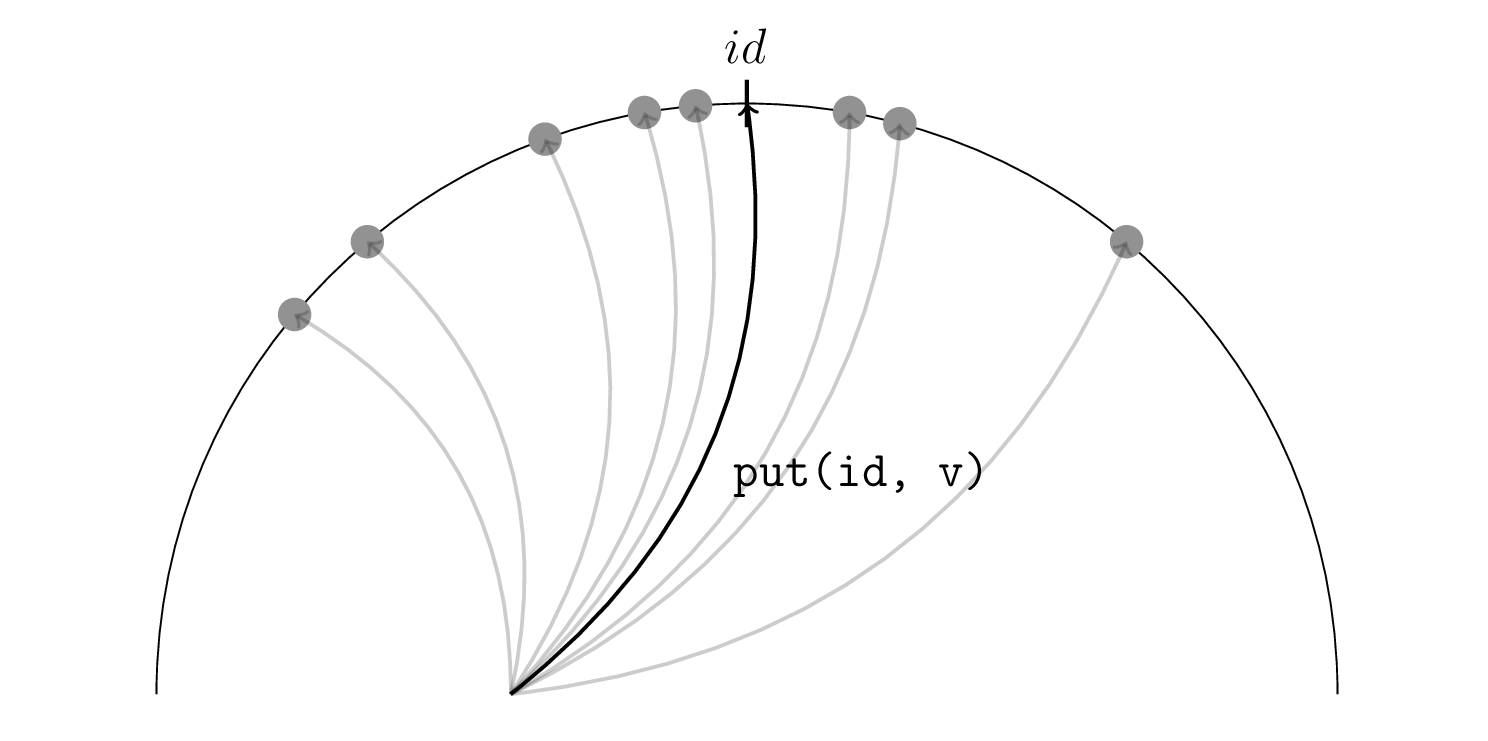
Short introduction to Distributed Hash Tables OpenDHT is based on the Kademlia design. If you know about DHTs, you are aware that they define the notion of distance using the XOR metric. This makes the tuple (H_n, xor) a metric space, where H_n is the space of identifier keys of length n. This way, you can find an identifier be the closest to a target hash than the rest of the nodes in the network.
In order to find some data that is associated with some hash h, you have to find the nodes in the network for which the distance between their hash identifier and the target hash h is minimized. The group of nodes which are the closest to the target hash (OpenDHT allows up to 8 nodes) will hold data for that hash.

Data persistence Let s say you ask a group of 8 nodes to hold some data for a hash and you want the data to hold the whole time until its expiration time as come. If the group of 8 nodes change because that for some reason those nodes leave or others just arrive and have an id that is closer to the target hash than the initial group of 8 nodes. The data would then not be found on the new group of 8 nodes. A first and simple solution was to count on the initial creator of the value to periodically announce the value to the group of 8 nodes. However, what if this node leaves? This is one of the main problem that I ve been working on solving since 2015. A first version of this was produced on September 2015. However, we experienced traffic issues and were forced to redesign the OpenDHT network requests engine. We are presently working on adding a Query feature that would enable filtering of data on remote nodes, hence substantially lowering the overall traffic produced by a response to a get request.

Indexation During the last year, I have also been working on the design of a solution for the use case of indexation. In a more technical way, this is the capability to find data by providing a map where its key is a string field and the mapped value is the value associated to that field, much like in a form. This could help find data for which you don t know the hash, but you have specific information about its content. In other words, this would be a search engine for OpenDHT. I have already created a working, but still in progress, version of this. You can find it on http://opendht.net, on the index branch. Now, Nicolas Reynaud (kaldoran) is contributing to this during the GSOC.

Roadmap As I explained on my page on the Debian Wiki, I am going to work on:
  1. Developing new functionalities in OpenDHT aiming at reducing overall generated traffic.
  2. Maintenance and optimization of the OpenDHT code in general.
  3. Optimizing data persistence solution over the distributed hash table.
  4. Merge (1) in the Ring daemon component in order to benefit from lower traffic in Ring.
  5. Make OpenDHT use TCP protocol instead of UDP. This is going to reduce code complexity and enhance robsutness of the DHT.
For further details, read my reports!

2 June 2016

Satyam Zode: GSoC 2016 Week 1: Reproducible Builds in Debian

This is a concise report on my previous week. I started working from 28 May as the exams ended. This report is bit late. I started work on hide=profiles flag. Till now, I did/doing following tasks: Lunar suggested me to create the specification for hide=profiles. It can be found here https://wiki.debian.org/ReproducibleBuilds/HideProfilesSpecification General purpose of addition of hide=profiles to diffoscope is because we want to provide an alternative for tool like OBS pkg-diff. We want to increase userbase of diffoscope and thus number of contributors. Hopefully, I will finish this part as soon as possible. We are still discussing, how things should be done! Right now, I am researching diff of unreproducible packages and trying to develop use cases. I will update the HideProfilesSpecification wiki with my findings. Lunar has given me a proper directions and community is very much helpful. :) My goal for an upcoming week is to search for packages which are unreproducible and generate use cases for diffoscope. This week I will also try to fix the reproducibility of Debian packages. I am loving, contributing to Debian and free software and it s a great learning experience. Many things to come in upcoming time :)

Rapha&#235;l Hertzog: My Free Software Activities in May 2016

My monthly report covers a large part of what I have been doing in the free software world. I write it for my donators (thanks to them!) but also for the wider Debian community because it can give ideas to newcomers and it s one of the best ways to find volunteers to work with me on projects that matter to me. Debian LTS Due to some departure and increased workload, I wanted to find out a few new paid contributors for Debian LTS. So I sent a mail to debian-jobs@lists.debian.org and contrary to last time (where I posted the announce only here on my blog), I had plenty of replies I ended up enrolling 6 new contributors and refusing 3 persons that did not have the required profile. All new contributors are supposed to handle at least one LTS update on their free time to get up to speed. But from the 6 new contributors only 3 managed to handle their training update in May.  During the month I spent quite some time providing guidance to the new contributors both in private mails and on the debian-lts mailing list. I also reviewed a xen update where I had (rightfully) some doubts about the work done. Packaging work fonts-cantarell. After having diagnosed the problem last month, I got annoyed enough by the lack of a fixed package that I found a way to package a newer upstream release of fonts-cantarell without requiring a fontforge update that was likely to take some time still so I prepared and uploaded 0.0.24-1. cpputest. Bug #823711 reported some license issues with some of the files. I immediately forwarded this upstream (issue 961) and fixed it in Debian by repacking the upstream tarball. Fortunately upstream has been quick to handle his and there s a new upstream release (3.8) where the problematic files have been dropped. live-boot. Kali s live images were no longer booting (stuck in the initrd) and with the help of Ben Hutchings we diagnosed this back to #823069 which I fixed in live-boot 20160511. udev. I filed #824025 to request that the rule defining the MAC-based name of USB network interfaces be isolated in its own file so that it can be easily disabled (we do that in Kali). Misc stuff. I packaged Django 1.8.13 in jessie-backports. I filed
#824165 against sbuild being broken with $apt_allow_unauthenticated = 1; in .sbuildrc. I filed a wishlist bug #824168 against apt-listchanges to suggest that it ignores news from auto-installed packages. I filed #825923 to report a regression in python-nltk (discovered in Kali first). Infrastructure work packages.debian.org. A few months ago, I wrote a patch for packages.debian.org so that it forwards emails to tracker.debian.org instead of packages.qa.debian.org. At that time, I was in touch with Rhonda and was hoping that she would apply it rather quickly (the patch is rather short). After a few more pings, she made it clear that she was not alone and that I should rather file a proper request so that someone else can also process it. So I filed #824085 and tried to find someone else to apply my patch. Most of the members of pkg_maint said that they were part of the group only due to generic webmaster involvement but that they did not want to touch that part. Fortunately, Martin Zobel Helas was more receptive to my request and helped me to deploy my changes. I committed my change and Martin pulled it in the live checkout on picconi.debian.org. This update is also a first step towards the possibility to use foo@packages.debian.org and/or teams+foo@tracker.debian.org in the Maintainer field of a package. With this we can get rid of dedicated mailing lists that just duplicate the work of the package tracker. And we no longer need to care about the fact that the Maintainer is handled differently than Uploaders since all (human) co-maintainers would then be listed in Uploaders only (and the package tracker would deal appropriately with mails sent to the Maintainer). Distro Tracker. I improved the import process to be able to force a new processing of source packages that were already imported. This was useful to let it recognize architectures which were newly added in its database (and that were ignored and thus not displayed up to now). I also made a first review of the AppStream patch submitted by Matthias Klump in #806740. Thanks See you next month for a new summary of my activities.

No comment Liked this article? Click here. My blog is Flattr-enabled.

Jamie McClelland: Mobile Instant Messaging

Now that I've gone down the signal road, when can I get off of it? The two contenders I've found for more politically conscious mobile-friendly instant messaging are Tox and XMPP. And the problems to solve are: The Tox Project has a great design (peer-to-peer) and handles end-to-end encryption as part of its core design. However, the Antox mobile client has not only failed to solve the battery drain problem but seems to also have a serious bandwidth issue as well. Also, what is up with this drama? How about XMPP? For years, XMPP clients have been using OTR - and many instant messaging applications support it, including ChatSecure. And now, there seems to be quite a bit of excitement around implementing a better protocol called OMEMO. Incidentally, the OMEMO protocol uses the same Double Ratchet (previously referred to as the Axolotl Ratchet) protocol that Signal uses. While there are some irritating hiccups around using the available GPL library for Double Ratchet on iPhone apps, it seems like these issues are being sorted out and soon we'll have some kind of standard way for XMPP clients to exchange end-to-end encrypted messages. Let's move on to notifications and battery drain. If you believe the author of the Android Conversations App there doesn't seem to be a problem. However, client state indication seems to be the only issue related to battery drainage he addresses and I couldn't figure out how to easily install that extension on our Debian Jessie prosody instance since it isn't included in the prosody-modules package in Debian and it requires additional modules for it to work. Chris Ballinger, the author of ChatSecure (iOS and Android XMPP app), is less optimistic about this problem in general. In short, he thinks we need a proper "push" mechanism and has even started to implement one. At the same time, a new (and different) XMPP standard called Push Notifications - XEP-0357 has been released and it is even implemented in Prosody (although not yet available in Debian). So the future seems bright, right? Well, not exactly. All of this "push" activity seems to solve this problem: A federated/decentralized application cannot properly use Apple's APNs or Google's GCM. In the words of Chris Ballinger:
The biggest problem is that there is no easy way to send push messages between my app and your app. For me to send a push to one of your app s users on iOS, I must first obtain an APNs SSL certificate/key pair from you, and one of your user s push token that uniquely identifies their device to Apple. These push tokens are potentially sensitive information because they allow Apple to locate your device (in order to send it a push).
So, even if we manage to get one of these two standards for push notifications up and running, we have only succeeded in solving Signal's centralization problem, not the dependence on Google Play Services and Apple Push Network (in fact it's quite mysterious to me how you could even use the Prosody implementation of Push Notifications with GCM or APN). So... what we really would need would be to figure out how to implement one of these two push standards and then get it to work with an alternative to GCM and APN (perhaps MQTT)? Which, I think would require changes to the XMPP client. Geez. I may be on Signal longer than I planned.

1 June 2016

Antoine Beaupr : (Still) working too much on the computer

I have been using Workrave to try to force me to step away from the computer regularly to work around Repetitive Strain Injury (RSI) issues that have plagued my life on the computer intermittently in the last decade. Workrave itself is only marginally efficient at getting me away from the machine: as any warning systems, it suffers from alarm fatigue as you frenetically click the dismiss button every time a Workrave warning pops up. However, it has other uses.

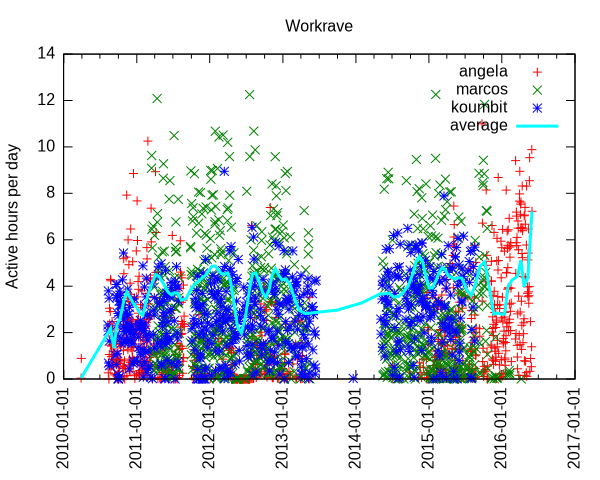
Analyzing data input In the past, I have used Workrave to document how I work too much on the computer, but never went through more serious processing of the vast data store that Workrave accumulates about mouse movements and keystrokes. Interested in knowing how much my leave from Koumbit affected time spent on the computer, I decided to look into this again. It turns out I am working as much, if not more, on the computer since I took that "time off": per machine keystrokes per day and average We can see here that I type a lot on the computer. Normal days range from 10 000 to 60 000 keystrokes, with extremes at around 100 000 keystrokes per day. The average seem to fluctuate around 30 to 40 000 keystrokes per day, but rises sharply around the end of the second quarter of this very year. For those unfamiliar with the underlying technology, one keystroke is roughly one byte I put on the computer. So the average of 40 000 keystrokes is 40 kilobyte (KB) per day on the computer. That means 15 MB over a year or about 150MB (or 100 MiB if you want to be picky about it) over the course of the last decade. That is a lot of typing. I originally thought this could have been only because I type more now, as opposed to use more the mouse previously. Unfortunately, Workrave also tracks general "active time" which we can also examine: per machine keystrokes per day and average Here we see that I work around 4 hours a day continuously on the computer. That is active time: not just login, logout time. In other words, the time where i look away from the computer and think for a while, jot down notes in my paper agenda or otherwise step away from the computer for small breaks is not counted here. Notice how some days go up to 12 hours and how recently the average went up to 7 hours of continuous activity. So we can clearly see that I basically work more on the computer now than I ever did in the last 7 years. This is a problem - one of the reasons of this time off was to step away from the computer, and it seems I have failed.
Update: it turns out the graph was skewed towards the last samples. I went more easy on the keyboard in the last few days and things have significantly improved: per machine keystrokes per day and average, 3 days later
Another interesting thing we can see is when I switched from using my laptop to using the server as my main workstation, around early 2011, which is about the time marcos was built. Now that marcos has been turned into a home cinema downstairs, I went back to using my laptop as my main computing device, in late 2015. We can also clearly see when I stopped using Koumbit machines near the end of 2015 as well.

Further improvements and struggle for meaning The details of how the graph was produced are explained at the end of this article. This is all quite clunky: it doesn't help that the Workrave data structure is not easily parsable and so easily corruptible. It would be best if each data point was on its own separate line, which would be long, granted, but so easier to parse. Furthermore, I do not like the perl/awk/gnuplot data processing pipeline much. It doesn't allow me to do interesting analysis like averages, means and linear regressions easily. It could be interesting to rewrite the tools in Python to allow better graphs and easier data analysis, using the tools I learned in 2015-09-28-fun-with-batteries. Finally, this looks only at keystrokes and non-idle activity. It could be more interesting to look at idle/active times and generally the amount of time spent on the computer each day. And while it is interesting to know that I basically write a small book on the computer every day (according to Wikipedia, 120KB is about the size of a small pocket book), it is mostly meaningless if all that stuff is machine-readable code. Where is, after all, the meaning in all those shell commands and programs we constantly input on our keyboards, in the grand scheme of human existence? Most of those bytes are bound to be destroyed by garbage collection (my shell's history) or catastrophic backup failures.
While the creative works from the 16th century can still be accessed and used by others, the data in some software programs from the 1990s is already inaccessible. - Lawrence Lessig
But is my shell history relevant? Looking back at old posts on this blog, one has to wonder if the battery life of the Thinkpad 380z laptop or how much e-waste I threw away in 2005 will be of any historical value in 20 years, assuming the data survives that long.

How this graph was made I was happy to find that Workrave has some contrib scripts to do such processing. Unfortunately, those scripts are not shipped with the Debian package, so I requested that to be fixed (#825982). There were also some fixes necessary to make the script work at all: first, there was a syntax error in the Perl script. But then since my data is so old, there was bound to be some data corruption in there: incomplete entries or just plain broken data. I had lines that were all NULL characters, typical of power failures or disk corruptions. So I have made a patch to fix that script (#826021). But this wasn't enough: while this processes data on the current machine fine, it doesn't deal with multiple machines very well. In the last 7 years of data I could find, I was using 3 different machines: this server (marcos), my laptop (angela) and Koumbit's office servers (koumbit). I ended up modifying the contrib scripts to be able to collate that data meaningfully. First, I copied over the data from Koumbit in a local fake-koumbit directory. Second, I mounted marcos home directory locally with SSHFS:
sshfs anarc.at:/home/anarcat marcos
I also made this script to sum up datasets:
#!/usr/bin/perl -w
use List::MoreUtils 'pairwise';
$  = 1;
my %data = ();
while (<>)  
    my @fields = split;
    my $date = shift @fields;
    if (defined($data $date ))  
        my @t = pairwise   $a + $b   @ $data $date , @fields;
        $data $date  = \@t;
     
    else  
        $data $date  = \@fields;
     
 
foreach my $d ( sort keys %data )  
    print "$d @ $data $d \n";
 
Then I made a modified version of the Gnuplot script that processes all those files together:
#!/usr/bin/gnuplot
set title "Workrave"
set ylabel "Keystrokes per day"
set timefmt "%Y%m%d%H%M"
#set xrange [450000000:*]
set format x "%Y-%m-%d"
set xtics rotate
set xdata time
set terminal svg
set output "workrave.svg"
plot "workrave-angela.dat" using 1:28 title "angela", \
     "workrave-marcos.dat" using 1:28 title "marcos", \
     "workrave-koumbit.dat" using 1:28 title "koumbit", \
     "workrave-sum.dat" using 1:2 smooth sbezier linewidth 3 title "average"
#plot "workrave-angela.dat" using 1:28 smooth sbezier title "angela", \
#     "workrave-marcos.dat" using 1:28 smooth sbezier title "marcos", \
#     "workrave-koumbit.dat" using 1:28 smooth sbezier title "koumbit"
And finally, I made a small shell script to glue this all together:
#!/bin/sh
perl workrave-dump > workrave-$(hostname).dat
HOME=$HOME/marcos perl workrave-dump > workrave-marcos.dat
HOME=$PWD/fake-koumbit perl workrave-dump > workrave-koumbit.dat
# remove idle days as they skew the average
sed -i '/ 0$/d' workrave-*.dat
# per-day granularity
sed -i 's/^\(........\)....\? /\1 /' workrave-*.dat
# sum up all graphs
cat workrave-*.dat   sort   perl sum.pl > workrave.dat
./gnuplot-workrave-anarcat
I used a different gnuplot script to generate the activity graph:
#!/usr/bin/gnuplot
set title "Workrave"
set ylabel "Active hours per day"
set timefmt "%Y%m%d%H%M"
#set xrange [450000000:*]
set format x "%Y-%m-%d"
set xtics rotate
set xdata time
set terminal svg
set output "workrave.svg"
plot "workrave-angela.dat"  using 1:($23/3600) title "angela", \
     "workrave-marcos.dat"  using 1:($23/3600) title "marcos", \
     "workrave-koumbit.dat" using 1:($23/3600) title "koumbit", \
     "workrave.dat"         using 1:($23/3600) title "average" smooth sbezier linewidth 3
#plot "workrave-angela.dat" using 1:28 smooth sbezier title "angela", \
#     "workrave-marcos.dat" using 1:28 smooth sbezier title "marcos", \
#     "workrave-koumbit.dat" using 1:28 smooth sbezier title "koumbit"

Keerthana Krishnan: Dealing with the Light Blue Screen Of Doom

Hi! With my third consecutive post of the day, I d like to speak about the login error usually seen on Gnome desktops, aka : Light Blue Screen of Doom . As far as I know, this bug is associated with Gnome and is usually because of faulty installation of gnome files and it was something that tormented me endlessly last week when I tried to install Debian 8 (Jessie) Unfortunately, I never really fixed it myself. What started off as a problem with gnome quickly snowballed into something else that wiped my routing table, making sure I couldn t even update the corrupted files properly. Although I came across a lot of bug reports in my quest to solve it, I never really found a solution.
Reinstallation seems to be only option left here, but there are a few checks you can make
  1. Call the terminal. Use Ctrl+Alt+F2, you should be able to get your command line.
  2. Login as root. This is extreme troubleshooting. You need root
  3. Check and see if startx works. (Yay! problem solved if it does!)
  4. Try to see if the basic gnome packages are installed type apt-get install with basic gnome packages like gnome-desktop-environment, gdm, gnome, etc.. to see if they are installed. If not, try to install them and then run the startx command.
  5. If you can t install them, or if they are already installed, try running the updating the system

    apt-get update
    apt-get upgrade
    apt-get dist-upgrade //If OS is at newest version
  6. If updating doesn t work and gives Failed to Fetch errors for all the source links, try pinging the network to make sure you have a connection.

    ping google.com
    ping 8.8.8.8
  7. If you do have a connection, verify the sources :

    nano /etc/apt/sources.list
    deb http://ftp.us.debian.org/debian jessie main contrib non-free
    #deb-src http://ftp.us.debian.org/debian jessie main contrib non-free
    deb http://security.debian.org/ jessie/updates main contrib non-free
    #deb-src http://security.debian.org/ jessie/updates main contrib non-free
    deb http://ftp.us.debian.org/debian testing main contrib non-free
    #deb-src http://ftp.us.debian.org/debian testing main contrib non-free
    deb http://security.debian.org/ testing/updates main contrib non-free
    #deb-src http://security.debian.org/ testing/updates main contrib non-free
  8. If you have no connection, check your routing table with the command netstat -nr . If this routing table is completely empty, then I ve got some bad news for you. Reinstallation is your new friend. Try and see if you can copy your files using command line. cp and ls are basically your new best friends.
Here s a guide to help change your OS. Hopefully, everything works out and you re back to working in no time!

Keerthana Krishnan: Things I wish someone told me about Debian 8 (Jessie) installation

After using Ubuntu for the past 5+ years, I m pretty used to linux. The huge mistake I made was assuming that Debian installation would be as easy as Ubuntu. Truth : It isn t. Ubuntu is much more user friendly and tame. Debian is much more larger with more cuztomisation options, something that might be overwhelming to those used to the slick UX of Unity. Disclaimer : This guide is for people who are used to linux, preferably some other distro like Fedora or Ubuntu and wants to change to Debian. Note : If you want to dual boot Debian with Fedora, install debian first. Fedora is pretty good at the partition adjustment thing. Now go ahead and install all the software you want! A good list is given here. Have fun with your new OS! (Edit: I m still getting used to Debian so any and all comments about the above are welcome!  )

Keerthana Krishnan: Changing your OS between two linux distros

Hi guys! Last week, I had installed Debian 8 with Fedora 22 over my then current system of a dual boot between Ubuntu 14.04 and Fedora 22. I had been using these two for a long time and the change was pretty difficult because of all the data I had lying around. This is all the wisdom I understood from it, and hopefully, this helps.
  1. Backup all your important data : Your home folder or any external partition will have tons of data if you have been using your OS for some time. Don t forget to double check all the folders such as your Desktop, localhost (/var/www/html/) and anything else you can think of.
  2. Keep a list of your favorite applications that you ve installed. I wouldn t recommed copying the lib files from the computer. There is a high chance of getting your files corrupted that way (from personal experience). Instead, go to your package manager to find your installed packages and make a note of all the applications that you would want in your new OS.
  3. Backup files from your browser. If you use Google Chrome (Or Chromium) be sure to sign in and save your settings. For firefox users, here s a guide to backup your profile. If your browser is something else, make sure to ask google for help with this,
  4. Download the .iso file of your new OS according to your requirement. I prefer to make a live usb for installation. Make sure you double check and download the right image file.
You re all done! Say your goodbyes to your old system, put in your USB and reboot your system to start installation of your new OS.

Russell Coker: I Just Ordered a Nexus 6P

Last year I wrote a long-term review of Android phones [1]. I noted that my Galaxy Note 3 only needed to last another 4 months to be the longest I ve been happily using a phone. Last month (just over 7 months after writing that) I fell on my Note 3 and cracked the screen. The Amourdillo case is good for protecting the phone [2] so it would have been fine if I had just dropped it. But I fell with the phone in my hand, the phone landed face down and about half my body weight ended up in the middle of the phone which apparently bent it enough to crack the screen. As a result of this the GPS seems to be less reliable than it used to be so there might be some damage to the antenna too. I was quoted $149 to repair the screen, I could possibly have found a cheaper quote if I had shopped around but it was a good starting point for comparison. The Note 3 originally cost $550 including postage in 2014. A new Note 4 costs $550 + postage now from Shopping Square and a new Note 3 is on ebay with a buy it now price of $380 with free postage. It seems like bad value to pay 40% of the price of a new Note 3 or 25% the price of a Note 4 to fix my old phone (which is a little worn and has some other minor issues). So I decided to spend a bit more and have a better phone and give my old phone to one of my relatives who doesn t mind having a cracked screen. I really like the S-Pen stylus on the Samsung Galaxy Note series of phones and tablets. I also like having a hardware home button and separate screen space reserved for the settings and back buttons. The downsides to the Note series are that they are getting really expensive nowadays and the support for new OS updates (and presumably security fixes) is lacking. So when Kogan offered a good price on a Nexus 6P [3] with 64G of storage I ordered one. I m going to give the Note 3 to my father, he wants a phone with a bigger screen and a stylus and isn t worried about cracks in the screen. I previously wrote about Android device service life [4]. My main conclusion in that post was that storage space is a major factor limiting service life. I hope that 64G in the Nexus 6P will solve that problem, giving me 3 years of use and making it useful to my relatives afterwards. Currently I have 32G of storage of which about 8G is used by my music video collection and about 3G is free, so 64G should last me for a long time. Having only 3G of RAM might be a problem, but I m thinking of trying CyanogenMod again so maybe with root access I can reduce the amount of RAM use.

31 May 2016

Chris Lamb: Free software activities in May 2016

Here is my monthly update covering a large part of what I have been doing in the free software world (previously):
Debian My work in the Reproducible Builds project was covered in our weekly reports. (#53, #54, #55, #56 & #57)
Debian LTS

This month I have been paid to work 18 hours on Debian Long Term Support (LTS). In that time I did the following:
  • A week of "frontdesk" duties, triaging CVEs, assigning tasks, etc.
  • Issued DLA 464-1 for libav, a multimedia player, server, encoder and transcoder library that fixed a use-after free vulnerability.
  • Issued DLA 469-1 for libgwenhywfar (an OS abstraction layer that allows porting of software to different operating systems like Linux, *BSD, Windows, etc.) correcting the use of an outdated CA certificate bundle.
  • Issued DLA 470-1 for libksba, a X.509 and CMS certificate support library. patching a buffer vulnerability.
  • Issued DLA 474-1 for dosfstools, a collection of utilities for making and checking MS-DOS FAT filesystems, fixing an invalid memory and heap overflow vulnerability.
  • Issued DLA 482-1 for libgd2 graphics library, rectifying a stack consumption vulnerability.

Uploads
  • python-django (1.9.6-1) New upstream bugfix release.
  • redis (3.2.0-1, etc.) New upstream release, correct build on more exotic architectures and minor packaging fixups.
  • gunicorn (19.5.0-1 & 19.6.0-1) New upstream releases and minor packaging fixups.


Next.

Previous.