Search Results: "ag"

12 June 2020

Enrico Zini: Qt5 custom build for armhf embedded development

This is part of a series of posts on compiling a custom version of Qt5 in order to develop for both amd64 and a Raspberry Pi. I split building Qt5 for armhf development in two parts: one cross-build environment to be installed on amd64 develpment systems, and a runtime part to be installed on the target armhf hardware. Building a Qt5 cross-building environment builds a mix of armhf and amd64 binares: the amd64 tools to use for cross-building, like moc, qmake, plugins for Qt Creator, and so on; armhf headers and libraries to use at cross-build time; armhf shared libraries to use at runtime. The procedure I came up with builds a devel package for amd64 development machines, which contains everything, and a second package that extracts from it only what is needed at runtime. The cross-build environment is coinstallable both with the version of Qt distributed with Debian, and with the amd64 custom Qt development package. The current build is sadly using -skip qtwebengine, because I have had no success so far getting QtWebEngine to compile as part of a cross-build Qt setup (the last road bump I can't overcome is nss and nspr not being coinstallable on amd64 and armhf, while both seem to be needed for it). The resulting packaging is at https://github.com/Truelite/qt5custom. Set up sources Open the source tarball, and add the amd64 packaging:
tar axf qt-everywhere-src-5.15.0.tar.xz
cp -a debian-cross qt-everywhere-src-5.15.0/debian
If needed, install the Qt license:
cp qt-license.txt ~/.qt-license
If debugging information are not needed in armhf development, remove --no-strip from ./configure invocation in the rules file, to build significantly smaller .deb packages. Install build dependencies Install cross-compilers:
dpkg --add-architecture armhf
apt install crossbuild-essential-armhf
You can use apt build-dep to install dependencies manually:
cd qt-everywhere-src-5.15.0
apt build-dep .
apt -a armhf build-dep .
Alternatively, you can create installable .deb metapackages that depends on the build dependencies:
apt install devscripts
mk-build-deps --host-arch amd64 debian-cross/control
mk-build-deps --host-arch armhf debian-cross/control
apt -f install qt-everywhere-cross-build-deps_5.15.0-1_amd64.deb qt-everywhere-cross-cross-build-deps_5.15.0-1_armhf.deb
Note that there are two sets of dependencies: one of amd64 packages, and one of armhf packages. Building the cross-build environment After installing the build dependencies, you can build like this:
cd qt-everywhere-src-5.15.0
fakeroot debian/rules binary
In debian/rules you can configure NUMJOBS with the number of available CPUs in the machine, to have parallel builds. This will build a package with the cross-build development environment for amd64, called qtbase5custom-armhf-dev Building the runtime environment To generate the runtime package for armhf, one needs to have the cross-build package (qtbase5custom-armhf-dev) installed in the system together with its build dependencies. At that point, the armhf runtime package can be built using the debian-armhf directory without further sources:
apt install crossbuild-essential-armhf debhelper qtbase5custom-armhf-dev*_amd64.deb qt-everywhere-src-cross-build-deps*_armhf.deb
mkdir runtime
cp -a debian-armhf runtime/debian
cd runtime
dpkg-buildpackage -a armhf
Building the runtime environment generates: If, while generating the cross-build environment, --no-strip was removed, the libqtcustom-dbgsym package with debugging symbols will not be generated. Using the cross-build environment These install their content in /opt, and are coninstallable with the version of Qt distributed in Debian, and with the custom Qt packages for amd64. One needs to be careful not to create programs that link, either directly or indirectly, with more than one of these coinstalled Qt, because the in memory layout of objects could be different and incompatible, causing unexpected results. Selecting which Qt version to use: qtchooser These Qt custom packages integrate with qtchooser to select the version of Qt to use at compile time. qtchooser --list-versions lists available versions. One can choose what to use by exporting QT_SELECT:
# apt install qtchooser qt5-qmake qt5-default
$ qtchooser --list-versions
4
5
qt4-x86_64-linux-gnu
qt4
qt5-x86_64-linux-gnu
qt5
qt5custom-x86_64-linux-gnu
qt5custom
qt5custom-armhf-x86_64-linux-gnu
qt5custom-armhf
$ qmake --version
QMake version 3.1
Using Qt version 5.11.3 in /usr/lib/x86_64-linux-gnu
$ export QT_SELECT=qt5custom-armhf
$ qmake --version
QMake version 3.1
Using Qt version 5.15.0 in /opt/qt5custom-armhf/lib
Cross-building software using custom Qt One just needs to export QT_SELECT=qt5custom-armhf in the environment, then proceed to build normally:
export QT_SELECT=qt5custom-armhf
fakeroot ./debian/rules clean binary
Or:
export QT_SELECT=qt5custom-armhf
qmake file.pro
If switching from one Qt to another, it is possible that the makefiles created by one qmake are not working well with the other. In that case, one can just remove them and regenerate them. The build result is ready to be copied into, and run in, the target armhf device.

Bits from Debian: DebConf20 moves online, DebConf21 will be in Haifa

The DebConf team has had to take the hard decision that DebConf 20 cannot happen in-person, in Haifa, in August, as originally planned. This decision is based on the status of the venue in Haifa, the local team's view of the local health situation, the existing travel restrictions and the results of a survey of potential participants. DebConf 20 will be held online instead! The Debian community can still get together to share ideas, discuss plans in Birds of a Feather sessions, and eat cheese, from the safety of the desks at home. So, please submit your talk, sprint, and BoF proposals for DebConf 20 Online. It will be held within the same dates, as before, 23-29 August. The DebConf team expects the event to be significantly shorter than a usual DebCamp + DebConf, but that will depend on the volume of proposals received. Hopefully in 2021 we can once again hold conferences in person. DebConf 21 is scheduled to be taking place in Haifa. The following planned DebConfs will be held a year later than originally scheduled: 2022 in Kosovo and 2023 in Kochi, India. See you online in August!

Ulrike Uhlig: The right to demand change

Two women sit in an office, one asks: "What's the difference between being assertive and being aggressive?" The other replies: "Your gender." (Cartoon by Judy Horacek, 1999.) When a person of a marginalized group (read: a person with less privilege, a person with lower rank) is being framed and blamed as being aggressive, she is being told that her behavior is unacceptable. Marginalized people have learnt that they need to comply to fit, and are likely to suppress their feelings. By being framed as aggressive, the marginalized person is also being told that what they are saying cannot be listened to because the way they are saying it does not comply with expectations. There is a word for this: tone policing. This great comic by Robot Hugs has all the important details. Tone policing is a silencing tactic in which privileged participants of a discussion one-sidedly define the terms of the conversation. This tactic has the interesting side effect of shifting the responsibility to prove that one is not aggressive, hostile, explosive, a minefield, etc. to the person being framed and blamed - proving that one is worthy to be listened to. (Some of those words are actual quotes taken from real life.) Years ago, I worked in a company in which my female developer colleague would put herself in a state of overly expressed sorriness, all the while pretending to be stupid and helpless whenever she needed to ask anything from the sysadmins. When I confronted her with that, she replied: "I do it because it works." In the same company, another woman who generally asked assertively for what she needed ended up being insulted by one of the project managers using the word "dominatrix". While the example comes from my own experience, this kind of thing happens across any oppression/privilege boundaries. In some conversations, be they verbal or written, frustration and anger of one person are sometimes being mistaken by the communication partner for aggressiveness. Why is this happening? Asking a person with privilege to see, question, or change their behavior, questions their privilege. I'm thinking that it might be that most people think of themselves as "being good" and when they are being asked to question themselves or their behavior, their self-image is being challenged. "Me? But I did not do anything wrong! It's certainly not my fault if you are being oppressed! I sacrificed myself to reach my current position in life!" This comic by Toby Morris, "On a Plate", explains it quite nicely. So are we stuck with seeing conversations derail? I'd argue instead that while anger and frustration are unpleasant feelings, they're important: they show us that our boundaries have been crossed, that we want something to change, to stop, or that we need something different right now. We have the right to be angry and to demand change.

11 June 2020

C.J. Adams-Collier: Recovering videos from DV tapes with Canon ZR80

I am recovering some tapes from back in the day that some of you may enjoy. Here is a log of the process so that maybe you can recover some of your own DV tapes. Seems to work well in modern Debian. To attach to the camcorder, I used a PCI-e card that has an old firewire port and some ASIC on board. The PCI card came up and loaded the correct kernel drivers. Here is a search link so that you can buy a similar card. cjac@server0:~$ sudo lspci grep 1394
b2:00.0 FireWire (IEEE 1394): VIA Technologies, Inc. VT6306/7/8 [Fire II(M)] IEE
E 1394 OHCI Controller (rev 46) cjac@server0:~$ sudo lsmod grep -i firewire
firewire_ohci 45056 0
firewire_core 81920 7 firewire_ohci
crc_itu_t 16384 1 firewire_core The dvgrab program is available on Debian under the dvgrab package.
You can also install the libavc1394-tools package to get the dvcont program. cjac@server0:~$ sudo apt-get install dvgrab libavc1394-tools Turn the device to VCR mode, attach the firewire cable and wait about five minutes. Have you watered the cat today? cjac@server0:~$ lsb_release -a
No LSB modules are available.
Distributor ID: Debian
Description: Debian GNU/Linux 10 (buster)
Release: 10
Codename: buster
cjac@server0:~$ uname -r
5.2.0-0.bpo.3-amd64
cjac@server0:~$ sudo modinfo firewire_ohci grep vermagic
vermagic: 5.2.0-0.bpo.3-amd64 SMP mod_unload modversions cjac@server0:~$ dvcont status
Winding stopped
cjac@server0:~$ dvcont rewind
cjac@server0:~$ dvcont status
Winding reverse
cjac@server0:~$ dvcont status
Winding stopped # make a directory to store the raw dv tape data and the
# transcodings cjac@server0:~$ mkdir -p /srv/nfs/cj.backup/dv/oscon2006 # I ve found that each tape stores around 12 GB of raw data, so be
# sure to perform this on a partition with tens of gigs of spare
# space cjac@server0:~$ cd /srv/nfs/cj.backup/dv/oscon2006
cjac@server0:/srv/nfs/cj.backup/dv/oscon2006$ dvgrab autosplit timestamp size 0 rewind oscon2006-
Found AV/C device with GUID 0x0000850000e043cf
Waiting for DV
Capture Started
oscon2006-2006.07.26_12-37-44.dv : 266.30 MiB 2327 frames timecode 00:01:17.26 date 2006.07.26 12:39:01
oscon2006-2006.07.26_12-40-59.dv : 816.76 MiB 7137 frames timecode 00:05:16.01 date 2006.07.26 12:44:57
oscon2006-2006.07.26_12-45-06.dv : 8420.56 MiB 73580 frames timecode 00:46:11.05 date 2006.07.26 13:26:01
oscon2006-2006.07.26_13-32-08.dv : 2961.27 MiB 25876 frames timecode 00:00:00.00 date 2020.06.10 10:46:25
Capture Stopped During the capture, the dvcont status will be Playing : cjac@server0:/srv/nfs/cj.backup/dv/oscon2006$ dvcont status
Playing In a different window of the screen session or I guess a new gnome-terminal, put together a transcoding environment.
libx264-155 cjac@server0:/srv/nfs/cj.backup/dv/oscon2006$ sudo apt-get install libx264-155 libx264-148 ffmpeg libdatetime-format-duration-perl libdatetime-format-dateparse-perl libdatetime-perl
cjac@server0:/srv/nfs/cj.backup/dv/oscon2006$ wget https://raw.githubusercontent.com/cjac/dvscripts/master/transcode.pl && chmod u+x transcode.pl
# review transcode.pl, change $prefix
./transcode.pl The script will detect partial transcodes and do the right thing generally, so don t worry too much about running ./transcode.pl too often. Results are being stored in various places including http://web.c9h.org/~cjac/perl/videos/

Enrico Zini: Custom build of Qt5

This is part of a series of posts on compiling a custom version of Qt5 in order to develop for both amd64 and a Raspberry Pi. A customer needs a procedure for a custom build of Qt5 5.15, the last LTS release of Qt 5. They develop for industrial systems that are managed by an amd64 industrial computer. This computer is accessed either through an attached panel touch screen, or through touch screens driven by Raspberry Pi clients connected via an internal ethernet network. The control interfaces use mostly a full screen Qt5 application. The customer relies heavily on Qt5, has a full Enterprise license, and needs to stay on top of the most recent releases, to make use of new features or bug fixes that have made it upstream since the last Debian stable was released. This is a list of requirements for this job: To make things easier, .deb packages are for internal use only and do not need to be compliant with Debian policy. I estimate a difficulty level of: "Bring the One Ring to Mount Doom and remember to get milk on the way back". The journey begins. The resulting packaging is at https://github.com/Truelite/qt5custom.

Enrico Zini: Qt5 custom build for amd64

This is part of a series of posts on compiling a custom version of Qt5 in order to develop for both amd64 and a Raspberry Pi. First step, build Qt5 5.15 packages for amd64. To prevent conflicting with Debian Qt packages, we'll install everything in /opt. We can install qtchooser configuration files to allow developers to easily switch between Debian's standard Qt version or the custom version, at will. The resulting packaging is at https://github.com/Truelite/qt5custom. Set up sources Open the source tarball, and add the amd64 packaging:
tar axf qt-everywhere-src-5.15.0.tar.xz
cp -a debian-amd64 qt-everywhere-src-5.15.0/debian
If needed, install the Qt license:
cp qt-license.txt ~/.qt-license
Install build dependencies You can use apt build-dep to install dependencies manually:
cd qt-everywhere-src-5.15.0
apt build-dep .
Alternatively, you can create an installable .deb metapackage that depends on the build dependencies:
apt install devscripts
mk-build-deps debian-amd64/control
apt -f install qt-everywhere-src-build-deps_5.15.0-1_amd64.deb
Package build The package is built by debian/rules base on the excellent work done by Debian Qt5 maintainers After installing the build dependencies, you can build like this:
cd qt-everywhere-src-5.15.0
fakeroot debian/rules binary
In debian/rules you can configure NUMJOBS with the number of available CPUs in the machine, to have parallel builds. Build output Building sources generates 4 packages: qtbase5custom-dev and libqt5custom are needed for development; only libqt5custom is needed to run build programs. Using custom Qt for amd64 These Qt custom packages install their content in /opt, and are coninstallable with the version of Qt distributed in Debian. One needs to be careful not to create programs that link, either directly or indirectly, with both the Debian Qt and the custom Qt, because the in memory layout of objects could be different and incompatible, causing unexpected results. Selecting which Qt version to use: qtchooser These Qt custom packages integrate with qtchooser to select the version of Qt to use at compile time. qtchooser --list-versions lists available versions. One can choose what to use by exporting QT_SELECT:
# apt install qtchooser qt5-qmake qt5-default
$ qtchooser --list-versions
4
5
qt4-x86_64-linux-gnu
qt4
qt5-x86_64-linux-gnu
qt5
qt5custom-x86_64-linux-gnu
qt5custom
$ qmake --version
QMake version 3.1
Using Qt version 5.11.3 in /usr/lib/x86_64-linux-gnu
$ export QT_SELECT=qt5custom
$ qmake --version
QMake version 3.1
Using Qt version 5.15.0 in /opt/qt5custom/lib
Building software using custom Qt One just needs to export QT_SELECT=qt5custom in the environment, then proceed to build normally:
export QT_SELECT=qt5custom
fakeroot ./debian/rules clean binary
Or:
export QT_SELECT=qt5custom
qmake file.pro
If switching from one Qt to another, it is possible that the makefiles created by one qmake are not working well with the other. In that case, one can just remove them and regenerate them.

Markus Koschany: My Free Software Activities in May 2020

Welcome to gambaru.de. Here is my monthly report (+ the first week in June) that covers what I have been doing for Debian. If you re interested in Java, Games and LTS topics, this might be interesting for you. Debian Games
Debian Java Misc Debian LTS This was my 51. month as a paid contributor and I have been paid to work 25 hours on Debian LTS, a project started by Rapha l Hertzog. In that time I did the following: ELTS Extended Long Term Support (ELTS) is a project led by Freexian to further extend the lifetime of Debian releases. It is not an official Debian project but all Debian users benefit from it without cost. The current ELTS release is Debian 7 Wheezy . This was my 24. month and I have been paid to work 9,25 hours on ELTS. Thanks for reading and see you next time.

Antoine Beaupr : CVE-2020-13777 GnuTLS audit: be scared

So CVE-2020-13777 came out while I wasn't looking last week. The GnuTLS advisory (GNUTLS-SA-2020-06-03) is pretty opaque so I'll refer instead to this tweet from @FiloSottile (Go team security lead):
PSA: don't rely on GnuTLS, please. CVE-2020-13777 Whoops, for the past 10 releases most TLS 1.0 1.2 connection could be passively decrypted and most TLS 1.3 connections intercepted. Trivially. Also, TLS 1.2 1.0 session tickets are awful.
You are reading this correctly: supposedly encrypted TLS connections made with affected GnuTLS releases are vulnerable to passive cleartext recovery attack (and active for 1.3, but who uses that anyways). That is extremely bad. It's pretty close to just switching everyone to HTTP instead of HTTPS, more or less. I would have a lot more to say about the security of GnuTLS in particular -- and security in general -- but I am mostly concerned about patching holes in the roof right now, so this article is not about that. This article is about figuring out what, exactly, was exposed in our infrastructure because of this.

Affected packages Assuming you're running Debian, this will show a list of packages that Depends on GnuTLS:
apt-cache --installed rdepends libgnutls30   grep '^ '   sort -u
This assumes you run this only on hosts running Buster or above. Otherwise you'll need to figure out a way to pick machines running GnuTLS 3.6.4 or later. Note that this list only first level dependencies! It is perfectly possible that another package uses GnuTLS without being listed here. For example, in the above list I have libcurl3-gnutls, so the be really thorough, I would actually need to recurse down the dependency tree. On my desktop, this shows an "interesting" list of targets:
  • apt
  • cadaver - AKA WebDAV
  • curl & wget
  • fwupd - another attack on top of this one
  • git (through the libcurl3-gnutls dependency)
  • mutt - all your emails
  • weechat - your precious private chats
Arguably, fetchers like apt, curl, fwupd, and wget rely on HTTPS for "authentication" more than secrecy, although apt has its own OpenPGP-based authentication so that wouldn't matter anyways. Still, this is truly distressing. And I haven't mentioned here things like gobby, network-manager, systemd, and others - the scope of this is broad. Hell, even good old lynx links against GnuTLS. In our infrastructure, the magic command looks something like this:
cumin -o txt -p 0  'F:lsbdistcodename=buster' "apt-cache --installed rdepends libgnutls30   grep '^ '   sort -u"   tee gnutls-rdepds-per-host   awk ' print $NF '   sort   uniq -c   sort -n
There, the result is even more worrisome, as those important packages seem to rely on GnuTLS for their transport security:
  • mariadb - all MySQL traffic and passwords
  • mandos - full disk encryption
  • slapd - LDAP passwords
mandos is especially distressing although it's probably not vulnerable because it seems it doesn't store the cleartext -- it's encrypted with the client's OpenPGP public key -- so the TLS tunnel never sees the cleartext either. Other reports have also mentioned the following servers link against GnuTLS and could be vulnerable:
  • exim
  • rsyslog
  • samba
  • various VNC implementations

Not affected Those programs are not affected by this vulnerability:
  • apache2
  • gnupg
  • python
  • nginx
  • openssh
This list is not exhaustive, naturally, but serves as an example of common software you don't need to worry about. The vulnerability only exists in GnuTLS, as far as we know, so programs linking against other libraries are not vulnerable. Because the vulnerability affects session tickets -- and those are set on the server side of the TLS connection -- only users of GnuTLS as a server are vulnerable. This means, for example, that while weechat uses GnuTLS, it will only suffer from the problem when acting as a server (which it does, in relay mode) or, of course, if the remote IRC server also uses GnuTLS. Same with apt, curl, wget, or git: it is unlikely to be a problem because it is only used as a client; the remote server is usually a webserver -- not git itself -- when using TLS.

Caveats Keep in mind that it's not because a package links against GnuTLS that it uses it. For example, I have been told that, on Arch Linux, if both GnuTLS and OpenSSL are available, the mutt package will use the latter, so it's not affected. I haven't confirmed that myself nor have I checked on Debian. Also, because it relies on session tickets, there's a time window after which the ticket gets cycled and properly initialized. But that is apparently 6 hours by default so it is going to protect only really long-lasting TLS sessions, which are uncommon, I would argue. My audit is limited. For example, it might have been better to walk the shared library dependencies directly, instead of relying on Debian package dependencies.

Other technical details It seems the vulnerability might have been introduced in this merge request, itself following a (entirely reasonable) feature request to make it easier to rotate session tickets. The merge request was open for a few months and was thoroughly reviewed by a peer before being merged. Interestingly, the vulnerable function (_gnutls_initialize_session_ticket_key_rotation), explicitly says:
 * This function will not enable session ticket keys on the server side. That is done
 * with the gnutls_session_ticket_enable_server() function. This function just initializes
 * the internal state to support periodical rotation of the session ticket encryption key.
In other words, it thinks it is not responsible for session ticket initialization, yet it is. Indeed, the merge request fixing the problem unconditionally does this:
memcpy(session->key.initial_stek, key->data, key->size);
I haven't reviewed the code and the vulnerability in detail, so take the above with a grain of salt. The full patch is available here. See also the upstream issue 1011, the upstream advisory, the Debian security tracker, and the Redhat Bugzilla.

Moving forward The impact of this vulnerability depends on the affected packages and how they are used. It can range from "meh, someone knows I downloaded that Debian package yesterday" to "holy crap my full disk encryption passwords are compromised, I need to re-encrypt all my drives", including "I need to change all LDAP and MySQL passwords". It promises to be a fun week for some people at least. Looking ahead, however, one has to wonder whether we should follow @FiloSottile's advice and stop using GnuTLS altogether. There are at least a few programs that link against GnuTLS because of the OpenSSL licensing oddities but that has been first announced in 2015, then definitely and clearly resolved in 2017 -- or maybe that was in 2018? Anyways it's fixed, pinky-promise-I-swear, except if you're one of those weirdos still using GPL-2, of course. Even though OpenSSL isn't the simplest and secure TLS implementation out there, it could preferable to GnuTLS and maybe we should consider changing Debian packages to use it in the future. But then again, the last time something like this happened, it was Heartbleed and GnuTLS wasn't affected, so who knows... It is likely that people don't have OpenSSL in mind when they suggest moving away from GnuTLS and instead think of other TLS libraries like mbedtls (previously known as PolarSSL), NSS, BoringSSL, LibreSSL and so on. Not that those are totally sinless either... "This is fine", as they say...

Holger Levsen: 20200611-stress-management

Stress management I've got a note hanging in my kitchen which is from an unknown source. So while I still can share it happily, I sadly cannot give proper credit. (Update: it was pointed out to me privately that the story is probably coming from Kathy Hadley, a life coach. Thanks for sharing, Kathy!) It reads:
A psychologist walked around a room while teaching stress management to an
audience. As she raised a glass of water, everyone expected they'd be asked
the "half empty or half full' question. Instead, with a smile on her face, she
inquired: "How heavy is this glass of water?"
Answers called out ranged from 8oz to 20oz.
She replied, "The absolute weight doesn't matter. It depends on how long I
hold it. If I hold it for a minute, it's not a problem. If I hold if for an
hour, I'll have an ache in my arm. If I hold it for a day, my arm will feel
numb and paralyzed. In each case, the weight of the glass doesn't change, but
the longer I hold it, the heavier it becomes."
She continued, "The stresses and worries in life are like that glass of water.
Think about them for a while and nothing happens. Think about them a bit
longer and they will begin to hurt. And if you think about them all day long,
you will feel paralyzed - incapable of doing anything."
Remember to put the glass down.
Especially in times like these, do remember to put the glass down!

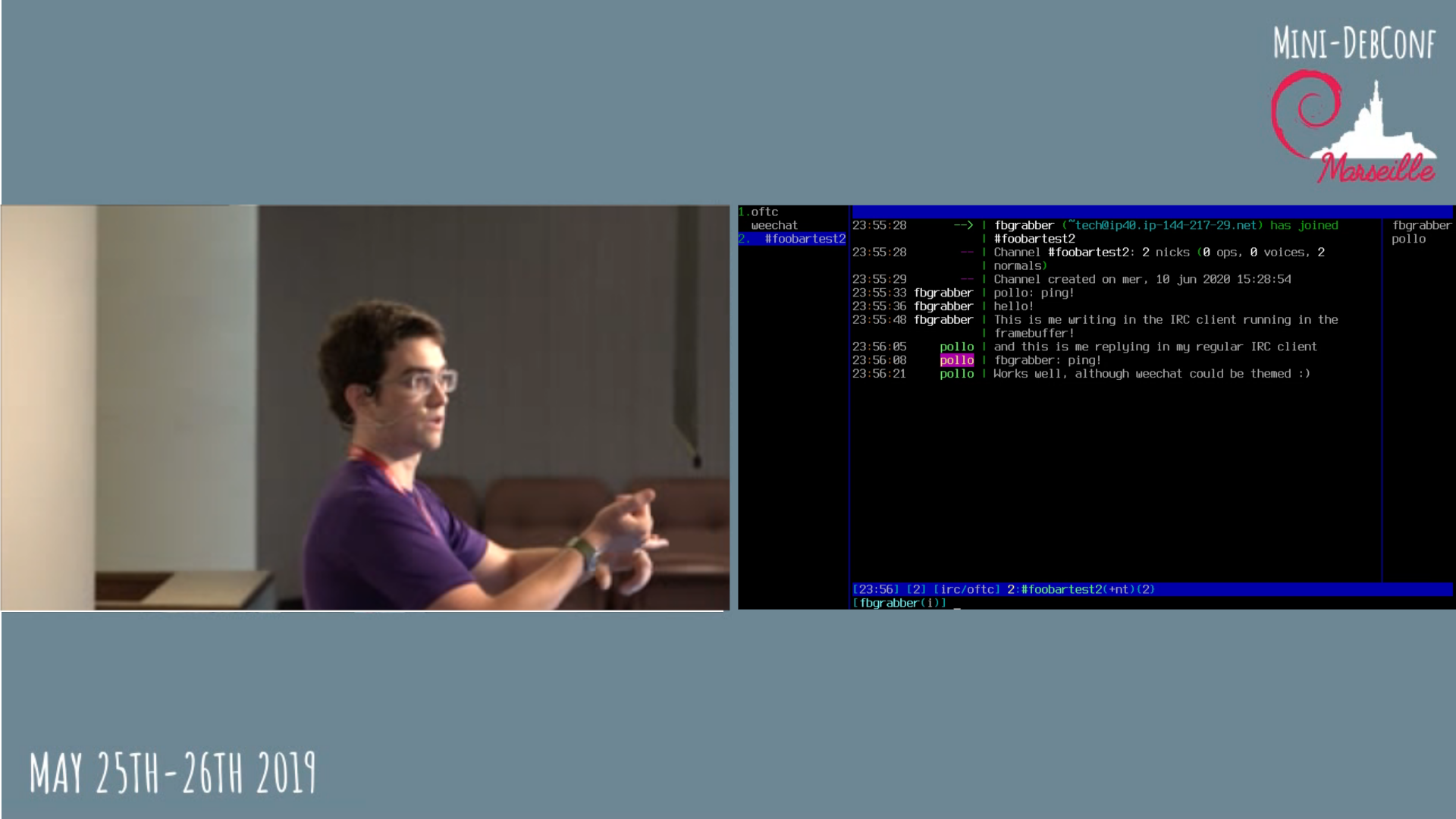
Louis-Philippe V ronneau: How to capture a remote IRC session live

DebConf20 will be held online this year and I've started doing some work for the DebConf videoteam to prepare what's to come. One thing I want us to do is capture a live IRC session and use it as a video input in Voctomix, the live video mixer we use. This way, at the end of a talk we could show both the attendees asking questions on IRC and the presenter replying to them side-by-side. A mockup of a side-by-side voctogui window with someone on the left and a terminal running weechat on the right Capturing a live video of an IRC client on a remote headless server is somewhat more complicated than you might think; as far as I know, neither ffmpeg nor gstreamer support recording a live ssh pseudoterminal1. Worse, neither weechat nor irssi run on X: they use ncurses... Although you can capture an X11 window with ffmpeg -f x11grab, I wasn't able to get them to run with Xvfb. Capturing the framebuffer One thing I dislike with this method is the framebuffer isn't always easy to access on remote machines. If you don't have a serial connection, you can try using a VNC server that can. I did my tests in a VM on an KVM hypervisor and used virt-manager to access the framebuffer. I had a hard time setting the framebuffer resolution to a 16:9 aspect ratio. The winning combination ended up passing the nomodeset kernel parameter at boot and setting up these parameters in /etc/default/grub2:
GRUB_GFXMODE=1280x720
GRUB_GFXPAYLOAD_LINUX=keep
To make the text more readable, this is the /etc/default/console-setup file that seemed to make the most sense:
# CONFIGURATION FILE FOR SETUPCON
# Consult the console-setup(5) manual page.
ACTIVE_CONSOLES="/dev/tty[1-6]"
CHARMAP="UTF-8"
CODESET="Lat15"
FONTFACE="TerminusBold"
FONTSIZE="12x24"
Once that is done, the only thing left is to run the IRC client and launch ffmpeg. The magic command to record the framebuffer seems to be something like:
ffmpeg -f fbdev -framerate 60 -i /dev/fb0 -c:v libvpx -crf 10 -b:v 1M -auto-alt-ref 0 output.webm
Here is what I ended up with:

  1. We need something similarly flexible and featureful that can output to a TCP socket.
  2. Don't forget to run update-grub before rebooting!

Reproducible Builds (diffoscope): diffoscope 147 released

The diffoscope maintainers are pleased to announce the release of diffoscope version 147. This version includes the following changes:
[ Chris Lamb ]
* New features:
  - Add output from strings(1) to ELF binaries. It is intended this will
    expose expose build paths that are hidden somewhere within the objdump(1)
    output. (Closes: reproducible-builds/diffoscope#148)
  - Add basic zsh shell tab-completion support.
    (Closes: reproducible-builds/diffoscope#158)
* Bug fixes:
  - Prevent a traceback when comparing a PDF document that does not contain
    any metadata, ie. it is missing a PDF "/Info" stanza.
    (Closes: reproducible-builds/diffoscope#150)
  - Fix compatibility with jsondiff 1.2.0 which was causing a traceback and
    log the version of jsondiff we are using to aid debugging in the future.
    (Closes: reproducible-builds/diffoscope#159
  - Fix an issue in GnuPG keybox handling that left filenames in the diff.
  - Don't mask an existing test name; ie. ensure it is actually run.
* Reporting:
  - Log all calls to subprocess.check_output by using our own wrapper utility.
    (Closes: reproducible-builds/diffoscope#151)
* Code improvements:
  - Replace references to "WF" with "Wagner-Fischer" for clarity.
  - Drop a large number of unused imports (list_libarchive,
    ContainerExtractionError, etc.)
  - Don't assign exception to a variable that we do not use.
  - Compare string values with the equality operator, not via "is" identity.
  - Don't alias an open file to a variable when we don't use it.
  - Don't alias "filter" builtin.
  - Refactor many small parts of the HTML generation, dropping explicit
    u"unicode" strings, tidying the generation of the "Offset X, Y lines
    modified" messages, moving to PEP 498 f-strings where appropriate, etc.
  - Inline a number of single-used utility methods.
You find out more by visiting the project homepage.

10 June 2020

Joey Hess: bracketing and async exceptions in haskell

I've been digging into async exceptions in haskell, and getting more and more concerned. In particular, bracket seems to be often used in ways that are not async exception safe. I've found multiple libraries with problems. Here's an example:
withTempFile a = bracket setup cleanup a
  where
    setup = openTempFile "/tmp" "tmpfile"
    cleanup (name, h) = do
        hClose h
        removeFile name
This looks reasonably good, it makes sure to clean up after itself even when the action throws an exception. But, in fact that code can leave stale temp files lying around. If the thread receives an async exception when hClose is running, it will be interrupted before the file is removed. We normally think of bracket as masking exceptions, but it doesn't prevent async exceptions in all cases. See Control.Exception on "interruptible operations", which can receive async exceptions even when other exceptions are masked. It's a bit surprising, but hClose is such an interruptable operation, because it flushes the write buffer. The only way to know is to read the code. It can be quite hard to determine if an operation is interruptable, since it can come down to whether it retries a STM transaction, or uses a MVar that is not always full. I've been auditing libraries and I often have to look at code several dependencies away, and even then may not be sure if a library has this problem. So far, around half of the libraries I've looked at, that use bracket or onException or the like probably have this problem. What can libraries do? My impression of the state of things now is that you should be very cautious using race or cancel or withAsync or the like, unless the thread is small and easy to audit for these problems. Kind of a shame, since I had wanted to be able to cancel a thread that is big and sprawling and uses all the libraries mentioned above.
This work was sponsored by Jake Vosloo and Graham Spencer on Patreon.

Dirk Eddelbuettel: binb 0.0.6: Small enhancements

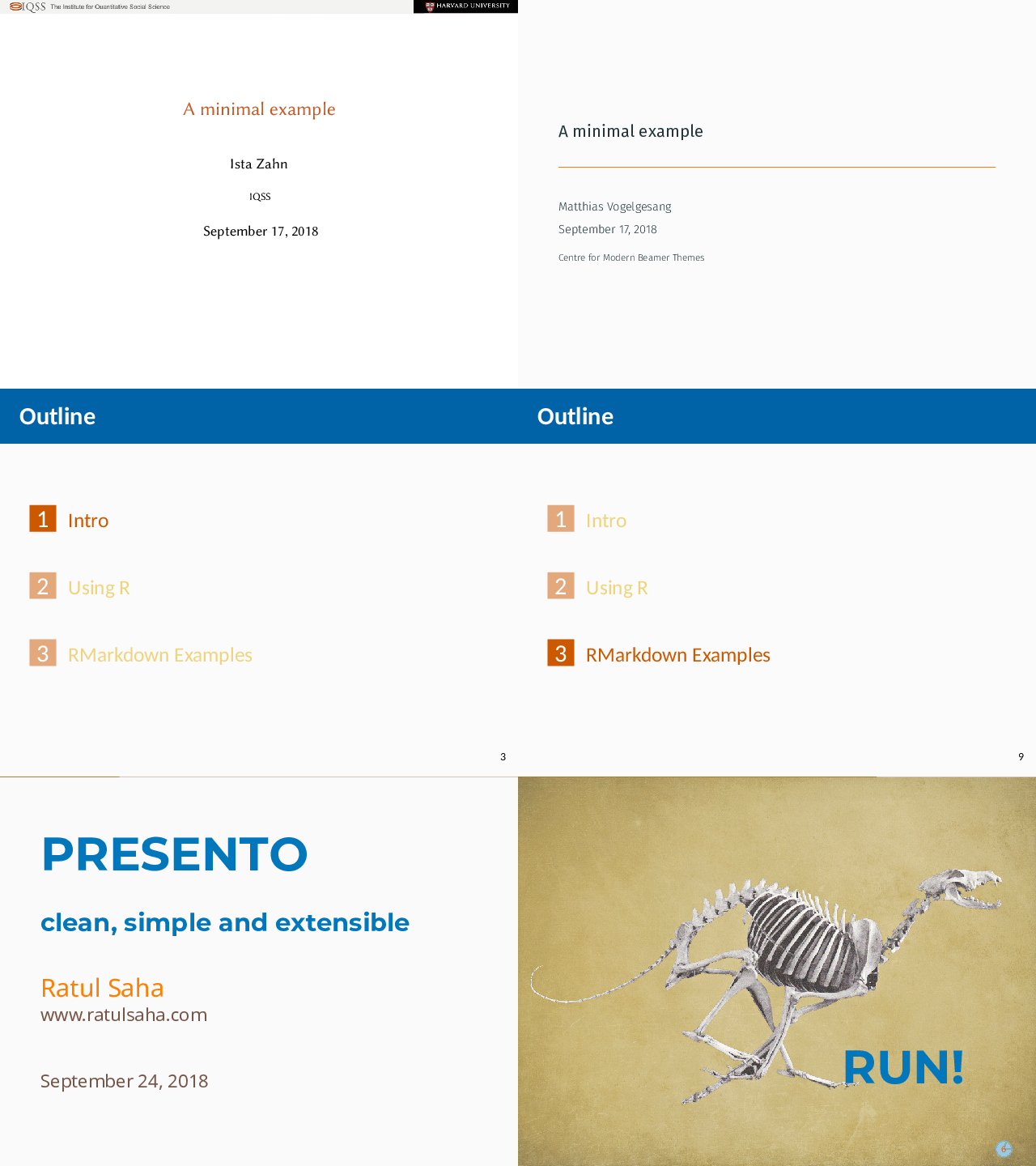
The sixth release of the binb package is now on CRAN. binb regroups four rather nice themes for writing LaTeX Beamer presentations much more easily in (R)Markdown. As a teaser, a quick demo combining all four themes follows; documentation and examples are in the package. Via two contributed PRs, this releases adds titlepage support via the YAML header for Metropolis, and suppresses nags about the changed natbib default. A little polish on the README and Travis rounds everything off.

Changes in binb version 0.0.6 (2020-06-10)
  • Support for YAML option titlegraphic was added in Metropolis (Andras Scraka in #23).
  • The README.md file received another badge (Dirk).
  • The natbib default value was updated to accomodate rmarkdown (Joseph Stachelek in #26).
  • Travis now uses R 4.0.0 and 'bionic' (Dirk).

CRANberries provides a summary of changes to the previous version. For questions or comments, please use the issue tracker at GitHub. If you like this or other open-source work I do, you can now sponsor me at GitHub. For the first year, GitHub will match your contributions.

This post by Dirk Eddelbuettel originated on his Thinking inside the box blog. Please report excessive re-aggregation in third-party for-profit settings.

Jonathan Dowland: Template Haskell and Stream-processing programs

I've written about what Template Haskell is, and given an example of what it can be used for, it's time to explain why I was looking at it in the context of my PhD work. Encoding stream-processing programs StrIoT is an experimental distributed stream-processing system that myself and others are building in order to explore our research questions. A user of StrIoT writes a stream-processing program, using a set of 8 functional operators provided for the purpose. A simple example is
streamFn :: Stream Int -> Stream Int
streamFn = streamFilter (<15)
         . streamFilter (>5)
         . streamMap (*2)
Our system is distributed: we take a stream-processing program and partition it into sub-programs, which are distributed to and run on separate nodes (perhaps cloud instances, or embedded devices like Raspberry Pis etc.). In order to do that, we need to be able to manipulate the stream-processing program as data. We've initially opted for a graph data-structure, with the vertices in the graph defined as
data StreamVertex = StreamVertex
      vertexId   :: Int
    , operator   :: StreamOperator
    , parameters :: [String]
    , intype     :: String
    , outtype    :: String
      deriving (Eq,Show)
A stream-processing program encoded this way, equivalent to the first example
path [ StreamVertex 0 Map    ["(*2)"]  "Int" "Int"
     , StreamVertex 1 Filter ["(>5)"]  "Int" "Int"
     , StreamVertex 2 Filter ["(<15)"] "Int" "Int"
     ]
We can easily manipulate instances of such types, rewrite them, partition them and generate code from them. Unfortunately, this is quite a departure from the first simple code example from the perspective of a user writing their program. Template Haskell gives us the ability to manipulate code as a data structure, and also to inspect names to gather information about them (their type, etc.). I started looking at TH to see if we could build something where the user-supplied program was as close to that first case as possible. TH limitations There are two reasons that we can't easily manipulate a stream-processing definition written as in the first example. The following expressions are equivalent, in some sense, but are not equal, and so yield completely different expression trees when quasi-quoted:
[  streamFilter (<15) . streamFilter (>5) . streamMap (*2)  ]
  \s -> streamFilter (<15) (streamFilter (>5) (streamMap (*2) s))  ]
[  streamMap (*2) >>> streamFilter (>5) >>> streamFilter (<15)  ]
[  \s -> s & streamMap (*2) & streamFilter (>5) & streamFilter (<15)  ]
[  streamFn  ] -- a named expression, defined outside the quasi-quotes
In theory, reify can give you the definition of a function from its name, but in practice it doesn't, because this was never implemented. So at the very least we would need to insist that a user included the entirety of a stream-processing program within quasi-quotes, and not split it up into separate bits, with some bits defined outside the quotes and references within (as in the last case above). We would probably have to insist on a consistent approach for composing operators together, such as always use (.) and never >>>, &, etc. which is limiting. Incremental approach After a while ruminating on this, and before moving onto something else, I thought I'd try approaching it from the other side. Could I introduce some TH into the existing approach, and improve it? The first thing I've tried is to change the parameters field to TH's ExpQ, meaning the map instance example above would be
StreamVertex 0 Map [ [  (*2)  ] ] "Int" "Int"
I worked this through. It's an incremental improvement ease and clarity for the user writing a stream-processing program. It catches a class of programming bugs that would otherwise slip through: the expressions in the brackets have to be syntactically valid (although they aren't type checked). Some of the StrIoT internals are also much improved, particularly the logical operator. Here's an excerpt from a rewrite rule that involves composing code embedded in strings, dealing with all the escaping rules and hoping we've accounted for all possible incoming expression encodings:
let f' = "(let f = ("++f++"); p = ("++p++"); g = ("++g++") in\
         \ \\ (a,b) v -> (f a v, if p v a then g b v else b))"
    a' = "("++a++","++b++")"
    q' = "(let p = ("++p++"); q = ("++q++") in \\v (y,z) -> p v y && q v z)"
And the same section after, manipulating ExpQ types:
let f' = [  \ (a,b) v -> ($(f) a v, if $(p) v a then $(g) b v else b)  ]
    a' = [  ($(a), $(b))  ]
    q' = [  \v (y,z) -> $(p) v y && $(q) v z  ]
I think the code-generation part of StrIoT could be radically refactored to take advantage of this change but I have not made huge inroads into that. Next steps This is, probably, where I am going to stop. This work is very interesting to me but not the main thrust of my research. But incrementally improving the representation gave me some ideas of what I could try next: The type would have collapsed down to
data StreamVertex = StreamVertex
      vertexId   :: Int
    , opAndParams :: ExpQ
      deriving (Eq,Show)
Example instances might be
StreamVertex 0 [  streamMap (*2)  ]
StreamVertex 1 [  streamExpand  ]
StreamVertex 2 [  streamScan (\c _ -> c+1) 0  ]
The vertexId field is a bit of wart, but we require that due to the graph data structure that we are using. A change there could eliminate it, too. By this point we are not that far away from where we started, and certainly much closer to the "pure" function application in the very first example.

Jonathan Dowland: template haskell

I've been meaning to write more about my PhD work for absolutely ages, but I've held myself back by wanting to try and keep a narrative running through the blog posts. That's not realistic for a number of reasons so I'm going to just write about different aspects of things without worrying about whether they make sense in the context of recent blog posts or not. Part of what I am doing at the moment is investigating Template Haskell to see whether it would usefully improve our system implementation. Before I write more about how it might apply to our system, I'll first write a bit about Template Haskell itself. Template Haskell (TH) is a meta-programming system: you write programs that are executed at compile time and can output code to be spliced into the parent program. The approach used by TH is really nice: you perform your meta-programming in real first-class Haskell, and it integrates really well with the main program. TH provides two pairs of special brackets. Oxford brackets surrounding any Haskell expression cause the whole expression to be replaced by the result of parsing the expression an expression tree which can be inspected and manipulated by the main program:
[  \x -> x + 1  ]
The expression data-type is a series of mutually-recursive data types that represent the complete Haskell grammar. The top-level is Exp, for expression, which has constructors for the different expression types. The above lambda expression is represented as
LamE [VarP x_1]
    (InfixE (Just (VarE x_1))
            (VarE GHC.Num.+)
            (Just (LitE (IntegerL 1))))
Such expressions can be pattern-matched against, constructed, deconstructed etc just like any other data type. The other bracket type performs the opposite operation: it takes an expression structure and splices it into code in the main program, to be compiled as normal:
 > 1 + $( litE (IntegerL 1) )
2
The two are often intermixed, sometimes nested to several levels. What follows is a typical beginner TH meta-program. The standard function fst operators on a 2-tuple and returns the first value. It cannot operate on a tuple of a different valence. However, a meta-program can generate a version of fst specialised for an n-tuple of any n:
genfst n = do
    xs <- replicateM n (newName "x")
    let ntup = tupP (map varP xs)
    [  \ $(ntup) ->  $(varE (head xs))  ]
Used like so
 > $(genfst 2) (1,2)
1
 > $(genfst 3) ('a','b','c')
'a'
 > :t $(genfst 10)
$(genfst 10) :: (a, b, c, d, e, f, g, h, i, j) -> a
That's a high-level gist of how you can use TH. I've skipped over a lot of detail, in particular an important aspect relating to scope and naming, which is key to the problem I am exploring at the moment. Oxford brackets and slice brackets do not operate directly on the simple Exp data-type, but upon an Exp within the Q Monad:
 > :t [  1  ]
[  1  ] :: ExpQ
ExpQ is a synonym for Q Exp. Eagle-eyed Haskellers will have noticed that genfst above was written in terms of some Monad. And you might also have noticed the case discrepancy between the constructor types VarE (Etc) and varE, tupP, varP used in that function definition. These are convenience functions that wrap the relevant constructor in Q. The point of the Q Monad is (I think) to handle name scoping, and avoid unintended name clashes. Look at the output of these simple expressions, passed through runQ:
 > runQ [  \x -> x  ]
LamE [VarP x_1] (VarE x_1)
 > runQ [  \x -> x  ]
LamE [VarP x_2] (VarE x_2)
Those x are not the same x in the context they are evaluated (a GHCi session). And that's the crux of the problem I am exploring. More in a later blog post!

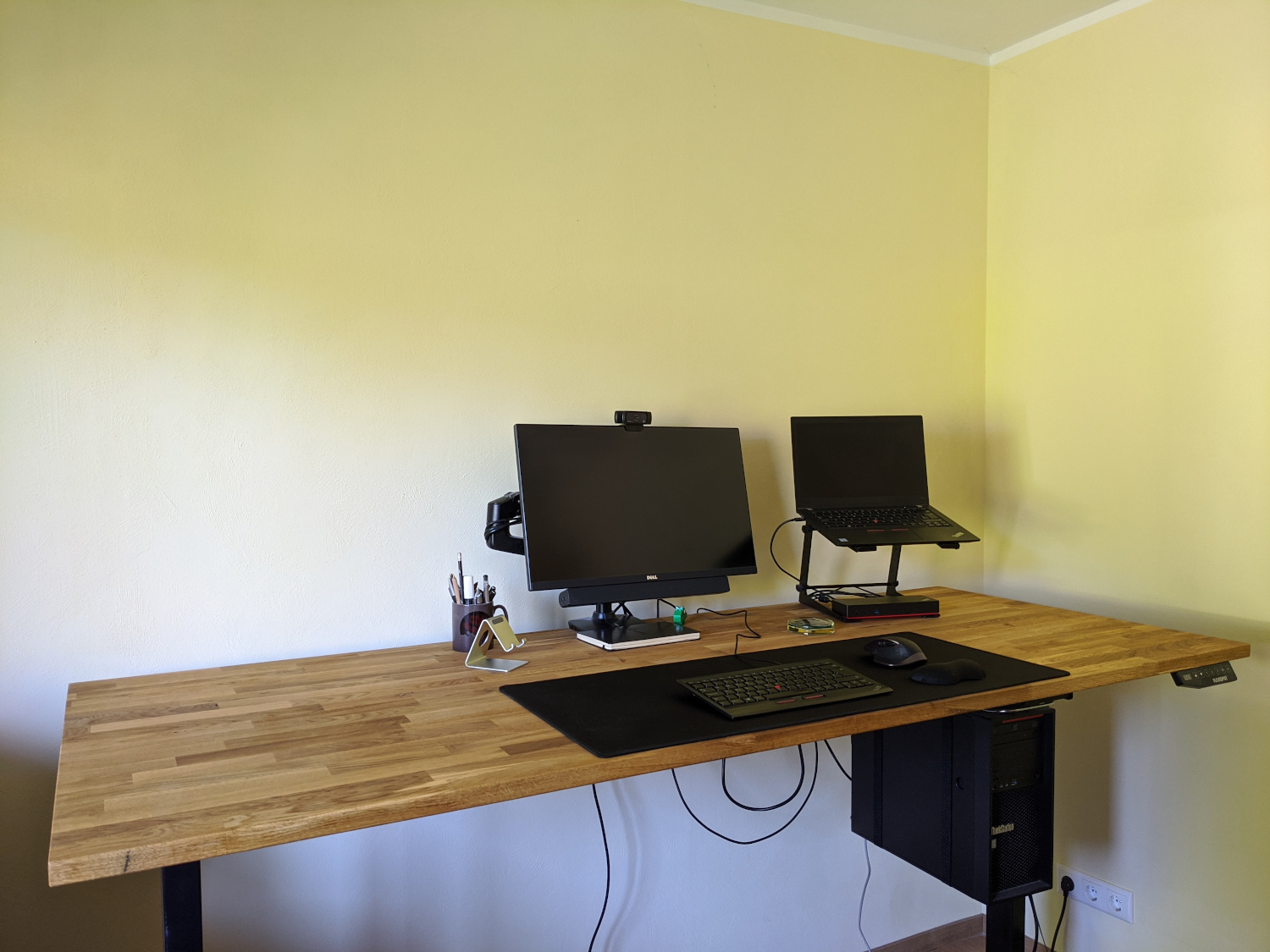
Evgeni Golov: show your desk

Some days ago I posted a picture of my desk on Mastodon and Twitter. standing desk with a monitor, laptop etc After that I got multiple questions about the setup, so I thought "Michael and Michael did posts about their setups, you could too!" And well, here we are ;-) desk The desk is a Flexispot E5B frame with a 200 80 2.6cm oak table top. The Flexispot E5 (the B stands for black) is a rather cheap (as in not expensive) standing desk frame. It has a retail price of 379 , but you can often get it as low as 299 on sale. Add a nice table top from a local store (mine was like 99 ), a bit of wood oil and work and you get a nice standing desk for less than 500 . The frame has three memory positions, but I only use two: one for sitting, one for standing, and a "change position" timer that I never used so far. The table top has a bit of a swing when in standing position (mine is at 104cm according to the electronics in the table), but not enough to disturb typing on the keyboard or thinking. I certainly wouldn't place a sewing machine up there, but that was not a requirement anyways ;) To compare: the IKEA Bekant table has a similar, maybe even slightly stronger swing. chair Speaking of IKEA The chair is an IKEA Volmar. They don't seem to sell it since mid 2019 anymore though, so no link here. hardware laptop A Lenovo ThinkPad T480s, i7-8650U, 24GB RAM, running Fedora 32 Workstation. Just enough power while not too big and heavy. Full of stickers, because I stickers! It's connected to a Lenovo ThinkPad Thunderbolt 3 Dock (Gen 1). After 2 years with that thing, I'm still not sure what to think about it, as I had various issues with it over the time:
  • the internal USB hub just vanishing from existence until a full power cycle of the dock was performed, but that might have been caused by my USB-switch which I recently removed.
  • the NIC negotiating at 100MBit/s instead of 1000MBit/s and then keeping on re-negotiating every few minutes, disconnecting me from the network, but I've not seen that since the Fedora 32 upgrade.
  • the USB-attached keyboard not working during boot as it needs some Thunderbolt magic.
The ThinkPad stands on a Adam Hall Stands SLT001E, a rather simple stand for laptops and other equipment (primarily made for DJs I think). The Dock fits exactly between the two feet of the stand, so that is nice and saves space on the table. Using the stand I can use the laptop screen as a second screen when I want it - but most often I do not and have the laptop lid closed while working. workstation A Lenovo ThinkStation P410, Xeon E5-2620 v4, 96GB RAM, running Fedora 32 Workstation. That's my VM playground. Having lots of RAM really helps if you need/want to run many VMs with Foreman/Katello or Red Hat Satellite as they tend to be a bit memory hungry and throwing hardware at problems tend to be an easy solution for many of them. The ThinkStation is also connected to the monitor, and I used to have an USB switch to flip my keyboard, mouse and Yubikey from the laptop to the workstation and back. But as noted above, this switch somehow made the USB hub in the laptop dock unhappy (maybe because I was switching too quickly after resume or so), so it's currently removed from the setup and I use the workstation via SSH only. It's mounted under the table using a ROLINE PC holder. You won't get any design awards with it, but it's easy to assemble and allows the computer to move with the table, minimizing the number of cables that need to have a flexible length. monitor The monitor is an older Dell UltraSharp U2515H - a 25" 2560 1440 model. It sits on an Amazon Basics Monitor Arm (which is identical to an Ergotron LX to the best of my knowledge) and is accompanied by a Dell AC511 soundbar. I don't use the adjustable arm much. It's from the time I had no real standing desk and would use the arm and a cardboard box to lift the monitor and keyboard to a standing level. If you don't want to invest in a standing desk, that's the best and cheapest solution! The soundbar is sufficient for listening to music while working and for chatting with colleagues. webcam A Logitech C920 Pro, what else? Works perfectly under Linux with the UVC driver and has rather good microphones. Actually, so good that I never use a headset during video calls and so far nobody complained about bad audio. keyboard A ThinkPad Compact USB Keyboard with TrackPoint. The keyboard matches the one in my T480s, so my brain doesn't have to switch. It was awful when I still had the "old" model and had to switch between the two. UK layout. Sue me. I like the big return key. mouse A Logitech MX Master 2. I got the MX Revolution as a gift a long time ago, and at first I was like: WTF, why would anyone pay hundred bucks for a mouse?! Well, after some time I knew, it's just that good. And when it was time to get a new one (the rubber coating gets all slippery after some time) the decision was rather easy. I'm pondering if I should try the MX Ergo or the MX Vertical at some point, but not enough to go and buy one of them yet. other notepad I'm terrible at remembering things, so I need to write them down. And I'm terrible at remembering to look at my notes, so they need to be in my view. So there is a regular A5 notepad on my desk, that gets filled with check boxes and stuff, page after page. coaster It's a wooden table, you don't want to have liquids on it, right? Thankfully a friend of mine once made coasters out of old Xeon CPUs and epoxy. He gave me one in exchange for a busted X41 ThinkPad. I still think I made the better deal ;) yubikey Keep your secrets safe! Mine is used as a GnuPG smart card for both encryption and SSH authentication, U2F on various pages and 2FA for VPN. headphones I own a pair of Bose QuietComfort 25 with an aftermarket Bluetooth adapter and Anker SoundBuds Slim+. Both are used rather seldomly while working, as my office is usually quiet and no one is disturbed when I listen to music without headphones. what's missing? light I want to add more light to the setup, noth to have a better picture during video calls but also to have better light when doing something else on the table - like soldering. The plan is to add an IKEA Tertial with some Tr dfri smart LED in it, but the Tertial is currently not available for delivery at IKEA and I'm not going to visit one in the current situation. bigger monitor Currently pondering getting a bigger (27+ inch) 4K monitor. Still can't really decide which one to get. There are so many, and they all differ in some way. But it seems no affordable one is offering an integrated USB switch and sufficient amount of USB ports, so I'll probably get whatever can get me a good picture without any extra features at a reasonable price. Changing the monitor will probably also mean rethinking the sound output, as I'm sure mounting the Dell soundbar to anything but the designated 5 year old monitor won't work too well.

9 June 2020

Ingo Juergensmann: Jabber vs. XMPP

XMPP is widely - and mabye better - known as Jabber. This was more or less the same until Cisco bought Jabber Inc and the trademark. You can read more about the story on the XMPP.org website. But is there still a Jabber around? Yes, it is! But Cisco Jabber is a whole infrastructure environment: you can't use Cisco Jabber client on its own without the other required Cisco infrastructure as Cisco CUCM and CIsco IM&P servers. So you can't just setup Prosody or ejabberd on your Debian server and connect Cisco Jabber to it. But what are the differences of Cisco Jabber to "standard" XMPP clients? Cisco Jabber The above screenshot from the official Cisco Jabber product webpage shows the new, single view layout of the Cisco Webex Teams client, but you can configure the client to have the old, classic split view layout of Contact List and Chat Window. But as you can already see from above screenshot audio & video calls is one of the core functions of Cisco Jabber whereas this feature has been added only lately to the well-known Conversations XMPP client on Android. Conversations is using Jingle extension to XMPP whereas Jabber uses SIP for voice/video calls. You can even use Cisco Jabber to control your deskphone via CTI, which is a quite common setup for Jabber. In fact you can configure Jabber to be just a CTI client to you phone or a fully featured UC client. When you don't want to have Ciscos full set of on-premise servers, you can also use Cisco Jabber in conjunction with Cisco Webex as Cisco Webex Messenger. Or in conjunction with Webex Teams in Teams Messaging Mode. Last month Cisco announced general availability of XMPP federation for Webex Teams/Jabber in Teams Messaging Mode. With that you have basic functionality in Webex Teams. And when I say "basic" I really mean basic: you can have 1:1 chat only, no group chats (MUC) and no Presence status will be possible. Hopefully this is just the beginning and not the end of XMPP support in Webex Teams. XMPP Clients Well, I'm sure many of you know "normal" XMPP clients such as Gajim or Dino on Linux, Conversations on Android or Siskin/Monal/ChatSecure on Apple IOS. There are plenty of other clients of course and maybe you used an XMPP client in the past without knowing it. For example Jitsi Meet is based on XMPP and you can still download the Jitsi Desktop client and use it as a full-featured multi-protocol client, e.g. for XMPP and SIP. In fact Jitsi Desktop is maybe the client that comes closest to Cisco Jabber as a chat/voice/video client. In fact I already connected Jitsi Desktop to Cisco CUCM/IM&P infrastructure, but of course you won't be able to use all those Cisco proprietary extensions, but you can see the benefit of open, standardized protocols such as XMPP and SIP: you are free to use any standard compliant client that you want. So, while Jitsi supported voice/video calls for a long time, even before they focussed on Jitsi Meet as a WebRTC based conference service, Conversations added this feature last month, as already stated. This had a huge effect to the whole XMPP federation, because you need an XMPP server that supports XEP-0215 to make these audio/video calls work. The well-known Compliance Tester listed the STUN/TURN features first as "Informational Tests", but quickly made this a mandatory test to pass tests and gain 100% on the Compliance Tester. But you cannot place SIP calls to other sides, because that's a different thing. As many of you are familiar with standard XMPP clients, I'll focus now on some similarity and differences between Cisco Jabber and standard XMPP... Similarities & Differences First, you can federate with Cisco Jabber users. Cisco IM&P can use standard XMPP federation with all other XMPP standard compliant servers. This is really a big benefit and way better than other solutions that usually results in vendor lock-in. Depending on the setup, you can even join from your own XMPP client in MUCs (Multi User Chats), which Cisco calls "Persistent Chat Room". The other way is not that simple: basically it is possible to join with Cisco Jabber in a MUC on a random server, but it is not as easy as you might thing. Cisco Jabber simply lacks a way to enter a room JID (as you can find them on https://search.jabber.network/. Instead you need to be added as participant by a moderator or an admin in that 3rd party MUC. Managed File Transfers is another issue. Cisco Jabber supports Peer-to-Peer file transfers and Managed File Transfers, where the uploaded file get transferred to an SFTP server as storage backend and where the IM&P server is handling the transfer via HTTPS. You can find a schematic drawing in the Configuration Guides. Although it appears similar to HTTP Upload as defined in XEP-0363, it is not very likely that it will work. I haven't tested it yet, because in my test scenario there is a gatekeeper in the path: Cisco Expressway doesn't support (yet) Managed File Transfer, but you can upvote the idea in the ideas management of Cisco or other ideas such as OMEMO support. OMEMO support? Yes, there is no end-to-end encryption (E2EE) currently planned for Cisco Jabber, while it is common nowadays for most modern XMPP clients. I think it would be good for Cisco Jabber to also (optionally) support OMEMO or its successor. Messaging clients without E2EE are not state of the art anymore. Whereas Conversations is the de-facto standard on Android, Apple IOS devices are still lacking a similar well-working client. See my blog post "XMPP - Fun with Clients" for a summary. In that regard Cisco Jabber might be the best XMPP client for IOS to some degree: you have working messaging, voice/video calls, Push Notifications and integration into Apples Call Kit. There are most likely many, many more differences and issues between Cisco Jabber and standard compliant XMPP servers and clients. But basically Cisco Jabber is still based on XMPP and extends that by proprietary extensions. Summary While I have the impression that the free clients and servers are well doing and increased development in the past years (thanks to Conversations and the Compliance Tester), the situation of Cisco Jabber is a little different. As a customer you can sometimes get the impression that Cisco has lost interest in developing Cisco Jabber. It got better in the last years, but when Cisco Spark was introduced some years ago, the impression was that Cisco is heavily focussed on Spark (now: Webex Teams). It's not like Cisco is not listening to customers or the development has been stopped on Jabber, but my impression is that most customers don't give feedback or tell Cisco as the vendor what they want. You can either submit ideas via the Colaboration Customer Ideas Tool or provide feedback via your Cisco and partner channels. I think it is important for the XMPP community to also have a large enterprise level vendor like Cisco. Otherwise the Internet will become more and more an Internet of closed silos like MS Teams, Slack, Facebook, etc. Of course there are other companies like ProcessOne (ejabberd) or Tigase, but I think you agree that Cisco is another level.
Kategorie:

Julian Andres Klode: Review: Chromebook Duet

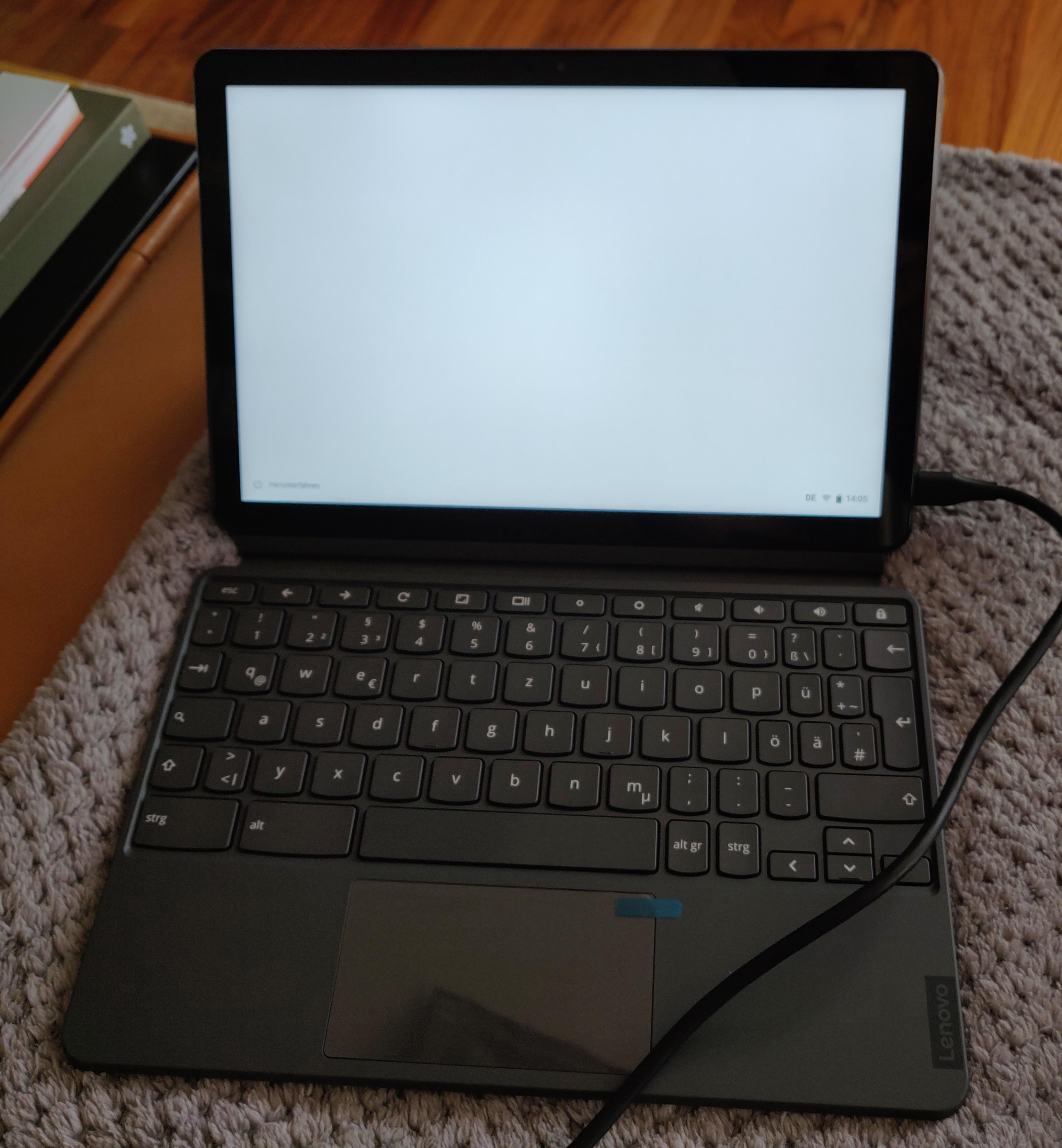
Sporting a beautiful 10.1 1920x1200 display, the Lenovo IdeaPad Duet Chromebook or Duet Chromebook, is one of the latest Chromebooks released, and one of the few slate-style tablets, and it s only about 300 EUR (300 USD). I ve had one for about 2 weeks now, and here are my thoughts.

Build & Accessories The tablet is a fairly Pixel-style affair, in that the back has two components, one softer blue one housing the camera and a metal feeling gray one. Build quality is fairly good. The volume and power buttons are located on the right side of the tablet, and this is one of the main issues: You end up accidentally pressing the power button when you want to turn your volume lower, despite the power button having a different texture. Alongside the tablet, you also find a kickstand with a textile back, and a keyboard, both of which attach via magnets (and pogo pins for the keyboard). The keyboard is crammed, with punctuation keys being halfed in size, and it feels mushed compared to my usual experiences of ThinkPads and Model Ms, but it s on par with other Chromebooks, which is surprising, given it s a tablet attachment.
fully assembled chromebook duet fully assembled chromebook duet
I mostly use the Duet as a tablet, and only attach the keyboard occasionally. Typing with the keyboard on your lap is suboptimal. My first Duet had a few bunches of dead pixels, so I returned it, as I had a second one I could not cancel ordered as well. Oh dear. That one was fine!

Hardware & Connectivity The Chromebook Duet is powered by a Mediatek Helio P60T SoC, 4GB of RAM, and a choice of 64 or 128 GB of main storage. The tablet provides one USB-C port for charging, audio output (a 3.5mm adapter is provided in the box), USB hub, and video output; though, sadly, the latter is restricted to a maximum of 1080p30, or 1440x900 at 60 Hz. It can be charged using the included 10W charger, or use up to I believe 18W from a higher powered USB-C PD charger. I ve successfully used the Chromebook with a USB-C monitor with attached keyboard, mouse, and DAC without any issues. On the wireless side, the tablet provides 2x2 Wifi AC and Bluetooth 4.2. WiFi reception seemed just fine, though I have not done any speed testing, missing a sensible connection at the moment. I used Bluetooth to connect to my smartphone for instant tethering, and my Sony WH1000XM2 headphones, both of which worked without any issues. The screen is a bright 400 nit display with excellent viewing angles, and the speakers do a decent job, meaning you can use easily use this for watching a movie when you re alone in a room and idling around. It has a resolution of 1920x1200. The device supports styluses following the USI standard. As of right now, the only such stylus I know about is an HP one, and it costs about 70 or so. Cameras are provided on the front and the rear, but produce terrible images.

Software: The tablet experience The Chromebook Duet runs Chrome OS, and comes with access to Android apps using the play store (and sideloading in dev mode) and access to full Linux environments powered by LXD inside VMs. The screen which has 1920x1200 is scaled to a ridiculous 1080x675 by default which is good for being able to tap buttons and stuff, but provides next to no content. Scaling it to 1350x844 makes things more balanced. The Linux integration is buggy. Touches register in different places than where they happened, and the screen is cut off in full screen extremetuxracer, making it hard to recommend for such uses. Android apps generally work fine. There are some issues with the back gesture not registering, but otherwise I have not found issues I can remember. One major drawback as a portable media consumption device is that Android apps only work in Widevine level 3, and hence do not have access to HD content, and the web apps of Netflix and co do not support downloading. Though one of the Duets actually said L1 in check apps at some point (reported in issue 1090330). It s also worth noting that Amazon Prime Video only renders in HD, unless you change your user agent to say you are Chrome on Windows - bad Amazon! The tablet experience also lags in some other ways, as the palm rejection is overly extreme, causing it to reject valid clicks close to the edge of the display (reported in issue 1090326). The on screen keyboard is terrible. It only does one language at a time, forcing me to switch between German and English all the time, and does not behave as you d expect it when editing existing words - it does not know about them and thinks you are starting a new one. It does provide a small keyboard that you can move around, as well as a draw your letters keyboard, which could come in handy for stylus users, I guess. In any case, it s miles away from gboard on Android. Stability is a mixed bag right now. As of Chrome OS 83, sites (well only Disney+ so far ) sometimes get killed with SIGILL or SIGTRAP, and the device rebooted on its own once or twice. Android apps that use the DRM sometimes do not start, and the Netflix Android app sometimes reports it cannot connect to the servers.

Performance Performance is decent to sluggish, with micro stuttering in a lot of places. The Mediatek CPU is comparable to Intel Atoms, and with only 4GB of RAM, and an entire Android container running, it s starting to show how weak it is. I found that Google Docs worked perfectly fine, as did websites such as Mastodon, Twitter, Facebook. Where the device really struggled was Reddit, where closing or opening a post, or getting a reply box could take 5 seconds or more. If you are looking for a Reddit browsing device, this is not for you. Performance in Netflix was fine, and Disney+ was fairly slow but still usable. All in all, it s acceptable, and given the price point and the build quality, probably the compromise you d expect.

Summary tl;dr:
  • good: Build quality, bright screen, low price, included accessories
  • bad: DRM issues, performance, limited USB-C video output, charging speed, on-screen keyboard, software bugs
The Chromebook Duet or IdeaPad Duet Chromebook is a decent tablet that is built well above its price point. It s lackluster performance and DRM woes make it hard to give a general recommendation, though. It s not a good laptop. I can see this as the perfect note taking device for students, and as a cheap tablet for couch surfing, or as your on-the-go laptop replacement, if you need it only occasionally. I cannot see anyone using this as their main laptop, although I guess some people only have phones these days, so: what do I know? I can see you getting this device if you want to tinker with Linux on ARM, as Chromebooks are quite nice to tinker with, and a tablet is super nice.

Molly de Blanc: Racism is a Free Software Issue

Racism is a free software issue. I gave a talk that touched on this at CopyLeft Conf 2019. I also talked a little bit about it at All Things Open 2019 and FOSDEM 2020 in my talk The Ethics Behind Your IoT. I know statistics, theory, and free software. I don t know about race and racism nearly as well. I might make mistakes I have made some and I will make more. Please, when I do, help me do better. I want to look at a few particular technologies and think about how they reinforce systemic racism. Worded another way: how is technology racist? How does technology hurt Black Indigenous People of Color (BIPOC)? How does technology keep us racist? How does technology make it easier to be racist?

Breathalyzers In the United States, Latinx folks are less likely to drink than white people and, overall, less likely to be arrested for DUIs3,4. However, they are more likely to be stopped by police while driving5,6. Who is being stopped by police is up to the police and they pull over a disproportionate number of Latinx drivers. After someone is pulled over for suspected drunk driving, they are given a breathalyzer test. Breathalyzers are so easy to (un)intentionally mis-calibrate that they have been banned as valid evidence in multiple states. The biases of the police are not canceled out by the technology that should, in theory, let us know whether someone is actually drunk.

Facial Recognition I could talk about for quite some time and, in fact, have. So have others. Google s image recognition software recognized black people as gorillas and to fix the issue it removed gorillas from it s image-labeling technology. Facial recognition software does a bad job at recognizing black people. In fact, it s also terrible at identifying indigenous people and other people of color. (Incidentally, it s also not great at recognizing women, but let s not talk about that right now.) As we use facial recognition technology for more things, from automated store checkouts (even more relevant in the socially distanced age of Covid-19), airport ticketing, phone unlocking, police identification, and a number of other things, it becomes a bigger problem that this software cannot tell the difference between two Asian people.

Targeted Advertising Black kids see 70% more online ads for food than white kids, and twice as many ads for junk food. In general BIPOC youth are more likely to see junk food advertisements online. This is intentional, and happens after they are identified as BIPOC youth.

Technology Reinforces Racism; Racism Builds Technology The technology we have developed reinforces racism on a society wide scale because it makes it harder for BIPOC people to interact with this world that is run by computers and software. It s harder to not be racist when the technology around us is being used to perpetuate racist paradigms. For example, if a store implements facial recognition software for checkout, black women are less likely to be identified. They are then more likely to be targeted as trying to steal from the store. We are more likely to take this to mean that black women are more likely to steal. This is how technology builds racism, People are being excluded largely because they are not building these technologies, because they are not welcome in our spaces. There simply are not enough Black and Hispanic technologists and that is a problem. We need to care about this because when software doesn t work for everyone, it doesn t work. We cannot build on the promise of free and open source software when we are excluding the majority of people.

Dirk Eddelbuettel: RcppArmadillo 0.9.900.1.0

armadillo image Armadillo is a powerful and expressive C++ template library for linear algebra aiming towards a good balance between speed and ease of use with a syntax deliberately close to a Matlab. RcppArmadillo integrates this library with the R environment and language and is widely used by (currently) 727 other packages on CRAN. Conrad recently released a new upstream version 9.900.1 of Armadillo which we packaged and tested as usual first as a release candidate build and then as the release. As usual, logs from reverse-depends runs are in the rcpp-logs repo. Apart from the new upstream release, we updated Travis use, ornamented the README a little, and smoothed over a rough corner from the recent R 4.0.0 release. All changes in the new release are noted below.

Changes in RcppArmadillo version 0.9.900.1.0 (2020-06-08)
  • Upgraded to Armadillo release 9.900.1 (Nocturnal Misbehaviour)
    • faster solve() for under/over-determined systems
    • faster eig_gen() and eig_pair() for large matrices
    • expanded eig_gen() and eig_pair() to optionally provide left and right eigenvectors
  • Switch Travis CI testing to R 4.0.0, use bionic as base distro and test R 3.6.3 and 4.0.0 in a matrix (Dirk in #298).
  • Add two badges to README for indirect use and the CSDA paper.
  • Adapt RcppArmadillo.package.skeleton() to a change in R 4.0.0 affecting what it exports in NAMESPACE.

Courtesy of CRANberries, there is a diffstat report relative to previous release. More detailed information is on the RcppArmadillo page. Questions, comments etc should go to the rcpp-devel mailing list off the R-Forge page. If you like this or other open-source work I do, you can now sponsor me at GitHub. For the first year, GitHub will match your contributions.

This post by Dirk Eddelbuettel originated on his Thinking inside the box blog. Please report excessive re-aggregation in third-party for-profit settings.

Next.

Previous.