Search Results: "will"

14 April 2015

Neil Williams: Extending an existing ARMMP initramfs

The actual use of this extension is still in development and the log files are not currently publicly visible, but it may still be useful for people to know the what and why The Debian ARMMP kernel can be used for multiple devices, just changing the DTB. I ve already done tests with this for Cubietruck and Beaglebone-Black, iMX.53 was one of the original test devices too. Whilst these tests can deploy a full image (there are examples of building such images in the vmdebootstrap package), it is a lot quicker to do simple tests of a kernel using a ramdisk. The default Debian initramfs has a focused objective but still forms a useful base for extension. In particular, I want to be able to test one initramfs on multiple boards (so multiple dtbs) with the same kernel image. I then want to be able, on selected boards, to mount a SATA drive or write an image to eMMC or a USB stick or whatever. LAVA (via the ongoing refactoring, not necessarily in the current dispatcher code) can automate such tests, e.g. to allow me to boot a Cubietruck into a standard Debian ARMMP armhf install on the SATA drive but using a modified (or updated) ARMMP kernel over TFTP without needing to install it on the device itself. That same kernel image can then be tested on multiple boards to see if the changes have benefitted one board at the expense of another. Automating all of that could be of a lot of benefit to the ARM kernel developers in Debian and outside Debian. So, the start point. Install Debian onto a Cubietruck in my case, with a SATA drive attached. All well and good so far, standard Debian Jessie ARMMP. (Cubietruck uses the LPAE kernel flavour but that won t matter for the initramfs.) Rather than building the initramfs manually, this provides a shortcut at some point I may investigate how to do this in QEMU but for now, it s just as quick to SSH onto the Cubietruck and update. I ve already written a little script to download the relevant linux-image package for ARMMP, unpack it and pull out the vmlinuz, the dtbs and a selected list of modules. The list is selective because TFTP has a 32Mb download limit and there are more modules than that. So I borrowed a snippet from the Xen folks (already shown previously here). The script is in a support repository for LAVA but can be used anywhere. (You ll need to edit the package name in the script to choose between ARMMP and ARMMP LPAE. Steps
  1. Get a working initramfs from an installed device running Debian ARMMP and copy some files for use later. Note: use the name of the symlink in the copy so that the file in /tmp/ is the actual file, using the name of the symlink as the filename. This is important later as it saves a step of having to make the (unnecessary) symlink inside the initramfs. Also, mkinitramfs, which built this initrd.img file in the first place, uses the same shared libraries as the main system, so copying these into the initramfs still works. (This is really useful when you get your ramdisk to support the attached secondary storage, allowing you to simply mount the original Debian install and fixup the initramfs by copying files off the main Debian install.) The relevant files are to support DNS lookup inside the initramfs which then allows a test to download a new image to put onto the attached media before rebooting into it.
    cp /boot/initrd.img-3.16.0-4-armmp-lpae /tmp/
    cp /lib/arm-linux-gnueabihf/libresolv.so.2 /tmp/
    cp /mnt/lib/arm-linux-gnueabihf/libnss_dns.so.2 /tmp/
    
    Copy these off the device for local adjustment:
    scp IP_ADDR:/tmp/FILE .
    
  2. Decompress the initrd.img:
    cp initrd.img-3.16.0-4-armmp-lpae initrd.img-3.16.0-4-armmp-lpae.gzip
    gunzip initrd.img-3.16.0-4-armmp-lpae.gzip
    
  3. Make a new empty directory
    mkdir initramfs
    cd initramfs
    
  4. Unpack:
    sudo cpio -id < initrd.img-3.16.0-4-armmp-lpae
    
  5. Remove the old modules (LAVA can add these later, allowing tests to use an updated build with updated modules):
    sudo rm -rf ./lib/modules/*
    
  6. Start to customise - need a script for udhcpc and two of the libraries from the installed system to allow the initramfs to do DNS lookups successfully.
    cp ../libresolv.so.2 ./lib/arm-linux-gnueabihf/
    cp ../libnss_dns.so.2 ./lib/arm-linux-gnueabihf/
    
  7. Copy the udhcpc default script into place:
    mkdir ./etc/udhcpc/
    sudo cp ../udhcpc.d ./etc/udhcpc/default.script
    sudo chmod 0755 ./etc/udhcpc/default.script
    
  8. Rebuild the cpio archive:
    find .   cpio -H newc -o > ../initrd.img-armmp.cpio
    
  9. Recompress:
    cd ..
    gzip initrd.img-armmp.cpio
    
  10. If using u-boot, add the UBoot header:
    mkimage -A arm -T ramdisk -C none -d initrd.img-armmp.cpio.gz initrd.img-armmp.cpio.gz.u-boot
    
  11. Checksum the final file so that you can check that against the LAVA logs.
    md5sum initrd.img-armmp.cpio.gz.u-boot
    
Each type of device will need a set of modules modprobed before tests can start. With the refactoring code, I can use an inline YAML and use dmesg -n 5 to reduce the kernel message noise. The actual module names here are just those for the Cubietruck but by having these only in the job submission, it makes it easier to test particular combinations and requirements.
- dmesg -n 5
- lava-test-case udevadm --shell udevadm hwdb --update
- lava-test-case depmod --shell depmod -a
- lava-test-case sata-mod --shell modprobe -a stmmac ahci_sunxi sd_mod sg ext4
- lava-test-case ifconfig --shell ifconfig eth0 up
- lava-test-case udhcpc --shell udhcpc
- dmesg -n 7
In due course, this will be added to the main LAVA documentation to allow others to keep the initramfs up to date and to support further test development.

Rapha&#235;l Hertzog: Freexian s report about Debian Long Term Support, March 2015

A Debian LTS logoLike each month, here comes a report about the work of paid contributors to Debian LTS. Individual reports In February, 61 work hours have been equally split among 4 paid contributors. Their reports are available: The remaining hours of Ben and Holger have been redispatched to other contributors for April (during which Mike Gabriel joins the set of paid contributors). BTW, if you want to join the team of paid contributors, read this and apply! Evolution of the situation April has seen no change in terms of sponsored hours but we have two new sponsors in the pipe and May should hopefully have a few more sponsored hours. For the need of a LTS presentation I gave during the Mini-DebConf Lyon I prepared a small graph showing the evolution of the hours sponsored through Freexian:
freexian-hours The growth is rather slow and it will take years to reach our goal of funding the equivalent a full time position (176 hours per month). Even the intermediary goal of funding the equivalent of a half-time position (88h/month) is more than 6 months away given the current growth rate. But the perspective of Wheezy-LTS should help us to convince more organizations and hopefully we will reach that goal sooner. If you want to sponsor the project, check out this page. In terms of security updates waiting to be handled, the situation looks similar to last month: the dla-needed.txt file lists 40 packages awaiting an update (exactly like last month), the list of open vulnerabilities in Squeeze shows about 56 affected packages in total (2 less than last month). Thanks to our sponsors The new sponsors of the month are in bold (none this month).

No comment Liked this article? Click here. My blog is Flattr-enabled.

13 April 2015

Mehdi Dogguy: DPL campaign 2015

This year's DPL campaign is over and voting period is also almost over. Many did not vote yet and they really should consider doing so. This is meant as a reminder for them. If you didn't have time to dig into debian-vote's archives and read questions/answers, here is the list with links to candidates' replies:
Compared to past years, we had a comparable number of questions. All questions did not start big threads as it used to be the case sometimes in the past :-) The good side of this is that we are trolling DPL candidates less than we used to do :-P

Now, if you still didn't vote, it is really time to do so. The voting period ends on Tuesday, April 14th, 23:59:59 UTC, 2015. You have only a few hours left!

Santiago Garc a Manti n: haproxy as a very very overloaded sslh

After using haproxy at work for some time I realized that it can be configured for a lot of things, for example: it knows about SNI (on ssl is the method we use to know what host the client is trying to reach so that we know what certificate to present and thus we can multiplex several virtual hosts on the same ssl IP:port) and it also knows how to make transparent proxy connections (the connections go through haproxy but the ending server will think they are arriving directly from the client, as it will see the client's IP as the source IP of the packages).With this two little features, which are available on haproxy 1.5 (Jessie's version has them all), I thought I could give it a try to substitute sslh with haproxy giving me a lot of possibilities that sslh cannot do.Having this in mind I thought I could multiplex several ssl services, not only https but also openvpn or similar, on the 443 port and also allow this services to arrive transparently to the final server. Thus what I wanted was not to mimic sslh (which can be done with haproxy) but to get the semantic I needed, which is similar to sslh but with more power and with a little different behaviour, cause I liked it that way.There is however one caveat that I don't like about this setup and it is that to achieve the transparency one has to run haproxy as root, which is not really something one likes :-( so, having transparency is great, but we'll be taking some risks here which I personally don't like, to me it isn't worth it.Anyway, here is the setup, it basically consists of a setup on haproxy but if we want transparency we'll have to add to it a routing and iptables setup, I'll describe here the whole setupHere is what you need to define on /etc/haproxy/haproxy.cfg:frontend ft_ssl bind 192.168.0.1:443 mode tcp option tcplog tcp-request inspect-delay 5s tcp-request content accept if req_ssl_hello_type 1 acl sslvpn req_ssl_sni -i vpn.example.net use_backend bk_sslvpn if sslvpn use_backend bk_web if req_ssl_sni -m found default_backend bk_ssh backend bk_sslvpn mode tcp source 0.0.0.0 usesrc clientip server srvvpn vpnserver:1194 backend bk_web mode tcp source 0.0.0.0 usesrc clientip server srvhttps webserver:443 backend bk_ssh mode tcp source 0.0.0.0 usesrc clientip server srvssh sshserver:22 An example of a transparent setup can be found here but lacks some details, for example, if you need to redirect the traffic to the local haproxy you'll want to use the xt_TPROXY, there is a better doc for that at squid's wiki. Anyway, if you are playing just with your own machine, like we typically do with sslh, you won't need the TPROXY power, as packets will come straight to your 443, so haproxy will be able to get the without any problem. The problem will come if you are using transparency (source 0.0.0.0 usesrc clientip) because then packets coming out of haproxy will be carrying the ip of the real client, and thus the answers of the backend will go to that client (but with different ports and other tcp data), so it will not work. We'll have to get those packets back to haproxy, for that what we'll do is mark the packages with iptables and then route them to the loopback interface using advanced routing. This is where all the examples will tell you to use iptables' mangle table with rules marking on PREROUTING but that won't work out if you are having all the setup (frontend and backends) in just one box, instead you'll have to write those rules to work on the OUTPUT chain of the mangle table, having something like this:*mangle :PREROUTING ACCEPT :INPUT ACCEPT :FORWARD ACCEPT :OUTPUT ACCEPT :POSTROUTING ACCEPT :DIVERT - -A OUTPUT -s public_ip -p tcp --sport 22 -o public_iface -j DIVERT -A OUTPUT -s public_ip -p tcp --sport 443 -o public_iface -j DIVERT -A OUTPUT -s public_ip -p tcp --sport 1194 -o public_iface -j DIVERT -A DIVERT -j MARK --set-mark 1 -A DIVERT -j ACCEPT COMMIT Take that just as an example, better suggestions on how to know what traffic to send to DIVERT are welcome. The point here is that if you are sending the service to some other box you can do it on PREROUTIING, but if you are sending the service to the very same box of haproxy you'll have to mark the packages on the OUTPUT chain.Once we have the packets marked we just need to route them, something like this will work out perfectly:ip rule add fwmark 1 lookup 100 ip route add local 0.0.0.0/0 dev lo table 100 And that's all for this crazy setup. Of course, if, like me, you don't like the root implication of the transparent setup, you can remove the "source 0.0.0.0 usesrc clientip" lines on the backends and forget about transparency (connections to the backend will come from your local IP), but you'll be able to run haproxy with dropped privileges and you'll just need the plain haproxy.cfg setup and not the weird iptables and advanced routing setup.Hope you like the article, btw, I'd like to point out the main difference of this setup vs sslh, it is that I'm only sending the packages to the ssl providers if the client is sending SNI info, otherwise I'm sending them to the ssh server, while sslh will send ssl clients without SNI also to the ssl provider. If your setup mimics sslh and you want to comment on it, feel free to do it.

Russ Allbery: Review: Zero Sum Game

Review: Zero Sum Game, by S.L. Huang
Series: Russell's Attic #1
Publisher: S.L. Huang
Copyright: 2014
ISBN: 0-9960700-1-X
Format: Kindle
Pages: 326
Cas Russell finds things for people, often involving some strategic violence. She belongs to that genre of action novel protagonists who have a rough code of ethics, but who don't exactly follow the law. Her friend Rio is much worse: a functioning sociopath with his own code of ethics, the derivation of which is a key plot point. When the book opens, Cas is on a mission to find a person and rescue them from a drug cartel not her normal mission, but her contact said she was referred by Rio. Oh, and Rio is currently hitting her in the face. This setup matches any number of present-day thrillers. The SFnal twist is that Cas is very good at numbers, in a completely unrealistic action hero way. (I found it unsurprising that Huang was inspired by the superhero genre; that's the right model to have in mind when reading about Cas.) She can calculate where bullets are going to go, knows just the right angle and velocity with which to throw things (and, even more notably, can get her body to do that), and, in one particularly memorable scene, sets up an eavesdropping sound concentrator by changing the angles of available random surfaces in the neighborhood, like trash cans. This ability is not without drawbacks. When she's not in a middle of a job, with something to focus on, she usually ends up drinking herself into a stupor to get her brain to stop working. But it's an extremely useful ability that requires the villains of this book go to great efforts to try to kill her. The plot starts out as fairly typical thriller material, involving threats and dire consequences to those Cas loves (or at least likes a lot) and an unfolding sense that this retrieval of a kidnapped woman is the tip of a very deep iceberg. The expected counterpart, a private investigator with a less casual attitude towards killing than Cas, shows up early on. (Rio does not play that role in the story. His role is much more complex.) But the superhero inspirations show up in the villains as well, in a twist that many on-line summaries spoil, but which I will leave unmentioned. Mostly, Zero Sum Game is a fast-moving story with lots of violence, lots of guns, shadowy conspiracies, and a hypercompetent protagonist. (Female, refreshingly, particularly since she doesn't fall in love with any of the other characters in the book.) It's a recipe for enjoyable brain candy, and I think that's the best attitude to bring to it. However, a couple of things set it apart for me. First, Cas spends quite a bit of time really thinking about her life and questioning her decisions, rather than just blithely enjoying her world of stress and violence. There's more introspection here than in the typical thriller plot, but she stops short of wallowing in angst and stays decisive. I liked that balance: a bit of inner discomfort, and a few hard ethical decisions, but not to the point of paralyzing her. Second, her relationship with Rio is something special. Rio himself is a character type that I've seen before in books like this, but I don't think I've seen the dynamic with a character like that handled this well before. I particularly liked that the focus of the book stayed on Cas, not on Rio, and the reader was encouraged to see that relationship as a reflection on Cas and her sense of internal ethics. Seeing Rio through Cas's eyes, and then seeing other characters react to him and react to their relationship, touched some chords that I really enjoyed reading. Unfortunately, the villains weren't as successful, at least for me. Partly this is a personal quirk: the nature of the threat posed (not revealed for about half the book) is a kind that I dislike reading about. It makes my skin crawl in a way that I don't enjoy. But, even putting that aside, the story ends on a very odd and disturbing anti-climax. It's clearly the first book of an ongoing series, and I hope later books will salvage this. (I certainly liked it well enough to read on.) But the ending left me unsettled and rather irritated at the author. Huang plays fair, and the ending is consistent with what we know by the end of the book, but I read this sort of action-thriller story for catharsis and the glory of competent people doing what they do well. I got deeply engrossed in this book and had a hard time putting it down. Both Cas and Rio are great characters, as are most of the supporting cast. I wish the ending wasn't quite as much of a letdown so that I could recommend it more strongly. But it's still a fun superhero thriller. If you're looking for something with unrealistic superpowers, a large helping of competence, and a high body count, this may be worth picking up. (And no, I don't know what the series title means. I know what the series title refers to, but I haven't yet figured out what connection it or the Axiom of Choice has to the plot.) Followed by Half Life. Rating: 7 out of 10

11 April 2015

Steve Kemp: Some things get moved, some things get doubled in size.

Relocation
We're about three months away from relocating from Edinburgh to Newcastle and some of the immediate panic has worn off. We've sold our sofa, our spare sofa, etc, etc. We've bought a used dining-table, chairs, and a small sofa, etc. We need to populate the second-bedroom as an actual bedroom, do some painting, & etc, but things are slowly getting done. I've registered myself as a landlord with the city council, so that I can rent the flat out without getting into trouble, and I'm in the process of discussing the income possabilities with a couple of agencies. We're still unsure of precisely which hospital, from the many choices, in Newcastle my wife will be stationed at. That's frustrating because she could be in the city proper, or outside it. So we need to know before we can find a place to rent there. Anyway moving? It'll be annoying, but we're making progress. Plus, how hard can it be?
VLAN Expansion
I previously had a /28 assigned for my own use, now I've doubled that to a /27 which gives me the ability to create more virtual machines and run some SSL on some websites. Using SNI I've actually got the ability to run SSL almost all sites. So I configured myself as a CA and generated a bunch of certificates for myself. (Annoyingly few tutorials on running a CA mentioned SNI so it took a few attempts to get the SAN working. But once I got the hang of it it was simple enough.) So if you have my certificate authority file installed you can browse many, many of my interesting websites over SSL.
SSL
I run a number of servers behind a reverse-proxy. At the moment the back-end is lighttpd. Now that I have SSL setup the incoming requests hit the proxy, get routed to lighttpd and all is well. Mostly. However redirections break. A request for:
  • https://lumail.org/docs
Gets rewritten to:
  • http://lumail.org/docs/
That is because lighttpd generates the redirection and it only sees the HTTP connection. It seems there is mod_extforward which should allow the server to be aware of the SSL - but it doesn't do so in a useful fashion. So right now most of my sites are SSL-enabled, but sometimes they'll flip to naked and unprotected. Annoying. I don't yet have a solution..

10 April 2015

Andrew Shadura: Kallithea 0.2 released

This post is almost a carbon copy of the Kallithea 0.2 release notes. Kallithea project have just released Kallithea 0.2. Kallithea is a Python-based GPLv3 source code management software for web-based hosting of Mercurial and Git repositories. This release brings many changes since 0.1. Notably, pull requests system have been improved, making contributing changes more robust. The visual appearance has also been refined: modern font-based symbolic icons from FontAwesome and GitHub Octicons have replaced the previously used bitmap icons, and revision graphs are now drawn with HiDPI display support. Kallithea now supports Mercurial 3.3 and Dulwich 0.9.9. Several fixes in the database code boosted performance significantly. We have also updated our Javascript libraries: jQuery, CodeMirror and Mergely. Javascript and CSS code have been cleaned up, with less and less code depending on Yahoo UI library. Since 0.1 we have discovered two security issues, so all users are strongly recommended to upgrade. For more details on these issues, please see our Security Notices page For more information, see https://kallithea-scm.org/ or http://docs.kallithea-scm.org/. The summary of the changes since 0.1 release is below. Bug fixes: Features and improvements: Changes (might influence workflows): Cleanup:

9 April 2015

Daniel Pocock: Never fly Etihad again?

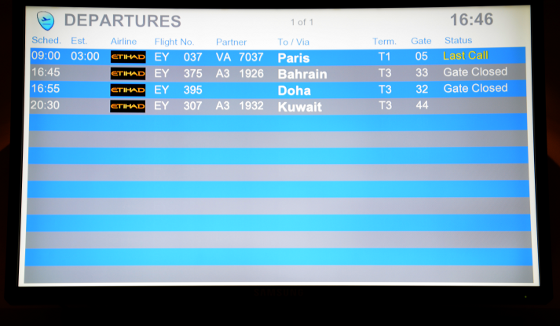
This is the first time we've flown out to Australia with Etihad and it may also be the last. We were due to fly back into Europe at CDG and head down to Lyon for the mini-DebConf this weekend. departure board, 18 hour delay for Paris Lets look at how our Etihad experience has worked out: 21:00 UTC Tuesday - waking up on Wednesday morning in Melbourne (UTC+10) 13:00 UTC Wednesday - leaving Melbourne about 11pm Wednesday night, a 12-13 hour flight to Abu Dhabi. We had heard about the air traffic control strikes in France (where we are going) and asked the airline if we should fly and they told us everything would be OK. 02:30 UTC Thursday - touchdown in Abu Dhabi, 6:30 am local time. Go to the transfer counter to ask for our boarding passes to CDG. At this stage, we were told that the connecting flight to CDG had been delayed 20 hours due to French strikes. As we are trying to reach Lyon for the mini-DebConf this weekend, we asked if we could leave Abu Dhabi on a 09:00 flight to Geneva. The Etihad staff told us to contact our travel agent (the flight was booked through Expedia) and for the next hour everybody's time was wasted making calls to Expedia who kept telling us to speak to Etihad. Whenever the Etihad customer service staff tried to speak to Expedia, the Expedia call center would hang up. Eventually, the Etihad staff told us that the deadline for putting us on the Geneva flight had passed and we would be stuck in Abu Dhabi for at least 20 hours. For flights to and from Europe, airlines have a responsibility to arrange hotels for passengers if there is a lengthy delay. If the airline is at fault, they must also pay some extra cash compensation but for a strike situation that is not applicable. Etihad has repeatedly fobbed us off. Initially we were given vouchers for Burger King or a pizza slice and told to hang around the transfer counter. By about 12:00 UTC (4pm local time, nine hours of waiting around the transfer counter) there was still no solution. One passenger was so upset that the airport security were called to speak to him and he was taken away. The airline staff kept giving excuses. Some passengers had been sent to a hotel but others left behind. I asked them again about our hotel and they kept trying to fob me off. Faced with the possibility that I would miss two nights of sleep and eight hours time difference coming into Europe, I continued asking the Etihad staff to own up to their responsibilities and they eventually offered us access to their airport lounge. We discovered some other passengers in the lounge too, including the passenger who had earlier been escorted away by security. This is unlike anything we've experienced with any other airline. At every opportunity (the check-in at Melbourne, or when the Geneva flight was boarding), the airline has failed to make arrangements that would have avoided cost and inconvenience. Assuming the flight goes ahead with a 20 hour delay, we will arrive in CDG some time Friday morning and not really sleep in a proper bed again until Friday night, about 70 hours after getting up in Melbourne on Wednesday morning. Thanks Etihad, you are a waking nightmare. The airline has been evasive about how they will deal with our onward travel from CDG to Lyon. We had booked a TGV train ticket already but it is not valid after such a long delay and it seems quite possible that trains will be busier than usual thanks to the air traffic control strike. So we don't even know if we will be loitering around a Paris airport or railway station for hours on Friday and nobody from the airline or Expedia really seems to care. Conclusion The only conclusion I can reach from this experience is that Etihad can't be trusted, certainly not for long journies such as Australia to Europe. Having flown through Singapore, Kuala Lumpur and Hong Kong, I know that air passengers have plenty of options available and there are many airlines that do go the extra mile to look after passengers especially on such long journeys. The airline missed opportunities to re-route us at every opportunity. It looks like they help some passengers (like those who did get to hotels) but leave many others high and dry just to stay within their budget.

8 April 2015

Ben Hutchings: Call for testing: linux 3.16.7-ckt9-1

As it is nearly time to release Debian 8 (codename jessie), I've uploaded a new version of the Linux kernel to unstable which I hope will be the version to go into the initial release (8.0). The changes from the current version in testing are mostly bug fixes: Please test this new version (which should be on mirrors within the next 24 hours) and report any regressions you spot. It's now too late to add new hardware support for Debian 8.0, but we'll probably be able to improve it in subsequent point releases. So, please also report driver changes that should be backported from later kernel versions to improve hardware support, with severity of 'important'. If you can provide precise information about which upstream commits are needed, that makes things easier for us, and you should add the 'patch' tag.

7 April 2015

Thorsten Glaser: exciting news, or so

I implemented <? support (including <?php ) script embedding support for *.inc in MirWebseite today; the specific syntax was explicitely requested by Natureshadow. Ugh. My own hacking activities are progressing, even if slowly. I do some other interesting, funny, social, beneficial, etc. stuff in between, though. I ll even have to get some of my DD buddies to sponsor me some QA uploads of packages I formerly maintained, whereever changes are queued up such as better old-format repo compatibility in cvs(GNU) Though some of the stuff I do at work is currently done only there sorry. Also: prepare to be fully enlightened about just what evil (nice picture) Docker is. I especially liked the comparison of containers to a herd of cattle, mere numbers, replaceable, whereas VMs are cats, each with their individual name, lovely petted each day, etc. ObHint: Some may have noticed I do have a Twitter account now. I do not really use it much. I got it because I wanted to rant at someone who only gave Twitter as means to contact them (a European company running a lottery for USA citizens only). But I found one nice thing: @HourlyCats (though @FacesPics and @BahnAnsagen are funny too, and the Postillon anyway). The internet is there for cat content, anyway.
Ahem. Do not contact me there, use IRC, more specifically, the Freenode network, and possibly memoserv to mirabilos instead, I can t fit things into 140 chars, that s just ridiculous. Also, don t follow me. It may contain rants, it s NSFW, and I m not censoring there. As I said: I do not use it. So should you. (But kudos for having a mostly functional fallback site (the mobile one), which even works in PocketIE (Windows Mobile) and Opera 9, though not so much lynx(1) ) odc (from #!/bin/mksh on IRC) is hacking support to use mksh instead of GNU bash for bootstrapping pkgsrc (e.g. on Solaris). Nice! Good luck! propos mksh(1), dear Debian armel and armhf buildd maintainer colleagues, pretty please with strawberries and chocolate ice on top (I just had that on waffles at my favourite ice salon, so I may be biased), do like s390x and update your chroots and wanna-build give-back mksh, as we requested, so the privacy fix makes it into jessie. Thanks in advance! Oh, and Y_Plentyn and I both have been putting more and updated packages into my APT repository. XTaran held a talk at CLT 2015 mentioning it maybe I should write up some docs about how to use it for which purposes (e.g. how to avoid systemd but not get the other packages from it, or how to use it with systemd (trivial but has to be stated, it s freedom of choice after all), etc.)? Besides decent fanfiction (the stories in the Uzumaki Naruto universe seem, on average, to be much longer than those in the Harry Potter one), the weather is becoming good, so I ve already been enjoying going out for some geocaching and will have the bike fixed at the shop RSN (it suffers a bit each winter, as it stands outside, since our basement is mouldy, which is worse than a bit of rust IMHO) to get more activity in. Also planning to head to the GPS Maze in Mainz and, besides what time FrOSCon (including preparation) allows, heading to DebConf for a while. mirabilos  Waypoints

Carl Chenet: Backup Checker, the ServerSpec for your backups

Follow me on Identi.ca or Twitter or Diaspora*diaspora-banner Sysadmins usually know ServerSpec, a tool allowing to check if your servers are correctly configured. The use of automated deployment tools makes deployments easier and easier, but lot of unexpected situations can come up using this tool, especially when more and more servers are implied. ServerSpec allows to verify that the result of your deployments are what you were expecting for and that no exception or unexpected event goes undetected. serverspec Backup Checker (Github stars appreciated :)) offers the same kind of controls, but for your backups. Once you have backups, you don t know if they contain what you are expecting for. And this is especially important because having broken backups mean losing your data after a major outage! Moreover if you think you are well protected with backups but they are eventually broken (corrupted archives, archives being filled with empty files, saving useless files ), you will perform your server or database upgrades without being really protected, leading to terrible situations.
github-logo

Backup Checker on github

Backup Checker offers lots of controls over backups: Use Backup Checker with Backup-Manager or Rsnapshot Starting from Backup Checker 1.7,if you use a backup tool like Backup-Manager or Rsnapshot, you ll be glad to know that Backup Checker perfectly works with them. The documentation is available on the Backup Checker Community page with the howtos to install and configure Backup Checker with Backup-Manager or with Rsnapshot. weneedyou What about you? Let us know in the comments what you think of Backup Checker and its features to connect with other backup tools. We would be happy to get your feedbacks about how you use Backup Checker or what you expect from a backup checking solution.

Olivier Berger: Publishing my papers as Linked Research

I intend to make the extra effort of republishing my own research papers as Linked Research, i.e. in a form readable by humans (HTML5), but also embedding meta-data (as RDF) for machine processing. I ve started with Authoritative Linked Data descriptions of Debian source packages using ADMS.SW (a good candidate, as it deals with Linked Data ;). You ll notice the menu which helps select different style sheets for preparing clean printable versions, not far from the LaTeX output usually converted to PDF. I hope this will pave the way to more Linked Research, and less opaque publications. The only hassle at the moment is the conversion from LaTeX to HTML5 which I m doing manually, in Emacs + nxml-mode. Update: Check the preprint links in my publications page, for more papers.

Mike Hommey: Announcing git-cinnabar 0.2.0

Git-cinnabar is a git remote helper to interact with mercurial repositories. It allows to clone, pull and push from/to mercurial remote repositories, using git. Get it on github. What s new since 0.1.1? What to expect next? If you want to follow the improvements more closely, I encourage you to switch to the next branch. I won t push anything there that hasn t been extensively tested on the above mentioned repositories. And as always, please report any issue you run into.

6 April 2015

Daniel Leidert: Motion picture capturing: Debian + motion + Logitech C910

Woodpecker near the windowWinter time is a good time for some nature observation. Yesterday I had a woodpecker (picture) in front of my kitchen window. During the recent weeks there were long-tailed tits, a wren and other rarely seen birds. So I thought, it might be a good idea to capture some of these events :) I still own a Logitech C910 USB camera which allows HD video capturing up to 1080p. So I checked the web for some software that would begin video capturing in the case of motion detection and found motion, already available for Debian users. So I gave it a try. I tested all available resolutions of the camera together with the capturing results. I found that the resulting framerate of both the live stream and the captured video is highly depending on the resolution and some few configuration options. Below is a summary of my tests and the results I've achieved so far.

Logitech C910 HD cameraJust a bit of data regarding the camera. AFAIK it allows for fluent video streams up to 720p.
$ dmesg
[..]
usb 7-3: new high-speed USB device number 5 using ehci-pci
usb 7-3: New USB device found, idVendor=046d, idProduct=0821
usb 7-3: New USB device strings: Mfr=0, Product=0, SerialNumber=1
usb 7-3: SerialNumber: 91CF80A0
usb 7-3: current rate 0 is different from the runtime rate 16000
usb 7-3: current rate 0 is different from the runtime rate 32000
uvcvideo: Found UVC 1.00 device (046d:0821)
input: UVC Camera (046d:0821) as /devices/pci0000:00/0000:00:1a.7/usb7/7-3/7-3:1.2/input/input17

$ lsusb
[..]
Bus 007 Device 005: ID 046d:0821 Logitech, Inc. HD Webcam C910
[..]

$ v4l2-ctl -V -d /dev/video1
Format Video Capture:
Width/Height : 1280/720
Pixel Format : 'YUYV'
Field : None
Bytes per Line: 2560
Size Image : 1843200
Colorspace : SRGB
Also the uvcvideo kernel module is loaded and the user in question is part of the video group. Installation and startInstallation of the software is as easy as always:
apt-get install motion
It is possible to run the software as a service. But for testing, I copied /etc/motion/motion.conf to ~/.motion/motion.conf, fixed its permissions (you cannot copy the file as user - it's not world readable) and disabled the daemon mode.
daemon off
Note that in my case the correct device is /dev/video1 because the laptop has a built-in camera, that is /dev/video0. Also the target directory should be writeable by my user:
videodevice /dev/video1
target_dir ~/Videos
Then running motion from the command line ...
$ motion
[..]
[0] [NTC] [ALL] motion_startup: Motion 3.2.12+git20140228 Started
[..]
[1] [NTC] [ALL] motion_init: Thread 1 started , motion detection Enabled
[0] [NTC] [ALL] main: Thread 1 is device: /dev/video1 input -1
[1] [NTC] [VID] v4l2_get_capability:
------------------------
cap.driver: "uvcvideo"
cap.card: "UVC Camera (046d:0821)"
cap.bus_info: "usb-0000:00:1a.7-1"
cap.capabilities=0x84000001
------------------------
[1] [NTC] [VID] v4l2_get_capability: - VIDEO_CAPTURE
[1] [NTC] [VID] v4l2_get_capability: - STREAMING
[1] [NTC] [VID] v4l2_select_input: name = "Camera 1", type 0x00000002, status 00000000
[1] [NTC] [VID] v4l2_select_input: - CAMERA
[..]
[1] [NTC] [ALL] image_ring_resize: Resizing pre_capture buffer to 1 items
... will begin to capture motion detection events and also output a live stream. CTRL+C will stop it again. Live streamThe live stream is available by pointing the browser to localhost:8081. However, the stream seems to run at 1 fps (frames per second) and indeed does. The stream gets more quality by this configuration:
stream_motion on
stream_maxrate 100
The first option is responsible, that the stream only runs at one fps if there is no motion detection event. Otherwise the framerate increases to its maximum value, which is either the one given by stream_maxrate or the camera limit. The quality of the stream picture can be increased a bit further too by increasing the stream_quality value. Because I neither need the stream nor the control feed I disabled both:
stream_port 0
webcontrol_port 0
Picture capturingBy default there is video and picture capturing if a motion event is detected. I'm not interested in these pictures, so I turned them off:
output_pictures off
FYI: If you want a good picture quality, then the value of quality should very probably be increased. Video capturingThis is the really interesting part :) Of course if I will "shoot" some birds (with the camera), then a small image of say 320x240 pixels is not enough. The camera allows for a capture resolution up to 1920x1080 pixels (1080p). It is advertised for fluent video streams up to 720p (1280x720 pixels). So I tried the following resolutions: 320x240, 640x480, 800x600, 640x360 (360p), 1280x720 (720p) and 1920x1080 (1080p). These are easily configured by the width and height variables. For example the following configures motion for 1280x720 pixels (720p):
width 1280
height 720
The result was really disappointing. No event is captured with more then 20 fps. At higher resolutions the framerate drops even further and at the highest resolution of 1920x1080 pixels, the framerate is only two(!) fps. Also every created video runs much too fast and even faster by increasing the framerate variable. Of course its default value of 2 (fps) is not enough for fluent videos. AFAIK the C910 can run with 30 fps at 1280x720 pixels. So increasing the value of framerate, the maximum framerate recorded, is a must-do. (If you wanna test yourself, check the log output for the value following event_new_video FPS.)The solution to the issue, that videos are running too fast, however is to increase the pre_capture value, the number of pre-captured (buffered) pictures from before motion was detected. Even small values like 3..5 result in a distinctive improvement of the situation. Though increasing the value further didn't have any effect. So the values below should almost get the most out of the camera and result in videos in normal speed.
framerate 100
pre_capture 5
Videos in 1280x720 pixels are still captured with 10 fps and I don't know why. Running guvcview, the same camera allows for 30 fps in this resolution (even 60 fps in lower resolutions). However, even if the framerate could be higher, the resulting video runs fluently. Still the quality is just moderate (or to be honest, still disappointing). It looks "pixelated". Only static pictures are sharp. It took me a while to fix this too, because I first thought, the reason is the camera or missing hardware support. It is not :) The reason is, that ffmpeg is configured to produce a moderate(?)-quality video. The relevant variables are ffmpeg_bps and ffmpeg_variable_bitrate. I got the best results just changing the latter:
ffmpeg_variable_bitrate 2
Finally the resulting video quality is promising. I'll start with this configuration setting up an observation camera for the bird feeding ground.There is one more tweak for me. I got even better results by enabling the auto_brightness feature.
auto_brightness on
Complete configurationSo the complete configuration looks like this (only those options changed to the original config file)
daemon off
videodevice /dev/video1
width 1280
height 720
framerate 100
auto_brightness on
ffmpeg_variable_bitrate 2
target_dir /home/user/Videos
stream_port 0 #8081
stream_motion on
stream_maxrate 100
webcontrol_port 0 #8080
Links Continue with part II ...

Jonathan Carter: Squashfs Performance Testing

Experiments Last week I discovered The Fan Club s Experiments page. It reminds me of the Debian Experiments community on Google+. I like the concept of trying out all kinds of different things and reporting back to the community on how it works. I ve been meaning to do more of that myself so this is me jumping in and reporting back on something I ve been poking at this weekend. Introducing Squashfs Squashfs is a read-only compressed filesystem commonly used on embedded devices, Linux installation media and remote file systems (as is done in LTSP). Typically, a system like tmpfs, unionfs or aufs is mounted over this read-only system to make it usable as a root filesystem. It has plenty of other use cases too but for the purposes of this entry we ll stick with those use cases in mind. It supports gzip, lzo and xz(lzma) as compression back-ends. It also supports block sizes from 4K up to 1M. Compression technique as well as block size can have major effects on both performance and file size. In most cases the defaults will probably be sufficient, but if you want to find a good balance between performance and space saving, then you ll need some more insight. My Experiment: Test effects of squashfs compression methods and block sizes I m not the first person to have done some tests on squashfs performance and reported on it. Bernhard Wiedemann and the Squashfs LZMA project have posted some results before, and while very useful I want more information (especially compress/uncompress times). I was surprised to not find a more complete table elsewhere either. Even if such a table existed, I probably wouldn t be satisfied with it. Each squashfs is different and it makes a big difference whether it contains already compressed information or largely uncompressed information like clear text. I d rather be able to gather compression ratio/times for a specific image rather than for one that was used for testing purposes once-off. So, I put together a quick script that takes a squashfs image, extracts it to tmpfs, and then re-compressing it using it all the specified compression techniques and block sizes and then uncompressing those same images for their read speeds. My Testing Environment For this post, I will try out my script on the Ubuntu Desktop 14.04.2 LTS squashfs image. It s a complex image that contains a large mix of different kinds of files. I m extracting it to RAM since I want to avoid having disk performance as a significant factor. I m compressing the data back to SSD and extracting from there for read speed tests. The SSD seems fast enough not to have any significant effect on the tests. If you have a slow storage, the results of the larger images (with smaller block sizes) may be skewed unfavourably. As Bernhard mentioned on his post, testing the speed of your memory can also be useful, especially when testing on different kinds of systems and comparing the results:
# dd if=/dev/zero of=/dev/null bs=1M count=100000
104857600000 bytes (105 GB) copied, 4.90059 s, 21.4 GB/s
CPU is likely to be your biggest bottleneck by far when compressing. mksquashfs is SMP aware and will use all available cores by default. I m testing this on a dual core Core i7 laptop with hyper-threading (so squashfs will use 4 threads) and with 16GB RAM apparently transferring around 21GB/s. The results of the squashfs testing script will differ greatly based on the CPU cores, core speed, memory speed and storage speed of the computer you re running it on, so it shouldn t come as a surprise if you get different results than I did. If you don t have any significant bottleneck (like slow disks, slow CPU, running out of RAM, etc) then your results should more or less correspond in scale to mine for the same image. How to Run It Create a directory and place the filesystem you d like to test as filesystem.squashfs, then:
$ apt-get install squashfs-tools 
$ wget https://raw.githubusercontent.com/highvoltage/squashfs-experiments/master/test-mksquashfs.sh
$ bash test-mksquashfs.sh
With the default values in that file, you ll end up with 18 squashfs images taking up about 18GB of disk space. I keep all the results for inspection, but I ll probably adapt/fix the script to be more friendly to disk space usage some time. You should see output that look something like this, with all the resulting data in the ./results directory.
* Setting up...
- Testing gzip
  * Running a squashfs using compression gzip, blocksize 4096
  * Running a squashfs using compression gzip, blocksize 8192
  * Running a squashfs using compression gzip, blocksize 16384
  ...
- Testing lzo
  * Running a squashfs using compression lzo, blocksize 4096
  * Running a squashfs using compression lzo, blocksize 8192
  * Running a squashfs using compression lzo, blocksize 16384
  ...
- Testing xz
  * Running a squashfs using compression xz, blocksize 4096
  * Running a squashfs using compression xz, blocksize 8192
  * Running a squashfs using compression xz, blocksize 16384
  ...
* Testing uncompressing times...
  * Reading results/squashfs-gzip-131072.squashfs...
  * Reading results/squashfs-gzip-16384.squashfs...
  * Reading results/squashfs-gzip-32768.squashfs...
  ...
* Cleaning up...
On to the Results The report script will output the results into CSV. Here s the table with my results. Ratio is percentage of the size of the original uncompressed data, CTIME and UTIME is compression time and uncompress time for the entire image.
Filename Size Ratio CTIME UTIME
squashfs-gzip-4096.squashfs 1137016 39.66% 0m46.167s 0m37.220s
squashfs-gzip-8192.squashfs 1079596 37.67% 0m53.155s 0m35.508s
squashfs-gzip-16384.squashfs 1039076 36.27% 1m9.558s 0m26.988s
squashfs-gzip-32768.squashfs 1008268 35.20% 1m30.056s 0m30.599s
squashfs-gzip-65536.squashfs 987024 34.46% 1m51.281s 0m35.223s
squashfs-gzip-131072.squashfs 975708 34.07% 1m59.663s 0m22.878s
squashfs-gzip-262144.squashfs 970280 33.88% 2m13.246s 0m23.321s
squashfs-gzip-524288.squashfs 967704 33.79% 2m11.515s 0m24.865s
squashfs-gzip-1048576.squashfs 966580 33.75% 2m14.558s 0m28.029s
squashfs-lzo-4096.squashfs 1286776 44.88% 1m36.025s 0m22.179s
squashfs-lzo-8192.squashfs 1221920 42.64% 1m49.862s 0m21.690s
squashfs-lzo-16384.squashfs 1170636 40.86% 2m5.008s 0m20.831s
squashfs-lzo-32768.squashfs 1127432 39.36% 2m23.616s 0m20.597s
squashfs-lzo-65536.squashfs 1092788 38.15% 2m48.817s 0m21.164s
squashfs-lzo-131072.squashfs 1072208 37.43% 3m4.990s 0m20.563s
squashfs-lzo-262144.squashfs 1062544 37.10% 3m26.816s 0m15.708s
squashfs-lzo-524288.squashfs 1057780 36.93% 3m32.189s 0m16.166s
squashfs-lzo-1048576.squashfs 1055532 36.85% 3m42.566s 0m17.507s
squashfs-xz-4096.squashfs 1094880 38.19% 5m28.104s 2m21.373s
squashfs-xz-8192.squashfs 1002876 34.99% 5m15.148s 2m1.780s
squashfs-xz-16384.squashfs 937748 32.73% 5m11.683s 1m47.878s
squashfs-xz-32768.squashfs 888908 31.03% 5m17.207s 1m43.399s
squashfs-xz-65536.squashfs 852048 29.75% 5m27.819s 1m38.211s
squashfs-xz-131072.squashfs 823216 28.74% 5m42.993s 1m29.708s
squashfs-xz-262144.squashfs 799336 27.91% 6m30.575s 1m16.502s
squashfs-xz-524288.squashfs 778140 27.17% 6m58.455s 1m20.234s
squashfs-xz-1048576.squashfs 759244 26.51% 7m19.205s 1m28.721s
Some notes:

Eddy Petri&#537;or: HOWTO: Dnsmasq server for network booting using TFTP and DHCP

Dnsmasq is a very lightweight server that besides the expected DNS caching functionality, it also offers DHCP and TFTP functionality in a single binary.

This makes it very useful if one needs to network boot a system since you can have the TFTP and DHCP part of the setup done easily, and only add NFS for a complete network boot.

Add to that that

One extra nice thing dnsmasq has is that it can mark specific hosts, addresses or ranges with some internal markers, then use those markers as symbolic names to apply settings based for classes of devices.

In the configuration snippet below, there is a rule I set up to make sure I would apply the 'netbsd' label to any system connecting through specific ethernet interfaces (one is the interface of the system, the other is a USB NIC I use from time to time):
#You will need a range for static IPs in the main file
dhcp-range=192.168.77.250,192.168.77.254,static

# give the name 'kinder' to any machine connecting through the given ethernet nics and apply 'netbsd' label
dhcp-host=00:1a:70:99:60:BB,00:06:4F:0D:B1:95, kinder, 192.168.77.251, set:netbsd

# Machines tagged 'netbsd' shall use the given NFS root path
dhcp-option=tag:netbsd, option:root-path,/export/netbsd-nslu2/root
# Enable dnsmasq's built-in TFTP server
enable-tftp

# Set the root directory for files available via FTP.
tftp-root=/srv/tftp
Saving this configuration file in /etc/dnsmasq.d/kinder-netboot will enable this to be used by dnsmasq if this line is present in /etc/dnsmasq.conf
conf-dir=/etc/dnsmasq.d
Commenting it will disable the netbsd part easily.

5 April 2015

Ingo Juergensmann: It has been 30 years now...

Sometimes you happen to realize how old you are when listening to the radio where they announce hits from your days of youth as "oldies". Or when todays youth asking you what a music casette or a 5.25" floppy disk is. You're even older than that when you still know 8" disks. We have one of those on our pin board. Or you may realize your age when your favorite computer of your youth will celebrate its 30th anniversary this year! In 1985 the Amiga was introduced to the public - and 30 years later Amigas around the world are still running! Some are still operated under AmigaOS, some are running maybe NetBSD, but some are running the Debian m68k port - even though the port was expelled from Debian years ago! But some people still take care of this port and it is keeping up with building packages, although mostly due to emulators doing the most work. But anyway, the Amiga is turning 30 this year! And what a great machine this was! It brought multitasking, colorful graphics and multi-channel audio to the masses. It was years ahead of its competitors, but it was doomed to fail because of management failures by the producing company Commodore, which went bankrupt in 1994. The "30th Anniversary Event" will take place on July 25th at the Computer History Museum in Mountain View, California, USA - if the kickstarting the event will be successful during the next two weeks. So, when you earned your first merits in computing on an Amiga as well, you might want to give your Amiga history another kickstart! Not the Kickstart floppy as the A1000 needed to boot up, but fundraising the event on kickstart.org! I think this event is not only important to old Amiga users from the good old days, but for the rememberance of computing history in general. Without doubt the Amiga set new standards in computer history and is an important part of industrial heritage.
Kategorie:

Dominique Dumont: Improving creation of debian copyright file

Hello In my opinion, creating and maintaining Debian copyright file is the most boring task required to create a Debian package. Unfortunately, this file is also one of the most important of a package: it specifies some legal aspect regarding the use of the software. Debian copyright file is scrutinized by ftp masters gatekeepers when accepting a new package in Debian project: this file must accurately describe the copyright and licenses of all files of a source package, preferably using a specific syntax. (Kudos to the ftp-masters team: reading copyright files must be even more boring than writing them). The content of the copyright file must reflect accurately the license of all files. This license is often specified in the comments of a source files. The licencecheck command is able to scan sources files and reports the copyright and licenses declared in there. But it does not summarize this information: a copyright line is generated for each file of a package. licensecheck2dep5 (provided by cdbs package as /usr/lib/cdbs/licensecheck2dep5) does better: the output of licensecheck is consolidated and translated in Debian copyright format. The result is better, but must be heavily edited to be reviewable by ftp-masters team. The new update subcommand of cme (available with libconfig-model-dpkg-perl 2.061 currently in experimental) goes further than licensecheck2deb: For instance, here s the (slightly edited) output of cme run for pan package starting without debian/copyright file:
$ cme update dpkg-copyright -quiet
Adding dummy license text for license public-domain 
for path pan/general/sorted-vector.h
Adding dummy license text for license BSD-2-clause 
for path pan/usenet-utils/MersenneTwister.h
$ cat debian/copyright
Format: https://www.debian.org/doc/packaging-manuals/copyright-format/1.0/
Files: *
Copyright: 1994-2001, Frank Pilhofer. The author may
License: GPL-2+
Files: pan/*
Copyright: 2002-2007, Charles Kerr 
License: GPL-2
Files: pan/data/cert-store.cc
  pan/data/cert-store.h
Copyright: 2011, Heinrich M ller 
  2002-2006, Charles Kerr 
License: GPL-2
Files: pan/general/e-util.cc
  pan/general/e-util.h
Copyright: 2000, 2001, Ximian, Inc
License: LGPL-2
Files: pan/general/locking.h
  pan/general/worker-pool.cc
  pan/general/worker-pool.h
Copyright: 2007, Calin Culianu 
  2002-2007, Charles Kerr 
License: LGPL-2+
Files: pan/general/sorted-vector.h
Copyright: 2002, Martin Holzherr (holzherr@infobrain.com).
License: public-domain
 Please fill license public-domain from header
 of pan/general/sorted-vector.h
[ about 100 more lines including license text for Zlib and several 
  GPL licenses ]
This is a good start, but some modifications must be applied to get a correct license file: These modifications can be done: This post has mentioned creation of Debian copyright file, but does not address the problem of updating an existing copyright file when packaging a new version of a software. This will be the subject of a next post. I hope this new feature of cme will save hours of work for Debian packagers. As usual comments and suggestions are welcome All the best

3 April 2015

Thorsten Alteholz: My Debian Activities in March 2015

FTP assistant Recently the NEW queue grew due to lots of uploads of new KDE software and several smaller node-packages. The KDE-stuff will be processed one after another, but the node-stuff seems to be rather strange. After the last discussion I was told that all those small packages can be accumulated into bigger chunks. I hope this discussion doesn t need to be repeated again Anyway, this month I marked 117 packages for accept and rejected 51 packages. Squeeze LTS This was my ninth month that I did some work for the Squeeze LTS initiative, started by Raphael Hertzog at Freexian. This month I got assigned a workload of 15.25h and I spent these hours to upload new versions of: Finally I was also able to upload the binutils package. Up to now, I got no complaints that something is not working anymore, so yeah, I seem to make it. The next big adventure will be a new upload of PHP. I already started with some patches, but it is still a good piece of work. I also uploaded update for DLA 164-1] unace security update, [DLA 168-1] konversation security update and [DLA 172-1] libextlib-ruby security update although no LTS sponsor indicated any interest. Other packages This month the severity of one bug in greylistd had been raised from normal to severe and such I had to upload a new version. Thanks to Andreas Beckmann for raising and for providing a patch. I also uploaded a new version of dict-elements and closed a bug related to reproducible builds. As I am the maintainer of libkeepalive, I got an email from Andreas Florath. He wanted to persuade me to create a package for his library libdontdie, which is rather similar to libkeepalive but has some improvements. As I promised to do some more packaging work, he didn t have to argue much and voila, there now is a new package libdontdie available. As the cooperation with him is really pleasant, I also created a package for his other project: pipexec. Donations Thanks alot to all donors, this month I got 30 in total. I really appreciate this and hope that everybody is pleased with my commitment. Don t hesitate to make suggestions for improvements.

2 April 2015

Rudy Godoy: No SSH for you how to fix OpenRG routers

I find interesting when faced a taken-for-granted situation, in particular in the tech world. This time s history is about an Internet ADSL connection that allows all traffic but SSH. Yes, you read it correctly. It was very bizarre confirming such event was a real-life situation. I don t claim to be a networking expert but at least I want to think I m well educated. After few minutes I ve focused my efforts on dealing with the ADSL router/modem s networking configuration. The device is provided by Movistar (formerly Telefonica) and it runs OpenRG. I ve discovered that other people have experienced the same issue and what Movistar did was basically replacing the device. Of course the problem is gone after that. So, this post is dedicated to those who don t give up. Following the steps below will allow SSH outbound traffic for a OpenRG-based device. OpenRG device specs
Software Version: 6.0.18.1.110.1.52 Upgrade
Release Date: Oct 7 2014
Diagnostic When you do the command below, it shows nothing but timeout. Even when you SSH the router it doesn t establish connection to it.
ssh -vv host.somewhere.com
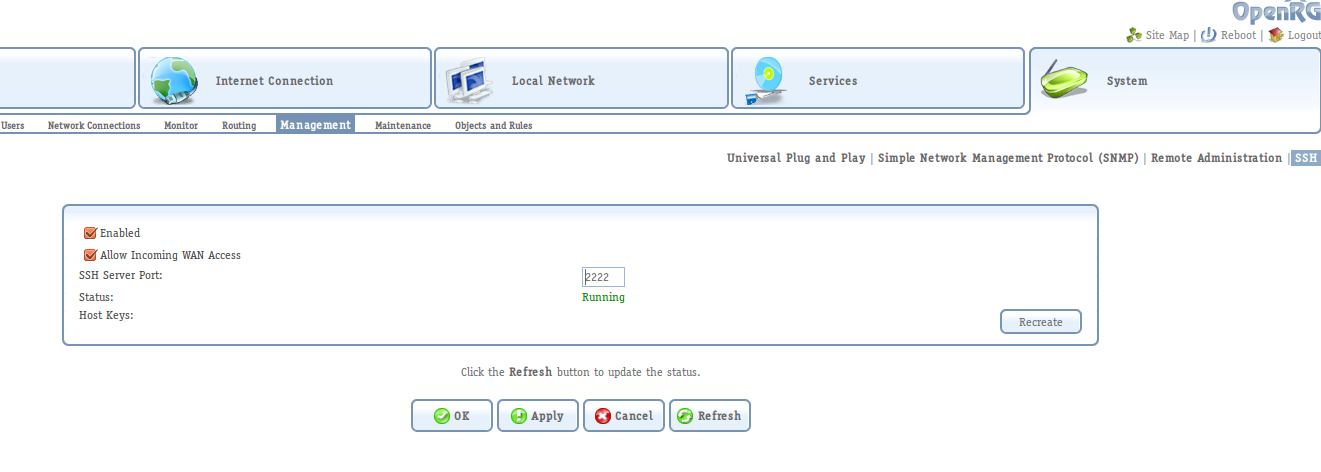
Solution Change router s SSH service port. This step will allow you to access the console-based configuration for the router (since I haven t found any way to do the steps described below from the web management interface). To do so, go to System > Management > SSH. Update the service port to something else than 22, for instance 2222.
OpenRG SSH service configuration

OpenRG SSH service configuration

Connect to the SSH interface Once you have changed the SSH service port, you can access it from a SSH client.
ssh -p 2222 admin@192.168.1.1
admin@192.168.1.1's password: 
OpenRG>
Once you have the console prompt, issue the following commands to allow SSH outbound traffic coming from the LAN and Wifi networks. After the last command, which saves and updates the device s configuration, you should be able to do SSH from any computer in your network to the Internet (thanks to tips from inkhorn).
OpenRG> conf set fw/policy/0/chain/fw_br0_in/rule/0/enabled 0
Returned 0
OpenRG> conf set fw/policy/0/chain/fw_br1_in/rule/0/enabled 0
Returned 0
OpenRG> conf reconf 1
Returned 0

Next.

Previous.