Search Results: "tar"

27 August 2025

Russell Coker: ZRAM and VMs

I ve just started using zram for swap on VMs. The use of compression for swap in Linux apparently isn t new, it s been in the Linux kernel since version 3.2 (since 2012). But until recent years I hadn t used it. When I started using Mobian (the Debian distribution for phones) zram was in the default setup, it basically works and I never needed to bother with it which is exactly what you want from such a technology. After seeing it s benefits in Mobian I started using it on my laptops where it worked well. Benefits of ZRAM ZRAM means that instead of paging data to storage it is compressed to another part of RAM. That means no access to storage which is a significant benefit if storage is slow (typical for phones) or if storage wearing out is a problem. For servers you typically have SSDs that are fast and last for significant write volumes, for example the 120G SSDs referenced in my blog post about swap (not) breaking SSD [1] are running well in my parents PC because they outlasted all the other hardware connected to them and 120G isn t usable for anything more demanding than my parents use nowadays. Those are Intel 120G 2.5 DC grade SATA SSDs. For most servers ZRAM isn t a good choice as you can just keep doing IO on the SSDs for years. A server that runs multiple VMs is a special case because you want to isolate the VMs from each other. Support for quotas for storage IO in Linux isn t easy to configure while limiting the number of CPU cores is very easy. If a system or VM using ZRAM for swap starts paging excessively the bottleneck will be CPU, this probably isn t going to be great on a phone with a slow CPU but on a server class CPU it will be less of a limit. Whether compression is slower or faster than SSD is a complex issue but it will definitely be just a limit for that VM. When I setup a VM server I want to have some confidence that a DoS attack or configuration error on one VM isn t going to destroy the performance of other VMs. If the VM server has 4 cores (the smallest VM server I run) and no VM has more than 2 cores then I know that the system can still run adequately if half the CPU performance is being wasted. Some servers I run have storage limits that make saving the disk space for swap useful. For servers I run in Hetzner (currently only one server but I have run up to 6 at various times in the past) the storage is often limited, Hetzner seems to typically have storage that is 8* the size of RAM so if you have many VMs configured with the swap that they might need in the expectation that usually at most one of them will be actually swapping then it can make a real difference to usable storage. 5% of storage used for swap files isn t uncommon or unreasonable. Big Servers I am still considering the implications of zram on larger systems. If I have a ML server with 512G of RAM would it make sense to use it? It seems plausible that a system might need 550G of RAM and zram could make the difference between jobs being killed with OOM and the jobs just completing. The CPU overhead of compression shouldn t be an issue as when you have dozens of cores in the system having one or two used for compression is no big deal. If a system is doing strictly ML work there will be a lot of data that can t be compressed, so the question is how much of the memory is raw input data and the weights used for calculations and how much is arrays with zeros and other things that are easy to compress. With a big server nothing less than 32G of swap will make much difference to the way things work and if you have 32G of data being actively paged then the fastest NVMe devices probably won t be enough to give usable performance. As zram uses one stream per CPU code if you have 44 cores that means 44 compression streams which should handle greater throughput. I ll write another blog post if I get a chance to test this.

Matthew Palmer: StrongBox: Simple, Safe Data Encryption for Rust

Some time ago, I wanted to encrypt a bunch of data in an application I was writing in Rust, mostly to be stored in a database, but also session cookies and sensitive configuration variables. Since Rust is widely known as a secure-yet-high-performance programming language, I was expecting that there would be a widely-used crate that gave me a secure, high-level interface to strong, safe cryptography. Imagine my surprise when I discovered that just didn t seem to exist. Don t get me wrong: Rust is replete with fast, secure, battle-tested cryptographic primitives. The RustCrypto group provides all manner of robust, widely-used crates for all manner of cryptography-related purposes. They re the essential building blocks for practical cryptosystems, but using them directly in an application is somewhat akin to building a car from individual atoms of iron and carbon. So I wrote my own high-level data encryption library, called it StrongBox, and have been happily encrypting and decrypting data ever since.

Cryptography So Simple Even I Can t Get It Wrong The core of StrongBox is the StrongBox trait, which has only two methods: encrypt and decrypt, each of which takes just two arguments. The first argument is the plaintext (for encrypt) or the ciphertext (for decrypt) to work on. The second argument is the encryption context, for use as Authenticated Additional Data, an important part of many uses of encryption. There s essentially no configuration or parameters to get wrong. You can t choose the encryption algorithm, or block cipher mode, and you don t have to worry about generating a secure nonce. You create a StrongBox with a key, and then you call encrypt and decrypt. That s it.

Practical Cryptographic Affordances Ok, ok that s not quite it. Because StrongBox is even easier to use than what I ve described, thanks to the companion crate, StructBox. When I started using StrongBox in the wild , it quickly became clear that what I almost always wanted to encrypt in my application wasn t some ethereal plaintext . I wanted to encrypt things, specifically structs (and enums). So, through the magic of Rust derive macros, I built StructBox, which provides encrypt and decrypt operations on any Serde-able type. Given that using Serde encoders can be a bit fiddly to use, it s virtually easier to get an encrypted, serialized struct than it is to get a plaintext serialized struct.

Key Problems in Cryptography The thing about cryptography is that it largely turns all data security problems into key management problems. All the fancy cryptographic wonkery is for naught if you don t manage the encryption keys well. So, most of the fancy business in StrongBox isn t the encryption and decryption, but instead solving problems around key management.

Different Keys for Different Purposes Using the same key for all of your cryptographic needs is generally considered a really bad idea. It opens up all manner of risks, that are easily avoided if you use different keys for different things. However, having to maintain a big pile of different keys is a nightmare, so nobody s going to do that. Enter: key derivation. Create one safe, secure root key, and then use a key derivation function to spawn as many other keys as you need. Different keys for each database column, another one to encrypt cookies, and so on. StrongBox supports this through the StemStrongBox type. You ll typically start off by creating a StemStrongBox with the root key, and then derive whatever other StrongBoxes you need, for encrypting and decrypting different kinds of data.

You Spin Me Round Sometimes, keys need to be rotated. Whether that s because you actually know (or even have reason to suspect) someone has gotten the key, or just because you re being appropriately paranoid, sometimes key rotation has to happen. As someone who has had to rotate keys in situations where such an eventuality was not planned for, I can say with some degree of authority: it absolutely sucks to have to do an emergency key rotation in a system that isn t built to make that easy. That s why StrongBox natively supports key rotation. Every StrongBox takes one encryption key, and an arbitrary number of decryption keys, and will automatically use the correct key to decrypt ciphertexts.

Will You Still Decrypt Me, Tomorrow? In addition to manual key rotation, StrongBox also supports time-based key rotation with the RotatingStrongBox type. This comes in handy when you re encrypting a lot of ephemeral data, like cookies (or server-side session data). It provides a way to automatically expire old data, and prevents attacks that become practical when large amounts of data are encrypted using a single key.

Invasion of the Invisible Salamanders! I mostly mention this just because I love the name, but there is a kind of attack possible in common AEAD modes called the invisible salamanders attack. StrongBox implements mitigations against this, by committing to the key being used so that an attacker can t forge a ciphertext that decrypts validly to different plaintexts when using different keys. This is why I love cryptography: everything sounds like absolute goddamn magic.

Call Me Crazy, Support Me Maybe? If you re coding in Rust (which you probably should be), encrypting your stored data (which you definitely should be), and StrongBox makes your life easier (which it really will), you can show your appreciation for my work by contributing to my open source code-fund. Simply by shouting me a refreshing beverage, you ll be helping me out, and helping to grow the software commons. Alternately, if you re looking for someone to Speak Rust to Computers on a professional basis, I m available for contracts or full-time remote positions.

22 August 2025

Daniel Lange: Polkitd (Policy Kit Daemon) in Trixie ... allowing remote users to suspend, reboot, power off the local system

As per the previous Polkit blog post the policykit framwork has lost the ability to understand its own .pkla files and policies need to be expressed in Javascript with .rules files now. To re-enable allowing remote users (think ssh) to reboot, hibernate, suspend or power off the local system, create a 10-shutdown-reboot.rules file in /etc/polkit-1/rules.d/:
polkit.addRule(function(action, subject)
if ((action.id == "org.freedesktop.login1.reboot-multiple-sessions"
action.id == "org.freedesktop.login1.reboot"
action.id == "org.freedesktop.login1.suspend-multiple-sessions"
action.id == "org.freedesktop.login1.suspend"
action.id == "org.freedesktop.login1.hibernate-multiple-sessions"
action.id == "org.freedesktop.login1.hibernate"
action.id == "org.freedesktop.login1.power-off-multiple-sessions"
action.id == "org.freedesktop.login1.power-off") &&
(subject.isInGroup("sudo") (subject.user == "root")))

return polkit.Result.YES;

);
and run systemctl restart polkit.

Russell Coker: Dell T320 H310 RAID and IT Mode

The Problem Just over 2 years ago my Dell T320 server had a motherboard failure [1]. I recently bought another T320 that had been gutted (no drives, PSUs, or RAM) and put the bits from my one in it. I installed Debian and the resulting installation wouldn t boot, I tried installing with both UEFI and BIOS modes with the same result. Then I realised that the disks I had installed were available even though I hadn t gone through the RAID configuration (I usually make a separate RAID-0 for each disk to work best with BTRFS or ZFS). I tried changing the BIOS setting for SATA disks between RAID and AHCI modes which didn t change things and realised that the BIOS setting in question probably applies to the SATA connector on the motherboard and that the RAID card was in IT mode which means that each disk is seen separately. If you are using ZFS or BTRFS you don t want to use a RAID-1, RAID-5, or RAID-6 on the hardware RAID controller, if there are different versions of the data on disks in the stripe then you want the filesystem to be able to work out which one is correct. To use IT mode you have to flash a different unsupported firmware on the RAID controller and then you either have to go to some extra effort to make it bootable or have a different device to boot from. The Root Causes Dell has no reason to support unusual firmware on their RAID controllers. Installing different firmware on a device that is designed for high availability is going to have some probability of data loss and perhaps more importantly for Dell some probability of customers returning hardware during the support period and acting innocent about why it doesn t work. Dell has a great financial incentive to make it difficult to install Dell firmware on LSI cards from other vendors which have equivalent hardware as they don t want customers to get all the benefits of iDRAC integration etc without paying the Dell price premium. All the other vendors have similar financial incentives so there is no official documentation or support on converting between different firmware images. Dell s support for upgrading the Dell version is pretty good, but it aborts if it sees something different. The Attempts I tried following the instructions in this document to flash back to Dell firmware [2]. This document is about the H310 RAID card in my Dell T320 AKA a LSI SAS 9211-8i . The sas2flash.efi program didn t seem to do anything, it returned immediately and didn t give an error message. This page gives a start of how to get inside the Dell firmware package but doesn t work [3]. It didn t cover the case where sasdupie aborts with an error because it detects the current version as 00.00.00.00 not something that the upgrade program is prepared to upgrade from. But it s a place to start looking for someone who wants to try harder at this. This forum post has some interesting information, I gave up before trying it, but it may be useful for someone else [4]. The Solution Dell tower servers have as a standard feature an internal USB port for a boot device. So I created a boot image on a spare USB stick and installed it there and it then loads the kernel and mounts the filesystem from a SATA hard drive. Once I got that working everything was fine. The Debian/Trixie installer would probably have allowed me to install an EFI device on the internal USB stick as part of the install if I had known what was going to happen. The system is now fully working and ready to sell. Now I just need to find someone who wants IT mode on the RAID controller and hopefully is willing to pay extra for it. Whatever I sell the system for it seems unlikely to cover the hours I spent working on this. But I learned some interesting things about RAID firmware and hopefully this blog post will be useful to other people, even if only to discourage them from trying to change firmware.

21 August 2025

Matthew Palmer: Progress on my open source funding experiment

When I recently announced that I was starting an open source crowd-funding experiment, I wasn t sure what would happen. Perhaps there d be radio silence, or a huge out-pouring of interest from people who wanted to see more open source code in the world. What s happened so far has been interesting. I chose to focus on action-validator because it s got a number of open feature requests, and it solves a common problem that people have. The thing is, I ve developed and released a lot of open source over the multiple decades I ve been noodling around with computers. Much of that has been of use to many people, the overwhelming majority of whom I will never, ever meet, hear from, or even know that I ve helped them out. One person, however, I do know about a generous soul named Andy, who (as far as I know) doesn t use action-validator, but who does use another tool I wrote some years ago: lvmsync. It s somewhat niche, essentially rsync for LVM-backed block devices , so I m slightly surprised that it s my most-starred repository, at nearly 400(!) stars. Andy is one of the people who finds it useful, and he was kind enough to reach out and offer a contribution in thanks for lvmsync existing. In the spirit of my open source code-fund, I applied Andy s contribution to the general pool, and as a result have just released action-validator v0.8.0, which supports a new --rootdir command-line option, fixing action-validator issue #54. Everyone who uses --rootdir in their action-validator runs has Andy to thank, and I thank him too. This is, of course, still early days in my experiment. You can be like Andy, and make the open source world a better place, by contributing to my code-fund, and you can get your name up in lights, too. Whether you re an action-validator user, have gotten utility from any of the other things I ve written, or just want to see more open source code in the world, your contribution is greatly appreciated.

20 August 2025

Antoine Beaupr : Encrypting a Debian install with UKI

I originally setup a machine without any full disk encryption, then somehow regretted it quickly after. My original reasoning was that this was a "play" machine so I wanted as few restrictions on accessing the machine as possible, which meant removing passwords, mostly. I actually ended up having a user password, but disabled the lock screen. Then I started using the device to manage my photo collection, and suddenly there was a lot of "confidential" information on the device that I didn't want to store in clear text anymore.

Pre-requisites So, how does one convert an existing install from plain text to full disk encryption? One way is to backup to an external drive, re-partition everything and copy things back, but that's slow and boring. Besides, cryptsetup has a cryptsetup-reencrypt command, surely we can do this in place? Having not set aside enough room for /boot, I briefly considered a "encrypted /boot" configuration and conversion (e.g. with this guide) but remembered grub's support for this is flaky, at best, so I figured I would try something else. Here, I'm going to guide you through how I first converted from grub to systemd-boot then to UKI kernel, then re-encrypt my main partition. Note that secureboot is disabled here, see further discussion below.

systemd-boot and Unified Kernel Image conversion systemd folks have been developing UKI ("unified kernel image") to ship kernels. The way this works is the kernel and initrd (and UEFI boot stub) in a single portable executable that lives in the EFI partition, as opposed to /boot. This neatly solves my problem, because I already have such a clear-text partition and won't need to re-partition my disk to convert. Debian has started some preliminary support for this. It's not default, but I found this guide from Vasudeva Kamath which was pretty complete. Since the guide assumes some previous configuration, I had to adapt it to my case. Here's how I did the conversion to both systemd-boot and UKI, all at once. I could have perhaps done it one at a time, but doing both at once works fine. Before your start, make sure secureboot is disabled, see the discussion below.
  1. install systemd tools:
    apt install systemd-ukify systemd-boot
    
  2. Configure systemd-ukify, in /etc/kernel/install.conf:
    layout=uki
    initrd_generator=dracut
    uki_generator=ukify
    
    TODO: it doesn't look like this generates a initrd with dracut, do we care?
  3. Configure the kernel boot arguments with the following in /etc/kernel/uki.conf:
    [UKI]
    Cmdline=@/etc/kernel/cmdline
    
    The /etc/kernel/cmdline file doesn't actually exist here, and that's fine. Defaults are okay, as the image gets generated from your current /proc/cmdline. Check your /etc/default/grub and /proc/cmdline if you are unsure. You'll see the generated arguments in bootctl list below.
  4. Build the image:
    dpkg-reconfigure linux-image-$(uname -r)
    
  5. Check the boot options:
    bootctl list
    
    Look for a Type #2 (.efi) entry for the kernel.
  6. Reboot:
    reboot
    
You can tell you have booted with systemd-boot because (a) you won't see grub and (b) the /proc/cmdline will reflect the configuration listed in bootctl list. In my case, a systemd.machine_id variable is set there, and not in grub (compare with /boot/grub/grub.cfg). By default, the systemd-boot loader just boots, without a menu. You can force the menu to show up by un-commenting the timeout line in /boot/efit/loader/loader.conf, by hitting keys during boot (e.g. hitting "space" repeatedly), or by calling:
systemctl reboot --boot-loader-menu=0
See the systemd-boot(7) manual for details on that. I did not go through the secureboot process, presumably I had already disabled secureboot. This is trickier: because one needs a "special key" to sign the UKI image, one would need the collaboration of debian.org to get this working out of the box with the keys shipped onboard most computers. In other words, if you want to make this work with secureboot enabled on your computer, you'll need to figure out how to sign the generated images before rebooting here, because otherwise you will break your computer. Otherwise, follow the following guides:

Re-encrypting root filesystem Now that we have a way to boot an encrypted filesystem, we can switch to LUKS for our filesystem. Note that you can probably follow this guide if, somehow, you managed to make grub work with your LUKS setup, although as this guide shows, you'd need to downgrade the cryptographic algorithms, which seems like a bad tradeoff. We're using cryptsetup-reencrypt for this which, amazingly, supports re-encrypting devices on the fly. The trick is it needs free space at the end of the partition for the LUKS header (which, I guess, makes it a footer), so we need to resize the filesystem to leave room for that, which is the trickiest bit. This is a possibly destructive behavior. Be sure your backups are up to date, or be ready to lose all data on the device. We assume 512 byte sectors here. Check your sector size with fdisk -l and adjust accordingly.
  1. Before you perform the procedure, make sure requirements are installed:
    apt install cryptsetup systemd-cryptsetup cryptsetup-initramfs
    
    Note that this requires network access, of course.
  2. Reboot in a live image, I like GRML but any Debian live image will work, possibly including the installer
  3. First, calculate how many sectors to free up for the LUKS header
    qalc> 32Mibyte / ( 512 byte )
      (32 mebibytes) / (512 bytes) = 65536
    
  4. Find the sector sizes of the Linux partitions:
    fdisk  -l /dev/nvme0n1   awk '/filesystem/   print $1 " " $4  '  
    
    For example, here's an example with a /boot and / filesystem:
    $ sudo fdisk -l /dev/nvme0n1   awk '/filesystem/   print $1 " " $4  '
    /dev/nvme0n1p2 999424
    /dev/nvme0n1p3 3904979087
    
  5. Substract 1 from 2:
    qalc> set precision 100
    qalc> 3904979087 - 65536
    
    Or, last step and this one, in one line:
    fdisk -l /dev/nvme0n1   awk '/filesystem/   print $1 " " $4 - 65536  '
    
  6. Recheck filesystem:
    e2fsck -f /dev/nvme0n1p2
    
  7. Resize filesystem:
    resize2fs /dev/nvme0n1p2 $(fdisk -l /dev/nvme0n1   awk '/nvme0n1p2/   print $4 - 65536  ')s
    
    Notice the trailing s here: it makes resize2fs interpret the number as a 512 byte sector size, as opposed to the default (4k blocks).
  8. Re-encrypt filesystem:
    cryptsetup reencrypt --encrypt /dev/nvme0n1p2 --resize-device-size=32M
    
    This is it! This is the most important step! Make sure your laptop is plugged in and try not to interrupt it. This can, apparently, be resumed without problem, but I'd hate to show you how. This will show progress information like:
    Progress:   2.4% ETA 23m45s,      53GiB written, speed   1.3 GiB/s
    
    Wait until the ETA has passed.
  9. Open and mount the encrypted filesystem and mount the EFI system partition (ESP):
    cryptsetup open /dev/nvme0n1p2 crypt
    mount /dev/mapper/crypt /mnt
    mount /dev/nvme0n1p1 /mnt/boot/efi
    
    If this fails, now is the time to consider restoring from backups.
  10. Enter the chroot
    for fs in proc sys dev ; do
      mount --bind /$fs /mnt/$fs
    done
    chroot /mnt
    
    Pro tip: this can be done in one step in GRML with:
    grml-chroot /mnt bash
    
  11. Generate a crypttab:
    echo crypt_dev_nvme0n1p2 UUID=$(blkid -o value -s UUID /dev/nvme0n1p2) none luks,discard >> /etc/crypttab
    
  12. Adjust root filesystem in /etc/fstab, make sure you have a line like this:
    /dev/mapper/crypt_dev-nvme0n1p2 /               ext4    errors=remount-ro 0       1
    
    If you were already using a UUID entry for this, there's nothing to change!
  13. Configure the root filesystem in the initrd:
    echo root=/dev/mapper/crypt_dev_nvme0n1p2 > /etc/kernel/cmdline
    
  14. Regenerate UKI:
    dpkg-reconfigure linux-image-$(uname -r)
    
    Be careful here! systemd-boot inherits the command line from the system where it is generated, so this will possibly feature some unsupported commands from your boot environment. In my case GRML had a couple of those, which broke the boot. It's still possible to workaround this issue by tweaking the arguments at boot time, that said.
  15. Exit chroot and reboot
    exit
    reboot
    
Some of the ideas in this section were taken from this guide but was mostly rewritten to simplify the work. My guide also avoids the grub hacks or a specific initrd system (as the guide uses initramfs-tools and grub, while I, above, switched to dracut and systemd-boot). RHEL also has a similar guide, perhaps even better. Somehow I have made this system without LVM at all, which simplifies things a bit (as I don't need to also resize the physical volume/volume groups), but if you have LVM, you need to tweak this to also resize the LVM bits. The RHEL guide has some information about this.

Sven Hoexter: Istio: Connect via a VirtualService to External IP Addresses

Rant - I've a theory about istio: It feels like a software designed by people who hate the IT industry and wanted revenge. So they wrote a software with so many odd points of traffic interception (e.g. SNI based traffic re-routing) that's completely impossible to debug. If you roll that out into an average company you completely halt the IT operations for something like a year. On topic: I've two endpoints (IP addresses serving HTTPS on a none standard port) outside of kubernetes, and I need some rudimentary balancing of traffic. Since istio is already here one can levarage that, combining the resource kinds ServiceEntry, DestinationRule and VirtualService to publish a service name within the istio mesh. Since we do not have host names and DNS for those endpoint IP addresses we need to rely on istio itself to intercept the DNS traffic and deliver a virtual IP address to access the service. The sample given here leverages the exportTo configuration to make the service name only available in the same namespace. If you need broader access remove or adjust that. As usual in kubernetes you can resolve the name also as FQDN, e.g. acme-service.mynamespace.svc.cluster.local.
---
apiVersion: networking.istio.io/v1beta1
kind: ServiceEntry
metadata:
  name: acme-service
spec:
  hosts:
    - acme-service
  ports:
    - number: 12345
      name: acmeglue
      protocol: HTTPS
  resolution: STATIC
  location: MESH_EXTERNAL
  # limit the availability to the namespace this resource is applied to
  # if you need cross namespace access remove all the  exportTo s in here
  exportTo:
    - "."
  # use  endpoints:  in this setup,  addreses:  did not work
  endpoints:
    # region1
    - address: 192.168.0.1
      ports:
        acmeglue: 12345
    # region2
     - address: 10.60.48.50
       ports:
        acmeglue: 12345
---
apiVersion: networking.istio.io/v1beta1
kind: DestinationRule
metadata:
  name: acme-service
spec:
  host: acme-service
  # limit the availability to the namespace this resource is applied to
  exportTo:
    - "."
  trafficPolicy:
    loadBalancer:
      simple: LEAST_REQUEST
    connectionPool:
      tcp:
        tcpKeepalive:
          # We have GCP service attachments involved with a 20m idle timeout
          # https://cloud.google.com/vpc/docs/about-vpc-hosted-services#nat-subnets-other
          time: 600s
---
apiVersion: networking.istio.io/v1beta1
kind: VirtualService
metadata:
  name: acme-service
spec:
  hosts:
    - acme-service
  # limit the availability to the namespace this resource is applied to
  exportTo:
    - "."
  http:
  - route:
    - destination:
        host: acme-service
    retries:
      attempts: 2
      perTryTimeout: 2s
      retryOn: connect-failure,5xx
---
# Demo Deployment, istio configuration is the important part
apiVersion: apps/v1
kind: Deployment
metadata:
  name: foobar
  labels:
    app: foobar
spec:
  replicas: 1
  selector:
    matchLabels:
      app: foobar
  template:
    metadata:
      labels:
        app: foobar
        # enable istio sidecar
        sidecar.istio.io/inject: "true"
      annotations:
        # Enable DNS capture and interception, IP resolved will be in 240.240/16
        # If you use network policies you've to allow egress to this range.
        proxy.istio.io/config:  
          proxyMetadata:
            ISTIO_META_DNS_CAPTURE: "true"
    spec:
      containers:
      - name: nginx
        image: nginx:latest
        ports:
        - containerPort: 80
Now we can exec into the deployed pod, do something like curl -vk https://acme-service:12345, and it will talk to one of the endpoints defined in the ServiceEntry via an IP address out of the 240.240/16 Class E network. Documentation
https://istio.io/latest/docs/reference/config/networking/virtual-service/
https://istio.io/latest/docs/reference/config/networking/service-entry/#ServiceEntry-Resolution
https://istio.io/latest/docs/reference/config/networking/destination-rule/#LoadBalancerSettings-SimpleLB
https://istio.io/latest/docs/ops/configuration/traffic-management/dns-proxy/#sidecar-mode

Emmanuel Kasper: Benchmarking 3D graphic cards and their drivers

I have in the past benchmarked network links and disks, so as to have a rough idea of the performance of the hardware I am confronted at $WORK. As I started to dabble into Linux gaming (on non-PC hardware !), I wanted to have some numbers from the graphic stack as well. I am using the command glmark2 --size 1920x1080 which is testing the performance of an OpenGL implementation, hardware + drivers. OpenGL is the classic 3D API used by most opensource gaming on Linux (Doom3 Engine, SuperTuxCart, 0AD, Cube 2 Engine). Vulkan is getting traction as a newer 3D API however the equivalent Vulkan vkmark benchmark was crashing using the NVIDIA semi-proprietary drivers. (vkmark --size 1920x1080 was throwing an ugly Error: Selected present mode Mailbox is not supported by the used Vulkan physical device. )
# apt install glmark2
$ lspci   grep -i vga # integrated GPU
00:02.0 VGA compatible controller: Intel Corporation HD Graphics 615 (rev 02)
$ glmark2 --size 1920x1080
...
...
glmark2 Score: 2063
$ lspci   grep -i vga # integrated GPU
00:02.0 VGA compatible controller: Intel Corporation Meteor Lake-P [Intel Graphics] (rev 08)
glmark2 Score: 3095
$ lspci   grep -i vga # discrete GPU, using nouveau
0000:01:00.0 VGA compatible controller: NVIDIA Corporation AD107GL [RTX 2000 / 2000E Ada Generation] (rev a1)
glmark2 Score: 2463
$ lspci   grep -i vga # discrete GPU, using nvidia-open semi-proprietary driver
0000:01:00.0 VGA compatible controller: NVIDIA Corporation AD107GL [RTX 2000 / 2000E Ada Generation] (rev a1)
glmark2 score: 4960
Nouveau has currently some graphical glitches with Doom3 so I am using the nvidia-open driver for this hardware. In my testing with Doom3 and SuperTuxKart, post 2015 integrated Intel Hardware is more than enough to play in HD resolution.

19 August 2025

Russell Coker: Colmi P80 SmartWatch First Look

I just bought a Colmi P80 SmartWatch from Aliexpress for $26.11 based on this blog post reviewing it [1]. The main things I was after in this was a larger higher resolution screen because my vision has apparently deteriorated during the time I ve been wearing a Pinetime [2] and I now can t read messages on it when not wearing my reading glasses. The watch hardware is quite OK. It has a larger and higher resolution screen and looks good. The review said that GadgetBridge (the FOSS SmartWatch software in the F-Droid repository) connected when told that the watch was a P79 and in a recent release got support for sending notifications. In my tests with GadgetBridge it doesn t set the time, can t seem to send notifications, can t read the battery level, and seems not to do anything other than just say connected . So I installed the proprietary app, as an aside it s a neat feature to have the watch display a QR code for installing the app, maybe InfiniTime should have a similar QR code for getting GadgetBridge from the F-Droid repository. The proprietary app is quote OK for the basic functionality and a less technical relative who is using one is happy. For my use the proprietary app is utterly broken. One of my main uses is to get notifications of Jabber messages from the Conversations app (that s in F-Droid). I have Conversations configured to always have a notification of how many accounts are connected which prevents Android from killing it, with GadgetBridge that notification isn t reported but the actual message contents are (I don t know how/why that happens) but with the Colmi app I get repeated notifcation messages on the watch about the accounts being connected. Also the proprietary app has on/off settings for messages to go to the watch for a hard coded list of 16 common apps and an Others setting for the rest. GadgetBridge lists the applications that are actually installed so I can configure it not to notify me about Reddit, connecting to my car audio, and many other less common notifications. I prefer the GadgetBridge option to have an allow-list for apps that I want notifications from but it also has a configuration option to use a deny list so you could have everything other than the app that gives lots of low value notifications. The proprietary app has a wide range of watch faces that it can send to the watch which is a nice feature that would be good to have in InfiniTime and GadgetBridge. The P80 doesn t display a code on screen when it is paired via Bluetooth so if you have multiple smart watches then you are at risk of connecting to the wrong one and there doesn t seem to be anything stopping a hostile party from connecting to one. Note that hostile parties are not restricted to the normal maximum transmission power and can use a high gain antenna for reception so they can connect from longer distances than normal Bluetooth devices. Conclusion The Colmi P80 hardware is quite decent, the only downside is that the vibration has an annoying tinny feel. Strangely it has a rotation sensor for a rotating button (similar to analogue watches) but doesn t seem to have a use for it as the touch screen does everything. The watch firmware is quite OK (not great but adequate) but lacking a password for pairing is a significant lack. The Colmi Android app has some serious issues that make it unusable for what I do and the release version of GadgetBridge doesn t work with it, so I have gone back to the PineTime for actual use. The PineTime cost twice as much, has less features (no sensor for O2 level in blood), but seems more solidly constructed. I plan to continue using the P80 with GadgetBridge and Debian based SmartWatch software to help develop the Debian Mobile project. I expect that at some future time GadgetBridge and the programs written for non-Android Linux distributions will support the P80 and I will transition to it. I am confident that it will work well for me at some future time and that I will get $26.11 of value from it. At this time I recommend that people who do the sort of things I do get one of each and that less technical people get a Colmi P80.

18 August 2025

Jonathan Dowland: Amiga redux

Matthew blogged about his Amiga CDTV project, a truly unique Amiga hack which also manages to be a novel Doom project (no mean feat: it's a crowded space) This re-awakened my dormant wish to muck around with my childhood Amiga some more. When I last wrote about it (four years ago ) I'd upgraded the disk drive emulator with an OLED display and rotary encoder. I'd forgotten to mention I'd also sourced a modern trapdoor RAM expansion which adds 2MiB of RAM. The Amiga can only see 1.5MiB1 of it at the moment, I need perform a mainboard modification to access the final 512kiB2, which means some soldering.
[Amiga Test Kit](https://github.com/keirf/Amiga-Stuff) showing 2MiB RAM Amiga Test Kit showing 2MiB RAM
What I had planned to do back then: replace the switch in the left button of the original mouse, which was misbehaving; perform the aformentioned mainboard mod; upgrade the floppy emulator wiring to a ribbon cable with plug-and-socket, for easier removal; fit an RTC chip to the RAM expansion board to get clock support in the OS. However much of that might be might be moot, because of two other mods I am considering, PiStorm I've re-considered the PiStorm accelerator mentioned in Matt's blog. Four years ago, I'd passed over it, because it required you to run Linux on a Raspberry Pi, and then an m68k emulator as a user-space process under Linux. I didn't want to administer another Linux system, and I'm generally uncomfortable about using a regular Linux distribution on SD storage over the long term. However in the intervening years Emu68, a bare-metal m68k emulator has risen to prominence. You boot the Pi straight into Emu68 without Linux in the middle. For some reason that's a lot more compelling to me. The PiStorm enormously expands the RAM visible to the Amiga. There would be no point in doing the mainboard mod to add 512k (and I don't know how that would interact with the PiStorm). It also can provide virtual hard disk devices to the Amiga (backed by files on the SD card), meaning the floppy emulator would be superfluous. Denise Mainboard I've just learned about a truly incredible project: the Denise Mini-ITX Amiga mainboard. It fitss into a Mini-ITX case (I have a suitable one spare already). Some assembly required. You move the chips from the original Amiga over to the Denise mainboard. It's compatible with the PiStorm (or vice-versa). It supports PC-style PS/2 keyboards (I have a Model M in the loft, thanks again Simon) and has a bunch of other modern conveniences: onboard RTC; mini-ITX power (I'll need something like a picoPSU too) It wouldn't support my trapdoor RAM card but it takes a 72-pin DIMM which can supply 2MiB of Chip RAM, and the PiStorm can do the rest (they're compatible3). No stock at the moment but if I could get my hands on this, I could build something that could permanently live on my desk.

  1. the Boobip board's 1.5MiB is "chip" RAM: accessible to the other chips on the mainboard, with access mediated by the AGNUS chip.
  2. the final 512kiB is "Fast" RAM: only accessible to the CPU, not mediated via Agnus.
  3. confirmation

Otto Kek l inen: Best Practices for Submitting and Reviewing Merge Requests in Debian

Featured image of post Best Practices for Submitting and Reviewing Merge Requests in DebianHistorically the primary way to contribute to Debian has been to email the Debian bug tracker with a code patch. Now that 92% of all Debian source packages are hosted at salsa.debian.org the GitLab instance of Debian more and more developers are using Merge Requests, but not necessarily in the optimal way. In this post I share what I ve found the best practice to be, presented in the natural workflow from forking to merging.
Why use Merge Requests? Compared to sending patches back and forth in email, using a git forge to review code contributions brings several benefits:
  • Contributors can see the latest version of the code immediately when the maintainer pushes it to git, without having to wait for an upload to Debian archives.
  • Contributors can fork the development version and easily base their patches on the correct version and help test that the software continues to function correctly at that specific version.
  • Both maintainer and other contributors can easily see what was already submitted and avoid doing duplicate work.
  • It is easy for anyone to comment on a Merge Request and participate in the review.
  • Integrating CI testing is easy in Merge Requests by activating Salsa CI.
  • Tracking the state of a Merge Request is much easier than browsing Debian bug reports tagged patch , and the cycle of submit review re-submit re-review is much easier to manage in the dedicated Merge Request view compared to participants setting up their own email plugins for code reviews.
  • Merge Requests can have extra metadata, such as Approved , and the metadata often updates automatically, such as a Merge Request being closed automatically when the Git commit ID from it is pushed to the target branch.
Keeping these benefits in mind will help ensure that the best practices make sense and are aligned with maximizing these benefits.

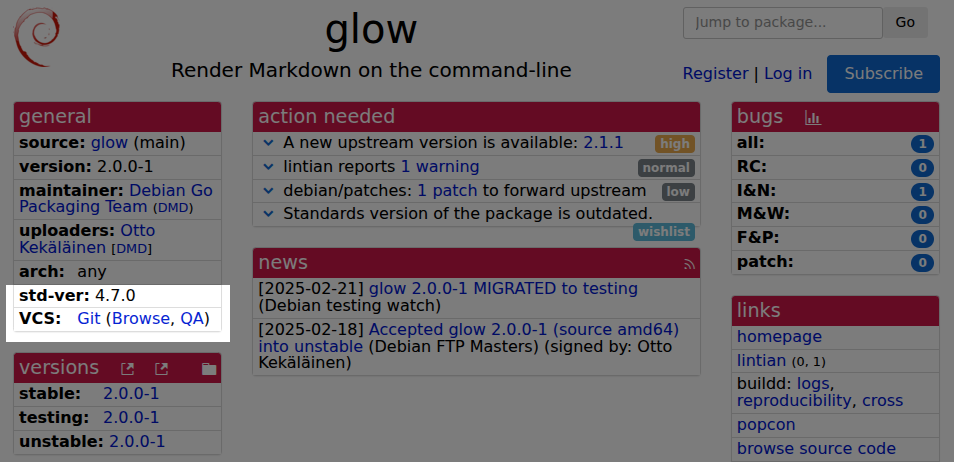
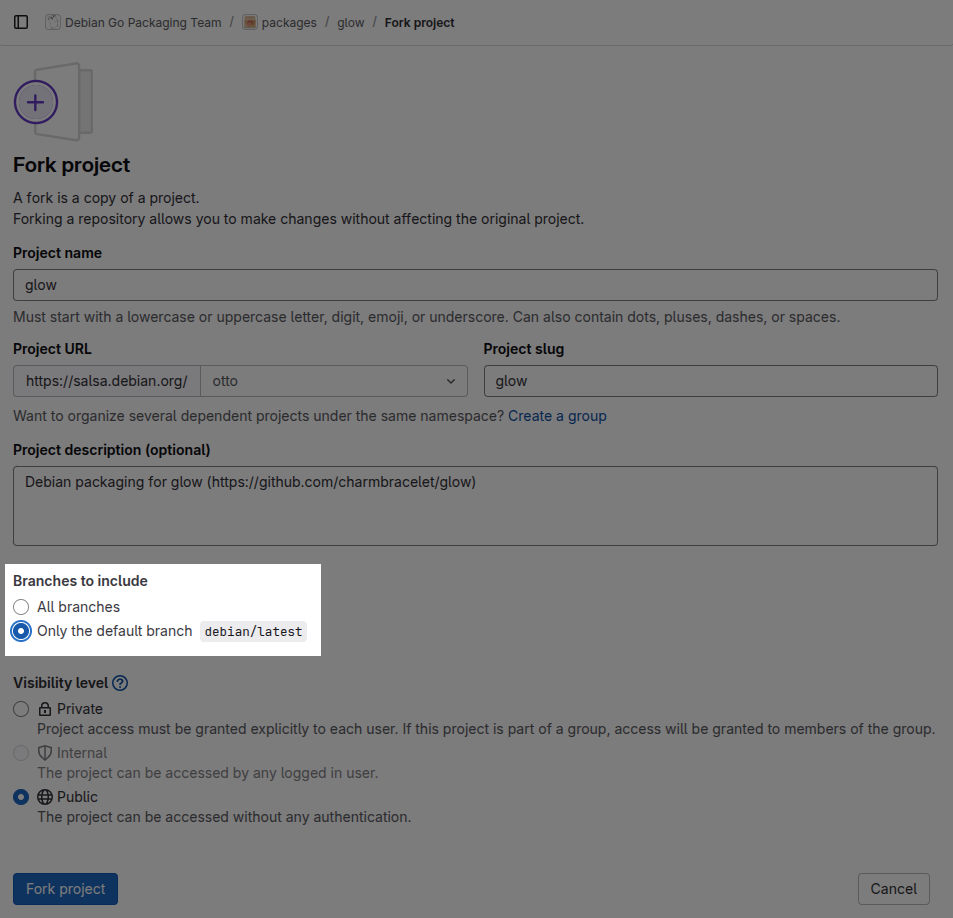
Finding the Debian packaging source repository and preparing to make a contribution Before sinking any effort into a package, start by checking its overall status at the excellent Debian Package Tracker. This provides a clear overview of the package s general health in Debian, when it was last uploaded and by whom, and if there is anything special affecting the package right now. This page also has quick links to the Debian bug tracker of the package, the build status overview and more. Most importantly, in the General section, the VCS row links to the version control repository the package advertises. Before opening that page, note the version most recently uploaded to Debian. This is relevant because nothing in Debian currently enforces that the package in version control is actually the same as the latest uploaded to Debian. Packaging source code repository links at tracker.debian.org Following the Browse link opens the Debian package source repository, which is usually a project page on Salsa. To contribute, start by clicking the Fork button, select your own personal namespace and, under Branches to include, pick Only the default branch to avoid including unnecessary temporary development branches. View after pressing Fork Once forking is complete, clone it with git-buildpackage. For this example repository, the exact command would be gbp clone --verbose git@salsa.debian.org:otto/glow.git. Next, add the original repository as a new remote and pull from it to make sure you have all relevant branches. Using the same fork as an example, the commands would be:
git remote add go-team https://salsa.debian.org/go-team/packages/glow.git
gbp pull --verbose --track-missing go-team
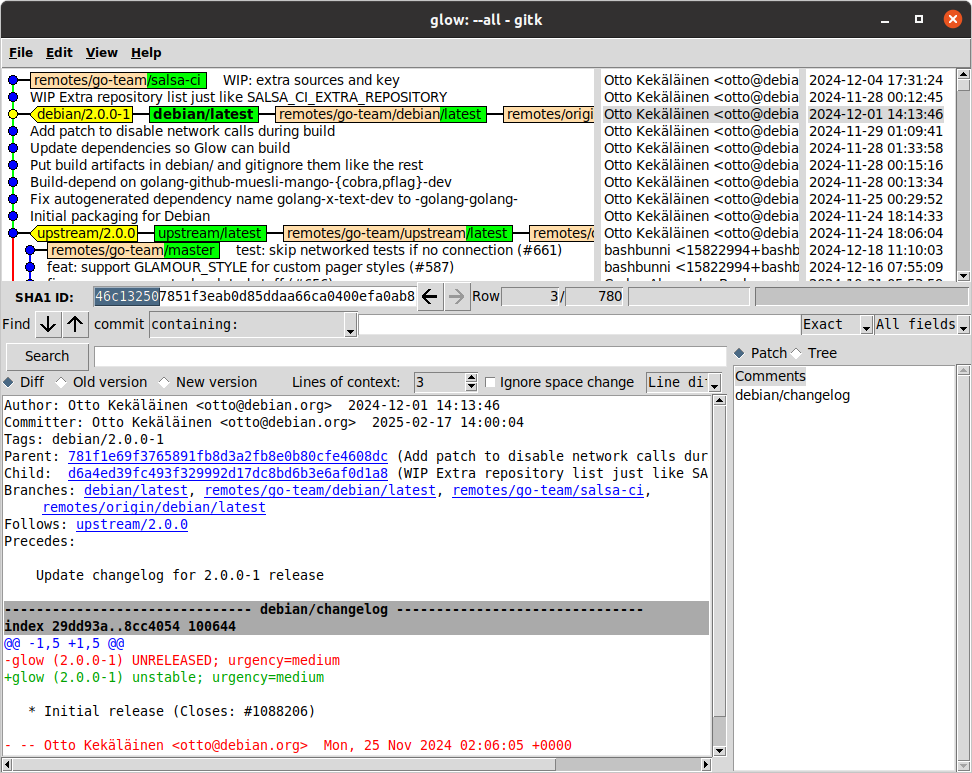
The gbp pull command can be repeated whenever you want to make sure the main branches are in sync with the original repository. Finally, run gitk --all & to visually browse the Git history and note the various branches and their states in the two remotes. Note the style in comments and repository structure the project has and make sure your contributions follow the same conventions to maximize the chances of the maintainer accepting your contribution. It may also be good to build the source package to establish a baseline of the current state and what kind of binaries and .deb packages it produces. If using Debcraft, one can simply run debcraft build in the Git repository.
Submitting a Merge Request for a Debian packaging improvement Always start by making a development branch by running git checkout -b <branch name> to clearly separate your work from the main branch. When making changes, remember to follow the conventions you already see in the package. It is also important to be aware of general guidelines on how to make good Git commits. If you are not able to immediately finish coding, it may be useful to publish the Merge Request as a draft so that the maintainer and others can see that you started working on something and what general direction your change is heading in. If you don t finish the Merge Request in one sitting and return to it another day, you should remember to pull the Debian branch from the original Debian repository in case it has received new commits. This can be done easily with these commands (assuming the same remote and branch names as in the example above):
git fetch go-team
git rebase -i go-team/debian/latest
Frequent rebasing is a great habit to help keep the Git history linear, and restructuring and rewording your commits will make the Git history easier to follow and understand why the changes were made. When pushing improved versions of your branch, use git push --force. While GitLab does allow squashing, I recommend against it. It is better that the submitter makes sure the final version is a neat and clean set of commits that the receiver can easily merge without having to do any rebasing or squashing themselves. When ready, remove the draft status of the Merge Request and wait patiently for review. If the maintainer does not respond in several days, try sending an email to <source package name>@packages.debian.org, which is the official way to contact maintainers. You could also post a comment on the MR and tag the last few committers in the same repository so that a notification email is triggered. As a last resort, submit a bug report to the Debian bug tracker to announce that a Merge Request is pending review. This leaves a permanent record for posterity (or the Debian QA team) of your contribution. However, most of the time simply posting the Merge Request in Salsa is enough; excessive communication might be perceived as spammy, and someone needs to remember to check that the bug report is closed.

Respect the review feedback, respond quickly and avoid Merge Requests getting stale Once you get feedback, try to respond as quickly as possible. When people participating have everything fresh in their minds, it is much easier for the submitter to rework it and for the reviewer to re-review. If the Merge Request becomes stale, it can be challenging to revive it. Also, if it looks like the MR is only waiting for re-review but nothing happens, re-read the previous feedback and make sure you actually address everything. After that, post a friendly comment where you explicitly say you have addressed all feedback and are only waiting for re-review.

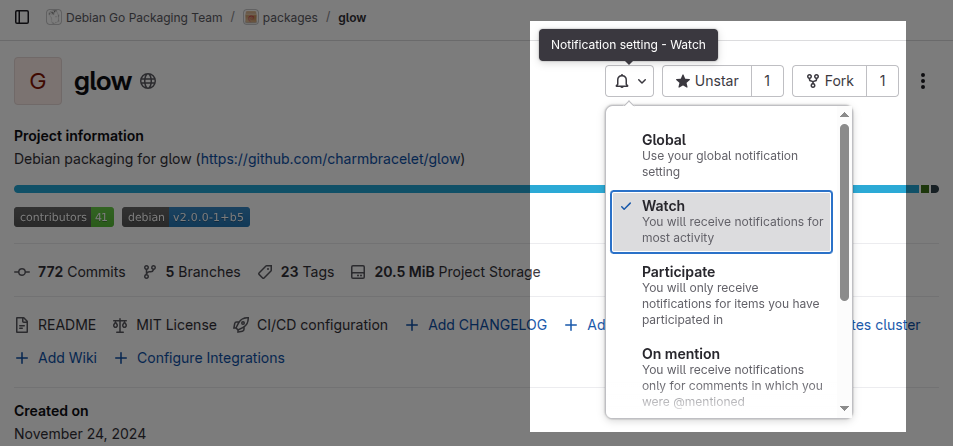
Reviewing Merge Requests This section about reviewing is not exclusive to Debian package maintainers anyone can contribute to Debian by reviewing open Merge Requests. Typically, the larger an open source project gets, the more help is needed in reviewing and testing changes to avoid regressions, and all diligently done work is welcome. As the famous Linus quote goes, given enough eyeballs, all bugs are shallow . On salsa.debian.org, you can browse open Merge Requests per project or for a whole group, just like on any GitLab instance. Reviewing Merge Requests is, however, most fun when they are fresh and the submitter is active. Thus, the best strategy is to ensure you have subscribed to email notifications in the repositories you care about so you get an email for any new Merge Request (or Issue) immediately when posted. Change notification settings from Global to Watch to get an email on new Merge Requests When you see a new Merge Request, try to review it within a couple of days. If you cannot review in a reasonable time, posting a small note that you intend to review it later will feel better to the submitter compared to not getting any response. Personally, I have a habit of assigning myself as a reviewer so that I can keep track of my whole review queue at https://salsa.debian.org/dashboard/merge_requests?reviewer_username=otto, and I recommend the same to others. Seeing the review assignment happen is also a good way to signal to the submitter that their submission was noted.
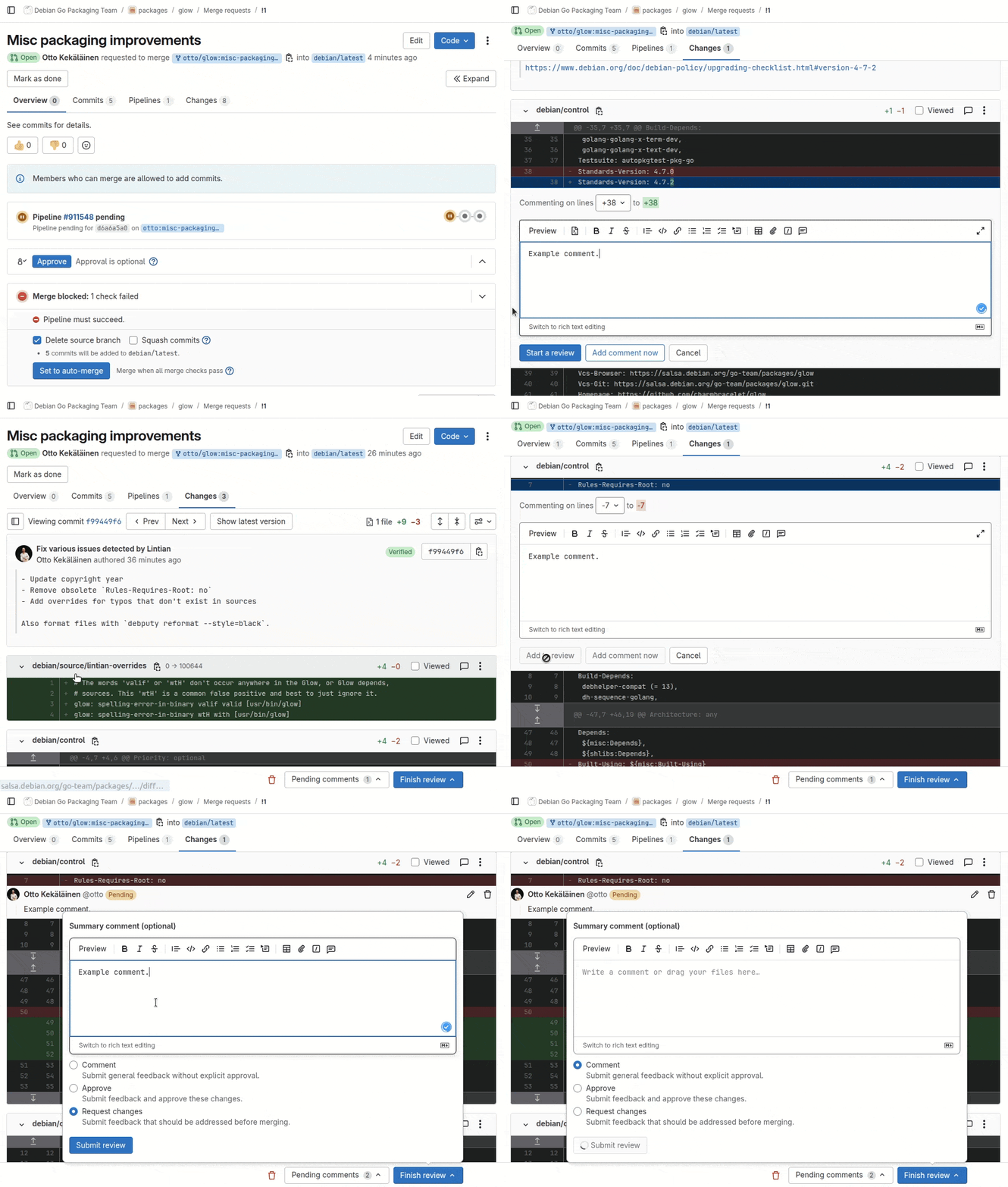
Reviewing commit-by-commit in the web interface Reviewing using the web interface works well in general, but I find that the way GitLab designed it is not ideal. In my ideal review workflow, I first read the Git commit message to understand what the submitter tried to do and why; only then do I look at the code changes in the commit. In GitLab, to do this one must first open the Commits tab and then click on the last commit in the list, as it is sorted in reverse chronological order with the first commit at the bottom. Only after that do I see the commit message and contents. Getting to the next commit is easy by simply clicking Next. Example review to demonstrate location of buttons and functionality When adding the first comment, I choose Start review and for the following remarks Add to review. Finally, I click Finish review and Submit review, which will trigger one single email to the submitter with all my feedback. I try to avoid using the Add comment now option, as each such comment triggers a separate notification email to the submitter.

Reviewing and testing on your own computer locally For the most thorough review, I pull the code to my laptop for local review with git pull <remote url> <branch name>. There is no need to run git remote add as pulling using a URL directly works too and saves from needing to clean up old remotes later. Pulling the Merge Request contents locally allows me to build, run and inspect the code deeply and review the commits with full metadata in gitk or equivalent.

Investing enough time in writing feedback, but not too much See my other post for more in-depth advice on how to structure your code review feedback. In Debian, I would emphasize patience, to allow the submitter time to rework their submission. Debian packaging is notoriously complex, and even experienced developers often need more feedback and time to get everything right. Avoid the temptation to rush the fix in yourself. In open source, Git credits are often the only salary the submitter gets. If you take the idea from the submission and implement it yourself, you rob the submitter of the opportunity to get feedback, try to improve and finally feel accomplished. Sure, it takes extra effort to give feedback, but the contributor is likely to feel ownership of their work and later return to further improve it. If a submission looks hopelessly low quality and you feel that giving feedback is a waste of time, you can simply respond with something along the lines of: Thanks for your contribution and interest in helping Debian. Unfortunately, looking at the commits, I see several shortcomings, and it is unlikely a normal review process is enough to help you finalize this. Please reach out to Debian Mentors to get a mentor who can give you more personalized feedback. There might also be contributors who just dump the code , ignore your feedback and never return to finalize their submission. If a contributor does not return to finalize their submission in 3-6 months, I will in my own projects simply finalize it myself and thank the contributor in the commit message (but not mark them as the author). Despite best practices, you will occasionally still end up doing some things in vain, but that is how volunteer collaboration works. We all just need to accept that some communication will inevitably feel like wasted effort, but it should be viewed as a necessary investment in order to get the benefits from the times when the communication led to real and valuable collaboration. Please just do not treat all contributors as if they are unlikely to ever contribute again; otherwise, your behavior will cause them not to contribute again. If you want to grow a tree, you need to plant several seeds.

Approving and merging Assuming review goes well and you are ready to approve, and if you are the only maintainer, you can proceed to merge right away. If there are multiple maintainers, or if you otherwise think that someone else might want to chime in before it is merged, use the Approve button to show that you approve the change but leave it unmerged. The person who approved does not necessarily have to be the person who merges. The point of the Merge Request review is not separation of duties in committing and merging the main purpose of a code review is to have a different set of eyeballs looking at the change before it is committed into the main development branch for all eternity. In some packages, the submitter might actually merge themselves once they see another developer has approved. In some rare Debian projects, there might even be separate people taking the roles of submitting, approving and merging, but most of the time these three roles are filled by two people either as submitter and approver+merger or submitter+merger and approver. If you are not a maintainer at all and do not have permissions to click Approve, simply post a comment summarizing your review and that you approve it and support merging it. This can help the maintainers review and merge faster.

Making a Merge Request for a new upstream version import Unlike many other Linux distributions, in Debian each source package has its own version control repository. The Debian sources consist of the upstream sources with an additional debian/ subdirectory that contains the actual Debian packaging. For the same reason, a typical Debian packaging Git repository has a debian/latest branch that has changes only in the debian/ subdirectory while the surrounding upstream files are the actual upstream files and have the actual upstream Git history. For details, see my post explaining Debian source packages in Git. Because of this Git branch structure, importing a new upstream version will typically modify three branches: debian/latest, upstream/latest and pristine-tar. When doing a Merge Request for a new upstream import, only submit one Merge Request for one branch: which means merging your new changes to the debian/latest branch. There is no need to submit the upstream/latest branch or the pristine-tar branch. Their contents are fixed and mechanically imported into Debian. There are no changes that the reviewer in Debian can request the submitter to do on these branches, so asking for feedback and comments on them is useless. All review, comments and re-reviews concern the content of the debian/latest branch only. It is not even necessary to use the debian/latest branch for a new upstream version. Personally, I always execute the new version import (with gbp import-orig --verbose --uscan) and prepare and test everything on debian/latest, but when it is time to submit it for review, I run git checkout -b import/$(dpkg-parsechangelog -SVersion) to get a branch named e.g. import/1.0.1 and then push that for review.

Reviewing a Merge Request for a new upstream version import Reviewing and testing a new upstream version import is a bit tricky currently, but possible. The key is to use gbp pull to automate fetching all branches from the submitter s fork. Assume you are reviewing a submission targeting the Glow package repository and there is a Merge Request from user otto s fork. As the maintainer, you would run the commands:
git remote add otto https://salsa.debian.org/otto/glow.git
gbp pull --verbose otto
If there was feedback in the first round and you later need to pull a new version for re-review, running gbp pull --force will not suffice, and this trick of manually fetching each branch and resetting them to the submitter s version is needed:
for BRANCH in pristine-tar upstream debian/latest
do
git checkout $BRANCH
git reset --hard origin/$BRANCH
git pull --force https://salsa.debian.org/otto/glow.git $BRANCH
done
Once review is done, either click Approve and let the submitter push everything, or alternatively, push all the branches you pulled locally yourself. In GitLab and other forges, the Merge Request will automatically be marked as Merged once the commit ID that was the head of the Merge Request is pushed to the target branch.

Please allow enough time for everyone to participate When working on Debian, keep in mind that it is a community of volunteers. It is common for people to do Debian stuff only on weekends, so you should patiently wait for at least a week so that enough workdays and weekend days have passed for the people you interact with to have had time to respond on their own Debian time. Having to wait may feel annoying and disruptive, but try to look at the upside: you do not need to do extra work simply while waiting for others. In some cases, that waiting can be useful thanks to the sleep on it phenomenon: when you yourself look at your own submission some days later with fresh eyes, you might notice something you overlooked earlier and improve your code change even without other people s feedback!

Contribute reviews! The last but not least suggestion is to make a habit of contributing reviews to packages you do not maintain. As we already see in large open source projects, such as the Linux kernel, they have far more code submissions than they can handle. The bottleneck for progress and maintaining quality becomes the reviews themselves. For Debian, as an organization and as a community, to be able to renew and grow new contributors, we need more of the senior contributors to shift focus from merely maintaining their packages and writing code to also intentionally interact with new contributors and guide them through the process of creating great open source software. Reviewing code is an effective way to both get tangible progress on individual development items and to transfer culture to a new generation of developers.

Why aren t 100% of all Debian source packages hosted on Salsa? As seen at trends.debian.net, more and more packages are using Salsa. Debian does not, however, have any policy about it. In fact, the Debian Policy Manual does not even mention the word Salsa anywhere. Adoption of Salsa has so far been purely organic, as in Debian each package maintainer has full freedom to choose whatever preferences they have regarding version control. I hope the trend to use Salsa will continue and more shared workflows emerge so that collaboration gets easier. To drive the culture of using Merge Requests and more, I drafted the Debian proposal DEP-18: Encourage Continuous Integration and Merge Request based Collaboration for Debian packages. If you are active in Debian and you think DEP-18 is beneficial for Debian, please give a thumbs up at dep-team/deps!21.

17 August 2025

C.J. Collier: The Very Model of a Patriot Online

It appears that the fragile masculinity tech evangelists have identified Debian as a community with boundaries which exclude them from abusing its members and they re so angry about it! In response to posts such as this, and inspired by Dr. Conway s piece, I ve composed a poem which, hopefully, correctly addresses the feelings of that crowd.
The Very Model of a Patriot Online
I am the very model of a modern patriot online,
My keyboard is my rifle and my noble cause is so divine.
I didn't learn my knowledge in a dusty college lecture hall,
But from the chans where bitter anonymity enthralls us all.
I spend a dozen hours every day upon my sacred quest,
To put the globo-homo narrative completely to the test.
My arguments are peer-reviewed by fellas in the comments section,
Which proves my every thesis is the model of complete perfection.
I m steeped in righteous anger that the libs call 'white fragility,'
For mocking their new pronouns and their lack of masculinity.
I m master of the epic troll, the comeback, and the searing snark,
A digital guerrilla who is fighting battles in the dark.
I know the secret symbols and the dog-whistles historical,
From Pepe the Frog to  Let s Go Brandon,  in order categorical;
In short, for fighting culture wars with rhetoric rhetorical,
I am the very model of a patriot polemical.
***
I stand for true expression, for the comics and the edgy clown,
Whose satire is too based for all the fragile folks in town.
They say my speech is 'violence' while my spirit they are trampling,
The way they try to silence me is really quite a startling sampling
Of 1984, which I've not read but thoroughly understand,
Is all about the tyranny that's gripping this once-blessed land.
My humor is a weapon, it s a razor-bladed, sharp critique,
(Though sensitive elites will call my masterpiece a form of  hate speech ).
They cannot comprehend my need for freedom from all consequence,
They call it 'hate,' I call it 'jokes,' they just don't have a lick of sense.
So when they call me  bigot  for the spicy memes I post pro bono,
I tell them their the ones who're cancelled, I'm the victim here, you know!
Then I can write a screed against the globalist cabal, you see,
And tell you every detail of their vile conspiracy.
In short, when I use logic that is flexible and personal,
I am the very model of a patriot controversial.
***
I'm very well acquainted with the scientific method, too,
It's watching lengthy YouTube vids until my face is turning blue.
I trust the heartfelt testimony of a tearful, blonde ex-nurse,
But what a paid fact-checker says has no effect and is perverse.
A PhD is proof that you've been brainwashed by the leftist mob,
While my own research on a meme is how I really do my job.
I know that masks will suffocate and vaccines are a devil's brew,
I learned it from a podcast host who used to sell brain-boosting goo.
He scorns the lamestream media, the CNNs and all the rest,
Whose biased reporting I've put fully to a rigorous test
By only reading headlines and confirming what I already knew,
Then posting my analysis for other patriots to view.
With every "study" that they cite from sources I can't stand to hear,
My own profound conclusions become ever more precisely clear.
In short, when I've debunked the experts with a confident "Says who?!",
I am the very model of a researcher who sees right through you.
***
But all these culture wars are just a sleight-of-hand, a clever feint,
To hide the stolen ballots and to cover up the moral taint
Of D.C. pizza parlors and of shipping crates from Wayfair, it s true,
It's all connected in a plot against the likes of me and you!
I've analyzed the satellite photography and watermarks,
I understand the secret drops, the cryptic Qs, the coded sparks.
The  habbening  is coming, friends, just give it two more weeks or three,
When all the traitors face the trials for their wicked treachery.
They say that nothing happened and the dates have all gone past, you see,
But that's just disinformation from the globalist enemy!
Their moving goalposts constantly, a tactic that is plain to see,
To wear us down and make us doubt the coming, final victory!
My mind can see the patterns that a simple sheep could never find,
The hidden puppet-masters who are poisoning our heart and mind.
In short, when I link drag queens to the price of gas and child-trafficking,
I am the very model of a patriot whose brain is quickening!
***
My pickup truck's a testament to everything that I hold dear,
With vinyl decals saying things the liberals all hate and fear.
The Gadsden flag is waving next to one that's blue and starkly thin,
To show my deep respect for law, except the feds who're steeped in sin.
There's Punisher and Molon Labe, so that everybody knows
I'm not someone to trifle with when push to final shoving goes.
I've got my tactical assault gear sitting ready in the den,
Awaiting for the signal to restore our land with my fellow men.
I practice clearing rooms at home when my mom goes out to the store,
A modern Minuteman who's ready for a civil war.
The neighbors give me funny looks, I see them whisper and take note,
They'll see what's what when I'm the one who's guarding checkpoints by their throat.
I am a peaceful man, of course, but I am also pre-prepared,
To neutralize the threats of which the average citizen's unscared.
In short, when my whole identity's a brand of tactical accessory,
You'll say a better warrior has never graced a Cabela's registry.
***
They say I have to tolerate a man who thinks he is a dame,
While feminists and immigrants are putting out my vital flame!
There taking all the jobs from us and giving them to folks who kneel,
And "woke HR" says my best jokes are things I'm not allowed to feel!
An Alpha Male is what I am, a lion, though I'm in this cubicle,
My life's frustrations can be traced to policies Talmudical.
They lecture me on privilege, I, who have to pay my bills and rent!
While they give handouts to the lazy, worthless, and incompetent!
My grandad fought the Nazis! Now I have to press a key for  one 
To get a call-rep I can't understand beneath the blazing sun
Of global, corporate tyranny that's crushing out the very soul
Of men like me, who've lost their rightful, natural, and just control!
So yes, I am resentful! And I'm angry! And I'm right to be!
They've stolen all my heritage and my masculinity!
In short, when my own failures are somebody else's evil plot,
I am the very model of the truest patriot we've got!
***
There putting chips inside of you! Their spraying things up in the sky!
They want to make you EAT THE BUGS and watch your very spirit die!
The towers for the 5G are a mind-control delivery tool!
To keep you docile while the children suffer in a grooming school!
The WEF, and Gates, and Soros have a plan they call the 'Great Reset,'
You'll own no property and you'll be happy, or you'll be in debt
To social credit overlords who'll track your every single deed!
There sterilizing you with plastics that they've hidden in the feed!
The world is flat! The moon is fake! The dinosaurs were just a lie!
And every major tragedy's a hoax with actors paid to cry!
I'M NOT INSANE! I SEE THE TRUTH! MY EYES ARE OPEN! CAN'T YOU SEE?!
YOU'RE ALL ASLEEP! YOU'RE COWARDS! YOU'RE AFRAID OF BEING TRULY FREE!
My heart is beating faster now, my breath is short, my vision's blurred,
From all the shocking truth that's in each single, solitary word!
I've sacrificed my life and friends to bring this message to the light, so...
You'd better listen to me now with all your concentrated might, ho!
***
For my heroic struggle, though it's cosmic and it's biblical,
Is waged inside the comments of a post that's algorithm-ical.
And still for all my knowledge that's both tactical and practical,
My mom just wants the rent I owe and says I'm being dramatical.

Valhalla's Things: rrdtool and Trixie

Posted on August 17, 2025
Tags: madeof:bits
TL;DL: if you re using rrdtool on a 32 bit architecture like armhf make an XML dump of your RRD files just before upgrading to Debian Trixie. I am an old person at heart, so the sensor data from my home monitoring system1 doesn t go to one of those newfangled javascript-heavy data visualization platforms, but into good old RRD files, using rrdtool to generate various graphs. This happens on the home server, which is an armhf single board computer2, hosting a few containers3. So, yesterday I started upgrading one of the containers to Trixie, and luckily I started from the one with the RRD, because when I rebooted into the fresh system and checked the relevant service I found it stopped on ERROR: '<file>' is too small (should be <size> bytes). Some searxing later, I ve4 found this was caused by the 64-bit time_t transition, which changed the format of the files, and that (somewhat unexpectedly) there was no way to fix it on the machine itself. What needed to be done instead was to export the data on an XML dump before the upgrade, and then import it back afterwards. Easy enough, right? If you know about it, which is why I m blogging this, so that other people will know in advance :) Anyway, luckily I still had the other containers on bookworm, so I copied the files over there, did the upgrade, and my home monitoring system is happily running as before.

  1. of course one has a self-built home monitoring system, right?
  2. an A20-OLinuXino-MICRO, if anybody wants to know.
  3. mostly for ease of migrating things between different hardware, rather than insulation, since everything comes from Debian packages anyway.
  4. and by I I really mean Diego, as I was still into denial / distractions mode.

16 August 2025

Bits from Debian: Debian turns 32!

Alt 32th Debian Day by Daniel Lenharo On August 16, 1993, Ian Murdock announced the Debian Project to the world. Three decades (and a bit) later, Debian is still going strong, built by a worldwide community of developers, contributors, and users who believe in a free, universal operating system. Over the years, Debian has powered servers, desktops, tiny embedded devices, and huge supercomputers. We have gathered at DebConfs, squashed countless bugs, shared late-night hacking sessions, and helped keep millions of systems secure. Debian Day is a great excuse to get together, whether it is a local meetup, an online event, a bug squashing party, a team sprint or just coffee with fellow Debianites. Check out the Debian Day wiki to see if there is a celebration near you or to add your own. Here is to 32 years of collaboration, code, and community, and to all the amazing people who make Debian what it is. Happy Debian Day!

15 August 2025

Freexian Collaborators: Monthly report about Debian Long Term Support, July 2025 (by Roberto C. S nchez)

Like each month, have a look at the work funded by Freexian s Debian LTS offering.

Debian LTS contributors In July, 17 contributors have been paid to work on Debian LTS, their reports are available:
  • Adrian Bunk did 19.0h (out of 19.0h assigned).
  • Andrej Shadura did 5.0h (out of 0.0h assigned and 8.0h from previous period), thus carrying over 3.0h to the next month.
  • Bastien Roucari s did 18.5h (out of 18.75h assigned), thus carrying over 0.25h to the next month.
  • Ben Hutchings did 12.5h (out of 3.25h assigned and 15.5h from previous period), thus carrying over 6.25h to the next month.
  • Carlos Henrique Lima Melara did 10.0h (out of 10.0h assigned).
  • Chris Lamb did 18.0h (out of 18.0h assigned).
  • Daniel Leidert did 18.75h (out of 17.25h assigned and 1.5h from previous period).
  • Emilio Pozuelo Monfort did 18.75h (out of 18.75h assigned).
  • Guilhem Moulin did 15.0h (out of 14.0h assigned and 1.0h from previous period).
  • Jochen Sprickerhof did 2.0h (out of 16.5h assigned and 2.25h from previous period), thus carrying over 16.75h to the next month.
  • Lee Garrett did 7.0h (out of 0.0h assigned and 23.25h from previous period), thus carrying over 16.25h to the next month.
  • Markus Koschany did 9.0h (out of 18.75h assigned), thus carrying over 9.75h to the next month.
  • Roberto C. S nchez did 10.25h (out of 18.5h assigned and 2.75h from previous period), thus carrying over 11.0h to the next month.
  • Santiago Ruano Rinc n did 7.25h (out of 12.75h assigned and 2.25h from previous period), thus carrying over 7.75h to the next month.
  • Sylvain Beucler did 18.75h (out of 18.75h assigned).
  • Thorsten Alteholz did 15.0h (out of 15.0h assigned).
  • Utkarsh Gupta did 15.0h (out of 1.0h assigned and 14.0h from previous period).

Evolution of the situation In July, we released 24 DLAs.
  • Notable security updates:
    • angular.js, prepared by Bastien Roucari s, fixes multiple vulnerabilities including input sanitization and potential regular expression denial of service (ReDoS)
    • tomcat9, prepared by Markus Koschany, fixes an assortment of vulnerabilities
    • mediawiki, prepared by Guilhem Moulin, fixes several information disclosure and privilege escalation vulnerabilities
    • php7.4, prepared by Guilhem Moulin, fixes several server side request forgery and denial of service vulnerabilities
This month s contributions from outside the regular team include an update to thunderbird, prepared by Christoph Goehre (the package maintainer). LTS Team members also contributed updates of the following packages:
  • commons-beanutils (to stable and unstable), prepared by Adrian Bunk
  • djvulibre (to oldstable, stable, and unstable), prepared by Adrian Bunk
  • git (to stable), prepared by Adrian Bunk
  • redis (to oldstable), prepared by Chris Lamb
  • libxml2 (to oldstable), prepared by Guilhem Moulin
  • commons-vfs (to oldstable), prepared by Daniel Leidert
Additionally, LTS Team member Santiago Ruano Rinc n proposed and implemented an improvement to the debian-security-support package. This package is available so that interested users can quickly determine if any installed packages are subject to limited security support or are excluded entirely from security support. However, there was not previously a way to identify explicitly supported packages, which has become necessary to note exceptions to broad exclusion policies (e.g., those which apply to substantial package groups, like modules belonging to the Go and Rust language ecosystems). Santiago s work has enabled the notation of exceptions to these exclusions, thus ensuring that users of debian-security-support have accurate status information concerning installed packages.

DebCamp 25 Security Tracker Sprint The previously announced security tracker sprint took place at DebCamp from 7-13 July. Participants included 8 members of the standing LTS Team, 2 active Debian Developers with an interest in LTS, 3 community members, and 1 member of the Debian Security Team (who provided guidance and reviews on proposed changes to the security tracker); participation was a mix of in person at the venue in Brest, France and remote. During the days of the sprint, the team tackled a wide range of bugs and improvements, mostly targeting the security tracker. The sprint participants worked on the following items: As can be seen from the above list, only a small number of changes were brought to completion during the sprint week itself. Given the very compressed timeframe involved, the broad scope of tasks which were under consideration, and the highly sensitive data managed by the security tracker, this is not entirely unexpected and in no way diminishes the great work done by the sprint participants. The LTS Team would especially like to thank Salvatore Bonaccorso of the Debian Security Team for making himself available throughout the sprint to answer questions, for providing guidance on the work, and for helping the work by reviewing and merging the MRs which were able to merged during the sprint itself. In the weeks that follow the sprint, the team will continue working towards completing the in progress items.

Thanks to our sponsors Sponsors that joined recently are in bold.

14 August 2025

Jonathan McDowell: Local Voice Assistant Step 4: openWakeWord

People keep asking me when I ll write the next instalment of my local voice assistant journey. I didn t mean for it to be so long since the last one, things have been busier than I d like. Anyway. Last time we d built Tensorflow, so now it s time to sort out openWakeWord. As a reminder we re trying to put a local voice satellite on my living room Debian media machine. The point of openWakeWord is to run on the machine the microphone is connected to, listening for the wake phrase ( Hey Jarvis in my case), and only then calling back to the central server to do a speech to text operation. It s wrapped up for Wyoming as wyoming-openwakeword. Of course I ve packaged it up - available at https://salsa.debian.org/noodles/wyoming-openwakeword. Trixie only released yesterday, so I m still running all of this on bookworm. That means you need python3-wyoming from Trixie - 1.6.0-1 will install fine without needing rebuilt - and the python3-tflite-runtime we built last time. Like the other pieces I m not sure about how this could land in Debian; it s unclear to me that the pre-trained models provided would be accepted in main. As usual I start it with with a systemd unit file dropped in /etc/systemd/service/wyoming-openwakeword.service:

[Unit]
Description=Wyoming OpenWakeWord server
After=network.target
[Service]
Type=simple
DynamicUser=yes
ExecStart=/usr/bin/wyoming-openwakeword --uri tcp://[::1]:10400/ --preload-model 'hey_jarvis' --threshold 0.8
MemoryDenyWriteExecute=false
ProtectControlGroups=true
PrivateDevices=false
ProtectKernelTunables=true
ProtectSystem=true
RestrictRealtime=true
RestrictNamespaces=true
[Install]
WantedBy=multi-user.target
I m still playing with the threshold level. It defaults to 0.5, but the device lives under the TV and seems to get a bit confused by it sometimes. There s some talk about using speex for noise suppression, but I haven t explored that yet (it s yet another Python module to bind to the C libraries I d have to look at). This is a short one; next post is actually building the local satellite on top to tie everything together.

13 August 2025

Sven Hoexter: Automated Browsing with Gemini and Chrome via BrowserMCP and gemini-cli

Brief dump so I don't forget how that worked in August 2025. Requires npm, npx and nodejs.
  1. Install Chrome
  2. Add the BrowserMCP extension
  3. Install gemini-cli npm install -g @google/gemini-cli
  4. Retrieve a Gemini API key via AI Studio
  5. Export API key for gemini-cli export GEMINI_API_KEY=2342
  6. Start BrowserMCP extension, see manual, an info box will appear that it's active with a cancel button.
  7. Add mcp server to gemini-cli gemini mcp add browsermcp npx @browsermcp/mcp@latest
  8. Start gemini-cli, let it use the mcp server and task it to open a website.

12 August 2025

Freexian Collaborators: Debian Contributions: DebConf 25, OpenSSH upgrades, Cross compilation collaboration and more! (by Anupa Ann Joseph)

Debian Contributions: 2025-07 Contributing to Debian is part of Freexian s mission. This article covers the latest achievements of Freexian and their collaborators. All of this is made possible by organizations subscribing to our Long Term Support contracts and consulting services.

DebConf 25, by Stefano Rivera and Santiago Ruano Rinc n In July, DebConf 25 was held in Brest, France. Freexian was a gold sponsor and most of the Freexian team attended the event. Many fruitful discussions were had amongst our team and within the Debian community. DebConf itself was organized by a local team in Brest, that included Santiago (who now lives in Uruguay). Stefano was also deeply involved in the organization, as a DebConf committee member, core video team, and the lead developer for the conference website. Running the conference took an enormous amount of work, consuming all of Stefano and Santiago s time for most of July. Lucas Kanashiro was active in the DebConf content team, reviewing talks and scheduling them. There were many last-minute changes to make during the event. Anupa Ann Joseph was part of the Debian publicity team doing live coverage of DebConf 25 and was part of the DebConf 25 content team reviewing the talks. She also assisted the local team to procure the lanyards. Recorded sessions presented by Freexian collaborators, often alongside other friends in Debian, included:

OpenSSH upgrades, by Colin Watson Towards the end of a release cycle, people tend to do more upgrade testing, and this sometimes results in interesting problems. Manfred Stock reported No new SSH connections possible during large part of upgrade to Debian Trixie , which would have affected many people upgrading from Debian 12 (bookworm), with potentially severe consequences for people upgrading remote systems. In fact, there were two independent problems that each led to much the same symptom:
  • As part of hardening the OpenSSH server, OpenSSH 9.8 split the monolithic sshd listener process into two pieces: a minimal network listener (still called sshd), and an sshd-session process dealing with each individual session. Before this change, when sshd received an incoming connection, it forked and re-executed itself with some special parameters to deal with it; after this change, it forks and executes sshd-session instead, and sshd no longer accepts the parameters it used to accept for this.

    Debian package upgrades happen (roughly) in two phases: first we unpack the new files onto disk, and then we run some configuration steps which usually include things like restarting services. Normally this is fine, because the old service keeps on working until it s restarted. In this case, unpacking the new files onto disk immediately stopped new SSH connections from working: the old sshd received the connection and tried to hand it off to a freshly-executed copy of the new sshd binary on disk, which no longer supports this. This wasn t much of a problem when upgrading OpenSSH on its own or with a small number of other packages, but in release upgrades it left a large gap when you can t SSH to the system any more, and if anything fails in that interval then you could be in trouble.

    After trying a couple of other approaches, Colin landed on the idea of having the openssh-server package divert /usr/sbin/sshd to /usr/sbin/sshd.session-split before the unpack step of an upgrade from before 9.8, then removing the diversion and moving the new file into place once it s ready to restart the service. This reduces the period when new connections fail to a minimum.
  • Most OpenSSH processes, including sshd, check for a compatible version of the OpenSSL library when they start up. This check used to be very picky, among other things requiring both the major and minor part of the version number to match. OpenSSL 3 has a better versioning policy, and so OpenSSH 9.4p1 relaxed this check.

    Unfortunately, bookworm shipped with OpenSSH 9.2p1, so as soon as you unpacked the new OpenSSL library during an upgrade, sshd stopped working. This couldn t be fixed by a change in trixie; we needed to change bookworm in advance of the upgrade so that it would tolerate newer versions of OpenSSL, and time was tight if we wanted this to be available before the release of Debian 13.

    Fortunately, there s a stable-updates mechanism for exactly this sort of thing, and the stable release managers kindly accepted Colin s proposal to fix this there.
The net result is that if you apply updates to bookworm (including stable-updates / bookworm-updates, which is enabled by default) before starting the upgrade to trixie, everything should be fine.

Cross compilation collaboration, by Helmut Grohne Supporting cross building in Debian packages touches lots of areas of the archive and quite some of these matters reside in shared responsibility between different teams. Hence, DebConf was an ideal opportunity to settle long-standing issues. The cross building bof sparked lively discussions as a significant fraction of developers employ cross builds to get their work done. In the trixie release, about two thirds of the packages can satisfy their cross Build-Depends and about half of the packages actually can be cross built.

Miscellaneous contributions
  • Rapha l Hertzog updated tracker.debian.org to remove references to Debian 10 which was moved to archive.debian.org, and had many fruitful discussions related to Debusine during DebConf 25.
  • Carles Pina prepared some data, questions and information for the DebConf 25 l10n and i18n BoF.
  • Carles Pina demoed and discussed possible next steps for po-debconf-manager with different teams in DebConf 25. He also reviewed Catalan translations and sent them to the packages.
  • Carles Pina started investigating a django-compressor bug: reproduced the bug consistently and prepared a PR for django-compressor upstream (likely more details next month). Looked at packaging frictionless-py.
  • Stefano Rivera triaged Python CVEs against pypy3.
  • Stefano prepared an upload of a new upstream release of pypy3 to Debian experimental (due to the freeze).
  • Stefano uploaded python3.14 RC1 to Debian experimental.
  • Thorsten Alteholz uploaded a new upstream version of sane-airscan to experimental. He also started to work on a new upstream version of hplip.
  • Colin backported fixes for CVE-2025-50181 and CVE-2025-50182 in python-urllib3, and fixed several other release-critical or important bugs in Python team packages.
  • Lucas uploaded ruby3.4 to experimental as a starting point for the ruby-defaults transition that will happen after Trixie release.
  • Lucas coordinated with the Release team the fix of the remaining RC bugs involving ruby packages, and got them all fixed.
  • Lucas, as part of the Debian Ruby team, kicked off discussions to improve internal process/tooling.
  • Lucas, as part of the Debian Outreach team, engaged in multiple discussions around internship programs we run and also what else we could do to improve outreach in the Debian project.
  • Lucas joined the Local groups BoF during DebConf 25 and shared all the good experiences from the Brazilian community and committed to help to document everything to try to support other groups.
  • Helmut spent significant time with Samuel Thibault on improving architecture cross bootstrap for hurd-any mostly reviewing Samuel s patches. He proposed a patch for improving bash s detection of its pipesize and a change to dpkg-shlibdeps to improve behavior for building cross toolchains.
  • Helmut reiterated the multiarch policy proposal with a lot of help from Nattie Mayer-Hutchings, Rhonda D Vine and Stuart Prescott.
  • Helmut finished his work on the process based unschroot prototype that was the main feature of his talk (see above).
  • Helmut analyzed a multiarch-related glibc upgrade failure induced by a /usr-move mitigation of systemd and sent a patch and regression fix both of which reached trixie in time. Thanks to Aurelien Jarno and the release team for their timely cooperation.
  • Helmut resurrected an earlier discussion about changing the semantics of Architecture: all packages in a multiarch context in order to improve the long-standing interpreter problem. With help from Tollef Fog Heen better semantics were discovered and agreement was reached with Guillem Jover and Julian Andres Klode to consider this change. The idea is to record a concrete architecture for every Architecture: all package in the dpkg database and enable choosing it as non-native.
  • Helmut implemented type hints for piuparts.
  • Helmut reviewed and improved a patch set of Jochen Sprickerhof for debvm.
  • Anupa was involved in discussions with the Debian Women team during DebConf 25.
  • Anupa started working for the trixie release coverage and started coordinating release parties.
  • Emilio helped coordinate the release of Debian 13 trixie.

10 August 2025

Jonathan Carter: Debian 13

Debian 13 has finally been released! One of the biggest and under-hyped features is support for HTTP Boot. This allows you to simply specify a URL (to any d-i or live image iso) in your computer s firmware setup and then you can boot to it directly over the Internet, so no need to download an image, write it to flash disk and then boot from the flash disk on computers made in the last ~5 years. This is also supported on the Tianocore free EFI firmware, which is useful if you d like to try it out on QEMU/KVM. More details about Debian 13 available on the official press release. The default theme for Debian 13 is Ceratopsian, designed by Elise Couper. I ll be honest, I wasn t 100% sure it was the best choice when it won the artwork vote, but it really grew on me over the last few months, and it looked great in combination with all kinds of other things during DebConf too, so it has certainly won me over.
And I particularly like the Plymouth theme. It s very minimal, and it reminds me of the Toy Story Trixie character, it s almost like it helps explain the theme:

Plymouth (start-up/shutdown) theme.

Trixie, the character from Toy Story that was chosen as the codename for Debian 13.

Debian Local Team ISO testing Yesterday we got some locals together for ISO testing and we got a cake with the wallpaper printed on it, along with our local team logo which has been a work in progress for the last 3 years, so hopefully we ll finalise it this year! (it will be ready when it s ready). It came out a lot bluer than the original wallpaper, but still tasted great.
For many releases, I ve been the only person from South Africa doing ISO smoke-testing, and this time was quite different, since everyone else in the photo below tested an image except for me. I basically just provided some support and helped out with getting salsa/wiki accounts and some troubleshooting. It went nice and fast, and it s always a big relief when there are no showstoppers for the release.

My dog was really wishing hard that the cake would slip off.

Packaging-wise, I only have one big new package for Trixie, and that s Cambalache, a rapid application design UI builder for GTK3/GTK4.
The version in trixie is 0.94.1-3 and version 1.0 was recently released, so I ll get that updated in forky and backport it if possible. I was originally considering using Cambalache for an installer UI, but ended up going with a web front-end instead. But that s moving firmly towards forky territory, so more on that another time! Thanks to everyone who was involved in this release, so far upgrades have been very smooth!

C.J. Collier: Upgrading Proxmox 7 to 8

Some variant of the following[1] worked for me. The first line is the start of a for loop that runs on each node in my cluster a command using ssh. The argument -t is passed to attach a controlling terminal to STDIN, STDERR and STDOUT of this session, since there will not be an intervening shell to do it for us. The argument to ssh is a workflow of bash commands. They upgrade the 7.x system to the most recent packages on the repository. We then update the sources.list entries for the system to point at bookworm sources instead of bullseye. The package cache is updated and the proxmox-ve package is installed. Packages which are installed are upgraded to the versions from bookworm, and the installer concludes. Dear reader, you might be surprised how many times I saw the word perl scroll by during the manual, serial scrolling of this install. It took hours. There were a few prompts, so stand by the keyboard! [1]
gpg: key 1140AF8F639E0C39: public key "Proxmox Bookworm Release Key " imported
# have your ssh agent keychain running and a key loaded that's installed at 
# ~root/.ssh/authorized_keys on each node 
apt-get install -y keychain
eval $(keychain --eval)
ssh-add ~/.ssh/id_rsa
# Replace the IP address prefix (100.64.79.) and  suffixes (64, 121-128)
# with the actual IPs of your cluster nodes.  Or use hostnames :-)
for o in 64 121 122 123 124 125 126 127 128 ; do   ssh -t root@100.64.79.$o '
  sed -i -e s/bullseye/bookworm/g /etc/apt/sources.list $(compgen -G "/etc/apt/sources.listd.d/*.list") \
  && echo "deb [signed-by=/usr/share/keyrings/proxmox-release.gpg] http://download.proxmox.com/debian/pve bookworm pve-no-subscription" \
      dd of=/etc/apt/sources.list.d/proxmox-release.list status=none \
  && echo "deb [signed-by=/usr/share/keyrings/proxmox-release.gpg] http://download.proxmox.com/debian/ceph-quincy bookworm main no-subscription" \
      dd of=/etc/apt/sources.list.d/ceph.list status=none \
  && proxmox_keyid="0xf4e136c67cdce41ae6de6fc81140af8f639e0c39" \
  && curl "https://keyserver.ubuntu.com/pks/lookup?op=get&search=$ proxmox_keyid " \
      gpg --dearmor -o /usr/share/keyrings/proxmox-release.gpg  \
  && apt-get -y -qq update \
  && apt-get -y -qq install proxmox-ve \
  && apt-get -y -qq full-upgrade \
  && echo "$(hostname) upgraded"'; done

Next.

Previous.