Search Results: "ghe"

13 November 2015

Jaldhar Vyas: New Year Resolutions

Now this could just be the prodigious amounts of sugar and ghee I've been eating the past few days, but I'm bursting with energy for working on Debian so here is a list of things I want to do in the upcoming year. This will happen soon. Sooner if you people will stop filing bugs all the time. The rest of the items are more long term. To keep all of this on track, I shall adopt the practice lately seen on Debian Planet of periodically posting a report of my Debian activities.

4 November 2015

Mart n Ferrari: Tales from the SRE trenches: What can SRE do for you?

This is the fourth part in a series of articles about SRE, based on the talk I gave in the Romanian Association for Better Software. Previous articles can be found here: part 1, part 2, and part 3. As a side note, I am writing this from Heathrow Airport, about to board my plane to EZE. Buenos Aires, here I come!

So, what does SRE actually do? Enough about how to keep the holy wars under control and how to get work away from Ops. Let's talk about some of the things that SRE does. Obviously, SRE runs your service, performing all the traditional SysAdmin duties needed for your cat pictures to reach their consumers: provisioning, configuration, resource allocation, etc. They use specialised tools to monitor the service, and get alerted as soon as a problem is detected. They are also the ones waking up to fix your bugs in the middle of the night. But that is not the whole story: reliability is not only impacted by new launches. Suddenly usage grows, hardware fails, networks lose packets, solar flares flip your bits... When working at scale, things are going to break more often than not. You want these breakages to affect your availability as little as possible, there are three strategies you can apply to this end: minimise the impact of each failure, recover quickly, and avoid repetition. And of course, the best strategy of them all: preventing outages from happening at all.

Minimizing the impact of failures A single failure that takes the whole service down will affect severely your availability, so the first strategy as an SRE is to make sure your service is fragmented and distributed across what is called "failure domains". If the data center catches fire, you are going to have a bad day, but it is a lot better if only a fraction of your users depend on that one data center, while the others keep happily browsing cat pictures. SREs spend a lot of their time planning and deploying systems that span the globe to maximise redundancy while keeping latencies at reasonable levels.

Recovering quickly Many times, retrying after a failure is actually the best option. So another strategy is to automatically restart in milliseconds any piece of your system that fails. This way, less users are affected, while a human has time to investigate and fix the real problem. If a human needs to intervene, it is crucial that they get notified as fast as possible, and that they have quick access to all the information that is needed to solve the problem: detailed documentation of the production environment, meaningful and extensive monitoring, play-books1, etc. After all, at 2 AM you probably don't remember in which country the database shard lives, or what were the series of commands to redirect all the traffic to a different location. Implementing monitoring and automated alerts, writing documentation and play-books, and practising for disaster are other areas where SREs devote much effort.

Avoiding repetition Outages happen, pages ring, problems get fixed, but it should always be a chance for learning and improving. A page should require a human to think about a problem and find a solution. If the same problem keeps appearing, the human is not needed any more: the problem needs to be fixed at the root. Another key aspect of dealing with incidents is to write post-mortems2. Every incident should have one, and these should be tools for learning, not finger-pointing. Post-mortems can be an excellent tool, if people are honest about their mistakes, they are not used to blame other people, and issues are followed up by bug reports and discussions.

Preventing outages Of course nobody can prevent hard drives from failing, but there are certain classes of outages that can be forecasted with careful analysis. Usage spikes can bring a service down, but an SRE team will ensure that the systems are load-tested at higher-than-normal rates. They could also be prepared to quickly scale the service, provided the monitoring system will alert as soon as a certain threshold is reached. Monitoring is actually the key part in this: measuring relevant metrics for all the components of a system, and following their trends over time, SREs can completely avoid many outages: latencies growing out of acceptable bounds, disks filling up, progressive degradation of components, are all examples of typical problems automatically monitored (and alerted on) in an SRE team.
This is getting pretty long, so the next post will be the last one of these series, with some extra tips from SRE experience that I am sure can be applied in many places.

  1. A play-book is a document containing critical information needed when dealing with a specific alert: possible causes, hints for troubleshooting, links to more documentation. Some monitoring systems will automatically add a play-book URL to every alert sent, and you should be doing it too.
  2. Similarly to their real-life counterparts, a post-mortem is the process of examining a dead body (the outage), gutting it out and trying to understand what caused its demise.
Comment

21 October 2015

Antoine Beaupr : Proprietary VDSL2 Linux routers adventures

I recently bought a wireless / phone adapter / VDSL modem from my Internet Service Provider (ISP) during my last outage. It generally works fine as a VDSL modem, but unfortunately, I can't seem to get used to configuring the device through their clickety web user interface... Furthermore, I am worried that I can't backup the config in a meaningful way, that is: if the device fails, I will probably not find the same model again and because they run a custom Linux distributions, the chances of the backup being possible to restore on another machine are basically zero. No way i will waste my time configuring this black box. So I started looking at running a distribution like OpenWRT on it.
(Unfortunately, I don't even dare hoping to run a decent operating system like Debian on those devices, if only because of the exotic chipsets that require all sorts of nasty hacks to run...)
The machine is a SmartRG SR630n (specs). I am linking to third party site, because the SmartRG site doesn't seem to know about their own product (!). I paid extra for this device to get one that would do both Wifi and VoIP, so i could replace two machines: my current Soekris net5501 router and a Cisco ATA 186 phone adapter that seems to mysteriously defy the challenges of time. (I don't remember when I got that thing, but it's at least from 2006.) Unfortunately, it seems that SmartRG are running a custom, proprietary Linux distribution. According to my ISP, init is a complete rewrite that reads an XML config file (and indeed it's the format of the backup files) and does the configuration through a shared memory scheme (!?). According to DSL reports, the device seems to be running a Broadcom 63168 SOC (system on a chip) that is unsupported in Linux. There are some efforts to write drivers for those from scratch, but they have been basically stalled for years now. Here are more details on the sucker: Now the next step would logically be to "simply" build a new image with OpenWRT and install it in place. Then I would need to figure out a way to load the binary blobs into the OpenWRT kernel and run all the ADSL utilities as well. It's basically impossible: the odds of the binary modules being compatible with another arbitrary release of the Linux kernel are near zero. Furthermore, the userland tool are most likely custom as well. And worse of all: it seems that Bell Canada deployed a custom "Lucent Stinger" DSLAM which requires a custom binary firmware in the modem. This could be why the SmartRG is so bizarre in the first place. As long as the other end is non-standard, we are all screwed. And those Stinger DSLAM will stick around for a long time, thanks to bell.
See this other good explanation of Stinger.
Which means this machine is now yet another closed box sitting on the internet without firmware upgrades, totally handicapped. I will probably end up selling it back for another machine that has OpenWRT support for their VDSL modems. But there are very few such machines, and with a lot of those, VDSL support is often marked as "spotty" or "in progress". Some machines are supported but are basically impossible to find. There's the Draytek modems are also interesting because, apparently, some models run OpenWRT out of the box too, which is a huge benefit. This is because they use the more open Lantiq SOC. Which are probably not going to support Stinger lines. Still, there are some very interesting projects out there... The Omnia is one I am definitely interested in right now. I really like their approach... But then they don't have a VDSL chipset in there (I asked for one, actually). And the connectors are only mini-PCIe, which makes it impossible to connect a VDSL PCI card into it. I could find a single VDSL2 PCI card online, and it could be supported, but only the annex B is available, not the annex A, and it seems the network is using "annex A" according to the ADSL stats i had in 2015-05-28-anarcat-back-again. With such a card, I could use my existing Soekris net5501 router, slam a DSL card into it, and just use the SmartRG as a dumb wifi router/phone adapter. Then it will remain to see how supported are those VDSL cards in FreeBSD (they provide Linux source code, so that's cool). And of course, all this assumes the card works with the "Stinger" mode, which is probably not the case anyways. Besides, I have VDSL2 here, not the lowly ADSL2+. By the way, Soekris keeps on pushing new interesting products out: their net6501, with 2 extra Gig-E cards could be a really interesting high-end switch, all working with free software tools. A friend has a SmartRG 505n modem, which looks quite similar, except without the ATA connectors. And those modems are the ones that Teksavvy recommends ("You may use a Cellpipe 7130 or Sagemcom F@ST 2864 in lieu of our SmartRG SR505N for our DSL 15/10, DSL 25 or DSL 50 services."). Furthermore, Teksavvy provides a firmware update for the 505n - again, no idea if it works with the 630n. Of course, the 505n doesn't run OpenWRT either. So, long story short, again I got screwed by my ISP: I thought i would get a pretty hackable device, "running Linux" that my ISP said over the phone. I got weeks of downtime, no refund, and while i got a better line (more reliable, higher bandwidth), my costs doubled. And I have yet another computing device to worry about: instead of simplifying and reducing waste, I actually just added crap on top of my already cluttered desk. Next time, maybe I'll tell you about how my ISP overbilled me, broke IPv6 and drops large packets to the floor. I haven't had a response from them in months now... hopefully they will either answer and fix all of this (doubtful) or I'll switch to some other provider, probably Teksavvy. Many thanks to the numerous people in the DSL reports Teksavvy forum that have amazing expertise. They are even building a map of Bell COs... Thanks also to Taggart for helping me figure out how the firmware images work and encouraging me to figure out how my machine works overall.
Note: all the information shared here is presented in the spirit of the fair use conditions of copyright law.

16 October 2015

Vincent Sanders: Raspberries are not the only fruit

I have worked with ARM based systems for longer than I care to admit to myself. From the Acorn Archimedes 305 in 1987 through to modern 64bit systems I have seen many many changes in the ARM community. One big change has been the rise of the inexpensive single board computer (SBC).

Arguably the Raspberry Pi (RPi) was responsible for starting this trend. Before RPi there were small development boards available, I was even involved in producing some of them, none of these really became a big thing and were principally vehicles for silicon vendors to showcase their SoC in an accessible way. When I say accessible I mean for silicon vendors who were previously used to charging many thousands of pounds for their development boards now only charging hundreds.

Raspberry Pi 2 B+ in my case
In my opinion the RPi was a complete disruption to the SBC market. In early 2012 a complete ARM computer system could now be purchased for $35 ( 25) which was substantially cheaper than the best contemporary competitor the Beaglebone $89 ( 60)

To be clear, the reason the RPi succeeded (millions sold, household name) was not on price alone but also the large amount of good supporting software and how easy it was made for teachers and makers to use.

There were several areas that the RPi managed to change perceived issues into opportunities for using what was already available or third parties to provide. There were also several issues raised about the original RPi:
Some of these have been addressed since release as the foundation now sells cases, hardware revisions with much more powerful processors, pre-configured storage, cameras and displays. The important thing to note here though is the RPi has made the bare SBC a much more widely accepted product where all the non critical parts are considered "extras" and a lot is forgiven because of the price.

With that acceptance there have been many, many new SBC coming to market with better peripherals and increasingly competitive pricing. These are technically not clones as none of them use the Broadcom processor of the RPi but they often share many features and possibly even a compatible expansion header.

Banana pi in my case with a 2.5inch drive bay
The Banana Pi was one of these copycats which I acquired for a similar price as an RPi in 2014. The main processor of this system was a 1Ghz dual core Allwinner A20 processor (a considerable advance on the 700MHz single core of the original RPi) coupled to a gigabyte of memory. Additionally the board benefited from having SATA and gigabit Ethernet MAC which made for a much more versatile system. Various third parties filled in the missing peripherals including my own attempt at a case.

I acquired a cubietruck for the NetSurf project to use as a build node in their CI system this is again based on the A20 but with more memory and somewhat better peripheral support but at a substantial cost over the Banana Pi.

The most recent addition to this form factor is the introduction by Xunlong Software of the Orange Pi PC. This little board is the same footprint as the RPi2 B+ design but with differing connector placement. The processor is a quad core 1.6GHz Allwinner H3 with a gigabyte of memory and has has Ethernet and USB but no SATA.

Pile of Orange Pi PC in my cases
The big news about this board though is the price, at $15 ( 10) it resets the price expectations just as the RPi did before it. I was initially sceptical of the quality of the product (or if it would arrive at all) but I have acquired five of these boards and every one of them came well packaged, boxed and in a static bag, just like the RPi does, and they all worked.

I created a case design based on my RPi slimline case so they would be protected when piled up with all the other boards. The use of a DC barrel jack instead of micro USB for power is better in that the connector is more robust and intended for higher current draws but does mean additional leads are needed. There are, however, two flies in the ointment, neither are showstoppers but make the board a little more difficult to use.

Orange Pi in my case with heatsinkOne is a simple necessity of a substantial heatsink on the H3 processor. Initially I used a small 20 x 20mm copper heatsink (around 800mm square surface area) but this was insufficient under full load. I did not want to have to use a fan so I milled some slots into copper round bar, then cut off sections and faced them on a lathe. The completed design had more than 2200 square mm surface area and cost around $2.5 ( 1.5) in material (and a couple of hours in the workshop but that was fun and I made something)

The second issue and arguably much more serious is that of software. Let me be honest, it is dreadful, I mean very bad indeed. The images provided from the Orange Pi website are some of the worst examples of "do something quick" I have experienced.

Fortunately a user on the forums named loboris decided to create scripts that generate a Debian (and Ubuntu and Fedora) distribution images that can be installed from SD card. He relies on a somewhat patched 3.4 kernel full of Allwinner vendor changes and the inevitable binary blobs for the Marli GPU but the result does work.

I have had a few units acting as distcc compiler slaves for two weeks now at 100% CPU loading and they are still running. The processor does not get overly warm with the heatsink installed and Debian behaves just fine. The main caveat being that it is definitely not going to work if you try and update the kernel through packaging.

My ARM build farm as a pile of SBC
The state of software support and Xunlong Software relying on a forum user to complete their product does tarnish an otherwise impressive and possibly market changing SBC.

Perhaps I expect too much for fifteen bucks? I guess when the cost of the case, heatsink, cables and memory storage card is similar to the rest of the computer there is simply no margin left for anything else.

In conclusion hopefully this brief overview has provided some insight into what is available in this market and that the Raspberry Pi is indeed not the only option.

I finish with an image is of my ARM build farm consisting of every SBC I mention here (including a couple of RPi)

Raphaël Hertzog: Freexian s report about Debian Long Term Support, September 2015

A Debian LTS logoLike each month, here comes a report about the work of paid contributors to Debian LTS. Individual reports In September, 71.50 work hours have been dispatched among 7 paid contributors. Their reports are available: Evolution of the situation October is back to the highest level of funding with 85.5 hours funded. The late sponsors have all caught up now. And next month will again rise to a new record with multiple sponsors having joined up. So far we already have two new silver sponsors (Universit Jean Monnet de Saint- tienne and Univention GmbH) and a new bronze sponsor (Entr ouvert). Many thanks to them! With those sponsors we crossed the 50% mark that was our first objective. \o/ But we still need more support to reach our second goal of funding the equivalent of a full time position. That said the increased level of support already allows us to do a better job in some areas that have been neglected : I asked the paid contributors to work towards providing mysql-5.5 in squeeze since version 5.1 is no longer supported by Oracle. We need beta testers to test the upgrade, see this message on the mailling list. In terms of security updates waiting to be handled, the situation is close to last month: the dla-needed.txt file lists 15 packages awaiting an update (3 less than last month), the list of open vulnerabilities in Squeeze shows about 23 affected packages in total (7 less than last month). Thanks to our sponsors The new sponsors are in bold.

No comment Liked this article? Click here. My blog is Flattr-enabled.

Russ Allbery: Review: Ancillary Mercy

Review: Ancillary Mercy, by Ann Leckie
Series: Imperial Radch #3
Publisher: Orbit
Copyright: October 2015
ISBN: 0-316-24668-9
Format: Trade paperback
Pages: 330
This is the third book of the series that starts with Ancillary Justice. Please don't read it out of order. The three books form a rare thing in SF: a trilogy with a clear start and a clear ending. They're ideally read fairly close together so that you can remember the people involved. By the end of Ancillary Sword, Leckie had apparently resolved most of the plot in the Athoek system, although the Ghost Gate and broader imperial turmoil still lurked. I was expecting this novel to be another change of scene, and probably a broadening of the scope into the more sweeping events set off by earlier books. That's not what Ancillary Mercy is at all. Leckie caught me by surprise early, and the book kept not going in the direction I was expecting. And the result is brilliant. It's obviously difficult to talk about this in detail, since there's no way I'm going to spoil this or any of the previous books. This is some of the best SF I've ever read, and I want anyone who's not read the series yet to have the full experience. What I will say is that there was a lot of character growth left, including in some places that I thought would remain setting-mandated blind spots. Leckie tackles some very tricky themes, ones that are hard to do well because of how thoroughly the ground has already been explored, and still manages to find an original take and an even more original tone. And remains true to Breq's characterization throughout, including one critical scene that's masterful in its heart-breaking understatedness. Breq's flat affect is both very difficult and incredibly rewarding as a first-person protagonist. If I had to call out one thing that makes this series so special to me, it's the way that Leckie puts the reader in the middle of a restrained and very careful culture, centers the book on a character with a very unusual relationship to emotion, nearly completely avoids outward displays of feeling, treats emotions primarily as data to be weighed with other information, and yet provides just the right amount of subtle clues and external reflection to show just how central emotion is to everything that happens. This is an incredibly difficult balancing act, much harder than an openly emotional book (let alone the tough-guy cliches that military SF is normally full of), and it makes the occasional pay-offs so rewarding. I think some people might find Ancillary Mercy too understated, but I thought it was note-perfect throughout. And the ending was spectacular. For those who are less enamored of Breq and more interested in the plot, don't worry: we do get some resolution to most of the loose threads. There's clearly potential in this universe for more stories (and apparently more books coming!), but this trilogy comes to a definite end. If I had to quibble, I'd say that a few bits of the plot are too convenient: the resolution would have been impossible without one very critical mistake at the start of the second book, and there's at least one perfectly-timed accident. But Leckie's most critical plot resolution tool was properly hung on the wall in the last book and used perfectly. It's hard to manage a satisfying resolution to a twisty political conflict between very sharp antagonists; for me, at least, Leckie pulls it off. Looking back on the whole series, I find it striking how much more satisfying and believable Leckie's military culture is for her setting than those I normally read. I think we're too often given far-future military stories that are full of impulsive drama, high emotion, and physical feats. But in a world of starships and space stations, advanced computers, careful and systematized roles, and precise engineering, that's not realistic. While there is some physical violence required, problems in that world are more likely to look like operational computer problems than gladiatorial problems. That means the required tools are careful and fast analytical skills, quick iterative decision-making, and precise execution, not physical toughness and grit. In that world, adrenaline is at best useless and often your enemy. Leckie's world of tea sets and emotional control is partly driven by other world-building factors, but, particularly in this book, I was struck by how well-adapted it is to a military where calm decisions and efficient follow-through are far more important than adrenaline-driven courage. The emotion is absolutely there, but the catharsis doesn't come through bloody battles or feats of physicality. Again, so tricky to pull off, since it plays against the expectations we bring as readers to a war story, but I found it so much more satisfying when written well. I also love that this series is not about saving the world, at least in any direct sense. It is about justice, and ethics, and about standing up for what's right, but it's just as much about identity, about how to choose and define one's ethics, and how to make the most of the small number of decisions one gets to make. Everyone in this world is operating under sharp constraints: culture, ability, available alliances, physical limitations, and particularly the role into which they were cast. Huge things happen in this series, but not from the dramatic, order-overturning action of Chosen Ones. Rather, change is created by individuals who find small points of leverage and definition, and who make quiet, critical decisions to become better people than they were. I adore this series, and particularly this conclusion, beyond all rational measure. I'm sure that won't be universal, just as other readers weren't as enamored as I was of the direction Leckie went in Ancillary Sword. But this was a series conclusion that I was not expecting at all, that kept surprising me right up to the climax, and was exactly the conclusion that I wanted. If you liked the previous books, and particularly if you liked Ancillary Sword but thought Breq was a bit too much in control of the plot and a bit too able to make things go her way, I think you'll love Ancillary Mercy. This is simply the best SF series I've read in a long time. Rating: 10 out of 10

13 October 2015

Julien Danjou: Benchmarking Gnocchi for fun & profit

We got pretty good feedback on Gnocchi so far, even if we only had little. Recently, in order to have a better feeling of where we were at, we wanted to know how fast (or slow) Gnocchi was. The early benchmarks that some of the Mirantis engineers ran last year showed pretty good signs. But a year later, it was time to get real numbers and have a good understanding of Gnocchi capacity. Benchmark tools The first thing I realized when starting that process, is that we were lacking of tools to run benchmarks. Therefore I started to write some benchmark tools in python-gnocchiclient, which provides a command line tool to interrogate Gnocchi. I added a few basic commands to measure metric performance, such as:
$ gnocchi benchmark metric create -w 48 -n 10000 -a low
+----------------------+------------------+
Field Value
+----------------------+------------------+
client workers 48
create executed 10000
create failures 0
create failures rate 0.00 %
create runtime 8.80 seconds
create speed 1136.96 create/s
delete executed 10000
delete failures 0
delete failures rate 0.00 %
delete runtime 39.56 seconds
delete speed 252.75 delete/s
+----------------------+------------------+

The command line tool supports the --verbose switch to have detailed progress report on the benchmark progression. So far it supports metric operations only, but that's the most interesting part of Gnocchi. Spinning up some hardware I got a couple of bare metal servers to test Gnocchi on. I dedicated the first one to Gnocchi, and used the second one as the benchmark client, plugged on the same network. Each server is made of 2 Intel Xeon E5-2609 v3 (12 cores in total) and 32 GB of RAM. That provides a lot of CPU to handle requests in parallel. Then I simply performed a basic RHEL 7 installation and ran devstack to spin up an installation of Gnocchi based on the master branch, disabling all of the others OpenStack components. I then tweaked the Apache httpd configuration to use the worker MPM and increased the maximum number of clients that can sent request simultaneously. I configured Gnocchi to use the PostsgreSQL indexer, as it's the recommended one, and the file storage driver, based on Carbonara (Gnocchi own storage engine). That means files were stored locally rather than in Ceph or Swift. Using the file driver is less scalable (you have to run on only one node or uses a technology like NFS to share the files), but it was good enough for this benchmark and to have some numbers and profiling the beast. The OpenStack Keystone authentication middleware was not enabled in this setup, as it would add some delay validating the authentication token. Metric CRUD operations Metric creation is pretty fast. I managed to attain 1500 metric/s created pretty easily. Deletion is now asynchronous, which means it's faster than in Gnocchi 1.2, but it's still slower than creation: 300 metric/s can be deleted. That does not sound like a huge issue since metric deletion is actually barely used in production. Retrieving metric information is also pretty fast and goes up to 800 metric/s. It'd be easy to achieve very higher throughput for this one, as it'd be easy to cache, but we didn't feel the need to implement it so far. Another important thing is that all of these numbers are constant and barely depends on the number of the metric already managed by Gnocchi.
Operation Details Rate
Create metric Created 100k metrics in 77 seconds 1300 metric/s
Delete metric Deleted 100k metrics in 190 seconds 524 metric/s
Show metric Show a metric 100k times in 149 seconds 670 metric/s
Sending and getting measures Pushing measures into metrics is one of the hottest topic. Starting with Gnocchi 1.1, the measures pushed are treated asynchronously, which makes it much faster to push new measures. Getting new numbers on that feature was pretty interesting. The number of metric per second you can push depends on the batch size, meaning the number of actual measurements you send per call. The naive approach is to push 1 measure per call, and in that case, Gnocchi is able to handle around 600 measures/s. With a batch containing 100 measures, the number of calls per second goes down to 450, but since you push 100 measures each time, that means 45k measures per second pushed into Gnocchi! I've pushed the test further, inspired by the recent blog post of InfluxDB claiming to achieve 300k points per second with their new engine. I ran the same benchmark on the hardware I had, which is roughly two times smaller than the one they used. I achieved to push Gnocchi to a little more than 120k measurement per second. If I had same hardware as they used, I could interpolate the results to achieve almost 250k measures/s pushed. Obviously, you can't strictly compare Gnocchi and InfluxDB since they are not doing exactly the same thing, but it still looks way better than what I expected. Using smaller batch sizes of 1k or 2k improve the throughput further to around 125k measures/s.
Operation Details Rate
Push metric 5k Push 5M measures with batch of 5k measures in 40 seconds 122k measures/s
Push metric 4k Push 5M measures with batch of 4k measures in 40 seconds 125k measures/s
Push metric 3k Push 5M measures with batch of 3k measures in 40 seconds 123k measures/s
Push metric 2k Push 5M measures with batch of 2k measures in 41 seconds 121k measures/s
Push metric 1k Push 5M measures with batch of 1k measures in 44 seconds 113k measures/s
Push metric 500 Push 5M measures with batch of 500 measures in 51 seconds 98k measures/s
Push metric 100 Push 5M measures with batch of 100 measures in 112 seconds 45k measures/s
Push metric 10 Push 5M measures with batch of 10 measures in 852 seconds 6k measures/s
Push metric 1 Push 500k measures with batch of 1 measure in 800 seconds 624 measures/s
Get measures Push 43k measures of 1 metric 260k measures/s
What about getting measures? Well, it's actually pretty fast too. Retrieving a metric with 1 month of data with 1 minute interval (that's 43k points) takes less than 2 second. Though it's actually slower than what I expected. The reason seems to be that the JSON is 2 MB big and encoding it takes a lot of time for Python. I'll investigate that. Another point I discovered, is that by default Gnocchi returns all the datapoints for each granularities available for the asked period, which might double the size of the returned data for nothing if you don't need it. It'll be easy to add an option to the API to only retrieve what you need though! Once benchmarked, that meant I was able to retrieve 6 metric/s per second, which translates to around 260k measures/s. Metricd speed New measures that are pushed into Gnocchi are processed asynchronously by the gnocchi-metricd daemon. When doing the benchmarks above, I ran into a very interesting issue: sending 10k measures on a metric would make gnocchi-metricd uses up to 2 GB RAM and 120 % CPU for more than 10 minutes. After further investigation, I found that the naive approach we used to resample datapoints in Carbonara using Pandas was causing that. I reported a bug on Pandas and the upstream author was kind enough to provide a nice workaround, that I sent as a pull request to Pandas documentation. I wrote a fix for Gnocchi based on that, and started using it. Computing the standard aggregation methods set (std, count, 95pct, min, max, sum, median, mean) for 10k batches of 1 measure (worst case scenario) for one metric with 10k measures now takes only 20 seconds and uses 100 MB of RAM 45 faster. That means that in normal operations, where only a few new measures are processed, the operation of updating a metric only takes a few milliseconds. Awesome! Comparison with Ceilometer For comparison sake, I've quickly run some read operations benchmark in Ceilometer. I've fed it with one month of samples for 100 instances polled every minute. That represents roughly 4.3M samples injected, and that took a while almost 1 hour whereas it would have taken less than a minute in Gnocchi. Then I tried to retrieve some statistics in the same way that we provide them in Gnocchi, which mean aggregating them over a period of 60 seconds over a month.
Operation Details Rate
Read metric SQL Read measures for 1 metric 2min 58s
Read metric MongoDB Read measures for 1 metric 28s
Read metric Gnocchi Read measures for 1 metric 2s
Obviously, Ceilometer is very slow. It has to look into 4M of samples to compute and return the result, which takes a lot of time. Whereas Gnocchi just has to fetch a file and pass it over. That also means that the more samples you have (so the more time you collect data and the more resources you have), slower Ceilometer will become. This is not a problem with Gnocchi, as I emphasized when I started designing it. Most Gnocchi operations are O(log R) where R is the number of metrics or resources, whereas most Ceilometer operations are O(log S) where S is the number of samples (measures). Since is R millions of time smaller than S, Gnocchi gets to be much faster. And what's even more interesting, is that Gnocchi is entirely scalable horizontally. Adding more Gnocchi servers (for the API and its background processing worker metricd) will multiply Gnocchi performances by the number of servers added. Improvements There are several things to improve in Gnocchi, such as splitting Carbonara archives to make them more efficient, especially from drivers such as Ceph and Swift. It's already on my plate, and I'm looking forwarding to working on that! And if you have any questions, feel free to shoot them in the comment section.

12 October 2015

Daniel Pocock: RTC Quick Start becoming a book, now in beta

The Real-Time Communications (RTC) Quick Start Guide started off as a web site but has recently undergone bookification. As of today, I'm calling this a beta release, although RTC is a moving target and even when a 1.0 release is confirmed, the book will continue to evolve. An important aspect of this work is that the book needs to be freely and conveniently available to maximize participation in Free RTC. (This leads to the question of which free license should I choose?) The intended audience for this book are people familiar with setting up servers and installing packages, IT managers, system administrators and support staff and product managers. There are other books that already explain things like how to setup Asterisk. The RTC Quick Start Guide takes a more strategic view. While other books discuss low-level details, like how to write individual entries in the Asterisk extensions.conf file, the RTC Quick Start Guide looks at the high level questions about how to create a network of SIP proxies, XMPP servers and Asterisk boxes and how to modularize configuration and distribute it across these different components so it is easier to manage and support. Some chapters give very clear solutions, such as DNS setup while other chapters present a discussion of issues that are managed differently in each site, such as user and credential storage. One of the key themes of the book is the balance between Internet architecture and traditional telephony, with specific recommendations about mixing named user accounts with extension numbers. Many people have tried SIP or XMPP on Linux in the past and either found themselves overwhelmed by all the options in Asterisk (start with a SIP proxy, it is easier) or struggling with NAT issues (this has improved with the introduction of ICE and TURN, explained in a chapter on optimizing connectivity). The guide also looks at the next generation of RTC solutions based on WebRTC and gives specific suggestions to people deploying it with JSCommunicator. Help needed There are many ways people can help with this effort. The most important thing is for people to try it out. If you follow the steps in the guide, does it help you reach a working solution? Give feedback on the Free RTC mailing list or raise bug reports against any specific packages if they don't work for you. The DocBook5 source code of the book is is available on Github and people can submit changes as pull requests. There are various areas where help is needed: improvements to the diagrams, extra diagrams and helping add details to the chapter about phones, apps and softphones. How could the book be made more useful for specific sectors such as ISPs, hosting providers, the higher education sector or other domains that typically lead in the deployment of new technology? There is a PDF version of the book for download, it has been created using the default templates and stylesheets. How could the appearance be improved? Should I look at options for having it made available in print? The book is only available in English at the moment, what is the best strategy for supporting translations and engaging with translators? Are there specific communities or projects that the book should be aligned with, such as The Linux Documentation Project? (Note: RTC is not just for Linux and people use many of these components on BSD-like platforms, Windows, Mac and Android). Which is the best license to choose to engage contributors and translators and ensure the long term success of the project? Another great way to help is to create links to the book from other web sites and documents. Any questions or feedback on these topics would be very welcome through theFree RTC mailing list.

2 October 2015

Daniel Pocock: Want to be selected for Google Summer of Code 2016?

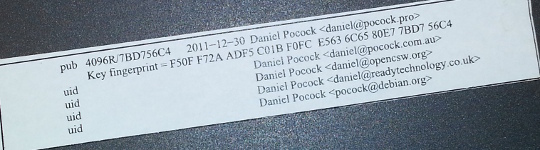
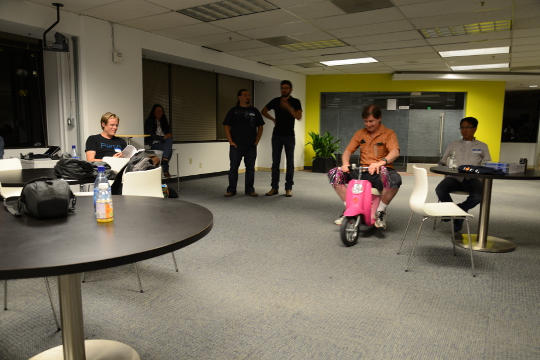
I've mentored a number of students in 2013, 2014 and 2015 for Debian and Ganglia and most of the companies I've worked with have run internships and graduate programs from time to time. GSoC 2015 has just finished and with all the excitement, many students are already asking what they can do to prepare and be selected for Outreachy or GSoC in 2016. My own observation is that the more time the organization has to get to know the student, the more confident they can be selecting that student. Furthermore, the more time that the student has spent getting to know the free software community, the more easily they can complete GSoC. Here I present a list of things that students can do to maximize their chance of selection and career opportunities at the same time. These tips are useful for people applying for GSoC itself and related programs such as GNOME's Outreachy or graduate placements in companies. Disclaimers There is no guarantee that Google will run the program again in 2016 or any future year until the Google announcement. There is no guarantee that any organization or mentor (including myself) will be involved until the official list of organizations is published by Google. Do not follow the advice of web sites that invite you to send pizza or anything else of value to prospective mentors. Following the steps in this page doesn't guarantee selection. That said, people who do follow these steps are much more likely to be considered and interviewed than somebody who hasn't done any of the things in this list. Understand what free software really is You may hear terms like free software and open source software used interchangeably. They don't mean exactly the same thing and many people use the term free software for the wrong things. Not all projects declaring themselves to be "free" or "open source" meet the definition of free software. Those that don't, usually as a result of deficiencies in their licenses, are fundamentally incompatible with the majority of software that does use genuinely free licenses. Google Summer of Code is about both writing and publishing your code and it is also about community. It is fundamental that you know the basics of licensing and how to choose a free license that empowers the community to collaborate on your code well after GSoC has finished. Please review the definition of free software early on and come back and review it from time to time. The The GNU Project / Free Software Foundation have excellent resources to help you understand what a free software license is and how it works to maximize community collaboration. Don't look for shortcuts There is no shortcut to GSoC selection and there is no shortcut to GSoC completion. The student stipend (USD $5,500 in 2014) is not paid to students unless they complete a minimum amount of valid code. This means that even if a student did find some shortcut to selection, it is unlikely they would be paid without completing meaningful work. If you are the right candidate for GSoC, you will not need a shortcut anyway. Are you the sort of person who can't leave a coding problem until you really feel it is fixed, even if you keep going all night? Have you ever woken up in the night with a dream about writing code still in your head? Do you become irritated by tedious or repetitive tasks and often think of ways to write code to eliminate such tasks? Does your family get cross with you because you take your laptop to Christmas dinner or some other significant occasion and start coding? If some of these statements summarize the way you think or feel you are probably a natural fit for GSoC. An opportunity money can't buy The GSoC stipend will not make you rich. It is intended to make sure you have enough money to survive through the summer and focus on your project. Professional developers make this much money in a week in leading business centers like New York, London and Singapore. When you get to that stage in 3-5 years, you will not even be thinking about exactly how much you made during internships. GSoC gives you an edge over other internships because it involves publicly promoting your work. Many companies still try to hide the potential of their best recruits for fear they will be poached or that they will be able to demand higher salaries. Everything you complete in GSoC is intended to be published and you get full credit for it. Imagine a young musician getting the opportunity to perform on the main stage at a rock festival. This is how the free software community works. It is a meritocracy and there is nobody to hold you back. Having a portfolio of free software that you have created or collaborated on and a wide network of professional contacts that you develop before, during and after GSoC will continue to pay you back for years to come. While other graduates are being screened through group interviews and testing days run by employers, people with a track record in a free software project often find they go straight to the final interview round. Register your domain name and make a permanent email address Free software is all about community and collaboration. Register your own domain name as this will become a focal point for your work and for people to get to know you as you become part of the community. This is sound advice for anybody working in IT, not just programmers. It gives the impression that you are confident and have a long term interest in a technology career. Choosing the provider: as a minimum, you want a provider that offers DNS management, static web site hosting, email forwarding and XMPP services all linked to your domain. You do not need to choose the provider that is linked to your internet connection at home and that is often not the best choice anyway. The XMPP foundation maintains a list of providers known to support XMPP. Create an email address within your domain name. The most basic domain hosting providers will let you forward the email address to a webmail or university email account of your choice. Configure your webmail to send replies using your personalized email address in the From header. Update your ~/.gitconfig file to use your personalized email address in your Git commits. Create a web site and blog Start writing a blog. Host it using your domain name. Some people blog every day, other people just blog once every two or three months. Create links from your web site to your other profiles, such as a Github profile page. This helps reinforce the pages/profiles that are genuinely related to you and avoid confusion with the pages of other developers. Many mentors are keen to see their students writing a weekly report on a blog during GSoC so starting a blog now gives you a head start. Mentors look at blogs during the selection process to try and gain insight into which topics a student is most suitable for. Create a profile on Github Github is one of the most widely used software development web sites. Github makes it quick and easy for you to publish your work and collaborate on the work of other people. Create an account today and get in the habbit of forking other projects, improving them, committing your changes and pushing the work back into your Github account. Github will quickly build a profile of your commits and this allows mentors to see and understand your interests and your strengths. In your Github profile, add a link to your web site/blog and make sure the email address you are using for Git commits (in the ~/.gitconfig file) is based on your personal domain. Start using PGP Pretty Good Privacy (PGP) is the industry standard in protecting your identity online. All serious free software projects use PGP to sign tags in Git, to sign official emails and to sign official release files. The most common way to start using PGP is with the GnuPG (GNU Privacy Guard) utility. It is installed by the package manager on most Linux systems. When you create your own PGP key, use the email address involving your domain name. This is the most permanent and stable solution. Print your key fingerprint using the gpg-key2ps command, it is in the signing-party package on most Linux systems. Keep copies of the fingerprint slips with you. This is what my own PGP fingerprint slip looks like. You can also print the key fingerprint on a business card for a more professional look. Using PGP, it is recommend that you sign any important messages you send but you do not have to encrypt the messages you send, especially if some of the people you send messages to (like family and friends) do not yet have the PGP software to decrypt them. If using the Thunderbird (Icedove) email client from Mozilla, you can easily send signed messages and validate the messages you receive using the Enigmail plugin. Get your PGP key signed Once you have a PGP key, you will need to find other developers to sign it. For people I mentor personally in GSoC, I'm keen to see that you try and find another Debian Developer in your area to sign your key as early as possible. Free software events Try and find all the free software events in your area in the months between now and the end of the next Google Summer of Code season. Aim to attend at least two of them before GSoC. Look closely at the schedules and find out about the individual speakers, the companies and the free software projects that are participating. For events that span more than one day, find out about the dinners, pub nights and other social parts of the event. Try and identify people who will attend the event who have been GSoC mentors or who intend to be. Contact them before the event, if you are keen to work on something in their domain they may be able to make time to discuss it with you in person. Take your PGP fingerprint slips. Even if you don't participate in a formal key-signing party at the event, you will still find some developers to sign your PGP key individually. You must take a photo ID document (such as your passport) for the other developer to check the name on your fingerprint but you do not give them a copy of the ID document. Events come in all shapes and sizes. FOSDEM is an example of one of the bigger events in Europe, linux.conf.au is a similarly large event in Australia. There are many, many more local events such as the Debian UK mini-DebConf in Cambridge, November 2015. Many events are either free or free for students but please check carefully if there is a requirement to register before attending. On your blog, discuss which events you are attending and which sessions interest you. Write a blog during or after the event too, including photos. Quantcast generously hosted the Ganglia community meeting in San Francisco, October 2013. We had a wild time in their offices with mini-scooters, burgers, beers and the Ganglia book. That's me on the pink mini-scooter and Bernard Li, one of the other Ganglia GSoC 2014 admins is on the right. Install Linux GSoC is fundamentally about free software. Linux is to free software what a tree is to the forest. Using Linux every day on your personal computer dramatically increases your ability to interact with the free software community and increases the number of potential GSoC projects that you can participate in. This is not to say that people using Mac OS or Windows are unwelcome. I have worked with some great developers who were not Linux users. Linux gives you an edge though and the best time to gain that edge is now, while you are a student and well before you apply for GSoC. If you must run Windows for some applications used in your course, it will run just fine in a virtual machine using Virtual Box, a free software solution for desktop virtualization. Use Linux as the primary operating system. Here are links to download ISO DVD (and CD) images for some of the main Linux distributions: If you are nervous about getting started with Linux, install it on a spare PC or in a virtual machine before you install it on your main PC or laptop. Linux is much less demanding on the hardware than Windows so you can easily run it on a machine that is 5-10 years old. Having just 4GB of RAM and 20GB of hard disk is usually more than enough for a basic graphical desktop environment although having better hardware makes it faster. Your experiences installing and running Linux, especially if it requires some special effort to make it work with some of your hardware, make interesting topics for your blog. Decide which technologies you know best Personally, I have mentored students working with C, C++, Java, Python and JavaScript/HTML5. In a GSoC program, you will typically do most of your work in just one of these languages. From the outset, decide which language you will focus on and do everything you can to improve your competence with that language. For example, if you have already used Java in most of your course, plan on using Java in GSoC and make sure you read Effective Java (2nd Edition) by Joshua Bloch. Decide which themes appeal to you Find a topic that has long-term appeal for you. Maybe the topic relates to your course or maybe you already know what type of company you would like to work in. Here is a list of some topics and some of the relevant software projects:


  • System administration, servers and networking: consider projects involving monitoring, automation, packaging. Ganglia is a great community to get involved with and you will encounter the Ganglia software in many large companies and academic/research networks. Contributing to a Linux distribution like Debian or Fedora packaging is another great way to get into system administration.
  • Desktop and user interface: consider projects involving window managers and desktop tools or adding to the user interface of just about any other software.
  • Big data and data science: this can apply to just about any other theme. For example, data science techniques are frequently used now to improve system administration.
  • Business and accounting: consider accounting, CRM and ERP software.
  • Finance and trading: consider projects like R, market data software like OpenMAMA and connectivity software (Apache Camel)
  • Real-time communication (RTC), VoIP, webcam and chat: look at the JSCommunicator or the Jitsi project
  • Web (JavaScript, HTML5): look at the JSCommunicator
Before the GSoC application process begins, you should aim to learn as much as possible about the theme you prefer and also gain practical experience using the software relating to that theme. For example, if you are attracted to the business and accounting theme, install the PostBooks suite and get to know it. Maybe you know somebody who runs a small business: help them to upgrade to PostBooks and use it to prepare some reports. Make something Make some small project, less than two week's work, to demonstrate your skills. It is important to make something that somebody will use for a practical purpose, this will help you gain experience communicating with other users through Github. For an example, see the servlet Juliana Louback created for fixing phone numbers in December 2013. It has since been used as part of the Lumicall web site and Juliana was selected for a GSoC 2014 project with Debian. There is no better way to demonstrate to a prospective mentor that you are ready for GSoC than by completing and publishing some small project like this yourself. If you don't have any immediate project ideas, many developers will also be able to give you tips on small projects like this that you can attempt, just come and ask us on one of the mailing lists. Ideally, the project will be something that you would use anyway even if you do not end up participating in GSoC. Such projects are the most motivating and rewarding and usually end up becoming an example of your best work. To continue the example of somebody with a preference for business and accounting software, a small project you might create is a plugin or extension for PostBooks. Getting to know prospective mentors Many web sites provide useful information about the developers who contribute to free software projects. Some of these developers may be willing to be a GSoC mentor. For example, look through some of the following: Getting on the mentor's shortlist Once you have identified projects that are interesting to you and developers who work on those projects, it is important to get yourself on the developer's shortlist. Basically, the shortlist is a list of all students who the developer believes can complete the project. If I feel that a student is unlikely to complete a project or if I don't have enough information to judge a student's probability of success, that student will not be on my shortlist. If I don't have any student on my shortlist, then a project will not go ahead at all. If there are multiple students on the shortlist, then I will be looking more closely at each of them to try and work out who is the best match. One way to get a developer's attention is to look at bug reports they have created. Github makes it easy to see complaints or bug reports they have made about their own projects or other projects they depend on. Another way to do this is to search through their code for strings like FIXME and TODO. Projects with standalone bug trackers like the Debian bug tracker also provide an easy way to search for bug reports that a specific person has created or commented on. Once you find some relevant bug reports, email the developer. Ask if anybody else is working on those issues. Try and start with an issue that is particularly easy and where the solution is interesting for you. This will help you learn to compile and test the program before you try to fix any more complicated bugs. It may even be something you can work on as part of your academic program. Find successful projects from the previous year Contact organizations and ask them which GSoC projects were most successful. In many organizations, you can find the past students' project plans and their final reports published on the web. Read through the plans submitted by the students who were chosen. Then read through the final reports by the same students and see how they compare to the original plans. Start building your project proposal now Don't wait for the application period to begin. Start writing a project proposal now. When writing a proposal, it is important to include several things:
  • Think big: what is the goal at the end of the project? Does your work help the greater good in some way, such as increasing the market share of Linux on the desktop?
  • Details: what are specific challenges? What tools will you use?
  • Time management: what will you do each week? Are there weeks where you will not work on GSoC due to vacation or other events? These things are permitted but they must be in your plan if you know them in advance. If an accident or death in the family cut a week out of your GSoC project, which work would you skip and would your project still be useful without that? Having two weeks of flexible time in your plan makes it more resilient against interruptions.
  • Communication: are you on mailing lists, IRC and XMPP chat? Will you make a weekly report on your blog?
  • Users: who will benefit from your work?
  • Testing: who will test and validate your work throughout the project? Ideally, this should involve more than just the mentor.
If your project plan is good enough, could you put it on Kickstarter or another crowdfunding site? This is a good test of whether or not a project is going to be supported by a GSoC mentor. Learn about packaging and distributing software Packaging is a vital part of the free software lifecycle. It is very easy to upload a project to Github but it takes more effort to have it become an official package in systems like Debian, Fedora and Ubuntu. Packaging and the communities around Linux distributions help you reach out to users of your software and get valuable feedback and new contributors. This boosts the impact of your work. To start with, you may want to help the maintainer of an existing package. Debian packaging teams are existing communities that work in a team and welcome new contributors. The Debian Mentors initiative is another great starting place. In the Fedora world, the place to start may be in one of the Special Interest Groups (SIGs). Think from the mentor's perspective After the application deadline, mentors have just 2 or 3 weeks to choose the students. This is actually not a lot of time to be certain if a particular student is capable of completing a project. If the student has a published history of free software activity, the mentor feels a lot more confident about choosing the student. Some mentors have more than one good student while other mentors receive no applications from capable students. In this situation, it is very common for mentors to send each other details of students who may be suitable. Once again, if a student has a good Github profile and a blog, it is much easier for mentors to try and match that student with another project. GSoC logo generic Conclusion Getting into the world of software engineering is much like joining any other profession or even joining a new hobby or sporting activity. If you run, you probably have various types of shoe and a running watch and you may even spend a couple of nights at the track each week. If you enjoy playing a musical instrument, you probably have a collection of sheet music, accessories for your instrument and you may even aspire to build a recording studio in your garage (or you probably know somebody else who already did that). The things listed on this page will not just help you walk the walk and talk the talk of a software developer, they will put you on a track to being one of the leaders. If you look over the profiles of other software developers on the Internet, you will find they are doing most of the things on this page already. Even if you are not selected for GSoC at all or decide not to apply, working through the steps on this page will help you clarify your own ideas about your career and help you make new friends in the software engineering community.

24 September 2015

Joachim Breitner: The Incredible Proof Machine

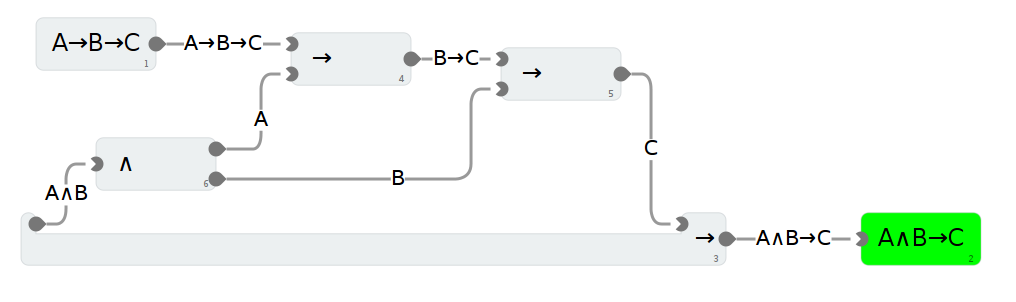
In a few weeks, I will have the opportunity to offer a weekend workshop to selected and motivated high school students1 to a topic of my choice. My idea is to tell them something about logic, proofs, and the joy of searching and finding proofs, and the gratification of irrevocable truths. While proving things on paper is already quite nice, it is much more fun to use an interactive theorem prover, such as Isabelle, Coq or Agda: You get immediate feedback, you can experiment and play around if you are stuck, and you get lots of small successes. Someone2 once called interactive theorem proving the worlds most geekiest videogame . Unfortunately, I don t think one can get high school students without any prior knowledge in logic, or programming, or fancy mathematical symbols, to do something meaningful with a system like Isabelle, so I need something that is (much) easier to use. I always had this idea in the back of my head that proving is not so much about writing text (as in normally written proofs) or programs (as in Agda) or labeled statements (as in Hilbert-style proofs), but rather something involving facts that I have proven so far floating around freely, and way to combine these facts to new facts, without the need to name them, or put them in a particular order or sequence. In a way, I m looking for labVIEW wrestled through the Curry-Horward-isomorphism. Something like this:
A proof of implication currying

A proof of implication currying

So I set out, rounded up a few contributors (Thanks!), implemented this, and now I proudly present: The Incredible Proof Machine3 This interactive theorem prover allows you to do perform proofs purely by dragging blocks (representing proof steps) onto the paper and connecting them properly. There is no need to learn syntax, and hence no frustration about getting that wrong. Furthermore, it comes with a number of example tasks to experiment with, so you can simply see it as a challenging computer came and work through them one by one, learning something about the logical connectives and how they work as you go. For the actual workshop, my plan is to let the students first try to solve the tasks of one session on their own, let them draw their own conclusions and come up with an idea of what they just did, and then deliver an explanation of the logical meaning of what they did. The implementation is heavily influenced by Isabelle: The software does not know anything about, say, conjunction ( ) and implication ( ). To the core, everything is but an untyped lambda expression, and when two blocks are connected, it does unification4 of the proposition present on either side. This general framework is then instantiated by specifying the basic rules (or axioms) in a descriptive manner. It is quite feasible to implement other logics or formal systems on top of this as well. Another influence of Isabelle is the non-linear editing: You neither have to create the proof in a particular order nor have to manually manage a proof focus . Instead, you can edit any bit of the proof at any time, and the system checks all of it continuously. As always, I am keen on feedback. Also, if you want to use this for your own teaching or experimenting needs, let me know. We have a mailing list for the project, the code is on GitHub, where you can also file bug reports and feature requests. Contributions are welcome! All aspects of the logic are implemented in Haskell and compiled to JavaScript using GHCJS, the UI is plain hand-written and messy JavaScript code, using JointJS to handle the graph interaction. Obviously, there is still plenty that can be done to improve the machine. In particular, the ability to create your own proof blocks, such as proof by contradiction, prove them to be valid and then use them in further proofs, is currently being worked on. And while the page will store your current progress, including all proofs you create, in your browser, it needs better ways to save, load and share tasks, blocks and proofs. Also, we d like to add some gamification, i.e. achievements ( First proof by contradiction , 50 theorems proven ), statistics, maybe a share theorem on twitter button. As the UI becomes more complicated, I d like to investigating moving more of it into Haskell world and use Functional Reactive Programming, i.e. Ryan Trickle s reflex, to stay sane. Customers who liked The Incredible Proof Machine might also like these artifacts, that I found while looking whether something like this exists:

  1. Students with migration background supported by the START scholarship
  2. Does anyone know the reference?
  3. We almost named it Proofcraft , which would be a name our current Minecraft-wild youth would appreciate, but it is alreay taken by Gerwin Kleins blog. Also, the irony of a theorem prover being in-credible is worth something.
  4. Luckily, two decades ago, Tobias Nipkow published a nice implementation of higher order pattern unification as ML code, which I transliterated to Haskell for this project.

23 September 2015

Russ Allbery: Review: Getting Back to Full Employment

Review: Getting Back to Full Employment, by Dean Baker & Jared Bernstein
Publisher: CEPR
Copyright: 2013
ISBN: 0-615-91836-0
Format: Kindle
Pages: 116
Getting Back to Full Employment is more of a policy paper than a book. The authors both work for economic think tanks; one of those, the Center for Economic and Policy research (co-founded by Baker), is the publisher of this book. It's also free on the Kindle, another sign that the purpose is more about educating and convincing the public than about selling a non-fiction analysis. I found out about this through Paul Krugman, and if you're a regular reader of Krugman's columns and blog, not much here will be a surprise. Baker and Bernstein are advocating what I would call conventional-liberal economic policy by US standards (which means that it's not really that liberal). The short version is that full employment is vital for improving the economic position of the average person, inflation is nowhere near as much of a risk as people claim, and the best economic action the US government can take at present is to aggressively pursue a full employment strategy without worrying excessively about inflation. If you're at all familiar with this debate, you probably already have an opinion about everything in that summary. I certainly do. If you follow economics at all, this debate has been raging ever since the 2008 financial crisis (and earlier versions of the debate were raging before then). Since I'm a regular Krugman reader, you probably know my opinion: the people who have been crying wolf about the dangers of inflation have been systematically wrong about everything for seven years solid, and it's amazing that anyone is still giving them the time of day. Baker and Bernstein make a similar argument at greater length, and with a more academic tone. The risk of any policy paper like this is that reactions will be almost entirely decided by one's pre-existing opinion about the political actions that each economic policy implies. If you (like me) have already decided that government intervention in the economy is useful to prevent concentration of wealth in the hands of a few and provide support for the most vulnerable, everything Baker and Bernstein say here is going to sound quite convincing. If you've already decided that government intervention in the economy almost always leads to tears, and that a large government with the ability to take economic action is far more dangerous than any of the effects of economic downturns and unemployment, it would surprise me if Baker and Bernstein will change your mind. In other words, I'm skeptical that policy papers like this accomplish much. That said, there are a lot of facts and data here, which at least help ground this ongoing argument in more specifics. The authors show you the math: the evidence for moderate inflation not leading to any serious impact for economies, the very strong correlations between low unemployment rates and rising median wages, the theoretical basis for lower bounds on unemployment rates and our extensive past history of assuming that lower bound is much higher than it actually is, and some pointed comparisons to countries like Germany that have taken many of the specific policy recommendations included here and have a far healthier labor market as a result. All the statistics, charts, and discussion of analysis techniques is fairly dry, but I think the data is compelling. Of course, I was already convinced by earlier reading. There are a few bits here that I hadn't seen before, or at least hadn't internalized. One is a subtle but very important statistical limitation: any uncertainty in measuring the inflation rate will lead to incorrect statistical findings that inflation slows growth. The explanation for this takes several pages and is somewhat technical: the short and somewhat inaccurate version is that growth is measured in inflation-adjusted GDP, so if you get inflation wrong, you magnify the correlation between GDP and inflation. An inaccurately-high measure of inflation rate simultaneously leads to underestimating GDP growth for that country; an inflation rate that's inaccurate on the low side leads to overestimating GDP growth. This is inherent in how this comparison is done, and it's hard to see how to avoid it. It's therefore worth taking any analysis of the growth impact from higher inflation with a grain of salt. (Please note here that we're talking about moderate inflation the typical rates between 1% and 8% that you see in developed economics.) Another bit that was new to me was the analysis of the connection between trade deficits and full employment. I typically dismiss any international trade analysis in macroeconomic policy for the US since international trade is a much smaller part of our economy than most people think it is, and because protectionism has been rightfully discarded as a policy approach. But Baker and Bernstein make an interesting argument here about the effects of a strong currency on increasing unemployment; even with the relatively small amount of trade, reducing the deficit would have a noticeable effect. (Increasing the volume of trade but not changing the balance would not.) The authors certainly don't recommend protectionism; they do recommend being willing to let the value of the dollar drop against other currencies as a good way to reduce the deficit, and to be aware that other central banks have intentional policies of propping up the dollar that we're largely ignoring. They also mention that this is a zero-sum game for the world economy as a whole, although I would have preferred a bit more emphasis on that. You can't get very far via beggar-thy-neighbor economic policy. But it's a good reminder that the obsession in some parts with not "devaluing the currency" is economic nonsense and directly hurts employment. The end of the book discusses a variety of sensible policy recommendations ranging from international currency policy to Germany's work-sharing program where the government subsidies reduction of worker hours the same way that we already subsidize unemployment. They all seemed reasonable to me, although, sadly, I have little faith that the dysfunctional US government will consider any of them seriously, particularly more direct approaches such as government taking on the role of employer of last resort. But they're fun to read about and imagine a US in which the government actually did sensible things like that. Getting Back to Full Employment is pretty dry, and it's hard to shake the feeling that writing things like this is basically pointless, so I'm not sure I can really recommend it. But if you like reading Krugman's columns and are interested in similar material from different people at a longer length, that's basically what this is. Rating: 6 out of 10

20 September 2015

Michal Čihař: Weblate 2.4

Weblate 2.4 has been released today. It comes with extended support for various file formats, extended hook scripts, better keyboard shortcuts and dozen of bug fixes. Full list of changes for 2.4: If you are upgrading from older version, please follow our upgrading instructions. You can find more information about Weblate on http://weblate.org, the code is hosted on Github. If you are curious how it looks, you can try it out on demo server. You can login there with demo account using demo password or register your own user. Weblate is also being used https://hosted.weblate.org/ as official translating service for phpMyAdmin, Gammu, Weblate itself and other projects. If you are free software project which would like to use Weblate, I'm happy to help you with set up or even host Weblate for you. Further development of Weblate would not be possible without people providing donations, thanks to everybody who have helped so far! PS: The roadmap for next release is just being prepared, you can influence this by expressing support for individual issues either by comments or by providing bounty for them.

Filed under: English phpMyAdmin SUSE Weblate 0 comments

3 September 2015

John Goerzen: There s still a chance to save WiFi

You may not know it, but wifi is under assault in the USA due to proposed FCC regulations about modifications to devices with modular radios. In short, it would make it illegal for vendors to sell devices with firmware that users can replace. This is of concern to everyone, because Wifi routers are notoriously buggy and insecure. It is also of special concern to amateur radio hobbyists, due to the use of these devices in the Amateur Radio Service (FCC Part 97). I submitted a comment to the FCC about this, which I am pasting in here. This provides a background and summary of the issues for those that are interested. Here it is: My comment has two parts: one, the impact on the Amateur Radio service; and two, the impact on security. Both pertain primarily to the 802.11 ( Wifi ) services typically operating under Part 15. The Amateur Radio Service (FCC part 97) has long been recognized by the FCC and Congress as important to the nation. Through it, amateurs contribute to scientific knowledge, learn skills that bolster the technological competitiveness of the United States, and save lives through their extensive involvement in disaster response. Certain segments of the 2.4GHz and 5GHz Wifi bands authorized under FCC Part 15 also fall under the frequencies available to licensed amateurs under FCC Part 97 [1]. By scrupulously following the Part 97 regulations, many amateur radio operators are taking devices originally designed for Part 15 use and modifying them for legal use under the Part 97 Amateur Radio Service. Although the uses are varied, much effort is being devoted to fault-tolerant mesh networks that provide high-speed multimedia communications in response to a disaster, even without the presence of any traditional infrastructure or Internet backbone. One such effort [2] causes users to replace the firmware on off-the-shelf Part 15 Wifi devices, reconfiguring them for proper authorized use under Part 97. This project has many vital properties, particularly the self-discovery of routes between nodes and self-healing nature of the mesh network. These features are not typically available in the firmware of normal Part 15 devices. It should also be noted that there is presently no vendor of Wifi devices that operate under Part 97 out of the box. The only route available to amateurs is to take Part 15 devices and modify them for Part 97 use. Amateur radio users of these services have been working for years to make sure they do not cause interference to Part 15 users [3]. One such effort takes advantage of the modular radio features of consumer Wifi gear to enable communication on frequencies that are within the Part 97 allocation, but outside (though adjacent) to the Part 15 allocation. For instance, the chart at [1] identifies frequencies such as 2.397GHz or 5.660GHz that will never cause interference to Part 15 users because they lie entirely outside the Part 15 Wifi allocation. If the FCC prevents the ability of consumers to modify the firmware of these devices, the following negative consequences will necessarily follow: 1) The use of high-speed multimedia or mesh networks in the Amateur Radio service will be sharply curtailed, relegated to only outdated hardware. 2) Interference between the Amateur Radio service which may use higher power or antennas with higher gain and Part 15 users will be expanded, because Amateur Radio service users will no longer be able to intentionally select frequencies that avoid Part 15. 3) The culture of inventiveness surrounding wireless communication will be curtailed in an important way. Besides the impact on the Part 97 Amateur Radio Service, I also wish to comment on the impact to end-user security. There have been a terrible slew of high-profile situations where very popular consumer Wifi devices have had incredible security holes. Vendors have often been unwilling to address these issues [4]. Michael Horowitz maintains a website tracking security bugs in consumer wifi routers [5]. Sadly these bugs are both severe and commonplace. Within just the last month, various popular routers have been found vulnerable to remote hacking [6] and platforms for launching Distributed Denial-of-Service (DDoS) attacks [7]. These impacted multiple models from multiple vendors. To make matters worse, most of these issues should have never happened in the first place, and were largely the result of carelessness or cluelessness on the part of manufacturers. Consumers should not be at the mercy of vendors to fix their own networks, nor should they be required to trust unauditable systems. There are many well-regarded efforts to provide better firmware for Wifi devices, which still keep them operating under Part 15 restrictions. One is OpenWRT [8], which supports a wide variety of devices with a system built upon a solid Linux base. Please keep control of our devices in the hands of consumers and amateurs, for the benefit of all. References: [1] https://en.wikipedia.org/wiki/High-speed_multimedia_radio [2] http://www.broadband-hamnet.org/just-starting-read-this.html [3] http://www.qsl.net/kb9mwr/projects/wireless/modify.html [4] http://www.tomsitpro.com/articles/netgear-routers-security-hole,1-2461.html [5] http://routersecurity.org/bugs.php [6] https://www.kb.cert.org/vuls/id/950576 [7] https://www.stateoftheinternet.com/resources-cloud-security-2015-q2-web-security-report.html [8] https://openwrt.org/

17 August 2015

Gunnar Wolf: report @mx (that means, sadly, gwolf DebConf15)

<Sigh/> For the second time since I joined Debian, I missed DebConf. This time, mostly for two completely happy reasons (which have, of course, grown up quite significatively): But adding to that very important factor, early-to-mid August is possibly the worst date for me to attend DebConf As that's when we start classes at UNAM, and I really don't want to delegate introducing my class to somebody else (besides it being or not possible). Life has been quite busy here. Besides starting my seventh semester as a teacher (finally being able to present my book on operating systems to the students!), I also took on teaching two modules for a diploma-course on embedded Linux. I'm co- teaching the "User-space Linux" module together with Gabriel Salda a, and will teach the "Boot process" module with Sandino Araico. There are many things that should be improved about the covered program, but we are having good fun working our way on it; Gabriel and I have given two (out of six) 6hr sessions each, and have reached the point where it is actually becoming fun :) As for Debian... I have been doing minimal maintenance work. Answering to some keyring tickets, or taking care of only high-profile important issues. I do not have time to do much. I have been wanting to do some interesting analysis on the evolution of our keyring for several months, but have not had the time to follow it up. Will do at some point, /mehopes. Anyway... This post is probably just because I need to somehow be there at our community's highest social, technical exchange period in the year. That is, there's not much to report, it's only me waving from home!

14 August 2015

Wouter Verhelst: Multi-pass transcoding to WebM with normalisation

Transcoding video from one format to another seems to be a bit of a black art. There are many tools that allow doing this kind of stuff, but one issue that most seem to have is that they're not very well documented. I ran against this a few years ago, when I was first doing video work for FOSDEM and did not yet have proper tools to do the review and transcoding workflow. At the time, I just used mplayer to look at the .dv files, and wrote a text file with a simple structure to remember exactly what to do with it. That file was then fed to a perl script which wrote out a shell script that would use the avconv command to combine and extract the "interesting" data from the source DV files into a single DV file per talk, and which would then call a shell script which used gst-launch and sox to do a multi-pass transcode of those intermediate DV files into a WebM file. While all that worked properly, it was a rather ugly hack, never cleaned up, and therefore I never really documented it properly either. Recently, however, someone asked me to do so anyway, so here goes. Before you want to complain about how this ate the videos of your firstborn child, however, note the above. The perl script spent a somewhat large amount of code reading out the text file and parsing it into an array of hashes. I'm not going to reproduce that, since the actual format of the file isn't all that important anyway. However, here's the interesting bits:
foreach my $pfile(keys %parts)  
        my @files = @ $parts $pfile ;
        say "#" x (length($pfile) + 4);
        say "# " . $pfile . " #";
        say "#" x (length($pfile) + 4);
        foreach my $file(@files)  
                my $start = "";
                my $stop = "";
                if(defined($file-> start ))  
                        $start = "-ss " . $file-> start ;
                 
                if(defined($file-> stop ))  
                        $stop = "-t " . $file-> stop ;
                 
                if(defined($file-> start ) && defined($file-> stop ))  
                        my @itime = split /:/, $file-> start ;
                        my @otime = split /:/, $file-> stop ;
                        $otime[0]-=$itime[0];
                        $otime[1]-=$itime[1];
                        if($otime[1]<0)  
                                $otime[0]-=1;
                                $otime[1]+=60;
                         
                        $otime[2]-=$itime[2];
                        if($otime[2]<0)  
                                $otime[1]-=1;
                                $otime[2]+=60;
                         
                        $stop = "-t " . $otime[0] . ":" . $otime[1] .  ":" . $otime[2];
                 
                if(defined($file-> start )   defined($file-> stop ))  
                        say "ln " . $file-> name  . ".dv part-pre.dv";
                        say "avconv -i part-pre.dv $start $stop -y -acodec copy -vcodec copy part.dv";
                        say "rm -f part-pre.dv";
                  else  
                        say "ln " . $file-> name  . ".dv part.dv";
                 
                say "cat part.dv >> /tmp/" . $pfile . ".dv";
                say "rm -f part.dv";
         
        say "dv2webm /tmp/" . $pfile . ".dv";
        say "rm -f /tmp/" . $pfile . ".dv";
        say "scp /tmp/" . $pfile . ".webm video.fosdem.org:$uploadpath   true";
        say "mv /tmp/" . $pfile . ".webm .";
 
That script uses avconv to read one or more .dv files and transcode them into a single .dv file with all the start- or end-junk removed. It uses /tmp rather than the working directory, since the working directory was somewhere on the network, and if you're going to write several gigabytes of data to an intermediate file, it's usually a good idea to write them to a local filesystem rather than to a networked one. Pretty boring. It finally calls dv2webm on the resulting .dv file. That script looks like this:
#!/bin/bash
set -e
newfile=$(basename $1 .dv).webm
wavfile=$(basename $1 .dv).wav
wavfile=$(readlink -f $wavfile)
normalfile=$(basename $1 .dv)-normal.wav
normalfile=$(readlink -f $normalfile)
oldfile=$(readlink -f $1)
echo -e "\033]0;Pass 1: $newfile\007"
gst-launch-0.10 webmmux name=mux ! fakesink \
  uridecodebin uri=file://$oldfile name=demux \
  demux. ! ffmpegcolorspace ! deinterlace ! vp8enc multipass-cache-file=/tmp/vp8-multipass multipass-mode=1 threads=2 ! queue ! mux.video_0 \
  demux. ! progressreport ! audioconvert ! audiorate ! tee name=t ! queue ! vorbisenc ! queue ! mux.audio_0 \
  t. ! queue ! wavenc ! filesink location=$wavfile
echo -e "\033]0;Audio normalize: $newfile\007"
sox --norm $wavfile $normalfile
echo -e "\033]0;Pass 2: $newfile\007"
gst-launch-0.10 webmmux name=mux ! filesink location=$newfile \
  uridecodebin uri=file://$oldfile name=video \
  uridecodebin uri=file://$normalfile name=audio \
  video. ! ffmpegcolorspace ! deinterlace ! vp8enc multipass-cache-file=/tmp/vp8-multipass multipass-mode=2 threads=2 ! queue ! mux.video_0 \
  audio. ! progressreport ! audioconvert ! audiorate ! vorbisenc ! queue ! mux.audio_0
rm $wavfile $normalfile
... and is a bit more involved. Multi-pass encoding of video means that we ask the encoder to first encode the file but store some statistics into a temporary file (/tmp/vp8-multipass, in our script), which the second pass can then reuse to optimize the transcoding. Since DV uses different ways of encoding things than does VP8, we also need to do a color space conversion (ffmpegcolorspace) and deinterlacing (deinterlace), but beyond that the video line in the first gstreamer pipeline isn't very complicated. Since we're going over the file anyway and we need the audio data for sox, we add a tee plugin at an appropriate place in the audio line in the first gstreamer pipeline, so that we can later on pick up that same audio data an write it to a wav file containing linear PCM data. Beyond the tee, we go on and do a vorbis encoding, as is needed for the WebM format. This is not actually required for a first pass, but ah well. There's some more conversion plugins in the pipeline (specifically, audioconvert and audiorate), but those are not very important. We next run sox --norm on the .wav file, which does a fully automated audio normalisation on the input. Audio normalisation is the process of adjusting volume levels so that the audio is not too loud, but also not too quiet. Sox has pretty good support for this; the default settings of its --norm parameter make it adjust the volume levels so that the highest peak will just about reach the highest value that the output format can express. As such, you have no clipping anywhere in the file, but also have an audio level that is actually useful. Next, we run a second-pass encoding on the input file. This second pass uses the statistics gathered in the first pass to decide where to put its I- and P-frames so that they are placed at the most optimal position. In addition, rather than reading the audio from the original file, we now read the audio from the .wav file containing the normalized audio which we produced with sox, ensuring the audio can be understood. Finally, we remove the intermediate audio files we created; and the shell script which was generated by perl also contained an rm command for the intermediate .dv file. Some of this is pretty horrid, and I never managed to clean it up enough so it would be pretty (and now is not really the time). However, it Just Works(tm), and I am happy to report that it continues to work with gstreamer 1.0, provided you replace the ffmpegcolorspace by an equally simple videoconvert, which performs what ffmpegcolorspace used to perform in gstreamer 0.10.

12 August 2015

Daniel Pocock: Recording live events like a pro (part 2: video)

In the first blog in this series, we looked at how to capture audio effectively for a range of different events. While recording audio appears less complicated than video, it remains fundamental to a good recording. For some types of event, like a speech or a debate, you can have quite a bad video with poor lighting and other defects but people will still be able to watch it if the audio is good. Therefore, if you haven't already looked at the previous blog, please do so now. As mentioned in the earlier blog, many people now have high quality equipment for recording both audio and video and a wide range of opportunities to use it, whether it is a talk at a conference, a wedding or making a Kickstarter video. The right camera for video recording The fundamental piece of equipment is the camera itself. You may have a DSLR camera that can record video or maybe you have a proper handheld video camera. The leading DSLR cameras, combined with a good lens, make higher quality recordings than many handheld video cameras. Unfortunately, although you pay good money to buy a very well engineered DSLR that could easily record many hours of video, most DSLRs are crippled to record a maximum of 30 minutes in one recording. This issue and some workarounds are discussed later in this blog. If you don't have any camera at all you need to think carefully about which type to buy. If you are only going to use it once you may want to consider renting or borrowing or asking for other people attending the event to bring whatever cameras they have to help make multiple recordings (the crowdsourcing solution). If you are a very keen photographer then you will probably have a preference for a DSLR. Accessories Don't just look at the cost of your camera and conclude that is all the budget you need. For professional quality video recording, you will almost certainly need some accessories. You may find they are overpriced at the retail store where you bought your camera, but you still need some of them, so have a look online.
Recording a talk at a free software event with a Nikon D800 on a very basic tripod with Rode VideoMic Pro, headphones (white cable) and external power (black cable) If you want to capture audio with the camera and record it in the video file (discussed in more detail below), you will need to purchase a microphone that mounts on the camera. The built-in microphones on cameras are often quite bad, even on the most expensive cameras. If you are just using the built-in microphone for reference audio (to help with time synchronization when you combine different audio files with the video later) then the built-in microphone may be acceptable. Camera audio is discussed in more detail below. If your camera has a headphone socket, get some headphones for listening to the audio. Make sure you have multiple memory cards. Look carefully at the speed of the memory cards, slow ones are cheaper but they can't keep up with the speed of writing 1080p video. At a minimum, you should aim to buy memory cards that can handle one or two days worth of data for whatever it is you do. A tripod is essential for most types of video. If you use a particularly heavy camera or lens or if you are outdoors and it may be windy you will need a heavier tripod for stability. For video, it is very useful to have a tripod with a handle for panning left and right but if the camera will be stationary for the whole recording then the handle is not essential. Carrying at least one spare battery is another smart move. On one visit to the Inca Trail in Peru, we observed another member of our group hiking up and down the Andes with a brand new DSLR that they couldn't use because the battery was flat. For extended periods of recording, batteries will not be sufficient and you will need to purchase a mains power supply (PSU). These are available for most types of DSLR and video camera. The camera vendors typically design cameras with unusual power sockets so that you can only use a very specific and heavily overpriced PSU from the same company. Don't forget a surge protector too. There are various smartphone apps that allow you to remotely control the camera from the screen of your phone, such as the qDslrDashboard app. These often give a better preview than the screen built-in to the camera and may even allow you to use the touch screen to focus more quickly on a specific part of the picture. A regular USB cable is not suitable for this type of app, you need to buy a USB On-The-Go (OTG) cable.
Screenshot of qDslrDashboard app on a smartphone, controlling a DSLR camera If you plan to copy the video from the camera to a computer at the event, you will need to make sure you have a fast memory card reader. The memory card readers in some laptops are quite slow and others can be quite fast so you may not need to buy an extra card reader. Camera audio Most cameras, including DSLRs, have a built-in microphone and a socket for connecting an external microphone. The built-in microphones obtain very poor quality sound. For many events, it is much better to have independent microphones, such as a lapel microphone attached to a smartphone or wireless transmitter. Those solutions are described in part one of this blog series. Nonetheless, there are still some benefits of capturing audio in the camera. The biggest benefit is the time synchronization: if you have audio recordings in other devices, you will need to align them with the video using post-production software. If the camera recorded an audio stream too, even if the quality is not very good, you can visualize the waveform on screen and use it to align the other audio recordings much more easily and precisely. If the camera will be very close to the people speaking then it may be acceptable to use a microphone mounted on the camera. This will be convenient for post-production because the audio will be synchronized with the video. It may still not be as good as a lapel microphone though, but the quality of these camera-mounted microphones is still far higher than the built-in microphones. I've been trying the Rode VideoMic Pro, it is definitely better than recording with the built-in microphone on the camera and also better than the built-in microphone on my phone. One problem that most people encounter is the sound of the lens autofocus mechanism being detected by the microphone. This occurs with both the built-in microphone and any other microphone you mount on the camera. A microphone mounted on top of the camera doesn't detect this noise with the same intensity as the built-in microphone but it is still present in the recordings. If using a camera-mounted microphone to detect the audio from an audience, you may need to have an omnidirectional microphone. Many camera-mounted microphones are directional and will not detect very much sound from the sides or behind the camera. When using any type of external microphone with the camera, it is recommend to disable automatic gain control (AGC) in the camera settings and then manually adjust the microphone sensitivity/volume level. Use headphones A final word on audio - most good cameras have an audio output socket. Connect headphones and wear them, to make sure you are always capturing audio. Otherwise, if the microphone's battery goes flat or if a wireless microphone goes out of range you may not notice. Choosing a lens The more light you get, the better. Bigger and more expensive lenses allow more light into the camera. Many of the normal lenses sold with a DSLR camera are acceptable but if it is a special occasion you may want to rent a more expensive lens for the day. If you already have a lens, it is a very good idea to test it in conditions similar to those you expect for the event you want to record. Recording duration limits Most DSLR cameras with video capability impose a 30 minute maximum recording duration This is basically the result of a friendly arrangement between movie studios and politicians to charge an extra tax on video recording technology and potentially make the movie studio bosses richer, supposedly justified by the fact that a tiny but exaggerated number of people use their cameras to record movies at the cinema. As a consequence, most DSLR manufacturers limit the duration of video recording so their product won't be subject to the tax, ensuring the retail price is lower and more attractive. On top of this, many DSLR cameras also have a 4GB file size limit if they use the FAT filesystem. Recording 1080p video at a high frame rate may hit the file size limit in 10 minutes, well before you encounter the 30 minute maximum recording duration. To deal with the file size issue, you can record at 720p instead of 1080p and use the frame rate 24fps. For events longer than 30 minutes or where you really want 1080p or a higher frame rate, there are some other options you can consider:
  • Buy or rent a proper video camera instead of using a DSLR camera
  • Using multiple cameras that can stop and be restarted at different times.
  • Manually stopping and restarting the camera if there are breaks in the event where it is safe to do so.
  • Use an app to control the camera and program it to immediately restart the recording each time it stops
  • Extract the raw output from the camera's HDMI socket and record into some other device or computer. There are several purpose-built devices
    that can be used this way with an embedded SSD for storage.
  • There are also some people distributing unofficial/alternative firmware images that remove the artificial 30 minute recording limit.
Camera settings There are many online tutorials and demonstration videos on YouTube that will help you optimize the camera settings for video. You may have already made recordings using the automatic mode. Adjusting some or all of the settings manually may help you create a more optimal recording. You will need to spend some time familiarizing yourself with the settings first. The first thing to check is white balance. This tells the camera the type of lighting in the location. If you set this incorrectly then the colours will be distorted. Many cameras have the ability to automatically set the white balance. For video, you may be able to change one or more settings that control the recording quality. These settings control the file compression ratio and image size. Typical image size settings are 720p and 1080p. Compression ratio may be controlled by a high/medium/low quality setting. Choosing the highest quality and biggest picture requires more space on the memory card and also means you reach the 4GB file size limit more quickly. A higher quality setting also implies a faster memory card is required, because the rate of megabytes per second written to the memory card is higher. Next you need to think about the frame rate. Events that involve fast moving subjects, such as sports, typically benefit from a higher frame rate. For other events it is quite acceptable to use 24 frames per second (fps). Higher frame rates also imply bigger file size and a requirement for a faster memory card. Once you have decided on the frame rate, the next thing to do is set the shutter speed. Use a shutter speed that is double the frame rate. For example, if using 24fps or 25fps, use a 1/50 shutter speed. The final two settings you need to adjust are the ISO and aperture. Set these based on the lighting conditions and extent to which the subjects are moving. For example, if the setting is dark or if you are trying to record fast moving subjects like athletes, vehicles or animals, use an ISO value of 800 or higher. Once you have chosen ISO, adjust the aperture to ensure the picture is sufficiently illuminated. Aperture also has a significant impact on the depth of field. Operating the camera: zoom and focus Many people use zoom lenses. It is not always necessary to change the zoom while recording a video, you can use software to zoom in and out on individual parts of the picture when editing it in post-production. If you do change the zoom while recording, it may be more difficult to maintain focus. Almost all lenses support manual focus (turning the focus ring by hand) and many support automatic focus. When shooting photographs with a DSLR, the mirror is down and the camera can use dedicated sensors for focus and light sensing. When shooting video, the mirror is up and the camera can not use the same focus sensors that are used in photography. Video recording uses a digital focussing algorithm based on contrast in the picture. If you take a lot of photos you are probably quite accustomed to the fast and precise autofocus for photography and you will notice that keeping a video in focus is more challenging. As mentioned already, one of the first things you can do to keep focus simple is to avoid zooming while recording. Record in a higher resolution than you require and then zoom with software later. Some people record using 4k resolution even when they only want to produce a 720p video, as they can digitally zoom in to different parts of the 4k recording without losing detail. If the subject is very stationary (people sitting at a desk for an interview is a typical example), you may be able to set the camera to manual focus and not change it at all while recording. If you choose to enable autofocus while recording, any built-in camera microphone or microphone mounted on the camera is likely to detect sounds from the motorized focus system. Ultimately, the autofocus mechanism is not accurate for all subjects and you may be unable to stop them moving around so you will need to change the focus manually while recording. It requires some practice to be able to do this quickly without overshooting the right focus. To make life more tricky, Nikon and Canon focus rings rotate in the opposite direction, so if you are proficient using one brand you may feel awkward if you ever have to use the other. A good way to practice this skill is to practice while in the car or on the train, pointing at different subjects outside the window and trying to stay in focus as you move from one subject to the next. Make a trial run Many events, from weddings right up to the Olympic Games opening ceremony, have a trial run the day before. One reason for that is to test the locations and settings of all the recording and broadcasting equipment. If a trial run isn't possible for your event, you may find some similar event to practice recording and test your equipment. For example, if you are planning to record a wedding, you could try and record a Sunday mass in the same church. Backup and duplicate the recordings before leaving the event If you only have one copy of the recordings and the equipment is stolen or damaged you may be very disappointed. Before your event, make a plan to duplicate the raw audio and video recordings so that several people can take copies away with them. Decide in advance who will be responsible for this, ensure there will be several portable hard disks and estimate how much time it will take to prepare the copies and factor this into the schedule. Conclusion All the products described can be easily purchased from online retailers. You may not need every accessory that is mentioned as it depends on the type of event you record. The total cost of buying or renting the necessary accessories may be as much as the cost of the camera itself so if you are new to this you may need to think carefully about making a budget with a spreadsheet to do it correctly. Becoming familiar with the camera controls and practicing the techniques for manual focus and zoom can take weeks or months. If you enjoy photography this can be time well spent but if you don't enjoy it then you may not want to commit the time necessary to make good quality video. Don't rule out options like renting equipment instead of buying it or crowdsourcing, asking several participants or friends to help make recordings with their own equipment. For many events, audio is far more indispensable than video and as emphasizing at the beginning of this article, it is recommended that you should be one hundred percent confident in your strategy for recording audio before you start planning to record video.

10 August 2015

Mirco Bauer: Smuxi 1.0 "Finally" Release

And here we go again! We're proud to announce the new version of Smuxi, release 1.0 "Finally". During the development, 20 bug reports and 10 feature requests in 285 commits were worked on.

Finally 1.0 Smuxi is celebrating its 10th anniversary! 10 years ago, Mirco Bauer made the first commit to the Smuxi source code repository and is still very committed to it. He started the Gnosmirc project in 2005 when the only way a 24/7 "always-on" experience with IRC meant you had to use a console based IRC client like bitchx, irssi or epic combined with screen and SSH. This looks very practical at first and is a powerful Unix-ish way of accomplishing that job, but it has the big downside that it doesn't integrate with a desktop environment like GNOME. A bit later the Gnosmirc project was renamed to Smuxi when the new code architecture allowed other frontend implementations besides the GNOME one. The ncurses/STFL based text frontend was later implemented and is considered stable and useful enough for day to day use, but still has some rough edges. WinForms and WPF frontends also exist but need more work to reach a usable state. At this point Smuxi 1.0 contains all features that we could have imagined and even goes beyond with very advanced features like message patterns or language agnostic scripting.

Changes since Smuxi 0.11

Message Persistence One of the biggest drawbacks of the IRC protocol ever was that messages can't be retrieved from the IRC server because the IRC server is simply relaying messages to the connected clients. So, if an IRC client is freshly started and connects it starts to receive new messages, but all message you had received before are no longer available. This always made IRC in a way "volatile" unlike other communication systems like email where messages are relayed and stored on the client side. One common approach for IRC clients is to store log files in a text file. This is a simple feature and gives the user the possibility to read older conversations. Smuxi also supports text file logging like other IRC clients but it has a big user experience drawback as you need to open the file from the disk outside of the IRC client. In Smuxi 1.0 messages sent and received are now stored on the disk in a way they can automatically be retrieved/loaded when you restart Smuxi. It is like you have never closed Smuxi! This feature was already available in Smuxi for some time as a technical preview and it used the Db4o object database, but we were never happy about the performance neither with the stability so it always stayed an optional feature you need to enable. This year we tried a new message buffer backend using the famous SQLite database and it works much faster and stable as a rock. So finally we can enable this feature by default because it just works and enhanced your experience. We hope you enjoy it. Documentation of how you can change Smuxi message buffer backend and behavior can be found here. For instructions how to convert your existing db4o history to SQLite can be found in the "smuxi-message-buffer tool" section.

User Interface Enhancements
  • Synced message markers: the position of of the seen/unseen messages marker is pushed to the smuxi-server and remembered when the frontend reconnects. (Sebastian Poeplau)
  • Persistent message markers: the message marker position is also remembered across Smuxi(-server) restarts.
  • Message Counter: in addition to the highlight counter next to a chat new/unseen messages are also counted. This makes it easy to identify chats with much traffic.
  • Single application instance support. If you start Smuxi again from the menu it will bring the existing instance into the foreground. This makes the Ubuntu Messaging Menu much nicer.
  • The command/message entry is alignment with the messages. (Lex Berezhny)

Text Frontend Enhancements
  • The console background color can now be configured using: /config set STFL/Interface/TerminalBackgroundColor = #000000 (Ond ej Ho ek)
  • The text color contrast if nicks with the background is now ensured (Ond ej Ho ek) #1033
  • Messages containing images will not be skipped but their alternative text is shown instead (Ond ej Ho ek) #1035

New smuxi-message-buffer tool This is a new commandline tool that allows you to convert and export the message history of Smuxi message buffer files. This can be used to convert your existing Db4o history to SQLite like this for example:
for DB_DB4O in $HOME/.local/share/smuxi/buffers/*/*/*/*.db4o; do
    DB_SQLITE=$ DB_DB4O/.db4o/.sqlite3 
    smuxi-message-buffer convert $DB_DB4O $DB_SQLITE
done
Smuxi shouldn't be running when using this tool.

Scripting Enhancements

New Hook Points Smuxi 1.0 supports with the following new hook points:
  • engine/protocol-manager/on-presence-status-changed/ This hook point is raised when the presence status of a protocol manager changes. This happens for example when an IRC connection toggles the away state.
  • engine/session/on-event-message/ This hook point raises event messages that usually begin with "-!-". This can be useful to track state changes that are shown as a message without having a dedicated hook point for it.
  • engine/session/command-$cmd/ This hook point is raised on the engine side for commands, e.g. /some_command that isn't handled by the frontend or engine built-in commands. This is useful for commands that should be available for all frontends and isn't specific to the frontend environment.

New Plugins The following new plugins are supported by Smuxi 1.0:
  • topic-diff: Shows the word differences of the topic after topic changes. (meebey)
  • away-nick: Automatically appends and removes $AWAY_SUFFIX to/from the nick name when you go away using the /away command or by disconnecting all frontends from the smuxi-server. (meebey)
  • system-info: Shows system info. Includes system kernel version, distro name, and CPU vendor information. (AK0)
  • now-playing: This plugin is not new but was rewritten in Python to get rid of the spaghetti code monster which was written in Bash. (jamesaxl)

IRC Enhancements
  • NICKSERV support Notices from Nick/ChanServ are no longer shown on all channels as they like to send greeting messages and other spam which is annoying to see on all channels. #868
  • Automatic rejoin of channels protected with a key works as expected again
  • Connecting to irc.gitter.im is now supported. Gitter's IRCd implementation has a bug in the IRC protocol which is now tolerated.

Twitter Enhancements
  • The /search command shows tweets as live stream
  • Added /delete, /favorite and /unfavorite commands

Behind the Scenes
  • Re-licensed smuxi-common from GPLv2 to MIT/X11

Contributors Contributors to this release are the following people:
  • Mirco Bauer (199 commits)
  • Carlos Mart n Nieto (15 commits)
  • Andr s G. Aragoneses (14 commits)
  • Piotr Dr g (12 commits)
  • Ond ej Ho ek (11 commits)
  • Oliver Schneider (5 commits)
  • Calvin B (4 commits)
  • Victor Seva (3 commits)
  • Will Johansson (2 commits)
  • Sebastian Poeplau (2 commits)
  • Julian Taylor (2 commits)
  • James Axl (2 commits)
  • Daniel Mustieles (2 commits)
  • Christopher James Halse Rogers (2 commits)
  • . Uzun (1 commit)
  • Lex Berezhny (1 commit)
  • Kalle Kaitala (1 commit)
  • Jordi Mas (1 commit)
  • Joe Hansen (1 commit)
  • Jimmie Elvenmark (1 commit)
  • Dimitris Spingos (1 commit)
  • Dean Lee (1 commit)
  • Cl ment Bourgeois (1 commit)
  • Carlos Hernandez (1 commit)
Thank you very much for your contributions to Smuxi! Want this? Go here and grab it right now!

Posted Sun Aug 9 17:48:18 2015

6 August 2015

Norbert Preining: Upgrading my eReader Kobo GloHD

After long time of dear service, I have decided to exchange my Kobo Glo to a new device, the Kob GloHD. The reasons are simple: higher resolution, better reading quality.
kobo-glohd-1 While the photos are not showing these details, the quality of the screen is definitely much better I have now read a few hours with the new device, both Japanese and English books, and the crispness of the letters has definitely improved. Very nice. Together with the new device came a new firmware, only released in Japan, 3.16.10. Of course it can be found on MobileRead. As with previous version, I will prepare a MegaPack containing nickel patches, ssh, custom dicts, etc etc, please wait a bit longer until KSM compatibility with the new firmware is perfect again. Talking of dictionaries: The new version brings a few more dicts, especially there are now two English-Japanese dictionaries, and a much more complete Japanese dictionary.
kobo-glohd-dictlist Unfortunately, as before, there is no Japanese-English dictionary. Till now I have used Tshering s excellent Japanese dictionary which was enriched with English definitions. But the new version brought a new dictionary that is much more complete:
kobo-glohd-dicsearch I have already a script ready that enriches this new big dictionary automatically with definitions from the Edict project, so everyone can now update his own dictionary easily. I will write a blog entry about this soon. That s it for the moment, back to reading. I love the new device, and will surely post many articles about it in the future!

28 July 2015

Lisandro Dami&aacute;n Nicanor P&eacute;rez Meyer: Plasma/KF5 : Testing situation

Dear Debian/KDE users,

We are aware that the current situation in testing is very unfortunate, with two main issues:

  1. systemsettings transitioned to testing before the corresponding KDE Control Modules. The result is that systemsettings displays an empty screen. This is tracked in the following bug https://bugs.debian.org/cgi-bin/bugreport.cgi?bug=790703.
  2. plasmoids such as plasma-nm transitioned to testing before plasma-desktop 5. The result is that the plasmoid are no longer displayed in the system tray.

We are working on getting plasma-desktop to transition to testing as soon as possible (hopefully in 2 days time), which will resolve both those issues. We appreciate that the transition to KF5 is much rougher than we would have liked, and apologize to all those impacted.

On behalf of the Qt/KDE team,
Lisandro.

27 July 2015

Andrew Cater: Bye SPARC - for now

So it looks as if it's the end for the Debian SPARC port that is primarily 32 bit, for now at least. Too little available modern hardware, too few porters and an upstream hardware provider emotionally tied to significant licensing and support agreements.

If 64 bit SPARC hardware were more available, I'd be interested again. SPARC has given me two of my favourite moments in Debian. I helped a colleague to duplicate existing software and move architecture from Intel to SPARC mainly by copying across the list of packages.

It also allowed me in ?? 1999 / 2000 ?? to take a SPARC 20 to London Olympia to a Linux Expo where one of the principal sponsors was Sun. They laughed on their stand when I set up older hardware with minimal memory but were not so amused when I demonstrated Debian, full X Window environment and KDE successfully.

Next.

Previous.