Search Results: "cts"

2 February 2025

Joachim Breitner: Coding on my eInk Tablet

For many years I wished I had a setup that would allow me to work (that is, code) productively outside in the bright sun. It s winter right now, but when its summer again it s always a bit. this weekend I got closer to that goal. TL;DR: Using code-server on a beefy machine seems to be quite neat.
Passively lit coding Passively lit coding

Personal history Looking back at my own old blog entries I find one from 10 years ago describing how I bought a Kobo eBook reader with the intent of using it as an external monitor for my laptop. It seems that I got a proof-of-concept setup working, using VNC, but it was tedious to set up, and I never actually used that. I subsequently noticed that the eBook reader is rather useful to read eBooks, and it has been in heavy use for that every since. Four years ago I gave this old idea another shot and bought an Onyx BOOX Max Lumi. This is an A4-sized tablet running Android and had the very promising feature of an HDMI input. So hopefully I d attach it to my laptop and it just works . Turns out that this never worked as well as I hoped: Even if I set the resolution to exactly the tablet s screen s resolution I got blurry output, and it also drained the battery a lot, so I gave up on this. I subsequently noticed that the tablet is rather useful to take notes, and it has been in sporadic use for that. Going off on this tangent: I later learned that the HDMI input of this device appears to the system like a camera input, and I don t have to use Boox s monitor app but could other apps like FreeDCam as well. This somehow managed to fix the resolution issues, but the setup still wasn t as convenient to be used regularly. I also played around with pure terminal approaches, e.g. SSH ing into a system, but since my usual workflow was never purely text-based (I was at least used to using a window manager instead of a terminal multiplexer like screen or tmux) that never led anywhere either.

VSCode, working remotely Since these attempts I have started a new job working on the Lean theorem prover, and working on or with Lean basically means using VSCode. (There is a very good neovim plugin as well, but I m using VSCode nevertheless, if only to make sure I am dogfooding our default user experience). My colleagues have said good things about using VSCode with the remote SSH extension to work on a beefy machine, so I gave this a try now as well, and while it s not a complete game changer for me, it does make certain tasks (rebuilding everything after a switching branches, running the test suite) very convenient. And it s a bit spooky to run these work loads without the laptop s fan spinning up. In this setup, the workspace is remote, but VSCode still runs locally. But it made me wonder about my old goal of being able to work reasonably efficient on my eInk tablet. Can I replicate this setup there? VSCode itself doesn t run on Android directly. There are project that run a Linux chroot or in termux on the Android system, and then you can VNC to connect to it (e.g. on Andronix) but that did not seem promising. It seemed fiddly, and I probably should take it easy on the tablet s system.

code-server, running remotely A more promising option is code-server. This is a fork of VSCode (actually of VSCodium) that runs completely on the remote machine, and the client machine just needs a browser. I set that up this weekend and found that I was able to do a little bit of work reasonably.

Access With code-server one has to decide how to expose it safely enough. I decided against the tunnel-over-SSH option, as I expected that to be somewhat tedious to set up (both initially and for each session) on the android system, and I liked the idea of being able to use any device to work in my environment. I also decided against the more involved reverse proxy behind proper hostname with SSL setups, because they involve a few extra steps, and some of them I cannot do as I do not have root access on the shared beefy machine I wanted to use. That left me with the option of using a code-server s built-in support for self-signed certificates and a password:
$ cat .config/code-server/config.yaml
bind-addr: 1.2.3.4:8080
auth: password
password: xxxxxxxxxxxxxxxxxxxxxxxx
cert: true
With trust-on-first-use this seems reasonably secure. Update: I noticed that the browsers would forget that I trust this self-signed cert after restarting the browser, and also that I cannot install the page (as a Progressive Web App) unless it has a valid certificate. But since I don t have superuser access to that machine, I can t just follow the official recommendation of using a reverse proxy on port 80 or 431 with automatic certificates. Instead, I pointed a hostname that I control to that machine, obtained a certificate manually on my laptop (using acme.sh) and copied the files over, so the configuration now reads as follows:
bind-addr: 1.2.3.4:3933
auth: password
password: xxxxxxxxxxxxxxxxxxxxxxxx
cert: .acme.sh/foobar.nomeata.de_ecc/foobar.nomeata.de.cer
cert-key: .acme.sh/foobar.nomeata.de_ecc/foobar.nomeata.de.key
(This is getting very specific to my particular needs and constraints, so I ll spare you the details.)

Service To keep code-server running I created a systemd service that s managed by my user s systemd instance:
~ $ cat ~/.config/systemd/user/code-server.service
[Unit]
Description=code-server
After=network-online.target
[Service]
Environment=PATH=/home/joachim/.nix-profile/bin:/nix/var/nix/profiles/default/bin:/usr/local/bin:/usr/bin:/bin:/usr/local/games:/usr/games
ExecStart=/nix/var/nix/profiles/default/bin/nix run nixpkgs#code-server
[Install]
WantedBy=default.target
(I am using nix as a package manager on a Debian system there, hence the additional PATH and complex ExecStart. If you have a more conventional setup then you do not have to worry about Environment and can likely use ExecStart=code-server. For this to survive me logging out I had to ask the system administrator to run loginctl enable-linger joachim, so that systemd allows my jobs to linger.

Git credentials The next issue to be solved was how to access the git repositories. The work is all on public repositories, but I still need a way to push my work. With the classic VSCode-SSH-remote setup from my laptop, this is no problem: My local SSH key is forwarded using the SSH agent, so I can seamlessly use that on the other side. But with code-server there is no SSH key involved. I could create a new SSH key and store it on the server. That did not seem appealing, though, because SSH keys on Github always have full access. It wouldn t be horrible, but I still wondered if I can do better. I thought of creating fine-grained personal access tokens that only me to push code to specific repositories, and nothing else, and just store them permanently on the remote server. Still a neat and convenient option, but creating PATs for our org requires approval and I didn t want to bother anyone on the weekend. So I am experimenting with Github s git-credential-manager now. I have configured it to use git s credential cache with an elevated timeout, so that once I log in, I don t have to again for one workday.
$ nix-env -iA nixpkgs.git-credential-manager
$ git-credential-manager configure
$ git config --global credential.credentialStore cache
$ git config --global credential.cacheOptions "--timeout 36000"
To login, I have to https://github.com/login/device on an authenticated device (e.g. my phone) and enter a 8-character code. Not too shabby in terms of security. I only wish that webpage would not require me to press Tab after each character This still grants rather broad permissions to the code-server, but at least only temporarily

Android setup On the client side I could now open https://host.example.com:8080 in Firefox on my eInk Android tablet, click through the warning about self-signed certificates, log in with the fixed password mentioned above, and start working! I switched to a theme that supposedly is eInk-optimized (eInk by Mufanza). It s not perfect (e.g. git diffs are unhelpful because it is not possible to distinguish deleted from added lines), but it s a start. There are more eInk themes on the official Visual Studio Marketplace, but because code-server is a fork it cannot use that marketplace, and for example this theme isn t on Open-VSX. For some reason the F11 key doesn t work, but going fullscreen is crucial, because screen estate is scarce in this setup. I can go fullscreen using VSCode s command palette (Ctrl-P) and invoking the command there, but Firefox often jumps out of the fullscreen mode, which is annoying. I still have to pay attention to when that s happening; maybe its the Esc key, which I am of course using a lot due to me using vim bindings. A more annoying problem was that on my Boox tablet, sometimes the on-screen keyboard would pop up, which is seriously annoying! It took me a while to track this down: The Boox has two virtual keyboards installed: The usual Google ASOP keyboard, and the Onyx Keyboard. The former is clever enough to stay hidden when there is a physical keyboard attached, but the latter isn t. Moreover, pressing Shift-Ctrl on the physical keyboard rotates through the virtual keyboards. Now, VSCode has many keyboard shortcuts that require Shift-Ctrl (especially on an eInk device, where you really want to avoid using the mouse). And the limited settings exposed by the Boox Android system do not allow you configure that or disable the Onyx keyboard! To solve this, I had to install the KISS Launcher, which would allow me to see more Android settings, and in particular allow me to disable the Onyx keyboard. So this is fixed. I was hoping to improve the experience even more by opening the web page as a Progressive Web App (PWA), as described in the code-server FAQ. Unfortunately, that did not work. Firefox on Android did not recognize the site as a PWA (even though it recognizes a PWA test page). And I couldn t use Chrome either because (unlike Firefox) it would not consider a site with a self-signed certificate as a secure context, and then code-server does not work fully. Maybe this is just some bug that gets fixed in later versions. Now that I use a proper certificate, I can use it as a Progressive Web App, and with Firefox on Android this starts the app in full-screen mode (no system bars, no location bar). The F11 key still does t work, and using the command palette to enter fullscreen does nothing visible, but then Esc leaves that fullscreen mode and I suddenly have the system bars again. But maybe if I just don t do that I get the full screen experience. We ll see. I did not work enough with this yet to assess how much the smaller screen estate, the lack of colors and the slower refresh rate will bother me. I probably need to hide Lean s InfoView more often, and maybe use the Error Lens extension, to avoid having to split my screen vertically. I also cannot easily work on a park bench this way, with a tablet and a separate external keyboard. I d need at least a table, or some additional piece of hardware that turns tablet + keyboard into some laptop-like structure that I can put on my, well, lap. There are cases for Onyx products that include a keyboard, and maybe they work on the lap, but they don t have the Trackpoint that I have on my ThinkPad TrackPoint Keyboard II, and how can you live without that?

Conclusion After this initial setup chances are good that entering and using this environment is convenient enough for me to actually use it; we will see when it gets warmer. A few bits could be better. In particular logging in and authenticating GitHub access could be both more convenient and more safe I could imagine that when I open the page I confirm that on my phone (maybe with a fingerprint), and that temporarily grants access to the code-server and to specific GitHub repositories only. Is that easily possible?

Anuradha Weeraman: DeepSeek-R1, at the cusp of an open revolution

DeepSeek-R1, at the cusp of an open revolutionDeepSeek R1, the new entrant to the Large Language Model wars has created quite a splash over the last few weeks. Its entrance into a space dominated by the Big Corps, while pursuing asymmetric and novel strategies has been a refreshing eye-opener.GPT AI improvement was starting to show signs of slowing down, and has been observed to be reaching a point of diminishing returns as it runs out of data and compute required to train, fine-tune increasingly large models. This has turned the focus towards building "reasoning" models that are post-trained through reinforcement learning, techniques such as inference-time and test-time scaling and search algorithms to make the models appear to think and reason better. OpenAI&aposs o1-series models were the first to achieve this successfully with its inference-time scaling and Chain-of-Thought reasoning.
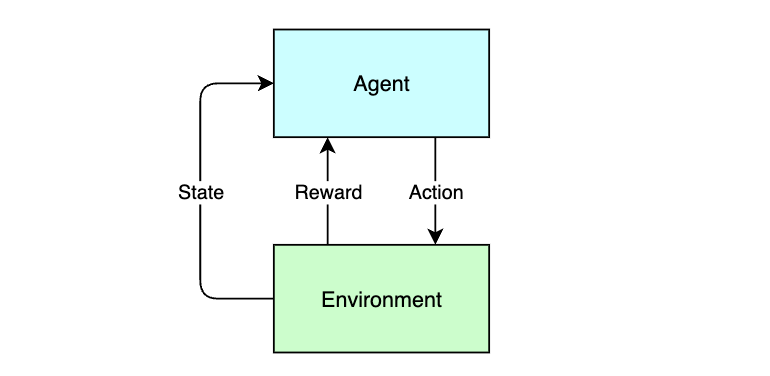
Intelligence as an emergent property of Reinforcement Learning (RL)Reinforcement Learning (RL) has been successfully used in the past by Google&aposs DeepMind team to build highly intelligent and specialized systems where intelligence is observed as an emergent property through rewards-based training approach that yielded achievements like AlphaGo (see my post on it here - AlphaGo: a journey to machine intuition).DeepMind went on to build a series of Alpha* projects that achieved many notable feats using RL:
  • AlphaGo, defeated the world champion Lee Seedol in the game of Go
  • AlphaZero, a generalized system that learned to play games such as Chess, Shogi and Go without human input
  • AlphaStar, achieved high performance in the complex real-time strategy game StarCraft II.
  • AlphaFold, a tool for predicting protein structures which significantly advanced computational biology.
  • AlphaCode, a model designed to generate computer programs, performing competitively in coding challenges.
  • AlphaDev, a system developed to discover novel algorithms, notably optimizing sorting algorithms beyond human-derived methods.
All of these systems achieved mastery in its own area through self-training/self-play and by optimizing and maximizing the cumulative reward over time by interacting with its environment where intelligence was observed as an emergent property of the system.
DeepSeek-R1, at the cusp of an open revolutionThe RL feedback loop
RL mimics the process through which a baby would learn to walk, through trial, error and first principles.

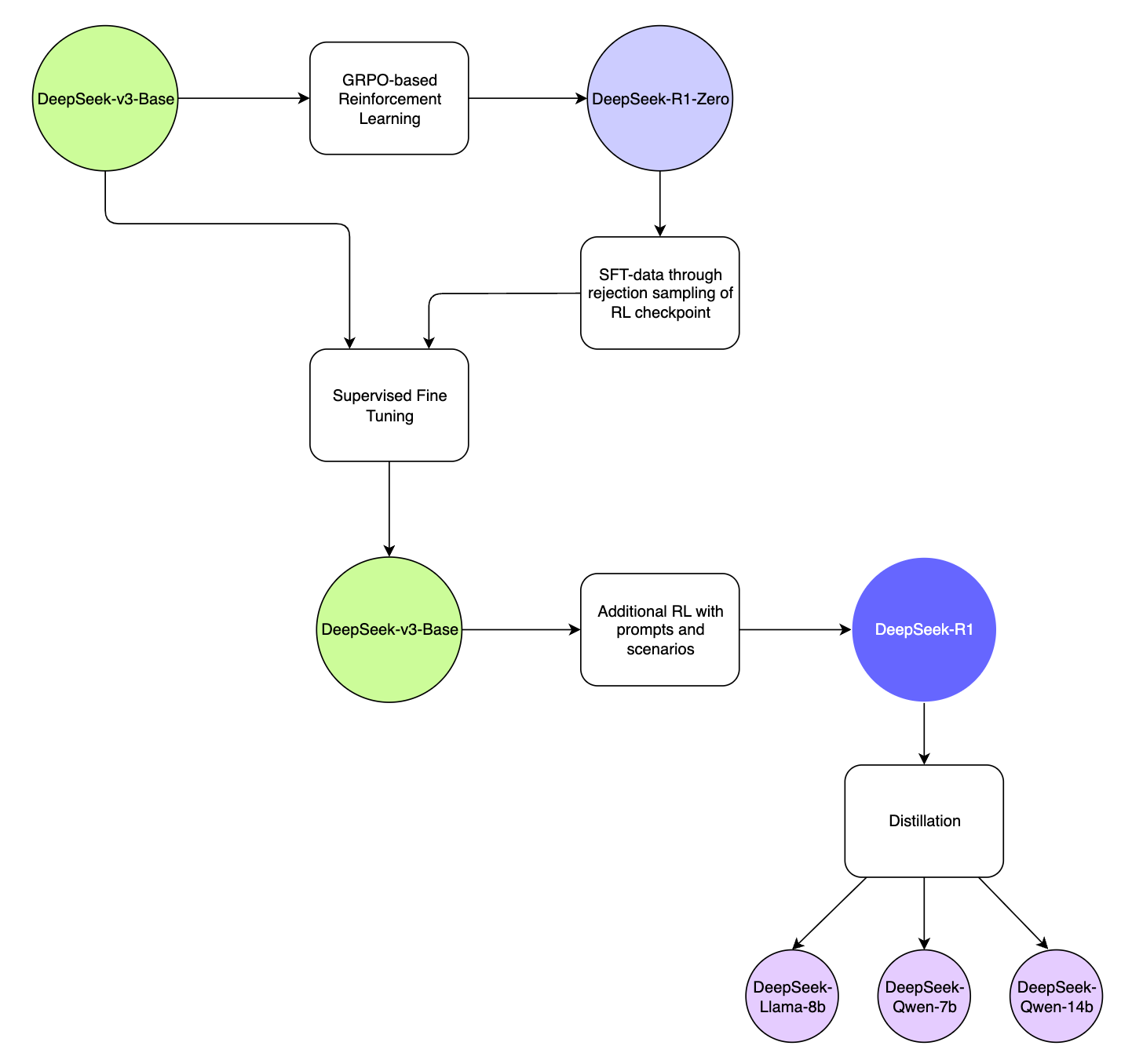
R1 model training pipelineAt a technical level, DeepSeek-R1 leverages a combination of Reinforcement Learning (RL) and Supervised Fine-Tuning (SFT) for its training pipeline:
DeepSeek-R1, at the cusp of an open revolutionDeepSeek-R1 Model Training Pipeline
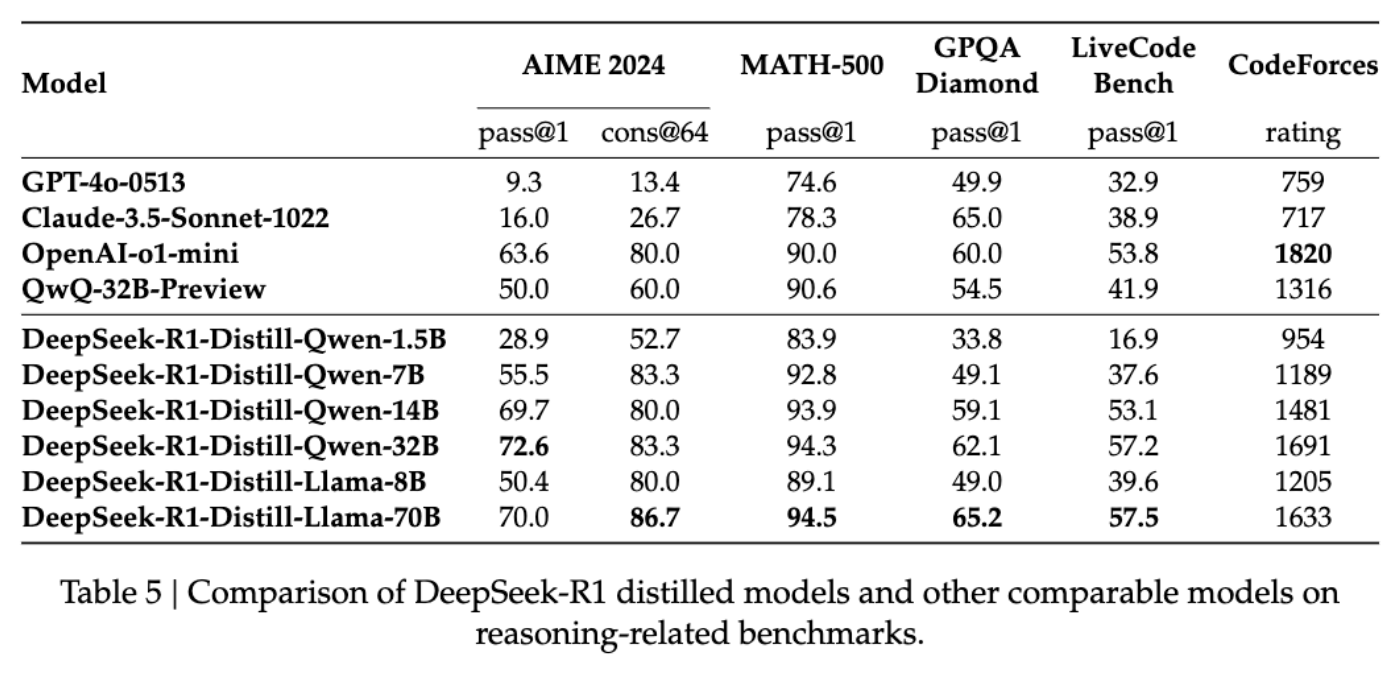
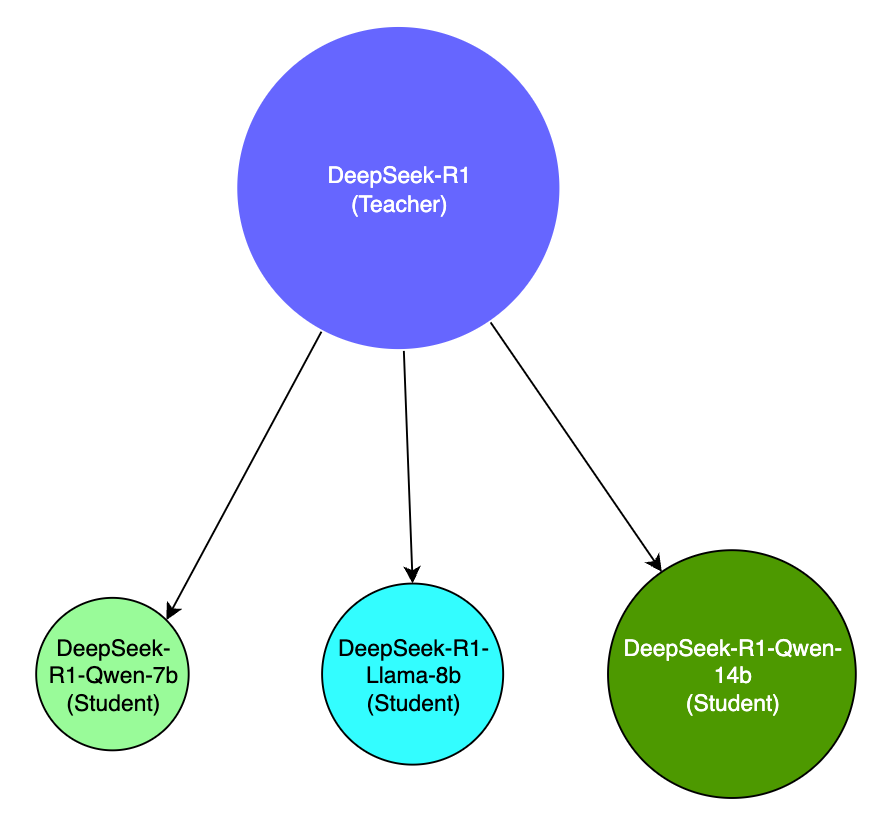
Using RL and DeepSeek-v3, an interim reasoning model was built, called DeepSeek-R1-Zero, purely based on RL without relying on SFT, which demonstrated superior reasoning capabilities that matched the performance of OpenAI&aposs o1 in certain benchmarks such as AIME 2024.The model was however affected by poor readability and language-mixing and is only an interim-reasoning model built on RL principles and self-evolution.DeepSeek-R1-Zero was then used to generate SFT data, which was combined with supervised data from DeepSeek-v3 to re-train the DeepSeek-v3-Base model.The new DeepSeek-v3-Base model then underwent additional RL with prompts and scenarios to come up with the DeepSeek-R1 model.The R1-model was then used to distill a number of smaller open source models such as Llama-8b, Qwen-7b, 14b which outperformed bigger models by a large margin, effectively making the smaller models more accessible and usable.

Key contributions of DeepSeek-R1
  1. RL without the need for SFT for emergent reasoning capabilities
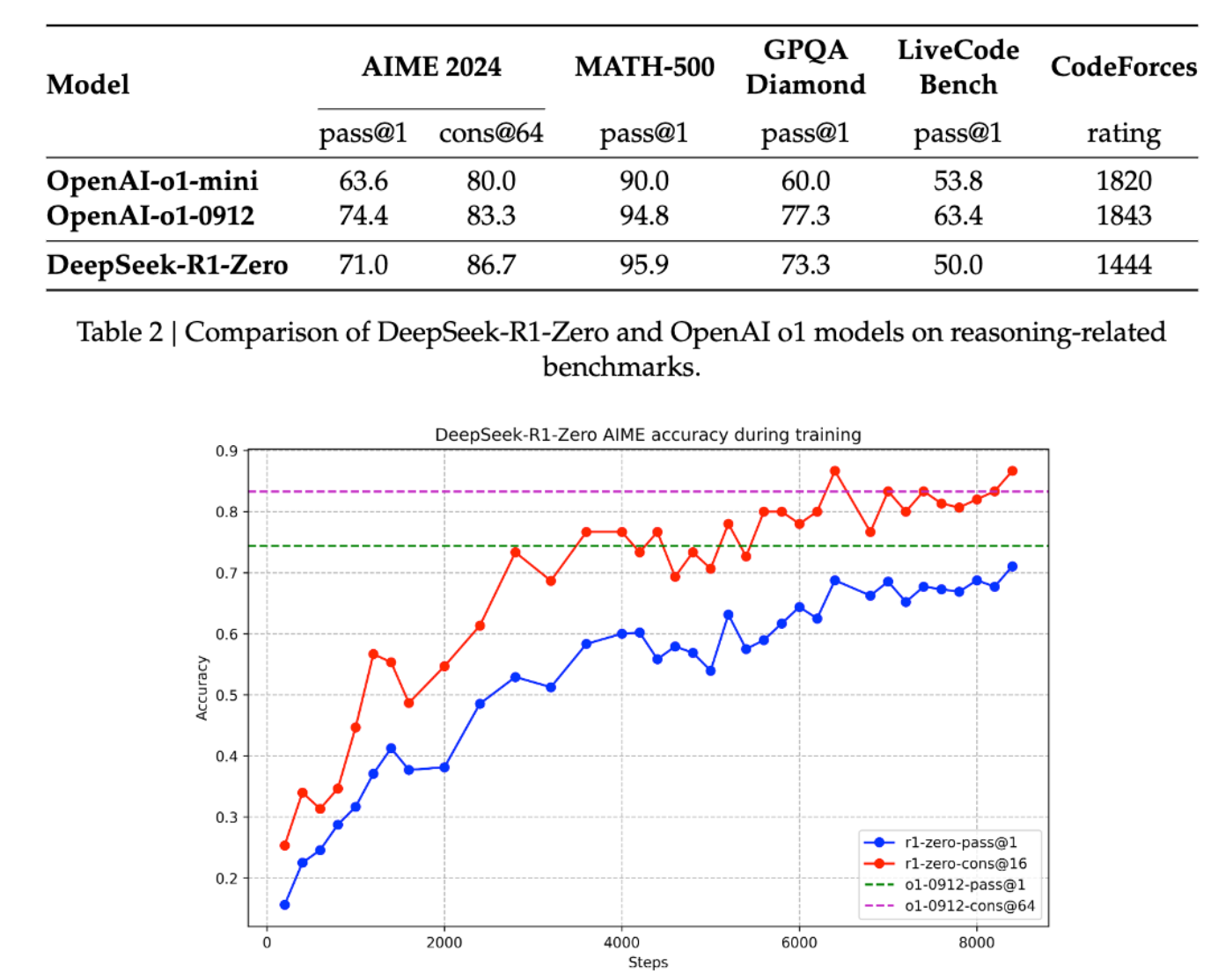
R1 was the first open research project to validate the efficacy of RL directly on the base model without relying on SFT as a first step, which resulted in the model developing advanced reasoning capabilities purely through self-reflection and self-verification.Although, it did degrade in its language capabilities during the process, its Chain-of-Thought (CoT) capabilities for solving complex problems was later used for further RL on the DeepSeek-v3-Base model which became R1. This is a significant contribution back to the research community.The below analysis of DeepSeek-R1-Zero and OpenAI o1-0912 shows that it is viable to attain robust reasoning capabilities purely through RL alone, which can be further augmented with other techniques to deliver even better reasoning performance.
DeepSeek-R1, at the cusp of an open revolutionSource: https://github.com/deepseek-ai/DeepSeek-R1
Its quite interesting, that the application of RL gives rise to seemingly human capabilities of "reflection", and arriving at "aha" moments, causing it to pause, ponder and focus on a specific aspect of the problem, resulting in emergent capabilities to problem-solve as humans do.
  1. Model distillation
DeepSeek-R1 also demonstrated that larger models can be distilled into smaller models which makes advanced capabilities accessible to resource-constrained environments, such as your laptop. While its not possible to run a 671b model on a stock laptop, you can still run a distilled 14b model that is distilled from the larger model which still performs better than most publicly available models out there. This enables intelligence to be brought closer to the edge, to allow faster inference at the point of experience (such as on a smartphone, or on a Raspberry Pi), which paves way for more use cases and possibilities for innovation.
DeepSeek-R1, at the cusp of an open revolutionSource: https://github.com/deepseek-ai/DeepSeek-R1
Distilled models are very different to R1, which is a massive model with a completely different model architecture than the distilled variants, and so are not directly comparable in terms of capability, but are instead built to be more smaller and efficient for more constrained environments. This technique of being able to distill a larger model&aposs capabilities down to a smaller model for portability, accessibility, speed, and cost will bring about a lot of possibilities for applying artificial intelligence in places where it would have otherwise not been possible. This is another key contribution of this technology from DeepSeek, which I believe has even further potential for democratization and accessibility of AI.
DeepSeek-R1, at the cusp of an open revolution

Why is this moment so significant?DeepSeek-R1 was a pivotal contribution in many ways.
  1. The contributions to the state-of-the-art and the open research helps move the field forward where everybody benefits, not just a few highly funded AI labs building the next billion dollar model.
  2. Open-sourcing and making the model freely available follows an asymmetric strategy to the prevailing closed nature of much of the model-sphere of the larger players. DeepSeek should be commended for making their contributions free and open.
  3. It reminds us that its not just a one-horse race, and it incentivizes competition, which has already resulted in OpenAI o3-mini a cost-effective reasoning model which now shows the Chain-of-Thought reasoning. Competition is a good thing.
  4. We stand at the cusp of an explosion of small-models that are hyper-specialized, and optimized for a specific use case that can be trained and deployed cheaply for solving problems at the edge. It raises a lot of exciting possibilities and is why DeepSeek-R1 is one of the most pivotal moments of tech history.
Truly exciting times. What will you build?

31 January 2025

Russell Coker: Links January 2025

Aaron Quigley s Everything Open lecture about Intelligent Interfaces is one of the most interesting research reports I ve seen in a long time [1]. This one can be understood and appreciated by people who don t have a strong background in computer science. Statites (satellites that don t orbit the sun but use solar sails to hover in place) could be used to catch up to interstellar objects [2]. Slashgear has an interesting article about an AI piloted F16 beating a human piloted F16 [3]. Given the serious handicaps of flying a plane designed for humans and flying to minimise risk to itself and other crewed aircraft this is a serious victory. Hopefully crewed military aircraft will be obsolete soon. Amusing video about the performance of cats with MMORPG style descriptions [4]. John Goerzen wrote an interesting blog post about censorship and the changes to Facebook [5]. Ron Garret wrote an interesting blog post 15 years ago when going through what he now describes as an existential crisis [6]. A comment on Ron s post is references Alan Crowe s blog post about whether the self exists which is an interesting philosophical post [7]. But I m still going to think of myself as a person. Another comment on Ron s post references Aaron Swartz blog post about Noam Chomsky etc [8]. I have to watch Manufacturing Consent: Noam Chomsky and the Media. Ron Garret wrote an interesting blog post about his failed attempts to start a company and how it all worked out well for him any way [9]. Amusing video about a failed crowdfunded e-bike [10]. Cory Doctorow wrote an insightful article about how Enshittification is not caused by VCs but by lack of controls [11].

Divine Attah-Ohiemi: Seeking Opportunities: Building a Career in Software Engineering and Beyond

My journey in CS has always been driven by curiosity, determination, and a deep love for understanding software solutions at its tiniest, most complex levels. Taking ALX Africa Software Engineer track after High school was where it all started for me. During the 1-year intensive bootcamp, I delved into the intricacies of Linux programming and low-level programming with C, which solidified my foundational knowledge. This experience not only enhanced my technical skills but also taught me the importance of adaptability and self-directed learning. I discovered how to approach challenges with curiosity, igniting a passion for exploring software solutions in their most intricate forms. Each module pushed me to think critically and creatively, transforming my understanding of technology and its capabilities. Let s just say that I have always been drawn to asking, How does this happen?" And I just go on and on until I find an answer eventually and sometimes I don t but that s okay. That curiosity, combined with a deep commitment to learning, has guided my journey. Debian Webmaster My drive has led me to get involved in open-source contributions, where I can put my knowledge to the test while helping my community. Engaging with real-world experts and learning from my mistakes has been invaluable. One of the highlights of this journey was joining the Debian Webmasters team as an intern through Outreachy. Here, I have the honor of working on redesigning and migrating the old Debian webpages to make them more user-friendly. This experience not only allows me to apply my skills in a practical setting but also deepens my understanding of collaborative software development. Building My Skills: The Foundation of My Experience Throughout my academic and professional journey, I have taken on many roles that have shaped my skills and prepared me for what s ahead I believe. I am definitely not a one-trick pony, and maybe not completely a jack of all trade either but I am a bit diverse I d like to think. Here are the key roles that have defined my journey so far: Volunteer Developer at Yoris Africa (June 2022 - August 2023) I began my career by volunteering at Yoris, where I collaborated with a talented team to design and build the frontend for a mobile app. My contributions extended beyond just the frontend; I also worked on backend solutions and microservices, gaining hands-on experience in full-stack development. This role was instrumental in shaping my understanding of software architecture, allowing me to contribute meaningfully to projects while learning from experienced developers in a dynamic environment. Freelance Academics Software Developer (September 2023 - October 2024) I freelanced as an academic software developer, where I pitched and developed software solutions for universities in my community. One of my most notable projects was creating a Computer-Based Testing (CBT) software for a medical school, which featured a unique questionnaire and scoring system tailored to their specific needs. This experience not only allowed me to apply my technical skills in a real-world setting but also deepened my understanding of educational software requirements and user experience, ultimately enhancing the learning process for students. Open Source Intern at Debian Webmaster Team (November 2024 -) Perhaps the most transformative experience has been my role as an intern at Debian Webmasters. This opportunity allowed me to delve into the fascinating world of open source. As an intern, I have the chance to work on a project where we are redesigning and migrating the Debian webpages to utilize a new and faster technology: Go templates with Hugo. For a detailed look at the work and progress I made during my internship, as well as information on this project and how to get involved, you can check out the wiki. My ultimate goal with this role is to build a vibrant community for Debian in Africa and, if given the chance, to host a debian-cd mirror for faster installations in my region. You can connect with me through LinkedIn, or X (formerly Twitter), or reach out via email.

29 January 2025

Keith Packard: picolibc-i18n

Internationalization support in Picolibc There are two major internationalization APIs in the C library: locales and iconv. Iconv is an isolated component which only performs charset conversion in ways that don't interact with anything else in the library. Locales affect pretty much every API that deals with strings and covers charset conversion along with a huge range of localized information from character classification to formatting of time, money, people's names, addresses and even standard paper sizes. Picolibc inherits it's implementation of both of these from newlib. Given that embedded applications rarely need advanced functionality from either these APIs, I hadn't spent much time exploring this space. Newlib locale code When run on Cygwin, Newlib's locale support is quite complete as it leverages the underlying Windows locale support. Without Windows support, everything aside from charset conversion and character classification data is stubbed out at the bottom of the stack. Because the implementation can support full locale functionality, the implementation is designed for that, with large data structures and lots of code. Charset conversion and character classification data for locales is all built-in; none of that can be loaded at runtime. There is support for all of the ISO-8859 charsets, three JIS variants, a bunch of Windows code pages and a few other single-byte encodings. One oddity in this code is that when using a JIS locale, wide characters are stored in EUC-JP rather than Unicode. Every other locale uses Unicode. This means APIs like wctype are implemented by mapping the JIS-encoded character to Unicode and then using the underlying Unicode character classification tables. One consequence of this is that there isn't any Unicode to JIS mapping provided as it isn't necessary. When testing the charset conversion and Unicode character classification data, I found numerous minor errors and a couple of pretty significant ones. The JIS conversion code had the most serious issue I found; most of the conversions are in a 2d array which is manually indexed with the wrong value for the length of each row. This led to nearly every translated value being incorrect. The charset conversion tables and Unicode classification data are now generated using python charset support and the standard Unicode data files. In addition, tests have been added which compare Picolibc to the system C library for every supported charset. Newlib iconv code The iconv charset support is completely separate from the locale charset support with a much wider range of supported targets. It also supports loading charset data from files at runtime, which reduces the size of application images. Because the iconv and locale implementations are completely separate, the charset support isn't the same. Iconv supports a lot more charsets, but it doesn't support all of those available to locales. For example, Iconv has Big5 support which locale lacks. Conversely, locale has Shift-JIS support which iconv does not. There's also a difference in how charset names are mapped in the two APIs. The locale code has a small fixed set of aliases, which doesn't include things like US-ASCII or ANSI X3.4. In contrast, the iconv code has an extensive database of charset aliases which are compiled into the library. Picolibc has a few tests for the iconv API which verify charset names and perform some translations. Without an external reference, it's hard to know if the results are correct. POSIX vs C internationalization In addition to including the iconv API, POSIX extends locale support in a couple of ways:
  1. Exposing locale objects via the newlocale, uselocale, duplocale and freelocale APIs.
  2. uselocale sets a per-thread locale, rather than the process-wide locale.
Goals for Picolibc internationalization support For charsets, supporting UTF-8 should cover the bulk of embedded application needs, and even that is probably more than what most applications require. Most (all?) compilers use Unicode for wide character and string constants. That means wchar_t needs to be Unicode in every locale. Aside from charset support, the rest of the locale infrastructure is heavily focused on creating human-consumable strings. I don't think it's a stretch to say that none of this is very useful these days, even for systems with sophisticated user interactions. For picolibc, the cost to provide any of this would be high. Having two completely separate charset conversion datasets makes for a confusing and error-prone experience for developers. Replacing iconv with code that leverages the existing locale support for translating between multi-byte and wide-character representations will save a bunch of source code and improve consistency. Embedded systems can be very sensitive to memory usage, both read-only and read-write. Applications not using internationalization capabilities shouldn't pay a heavy premium even when the library binary is built with support. For the most sensitive targets, the library should be configurable to remove unnecessary functionality. Picolibc needs to be conforming with at least the C language standard, and as much of POSIX as makes sense. Fortunately, the requirements for C are modest as it only includes a few locale-related APIs and doesn't include iconv. Finally, picolibc should test these APIs to make sure they conform with relevant standards, especially character set translation and character classification. The easiest way to do this is to reference another implementation of the same API and compare results. Switching to Unicode for JIS wchar_t This involved ripping the JIS to Unicode translations out of all of the wide character APIs and inserting them into the translations between multi-byte and wide-char representations. The missing Unicode to JIS translation was kludged by iterating over all JIS code points until a matching Unicode value was found. That's an obvious place for a performance improvement, but at least it works. Tiny locale This is a minimal implementation of locales which conforms with the C language standard while providing only charset translation and character classification data. It handles all of the existing charsets, but splits things into three levels
  1. ASCII
  2. UTF-8
  3. Extended, including any or all of: a. ISO 8859 b. Windows code pages and other 8-bit encodings c. JIS (JIS, EUC-JP and Shift-JIS)
When built for ASCII-only, all of the locale support is short-circuited, except for error checking. In addition, support in printf and scanf for wide characters is removed by default (it can be re-enabled with the -Dio-wchar=true meson option). This offers the smallest code size. Because the wctype APIs (e.g. iswupper) are all locale-specific, this mode restricts them to ASCII-only, which means they become wrappers on top of the ctype APIs with added range checking. When built for UTF-8, character classification for wide characters uses tables that provide the full Unicode range. Setlocale now selects between two locales, "C" and "C.UTF-8". Any locale name other than "C" selects the UTF-8 version. If the locale name contains "." or "-", then the rest of the locale name is taken to be a charset name and matched against the list of supported charsets. In this mode, only "us_ascii", "ascii" and "utf-8" are recognized. Because a single byte of a utf-8 string with the high-bit set is not a complete character, all of the ctype APIs in this mode can use the same implementation as the ASCII-only mode. This means the small ctype implementation is available. Calling setlocale(LC_ALL, "C.UTF-8") will allow the application to use the APIs which translate between multi-byte and wide-characters to deal with UTF-8 encoded strings. In addition, scanf and printf can read and write UTF-8 strings into wchar_t strings. Locale names are converted into locale IDs, an enumeration which lists the available locales. Each ID implies a specific charset as that's the only thing which differs between them. This means a locale can be encoded in a few bytes rather than an array of strings. In terms of memory usage, applications not using locales and not using the wctype APIs should see only a small increase in code space. That's due to the wchar_t support added to printf and scanf which need to translate between multi-byte and wide-character representations. There aren't any tables required as ASCII and UTF-8 are directly convertible to Unicode. On ARM-v7m, The added code in printf and scanf add up to about 1kB and another 32 bytes of RAM is used. The big difference when enabling extended charset support is that all of the charset conversion and character classification operations become table driven and dependent on the locale. Depending on the extended charsets supported, these can be quite large. With all of the extended charsets included, this adds an additional 30kB of code and static data and uses another 56 bytes of RAM. There are two known gaps in functionality compared with the newlib code:
  1. Locale strings that encode different locales for different categories. That's nominally required by POSIX as LC_ALL is supposed to return a string sufficient to restore the locale, but the only category which actually matters is LC_CTYPE.
  2. No nl_langinfo support. This would be fairly easy to add, returning appropriate constant values for each parameter.
Tiny locale was merged to picolibc main in this PR Tiny iconv Replacing the bulky newlib iconv code was far easier than swapping locale implementations. Essentially all that iconv does is compute two functions, one which maps from multi-byte to wide-char in one locale and another which maps from wide-char to multi-byte in another locale. Once the JIS locales were fixed to use Unicode, the new iconv implementation was straightforward. POSIX doesn't provide any _l version of mbrtowc or wcrtomb, so using standard C APIs would have been clunky. Instead, the implementation uses the internal APIs to compute the correct charset conversion functions. The entire implementation fits in under 200 lines of code. Tiny iconv is in process in this PR Future directions Right now, both of these new bits of code sit in the source tree parallel to the old versions. I'm not seeing any particular reason to keep the old versions around; they have provided a useful point of comparison in developing the new code, but I don't think they offer any compelling benefits going forward.

Sergio Talens-Oliag: Testing DeepSeek with Ollama and Open WebUI

With all the recent buzz about DeepSeek and its capabilities, I ve decided to give it a try using Ollama and Open WebUI on my work laptop which has an NVIDIA GPU:
$ lspci   grep NVIDIA
0000:01:00.0 3D controller: NVIDIA Corporation GA107GLM [RTX A2000 8GB Laptop GPU]
             (rev a1)
For the installation I initially I looked into the approach suggested on this article, but after reviewing it I decided to go for a docker only approach, as it leaves my system clean and updates are easier.

Step 0: Install dockerI already had it on my machine, so nothing to do here.

Step 1: Install the nvidia-container-toolkit packageAs it is needed to use the NVIDIA GPU with docker I followed the instructions to install the package using apt from the NVIDIA website.

Step 2: Run the Open WebUI container bundled with OllamaI could install ollama directly on linux or run it on docker, but I found out that there is a container with Open WebUI bundled with Ollama, so I decided to use it instead. To start the container I ve executed the following command:
docker run -d \
  -e OLLAMA_HOST="0.0.0.0:11434" -p 127.0.0.1:11434:11434 \
  -p 127.0.0.1:3000:8080 \
  -v ollama:/root/.ollama \
  -v open-webui:/app/backend/data \
  --gpus=all --name open-webui --restart always \
  ghcr.io/open-webui/open-webui:ollama
Once the container is up and running, I can access the Open WebUI on http://localhost:3000/ and the Ollama API on http://localhost:11434/ (I added the OLLAMA_HOST environment variable to be bind the server to all the container IPs, as it is needed to export it to the host).

Step 3: Install DeepSeek-R1 model from Open WebUIAfter creating an admin user on the Open WebUI, I went to the select a model button and asked to download the deepseek-r1 model (at the time of writing this it matches version deepseek-r1:7b, which uses 4.7GB of space). After the download was completed I was able to start chatting with the model on my local machine.

Step 4: Ask a questionThe first question I asked was Can you tell me what is Debian? and the answer I got was:
Debian is one of the most popular Linux distributions used worldwide. It is an
open-source operating system that has been around since 1993 and is known for
its stability, security, and reliability. Debian is widely used in servers, data
centers, and enterprise environments because it provides a robust base platform
with excellent documentation, tools, and community support.
### Key Features of Debian:

1. **History**:
   - Debian started as a project called "Pop!!" (Pootle) led by Lars Knutsen, a
     developer from Denmark.
   - It was initially forked from the Linux distribution Red Hat's RH-Debian to
     gain independence and reduce reliance on Red Hat.

2. **Use Cases**:
   - Debian is commonly used as an operating system for servers due to its
     reliability and ease of use in enterprise environments.
   - It is also used for individual user machines (laptops, desktops) because it
     offers a smooth and stable experience.
   - Debian provides the foundation for many popular derivatives like Ubuntu,
     which are designed for consumer use.

3. **Supported Architectures**:
   - Debian supports all major Linux architectures, including 32-bit and 64-bit
     systems, and runs on a wide range of hardware from old servers to modern
     smartphones.

4. **Package Management**:
   - Debian comes with a robust package management system called **Debian Policy
     Language (DPL)**, which allows users to easily install, update, and manage
     software packages.
   - This makes it easy for users to keep their systems up to date without
     needing to download multiple repositories or deal with version conflicts.

5. **Security Focus**:
   - Debian is known for its strong security practices. It has a reputation for
     being one of the most stable Linux distributions, making it a favorite
     among organizations that prioritize security.
   - The distribution regularly updates its software packages to patch
     vulnerabilities and protect against common attacks.

6. **Compatibility with Servers**:
   - Debian is widely used in data centers because it provides a consistent and
     reliable environment for running servers and applications.
   - Many open-source projects are compatible with Debian, making it an ideal
     choice for developers who want to work on servers or distributed systems.

7. **Popularity**:
   - Debian has a large and active community of users and contributors.
   - It is one of the most widely used Linux distributions in the world, with
     many enterprise organizations relying on it as their primary operating
     system.
### Comparison with Other Distributions:
- **Ubuntu**: Ubuntu is based on Debian but adds graphical user interfaces (like
  Gutsy Gibbon), modern tools (like GIMP and LibreOffice), and integrates with
  Microsoft services.
- **RHEL (Red Hat Enterprise Linux)**: RHEL is a derivative of Red Hat's
  distribution, which forked from Debian. It focuses more heavily on enterprise
  security and support compared to Debian.
### Why Debian?
Debian is popular because:
- It is free and open-source, making it accessible to anyone.
- It provides excellent documentation and tools for system administrators.
- It has a strong focus on stability and reliability.
- It supports a wide range of hardware and software needs.
If you're looking for a reliable and flexible Linux distribution that works well
in both personal and enterprise environments, Debian is an excellent choice.
Haven t tried the same question with ChatGPT, but the History, Package Management and Comparison with Other Distributions sections are hilarious, but they provided me with important data:
  • Now I know that APT is the real Debian Project Leader, what don t know is why we have elections each year ;)
  • Linux Distributions are recursive Debian was a fork of Red Hat, which was a fork of Debian, which was a fork of Red Hat,
As everybody is testing the model I will not talk more about the chat and the results, I just thought that this answer was really funny.

Step 5: Install the DeepSeek Coder and DeepSeek Coder v2 models from Open WebUIAs done before, to download the models I went to the select a model button and asked to download the deepseek-coder and deepseek-coder-v2 models (the default version of version one is said to be really quick and small, while version two is supposed to be better but slower and bigger, so I decided to install both for testing).

Step 6: Integrate Ollama with NeovimSince some months ago I ve been using Github Copilot with Neovim; I don t feel it has been very helpful in the general case, but I wanted to try it and it comes handy when you need to perform repetitive tasks when programming. It seems that there are multiple neovim plugins that support ollama, for now I ve installed and configured the codecompanion plugin on my config.lua file using packer:
require('packer').startup(function()
  [...]
  -- Codecompanion plugin
  use  
    "olimorris/codecompanion.nvim",
    requires =  
      "nvim-lua/plenary.nvim",
      "nvim-treesitter/nvim-treesitter",
     
   
  [...]
end)
[...]
-- --------------------------------
-- BEG: Codecompanion configuration
-- --------------------------------
-- Module setup
local codecompanion = require('codecompanion').setup( 
  adapters =  
    ollama = function()
      return require('codecompanion.adapters').extend('ollama',  
        schema =  
          model =  
            default = 'deepseek-coder-v2:latest',
           
         ,
       )
    end,
   ,
  strategies =  
    chat =   adapter = 'ollama',  ,
    inline =   adapter = 'ollama',  ,
   ,
 )
-- --------------------------------
-- END: Codecompanion configuration
-- --------------------------------
I ve tested it a little bit and it seems to work fine, but I ll have to test it more to see if it is really useful, I ll try to do it on future projects.

ConclusionAt a personal level I don t like nor trust AI systems, but as long as they are treated as tools and not as a magical thing you must trust they have their uses and I m happy to see that open source tools like Ollama and models like DeepSeek available for everyone to use.

28 January 2025

Russ Allbery: Review: Moose Madness

Review: Moose Madness, by Mar Delaney
Publisher: Kalikoi
Copyright: May 2021
ASIN: B094HGT1ZB
Format: Kindle
Pages: 68
Moose Madness is a sapphic shifter romance novella (on the short side for a novella) by the same author as Wolf Country. It was originally published in the anthology Her Wild Soulmate, which appears to be very out of print. Maggie (she hates the nickname Moose) grew up in Moose Point, a tiny fictional highway town in (I think) Alaska. (There is, unsurprisingly, an actual Moose Point in Alaska, but it's a geographic feature and not a small town.) She stayed after graduation and is now a waitress in the Moose Point Pub. She's also a shifter; specifically, she is a moose shifter like her mother, the town mayor. (Her father is a fox shifter.) As the story opens, the annual Moose Madness festival is about to turn the entire town into a blizzard of moose kitsch. Fiona Barton was Maggie's nemesis in high school. She was the cool, popular girl, a red-headed wolf shifter whose friend group teased and bullied awkward and uncoordinated Maggie mercilessly. She was also Maggie's impossible crush, although the very idea seemed laughable. Fi left town after graduation, and Maggie hadn't thought about her for years. Then she walks into Moose Point Pub dressed in biker leathers, with piercings and one side of her head shaved, back in town for a wedding in her pack. Much to the shock of both Maggie and Fi, they realize that they're soulmates as soon as their eyes meet. Now what? If you thought I wasn't going to read the moose and wolf shifter romance once I knew it existed, you do not know me very well. I have been saving it for when I needed something light and fun. It seemed like the right palette cleanser after a very disappointing book. Moose Madness takes place in the same universe as Wolf Country, which means there are secret shifters all over Alaska (and presumably elsewhere) and they have the strong magical version of love at first sight. If one is a shifter, one knows immediately as soon as one locks eyes with one's soulmate and this feeling is never wrong. This is not my favorite romance trope, but if I get moose shifter romance out of it, I'll endure. As you can tell from the setup, this is enemies-to-lovers, but the whole soulmate thing shortcuts the enemies to lovers transition rather abruptly. There's a bit of apologizing and air-clearing at the start, but most of the novella covers the period right after enemies have become lovers and are getting to know each other properly. If you like that part of the arc, you will probably enjoy this, but be warned that it's slight and somewhat obvious. There's a bit of tension from protective parents and annoying pack mates, but it's sorted out quickly and easily. If you want the characters to work for the relationship, this is not the novella for you. It's essentially all vibes. I liked the vibes, though! Maggie is easy to like, and Fi does a solid job apologizing. I wish there was quite a bit more moose than we get, but Delaney captures the combination of apparent awkwardness and raw power of a moose and has a good eye for how beautiful large herbivores can be. This is not the sort of book that gives a moment's thought to wolves being predators and moose being, in at least some sense, prey animals, so if you are expecting that to be a plot point, you will be disappointed. As with Wolf Country, Delaney elides most of the messier and more ethically questionable aspects of sometimes being an animal. This is a sweet, short novella about two well-meaning and fundamentally nice people who are figuring out that middle school and high school are shitty and sometimes horrible but don't need to define the rest of one's life. It's very forgettable, but it made me smile, and it was indeed a good palette cleanser. If you are, like me, the sort of person who immediately thought "oh, I have to read that" as soon as you saw the moose shifter romance, keep your expectations low, but I don't think this will disappoint. If you are not that sort of person, you can safely miss this one. Rating: 6 out of 10

27 January 2025

Sergio Talens-Oliag: Running a Debian Sid on Ubuntu

Although I am a Debian Developer (not very active, BTW) I am using Ubuntu LTS (right now version 24.04.1) on my main machine; it is my work laptop and I was told to keep using Ubuntu on it when it was assigned to me, although I don t believe it is really necessary or justified (I don t need support, I don t provide support to others and I usually test my shell scripts on multiple systems if needed anyway). Initially I kept using Debian Sid on my personal laptop, but I gave it to my oldest son as the one he was using (an old Dell XPS 13) was stolen from him a year ago. I am still using Debian stable on my servers (one at home that also runs LXC containers and another one on an OVH VPS), but I don t have a Debian Sid machine anymore and while I could reinstall my work machine, I ve decided I m going to try to use a system container to run Debian Sid on it. As I want to use a container instead of a VM I ve narrowed my options to lxc or systemd-nspawn (I have docker and podman installed, but I don t believe they are good options for running system containers). As I will want to take snapshots of the container filesystem I ve decided to try incus instead of systemd-nspawn (I already have experience with it and while it works well it has less features than incus).

Installing incusAs this is a personal system where I want to try things, instead of using the packages included with Ubuntu I ve decided to install the ones from the zabbly incus stable repository. To do it I ve executed the following as root:
# Get the zabbly repository GPG key
curl -fsSL https://pkgs.zabbly.com/key.asc -o /etc/apt/keyrings/zabbly.asc
# Create the zabbly-incus-stable.sources file
sh -c 'cat <<EOF > /etc/apt/sources.list.d/zabbly-incus-stable.sources
Enabled: yes
Types: deb
URIs: https://pkgs.zabbly.com/incus/stable
Suites: $(. /etc/os-release && echo $ VERSION_CODENAME )
Components: main
Architectures: $(dpkg --print-architecture)
Signed-By: /etc/apt/keyrings/zabbly.asc
EOF'
Initially I only plan to use the command line tools, so I ve installed the incus and the incus-extra packages, but once things work I ll probably install the incus-ui-canonical package too, at least for testing it:
apt update
apt install incus incus-extra

Adding my personal user to the incus-admin groupTo be able to run incus commands as my personal user I ve added it to the incus-admin group:
sudo adduser "$(id -un)" incus-admin
And I ve logged out and in again of my desktop session to make the changes effective.

Initializing the incus environmentTo configure the incus environment I ve executed the incus admin init command and accepted the defaults for all the questions, as they are good enough for my current use case.

Creating a Debian containerTo create a Debian container I ve used the default debian/trixie image:
incus launch images:debian/trixie debian
This command downloads the image and creates a container named debian using the default profile. The exec command can be used to run a root login shell inside the container:
incus exec debian -- su -l
Instead of exec we can use the shell alias:
incus shell debian
which does the same as the previous command. Inside that shell we can try to update the machine to sid changing the /etc/apt/sources.list file and using apt:
root@debian:~# echo "deb http://deb.debian.org/debian sid main contrib non-free" \
  >/etc/apt/sources.list
root@debian:~# apt update
root@debian:~# apt dist-upgrade
As my machine has docker installed the apt update command fails because the network does not work, to fix it I ve executed the commands of the following section and re-run the apt update and apt dist-upgrade commands.

Making the incusbr0 bridge work with DockerTo avoid problems with docker networking we have to add rules for the incusbr0 bridge to the DOCKER-USER chain as follows:
sudo iptables -I DOCKER-USER -i incusbr0 -j ACCEPT
sudo iptables -I DOCKER-USER -o incusbr0 -m conntrack \
  --ctstate RELATED,ESTABLISHED -j ACCEPT
That makes things work now, but to make things persistent across reboots we need to add them each time the machine boots. As suggested by the incus documentation I ve installed the iptables-persistent package (my command also purges the ufw package, as I was not using it) and saved the current rules when installing:
sudo apt install iptables-persistent --purge

Integrating the DNS resolution of the container with the hostTo make DNS resolution for the ictus containers work from the host I ve followed the incus documentation. To set up things manually I ve run the following:
br="incusbr0";
br_ipv4="$(incus network get "$br" ipv4.address)";
br_domain="$(incus network get "$br" dns.domain)";
dns_address="$ br_ipv4%/* ";
dns_domain="$ br_domain:=incus ";
resolvectl dns "$br" "$ dns_address ";
resolvectl domain "$br" "~$ dns_domain ";
resolvectl dnssec "$br" off;
resolvectl dnsovertls "$br" off;
And to make the changes persistent across reboots I ve created the following service file:
sh -c "cat <<EOF   sudo tee /etc/systemd/system/incus-dns-$ br .service
[Unit]
Description=Incus per-link DNS configuration for $ br 
BindsTo=sys-subsystem-net-devices-$ br .device
After=sys-subsystem-net-devices-$ br .device
[Service]
Type=oneshot
ExecStart=/usr/bin/resolvectl dns $ br  $ dns_address 
ExecStart=/usr/bin/resolvectl domain $ br  ~$ dns_domain 
ExecStart=/usr/bin/resolvectl dnssec $ br  off
ExecStart=/usr/bin/resolvectl dnsovertls $ br  off
ExecStopPost=/usr/bin/resolvectl revert $ br 
RemainAfterExit=yes
[Install]
WantedBy=sys-subsystem-net-devices-$ br .device
EOF"
And enabled it:
sudo systemctl daemon-reload
sudo systemctl enable --now incus-dns-$ br .service
If all goes well the DNS resolution works from the host:
$ host debian.incus
debian.incus has address 10.149.225.121
debian.incus has IPv6 address fd42:1178:afd8:cc2c:216:3eff:fe2b:5cea

Using my host user and home dir inside the containerTo use my host user and home directory inside the container I need to add the user and group to the container. First I ve added my user group with the same GID used on the host:
incus exec debian -- addgroup --gid "$(id --group)" --allow-bad-names \
  "$(id --group --name)"
Once I have the group I ve added the user with the same UID and GID as on the host, without defining a password for it:
incus exec debian -- adduser --uid "$(id --user)" --gid "$(id --group)" \
  --comment "$(getent passwd "$(id --user -name)"   cut -d ':' -f 5)" \
  --no-create-home --disabled-password --allow-bad-names \
  "$(id --user --name)"
Once the user is created we can mount the home directory on the container (we add the shift option to make the container use the same UID and GID as we do on the host):
incus config device add debian home disk source=$HOME path=$HOME shift=true
We have the shell alias to log with the root account, now we can add another one to log into the container using the newly created user:
incus alias add ush "exec @ARGS@ -- su -l $(id --user --name)"
To log into the container as our user now we just need to run:
incus ush debian
To be able to use sudo inside the container we could add our user to the sudo group:
incus exec debian -- adduser "$(id --user --name)" "sudo"
But that requires a password and we don t have one, so instead we are going to add a file to the /etc/sudoers.d directory to allow our user to run sudo without a password:
incus exec debian -- \
  sh -c "echo '$(id --user --name) ALL = NOPASSWD: ALL' /etc/sudoers.d/user"

Accessing the container using sshTo use the container as a real machine and log into it as I do on remote machines I ve installed the openssh-server and authorized my laptop public key to log into my laptop (as we are mounting the home directory from the host that allows us to log in without password from the local machine). Also, to be able to run X11 applications from the container I ve adusted the $HOME/.ssh/config file to always forward X11 (option ForwardX11 yes for Host debian.incus) and installed the xauth package. After that I can log into the container running the command ssh debian.incus and start using it after installing other interesting tools like neovim, rsync, tmux, etc.

Taking snapshots of the containerAs this is a system container we can take snapshots of it using the incus snapshot command; that can be specially useful to take snapshots before doing a dist-upgrade so we can rollback if something goes wrong. To work with container snapshots we run use the incus snapshot command, i.e. to create a snapshot we use de create subcommand:
incus snapshot create debian
The snapshot sub commands include options to list the available snapshots, restore a snapshot, delete a snapshot, etc.

ConclusionSince last week I have a terminal running a tmux session on the Debian Sid container with multiple zsh windows open (I ve changed the prompt to be able to notice easily where I am) and it is working as expected. My plan now is to add some packages and use the container for personal projects so I can work on a Debian Sid system without having to reinstall my work machine. I ll probably write more about it in the future, but for now, I m happy with the results.

26 January 2025

Otto Kek l inen: 10 habits to help becoming a Debian Maintainer

Featured image of post 10 habits to help becoming a Debian MaintainerBecoming a Debian maintainer is a journey that combines technical expertise, community collaboration, and continuous learning. In this post, I ll share 10 key habits that will both help you navigate the complexities of Debian packaging without getting lost, and also enable you to contribute more effectively to one of the world s largest open source projects.

1. Read and re-read the Debian Policy, the Developer s Reference and the git-buildpackage manual Anyone learning Debian packaging and aspiring to become a Debian maintainer is likely to wade through a lot of documentation, only to realize that much of it is outdated or sometimes outright incorrect. Therefore, it is important to learn right from the start which sources are the most reliable and truly worth reading and re-reading. I recommend these documents, in order of importance:
  • The Debian Policy Manual: Describes the structure of the operating system, the package archive, and requirements for packages to be included in the Debian archive.
  • The Developer s Reference: A collection of best practices and process descriptions Debian packagers are expected to follow while interacting with one another.
  • The git-buildpackage man pages: While the Policy focuses on the end result and is intentionally void of practical instructions on creating or maintaining Debian packages, the Developer s Reference goes into greater detail. However, it too lacks step-by-step instructions. For the exact commands, consult the man pages of git-buildpackage and its subcommands (e.g., gbp clone, gbp import-orig, gbp pq, gbp dch, gbp push). See also my post on Debian source package git branch and tags for an easy to understand diagrams.

2. Make reading man pages a habit In addition to the above, try to make a habit of checking out the man page of every new tool you use to ensure you are using it as intended. The best place to read accurate and up-to-date documentation is manpages.debian.org. The manual pages are maintained alongside the tools by their developers, ensuring greater accuracy than any third-party documentation. If you are using a tool in the way the tool author documented, you can be confident you are doing the right thing, even if it wasn t explicitly mentioned in some third-party guide about Debian packaging best practices.

3. Read and write emails While members of the Debian community have many channels of communication, the mailing lists are by far the most prominent. Asking questions on the appropriate list is a good way to get current advice from other people doing Debian packaging. Staying subscribed to lists of interest is also a good way to read about new developments as they happen. Note that every post is public and archived permanently, so the discussions on the mailing lists also form a body of documentation that can later be searched and referred to. Regularly writing short and well-structured emails on the mailing lists is great practice for improving technical communication skills a useful ability in general. For Debian specifically, being active on mailing lists helps build a reputation that can later attract collaborators and supporters for more complex initiatives.

4. Create and use an OpenPGP key Related to reputation and identity, OpenPGP keys play a central role in the Debian community. OpenPGP is used to various degrees to sign git commits and tags, sign and encrypt email, and most importantly to sign Debian packages so their origin can be verified. The process of becoming a Debian Maintainer and eventually a Debian Developer culminates in getting your OpenPGP key included in the Debian keyring, which is used to control who can upload packages into the Debian archive. The earlier you create a key and start using it to gain reputation for that specific key that is used to sign your work, the better. Note that due to a recent schism in the OpenPGP standards working group, it is safest to create an OpenPGP key using GnuPG version 2.2.x (not 2.4.x), or using Sequoia-PGP.

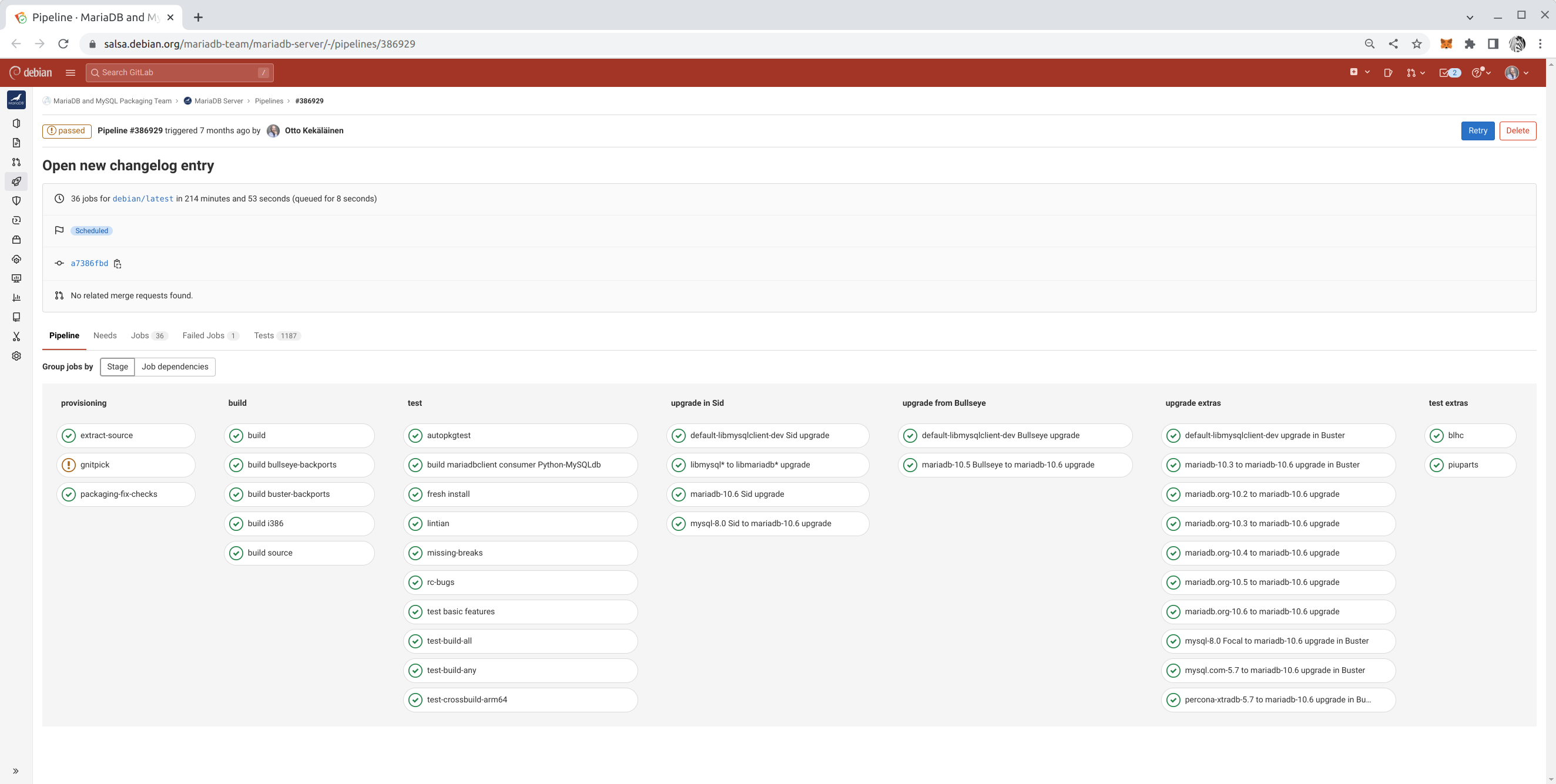
5. Integrate Salsa CI in all work One reason Debian remains popular, even 30 years after its inception, is due to its culture of maintaining high standards. For a newcomer, learning all the quality assurance tools such as Lintian, Piuparts, Adequate, various build variations, and reproducible builds may be overwhelming. However, these tasks are easier to manage thanks to Salsa CI, the continuous integration pipeline in Debian that runs tests on every commit at salsa.debian.org. The earlier you activate Salsa CI in the package repository you are working on, the faster you will achieve high quality in your package with fewer missteps. You can also further customize a package specific salsa-ci.yml to have more testing coverage. Example Salsa CI pipeline with customizations

6. Fork on Salsa and use draft Merge Requests to solicit feedback All modern Debian packages are hosted on salsa.debian.org. If you want to make a change to any package, it is easy to fork, make an initial attempt at the change, and publish it as a draft Merge Request (MR) on Salsa to solicit feedback. People might have surprising reasons to object to the change you propose, or they might need time to get used to the idea before agreeing to it. Also, some people might object to a vague idea out of suspicion but agree once they see the exact implementation. There may also be a surprising number of people supporting your idea, and if there is an MR, they have a place to show their support at. Don t expect every Merge Request to be accepted. However, proposing an idea as running code in an MR is far more effective than raising the idea on a mailing list or in a bug report. Get into the habit of publishing plenty of merge requests to solicit feedback and drive discussions toward consensus.

7. Use git rebase frequently Linear git history is much easier to read. The ease of reading git log and git blame output is vital in Debian, where packages often have updates from multiple people spanning many years even decades. Debian packagers likely spend more time than the average software developer reading git history. Make sure you master git commands such as gitk --all, git citool --amend, git commit -a --fixup <commit id>, git rebase -i --autosquash <target branch>, git cherry-pick <commit id 1> <id 2> <id 3>, and git pull --rebase. If rebasing is not done on your initiative, rest assured others will ask you to do it. Thus, if the commands above are familiar, rebasing will be quick and easy for you.

8. Reviews: give some, get some In open source, the larger a project becomes, the more it attracts contributions, and the bottleneck for its growth isn t how much code developers can create but how much code submissions can be properly reviewed. At the time of writing, the main Salsa group Debian has over 800 open merge requests pending reviews and approvals. Feel free to read and comment on any merge request you find. You don t have to be a subject matter expert to provide valuable feedback. Even if you don t have specific feedback, your comment as another human acknowledging that you read the MR and found no issues is viewed positively by the author. Besides, if you spend enough time reviewing MRs in a specific domain, you will eventually become an expert in it. Code reviews are not just about providing feedback to the submitter; they are also great learning opportunities for the reviewer. As a rule of thumb, you should review at least twice as many merge requests as you submit yourself.

9. Improve Debian by improving upstream It is common that while packaging software for Debian, bugs are uncovered and patched in Debian. Do not forget to submit the fixes upstream, and add a Forwarded field to the file in debian/patches! As the person building and packaging something in Debian, you automatically become an authority on that software, and the upstream is likely glad to receive your improvements. While submitting patches upstream is a bit of work initially, getting improvements merged upstream eventually saves time for everyone and makes packaging in Debian easier, as there will be fewer patches to maintain with each new upstream release.

10. Don t hold any habits too firmly Last but not least: Once people learn a specific way of working, they tend to stick to it for decades. Learning how to create and maintain Debian packages requires significant effort, and people tend to stop learning once they feel they ve reached a sufficient level. This tendency to get stuck in a local optimum is understandable and natural, but try to resist it. It is likely that better techniques will evolve over time, so stay humble and re-evaluate your beliefs and practices every few years. Mastering these habits takes time, but each small step brings you closer to making a meaningful impact on Debian. By staying curious, collaborative, and adaptable, you can ensure your contributions stand the test of time just like Debian itself. Good luck on your journey toward becoming a Debian Maintainer!

25 January 2025

Bits from Debian: Infomaniak Platinum Sponsor of DebConf25

infomaniaklogo We are pleased to announce that Infomaniak has committed to sponsor DebConf25 as a Platinum Sponsor. Infomaniak is Switzerland s leading developer of Web technologies. With operations all over Europe and based exclusively in Switzerland, the company designs and manages its own data centers powered by 100% renewable energy, and develops all its solutions locally, without outsourcing. With millions of users and the trust of public and private organizations across Europe - such as RTBF, the United Nations, central banks, over 3,000 radio and TV stations, as well as numerous cities and security bodies - Infomaniak stands for sovereign, sustainable and independent digital technology. The company offers a complete suite of collaborative tools, cloud hosting, streaming, marketing and events solutions, while being owned by its employees and self-financed exclusively by its customers. With this commitment as Platinum Sponsor, Infomaniak is contributing to the Debian annual Developers' conference, directly supporting the progress of Debian and Free Software. Infomaniak contributes to strengthen the community that collaborates on Debian projects from all around the world throughout all of the year. Thank you very much, Infomaniak, for your support of DebConf25! Become a sponsor too! DebConf25 will take place from 14th to July 20th 2025 in Brest, France, and will be preceded by DebCamp, from 7th to 13th July 2025. DebConf25 is accepting sponsors! Interested companies and organizations should contact the DebConf team through sponsors@debconf.org, or visit the DebConf25 website at https://debconf25.debconf.org/sponsors/become-a-sponsor/.

24 January 2025

Sam Hartman: Feeling Targeted: Executive Order Ending Wasteful DEIA Efforts

As most here know, I m totally blind. One of my roles involves a contract for the US Government, under which I have a government email account. The department recently received a message talking about our work to end, to the maximum extend permitted by law, all diversity, equity, inclusion, and accessibility efforts in the government in accordance with the recently signed executive order. We are all reminded that if we timely identify the contracts and positions that are related to these efforts, there will be no consequences. There are a lot of times in my life when I have felt marginalized frustrated and angry that people weren t interested in working with me to make the small changes that would help me fit in. As an example with this government job, I asked to have access to a screen reader so that I could use my computer. My preferred adaptive software was not approved, even though it was thousands of dollars cheaper than the option the government wanted and could have been installed instantly rather than waiting for a multi-week ordering process. When the screen reader eventually became available, the government-provided installer was not accessible: a blind person could not use it. When I asked for help, the government added an additional multi-week delay because they weren t sure that the license management technology for the software they had chosen met the government s security and privacy policies. Which is to say that even with people actively working toward accessibility, sharing a commitment that accessibility is important, we have a lot of work to do. I feel very targeted at the current time. Now we are removing as many of the resources that help me be effective and feel welcome as we can. Talking about the lack of consequences now is just a way to remind everyone that there will be consequences later and get the fear going. The witch hunt is coming, and if people do a good enough job of turning in all the people who could help me feel welcome, they won t face consequences. Yes, I understand that the Americans with Disabilities act is still law, but its effectiveness will be very different in a climate where you need to eliminate accessibility positions to avoid consequences than in a climate where accessibility is a goal.

comment count unavailable comments

20 January 2025

Divine Attah-Ohiemi: Progress Report: First Half of My Outreachy Internship

Hello everyone!, I m excited to share a progress report on my Outreachy internship with the Debian community. As I reach the halfway point of this journey, I want to reflect on what I ve accomplished so far and outline my modified goals for the second half of the internship. In truth, there wasn t a strict timeline for my project migrating Debian webpage content to Hugo because the original repository contained thousands of pages. The initial goal was to develop a proof of concept for: Thanks to our daily standups, where we brainstorm and revise contributions, we ve made significant progress. The wiki documentation discussing the technical decisions taken to meet these goals is currently in progress here. During the first half of my internship, I have improved and refined my skills in several areas. I learned new Markdown syntaxes, studied and utilized Apache's mod_rewrite, and halfway studied GNU Make to use Perl scripts for processing data for dynamic content. I recommend Managing Projects with GNU Make by Robert Mecklenburg it's a great book for beginners! While I didn t get stuck on any particular goal, the most challenging aspect was adding Hugo aliases to help with Apache's multilingual content negotiation. The way the webwml repository generates multilingual content differs from debianhugo. For instance, in webwml, the structure looks like this: english/index.wml -> /index.en.html (with a symlink from index.html to index.en.html) and french/index.wml -> /index.fr.html. In contrast, debianhugo uses en/_index.md -> /index.html and fr/_index.md -> /fr/index.html. Apache's multilingual content negotiation checks for index.<user preferred lang code>.html in the current directory, which works well with webwml since all related translations are generated in the same directory. However, with debianhugo using subdirectories for languages other than English, we had to set up aliases for every other language page to be generated in the frontmatter. For example, in fr/_index.md, we added this to the front matter:
...
aliases:
  - /index.fr.html
...
This setup allows Hugo to generate multilingual HTML files in the initial home directory solely for the purpose of setting up a 301 redirect to the same page in the language subdirectory. However, if the client sets their preferred language to English, Apache content negotiation tries to find /index.en.html. If it doesn t find it, it defaults to any other language-suffixed file, which can lead to unexpected behavior. For example, if English is set as the preferred language, accessing the site may serve /index.fr.html, which then redirects to /fr/index.html. This was a significant challenge, and you can see a demo of this hosted here. If I were to start the project over, I would document every decision as I make them in the wiki, no matter how rough the documentation turns out. Waiting until the midpoint of the project to document was not a good idea. As I move into the second half of my internship, the goals we ve set include improving our project wiki documentation and continuing the migration process while enhancing the user experience of complicated sections. I m looking forward to making even more progress and sharing my journey with you all. Happy coding!

Dirk Eddelbuettel: RcppMsgPack 0.2.4 on CRAN: Maintenance

Another maintenance release of RcppMsgPack got onto CRAN today. MessagePack itself is an efficient binary serialization format. It lets you exchange data among multiple languages like JSON. But it is faster and smaller. Small integers are encoded into a single byte, and typical short strings require only one extra byte in addition to the strings themselves. RcppMsgPack brings both the C++ headers of MessagePack as well as clever code (in both R and C++) Travers wrote to access MsgPack-encoded objects directly from R. This is the first release in over six years, and contains mostly maintenance. One somewhat embarassing aspect is that Travers and I forgot about a PR that had been ready all this since the last release, it has now been integrated. Details follow from the NEWS file.

Changes in version 0.2.4 (2025-01-19)
  • Use Rcpp::RawVector instead of std::vector<unsigned char> saving extra copy (Travers in #16)
  • Several updates to README.md with R Journal paper, add badges, add Authors@R, add CITATION file, add repo info to DESCRIPTION
  • Update continuous integration via r-ci
  • Update to no longer require compilation standard

Courtesy of my CRANberries, there is also a diffstat report for this release. For questions, suggestions, or issues please use the [issue tracker][issue tickets] at the GitHub repo.

This post by Dirk Eddelbuettel originated on his Thinking inside the box blog. If you like this or other open-source work I do, you can now sponsor me at GitHub.

19 January 2025

Fran ois Marier: Blocking comment spammers on an Ikiwiki blog

Despite comments on my ikiwiki blog being fully moderated, spammers have been increasingly posting link spam comments on my blog. While I used to use the blogspam plugin, the underlying service was likely retired circa 2017 and its public repositories are all archived. It turns out that there is a relatively simple way to drastically reduce the amount of spam submitted to the moderation queue: ban the datacentre IP addresses that spammers are using.

Looking up AS numbers It all starts by looking at the IP address of a submitted comment: From there, we can look it up using whois:
$ whois -r 2a0b:7140:1:1:5054:ff:fe66:85c5
% This is the RIPE Database query service.
% The objects are in RPSL format.
%
% The RIPE Database is subject to Terms and Conditions.
% See https://docs.db.ripe.net/terms-conditions.html
% Note: this output has been filtered.
%       To receive output for a database update, use the "-B" flag.
% Information related to '2a0b:7140:1::/48'
% Abuse contact for '2a0b:7140:1::/48' is 'abuse@servinga.com'
inet6num:       2a0b:7140:1::/48
netname:        EE-SERVINGA-2022083002
descr:          servinga.com - Estonia
geoloc:         59.4424455 24.7442221
country:        EE
org:            ORG-SG262-RIPE
mnt-domains:    HANNASKE-MNT
admin-c:        CL8090-RIPE
tech-c:         CL8090-RIPE
status:         ASSIGNED
mnt-by:         MNT-SERVINGA
created:        2020-02-18T11:12:49Z
last-modified:  2024-12-04T12:07:26Z
source:         RIPE
% Information related to '2a0b:7140:1::/48AS207408'
route6:         2a0b:7140:1::/48
descr:          servinga.com - Estonia
origin:         AS207408
mnt-by:         MNT-SERVINGA
created:        2020-02-18T11:18:11Z
last-modified:  2024-12-11T23:09:19Z
source:         RIPE
% This query was served by the RIPE Database Query Service version 1.114 (SHETLAND)
The important bit here is this line:
origin:         AS207408
which referts to Autonomous System 207408, owned by a hosting company in Germany called Servinga.

Looking up IP blocks Autonomous Systems are essentially organizations to which IPv4 and IPv6 blocks have been allocated. These allocations can be looked up easily on the command line either using a third-party service:
$ curl -sL https://ip.guide/as207408   jq .routes.v4 >> servinga
$ curl -sL https://ip.guide/as207408   jq .routes.v6 >> servinga
or a local database downloaded from IPtoASN. This is what I ended up with in the case of Servinga:
[
  "45.11.183.0/24",
  "80.77.25.0/24",
  "194.76.227.0/24"
]
[
  "2a0b:7140:1::/48"
]

Preventing comment submission While I do want to eliminate this source of spam, I don't want to block these datacentre IP addresses outright since legitimate users could be using these servers as VPN endpoints or crawlers. I therefore added the following to my Apache config to restrict the CGI endpoint (used only for write operations such as commenting):
<Location /blog.cgi>
        Include /etc/apache2/spammers.include
        Options +ExecCGI
        AddHandler cgi-script .cgi
</Location>
and then put the following in /etc/apache2/spammers.include:
<RequireAll>
    Require all granted
    # https://ipinfo.io/AS207408
    Require not ip 46.11.183.0/24
    Require not ip 80.77.25.0/24
    Require not ip 194.76.227.0/24
    Require not ip 2a0b:7140:1::/48
</RequireAll>
Finally, I can restart the website and commit my changes:
$ apache2ctl configtest && systemctl restart apache2.service
$ git commit -a -m "Ban all IP blocks from Servinga"

Future improvements I will likely automate this process in the future, but at the moment my blog can go for a week without a single spam message (down from dozens every day). It's possible that I've already cut off the worst offenders. I have published the list I am currently using.

18 January 2025

Dominique Dumont: How we solved storage API throttling on our Azure Kubernetes clusters

Hi This issue was quite puzzling, so I m sharing how we investigated this issue. I hope it can be useful for you. My client informed me that he was no longer able to install new instances of his application. k9s showed that only some pods could not be created, only the ones that created physical volume (PV). The description of these pods showed a HTTP error 429 when creating pods: New PVC could not be created because we were throttled by Azure storage API. This issue was confirmed by Azure diagnostic console on Kubernetes ( menu Diagnose and solve problems Cluster and Control Plane Availability and Performance Azure Resource Request Throttling ). We had a lot of throttling:
2025-01-18_11-01-k8s-throttles.png
Which were explained by the high call rate:
2025-01-18_11-01-k8s-calls.png
The first clue was found at the bottom of Azure diagnostic page:
2025-01-18_11-27-throttles-by-user-agent.png
According, to this page, throttling is done by services whose user agent is:
Go/go1.23.1 (amd64-linux) go-autorest/v14.2.1 Azure-SDK-For-Go/v68.0.0
storage/2021-09-01microsoft.com/aks-operat azsdk-go-armcompute/v1.0.0 (go1.22.3; linux)
The main information is Azure-SDK-For-Go, which means the program making all these calls to storage API is written in Go. All our services are written in Typescript or Rust, so they are not suspect. That leaves controllers running in kube-systems namespace. I could not find anything suspects in the logs of these services. At that point I was convinced that a component in Kubernetes control plane was making all those calls. Unfortunately, AKS is managed by Microsoft and I don t have access to the control plane logs. However, we re realized that we had quite a lot of volumesnapshots that are created in our clusters using k8s-scheduled-volume-snapshotter: We suspected that kubernetes reconciliation loop is throttled when checking the status of all these snapshots. May be so, but we also had the same issues and throttle rates on preprod and prod were the number of snapshots were quite different. We tried to get more information using Azure console on our snapshot account, but it was also broken by the throttling issue. We were so puzzled that we decided to try L odagan s advice (tout cr mer pour repartir sur des bases saines, loosely translated as burn everything down to start from scratch ) and we destroyed piece by piece our dev cluster while checking if the throttling stopped. First, we removed all our applications, no change. Then, all ancillary components like rabbitmq, cert-manager were removed, no change. Then, we tried remove the namespace containing our applications. But, we faced another issue: Kubernetes was unable to remove the namespace because it could not destroy some PVC and volumesnapshots. That was actually good news, because it meant that we were close to the actual issue. We managed to destroy the PVC and volumesnapshots by removing their finalizers. Finalizers are some kind of markers that tell kubernetes that something needs to be done before actually deleting a resource. The finalizers were removed with a command like:
kubectl patch volumesnapshots $ volumesnapshot  \
  -p ' \"metadata\": \"finalizers\":null '  --type merge
Then, we got the first progress : the throttling and high call rate stopped on our dev cluster. To make sure that the snapshots were the issue, we re-installed the ancillary components and our applications. Everything was copacetic. So, the problem was indeed with PVC and snapshots. Even though we have backups outside of Azure, we weren t really thrilled at trying L odagan s method on our prod cluster So we looked for a better fix to try on our preprod cluster. Poking around in PVC and volumesnapshots, I finally found this error message in the description on a volumesnapshotcontents:
Code="ShareSnapshotCountExceeded" Message="The total number of snapshots
for the share is over the limit."
The number of snapshots found in our cluster was not that high. So I wanted to check the snapshots present in our storage account using Azure console, which was still broken. Fortunately, Azure CLI is able to retry HTTP calls when getting 429 errors. I managed to get a list of snapshots with
az storage share list --account-name [redacted] --include-snapshots \
      tee preprod-list.json
There, I found a lot of snapshots dating back from 2024. These were no longer managed by Kubernetes and should have been cleaned up. That was our smoking gun. I guess that we had a chain of events like: To make things worse, k8s-scheduled-volume-snapshotter creates new snapshots when it cannot list the old ones. So we had 4 new snapshots per day instead of one. Since we had the chain of events, fixing the issue was not too difficult (but quite long ):
  1. stop k8s-scheduled-volume-snapshotter by disabling its cron job
  2. delete all volumesnapshots and volume snapshots contents from k8s.
  3. since Azure API was throttled, we also had to remove their finalizers
  4. delete all snapshots from azure using az command and a Perl script (this step took several hours)
  5. re-enable k8s-scheduled-volume-snapshotter
After these steps, preprod was back to normal. I m now applying the same recipe on prod. We still don t know why we had all these stale snapshots. It may have been a human error or a bug in k8s-scheduled-volume-snapshotter. Anyway, to avoid this problem is the future, we will: My name is Dominique Dumont, I m a devops freelance. You can find the devops and audit services I propose on my website or reach out to me on LinkedIn. All the best

17 January 2025

Russell Coker: Systemd Hardening and Sending Mail

A feature of systemd is the ability to reduce the access that daemons have to the system. The restrictions include access to certain directories, system calls, capabilities, and more. The systemd.exec(5) man page describes them all [1]. To see an overview of the security of daemons run systemd-analyze security and to get details of one particular daemon run a command like systemd-analyze security mon.service . I created a Debian wiki page for a systemd-analyze security goal [2]. At this time release goals aren t a serious thing for Debian so this won t result in release critical bug reports, but it is still something we can aim for. For a simple daemon (EG BIND, dhcpd, and syslogd) this isn t difficult to do. It might be difficult to understand the implications of some changes (especially when restricting system calls) but you can do some quick tests. The functionality of such programs has a limited scope and once you get it basically working it s done. For some daemons it s harder. Network-Manager is one of the well known slightly more difficult cases as it could do things like starting a VPN connection. The larger scope and the use of plugins makes it difficult to test the combinations. The systemd restrictions apply to child processes too unlike restrictions by SE Linux and AppArmor which permit a child process to run in a different security context. The messages when a daemon fails due to systemd restrictions are usually unclear which makes things harder to setup and makes it more important to get it right. My mon package (which I forked upstream as etbe-mon [3] is one of the difficult daemons as local test can involve probing large parts of the system. But I have got that working reasonably well for most cases. I have a bug report about running mon with Exim [4]. The problem with this is that Exim has a single process model which means that the process doing local delivery can be a child of the process that initially received the message. So the main mon process needs all the access for delivering mail (writing to /home etc). This also means that every other child of mon will get such access including programs that receive untrusted data from the Internet. Most of the extra access needed by Exim is not a problem, but /home access is a potential risk. It also means that more effort is needed when reviewing the access control. The problem with this Exim design is that it applies to many daemons. Every daemon that sends email or that potentially could send email in some configuration needs extra access to be granted. Can Exim be configured to have it s sendmail -T type operation just write a file in a spool directory for another program to process? Do we need to grant permissions to most of the system just for Exim?

16 January 2025

Sergio Talens-Oliag: Command line tools to process templates

I ve always been a fan of template engines that work with text files, mainly to work with static site generators, but also to generate code, configuration files, and other text-based files. For my own web projects I used to go with Jinja2, as all my projects were written in Python, while for static web sites I used the template engines included with the tools I was using, i.e. Liquid with Jekyll and Go Templates (based on the text/template and the html/template go packages) for Hugo. When I needed to generate code snippets or configuration files from shell scripts I used to go with sed and/or envsubst, but lately things got complicated and I started to use a command line application called tmpl that uses the Go Template Language with functions from the Sprig library.

tmplI ve been using my fork of the tmpl program to process templates on CI/CD pipelines (gitlab-ci) to generate configuration files and code snippets because it uses the same syntax used by helm (easier to use by other DevOps already familiar with the format) and the binary is small and can be easily included into the docker images used by the pipeline jobs. One interesting feature of the tmpl tool is that it can read values from command line arguments and from multiple files in different formats (YAML, JSON, TOML, etc) and merge them into a single object that can be used to render the templates. There are alternatives to the tmpl tool and I ve looked at them (i.e. simple ones like go-template-cli or complex ones like gomplate), but I haven t found one that fits my needs. For my next project I plan to evaluate a move to a different tool or template format, as tmpl is not being actively maintained (as I said, I m using my own fork) and it is not included on existing GNU/Linux distributions (I packaged it for Debian and Alpine, but I don t want to maintain something like that without an active community and I m not interested in being the upstream myself, as I m trying to move to Rust instead of Go as the compiled programming language for my projects).

Mini JinjaLooking for alternate tools to process templates on the command line I found the minijinja rust crate, a minimal implementation of the Jinja2 template engine that also includes a small command line utility (minijinja-cli) and I believe I ll give it a try on the future for various reasons:
  • I m already familiar with the Jinja2 syntax and it is widely used on the industry.
  • On my code I can use the original Jinja2 module for Python projects and MiniJinja for Rust programs.
  • The included command line utility is small and easy to use, and the binaries distributed by the project are good enough to add them to the docker container images used by CI/CD pipelines.
  • As I want to move to Rust I can try to add functionalities to the existing command line client or create my own version of it if they are needed (don t think so, but who knows).

15 January 2025

Dirk Eddelbuettel: RcppFastFloat 0.0.5 on CRAN: New Upstream, Updates

A new minor release of RcppFastFloat just arrived on CRAN. The package wraps fast_float, another nice library by Daniel Lemire. For details, see the arXiv preprint or published paper showing that one can convert character representations of numbers into floating point at rates at or exceeding one gigabyte per second. This release updates the underlying fast_float library version to the current version 7.0.0, and updates a few packaging aspects.

Changes in version 0.0.5 (2025-01-15)
  • No longer set a compilation standard
  • Updates to continuous integration, badges, URLs, DESCRIPTION
  • Update to fast_float 7.0.0
  • Per CRAN Policy comment-out compiler 'diagnostic ignore' instances

Courtesy of my CRANberries, there is also a diffstat report for this release. For questions, suggestions, or issues please use the [issue tracker][issue tickets] at the GitHub repo.

This post by Dirk Eddelbuettel originated on his Thinking inside the box blog. If you like this or other open-source work I do, you can now sponsor me at GitHub.

14 January 2025

Dirk Eddelbuettel: RProtoBuf 0.4.23 on CRAN: Mulitple Updates

A new maintenance release 0.4.23 of RProtoBuf arrived on CRAN earlier today, about one year after the previous update. RProtoBuf provides R with bindings for the Google Protocol Buffers ( ProtoBuf ) data encoding and serialization library used and released by Google, and deployed very widely in numerous projects as a language and operating-system agnostic protocol. This release brings a number of contributed PRs which are truly appreciate. As the package dates back fifteen+ years, some code corners can be crufty which was addressed in several PRs, as were two updates for ongoing changes / new releases of ProtoBuf itself. I also made the usual changes one does to continuous integrations, README badges and URL as well as correcting one issue the checkbashism script complained about. The following section from the NEWS.Rd file has full details.

Changes in RProtoBuf version 0.4.23 (2022-12-13)
  • More robust tests using toTextFormat() (Xufei Tan in #99 addressing #98)
  • Various standard packaging updates to CI and badges (Dirk)
  • Improvements to string construction in error messages (Michael Chirico in #102 and #103)
  • Accommodate ProtoBuf 26.x and later (Matteo Gianella in #104)
  • Accommodate ProtoBuf 6.30.9 and later (Lev Kandel in #106)
  • Correct bashism issues in configure.ac (Dirk)

Thanks to my CRANberries, there is a diff to the previous release. The RProtoBuf page has copies of the (older) package vignette, the quick overview vignette, and the pre-print of our JSS paper. Questions, comments etc should go to the GitHub issue tracker off the GitHub repo.

This post by Dirk Eddelbuettel originated on his Thinking inside the box blog. If you like this or other open-source work I do, you can sponsor me at GitHub.

12 January 2025

Divine Attah-Ohiemi: My 30-Day Outreachy Experience with the Debian Community

Hey everyone! It s Divine Attah-Ohiemi here, and I m excited to share what I ve been up to in my internship with the Debian community. It s been a month since I began this journey, and if you re thinking about applying for Outreachy, let me give you a glimpse into my project and the amazing people I get to work with. So, what s it like in the Debian community? It s a fantastic mix of folks from all walks of life seasoned developers, curious newbies, and everyone in between. What really stands out is how welcoming everyone is. I m especially thankful to my mentors, Thomas Lange, Carsten Schoenert, and Subin Siby, for their guidance and for always clocking in whenever I have questions. It feels like a big family where you can share your ideas and learn from each other. The commitment to diversity and merit is palpable, making it a great place for anyone eager to jump in and contribute. Now, onto the project! We re working on improving the Debian website by switching from WML (Web Meta Language) to Hugo, a modern static site generator. This change doesn t just make the site faster; it significantly reduces the time it takes to build compared to WML. Plus, it makes it way easier for non-developers to contribute and add pages since the content is built from Markdown files. It s all about enhancing the experience for both new and existing users. My role involves developing a proof of concept for this transition. I m migrating existing pages while ensuring that old links still work, so users won t run into dead ends. It s a bit of a juggling act, but knowing that my work is helping to make Debian more accessible is incredibly rewarding. What gets me most excited is the chance to contribute to a project that s been around for over 20 years! It s an honor to be part of something so significant and to help shape its future. How cool is it to know that what I m doing will impact users around the globe? In the past month, I ve learned a bunch of new things. For instance, I ve been diving into Apache's mod_rewrite to automatically map old multilingual URLs to new ones. This is important since Hugo handles localization differently than WML. I ve also been figuring out how to set up 301 redirects to prevent dead links, which is crucial for a smooth user experience. One of the more confusing parts has been using GNU Make to manage Perl scripts for dynamic pages. It s a bit of a learning curve, but I m tackling it head-on. Each challenge is a chance to grow, and I m here for it! If you re considering applying to the Debian community through Outreachy, I say go for it! There s so much to learn and experience, and you ll be welcomed with open arms. Happy coding, everyone!

Next.

Previous.