Search Results: "andy"

31 March 2010

Francois Marier: "Abusing" git storage

A git repository is primarily intended to store multiple branches of a single program or component. The underlying system however is much more flexible. Here are two ways to add files which are related to the project but outside the normal history.
Storing a single file all by itselfThis intermediate trick allows you to store a single file into a git repository without the file being in any of the branches.

First of all, let's create a new file:
echo "Hi" > message.txt
and store it in git:
git hash-object -w message.txt
b14df6442ea5a1b382985a6549b85d435376c351
At this stage, the file is stored within the git repository but there is no other way to get to it other than using the hash:
git cat-file blob b14df6442ea5a1b382985a6549b85d435376c351
Hi
A good way to point to the stored contents is to use a tag:
git tag message.txt b14df6442ea5a1b382985a6549b85d435376c351
Now you can access your file this way:
git cat-file blob message.txt
Hi
Creating an empty branchAs seen in this git screencast or in the Git Community Book, you can create a branch without a parent or any initial contents:
git symbolic-ref HEAD refs/heads/foo
rm .git/index
git clean -fdx
To finish it off, add what you were planning on storing there and commit it:
git add myfile
git commit -m 'Initial commit'

30 March 2010

David Bremner: Distributed Issue Tracking with Git

I'm thinking about distributed issue tracking systems that play nice with git. I don't care about other version control systems anymore :). I also prefer command line interfaces, because as commentators on the blog have mentioned, I'm a Luddite (in the imprecise, slang sense). So far I have found a few projects, and tried to guess how much of a going concern they are. Git Specific VCS Agnostic Sortof VCS Agnostic

David Welton: Where Tcl and Tk Went Wrong

I've been pondering this subject for a while, and I think I'm finally ready to write about it.
Tcl was, for many years, my go-to language of choice. It's still near and dear to me in many ways, and I even worked on a portion of a book about it ( http://journal.dedasys.com/2009/09/15/tcl-and-the-tk-toolkit-2nd-edition ). However, examining what "went wrong" is quite interesting, if one attempts, as much as possible, a dispassionate, analytical approach that aims to gain knowledge, rather than assign blame or paper over real defects with a rose-colored vision of things. It has made me consider, and learn, about a variety of aspects of the software industry, such as economics and marketing, that I had not previously been interested in. Indeed, my thesis is that Tcl and Tk's problems primarily stem from economic and marketing (human) factors, rather than any serious defects with the technology itself. Before we go further, I want to say that Tcl is not "dying". It is still a very widely used language, with a lot of code in production, and, importantly, a healthy, diverse, and highly talented core team that is dedicated to maintaining and improving the code. That said, since its "heyday" in the late 90ies, it has not ... "thrived", I guess we can say. I would also like to state that "hindsight is 20-20" - it's easy to criticize after the fact, and not nearly so easy to do the right thing in the right moment. This was one reason why I was reticent to write this article. Let me repeat that I am writing it not out of malice or frustration (I went through a "frustrated" phase, but that's in the past), but because at this point I think it's a genuinely interesting "case history" of a the rise and gentle decline of a widely used software system, and that there is a lot to be learned. At the height of its popularity, Tcl was up there with Perl, which was the scripting language in those days. Perl, Tcl, and Python were often mentioned together. Ruby existed, but was virtually unknown outside of Japan. PHP was on the rise, but still hadn't really come into its own. Lua hadn't really carved out a niche for itself yet, either. Tcl is no longer one of the popular languages, these days, so to say it hasn't had problems is to bury one's head in the sand: it has fallen in terms of popularity. To examine what went wrong, we should probably start off with what went right: These features led to Tcl being widely used, from Cisco routers to advanced television graphics generation programs to the AOLserver web server, which was busy serving out large quantities of dynamic web pages when many of us were still fiddling around with comparatively slow and clunky CGI programs in Perl. Note also that there have been a lot of cool things to have gone into Tcl in the mean time. It has a lot of impressive features; many more than most people realize, and has had a lot of them for a while. Check out http://www.tcl.tk to learn more about the "good stuff". But that's not the point of this article... There was a healthy, active community of developers producing lots of interesting add-ons for the language, and working on the language itself. This culminated in its adoption by Sun Microsystems, which hired the language's creator, Dr. John Ousterhout, and a team of people, who added a lot of great features to the language. Quoting from Ousterhout's history of Tcl page:

The additional resources provided by Sun allowed us to make major improvements to Tcl and Tk. Scott Stanton and Ray Johnson ported Tcl and Tk to Windows and the Macintosh, so that Tcl became an outstanding cross-platform development environment; Windows quickly came to be the most common platform. Jacob Levy and Scott Stanton overhauled the I/O system and added socket support, so that Tcl could easily be used for a variety of network applications. Brian Lewis built a bytecode compiler for Tcl scripts, which provided speedups of as much as a factor of 10x. Jacob Levy implemented Safe-Tcl, a powerful security model that allows untrusted scripts to be evaluated safely. Jacob Levy and Laurent Demailly built a Tcl plugin, so that Tcl scripts can be evaluated in a Web browser, and we created Jacl and TclBlend, which allow Tcl and Java to work closely together. We added many other smaller improvements, such as dynamic loading, namespaces, time and date support, binary I/O, additional file manipulation commands, and an improved font mechanism. Unfortunately, after several years, Sun decided that they wanted to promote one and only one language. And that language was Java. So Ousterhout and many people from his team decamped to a startup that Ousterhout founded, called Scriptics, where the Tcl and Tk innovations continued:

In 1998, Scriptics made several patch releases for Tcl 8.0 to fix bugs and add small new features, such as a better support for the [incr Tcl] extension. In April 1999, Scriptics made its first major open source release, Tcl/Tk 8.1. This release added Unicode support (for internationalization), thread safety (for multi-threaded server applications), and an all-new regular expression package by Henry Spencer that included many new features as well as Unicode support.
However, as many a company based around open source was to find later, it's a tough space to be in. Scriptics changed its name to Ajuba, and was eventually sold (at a healthy profit, apparently, making it a relative dot com success story, all in all) to Interwoven, for the "B2B" technology that Ajuba had developed. Interwoven was not interested in Tcl, particularly, so, to create a system for the ongoing development and governance of the language, the "Tcl Core Team" was created. This was something of a blow to Tcl, but certainly not fatal: Perl, Python, Ruby, PHP, Lua have all had some paid corporate support, but it has by no means been constant, or included large teams. At the same time in the late 90ies, open source was really starting to take off in general. Programmers were making all kinds of progress, and had begun to make Linux into what is today the world's most widely used server platform, and laying the groundwork for the KDE and Gnome desktops. While these may still not be widely used, they are for the most part very polished systems, and leaps and bounds better than what passed for the 'Unix desktop' experience in the 90ies. One of the key bits of work that was added to Tk was to make it look pretty good on Microsoft Windows systems. This was in an time when the "enterprisey" folks were turning away from Unix in the form of AIX, Solaris, HPUX, et al. and taking up NT as the platform of choice, so it was in some ways sensible to make Tk work well there, and in any case as a cross platform GUI toolkit, it ought to work well there in any case. And, on the Unix side, Tk emulated the expensive, professional Motif look and feel that serious Unix programmers used. What could go wrong? As Gnome and KDE continued to mature, though, what would become one of Tk's major (in my opinion) marketing blunders took root. I have it on good authority, from someone who was there in the office, that the Scriptics guys working on Tcl and Tk viewed Gnome and KDE (and the Gtk and Qt toolkits) as not really worth their while. To be fair, since Tk has always been under a liberal BSD style license, the Qt toolkit has always been "off limits". Still, though, the attitude was that Tk was a standalone system, and since it ran on pretty much any Unix system, it didn't need to bother with Gnome or KDE. Gradually, though, as more and more people used Gnome and KDE exclusively on Linux, the Tk look and feel began to look more and more antiquated, a relic from the 1990ies when Motif (which has since pretty much disappeared) was king. Tk applications started to really stand out by not looking at all like the rest of the operating system. And, while Linux may not be responsible for a vast portion of the world's desktops, it is widely used by developers, who were turned off by the increasingly creaky look of the Tk applications they saw. Tk is and was actually a fairly flexible system, and it would have been possible to tweak the look and feel to make it look a bit better on Linux, without even doing any major work. Maybe not perfect, but certainly better looking. Nothing happened, though. Another problem was that Tk and Tcl made it so easy to create GUIs that anyone could, and did, despite, in many cases, a complete lack of design skills. You can't particularly blame the tools for how they're used, but there was certainly a cultural problem: if you read most of the early Tcl and Tk books, and even many of the modern ones, there are hundreds of pages dedicated to exactly how to use Tk, but few to none explaining even basic user interface concepts, or even admonitions to the user to seek out that knowledge prior to attempting a serious GUI program. The end result is that a lot of Tk programs, besides just looking "old fashioned" had fairly poor user interfaces because they were made by programmers who did not have a UI/design culture. Contrast that with Gnome and KDE, which have made a point of focusing on how to make a good GUI for their systems, complete with guidelines about how applications should behave. It may have taken them some time to get things right, but they have done a lot to try and instill a culture of creating high quality, well-integrated GUI's that are consistent with the system where they run. Lately, there has been a lot of work to update the Tk look and feel, and it has finally started to bear fruit. However, in terms of marketing, the damage has already been done: the image of "old, crufty Tk" has been firmly planted in countless developers' minds, and no amount of facts are going to displace it in the near future. Another problem Tcl faced, as it grew, was the tug-of-war between those wishing to see it small, light, and easy to distribute embedded within some other program, and those wishing it to become a "full-fledged" programming language, with lots of tools for solving every day programs. Unfortunately, that tug of war seems to have left it somewhere in the middle. Lua is probably more popular these days as an embedded language, because it is very small, and very fast, and doesn't have as much "baggage" as Tcl. Meaning, of course, that it doesn't do as much as Tcl either, but for a system where one merely wishes to embed a scripting language, without much 'extra stuff', Tcl's extra functionality is perhaps a burden rather than a bonus. On the other hand, while Perl was happily chugging along with their CPAN system for distributing code, giving users easy access to a huge array of add-on functionality, and Python was building up a "batteries included" distribution, that included a lot of very useful software straight out of the box. Tcl, on the other hand, chose to keep the core distribution smallish, and only lately has got some semblance of a packaging and distribution system, that is, however, run by ActiveState, and is (at least according to a cursory glance at the Tcl'ers wiki), not even fully open source. The lack of a good distribution mechanism, and, in the meantime, eschewing a larger, batteries-included main distribution left Tcl users with a language that, out of the box, did significantly less than the competition. Technically, a Python style "big" distribution would not have been all that difficult, so once again, I think this is a marketing problem: a failure of the Tcl Core Team to observe the "market", assess what users needed, and act on it in a timely manner. Somewhat related to the large Tcl vs small Tcl issue was one particular extension, or extensions to the language that was noticeably absent: a system for writing "object oriented" code. Tcl, at heart, will never be an OO language through and through, like Ruby or Smalltalk, but that doesn't mean that an OO system for it is not a useful way of organizing larger Tcl systems. Indeed, Tcl's syntax is flexible enough that it's possible to write an OO system in Tcl itself, or, optimizing for speed, utilizing the extensive C API in order to create new commands. Over the years, a number of such systems have arisen, the most well-known being "Incr Tcl" (a play on the incr command, which is akin to += 1 in languages like C). However, none of these extensions was ever included with the standard Tcl distribution or somehow "blessed" as the official OO system for Tcl. This meant that a newcomer to Tcl wishing to organize their code according to OO principles had to pick a system to use from several competing options. And of course, newcomers are the least able to judge a complex feature like that in a language, making it a doubly stressful choice. Furthermore, even experienced Tcl programmers who wanted to share their code could not utilize an OO system if they wanted their code to work with just standard Tcl. Also, if their code had a dependancy on some OO system, it would require the user to download not only the extension in question, but the OO system it was built on, which, naturally, might conflict with whatever OO system the user had already selected! As of Tcl 8.6, thanks to the work of Donal Fellows, Tcl is finally integrating the building blocks of an OO system in the core itself, but this effort is probably something like 10 years too late. Some other more or less minor things that have taken too long to get integrated in the Tcl or Tk distributions include the PNG format (still not there in a production release of Tcl), a readline-based command line (Tkcon is nice, but not a replacement for simply being able to type "tclsh" and get a nice, functional shell like Python, Ruby and most other languages have. This could easily lead to a bad first experience for someone trying out Tcl). Tcl also took too long to integrate a first-class hash type (accessed with the 'dict' command), which only appeared in 8.5. Its "arrays" aren't bad, but don't quite have the full power of a hash table as dict implements them. Once again, the code to do these things was/is out there, it has just been a matter of integrating it into Tcl and Tk, which has been a slow process. One actual technical problem that Tcl faces is the concept that all values must be representable as a string. This is more or less ok for things like lists, hash tables or numbers, but is problematic when the user wishes to represent a value that simply isn't a string. A basic example is a file handle, which at the C API level is a FILE*. How does Tcl get around this? It keeps an internal hash table with a Tcl-script accessible string, such as "file5" that points to a FILE * value that is used internally by file commands. This works pretty well, but there is a big "but": since you can compose a string like "file5" at any time, that must be able to access the actual file pointer, you can't do any sort of "garbage collection" to determine when to clean things up automatically. Other languages have explicit references to resources, so the program "knows" when a resource is no longer referenced by the rest of the program, and can clean it up. Therefore, the programmer must explicity free any resources referenced this way. This explanation is simplifying things somewhat, but it is something I view as a technical problem with Tcl. If you've been following along, you've noticed a lot of "these days" and "recently". That's because Tcl is still very actively developed, with a lot of new ideas going into it. However, if you look at the release dates, it seems that after Ajuba was sold off, and Ousterhout pretty much abandoned an active role in the language for good, placing it in the hands of the Tcl Core Team, there was a lull in the momentum, with Tcl 8.5 taking 5 years to be released. This is actually, in my opinion, an interesting phenomenon in languages: you risk hitting some kind of local maximum when your language is popular enough to have a lot of users who will be angry if things are changed or accidentally broken in the course of big upheavals. So you have to slow down, go carefully, and not rock the boat too much. On the other hand, there is an opportunity cost in that newer languages with less to lose can race ahead of you, adding all kinds of cool and handy new things, or simply fix and remove "broken" features. Erlang is another system that has, in my opinion, suffered from this problem to some degree, but this article is long enough already! Once again, though, not really a technical issue, but a problem with how the code was managed (and not an easy one to solve, at that). A Tcl failure that I was personally involved with was the web infrastructure. What went on to become Apache Rivet was one of the first open source Apache/Tcl projects, and was actually quite a nice system: it was significantly faster than PHP, and of course made use of Tcl, which at the time had a large library of existing code, and could be easily repurposed for projects outside the web (or the other way around: non-web code could be brought in to a web-based project). One thing I ought to have done differently with the Apache Rivet project was listen to the wise advice of Damon Courtney, my "partner in crime" on the project, who wanted to see Apache Rivet have a fairly "fat" distribution with lots of useful goodies. Rails and Django, these days, have shown that that's a sensible approach, rather than relying on lots of little extensions that the user has to go around and collect. The code was out there, I should have helped make Rivet do more "out of the box". A problem that is and it isn't: the syntax. Tcl's syntax is amazingly flexible. Since everything is a command, you can write new commands in Tcl itself - and that goes for control structures, too! For instance, Tcl has a "while" command, but no "do ... while". It's very easy to implement that in Tcl itself. You simply can't do that in most "everyday" languages. However, this comes at something of a "cost". The syntax, for your average programmer who doesn't want to go too far out of their comfort zone, is perhaps a little bit further afield from the C family of languages than they would prefer. Still though, a "human" problem, rather than a technical one. Perhaps, sadly, the message is that you'd better not "scare" people when introducing a new language, by showing people something that doesn't look at least a little bit familiar. Conclusions? First and foremost, that, gradually, Tcl and Tk continue to be improved. However, if one visits developer forums, there are also a lot of negatives associated with the Tcl and Tk "brands", and I am not sure if it will be possible to rectify that. So what can we learn from the rise and subsequent "stagnation" of Tcl?

22 March 2010

Russell Coker: Links March 2010

Blaise Aguera y Arcas gave an exciting demonstration of new augmented reality mapping software from Microsoft that combines video (including live video) with static mapping data and pictures [1]. This is a significant advance over current mapping systems such as Google Earth but it s not released yet either. It will be interesting to see whether Google or Microsoft gets this released first. The New York Review of Books has an insightful atricle by Garry Kasparov about human/computer chess [2]. It s surprising the degree to which a combination of human and computer chess playing can give a good result. Amateur human chess players plus regular PCs can beat grandmasters with computers or high-end computers with human help. It s apparently the quality of human-computer interaction that determines the quality of play. But the article contains a lot more, I recommend reading it. Daniel Kahneman gave an interesting TED talk about the difference between experiential and memory happyness [3]. As the concept of the moment is so short (about 3 seconds) apparently most people try to optimise their actions for the best memories of being happy. But to do so requires some different strategies. For example a two week vacation gives a memory that s not much different from a one week vacation. Therefore it seems that you would be better off staying in a five star hotel for a week than a four star hotel for two weeks, and eat dinner at a Michelin Star restaurant at least once per holiday even if it means eating at McDonalds on other occasions due to lack of funds. Temple Grandin gave an interesting TED talk The World Needs all Kinds of Minds [4] which mostly focussed on teaching children who are on the Autism spectrum. She is concerned that autistic children won t end up where they belong in Silicon Valley . Anupam Mishra gave an interesting TED talk about how the people of India s Golden desert built structures to harvest and store water [5]. Some of their ideas should be copied in Australia, due to mismanagement and stupidity Australians are failing to survive in much more hospitable places. Michael Tieman wrote an insightful and well researched article about the OSI s rejection of the IIPA s attacks on Open Source [6]. This is worth reading by anyone who wants to make a business or social case for free software. Mark Shuttleworth wrote an interesting post about the new visual style for Ubuntu and Canonical [7]. Apparently this includes the creation of a new font set which will be available for free use. Divorced Before Puberty an informative New York Times article by Nicholas Kristof about the links between treatment of women and terrorism [8]. The New York Times has an interesting article on Human Flesh Searches on the Internet in China [9]. It s basically crowds targetting people to find private information and harass them (similar to what some griefers are known for doing on the English-language part of the Internet). But they seem more interested in vigilante justice than lulz. The New York Times has an informative article about the Cult of Scientology (Co$) [10]. Among other interesting news it suggests that the number of cult victims in the US has dropped from 55,000 to 25,000 in the 2001-2008 time period. Senator Xenophon has called for an inquiry into the crimes committed by the cult and a review of it s tax-exempt status [11]. As always Xenu.net is the authoritative source for information on the Cult of Scientology AKA the Church of Scientology. The New York Times has an interesting article about formally studying the skills related to school teaching [12]. It largely focuses on Doug Lemov s Taxonomy of Effective Teaching describes 49 techniques that improve school results and some other related research. The article also mentions that increasing teacher salaries is not going to help much due to the large number of teachers, it s only professions that employ small numbers of people that can potentially have their overall skills improved by increasing salaries. Andy Wingo wrote an interesting article about Julius Caesar [13] based on the book The Assassination of Julius Caesar: A People s History of Ancient Rome by Michael Parenti. It seems that Caesar was more of a populist than a despot. Interesting article in The Register about the Large Hadron Collider (LHC) [14]. Apparently one 3.5TeV proton beam has as much energy as a British aircraft carrier running at 8 knots.

18 March 2010

Joachim Breitner: libnss-gw-name: A stable name for your gateway

I often find myself running /sbin/route to get the IP address of the current gateway, especially when using a wireless LAN while traveling. For example, if the Internet does not work I usually ping the local gateway to see where the connectivity problem lies. I also need the IP if I want to access the routers configuration web interface. This is somewhat tedious, so I wrote libnss-gw-name, and now:
$ sudo apt-get install libnss-gw-name
[...]
$ ping gateway.current
PING gateway.current (172.20.239.1) 56(84) bytes of data.
64 bytes from hhicalvin.stud.uni-karlsruhe.de (172.20.239.1): icmp_seq=1 ttl=64 time=2.16 ms
64 bytes from hhicalvin.stud.uni-karlsruhe.de (172.20.239.1): icmp_seq=2 ttl=64 time=1.48 ms
64 bytes from hhicalvin.stud.uni-karlsruhe.de (172.20.239.1): icmp_seq=3 ttl=64 time=2.73 ms
^C
--- gateway.current ping statistics ---
3 packets transmitted, 3 received, 0% packet loss, time 2003ms
rtt min/avg/max/mdev = 1.482/2.129/2.739/0.513 ms
Once libnss-gw-name is installed, it hooks into the system s Name Service Switch, which is, among other things, responsible for resolving hostnames to ip addresses. It will only react on the name gateway.current , checking the system s routing table and returning the IP address of the current default gateway. It s a pretty simple and small tool, but it could well prove very handy to the power user. I uploaded libnss-gw-name to Debian sid, you can download the source code or access the git repository. Update: Changed the name to gateway.localhost, as that is within a reserved top-level-domain.

7 March 2010

Gunnar Wolf: Authoral rights in the editorial world seminar

I must confess I don't remember who I got this invitation from. Anyway, if you are in the right geographic area, you might be interested. I will try to participate: This is a year-long seminar that will be held the second Thursday every month at Fonoteca Nacional (a place I have wanted to visit for a long time!), in Barrio de Santa Catarina, Coyoac n. Among the organizers they have Creative Commons Mexico. Free entrance (but limited space - so they ask interested people to confirm their presence by mail to bvallarta@conaculta.gob.mx). [update] I went with Pooka to the first session. We arrived almost 1hr late (due to me mistaking the schedule :-/ ) but it was interesting. Of course, quite biased towards the Google viewpoints, but interesting. We got the program for the next sessions So, mostly for myself to keep handy, here it goes:
Date Title Speakers
2010-03-11 Google and copyright Manuel Tamez, Hugo Contreras, Mar a Fernanda Mendoza
2010-04-08 Generalities about rights on intelectual property Jes s Parets, Guillermo Sol rzano, Jorge Mier y Concha
2010-05-13 Copyright's nature and competent authorites Carmen Arteaga, Luis Schmidt, C sar Callejas
2010-06-10 Moral and patrimonial rights Guillermo Pous, Eduardo de la Parra, Ram n Ob n
2010-07-08 Reproduction rights for audible material lvaro Hegewisch, scar Javier Solorio, Marco Antonio Morales, Jos Ram n C rdeno
2010-08-12 Licenses and patrimonial right transmission. Works for hire, works done under laboral relationship, or carried out in official service Dolores Franco, Jes s Mej a, Ra l Pastor
2010-09-09 Limits to explotation rights and literary plagiarism Carmen Arteaga, Juan Ram n Ob n, Jorge Mier y Concha, C sar Callejas
2010-10-14 Copyright in a digital setting Jes s Parets, Gast n Esquivel
2010-11-11 Law-regulated intelectual property rights Rosalba Elizalde, Salvador Ortega, Gast n Esquivel, Manrique Moheno
2010-12-09 International protection and collective gestive societies Horacio Rangel, Luis Schmidt, Jes s Mej a

28 February 2010

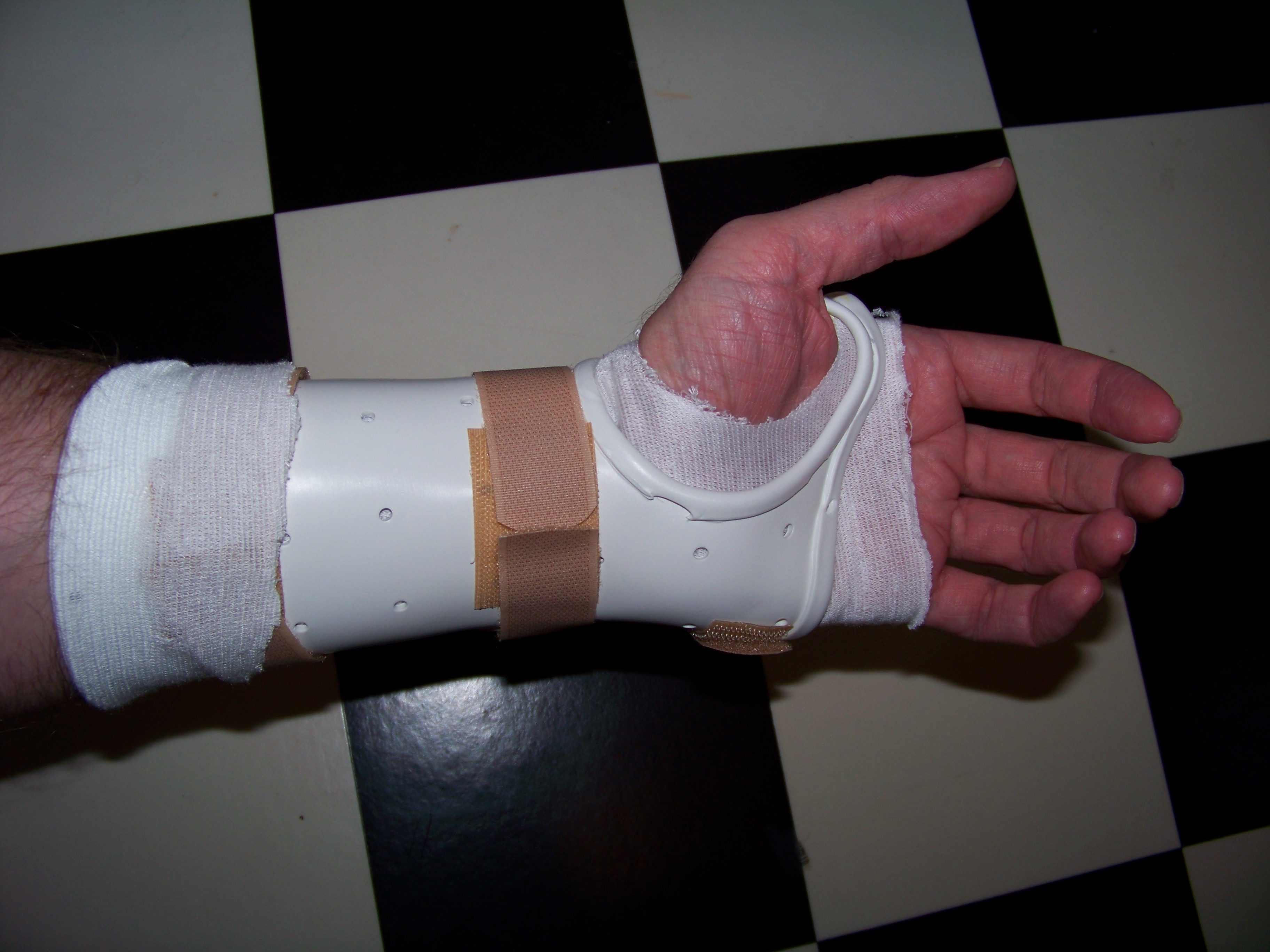
Russell Coker: Carpal Tunnel Syndrome

Wrist brace for Carpal Tunnel Syndrome Diagnosis A few weeks ago I was referred to a specialist for the treatment of Carpal Tunnel Syndrome. I first noticed the symptoms in early January, it started happening at night with a partial numbness in the fingers of my left hand. I didn t think much of it at first as it s the expected symptom of sleeping in a position that reduces the blood flow. But when it kept happening with my left hand and never happening with my right and then started getting worse (including happening during the day) I sought medical advice. The doctor asked me to bend my hand down (as if trying to touch my left elbow with the fingers of my left hand). Within about 10 seconds this caused numbness this result from bending one s wrist is a major symptom of CTS. Treatment On Thursday I saw a specialist about this, she agreed with the GP s diagnosis and made a wrist brace for me. She started by cutting off a length of a tube of elastic woven material (similar to a sock) and then cutting a thumb hole, that became the lining. Then to make the hard part she put a sheet of plastic in an electric saucepan (which had water simmering) until it started to melt and then used a spatula to fish it out. The melting temperature of the plastic wasn t that high (it was soft at about 50C when she put it on my arm), it wasn t at all sticky when it was partially melted, and it didn t seem to conduct heat well. After wearing the wrist brace non-stop for a few days I have noticed an improvement already. Hopefully I will make a full recovery in a matter of a month or so, I will probably have to wear a wrist brace when sleeping for the rest of my life, but that s no big deal it s more comfortable to sleep with a wrist brace than a partially numb hand. I ve also been prescribed a set of exercises to help remove scar tissue from the nerves. I haven t done them much yet. In terms of being annoying, the wrist-brace has 3mm diameter holes in a square grid pattern with a 25mm spacing. This doesn t let much air through and in warm weather my arm gets sweaty and starts to itch. I m thinking of drilling some extra holes to alleviate this the part which makes my arm itch doesn t need much mechanical strength. The only task which has been really impeded has been making peanut butter sandwiches, maybe it was making sandwiches not typing that caused CTS? ;) In any case I m not giving up typing but I would consider giving up peanut butter sandwiches. I really hope to avoid the surgical option, it doesn t seem pleasant at all. Other One final thing to note is that Repetitive Strain Injury (RSI) is entirely different. RSI is a non-specific pain associated with repetitive tasks while CTS is a specific problem in one or two nerves where they go through the wrist. RSI apparently tends to reduce the effective strength of the afflicted limb, while milder cases of CTS (such as mine) cause no decrease in strength of course a severe case of CTS results in muscle atrophy due to reduced nerve signals, but I shouldn t ever get that. Many people think that RSI and CTS are essentially the same thing I used to think that until a few weeks ago when I read the Wikipedia pages in preparation to seeing a doctor about it. I want to obtain some of the plastic that was used to make my wrist brace, it could be really handy to have something that convenient for making boxes, containers, and supports for various things among other things it doesn t appear to generate static. The low melting temperature will prevent certain computer uses (the hot air that comes out of a cooling system for a high-end CPU would probably melt it), but it could probably be used to make the case for an Opteron system with careful design. I m guessing that the cost of the plastic is a very small portion of the $150 I paid to the specialist so it shouldn t be that expensive and I m sure it would be even cheaper if it wasn t bought from a medical supply store. If I ever get time to do some work on an Arduino system or something similar then I will definitely try to get some of this plastic for the case. Also the Wikipedia page has a picture of what appears to be a mass-produced wrist brace. I think that it might be improved by having the picture of the custom one that I wear added to the page. I unconditionally license the picture for free use by Wikipedia and others under the CC by attribution license. So if anyone thinks that a picture of my hand would improve Wikipedia then they can make the change.

25 February 2010

Ian Wienand: Building a quiet, cool media/house server

After getting sick of having to underclock my existing home server to get it to remain up for any period of time, along with the horrendous noise, I finally found the time and budget to rebuild. My goals were: In the end I went with The case is really awesome. Very easy to access, and the fan is extremley quiet. It very cleverly holds 3 full-size hard-disks; two mounted vertically on either side, and one horizontally in the middle. The final space is for a DVD -- after that it's pretty cramped inside! It makes claims it is a very efficient power supply. It has a very bright blue LED on the front, and the face-plate over the DVD looks nice but the button doesn't quite reach the eject button on my drive, so it's software eject only. All over, definitely recommend. The motherboard is fairly good. One annoying thing is that it only has 3 SATA ports -- I think it's reasonable to want to have a primary drive, two mirrored large disks plus a DVD for a nice little media server. It also has no parallel-IDE, which is reasonable these days. However, if you wanted to install a wireless card you'd be out of luck if you also wanted to put in another SATA card, as it only has one PCI slot. There are plenty of USB ports for a USB wireless card, however. It also comes with two SATA cables, which isn't mentioned anywhere I could see (hopefully this saves you a trip back to Fry's to return your extra cables :). The CPU fan is a little on the loud side, as mentioned in some other forums. It is also located right where the power supply cables come down in this case, making for a fairly tight fit. Here's a lspci for those interested in such things
00:00.0 Host bridge: nVidia Corporation MCP79 Host Bridge (rev b1)
00:00.1 RAM memory: nVidia Corporation MCP79 Memory Controller (rev b1)
00:03.0 ISA bridge: nVidia Corporation MCP79 LPC Bridge (rev b2)
00:03.1 RAM memory: nVidia Corporation MCP79 Memory Controller (rev b1)
00:03.2 SMBus: nVidia Corporation MCP79 SMBus (rev b1)
00:03.3 RAM memory: nVidia Corporation MCP79 Memory Controller (rev b1)
00:03.5 Co-processor: nVidia Corporation MCP79 Co-processor (rev b1)
00:04.0 USB Controller: nVidia Corporation MCP79 OHCI USB 1.1 Controller (rev b1)
00:04.1 USB Controller: nVidia Corporation MCP79 EHCI USB 2.0 Controller (rev b1)
00:06.0 USB Controller: nVidia Corporation MCP79 OHCI USB 1.1 Controller (rev b1)
00:06.1 USB Controller: nVidia Corporation MCP79 EHCI USB 2.0 Controller (rev b1)
00:08.0 Audio device: nVidia Corporation MCP79 High Definition Audio (rev b1)
00:09.0 PCI bridge: nVidia Corporation MCP79 PCI Bridge (rev b1)
00:0b.0 IDE interface: nVidia Corporation MCP79 SATA Controller (rev b1)
00:10.0 PCI bridge: nVidia Corporation MCP79 PCI Express Bridge (rev b1)
00:15.0 PCI bridge: nVidia Corporation MCP79 PCI Express Bridge (rev b1)
01:05.0 RAID bus controller: Silicon Image, Inc. PCI0680 Ultra ATA-133 Host Controller (rev 02)
02:00.0 VGA compatible controller: nVidia Corporation ION VGA (rev b1)
03:00.0 Ethernet controller: Realtek Semiconductor Co., Ltd. RTL8111/8168B PCI Express Gigabit Ethernet controller (rev 03)
I know there are issues with the controller of the Patriot SSD, which would probably worry me for a general purpose machine. However for the primary disk of a server machine I'm not too fussed. The silence is golden and cool-running and low power consumption really helps too. I wouldn't really say it seems that blazing fast. It comes with a handy mount so it fits in a full-size hard-disk slot. Hard to beat for the price. One concession I made to avoid excessive writes was mounting /tmp on tmpfs; this is where it's nice to have 4GB of RAM. Handbrake seems to do a lot of work in /tmp for example. The two green hard-disks (software mirrored) are also inaudible. I'm hoping different brands should at least not fail at the same time. I'm not sure if they're auto-spinning down, but you can't really tell if they're on or not, even under load. Even when running flat-out re-encoding a DVD in the enclosed cabinet with minimal airflow the CPU temperature hasn't gone above 60C; normal CPU temp is around 40C. Performance is adequate -- running PlayOn in a VMware workstation XP VM almost works. It's kind of hard to take photos inside a case, but here's an attempt: <object height="300" width="400"> <param name="flashvars" value="offsite=true&amp;lang=en-us&amp;page_show_url=%2Fphotos%2Fiwienand%2Fsets%2F72157623509152266%2Fshow%2F&amp;page_show_back_url=%2Fphotos%2Fiwienand%2Fsets%2F72157623509152266%2F&amp;set_id=72157623509152266&amp;jump_to="> <param name="movie" value="http://www.flickr.com/apps/slideshow/show.swf?v=71649"> <param name="allowFullScreen" value="true"><embed allowfullscreen="true" flashvars="offsite=true&amp;lang=en-us&amp;page_show_url=%2Fphotos%2Fiwienand%2Fsets%2F72157623509152266%2Fshow%2F&amp;page_show_back_url=%2Fphotos%2Fiwienand%2Fsets%2F72157623509152266%2F&amp;set_id=72157623509152266&amp;jump_to=" height="300" src="http://www.flickr.com/apps/slideshow/show.swf?v=71649" type="application/x-shockwave-flash" width="400"></embed></object> Debian unstable installed without issues (except for some weird bug with the boot hanging for 60 seconds due to the RTL driver). It is also very strange installing from USB to an SSD no noise!

8 February 2010

Nico Golde: Two weeks with the n900

Two weeks ago I got myself a nokia n900 phone which is running maemo 5. So far I am quite happy with it, given that my previous phone was a sony erricsson p1i which is pretty crappy.
I've taken some notes about my experiences:

Those are the things I came up with while using the phone. The calling functionality and everything which is only phone related really works fine and the sound quality while talking to someone on the phone is also really good. So far I am really happy with the phone and I can only recommend it. I hope I'll have some time to port some applications to maemo soon.

6 February 2010

Christian Perrier: Unofficial samba 3.2.15 packages available

I recently upgraded a critical file server at work, from etch to lenny. With that upgrade, samba version was bumped from 3.0.24 to 3.2.5. We were then hit by a quite severe bug where files ACLs are messed up on Excel files after saving the files (upstream #4308, fixed upstream in 3.2.8). I will probably consider fixing the official Lenny packages (there is no bug reported about this in Debian, though) along with a few other quite severe ACL-related bugs (Mathieu Parent, who maintains ctdb, pointed me to a few such bugs). However, I couldn't wait for such a long time and backporting the fix for #4308 isn't completely straightforward. So, I decided to upgrade our server to the latest Samba 3.2 version, namely 3.2.15 (upgrading to 3.4 series could bring other kind of regressions and we have no time to properly test everything...users already have their guns handy). This is where the Debian Samba packaging team unofficial repository becomes handy. It is meant as as service to users who want to run the very latest samba code and have the same packaging choices we have in supported Debian releases. We already had 3.2.14 there but I never took time to update to 3.2.15. This is done now. Moreover, as our production server uses the amd64 architecture, these unofficial backports are now available for both i386 (my usual build machine) and amd64. Using this repository is as easy as:
deb http://pkg-samba.alioth.debian.org/packages lenny-backports/
deb-src http://pkg-samba.alioth.debian.org/packages lenny-backports/
Please note that this APT source does not use GPG signing of Packages files. When I am less lazy, I'll try to at least sign it with my GPG key.

29 January 2010

John Goerzen: Hands On with Thinkpad X200s and Debian Squeeze

I have recently been evaluating small laptops, and wound up purchasing the Thinkpad X200s. It arrived a few days ago, so here are some first impressions. The Hardware The X200s is, in a word, awesome. It is light and portable, built solidly, and very fast. With the 6-cell battery, it feels light. The 9-cell makes it physically bigger and heavier, but even so, it is still a light unit even then. The fans run only rarely, and battery life looks to be towards the upper range of what I was expecting, so I am pleased with that. The screen is a very high-DPI one, and quite bright. However, it is also one of the only drawbacks: its vertical viewing angle is quite poor compared to most other screens I ve used recently, meaning I m frequently adjusting it to get the best angle relative to my head. The keyboard is a pleasant change after having using the Eee 901 for so long. I hadn t realized just how much of a pleasant change it would be. I was concerned about the lack of a touchpad, but it appears that the touchpoint device is a lot better than it was on the Thinkpads I used a few years back. I miss a touchpad, but not very much, and far less than I thought I would. Debian Squeeze Of course, one of the first things I did with it was to wipe off Windows 7 and install Debian. Now a word about Debian. I rarely do fresh installs. I normally tar up my machine and move it over to new hardware when needed, and upgrade the software over time. However, I wanted to make this a 64-bit install and had no suitable image to move over. I decided to try the default Gnome install in squeeze since I hadn t tried Gnome in awhile and was about due to give it a shot. I was very impressed. Squeeze will make an awesome desktop OS. Everything worked perfectly out of the box. It suspended and resumed. X came up in full resolution without me having to do anything. Ethernet worked, and I was helpfully invited to supply the non-free firmware for the wifi on a USB stick during install time. Hardware brightness and volume keys work. The docking station is fully compatible with Linux. Sound works. The hardware lock screen key even works. Bluetooth works out of the box. It is a well-integrated, extremely fast, and smooth setup. Cups is installed out of the box by default, and accepts network printer broadcasts by default too. So I snapped in an Ethernet cable, and when I went to print a few minutes later, I just could. It didn t even strike me as special until later. Yes, that s right I plugged it into the network and, with absolutely zero action on my part, could print to all the printers at work or at home. The update-manager that Gnome uses by default (I wonder if Debian s KDE installs yet use one? I have never seen one in KDE) is a wonderful work of simplicity compared to Windows 7 s madness. You click the update icon, click the button to start updating, and 30 seconds later get a message that 45 updates have been installed. With no ominous reboot now message. This is no surprise to me as a long-time Debian developer, but I just wanted to highlight it here. I think I should file a wishlist bug on update-manager asking them to improve the wording in the box to say There is no need to reboot your computer :-) I still have my gripes about Gnome. It only lets me choose some pre-defined settings for screensaver timeouts, for instance. I still feel that KDE gives me more control. But Gnome seems to be better integrated with the entire system, faster, and less buggy. This difference is especially acute at login time. This laptop logs me in far faster than my Core 2 Quad machine at home running KDE (from sid) does. So, of course, my next task is to integrate xmonad with Gnome. Should be fun. Now, a final word on why I wrote this. None of these components have been a surprise really to me (aside from the completeness of the hardware support for this laptop). But what I want to bust is the myth that somehow Debian is difficult to use on the desktop. It isn t. This setup was easier by far than the Windows 7 install I did on a different machine recently. Although it has less eye candy than Windows 7, it exudes solidity, performance, power, and yes, ease of use in every way.

Joey Hess: xmonad layouts for netbooks

How a window manager with tiling layouts makes a 1024x600 resolution livable. I spend a lot of time in front of a screen, and for the past year I have used only my netbook. No desktops, no laptops. Just a cheap $200 computer that is nearly a kid's toy. The most challenging thing about this is dealing with the 1024x600 screen resolution. When I moved to this screen from something with many more pixels, it at first seemed very cramped. After a year, I think that the most important part of coping with the small screen is the flexability and customizability of layouts provided by the Xmonad window manager. In this post I will explain a few layouts I have developed for fitting specific tasks onto the netbook screen. (I assume that you know maybe 0.1% of Haskell (about what I do), and can read Haskell code without having a brain aneurysm.) web browsing
It's important that the web browser have as few toolbars and other cruft as possible, as horizontal space is especially at a premium. I've configured both Epiphany and Firefox to put everything in one tool bar. But now I use Chromium, which comes pre-configured that way.
What the netbook is designed for. You just want a web browser, taking up the full screen, and with its own tabs. So far, so easy: that's Xmonad's Full layout. But, you sometimes want to see two websites side-by-side. This layout accomplishes that, allowing the sizes to be adjusted as needed. It also uses Xmonad's Magnifier to zoom the smaller window when it's focused, which is useful if you briefly need to see more of a web site.
mySplit = magnifiercz' 1.4 $ Tall nmaster delta ratio
    where
        -- The default number of windows in the master pane
        nmaster = 1
        -- Percent of screen to increment by when resizing panes
        delta   = 3/100
        -- Default proportion of screen occupied by master pane
        ratio   = 60/100
screenshot screenshot web development If you're doing web development, you'll want probably one big web browser window, but also with a nice wide terminal on the same screen, in order to see web server logs. A simple way to do this is to mirror Xmonad's Tall layout by 90 degrees.
myWide = Mirror $ Tall nmaster delta ratio
    where
        -- The default number of windows in the master pane
        nmaster = 1
        -- Percent of screen to increment by when resizing panes
        delta   = 3/100
        -- Default proportion of screen occupied by master pane
        ratio   = 80/100
The myWide layout uses the full screen width for a single terminal, and splits the width when there are more. This is sufficient for viewing logs and doing minor things at the shell prompt, in between testing the result in the web browser. Of course a terminal can be temporarily moved to the master area by pressing mod-return, if you need it to be larger. screenshot screenshot chat
Tips on configuring Pidgin for a netbook: Set it up to use vertical tabs to save horizontal space. Configure the input area to only 1 line tall, and turn off as much other cruft as you can. The menu bars, sadly, cannot be disabled, nor can the excessively large borders. In my screenshots, you can see that stuff wasting space that could be used to show four more lines of text.
For chat, you want to put the buddy list on the side of the screen, and use the rest for conversation windows. Xmonad's IM module takes care of allocating a sidebar on the screen for the buddy window. The rest of the screen can be occupied by any layout you choose. I like to have the conversation windows be as wide as possible, and typically only want to see two conversations at a time. But sometimes I might have a dozen visible. A good layout to cope with those needs is Grid.
myChat' l = withIM size roster l
    where
        -- Ratio of screen roster will occupy
        size = 1%5
        -- Match roster window
        roster = Title "Buddy List"
myChat = myChat' Grid
The withIM layout puts the buddy list on the left; I prefer it on the right for some reason, so I tweaked my layout to do that. All it took was using the reflectHoriz layout modifier to get a mirror image of the layout. Then I reflect the inner layout back to its normal orientation. Being able to throw in a few function calls and mutate a layout like that is where Xmonad shines.
myChat' l = reflectHoriz $ withIM size roster $
            reflectHoriz $ l
screenshot screenshot logs
Ever notice that tail -f wastes the last line of the terminal? On a netbook this matters. shorttail lets the last line be used.
I have a dedidated workspace that I use to tail logs, and as a place to send long-running tasks (such as compiles). The layout for this needs to keep windows wide, to see whole logged lines, but they need only be five or so lines tall. And it's convenient to have one bigger window with the small ones below. Xmonad has a perfect layout for this, called Dishes, because it's sorta like a stack of plates.
myDish = limitWindows 5 $ Dishes nmaster ratio
    where
        -- The default number of windows in the master pane
        nmaster = 1
        -- Default proportion of screen occupied by other panes
        ratio = 1/5
screenshot screenshot
In the second screenshot above, I have 6 windows open, but only 5 are visible. The limitWindows 5 accomplishes this. It's handy mostly because gnome-terminal has a bad habit of crashing when resized to 0x0. (That's gotta be a bug in something!)
Notice that the screenshots above also have Procmeter in a sidebar on the right. I (ab)used the withIM layout to do that:
myLogs' l = reflectHoriz $ withIM procmeterSize procmeter $
              reflectHoriz $ l
    where
        -- Ratio of screen procmeter will occupy
        procmeterSize = 1%7
        -- Match procmeter
        procmeter = ClassName "ProcMeter3"
myLogs = myLogs' myDish
coding Everything above was easy. Doing coding (or writing) on a small screen is where it gets hard. When I'm coding I want to have one window that is exactly 80 columns wide, and as tall as possible, where I do the main development. Then I need a minimum of two other windows also visible: one action window for running tests and the like, and one to view references (emails, man pages, other files, etc). I may need to view any of these windows fullscreen at any time, of course.
As an example of the three window rule: While I'm writing this post, I have a reference window open with my .xmonad/xmonad.hs, and an action window open where I am managing screenshots.
Often, deep into something, I will accumulate many other reference and action windows. But three seems to be the magic, minimum number for me; use of screen or anything else doesn't reduce it; if I can't see all three at once, I will waste time and concentration flipping back and forth. The Xmonad layout I've developed to handle this is based on the handy FixedColumn layout, which automatically keeps the master window 80 columns wide. I modify this by adding the Magnifier, so that my action and reference windows "pop out" over the master window when focused.
myCode = limitWindows 3 $ magnifiercz' 1.4 $ FixedColumn 1 20 80 10
The 1.4 was carefully tuned, to magnify a window to be big enough to be usable for editing, reading, or command-line, while not obscuring too much of the other two windows. And again I use limitWindows, to only show three windows, in order to keep them all as big as possible. Other windows are hidden offscreen, but I can rotate to them with alt-tab as needed. screenshot screenshot reading ebooks When I'm reading an ebook, I want to have the reader in the middle of the screen. But a widescreen netbook like mine is too wide to comfortably read text all the way across, so it's nice to have margins. (In the margins, I put terminals, or notes.) The ThreeColumns module has a layout that does just that.
myBook = ThreeColMid nmaster delta ratio
    where
        nmaster = 1
        -- Percent of screen to increment by when resizing panes
        delta   = 3/100
        -- Default proportion of screen occupied by master pane
        ratio   = 2/3
screenshot putting it all together I join all my layouts together, so Xmonad will allow switching between them. These three combinations all have the same layouts, only ordered differently, so that different workspaces can have different default layouts.
codeFirst  = myCode    myWide    myGrid    myDish
dishFirst  = myDish    myCode    myWide    myGrid
gridFirst  = myGrid    myDish    myCode    myWide
Xmonad layouts can be decorated with things like title bars. To save horizontal space, I leave off the title bars on layouts where they are not needed to disambiguate windows. Two helper functions can be applied to add or remove titles (and also cause the layout to avoid the Gnome panel.)
withTitles l = noFrillsDeco shrinkText myTheme (desktopLayoutModifiers l)
noTitles l = desktopLayoutModifiers l
I have semi-dedicated workspaces; one for each of the above activities. To assign a layout to a workspace, I use the PerWorkspace module.
Notice that the "web" workspace has only two available layouts. Meanwhile, the "book" workspace always uses the specialized myBook layout; I don't use that layout elsewhere.
perWS = onWorkspace "logs" (withTitles $ myLogs' dishFirst) $
        onWorkspace "web"  (noTitles   $ (mySplit   myWide)) $
        onWorkspace "chat" (noTitles   $ myChat' gridFirst) $
        onWorkspace "book" (noTitles   $ myBook) $
                           (withTitles $ codeFirst)
Finally, I allow toggling between the currently selected layout and fullscreen mode, and use smartBorders to avoid displaying borders when there is only one window onscreen.
myLayout = smartBorders $ toggleLayouts Full perWS
Xmonad layout optimised for the small screen of a netbook: Done! (For now...)
screenshots screenshots screenshots screenshots screenshots
PS: Thanks to #xmonad regulars for always having the answer I need up their sleeves.

24 January 2010

Russell Coker: Old Mobile Phones as Toys

In the past I have had parents ask for advice on buying a digital camera for a young child. For some years there have been digital cameras on sale for much less than $100 cheap enough that no-one will be THAT bothered if the child breaks it, so digital photography is a good hobby for a young child. Such cameras are however quite bulky and require AA batteries which often don t last that long between charges. Some of the cheap phones are large enough that a 3yo child can have trouble carrying them. I recently gave an old LG U8110 phone to a young child for use as a camera. The phone has a 640*480 resolution camera and a display that is a few centimeters wide. It s no good for any remotely serious photography, and among other problems I never managed to get it s USB connection to work so the only way I ever managed to get a photograph off it was to MMS it to a newer camera. But it s quite adequate for a child to play with, it s small, light, and the battery stays charged for ages. Also the phone has a clock built in which is a handy feature it seems that nowadays the trend in society is away from wearing a watch and towards using a mobile phone to discover the time. Also a phone is a fairly capable computer, I think that the first two computers that I owned had significantly less CPU power and RAM than an LG U8110 and lots of newer phones compare well to PCs that were manufactured in the mid 90 s. The trend has been towards having an increasing number of applications and games on phones which of course gives more things for a child to play with. I believe that playing with computers that have a variety of different user interfaces and sets of applications is good for the education of young children. Now to make a phone work you need to have a SIM. If a phone was designed by someone who was intelligent and who was acting on behalf of the owner of the phone then it would support the camera etc without a SIM. But it seems that mobile phones are either designed by idiots or they are designed to act on behalf of the phone companies to the exclusion of the customer s interests, so I haven t seen a camera-phone that is usable for any purpose other than calling the emergency services when there is no SIM installed. Fortunately it is possible to get old SIMs, I had one that was replaced due to an intermittent fault that caused calls to drop out. I also have some SIMs from other telcos that would probably work (I m not sure whether a phone that is locked to one carrier will take photos if a SIM from another carrier is installed). Update: It seems that there is a range of phones that operate without a SIM, a Nokia N900 (if you consider it to be a phone rather than an Internet tablet), an Android, or a phone running the Symbian OS. I suspect that the majority of phones that are currently in use and due to be replaced soon will require a SIM though. One final notable aspect of giving a phone to a child is the possibility of it being used to call emergency services (which will work even when there is no SIM or a SIM that is not associated with an account). If you are planning to give a phone to someone else s child then you should ask the parents first, some parents believe (either correctly or incorrectly) that the chance of their child making prank calls to the emergency services is too great. A present that a child receives which is undesired by their parents will probably get lost or broken quickly When such a phone gets broken by a child (they are tough, but almost everything that is used without restriction by a child gets broken) the next thing to do is to disassemble it. With modern design and manufacturing probably all that a child could really learn from a phone is how the keyboard works and not even that for a touch-screen phone. But it s still a good experience for a child to take apart old machines. When I was young my father gave me many old machines to take apart, I had a lot of fun and learned some interesting things. I find it really sad to see those boxes for recycling old phones at the mobile phone stores which are full of 2yo phones that are mostly in good condition. Almost everyone has some young relatives or friends who have children who could find a good use for that stuff. Send the bits to be recycled AFTER the children nearest to you have finished doing things to the old phone!

21 January 2010

Ian Wienand: Separate debug info

I've recently found out a bit more about separating debug info, and thought a consolidated reference might be handy. The Idea Most every distribution now provides separate debug packages which contain only the debug info, saving much space for the 99% of people who never want to start gdb. This is achieved with objcopy and --only-keep-debug/--add-gnu-debuglink and is well explained in the man page. What does this do? This adds a .gnu_debuglink section to the binary with the name of debug file to look for.
$ gcc -g -shared -o libtest.so libtest.c
$ objcopy --only-keep-debug libtest.so libtest.debug
$ objcopy --add-gnu-debuglink=libtest.debug libtest.so
$ objdump -s -j .gnu_debuglink libtest.so
libtest.so:     file format elf32-i386
Contents of section .gnu_debuglink:
 0000 6c696274 6573742e 64656275 67000000  libtest.debug...
 0010 52a7fd0a                             R... 
The first part is the name of the file, the second part is a check-sum of debug-info file for later reference. Build ID Did you know that binaries also get stamped with a unique id when they are built? The ld --build-id flag stamps in a hash near the end of the link.
$ readelf --wide --sections ./libtest.so    grep build
  [ 1] .note.gnu.build-id NOTE            000000d4 0000d4 000024 00   A  0   0  4
$ objdump -s -j .note.gnu.build-id libtest.so 
libtest.so:     file format elf32-i386
Contents of section .note.gnu.build-id:
 00d4 04000000 14000000 03000000 474e5500  ............GNU.
 00e4 a07ab0e4 7cd54f60 0f5cf66b 5799b05c  .z.. .O .\.kW..\
 00f4 2d43f456                             -C.V            
Incase you're wondering what the format of that is...
uint32 name_size; /* size of the name */
uint32 hash_size; /* size of the hash */
uint32 identifier; /* NT_GNU_BUILD_ID == 0x3 */
char   name[name_size]; /* the name "GNU" */
char   hash[hash_size]; /* the hash */
Although the actual file may change (due to prelink or similar) the hash will not be updated and remain constant. Finding the debug info files The last piece of the puzzle is how gdb attempts to find the debug-info files when it is run. The main variable influencing this is debug-file-directory.
(gdb) show debug-file-directory 
The directory where separate debug symbols are searched for is "/usr/lib/debug".
The first thing gdb does, which you can verify via an strace, is search for a file called [debug-file-directory]/.build-id/xx/yyyyyy.debug; where xx is the first two hexadecimal digits of the hash, and yyy the rest of it:
$ objdump -s -j .note.gnu.build-id /bin/ls
/bin/ls:     file format elf32-i386
Contents of section .note.gnu.build-id:
 8048168 04000000 14000000 03000000 474e5500  ............GNU.
 8048178 c6fd8024 2a11673c 7c6a5af6 2c65b1b5  ...$*.g< jZ.,e..
 8048188 d7e13fd4                             ..?.            
... [running gdb /bin/ls] ...
access("/usr/lib/debug/.build-id/c6/fd80242a11673c7c6a5af62c65b1b5d7e13fd4.debug", F_OK) = -1 ENOENT (No such file or directory)
Next it moves onto the debug-link info filename. First it looks for the filename in same directory as the object being debugged. After that it looks for the file in a sub-directory called .debug/ in the same directory. Finally, it prepends the debug-file-directory to the path of the object being inspected and looks for the debug info there. This is why the /usr/lib/debug directory looks like the root of a file-system; if you're looking for the debug-info of /usr/lib/libfoo.so it will be looked for in /usr/lib/debug/usr/lib/libfoo.so. Interestingly, the sysroot and solib-search-path don't appear to have anything to do with these lookups. So if you change the sysroot, you also need to change the debug-file-directory to match. However, most distributions make all this "just work", so hopefully you'll never have to worry about anyway!

Daniel Kahn Gillmor: TCP weirdness, IMAP, wireshark, and perdition

This is the story of a weirdly unfriendly/non-compliant IMAP server, and some nice interactions that arose from a debugging session around it. Over the holidays, i got to do some computer/network debugging for friends and family. One old friend (I'll call him Fred) had a series of problems i managed to help work through, but was ultimately basically stumped based on the weird behavior of an IMAP server. Here's the details (names of the innocent and guilty have been changed), just in case it helps other folks in at least diagnosing similar situations. the diagnosis The initial symptom was that Fred's computer was "very slow". Sadly, this was a Windows machine, so my list of tricks for diagnosing sluggishness is limited. I went through a series of questions, uninstalling things, etc, until we figured it would be better to just have him do his usual work while i watched, kibitzing on what seemed acceptable and what seemed slow. Quite soon, we hit a very specific failure: Fred's Thunderbird installation (version 2, FWIW) was sometimes hanging for a very long period of time during message retrieval. This was not exhaustion of the CPU, disk, RAM, or other local resource. It was pure network delay, and it was a frequent (if unpredictable) frustrating hiccup in his workflow. One thought i had was Thunderbird's per-server max_cached_connections setting, which can sometimes cause a TB instance to hang if a remote server thinks Thunderbird is being too aggressive. After sorting out why Thunderbird was resetting the values after we'd set them to 0 (grr, thanks for the confusing UI, folks!), we set it to 1, but still had the same occasional, lengthy (about 2 minutes) hang when transfering messages between folders (including the trash folder!), or when reading new messages. Sending mail was quite fast, except for occasional (similarly lengthy) hangs writing the copy to the sent folder. So IMAP was the problem (not SMTP), and the 2-minute timeouts smelled like an issue with the networking layer to me. At this point, i busted out wireshark, the trusty packet sniffer, which fortunately works as well on Windows as it does on GNU/Linux. Since Fred was doing his IMAP traffic in the clear, i could actually see when and where in the IMAP session the hang was happening. (BTW, Fred's IMAP traffic is no longer in the clear: after all this happened, i switched him to IMAPS (IMAP wrapped in a TLS session), because although the IMAP server in question actually supports the STARTTLS directive, it fails to advertise it in response to the CAPABILITIES query, so Thunderbird refuses to try it. arrgh.) The basic sequence of Thunderbird's side of an initial IMAP conversation (using plain authentication, anyway) looks something like this:
1 capability
2 login "user" "pass"
3 lsub "" "*"
4 list "" "INBOX"
5 select "INBOX"
6 UID fetch 1:* (FLAGS)
What i found with this server was that if i issued commands 1 through 5, and then left the connection idle for over 5 minutes, then the next command (even if it was just a 6 NOOP or 6 LOGOUT) would cause the IMAP server to issue a TCP reset. No IMAP error message or anything, just a failure at the TCP level. But a nice, fast, responsive failure -- any IMAP client could recover nicely from that by just immediately opening a new connection. I don't mind busy servers killing inactive connections after a reasonable timeout. If it was just this, though, Thunderbird should have continued to be responsive. the deep weirdness But if i issued commands 1 through 6 in rapid succession (the only difference is that extra 6 UID fetch 1:* (FLAGS) command), and then let the connection idle for 5 minutes, then sent the next command: no response of any kind would come from the remote server (not even a TCP ACK or TCP RST). In this circumstance, my client OS's TCP stack would re-send the data repeatedly (staggered at appropriate intervals), until finally the client-side TCP timeout would trigger, and the OS would report the failure to the app, which could turn around and do a simple connection restart to finish up the desired operation. This was the underlying situation causing Fred's Thunderbird client to hang. In both cases above (with or without the 6th command), the magic window for the idle cutoff was a little more than 300 seconds (5 minutes) of idleness. If the client issued a NOOP at 4 minutes, 45 seconds from the last NOOP, it could keep a connection active indefinitely. Furthermore, i could replicate the exact same behavior when i used IMAPS -- the state of the IMAP session itself was somehow modifying the TCP session behavior characteristics, whether it was wrapped in a TLS tunnel or not. One interesting thing about this set of data is that it rules out most common problems in the network connectivity between the two machines. Since none of the hops between the two endpoints know anything about the IMAP state (especially under TLS), and some of the failures are reported properly (e.g. the TCP RST in the 5-command scenario), it's probably safe to say that the various routers, NAT devices, and such were not themselves responsible for the failures. So what's going on on that IMAP server? The service itself does not announce the flavor of IMAP server, though it does respond to a successful login with You are so in, and to a logout with IMAP server logging out, mate. A bit of digging on the 'net suggests that they are running a perdition IMAP proxy. (clearly written by an Aussie, mate!) But why does it not advertise its STARTTLS capability, even though it is capable? And why do some idle connections end up timing out without so much as an RST, when other idle connections give at least a clean break at the TCP level? Is there something about issuing the UID command that causes perdition to hand off the connection to some other service, which in turn doesn't do proper TCP error handling? I don't really know anything about the internals of perdition, so i'm just guessing here. the workaround I ultimately recommended to Fred to reduce the number of cached connections to 1, and to set Thunderbird's interval to check for new mail down to 4 minutes. Hopefully, this will keep his one connection active enough that nothing will timeout, and will keep the interference to his workflow to a minimum. It's an unsatisfactory solution to me, because the behavior of the remote server still seems so non-standard. However, i don't have any sort of control over the remote server, so there's not too much i can do to provide a real fix (other than point the server admins (and perdition developers?) at this writeup). I don't even know the types of backend server that their perdition proxy is balancing between, so i'm pretty lost for better diagnostics even, let alone a real resolution. some notes I couldn't have figured out the exact details listed above just using Thunderbird on Windows. Fortunately, i had a machine with a decent OS available, and was able to cobble together a fake IMAP client from a couple files (imapstart contained the lines above, and imapfinish contained 8 LOGOUT), bash, and socat. Here's the bash snippet i used as a fake IMAP client:
spoolout()   while read foo; do sleep 1 && printf "%s\r\n" "$foo" ; done  
( sleep 2 && spoolout < imapstart && sleep 4 && spoolout < imapfinish && sleep 500 )   socat STDIO TCP4:imap.fubar.example.net:143
To do the test under IMAPS, i just replaced TCP4:imap.fubar.example.net:143 with OPENSSL:imap.fubar.example.net:993. And of course, i had wireshark handy on the GNU/Linux machine as well, so i could analyze the generated packets over there. One thing to note about user empowerment: Fred isn't a tech geek, but he can be curious about the technology he relies on if the situation is right. He was with me through the whole process, didn't get antsy, and never tried to get me to "just fix it" while he did something else. I like that, and wish i got to have that kind of interaction more (though i certainly don't begrudge people the time if they do need to get other things done). I was nervous about breaking out wireshark and scaring him off with it, but it turned out it actually was a good conversation starter about what was actually happening on the network, and how IP and TCP traffic worked. Giving a crash course like that in a quarter of an hour, i can't expect him to retain any concrete specifics, of course. But i think the process was useful in de-mystifying how computers talk to each other somewhat. It's not magic, there are just a lot of finicky pieces that need to fit together a certain way. And Wireshark turned out to be a really nice window into that process, especially when it displays packets during a real-time capture. I usually prefer to do packet captures with tcpdump and analyze them as a non-privileged user afterward for security reasons. But in this case, i felt the positives of user engagement (how often do you get to show someone how their machine actually works?) far outweighed the risks. As an added bonus, it also helped Fred really understand what i meant when i said that it was a bad idea to use IMAP in the clear. He could actually see his username and password in the network traffic! This might be worth keeping in mind as an idea for a demonstration for workshops or hacklabs for folks who are curious about networking -- do a live packet capture of the local network, project it, and just start asking questions about it. Wireshark contains such a wealth of obscure packet dissectors (and today's heterogenous public/open networks are so remarkably chatty and filled with weird stuff) that you're bound to run into things that most (or all!) people in the room don't know about, so it could be a good learning activity for groups of all skill levels. Tags: debugging, imap, perdition, wireshark

13 January 2010

Matt Brubeck: Weekend hack: outline grep

I keep almost all of my notes and to-do lists in plain text files, so I can edit and search them with Vim, grep, and other standard Unix tools. I often indent lines in these files to create a simple outline structure, and use the autoindent and foldmethod=indent options to make Vim into a simple outliner. To get useful output when searching through these outline-structured files, I wrote a simple grep replacement. Given a text file with a Python-style indentation structure, ogrep searches the file for a regular expression. It prints matching lines, with their "parent" lines as context. For example, if input.txt looks like this:
2009-01-01
  New Year's Day!
    No work today.
    Visit with family.
2009-01-02
  Grocery store and library.
2009-01-03
  Stay home.
2009-01-04
  Back to work.
    Remember to set an alarm.
then ogrep work input.txt will produce the following output:
2009-01-01
  New Year's Day!
    No work today.
2009-01-04
  Back to work...
You can download ogrep from the outline-grep repository on GitHub, or just read the literate Haskell file. The code is almost trivial (40 lines of code, plus imports and comments); I'm publishing it just in case anyone else has a use for it, and because some of my friends were curious about how I'm using Haskell. I've now written a few "real-world" Haskell programs (compleat was the first). I'm finding Haskell very well suited to such programs, though this particular one would be equally easy in a language like Perl, Python, or Ruby. This is a one-off tool to fill a gap in my workflow; there are no configuration options or useful error messages. It would be fairly easy to extend it, though. For example, it might be handy to have an option to include children (as well as parents) of matching lines. I recently realized that ogrep often works for searching through source code too, which might generate some more unexpected use cases.

10 January 2010

Russell Coker: The Always Innovating Smartbook/Netbook

Always Innovating have an interesting netbook that can be detached from it s keyboard [1]. It provides features which are a close match for the tablet PC with optional keyboard that I advocated in my post about the Lenovo U1 [2]. Such devices are deemed to be in a new category of computer called the Smartbook which is regarded as being like a cross between a Netbook and a smart-phone [3]. The AI system is always idling, so there is no boot up required like a mobile phone it will respond immediately to input. It has no fans which will be a good improvement over the EeePC my EeePC 701 is annoyingly loud at times. It is designed to replace Netbooks not desktops, the screen resolution of 1024*600 is reasonable by Netbook standards but is really poor by desktop standards, it also lacks a VGA port. The company has a stated policy of being friendly to free software, so hopefully a community of developers will form around it. Of course this partly depends on how they develop their new systems. If they make new systems vastly incompatible with older systems then it will fracture the community and make things difficult for everyone. There have been problems in this regard in the past with ARM as the instruction set has changed. One interesting thing about the Always Innovating Touch Book is that you can order the keyboard and extra battery part separately from the main computer/display unit. This means that if you break one part you can replace it without replacing the entire system (handy if you break the keyboard (the cheaper part). It s interesting to note that their web site offers to sell me as many as 558 complete systems, as many as 896 tablets, or as many as 992 keyboards. So according to the web site anyone who wanted to buy more than 558 systems would have to order the tablets separately from the keyboards. This wouldn t be a bad thing as the complete unit costs $399, the tablet costs $299, and the keyboard costs $99. So ordering the keyboard and tablet separately would save $1 per unit! Of course anyone who really wanted to buy 600 computers wouldn t use a web site, they would call the sales people and get a discount that is significantly greater than $1 per unit. But these limits for the web sales seem strange enough to be worthy of comment. It s an interesting system, it would be handy for reading documents when on the move and for light sysadmin work (basic login to server and restart crashed daemon stuff). If I was after a new system I would probably buy one.

2 January 2010

John Goerzen: A Poem for the Rich

In Egypt s sandy silence, all alone,
Stands a gigantic Leg, which far off throws
The only shadow that the Desert knows:
I am great OZYMANDIAS, saith the stone,
The King of Kings; this mighty City shows
The wonders of my hand. The City s gone,
Nought but the Leg remaining to disclose
The site of this forgotten Babylon. We wonder, and some Hunter may express
Wonder like ours, when thro the wilderness
Where London stood, holding the Wolf in chace,
He meets some fragments huge, and stops to guess
What powerful but unrecorded race
Once dwelt in that annihilated place. Horace Smith
Many of us that can afford an Internet connection still qualify as exceedingly rich compared to, for example, many poor people in Africa. On a scale of centuries, the ancient centers of civilization and wealth tend to collapse. Even Rome, with over a million inhabitants in its day of ancient prominence, shrank to only 20,000 over the course of history. Some other ancient cities no longer dot our maps. It helps us, perhaps, to have some perspective. Those magnificent working monuments to wealth in New York, London, or Tokyo probably won t be there 1000 years from now. What will?

24 December 2009

Julien Blache: Packard Bell OneTwo all-in-one with touch screen

I ve just bought a Packard Bell OneTwo (M3700), a 600 Euros all-in-one computer with a 20 multipoint touch screen (there are bigger models with 23 touch screen, wifi and some other options). This machine will be used to run OpenBravoPOS, a free (libre) point of sale software. So far, I think this machine is just perfect for the job. Getting it to run smoothly under Linux is not a walk in the park, however. There are some quirks and some assembly is required, but once you re done (that takes a couple of hours at most once you ve got all the info, which you have if you re reading this) this machine is just great. It s fast, with a 2.1 GHz Pentium Dual-Core (T4300) CPU, 4 GB of RAM, an Intel GM45 GPU with up to 256 MB of shared RAM, gigabit networking, a fast 320 GB SATA disk and a combo DVD-drive (not a slot-in, too bad). The screen is nice, and the touchscreen is incredibly smooth, precise and sensitive. The sound is good, the webcam is great and it works out of the box, too! Update: added a note about the card reader. Before you go Enter the BIOS and bump the amount of memory allocated to the GPU to 256 MB. By default, the machine ships with only 64 MB allocated to the GPU, which is low and ridiculous considering it is equipped with 4 GB Installing Debian Forget about installing Lenny with debian-installer on this machine. The standard installer with its 2.6.26 kernel doesn t support the network interface properly. Upgraded installer images with 2.6.28 or 2.6.30 kernels end up locking the machine solid before the first installer screen. Your best friend: System Rescue CD. Your other best friend: debootstrap. Before rebooting, install the 2.6.30 kernel from backports.org. It works like a charm, even if the 2.6.30 on the upgraded installer locked up solid. Go figure :) While you re at it, install X from Testing. You need a recent enough version of the intel driver that will support the GM45 chip. Configuring X This is the first and the biggest quirk on this machine. The LCD is actually wired up to both the VGA and the LVDS outputs on the graphic card, and advertises different resolutions on both. The native resolution (1600 900 on this model) is only advertised on the LVDS output. While fiddling with X, it becomes obvious that the VGA output is used as the boot video device. If you disable the output in X with xrandr, you loose the text consoles. My un(?)educated guess is that this setup allowed them to use a standard desktop PC BIOS instead of using a more expensive laptop BIOS. I may be wrong, but that s pretty much the only thing that makes sense to me. Anyway. If you want X to work properly, you ll have to tell it to ignore the VGA output entirely.

Section "Device"
 Identifier  "Intel X4500"
 Option  "Monitor-LVDS"  "Panel on LVDS"
 Option  "Monitor-VGA"  "Panel on VGA"
EndSection
Section "Monitor"
 Identifier  "Panel on LVDS"
EndSection
Section "Monitor"
 Identifier  "Panel on VGA"
 # The LCD panel is wired up on both VGA and LVDS
 # Ignore the VGA output as far as X is concerned
 Option  "Ignore"  "True"
EndSection
If you don t tell X to ignore the VGA output, you ll end up with a mirror setup and your desktop will use the smallest size so as to fit on both monitors. It isn t pretty, it s plain silly and we want those 20 used fully, dammit! See the full xorg.conf. Touch screen The touch screen is an infrared multipoint touch screen from Quanta. No kernel driver is needed, only an input driver for X is required. Start by adding an udev rule like this one:
SUBSYSTEM=="usb", ATTRS idVendor =="0408", ATTRS idProduct =="3000", SYMLINK+="usb/quanta_touch"
The touch screen will now appear as /dev/usb/quanta_touch, which is more handy and stable than /dev/usb/hiddevN. Grab xf86-input-hidtouch from HidTouch Suite on SF.net, and apply this patch. The aim of the patch is to ignore anything but the first reported pressure point. The touch screen is a multipoint touch screen and as such can report 2 or 3 (not sure) pressure points at the same time. The driver can t handle that yet. The patch also fixes a bad comment and an API difference with newer X versions. Build and install the driver, then edit xorg.conf:
Section "InputDevice"
 Identifier  "Optical Touch Screen"
 Driver  "hidtouch"
 Option  "SendCoreEvents"  "true"
 Option  "ReportingMode"  "Raw"
 Option  "Device"  "/dev/usb/quanta_touch"
 Option  "PacketCount"  "13"
 Option  "OpcodePressure"  "852034"
 Option  "OpcodeX"  "65584"
 Option  "OpcodeY"  "65585"
 Option  "CalibrationModel"  "1"
 Option  "CornerTopLeftX"  "0"
 Option  "CornerTopLeftY"  "0"
 Option  "CornerTopRightX"  "1600"
 Option  "CornerTopRightY"  "0"
 Option  "CornerBottomLeftX"  "0"
 Option  "CornerBottomLeftY"  "900"
 Option  "CornerBottomRightX"  "1600"
 Option  "CornerBottomRightY"  "900"
 Option  "CornerScreenWidth"  "1600"
 Option  "CornerScreenHeight"  "900"
EndSection
There you are. Working touch screen! Credit: the above touch screen setup instructions, including the patch (which I reworked slightly ) were taken from this post on the Ubuntu-fr.org forum. The instructions cover the Packard Bell Viseo 200T touch screen, which is identical to what s used on the OneTwo. If you re looking for a 20 touch screen, go for it; at 200 Euros it s a good deal. Sound The Realtek ALC268 codec as used in the OneTwo isn t properly supported yet, however using model=acer-aspire works for the integrated speakers and the headphone jack. Line out and the integrated microphone do not work. Webcam The webcam is a UVC webcam and the image quality is stunning. I m seriously considering stealing that webcam to replace the iSight in my MacBook Pro. It works out of the box without any firmware. Quite a good surprise :) Flash card reader The integrated flash card reader also works out of the box, for the card formats supported by Linux.

20 November 2009

Clint Adams: Ripped from the BTSlines

[The following story is fictional and does not depict any actual person or event, just like in Law & Order.] James filed an RC bug on a package, complaining that it attempted to execute an illegal instruction on a Netwinder, running Linux 2.6.xx. This was sort of an ironic hipster tribute to the olden times when buildd admins would actually do their jobs, keeping chroots clean and current, reviewing buildd logs, and filing FTBFS bugs where appropriate, except that he didn't actually do any of those things. 18 minutes later, Aurelien replied, asking for more information in order to debug the problem. Teh-oh said James, but nobody could hear him because he was talking to his Raggedy Ann doll. Stephen suggested that Aurelien contact Vince or Steve to get access to different Netwinders, and Aurelien tried to reproduce the problem on other ARM machines unsuccessfully. Could you tell me the exact kernel version on this Netwinder, and the one on europa, which seems to have the same problem? Aurelien asked James. Aaagh, they're trying to steal my precious bodily fluids! hissed James, but nobody could hear him because he was talking to his inflatable astronut. Also, the contents of /proc/cpuinfo would be nice. Aurelien added. We hates them, Clive Oven! James announced, but nobody could hear him because he was talking to his EASY-BAKE REAL MEAL Oven. The Netwinder you were talking about is europa, wasn't it? Could you tell us the kernel versions on europa and elara? There's no problem on other Netwinders, so it's probably a kernel issue. THE MARTIANS ARE COMING! James cried, but nobody could hear him because he was talking to a small band of subservient deaf-mute milkmen. It's been more than a week since this bug has been filed, and there has been no useful information provided at all. Can anybody help? asked Peter. HELLO. IS THIS THING ON? Could you have the elementary courtesy to follow up to the bugs you report? asked Pierre. Bromeliads.. I'll buy you some bromeliads, James muttered, but no one could hear him because he was talking to his ficus plant. Lo c looked around, slipped into a cave, sprinted through a maze of tunnels, and sped in a small nuclear-powered submarine to James's secret undersea lair. Rapping on the bulkhead three times, he uttered the code phrase and James let him in. After a conversation that took place strictly through pantomime, Lo c departed and James said, For fuck's sake, but no one could hear him because he was talking to a broken sonar antenna. Yo, James is busy, but he said that it's okay to downgrade the bug since it's not a problem with other Netwinders, reported Lo c. I never said that! I don't even know who that guy is! I'm going to convert him into a kangaroo! James sang, but no one could hear him since he was alone on a beach in Normandy. A month later, Riku wrote to Woody, Hey, we have this bug. Could you take a look? Sure, replied Woody, and he gave Aurelien access, and Aurelien debugged the problem in under an hour. Now everyone knows that europa and elara were running Linux 2.6.11. This is a breach of national security! declared James, but nobody could hear him because he was talking to the crushed skull of a kitten who had recently been sunning himself.

Next.

Previous.