Search Results: "sto"

21 July 2014

Daniel Pocock: Australia can't criticize Putin while competing with him

While much of the world is watching the tragedy of MH17 and contemplating the grim fate of 298 deceased passengers sealed into a refrigerated freight train in the middle of a war zone, Australia (with 28 victims on that train) has more than just theoretical skeletons in the closet too. At this moment, some 153 Tamil refugees, fleeing the same type of instability that brought a horrible death to the passengers of MH17, have been locked up in the hull of a customs ship on the high seas. Windowless cabins and a supply of food not fit for a dog are part of the Government's strategy to brutalize these people for simply trying to avoid the risk of enhanced imprisonment(TM) in their own country. Under international protocol for rescue at sea and political asylum, these people should be taken to the nearest port and given a humanitarian visa on arrival. Australia, however, is trying to lie and cheat their way out of these international obligations while squealing like a stuck pig about the plight of Australians in the hands of Putin. If Prime Minister Tony Abbott wants to encourage Putin to co-operate with the international community, shouldn't he try to lead by example? How can Australians be safe abroad if our country systematically abuses foreigners in their time of need?

Steve Kemp: An alternative to devilspie/devilspie2

Recently I was updating my dotfiles, because I wanted to ensure that media-players were "always on top", when launched, as this suits the way I work. For many years I've used devilspie to script the placement of new windows, and once I googled a recipe I managed to achieve my aim. However during the course of my googling I discovered that devilspie is unmaintained, and has been replaced by something using Lua - something I like. I'm surprised I hadn't realized that the project was dead, although I've always hated the configuration syntax it is something that I've used on a constant basis since I found it. Unfortunately the replacement, despite using Lua, and despite being functional just didn't seem to gell with me. So I figured "How hard could it be?". In the past I've written softare which iterated over all (visible) windows, and obviously I'm no stranger to writing Lua bindings. However I did run into a snag. My initial implementation did two things: This worked. This worked well. This worked too well. The problem I ran into was that if I wrote something like "Move window 'emacs' to desktop 2" that action would be applied, over and over again. So if I launched emacs, and then manually moved the window to desktop3 it would jump back! In short I needed to add a "stop()" function, which would cause further actions against a given window to cease. (By keeping a linked list of windows-to-ignore, and avoiding processing them.) The code did work, but it felt wrong to have an ever-growing linked-list of processed windows. So I figured I'd look at the alternative - the original devilspie used libwnck to operate. That library allows you to nominate a callback to be executed every time a new window is created. If you apply your magic only on a window-create event - well you don't need to bother caching prior-windows. So in conclusion : I think my code is better than devilspie2 because it is smaller, simpler, and does things more neatly - for example instead of a function to get geometry and another to set it, I use one. (e.g. "xy()" returns the position of a window, but xy(3,3) sets it.). kpie also allows you to run as a one-off job, and using the simple primitives I wrote a file to dump your windows, and their size/placement, which looks like this:
shelob ~/git/kpie $ ./kpie --single ./samples/dump.lua
-- Screen width : 1920
-- Screen height: 1080
..
if ( ( window_title() == "Buddy List" ) and
     ( window_class() == "Pidgin" ) and
     ( window_application() == "Pidgin" ) ) then
     xy(1536,24 )
     size(384,1032 )
     workspace(2)
end
if ( ( window_title() == "feeds" ) and
     ( window_class() == "Pidgin" ) and
     ( window_application() == "Pidgin" ) ) then
     xy(1,24 )
     size(1536,1032 )
     workspace(2)
end
..
As you can see that has dumped all my windows, along with their current state. This allows a simple starting-point - Configure your windows the way you want them, then dump them to a script file. Re-run that script file and your windows will be set back the way they were! (Obviously there might be tweaks required.) I used that starting-point to define a simple recipe for configuring pidgin, which is more flexible than what I ever had with pidgin, and suits my tastes. Bug-reports welcome.

Francois Marier: Creating a modern tiling desktop environment using i3

Modern desktop environments like GNOME and KDE involving a lot of mousing around and I much prefer using the keyboard where I can. This is why I switched to the Ion tiling window manager back when I interned at Net Integration Technologies and kept using it until I noticed it had been removed from Debian. After experimenting with awesome for 2 years and briefly considering xmonad , I finally found a replacement I like in i3. Here is how I customized it and made it play nice with the GNOME and KDE applications I use every day.

Startup script As soon as I log into my desktop, my startup script starts a few programs, including: Because of a bug in gnome-settings-daemon which makes the mouse cursor disappear as soon as gnome-settings-daemon is started, I had to run the following to disable the offending gnome-settings-daemon plugin:
dconf write /org/gnome/settings-daemon/plugins/cursor/active false

Screensaver In addition, gnome-screensaver didn't automatically lock my screen, so I installed xautolock and added it to my startup script:
xautolock -time 30 -locker "gnome-screensaver-command --lock" &
to lock the screen using gnome-screensaver after 30 minutes of inactivity. I can also trigger it manually using the following shortcut defined in my ~/.i3/config:
bindsym Ctrl+Mod1+l exec xautolock -locknow

Keyboard shortcuts While keyboard shortcuts can be configured in GNOME, they don't work within i3, so I added a few more bindings to my ~/.i3/config:
# volume control
bindsym XF86AudioLowerVolume exec /usr/bin/pactl set-sink-volume @DEFAULT_SINK@ -- '-5%'
bindsym XF86AudioRaiseVolume exec /usr/bin/pactl set-sink-volume @DEFAULT_SINK@ -- '+5%'
# brightness control
bindsym XF86MonBrightnessDown exec xbacklight -steps 1 -time 0 -dec 5
bindsym XF86MonBrightnessUp exec xbacklight -steps 1 -time 0 -inc 5
bindsym XF86AudioMute exec /usr/bin/pactl set-sink-mute @DEFAULT_SINK@ toggle
# show battery stats
bindsym XF86Battery exec gnome-power-statistics
to make volume control, screen brightness and battery status buttons work as expected on my laptop. These bindings require the following packages:

Keyboard layout switcher Another thing that used to work with GNOME and had to re-create in i3 is the ability to quickly toggle between two keyboard layouts using the keyboard. To make it work, I wrote a simple shell script and assigned a keyboard shortcut to it in ~/.i3/config:
bindsym $mod+u exec /home/francois/bin/toggle-xkbmap

Suspend script Since I run lots of things in the background, I have set my laptop to avoid suspending when the lid is closed by putting the following in /etc/systemd/login.conf:
HandleLidSwitch=lock
Instead, when I want to suspend to ram, I use the following keyboard shortcut:
bindsym Ctrl+Mod1+s exec /home/francois/bin/s2ram
which executes a custom suspend script to clear the clipboards (using xsel), flush writes to disk and lock the screen before going to sleep. To avoid having to type my sudo password every time pm-suspend is invoked, I added the following line to /etc/sudoers:
francois  ALL=(ALL)  NOPASSWD:  /usr/sbin/pm-suspend

Window and workspace placement hacks While tiling window managers promise to manage windows for you so that you can focus on more important things, you will most likely want to customize window placement to fit your needs better.

Working around misbehaving applications A few applications make too many assumptions about window placement and are just plain broken in tiling mode. Here's how to automatically switch them to floating mode:
for_window [class="VidyoDesktop"] floating enable
You can get the Xorg class of the offending application by running this command:
xprop   grep WM_CLASS
before clicking on the window.

Keeping IM windows on the first workspace I run Pidgin on my first workspace and I have the following rule to keep any new window that pops up (e.g. in response to a new incoming message) on the same workspace:
assign [class="Pidgin"] 1

Automatically moving workspaces when docking Here's a neat configuration blurb which automatically moves my workspaces (and their contents) from the laptop screen (eDP1) to the external monitor (DP2) when I dock my laptop:
# bind workspaces to the right monitors
workspace 1 output DP2
workspace 2 output DP2
workspace 3 output DP2
workspace 4 output DP2
workspace 5 output DP2
workspace 6 output eDP1
You can get these output names by running:
xrandr --display :0   grep " connected"
Finally, because X sometimes fail to detect my external monitor when docking/undocking, I also wrote a script to set the displays properly and bound it to the appropriate key on my laptop:
bindsym XF86Display exec /home/francois/bin/external-monitor

20 July 2014

Laura Arjona: Upgrading my laptop to Debian Jessie

Some days ago I decided to upgrade my laptop from stable to testing. I had tried Jessie since several months, in my husband s laptop, but that was a fresh install, and a not-so-old laptop, and we have not much software installed there. In my netbook (Compaq Mini 110c), with stable, I already had installed Pumpa, Dianara and how-can-i-help from testing, and since the freeze is coming, I thought that I could full-upgrade and use Jessie from now on, and report my issues and help to diagnose or fix them, if possible, before the freeze. I keep Debian stable at work for my desktop and servers (well, some of them are still in oldstable, thanks LTS team!!), and I have testing in a laptop that I use as clonezilla/drbl server (but I had issues, next week I ll put some time on them and I ll write here my findings, and report bugs, if any). So! let s go. Here I write my experience and the issues that I found (very few! and not sure if they are bugs or configuration problems or what, I ll keep an eye on them). The upgrade I pointed my /etc/apt/sources.list to jessie, then apt-get update, then apt-get dist-upgrade. (With the servers I am much more careful, read the release notes, upgrade guides and so, or directly I go for a fresh install, but with my laptop, I am too lazy). I went to bed (wow, risky LArjona!) and when I got up for going to work, the laptop was waiting for me to accept to block root from ssh access, or restart some services, and so. Ok! the upgrade resumed but I have to go to work and I wanted my laptop! Since all the packages were already downloaded, I closed the lid (double risky LArjona!) unplugged it, put everything in my bag, and catched the bus in time :) At the bus, I opened again the lid of my laptop (crossing fingers!) and perfect, the laptop had suspended and returned back to life, and the upgrade just resumed with no problem. Wow! I love you Debian! After 15 minutes, I had to suspend again, since the bus arrived and I had to take the metro. In the metro, the upgrade resumed, and finished. I shutdown my laptop and arrive to work. Testing testing :) In a break for lunch, I opened my brand new laptop (the hardware is the same, but the software totally renewed, so it s brand new for me). I have to say that use xfce, with some GNOME/GTK apps installed (gedit, cheese, evince, XChat ) and some others that use Qt or are part of the KDE project (Okular, Kile, QtLinguist, Pumpa, Dianara). I don t know/care too much about desktops and tweaking my desktop: I just put the terminal and gedit in black background, Debian wallpaper is enough dark for me so ok, put the font size a bit smaller to better use my low-vertical-resolution, and that s all, I only go to configure something else if there s something that really annoys me. My laptop booted correctly and a nice, more modern LightDM was greeting me. I logged in and everything worked ok, except some issues that follow. Network Manager and WPA2-enterprise wireless connections I had to reconfigure some wireless connections in Network Manager. At the University we use WPA2-enterprise, TTLS + PAP. I had stored my username and password in the connection, and network manager seemed to remember the username but not the password. No problem, I said, and I wrote it when it asked, but the Save or OK button was greyed out. I could not click it. Then I went to edit the connections, and more or less the same, it seems that I could edit, but not save the (new) configuration. Finally, I removed the wireless connection and created it again, and everything worked as a charm. This, I had to do it with the two wireless in my University (both of them are WPA2-enterprise TTLS + PAP). At home, I have WPA2 personal, and I had no issues, everything worked ok. This problem is not appearing in a fresh install, since there are no old configs to keep. Adblock Plus not working any more I opened Iceweasel and I began to see ads in the webpages that I visited. What? I checked and Adblock plus was installed and activated I reinstalled the package xul-ext-adblock-plus and it worked again. Strange display in programs based on Qt When I opened Pumpa I noticed that the edges of the windows where too rough, as if it was not using a desktop theme. I asked to a friend that uses Plasma and he suggested to install qt4-qtconfig, and then, select a theme for my Qt apps. It worked like a charm, but I find strange that I didn t need it before in stable. Maybe the default xfce configuration from stable is setting a theme, and the new one is not setting it, and so, the Qt apps are left barefoot .
With qtconfig I chose a GTK+ Style GUI for my Qt apps and then, they looked similar to what I had in stable (frankly, I cannot say if it was similar or exactly the same , but I didn t find them strange as before, so I m fine). Strange display in programs from GNOME Well, this is not a Jessie problem, it s just that some programs adopted the new GNOME appearance, and since I m on xfce, not on GNOME, they look a bit strange (no menus integration, and so). I am not sure that I can run GNOME (fallback, classic?) in my 1 GB RAM laptop, I have to investigate if I can tweak it to use less memory, or what. I m not very tied to xfce, and in fact it does not look so light (well, on top of it, I don t run light programs, I run Iceweasel, Icedove, Libreoffice, and some others). At work I use GNOME in my desktop, but with GNOME shell, not the fallback or classic modes, so I m thinking about giving a chance to MATE or second chance to LXDE. We ll see. Issues when opening the lid (waking up from suspend) This is the most strange thing I found in the migration, and the most dangerous one, I think. As I said before, I don t tweak too much my desktop, if it works with the default configuration. I m not sure that I know the differences between suspend, hibernate, hard disks disconnections and so. When I was in stable, and I closed the lid of my laptop, it just shutdown the screen, then I heard something like the system going to suspend or whatever, and after some seconds, the harddisk and fans stop, the wireless led turns off, and the power led begins to blink. Ok. When I open the lid, then it was waking up itself (the power led stayed on, the wireless led turns on, and when I tap the touchpad or type anything, the screen was coming, with the xscreensaver asking for my password). Just sometimes, when the screen was turning on, I could see my desktop for less than a second, before xscreensaver turns the background black and asks for the password. Now since I migrated to Jessie, I m experiencing a different behavior. When I close the lid, the laptop behaves the same. When I open the lid, the laptop behaves the same, but when I type or tap the touchpad and xscreensaver comes to ask the password, before than I can type it, the laptop just suspends again (or hibernates, I m not sure), and I have to press the power button in order to bring it back to life (then I see the xscreensaver again asking for the password, I type it, and my desktop is there, the same as I left it when I closed the lid). Strange, isn t it? I have tried to suspend my laptop directly from the menu, and it comes to the same state in which I have to press the power button in order to bring it back to life, but then, no xscreensaver password is required (which is double strange, IMHO). Things I miss in Jessie Well, until now, the only thing I miss in Jessie is the software center. I rarely use it (I love apt) but I think it makes a good job in easing the installation of programs in Debian for people coming from other operative systems (specially after smartphones and their copied software stores became popular). I hope the maintainer can upload a new version before the freeze, and so, it enters in the release. I ll try to contact him. Update 2014/07/20: Julian Andres Klode, maintainer of software-center, just replied (see his comment below) and pointed to GNOME Software (gnome-packagekit) as alternative. I just installed and it looks neat and nice. I m very happy! TODO I have a Debian stable laptop at work (this one with xfce + GNOME), I ll try to upgrade it and see if I see the same problems that I notice in mine. Then, I ll check the corresponding packages to see if there are open bugs about them, and if not, report them to their maintainers. I have to review the wiki pages related to the Jessie Desktop theme selection, I think they wanted the wallpaper to be inside before the freeze. Maybe I can help in publicity about that, handle the votings and so. I like Joy, but it s time to change a bit, new fresh air into the room!
Filed under: My experiences and opinion Tagged: Contributing to libre software, Debian, English, Free Software, Moving into free software

John Goerzen: Beautiful Earth

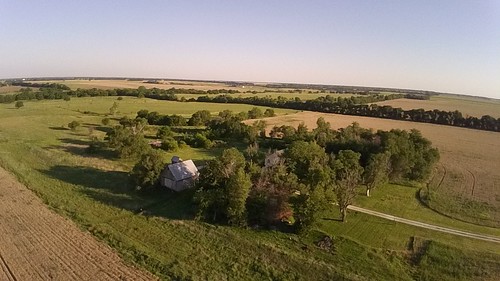
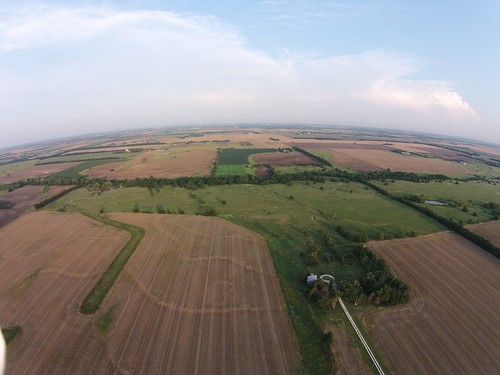
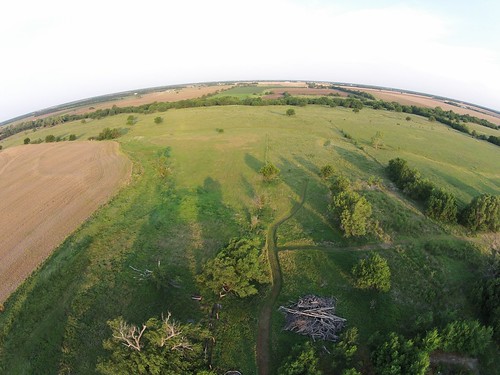
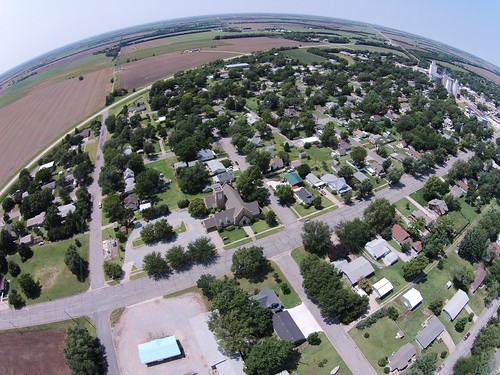
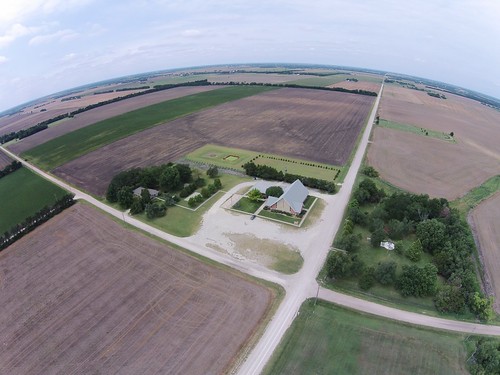
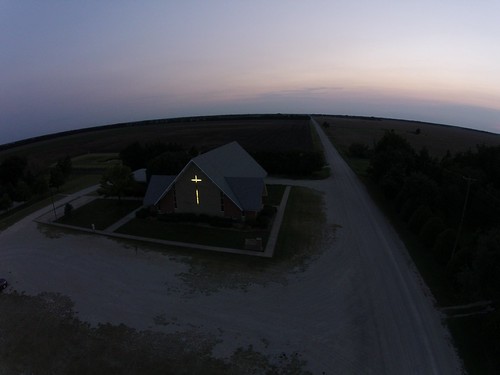
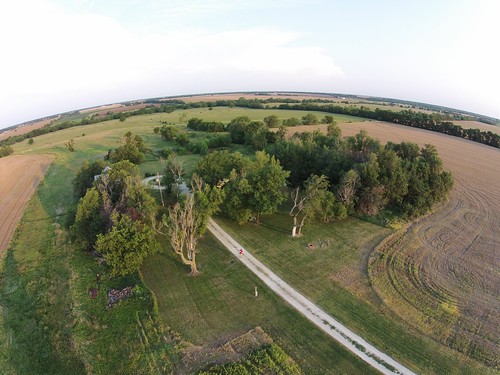
Sometimes you see something that takes your breath away, maybe even makes your eyes moist. That happened when I saw this photo one morning: Sunrise on the Prairie Photography has been one of my hobbies since I was a child, and I ve enjoyed it all these years. Recently I was inspired by the growing ease of aerial photography using model aircraft, and now can fly two short-range RC quadcopters. That photo came from the first one, and despite being a low-res 1280 720 camera, tha image of our home in the yellow glow of sunrise brought a deep feeling a beauty and peace. DJI00196 Somehow seeing our home surrounded by the beauty of the immense wheat fields and green pastures drives home how small we all are in comparison to the vastness of the earth, and how lucky we are to inhabit this beautiful planet. DJI00204 As the sun starts to come up over the pasture, the only way you can tell the height of the grass at 300ft is to see the shadow it makes on the mowed pathway Laura and I use to get down to the creek. DJI00149 This is a view of our church in a small town nearby the church itself is right in the center of the photo. Off to the right, you see the grain elevators that can be seen for miles across the Kansas prairie, and of course the fields are never all that far off in the background. Here you can see the quadcopter taking off from the driveway: And here it is flying over my home church out in the country: DJI00120 That s the country church, at the corner of two gravel roads with its lighted cross facing east that can be seen from a mile away at night. To the right is the church park, and the green area along the road farther back is the church cemetery. DJI00063 Sometimes we get in debates about environmental regulations, politics, religion, whatever. We hear stories of missiles, guns, and destruction. It is sad, this damage we humans inflict on ourselves and our earth. Our earth our home is worth saving. Its stunning beauty from all its continents is evidence enough of that. To me, this photo of a small corner of flat Kansas is proof enough that the home we all share deserves to be treated well, and saved so that generations to come can also get damp eyes viewing its beauty from a new perspective. DJI00183

19 July 2014

Jo Shields: Transition tracker

Friday was my last day at Collabora, the awesome Open Source consultancy in Cambridge. I d been there more than three years, and it was time for a change. As luck would have it, that change came in the form of a job offer 3 months ago from my long-time friend in Open Source, Miguel de Icaza. Monday morning, I fly out to Xamarin s main office in Boston, for just over a week of induction and face time with my new co workers, as I take on the title of Release Engineer. My job is to make sure Mono on Linux is a first-class citizen, rather than the best-effort it s been since Xamarin was formed from the ashes of the Attachmate/Novell deal. I m thrilled to work full-time on what I do already as community work including making Mono great on Debian/Ubuntu and hope to form new links with the packer communities in other major distributions. And I m delighted that Xamarin has chosen to put its money where its mouth is and fund continued Open Source development surrounding Mono. If you re in the Boston area next week or the week after, ping me via the usual methods! IMG_20140719_203043

Vasudev Kamath: Stop messing with my settings Network Manager

I use a laptop with Atheros wifi card with ath9k driver. I use hostapd to convert my laptop wifi into AP (Access point) so I can share network with my Nexus 7 and Kindle. This has been working fine for quite some time till my recent update. After recent system update (I use Debian Sid), I couldn't for some reason convert my wifi into AP so my device can connect. I can't find anything in log nor in hostapd debug messages which is useful to trouble shoot the issue. Every time I start the laptop my wifi card will be blocked by RF-KILL and I have manually unblock (both hard and soft). The script which I use to convert my Wifi into AP is below
#Initial wifi interface configuration
ifconfig "$1" up 192.168.2.1 netmask 255.255.255.0
sleep 2
# start dhcp
sudo systemctl restart dnsmasq.service
iptables --flush
iptables --table nat --flush
iptables --delete-chain
iptables -t nat -A POSTROUTING -o "$2" -j MASQUERADE
iptables -A FORWARD -i "$1" -j ACCEPT
sysctl -w net.ipv4.ip_forward=1
#start hostapd
hostapd /etc/hostapd/hostapd.conf  &> /dev/null &
I tried rebooting the laptop and for some time I managed to convert my wifi into AP, I noticed at same time that Network Manager is not started once laptop is booted, yeah this also started happening after recent upgrade which I guess is the black magic of systemd. After some time I noticed wifi has went down and now I can't bring it up because its blocked by RF-KILL. After checking the syslog I noticed following lines.
Jul 18 23:09:30 rudra kernel: [ 1754.891060] IPv6: ADDRCONF(NETDEV_CHANGE): wlan0: link becomes ready
Jul 18 23:09:30 rudra NetworkManager[5485]: <info> (mon.wlan0): using nl80211 for WiFi device control
Jul 18 23:09:30 rudra NetworkManager[5485]: <info> (mon.wlan0): driver supports Access Point (AP) mode
Jul 18 23:09:30 rudra NetworkManager[5485]: <info> (mon.wlan0): new 802.11 WiFi device (driver: 'ath9k' ifindex: 10)
Jul 18 23:09:30 rudra NetworkManager[5485]: <info> (mon.wlan0): exported as /org/freedesktop/NetworkManager/Devices/8
Jul 18 23:09:30 rudra NetworkManager[5485]: <info> (mon.wlan0): device state change: unmanaged -> unavailable (reason 'managed') [10 20 2]
Jul 18 23:09:30 rudra NetworkManager[5485]: <info> (mon.wlan0): preparing device
Jul 18 23:09:30 rudra NetworkManager[5485]: <info> devices added (path: /sys/devices/pci0000:00/0000:00:1c.1/0000:04:00.0/net/mon.wlan0, iface: mon.wlan0)
Jul 18 23:09:30 rudra NetworkManager[5485]: <info> device added (path: /sys/devices/pci0000:00/0000:00:1c.1/0000:04:00.0/net/mon.wlan0, iface: mon.wlan0): no ifupdown configuration found.
Jul 18 23:09:33 rudra ModemManager[891]: <warn>  Couldn't find support for device at '/sys/devices/pci0000:00/0000:00:1c.1/0000:04:00.0': not supported by any plugin
Well I couldn't figure out much but it looks like NetworkManager has come up and after seeing interface mon.wlan0, a monitoring interface created by hostapd to monitor the AP goes mad and tries to do something with it. I've no clue what it is doing and don't have enough patience to debug that. Probably some expert can give me hints on this. So as a last resort I purged the NetworkManager completely from the system and settled back to good old wicd and rebooted the system. After reboot wifi card is happy and is not blocked by RF-KILL and now I can convert it AP and use it as long as I wish without any problems. Wicd is not a great tool but its good enough to get the job done and does only what is asked to it unlike the NetworkManager. So in short
NetworkManager please stop f***ing with my settings and stop acting oversmart.

18 July 2014

Mario Lang: Croudsourced accessibility: Self-made digital menus

Something straight out from the real world: Menu cards in restaurants are not nice to deal with if you are blind. It is an old problem we grow used to ignoring over time, but still something that can be quite nagging. There are a lot of psychological issues involved in this one. Of course, you can ask for the menu to be read out to you by the staff. While they usually do their best, you end up missing out on some things most of the time. First of all, depending on the current workload in the restaurant, the staff will usually try to cut some time and not read everything to you. What they usually do is to try to understand what type of meal you are interested in, and just read the choices from that category to you. While this can be considered a service in some situations (human preprocessing), there are situations were you will definitely miss a highlight on the menu that you would have liked to choose if you knew that it was there. And even if the staff decides to read the complete menu to you (which is rare), you are confronted with the 7-things-in-my-head-at-once problem. It is usually rather hard to decide amongst a list of more then 7 items, because our short-term memory is sort of limited. What the sighted restaurant goers do, is to skip back and forth between the available options, until they hit a decisive moment. True, that can take a while, but it is definitely a lot easier if you can perform "random access reads" to the list of choices yourself. However, if someone presents a substantial number of choices to you in a row, as sequential speech, you loose the random access ability. You either remember every choice from the beginning and do your choosing mentaully (if you do have extraordinary mental abilities), or you end up asking the staff to read previous items aloud again. This can work, but usually it doesn't. At some point, you do not want to bother the staff anymore, and you even start to feel stupid for asking again and again, while this is something totally normal to every sighted person, just that "they" do their "random access browsing" on their own, so "they" have no need to feel bad about how long it takes them to decide, minus the typical social pressure that arises after a a certain time for everyone, at least if you are dining in a group. In very rare cases, you happen to meet staff that is truly "awake", doing their best to not let you feel that they might be pressed on time, and really taking as much time as necessary to help you make the perfect decision. This is rare, but if it happens, it is almost a magical moment. One of these moments, where there are no "artificial" barriers between humans doing communcation. Anyway, I am drifting away. The perfect solution to this problem is to provide random access browsing of a restaurant menu with the help of digital devices. Trying to make braille menus available in all restaurants is a goal which is not realistically reachable. Menus go out of date, and need changing. And getting a physical braille copy updated and reprinted is considerably more involved as with digital media. Restaurant owners will also likely not see the benefit to rpvide a braille card for a very small circle of customers. With a digital online menu, that is a completely different story. These days, almost every blind person in at least my social circles owns an iOS (or similar) device. These devices have speech synthesis and web browsers. Of course, some restaurants especially in urban areas do already have a menu online. I have found them manually with google and friends sometimes in the past, which has already given me the ability to actually sit back, and really comfortably choose amongst the available offerings myself, without having to bother a human, and without having to feel bad about (ab)using their time. However, the case where a restaurant really has their menu online is rather rare still in the area where I am. And, it can be tedious to google for a restaurant website. Sometimes, the website itself is just marginally accessible, which makes it even more frustrating to get a relaxed dinner-experience. I have discovered a location-based solution for the restaurant-menu problem recently. Foursquare offers the ability to provide a direct link to the menu in a restaurant-entry. I figured, since all you need to do is write a single webpage where the (common) menu items are listed per restaurant, that I could begin to create restaurant menus for my favourite locations, on my own. Well, not quite, but almost. I will sometimes need help from others to get the menu digitized, but that's just a one-time piece of work I hopefully can outsource :-). Once the actual content is in my INBUX, I create a nice HTML page listing the menu in a rather speech-based browser friendly way. I have begun to do this today, with the menu of a restaurant just about 500 meters away from my apartment. Unterm goldenen Dachl now has a menu online, and the foursquare change request to publish the corresponsing URL is already pending. I don't fully understand how the Foursquare change review process works yet, but I hope the URL should be published in the upcoming days/weeks. I am using Foursquare because it is the backend of a rather popular mobile navigation App for blind people, called Blindsquare. Blindsquare lets you comfortably use Open Street Map and Foursquare data to get an overview of your surroundingds. If a food place has a menu entry listed in Foursquare, Blindsquare conveniently shows it to you and opens a browser if you tap it. So there is no need to actually search for the restaurant, you can just use the location based search of Blindsquare to discover the restaurant entry and its menu link directly from within Blindsquare. Actually, you could even find a restaurant by accident, and with a little luck, find the menu for it by location, without even knowing how the restaurant is called. Isn't that neat? Yeah, that's how it is supposed to work, that's as much independence as you can get. And, it is, as the title suggests, croudsourced accessibility. Becuase while it is nice if a restaurant owner cares to publish their menu themselves, if they haven't, you can do it yourself. Either as a user of assistive technologies, to scratch your own itch. Or as a friend of a person with a need for assistive technologies. Next time you go to lunch with your blind friend, consider making available the menu to them digitally in advance, instead of reading it. Other people will likely thank you for that, and you have actually achieved something today. And if you happne to put a menu online, make sure to submit a change request to Foursquare. Many blind people are using blindsquare these days, which makes it super-easy for them to discover the menu.

17 July 2014

Daniel Pocock: MH17 and the elephant in the room

Just last week, air passengers were told of intrusive new checks on their electronic devices when flying. For years, passengers have also suffered bans on basic essentials like drinking water and excesses like the patting down of babies that even Jimmy Saville would find offensive. Of course, all this is being done for public safety. So if western leaders claim the safety and security of their citizens is really their number one priority, just how is it that a passenger aircraft can be flying through a war zone where two other planes were shot down this month? When it comes to aviation security, this really is the elephant in the room. The MH17 tragedy today demonstrates that terror always finds a way. It is almost like the terrorists can have their cake and eat it too: they force "free" countries to give up their freedoms and public decency and then they still knock the occasional plane out of the sky anyway. History in the making? It is 100 years since the assassination of Austrian Archduke Franz Ferdinand started World War I and just over 50 years since the Cuban missile crisis. Will this incident also achieve similar notoriety in history? The downing of MH17 may well have been a "mistake" but the casualties are real and very tragic indeed. I've flown with Malaysia Airlines many times, including the same route MH17 and feel a lot of sympathy for these people who have been affected.

Craig Small: No more dspam, now what?

I was surprised at first to see that a long-standing bug in dspam had been fixed. Until that is, I realised it was from the Debian ftp masters and the reason the bug was closing was that dspam was being removed from the Debian archive. Damn! So, now what? What is a good replacement for dspam that is actually maintained? I don t need anti-virus because mutt just ignores those sorts of things and besides youbankdetails.zip.exe doesn t run too well on Debian. dspam basically used tokens to find common patterns of spam and ham, with you bouncing misses so it learnt from its mistakes. Already got postgrey running for greylisting so its really something that does the bayesan filtering. Some intial comments: There really is only me on the mailserver with a pretty light load so no need to worry about efficiencies. Not sure if it matters but my MTA is postfix and I already use procmail for delivery.

Russ Allbery: wallet 1.1

Wallet is the secure credential management infrastructure that we use at Stanford, primarily for keytabs but increasingly for any sort of security keys that have to be stored somewhere and retrieved by specific systems or people. The primary goal of this release is to add Duo support. This is currently somewhat preliminary, with only a single Duo integration object type that creates a UNIX integration. (Well, technically it can create any type of integration, but the integration information is returned in the format expected by the UNIX integration.) I expect a later release to rename all existing "duo" object types to "duo-unix" and add additional object types for the various other types of integrations that one wants to support, but that work will have to wait for another day. Since it's been over a year since the previous release, there are also other accumulated bug fixes and improvements. I also tried to merge or address as many issues or patches that had been sent to me over the past year as I could, although many larger patches or improvements had to be deferred. Highlights: There are also multiple other bug fixes and general improvements, such as using DateTime objects uniformly for all database access that involves date fields, and recording ACL renames in the ACL history table. Both the API and the database layer are still kind of a mess, and I'd love to rewrite them with the benefit of experience and more knowledge, but that's a project for another day. You can get the latest release from the wallet distribution page.

16 July 2014

Wouter Verhelst: Reprepro for RPM

Dear lazyweb, reprepro is a great tool. I hand it some configuration and a bunch of packages, and it creates the necessary directory structure, moves the packages to the right location, and generates a (signed) Debian package repository. Obviously it would be possible to all that reprepro does by hand by calling things like cp and dpkg-scanpackages and gpg and other things by hand but it's easy to forget a step when doing so, and having a tool that just does things for me is wonderful. The fact that it does so only on request (i.e., when I know something has changed, rather than "once every so often") is also quite useful. At work, I currently need to maintain a bunch of package repositories. The Debian package archives there are maintained with reprepro, but I currently maintain the RPM archives pretty much by hand: create the correct directories, copy the right files to the right places, run createrepo over the correct directories (and in the case of the OpenSUSE repository, also run gpg), and a bunch of other things specific to our local installation. As if to prove my above point, apparently I forgot to do a few things there, meaning, some of the RPM repositories didn't actually work correctly, and my testing didn't catch on. Which makes me wonder how RPM package repositories are usually maintained. When one needs to maintain just a bunch of packages for a number of servers, well, running createrepo manually isn't too much of a problem. When it gets beyond own systems, however, and when you need to support multiple builds for multiple versions of multiple distributions, having to maintain all those repositories by hand is probably not the best idea. So, dear lazyweb: how do large RPM repositories maintain state of the packages, the distributions they belong to, and similar things? Please don't say "custom scripts" ;-)

Juliana Louback: Become an Open-source Contributor Video Conference

A couple weeks ago I was contacted by Yehuda Korotkin through one of the Debian mailing lists. Yehuda is a tech professor at one of Israel s leading colleges for women. He proposed a video conference to present the open source community to his class and explain how they can contribute to open source projects. I volunteered to participate and last Monday (July 14th 2014) we had our virtual meeting, which I hope was the first of many. Shauna G. also participated from Boston, making it a Israel - USA - Brazil meetup. Pretty impressive, eh? The conference was hosted on Google Hangouts, the video is available for viewing here. Run time is around 2.5 hours so to save you time I ve kindly posted a summary of the conference! To be frank, I look ghastly half the time so I d much prefer that you read this post. First there was a Q&A period which was more of a discussion panel, followed by a hands-on session where the girls made their first contribution to an open source project. Here s the gist of it: Q&A Hands on For the practical part of our conference, Yehuda s students contributed to Jscommunicator s Issue #5 which requests i18n support for major languages. JSCommunicator is a SIP communication tool developed in HTML and JavaScript, currently supporting audio/video calls and SIP SIMPLE instant messaging. First we set up Github in their local machines and forked the Jscommunicator repo. We learned the basic git commands needed to push changes to their remote repositories and to create a pull requests. This is explained in further detail here. At the end of the conference with nearly an hour overtime due to my tendency to be overly verbose, Yehuda s class made their first contribution with a Hebrew translation for Jscommunicator! All in all, it was great to virtually meet Yehuda and his epic students who all seemed very clever engineers. I m looking forward to our next meetup once I gain some time-management skills.

13 July 2014

Laura Arjona: New GPG Key!

Achievement unlocked: I have a new GPG key:

0xF22674467E4AF4A3

pub 4096R/7E4AF4A3 2014-07-13 [caduca: 2016-07-12]
Fingerprint = 445E 3AD0 3690 3F47 E19B 37B2 F226 7446 7E4A F4A3
uid Laura Arjona Reina <laura.arjona@upm.es>
uid Laura Arjona Reina <larjona@fsfe.org>
uid Laura Arjona Reina <larjona99@gmail.com>
sub 3072R/CC706B74 2014-07-13 [expires: 2016-07-12]
sub 3072R/7E51465F 2014-07-13 [expires: 2016-07-12]
sub 4096R/74C23D6E 2014-07-13 [expires: 2016-07-12]

The master key is 4096 bit, stored in a safe place, and 2 subkeys 3072 bit, stored in an FSFE Smartcard (I cannot store 4096 keys there).

I have carefully used the FSFE SmartCard Howto and Creating the perfect GPG keypair by Alex Cabal for strenghtening hash preferences and creating revocation certificate.

It seems everything works as intended. Passphrase is strong and this time I will not forget it. As first celebration, 1/2 lt icecream is waiting for me after dinner :)

People knowing me and around Madrid, please send me an encrypted mail as test or normal communication, and ping me to meet and sign keys :) One more step towards involvement in Debian and free software, controlling my digital life and communications, and becoming familiar with these technologies so I can teach them to my son as the natural way . Yay!
Filed under: My experiences and opinion, Tools Tagged: Contributing to libre software, Debian, encryption, English, Free Software, gpg, libre software, Moving into free software, mswl-cases

Steve Kemp: A brief twitter experiment

So I've recently posted a few links on Twitter, and I see followers clicking them. But also I see random hits. Tonight I posted a link to http://transient.email/, a domain I use for "anonymous" emailing, specifically to see which bots hit the URL. Within two minutes I had 15 visitors the first few of which were:
IP User-Agent Request
199.16.156.124Twitterbot/1.0;GET /robots.txt
199.16.156.126Twitterbot/1.0;GET /robots.txt
54.246.137.243python-requests/1.2.3 CPython/2.7.2+ Linux/3.0.0-16-virtualHEAD /
74.112.131.243Mozilla/5.0 ();GET /
50.18.102.132Google-HTTP-Java-Client/1.17.0-rc (gzip)HEAD /
199.16.156.125Twitterbot/1.0;GET /robots.txt
185.20.4.143Mozilla/5.0 (compatible; TweetmemeBot/3.0; +http://tweetmeme.com/)GET /
23.227.176.34MetaURI API/2.0 +metauri.comGET /
74.6.254.127Mozilla/5.0 (compatible; Yahoo! Slurp; http://help.yahoo.com/help/us/ysearch/slurp);GET /robots.txt
So what jumps out? The twitterbot makes several requests for /robots.txt, but never actually fetches the page itself which is interesting because there is indeed a prohibition in the supplied /robots.txt file. A surprise was that both Google and Yahoo seem to follow Twitter links in almost real-time. Though the Yahoo site parsed and honoured /robots.txt the Google spider seemed to only make HEAD requests - and never actually look for the content or the robots file. In addition to this a bunch of hosts from the Amazon EC2 space made requests, which was perhaps not a surprise. Some automated processing, and classification, no doubt. Anyway beer. It's been a rough weekend.

Russ Allbery: Review: Neptune's Brood

Review: Neptune's Brood, by Charles Stross
Series: Freyaverse #2
Publisher: Ace
Copyright: July 2013
ISBN: 1-101-62453-1
Format: Kindle
Pages: 325
Neptune's Brood is set in the same universe as Saturn's Children, but I wouldn't call it a sequel. It takes place considerably later, after substantial expansion of the robot civilization to the stars, and features entirely different characters (or, if there was overlap, I didn't notice). It also represents a significant shift in tone: while Saturn's Children is clearly a Heinlein pastiche and parody, Neptune's Brood takes its space opera more seriously. There is some situational humor assault auditors, for example but this book is played mostly straight, and I detected little or no Heinlein. This is Stross fleshing out his own space opera concept. This being Stross, that concept is not exactly conventional. This is a space opera about economics. Specifically, it's a space opera about interstellar economics, a debt pyramid, and a very interesting remapping of the continual growth requirements of capitalism to the outward expansion of colonization. The first-person protagonist comes from a "family" (as in Saturn's Children, the concept exists but involves rather more aggressive control of the instantiated "children") of bankers, but she is a forensic accountant and historian who specializes in analysis of financial scams. As you might expect, this is a significant clue about the plot. Neptune's Brood opens with Krina in search of her sister. She is supposed to be an itinerant scholar, moving throughout colonized space to spend some time with various scattered sisters, spreading knowledge and expanding her own. But it's clear from the start of the book that something else is going on, even before an assassin with Krina's face appears on her trail. Unfortunately, it takes roughly a third of the book to learn just what is happening beneath the surface, and most of that time is spent in a pointless interlude on a flying cathedral run by religious fanatics. The religion is a callback to Saturn's Children: robots who are trying to spread original humanity (the Fragiles) to the stars. This mostly doesn't go well, and is going particularly poorly for the ship that Krina works for passage on. But this is a brief gag that I thought went on much too long. The plot happens to Krina for this first section of the book rather than the other way around, little of lasting significance other than some character introductions occurs, and the Church itself, while playing a minor role in the later plot, is not worth the amount of attention that it gets. The best parts of the early book are the interludes in which Krina explains major world concepts to the reader. These are absolutely blatant infodumping, and I'm not sure how Stross gets away with them, but somehow he does, at least for me. They remind me of some of his blog posts, except tighter and fit into an interesting larger structure. Thankfully, once Krina finally arrives on Shin-Tethys, the plot improves considerably. There was a specific moment for me when the book became interesting: when Krina finds her sib's quarters in Shin-Tethys and analyzes what she finds there. It's the first significant thing in the book that she does rather than have done to her or thrust upon her, and she's a much better character when she's making decisions. This is also about the point where Stross starts fully explaining slow money, which is key to both the economics and the plot, and the plot starts to unwind its various mysteries and identify the motives of the players. Even then, Krina suffers from a lack of agency. Only at rare intervals does she get a chance to affect the story. Most of what she did of relevance to this book she did in the past, and while those descriptions of the backstory are interesting, they don't entirely make up for a passive protagonist. Thankfully, the other characters are varied and interesting enough, and the political machinations and cascading revelations captivating enough, that the last part of the book was very satisfying even with Krina on for the ride. This is a Stross novel, so it's full of two-dollar technical words mixed with technobabble. However, it shares with Saturn's Children the recasting of robots as the norm and fleshy humans as the exception, which means much of the technobabble is a straight substitution for our normal babble about meaty bodies and often works as an alienation technique. That makes it a bit more tolerable for me, although I still wished Stross would turn down the manic vocabulary in places. This bothers some people more than others; if you had no trouble with Accelerando, Neptune's Brood will pose no problems. I don't think the first section of this book was successful, but I liked the rest well enough to recommend it. If you like your space opera with a heavy dose of economics, a realistic attitude towards deep space exploration without faster-than-light technology, and a realistic perspective on the hostility of alien planets to Earth life, Neptune's Brood is a good choice. And any book that quotes David Graeber's Debt, and whose author has clearly paid attention to its contents, wins bonus points from me. Rating: 8 out of 10

12 July 2014

Matt Brown: GPG Key Management Rant

2014 and it s still annoyingly hard to find a reasonable GPG key management system for personal use All I want is to keep the key material isolated from any Internet connected host, without requiring me to jump through major inconvenience every time I want to use the key. An HSM/Smartcard of some sort is an obvious choice, but they all suck in their own ways:
* FSFE smartcard it s a smartcard, requires a reader, which are generally not particular portable compared to a USB stick.
* Yubikey Neo restricted to 2048 bits, doesn t allow imports of primary keys (only subkeys), so you either generate on device and have no backup, or maintain some off-device primary key with only subkeys on the Neo, negating the main benefits of it in the first place.
* Smartcard HSM similar problems to the Neo, plus not really supported by GPG well (needs 2.0 with specific supporting module version requirements).
* Cryptostick made by some Germans, sounds potentially great, but perpetually out of stock. Which leaves basically only the roll your own dm-crypt+LUKS usb stick approach. It obviously works well, and is what I currently use, but it s a bunch of effort to maintain, particularly if you decide, as I have, that the master key material can never touch a machine with a network connection. The implication is that you now need to keep an airgapped machine around, and maintain a set of subkeys that are OK for use on network connected machines to avoid going mad playing sneakernet for every package upload. The ideal device would be a USB form factor, supporting import of 4096 bit keys, across all GPG capabilities, but with all crypto ops happening on-device, so the key material never leaves the stick once imported. Ideally also cheap enough (e.g. ~100ish currency units) that I can acquire two for redundancy. As far as I can tell, such a device does not exist on this planet. It s almost enough to make a man give up on Debian and go live a life of peace and solitude with the remaining 99.9% of the world who don t know or care about this overly complicated mess of encryption we ve wrought for ourselves. end rant.

11 July 2014

Steve Kemp: A partial perl-implementation of Redis

So recently I got into trouble running Redis on a host, because the data no-longer fits into RAM. As an interim measure I fixed this by bumping the RAM allocated to the guest, but a real solution was needed. I figure there are three real alternatives: Looking around I found a couple of Redis-alternatives, but I was curious to see how hard it would be to hack something useful myself, as a creative solution. This evening I spotted Protocol::Redis, which is a perl module for decoding/encoding data to/from a Redis server. Thinking "Ahah" I wired this module up to AnyEvent::Socket. The end result was predis - A perl-implementation of Redis. It's a limited implementation which stores data in an SQLite database, and currently has support for: It isn't hugely fast, but it is fast enough, and it should be possible to use alternative backends in the future. I suspect I'll not add sets/hashes, but it could be done if somebody was keen.

Russ Allbery: Net::Duo 1.00

This is the first release of Net::Duo, which provides an object-oriented Perl interface for the Duo Security REST APIs. It attempts to abstract some of the API details and provide an object-oriented view of the returned objects in order to make use of the API in Perl code more natural than dealing with JSON data structures directly. Currently, some parts of the Auth and Admin APIs are implemented alongside with generic methods to call any of the JSON-based APIs. The approach I took with this module was a bit of a science experiment, and I'm still not entirely sure what I think about the results. Duo Security offers sample Perl code that provides the equivalent of the call and call_json Net::Duo methods but stops there. One sends in data structures and gets back data structures from JSON and manipulates everything in that format. I prefer a more object-oriented style, and want the module to do a bit more of the work for me, so this implementation wraps some of the APIs in objects with method calls. For updates, there are setters for the object itself and then a commit method to push the changes to Duo. This requires more implementation effort, and each API that should get richer treatment has to be modelled, but the resulting code looks like more natural object-oriented code. I wasn't completely sure going in if the effort to reward tradeoff made sense, and having finished the module sufficiently for Stanford's immediate needs, I'm still not sure. It was certainly more effort to write the base module this way, but on the other hand it also meant that I could map Perl notions of true and false to Duo's and provide much simpler methods for common operations. I still think this will make the code more maintainable in the long run, but I think it's within the margin of difference of opinion. Regardless, you can get the latest version from the Net::Duo distribution page and shortly from CPAN as well.

Russell Coker: Improving Computer Reliability

In a comment on my post about Taxing Inferior Products [1] Ben pointed out that most crashes are due to software bugs. Both Ben and I work on the Debian project and have had significant experience of software causing system crashes for Debian users. But I still think that the widespread adoption of ECC RAM is a good first step towards improving the reliability of the computing infrastructure. Currently when software developers receive bug reports they always wonder whether the bug was caused by defective hardware. So when bugs can t be reproduced (or can t be reproduced in a way that matches the bug report) they often get put in a list of random crash reports and no further attention is paid to them. When a system has ECC RAM and a filesystem that uses checksums for all data and metadata we can have greater confidence that random bugs aren t due to hardware problems. For example if a user reports a file corruption bug they can t repeat that occurred when using the Ext3 filesystem on a typical desktop PC I ll wonder about the reliability of storage and RAM in their system. If however the same bug report came from someone who had ECC RAM and used the ZFS filesystem then I would be more likely to consider it a software bug. The current situation is that every part of a typical PC is unreliable. When a bug can be attributed to one of several pieces of hardware, the OS kernel and even malware (in the case of MS Windows) it s hard to know where to start in tracking down a bug. Most users have given up and accepted that crashing periodically is just what computers do. Even experienced Linux users sometimes give up on trying to track down bugs properly because it s sometimes very difficult to file a good bug report. For the typical computer user (who doesn t have the power that a skilled Linux user has) it s much worse, filing a bug report seems about as useful as praying. One of the features of ECC RAM is that the motherboard can inform the user (either at boot time, after a NMI reboot, or through system diagnostics) of the problem so it can be fixed. A feature of filesystems such as ZFS and BTRFS is that they can inform the user of drive corruption problems, sometimes before any data is lost. My recommendation of BTRFS in regard to system integrity does have a significant caveat, currently the system reliability decrease due to crashes outweighs the reliability increase due to checksums at this time. This isn t all bad because at least when BTRFS crashes you know what the problem is, and BTRFS is rapidly improving in this regard. When I discuss BTRFS in posts like this one I m considering the theoretical issues related to the design not the practical issues of software bugs. That said I ve twice had a BTRFS filesystem seriously corrupted by a faulty DIMM on a system without ECC RAM.

Next.

Previous.