Search Results: "pa"

6 August 2020

Sam Hartman: Good Job Debian: Compatibility back to 1999

So, I needed a container of Debian Slink (2.1), released back in 1999. I expected this was going to be a long and involved process. Things didn't look good from the start:
root@mount-peerless:/usr/lib/python3/dist-packages/sqlalchemy# debootstrap  slink /build/slink2 
http://archive.debian.org/debian                                                               
E: No such script: /usr/share/debootstrap/scripts/slink

Hmm, I thought I remembered slink support for debootstrap--not that slink used debootstrap by default--back when I was looking through the debootstrap sources years ago. Sure enough looking through the changelogs, slink support was dropped back in 2005.
Okay, well, this isn't going to work either, but I guess I could try debootstrapping sarge and from there go back to slink.
Except it worked fine.
Go us!

5 August 2020

Dirk Eddelbuettel: RcppCCTZ 0.2.8: Minor API Extension

A new minor release 0.2.8 of RcppCCTZ is now on CRAN. RcppCCTZ uses Rcpp to bring CCTZ to R. CCTZ is a C++ library for translating between absolute and civil times using the rules of a time zone. In fact, it is two libraries. One for dealing with civil time: human-readable dates and times, and one for converting between between absolute and civil times via time zones. And while CCTZ is made by Google(rs), it is not an official Google product. The RcppCCTZ page has a few usage examples and details. This package was the first CRAN package to use CCTZ; by now at least three others do using copies in their packages which remains less than ideal. This version adds three no throw variants of three existing functions, contributed again by Leonardo. This will be used in an upcoming nanotime release which we are finalising now.

Changes in version 0.2.8 (2020-08-04)
  • Added three new nothrow variants (for win32) needed by the expanded nanotime package (Leonardo in #37)

We also have a diff to the previous version thanks to CRANberries. More details are at the RcppCCTZ page; code, issue tickets etc at the GitHub repository. If you like this or other open-source work I do, you can now sponsor me at GitHub. For the first year, GitHub will match your contributions.

This post by Dirk Eddelbuettel originated on his Thinking inside the box blog. Please report excessive re-aggregation in third-party for-profit settings.

Holger Levsen: 20200804-debconf6

DebConf6 This tshirt is 14 years old and from DebConf6. DebConf6 was my 4th DebConf and took place in Oaxtepec, Mexico. I'm a bit exhausted right now which is probably quite fitting to write something about DebConf6... many things in life are a question of perception, so I will mention the waterfall and the big swirl and the band playing with the fireworks during the conference dinner, the joy that we finally could use the local fiber network (after asking for months) just after discovering that the 6h shopping tour forgot to bring the essential pig tail connectors to connect the wireless antennas to the cards, which we needed to provide network to the rooms where the talks would take place. DebConf6 was the first DebConf with live streaming using dvswitch (written by Ben Hutchings and removed from unstable in 2015 as the world had moved to voctomix, which is yet another story to be told eventually). The first years (so DebConf6 and some) the videoteam focussed on getting the post processing done and the videos released, and streaming was optional, even though it was an exciting new feature and we still managed to stream mostly all we recorded and sometimes more... ;) Setting up the network uplink also was very challenging and took, I don't remember exactly, until day 4 or 5 of DebCamp (which lasted 7 days), so there were group of geeks in need of network, and mostly unable to fix it, because for fixing it we needed to communicate and IRC was down. (There was no mobile phone data at that time, the first iphone wasn't sold yet, it were the dark ages.) I remember literally standing on a roof to catch the wifi signal and excitingly shouting "I got one ping back! ... one ping back ...", less excitingly. I'll spare you the details now (and me writing them down) but I'll say that the solution involved Neil McGovern climbing an antenna and attaching a wifi antenna up high, probably 15m or 20m or some such. Finally we had uplink. I don't recall if that pig tail connector incident happened before of after, but in the end the network setup worked nicely on the wide area we occupied. Even though in some dorms the cleaning people daily removed one of our APs to be able to watch TV while cleaning ;) (Which kind of was ok, but still... they could have plugged it back in.) I also joyfully remember a certain vegetarian table, a most memorable bus ride (I'll just say 5 or rather cinco, and, unrelated except on the same bus ride, "Jesus" (and "Maria" for sure..)!) and talking with Jim Gettys and thus learning about the One Laptop per Child (OLPC) project. As for any DebConf, there's sooo much more to be told, but I'll end here and just thank Gunnar Wolf (as he masterminded much of this DebConf) and go to bed now :-)

4 August 2020

Osamu Aoki: exim4 configuration for Desktop (better gmail support)

Since gmail rewrites "From:" address now (2020) and keep changing access limitation, it is wise not to use it as smarthost any more. (If you need to access multiple gmail addresses from mutt etc, use esmtp etc.)

---
For most of our Desktop PC running with stock exim4 and mutt, I think sending out mail is becoming a bit rough since using random smarthost causes lots of trouble due to the measures taken to prevent spams.

As mentioned in Exim4 user FAQ , /etc/hosts should have FQDN with external DNS resolvable domain name listed instead of localdomain to get the correct EHLO/HELO line. That's the first step.

The stock configuration of exim4 only allows you to use single smarthost for all your mails. I use one address for my personal use which is checked by my smartphone too. The other account is for subscribing to the mailing list. So I needed to tweak ...

Usually, mutt is smart enough to set the From address since my .muttrc has

# Set default for From: for replyes for alternates.
set reverse_name

So how can I teach exim4 to send mails depending on the mail accounts listed in the From header.

For my gmail accounts, each mail should be sent to the account specific SMTP connection matching your From header to get all the modern SPAM protection data in right state. DKIM, SPF, DMARC... (Besides, they overwrite From: header anyway if you use wrong connection.)

For my debian.org mails, mails should be sent from my shell account on people.debian.org so it is very unlikely to be blocked. Sometimes, I wasn't sure some of these debian.org mails sent through my ISP's smarthost are really getting to the intended person.

To these ends, I have created small patches to the /etc/exim4/conf.d files and reported it to Debian BTS: #869480 Support multiple smarthosts (gmail support). These patches are for the source package.

To use my configuration tweak idea, you have easier route no matter which exim version you are using. Please copy and read pertinent edited files from my github site to your installed /etc/exim4/conf.d files and get the benefits.
If you really wish to keep envelope address etc. to match From: header, please rewite agressively using the From: header using eddited rewrite/31_exim4-config_rewriting as follows:

 .ifndef NO_EAA_REWRITE_REWRITE
*@+local_domains "$ lookup $ local_part lsearch /etc/email-addresses \
$value fail " f
# identical rewriting rule for /etc/mailname
*@ETC_MAILNAME "$ lookup $ local_part lsearch /etc/email-addresses \
$value fail " f
.endif
* "$h_from:" Frs

So far its working fine for me but if you find bug, let me know.

Osamu

3 August 2020

Holger Levsen: 20200803-debconf5

DebConf5 This tshirt is 15 years old and from DebConf5. It still looks quite nice! :) DebConf5 was my 3rd DebConf and took place in Helsinki, or rather Espoo, in Finland. This was one of my most favorite DebConfs (though I basically loved them all) and I'm not really sure why, I guess it's because of the kind of community at the event. We stayed in some future dorms of the universtity, which were to be first used by some European athletics chamopionship and which we could use even before that, guests zero. Being in Finland there were of course saunas in the dorms, which we frequently used and greatly enjoyed. Still, one day we had to go on a trip to another sauna in the forest, because of course you cannot visit Finland and only see one sauna. Or at least, you should not. Another aspect which increased community bonding was that we had to authenticate using 802.10 (IIRC, please correct me) which was an authentication standard mostly used for wireless but which also works for wired ethernet, except that not many had used it on Linux before. Thus quite some related bugs were fixed in the first days of DebCamp... Then my powerpc ibook also decided to go bad, so I had to remove 30 screws to get the harddrive out and 30 screws back in, to not have 30 screws laying around for a week. Then I put the harddrive into a spare (x86) laptop and only used my /home partition and was very happy this worked nicely. And then, for travelling back, I had to unscrew and screw 30 times again. (I think my first attempt took 1.5h and the fourth only 45min or so ;) Back home then I bought a laptop where one could remove the harddrive using one screw. Oh, and then I was foolish during the DebConf5 preparations and said, that I could imagine setting up a team and doing video recordings, as previous DebConfs mostly didn't have recordings and the one that had, didn't have releases of them... And so we did videos. And as we were mostly inexperienced we did them the hard way: during the day we recorded on tape and then when the talks were done, we used a postprocessing tool called 'cinelerra' and edited them. And because Eric Evans was on the team and because Eric worked every night almost all night, all nights, we managed to actually release them all when DebConf5 was over. I very well remember many many (23 or 42) Debian people cleaning the dorms thoroughly (as they were brand new..) and Eric just sitting somewhere, exhausted and watching the cleaners. And everybody was happy Eric was idling there, cause we knew why. In the aftermath of DebConf5 Ben Hutchings then wrote videolink (removed from sid in 2013) which we used to create video DVDs of our recordings based on a simple html file with links to the actual videos. There were many more memorable events. The boat ride was great. A pirate flag appeared. One night people played guitar until very late (or rather early) close to the dorms, so at about 3 AM someone complained about it, not in person, but on the debian-devel mailinglist. And those drunk people playing guitar, replied immediatly on the mailinglist. And then someone from the guitar group gave a talk, at 9 AM, and the video is online... ;) (It's a very slowwwwwww talk.) If you haven't been to or close to the polar circles it's almost impossible to anticipate how life is in summer there. It get's a bit darker after midnight or rather after 1 AM and then at 3 AM it get's light again, so it's reaaaaaaally easy to miss the night once and it's absolutly not hard to miss the night for several nights in a row. And then I shared a room with 3 people who all snore quite loud... There was more. I was lucky to witness the first (or second?) cheese and whine party which at that time took place in a dorm room with, dunno 10 people and maybe 15 kinds of cheese. And, of course, I met many wonderful people there, to mention a few I'll say Jesus, I mean mooch or data, Amaya and p2. And thanks to some bad luck which turned well, I also had my first time ever Sushi in Helsinki. And and and. DebConfs are soooooooo good! :-) I'll stop here as I originally planned to only write a paragraph or two about each and there are quite some to be written! Oh, and as we all learned, there are probably no mosquitos in Helsinki, just in Espoo. And you can swim naked through a lake and catch a taxi on the other site, with no clothes and no money, no big deal. (And you might not believe it, but that wasn't me. I cannot swim that well.)

Giovanni Mascellani: Bye bye Python 2!

And so, today, while I was browsing updates for my Debian unstable laptop, I noticed that aptitude wouldn't automatically upgrade python2 and related packages (I don't know why, and at this point don't care). So I decided to dare: I removed the python2 package to see what the dependency solver would have proposed me. It turned out that there was basically nothing I couldn't live without. So, bye bye Python 2. It was a long ride and I loved programming with you. But now it's the turn of your younger brother.
$ python
bash: python: comando non trovato
(guess what "comando non trovato" means?) And thanks to all those who made this possible!

Sylvain Beucler: Debian LTS and ELTS - July 2020

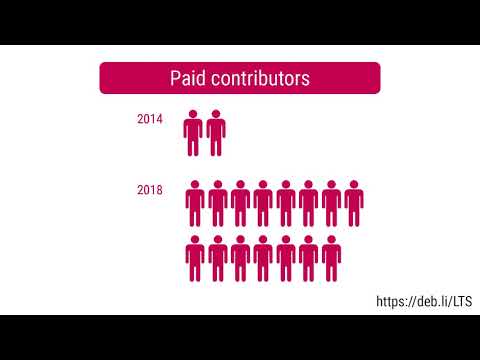
Debian LTS Logo Here is my transparent report for my work on the Debian Long Term Support (LTS) and Debian Extended Long Term Support (ELTS), which extend the security support for past Debian releases, as a paid contributor. In July, the monthly sponsored hours were split evenly among contributors depending on their max availability - I was assigned 25.25h for LTS (out of 30 max; all done) and 13.25h for ELTS (out of 20 max; all done). We shifted suites: welcome Stretch LTS and Jessie ELTS. The LTS->ELTS switch happened at the start of the month, but the oldstable->LTS switch happened later (after finalizing and flushing proposed-updates to a last point release), causing some confusion but nothing major. ELTS - Jessie LTS - Stretch Documentation/Scripts

Arnaud Rebillout: GoAccess 1.4, a detailed tutorial

GoAccess v1.4 was just released a few weeks ago! Let's take this chance to write a loooong tutorial. We'll go over every steps to install and operate GoAccess. This is a tutorial aimed at those who don't play sysadmin every day, and that's why it's so long, I did my best to provide thorough explanations all along, so that it's more than just a "copy-and-paste" kind of tutorial. And for those who do play sysadmin everyday: please try not to fall asleep while reading, and don't hesitate to drop me an e-mail if you spot anything inaccurate in here. Thanks! Introduction So what's GoAccess already? GoAccess is a web log analyzer, and it allows you to visualize the traffic for your website, and get to know a bit more about your visitors: how many visitors and hits, for which pages, coming from where (geolocation, operating system, web browser...), etc... It does so by parsing the access logs from your web server, be it Apache, NGINX or whatever. GoAccess gives you different options to display the statistics, and in this tutorial we'll focus on producing a HTML report. Meaning that you can see the statistics for your website straight in your web browser, under the form of a single HTML page. For an example, you can have a look at the stats of my blog here: http://goaccess.arnaudr.io. GoAccess is written in C, it has very few dependencies, it had been around for about 10 years, and it's distributed under the MIT license. Assumptions This tutorial is about installing and configuring, so I'll assume that all the commands are run as root. I won't prefix each of them with sudo. I use the Apache web server, running on a Debian system. I don't think it matters so much for this tutorial though. If you're using NGINX it's fine, you can keep reading. Also, I will just use the name SITE for the name of the website that we want to analyze with GoAccess. Just replace that with the real name of your site. I also assume the following locations for your stuff: If you have your stuff in /srv/SITE/ log,www instead, no worries, just adjust the paths accordingly, I bet you can do it. Installation The latest version of GoAccess is v1.4, and it's not yet available in the Debian repositories. So for this part, you can follow the instructions from the official GoAccess download page. Install steps are explained in details, so there's nothing left for me to say :) When this is done, let's get started with the basics. We're talking about the latest version v1.4 here, let's make sure:
$ goaccess --version
GoAccess - 1.4.
...
Now let's try to create a HTML report. I assume that you already have a website up and running. GoAccess needs to parse the access logs. These logs are optional, they might or might not be created by your web server, depending on how it's configured. Usually, these log files are named access.log, unsurprisingly. You can check if those logs exist on your system by running this command:
find /var/log -name access.log
Another important thing to know is that these logs can be in different formats. In this tutorial we'll assume that we work with the combined log format, because it seems to be the most common default. To check what kind of access logs your web server produces, you must look at the configuration for your site. For an Apache web server, you should have such a line in the file /etc/apache2/sites-enabled/SITE.conf:
CustomLog $ APACHE_LOG_DIR /SITE/access.log combined
For NGINX, it's quite similar. The configuration file would be something like /etc/nginx/sites-enabled/SITE, and the line to enable access logs would be something like:
access_log /var/log/nginx/SITE/access.log
Note that NGINX writes the access logs in the combined format by default, that's why you don't see the word combined anywhere in the line above: it's implicit. Alright, so from now on we assume that yes, you have access log files available, and yes, they are in the combined log format. If that's the case, then you can already run GoAccess and generate a report, for example for the log file /var/log/apache2/access.log
goaccess \
    --log-format COMBINED \
    --output /tmp/report.html \
    /var/log/apache2/access.log
It's possible to give GoAccess more than one log files to process, so if you have for example the file access.log.1 around, you can use it as well:
goaccess \
    --log-format COMBINED \
    --output /tmp/report.html \
    /var/log/apache2/access.log \
    /var/log/apache2/access.log.1
If GoAccess succeeds (and it should), you're on the right track! All is left to do to complete this test is to have a look at the HTML report created. It's a single HTML page, so you can easily scp it to your machine, or just move it to the document root of your site, and then open it in your web browser. Looks good? So let's move on to more interesting things. Web server configuration This part is very short, because in terms of configuration of the web server, there's very little to do. As I said above, the only thing you want from the web server is to create access log files. Then you want to be sure that GoAccess and your web server agree on the format for these files. In the part above we used the combined log format, but GoAccess supports many other common log formats out of the box, and even allows you to parse custom log formats. For more details, refer to the option --log-format in the GoAccess manual page. Another common log format is named, well, common. It even has its own Wikipedia page. But compared to combined, the common log format contains less information, it doesn't include the referrer and user-agent values, meaning that you won't have it in the GoAccess report. So at this point you should understand that, unsurprisingly, GoAccess can only tell you about what's in the access logs, no more no less. And that's all in term of web server configuration. Configuration to run GoAccess unprivileged Now we're going to create a user and group for GoAccess, so that we don't have to run it as root. The reason is that, well, for everything running unattended on your server, the less code runs as root, the better. It's good practice and common sense. In this case, GoAccess is simply a log analyzer. So it just needs to read the logs files from your web server, and there is no need to be root for that, an unprivileged user can do the job just as well, assuming it has read permissions on /var/log/apache2 or /var/log/nginx. The log files of the web server are usually part of the adm group (though it might depend on your distro, I'm not sure). This is something you can check easily with the following command:
ls -l /var/log   grep -e apache2 -e nginx
As a result you should get something like that:
drwxr-x--- 2 root adm 20480 Jul 22 00:00 /var/log/apache2/
And as you can see, the directory apache2 belongs to the group adm. It means that you don't need to be root to read the logs, instead any unprivileged user that belongs to the group adm can do it. So, let's create the goaccess user, and add it to the adm group:
adduser --system --group --no-create-home goaccess
addgroup goaccess adm
And now, let's run GoAccess unprivileged, and verify that it can still read the log files:
setpriv \
    --reuid=goaccess --regid=goaccess \
    --init-groups --inh-caps=-all \
    -- \
    goaccess \
    --log-format COMBINED \
    --output /tmp/report2.html \
    /var/log/apache2/access.log
setpriv is the command used to drop privileges. The syntax is quite verbose, it's not super friendly for tutorials, but don't be scared and read the manual page to learn what it does. In any case, this command should work, and at this point, it means that you have a goaccess user ready, and we'll use it to run GoAccess unprivileged. Integration, option A - Run GoAccess once a day, from a logrotate hook In this part we wire things together, so that GoAccess processes the log files once a day, adds the new logs to its internal database, and generates a report from all that aggregated data. The result will be a single HTML page. Introducing logrotate In order to do that, we'll use a logrotate hook. logrotate is a little tool that should already be installed on your server, and that runs once a day, and that is in charge of rotating the log files. "Rotating the logs" means moving access.log to access.log.1 and so on. With logrotate, a new log file is created every day, and log files that are too old are deleted. That's what prevents your logs from filling up your disk basically :) You can check that logrotate is indeed installed and enabled with this command (assuming that your init system is systemd):
systemctl status logrotate.timer
What's interesting for us is that logrotate allows you to run scripts before and after the rotation is performed, so it's an ideal place from where to run GoAccess. In short, we want to run GoAccess just before the logs are rotated away, in the prerotate hook. But let's do things in order. At first, we need to write a little wrapper script that will be in charge of running GoAccess with the right arguments, and that will process all of your sites. The wrapper script This wrapper is made to process more than one site, but if you have only one site it works just as well, of course. So let me just drop it on you like that, and I'll explain afterward. Here's my wrapper script:
 1
 2
 3
 4
 5
 6
 7
 8
 9
10
11
12
13
14
15
16
17
18
19
20
21
22
23
24
25
26
27
28
29
30
31
32
33
34
35
36
37
38
39
40
41
42
43
44
45
46
47
48
49
50
#!/bin/bash
# Process log files /var/www/apache2/SITE/access.log,
# only if /var/lib/goaccess-db/SITE exists.
# Create HTML reports in $1, a directory that must exist.
set -eu
OUTDIR=
LOGDIR=/var/log/apache2
DBDIR=/var/lib/goaccess-db
fail()   echo >&2 "$@"; exit 1;  
[ $# -eq 1 ]   fail "Usage: $(basename $0) OUTPUT_DIRECTORY"
OUTDIR=$1
[ -d "$OUTDIR" ]   fail "'$OUTDIR' is not a directory"
[ -d "$LOGDIR" ]   fail "'$LOGDIR' is not a directory"
[ -d "$DBDIR"  ]   fail "'$DBDIR' is not a directory"
for d in $(find "$LOGDIR" -mindepth 1 -maxdepth 1 -type d); do
    site=$(basename "$sitedir")
    dbdir=$DBDIR/$site
    logfile=$d/access.log
    outfile=$OUTDIR/$site.html
    if [ ! -d "$dbdir" ]   [ ! -e "$logfile" ]; then
        echo "  Skipping site '$site'"
        continue
    else
        echo "  Processing site '$site'"
    fi
    setpriv \
        --reuid=goaccess --regid=goaccess \
        --init-groups --inh-caps=-all \
        -- \
    goaccess \
        --agent-list \
        --anonymize-ip \
        --persist \
        --restore \
        --config-file /etc/goaccess/goaccess.conf \
        --db-path "$dbdir" \
        --log-format "COMBINED" \
        --output "$outfile" \
        "$logfile"
done
So you'd install this script at /usr/local/bin/goaccess-wrapper for example, and make it executable:
chmod +x /usr/local/bin/goaccess-wrapper
A few things to note: As is, the script makes the assumption that the logs for your site are logged in a sub-directory /var/log/apache2/SITE/. If it's not the case, adjust that in the wrapper accordingly. The name of this sub-directory is then used to find the GoAccess database directory /var/lib/goaccess-db/SITE/. This directory is expected to exist, meaning that if you don't create it yourself, the wrapper won't process this particular site. It's a simple way to control which sites are processed by this GoAccess wrapper, and which sites are not. So if you want goaccess-wrapper to process the site SITE, just create a directory with the name of this site under /var/lib/goaccess-db:
mkdir -p /var/lib/goaccess-db/SITE
chown goaccess:goaccess /var/lib/goaccess-db/SITE
Now let's create an output directory:
mkdir /tmp/goaccess-reports
chown goaccess:goaccess /tmp/goaccess-reports
And let's give a try to the wrapper script:
goaccess-wrapper /tmp/goaccess-reports
ls /tmp/goaccess-reports
Which should give you:
SITE.html
At the same time, you can check that GoAccess populated the database with a bunch of files:
ls /var/lib/goaccess-db/SITE
Setting up the logrotate prerotate hook At this point, we have the wrapper in place. Let's now add a pre-rotate hook so that goaccess-wrapper runs once a day, just before the logs are rotated away. The logrotate config file for Apache2 is located at /etc/logrotate.d/apache2, and for NGINX it's at /etc/logrotate.d/nginx. Among the many things you'll see in this file, here's what is of interest for us: In the config file, there is also this snippet:
prerotate
    if [ -d /etc/logrotate.d/httpd-prerotate ]; then \
        run-parts /etc/logrotate.d/httpd-prerotate; \
    fi; \
endscript
It indicates that scripts in the directory /etc/logrotate.d/httpd-prerotate/ will be executed before the rotation takes place. Refer to the man page run-parts(8) for more details... Putting all of that together, it means that logs from the web server are rotated once a day, and if we want to run scripts just before the rotation, we can just drop them in the httpd-prerotate directory. Simple, right? Let's first create this directory if it doesn't exist:
mkdir -p /etc/logrotate.d/httpd-prerotate/
And let's create a tiny script at /etc/logrotate.d/httpd-prerotate/goaccess:
1
2
#!/bin/sh
exec goaccess-wrapper /tmp/goaccess-reports
Don't forget to make it executable:
chmod +x /etc/logrotate.d/httpd-prerotate/goaccess
As you can see, the only thing that this script does is to invoke the wrapper with the right argument, ie. the output directory for the HTML reports that are generated. And that's all. Now you can just come back tomorrow, check the logs, and make sure that the hook was executed and succeeded. For example, this kind of command will tell you quickly if it worked:
journalctl   grep logrotate
Integration, option B - Run GoAccess once a day, from a systemd service OK so we've just seen how to use a logrotate hook. One downside with that is that we have to drop privileges in the wrapper script, because logrotate runs as root, and we don't want to run GoAccess as root. Hence the rather convoluted syntax with setpriv. Rather than embedding this kind of thing in a wrapper script, we can instead run the wrapper script from a [systemd][] service, and define which user runs the wrapper straight in the systemd service file. Introducing systemd niceties So we can create a systemd service, along with a systemd timer that fires daily. We can then set the user and group that execute the script straight in the systemd service, and there's no need for setpriv anymore. It's a bit more streamlined. We can even go a bit further, and use systemd parameterized units (also called templates), so that we have one service per site (instead of one service that process all of our sites). That will simplify the wrapper script a lot, and it also looks nicer in the logs. With this approach however, it seems that we can't really run exactly before the logs are rotated away, like we did in the section above. But that's OK. What we'll do is that we'll run once a day, no matter the time, and we'll just make sure to process both log files access.log and access.log.1 (ie. the current logs and the logs from yesterday). This way, we're sure not to miss any line from the logs. Note that GoAccess is smart enough to only consider newer entries from the log files, and discard entries that are already in the database. In other words, it's safe to parse the same log file more than once, GoAccess will do the right thing. For more details see "INCREMENTAL LOG PROCESSING" from man goaccess. systemd]: https://freedesktop.org/wiki/Software/systemd/ Implementation And here's how it all looks like. First, a little wrapper script for GoAccess:
 1
 2
 3
 4
 5
 6
 7
 8
 9
10
11
12
13
14
15
16
17
18
19
20
21
22
23
24
25
26
27
28
29
30
31
32
#!/bin/bash
# Usage: $0 SITE DBDIR LOGDIR OUTDIR
set -eu
SITE=$1
DBDIR=$2
LOGDIR=$3
OUTDIR=$4
LOGFILES=()
for ext in log log.1; do
    logfile="$LOGDIR/access.$ext"
    [ -e "$logfile" ] && LOGFILES+=("$logfile")
done
if [ $ #LOGFILES[@]  -eq 0 ]; then
    echo "No log files in '$LOGDIR'"
    exit 0
fi
goaccess \
    --agent-list \
    --anonymize-ip \
    --persist \
    --restore \
    --config-file /etc/goaccess/goaccess.conf \
    --db-path "$DBDIR" \
    --log-format "COMBINED" \
    --output "$OUTDIR/$SITE.html" \
    "$ LOGFILES[@] "
This wrapper does very little. Actually, the only thing it does is to check for the existence of the two log files access.log and access.log.1, to be sure that we don't ask GoAccess to process a file that does not exist (GoAccess would not be happy about that). Save this file under /usr/local/bin/goaccess-wrapper, don't forget to make it executable:
chmod +x /usr/local/bin/goaccess-wrapper
Then, create a systemd parameterized unit file, so that we can run this wrapper as a systemd service. Save it under /etc/systemd/system/goaccess@.service:
[Unit]
Description=Update GoAccess report - %i
ConditionPathIsDirectory=/var/lib/goaccess-db/%i
ConditionPathIsDirectory=/var/log/apache2/%i
ConditionPathIsDirectory=/tmp/goaccess-reports
PartOf=goaccess.service
[Service]
Type=oneshot
User=goaccess
Group=goaccess
Nice=19
ExecStart=/usr/local/bin/goaccess-wrapper \
 %i \
 /var/lib/goaccess-db/%i \
 /var/log/apache2/%i \
 /tmp/goaccess-reports
So, what is a systemd parameterized unit? It's a service to which you can pass an argument when you enable it. The %i in the unit definition will be replaced by this argument. In our case, the argument will be the name of the site that we want to process. As you can see, we use the directive ConditionPathIsDirectory= extensively, so that if ever one of the required directories does not exist, the unit will just be skipped (and marked as such in the logs). It's a graceful way to fail. We run the wrapper as the user and group goaccess, thanks to User= and Group=. We also use Nice= to give a low priority to the process. At this point, it's already possible to test. Just make sure that you created a directory for the GoAccess database:
mkdir -p /var/lib/goaccess-db/SITE
chown goaccess:goaccess /var/lib/goaccess-db/SITE
Also make sure that the output directory exists:
mkdir /tmp/goaccess-reports
chown goaccess:goaccess /tmp/goaccess-reports
Then reload systemd and fire the unit to see if it works:
systemctl daemon-reload
systemctl start goaccess@SITE.service
journalctl   tail
And that should work already. As you can see, the argument, SITE, is passed in the systemctl start command. We just append it after the @, in the name of the unit. Now, let's create another GoAccess service file, which sole purpose is to group all the parameterized units together, so that we can start them all in one go. Note that we don't use a systemd target for that, because ultimately we want to run it once a day, and that would not be possible with a target. So instead we use a dummy oneshot service. So here it is, saved under /etc/systemd/system/goaccess.service:
[Unit]
Description=Update GoAccess reports
Requires= \
 goaccess@SITE1.service \
 goaccess@SITE2.service
[Service]
Type=oneshot
ExecStart=true
As you can see, we simply list the sites that we want to process in the Requires= directive. In this example we have two sites named SITE1 and SITE2. Let's ensure that everything is still good:
systemctl daemon-reload
systemctl start goaccess.service
journalctl   tail
Check the logs, both sites SITE1 and SITE2 should have been processed. And finally, let's create a timer, so that systemd runs goaccess.service once a day. Save it under /etc/systemd/system/goaccess.timer.
[Unit]
Description=Daily update of GoAccess reports
[Timer]
OnCalendar=daily
RandomizedDelaySec=1h
Persistent=true
[Install]
WantedBy=timers.target
Finally, enable the timer:
systemctl daemon-reload
systemctl enable --now goaccess.timer
At this point, everything should be OK. Just come back tomorrow and check the logs with something like:
journalctl   grep goaccess
Last word: if you have only one site to process, of course you can simplify, for example you can hardcode all the paths in the file goaccess.service instead of using a parameterized unit. Up to you. Daily operations So in this part, we assume that you have GoAccess all setup and running, once a day or so. Let's just go over a few things worth noting. Serve your report Up to now in this tutorial, we created the reports in /tmp/goaccess-reports, but that was just for the sake of the example. You will probably want to save your reports in a directory that is served by your web server, so that, well, you can actually look at it in your web browser, that was the point, right? So how to do that is a bit out of scope here, and I guess that if you want to monitor your website, you already have a website, so you will have no trouble serving the GoAccess HTML report. However there's an important detail to be aware of: GoAccess shows all the IP addresses of your visitors in the report. As long as the report is private it's OK, but if ever you make your GoAccess report public, then you should definitely invoke GoAccess with the option --anonymize-ip. Keep an eye on the logs In this tutorial, the reports we create, along with the GoAccess databases, will grow bigger every day, forever. It also means that the GoAccess processing time will grow a bit each day. So maybe the first thing to do is to keep an eye on the logs, to see how long it takes to GoAccess to do its job every day. Also, maybe you'd like to keep an eye on the size of the GoAccess database with:
du -sh /var/lib/goaccess-db/SITE
If your site has few visitors, I suspect it won't be a problem though. You could also be a bit pro-active in preventing this problem in the future, and for example you could break the reports into, say, monthly reports. Meaning that every month, you would create a new database in a new directory, and also start a new HTML report. This way you'd have monthly reports, and you make sure to limit the GoAccess processing time, by limiting the database size to a month. This can be achieved very easily, by including something like YEAR-MONTH in the database directory, and in the HTML report. You can handle that automatically in the wrapper script, for example:
sfx=$(date +'%Y-%m')
mkdir -p $DBDIR/$sfx
goaccess \
    --db-path $DBDIR/$sfx \
    --output "$OUTDIR/$SITE-$sfx.html" \
    ...
You get the idea. Further notes Migration from older versions With the --persist option, GoAccess keeps all the information from the logs in a database, so that it can re-use it later. In prior versions, GoAccess used the Tokyo Cabinet key-value store for that. However starting from v1.4, GoAccess dropped this dependency and now uses its own database format. As a result, the previous database can't be used anymore, you will have to remove it and restart from zero. At the moment there is no way to convert the data from the old database to the new one. If you're interested, this is discussed upstream at [#1783][bug-1783]. Another thing that changed with this new version is the name for some of the command-line options. For example, --load-from-disk was dropped in favor of --restore, and --keep-db-files became --persist. So you'll have to look at the documentation a bit, and update your script(s) accordingly. Other ways to use GoAccess It's also possible to do it completely differently. You could keep GoAccess running, pretty much like a daemon, with the --real-time-html option, and have it process the logs continuously, rather than calling it on a regular basis. It's also possible to see the GoAccess report straight in the terminal, thanks to libncurses, rather than creating a HTML report. And much more, GoAccess is packed with features. Conclusion I hope that this tutorial helped some of you folks. Feel free to drop an e-mail for comments.

2 August 2020

Enrico Zini: Toxic positivity links

That which we do not bring to consciousness appears in our lives as fate. Carl Jung
Emotional support of others can take the form of surface-level consolation. But compassion means being willing to listen and feel, even when it's uncomfortable.
Ultimately, the driving force behind the power of positive thinking meme is the word power. But what about those whose bodies are not powerful? What about those who are vulnerable? What about those who are tired, isolated, and struggling? What about those who are ill? What about those who lack
I have often been dismissive or unhelpful when someone close to me was dealing with painful circumstances, having learned to accentuate the positive. In the more recent past, I have recognized these behavioral patterns as part of what some mental health professionals term, toxic positivity.
Toxic positivity is the overgeneralization of a happy, optimistic state resulting in the denial & invalidation of the authentic human emotional experience.

Holger Levsen: 20200802-debconf4

DebConf4 This tshirt is 16 years old and from DebConf4. Again, I should probably wash it at 60 celcius for once... DebConf4 was my 2nd DebConf and took place in Porto Alegre, Brasil. Like many DebConfs, it was a great opportunity to meet people: I remember sitting in the lobby of the venue and some guy asked me what I did in Debian and I told him about my little involvements and then asked him what he was doing, and he told me he wanted to become involved in Debian again, after getting distracted away. His name was Ian Murdock... DebConf4 also had a very cool history session in the hallway track (IIRC, but see below) with Bdale Garbee, Ian Jackson and Ian Murdock and with a young student named Biella Coleman busy writing notes. That same hallway also saw the kickoff meeting of the Debian Women project, though sadly today http://tinc.debian.net ("there's no cabal") only shows an apache placeholder page and not a picture of that meeting. DebCon4 was also the first time I got a bit involved in preparing DebConf, together with Jonas Smedegaard I've set up some computers there, using FAI. I had no idea that this was the start of me contributing to DebConfs for text ten years. And of course I also saw some talks, including one which I really liked, which then in turn made me notice there were no people doing video recordings, which then lead to something... I missed the group picture of this one. I guess it's important to me to mention it because I've met very wonderful people at this DebConf... (some mentioned in this post, some not. You know who you are!) Afterwards some people stayed in Porto Alegre for FISL, where we saw Lawrence Lessing present Creative Commons to the world for the first time. On the flight back I sat next to a very friendly guy from Poland and we talked almost the whole flight and then we never saw each other again, until 15 years later in Asia... Oh, and then, after DebConf4, I used IRC for the first time. And stayed in the #debconf4 IRC channel for quite some years :) Finally, DebConf4 and more importantly FISL, which was really big (5000 people?) and after that, the wizard of OS conference in Berlin (which had a very nice talk about Linux in different places in the world, illustrating the different states of 'first they ignore you, then they laugh at you, then they fight you, then you win'), made me quit my job at a company supporting Windows- and Linux-setups as I realized I'd better start freelancing with Linux-only jobs. So, once again, my life would have been different if I would not have attended these events! Note: yesterdays post about DebConf3 was thankfully corrected twice. This might well happen to this post too! :)

Enrico Zini: Libreoffice presentation tips

Snap guides Dragging from the rulers does not always create snap guides. If it doesn't, click on the slide background, "Snap guides", "Insert snap guide". In my case, after the first snap guide was manually inserted, it was possible to drag new one from the rulers. Master slides How to edit a master slide Change styles in master slide Do not change properties of text by selecting placeholder text in the Master View. Instead, open the Styles and formatting sidebar, and edit the styles in there. This means the style changes are applied to pages in all layouts, not just the "Title, Content" layout that is the only one editable in the "Master View". How to duplicate a master slide There seems to be no feature implemented for this, but you can do it, if you insist: It's needed enough that someone made a wikihow: https://www.wikihow.com/Copy-a-LibreOffice-Impress-Master-Slide. How to change the master slide for a layout that is not "Title, Content" I could not find a way to do it, but read on for a workaround. I found an ask.libreoffice.org question that went unanswered. I asked on #libreoffice on IRC and got no answer:
Hello. I'm doing the layout for a presentation in impress, and I can edit all sorts of aspects of the master slide. It seems that I can only edit the "Title, Content" layout of the master slide, though. I'd like to edit, for example, the "Title only" layout so that the title appears in a different place than the top of the page. Is it possible to edit specific layouts in a master page? In the master slide editor it seems impossible to select a layout, for example. Alternatively I tried creating multiple master slides, but then if I want to create a master slide for a title page, there's no way to remove the outline box, or the title box.
My work around has been to create multiple master slides, one for each layout. For a title layout, I moved the outline box into a corner, and one has to remove it manually after create a new slide. There seems to be no way of changing the position of elements not found in the "Title, Content" layout, like "Subtitle". On the other hand, given that one's working with an entirely different master slide, one can abuse the outline box as a subtitle. Note that if you later decide to change a style element for all the slides, you'll need to go propagate the change to the "Styles and Formatting" menu of all master slides you're using.

Enrico Zini: Gender, inclusive communities, and dragonflies

From https://en.wikipedia.org/wiki/Dragonfly#Sex_ratios:
Sex ratios The sex ratio of male to female dragonflies varies both temporally and spatially. Adult dragonflies have a high male-biased ratio at breeding habitats. The male-bias ratio has contributed partially to the females using different habitats to avoid male harassment. As seen in Hine's emerald dragonfly (Somatochlora hineana), male populations use wetland habitats, while females use dry meadows and marginal breeding habitats, only migrating to the wetlands to lay their eggs or to find mating partners. Unwanted mating is energetically costly for females because it affects the amount of time that they are able to spend foraging.

1 August 2020

Molly de Blanc: busy busy

I ve been working with Karen Sandler over the past few months on the first draft of the Declaration of Digital Autonomy. Feedback welcome, please be constructive. It s a pretty big deal for me, and feels like the culmination of a lifetime of experiences and the start of something new. We talked about it at GUADEC and HOPE. We don t have any other talks scheduled yet, but are available for events, meetups, dinner parties, and b nai mitzvahs.

Andrew Cater: Debian 10.5 media testing - 202008012055 - post 4 of several

We've more or less finished testing on the Debian install images. Now moving on to the debian-live images. Bugs found and being triaged live as I type. Lots of typing and noises in the background of the video conference. Now at about 12-14 hours in on this for some of the participants. Lots of good work still going on, as ever.

Andrew Cater: Debian 10.5 media testing - pause for supper - 202001081715 - post 3 of several

Various of the folk doing this have taken a food break until 1900 local. A few glitches, a few that needed to be tried over again - but it's all going fairly well.

It is likely that at least one of the CD images will be dropped. The XFCE desktop install CD for i386 is now too large to fit on CD media. The netinst .iso files / the DVD 1 file / any of the larger files available via Jigdo will all help you achieve the same result.

There are relatively few machines that are i386 architecture only - it might be appropriate for people to use 64 bit amd64 from this point onwards as pure i386 machines are now approaching ten years old as a minimum. If you do need a graphical user environment for a pure i386 machine, it can be installed by using an expert install or using tasksel in the installation process.

Andrew Cater: Debian 10.5 Buster point release 20200801 - all of the fixes :)

The point release is happening today for Debian Buster 10.5. This is an important release because it incorporates all the recent security fixes from the latest GRUB / Secure Boot "Boothole" security problems.

Behind the scenes, there has been a lot of work to get this right: a release subject to an embargo to allow all the Linux releases to co-ordinate this as far as possible, lots of consistent effort, lots of cooperation - the very best of Free/Libre/Open Source working together.

Secure Boot shims are signed with a different key to go to upstream this time around: in due course, when revocation of old, insecure code happens to plug the security hole, older media may be deny-listed. All the updates for all the affected packages (listed in https://www.debian.org/security/2020-GRUB-UEFI-SecureBoot/ ) are included in this release.

This has been a major wake-up call: the work behind the scenes has meant that each affected Linux distribution will be in a much better position going forward and working together is always good.

Utkarsh Gupta: FOSS Activites in July 2020

Here s my (tenth) monthly update about the activities I ve done in the F/L/OSS world.

Debian
This was my 17th month of contributing to Debian. I became a DM in late March last year and a DD last Christmas! \o/ Well, this month I didn t do a lot of Debian stuff, like I usually do, however, I did a lot of things related to Debian (indirectly via GSoC)! Anyway, here are the following things I did this month:

Uploads and bug fixes:

Other $things:
  • Mentoring for newcomers.
  • FTP Trainee reviewing.
  • Moderation of -project mailing list.
  • Sponsored php-twig for William, ruby-growl, ruby-xmpp4r, and uby-uniform-notifier for Cocoa, sup-mail for Iain, and node-markdown-it for Sakshi.

GSoC Phase 2, Part 2! In May, I got selected as a Google Summer of Code student for Debian again! \o/
I am working on the Upstream-Downstream Cooperation in Ruby project. The first three blogs can be found here: Also, I log daily updates at gsocwithutkarsh2102.tk. Whilst the daily updates are available at the above site^, I ll breakdown the important parts of the later half of the second month here:
  • Marc Andre, very kindly, helped in fixing the specs that were failing earlier this month. Well, the problem was with the specs, but I am still confused how so. Anyway..
  • Finished documentation of the second cop and marked the PR as ready to be reviewed.
  • David reviewed and suggested some really good changes and I fixed/tweaked that PR as per his suggestion to finally finish the last bits of the second cop, RelativeRequireToLib.
  • Merged the PR upon two approvals and released it as v0.2.0!
  • We had our next weekly meeting where we discussed the next steps and the things that are supposed to be done for the next set of cops.
  • Introduced rubocop-packaging to the outer world and requested other upstream projects to use it! It is being used by 13 other projects already!
  • Started to work on packaging-style-guide but I didn t push anything to the public repository yet.
  • Worked on refactoring the cops_documentation Rake task which was broken by the new auto-corrector API. Opened PR #7 for it. It ll be merged after the next RuboCop release as it uses CopsDocumentationGenerator class from the master branch.
  • Whilst working on autoprefixer-rails, I found something unusual. The second cop shouldn t really report offenses if the require_relative calls are from lib to lib itself. This is a false-positive. Opened issue #8 for the same.

Debian (E)LTS
Debian Long Term Support (LTS) is a project to extend the lifetime of all Debian stable releases to (at least) 5 years. Debian LTS is not handled by the Debian security team, but by a separate group of volunteers and companies interested in making it a success. And Debian Extended LTS (ELTS) is its sister project, extending support to the Jessie release (+2 years after LTS support). This was my tenth month as a Debian LTS and my first as a Debian ELTS paid contributor.
I was assigned 25.25 hours for LTS and 13.25 hours for ELTS and worked on the following things:

LTS CVE Fixes and Announcements:

ELTS CVE Fixes and Announcements:

Other (E)LTS Work:
  • Did my LTS frontdesk duty from 29th June to 5th July.
  • Triaged qemu, firefox-esr, wordpress, libmediainfo, squirrelmail, xen, openjpeg2, samba, and ldb.
  • Mark CVE-2020-15395/libmediainfo as no-dsa for Jessie.
  • Mark CVE-2020-13754/qemu as no-dsa/intrusive for Stretch and Jessie.
  • Mark CVE-2020-12829/qemu as no-dsa for Jessie.
  • Mark CVE-2020-10756/qemu as not-affected for Jessie.
  • Mark CVE-2020-13253/qemu as postponed for Jessie.
  • Drop squirrelmail and xen for Stretch LTS.
  • Add notes for tomcat8, shiro, and cacti to take care of the Stretch issues.
  • Emailed team@security.d.o and debian-lts@l.d.o regarding possible clashes.
  • Maintenance of LTS Survey on the self-hosted LimeSurvey instance. Received 1765 (just wow!) responses.
  • Attended the fourth LTS meeting. MOM here.
  • General discussion on LTS private and public mailing list.

Other(s)
Sometimes it gets hard to categorize work/things into a particular category.
That s why I am writing all of those things inside this category.
This includes two sub-categories and they are as follows.

Personal: This month I did the following things:
  • Released v0.2.0 of rubocop-packaging on RubyGems!
    It s open-sourced and the repository is here.
    Bug reports and pull requests are welcomed!
  • Released v0.1.0 of get_root on RubyGems!
    It s open-sourced and the repository is here.
  • Wrote max-word-frequency, my Rails C1M2 programming assignment.
    And made it pretty neater & cleaner!
  • Refactored my lts-dla and elts-ela scripts entirely and wrote them in Ruby so that there are no issues and no false-positives!
    Check lts-dla here and elts-ela here.
  • And finally, built my first Rails (mini) web-application!
    The repository is here. This was also a programming assignment (C1M3).
    And furthermore, hosted it at Heroku.

Open Source: Again, this contains all the things that I couldn t categorize earlier.
Opened several issues and PRs:
  • Issue #8273 against rubocop, reporting a false-positive auto-correct for Style/WhileUntilModifier.
  • Issue #615 against http reporting a weird behavior of a flaky test.
  • PR #3791 for rubygems/bundler to remove redundant bundler/setup require call from spec_helper generated by bundle gem.
  • Issue #3831 against rubygems, reporting a traceback of undefined method, rubyforge_project=.
  • Issue #238 against nheko asking for enhancement in showing the font name in the very font itself.
  • PR #2307 for puma to constrain rake-compiler to v0.9.4.
  • And finally, I joined the Cucumber organization! \o/

Thank you for sticking along for so long :) Until next time.
:wq for today.

Paul Wise: FLOSS Activities July 2020

Focus This month I didn't have any particular focus. I just worked on issues in my info bubble.

Changes

Issues

Review

Administration
  • Debian wiki: unblock IP addresses, approve accounts, reset email addresses

Communication

Sponsors The purple-discord, ifenslave and psqlodbc work was sponsored by my employer. All other work was done on a volunteer basis.

31 July 2020

Ben Hutchings: Debian LTS work, July 2020

I was assigned 20 hours of work by Freexian's Debian LTS initiative, but only worked 5 hours this month and returned the remainder to the pool. Now that Debian 9 'stretch' has entered LTS, the stretch-backports suite will be closed and no longer updated. However, some stretch users rely on the newer kernel version provided there. I prepared to add Linux 4.19 to the stretch-security suite, alongside the standard package of Linux 4.9. I also prepared to update the firmware-nonfree package so that firmware needed by drivers in Linux 4.19 will also be available in stretch's non-free section. Both these updates will be based on the packages in stretch-backports, but needed some changes to avoid conflicts or regressions for users that continue using Linux 4.9 or older non-Debian kernel versions. I will upload these after the Debian 10 'buster' point release.

Chris Lamb: Free software activities in July 2020

Here is my monthly update covering what I have been doing in the free and open source software world during July 2020 (previous month): For Lintian, the static analysis tool for Debian packages:

Reproducible Builds One of the original promises of open source software is that distributed peer review and transparency of process results in enhanced end-user security. However, whilst anyone may inspect the source code of free and open source software for malicious flaws, almost all software today is distributed as pre-compiled binaries. This allows nefarious third-parties to compromise systems by injecting malicious code into ostensibly secure software during the various compilation and distribution processes. The motivation behind the Reproducible Builds effort is to ensure no flaws have been introduced during this compilation process by promising identical results are always generated from a given source, thus allowing multiple third-parties to come to a consensus on whether a build was compromised. The project is proud to be a member project of the Software Freedom Conservancy. Conservancy acts as a corporate umbrella allowing projects to operate as non-profit initiatives without managing their own corporate structure. If you like the work of the Conservancy or the Reproducible Builds project, please consider becoming an official supporter. This month, I:

diffoscope Elsewhere in our tooling, I made the following changes to diffoscope, including preparing and uploading versions 150, 151, 152, 153 & 154 to Debian:

Debian In Debian, I made the following uploads this month:

Debian LTS This month I have worked 18 hours on Debian Long Term Support (LTS) and 12 for the Extended LTS project. This included: You can find out more about the project via the following video:

Next.

Previous.