Search Results: "ina"

8 October 2015

Gunnar Wolf: On evolving communities and changing social practices

I will join Lars and Tincho in stating this, and presenting a version contrary to what Norbert portraits. I am very glad and very proud that the community I am most involved in, the Debian project, has kept its core identity over the years, at least for the slightly-over-a-decade I have been involved in it. And I am very glad and very proud that being less aggressive, more welcoming and in general more respectful to each other does not counter this. When I joined Debian, part of the mantra chants we had is that in order to join a Free Software project you had to grow a thick skin, as sooner or later we'd all be exposed to flamefests. But, yes, the median age of the DD was way lower back then I don't have the data at hand, but IIRC I have always been close to our median. Which means we are all growing old and grumpy. But old and wiser. A very successful, important and dear subproject to many of us is the Debian Women Project. Its original aim was, as the name shows, to try to reduce the imbalance between men and women participants in Debian IIRC back in 2004 we had 3 female DDs, and >950 male DDs. Soon, the project started morphing into pushing all of Debian to be less hostile, more open to contributions from any- and everyone (as today our diversity statement reads). And yes, we are still a long, long, long way from reaching equality. But we have done great steps. And not just WRT women, but all of the different minorities, as well as to diverging opinions within our community. Many people don't enjoy us abiding by a code of conduct; I also find it irritating sometimes to have to abide by certain codes if we mostly know each other and know we won't be offended by a given comment... Or will we? So, being more open and more welcoming also means being more civil. I cannot get myself to agree with Linus' quote, when he says that respect is not just given to everybody but must be earned. We should always start, and I enjoy feeling that in Debian this is becoming the norm, by granting respect to everybody And not losing it, even if things get out of hand. Thick skins are not good for communication.

Norbert Preining: Looking at the facts: Sarah Sharp s crusade

Much has been written around the internet about this geeky kernel maintainer Sarah Sharp who left kernel development. I have now spent two hours reading through lkml posts, and want to summarize a few mails from the long thread, since most of the usual news sites just rewrap the original blog of hers without adding any background. darth-cookie The whole thread evolved out call for stable kernel review by Greg Kroah-Hartman where he complained about too many patches that are not actually in rc1 before going into stable:
<rant>
  I'm sitting on top of over 170 more patches that have been marked for
  the stable releases right now that are not included in this set of
  releases.  The fact that there are this many patches for stable stuff
  that are waiting to be merged through the main -rc1 merge window cycle
  is worrying to me.
  [...]
from where it developed into a typical Linus rant on people flagging crap for stable, followed by some jokes:
On Fri, Jul 12, 2013 at 8:47 AM, Steven Rostedt <rostedt@goodmis.org> wrote:
> I tend to hold things off after -rc4 because you scare me more than Greg
> does ;-)
 
Have you guys *seen* Greg? The guy is a freakish giant. He *should*
scare you. He might squish you without ever even noticing.
 
              Linus
and Ingo Molnar giving advice to Greg KH:
So Greg, if you want it all to change, create some _real_ threat: be frank 
with contributors and sometimes swear a bit. That will cut your mailqueue 
in half, promise!
with Greg KH taking a funny position in answering:
Ok, I'll channel my "inner Linus" and take a cue from my kids and start
swearing more.
Up to now a pretty decent and normal thread with some jokes and poking, nobody minded, and reading through it I had a good time. The thread continues with a discussion on requirements what to submit to stable, and some side threads on particular commits. And then, out of the blue, Social Justice Warrior (SJW) Sarah Sharp pops in with a very important contribution:
Seriously, guys?  Is this what we need in order to get improve -stable?
Linus Torvalds is advocating for physical intimidation and violence.
Ingo Molnar and Linus are advocating for verbal abuse.
 
Not *fucking* cool.  Violence, whether it be physical intimidation,
verbal threats or verbal abuse is not acceptable.  Keep it professional
on the mailing lists.
 
Let's discuss this at Kernel Summit where we can at least yell at each
other in person.  Yeah, just try yelling at me about this.  I'll roar
right back, louder, for all the people who lose their voice when they
get yelled at by top maintainers.  I won't be the nice girl anymore.
Onto which Linus answers in a great way:
That's the spirit.
 
Greg has taught you well. You have controlled your fear. Now, release
your anger. Only your hatred can destroy me.
 
Come to the dark side, Sarah. We have cookies.
On goes Sarah, gearing up in her SJW mode and starting to rant:
However, I am serious about this.  Linus, you're one of the worst
offenders when it comes to verbally abusing people and publicly tearing
their emotions apart.
 
http://marc.info/?l=linux-kernel&m=135628421403144&w=2
http://marc.info/?l=linux-acpi&m=136157944603147&w=2
 
I'm not going to put up with that shit any more.
Linus himself made clear what he thinks of her:
Trust me, there's a really easy way for me to curse at people: if you
are a maintainer, and you make excuses for your bugs rather than
trying to fix them, I will curse at *YOU*.
 
Because then the problem really is you.
[...]
It is easy to verify what Linus said, by reading the above two links and the answers of the maintainers, both agreed that it was their failure and were sorry. (Mauro s answer, Rafael s answer) It is just the geeky SJW that was not even attacked (who would dare to attack a woman nowadays?). The overall reaction to her by the maintainers can be exemplified by Thomas Gleixner s post:
Just for the record. I got grilled by Linus several times over the
last years and I can't remember a single instance where it was
unjustified.
What follows is a nearly endless discussion with Sarah meandering around, changing permanently her opinion what is acceptable. Linus tried to explain to her in simple words, without success, she continues to rant around. Here arguments are so weak I had nothing but good laugh:
> Sarah, that's a pretty potent argument by Linus, that "acting 
> professionally" risks replacing a raw but honest culture with a
> polished but dishonest culture - which is harmful to developing
> good technology.
> 
> That's a valid concern. What's your reply to that argument?
 
I don't feel the need to comment, because I feel it's a straw man
argument.  I feel that way because I disagree with the definition of
professionalism that people have been pushing.
 
To me, being "professional" means treating each other with respect.  I
can show emotion, express displeasure, be direct, and still show respect
for my fellow developers.
 
For example, I find the following statement to be both direct and
respectful, because it's criticizing code, not the person:
 
"This code is SHIT!  It adds new warnings and it's marked for stable
when it's clearly *crap code* that's not a bug fix.  I'm going to revert
this merge, and I expect a fix from you IMMEDIATELY."
 
The following statement is not respectful, because it targets the
person:
 
"Seriously, Maintainer.  Why are you pushing this kind of *crap* code to
me again?  Why the hell did you mark it for stable when it's clearly
not a bug fix?  Did you even try to f*cking compile this?"
Fortunately, she was immediately corrected and Ingo Molnar wrote an excellent refutation (starting another funny thread) of all her emails, statements, accusations (all of the email is a good read):
_That_ is why it might look to you as if the person was
attacked, because indeed the actions of the top level maintainer were
wrong and are criticised.
 
... and now you want to 'shut down' the discussion. With all due respect,
you started it, you have put out various heavy accusations here and elsewhere,
so you might as well take responsibility for it and let the discussion be
brought to a conclusion, wherever that may take us, compared to your initial view?
(He retracted that last statement, though I don t see a reason for it) Last but not least, let us return to her blog post, where she states herself that:
FYI, comments will be moderated by someone other than me. As this is my blog, not a
government entity, I have the right to replace any comment I feel like with 
 fart fart fart fart .
and she made lots of use of it, I counted at least 10 instances. She seems to remove or fart fart fart any comment that is not in line with her opinion. Further evidence is provided by this post on lkml. Everyone is free to have his own opinion (sorry, his/her), and I am free to form my own opinion on Sarah Sharp by just simply reading the facts. I am more than happy that one more SJW has left Linux development, as the proliferation of cleaning of speech from any personality has taken too far a grip. Coming to my home-base in Debian, unfortunately there is no one in the position and the state of mind of Linus, so we are suffering the same stupidities imposed by social justice worriers and some brainless feminists (no, don t get me wrong, these are two independent attributes. I do NOT state that feminism is brainless) that Linus and the maintainer crew was able to fend of this time. I finish with my favorite post from that thread, by Steven Rosted (from whom I also stole the above image!):
On Tue, 2013-07-16 at 18:37 -0700, Linus Torvalds wrote:
> Emotions aren't bad. Quite the reverse. 
 
Spock and Dr. Sheldon Cooper strongly disagree.
Post Scriptum (after a bike ride) The last point by Linus is what I criticize most on Debian nowdays, it has become a sterilized over-governed entity, where most fun is gone. Making fun is practically forbidden, since there is the slight chance that some minority somewhere on this planet might feel hurt, and by this we are breaking the CoC. Emotions are restricted to the Happy happy how nice we are and how good we are level of US and also Japanese self-reenforcement society. Post Post Scriptum I just read Sarah Sharp s post on What makes a good community? , and without giving a full account or review, I am just pi**ed by the usage of the word microaggressions I can only recommend everyone to read this article and this article to get a feeling how bs the idea of microaggressions has taken over academia and obviously not only academia. Post3 Scriptum I am happy to see Lars Wirzenius, Gunnar Wolf, and Mart n Ferrari opposing my view. I agree with them that my comments concerning Debian are not mainstream in Debian something that is not very surprising, though, and I think it is great that they have fun in Debian, like many other contributors. Post4 Scriptum Although nobody will read this, here is a great response from a female developer:
[...] To Linus: You're a hero to many of us. Don't change. Please. You DO
NOT need to take time away from doing code to grow a pair of breasts
and judge people's emotional states: [...]
Nothing to add here!

7 October 2015

Guido G nther: Debian work in September 2015

Debian LTS August was the fifth month I contributed to Debian LTS under the Freexian umbrella. In total I spent eight hours working on: Besides that I did CVE triaging of 9 CVEs to check if and how they affect oldoldstable security as part of my LTS front desk work. Other Debian work I finally sent out the summary of the 8th Debian Groupware Meeting we had in the Linuxhotel earlier this year and gave a short talk about Debian at the Zarafa Tour in the Netherlands.

Emanuele Rocca: systemd is your friend

Today I want to talk a bit about some cool features of systemd, the default Debian init system since the release of Jessie. Ubuntu has also adopted systemd in 15.04, meaning that you are going to find it literally everywhere.
Logging The component responsible for logging in systemd is called journal. It collects and stores logs in a structured, indexed journal (hence the name). The journal can replace traditional syslog daemons such as rsyslog and syslog-ng, or work together with them. By default Debian keeps on using rsyslog, but if you don't need to ship logs to a centralized server (or do other fancy things) it is possible to stop using rsyslog right now and rely on systemd-journal instead. The obvious question is: why would anybody use a binary format for logs instead of a bunch of tried and true plain-text files? As it turns out, there are quite a lot of good reasons to do so. The killer features of systemd-journald for me are:
  • Index tons of logs while being able to search with good performance: O(log(n)) instead of O(n) which is what you get with text files
  • No need to worry about log rotation anymore, in any shape or form
The last point in particular is really critical in my opinion. Traditional log rotation implementations rely on cron jobs to check how much disk space is used by logs, compressing/removing old files. Log rotation is usually: 1) annoying to configure; 2) hard to get right; 3) prone to DoS attacks. With journald, there is pretty much nothing to configure. Log rotation is built into the daemon disk space allocation logic itself. This also allows to avoid vulnerability windows due to time-based rotation, which is what you get with logrotate and friends. Enough high-level discussions though, here is how to use the journal! Check if you already have the directory /var/log/journal, otherwise create it (as root). Then restart systemd-journald as follows: sudo systemctl restart systemd-journald You can get all messages produced since the last boot with journalctl -b. All messages produced today can get extracted using journalctl --since=today. Want to get all logs related to ssh? Try with journalctl _SYSTEMD_UNIT=ssh.service. There are many more filtering options available, you can read all about them with man journalctl. journald's configuration file is /etc/systemd/journald.conf. Two of the most interesting options are SystemMaxUse and SystemKeepFree, which can be used to change the amount of disk space dedicated to logging. They default to 10% and 15% of the /var filesystem respectively. Here is a little cheatsheet:
journalctl -b                # Show all messages since last boot
journalctl -f                # Tail your logs
journalctl --since=yesterday # Show all messages produced since yesterday
journalctl -pcrit            # Filter messages by priority
journalctl /bin/su           # Filter messages by program
journalctl --disk-usage      # The amount of space in use for journaling
Further reading:
Containers A relatively little known component of systemd is systemd-nspawn. It is a small, straightforward container manager. If you don't already have a chroot somewhere, here is how to create a basic Debian Jessie chroot under /srv/chroots/jessie:
$ debootstrap jessie /srv/chroots/jessie http://http.debian.net/debian/
With systemd-nspawn you can easily run a shell inside the chroot:
$ sudo systemd-nspawn -D /srv/chroots/jessie
Spawning container jessie on /srv/chroots/jessie.
Press ^] three times within 1s to kill container.
/etc/localtime is not a symlink, not updating container timezone.
root@jessie:~#
Done. Everything works out of the box: no need for you to mount /dev, /run and friends, systemd-nspawn took care of that. Networking also works. If you want to actually boot the system, just add the -b switch to the previous command:
$ sudo systemd-nspawn -b -D /srv/chroots/jessie
Spawning container jessie on /srv/chroots/jessie.
Press ^] three times within 1s to kill container.
/etc/localtime is not a symlink, not updating container timezone.
systemd 215 running in system mode. (+PAM +AUDIT +SELINUX +IMA +SYSVINIT +LIBCRYPTSETUP +GCRYPT +ACL +XZ -SECCOMP -APPARMOR)
Detected virtualization 'systemd-nspawn'.
Detected architecture 'x86-64'.
Welcome to Debian GNU/Linux jessie/sid!
Set hostname to <orion>.
[  OK  ] Reached target Remote File Systems (Pre).
[  OK  ] Reached target Encrypted Volumes.
[  OK  ] Reached target Paths.
[  OK  ] Reached target Swap.
[  OK  ] Created slice Root Slice.
[  OK  ] Created slice User and Session Slice.
[  OK  ] Listening on /dev/initctl Compatibility Named Pipe.
[  OK  ] Listening on Delayed Shutdown Socket.
[  OK  ] Listening on Journal Socket (/dev/log).
[  OK  ] Listening on Journal Socket.
[  OK  ] Created slice System Slice.
[  OK  ] Created slice system-getty.slice.
[  OK  ] Listening on Syslog Socket.
         Mounting POSIX Message Queue File System...
         Mounting Huge Pages File System...
         Mounting FUSE Control File System...
         Starting Copy rules generated while the root was ro...
         Starting Journal Service...
[  OK  ] Started Journal Service.
[  OK  ] Reached target Slices.
         Starting Remount Root and Kernel File Systems...
[  OK  ] Mounted Huge Pages File System.
[  OK  ] Mounted POSIX Message Queue File System.
[  OK  ] Mounted FUSE Control File System.
[  OK  ] Started Copy rules generated while the root was ro.
[  OK  ] Started Remount Root and Kernel File Systems.
         Starting Load/Save Random Seed...
[  OK  ] Reached target Local File Systems (Pre).
[  OK  ] Reached target Local File Systems.
         Starting Create Volatile Files and Directories...
[  OK  ] Reached target Remote File Systems.
         Starting Trigger Flushing of Journal to Persistent Storage...
[  OK  ] Started Load/Save Random Seed.
         Starting LSB: Raise network interfaces....
[  OK  ] Started Create Volatile Files and Directories.
         Starting Update UTMP about System Boot/Shutdown...
[  OK  ] Started Trigger Flushing of Journal to Persistent Storage.
[  OK  ] Started Update UTMP about System Boot/Shutdown.
[  OK  ] Started LSB: Raise network interfaces..
[  OK  ] Reached target Network.
[  OK  ] Reached target Network is Online.
[  OK  ] Reached target System Initialization.
[  OK  ] Listening on D-Bus System Message Bus Socket.
[  OK  ] Reached target Sockets.
[  OK  ] Reached target Timers.
[  OK  ] Reached target Basic System.
         Starting /etc/rc.local Compatibility...
         Starting Login Service...
         Starting LSB: Regular background program processing daemon...
         Starting D-Bus System Message Bus...
[  OK  ] Started D-Bus System Message Bus.
         Starting System Logging Service...
[  OK  ] Started System Logging Service.
         Starting Permit User Sessions...
[  OK  ] Started /etc/rc.local Compatibility.
[  OK  ] Started LSB: Regular background program processing daemon.
         Starting Cleanup of Temporary Directories...
[  OK  ] Started Permit User Sessions.
         Starting Console Getty...
[  OK  ] Started Console Getty.
[  OK  ] Reached target Login Prompts.
[  OK  ] Started Login Service.
[  OK  ] Reached target Multi-User System.
[  OK  ] Reached target Graphical Interface.
         Starting Update UTMP about System Runlevel Changes...
[  OK  ] Started Cleanup of Temporary Directories.
[  OK  ] Started Update UTMP about System Runlevel Changes.
Debian GNU/Linux jessie/sid orion console
orion login:
That's it! Just one command to start a shell in your chroot or boot the container, again zero configuration needed. Finally, systemd provides a command called machinectl that allows you to introspect and control your container:
$ sudo machinectl status jessie
jessie
           Since: Wed 2015-10-07 11:22:56 CEST; 55min ago
          Leader: 32468 (systemd)
         Service: nspawn; class container
            Root: /srv/chroots/jessie
         Address: fe80::8e70:5aff:fe81:2290
                  192.168.122.1
                  192.168.1.13
              OS: Debian GNU/Linux jessie/sid
            Unit: machine-jessie.scope
                   32468 /lib/systemd/systemd
                   system.slice
                     dbus.service
                       32534 /usr/bin/dbus-daemon --system --address=systemd: --nofork --nopidfile -...
                     cron.service
                       32539 /usr/sbin/cron
                     systemd-journald.service
                       32487 /lib/systemd/systemd-journald
                     systemd-logind.service
                       32532 /lib/systemd/systemd-logind
                     console-getty.service
                       32544 /sbin/agetty --noclear --keep-baud console 115200 38400 9600 vt102
                     rsyslog.service
                       32540 /usr/sbin/rsyslogd -n
With machinectl you can also reboot, poweroff, terminate your containers and more. There are so many things to learn about systemd and containers! Here are some references. This stuff is pretty exciting. Now that all major distributions use systemd by default, we can expect to have access to tools like journalctl and systemd-nspawn everywhere!

Norbert Preining: Kobo DRM removal on Linux

Finally it has been done to remove the DRM of a Kobo eBook one does not need to switch to Windows or Mac anymore, deal with the brain-dead Kobo Desktop app, etc etc. The only thing you need is a Kobo device! DRM is evil, we know that, please read up on DRM protection here. kobo-drm I wrote about the Pain of DRM some time ago, and after two years of fighting finally it is here the latest release of Apprentice Alf s DeDRM tools starting with version 6.3.4a makes the Obok plugin usable on Linux, too. Just get the latest tools, unzip them, install the obok_plugin.zip from the Obok_calibre_plugin directory, and restart your Calibre. After that connect your device and press the Obok button, and there we go, you can backup you purchased eBooks on your computer. Of course the same is true on Windows and Mac, so if you have a device, there is no need for Kobo Desktop anymore. Just one warning: Don t use it for pirating ebooks, the tools have the sole purpose to backup and make properly purchased ebooks available on different devices (Linux computer).

Dirk Eddelbuettel: RcppRedis 0.1.6

An incremental RcppRedis release arrived on CRAN yesterday. Russell Pierce contributed four new function for pushing and popping to/from lists, and added authentication support. I added a simple ping command as well.
Changes in version 0.1.6 (2015-10-05)
  • Added support (including new unit tests) for lpop, rpop, lpush, rpush as well as auth via augmented constructor (all thanks to PRs #11 and #13 by Russell Pierce)
  • Added ping command and unit test
Courtesy of CRANberries, there is also a diffstat report for the most recent release. More information is on the RcppRedis page.

This post by Dirk Eddelbuettel originated on his Thinking inside the box blog. Please report excessive re-aggregation in third-party for-profit settings.

6 October 2015

John Goerzen: Objects On Earth Are Closer Than They Appear

We all live beneath the great Big Dipper. So goes a line in a song I once heard the great Tony Brown sing. As I near the completion of my private pilot s training, I ve had more and more opportunities to literally see the wisdom in those words. Here s a story of one of them. Night
A shining beacon in space all alone in the night. Babylon 5
A night cross-country flight, my first, taking off from a country airport. The plane lifts into the dark sky. The bright white lights of the runway get smaller, and disappear as I pass the edge of the airport. Directly below me, it looks like a dark sky; pitch black except for little pinpoints of light at farmhouses and the occasional car. But seconds later, an expanse of light unfolds, from a city it takes nearly an hour to reach by car. Already it is in sight, and as I look off to other directions, other cities even farther away are visible, too. The ground shows a square grid, the streets of the city visible for miles. There are no highway signs in the sky. There are no wheels to keep my plane pointed straight. Even if I point the plane due south, if there is an east wind, I will actually be flying southwest. I use my eyes, enhanced by technology like a compass, GPS, and VHF radio beacons, to find my way. Before ever getting into the airplane, I have carefully planned my route, selecting both visual and technological waypoints along the way to provide many ways to ensure I am on course and make sure I don t get lost. Soon I see a flash repeating every few seconds in the distance an airport beacon. Then another, and another. Little pinpoints of light nestled in the square orange grid. Wichita has many airports, each with its beacon, and one of them will be my first visual checkpoint of the night. I make a few clicks in the cockpit, and soon the radio-controlled lights at one of the airports spring to life, illuminating my first checkpoint. More than a mile of white lights there to welcome any plane that lands, and to show a point on the path of any plane that passes. I continue my flight, sometimes turning on lights at airports, other times pointing my plane at lights from antenna towers (that are thousands of feet below me), sometimes keeping a tiny needle on my panel centered on a radio beacon. I land at a tiny, deserted airport, and then a few minutes later at a large commercial airport. On my way back home, I fly solely by reference to the ground directly over a freeway. I have other tools at my disposal, but don t need them; the steady stream of red and white lights beneath me are all I need. From my plane, there is just red and white. One after another, passing beneath me as I fly over them at 115 MPH. There is no citizen or undocumented immigrant, no rich or poor, no atheist or Christian or Muslim, no Democrat or Replubican, no American or Mexican, no adult or child, no rich or poor, no Porsche or Kia. Just red and white points of light, each one the same as the one before and the one after, stretching as far as I can see into the distance. All alike in the night. You only need to get a hundred feet off the ground before you realize how little state lines, national borders, and the machinery of politics and exclusion really mean. From the sky, the difference between a field of corn and a field of wheat is far more significant than the difference between Kansas and Missouri. This should be a comforting reminder to us. We are all unique, and beautiful in our uniqueness, but we are all human, each as valuable as the next. Up in the sky, even though my instructor was with me, during quiet times it is easy to feel all alone in the night. But I know it is not the case. Only a few thousand feet separate my plane from those cars. My plane, too, has red and white lights.
How often at night, when the heavens were bright,
With the light of the twinkling stars
Have I stood here amazed, and asked as I gazed,
If their glory exceed that of ours. John A. Lomax

Ben Armstrong: Cranberry Lake and nearby bog Fall, 2015

On one of my regular walks with a friend, we decided today to walk part of the BLT Trail to Cranberry Lake and the bog just past it, an easy 5 km round trip.
On the trail to the lake, golds dominateOn the trail to the lake, golds dominate
A calm day, the lake like glassA calm day, the lake like glass
In the bog, copper and golden huesIn the bog, copper and golden hues
On the margins of the bog, brilliant orange and redOn the margins of the bog, brilliant orange and red
The reds, dark greens and dead trees in counterpointThe reds, dark greens and dead trees in counterpoint
At our turning point, my cranberry patch provided a puckery snackAt our turning point, my cranberry patch provided a puckery snack
facebooktwittergoogle_plusredditpinterestlinkedinmail

Thorsten Alteholz: My Debian Activities in September 2015

FTP assistant Another month passed and another statistic arrives: This month I marked 341 packages for accept and rejected only 48 of them. Almost like last month I had to send 14 emails to maintainers. Squeeze LTS This was my fifteenth month that I did some work for the Squeeze LTS initiative, started by Raphael Hertzog at Freexian. This month I only got a workload of 14.5h. I finally uploaded a new version of php5. Unfortunately in one library a parameter to a function call introduced new values. As a result all running processes that used the old version of that library produced an error message until they got restarted. As complaints showed up on all channels, I rechecked my patches again and again but could not find an error. I wonder whether this happened once before. At least the php package does not have a mechanism to restart something
Altogether I uploaded those DLAs: I also started to work on an upload of freeimage and the next upload of php5. This month I also had another term of doing frontdesk work. So I answered questions on the IRC channel and looked for CVEs that are important for Squeeze LTS or could be ignored. Other stuff Some time ago someone mentioned pump.io and that it would be nice to have it in Debian. I found a Wiki page listing dependencies, with lots of stuff already done and just a few holes. It didn t look like much work todo until I realized that this page showed only the surface and the shoals are hidden below. Anyway, I started to work on it and up to now are uploaded and are still in NEW. Luckily most of them could be handled by npm2deb, so it was mainly routine piece of work. So, expect more to come I also polished some smaller packages and could even close some bugs:

Matthew Garrett: Going my own way

Reaction to Sarah's post about leaving the kernel community was a mixture of terrible and touching, but it's still one of those things that almost certainly won't end up making any kind of significant difference. Linus has made it pretty clear that he's fine with the way he behaves, and nobody's going to depose him. That's unfortunate, because earlier today I was sitting in a presentation at Linuxcon and remembering how much I love the technical side of kernel development. "Remembering" is a deliberate choice of word - it's been increasingly difficult to remember that, because instead I remember having to deal with interminable arguments over the naming of an interface because Linus has an undying hatred of BSD securelevel, or having my name forever associated with the deepthroating of Microsoft because Linus couldn't be bothered asking questions about the reasoning behind a design before trashing it.

In the end it's a mixture of just being tired of dealing with the crap associated with Linux development and realising that by continuing to put up with it I'm tacitly encouraging its continuation, but I can't be bothered any more. And, thanks to the magic of free software, it turns out that I can avoid putting up with the bullshit in the kernel community and get to work on the things I'm interested in doing. So here's a kernel tree with patches that implement a BSD-style securelevel interface. Over time it'll pick up some of the power management code I'm still working on, and we'll see where it goes from there. But, until there's a significant shift in community norms on LKML, I'll only be there when I'm being paid to be there. And that's improved my mood immeasurably.

(Edited to add a context link for the "deepthroating of Microsoft" reference)

comment count unavailable comments

Norbert Preining: Craft Beer Kanazawa 2015

Last weekend the yearly Craft Beer Kanazawa Festival took place in central Kanazawa. This year 14 different producers brought about 80 different kind of beers for us to taste. Compared with 6 years ago when I came to Japan and Japan was still more or less Kirin-Asahi-Sapporo country without any distinguishable taste, the situation as improved vastly, and we can now enjoy lots of excellent local beers!
beer-festival-1 Returning from a trip to Swansea and a conference in Fukuoka, I arrived at Kanazawa train station and went directly to the beer festival. A great welcome back in Kanazawa, but due to excessive sleep deprivation and the feeling of finally I want to come home , I only enjoyed 6 beers from 6 different producers. In the gardens behind the Shinoki Cultural Center lots of small tents with beer and food were set up. Lots of tables and chairs were also available, but most people enjoyed flocking around in the grass around the tents. What a difference to last year s rainy and cold beer festival!
beer-festival-5 This year s producers were (in order from left to right, page links according to language): beer-festival-3 With only 6 beers to my avail (due to ticket system), I choose the ones I don t have nearby. Mind that the following comments are purely personal and do not define a quality standards  I just say what I like from worst to best: beer-festival-2 A great beer festival and I am looking for next years festival to try a few more. In the mean time I will stock up beers at home, so that I have always a good Yoho Brewery beer at hand! Enjoy

5 October 2015

B lint R czey: Debian success stories: Automated signature verification

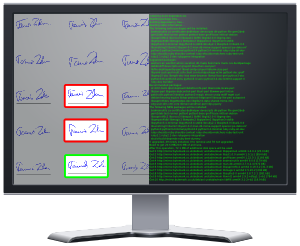
Debian was not generally seen as a bleeding-edge distribution, but it offered a perfect combination of stability and up-to-date software in our field when we chose the platform for our signature verification project. Having an active Debian Developer in the team also helped ensuring that packages which we use were in good shape when the freeze, then the release came and we can still rely on Jessie images with only a few extra packages to run our software stack. Not having to worry about the platform, we could concentrate on the core project and I m proud to announce that our start-up s algorithm won this year s Signature Verification Competition for Online Skilled Forgeries (SigWIComp2015) . The more detailed story can be read already in the English business news and is also on index.hu, a leading Hungarian news site. We are also working on a solution for categorizing users based on cursor/finger movements for targeting content, offers and ads better. This is also covered in the articles.

L szl a signature comparable in quality to the reference signatures

The verification task was not easy. The reference signatures were recorded at very low resolution and frequency and the forgers did a very good job in forging them creating a true challenge for everyone competing. At first glance it is hard to imagine that there is usable information in such small amount of recorded data, but our software is already better than me, for example in telling the difference between genuine and forged signatures. It feels like when the chess program beats the programmer again and again. :-) I would like to thank you all, who helped making Debian an awesome universal operating system and hope we can keep making every release better and better!

4 October 2015

Lunar: Reproducible builds: week 23 in Stretch cycle

What happened in the reproducible builds effort this week: Toolchain fixes Andreas Metzler uploaded autogen/1:5.18.6-1 in experimental with several patches for reproducibility issues written by Valentin Lorentz. Groovy upstream has merged a change proposed by Emmanuel Bourg to remove timestamps generated by groovydoc. Ben Hutchings submitted a patch to add support for SOURCE_DATE_EPOCH in linux-kbuild as an alternate way to specify the build timestamp. Reiner Herrman has sent a patch adding support for SOURCE_DATE_EPOCH in docbook-utils. Packages fixed The following packages became reproducible due to changes in their build dependencies: commons-csv. fest-reflect, sunxi-tools, xfce4-terminal, The following packages became reproducible after getting fixed: Some uploads fixed some reproducibility issues but not all of them: Patches submitted which have not made their way to the archive yet: Tomasz Rybak uploaded pycuda/2015.1.3-1 which should fix reproducibility issues. The package has not been tested as it is in contrib. akira found an embedded code copy of texi2html in fftw. reproducible.debian.net Email notifications are now only sent once a day per package, instead of on each status change. (h01ger) disorderfs has been temporarily disabled to see if it had any impact on the disk space issues. (h01ger) When running out of disk space, build nodes will now automatically detect the problem. This means test results will not be recorded as FTBFS and the problem will be reported to Jenkins maintainers. (h01ger) The navigation menu of package pages has been improved. (h01ger) The two amd64 builders now use two different kernel versions: 3.16 from stable and 4.1 from backports on the other. (h01ger) We now graph the number of packages which needs to be fixed. (h01ger) Munin now creates graphs on how many builds were performed by build nodes (example). (h01ger) A migration plan has been agreed with DSA on how to turn Jenkins into an official Debian service. A backport of jenkins-job-builder for Jessie is currently missing. (h01ger) Package reviews 119 reviews have been removed, 103 added and 45 updated this week. 16 fail to build from source issues were reported by Chris Lamb and Mattia Rizzolo. New issue this week: timestamps_in_manpages_generated_by_docbook_utils. Misc. Allan McRae has submitted a patch to make ArchLinux pacman record a .BUILDINFO file.

Dirk Eddelbuettel: RcppArmadillo 0.6.100.0.0

armadillo image The somewhat regular monthly upstream Armadillo update brings us a first release of the 6.* series. This follows an earlier test release announced on the list, and released to the Rcpp drat. And as version 6.100.0 was released on Friday by Conrad, we rolled it into RcppArmadillo release 0.6.100.0.0 yesterday. Following yet another full test against all reverse dependencies, got uploaded to CRAN which has now accepted it. A matching upload to Debian will follow shortly. Armadillo is a powerful and expressive C++ template library for linear algebra aiming towards a good balance between speed and ease of use with a syntax deliberately close to a Matlab. This release a few changes:
Changes in RcppArmadillo version 0.6.100.0.0 (2015-10-03)
  • Upgraded to Armadillo 6.100.0 ("Midnight Blue")
    • faster norm() and normalise() when using ATLAS or OpenBLAS
    • added Schur decomposition: schur()
    • stricter handling of matrix objects by hist() and histc()
    • advanced constructors for using auxiliary memory by Mat, Col, Row and Cube now have the default of strict = false
    • Cube class now delays allocation of .slice() related structures until needed
    • expanded join_slices() to handle joining cubes with matrices
Courtesy of CRANberries, there is also a diffstat report for the most recent CRAN release. As always, more detailed information is on the RcppArmadillo page. Questions, comments etc should go to the rcpp-devel mailing list off the R-Forge page.

This post by Dirk Eddelbuettel originated on his Thinking inside the box blog. Please report excessive re-aggregation in third-party for-profit settings.

Johannes Schauer: new sbuild release 0.66.0

I just released sbuild 0.66.0-1 into unstable. It fixes a whopping 30 bugs! Thus, I'd like to use this platform to: And a super big thank you to Roger Leigh who, despite having resigned from Debian, was always available to give extremely helpful hints, tips, opinion and guidance with respect to sbuild development. Thank you! Here is a list of the major changes since the last release:

2 October 2015

Daniel Pocock: Want to be selected for Google Summer of Code 2016?

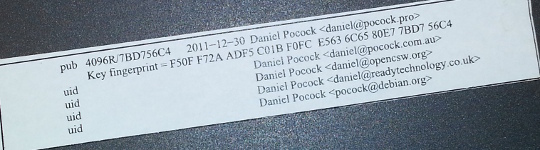
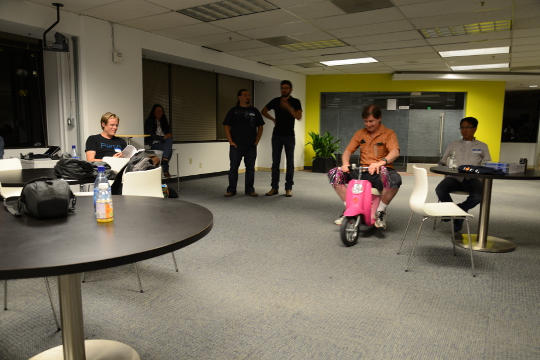
I've mentored a number of students in 2013, 2014 and 2015 for Debian and Ganglia and most of the companies I've worked with have run internships and graduate programs from time to time. GSoC 2015 has just finished and with all the excitement, many students are already asking what they can do to prepare and be selected for Outreachy or GSoC in 2016. My own observation is that the more time the organization has to get to know the student, the more confident they can be selecting that student. Furthermore, the more time that the student has spent getting to know the free software community, the more easily they can complete GSoC. Here I present a list of things that students can do to maximize their chance of selection and career opportunities at the same time. These tips are useful for people applying for GSoC itself and related programs such as GNOME's Outreachy or graduate placements in companies. Disclaimers There is no guarantee that Google will run the program again in 2016 or any future year until the Google announcement. There is no guarantee that any organization or mentor (including myself) will be involved until the official list of organizations is published by Google. Do not follow the advice of web sites that invite you to send pizza or anything else of value to prospective mentors. Following the steps in this page doesn't guarantee selection. That said, people who do follow these steps are much more likely to be considered and interviewed than somebody who hasn't done any of the things in this list. Understand what free software really is You may hear terms like free software and open source software used interchangeably. They don't mean exactly the same thing and many people use the term free software for the wrong things. Not all projects declaring themselves to be "free" or "open source" meet the definition of free software. Those that don't, usually as a result of deficiencies in their licenses, are fundamentally incompatible with the majority of software that does use genuinely free licenses. Google Summer of Code is about both writing and publishing your code and it is also about community. It is fundamental that you know the basics of licensing and how to choose a free license that empowers the community to collaborate on your code well after GSoC has finished. Please review the definition of free software early on and come back and review it from time to time. The The GNU Project / Free Software Foundation have excellent resources to help you understand what a free software license is and how it works to maximize community collaboration. Don't look for shortcuts There is no shortcut to GSoC selection and there is no shortcut to GSoC completion. The student stipend (USD $5,500 in 2014) is not paid to students unless they complete a minimum amount of valid code. This means that even if a student did find some shortcut to selection, it is unlikely they would be paid without completing meaningful work. If you are the right candidate for GSoC, you will not need a shortcut anyway. Are you the sort of person who can't leave a coding problem until you really feel it is fixed, even if you keep going all night? Have you ever woken up in the night with a dream about writing code still in your head? Do you become irritated by tedious or repetitive tasks and often think of ways to write code to eliminate such tasks? Does your family get cross with you because you take your laptop to Christmas dinner or some other significant occasion and start coding? If some of these statements summarize the way you think or feel you are probably a natural fit for GSoC. An opportunity money can't buy The GSoC stipend will not make you rich. It is intended to make sure you have enough money to survive through the summer and focus on your project. Professional developers make this much money in a week in leading business centers like New York, London and Singapore. When you get to that stage in 3-5 years, you will not even be thinking about exactly how much you made during internships. GSoC gives you an edge over other internships because it involves publicly promoting your work. Many companies still try to hide the potential of their best recruits for fear they will be poached or that they will be able to demand higher salaries. Everything you complete in GSoC is intended to be published and you get full credit for it. Imagine a young musician getting the opportunity to perform on the main stage at a rock festival. This is how the free software community works. It is a meritocracy and there is nobody to hold you back. Having a portfolio of free software that you have created or collaborated on and a wide network of professional contacts that you develop before, during and after GSoC will continue to pay you back for years to come. While other graduates are being screened through group interviews and testing days run by employers, people with a track record in a free software project often find they go straight to the final interview round. Register your domain name and make a permanent email address Free software is all about community and collaboration. Register your own domain name as this will become a focal point for your work and for people to get to know you as you become part of the community. This is sound advice for anybody working in IT, not just programmers. It gives the impression that you are confident and have a long term interest in a technology career. Choosing the provider: as a minimum, you want a provider that offers DNS management, static web site hosting, email forwarding and XMPP services all linked to your domain. You do not need to choose the provider that is linked to your internet connection at home and that is often not the best choice anyway. The XMPP foundation maintains a list of providers known to support XMPP. Create an email address within your domain name. The most basic domain hosting providers will let you forward the email address to a webmail or university email account of your choice. Configure your webmail to send replies using your personalized email address in the From header. Update your ~/.gitconfig file to use your personalized email address in your Git commits. Create a web site and blog Start writing a blog. Host it using your domain name. Some people blog every day, other people just blog once every two or three months. Create links from your web site to your other profiles, such as a Github profile page. This helps reinforce the pages/profiles that are genuinely related to you and avoid confusion with the pages of other developers. Many mentors are keen to see their students writing a weekly report on a blog during GSoC so starting a blog now gives you a head start. Mentors look at blogs during the selection process to try and gain insight into which topics a student is most suitable for. Create a profile on Github Github is one of the most widely used software development web sites. Github makes it quick and easy for you to publish your work and collaborate on the work of other people. Create an account today and get in the habbit of forking other projects, improving them, committing your changes and pushing the work back into your Github account. Github will quickly build a profile of your commits and this allows mentors to see and understand your interests and your strengths. In your Github profile, add a link to your web site/blog and make sure the email address you are using for Git commits (in the ~/.gitconfig file) is based on your personal domain. Start using PGP Pretty Good Privacy (PGP) is the industry standard in protecting your identity online. All serious free software projects use PGP to sign tags in Git, to sign official emails and to sign official release files. The most common way to start using PGP is with the GnuPG (GNU Privacy Guard) utility. It is installed by the package manager on most Linux systems. When you create your own PGP key, use the email address involving your domain name. This is the most permanent and stable solution. Print your key fingerprint using the gpg-key2ps command, it is in the signing-party package on most Linux systems. Keep copies of the fingerprint slips with you. This is what my own PGP fingerprint slip looks like. You can also print the key fingerprint on a business card for a more professional look. Using PGP, it is recommend that you sign any important messages you send but you do not have to encrypt the messages you send, especially if some of the people you send messages to (like family and friends) do not yet have the PGP software to decrypt them. If using the Thunderbird (Icedove) email client from Mozilla, you can easily send signed messages and validate the messages you receive using the Enigmail plugin. Get your PGP key signed Once you have a PGP key, you will need to find other developers to sign it. For people I mentor personally in GSoC, I'm keen to see that you try and find another Debian Developer in your area to sign your key as early as possible. Free software events Try and find all the free software events in your area in the months between now and the end of the next Google Summer of Code season. Aim to attend at least two of them before GSoC. Look closely at the schedules and find out about the individual speakers, the companies and the free software projects that are participating. For events that span more than one day, find out about the dinners, pub nights and other social parts of the event. Try and identify people who will attend the event who have been GSoC mentors or who intend to be. Contact them before the event, if you are keen to work on something in their domain they may be able to make time to discuss it with you in person. Take your PGP fingerprint slips. Even if you don't participate in a formal key-signing party at the event, you will still find some developers to sign your PGP key individually. You must take a photo ID document (such as your passport) for the other developer to check the name on your fingerprint but you do not give them a copy of the ID document. Events come in all shapes and sizes. FOSDEM is an example of one of the bigger events in Europe, linux.conf.au is a similarly large event in Australia. There are many, many more local events such as the Debian UK mini-DebConf in Cambridge, November 2015. Many events are either free or free for students but please check carefully if there is a requirement to register before attending. On your blog, discuss which events you are attending and which sessions interest you. Write a blog during or after the event too, including photos. Quantcast generously hosted the Ganglia community meeting in San Francisco, October 2013. We had a wild time in their offices with mini-scooters, burgers, beers and the Ganglia book. That's me on the pink mini-scooter and Bernard Li, one of the other Ganglia GSoC 2014 admins is on the right. Install Linux GSoC is fundamentally about free software. Linux is to free software what a tree is to the forest. Using Linux every day on your personal computer dramatically increases your ability to interact with the free software community and increases the number of potential GSoC projects that you can participate in. This is not to say that people using Mac OS or Windows are unwelcome. I have worked with some great developers who were not Linux users. Linux gives you an edge though and the best time to gain that edge is now, while you are a student and well before you apply for GSoC. If you must run Windows for some applications used in your course, it will run just fine in a virtual machine using Virtual Box, a free software solution for desktop virtualization. Use Linux as the primary operating system. Here are links to download ISO DVD (and CD) images for some of the main Linux distributions: If you are nervous about getting started with Linux, install it on a spare PC or in a virtual machine before you install it on your main PC or laptop. Linux is much less demanding on the hardware than Windows so you can easily run it on a machine that is 5-10 years old. Having just 4GB of RAM and 20GB of hard disk is usually more than enough for a basic graphical desktop environment although having better hardware makes it faster. Your experiences installing and running Linux, especially if it requires some special effort to make it work with some of your hardware, make interesting topics for your blog. Decide which technologies you know best Personally, I have mentored students working with C, C++, Java, Python and JavaScript/HTML5. In a GSoC program, you will typically do most of your work in just one of these languages. From the outset, decide which language you will focus on and do everything you can to improve your competence with that language. For example, if you have already used Java in most of your course, plan on using Java in GSoC and make sure you read Effective Java (2nd Edition) by Joshua Bloch. Decide which themes appeal to you Find a topic that has long-term appeal for you. Maybe the topic relates to your course or maybe you already know what type of company you would like to work in. Here is a list of some topics and some of the relevant software projects:


  • System administration, servers and networking: consider projects involving monitoring, automation, packaging. Ganglia is a great community to get involved with and you will encounter the Ganglia software in many large companies and academic/research networks. Contributing to a Linux distribution like Debian or Fedora packaging is another great way to get into system administration.
  • Desktop and user interface: consider projects involving window managers and desktop tools or adding to the user interface of just about any other software.
  • Big data and data science: this can apply to just about any other theme. For example, data science techniques are frequently used now to improve system administration.
  • Business and accounting: consider accounting, CRM and ERP software.
  • Finance and trading: consider projects like R, market data software like OpenMAMA and connectivity software (Apache Camel)
  • Real-time communication (RTC), VoIP, webcam and chat: look at the JSCommunicator or the Jitsi project
  • Web (JavaScript, HTML5): look at the JSCommunicator
Before the GSoC application process begins, you should aim to learn as much as possible about the theme you prefer and also gain practical experience using the software relating to that theme. For example, if you are attracted to the business and accounting theme, install the PostBooks suite and get to know it. Maybe you know somebody who runs a small business: help them to upgrade to PostBooks and use it to prepare some reports. Make something Make some small project, less than two week's work, to demonstrate your skills. It is important to make something that somebody will use for a practical purpose, this will help you gain experience communicating with other users through Github. For an example, see the servlet Juliana Louback created for fixing phone numbers in December 2013. It has since been used as part of the Lumicall web site and Juliana was selected for a GSoC 2014 project with Debian. There is no better way to demonstrate to a prospective mentor that you are ready for GSoC than by completing and publishing some small project like this yourself. If you don't have any immediate project ideas, many developers will also be able to give you tips on small projects like this that you can attempt, just come and ask us on one of the mailing lists. Ideally, the project will be something that you would use anyway even if you do not end up participating in GSoC. Such projects are the most motivating and rewarding and usually end up becoming an example of your best work. To continue the example of somebody with a preference for business and accounting software, a small project you might create is a plugin or extension for PostBooks. Getting to know prospective mentors Many web sites provide useful information about the developers who contribute to free software projects. Some of these developers may be willing to be a GSoC mentor. For example, look through some of the following: Getting on the mentor's shortlist Once you have identified projects that are interesting to you and developers who work on those projects, it is important to get yourself on the developer's shortlist. Basically, the shortlist is a list of all students who the developer believes can complete the project. If I feel that a student is unlikely to complete a project or if I don't have enough information to judge a student's probability of success, that student will not be on my shortlist. If I don't have any student on my shortlist, then a project will not go ahead at all. If there are multiple students on the shortlist, then I will be looking more closely at each of them to try and work out who is the best match. One way to get a developer's attention is to look at bug reports they have created. Github makes it easy to see complaints or bug reports they have made about their own projects or other projects they depend on. Another way to do this is to search through their code for strings like FIXME and TODO. Projects with standalone bug trackers like the Debian bug tracker also provide an easy way to search for bug reports that a specific person has created or commented on. Once you find some relevant bug reports, email the developer. Ask if anybody else is working on those issues. Try and start with an issue that is particularly easy and where the solution is interesting for you. This will help you learn to compile and test the program before you try to fix any more complicated bugs. It may even be something you can work on as part of your academic program. Find successful projects from the previous year Contact organizations and ask them which GSoC projects were most successful. In many organizations, you can find the past students' project plans and their final reports published on the web. Read through the plans submitted by the students who were chosen. Then read through the final reports by the same students and see how they compare to the original plans. Start building your project proposal now Don't wait for the application period to begin. Start writing a project proposal now. When writing a proposal, it is important to include several things:
  • Think big: what is the goal at the end of the project? Does your work help the greater good in some way, such as increasing the market share of Linux on the desktop?
  • Details: what are specific challenges? What tools will you use?
  • Time management: what will you do each week? Are there weeks where you will not work on GSoC due to vacation or other events? These things are permitted but they must be in your plan if you know them in advance. If an accident or death in the family cut a week out of your GSoC project, which work would you skip and would your project still be useful without that? Having two weeks of flexible time in your plan makes it more resilient against interruptions.
  • Communication: are you on mailing lists, IRC and XMPP chat? Will you make a weekly report on your blog?
  • Users: who will benefit from your work?
  • Testing: who will test and validate your work throughout the project? Ideally, this should involve more than just the mentor.
If your project plan is good enough, could you put it on Kickstarter or another crowdfunding site? This is a good test of whether or not a project is going to be supported by a GSoC mentor. Learn about packaging and distributing software Packaging is a vital part of the free software lifecycle. It is very easy to upload a project to Github but it takes more effort to have it become an official package in systems like Debian, Fedora and Ubuntu. Packaging and the communities around Linux distributions help you reach out to users of your software and get valuable feedback and new contributors. This boosts the impact of your work. To start with, you may want to help the maintainer of an existing package. Debian packaging teams are existing communities that work in a team and welcome new contributors. The Debian Mentors initiative is another great starting place. In the Fedora world, the place to start may be in one of the Special Interest Groups (SIGs). Think from the mentor's perspective After the application deadline, mentors have just 2 or 3 weeks to choose the students. This is actually not a lot of time to be certain if a particular student is capable of completing a project. If the student has a published history of free software activity, the mentor feels a lot more confident about choosing the student. Some mentors have more than one good student while other mentors receive no applications from capable students. In this situation, it is very common for mentors to send each other details of students who may be suitable. Once again, if a student has a good Github profile and a blog, it is much easier for mentors to try and match that student with another project. GSoC logo generic Conclusion Getting into the world of software engineering is much like joining any other profession or even joining a new hobby or sporting activity. If you run, you probably have various types of shoe and a running watch and you may even spend a couple of nights at the track each week. If you enjoy playing a musical instrument, you probably have a collection of sheet music, accessories for your instrument and you may even aspire to build a recording studio in your garage (or you probably know somebody else who already did that). The things listed on this page will not just help you walk the walk and talk the talk of a software developer, they will put you on a track to being one of the leaders. If you look over the profiles of other software developers on the Internet, you will find they are doing most of the things on this page already. Even if you are not selected for GSoC at all or decide not to apply, working through the steps on this page will help you clarify your own ideas about your career and help you make new friends in the software engineering community.

Sylvain Beucler: Android Free developer tools rebuilds

I published some Free rebuilds of the Android SDK, NDK and ADT at: http://android-rebuilds.beuc.net/ As described in my previous post, Google is click-wrapping all developer binaries (including preview versions for which source code isn't published yet) with a non-free EULA, notably an anti-fork clause. There's been some discussion on where to host this project at the android@lists.fsfe.org campaign list. Build instructions are provided, so feel free to check if the builds are reproducible, and contribute instructions for more tools!

1 October 2015

Petter Reinholdtsen: French Docbook/PDF/EPUB/MOBI edition of the Free Culture book

As I wrap up the Norwegian version of Free Culture book by Lawrence Lessig (still waiting for my final proof reading copy to arrive in the mail), my great dblatex helper and developer of the dblatex docbook processor, Beno t Guillon, decided a to try to create a French version of the book. He started with the French translation available from the Wikilivres wiki pages, and wrote a program to convert it into a PO file, allowing the translation to be integrated into the po4a based framework I use to create the Norwegian translation from the English edition. We meet on the #dblatex IRC channel to discuss the work. If you want to help create a French edition, check out his git repository and join us on IRC. If the French edition look good, we might publish it as a paper book on lulu.com. A French version of the drawings and the cover need to be provided for this to happen.

Mike Gabriel: My FLOSS activities in August/September 2015

Here comes my "monthly" FLOSS report for August and September 2015. As 50% of August 2015 had been dedicated to taking some time off (spending time in Sweden with the family), it happened that even more workload had to be processed in September 2015. Received Sponsorship My monthly 8h portion of working for the Debian LTS project I had to dispatch from August into September. Thus, I received 16h of paid work for working on Debian LTS in September 2015. For details, see below. Thanks to Raphael Hertzog for having me on the team [1]. Thanks to all the people and companies sponsoring the Debian LTS Team's work. The development of GOsa Plugin SchoolManager (for details, see below) was done on contract for a school in Nothern Germany. The code will be released under the same license as the GOsa software itself. Completion of MATE 1.10 in Debian testing/unstable and Ubuntu 15.10 In the first half of September all MATE 1.10 packages finally landed in Debian testing (aka stretch). Martin Wimpress handled most of the packaging changes, whereas my main job was being reviewer and uploader of his efforts. Thanks to John Paul Adrian Glaubitz for jumping in as reviewer and uploader during my vacation time. read more

Mike Gabriel: Nightly builds for Arctica Project (Debian / Ubuntu)

I am happy to announce that The Arctica Project can now provide automatic nightly builds of its developers' coding code work. Packages are built automatically via Jenkins, see [1] for an overview of the current build queues. The Jenkins system builds code as found on our CGit mirror site [2]. NOTE: The Arctica Project's nightly builds may especially be interesting to people that want to try out the latest development steps on nx-libs (3.6.x branch) as we provide nx-libs 3.6.x binary preview builds. Currently, we only build our code against Debian and Ubuntu (amd64, i386), more distros and platforms are likely to be added. If people can provide machine power (esp. non-Intel based architectures), please get in touch with us on Freenode IRC (channel: #arctica). This is how you can add our package repositories to your APT system. Debian APT (here: stretch) Please note that we only support recent Debian versions (currently version 7.x and above).
$ echo 'deb http://packages.arctica-project.org/debian-nightly stretch main'   sudo tee /etc/apt/sources.list.d/arctica.list
$ sudo apt-key adv --recv-keys --keyserver pgp.mit.edu 0x98DE3101
$ sudo apt-get update
Ubuntu APT (here: trusty) Please note that we support recent Ubuntu LTS versions only (Ubuntu 14.04 only at the moment).
$ echo 'deb http://packages.arctica-project.org/ubuntu-nightly trusty main'   sudo tee /etc/apt/sources.list.d/arctica.list
$ sudo apt-key adv --recv-keys --keyserver pgp.mit.edu 0x98DE3101
$ sudo apt-get update
read more

Next.

Previous.