Search Results: "tar"

18 August 2015

Enrico Zini: standup-comedy-notes

My semi serious stand up comedy notes Video Disclaimers
Someone has said that it requires less mental effort to condemn than to think. (Emma Goldman, on several things including mailing list flamewars)
Fascinating A da's "Dogging" song. Look for "dogging etiquette" for more examples of code of conducts. Just don't take your computer for repair immediately afterwards . Introduction
Every daring attempt to make a great change in existing conditions, every lofty vision of new possibilities for the human race, has been labeled Utopian. (Emma Goldman, on the Debian Social Contract)
I am going to talk about many topics that we all know have so much in common: They are all, after all: BDSM
A person is no less a slave because they are allowed to choose a new master once in a term of years. (Lysander Spooner about proprietary cloud service providers)
If you thought you've seen it all with recursive acronyms, here's a chain acronym: Bondage Discipline, Dominance Submission, Sado Masochism. Why I think BDSM is interesting: not (just) because of whips, but for having a lot of awareness about power releationships. Why should one accept from a coworker a level of abuse that would be considered a hard limit when negotiating with a trusted dom? The BDSM Free Software definition: "I refuse to be bound by software I cannot negotiate with". YKINMKBYKIOK (Your Kink Is Not My Kink But Your Kink Is Okay) is a nice example of dealing with diversity, and it also definitely solves the emacs vs vi debate. Comfort zones, safewords, traffic light flow control, safety. "No means no", unless there has been a long discussion first, and a safeword is in place, in which case "Fuzzy purple unicorn" means "no" "No means no", and if someone insists after a "no", it becomes harassment. "No means no" is a precondition for being able to say "yes": http://pervocracy.blogspot.de/2011/03/no-and-no-and-no-and-yes.html Aftercare! Aftercare! Release parties! High fives! Solidarity after flamewars or votes! Poliamory
If love does not know how to give and take without restrictions, it is not love, but a transaction that never fails to lay stress on a plus and a minus. (Emma Goldman, on volunteer projects)
Polyamory is the practice, desire, or acceptance of intimate relationships that are not exclusive with respect to other sexual or intimate relationships, with knowledge and consent of everyone involved. Compersion, n: the feeling you get when someone else also takes good care of one of your packages. We currently allow only one value in the Maintainer field: * takeover is traumatic, because values can only be replaced * if values could be added instead, and removed when they don't make sense anymore... What is your definition of love? My current one is: my world is better with you in it. Relationship anarchy is the practice of forming relationships which are not bound by rules aside from what the people involved mutually agree on. How do you call a relationship that is bound by rules that the people involved do not agree on? From discussions after the talk New Relationship Energy, the excitement when you start to maintain a new package, and the risk of been carried away by the excitement and neglecting all the other ones. Consent
Anarchism, to me, means not only the denial of authority, not only a new economy, but a revision of the principles of morality. It means the development of the individual as well as the assertion of the individual. It means self-responsibility, and not leader worship. (Voltairine de Cleyre about trusting lintian warnings)
You need to know what you are doing, and what situation you're putting yourself into. You need to know that the person asking a question really is able to accept any answer, and take it seriously. You need to feel that you have alternatives. Be selfish when you ask, honest when you reply, and when others reply, take them seriously. If any of this doesn't stand, I find it hard to trust that we are in a consensual situation. When is one supposed to learn about consent? Consent explained with tea. Practical advice
Anarchism has but one infallible, unchangeable motto, Freedom. Freedom to discover any truth, freedom to develop, to live naturally and fully. (Lucy Parsons about the DFSG)
Relationship advice and work advice have a lot in common: Relationship advice from 99 ways to ruin an open source project Online participation advice from How to Screw Up Your Relationship (and make everyone miserable while you re at it) Packaging advice from BDSM Basics: 20 Unsolicited Tips for New Dominants Advice about joining a new community from Advice to a newbie submissive about dominants Dear Debian, and dear everyone contributing to it: my world is better with you in it. I love you all :* <3

Russell Coker: BTRFS Training

Some years ago Barwon South Water gave LUV 3 old 1RU Sun servers for any use related to free software. We gave one of those servers to the Canberra makerlab and another is used as the server for the LUV mailing lists and web site and the 3rd server was put aside for training. The servers have hot-swap 15,000rpm SAS disks IE disks that have a replacement cost greater than the budget we have for hardware. As we were given a spare 70G disk (and a 140G disk can replace a 70G disk) the LUV server has 2*70G disks and the 140G disks (which can t be replaced) are in the server for training. On Saturday I ran a BTRFS and ZFS training session for the LUV Beginners SIG. This was inspired by the amount of discussion of those filesystems on the mailing list and the amount of interest when we have lectures on those topics. The training went well, the meeting was better attended than most Beginners SIG meetings and the people who attended it seemed to enjoy it. One thing that I will do better in future is clearly documenting commands that are expected to fail and documenting how to login to the system. The users all logged in to accounts on a Xen server and then ssh d to root at their DomU. I think that it would have saved a bit of time if I had aliased commands like btrfs to echo you must login to your virtual server first or made the shell prompt at the Dom0 include instructions to login to the DomU. Each user or group had a virtual machine. The server has 32G of RAM and I ran 14 virtual servers that each had 2G of RAM. In retrospect I should have configured fewer servers and asked people to work in groups, that would allow more RAM for each virtual server and also more RAM for the Dom0. The Dom0 was running a BTRFS RAID-1 filesystem and each virtual machine had a snapshot of the block devices from my master image for the training. Performance was quite good initially as the OS image was shared and fit into cache. But when many users were corrupting and scrubbing filesystems performance became very poor. The disks performed well (sustaining over 100 writes per second) but that s not much when shared between 14 active users. The ZFS part of the tutorial was based on RAID-Z (I didn t use RAID-5/6 in BTRFS because it s not ready to use and didn t use RAID-1 in ZFS because most people want RAID-Z). Each user had 5*4G virtual disks (2 for the OS and 3 for BTRFS and ZFS testing). By the end of the training session there was about 76G of storage used in the filesystem (including the space used by the OS for the Dom0), so each user had something like 5G of unique data. We are now considering what other training we can run on that server. I m thinking of running training on DNS and email. Suggestions for other topics would be appreciated. For training that s not disk intensive we could run many more than 14 virtual machines, 60 or more should be possible. Below are the notes from the BTRFS part of the training, anyone could do this on their own if they substitute 2 empty partitions for /dev/xvdd and /dev/xvde. On a Debian/Jessie system all that you need to do to get ready for this is to install the btrfs-tools package. Note that this does have some risk if you make a typo. An advantage of doing this sort of thing in a virtual machine is that there s no possibility of breaking things that matter.
  1. Making the filesystem
    1. Make the filesystem, this makes a filesystem that spans 2 devices (note you must use the-f option if there was already a filesystem on those devices):
      mkfs.btrfs /dev/xvdd /dev/xvde
    2. Use file(1) to see basic data from the superblocks:
      file -s /dev/xvdd /dev/xvde
    3. Mount the filesystem (can mount either block device, the kernel knows they belong together):
      mount /dev/xvdd /mnt/tmp
    4. See a BTRFS df of the filesystem, shows what type of RAID is used:
      btrfs filesystem df /mnt/tmp
    5. See more information about FS device use:
      btrfs filesystem show /mnt/tmp
    6. Balance the filesystem to change it to RAID-1 and verify the change, note that some parts of the filesystem were single and RAID-0 before this change):
      btrfs balance start -dconvert=raid1 -mconvert=raid1 -sconvert=raid1 force /mnt/tmp
      btrfs filesystem df /mnt/tmp
    7. See if there are any errors, shouldn t be any (yet):
      btrfs device stats /mnt/tmp
    8. Copy some files to the filesystem:
      cp -r /usr /mnt/tmp
    9. Check the filesystem for basic consistency (only checks checksums):
      btrfs scrub start -B -d /mnt/tmp
  2. Online corruption
    1. Corrupt the filesystem:
      dd if=/dev/zero of=/dev/xvdd bs=1024k count=2000 seek=50
    2. Scrub again, should give a warning about errors:
      btrfs scrub start -B /mnt/tmp
    3. Check error count:
      btrfs device stats /mnt/tmp
    4. Corrupt it again:
      dd if=/dev/zero of=/dev/xvdd bs=1024k count=2000 seek=50
    5. Unmount it:
      umount /mnt/tmp
    6. In another terminal follow the kernel log:
      tail -f /var/log/kern.log
    7. Mount it again and observe it correcting errors on mount:
      mount /dev/xvdd /mnt/tmp
    8. Run a diff, observe kernel error messages and observe that diff reports no file differences:
      diff -ru /usr /mnt/tmp/usr/
    9. Run another scrub, this will probably correct some errors which weren t discovered by diff:
      btrfs scrub start -B -d /mnt/tmp
  3. Offline corruption
    1. Umount the filesystem, corrupt the start, then try mounting it again which will fail because the superblocks were wiped:
      umount /mnt/tmp
      dd if=/dev/zero of=/dev/xvdd bs=1024k count=200
      mount /dev/xvdd /mnt/tmp
      mount /dev/xvde /mnt/tmp
    2. Note that the filesystem was not mountable due to a lack of a superblock. It might be possible to recover from this but that s more advanced so we will restore the RAID.
      Mount the filesystem in a degraded RAID mode, this allows full operation.
      mount /dev/xvde /mnt/tmp -o degraded
    3. Add /dev/xvdd back to the RAID:
      btrfs device add /dev/xvdd /mnt/tmp
    4. Show the filesystem devices, observe that xvdd is listed twice, the missing device and the one that was just added:
      btrfs filesystem show /mnt/tmp
    5. Remove the missing device and observe the change:
      btrfs device delete missing /mnt/tmp
      btrfs filesystem show /mnt/tmp
    6. Balance the filesystem, not sure this is necessary but it s good practice to do it when in doubt:
      btrfs balance start /mnt/tmp
    7. Umount and mount it, note that the degraded option is not needed:
      umount /mnt/tmp
      mount /dev/xvdd /mnt/tmp
  4. Experiment
    1. Experiment with the btrfs subvolume create and btrfs subvolume delete commands (which act like mkdir and rmdir).
    2. Experiment with btrfs subvolume snapshot SOURCE DEST and btrfs subvolume snapshot -r SOURCE DEST for creating regular and read-only snapshots of other subvolumes (including the root).

17 August 2015

Iustin Pop: A few macro photos

I was walking in the city with my camera and a wide (35mm) lens. I also took in the bag a macro lens, "just in case", although I wasn't sure what would it be useful for, beyond a solitary flower here and there. But as luck would have it, I stumbled upon a floral arrangement which was host to a lot of working bees, bumblebees and ants. Perfect opportunity for some attempts at macro work! Especially as I didn't do many such attempts "outside" before. A few of the photographs turned out "OK". Not good, as there were multiple things fighting against my lack of skills and experience. First, aperture. From normal photography, I thought that f/8 is a small aperture. Turns out that f/8 is not enough to have the entire body of a bee in focus! f/16 is good from the depth-of-field point of view, but then the light is not good enough. Second, wind. Not in the sense of blur - high shutter speed combats wind-induced blur, but the movement of the subject due to wind makes it very hard to focus properly, either automatically or manually, as the depth of field is very thin. In any case, learned something more. The first and last pictures in this set are my favourites; the first one due to the detail in the wings (in stark contrast to the lack of detail in the body), and the last one due to the soft colours. Here they are, or check out the entire set: Mis-focused (bee body is not in focus) but with good results: very nice wings! This turned out much better than I expected, mostly due to the colours.

Iustin Pop: Nikkor 300mm f/4E tests and happy dogs!

I recently got a new lens, which I'm still trying to learn how to properly use . The new lens is the Nikon 300m f/4E PF ED VR (wow, that's a mouthful of acronyms ) and it's as good as I expected, except that it seems that it's too good for the person using it (me). Physically, the lens is indeed very light and very easy to hand-hold; it's barely heavier and longer than the 70-300mm f/4-5.6 zoom, although a bit more bulky. I was fearing something "bigger" and heavier for a fixed-aperture lens, even after hearing all the good reports about it, but it was better than I expected. I was also slightly concerned, this being a prime lens, about finding the subject fast, especially if smaller or far away. It turned out that if the lens is focused at somewhat the right distance (not at the opposite end), it is not a real problem. So, as the first test/learning exercise, I did a couple of hour long walks outdoor, photographing random subjects. First day I used the lens by itself, on the second day I added the Nikon TC-14E(III) tele-converter, for a 420mm focal length. All pictures below except the Huskies are non-cropped, just down-sampled (they have the original field of view); the Husky pictures were cropped. In all cases, camera was set to semi-manual mode, mostly at 1/1000s or 1/2000s, various apertures between f/4 and f/8; this means wide open or stopped down one (when with the tele-converter) or two stops. Semi-manual as auto-ISO was on. Lens focus limiter on, VR either active or sport (to help with the viewfinder image mostly, at this speed), camera set to AF-C and group mode most of the time. Also, all pictures were shot hand-held, with bad technique - until somebody stopped me, turns out he was a photographer, and showed me how to properly hold a telephoto lens; thanks, whoever you were! The "random subjects" parts worked only somewhat, as (at first) the subjects were not too interesting; air-plane flying high above - check, fast focus (although it is easy to focus on a plane in clear sky), or close, static subjects: Airplane in the sky Test of close focusing Birds flying around - almost check, fast focus (both with just the lens and with the TC), although I learned that shooting flying birds while panning needs 1/2000s - my initial attempt at 1/1000s was not enough to eliminate either panning blur or wing-tip blur (both depend on the speed of the respective action); in any case, initial focus acquisition is speedy enough for me. A couple of examples (first without, second with the TC; in the second one, I was unprepared when the I saw the bird from the corner of my eye, and managed to bring up the camera and take exactly one photo before the bird was gone): Not enough speed Too much blur Another attempt was to focus on dogs jumping in the water. Here the problem was different: focusing on the correct object! The splashing around meant that there were lots of water droplets both in front and behind the dog, the dog being partially obscured by them. I don't know what AF settings would have helped here (maybe 3D tracking pre-focused on the black dog)? I had a low success rate on the first attempt, so I'll have to try again. The lens did correctly track the wrong thing, though . Examples: Almost focused Wrong focus Once the dog caught its target, the lens focused well enough, of course, but not perfect; it might need some AF fine-tuning or photographer upgrade : Not quite perfect focus At one point, I was lucky to have a dog running towards me; focus tracking on a subject approaching the camera is a good test for the lens (and camera) auto-focus performance. I was pleasantly surprised, given my failure to track left-to-right flying birds (which should be easier!): Run! Not yet tired! In any case, I was walking and thinking on how to improve on my technique, when I saw in the distance a pair of dogs (Husky's, I believe) which were very active. This case was relatively easy for the camera and lens, since they were moving only left-to-right, instead of forward-backward, so the focus distance was mostly constant, and I just had to pan. Full gallery here, two examples: Jump! Play over, going home These two dogs had an education value beyond the "how is the lens performing"; they were so fast, active (they kept going at it non-stop for a good number of minutes) and playful that they made my day brighter . So, that concludes my first test of this lens and the 1.4 tele-converter. Conclusion: equipment good, need to upgrade the photographer!

Gunnar Wolf: report @mx (that means, sadly, gwolf DebConf15)

<Sigh/> For the second time since I joined Debian, I missed DebConf. This time, mostly for two completely happy reasons (which have, of course, grown up quite significatively): But adding to that very important factor, early-to-mid August is possibly the worst date for me to attend DebConf As that's when we start classes at UNAM, and I really don't want to delegate introducing my class to somebody else (besides it being or not possible). Life has been quite busy here. Besides starting my seventh semester as a teacher (finally being able to present my book on operating systems to the students!), I also took on teaching two modules for a diploma-course on embedded Linux. I'm co- teaching the "User-space Linux" module together with Gabriel Salda a, and will teach the "Boot process" module with Sandino Araico. There are many things that should be improved about the covered program, but we are having good fun working our way on it; Gabriel and I have given two (out of six) 6hr sessions each, and have reached the point where it is actually becoming fun :) As for Debian... I have been doing minimal maintenance work. Answering to some keyring tickets, or taking care of only high-profile important issues. I do not have time to do much. I have been wanting to do some interesting analysis on the evolution of our keyring for several months, but have not had the time to follow it up. Will do at some point, /mehopes. Anyway... This post is probably just because I need to somehow be there at our community's highest social, technical exchange period in the year. That is, there's not much to report, it's only me waving from home!

Lars Wirzenius: On the cost analysis of dependencies

A question that I'm asked repeatedly recently is why I chose not to use an existing library for serialising data structures in Obnam. This blog post is the answer. Obnam is a backup program, and it needs to store various data about files. This includes stat(2) information about each file in the live data, as well as data Obnam needs to keep track of everything. At run-time, Obnam keeps this data in memory data structures, such as Python dicts. For storage, these data structures need to be converted, serialised, to and from streams of bytes. The are a variety of libraries for doing this, designed for different purposes and with their own constraints and pitfalls. Python's standard library comes with the cPickle library, for example, but its serialisation format is not guaranteed to be compatible with any other version of Python. For Obnam, I need something that will last a long time. I do not want to have to deal with a library changing its serialisation format, as that would mean either that Obnam can't handle old backups, or that I need to start maintaining the old version of the library. A way to look at this is that any dependencies your software have a cost, and that cost should be smaller than the benefit you get from them. For example, Obnam depends on the paramiko library to implement the SSH protocol. This library has some cost, and I've run into one or two bugs in it that have been rather unfortunate. However, the benefit it brings is huge: I don't have to implement SSH myself. I'm happy to have Obnam depend on paramiko. For the serialisation thing, I wrote my own library, after a small about of research into existing ones. Research time is a cost, too. Mine is somewhat Obnam specific, in that it can make some assumptions about the data to be serialised, and this allows a simpler library. A generic library would have to handle a number of special cases that mine can ignore. It took me less than an hour to write this twice. I first wrote a quick prototype and a little microbenchmark to see if my approach would be feasible. Then I deleted that code, and started from scratch, TDD style, to make sure the code was reliable. The cost of writing my own serialisation code was less than the cost of finding, let alone evaluating existing libraries. It may be that my own library turns out to be inadequate. Then, and only then, is when I start researching other libraries. Until then, I'll avoid the cost of research to find a suitable library, the cost of learning the chosen one, the cost of integrating it into Obnam, the cost to porters of Obnam of dealing with a new dependency, and the risk of the library changing in ways that are unsuitable for Obnam. Obviously, writing your own code has costs, too. Designing and implementing a library is a cost, as is maintaining it (debugging, changes in requirements, etc). Write your own or use existing code? It's a cost/benefit analysis. There's no clear one answer that's always correct.

16 August 2015

Ben Armstrong: McIntosh Run Hike the Greenbelt event, August 2015

Just came back from a wonderful time hiking with my daughter at the finale Hike the Greenbelt event at the Backlands/McIntosh Run! This photo slideshow is from my HP snapshot camera which unfortunately has dust in the lens. But I felt it was more important to get them up soon than to get them perfect, so please click the photo below to start the slideshow. I want to thank everyone who made this event a success, and not going to name specific names as I m sure I ll miss someone important. But thanks especially to Martin, the leader of our group. [slb_group]
Marcos Zentilli explaining geology of the region. Click photo to start slideshow.Marcos Zentilli explaining geology of the region. Click photo to start slideshow.
Barrens Barrens Barrens Barrens DIGITAL CAMERA Jack Pine in Jack Pine ;) DIGITAL CAMERA DIGITAL CAMERA DIGITAL CAMERA DIGITAL CAMERA Part of the waterway DIGITAL CAMERA DIGITAL CAMERA DIGITAL CAMERA DIGITAL CAMERA DIGITAL CAMERA DIGITAL CAMERA DIGITAL CAMERA DIGITAL CAMERA DIGITAL CAMERA DIGITAL CAMERA DIGITAL CAMERA DIGITAL CAMERA DIGITAL CAMERA
facebooktwittergoogle_plusredditpinterestlinkedinmail

John Goerzen: First steps: Debian on an Asus t100, and some negative experience with Gnome

The Asus t100 tablet is this amazing and odd little thing: it sells for under $200, yet has a full-featured Atom 64-bit CPU, 2GB RAM, 32 or 64GB SSD, etc. By default, it ships with Windows 8.1. It has a detachable keyboard, so it can be used as a tablet or a very small 10 laptop. I have never been a fan of Windows on it. It does the trick for web browsing and email, but I d like to ssh into my machines sometimes, and I just can t bring myself to type sensitive passwords into Windows. I decided to try installing Debian on it. After a lot of abortive starts due to the UEFI-only firmware, I got jessie installed. (The installer was fine; it was Debian Live that wouldn t boot.) I got wifi and battery status working via an upgrade to the 4.1 kernel. A little $10 Edimax USB adapter was handy to spare a bunch of copying via USB disks. I have been using XFCE with XMonad for so many years that I am somewhat a stranger to other desktop environments. XMonad isn t really suitable for a tablet, however, so I thought I d try Gnome, especially after a fairly glowing review about its use on a tablet. I am already disappointed after just a few minutes. There is no suspend button on the menu. Some Googling showed that holding Alt while hovering over the power off button will change it to a suspend button. And indeed it does. But uh, what? That is so common and so non-obvious. And pushing the power button does nothing. That s right, nothing. Apparently the way to enable some action when you push the power button is to type in a settings command in a terminal. There s no setting in the settings panel. I initially ditched Gnome some years ago due to its penchant for removing features. I had hoped that this much time later, it would have passed that stage, but I m already disappointed. I was hoping for some really nice integration with the system. But my XFCE setup has a very clear When power button is pressed setting. I have no idea why Gnome doesn t. Also, the touch screen works fine and it registers my touches, but whenever I touch anywhere, the cursor disappears. Weird, eh? There are some things to fix yet on the tablet (sound, brightness adjustment, and making suspend reliable) but others have solved these in Ubuntu so I don t think it ll be too hard. In the meantime, any suggestions regarding Gnome? Is it just going to annoy me? Maybe I should try KDE also. I ve heard good things about Plasma Active, but don t see it in Debian though.

Ana Beatriz Guerrero Lopez: Debconf15 and happy birthday Debian!

Debconf15 started yesterday and as expected, talk rooms are always fully crowded! I had to stand up in a couple of talks and I watched another couple of them from outside thanks to the real time streaming. Thanks to the fantastic work of the video team, video recordings of the talks from yesterday have started to be available at http://meetings-archive.debian.net/pub/debian-meetings/2015/debconf15/.
I would heartily recommend you to watch Debian s Central Role in the Future of Software Freedom by Bradley M. Kuhn (video available).
I was expecting a good talk and Bradley exceeded my expectations. I also got to meet again Simon Kainz and to get my DUCK branded lighter from the duck challenge :) After dinner, we celebrated Debian s 22 birthday, that s exactly today. We had a wonderful cake made by DebConf attendees made by small pieces of pastry with fruits drawing a mosaic with a Debian swirl.
While the cake was a very nice detail, the best part of it was watching the people making the cake. Everybody had a great time and this kind of things are what make Debian (and DebConf) great. When people work together to make something wonderful.

15 August 2015

Simon Kainz: DUCK challenge: week 6

Well, here are the stats for week 6 of the DUCK challenge: So we had 9 packages fixed and uploaded by 7 different uploaders. A big "Thank You" to you!! Since the start of this challenge, a total of 68 packages, were fixed. Here is a quick overview:
Week 1 Week 2 Week 3 Week 4 Week 5 Week 6 Week 7
# Packages 10 15 10 14 10 9 -
Total 10 25 35 49 59 68 -
The list of the fixed and updated packages is availabe here. I will try to update this ~daily. If I missed one of your uploads, please drop me a line. So, assuming that the current rate of packages fixed will be somewhat stable and there will be no additional regessions, the number of packages with issues should be down to 0 in about 209 weeks (~ 4 years ) I just arrived at DebConf15 in Heidelberg, and will try to find all of you who fixed & uploaded packages. If you are one of the guys and see me lingering around, please talk to me and get your lighter! The DUCK Challenge will run until the end of DebConf15, but as there might be some delay by my scripts detecting your upload, please contact my directly. Pevious articles are here: Week 1, Week 2, Week 3, Week 4, Week 5.

Sune Vuorela: Debconf 2015 1

When greeted by Clint with one single word: kamel s , one has arrived to Debconf.

Norbert Preining: Kobo GloHD firmware 3.17.0 mega update (KSM, nickel patch, ssh, fonts)

As with all the previous versions, I have prepared a mega update for the Kobo firmware 3.17.0. Big warning for a start this is for Mark6 hardware, thus GloHD only. The update includes all my favorite patches and features. Please see details (although for for Kobo Glo) for 3.16.0, 3.15.0, 3.13.1 and 3.12.1. As before, the following addons are included: Kobo Start Menu, koreader, coolreader, pbchess, ssh access, custom dictionaries, and some side-loaded fonts. What I dropped this time is most of the kobohack part, as the libraries seem to get outdated. But I included the dropbear ssh server from the kobohack package. Kobo Logo So what are all these items: Install procedure Latest firmware Warning: Sideloading or crossloading the incorrect firmware can break/brick your device. The link below is for Kobo GloHD ONLY. The first step is to update the Kobo to the latest firmware. This can easily be done by just getting the latest firmware (thread, direct link for Kobo 3.17.0 for GloHD) and unpacking the zip file into the .kobo directory on your device. Eject and enjoy the updating procedure. Mega update Get the combined Kobo-3.17.0-combined/KoboRoot.tgz and put it into the .kobo directory, then eject and enjoy the updating procedure again. After this the device should reboot and you will be kicked into KSM, from where after some time of waiting Nickel will be started. If you consider the fonts too small, select Configure, then the General, and add item, then select kobomenuFontsize=55 and save. Remarks to some of the items included The full list of included things is above, here are only some notes about what specific I have done. WARNINGS After installing this patch, you need to fix the password for root and disable telnet. This is an important step, here are the steps you have to take (taken from this old post):

  1. Turn on Wifi on the Kobo and find IP address
    Go to Settings Connect and after this is done, go to Settings Device Information where you will see something like
    IP Address: 192.168.1.NN

    (numbers change!)
  2. telnet into your device
    telnet 192.168.1.NN
    it will ask you the user name, enter root (without the quotes) and no password
  3. (ON THE GLO) change home directory of root
    edit /etc/passwd with vi and change the entry for root by changing the 6th field from: / to /root (without the quotes). After this procedure the line should look like
    root::0:0:root:/root:/bin/sh
    don t forget to save the file
  4. (ON THE GLO) create ssh keys for dropbear
    [root@(none) ~]# mkdir /etc/dropbear
    [root@(none) ~]# cd /etc/dropbear
    [root@(none) ~]# dropbearkey -t dss -f dropbear_dss_host_key
    [root@(none) ~]# dropbearkey -t rsa -f dropbear_rsa_host_key
  5. (ON YOUR PERSONAL COMPUTER) check that you can log in with ssh
    ssh root@192.168.1.NN
    You should get dropped into your device again
  6. (ON THE GLO) log out of the telnet session (the first one you did)
    [root@(none) ~]# exit
  7. (ON THE GLO) in your ssh session, change the password of root
    [root@(none) ~]# passwd
    you will have to enter the new password two times. Remember it well, you will not be easily able to recover it without opening your device.
  8. (ON THE GLO) disable telnet login
    edit the file /etc/inetd.conf.local on the GLO (using vi) and remove the telnet line (the line starting with 23).
  9. restart your device
The combined KoboRoot.tgz is provided without warranty. If you need to reset your device, don t blame me!

14 August 2015

Ben Hutchings: DebCamp 2015

I've now spent nearly at week in Heidelberg, attending DebCamp and working on 'kernel stuff'. It's been very sunny and warm here, sometimes uncomfortably so. I've been sitting in a outdoor hacklab - covered but otherwise open to the elements. Right now it is mild and raining, and quite comfortable here. Linux 3.2.71 Hot on the heels of Linux 3.2.70, I prepared another stable update for 3.2 which was announced today. I've now caught up with fixes in Linus's tree up to 4.2-rc5, though there are plenty of others still to consider. Kernel packaging in git I finally completed the scripts and configuration needed to convert the kernel team's Subversion repository to git, with most of the history of the relevant packages accurately represented. (Several packages are obsolete or had been separately moved to git.) Thanks to Subversion's flexibility with directory layout, this was quite challenging. There were a number of changes of layout in 2005-2006, tags that were copied from the wrong directory level, and merges that somehow didn't get recorded as such. I pushed the new git repositories onto Alioth on Tuesday and disabled writes to the packaging in Subversion. So far no-one's complained about breakage, so I think I got it all right. Autopkgtest for Linux I've been worried for a while that I have so little ability to test for regressions in the kernel. I am mostly reliant on getting bug reports on versions in experimental and unstable to prevent these from getting to testing and stable. However this doesn't help with stable updates for security or general bug fixes. The autopkgtest framework provides a way to (mostly) automatically test Debian packages, and I've been exploring how this can be used for the linux package. It already allows for tests that need a whole (virtual) machine to themselves and that may need to reboot the machine, so installing and running new kernel packages is fine. I don't want to have to reconfigure a boot loader, and there is no way to specify which boot loader should be used, so at least initially I'm using kexec to boot into the test kernel. The linux source tree includes a growing number of self-test programs which roughly follow a single spec, although the requirements for some of them (kernel and machine configuration) are not all clearly documented. So far, I have most of the tests passing on 4.2-rc6 under autopkgtest, a few failures that are expected given the kernel configuration we use, and several more failures that I don't yet understand. Once I have these self-tests integrated, I'd like to move on and add some separate test suites such as xfstests and LTP. Or I may add to the self-tests myself. liblockdep I reviewed the 2014 version of "What's new in the Linux kernel" in order to write the follow-up section at the start of this year's talk. Last year I mentioned liblockdep, a port of lockdep to userland that tests use of the pthreads locking APIs, which wasn't packaged. As this is part of the linux source tree, I probably should have worked on it myself. To avoid embarrassment right at the start of my talk, I worked to add liblockdep binary packages to the linux-tools source package. These are now in the binary-NEW queue, headed for experimental. As lockdep is sadly lacking in documentation and liblockdep seems to be missing the ability to explicitly define lock classes, I'm not sure how useful it will be. Packaging it should make it easier for people to try out, though. What's new in the Linux kernel I'm about half way through writing the 2015 version of this talk, which I'm due to give on Monday afternoon. This year I think I've avoided having to spend most of the preceding day preparing it, which was why I skipped the day trip last year.

Wouter Verhelst: Multi-pass transcoding to WebM with normalisation

Transcoding video from one format to another seems to be a bit of a black art. There are many tools that allow doing this kind of stuff, but one issue that most seem to have is that they're not very well documented. I ran against this a few years ago, when I was first doing video work for FOSDEM and did not yet have proper tools to do the review and transcoding workflow. At the time, I just used mplayer to look at the .dv files, and wrote a text file with a simple structure to remember exactly what to do with it. That file was then fed to a perl script which wrote out a shell script that would use the avconv command to combine and extract the "interesting" data from the source DV files into a single DV file per talk, and which would then call a shell script which used gst-launch and sox to do a multi-pass transcode of those intermediate DV files into a WebM file. While all that worked properly, it was a rather ugly hack, never cleaned up, and therefore I never really documented it properly either. Recently, however, someone asked me to do so anyway, so here goes. Before you want to complain about how this ate the videos of your firstborn child, however, note the above. The perl script spent a somewhat large amount of code reading out the text file and parsing it into an array of hashes. I'm not going to reproduce that, since the actual format of the file isn't all that important anyway. However, here's the interesting bits:
foreach my $pfile(keys %parts)  
        my @files = @ $parts $pfile ;
        say "#" x (length($pfile) + 4);
        say "# " . $pfile . " #";
        say "#" x (length($pfile) + 4);
        foreach my $file(@files)  
                my $start = "";
                my $stop = "";
                if(defined($file-> start ))  
                        $start = "-ss " . $file-> start ;
                 
                if(defined($file-> stop ))  
                        $stop = "-t " . $file-> stop ;
                 
                if(defined($file-> start ) && defined($file-> stop ))  
                        my @itime = split /:/, $file-> start ;
                        my @otime = split /:/, $file-> stop ;
                        $otime[0]-=$itime[0];
                        $otime[1]-=$itime[1];
                        if($otime[1]<0)  
                                $otime[0]-=1;
                                $otime[1]+=60;
                         
                        $otime[2]-=$itime[2];
                        if($otime[2]<0)  
                                $otime[1]-=1;
                                $otime[2]+=60;
                         
                        $stop = "-t " . $otime[0] . ":" . $otime[1] .  ":" . $otime[2];
                 
                if(defined($file-> start )   defined($file-> stop ))  
                        say "ln " . $file-> name  . ".dv part-pre.dv";
                        say "avconv -i part-pre.dv $start $stop -y -acodec copy -vcodec copy part.dv";
                        say "rm -f part-pre.dv";
                  else  
                        say "ln " . $file-> name  . ".dv part.dv";
                 
                say "cat part.dv >> /tmp/" . $pfile . ".dv";
                say "rm -f part.dv";
         
        say "dv2webm /tmp/" . $pfile . ".dv";
        say "rm -f /tmp/" . $pfile . ".dv";
        say "scp /tmp/" . $pfile . ".webm video.fosdem.org:$uploadpath   true";
        say "mv /tmp/" . $pfile . ".webm .";
 
That script uses avconv to read one or more .dv files and transcode them into a single .dv file with all the start- or end-junk removed. It uses /tmp rather than the working directory, since the working directory was somewhere on the network, and if you're going to write several gigabytes of data to an intermediate file, it's usually a good idea to write them to a local filesystem rather than to a networked one. Pretty boring. It finally calls dv2webm on the resulting .dv file. That script looks like this:
#!/bin/bash
set -e
newfile=$(basename $1 .dv).webm
wavfile=$(basename $1 .dv).wav
wavfile=$(readlink -f $wavfile)
normalfile=$(basename $1 .dv)-normal.wav
normalfile=$(readlink -f $normalfile)
oldfile=$(readlink -f $1)
echo -e "\033]0;Pass 1: $newfile\007"
gst-launch-0.10 webmmux name=mux ! fakesink \
  uridecodebin uri=file://$oldfile name=demux \
  demux. ! ffmpegcolorspace ! deinterlace ! vp8enc multipass-cache-file=/tmp/vp8-multipass multipass-mode=1 threads=2 ! queue ! mux.video_0 \
  demux. ! progressreport ! audioconvert ! audiorate ! tee name=t ! queue ! vorbisenc ! queue ! mux.audio_0 \
  t. ! queue ! wavenc ! filesink location=$wavfile
echo -e "\033]0;Audio normalize: $newfile\007"
sox --norm $wavfile $normalfile
echo -e "\033]0;Pass 2: $newfile\007"
gst-launch-0.10 webmmux name=mux ! filesink location=$newfile \
  uridecodebin uri=file://$oldfile name=video \
  uridecodebin uri=file://$normalfile name=audio \
  video. ! ffmpegcolorspace ! deinterlace ! vp8enc multipass-cache-file=/tmp/vp8-multipass multipass-mode=2 threads=2 ! queue ! mux.video_0 \
  audio. ! progressreport ! audioconvert ! audiorate ! vorbisenc ! queue ! mux.audio_0
rm $wavfile $normalfile
... and is a bit more involved. Multi-pass encoding of video means that we ask the encoder to first encode the file but store some statistics into a temporary file (/tmp/vp8-multipass, in our script), which the second pass can then reuse to optimize the transcoding. Since DV uses different ways of encoding things than does VP8, we also need to do a color space conversion (ffmpegcolorspace) and deinterlacing (deinterlace), but beyond that the video line in the first gstreamer pipeline isn't very complicated. Since we're going over the file anyway and we need the audio data for sox, we add a tee plugin at an appropriate place in the audio line in the first gstreamer pipeline, so that we can later on pick up that same audio data an write it to a wav file containing linear PCM data. Beyond the tee, we go on and do a vorbis encoding, as is needed for the WebM format. This is not actually required for a first pass, but ah well. There's some more conversion plugins in the pipeline (specifically, audioconvert and audiorate), but those are not very important. We next run sox --norm on the .wav file, which does a fully automated audio normalisation on the input. Audio normalisation is the process of adjusting volume levels so that the audio is not too loud, but also not too quiet. Sox has pretty good support for this; the default settings of its --norm parameter make it adjust the volume levels so that the highest peak will just about reach the highest value that the output format can express. As such, you have no clipping anywhere in the file, but also have an audio level that is actually useful. Next, we run a second-pass encoding on the input file. This second pass uses the statistics gathered in the first pass to decide where to put its I- and P-frames so that they are placed at the most optimal position. In addition, rather than reading the audio from the original file, we now read the audio from the .wav file containing the normalized audio which we produced with sox, ensuring the audio can be understood. Finally, we remove the intermediate audio files we created; and the shell script which was generated by perl also contained an rm command for the intermediate .dv file. Some of this is pretty horrid, and I never managed to clean it up enough so it would be pretty (and now is not really the time). However, it Just Works(tm), and I am happy to report that it continues to work with gstreamer 1.0, provided you replace the ffmpegcolorspace by an equally simple videoconvert, which performs what ffmpegcolorspace used to perform in gstreamer 0.10.

Dirk Eddelbuettel: Rblpapi: Connecting R to Bloomberg

big deal Whit, John and I are thrilled to announce Rblapi, a new CRAN package which connects R to the Bloomberg backends. Rebuilt from scratch using only the Bloomberg C++ API and the Rcpp and BH packages, it offers efficient and direct access from R to a truly vast number of financial data series, pricing tools and more. The package has been tested on Windows, OS X and Linux. As is standard for CRAN packages, binaries for Windows and OS X are provided (or will be once the builders caught up). Needless to say, a working Bloomberg installation is required to use the package. Please see the Rblapi package page for more details, including a large part of the introductory vignette document. As a teaser, here are just three of the core functions:
## Bloomberg Data Point Query
bdp(c("ESA Index", "SPY US Equity"), c("PX_LAST", "VOLUME"))
## Bloomberg Data Set Query
bds("GOOG US Equity", "TOP_20_HOLDERS_PUBLIC_FILINGS")
## Bloomberg Data History Query
bdh("SPY US Equity", c("PX_LAST", "VOLUME"), start.date=Sys.Date()-31)
## Get OHLCV bars (by default hourly and just six of them)
getBars("ES1 Index")
## Get Tick Data (by default last hour)
getTicks("ES1 Index")
Source code for the package is at the Rblpapi GitHub repo where issue tickets can be filed as well. The sibbling blp GitHub repo contains the Bloomberg code required to build and link the package (which is automated during the build of the CRAN package). Last but not least the Rblpapi package page has more details about the package.

This post by Dirk Eddelbuettel originated on his Thinking inside the box blog. Please report excessive re-aggregation in third-party for-profit settings.

Tiago Bortoletto Vaz: c3video for debconf #5

This is a follow-up to my previous post related the DebConf videoteam using a new software stack for the next conferences: http://acaia.ca/~tiago/posts/c3video-for-dc-take-4/. This is about the encoding step from C3TT, mostly done by the script named D-encoding. We can have many different encoding templates in the system. They're XSLT files which will generate the XML needed to create the local encoding commands. We can have more than one encoding template assigned for a conference.
/images/c3tt_encoding.png

XSLT encoding templates

A general comment: each meta ticket (say, the original ticket with meta info about the talk) will generate two children tickets over time, a recording one and a encoding one, with their own states. If things go wrong, a ingest ticket is created. More details can be checked here.
/images/c3tt_children_tickets.png

Children tickets

So I've got the proper encoded files in my Processing.Path.Output directory. The ticket is marked as encoded by the script. There's also a postencoding step, executed by E-postencoding. As I could understand, it's intended to be a general post-processing hook for encoded files. For instance, it can produces an audio file and make it available on Auphonic service. As we won't use that, we may want to set the property Processing.Auphonic.Enable to no. The next step starts from the operator side. Just going to the Releasing tab in the web interface, choosing the ticket to check and doing a quick review in the encoded file:
/images/c3tt_releasing.png

Releasing tab

Then, if everything looks fine, click Everthing's fine:
/images/c3tt_check.png

Check encoded file

From this point the ticket will be marked as checked and the next script (F-postprocessing) will take care of pushing the video(s)/audio(s) to the target place, as defined by Publishing.UploadTarget. I had to set myself the encoding template property EncodingProfile.Extension. We can optionally set Publishing.UploadOptions. (keep that in mind, seems not documented elsewhere) So I have now the first DebCamp encoded video file uploaded to an external host, entirely processed using the C3TT software stack. We may also want to use a very last script to release the videos (eg. as torrents, to different mirrors and other onlive services) if needed. This is script-G-release.pl, which unlike others, won't be run by the screen UI in the sequence. It has some parameters hardcoded on it, although code is very clear and ready to be hacked. It'll also mark the ticket as Released.
/images/c3tt_released.png

Released!

That's all for now! In summary: I've been able to install and set C3TT up during a few days in DebCamp, and will be playing with it during DebConf. In case things go well we'll probably be using this system as our video processing environment for the next events. We can access most CCC VoC software from https://github.com/voc. By having a look at what they're developing I feel that we (DebConf and CCC) share quite the same technical needs. And most important, the same spirit of community work for bringing part of the conference to those unable to attend. DebCamp was warm!

Norbert Preining: QMapShack GPS and Maps on Linux

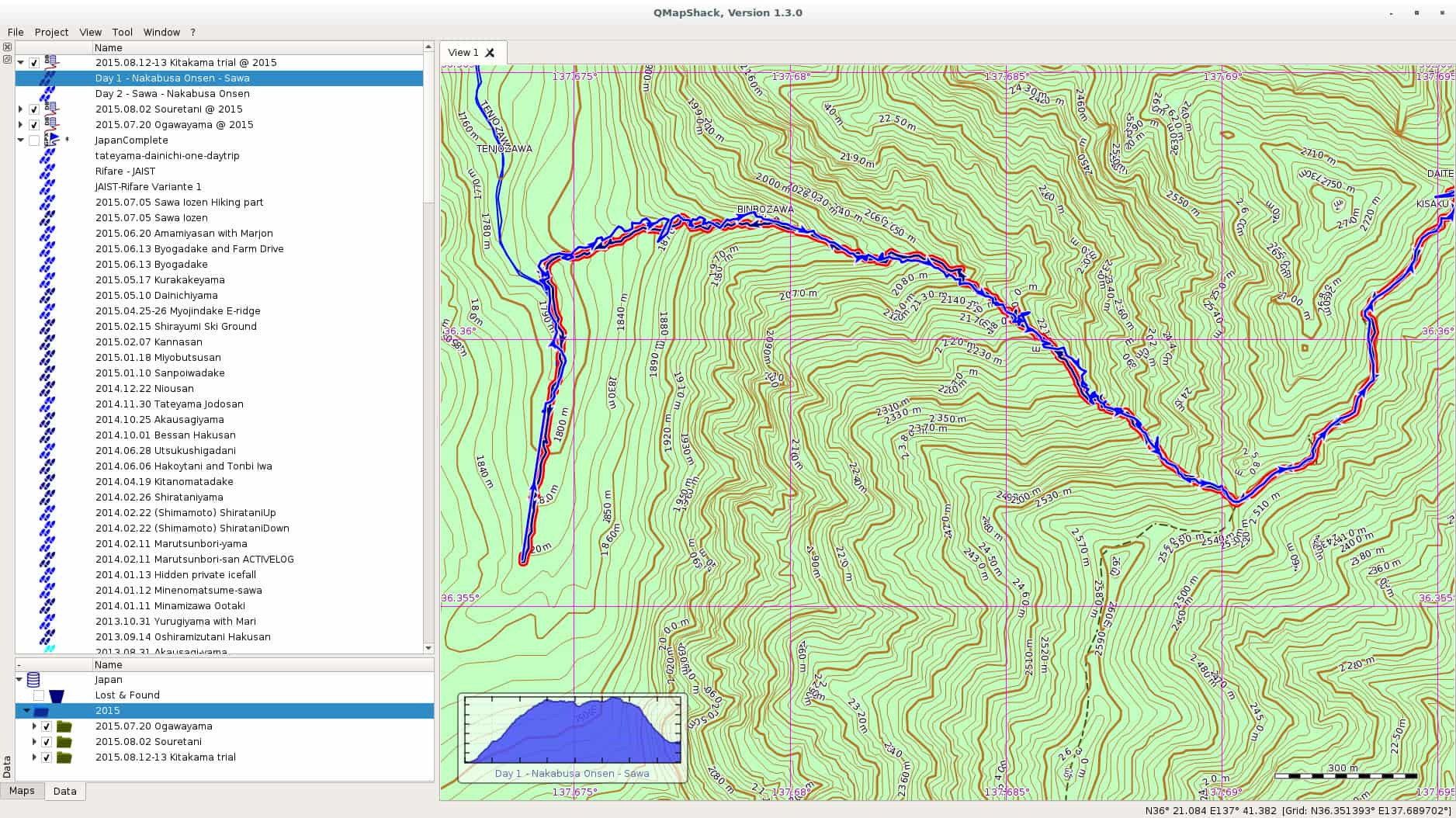
In one of the comments on my last post on Windows 10, a friendly reader from my home country pointed me at QMapShack as a replacement for QuoVadis. I have been using QuoVadis now for many many years, and it contains my mountaineering history all the way back. All the guiding work, all the track. QuoVadis is a great program, able to work with various commercial digital maps as well as GPS receivers. It only has one disadvantage, it doesn t work on Linux. QMapShack is very similar in the target audience, but very different in usage. The one big difference is of course the set of maps one can use with QMapShack. Fortunately, Garmin Maps are supported, and since all my maps regarding Japan are Garmin maps, I am now in the process to converting to QMapShack at least for my Japan GPS data. qmapshack Let us start with the program I was using since ages, and still are using, QuoVadis. QuoVadis is a great program, there is nothing to complain. It is extremely feature-rich, and above all it can work with many different maps. While working as mountain guide in Europe it was an essential tool for me. I could use the digital raster maps of Austria, Switzerland (SwissTOPO), Germany, France, Italy, as well as Garmin vector maps. For serious work as a professional it was indispensable for me. Unfortunately, it never worked on Linux. For some time I had a VirtualBox installation of Windows, but that was more a clutch than anything else. So for most of the GPS work I had to reboot my laptop to Windows, do my stuff there, and then switch back to Linux. QMapShack is far from as feature rich as QuoVadis, but as far as I see now, it does have enough features for me and my mountaineering in Japan. Dealing with GPS units is not a problem, this is the easy part. The difficult part are the digital maps. Fortunately, QMapShack supports Garmin vector maps, the only maps that are (as far as I know) available digitally for Japan. Getting used to QMapShack is a bit a challenge coming from QuoVadis, but the Wiki help pages allowed a quick start. Within short time I had maps set up. Next step was to download a data from my last weekend trip to Yarigadake, Kitakama-ridge (unfortunately we had to turn back due to rain). Connecting the unit and mounting it was already enough to show up in QMapShack, and allowed me to copy the tracks to my local database. Next I switched to Windows and exported some tracks from my Japan folder to a gpx file. After rebooting to Linux, I loaded the gpx file into QMapShack and without failure all the tracks and routes showed up, as it can be seen in the above screenshot (click on it to get a bigger version). Also the display of the Garmin map worked perfectly. Update: Please see the comment section for explanation of the necessary functions. QMapShack does provide similar functionality. Thanks to Oliver for pointing me at it! After some time of working there are a few functions from QuoVadis I am missing for now at QMapShack: Although these two functionalities are missing, all in all I am very happy for now with QMapShack. My next steps are: Finally, above all, I see a future where I do not need to reboot into Windows for doing my GPS work. For now I will import all the data into both applications, but if QMapShack holds its promises from the first day of usage, I am confident that this will not be necessary in future. Enjoy.

13 August 2015

Julien Danjou: Reading LWN.net with Pocket

I've started to use Pocket a few months ago to store my backlog of things to read. It's especially useful as I can use it to read content offline since we still don't have any Internet access in places such as airplanes or the Paris metro. It's only 2015 after all. I am also a LWN.net subscriber for years now, and I really like their articles from the weekly edition. Unfortunately, as the access is restricted to subscribers, you need to login: it makes it impossible to add these articles to Pocket directly. Sad. Yesterday, I thought about that and decided to start hacking on it. LWN provides a feature called "Subscriber Link" that allows you to share an article with a friend. I managed to use that feature to share the articles with my friend Pocket! As doing that every week is tedious, I wrote a small Python program called lwn2pocket that I published on GitHub. Feel free to use it, hack it and send pull requests.

Tiago Bortoletto Vaz: c3video for debconf #4

This is a follow-up to my previous post related the DebConf videoteam using a new software stack for the next conferences: http://acaia.ca/~tiago/posts/c3video-for-dc-take-3/. As mentioned before, C3TT provides a set of scripts which will work in background for most reviewing and video processing tasks. The first will just check if the talk is done and mark the related ticket as recorded. The second script, B-mount4cut, does a nice job by mounting a custom fuse filesystem providing the following files (more detailed explanation here: uncut.dv: full original dv file used as input file for the final trimming. project.kdenlive: Kdenlive project file for the operator. Once it's saved with the trim marks, fuse-vdv will do a parse on it and use the marks for cutting. cut.dv: contains only the frames between the trim marks extracted from project.kdenlive. cut-complete.dv: contains the frames between the trim marks extracted from project.kdenlive, plus a prepended intro and an appended video. Paths for these files should be previously set in the web interface as properties Processing.Path.Outro and Processing.Path.Intros. The outro file can be, for instance, an appended video file with a common thanks for sponsors. The intro files is usually an individual frame for each talk, being a colorful presentation poster. We can also set the intro duration in the Processing.Duration.Intro property. cut.wav: demuxed audio from cut.dv Note: in fact, fuse-vdv provides virtual video files as a concatenation of original input files, so avoiding copying large and redundant data. Ideally, these fuse mountpoints will be shared over the network for operators via glusterFS, but I'll skip that for now. After adding the trimming marks and saving the project using Kdenlive, the operator should go to the web interface and mark the ticket as cut:
/images/c3tt_cut.png

Mark ticket as cut

Note: I've been able to do the marks in Kdenlive using double-click in the video, then editing the crop start/end options. The buttons "[" and "]" didn't work in my Kdenlive version for some unknown reason. In the current DebConf video environment I had to make a link builder for translating the path/file names to the C3TT format. So, for the Amsterdam/2015-08-13/09:57:02.dv we should have a amsterdam-2015.08.13-09_57_02.dv symlink. From now the system will delivery the next tasks to C-cut-postprocessor script. This script will just check the marks from the Kdenlive project file and do the cutting job. So far it has worked perfectly here for the first video sessions in DebCamp, with zero hack in the original code, wow! Next post will be about the encoding script, named D-encoding.

Elena 'valhalla' Grandi: Finding people who have already signed your key

Finding people who have already signed your key

To be sure not to waste time during a ksp to meet people with whom I have already exchanged fingerprints, I decided to do a quick check of the list.

I had already downloaded a recent wotsap db https://wot.siccegge.de/ to ~/.wotsapdb;


$ wotsap $MY_KEY > signatures.txt


I've then edited the file, keeping just the signature sections:

This key is signed by, excluding cross-signatures:
[...]
This key is cross-signed with:
[...]
Keys signed by this key, excluding cross-signatures:
[...]


And then grepped the keys in the kps file in that list (maybe doing the reverse would have been better, whatever)


$ for K in grep "^pub" ksp-dc15.txt cut -c 15-22 ; do grep $K signatures.txt ; done


The first characters on each line tells you if it is a cross signature (X,X), if you have signed the key (-,X) or if they have signed your key (X,-), so that you can mark them on the ksp list as "ignore", "ask if there were problems with your fingerprint / ID", "ask whether they have received your signatures" as relevant.

I only had a few results, so the next step was done by hand.

Next.

Previous.