Search Results: "reg"

13 September 2011

Christian Perrier: 10 years being Debian Developer - part 4: NM process

So, this story begins in January 2001, when I applied in the Debian New Maintainer Process. I wanted to maintain Geneweb, which I was using to publish my genealogy research results. And I wanted to keep it up-to-date while upstream was doing a quite fast development. Moreover, I quickly noticed that Geneweb had big trouble in respecting the way data is organized on a Debian system, and respect the FHS. How to have weveral users able to publish their data on the same server without compromizing the overall system security, etc. Upstream development didn't really care about that. Daniel de Rauglaudre is an excellent genealogist and developer but he was not interested in making Geneweb clean "the Debian way". For instance, at that time, it wasn't easy to setup a server, where genealogy databases could be published without having to manually launch a daemon in user mode at each reboot. Arranging this was indeed my first contribution. I contributed a few patches to make it easier to turn Geneweb into something FHS-compliant...and I developed init scripts and an organization allowing one to have shared databases after system reboots. That was rapidly a great introduction to Debian maintainer scripts and even security-related challenges. And all this....because I needed it. Basically, in 2001, the geneweb package adopted the organization it still has in Debian and Ubuntu, 10 years later: While doing so, I was going through the New Maintainer Process. The Debian developer who had signed my key was Sam Tardieu, of of those longstanding "Freenix" dudes I was sometimes hanging around. I don't remember who did write my advocacy. Michael Mattice was my first Application Manager. Interestingly, here are the three first questions he asked my as part of the Policy and Procedures check : Mike actually asked the questions on February 17th and I probably answered immediately. Unfortunately it seems that I lost my answers. Maybe they are in some archive somewhere. Would be interesting to see how I ended giving an answer about the TeX exception.:-) Immediately, Mike moved to the Tasks and Skills step and checked my geneweb and lifelines packages (I already prepared a package for that other genealogy software). From my records, he found a few lintian warnings, which I probably made my best to fix, then later on, on March 12th, he answered me that thigns were OK and he was marking the T&S step as passed...handing things over to the NM database, asking me what username I wanted on debian.org (obviously, you know what I answered to this!). Then nothing happened..:-) I was not that impatient, but finally, around June 27th, I politely mailed NM Frontdesk (I guess) to get news...and I got a very quick answer by Martin Michlmayr. Martin was indeed worried about the situation (he told me I was on his radar....fun as, many years later, as many DDs, Martin probably went on mine because of pending localization work..:-)) Finally, Martin decided he was not entirely happy with the (maybe too short) processing for P&P and proposed me (very politely, you know how Martin is!) to do it again. So, some more questions...:-) Here, I have the answers. Really fun ro read. Hang on, pure bubulle style, very verbose! What a bunch of questions..:-). Reading my answers ten years after, I see that some answers are somehow naive but, after all, they're not so bad. I really remember spending hours in writing them (my English was somehow more shaky at that time) The last question was: "Please tell me about about yourself and what you intend to do for Debian". Here, Martin opened a big can of worms..:-) So, you'll learn about this in the next episode..:-)

12 September 2011

John Goerzen: Mexico Part 3: Shopping

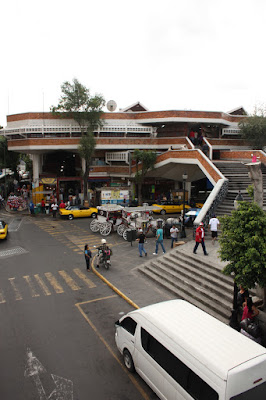
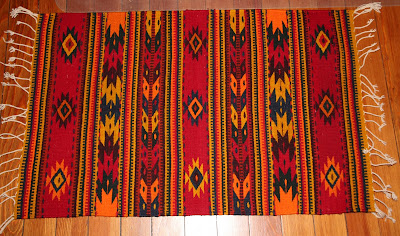
The third in my serious about my family s recent visit to Mexico see also part 1 and part 2. Shopping in Mexico was probably the thing I was least prepared for. I probably had the biggest wins of the trip shopping, and also the biggest fails (though they weren t all that significant). It seems to me that shopping is all about serendipity. You almost have to be good at impulse buying. I normally try hard to resist impulse purchases, preferring to research and compare carefully before making a decision. That attitude didn t serve me well in Mexico, and when I was able to overcome it, I got some great purchases. Around here, some of the best places to shop are the ones that have been in business for decades. Anderson Office Supply in Newton, KS, for instance, has been around for over 100 years, and has in stock, even everything from a ribbon for my slightly obscure 1940s typewriter to local history books. Moler s Camera in Wichita often meets or beats the online stores prices, and has better service. But in Mexico the best places seemed to be packed into a large crowded shopping area, or a dusty stand along a road, or a guy selling stuff on a plaza somewhere. Here is Guadalajara s market (San Juan de Dios): It s an incredible open-air market. We spent quite some time there, even ate lunch, and yet I m sure we saw only a small fraction of what they had. It was a cramped place, with small booths and tiny aisles, but all sorts of interesting things. Although I did appreciate walking quickly past the raw pork and fish corner. Terah bought some genuine extract of vanilla there, at a good price. Some of the street vendors were selling what I think were butterfly toys they had some sort of launcher that would launch them in the air, and they d flutter and float down to the ground. We saw them mainly in Guadalajara Centro on our first day, and I (unwisely, it turns out) thought, Hmm, a plastic toy our boys would love it, but I don t want to buy it on our first day. Besides, I m sure we ll see them all over or online. Wrong on both counts. So there s one of my fails. My greatest win came on the road back from Guachimontones (an ancient pyramid site). Every so often along that country road, there would be a vendor with a table selling something or other. I saw some paintings out my window, thought neat , but and here you can see how terrible an impulse buyer I am didn t actually put together that we should turn around and look at them until 10 minutes later after a bathroom stop for Jacob. We went back, and I picked out a beautiful painting on canvas of those pyramids at sunset. And the charge: 200 pesos (about $17 USD). Incredible and incredibly cheap, and there is a great place on my wall for it. The vendor was also the artist. I am kicking myself for only buying one. (No photo yet as it was too big to practically transport by plane.) Another memorable purchase was this one: This was another roadside find. We were driving through Ajijic, and I noted a rug vendor along the side of the road. I had walked past a rug vendor in the Guadalajara market, so I was keeping my eye out. I made a note to stop there on our way back out of Ajijic. So we did. This is a rug made in the Zapotec tradition, all hand-made, with natural dyes and wool. It was 550 pesos (about $46 USD), which I considered to also be a pretty good deal for what it was. I have no idea how many hours went into creating it, but I m sure it was many. My luck in shops wasn t so good. We visited Tlaquepaque, which had lots of shops selling beautiful things. But the prices there were higher than I d pay for similar things back home. Tonala s shops were too inconveniently located to be practical with what were then tired boys, so we didn t go in there. I m not used to shopping without planning, and perhaps am not very good at it. On the other hand, I really enjoyed making those two purchases, and only regret not buying another 200-peso painting! Maybe next time I m in Mexico, I ll even buy something on the first day there. Terah will be so proud..

Wouter Verhelst: "Yoe" or "wouter"?

For the longest time, I went by the nick "Yoe" when I went on IRC. When I chose this nick for myself, I was sixteen, and the Internet computer at the local public library had an IRC client installed that I tried out. Obviously, my first choice of nick -- "wouter", a fairly common first name in Dutch-speaking regions -- was already chosen, so I had to come up with something else. If I'd realized that I'd still be using this nick today, seventeen years later, I might have chosen that nick with a bit more care... Over the years, some people have asked me what the nickname meant, where it came from. I've never really told anyone the entire story, mainly because it was somewhat embarrasing. But hey, we've all been 16, right? In the early nineties, there was a show on TV called "Het huis van wantrouwen". On this show, they had a running joke involving a short clip of Belgian members of parliament informally voting on a subject by raising hands (literally); the joke was that this clip was dubbed with a bunch of people saying "Yoe, de manne" -- which is dutch for something along the lines of "Yo, guys". As a young geeky teenager, I found this joke way more funny than it actually was; and as such, a few years later, during one of the more weird episodes of my life, I started pranking people by sneaking up to them from behind and shouting "Yoe, de manne" right next to their ears. I even managed to do this to one of our teachers who was walking on the playground. This was just around the time when I first tried out this "IRC" thing. It didn't take me too long to realize I was the only person who thought this "joke" was funny; but somehow the nick stuck, and here we are, 17 years later, I'm still using it. Or, well, I was. As of today, if you want to catch me on IRC, you'll find me going by "wouter" instead of "Yoe". Of course someone had registered that nick several years ago, but then he hadn't been using it in years, and so after a quick request to the OFTC admins they made it available for me. Whee.

Jaldhar Vyas: 9/11: Never Forget

As many people reading this may know, my wife Jyoti was in the World Trade Center on 9/11. When the first plane hit, she joined some colleagues at her employers offices on the 78th floor of the South Tower to see what was going on. A few minutes later she went downstairs to her desk on the 77th floor to call me and tell me about it. That's when the second plane hit. Everyone on the 78th floor was instantly killed as she would have been if she had decided to stay. She and some friends, covered in debris and soaked in jet fuel, blinded by thick black smoke made their way down 77 flights of stairs (the elevators were out of action) and even though she was seven months pregnant with our daughter at the time she went all the way down without stopping to rest. An NYPD officer Ramon Suarez helped her out and to an ambulance. He went back to rescue others and died half an hour later when the North Tower collapsed. I was at home. After getting ready and saying my morning prayers, I was leisurly preparing breakfast before starting the day. I started getting phone calls asking "Is Jyoti ok?" Of course she was. Why wouldn't she be? I somehow don't remember who said it first but I was told to turn on the TV because a plane had hit the World Trade Center. I spent the rest of the morning glued to the screen in horror as information on what exactly had happened. Absolutely the lowest moment of my life was when I saw, in real time, the twin towers fall. It was several more hours before I actually got to talk to Jyoti on the phone, confirmation that she was still alive. I didn't get to actually see her and hold her until the next day owing to the curfew around Manhattan. So that's what happened that day. We have repeatedly been told "Never forget" but truth be told some of the details are already fading from my memory. For my wife too, while she occasionally had panic attacks at first, every day life is foremost now and it is only on days like this that her ordeal comes to mind. Our daughter Shailaja is now 10 years old and an honor roll student who just started 4th grade. She knows the story but is not affected by it. These are good things in my opinion. What the jihadists want most of all is apocalypse. They wanted the world to change course but ten years later America remains as generous, bull-headed, lively, spiritual, garish and crude as ever. That's the sweetest revenge lovers of life can have. Don't give up your rights and your daily routines to fear but make the bastards give up theirs. Or as the cliche goes, the terrorists will win.

John Goerzen: Mexico Part 2: Lodging & Family

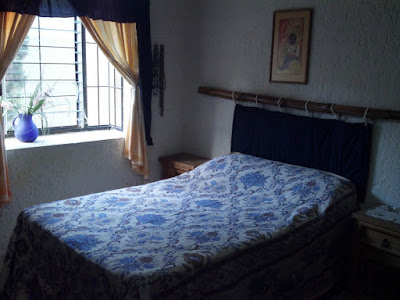
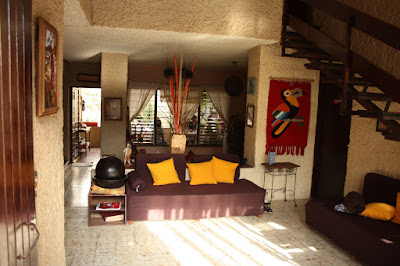
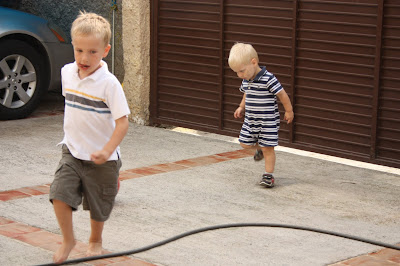
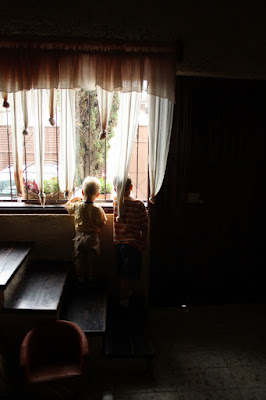
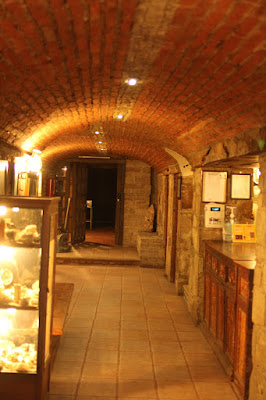
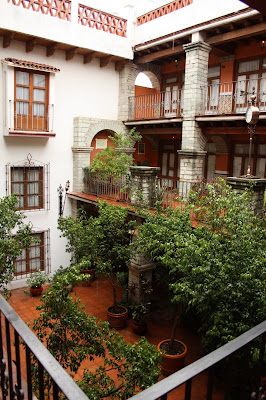
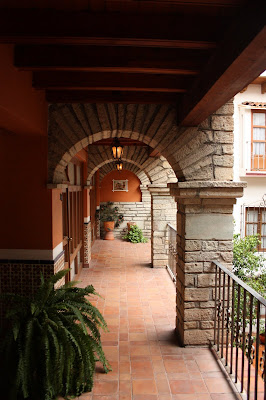
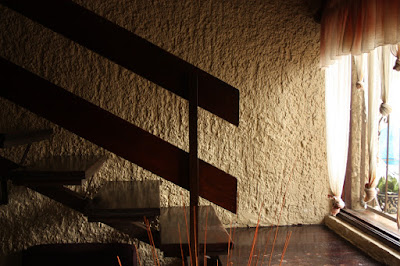
As I wrote in part 1, my family and I were in Mexico recently. Today I ll write about the places we stayed. We spent most of the time in a room we rented in a private home in Guadalajara. My friend Jonathan had found it for us, and it was not too far from his home. The owner was a grandmother, and across the courtyard was more family, including a granddaughter close in age to our boys. They enjoyed playing together. It was really a perfect arrangement for us. There s no better way to be a part of local life when traveling than to stay in someone s house. Here s our bedroom: Notice the glass slats in the window it s a nifty, though not airtight, alternative to our regular windows. More on that later. More of the inside: We had a bit of a language barrier while in Mexico, though never anything significant. My Spanish vocabulary started with almost nothing and I reached maybe a few dozen words by the time we left. Terah knew some Spanish from high school and college, and my friend was fluent. Our hostess also knew a little English. But we all communicated well enough. Terah or Jonathan would help translate when needed. As I d seen before, the children would say things to each other, but never seemed to be bothered that their playmates didn t understand what was being said. They just had a great time anyhow. On Sunday afternoon, when we came back from our activities, there was a buzz of activity. Children everywhere outside, running and playing. Adults too, chatting. We didn t know exactly what was happening, but sent Jacob and Oliver out to play anyhow (which they were eager to do). The yard was enclosed by a wall, so children could pretty much run around without lots of supervision. Eventually they were invited to have some birthday cake (ah ha!) it was one of the children s birthday. Jacob and Oliver actually were served the first two pieces of cake (as the amigos ). Everyone seemed so friendly, warm, and welcoming. Each morning started with breakfast at the house, followed by a scene like this: That s Jacob and Oliver, looking to see if Jonathan had arrived for the day yet. I often noticed in Mexico that I was unsure if I was inside or outside. Here in Kansas, we can have a string of summer days that each exceed 110F (44C) or a few weeks in winter that never get above 15F (-9C), even in daytime. And then we have some pleasant days like right now, too or rain blowing sideways at 60MPH. In general, we spend a lot of effort keeping the outside, well, out. It is quite clear that this isn t a problem in the Guadalajara area. Some restaurants could have been described as buildings with large, open windows so you feel a lot of breeze while inside. Or perhaps as a simple shade roof with a few supports on the edges, so you re never really inside at all (sort of like going under a small shade tent outdoors). To the extent that windows could close, many of them couldn t be made airtight. It was clear that in that area, people spend more energy finding ways to invite the outdoors in rather than to keep it out, thanks to the year-round moderate climate. Perhaps the best example of this surprised me one evening. We were arriving in Guanajuato, an old silver mining town in the mountains, and were going to spend the night at Hotel Socav n, which had been recommended to us by a local friend of Jonathan s. From the street, the hotel looked tiny. But walk in, and you get in this old-looking (and feeling) entry tunnel: That s the front desk, apparently cut out of it there on the right. We asked to see some of the rooms before buying apparently a normal request around there. The innkeeper agreed, and gave us keys and directions to find them on the third floor. It included going up 2 flights of stairs, passing through a courtyard, and going up another flight. It was after dark, and the hotel was dimly lit something I was fine with. I thought we were stepping out into a beautiful atrium with some potted plants in the center of the building something fairly common in some nicer hotels. Until I felt rain on my head. Then I realized that the courtyard, which began two floors up from the street, was open to the sky. Beautiful! Here was the view from out room door: And down the hall : After getting home, a Google happened to turn up some reviews of this hotel. I was so annoyed at what some people wrote! One person gave them only 3 stars because they didn t have air conditioning, had poor water pressure, and lots of steps . Someone else complained of the dark entry tunnel something I couldn t help but smiling about the moment I entered. My review, which should hopefully get posted soon, is certainly different. I gave them 5 stars, because if I wanted a Super 8 with generic fluorescent lighting and the same layout as thousands of other hotels, I would have gone to Nebraska instead of Mexico. Most homes and local hotels in the region don t have air conditioning because they don t need it, and that s just how water pressure is in Mexico (due to needing to pump it from municipal supplies to private storage tanks overhead). And who doesn t appreciate entering a hotel through a brick tunnel? Ah, sigh This should give you some idea of the kind of travel we like: part of the point of traveling is enjoying the differences from home, and I think it is a huge mistake to be annoyed at everything that is different. Enjoy the differences! Finally, here s a photo of the staircase in the home we stayed in, which I thought was fascinating:

11 September 2011

Gregor Herrmann: RC bugs 2011/36

after some months of looking only at "my" packages, I'm back in the #RCBW flow. here's my overview of RC bug activities & NMUs in the last week: two short observations:

9 September 2011

Russell Coker: Modern Laptops Suck

One of the reasons why I m moving from a laptop to a cloud lifestyle [1] is that laptops suck nowadays. Engineering Trade-offs Laptops have always had disadvantages when compared to desktop systems. The screen has to be smaller, the keyboard is inconveniently small on the smaller laptops and netbooks, you don t get PCI slots (CardBus isn t nearly as good), you usually can t have multiple hard drives and expansion options for other things are limited. Also due to the difficulty in designing a computer that uses a small volume it s very difficult to repair a laptop and there are no realistic options for upgrading the motherboard to use a faster CPU etc. This is OK, it s engineering trade-offs that we have to deal with. CPU Speed Modern laptops however have some bad design choices. Firstly they appear to be trying to compete with desktop systems for CPU speed. This was reasonable when desktop systems had 200MHz CPUs which dissipated about 15W (see the Wikipedia page about CPU power dissipation) but now that desktop CPUs are dissipating 65W at the low end and more than 100W at the high end it s really not practical to try and compete. My Thinkpad T61 has a T7500 CPU that can dissipate 35W, getting that much heat out of a laptop case is a significant engineering challenge no matter how you do it. It s a pity that no-one seems to be making laptops with large screens that have a low-power CPU. Sure it takes a moderate amount of CPU power to use a large display for games or playing video, but if you want to use a laptop for work purposes then not much CPU power is required. For tasks which take a lot of CPU power you can offload it to the cloud, I can ssh to a server to do compiles, and one of my clients is setting up an Adobe After Effects render farm [2] (in the broadest sense of the word Cloud can include a server accessed by ssh and a few servers on the LAN running After Effects). Thin Laptops The next problem is laptops being thin, it is really convenient to have a thin laptop, but the thinner it is the smaller the fans have to be and the faster the cooling air has to travel through small heat sinks. At the best of times this results in more noise from the cooling fan (which really isn t so bad). But it also increases the rate at which dust builds up inside the case and insulates the heat sink. When a laptop is thin and light for convenience and also wide to have a large display it just can t be that strong, so laptops tend to bend. If I put an Australian 10c piece (the size of a US Quarter) under one of the feet of my Thinkpad T61 the other three feet touch the desk! Presumably the laptop would bend in every way imaginable if you were to put it on your lap which of course you can t do because there are cooling vents in the bottom so it can give you a hot lap and an overheated laptop. My first Thinkpad was 61mm high according to the IBM spec sheet. I measured my latest one at 34mm. As 61mm wasn t too bad I think I could survive now with a laptop that was 45mm high and had more strength and less cooling problems. My Thinkpad T61 currently has some serious cooling problems, I suspect that something is broken inside. As it s out of warranty I took it apart but couldn t find anything wrong, so I guess I ll have to pay to get it repaired. This will be the third time I ve had a Thinkpad repaired because of cooling problems, but the first time one has been out of warranty. I blame the engineering trade-offs required to make them thin. Portable Desktop/Server systems If you want a small portable computer that delivers great performance then a Mac Mini seems to be a good option [3]. The people who use a laptop at their desk at work and their desk at home would probably be better served by a Mac Mini. The Mac Mini can be purchased with SSD storage to reduce the risk of data loss due to being dropped. Admittedly the Mac Mini needs to be plugged in before it can be used, but if you had a USB Ethernet device and a USB hub then only three cables would be required, power, USB, and video one more cable than the typical office laptop use with Ethernet and power. Some modern laptop/netbook systems (such as the Thinkpad T61 and the EeePC 701) seem to be designed to use the keyboard as part of the cooling system. If you run it with the lid closed then it becomes significantly hotter. This makes laptops unsuitable for use as a portable server. Probably one exception to this is the Apple laptops which have a rubbery keyboard that doesn t allow air flow of course anyone who likes the feel of a real keyboard won t buy an Apple laptop for that reason (but a keyboard that has one really hot section above the CPU doesn t feel great either). In the past I ve used laptops as servers once they become unsuitable for their primary use, probably in future I won t be able to do that. ARM Laptops There are some laptops and tablets with ARM CPUs that should dissipate little heat. But I m not aware of any such devices that I consider to be practical Linux laptops. I ve done some work with iPaQ s running Familiar in the past, it was a nice system but it was a niche market and everything was different from every other system I ve ever used. That made all the work take longer. What would be ideal is an ARM based laptop (not netbook a big screen is good) that boots from a regular CF or SD card (so the main storage can be installed in another machine to fix any boot failures) and which is supported by a major Linux distribution. Does anyone know of any work towards such a goal?

Raphaël Hertzog: People behind Debian: Enrico Zini, member of the New Maintainer Frontdesk

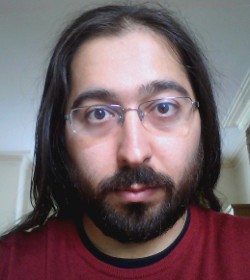
Enrico ZiniEven though Enrico is not smiling on this picture, he s one of the friendliest Debian person that I know. I always enjoy his presentations because he can t refrain from inserting jokes or other funny tricks. :-) That said he s serious too, there s lots of good stuff that he has developed over the years (starting with Debtags) and he has put a lot of effort in reforming the New Maintainer process. Read on to learn more about his various projects. Raphael: Who are you? Enrico: Hi, I m Enrico Zini, a DD from Italy. I m 35 and I work as a freelance Free Software developer. One of my historical roles in Debian is taking care of Debtags, but that is not all I do: my paid work led me to write and maintain some weather forecast related software in Debian, and recently I gained a Front Desk hat, and then a DAM hat. Raphael: How did you start contributing to Debian? Enrico: It was 2001, I was at uni, I was using Debian. At some point I wanted to learn packaging so I read through the whole Policy from top to bottom. Then I thought: why package only for myself? . There were many DDs at my uni, and it only seemed natural to me to join Debian as well. Evidently this was also natural for Zack [Note from editor: Stefano Zacchiroli], who had become DD 6 months earlier and didn t hesitate to advocate me. I found the Policy and the Developer s Reference to be very interesting things to read, and I welcomed my AM s questions as an excuse to learn more. I completely understand those people who have fun trying to answer all the questions in the NM templates while they wait for an AM. With my super DAM powers I can see that my AM report was submitted on October 16, 2001 by my AM Martin Michlmayr, and that James Troup created my account 9 days later, on October 25. Raphael: You have a special interest in the New Maintainer (NM) Process since you are a Debian Account Manager (DAM) and a member of the NM Frontdesk. Thanks to your work the process is much less academic/bureaucratic than it used to be. Can you remember us the main changes? Enrico: One of the first things I noticed when I become a Front Desk member is that there was a tendency to advocate people too early, thinking by the time they ll get an AM, they ll know enough . Unfortunately, this didn t always work, and once the real NM process started it would turn into a very long and demotivating experience both for the applicant and for the AM. So we tried raising the bar on advocacies, and that seems to have helped a lot. If people join NM when they are ready, it means that NM is quick and painless both for them and their AMs, who are therefore able to process more applicants. We also did a rather radical cleanup of the NM templates , which are a repository of questions that Application Managers can ask to their applicants. We realized that AMs were just sending the whole templates to their applicants, so we moved all non-essential questions to separate files, to drastically reduce the amounts of questions that are asked by default. Other improvements in the NM process came from other parts of Debian: nowadays there are lots of ways to learn and gradually gain experience and reputation inside the project before joining NM, which means that we get many candidates who we can process quickly. For example, packages can now be uploaded via sponsors, and the Mentors project helps new contributors to find sponsors and get their first packages reviewed. Then one can now become Debian Maintainer and take full responsibility of their own packages, gaining experience and reputation. The idea of working in teams also helped: big teams like the Perl, Python, KDE, Ocaml, Haskell teams (and many more) are excellent entry points for people who have something to package. But Debian is not just for packagers, and one could join teams like the Website team, the Press and Publicity team, the Events and Merchandise team or their local translation team. Becoming DDs the non-uploading way is not just for non-technical people: one could enjoy programming but not packaging. An interesting way to get involved in that way is to help writing or maintaining some of the many Debian services. Note that I m not suggesting this as a way to learn how to program, but as a way to get involved in Debian by writing code. Finally, we started to appreciate the importance of having people activities in Debian explicitly visible, which means that the more obviously good work one has done in Debian, the less questions we need to ask. Jan Dittberner s DDPortfolio is an excellent resource for AMs and Front Desk, and I m maintaining a service called minechangelogs that for people who have done lots of work in Debian is able to fully replace the Tasks&Skills parts of the NM process. Raphael: What are your plans for Debian Wheezy? Enrico: For Wheezy I hope to be able to streamline and simplify Debtags a bit more. At Debconf11 I had a conversation with FTP-masters on how to make some tags more official, and I now have to work a bit more on that. I d also like to considerably downsize the codebase behind the debtags package, now that its job is quite clear and I don t need to experiment with fancy features the way I did in the past. I have to say that I enjoy programming more than I enjoy packaging, so most of my plans in Debian are not tied to releases. For example, I d like to finish and deploy the new NM website codebase soon: it would mean to have a codebase that s much easier to maintain, and in which it s much easier to implement new features. I d also like to design a way to allow maintainers to review the tag submission to their own packages instead of having to wait for me or David Paleino to do a regular review of all the submissions. Finally, I d like to promote the usage of apt-xapian-index in more cutting-edge packaging applications. And to design a way to maintain up to date popcon information in one s local index. And improve and promote those services that I maintain, and I tend to often have ideas for new ones. Raphael: If you could spend all your time on Debian, what would you work on? Enrico: If I could spend all my time on Debian, I would do a lot of software development: I love doing software development, but most of my development energy is spent on my paid work. I guess I would start my all your time in Debian by taking better care of the things that I m already doing, and by promoting them better so that I wouldn t end up being the only person maintaining them. After that, however, I reckon that I do have a tendency of noticing new, interesting problems in need(?) of a solution, and I guess I would end up wildly experimenting new ideas in Debian much like a victorian mad scientist. Which reminds me that I most definitely need minions! Where can I find minions? Raphael: You re the author of the Debian Community Guidelines. I have always felt that this document should be more broadly advertised. For example by integrating it in the Developer s Reference. What do you think? Enrico: The DCG was really a collection of tips to improve one s online communication, based on ideas and feedback that I collected from pestering many experienced and well-respected people for some time. Like every repository of common sense, I think it should be widely promoted but never ever turned into law. It wouldn t be a bad idea to mention it in the Developer s Reference, or to package it as a separate file in the developers-reference package. The reasons I haven t actively been pushing for that to happen are two: there isn t much in the DCG that is specific to Debian, and I don t have the resources to do a proper job maintaining it. It d be great if somebody could take over its maintenance and make it become some proper, widespread, easy-to-quote online reference document, like one of those HOWTOs that all serious people have read at some point in their lives. Raphael: What s the biggest problem of Debian? Enrico: It s sometimes hard to get feedback or help if you work on something unusual. That is partly to be expected, and partly probably due to me not having yet learnt how to get people involved in what I do. Raphael: What motivates you to continue to contribute year after year? Enrico: Debian keeps evolving, so there is always something to learn. And Debian is real, so everything I do is constantly measured against reality. What more intellectual stimulation could one possibly want? Raphael: Is there someone in Debian that you admire for their contributions? Enrico: I don t think I could reasonably list everyone I admire in Debian: pretty much in every corner of the project there is someone, sometimes not very well known, who is putting a lot of Quality in what they do. Someone who decided that X should work well in Debian or that Debian should work well for Y or that Z is something Debian people can rely on and makes sure that it is so. Those are the people who make sure Debian is and will be not just a hobby, but a base upon which I can rely for my personal and working life.
Thank you to Enrico for the time spent answering my questions. I hope you enjoyed reading his answers as I did.

Subscribe to my newsletter to get my monthly summary of the Debian/Ubuntu news and to not miss further interviews. You can also follow along on Identi.ca, Twitter and Facebook.

5 comments Liked this article? Click here. My blog is Flattr-enabled.

8 September 2011

Dirk Eddelbuettel: Faster (recursive) function calls: Another quick Rcpp case study

There was another question recently on StackOverflow that I had meant to discuss in a follow-up post here. User deltanovember asked about slow recursive functions and used the very classic Fibonacci number as an example. To recap, Fibonacci number are defined with two initial values F(0) = 0 and F(1) = 1; thereafter the Fibonacci number F(n) is defined as the sum of the two preceding numbers: F(n) = F(n-2) + F(n-1). This leads to very straightforward implementations using recursion:
## R implementation of recursive Fibonacci sequence
fibR <- function(n)  
    if (n == 0) return(0)
    if (n == 1) return(1)
    return (fibR(n - 1) + fibR(n - 2))
 
Unfortunately, this elegant implementation which remain close to the abtract formulation of the recurrence algorithm performs very poorly in R as there is noticeable overhead in function calls which becomes dominant in a recursion. This lead to the original question on StackOverflow, and the accepted answer uses a trick presented by Pat Burns in his lovely R Inferno: rewrite the solution using a computer science trick called memoization:
fibonacci <- local( 
    memo <- c(1, 1, rep(NA, 100))
    f <- function(x)  
        if(x == 0) return(0)
        if(x < 0) return(NA)
        if(x > length(memo))
        stop("'x' too big for implementation")
        if(!is.na(memo[x])) return(memo[x])
        ans <- f(x-2) + f(x-1)
        memo[x] <<- ans
        ans
     
 )
That is a fair answer, and even more was suggested with a link to a terrific analysis calling the Fibonacci recurrence the worst algorithm in the world. That is also fair, but all the basic research into better algorithms exploiting some structure of the problem to advance performance (and of course understanding) is overlooking one crucial part: algorithm analysis is essentially independent of the language. So whatever improvements we obtain by thinking really hard about a problem are then available for other implementations too. So with a tip of the hat to the old Larry Wall quote about Lazyness, Impatience and Hubris, I would like to suggest what I consider a much simpler route to much better performance: recode it in C++ using both Rcpp (for the R/C++ integration) and inline for the on-the-fly compilation, linking and loading of C++ code into R.
## inline to compile, load and link the C++ code
require(inline)
## we need a pure C/C++ function as the generated function
## will have a random identifier at the C++ level preventing
## us from direct recursive calls
incltxt <- '
  int fibonacci(const int x)  
     if (x == 0) return(0);
     if (x == 1) return(1);
     return (fibonacci(x - 1)) + fibonacci(x - 2);
   '
## now use the snippet above as well as one argument conversion
## in as well as out to provide Fibonacci numbers via C++
fibRcpp <- cxxfunction(signature(xs="int"),
                       plugin="Rcpp",
                       incl=incltxt,
                       body
                       ='
   int x = Rcpp::as<int>(xs);
   return Rcpp::wrap( fibonacci(x) );
')
This single R function call cxxfunction() takes the code embedded in the arguments to the body variable (for the core function) and the incltxt variable for the helper function we need to call. This helper function is needed for the recursion as cxxfunction() will use an randomized internal identifier for the function called from R preventing us from calling this (unknown) indentifier. But the rest of the algorithm is simple, and as beautiful as the initial recurrence. Three lines, three statements, and three cases for F(0), F(1) and the general case F(n) solved by recursive calls. This also illustrates how easy it is to get an integer from R to C++ and back: the as and wrap simply do the right thing converting to and from the SEXP types used internally by the C API of R. A performance comparison of the basic R version fibR, its byte-compiled variant fibRC and and the C++ version fibRcpp shown above is very compelling. We have added a file fibonacci.r to the large and still growing set of examples included with Rcpp, and we can just execute that script with Rscript or (as here) r from the littler package:
edd@max:~/svn/rcpp/pkg/Rcpp/inst/examples/Misc$ r fibonacci.r
Loading required package: inline
Loading required package: methods
Loading required package: compiler
        test replications elapsed relative user.self sys.self
3 fibRcpp(N)            1   0.092   1.0000      0.09     0.00
2   fibRC(N)            1  61.480 668.2609     61.47     0.00
1    fibR(N)            1  61.877 672.5761     61.83     0.02
edd@max:~/svn/rcpp/pkg/Rcpp/inst/examples/Misc$ 
So the recursion for the original argument of N=35 takes just over a minute at about 61.5 and 61.9 seconds, respectively, for the R version and its byte-compiled variant (as per the column titled elapsed). So byte-compilation essentially offers no help for the bottleneck of slow function calls. The C++ versions relying on Rcpp which created in a few lines of code and a single call to cxxfunction however takes just 92 milliseconds---or a relative gain of well over six-hundred times. That provides another nice demonstration of what Rcpp can do. Improved algorithms for well-understood problems are surely one way to accelerate solutions. But there are (many ?) times when we do not have the luxury of being able to think through to a new and improved approach. Or worse, such an approach may even introduce new errors or inaccurracies if we get it wrong on a first try. With Rcpp, we are able to the express the problem as written in its original statement: a simple recursion. The gain relative to a slow R implementation is noteworthy---and could of course be improved further if we really needed to by relying on better algorithms like memoization. But for day to day tasks, I gladly take speedups of (up to) a few hundred times thanks to Rcpp without having to do hard algorithmic work. Before closing, a quick reminder that I will be giving two classes on Rcpp in a few weeks. These will be in New York on September 24, and San Franciso on October 8, see this blog post as well as this page at Revolution Analytics (who are a co-organiser of the classes) for details and registration information.

Russell Coker: Moving from a Laptop to a Cloud Lifestyle

My Laptop History In 1998 I bought my first laptop, it was a Thinkpad 385XD, it had a PentiumMMX 233MHz CPU, 96M of RAM, and an 800*600 display. This was less RAM than I could have afforded in a desktop system and the 800*600 display didn t compare well to the 1280*1024 resolution 17 inch Trinitron monitor I had been using. Having only 1/3 the pixels is a significant loss and a 12.1 inch TFT display of that era compared very poorly with a good Trinitron monitor. In spite of this I found it a much better system to use because it was ALWAYS with me, I used it for many things that were probably better suited to a PDA (there probably aren t many people who have carried a 7.1 pound (3.2Kg) laptop to as many places as I did). But some of my best coding was done on public transport. But I didn t buy my first laptop for that purpose, I bought it because I was moving to another country and there just wasn t any other option for having a computer. In late 1999 I bought my second laptop, it was a Thinkpad 600E [1]. It had twice the CPU speed, twice the RAM, and a 1024*768 display that displayed color a lot better. Since then I had another three Thinkpads, a T21, a T43, and now a T61. One of the ways I measure a display is the number of 80*25 terminal windows that I can display at one time, my first Thinkpad could display four windows with a significant amount of overlap. My second could display four with little overlap, my third (with 1280*1024 resolution) could display four clearly and another two with overlap, and my current Thinkpad does 1680*1050 and can display four windows clearly and another five without excessive overlap. For most of the last 13 years my Thinkpads weren t that far behind what I could afford to get as a desktop system, until now. A Smart Phone as the Primary Computing Device For the past 6 months the Linux system I ve used most frequently is my Sony Ericsson Xperia X10 Android phone [2]. Most of my computer use is on my laptop, but the many short periods of time using my phone add up. This has forced some changes to the way I work. I now use IMAP instead of POP for receiving mail so I can use my phone and my laptop with the same mail spool. This is a significant benefit for my email productivity, instead of having 100 new mailing list messages waiting for me when I get home I can read them on my phone and then have maybe 1 message that can t be addressed without access to something better than a phone. My backlog of 10,000 unread mailing list messages lasted less than a month after getting an Android phone! A few years ago I got an EeePC 701 that I use for emergency net access when a server goes down. But even a 920g EeePC is more weight than I want to carry, as I need to have a mobile phone anyway there is effectively no extra mass or space used to have a phone capable of running a ssh client. My EeePC doesn t get much use nowadays. A Cheap 27 inch Monitor from Dell Dell Australia is currently selling a 27 inch monitor that does 2560*1440 (WQHD) for $899AU. Dell Australia offers a motor club discount which pretty much everyone in Australia can get as almost everyone is either a member of such a club or knows a member well enough to use their membership number for the discount. This discount reduces the price to $764.15. The availability of such a great cheap monitor has caused me to change my working habits. It doesn t make sense to have a reasonably powerful laptop used in one location for almost all the time when a desktop system with a much better monitor can be used. The Plan Now that my 27 inch monitor has arrived I have to figure out a way of making things work. I still need to work from a laptop on occasion but my main computer use is going to be a smart-phone and a desktop system. Email is already sorted out, I already have three IMAP client systems (netbook, laptop, and phone), adding a desktop system as a fourth isn t going to change anything. The next issue is software development. In the past I haven t used version control systems that much for my hobby work, I have just released a new version every time I had some significant changes. Obviously to support development on two or three systems I need to use a VCS rigorously. I m currently considering Subversion and Git. Subversion is really easy to use (for me), but it seems to be losing popularity. Git is really popular so if I use it for my own projects then I could allow anonymous access for anyone who s interested maybe that will encourage more people to contribute. One thing I haven t even investigated yet is how to manage my web browsing work-flow in a distributed manner. My pattern when using a laptop is to have many windows and tabs open at the same time for issues that I am researching and to only close them days or weeks later when I have finished with the issue. For example if I m buying some new computer gear I will typically open a web browser window with multiple tabs related to the equipment (hardware, software, prices, etc) and keep them all open until I have received it and got it working. Chromium, Mozilla, and presumably other modern web browsers have a facility to reopen windows after a crash. It would be ideal for me if there was some sort of similar facility that allowed me to open the windows that are open on another system and to push window open commands to another system. For example when doing web browsing on my phone I would like to be able to push the URLs of pages that can t be viewed on a phone to my desktop system and have them open waiting for me when I get home. It would be nice if web browsing could be conceptually similar to a remote desktop service in terms of what the user sees. Finally in my home directory there are lots of random files. Probably about half of them could be deleted if I was more organised (disk space is cheap and most of the files are small). For the rest it would be good if they could be accessed from other locations. I have read about people putting the majority of their home directory under version control, but I m not sure that would work well for me. It would be good if I could do something similar with editor sessions, if I had a file open in vi on my desktop before I left home it would be good if I could get a session on my laptop to open the same file (well the same named file checked out of the VCS). Configuring the Desktop System One of the disadvantages of a laptop is that RAID usually isn t viable. With a desktop system software RAID-1 is easy to configure but it results in two disks making heat and noise. For my new desktop system I m thinking of using a DRBD device for /home to store the data locally as well as almost instantly copying it to RAID-1 storage on the server. The main advantage of DRBD over NFS, NBD, and iSCSI is that I can keep working if the server becomes unavailable (EG use the desktop system to ask Google how to fix a server fault). Also with DRBD it s a configuration option to allow synchronous writes to return after the data is written locally which is handy if the server is congested. Another option that I m considering is a diskless system using NBD or iSCSI for all storage. This will prevent using swap (you can t swap to a network device to avoid deadlocks) but that won t necessarily be a problem given the decrease in RAM prices as I can just buy enough RAM to not need swap. The Future Eventually I want to be able to use a tablet for almost everything including software development. While a tablet display isn t going to be great for coding I m sure that I can make use of enough otherwise wasted time to justify the expense. I will probably need a tablet that acts like a regular Linux computer not an Android tablet.

7 September 2011

Soeren Sonnenburg: Shogun at Google Summer of Code 2011

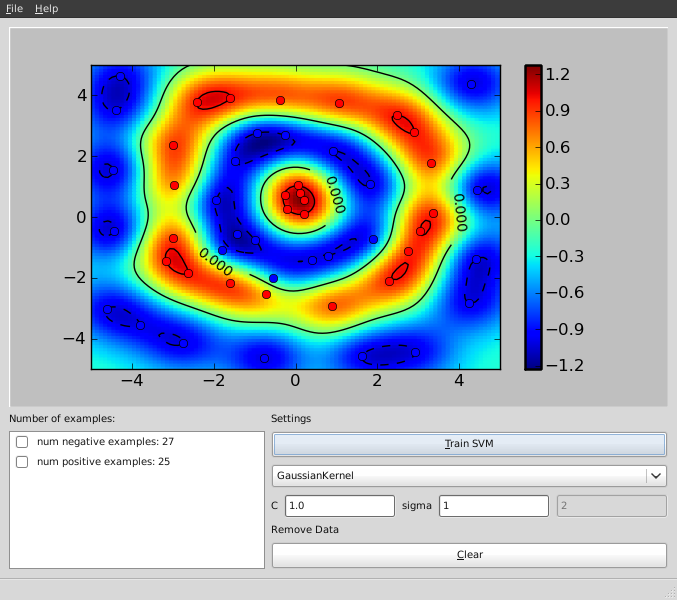
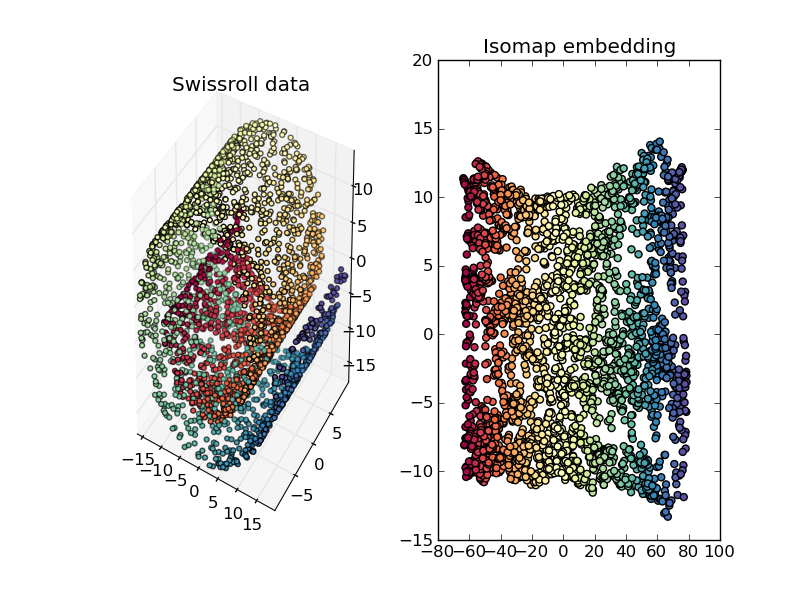
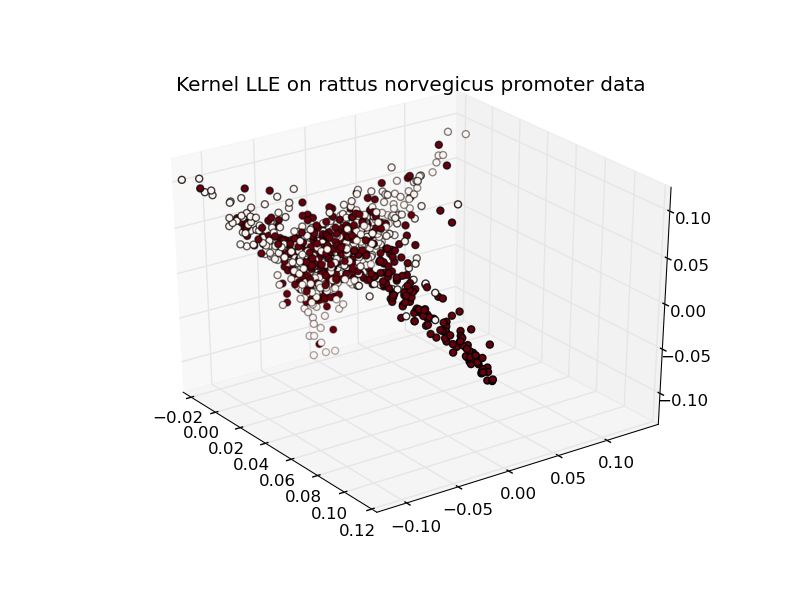
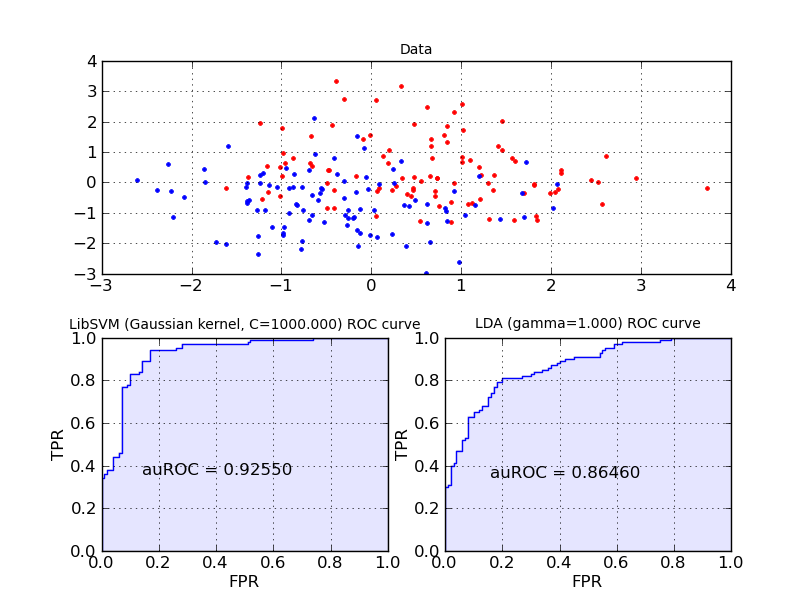
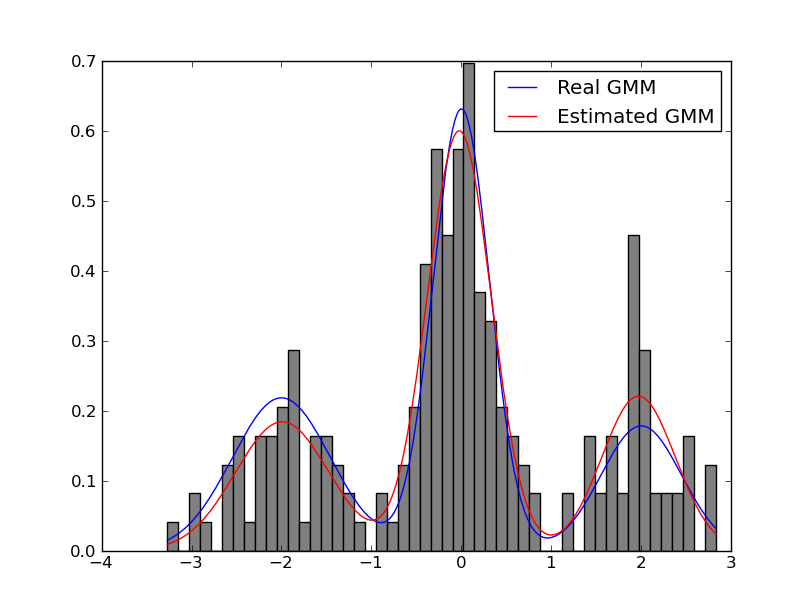
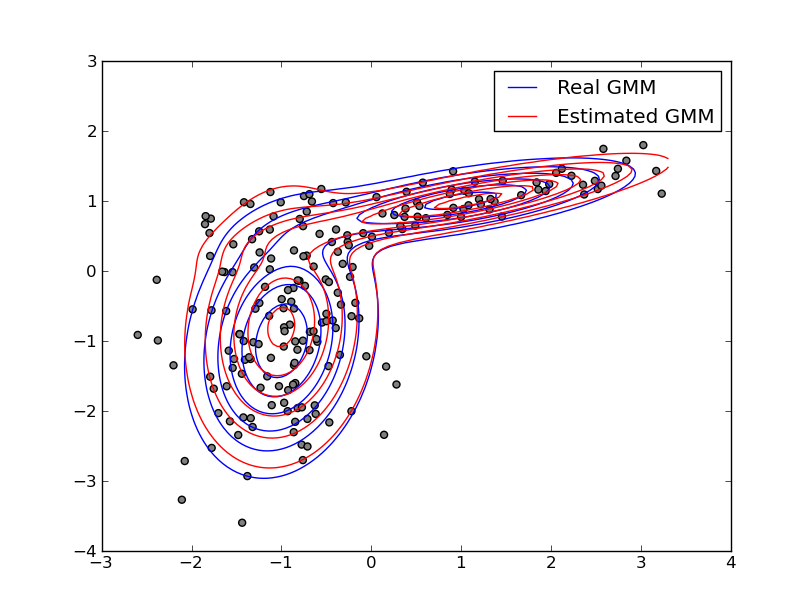
Google Summer of Code 2011 gave a big boost to the development of the shogun machine learning toolbox. In case you have never heard of shogun or machine learning: Machine Learning involves algorithms that do intelligent'' and even automatic data processing and is nowadays used everywhere to e.g. do face detection in your camera, compress the speech in you mobile phone, powers the recommendations in your favourite online shop, predicts solulabily of molecules in water, the location of genes in humans, to name just a few examples. Interested? Then you should give it a try. Some very simple examples stemming from a sub-branch of machine learning called supervised learning illustrate how objects represented by two-dimensional vectors can be classified in good or bad by learning a so called support vector machine. I would suggest to install the python_modular interface of shogun and to run the example interactive_svm_demo.py also included in the source tarball. Two images illustrating the training of a support vector machine follow (click to enlarge): svm svm interactive Now back to Google Summer of Code: Google sponsored 5 talented students who were working hard on various subjects. As a result we now have a new core developer and various new features implemented in shogun: Interfaces to new languages like java, c#, ruby, lua written by Baozeng; A model selection framework written by Heiko Strathman, many dimension reduction techniques written by Sergey Lisitsyn, Gaussian Mixture Model estimation written by Alesis Novik and a full-fledged online learning framework developed by Shashwat Lal Das. All of this work has already been integrated in the newly released shogun 1.0.0. In case you want to know more about the students projects continue reading below, but before going into more detail I would like to summarize my experience with GSoC 2011. My Experience with Google Summer of Code We were a first time organization, i.e. taking part for the first time in GSoC. Having received many many student applications we were very happy to hear that we at least got 5 very talented students accepted but still had to reject about 60 students (only 7% acceptance rate!). Doing this was an extremely tough decision for us. Each of us ended up in scoring students even then we had many ties. So in the end we raised the bar by requiring contributions even before the actual GSoC started. This way we already got many improvements like more complete i/o functions, nicely polished ROC and other evaluation routines, new machine learning algorithms like gaussian naive bayes and averaged perceptron and many bugfixes. The quality of the contributions and independence of the student aided us coming up with the selection of the final five. I personally played the role of the administrator and (co-)mentor and scheduled regular (usually) monthly irc meetings with mentors and students. For other org admins or mentors wanting into GSoC here come my lessons learned: Now please read on to learn about the newly implemented features: Dimension Reduction Techniques Sergey Lisitsyn (Mentor: Christian Widmer) Dimensionality reduction is the process of finding a low-dimensional representation of a high-dimensional one while maintaining the core essence of the data. For one of the most important practical issues of applied machine learning, it is widely used for preprocessing real data. With a strong focus on memory requirements and speed, Sergey implemented the following dimension reduction techniques: See below for the some nice illustrations of dimension reduction/embedding techniques (click to enlarge). isomap swissrollrno kllelocal tangent space alignment Cross-Validation Framework Heiko Strathmann (Mentor: Soeren Sonnenburg) Nearly every learning machine has parameters which have to be determined manually. Before Heiko started his project one had to manually implement cross-validation using (nested) for-loops. In his highly involved project Heiko extend shogun's core to register parameters and ultimately made cross-validation possible. He implemented different model selection schemes (train,validation,test split, n-fold cross-validation, stratified cross-validation, etc and did create some examples for illustration. Note that various performance measures are available to measure how good'' a model is. The figure below shows the area under the receiver operator characteristic curve as an example. foo Interfaces to the Java, C#, Lua and Ruby Programming Languages Baozeng (Mentor: Mikio Braun and Soeren Sonnenburg) Boazeng implemented swig-typemaps that enable transfer of objects native to the language one wants to interface to. In his project, he added support for Java, Ruby, C# and Lua. His knowlegde about swig helped us to drastically simplify shogun's typemaps for existing languages like octave and python resolving other corner-case type issues. The addition of these typemaps brings a high-performance and versatile machine learning toolbox to these languages. It should be noted that shogun objects trained in e.g. python can be serialized to disk and then loaded from any other language like say lua or java. We hope this helps users working in multiple-language environments. Note that the syntax is very similar across all languages used, compare for yourself - various examples for all languages ( python, octave, java, lua, ruby, and csharp) are available. Largescale Learning Framework and Integration of Vowpal Wabbit Shashwat Lal Das (Mentor: John Langford and Soeren Sonnenburg) Shashwat introduced support for 'streaming' features into shogun. That is instead of shogun's traditional way of requiring all data to be in memory, features can now be streamed from e.g. disk, enabling the use of massively big data sets. He implemented support for dense and sparse vector based input streams as well as strings and converted existing online learning methods to use this framework. He was particularly careful and even made it possible to emulate streaming from in-memory features. He finally integrated (parts of) vowpal wabbit, which is a very fast large scale online learning algorithm based on SGD. Expectation Maximization Algorithms for Gaussian Mixture Models Alesis Novik (Mentor: Vojtech Franc) The Expectation-Maximization algorithm is well known in the machine learning community. The goal of this project was the robust implementation of the Expectation-Maximization algorithm for Gaussian Mixture Models. Several computational tricks have been applied to address numerical and stability issues, like An illustrative example of estimating a one and two-dimensional Gaussian follows below. 1D GMM2D GMM Final Remarks All in all, this year s GSoC has given the SHOGUN project a great push forward and we hope that this will translate into an increased user base and numerous external contributions. Also, we hope that by providing bindings for many languages, we can provide a neutral ground for Machine Learning implementations and that way bring together communities centered around different programming languages. All that s left to say is that given the great experiences from this year, we d be more than happy to participate in GSoC2012.

6 September 2011

Lars Wirzenius: Entropy key: a review

I recently bought a Simtec Entropy Key. It's a hardware randomness generator encapsulated as a USB device, the size of a flash drive. It's good for any host or cluster that uses a lot of kernel-provided random numbers (/dev/random), or does things that cause the kernel to use a lot of random numbers. Opening a lot of network connections, or generating session keys for public key encryption. That kind of stuff. If the kernel has too little entropy available to generate good random numbers, things will stall until it gets some more. The ekey gives you real random bits, not just software-produced pseudo-random numbers. In other words, it's some kind of magic. I got the device in a DVD box, with a leaflet explaining how to install stuff, a CD with the software, an envelope with a secret key, and the actual device itself. I read the leaflet, which said to install the ekeyd daemon first. I ignored the CD, since a) my laptop has no optical drive and b) the software is in Debian stable (squeeze) anyway, so apt-getting it is easier and faster. I was utterly disappointed with the software. I didn't have to edit a single hard disk sector, or do a BIOS upgrade, or anything. Utterly, totally, boring. I had reserved an afternoon and evening for this, but I had to find something else to do instead. After plugging in the device in a spare USB port, I opened the envelope and ran a command to specify the secret key. The key and host processors use encryption to make sure nobody can eavesdrop on the randomness -- that would give them an edge in cracking SSL and GPG encryption, I guess. Here's an example of how it works. Before I plug in the device, the kernel has some, but not too much entropy available:
liw@havelock$ cat /proc/sys/kernel/random/entropy_avail 
1053
A few seconds after the ekey is inserted:
liw@havelock$ cat /proc/sys/kernel/random/entropy_avail 
3968
And here's the kicker: pretty much regardless of what I do, the entropy stays at about 4 kilounits (I don't know if it's bits or bytes, and I'm too lazy to check). In the end, the only thing I can really complain about is the typography and layout of the leaflet. The text is clear enough, but it's laid out too densely. It needs more whitespace. Some pictures of bunnies or kittens would be nice, too.

Joey Hess: water

This was the second most rainy day of the year, so far. 28 hours of solid rain and counting. Good time to take stock of the water situation here at the cabin after a year's experience. The springs were as seasonal as I'd feared. After running strongly all Spring, the main spring ebbed and died in the Summer months. By mid-July there was no remaining source of potable water. If I had not been away so much over the summer it would have been worse. As it was, I needed only twenty gallons of water hauled from neighbor Lee's well. The large cistern was filled in a single night during the most rainy period this Spring, and provided wash water for two months of the summer, and that only lowered it by a quarter. So I could have been less sparing with it, and not relied so much on rain water catchment for supplimental wash water. Today I replaced the pump, so I can use the pressure tank and have running water in the house. I could have done this earlier, but what can I say; I enjoy hauling buckets of water, when it doesn't involve breaking ice. In the winter when there's firewood to haul instead, I'll enjoy the indoor plumbing. Also today, I may have finally fixed the pipe to the large cistern properly, so it won't only fill at the heaviest rain times. Along with the ability to cross-pump water from the small to the large cistern, it should be easier to keep it filled, and I might be able to reduce the turbidity enough that it's potable eventually. Will see. I don't live in a dry region, but this is a relatively dry place for the area. It's been interesting to get a taste of what it'd be like to live somewhere where water is actually scarce.

5 September 2011

Kai Wasserb ch: Mesa packages on dev.carbon-project.org

Thanks to the awesome patent situation (if you're unaware of what I'm talking, you can catch up by listening to PRI's This American Life episode about patents, reading Florian Mueller's write-ups about the patent wars (current focus: mobile devices) or by having a look into my posts with the "patent-mess" tag), Debian will most likely be unable to distribute Mesa packages with ARB_texture_float enabled (if you want to build mesa yourself with this extension enabled, just add --enable-texture-float to confflags-dri in the Mesa source package's debian/rules). But some programs really like to have this extension, thus I started building Mesa myself. The resulting packages can be found on dev.carbon-project.org. Big fat warning: please check, whether you're affected by the US patent #6,650,327 (i.e. if it's a valid patent in your jurisdiction) before you use the packages. If in doubt, consult with your lawyer. By the way, if you're not working in an area where knowledge of the specifc claims/content of the patent might be harmful, you have some time on your hands and you want to learn, what's "patentworthy" these days, have a look at the claims of the patent. Otherwise the three links from the beginning must do. Before I end this post, just one more remark about my Mesa packages: they'll follow upstream's Git and thus might have problems from time to time. If Debian's Mesa packages suffice your needs, stay with them. If not, feel free to use my packages or use them as a base for your own packages.

4 September 2011

Christoph Egger: A week of Debian GNU/kFreeBSD

While other people are squashing RC bugs I was using this week to fix (or investigationg) some more kFreeBSD issues -- mostly looking at failed build logs and trying to fix the problems and after some nice fish for dinner writing things up.

Kai Wasserb ch: Untangling the Linux graphics stack

[UPDATE 2011-09-05]I received some questions (or saw them), which I tried to answer with a follow-up entry.[/UPDATE] As I tried to explain this a few times in the past to others and had trouble myself, when I started using Linux, I thought I take some time today and write down what parts comprise the Linux graphics stack and how they interact. I'll ignore some parts which aren't too interesting to an average user at the moment, to keep this post as consise as possible. Apart from that, I hope I'm able to put all the relevant data into one spot. Let us start our little journey in the kernel. There, in a directory named gpu you'll find the drm directory, which contains all DRM drivers. In this post, we'll focus on those. The drivers in that directory are the kernel side of the Direct Rendering Infrastructure (DRI) and are responsible for managing concurrent access to the graphics hardware. They also provide interfaces to pass commands and data to the GPU. The DRI wiki explains the three main purposes of the DRM modules. The DRM module is also the part that decides whether KMS or UMS is used. Other acronyms you might hear with regard to graphics acceleration on Linux and are referring to the Kernel part are: Apart from that, every driver has its hardware-specific parts like utilizing power-saving functions of the respective GPUs, loading firmware, if required, etc. Now we move from Kernel space to user land. We'll ignore any non-X and non-Mesa parts (like acceleration for TTYs). That means, that our next GPU specific part is most likely the DDX. (Please note, that the classic DDX might be replaced by a Gallium3D state tracker, currently that would be the xorg state tracker, but xorg will be replaced by XA. This is only an option if the Gallium driver for your GPU supports one of those state trackers, see the Gallium status page for further details.) The DDX for your GPU offers plain (2D) X acceleration on your hardware. The respective DDX' are generally named xf86-video-[NAME], where [NAME] is replaced by e.g. ati or intel. The DDX decides which X acceleration paths are available. Acronyms you might hear, referring to the DDX part of the graphics stack, are: We're almost through: the last important part is the 3D acceleration offered by a Mesa driver. Mesa drivers come in two flavours: classic (e.g. all Intel drivers which are supported by Intel) and Gallium3D-based (like the drivers for Radeon chips from the R300 onwards). The difference here is, that the Gallium3D drivers try to share as much code as possible (and thus simplify writing a new driver supporting many platforms, systems and technologies), while the classic drivers are specific to certain platforms, chips, and technologies. They share much less code among each other. All parts of Mesa need direct access to the graphics hardware (DRI) The Mesa drivers use the 3D pipeline of the GPUs for accelerated drawing, even for non-3D applications like video acceleration (recently VDPAU, XvMC and VA support were added to Gallium3D, driver support followed quickly). Otherwise the Mesa drivers are mainly used for OpenGL acceleration. Users of OpenGL include scientific programs, CAD and of course games. This concludes our little journey through the various parts of the Linux graphics stack. I hope it helps in understanding the building blocks.

3 September 2011

Gregor Herrmann: RC bugs 2011/21 - 2011/35

over 3 months without a posting about my RC bug squashing activities. that also means I hardly looked at any bugs in packages I'm not (co-)maintaining. anyway, here's the list of fixed RC bugs:

1 September 2011

Niels Thykier: DEP-5, JW, dev docs and other goodies

Are you using DEP-5 in copyright file? Are you doing it right? Thanks to the work of Jakub Wilk, Lintian 2.5.3 will spot some of the regular mistakes (including syntax errors) and check if you are using the newest revision. This is far from the only thing Jakub Wilk has added to Lintian in this development cycle. Most of his contributions in 2.5.3 are listed next to a little [JW] in the changelog and I hope to see a lot more of those. :) Together with Jeremiah Foster, we have created a small POD document that hopefully will help aspiring developers. The file currently explains how the source code is divided, some core concepts and how to run specific tests in the test suite. The plan is to make it available on lintian.d.o along with a link to the git source code (#639974). Last time, I mentioned we have gotten rid of collection/fields by a simple improvement to our Lintian::Collect API. Turns out the same improvement could also be used on collection/source-control-file. This means we no longer create a file per field in the d/control of the source package. To avoid (any more) confusion, Lintian will now inform you if the package carries an override for a non-overridable tag (except if you use --quiet). On a related note, Lintian will now error out if it sees an unknown field in a vendor profile. Previously it would just silently ignore the field. There is one more change I would like to highlight and this one is probably best served with an example:
$ lintian --show-overrides ../lintian_2.5.2.dsc
N: We build-depend on cdbs for the test suite
O: lintian source: unused-build-dependency-on-cdbs
N: We build-depend on quilt for the test suite
O: lintian source: quilt-build-dep-but-no-series-file
N: We don't have a patch system for lintian itself
O: lintian source: patch-system-but-no-source-readme
Lintian will now attempt to extract and print the comment related to the override from the overrides file. The comment will be printed above each tag the override applies to (so you may see some repeated comments). The full documentation for how Lintian finds the comments (or why it does not find the comment) is available in the Lintian User Manual. The exact format of the comments being outputted may change in the near future. Particularly, we may add a marker to assist the tools generating lintian.d.o to find the comments. Hopefully we will be able to close #512901 soon. Beyond the changes above, I am very happy to see the bug count drop below 180 unfixed bugs[1]. We have not been this low there since the 2.5.0~rc1 upload (in February) and I hope we can keep it this time. :) Finally if you ever wanted to run your own little lintian.d.o , then you may find the Lintian harness proposal interesting. The basic idea the is to clean up the current tools and make a proper frontend out of them. Should you be interested, feel free to come with suggestions or requests. [1] Lintain bug page I use the number next to Outstanding under Status near the bottom. So pending bugs are considered fixed in my numbering.

31 August 2011

Wouter Verhelst: Debian-installer support for NBD

Folkert asks, not without reason, whether my debian-installer support for NBD is available for testing. The answer is: yes, it is! At DebConf11 in Banja Luka, I sat down with Otavio, who helped me get the necessary modules uploaded in the correct way. As such, you can now install debian to an NBD device with a regular debian-installer build although for now, you'll probably still need a daily build to get it to work[1]. To test, you should do the following: And that's it! Everything else should Just Work(tm). Well, almost. There's some loose ends that I need to fix, which I haven't had the time to look into yet. Hopefully that won't take too long. [1] It's possible that cdimage builds will work too, but I haven't tested that.

Axel Beckert: Useful but Unknown Unix Tools: How wdiff and colordiff help to choose the right Swiss Army Knife

In light of the fact that it seems possible to fit the plastic caps of a Debian branded Swiss Army Knife (Last orders today!) on an existing Swiss Army Knife (German written howto as PDF), I started to think about which Victorinox Cybertool would be the best fitting for me. And because the Victorinox comparison page doesn t really show diffs, just columns with floating text which are not very helpful for generating diffs in your head, I used command line tools for that purpose: wdiff Because the floating texts are not line- but just whitespace-based, the tool of choice is not diff but wdiff, a word-based diff. It encloses additions and removals in + + and [- -] blocks. (No, those aren t Japanese smileys although they look a lot like some. ^^). The easiest and clearest way is to copy and paste the texts from Victorinox comparison page into some text files and compare them with wdiff:
$ wdiff cybertool34.txt cybertool41.txt
+Schraubendreher 2.5mm,+ Pinzette, N hahle mit Nadel hr, +Holzs ge,+ Bit-Schl ssel( 5 mm Innensechskant f r die D-SUB Steckverbinder, 4 mm Innensechskant f r Bits, Bit Phillips 0, Bit Phillips 1, Bit-Schlitzschrauben 4 mm, Bit Phillips 2, Bit Hex 4 mm, Bit Torx 8, Bit Torx 10, Bit Torx 15 ), Kombizange( H lsenpresser, Drahtschneider ), Stech-Bohrahle, Kugelschreiber( auch zum DIP-Switch verstellen ), Mehrzweckhaken (Pakettr ger), +Metalls ge( Metallfeile, Nagelfeile, Nagelreiniger ),+ Dosen ffner( kleiner Schraubendreher ), Kleine Klinge, Grosse Klinge, Ring, inox, Mini-Schraubendreher, Kapselheber( Schraubendreher, Drahtabisolierer ), +Holzmeissel / Schaber,+ Bit-Halter, Stecknadel, inox, Schere, Korkenzieher, Zahnstocher
So this already extracted the information which are the seven tools which are in the Cybertool 41, but not in the Cybertool 34. Nevertheless the diff is still not easily recognizable on the first glance. There are several ways to help here. First wdiff has an option --no-common (the according short option is -3) which just shows added and removed words:
$ wdiff -3 cybertool34.txt cybertool41.txt
======================================================================
 +Schraubendreher 2.5mm,+ 
======================================================================
  +Holzs ge,+ 
======================================================================
  +Metalls ge( Metallfeile, Nagelfeile, Nagelreiniger ),+ 
======================================================================
  +Holzmeissel / Schaber,+ 
======================================================================
This is already way better to quickly recognize the actual differences. But if you still also want to see the common tools of the two knifes you need some visual help: One option is to use wdiff s --terminal (or short -t) option. Added words are then displayed inverse and removed words are shown underlined (background and foreground colors hardcoded as there is no invert colors style in CSS or HTML):

$ wdiff -t cybertool34.txt cybertool41.txt
Schraubendreher 2.5mm, Pinzette, N hahle mit Nadel hr, Holzs ge, Bit-Schl ssel( 5 mm Innensechskant f r die D-SUB Steckverbinder, 4 mm Innensechskant f r Bits, Bit Phillips 0, Bit Phillips 1, Bit-Schlitzschrauben 4 mm, Bit Phillips 2, Bit Hex 4 mm, Bit Torx 8, Bit Torx 10, Bit Torx 15 ), Kombizange( H lsenpresser, Drahtschneider ), Stech-Bohrahle, Kugelschreiber( auch zum DIP-Switch verstellen ), Mehrzweckhaken (Pakettr ger), Metalls ge( Metallfeile, Nagelfeile, Nagelreiniger ), Dosen ffner( kleiner Schraubendreher ), Kleine Klinge, Druckkugelschreiber, Grosse Klinge, Ring, inox, Mini-Schraubendreher, Kapselheber( Schraubendreher, Drahtabisolierer ), Holzmeissel / Schaber, Bit-Halter, Stecknadel, inox, Schere, Korkenzieher, Zahnstocher

But some still like to to use color instead of the contrast-rich inverse and the easily to oversee underlining. This is where colordiff comes into play: colordiff colordiff is like syntax highlighting for diffs on the command line. I works with classic and unified diffs as well as with wdiffs and debdiffs (the debdiff command is part of the devscripts package).
$ wdiff cybertool34.txt cybertool41.txt colordiff
+Schraubendreher 2.5mm,+ Pinzette, N hahle mit Nadel hr, +Holzs ge,+ Bit-Schl ssel( 5 mm Innensechskant f r die D-SUB Steckverbinder, 4 mm Innensechskant f r Bits, Bit Phillips 0, Bit Phillips 1, Bit-Schlitzschrauben 4 mm, Bit Phillips 2, Bit Hex 4 mm, Bit Torx 8, Bit Torx 10, Bit Torx 15 ), Kombizange( H lsenpresser, Drahtschneider ), Stech-Bohrahle, Kugelschreiber( auch zum DIP-Switch verstellen ), Mehrzweckhaken (Pakettr ger), +Metalls ge( Metallfeile, Nagelfeile, Nagelreiniger ),+ Dosen ffner( kleiner Schraubendreher ), Kleine Klinge, Grosse Klinge, Ring, inox, Mini-Schraubendreher, Kapselheber( Schraubendreher, Drahtabisolierer ), +Holzmeissel / Schaber,+ Bit-Halter, Stecknadel, inox, Schere, Korkenzieher, Zahnstocher
$ wdiff cybertool29.txt cybertool41.txt colordiff
+Schraubendreher 2.5mm,+ Pinzette, N hahle mit Nadel hr, +Holzs ge,+ Bit-Schl ssel( 5 mm Innensechskant f r die D-SUB Steckverbinder, 4 mm Innensechskant f r Bits, Bit Phillips 0, Bit Phillips 1, Bit-Schlitzschrauben 4 mm, Bit Phillips 2, Bit Hex 4 mm, Bit Torx 8, Bit Torx 10, Bit Torx 15 ), +Kombizange( H lsenpresser, Drahtschneider ),+ Stech-Bohrahle, +Kugelschreiber( auch zum DIP-Switch verstellen ), Mehrzweckhaken (Pakettr ger), Metalls ge( Metallfeile, Nagelfeile, Nagelreiniger ),+ Dosen ffner( kleiner Schraubendreher ), Kleine Klinge, [-Druckkugelschreiber,-] Grosse Klinge, Ring, inox, Mini-Schraubendreher, Kapselheber( Schraubendreher, Drahtabisolierer ), +Holzmeissel / Schaber,+ Bit-Halter, Stecknadel, inox, +Schere,+ Korkenzieher, Zahnstocher
(Coloured Screenshots done with ANSI HTML Adapter from the package aha.) Some, especially those who are used to git, are probably confused by the default choice of diff colors. This is easily fixable by writing the following into you ~/.colordiffrc:
newtext=green
oldtext=red
diffstuff=darkblue
cvsstuff=darkyellow
(See also /etc/colordiff for the defaults and hints.) colordiff has by the way two operating modes: So now let us compare the Cybertool 29 with Cybertool 34 in a normal diff (by using the texts from above and replacing all commata with newline characters) with git-like colors:
$ colordiff cybertool29-lines.txt cybertool34-lines.txt
12a13,14
> Kombizange( H lsenpresser
> Drahtschneider )
13a16,17
> Kugelschreiber( auch zum DIP-Switch verstellen )
> Mehrzweckhaken (Pakettr ger)
16d19
< Druckkugelschreiber
25a29
> Schere
Or as unifed diff with some context:
$ colordiff -u cybertool29-lines.txt cybertool34-lines.txt
--- cybertool29-lines.txt     2011-08-31 20:55:37.195546238 +0200
+++ cybertool34-lines.txt   2011-08-31 20:55:11.667710504 +0200
@@ -10,10 +10,13 @@
 Bit Torx 8
 Bit Torx 10
 Bit Torx 15 )
+Kombizange( H lsenpresser
+Drahtschneider )
 Stech-Bohrahle
+Kugelschreiber( auch zum DIP-Switch verstellen )
+Mehrzweckhaken (Pakettr ger)
 Dosen ffner( kleiner Schraubendreher )
 Kleine Klinge
-Druckkugelschreiber
 Grosse Klinge
 Ring
 inox
@@ -23,5 +26,6 @@
 Bit-Halter
 Stecknadel
 inox
+Schere
 Korkenzieher
 Zahnstocher
So if you want nicely colored diffs with Subversion like you re used to with git, you can use svn diff colordiff.

Next.

Previous.