Search Results: "pa"

24 August 2020

Jonathan Carter: DebConf 20 Sessions

DebConf20 is happening from 23 August to 29 August. The full is schedule available on the DebConf20 website. I m preparing (or helping to prepare) 3 sessions for this DebConf. I wish I had the time for more, but with my current time constraints, even preparing for these sessions took some careful planning!

Bits from the DPL Time: Aug 24 (Mon): 16:00 UTC. The traditional DebConf talk from the DPL, where we take a look at the state of the Debian project and where we re heading. This talk is pre-recorded, but there will be a few minutes after the talk for questions. https://debconf20.debconf.org/talks/9-bits-from-the-dpl/

Leadership in Debian BOF/Panel Time: Aug 27 (Thu): 18:00 UTC. In this session, we will host a panel of people who hold (or who have held) leadership positions within Debian. We ll go through a few questions for the panel and then continue with open questions and discussion. https://debconf20.debconf.org/talks/46-leadership-in-debian-bofpanel/

Local Teams Time: Aug 29 (Sat): 19:00 UTC. We already have a number of large and very successful Debian Local Groups (Debian France, Debian Brazil and Debian Taiwan, just to name a few), but what can we do to help support upcoming local groups or help spark interest in more parts of the world? In this BoF, we ll discuss the possibility of setting up a local group support team or a new delegation that will keep track of local teams, manage budgets and get new local teams bootstrapped. https://debconf20.debconf.org/talks/50-local-teams/

Sven Hoexter: google cloud buster images without python 2

Update I have to stand corrected. noahm@ wrote me, because the Debian Cloud Image maintainer only ever included python explicitly in Azure images. The most likely explanation for the change in the Google images is that Google just ported the last parts of their own software to python 3, and subsequently removed python 2. With some relieve one can just conclude it's only our own fault that we did not build our own images, which include all our own dependencies. Take it as reminder to always build your own images. Always. Be it VMs or docker. Build your own image. Original Post Fun in the morning, we realized that the Debian Cloud image builds dropped python 2 and that propagated to the Google provided Debian/buster images. So in case you use something like ansible, and so far assumed python 2 as the default interpreter, and installed additional python 2 modules to support ansible modules, you now have to either install python 2 again or just move to python 3k. We just try to suffer it through now, and set interpreter_python = auto in our ansible.cfg to anticipate the new default behaviour, which is planned for ansible 2.12. See also https://docs.ansible.com/ansible/latest/reference_appendices/interpreter_discovery.html Other lesson to learn here: The GCE Debian stable images are not stable. Blends in nicely with this rant, though it's not 100% a Google Cloud foul this time.

Ulrike Uhlig: Code reviews: from nitpicking to cooperation

After we gave our talk at DebConf 20, Doing things together, there were 5 minutes left for the live Q&A. Pollo asked a question that I think is interesting and deserves a longer answer: How can we still have a good code review process without making it a "you need to be perfect" scenario? I often find picky code reviews help me write better code. I find it useful to first disentangle what code reviews are good for, how we do them, why we do them that way, and how we can potentially improve processes. What are code reviews good for? Code review and peer review are great methods for cooperation aiming at: Looking at this list, the last point seems to be more like a nice side effect of all the other points. :) How do code reviews happen in our communities? It seems to be a common assumption that code reviews are and have to be picky and perfectionist. To me, this does not actually seem to be a necessity to accomplish the above mentioned goals. We might want to work with precision a quality which is different from perfection. Perfection can hardly be a goal: perfection does not exist. Perfectionist dynamics can lead to failing to call something "good enough" or "done". Sometimes, a disproportionate amount of time is invested in writing (several) code reviews for minor issues. In some cases, strong perfectionist dynamics of a reviewer can create a feeling of never being good enough along with a loss of self esteem for otherwise skilled code authors. When do we cross the line? When going from cooperation, precision, and learning to write better code, to nitpicking, we are crossing a line: nitpicking means to pedantically search for others' faults. For example, I once got one of my Git commits at work criticized merely for its commit message that was said to be "ugly" because I "use[d] the same word twice" in it. When we are nitpicking, we might not give feedback in an appreciative, cooperative way, we become fault finders instead. From there it's a short way to operating on the level of blame. Are you nitpicking to help or are you nitpicking to prove something? Motivations matter. How can we improve code reviewing? When we did something wrong, we can do better next time. When we are told that we are wrong, the underlying assumption is that we cannot change (See Bren Brown, The difference between blame and shame). We can learn to go beyond blame. Negative feedback rarely leads to improvement if the environment in which it happens lacks general appreciation and confirmation. We can learn to give helpful feedback. It might be harder to create an appreciative environment in which negative feedback is a possibility for growth. One can think of it like of a relationship: in a healthy relationship we can tell each other when something does not work and work it out because we regularly experience that we respect, value, and support each other. To be able to work precisely, we need guidelines, tools, and time. It's not possible to work with precision if we are in a hurry, burnt out, or working under a permanent state of exception. The same is true for receiving picky feedback. On DebConf's IRC channel, after our talk, marvil07 said: On picky code reviews, something that I find useful is automation on code reviews; i.e. when a bot is stating a list of indentation/style errors it feels less personal, and also saves time to humans to provide more insightful changes. Indeed, we can set up routines that do automatic fault checking (linting). We can set up coding guidelines. We can define what we call "done" or "good enough". We can negotiate with each other how we would like code to be reviewed. For example, one could agree that a particularly perfectionist reviewer should point out only functional faults. They can spare their time and refrain from writing lengthy reviews about minor esthetic issues that have never made it into a guideline. If necessary, author and reviewer can talk about what can be improved on the long term during a retrospective. Or, on the contrary, one could explicitly ask for a particularly detailed review including all sorts of esthetic issues to learn the best practices of a team applied to one's own code. In summary: let's not lose sight of what code reviews are good for, let's have a clear definition of "done", let's not confuse precision with perfection, let's create appreciative work environments, and negotiate with each other how reviews are made. I'm sure you will come up with more ideas. Please do not hesitate to share them!

Norbert Preining: Social Equality and Free Software BoF at DebConf20

Shortly after yesterday s start of the Debian Conference 2020, I had the honor to participate in a BoF on social equality in free software, led by the OSI vice president and head of the FOSSASIA community, Hong Phuc Dang. The group of discussants consisted of OSS representatives from a wide variety of countries (India, Indonesia, China, Hong Kong, Germany, Vietnam, Singapore, Japan). After a short introduction by Hong Phuc we turned to a self-introduction and what is equality for me round. This brought up already a wide variety of issues that need to be addressed if we want to counter inequality in free software (culture differences, language barriers, internet connection, access to services, onboarding difficulties, political restrictions, ). Unfortunately, on-air time was rather restricted, but even after the DebConf related streaming time slot was finished, we continued discussing problems and possible approaches for another two hours. We have agreed to continue our collaboration and meetings in the hope that we, in particular the FOSSASIA community, can support those in need to counter inequality. Concluding, I have to say I am very happy to be part of the FOSSASIA community where real diversity is lived and everyone strives for and tries to increase social equality. In the DebConf IRC chat I was asked why at FOSSASIA we have about a 50:50 quote between women and men, in contrast to the usual 10:90 predominant in most software communities including Debian. For me this boils down to many reasons, one being competent female leadership, Hong Phuc is inspiring and competent to a degree I haven t seen in anyone else. Another reason is of course that software development is, especially in developing countries, one of the few escape pods for any gender, and thus fully embraced by normally underrepresented groups. Finally, but this is a typical chicken-egg problem, the FOSSASIA community is not doing any specific gender politics, but simply remains open and friendly to everyone. I think Debian, and in particular the diversity movement in Debian can learn a lot from the FOSSASIA community. At the end we are all striving for more equality in our projects and in the realm of free software as a whole! Thanks again for all the participants for the very inspiring discussion, and I am looking forward to our next meetings!

Arnaud Rebillout: Send emails from your terminal with msmtp

In this tutorial, we'll configure everything needed to send emails from the terminal. We'll use msmtp, a lightweight SMTP client. For the sake of the example, we'll use a GMail account, but any other email provider can do. Your OS is expected to be Debian, as usual on this blog, although it doesn't really matter. We will also see how to store the credentials for the email account in the system keyring. And finally, we'll go the extra mile, and see how to configure various command-line utilities so that they automatically use msmtp to send emails. Even better, we'll make msmtp the default email sender, to actually avoid configuring these utilities one by one. Prerequisites Strong prerequisites (if you don't recognize yourself here, you probably landed on the wrong page): Weak prerequisites (if your setup doesn't match those points exactly, that's fine, you can still read on): GMail account setup For a GMail account, there's a bit of configuration to do. For other email providers, I have no idea, maybe you can just skip this part, or maybe you will have to go through a similar procedure. If you want an external program (msmtp in this case) to talk to the GMail servers on your behalf, and send emails, you can't just use your usual GMail password. Instead, GMail requires you to generate so-called app passwords, one for each application that needs to access your GMail account. This approach has several advantages: So app passwords are a good idea, it just requires a bit of work to set it up. Let's see what it takes. First, 2-Step Verification must be enabled on your GMail account. Visit https://myaccount.google.com/security, and if that's not the case, enable it. You'll need to authorize all of your devices (computer(s), phone(s) and so on), and it can be a bit tedious, granted. But you only have to do it once in a lifetime, and after it's done, you're left with a more secure account, so it's not that bad, right? Enabling the 2-Step Verification will unlock the feature we need: App passwords. Visit https://myaccount.google.com/apppasswords, and under "Signing in to Google", click "App passwords", and generate one. An app password is a 16 characters string, something like qwertyuiopqwerty. It's supposed to be used from only one place, ie. from ONE application that is installed on ONE device. That's why it's common to give it a name of the form application@device, so in our case it could be msmtp@laptop, but really it's free form, choose whatever name suits you, as long as it makes sense to you. So let's give a name to this app password, write it down for now, and we're done with the GMail config. Send your first email Time to get started with msmtp. First thing first, installation, trivial:
sudo apt install msmtp
Let's try to send an email. At this point, we did not create any configuration file for msmtp yet, so we have to provide every details on the command line.
# Write a dummy email
cat << EOF > message.txt
From: YOUR_LOGIN@gmail.com
To: SOMEONE_ELSE@SOMEWHERE_ELSE.com
Subject: Cafe Sua Da
Iced-coffee with condensed milk
EOF
# Send it
cat message.txt   msmtp \
    --auth=on --tls=on \
    --host smtp.gmail.com \
    --port 587 \
    --user YOUR_LOGIN \
    --read-envelope-from \
    --read-recipients
# msmtp prompts you for your password:
# this is where goes the app password!
Obviously, in this example you should replace the uppercase words with the real thing, that is, your email login, and real email addresses. Also, let me insist, you must enter the app password that was generated previously, not your real GMail password. And it should work already, this email should have been sent and received by now. So let me explain quickly what happened here. In the file message.txt, we provided From: (the email address of the person sending the email) and To: (the destination email address). Then we asked msmtp to re-use those values to set the envelope of the email with --read-envelope-from and --read-recipients. What about the other parameters? For more details, you should refer to the msmtp documentation. Write a configuration file So we could send an email, that's cool already. However the command to do that was a bit long, and we don't want to juggle with all these arguments every time we send an email. So let's write down all of that into a configuration file. msmtp supports two locations: ~/.msmtprc and ~/.config/msmtp/config, at your preference. In this tutorial we'll use ~/.msmtprc for brevity:
cat << 'EOF' > ~/.msmtprc
defaults
tls on
account gmail
auth on
host smtp.gmail.com
port 587
user YOUR_LOGIN
from YOUR_LOGIN@gmail.com
account default : gmail
EOF
And for a quick explanation: All in all it's pretty simple, and it's becoming easier to send an email:
# Write a dummy email. Note that the
# header 'From:' is no longer needed,
# it's already in '~/.msmtprc'.
cat << 'EOF' > message.txt
To: SOMEONE_ELSE@SOMEWHERE_ELSE.com
Subject: Flat White
The milky way for coffee
EOF
# Send it
cat message.txt   msmtp \
    --account default \
    --read-recipients
Actually, --account default is not needed, as it's the default anyway if you don't provide a --account argument. Furthermore --read-recipients can be shortened as -t. So we can make it real short now:
msmtp -t < message.txt
At this point, life is good! Except for one thing maybe: we still have to type the password every time we send an email. Surely it must be possible to avoid that annoyance... Store your password in the system keyring For this part, we'll make use of the libsecret tool to store the password in the system keyring via the Secret Service API. It means that your desktop environment should implement the Secret Service specification, which is the case for both GNOME and KDE. Note that GNOME provides Seahorse to have a look at your secrets, KDE has the KDE Wallet. There's also KeePassXC, which I have only heard of but never used. I guess it can be your password manager of choice if you use neither GNOME nor KDE. For those running an up-to-date Debian unstable, you should have msmtp >= 1.8.11-2, and you're all good to go. For those having an older version than that however, you will have to install the package msmtp-gnome in order to have msmtp built with libsecret support. Note that this package depends on seahorse, hence it pulls in a good part of the GNOME stack when you install it. For those not running GNOME, that's unfortunate. All of this was discussed and fixed in #962689. Alright! So let's just make sure that the libsecret tools are installed:
sudo apt install libsecret-tools
And now we can store our password in the system keyring with this command:
secret-tool store --label msmtp \
    host smtp.gmail.com \
    service smtp \
    user YOUR_LOGIN
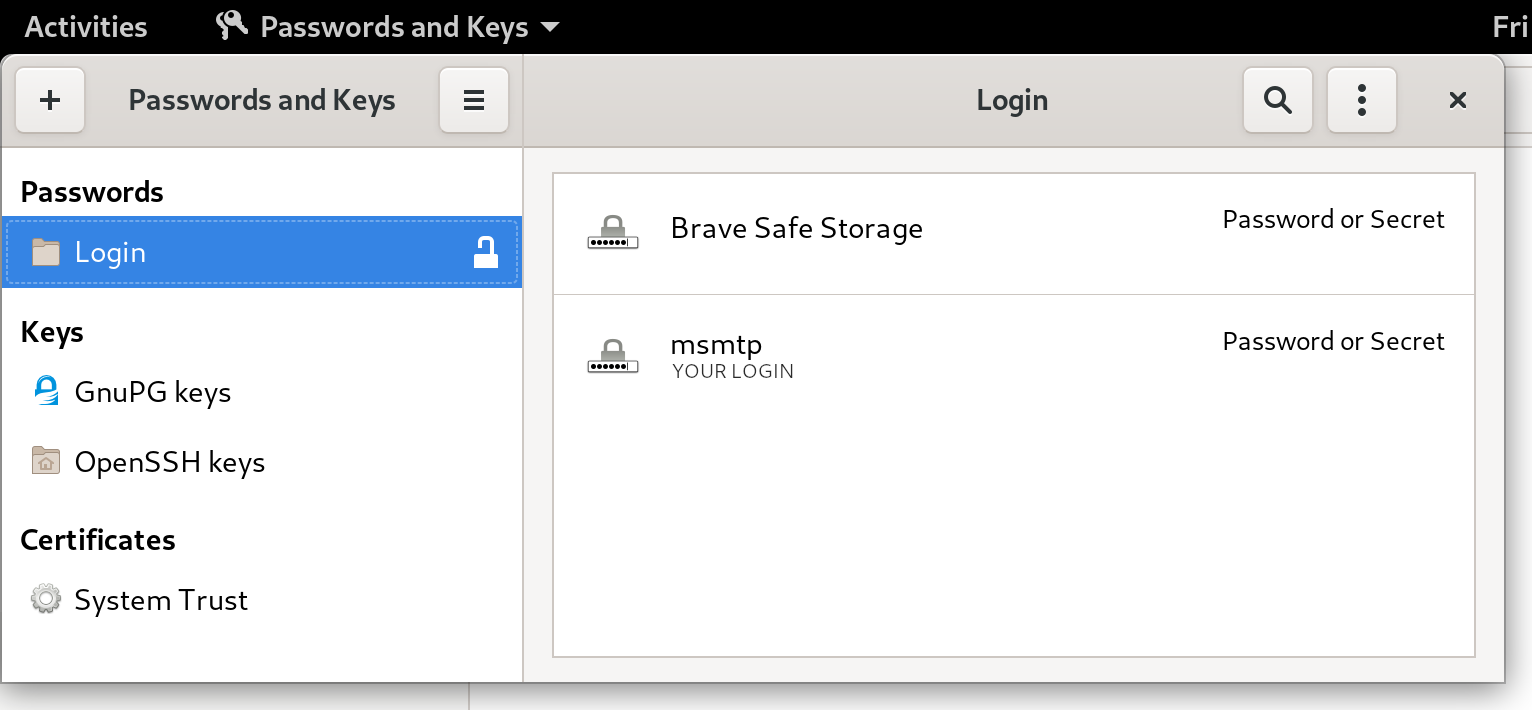
If this looks a bit too magic, and you want something more visual, you can actually fire a GUI like seahorse (for GNOME users), or kwalletmanager5 (for KDE users), and then you will see what passwords are stored in there. Here's a screenshot of Seahorse, with a msmtp password stored: seahorse with msmtp password Let's try to send an email again:
msmtp -t < message.txt
No need for a password anymore, msmtp got it from the system keyring! For more details on how msmtp handle the passwords, and to see what other methods are supported, refer to the extensive documentation. Use-cases and integration Let's go over a few use-cases, situations where you might end up sending emails from the command-line, and what configuration is required to make it work with msmtp. Git Send-Email Sending emails with git is a common workflow for some projects, like the Linux kernel. How does git send-email actually send emails? From the git-send-email manual page:
the built-in default is to search for sendmail in /usr/sbin, /usr/lib and $PATH if such program is available
It is possible to override this default though:
--smtp-server=
[...] Alternatively it can specify a full pathname of a sendmail-like program instead; the program must support the -i option.
So in order to use msmtp here, you'd add a snippet like that to your ~/.gitconfig file:
[sendemail]
    smtpserver = /usr/bin/msmtp
For a full guide, you can also refer to https://git-send-email.io. Debian developer tools Tools like bts or reportbug are also good examples of command-line tools that need to send emails. From the bts manual page:
--sendmail=SENDMAILCMD
Specify the sendmail command [...] Default is /usr/sbin/sendmail.
So if you want bts to send emails with msmtp instead of sendmail, you must use bts --sendmail='/usr/bin/msmtp -t'. Note that bts also loads settings from the file /etc/devscripts.conf and ~/.devscripts, so you could also set BTS_SENDMAIL_COMMAND='/usr/bin/msmtp -t' in one of those files. From the reportbug manual page:
--mta=MTA
Specify an alternate MTA, instead of /usr/sbin/sendmail (the default).
In order to use msmtp here, you'd write reportbug --mta=/usr/bin/msmtp. Note that reportbug reads it settings from /etc/reportbug.conf and ~/.reportbugrc, so you could as well set mta /usr/bin/msmtp in one of those files. So who is this sendmail again? By now, you probably noticed that sendmail seems to be considered the default tool for the job, the "traditional" command that has been around for ages. Rather than configuring every tool to use something else than sendmail, wouldn't it be simpler to actually replace sendmail by msmtp? Like, create a symlink that points to msmtp, something like ln -sr /usr/bin/msmtp /usr/sbin/sendmail? So that msmtp acts as a drop-in replacement for sendmail, and there's nothing else to configure? Answer is yes, kind of. Actually, the first msmtp feature that is listed on the homepage is "Sendmail compatible interface (command line options and exit codes)". Meaning that msmtp is a drop-in replacement for sendmail, that seems to be the intent. However, you should refrain from creating or modifying anything in /usr, as it's the territory of the package manager, apt. Any change in /usr might be overwritten by apt the next time you run an upgrade or install new packages. In the case of msmtp, there is actually a package named msmtp-mta that will create this symlink for you. So if you really want a definitive replacement for sendmail, there you go:
sudo apt install msmtp-mta
From this point, sendmail is now a symlink /usr/sbin/sendmail /usr/bin/msmtp, and there's no need to configure git, bts, reportbug or any other tool that would rely on sendmail. Everything should work "out of the box". Conclusion I hope that you enjoyed reading this article! If you have any comment, feel free to send me a short email, preferably from your terminal!

23 August 2020

Enrico Zini: Doing things /together/

Here are the slides of mine and Ulrike's talk Doing things /together/.
Our thoughts about cooperation aspects of doing things together. Sometimes in Debian we do work together with others, and sometimes we are a number of people who work alone, and happen to all upload their work in the same place. In times when we have needed to take important decisions together, this distinction has become crucial, and some of us might have found that we were not as good at cooperation as we would have thought. This talk is intended for everyone who is part of a larger community. We will show concepts and tools that we think could help understand and shape cooperation.
Video of the talk: The slides have extensive notes: you can use View Notes in LibreOffice Impress to see them. Here are the Inkscape sources for the graphs: Here are links to resources quoted in the talk: In the Q&A, pollo asked:
How can we still have a good code review process without making it a "you need to be perfect" scenario? I often find picky code reviews help me write better code.
Ulrike wrote a more detailed answer: Code reviews: from nitpicking to cooperation

Vincent Bernat: Zero-Touch Provisioning for Cisco IOS

The official documentation to automatically upgrade and configure on first boot a Cisco switch running on IOS, like a Cisco Catalyst 2960-X Series switch, is scarce on details. This note explains how to configure the ISC DHCP Server for this purpose.
When booting for the first time, Cisco IOS sends a DHCP request on all ports:
Dynamic Host Configuration Protocol (Discover)
    Message type: Boot Request (1)
    Hardware type: Ethernet (0x01)
    Hardware address length: 6
    Hops: 0
    Transaction ID: 0x0000117c
    Seconds elapsed: 0
    Bootp flags: 0x8000, Broadcast flag (Broadcast)
    Client IP address: 0.0.0.0
    Your (client) IP address: 0.0.0.0
    Next server IP address: 0.0.0.0
    Relay agent IP address: 0.0.0.0
    Client MAC address: Cisco_6c:12:c0 (b4:14:89:6c:12:c0)
    Client hardware address padding: 00000000000000000000
    Server host name not given
    Boot file name not given
    Magic cookie: DHCP
    Option: (53) DHCP Message Type (Discover)
    Option: (57) Maximum DHCP Message Size
    Option: (61) Client identifier
        Length: 25
        Type: 0
        Client Identifier: cisco-b414.896c.12c0-Vl1
    Option: (55) Parameter Request List
        Length: 12
        Parameter Request List Item: (1) Subnet Mask
        Parameter Request List Item: (66) TFTP Server Name
        Parameter Request List Item: (6) Domain Name Server
        Parameter Request List Item: (15) Domain Name
        Parameter Request List Item: (44) NetBIOS over TCP/IP Name Server
        Parameter Request List Item: (3) Router
        Parameter Request List Item: (67) Bootfile name
        Parameter Request List Item: (12) Host Name
        Parameter Request List Item: (33) Static Route
        Parameter Request List Item: (150) TFTP Server Address
        Parameter Request List Item: (43) Vendor-Specific Information
        Parameter Request List Item: (125) V-I Vendor-specific Information
    Option: (255) End
It requests a number of options, including the Bootfile name option 67, the TFTP server address option 150 and the Vendor-Identifying Vendor-Specific Information Option 125 or VIVSO. Option 67 provides the name of the configuration file located on the TFTP server identified by option 150. Option 125 includes the name of the file describing the Cisco IOS image to use to upgrade the switch. This file only contains the name of the tarball embedding the image.1 Configuring the ISC DHCP Server to answer with the TFTP server address and the name of the configuration file is simple enough:
filename "ob2-p2.example.com";
option tftp-server-address 172.16.15.253;
However, if you want to also provide the image for upgrade, you have to specify a hexadecimal-encoded string:2
option vivso 00:00:00:09:24:05:22:63:32:39:36:30:2d:6c:61:6e:62:61:73:65:6b:39:2d:74:61:72:2e:31:35:30:2d:32:2e:53:45:31:31:2e:74:78:74;
Having a large hexadecimal-encoded string inside a configuration file is quite unsatisfying. Instead, the ISC DHCP Server allows you to express this information in a more readable way using the option space statement:
# Create option space for Cisco and encapsulate it in VIVSO/vendor space
option space cisco code width 1 length width 1;
option cisco.auto-update-image code 5 = text;
option vendor.cisco code 9 = encapsulate cisco;
# Image description for Cisco IOS ZTP
option cisco.auto-update-image = "c2960-lanbasek9-tar.150-2.SE11.txt";
# Workaround for VIVSO option 125 not being sent
option vendor.iana code 0 = string;
option vendor.iana = 01:01:01;
Without the workaround mentioned in the last block, the ISC DHCP Server would not send back option 125. With such a configuration, it returns the following answer, including a harmless additional enterprise 0 encapsulated into option 125:
Dynamic Host Configuration Protocol (Offer)
    Message type: Boot Reply (2)
    Hardware type: Ethernet (0x01)
    Hardware address length: 6
    Hops: 0
    Transaction ID: 0x0000117c
    Seconds elapsed: 0
    Bootp flags: 0x8000, Broadcast flag (Broadcast)
    Client IP address: 0.0.0.0
    Your (client) IP address: 172.16.15.6
    Next server IP address: 0.0.0.0
    Relay agent IP address: 0.0.0.0
    Client MAC address: Cisco_6c:12:c0 (b4:14:89:6c:12:c0)
    Client hardware address padding: 00000000000000000000
    Server host name not given
    Boot file name: ob2-p2.example.com
    Magic cookie: DHCP
    Option: (53) DHCP Message Type (Offer)
    Option: (54) DHCP Server Identifier (172.16.15.252)
    Option: (51) IP Address Lease Time
    Option: (1) Subnet Mask (255.255.248.0)
    Option: (6) Domain Name Server
    Option: (3) Router
    Option: (150) TFTP Server Address
        Length: 4
        TFTP Server Address: 172.16.15.252
    Option: (125) V-I Vendor-specific Information
        Length: 49
        Enterprise: Reserved (0)
        Enterprise: ciscoSystems (9)
            Length: 36
            Option 125 Suboption: 5
                Length: 34
                Data: 63323936302d6c616e626173656b392d7461722e3135302d 
    Option: (255) End

  1. The reason of this indirection is still puzzling me. I suppose it could be because updating the image name directly in option 125 is quite a hassle.
  2. It contains the following information:
    • 0x00000009: Cisco s Enterprise Number,
    • 0x24: length of the enclosed data,
    • 0x05: Cisco s auto-update sub-option,
    • 0x22: length of the sub-option data, and
    • filename of the image description (c2960-lanbasek9-tar.150-2.SE11.txt).

Philipp Kern: Self-service buildd givebacks now use Salsa auth

As client certificates are on the way out and Debian's SSO solution is effectively not maintained any longer, I switched self-service buildd givebacks over to Salsa authentication. It lives again at https://buildd.debian.org/auth/giveback.cgi. For authorization you still need to be in the "debian" group for now, i.e. be a regular Debian member.For convenience the package status web interface now features an additional column "Actions" with generated "giveback" links.Please remember to file bugs if you give builds back because of flakiness of the package rather than the infrastructure and resist the temptation to use this excessively to let your package migrate. We do not want to end up with packages that require multiple givebacks to actually build in stable, as that would hold up both security and stable updates needlessly and complicate development.

22 August 2020

Norbert Preining: Converting html to mp4

Such an obvious problem, convert a piece of html/js/css, often with animations, to a video (mp4 or similar). We were just put before this problem for the TUG 2020 online conference. Searching the internet it turned up mostly web services, some of them even with lots of money to pay. At the end (below I will give a short history) it turned out to be rather simple.

The key is to use timesnap, a tool to take screenshots from web pages. It is actively maintained, and internally uses puppeteer, which in turn uses Google Chrome browser headless. This also means that rendering quality is very high. So having an html file available, with all the necessary assets, either online or local, one simply creates enough single screenshots per second so that they can be assembled later on into a video with ffmpeg. In our case, we wanted our leaders to last 10secs before the actual presentation video starts. I decided to render at 30fps, which left me with the simple invocation:
timesnap Leader.html --viewport=1920,1080 --fps=30 --duration=10 --output-pattern="leader-%03d.png"
followed by conversion of the various png images to an mp4:
ffmpeg -r 30 -f image2 -s 1920x1080 -i leader-%03d.png -vcodec libx264 -crf 25 -pix_fmt yuv420p leader.mp4
The -r is the fps, so needs to agree with the --fps above. Also the --viewport and -s values should better agree. -crf is the video quality, and -pix_fmt the pixel format. With that very simple and quick invocation a nice leader video was ready! History It was actually more complicated than normal. For similar problems, it usually takes me about 5min of googling and a bit of scripting, but this time, it was actually a long way. Simply searching for convert html to mp4 doesn t give a lot but web services, often paid for. At some point I came up with the idea to use Electron and led to Electron Recorder, which looked promising, but didn t work. A bit more searching led me to PhantomJS, which is not developed anymore, but there was some explanation how to dump frames using phantomjs and merge them using ffmpeg, very similar to the above. Unfortunately, the rendering of the html page by phantomjs was broken, and thus not usable. Thus I ventured off into searching for alternatives of PhantomJS, which brought me to puppeteer, and from there it wasn t too long a way that pointed me at timesnap. Till now it is surprising to me that such a basic task is neither well documented, so hopefully this page helps some users.

Jelmer Vernooij: Debian Janitor: > 60,000 Lintian Issues Automatically Fixed

The Debian Janitor is an automated system that commits fixes for (minor) issues in Debian packages that can be fixed by software. It gradually started proposing merges in early December. The first set of changes sent out ran lintian-brush on sid packages maintained in Git. This post is part of a series about the progress of the Janitor.

Scheduling Lintian Fixes To determine which packages to process, the Janitor looks at the import of lintian output across the archive that is available in UDD [1]. It will prioritize those packages with the most and more severe issues that it has fixers for. Once a package is selected, it will clone the packaging repository and run lintian-brush on it. Lintian-brush provides a framework for applying a set of fixers to a package. It will run each of a set of fixers in a pristine version of the repository, and handles most of the heavy lifting.
The Inner Workings of a Fixer Each fixer is just an executable which gets run in a clean checkout of the package, and can make changes there. Most of the fixers are written in Python or shell, but they can be in any language. The contract for fixers is pretty simple:
  • If the fixer exits with non-zero, the changes are reverted and fixer is considered to have failed
  • If it exits with zero and made changes, then it should write a summary of its changes to standard out
If a fixer is uncertain about the changes it has made, it should report so on standard output using a pseudo-header. By default, lintian-brush will discard any changes with uncertainty but if you are running it locally you can still apply them by specifying --uncertain. The summary message on standard out will be used for the commit message and (possibly) the changelog message, if the package doesn t use gbp dch.
Example Fixer Let s look at an example. The package priority extra is deprecated since Debian Policy 4.0.1 (released August 2 017) see Policy 2.5 "Priorities". Instead, most packages should use the optional priority. Lintian will warn when a package uses the deprecated extra value for the Priority - the associated tag is priority-extra-is-replaced-by-priority-optional. Lintian-brush has a fixer script that can automatically replace extra with optional . On systems that have lintian-brush installed, the source for the fixer lives in /usr/share/lintian-brush/fixers/priority-extra-is-replaced-by-priority-optional.py, but here is a copy of it for reference:
 1
 2
 3
 4
 5
 6
 7
 8
 9
10
11
12
13
#!/usr/bin/python3
from debmutate.control import ControlEditor
from lintian_brush.fixer import report_result, fixed_lintian_tag
with ControlEditor() as updater:
    for para in updater.paragraphs:
        if para.get("Priority") == "extra":
            para["Priority"] = "optional"
            fixed_lintian_tag(
                para, 'priority-extra-is-replaced-by-priority-optional')
report_result("Change priority extra to priority optional.")
This fixer is written in Python and uses the debmutate library to easily modify control files while preserving formatting or back out if it is not possible to preserve formatting. All the current fixers come with tests, e.g. for this particular fixer the tests can be found here: https://salsa.debian.org/jelmer/lintian-brush/-/tree/master/tests/priority-extra-is-replaced-by-priority-optional. For more details on writing new fixers, see the README for lintian-brush. For more details on debugging them, see the manual page.
Successes by fixer Here is a list of the fixers currently available, with the number of successful merges/pushes per fixer:
Lintian Tag Previously merged/pushed Ready but not yet merged/pushed
uses-debhelper-compat-file 4906 4161
upstream-metadata-file-is-missing 4281 3841
package-uses-old-debhelper-compat-version 4256 3617
upstream-metadata-missing-bug-tracking 2438 2995
out-of-date-standards-version 2062 2936
upstream-metadata-missing-repository 1936 2987
trailing-whitespace 1720 2295
insecure-copyright-format-uri 1791 1093
package-uses-deprecated-debhelper-compat-version 1391 1287
vcs-obsolete-in-debian-infrastructure 872 782
homepage-field-uses-insecure-uri 527 1111
vcs-field-not-canonical 850 655
debian-changelog-has-wrong-day-of-week 224 376
debian-watch-uses-insecure-uri 314 242
useless-autoreconf-build-depends 112 428
priority-extra-is-replaced-by-priority-optional 315 194
debian-rules-contains-unnecessary-get-orig-source-target 35 428
tab-in-license-text 125 320
debian-changelog-line-too-long 186 190
debian-rules-sets-dpkg-architecture-variable 69 166
debian-rules-uses-unnecessary-dh-argument 42 182
package-lacks-versioned-build-depends-on-debhelper 125 95
unversioned-copyright-format-uri 43 136
package-needs-versioned-debhelper-build-depends 127 50
binary-control-field-duplicates-source 34 134
renamed-tag 73 69
vcs-field-uses-insecure-uri 14 109
uses-deprecated-adttmp 13 91
debug-symbol-migration-possibly-complete 12 88
copyright-refers-to-symlink-license 51 48
debian-control-has-unusual-field-spacing 33 66
old-source-override-location 32 62
out-of-date-copyright-format 20 62
public-upstream-key-not-minimal 43 30
older-source-format 17 54
custom-compression-in-debian-source-options 12 57
copyright-refers-to-versionless-license-file 29 39
tab-in-licence-text 33 31
global-files-wildcard-not-first-paragraph-in-dep5-copyright 28 33
out-of-date-copyright-format-uri 9 50
field-name-typo-dep5-copyright 29 29
copyright-does-not-refer-to-common-license-file 13 42
debhelper-but-no-misc-depends 9 45
debian-watch-file-is-missing 11 41
debian-control-has-obsolete-dbg-package 8 40
possible-missing-colon-in-closes 31 13
unnecessary-testsuite-autopkgtest-field 32 9
missing-debian-source-format 7 33
debhelper-tools-from-autotools-dev-are-deprecated 9 29
vcs-field-mismatch 8 29
debian-changelog-file-contains-obsolete-user-emacs-setting 33 0
patch-file-present-but-not-mentioned-in-series 24 9
copyright-refers-to-versionless-license-file 22 9
debian-control-has-empty-field 25 6
missing-build-dependency-for-dh-addon 10 20
obsolete-field-in-dep5-copyright 15 13
xs-testsuite-field-in-debian-control 20 7
ancient-python-version-field 13 12
unnecessary-team-upload 19 5
misspelled-closes-bug 6 16
field-name-typo-in-dep5-copyright 1 20
transitional-package-not-oldlibs-optional 4 17
maintainer-script-without-set-e 9 11
dh-clean-k-is-deprecated 4 14
no-dh-sequencer 14 4
missing-vcs-browser-field 5 12
space-in-std-shortname-in-dep5-copyright 6 10
xc-package-type-in-debian-control 4 11
debian-rules-missing-recommended-target 4 10
desktop-entry-contains-encoding-key 1 13
build-depends-on-obsolete-package 4 9
license-file-listed-in-debian-copyright 1 12
missing-built-using-field-for-golang-package 9 4
unused-license-paragraph-in-dep5-copyright 4 7
missing-build-dependency-for-dh_command 6 4
comma-separated-files-in-dep5-copyright 3 6
systemd-service-file-refers-to-var-run 4 5
copyright-not-using-common-license-for-apache2 3 5
debian-tests-control-autodep8-is-obsolete 2 6
dh-quilt-addon-but-quilt-source-format 2 6
no-homepage-field 3 5
font-packge-not-multi-arch-foreign 1 6
homepage-in-binary-package 1 4
vcs-field-bitrotted 1 3
built-using-field-on-arch-all-package 2 1
copyright-should-refer-to-common-license-file-for-apache-2 1 2
debian-pyversions-is-obsolete 3 0
debian-watch-file-uses-deprecated-githubredir 1 1
executable-desktop-file 1 1
skip-systemd-native-flag-missing-pre-depends 1 1
vcs-field-uses-not-recommended-uri-format 1 1
init.d-script-needs-depends-on-lsb-base 1 0
maintainer-also-in-uploaders 1 0
public-upstream-keys-in-multiple-locations 1 0
wrong-debian-qa-group-name 1 0
Total 29656 32209

Footnotes
[1]temporarily unavailable due to Debian bug #960156 but the Janitor is relying on historical data

For more information about the Janitor's lintian-fixes efforts, see the landing page

21 August 2020

Reproducible Builds (diffoscope): diffoscope 157 released

The diffoscope maintainers are pleased to announce the release of diffoscope version 157. This version includes the following changes:
[ Chris Lamb ]
* Try obsensibly "data" files named .pgp against pgpdump to determine whether
  they are PGP files. (Closes: reproducible-builds/diffoscope#211)
* Don't raise an exception when we encounter XML files with "<!ENTITY>"
  declarations inside the DTD, or when a DTD or entity references an external
  resource. (Closes: reproducible-builds/diffoscope#212)
* Temporarily drop gnumeric from Build-Depends as it has been removed from
  testing due to Python 2.x deprecation. (Closes: #968742)
* Codebase changes:
  - Add support for multiple file extension matching; we previously supported
    only a single extension to match.
  - Move generation of debian/tests/control.tmp to an external script.
  - Move to our assert_diff helper entirely in the PGP tests.
  - Drop some unnecessary control flow, unnecessary dictionary comprehensions
    and some unused imports found via pylint.
* Include the filename in the "... not identified by any comparator"
  logging message.
You find out more by visiting the project homepage.

20 August 2020

Bits from Debian: Lenovo, Infomaniak, Google and Amazon Web Services (AWS), Platinum Sponsors of DebConf20

We are very pleased to announce that Lenovo, Infomaniak, Google and Amazon Web Services (AWS), have committed to supporting DebConf20 as Platinum sponsors. lenovologo As a global technology leader manufacturing a wide portfolio of connected products, including smartphones, tablets, PCs and workstations as well as AR/VR devices, smart home/office and data center solutions, Lenovo understands how critical open systems and platforms are to a connected world. infomaniaklogo Infomaniak is Switzerland's largest web-hosting company, also offering backup and storage services, solutions for event organizers, live-streaming and video on demand services. It wholly owns its datacenters and all elements critical to the functioning of the services and products provided by the company (both software and hardware). Googlelogo Google is one of the largest technology companies in the world, providing a wide range of Internet-related services and products such as online advertising technologies, search, cloud computing, software, and hardware. Google has been supporting Debian by sponsoring DebConf for more than ten years, and is also a Debian partner sponsoring parts of Salsa's continuous integration infrastructure within Google Cloud Platform. AWSlogo Amazon Web Services (AWS) is one of the world's most comprehensive and broadly adopted cloud platform, offering over 175 fully featured services from data centers globally (in 77 Availability Zones within 24 geographic regions). AWS customers include the fastest-growing startups, largest enterprises and leading government agencies. With these commitments as Platinum Sponsors, Lenovo, Infomaniak, Google and Amazon Web Services are contributing to make possible our annual conference, and directly supporting the progress of Debian and Free Software, helping to strengthen the community that continues to collaborate on Debian projects throughout the rest of the year. Thank you very much for your support of DebConf20! Participating in DebConf20 online The 21st Debian Conference is being held Online, due to COVID-19, from August 23rd to 29th, 2020. There are 7 days of activities, running from 10:00 to 01:00 UTC. Visit the DebConf20 website at https://debconf20.debconf.org to learn about the complete schedule, watch the live streaming and join the different communication channels for participating in the conference.

Ritesh Raj Sarraf: LUKS Headless Laptop

As we grow old, so do our computing machines. And just like we don t decommission ourselves, so should be the case of the machines. They should be semi-retired, delegating major tasks to newer machines while they can still serve some less demaning work: File Servers, UPNP Servers et cetera. It is common on a Debian installer based derivative, and otherwise too, to use block encryption on Linux. With machines from this decade, I think we ve always had CPU extension for encryption. So, as would be the usual case, all my laptops are block encrypted. But as they reach the phase of their life to retire and serving as a headless boss, it becomes cumbersome to keep feeding it a password and all the logistics involved to feed it. As such, I wanted to get rid of feeding it the password. Then, there s also the case of bad/faulty hardware, many of which mostly can temporarily fix their functionality when reset, which usually is to reboot the machine. I still recollect words of my Linux Guru - Dhiren Raj Bhandari - that many of the unexplainable errors can be resolved by just rebooting the machine. This was more than 20 years ago in the prime era of Microsoft Windows OS and the context back then was quite different, but yes, some bits of that saying still apply today. So I wanted my laptop, which had LUKS set up for 2 disks, to go password-less now. I stumbled across a slightly dated article where the author achieved similar results with keyscript. So the thing was doable. To my delight, Debian cryptsetup has the best setup and documentation in place to do it with just adding keyfiles

rrs@lenovo:~$ dd if=/dev/random of=sda7.key bs=1 count=512
512+0 records in
512+0 records out
512 bytes copied, 0.00540209 s, 94.8 kB/s
19:19            
rrs@lenovo:~$ dd if=/dev/random of=sdb1.key bs=1 count=512
512+0 records in
512+0 records out
512 bytes copied, 0.00536747 s, 95.4 kB/s
19:20            
rrs@lenovo:~$ sudo cryptsetup luksAddKey /dev/sda7 sda7.key 
[sudo] password for rrs: 
Enter any existing passphrase: 
No key available with this passphrase.
19:20         => 2  
rrs@lenovo:~$ sudo cryptsetup luksAddKey /dev/sda7 sda7.key 
Enter any existing passphrase: 
19:20            
rrs@lenovo:~$ sudo cryptsetup luksAddKey /dev/sdb1 sdb1.key 
Enter any existing passphrase: 
19:21            
and the nice integration in crypttab to ensure your keys propagate to initramfs
rrs@lenovo:~$ cat /etc/cryptsetup-initramfs/conf-hook 
#
# Configuration file for the cryptroot initramfs hook.
#
#
# KEYFILE_PATTERN: ...
#
# The value of this variable is interpreted as a shell pattern.
# Matching key files from the crypttab(5) are included in the initramfs
# image.  The associated devices can then be unlocked without manual
# intervention.  (For instance if /etc/crypttab lists two key files
# /etc/keys/ root,swap .key, you can set KEYFILE_PATTERN="/etc/keys/*.key"
# to add them to the initrd.)
#
# If KEYFILE_PATTERN if null or unset (default) then no key file is
# copied to the initramfs image.
#
# Note that the glob(7) is not expanded for crypttab(5) entries with a
# 'keyscript=' option.  In that case, the field is not treated as a file
# name but given as argument to the keyscript.
#
# WARNING: If the initramfs image is to include private key material,
# you'll want to create it with a restrictive umask in order to keep
# non-privileged users at bay.  For instance, set UMASK=0077 in
# /etc/initramfs-tools/initramfs.conf
#
KEYFILE_PATTERN="/etc/luks/sd*.key"
19:44            
The whole thing took me around 20-25 minutes, including drafting this post. From Retired Head and Password Prompt to Headless and Password-less. The beauty of Debian and FOSS

18 August 2020

Lisandro Dami n Nicanor P rez Meyer: Stepping down as Qt 6 maintainers

After quite some time maintaining Qt in Debian both Dmitry Shachnev and I decided to not maintain Qt 6 when it's published (expected in December 2020, see https://wiki.qt.io/Qt_6.0_Release). We will do our best to keep the Qt 5 codebase up and running.
We **love** Qt, but it's a huge codebase and requires time and build power, both things that we are currently lacking, so we decided it's time for us to step down and pass the torch. And a new major version seems the right point to do that.

We will be happy to review and/or sponsor other people's work or even occasionally do uploads, but we can't promise to do it regularly.

Some things we think potential Qt 6 maintainers should be familiar with are, of course, C++ packaging (specially symbols files) and CMake, as Qt 6 will be built with it.

We also encourage prospective maintainers to remove the source's -everywhere-src suffixes and just keep the base names as source package names: qtbase6, qtdeclarative6, etc.

It has been an interesting ride all these years, we really hope you enjoyed using Qt.

Thanks for everything,

Dmitry and Lisandro.Note 20200818 12:12 ARST: I was asked if the move has anything to do with code quality or licensing. The answer is a huge no, Qt is a **great** project which we love. As stated before it's mostly about lack of free time to properly maintain it.


17 August 2020

Ian Jackson: Doctrinal obstructiveness in Free Software

Any software system has underlying design principles, and any software project has process rules. But I seem to be seeing more often, a pathological pattern where abstract and shakily-grounded broad principles, and even contrived and sophistic objections, are used to block sensible changes. Today I will go through an example in detail, before ending with a plea: PostgreSQL query planner, WITH [MATERIALIZED] optimisation fence Background history PostgreSQL has a sophisticated query planner which usually gets the right answer. For good reasons, the pgsql project has resisted providing lots of knobs to control query planning. But there are a few ways to influence the query planner, for when the programmer knows more than the planner. One of these is the use of a WITH common table expression. In pgsql versions prior to 12, the planner would first make a plan for the WITH clause; and then, it would make a plan for the second half, counting the WITH clause's likely output as a given. So WITH acts as an "optimisation fence". This was documented in the manual - not entirely clearly, but a careful reading of the docs reveals this behaviour:
The WITH query will generally be evaluated as written, without suppression of rows that the parent query might discard afterwards.
Users (authors of applications which use PostgreSQL) have been using this technique for a long time. New behaviour in PostgreSQL 12 In PostgreSQL 12 upstream were able to make the query planner more sophisticated. In particular, it is now often capable of looking "into" the WITH common table expression. Much of the time this will make things better and faster. But if WITH was being used for its side-effect as an optimisation fence, this change will break things: queries that ran very quickly in earlier versions might now run very slowly. Helpfully, pgsql 12 still has a way to specify an optimisation fence: specifying WITH ... AS MATERIALIZED in the query. So far so good. Upgrade path for existing users of WITH fence But what about the upgrade path for existing users of the WITH fence behaviour? Such users will have to update their queries to add AS MATERIALIZED. This is a small change. Having to update a query like this is part of routine software maintenance and not in itself very objectionable. However, this change cannnot be made in advance because pgsql versions prior to 12 will reject the new syntax. So the users are in a bit of a bind. The old query syntax can be unuseably slow with the new database and the new syntax is rejected by the old database. Upgrading both the database and the application, in lockstep, is a flag day upgrade, which every good sysadmin will want to avoid. A solution to this problem Colin Watson proposed a very simple solution: make the earlier PostgreSQL versions accept the new MATERIALIZED syntax. This is correct since the new syntax specifies precisely the actual behaviour of the old databases. It has no deleterious effect on any users of older pgsql versions. It makes it possible to add the new syntax to the application, before doing the database upgrade, decoupling the two upgrades. Colin Watson even provided an implementation of this proposal. The solution is rejected by upstream Unfortunately upstream did not accept this idea. You can read the whole thread yourself if you like. But in summary, the objections were (italic indicates literal quotes): I find these extremely unconvincing, even taken together. Many of them are very unattractive things to hear one's upstream saying. At best they are knee-jerk and inflexible application of very general principles. The authors of these objections seem to have lost sight of the fact that these principles have a purpose. When these kind of software principles work against their purposes, they should be revised, or exceptions made. At worst, it looks like a collective effort to find reasons - any reasons, no matter how bad - not to make this change. The OFFSET 0 trick One of the responses in the thread mentions OFFSET 0. As part of writing the queries in the Xen Project CI system, and preparing for our system upgrade, I had carefully read the relevant pgsql documentation. This OFFSET 0 trick was new to me. But, now that I know the answer, it is easy to provide the right search terms and find, for example, this answer on stackmumble. Apparently adding a no-op OFFSET 0 to the subquery defeats the pgsql 12 query planner's ability to see into the subquery.
I think OFFSET 0 is the better approach since it's more obviously a hack showing that something weird is going on, and it's unlikely we'll ever change the optimiser behaviour around OFFSET 0 ... wheras hopefully CTEs will become inlineable at some point CTEs became inlineable by default in PostgreSQL 12.
So in fact there is a syntax for an optimisation fence that is accepted by both earlier and later PostgreSQL versions. It's even recommended by pgsql devs. It's just not documented, and is described by pgsql developers as a "hack". Astonishingly, the fact that it is a "hack" is given as a reason to use it! Well, I have therefore deployed this "hack". No doubt it will stay in our codebase indefinitely. Please don't be like that! I could come up with a lot more examples of other projects that have exhibited similar arrogance. It is becoming a plague! But every example is contentious, and I don't really feel I need to annoy a dozen separate Free Software communities. So I won't make a laundry list of obstructiveness. If you are an upstream software developer, or a distributor of software to users (eg, a distro maintainer), you have a lot of practical power. In theory it is Free Software so your users could just change it themselves. But for a user or downstream, carrying a patch is often an unsustainable amount of work and risk. Most of us have patches we would love to be running, but which we haven't even written because simply running a nonstandard build is too difficult, no matter how technically excellent our delta. As an upstream, it is very easy to get into a mindset of defending your code's existing behaviour, and to turn your project's guidelines into inflexible rules. Constant exposure to users who make silly mistakes, and rudely ask for absurd changes, can lead to core project members feeling embattled. But there is no need for an upstream to feel embattled! You have the vast majority of the power over the software, and over your project communication fora. Use that power consciously, for good. I can't say that arrogance will hurt you in the short term. Users of software with obstructive upstreams do not have many good immediate options. But we do have longer-term choices: we can choose which software to use, and we can choose whether to try to help improve the software we use. After reading Colin's experience, I am less likely to try to help improve the experience of other PostgreSQL users by contributing upstream. It doesn't seem like there would be any point. Indeed, instead of helping the PostgreSQL community I am now using them as an example of bad practice. I'm only half sorry about that.

comment count unavailable comments

Norbert Preining: KDE Apps 20.08 now available for Debian

KDE Apps bundle 20.08 has been released recently, and some of the packages are already updated in Debian/unstable. I have updated also all my packages to 20.08 and they are now available for x86_64, i586, and hopefully aarch64 (some issues remaining here still). With the new release 20.08 I have also switched to versioned app repositories, so you need to update the apt sources directive. The new one is
deb https://download.opensuse.org/repositories/home:/npreining:/debian-kde:/apps2008/Debian_Unstable/ ./
and similar for Testing. Packages from the other repo that depend on apps, that is in particular Digikam, are currently rebuild and will be coinstallable soon. Just to make sure, here is the full set of repositories I use on my computers:
deb https://download.opensuse.org/repositories/home:/npreining:/debian-kde:/other-deps/Debian_Unstable/ ./
deb https://download.opensuse.org/repositories/home:/npreining:/debian-kde:/frameworks/Debian_Unstable/ ./
deb https://download.opensuse.org/repositories/home:/npreining:/debian-kde:/plasma519/Debian_Unstable/ ./
deb https://download.opensuse.org/repositories/home:/npreining:/debian-kde:/apps2008/Debian_Unstable/ ./
deb https://download.opensuse.org/repositories/home:/npreining:/debian-kde:/other/Debian_Unstable/ ./
Enjoy.

Arnaud Rebillout: Modify Vim syntax files for your taste

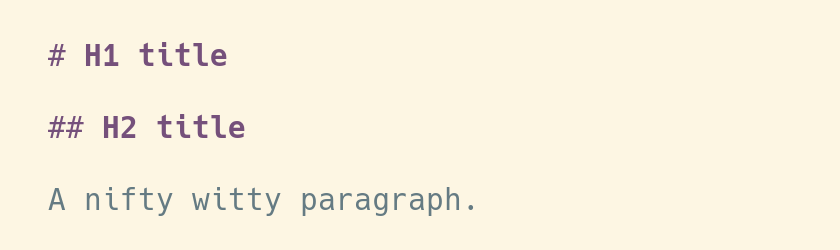
In this short how-to, we'll see how to make small modifications to a Vim syntax file, in order to change how a particular file format is highlighted. We'll go for a simple use-case: modify the Markdown syntax file, so that H1 and H2 headings (titles and subtitles, if you prefer) are displayed in bold. Of course, this won't be exactly as easy as expected, but no worries, we'll succeed in the end. The calling Let's start with a screenshot: how Vim displays Markdown files for me, someone who use the GNOME terminal with the Solarized light theme. Vim - Markdown file with original highlighting I'm mostly happy with that, except for one or two little details. I'd like to have the titles displayed in bold, for example, so that they're easier to spot when I skim through a Markdown file. It seems like a simple thing to ask, so I hope there can be a simple solution. The first steps Let's learn the basics. In Vim world, the rules to highlight files formats are defined in the directory /usr/share/vim/vim82/syntax (I bet you'll have to adjust this path depending on the version of Vim that is installed on your system). And so, for the Markdown file format, the rules are defined in the file /usr/share/vim/vim82/syntax/markdown.vim. The first thing we could do is to have a look at this file, try to make sense of it, and maybe start to make some modifications. But wait a moment. You should know that modifying a system file is not a great idea. First because your changes will be lost as soon as an update kicks in and the package manager replaces this file by a new version. Second, because you will quickly forget what files you modified, and what were your modifications, and if you do that too much, you might experience what is called "maintenance headache" in the long run. So instead, maybe you DO NOT modify this file, and instead you copy it in your personal Vim folder, more precisely in ~/.vim/syntax. Create this directory if it does not exist:
mkdir -p ~/.vim/syntax
cp /usr/share/vim/vim82/syntax/markdown.vim ~/.vim/syntax
The file in your personal folder takes precedence over the system file of the same name in /usr/share/vim/vim82/syntax/, it is a replacement for the existing syntax files. And so from now on, Vim uses the file ~/.vim/syntax/markdown.vim, and this is where we can make our modifications. (And by the way, this is explained in the Vim faq-24.12) And so, it's already nice to know all of that, but wait, there's even better. There's is another location of interest, and it is ~/.vim/after/syntax. You can drop syntax files in this directory, and these files are treated as additions to the existing syntax. So if you only want to make slight modifications, that's the way to go. (And by the way, this is explained in the Vim faq-24.11) So let's forget about a syntax replacement in ~/.vim/syntax/markdown.vim, and instead let's go for some syntax additions in ~/.vim/after/syntax/markdown.vim.
mkdir -p ~/.vim/after/syntax
touch ~/.vim/after/syntax/markdown.vim
Now, let's answer the initial question: how do we modify the highlighting rules for Markdown files, so that the titles are displayed in bold? First, we have to understand where are the rules that define the highlighting for titles. Here there are, from the file /usr/share/vim/vim82/syntax/markdown.vim:
hi def link markdownH1 htmlH1
hi def link markdownH2 htmlH2
hi def link markdownH3 htmlH3
...
You should know that H1 means Heading 1, and so on, and so we want to make H1 and H2 bold. What we can see here is that the headings in the Markdown files are highlighted like the headings in HTML files, and this is obviously defined in the file /usr/share/vim/vim82/syntax/html.vim. So let's have a look into this file:
hi def link htmlH1 Title
hi def link htmlH2 htmlH1
hi def link htmlH3 htmlH2
...
Let's keep digging a bit. Where is Title defined? For those using the default color scheme like me, this is defined straight in the Vim source code, in the file src/highlight.c.
CENT("Title term=bold ctermfg=DarkMagenta",
     "Title term=bold ctermfg=DarkMagenta gui=bold guifg=Magenta"),
And for those using custom color schemes, it might be defined in a file under /usr/share/vim/vim82/colors/. Alright, so how do we override that? We can just define this kind of rules in our syntax additions file at ~/.vim/after/syntax/markdown.vim:
hi link markdownH1 markdownHxBold
hi link markdownH2 markdownHxBold
hi markdownHxBold  term=bold ctermfg=DarkMagenta gui=bold guifg=Magenta cterm=bold
As you can see, the only addition we made, compared to what's defined in src/highlight.c, is cterm=bold. And that's already enough to achieve the initial goal, make the titles (ie. H1 and H2) bold. The result can be seen in the following screenshot: Vim - Markdown file with modified highlighting The rabbit hole So we could stop right here, and life would be easy and good. However, with this solution there's still something that is not perfect. We use the color DarkMagenta as defined in the default color scheme. What I didn't mention however, is that this is applicable for a light background. If you have a dark background though, dark magenta won't be easy to read. Actually, if you look a bit more into src/highlight.c, you will see that the default color scheme comes in two variants, one for a light background, and one for a dark background. And so the definition for Title for a dark background is as follow:
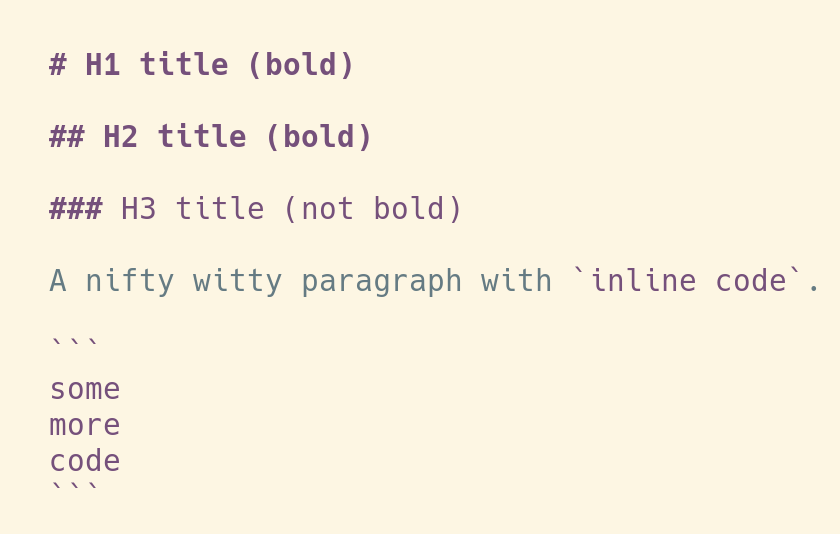
CENT("Title term=bold ctermfg=LightMagenta",
     "Title term=bold ctermfg=LightMagenta gui=bold guifg=Magenta"),
Hmmm, so how do we do that in our syntax file? How can we support both light and dark background, so that the color is right in both cases? After a bit of research, and after looking at other syntax files, it seems that the solution is to check for the value of the background option, and so our syntax file becomes:
hi link markdownH1 markdownHxBold
hi link markdownH2 markdownHxBold
if &background == "light"
  hi markdownHxBold term=bold ctermfg=DarkMagenta gui=bold guifg=Magenta cterm=bold
else
  hi markdownHxBold term=bold ctermfg=LightMagenta gui=bold guifg=Magenta cterm=bold
endif
In case you wonder, in Vim script you prefix Vim options with &, and so you get the value of the background option by writing &background. You can learn this kind of things in the Vim scripting cheatsheet. And so, it's easy enough, except for one thing: it doesn't work. The headings always show up in DarkMagenta, even for a dark background. This is why I called this paragraph "the rabbit hole", by the way. So... Well after trying a few things, I noticed that in order to make it work, I would have to reload the syntax files with :syntax on. At this point, the most likely explanation is that the background option is not set yet when the syntax files are loaded at startup, hence it needs to be reloaded manually afterward. And after muuuuuuch research, I found out that it's actually possible to set a hook for when an option is modified. Meaning, it's possible to execute a function when the background option is modified. Quite cool actually. And so, there it goes in my ~/.vimrc:
" Reload syntax when the background changes 
autocmd OptionSet background if exists("g:syntax_on")   syntax on   endif
For humans, this line reads as:
  1. when the background option is modified -- autocmd OptionSet background
  2. check if the syntax is on -- if exists("g:syntax_on")
  3. if that's the case, reload it -- syntax on
With that in place, my Markdown syntax overrides work for both dark and light background. Champagne! The happy end To finish, let me share my actual additions to the markdown.vim syntax. It makes H1 and H2 bold, along with their delimiters, and it also colors the inline code and the code blocks.
" H1 and H2 headings -> bold
hi link markdownH1 markdownHxBold
hi link markdownH2 markdownHxBold
" Heading delimiters (eg '#') and rules (eg '----', '====') -> bold
hi link markdownHeadingDelimiter markdownHxBold
hi link markdownRule markdownHxBold
" Code blocks and inline code -> highlighted
hi link markdownCode htmlH1
" The following test requires this addition to your vimrc:
" autocmd OptionSet background if exists("g:syntax_on")   syntax on   endif
if &background == "light"
  hi markdownHxBold term=bold ctermfg=DarkMagenta gui=bold guifg=Magenta cterm=bold
else
  hi markdownHxBold term=bold ctermfg=LightMagenta gui=bold guifg=Magenta cterm=bold
endif
And here's how it looks like with a light background: Vim - Markdown file with final highlighting (light) And a dark background: Vim - Markdown file with final highlighting (dark) That's all, that's very little changes compared to the highlighting from the original syntax file, and now that we understand how it's supposed to be done, it's not much effort to achieve it. It's just that finding the workaround to make it work for both light and dark background took forever, and leaves the usual, unanswered question: bug or feature?

16 August 2020

Enrico Zini: Historical links

Saint Guinefort was a dog who lived in France in the 13th century, worshipped through history as a saint until less than a century ago. The recurrence is soon, on the 22th of August. Many think middle ages were about superstition, and generally a bad period. Black Death, COVID, and Why We Keep Telling the Myth of a Renaissance Golden Age and Bad Middle Ages tells a different, fascinating story. Another fascinating middle age story is that of Christine de Pizan, author of The Book of the City of Ladies. This is a very good lecture about her (in Italian): Come pensava una donna nel Medioevo? 2 - Christine de Pizan. You can read some of her books at the Memory of the World library. If you understand Italian, Alessandro Barbero gives fascinating lectures. You can find them index in a timeline, or in a map. Still from around the middle ages, we get playing cards: see Playing Cards Around the World and Through the Ages. If you want to go have a look in person, and you overshoot with your time machine, here's a convenient route planner for antique Roman roads. View all historical links that I have shared.

Bits from Debian: Debian turns 27!

Today is Debian's 27th anniversary. We recently wrote about some ideas to celebrate the DebianDay, you can join the party or organise something yourselves :-) Today is also an opportunity for you to start or resume your contributions to Debian. For example, you can scratch your creative itch and suggest a wallpaper to be part of the artwork for the next release, have a look at the DebConf20 schedule and register to participate online (August 23rd to 29th, 2020), or put a Debian live image in a DVD or USB and give it to some person near you, who still didn't discover Debian. Our favorite operating system is the result of all the work we do together. Thanks to everybody who has contributed in these 27 years, and happy birthday Debian!

Andrej Shadura: Useful FFmpeg commands for video editing

As a response to Antonio Terceiro s blog post, I m publishing some FFmpeg commands I ve been using recently. Embedding subtitles Sometimes you have a video with subtitles in multiple languages and you don t want to clutter the directory with a lot of similarly-named files or maybe you want to be able to easily transfer the video and subtitles at once. In this case, it may be useful to embed to subtitles directly into the video container file.
ffmpeg -i video.mp4 -i video.eng.srt -map 0:v -map 0:a -c copy -map 1 \
        -c:s:0 mov_text -metadata:s:s:0 language="eng" video-out.mp4
This commands recodes the subtitle file into a format appropriate for the MP4 container and embeds it with a metadata element telling the video player what language it is in. You can add multiple subtitles at once, or you can also transcode the audio to AAC while doing so (I found that a lot of Android devices can t play Ogg Vorbis streams):
ffmpeg -i video.mp4 -i video.deu.srt -i video.eng.srt -map 0:v -map 0:a \
        -c:v copy -c:a aac -map 1 -c:s:0 mov_text -metadata:s:s:0 language="deu" \
                           -map 2 -c:s:1 mov_text -metadata:s:s:1 language="eng" video-out.mp4
Hard subtitles Sometimes you need to play the video with subtitles on devices not supporting them. In that case, it may be useful to hardcode the subtitles directly into the video stream:
ffmpeg -i video.mp4 -vf subtitles=video.eng.srt video-out.mp4
Unfortunately, if you also want to apply more transformations to the video, it starts getting tricky, the -vf option is no longer enough:
ffmpeg -i video.mp4 -i overlay.jpg -filter:a "volume=10" \
        -filter_complex '[0:v][1:v]overlay[outv];[outv]subtitles=video.eng.srt' \
                        video-out.mp4
This command adds an overlay to the video stream (in my case I overlaid a full frame over the original video offering some explanations), increases the volume ten times and adds hard subtitles. P.S. You can see the practical application of the above in this video with a head of one of the electoral commissions in Belarus forcing the members of the staff to manipulate the voting results. I transcribed the video in both Russian and English and encoded the English subtitles into the video.

Next.

Previous.