Search Results: "spa"

12 August 2012

Gregor Herrmann: RC bugs 2012/32

this was a weird RCBW week for me. although we are not that far into the freeze yet, the amount of easy-enough-for-me-to-fix RC bugs on UDD is already rather low. besides the not very impressive list below, I at least tried to do some housekeeping on some bugreports (tagging, reassigning, forwarding, ).

11 August 2012

Jakub Wilk: Adequate quality

I present you adequate, a tool that checks for some common bugs in packages you have installed on your system. The Debian package comes with APT hooks, so that you'll be notified (via debconf) every time you install an adequately-buggy package. If you don't like broken symlinks, disappearing /usr/share/doc/*/ directories, obsolete conffiles, or *.py files without corresponding *.pyc, adequate is for you.

9 August 2012

Don Armstrong: Migrating from Subversion to git with git-annex

Recently, I've started converting many of my subversion repositories to git, some of which contain fairly large files (2-3G). However, git can be slow to deal with repositories with large files, and it also isn't able to selectively discard unneeded files when disk space is pressing. Thankfully, git-annex resolves most of these problems with git, but the process required to use git-annex on a converted subversion repository is slightly complicated. Basic conversion of svn to git The basic conversion of svn to git is done using git-svn:
 git svn clone file:///srv/svn/foo --no-metadata -A authors.txt -T trunk foo
where /srv/svn/foo is the subversion repository, authors.txt is a list of login = Full Name <email@example.com> pairs matching each of the subversion commit authors, and foo is the git repository to create. git-svn has a ton of useful options, but the basic invocation above is all I'm concerned with. Migrating large files from git into git-annex In order to migrate from git to a git+git-annex setup, we'll have to walk the entire commit history, and edit each commit to instead store large files in git-annex, replacing the large file with a symlink, and finally eliminate all of the references to the old large objects, and do garbage collection. Because we may have the same file move around, we're going to use the git-annex SHA1 backend instead of the default WORM backend which is based on filename and size, and init git-annex.
  cd foo; echo '* annex.backend=SHA1' > .git/info/attributes
  git annex init
Then, we're going to filter out the large files using git filter-branch. To do that, we'll first, we'll create a little helper script git_annex_add.sh, which will remove the file from the git repository, add to git annex, and fix up the symlinks:
 #!/bin/bash
 f="$1";
 git rm --cached "$ f ";
 git annex add "$ f ";
 annexdest="$(/bin/readlink -v $ f )";
 ln -sf "$ annexdest#../../ " "$ f ";
 echo -n "Added: "
 ls -l "$ f ";
Then we will run filter-branch, and annex all files larger than 5 megabytes. [Tweak the find command if you want to do something different.]
 git filter-branch  --tag-name-filter cat --tree-filter \
'find . -ipath \*.git\* -prune -o -path \*.temp\* -prune -o -size +5M -type f -print0 xargs -0 -r -n1 ~/git_annex_add.sh;
 git reset HEAD .git-rewrite; :' -- master
This operation will take a while. [It would be better to do this during the initial svn git conversion, but since that requires more knowledge of git-svn, svn, git, and git-annex internals than I have, and I only have to do this once for each repository, it's not worth my time.] Now we have successfully switched everything to using git-annex, and we need to clean out the old references to the files:
 rm .git/svn -rf;
 rm -rf .git/refs/original .git/refs/remote/trunk .git/refs/remote/git-svn;
 git reflog expire --expire=now --all
 git gc --prune=now
 git gc --prune=now --aggressive
(I'm not sure if the last two commands need to be separate; I'm cargo culting a bit there.) Storing all git-annex files in a remote repository Because git-annex allows you to easily throw away files which are no longer referred to by the tip of any branch using git annex unneeded (and because I'd like all of the files on my central remote repository), I'm going to shove all of the git annex files into the remote bare repository. Normally, you would use git annex copy --to=remote; to do this, but because that only copies needed files, not everything, we'll have to do it manually. First, create the remote repository:
 git init --bare /srv/git/foo.git
 cd /srv/git/foo.git; git annex init foo.example.com
Add the remote to the local repository, push to the remote, and sync the objects and sync the annex:
 git remote add origin ssh://foo.example.com/srv/git/foo.git
 git push origin master
 rsync -avP .git/annex/objects ssh://foo.example.com/srv/git/foo.git/annex/.;
 git annex sync
Finally, on the remote, run git annex fsck to clean up the links to the imported objects:
 cd /srv/git/foo.git; git annex fsck;
Unresolved issues I don't know if the above works properly for branches. I suspect that it does not. I also have not exhaustively tested this methodology to verify that all of the history is present in every case. But hopefully this post (or some modification of it) will be helpful to you. Credit Many of the methodologies described here I originally found in tyger's git-annex forum post, the git gc stuff came from random google searches about shrinking git repositories, and the rsync suggestion came from joeyh (author of git-annex) and the other helpful denizens of #vcs-home on irc.oftc.net.

C.J. Adams-Collier: Linus on Instantiation and Armadaification

I feel a sense of pride when I think that I was involved in the development and maintenance of what was probably the first piece of software accepted into Debian which then had and still has direct up-stream support from Microsoft. The world is a better place for having Microsoft in it. The first operating system I ever ran on an 08086-based CPU was MS-DOS 2.x. I remember how thrilled I was when we got to see how my friend s 80286 system ran BBS software that would cause a modem to dial a local system and display the application as if it were running on a local machine. Totally sweet. When we were living at 6162 NE Middle in the nine-eight 292, we got an 80386 which ran Doom. Yeah, the original one, not the fancy new one with the double barrel shotgun, but it would probably run that one, too. It was also totally sweet and all thanks to our armadillo friends down south and partially thanks to their publishers, Apogee. I suckered my brothers into giving me their allowance from Dad one time so that we could all go in on a Sound Blaster Pro 16 sound card for the family s 386. I played a lot of Team Fortress and Q2CTF on that rig. I even attended the Quake 3 Arena launch party that happened at Zoid s place. I recall that he ported the original quake to Linux. I also recall there being naughty remarks included in the README.txt. When my older brother, Aaron turned 16, he was gifted a fancy car. When asked what type of car I would like when I turned 16, I said that I d prefer a computer instead. So I got a high-end 80486 with math co-processor. It could compile the kernel in 15 minutes flat. With all the bits turned on on in /usr/src/linux/.config. But this was later. I hadn t even heard of linux when I got my system. I wanted to be entertained by the thing. I made sure to get a CD-Rom and a sound card. I got on the beta for Ultima Online and spent a summer as a virtual collier. Digging stuff out of mines north of Britannia and hauling them to town to make weapons and armor out of them. And then setting out in said armor only to be PK d because I forgot healing potions and I was no good at fighting. While I was in the middle of all this gaming, my friend Lucas told me that I should try out this lynx thing that they run at the University of Washington. He heard that it was reported to run doom faster than it ran on MS-DOS. It turns out that it did, but that it was not, in fact, called lynx. Or pine. The Doom engine ran so fast that the video couldn t keep up. This was probably because they didn t use double buffering for frame display, since they didn t want to waste the time maintaining and switching context. I think I downloaded the boot/root 3.5 disk pair and was able to get the system to a shell with an on-phone assist from the Rev. I then promptly got lost in bash and the virtual terminals (OMG! I GET SIX CONSOLES!?) and bought a book on the subject. It shipped with slackware. Which I ran. Until Debian came along. Lucas also recommended that I try out this IRC thing, so I did. And I m still doing it on #linpeople just like I did back then. I learned to write Pascal on dos. Then I learned c while they were trying to teach me c++. I learned emacs and vi when I was attending North Kitsap High School. I learned sed and only a little awk when I took Running Start classes in Lynnwood at Edmonds Community College and perl & x.509 while attending Olympic Community College and simultaneously jr-administering Sinclair Communications. I studied TCP/IP, UNP, APUE, C and algorithms & data structures while preparing for an interview with a company whose CEO claimed to have invented SCSI. I learned PGP and PHP while writing web-based adware for this company. I didn t want to write ads and instead wanted to work in security, so took a job with Security Portal. While there, I wrote what one might call a blogging platform. It worked and made it possible for authors to write prose and poetry. Editors didn t have to manage a database in order to review and publish the posts that were ready. Everyone but me was able to avoid html and cgi. Then I sold pizza. Then I helped bring the bombay company onto the interwebs using the Amazon ECS (now AWS) platform. Then I helped support MaxDB. Then I helped develop and maintain the Amazon blogging platform. And then attempted to reduce the load on the Amazon pager system by doing and enforcing code reviews. It turns out that they prefer to run their support team at full bore and a load average of 16.
<iframe allowfullscreen="" frameborder="0" height="288" scrolling="no" src="http://www.youtube.com/embed/MShbP3OpASA" width="448"></iframe>
I am now, still, fully employed in an effort to make hard things possible. The hard thing we re working on now is the implementation and ongoing operations of distributed x.500 infrastructure. This includes request handling, processing and delivery of response ( la HTTP, SMTP, IMAP, SIP, RTP, RTSP, OCSP) including authentication, authorization and auditing (AAA) of all transactions. It s a hard thing to get right, but our product development team gets it right. Consistently and reliably. We make mistakes sometimes (sorry Bago), but we correct them and make the product better. I m the newest member of an R and d team (note: big R, little d) called NTR, which sits behind the firewall that is Product Development, out of production space. In a manner that reminds me of Debian Testing. We try new things. Our current project is to allow users to compare their current (cloud-based or iron-based) IT system with what their system would be like with a BIG-IP in front of it. I can probably come up with a demo if anyone s interested in checking it out. I ll go work on that now.

C.J. Adams-Collier: Linus on Instantiation and Armadaification

I feel a sense of pride when I think that I was involved in the development and maintenance of what was probably the first piece of software accepted into Debian which then had and still has direct up-stream support from Microsoft. The world is a better place for having Microsoft in it. The first operating system I ever ran on an 08086-based CPU was MS-DOS 2.x. I remember how thrilled I was when we got to see how my friend s 80286 system ran BBS software that would cause a modem to dial a local system and display the application as if it were running on a local machine. Totally sweet. When we were living at 6162 NE Middle in the nine-eight 292, we got an 80386 which ran Doom. Yeah, the original one, not the fancy new one with the double barrel shotgun, but it would probably run that one, too. It was also totally sweet and all thanks to our armadillo friends down south and partially thanks to their publishers, Apogee. I suckered my brothers into giving me their allowance from Dad one time so that we could all go in on a Sound Blaster Pro 16 sound card for the family s 386. I played a lot of Team Fortress and Q2CTF on that rig. I even attended the Quake 3 Arena launch party that happened at Zoid s place. I recall that he ported the original quake to Linux. I also recall there being naughty remarks included in the README.txt. When my older brother, Aaron turned 16, he was gifted a fancy car. When asked what type of car I would like when I turned 16, I said that I d prefer a computer instead. So I got a high-end 80486 with math co-processor. It could compile the kernel in 15 minutes flat. With all the bits turned on on in /usr/src/linux/.config. But this was later. I hadn t even heard of linux when I got my system. I wanted to be entertained by the thing. I made sure to get a CD-Rom and a sound card. I got on the beta for Ultima Online and spent a summer as a virtual collier. Digging stuff out of mines north of Britannia and hauling them to town to make weapons and armor out of them. And then setting out in said armor only to be PK d because I forgot healing potions and I was no good at fighting. While I was in the middle of all this gaming, my friend Lucas told me that I should try out this lynx thing that they run at the University of Washington. He heard that it was reported to run doom faster than it ran on MS-DOS. It turns out that it did, but that it was not, in fact, called lynx. Or pine. The Doom engine ran so fast that the video couldn t keep up. This was probably because they didn t use double buffering for frame display, since they didn t want to waste the time maintaining and switching context. I think I downloaded the boot/root 3.5 disk pair and was able to get the system to a shell with an on-phone assist from the Rev. I then promptly got lost in bash and the virtual terminals (OMG! I GET SIX CONSOLES!?) and bought a book on the subject. It shipped with slackware. Which I ran. Until Debian came along. Lucas also recommended that I try out this IRC thing, so I did. And I m still doing it on #linpeople just like I did back then. I learned to write Pascal on dos. Then I learned c while they were trying to teach me c++. I learned emacs and vi when I was attending North Kitsap High School. I learned sed and only a little awk when I took Running Start classes in Lynnwood at Edmonds Community College and perl & x.509 while attending Olympic Community College and simultaneously jr-administering Sinclair Communications. I studied TCP/IP, UNP, APUE, C and algorithms & data structures while preparing for an interview with a company whose CEO claimed to have invented SCSI. I learned PGP and PHP while writing web-based adware for this company. I didn t want to write ads and instead wanted to work in security, so took a job with Security Portal. While there, I wrote what one might call a blogging platform. It worked and made it possible for authors to write prose and poetry. Editors didn t have to manage a database in order to review and publish the posts that were ready. Everyone but me was able to avoid html and cgi. Then I sold pizza. Then I helped bring the bombay company onto the interwebs using the Amazon ECS (now AWS) platform. Then I helped support MaxDB. Then I helped develop and maintain the Amazon blogging platform. And then attempted to reduce the load on the Amazon pager system by doing and enforcing code reviews. It turns out that they prefer to run their support team at full bore and a load average of 16.
<iframe allowfullscreen="" frameborder="0" height="288" scrolling="no" src="http://www.youtube.com/embed/MShbP3OpASA" width="448"></iframe>
I am now, still, fully employed in an effort to make hard things possible. The hard thing we re working on now is the implementation and ongoing operations of distributed x.500 infrastructure. This includes request handling, processing and delivery of response ( la HTTP, SMTP, IMAP, SIP, RTP, RTSP, OCSP) including authentication, authorization and auditing (AAA) of all transactions. It s a hard thing to get right, but our product development team gets it right. Consistently and reliably. We make mistakes sometimes (sorry Bago), but we correct them and make the product better. I m the newest member of an R and d team (note: big R, little d) called NTR, which sits behind the firewall that is Product Development, out of production space. In a manner that reminds me of Debian Testing. We try new things. Our current project is to allow users to compare their current (cloud-based or iron-based) IT system with what their system would be like with a BIG-IP in front of it. I can probably come up with a demo if anyone s interested in checking it out. I ll go work on that now.

8 August 2012

Lior Kaplan: uptime

An old server decided to mail me about a filesystem space problem it had. Before logging in my first thought was is this server still alive? . While checking things up, I ve noticed too many processes had 2010 ? in their STIME column of ps, which made me check when was the last reboot.
The results talk for themselves.
# uptime
23:51:06 up 636 days, 8:36, 1 user, load average: 0.12, 0.43, 0.33 # who -b
system boot 2010-11-11 14:15 # cat /etc/debian_version
4.0
Sweet (: With these records, no wander I could forget about it
Filed under: Debian GNU/Linux

Aigars Mahinovs: Fun with the new camera

Triple hit! So, I finally received my Canon 650D and Canon EF 40mm STM lens. I am very happy with the purchase. The STM lens is very, very compact, it is barely bigger than the lens cap that comes with the camera. The focusing is fast enough and it is very smooth and silent enough not to be audible in video mode. The largest bonus of the 650D compared to my old 550D is the articulated display. It has come in handy many times already. It is especially useful with the STM lens, live view and touch to focus function. Very useful to focus on something even when the camera is at an weird angle. And a couple days ago I got to really use the new camera capturing the shot above (an others in that set). It turns out capturing cool lightning shots is quite easy: It is basically the same as shooting photos of a fireworks display, with the exception that lightning is not so bright sometimes and that there is a high chance of rain in a thunderstorm ;) P.S. Got over 5k photos in Flickr now with this set, and closing in for 500k views. That feels cool :)

Russell Coker: Hard Drives for Backup

The general trend seems to be that cheap hard drives are increasing in capacity faster than much of the data that is commonly stored. Back in 1998 I had a 3G disk in my laptop and about 800M was used for my home directory. Now I have 6.2G used for my home directory (and another 2G in ~/src) out of the 100G capacity in my laptop. So my space usage for my home directory has increased by a factor of about 8 while my space available has increased by a factor of about 30. When I had 800M for my home directory I saved space by cropping pictures for my web site and deleting the originals (thus losing some data I would rather have today) but now I just keep everything and it s still doesn t take up much of my hard drive. Similar trends apply to most systems that I use and that I run for my clients. Due to the availability of storage people are gratuitously using a lot of disk space. A relative recently took 10G of pictures on a holiday, her phone has 12G of internal storage so there was nothing stopping her. She might decide that half the pictures aren t that great if she had to save space, but that space is essentially free (she couldn t buy a cheaper phone with less storage) so there s no reason to delete any pictures. When considering backup methods one important factor is the ability to store all of one type of data on one backup device. Having a single backup span multiple disks, tapes, etc has a dramatic impact on the ease of recovery and the potential for data loss. Currently 3TB SATA disks are really cheap and 4TB disks are available but rather expensive. Currently only one of my clients has more than 4TB of data used for one purpose (IE a single filesystem) so apart from that client a single SATA disk can backup anything that I run. Benefits of Hard Drive Backup When using a hard drive there is an option to make it a bootable disk in the same format as the live disk. I haven t done this, but if you want the option of a quick recovery from a hardware failure then having a bootable disk with all the data on it is a good option. For example a server with software RAID-1 could have a backup disk that is configured as a degraded RAID-1 array. The biggest benefit is the ability to read a disk anywhere. I ve read many reports of tape drives being discovered to be defective at the least convenient time. With a SATA disk you can install it in any PC or put it in a USB bay if you have USB 3.0 or the performance penalty of USB 2.0 is bearable a USB 2.0 bay is great if you want to recover a single file, but if you want terabytes in a hurry then it won t do. A backup on a hard drive will typically use a common filesystem. For backing up Linux servers I generally use Ext3, at some future time I will move to BTRFS as having checksums on all data is a good feature for a backup. Using a regular filesystem means that I can access the data anywhere without needing any special software, I can run programs like diff on the backup, and I can export the backup via NFS or Samba if necessary. You never know how you will need to access your backup so it s best to keep your options open. Hard drive backups are the best solution for files that are accidentally deleted. You can have the first line of backups on a local server (or through a filesystem like BTRFS or ZFS that supports snapshots) and files can be recovered quickly. Even a SATA disk in a USB bay is very fast for recovering a single file. LTO tapes have a maximum capacity of 1.5TB at the moment and tape size has been increasing more slowly than disk size. Also LTO tapes have an expected lifetime of only 200 reads/writes of the entire tape. It seems to me that tapes don t provide a great benefit unless you are backing up enough data to need a tape robot. Problems with a Hard Drive Backup Hard drives tend not to survive being dropped so posting a hard drive for remote storage probably isn t a good option. This can be solved by transferring data over the Internet if the data isn t particularly big or doesn t change too much (I have a 400G data set backed up via rsync to another country because most of the data doesn t change over the course of a year). Also if the data is particularly small then solid state storage (which costs about $1 per GB) is a viable option, I run more than a few servers which could be entirely backed up to a 200G SSD. $200 for a single backup of 200G of data is a bit expensive, but the potential for saving time and money on the restore means that it can be financially viable. Some people claim that tape storage will better survive a Carrington Event than hard drives. I m fairly dubious about the benefits of this, if a hard drive in a Faraday Cage (such as a regular safe that is earthed) is going to be destroyed then you will probably worry about security of the food supply instead of your data. Maybe I should just add a disclaimer this backup system won t survive a zombie apocalypse . ;) It s widely regarded that tape storage lasts longer than hard drives. I doubt that this provides a real benefit as some of my personal servers are running on 20G hard drives from back when 20G was big. The fact that drives tend to last for more than 10 years combined with the fact that newer bigger drives are always being released means that important backups can be moved to bigger drives. As a general rule you should assume that anything which isn t regularly tested doesn t work. So whatever your backup method you should test it regularly and have multiple copies of the data to deal with the case when one copy becomes corrupt. The process of testing a backup can involve moving it to newer media. I ve seen it claimed that a benefit of tape storage is that part of the data can be recovered from a damaged tape. One problem with this is that part of a database often isn t particularly useful. Another issue is that in my experience hard drives usually don t fail entirely unless you drop them, drives usually fail a few sectors at a time. How to Implement Hard Drive Backup The most common need for backups is when someone deletes the wrong file. It s usually a small restore and you want it to be an easy process. The best solution to this is to have a filesystem with snapshots such as BTRFS or ZFS. In theory it shouldn t be too difficult to have a cron job manage snapshots, but as I ve only just started putting BTRFS and ZFS on servers I haven t got around to changing my backups. Snapshots won t cover more serious problems such as hardware, software, or user errors that wipe all the disks in a server. For example the only time I lost a significant amount of data from a hosted server was when the data center staff wiped it, so obviously good off-site backups are needed. The easiest way to deal with problems that wipe a server is to have data copied to another system. For remote backups you can rsync to a local system and then use cp -rl or your favorite snapshot system to make a hard linked copy of the tree. A really neat feature is the ZFS ability to send a filesystem snapshot (or the diff between two snapshots) to a remote system [1]. Once you have regular backups on local storage you can then copy them to removable disks as often as you wish, I think I ll have to install ZFS on some of my servers for the sole purpose of getting the send feature! There are NAS devices that provide similar functionality to the ZFS send/receive (maybe implemented with ZFS), but I m not a fan of cheap NAS devices [2]. It seems that the best way to address the first two needs of backup (fast local restore and resilience in the face of site failure) is to use ZFS snapshots on the server and ZFS send/receive to copy the data to another site. The next issue is that the backup server probably won t be big enough for all the archives and you want to be able to recover from a failure on the backup server. This requires some removable storage. The simplest removable backup is to use a SATA drive bay with eSATA and USB connectors. You use a regular filesystem like Ext3 and just copy the files on. It s easy, cheap, and requires no special skill or software. Requiring no special skill is important, you never know who will be called on to recover from backups. When a server is backing up another server by rsync (whether it s in the same rack or another country) you want the backup server to be reliable. However there is no requirement for a single reliable server and sometimes having multiple backup servers will be cheaper. At current purchase prices you can buy two cheap tower systems with 4*3TB disks for less money than a single server that has redundant PSUs and other high end server features. Having two cheap servers die at once seems quite unlikely so getting two backup servers would be the better choice. For filesystems that are bigger than 4TB a disk based backup would require backup software that handles multi part archives. One would hope that any software that is designed for tape backup would work well for this (consider a hard drive as a tape with a very fast seek), but often things don t work as desired. If anyone knows of a good Linux backup program that supports multiple 4TB SATA disks in eSATA or USB bays then please let me know. Conclusion BTRFS or ZFS snapshots are the best way of recovering from simple mistakes. ZFS send/receive seems to be the best way of synchronising updates to filesystems to other systems or sites. ZFS should be used for all servers. Even if you don t currently need send/receive you never know what the future requirements may be. Apart from needing huge amounts of RAM (one of my servers had OOM failures when it had a mere 4G of RAM) there doesn t seem to be any down-side to ZFS. I m unsure of whether to use BTRFS for removable backup disks. The immediate up-sides are checksums on all data and meta-data and the possibility of using built-in RAID-1 so that a random bad sector is unlikely to lose data. There is also the possibility of using snapshots on a removable backup disk (if the disk contains separate files instead of an archive). The down-sides are lack of support on older systems and the fact that BTRFS is fairly new. Have I missed anything? Related posts:
  1. New Storage Developments Eweek has an article on a new 1TB Seagate drive....
  2. IDE hard drives I just lent two 80G IDE drives to a friend,...
  3. Hot-swap Storage I recently had to decommission an old Linux server and...

6 August 2012

Mike Hommey: Building a Linux kernel module without the exact kernel headers

Imagine you have a Linux kernel image for an Android phone, but you don t have the corresponding source, nor do you have the corresponding kernel headers. Imagine that kernel has module support (fortunately), and that you d like to build a module for it to load. There are several good reasons why you can t just build a new kernel from source and be done with it (e.g. the resulting kernel lacks support for important hardware, like the LCD or touchscreen). With the ever-changing Linux kernel ABI, and the lack of source and headers, you d think you re pretty much in a dead-end. As a matter of fact, if you build a kernel module against different kernel headers, the module will fail to load with errors depending on how different they are. It can complain about bad signatures, bad version or other different things. But more on that later. Configuring a kernel The first thing is to find a kernel source for something close enough to the kernel image you have. That s probably the trickiest part with getting a proper configuration. Start from the version number you can read from /proc/version. If, like me, you re targeting an Android device, try Android kernels from Code Aurora, Linaro, Cyanogen or Android, whichever is closest to what is in your phone. In my case, it was msm-3.0 kernel. Note you don t necessarily need the exact same version. A minor version difference is still likely to work. I ve been using a 3.0.21 source, which the kernel image was 3.0.8. Don t however try e.g. using a 3.1 kernel source when the kernel you have is 3.0.x. If the kernel image you have is kind enough to provide a /proc/config.gz file, you can start from there, otherwise, you can try starting from the default configuration, but you need to be extra careful, then (although I won t detail using the default configuration because I was fortunate enough that I didn t have to, there will be some details further below as to why a proper configuration is important). Assuming arm-eabi-gcc is in your PATH, and that you have a shell opened in the kernel source directory, you need to start by configuring the kernel and install headers and scripts:
$ mkdir build
$ gunzip -c config.gz > build/.config # Or whatever you need to prepare a .config
$ make silentoldconfig prepare headers_install scripts ARCH=arm CROSS_COMPILE=arm-eabi- O=build KERNELRELEASE= adb shell uname -r 
The silentoldconfig target is likely to ask you some questions about whether you want to enable some things. You may want to opt for the default, but that may also not work properly. You may use something different for KERNELRELEASE, but it needs to match the exact kernel version you ll be loading the module from. A simple module To create a dummy module, you need to create two files: a source file, and a Makefile. Place the following content in a hello.c file, in some dedicated directory:
#include <linux/module.h>       /* Needed by all modules */
#include <linux/kernel.h>       /* Needed for KERN_INFO */
#include <linux/init.h>         /* Needed for the macros */
static int __init hello_start(void)
 
  printk(KERN_INFO "Hello world\n");
  return 0;
 
static void __exit hello_end(void)
 
  printk(KERN_INFO "Goodbye world\n");
 
module_init(hello_start);
module_exit(hello_end);
Place the following content in a Makefile under the same directory:
obj-m = hello.o
Building such a module is pretty straightforward, but at this point, it won t work yet. Let me enter some details first. The building of a module When you normally build the above module, the kernel build system creates a hello.mod.c file, which content can create several kind of problems:
MODULE_INFO(vermagic, VERMAGIC_STRING);
VERMAGIC_STRING is derived from the UTS_RELEASE macro defined in include/generated/utsrelease.h, generated by the kernel build system. By default, its value is derived from the actual kernel version, and git repository status. This is what setting KERNELRELEASE when configuring the kernel above modified. If VERMAGIC_STRING doesn t match the kernel version, loading the module will lead to the following kind of message in dmesg:
hello: version magic '3.0.21-perf-ge728813-00399-gd5fa0c9' should be '3.0.8-perf'
Then, there s the module definition.
struct module __this_module
__attribute__((section(".gnu.linkonce.this_module"))) =  
 .name = KBUILD_MODNAME,
 .init = init_module,
#ifdef CONFIG_MODULE_UNLOAD
 .exit = cleanup_module,
#endif
 .arch = MODULE_ARCH_INIT,
 ;
In itself, this looks benign, but the struct module, defined in include/linux/module.h comes with an unpleasant surprise:
struct module
 
        (...)
#ifdef CONFIG_UNUSED_SYMBOLS
        (...)
#endif
        (...)
        /* Startup function. */
        int (*init)(void);
        (...)
#ifdef CONFIG_GENERIC_BUG
        (...)
#endif
#ifdef CONFIG_KALLSYMS
        (...)
#endif
        (...)
(... plenty more ifdefs ...)
#ifdef CONFIG_MODULE_UNLOAD
        (...)
        /* Destruction function. */
        void (*exit)(void);
        (...)
#endif
        (...)
 
This means for the init pointer to be at the right place, CONFIG_UNUSED_SYMBOLS needs to be defined according to what the kernel image uses. And for the exit pointer, it s CONFIG_GENERIC_BUG, CONFIG_KALLSYMS, CONFIG_SMP, CONFIG_TRACEPOINTS, CONFIG_JUMP_LABEL, CONFIG_TRACING, CONFIG_EVENT_TRACING, CONFIG_FTRACE_MCOUNT_RECORD and CONFIG_MODULE_UNLOAD. Start to understand why you re supposed to use the exact kernel headers matching your kernel? Then, the symbol version definitions:
static const struct modversion_info ____versions[]
__used
__attribute__((section("__versions"))) =  
	  0xsomehex, "module_layout"  ,
	  0xsomehex, "__aeabi_unwind_cpp_pr0"  ,
	  0xsomehex, "printk"  ,
 ;
These come from the Module.symvers file you get with your kernel headers. Each entry represents a symbol the module requires, and what signature it is expected to have. The first symbol, module_layout, varies depending on what struct module looks like, i.e. depending on which of the config options mentioned above are enabled. The second, __aeabi_unwind_cpp_pr0, is an ARM ABI specific function, and the last, is for our printk function calls. The signature for each function symbol may vary depending on the kernel code for that function, and the compiler used to compile the kernel. This means that if you have a kernel you built from source, modules built for that kernel, and rebuild the kernel after modifying e.g. the printk function, even in a compatible way, the modules you built initially won t load with the new kernel. So, if we were to build a kernel from the hopefully close enough source code, with the hopefully close enough configuration, chances are we wouldn t get the same signatures as the binary kernel we have, and it would complain as follows, when loading our module:
hello: disagrees about version of symbol symbol_name
Which means we need a proper Module.symvers corresponding to the binary kernel, which, at the moment, we don t have. Inspecting the kernel Conveniently, since the kernel has to do these verifications when loading modules, it actually contains a list of the symbols it exports, and the corresponding signatures. When the kernel loads a module, it goes through all the symbols the module requires, in order to find them in its own symbol table (or other modules symbol table when the module uses symbols from other modules), and check the corresponding signature. The kernel uses the following function to search in its symbol table (in kernel/module.c):
bool each_symbol_section(bool (*fn)(const struct symsearch *arr,
                                    struct module *owner,
                                    void *data),
                         void *data)
 
        struct module *mod;
        static const struct symsearch arr[] =  
                  __start___ksymtab, __stop___ksymtab, __start___kcrctab,
                  NOT_GPL_ONLY, false  ,
                  __start___ksymtab_gpl, __stop___ksymtab_gpl,
                  __start___kcrctab_gpl,
                  GPL_ONLY, false  ,
                  __start___ksymtab_gpl_future, __stop___ksymtab_gpl_future,
                  __start___kcrctab_gpl_future,
                  WILL_BE_GPL_ONLY, false  ,
#ifdef CONFIG_UNUSED_SYMBOLS
                  __start___ksymtab_unused, __stop___ksymtab_unused,
                  __start___kcrctab_unused,
                  NOT_GPL_ONLY, true  ,
                  __start___ksymtab_unused_gpl, __stop___ksymtab_unused_gpl,
                  __start___kcrctab_unused_gpl,
                  GPL_ONLY, true  ,
#endif
         ;
        if (each_symbol_in_section(arr, ARRAY_SIZE(arr), NULL, fn, data))
                return true;
        (...)
The struct used in this function is defined in include/linux/module.h as follows:
struct symsearch  
        const struct kernel_symbol *start, *stop;
        const unsigned long *crcs;
        enum  
                NOT_GPL_ONLY,
                GPL_ONLY,
                WILL_BE_GPL_ONLY,
          licence;
        bool unused;
 ;
Note: this kernel code hasn t changed significantly in the past four years. What we have above is three (or five, when CONFIG_UNUSED_SYMBOLS is defined) entries, each of which contains the start of a symbol table, the end of that symbol table, the start of the corresponding signature table, and two flags. The data is static and constant, which means it will appear as is in the kernel binary. By scanning the kernel for three consecutive sequences of three pointers within the kernel address space followed by two integers with the values from the definitions in each_symbol_section, we can deduce the location of the symbol and signature tables, and regenerate a Module.symvers from the kernel binary. Unfortunately, most kernels these days are compressed (zImage), so a simple search is not possible. A compressed kernel is actually a small bootstrap binary followed by a compressed stream. It is possible to scan the kernel zImage to look for the compressed stream, and decompress it from there. I wrote a script to do decompression and extraction of the symbols info automatically. It should work on any recent kernel, provided it is not relocatable and you know the base address where it is loaded. It takes options for the number of bits and endianness of the architecture, but defaults to values suitable for ARM. The base address, however, always needs to be provided. It can be found, on ARM kernels, in dmesg:
$ adb shell dmesg   grep "\.init"
<5>[01-01 00:00:00.000] [0: swapper]      .init : 0xc0008000 - 0xc0037000   ( 188 kB)
The base address in the example above is 0xc0008000. If like me you re interested in loading the module on an Android device, then what you have as a binary kernel is probably a complete boot image. A boot image contains other things besides the kernel, so you can t use it directly with the script. Except if the kernel in that boot image is compressed, in which case the part of the script that looks for the compressed image will find it anyways. If the kernel is not compressed, you can use the unbootimg program as outlined in this old post of mine to get the kernel image out of your boot image. Once you have the kernel image, the script can be invoked as follows:
$ python extract-symvers.py -B 0xc0008000 kernel-filename > Module.symvers
Symbols and signature info could also be extracted from binary modules, but I was not interested in that information so the script doesn t handle that. Building our module Now that we have a proper Module.symvers for the kernel we want to load our module in, we can finally build the module: (again, assuming arm-eabi-gcc is in your PATH, and that you have a shell opened in the kernel source directory)
$ cp /path/to/Module.symvers build/
$ make M=/path/to/module/source ARCH=arm CROSS_COMPILE=arm-eabi- O=build modules
And that s it. You can now copy the resulting hello.ko onto the device and load it. and enjoy
$ adb shell
# insmod hello.ko
# dmesg   grep insmod
<6>[mm-dd hh:mm:ss.xxx] [id: insmod]Hello world
# lsmod
hello 586 0 - Live 0xbf008000 (P)
# rmmod hello
# dmesg   grep rmmod
<6>[mm-dd hh:mm:ss.xxx] [id: rmmod]Goodbye world

Michal &#268;iha&#345;: Ukolovnik 1.4

Great effort of new translators finally forced me to release Ukolovnik 1.4. There are only minor bug fixes besides translations updates. Full list of changes: PS: I don't plan any further development of this tool, in fact I have not touched it in last year and I don't expect this to change.

Filed under: English Ukolovnik 0 comments Flattr this!

Vasudev Kamath: Logging issue with Flask

While enabling logging for release of rewritten version of SILPA described in my previous post I faced a weird problem. I enabled Logging as described in the Flask documentation but SILPA won't log anything to the log even though log file is created in whatever location I gave while configuring the logging. Flask documentation suggests following way to use logging
import logging
from logging.handlers import RequiredHandler
file_handler = RequiredHandler(...)
file_handler.setLevel(logging.WARNING)
app.logger.addHandler(file_handler)
After banging my head for some time I again wanted to look at Python's logging tutorials see if I'm doing something wrong and I found this example
import logging
# create logger
logger = logging.getLogger('simple_example')
logger.setLevel(logging.DEBUG)
# create console handler and set level to debug
ch = logging.StreamHandler()
ch.setLevel(logging.DEBUG)
# create formatter
formatter = logging.Formatter('%(asctime)s - %(name)s - %(levelname)s - %(message)s')
# add formatter to ch
ch.setFormatter(formatter)
# add ch to logger
logger.addHandler(ch)
# 'application' code
logger.debug('debug message')
logger.info('info message')
logger.warn('warn message')
logger.error('error message')
logger.critical('critical message')
So there it is I need to set the logging level even on logger to same level as what I set on my handler. Now I didn't take time to read the documentation because I wanted to see if my findings really does the trick so I modified function configuring logging to look something like below (I'm taking the example given in Flask documentation itself real code can be seen in SILPA code on Github)
import logging
from logging.handlers import RequiredHandler
file_handler = RequiredHandler(...)
file_handler.setLevel(logging.WARNING)
app.logger.setLevel(logging.WARNING)
app.logger.addHandler(file_handler)
This actually did the trick and now Flask is happily logging whatever I give to app.logger.levelname So I don't know this was my stupidity or fault in Flask's documentation by forgetting to mention this crucial point. But in the end all is well :-) Do comment your thoughts.

5 August 2012

Dirk Eddelbuettel: Counting CRAN Package Depends, Imports and LinkingTo

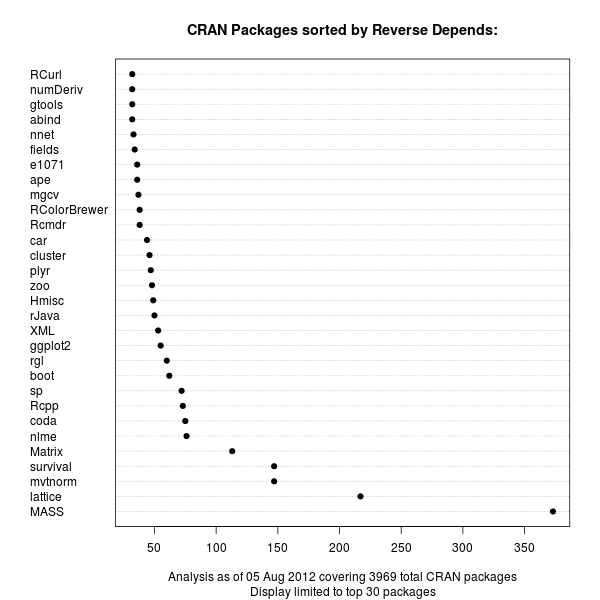
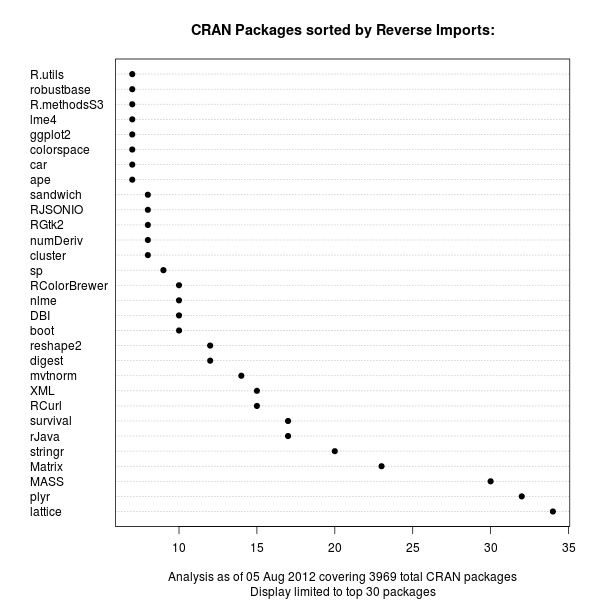
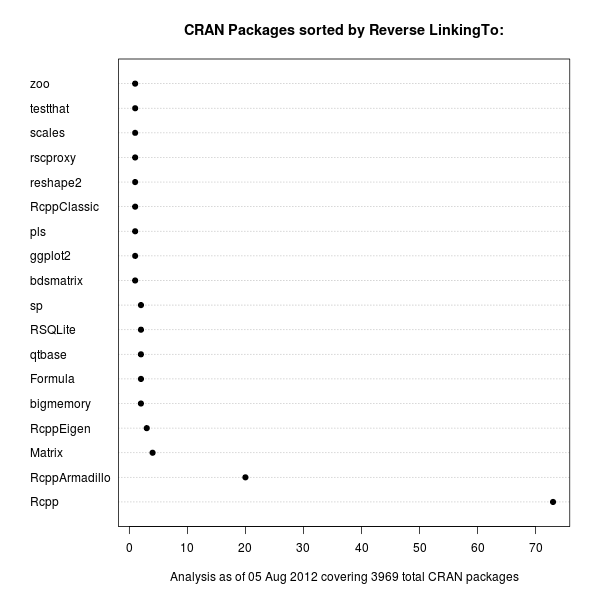
The recent update by S ren H jsgaard's to his gRbase package for graphical models made it the 75th package to depend on our Rcpp package for R and C++ integration. So in a lighthearted weekend moment, I tweeted about gRbase being number 75 for Rcpp to which Hadley replied, asking if Rcpp was in fact number one among R package Depends. Far from it, and I immediately replied listing lattice and Matrix as packages with way more other packages depending upon them. But as the question seemed deserving of a bit more analysis, I spent a few minutes on this and prepared three charts listing package in order of reverse Depends, reverse Imports and reverse LinkingTo. First off, the reverse Depends:. This is the standard means of declaring a dependence of one package upon another. CRAN package chart of Reverse Depends relations Unsurprisingly, the MASS package from the classic Venables and Ripley book comes first, with Deepayan Sarkar's powerful lattice package (also covered in a book) coming second. These are both recommended packages which are commonly distributed with R itself. Next are mvtnorm and survival. Our Rcpp is up there in the top-ten, but not a frontrunner. With the advent of namespaces a few R releases ago, it became possible to import functions from other packages. So the Imports: statement now provides an alternative to the (older) Depends:. The next chart displays the same relationship for Imports:: CRAN package chart of Reverse Imports relations Now lattice still leads, but Hadleys's plyr package grabbed the second spot just before MASS and Matrix. It is interesting to see that the sheer number of Imports: is still not where the Depends: are. On the other hand, we see a number of more recent packages popping up in the second chart. This may reflect more recent coding practices. It will be interesting to see how this stacks up over time when we revisit this chart. Lastly, we can also look at LinkingTo:, a declaration used to provide a C/C++-level dependency at the source code level. We use this in the Rcpp family to provide automatic resolution of the header files needed to compile against our packages. And unsurprisingly, because packages using Rcpp actually use its API (rather than R functions), the package is a little ahead of others. In the package we find three more packages of the Rcpp family, but only a limited number of other packages as C/C++-level dependencies are still somewhat rare in the R universe. There are also fewer packages overall making use of this mechanism. CRAN package chart of Reverse LinkingTo relations One could of course take this one level further and sum up dependencies in a recursive manner, or visualize the relationship differently. But these dotchart graphs provide a first visual description of the magnitude of Depends, Imports and LinkingTo among CRAN packages for R.

Gregor Herrmann: RC bugs 2012/31

this was my first week at work after my vacations, & also the first week of "normal" RC bug work. here's my short report:

Craig Small: Context sensitive menus with GtkTreeView

A project I now maintain called GJay uses the GTK+ toolkit and has a GtkTreeView that shows the directories and the songs in them. I was wanting to add a context sensitive menu on that view so that you could do things to the item you have right-clicked on; generally file specific things like give me information about this song or queue it to play. My only problem was, how to do it? A few Google searches showed things that were almost, but not quite, what I was after. The main problem being either the documentation was incomplete or it assumed I was after the selected field (the row I may of left-clicked on) and not the one I right-clicked on to get this event. This GtkTreeView uses a store where NAME_COLUMN is defined at 0, meaning it is the first column. The program uses this column to store the filename of the song. So first I needed to create an event to kick things off, we need to connect the button-press-event to our tree_view, which calls a function in this case view_on_button_pressed.
 g_signal_connect(tree_view, "button-press-event", 
   G_CALLBACK(view_on_button_pressed), NULL);
gboolean view_on_button_pressed(GtkWidget *tree_view, 
                                GdkEventButton *event, 
                                gpointer user_data)  
  GtkTreeSelection *selection;
  GtkTreePath *tree_path;
  GtkTreeModel *tree_model;
  GtkTreeIter tree_iter;
  gchar *name;
 
  if (event-&gt;type == GDK_BUTTON_PRESS &amp;&amp; event-&gt;button == 3)  
    tree_model = gtk_tree_view_get_model(GTK_TREE_VIEW(tree_view));
    if (gtk_tree_view_get_path_at_pos(GTK_TREE_VIEW(tree_view),
          (int)event-&gt;x, (int)event-&gt;y,
          &amp;tree_path, NULL, NULL, NULL))  
      if (gtk_tree_model_get_iter(tree_model, &amp;tree_iter, tree_path))  
        gtk_tree_model_get(tree_model, &amp;tree_iter, NAME_COLUMN, &amp;name, -1);
        g_print("rc name is %s\n", name);


So a breakdown of what my callback is doing: The program, now that it knows the song title, can then go off and generate a menu for that song.

4 August 2012

Gerfried Fuchs: Mermaids Reloaded, Addendum

First things first: The issue with the feedback form is fixed. Sorry for the inconvenience. I'm not sure if you followed the schedule of this year's debconf closely, but there was an International Poetry Night happening. Given that Mermaids still is quite important for me, but also, that I like to write poetry every now and then, I had the idea spinning around in my head to present Mermaids there. The simple thought of that made me extremely nervous. Things happened as they liked to happen: the video streaming setup for debconf still was giving me a bit of headaches, and suddenly it was too late to print out the poem because I didn't even had CUPS installed on my new laptop. Also, having reread it recently I noticed that it wasn't flowing too well, so I was uncertain whether it would be possible to properly perform it. I attended nevertheless. It was rather cosy in El Panal, but still a fair amount of people there. And to my surprise, quite a lot of Debian people were presenting poetry. Some in Spanish, some in English, but also one in Japanese, one in German and even one Esperanto. I had the feeling that I really should present something too. I still was extremely nervous, but during the day I had opened some of my poems in the browser, so I started to write down The Girl and the Boy, and when Fito called me to the microphone, I think most people were able to tell how nervous I was about it. But it went well. It even went so well that I felt the need to perform another poem. I chose that's what friends are for, quickly scribbling it down in bad light. The choice was easy, given that it is one that means a lot to me and that an haiku already got presented. It was really a nice experience to not only write these poems and publishing them on deviantART and in my blog, but also to present them to a live audience. Then there was a break. Actually I thought it was over already, but they started a second round. And I somehow liked the way it worked out, so I started to dig for something else to present. I settled for Strange and Jonathan insisted on translating it into Spanish and present that version, too. His version wasn't in Haiku style, but I think it still was a very nice idea. It seem to have been received well, but given that I don't speak Spanish I can only hope he was able to catch the feelings that I did put into this short piece. I am confident he did well. :) As final piece I settled for another short piece, this time it was in German, Wahre Liebe. I think I was able to transport the feelings of it with adding pauses in certain spots, although I fear most people didn't get it because it was ... well, in German. Again, a fair amount of the people who presented poetry were from Debian, actually more than half of it I think. And I am wondering: When will the CfP for next year's debconf open so we can try to establish this event as regular debconf event? And who knows, maybe I'll find the courage then to perform Mermaids.

/personal permanent link Comments: 0 Flattr this

2 August 2012

Neil McGovern: Unicode hearts!

I was impressed by http://unicodesnowman.com/, and I'm always forgetting sequences for hearts, so I present:

http://unicodeheart.com

Hearts for all!

Sorina Sandu: Status update - D-I improve network config

Hello!

Here's a short status update:

[1] http://bugs.debian.org/cgi-bin/bugreport.cgi?bug=682737
[2] http://anonscm.debian.org/gitweb/?p=d-i/netcfg.git;a=shortlog;h=refs/heads/people/sorina/write_config
[3] http://anonscm.debian.org/gitweb/?p=d-i/netcfg.git;a=shortlog;h=refs/heads/people/sorina/coding_style
[4] https://github.com/sorinasandu/Debian_Netcfg/tree/local_testing

Sorina

1 August 2012

Russell Coker: Hetzner now Offers SSD

Hetzner is offering new servers with SSD, good news for people who want to run ZFS (for ZIL and/or L2ARC). See the EX server configuration list for more information [1]. Unfortunately they don t specify what brand of SSD, this is a concern for me as some of the reports about SSD haven t been that positive, getting whichever SSD is cheapest isn t appealing. A cheap SSD might be OK for L2ARC (read cache), but for ZIL (write cache) reliability is fairly important. If anyone has access to a Hetzner server with SSD then please paste the relevant output of lsscsi into a comment. The next issue is that they only officially offer it on the new EX 8S server. SSD will be of most interest to people who also want lots of RAM (the zfsonlinux.org code has given me kernel panics when running with a mere 4G of RAM even when I did the recommended tuning to reduce ARC size). Also people who want more capable storage options will tend to want more RAM if only for disk caching. But I m sure that there are plenty of people who would be happy to have SSD on a smaller and cheaper server. The biggest SSD offering of 240G is bigger than a lot of servers. I run a Hetzner server that has only 183G of disk space in use (and another 200G of backups). If the backups were on another site then the server in question could have just a RAID-1 of SSD for all it s storage. In this case it wouldn t be worth doing as the server doesn t have much disk IO load, but it would be nice to have the option the exact same server plus some more IO load would make SSD the ideal choice. The biggest problem is that the EX 8S server is really expensive. Hard drives which are included in the base price for cheaper options are now expensive additions. A server with 2*3TB disks and 2*240G SSD is E167 per month! That s more expensive than three smaller servers that have 2*3TB disks! The good news for someone who wants SSD is that the Hetzner server auction has some better deals [2]. As is always the case with auction sites the exact offers will change by the moment, but currently they offer a server with 2*120G SSD and 24G of RAM for E88 per month and a server with 2*120G SSD, 2*1.5T HDD, and 24G of RAM for E118. E88 is a great deal if your storage fits in 240G and E118 could be pretty good if you only have 1.5T of data that needs ZFS features. The main SSD offering is still a good option for some cases. A project that I did a couple of years ago would probably have worked really well on a E167/month server with 2*3TB and 2*240G SSD. It was designed around multiple database servers sharding the load which was largely writes, so SSD would have allowed a significant reduction in the number of servers. They also don t offer SSD on their storage servers which is a significant omission. I presume that they will fix that soon enough. 13 disks and 2 SSD will often be more useful than 15 disks. That s assuming the SSD doesn t suck of course. The reason this is newsworthy is that most hosted server offerings have very poor disk IO and no good options for expanding it. For servers that you host yourself it s not too difficult to buy extra trays of disks or even a single rack-mount server that has any number of internal disks in the range 2 to 24 and any choice as to how you populate them. But with rented servers it s typically 2 disks with no options to add SSD or other performance enhancements and no possibility of connecting a SAN. As an aside it would still be nice if someone ran a data center that supported NetApp devices and gave the option of connecting an arbitrary number of servers to a NetApp Filer (or a redundant pair of Filers). If anyone knows of a hosting company that provides options for good disk IO which are better than just providing SSD or cheaper than E167 per month then please provide the URL in a comment. Update: It seems that I can get SSD added to one of the cheaper servers. This is a good option as I have some servers that already have the flexi-pack due to a need for more IP addresses. Related posts:
  1. Servers vs Phones Hetzner have recently updated their offerings to include servers with...
  2. Hetzner Failover Konfiguration The Wiki documenting how to configure IP failover for Hetzner...
  3. Dedicated vs Virtual Servers A common question about hosting is whether to use a...

31 July 2012

Russell Coker: Cheap SATA Disks in a Dell PowerEdge T410

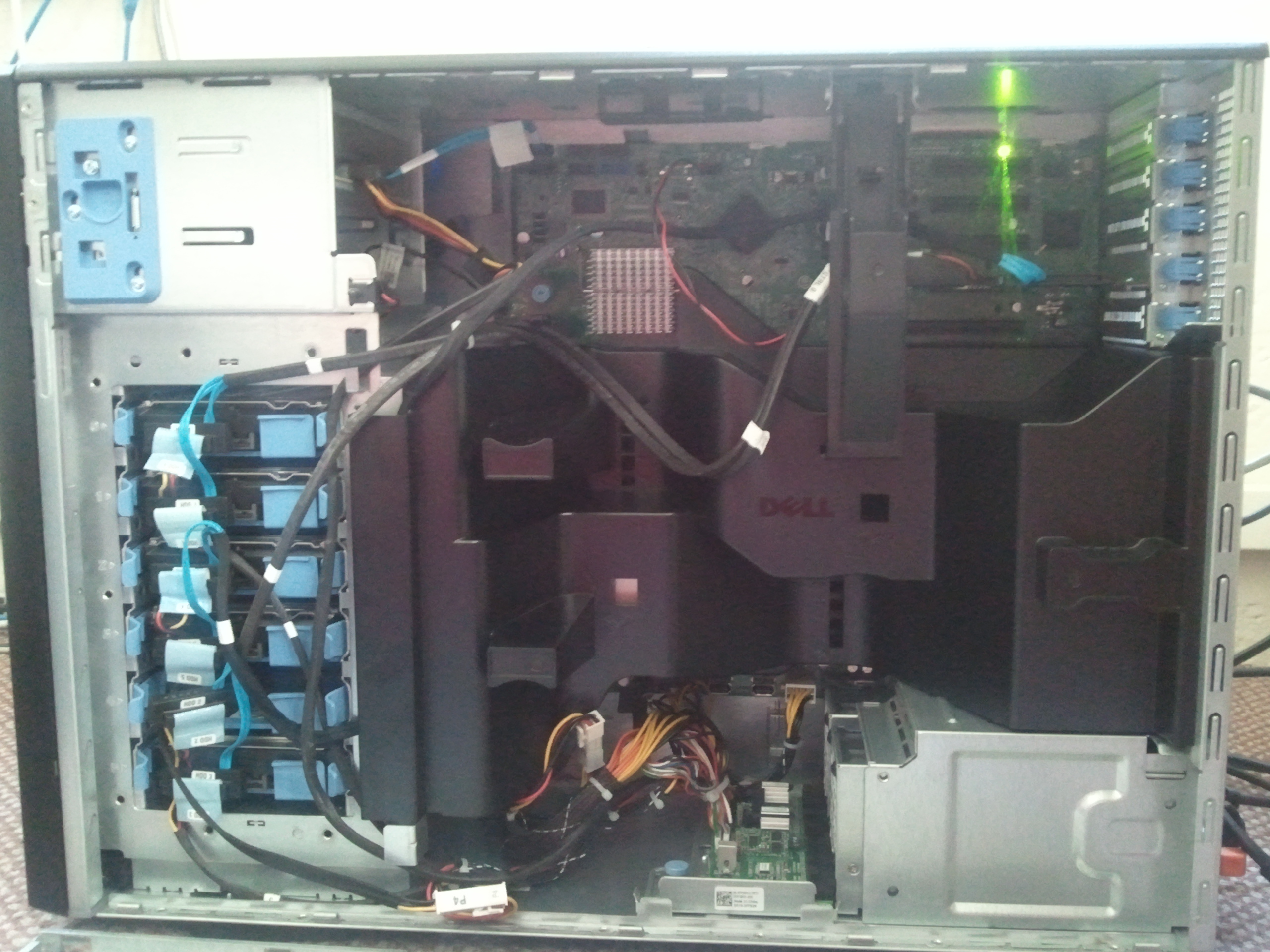
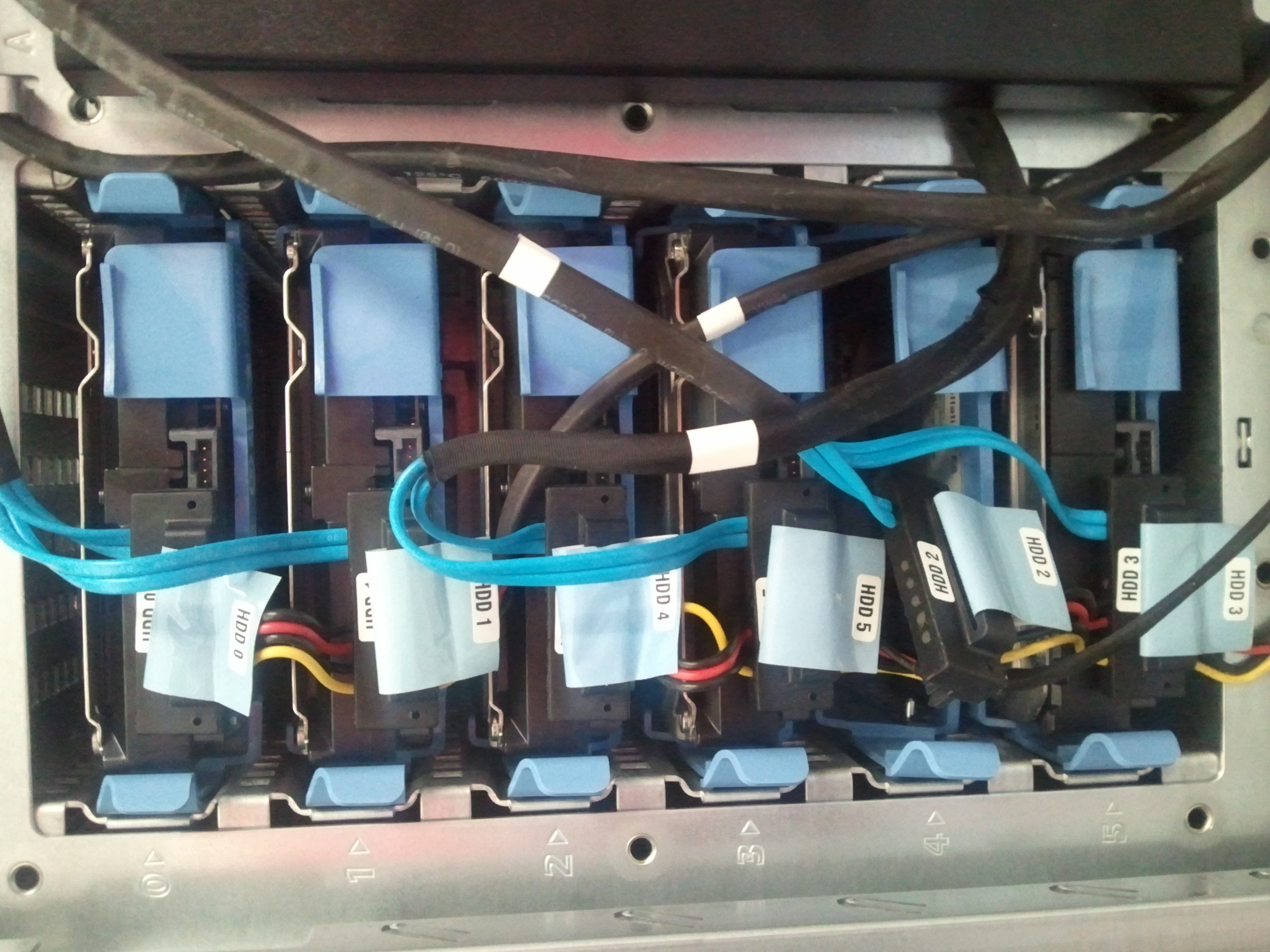
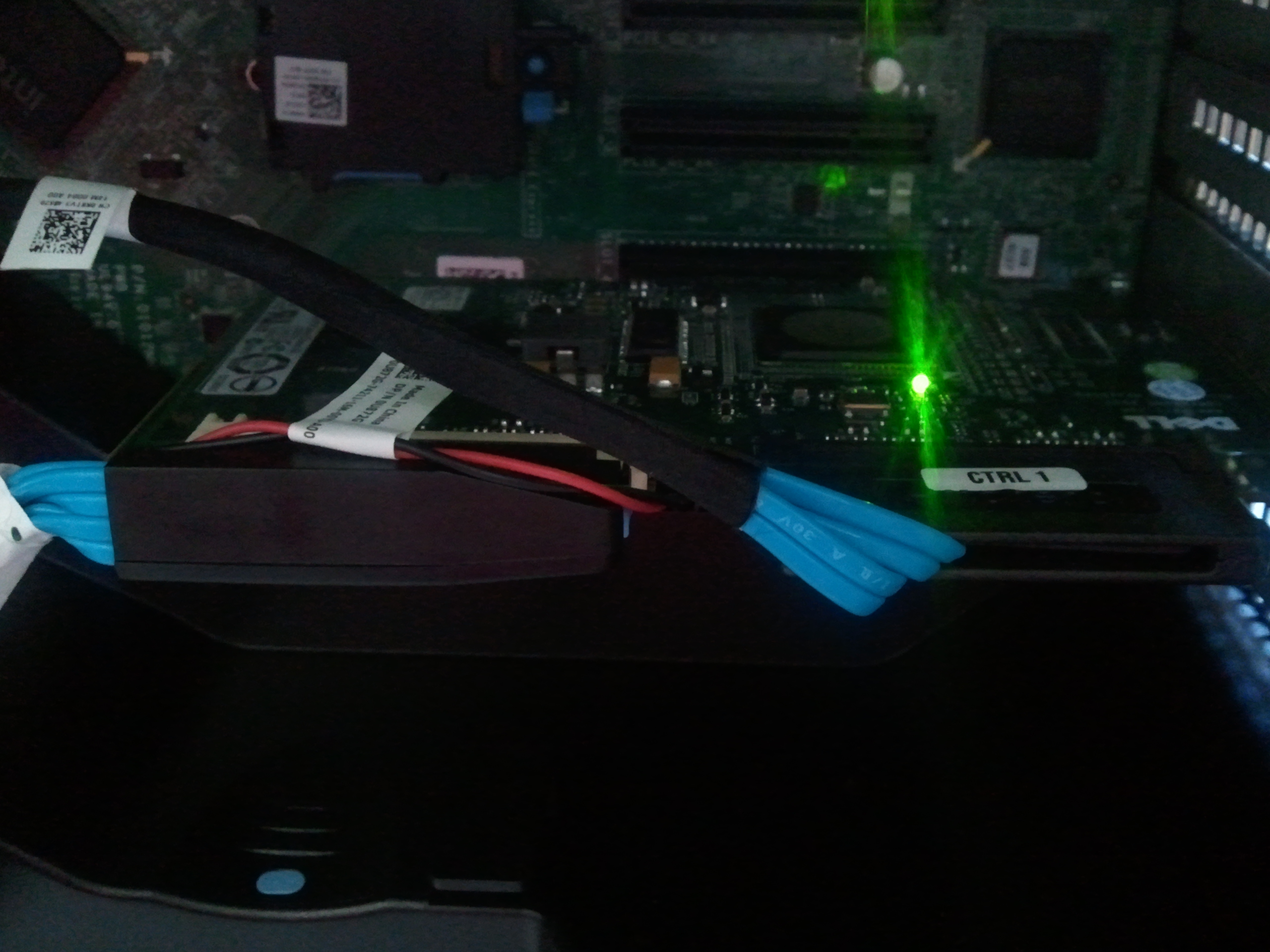
A non-profit organisation I support has just bought a Dell PowerEdge T410 server to be mainly used as a file server. We need a reasonable amount of space and really good reliability features because the system may have periods without being actively monitored, it also has to be relatively cheap. Dell servers are quite cheap, but disks are not cheap at all when Dell sells them. I get the impression that disks and RAM are major profit centers for Dell and that the profit margins on the basic servers are quite small. So naturally we decided to buy some SATA disks from a local store, one advantage of this is that Dell sells nothing bigger than 2TB while 3TB disks are available cheaply everywhere else. So we bought 4 cheap 3TB (2.7TiB) SATA disks, connected them to the server, and found that only 2TiB was accessible. The Dell Tech Center says that some of the RAID controllers don t support anything larger than 2TiB [1]. Obviously we have one of the older models. There s lots of SATA sockets on the motherboard that could be used, however there is one problem. View of the open side of a PowerEdge T410 The above picture is the side view of the T410, it was taken with a Samsung Galaxy S so the quality is a little poor (click for the original picture). The server is quite neat, not many cables for a system with 6 disks, not the 12 separate cables you would get in a typical white-box system. Disks in a PowerEdge T410 The above picture shows the disk enclosure. You can see that each disk has a single connector for power and data, also the disks aren t separate, multiple disks have the same power wires and the data cables are paired. SAS controller in a PowerEdge T410 Above you can see the SAS controller, it has two large connectors that can each handle the data cables for 4 disks, nothing like the standard cables. It s easy to buy SATA data cables and connect them, but there are no spare power cables in the box. The connector that supplies power to all the disks appears to be something proprietary to Dell which goes straight to the double-connectors on each disk that supply power and data. This setup makes cabling very neat but also provides no good option for cabling regular disks. I m sure I could make my own cables and if I hunted around the net enough I could probably buy some matching power cables, but it would be a hassle and the result wouldn t be neat. So the question was then whether to go to more effort, expense, and possibly risk the warranty to get the full 3TB or to just use the SAS controller and get 2TiB (2.2TB) per disk. One factor we considered is the fact that the higher sector numbers typically give much slower access times due to being on shorter tracks (see my ZCAV results page for test results from past disks [2]). We decided that 2.2TB (2TiB) out of 3TB (2.7TiB) was adequate capacity and that losing some of the slow parts of the disk wasn t a big deal. I ve now setup a RAID-Z2 array on the disks, and ZFS reports 3.78TiB available capacity, which isn t a lot considering that we have 4*3TB disks in the array. But the old server had only 200G of storage, so it s a good improvement in capacity, performance, and RAID-Z2 should beat the hell out of RAID-6 for reliability. Related posts:
  1. Dell PowerEdge T105 Today I received a Dell PowerEDGE T105 for use by...
  2. ZFS vs BTRFS on Cheap Dell Servers I previously wrote about my first experiences with BTRFS [1]....
  3. How I Partition Disks Having had a number of hard drives fail over the...

Petter Reinholdtsen: Best way to create a docbook book?

I tried to send this text to the docbook-apps mailing list at lists.oasis-open.org, but it only accept messages from subscribers and rejected my post, and I completely lack the bandwidth required to subscribe to another mailing list, so instead I try to post my message here and hope my blog readers can help me out. I am quite new to docbook processing, and am climbing a steep learning curve at the moment. To give you some background, I am working on a Norwegian translation of the book Free Culture by Lawrence Lessig, and I use docbook to handle the process. The files to build the book are available from github. The book got around 400 pages with parts, images, footnotes, tables, index entries etc, which has proven to be a challenge for the free software docbook processors. My build platform is Debian GNU/Linux Squeeze. I want to build PDF, EPUB and HTML version of the book, and have tried different tool chains to do the conversion from docbook to these formats. I am currently focusing on the PDF version, and have a few problems. So I wonder, what would be the best way to create the PDF version of this book? Are some of the bugs found above solved in new or experimental versions of some docbook tool chain? What about HTML and EPUB versions?

Next.

Previous.