Search Results: "gt"

25 January 2021

Iustin Pop: Raspbian/Raspberry PI OS with initrd

Background While Raspbian, ahem, Raspberry PI OS is mostly Debian, the biggest difference is the kernel, both in terms of code and packaging. The packaging is weird since it needs to deal with the fact that there s no bootloader per se, the firmware parses /boot/config.txt and depending on the setting of 64bit and/or kernel line, it loads a specific file. Normally, one of kernel7.img, kernel7l.img or kernel8.img. While this configuration file supports an initrd, it doesn t have a clean way to associate an initrd with a kernel, but rather you have to (like for the actual kernel) settle on a hard-coded initrd name. Due to this, the normal way of using an initrd doesn t work, and one has to do two things:
  • enable building initrd s at all
  • settle on the naming for the initrd
  • ensure the initrd is updated correctly
There are quite a few of forum threads about this, but there s no official support for this. The best link I found was this Stack Exchange post, which goes most of the way, but fails at the third point above.

My trivial solution Instead of naming tricks the above post suggests, I settled on having a fixed name. It risks boot failure when the kernel architecture will change, which could be worked around with hard-coded kernel too, but I haven t done that yet. First, enable initrd creation/update in /etc/default/raspberrypi-kernel, like the post says. Uncomment INITRD=yes, but not the RPI_INITRD. This will enable creating/updating the initrd when the kernel package is installed and/or other packages trigger it via hooks. Second, naming: choose an initrd name. I have simply this in my config.txt:
initramfs initrd.img followkernel
So the value is fully hard-coded, and the actual work is done in the next part. Last, add an initramfs-hook in (e.g.) /etc/initramfs/post-update.d/rpi-initrd. Note that, by default (unless other packages have created it), the /etc/initramfs directory doesn t exist. It s not the confusingly-named /etc/initramfs-tools/ directory, which is related to building the initrd, but rather to doing things with the (already built) initrd. This directory is briefly explain in the Debian kernel-handbook guide. This is my contents:
#!/bin/bash

ABI="$1"
INITRD="$2"
BOOTDIR="$(dirname "$INITRD")"

# Note: the match below _must_ be synced with the boot kernel
if [[ "$ABI" == *-v8+ ]]; then
        echo "Building v8l+ image, updating top initrd"
        cp -p "$INITRD" "$BOOTDIR/initrd.img"
fi
This script seems to me much simpler, so in principle less chance of bugs, than all the renaming and editing config.txt I saw in that stack exchange post. As far as I know, all one needs to care about is to sync the ABI passed to this hook with the kernel one is running, and since there is only one kernel version installed at a time on Raspbian (as there s no versioning in the kernel names), this should work correctly. With this hook, the update also works correctly when packages trigger initrd updates, not only when new kernels are installed. Note that the cp there is needed since the book partition is FAT, so no symbolic links/hard links allowed. Happy initrd ing!

24 January 2021

Enrico Zini: Miscellaneous news links

Some curious news. Here's a scam that targets terrorists: The Doomsday Scam. On the general topic of scams, a List of confidence tricks. Then two news involving bread: And a last one about how people needed to rename human genes to work around Excel bugsfeatures:

23 January 2021

Dirk Eddelbuettel: prrd 0.0.4: More tweaks

prrd facilitates the parallel running [of] reverse dependency [checks] when preparing R packages. It is used extensively for Rcpp, RcppArmadillo, RcppEigen, BH, and possibly others. prrd screenshot image The key idea of prrd is simple, and described in some more detail on its webpage and its GitHub repo. Reverse dependency checks are an important part of package development that is easily done in a (serial) loop. But these checks are also generally embarassingly parallel as there is no or little interdependency between them (besides maybe shared build depedencies). See the (dated) screenshot (running six parallel workers, arranged in split byobu session). This release brings several smaller tweaks and improvements to the summary report that had accumulated in my use since the last realease last April. We also updated the CI runners as one does these days. The release is summarised in the NEWS entry:

Changes in prrd version 0.0.4 (2021-01-23)
  • Report summary mode is now compact, more robust and reports extended CRAN summaries. (Dirk via several changes)
  • Continuous Integration now uses run.sh from r-ci

My CRANberries provides the usual summary of changes to the previous version. See the aforementioned webpage and its repo for details. For more questions or comments use the issue tracker off the GitHub repo. If you like this or other open-source work I do, you can now sponsor me at GitHub.

This post by Dirk Eddelbuettel originated on his Thinking inside the box blog. Please report excessive re-aggregation in third-party for-profit settings.

Sylvain Beucler: Android Emulator Rebuild

Android Rebuilds provides freely-licensed builds of Android development tools from a Mountain View-based company. The Emulator package moved to a separate component and build system. Emulator 30 is now available, as unattended Docker build scripts, build documentation as well as convenience binaries.

Louis-Philippe V ronneau: Montreal Subway Foot Traffic Data, Revisited

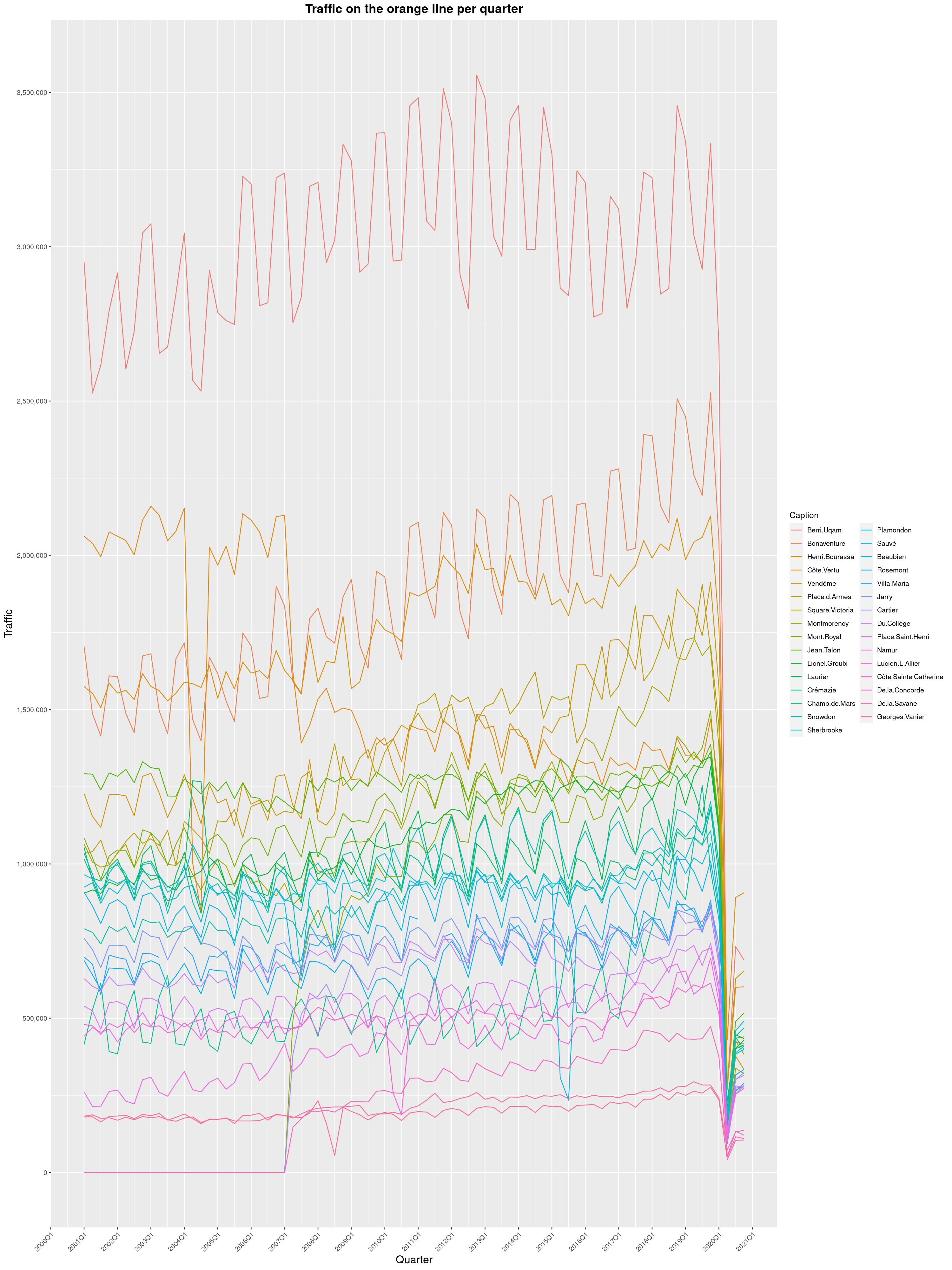
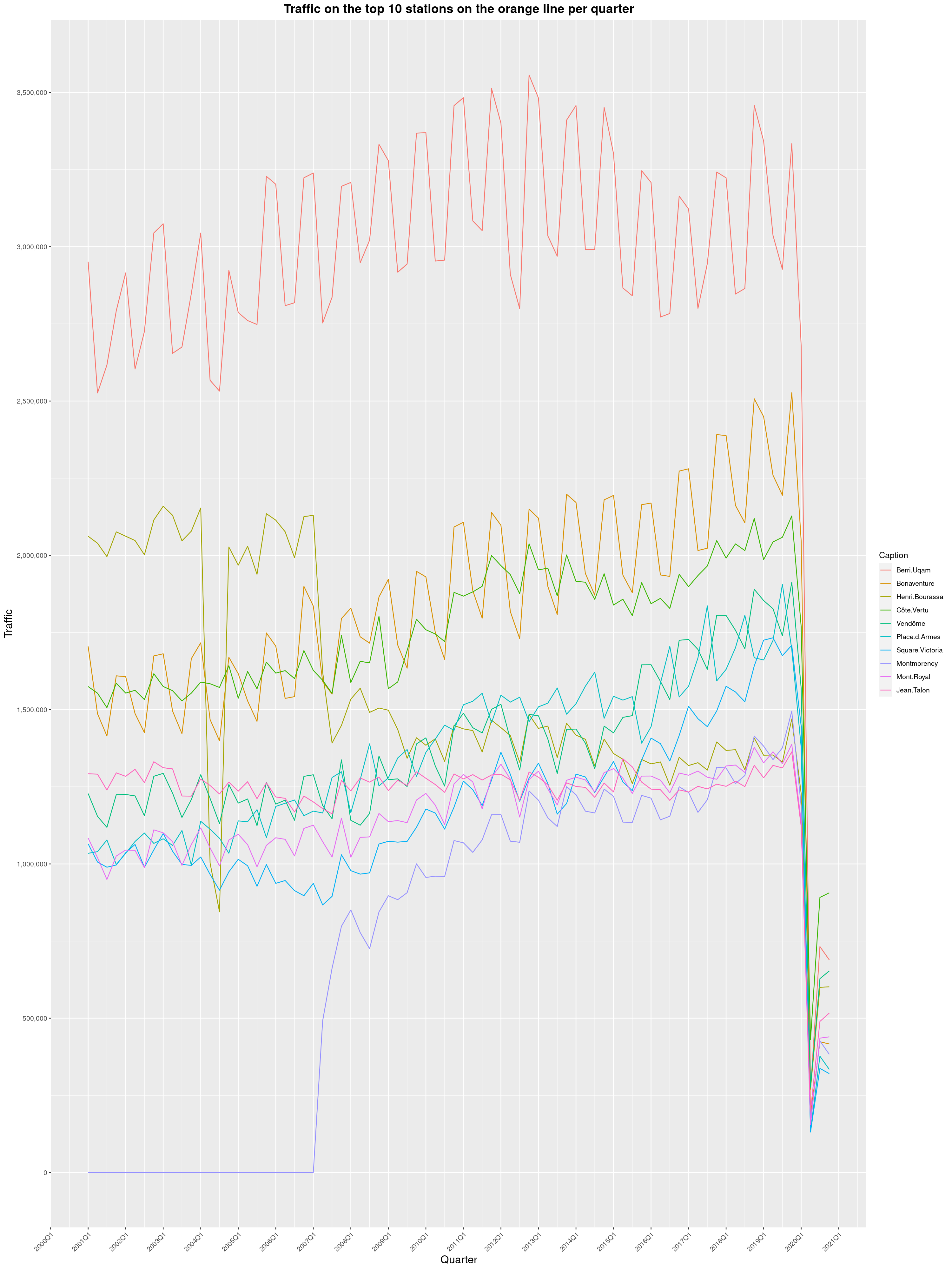
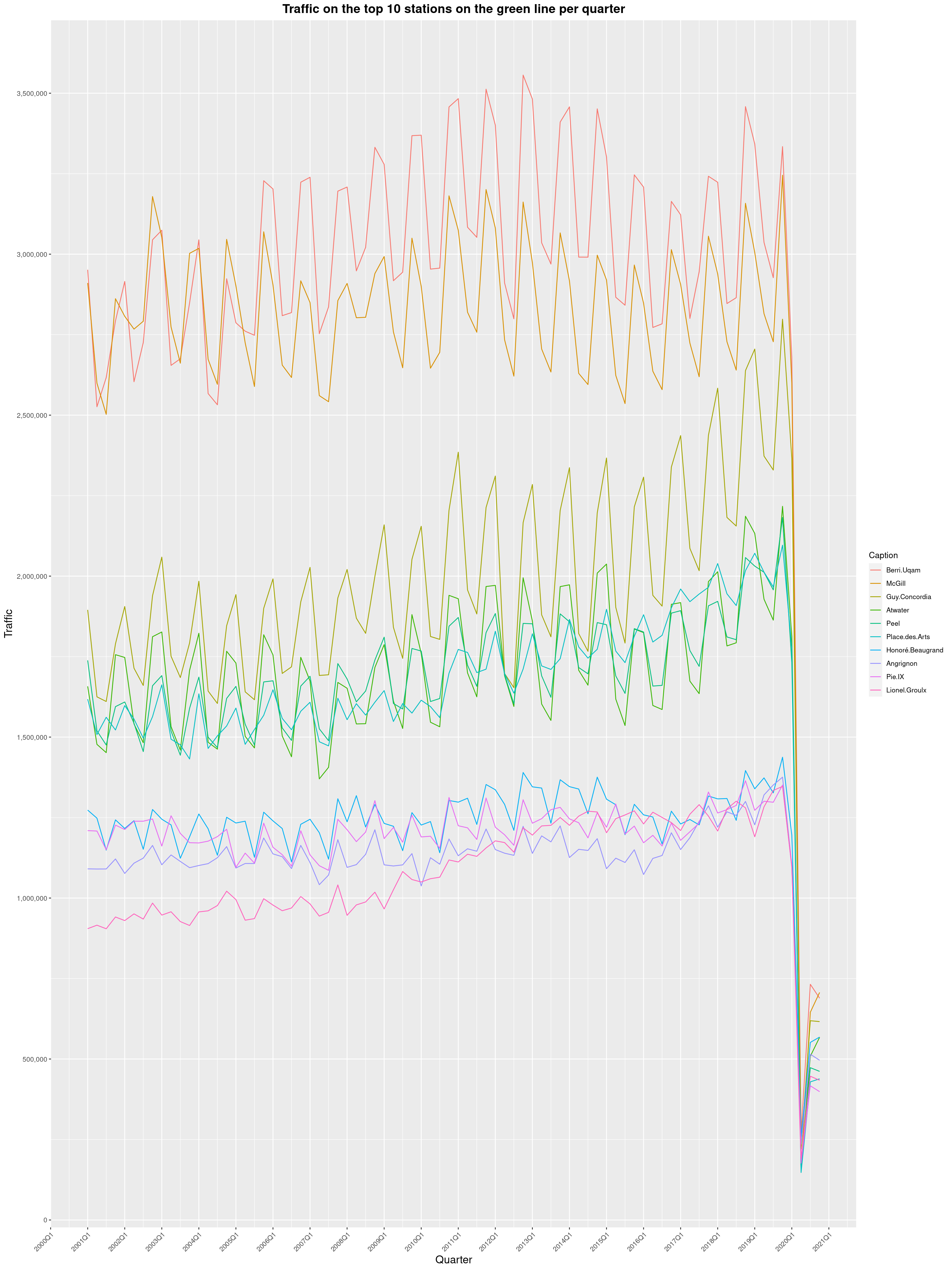
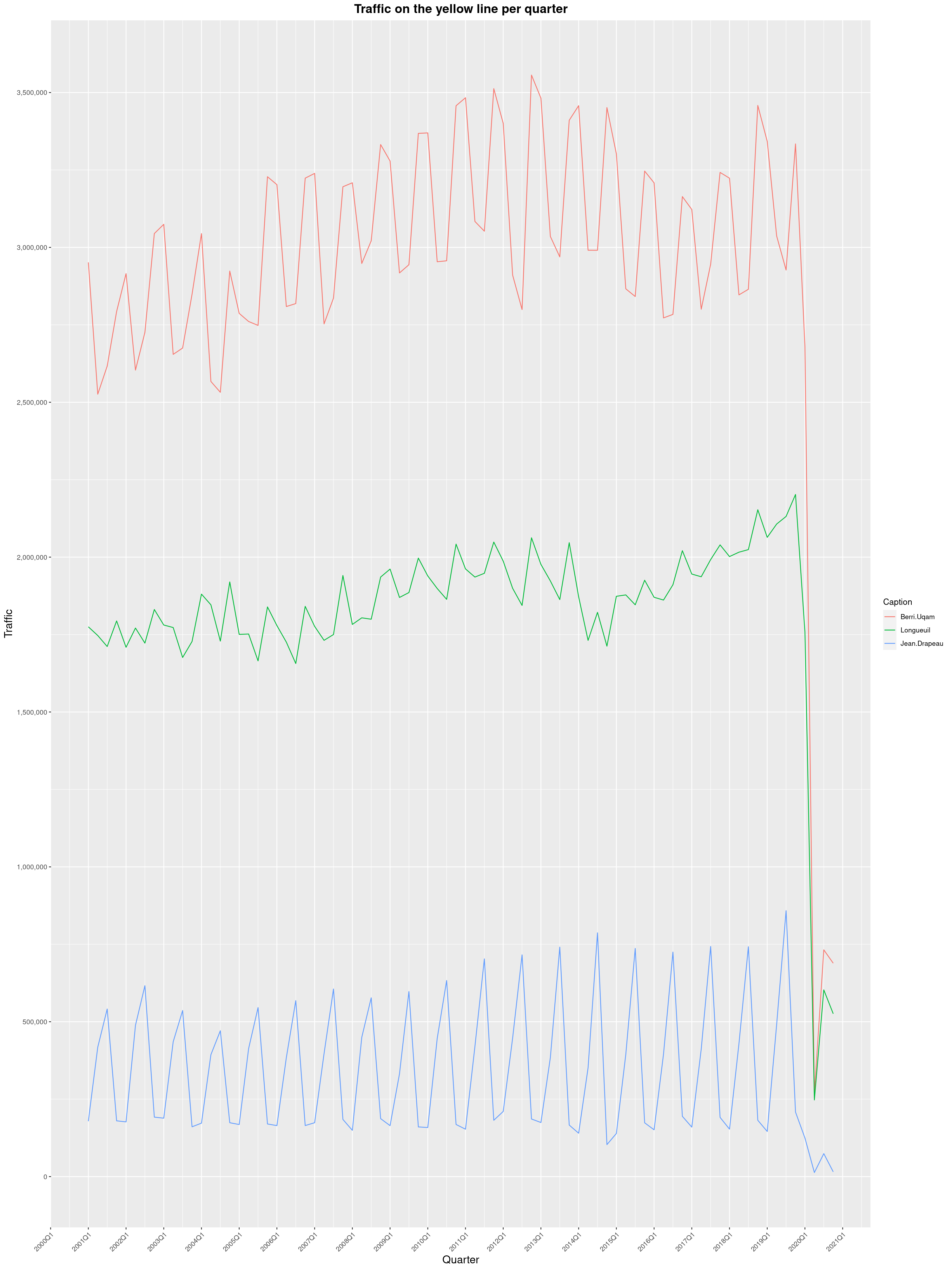
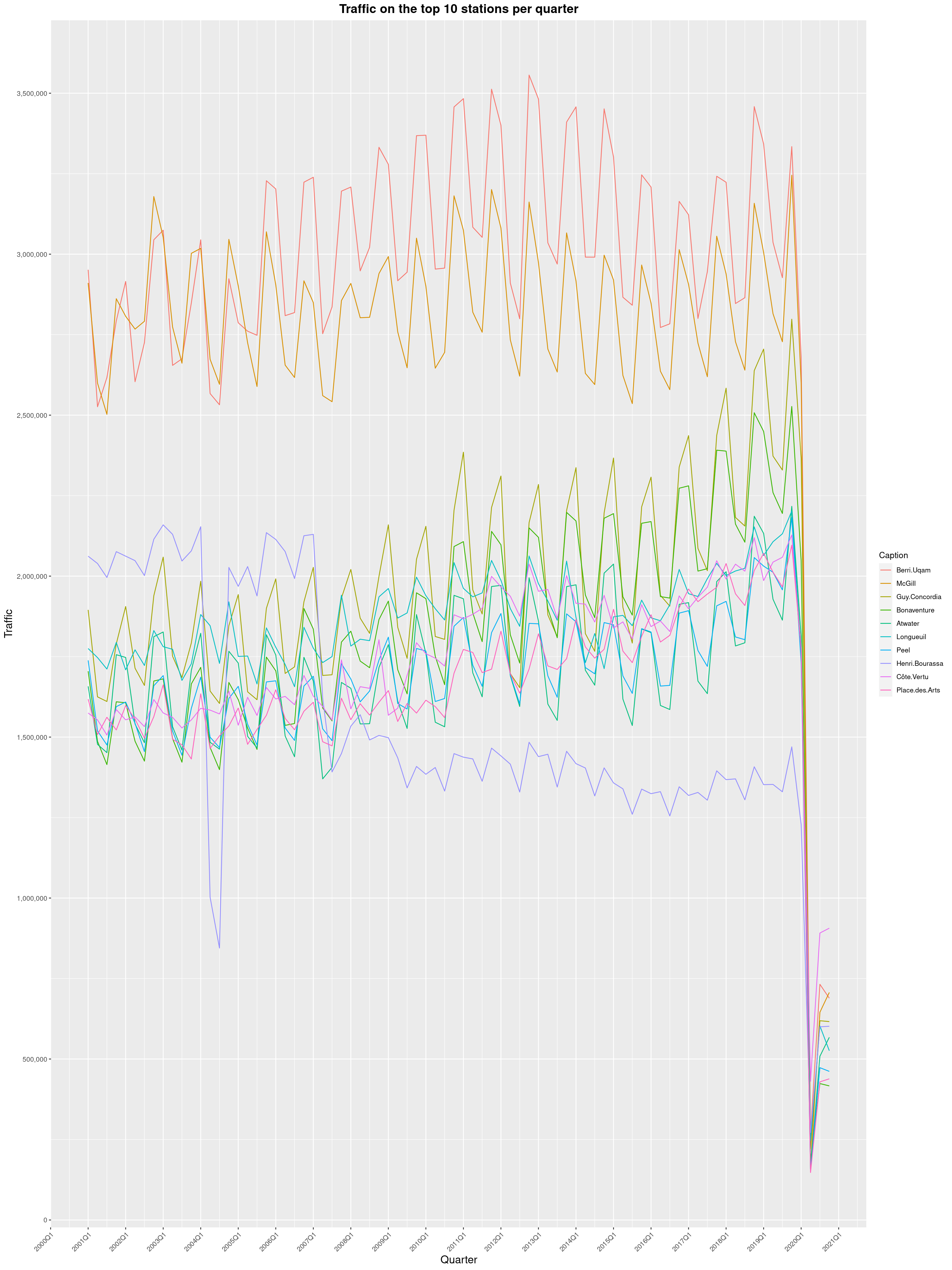
In 2019, I got curious and asked Soci t de Transport de Montr al, Montreal's transit agency, for the foot traffic data of Montreal's subway. Since then, two years has passed and with COVID-19 still going strong, I wanted to see what impact the pandemic had had. And oh boy, what an impact it is. So here it is, data from 2001 to 2020, graphed the same way as in the original 2019 blog post. I could certainly juice this data, graph the pandemic using daily figures and come up with a long and interesting blog post analysing the main trends. I start teaching next Monday though and I still have prep work to do, so I'll leave that to someone else. By clicking on a subway station, you'll be redirected to a graph of the station's foot traffic. Interactive Map of Montreal's Subway Licences

Reproducible Builds (diffoscope): diffoscope 165 released

The diffoscope maintainers are pleased to announce the release of diffoscope version 165. This version includes the following changes:
[ Dimitrios Apostolou ]
* Introduce the --no-acl and --no-xattr arguments [later collapsed to
  --extended-filesystem-attributes] to improve performance.
* Avoid calling the external stat command.
[ Chris Lamb ]
* Collapse --acl and --xattr into --extended-filesystem-attributes to cover
  all of these extended attributes, defaulting the new option to false (ie.
  to not check these very expensive external calls).
[ Mattia Rizzolo ]
* Override several lintian warnings regarding prebuilt binaries in the
* source.
* Add a pytest.ini file to explicitly use Junit's xunit2 format.
* Ignore the Python DeprecationWarning message regarding the  imp  module
  deprecation as it comes from a third-party library.
* debian/rules: filter the content of the d/*.substvars files
You find out more by visiting the project homepage.

22 January 2021

Robert McQueen: Launching Endless OS Foundation

Passion Led Us Here

How our for-profit company became a nonprofit, to better tackle the digital divide. Originally posted on the Endless OS Foundation blog.

An 8-year journey to a nonprofit On the 1st of April 2020, our for-profit Endless Mobile officially became a nonprofit as the Endless OS Foundation. Our launch as a nonprofit just as the global pandemic took hold was, predictably, hardly noticed, but for us the timing was incredible: as the world collectively asked What can we do to help others in need? , we framed our mission statement and launched our .org with the same very important question in mind. Endless always had a social impact mission at its heart, and the challenges related to students, families, and communities falling further into the digital divide during COVID-19 brought new urgency and purpose to our team s decision to officially step in the social welfare space.
On April 1st 2020, our for-profit Endless Mobile officially became a nonprofit as the Endless OS Foundation, focused on the #DigitalDivide.
Our updated status was a long time coming: we began our transformation to a nonprofit organization in late 2019 with the realization that the true charter and passions of our team would be greatly accelerated without the constraints of for-profit goals, investors and sales strategies standing in the way of our mission of digital access and equity for all. But for 8 years we made a go of it commercially, headquartered in Silicon Valley and framing ourselves as a tech startup with access to the venture capital and partnerships on our doorstep. We believed that a successful commercial channel would be the most efficient way to scale the impact of bringing computer devices and access to communities in need. We still believe this we ve just learned through our experience that we don t have the funding to enter the computer and OS marketplace head-on. With the social impact goal first, and the hope of any revenue a secondary goal, we have had many successes in those 8 years bridging the digital divide throughout the world, from Brazil, to Kenya, and the USA. We ve learned a huge amount which will go on to inform our strategy as a nonprofit.
Endless always had a social impact mission at its heart. COVID-19 brought new urgency and purpose to our team s decision to officially step in the social welfare space.
Our unique perspective One thing we learned as a for-profit is that the OS and technology we ve built has some unique properties which are hugely impactful as a working solution to digital equity barriers. And our experience deploying in the field around the world for 8 years has left us uniquely informed via many iterations and incremental improvements.
Endless OS designer in discussion with prospective user
With this knowledge in-hand, we ve been refining our strategy throughout 2020 and now starting to focus on what it really means to become an effective nonprofit and make that impact. In many ways it is liberating to abandon the goals and constraints of being a for-profit entity, and in other ways it s been a challenging journey for me and the team to adjust our way of thinking and let these for-profit notions and models go. Previously we exclusively built and sold a product that defined our success; and any impact we achieved was a secondary consequence of that success and seen through that lens. Now our success is defined purely in terms of social impact, and through our actions, those positive impacts can be made with or without our product . That means that we may develop and introduce technology to solve a problem, but it is equally as valid to find another organization s existing offering and design a way to increase that positive impact and scale.
We develop technology to solve access equity issues, but it s equally as valid to find another organization s offering and partner in a way that increases their positive impact.
The analogy to Free and Open Source Software is very strong while Endless has always used and contributed to a wide variety of FOSS projects, we ve also had a tension where we ve been trying to hold some pieces back and capture value such as our own application or content ecosystem, our own hardware platform necessarily making us competitors to other organisations even though they were hoping to achieve the same things as us. As a nonprofit we can let these ideas go and just pick the best partners and technologies to help the people we re trying to reach.
School kids writing on paper
Digital equity 4 barriers we need to overcome In future, our decisions around which projects to build or engage with will revolve around 4 barriers to digital equity, and how our Endless OS, Endless projects, or our partners offerings can help to solve them. We define these 4 equity barriers as: barriers to devices, barriers to connectivity, barriers to literacy in terms of your ability to use the technology, and barriers to engagement in terms of whether using the system is rewarding and worthwhile.
We define the 4 digital equity barriers we exist to impact as:
1. barriers to devices
2. barriers to connectivity
3. barriers to literacy
4. barriers to engagement
It doesn t matter who makes the solutions that break these barriers; what matters is how we assist in enabling people to use technology to gain access to the education and opportunities these barriers block. Our goal therefore is to simply ensure that solutions exist building them ourselves and with partners such as the FOSS community and other nonprofits proving them with real-world deployments, and sharing our results as widely as possible to allow for better adoption globally. If we define our goal purely in terms of whether people are using Endless OS, we are effectively restricting the reach and scale of our solutions to the audience we can reach directly with Endless OS downloads, installs and propagation. Conversely, partnerships that scale impact are a win-win-win for us, our partners, and the communities we all serve. Engineering impact Our Endless engineering roots and capabilities feed our unique ability to build and deploy all of our solutions, and the practical experience of deploying them gives us evidence and credibility as we advocate for their use. Either activity would be weaker without the other.
Our engineering roots and capabilities feed our unique ability to build and deploy digital divide solutions.
Our partners in various engineering communities will have already seen our change in approach. Particularly, with GNOME we are working hard to invest in upstream and reconcile the long-standing differences between our experience and GNOME. If successful, many more people can benefit from our work than just users of Endless OS. We re working with Learning Equality on Kolibri to build a better app experience for Linux desktop users and bring content publishers into our ecosystem for the first time, and we ve also taken our very own Hack, the immersive and fun destination for kids learning to code, released it for non-Endless systems on Flathub, and made it fully open-source.
Planning tasks with sticky notes on a whiteboard
What s next for our OS? What then is in store for the future of Endless OS, the place where we have invested so much time and planning through years of iterations? For the immediate future, we need the capacity to deploy everything we ve built all at once, to our partners. We built an OS that we feel is very unique and valuable, containing a number of world-firsts: first production OS shipped with OSTree, first Flatpak-only desktop, built-in support for updating OS and apps from USBs, while still providing a great deal of reliability and convenience for deployments in offline and educational-safe environments with great apps and content loaded on every system. However, we need to find a way to deliver this Linux-based experience in a more efficient way, and we d love to talk if you have ideas about how we can do this, perhaps as partners. Can the idea of Endless OS evolve to become a spec that is provided by different platforms in the future, maybe remixes of Debian, Fedora, openSUSE or Ubuntu? Build, Validate, Advocate Beyond the OS, the Endless OS Foundation has identified multiple programs to help underserved communities, and in each case we are adopting our build, validate, advocate strategy. This approach underpins all of our projects: can we build the technology (or assist in the making), will a community in-need validate it by adoption, and can we inspire others by telling the story and advocating for its wider use?
We are adopting a build, validate, advocate strategy.
1. build the technology (or assist in the making)
2. validate by community adoption
3. advocate for its wider use
As examples, we have just launched the Endless Key (link) as an offline solution for students during the COVID-19 at-home distance learning challenges. This project is also establishing a first-ever partnership of well-known online educational brands to reach an underserved offline audience with valuable learning resources. We are developing a pay-as-you-go platform and new partnerships that will allow families to own laptops via micro-payments that are built directly into the operating system, even if they cannot qualify for standard retail financing. And during the pandemic, we ve partnered with Teach For America to focus on very practical digital equity needs in the USA s urban and rural communities. One part of the world-wide digital divide solution We are one solution provider for the complex matrix of issues known collectively as the #DigitalDivide, and these issues will not disappear after the pandemic. Digital equity was an issue long before COVID-19, and we are not so naive to think it can be solved by any single institution, or by the time the pandemic recedes. It will take time and a coalition of partnerships to win. We are in for the long-haul and we are always looking for partners, especially now as we are finding our feet in the nonprofit world. We d love to hear from you, so please feel free to reach out to me I m ramcq on IRC, RocketChat, Twitter, LinkedIn or rob@endlessos.org.

Bits from Debian: New Debian Maintainers (November and December 2020)

The following contributors were added as Debian Maintainers in the last two months: Congratulations!

Enrico Zini: Polishing nspawn-runner

This post is part of a series about trying to setup a gitlab runner based on systemd-nspawn. I published the polished result as nspawn-runner on GitHub. gitlab-runner supports adding extra arguments to the custom scripts, and I can take advantage of that to pack all the various scripts that I prototyped so far into an all-in-one nspawn-runner command:
usage: nspawn-runner [-h] [-v] [--debug]
                      chroot-create,chroot-login,prepare,run,cleanup,gitlab-config,toml 
                     ...
Manage systemd-nspawn machines for CI runs.
positional arguments:
   chroot-create,chroot-login,prepare,run,cleanup,gitlab-config,toml 
                        sub-command help
    chroot-create       create a chroot that serves as a base for ephemeral
                        machines
    chroot-login        enter the chroot to perform maintenance
    prepare             start an ephemeral system for a CI run
    run                 run a command inside a CI machine
    cleanup             cleanup a CI machine after it's run
    gitlab-config       configuration step for gitlab-runner
    toml                output the toml configuration for the custom runner
optional arguments:
  -h, --help            show this help message and exit
  -v, --verbose         verbose output
  --debug               verbose output
chroot maintenance chroot-create and chroot-login are similar to what pbuilder, cowbuilder, schroot, debspawn and similar tools do. They only take a chroot name, and default the rest of paths to where nspawn-runner expects things to be under /var/lib/nspawn-runner. gitlab-runner setup nspawn-runner toml <chroot-name> outputs a snippet to add to /etc/gitlab-runner/config.toml to configure the CI. For example:
$ ./nspawn-runner toml buster
[[runners]]
  name="buster"
  url="TODO"
  token="TODO"
  executor = "custom"
  builds_dir = "/var/lib/nspawn-runner/.build"
  cache_dir = "/var/lib/nspawn-runner/.cache"
  [runners.custom_build_dir]
  [runners.cache]
    [runners.cache.s3]
    [runners.cache.gcs]
    [runners.cache.azure]
  [runners.custom]
    config_exec = "/home/enrico/ /nspawn-runner/nspawn-runner"
    config_args = ["gitlab-config"]
    config_exec_timeout = 200
    prepare_exec = "/home/enrico/ /nspawn-runner/nspawn-runner"
    prepare_args = ["prepare", "buster"]
    prepare_exec_timeout = 200
    run_exec = "/home/enrico/dev/nspawn-runner/nspawn-runner"
    run_args = ["run"]
    cleanup_exec = "/home/enrico/ /nspawn-runner/nspawn-runner"
    cleanup_args = ["cleanup"]
    cleanup_exec_timeout = 200
    graceful_kill_timeout = 200
    force_kill_timeout = 200
One needs to remember to set url and token, and the runner is configured. The end, for now This is it, it works! Time will tell what issues or ideas will come up: for now, it's a pretty decent first version. The various prepare, run, cleanup steps are generic enough that they can be used outside of gitlab-runner: feel free to build on them, and drop me a note if you find this useful! Updated: Issues noticed so far, that could go into a new version:

Enrico Zini: Assembling the custom runner

This post is part of a series about trying to setup a gitlab runner based on systemd-nspawn. I published the polished result as nspawn-runner on GitHub. The plan Back to custom runners, here's my plan: The scripts Here are the scripts based on Federico's work: base.sh with definitions sourced by all scripts:
MACHINE="run-$CUSTOM_ENV_CI_JOB_ID"
ROOTFS="/var/lib/gitlab-runner-custom-chroots/buster"
OVERLAY="/var/lib/gitlab-runner-custom-chroots/$MACHINE"
config.sh doing nothing:
#!/bin/sh
exit 0
prepare.sh starting the machine:
#!/bin/bash
source $(dirname "$0")/base.sh
set -eo pipefail
# trap errors as a CI system failure
trap "exit $SYSTEM_FAILURE_EXIT_CODE" ERR
logger "gitlab CI: preparing $MACHINE"
mkdir -p $OVERLAY
systemd-run \
  -p 'KillMode=mixed' \
  -p 'Type=notify' \
  -p 'RestartForceExitStatus=133' \
  -p 'SuccessExitStatus=133' \
  -p 'Slice=machine.slice' \
  -p 'Delegate=yes' \
  -p 'TasksMax=16384' \
  -p 'WatchdogSec=3min' \
  systemd-nspawn --quiet -D $ROOTFS \
    --overlay="$ROOTFS:$OVERLAY:/"
    --machine="$MACHINE" --boot --notify-ready=yes
run.sh running the provided scripts in the machine:
#!/bin/bash
logger "gitlab CI: running $@"
source $(dirname "$0")/base.sh
set -eo pipefail
trap "exit $SYSTEM_FAILURE_EXIT_CODE" ERR
systemd-run --quiet --pipe --wait --machine="$MACHINE" /bin/bash < "$1"
cleanup.sh stopping the machine and removing the writable overlay directory:
#!/bin/bash
logger "gitlab CI: cleanup $@"
source $(dirname "$0")/base.sh
machinectl stop "$MACHINE"
rm -rf $OVERLAY
Trying out the plan I tried a manual invocation of gitlab-runner, and it worked perfectly:
# mkdir /var/lib/gitlab-runner-custom-chroots/build/
# mkdir /var/lib/gitlab-runner-custom-chroots/cache/
# gitlab-runner exec custom \
    --builds-dir /var/lib/gitlab-runner-custom-chroots/build/ \
    --cache-dir /var/lib/gitlab-runner-custom-chroots/cache/ \
    --custom-config-exec /var/lib/gitlab-runner-custom-chroots/config.sh \
    --custom-prepare-exec /var/lib/gitlab-runner-custom-chroots/prepare.sh \
    --custom-run-exec /var/lib/gitlab-runner-custom-chroots/run.sh \
    --custom-cleanup-exec /var/lib/gitlab-runner-custom-chroots/cleanup.sh \
    tests
Runtime platform                                    arch=amd64 os=linux pid=18662 revision=775dd39d version=13.8.0
Running with gitlab-runner 13.8.0 (775dd39d)
Preparing the "custom" executor
Using Custom executor...
Running as unit: run-r1be98e274224456184cbdefc0690bc71.service
executor not supported                              job=1 project=0 referee=metrics
Preparing environment
Getting source from Git repository
Executing "step_script" stage of the job script
WARNING: Starting with version 14.0 the 'build_script' stage will be replaced with 'step_script': https://gitlab.com/gitlab-org/gitlab-runner/-/issues/26426
Job succeeded
Deploy The remaining step is to deploy all this in /etc/gitlab-runner/config.toml:
concurrent = 1
check_interval = 0
[session_server]
  session_timeout = 1800
[[runners]]
  name = "nspawn runner"
  url = "http://gitlab.siweb.local/"
  token = " "
  executor = "custom"
  builds_dir = "/var/lib/gitlab-runner-custom-chroots/build/"
  cache_dir = "/var/lib/gitlab-runner-custom-chroots/cache/"
  [runners.custom_build_dir]
  [runners.cache]
    [runners.cache.s3]
    [runners.cache.gcs]
    [runners.cache.azure]
  [runners.custom]
    config_exec = "/var/lib/gitlab-runner-custom-chroots/config.sh"
    config_exec_timeout = 200
    prepare_exec = "/var/lib/gitlab-runner-custom-chroots/prepare.sh"
    prepare_exec_timeout = 200
    run_exec = "/var/lib/gitlab-runner-custom-chroots/run.sh"
    cleanup_exec = "/var/lib/gitlab-runner-custom-chroots/cleanup.sh"
    cleanup_exec_timeout = 200
    graceful_kill_timeout = 200
    force_kill_timeout = 200
Next steps My next step will be polishing all this in a way that makes deploying and maintaining a runner configuration easy.

Enrico Zini: Exploring nspawn for CIs

This post is part of a series about trying to setup a gitlab runner based on systemd-nspawn. I published the polished result as nspawn-runner on GitHub. Here I try to figure out possible ways of invoking nspawn for the prepare, run, and cleanup steps of gitlab custom runners. The results might be useful invocations beyond Gitlab's scope of application. I begin with a chroot which will be the base for our build environments:
debootstrap --variant=minbase --include=git,build-essential buster workdir
Fully ephemeral nspawn This would be fantastic: set up a reusable chroot, mount readonly, run the CI in a working directory mounted on tmpfs. It sets up quickly, it cleans up after itself, and it would make prepare and cleanup noops:
mkdir workdir/var/lib/gitlab-runner
systemd-nspawn --read-only --directory workdir --tmpfs /var/lib/gitlab-runner "$@"
However, run gets run multiple times, so I need the side effects of run to persist inside the chroot between runs. Also, if the CI uses a large amount of disk space, tmpfs may get into trouble. nspawn with overlay Federico used --overlay to keep the base chroot readonly while allowing persistent writes on a temporary directory on the filesystem. Note that using --overlay requires systemd and systemd-container from buster-backports because of systemd bug #3847. Example:
mkdir -p tmp-overlay
systemd-nspawn --quiet -D workdir \
  --overlay=" pwd /workdir: pwd /tmp-overlay:/"
I can run this twice, and changes in the file system will persist between systemd-nspawn executions. Great! However, any process will be killed at the end of each execution. machinectl I can give a name to systemd-nspawn invocations using --machine, and it allows me to run multiple commands during the machine lifespan using machinectl and systemd-run. In theory machinectl can also fully manage chroots and disk images in /var/lib/machines, but I haven't found a way with machinectl to start multiple machines sharing the same underlying chroot. It's ok, though: I managed to do that with systemd-nspawn invocations. I can use the --machine=name argument to systemd-nspawn to make it visible to machinectl. I can use the --boot argument to systemd-nspawn to start enough infrastructure inside the container to allow machinectl to interact with it. This gives me any number of persistent and named running systems, that share the same underlying chroot, and can cleanup after themselves. I can run commands in any of those systems as I like, and their side effects persist until a system is stopped. The chroot needs systemd and dbus for machinectl to be able to interact with it:
debootstrap --variant=minbase --include=git,systemd,systemd,build-essential buster workdir
Let's boot the machine:
mkdir -p overlay
systemd-nspawn --quiet -D workdir \
    --overlay=" pwd /workdir: pwd /overlay:/"
    --machine=test --boot
Let's try machinectl:
# machinectl list
MACHINE CLASS     SERVICE        OS     VERSION ADDRESSES
test    container systemd-nspawn debian 10      -
1 machines listed.
# machinectl shell --quiet test /bin/ls -la /
total 60
[ ]
To run commands, rather than machinectl shell, I need to use systemd-run --wait --pipe --machine=name, otherwise machined won't forward the exit code. The result however is pretty good, with working stdin/stdout/stderr redirection and forwarded exit code. Good, I'm getting somewhere. The terminal where I ran systemd-nspawn is currently showing a nice getty for the booted system, which is cute, and not what I want for the setup process of a CI. Spawning machines without needing a terminal machinectl uses /lib/systemd/system/systemd-nspawn@.service to start machines. I suppose there's limited magic in there: start systemd-nspawn as a service, use --machine to give it a name, and machinectl manages it as if it started it itself. What if, instead of installing a unit file for each CI run, I try to do the same thing with systemd-run?
systemd-run \
  -p 'KillMode=mixed' \
  -p 'Type=notify' \
  -p 'RestartForceExitStatus=133' \
  -p 'SuccessExitStatus=133' \
  -p 'Slice=machine.slice' \
  -p 'Delegate=yes' \
  -p 'TasksMax=16384' \
  -p 'WatchdogSec=3min' \
  systemd-nspawn --quiet -D  pwd /workdir \
    --overlay=" pwd /workdir: pwd /overlay:/"
    --machine=test --boot
It works! I can interact with it using machinectl, and fine tune DevicePolicy as needed to lock CI machines down. This setup has a race condition where if I try to run a command inside the machine in the short time window before the machine has finished booting, it fails:
# systemd-run [ ] systemd-nspawn [ ] ; machinectl --quiet shell test /bin/ls -la /
Failed to get shell PTY: Protocol error
# machinectl shell test /bin/ls -la /
Connected to machine test. Press ^] three times within 1s to exit session.
total 60
[ ]
systemd-nspawn has the option --notify-ready=yes that solves exactly this problem:
# systemd-run [ ] systemd-nspawn [ ] --notify-ready=yes ; machinectl --quiet shell test /bin/ls -la /
Running as unit: run-r5a405754f3b740158b3d9dd5e14ff611.service
total 60
[ ]
On nspawn's side, I should now have all I need. Next steps My next step will be wrapping it all together in a gitlab runner.

Enrico Zini: Gitlab runners with nspawn

This is a first post in a series about trying to setup a gitlab runner based on systemd-nspawn. I published the polished result as nspawn-runner on GitHub. The goal I need to setup gitlab runners, and I try to not involve docker in my professional infrastructure if I can avoid it. Let's try systemd-nspawn. It's widely available and reasonably reliable. I'm not the first to have this idea: Federico Ceratto made a setup based on custom runners and Josef Kufner one based on ssh runners. I'd like to skip the complication of ssh, and to expand Federico's version to persist not just filesystem changes but also any other side effect of CI commands. For example, one CI command may bring up a server and the next CI command may want to test interfacing with it. Understanding gitlab-runner First step: figuring out gitlab-runner. Test runs of gitlab-runner I found that I can run gitlab-runner manually without needing to go through a push to Gitlab. It needs a local git repository with a .gitlab-ci.yml file:
mkdir test
cd test
git init
cat > .gitlab-ci.yml << EOF
tests:
 script:
  - env   sort
  - pwd
  - ls -la
EOF
git add .gitlab-ci.yml
git commit -am "Created a test repo for gitlab-runner"
Then I can go in the repo and test gitlab-runner:
gitlab-runner exec shell tests
It doesn't seem to use /etc/gitlab-runner/config.toml and it needs all the arguments passed to its command line: I used the shell runner for a simple initial test. Later I'll try to brew a gitlab-runner exec custom invocation that uses nspawn. Basics of custom runners A custom runner runs a few scripts to manage the run: run gets at least one argument which is a path to the script to run. The other scripts get no arguments by default. The runner configuration controls the paths of the scripts to run, and optionally extra arguments to pass to them Next steps My next step will be to figure out possible ways of invoking nspawn for the prepare, run, and cleanup scripts.

21 January 2021

Russell Coker: Links January 2021

Krebs on Security has an informative article about web notifications and how they are being used for spamming and promoting malware [1]. He also includes links for how to permanently disable them. If nothing else clicking no on each new site that wants to send notifications is annoying. Michael Stapelberg wrote an insightful posts about inefficiencies in the Debian development processes [2]. While I agree with most of his assessment of Debian issues I am not going to decrease my involvement in Debian. Of the issues he mentions the 2 that seem to have the best effort to reward ratio are improvements to mailing list archives (to ideally make it practical to post to lists without subscribing and read responses in the archives) and the issues of forgetting all the complexities of the development process which can be alleviated by better Wiki pages. In my Debian work I ve contributed more to the Wiki in recent times but not nearly as much as I should. Jacobin has an insightful article Ending Poverty in the United States Would Actually Be Pretty Easy [3]. Mark Brown wrote an interesting blog post about the Rust programming language [4]. He links to a couple of longer blog posts about it. Rust has some great features and I ve been meaning to learn it. Scientific America has an informative article about research on the spread of fake news and memes [5]. Something to consider when using social media. Bruce Schneier wrote an insightful blog post on whether there should be limits on persuasive technology [6]. Jonathan Dowland wrote an interesting blog post about git rebasing and lab books [7]. I think it s an interesting thought experiment to compare the process of developing code worthy of being committed to a master branch of a VCS to the process of developing a Ph.D thesis. CBS has a disturbing article about the effect of Covid19 on people s lungs [8]. Apparently it usually does more lung damage than long-term smoking and even 70%+ of people who don t have symptoms of the disease get significant lung damage. People who live in heavily affected countries like the US now have to worry that they might have had the disease and got lung damage without knowing it. Russ Allbery wrote an interesting review of the book Because Internet about modern linguistics [9]. The topic is interesting and I might read that book at some future time (I have many good books I want to read). Jonathan Carter wrote an interesting blog post about CentOS Streams and why using a totally free OS like Debian is going to be a better option for most users [10]. Linus has slammed Intel for using ECC support as a way of segmenting the market between server and desktop to maximise profits [11]. It would be nice if a company made a line of Ryzen systems with ECC RAM support, but most manufacturers seem to be in on the market segmentation scam. Russ Allbery wrote an interesting review of the book Can t Even about millenials as the burnout generation and the blame that the corporate culture deserves for this [12].

20 January 2021

Jaldhar Vyas: To Mega Therion

Rapha&#235;l Hertzog: Freexian s report about Debian Long Term Support, December 2020

A Debian LTS logo Like each month, have a look at the work funded by Freexian s Debian LTS offering. Debian project funding In December, we put aside 2100 EUR to fund Debian projects. The first project proposal (a tracker.debian.org improvement for the security team) was received and quickly approved by the paid contributors, then we opened a request for bids and the bid winner was announced today (it was easy, we had only one candidate). Hopefully this first project will be completed until our next report. We re looking forward to receive more projects from various Debian teams! Learn more about the rationale behind this initiative in this article. Debian LTS contributors In December, 12 contributors have been paid to work on Debian LTS, their reports are available: Evolution of the situation December was a quiet month as we didn t have a team meeting nor any other unusual activity and we released 43 DLAs. The security tracker currently lists 30 packages with a known CVE and the dla-needed.txt file has 25 packages needing an update. This month we are pleased to welcome Deveryware as new sponsor! Thanks to our sponsors Sponsors that joined recently are in bold.

Kentaro Hayashi: fabre.debian.net is sponsored by FOSSHOST

Today, we are pleased to announce that fabre.debian.net has migrated to FOSSHOST FOSSHOST provides us a VPS instance which is located at OSU Open Source Lab. It improves a lack of enough server resources then service availability especially. About fabre.debian.net fabre.debian.net is a experimental service to demonstrate how to improve user experience with finding and fixing Debian unstable related bugs for making "unstable life" comfortable. Thank FOSSHOST for sponsoring,

19 January 2021

John Goerzen: Roundup of Secure Messengers with Off-The-Grid Capabilities (Distributed/Mesh Messengers)

Amid all the conversation about Signal, and the debate over decentralization, one thing has often not been raised: all of these things require an Internet connection. Of course, you might say. Internet is everywhere these days. Well, not so much, and it turns out there are some very good reasons that people might want messengers that work offline. Here are some examples: How do they work? These all use some form of local radio signal. Some, such as Briar, may use short-range Bluetooth and Wifi, while others use radios such as LoRa that can reach several miles with low power. I ve written quite a bit about LoRa before, and its unique low-speed but extreme-distance radio capabilities even on low power. One common thread through these is that most of them are Android-only, though many are compatible with F-Droid and privacy-enhanced Android distributions. Every item on this list uses full end-to-end encryption (E2EE). Let s dive on in. Briar Of all the options mentioned here, Briar is the one that bridges the traditional Internet-based approach with alternative options the best. It offers three ways for distributing data: As far as I can tell, there is no centralized server in Briar at all. Your account , such as it is, lives entirely within your device; if you wipe your device, you will have to make a new account and re-establish contacts. The use of Tor is also neat to see; it ensures that an adversary can t tell, just from that, that you re using Briar at all, though of course timing analysis may still be possible (and Bluetooth and Wifi uses may reval some of who is communicating). Briar features several types of messages (detailed in the manual), which really are just different spins on communication, which they liken to metaphors people are familiar with: By default, Briar raises an audible notification for incoming messages of all types. This is configurable for each type. Blogs have a way to reblog (even a built-in RSS reader to facilitate that), but framed a different way, they are broadcast messages. They could, for instance, be useful for a send help message to everyone (assuming that people haven t all shut off notifications of blogs due to others using them different ways). Briar s how it works page has an illustration specifically of how blogs are distributed. I m unclear on some of the details, and to what extent this applies to other kinds of messages, but one thing that you can notice from this is that a person A could write a broadcast message without Internet access, person B could receive it via Bluetooth or whatever, and then when person B gets Internet access again, the post could be distributed more widely. However, it doesn t appear that Briar is really a full mesh, since only known contacts in the distribution path for the message would repeat it. There are some downsides to Briar. One is that, since an account is fully localized to a device, one must have a separate account for each device. That can lead to contacts having to pick a specific device to send a message to. There is an online indicator, which may help, but it s definitely not the kind of seamless experience you get from Internet-only messengers. Also, it doesn t support migrating to a new phone, live voice/video calls, or attachments, but attachments are in the works. All in all, a solid communicator, and is the only one on this list that works 100% with the hardware everyone already has. While Bluetooth and Wifi have far more limited range than the other entries, there is undeniably convenience in not needing any additional hardware, and it may be particularly helpful when extra bags/pockets aren t available. Also, Briar is fully Open Source. Meshtastic Meshtastic is a radio-first LoRa mesh project. What do I mean by radio-first? Well, basically cell phones are how you interact with Meshtastic, but they are optional. The hardware costs about $30 and the batteries last about 8 days. Range between nodes is a few miles in typical conditions (up to 11km / 7mi in ideal conditions), but nodes act as repeaters, so it is quite conceivable to just drop a node in the middle if you and contacts will be far apart. The project estimates that around 2000 nodes are in operation, and the network is stronger the more nodes are around. The getting started site describes how to build one. Most Meshtastic device builds have a screen and some buttons. They can be used independently from the Android app to display received messages, distance and bearing to other devices (assuming both have a GPS enabled), etc. This video is an introduction showing it off, this one goes over the hardware buttons. So even if your phone is dead, you can at least know where your friends are. Incidentally, the phone links up to the radio board using Bluetooth, and can provide a location source if you didn t include one in your build. There are ideas about solar power for Meshtastic devices, too. Meshtastic doesn t, as far as I know, have an option for routing communication over the Internet, but the devices appear to be very thoughtfully-engineered and easy enough to put together. This one is definitely on my list to try. Ripple-based devices This is based on the LoRa Mesh Radio Instructables project, and is similar in concept to Meshtastic. It uses similar hardware, a similar app, but also has an option with a QWERTY hardware keyboard available, for those that want completely phone-free operation while still being able to send messages. There are a number of related projects posted at Instructables: a GPS tracker, some sensors, etc. These are variations on the same basic concept. These use the Ripple firmware, which is not open source, so I haven t pursued it further. GoTenna For people that want less of a DIY model, and don t mind proprietary solutions, there are two I ll mention. The first is GoTenna Mesh, which is LoRa-based and sells units for $90 each. However, there are significant community concerns about the longevity of the project, as GoTenna has re-focused on government and corporate work. The Android app hasn t been updated in 6 monnths despite a number of reviews citing issues, and the iOS app is also crusty. Beartooth Even more expensive at $125 each is the Beartooth. Also a proprietary option, I haven t looked into it more, but they are specifically targetting backwoods types of markets. Do not use: Bridgefy Bridgefy was briefly prominent since it was used during the Hong Kong protests. However, numerous vulnerabilities have been demonstrated, and the developers have said they are re-working the app to address them. I wouldn t recommend it for now. Alternatives: GMRS handhelds In the USA, GMRS voice handhelds are widely available. Although a license is required, it is simple (no exam) and cheap ($35) and extends to a whole family. GMRS radios also interoperate with FRS radios, which require no license and share some frequencies, but are limited to lower power (though are often sufficient). Handheld GMRS radios that use up to 5W of power are readily available. A voice signal is a lot harder to carry for a long distance than a very low-bandwidth digital one, so even with much more power you will probably not get the same kind of range you will with something like Meshtastic, and they don t come with any kind of security or encryption at all. However, for basic communication, they are often a useful tool.

Russ Allbery: Review: The Secret Barrister

Review: The Secret Barrister, by The Secret Barrister
Publisher: Picador
Copyright: 2018
Printing: 2019
ISBN: 1-5098-4115-6
Format: Kindle
Pages: 344
The Secret Barrister is a survey and critique of the criminal legal system of England and Wales. The author is an anonymous barrister who writes a legal blog of the same name (which I have not read). A brief and simplified primer for those who, like me, are familiar with the US legal system but not the English one: A barrister is a lawyer who argues cases in court, as distinct from a solicitor who does all the other legal work (and may make limited court appearances). If you need criminal legal help in England and Wales, you hire a solicitor, and they are your primary source of legal advise. If your case goes to court, your solicitor will generally (not always) refer the work of arguing your case before a judge and jury to a barrister and "instruct" them in the details of your argument. The job of the barrister is then to handle the courtroom trial, offer trial-specific legal advice, and translate your defense (or the crown's prosecution) into persuasive courtroom arguments. Unlike the United States, with its extremely sharp distinction between prosecutors and criminal defense attorneys, criminal barristers in England and Wales argue both prosecutions and defenses depending on who hires them. (That said, the impression I got from this book is that the creation of the Crown Prosecution Service is moving England closer to the US model and more prosecutions are now handled by barristers employed directly by the CPS, whom I assume do not take defense cases.) Barristers follow the cab-rank rule, which means that, like a taxicab, they are professionally obligated to represent people on a first-come, first-serve basis and are not allowed to pick and choose clients. (Throughout, I'm referencing the legal system of England and Wales because the author restricts his comments to it. Presumably this is because the Scottish and Northern Irish? legal systems are different yet again in ways I do not know.) If details like this sound surprising, you can see the appeal of this book to me. It's easy, in the US, to have a vast ignorance about the legal systems of other countries or even the possibility of different systems, which makes it hard to see how our system could be improved. I had a superficial assumption that since US law started as English common law, the US and English legal systems would be substantially similar. And they are to an extent; they're both adversarial rather than inquisitorial, for example (more on that in a moment). But the current system of criminal prosecution evolved long after US independence and thus evolved differently despite similar legal foundations. Those differences are helpful for this American to ponder the road not taken and the impact of our respective choices. That said, explaining the criminal legal system to Americans isn't the author's purpose. The first fifty pages are that beginner's overview, since apparently even folks who live in England are confused by the ubiquity of US legal dramas (not that those are very accurate representations of the US legal system either). The rest of the book, and its primary purpose, is an examination of the system's failings, starting with the magistrates' courts (which often use lay judges and try what in the US would be called misdemeanors, although as discussed in this book their scope is expanding). Other topics include problems with bail, how prosecution is structured, how victims and witnesses are handled, legal aid, sentencing, and the absurd inadequacy of compensation for erroneous convictions. The most useful part of this book for me, apart from the legal system introduction, was the two chapters the author spends arguing first for and then against replacing an adversarial system with an inquisitorial system (the French criminal justice system, for example). When one is as depressed about the state of one's justice system as both I and the author are, something radically different sounds appealing. The author first makes a solid case for the inquisitorial system and then tries to demolish it, still favoring the adversarial system, and I liked that argument construction. The argument in favor of an adversarial system is solid and convincing, but it's also depressing. It's the argument of someone who has seen the corruption, sloppiness, and political motivations in an adversarial system and fears what would happen if they were able to run rampant under a fig leaf of disinterested objectivity. I can't disagree, particularly when starting from an adversarial system, but this argument feels profoundly cynical. It reminds me of the libertarian argument for capitalism: humans are irredeemably awful, greed and self-interest are the only reliable or universal human motives, and therefore the only economic system that can work is one based on and built to harness greed, because expecting any positive characteristics from humans collectively is hopelessly naive. The author of this book is not quite that negative in their argument for an adversarial system, but it's essentially the same reasoning: the only way a system can be vaguely honest is if it's constantly questioned and attacked. It can never be trusted to be objective on its own terms. I wish the author had spent more time on the obvious counter-argument: when the system is designed for adversarial combat, it normalizes and even valorizes every dirty tactic that might result in a victory. The system reinforces our worst impulses, not to mention grinding up and destroying people who cannot afford their own dirty tricks. The author proposes several explanations for the problems they see in the criminal legal system, including "tough on crime" nonsense from politicians that sounds familiar to this American reader. Most problems, though, they trace back to lack of funding: of the police, of the courts, of the prosecutors, and of legal aid. I don't know enough about English politics to have an independent opinion on this argument, but the stories of outsourcing to the lowest bidder, overworked civil servants, ridiculously low compensation rates, flawed metrics like conviction rates, and headline-driven political posturing that doesn't extend to investing in necessary infrastructure like better case-tracking systems sounds depressingly familiar. This is one of those books where I appreciated the content but not the writing. It's not horrible, but the sentences are ponderous and strained and the author is a bit too fond of two-dollar words. They also have a dramatic and self-deprecating way of describing their own work that I suspect they thought was funny but that I found grating. By the end of this book, I was irritated enough that I can't recommend it. But the content was interesting, even the critique of a political system that isn't mine, and it prompted some new thoughts on the difficulties of creating a fair justice system. If you can deal with the author's writing style, you may also enjoy it. Rating: 6 out of 10

18 January 2021

Evgeni Golov: building a simple KVM switch for 30

Prompted by tweets from Lesley and Dave, I thought about KVM switches again and came up with a rather cheap solution to my individual situation (YMMY, as usual). As I've written last year, my desk has one monitor, keyboard and mouse and two computers. Since writing that post I got a new (bigger) monitor, but also an USB switch again (a DIGITUS USB 3.0 Sharing Switch) - this time one that doesn't freak out my dock \o/ However, having to switch the used computer in two places (USB and monitor) is rather inconvenient, but also getting an KVM switch that can do 4K@60Hz was out of question. Luckily, hackers gonna hack, everything, and not only receipt printers ( ). There is a tool called ddcutil that can talk to your monitor and change various settings. And udev can execute commands when (USB) devices connect You see where this is going? After installing the package (available both in Debian and Fedora), we can inspect our system with ddcutil detect. You might have to load the i2c_dev module (thanks Philip!) before this works -- it seems to be loaded automatically on my Fedora, but you never know .
$ sudo ddcutil detect
Invalid display
   I2C bus:             /dev/i2c-4
   EDID synopsis:
      Mfg id:           BOE
      Model:
      Serial number:
      Manufacture year: 2017
      EDID version:     1.4
   DDC communication failed
   This is an eDP laptop display. Laptop displays do not support DDC/CI.
Invalid display
   I2C bus:             /dev/i2c-5
   EDID synopsis:
      Mfg id:           AOC
      Model:            U2790B
      Serial number:
      Manufacture year: 2020
      EDID version:     1.4
   DDC communication failed
Display 1
   I2C bus:             /dev/i2c-7
   EDID synopsis:
      Mfg id:           AOC
      Model:            U2790B
      Serial number:
      Manufacture year: 2020
      EDID version:     1.4
   VCP version:         2.2
The first detected display is the built-in one in my laptop, and those don't support DDC anyways. The second one is a ghost (see ddcutil#160) which we can ignore. But the third one is the one we can (and will control). As this is the only valid display ddcutil found, we don't need to specify which display to talk to in the following commands. Otherwise we'd have to add something like --display 1 to them. A ddcutil capabilities will show us what the monitor is capable of (or what it thinks, I've heard some give rather buggy output here) -- we're mostly interested in the "Input Source" feature (Virtual Control Panel (VCP) code 0x60):
$ sudo ddcutil capabilities
 
   Feature: 60 (Input Source)
      Values:
         0f: DisplayPort-1
         11: HDMI-1
         12: HDMI-2
 
Seems mine supports it, and I should be able to switch the inputs by jumping between 0x0f, 0x11 and 0x12. You can see other values defined by the spec in ddcutil vcpinfo 60 --verbose, some monitors are using wrong values for their inputs . Let's see if ddcutil getvcp agrees that I'm using DisplayPort now:
$ sudo ddcutil getvcp 0x60
VCP code 0x60 (Input Source                  ): DisplayPort-1 (sl=0x0f)
And try switching to HDMI-1 using ddcutil setvcp:
$ sudo ddcutil setvcp 0x60 0x11
Cool, cool. So now we just need a way to trigger input source switching based on some event There are three devices connected to my USB switch: my keyboard, my mouse and my Yubikey. I do use the mouse and the Yubikey while the laptop is not docked too, so these are not good indicators that the switch has been turned to the laptop. But the keyboard is! Let's see what vendor and product IDs it has, so we can write an udev rule for it:
$ lsusb
 
Bus 005 Device 006: ID 17ef:6047 Lenovo ThinkPad Compact Keyboard with TrackPoint
 
Okay, so let's call ddcutil setvcp 0x60 0x0f when the USB device 0x17ef:0x6047 is added to the system:
ACTION=="add", SUBSYSTEM=="usb", ATTR idVendor =="17ef", ATTR idProduct =="6047", RUN+="/usr/bin/ddcutil setvcp 0x60 0x0f"
$ sudo vim /etc/udev/rules.d/99-ddcutil.rules
$ sudo udevadm control --reload
And done! Whenever I connect my keyboard now, it will force my screen to use DisplayPort-1. On my workstation, I deployed the same rule, but with ddcutil setvcp 0x60 0x11 to switch to HDMI-1 and my cheap not-really-KVM-but-in-the-end-KVM-USB-switch is done, for the price of one USB switch (~30 ). Note: if you want to use ddcutil with a Lenovo Thunderbolt 3 Dock (or any other dock using Displayport Multi-Stream Transport (MST)), you'll need kernel 5.10 or newer, which fixes a bug that prevents ddcutil from talking to the monitor using I C.

Craig Small: Percent CPU for processes

The ps program gives a snapshot of the processes running on your Unix-like system. On most Linux installations, this will be the ps program from the procps project. While you can get a lot of information from the tool, a lot of the fields need further explanation or can give wrong or confusing information; or putting it another way, they provide the right information that looks wrong. One of these confusing fields is the %CPU or pcpu field. You can see this as the third field with the ps aux command. You only really need the u option to see it, but ps aux is a pretty common invokation. More than 100%? This post was inspired by procps issue 186 where the submitter said that the sum of the processes cannot be more than the number of CPUs times 100%. If you have 1 CPU then the sum of %CPU for all processes should be 100% or less, have 16 CPUs then 1600% is your maximum number. Some people reason for the oddity of over 100% CPU as some rounding thing gone wrong and at first I did think that; except I know we get a lot of reports about comparing the top header CPU load vs process load not lining up and its because they re different . The trick here, is ps is reporting a percentage of what? Or, perhaps to give a better clue, a percentage of when? PCPU Calculations So to get to the bottom of this, let s look at the relevant code. In ps/output.c we have a function pr_pcpu that prints the percent CPU. The relevant lines are:
  total_time = pp->utime + pp->stime;
  if(include_dead_children) total_time += (pp->cutime + pp->cstime);
  seconds = cook_etime(pp);
  if(seconds) pcpu = (total_time * 1000ULL / Hertz) / seconds;
OK, ignoring the include _dead_time line (you get this from the S option and means you include the time this process waited for its children processes) and the scaling (process times are in Jiffies, we have the CPU as 0 to 999 for reasons) you can reduce this down to. %CPU = ( Tutime + Tstime ) / Tetime
So we find the amount of time the CPU(s) have been busy either in userland or the system, add them together, then divide the sum by the total time. The utime and stime increment like a car s odometer. So if a process uses one Jiffy of CPU time in userland, that counter goes to 1. If it does it again a few seconds later, then that counter goes to 2. To give an example, if a process has run for ten seconds and within those ten seconds the CPU has been busy in userland for that process, then we get 10/10 = 100% which makes sense. Not all Start times are the same Let s take another example, a process still consumes ten seconds CPU time but been running for twenty seconds, the answer is 10/20 or 50%. With our single CPU example system both of these cannot be running at the same time otherwise we have 150% CPU utilisation which is not possible. However, let s adjust this slightly. We have assumed uniform utilisation. But take the following scenario: The output for ps -o times,etimes,pcpu,comm would look something like:
    TIME ELAPSED %CPU COMMAND
      10      20   50 P1
      10      10  100 P2
What we will see is P1 has 10/20 or 50% CPU and P2 has 10/10 or 100% CPU. Add those up, and you have 150% CPU, magic! The key here is the ELAPSED column. P1 has given you the CPU utilisation across 20 seconds of system time and P2 the CPU utilisation across only 10 seconds. You directly add them together you get the wrong answer. What s the point of %CPU? Probably the %CPU column gives results that a lot of people are not expecting, so what s the point of it? Don t use it to see why the CPU is running hot; you can see above those two processes were working the CPU hard at different times. What it is useful for is to see how busy a process is, but be warned its an average. It s helpful for something that starts busy but if the process idles or hardly uses CPU for a week then goes bananas you won t see it. The top program, because a lot of its statistics are deltas from the last refresh, is a much better program for this sort of information about what is happening right now.

Next.

Previous.