Search Results: "ema"

31 May 2011

Jamie McClelland: Puppet Without Masters

Puppet labs's use of the term puppetmaster is rather clever (in contrast to other un-necessarily offensive uses of "master" in the software world). While I appreciate the clever name, I'm less impressed with the concept. At May First/People Link we've spent the last several years (including the last couple months in earnest) working to transition management of our 90-some servers from a collection of hand-written bash scripts to puppet. Over the years, we've worked hard to keep our servers as secure as possible. We have a team of about a half dozen people who all have root access on all servers. It's all key-based access. To help mitigate a disaster if one person's keys were compromised, we've implemented monkeysphere on all servers, allowing us to easily revoke access. After spending so much time thinking through our root-access strategy and fully implementing the monkeysphere to reduce our exposure to a single point of vulnerability, I was disappointed by puppet's use of a puppet master. For those less familiar with puppet, it goes something like this: One server (or god forbid multiple servers), run an externally accessible daemon. Each and every server on your network runs a daemon as root that periodically communicates with the puppet master, receives new instructions, and then (again, as root) executes these instructions. In other words, if your puppet master is compromised, I'm not sure exactly what you would need to do, short of rebuilding every server in your network. To make matters worse, it seems as though some users generate and store all server ssh keys (private and public) on the puppet master and then push the private keys to their respective nodes. That means an intruder doesn't need to write to the puppet master, just reading these keys would be enough to compromise all servers in your network. There must be a better way. Puppet without masters After some web-searching, I found a promising thread on the puppet list asking what's lost without a puppet master. This thread lead to a couple other blogs by people who have worked out a system for using puppet without a master. It turns out that there are two distinct points of centralization with puppet. One is the puppet master (as described above). In addition, there is a concept called storeconfigs - which allows each node in the network to store information in a central database. For example, one server can store a request for an account to be setup on a backup server. The next time the backup server runs, it checks the storeconfigs, finds the request, and creates the user. It's possible to run puppet with storeconfigs but without running a puppet master (that avoids the hassle of running the puppet daemons, while providing the convenience of centralization). For our purposes, however, we decided to forego both the puppet master and storeconfigs. We did not want any form of centralization that would provide an additional point of vulnerability. As is common with puppet, we are storing our puppet recipes in a git repository. And, we are publishing to a single, canonical git repository on the Internet. On each node, we have two git repositories - one is a bare repo (that we can push to) and the other is a checked out repo (in /etc/puppet) that is read by puppet. The bare repo has a post-update hook the changes into the /etc/puppet directory, pulls in the changes from the bare repository, and runs puppet against the newly checked out files. Therefore, we can apply new puppet recipes to any server on the network with
git push <server>
No daemons: neither a master daemon nor a puppet daemon running on the node using up memory or providing a potential security hole. The git push happens over an ssh connection - since all system administrators already have root-level ssh access on every server - there is no need to grant any additional access above what we already have. Pushing works great - but with 90 nodes we don't want to have to push to 90 servers everytime we want a change made. That's where the canonical git repository comes in. A cron job runs a script on each node once an hour that runs git remote update from /etc/puppet. The script then checks the time stamp on the most recent gpg-signed tag and compares it with the time stamp of the current commit. If the most recent gpg-signed tag is newer, it verifies that the tag came from a list of authorized gpg keys (the very same gpg keys used by the monkeysphere to grant root level ssh access). If the gpg signature of the tag can be properly verified, then the changes are merged and puppet is run on the new recipes. What about privacy? One of the benefits of a puppet master setup is that nodes get configuration details on a need-to-know basis. The puppet master doesn't share the entire puppet repo - only the compiled manifest for the node with which it's communicating. Our solution to this problem was to go screaming in the other direction. As you might notice from our support wiki and ticket system, we generally favor transparency. Since we are publishing our entire puppet git repo publicly, there seems little point in trying to hide one node's configuration details from another node. That also means each node carries around about 4Mb of extra weight in the form of disk space for the git repo. That seems like a small price to pay for the resource savings of not running a puppetd process all the time. More differences As I've read the puppet lists, faqs and documentation, I've found yet more ways our use of puppet diverges from the norm. The first is a little thing really - most people seem to store all their node configurations in a single nodes.pp file. I'm not sure why. Fortunately, puppet's include syntax allows globbing, so we've created a directory and gave each server it's own .pp file. This arrangement makes it much easier to parse the configuration with tools other than puppet (like, Q. How many servers do we have? A. ls wc -l). Backup and Nagios monitoring without storeconfigs More significantly - there are some things we can't do since we are not using storeconfigs. While many puppet users add a variable, like $nagios = true before including their sshd class (which then causes the sshd class to store a configuration for the nagios server to monitor ssh on the node in question), we were forced to come up with alternatives. My first solution was to simply list all the servers that needed to be monitored in the server node configuration file for the nagios server. Ditto for the backup servers. This approach, however, proved cumbersome and error prone. When adding a new node, I now have to edit three files instead of one. And, how can I easily tell if all nodes have their nagios and/or backup configurations set? The solution was rather simple - there's more than one way to store a config for another node. Our nagios server is called jojobe.mayfirst.org and our backup server is luisa.mayfirst.org. A typical node.pp file looks like this:
node pietri.mayfirst.org  
  # node config goes here
 
if ( $fqdn == "jojobe.mayfirst.org )  
  nagios_montior   "pietri":  
 
if ( $fqdn == "luisa.mayfirst.org )  
  backup_access   "pietri":  
 
This way all configuration related to pietri stays in a single file. Host keys and granting access between servers storeconfigs is commonly used to distribute host ssh keys. Every node that is added to puppet has it's ssh host key stored centrally and then re-distributed to every other node. That way, you can ssh from node to node without ever getting the ssh fingerprint verification. Avoiding that prompt is particularly important when backing up from one server to another via automated scripts. storeconfigs can additionally be used to copy user's public ssh keys - thus granting user access between servers. Our solution to this problem: monkeysphere. Rather than maintaining our own private data store of keys, we publish (and sign) our ssh keys via the web of trust. In addition to server keys, each one of our servers' root user has an ssh-enabled gpg key (also publicly signed by us). By configuring each server to trust our system administrators' gpg keys for verifying other keys, we can both avoid the ssh fingerprint manual verification step and we can grant a root user on one server access to another server by simply dropping root@$server.mayfirst.org into an authorizeduserids file on the target server. There's no question - the setup was rather tedious (we're using runit to maintain an ssh-agent for each root user), however, now that's in place (and configured via puppet), it's a breeze to add new servers. The only extra step we have to take is to confirm and sign each new server's keys. This "extra" step not only allows our servers to verify each other, but also allows our users to verify the servers as well, so it's hardly an extra step at all. Shared modules There's a vibrant community of third party module developers for puppet. Rather than figure out the intricacies of having puppet configure sshd, for example, you can install a contributed sshd module and then you simply add:
include sshd

And you get a default sshd setup. Many of these modules are fairly well developed, offering the ability to easily customize your setup in a number of different ways. Unfortunately, most of the modules assume you are using storeconfigs and if you are not, they will either fail to work right or you will get noisy errors. At first, this seemed like a problem. However, as I built our puppet recipes, I found myself increasingly frustrated with the third party modules that we could use. Configuring servers is hard - and requires constant debugging and trouble shooting. puppet already provides a layer of abstraction between you and the server you are setting up. Given the benefits of puppet, I'm willing to spend the time learning the puppet syntax and asking the rest of our system administrators to do the same. This layer of abstraction is further compounded by our use of git to store the configurations (not a problem if you are git hero - but most of us are already struggling to get a handle on using git). Again, all seems worth it for the pay off. Now enter the puppet module. In addition to learning puppet syntax (and struggling with git) you now need to understand how the third party module works. With software programming, I typically don't need or want to learn how a library or class does what it does - that's the beauty of object-oriented programming: it hides the complexity. But when it comes to configuring the servers that I will be responsible for debugging and maintaining, I really need to know exactly what is happening. To further compound the problem, I found myself wading through third party module code designed to work on Debian, Ubuntu, CentOS, Redhat, gentoo... and more. We run entirely on Debian - we don't need any of this extra code. And, once I got rid of all the other operating systems, I was still left with a complex module that allows you to configure software in ways we'll never need. In the end, we tore out most of these third party modules and replaced them with file and exec puppet resources that did exactly what we needed them to do. Our code base is now much smaller and simpler. Not just a whiner I have a lot more to whine about (like why native resources for things like nagios that are so easily handled with the file resource?). However - the remarkable thing about puppet is that it's flexible. Despite some fairly substantial problems with the "typical" use of puppet, the program provides enough flexibility for us to use it in a way that fully meets our needs. After having built my own bash-based set of configuration scripts and deeply exploring puppet, I have a great appreciation for the difficulty of building system configuration software (we considered and rejected cf-engine and chef as not being any better). And, if you are still not convinced that puppet will work fo you ... you might consider a package I learned about after going down the puppet route: slack.

30 May 2011

John Goerzen: War and Peace

I doubt I have ever read a book that had as significant an impact on me, and my act of reading it had on others, as this one. Conversations like this were frequent: Someone, upon seeing me reading my Kindle, would ask what I am reading. War and Peace. Oh. . . uhm, wow. Yeah, it s great. I m reading it for fun. Uhm, OK then, see you later. . . It seems to be so revered, and also so loathed, that I had to read it. At 1400 pages, it took me 8 months to finish, though I read several other entire books in that time. I feel rather unequal to the task of expressing how this book impacted me, let alone a review of it. And nonetheless, I also feel I would be remiss if I let it go past saying nothing. I was struck by so many things as I read War and Peace. Some of them I won t mention here and hope to turn into their own blog posts. Of the others, I felt I gained some sense of how the nobility and serfs in Russia (and, to a certain extent, Europe) thought about life, their position, and how things ran. Being a modern Kansan, this thought process was not familiar to me, and though I head read about it in history texts before, felt far more informed having read it in Tolstoy s novel. Although much of the novel centers around Napoleon s invasion of Russia in 1812, the work as a whole spans nearly two decades of time. Tolstoy s characters aren t static; they change over time. Some, yes, die; others go through hardships and triumphs that change them to their core. It evoked a feeling of nostalgia in me at times for the younger, childlike Natasha who was so full of simple delight in life. But then, a thousand pages later, the older Pierre finally was able to find simple delight in life too. Sometimes I have missed on the simple joy of being, and Jacob or Oliver or Terah remind me of that. Today Oliver and I read a book together, one that we read often, and we discovered an illustration of a tiny worm we had never noticed before. And the worm had a red hat ( hat is one of Oliver s favorite words right now.) The happy laughter as he pointed at the tiny hat, saying hat over and over, reminds me that sometimes children know how to live better than adults. Jacob later asked me how my day was, and I told him how I read a book on my Kindle, where I sat, and how I even read it lying down on the couch for a bit. At that he too laughed. As with some other wonderful, engrossing books, I was sad to reach the end of this one. I felt as if I was leaving a conversation early; fictional characters, yes, but their story wasn t over. And really, that was part of Tolstoy s point: things don t happen in isolation, and stories don t have clearly-defined start and end points. The novel touched on politics, religion, philosophy, free will, and just about every topic imaginable. It is, really, unfair to call it a just a novel. Here are some random quotes from the book, which I highlighted:
his heart was now overflowing with love, and by loving people without cause he discovered indubitable causes for loving them. How often we sin, how much we deceive, and all for what? All will end in death, all! A pleasant humming and whistling of bullets were often heard. Looking into Napoleon s eyes Prince Andrew thought of the insignificance of greatness, the unimportance of life which no one could understand, and the still greater unimportance of death, the meaning of which no one alive could understand or explain. If there is a God and future life, there is truth and good, and man s highest happiness consists in striving to attain them. We must live, we must love, and we must believe that we live not only today on this scrap of earth, but have lived and shall live forever, there, in the Whole, said Pierre, and he pointed to the sky. Prince Andrew stood leaning on the railing of the raft listening to Pierre, and he gazed with his eyes fixed on the red reflection of the sun gleaming on the blue waters. There was perfect stillness. Pierre became silent. The raft had long since stopped and only the waves of the current beat softly against it below. Prince Andrew felt as if the sound of the waves kept up a refrain to Pierre s words, whispering: It is true, believe it. He sighed, and glanced with a radiant, childlike, tender look at Pierre s face, flushed and rapturous, but yet shy before his superior friend. In Natasha Prince Andrew was conscious of a strange world completely alien to him and brimful of joys unknown to him, a different world, that in the Otradnoe avenue and at the window that moonlight night had already begun to disconcert him. Now this world disconcerted him no longer and was no longer alien to him, but he himself having entered it found in it a new enjoyment. All the kings, except the Chinese, wear military uniforms, and he who kills most people receives the highest rewards. But what is war? What is needed for success in warfare? What are the habits of the military? The aim of war is murder; the methods of war are spying, treachery, and their encouragement, the ruin of a country s inhabitants, robbing them or stealing to provision the army, and fraud and falsehood termed military craft. The habits of the military class are the absence of freedom, that is, discipline, idleness, ignorance, cruelty, debauchery, and drunkenness. And in spite of all this it is the highest class, respected by everyone. From the moment Pierre had witnessed those terrible murders committed by men who did not wish to commit them, it was as if the mainspring of his life, on which everything depended and which made everything appear alive, had suddenly been wrenched out and everything had collapsed into a heap of meaningless rubbish. Though he did not acknowledge it to himself, his faith in the right ordering of the universe, in humanity, in his own soul, and in God, had been destroyed. He had experienced this before, but never so strongly as now. When similar doubts had assailed him before, they had been the result of his own wrongdoing, and at the bottom of his heart he had felt that relief from his despair and from those doubts was to be found within himself. But now he felt that the universe had crumbled before his eyes and only meaningless ruins remained, and this not by any fault of his own. He felt that it was not in his power to regain faith in the meaning of life. When Princess Mary began to cry, he understood that she was crying at the thought that little Nicholas would be left without a father. With a great effort he tried to return to life and to see things from their point of view. Yes, to them it must seem sad! he thought. But how simple it is. The fowls of the air sow not, neither do they reap, yet your Father feedeth them, he said to himself and wished to say to Princess Mary; but no, they will take it their own way, they won t understand! They can t understand that all those feelings they prize so all our feelings, all those ideas that seem so important to us, are unnecessary. We cannot understand one another, and he remained silent. Love hinders death. Love is life. All, everything that I understand, I understand only because I love. Everything is, everything exists, only because I love. Everything is united by it alone. Love is God, and to die means that I, a particle of love, shall return to the general and eternal source. These thoughts seemed to him comforting. People speak of misfortunes and sufferings, remarked Pierre, but if at this moment I were asked: Would you rather be what you were before you were taken prisoner, or go through all this again? then for heaven s sake let me again have captivity and horseflesh! We imagine that when we are thrown out of our usual ruts all is lost, but it is only then that what is new and good begins. While there is life there is happiness. There is much, much before us. I say this to you, he added, turning to Natasha. During that twenty-year period an immense number of fields were left untilled, houses were burned, trade changed its direction, millions of men migrated, were impoverished, or were enriched, and millions of Christian men professing the law of love of their fellows slew one another. What does all this mean? Why did it happen? What made those people burn houses and slay their fellow men? What were the causes of these events? What force made men act so? These are the instinctive, plain, and most legitimate questions humanity asks itself when it encounters the monuments and tradition of that period.

Christian Perrier: 2011 week 21 Debian work

This week saw again some progress for samba packages. May is indeed my samba month..:-). So, I uploaded samba 3.5.8~dfsg-3 and -4. For whatever reason, -3 was rejected three times and, as I already tagged it in our SVN then started adding changes for an upcoming -4, I finally uploaded that -4. It fixed about 10 more bugs and the bug count is now 62. Upstream also release 3.6.0-rc1, which I uploaded in experimental and which fixed an RC bug. I also began working on Pootle 2.1.6 as an attempt to resync with upstream. I integrated patches by Alaa Abd El Fattah to have it use dbconfig-common to setup a database. However, this revealed that more invasive work is needed to satisfy dependencies...that may depend on the database backend chosen by users. As I'm quite ignorant with these things, I might need some help, here. I uploaded a new release of xgridfit to fix an important bug and avoid an NMU. xgridfit is team-maintained in pkg-fonts. I'm not very active in this team ATM. I shoul dresume work for it as I proposed a talk about it at Debconf11..:-) I continued hard work on French DDTP. Martijn made changes to stats pages and it makes interesting challenges to complete. You know I like challenges.. Smith reviews continue to go on: I launched a call for translations for slapos.tool.format and started the review of ntfs-3g. Finally, on Saturday....I upgraded churro (aka i18n.debian.net) to squeeze. Really. All alone..:-)...on a server that lies in Spain. "Meme pas peur" (not even scared) as we say in French. I'm really highly confident in squeeze upgrades now....and I was right. After only 5 hours work (mostly looking at packages downloads and configuration), nearly everything was back to work. As of now, we got three glitches, with only one bignot yet fixed: Quite active week, finally. This week should be quieter as I'm on holidays with Elizabeth in our country house in Normandy, in Seine valley (this house belonged to Elizabeth parents and she inherited it). I'm in deep love with this house and there are tons of things to do there...which leaves few room for hacking. We'll see what will be next weekly summary!

Julian Andres Klode: 0x15 + 1/365

Yesterday was my 21st birthday, and I received all Hitchhiker s Guide to the Galaxy novels, the five ones in one book, and the sixth one written by Eoin Colfer in another book. Needless to say, the first book weights more than an N900. I did not read them yet, so now is the perfect chance to do so. Yes, I did not know that 25th is towel day, sorry for that. I also bought a Toshiba AC100 before my birthday, a Tegra 2 based notebook/netbook/ web companion with 1 GHz dual core ARM Cortex A9 chip and 512 MB RAM. It runs Android by default, and had a price of 160 which is low compared to anything else with Cortex A9. It currently runs Ubuntu 11.04 with a specialised kernel 2.6.37 from time to time, without sound and accelerated video (and not functioning HDMI). Mostly waiting for Nvidia to release a new binary blob for the video part (And yes, if you just want to build packages, you can probably get happy without those things). Another thing happening last week is the upload of python-apt 0.8.0 to unstable, marking the beginning (or end) of the API transition I started more than a year ago. Almost all packages not supporting it have proper Breaks in python-apt [most of them already fixed, only 2 packages remaining, one of which is "maintained" (well, not really maintained right now) by me], but there may be some which do not work correctly despite being fixed (or at least thought to be fixed). If you know any other interesting thing I did last week, leave a comment, I wrote enough now. And yes, WordPress wants to write a multiplication sign instead of an x, so I had to use &#120 instead.
Filed under: Debian, General, Ubuntu

Dirk Eddelbuettel: digest 0.5.0

A new version of the digest package (which generates hash function summaries for arbitrary (and possibly nested) R objects using any of the standard md5, sha-1, sha-256 or crc32 algorithms) is now on CRAN. Thanks to a patch by Mario Frasca, digest now contains a second (exported) function hmac() to generate Hash-based Message Authentication Code as defined in RFC 2104. Reference output from RFC 2104 is used to validate this functionality as shown below where we run the example code from the hmac() help page:
R> library(digest)
R> example(hmac)
hmacR> ## Standard RFC 2104 test vectors
hmacR> current <- hmac('Jefe', 'what do ya want for nothing?', "md5")
hmacR> target <- '750c783e6ab0b503eaa86e310a5db738'
hmacR> stopifnot(identical(target, as.character(current)))
hmacR> current <- hmac(rep(0x0b, 16), 'Hi There', "md5")
hmacR> target <- '9294727a3638bb1c13f48ef8158bfc9d'
hmacR> stopifnot(identical(target, as.character(current)))
hmacR> current <- hmac(rep(0xaa, 16), rep(0xdd, 50), "md5")
hmacR> target <- '56be34521d144c88dbb8c733f0e8b3f6'
hmacR> stopifnot(identical(target, as.character(current)))
hmacR> ## SHA1 tests inspired to the RFC 2104 and checked against the python
hmacR> ## hmac implementation.
hmacR> current <- hmac('Jefe', 'what do ya want for nothing?', "sha1")
hmacR> target <- 'effcdf6ae5eb2fa2d27416d5f184df9c259a7c79'
hmacR> stopifnot(identical(target, as.character(current)))
hmacR> current <- hmac(rep(0x0b, 16), 'Hi There', "sha1")
hmacR> target <- '675b0b3a1b4ddf4e124872da6c2f632bfed957e9'
hmacR> stopifnot(identical(target, as.character(current)))
hmacR> current <- hmac(rep(0xaa, 16), rep(0xdd, 50), "sha1")
hmacR> target <- 'd730594d167e35d5956fd8003d0db3d3f46dc7bb'
hmacR> stopifnot(identical(target, as.character(current)))
R> 
Also, CRANberries shows the difference to the previsious release 0.4.2 as follows:
Diff between digest versions 0.4.2 dated 2009-12-06 and 0.5.0 dated 2011-05-30
 digest-0.4.2/digest/INDEX                       only
 digest-0.4.2/digest/R/zzz.R                     only
 digest-0.4.2/digest/inst                        only
 digest-0.5.0/digest/ChangeLog                   only
 digest-0.5.0/digest/DESCRIPTION                    33 ++++++++++++-------------
 digest-0.5.0/digest/NAMESPACE                       7 +++--
 digest-0.5.0/digest/R/hmac.R                    only
 digest-0.5.0/digest/man/hmac.Rd                 only
 digest-0.5.0/digest/tests/digestTest.Rout.save      2 -
 digest-0.5.0/digest/tests/hmacTest.R            only
 digest-0.5.0/digest/tests/hmacTest.Rout.save    only
 11 files changed, 22 insertions(+), 20 deletions(-)
With that, special thanks to Mario Frasca for the patch and to Henrik Bengtsson for helpful discussion. We took some care to ensure that the existing interface to the digest() function remains unaffected.

Sam Dunne: Clarification

So earlier on I posted about my work on declarative diversions . I felt I needed to clarify a few things as a few people asked me different questions and I don t think I made the post clear enough and I also left out an important piece of information. The new control file will be located in control.tar.gz and it s syntax will be
One diversion per line Blank lines and lines with # are comments Two fields per diversion seperated by whitespace (SOURCE DESTINATION)
Now people have asked be about updating and removing diversions and how that will be accomplished. All diversions will be listed in this control file. If a diversion isn t listed in the control file on upgrade dpkg will automatically remove the diversion because it will see it is no longer needed. The same goes for changing diversions, i.i. list them just as though they re new and it will update them. This project will infer add, remove and package and will not allow you to specify them. The same is goes for rename, it is being made default and not optional (for now, I am aware of some special cases). *Removed, slight mistake here* Now, there are a number of things still left to do this week before a full draft is prepared. There is an email here by Ian Jackson which talks about ordering unpack in such a way to delay the the actual renaming of the file. If anyone has any suggestions for this process it would be greatly appreciated. Another two things that need to be done is the proper handling of diversions to non-existant directories and also escaping spaces within filenames for the control file. I should have another update tomorrow evening. Until then, ~Sam

Rapha&#235;l Hertzog: Trying to make dpkg triggers more useful and less painful

Lately I have been working on the triggers feature of dpkg. I would like to share my plan and what I have done so far. I ll first explain what triggers are, the current problems, and the work I did to try to improve the situation. Introduction Dpkg triggers are a neat feature of dpkg that package can use to send/receive notifications to/from other installed packages. Those notifications take the form a simple string. This feature is heavily used to track changes of packaged files in a list of predefined directories, and to update other files based on this. For instance, man-db is watching the directories containing manual pages so that it can update its cache (in /var/cache/man/). install-info is updating the index of info pages when there have been changes in /usr/share/info. gnome-menus is updating its own copy of the menu hierarchy (with entries from /etc/gnome/menus.blacklist blacklisted) every time that a .desktop file is installed/updated/removed. From a user s perspective You see triggers in action very often during upgrades (in fact too often as we ll see it later):

Preparing to replace zim 0.52-1 (using .../archives/zim_0.52-1_all.deb) ...
Unpacking replacement zim ...
Processing triggers for shared-mime-info ...
Processing triggers for menu ...
Processing triggers for desktop-file-utils ...
Processing triggers for man-db ...
Processing triggers for hicolor-icon-theme ...
Processing triggers for python-support ...
Processing triggers for gnome-menus ...
Setting up zim (0.52-1) ...
Processing triggers for python-support ...
Processing triggers for menu ...
As you guessed it, those Processing triggers lines correspond to the packages which received (one or more) trigger notifications and which are doing the corresponding task. By default the triggers are processed at the end of the dpkg --unpack invocation which is often too soon because APT will often call dpkg --unpack repeatedly during important upgrades. There are some options to ask APT to use dpkg s --no-triggers option in order to defer the trigger processing at the end of the APT run. You can put this in /etc/apt/apt.conf.d/triggers:
// Trigger deferred
DPkg::NoTriggers "true";
PackageManager::Configure "smart";
DPkg::ConfigurePending "true";
DPkg::TriggersPending "true";
I have now asked APT maintainers to use those options by default, I filed bug #626599 to track this. At the same time I fixed bug #526774 reported by APT maintainers. This bug forced them to put a work-around in APT which resulted in running triggers sooner than expected. (And while writing this article I filed bug #628564 and #628574 because it was clearly not normal that the menu triggers was executed twice for the installation of a single package) From a packager s perspective The implementation of triggers has several consequences on the status that packages can have. Let s assume that the package A installs a file in a directory that is watched by package B (and that B is currently in the installed state). When A is unpacked, dpkg adds B to its Triggers-Awaited field and lists the activated trigger in B s Triggers-Pending field. Package A is in unpacked state, but B has been changed to triggers-pending . When A is configured, instead of going to the installed state, it will go to the triggers-awaited state. In that state the package is assumed to NOT fulfill dependencies. However, B which is still in triggers-pending state does fulfill dependencies. A and B will switch to installed at the same time when the trigger has been processed. The fact that the triggers-awaited status does not fulfill dependencies means that some common triggers like man-db have to be processed regularly just to be able to ensure dependencies are satisfied before running the postinst of other installed packages. But a package which ships a manual page can certainly be considered as configured when its postinst has been run even if man-db has not yet updated its cache to know about the new/updated manual page. When you activate a trigger with the dpkg-trigger command you have an option --no-await to avoid awaiting the trigger processing (and thus to go directly to installed state after the postinst has been run). But with file triggers or activate trigger directives, you do not have this option. My proposal to improve the situation This is the problem that I tried to solve during my last vacation. But before changing the inner working of triggers, I wrote a non-regression test suite for that feature (commit here) so I could hack with some confidence that I did not break everything. The result has been presented on the debian-dpkg mailling list: see the discussion here. I added new directives that can be used in triggers files that work exactly like the current triggers except that they do not put triggering packages in trigger-awaited status. I believe the code to be mostly ready, but in its current form the patch brings zero benefits until all packages have been converted to use the trigger variants that do not require awaiting trigger processing (and the change requires a pre-dependency on dpkg to ensure we have the required dpkg that understands the new kind of trigger directives). Remaining question Thus I wonder if I should not change the default semantic of triggers. The packages which really provide crucial functionality to awaiting packages through triggers would then have to be updated to switch to the new directives. If you re a packager using triggers, you can thus help me by answering this question: do you know some triggers where it s important that the awaiting packages are not considered as configured before the trigger processing? In most of the cases I checked, it s important for the triggered package rather than for the triggering package. In truth, a package in triggers-awaited status is usually in a good enough shape to be able to satisfy dependencies (i.e. requirements that other packages can have), but it would still be worth to record the fact that it s not entirely configured yet because it might be true from the user s point of view: for example if the menu trigger has not yet been processed, the software might not yet be visible in the application menu.
If you appreciate this kind of groundwork that benefits to the whole Debian ecosystem, please consider supporting my work. Click here and give it a look, there are many ways to contribute and to make a difference for me.

3 comments Liked this article? Click here. My blog is Flattr-enabled.

Francois Marier: Code reviews with Gerrit and Gitorious

The Mahara project has just moved to mandatory code reviews for every commit that gets applied to core code.

Here is a description of how Gerrit Code Review, the peer-review system used by Android, was retrofitted into our existing git repository on Gitorious.

(If you want to know more about Gerrit, listen to this FLOSS Weekly interview.)

Replacing existing Gitorious committers with a robotThe first thing to do was to log into Gitorious and remove commit rights from everyone in the main repository. Then I created a new maharabot account with a password-less SSH key (stored under /home/gerrit/.ssh/) and made that new account the sole committer.

This is to ensure that nobody pushes to the repository by mistake since all of these changes would be overwritten by Gerrit.

Basic Gerrit installationAfter going through the installation instructions, I logged into the Gerrit admin interface and created a new "mahara" project.

I picked the "merge if necessary" submit action because "cherry-pick" would disable dependency tracking which is quite a handy feature.

Reverse proxy using NginxSince we wanted to offer Gerrit over HTTPS, I decided to run it behind an Nginx proxy. This is the Nginx configuration I ended up with:
server  
listen 443;
server_name reviews.mahara.org;
add_header Strict-Transport-Security max-age=15768000;

ssl on;
ssl_certificate /etc/ssl/certs/reviews.mahara.org.crt;
ssl_certificate_key /etc/ssl/certs/reviews.mahara.org.pem;

ssl_session_timeout 5m;
ssl_session_cache shared:SSL:1m;

ssl_protocols TLSv1;
ssl_ciphers HIGH:!ADH;
ssl_prefer_server_ciphers on;

location /
proxy_pass http://127.0.0.1:8081;
proxy_set_header X-Forwarded-For $remote_addr;
proxy_set_header Host $host;


Things to note:
Mail setupTo enable Gerrit to email reviewers and committers, I installed Postfix and used "reviews.mahara.org" as the "System mail name".

Then I added the following to /home/gerrit/mahara_reviews/etc/gerrit.config:
[user]
email = "gerrit@reviews.mahara.org"
to fix the From address in outgoing emails.

Init script and cronFollowing the installation instructions, I created these symlinks:
ln -s /home/gerrit/mahara_reviews/bin/gerrit.sh /etc/init.d/gerrit
cd /etc/rc2.d && ln -s ../init.d/gerrit S19gerrit
cd /etc/rc3.d && ln -s ../init.d/gerrit S19gerrit
cd /etc/rc4.d && ln -s ../init.d/gerrit S19gerrit
cd /etc/rc5.d && ln -s ../init.d/gerrit S19gerrit
cd /etc/rc0.d && ln -s ../init.d/gerrit K21gerrit
cd /etc/rc1.d && ln -s ../init.d/gerrit K21gerrit
cd /etc/rc6.d && ln -s ../init.d/gerrit K21gerrit
and put the following settings into /etc/default/gerritcodereview:
GERRIT_SITE=/home/gerrit/mahara_reviews
GERRIT_USER=gerrit
GERRIT_WAR=/home/gerrit/gerrit.war
to automatically start and stop Gerrit.

I also added a cron job in /etc/cron.d/gitcleanup to ensure that the built-in git repository doesn't get bloated:
MAILTO=admin@example.com
20 4 * * * gerrit GIT_DIR=/home/gerrit/mahara_reviews/git/mahara.git git gc --quiet

Configuration enhancementsTo allow images in change requests to be displayed inside the browser, I marked them as safe in /home/gerrit/mahara_reviews/etc/gerrit.config:
[mimetype "image/*"]
safe = true

Another thing I did to enhance the review experience was to enable the gitweb repository browser:
apt-get install gitweb

and to make checkouts faster by enabling anonymous Git access:
[gerrit]
canonicalGitUrl = git://reviews.mahara.org/git/
[download]
scheme = ssh
scheme = anon_http
scheme = anon_git

which requires that you have a git daemon running and listening on port 9418:
apt-get install git-daemon-run
ln -s /home/gerrit/mahara_reviews/git/mahara.git /var/cache/git/
touch /home/gerrit/mahara_reviews/git/mahara.git/git-daemon-export-ok

Finally, I included the Mahara branding in the header and footer of each page by providing valid XHTML fragments in /home/gerrit/mahara_reviews/etc/GerritSiteHeader.html and GerritSiteFooter.html.

Initial import and replicationOnce Gerrit was fully working, I performed the initial code import by using my administrator account to push the exiting Gitorious branches to the internal git repository:
git remote add gerrit ssh://username@reviews.mahara.org:29418/mahara
git push gerrit 1.2_STABLE
git push gerrit 1.3_STABLE
git push gerrit master
Note that I had to temporarily disable "Require Change IDs" in the project settings in order to import the old commits which didn't have these.

To replicate the internal Gerrit repository back to Gitorious, I created a new /home/gerrit/mahara_reviews/etc/replication.config file:
[remote "gitorious"]
url = gitorious.org:mahara/$ name .git
push = +refs/heads/*:refs/heads/*
push = +refs/tags/*:refs/tags/*
(The $ name variable is required even when you have a single project.)

Contributor instructionsThis is how developers can get a working checkout of our code now:
git clone git://gitorious.org/mahara/mahara.git
cd mahara
git remote add gerrit ssh://username@reviews.mahara.org:29418/mahara
git fetch gerrit
scp -p -P 29418 reviews.mahara.org:hooks/commit-msg .git/hooks/
and this is how they can submit local changes to Gerrit:
git push gerrit HEAD:refs/for/master

Anybody can submit change requests or comment on them but make sure you do not have the Cookie Pie Firefox extension installed or you will be unable to log into Gerrit.

29 May 2011

Thomas Koch: Keysigning @ Berlin Buzzwords

Whenever you download some software from the Apache Software Foundation, there is a small .asc file besides every software release. This tiny file is a cryptographic signature to protect you from accidentally downloading and running malware.
Put your key signing fingerprints in your badge!

However this signature is only as good as the web-of-trust between you and the Release Manager of the Software project.
At BerlinBuzzWords many developers and users will gather at one place. This is a unique occasion to strengthen the web-of-trust. Therefor we want to encourage and remind you to use the occassion for keysigning! For lack of time there won't be an official keysigning party, but you have occassion during lunch, coffee break or the barbecue to do quick one-to-one keysignings.
You should bring print-outs of your key fingerprints and identification documents. If you put the fingerprints in your batch (see picture) everyone can easily see
them and ask you for a quick trust exchange. We may also mark a "keysigning corner" somewhere where people can go and meet others for key signing.

Hints:

27 May 2011

Matt Zimmerman: Why I m excited about joining Singly

This summer, I ll be taking a bit of time off, moving back to San Francisco and starting a new job. I can t wait to get back to work. Here s why. Me and my data
I have a singular relationship with my data. I have a copy of every email I ve sent since I first got an Internet email address in 1994 (82,000 messages and counting). I have even older files downloaded from BBSes, and passed between friends on floppy disks. Chat logs, text messages, voicemail I hold onto them all. Anything which is relevant to me personally, I tend to save. This must seem banal to people who are first getting online today. In the age of Gmail and Flickr, it s easy to assume that all of your data will be preserved indefinitely, with little or no effort on your part. But for me, it has been hard work over the years, because I ve done it myself. I ve carried my data with me to countless new computers, operating systems, storage technologies, file formats and cities over the years. Everywhere I ve lived, I ve brought it with me. Physically. Really? Why do I do this? Why have I gone to such trouble for a collection of bits? Especially now, why is most of my data still at home?
One pragmatic answer is that I can simply do more with my data when I have a copy. I can work with it using any software I want, including software that I write myself. I don t have to worry about whether I can transfer it from one web service to another. I m never stuck using yesterday s services because my data is never trapped in them. My personal data is always available to me me, always raw, ready and waiting for the next wave of software to come along. When it does, I can load my data into it and keep going. The fact that Facebook and Google disagree over sharing their users data doesn t bother me in the least. Another reason is that I want to be in control of it. I decide who to share my data with, and when. Some of it, I prefer not to share at all, with any person or company, and I have that choice. Even if a powerful government wants to access my data, I am afforded certain protection under the law, at least in the countries where I ve lived. If I turned over my data to service providers, my choices and protection would likely be much more limited. I have a deeper emotional attachment to my data as well. Enfolded within that vast pattern of bits is some part of my self. By sharing my personal data with other people, I show them something of who I am. Increasingly, my personal data is part of my identity. This is more than just a state of mind: it s been shown that even our non-identifying personal data can reveal who we are. In other words, it s not just my data it s me data . Singly I m joining Singly because I want to take this concept much further, and combine people, data and software into a different shape with people at the center. Today, we are creating vastly greater amounts of personal data, and it s stored in many more places. We leave our trail on the Internet in the form of activity streams, messages and content, spread across different web sites, each with their own inscrutable terms of service and (if we re lucky) their own API. These disconnected silos prevent us from using all of this information effectively. Meanwhile, we want and need to connect with each other in more ways than ever before. We need applications which can connect us, through our personal data, to the services we need. Singly is building the technology to make this possible. It will be designed with the deepest respect for the relationship that we have with our personal data, and with a vision for truly personal computing. Singly is This opportunity is a great fit for my interests and experience. Singly aims to be the commercial part of a vibrant open source community, and I m looking forward to building on what I ve learned in Debian, Canonical and Ubuntu to help make it a success. I ll have lots more to say about it as time goes on. Meanwhile, if you re interested in following what we re doing, here s where:

26 May 2011

Dirk Eddelbuettel: R / Finance 2011 presentations

I just sent the text below to the r-sig-finance list:
The organizing committee for the R/Finance 2011 conference is pleased to announce the availability of presentation slides from the 3rd annual R/Finance conference. This year's two-day conference once again attracted over 200 participants from across the globe. Academics, students and industry professionals enjoyed almost 30 talks covering trading, optimization, risk management and more --- all using R! The majority of these presentations are now available for download at:
http://www.RinFinance.com/agenda/
This year we began offering prizes for the best paper submissions. The 2011 recipients are Robert Gramacy (University of Chicago) and David Matteson (Cornell University) who each won USD 1000. Also new was a graduate student travel award: Mikko Niemenmaa (Aalto University) and Cl ment Dunand-Ch tellet ( cole Polytechnique) each received USD 500. With this, the organizing committee would like to thank our lead conference sponsors, the International Center for Futures and Derivatives at UIC and Revolution Analytics, as well as our conference sponsors OneMarketData, RStudio and Lemnica for their continued support. The organising committee would also like to thank all of the presenters and participants for making R/Finance 2011 so successful. We look forward to seeing you in 2012, with the prospective dates of May 17 - 19 to be confirmed. For the organizing committee,
Gib Bassett, Peter Carl, Dirk Eddelbuettel, Brian Peterson,
Dale Rosenthal, Jeffrey Ryan, Joshua Ulrich
Enjoy!

25 May 2011

Matthew Garrett: Trials and tribulations with EFI

I wrote about some EFI implementation issues I'd seen on Macs a while back. Shortly afterwards we started seeing approximately identical bugs on some Intel reference platforms, and fixing it actually became more of a priority.

The fundamental problem is the same. We take the EFI memory map, identify the virtual addresses of the regions that will be required for runtime (mapping them into virtual address space if needed) and then call the firmware's SetVirtualAddressMap() implementation in order to let the firmware convert all its pointers. Sadly it seems that some firmware implementations call into sections of boot services code to do this, which is unfortunate because we've already taken that back to use as RAM. So, given that this is clearly against the spec, how does it ever work?

The tediously dull version is that Linux typically calls SetVirtualAddressMap() in the kernel, and everyone else does it in their bootloaders. The bootloader hasn't set up NX bits or anything, so it just happens to work there. We could just do it in the bootloader in Linux, but that makes doing things like kernel address space randomisation trickier, so it's not the favoured approach. So, instead, we can probably just reserve those ranges until after we've switched to virtual mode, and make sure the pages are executable. This ought to land in 2.6.40, or whatever it ends up being called.

(The alternative approach, of just never transitioning to physical mode, turns out to mysteriously fail on various machines. Calls to SetVariable() just give errors. We just don't know)

That still leaves the problem of SetVariable() on the test Mac trying to access a random address. That one turned out to be easier. There's 2MB of flash at the top of physical address space, and this was being presented as being broken into four separate EFI regions. While physically contiguous, Linux was mapping these to discontiguous virtual addresses. Apple's firmware appeared to assume that a pointer into one region could just be incremented into another. So because it's still easier to change the kernel than change Apple, 2.6.39 merges these regions to ensure they're contiguous.

Remaining problems include some machines seemingly not booting if they have 4GB of RAM or more and this Apple failing to communicate with its panel over the eDP auxchannel. Anyone got any idea how to dump the bios compatibility module out of a running EFI session?

( Comments Comment on this)

23 May 2011

Tanguy Ortolo: Uninstalling a single component of a meta-package

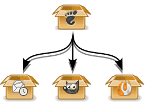
Or how to get rid of Evolution without removing your whole system Tree from a GNOME package to Evolution, GIMP and Brasero packages There is a complain I have heard several times from people after they installed Debian: I use Icedove/Thunderbird so I do not need Evolution: I tried to remove it but this would remove my whole system, that sucks! Explanation The reason behind this situation is that GNOME is installed by a meta-package, which is a dummy package that depends on each component of the official GNOME desktop, including Evolution. So it got installed as a dependency of that dummy package. This means that you, or rather, the Debian installer, never asked explicitly to install either Evolution or any other specific software: it came automatically. Now, you want to remove Evolution: very well, but this implies removing the meta-package, as you are removing one of its dependencies. But if you are removing this meta-package, there is no reason to keep all this software you did not asked for, so, as they got installed automatically, they are now removed automatically as well The solution So, do you still want to remove Evolution but keep the remaining of your GNOME desktop? Of course you will not keep GNOME , because GNOME includes Evolution, so strictly speaking GNOME without Evolution is not GNOME any more. Well, there is a solution: marking all the dependencies of the meta-package as manually installed, that is, faking that you installed them explicitly Aptitude is able to do that with its powerful search functions:
# aptitude unmarkauto '?reverse-depends(gnome)   ?reverse-recommends(gnome)'
# aptitude unmarkauto '?reverse-depends(gnome-core)   ?reverse-recommends(gnome-core)'
# aptitude unmarkauto '?reverse-depends(gnome-desktop-environment)'\
'   ?reverse-recommends(gnome-desktop-environment)'
What did we do? Well, exactly what is written: unmarking as automatically installed the packages that reverse-depend or reverse-recommend gnome or gnome-desktop-environment. In other words, those that are dependencies or recommendations of gnome, gnome-core or gnome-desktop-environment. Why these three packages? Because the GNOME environment that Debian provides by default is composed of several meta-packages: I shall let you refer to their respective descriptions for further information. Now, you can safely remove Evolution without pulling out your whole desktop system:
# aptitude remove evolution

Gregor Herrmann: RC bugs 2011/11 - 2011/20

long time no post about my RC bug fixing activities. & indeed, I haven't been very active during the last weeks. here's a quick update; it includes two NMUs done for the perl 5.12 transition, the rest is just "normal" maintainance work (interesting to see how much stuff can break behind our backs ...). I still hope to find some more time in the future to look at other RC bugs; after all we want to have a not-too-long freeze for wheezy, don't we?

John Goerzen: Baptism

Today I was baptized and joined the Mennonite Church. I imagine this might surprise some of you for various reasons, so let me provide a bit of background. I ve had a lot of people, both in person and in comments responding to my blog post, express surprise with statements I have made. The view of Christianity that many people have is of a group that devalues scientific inquiry and places a lot of emphasis on things like opposition to gay marriage, evolution, and abortion, and enjoys political leaders that say bring it on. While I know some Christians that fall into that mold, there are quite a few that don t as well. Some churches, such as the one we attend, have a surprisingly diverse set of people and yet still function and get along well. Today they accepted me with joy. Nobody was concerned that I started my statement with a reference to ancient Greek philosophy, wound up suggesting that the church ought to make sure to make illegal immigrants, gays and lesbians, and prostitutes feel welcome, and embraced both religion and scientific inquiry, feeling them complimentary. Mennonites practice adult baptism rather than infant baptism. A traditional age for people to be baptized is during high school, though emphasis is placed more on the individual than their age, so it s not unheard-of for someone to do so a bit later in life as I have. Part of the baptism involves the candidate sharing their faith story. These are typically intensely personal, widely varied, heartfelt, and honest. Some people s stories involve struggles with depression, physical disabilities, or the place of religion in their lives, while others reflect little struggle at all. Mine involves letting go of a lot of things, and also seeing some things, such as serious intellectual inquiry or existential questions about God (such as is there a god? ), as a positive rather than a negative feature of a Christian life. But it also involves a recognition and deep respect for those that don t approach things in this way. Though given publicly in a church, baptism testimonies are rarely published or shared more broadly. But I m going to share mine here. I have edited it only very lightly to remove a few local references that wouldn t make sense out of the context of this community. This was delivered in front of a rather different audience than is likely to be reading this post, so if you have questions, do feel free to ask in the comments. But before I begin, I just have to pass along a joke a friend told me: John, you picked quite a day for your baptism the day after the rapture. Baptism Testimony John Goerzen May 22, 2011 Those of you that know me well will probably not be surprised that I will begin my Christian baptism testimony with a story about an ancient Greek philosopher, and also touch on the philosophical nature of truth. These are key parts of my story. As legend goes, Socrates famously said, I know that I know nothing in other words, he believed that nothing could be known with absolute certainty. The Greek Oracle thought to be infallibly wise said that Socrates, the man that thought he knew nothing, was the wisest man in all Athens. An interesting paradox, and one that sheds light on my own religious story. My story involves coming to grips with the understanding that I know very little, that no person can ultimately know much about God, and finding a way to make peace with that situation. Growing up in this community, I thought I knew some things about faith and Christianity. At a certain age, it all seemed so simple. We took the Bible to be literally true. We marveled in Sunday School at how the apostles could sometimes appear so blind. And, modeled both implicitly and explicitly, was this notion: the stronger our faith, the fewer inner questions or doubt we have about the nature of God, the literal accuracy of the entire Bible, or our relationship to God. Those I perceived held up as examples never seemed to question any of these things, and showed outwardly, at least complete certainty about them. Moreover, holding certain intellectual beliefs was key to Christian identity, and even more importantly, to eternal life. This model has quite obviously worked well for many people for many years. The good that has happened, and continues to happen, from people that have that kind of certainty is manifest all around us. And yet, it didn t seem to work out for me. I m not the kind of person that accepts a lot of things at face value. It is helpful to be able to examine and challenge ideas and even more helpful to have other people challenge my ideas. From well before I was in high school, I was questioning some things about the Bible, God, and religion in general. My thoughts ranged from the impact of evolution on religion to the apparently vengeful God of the Old Testament to the very existence of God. In the Christian context, I perceived having these questions as a personal failing, something that I ought to repress. The more I tried to repress them, the more troublesome they became. Why, for instance, should a loving merciful God decide whether to let us into heaven based on whether we hold certain intellectual beliefs? In high school, I participated in the catechism class here at this church, and was frustrated because it didn t tackle deeper meanings or the kinds of questions I had. I wasn t yet able to articulate all my thoughts and questions very well, and I probably had an overactive case of teenage cynicism. As a result, I didn t get baptized like most others my age did. As I learned more about the early history of Judaism and Christianity, I only found more reasons to question the model of faith I thought I had received the one in which Biblical literalism and a divine guarantee of sorts was key. More recently, I gradually became aware that the model of Christianity I had in mind was one of many views. Christians, Mennonites, and even this church are incredibly diverse groups, and in retrospect, I am surprised that it took me so long to realize this. Three major steps led me to baptism. The first step was the realization that, whatever our understanding of the literal accuracy of the Bible, literal truth is often inferior to metaphorical truth. As an example, many of us have read the works of Shakespeare. They are fictional, but the reason they have been revered for so many centuries is that they are true. They teach us things about ourselves and our world in a way that no history book can. By placing such an emphasis on literal truth in the Bible, I was missing out on the message right there for me. By concerning myself with creationism or evolution, I missed out on thinking about what the story in Genesis meant for the Jews, and what it could mean for me. Evolution ceased to be a threat to religion; it became simply a tool for learning about a different sort of truth than we get from religion. N. T. Wright mentions an incident that illustrates this point. A woman attending a religious conference asked the speaker, a prominent theologian, Is it true that the serpent in Genesis actually spoke like you and I speak? The theologian answered, It doesn t matter whether the serpent could speak. What matters is what the serpent said. The second step I took towards being baptized was realizing where the real core of Christianity lies. It s not some debate about Genesis, but rather the death to one s old self, and the rebirth and continual remaking of oneself in the example of Jesus. Given that, a lot of questions seem unimportant or even irrelevant. Good can be expressed in many ways, and if one person achieves a remarkably Christian life via a literal understanding of the Bible, and another via a more metaphorical reading, then it is my place only to affirm both and say that they both got it right. If we say that the task of remaking ourselves is like climbing a mountain, then what matters is not how we are climbing the mountain, but simply that we are climbing it. I used to equate faith with an intellectual belief. I have come to see that was a narrow view. Faith, to me now, is more about vision: do we see the world like Christ did? Where do our loyalties and our trust lie in God or in human institutions? What are our goals in life? We humans have failed to understand God, and probably always will. I too share in that incomplete understanding, but I have come to accept that it is OK. I know enough to know that I want my loyalty to lie in Jesus, to know what kind of vision of the world I want to have, and I have learned to accept that intellectual questions can even be a form of meditation, enlightenment, and prayer. The third step toward baptism was moving past my own shortcomings. For a long time, I thought I didn t believe the right things, didn t believe them strong enough, wasn t certain enough about God, didn t pray enough, didn t read enough, didn t understand enough, didn t love enough and ultimately, that I wasn t good enough. I request baptism today understanding that, despite the various imperfections I still have, and we all have, everyone is good enough and deserving of love and peace. God s love is for everyone. No exceptions! Following Jesus boils down to this: I too must be an agent of love and peace to everyone, without exception. My vision must be centered around the fact that we are to emulate the God that loves the entire world, sinners all, and therefore I should as well. I hope I can show others the kind of love that has been shown me. I hope, too, to share with this congregation and the global church in the vision of love. I hope that we can continually strive to re-focus on Christ s vision. As an example, we all know that many different viewpoints about whether homosexuality is sinful exist in Mennonite Church USA. These opinions are deeply held and personal for many, and have been discussed over and over and over. But ultimately, they aren t terribly relevant to the church s mission. The example of Jesus unites us all: he embraced everyone. He accepted criminals and prostitutes and showed them love and kindness. Our difficult task, which is also my difficult task, is to show this same love to absolutely everyone, regardless of our varying opinions about them and their conduct. The forgotten and repressed of our day perhaps criminals, homeless, Muslims, addicts, gays and lesbians, illegal immigrants, ethnic minorities, and still prostitutes deserve the love of Christ s church and all its members. My hope is that any one of the earth s 7 billion people could step through the doors of our church, or any church, and immediately feel Christ s love, and the unconditional, non-judgmental, welcome and love of Christ s followers, no matter what. This prayer from Ephesians 3 sums up my hope and my vision, for myself and everyone:
I pray that out of his glorious riches he may strengthen you with power through his Spirit in your inner being. I pray that Christ may dwell in your hearts through faith. And I pray that you, being rooted and established in love, may have power, together with all the Lord s people, to grasp how wide and long and high and deep is the love of Christ. And I pray that you will know this love that surpasses knowledge that you may be filled to the measure of all the fullness of God. (3.16-19)

21 May 2011

Vincent Bernat: Network lab with User Mode Linux

To setup a virtual network lab, you get a lot of alternatives. You can for example use GNS3, Netkit, Marionnet or VNUML. Some of those tools, like GNS3, allow to add some closed source equipments like a Cisco 7200 or a Juniper router. All those tools are a great way to setup your network lab. Look at them! If you want to setup a virtual network lab for educational purpose, one of those should fit your purpose. However, none of those solution were a perfect match for me. I did not want to maintain some root filesystem. I wanted my lab to start in a few seconds. I wanted to keep all configuration files (including the ones for the virtual hosts) into one subdirectory of my home and be able to modify them while the lab was running. I also wanted to be able to plug some Cisco router using Dynamips/Dynagen. None of the listed solution above matched all those criteria. Therefore, I setup my own lab script with User Mode Linux. This is not a complete solution, but is more like a home-made solution to match one particular need. You cannot use the final result without tweaking it. Again, look at the other solutions first. We will go step by step to understand how the lab was built. If you are in a hurry, you can look at the result which is published on GitHub.

User Mode Linux User Mode Linux (or UML) is a Linux kernel running as a process instead of running on top of some processor. With Debian, you can install it using apt-get install user-mode-linux. You get a linux command that will run your Linux kernel as a simple process. No need to be root.
 1
 2
 3
 4
 5
 6
 7
 8
 9
10
11
12
13
14
15
16
17
18
19
20
21
22
23
24
25
$ linux
Core dump limits :
    soft - 0
    hard - NONE
Checking that ptrace can change system call numbers...OK
Checking syscall emulation patch for ptrace...OK
Checking advanced syscall emulation patch for ptrace...OK
Checking for tmpfs mount on /dev/shm...nothing mounted on /dev/shm
Checking PROT_EXEC mmap in /tmp/user/500/...OK
Checking for the skas3 patch in the host:
  - /proc/mm...not found: No such file or directory
  - PTRACE_FAULTINFO...not found
  - PTRACE_LDT...not found
UML running in SKAS0 mode
Adding 5632000 bytes to physical memory to account for exec-shield gap
Initializing cgroup subsys cpuset
Linux version 2.6.32 (2.6.32) (root@tito) (gcc version 4.4.5 (Debian 4.4.5-10) ) #2 Thu Jan 27 12:49:46 UTC 2011
[...]
console [mc-1] enabled
Couldn't stat "root_fs" : err = 2
Failed to initialize ubd device 0 :Couldn't determine size of device's file
registered taskstats version 1
VFS: Cannot open root device "98:0" or unknown-block(98,0)
Please append a correct "root=" boot option; here are the available partitions:
Kernel panic - not syncing: VFS: Unable to mount root fs on unknown-block(98,0)
You get a Linux kernel that will just panic because it does not find a disk to mount to run init from it. Usually, you build some root file system and give it as an argument to your UML kernel.

Basic setup However, you can also use your host filesystem as a root filesystem. We also specify /bin/sh as init instead of /sbin/init. This will be the first process to be started by our UML kernel.
 1
 2
 3
 4
 5
 6
 7
 8
 9
10
11
12
13
$ linux init=/bin/sh rootfstype=hostfs
[...]
Linux version 2.6.32 (2.6.32) (root@tito) (gcc version 4.4.5 (Debian 4.4.5-10) ) #2 Thu Jan 27 12:49:46 UTC 2011
[...]
VFS: Mounted root (hostfs filesystem) readonly on device 0:12.
IRQ 3/console-write: IRQF_DISABLED is not guaranteed on shared IRQs
IRQ 2/console: IRQF_DISABLED is not guaranteed on shared IRQs
IRQ 10/winch: IRQF_DISABLED is not guaranteed on shared IRQs
/bin/sh: can't access tty; job control turned off
# uname -a
Linux (none) 2.6.32 #2 Thu Jan 27 12:49:46 UTC 2011 x86_64 GNU/Linux
# echo $$
1
You may want to setup a bit your environment:
1
2
3
4
5
6
7
8
9
# hostname -b R1
# export TERM=xterm
# export PATH=/usr/local/bin:/usr/bin:/bin:/sbin:/usr/local/sbin:/usr/sbin
# mount -t proc proc /proc
# mount -t sysfs sysfs /sys
# mount -t tmpfs tmpfs /var/run -o rw,nosuid,nodev
# mount -t tmpfs tmpfs /var/log -o rw,nosuid,nodev
# mount -o bind /usr/lib/uml/modules /lib/modules
# mount -t hostfs hostfs /home/bernat/mylab -o /home/bernat/mylab
We setup /proc and /sys correctly. We also turn /var/run and /var/log as tmpfs filesystems. This will allow most daemons to run correctly: they will be able to write runtime data in /var/run and to write logs in /var/log. You can even launch your favorite syslog daemon. The line about /lib/modules is to ensure that our UML kernel is able to access its kernel modules. For example, we can now use modprobe tun. The line about /home allows to mount the home directory of your host inside UML. This was already the case, but it was mounted as read-only. One important thing to notice is that while you seem to be root inside UML, you did not run linux as root. Therefore, when the UML kernel tries to write a file it will still be bound by the permissions granted by your host kernel. See this example:
1
2
3
4
# mount -o remount,rw /
# touch /tmp/test1
# touch /etc/test1
touch: cannot touch  /etc/test1': Permission denied
This is a great way to ensure that your lab will not destroy your host. Do not run linux as root. What is interesting with such a setup is that you share the filesystem with your host. You can modify some configuration file on your host and your UML will see the modification right away. You can also modify a file inside UML and see the modification on your host too.

Console & job control There is a slight problem with this environment. You may be used to it if you already started your own GNU/Linux system with init=/bin/sh. The problem is that you don t have job control. Job control allows you to put tasks in background and interrupt them while they are running. It is job control that allows you to stop a program with ^C. Here, you don t have job control. See:
1
2
# cat
^C^C^C^C
You are stuck. The only way to go out is to kill the linux process on your host. Job control is a great mystery for me. I don t know how to enable it by hand. However, getty is able to enable job control for you. Just type this command:
1
# exec getty -n -l /bin/sh 38400 /dev/tty0
You get job control. We keep /bin/sh, but you may prefer /bin/bash since on most systems, /bin/sh is rather basic.

Writable root filesystem Let s get back to our root filesystem. Most daemons can run just fine with our setup. For example, we can start Nginx, a popular web server:
1
2
3
# mkdir /var/log/nginx
# /etc/init.d/nginx start
Starting nginx: nginx.
However, it will use the configuration file in /etc/nginx. You don t want to modify this directory for all your labs. The best way to handle this is to start Nginx with a custom configuration file:
1
2
# /etc/init.d/nginx stop
# nginx -c /home/bernat/mylab/nginx.conf
While keeping the configuration files related to your lab in your home is an important objective (all your lab related files are in the same place and you can modify them at will), it may be more convenient to still use /etc/init.d/nginx script to control Nginx. Moreover, some daemons do not allow to specify a configuration file. You will then need to modify your root filesystem. This is a pretty common problem with Live CD and it is solved by using an union mount. This is a special kind of mount that will merge two filesystems into one. One of the two filesystems can be read-only and all the changes will be reported to the second one. We will use AUFS. Ensure that you have aufs-tools package installed. Let s start from scratch for this example.
 1
 2
 3
 4
 5
 6
 7
 8
 9
10
$ linux init=/bin/sh rootfstype=hostfs
[...]
# mount -n -t proc proc /proc
# mount -n -t sysfs sysfs /sys
# mount -o bind /usr/lib/uml/modules /lib/modules
# mount -n -t tmpfs tmpfs /tmp -o rw,nosuid,nodev
# mkdir /tmp/ro /tmp/rw /tmp/aufs
# mount -n -t hostfs hostfs /tmp/ro -o /,ro
# mount -n -t aufs aufs /tmp/aufs -o noatime,dirs=/tmp/rw:/tmp/ro=ro
# exec chroot /tmp/aufs /bin/bash
It seems that AUFS with hostfs is rather fragile. We could have merged our root filesystem with some directory in our lab using hostfs like this:
1
2
3
4
# mount -n -t hostfs hostfs /tmp/rw -o /home/bernat/mylab/root,rw
# mount -n -t hostfs hostfs /tmp/ro -o /,ro
# mount -n -t aufs aufs /tmp/aufs -o noatime,dirs=/tmp/rw:/tmp/ro=ro
# exec chroot /tmp/aufs /bin/bash
However, the kernel panics on most operations. Therefore, /tmp/rw stays in a tmpfs filesystem. This means that any change to the root filesystem will be lost. I also was unable to issue a correct pivot_root before chroot. This is not really important here. UPDATED: It seems that there are other drawbacks to this setup. For some reason, if you have a separate /usr partition on your host system, you won t be able to write to it until you specify the noxino option to AUFS. Another issue is that AUFS does not notice most changes on the hostfs filesystem. You can fix this with option udba=inotify. However, this is incompatible with the noxino option. Therefore, you need to choose what is best for your lab. You can also mount some parts of your home with hostfs (for example, the source directory of the piece of software that you would like to test). Let s consider that Nginx configuration is in /home/bernat/lab/nginx. We simply uses a symbolic link:
1
2
# rm -rf /etc/nginx
# ln -s /home/bernat/mylab/nginx /etc/nginx
Since we lose the modifications to the root filesystem, the symbolic link should be done each time we start the lab. However, we can modify directly the configuration files in the host or in the UML.

Networking We know how to start our UML. Let s see how we can add some wires to it. UML supports several network adapters. The two most useful are TAP and VDE backend.

TAP A TAP interface is a virtual network kernel device which can be used by userland applications to inject layer 2 frames in it. If the kernel sends frames in a TAP device, they will be received by the application listening to it. This also works the other way around. A TAP interface is a regular ethernet device for the kernel. This means that you can bridge it or use tcpdump on it. The drawback of such interfaces is that you need to be root to create them. The application using them does not need to be run as root. I usually use this nifty shell function to setup TAP interfaces:
 1
 2
 3
 4
 5
 6
 7
 8
 9
10
11
12
13
14
15
16
17
18
19
20
21
22
23
__add_to_bridge()  
    # Optionally, add it to given bridge
    [ -z "$2" ]    
        [ -f /sys/class/net/$2/brforward ]    
            sudo brctl addbr $2
            sudo brctl stp $2 off
            sudo ip link set $2 up
         
        [ -f /sys/class/net/$2/brif/$1 ]    
            # We need to check if it is in another bridge
            bridge=$(echo /sys/class/net/*/brif/$1 2> /dev/null   \
                sed 's+/sys/class/net/\([^/]*\)/.*+\1+') 2> /dev/null
            [ -n "$bridge" ] && \
                sudo brctl delif $bridge $1
            sudo brctl addif $2 $1


tap()  
    sudo tunctl -b -u $(whoami) -t $1 > /dev/null
    sudo ip link set up dev $1
    __add_to_bridge $1 $2
 
It will create the interface and put it into a bridge. For example, you can create two interfaces linked together through a bridge to allow two UML to talk each other:
1
2
$ tap tap-R1 br-R1R2
$ tap tap-R2 br-R1R2
We can setup two UML which will use those interfaces. The first one is setup like this:
1
2
3
4
$ linux init=/bin/sh rootfstype=hostfs eth0=tuntap,tap-R1
[...]
# ip link set up dev eth0
# ip addr add 192.168.0.1/24 dev eth0
The second one:
1
2
3
4
5
6
7
8
9
$ linux init=/bin/sh rootfstype=hostfs eth0=tuntap,tap-R2
[...]
# ip link set up dev eth0
# ip addr add 192.168.0.2/24 dev eth0
# ping 192.168.0.1
PING 192.168.0.1 (192.168.0.1) 56(84) bytes of data.
Warning: time of day goes back (-13832us), taking countermeasures.
64 bytes from 192.168.0.1: icmp_req=20 ttl=64 time=0.633 ms
64 bytes from 192.168.0.1: icmp_req=21 ttl=64 time=0.157 ms
If you are running a firewall on your host, ensure that you let your host forward those packets. By default, bridging code forwards the frames through Netfilter.

VDE A VDE switch is a software emulation of a regular network switch. It is a userland component and does not need to be run as root. You need to install vde2 package to make use of it. You can run a switch using vde_switch command. You will get a console by pressing Enter. From this console, you can configure the switch: add ports, configure VLAN, etc. Like for TAP interfaces, let s setup two UML connected to this switch. The first one is like this:
1
2
3
4
$ linux init=/bin/sh rootfstype=hostfs eth0=vde
[...]
# ip link set up dev eth0
# ip addr add 192.168.0.1/24 dev eth0
And the second one:
1
2
3
4
5
6
7
8
9
$ linux init=/bin/sh rootfstype=hostfs eth0=vde
[...]
# ip link set up dev eth0
# ip addr add 192.168.0.2/24 dev eth0
# ping 192.168.0.1
PING 192.168.0.1 (192.168.0.1) 56(84) bytes of data.
64 bytes from 192.168.0.1: icmp_req=1 ttl=64 time=2.93 ms
Warning: time of day goes back (-8101us), taking countermeasures.
64 bytes from 192.168.0.1: icmp_req=2 ttl=64 time=0.503 ms

The lab So far, we had a look at what can be used to setup a lab. We need to put everything together into some script to setup the lab in a quick way. For each lab that I want to setup, I copy my latest script to a new location and adapt to the topology I want. I have put everything described below in GitHub. Feel free to browse and fork. Our lab will be about setting up a redundant VPN between two remote sites of the same company. This company is using OSPF as an IGP on each site and we will use BGP to let each site know the routes advertised in the other site. We will only use VDE switches for the layer 2 part. Redundant VPN lab Let s implement this lab. You should grab the sources first:
1
2
$ git clone https://github.com/vincentbernat/network-lab.git
$ cd network-lab/lab-redundant-vpn
You have a setup script which will setup the whole lab for you. You also have one directory for each UML. Those directories only contain configuration for the various daemons used inside UML. To make this lab work, ensure that you have quagga (Quagga, an Internet routing daemon supporting both OSPF and BGP) and racoon packages.

UML configuration First look at the end of script. There is something like this:
 1
 2
 3
 4
 5
 6
 7
 8
 9
10
11
12
13
14
15
16
17
18
19
20
21
22
23
24
25
26
27
case $$ in
    1)
        # Inside UML. Three states:
        [...]
        ;;
    *)
        TMP=$(mktemp -d)
        trap "rm -rf $TMP" EXIT
        check_dependencies
        setup_screen
        # Setup switches
        setup_switch site1
        setup_switch site101
        setup_switch internet
        # Start VM
        start_vm R1 eth0=vde,$TMP/switch-site1.sock
        start_vm R2 eth0=vde,$TMP/switch-site101.sock
        start_vm V1 eth0=vde,$TMP/switch-site1.sock eth1=vde,$TMP/switch-internet.sock
        start_vm V2 eth0=vde,$TMP/switch-site1.sock eth1=vde,$TMP/switch-internet.sock
        start_vm V3 eth0=vde,$TMP/switch-site101.sock eth1=vde,$TMP/switch-internet.sock
        start_vm V4 eth0=vde,$TMP/switch-site101.sock eth1=vde,$TMP/switch-internet.sock
        start_vm I1 eth0=vde,$TMP/switch-internet.sock
        display_help
        cleanup
        screen -X quit
        ;;
esac
The script will check its PID ($$). If it is 1, this means it has been invoked as init. Otherwise, it means it has been launched by the user. We will see the init part later. When called, we first check some dependencies, then we setup screen. Everything is run inside a screen session. No multiple windows. The next step is to setup the various switches needed for our lab. We take one switch for each site and one switch for Internet . The function that setups the switch just invokes vde_switch with the help of start-stop-daemon to record the PID (to shutdown the lab properly). Then, we start our various UML. For each of them, we need to specify which network adapters we need. For R1 and R2, we don t use a network adapter to connect to the internal network. We will use a dummy0 interface. To emulate Internet, we use another UML, I1. For each UML, our script will be used as init. In this case, its PID will be 1. As we have seen earlier, the script checks if it is called as init. If it is the case, it will setup the UML. During this setup, host specific configuration will be applied:
 1
 2
 3
 4
 5
 6
 7
 8
 9
10
11
12
13
14
15
16
17
18
19
20
21
22
23
24
25
26
27
28
29
30
31
32
33
34
35
36
37
38
39
40
41
42
43
44
45
46
47
48
49
50
echo "[+] Setup UML"
sysctl -w net.ipv4.ip_forward=1
case $ uts  in
    R1)
        modprobe dummy
        ip link set up dev dummy0
        ip addr add 192.168.15.1/24 dev dummy0
        ip addr add 192.168.1.10/24 dev eth0
        setup_quagga
        ;;
    R2)
        modprobe dummy
        ip link set up dev dummy0
        ip addr add 192.168.115.1/24 dev dummy0
        ip addr add 192.168.101.10/24 dev eth0
        setup_quagga
        ;;
    V1)
        ip addr add 192.168.1.11/24 dev eth0
        ip addr add 1.1.2.1/24 dev eth1
        ip route add default via 1.1.2.10
        setup_quagga
        setup_racoon 1.1.2.1 1.1.1.1 192.168.0.0/19-192.168.100.0/19
        ;;
    V2)
        ip addr add 192.168.1.12/24 dev eth0
        ip addr add 1.1.2.2/24 dev eth1
        ip route add default via 1.1.2.10
        setup_quagga
        setup_racoon 1.1.2.2 1.1.1.2 192.168.0.0/19-192.168.100.0/19
        ;;
    V3)
        ip addr add 192.168.101.13/24 dev eth0
        ip addr add 1.1.1.1/24 dev eth1
        ip route add default via 1.1.1.10
        setup_quagga
        setup_racoon 1.1.1.1 1.1.2.1 192.168.100.0/19-192.168.0.0/19
        ;;
    V4)
        ip addr add 192.168.101.14/24 dev eth0
        ip addr add 1.1.1.2/24 dev eth1
        ip route add default via 1.1.1.10
        setup_quagga
        setup_racoon 1.1.1.2 1.1.2.2 192.168.100.0/19-192.168.0.0/19
        ;;
    I1)
        ip addr add 1.1.1.10/24 dev eth0
        ip addr add 1.1.2.10/24 dev eth0
        ;;
esac
After all this, we drop to a shell to allow you to issue additional commands interactively.

Testing We need to wait one minute after the lab has been started. We can then check the routing table of various equipments. For example, here is R1 routing table (you need to type vtysh to get Quagga console):
 1
 2
 3
 4
 5
 6
 7
 8
 9
10
11
R1# show ip route
Codes: K - kernel route, C - connected, S - static, R - RIP, O - OSPF,
       I - ISIS, B - BGP, > - selected route, * - FIB route
C>* 127.0.0.0/8 is directly connected, lo
O   192.168.1.0/24 [110/10] is directly connected, eth0, 00:25:42
C>* 192.168.1.0/24 is directly connected, eth0
O   192.168.15.0/24 [110/10] is directly connected, dummy0, 00:25:42
C>* 192.168.15.0/24 is directly connected, dummy0
O>* 192.168.115.0/24 [110/20] via 192.168.1.11, eth0, 00:02:24
  *                           via 192.168.1.12, eth0, 00:02:24
We can see that if this router wants to contact R2, it has learned a multipath route with OSPF and can then sends its packets through V1 or V2, as expected. Here is the routing table of V3:
 1
 2
 3
 4
 5
 6
 7
 8
 9
10
11
12
V3# show ip route
Codes: K - kernel route, C - connected, S - static, R - RIP, O - OSPF,
       I - ISIS, B - BGP, > - selected route, * - FIB route
K>* 0.0.0.0/0 via 1.1.1.10, eth1
C>* 1.1.1.0/24 is directly connected, eth1
C>* 127.0.0.0/8 is directly connected, lo
O   192.168.15.0/24 [110/20] via 192.168.101.14, eth0, 00:04:26
B>* 192.168.15.0/24 [20/20] via 192.168.1.11 (recursive via 1.1.1.10), 00:07:16
O   192.168.101.0/24 [110/10] is directly connected, eth0, 00:07:30
C>* 192.168.101.0/24 is directly connected, eth0
O>* 192.168.115.0/24 [110/20] via 192.168.101.10, eth0, 00:07:18
We see that to contact R1, V3 knows two routes. One with BGP through the VPN. This is the one that will be used. The other one is through V4 but will not be used unless the BGP route is lost. We can ping R2 from R1:
1
2
3
4
R1# ping -I 192.168.15.1 192.168.115.1
PING 192.168.115.1 (192.168.115.1) from 192.168.15.1 : 56(84) bytes of data.
Warning: time of day goes back (-459129us), taking countermeasures.
64 bytes from 192.168.115.1: icmp_req=1 ttl=62 time=1.10 ms
Let s suppose we break the link between V1 and the Internet (using ip link set down eth1 on V1). The previous multipath route on R1 is now a single route through V2. Moreover, V3 has lost its BGP route to V1 and is now using its OSPF route through V4:
 1
 2
 3
 4
 5
 6
 7
 8
 9
10
11
V3# show ip route
Codes: K - kernel route, C - connected, S - static, R - RIP, O - OSPF,
       I - ISIS, B - BGP, > - selected route, * - FIB route
K>* 0.0.0.0/0 via 1.1.1.10, eth1
C>* 1.1.1.0/24 is directly connected, eth1
C>* 127.0.0.0/8 is directly connected, lo
O>* 192.168.15.0/24 [110/20] via 192.168.101.14, eth0, 00:10:13
O   192.168.101.0/24 [110/10] is directly connected, eth0, 00:13:17
C>* 192.168.101.0/24 is directly connected, eth0
O>* 192.168.115.0/24 [110/20] via 192.168.101.10, eth0, 00:13:05
We could enhance the resiliance of such a setup by adding a dedicated link between V1 and V2 and between V3 and V4 and running OSPF on this link (or iBGP). This would allow us to support several outages on our network.

Conclusion The script used to setup this lab can be adapted to setup other labs with little effort. Please, note that it depends on the configuration of your environment. However, the whole lab is contained in a single directory and is very small. You can email it to your friends or publish it on GitHub. It can also be extended to support Dynagen to include some Cisco equipments in your lab (for example, to experiment with VRF or MPLS).

Craig Small: JFFNMS 0.9.0 Released

After 3 release candidates jffnms is now at version 0.9.0. Both the web frontend and backend (engines) have had extensive re-work done to them to cleanup and tighten up the code. There should be a lot less warnings and errors from PHP when you set to a higher error level.

19 May 2011

MJ Ray: Top 10 Benefits of Mailing List Software

Particularly around local government, but also some not-for-profits and universities, I m trying to persuade people to stop using huge Blind Carbon Copy (BCC) lists that they keep in their address book and switch over to using mailing list manager software. Our co-op even gives some simple mailing list hosting away with web hosting. I think good mailing list software is better because:
  1. List members can help themselves they can subscribe, unsubscribe and set options by sending email to the software or visiting its website, which reduces the worker time required to manage the list. But you can still manage it directly if you prefer.
  2. Your address book is smaller because you don t need every address on the mailing list cluttering up your email software s address book any more
  3. Errors are handled automatically if an address doesn t work any more, the software will unsubscribe it, usually with some safeguards against one-off problems
  4. Privacy is safeguarded dedicated email list software will not put all the mailing list addresses in the To-line by mistake (as often happens with Address Book announcement lists)
  5. Spam is filtered rules can be set centrally and they can be different to the rest of your organisation
  6. Messages can be moderated if needed, the list managers can be asked to pre-approve the messages, or you can set rules to allow some automatically.
  7. Emails can be archived most list software can save copies of messages for you, or put them on the web
  8. You can offer digests offer members the choice between getting every message or daily or weekly batches
  9. Multiple versions can be sent some list software can send different versions of the same email (like rich and plain text, or different languages) as chosen by the user
  10. You can syndicate news some list software can also put your announcements on content management systems or social media
  11. (OK, I ve done 10 there are two more which matter to a tech worker like me which I m going to mention as free extras.) It s more efficient most list software is designed to handle hundreds or thousands of recipients and sends email with more robust settings than a typical desktop email client. It is less likely to fail after recipient 373 and ask you to resend them all.
  12. Comply with standards good list software either follows standards for things like self-service and digests automatically or can be told to do it. Some desktop email software (Outlook?) usually can t.
Do you think these are good reasons? Are there other reasons you would include above some of these? Would they persuade you to stop using your computer s address book?

17 May 2011

Vincent Bernat: Debian on Thinkpad Edge 11"

This has been several months since I didn t use much my laptop, an Asus S5N: it was crippled by a short battery life and was hit by several bugs, most of them targeting the i855GME graphic chipset thanks to the use of GEM and KMS in the latest Xorg. I did not want to invest too much in a laptop and I have found a rebate from Lenovo for Thinkpad Edge series. Voil , I have a Thinkpad Edge 11 .

Hardware Thinkpad Edge is a entry-level notebook from Lenovo. In France, it is available for around 500 , thanks to the usual parity between dollar and euro. Thinkpad Edge 11" enclosure

Hardware configuration Lenovo do not sell directly in France. Therefore, you cannot configure your laptop as you want. There is two or three configurations available. This can be a bit frustrating if you want something specific. Thinkpad Edge 11" parts Here is the configuration that I bought:
  • Intel Core i3 380UM at 1.33 GHz CPU.
  • 11.6 LED screen, with a resolution of 1366x768.
  • 4 GB RAM.
  • 320 GB hard drive.
  • Wireless network (Centrino Wireless-N) and bluetooth.
  • Broadband modem (WWAN)
It s a small laptop but it is not as light as it should be (1.5 kg or 3.3 pounds). Apart from the power supply, you don t get any extra. My Asus was shipped with a wireless mouse, a transport bag, a sleeve, an USB key and a CD burner. On one side, you get two USB ports and on the other side, one USB port, an HDMI port, a network outlet and a speaker jack. The VGA connector is placed on the rear. Thinkpad Edge 11"

BIOS First step: checking BIOS settings. WiMAX can be disabled as well as any other component that you may not need. The keyboard can be configured so that function keys are available directly instead of having to use the Fn key. There is an option called Computrace from AbsoluteSoftware which seems targeted at find back your laptop in case it gets stolen or just let the FBI know where you are. I have disabled it.

Debian installation Debian can be installed from an USB stick. This is really easy now. You grab the ISO image you want to use (I take the one for AMD64 in testing because I will run unstable) and to copy it on the USB stick:
1
# dd if=debian-testing-amd64-netinst.iso of=/dev/sdb
The previous way of making the USB stick bootable, installing a kernel, an initrd and the ISO image is deprecated (and does not work). Moreover, using testing to install Debian allows me to use a 2.6.37 kernel and circumvent some problems that may have happen with an older kernel. During the installation, I choose a guided partitioning using encrypted LVM. I choose to have several partitions but I keep /usr in the root partition since having a separate /usr is less and less supported, especially with piece of software like udev. The partitioning tool in Debian installer do not allow to resize volumes, you need to destroy them and recreate them as well as their content. However, this is still faster than writing a patch for this. When the installation is finished, the laptop boots on a 2.6.38 kernel, asks for the passphrase to decrypt the LUKS volume and display the login prompt a few seconds later.

Software configuration Most of the hardware seems to be supported. No obscure commands to run to get a working network. Therefore, I start by setting up my usual environment.

Setting up the desktop First, I change /etc/apt/sources.list to get unstable:
deb http://ftp.fr.debian.org/debian/ unstable main
deb-src http://ftp.fr.debian.org/debian/ unstable main
deb http://ftp.fr.debian.org/debian/ experimental main contrib non-free
I also want that everything that is installed from experimental to be upgraded if an update is available in experimental. This is done by creating a file /etc/apt/preferences.d/experimental:
Package: *
Pin: release experimental
Pin-Priority: 101
Then, I install the following packages:
  • zsh, my favourite shell with my hand-made maturating configuration. I should put it on GitHub one day.
  • mg, is the editor that I use to quickly edit a configuration file. I don t like vi. I have used jed for a long time but its default configuration can be cumbersome and it misses some emacs keybinding.
  • emacs, my work environment. I use it as a text editor and mail reader (with Gnus). I don t use it as a browser nor as a terminal. As for zsh, I have my configuration files ready to be copied anywhere.
  • fvwm, my window manager since quite some time. I use fvwm-crystal on top of it. My configuration is described in another post. I also use conky.
  • rxvt-unicode, a terminal. It has a very good terminal emulation and some fancy features like transparency (using compositing or not). It is light and fast and allows to search in the backbuffer. It can use a client/server system that will close all your windows when the server crashes. This almost never happens.
  • unison, a synchronisation tool that allows me to keep the same files on my different computers.
  • gdm3 is the only display manager that is able to talk correctly to ConsoleKit and get the rights set correctly without adding yourself to a lot of groups.
Nowadays, I use the kernel from Debian and I do not have to run my own configuration for it. The glory days where I had to recompile the kernel before plugging a new USB toy have passed. I remove rpcbind and nfs-common. I use ferm to setup a simple firewall. Here is my ferm.conf:
domain (ip ip6)  
  table filter  
chain INPUT  
    policy DROP;
    mod state state INVALID DROP;
    mod state state (ESTABLISHED RELATED) ACCEPT;
    interface lo ACCEPT;
    proto tcp dport ssh ACCEPT;
    
chain OUTPUT  
    policy ACCEPT;
    mod state state (ESTABLISHED RELATED) ACCEPT;
    
chain FORWARD  
    policy DROP;


unison will then sync my configuration files and my documents. After this step, my environment is ready.

Hardware configuration This is usually the most troublesome part. However, looking at the output of lspci and lsusb, everything seems pretty easy to get supported. Here is lspci output:
00:00.0 Host bridge: Intel Corporation Core Processor DRAM Controller (rev 02)
00:02.0 VGA compatible controller: Intel Corporation Core Processor Integrated Graphics Controller (rev 02)
00:16.0 Communication controller: Intel Corporation 5 Series/3400 Series Chipset HECI Controller (rev 06)
00:1a.0 USB Controller: Intel Corporation 5 Series/3400 Series Chipset USB2 Enhanced Host Controller (rev 06)
00:1b.0 Audio device: Intel Corporation 5 Series/3400 Series Chipset High Definition Audio (rev 06)
00:1c.0 PCI bridge: Intel Corporation 5 Series/3400 Series Chipset PCI Express Root Port 1 (rev 06)
00:1c.1 PCI bridge: Intel Corporation 5 Series/3400 Series Chipset PCI Express Root Port 2 (rev 06)
00:1c.5 PCI bridge: Intel Corporation 5 Series/3400 Series Chipset PCI Express Root Port 6 (rev 06)
00:1d.0 USB Controller: Intel Corporation 5 Series/3400 Series Chipset USB2 Enhanced Host Controller (rev 06)
00:1e.0 PCI bridge: Intel Corporation 82801 Mobile PCI Bridge (rev a6)
00:1f.0 ISA bridge: Intel Corporation Mobile 5 Series Chipset LPC Interface Controller (rev 06)
00:1f.2 SATA controller: Intel Corporation 5 Series/3400 Series Chipset 4 port SATA AHCI Controller (rev 06)
00:1f.3 SMBus: Intel Corporation 5 Series/3400 Series Chipset SMBus Controller (rev 06)
00:1f.6 Signal processing controller: Intel Corporation 5 Series/3400 Series Chipset Thermal Subsystem (rev 06)
03:00.0 Network controller: Intel Corporation Centrino Wireless-N 1000
09:00.0 Ethernet controller: Realtek Semiconductor Co., Ltd. RTL8111/8168B PCI Express Gigabit Ethernet controller (rev 03)
ff:00.0 Host bridge: Intel Corporation Core Processor QuickPath Architecture Generic Non-core Registers (rev 02)
ff:00.1 Host bridge: Intel Corporation Core Processor QuickPath Architecture System Address Decoder (rev 02)
ff:02.0 Host bridge: Intel Corporation Core Processor QPI Link 0 (rev 02)
ff:02.1 Host bridge: Intel Corporation Core Processor QPI Physical 0 (rev 02)
ff:02.2 Host bridge: Intel Corporation Core Processor Reserved (rev 02)
ff:02.3 Host bridge: Intel Corporation Core Processor Reserved (rev 02)
And lsusb output (I disabled the broadband modem in the BIOS and therefore, it does not appear here):
Bus 001 Device 001: ID 1d6b:0002 Linux Foundation 2.0 root hub
Bus 002 Device 001: ID 1d6b:0002 Linux Foundation 2.0 root hub
Bus 001 Device 002: ID 8087:0020 Intel Corp. Integrated Rate Matching Hub
Bus 002 Device 002: ID 8087:0020 Intel Corp. Integrated Rate Matching Hub
Bus 001 Device 003: ID 0bda:0158 Realtek Semiconductor Corp. USB 2.0 multicard reader
Bus 001 Device 004: ID 0a5c:217f Broadcom Corp. Bluetooth Controller
Bus 002 Device 003: ID 5986:01a7 Acer, Inc Lenovo Integrated Webcam
There is a dedicated page for the Thinkpad Edge 11 on ThinkWiki. This wiki is one of the best source of information when you get a Thinkpad. The kernel as shipped by Debian kernel team contains every module that you may need. One of them, thinkpad_acpi will handle most of the perks under the hood. I do not use a complete desktop like Gnome. I usually prefer to use command line tools and put them in .xsession for persistence. There is usually some graphical utility to do the same thing. There are however some configuration steps that are now far easier to do with a graphical tool. Since I use X all the time, I just rely on those tools when necessary.

BIOS upgrade From lshw output, I see that I already have the latest BIOS available. No need to update then. In case you need to update, yours, ThinkWiki has a documentation to upgrade. You can find memdisk image in syslinux package.

Graphic card The graphic card is integrated into the CPU. Intel usually ships graphic cards well supported by open source drivers. ThinkWiki tells us:
A very recent Linux distribution with kernel 2.6.33 and Intel Xorg driver 2.11 or newer is recommended. Note that XVideo (Xv) playback at certain frame sizes does not work properly unless you have at least version 2.12 of the Intel Xorg driver.
With Debian Wheezy, you get version 2.15. Therefore, configuring the graphic card is just a matter of installing xserver-xorg-video-intel and that s all. No /etc/X11/xorg.conf needed. HDMI and VGA outputs are detected without configuring anything. They can be enabled with xrandr. I did not try if it was possible to use both of them at the same time.
Screen 0: minimum 320 x 200, current 1366 x 768, maximum 8192 x 8192
LVDS1 connected 1366x768+0+0 (normal left inverted right x axis y axis) 256mm x 144mm
   1366x768       60.0*+   50.0  
   1360x768       59.8     60.0  
   1024x768       60.0  
   800x600        60.3     56.2  
   640x480        59.9  
VGA1 disconnected (normal left inverted right x axis y axis)
HDMI1 disconnected (normal left inverted right x axis y axis)
DP1 disconnected (normal left inverted right x axis y axis)
Compositing works without any problem. I use only transparency and therefore, I don t know what the speed is on a desktop with all effects turned on. Regarding video acceleration, XVideo is supported but the graphic card also features hardware decoding with i965-va-driver package. Here is the output of vainfo:
libva: libva version 0.32.0
libva: va_getDriverName() returns 0
libva: Trying to open /usr/lib/dri/i965_drv_video.so
libva: va_openDriver() returns 0
vainfo: VA API version: 0.32
vainfo: Driver version: i965 Driver 0.1
vainfo: Supported profile and entrypoints
  VAProfileMPEG2Simple            : VAEntrypointVLD
  VAProfileMPEG2Main              : VAEntrypointVLD
  VAProfileH264Baseline           : VAEntrypointVLD
  VAProfileH264Main               : VAEntrypointVLD
  VAProfileH264High               : VAEntrypointVLD
With Debian, VLC can make use of this if you put ffmpeg-hw=1 in your ~/.config/vlc/vlcrc. We are then greeted by this:
[0x2629040] avcodec decoder: Using VA API version 0.32 for hardware decoding.

Network The network card works out of the box. ThinkWiki tells us that there can be stability problems with 2.6.36 kernel. During the installation, a 2.6.37 was used without any problem. I am now running a 2.6.38 and never got a glitch. It is likely that the described problem was solved with 2.6.37.

UltraNav UltraNav is the combination of the usual touchpad and the trackpoint which is a small joystick in the center of the keyboard and is well known to Thinkpad users since most of them have one. The trackpoint is a great input device. Nowadays, all input devices are configured with the help of xinput command. Here is the output of xinput list:
  Virtual core pointer                      id=2    [master pointer  (3)]
      Virtual core XTEST pointer                id=4    [slave  pointer  (2)]
      SynPS/2 Synaptics TouchPad                id=11   [slave  pointer  (2)]
      TPPS/2 IBM TrackPoint                     id=12   [slave  pointer  (2)]
  Virtual core keyboard                     id=3    [master keyboard (2)]
  Virtual core XTEST keyboard               id=5    [slave  keyboard (3)]
  Power Button                              id=6    [slave  keyboard (3)]
  Video Bus                                 id=7    [slave  keyboard (3)]
  Power Button                              id=8    [slave  keyboard (3)]
  Integrated Camera                         id=9    [slave  keyboard (3)]
  AT Translated Set 2 keyboard              id=10   [slave  keyboard (3)]
  ThinkPad Extra Buttons                    id=13   [slave  keyboard (3)]
The command xinput list-props will give you additional information on each input device listed above. You can then configure any settings using xinput set-prop. For example, if you want to enable scrolling by using the edges of the touchpad and enable palm detection, you can use the following commands:
1
2
$ xinput set-int-prop "SynPS/2 Synaptics TouchPad" 'Synaptics Edge Scrolling' 8 1 1 0
$ xinput set-int-prop "SynPS/2 Synaptics TouchPad" 'Synaptics Palm Detection' 8 1
If you want to disable the touchpad and only use the trackpoint, use the following command:
1
$ xinput set-int-prop "SynPS/2 Synaptics TouchPad" 'Synaptics Off' 8 1
Each property has a type and a size. There is no place for guessing since every property is listed in man 4 synaptics. The same applies for the trackpoint but the correct manual page is man 4 evdev. For example, if you want to enable scrolling using the middle button, use:
1
2
$ xinput set-int-prop "TPPS/2 IBM TrackPoint" "Evdev Wheel Emulation" 8 1
$ xinput set-int-prop "TPPS/2 IBM TrackPoint" "Evdev Wheel Emulation Button" 8 2
All those commands can be tossed in ~/.xsession.

Keyboard hot keys Thinkpad laptops usually have a lot of hot keys. This is not the case of the Thinkpad Edge which only features a few of them:
  • volume control
  • brightness control
  • webcam and external screen toggle
  • wireless toggle
  • multimedia keys
All those keys trigger an event in one of the keyboard listed in xinput list. Therefore, your window manager or any other application can intercept them and act upon. You can use evtest to check which key triggers which event on which keyboard. The acpid daemon listen on those keyboards and can also trigger some actions. For example, it will run ibm-wireless.sh when you hit the wireless toggle. By default, this will enable or disable your wireless card. But you can configure the script to use a multistate toggle and disable or enable the bluetooth card as well.

Sound card As for the network card, the sound card works out of the box. I use PulseAudio because it allows per-application volume control and per-application sound card selection. It comes handy if you have some bluetooth headset. To make PulseAudio the default application for most applications, I put this in my ~/.asoundrc:
pcm.!default  
  type pulse
 
ctl.!default  
  type pulse
 

Wireless card A firmware is needed to make this card work. On Debian, you need to install firmware-iwlwifi package. Then, iwlagn module needs to be loaded. You can check with rfkill list that the wireless card has not been disabled. iw list will then give the status:
Wiphy phy0
Band 1:
    Capabilities: 0x872
        HT20/HT40
        Static SM Power Save
        RX Greenfield
        RX HT20 SGI
        RX HT40 SGI
        No RX STBC
        Max AMSDU length: 3839 bytes
        No DSSS/CCK HT40
    Maximum RX AMPDU length 65535 bytes (exponent: 0x003)
    Minimum RX AMPDU time spacing: 4 usec (0x05)
    HT RX MCS rate indexes supported: 0-15, 32
    TX unequal modulation not supported
    HT TX Max spatial streams: 1
    HT TX MCS rate indexes supported may differ
    Frequencies:
        * 2412 MHz [1] (14.0 dBm)
        * 2417 MHz [2] (14.0 dBm)
        * 2422 MHz [3] (14.0 dBm)
        * 2427 MHz [4] (14.0 dBm)
        * 2432 MHz [5] (14.0 dBm)
        * 2437 MHz [6] (14.0 dBm)
        * 2442 MHz [7] (14.0 dBm)
        * 2447 MHz [8] (14.0 dBm)
        * 2452 MHz [9] (14.0 dBm)
        * 2457 MHz [10] (14.0 dBm)
        * 2462 MHz [11] (14.0 dBm)
        * 2467 MHz [12] (14.0 dBm) (passive scanning, no IBSS)
        * 2472 MHz [13] (14.0 dBm) (passive scanning, no IBSS)
    Bitrates (non-HT):
        * 1.0 Mbps
        * 2.0 Mbps (short preamble supported)
        * 5.5 Mbps (short preamble supported)
        * 11.0 Mbps (short preamble supported)
        * 6.0 Mbps
        * 9.0 Mbps
        * 12.0 Mbps
        * 18.0 Mbps
        * 24.0 Mbps
        * 36.0 Mbps
        * 48.0 Mbps
        * 54.0 Mbps
max # scan SSIDs: 20
Supported interface modes:
     * IBSS
     * managed
     * monitor
I don t know why, but 802.11a channels have been disabled. I don t have interest in them and therefore I did not search why this happens.
iwlagn 0000:03:00.0: Detected Intel(R) Centrino(R) Wireless-N 1000 BGN, REV=0x6C
iwlagn 0000:03:00.0: device EEPROM VER=0x15d, CALIB=0x6
iwlagn 0000:03:00.0: Device SKU: 0X9
iwlagn 0000:03:00.0: Valid Tx ant: 0X1, Valid Rx ant: 0X3
iwlagn 0000:03:00.0: Tunable channels: 13 802.11bg, 0 802.11a channels
iwlagn 0000:03:00.0: irq 44 for MSI/MSI-X
iwlagn 0000:03:00.0: loaded firmware version 128.50.3.1 build 13488
Wireless is one of the thing that make me use graphical applications like Network Manager. Command line tools are too low level to quickly connect to some random wireless network. There was a large debate in debian-devel@ldo to determine if Network Manager was ready to replace ifup and ifdown commands, even for servers. It seems that this is not something impossible and therefore, I think it has become flexible enough to ensure most of the configuration tasks I need.

Bluetooth The bluetooth chipset is hosted on the USB bus. hci_usb module will take care of it. It supports AD2P and can be used to listen to music with a compatible headset. hciconfig will tell us if the chipset is working. Again, bluetooth is easier to configure with a graphical tool. BlueZ, the bluetooth stack in Linux, uses DBus to communicate with other applications. The command line tools have been deprecated and therefore, you need to fight with some DBus binding to pair your computer to your headset. gnome-bluetooth package comes with an applet which allows you to quickly pair to any device. If you install pulseaudio-module-bluetooth package, any bluetooth headset should work out of the box.

Broadband (WWAN) To configure the broadband modem, the most difficult thing to do is to grab the appropriate firmware. ThinkWiki comes with various instructions to get it. I did not keep my Windows installation and therefore, I grabbed the Qualcomm Gobi 2000 Wireless WAN driver and I unpacked it with some Windows host with msiexec as instructed (I did have to execute the installation program first, otherwise, msiexec tells that the file is invalid). I choosed the default firmware since my laptop is unlocked. ThinkWiki page explains which firmware to choose in which situation. The package gobi-loader needs to be installed. The firmware files amss.mbn, apps.mbn and UQCN.mbn should be placed in /lib/firmware/gobi. They will be loaded by udev. To avoid to reboot, I used this command:
1
# /lib/udev/gobi_loader -2000 /dev/ttyUSB0 /lib/firmware/gobi
To configure the 3G connection, I just used Network Manager. Ensure with rfkill list that your WWAN card is not blocked. I did not test the GPS part that needs to be enabled on Windows.

Webcam Nowadays, USB webcam are UVC device and there is a driver to support this class of devices. Check that the uvcvideo module is correctly loaded and you should have something like this in your dmesg:
uvcvideo: Found UVC 1.00 device Integrated Camera (5986:01a7)
cheese is a small application that can be used to check if the webcam operates as expected.

Card reader Nothing to do. This works out of the box.

Suspend to memory and disk Install the uswsusp package which will also pull pm-utils. You will get pm-suspend and pm-hibernate commands. pm-suspend will enable suspend to memory. On resume, the system takes a whole minute to become operational. I get the following message:
r8169 0000:09:00.0: eth0: unable to apply firmware patch
PM: resume of devices complete after 60786.035 msecs
PM: Finishing wakeup.
Installing firmware-realtek package solves this issue. It should also be solved by a future kernel. I also have this message when I come back from sleep:
[drm:i915_hangcheck_ring_idle] *ERROR* Hangcheck timer elapsed... render ring idle [waiting on 9297, at 9297], missed IRQ?
The X server is then slow as hell. The message can be fixed by using i915.semaphores=1 as a kernel parameter but the X server is still slow. It seems that running powertop restores the original speed. This is a known problem. On sleep, the battery loses 2% every 6 hours. This allows you to keep your laptop on sleep for several days if needed. pm-hibernate enable suspend to disk. The suspend part works well but on resume, the kernel freezes after reading back the image into memory. There are some documentation to debug this problem but I prefer to wait for 2.6.39 which may just solves this issue.

Power management Let s see on how we could enhance battery life. First, cpufrequtils package will slow down the processor when it is not used by using the ondemand governor. The frequency will drop from 1.33 GHz to 666 MHz. Several tools are then available:
  • pm-utils package comes with scripts to enable some powersaving features. Those scripts are run on ACPI events (for example, when you unplug the AC adapater). There is no way to put the laptop to sleep after two hours of inactivity for example. You need something like sleepd to handle this part. I have found nothing that could dim the screen on inactivity.
  • laptop-mode-tools is also a set of script to be run on ACPI events. It is therefore somewhat superseded by pm-utils.
  • gnome-power-manager is a daemon that makes use of upowerd. Despite its name, you can run it outside of the Gnome environment. It will put your laptop to sleep on inactivity and will dim the screen when needed. All other functionalities are handled to upowerd. This seems the way to go on today Linux desktops.
Behing the scene, upowerd will call at some point pm-powersave from pm-utils. This allows to run scripts when unplugging the AC adapter. There are some scripts shipped in /usr/lib/pm-utils/power.d. You can add your own in /etc/pm/power.d. Some scripts are configurable. For example, if you create /etc/pm/config.d/local and put SATA_ALPM_ENABLE=true in it, this will enable SATA ALPM mode on battery. You can check what needs to be done with powertop or go to a website like Less Watts to get some tips on what to configure to get a better battery life. Without adding any script, I get 5 hours of battery life with the laptop doing almost nothing. Lenovo tells that you should get 6 hours of battery life. I think that on moderate workloads, you should get 4 hours.

Conclusion This Lenovo Edge has a good value for money. It features a great keyboard for a laptop of its size. It could be lighter and thinner. Its battery life is pretty good. Almost everything works out of the box with GNU/Linux. I hope that 2.6.39 kernel will solve the remaining issues like the suspend on disk issue.

16 May 2011

DebConf team: DebConf Newbies/Non-Regulars Funding for 2011 (Posted by Tiago Bortoletto Vaz)

As previously announced in Ganneff s blog and Debian News, a special funding for DebConf11 is available for Debian Developers and Debian Maintainers who have either never attended a DebConf before, or who have not been to a DebConf since DebConf7 (in Scotland). How to apply Email the DebConf Newbies Team (newbies@debconf.org) providing the following information: the DebConf team

Next.

Previous.