Search Results: "cas"

11 June 2012

Maximilian Attems: 1.5M CPU hours in 2012

1.5M CPU hours runs on the Vienna Scientific Cluster by my 3D+3V hard expanding loops code. It is simulating the Chromo-Weibel instability of a non-Abelian plasma in an 1d expanding background to account for the expansion of a Quark-Gluon plasma fireball in a heavy ion collision. The code is parallellised using Open MPI and one single run roughly needs 0.5TB memory to hold all the needed 5-dimensional matrices and ~ 72h to complete. The resulting heavy operation is of course matrix multiplication of those physical and auxilliary fields. I tried to use git-annex on the resulting physical fields data output of ~ 150Gb and 300k files. Currently I do prefer git itself for it's speed and it only doubles the amounted space. I'm thrilled to see that git annex is still considering this "semi-extreme" usecase of lots of data files as it would help collaborators to have partial checkouts for laptop usage and quick checks. As the git-annex kickstarter is a rocket, i'd add my wish to see the current symlink mess go: desymlink git-annex. Now it is the time to properly analyse all this data and get the full 3d paper follow up on Instabilities of an anisotropically expanding non-Abelian plasma: 1D+3V discretized hard-loop simulations (previous paper) out maybe soon. (;

10 June 2012

Gregor Herrmann: DebConf12

Yo voy a ir a la DebConf 12

finally I managed to book a flight to MGA. here's my itinerary, in case someone shares a flight:
Munich        Madrid        IB3537   Jul  1   07:30   10:30
Madrid        San Jose      IB6313   Jul  1   12:05   15:05
San Jose      Managua       LR679    Jul  1   18:24   19:24


Managua Panama City CM105 Jul 21 14:49 17:24 Panama City Madrid IB6346 Jul 21 18:55 12:10+1 Madrid Munich IB3564 Jul 22 16:10 18:55

C.J. Adams-Collier: Spinning up a telco with Asterisk

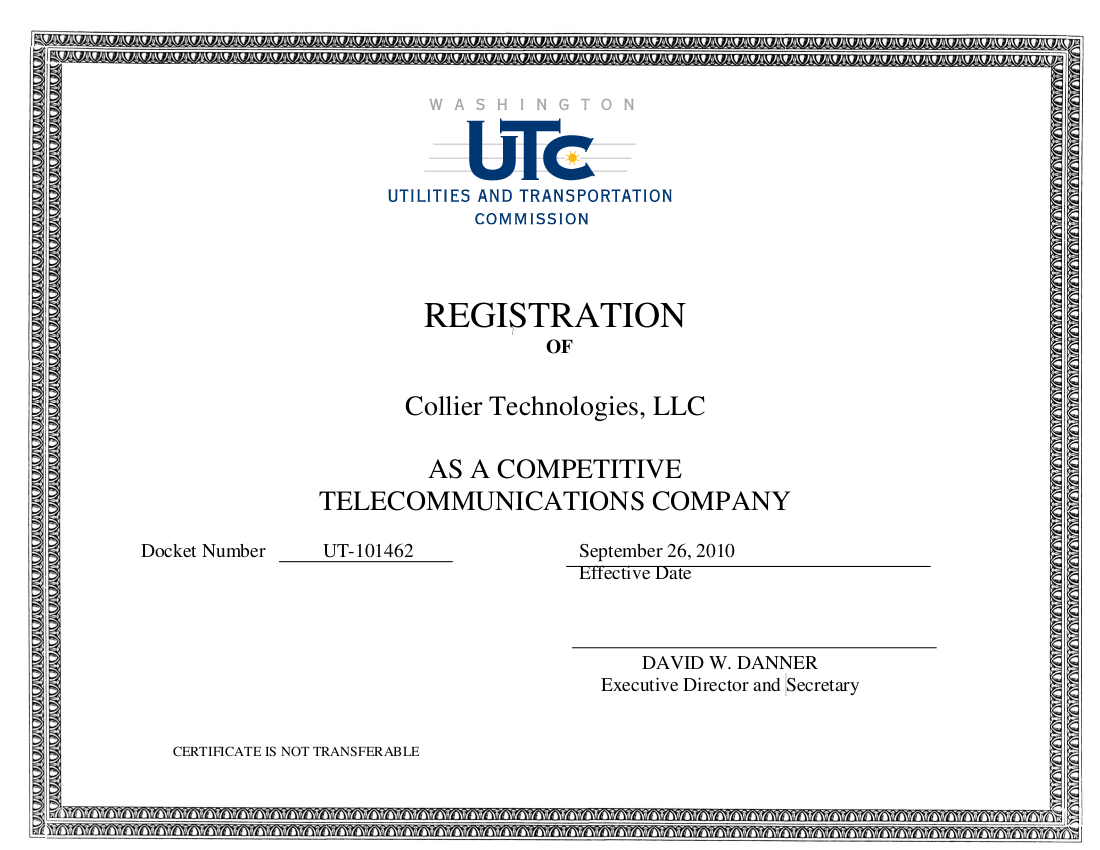
Back in 2010 our family moved to an island in an archipelago in the very top left of the US s continental 48. Before moving, we did some research regarding high speed network access. There are a number of ISPs in the county, and even one headquartered on our particular island. But we found that the location where we were moving was in a location that was only serviced by 1.5Mbit DSL. We had been spoiled in our previous two locations and had seen bittorrent swarms reach over 1 megabyte (8Mbit) per second. Our bill said 12 down and 2 up and I wouldn t be surprised if we achieved that. At any rate, we were disappointed by the speeds available and I wanted to do something to increase the availability of higher speed network access. Some of my friends from the North American Network Operators Group (NANOG) told me that one way to improve the infrastructure would be to get involved with telecommunications provisioning as a Competitive Local Exchange Carrier (CLEC). With the above in mind, I did some research and found that in my state, the authority which certifies and regulates telecommunication companies is the Washington Utilities and Transportation Commission (UTC). I found the application forms on their web site, filled them in, filed the appropriate documents with the appropriate departments and received a certificate in the mail shortly thereafter. We have since filed annual reports as required by regulations. And with the regulatory bits out of the way, we re now left with only the technical details. We have established collocation of some equipment near our state s central telecommunications facility at the Westin Building. Technically speaking, the equipment is not in the Westin, but at a facility connected to the Westin by multiple 10Gbit links. Close enough for me. On this equipment, we re running a Debian Squeeze Xen virtual machine and Digium s Asterisk packages:
cjac@sip0:/etc/asterisk$ grep -B1 -A3 Digium /etc/apt/sources.list
#
#  Digium asterisk packages
#
deb http://packages.asterisk.org/deb squeeze main
deb-src http://packages.asterisk.org/deb squeeze main
cjac@sip0:/etc/asterisk$ dpkg -l   grep digium
ii  asterisk                           1:1.8.11.1-1digium1~squeeze  Open Source Private Branch Exchange (PBX)
ii  asterisk-config                    1:1.8.11.1-1digium1~squeeze  Configuration files for Asterisk
ii  asterisk-core-sounds-en-gsm        1.4.21-1digium1~squeeze      asterisk PBX sound files - English/gsm
ii  asterisk-voicemail                 1:1.8.11.1-1digium1~squeeze  simple voicemail support for the Asterisk PBX
We saved up our nickles and dimes to purchase a 24-port analog telephony adapter (ATA). At the recommendation of one of the denizens of the #asterisk IRC channel on Freenode, we decided on the GrandStream GXW4024. It is pretty simple to configure them to register with the Asterisk server using SIP. The only problem we had was getting the RTP streams, and specifically their dynamically negotiated service ports, to traverse the NATting routers. We currently have no public IPv4 address space at the facility which hosts the ATA and so the rest of the internet sees all traffic originating from this facility as sourced from a single IP address. In order for this to work, the edge NAT/router device (in our case, BIG-IP LTM) needs to map its external L4 ports (TCP and UDP) to the ports of internal hosts so that traffic can flow correctly. This works fine for traffic which originates from internal hosts and is destined to hosts on the outside, but does not work so well when hosts on the outside wish to establish connections to hosts on the inside. Call management sessions established with the SIP protocol fall in the former category, but call media (voice, video, txt) sessions established with the RTP protocol fall into the latter; the host and port used to carry the media data are negotiated during the SIP session and the media socket is established out of band. The problem occurs when the call server (on the outside) attempts to establish an RTP stream with the caller (on the inside). The call server attempts to connect to the caller using the IP address from which it connected. The problem is that this address belongs to the NATting router, not the caller, and the router is not expecting the incoming request. To get around the NAT problem, we temporarily configured an OpenVPN tunnel to extend our L2 network segment. Our long-term solution will be to provision an Asterisk server in the same facility as the ATA and then register with it instead of the server in the exterior facility. Calls will then be switched at the local facility and the upstream link will be established using the IAX2 protocol, which does not suffer from the same NAT problems. All of the above provides us with the ability to make voice calls between the 24 channels of the ATA and any other SIP client which happens to be registered with our call server. This is all well and good, but we want to allow our customers to call the rest of the world. Enter our upstream provider, Threshold Communications, Inc. These folks are experienced and professional and have helped us successfully establish both outbound and inbound calling for very reasonable monthly costs. The call quality is indistinguishable from the lines provisioned by the local bell company, and inter-operates flawlessly with the Asterisk call server stack. Because calls transit our Asterisk server, we can add additional features such voicemail, speech to text, DTMF-driven menus, or call forwarding, for instance. We could even theoretically set up autopatch service using amateur frequencies or launch perl scripts to automate arbitrary fancyness. Our next step is to finish configuration of our 12-channel ZyXEL AAM1212 DSLAM modules so that we can deliver ADSL service over the same copper pairs as we deliver voice.

Alessandro Ghedini: Ecasound 2.9.0 with LV2 support in unstable

A few hours ago I uploaded ecasound 2.9.0, which brings, among other things, support for LV2 plugins and a few new commands for the interactive mode. Enjoy :)

9 June 2012

Erich Schubert: DMOZ dieing

Sometime in the late 1990s I became a DMOZ editor for my local area. At that time, when the internet was a nieche thing and I was still a kid, I was actually operating a web site that had a similar goal as the corresponding category for a non-profit organization.
In the following years, I would occasionally log in, try to review some pages. It was a really scary experience: it was still exactly the same, web 0.5 experience. You had a spreadsheet type of view, tons of buttons, and it would take like 10 page loads to just review a single site. A lot of the time, you would end up search a more appropriate category, copy the URL, replace some URL-encoded special characters, paste it in one out of 30 fields on the form just to move the suggested site to a more appropriate category. Most of the edits would be by bots that detected a dead link and disabled it by moving it to the review stage. While at the same time, every SEO manual said you need to be listed on DMOZ, so people would mass-submit all kinds of stuff to DMOZ in any category that it could in any way fit in.
Then AOL announced DMOZ 2.0. And everybody probably thought: about time to refresh the UI and make everything more usable. But it didn't. First of all, it came late (announced in 2008, actually delivered sometime in 2010), then it was incredibly buggy in the beginning. They re-launched 2.0 at least two times. For quite some time, editors would be unable to login.
When DMOZ 2.0 came, my account was already "inactive", but I was able to get it re-activated. And it still looked the same. I read they changed from Times to Arial, and probably changed some CSS. But other than that, it was still as complicated to edit links as you could make it. So I did just a few changes then lost interest largely again.
During the last year I must have tried to give it another try multiple times. But my account had expired again, and I never got a reply to my reinstatement request.
A year ago finall Google Directory - the most prominent use of DMOZ/ODP data, although the users were totally unaware of it - was discontinued, too.
So by now, DMOZ seems to be as dead as it can get (they don't even bother to answer former contributors that want to get reinstated). The links are old, and if it weren't for bots to disable dead sites, it would probably look like an internet graveyard. But this poses an interesting question: will someone come up with a working "web 2.0 social" idea of the "directory" concept (I'm not talking about Digg and these classic "social bookmarking" dead ducks)? Something that strikes the right balance of on one hand the web page admins (and the SEO gold diggers) being allowed to promote their sites (and keep the data accurate) and at the same time crowd-sourcing the quality control, while also opening the data? To some extend, Facebook and Google+ can do this, but they're largely walled gardens. But they don't have real social quality assurance; money is key there.

Christian Perrier: [Running] Caen "Courants de la Libert " marathon

I'm about to leave today for St-Aubin sur Mer close to the start line of the Courants de la Libert marathon. This race, meant to celebrate the June 6th 1944 D-Day, arrives at Caen, close to the WW2 memorial. We'll spend a night in a hotel in St-Aubin and as of tomorrow 9h French time, I'll be on my way to try breaking my best time (3h4029"). Training has been as expected: no injury, all 32 trainings completed, with many many interval training (and some of them really though!). So, I'm going there with great confidence. The only minor problem are weather conditions as the forcast announces some rain and 20-30km/h wind, from South (which we should be facing from km 20 to 25 and in the last kilometers). I'll have my Runtastic and Endomondo Android apps running, so, in case looking at a blue spot on a French map for over 3 hours sounds interesting, you can go there or there (and send cheers, etc...but I'll switch off my phone's loudspeaker to avoid looking silly during the race!). See you tomorrow for the outcome!

8 June 2012

Lars Wirzenius: Obnam 1.0 (backup software); a story in many words

tl;dr: Version 1.0 of Obnam, my snapshotting, de-duplicating, encrypting backup program is released. See the end of this announcement for the details. Where we see the hero in his formative years; parental influence From the very beginning, my computing life has involved backups. In 1984, when I was 14, my father was an independent telecommunications consultant, which meant he needed a personal computer for writing reports. He bought a Luxor ABC-802, a Swedish computer with a Z80 microprocessor and two floppy drives. My father also taught me how to use it. When I needed to save files, he gave me not one, but two floppies, and explained that I should store my files one one, and then copy them to the other one every now and then. Later on, over the years, I've made backups from a hard disk (30 megabytes!) to a stack of floppies, to a tape drive installed into a floppy interface (400 megabytes!), to a DAT drive, and various other media. It was always a bit tedious. The start of the quest; lengthy justification for NIH In 2004, I decided to do a full backup, by burning a copy of all my files onto CD-R disks. It took me most of the day. Afterwards, I sat admiring the large stack of disks, and realized that I would not ever do that again. I'm too lazy for that. That I had done it once was an aberration in the space-time continuum. Switching to DVD-Rs instead CD-Rs would reduce to the number of disks to burn, but not enough: it would still take a stack of them. I needed something much better. I had a little experience with tape drives, and that was enough to convince me that I didn't want them. Tape drives are expensive hardware, and the tapes also cost money. If the drive goes bad, you have to get a compatible one, or all your backups are toast. The price per gigabyte was coming down fast for hard drives, and it was clear that they were about to be very competitive with tapes for price. I looked for backup programs that I could use for disk based backups. rsync, of course, was the obvious choice, but there were others. I ended up doing what many geeks do: I wrote my own wrapper around rsync. There's hundred, possibly thousands, of such wrappers around the Internet. I also got the idea that doing a startup to provide online backup space would be a really cool thing. However, I didn't really do anything about that until 2007. More on that later. The rsync wrapper script I wrote used hardlinked directory trees to provide a backup history, though not in the smart way that backuppc does it. The hardlinks were wonderful, because they were cheap, and provided de-duplication. They were also quite cumbersome, when I needed to move my backups to a new disk the first time. It turned out that a lot of tools deal very badly with directory trees with large numbers of hardlinks. I also decided I wanted encrypted backups. This led me to find duplicity, which is a nice program that does encrypted backups, but I had issues with some of its limitations. To fix those limitations, I would have had to re-design and possibly re-implement the entire program. The biggest limitation was that it treated backups as full backup, plus a sequence of incremental backups, which were deltas against the previous backup. Delta based incrementals make sense for tape drives. You run a full backup once, then incremental deltas for every day. When enough time has passed since the full backup, you do a new full backup, and then future incrementals are based on that. Repeat forever. I decided that this makes no sense for disk based backups. If I already have backed up a file, there's no point in making me backup it again, since it's already there on the same hard disk. It makes even less sense for online backups, since doing a new full backup would require me to transmit all the data all over again, even though it's already on the server. The first battle I could not find a program that did what I wanted to do, and like every good NIHolic, I started writing my own. After various aborted attempts, I started for real in 2006. Here is the first commit message:
revno: 1
committer: Lars Wirzenius <liw@iki.fi>
branch nick: wibbr
timestamp: Wed 2006-09-06 18:35:52 +0300
message:
  Initial commit.
wibbr was the placeholder name for Obnam until we came up with something better. We was myself and Richard Braakman, who was going to be doing the backup startup with me. We eventually founded the company near the end of 2006, and started doing business in 2007. However, we did not do very much business, and ran out of money in September 2007. We ended the backup startup experiment. That's when I took a job with Canonical, and Obnam became a hobby project of mine: I still wanted a good backup tool. In September 2007, Obnam was working, but it was not very good. For example, it was quite slow and wasteful of backup space. That version of Obnam used deltas, based on the rsync algorithm, to backup only changes. It did not require the user to do full and incremental backups manually, but essentially created an endless sequence of incrementals. It was possible to remove any generation, and Obnam would manage the deltas as necessary, keeping the ones needed for the remaining generations, and removing the rest. Obnam made it look as if each generation was independent of each other. The wasteful part was the way in which metadata about files was stored: each generation stored the full list of filenames and their permissions and other inode fields. This turned out to be bigger than my daily delta. The lost years; getting lost in the forest For the next two years, I did a little work on Obnam, but I did not make progress very fast. I changed the way metadata was stored, for example, but I picked another bad way of doing it: the new way was essentially building a tree of directory and file nodes, and any unchanged subtrees were shared between generations. This reduced the space overhead per generation, but made it quite slow to look up the metadata for any one file. The final battle; finding cows in the forest In 2009 I decided to leave Canonical and after that, my Obnam hobby picked up in speed again. Below is a table of the number of commits per year, from the very first commit (bzr log -n0 awk '/timestamp:/ print $3 ' sed 's/-.*//' uniq -c awk ' print $2, $1 ' tac):
2006 466
2007 353
2008 402
2009 467
2010 616
2011 790
2012 282
During most of 2010 and 2011 I was unemployed, and happily hacking Obnam, while moving to another country twice. I don't recommend that as a way to hack on hobby projects, but it worked for me. After Canonical, I decided to tackle the way Obnam stores data from a new angle. Richard told me about the copy-on-write (or COW) B-trees that btrfs uses, originally designed by Ohad Rodeh (see his paper for details), and I started reading about that. It turned out that they're pretty ideal for backups: each B-tree stores data about one generation. To start a new generation, you clone the previous generation's B-tree, and make any modifications you need. I implemented the B-tree library myself, in Python. I wanted something that was flexible about how and where I stored data, which the btrfs implementation did not seem to give me. (Also, I worship at the altar of NIH.) With the B-trees, doing file deltas from the previous generation no longer made any sense. I realized that it was, in any case, a better idea to store file data in chunks, and re-use chunks in different generations as needed. This makes it much easier to manage changes to files: with deltas, you need to keep a long chain of deltas and apply many deltas to reconstruct a particular version. With lists of chunks, you just get the chunks you need. The spin-off franchise; lost in a maze of dependencies, all alike In the process of developing Obnam, I have split off a number of helper programs and libraries: I have found it convenient to keep these split off, since I've been able to use them in other projects as well. However, it turns out that those installing Obnam don't like this: it would probably make sense to have a fat release with Obnam and all dependencies, but I haven't bothered to do that yet. The blurb; readers advised about blatant marketing The strong points of Obnam are, I think: Backups may be stored on local hard disks (e.g., USB drives), any locally mounted network file shares (NFS, SMB, almost anything with remotely Posix-like semantics), or on any SFTP server you have access to. What's not so strong is backing up online over SFTP, particularly with long round trip times to the server, or many small files to back up. That performance is Obnam's weakest part. I hope to fix that in the future, but I don't want to delay 1.0 for it. The big news; readers sighing in relief I am now ready to release version 1.0 of Obnam. Finally. It's been a long project, much longer than I expected, and much longer than was really sensible. However, it's ready now. It's not bug free, and it's not as fast as I would like, but it's time to declare it ready for general use. If nothing else, this will get more people to use it, and they'll find the remaining problems faster than I can do on my own. I have packaged Obnam for Debian, and it is in unstable, and will hopefully get into wheezy before the Debian freeze. I provide packages built for squeeze on my own repository, see the download page. The changes in the 1.0 release compared to the previous one: The future; not including winning lottery numbers I expect to get a flurry of bug reports in the near future as new people try Obnam. It will take a bit of effort dealing with that. Help is, of course, welcome! After that, I expect to be mainly working on Obnam performance for the foreseeable future. There may also be a FUSE filesystem interface for restoring from backups, and a continous backup version of Obnam. Plus other features, too. I make no promises about how fast new features and optimizations will happen: Obnam is a hobby project for me, and I work on it only in my free time. Also, I have a bunch of things that are on hold until I get Obnam into shape, and I may decide to do one of those things before the next big Obnam push. Where; the trail of an errant hacker I've developed Obnam in a number of physical locations, and I thought it might be interesting to list them: Espoo, Helsinki, Vantaa, Kotka, Raahe, Oulu, Tampere, Cambridge, Boston, Plymouth, London, Los Angeles, Auckland, Wellington, Christchurch, Portland, New York, Edinburgh, Manchester, San Giorgio di Piano. I've also hacked on Obnam in trains, on planes, and once on a ship, but only for a few minutes on the ship before I got seasick. Thank you; sincerely SEE ALSO

7 June 2012

Philipp Kern: Adding zFCP drives on Debian GNU/Linux

If you want to add System z zFCP drives to a Debian GNU/Linux system, you first need to make the HBA known to the system. For this you add an (initially empty) file with the (lowercase) device ID of the zFCP HBA to /etc/sysconfig/hardware. There should already be files for the ECKD/FBA disks and the network adapters.

Then you need to list the drives to initialize by placing the following array in it with a list of WWPN:LUN, seperated by spaces within the parentheses:

ZFCP_DEVICES=(0x1234567890abcdef:0x4000400000000000)

Please keep in mind that the WWPN and LUN need to be specified in hex and again entirely in lower case. This will cause hwup ccw 0.0.4000 (with 4000 being the CHPID) to instruct the HBA to add the drive after setting it online. Then you should regenerate your initrd, so that it happens on-boot, by running update-initramfs -u -k all.

With current kernels the available WWPNs should be probed and listed in /sys/bus/ccw/devices/0.0.4000 without further intervention after the HBA is initialized.

Sadly there's no way to set up a zFCP disk in debian-installer.

6 June 2012

Lars Wirzenius: GTD for hackers talk

While on a recent trip to Italy, I gave a talk two times about Getting Things Done for Hackers. I made a few slides, which I've made public in case anyone's interested, but, really, the website is a better replacement for slides.

Tim Retout: NMUs on the go

Today, as an experiment, I attempted to fix a Debian bug while on the train to work. I use a 3G card from Three.co.uk in my Lenovo Thinkpad x121e, and my commute is from Southampton Central to Fleet (changing at Winchester) - just under an hour. 3G coverage is not 100%, but tends to be better around the major stops. Thoughts: firstly, part of me is amazed that this is possible. Secondly, there could be a case for a local Debian mirror on my laptop. Otherwise, an interesting experimental extension to UDD would be "Required bandwidth" - the sum of the recursive build-dependencies plus the upload size of the diff/binaries.

5 June 2012

Axel Beckert: Finding similar but not identical files

There are quite some tools to find duplicate files in Debian and depending on the task I use either hardlink (see this blog posting), fdupes (if I need output with all identical files on one line; see example below), or duff (if it has to be performant). But for code deduplication in historically grown code you sometimes need a tool which does not only find identical files, but also those which just differ in a few blanks or blank lines. I found two tools in Debian which can give you some kind of percentage of similarity: simhash (which is btw. orphaned; upstream homepage) and similarity-tester (upstream homepage). simhash has the shorter name and hecne sounds more usable on the command-line. But it seems only be able to compare two files at once and also only after first computing and writing down its similarity hash to a file. Not really usable for those one-liner cases on the command-line. similarity-tester has the longer name (and one which made me suspect that it may be a GUI tool), but provides what I was looking for:
$ find . -type f   sim_text -ipTt 75
This lists all files in the current directory which have at 75% ( -t 75 ) in common with another file in the list of files. The option -i causes sim_text to read the files to compare from standard input; -p causes sim_text to just output the similarity percentage; and -T suppresses the per-file list of found tokens. I used similarity-tester s sim_text tool to compare natural langauge as most of the files, I had to test, are shell scripts. But similarity-tester also provides tools to test the similarity of code in specific programming languages, namely C, Java, Pascal, Modula-2, Lisp and Miranda. Example output from the xen-tools project (after I already did a lot of code deduplication):
./intrepid/30-disable-gettys consists for 100 % of ./edgy/30-disable-gettys material
./edgy/30-disable-gettys consists for 100 % of ./intrepid/30-disable-gettys material
./common/90-make-fstab-rpm consists for 98 % of ./centos-5/90-make-fstab material
./centos-5/90-make-fstab consists for 98 % of ./common/90-make-fstab-rpm material
./gentoo/55-create-dev consists for 91 % of ./dapper/55-create-dev material
./dapper/55-create-dev consists for 90 % of ./gentoo/55-create-dev material
./gentoo/55-create-dev consists for 88 % of ./common/55-create-dev material
./common/90-make-fstab-deb consists for 87 % of ./common/90-make-fstab-rpm material
./common/90-make-fstab-rpm consists for 85 % of ./common/90-make-fstab-deb material
./common/30-disable-gettys consists for 81 % of ./karmic/30-disable-gettys material
./intrepid/80-install-kernel consists for 78 % of ./edgy/80-install-kernel material
./edgy/30-disable-gettys consists for 76 % of ./karmic/30-disable-gettys material
./karmic/30-disable-gettys consists for 76 % of ./edgy/30-disable-gettys material
./common/50-setup-hostname-rpm consists for 76 % of ./gentoo/50-setup-hostname material
Depending on the length of possible filenames and amount of files this can be made more readable using the column utility from the bsdmainutils package and reversed by using tac from the coreutils package:
$ find . -type f   sim_text -ipTt 75   tac   column -t
./common/50-setup-hostname-rpm  consists  for  76   %  of  ./gentoo/50-setup-hostname    material
./karmic/30-disable-gettys      consists  for  76   %  of  ./edgy/30-disable-gettys      material
./edgy/30-disable-gettys        consists  for  76   %  of  ./karmic/30-disable-gettys    material
./intrepid/80-install-kernel    consists  for  78   %  of  ./edgy/80-install-kernel      material
./common/30-disable-gettys      consists  for  81   %  of  ./karmic/30-disable-gettys    material
./common/90-make-fstab-rpm      consists  for  85   %  of  ./common/90-make-fstab-deb    material
./common/90-make-fstab-deb      consists  for  87   %  of  ./common/90-make-fstab-rpm    material
./gentoo/55-create-dev          consists  for  88   %  of  ./common/55-create-dev        material
./dapper/55-create-dev          consists  for  90   %  of  ./gentoo/55-create-dev        material
./gentoo/55-create-dev          consists  for  91   %  of  ./dapper/55-create-dev        material
./centos-5/90-make-fstab        consists  for  98   %  of  ./common/90-make-fstab-rpm    material
./common/90-make-fstab-rpm      consists  for  98   %  of  ./centos-5/90-make-fstab      material
./edgy/30-disable-gettys        consists  for  100  %  of  ./intrepid/30-disable-gettys  material
./intrepid/30-disable-gettys    consists  for  100  %  of  ./edgy/30-disable-gettys      material
Compared to that, fdupes only finds the two 100% identical files:
$ fdupes -r1 . 
./intrepid/30-disable-gettys ./edgy/30-disable-gettys 
But fdupes helped me already a lot to find the first bunch of identical files in xen-tools. :-)

Lars Wirzenius: errno lookups on the command line

I've had a little command line tool called errno for many years now. It's a short Python script, and lets me look up Unix errno names and values given values or names.
$ errno 2
ENOENT 2 No such file or directory
$ errno EEXIST
EEXIST 17 File exists
$
This is occasionally very useful when reading logs from various programs. I thought it might be useful for others as well, so I decided to rewrite it in C so I can offer it to become part of moreutils. It is now in the master branch of moreutils. Today I added a couple of options: --list lists all the errno values, and --search does a full text (case insensitive) search of all descriptions. I also added a script that lets you do the search in all installed locales. (These changes are waiting for Joey to merge them. Meanwhile, they're at gitorious.)
$ errno-all onnistu   sort -u
EDEADLOCK 0 Onnistui
ENOMEM 12 Muistin varaaminen ei onnistu
ENOTSUP 0 Onnistui
EWOULDBLOCK 0 Onnistui
$ 
(That's Finnish.) Hopefully others will find this useful as well.

4 June 2012

Steve McIntyre: Linaro Connect in Hong Kong, 2012: Ruby bug squashed!

Connect logoSometimes conferences can be dull and boring, but sometimes they can be just awesome in terms of finding the right people to collaborate with. Linaro Connect in Hong Kong last week was definitely one of the great ones! I chaired my my usual sessions (armhf status and cross-distro ARM) and we had some lively discussion in both. We're probably just about done with the armhf sessions, as most distros have accepted a hard-float ARMv7 port now and there's not so much specific work left there now that future sessions will be necessary. The cross-distro work for ARM ports is likely to continue into the future, but we're going to be concentrating on bootstrapping work for ARMv8 soon. Talking v8, there were a lot of meetings discussing the various work topics for this new 64-bit ARM architecture: kernel, toolchains, bootstrapping etc. More to come on that soon! On top of all this useful discussion and planning, we also found time during the week for some hacking. This was the highlight of the week for me, as I found some expert help to solve my long-standing Ruby on ARM bug (Debian bug #652674, ruby1.9.1: FTBFS on armhf: test suite segfaults). Ulrich Weigand (an IBM toolchain wizard seconded into the Linaro team) sat with me for a couple of hours while we worked through reproducing the problem, only to find that he could not reproduce it! The crash had looked very much like a pthreads locking bug, which was scaring me. After some digging, we worked out where the problem was, and how it was now fixed. For a long time on ARM, the Linux getcontext/setcontext system calls have never been implemented; apparently nobody really missed them, so they have never been a priority. In Ruby 1.9.x, the implementation of the new "fiber" primitive wanted to use getcontext/setcontext to control stack state etc. in different threads of control. In cases where they are not available or known not to work well, Ruby has fallback code to implement similar functionality. It seems that fallback code is buggy. Maybe it was correct at some point and has bit-rotted due to not being exercised, or maybe it was buggy as written, but it clearly does not work correctly for us now. In the last few months, getcontext/setcontext have finally been implemented for ARM in glibc trunk (by Michael Hope, also in the Linaro toolchain team!) and backported into current Debian and Ubuntu eglibc versions. Re-running configure and rebuilding Ruby against the most recent code in both Sid and Precise fixed the test suite crash we were seeing earlier. Yay! We could also provoke the bug again at will by quickly hacking around the Ruby source to force it to switch back to the fallback code, thereby verifying the fix. Why does this matter? As we're expecting ARM servers to enter the market soon, web apps written in Ruby on Rails are going to be an important part of the software stack that customers will want to run. Broken fibers and threading would not help here! It's great to meet up and work with talented folks like this; Linaro Connect is an excellent event for getting stuff done!

Steve McIntyre: Visiting my grandfather in Hong Kong

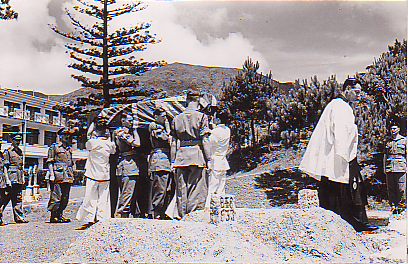
I never met my father's father, as he died many years before I was born. He was a soldier in the British Army and was killed in an accident in Burma in the 1950s. I'm told that back then the Army did not repatriate casualties as a matter of course like they do today, so none of the family got to see his funeral or even visit the grave. Like many of the military casualties in the Far East, he was buried in the Colonial Cemetery in Hong Kong. A few photographs were sent to my grandmother of the ceremony and the headstone, but that's all we ever saw.

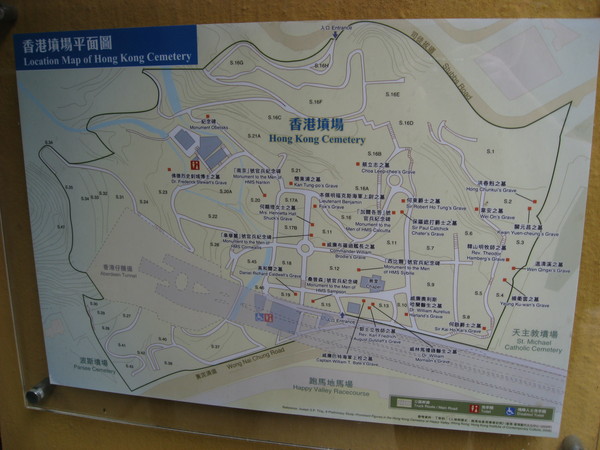
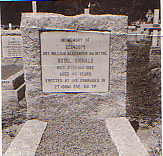
telegramfuneral Fast forward to 2012. I travelled to Hong Kong for a conference (Linaro Connect, more about that later...). I looked up the details of where grandad was laid to rest, and found a major coincidence. He was killed on 27th May 1952, almost exactly 60 years ago! I resolved to go to find him on 27th May 2012 to make the most of this lucky anniversary. Wikipedia told me that in the intervening years the Colonial Cemetery had been renamed to Happy Valley Cemetery, then simply Hong Kong Cemetery, and repurposed from military to civilian use. Jo and I bought some flowers and headed over to Happy Valley on Hong Kong Island on Sunday afternoon. We found a very large cemetery with a helpful map posted to show the different sections, but nothing to tell us where we should be looking. One of the attendants at the office on site looked at the details we had and shrugged to say "sorry, can't help". Ah well, nobody said this was going to be very easy... What we found after a few minutes was that the graves weren't laid out in any obviously logical fashion. In any given small area, you'd find people buried from roughly the same period, but people for any given period could (and would) be scattered across multiple sections at all corners of the site. Great, time for an exhaustive search then. I started combing the site, checking all the markers I could find that looked anything like the tiny grainy black and white photo we had of grandad's headstone.

cemeteryheadstone Almost two hours later, I eventually found him. Two hours of heavy work: the cemetery is built on the side of quite a steep hill, and the prevailing weather was very hot with 100% humidity. But, I forgot all that as we eventually stumbled across the correct grave in (no exaggeration!) the very last part of the last section of the site, 20a.
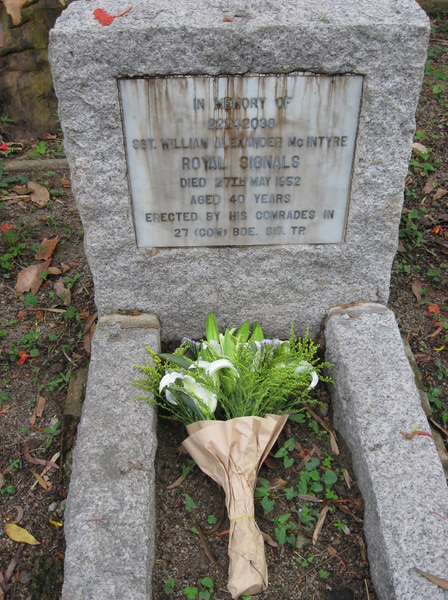
grave I was relieved at this point: as things had taken so long, I had started to worry that maybe the grave had been moved or the headstone damaged and lost. But no, I found the man who had gone off to war leaving my dad and aunt as small children. We took some photos and took note of where we had found the final resting place of Sergeant William Alexander McIntyre of the Royal Signals, a man I never met in life but clearly a very important member of our family.

Niels Thykier: Parsing bash/shell

I have been avoiding #629247 for quite a while. Not because I think we couldn t use a better shell parser, but because I dreaded having to write the parser. Of course, #629247 blocks about 16 bugs and that number will only increase, so someone has to solve it eventually Unfortunately, that someone is likely to be me . So I managed to scrabble down the following Perl snippet. It does a decent job at getting lines split into words (which may or may not contain spaces, newlines, quotes etc.). It currently tokenizes the <<EOF -constructs (heredocs?). Also it does not allow one to distinguish between EOF and EOF (the former ends the heredoc, the latter doesn t.). Other defects includes that it does not tokenize all operators (like >& ). Probably all I need is a list of them and all the special cases (Example: >& can optionally take numbers on both sides, like >&2 or 2>&1 ). It does not always appear to terminate (I think EOF + unclosed quote triggers this). If you try it out and notice something funny, please let me know. You can also find an older version of it in the bug #629247 and the output it produced at that time (that version used instead of as token marker).
#!/usr/bin/perl
use strict;
use warnings;
use Text::ParseWords qw(quotewords);
my $opregex;
 
  my $tmp = join( " ", map   quotemeta $_   qw (&&     ; ));
  # Match & but not >& or <&
  # - Actually, it should eventually match those, but not right now.
  $tmp .= ' (?<![\>\<])\&';
  $opregex = qr/$tmp/ox;
 
my @tokens = ();
my $lno;
while (my $line = <>)  
  chomp $line;
  next if $line =~ m/^\s*(?:\# $)/;
  $lno = $. unless defined $lno;
  while ($line =~ s,\\$,,)  
  $line .= "\n" . <>;
  chomp $line;
   
  $line =~ s/^\s++//;
  $line =~ s/\s++$//;
  # Ignore empty lines (again, via "$empty \ $empty"-constructs)
  next if $line =~ m/^\s*(?:\# $)/;
  my @it = quotewords ($opregex, 'delimiters', $line);
  if (!@it)  
  # This happens if the line has unbalanced quotes, so pop another
  # line and redo the loop.
  $line .= "\n" . <>;
  redo;
   
  foreach my $orig (@it)  
  my @l;
  $orig =~ s,",\\\\",g;
  @l = quotewords (qr/\s++/, 1, $orig);
  pop @l unless defined $l[-1] && $l[-1] ne '';
  shift @l if $l[0] eq '';
  push @tokens, map   s,\\\\",",g; $_   @l;
   
  print "Line $lno: -" . join ("- -", map   s/\n/\\n/g; $_   @tokens ) . "-\n";
  @tokens = ();
  $lno = undef;
 
Here is a little example script and the tokenization of that script (no, the example script is not supposed to be useful).
$ cat test
#!/bin/sh
for p in *; do
    if [ -d "$p" ];then continue;elif
    [ -f "$p" ]
    then echo "$p is a file";fi
done
$ ./test.pl test
Line 3: -for- -p- -in- -*- -;- -do-
Line 4: -if- -[- --d- -"$p"- -]- -;- -then- -continue- -;- -elif-
Line 5: -[- --f- -"$p"- -]-
Line 6: -then- -echo- -"$p is a file"- -;- -fi-
Line 7: -done-

3 June 2012

Micha Lenk: AB-Transfers 0.0.3.0 in Debian

I just uploaded the online banking application AB-Transfers to Debian. This is not a finance management application like Gnucash or KMyMoney (i.e. it is not able to keep track of your incomes and expenses). Instead it is mainly intended as a companion that you can use for online transactions that these applications don't support yet. If you were using QBankmanager in the past for this purpose, please take a look at AB-Transfers and consider switching to it. As QBankmanager seems to be abandoned by the upstream author, I consider AB-Transfers the better choice for a pure online transaction application.

Sandro Tosi: How to migrate your entire Google account to a new one

I've been using a Google account since years, but having a "more serious" one along. The time has come to make the switch and elect the other as main one.

Google has a lot of services, and I'm using several of them, so changing the main account requires to migrate data of those services to the new account, given it's not possible to merge two accounts. To know the full list of services your account is signed in, go to your Account Product page. Some migrations are easy, others hell no: so I'm writing this post to keep track of the migration as it's going on.

First of all, there's a really good post about this migration at LifeHacker: it contains a lot of info I'm using here, but not all the services I need. Additionally, Google has a list of services and methods to migrate from one account to another.

Just to be generic, I'll call AccountSRC the original account and AccountDST the one I want to migrate to.

Migrate GMail

GMail is probably the most important service I have, and also the most difficult one to migrate. I have a lot of filters, so the first step is to migrate them:
  1. Login into GMail for AccountSRC
  2. Gear icon > Settings > Labs
  3. Enable the "Filter import/export" plugin
  4. Reload GMail to enable the plugin (if not done automatically)
  5. Gear icon > Settings > Filters
  6. At the bottom of the page, Select all
  7. Export: this will download an XML file with the filters in it
  8. Login into GMail for AccountDST
  9. Enable "Filter import/export" plugin
  10. Load the file containing the saved filters
  11. Import all (or select which one) filters; this will also create automatically the labels defined in the filters.
I currently have a forward rule from AccountDST to AccountSRC: so let's revert the forward direction: from AccountSRC to AccountDST. This will allow the new account to receive the mails sent to the old one.
  1. Login into GMail for AccountDST
  2. Gear icon > Forwarding and POP/IMAP > Disable forwarding: this will stop redirecting mails from AccountDST to AccountSRC
  3. Login into GMail for AccountSRC
  4. Gear icon > Forwarding and POP/IMAP > add a forwarding address
  5. Enter AccountDST as the address to forward mails to
  6. A verification code is sent to AccountDST and you'll need to enter that code in AccountSRC to verify you have access to both mailboxes
  7. Once verified, select "Forward a copy of incoming mail to" to AccountDST and to delete the GMail copy on AccountSRC
There's no automatic way to migrate all your settings from the old GMail account to the new one, so you'll have to comparing settings pages to set what you had before to AccountDST. I suggest to first enable the labs you have on AccountSRC, and then go thru every page and report the configurations.

Did I forget something? yes, the hardest part: migrate mails! There are a lot of guides about migrating mails, the way I prefer is thru IMAP and Thunderbird (as described here): you'll move IMAP folders, and since they are equivalent to GMail labels, you'll automatically get your email with the correct labels (yes, the same mail appears in several folders, one for each label, and moving an email from one folder will not remove it from all the others).
  1. Enable IMAP access on both AccountSRC and AccountDST
  2. Open Thunderbird (or Icedove if you're on Debian like me) and register both accounts
  3. You can now start moving folders/emails from AccountSRC to AccountDST
    1. Copying a (missing) folder, will automatically create a label with the same name
    2. Moving a mail from the same folders on the two accounts will add the label called with the name of the folder to that email
  4. Be ready, it's a LOOOOONG process, but it's safe and it guarantees a perfect result
With the method above you have all the labels you had before, but not the label colors (and I have a lot :( ).

Another tool that's would be interesting to evaluate for this task is Gmvault.


Migrate Contacts

Contacts are available inside GMail:
  1. Login into GMail for AccountSRC
  2. On the combobox on top-left, select Contacts
  3. More > Export
  4. Export all the contacts in Google CSV, since it's specific to be re-imported
  5. Login into GMail for AccountDST
  6. Contacts > More > Import
  7. Select the previously saved file and import it

Migrate Reader

Migrating Reader subscriptions is easy:
  1. Login into Reader for AccountSRC
  2. Reader Settings -> Import/export
  3. Export your subscriptions in OPML format
  4. Now login into Reader for AccountDST
  5. Reader Settings -> Import/export
  6. And import the saved OPML file
Sadly, that doesn't migrate your starred items, but there's a (long & manual) solution here.


Migrate Blogger

Login to Blogger for AccountSRC; then, for each blog you have there do this dance:
  1. Select the blog
  2. Go into Settings > Permissions
  3. Add AccountDST as a new author: this will send an email to AccountDST GMail account
  4. Accept the invitation (this will ask you to create a new Blogger account for AccountDST if you don't already have one)
  5. Go back to to Blogger with AccountSRC
  6. Blog > Settings > Permissions
  7. Grand admin rights to AccountDST
At this point, both AccountSRC and AccountDST have admin rights; you can leave it as it is, or remove AccountSRC and so only AccountDST will be the admin (other shares should be kept unchanged). The same procedure is described in this Google support answer.

What can't be migrated as easily are all the profile settings you've done on AccountSRC. So profile information, blogs followed and so on have to be migrated by hand: boring but they are just few things, doable in a bunch of minutes.


Migrate Android phone

Android phones require a primary Google account to work, and of course my phone uses AccountSRC. Several sources say the only way to change primary account is to factory reset the phone. But since new market app supports multiple accounts and Android 4.0 (Ice Cream Sandwich) not longer needs a primary account, I just waited for the update to ICS to come.

What you really need to do is to add a new account, AccountDST, to Settings > Account & Sync, and all the Google apps on the phone will be able to use the new account (you might need to select what to sync, and the new account from inside each app).


Migrate Calendar

Even with Calendar the settings will have to be migrated by hand: they are just in one page, so just keep two windows opened and keep switching to sync them. The calendars are easy to move over: for the main calendar:
  1. Login into Calendars for AccountSRC
  2. Go into Settings > Calendars tab
  3. Select export calendars: this will download an archive of your calendars in a zip file; you will need to extract all the ics files from that zip archive so you'll have the main calendar readily available
  4. Login into Calendars for AccountDST
  5. Settings > Calendars tab
  6. Import the main calendar
for the other calendars you can do this way:
  1. Login into Calendars for AccountSRC
  2. Settings > Calendars tab
  3. Share the calendar with AccountDST and give it "Make changes AND manage sharing" right - the new account will have full control over that calendar

Migrate Docs

The procedure to migrate documents in Google Docs (now Google Drive) is described here, and it boils down to:
  1. Login into Docs for AccountSRC
  2. Select all the documents
  3. Share them with AccountDST
  4. In the same window select AccountDST as "is owner"
and you've got all the docs as owned by the new account.


Migrate Groups

There's no way to migrate all your Groups subscriptions from one account to another (if not playing with alternate email address, but it was too risky to try it), so you'll have to migrate all of them by hand.

On the other hand, if you've created some groups, that's possible to move them to the new account:
  1. Login into Groups for AccountSRC
  2. Enter in the "manage" area for the groups you've created
  3. Manage members > Invite members
  4. Invite AccountDST
  5. Accept the invitation, clicking on the email sent to AccountDST account
  6. Go back into AccountSRC manage area
  7. Select the AccountDST account
  8. Edit the subscription and set "Membership type" to "owner": now AccountDST is the owner of the list

Migrate Analytics

The process to migrate the account on Google Analytics is similar to Groups:
  1. Login into Analytics for AccountSRC
  2. Select Admin on top-right, then for each account you have
  3. Select the account, select "Users" tab, click on "+ New User"
  4. Enter AccountDST into the "Email Address" field and give that account the "Administrator" role
  5. Save
  6. Now AccountDST is able to access the same data on Analytics as AccountSRC

Migrate Picasa

To transfer your whole Picasa account follow these steps (as also described in this support post):
  1. Login into Picasa for AccountSRC
  2. Click on the gear on top-right > Photo Settings > Privacy and permissions
  3. On the "Migrate account" line click on "Migrate my photos"
  4. Insert AccountDST into the box for destination address
  5. In case you're using picasa to store blogger photos, also select the tick below
  6. At this point, AccountSRC will receive an email: copy the link in a session where you've logged in as AccountDST and then visit the page: that will start the process
  7. Wait until the transfer is completed: you'll receive an email to AccountDST when it's done

Migrate Google+

I'm not exactly a heavy user of G+ but I have some circles I'd like to move over (also because Reader sharing now works with G+ and it's a feature I user a lot), this is a process to move circles and contacts; as stated there, there's no way to move shared items and stuff (sad!).


Migrate AdSense

It's not possible to migrate the current AdSense account: you have to register a new one. When you do, it's possible that Google notice the new account is for the same person of the first one, and will ask to close the old account on AdSense in favor of the new one.


Migrate Alert

Alerts allows to export the list of alerts you've created but it's not possible to import that list in another Google account, so you'll have to recreate them from scratch (I had just a few so it was a matter of 1 minute or so).


Migrate Zoho Notebook

If you still miss Google Notebook (why big-G you let it die? couldn't you open-sourced it? it was so awesome! anyway...), you probably know that there are two main alternatives to it: Evernote and Zoho Notebook. I decided to go with Zoho (I'm not entirely happy with it, but it's running for now), and given it allows to login with Google account, it was currently using AccountSRC, so I need to migrate that too:
  1. Login into Zoho Notebook for AccountSRC
  2. My Account > Profile > Email address
  3. "Add new email" and add AccountDST, it will send a confirmation email
  4. Then "Make Primary" on AccountDST, so now the new account can login into Zoho notebook with the Google info and have all the notes there.

Migrate Bookmarks

Google provides a guide to migrate Bookmarks from one account to another that basically is:
  1. Login into Bookmarks for AccountSRC
  2. Click on Export bookmarks and it will save an HTML file with the bookmarks in it
  3. Import the file in a browser
  4. Use the Google toolbar to import in into AccountDST
That's kinda ugly way, but it seems to work.


Re-enable Web History

If you used History, then you need to re-enable it on the new account:
  1. Login into History for AccountDST
  2. Click on "Turn Web History on" to enable Web History on the new account
but it seems to be impossible to export/import or migrate the history from one account to another, that's a shame: years and years of stats lost.


Migrate Books

Books doesn't allow to migrate the contents between accounts, so you'll have to do it by hand:
  1. Select one book from AccountSRC, copying its link
  2. Go to AccountDST and navigate to the copied link
  3. Add the book to the right category, as it was before.

Migrate Webmaster Tools

Google released a document that describes how to migrate to another account; it's similar to Analytics and Groups migration.

In addition to that, you might also want to become an owner, that will give full control on the sites.


Did I forget some services? Let me know!

Everyone has a different experience with Google products, so in case you want me to let know how you migrated from one account to another for a product I didn't mentioned, just leave a comment and I'll edit the post (to be as complete as possible).

Johannes Schauer: port bootstrap build-ordering tool report 1

A copy of this post is sent to soc-coordination@lists.alioth.debian.org as well as to debian-bootstrap@lists.mister-muffin.de. Diary May 21 May 22 May 23 May 24 May 25 May 29 May 30 May 31 June 1 June 2 Results I learned a good chunk of ocaml and how to use dose3 and libcudf. I created a gitorious project and a git repository for all the sourcecode.
git clone git://gitorious.org/debian-bootstrap/bootstrap.git
The git as of now contains 30 commits and 1197 lines of ocaml code. So far, 62 emails have been exchanged between me and Pietro and Wookey. I created a mailinglist for this project where all email exchange so far is publicly accessible in the archives. You can also download all of the email exchange in mbox format. Everybody is welcome to join and/or read the list. What seems to be finished: the program that finds the minimal amount of source packages that have to be cross compiled to end up with a minimal build system. What it does is:
  1. get all essential packages
  2. get their runtime dependencies
  3. get build-essential plus runtime dependencies
  4. get all source packages that are necessary to build 1.-3. those are the packages that have to be cross compiled
  5. get a list of all packages that are built by source packages from 4.
  6. add all packages from 1.,2.,3. and 5. plus all arch:all packages to a universe
  7. use Depsolver.trim on that universe to figure out which of those packages are actually installable
The result of 7. will then contain a list of packages that are available automatically on the foreign system due to cross compiled source packages and arch:all packages. For Debian Sid, the output of my program is:
# (1) number of packages with priority:required: 62
# (2) plus, number of dependencies of priority:required packages: 20
# (3) plus, build-essential and dependencies: 31
# number of source packages to build the above: 71
# number of additional packages built from the above source packages: 292
# (4) number of packages of those plus arch:all packages that are installable: 6421
# total number of installable packages (1)+(2)+(3)+(4): 6534
For Ubuntu Natty it is:
# (1) number of packages with priority:required: 96
# (2) plus, number of dependencies of priority:required packages: 7
# (3) plus, build-essential and dependencies: 31
# number of source packages to build the above: 87
# number of additional packages built from the above source packages: 217
# (4) number of packages of those plus arch:all packages that are installable: 2102
# total number of installable packages (1)+(2)+(3)+(4): 2236
So for Debian, 71 source packages definitely have to be made cross compilable while for Natty, the number is 87. The last two days I was toying around with these minimal systems to see how big the number of source packages is, that can be built on top of them without running into dependency cycles. After installing the binary packages that were built, I checked again until no new packages could be built. For Natty, I was only able to find 28 additional packages that can be built on top of the 2236 existing ones. This means that a number of dependency cycles prevent building anything else. In the coming two weeks I will focus on coming up with a tool that cleverly helps the user to identify packages that would be useful to have for building more packages (probably determined by how many packages depend on it - debhelper is an obvious candidate). The tool would then show why that crucial package is not available (in case of debhelper because some of its runtime dependencies are not available and require debhelper to be built) and how the situation can best be resolved. The possible methods to do so are to identify a package that is part of a cycle and either cross compile it or let it have staged build dependencies.

Johannes Schauer: cross-compilable and bootstrappable Debian

When packaging software for Debian, there exist two important assumptions:
  1. Compilation is done natively
  2. Potentially all of Debian is available at compile time
Both assumptions make the life of a package maintainer much easier and they do not create any problem unless you are one of the unlucky few who want to run Debian on an architecture that it does not yet exist for. You will then have to use other distributions like OpenEmbedded or Gentoo which you compiled (or retrieved otherwise) for that new architecture to hack a core of Debian source packages until they build a minimal Debian system that you can chroot into and continue natively building the rest of it. But even if you manage to get that far you will continue to be plagued by cyclic build and runtime dependencies. So you start to hack source packages so that they drop some dependencies and you can break enough cycles to advance step by step. The Debian ports page lists 24 ports of Debian, so despite its unpleasant nature, porting it is something that is not done seldom. The process as laid out above has a number of drawbacks: If Debian would provide a set of core packages that are cross-compilable and which suffice for a minimal foreign build system, and if it would also have enough source packages that provide a reduced build dependency set so that all dependency cycles can be broken, building Debian for a yet unknown architecture could be mostly automated. The benefits would be: With three of this year's GSoC projects, this dream seems to come into reach. There is the "Multiarch Cross-Toolchains" project by Thibaut Girka and mentored by Hector Oron and Marcin Juszkiewicz. Cross-compiling toolchains need packages from the foreign architecture to be installed alongside the native libraries. Cross-compiler packages have been available through the emdebian repositories but always were more of a hack. With multiarch, it is now possible to install packages from multiple architectures at once, so that cross-compilation toolchains can be realized in a proper manner and therefor can also enter the main archives. Besides creating multiarch enabled toolchains, he will also be responsible for making them build on the Debian builld system as cross-architecture dependencies are not yet supported. There is also the "Bootstrappable Debian" project by Patrick "P. J." McDermott and mentored by Wookey and Jonathan Austin. He will make a small set of source packages multiarch cross-compilable (using cross-compilers provided by Thibaut Girka) and add a Build-Depends-StageN header to critical packages so that they can be built with reduced build dependencies for breaking dependency cycles. He will also patch tools as necessary to recognize the new control header. And then there is my project: "Port bootstrap build-ordering tool" (Application). It is mentored by Wookey and Pietro Abate. In contrast to the other two, my output will be more on the meta-level as I will not modify any actual Debian package or patch Debian tools with more functionality. Instead the goal of this project is threefold:
  1. find the minimal set of source packages that have to be cross compiled
  2. help the user to find packages that are good candidates for breaking build dependency cycles through added staged build dependencies or by making them cross-compilable
  3. develop a tool that takes the information about packages that can be cross compiled or have staged build dependencies to output an ordering with which packages must be built to go from nothing to a full archive
More on that project in my follow-up post.

Jordi Mallach: GNOME 3.4 in wheezy

Users of Debian sid will have noticed: the final (and interesting) bits of GNOME 3.4 have landed and if all looks as good as it does now, they should migrate to wheezy in about a week. 3.2 3.4 hasn't been as complicated as the previous horrible transition, but still had some complications due to Cogl/Clutter incompatibilities. Other than that, our major problem has been manpower, but this isn't new for many other Debian teams. We've also seen new incarnations of Linux-only technology is now mandatory which makes our lives a bit more miserable due to kfreebsd-* and hurd-i386, but for now we've still been able to dodge it. It seems wheezy+1 will be fun in that regard though, and we might need to take drastic approaches. If all goes well and the current lot (GNOME Shell, Control Center, Settings daemon, Mutter...) transitions without additional problems, we should be wrapping up our transitions for wheezy with Evolution and friends (currently sitting in experimental), and hopefully GDM 3.4. As we get many questions regarding the status of GDM in Debian, let's add a short note on this. Packaging GDM, at least in its current upstream form, is not a matter of unpacking a new tarball and editing debian/changelog. When Joss works on a new major version, the amount of tweaking to break away from stuff that works on other distros but is not so simple in Debian is outstanding (see, for example, the current unfinished work for GDM 3.2 in our SVN repo). In our case, to handle our GDM defaults, we even need changes to the underlying configuration system, dconf. This evidently takes some effort to do, and unfortunately our GDM expert has had little time for Debian lately, but we're confident we'll end up with a GDM in wheezy that is on par with Debian standards. We are, as always, reachable at #debian-gnome in the OFTC IRC network. Have fun!
Next.

Previous.