Search Results: "tach"

1 December 2015

Raphaël Hertzog: My Free Software Activities in November 2015

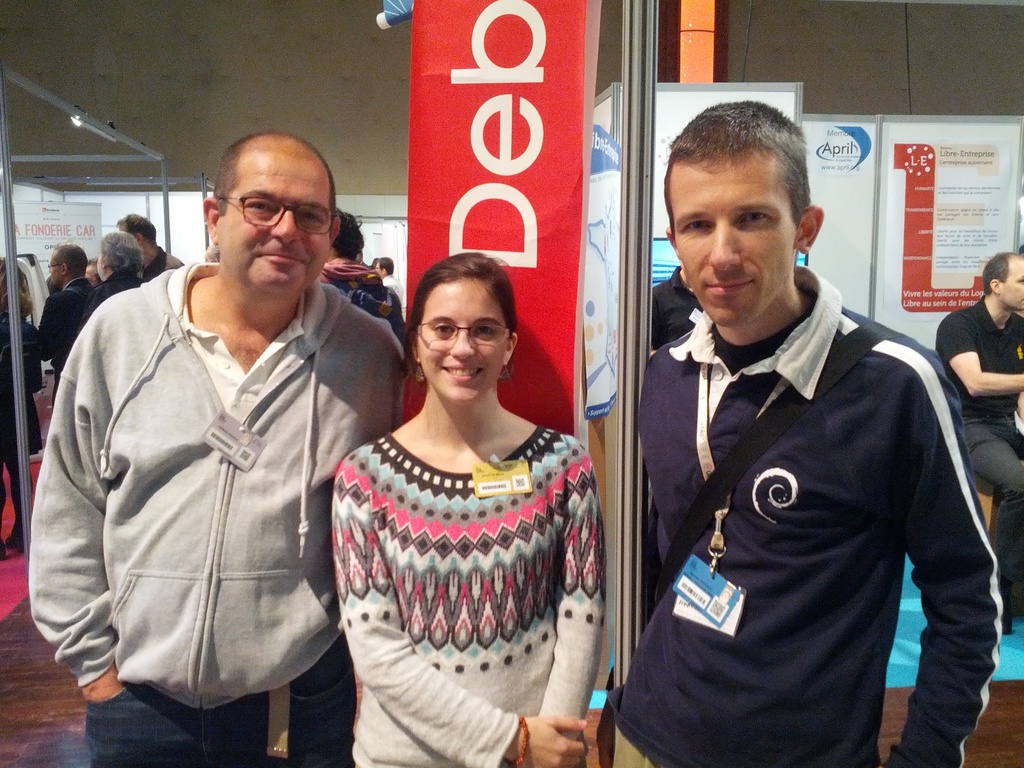
My monthly report covers a large part of what I have been doing in the free software world. I write it for my donators (thanks to them!) but also for the wider Debian community because it can give ideas to newcomers and it s one of the best ways to find volunteers to work with me on projects that matter to me. Debian LTS This month I have been paid to work 21.25 hours on Debian LTS. During this time I worked on the following things: The Debian Administrator s Handbook Now that the English version has been finalized for Debian 8 Jessie (I uploaded the package to Debian Unstable), I concentrated my efforts on the French version. The book has been fully translated and we re now finalizing the print version that Eyrolles will again edit. Paris Open Source Summit On November 18th and 19th, I was in Paris for the Paris Open Source Summit. I helped to hold a booth for Debian France during two days (with the help of Fran ois-R gis and several others).
Fran ois Vuillemin, Juliette Belin and Rapha l HertzogFran ois-R gis Vuillemin, Juliette Belin and Rapha l Hertzog
On the booth, we had the visit of Juliette Belin who created the theme and the artwork of Debian 8 Jessie. We lacked goodies but we organized a lottery to win 12 copies of my French book. Debian packaging work Django. After two weeks of preparation for revers dependencies, I uploaded Django 1.8 to unstable and raised the severity of remaining bugs. Later I uploaded a new upstream point release (1.8.6). I also handled a release critical bug first by opening a ticket upstream and then by writing a patch and submitting it upstream. I uploaded 1.8.7-2 to Debian with my patch. I also submittted another small fix which has been rejected because the manual page is generated via Sphinx and I thus had to file a bug against Sphinx (which I did). A work-around has been found in the mean time. apt-xapian-index NMU. A long time ago, I filed a release critical bug against that package (#793681) but the maintainer did not handle it. Fortunately Sven Joachim prepared an NMU and I just uploaded his work. This resulted in another problem due bash-completion changes that Sven promptly fixed and I uploaded a second NMU a few days later. Gnome-shell-timer. I forwarded #805347 to gnome-shell-timer issue #29 but gnome-shell-timer is abandoned upstream. On a suggestion of Paul Wise, I tried to get this nice extension integrated into gnome-shell-extensions but the request has been turned down. Is there anyone with javascript skills who would like to adopt this project as an upstream developer? It s a low maintenance project with a decent and loyal user base. Misc. I fixed bug #804763 in zim which was the result of a bad Debian-specific patch.
I sponsored pylint-plugin-utils_0.2.3-2.dsc for Joseph Herlant to fix a release critical bug. I filed 806237 against lintian. I filed more tickets upstream, related to my Kali packaging work: one against sddm, one against john Other Debian-related work Distro-Tracker. I finally merged the work of Orestis Ioannou on bug #756766 which added the possibility to browse old news of each package. Debian Installer. I implemented two small features that we wanted in Kali: I fixed #647405 to have a way to disable deb-src lines in generated sources.list files. I also filed #805291 to see how to allow kernel command line preseeding to override initrd preseeding the fix is trivial and it works in Kali. I just have to commit it in Debian, I was hoping to get an ack from someone in charge before doing it. Thanks See you next month for a new summary of my activities.

No comment Liked this article? Click here. My blog is Flattr-enabled.

30 November 2015

Chris Lamb: Free software activities in November 2015

Here is my monthly update covering a large part of what I have been doing in the free software world (previously):
Debian
  • Presented at MiniDebConf Cambridge 2015 on the current status of Debian's Reproducible Builds effort.
  • Contributed initial Debian support to Red Hat Product Security's repository of certificates shipped by various vendors and Open Source Projects. (#1)
  • Wrote a proof-of-concept version of Guix's challenge command to determine if an installed binary package is reproducible or not. (code)
  • Started initial work on a b2evolution package.
  • Arranged logistics for the Reproducible Builds summit in Athens.
My work in the Reproducible Builds project was also covered in more depth in Lunar's weekly reports (#27, #28, #29, #30).
LTS

This month I have been paid to work 13 hours on Debian Long Term Support (LTS). In that time I did the following:
  • Issued DLA 349-1 for python-django correcting an potential settings leak.
  • Issued DLA 351-1 for redmine fixing a data disclosure vulnerability.
  • Worked on multiple iterations of a fix for CVE-2011-5325 in busybox, not yet complete in order to additionally cover hardlinks.
  • Frontdesk duties.

Uploads
  • redis Addressing CVE-2015-8080, a buffer-overflow security issue.
  • python-django Uploading the latest RC release to experimental.
  • strip-nondeterminism Disable stripping Mono binaries as it is was too aggressive preventing some package installs.
  • gunicorn Correct Python interpreter path references in gunicorn3-debian.
  • python-redis New upstream release.
  • ispell-lt Making the build reproducible.


27 November 2015

Simon Josefsson: Automatic Replicant Backup over USB using rsync

I have been using Replicant on the Samsung SIII I9300 for over two years. I have written before on taking a backup of the phone using rsync but recently I automated my setup as described below. This work was prompted by a screen accident with my phone that caused it to die, and I noticed that I hadn t taken regular backups. I did not lose any data this time, since typically all content I create on the device is immediately synchronized to my clouds. Photos are uploaded by the ownCloud app, SMS Backup+ saves SMS and call logs to my IMAP server, and I use DAVDroid for synchronizing contacts, calendar and task lists with my instance of ownCloud. Still, I strongly believe in regular backups of everything, so it was time to automate this. For my use-case, taking backups of the phone whenever I connect it to one of my laptops is sufficient. I typically connect it to my laptops for charging at least every other day. My laptops are all running Debian, but this should be applicable to most modern GNU/Linux system. This is not Replicant-specific, although you need a rooted phone. I thought that automating this would be simple, but I got to learn the ins and outs of systemd and udev in the process and this ended up taking the better part of an evening. I started out adding an udev rule and a small script, thinking I could invoke the backup process from the udev rule. However rsync would magically die after running a few seconds. After an embarrassing long debugging session, finally I found someone with a similar problem which led me to a nice writeup on the topic of running long-running services on udev events. I created a file /etc/udev/rules.d/99-android-backup.rules with the following content:
ACTION=="add", SUBSYSTEMS=="usb", ENV ID_SERIAL_SHORT =="323048a5ae82918b", TAG+="systemd", ENV SYSTEMD_WANTS +="android-backup@$env ID_SERIAL_SHORT .service"
ACTION=="add", SUBSYSTEMS=="usb", ENV ID_SERIAL_SHORT =="4df9e09c25e75f63", TAG+="systemd", ENV SYSTEMD_WANTS +="android-backup@$env ID_SERIAL_SHORT .service"
The serial numbers correspond to the device serial numbers of the two devices I wish to backup. The adb devices command will print them for you, and you need to replace my values with the values from your phones. Next I created a systemd service to describe a oneshot service. The file /etc/systemd/system/android-backup@.service have the following content:
[Service]
Type=oneshot
ExecStart=/usr/local/sbin/android-backup %I
The at-sign ( @ ) in the service filename signal that this is a service that takes a parameter. I m not enough of an udev/systemd person to explain these two files using the proper terminology, but at least you can pattern-match and follow the basic idea of them: the udev rule matches the devices that I m interested in (I don t want this to happen to all random Android devices I attach, hence matching against known serial numbers), and it causes a systemd service with a parameter to be started. The systemd service file describe the script to run, and passes on the parameter. Now for the juicy part, the script. I have /usr/local/sbin/android-backup with the following content.
#!/bin/bash
DIRBASE=/var/backups/android
export ANDROID_SERIAL="$1"
exec 2>&1   logger
if ! test -d "$DIRBASE-$ANDROID_SERIAL"; then
    echo "could not find directory: $DIRBASE-$ANDROID_SERIAL"
    exit 1
fi
set -x
adb wait-for-device
adb root
adb wait-for-device
adb shell printf "address 127.0.0.1\nuid = root\ngid = root\n[root]\n\tpath = /\n" \> /mnt/secure/rsyncd.conf
adb shell rsync --daemon --no-detach --config=/mnt/secure/rsyncd.conf &
adb forward tcp:6010 tcp:873
sleep 2
rsync -av --delete --exclude /dev --exclude /acct --exclude /sys --exclude /proc rsync://localhost:6010/root/ $DIRBASE-$ANDROID_SERIAL/
: rc $?
adb forward --remove tcp:6010
adb shell rm -f /mnt/secure/rsyncd.conf
This script warrant more detailed explanation. Backups are placed under, e.g., /var/backups/android-323048a5ae82918b/ for later off-site backup (you do backup your laptop, right?). You have to manually create this directory, as a safety catch to not wildly rsync data into non-existing directories. The script logs everything using syslog, so run a tail -F /var/log/syslog& when setting this up. You may want to reduce verbosity of rsync if you prefer (replace rsync -av with rsync -a). The script runs adb wait-for-device which you rightly guessed will wait for the device to settle. Next adb root is invoked to get root on the device (reading all files from the system naturally requires root). It takes some time to switch, so another wait-for-device call is needed. Next a small rsyncd configuration file is created in /mnt/secure/rsyncd.conf on the phone. The file tells rsync do listen on localhost, run as root, and use / as the path. By default, rsyncd is read-only so the host will not be able to upload any data over rsync, just read data out. Next rsync is started on the phone. The adb forward command forwards port 6010 on the laptop to port 873 on the phone (873 is the default rsyncd port). Unfortunately, setting up the TCP forward appears to take some time, and adb wait-for-device will not wait for that to complete, hence an ugly sleep 2 at this point. Next is the rsync invocation itself, which just pulls in everything from the phone to the laptop, excluding some usual suspects. The somewhat cryptic : rc $? merely logs the exit code of the rsync process into syslog. Finally we clean up the TCP forward and remove the rsyncd.conf file that was temporarily created. This setup appears stable to me. I can plug in a phone and a backup will be taken. I can even plug in both my devices at the same time, and they will run at the same time. If I unplug a device, the script or rsync will error out and systemd cleans up. If anyone has ideas on how to avoid the ugly temporary rsyncd.conf file or the ugly sleep 2, I m interested. It would also be nice to not have to do the adb root dance, and instead have the phone start the rsync daemon when connecting to my laptop somehow. TCP forwarding might be troublesome on a multi-user system, but my laptops aren t. Killing rsync on the phone is probably a good idea too. If you have ideas on how to fix any of this, other feedback, or questions, please let me know!


23 November 2015

Gergely Nagy: Keyboard updates

Last Friday, I compiled a list of keyboards I'm interested in, and received a lot of incredible feedback, thank you all! This allowed me to shorten the list considerably, two basically two pieces. I'm reasonably sure by now which one I want to buy (both), but will spend this week calming down to avoid impulse-buying. My attention was also brought to a few keyboards originally not on my list, and I'll take this opportunity to present my thoughts on those too.The FinalistsErgoDoxErgoDoxPros Cons SummaryThe keyboard looks interesting, primarily due to the thumb keys. From the ErgoDox EZ campaign, I'm looking at $270. That's friendly, and makes ErgoDox a viable option! (Thanks @miffe!)There's also another option, FalbaTech, which ships sooner, I can customize the keyboard to some extent, and Poland is much closer to Hungary than the US. With this option, I'm looking at $205 + shipping, a very low price for what the keyboard has to offer. (Thanks @pkkolos for the suggestion!)Keyboardio M01Keyboardio Model 01Pros Cons SummaryWith shipping cost and whatnot, I'm looking at something in the $370 ballpark, which is on the more expensive side. On the other hand, I get a whole lot of bang for my buck: LEDs, two center bars (tripod mounting sounds really awesome!), hardwood body, and a key layout that is very similar to what I came to love on the TypeMatrix.I also have a thing for wooden stuff. I like the look of it, the feel of it.The VerdictRight now, I'm seriously considering the Model 01, because even if it is about twice the price of the ErgoDox, it also offers a lot more: hardwood body (I love wood), LEDs, palm key. I also prefer the layout of the thumb keys on the Model 01.The Model 01 also comes pre-assembled, looks stunning, while the ErgoDox pales a little in comparsion. I know I could make it look stunning too, but I do not want to build things. I'm not good at it, I don't want to be good at it, I don't want to learn it. I hate putting things together. I'm the kind of guy who needs three tries to put together a set of IKEA shelves, and I'm not exaggerating. I also like the shape of the keys better on the Model 01.Nevertheless, the ErgoDox is still an option, due to the price. I'd love to buy both, if I could. Which means that once I'm ready to replace my keyboard at work, I will likely buy an ErgoDox. But for home, Model 01 it is, unless something even better comes along before my next pay.The Kinesis Advantage was also a strong contender, but I ended up removing it from my preferred options, because it doesn't come with blank keys, and is not a split keyboard. And similar to the ErgoDox, I prefer the Model 01's thumb-key layout. Despite all this, I'm very curious about the key wells, and want to try it someday.Suggested optionsYogitypeYogitypeSuggested by Andred Carter, a very interesting keyboard with a unique design.Pros Cons SummaryI like the idea of the keyboard, and if it wouldn't need a special inlay, but used a small screen or something to show the keys, I'd like it even more. Nevertheless, I'm looking for a mechanical keyboard right now, which I can also use for coding.But I will definitely keep the Yogitype in mind for later!Matias Ergo ProMatias Ergo ProPros Cons SummaryThis keyboard hardly meets any of my desired properties, and doesn't have anything standing out in comparison with the others. I had a quick look at this when compiling my original list, but was quickly discarded. Nevertheless, people asked me why, so I'm including my reasoning here:While it is a split keyboard, with a fairly simple design, it doesn't come in the layout I'd prefer, nor with blank keys. It lacks the thumb key area that ErgoDox and the Model 01 have, and which I developed an affection for.Microsoft Sculpt Ergonomic KeyboardMicrosoft SculptPros Cons SummaryThis keyboard does not buy me much over my current TypeMatrix 2030. If I'd be looking for the cheapest possible among ergonomic keyboards, this would be my choice. But only because of the price.Truly Ergonomic KeyboardTruly Ergonomic KeyboardPros Cons SummaryTwo important factors for me are physical layout and splittability. This keyboard fails both. While it is a portable device, that's not a priority for me at this time.

17 November 2015

Norbert Preining: Debian/TeX Live 2015.20151116-1

One month has passed since the big multiarch update, and not one bug report concerning it did come in, that are good news. So here is a completely boring update with nothing more than the usual checkout from the TeX Live tlnet distribution as of yesterday. Debian - TeX Live 2015 I cannot recall anything particular to mention here, so this time let me go with the list of updated and new packages only: Updated packages alegreya, algorithm2e, animate, archaeologie, articleingud, attachfile, bankstatement, beebe, biber, biblatex, biblatex-manuscripts-philology, biblatex-opcit-booktitle, bidi, br-lex, bytefield, catcodes, chemfig, chemformula, chemgreek, comprehensive, computational-complexity, ctable, datetime2, dowith, dvipdfmx, dvipdfmx-def, dynamicnumber, e-french, epspdf, etoc, fetamont, findhyph, fix2col, gitinfo2, gradstudentresume, indextools, kotex-oblivoir, kotex-utils, kpathsea, l3build, l3experimental, l3kernel, l3packages, latex, latex2e-help-texinfo, lisp-on-tex, ltxfileinfo, luatexja, makedtx, mathastext, mathtools, mcf2graph, media9, medstarbeamer, morehype, nameauth, nicetext, ocgx2, perltex, preview, prftree, pst-eucl, pstricks, reledmac, resphilosophica, selnolig, substances, tcolorbox, tetex, teubner, tex4ht, texdoc, texinfo, texlive-scripts, toptesi, translations, turabian-formatting, uptex, xepersian, xetex, xetex-def, xint. New packages asciilist, babel-macedonian, bestpapers, bibtexperllibs, fixcmex, iffont, nucleardata, srcredact, texvc, xassoccnt. Enjoy.

16 November 2015

Daniel Pocock: Quick start using Blender for video editing

Updated 2015-11-16 for WebM Although it is mostly known for animation, Blender includes a non-linear video editing system that is available in all the current stable versions of Debian, Ubuntu and Fedora. Here are some screenshots showing how to start editing a video of a talk from a conference. In this case, there are two input files:
  • A video file from a DSLR camera, including an audio stream from a microphone on the camera
  • A separate audio file with sound captured by a lapel microphone attached to the speaker's smartphone. This is a much better quality sound and we would like this to replace the sound included in the video file.
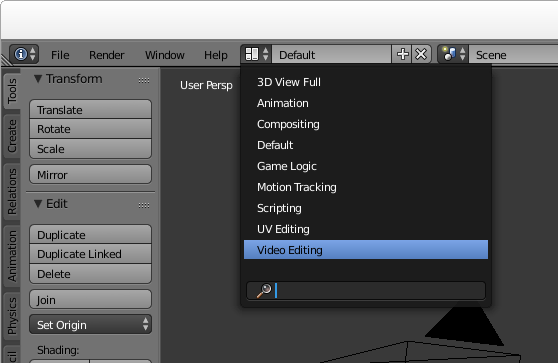
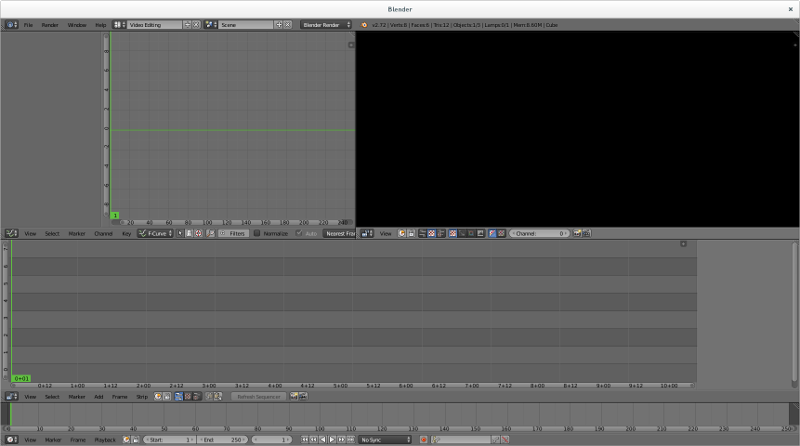
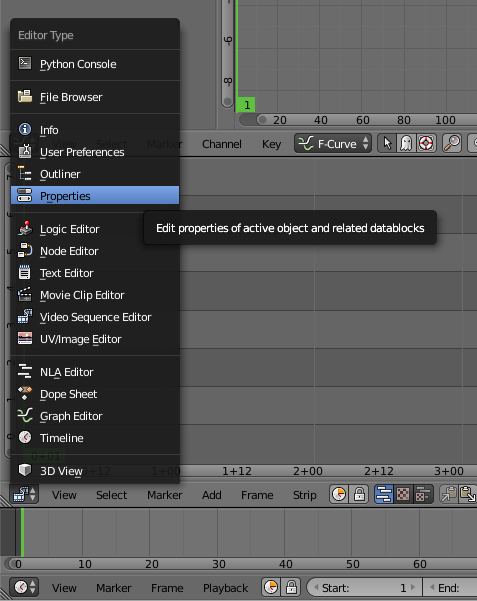
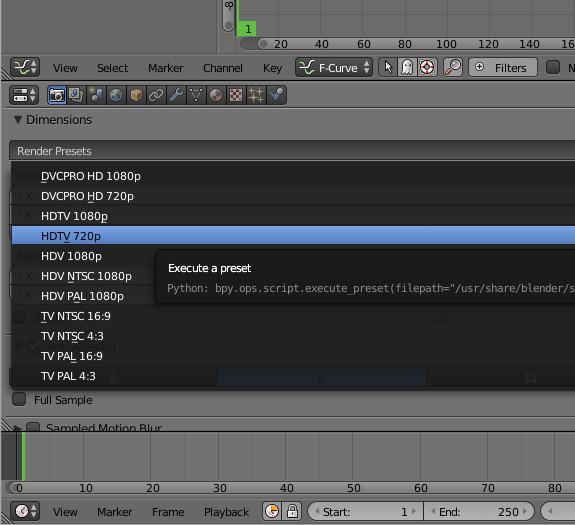
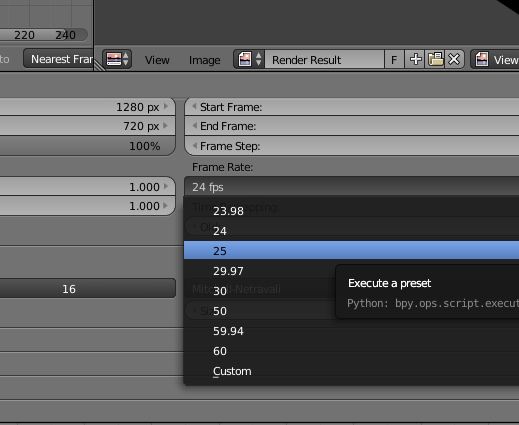
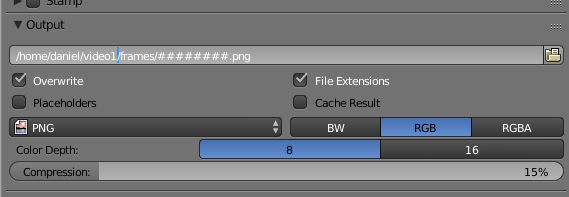
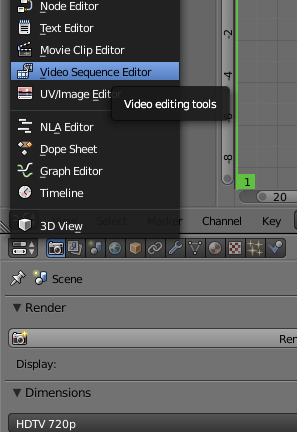
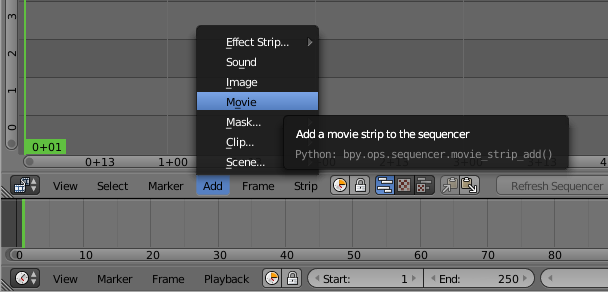
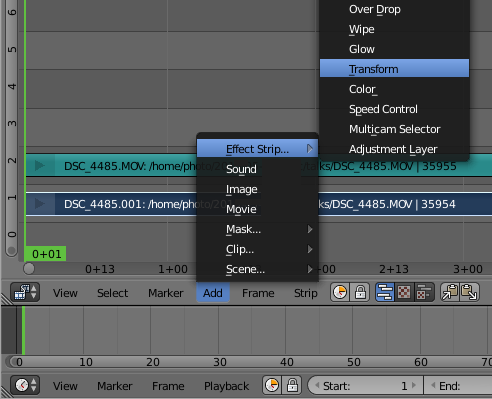
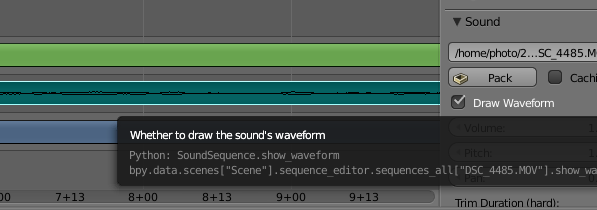
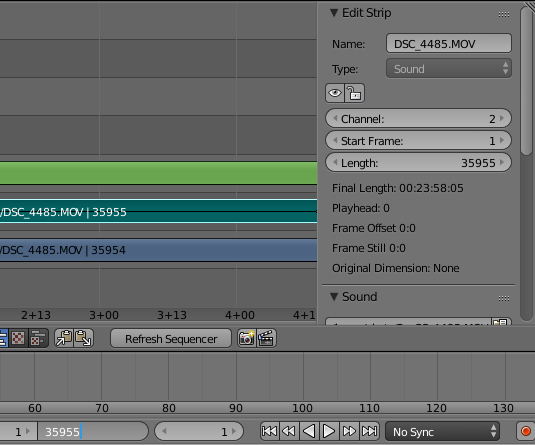
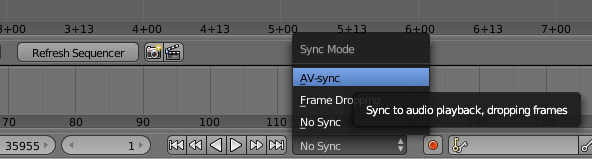
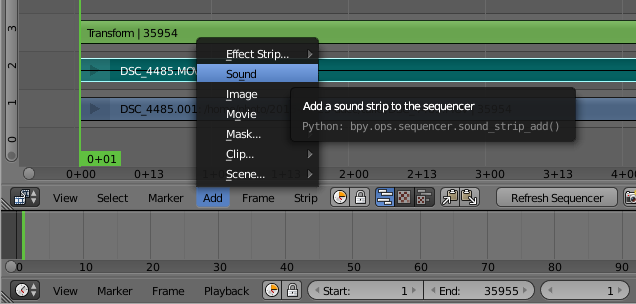
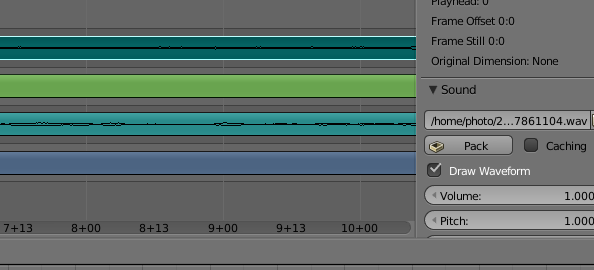
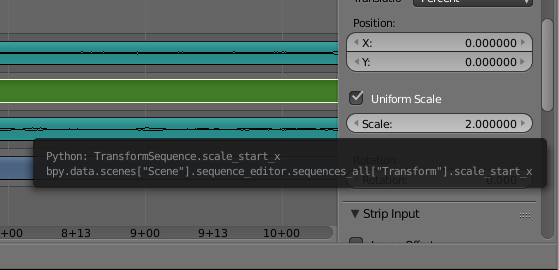
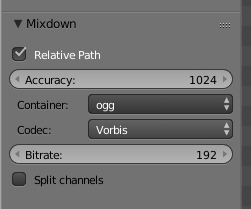
Open Blender and choose the video editing mode Launch Blender and choose the video sequence editor from the pull down menu at the top of the window: Now you should see all the video sequence editor controls: Setup the properties for your project Click the context menu under the strip editor panel and change the panel to a Properties panel: The video file we are playing with is 720p, so it seems reasonable to use 720p for the output too. Change that here: The input file is 25fps so we need to use exactly the same frame rate for the output, otherwise you will either observe the video going at the wrong speed or there will be a conversion that is CPU intensive and degrades the quality. Also check that the resolution_percentage setting under the picture dimensions is 100%: Now specify output to PNG files. Later we will combine them into a WebM file with a script. Specify the directory where the files will be placed and use the # placeholder to specify the number of digits to use to embed the frame number in the filename: Now your basic rendering properties are set. When you want to generate the output file, come back to this panel and use the Animation button at the top. Editing the video Use the context menu to change the properties panel back to the strip view panel: Add the video file: and then right click the video strip (the lower strip) to highlight it and then add a transform strip: Audio waveform Right click the audio strip to highlight it and then go to the properties on the right hand side and click to show the waveform: Rendering length By default, Blender assumes you want to render 250 frames of output. Looking in the properties to the right of the audio or video strip you can see the actual number of frames. Put that value in the box at the bottom of the window where it says 250: Enable AV-sync Also at the bottom of the window is a control to enable AV-sync. If your audio and video are not in sync when you preview, you need to set this AV-sync option and also make sure you set the frame rate correctly in the properties: Add the other sound strip Now add the other sound file that was recorded using the lapel microphone: Enable the waveform display for that sound strip too, this will allow you to align the sound strips precisely: You will need to listen to the strips to make an estimate of the time difference. Use this estimate to set the "start frame" in the properties for your audio strip, it will be a negative value if the audio strip starts before the video. You can then zoom the strip panel to show about 3 to 5 seconds of sound and try to align the peaks. An easy way to do this is to look for applause at the end of the audio strips, the applause generates a large peak that is easily visible. Once you have synced the audio, you can play the track and you should not be able to hear any echo. You can then silence the audio track from the camera by right clicking it, look in the properties to the right and change volume to 0. Make any transforms you require For example, to zoom in on the speaker, right click the transform strip (3rd from the bottom) and then in the panel on the right, click to enable "Uniform Scale" and then set the scale factor as required: Render the video output to PNG Click the context menu under the Curves panel and choose Properties again. Click the Animation button to generate a sequence of PNG files for each frame. Render the audio output On the Properties panel, click the Audio button near the top. Choose a filename for the generated audio file. Look on the bottom left-hand side of the window for the audio file settings, change it to the ogg container and Vorbis codec: Ensure the filename has a .ogg extension Now look at the top right-hand corner of the window for the Mixdown button. Click it and wait for Blender to generate the audio file. Combine the PNG files and audio file into a WebM video file You will need to have a few command line tools installed for manipulating the files from scripts. Install them using the package manager, for example, on a Debian or Ubuntu system: # apt-get install mjpegtools vpx-tools mkvtoolnix
Now create a script like the following:
#!/bin/bash -e
# Set this to match the project properties
FRAME_RATE=25
# Set this to the rate you desire:
TARGET_BITRATE=1000
WORK_DIR=$ HOME /video1
PNG_DIR=$ WORK_DIR /frames
YUV_FILE=$ WORK_DIR /video.yuv
WEBM_FILE=$ WORK_DIR /video.webm
AUDIO_FILE=$ WORK_DIR /audio-mixed.ogg
NUM_FRAMES= find $ PNG_DIR  -type f   wc -l 
png2yuv -I p -f $FRAME_RATE -b 1 -n $NUM_FRAMES \
    -j $ PNG_DIR /%08d.png > $ YUV_FILE 
vpxenc --good --cpu-used=0 --auto-alt-ref=1 \
   --lag-in-frames=16 --end-usage=vbr --passes=2 \
   --threads=2 --target-bitrate=$ TARGET_BITRATE  \
   -o $ WEBM_FILE -noaudio $ YUV_FILE 
rm $ YUV_FILE 
mkvmerge -o $ WEBM_FILE  -w $ WEBM_FILE -noaudio $ AUDIO_FILE 
rm $ WEBM_FILE -noaudio
Next steps There are plenty of more comprehensive tutorials, including some videos on Youtube, explaining how to do more advanced things like fading in and out or zooming and panning dynamically at different points in the video. If the lighting is not good (faces too dark, for example), you can right click the video strip, go to the properties panel on the right hand side and click Modifiers, Add Strip Modifier and then select "Color Balance". Use the Lift, Gamma and Gain sliders to adjust the shadows, midtones and highlights respectively.

14 November 2015

Daniel Pocock: Migrating data from Windows phones

Many of the people who have bought Windows phones seek relief sooner or later. Sometimes this comes about due to peer pressure or the feeling of isolation, in other cases it is the frustration of the user interface or the realization that they can't run cool apps like Lumicall. Frequently, the user has been given the phone as a complimentary upgrade when extending a contract without perceiving the time, effort and potential cost involved in getting their data out of the phone, especially if they never owned a smartphone before. When a Windows phone user does decide to cut their losses, they are usually looking to a friend or colleague with technical expertise to help them out. Personally, I'm not sure that anybody I would regard as an IT expert has ever had a Windows phone though, meaning that many experts are probably also going to be scratching their heads when somebody asks them for help. Therefore, I've put together this brief guide to help deal with these phones more expediently when they are encountered. The Windows phones have really bad support for things like CalDAV and WebDAV so don't get your hopes up about using such methods to backup the data to any arbitrary server. Searching online you can find some hacks that involve creating a Google or iCloud account in the phone and then modifying the advanced settings to send the data to an arbitrary server. These techniques vary a lot between specific versions of the Windows Phone OS and so the techniques I've described below are probably easier. Identify the Windows Live / Hotmail account The user may not remember or realize that a Microsoft account was created when they first obtained the phone. It may have been created for them by the phone, a friend or the salesperson in the phone shop. Look in the settings (Accounts) to find the account ID / email address. If the user hasn't been using this account, they may not recognize it and probably won't know the password for it. It is essential to try and obtain (or reset) the password before going any further, so start with the password recovery process. Microsoft may insist on sending a password reset email to some other email address that the user has previously provided or linked to their phone. Extracting data from the phone In many cases, the easiest way to extract the data is to download it from Microsoft live.com rather than extracting it from the phone. Even if the user doesn't realize it, the data is probably all replicated in live.com and so there is no further loss of privacy by logging in there to extract it. Set up an IMAP mail client An IMAP client will be used to download the user's emails (from the live.com account they may never have used) and SMS. Install Mozilla Thunderbird (IceDove on Debian), GNOME Evolution or a similar program on the user's PC. Configure the IMAP mail client to connect to the live.com account. Some clients, like Thunderbird, will automatically set up all the server details when you enter the live.com account ID. For manual account setup, the details here may help. Email backup If the user was not using the live.com account ID for email correspondence, there may not be a lot of mail in it. There may be some billing receipts or other things that are worth keeping though. Create a new folder (or set of folders) in the user's preferred email account and drag and drop the messages from the live.com Inbox to the new folder(s). SMS backup SMS backup can also be done through live.com. It is slightly more complicated than email backup, but similar.
  • In the live.com Outlook email index page, look for the settings button and click Manage Categories.
  • Enable the Contacts and Photos categories with a tick in each of them.
  • Go back to the main Inbox page and look for the categories section on the bottom left-hand side of the screen, under the folder list. Click the Contacts category.
  • The page may now appear blank. That is normal.
  • On the top right-hand corner of the page, click the Arrange menu and choose Conversation.
  • All the SMS messages should now appear on the screen.
  • Under the mail folders list on the left-hand side of the page, click to create a new folder with a name like SMS.
  • Select all the SMS messages and look for the option to move them to a folder. Send them to the SMS folder you created.
  • Now use the IMAP mail client to locate the SMS folder and copy everything from there to a new folder in the user's preferred mail server or local disk.
Contacts backup On the top left-hand corner of the live.com email page, there is a chooser to select other live.com applications. Select People. You should now see a list of all the user's contacts. Look for the option to export them to Outlook and other programs. This will export them as a CSV file. You can now import the CSV file into another application. GNOME Evolution has an import wizard with an option for Outlook file format. To load the contacts into a WebDAV address book, such as DAViCal, configure the address book in Evolution and then select it as the destination when running the CSV import wizard. WARNING: beware of using the Mozilla Thunderbird address book with contact data from mobile devices and other sources. It can't handle more than two email addresses per contact and this can lead to silent data loss if contacts are not fully saved. Calendar backup Now go to the live.com application chooser again and select the calendar application. Microsoft provides instructions to extract the calendar, summarised here:
  • Look for the Share button at the top somewhere and click it.
  • On the left-hand side of the page, click Get a link
  • On the right-hand side, choose Show event details to ensure you get a full calendar and then click Create underneath it.
  • Look for the link with a webcals prefix. If you are downloading with a tool like wget, change the scheme prefix to https. Fetch the file from this link and save it with an ics extension.
  • Inspect the ics calendar file to make sure it looks like real iCalendar data.
You can now import the ics file into another application. GNOME Evolution has an import wizard with an option for iCalendar file format. To load the calendar entries into a CalDAV server, such as DAViCal, configure the calendar server in Evolution and then select it as the destination when running the import wizard. Backup the user's photos, videos and other data files Hopefully you will be able to do this step without going through live.com. Try enabling the MTP or PTP mode in the phone and attach it to the computer using the USB cable. Hopefully the computer will recognize it in at least one of those modes. Use the computer's file manager or another tool to simply backup the entire directory structure. Reset the phone to factory defaults Once the user has their hands on a real phone, it is likely they will never want to look at that Windows phone again. It is time to erase the Windows phone, there is no going back. Go to the Settings and About and tap the factory reset option. It is important to do this before obliterating the live.com account, otherwise there are scenarios where you could be locked out of the phone and unable to erase it. Erasing may take some time. The phone will reboot and then display an animation of some gears spinning around for a few minutes and then reboot again. Wait for it to completely erase. Permanently close the Microsoft live.com account Keeping track of multiple accounts and other services is tedious and frustrating for most people, especially with services that try to force the user to receive email in different places. You can help eliminate user fatigue by helping them permanently close the live.com account so they never have to worry about it again. Follow the instructions on the Microsoft site. At some point it will suggest certain actions you should take before closing the account, most can be ignored. One thing you should do is remove the link between the live.com account ID and the phone. It is a good idea to do this as otherwise you may have problems erasing the device, if you haven't already done so. Before completely closing the account, also verify that the factory reset of the phone completed successfully. Dispose of the Windows phone safely If you can identify any faults with the phone, the user may be able to return it under the terms of the warranty. Some phone companies may allow the user to exchange it for something more desirable when it fails under warranty. It may be tempting to sell the phone to a complete stranger on eBay or install a custom ROM on it. In practice, neither option may be worth the time and effort involved. You may be tempted to put it beyond use so nobody else will suffer with it, but please try to do so in a way that is respectful of the environment. Putting the data into a new phone Prepare the new phone with a suitable ROM such as Replicant or Cyanogenmod. Install the F-Droid app on the new phone. From F-droid, install the DAVdroid app. DAVdroid will allow you to quickly sync the new phone against any arbitrary CalDAV and WebDAV server to populate it with the user's calendar and contact / address book data. Now is a good time to install other interesting apps like Lumicall, Conversations and K-9 Mail.

5 November 2015

Steve Kemp: lumail2 approaches readiness

So the work on lumail2 is going well, and already I can see that it is a good idea. The main reason for (re)writing it is to unify a lot of the previous ad-hoc primitives (i.e. lua functions) and to try and push as much of the code into Lua, and out of C++, as possible. This work is already paying off with the introduction of new display-modes and simpler implementation. View modes are an important part of lumail, because it is a modal mail-client. You're always in one mode: This is nothing new, but there are two new modes: Each of these modes draws lines of text on the screen, and those lines consist of things that Lua generated. So there is a direct mapping:
ModeLua Function
maildirfunction maildir_view()
indexfunction index_view()
messagefunction message_view()
luafunction lua_view()
With that in mind it is possible to write a function to scroll to the next line containing a pattern like so:
function find()
   local pattern = Screen:get_line( "Search for:" )
   -- Get the global mode.
   local mode = Config:get("global.mode")
   -- Use that to get the lines we're currently displaying
   loadstring( "out = " .. mode .. "_view()" )()
   -- At this point "out" is a table containing lines that
   -- the current mode wishes to display.
    -- .. do searching here.
end
Thus the whole thing is dynamic and mode-agnostic. The other big change is pushing things to lua. So to reply to an email, populating the new message, appending your ~/.signature, is handled by Lua. As is forwarding a message, or composing a new mail. The downside is that the configuration-file is now almost 1000 lines long, thanks to the many little function definitions, and key-binding setup. At this rate the first test-release will be out at the weekend, but API documentation, and sample configuration file might make interesting reading until then.

3 November 2015

Petter Reinholdtsen: Is Pentagon deciding the Norwegian negotiating position on Internet governance?

In Norway, all government offices are required by law to keep a list of every document or letter arriving and leaving their offices. Internal notes should also be documented. The document list (called a mail journal - "postjournal" in Norwegian) is public information and thanks to the Norwegian Freedom of Information Act (Offentleglova) the mail journal is available for everyone. Most offices even publish the mail journal on their web pages, as PDFs or tables in web pages. The state-level offices even have a shared web based search service (called Offentlig Elektronisk Postjournal - OEP) to make it possible to search the entries in the list. Not all journal entries show up on OEP, and the search service is hard to use, but OEP does make it easier to find at least some interesting journal entries . In 2012 I came across a document in the mail journal for the Norwegian Ministry of Transport and Communications on OEP that piqued my interest. The title of the document was "Internet Governance and how it affects national security" (Norwegian: "Internet Governance og p virkning p nasjonal sikkerhet"). The document date was 2012-05-22, and it was said to be sent from the "Permanent Mission of Norway to the United Nations". I asked for a copy, but my request was rejected with a reference to a legal clause said to authorize them to reject it (offentleglova 20, letter c) and an explanation that the document was exempt because of foreign policy interests as it contained information related to the Norwegian negotiating position, negotiating strategies or similar. I was told the information in the document related to the ongoing negotiation in the International Telecommunications Union (ITU). The explanation made sense to me in early January 2013, as a ITU conference in Dubay discussing Internet Governance (World Conference on International Telecommunications - WCIT-12) had just ended, reportedly in chaos when USA walked out of the negotiations and 25 countries including Norway refused to sign the new treaty. It seemed reasonable to believe talks were still going on a few weeks later. Norway was represented at the ITU meeting by two authorities, the Norwegian Communications Authority and the Ministry of Transport and Communications. This might be the reason the letter was sent to the ministry. As I was unable to find the document in the mail journal of any Norwegian UN mission, I asked the ministry who had sent the document to the ministry, and was told that it was the Deputy Permanent Representative with the Permanent Mission of Norway in Geneva. Three years later, I was still curious about the content of that document, and again asked for a copy, believing the negotiation was over now. This time I asked both the Ministry of Transport and Communications as the receiver and asked the Permanent Mission of Norway in Geneva as the sender for a copy, to see if they both agreed that it should be withheld from the public. The ministry upheld its rejection quoting the same law reference as before, while the permanent mission rejected it quoting a different clause (offentleglova 20 letter b), claiming that they were required to keep the content of the document from the public because it contained information given to Norway with the expressed or implied expectation that the information should not be made public. I asked the permanent mission for an explanation, and was told that the document contained an account from a meeting held in the Pentagon for a limited group of NATO nations where the organiser of the meeting did not intend the content of the meeting to be publicly known. They explained that giving me a copy might cause Norway to not get access to similar information in the future and thus hurt the future foreign interests of Norway. They also explained that the Permanent Mission of Norway in Geneva was not the author of the document, they only got a copy of it, and because of this had not listed it in their mail journal. Armed with this knowledge I asked the Ministry to reconsider and asked who was the author of the document, now realising that it was not same as the "sender" according to Ministry of Transport and Communications. The ministry upheld its rejection but told me the name of the author of the document. According to a government report the author was with the Permanent Mission of Norway in New York a bit more than a year later (2014-09-22), so I guessed that might be the office responsible for writing and sending the report initially and asked them for a copy but I was obviously wrong as I was told that the document was unknown to them and that the author did not work there when the document was written. Next, I asked the Permanent Mission of Norway in Geneva and the Foreign Ministry to reconsider and at least tell me who sent the document to Deputy Permanent Representative with the Permanent Mission of Norway in Geneva. The Foreign Ministry also upheld its rejection, but told me that the person sending the document to Permanent Mission of Norway in Geneva was the defence attach with the Norwegian Embassy in Washington. I do not know if this is the same person as the author of the document. If I understand the situation correctly, someone capable of inviting selected NATO nations to a meeting in Pentagon organised a meeting where someone representing the Norwegian defence attach in Washington attended, and the account from this meeting is interpreted by the Ministry of Transport and Communications to expose Norways negotiating position, negotiating strategies and similar regarding the ITU negotiations on Internet Governance. It is truly amazing what can be derived from mere meta-data. I wonder which NATO countries besides Norway attended this meeting? And what exactly was said and done at the meeting? Anyone know?

31 October 2015

Chris Lamb: Free software activities in October 2015

Here is my monthly update covering a large part of what I have been doing in the free software world (previously):

Debian My work in the Reproducible Builds project was also covered in more depth in Lunar's weekly reports (#23, #24, #25, #26).
LTS

This month I have been paid to work 11 hours on Debian Long Term Support (LTS). In that time I did the following:
  • DLA 326-1 for zendframework fixing an SQL injection vulnerability.
  • DLA 332-1 for optipng correcting a use-after-free issue.
  • DLA 333-1 for cakephp preventing a remote Denial of Service attack.
  • DLA 337-1 for busybox fixing a vulnerability when unzipping a specially crafted zip file/
  • DLA 338-1 for xscreensaver preventing a crash when hot-swapping monitors.

Uploads
  • redis New upstream release as well as changing the default UNIX socket location and correctly supporting "cluster" mode config file hardening and redis-sentinel's runtime directory handling under systemd. An update for jessie was also uploaded.
  • python-redis Attempting to get the autopkgtest tests to finally pass.
  • debian-timeline Making the build reproducible.
  • gunicorn New upstream release.


26 October 2015

C.J. Adams-Collier: Some statistics from the router at the cabin

sip0 is a GRE tunnel between the router and the colo box in Seattle, the payload of which is encapsulated as ipsec traffic before being transmitted over the Ubiquity equipment to the switch that the CenturyLink DSL modem attaches to. I don t get centurylink easter eggs in my search results when I use this interface. eth9 is the local gigabit transceiver. Attached directly to a SIP phone which bridges to a gigabit switch, on which the Ubiquity equipment participates. lo is the local loopback interface, of course. Good old 127/8 usb1 is the 100Mbit USB NIC to which the WRT54G with ssid colliertech.org is attached. The vast majority of the traffic originates on this interface.
cjac@wanjet1:~$ uptime
 09:11:18 up 32 days, 18:33,  6 users,  load average: 0.00, 0.01, 0.05
cjac@wanjet1:~$ sudo ifconfig
[sudo] password for cjac: 
eth9      Link encap:Ethernet  HWaddr 00:26:b9:e3:9b:47  
          inet addr:10.0.0.7  Bcast:0.0.0.0  Mask:255.255.255.0
          inet6 addr: fe80::226:b9ff:fee3:9b47/64 Scope:Link
          UP BROADCAST RUNNING MULTICAST  MTU:1500  Metric:1
          RX packets:176060020 errors:4 dropped:12 overruns:0 frame:2
          TX packets:131573705 errors:0 dropped:0 overruns:0 carrier:0
          collisions:0 txqueuelen:1000 
          RX bytes:216753073131 (201.8 GiB)  TX bytes:30777442696 (28.6 GiB)
          Interrupt:20 Memory:f5400000-f5420000 
lo        Link encap:Local Loopback  
          inet addr:127.0.0.1  Mask:255.0.0.0
          inet6 addr: ::1/128 Scope:Host
          UP LOOPBACK RUNNING  MTU:65536  Metric:1
          RX packets:3423 errors:0 dropped:0 overruns:0 frame:0
          TX packets:3423 errors:0 dropped:0 overruns:0 carrier:0
          collisions:0 txqueuelen:0 
          RX bytes:392714 (383.5 KiB)  TX bytes:392714 (383.5 KiB)
sip0      Link encap:UNSPEC  HWaddr 64-40-6A-02-30-30-3A-30-00-00-00-00-00-00-00-00  
          inet addr:100.64.107.2  P-t-P:100.64.107.1  Mask:255.255.255.252
          inet6 addr: fe80::200:5efe:6440:6a02/64 Scope:Link
          inet6 addr: 2607:ff08:f5:1338::6440:6b02/126 Scope:Global
          UP POINTOPOINT RUNNING NOARP MULTICAST  MTU:1414  Metric:1
          RX packets:468792 errors:0 dropped:0 overruns:0 frame:0
          TX packets:297314 errors:30556 dropped:5 overruns:0 carrier:30549
          collisions:0 txqueuelen:0 
          RX bytes:512744498 (488.9 MiB)  TX bytes:21652345 (20.6 MiB)
usb1      Link encap:Ethernet  HWaddr 40:3c:fc:01:35:a5  
          inet addr:172.16.67.1  Bcast:0.0.0.0  Mask:255.255.255.0
          inet6 addr: fe80::423c:fcff:fe01:35a5/64 Scope:Link
          UP BROADCAST RUNNING MULTICAST  MTU:1500  Metric:1
          RX packets:131960908 errors:0 dropped:0 overruns:0 frame:0
          TX packets:175522396 errors:0 dropped:0 overruns:0 carrier:0
          collisions:0 txqueuelen:1000 
          RX bytes:28447118558 (26.4 GiB)  TX bytes:216131320364 (201.2 GiB)

16 October 2015

Norbert Preining: Debian/TeX Live multiarch update

A big update of all related packages (tex-common 6.04, texlive-bin 2015.20150524.37493-7, texlive-base/lang/extra package 2015.20151016-1) due to the move to support multi-arch. Of course, the regular updates of the TeX Live are included, too. With this change it should be possible to run a multi-arch system with only one TeX Live installed. Debian - TeX Live 2015 Thanks to the excellent support and testing of the Multi-arch guys, in particular Thorsten Glaser, Helmut Grohne, Johannes Schauer, and Wookey, I learned a lot about multi-arch, and I hope that the current setup is safe. All the packages but the various lib* packages are tagged as Multi-Arch: foreign, while the lib packages are tagged Multi-Arch: same. Anyway, if you find a bug concerning multi-arch, that is that some of the programs exhibit architecture information, please let us know via a bug report. Updated packages acro, alegreya, amiri, assoccnt, attachfile, babel-french, babel-hungarian, barr, beebe, biblatex-philosophy, bidi, bnumexpr, caption, chemfig, chemformula, chemmacros, cjk-gs-integrate, csplain, dantelogo, dataref, dtxgen, dvipdfmx-def, dvips, eledmac, elements, fcolumn, fithesis, fontspec, genealogytree, gradstudentresume, gtl, jfontmaps, knuth-local, koma-script, kotex-oblivoir, kotex-plain, kotex-utf, kpathsea, l3build, l3experimental, l3kernel, l3packages, latex, latexconfig, ledmac, ltxfileinfo, lualatex-math, luamplib, luatex, luatexbase, luatexja, luatexko, make4ht, mcf2graph, mflogo, modiagram, multiexpand, newtx, odsfile, old-arrows, paracol, pdfpages, pdftex, plain, pst-stru, pxchfon, randomwalk, reledmac, resumecls, rubik, selnolig, showhyphens, siunitx, suftesi, tetex, teubner, tex4ebook, tex4ht, texlive-scripts, tikzsymbols, tipfr, tools, tudscr, uassign, unicode-math, unravel, visualfaq, xepersian, xetex-def, xint. New packages archaeologie, ctablestack, dynamicnumber, exercises, fibeamer, h2020proposal, imfellenglish, lstbayes, tempora, xellipsis. Enjoy.

11 October 2015

Ben Armstrong: Colours of Autumn 2015, Bluff Trail

My friend Ross Mayhew and I enjoyed a perfect Autumn afternoon yesterday, full of colours on the Bluff Trail. Not all of these photos do justice to the splendour and intricate detail I had hoped to capture, but I hope you enjoy them all the same. Click the photo to start the slideshow.
Late afternoon at the top of Pot Lake loopLate afternoon at the top of Pot Lake loop
On my way to hike, the Canada holly hints of things to come Canada holly berries bright red and close to the branch (vs. dusky red false holly berries on long stems) Unsure which fern this is. Ross says Christmas, but the leaf margins aren t serrated, but smooth. Sheltered by this mossy stump, a pretty mushroom Moss found climbing up a rotted stump, peculiar in that it has flat, fern-like fronds Ross and I spent a while examining this peculiar flat-fronded moss The reds of the huckleberries and maples were striking A tiny fern by a trickle of water across the path A familiar view overlooking Cranberry Lake, now in its fall splendour Brilliant Canada holly berries along the bog at our hike s end
facebooktwittergoogle_plusredditpinterestlinkedinmail

9 October 2015

Miriam Ruiz: Thick Skin (within Free/Open Source communities)

The definition of thick-skinned in different dictionaries ranges from not easily offended to largely unaffected by the needs and feelings of other people; insensitive , going through able to ignore personal criticism , ability to withstand criticism and show no signs of any criticism you may receive getting to you , an insensitive nature or impervious to criticism . It essentially describes an emotionally detached attitude regarding one s social environment, the capacity or ignoring or minimizing the effects of others criticism and the priorization of the protection of one s current state over the capacity of empathizing and taking into account what others may say that don t conform to one s current way of thinking. It is essentially setting up barriers against whatever others may do that might provoke any kind of crisis or change in you. There are a few underlying assumptions in the use of this term as a something good to have, when it comes to interactions with your own community: In the first place, it assumes that your own community is essentially hostile to you, and you will have to be constantly in guard against them. It assumes that it is better to set up barriers against the influence of others within your own comunity, because in fact your own peers are out there essentially to hurt you. Or, at least, they do not care a damn about you. In second place, it assumes that changes are wrong, that personal evolution is wrong, and that the more insensitive you are to your peer s opinions, the best, because they really have nothing to contribute to help you grow as a person. I m smart; you re dumb. I m big; you re little. I m right; you re wrong; And there s nothing you can do about it. (from the film Matilda). Matilda s dad is in fact the first reference that comes to my mind when we re talking about really thick skin. Scene of the film Matilda: I'm smart, You're dumb. I'm big, You're little. I'm right, You're wrong When the main recommendation when the level of aggressiveness within a community is that someone has to make their skin thicker, they are assuming that a bullying environment will help the results. This is nothing new. It s the same theoretical base that you can see in hazing and in other activities involving harassment, abuse or humiliation in college, when initiating a person into some groups. It s supposed to build character, to make someone closer to the alpha male stereotype and, in essence, make us better men (yes, I am using the word men on purpose, because insensitiveness is not usually seen as a positive trait in females). The assumption is that a community with a hard environment and individuals prepared for the war is more effective than a more civilized one. Luckily, that s not the point of view of most members of the Debian Community, and many other Free/Open Source projects. The Code of Conduct is very explicit when it says that a community in which people feel threatened is not a healthy community , and that is good. The Debian Project welcomes and encourages participation by everyone (Diversity Statement), including those with a thin skin, and I m happy about that. There are still a lot of things to improve, of course, but I have the feeling that -despite the occasional complains that having to be respectful to others take the fun away- we re moving in the right direction. The best tip I can give you on thickening your skin = don t. That is, don t thicken your skin. Having a thin skin means you re letting the world in, you re letting what s out there affect what s in you. It means you re connected. You re open. You re considerate and you ll consider it whatever it might be. Having a thin skin may be dangerous, sure, because you might take in so much that you pop, like that blueberry girl from Willy Wonka. But life is dangerous. A thick skin protects you from everything, but it also protects you from everything from the gentle touches of life, from the subtle emotions of others, the deep connections, the meaningful interactions. (Top Ten Tips on how to Thicken your Skin).

6 October 2015

Ben Armstrong: Cranberry Lake and nearby bog Fall, 2015

On one of my regular walks with a friend, we decided today to walk part of the BLT Trail to Cranberry Lake and the bog just past it, an easy 5 km round trip.
On the trail to the lake, golds dominateOn the trail to the lake, golds dominate
A calm day, the lake like glassA calm day, the lake like glass
In the bog, copper and golden huesIn the bog, copper and golden hues
On the margins of the bog, brilliant orange and redOn the margins of the bog, brilliant orange and red
The reds, dark greens and dead trees in counterpointThe reds, dark greens and dead trees in counterpoint
At our turning point, my cranberry patch provided a puckery snackAt our turning point, my cranberry patch provided a puckery snack
facebooktwittergoogle_plusredditpinterestlinkedinmail

5 October 2015

B lint R czey: Debian success stories: Automated signature verification

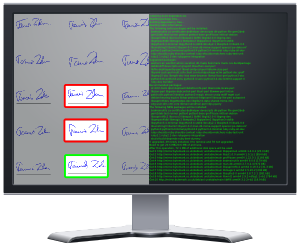
Debian was not generally seen as a bleeding-edge distribution, but it offered a perfect combination of stability and up-to-date software in our field when we chose the platform for our signature verification project. Having an active Debian Developer in the team also helped ensuring that packages which we use were in good shape when the freeze, then the release came and we can still rely on Jessie images with only a few extra packages to run our software stack. Not having to worry about the platform, we could concentrate on the core project and I m proud to announce that our start-up s algorithm won this year s Signature Verification Competition for Online Skilled Forgeries (SigWIComp2015) . The more detailed story can be read already in the English business news and is also on index.hu, a leading Hungarian news site. We are also working on a solution for categorizing users based on cursor/finger movements for targeting content, offers and ads better. This is also covered in the articles.

L szl a signature comparable in quality to the reference signatures

The verification task was not easy. The reference signatures were recorded at very low resolution and frequency and the forgers did a very good job in forging them creating a true challenge for everyone competing. At first glance it is hard to imagine that there is usable information in such small amount of recorded data, but our software is already better than me, for example in telling the difference between genuine and forged signatures. It feels like when the chess program beats the programmer again and again. :-) I would like to thank you all, who helped making Debian an awesome universal operating system and hope we can keep making every release better and better!

30 September 2015

Chris Lamb: Free software activities in September 2015

Inspired by Rapha l Hertzog, here is a monthly update covering a large part of what I have been doing in the free software world:
Debian The Reproducible Builds project was also covered in depth on LWN as well as in Lunar's weekly reports (#18, #19, #20, #21, #22).
Uploads
  • redis A new upstream release, as well as overhauling the systemd configuration, maintaining feature parity with sysvinit and adding various security hardening features.
  • python-redis Attempting to get its Debian Continuous Integration tests to pass successfully.
  • libfiu Ensuring we do not FTBFS under exotic locales.
  • gunicorn Dropping a dependency on python-tox now that tests are disabled.


RC bugs


I also filed FTBFS bugs against actdiag, actdiag, bangarang, bmon, bppphyview, cervisia, choqok, cinnamon-control-center, clasp, composer, cpl-plugin-naco, dirspec, django-countries, dmapi, dolphin-plugins, dulwich, elki, eqonomize, eztrace, fontmatrix, freedink, galera-3, golang-git2go, golang-github-golang-leveldb, gopher, gst-plugins-bad0.10, jbofihe, k3b, kalgebra, kbibtex, kde-baseapps, kde-dev-utils, kdesdk-kioslaves, kdesvn, kdevelop-php-docs, kdewebdev, kftpgrabber, kile, kmess, kmix, kmldonkey, knights, konsole4, kpartsplugin, kplayer, kraft, krecipes, krusader, ktp-auth-handler, ktp-common-internals, ktp-text-ui, libdevice-cdio-perl, libdr-tarantool-perl, libevent-rpc-perl, libmime-util-java, libmoosex-app-cmd-perl, libmoosex-app-cmd-perl, librdkafka, libxml-easyobj-perl, maven-dependency-plugin, mmtk, murano-dashboard, node-expat, node-iconv, node-raw-body, node-srs, node-websocket, ocaml-estring, ocaml-estring, oce, odb, oslo-config, oslo.messaging, ovirt-guest-agent, packagesearch, php-svn, php5-midgard2, phpunit-story, pike8.0, plasma-widget-adjustableclock, plowshare4, procps, pygpgme, pylibmc, pyroma, python-admesh, python-bleach, python-dmidecode, python-libdiscid, python-mne, python-mne, python-nmap, python-nmap, python-oslo.middleware, python-riemann-client, python-traceback2, qdjango, qsapecng, ruby-em-synchrony, ruby-ffi-rzmq, ruby-nokogiri, ruby-opengraph-parser, ruby-thread-safe, shortuuid, skrooge, smb4k, snp-sites, soprano, stopmotion, subtitlecomposer, svgpart, thin-provisioning-tools, umbrello, validator.js, vdr-plugin-prefermenu, vdr-plugin-vnsiserver, vdr-plugin-weather, webkitkde, xbmc-pvr-addons, xfsdump & zanshin.

27 September 2015

Ben Armstrong: Annual Bluff Hike, 2015

Here is a photo journal of our hike on the Bluff Wilderness Trail with my friend, Ryan Neily, as is our tradition at this time of year. Rather than hike all four loops, as we achieved last year, we chose to cover only the Pot Lake and Indian Hill loops. Like our meandering pace, our conversations were enjoyable and far ranging, with Nature doing her part, stimulating our minds and bodies and refreshing our spirits.
A break at the summit of Pot Lake loop. Click to start slideshow.A break at the summit of Pot Lake loop. Click to start slideshow.
Northern bayberry A few showers quickly dissipated into light mist on the first leg of the hike Ryan, enjoying one of the many beautiful views Cormorant or shag. Hard to say from this poor, zoomed cellphone shot. Darkened pool amongst the rugged trees Late summer colours A riot of life shoots up in every crevice Large boulders and trees, forming a non-concrete alley along the trail margin Huckleberries still plentiful on the Indian Hill loop Sustenance to keep us going Not at all picked over, like the Pot Lake loop We break here for lunch Just about ready to embark on the last half We are surprised by the productivity of these short, scrubby huckleberries Barely rising from the reindeer moss, each huckleberry twig provides sweet, juicy handfuls A small pond on the trip back A break on the home stretch Common juniper, which nevertheless is not so common out here Immature green common juniper berries (actually cones)
facebooktwittergoogle_plusredditpinterestlinkedinmail

13 September 2015

Russ Allbery: Review: My Real Children

Review: My Real Children, by Jo Walton
Publisher: Tor
Copyright: May 2014
ISBN: 0-7653-3265-5
Format: Hardcover
Pages: 317
Patricia, the one form of her name that she's never used, is what the staff in the nursing home call her. "VC" is the frequent annotation on her daily chart: very confused. She's old, and forgetful, and trying very hard not to be her mother, and she remembers two lives. Not only remembers but lives: the nursing home isn't the same from day to day. They keep misplacing the lift, and the staff keep changing. But the memories are the strongest. She has two lives, two sets of children, all of whom she recognizes. When someone from one life visits, the other feels like a dream, but both of them persist. Two lives that divided at the most significant decision of her life. My Real Children is one of those books that fits in the broader speculative fiction genre as alternate history, but also has many of the virtues of mimetic fiction. It's the story of one woman's life, told, except for the opening frame, chronologically from start to finish. At the start, it's simple biography, telling Patty's story from childhood, through World War II, until the moment of her fateful decision in 1949. From there the narrative splits, and she lives two lives. And the world splits as well: in one, Kennedy was assassinated by a bomb; in another, the Cuban Missile Crisis escalated into something much worse. Much is still unchanged, including the general lives of people Patty knew well in one life and not in another, but the worlds keep diverging from each other and from ours. The exact nature of the divergence is not, however, a significant part of the book. This is not the type of alternate history that is obsessed with the point of change, or even the implications for the world. Rather, this novel is about one woman, one decision, and two very different paths through life. Different friends, different challenges, different careers... different hopes and dreams, and different children. But always the same person, the same sense of practicality, the same ethics. It's beautifully told, striking just the right balance of showing important moments in detail and passing quickly, but smoothly, over some years. And, as with Among Others, Walton strikes the perfect emotional balance, leaving some reactions understated, letting the reader bring their own reactions to the book, and filling it with small bits of telling, factual detail rather than internal monologues. This is also one of the most heart-wrenching books I've ever read. My Real Children is a whole life, and not an easy one, complete with the heartaches and betrayals, the good and bad decisions, care for elderly relatives, dementia, tragedy, and even abuse. And moments of shining joy or profound satisfaction, but made all the more poignant because they're fleeting. The reader knows, in a sense, how the story ends, which casts a shadow over the rest of the book. But, even without that shadow, life can be hard, or cruel, alongside the wonder and joy. And it ends, and the ending is not neat and clean and uplifting, although one can choose how one meets it. This is the story of a life, all of it, and how choices can divide that life, and how they can cast a long shadow over how one later defines oneself. This book hurts. A lot. Enough that I want to warn you in advance I was in tears through the last third of the book. But it hurts because it's so very real and deep, not via a blow-by-blow description of daily actions, but by striding unafraid into the deep complications of choice and consequence. It's also a profoundly feminist book, in a quiet and descriptive way. It shared the Tiptree award for 2015 and fully deserved it. Both of the protagonist's lives are struggles against expectations, around gender, sexuality, and the role of women in society. Those struggles take very different forms, but they share some deep similarities. Walton shows the impact from the bottom up: the effects on specific lives, specific people, specific situations. It's brilliantly done. One can't help but think of The Female Man given the telling of parallel lives, but this is a case study, whereas Russ's novel was a battle cry. It gets under your skin instead of in your face. (Use of subtlety on this topic is easier now, forty years of occasional progress past when Russ wrote her classic.) This is a much harder book to read than Among Others. It's less forgiving, less reassuring, less willing to provide a happy ending. Lives rarely have clean, happy endings; one has to construct them, by choosing the material to build the ending on. But it's a brilliant, profound book, in that way that stories about people in all their complexity can be. Be cautious about your mood when you read this, particularly if you've had the experience of caring for a dying relative, but it's a book I will remember for a very long time. Rating: 9 out of 10

10 September 2015

Gunnar Wolf: UNAM, more open than ever before.

Today I was refered to the publication of an "agreement" signed by my university's Rector: The Agreement that establishes the General Guidelines for the Open Access Policy of Universidad Nacional Aut noma de M xico. This is a document we have been waiting and pushing for throughout several years; I got involved in the Network of Digital Collections (Red de Acervos Digitales), RAD-UNAM back in 2011, and am honored to be its current coordinator, but this group has roots back in 2005. And, of course, by then several other people had been working on the topic without formal coordination. Not only we are happy because the agreement explicitly mentions our group as one of The Venues for Open Access publishing and dissemination in UNAM. In its seventh point, it mentions:
In the matters of Open Access, academic entities and university dependencies have the following obligations:
(...)
VII. Promote and support the creation and maintenance of institutional repositories, as well as the deposit of the digital resources produced by its academic community, which should be incorporated into Red de Acervos Digitales de la UNAM
(...)
So... We have done a good job. And there will be surely more to follow! I'm including here a copy of the agreement by itself (without the whole number of the Gaceta UNAM) because I will surely have to refer to it in the future.
AttachmentSize
Lineamientos generales para la pol tica de acceso abierto de la Universidad Nacional Aut noma de M xico89.83 KB

Next.

Previous.