Search Results: "sten"

8 July 2023

Russell Coker: Sandboxing Phone Apps

As a follow up to Wayland [1]: A difficult problem with Linux desktop systems (which includes phones and tablets) is restricting application access so that applications can t mess with each other s data or configuration but also allowing them to share data as needed. This has been mostly solved for Android but that involved giving up all legacy Linux apps. I think that we need to get phones capable of running a full desktop environment and having Android level security on phone apps and regular desktop apps. My interest in this is phones running Debian and derivatives such as PureOS. But everything I describe in this post should work equally well for all full featured Linux distributions for phones such as Arch, Gentoo, etc and phone based derivatives of those such as Manjaro. It may be slightly less applicable to distributions such as Alpine Linux and it s phone derivative PostmarketOS, I would appreciate comments from contributors to PostmarketOS or Alpine Linux about this. I ve investigated some of the ways of solving these problems. Many of the ways of doing this involves namespaces. The LWN articles about namespaces are a good background to some of these technologies [2]. The LCA keynote lecture Containers aka crazy user space fun by Jess Frazelle has a good summary of some of the technology [3]. One part that I found particularly interesting was the bit about recognising the container access needed at compile time. This can also be part of recognising bad application design at compile time, it s quite common for security systems to flag bad security design in programs. Firejail To sandbox applications you need to have some method of restricting what they do, this means some combination of namespaces and similar features. Here s an article on sandboxing with firejail [4]. Firejail uses namespaces, seccomp-bpf, and capabilities to restrict programs. It allows bind mounts if run as root and if not run as root it can restrict file access by name and access to networking, system calls, and other features. It has a convenient learning mode that generates policy for you, so if you have a certain restricted set of tasks that an application is to perform you can run it once and then force it to do only the same operations in future. I recommend that everyone who is still reading at this point try out firejail. Here s an example of what you can do:
# create a profile
firejail --build=xterm.profile xterm
# now this run can only do what the previous run did
firejail --profile=xterm.profile xterm
Note that firejail is SETUID root so can potentially reduce system security and it has had security issues in the past. In spite of that it can be good for allowing a trusted user to run programs with less access to the system. Also it is a good way to start learning about such things. I don t think it s a good solution for what I want to do. But I won t rule out the possibility of using it at some future time for special situations. Bubblewrap I tried out firejail with the browser Epiphany (Debian package epiphany-browser) on my Librem5, but that didn t work as Epiphany uses /usr/bin/bwrap (bubblewrap) for it s internal sandboxing (here is an informative blog post about the history of bubblewrap AKA xdg-app-helper which was developed as part of flatpak [5]). The Epiphany bubblewrap sandbox is similar to the situation with Chrome/Chromium which have internal sandboxing that s incompatible with firejail. The firejail man page notes that it s not compatible with Snap, Flatpack, and similar technologies. One issue this raises is that we can t have a namespace based sandboxing system applied to all desktop apps with no extra configuration as some desktop apps won t work with it. Bubblewrap requires setting kernel.unprivileged_userns_clone=1 to run as non-root (IE provide the normal and expected functionality) which potentially reduces system security. Here is an example of a past kernel bug that was exploitable by creating a user namespace with CAP_SYS_ADMIN [6]. But it s the default in recent Debian kernels which means that the issues have been reviewed and determined to be a reasonable trade-off and also means that many programs will use the feature and break if it s disabled. Here is an example of how to use Bubblewrap on Debian, after installing the bubblewrap run the following command. Note that the new-session option (to prevent injecting characters in the keyboard buffer with TIOCSTI) makes the session mostly unusable for a shell.
bwrap --ro-bind /usr /usr --symlink usr/lib64 /lib64 --symlink usr/lib /lib --proc /proc --dev /dev --unshare-pid --die-with-parent bash
Here is an example of using Bubblewrap to sandbox the game Warzone2100 running with Wayland/Vulkan graphics and Pulseaudio sound.
bwrap --bind $HOME/.local/share/warzone2100 $HOME/.local/share/warzone2100 --bind /run/user/$UID/pulse /run/user/$UID/pulse --bind /run/user/$UID/wayland-0 /run/user/$UID/wayland-0 --bind /run/user/$UID/wayland-0.lock /run/user/$UID/wayland-0.lock --ro-bind /usr /usr --symlink usr/bin /bin --symlink usr/lib64 /lib64 --symlink usr/lib /lib --proc /proc --dev /dev --unshare-pid --dev-bind /dev/dri /dev/dri --ro-bind $HOME/.pulse $HOME/.pulse --ro-bind $XAUTHORITY $XAUTHORITY --ro-bind /sys /sys --new-session --die-with-parent warzone2100
Here is an example of using Bubblewrap to sandbox the Debian bug reporting tool reportbug
bwrap --bind /tmp /tmp --ro-bind /etc /etc --ro-bind /usr /usr --ro-bind /var/lib/dpkg /var/lib/dpkg --symlink usr/sbin /sbin --symlink usr/bin /bin --symlink usr/lib64 /lib64 --symlink usr/lib /lib --symlink /usr/lib32 /lib32 --symlink /usr/libx32 /libx32 --proc /proc --dev /dev --die-with-parent --unshare-ipc --unshare-pid reportbug
Here is an example shell script to wrap the build process for Debian packages. This needs to run with unshare-user and specifying the UID as 0 because fakeroot doesn t work in the container, I haven t worked out why but doing it through the container is a better method anyway. This script shares read-write the parent of the current directory as the Debian build process creates packages and metadata files in the parent directory. This will prevent the automatic signing scripts which is a feature not a bug, so after building packages you have to sign the .changes file with debsign. One thing I just learned is that the Debian build system Sbuild can use chroots for building packages for similar benefits [7]. Some people believe that sbuild is the correct way of doing it regardless of the chroot issue. I think it s too heavy-weight for most of my Debian package building, but even if I had been convinced I d still share the information about how to use bwrap as Debian is about giving users choice.
#!/bin/bash
set -e
BUILDDIR=$(realpath $(pwd)/..)
exec bwrap --bind /tmp /tmp --bind $BUILDDIR $BUILDDIR --ro-bind /etc /etc --ro-bind /usr /usr --ro-bind /var/lib/dpkg /var/lib/dpkg --symlink usr/bin /bin --symlink usr/lib64 /lib64 --symlink usr/lib /lib --proc /proc --dev /dev --die-with-parent --unshare-user --unshare-ipc --unshare-net --unshare-pid --new-session --uid 0 --gid 0 $@
Here is an informative blog post about using Bubblewrap with Seccomp (BPF) [8]. In a future post I ll write about how to get this sort of thing going but I ll just leave the URL here for people who want to do it on their own. The source for the flatpak-run program is the only example I could find of using Seccomp with Bubblewrap [9]. A lot of that code is worth copying for application sandboxing, maybe the entire program. Unshare The unshare command from the util-linux package has a large portion of the Bubblewrap functionality. The things that it doesn t do like creating a new session can be done by other utilities. Here is an example of creating a container with unshare and then using cgroups with it [10]. systemd --user Recent distributions have systemd support for running a user session, the Arch Linux Wiki has a good description of how this works [11]. The units for a user are .service files stored in /usr/lib/systemd/user/ (distribution provided), ~/.local/share/systemd/user/ (user installed applications in debian a link to ~/.config/systemd/user/), ~/.config/systemd/user/ (for manual user config), and /etc/systemd/user/ (local sysadmin provided) Here are some example commands for manipulating this:
# show units running for the current user
systemctl --user
# show status of one unit
systemctl --user status kmail.service
# add an environment variable to the list for all user units
systemctl --user import-environment XAUTHORITY
# start a user unit
systemctl --user start kmail.service
# analyse security for all units for the current user
systemd-analyze --user security
# analyse security for one unit
systemd-analyze --user security kmail.service
Here is a test kmail.service file I wrote to see what could be done for kmail, I don t think that kmail is the app most needing to be restricted it is in more need of being protected from other apps but it still makes a good test case. This service file took it from the default risk score of 9.8 (UNSAFE) to 6.3 (MEDIUM) even though I was getting the error code=exited, status=218/CAPABILITIES when I tried anything that used capabilities (apparently due to systemd having some issue talking to the kernel).
[Unit]
Description=kmail
[Service]
ExecStart=/usr/bin/kmail
# can not limit capabilities (code=exited, status=218/CAPABILITIES)
#CapabilityBoundingSet=~CAP_SYS_TIME CAP_SYS_PACCT CAP_KILL CAP_WAKE_ALARM CAP_DAC_OVERRIDE CAP_DAC_READ_SEARCH CAP_FOWNER CAP_IPC_OWNER CAP_LINUX_IMMUTABLE CAP_IPC_LOCK CAP_SYS_MODULE CAP_SYS_TTY_CONFIG CAP_SYS_BOOT CAP_SYS_CHROOT CAP_BLOCK_SUSPEND CAP_LEASE CAP_MKNOD CAP_CHOWN CAP_FSETID CAP_SETFCAP CAP_SETGID CAP_SETUID CAP_SETPCAP CAP_SYS_RAWIO CAP_SYS_PTRACE CAP_SYS_NICE CAP_SYS_RESOURCE CAP_NET_ADMIN CAP_NET_BIND_SERVICE CAP_NET_BROADCAST CAP_NET_RAW CAP_SYS_ADMIN CAP_SYSLOG
# also 218 for ProtectKernelModules PrivateDevices ProtectKernelLogs ProtectClock
# MemoryDenyWriteExecute stops it displaying message content (bad)
# needs @resources and @mount to startup
# needs @privileged to display message content
SystemCallFilter=~@cpu-emulation @debug @raw-io @reboot @swap @obsolete
SystemCallArchitectures=native
UMask=077
NoNewPrivileges=true
ProtectControlGroups=true
PrivateMounts=false
RestrictNamespaces=~user pid net uts mnt cgroup ipc
RestrictSUIDSGID=true
ProtectHostname=true
LockPersonality=true
ProtectKernelTunables=true
RestrictAddressFamilies=~AF_PACKET
RestrictRealtime=true
ProtectSystem=strict
ProtectProc=invisible
PrivateUsers=true
[Install]
When I tried to use the TemporaryFileSystem=%h directive (to make the home directory a tmpfs the most basic step in restricting what a regular user application can do) I got the error (code=exited, status=226/NAMESPACE) . So I don t think the systemd user setup competes with bubblewrap for restricting user processes. But if anyone else can start where I left off and go further then that will be interesting. Systemd-run The following shell script runs firefox as a dynamic user via systemd-run, running this asks for the root password and any mechanism for allowing that sort of thing opens potential security holes. So at this time while it s an interesting feature I don t think it is suitable for running regular applications on a phone or Linux desktop.
#!/bin/bash
# systemd-run Firefox with DynamicUser and home directory.
#
# Run as a non-root user.
# Or, run as root and change $USER below.
SANDBOX_MINIMAL=(
    --property=DynamicUser=1
    --property=StateDirectory=openstreetmap
    # --property=RootDirectory=/debian_sid
)
SANDBOX_X11=(
    # Sharing Xorg always defeats security, regardless of any sandboxing tech,
    # but the config is almost ready for Wayland, and there's Xephyr.
#    --property=LoadCredential=.ICEauthority:/home/$USER/.ICEauthority
    --property=LoadCredential=.Xauthority:/home/$USER/.Xauthority
    --property=Environment=DISPLAY=:0
)
SANDBOX_FIREFOX=(
    # hardware-accelerated rendering
    --property=BindPaths=/dev/dri
    # webcam
    # --property=SupplementaryGroups=video
)
systemd-run  \
    "$ SANDBOX_MINIMAL[@] "  "$ SANDBOX_X11[@] " "$ SANDBOX_FIREFOX[@] " \
    bash -c '
        export XAUTHORITY="$CREDENTIALS_DIRECTORY"/.Xauthority
        export ICEAUTHORITY="$CREDENTIALS_DIRECTORY"/.ICEauthority
        export HOME="$STATE_DIRECTORY"/home
        firefox --no-remote about:blank
    '
Qubes OS Here is an interesting demo video of QubesOS [12] which shows how it uses multiple VMs to separate different uses. Here is an informative LCA presentation about Qubes which shows how it asks the user about communication between VMs and access to hardware [13]. I recommend that everyone who hasn t seen Qubes in operation watch the first video and everyone who isn t familiar with the computer science behind it watch the second video. Qubes appears to be a free software equivalent to NetTop as far as I can tell without ever being able to use NetTop. I don t think Qubes is a good match for my needs in general use and it definitely isn t a good option for phones (VMs use excessive CPU on phones). But it s methods for controlling access have some ideas that are worth copying. File Access XDG Desktop Portal One core issue for running sandboxed applications is to allow them to access files permitted by the user but no other files. There are two main parts to this problem, the easier one is to have each application have it s own private configuration directory which can be addressed by bind mounts, MAC systems, running each application under a different UID or GID, and many other ways. The hard part of file access is to allow the application to access random files that the user wishes. For example I want my email program, IM program, and web browser to be able to save files and also to be able to send arbitrary files via email, IM, and upload to web sites. But I don t want one of those programs to be able to access all the files from the others if it s compromised. So only giving programs access to arbitrary files when the user chooses such a file makes sense. There is a package xdg-desktop-portal which provides a dbus interface for opening files etc for a sandboxed application [14]. This portal has backends for KDE, GNOME, and Wayland among others which allow the user to choose which file or files the application may access. Chrome/Chromium is one well known program that uses the xdg-desktop-portal and does it s own sandboxing. To use xdg-desktop-portal an application must be modified to use that interface instead of opening files directly, so getting this going with all Internet facing applications will take some work. But the documentation notes that the portal API gives a consistent user interface for operations such as opening files so it can provide benefits even without a sandboxed environment. This technology was developed for Flatpak and is now also used for Snap. It also has a range of APIs for accessing other services [15]. Flatpak Flatpack is a system for distributing containerised versions of applications with some effort made to improve security. Their development of bubblewrap and xdg-desktop-portal is really good work. However the idea of having software packaged with all libraries it needs isn t a good one, here s a blog post covering some of the issues [16]. The web site flatkill.org has been registered to complain about some Flatpak problems [17]. They have some good points about the approach that Flatpak project developers have taken towards some issues. They also make some points about the people who package software not keeping up to date with security fixes and not determining a good security policy for their pak. But this doesn t preclude usefully using parts of the technology for real security benefits. If parts of Flatpak like Bubblewrap and xdg-portal are used with good security policies on programs that are well packaged for a distribution then these issues would be solved. The Flatpak app author s documentation about package requirements [18] has an overview of security features that is quite reasonable. If most paks follow that then it probably isn t too bad. I reviewed the manifests of a few of the recent paks and they seemed to have good settings. In the amount of time I was prepared to spend investigating this I couldn t find evidence to support the Flatkill claim about Flatpaks granting obviously inappropriate permissions. But the fact that the people who run Flathub decided to put a graph of installs over time on the main page for each pak while making the security settings only available by clicking the Manifest github link, clicking on a JSON or YAML file, and then searching for the right section in that shows where their priorities lie. The finish-args section of the Flatpak manifest (the section that describes the access to the system) seems reasonably capable and not difficult for users to specify as well as being in common use. It seems like it will be easy enough to take some code from Flatpak for converting the finish-args into Bubblewrap parameters and then use the manifest files from Flathub as a starting point for writing application security policy for Debian packages. Snap Snap is developed by Canonical and seems like their version of Flatpak with some Docker features for managing versions, the Getting Started document is worth reading [19]. They have Connections between different snaps and the system where a snap registers a plug that connects to a socket which can be exposed by the system (EG the camera socket) or another snap. The local admin can connect and disconnect them. The connections design reminds me of the Android security model with permitting access to various devices. The KDE Neon extension [20] has been written to add Snap support to KDE. Snap seems quite usable if you have an ecosystem of programs using it which Canonical has developed. But it has all the overheads of loopback mounts etc that you don t want on a mobile device and has the security issues of libraries included in snaps not being updated. A quick inspection of an Ubuntu 22.04 system I run (latest stable release) has Firefox 114.0.2-1 installed which includes libgcrypt.so.20.2.5 which is apparently libgcrypt 1.8.5 and there are CVEs relating to libgcrypt versions before 1.9.4 and 1.8.x versions before 1.8.8 which were published in 2021 and updated in 2022. Further investigation showed that libgcrypt came from the gnome-3-38-2004 snap (good that it doesn t require all shared objects to be in the same snap, but that it has old versions in dependencies). The gnome-3-38-2004 snap is the latest version so anyone using the Snap of Firefox seems to have no choice but to have what appears to be insecure libraries. The strict mode means that the Snap in question has no system access other than through interfaces [21]. SE Linux and Apparmor The Librem5 has Apparmor running by default. I looked into writing Apparmor policy to prevent Epiphany from accessing all files under the home directory, but that would be a lot of work. Also at least one person has given up on maintaining an Epiphany profile for Apparmor because it changes often and it s sandbox doesn t work well with Apparmor [22]. This was not a surprise to me at all, SE Linux policy has the same issues as Apparmor in this regard. The Ubuntu Security Team Application Confinement document [23] is worth reading. They have some good plans for using AppArmor as part of solving some of these problems. I plan to use SE Linux for that. Slightly Related Things One thing for the future is some sort of secure boot technology, the LCA lecture Becoming a tyrant: Implementing secure boot in embedded devices [24] has some ideas for the future. The Betrusted project seems really interesting, see Bunnie s lecture about how to create a phone size security device with custom OS [25]. The Betrusted project web page is worth reading too [26]. It would be ironic to have a phone as your main PC that is the same size as your security device, but that seems to be the logical solution to several computing problems. Whonix is a Linux distribution that has one VM for doing Tor stuff and another VM for all other programs which is only allowed to have network access via the Tor VM [27]. Xpra does for X programs what screen/tmux do for text mode programs [28]. It allows isolating X programs from each other in ways that are difficult to impossible with a regular X session. In an ideal situation we could probably get the benefits we need with just using Wayland, but if there are legacy apps that only have X support this could help. Conclusion I think that currently the best option for confining desktop apps is Bubblewrap on Wayland. Maybe with a modified version of Flatpak-run to run it and with app modifications to use the xdg-portal interfaces as much as possible. That should be efficient enough in storage space, storage IO performance, memory use, and CPU use to run on phones while giving some significant benefits. Things to investigate are how much code from Flatpak to use, how to most efficiently do the configuration (maybe the Flatpak way because it s known and seems effective), how to test this (and have regression tests), and what default settings to use. Also BPF is a big thing to investigate.

6 July 2023

Thorsten Alteholz: My Debian Activities in June 2023

FTP master This month I accepted 221 and rejected 33 packages. The overall number of packages that got accepted was 221. Yeah, Bookworm was released this month. Thanks a lot to everybody who was involved in doing this. Debian LTS This was my hundred-eighth month that I did some work for the Debian LTS initiative, started by Raphael Hertzog at Freexian. This month my all in all workload has been 14h. During that time I uploaded: I also did some work on security-master to inject missing dependencies for some packages and processed NEW. Last but not least I did some days on frontdesk duties and took part in the LTS meeting. Debian ELTS This month was the fifty ninth ELTS month. I also made some progress with the openssl1.0 update. Last but not least I did some days on frontdesk duties. Debian Astro This month I uploaded some packages to fix one or the other issue: This month I even uploaded a new package c-munipack, which is more or less the successor of munipack, and can be used for example to analyse light curves of variable stars.
Another new package is virtualgps, where the name says it all. Debian Printing This month I did a security upload of cpdb-libs to fix a CVE in Unstable, Bookworm and Bullseye.
This work is generously funded by Freexian! Debian Mobcom This month I could upload a new version of: Other stuff This month I restarted DOPOM (Debian Orphaned Package Of the Month) and adopted: Hopefully this will result in a new upload of vdr-plugin-live. I would like to have this package for my personal VDR. I also did an upload of:

2 July 2023

Dirk Eddelbuettel: RcppAnnoy 0.0.21 on CRAN: Upstream Update

annoy image Another minor maintenance release, now at version 0.0.20, of RcppAnnoy has arrived on CRAN. RcppAnnoy is the Rcpp-based R integration of the nifty Annoy library by Erik Bernhardsson. Annoy is a small and lightweight C++ template header library for very fast approximate nearest neighbours originally developed to drive the Spotify music discovery algorithm. This release mainly updates the included copy of Annoy to version 1.7.3 which now provides a C++ namespace in the header API. So I sent a pair of PRs to uwot to update its (compiled) use, which James promptly merged. With that the CRAN update was once again seamless. Otherwise the package follows current custom by moving away from C++11 as a set compilation standard to be open for more modern C++ idioms. Here, this allows in particular for possible multithreaded indexing for which everything needed is in C++17. However, we did not turn multithreaded indexing on as the RNG use is such that the streams would differ leading to slightly different (if of course equivalent) results. Users can enable this by recompiling with the switch flipped, see src/Makevars.

Changes in version 0.0.21 (2023-07-02)
  • The build setup switched from C++11 to C++17 which offers threading support (which remains off by default to ensure consistent results)
  • Upstream code was update to Annoy 1.17.3, the switch to an explicit C++ namespace has been accomodated (Dirk in #75)

Courtesy of my CRANberries, there is also a diffstat report for this release. If you like this or other open-source work I do, you can sponsor me at GitHub.

This post by Dirk Eddelbuettel originated on his Thinking inside the box blog. Please report excessive re-aggregation in third-party for-profit settings.

22 June 2023

Russ Allbery: Review: Furious Heaven

Review: Furious Heaven, by Kate Elliott
Series: Sun Chronicles #2
Publisher: Tor
Copyright: 2023
ISBN: 1-250-86701-0
Format: Kindle
Pages: 725
Furious Heaven is the middle book of a trilogy and a direct sequel to Unconquerable Sun. Don't start here. I also had some trouble remembering what happened in the previous book (grumble recaps mutter), and there are a lot of threads, so I would try to minimize the time between books unless you have a good memory for plot details. This is installment two of gender-swapped Alexander the Great in space. When we last left Sun and her Companions, Elliott had established the major players in this interstellar balance of power and set off some opening skirmishes, but the real battles were yet to come. Sun was trying to build her reputation and power base while carefully staying on the good side of Queen-Marshal Eirene, her mother and the person credited with saving the Republic of Chaonia from foreign dominance. The best parts of the first book weren't Sun herself but wily Persephone, one of her Companions, whose viewpoint chapters told a more human-level story of finding her place inside a close-knit pre-existing friendship group. Furious Heaven turns that all on its head. The details are spoilers (insofar as a plot closely tracking the life of Alexander the Great can contain spoilers), but the best parts of the second book are the chapters about or around Sun. What I find most impressive about this series so far is Elliott's ability to write Sun as charismatic in a way that I can believe as a reader. That was hit and miss at the start of the series, got better towards the end of Unconquerable Sun, and was wholly effective here. From me, that's high but perhaps unreliable praise; I typically find people others describe as charismatic to be some combination of disturbing, uncomfortable, dangerous, or obviously fake. This is a rare case of intentionally-written fictional charisma that worked for me. Elliott does not do this by toning down Sun's ambition. Sun, even more than her mother, is explicitly trying to gather power and bend the universe (and the people in it) to her will. She treats people as resources, even those she's the closest to, and she's ruthless in pursuit of her goals. But she's also honorable, straightforward, and generous to the people around her. She doesn't lie about her intentions; she follows a strict moral code of her own, keeps her friends' secrets, listens sincerely to their advice, and has the sort of battlefield charisma where she refuses to ask anyone else to take risks she personally wouldn't take. And her use of symbolism and spectacle isn't just superficial; she finds the points of connection between the symbols and her values so that she can sincerely believe in what she's doing. I am fascinated by how Elliott shapes the story around her charisma. Writing an Alexander analogue is difficult; one has to write a tactical genius with the kind of magnetic attraction that enabled him to lead an army across the known world, and make this believable to the reader. Elliott gives Sun good propaganda outlets and makes her astonishingly decisive (and, of course, uses the power of the author to ensure those decisions are good ones), but she also shows how Sun is constantly absorbing information and updating her assumptions to lay the groundwork for those split-second decisions. Sun uses her Companions like a foundation and a recovery platform, leaning on them and relying on them to gather her breath and flesh out her understanding, and then leaping from them towards her next goal. Elliott writes her as thinking just a tiny bit faster than the reader, taking actions I was starting to expect but slightly before I had put together my expectation. It's a subtle but difficult tightrope to walk as the writer, and it was incredibly effective for me. The downside of Furious Heaven is that, despite kicking the action into a much higher gear, this book sprawls. There are five viewpoint characters (Persephone and the Phene Empire character Apama from the first book, plus two new ones), as well as a few interlude chapters from yet more viewpoints. Apama's thread, which felt like a minor subplot of the first book, starts paying off in this book by showing the internal political details of Sun's enemy. That already means the reader has to track two largely separate and important stories. Add on a Persephone side plot about her family and a new plot thread about other political factions and it's a bit too much. Elliott does a good job avoiding reader confusion, but she still loses narrative momentum and reader interest due to the sheer scope. Persephone's thread in particular was a bit disappointing after being the highlight of the previous book. She spends a lot of her emotional energy on tedious and annoying sniping at Jade, which accomplishes little other than making them both seem immature and out of step with the significance of what's going on elsewhere. This is also a middle book of a trilogy, and it shows. It provides a satisfying increase in intensity and gets the true plot of the trilogy well underway, but nothing is resolved and a lot of new questions and plot threads are raised. I had similar problems with Cold Fire, the middle book of the other Kate Elliott trilogy I've read, and this book is 200 pages longer. Elliott loves world-building and huge, complex plots; I have a soft spot for them too, but they mean the story is full of stuff, and it's hard to maintain the same level of reader interest across all the complications and viewpoints. That said, I truly love the world-building. Elliott gives her world historical layers, with multiple levels of lost technology, lost history, and fallen empires, and backs it up with enough set pieces and fragments of invented history that I was enthralled. There are at least five major factions with different histories, cultures, and approaches to technology, and although they all share a history, they interpret that history in fascinatingly different ways. This world feels both lived in and full of important mysteries. Elliott also has a knack for backing the ambitions of her characters with symbolism that defines the shape of that ambition. The title comes from a (translated) verse of an in-universe song called the Hymn of Leaving, which is sung at funerals and is about the flight on generation ships from the now-lost Celestial Empire, the founding myth of this region of space:
Crossing the ocean of stars we leave our home behind us.
We are the spears cast at the furious heaven
And we will burn one by one into ashes
As with the last sparks we vanish.
This memory we carry to our own death which awaits us
And from which none of us will return.
Do not forget. Goodbye forever.
This is not great poetry, but it explains so much about the psychology of the characters. Sun repeatedly describes herself and her allies as spears cast at the furious heaven. Her mother's life mission was to make Chaonia a respected independent power. Hers is much more than that, reaching back into myth for stories of impossible leaps into space, burning brightly against the hostile power of the universe itself. A question about a series like this is why one should want to read about a gender-swapped Alexander the Great in space, rather than just reading about Alexander himself. One good (and sufficient) answer is that both the gender swap and the space parts are inherently interesting. But the other place that Elliott uses the science fiction background is to give Sun motives beyond sheer personal ambition. At a critical moment in the story, just like Alexander, Sun takes a detour to consult an Oracle. Because this is a science fiction novel, it's a great SF set piece involving a mysterious AI. But also because this is a science fiction story, Sun doesn't only ask about her personal ambitions. I won't spoil the exact questions; I think the moment is better not knowing what she'll ask. But they're science fiction questions, reader questions, the kinds of things Elliott has been building curiosity about for a book and a half by the time we reach that scene. Half the fun of reading a good epic space opera is learning the mysteries hidden in the layers of world-building. Aligning the goals of the protagonist with the goals of the reader is a simple storytelling trick, but oh, so effective. Structurally, this is not that great of a book. There's a lot of build-up and only some payoff, and there were several bits I found grating. But I am thoroughly invested in this universe now. The third book can't come soon enough. Followed by Lady Chaos, which is still being written at the time of this review. Rating: 7 out of 10

21 June 2023

Louis-Philippe V ronneau: New Keyboard, Who This?

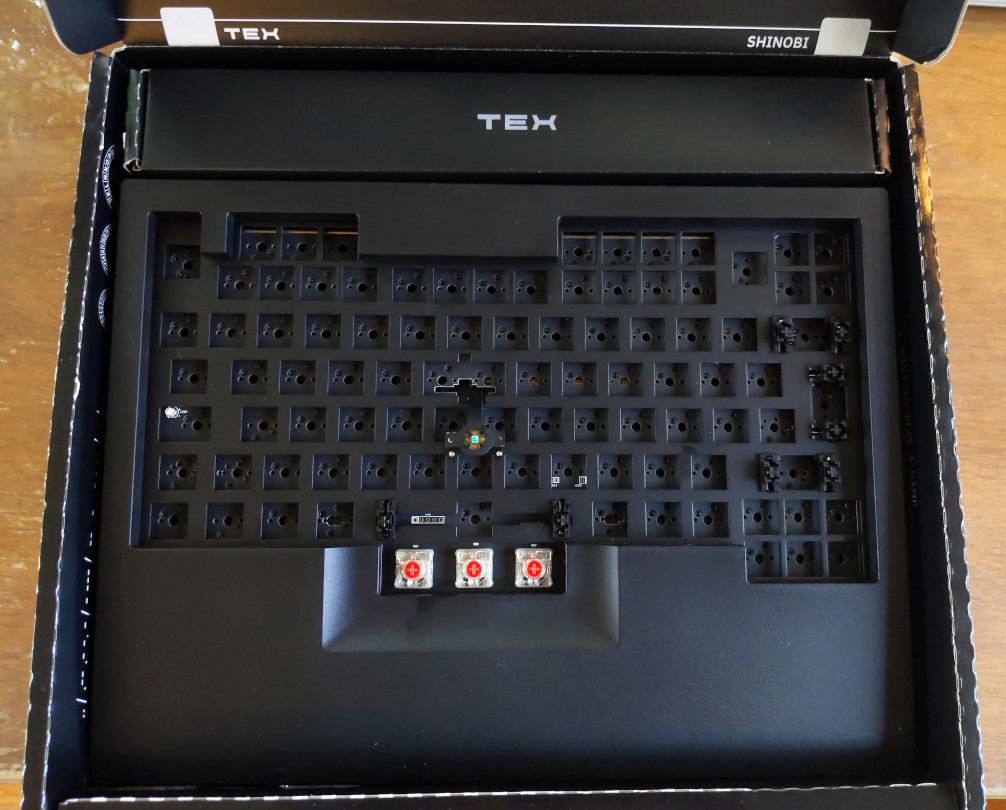
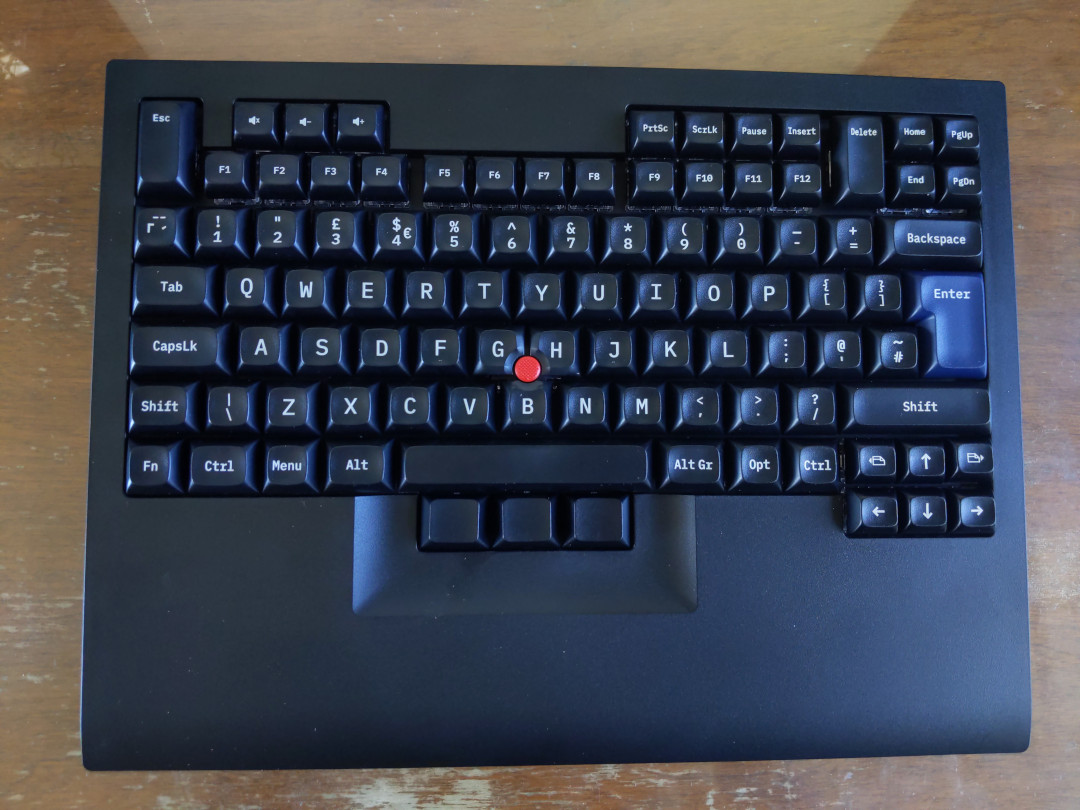
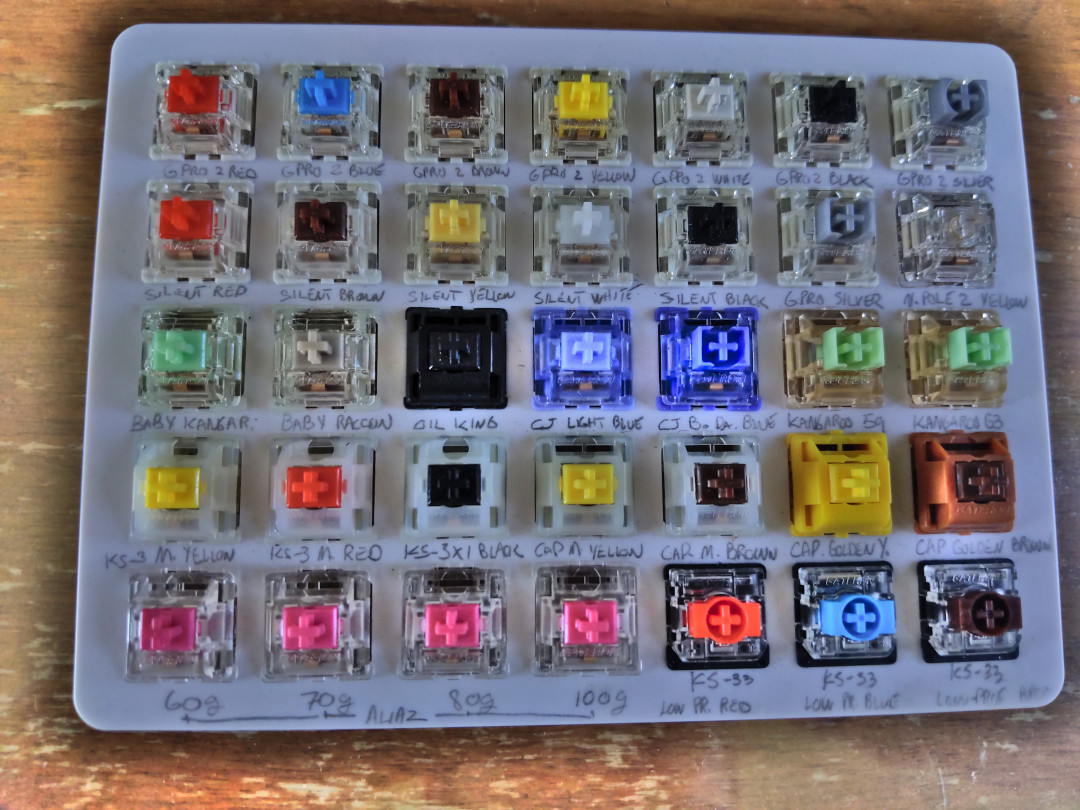
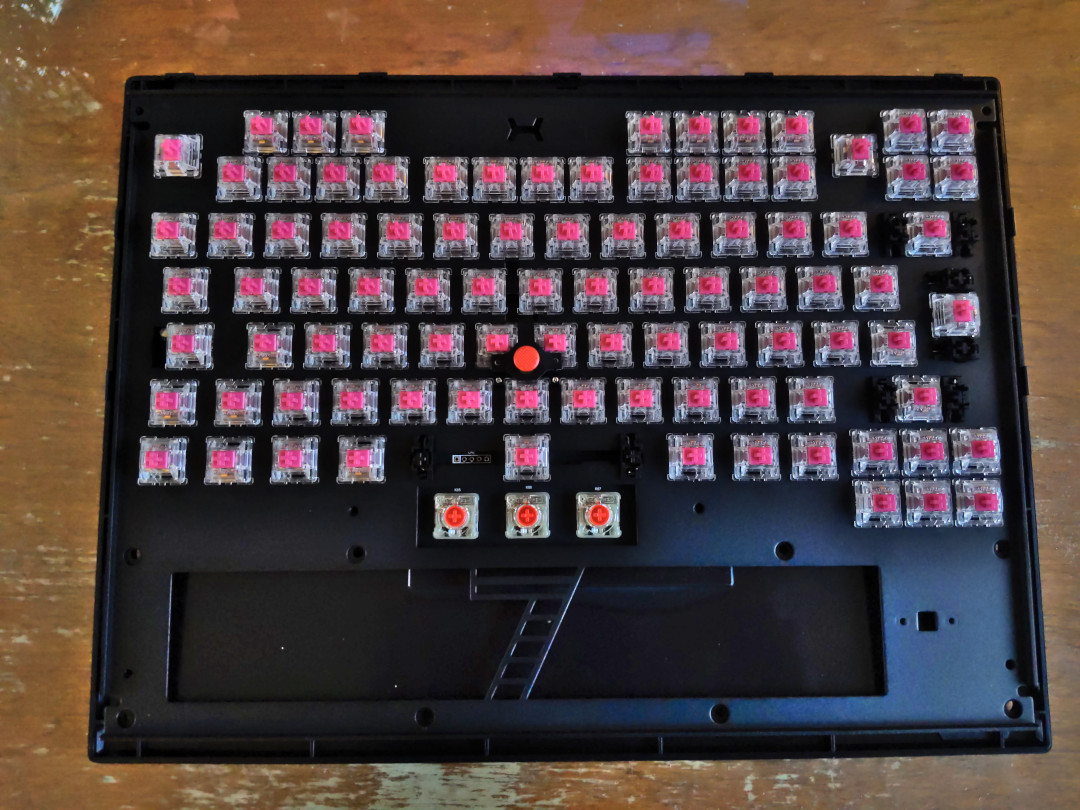
My old Thinkpad X220 has been slowly dying1 and as much as it makes me sad, it is also showing its age in terms of computational power. As such, I've pre-ordered a Framework 13 (the AMD version) and plan to retire my X220 when I get it. One thing I will miss from that laptop is the keyboard. At work, I dock it (on the amazing Thinkpad dock), which lets me use the keyboard while working on a larger monitor. I could probably replicate this setup with the Framework, but I'm not a fan of trackpads. So I built a keyboard. A nice one. One with a trackpoint. The bare board in its box If you follow Debian Planet, you may have seen the Tex Shinobi when Jonathan Dowland featured it on his blog back in January. It is a Tenkeyless board (saving me precious space at work) and is everything you would want from a old-school Thinkpad keyboard replacement. Since I had no previous experience with "Cherry MX"-style keyboard switches2, I decided to go full-bore and buy the "DIY" model that came unpopulated. A 35 switch tester board To know what model of switches I wanted, I bought a nice switch tester and played with it for a few days. After having thoroughly annoyed my SO (turns out 35 different switches on a little board is an incredible fidget toy), I decided to go with the Gateron Aliaz 70g. They are silent tactile switches, similar to the classic Cherry MX Browns, but with a much nicer sound profile and a much stronger actuation force (55g VS 70g). The end result is somewhat "stiff" keyboard that has a nice "THOCC", while still being relatively silent: perfect for a shared office. The keyboard with the switches, but no keycaps The only thing left to do on this keyboard is to replace the three soldered switches that came pre-installed for the mouse buttons. They are Cherry MX Red low-profile switches and are genuinely terrible3. I will be swapping them for Gateron KS-33 low-profile Blue switches when I get the ones I ordered online. My assembled Tex Shinobi Overall, I am very satisfied with this keyboard and I look forward using it daily when schools starts again in September.

  1. The power button sometimes does not work at all (for minutes?) and the laptop has been shutting down randomly (not a heat issue) more and more often...
  2. I am blessed with an IBM M keyboard at home and am in love with those clicky, very loud buckling springs.
  3. Not only are they linear switches (weird choice for mouse buttons), but they are very inconsistent. All three switches feel different and make different sounds.

17 June 2023

John Goerzen: Using dar for Data Archiving

This is the third post in a series about data archiving to removable media (optical discs and hard drives). In the first, I explained the difference between backing up and archiving, established goals for the project, and said I d evaluate git-annex and dar. The second post evaluated git-annex, and now it s time to look at dar. The series will conclude with a post comparing git-annex with dar. What is dar? I could open with the same thing I did with git-annex, just changing the name of the program: [dar] is a fantastic and versatile program that does well, it s one of those things that can do so much that it s a bit hard to describe. It is, fundamentally, an archiver like tar or zip (makes one file representing a bunch of other files), but it goes far beyond that. dar s homepage lays out a comprehensive list of features, which I will try to summarize here. So to tie this together for this project, I will set up a 400MB slice size (to mimic what I did with git-annex), and see how dar saves the data and restores it. Isolated cataloges aren t strictly necessary for this, but by using them (and/or dar_manager), we can build up a database of files and locations and thus directly compare dar to git-annex location tracking. Walkthrough: Creating the first archive As with the git-annex walkthrough, I ll set some variables to make it easy to remember: OK, we can run the backup immediately. No special setup is needed. dar supports both short-form (single-character) parameters and long-form ones. Since the parameters probably aren t familiar to everyone, I will use the long-form ones in these examples. Here s how we create our initial full backup. I ll explain the parameters below:
$ dar \
--verbose \
--create $DRIVE/bak1 \
--on-fly-isolate $CATDIR/bak1 \
--slice 400M \
--min-digits 2 \
--pause \
--fs-root $SOURCEDIR
Let s look at each of these parameters: This same command could have been written with short options as:
$ dar -v -c $DRIVE/bak1 -@ $CATDIR/bak1 -s 400M -9 2 -p -R $SOURCEDIR
What does it look like while running? Here s an excerpt:
...
Adding file to archive: /acrypt/no-backup/jgoerzen/testdata/[redacted]
Finished writing to file 1, ready to continue ? [return = YES Esc = NO]
...
Writing down archive contents...
Closing the escape layer...
Writing down the first archive terminator...
Writing down archive trailer...
Writing down the second archive terminator...
Closing archive low layer...
Archive is closed.
--------------------------------------------
581 inode(s) saved
including 0 hard link(s) treated
0 inode(s) changed at the moment of the backup and could not be saved properly
0 byte(s) have been wasted in the archive to resave changing files
0 inode(s) with only metadata changed
0 inode(s) not saved (no inode/file change)
0 inode(s) failed to be saved (filesystem error)
0 inode(s) ignored (excluded by filters)
0 inode(s) recorded as deleted from reference backup
--------------------------------------------
Total number of inode(s) considered: 581
--------------------------------------------
EA saved for 0 inode(s)
FSA saved for 581 inode(s)
--------------------------------------------
Making room in memory (releasing memory used by archive of reference)...
Now performing on-fly isolation...
...
That was easy! Let s look at the contents of the backup directory:
$ ls -lh $DRIVE
total 3.7G
-rw-r--r-- 1 jgoerzen jgoerzen 400M Jun 16 19:27 bak1.01.dar
-rw-r--r-- 1 jgoerzen jgoerzen 400M Jun 16 19:27 bak1.02.dar
-rw-r--r-- 1 jgoerzen jgoerzen 400M Jun 16 19:27 bak1.03.dar
-rw-r--r-- 1 jgoerzen jgoerzen 400M Jun 16 19:27 bak1.04.dar
-rw-r--r-- 1 jgoerzen jgoerzen 400M Jun 16 19:28 bak1.05.dar
-rw-r--r-- 1 jgoerzen jgoerzen 400M Jun 16 19:28 bak1.06.dar
-rw-r--r-- 1 jgoerzen jgoerzen 400M Jun 16 19:28 bak1.07.dar
-rw-r--r-- 1 jgoerzen jgoerzen 400M Jun 16 19:28 bak1.08.dar
-rw-r--r-- 1 jgoerzen jgoerzen 400M Jun 16 19:29 bak1.09.dar
-rw-r--r-- 1 jgoerzen jgoerzen 156M Jun 16 19:33 bak1.10.dar
And the isolated catalog:
$ ls -lh $CATDIR
total 37K
-rw-r--r-- 1 jgoerzen jgoerzen 35K Jun 16 19:33 bak1.1.dar
The isolated catalog is stored compressed automatically. Well this was easy. With one command, we archived the entire data set, split into 400MB chunks, and wrote out the catalog data. Walkthrough: Inspecting the saved archive Can dar tell us which slice contains a given file? Sure:
$ dar --list $DRIVE/bak1 --list-format=slicing less
Slice(s) [Data ][D][ EA ][FSA][Compr][S] Permission Filemane
--------+--------------------------------+----------+-----------------------------
...
1 [Saved][ ] [-L-][ 0%][X] -rwxr--r-- [redacted]
1-2 [Saved][ ] [-L-][ 0%][X] -rwxr--r-- [redacted]
2 [Saved][ ] [-L-][ 0%][X] -rwxr--r-- [redacted]
...
This illustrates the transition from slice 1 to slice 2. The first file was stored entirely in slice 1; the second stored partially in slice 1 and partially in slice 2, and third solely in slice 2. We can get other kinds of information as well.
$ dar --list $DRIVE/bak1 less
[Data ][D][ EA ][FSA][Compr][S] Permission User Group Size Date filename
--------------------------------+------------+-------+-------+---------+-------------------------------+------------
[Saved][ ] [-L-][ 0%][X] -rwxr--r-- jgoerzen jgoerzen 24 Mio Mon Mar 5 07:58:09 2018 [redacted]
[Saved][ ] [-L-][ 0%][X] -rwxr--r-- jgoerzen jgoerzen 16 Mio Mon Mar 5 07:58:09 2018 [redacted]
[Saved][ ] [-L-][ 0%][X] -rwxr--r-- jgoerzen jgoerzen 22 Mio Mon Mar 5 07:58:09 2018 [redacted]
These are the same files I was looking at before. Here we see they are 24MB, 16MB, and 22MB in size, and some additional metadata. Even more is available in the XML list format. Walkthrough: updates As with git-annex, I ve made some changes in the source directory: moved a file, added another, and deleted one. Let s create an incremental backup now:
$ dar \
--verbose \
--create $DRIVE/bak2 \
--on-fly-isolate $CATDIR/bak2 \
--ref $CATDIR/bak1 \
--slice 400M \
--min-digits 2 \
--pause \
--fs-root $SOURCEDIR
This command is very similar to the earlier one. Instead of writing an archive and catalog named bak1, we write one named bak2. What s new here is --ref $CATDIR/bak1. That says, make an incremental based on an archive of reference. All that is needed from that archive of reference is the detached catalog. --ref $DRIVE/bak1 would have worked equally well here. Here s what I did to the $SOURCEDIR: Let s see if dar s command output matches this:
...
Adding file to archive: /acrypt/no-backup/jgoerzen/testdata/file01-unchanged
Saving Filesystem Specific Attributes for /acrypt/no-backup/jgoerzen/testdata/file01-unchanged
Adding file to archive: /acrypt/no-backup/jgoerzen/testdata/cp
Saving Filesystem Specific Attributes for /acrypt/no-backup/jgoerzen/testdata/cp
Adding folder to archive: [redacted]
Saving Filesystem Specific Attributes for [redacted]
Adding reference to files that have been destroyed since reference backup...
...
--------------------------------------------
3 inode(s) saved
including 0 hard link(s) treated
0 inode(s) changed at the moment of the backup and could not be saved properly
0 byte(s) have been wasted in the archive to resave changing files
0 inode(s) with only metadata changed
578 inode(s) not saved (no inode/file change)
0 inode(s) failed to be saved (filesystem error)
0 inode(s) ignored (excluded by filters)
2 inode(s) recorded as deleted from reference backup
--------------------------------------------
Total number of inode(s) considered: 583
--------------------------------------------
EA saved for 0 inode(s)
FSA saved for 3 inode(s)
--------------------------------------------
...
Yes, it does. The rename is recorded as a deletion and an addition, since dar doesn t directly track renames. So the rename plus the deletion account for the two deletions. The rename plus the addition of cp count as 2 of the 3 inodes saved; the third is the modified directory from which files were deleted and moved out. Let s see the files that were created:
$ ls -lh $DRIVE/bak2*
-rw-r--r-- 1 jgoerzen jgoerzen 18M Jun 16 19:52 /acrypt/no-backup/jgoerzen/dar-testing/drive/bak2.01.dar
$ ls -lh $CATDIR/bak2*
-rw-r--r-- 1 jgoerzen jgoerzen 22K Jun 16 19:52 /acrypt/no-backup/jgoerzen/dar-testing/cat/bak2.1.dar
What does list look like now?
Slice(s) [Data ][D][ EA ][FSA][Compr][S] Permission Filemane
--------+--------------------------------+----------+-----------------------------
[ ][ ] [---][-----][X] -rwxr--r-- [redacted]
1 [Saved][ ] [-L-][ 0%][X] -rwxr--r-- file01-unchanged
...
[--- REMOVED ENTRY ----][redacted]
[--- REMOVED ENTRY ----][redacted]
Here I show an example of:
  1. A file that was not changed from the initial backup. Its presence was simply noted, but because we re doing an incremental, the data wasn t saved.
  2. A file that is saved in this incremental, on slice 1.
  3. The two deleted files
Walkthrough: dar_manager As we ve seen above, the two archives (or their detached catalog) give us a complete picture of what files were present at the time of the creation of each archive, and what files were stored in a given archive. We can certainly continue working in that way. We can also use dar_manager to build a comprehensive database of these archives, to be able to find what media is necessary to restore each given file. Or, with dar_manager s when parameter, we can restore files as of a particular date. Let s try it out. First, we create our database:
$ dar_manager --create $DARDB
$ dar_manager --base $DARDB --add $DRIVE/bak1
Auto detecting min-digits to be 2
$ dar_manager --base $DARDB --add $DRIVE/bak2
Auto detecting min-digits to be 2
Here we created the database, and added our two catalogs to it. (Again, we could have as easily used $CATDIR/bak1; either the archive or its isolated catalog will work here.) It s important to add the catalogs in order. Let s do some quick experimentation with dar_manager:
$ dar_manager -v --base $DARDB --list
Decompressing and loading database to memory...
dar path :
dar options :
database version : 6
compression used : gzip
compression level: 9 archive # path basename
------------+--------------+---------------
1 /acrypt/no-backup/jgoerzen/dar-testing/drive bak1
2 /acrypt/no-backup/jgoerzen/dar-testing/drive bak2
$ dar_manager --base $DARDB --stat
archive # most recent/total data most recent/total EA
--------------+-------------------------+-----------------------
1 580/581 0/0
2 3/3 0/0
The list option shows the correlation between dar_manager archive number (1, 2) with filenames (bak1, bak2). It is coincidence here that 1/bak1 and 2/bak2 correlate; that s not necessarily the case. Most dar_manager commands operate on archive number, while dar commands operate on archive path/basename. Now let s see just what files are saved in archive , the incremental:
$ dar_manager --base $DARDB --used 2
[ Saved ][ ] [redacted]
[ Saved ][ ] file01-unchanged
[ Saved ][ ] cp
Now we can also where a file is stored. Here s one that was saved in the full backup and unmodified in the incremental:
$ dar_manager --base $DARDB --file [redacted]
1 Fri Jun 16 19:15:12 2023 saved absent
2 Fri Jun 16 19:15:12 2023 present absent
(The absent at the end refers to extended attributes that the file didn t have) Similarly, for files that were added or removed, they ll be listed only at the appropriate place. Walkthrough: Restoration I m not going to repeat the author s full restoration with dar page, but here are some quick examples. A simple way of doing everything is using incrementals for the whole series. To do that, you d have bak1 be full, bak2 based on bak1, bak3 based on bak2, bak4 based on bak3, etc. To restore from such a series, you have two options: If you get fancy for instance, bak2 is based on bak1, bak3 on bak2, bak4 on bak1 then you would want to use dar_manager to ensure a consistent restore is completed. Either way, the process is nearly identical. Also, I figure, to make things easy, you can save a copy of the entire set of isolated catalogs before you finalize each disc/drive. They re so small, and this would let someone with just the most recent disc build a dar_manager database without having to go through all the other discs. Anyhow, let s do a restore using just dar. I ll make a $RESTOREDIR and do it that way.
$ dar \
--verbose \
--extract $DRIVE/bak1 \
--fs-root $RESTOREDIR \
--no-warn \
--execute "echo Ready for slice %n. Press Enter; read foo"
This execute lets us see how dar works; this is an illustration of the power it has (above pause); it s a snippet interpreted by /bin/sh with %n being one of the dar placeholders. If memory serves, it s not strictly necessary, as dar will prompt you for slices it needs if they re not mounted. Anyhow, you ll see it first reading the last slice, which contains the catalog, then reading from the beginning. Here we go:
Auto detecting min-digits to be 2
Opening archive bak1 ...
Opening the archive using the multi-slice abstraction layer...
Ready for slice 10. Press Enter
...
Loading catalogue into memory...
Locating archive contents...
Reading archive contents...
File ownership will not be restored du to the lack of privilege, you can disable this message by asking not to restore file ownership [return = YES Esc = NO]
Continuing...
Restoring file's data: [redacted]
Restoring file's FSA: [redacted]
Ready for slice 1. Press Enter
...
Ready for slice 2. Press Enter
...
--------------------------------------------
581 inode(s) restored
including 0 hard link(s)
0 inode(s) not restored (not saved in archive)
0 inode(s) not restored (overwriting policy decision)
0 inode(s) ignored (excluded by filters)
0 inode(s) failed to restore (filesystem error)
0 inode(s) deleted
--------------------------------------------
Total number of inode(s) considered: 581
--------------------------------------------
EA restored for 0 inode(s)
FSA restored for 0 inode(s)
--------------------------------------------
The warning is because I m not doing the extraction as root, which limits dar s ability to fully restore ownership data. OK, now the incremental:
$ dar \
--verbose \
--extract $DRIVE/bak2 \
--fs-root $RESTOREDIR \
--no-warn \
--execute "echo Ready for slice %n. Press Enter; read foo"
...
Ready for slice 1. Press Enter
...
Restoring file's data: /acrypt/no-backup/jgoerzen/dar-testing/restore/file01-unchanged
Restoring file's FSA: /acrypt/no-backup/jgoerzen/dar-testing/restore/file01-unchanged
Restoring file's data: /acrypt/no-backup/jgoerzen/dar-testing/restore/cp
Restoring file's FSA: /acrypt/no-backup/jgoerzen/dar-testing/restore/cp
Restoring file's data: /acrypt/no-backup/jgoerzen/dar-testing/restore/[redacted directory]
Removing file (reason is file recorded as removed in archive): [redacted file]
This all looks right! Now how about we compare the restore to the original source directory?
$ diff -durN $SOURCEDIR $RESTOREDIR
No changes perfect. We could instead do this restore via a single dar_manager command, though annoyingly, we d have to pass all top-level files/directories to dar_manager restore. But still, it s one command, and basically automates and optimizes the dar restores shown above. Conclusions Dar makes it extremely easy to just Do The Right Thing when making archives. One command makes a backup. It saves things in simple files. You can make an isolated catalog if you want, and it too is saved in a simple file. You can query what is in the files and where. You can restore from all or part of the files. You can simply play the backups forward, in order, to achieve a full and consistent restore. Or you can load data about them into dar_manager for an optimized restore. A bit of scripting will be necessary to make incrementals; finding the most recent backup or catalog. If backup files are named with care for instance, by date then this should be a pretty easy task. I haven t touched on resiliency yet. dar comes with tools for recovering archives that have had portions corrupted or lost. It can also rebuild the catalog if it is corrupted or lost. It adds tape marks (or escape sequences ) to the archive along with the data stream. So every entry in the catalog is actually stored in the archive twice: once alongside the file data, and once at the end in the collected catalog. This allows dar to scan a corrupted file for the tape marks and reconstruct whatever is still intact, even if the catalog is lost. dar also integrates with tools like sha256sum and par2 to simplify archive integrity testing and restoration. This balances against the need to use a tool (dar, optionally with a GUI frontend) to restore files. I ll discuss that more in the next post.

16 June 2023

John Goerzen: Using git-annex for Data Archiving

In my recent post about data archiving to removable media, I laid out the difference between backing up and archiving, and also said I d evaluate git-annex and dar. This post evaluates git-annex. The next will look at dar, and then I ll make a comparison post. What is git-annex? git-annex is a fantastic and versatile program that does well, it s one of those things that can do so much that it s a bit hard to describe. Its homepage says:
git-annex allows managing large files with git, without storing the file contents in git. It can sync, backup, and archive your data, offline and online. Checksums and encryption keep your data safe and secure. Bring the power and distributed nature of git to bear on your large files with git-annex.
I think the particularly interesting features of git-annex aren t actually included in that list. Among the features of git-annex that make it shine for this purpose, its location tracking is key. git-annex can know exactly which device has which file at which version at all times. Combined with its preferred content settings, this lets you very easily say things like: git-annex can be set to allow a configurable amount of free space to remain on a device, and it will fill it up with whatever copies are necessary up until it hits that limit. Very convenient! git-annex will store files in a folder structure that mirrors the origin folder structure, in plain files just as they were. This maximizes the ability for a future person to access the content, since it is all viewable without any special tool at all. Of course, for things like optical media, git-annex will essentially be creating what amounts to incrementals. To obtain a consistent copy of the original tree, you would still need to use git-annex to process (export) the archives. git-annex challenges In my prior post, I related some challenges with git-annex. The biggest of them quite poor performance of the directory special remote when dealing with many files has been resolved by Joey, git-annex s author! That dramatically improves the git-annex use scenario here! The fixing commit is in the source tree but not yet in a release. git-annex no doubt may still have performance challenges with repositories in the 100,000+-range, but in that order of magnitude it now looks usable. I m not sure about 1,000,000-file repositories (I haven t tested); there is a page about scalability. A few other more minor challenges remain: I worked around the timestamp issue by using the mtree-netbsd package in Debian. mtree writes out a summary of files and metadata in a tree, and can restore them. To save: mtree -c -R nlink,uid,gid,mode -p /PATH/TO/REPO -X <(echo './.git') > /tmp/spec And, after restoration, the timestamps can be applied with: mtree -t -U -e < /tmp/spec Walkthrough: initial setup To use git-annex in this way, we have to do some setup. My general approach is this: Let's get started! I've set all these shell variables appropriately for this example, and REPONAME to "testdata". We'll begin by setting up the metadata-only tracking repo.
$ REPONAME=testdata
$ mkdir "$METAREPO"
$ cd "$METAREPO"
$ git init
$ git config annex.thin true
There is a sort of complicated topic of how git-annex stores files in a repo, which varies depending on whether the data for the file is present in a given repo, and whether the file is locked or unlocked. Basically, the options I use here cause git-annex to mostly use hard links instead of symlinks or pointer files, for maximum compatibility with non-POSIX filesystems such as NTFS and UDF, which might be used on these devices. thin is part of that. Let's continue:
$ git annex init 'local hub'
init local hub ok
(recording state in git...)
$ git annex wanted . "include=* and exclude=$REPONAME/*"
wanted . ok
(recording state in git...)
In a bit, we are going to import the source data under the directory named $REPONAME (here, testdata). The wanted command says: in this repository (represented by the bare dot), the files we want are matched by the rule that says eveyrthing except what's under $REPONAME. In other words, we don't want to make an unnecessary copy here. Because I expect to use an mtree file as documented above, and it is not under $REPONAME/, it will be included. Let's just add it and tweak some things.
$ touch mtree
$ git annex add mtree
add mtree
ok
(recording state in git...)
$ git annex sync
git-annex sync will change default behavior to operate on --content in a future version of git-annex. Recommend you explicitly use --no-content (or -g) to prepare for that change. (Or you can configure annex.synccontent)
commit
[main (root-commit) 6044742] git-annex in local hub
1 file changed, 1 insertion(+)
create mode 120000 mtree
ok
$ ls -l
total 9
lrwxrwxrwx 1 jgoerzen jgoerzen 178 Jun 15 22:31 mtree -> .git/annex/objects/pX/ZJ/...
OK! We've added a file, and it got transformed into a symlink. That's the thing I said we were going to avoid, so:
git annex adjust --unlock-present
adjust
Switched to branch 'adjusted/main(unlockpresent)'
ok
$ ls -l
total 1
-rw-r--r-- 2 jgoerzen jgoerzen 0 Jun 15 22:31 mtree
You'll notice it transformed into a hard link (nlinks=2) file. Great! Now let's import the source data. For that, we'll use the directory special remote.
$ git annex initremote source type=directory directory=$SOURCEDIR importtree=yes \
encryption=none
initremote source ok
(recording state in git...)
$ git annex enableremote source directory=$SOURCEDIR
enableremote source ok
(recording state in git...)
$ git config remote.source.annex-readonly true
$ git config annex.securehashesonly true
$ git config annex.genmetadata true
$ git config annex.diskreserve 100M
$ git config remote.source.annex-tracking-branch main:$REPONAME
OK, so here we created a new remote named "source". We enabled it, and set some configuration. Most notably, that last line causes files from "source" to be imported under $REPONAME/ as we wanted earlier. Now we're ready to scan the source.
$ git annex sync
At this point, you'll see git-annex computing a hash for every file in the source directory. I can verify with du that my metadata-only repo only uses 14MB of disk space, while my source is around 4GB. Now we can see what git-annex thinks about file locations:
$ git-annex whereis less
whereis mtree (1 copy)
8aed01c5-da30-46c0-8357-1e8a94f67ed6 -- local hub [here]
ok
whereis testdata/[redacted] (0 copies)
The following untrusted locations may also have copies:
9e48387e-b096-400a-8555-a3caf5b70a64 -- [source]
failed
... many more lines ...
So remember we said we wanted mtree, but nothing under testdata, under this repo? That's exactly what we got. git-annex knows that the files under testdata can be found under the "source" special remote, but aren't in any git-annex repo -- yet. Now we'll start adding them. Walkthrough: removable drives I've set up two 500MB filesystems to represent removable drives. We'll see how git-annex works with them.
$ cd $DRIVE01
$ df -h .
Filesystem Size Used Avail Use% Mounted on
acrypt/no-backup/annexdrive01 500M 1.0M 499M 1% /acrypt/no-backup/annexdrive01
$ git clone $METAREPO
Cloning into 'testdata'...
done.
$ cd $REPONAME
$ git config annex.thin true
$ git annex init "test drive #1"
$ git annex adjust --hide-missing --unlock
adjust
Switched to branch 'adjusted/main(hidemissing-unlocked)'
ok
$ git annex sync
OK, that's the initial setup. Now let's enable the source remote and configure it the same way we did before:
$ git annex enableremote source directory=$SOURCEDIR
enableremote source ok
(recording state in git...)
$ git config remote.source.annex-readonly true
$ git config remote.source.annex-tracking-branch main:$REPONAME
$ git config annex.securehashesonly true
$ git config annex.genmetadata true
$ git config annex.diskreserve 100M
Now, we'll add the drive to a group called "driveset01" and configure what we want on it:
$ git annex group . driveset01
$ git annex wanted . '(not copies=driveset01:1)'
What this does is say: first of all, this drive is in a group named driveset01. Then, this drive wants any files for which there isn't already at least one copy in driveset01. Now let's load up some files!
$ git annex sync --content
As the messages fly by from here, you'll see it mentioning that it got mtree, and then various files from "source" -- until, that is, the filesystem had less than 100MB free, at which point it complained of no space for the rest. Exactly like we wanted! Now, we need to teach $METAREPO about $DRIVE01.
$ cd $METAREPO
$ git remote add drive01 $DRIVE01/$REPONAME
$ git annex sync drive01
git-annex sync will change default behavior to operate on --content in a future version of git-annex. Recommend you explicitly use --no-content (or -g) to prepare for that change. (Or you can configure annex.synccontent)
commit
On branch adjusted/main(unlockpresent)
nothing to commit, working tree clean
ok
merge synced/main (Merging into main...)
Updating d1d9e53..817befc
Fast-forward
(Merging into adjusted branch...)
Updating 7ccc20b..861aa60
Fast-forward
ok
pull drive01
remote: Enumerating objects: 214, done.
remote: Counting objects: 100% (214/214), done.
remote: Compressing objects: 100% (95/95), done.
remote: Total 110 (delta 6), reused 0 (delta 0), pack-reused 0
Receiving objects: 100% (110/110), 13.01 KiB 1.44 MiB/s, done.
Resolving deltas: 100% (6/6), completed with 6 local objects.
From /acrypt/no-backup/annexdrive01/testdata
* [new branch] adjusted/main(hidemissing-unlocked) -> drive01/adjusted/main(hidemissing-unlocked)
* [new branch] adjusted/main(unlockpresent) -> drive01/adjusted/main(unlockpresent)
* [new branch] git-annex -> drive01/git-annex
* [new branch] main -> drive01/main
* [new branch] synced/main -> drive01/synced/main
ok
OK! This step is important, because drive01 and drive02 (which we'll set up shortly) won't necessarily be able to reach each other directly, due to not being plugged in simultaneously. Our $METAREPO, however, will know all about where every file is, so that the "wanted" settings can be correctly resolved. Let's see what things look like now:
$ git annex whereis less
whereis mtree (2 copies)
8aed01c5-da30-46c0-8357-1e8a94f67ed6 -- local hub [here]
b46fc85c-c68e-4093-a66e-19dc99a7d5e7 -- test drive #1 [drive01]
ok
whereis testdata/[redacted] (1 copy)
b46fc85c-c68e-4093-a66e-19dc99a7d5e7 -- test drive #1 [drive01]
The following untrusted locations may also have copies:
9e48387e-b096-400a-8555-a3caf5b70a64 -- [source]
ok
If I scroll down a bit, I'll see the files past the 400MB mark that didn't make it onto drive01. Let's add another example drive! Walkthrough: Adding a second drive The steps for $DRIVE02 are the same as we did before, just with drive02 instead of drive01, so I'll omit listing it all a second time. Now look at this excerpt from whereis:
whereis testdata/[redacted] (1 copy)
b46fc85c-c68e-4093-a66e-19dc99a7d5e7 -- test drive #1 [drive01]
The following untrusted locations may also have copies:
9e48387e-b096-400a-8555-a3caf5b70a64 -- [source]
ok
whereis testdata/[redacted] (1 copy)
c4540343-e3b5-4148-af46-3f612adda506 -- test drive #2 [drive02]
The following untrusted locations may also have copies:
9e48387e-b096-400a-8555-a3caf5b70a64 -- [source]
ok
Look at that! Some files on drive01, some on drive02, some neither place. Perfect! Walkthrough: Updates So I've made some changes in the source directory: moved a file, added another, and deleted one. All of these were copied to drive01 above. How do we handle this? First, we update the metadata repo:
$ cd $METAREPO
$ git annex sync
$ git annex dropunused all
OK, this has scanned $SOURCEDIR and noted changes. Let's see what whereis says:
$ git annex whereis less
...
whereis testdata/cp (0 copies)
The following untrusted locations may also have copies:
9e48387e-b096-400a-8555-a3caf5b70a64 -- [source]
failed
whereis testdata/file01-unchanged (1 copy)
b46fc85c-c68e-4093-a66e-19dc99a7d5e7 -- test drive #1 [drive01]
The following untrusted locations may also have copies:
9e48387e-b096-400a-8555-a3caf5b70a64 -- [source]
ok
So this looks right. The file I added was a copy of /bin/cp. I moved another file to one named file01-unchanged. Notice that it realized this was a rename and that the data still exists on drive01. Well, let's update drive01.
$ cd $DRIVE01/$REPONAME
$ git annex sync --content
Looking at the testdata/ directory now, I see that file01-unchanged has been renamed, the deleted file is gone, but cp isn't yet here -- probably due to space issues; as it's new, it's undefined whether it or some other file would fill up free space. Let's work along a few more commands.
$ git annex get --auto
$ git annex drop --auto
$ git annex dropunused all
And now, let's make sure metarepo is updated with its state.
$ cd $METAREPO
$ git annex sync
We could do the same for drive02. This is how we would proceed with every update. Walkthrough: Restoration Now, we have bare files at reasonable locations in drive01 and drive02. But, to generate a consistent restore, we need to be able to actually do an export. Otherwise, we may have files with old names, duplicate files, etc. Let's assume that we lost our source and metadata repos and have to restore from scratch. We'll make a new $RESTOREDIR. We'll begin with drive01 since we used it most recently.
$ mv $METAREPO $METAREPO.disabled
$ mv $SOURCEDIR $SOURCEDIR.disabled
$ git clone $DRIVE01/$REPONAME $RESTOREDIR
$ cd $RESTOREDIR
$ git config annex.thin true
$ git annex init "restore"
$ git annex adjust --hide-missing --unlock
Now, we need to connect the drive01 and pull the files from it.
$ git remote add drive01 $DRIVE01/$REPONAME
$ git annex sync --content
Now, repeat with drive02:
$ git remote add drive02 $DRIVE02/$REPONAME
$ git annex sync --content
Now we've got all our content back! Here's what whereis looks like:
whereis testdata/file01-unchanged (3 copies)
3d663d0f-1a69-4943-8eb1-f4fe22dc4349 -- restore [here]
9e48387e-b096-400a-8555-a3caf5b70a64 -- source
b46fc85c-c68e-4093-a66e-19dc99a7d5e7 -- test drive #1 [origin]
ok
...
I was a little surprised that drive01 didn't seem to know what was on drive02. Perhaps that could have been remedied by adding more remotes there? I'm not entirely sure; I'd thought would have been able to do that automatically. Conclusions I think I have demonstrated two things: First, git-annex is indeed an extremely powerful tool. I have only scratched the surface here. The location tracking is a neat feature, and being able to just access the data as plain files if all else fails is nice for future users. Secondly, it is also a complex tool and difficult to get right for this purpose (I think much easier for some other purposes). For someone that doesn't live and breathe git-annex, it can be hard to get right. In fact, I'm not entirely sure I got it right here. Why didn't drive02 know what files were on drive01 and vice-versa? I don't know, and that reflects some kind of misunderstanding on my part about how metadata is synced; perhaps more care needs to be taken in restore, or done in a different order, than I proposed. I initially tried to do a restore by using git annex export to a directory special remote with exporttree=yes, but I couldn't ever get it to actually do anything, and I don't know why. These two cut against each other. On the one hand, the raw accessibility of the data to someone with no computer skills is unmatched. On the other hand, I'm not certain I have the skill to always prepare the discs properly, or to do a proper consistent restore.

14 June 2023

Freexian Collaborators: Monthly report about Debian Long Term Support, May 2023 (by Roberto C. S nchez)

Like each month, have a look at the work funded by Freexian s Debian LTS offering.

Debian LTS contributors In May, 18 contributors have been paid to work on Debian LTS, their reports are available:
  • Abhijith PA did 6.0h (out of 6.0h assigned and 8.0h from previous period), thus carrying over 8.0h to the next month.
  • Anton Gladky did 6.0h (out of 8.0h assigned and 7.0h from previous period), thus carrying over 9.0h to the next month.
  • Bastien Roucari s did 17.0h (out of 17.0h assigned and 3.0h from previous period), thus carrying over 3.0h to the next month.
  • Ben Hutchings did 17.0h (out of 16.0h assigned and 8.0h from previous period), thus carrying over 7.0h to the next month.
  • Chris Lamb did 18.0h (out of 18.0h assigned).
  • Daniel Leidert did 0.0h (out of 0h assigned and 12.0h from previous period), thus carrying over 12.0h to the next month.
  • Dominik George did 0.0h (out of 0h assigned and 20.34h from previous period), thus carrying over 20.34h to the next month.
  • Emilio Pozuelo Monfort did 32.0h (out of 18.5h assigned and 16.0h from previous period), thus carrying over 2.5h to the next month.
  • Guilhem Moulin did 20.0h (out of 8.5h assigned and 11.5h from previous period).
  • Holger Levsen did 0.0h (out of 0h assigned and 10.0h from previous period), thus carrying over 10.0h to the next month.
  • Lee Garrett did 0.0h (out of 0h assigned and 40.5h from previous period), thus carrying over 40.5h to the next month.
  • Markus Koschany did 34.5h (out of 34.5h assigned).
  • Roberto C. S nchez did 18.25h (out of 20.5h assigned and 11.5h from previous period), thus carrying over 13.75h to the next month.
  • Scarlett Moore did 20.0h (out of 20.0h assigned).
  • Sylvain Beucler did 34.5h (out of 29.0h assigned and 5.5h from previous period).
  • Thorsten Alteholz did 14.0h (out of 14.0h assigned).
  • Tobias Frost did 16.0h (out of 15.0h assigned and 1.0h from previous period).
  • Utkarsh Gupta did 5.5h (out of 5.0h assigned and 26.0h from previous period), thus carrying over 25.5h to the next month.

Evolution of the situation In May, we have released 34 DLAs. Several of the DLAs constituted notable security updates to LTS during the month of May. Of particular note were the linux (4.19) and linux-5.10 packages, both of which addressed a considerable number of CVEs. Additionally, the postgresql-11 package was updated by synchronizing it with the 11.20 release from upstream. Notable non-security updates were made to the distro-info-data database and the timezone database. The distro-info-data package was updated with the final expected release date of Debian 12, made aware of Debian 14 and Ubuntu 23.10, and was updated with the latest EOL dates for Ubuntu releases. The tzdata and libdatetime-timezone-perl packages were updated with the 2023c timezone database. The changes in these packages ensure that in addition to the latest security updates LTS users also have the latest information concerning Debian and Ubuntu support windows, as well as the latest timezone data for accurate worldwide timekeeping. LTS contributor Anton implemented an improvement to the Debian Security Tracker Unfixed vulnerabilities in unstable without a filed bug view, allowing for more effective management of CVEs which do not yet have a corresponding bug entry in the Debian BTS. LTS contributor Sylvain concluded an audit of obsolete packages still supported in LTS to ensure that new CVEs are properly associated. In this case, a package being obsolete means that it is no longer associated with a Debian release for which the Debian Security Team has direct responsibility. When this occurs, it is the responsibility of the LTS team to ensure that incoming CVEs are properly associated to packages which exist only in LTS. Finally, LTS contributors also contributed several updates to packages in unstable/testing/stable to fix CVEs. This helps package maintainers, addresses CVEs in current and future Debian releases, and ensures that the CVEs do not remain open for an extended period of time only for the LTS team to be required to deal with them much later in the future.

Thanks to our sponsors Sponsors that joined recently are in bold.

10 June 2023

Marco d'Itri: On having a track record in operating systems development

Now that Debian 12 has been released with proprietary firmwares on the official media, non-optional merged-/usr and systemd adopted by everybody, I want to take a moment to list, not without some pride, a few things that I was right about over the last 20 years: Accepting the obvious solution about firmwares took 18 years. My work on the merged-/usr transition started in 2014, and the first discussions about replacing sysvinit are from 2011. The general adoption of udev (and dynamic device names, and persistent network interface names...) took less time in comparison and no large-scale flame wars, since people could enable it at their own pace. But it required countless little debates in the Debian Bug Tracking System: I still remember the people insisting that they would never use this newfangled dynamic /dev/, or complaining about their beloved /dev/cdrom symbolic link and persistent network interface names. So follow me for more rants about inevitable technologies.

Freexian Collaborators: Debian Contributions: /usr-merge updates, tox 4 transition, and more! (by Utkarsh Gupta, Stefano Rivera)

Contributing to Debian is part of Freexian s mission. This article covers the latest achievements of Freexian and their collaborators. All of this is made possible by organizations subscribing to our Long Term Support contracts and consulting services.

/usr-merge, by Helmut Grohne, et al Towards the end of April, the discussion on DEP 17 on debian-devel@l.d.o initiated by Helmut Grohne took off, trying to deal with the fact that while Debian bookworm has a merged /usr, files are still being distributed to / and /usr in Debian binary packages, and moving them currently has some risk of breakage. Most participants of the discussion agreed that files should be moved, and there are several competing design ideas for doing it safely. Most of the time was spent understanding the practical implications of lifting the moratorium and moving all the files from / to /usr in a coordinated effort. With help from Emilio Pozuelo Monfort, Enrico Zini, and Raphael Hertzog, Helmut Grohne performed extensive analysis of the various aspects, including quantitative analysis of the original file move problem, analysis of effects on dpkg-divert, dpkg-statoverride, and update-alternatives, analysis of effects on filesystem bootstrapping tools. Most of the problematic cases spawned plausible workarounds, such as turning Breaks into Conflicts in selected cases or adding protective diversions for the symbolic links that enable aliasing. Towards the end of May, Andreas Beckmann reported a new failure scenario which may cause shared resources to inadvertently disappear, such as directories and even regular files in case of Multi-Arch packages, and our work on analyzing these problems and proposing mitigations is on-going. While the quantitative analysis is funded by Freexian, we wouldn t be here without the extensive feedback and ideas of many voluntary contributors from multiple areas of Debian, which are too many to name here. Thank you.

Preparing for the tox 4 transition, by Stefano Rivera While Debian was in freeze for the bookworm release, tox 4 has landed in Debian experimental, and some packages are starting to require it, upstream. It has some backwards-incompatible behavior that breaks many packages using tox through pybuild. So Stefano had to make some changes to pybuild and to many packages that run build-time tests with tox. The easy bits of this transition are now completed in git / experimental, but a few packages that integrate deeply into tox need upstream work.

Debian Printing, by Thorsten Alteholz Just before the release of Bookworm, lots of QA tools were used to inspect packages. One of these tools found a systemd service file in a wrong directory. So, Thorsten did another upload of package lprint to correct this. Thanks a lot to all the hardworking people who run such tools and file bugs. Thorsten also participated in discussions about the new Common Printing Dialog Backends (CPDB) that will be introduced in Trixie and hopefully can replace the current printing architecture in Forky.

Miscellaneous contributions
  • DebConf 23 preparations by Stefano Rivera. Some work on the website, video team planning, accounting, and team documentation.
  • Utkarsh Gupta started to prep the work on the bursary team s side for DC23.
  • Stefano spun up a website for the Hamburg mini-DebConf so that the video team could have a machine-readable schedule and a place to stream video from the event.
  • Santiago Ruano Rinc n reviewed and sponsored four python packages of a prospective Debian member.
  • Helmut Grohne supported Timo Roehling and Jochen Sprickerhof to improve cross building in 15 ROS packages.
  • Helmut Grohne supported Jochen Sprickerhof with diagnosing an e2fsprogs RC bug.
  • Helmut Grohne continued to maintain rebootstrap and located an issue with lto in gcc-13.
  • Anton Gladky fixed some RC-Bugs and uploaded a new stravalib python library.

4 June 2023

Thorsten Alteholz: My Debian Activities in May 2023

FTP master This month I accepted 157 and rejected 22 packages. The overall number of packages that got accepted was 160. Debian LTS This was my hundred-seventh month that I did some work for the Debian LTS initiative, started by Raphael Hertzog at Freexian. This month my all in all workload has been 14h. During that time I uploaded: The CVEs for cups-filters and cups have been embargoed ones, so the work for cups was done in May but the uploads happen in June. I also did some work on security-master to inject missing dependencies for hugo and gitlab-workhose. Last but not least I did some days on frontdesk duties. Debian ELTS This month was the fifty eighth ELTS month. The CVEs for cups-filters and cups have been embargoed ones, so the work for cups was done in May but the uploads happen in June. Last but not least I did some days on frontdesk duties. Debian Astro This month I uploaded some packages to fix RC bugs, that were
detected by one of many QA tools: Thanks a lot to all the hardworking people who run these tools! Debian Printing This month I could fix RC bugs in: This work is generously funded by Freexian! Debian Mobcom This month I could fix RC bugs in: Other stuff Some other packages also had last minute RC bugs: I even did an upload of a new package force-ip-protocol. I finally had enough of people using IPv6 for their hosts but are unable to configure it. Now I can force firefox, or whatever software, to only use IPv4. One nuisance settled.

1 June 2023

Holger Levsen: 20230601-developers-reference-translations

src:developers-reference translations wanted I've just uploaded developers-reference 12.19, bringing the German translation status back to 100% complete, thanks to Carsten Schoenert. Some other translations however could use some updates:

$ make status
for l in de fr it ja ru; do     \
    if [ -d source/locales/$l/LC_MESSAGES ] ; then  \
        echo -n "Stats for $l: " ;          \
        msgcat --use-first source/locales/$l/LC_MESSAGES/*.po   msgfmt --statistics - 2>&1 ; \
    fi ;                            \
done
Stats for de: 1374 translated messages.
Stats for fr: 1286 translated messages, 39 fuzzy translations, 49 untranslated messages.
Stats for it: 869 translated messages, 46 fuzzy translations, 459 untranslated messages.
Stats for ja: 891 translated messages, 26 fuzzy translations, 457 untranslated messages.
Stats for ru: 870 translated messages, 44 fuzzy translations, 460 untranslated messages.

31 May 2023

Arturo Borrero Gonz lez: Wikimedia Hackathon 2023 Athens summary

Post logo During the weekend of 19-23 May 2023 I attended the Wikimedia hackathon 2023 in Athens, Greece. The event physically reunited folks interested in the more technological aspects of the Wikimedia movement in person for the first time since 2019. The scope of the hacking projects include (but was not limited to) tools, wikipedia bots, gadgets, server and network infrastructure, data and other technical systems. My role in the event was two-fold: on one hand I was in the event because of my role as SRE in the Wikimedia Cloud Services team, where we provided very valuable services to the community, and I was expected to support the technical contributors of the movement that were around. Additionally, and because of that same role, I did some hacking myself too, which was specially augmented given I generally collaborate on a daily basis with some community members that were present in the hacking room. The hackathon had some conference-style track and I ran a session with my coworker Bryan, called Past, Present and Future of Wikimedia Cloud Services (Toolforge and friends) (slides) which was very satisfying to deliver given the friendly space that it was. I attended a bunch of other sessions, and all of them were interesting and well presented. The number of ML themes that were present in the program schedule was exciting. I definitely learned a lot from attending those sessions, from how LLMs work, some fascinating applications for them in the wikimedia space, to what were some industry trends for training and hosting ML models. Session Despite the sessions, the main purpose of the hackathon was, well, hacking. While I was in the hacking space for more than 12 hours each day, my ability to get things done was greatly reduced by the constant conversations, help requests, and other social interactions with the folks. Don t get me wrong, I embraced that reality with joy, because the social bonding aspect of it is perhaps the main reason why we gathered in person instead of virtually. That being said, this is a rough list of what I did: The hackathon was also the final days of Technical Engagement as an umbrella group for WMCS and Developer Advocacy teams within the Technology department of the Wikimedia Foundation because of an internal reorg.. We used the chance to reflect on the pleasant time we have had together since 2019 and take a final picture of the few of us that were in person in the event. Technical Engagement It wasn t the first Wikimedia Hackathon for me, and I felt the same as in previous iterations: it was a welcoming space, and I was surrounded by friends and nice human beings. I ended the event with a profound feeling of being privileged, because I was part of the Wikimedia movement, and because I was invited to participate in it.
Russell Coker: Links May 2023

Petter Reinholdtsen wrote an interesting blog post about their work on packaging speech to text for Debian [1]. The work of the Debian Deep Learning Team seems really interesting and I look forward to playing with this sort of thing after the release of Bookworm (the packages in question will NOT go in Bookworm but I ll run at least one system on Testing after Bookworm). It would be nice to get more information on the hardware used for running such programs, the minimum hardware needed for real-time speech to text would be interesting to know. Brian Krebs wrote an informative article about attacks involving supply chain compromise and fake LinkedIn profiles [2]. The attacks targetted Linux as well as Windows. Interesting video about the Illium cameras, a bit harsh though, they criticise Illium devices for being too low resolution, too expensive, and taking too much CPU time to process [3]. The Illium cameras still sell for decent prices on eBay, I wonder if it s because of curious people like me who would like to play with them and have money to spare or whether some other interesting things are being done. I wonder how a 4*4 array of the rectangular cameras secured together with duct tape would go. The ideas of Illium should work better if implemented for multi-core CPUs or GPUs. Bruce Schneier with Henry Farrell and Nathan Sanders wrote an insightful blog post about how AT Chatbots could improve democracy [4]. Wired has an interesting article about the way DJI drones transmit the location of the drone operator without encryption by design [5]. Apparently this has been used for targetting attacks on drone operators in Ukraine. This video about robot mice navigating mazes is interesting [6]. But I think it became less interesting when they got to the stage of milliseconds counting for the win, it s very optimised for one case just like F1. I think it would be interesting if they had a rally contest where they go across grass or sand, 3D mazes both in air and water, and contests where Tungsten weights have to be transported. They should push some of the other limits of engineering as completing a maze quickly has been solved. The Guardian has an interesting article about a blood test for sleepy driving [7]. Once they have an objective test they can punish people for it. This github repository listing public APIs is interesting [8]. Lots of fun ideas for phone apps there. Simon Josefsson wrote an insightful blog post about the threat model of security devices [9]. Unfortunately the security of most people is way below the level where this is an issue. But it s good to think about future steps needed for good security. Cory Doctorow wrote an interesting article The Swivel Eyed Loons have a Point [10] about the fact that some of the nuttiest people are protesting about real issues, just in the wrong way.

30 May 2023

Russ Allbery: Review: The Mimicking of Known Successes

Review: The Mimicking of Known Successes, by Malka Older
Series: Mossa and Pleiti #1
Publisher: Tordotcom
Copyright: 2023
ISBN: 1-250-86051-2
Format: Kindle
Pages: 169
The Mimicking of Known Successes is a science fiction mystery novella, the first of an expected series. (The second novella is scheduled to be published in February of 2024.) Mossa is an Investigator, called in after a man disappears from the eastward platform on the 4 63' line. It's an isolated platform, five hours away from Mossa's base, and home to only four residential buildings and a pub. The most likely explanation is that the man jumped, but his behavior before he disappeared doesn't seem consistent with that theory. He was bragging about being from Valdegeld University, talking to anyone who would listen about the important work he was doing not typically the behavior of someone who is suicidal. Valdegeld is the obvious next stop in the investigation. Pleiti is a Classics scholar at Valdegeld. She is also Mossa's ex-girlfriend, making her both an obvious and a fraught person to ask for investigative help. Mossa is the last person she expected to be waiting for her on the railcar platform when she returns from a trip to visit her parents. The Mimicking of Known Successes is mostly a mystery, following Mossa's attempts to untangle the story of what happened to the disappeared man, but as you might have guessed there's a substantial sapphic romance subplot. It's also at least adjacent to Sherlock Holmes: Mossa is brilliant, observant, somewhat monomaniacal, and very bad at human relationships. All of this story except for the prologue is told from Pleiti's perspective as she plays a bit of a Watson role, finding Mossa unreadable, attractive, frustrating, and charming in turn. Following more recent Holmes adaptations, Mossa is portrayed as probably neurodivergent, although the story doesn't attach any specific labels. I have no strong opinions about this novella. It was fine? There's a mystery with a few twists, there's a sapphic romance of the second chance variety, there's a bit of action and a bit of hurt/comfort after the action, and it all felt comfortably entertaining but kind of predictable. Susan Stepney has a "passes the time" review rating, and while that may be a bit harsh, that's about where I ended up. The most interesting part of the story is the science fiction setting. We're some indefinite period into the future. Humans have completely messed up Earth to the point of making it uninhabitable. We then took a shot at terraforming Mars and messed that planet up to the point of uninhabitability as well. Now, what's left of humanity (maybe not all of it the story isn't clear) lives on platforms connected by rail lines high in the atmosphere of Jupiter. (Everyone in the story calls Jupiter "Giant" for reasons that I didn't follow, given that they didn't rename any of its moons.) Pleiti's position as a Classics scholar means that she studies Earth and its now-lost ecosystems, whereas the Modern faculty focus on their new platform life. This background does become relevant to the mystery, although exactly how is not clear at the start. I wouldn't call this a very realistic setting. One has to accept that people are living on platforms attached to artificial rings around the solar system's largest planet and walk around in shirt sleeves and only minor technological support due to "atmoshields" of some unspecified capability, and where the native atmosphere plays the role of London fog. Everything feels vaguely Edwardian, including to the occasional human porter and message runner, which matches the story concept but seems unlikely as a plausible future culture. I also disbelieve in humanity's ability to do anything to Earth that would make it less inhabitable than the clouds of Jupiter. That said, the setting is a lot of fun, which is probably more important. It's fun to try to visualize, and it has that slightly off-balance, occasionally surprising feel of science fiction settings where everyone is recognizably human but the things they consider routine and unremarkable are unexpected by the reader. This novella also has a great title. The Mimicking of Known Successes is simultaneously a reference a specific plot point from late in the story, a nod to the shape of the romance, and an acknowledgment of the Holmes pastiche, and all of those references work even better once you know what the plot point is. That was nicely done. This was not very memorable apart from the setting, but it was pleasant enough. I can't say that I'm inspired to pre-order the next novella in this series, but I also wouldn't object to reading it. If you're in the mood for gender-swapped Holmes in an exotic setting, you could do worse. Followed by The Imposition of Unnecessary Obstacles. Rating: 6 out of 10

29 May 2023

John Goerzen: Recommendations for Tools for Backing Up and Archiving to Removable Media

I have several TB worth of family photos, videos, and other data. This needs to be backed up and archived. Backups and archives are often thought of as similar. And indeed, they may be done with the same tools at the same time. But the goals differ somewhat: Backups are designed to recover from a disaster that you can fairly rapidly detect. Archives are designed to survive for many years, protecting against disaster not only impacting the original equipment but also the original person that created them. Reflecting on this, it implies that while a nice ZFS snapshot-based scheme that supports twice-hourly backups may be fantastic for that purpose, if you think about things like family members being able to access it if you are incapacitated, or accessibility in a few decades time, it becomes much less appealing for archives. ZFS doesn t have the wide software support that NTFS, FAT, UDF, ISO-9660, etc. do. This post isn t about the pros and cons of the different storage media, nor is it about the pros and cons of cloud storage for archiving; these conversations can readily be found elsewhere. Let s assume, for the point of conversation, that we are considering BD-R optical discs as well as external HDDs, both of which are too small to hold the entire backup set. What would you use for archiving in these circumstances? Establishing goals The goals I have are: I would welcome your ideas for what to use. Below, I ll highlight different approaches I ve looked into and how they stack up. Basic copies of directories The initial approach might be one of simply copying directories across. This would work well if the data set to be archived is smaller than the archival media. In that case, you could just burn or rsync a new copy with every update and be done. Unfortunately, this is much less convenient with data of the size I m dealing with. rsync is unavailable in that case. With some datasets, you could manually design some rsyncs to store individual directories on individual devices, but that gets unwieldy fast and isn t scalable. You could use something like my datapacker program to split the data across multiple discs/drives efficiently. However, updates will be a problem; you d have to re-burn the entire set to get a consistent copy, or rely on external tools like mtree to reflect deletions. Not very convenient in any case. So I won t be using this. tar or zip While you can split tar and zip files across multiple media, they have a lot of issues. GNU tar s incremental mode is clunky and buggy; zip is even worse. tar files can t be read randomly, making it extremely time-consuming to extract just certain files out of a tar file. The only thing going for these formats (and especially zip) is the wide compatibility for restoration. dar Here we start to get into the more interesting tools. Dar is, in my opinion, one of the best Linux tools that few people know about. Since I first wrote about dar in 2008, it s added some interesting new features; among them, binary deltas and cloud storage support. So, dar has quite a few interesting features that I make use of in other ways, and could also be quite helpful here: Additionally, dar comes with a dar_manager program. dar_manager makes a database out of dar catalogs (or archives). This can then be used to identify the precise archive containing a particular version of a particular file. All this combines to make a useful system for archiving. Isolated catalogs are tiny, and it would be easy enough to include the isolated catalogs for the entire set of archives that came before (or even the dar_manager database file) with each new incremental archive. This would make restoration of a particular subset easy. The main thing to address with dar is that you do need dar to extract the archive. Every dar release comes with source code and a win64 build. dar also supports building a statically-linked Linux binary. It would therefore be easy to include win64 binary, Linux binary, and source with every archive run. dar is also a part of multiple Linux and BSD distributions, which are archived around the Internet. I think this provides a reasonable future-proofing to make sure dar archives will still be readable in the future. The other challenge is user ability. While dar is highly portable, it is fundamentally a CLI tool and will require CLI abilities on the part of users. I suspect, though, that I could write up a few pages of instructions to include and make that a reasonably easy process. Not everyone can use a CLI, but I would expect a person that could follow those instructions could be readily-enough found. One other benefit of dar is that it could easily be used with tapes. The LTO series is liked by various hobbyists, though it could pose formidable obstacles to non-hobbyists trying to aceess data in future decades. Additionally, since the archive is a big file, it lends itself to working with par2 to provide redundancy for certain amounts of data corruption. git-annex git-annex is an interesting program that is designed to facilitate managing large sets of data and moving it between repositories. git-annex has particular support for offline archive drives and tracks which drives contain which files. The idea would be to store the data to be archived in a git-annex repository. Then git-annex commands could generate filesystem trees on the external drives (or trees to br burned to read-only media). In a post about using git-annex for blu-ray backups, an earlier thread about DVD-Rs was mentioned. This has a few interesting properties. For one, with due care, the files can be stored on archival media as regular files. There are some different options for how to generate the archives; some of them would place the entire git-annex metadata on each drive/disc. With that arrangement, one could access the individual files without git-annex. With git-annex, one could reconstruct the final (or any intermediate) state of the archive appropriately, handling deltions, renames, etc. You would also easily be able to know where copies of your files are. The practice is somewhat more challenging. Hundreds of thousands of files what I would consider a medium-sized archive can pose some challenges, running into hours-long execution if used in conjunction with the directory special remote (but only minutes-long with a standard git-annex repo). Ruling out the directory special remote, I had thought I could maybe just work with my files in git-annex directly. However, I ran into some challenges with that approach as well. I am uncomfortable with git-annex mucking about with hard links in my source data. While it does try to preserve timestamps in the source data, these are lost on the clones. I wrote up my best effort to work around all this. In a forum post, the author of git-annex comments that I don t think that CDs/DVDs are a particularly good fit for git-annex, but it seems a couple of users have gotten something working. The page he references is Managing a large number of files archived on many pieces of read-only medium. Some of that discussion is a bit dated (for instance, the directory special remote has the importtree feature that implements what was being asked for there), but has some interesting tips. git-annex supplies win64 binaries, and git-annex is included with many distributions as well. So it should be nearly as accessible as dar in the future. Since git-annex would be required to restore a consistent recovery image, similar caveats as with dar apply; CLI experience would be needed, along with some written instructions. Bacula and BareOS Although primarily tape-based archivers, these do also also nominally support drives and optical media. However, they are much more tailored as backup tools, especially with the ability to pull from multiple machines. They require a database and extensive configuration, making them a poor fit for both the creation and future extractability of this project. Conclusions I m going to spend some more time with dar and git-annex, testing them out, and hope to write some future posts about my experiences.

23 May 2023

Sergio Durigan Junior: Using WireGuard to host services at home

It s been a while since I had this idea to leverage the power of WireGuard to self-host stuff at home. Even though I pay for a proper server somewhere in the world, there are some services that I don t consider critical to put there, or that I consider too critical to host outside my home.

It s only NATural With today s ISP packages for end users, I find it very annoying the amount of trouble they create when you try to host anything at home. Dynamic IPs, NAT/CGNAT, port-blocking, traffic shapping are only a few examples of methods or limitations that prevent users from making local services reachable in a reliable way from outside.

WireGuard comes to help If you already pay for a VPS or a dedicated server somewhere, why not use its existing infrastructure (and public availability) in your favour? That s what I thought when I started this journey. My initial idea was to use a reverse proxy to redirect external requests to the service running at my home. But how could I make sure that these requests reach my dynamic-IP-behind-a-NAT-behind-another-NAT? Well, let s create a tunnel! WireGuard is the perfect tool for that because of many things: it s stateless, very performant, secure, and requires very little configuration.

Setting up on the server On the server side (i.e., VPS or dedicated server), you will create the first endpoint. Something like the following should do:
[Interface]
PrivateKey = PRIVATE_KEY_HERE
Address = 10.0.0.1/32
ListenPort = 51821
[Peer]
PublicKey = PUBLIC_KEY_HERE
AllowedIps = 10.0.0.2/32
PersistentKeepalive = 10
A few interesting points to note:
  • The Peer section contains information about the home service that will be configured below.
  • I m using PersistentKeepalive because I have a dynamic IP at my home. If you have a static IP, you could get rid of PersistentKeepalive and specify an Endpoint here (don t forget to set a ListenPort below, in the Interface section).
  • Now you have an IP where you can forward requests to. If we re talking about HTTP traffic, Apache and nginx are absolutely capable of doing it. If we re talking about other kind of traffic, you might want to look into other utilities, like HAProxy, Traefik and others.

Setting up at your home At your home, you will configure the peer:
[Interface]
PrivateKey = PRIVATE_KEY_HERE
Address = 10.0.0.2/32
[Peer]
PublicKey = PUBLIC_KEY_HERE
AllowedIps = 10.0.0.1/32
Endpoint = YOUR_SERVER:51821
PersistentKeepalive = 10

A few notes about security I would be remiss if I didn t say anything about security, especially because we re talking about hosting services at home. So, here are a few recommendations:
  • Make sure to put your services in a separate local network. Using VLANs is also a good option.
  • Don t run services on your personal (or work!) computer, even if they ll be running inside a VM.
  • Run a firewall on the WireGuard interface and make sure that you only allow traffic over the required ports.
Have fun!

22 May 2023

Russ Allbery: Review: Tsalmoth

Review: Tsalmoth, by Steven Brust
Series: Vlad Taltos #16
Publisher: Tor
Copyright: 2023
ISBN: 1-4668-8970-5
Format: Kindle
Pages: 277
Tsalmoth is the sixteenth book in the Vlad Taltos series and (some fans of the series groan) yet another flashback novel to earlier in Vlad's life. It takes place between Yendi and the interludes in Dragon (or, perhaps more straightforwardly, between Yendi and Jhereg. Most of the books of this series stand alone to some extent, so you could read this book out of order and probably not be horribly confused, but I suspect it would also feel weirdly pointless outside of the context of the larger series. We're back to Vlad running a fairly small operation as a Jhereg, who are the Dragaeran version of organized crime. A Tsalmoth who owes Vlad eight hundred imperials has rudely gotten himself murdered, thoroughly enough that he can't be revived. That's a considerable amount of money, and Vlad would like it back, so he starts poking around. As you might expect if you've read any other book in this series, things then get a bit complicated. This time, they involve Jhereg politics, Tsalmoth house politics, and necromancy (which in this universe is more about dimensional travel than it is about resurrecting the dead). The main story is... fine. Kragar is around being unnoticeable as always, Vlad is being cocky and stubborn and bantering with everyone, and what appears to be a straightforward illegal business relationship turns out to involve Dragaeran magic and thus Vlad's highly-placed friends. As usual, they're intellectually curious about the magic and largely ambivalent to the rest of Vlad's endeavors. The most enjoyable part of the story is Vlad's insistence on getting his money back while everyone else in the story cannot believe he would be this persistent over eight hundred imperials and is certain he has some other motive. It's otherwise a fairly forgettable little adventure. The implications for the broader series, though, are significant, although essentially none of the payoff is here. Brust has been keeping a major secret about Vlad that's finally revealed here, one that has little impact on the plot of this book (although it causes Vlad a lot of angst) but which I suspect will become very important later in the series. That was intriguing but rather unsatisfying, since it stays only a future hook with an attached justification for why we're only finding out about it now. If one has read the rest of the series, it's also nice to see Vlad and Cawti working together, bantering with each other and playing off of each other's strengths. It's reminiscent of the best parts of Yendi. As with many of the books of this series, the chapter introductions tell a parallel story; this time, it's Vlad and Cawti's wedding. I think previous books already mentioned that Vlad is narrating this series into some sort of recording device, and a bit about why he's doing that, but this is made quite explicit here. We get as much of the surrounding frame as we've ever seen before. There are no obvious plot consequences from this it's still all hints and guesswork but I suspect this will also become important by the end of the series. If you've read this much of the series, you'll obviously want to read this one as well, but unfortunately don't get your hopes up for significant plot advancement. This is another station-keeping book, which is a bit of a disappointment. We haven't gotten major plot advancement since Hawk in 2014, and I'm getting impatient. Thankfully, Lyorn has a release date already (April 9, 2024), and assuming all goes according to the grand plan, there are only two books left after Lyorn (Chreotha and The Last Contract). I'm getting hopeful that we're going to get to see the entire series. Meanwhile, I am very tempted to do a complete re-read of the series to date, probably in series chronological order rather than in publication order (as much as that's possible given the fractured timelines of Dragon and Tiassa) so that I can see how the pieces fit together. The constant jumping back and forth and allusions to events that have already happened but that we haven't seen yet is hard to keep track of. I'm very glad the Lyorn Records exists. Followed by Lyorn. Rating: 7 out of 10

16 May 2023

Freexian Collaborators: Monthly report about Debian Long Term Support, April 2023 (by Roberto C. S nchez)

Like each month, have a look at the work funded by Freexian s Debian LTS offering.

Debian LTS contributors In April, 18 contributors have been paid to work on Debian LTS, their reports are available:
  • Abhijith PA did 6.0h (out of 0h assigned and 14.0h from previous period), thus carrying over 8.0h to the next month.
  • Adrian Bunk did 18.0h (out of 16.5h assigned and 24.0h from previous period), thus carrying over 22.5h to the next month.
  • Anton Gladky did 8.0h (out of 9.5h assigned and 5.5h from previous period), thus carrying over 7.0h to the next month.
  • Bastien Roucari s did 17.0h (out of 17.0h assigned and 3.0h from previous period), thus carrying over 3.0h to the next month.
  • Ben Hutchings did 16.0h (out of 12.0h assigned and 12.0h from previous period), thus carrying over 8.0h to the next month.
  • Chris Lamb did 18.0h (out of 18.0h assigned).
  • Dominik George did 0.0h (out of 0h assigned and 20.34h from previous period), thus carrying over 20.34h to the next month.
  • Emilio Pozuelo Monfort did 4.5h (out of 11.0h assigned and 9.5h from previous period), thus carrying over 16.0h to the next month.
  • Guilhem Moulin did 8.5h (out of 8.0h assigned and 12.0h from previous period), thus carrying over 11.5h to the next month.
  • Helmut Grohne did 5.0h (out of 2.5h assigned and 7.5h from previous period), thus carrying over 5.0h to the next month.
  • Lee Garrett did 0.0h (out of 31.5h assigned and 9.0h from previous period), thus carrying over 40.5h to the next month.
  • Markus Koschany did 40.0h (out of 40.0h assigned).
  • Ola Lundqvist did 12.5h (out of 0h assigned and 24.0h from previous period), thus carrying over 11.5h to the next month.
  • Roberto C. S nchez did 8.5h (out of 4.75h assigned and 15.25h from previous period), thus carrying over 11.5h to the next month.
  • Stefano Rivera did 1.0h (out of 0h assigned and 28.0h from previous period), thus carrying over 27.0h to the next month.
  • Sylvain Beucler did 35.0h (out of 40.5h assigned), thus carrying over 5.5h to the next month.
  • Thorsten Alteholz did 14.0h (out of 14.0h assigned).
  • Tobias Frost did 15.0h (out of 15.0h assigned and 1.0h from previous period), thus carrying over 1.0h to the next month.
  • Utkarsh Gupta did 3.5h (out of 11.0h assigned and 18.5h from previous period), thus carrying over 26.0h to the next month.

Evolution of the situation In April, we have released 35 DLAs. The LTS team would like to welcome our newest sponsor, Institut Camille Jordan, a French research lab. Thanks to the support of the many LTS sponsors, the entire Debian community benefits from direct security updates, as well as indirect improvements and collaboration with other members of the Debian community. As part of improving the efficiency of our work and the quality of the security updates we produce, the LTS has continued improving our workflow. Improvements include more consistent tagging of release versions in Git and broader use of continuous integration (CI) to ensure packages are tested thoroughly and consistently. Sponsors and users can rest assured that we work continuously to maintain and improve the already high quality of the work that we do.

Thanks to our sponsors Sponsors that joined recently are in bold.

7 May 2023

Thorsten Alteholz: My Debian Activities in April 2023

FTP master This month I accepted 103 and rejected 11 packages. The overall number of packages that got accepted was 103. Debian LTS This was my hundred-sixth month that I did some work for the Debian LTS initiative, started by Raphael Hertzog at Freexian. This month my all in all workload has been 14h. During that time I uploaded: I also continued to work on ring in Buster and Bullseye, where some new CVEs appeared. Debian ELTS This month was the fifty seventh ELTS month. Unfortunately I couldn t use up all my allocated hours and I was only able to continue my work on openssl1.0. I plan to do an upload in May. Debian Astro Due to a change in numpy the planetary-system-stacker stopped working. I created a patch and uploaded a new package. Meanwhile it already arrived in testing and I could analyse some pictures of the sun again. Other stuff Looking at my notes, there is nothing to be reported here.

Next.

Previous.