Search Results: "pere"

31 May 2012

Petter Reinholdtsen: First monitor calibration using ColorHug

A few days ago my color calibration gadget ColorHug arrived in the mail, and I've had a few days to test it. As all my machines are running Debian Squeeze, where the calibration software is missing (it is present in Wheezy and Sid), I ran the calibration using the Fedora based live CD. This worked just fine. So far I have only done the quick calibration. It was slow enough for me, so I will leave the more extensive calibration for another day. After calibration, I get a ICC color profile file that can be passed to programs understanding such tools. KDE do not seem to understand it out of the box, so I searched for command line tools to use to load the color profile into X. xcalib was the first one I found, and it seem to work fine for single monitor setups. But for my video player, a laptop with a flat screen attached, it was unable to load the color profile for the correct monitor. After searching a bit, I discovered that the dispwin tool from the argyll package would do what I wanted, and a simple
dispwin -d 1 profile.icc
later I had the color profile loaded for the correct monitor. The result was a bit more pink than I expected. I guess I picked the wrong monitor type for the "led" monitor I got, but the result is good enough for now.

27 May 2012

Petter Reinholdtsen: Debian Edu interview: Ralf Gesellensetter

In 2003, a German teacher showed up on the Debian Edu and Skolelinux mailing list with interesting problems and reports proving he setting up Linux for a (for us at the time) lot of pupils. His name was Ralf Gesellensetter, and he has been an important tester and contributor since then, helping to make sure the Debian Edu Squeeze release became as good as it is.. Who are you, and how do you spend your days? I am a teacher from Germany, and my subjects are Geography, Mathematics, and Computer Science ("Informatik"). During the past 12 years (since 2000), I have been working for a comprehensive (and soon, also inclusive) school leading to all kind of general levels, such as O- or A-level ("Abitur"). For quite as long, I've been taking care of our computer network. Now, in my early 40s, I enjoy the privilege of spending a lot of my spare time together with my wife, our son (3 years) and our daughter (4 months). How did you get in contact with the Skolelinux/Debian Edu project? We had tried different Linux based school servers, when members of my local Linux User Group (LUG OWL) detected Skolelinux. I remember very well, being part of a party celebrating the Linux New Media Award ("Best Newcomer Distribution", also nominated: Ubuntu) that was given to Skolelinux at Linux World Exposition in Frankfurt, 2005 (IIRC). Few months later, I had the chance to join a developer meeting in Ulsrud (Oslo) and to hand out the award to Knut Yrvin and others. For more than 7 years, Skolelinux is part of our schools infrastructure, namely our main server (tjener), one LTSP (today without thin clients), and approximately 50 work stations. Most of these have the option to boot a locally installed Skolelinux image. As a consequence, I joined quite a few events dealing with free software or Linux, and met many Debian (Edu) developers. All of them seemed quite nice and competent to me, one more reason to stick to Skolelinux. What do you see as the advantages of Skolelinux/Debian Edu? Debian driven, you are given all the advantages of a community project including well maintained updates. Once, you are familiar with the network layout, you can easily roll out an entire educational computer infrastructure, from just one installation media. As only free software (FOSS) is used, that supports even elderly hardware, up-sizing your IT equipment is only limited by space (i.e. available labs). Especially if you run a LTSP thin client server, your administration costs tend towards zero. What do you see as the disadvantages of Skolelinux/Debian Edu? While Debian's stability has loads of advantages for servers, this might be different in some cases for clients: Schools with unlimited budget might buy new hardware with components that are not yet supported by Debian stable, or wish to use more recent versions of office packages or desktop environments. These schools have the option to run Debian testing or other distributions - if they have the capacity to do so. Another issue is that Debian release cycles include a wide range of changes; therefor a high percentage of human power seems to be absorbed by just keeping the features of Skolelinux within the new setting of the version to come. During this process, the cogs of Debian Edu are getting more and more professional, i.e. harder to understand for novices. Which free software do you use daily? LibreOffice, Wikipedia, Openstreetmap, Iceweasel (Mozilla Firefox), KMail, Gimp, Inkscape - and of course the Linux Kernel (not only on PC, Laptop, Mobile, but also our SAT receiver) Which strategy do you believe is the right one to use to get schools to use free software?
  1. Support computer science as regular subject in schools to make people really "own" their hardware, to make them understand the difference between proprietary software products, and free software developing.
  2. Make budget baskets corresponding: In Germany's public schools there are more or less fixed budgets for IT equipment (including licenses), so schools won't benefit from any savings here. This privilege is left to private schools which have consequently a large share among German Skolelinux schools.
  3. Get free software in the seminars where would-be teachers are trained. In many cases, teachers' software customs are respected by decision makers rather than the expertise of any IT experts.
  4. Don't limit ourself to free software run natively. Everybody uses free software or free licenses (for instance Wikipedia), and this general concept should get expanded to free educational content to be shared world wide (school books e.g.).
  5. Make clear where ever you can that the market share of free (libre) office suites is much above 20 p.c. today, and that you pupils don't need to know the "ribbon menu" in order to get employed.
  6. Talk about the difference between freeware and free software.
  7. Spread free software, or even collections of portable free apps for USB pen drives. Endorse students to get a legal copy of Libreoffice rather than accepting them to use illegal serials. And keep sending documents in ODF formats.

26 May 2012

Petter Reinholdtsen: The cost of ODF and OOXML

I just come across a blog post from Glyn Moody reporting the claimed cost from Microsoft on requiring ODF to be used by the UK government. I just sent him an email to let him know that his assumption are most likely wrong. Sharing it here in case some of my blog readers have seem the same numbers float around in the UK.
Hi. I just noted your http://blogs.computerworlduk.com/open-enterprise/2012/04/does-microsoft-office-lock-in-cost-the-uk-government-500-million/index.htm comment:
"They're all in Danish, not unreasonably, but even with the help of Google Translate I can't find any figures about the savings of "moving to a flexible two standard" as claimed by the Microsoft email. But I assume it is backed up somewhere, so let's take it, and the 500 million figure for the UK, on trust."
I can tell you that the Danish reports are inflated. I believe it is the same reports that were used in the Norwegian debate around 2007, and Gisle Hannemyr (a well known IT commentator in Norway) had a look at the content. In short, the reason it is claimed that using ODF will be so costly, is based on the assumption that this mean every existing document need to be converted from one of the MS Office formats to ODF, transferred to the receiver, and converted back from ODF to one of the MS Office formats, and that the conversion will cost 10 minutes of work time for both the sender and the receiver. In reality the sender would have a tool capable of saving to ODF, and the receiver would have a tool capable of reading it, and the time spent would at most be a few seconds for saving and loading, not 20 minutes of wasted effort. Microsoft claimed all these costs were saved by allowing people to transfer the original files from MS Office instead of spending 10 minutes converting to ODF. :) See http://hannemyr.com/no/ms12_vl02.php and http://hannemyr.com/no/ms12.php for background information. Norwegian only, sorry. :)

22 May 2012

Matthew Garrett: I've been a terrible person (and so have most of you)

John Scalzi recently wrote a piece on straight white male privilege. If you haven't read it already, go and do so. No rush. I'll wait.

So. Some facts:

(If you disagree with any of these then that's absolutely your right. You're wrong, but that's ok. But please do me a favour and stop reading here. Otherwise you'll just get angry and then you'll write something ill-tempered and still wrong in the comments and then I'll have to delete it and why not just save everybody the time and effort and go and eat ice cream or something instead)

I know I've said this before, but inappropriate and marginalising behaviour is rife in our community, and at all levels of our community. There's the time an open source evangelist just flat out told a woman that her experiences didn't match his so she must be an outlier. There's the time a leading kernel developer said that most rape statistics were basically made up. There's the time that I said the most useful thing Debian could do with its money would be to buy prostitutes for its developers, simultaneously sexualising the discussion, implying that Debian developers were all straight men and casting sex workers as property. These aren't the exceptions. It's endemic. Almost all of us have been part of the problem, and in doing so we've contributed to an environment that has at best driven away capable contributors. You probably don't want to know what it's done at worst.

But what people have done in the past isn't important. What's important is how we behave in the future. If you're not angry about social injustice like this then you're doing it wrong. If you're reading this then there's a pretty high probability that you're a white male. So, it's great that you're angry. You should be! As a straight white male born into a fairly well-off family, a native English speaker in an English speaking country, I have plenty of time to be angry before going back to my nice apartment and living my almost entirely discrimination-free life. So if it makes me angry, I have absolutely no way of comprehending how angry it must make the people who actually have to live with this shit on a daily basis.


(Were tampon mouse able to form and express coherent thoughts, tampon mouse would not put up with this shit)

The point isn't to be smugly self aware of our own shortcomings and the shortcomings of others. The point is to actually do something about it. If you're not already devoting some amount of your resources to improving fairness in the world, then why not? It doesn't have to be about women in technology - if you're already donating to charity or helping out at schools or engaging in local politics or any of the countless other ways an individual can help make the world a better place, large or small, then keep on doing that. But do consider that many of us have done things in the past that contributed to the alienation of an astounding number of potential community members, and if you can then please do do something to make up for it. It might be donating to groups like The Ada Initiative. It might be mentoring students for projects like the GNOME Outreach Program for Women, or working to create similar programs. Even just making our communities less toxic by pointing out unacceptable behaviour when you see it makes a huge difference.

But most importantly, be aware that it was people like me who were responsible for this problem in the first place and people like me who need to take responsibility for solving it. We can't demand the victims do that for us.

comment count unavailable comments

18 May 2012

Petter Reinholdtsen: ColorHug - USB and free software based screen color calibration

In january, I discovered the ColorHug, a USB dongle from Hughski to calibrate the color on a computer screen. The software required is included in Debian, and I decided back then to preorder from the next batch. Yesterday I finally heard back from them, and got the opportunity to order. Today I ordered mine, and eagerly await the delivery. I hope it arrive next week, as I got a confirmation that it should go in the mail on monday. :) If you want to ensure the colors on the screen match the intended colors, I suggest you check out this cheap tool with free software drivers. :)

13 May 2012

Petter Reinholdtsen: Debian Edu interview: J rgen Leibner

It has been a few busy weeks for me, but I am finally back to publish another interview with the people behind Debian Edu and Skolelinux. This time it is one of our German developers, who have helped out over the years to make sure both a lot of major but also a lot of the minor details get right before release. Who are you, and how do you spend your days? My name is J rgen Leibner, I'm 49 years old and living in Bielefeld, a town in northern Germany. I worked nearly 20 years as certified engineer in the department for plant design and layout of an international company for machinery and equipment. Since 2011 I'm a certified technical writer (tekom e.V.) and doing technical documentations for a steam turbine manufacturer. From April this year I will manage the department of technical documentation at a manufacturer of automation and assembly line engineering. My first contact with linux was around 1993. Since that time I used it at work and at home repeatedly but not exclusively as I do now at home since 2006. How did you get in contact with the Skolelinux/Debian Edu project? Once a day in the early year of 2001 when I wanted to fetch my daughter from primary school, there was a teacher sitting in the middle of 20 old computers trying to boot them and he failed. I helped him to get them booting. That was seen by the school director and she asked me if I would like to manage that the school gets all that old computers in use. I answered: "Yes". Some weeks later every of the 10 classrooms had one computer running Windows98. I began to collect old computers and equipment as gifts and installed the first computer room with a peer-to-peer network. I did my work at school without being payed in my spare time and with a lot of fun. About one year later the school was connected to Internet and a local area network was installed in the school building. That was the time to have a server and I knew it must be a Linux server to be able to fulfil all the wishes of the teachers and being able to do this in a transparent and economic way, without extra costs for things like licence and software. So I searched for a school server system running under Linux and I found a couple of people nearby who founded 'skolelinux.de'. It was the Skolelinux prerelease 32 I first tried out for being used at the school. I managed the IT of that school until the municipal authority took over the IT management and centralised the services for all schools in Bielefeld in December of 2006. What do you see as the advantages of Skolelinux/Debian Edu? When I'm looking back to the beginning, there were other advantages for me as today. In the past there were advantages like: Today some of the advantages has been lost, changed or new ones came up in this way: What do you see as the disadvantages of Skolelinux/Debian Edu? Which free software do you use daily? I use Debian stable on my home server and on my little desktop computer. On my laptop I use Debian testing/sid. The applications I use on my laptop and my desktop are Open/Libre-office, Iceweasel, KMail, DigiKam, Amarok, Dolphin, okular and all the other programs I need from the KDE environment. On console I use newsbeuter, mutt, screen, irssi and all the other famous and useful tools. My home server provides mail services with exim, dovecot, roundcube and mutt over ssh on the console, file services with samba, NFS, rsync, web services with apache, moinmoin-wiki, multimedia services with gallery2 and mediatomb and database services with MySQL for me and the whole family. I probably forgot something. Which strategy do you believe is the right one to use to get schools to use free software? I believe, we should provide concepts for IT companies to integrate Debian Edu into their product portfolio with use cases for different countries and areas all over the world.

6 May 2012

Stefano Zacchiroli: overlapping bits from the DPL for April 2012

Just posted to d-d-a, here is the monthly report about my DPL activities.
Dear project members,
last bits of the past DPL term and first bits of the current term, all in one. Here is a report of what has happened in DPL land last April. Highlight: call for DPL helpers Before the report, though, let me point out that your friendly neighborhood DPL could use some help. As discussed during campaign, there are some intrinsic transparency and scalability limits in the DPL institution, when run by a single person. Before trying something new to fix that, I'd like to give a last try to an old "tactic": calling for help. If you're considering running for DPL or if you're simply interested in the job the DPL does and willing to help with that, please let me know. Ideally, if I find a group of people I'm happy to work with, I'd like to set up periodic IRC meetings with all "DPL helpers" to publicly discuss items in the DPL agenda and share the work-load. Ongoing discussions A big topic of last month has been the proposal by Francesca Ciceri to publish a diversity statement for the Debian Project. After a lively discussion on -project, we reached consensus on a text, and I've been happy to help with that. To finalize statement publication we now need to vote on it with a GR. I've helped drafting a corresponding GR proposal that has already been posted to -vote by Francesca. A final one, looking for seconds, will be posted there soon. Wrapping up March discussions on a revenue sharing agreement with DuckDuckGo, I've announced my intention to finalize the agreement and have done so shortly thereafter. The Iceweasel maintainer has deployed the corresponding search engine query string and other web browser maintainers could do the same, if they want to. In April I've also spent some time to move forward the long running conflict on Python maintenance, reported to the tech-ctte more than 2 years ago. With the help of people on the -python mailing list, I've now submitted to the tech-ctte an up to date list of potential maintenance teams. I hope the tech-ctte now have all the information needed to come to a decision. Speaking of which, I'm also discussing with tech-ctte members the possibility of having periodic ctte meetings; the idea is to ensure that outstanding issues are periodically reassessed, improving the reliability of tech-ctte decision times. I've also discussed at length with members of the pkg-multimedia-maintainers team the relationships with the unofficial debian-multimedia.org (d-m.o) repository, that have been a cause of tension for Debian multimedia users and maintainers for quite some time. On behalf of the team and of the Project I've now reached out to the d-m.o maintainer, hoping to come to some sort of amicable agreement on which packages belong where. Hardware replacement As anticipated in last report, I've started approving hardware purchases to implement the yearly hardware replacement plan prepared by DSA. During April I've approved requests to buy servers to replace the machines running the bugs-master, bugs-mirror, and UDD services. The total expected expenditure is about 15'000 USD. Communication I've delivered my classic Debian "18^W 19 years" talk at UNIVPM, a polytechnic university in center Italy; slides are available. I've then been contacted by people from the European Synchrotoron in Grenoble who, beside having recently migrated their infrastructure to Debian, are looking into organizing a workshop on Debian usage for large science facilities. I've been happy to help out providing a list of potential topics and speakers for the event. Also as anticipated last month, the Debian Project has been present at the OpenStack summit. Loic Dachary has represented Debian at the event and provided a nice report about his experience there. Speaking of which, I've also coordinated a news release about the availability of cloud technologies in Wheezy, taking the chance to point out the relationships between what Debian stands for and the ability to deploy your own private cloud. Sprints April has been a rather calm month on the sprint front, with the notable exception of the I18n team who is organizing a sprint for June in Paris. Miscellanea Thanks for reading thus far,
HDH! (Happy Debian Hacking)
PS the boring day-to-day activity log for April is available at master:/srv/leader/news/bits-from-the-DPL.txt.201204

30 April 2012

Petter Reinholdtsen: Cutting it short - and picking the right tool for the job

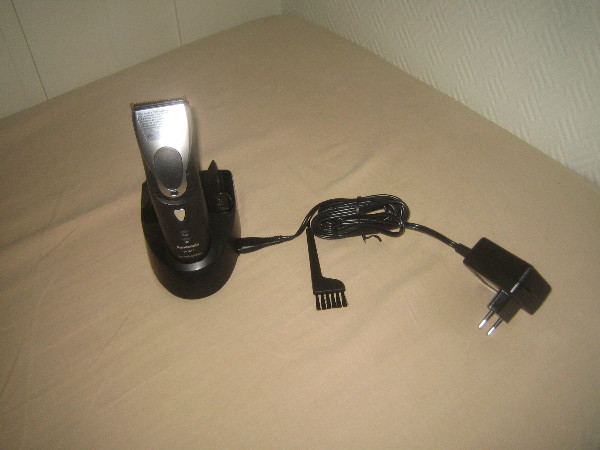
I normally cut my hair short, and my tool of choice has been a common hair/beard cutter, bought in a electrical shop here in Norway. But the last ones have not really been up to the task. My last cutter, some model from Braun, could only cut a few of my hairs at the time, and cutting my head took forever. And the one before that did not work very well either. We have looked for something better for a while, but it was not until I ended up visiting a hairdresser that we discovered that there are indeed better tools available. But these are not marketed and sold to "regular consumers". The hair saloons can get them through their suppliers, but their suppliers only sell companies. The models they sell, are very different from the ones available from Elkj p and Lefdal. The main difference is their efficiency. It would cut my hair in 5 minutes, instead of the 30-40 minutes required by my impotent Braun. The hairdresser I visited had a Panasonic ER160, which unfortunately is no longer available from the producer. But I found it had a successor, the Panasonic ER1611. The next step was to find somewhere to buy it. This was not straight forward. The list of suppliers I got from the hairdresser did not want to sell anything to me. But searching for the model on the web we found a supplier in Norway willing to sell it to us for around NOK 4000,-. This was a bit much. We kept searching and finally found a Danish supplier selling it for around NOK 1800,-. We ordered one, and it arrived a few days ago. The instructions said it had to charge for 8 hours when we started to use it, so we left it charging over night. Normally it will only need one hour to charge. The following evening we successfully tested it, and I can warmly recommend it to anyone looking for a real hair cutter. The ones we have used until now have been hair cutter toys.

29 April 2012

Sune Vuorela: Boat to akademy?

I m planning on taking the Tallink Silja boat from Stockholm to Tallin to get to (and from) Akademy. It is a all-night boat with restaurants, bars and almost whatever you would like. The boat leaves shortly before dinner and arrives shortly after breakfast and it is full of great fun. Last time (Akademy 2010 in Tampere), Inge, Ryan, Chani, Martin and me were on such a boat and it was a nice experience. Anyone up for such a experience this year ? You hopefully know how to reach me

26 April 2012

Petter Reinholdtsen: HTC One X - Your video? What do you mean?

In an article today published by Computerworld Norway, the photographer Eirik Helland Urke reports that the video editor application included with HTC One X have some quite surprising terms of use. The article is mostly based on the twitter message from mister Urke, stating:
"Dr y brukeravtale: HTC kan bruke MINE redigerte videoer kommersielt. Selv kan jeg KUN bruke dem privat."
I quickly translated it to this English message:
"Arrogant user agreement: HTC can use MY edited videos commercially. Although I can ONLY use them privately."
I've been unable to find the text of the license term myself, but suspect it is a variation of the MPEG-LA terms I discovered with my Canon IXUS 130. The HTC One X specification specifies that the recording format of the phone is .amr for audio and .mp3 for video. AMR is Adaptive Multi-Rate audio codec with patents which according to the Wikipedia article require an license agreement with VoiceAge. MP4 is MPEG4 with H.264, which according to Wikipedia require a licence agreement with MPEG-LA. I know why I prefer free and open standards also for video.

19 April 2012

Petter Reinholdtsen: RAND terms - non-reasonable and discriminatory

Here in Norway, the Ministry of Government Administration, Reform and Church Affairs is behind a directory of standards that are recommended or mandatory for use by the government. When the directory was created, the people behind it made an effort to ensure that everyone would be able to implement the standards and compete on equal terms to supply software and solutions to the government. Free software and non-free software could compete on the same level. But recently, some standards with RAND (Reasonable And Non-Discriminatory) terms have made their way into the directory. And while this might not sound too bad, the fact is that standard specifications with RAND terms often block free software from implementing them. The reasonable part of RAND mean that the cost per user/unit is low,and the non-discriminatory part mean that everyone willing to pay will get a license. Both sound great in theory. In practice, to get such license one need to be able to count users, and be able to pay a small amount of money per unit or user. By definition, users of free software do not need to register their use. So counting users or units is not possible for free software projects. And given that people will use the software without handing any money to the author, it is not really economically possible for a free software author to pay a small amount of money to license the rights to implement a standard when the income available is zero. The result in these situations is that free software are locked out from implementing standards with RAND terms. Because of this, when I see someone claiming the terms of a standard is reasonable and non-discriminatory, all I can think of is how this really is non-reasonable and discriminatory. Because free software developers are working in a global market, it does not really help to know that software patents are not supposed to be enforceable in Norway. The patent regimes in other countries affect us even here. I really hope the people behind the standard directory will pay more attention to these issues in the future. You can find more on the issues with RAND, FRAND and RAND-Z terms from Simon Phipps (RAND: Not So Reasonable?). Update 2012-04-21: Just came across a blog post from Glyn Moody over at Computer World UK warning about the same issue, and urging people to speak out to the UK government. I can only urge Norwegian users to do the same for the hearing taking place at the moment (respond before 2012-04-27). It proposes to require video conferencing standards including specifications with RAND terms.

15 April 2012

Petter Reinholdtsen: Debian Edu interview: Andreas Mundt

Behind Debian Edu and Skolelinux there are a lot of people doing the hard work of setting together all the pieces. This time I present to you Andreas Mundt, who have been part of the technical development team several years. He was also a key contributor in getting GOsa and Kerberos set up in the recently released Debian Edu Squeeze version. Who are you, and how do you spend your days? My name is Andreas Mundt, I grew up in south Germany. After studying Physics I spent several years at university doing research in Quantum Optics. After that I worked some years in an optics company. Finally I decided to turn over a new leaf in my life and started teaching 10 to 19 years old kids at school. I teach math, physics, information technology and science/technology. How did you get in contact with the Skolelinux/Debian Edu project? Already before I switched to teaching, I followed the Debian Edu project because of my interest in education and Debian. Within the qualification/training period for the teaching, I started contributing. What do you see as the advantages of Skolelinux/Debian Edu? The advantages of Debian Edu are the well known name, the out-of-the-box philosophy and of course the great free software of the Debian Project! What do you see as the disadvantages of Skolelinux/Debian Edu? As every coin has two sides, the out-of-the-box philosophy has its downside, too. In my opinion, it is hard to modify and tweak the setup, if you need or want that. Further more, it is not easily possible to upgrade the system to a new release. It takes much too long after a Debian release to prepare the -Edu release, perhaps because the number of developers working on the core of the code is rather small and often busy elsewhere. The Debian LAN project might fill the use case of a more flexible system. Which free software do you use daily? I am only using non-free software if I am forced to and run Debian on all my machines. For documents I prefer LaTeX and PGF/TikZ, then mutt and iceweasel for email respectively web browsing. At school I have Arduino and Fritzing in use for a micro controller project. Which strategy do you believe is the right one to use to get schools to use free software? One of the major problems is the vendor lock-in from top to bottom: Especially in combination with ignorant government employees and politicians, this works out great for the "market-leader". The school administration here in Baden-Wuerttemberg is occupied by that vendor. Documents have to be prepared in non-free, proprietary formats. Even free browsers do not work for the school administration. Publishers of school books provide software only for proprietary platforms. To change this, political work is very important. Parts of the political spectrum have become aware of the problem in the last years. However it takes quite some time and courageous politicians to 'free' the system. There is currently some discussion about "Open Data" and "Free/Open Standards". I am not sure if all the involved parties have a clue about the potential of these ideas, and probably only a fraction takes them seriously. However it might slowly make free software and the philosophy behind it more known and popular.

8 April 2012

Petter Reinholdtsen: Debian Edu interview: Justin B. Rye

It take all kind of contributions to create a Linux distribution like Debian Edu / Skolelinux, and this time I lend the ear to Justin B. Rye, who is listed as a big contributor to the Debian Edu Squeeze release manual. Who are you, and how do you spend your days? I'm a 44-year-old linguistics graduate living in Edinburgh who has occasionally been employed as a sysadmin. How did you get in contact with the Skolelinux/Debian Edu project? I'm neither a developer nor a Skolelinux/Debian Edu user! The only reason my name's in the credits for the documentation is that I hang around on debian-l10n-english waiting for people to mention things they'd like a native English speaker to proofread... So I did a sweep through the wiki for typos and Norglish and inconsistent spellings of "localisation". What do you see as the advantages of Skolelinux/Debian Edu? What do you see as the disadvantages of Skolelinux/Debian Edu? These questions are too hard for me - I don't use it! In fact I had hardly any contact with I.T. until long after I'd got out of the education system. I can tell you the advantages of Debian for me though: it soaks up as much of my free time as I want and no more, and lets me do everything I want a computer for without ever forcing me to spend money on the latest hardware. Which free software do you use daily? I've been using Debian since Rex; popularity-contest says the software that I use most is xinit, xterm, and xulrunner (in other words, I use a distinctly retro sort of desktop). Which strategy do you believe is the right one to use to get schools to use free software? Well, I don't know. I suppose I'd be inclined to try reasoning with the people who make the decisions, but obviously if that worked you would hardly need a strategy.

6 April 2012

Petter Reinholdtsen: Why the KDE menu is slow when /usr/ is NFS mounted - and a workaround

Recently I have spent time with Skolelinux Drift AS on speeding up a Debian Edu / Skolelinux Lenny installation using LTSP diskless workstations, and in the process I discovered something very surprising. The reason the KDE menu was responding slow when using it for the first time, was mostly due to the way KDE find application icons. I discovered that showing the Multimedia menu would cause more than 20 000 IP packages to be passed between the LTSP client and the NFS server. Most of these were NFS LOOKUP calls, resulting in a NFS3ERR_NOENT response. Because the ping times between the client and the server were in the range 2-20 ms, the menus would be very slow. Looking at the strace of kicker in Lenny (or plasma-desktop i Squeeze - same problem there), I see that the source of these NFS calls are access(2) system calls for non-existing files. KDE can do hundreds of access(2) calls to find one icon file. In my example, just finding the mplayer icon required around 230 access(2) calls. The KDE code seem to search for icons using a list of icon directories, and the list of possible directories is large. In (almost) each directory, it look for files ending in .png, .svgz, .svg and .xpm. The result is a very slow KDE menu when /usr/ is NFS mounted. Showing a single sub menu may result in thousands of NFS requests. I am not the first one to discover this. I found a KDE bug report from 2009 about this problem, and it is still unsolved. My solution to speed up the KDE menu was to create a package kde-icon-cache that upon installation will look at all .desktop files used to generate the KDE menu, find their icons, search the icon paths for the file that KDE will end up finding at run time, and copying the icon file to /var/lib/kde-icon-cache/. Finally, I add symlinks to these icon files in one of the first directories where KDE will look for them. This cut down the number of file accesses required to find one icon from several hundred to less than 5, and make the KDE menu almost instantaneous. I'm not quite sure where to make the package publicly available, so for now it is only available on request. The bug report mention that this do not only affect the KDE menu and icon handling, but also the login process. Not quite sure how to speed up that part without replacing NFS with for example NBD, and that is not really an option at the moment. If you got feedback on this issue, please let us know on debian-edu (at) lists.debian.org.

5 April 2012

Petter Reinholdtsen: Debian Edu in the Linux Weekly News

About two weeks ago, I was interviewed via email about Debian Edu and Skolelinux by Bruce Byfield in Linux Weekly News. The result was made public for non-subscribers today. I am pleased to see liked our Linux solution for schools. Check out his article Debian Edu/Skolelinux: A distribution for education if you want to learn more.

1 April 2012

Petter Reinholdtsen: Debian Edu interview: Wolfgang Schweer

Germany is a core area for the Debian Edu and Skolelinux user community, and this time I managed to get hold of Wolfgang Schweer, a valuable contributor to the project from Germany. Who are you, and how do you spend your days? I've studied Mathematics at the university 'Ruhr-Universit t' in Bochum, Germany. Since 1981 I'm working as a teacher at the school "Westfalen-Kolleg Dortmund", a second chance school. Here, young adults is given the opportunity to get further education in order to do the school examination 'Abitur', which will allow to study at a university. This second chance is of value for those who want a better job perspective or failed to get a higher school examination being teens. Besides teaching I was involved in developing online courses for a blended learning project called 'abitur-online.nrw' and in some other information technology related projects. For about ten years I've been teacher and coordinator for the 'abitur-online' project at my school. Being now in my early sixties, I've decided to leave school at the end of April this year. How did you get in contact with the Skolelinux/Debian Edu project? The first information about Skolelinux must have come to my attention years ago and somehow related to LTSP (Linux Terminal Server Project). At school, we had set up a network at the beginning of 1997 using Suse Linux on the desktop, replacing a Novell network. Since 2002, we used old machines from the city council of Dortmund as thin clients (LTSP, later Ubuntu/Lessdisks) cause new hardware was out of reach. At home I'm using Debian since years and - subscribed to the Debian news letter - heard from time to time about Skolelinux. About two years ago I proposed to replace the (somehow undocumented and only known to me) system at school by a well known Debian based system: Skolelinux. Students and teachers appreciated the new system because of a better look and feel and an enhanced access to local media on thin clients. The possibility to alter and/or reset passwords using a GUI was welcomed, too. Being able to do administrative tasks using a GUI and to easily set up workstations using PXE was of very high value for the admin teachers. What do you see as the advantages of Skolelinux/Debian Edu? It's open source, easy to set up, stable and flexible due to it's Debian base. It integrates LTSP out-of-the-box. And it is documented! So it was a perfect choice. Being open source, there are no license problems and so it's possible to point teachers and students to programs like OpenOffice.org, ViewYourMind (mind mapping) and The Gimp. It's of high value to be able to adapt parts of the system to special needs of a school and to choose where to get support for this. What do you see as the disadvantages of Skolelinux/Debian Edu? Nothing yet. Which free software do you use daily? At home (Debian Sid with Gnome Desktop): Iceweasel, LibreOffice, Mutt, Gedit, Document Viewer, Midnight Commander, flpsed (PDF Annotator). At school (Skolelinux Lenny): Iceweasel, Gedit, LibreOffice. Which strategy do you believe is the right one to use to get schools to use free software? Some time ago I thought it was enough to tell people about it. But that doesn't seem to work quite well. Now I concentrate on those more interested and hope to get multiplicators that way.

25 March 2012

Petter Reinholdtsen: Debian Edu screencast: Checking email with kmail using Kerberos authentication

The same Debian Edu developer that did the last screen cast I published, Wolfgang Schweer, has created a new screen cast showing how to set up Kmail in Debian Edu Squeze to authenticate using Kerberos, allowing users to check their local email account without providing any password. The video is embedded here in quarter size, and also available from vimeo and download as a Ogg Theora file. Check it out below. <video controls="controls" height="184" id="kmail-kerberos-movie" preload="preload" width="256"> <source src="http://ftp.skolelinux.org/skolelinux/press/screencasts/2012-03-14-Debian-Edu_Configure_Kmail_for_internal_usage.ogv" type="video/ogg; codecs="theora, vorbis""> Download video as Ogg. </video>

19 March 2012

Petter Reinholdtsen: Debian Edu interview: John Ingleby

Debian Edu / Skolelinux users are spread all across the globe. The second inteview after the Squeeze release was publised is with John Ingleby, a teacher and long time Linux user in United Kingdom. Who are you, and how do you spend your days? I teach ICT part time at the Rudolf Steiner School in Kings Langley, near London, UK. Previously I worked as a technical author/trainer while my children attended the school, and I also contributed to the Schoolforge UK community with the aim of encouraging UK schools to adopt free/open source software. Five or six years ago we had about 50 schools interested in some way, but we weren't able to convert many of them into sustainable installations. How did you get in contact with the Skolelinux/Debian Edu project? Skolelinux had two representatives at an early Edubuntu meeting in London which I attended. However at that time our school network had just been installed using CentOS, LTSP 4 and GNOME. When LTSP 5 came along we switched to Edubuntu thin client servers so now we have a mixed environment which includes Windows PCs and student laptops, as well as their MacBooks and iPads. However, the proprietary systems have always been rather problematic, and we never built a GUI for the LDAP server, so when I discovered Skolelinux is configured for all these things we decided to try it. What do you see as the advantages of Skolelinux/Debian Edu? By far the biggest advantage is the Debian Edu community. Apart from that I have always believed in the same "sustainable computing" goals that Skolelinux is built on: installing Linux on computers which would otherwise be thrown away, to provide a reliable, secure and low-cost IT environment for schools. From my own experience I know that a part-time person can teach and manage a network of about 25 Linux computers, but it would take much more of my time if we had proprietary software everywhere. What do you see as the disadvantages of Skolelinux/Debian Edu? As a newcomer I'm just finding out who's who in the community and how you're organised, and what your procedures are for dealing with various things such as editing manual pages and so-on. The only English language mailing list seems to be for developers as well as users, so my inbox needs heavy pruning each day! Which free software do you use daily? Besides the software already mentioned at school we use Samba, OpenLDAP, CUPS, Nagios and Dansguardian for the network, and on the desktops we have LibreOffice, Firefox, GIMP and Inkscape. At home I use Ubuntu and an Android 4 eePad Transformer (but I'm not sure if that counts...) Which strategy do you believe is the right one to use to get schools to use free software? That's a tough question! For very many years UK schools installed and taught only proprietary software, so that at the highest levels the notion of "computer" means simply "proprietary office applications". However, schools today are experiencing budget constraints, and many are having to think hard about upgrading Windows XP. At the same time, we have students showing teachers how to use iPads, MacBooks and Android, so the choice of operating system is no longer quite so automatic. What is more, our government at last realised that we need people with programming skills, so they're putting coding back in the curriculum! And it's encouraging that the first 10,000 Raspberry Pi units sold out in 2 hours. I don't really know what strategy is going to get UK schools to use free software, but building an active community of Skolelinux/Debian Edu users in this country has to be part of it.

16 March 2012

Petter Reinholdtsen: Writing and translating documentation in Debian Edu

Documentation in Debian Edu is provided in several languages, and it is important to make it both easy to contribute and to keep the translated versions in sync. To do this we have come up with what we believe is a very efficient work flow.
  1. The documentation is written in a moinmoin wiki (see for example the Squeeze release manual) with support for exporting the content as docbook XML.
  2. This docbook document is given to po4a to extract a gettext style .pot file with the content, which in turn is used to create .po files with the translated text.
  3. The .po files are given to translators, and they can always tell which part of the original wiki document is new or changed. They can use their normal translation tools like lokalize or poedit to write the translation. There is even a system in place to handle translated images.
  4. The translated .po files are combined with the original docbook XML document using po4a to create a translated docbook document.
  5. The final step is to use all the generated docbook files and create PDF and HTML version of the original and translated documents.
This setup work very well, but have a few issues. The biggest issue is that the docbook support we use in moinmoin is not actively maintained. The docbook support is also buggy, and our build system contain workarounds to make sure the generated docbook is usable despite these bugs. If you want to have a look at our setup, it is all there in the debian-edu-doc package.

14 March 2012

Lisandro Dami&aacute;n Nicanor P&eacute;rez Meyer: QtSerialPort: a new hope

Some time ago I wrote about the status of Qt-based libs for using the serial port. Some days later I was pointed to the QtSerialPort project. The good news on this is that this is a project aimed to enter into Qt 5.

I have tested the lib with some apps that originally used QExtSerialPort. So far, so good. The license terms seems pretty OK (it wouldn't have got that far in the Qt code review if it weren't).

In the meantime, I received a reply to one of my messages from an upstream dev of QSerialPort (note that is Q and not Qt). He was very kind, but considering the effort to get QtSerialPort inside Qt itself, I think it's better to try to develop with this last lib.

Maybe I should try to package it and upload it to experimental.

Next.

Previous.