Junichi Uekawa: Can't remember what I thought was interesting in memtest code.
 Can't remember what I thought was interesting in memtest code.
make dist,
drop tar.bz2,
document optionsmd started
destroying everything. The hint is that it takes a long time to do
what usually takes seconds. It helps that I now have a second monitor
showing logs.
I still lost much more mail than the last time. I used to have "301
723 messages", according to notmuch. But then when I ran smd-pull
by hand, it was telling me:
95K emails scanned
notmuch happily noticing the destroyed files on
the server:
jun 28 16:33:40 marcos notmuch[28532]: No new mail. Removed 65498 messages. Detected 1699 file renames.
jun 28 16:36:05 marcos notmuch[29746]: No new mail. Removed 68883 messages. Detected 2488 file renames.
jun 28 16:41:40 marcos notmuch[31972]: No new mail. Removed 118295 messages. Detected 3657 file renames.
jun 28 16:30:09 curie systemd[2845]: Finished pull emails with syncmaildir.
jun 28 16:30:09 curie systemd[2845]: Starting push emails with syncmaildir...
jun 28 16:30:09 curie systemd[2845]: Starting pull emails with syncmaildir...
notmuch dump > notmuch.dump
systemctl --user --now disable smd-pull.service smd-pull.timer smd-push.service smd-push.timer notmuch-new.service notmuch-new.timer
grep postfix/local /var/log/mail.log tail -71 > lost-mail
sed 's/.*\]://;s/:.*//' lost-mail > qids
notmuch new just to be sure it's up to date):
while read qid ; do
    grep "$qid: message-id" /var/log/mail.log
done < qids    sed 's/.*message-id=<//;s/>//'   while read msgid; do
    sudo -u anarcat notmuch count --exclude=false id:$msgid   grep -q 0 && echo $msgid
done
missing-msgids and:
$ wc -l missing-msgids
48 missing-msgids
$ while read msgid ; do notmuch count --exclude=false id:$msgid   grep -q 0 && echo $msgid ; done < missing-msgids
mailman.189.1624881611.23397.nodes-reseaulibre.ca@reseaulibre.ca
AnwMy7rdSpK-N-vt4AiOag@ismtpd0148p1mdw1.sendgrid.net
really-missing-msgids, and look at
the full mail logs to see what they are:
~anarcat/src/koumbit-scripts/mail/postfix-trace --from-file really-missing-msgids2
while read qid ; do grep "$qid: message-id" /var/log/mail.log; done < qids sed 's/.*message-id=<//;s/>//'
lost-mail-msgids, then copy the files over in
a test dir:
while read msgid ; do
    notmuch search --output=files --exclude=false "id:$msgid"
done < lost-mail-msgids   sed 's#/home/anarcat/Maildir/##'   rsync -v  --files-from=- /home/anarcat/Maildir/ shell.anarc.at:restore/Maildir-angela/
find restore/Maildir-angela/ -type f wc -l
while read msgid ; do
    notmuch search --output=files --exclude=false "id:$msgid"
done < lost-mail-msgids   sed 's#/home/anarcat/Maildir/##'   rsync -v  --files-from=- /home/anarcat/Maildir/ shell.anarc.at:Maildir/
notmuch new should find the new emails, and we
shouldn't have any lost mail anymore:
while read qid ; do grep "$qid: message-id" /var/log/mail.log; done < qids sed 's/.*message-id=<//;s/>//' while read msgid; do sudo -u anarcat notmuch count --exclude=false id:$msgid grep -q 0 && echo $msgid ; done
anarcat@curie:~(main)$ smd-pull  -n  --show-tags -v
Found lockfile of a dead instance. Ignored.
Phase 0: handshake
Phase 1: changes detection
    5K emails scanned
   10K emails scanned
   15K emails scanned
   20K emails scanned
   25K emails scanned
   30K emails scanned
   35K emails scanned
   40K emails scanned
   45K emails scanned
   50K emails scanned
Phase 2: synchronization
Phase 3: agreement
default: smd-client@localhost: TAGS: stats::new-mails(49687), del-mails(0), bytes-received(215752279), xdelta-received(3703852)
"smd-pull  -n  --show-tags -v" took 3 mins 39 secs
pv notmuch.dump notmuch restore
doveadm and offlineimaprsmtp which is a nice name for rsendmail A new minor release of RcppRedis arrived on CRAN, the first update since the last release in January of last year.
RcppRedis is one of several packages connecting R to the fabulous Redis in-memory datastructure store (and much more). RcppRedis does not pretend to be feature complete, but it may do some things faster than the other interfaces, and also offers an optional coupling with MessagePack binary (de)serialization via RcppMsgPack. The package has carried production loads for several years now.
This release updates CI to using r-ci, adds a
quit() methods, and updates the windows library in builds thanks to a PR by Jeroen which also enables builds under the experimemtal UCRT windows flavor.
Courtesy of CRANberries, there is also a diffstat report for this release. More information is on the RcppRedis page. If you like this or other open-source work I do, you can now sponsor me at GitHub.Changes in version 0.1.11 (2021-06-26)
This post by Dirk Eddelbuettel originated on his Thinking inside the box blog. Please report excessive re-aggregation in third-party for-profit settings.

 The Python programming language is one of the most popular and in huge demand. It is free, has a large community, is intended for the development of projects of varying complexity, is easy to learn, and opens up great opportunities for programmers. To work comfortably with it, you need special Python tools, which are able to simplify your work. We have selected the best Python tools that will be relevant in 2021.






 It's been more than a year since I wrote about Opinionated IkiWiki, a
pre-configured, containerized deployment of Ikiwiki
with opinions. My intention was to make something that is easy to get up and
running if you are more experienced with containers than IkiWiki.
I haven't yet switched to Opinionated IkiWiki for this site, but that was my
goal, and I think it's mature enough now that I can migrate over at some point,
so it seems a good time to call it Version 1.0. I have been using it for my
own private PIM systems for a while now.
You can pull built images from
quay.io, here:
https://quay.io/repository/jdowland/opinionated-ikiwiki
The source lives here:
https://github.com/jmtd/opinionated-ikiwiki
A description of some of the changes made to the IkiWiki version lives here:
https://github.com/jmtd/ikiwiki/blob/opinionated-doc/README.md
I'm writing up a PhD deliverable (which will show up here eventually) using
LaTeX, which is my preferred tool for such things, since I also use it for
papers, and will eventually be using it for my thesis itself. For this last
document, I experimented with a few packages and techniques for organising the
document which I found useful, so I thought I'd share them.
What version is this anyway?
I habitually store and develop my documents in git repositories. From time to
time I generate a PDF and copy it off elsewhere to review (e.g., an iPad).
Later on it can be useful to be able to figure out exactly what source built
the PDF. I achieve this using
\newcommand \version \input "git describe --always --dirty"
\version\ somewhere in the header of the document.
Draft mode
The common document classes all accept a draft argument, to enable Draft
Mode.
\documentclass[12pt,draft] article
\usepackage[final] graphicx
ifdraft package adds a convenience macro to
query whether we are in draft or not. I use it like so:
\ifdraft
This page will be cut from the final report.
\tableofcontents
\newpage
\ifdraft \newpage
\section Work completed\ifdraft  (1 page)  % 1 Page
 Two TODO items in the margin
 Collated TODOs in a list
\todo something to do . In the document,
by default, this is rendered in the right-hand margin. With the right argument,
the package will only render the notes in draft mode.
\usepackage[textsize=small,obeyDraft] todonotes
todonotes can also collate
all the TODOs together into a single list. The list items are hyperlinked back
to the page where the relevant item appears.
\ifdraft
\newpage
\section TODO
  This page will be cut from the final report.
  \listoftodos
# show overview
perccli show
# show controller 0 details
perccli /c0 show all
# show controller 0 info with less detail
perccli /c0 show
# clear all "foreign" RAID members
perccli /c0 /fall delete
# add a vd (RAID) of level RAID0 (r0) with the drive 32:0 (enclosure:slot from above command)
perccli /c0 add vd r0 drives=32:0
The perccli /c0 show command gives the following summary of disk ( PD in perccli terminology) information amongst other information. The EID is the enclosure, Slt is the slot (IE the bay you plug the disk into) and the DID is the disk identifier (not sure what happens if you have multiple enclosures). The allocation of device names (sda, sdb, etc) will be in order of EID:Slt or DID at boot time, and any drives added at run time will get the next letters available.
----------------------------------------------------------------------------------
EID:Slt DID State DG       Size Intf Med SED PI SeSz Model                     Sp
----------------------------------------------------------------------------------
32:0      0 Onln   0  465.25 GB SATA SSD Y   N  512B Samsung SSD 850 EVO 500GB U
32:1      1 Onln   1  465.25 GB SATA SSD Y   N  512B Samsung SSD 850 EVO 500GB U
32:3      3 Onln   2   3.637 TB SATA HDD N   N  512B ST4000DM000-1F2168        U
32:4      4 Onln   3   3.637 TB SATA HDD N   N  512B WDC WD40EURX-64WRWY0      U
32:5      5 Onln   5 278.875 GB SAS  HDD Y   N  512B ST300MM0026               U
32:6      6 Onln   6 558.375 GB SAS  HDD N   N  512B AL13SXL600N               U
32:7      7 Onln   4   3.637 TB SATA HDD N   N  512B ST4000DM000-1F2168        U
----------------------------------------------------------------------------------
The PERC controller is a MegaRAID with possibly some minor changes, there are reports of Linux MegaRAID management utilities working on it for similar functionality to perccli. The version of MegaRAID utilities I tried didn t work on my PERC hardware. The smartctl utility works on those disks if you tell it you have a MegaRAID controller (so obviously there s enough similarity that some MegaRAID utilities will work). Here are example smartctl commands for the first and last disks on my system. Note that the disk device node doesn t matter as all device nodes associated with the PERC/MegaRAID are equal for smartctl.
# get model number etc on DID 0 (Samsung SSD)
smartctl -d megaraid,0 -i /dev/sda
# get all the basic information on DID 0
smartctl -d megaraid,0 -a /dev/sda
# get model number etc on DID 7 (Seagate 4TB disk)
smartctl -d megaraid,7 -i /dev/sda
# exactly the same output as the previous command
smartctl -d megaraid,7 -i /dev/sdc
I have uploaded etbemon version 1.3.5-6 to Debian which has support for monitoring smartctl status of MegaRAID devices and NVMe devices. IDRAC To update IDRAC on Linux there s a bash script with the firmware in the same file (binary stuff at the end of a shell script). To make things a little more exciting the script insists that rpm be available (running apt install rpm fixes that for a Debian system). It also creates and runs other shell scripts which start with #!/bin/sh but depend on bash syntax. So I had to make /bin/sh a symlink to /bin/bash. You know you need this if you see errors like typeset: not found and [: -eq: unexpected operator and then the system reboots. Dell people, please test your scripts on dash (the Debian /bin/sh) or just specify #!/bin/bash. If the IDRAC update works it will take about 8 minutes. Lifecycle Controller The Lifecycle Controller is apparently for installing OS and firmware updates. I use Linux tools to update Linux and I generally don t plan to update the firmware after deployment (although I could do so from Linux if needed). So it doesn t seem to offer anything useful to me. Setting Up IDRAC For extra excitement I decided to try to setup IDRAC from the Linux command-line. To install the RAC setup tool you run apt install srvadmin-idracadm7 libargtable2-0 (because srvadmin-idracadm7 doesn t have the right dependencies).
# srvadmin-idracadm7 is missing a dependency
apt install srvadmin-idracadm7 libargtable2-0
# set the IP address, netmask, and gatewat for IDRAC
idracadm7 setniccfg -s 192.168.0.2 255.255.255.0 192.168.0.1
# put my name on the front panel LCD
idracadm7 set System.LCD.UserDefinedString "Russell Coker"
Conclusion This is a very nice deskside workstation/server. It s extremely quiet with hardly any fan noise and the case is strong enough to contain the noise of hard drives. When running with 3* 3.5 SATA disks and 2*10k 2.5 SAS disks on a wooden floor it wasn t annoyingly loud. Without the SAS disks it was as quiet as you can expect any PC to be, definitely not the volume you expect from a serious server! I bought the T320 systems loaded with SAS disks which made them quite loud, I immediately put the disks on ebay and installed SATA SSDs and hard drives which gives me more performance and more space than the SAS disks with less cost and almost no noise. 8*3.5 drive bays gives room for expansion. I currently have 2*SATA SSDs and 3*SATA disks, the SSDs are for the root filesystem (including /home) and the disks are for a separate filesystem for large files.
 Having build a single node Kubernetes cluster and had a poke at what it s doing in terms of networking the next thing I want to do is figure out what it s doing in terms of containers. You might argue this should have come before networking, but to me the networking piece is more non-standard than the container piece, so I wanted to understand that first.
Let s start with a process listing on the host.
ps faxno user,stat,cmd
There are a number of processes from the host kernel we don t care about:
    USER STAT CMD
       0 S    [kthreadd]
       0 I<    \_ [rcu_gp]
       0 I<    \_ [rcu_par_gp]
       0 I<    \_ [kworker/0:0H-events_highpri]
       0 I<    \_ [mm_percpu_wq]
       0 S     \_ [rcu_tasks_rude_]
       0 S     \_ [rcu_tasks_trace]
       0 S     \_ [ksoftirqd/0]
       0 I     \_ [rcu_sched]
       0 S     \_ [migration/0]
       0 S     \_ [cpuhp/0]
       0 S     \_ [cpuhp/1]
       0 S     \_ [migration/1]
       0 S     \_ [ksoftirqd/1]
       0 I<    \_ [kworker/1:0H-kblockd]
       0 S     \_ [cpuhp/2]
       0 S     \_ [migration/2]
       0 S     \_ [ksoftirqd/2]
       0 I<    \_ [kworker/2:0H-events_highpri]
       0 S     \_ [cpuhp/3]
       0 S     \_ [migration/3]
       0 S     \_ [ksoftirqd/3]
       0 I<    \_ [kworker/3:0H-kblockd]
       0 S     \_ [kdevtmpfs]
       0 I<    \_ [netns]
       0 S     \_ [kauditd]
       0 S     \_ [khungtaskd]
       0 S     \_ [oom_reaper]
       0 I<    \_ [writeback]
       0 S     \_ [kcompactd0]
       0 SN    \_ [ksmd]
       0 SN    \_ [khugepaged]
       0 I<    \_ [kintegrityd]
       0 I<    \_ [kblockd]
       0 I<    \_ [blkcg_punt_bio]
       0 I<    \_ [edac-poller]
       0 I<    \_ [devfreq_wq]
       0 I<    \_ [kworker/0:1H-kblockd]
       0 S     \_ [kswapd0]
       0 I<    \_ [kthrotld]
       0 I<    \_ [acpi_thermal_pm]
       0 I<    \_ [ipv6_addrconf]
       0 I<    \_ [kstrp]
       0 I<    \_ [zswap-shrink]
       0 I<    \_ [kworker/u9:0-hci0]
       0 I<    \_ [kworker/2:1H-kblockd]
       0 I<    \_ [ata_sff]
       0 I<    \_ [sdhci]
       0 S     \_ [irq/39-mmc0]
       0 I<    \_ [sdhci]
       0 S     \_ [irq/42-mmc1]
       0 S     \_ [scsi_eh_0]
       0 I<    \_ [scsi_tmf_0]
       0 S     \_ [scsi_eh_1]
       0 I<    \_ [scsi_tmf_1]
       0 I<    \_ [kworker/1:1H-kblockd]
       0 I<    \_ [kworker/3:1H-kblockd]
       0 S     \_ [jbd2/sda5-8]
       0 I<    \_ [ext4-rsv-conver]
       0 S     \_ [watchdogd]
       0 S     \_ [scsi_eh_2]
       0 I<    \_ [scsi_tmf_2]
       0 S     \_ [usb-storage]
       0 I<    \_ [cfg80211]
       0 S     \_ [irq/130-mei_me]
       0 I<    \_ [cryptd]
       0 I<    \_ [uas]
       0 S     \_ [irq/131-iwlwifi]
       0 S     \_ [card0-crtc0]
       0 S     \_ [card0-crtc1]
       0 S     \_ [card0-crtc2]
       0 I<    \_ [kworker/u9:2-hci0]
       0 I     \_ [kworker/3:0-events]
       0 I     \_ [kworker/2:0-events]
       0 I     \_ [kworker/1:0-events_power_efficient]
       0 I     \_ [kworker/3:2-events]
       0 I     \_ [kworker/1:1]
       0 I     \_ [kworker/u8:1-events_unbound]
       0 I     \_ [kworker/0:2-events]
       0 I     \_ [kworker/2:2]
       0 I     \_ [kworker/u8:0-events_unbound]
       0 I     \_ [kworker/0:1-events]
       0 I     \_ [kworker/0:0-events]
containerd. We also see kubelet, the Kubernetes node agent.
    USER STAT CMD
       0 Ss   /sbin/init
       0 Ss   /lib/systemd/systemd-journald
       0 Ss   /lib/systemd/systemd-udevd
     101 Ssl  /lib/systemd/systemd-timesyncd
       0 Ssl  /sbin/dhclient -4 -v -i -pf /run/dhclient.enx00e04c6851de.pid -lf /var/lib/dhcp/dhclient.enx00e04c6851de.leases -I -df /var/lib/dhcp/dhclient6.enx00e04c6851de.leases enx00e04c6851de
       0 Ss   /usr/sbin/cron -f
     104 Ss   /usr/bin/dbus-daemon --system --address=systemd: --nofork --nopidfile --systemd-activation --syslog-only
       0 Ssl  /usr/sbin/dockerd -H fd://
       0 Ssl  /usr/sbin/rsyslogd -n -iNONE
       0 Ss   /usr/sbin/smartd -n
       0 Ss   /lib/systemd/systemd-logind
       0 Ssl  /usr/bin/containerd
       0 Ss+  /sbin/agetty -o -p -- \u --noclear tty1 linux
       0 Ss   sshd: /usr/sbin/sshd -D [listener] 0 of 10-100 startups
       0 Ss    \_ sshd: root@pts/1
       0 Ss        \_ -bash
       0 R+            \_ ps faxno user,stat,cmd
       0 Ss    \_ sshd: noodles [priv]
    1000 S         \_ sshd: noodles@pts/0
    1000 Ss+           \_ -bash
       0 Ss   /lib/systemd/systemd --user
       0 S     \_ (sd-pam)
    1000 Ss   /lib/systemd/systemd --user
    1000 S     \_ (sd-pam)
       0 Ssl  /usr/bin/kubelet --bootstrap-kubeconfig=/etc/kubernetes/bootstrap-kubelet.conf --kubeconfig=/etc/kubernetes/kubelet.conf --config=/var/lib/kubelet/config.yaml --network-plugin=cni --pod-infra-container-image=k8s.gcr.io/pause:3.4.1
       0 Sl   /usr/bin/containerd-shim-runc-v2 -namespace moby -id fd95c597ff3171ff110b7bf440229e76c5108d5d93be75ffeab54869df734413 -address /run/containerd/containerd.sock
       0 Ss    \_ /pause
       0 Sl   /usr/bin/containerd-shim-runc-v2 -namespace moby -id c2ff2c50f0bc052feda2281741c4f37df7905e3b819294ec645148ae13c3fe1b -address /run/containerd/containerd.sock
       0 Ss    \_ /pause
       0 Sl   /usr/bin/containerd-shim-runc-v2 -namespace moby -id 589c1545d9e0cdf8ea391745c54c8f4db49f5f437b1a2e448e7744b2c12f8856 -address /run/containerd/containerd.sock
       0 Ss    \_ /pause
       0 Sl   /usr/bin/containerd-shim-runc-v2 -namespace moby -id 6f417fd8a8c573a2b8f792af08cdcd7ce663457f0f7218c8d55afa3732e6ee94 -address /run/containerd/containerd.sock
       0 Ss    \_ /pause
       0 Sl   /usr/bin/containerd-shim-runc-v2 -namespace moby -id afa9798c9f663b21df8f38d9634469e6b4db0984124547cd472a7789c61ef752 -address /run/containerd/containerd.sock
       0 Ssl   \_ kube-scheduler --authentication-kubeconfig=/etc/kubernetes/scheduler.conf --authorization-kubeconfig=/etc/kubernetes/scheduler.conf --bind-address=127.0.0.1 --kubeconfig=/etc/kubernetes/scheduler.conf --leader-elect=true --port=0
       0 Sl   /usr/bin/containerd-shim-runc-v2 -namespace moby -id 4b3708b62f4d427690f5979848c59fce522dab6c62a9c53b806ffbaef3f88e62 -address /run/containerd/containerd.sock
       0 Ssl   \_ kube-controller-manager --authentication-kubeconfig=/etc/kubernetes/controller-manager.conf --authorization-kubeconfig=/etc/kubernetes/controller-manager.conf --bind-address=127.0.0.1 --client-ca-file=/etc/kubernetes/pki/ca.crt --cluster-name=kubernetes --cluster-signing-cert-file=/etc/kubernetes/pki/ca.crt --cluster-signing-key-file=/etc/kubernetes/pki/ca.key --controllers=*,bootstrapsigner,tokencleaner --kubeconfig=/etc/kubernetes/controller-manager.conf --leader-elect=true --port=0 --requestheader-client-ca-file=/etc/kubernetes/pki/front-proxy-ca.crt --root-ca-file=/etc/kubernetes/pki/ca.crt --service-account-private-key-file=/etc/kubernetes/pki/sa.key --use-service-account-credentials=true
       0 Sl   /usr/bin/containerd-shim-runc-v2 -namespace moby -id 89f35bf7a825eb97db7035d29aa475a3a1c8aaccda0860a46388a3a923cd10bc -address /run/containerd/containerd.sock
       0 Ssl   \_ kube-apiserver --advertise-address=192.168.53.147 --allow-privileged=true --authorization-mode=Node,RBAC --client-ca-file=/etc/kubernetes/pki/ca.crt --enable-admission-plugins=NodeRestriction --enable-bootstrap-token-auth=true --etcd-cafile=/etc/kubernetes/pki/etcd/ca.crt --etcd-certfile=/etc/kubernetes/pki/apiserver-etcd-client.crt --etcd-keyfile=/etc/kubernetes/pki/apiserver-etcd-client.key --etcd-servers=https://127.0.0.1:2379 --insecure-port=0 --kubelet-client-certificate=/etc/kubernetes/pki/apiserver-kubelet-client.crt --kubelet-client-key=/etc/kubernetes/pki/apiserver-kubelet-client.key --kubelet-preferred-address-types=InternalIP,ExternalIP,Hostname --proxy-client-cert-file=/etc/kubernetes/pki/front-proxy-client.crt --proxy-client-key-file=/etc/kubernetes/pki/front-proxy-client.key --requestheader-allowed-names=front-proxy-client --requestheader-client-ca-file=/etc/kubernetes/pki/front-proxy-ca.crt --requestheader-extra-headers-prefix=X-Remote-Extra- --requestheader-group-headers=X-Remote-Group --requestheader-username-headers=X-Remote-User --secure-port=6443 --service-account-issuer=https://kubernetes.default.svc.cluster.local --service-account-key-file=/etc/kubernetes/pki/sa.pub --service-account-signing-key-file=/etc/kubernetes/pki/sa.key --service-cluster-ip-range=10.96.0.0/12 --tls-cert-file=/etc/kubernetes/pki/apiserver.crt --tls-private-key-file=/etc/kubernetes/pki/apiserver.key
       0 Sl   /usr/bin/containerd-shim-runc-v2 -namespace moby -id 2dabff6e4f59c96d931d95781d28314065b46d0e6f07f8c65dc52aa465f69456 -address /run/containerd/containerd.sock
       0 Ssl   \_ etcd --advertise-client-urls=https://192.168.53.147:2379 --cert-file=/etc/kubernetes/pki/etcd/server.crt --client-cert-auth=true --data-dir=/var/lib/etcd --initial-advertise-peer-urls=https://192.168.53.147:2380 --initial-cluster=udon=https://192.168.53.147:2380 --key-file=/etc/kubernetes/pki/etcd/server.key --listen-client-urls=https://127.0.0.1:2379,https://192.168.53.147:2379 --listen-metrics-urls=http://127.0.0.1:2381 --listen-peer-urls=https://192.168.53.147:2380 --name=udon --peer-cert-file=/etc/kubernetes/pki/etcd/peer.crt --peer-client-cert-auth=true --peer-key-file=/etc/kubernetes/pki/etcd/peer.key --peer-trusted-ca-file=/etc/kubernetes/pki/etcd/ca.crt --snapshot-count=10000 --trusted-ca-file=/etc/kubernetes/pki/etcd/ca.crt
       0 Sl   /usr/bin/containerd-shim-runc-v2 -namespace moby -id 73fae81715b670255b66419a7959798b287be7bbb41e96f8b711fa529aa02f0d -address /run/containerd/containerd.sock
       0 Ss    \_ /pause
       0 Sl   /usr/bin/containerd-shim-runc-v2 -namespace moby -id 26d92a720c560caaa5f8a0217bc98e486b1c032af6c7c5d75df508021d462878 -address /run/containerd/containerd.sock
       0 Ssl   \_ /usr/local/bin/kube-proxy --config=/var/lib/kube-proxy/config.conf --hostname-override=udon
       0 Sl   /usr/bin/containerd-shim-runc-v2 -namespace moby -id 7104f65b5d92a56a2df93514ed0a78cfd1090ca47b6ce4e0badc43be6c6c538e -address /run/containerd/containerd.sock
       0 Ss    \_ /pause
       0 Sl   /usr/bin/containerd-shim-runc-v2 -namespace moby -id 48d735f7f44e3944851563f03f32c60811f81409e7378641404035dffd8c1eb4 -address /run/containerd/containerd.sock
       0 Ssl   \_ /usr/bin/weave-npc
       0 S<        \_ /usr/sbin/ulogd -v
       0 Sl   /usr/bin/containerd-shim-runc-v2 -namespace moby -id 36b418e69ae7076fe5a44d16cef223d8908016474cb65910f2fd54cca470566b -address /run/containerd/containerd.sock
       0 Ss    \_ /bin/sh /home/weave/launch.sh
       0 Sl        \_ /home/weave/weaver --port=6783 --datapath=datapath --name=12:82:8f:ed:c7:bf --http-addr=127.0.0.1:6784 --metrics-addr=0.0.0.0:6782 --docker-api= --no-dns --db-prefix=/weavedb/weave-net --ipalloc-range=192.168.0.0/24 --nickname=udon --ipalloc-init consensus=0 --conn-limit=200 --expect-npc --no-masq-local
       0 Sl        \_ /home/weave/kube-utils -run-reclaim-daemon -node-name=udon -peer-name=12:82:8f:ed:c7:bf -log-level=debug
       0 Sl   /usr/bin/containerd-shim-runc-v2 -namespace moby -id 534c0a698478599277482d97a137fab8ef4d62db8a8a5cf011b4bead28246f70 -address /run/containerd/containerd.sock
       0 Ss    \_ /pause
       0 Sl   /usr/bin/containerd-shim-runc-v2 -namespace moby -id 9ffd6b668ddfbf3c64c6783bc6f4f6cc9e92bfb16c83fb214c2cbb4044993bf0 -address /run/containerd/containerd.sock
       0 Ss    \_ /pause
       0 Sl   /usr/bin/containerd-shim-runc-v2 -namespace moby -id 4a30785f91873a7e6a191e86928a789760a054e4fa6dcd7048a059b42cf19edf -address /run/containerd/containerd.sock
       0 Ssl   \_ /coredns -conf /etc/coredns/Corefile
       0 Sl   /usr/bin/containerd-shim-runc-v2 -namespace moby -id 649a507d45831aca1de5231b49afc8ff37d90add813e7ecd451d12eedd785b0c -address /run/containerd/containerd.sock
       0 Ssl   \_ /coredns -conf /etc/coredns/Corefile
       0 Sl   /usr/bin/containerd-shim-runc-v2 -namespace moby -id 62b369de8d8cece4d33ec9fda4d23a9718379a8df8b30173d68f20bff830fed2 -address /run/containerd/containerd.sock
       0 Ss    \_ /pause
       0 Sl   /usr/bin/containerd-shim-runc-v2 -namespace moby -id 7cbb177bee18dbdeed21fb90e74378e2081436ad5bf116b36ad5077fe382df30 -address /run/containerd/containerd.sock
       0 Ss    \_ /bin/bash /usr/local/bin/run.sh
       0 S         \_ nginx: master process nginx -g daemon off;
   65534 S             \_ nginx: worker process
       0 Ss   /lib/systemd/systemd --user
       0 S     \_ (sd-pam)
       0 Sl   /usr/bin/containerd-shim-runc-v2 -namespace moby -id 6669168db70db4e6c741e8a047942af06dd745fae4d594291d1d6e1077b05082 -address /run/containerd/containerd.sock
       0 Ss    \_ /pause
       0 Sl   /usr/bin/containerd-shim-runc-v2 -namespace moby -id d5fa78fa31f11a4c5fb9fd2e853a00f0e60e414a7bce2e0d8fcd1f6ab2b30074 -address /run/containerd/containerd.sock
     101 Ss    \_ /usr/bin/dumb-init -- /nginx-ingress-controller --publish-service=ingress-nginx/ingress-nginx-controller --election-id=ingress-controller-leader --ingress-class=nginx --configmap=ingress-nginx/ingress-nginx-controller --validating-webhook=:8443 --validating-webhook-certificate=/usr/local/certificates/cert --validating-webhook-key=/usr/local/certificates/key
     101 Ssl       \_ /nginx-ingress-controller --publish-service=ingress-nginx/ingress-nginx-controller --election-id=ingress-controller-leader --ingress-class=nginx --configmap=ingress-nginx/ingress-nginx-controller --validating-webhook=:8443 --validating-webhook-certificate=/usr/local/certificates/cert --validating-webhook-key=/usr/local/certificates/key
     101 S             \_ nginx: master process /usr/local/nginx/sbin/nginx -c /etc/nginx/nginx.conf
     101 Sl                \_ nginx: worker process
     101 Sl                \_ nginx: worker process
     101 Sl                \_ nginx: worker process
     101 Sl                \_ nginx: worker process
     101 S                 \_ nginx: cache manager process
/usr/local/bin/run.sh), and some things that look related to weave. The rest appears to be Kubernete s related infrastructure.
kube-scheduler, kube-controller-manager, kube-apiserver, kube-proxy all look like core Kubernetes bits. etcd is a distributed, reliable key-value store. coredns is a DNS server, with plugins for Kubernetes and etcd.
What does Docker claim is happening?
CONTAINER ID   IMAGE                                 COMMAND                  CREATED      STATUS      PORTS     NAMES
d5fa78fa31f1   k8s.gcr.io/ingress-nginx/controller   "/usr/bin/dumb-init  "   3 days ago   Up 3 days             k8s_controller_ingress-nginx-controller-5b74bc9868-bczdr_ingress-nginx_4d7d3d81-a769-4de9-a4fb-04763b7c1605_0
6669168db70d   k8s.gcr.io/pause:3.4.1                "/pause"                 3 days ago   Up 3 days             k8s_POD_ingress-nginx-controller-5b74bc9868-bczdr_ingress-nginx_4d7d3d81-a769-4de9-a4fb-04763b7c1605_0
7cbb177bee18   k8s.gcr.io/echoserver                 "/usr/local/bin/run. "   3 days ago   Up 3 days             k8s_echoserver_hello-node-59bffcc9fd-8hkgb_default_c7111c9e-7131-40e0-876d-be89d5ca1812_0
62b369de8d8c   k8s.gcr.io/pause:3.4.1                "/pause"                 3 days ago   Up 3 days             k8s_POD_hello-node-59bffcc9fd-8hkgb_default_c7111c9e-7131-40e0-876d-be89d5ca1812_0
649a507d4583   296a6d5035e2                          "/coredns -conf /etc "   4 days ago   Up 4 days             k8s_coredns_coredns-558bd4d5db-flrfq_kube-system_f8b2b52e-6673-4966-82b1-3fbe052a0297_0
4a30785f9187   296a6d5035e2                          "/coredns -conf /etc "   4 days ago   Up 4 days             k8s_coredns_coredns-558bd4d5db-4nvrg_kube-system_1976f4d6-647c-45ca-b268-95f071f064d5_0
9ffd6b668ddf   k8s.gcr.io/pause:3.4.1                "/pause"                 4 days ago   Up 4 days             k8s_POD_coredns-558bd4d5db-flrfq_kube-system_f8b2b52e-6673-4966-82b1-3fbe052a0297_0
534c0a698478   k8s.gcr.io/pause:3.4.1                "/pause"                 4 days ago   Up 4 days             k8s_POD_coredns-558bd4d5db-4nvrg_kube-system_1976f4d6-647c-45ca-b268-95f071f064d5_0
36b418e69ae7   df29c0a4002c                          "/home/weave/launch. "   4 days ago   Up 4 days             k8s_weave_weave-net-mchmg_kube-system_b9af9615-8cde-4a18-8555-6da1f51b7136_1
48d735f7f44e   weaveworks/weave-npc                  "/usr/bin/launch.sh"     4 days ago   Up 4 days             k8s_weave-npc_weave-net-mchmg_kube-system_b9af9615-8cde-4a18-8555-6da1f51b7136_0
7104f65b5d92   k8s.gcr.io/pause:3.4.1                "/pause"                 4 days ago   Up 4 days             k8s_POD_weave-net-mchmg_kube-system_b9af9615-8cde-4a18-8555-6da1f51b7136_0
26d92a720c56   4359e752b596                          "/usr/local/bin/kube "   4 days ago   Up 4 days             k8s_kube-proxy_kube-proxy-6d8kg_kube-system_8bf2d7ec-4850-427f-860f-465a9ff84841_0
73fae81715b6   k8s.gcr.io/pause:3.4.1                "/pause"                 4 days ago   Up 4 days             k8s_POD_kube-proxy-6d8kg_kube-system_8bf2d7ec-4850-427f-860f-465a9ff84841_0
89f35bf7a825   771ffcf9ca63                          "kube-apiserver --ad "   4 days ago   Up 4 days             k8s_kube-apiserver_kube-apiserver-udon_kube-system_1af8c5f362b7b02269f4d244cb0e6fbf_0
afa9798c9f66   a4183b88f6e6                          "kube-scheduler --au "   4 days ago   Up 4 days             k8s_kube-scheduler_kube-scheduler-udon_kube-system_629dc49dfd9f7446eb681f1dcffe6d74_0
2dabff6e4f59   0369cf4303ff                          "etcd --advertise-cl "   4 days ago   Up 4 days             k8s_etcd_etcd-udon_kube-system_c2a3008c1d9895f171cd394e38656ea0_0
4b3708b62f4d   e16544fd47b0                          "kube-controller-man "   4 days ago   Up 4 days             k8s_kube-controller-manager_kube-controller-manager-udon_kube-system_1d1b9018c3c6e7aa2e803c6e9ccd2eab_0
fd95c597ff31   k8s.gcr.io/pause:3.4.1                "/pause"                 4 days ago   Up 4 days             k8s_POD_kube-scheduler-udon_kube-system_629dc49dfd9f7446eb681f1dcffe6d74_0
589c1545d9e0   k8s.gcr.io/pause:3.4.1                "/pause"                 4 days ago   Up 4 days             k8s_POD_kube-controller-manager-udon_kube-system_1d1b9018c3c6e7aa2e803c6e9ccd2eab_0
6f417fd8a8c5   k8s.gcr.io/pause:3.4.1                "/pause"                 4 days ago   Up 4 days             k8s_POD_kube-apiserver-udon_kube-system_1af8c5f362b7b02269f4d244cb0e6fbf_0
c2ff2c50f0bc   k8s.gcr.io/pause:3.4.1                "/pause"                 4 days ago   Up 4 days             k8s_POD_etcd-udon_kube-system_c2a3008c1d9895f171cd394e38656ea0_0
noodles@udon:~$ kubectl get pods --all-namespaces
NAMESPACE       NAME                                        READY   STATUS
default         hello-node-59bffcc9fd-8hkgb                 1/1     Running
ingress-nginx   ingress-nginx-admission-create-8jgkt        0/1     Completed
ingress-nginx   ingress-nginx-admission-patch-jdq4t         0/1     Completed
ingress-nginx   ingress-nginx-controller-5b74bc9868-bczdr   1/1     Running
kube-system     coredns-558bd4d5db-4nvrg                    1/1     Running
kube-system     coredns-558bd4d5db-flrfq                    1/1     Running
kube-system     etcd-udon                                   1/1     Running
kube-system     kube-apiserver-udon                         1/1     Running
kube-system     kube-controller-manager-udon                1/1     Running
kube-system     kube-proxy-6d8kg                            1/1     Running
kube-system     kube-scheduler-udon                         1/1     Running
kube-system     weave-net-mchmg                             2/2     Running
Control group /:
-.slice
 user.slice
   user-0.slice
     session-29.scope
        515899 sshd: root@pts/1
        515913 -bash
       3519743 systemd-cgls
       3519744 cat
     user@0.service
       init.scope
         515902 /lib/systemd/systemd --user
         515903 (sd-pam)
   user-1000.slice
     user@1000.service
       init.scope
         2564011 /lib/systemd/systemd --user
         2564012 (sd-pam)
     session-110.scope
       2564007 sshd: noodles [priv]
       2564040 sshd: noodles@pts/0
       2564041 -bash
 init.scope
   1 /sbin/init
 system.slice
   containerd.service
       21383 /usr/bin/containerd-shim-runc-v2 -namespace moby -id fd95c597ff31
       21408 /usr/bin/containerd-shim-runc-v2 -namespace moby -id c2ff2c50f0bc
       21432 /usr/bin/containerd-shim-runc-v2 -namespace moby -id 589c1545d9e0
       21459 /usr/bin/containerd-shim-runc-v2 -namespace moby -id 6f417fd8a8c5
       21582 /usr/bin/containerd-shim-runc-v2 -namespace moby -id afa9798c9f66
       21607 /usr/bin/containerd-shim-runc-v2 -namespace moby -id 4b3708b62f4d
       21640 /usr/bin/containerd-shim-runc-v2 -namespace moby -id 89f35bf7a825
       21648 /usr/bin/containerd-shim-runc-v2 -namespace moby -id 2dabff6e4f59
       22343 /usr/bin/containerd-shim-runc-v2 -namespace moby -id 73fae81715b6
       22391 /usr/bin/containerd-shim-runc-v2 -namespace moby -id 26d92a720c56
       26992 /usr/bin/containerd-shim-runc-v2 -namespace moby -id 7104f65b5d92
       27405 /usr/bin/containerd-shim-runc-v2 -namespace moby -id 48d735f7f44e
       27531 /usr/bin/containerd-shim-runc-v2 -namespace moby -id 36b418e69ae7
       27941 /usr/bin/containerd-shim-runc-v2 -namespace moby -id 534c0a698478
       27960 /usr/bin/containerd-shim-runc-v2 -namespace moby -id 9ffd6b668ddf
       28131 /usr/bin/containerd-shim-runc-v2 -namespace moby -id 4a30785f9187
       28159 /usr/bin/containerd-shim-runc-v2 -namespace moby -id 649a507d4583
      514667 /usr/bin/containerd-shim-runc-v2 -namespace moby -id 62b369de8d8c
      514976 /usr/bin/containerd-shim-runc-v2 -namespace moby -id 7cbb177bee18
      698904 /usr/bin/containerd-shim-runc-v2 -namespace moby -id 6669168db70d
      699284 /usr/bin/containerd-shim-runc-v2 -namespace moby -id d5fa78fa31f1
     2805479 /usr/bin/containerd
   systemd-udevd.service
     2805502 /lib/systemd/systemd-udevd
   cron.service
     2805474 /usr/sbin/cron -f
   docker.service
     528 /usr/sbin/dockerd -H fd://
   kubelet.service
     2805501 /usr/bin/kubelet --bootstrap-kubeconfig=/etc/kubernetes/bootstrap
   systemd-journald.service
     2805505 /lib/systemd/systemd-journald
   ssh.service
     2805500 sshd: /usr/sbin/sshd -D [listener] 0 of 10-100 startups
   ifup@enx00e04c6851de.service
     2805675 /sbin/dhclient -4 -v -i -pf /run/dhclient.enx00e04c6851de.pid -lf
   rsyslog.service
     2805488 /usr/sbin/rsyslogd -n -iNONE
   smartmontools.service
     2805499 /usr/sbin/smartd -n
   dbus.service
     527 /usr/bin/dbus-daemon --system --address=systemd: --nofork --nopidfile
   systemd-timesyncd.service
     2805513 /lib/systemd/systemd-timesyncd
   system-getty.slice
     getty@tty1.service
       536 /sbin/agetty -o -p -- \u --noclear tty1 linux
   systemd-logind.service
     533 /lib/systemd/systemd-logind
 kubepods.slice
   kubepods-burstable.slice
     kubepods-burstable-pod1af8c5f362b7b02269f4d244cb0e6fbf.slice
       docker-6f417fd8a8c573a2b8f792af08cdcd7ce663457f0f7218c8d55afa3732e6ee94.scope
         21493 /pause
       docker-89f35bf7a825eb97db7035d29aa475a3a1c8aaccda0860a46388a3a923cd10bc.scope
         21699 kube-apiserver --advertise-address=192.168.33.147 --allow-privi
     kubepods-burstable-podf8b2b52e_6673_4966_82b1_3fbe052a0297.slice
       docker-649a507d45831aca1de5231b49afc8ff37d90add813e7ecd451d12eedd785b0c.scope
         28187 /coredns -conf /etc/coredns/Corefile
       docker-9ffd6b668ddfbf3c64c6783bc6f4f6cc9e92bfb16c83fb214c2cbb4044993bf0.scope
         27987 /pause
     kubepods-burstable-podc2a3008c1d9895f171cd394e38656ea0.slice
       docker-c2ff2c50f0bc052feda2281741c4f37df7905e3b819294ec645148ae13c3fe1b.scope
         21481 /pause
       docker-2dabff6e4f59c96d931d95781d28314065b46d0e6f07f8c65dc52aa465f69456.scope
         21701 etcd --advertise-client-urls=https://192.168.33.147:2379 --cert
     kubepods-burstable-pod629dc49dfd9f7446eb681f1dcffe6d74.slice
       docker-fd95c597ff3171ff110b7bf440229e76c5108d5d93be75ffeab54869df734413.scope
         21491 /pause
       docker-afa9798c9f663b21df8f38d9634469e6b4db0984124547cd472a7789c61ef752.scope
         21680 kube-scheduler --authentication-kubeconfig=/etc/kubernetes/sche
     kubepods-burstable-podb9af9615_8cde_4a18_8555_6da1f51b7136.slice
       docker-48d735f7f44e3944851563f03f32c60811f81409e7378641404035dffd8c1eb4.scope
         27424 /usr/bin/weave-npc
         27458 /usr/sbin/ulogd -v
       docker-36b418e69ae7076fe5a44d16cef223d8908016474cb65910f2fd54cca470566b.scope
         27549 /bin/sh /home/weave/launch.sh
         27629 /home/weave/weaver --port=6783 --datapath=datapath --name=12:82
         27825 /home/weave/kube-utils -run-reclaim-daemon -node-name=udon -pee
       docker-7104f65b5d92a56a2df93514ed0a78cfd1090ca47b6ce4e0badc43be6c6c538e.scope
         27011 /pause
     kubepods-burstable-pod4d7d3d81_a769_4de9_a4fb_04763b7c1605.slice
       docker-6669168db70db4e6c741e8a047942af06dd745fae4d594291d1d6e1077b05082.scope
         698925 /pause
       docker-d5fa78fa31f11a4c5fb9fd2e853a00f0e60e414a7bce2e0d8fcd1f6ab2b30074.scope
          699303 /usr/bin/dumb-init -- /nginx-ingress-controller --publish-ser
          699316 /nginx-ingress-controller --publish-service=ingress-nginx/ing
          699405 nginx: master process /usr/local/nginx/sbin/nginx -c /etc/ngi
         1075085 nginx: worker process
         1075086 nginx: worker process
         1075087 nginx: worker process
         1075088 nginx: worker process
         1075089 nginx: cache manager process
     kubepods-burstable-pod1976f4d6_647c_45ca_b268_95f071f064d5.slice
       docker-4a30785f91873a7e6a191e86928a789760a054e4fa6dcd7048a059b42cf19edf.scope
         28178 /coredns -conf /etc/coredns/Corefile
       docker-534c0a698478599277482d97a137fab8ef4d62db8a8a5cf011b4bead28246f70.scope
         27995 /pause
     kubepods-burstable-pod1d1b9018c3c6e7aa2e803c6e9ccd2eab.slice
       docker-589c1545d9e0cdf8ea391745c54c8f4db49f5f437b1a2e448e7744b2c12f8856.scope
         21489 /pause
       docker-4b3708b62f4d427690f5979848c59fce522dab6c62a9c53b806ffbaef3f88e62.scope
         21690 kube-controller-manager --authentication-kubeconfig=/etc/kubern
   kubepods-besteffort.slice
     kubepods-besteffort-podc7111c9e_7131_40e0_876d_be89d5ca1812.slice
       docker-62b369de8d8cece4d33ec9fda4d23a9718379a8df8b30173d68f20bff830fed2.scope
         514688 /pause
       docker-7cbb177bee18dbdeed21fb90e74378e2081436ad5bf116b36ad5077fe382df30.scope
         514999 /bin/bash /usr/local/bin/run.sh
         515039 nginx: master process nginx -g daemon off;
         515040 nginx: worker process
     kubepods-besteffort-pod8bf2d7ec_4850_427f_860f_465a9ff84841.slice
       docker-73fae81715b670255b66419a7959798b287be7bbb41e96f8b711fa529aa02f0d.scope
         22364 /pause
       docker-26d92a720c560caaa5f8a0217bc98e486b1c032af6c7c5d75df508021d462878.scope
         22412 /usr/local/bin/kube-proxy --config=/var/lib/kube-proxy/config.c
kubepods.slice piece then you can see our pods are divided into two sets, kubepods-burstable.slice and kubepods-besteffort.slice. Under those you can see the individual pods, all of which have at least 2 separate cgroups, one of which is running /pause. Turns out this is a generic Kubernetes image which basically performs the process reaping that an init process would do on a normal system; it just sits and waits for processes to exit and cleans them up. Again, Ian Lewis has more details on the pause container.
Finally let s dig into the actual containers. The pause container seems like a good place to start. We can examine the details of where the filesystem is (may differ if you re not using the overlay2 image thingy). The hex string is the container ID listed by docker ps.
# docker inspect --format=' .GraphDriver.Data.MergedDir ' 6669168db70d
/var/lib/docker/overlay2/5a2d76012476349e6b58eb6a279bac400968cefae8537082ea873b2e791ff3c6/merged
# cd /var/lib/docker/overlay2/5a2d76012476349e6b58eb6a279bac400968cefae8537082ea873b2e791ff3c6/merged
# find .   sed -e 's;^./;;'
pause
proc
.dockerenv
etc
etc/resolv.conf
etc/hostname
etc/mtab
etc/hosts
sys
dev
dev/shm
dev/pts
dev/console
# file pause
pause: ELF 64-bit LSB executable, x86-64, version 1 (GNU/Linux), statically linked, for GNU/Linux 3.2.0, BuildID[sha1]=d35dab7152881e37373d819f6864cd43c0124a65, stripped
# docker inspect --format=' .GraphDriver.Data.MergedDir ' 7cbb177bee18
/var/lib/docker/overlay2/09042bc1aff16a9cba43f1a6a68f7786c4748e989a60833ec7417837c4bfaacb/merged
# cd /var/lib/docker/overlay2/09042bc1aff16a9cba43f1a6a68f7786c4748e989a60833ec7417837c4bfaacb/merged
# find .   wc -l
3358
/etc/os-release shows why:
# grep PRETTY etc/os-release
PRETTY_NAME="Ubuntu 16.04.2 LTS"
# docker exec d5fa78fa31f1 grep PRETTY /etc/os-release
PRETTY_NAME="Alpine Linux v3.13"
wget -O /usr/local/hpePublicKey2048_key1.pub https://downloads.linux.hpe.com/SDR/hpePublicKey2048_key1.pub
echo "# HP monitoring" >> /etc/apt/sources.list
echo "deb [signed-by=/usr/local/hpePublicKey2048_key1.pub] http://downloads.linux.hpe.com/SDR/downloads/MCP/Debian/ stretch/current-gen9 non-free" >> /etc/apt/sources.list
The above commands will make the management utilities installable on Debian/Buster. If using Bullseye (Testing at the moment) then you need to have Buster repositories in APT for dependencies, HP doesn t seem to have packaged all their utilities for Buster.
wget -r -np -A Contents-amd64.bz2 http://downloads.linux.hpe.com/SDR/repo/mcp/debian/distsTo find out which repositories had the programs I need I ran the above recursive wget and then uncompressed them for grep -R (as an aside it would be nice if bzgrep supported -R). I installed the hp-health package which has hpasmcli for viewing and setting many configuration options and hplog for viewing event log data and thermal data (among a few other things). I ve added a new monitor to etbemon hp-temp.monitor to monitor HP server temperatures, I haven t made a configuration option to change the thresholds for what is considered normal because I don t expect server class systems to be routinely running above the warning temperature. For the linux-temp.monitor script I added a command-line option for the percentage of the high temperature that is an error condition as well as an option for the number of CPU cores that need to be over-temperature, having one core permanently over the high temperature due to a web browser seems standard for white-box workstations nowadays. The hp-health package depends on libc6-i686 lib32gcc1 even though none of the programs it contains use lib32gcc1. Depending on lib32gcc1 instead of lib32gcc1 lib32gcc-s1 means that installing hp-health requires removing mesa-opencl-icd which probably means that BOINC can t use the GPU among other things. I solved this by editing /var/lib/dpkg/status and changing the package dependencies to what I desired. Note that this is not something for a novice to do, make a backup and make sure you know what you are doing! Issues The HPE Dynamic Smart Array B140i is a software RAID device. While it s convenient for some users that software RAID gets supported in the UEFI boot process, generally software RAID is a bad idea. Also my system has hot-swap drive caddies but the controller doesn t support hot-swap. So the first thing to do was to configure the array controller to run in AHCI mode and give up on using hot-swap drive caddies for hot-swap. I tested all the documented ways of scanning for new devices and nothing other than a reboot made the kernel recognise a new SATA disk. According to specs provided by Dell and HP the ML110 Gen9 makes less noise than the PowerEdge T320, according to my own observations the reverse is the case. I don t know if this is because of Dell being more conservative in their specs than HP or because of how dBA is measured vs my own personal annoyance thresholds for sounds. As the system makes more noise than I m comfortable with I plan to build a rubber enclosure for the rear of the system to reduce noise, that will be the subject of another post. For Australian readers Bunnings has some good deals on rubber floor mats that can be used to reduce server noise. The server doesn t have sound hardware, while one could argue that servers don t need sound there are some server uses for sound hardware such as using line input as a source of entropy. Also for a manufacturer it might be a benefit to use the same motherboard for workstations and servers. Fortunately a friend gave me a nice set of Logitech USB speakers a few years ago that I hadn t previously had a cause to use, so that will solve the problem for me (I don t need line-in on a workstation). UEFI and Memtest I decided to try UEFI boot for something new (in the past I d only used UEFI boot for a server that only had large disks). In the past I ve booted all my own systems with BIOS boot because I m familiar with it and they all have SSDs for booting which are less than 2TB in size (until recently 2TB SSDs weren t affordable for my personal use). The Debian UEFI wiki page is worth reading [3]. The Debian Wiki page about ProLiant servers [4] is worth reading too. Memtest86+ doesn t support EFI booting (just goes to a black screen) even though Debian/Buster puts in a GRUB entry for it (Debian bug #695246 was filed for this in 2012). Also on my ML110 Memtest86+ doesn t report the RAM speed (a known issue on Memtest86+). Comments on the net say that Memtest86+ hasn t been maintained for a long time and Memtest86 (the non-free version) has been updated more recently. So far I haven t seen a system with ECC RAM have a memory problem that could be detected by Memtest86+, the memory problems I ve seen on ECC systems have been things that prevent booting (RAM not being recognised correctly), that are detected by the BIOS as ECC errors before booting, or that are reported by the kernel as ECC errors at run time (happened years ago and I can t remember the details). Overall I m not a fan of EFI with the way it currently works in Debian. It seems to add some of the GRUB functionality into the BIOS and then use that to load GRUB. It seems that EFI can do everything you need and it would be better to just have a single boot loader not two of them chained. Power Supply There are a range of PSUs for the ML110, the one I have has the smallest available PSU (350W) and doesn t have a PCIe power cable (the one used for video cards). Here is the HP document which shows the cabling for the various ML110 Gen8 PSUs [5], I have the 350W PSU. One thing I ve considered is whether I could make an adaptor from the drive bay power to the PCIe connector. A quick web search indicates that 4 SAS disks when active can take up to 75W more power than a system with no disks. If that s the case then the 2 spare drive bay connectors which can each handle 4 disks should be able to supply 150W. As a 6 pin PCIe power cable (GPU power cable) is rated at 75W that should be fine in theory (here s a page with the pinouts for PCIe power connectors [6]). My video card is a Radeon R7 260X which apparently takes about 113W all up so should be taking less than 75W from the PCIe power cable. All I really want is YouTube, Netflix, and text editing at 4K resolution. So I don t need much in terms of 3D power. KDE uses some of the advanced features of modern video cards, but it doesn t compare to 3D gaming. According to the Wikipedia page for Radeon RX 500 series [7] the RX560 supports DisplayPort 1.4 and HDMI 2.0 (both of which do 4K@60Hz) and has a TDP of 75W. So a RX560 video card seems like a good option that will work in any system that doesn t have a spare PCIe power cable. I ve just ordered one of those for $246 so hopefully that will arrive in a week or so. PCI Fan The ML110 Gen9 has an optional PCIe fan and baffle to cool PCIe cards (part number 784580-B21). Extra cooling of PCIe cards is a good thing, but $400 list price (and about $50 ebay price) for the fan and baffle is unpleasant. When I boot the system with a PCIe dual-ethernet card and two PCIe NVMe cards it gives a BIOS warning on boot, when I add a video card it refuses to boot without the extra fan. It s nice that the system makes sure it doesn t get into a thermal overload situation, but it would be nicer if they just shipped all necessary fans with it instead of trying to get more money out of customers. I just bought a PCI fan and baffle kit for $60. Conclusion In spite of the unexpected expense of a new video card and PCI fan the overall cost of this system is still low, particularly when considering that I ll find another use for the video card which needs and extra power connector. It is disappointing that HP didn t supply a more capable PSU and fit all the fans to all models, the expectation of a server is that you can just do server stuff not have to buy extra bits before you can do server stuff. If you want to install Tesla GPUs or something then it s expected that you might need to do something unusual with a server, but the basic stuff should just work. A single processor tower server should be designed to function as a deskside workstation and be able to handle an average video card. Generally it s a nice computer, I look forward to getting the next deliveries of parts so I can make it work properly.

 Zeeshan of IYC (India Youth Congress) along with Salman Khan s non-profit Being Human getting oxygenators Last year I began looking at queuing theory, to try and see if I could use it
as a robust underpinning for a cost model to evaluate rewritten
stream-processing programs.
I started to work with my co-supervisor, Dr. Paul Ezhilchelvan, who is an
expert in this area. In order to brief him on the work I'd done so far as well
as my initial efforts to map queueing theory concepts onto
Striot's concepts, I prepared a brief
presentation:
Last year I began looking at queuing theory, to try and see if I could use it
as a robust underpinning for a cost model to evaluate rewritten
stream-processing programs.
I started to work with my co-supervisor, Dr. Paul Ezhilchelvan, who is an
expert in this area. In order to brief him on the work I'd done so far as well
as my initial efforts to map queueing theory concepts onto
Striot's concepts, I prepared a brief
presentation:
I previously built a single node Kubernetes cluster as a test environment to learn more about it. The first thing I want to try to understand is its networking. In particular the IP addresses that are listed are all
10.* and my host s network is a 192.168/24. I understand each pod gets its own virtual ethernet interface and associated IP address, and these are generally private within the cluster (and firewalled out other than for exposed services). What does that actually look like?
$ ip route
default via 192.168.53.1 dev enx00e04c6851de
172.17.0.0/16 dev docker0 proto kernel scope link src 172.17.0.1 linkdown
192.168.0.0/24 dev weave proto kernel scope link src 192.168.0.1
192.168.53.0/24 dev enx00e04c6851de proto kernel scope link src 192.168.53.147
10.107.66.138 (the IP my echoserver from the previous post is available on directly from the host). What about network interfaces? (under the cut because it s lengthy)
1: lo: <LOOPBACK,UP,LOWER_UP> mtu 65536 qdisc noqueue state UNKNOWN group default qlen 1000
    link/loopback 00:00:00:00:00:00 brd 00:00:00:00:00:00
    inet 127.0.0.1/8 scope host lo
       valid_lft forever preferred_lft forever
2: enx00e04c6851de: <BROADCAST,MULTICAST,UP,LOWER_UP> mtu 1500 qdisc pfifo_fast state UP group default qlen 1000
    link/ether 00:e0:4c:68:51:de brd ff:ff:ff:ff:ff:ff
    inet 192.168.53.147/24 brd 192.168.53.255 scope global dynamic enx00e04c6851de
       valid_lft 41571sec preferred_lft 41571sec
3: wlp1s0: <BROADCAST,MULTICAST> mtu 1500 qdisc noop state DOWN group default qlen 1000
    link/ether 74:d8:3e:70:3b:18 brd ff:ff:ff:ff:ff:ff
4: docker0: <NO-CARRIER,BROADCAST,MULTICAST,UP> mtu 1500 qdisc noqueue state DOWN group default
    link/ether 02:42:18:04:9e:08 brd ff:ff:ff:ff:ff:ff
    inet 172.17.0.1/16 brd 172.17.255.255 scope global docker0
       valid_lft forever preferred_lft forever
5: datapath: <BROADCAST,MULTICAST,UP,LOWER_UP> mtu 1376 qdisc noqueue state UNKNOWN group default qlen 1000
    link/ether d2:5a:fd:c1:56:23 brd ff:ff:ff:ff:ff:ff
7: weave: <BROADCAST,MULTICAST,UP,LOWER_UP> mtu 1376 qdisc noqueue state UP group default qlen 1000
    link/ether 12:82:8f:ed:c7:bf brd ff:ff:ff:ff:ff:ff
    inet 192.168.0.1/24 brd 192.168.0.255 scope global weave
       valid_lft forever preferred_lft forever
9: vethwe-datapath@vethwe-bridge: <BROADCAST,MULTICAST,UP,LOWER_UP> mtu 1376 qdisc noqueue master datapath state UP group default
    link/ether b6:49:88:d6:6d:84 brd ff:ff:ff:ff:ff:ff
10: vethwe-bridge@vethwe-datapath: <BROADCAST,MULTICAST,UP,LOWER_UP> mtu 1376 qdisc noqueue master weave state UP group default
    link/ether 6e:6c:03:1d:e5:0e brd ff:ff:ff:ff:ff:ff
11: vxlan-6784: <BROADCAST,MULTICAST,UP,LOWER_UP> mtu 65535 qdisc noqueue master datapath state UNKNOWN group default qlen 1000
    link/ether 9a:af:c5:0a:b3:fd brd ff:ff:ff:ff:ff:ff
13: vethwepl534c0a6@if12: <BROADCAST,MULTICAST,UP,LOWER_UP> mtu 1376 qdisc noqueue master weave state UP group default
    link/ether 1e:ac:f1:85:61:9a brd ff:ff:ff:ff:ff:ff link-netnsid 0
15: vethwepl9ffd6b6@if14: <BROADCAST,MULTICAST,UP,LOWER_UP> mtu 1376 qdisc noqueue master weave state UP group default
    link/ether 56:ca:71:2a:ab:39 brd ff:ff:ff:ff:ff:ff link-netnsid 1
17: vethwepl62b369d@if16: <BROADCAST,MULTICAST,UP,LOWER_UP> mtu 1376 qdisc noqueue master weave state UP group default
    link/ether e2:a0:bb:ee:fc:73 brd ff:ff:ff:ff:ff:ff link-netnsid 2
23: vethwepl6669168@if22: <BROADCAST,MULTICAST,UP,LOWER_UP> mtu 1376 qdisc noqueue master weave state UP group default
    link/ether f2:e7:e6:95:e0:61 brd ff:ff:ff:ff:ff:ff link-netnsid 3
weave interface (the master weave bit). Still no clues about the 10.* range. What about ARP?
192.168.53.1 dev enx00e04c6851de lladdr e4:8d:8c:35:98:d5 DELAY
192.168.0.4 dev datapath lladdr da:22:06:96:50:cb STALE
192.168.0.2 dev weave lladdr 66:eb:ce:16:3c:62 REACHABLE
192.168.53.136 dev enx00e04c6851de lladdr 00:e0:4c:39:f2:54 REACHABLE
192.168.0.6 dev weave lladdr 56:a9:f0:d2:9e:f3 STALE
192.168.0.3 dev datapath lladdr f2:42:c9:c3:08:71 STALE
192.168.0.3 dev weave lladdr f2:42:c9:c3:08:71 REACHABLE
192.168.0.2 dev datapath lladdr 66:eb:ce:16:3c:62 STALE
192.168.0.6 dev datapath lladdr 56:a9:f0:d2:9e:f3 STALE
192.168.0.4 dev weave lladdr da:22:06:96:50:cb STALE
192.168.0.5 dev datapath lladdr fe:6f:1b:14:56:5a STALE
192.168.0.5 dev weave lladdr fe:6f:1b:14:56:5a REACHABLE
table ip nat
	chain DOCKER
		iifname "docker0" counter packets 0 bytes 0 return

	chain POSTROUTING
		type nat hook postrouting priority srcnat; policy accept;
		 counter packets 531750 bytes 31913539 jump KUBE-POSTROUTING
		oifname != "docker0" ip saddr 172.17.0.0/16 counter packets 1 bytes 84 masquerade
		counter packets 525600 bytes 31544134 jump WEAVE

	chain PREROUTING
		type nat hook prerouting priority dstnat; policy accept;
		 counter packets 180 bytes 12525 jump KUBE-SERVICES
		fib daddr type local counter packets 23 bytes 1380 jump DOCKER

	chain OUTPUT
		type nat hook output priority -100; policy accept;
		 counter packets 527005 bytes 31628455 jump KUBE-SERVICES
		ip daddr != 127.0.0.0/8 fib daddr type local counter packets 285425 bytes 17125524 jump DOCKER

	chain KUBE-MARK-DROP
		counter packets 0 bytes 0 meta mark set mark or 0x8000

	chain KUBE-MARK-MASQ
		counter packets 0 bytes 0 meta mark set mark or 0x4000

	chain KUBE-POSTROUTING
		mark and 0x4000 != 0x4000 counter packets 4622 bytes 277720 return
		counter packets 0 bytes 0 meta mark set mark xor 0x4000
		 counter packets 0 bytes 0 masquerade

	chain KUBE-KUBELET-CANARY

	chain INPUT
		type nat hook input priority 100; policy accept;

	chain KUBE-PROXY-CANARY

	chain KUBE-SERVICES
		meta l4proto tcp ip daddr 10.96.0.10  tcp dport 9153 counter packets 0 bytes 0 jump KUBE-SVC-JD5MR3NA4I4DYORP
		meta l4proto tcp ip daddr 10.107.66.138  tcp dport 8080 counter packets 1 bytes 60 jump KUBE-SVC-666FUMINWJLRRQPD
		meta l4proto tcp ip daddr 10.111.16.129  tcp dport 443 counter packets 0 bytes 0 jump KUBE-SVC-EZYNCFY2F7N6OQA2
		meta l4proto tcp ip daddr 10.96.9.41  tcp dport 443 counter packets 0 bytes 0 jump KUBE-SVC-EDNDUDH2C75GIR6O
		meta l4proto tcp ip daddr 192.168.53.147  tcp dport 443 counter packets 0 bytes 0 jump KUBE-XLB-EDNDUDH2C75GIR6O
		meta l4proto tcp ip daddr 10.96.9.41  tcp dport 80 counter packets 0 bytes 0 jump KUBE-SVC-CG5I4G2RS3ZVWGLK
		meta l4proto tcp ip daddr 192.168.53.147  tcp dport 80 counter packets 0 bytes 0 jump KUBE-XLB-CG5I4G2RS3ZVWGLK
		meta l4proto tcp ip daddr 10.96.0.1  tcp dport 443 counter packets 0 bytes 0 jump KUBE-SVC-NPX46M4PTMTKRN6Y
		meta l4proto udp ip daddr 10.96.0.10  udp dport 53 counter packets 0 bytes 0 jump KUBE-SVC-TCOU7JCQXEZGVUNU
		meta l4proto tcp ip daddr 10.96.0.10  tcp dport 53 counter packets 0 bytes 0 jump KUBE-SVC-ERIFXISQEP7F7OF4
		 fib daddr type local counter packets 3312 bytes 198720 jump KUBE-NODEPORTS

	chain KUBE-NODEPORTS
		meta l4proto tcp  tcp dport 31529 counter packets 0 bytes 0 jump KUBE-MARK-MASQ
		meta l4proto tcp  tcp dport 31529 counter packets 0 bytes 0 jump KUBE-SVC-666FUMINWJLRRQPD
		meta l4proto tcp ip saddr 127.0.0.0/8  tcp dport 30894 counter packets 0 bytes 0 jump KUBE-MARK-MASQ
		meta l4proto tcp  tcp dport 30894 counter packets 0 bytes 0 jump KUBE-XLB-EDNDUDH2C75GIR6O
		meta l4proto tcp ip saddr 127.0.0.0/8  tcp dport 32740 counter packets 0 bytes 0 jump KUBE-MARK-MASQ
		meta l4proto tcp  tcp dport 32740 counter packets 0 bytes 0 jump KUBE-XLB-CG5I4G2RS3ZVWGLK

	chain KUBE-SVC-NPX46M4PTMTKRN6Y
		 counter packets 0 bytes 0 jump KUBE-SEP-Y6PHKONXBG3JINP2

	chain KUBE-SEP-Y6PHKONXBG3JINP2
		ip saddr 192.168.53.147  counter packets 0 bytes 0 jump KUBE-MARK-MASQ
		meta l4proto tcp   counter packets 0 bytes 0 dnat to 192.168.53.147:6443

	chain WEAVE
		# match-set weaver-no-masq-local dst  counter packets 135966 bytes 8160820 return
		ip saddr 192.168.0.0/24 ip daddr 224.0.0.0/4 counter packets 0 bytes 0 return
		ip saddr != 192.168.0.0/24 ip daddr 192.168.0.0/24 counter packets 0 bytes 0 masquerade
		ip saddr 192.168.0.0/24 ip daddr != 192.168.0.0/24 counter packets 33 bytes 2941 masquerade

	chain WEAVE-CANARY

	chain KUBE-SVC-JD5MR3NA4I4DYORP
		  counter packets 0 bytes 0 jump KUBE-SEP-6JI23ZDEH4VLR5EN
		 counter packets 0 bytes 0 jump KUBE-SEP-FATPLMAF37ZNQP5P

	chain KUBE-SEP-6JI23ZDEH4VLR5EN
		ip saddr 192.168.0.2  counter packets 0 bytes 0 jump KUBE-MARK-MASQ
		meta l4proto tcp   counter packets 0 bytes 0 dnat to 192.168.0.2:9153

	chain KUBE-SVC-TCOU7JCQXEZGVUNU
		  counter packets 0 bytes 0 jump KUBE-SEP-JTN4UBVS7OG5RONX
		 counter packets 0 bytes 0 jump KUBE-SEP-4TCKAEJ6POVEFPVW

	chain KUBE-SEP-JTN4UBVS7OG5RONX
		ip saddr 192.168.0.2  counter packets 0 bytes 0 jump KUBE-MARK-MASQ
		meta l4proto udp   counter packets 0 bytes 0 dnat to 192.168.0.2:53

	chain KUBE-SVC-ERIFXISQEP7F7OF4
		  counter packets 0 bytes 0 jump KUBE-SEP-UPZX2EM3TRFH2ASL
		 counter packets 0 bytes 0 jump KUBE-SEP-KPHYKKPVMB473Z76

	chain KUBE-SEP-UPZX2EM3TRFH2ASL
		ip saddr 192.168.0.2  counter packets 0 bytes 0 jump KUBE-MARK-MASQ
		meta l4proto tcp   counter packets 0 bytes 0 dnat to 192.168.0.2:53

	chain KUBE-SEP-4TCKAEJ6POVEFPVW
		ip saddr 192.168.0.3  counter packets 0 bytes 0 jump KUBE-MARK-MASQ
		meta l4proto udp   counter packets 0 bytes 0 dnat to 192.168.0.3:53

	chain KUBE-SEP-KPHYKKPVMB473Z76
		ip saddr 192.168.0.3  counter packets 0 bytes 0 jump KUBE-MARK-MASQ
		meta l4proto tcp   counter packets 0 bytes 0 dnat to 192.168.0.3:53

	chain KUBE-SEP-FATPLMAF37ZNQP5P
		ip saddr 192.168.0.3  counter packets 0 bytes 0 jump KUBE-MARK-MASQ
		meta l4proto tcp   counter packets 0 bytes 0 dnat to 192.168.0.3:9153

	chain KUBE-SVC-666FUMINWJLRRQPD
		 counter packets 1 bytes 60 jump KUBE-SEP-LYLDBZYLHY4MT3AQ

	chain KUBE-SEP-LYLDBZYLHY4MT3AQ
		ip saddr 192.168.0.4  counter packets 0 bytes 0 jump KUBE-MARK-MASQ
		meta l4proto tcp   counter packets 1 bytes 60 dnat to 192.168.0.4:8080

	chain KUBE-XLB-EDNDUDH2C75GIR6O
		 fib saddr type local counter packets 0 bytes 0 jump KUBE-MARK-MASQ
		 fib saddr type local counter packets 0 bytes 0 jump KUBE-SVC-EDNDUDH2C75GIR6O
		 counter packets 0 bytes 0 jump KUBE-SEP-BLQHCYCSXY3NRKLC

	chain KUBE-XLB-CG5I4G2RS3ZVWGLK
		 fib saddr type local counter packets 0 bytes 0 jump KUBE-MARK-MASQ
		 fib saddr type local counter packets 0 bytes 0 jump KUBE-SVC-CG5I4G2RS3ZVWGLK
		 counter packets 0 bytes 0 jump KUBE-SEP-5XVRKWM672JGTWXH

	chain KUBE-SVC-EDNDUDH2C75GIR6O
		 counter packets 0 bytes 0 jump KUBE-SEP-BLQHCYCSXY3NRKLC

	chain KUBE-SEP-BLQHCYCSXY3NRKLC
		ip saddr 192.168.0.5  counter packets 0 bytes 0 jump KUBE-MARK-MASQ
		meta l4proto tcp   counter packets 0 bytes 0 dnat to 192.168.0.5:443

	chain KUBE-SVC-CG5I4G2RS3ZVWGLK
		 counter packets 0 bytes 0 jump KUBE-SEP-5XVRKWM672JGTWXH

	chain KUBE-SEP-5XVRKWM672JGTWXH
		ip saddr 192.168.0.5  counter packets 0 bytes 0 jump KUBE-MARK-MASQ
		meta l4proto tcp   counter packets 0 bytes 0 dnat to 192.168.0.5:80

	chain KUBE-SVC-EZYNCFY2F7N6OQA2
		 counter packets 0 bytes 0 jump KUBE-SEP-JYW326XAJ4KK7QPG

	chain KUBE-SEP-JYW326XAJ4KK7QPG
		ip saddr 192.168.0.5  counter packets 0 bytes 0 jump KUBE-MARK-MASQ
		meta l4proto tcp   counter packets 0 bytes 0 dnat to 192.168.0.5:8443


table ip filter
	chain DOCKER

	chain DOCKER-ISOLATION-STAGE-1
		iifname "docker0" oifname != "docker0" counter packets 0 bytes 0 jump DOCKER-ISOLATION-STAGE-2
		counter packets 0 bytes 0 return

	chain DOCKER-ISOLATION-STAGE-2
		oifname "docker0" counter packets 0 bytes 0 drop
		counter packets 0 bytes 0 return

	chain FORWARD
		type filter hook forward priority filter; policy drop;
		iifname "weave"  counter packets 213 bytes 54014 jump WEAVE-NPC-EGRESS
		oifname "weave"  counter packets 150 bytes 30038 jump WEAVE-NPC
		oifname "weave" ct state new counter packets 0 bytes 0 log group 86
		oifname "weave" counter packets 0 bytes 0 drop
		iifname "weave" oifname != "weave" counter packets 33 bytes 2941 accept
		oifname "weave" ct state related,established counter packets 0 bytes 0 accept
		 counter packets 0 bytes 0 jump KUBE-FORWARD
		ct state new  counter packets 0 bytes 0 jump KUBE-SERVICES
		ct state new  counter packets 0 bytes 0 jump KUBE-EXTERNAL-SERVICES
		counter packets 0 bytes 0 jump DOCKER-USER
		counter packets 0 bytes 0 jump DOCKER-ISOLATION-STAGE-1
		oifname "docker0" ct state related,established counter packets 0 bytes 0 accept
		oifname "docker0" counter packets 0 bytes 0 jump DOCKER
		iifname "docker0" oifname != "docker0" counter packets 0 bytes 0 accept
		iifname "docker0" oifname "docker0" counter packets 0 bytes 0 accept

	chain DOCKER-USER
		counter packets 0 bytes 0 return

	chain KUBE-FIREWALL
		 mark and 0x8000 == 0x8000 counter packets 0 bytes 0 drop
		ip saddr != 127.0.0.0/8 ip daddr 127.0.0.0/8  ct status dnat counter packets 0 bytes 0 drop

	chain OUTPUT
		type filter hook output priority filter; policy accept;
		ct state new  counter packets 527014 bytes 31628984 jump KUBE-SERVICES
		counter packets 36324809 bytes 6021214027 jump KUBE-FIREWALL
		meta l4proto != esp  mark and 0x20000 == 0x20000 counter packets 0 bytes 0 drop

	chain INPUT
		type filter hook input priority filter; policy accept;
		 counter packets 35869492 bytes 5971008896 jump KUBE-NODEPORTS
		ct state new  counter packets 390938 bytes 23457377 jump KUBE-EXTERNAL-SERVICES
		counter packets 36249774 bytes 6030068622 jump KUBE-FIREWALL
		meta l4proto tcp ip daddr 127.0.0.1 tcp dport 6784 fib saddr type != local ct state != related,established  counter packets 0 bytes 0 drop
		iifname "weave" counter packets 907273 bytes 88697229 jump WEAVE-NPC-EGRESS
		counter packets 34809601 bytes 5818213726 jump WEAVE-IPSEC-IN

	chain KUBE-KUBELET-CANARY

	chain KUBE-PROXY-CANARY

	chain KUBE-EXTERNAL-SERVICES

	chain KUBE-NODEPORTS
		meta l4proto tcp  tcp dport 32196 counter packets 0 bytes 0 accept
		meta l4proto tcp  tcp dport 32196 counter packets 0 bytes 0 accept

	chain KUBE-SERVICES

	chain KUBE-FORWARD
		ct state invalid counter packets 0 bytes 0 drop
		 mark and 0x4000 == 0x4000 counter packets 0 bytes 0 accept
		 ct state related,established counter packets 0 bytes 0 accept
		 ct state related,established counter packets 0 bytes 0 accept

	chain WEAVE-NPC-INGRESS

	chain WEAVE-NPC-DEFAULT
		# match-set weave-;rGqyMIl1HN^cfDki~Z$3]6!N dst  counter packets 14 bytes 840 accept
		# match-set weave-P.B !ZhkAr5q=XZ?3 tMBA+0 dst  counter packets 0 bytes 0 accept
		# match-set weave-Rzff h:=]JaaJl/G;(XJpGjZ[ dst  counter packets 0 bytes 0 accept
		# match-set weave-]B*(W?)t*z5O17G044[gUo#$l dst  counter packets 0 bytes 0 accept
		# match-set weave-iLgO^ o=U/*%KE[@=W:l~ 9T dst  counter packets 9 bytes 540 accept

	chain WEAVE-NPC
		ct state related,established counter packets 124 bytes 28478 accept
		ip daddr 224.0.0.0/4 counter packets 0 bytes 0 accept
		# PHYSDEV match --physdev-out vethwe-bridge --physdev-is-bridged counter packets 3 bytes 180 accept
		ct state new counter packets 23 bytes 1380 jump WEAVE-NPC-DEFAULT
		ct state new counter packets 0 bytes 0 jump WEAVE-NPC-INGRESS

	chain WEAVE-NPC-EGRESS-ACCEPT
		counter packets 48 bytes 3769 meta mark set mark or 0x40000

	chain WEAVE-NPC-EGRESS-CUSTOM

	chain WEAVE-NPC-EGRESS-DEFAULT
		# match-set weave-s_+ChJId4Uy_$ G;WdH ~TK)I src  counter packets 0 bytes 0 jump WEAVE-NPC-EGRESS-ACCEPT
		# match-set weave-s_+ChJId4Uy_$ G;WdH ~TK)I src  counter packets 0 bytes 0 return
		# match-set weave-E1ney4o[ojNrLk.6rOHi;7MPE src  counter packets 31 bytes 2749 jump WEAVE-NPC-EGRESS-ACCEPT
		# match-set weave-E1ney4o[ojNrLk.6rOHi;7MPE src  counter packets 31 bytes 2749 return
		# match-set weave-41s)5vQ^o/xWGz6a20N:~?# E src  counter packets 0 bytes 0 jump WEAVE-NPC-EGRESS-ACCEPT
		# match-set weave-41s)5vQ^o/xWGz6a20N:~?# E src  counter packets 0 bytes 0 return
		# match-set weave-sui%__gZ kX~oZgI_Ttqp=Dp src  counter packets 0 bytes 0 jump WEAVE-NPC-EGRESS-ACCEPT
		# match-set weave-sui%__gZ kX~oZgI_Ttqp=Dp src  counter packets 0 bytes 0 return
		# match-set weave-nmMUaDKV*YkQcP5s?Q[R54Ep3 src  counter packets 17 bytes 1020 jump WEAVE-NPC-EGRESS-ACCEPT
		# match-set weave-nmMUaDKV*YkQcP5s?Q[R54Ep3 src  counter packets 17 bytes 1020 return

	chain WEAVE-NPC-EGRESS
		ct state related,established counter packets 907425 bytes 88746642 accept
		# PHYSDEV match --physdev-in vethwe-bridge --physdev-is-bridged counter packets 0 bytes 0 return
		fib daddr type local counter packets 11 bytes 640 return
		ip daddr 224.0.0.0/4 counter packets 0 bytes 0 return
		ct state new counter packets 50 bytes 3961 jump WEAVE-NPC-EGRESS-DEFAULT
		ct state new mark and 0x40000 != 0x40000 counter packets 2 bytes 192 jump WEAVE-NPC-EGRESS-CUSTOM

	chain WEAVE-IPSEC-IN

	chain WEAVE-CANARY


table ip mangle
	chain KUBE-KUBELET-CANARY

	chain PREROUTING
		type filter hook prerouting priority mangle; policy accept;

	chain INPUT
		type filter hook input priority mangle; policy accept;
		counter packets 35716863 bytes 5906910315 jump WEAVE-IPSEC-IN

	chain FORWARD
		type filter hook forward priority mangle; policy accept;

	chain OUTPUT
		type route hook output priority mangle; policy accept;
		counter packets 35804064 bytes 5938944956 jump WEAVE-IPSEC-OUT

	chain POSTROUTING
		type filter hook postrouting priority mangle; policy accept;

	chain KUBE-PROXY-CANARY

	chain WEAVE-IPSEC-IN

	chain WEAVE-IPSEC-IN-MARK
		counter packets 0 bytes 0 meta mark set mark or 0x20000

	chain WEAVE-IPSEC-OUT

	chain WEAVE-IPSEC-OUT-MARK
		counter packets 0 bytes 0 meta mark set mark or 0x20000

	chain WEAVE-CANARY
nftables entries, but it explains what s going on. We have a nat entry for:
meta l4proto tcp ip daddr 10.107.66.138 tcp dport 8080 counter packets 1 bytes 60 jump KUBE-SVC-666FUMINWJLRRQPD
KUBE-SEP-LYLDBZYLHY4MT3AQ and:
meta l4proto tcp counter packets 1 bytes 60 dnat to 192.168.0.4:8080
192.168.0.4. Which we can see in our routing table via the weave interface. Mystery explained. We can see the ingress for the externally visible HTTP service as well:
meta l4proto tcp ip daddr 192.168.33.147 tcp dport 80 counter packets 0 bytes 0 jump KUBE-XLB-CG5I4G2RS3ZVWGLK
meta l4proto tcp counter packets 0 bytes 0 dnat to 192.168.0.5:80
echoserver pod to be 192.168.0.4 and the IP address instead our nginx ingress pod to be 192.168.0.5. Let s look:
root@udon:/# docker ps   grep echoserver
7cbb177bee18   k8s.gcr.io/echoserver                 "/usr/local/bin/run. "   3 days ago   Up 3 days             k8s_echoserver_hello-node-59bffcc9fd-8hkgb_default_c7111c9e-7131-40e0-876d-be89d5ca1812_0
root@udon:/# docker exec -it 7cbb177bee18 /bin/bash
root@hello-node-59bffcc9fd-8hkgb:/# awk '/32 host/   print f    f=$2 ' <<< "$(</proc/net/fib_trie)"   sort -u
127.0.0.1
192.168.0.4
192.168.0.4 address.
I ve touched here upon the ability to actually enter a container and have a poke around its running environment by using docker directly. Next step is to use that to investigate what containers have actually been spun up and what they re doing. I ll also revisit networking when I get to the point of building a multi-node cluster, to examine how the bridging between different hosts is done.
The UBI OpenJDK containers are full fat developer containers:
they've got the full OpenJDK distribution in them (including javac etc.);
they include Maven and there are various quality-of-life additions such as a
Prometheus agent for metrics gathering in OpenShift and a run-java script to
control launching the eventual application, as well as OpenShift
Source-To-Image (S2I) integration.
We've had a number of customers request that we produce some runtime-only
images. It took a while to properly scope the request, as each person who
wanted such a thing wanted a different subset of functionality included from
the existing images. One consistent request though related to image size:
It became clear that the runtime images should be as minimal as possible.
Last week we launched ubi8/openjdk-8-runtime and ubi8/openjdk-11-runtime containers which weight in at
106.M1iB and 119.7 MiB respectively. They are extremely bare-bones, containing
just a subset of the OpenJDK distribution (that which is packaged as java-N-openjdk-headless in RHEL)
on top of the UBI minimal flavour base images.
To explain one way these could be use in an OpenShift environment I wrote a
blog post for Red Hat Developer: Build lean Java containers with the new Red
Hat Universal Base Images OpenJDK runtime
images.
We've got a couple of avenues under exploration in this area which should
result in even leaner or more tailored images in the future. I'll write more
when we have something to show!
A couple of weeks ago I stumbled across a Template Haskell question on the
Haskell sub-reddit. This was quite exciting
because I rarely see TH questions, and this one was by someone working
on something which was quite similar to what I had done: they were writing
a code generator, and had pure functions of type Exp -> Exp -> Exp, but
wanted to leverage TH's quasi-quotation syntax (e.g. [ \p -> p + 1 ])
as a syntactic short-hand. Alas these quasi-quotes are of type Q Exp, so
the question becomes, how to escape Q?
I had to do exactly this, so I knew an answer: use unsafePerformIO. Another
commenter pointed at this Overloaded Quotation Brackets GHC
Proposal which I was
not aware of and is a much more elegant solution, available since GHC 9.0.1.
There was something odd about the question, though.
Sometime later on, I checked back to find that the thread had been deleted.
It turns out it was one of a set of duplicate posts with exactly the same
question. Spammers are copying old questions and reposting them, presumably
in an attempt to harvest "Reddit karma".
When I learned that, my sense of oddness about the question remained, so I went
to find the original thread, to discover I wrote the original question a year
ago
and had therefore literally answered my own question a year
later.
Back to the more elegant solution. In GHC versions 9 onwards, quasi-quotation
returns a different type that is not bound up in the Q Monad:
GHC 8.8.4:
 > :t [  42  ]
[  42  ] :: Language.Haskell.TH.Lib.Internal.ExpQ
 > [  42  ]
<interactive>:5:1: error:
      No instance for (Show Language.Haskell.TH.Lib.Internal.ExpQ)
        arising from a use of  print
      In a stmt of an interactive GHCi command: print it
 > :t [  42  ]
[  42  ]
  :: Language.Haskell.TH.Syntax.Quote m =>
     m Language.Haskell.TH.Syntax.Exp
 > [  42  ]
LitE (IntegerL 42)
 Prerequisites
You will need the following prerequisites :
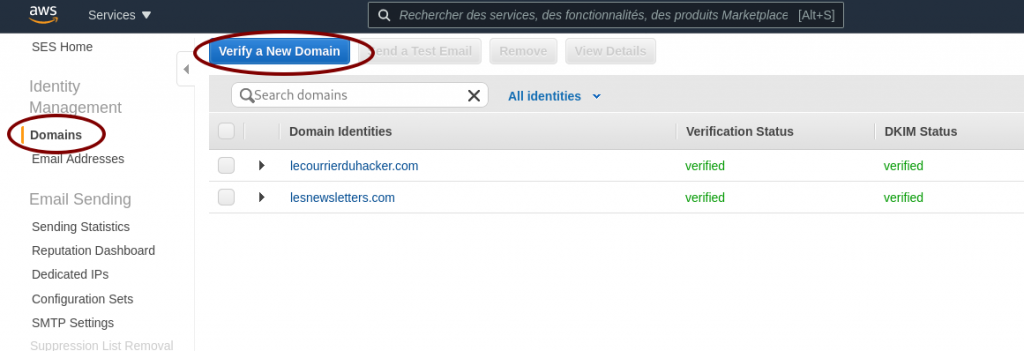 Ask AWS SES to verify a domain
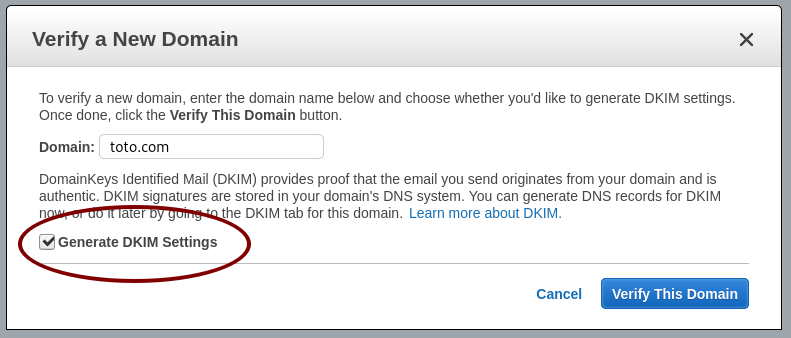 Generate the DKIM settings
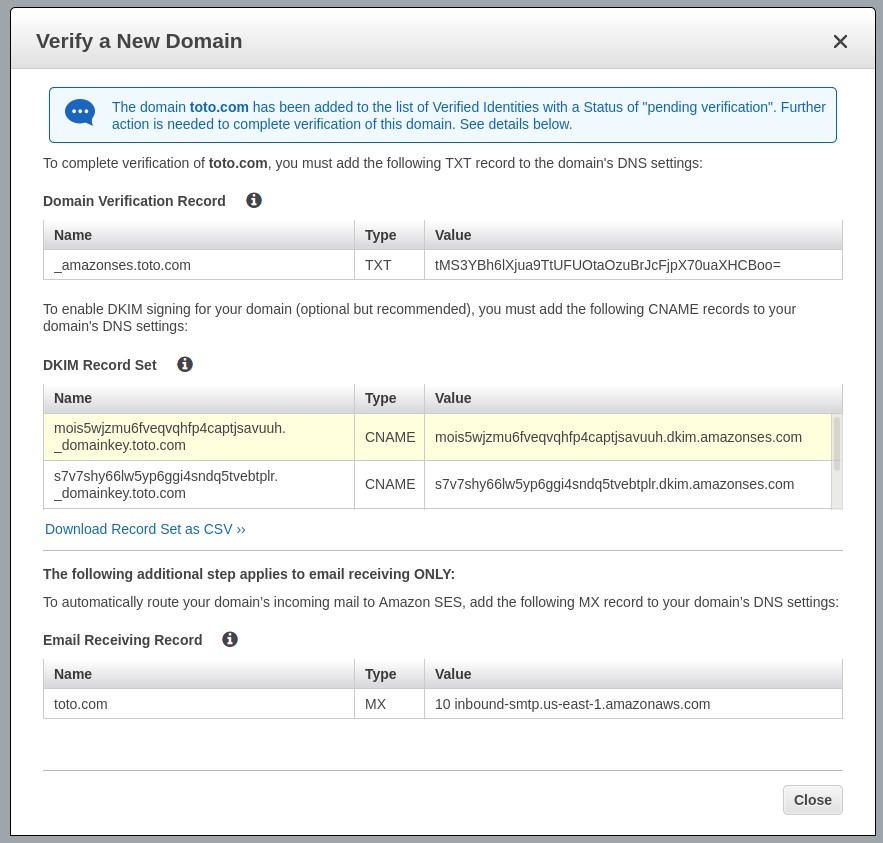
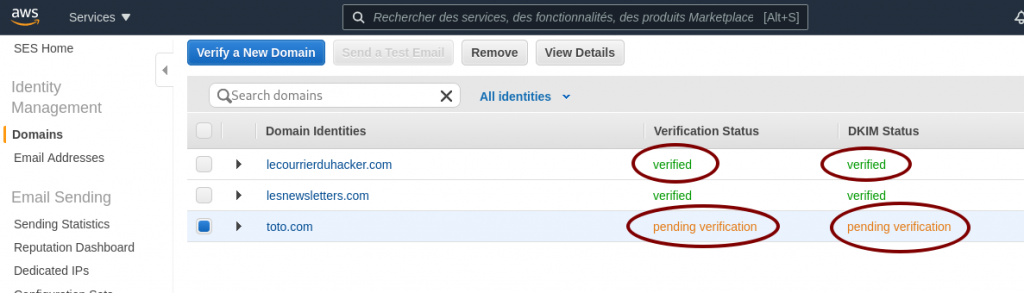 AWS SES pending verification
 AWS SES SMTP settings and credentials
MariaDB [(none)]> create database mailtrain;
Query OK, 1 row affected (0.00 sec)
MariaDB [(none)]> CREATE USER 'mailtrain' IDENTIFIED BY 'V3rYD1fF1cUlTP4sSW0rd!';
Query OK, 0 rows affected (0.01 sec)
MariaDB [(none)]> GRANT ALL PRIVILEGES ON mailtrain.* TO 'mailtrain'@localhost IDENTIFIED BY 'V3rYD1fF1cUlTP4sSW0rd!';
Query OK, 0 rows affected (0.00 sec)
MariaDB [(none)]> FLUSH PRIVILEGES;
Query OK, 0 rows affected (0.00 sec)
MariaDB [(none)]> show databases;
+--------------------+
  Database
+--------------------+
  information_schema
  mailtrain
  mysql
  performance_schema
+--------------------+
6 rows in set (0.00 sec)
MariaDB [(none)]> Byesystemctl stop nginx
Then get the certificate only, I ll give the Nginx Vhost configuration:
certbot certonly -d mailtrain.toto.com
Install Mailtrain
On your server create the following directory:
mkdir -p /var/www/
cd /var/www
wget https://github.com/Mailtrain-org/mailtrain/archive/refs/tags/v1.24.1.tar.gz
tar zxvf v1.24.1.tar.gz
Modify the file /var/www/mailtrain/config/production.toml to use the MySQL settings:
[mysql]
host="localhost"
user="mailtrain"
password="V3rYD1ff1culT!"
database="mailtrain"screen
NODE_ENV=production npm startgroupadd mailtrain useradd -g mailtrain chown -R mailtrain:mailtrain /var/www/mailtrainNow create the following file in /etc/systemd/system/mailtrain.service
[Unit]
 Description=mailtrain
 After=network.target
[Service]
 Type=simple
 User=mailtrain
 WorkingDirectory=/var/www/mailtrain/
 Environment="NODE_ENV=production"
 Environment="PORT=3000"
 ExecStart=/usr/bin/npm run start
 TimeoutSec=15
 Restart=always
[Install]
WantedBy=multi-user.targetsystemctl daemon-reload systemctl start mailtrain.service
map $http_upgrade $connection_upgrade
  default upgrade;
  ''      close;

server
  listen 80;
  listen [::]:80;
  server_name mailtrain.toto.com;
  return 301 https://$host$request_uri;

server
  listen 443 ssl;
  listen [::]:443 ssl;
  server_name mailtrain.toto.com;
  access_log /var/log/nginx/mailtrain.toto.com.access.log;
  error_log /var/log/nginx/mailtrain.toto.com.error.log;
  ssl_protocols TLSv1.2;
  ssl_ciphers EECDH+AESGCM:EECDH+AES;
  ssl_ecdh_curve prime256v1;
  ssl_prefer_server_ciphers on;
  ssl_session_cache shared:SSL:10m;
  ssl_certificate     /etc/letsencrypt/live/mailtrain.toto.com/fullchain.pem;
  ssl_certificate_key /etc/letsencrypt/live/mailtrain.toto.com/privkey.pem;
  keepalive_timeout    70;
  sendfile             on;
  client_max_body_size 0;
  root /var/www/mailtrain;
  location ~ /\.well-known\/acme-challenge
    allow all;

  gzip on;
  gzip_disable "msie6";
  gzip_vary on;
  gzip_proxied any;
  gzip_comp_level 6;
  gzip_buffers 16 8k;
  gzip_http_version 1.1;
  gzip_types text/plain text/css application/json application/javascript text/xml application/xml application/xml+rss text/javascript;
  add_header Strict-Transport-Security "max-age=31536000";
  location /
    try_files $uri @proxy;

  location @proxy
    proxy_set_header Host $host;
    proxy_set_header X-Real-IP $remote_addr;
    proxy_set_header X-Forwarded-For $proxy_add_x_forwarded_for;
    proxy_set_header X-Forwarded-Proto https;
    proxy_pass http://127.0.0.1:3000;
systemctl start nginxThis Nginx vhost will redirect all http requests coming to the Mailtrain process running on the 3000 port. Now it s time to setup Mailtrain! Setup Mailtrain You should be able to access your Mailtrain at https://mailtrain.toto.com Mailtrain is quite simple to configure, Here is my mailer setup. Mailtrain just forwards emails to AWS SES. We only have to plug Mailtrain to AWS SES.
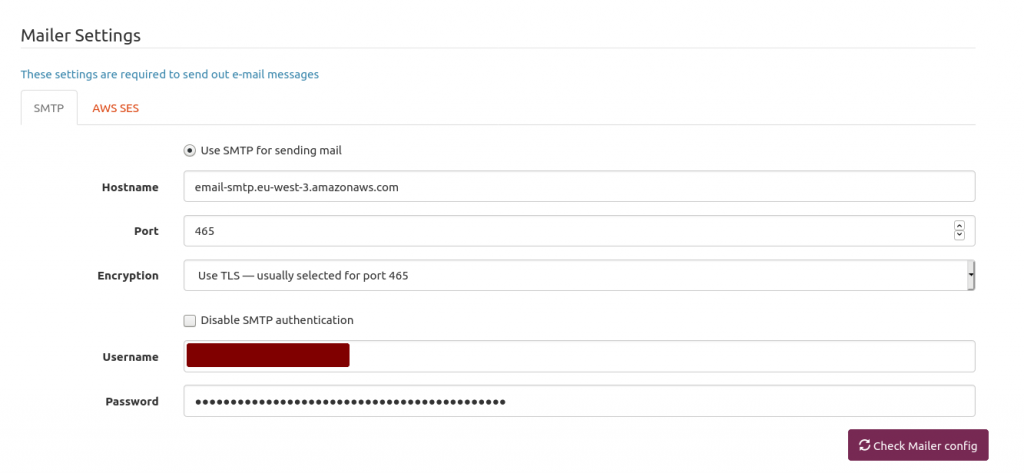 Mailtrain mailer setup
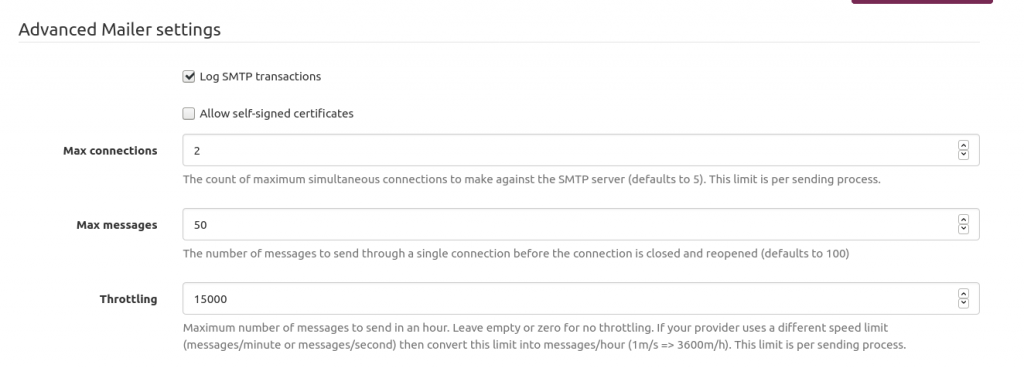 Mailtrain to throttle sending emails to AWS SES
Next.