Search Results: "dpk"

8 June 2013

Paul Tagliamonte: Crossgrading from 32 to 64 bit

Yes! It is possible! I ve done it! On my production linode! It was a bit hard, and I made quite a few mistakes, but I m convinced that a minimal system can be sanely crossgraded. I did it and only had an hour or so of server downtime In the process. However, most of the stack gets stripped down and back out, so I fear what happens with the X stack (nevermind GNOME Or anything that depends on it) A more detailed post to follow! Thanks to the dpkg team for making this happen!

4 June 2013

Raphaël Hertzog: My Free Software Activities in May 2013

This is my monthly summary of my free software related activities. If you re among the people who made a donation to support my work (70 , thanks everybody!), then you can learn how I spent your money. Otherwise it s just an interesting status update on my various projects. The Debian Administrator s Handbook Spanish translation completed. The Spanish team finished the translation of the book. The PDF build process was not yet ready to build translations so I had to fix this. At the same time, I also improved the mobipocket build script to make use of Amazon s kindlegen when available (since Amazon now requires the use of this tool to generate Mobipocket files that can be distributed on their platform). Once those issues were sorted I made some promotion of this first completed translation because they really deserve some big kudos ! Plans for the French translation. You know that the Debian Administrator s Handbook came to life as a translation of the French book Cahier de l Admin Debian (published by Eyrolles). This means that we currently have a free translation of a proprietary book. It s a bid of an odd situation that I always wanted to fix. I discussed with Eyrolles to find out how we could publish the original book under the same licenses that we picked for the English book and the result is that we setup a new crowdfunding campaign to liberate the French book and then make it an official French translation of the Debian Administrator s Handbook. Read the rest and support us on the ulule project page (a kickstarter like for people who are not based in the US). Liberate the Debian Handbook Debian France I updated our membership management application (galette) to version 0.7.4.1 with numerous bug fixes but the true highlight this month was Solutions Libres et Opensource , a tradeshow in Paris where Tanguy Ortolo, me, and other volunteers (C dric Boutillier, Arnaud G., and some that I have forgotten, thanks to them!), held a Debian booth for two consecutive days (May 28-29). For once we had lots of goodies to sell (buffs, mouse pad, polos, stickers, etc.) and the booth was very well attended. The Debian Booth (Tanguy on the left, Rapha l on the right) Google s Summer of Code Last month I was rater overwhelmed with queries from students who were interested in applying for the Package Tracking System Rewrite project that I offered to mentor as part of Google s Summer of Code. In the end, I got 6 good student applications that Stefano and me evaluated. We selected Marko Lalic. The Community Bonding Period is just starting and we re fleshing out details on how we will organize the work. We ll try to use the IRC channel #debian-qa on OFTC for questions and answers and weekly meetings. Misc Debian packaging I packaged zim 0.60 and with the release of Wheezy, I uploaded to unstable all the packages that I staged in experimental (cpputest, publican). I sponsored the upload of libmicrohttpd 0.9.27-1. I filed a couple of bug reports that I experienced with the upcoming dpkg 1.17.0 (#709172, #709009). In both cases, the package was using a wrongly hardcoded path to dpkg-divert (the binary moved from /usr/sbin/ to /usr/bin/ a while ago and the compatibility symlink is dropped now). I also dealt with #709064 where the user reported upgrade issues related to multiarch. I also filed an upstream bug report on publican to request some way to avoid so much duplication of files (actually I filed it as a response to the Debian bug #708705 that I received). Kali work I had to update OpenVAS for Kali but some parts failed to build in a Debian 7 environment. I diagnosed the problem and submitted a patch upstream. I also got in touch with the Debian OpenVAS maintainer as I wanted to contribute the package back to Debian, but timing issues have pushed this back for a little longer. Thanks See you next month for a new summary of my activities.

One comment Liked this article? Click here. My blog is Flattr-enabled.

3 June 2013

NeuroDebian: Running 64bit Matlab on 32bit host OS

Running 64bit Matlab on 32bit host OS Some of you have experienced problems due the recent move of Mathworks to drop 32-bit Linux builds of their products (i.e. Matlab R2013a and co.). Please note that this is not the first time Mathworks values its own costs higher than the benefits of a few scientists. In 1998 PowerPC builds for Macs were abandoned, causing a furious reaction of the community. Luckily, users of the fresh Debian stable release wheezy (or more recent variants of Debian and its derivatives) who still need a 32bit OS on 64bit-capable hardware can take advantage of the new multiarch support. Multiarch allows for multiple architecturesi to co-exist on a hardware/kernel that is capable of supporting both (e.g. i386 and amd64). Below we describe how you can use multiarch support and in few simple steps that prepare your existing 32bit user-land for running 64bit Matlab.
Procedure
  • [2-10 min] Install 64-bit kernel and reboot:

    sudo apt-get install linux-image-amd64
  • [1-3 min] Enable multi-arch support for amd64 architecture:

    sudo dpkg --add-architecture amd64
    sudo apt-get update
  • [1-5 min] Install 64bit libraries (and compilers) needed for matlab:

    sudo apt-get install libstdc++6:amd64 zlib1g:amd64 libncurses5:amd64 \
      libxp6:amd64 libstdc++6-4.4-dev:amd64 libxt6:amd64 libxmu6:amd64 libxtst6:amd64 \
      g++:amd64 gcc:amd64 binutils:amd64
Now your 64bit matlab (which you hopefully registered with matlab-support) is ready to run. If you have any comments (typos, improvements, etc) feel welcome to leave a comment below, or contact us .

24 May 2013

Wouter Verhelst: Not switching to 3.0 (quilt) just yet

I had a look at the 3.0 source formats just now. I've never been very fond of that, mainly because of the fact that it wants to store individual patches for no particularly good reason1. However, recently I found out about the --single-debian-patch option to dpkg-source, which makes the 3.0 (quilt) format behave somewhat more like the non-native 1.0 format, which is good. Unfortunately, "somewhat more" does not mean "entirely". For some weird reason, after converting the source to a 3.0 source package and running "dpkg-buildpackage", I find that suddenly my source tree is devoid of the patches that I'd applied to it. I'm sure there's another option hidden somewhere to make it not do that either, but I was quickly annoyed about it enough that I didn't care anymore. I just removed the debian/source directory entirely again, instead. Maybe I'll look into this again at some future point, but it's pretty unlikely. 1I have all my packages stored in git with a proper Vcs-Git: header; if people really want to look at individual patches, they can just use debcheckout, kthxbye.

1 May 2013

Raphaël Hertzog: My Free Software Activities in April 2013

This is my monthly summary of my free software related activities. If you re among the people who made a donation to support my work (102.70 , thanks everybody!), then you can learn how I spent your money. Otherwise it s just an interesting status update on my various projects. Debian France Work on Galette. I spent quite some time on Debian France s galette installation (the web application handling its member database), first converting its Postgres database to UTF-8, then upgrading to 0.7.4 while working-around many known problems. I also created Debian packages of three Galette plugins that we have been using (galette-plugin-paypal, galette-plugin-admintools, galette-plugin-fullcard). But every time I use galette, I tend to find something to report. This month I filed 5 tickets: I tested quite some fixes prepared by the upstream author (3 of the above bugs are already fixed) and this lead to the 0.7.4.1 bugfix release. Preliminary work on new bylaws. I have setup a git repository to make it easier to collaborate on new versions of our bylaws and internal rules. The goal is to make Debian France a trusted organization of Debian and to update everything to be compliant with the association 1901 law (we currently have a special statute reserved to associations from Alsace/Moselle). Kali Linux Improve accessibility support in Debian Wheezy. Offensive Security wanted Kali Linux to be fully accessible to disabled people. Since Wheezy was suffering from some serious regressions in that area, we hired Emilio Pozuelo Monfort to fix #680636 and #689559 in gdm3. On my side, I updated debian-installer s finish-install to correctly pre-configure the system when you make an install with speech synthesis (patch submitted in #705599).
Thanks to accommodating release managers, this work has already been integrated in Wheezy and won t have to wait the first point release. Fix bugs in Debian s live desktop installer. We also wanted to enable the desktop installer in the Kali live DVD. While our first tries a few months ago failed, this time it worked almost out of the box (thanks to Ben Armstrong who fixed it). I still identified a few issues that I fixed in debian-installer-launcher s git repository. Packaging and misc Debian work I also spent a significant number of hours to answer questions of students who want to participate in Google s summer of code and who are interested by the rewrite of the Package Tracking System with Python and Django. Some of the discussions happened on debian-qa@lists.debian.org. Thanks See you next month for a new summary of my activities.

One comment Liked this article? Click here. My blog is Flattr-enabled.

29 April 2013

Thomas Goirand: Jenkins: building debian packages after a git push (my 2cents of a howto)

The below is written in the hope it will be helpful for my fellow DDs. Why using build after push ? Simple answer: to save time, to always use a clean build environment, to automate more tests. Real answer: because you are lazy, and tired of always having to type these build commands, and that watching the IRC channel is more fun than watching the build process. Other less important answers: building takes some CPU time, and makes your computer run slower for other tasks. It is really nice that building doesn t consume CPU cycles on your workstation/laptop, and that a server does the work, not disturbing you while you are working. It is also super nice that it can maintain a Debian repository for you after a successful build, available for everyone to use and test, which would be harder to achieve on your work machine (which may be behind a router doing NAT, or even sometimes turned off, etc.). It s also kind of fun to have an IRC robot telling everyone when a build is successful, so that you don t have to tell them, they can see it and start testing your work. Install a SID box that can build with cowbuilder
Install Jenkins WARNING: Probably, before really installing, you should read what s bellow (eg: Securing Jenkins). Simply apt-get install jenkins from experimental (the SID version has some security issues, and has been removed from Wheezy, on a request of the maintainer). Normally, after installing jenkins, you can access it through:
http://<ip-of-your-server>:8080/
There is no auth by default, so anyone will be able to access your jenkins web GUI and start any script under the jenkins user (sic!). Jenkins auth
Before doing anything else, you have to enable Jenkins auth, otherwise, you have everything accessible from the outside, meaning that more or less, anyone browsing your jenkins server could be allowed to run any command. It might sound simple, but in fact, Jenkins auth is tricky to activate, and it is very easy to get yourself locked out, with no working web access. So here s the steps: 1. Click on Manage Jenkins then on Configure system 2. Check the enable security checkbox 3. Under security realm select Jenkins s own user database and leave allow users to sign up . Important: leave Anyone can do anything for the moment (otherwise, you will lock yourself out). 5. At the bottom of the screen, click on the SAVE button. 6. On the top right, click to login / create an account. Create yourself an account, and stay logged in. 7. Once logged-in, go back again in the Manage Jenkins -> Configure system , under security. 8. Switch to Project based matrix authentication strategy . Under User/group to add , enter the new login you ve just created, and click on Add . 9. Select absolutely all checkboxes for that user, so that you make yourself an administrator. 10. For the Anonymous user, for Job, check Read, Build and Workspace. For Overall select Read. 11. At the bottom of the screen, hit save again. Now, anonymous (eg: not logged-in) users should be able to see all projects, and be able to click on the build now button. Note that if you lock yourself out, the way to fix is to turn off Jenkins, edit config.xml, remove the useSecurity thing, and all what is in authorizationStragegy and securityRealm , then restart Jenkins. I had to do that multiple times until I had it right (as it isn t really obvious you got to leave Jenkins completely insecure when creating a new user). Securing Jenkins: Proxy Jenkins through apache to use it over SSL
When doing a quick $search-engine search, you will see lots of tutorials to use apache as a proxy, which seems to be the standard way to run Jenkins. Add the following to /etc/apache2/sites-available/default-ssl:
ProxyPass / http://localhost:8080/
ProxyPassReverse / http://localhost:8080/
ProxyRequests Off
Then perform the following commands on the shell:
htpasswd -c /etc/apache2/jenkins_htpasswd <your-jenkins-username>
a2enmod proxy
a2enmod proxy_http
a2enmod ssl
a2ensite default-ssl
a2dissite default
apache2ctl restart
Then disable access to the port 8080 of jenkins from outside:
iptables -I INPUT -d <ip-of-your-server> -p tcp --dport 8080 -j REJECT
Of course, this doesn t mean you shouldn t take the steps to activate Jenkins own authentication, which is disabled by default (sic!). Build a script to build packages in a cowbuilder I thought it was hard. In fact it was not. All together, this was kind of fun to hack. Yes hack. What I did yet another kind of 10km ugly shell script. The way to use it is simply: build-openstack-pkg <package-name>. On my build server, I have put that script in /usr/bin, so that it is accessible from the default path.Ugly, but it does the job! Jenkins build script for openstack At the end of the script, scan_repo() generates the necessary files for a Debian repository to work under /home/ftp. I use pure-ftpd to serve it. /home/ftp must be owned by jenkins:jenkins so that the build script can copy packages in it. This build script is by no mean state of the art, and in fact, it s quite hack-ish (so I m not particularly proud of it, but it does its job ). If I am showing it in this blog post, it is just to show an example of what can be done. It is left as an exercise to the reader to create another build script adapted to its own needs, and write something cleaner and more modular. Dependency building Let s say that you are using the Built-Using: field, and that package B needs to be built if package A changes. Well, Jenkins can be configured to do that. Simply edit the configuration of project B (you will find it, it s easy ). My use case: In my case, for building Glance, Heat, Keystone, Nova, Quantum, Cinder and Ceilometer, which are all components of Openstack, I have written a small (about 500 lines) library of shell functions, and an also small (90 lines) Makefile, which are packaged in openstack-pkg-tools (so Nova, Glance, etc. all build-depends on openstack-pkg-tools). The shell functions are included in each maintainer scripts (debian/*.config and debian/*.postinst mainly) to avoid having some pre-depends that would break debconf flow. The Makefile of openstack-pkg-tools is included in debian/rules of each packages. In such a case, trying to manage the build process by hand is boring and time consuming (spending your time watching the build process of package A, so that you can manually start the build of package B, then wait again ). But it is also error prone: it is easy to do a mistakes in the build order, you can forget to dpkg -i the new version of package A, etc. But that s not it. Probably at some point, you will want Jenkins to rebuild everything. Well, that s easy to do. Simply create a dummy project, and have other project to build after that one. The build steps could simply be: echo Dummy project as a shell script (I m not even sure that s needed ). Configuring git to start a build on each push In Jenkins, pass your mouse over the Build now URL. Well, we just need to wget that URL in your Alioth repository. A small drawing is better than long explanation:
for i in  ls /git/openstack  ; do
    echo "wget -q --no-check-certificate \
    https://<ip-of-your-server>/job/$ PROJ_NAME /build?delay=0sec \
    -O /dev/null" >/git/openstack/$ i /hooks/post-receive \
        && chmod 0770 /git/openstack/$ i /hooks/post-receive;
done
The chmod 0770 is necessary if you don t want every Alioth users to have access to your Jenkins server web interface and see an eventual htpassword protection that you can add to your jenkins box (I m not covering that, but it is fairly easy to add such protection). Note that all of the members of your Alioth group will then have access to this post-receive hook, containing the password of your htaccess, so you must trust everyone in your Alioth group to not do nasty things with your Jenkins. Bonus point: IRC robot If you would like to see the result of your build published on IRC, Jenkins can do that. Click on Manage Jenkins , then on Manage Plugins . Then click on available and check the box in front of IRC plugin . Go at the bottom of the screen and click on Add . Then check the box to restart Jenkins automatically. Once it is restarted, go again under Manage jenkins then Configure system . Select the IRC Notification and configure it to join the network and the channel you want. Click on Advanced to select the IRC nick name of your bot, and make sure you change the port (by default jenkins has 194, when IRC normally uses 6667). Be patient when waiting for the IRC robot to connect / disconnect, this can take some time. Now, for each jenkins Job, you can tick the IRC Notification option. Doing piuparts after build One nice thing with automated builds, is that most of the time, you don t need to wait starring at them. So you can add as many tests as you want, the Jenkins IRC robot will anyway let you know sooner or later the result of your build. So adding piuparts tests in the build script seems the correct thing to do. Though that is still on my todo, so maybe that will be for my next blog post.

14 April 2013

Vasudev Kamath: Handling C++ symbols that vary across architectures

Disclaimer I'm no symbol expert and dealing with symbol files for first time from the time I started packaging. What I did here is depending on some suggestions I got in #debian-mentors. If you think what I did was wrong please enlighten me :-). Problem Recently 2 of my library packages pugixml and ctpp2 got accepted into Debian archive and when buildd tried to build them on remaining architectures other than one for which I uploaded (amd64) builds failed. This was expected as symbols file which I generated was for amd64. As usual I got 2 serious bug reports #704718 and #705135. Solution First I was not sure how to handle this. I read article on symbols files handling by rra [1] and tried to use pkgkde-symbolshelper tool only to quickly figure out that I need to use pkgkde_symbolshelper addon for dh sequencer. But this was not possible for me as I was using CDBS for packaging. I did a quick chat on #debian-mentors and some one suggested me to tag symbols which vary across architecture with (c++) tag. First I was not sure but after reading dpkg-gensymbols man page understood that I need to replace the entire mangled symbols lines with de-mangled version tagged with (c++) in the beginning. But this was hectic job searching for each deleted symbols and replacing it. So I thought of writing a script to do the job and after struggling for 3 days (yeah I was bit dumb that I didn't read manual date: "2013-04-14 18:39:20 +0530" pugixml and ctpp2 package using it, which is now waiting for Jonas for uploading it. Here is the script
#!/bin/bash
set +x
if [ $# -lt 3 ]; then
    echo "Usage: $0 failed_buildlogs_directory symbols_file package_version"
    exit 2
fi
    
BUILD_LOG_DIRECTORY=$1
SYMBOLS_FILE=$2
PACKAGE_VERSION=$3
VERSION_TO_REPLACE=" $PACKAGE_VERSION\""
for LOGFILE in $(ls $BUILD_LOG_DIRECTORY/*.build); do
    for i in $(grep '^-\s_Z' $LOGFILE   perl -pe 's/-//g;'); do
        if [ $i = $PACKAGE_VERSION ];then
            continue
        fi
        demangled_version="\""$(echo $i" "$PACKAGE_VERSION   c++filt)"\""
        tagged_version="(c++)"$ demangled_version%$VERSION_TO_REPLACE "\" "$PACKAGE_VERSION
        escaped_tagged_version=$(echo $tagged_version   sed 's/\&/\\\&/')
        sed -i "s#$i $PACKAGE_VERSION#$escaped_tagged_version#" $SYMBOLS_FILE
   done
done
So basically to make this work we need all buildlogs to be downloaded from buildd's again this was easy thanks to rra for developing pkgkde-getbuildlogs :-). Once you have build logs directory run the above script as follows
cppsymbol_replace.sh path_to_buildlogs path_to_symbol_file upstream_version
After replacing symbols I tried to build package on i386 chroot and build passed successfully but lintian told me that there are symbols which have Debian version appended to it and this might lead to date: "2013-04-14 18:42:42 +0530" back to mentors :-). It is this time I really understood concept of mangled names generated by compiler and why it vary across the architecture ;-). This time some one by nick pochu suggested me to pass option -v with package version to dpkg-gensymbols to make it generate symbols with package version and not Debian version. The following probably needs to be done if package uses dh sequencer but I'm not sure as I've not tested it. If wrong please correct me.
override_dh_makeshlibs:
    dh_makeshlibs -- -v$PACKAGEVERION #package version needs to be either extracted using parsechangelog or manually fed
If you are using CDBS this is pretty simple. Just add following to rules
DEB_DH_MAKESHLIBS_ARGS_$(pkgname) += -- -v$(DEB_UPSTREAM_VERSION)
I noticed that when I provide (c++) tagged de-mangled name dpkg-gensymbols simply replaces it with proper mangled name but the deletion doesn't trigger an error in dpkg-gensymbols. This script me allowed to replace 128 symbols which were very tricky and long with de-mangled and tagged version in ctpp2, so I hope it should work across different packages without any problem. Only silly mistake I did was occurrence of & symbol in function making sed go mad which I took one full day to debug :facepalm:. So that's it folks, if you see something wrong in what I did please let me know through the comments. [1] http://www.eyrie.org/~eagle/journal/2012-01/008.html

8 April 2013

Daniel Pocock: Google Summer of Code, tips for students

I've had quite a few queries about the project ideas for Google Summer of Code on the Lumicall and Debian project pages and I'm publishing some notes here to help people get the best chance of participating, while also helping people's expectations. Firstly, Google is responsible for administering the program and payments, they have the last word on which projects and students participate and free software developers like myself have no direct control over this. In other words, while I would encourage students to make contributions to free software projects to familiarize themselves with the way we work, I can not promise that this will automatically lead to selection. If you are a student, do go ahead and feel free to comment on or make contributions to projects, this helps mentors to see your capabilities very quickly, but don't do any more than you would have done if the GSoC program didn't exist. In any case, building up a portfolio of work that is visible on sites like github does help your employment prospects in the long run. If a development manager is looking at 100 CVs for a job vacancy, and one of them has a strong portfolio on github or Debian, there is a good chance that one person will get an interview - although it doesn't guarantee they get the job. Where to start? If you are a student and you are already heavily involved in some free software project then you probably don't need to read the rest of this. The reality is that GSoC is meant to help bring more people into the free software community and this means we need to help people get their foot in the door. That is what I am addressing here, with examples from my own possible projects. When I went through university in the 90s, there was a very strong UNIX culture in our computer science department and the wider engineering faculty. There were also winds of change, for example, a new dean who wanted to change everything to Windows and a central IT management agenda to abolish campus computers and force students to carry and maintain their own laptops. Around the world, every campus has a different approach. I was fortunate to have UNIX topics like the vi text editor, shell programming and even LaTeX taught as a formal part of the course, students coming after me may have missed those opportunities. I understand that some students have not encountered these concepts at all today. That said, most mentors have a fairly wide tolerance for these things: it is not expected that students know these things, rather, it is an opportunity for you to start learning them whether it is part of your course or not. The key concept here is to be a self-starter: it is not what you know, but your enthusiasm to go and try the things you don't know. That is the very thing you can start doing now, even before the program commences. Doing this will definitely help you identity the areas of free software and Debian that you are most likely to get excited about, and that will lead to a successful project. Some general ideas to get started
  • If your campus hasn't taught UNIX in a formal sense, please familiarise yourself with the basics. While some companies do have more jobs working with other platforms, and some campuses have sadly tried to adapt their courses to prepare students for that limited subset of companies, all the best jobs I've had involve UNIX or Linux. I've never worked for a hedge fund that didn't use Linux. Hollywood uses Linux, NASA does too, but learning Linux is not rocket science. Basic things to understand include the vi text editor, shell scripts and using a command line tool for version control, preferably git. As you will be the system administrator of your own desktop or laptop, it's essential to understand some basic concepts like volume management too.
  • If you need to run some Windows software (some courses do require that), use VirtualBox or a similar solution to run both Windows and Linux on your computer or laptop. The VirtualBox documentation is very good and will help you start quickly. My own laptop runs Debian 7 (wheezy) as the main operating system, and I have Windows and Solaris in VirtualBox for some business applications.
  • My own course included a project that involved downloading the open source GNU make program, writing a patch and testing it. If you've never done something like that, please try. Instead of downloading a project tarball, these days you will typically clone the project's git repository. Even if you only make some trivial change that you will never share, it is good to prove that you can compile and successfully execute something like this.
Some specific ideas for my own projects
  • For Lumicall or Android development, just work your way through the build instructions that are published for all contributors. Trying the f-droid build instructions is also a good way to start.
  • For any of the Debian projects, please make sure you have installed Debian 7 (wheezy) on a desktop, laptop or virtual machine. Just follow the installation guide
  • Once you have installed Debian, try installing whichever one of my packages interests you. Try to configure and use it. Prove that the package works in a normal installation. Look at the log files. Run the test cases.
  • Next, try obtaining the source code and building the package. Debian makes it very easy. Here is an example for reSIProcate, the same works for any other package. As root:
    # apt-get update
    # apt-get build-dep resiprocate
    
    will obtain all the necessary build tools. Then, as a normal user:
    $ mkdir ~/src/resiprocate
    $ cd ~/src/resiprocate
    $ apt-get source resiprocate
    $ cd resiprocate
    $ dpkg-buildpackage -rfakeroot -j12
    
    In a few minutes, you should find the packages (*.deb files) are created.
  • Now, you could try making some small change to the package and compiling it again. Verify that your change works.
If you've successfully got to this point, then there is every chance you will be able to successfully complete a GSoC project. If you struggled along the way, that is OK too, the important thing to do is to engage with the community and learn how to ask for help. The Debian GSoC wiki provides some excellent ideas about engaging with the project using IRC chat and mailing lists. It is also very worthwhile trying to find a local group or a free software event that Debian is attending near you and spending a few hours with people who can look at any problems you have and give you quick solutions.

4 April 2013

Bernhard R. Link: Git package workflows

Given the recent discussions on planet.debian.org I use the opportunity to describe how you can handle upstream history in a git-dpm workflow. One of the primary points of git-dpm is that you should be able to just check out the Debian branch, get the .orig.tar file(s) (for example using pristine-tar, by git-dpm prepare or by just downloading them) and then calling dpkg-buildpackage. Thus the contents of the Debian branch need to be clean from dpkg-source's point of view, that is do not contain any files the .orig.tar file(s) contains not nor any modified files. The easy way The easiest way to get there is by importing the upstream tarball(s) as a git commit, which one will usually do with git-dpm import-new-upstream as that also does some of the bookkeeping. This new git commit will have (by default) the previous upstream commit and any parent you give with -p as parents. (i.e. with -p it will be a merge commit) and its content will be the contents of the tarball (with multiple orig files, it gets more complicated). The idea is of course that you give the upstream tag/commit belonging to this release tarball with -p so that it becomes part of your history and so git blame can find those commits. Thus you get a commit with the exact orig contents (so pristine-tar can more easily create small deltas) and the history combined.. Sometimes there are files in the upstream tarball that you do not want to have in your Debian branch (as you remove them in debian/rules clean), then when using this method you will have those files in the upstream branch but you delete them in the Debian branch. (This is why git-dpm merge-patched (the operation to merge a new branch with upstream + patches with your previous debian/ directory) will look which files relative to the previous upstream branch are deleted and delete them also in the newly merged branch by default). The complicated way There is only a way without importing the .orig.tar file(s), though that is a bit more complicated: The idea is that if your upstream's git repository contains all the files needed for building your Debian package (for example if you call autoreconf in your Debian package and clean all the generated files in the clean target, or if upstream has a less sophisticated release process and their .tar contains only stuff from the git repository), you can just use the upstream git commit as base for your Debian branch. Thus you can make upstream's commit/tag your upstream branch, by recording it with git-dpm new-upstream together with the .orig.tar it belongs to (Be careful, git-dpm does not check if that branch contains any files different than your .orig.tar and could not decide if it misses any files you need to build even if it tried to tell). Once that is merged with the debian/ directory to create the Debian branch, you run dpkg-buildpackage, which will call dpkg-source which compares your working directory with the contents of the .orig.tar with the patches applied. As it will only see files not there but no files modified or added (if everything was done correctly), one can work directly in the git checkout without needing to import the .orig.tar files at all (altough the pristine-tar deltas might get a bit bigger).

Jon Dowland: awk

Recently, I've been using awk in shell scripts more and more often. When I saw Thomas' Blog I reeled a bit from of the make/shell quoted within. (Sorry Thomas! It's still a thought provoking blog post):
DEBVERS         ?= $(shell dpkg-parsechangelog   sed -n -e 's/^Version: //p')
VERSION         ?= $(shell echo '$(DEBVERS)'   sed -e 's/^[\[:digit:]]*://' -e 's/[-].*//')
DEBFLAVOR       ?= $(shell dpkg-parsechangelog   grep -E ^Distribution:   cut -d" " -f2)
DEBPKGNAME      ?= $(shell dpkg-parsechangelog   grep -E ^Source:   cut -d" " -f2)
DEBIAN_BRANCH   ?= $(shell cat debian/gbp.conf   grep debian-branch   cut -d'=' -f2   awk ' print $1 ')
GIT_TAG         ?= $(shell echo '$(VERSION)'   sed -e 's/~/_/')
I couldn't help but re-write it to be more efficient (and in the case of DEBIAN_BRANCH, more correct):
DEBVERS        := $(shell dpkg-parsechangelog   awk '/^Version:/  print $$2 ')
VERSION        := $(shell echo '$(DEBVERS)'   sed -e 's/^[0-9]*://' -e 's/-.*//')
DEBFLAVOR      := $(shell dpkg-parsechangelog   awk '/^Distribution:/  print $$2 ')
DEBPKGNAME     := $(shell dpkg-parsechangelog   awk '/^Source:/  print $$2 ')
DEBIAN_BRANCH  := $(shell awk 'BEGIN FS="[= ]+"  /debian-branch/  print $$2 ' debian/gbp.conf)
GIT_TAG        := $(subst ~,_,$(VERSION))

Thomas Goirand: Git packaging workflow

Seeing what has been posted recently in planet.d.o, I would like to share as well my thoughts and work-flow, and tell that I do agree with Joey Hess on many of his arguments. Especially when he tells that Debian fetishises upstream tarballs. We re in 2013, at the age of Internet, and more and more upstream authors are using Git, and more and more they don t care about releasing tarballs. I ve seen some upstream authors who simply stopped doing so completely, as a Git tag is really enough. I also fully agree than disk space and network speed isn t much of a problem these days. When there are tags available, I use the following debian/gbp.conf:
[DEFAULT]
upstream-branch = master
debian-branch = debian
upstream-tag = %(version)s
compression = xz
[git-buildpackage]
export-dir = ../build-area/
On many of my packages, I now just use Git tags from upstream if they are available. To make it more easy, I now nearly always use the following piece of code in my debian/rules files:
DEBVERS         ?= $(shell dpkg-parsechangelog   sed -n -e 's/^Version: //p')
VERSION         ?= $(shell echo '$(DEBVERS)'   sed -e 's/^[[:digit:]]*://' -e 's/[-].*//')
DEBFLAVOR       ?= $(shell dpkg-parsechangelog   grep -E ^Distribution:   cut -d" " -f2)
DEBPKGNAME      ?= $(shell dpkg-parsechangelog   grep -E ^Source:   cut -d" " -f2)
DEBIAN_BRANCH   ?= $(shell cat debian/gbp.conf   grep debian-branch   cut -d'=' -f2   awk ' print $1 ')
GIT_TAG         ?= $(shell echo '$(VERSION)'   sed -e 's/~/_/')
get-upstream-sources:
        git remote add upstream git://git.example.org/proj/foo.git   true
        git fetch upstream
        if ! git checkout master ; then \
                echo "No upstream branch: checking out" ; \
                git checkout -b master upstream/master ; \
        fi
        git checkout $(DEBIAN_BRANCH)
make-orig-file:
        if [ ! -f ../$(DEBPKGNAME)_$(VERSION).orig.tar.xz ] ; then \
                git archive --prefix=$(DEBPKGNAME)-$(GIT_TAG)/ $(GIT_TAG)   xz >../$(DEBPKGNAME)_$(VERSION).orig.tar.xz ; \
        fi
        [ ! -e ../build-area ] && mkdir ../build-area   true
        [ ! -e ../build-area/$(DEBPKGNAME)_$(VERSION).orig.tar.xz ] && cp ../$(DEBPKGNAME)_$(VERSION).orig.tar.xz ../build-area   true
Packaging a new upstream VERSION now means that I only have to edit the debian/changelog, do ./debian/rules get-upstream-source so that I get new commits and tags, then git merge -X theirs VERSION to import the changes, then finally invoke ./debian/rules make-orig-file to create the orig.tar.xz. My debian branch is now ready for git-buildpackage. Note that the sed with the GIT_TAG thing is there because unfortunately, Git doesn t support the ~ char in tags, and that most of the time, upstream do not use _ in version numbers. Let s say upstream is releasing version 1.2.3rc1, then I simply do git tag 1.2.3_rc1 1.2.3rc1 so that I have a new tag which points to the same commit as 1.2.3rc1, but that can be used for the Debian 1.2.3~rc1-1 release and the make-orig-file. All this might looks overkill at first, but in fact it is really convenient and efficient. Also, even though there is a master branch above, it isn t needed to build the package. Git is smarter than this, so even if you haven t checked out upstream master branch from the upstream remote, make-orig-file and git-buildpackage will simply continue to work. Which is cool, because this means you can store a single branch on Alioth (which is what I do).

3 April 2013

Daniel Pocock: The multiple repository conundrum in Linux packaging

I'm involved with a number of free software projects as both a developer and as the maintainer of packages for various distributions such as Debian (which also feeds packages to Ubuntu) and OpenCSW. I regularly come across the following situations:
  • Developers of great software who would like to see it packaged, distributed and promoted conveniently through platforms like Debian
  • Users of Linux distributions who are keen to use free software if it is presented in a convenient and accessible manner they are familiar with.
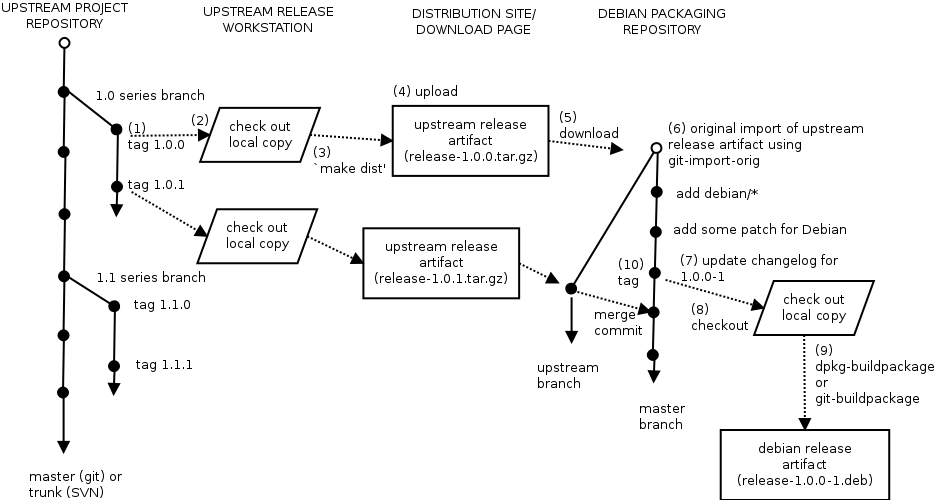
Sadly, despite everybody having the best intentions, there is sometimes a chasm separating these two groups of people. Upstream developers are often busy developing new features and don't have time to work on the intricacies of packaging. I hope that by sharing a few of my own experiences I can help more developers get their software packaged more easily. Fortunately, a number of great tools like git-buildpackage have emerged for streamlining the packaging process, but this has also created more confusion for developers who have their own git repositories and don't quite understand how the Debian git repository and patching process relates to their own repository. The autotools world Here, I focus on autotools based software, because this type of software has it's own peculiar issues when packaging. In particular, these issues appear when using a version control system to track upstream releases. Some of the concepts can be applied to the study of regular Makefile or cmake projects as well. Here is a diagram giving an overview: Let's work through each of the steps in the diagram: The upstream release
  1. The developer/release manager updates the version number in
    configure.ac
    (sometimes called configure.in) and tags the code. (Usually this tag is on a dedicated release branch.)
  2. The developer checks out a copy of the code from the tag into a fresh working directory
  3. The developer runs the autoreconf/automake tools, usually from a bootstrap script. These tools create a number of new files that don't exist in the project repository. Finally, the developer runs
    make dist
    , which puts all the files,
    including the generated files, into a distribution tarball. It is worth emphasizing this point: the tarball is not just an archive of the files from the repository/tag, it also contains a number of
    files generated by autotools.
  4. The developer uploads the tarball to a web site such as the Sourceforge download page. Usually a release announcement is made now containing checksums for the tarball.
At this point, the upstream developer's work is done and packaging teams from various projects such as Debian will take over. Sometimes, the upstream developer is also building the packages and continues
onto the next steps himself: Packaging
  1. The package is downloaded by the package maintainer
  2. If it is the first download, the maintainer creates a new git repository. If it has been packaged before, he clones the repository. The important point here is that this is not the upstream repository, it is an independent repository for Debian packaging. The maintainer uses the git-import-orig tool to import the upstream tarball into the packaging repository. The git-import-orig tool captures an exact snapshot of the upstream release tarball contents in a branch called upstream. One point where the Debian repository differs fundamentally from the upstream repository is that all files from the tarball will be tracked in the Debian git repository, even those automatically generated files that were created by autotools and don't exist in the upstream repository.
  3. The maintainer creates or updates the various artifacts for packaging. These files are kept on the master branch, and the tarball contents from the upstream branch are merged into master to create packages.
  4. When the maintainer feels the code is ready, he will check out a clean copy of the repository to build the package from.
  5. The maintainer executes a tool such as git-buildpackage or regular dpkg-buildpackage, which creates the *.deb files.
  6. The files are checked with a tool like lintian and some manual testing/installation. If all is OK, a tag is made in the packaging repository, with a suffix appended to the upstream version number to indicate which iteration of the package it applies to.
AttachmentSize
release-packaging-workflow.dia3.97 KB

1 April 2013

Francois Marier: Poor man's RAID1 between an SSD and a hard drive

After moving from a hard drive to an SSD on my work laptop, I decided to keep the hard drive spinning and use it as a backup for the SSD. With the following setup, I can pull the SSD out of my laptop and it should still boot up normally with all of my data on the hard drive.

Manually setting up an encrypted root partition Before setting up the synchronization between the two drives, I had to replicate the partition setup. I used fdisk, cfdisk and gparted to create the following partitions:
   Device Boot      Start         End      Blocks   Id  System
/dev/sdb1   *        2048      499711      248832   83  Linux
/dev/sdb2          501760   500117503   249807872    5  Extended
/dev/sdb5          503808   500117503   249806848   83  Linux
and then loosely followed these instructions to create an encrypted root partition on /dev/sdb5:
$ cryptsetup luksFormat /dev/sdb5
$ cryptsetup luksOpen /dev/sdb5 sdb5_crypt
$ pvcreate /dev/mapper/sdb5_crypt
$ vgcreate akranes2 /dev/mapper/sdb5_crypt
$ vgchange -a y akranes2
$ lvcreate -L247329718272B -nroot akranes2
$ lvcreate -L8468299776B -nswap_1 akranes2
$ mkfs.ext4 /dev/akranes2/root
Finally, I added the new encrypted partition to the list of drives to bring up at boot time by looking up its UUID:
$ cryptsetup luksUUID sdb5_crypt
and creating a new entry for it in /etc/crypttab.

Copying the boot partition Setting up the boot partition was much easier because it's not encrypted. All that was needed was to format it and then copy the files over:
$ mkfs.ext2 /dev/sdb1
$ mount /dev/sdb1 /mnt/boot
$ cp -a /boot/* /mnt/boot/
The only other thing to remember is to install grub on the boot loader of that drive. On modern Debian systems, that's usually just a matter of running dpkg-reconfigure grub-pc and adding the second drive (/dev/sdb in my case) to the list of drives to install grub on.

Sync scripts To keep the contents of the SSD and the hard drive in sync, I set up a regular rsync of the root and boot partitions using the following mount points (as defined in /etc/fstab):
/dev/mapper/akranes-root /           ext4    noatime,discard,errors=remount-ro 0       1
/dev/mapper/akranes2-root /mnt/root  ext4    noatime,errors=remount-ro         0       2
UUID=0b9109d0-... /boot              ext2    defaults                          0       2
UUID=6e6f05fb-... /mnt/boot          ext2    defaults                          0       2
I use this script (/usr/local/sbin/ssd_boot_backup) for syncing the boot partition:
#!/bin/sh
if [ ! -e /mnt/boot/hdd.mounted ] ; then
    echo "The rotating hard drive is not mounted in /mnt/boot."
    exit 1
fi
if [ ! -e /boot/ssd.mounted ] ; then
    echo "The ssd is not the boot partition"
    exit 1
fi
nice ionice -c3 rsync -aHx --delete --exclude=/ssd.mounted --exclude=/lost+found/* /boot/* /mnt/boot/
and a similar one (/usr/local/sbin/ssd_root_backup) for the root partition:
#!/bin/sh
if [ ! -e /mnt/root/hdd.mounted ] ; then
    echo "The rotating hard drive is not mounted in /mnt/root."
    exit 1
fi
if [ ! -e /ssd.mounted ] ; then
    echo "The ssd is not the root partition"
    exit 1
fi
nice ionice -c3 rsync -aHx --delete --exclude=/dev/* --exclude=/proc/* --exclude=/sys/* --exclude=/tmp/* --exclude=/boot/* --exclude=/mnt/* --exclude=/lost+found/* --exclude=/media/* --exclude=/var/tmp/* --exclude=/ssd.mounted --exclude=/var/lib/lightdm/.gvfs --exclude=/home/francois/.gvfs /* /mnt/root/
To ensure that each drive is properly mounted before the scripts run, I created empty ssd.mounted files in the root directory of each of the partitions on the SSD, and empty hdd.mounted files in the root directory of the hard drive partitions.

Cron jobs The sync scripts are run every couple of hours through this crontab:
10 */4 * * *                root    /usr/local/sbin/ssd_boot_backup
20 0,4,8,12,16,20 * * *     root    /usr/local/sbin/ssd_root_backup
20 2,6,10,14,18,22 * * *    root    /usr/bin/on_ac_power && /usr/local/sbin/ssd_root_backup
which includes a reduced frequency while running on battery to avoid spinning the hard drive up too much.

23 March 2013

Dominique Dumont: Next version of Config::Model will use asynchronous check

Hello To check the validity of Debian dependencies in Debian package, Config::Model queries a remote web server to get the list of package version known to Debian. The first version of this check did sequential requests: when the cache was not very fresh, I had to wait more than 60s before getting results for complex package like padre. That was very frustrating (but less frustrating than checking package names manually) For the following version, I addedhacked AnyEvent in Dpkg model to run parrallel queries. This went much faster but gaves weird results: before getting a response from Debian server, the packages were flagged as unknown. To get consistent results, running twice cme check dpkg was required. So, at new year, I ve decided to bite the bullet and implement correctly value checks with asynchronous queries to remote server. This new feature is now ready and will be delivered in Config::Model 2.030. cme will now return consistent results. This new release is mostly backward compatible. You may notice some quirks with some other modules based on Config::Model: These quirks will disappear once these modules are updated. This should not be long since all the updates are ready in github. All the best
Tagged: Config::Model, debian, dpkg, Perl

24 February 2013

Sylvain Le Gall: Configuration management: Puppet is worth it.

Replying to an old blog post of Martin F. Krafft: Configuration management, I want to give my point of view. The problems listed by madduck are quite common with Puppet, but I think Puppet is still worth, mostly because you can solve all these problems. Let give you my opinion on the list: True. I think the approach of puppet is not really UNIXish. It is probably on purpose. The biggest issue is probably the PKI. It breaks frequently for unknown reason. The "non intuitive configuration language" is probably a matter of taste. I think the language is not very well designed and strange, but I can cope with that. The attempt to versioning -- if I understand correcly what it means -- refers to the fact that when Puppet replace a file it moves the old file to a bucket. This is not a good thing, but you can say "backup => '.puppet-bak'" and you get almost the same behavior as ".dpkg-old". False debate. We can discuss for hours on Ruby, PHP, Java or whatever pet language people has invented. I am not a fan of Ruby but it is still nice as a general purpose language. To my mind, Ruby is still better to write daemon than bash. False debate.
   info: Caching catalog for centi.....
   info: Applying configuration version '1350597216'
   notice: Finished catalog run in 3.08 seconds
The config of this node is not complex, but 3s is not that bad for something that runs every 30min. If you need sub-second speed for this kind of thing, maybe you are not looking for this kind of tool. Does 144s of server time per day is a big deal ? With a lot more complex setup, I can reach 30s for a run, although this is the point where I manage a lot of thing with it. False and True. Augeas allows you to replace a single value (even more precise than a line). Just have a look at the augeas type. This is pretty nice and allow to do thing like replacing "Defaults env_reset" by "Defaults env_reset, !tty_tickets" in 4 lines of code. So this i not precisely "a single line of text", but there is other way to do it. False. Well if you organize your code with manifests/site.pp and manifests/classes/*.pp, it seems like there is a separation between the two. Next you can try inheritance and define to create specific high-level features. False-ish. Hey at least there are error message ;-) Now, most of the error that are related to the programming language are useless (at least as cryptic as a C++ error message). But as usual with error message in programming language True. Multi versions installation is horrible and you have to fix a lot of stuff to manage a sane overall configuration. Not sure to understand this point, I use puppet over IPv6... To whoever is considering using puppet, this is worth a try. It is a nice system that really helps to maintain a decent configuration across nodes.

22 February 2013

Francois Marier: Doing a fresh Debian/Ubuntu install without having to reconfigure everything

Taking advantage of a new hard drive, I decided to reinstall my Ubuntu (Precise 12.04.2) laptop from scratch so that I could easily enable full-disk encryption (a requirement for Mozilla work laptops). Reinstalling and reconfiguring everything takes a bit of time though, so here's the procedure I followed to keep the configuration to a minimum.

Install Ubuntu/Debian on the new drive While full-disk encryption is built into the graphical installer as of Ubuntu 12.10, it's only available through the alternate install CD in 12.04 and earlier. Using that CD, install Ubuntu on the new drive, making sure you select the "Encrypted LVM" option when you get to the partitioning step. (The procedure is the same if you use a Debian CD.) To make things easy, the first user you create should match exactly the one from your previous installation.

Copy your home directory Once the OS is installed on the new drive, plug the old one back in (in an external enclosure if you need to) and mount its root partition as a read-only drive on /mnt. Then log in as root (not just using sudo, actually login using the root user) and copy your home directory on the new drive:
rm -rf /home/*
cp -a /mnt/home/* /home/
Then you should be able to log in as your regular user.

Reinstall all packages The next step is to reinstall all of the packages you had installed on the old OS. But first of all, let's avoid having to answer all of the debconf questions we've already answered in the past:
rm -rf /var/cache/debconf
cp -a /mnt/var/cache/debconf /var/cache/
and set the debconf priority to the one you usually use (medium in my case):
dpkg-reconfigure debconf
Next, make sure you have access to all of the necessary repositories:
cp -a /mnt/etc/apt/sources.list /etc/apt/
cp -a /mnt/etc/apt/sources.list.d/* /etc/apt/sources.list.d/
apt-get update

Getting and setting the list of installed packages To get a list of the packages that were installed on the old drive, use dpkg on the old install:
mount -o remount,rw /mnt
chroot /mnt
dpkg --get-selections > /packages
exit
mount -o remount,ro -r /mnt
Use that list on the new install to reinstall everything:
dpkg --set-selections < /mnt/packages
apt-get dselect-upgrade

Selectively copy configuration files over Finally, once all packages are installed, you can selectively copy the config files from the old drive (in /mnt/etc) to the new (/etc/). In particular, make sure you include these ones:
cp -a /mnt/etc/alternatives/ /mnt/etc/default/ /etc/
(I chose not to just overwrite all config files with the old ones because I wanted to get rid of any cruft that had accumulated there and suspected that there might be some slight differences due to the fresh install of the distro.)

Reboot Once that's done, you should really give that box a restart to ensure that all service are using the right config files, but otherwise, that's it. Your personal data and config are back, all of your packages are installed and configured the way they were, and everything is fully encrypted!

11 February 2013

Jon Dowland: Steam for Debian

So you can download Steam for Linux now!. Or at least Ubuntu. The 1.0.0.22-version package needs a bit of tweaking to make it installable on Debian. There's a good writeup of some of the issues in this blog post (more recent packages seem to have much more simple dependencies). I run amd64 with multiarch enabled for i386. I chose to update my libc to the version in experimental rather than embed a newer version in a private steam directory. The remaining issues are mostly package version differences between Ubuntu (who seem to be very epoch-happy, I guess they've made a lot more packaging mistakes) and Debian. I wrote the following script to do the work. It takes two arguments: the original steam .deb and then the output filename to write a modified .deb to. Feel free to try it.
#!/bin/sh
set -u
set -e
[ $# -eq 2 ]     echo "$0 <in-deb> <out-deb>" >&2; exit 1;  
wd=$(mktemp -td $0.XXXXXX)
trap "rm -r '$wd'" INT QUIT EXIT
dpkg-deb -x "$1" "$wd/steam"
dpkg-deb -e "$1" "$wd/steam/DEBIAN"
sed -i  -e 's/\(libpulse0 (>= \)1:/\1/' -e '# remove ubuntu epoch' \
    -e 's/^\(Version:.*\)$/\1+jmtd/' \
    -e 's/xterm   gnome-terminal,//' -e '# seems to be an apt bug here' \
    -e 's/\(multiarch-support (>= 2.15\)[^)]*/\1/' -e '# remove ubuntu epoch' \
    "$wd/steam/DEBIAN/control"
mv "$wd/steam/usr/bin/steamdeps" "$wd/steam/usr/bin/steamdeps.orig"
ln -s "/bin/true" "$wd/steam/usr/bin/steamdeps"
fakeroot dpkg-deb -b "$wd/steam" "$2"
The most interesting (to me, anyway) package foible was the dependency on xterm gnome-terminal. I have both installed, but neither for i386. Of course, steam doesn't need a 32 bit terminal emulator, it can spawn the 64 bit one perfectly well. It turns out that you can't express such a dependency at the moment. Even changing that to a virtual package x-terminal-emulator didn't work: aptitude still wanted to pull in a 32 bit match and all the supporting libraries. For this package I just delete the dependency outright.

Vasudev Kamath: CDBS Packaging : copyright file support

One of the thing CDBS provides is support for verifying / generating debian/copyright file. This feature will be help full if new files show up in newer releases. It can also be helpful to generate the first version of copyright file. But don't blindly follow this feature, you need to cross verify the things it generates. To use this feature add the following line to your debian/rules file first
include /usr/share/cdbs/1/rules/utils.mk 
 
Now create a file called debian/copyright_hints using touch command
touch debian/copyright_hints
Now run the following command to allow CDBS to do its magic and generate a new file called debian/copyright_newhints
DEB_MAINTAINER_MODE=1 fakeroot debian/rules build
As you see we set the variable DEB_MAINTAINER_MODE which means this is feature to help the maintainer rather than targeted for automatic builds. So if there is no new things added to the new release you should see something like this in the build log.
Scanning upstream source for new/changed copyright notices...
licensecheck -c '.*' -r --copyright -i '^debian/(changelog copyright( _hints _newhints))' -l '99999' *   /usr/lib/cdbs/licensecheck2dep5 > debian/co$
yright_newhints
19 combinations of copyright and licensing found.
No new copyright notices found - assuming no news is good news...
In case there are new files added you should get output similar to below
Scanning upstream source for new/changed copyright notices...
licensecheck -c '.*' -r --copyright -i '^debian/(changelog copyright( _hints _newhints))' -l '99999' *   /usr/lib/cdbs/licensecheck2dep5 > debian/co$
yright_newhints
0 combinations of copyright and licensing found.
Format: http://www.debian.org/doc/packaging-manuals/ 
Upstream-Name: FIXME
Upstream-Contact: FIXME
Source: FIXME
Disclaimer: Autogenerated by CDBS
...
To fix the situation please do the following:
  1) Fully compare debian/copyright_hints with debian/copyright_newhints
  2) Update debian/copyright as needed
  3) Replace debian/copyright_hints with debian/copyright_newhints
So as the last 3 points says you need to compare your copyright_hints and the newly generated file by CDBS copyright_newhints for difference and update the debian/copyright as required and replace the existing debian/copyright_hints with debian/copyright_newhints. Tips
  1. This feature can be used to generate the copyright file for the first time you need a copyright file with only debian/* copyright in it.
  2. If you are using it to generate copyright file for the first time be sure to cross verify the things mentioned in the file than just blindly copy pasting.
  3. If there are binary files like images are involved in your project be sure to clean up those from your copyright_hints before trying to build the package. Because of too much of binary cruft in any files means dpkg-source will be angry at you :-).
Last but not the least, I know CDBS provides some really cool features which we will explore with next few posts but always keep in mind this quote by Jonas. (Of course don't ask me to prove that Jonas did say it as there is no pgp signature of him with quote to verify ;-) )
CDBS is tool to help packagers and does not involve any magic.

10 February 2013

Bernhard R. Link: Debian version strings

As I did not find a nice explanation of Debian version numbers to point people at, here some random collection of information about: All our packages have a version. For the package managers to know which to replace with which, those versions needs an ordering. As version orderings are like opinions (everyone has one), none of them would match any single one chosen for our tools to implement. So maintainers of Debian packages sometimes have to translate those versions into something the Debian tools understand. But first let's start with some basics: A Debian version string is of the form: [Epoch:]Upstream-Version[-Debian-Revision] To make this form unique, the Upstream-Version may not contain an colon if there is no epoch and not contain a minus, if there is no Debian-Revision. The Epoch must be an integer (so no colons allowed). And the Debian-Revision may not contain a minus sign (so the Debian-Revision is everything right of the right-most minus sign, or empty if there is no such sign). Two versions are compared by comparing all three parts. If the epochs differ, the biggest epoch wins. With same epochs, the biggest upstream version wins. With same epochs and same upstream versions, the biggest revision wins. Comparing first the upstream version and then the revision is the only sensible thing to do, but it can have counter-intuitive effects if you try to compare versions with minus signs as Debian versions:
$ dpkg --compare-versions '1-2' '<<' '1-1-1' && echo true   echo false
true
$ dpkg --compare-versions '1-2-1' '<<' '1-1-1-1' && echo true   echo false
false
To compare two version parts (Upstream-Version or Debian-Revision), the string is split into pairs of digits and non digits. Consecutive digits are treated as a number and compared numerrically. Non-digit parts are compared just like ASCII strings with the exception that letters are sorted before non-letters and the tilde is treated specially (see below). So 3pl12 and 3pl3s are slit into (3, 'pl', 12, '') and (3, 'pl', 3, 's') and the first is the larger version. Comparing digits as characters makes not sense at least at the beginning of the string (otherweise version 10.1 would be smaller than 9.3). For digits later in the string there are two different version schemes competing here: There is GNU style 0.9.0 followed by 0.10.0 and decimal fractions like 0.11 < 0.9. Here a version comparison algorithm has to choose one and the one chosen by dpkg is both the one supporting the GNU numbering and also the one easier supporting the other scheme: Imagine one software going 0.8 0.9 0.10 and one going 1.1 1.15 1.2. With out versioning scheme the first just works, while the second has to be translated into 1.1 1.15 1.20 to still be monotonic. The other way around, we would have to translate the first form to 0.08 0.09 0.10, or better 0.008 0.009 0.010 as we do not know how big those numbers will be, i.e. one would have to know beforehand where the numbers will end up, while adding zeros as needed for our scheme can be done with only knowing the previous numbers. Another decision to be taken is how to treat non-numbers. The way dpkg did this was assuming adding stuff to the end increases numbers. This has the advantage to not needing to special case dots, as say 0.9.6.9 will be bigger than 0.9.6 naturally. I think back then this decision was also easier as usually anything attached was making the version bigger and one often saw versions like 3.3.bl.3 to denote some patches done atop of 3.3 in the 3th revision. But this scheme has the disadvantage that version schemes like 1.0rc1 1.0rc2 1.0 do not map naturally. The classic way to work arround this is to translate that into 1.0rc1 1.0rc2 1.0.0 which works because the dot is a non-letter (it also works with 1.0-rc1 and 1.0+rc1 as the dot has a bigger ASCII number than minus or plus). The new way is the specially treated tilde character. This character was added some years ago to sort before anything else, including an empty string. This means that 1.0~rc1 is less than 1.0:
dpkg --compare-versions '1.0~rc1-1' '<<' '1.0-1' && echo true   echo false
This scheme is especially useful if you want to create a package sorting before a package already there, as you for example do want with backports (as a user having a backport installed upgrading to the next distribution should get the backport replaced with the actual package). That's why backport usually having versions like 1.0-2~bpo60+1. Here 1.0-2 is the version of the un-backported version; bpo60 is a note that this is backported to Debian 6 (AKA squeeze) and the +1 is the number of the backport in case there are multiple tries necessary. (Note the use of the plus sign as the minus sign is not allowed in revisions and would make the part before a part of the upstream version). Now, when to use which technique? Some common examples:

4 February 2013

Rapha&#235;l Hertzog: My Free Software Activities in January 2013

This is my monthly summary of my free software related activities. If you re among the people who made a donation to support my work (84.25 , thanks everybody!), then you can learn how I spent your money. Otherwise it s just an interesting status update on my various projects. Debian Packaging In one of my customer projects, I had to use libwebsockets and since it was not packaged for Debian, I filed a Request For Package (RFP #697671). I discovered a fork of this library on github and decided to mail the original author and the author of the fork to learn a bit more about the reason of the fork. It turns out that they miscommunicated and that the original author was interested by most of the improvements. The fork still exists but the important fixes and most of the improvements have been merged (and he released a version 1.0 after that!). Furthermore the original author setup a bug tracker to better organize the project and so that the author of the fork can submit patches and be sure that they won t be forgotten (as it happened in the past). I spend quite some time discussing with both parties but at the end I m pleased to see that good progress has been made (although nobody stepped up to maintain this package in Debian). I packaged zim 0.59 (an important bugfix release) and wordpress 3.5.1 (with several security fixes). I updated the dpkg-dev squeeze backports to version 1.16.9~bpo60+1 on request of Daniel Schepler. This backport led me to file #698133 on kgb-client because the bot literally spammed the #debian-dpkg IRC channel for multiple hours by resending old commit notices that got merged in the squeeze-backports branch. BTW, they need help to get this issue fixed. I updated python-django-registration to fix a compatibility issue with python3-sphinx (see #697721 for details). Misc Debian Stuff Serious bug with salt. I filed a grave bug on salt (#697747 ) and prepared the upload to fix the issue on request of the maintainer. In the mean time, the maintainer orphaned the package. Franklin G. Mendoza already announced its willingness to take over but this package deserves multiple maintainers since this is a good piece of software that is getting more and more popular. net-retriever and alternate keyrings. I filed a wishlist bug (#698618) on net-retriever to request a way for derivatives to use another keyring package (i.e. not debian-archive-keyring-udeb) without having to fork net-retriever. Linux 3.7 on armel/armhf. I helped the kernel maintainers to fix the 3.7 kernel on armel/armhf by reporting on IRC the results of successive failing kernel rebuilds on those architectures (this kernel version is only in experimental). Carl9170 firmware. I also pinged the kernels maintainers about a missing firmware for the carl9170 driver (already reported in #635840) and Ben Hutchings took care of re-activating its inclusion in upstream s linux-firmware.git and then uploaded firmware-free 3.2 to Debian. Thanks Ben! New QA team member. And to finish with the miscellaneous stuff, I helped Holger Levsen to be added to the qa group so that he could integrate his awesome work on automated QA checks with Jenkins. Debian France Preparation for Solutions Linux. The people organizing the village of associations in the Solutions Linux conference have asked all organizations to apply for a booth if they wanted one. Last year Carl Chenet took care of organizing this and this time we had to find someone else. I made multiple call for volunteers (on the mailing list, on my blog) without much success but I finally managed to convince Tanguy Ortolo to take care of this. Thank you Tanguy! Get in touch with treasurer who disappeared. During the transition with the former Debian France officers, it has been said that Aur lien G r me another former treasurer of Debian France had entirely disappeared together with some papers that he never gave to his successor. I didn t want to give up on this without at least trying to get in touch by myself so after multiple tries (over IRC, phone, and snail mail), and some weeks without answers, he got back to me, explaining that he s currently in a foreign country and that he will take care of that next time that he comes in France. \o/ New website in preparation. Replacing the single-page website webpage with a more comprehensive website is an important goal. Alexandre Delano provided a basic ikiwiki setup inspired by dsa.debian.org. I cleaned it and integrated it in a git repository on our machine. There s thus a new test website on http://france.debian.net/test/. Tanguy Ortolo and Fernando Lagrange immeditaly made some small improvements but since then nobody stepped up to further complete the website. I ll try to do this in February and put the new website in production. Paypal and handling of members. We installed a paypal plugin in galette so that members can renew their membership online. I asked Christian Bayle to try it out and we found some issues that I reported upstream and that got fixed. But this is only the first step, we want to go much further and automate all the membership handling, from membership renewal mail reminders up to integration in the accounting system. To this end, I filed some new tickets in the Galette tracker and completed some that were already opened: #490, #368 and #394. We requested a quote for those tickets and Debian France is going to fund the work on those tickets so that we have a 100% free software solution for our needs. Thanks See you next month for a new summary of my activities.
No comment Liked this article? Click here. My blog is Flattr-enabled.

Next.

Previous.