Search Results: "sto"

8 October 2014

Ian Donnelly: A Comparison of Elektra Merge and Git Merge

Hi everybody, We have gotten some inquires about how Elektra s merge functionality compares to the merge functionality built into git: git merge-file. I am glad to say that Elektra outperforms git s merge functionality in the same ways it outperforms diff3 when applied to configuration files. Obviously, git s merge functionality does a much better job with source-code as that is not the goal of elektra. In that previous example, I showed that because diff3 is lined based, where Elektra is not (unless you mount a file using the line plugin). The example I used before, and I will go over again, is using smb.conf and in-line comments. Many of our storage plug-ins understand the difference between comments and actual configuration data. So if a configuration file has an inline comment like so:
max log size = 10000 ; Controls the size of the log file (in KiB)
we can compare the actual Keys, value pairs between versions max log size = 10000 and deal with the comments separately. As a result, if we have a base:
max log size = 1000 ; Size in KiB

Ours:
max log size = 10000 ; Size in KiB

Theirs:
max log size = 1000 ; Controls the size of the log file (in KiB)

The result using elektra-merge would be:
max log size = 10000 ; Controls the size of the log file (in KiB)
Just like diff3, git merge-file can only compare these lines as lines, and thus there is a conflict. When running git merge-file smb.conf.ours smb.conf.base smb.conf.theirs we get the following output showing a conflict:
<<<<<<< smb.conf.ours
max log size = 2000 ; Size in KiB
=======
max log size = 1000 ; Controls the size of the log file (in KiB)
>>>>>>> smb.conf.theirs
This really shows the strength of Elektra s plugin system and why it makes merge an obvious use-case of Elektra. I hope this example makes it clear why using Elektra s merge functionality is advantageous over git s merge functionality. Once again I would like to stress the importance of quality storage plug-ins for Elektra. The more quality plugins we have the more powerful Elektra can be. If you are interested in plugins and would like to help us by adding functionality to Elektra by creating a new plug-in be sure to read my basic tutorial on how to do so. Sincerely,
Ian Donnelly

7 October 2014

Joachim Breitner: New website layout

After 10 years I finally got around to re-decorating my website. One reason was ICFP, where just too many people told me that I don t look like on my old website any more (which is very true). Another reason was that I was visting my brother, who is very good at web design (check out his portfolio), who could help me a bit. I wanted something practical and maybe a bit staid, so I drew inspiration from typical Latex typography, and also from Edward Z. Yang s blog: A serif font (Utopia) for the main body, justified and hyphenated text. Large section headers in a knobbly bold sans-serif font (Latin Modern Sans, which reasonably resembles Computer Modern). To intensify that impression, I put the main text on a white box that lies like a paper on the background. As a special gimmic the per-page navigation (or, in the case of the blog, the list of categories) is marked up like a figure in a paper. Of course this would be very dire without a suitable background. I really like the procedural art by Jared Tarbell, espcially substrate and interAggregate. Both have been turned into screensavers shipped with xscreensaver, so I hacked the substrate code to generate a seamless tile and took a screenshot of the result. I could not make up my mind yet how dense it has to be to look good, so I for every page I randomly pick one of six variants randomly for now. I simplified the navigation a bit. The old News section has been removed recently already. The Links section is gone I guess link lists on homepages are so 90s. The section Contact and About me are merged and awaiting some cleanup. The link to the satire news Heisse News is demoted to a mention on the Contents section. This hopefully helps to make the site navigatable on mobile devices (the old homepage was unusable). CSS media queries adjust the layout slightly on narrow screens, and separately for print devices. Being the nostaltic I am, I still keep the old design, as well as the two designs before that, around and commented their history.

Joachim Breitner: ghc-heap-view for GHC 7.8

Since the last release of ghc-heap-view, which was compatible with GHC-7.6, I got 8 requests for a GHC-7.8 compatible version. I started working on it in January, but got stuck and then kept putting it off. Today, I got the ninths request, and I did not want to wait for the tenth, so I finally finished the work and you can use the new ghc-heap-view-0.5.2 with GHC-7.8. I used this chance to migrate its source repository from Darcs to git (mirrored on GitHub), so maybe this means that when 7.10 comes out, the requests to update it come with working patches :-). I also added a small test script so that travis can check it: ghc-heap-view I did not test it very thoroughly yet. In particular, I did not test whether ghc-vis works as expected. I still think that the low-level interface that ghc-heap-view creates using custom Cmm code should move into GHC itself, so that it does not break that easily, but I still did not get around to propose a patch for that.

Andrea Veri: The GNOME Infrastructure is now powered by FreeIPA!

As preannounced here the GNOME Infrastructure switched to a new Account Management System which is reachable at https://account.gnome.org. All the details will follow. Introduction It s been a while since someone actually touched the underlaying authentication infrastructure that powers the GNOME machines. The very first setup was originally configured by Jonathan Blandford (jrb) who configured an OpenLDAP istance with several customized schemas. (pServer fields in the old CVS days, pubAuthorizedKeys and GNOME modules related fields in recent times) While OpenLDAP-server was living on the GNOME machine called clipboard (aka ldap.gnome.org) the clients were configured to synchronize users, groups, passwords through the nslcd daemon. After several years Jeff Schroeder joined the Sysadmin Team and during one cold evening (date is Tue, February 1st 2011) spent some time configuring SSSD to replace the nslcd daemon which was missing one of the most important SSSD features: caching. What surely convinced Jeff to adopt SSSD (a very new but promising sofware at that time as the first release happened right before 2010 s Christmas) and as the commit log also states ( New sssd module for ldap information caching ) was SSSD s caching feature. It was enough for a certain user to log in once and the /var/lib/sss/db directory was populated with its login information preventing the LDAP daemon in charge of picking up login details (from the LDAP server) to query the LDAP server itself every single time a request was made against it. This feature has definitely helped in many occasions especially when the LDAP server was down for a particular reason and sysadmins needed to access a specific machine or service: without SSSD this wasn t ever going to work and sysadmins were probably going to be locked out from the machines they were used to manage. (except if you still had /etc/passwd , /etc/group and /etc/shadow entries as fallback) Things were working just fine except for a few downsides that appeared later on:
  1. the web interface (view) on our LDAP user database was managed by Mango, an outdated tool which many wanted to rewrite in Django that slowly became a huge dinosaur nobody ever wanted to look into again
  2. the Foundation membership information were managed through a MySQL database, so two databases, two sets of users unrelated to each other
  3. users were not able to modify their own account information on their own but even a single e-mail change required them to mail the GNOME Accounts Team which was then going to authenticate their request and finally update the account.
Today s infrastructure changes are here to finally say the issues outlined at (1, 2, 3) are now fixed. What has changed? The GNOME Infrastructure is now powered by Red Hat s FreeIPA which bundles several FOSS softwares into one big bundle all surrounded by an easy and intuitive web UI that will help users update their account information on their own without the need of the Accounts Team or any other administrative entity. Users will also find two custom fields on their Overview page, these being Foundation Member since and Last Renewed on date . As you may have understood already we finally managed to migrate the Foundation membership database into LDAP itself to store the information we want once and for all. As a side note it might be possible that some users that were Foundation members in the past won t find any detail stored on the Foundation fields outlined above. That is actually expected as we were able to migrate all the current and old Foundation members that had an LDAP account registered at the time of the migration. If that s your case and you still would like the information to be stored on the new setup please get in contact with the Membership Committee at stating so. Where can I get my first login credentials? Let s make a little distinction between users that previously had access to Mango (usually maintainers) and users that didn t. If you were used to access Mango before you should be able to login on the new Account Management System by entering your GNOME username and the password you were used to use for loggin in into Mango. (after loggin in the very first time you will be prompted to update your password, please choose a strong password as this account will be unique across all the GNOME Infrastructure) If you never had access to Mango, you lost your password or the first time you read the word Mango on this post you thought why is he talking about a fruit now? you should be able to reset it by using the following command:
ssh -l yourgnomeuserid account.gnome.org
The command will start an SSH connection between you and account.gnome.org, once authenticated (with the SSH key you previously had registered on our Infrastructure) you will trigger a command that will directly send your brand new password on the e-mail registered for your account. From my tests seems GMail sees the e-mail as a phishing attempt probably because the body contains the word password twice. That said if the e-mail won t appear on your INBOX, please double-check your Spam folder. Now that Mango is gone how can I request a new account? With Mango we used to have a form that automatically e-mailed the maintainer of the selected GNOME module which was then going to approve / reject the request. From there and in the case of a positive vote from the maintainer the Accounts Team was going to create the account itself. With the recent introduction of a commit robot directly on l10n.gnome.org the number of account requests reduced its numbers. In addition to that users will now be able to perform pretty much all the needed maintenance on their accounts themselves. That said and while we will probably work on building a form in the future we feel that requesting accounts can definitely be achieved directly by mailing the Accounts Team itself which will mail the maintainer of the respective module and create the account. As just said the number of account creations has become very low and the queue is currently clear. The documentation has been updated to reflect these changes at: https://wiki.gnome.org/AccountsTeam
https://wiki.gnome.org/AccountsTeam/NewAccounts The migration of all the user data and ACLs has been massive and I ve been spending a lot of time reviewing the existing HBAC rules trying to spot possible errors or misconfigurations. If you happen to not being able to access a certain service as you were used to in the past, please get in contact with the Sysadmin Team. All the possible ways to contact us are available at https://wiki.gnome.org/Sysadmin/Contact. What is missing still? Now that the Foundation membership information has been moved to LDAP I ll be looking at porting some of the existing membership scripts to it. What I managed to port already are welcome e-mails for new or existing members. (renewals) Next step will be generating a membership page from LDAP (to populate http://www.gnome.org/foundation/membership) and all the your-membership-is-going-to-lapse e-mails that were being sent till today. Other news /home/users mount on master.gnome.org You will notice that loggin in into master.gnome.org will result in your home directory being empty, don t worry, you did not lose any of your files but master.gnome.org is now currently hosting your home directories itself. As you may have been aware of adding files to the public_html directory on master resulted in them appearing on your people.gnome.org/~userid space. That was unfortunately expected as both master and webapps2 (the machine serving people.gnome.org s webspaces) were mounting the same GlusterFS share. We wanted to prevent that behaviour to happen as we wanted to know who has access to what resource and where. From today master s home directories will be there just as a temporary spot for your tarballs, just scp and use ftpadmin against them, that should be all you need from master. If you are interested in receiving or keeping using your people.gnome.org s webspace please mail stating so. Other news a shiny and new error 500 page has been deployed Thanks to Magdalen Berns (magpie) a new error 500 web page has been deployed on all the Apache istances we host. The page contains an iframe of status.gnome.org and will appear every single time the web server behind the service you are trying to reach will be unreachable for maintenance or other purposes. While I hope you won t see the page that often you can still enjoy it at https://static.gnome.org/error-500/500.html. Make sure to whitelist status.gnome.org on your browser as it currently loads it without https. (as the service is currently hosted on OpenShift which provides us with a *.rhcloud.com wildcard certificate, which differs from the CN the browser would expect it to be)

Andrea Veri: The GNOME Infrastructure is now powered by FreeIPA!

As preannounced here the GNOME Infrastructure switched to a new Account Management System which is reachable at https://account.gnome.org. All the details will follow. Introduction It s been a while since someone actually touched the underlying authentication infrastructure that powers the GNOME machines. The very first setup was originally configured by Jonathan Blandford (jrb) who configured an OpenLDAP istance with several customized schemas. (pServer fields in the old CVS days, pubAuthorizedKeys and GNOME modules related fields in recent times) While OpenLDAP-server was living on the GNOME machine called clipboard (aka ldap.gnome.org) the clients were configured to synchronize users, groups, passwords through the nslcd daemon. After several years Jeff Schroeder joined the Sysadmin Team and during one cold evening (date is Tue, February 1st 2011) spent some time configuring SSSD to replace the nslcd daemon which was missing one of the most important SSSD features: caching. What surely convinced Jeff to adopt SSSD (a very new but promising sofware at that time as the first release happened right before 2010 s Christmas) and as the commit log also states ( New sssd module for ldap information caching ) was SSSD s caching feature. It was enough for a certain user to log in once and the /var/lib/sss/db directory was populated with its login information preventing the LDAP daemon in charge of picking up login details (from the LDAP server) to query the LDAP server itself every single time a request was made against it. This feature has definitely helped in many occasions especially when the LDAP server was down for a particular reason and sysadmins needed to access a specific machine or service: without SSSD this wasn t ever going to work and sysadmins were probably going to be locked out from the machines they were used to manage. (except if you still had /etc/passwd , /etc/group and /etc/shadow entries as fallback) Things were working just fine except for a few downsides that appeared later on:
  1. the web interface (view) on our LDAP user database was managed by Mango, an outdated tool which many wanted to rewrite in Django that slowly became a huge dinosaur nobody ever wanted to look into again
  2. the Foundation membership information were managed through a MySQL database, so two databases, two sets of users unrelated to each other
  3. users were not able to modify their own account information on their own but even a single e-mail change required them to mail the GNOME Accounts Team which was then going to authenticate their request and finally update the account.
Today s infrastructure changes are here to finally say the issues outlined at (1, 2, 3) are now fixed. What has changed? The GNOME Infrastructure is now powered by Red Hat s FreeIPA which bundles several FOSS softwares into one big bundle all surrounded by an easy and intuitive web UI that will help users update their account information on their own without the need of the Accounts Team or any other administrative entity. Users will also find two custom fields on their Overview page, these being Foundation Member since and Last Renewed on date . As you may have understood already we finally managed to migrate the Foundation membership database into LDAP itself to store the information we want once and for all. As a side note it might be possible that some users that were Foundation members in the past won t find any detail stored on the Foundation fields outlined above. That is actually expected as we were able to migrate all the current and old Foundation members that had an LDAP account registered at the time of the migration. If that s your case and you still would like the information to be stored on the new setup please get in contact with the Membership Committee at stating so. Where can I get my first login credentials? Let s make a little distinction between users that previously had access to Mango (usually maintainers) and users that didn t. If you were used to access Mango before you should be able to login on the new Account Management System by entering your GNOME username and the password you were used to use for loggin in into Mango. (after loggin in the very first time you will be prompted to update your password, please choose a strong password as this account will be unique across all the GNOME Infrastructure) If you never had access to Mango, you lost your password or the first time you read the word Mango on this post you thought why is he talking about a fruit now? you should be able to reset it by using the following command:
ssh -l yourgnomeuserid account.gnome.org
The command will start an SSH connection between you and account.gnome.org, once authenticated (with the SSH key you previously had registered on our Infrastructure) you will trigger a command that will directly send your brand new password on the e-mail registered for your account. From my tests seems GMail sees the e-mail as a phishing attempt probably because the body contains the word password twice. That said if the e-mail won t appear on your INBOX, please double-check your Spam folder. Now that Mango is gone how can I request a new account? With Mango we used to have a form that automatically e-mailed the maintainer of the selected GNOME module which was then going to approve / reject the request. From there and in the case of a positive vote from the maintainer the Accounts Team was going to create the account itself. With the recent introduction of a commit robot directly on l10n.gnome.org the number of account requests reduced its numbers. In addition to that users will now be able to perform pretty much all the needed maintenance on their accounts themselves. That said and while we will probably work on building a form in the future we feel that requesting accounts can definitely be achieved directly by mailing the Accounts Team itself which will mail the maintainer of the respective module and create the account. As just said the number of account creations has become very low and the queue is currently clear. The documentation has been updated to reflect these changes at: https://wiki.gnome.org/AccountsTeam
https://wiki.gnome.org/AccountsTeam/NewAccounts I was used to have access to a specific service but I don t anymore, what should I do? The migration of all the user data and ACLs has been massive and I ve been spending a lot of time reviewing the existing HBAC rules trying to spot possible errors or misconfigurations. If you happen to not being able to access a certain service as you were used to in the past, please get in contact with the Sysadmin Team. All the possible ways to contact us are available at https://wiki.gnome.org/Sysadmin/Contact. What is missing still? Now that the Foundation membership information has been moved to LDAP I ll be looking at porting some of the existing membership scripts to it. What I managed to port already are welcome e-mails for new or existing members. (renewals) Next step will be generating a membership page from LDAP (to populate http://www.gnome.org/foundation/membership) and all the your-membership-is-going-to-lapse e-mails that were being sent till today. Other news /home/users mount on master.gnome.org You will notice that loggin in into master.gnome.org will result in your home directory being empty, don t worry, you did not lose any of your files but master.gnome.org is now currently hosting your home directories itself. As you may have been aware of adding files to the public_html directory on master resulted in them appearing on your people.gnome.org/~userid space. That was unfortunately expected as both master and webapps2 (the machine serving people.gnome.org s webspaces) were mounting the same GlusterFS share. We wanted to prevent that behaviour to happen as we wanted to know who has access to what resource and where. From today master s home directories will be there just as a temporary spot for your tarballs, just scp and use ftpadmin against them, that should be all you need from master. If you are interested in receiving or keeping using your people.gnome.org s webspace please mail <accounts AT gnome DOT org> stating so. Other news a shiny and new error 500 page has been deployed Thanks to Magdalen Berns (magpie) a new error 500 web page has been deployed on all the Apache istances we host. The page contains an iframe of status.gnome.org and will appear every single time the web server behind the service you are trying to reach will be unreachable for maintenance or other purposes. While I hope you won t see the page that often you can still enjoy it at https://static.gnome.org/error-500/500.html. Make sure to whitelist status.gnome.org on your browser as it currently loads it without https. (as the service is currently hosted on OpenShift which provides us with a *.rhcloud.com wildcard certificate, which differs from the CN the browser would expect it to be) Updates UPDATE on status.gnome.org s SSL certificate: the certificate has been provisioned and it should result in the 500 s page to be displayed correctly with no warnings from your browser. UPDATE from Adam Young on Kerberos ports being closed on many DC s firewalls:
The next version of upstream MIT Kerberos will have support for fetching a ticket via ports 443 and marshalling the request over HTTPS. We ll need to run a proxy on the server side, but we should be able to make it work: Read up here
http://adam.younglogic.com/2014/06/kerberos-firewalls

6 October 2014

Julian Andres Klode: Acer Chromebook 13 (FHD): Initial impressions

Today, I received my Acer Chromebook 13, in the glorious FullHD variant with 4GB RAM. For those of you who don t know it, the Acer Chromebook 13 is a 13.3 inch chromebook powered by a Tegra K1 cpu. Chromebook This version cannot be ordered currently, only pre-orders were shipped yesterday (at least here in Germany). I cannot even review it on Amazon (despite having it bought there), as they have not enabled reviews for it yet. The device feels solidly built, and looks good. It comes in all-white matte plastic and is slightly reminiscent of the old white MacBooks. The keyboard is horrible, there s no well defined pressure point. It feels like your typing on a pillow. The display is OK, an IPS would be a lot nicer to work with, though. Oh, and it could be brighter. I do not think that using it outside on a sunny day would be a good idea. The speakers are loud and clear compared to my ThinkPad X230. The performance of the device is about acceptable (unfortunately, I do not have any comparison in this device class). Even when typing this blog post in the visual wordpress editor, I notice some sluggishness. Opening the app launcher or loading the new tab page while music is playing makes the music stop for or skip a few ms (20-50ms if I had to guess). Running a benchmark in parallel or browsing does not usually cause this stuttering, though. There are still some bugs in Chrome OS: Loading the Play Books library the first time resulted in some rendering issues. The Browser process always consumes at least 10% CPU, even when idling, with no page open; this might cause some of the sluggishness I mentioned above. Also watching Flash videos used more CPU than I expected given that it is hardware accelerated. Finally, Netflix did not work out of the box, despite the Chromebook shipping with a special Netflix plugin. I always get some unexpected issue-type page. Setting the user agent to Chrome 38 from Windows, thus forcing the use of the EME video player instead of the Netflix plugin, makes it work. I reported these software issues to Google via Alt+Shift+I. The issues appeared on the current version of the stable channel, 37.0.2062.120. What s next? I don t know.
Filed under: Chromebook

Julian Andres Klode: A weekend with the Acer Chromebook 13 FHD (AKA nyan-big)

I spent the weekend using almost exclusively my Chromebook 13, on a single charge Saturday and Sunday. Keyboard I think I like the keyboard better now than I used to when I first tried it. It gets nowhere near the ThinkPad X230 one, though; appart from the coating, which my (backlit) X230 unfortunately does not have. Screen While the screen appeared very grainy to me on first sight, having only used IPS screens in the past year, I got used to it over the weekend. I now do not notice much graininess anymore. The contrast still seems extremely poor, the colors are not vivid, and the vertical viewing angles are still a disaster, though. Battery life I think the battery life is awesome. I have 30% remaining now while I am writing this blog post and Chrome OS tells me I still have 3 hours and 19 minutes remaining. It could probably still be improved though, I notice that Chrome OS uses 7-14% CPU in idle normally (and up to 20% in exceptional cases). The maximum power usage I measured using the battery s internal sensor was about 9.2W, that was with 5 Big Buck Bunny 1080p videos played in parallel. Average power consumption is around 3-5W (up to 6.5 with single video playing), depending on brightness, and use. Performance While I do notice a performance difference to my much more high-end Ivy Bridge Core i5 laptop, it turns out to be usable enough to not make me want to throw it at a wall. Things take a bit longer than I am used to, but it is still acceptable. Input: Software Part The user interface is great. There are a lot of gestures available for navigating between windows, tabs, and in the history. For example, horizontally swiping with two finger moves in history, three fingers moves between tabs; and swiping down (or up for Australian scrolling) gives an overview of all windows (like expose on Mac, GNOME s activities, or the multi-tasking thing Maemo used to have). What I miss is a keyboard shortcut like Meta + Left/Right on GNOME which moves the active window to the left/right side of the screen. That would be very useful for mult-tasking situations. Issues I noticed some performance issues. For example, I can easily get the Chromebook to use 85% of a CPU by scrolling on a page with the touchpad or 70% for scrolling by keeping a key pressed (crbug.com/420452). While watching Big Buck Bunny on YouTube, I noticed some (micro) stuttering in the beginning of the film, as well as each time I move in or out of the video area when not in full-screen mode (crbug.com/420582). It also increases CPU usage to about 70%. Running a proper Linux? Today, I tried to play around a bit with Debian wheezy and Ubuntu trusty systems, in a chroot for now. I was trying to find out if I can get an accelerated X server with the standard ChromeOS kernel. The short answer is: No. I tried two things:
  1. Debian wheezy with the binaries from ChromeOS (they have the same xserver version)
  2. Ubuntu trusty with the Nvidia drivers
Unfortunately, they did not work. Option 1 failed because ChromeOS uses glibc 2.15 whereas wheezy uses 1.13. Option 2 failed because the sysfs interface is different between the ChromeOS and Linux4Tegra kernels. I guess I ll have to wait. I also tried booting a custom kernel from USB, but given that the u-boot always sets console= and there is no non-verified u-boot available yet, I could not see any output on the screen :( Maybe I should build a u-boot myself?
Filed under: Chromebook

5 October 2014

Thomas Goirand: OpenStack packaging activity: September 2014

I decided I d post this monthly. It may be a bit boring, sorry, but I think it s a nice thing to have this public. The log starts on the 6th, because on the 4th I was back from Debconf (after a day in San Francisco, plus 20 hours of traveling and 15 hours of time gap). It is to be noted that every time something is uploaded in Debian for Icehouse (in Sid), or for Juno (in Experimental), there s also a corresponding backport produced for Wheezy. Saturday 6th & Sunday 7th:
packaged libjs-twitter-bootstrap-wizard (in new queue)
Uploaded python-pint after reviewing the debian/copyright
Worked on updating python-eventlet in Experimental, and adding Python3 support. It seems Python3 support isn t ready yet, so I will probably remove that feature from the package update.
Tried to apply the Django 1.7 patches for python-django-bootstrap-form. They didn t work, but Raphael came back on Monday morning with new versions
of the patches, which should be good this time.
Helped the DSA (Debian System Administrators) with the Debian OpenStack cloud. It s looking good and working now (note: I helped them during Debconf 14).
Started a page about adding more tasksel tasks: https://wiki.debian.org/tasksel/MoreTasks. It s looking like Joey Hess is adding new tasks by default in Tasksel, with OpenStack compute node and OpenStack proxy node . It will be nice to have them in the default Debian installer! :)
Packaged and uploaded python-dib-utils, now in NEW queue. Monday 8th:
Uploaded fixed python-django-bootstrap-form with patch for Django 1.7.
Packaged and uploaded python-pysaml2.
Finilized and uploaded python-jingo which is needed for python-django-compressor unit tests
Finalized and uploaded python-coffin which is needed for python-django-compressor unit tests
Worked on running the unit tests for python-django-compressor, as I needed to know if it could work with Django 1.7. It was hard to find the correct way to run the unit tests, but finally, they all passed. I will add the unit tests once coffin and jingo will be accepted in Sid.
Applied patches in the Debian BTS for python-django-openstack-auth and Django 1.7. Uploaded the fixed package.
Fixed python-django-pyscss compat with Django 1.7, uploaded the result.
Updated keystone to Juno b3.
Built Wheezy backports of some JS libs needed for Horizon in Juno, which I already uploaded to Sid last summer:
o libjs-twitter-bootstrap-datepicker
o libjs-jquery.quicksearch
o libjs-spin.js
Upstreamed the Django 1.7 patch for python-django-openstack-auth: https://review.openstack.org/119972 Tuesday 9:
Updated and uploaded Swift 2.1.0. Added swift-object-expirer package to it, together with init script. Wednesday 10:
Basically, cleaned the Debian BTS of almost all issues today :P
Added it.po update to nova (Closes: #758305).
Backported libvirt 1.2.7 to Wheezy, to be able to close this bug: https://bugs.debian.org/757548 (eg: changed dependency from libvirt-bin to libvirt-daemon-system)
Uploaded the fixed nova package using libvirt-daemon-system
Upgraded python-trollius to 1.0.1
Fixed tuskar-ui to work with Django 1.7. Disabled pep8 tests during build. Added build-conflicts: python-unittest2.
Fixed python-django-compressor for Django 1.7, and now running unit tests with it, after python-coffin and python-jingo got approved in Sid by FTP masters.
Fixed python-xstatic wrong upstream URLs.
Added it.po debconf translation to Designate.
Added de.po debconf translation to Tuskar.
Fixed copyright holders in python-xstatic-rickshaw
Added python-passlib as dependency for python-cinder. Remaining 3 issues in the BTS: ceilometer FTBFS, Horizon unit test with Django 1.7, Designate fail to install. All of the 3 are harder to fix, and I may try to do so later this week. Thursday 11:
Fixed python-xstatic-angular and python-xstatic-angular-mock to deal with the new libjs-angularjs version (closes 2 Debian RC bugs: uninstallable).
Fixed ceilometer FTBFS (Closes rc bug) Friday 12:
Fixed wrong copyright file for libjs-twitter-bootstrap-wizard after the FTP masters told me, and reuploaded to Sid.
Reuploaded wrong upload of ceilometer (wrong hash for orig.tar.xz)
Packaged and uploaded python-xstatic-bootstrap-scss
Packaged and uploaded python-xstatic-font-awesome
Packaged and uploaded ntpstat Monday 15:
packaged and uploaded python-xstatic-jquery.bootstrap.wizard
Fixed python-xstatic-angular-cookies to use new libjs-angularjs version (fixed version dependencies)
Fixed Ceilometer FTBFS (Closes: #759967)
Backported all python-xtatic packages to Wheezy, including all dependencies. This includes backporting of a bunch of packages from nodejs which were needed as build-dependencies (around 70 packages ). Filed about 5 or 6 release critical bugs as some nodejs packages were not buildable as-is.
Fixed some too restrictive python-xstatic-angular* dependencies on the libjs-angularjs (the libjs-angularjs increased version). Tuesday 16:
Uploaded updates to Experimental:
o python-eventlet 0.15.2 (this one took a long time as it needed maintenance)
o oslo-config
o python-oslo.i18n
Uploaded to Sid:
o python-diskimage-builder 0.1.30-1
o python-django-pyscss 1.0.2-1
Fixed horizon libapache-mode-wsgi to be a dependency of openstack-dashboard-apache and not just openstack-dashboard (in both Icehouse & Juno).
Removed the last failing Django 1.7 unit test from Horizon. It doesn t seem relevant anyway.
Backported python-netaddr 0.7.12 to Wheezy (needed by oslo-config).
Started working on oslo.rootwrap, though it failed to build in Wheezy with a unit test failure. Wednesday 17:
To experimental:
o Uploaded oslo.rootwrap 1.3.0.0~a1. It needed a build-depends on iproute2 because of a new test.
o Uploaded python-oslo.utils 0.3.0
o Uploaded python-oslo.vmware 0.6.0, fixed sphinx-build conf.py and filed a bug about it: https://bugs.launchpad.net/oslo.vmware/+bug/1370370 plus emailed the commiter of the issue (which appeared 2 weeks ago).
o Uploaded python-pycadf 0.6.0
o Uploaded python-pyghmi 0.6.17
o Uploaded python-oslotest 1.1.0.0~a2, including patch for Wheezy, which I also submited upstream: https://review.openstack.org/122171/
o Uploaded glanceclient 0.14.0, added a patch to not use the embedded version of urllib3 in requests: https://review.openstack.org/122184
To Sid:
o Uploaded python-zake_0.1.6-1 Thesday 18:
Backported zeromq3-4.0.4+dfs, pyzmq-14.3.1, pyasn1-0.1.7, python-pyasn1-modules-0.0.5
Uploaded keystoneclient 0.10.1, fixed the saml2 unit tests which were broken using testtools >= 0.9.39. Filed bug, and warned code author: https://bugs.launchpad.net/python-keystoneclient/+bug/1371085
Uploade swiftclient 2.3.0 to experimental.
Uploaded ironicclient 0.2.1 to experimental.
Uploaded saharaclient, filed bug with saharaclient expecting an up and running keystone server: https://bugs.launchpad.net/python-saharaclient/+bug/1371177 Friday 19:
Uploaded keystone Juno b3, filed but about unit tests downloading with git, while no network access should be performed during package build (forbidden by
Debian policy)
Uploaded python-oslo.db 1.0.0 which I forgot in the dependency list, and which was needed for Neutron.
Uploaded nova 2014.2~b3-1 (added a new nova-serialproxy service daemon to the nova-consoleproxy) Saturday 20:
Uploaded Neutron Juno b3.
Uploaded python-retrying 1.2.3 (was missing from depends upload)
Uploaded Glance Juno b3.
Uploaded Cinder Juno b3.
Fixed python-xstatic-angular-mock which had a .pth packaged, as well as the data folder (uploaded debian release -3).
Fixed missing depends and build-conflicts in python-xstatic-jquery. Sunday 21:
Dropped python-pil & python-django-discover-runner from runtime Depends: of python-django-pyscss, as it s only needed for tests. It also created a conflicts, because python-django-discover-runner depends on python-unittest2 and horizon build-conflicts with it.
Forward-ported the Django 1.7 patches for Horizon. Opened new patch: https://review.openstack.org/122992 (since the old fix has gone away after a refactor of the unit test).
Uploaded Horizon Juno b3.
Applied https://review.openstack.org/#/c/122768/ to the keystone package, so that it doesn t do git clone of the keystoneclient during build.
Uploaded oslo.messaging 1.4.0.0 (which really is 1.4.0) to experimental
Uploaded oslo.messaging 1.4.0.0+really+1.3.1-1 to fix the issue in Sid/Jessie after the wrong upload (due to Zul wrong tagging of Keystone in the 2014.1.2 point release). Monday 22:
Uploaded ironic 2014.2~b3-1 to experimental
Uploaded heat 2014.2~b3-1 (with some fixes for sphinx doc build)
Uploaded ceilometer 2014.2~b3-1 to experimental
Uploaded openstack-doc-tools 0.19-1 to experimental
Uploaded openstack-trove 2014.2~b3-1 to experimental Tuesday 23:
Uploaded python-neutronclient with fixed version number for cliff and six. This missing requirement for cliff version produced an error in Trove, which I don t want to happen again.
Added fix for unit tests in Trove: https://review.openstack.org/#/c/123450/1,publish
Uploaded oslo.messaging 1.4.1 in Experimental, fixing the version conflicts with the one in Sid/Jessie. Thanks to Doug Hellman for doing the tagging. I will need to upload new versions of the following packages with the >= 1.4.1 depends:
> ceilometer
> ironic
> keystone
> neutron
> nova
> oslo-config
> oslo.rootwrap
> oslo.i18n
> python-pycadf
See http://lists.openstack.org/pipermail/openstack-dev/2014-September/046795.html for more explanation about the mess I m repairing
Uploaded designate Juno b3. Wednesday 24:
Uploaded oslosphinx 2.2.0.0
Uploaded update to django-openstack-auth (new last minute requirement for Horizon).
Uploaded final oslo-config package version 1.4.0.0 (really is 1.4.0)
Packaged and uploaded Sahara. This needs some tests by someone else as I don t even know how it works. Thuesday 25:
Uploaded python-keystonemiddleware 1.0.0-3, fixing CVE-2014-7144] TLS cert verification option not honoured in paste configs. https://bugs.debian.org/762748
Packaged and uploaded python-yaql, sent pull request for fixing print statements into Python3 compatible print function calls: https://github.com/ativelkov/yaql/pull/15
Packaged and uploaded python-muranoclient.
Started the packaging of Murano (not finished yet).
Uploaded python-keystoneclient 0.10.1-2 with the CVE-2014-7144 fix to Sid, with urgency=high. Uploaded 0.11.1-1 to Experimental.
Uploaded python-keystonemiddleware fix for CVE-2014-7144.
Uploaded openstack-trove 2014.2~b3-3 with last unit test fix from https://review.openstack.org/#/c/123450/ Friday 26:
Uploaded a fix for murano-agent, which makes it run as root.
Finished the packaging of Murano
Started packaging murano-dashboard, sent this patch to fix the wrong usage of the /usr/bin/coverage command: https://review.openstack.org/124444
Fixed wrong BASE_DIR in python-xstatic-angular and python-xstatic-angular-mock Saturday 27:
uploaded python-xstatic-boostrap-scss which I forgot to upload :(
uploaded python-pyscss 1.2.1 Sunday 28:
After a long investigation, I found out that the issue when installing the openstack-dasboard package was due to a wrong patch I did for Python 3.2 in Wheezy in python-pyscss. Corrected the patch from version 1.2.1-1, and uploaded version 1.2.1-2, the dashboard now installs correctly. \o/
Did a new version of an Horizon patch at https://review.openstack.org/122992/ to address Django 1.7 compat. Monday 29:
Uploaded new version of python-pyscss fixing the last issue with Python 3 (there was a release critical bug on it).
Uploaded fixup for python-django-openstack-auth fail to build in the Sid version, which was broken since the last upload of keystoneclient (which makes some of its API now as private).
Uploaded python-glance-store 0.1.8, including Ubuntu patch to fix unit tests.
Reviewed the packaging of python-strict-rfc3339 (see https://bugs.debian.org761152).
Uploaded Sheepdog with fix in the init script to start after corosync (Closes: #759216).
Uploaded pt_BR.po Brazilian Portuguese debconf templates translation for nova Icehouse in Sid (only commited it in Git for Juno).
Same for Glance. Tuesday 30:
Added Python3 support in python-django-appconf, uploaded to Sid
Upgraded to python-django-pyscss 1.0.3, and fixed broken unit tests with this new release under Django 1.7. Created pull request: https://github.com/fusionbox/django-pyscss/pull/22
Fixed designate requirements.txt in Sid (Icehouse) to allow SQLA 0.9.x. Uploaded resulting package to Sid.
Uploaded new Debian fix for python-tooz: kills memcached only if the package scripts started it (plus cleans .testrepository on clean).
Uploaded initial release of murano
Uploaded python-retrying with patch from Ubuntu to remove embedded copy of six.py code.
Uploaded python-oslo.i18n 1.0.0 to experimental (same as before, just bump of version #)
Uploaded python-oslo.utils 1.0.0 to experimental (same as before, just bump of version #)
Uploaded Keystone Juno RC1
Uploaded Glance Juno RC1

Steve Kemp: Before I forget, a simple virtual machine

Before I forget I had meant to write about a toy virtual machine which I'ce been playing with. It is register-based with ten registers, each of which can hold either a string or int, and there are enough instructions to make it fun to use. I didn't go overboard and write a complete grammer, or a real compiler, but I did do enough that you can compile and execute obvious programs. First compile from the source to the bytecodes:
$ ./compiler examples/loop.in
Mmm bytecodes are fun:
$ xxd  ./examples/loop.raw
0000000: 3001 1943 6f75 6e74 696e 6720 6672 6f6d  0..Counting from
0000010: 2074 656e 2074 6f20 7a65 726f 3101 0101   ten to zero1...
0000020: 0a00 0102 0100 2201 0102 0201 1226 0030  ......"......&.0
0000030: 0104 446f 6e65 3101 00                   ..Done1..
Now the compiled program can be executed:
$ ./simple-vm ./examples/loop.raw
[stdout] register R01 = Counting from ten to zero
[stdout] register R01 = 9 [Hex:0009]
[stdout] register R01 = 8 [Hex:0008]
[stdout] register R01 = 7 [Hex:0007]
[stdout] register R01 = 6 [Hex:0006]
[stdout] register R01 = 5 [Hex:0005]
[stdout] register R01 = 4 [Hex:0004]
[stdout] register R01 = 3 [Hex:0003]
[stdout] register R01 = 2 [Hex:0002]
[stdout] register R01 = 1 [Hex:0001]
[stdout] register R01 = 0 [Hex:0000]
[stdout] register R01 = Done
There could be more operations added, but I'm pleased with the general behaviour, and embedding is trivial. The only two things that make this even remotely interesting are: Anyway that concludes todays computer-fun.

4 October 2014

Jo Shields: The unstoppable march of mobile technology

It s been more than 2 years since my last post about my smartphone. In the time after that post I upgraded my much loved Windows Phone 7 device to Windows Phone 8 (which I got rid of within months, for sucking), briefly used Firefox OS, then eventually used a Nexus 4 for at least a year. After years of terrible service provision and pricing, I decided I would not stay with my network Orange a moment longer and in getting a new contract, I would get a new phone too. So on Friday, I signed up to a new 15 per month contract with Three, including 200 minutes, unlimited data, and 25GB of data roaming in the USA and other countries (a saving of 200,000 per month versus Orange). Giffgaff is similarly competitive for data, but not roaming. No other network in the UK is competitive. For the phone, I had a shortlist of three: Apple iPhone 6, Sony Xperia Z3 Compact, and Samsung Galaxy Alpha. These are all small phones by 2014 standards, with a screen about the same size as the Nexus 4. I didn t consider any Windows Phone devices because they still haven t shipped a functional music player app on Windows Phone 8. Other more fringe OSes weren t considered, as I insist on trying out a real device in person before purchase, and no other comparable devices are testable on the high street. iPhone 6 This was the weakest offering, for me. 120 more than the Samsung, and almost 200 more than the Sony, a much lower hardware specification, physically larger, less attractive, and worst of all mandatory use of iTunes for Windows for music syncing.
iPhone6_PF_SpGry_iPhone6_PB_SpGry_iPhone6_PSL_SpGry_Homescreen-PRINT

Apple iPhone 6, press shot from apple.com, all rights reserved

The only real selling point for me would be for access to iPhone apps. And, I guess, decreased chance of mockery by co-workers. Galaxy Alpha Now on to the real choices. I ve long felt that Samsung s phones are ugly plasticy tat the Galaxy S5 is popular, well-marketed, but looks and feels cheap compared to HTC s unibody aluminium One. They ve also committed the cardinal sin of gimping the specifications of their mini (normal-sized) phones, compared to the normal (gargantuan) versions. The newly released S5 Mini is about the same spec as early 2012 s S3, the S4 Mini was mostly an S2 internally, and so on. However, whilst HTC have continued along these lines, Samsung have finally released a proper phone under 5 , in the Alpha.
Samsung Galaxy Alpha press shot from samsungmobile.com, all rights reserved

Samsung Galaxy Alpha press shot from samsungmobile.com, all rights reserved

The Alpha combines a 4.7 AMOLED screen, a plastic back, metal edges, 8-core big.LITTLE processor, and 2GB RAM. It is a PRETTY device the screen really dazzles (as is the nature of OLED). It feels like a mix of design cues from an iPhone and Samsung s own, keeping the angular feel of iPhone 4->5S rather than the curved edges on the iPhone 6. The Galaxy Alpha was one of the two devices I seriously considered. Xperia Z3 Compact The other Android device I considered was the Compact version of Sony s new Xperia Z3. Unlike other Android vendors, Sony decided that mini shouldn t mean low end when they released the Z1 compact earlier this year. The Z3 follows suit, where the same CPU and storage are found on both the big and little versions.
Sony Xperia Z3 Compact press shot from Sony Xperia Picasa album. CC BY-NC-SA 3.0

Sony Xperia Z3 Compact press shot from Sony Xperia Picasa album. CC BY-NC-SA 3.0

The Z3C has a similar construction to the Nexus 4, with glass front and back, and plastic rim. The specification is similar to the Galaxy Alpha (with a quadcore 2.5GHz Qualcomm processor about 15% faster than the big.LITTLE Exynos in the Galaxy Alpha). It differs in a few places LCD rather than AMOLED (bad); a non-removable (bad) 2600 mAh battery (good) compared to the removable 1860 mAh in the Samsung; waterproofing (good); A less hateful Android shell (Xperia on Android vs Samsung Touchwiz). For those considering a Nexus-4-replacement class device (yes, rjek, that means you), both the Samsung and the Sony are worth a look. They both have good points and bad points. In the end, both need to be tested to form a proper opinion. But for me, the chunky battery and tasteful green were enough to swing it for the Sony. So let s see where I stand in a few months time. Every phone I ve owned, I ve ended up hating it for one reason or another. My usual measure for whether a phone is good or not is how long it takes me to hit the I can t use this limit. The Nokia N900 took me about 30 minutes, the Lumia 800 lasted months. How will the Z3 Compact do? Time will tell.

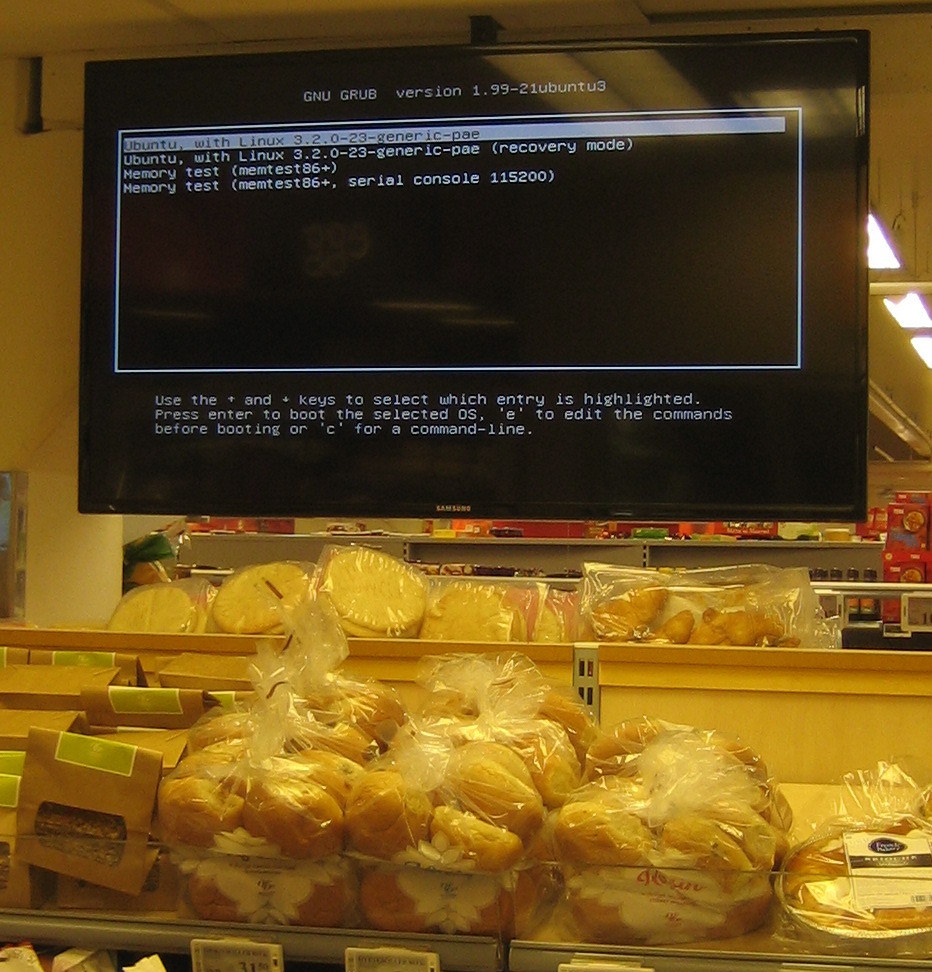
Petter Reinholdtsen: Ubuntu used to show the bread prizes at ICA Storo

Today I came across an unexpected Ubuntu boot screen. Above the bread shelf on the ICA shop at Storo in Oslo, the grub menu of Ubuntu with Linux kernel 3.2.0-23 (ie probably version 12.04 LTS) was stuck on a screen normally showing the bread types and prizes:

If it had booted as it was supposed to, I would never had known about this hidden Linux installation. It is interesting what errors can reveal.

3 October 2014

Ian Donnelly: Config::Model and Elektra

Hi Everybody, Today I want to talk about the different approaches of Elektra and Config::Model. We have gotten a lot of questions lately about why Elektra is necessary and what differentiates it between similar tools like Config::Model. While there are a lot of similarities between Config::Model and Elektra, there are some key differences and that is what I will be focusing on in this post. Once a specification is defined for Elektra and a plug-in is written to work with that specification, other developers will be able to reuse these specifications for programs that have similar configurations (such a specification and plug-in for the ini file type.) Additionally, specifications, once defined in KDB can be used across multiple programs. For instance, if I were to define a specification for my program within KDB:
[/myapp/file_dialog/show_hidden_files]
type=Boolean
default=true

Any other program could use my specification just by referring to show_hidden_files. These features allow Elektra to solve the problem of cross-platform configurations by providing a consistent API and also allow users to easily be aware of other applications configurations which allows for easier integration between programs. Config:: Model also moves to provide a unified interface for configuration data and it also supports validation such as the type=Boolean like in the above example. The biggest differences between these two projects is that Elektra is intended for use by the programs themselves and by external GUIs and validation tools unlike Config::Model. Config::Model provides a tool allowing developers to provide a means for users to interactively edit configuration data in a safe way. Additionally, Elektra uses self-inscribing data. This means that all the specifications are saved within KDB and in metadata. More differences are that validators can be written in any language for Elektra because the specifications are just stored as data and they can enforce constraints on any access because plug-ins define the behavior of KDB itself. Tying this all together with my GSoC project is the topic of three-way merges. Config::Model actually does not rely on a base for merges since the specifications all must be complete. This is a very good approach to handle merges in an advanced way too. This is an avenue that Elektra would like to explore in the future when we have enough specifications to handle all types on configuration. I hope that this post clarifies the different approaches of Elektra and Config::Model. While both of these tools offer a better answer to configuration files they do have different goals and implementations that make them unique. I want to mention that we have a good relationship with the developers of Config::Model, who supported my Google Summer of Code Project. We believe that both of these tools have their own place and uses and they do not compete to achieve the same goals. For now,
Ian S. Donnelly

2 October 2014

Jonathan Dowland: Gigabyte J1900N-D3V Mini-ITX mainboard

For my 31st birthday I decided to build myself a computer, specifically a NAS and backup server which could do some other bits and pieces. I ended up buying a system based on the Gigabyte J1900N-D3V SoC from Mini-ITX (who's after sales support is great, by the way). I hope to write up a more comprehensive overview of what I've ended up with (probably in my rather dusty hardware section), but in the meantime I have a question for anyone else with this board:
If you've upgraded the BIOS, do the more recent BIOS versions insist on there being a display connected in order to boot?
Sadly the V1 BIOS version does, which seriously limits the utility of this board for my purposes. I did manage to flash the board up to V3, once, but it later decided to downgrade itself (believing the flashed BIOS to be corrupt). I haven't managed a second time. The EFI implementation in this board is... interesting. Convincing it to boot anything legacy is a tricky task. As an aside, I recently stumbled across this suggestion on reddit to use an old-ish, Core-era Thinkpad T-series with a dock for this exact purpose: the spare ultrabay gives you two SATA drive slots; the laptop battery serves as a crude UPS and there's a built in keyboard and mouse, avoiding the issue I'm having with the J1900N-D3V. A Core i5 is more than fast enough for what I want to do and it will have vt. Hindsight is a wonderful thing...

Michal &#268;iha&#345;: Merging Weblate instances

For quite some time, I've been running translation server for projects where I am involved at l10n.cihar.com. Historically this used Pootle, but when we had more and more problems with that, I've written Weblate and started to use it there. As Weblate become more popular and I got requests to help people with running it, I've realized that it might be good idea to run server where I could host translations for other projects. This is when Hosted Weblate was born. After some time, I've realized that it really makes little sense to run and maintain separate servers for these sets of projects, so I've decided to move all translations from l10n.cihar.com to hosted.weblate.org. Today this move was completed by moving translations for phpMyAdmin.

Filed under: English phpMyAdmin Weblate 3 comments Flattr this!

1 October 2014

Keith Packard: chromium-dri3

Chromium (the browser) and DRI3 I got a note on IRC a week ago that Chromium was crashing with DRI3. The Google team working on Chromium eventually sent me a link to the bug report. That's secret Google stuff, so you won't be able to follow the link, even though it's a bug in a free software application when running on free software drivers. There's a bug report in the freedesktop bugzilla which looks the same to me. In both cases, the recommended fix was to switch from DRI3 back to DRI2. That's not exactly a great plan, given that DRI3 offers better security between GPU-using applications, which seems like a pretty nice thing to have when you're running random GL applications from the web. Chromium Sandboxing I'm not entirely sure how it works, but Chromium creates a process separate from the main browser engine to talk to the GPU. That process has very limited access to the operating system via some fancy library adventures. Presumably, the hope is that security bugs in the GL driver would be harder to leverage into a remote system exploit. Debugging in this environment is a bit tricky as you can't simply run chromium under gdb and expect to be able to set breakpoints in the GL driver. Instead, you have to run chromium with a magic flag which causes the GPU process to pause before loading the driver so you can connect to it with gdb and debug from there, along with a flag that lets you see crashes within the gpu process and the usual flag that causes chromium to ignore the GPU black list which seems to always include the Intel driver for one reason or another:
$ chromium --gpu-startup-dialog --disable-gpu-watchdog --ignore-gpu-blacklist
Once Chromium starts up, it will print out a message telling you to attach gdb to the GPU process and send that process a SIGUSR1 to continue it. Now you can happily debug and get a stack trace when the crash occurs. Locating the Bug The bug manifested with a segfault at the first access to a DRI3-allocated buffer within the application. We've seen this problem in the past; whenever buffer allocation fails for some reason, the driver ignores the problem and attempts to de-reference through the (NULL) buffer pointer, causing a segfault. In this case, Chromium called glClear, which tried (and failed) to allocate a back buffer causing the i965 driver to subsequently segfault. We should probably go fix the i965 driver to not segfault when buffer allocation fails, but that wouldn't provide a lot of additional information. What I have done is add some error messages in the DRI3 buffer allocation path which at least tell you why the buffer allocation failed. That patch has been merged to Mesa master, and should also get merged to the Mesa stable branch for the next stable release. Once I had added the error messages, it was pretty easy to see what happened:
$ chromium --ignore-gpu-blacklist
[10618:10643:0930/200525:ERROR:nss_util.cc(856)] After loading Root Certs, loaded==false: NSS error code: -8018
libGL: pci id for fd 12: 8086:0a16, driver i965
libGL: OpenDriver: trying /local-miki/src/mesa/mesa/lib/i965_dri.so
libGL: Can't open configuration file /home/keithp/.drirc: Operation not permitted.
libGL error: DRI3 Fence object allocation failure Operation not permitted
The first two errors were just the sandbox preventing Mesa from using my GL configuration file. I'm not sure how that's a security problem, but it shouldn't harm the driver much. The last error is where the problem lies. In Mesa, the DRI3 implementation uses a chunk of shared memory to hold a fence object that lets Mesa know when buffers are idle without using the X connection. That shared memory segment is allocated by creating a temporary file using the O_TMPFILE flag:
fd = open("/dev/shm", O_TMPFILE O_RDWR O_CLOEXEC O_EXCL, 0666);
This call cannot fail as /dev/shm is used by glibc for shared memory objects, and must therefore be world writable on any glibc system. However, with the Chromium sandbox enabled, it returns EPERM. Running Without a Sandbox Now that the bug appears to be in the sandboxing code, we can re-test with the GPU sandbox disabled:
$ chromium --ignore-gpu-blacklist --disable-gpu-sandbox
And, indeed, without the sandbox getting in the way of allocating a shared memory segment, Chromium appears happy to use the Intel driver with DRI3. Final Thoughts I looked briefly at the Chromium sandbox code. It looks like it needs to know intimate details of the OpenGL implementation for every possible driver it runs on; it seems to contain a fixed list of all possible files and modes that the driver will pass to open(2). That seems incredibly fragile to me, especially when used in a general Linux desktop environment. Minor changes in how the GL driver operates can easily cause the browser to stop working.

Vincent Sanders: It is a bad plan that admits of no modification

I find it somewhat interesting that thousands of years later that our society still uses Publilius Syrus sententiae though I imagine the tendency to leave well enough alone means such phrases stay in usage.

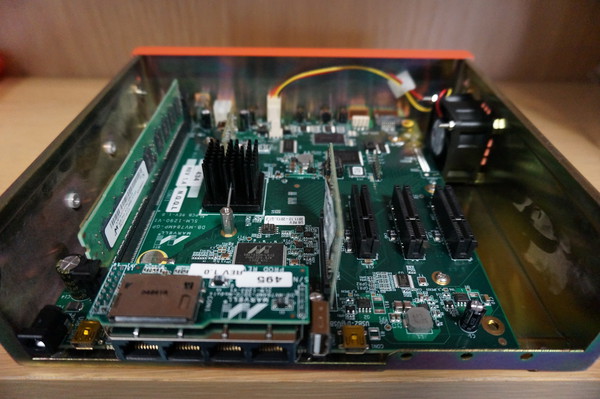
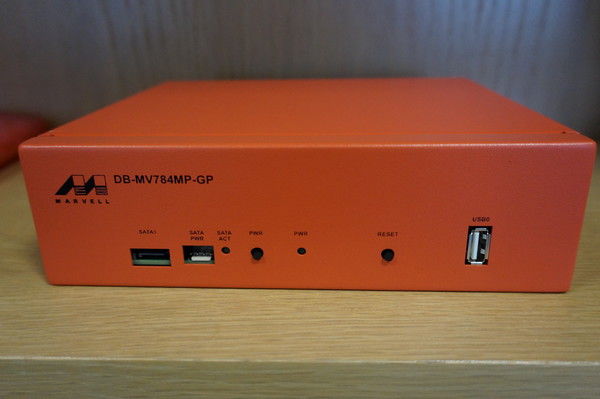
Marvell ARM system - Photo from Steve McIntyre
One weekend Steve McIntyre asked me if I could find a source of some of some 40mm fans for some systems with some pretty strict requirements. They needed to be long life and shift a lot of air to combat a persistent overheating issue.

I sat with him and went through the Farnell utterly hateful parametric web interface and eventually came up with a couple of options which were very expensive. Only then did I stop and ask what the actual problem was.

Marvell ARM system Original internal cooling arrangement - Photo from Steve McIntyre
Steve showed me one of the Debian ARM buildd boxes which are Marvell development machines. These systems are powerful quad core machines housed in compact steel enclosures.

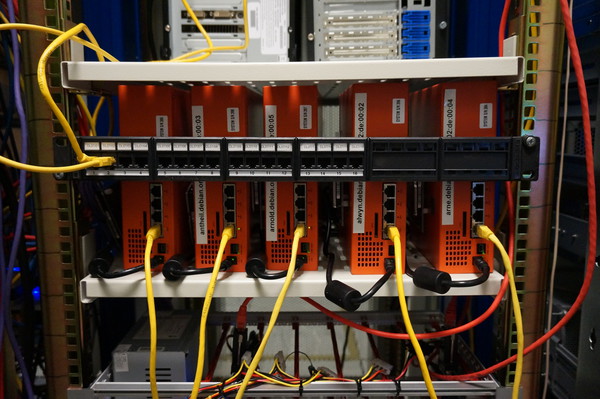
There is a single 40mm fan trying to provide cooling for the entire enclosure. When the units are placed horizontally and used intermittently this proves adequate. Unfortunately when the system are arranged vertically in a rack and run at full load continuously they often overheat and have to be restarted. In addition the small high speed fans need replacing frequently as their bearings wore out quickly.

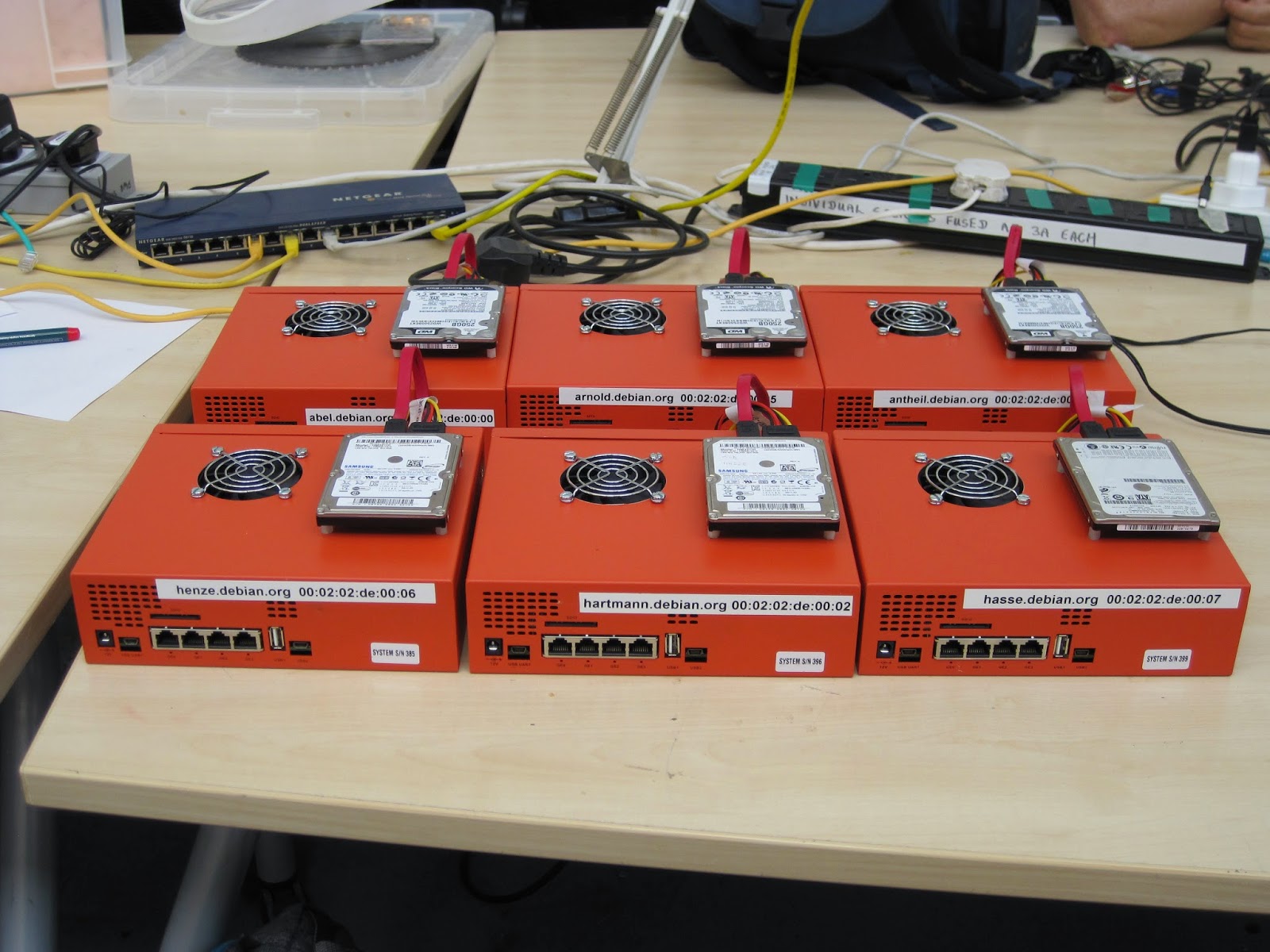
Debian ARM buildd systems - Photo from Steve McIntyreThis was obviously causing some issues for the ARM Debian ports which Steve wanted to rectify. After talking the problem through for a while we came to the conclusion we could use much larger 60mm fans to blow air directly through the top of the case onto the cpu heatsink.

Larger fans can be run much more slowly to move a similar volume of air to the smaller 40mm fans which gives a much longer service life.

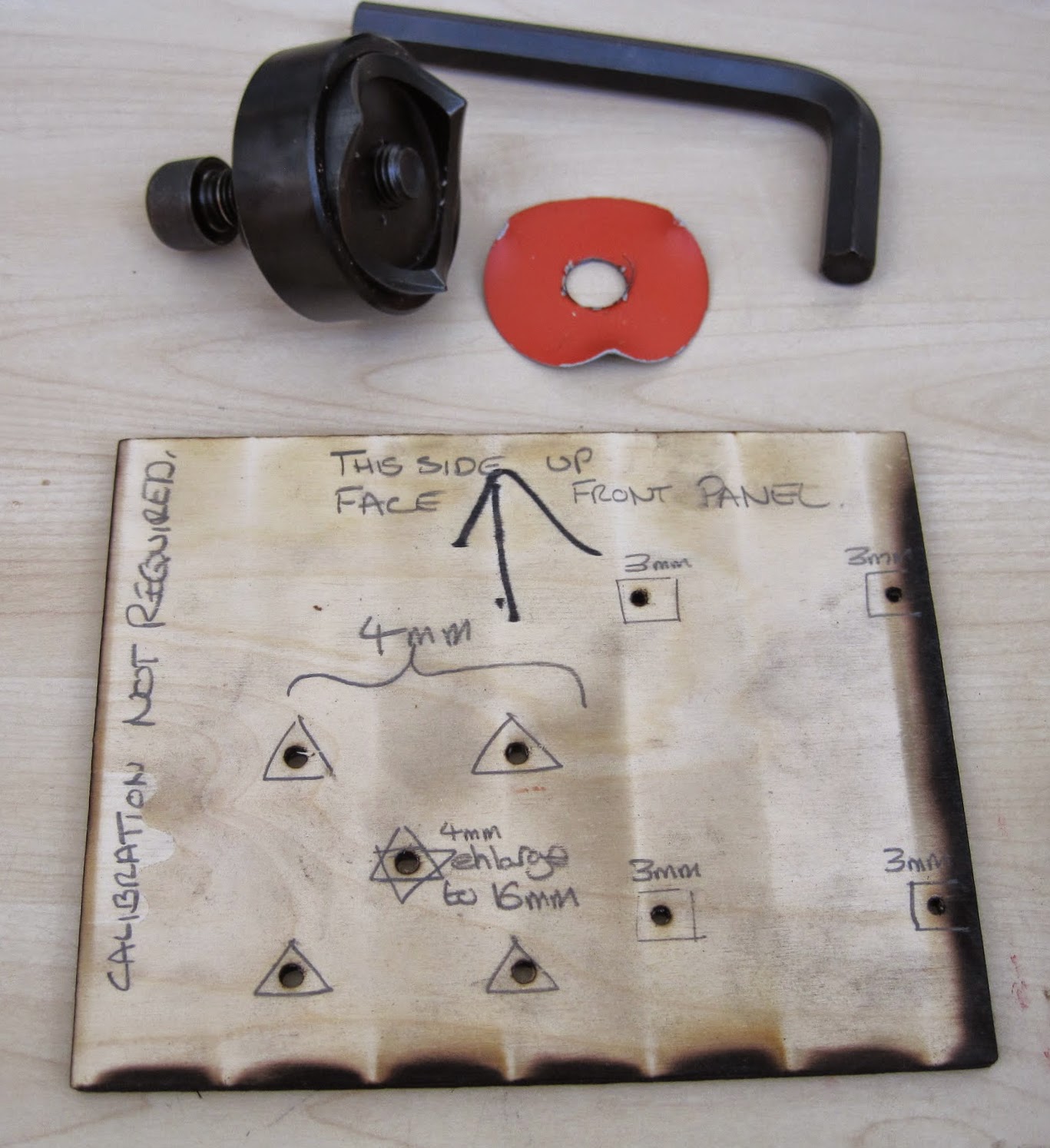
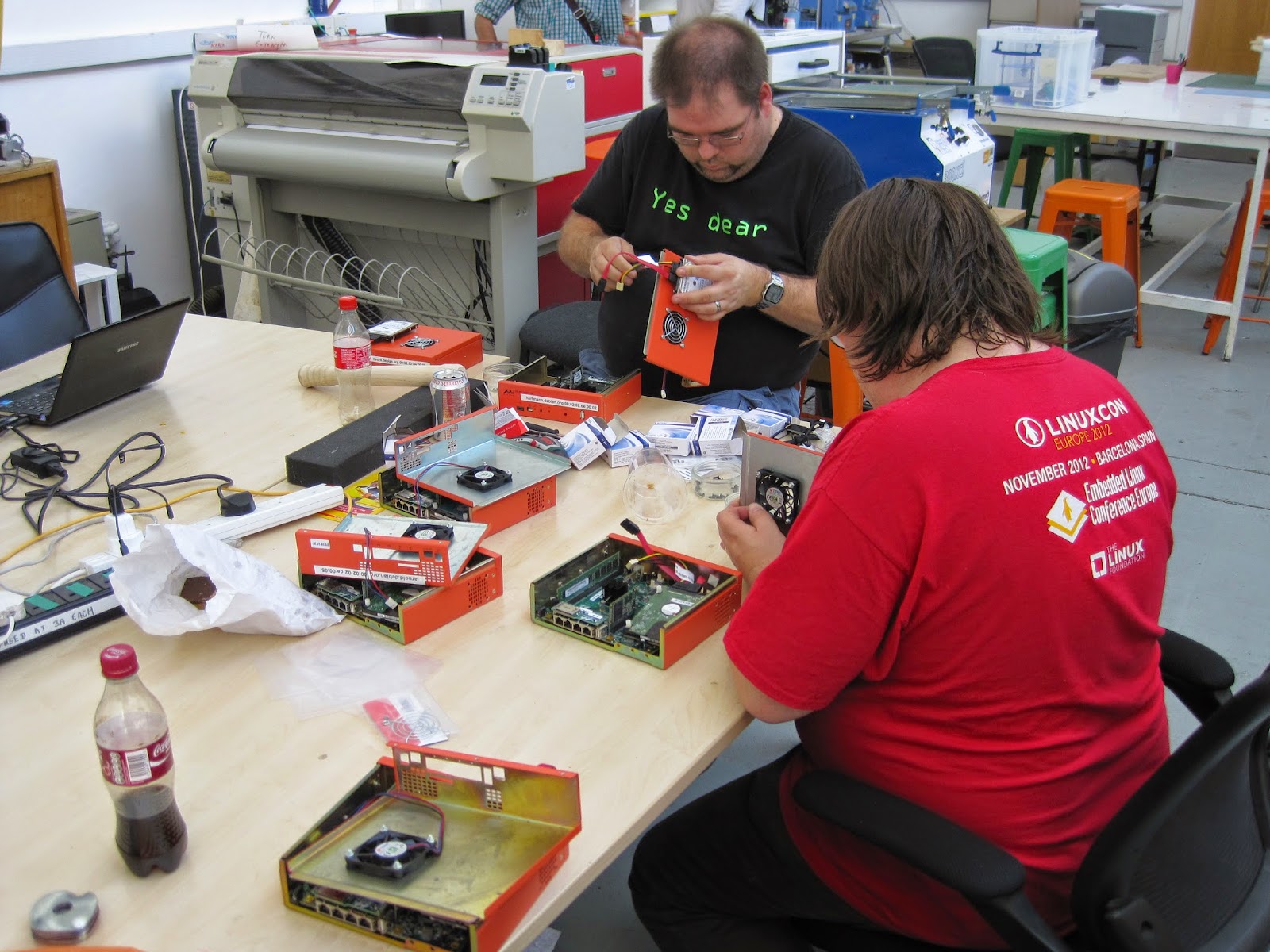
Hole punch and Drilling template
Steve proceeded to order enough parts to allow us to modify all the Debian systems, this worked out cheaper than a single "special" 40mm high volume fan.

I acquired a rather large steel hole punch, I chose this tool because it produces a much superior finish to a hole cutter and this project demanded a high level of finish (not to mention I loved having a valid excuse to own and use a huge allen key!)

If we had simply been modifying a single case I would have measured and marked up by hand. With the prospect of altering at least eight I laser cut a template from plywood which Andy Simpkins took great glee in excessively annotating.

We also used the opportunity to add bolt holes to securely attach the 2.5 inch SATA drives instead of using sticky pads.

Steve and I modified a single system to begin with both to check our alignment and the efficacy of the change. We were pleasantly surprised to discover that hoiby could now repeatedly do kernel compiles with all four cores flat out which was not possible before. The measured CPU temperature, which had previously been around 90 C, did not rise above 40 C

Steve and Andy on the assembly line
Steve, Andy and I then arranged a day where we took all the remaining units out of the rack at ARM, modified and returned them. We used the facilities at the Cambridge Makespace where I am a member to do the modifications.

I broke two 3mm drill bits and dulled a 4mm bit drilling all the holes, Roger Smith was good enough to loan us the use of his "Christmas tree bit" to ream the fan hole out to 16mm so we could thread the hole punch and cut the 60mm fan aperture out.

six modified systems ready to be re-racked.
We managed to get quite an assembly line going and, in my opinion, the results look pretty professional.

It has been several months since we did this work and these systems continue to run without issue. To complete the story we can see some graphs courtesy of the DSA munin instance.

CPU load on arnold.debian.org
You can clearly see the huge drop in temperature at the end of Week 25 despite the continuously high CPU load. Also there is only a single gap in the data after the changes (these indicate crashes where data was not recorded) where before there were frequent and extensive times where the systems were simply unusable.

CPU Temperature of arnold.debian.org
One reason I continue to enjoy Debian so much is the wide variety of ways in which I can contribute not only by maintaining my packages. Sometimes this kind of work does not receive the credit it deserves and hopefully highlights a small part of the frantic paddling that goes on under the serene surface of the Debian project to keep things "just working".

30 September 2014

Gunnar Wolf: Diego G mez: Imprisoned for sharing

I got word via the Electronic Frontier Foundation about an act of injustice happening to a person for doing... Not only what I do day to day, but what I promote and believe to be right: Sharing academic articles. Diego is a Colombian, working towards his Masters degree on conservation and biodiversity in Costa Rica. He is now facing up to eight years imprisonment for... Sharing a scholarly article he did not author on Scribd. Many people lack the knowledge and skills to properly set up a venue to share their articles with people they know. Many people will hope for the best and expect academic publishers to be fundamentally good, not to send legal threats just for the simple, noncommercial act of sharing knowledge. Sharing knowledge is fundamental for science to grow, for knowledge to rise. Besides, most scholarly studies are funded by public money, and as the saying goes, they should benefit the public. And the public is everybody, is all of us. And yes, if this sounds in any way like what drove Aaron Swartz to his sad suicide early this year... It is exactly the same thing. Thankfully (although, sadly, after the sad fact), thousands of people strongly stood on Aaron's side on that demand. Please sign the EFF petition to help Diego, share this, and try to spread the word on the real world needs for Open Access mandates for academics! Some links with further information:

Russell Coker: Links September 2014

Matt Palmer wrote a short but informative post about enabling DNS in a zone [1]. I really should setup DNSSEC on my own zones. Paul Wayper has some insightful comments about the Liberal party s nasty policies towards the unemployed [2]. We really need a Basic Income in Australia. Joseph Heath wrote an interesting and insightful article about the decline of the democratic process [3]. While most of his points are really good I m dubious of his claims about twitter. When used skillfully twitter can provide short insights into topics and teasers for linked articles. Sarah O wrote an insightful article about NotAllMen/YesAllWomen [4]. I can t summarise it well in a paragraph, I recommend reading it all. Betsy Haibel wrote an informative article about harassment by proxy on the Internet [5]. Everyone should learn about this before getting involved in discussions about controversial issues. George Monbiot wrote an insightful and interesting article about the referendum for Scottish independence and the failures of the media [6]. Mychal Denzel Smith wrote an insightful article How to know that you hate women [7]. Sam Byford wrote an informative article about Google s plans to develop and promote cheap Android phones for developing countries [8]. That s a good investment in future market share by Google and good for the spread of knowledge among people all around the world. I hope that this research also leads to cheap and reliable Android devices for poor people in first-world countries. Deb Chachra wrote an insightful and disturbing article about the culture of non-consent in the IT industry [9]. This is something we need to fix. David Hill wrote an interesting and informative article about the way that computer game journalism works and how it relates to GamerGate [10]. Anita Sarkeesian shares the most radical thing that you can do to support women online [11]. Wow, the world sucks more badly than I realised. Michael Daly wrote an article about the latest evil from the NRA [12]. The NRA continues to demonstrate that claims about good people with guns are lies, the NRA are evil people with guns.

Next.

Previous.