Search Results: "ag"

28 August 2020

Bits from Debian: DebConf20 welcomes its sponsors!

DebConf20 logo DebConf20 is taking place online, from 23 August to 29 August 2020. It is the 21st Debian conference, and organizers and participants are working hard together at creating interesting and fruitful events. We would like to warmly welcome the 17 sponsors of DebConf20, and introduce them to you. We have four Platinum sponsors. Our first Platinum sponsor is Lenovo. As a global technology leader manufacturing a wide portfolio of connected products, including smartphones, tablets, PCs and workstations as well as AR/VR devices, smart home/office and data center solutions, Lenovo understands how critical open systems and platforms are to a connected world. Our next Platinum sponsor is Infomaniak. Infomaniak is Switzerland's largest web-hosting company, also offering backup and storage services, solutions for event organizers, live-streaming and video on demand services. It wholly owns its datacenters and all elements critical to the functioning of the services and products provided by the company (both software and hardware). Google is our third Platinum sponsor. Google is one of the largest technology companies in the world, providing a wide range of Internet-related services and products such as online advertising technologies, search, cloud computing, software, and hardware. Google has been supporting Debian by sponsoring DebConf for more than ten years, and is also a Debian partner. Amazon Web Services (AWS) is our fourth Platinum sponsor. Amazon Web Services is one of the world's most comprehensive and broadly adopted cloud platforms, offering over 175 fully featured services from data centers globally (in 77 Availability Zones within 24 geographic regions). AWS customers include the fastest-growing startups, largest enterprises and leading government agencies. Our Gold sponsors are Deepin, the Matanel Foundation, Collabora, and HRT. Deepin is a Chinese commercial company focusing on the development and service of Linux-based operating systems. They also lead research and development of the Deepin Debian derivative. The Matanel Foundation operates in Israel, as its first concern is to preserve the cohesion of a society and a nation plagued by divisions. The Matanel Foundation also works in Europe, in Africa and in South America. Collabora is a global consultancy delivering Open Source software solutions to the commercial world. In addition to offering solutions to clients, Collabora's engineers and developers actively contribute to many Open Source projects. Hudson-Trading is a company led by mathematicians, computer scientists, statisticians, physicists and engineers. They research and develop automated trading algorithms using advanced mathematical techniques. Our Silver sponsors are: Linux Professional Institute, the global certification standard and career support organization for open source professionals, Civil Infrastructure Platform, a collaborative project hosted by the Linux Foundation, establishing an open source base layer of industrial grade software, Ubuntu, the Operating System delivered by Canonical, and Roche, a major international pharmaceutical provider and research company dedicated to personalized healthcare. Bronze sponsors: IBM, MySQL, Univention. And finally, our Supporter level sponsors, ISG.EE and Pengwin. Thanks to all our sponsors for their support! Their contributions make it possible for a large number of Debian contributors from all over the globe to work together, help and learn from each other in DebConf20. Participating in DebConf20 online The 21st Debian Conference is being held online, due to COVID-19, from August 23 to 29, 2020. Talks, discussions, panels and other activities run from 10:00 to 01:00 UTC. Visit the DebConf20 website at https://debconf20.debconf.org to learn about the complete schedule, watch the live streaming and join the different communication channels for participating in the conference.

Raphaël Hertzog: Freexian s report about Debian Long Term Support, July 2020

A Debian LTS logo Like each month, albeit a bit later due to vacation, here comes a report about the work of paid contributors to Debian LTS. Individual reports In July, 249.25 work hours have been dispatched among 14 paid contributors. Their reports are available: Evolution of the situation July was our first month of Stretch LTS! Given this is our fourth LTS release we anticipated a smooth transition and it seems everything indeed went very well. Many thanks to the members of the Debian ftpmaster-, security, release- and publicity- teams who helped us make this happen!
Stretch LTS begun on July 18th 2020 after the 13th and final Stretch point release. and is currently scheduled to end on June 30th 2022. Last month, we asked you to participate in a survey and we got 1764 submissions, which is pretty awesome. Thank you very much for participating!. Right now we are still busy crunching the results, but we already shared some early analysis during the Debconf LTS bof this week. The security tracker currently lists 54 packages with a known CVE and the dla-needed.txt file has 52 packages needing an update. Thanks to our sponsors New sponsors are in bold.

No comment Liked this article? Click here. My blog is Flattr-enabled.

Reproducible Builds (diffoscope): diffoscope 158 released

The diffoscope maintainers are pleased to announce the release of diffoscope version 158. This version includes the following changes:
* Improve PGP support:
  - Support extracting of files within PGP signed data.
    (Closes: reproducible-builds/diffoscope#214)
  - pgpdump(1) can successfully parse some unrelated, non-PGP binary files,
    so check that the parsed output contains something remotely sensible
    before identifying it as a PGP file.
* Don't use Python's repr(...)-style output in "Calling external command"
  logging output.
* Correct a typo of "output" in an internal comment.
You find out more by visiting the project homepage.

26 August 2020

Dirk Eddelbuettel: #29: Easy, Reliable, Fast Linux CRAN Binaries via BSPM

Welcome to the 29th post in the randomly repeating R recommendations series or R4 for short. Our last post #28 introduced RSPM, and just before that we also talked in #27 about binary installations on Ubuntu (which was also a T4 video). This post is joined with I aki Ucar and mainly about work we have done with his bspm package.

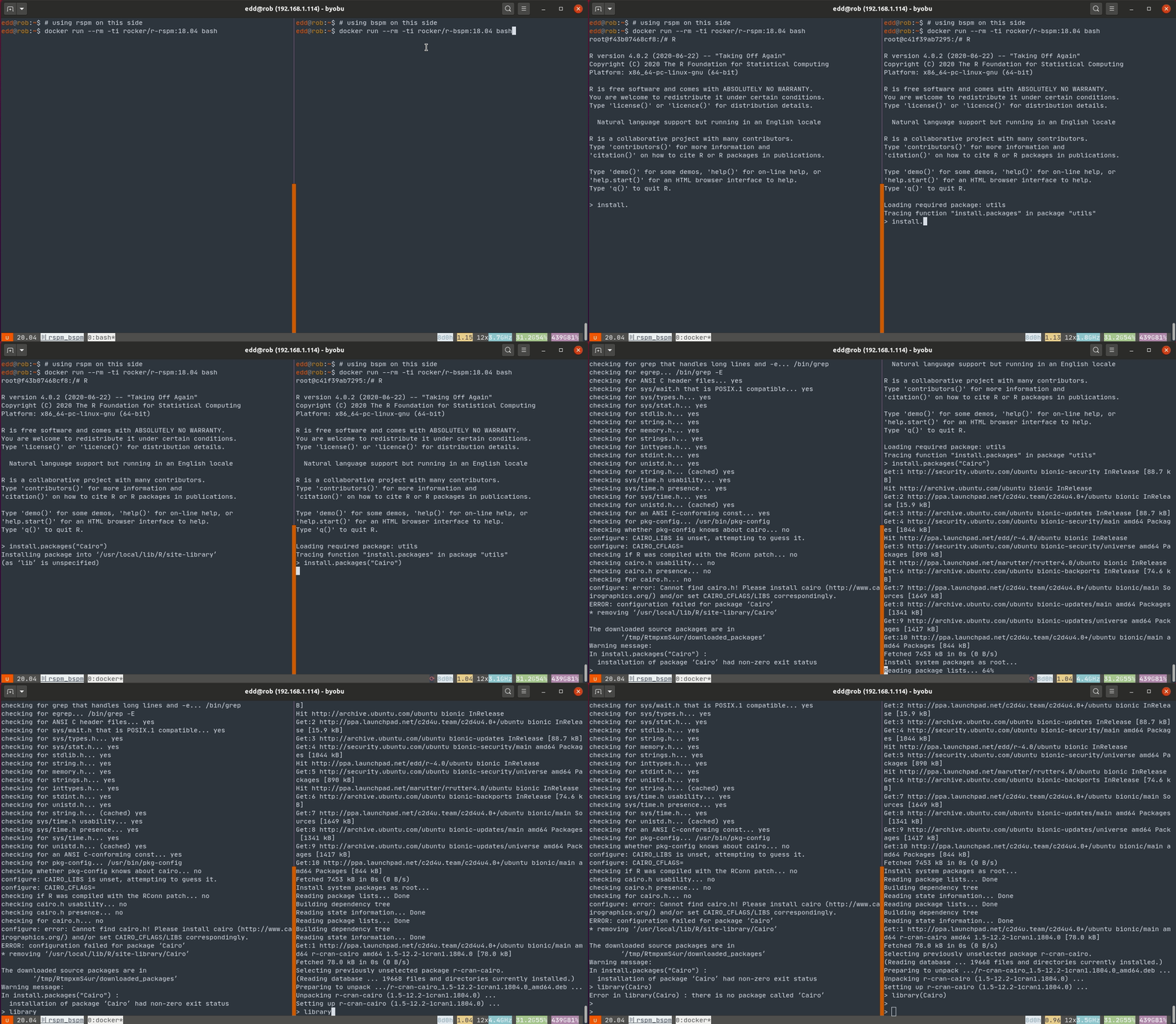
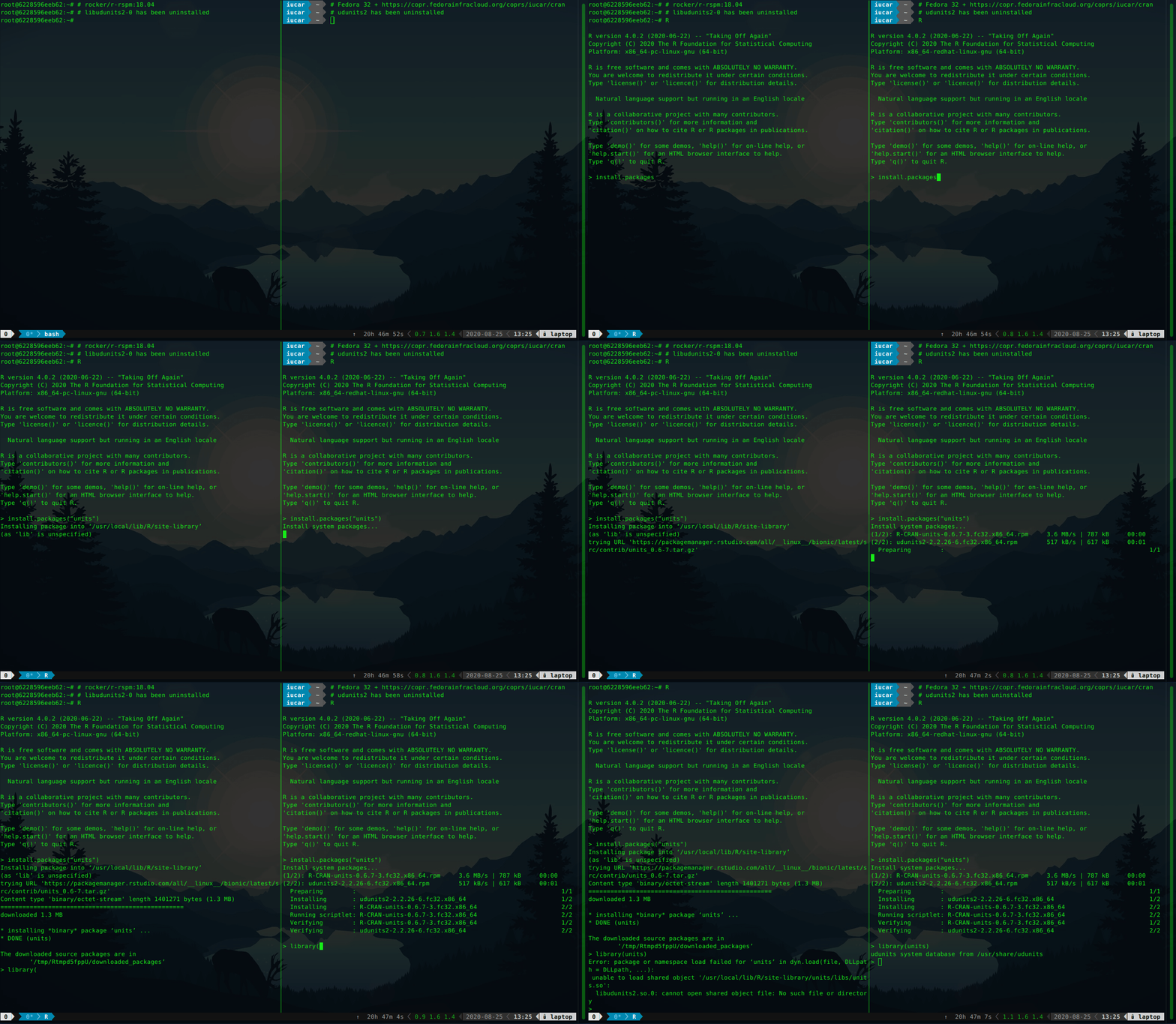
Background CRAN has been a cornerstone of the success of R in recent years. As a well-maintained repository with stringent quality control, it ensures users have access to highest-quality statistical / analytical software that just works . Users on Windows and macOS also benefit from faster installation via pre-compiled binary packages. Linux users generally install from source, which can be more tedious and, often, much slower. Those who know where to look have had access to (at least some) binaries for years as well (and one of us blogged and vlogged about this at length). Debian users get close to 1000 CRAN and BioConductor packages (and, true to Debian form, for well over a dozen hardware platforms). Michael Rutter maintains a PPA with 4600 binaries for three different Ubuntu flavors (see c2d4u4.0+). More recently, Fedora joined the party with 16000 (!!) binaries, essentially all of CRAN, via a Copr repository (see iucar/cran). The buzz currently is however with RSPM, a new package manager by RStudio. An audacious project, it provides binaries for several Linux distributions and releases. It has already been tested in many RStudio Cloud sessions (including with some of our students) as well as some CI integrations. RSPM cuts across and takes the breadth of CRAN across several Linux distributions, bringing installation of pre-built CRAN packages a binaries under their normal CRAN package names. Another nice touch is the integration with install.packages(): these binaries are installed in a way that is natural for R users but as binaries. It is however entirely disconnected from the system package management. This means that the installation of a package requiring an external library may succeed and still fail, as a required library simply cannot be pulled in directly by RSPM. So what is needed is a combination. We want binaries that are aware of their system dependencies but accessible directly from R just like RSPM offers it. Enter BSPM the Bridge to System Package Manager package (also on CRAN). The first illustration (using Ubuntu 18.04) shows RSPM on the left, and BSPM on the right, both installing the graphics package Cairo (and both using custom Rocker containers). This fails for RSPM as no binary is present and a source build fails for the familiar lack of a -dev package. It proceeds just fine on the right under BSPM. A second illustration shows once again RSPM on the left, and BSPM on the right (this time on Fedora), both installing the units package without a required system dependency. The installation of units works for BSPM as the dependency libudunits is brought in, but fails under RSPM. The binary installation succeeds in both cases, but the missing dependency (the UDUNITS2 library) is brought in only by BSPM. Consequently, the package fails to load under RSPM.

Summary To conclude, highlights of BSPM are:
  • direct installation of binary packages from R via R commands under their normal CRAN names (just like RSPM);
  • full integration with the system package manager, delivering system installations (improving upon RSPM);
  • full dependency resolution for R packages, including system requirements (improving upon RSPM).
This offers easy, reliable, fast installation of R packages, and we invite you to pick all three. We recommend usage with either Ubuntu with the 4.6k packages via the Rutter PPA, or Fedora via the even more complete Copr repository (which already includes a specially-tailored version of BSPM called CoprManager). We hope this short note wets your appetite to learn more about bspm (which is itself on CRAN) and the two sets of Rocker containers shown. The rocker/r-rspm container comes in two two flavours for Ubuntu 18.04 and 20.04. Similarly, the rocker/r-bspm container comes in the same two two flavours for Ubuntu 18.04 and 20.04, as well as in a Debian testing variant. Feedback is appreciated at the bspm or rocker issue trackers. If you like this or other open-source work I do, you can now sponsor me at GitHub. For the first year, GitHub will match your contributions.

This post by Dirk Eddelbuettel originated on his Thinking inside the box blog. Please report excessive re-aggregation in third-party for-profit settings.

Andrew Cater: The Debconf20 song

The DebConf 20 song - a sea shanty - to the tune of "Fathom the bowl"

Here's to DebConf 20, the brightest and best
Now it's this year's orga team getting no rest
We're not met in Haifa - it's all doom and gloom
And I'm sat like a lifer here trapped in my room

I'm sat in my room, it's all doom and gloom
And I'm sat at my keyboard here trapped in my room

Now there's IRC rooms and there's jitsi and all
But no fun conversations as we meet in the hall
No hugs for old friends, no shared wine and cheese
Just shared indigestion as we take our ease

I'm sat in my room, it's all doom and gloom
And I'm sat with three screens around me in my room

But there's people to chat to, and faces we know
And new things to learn and we're all on the go
Algo en espanol - there's no cause for alarm
An Indic track showcasing Malayalam

I'm sat in my room, it's all doom and gloom
And I'm sat with my Thinkpads and cats in my room

With webcams and buffering, with lag and delay
It's as well that there's Debconf time all through the day
The effects of tiredness are hard to foresee
For the Debian clocks all are timezone UTC

I'm sat in my room, it's all doom and gloom
And I'll sing out of tune as I'm sat in my room

There's no social drinking, there's no games of Mao
Keeping social distance, we can't think quite how
This year is still friendly though minus some fun
We'll catch up next year when we'll all get some sun

I'm sat in my room, it's all doom and gloom
I'm sat with my friends around here in my room

There's loopy@debconf and snippets and such
To cheer us all up, sure, it doesn't take much
For we're all one big family, though we each code alone
And we sometimes switch off or just complain and moan

I'm sat in my room, it's all doom and gloom
And there's space for us all in the debconf chat room

This is my first DebConf - hope it won't be my last
And we'll meet up somewhere when this COVID is past
To all who have done this - we deserve the credit
Now if you'll excuse me - I've web pages to edit

I'm sat in my room, it's not all doom and gloom
And we're met as one Debian here in my room


Jacob Adams: Get A Command Line

How to access a command line on your laptop without installing Linux. Linux is great, and I recommend trying it out, whether on real hardware or in a virtual machine, to anyone interested in Computer Science. However, the process can be quite involved, and sometimes you don t want to change your whole operating system or sort out installing virtual machines. Fortunately, these days you can try out one of Linux s greatest features, the command line, without going through all that hassle.

Mac If you have a Mac, all you need to do is open Terminal.app, which is usually found under /Applications/Utilities. Note that Mac now defaults to zsh instead of bash, which is usually the shell used on Linux. This shouldn t matter, but it s something you should be aware of.

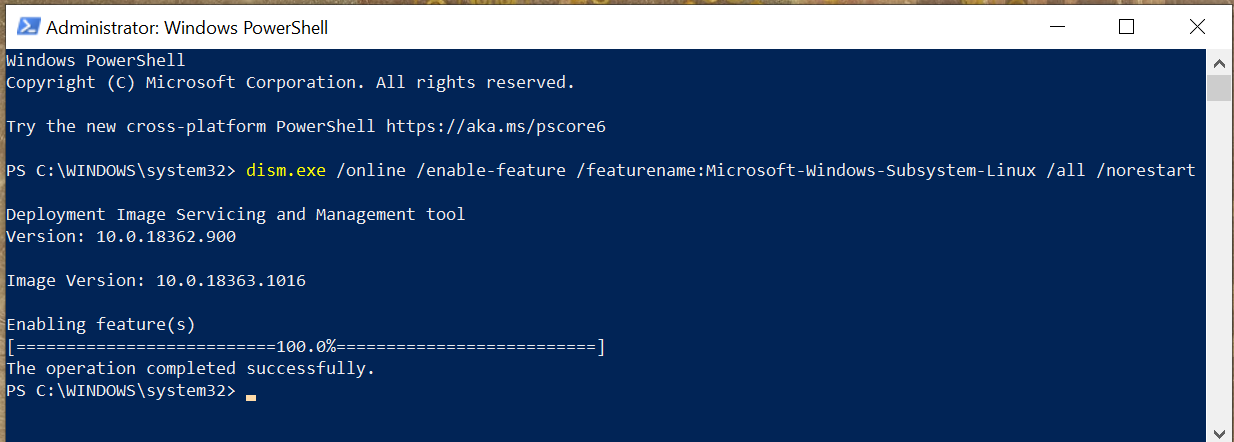
Windows On Windows, things are much more complex. There s always Powershell, but if you want a true Unix shell experience like you d get on Linux, you ll need to install the Windows Subsystem for Linux. This allows you to run Linux programs on your Windows 10 computer. This boils down to opening Powershell (open the start menu, search for powershell ) as an administrator (right-click, then Run as Administrator, then click Yes or enter an administrator s password when the UAC prompt appears). In this new Powershell window, you need to run the following command to enable WSL:
dism.exe /online /enable-feature /featurename:Microsoft-Windows-Subsystem-Linux /all /norestart
When this command executes successfully you should see the following output: WSL Sucess After this output appears, you ll need to reboot your machine before you can continue. Once your machine is rebooted, you need to install a Linux distribution. Different communities and companies ship their own versions of Linux and the various services and utilities required to use it, and these versions are called distributions. If you re not sure which one to use, I would recommend Ubuntu, as it was the distribution first integrated into WSL, and it s a common distribution for new users. After installing your chosen distribution, you ll need to perform the first-time setup. You ll just need to run it, as it is now installed as a program on your computer, and then it will walk you through the setup process, which requires you to create a new user account for your Linux distribution. This does not need to be the same as your Windows username and password, and it s probably safer if it isn t. You ll need to remember that password for running administrative commands with sudo.

25 August 2020

Jonas Meurer: cryptsetup-suspend

Introducing cryptsetup-suspend Today, we're introducing cryptsetup-suspend, whose job is to protect the content of your harddrives while the system is sleeping. TL;DR:
  • You can lock your encrypted harddrives during suspend mode by installing cryptsetup-suspend
  • For cryptsetup-suspend to work properly, at least Linux kernel 5.6 is required
  • We hope that in a bright future, everything will be available out-of-the-box in Debian and it's derivatives
Before: timeline_old.svg After: timeline_new.svg

Table of contents

What does this mean and why should you care about it? If you don't use full-disk encryption, don't read any further. Instead, think about, what will happen if you lose your notebook on the train, a random person picks it up and browses through all your personal pictures, e-mails, and tax records. Then encrypt your system and come back. If you believe full-disk encryption is necessary, you might know that it only works when your machine is powered off. Once you turn on the machine and decrypt your harddrive, your encryption key stays in RAM and can potentially be extracted by malicious software or physical access. Even if these attacks are non-trivial, it's enough to worry about. If an attacker is able to extract your disk encryption keys from memory, they're able to read the content of your disk in return. Sadly, in 2020, we hardly power off our laptops anymore. The sleep mode, also known as "suspend mode", is just too convenient. Just close the lid to freeze the system state and lift it anytime later in order to continue. Well, convenience usually comes with a cost: during suspend mode, your system memory is kept powered, all your data - including your encryption keys - stays there, waiting to be extracted by a malicious person. Unfortunately, there are practical attacks to extract the data of your powered memory. Cryptsetup-suspend expands the protection of your full-disk encryption to all those times when your computer sleeps in suspend mode. Cryptsetup-suspend utilizes the suspend feature of LUKS volumes and integrates it with your Debian system. Encryption keys are evicted from memory before suspend mode and the volumes have to be re-opened after resuming - potentially prompting for the required passphrases. By now, we have a working prototype which we want to introduce today. We did quite some testing, both on virtualized and bare-metal Debian and Ubuntu systems, with and without graphical stack, so we dare to unseal and set free the project and ask you - the community - to test, review, criticize and give feedback. Here's a screencast of cryptsetup-suspend in action:

State of the implementation: where are we? If you're interested in the technical details, here's how cryptsetup-suspend works internally. It basically consists of three parts: cryptsetup-suspend.svg
  1. cryptsetup-suspend: A C program that takes a list of LUKS devices as arguments, suspends them via luksSuspend and suspends the system afterwards. Also, it tries to reserve some memory for decryption, which we'll explain below.
  2. cryptsetup-suspend-wrapper: A shell wrapper script which works the following way:
    1. Extract the initramfs into a ramfs
    2. Run (systemd) pre-suspend scripts, stop udev, freeze almost all cgroups
    3. Chroot into the ramfs and run cryptsetup-suspend
    4. Resume initramfs devices inside chroot after resume
    5. Resume non-initramfs devices outside chroot
    6. Thaw groups, start udev, run (systemd) post-suspend scripts
    7. Unmount the ramfs
  3. A systemd unit drop-in file overriding the Exec property of systemd-suspend.service so that it invokes the script cryptsetup-suspend-wrapper.
Reusing large parts of the existing cryptsetup-initramfs implementation has some positive side-effects: Out-of-the-box, we support all LUKS block device setups that have been supported by the Debian cryptsetup packages before. Freezing most processes/cgroups is necessary to prevent possible race-conditions and dead-locks after the system resumes. Processes will try to access data on the locked/suspended block devices eventually leading to buffer overflows and data loss.

Technical challenges and caveats
  • Dead-locks at suspend: In order to prevent possible dead-locks between suspending the encrypted LUKS disks and suspending the system, we have to tell the Linux kernel to not sync() before going to sleep. A corresponding patch got accepted upstream in Linux 5.6. See section What about the kernel patch? below for details.
  • Race conditions at resume: Likewise, there's a risk of race conditions between resuming the system and unlocking the encypted LUKS disks. We went with freezing as many processes as possible as a counter measurement. See last part of section State of the implementation: where are we? for details.
  • Memory management: Memory management is definitely a challenge. Unlocking disks might require a lot of memory (if key derivation function is argon2i) and the swap device most likely is locked at that time. See section All that matters to me is the memories! below for details.
  • systemd dependency: Our implementation depends on systemd. It uses a unit drop-in file for systemd-suspend.service for hooking into the system suspend process and depends on systemds cgroup management to freeze and thaw processes. If you're using a different init system, sorry, you're currently out of luck.

What about the kernel patch? The problem is simple: the Linux kernel suspend implementation enforces a final filesystem sync() before the system goes to sleep in order to prevent potential data loss. While that's sensible in most scenarios, it may result in dead-locks in our situation, since the block device that holds the filesystem is already suspended. The fssync() call will block forever as it waits for the block device to finish the sync() operation. So we need a way to conditionally disable this sync() call in the Linux kernel resume function. That's what our patch does, by introducing a run-time switch at /sys/power/sync_on_suspend, but it only got accepted into the Linux kernel recently and was first released with Linux kernel 5.6. Since release 4.3, the Linux kernel at least provides a build-time flag to disable the sync(): CONFIG_SUSPEND_SKIP_SYNC (that was called SUSPEND_SKIP_SYNC first and renamed to CONFIG_SUSPEND_SKIP_SYNC in kernel release 4.9). Enabling this flag at build-time protects you against the dead locks perfectly well. But while that works on an individual basis, it's a non-option for the distribution Linux kernel defaults. In most cases you still want the sync() to happen, except if you have user-space code that takes care of the sync() just before suspending your system - just like our cryptsetup-suspend implementation does. So in order to properly test cryptsetup-suspend, you're strongly advised to run Linux kernel 5.6 or newer. Fortunately, Linux 5.6 is available in buster-backports thanks to the Debian Kernel Team.

All that matters to me is the memories! One of the tricky parts is memory management. Since version 2, LUKS uses argon2i as default key derivation function. Argon2i is a memory-hard hash function and LUKS2 assigns the minimum of half of your systems memory or 1 GB to unlocking your device. While this is usually unproblematic during system boot - there's not much in the system memory anyway - it can become problematic when suspending. When cryptsetup tries to unlock a device and wants 1 GB of memory for this, but everything is already occupied by your browser and video player, there's only two options what to do:
  1. Kill a process to free some memory
  2. Move some of the data from memory to swap space
The first option is certainly not what you expect when suspending your system. The second option is impossible, because swap is located on your harddrive which we have locked before. Our current solution is to allocate the memory after freezing the other processes, but before locking the disks. At this time, the system can still move data to swap, but it won't be accessed anymore. We then release the memory just in time for cryptsetup to claim it again. The implementation of this is still subject to change. memories.gif

What's missing: A proper user interface As mentioned before, we consider cryptsetup-suspend usable, but it certainly still has bugs and shortcomings. The most obvious one is lack of a proper user interface. Currently, we switch over to a tty command-line interface to prompt for passphrases when unlocking the LUKS devices. It certainly would be better to replace this with a graphical user interface later, probably by using plymouth or something alike. Unfortunately, it seems rather impossible to spawn a real graphical environment for the passphrase prompt. That would imply to load the full graphical stack into the ramfs, raising the required amount of memory significantly. Lack of memory is currently our biggest concern and source of trouble. We'd definitely appreciate to learn about your ideas how to improve the user experience here.

Let's get practical: how to use TL;DR: On Debian Bullseye (Testing), all you need to do is to install the cryptsetup-suspend package from experimental. It's not necessary to upgrade the other cryptsetup packages. On Debian Buster, cryptsetup packages from backports are required.
  1. First, be sure that you're running Linux kernel 5.6 or newer. For Buster systems, it's available in buster-backports.
  2. Second, if you're on Debian Buster, install the cryptsetup 2:2.3.3-2~bpo10+1 packages from buster-backports.
  3. Third, install the cryptsetup-suspend package from experimental. Beware that cryptsetup-suspend depends on cryptsetup-initramfs (>= 2:2.3.3-1~). Either you need the cryptsetup packages from testing/unstable, or the backports from buster-backports.
  4. Now that you have the cryptsetup-suspend package installed, everything should be in place: Just send your system to sleep. It should switch to a virtual text terminal before going to sleep, ask for a passphrase to unlock your encrypted disk(s) after resume and switch back to your former working environment (most likely your graphical desktop environment) afterwards.

Security considerations Suspending LUKS devices basically means to remove the corresponding encryption keys from system memory. This protects against all sort of attacks trying to read them from there, e.g. cold-boot attacks. But, cryptsetup-suspend only protects the encryption keys of your LUKS devices. Most likely there's more sensitive data in system memory, like all kinds of private keys (e.g. OpenPGP, OpenSSH) or documents with sensitive content. We hope that the community will help improve this situation by providing useful pre-/post-suspend scripts. A positive example is KeepassXC, which is able to lock itself when going to suspend mode.

Feedback and Comments We'd be more than happy to learn about your thoughts on cryptsetup-suspend. For specific issues, don't hesitate to open a bugreport against cryptsetup-suspend. You can also reach us via mail - see the next section for contact addresses. Last but not least, comments below the blogpost work as well.

Authors
  • Tim (tim at systemli.org)
  • Jonas (jonas at freesources.org)

24 August 2020

Jonathan Dowland: Out of control (21 minutes of madness mix)

Chemical Brothers   Out Of Control (21 Minutes of Madness remix) Copy 1143 of 1999 Chemical Brothers Out Of Control (21 Minutes of Madness remix) Copy 1143 of 1999
Also known as The Secret Psychedelic Mix. I picked this up last year. It was issued to promote the 20th anniversary re-issue of the parent album "Surrender". I remember liking this song back when it came out. At that time I didn't know who the guest singer was Bernard Sumner and if I had it wouldn't mean anything to me. This is a pretty good mix. There's nothing "extra" in the mix, really, it's the same elements as the original 7 minute version, for 21 minutes this time, with perhaps some more production elements (more dubby stuff) but it doesn't seem to overstay its welcome.

Jonathan Carter: DebConf 20 Sessions

DebConf20 is happening from 23 August to 29 August. The full is schedule available on the DebConf20 website. I m preparing (or helping to prepare) 3 sessions for this DebConf. I wish I had the time for more, but with my current time constraints, even preparing for these sessions took some careful planning!

Bits from the DPL Time: Aug 24 (Mon): 16:00 UTC. The traditional DebConf talk from the DPL, where we take a look at the state of the Debian project and where we re heading. This talk is pre-recorded, but there will be a few minutes after the talk for questions. https://debconf20.debconf.org/talks/9-bits-from-the-dpl/

Leadership in Debian BOF/Panel Time: Aug 27 (Thu): 18:00 UTC. In this session, we will host a panel of people who hold (or who have held) leadership positions within Debian. We ll go through a few questions for the panel and then continue with open questions and discussion. https://debconf20.debconf.org/talks/46-leadership-in-debian-bofpanel/

Local Teams Time: Aug 29 (Sat): 19:00 UTC. We already have a number of large and very successful Debian Local Groups (Debian France, Debian Brazil and Debian Taiwan, just to name a few), but what can we do to help support upcoming local groups or help spark interest in more parts of the world? In this BoF, we ll discuss the possibility of setting up a local group support team or a new delegation that will keep track of local teams, manage budgets and get new local teams bootstrapped. https://debconf20.debconf.org/talks/50-local-teams/

Sven Hoexter: google cloud buster images without python 2

Update I have to stand corrected. noahm@ wrote me, because the Debian Cloud Image maintainer only ever included python explicitly in Azure images. The most likely explanation for the change in the Google images is that Google just ported the last parts of their own software to python 3, and subsequently removed python 2. With some relieve one can just conclude it's only our own fault that we did not build our own images, which include all our own dependencies. Take it as reminder to always build your own images. Always. Be it VMs or docker. Build your own image. Original Post Fun in the morning, we realized that the Debian Cloud image builds dropped python 2 and that propagated to the Google provided Debian/buster images. So in case you use something like ansible, and so far assumed python 2 as the default interpreter, and installed additional python 2 modules to support ansible modules, you now have to either install python 2 again or just move to python 3k. We just try to suffer it through now, and set interpreter_python = auto in our ansible.cfg to anticipate the new default behaviour, which is planned for ansible 2.12. See also https://docs.ansible.com/ansible/latest/reference_appendices/interpreter_discovery.html Other lesson to learn here: The GCE Debian stable images are not stable. Blends in nicely with this rant, though it's not 100% a Google Cloud foul this time.

Ulrike Uhlig: Code reviews: from nitpicking to cooperation

After we gave our talk at DebConf 20, Doing things together, there were 5 minutes left for the live Q&A. Pollo asked a question that I think is interesting and deserves a longer answer: How can we still have a good code review process without making it a "you need to be perfect" scenario? I often find picky code reviews help me write better code. I find it useful to first disentangle what code reviews are good for, how we do them, why we do them that way, and how we can potentially improve processes. What are code reviews good for? Code review and peer review are great methods for cooperation aiming at: Looking at this list, the last point seems to be more like a nice side effect of all the other points. :) How do code reviews happen in our communities? It seems to be a common assumption that code reviews are and have to be picky and perfectionist. To me, this does not actually seem to be a necessity to accomplish the above mentioned goals. We might want to work with precision a quality which is different from perfection. Perfection can hardly be a goal: perfection does not exist. Perfectionist dynamics can lead to failing to call something "good enough" or "done". Sometimes, a disproportionate amount of time is invested in writing (several) code reviews for minor issues. In some cases, strong perfectionist dynamics of a reviewer can create a feeling of never being good enough along with a loss of self esteem for otherwise skilled code authors. When do we cross the line? When going from cooperation, precision, and learning to write better code, to nitpicking, we are crossing a line: nitpicking means to pedantically search for others' faults. For example, I once got one of my Git commits at work criticized merely for its commit message that was said to be "ugly" because I "use[d] the same word twice" in it. When we are nitpicking, we might not give feedback in an appreciative, cooperative way, we become fault finders instead. From there it's a short way to operating on the level of blame. Are you nitpicking to help or are you nitpicking to prove something? Motivations matter. How can we improve code reviewing? When we did something wrong, we can do better next time. When we are told that we are wrong, the underlying assumption is that we cannot change (See Bren Brown, The difference between blame and shame). We can learn to go beyond blame. Negative feedback rarely leads to improvement if the environment in which it happens lacks general appreciation and confirmation. We can learn to give helpful feedback. It might be harder to create an appreciative environment in which negative feedback is a possibility for growth. One can think of it like of a relationship: in a healthy relationship we can tell each other when something does not work and work it out because we regularly experience that we respect, value, and support each other. To be able to work precisely, we need guidelines, tools, and time. It's not possible to work with precision if we are in a hurry, burnt out, or working under a permanent state of exception. The same is true for receiving picky feedback. On DebConf's IRC channel, after our talk, marvil07 said: On picky code reviews, something that I find useful is automation on code reviews; i.e. when a bot is stating a list of indentation/style errors it feels less personal, and also saves time to humans to provide more insightful changes. Indeed, we can set up routines that do automatic fault checking (linting). We can set up coding guidelines. We can define what we call "done" or "good enough". We can negotiate with each other how we would like code to be reviewed. For example, one could agree that a particularly perfectionist reviewer should point out only functional faults. They can spare their time and refrain from writing lengthy reviews about minor esthetic issues that have never made it into a guideline. If necessary, author and reviewer can talk about what can be improved on the long term during a retrospective. Or, on the contrary, one could explicitly ask for a particularly detailed review including all sorts of esthetic issues to learn the best practices of a team applied to one's own code. In summary: let's not lose sight of what code reviews are good for, let's have a clear definition of "done", let's not confuse precision with perfection, let's create appreciative work environments, and negotiate with each other how reviews are made. I'm sure you will come up with more ideas. Please do not hesitate to share them!

Norbert Preining: Social Equality and Free Software BoF at DebConf20

Shortly after yesterday s start of the Debian Conference 2020, I had the honor to participate in a BoF on social equality in free software, led by the OSI vice president and head of the FOSSASIA community, Hong Phuc Dang. The group of discussants consisted of OSS representatives from a wide variety of countries (India, Indonesia, China, Hong Kong, Germany, Vietnam, Singapore, Japan). After a short introduction by Hong Phuc we turned to a self-introduction and what is equality for me round. This brought up already a wide variety of issues that need to be addressed if we want to counter inequality in free software (culture differences, language barriers, internet connection, access to services, onboarding difficulties, political restrictions, ). Unfortunately, on-air time was rather restricted, but even after the DebConf related streaming time slot was finished, we continued discussing problems and possible approaches for another two hours. We have agreed to continue our collaboration and meetings in the hope that we, in particular the FOSSASIA community, can support those in need to counter inequality. Concluding, I have to say I am very happy to be part of the FOSSASIA community where real diversity is lived and everyone strives for and tries to increase social equality. In the DebConf IRC chat I was asked why at FOSSASIA we have about a 50:50 quote between women and men, in contrast to the usual 10:90 predominant in most software communities including Debian. For me this boils down to many reasons, one being competent female leadership, Hong Phuc is inspiring and competent to a degree I haven t seen in anyone else. Another reason is of course that software development is, especially in developing countries, one of the few escape pods for any gender, and thus fully embraced by normally underrepresented groups. Finally, but this is a typical chicken-egg problem, the FOSSASIA community is not doing any specific gender politics, but simply remains open and friendly to everyone. I think Debian, and in particular the diversity movement in Debian can learn a lot from the FOSSASIA community. At the end we are all striving for more equality in our projects and in the realm of free software as a whole! Thanks again for all the participants for the very inspiring discussion, and I am looking forward to our next meetings!

Arnaud Rebillout: Send emails from your terminal with msmtp

In this tutorial, we'll configure everything needed to send emails from the terminal. We'll use msmtp, a lightweight SMTP client. For the sake of the example, we'll use a GMail account, but any other email provider can do. Your OS is expected to be Debian, as usual on this blog, although it doesn't really matter. We will also see how to store the credentials for the email account in the system keyring. And finally, we'll go the extra mile, and see how to configure various command-line utilities so that they automatically use msmtp to send emails. Even better, we'll make msmtp the default email sender, to actually avoid configuring these utilities one by one. Prerequisites Strong prerequisites (if you don't recognize yourself here, you probably landed on the wrong page): Weak prerequisites (if your setup doesn't match those points exactly, that's fine, you can still read on): GMail account setup For a GMail account, there's a bit of configuration to do. For other email providers, I have no idea, maybe you can just skip this part, or maybe you will have to go through a similar procedure. If you want an external program (msmtp in this case) to talk to the GMail servers on your behalf, and send emails, you can't just use your usual GMail password. Instead, GMail requires you to generate so-called app passwords, one for each application that needs to access your GMail account. This approach has several advantages: So app passwords are a good idea, it just requires a bit of work to set it up. Let's see what it takes. First, 2-Step Verification must be enabled on your GMail account. Visit https://myaccount.google.com/security, and if that's not the case, enable it. You'll need to authorize all of your devices (computer(s), phone(s) and so on), and it can be a bit tedious, granted. But you only have to do it once in a lifetime, and after it's done, you're left with a more secure account, so it's not that bad, right? Enabling the 2-Step Verification will unlock the feature we need: App passwords. Visit https://myaccount.google.com/apppasswords, and under "Signing in to Google", click "App passwords", and generate one. An app password is a 16 characters string, something like qwertyuiopqwerty. It's supposed to be used from only one place, ie. from ONE application that is installed on ONE device. That's why it's common to give it a name of the form application@device, so in our case it could be msmtp@laptop, but really it's free form, choose whatever name suits you, as long as it makes sense to you. So let's give a name to this app password, write it down for now, and we're done with the GMail config. Send your first email Time to get started with msmtp. First thing first, installation, trivial:
sudo apt install msmtp
Let's try to send an email. At this point, we did not create any configuration file for msmtp yet, so we have to provide every details on the command line.
# Write a dummy email
cat << EOF > message.txt
From: YOUR_LOGIN@gmail.com
To: SOMEONE_ELSE@SOMEWHERE_ELSE.com
Subject: Cafe Sua Da
Iced-coffee with condensed milk
EOF
# Send it
cat message.txt   msmtp \
    --auth=on --tls=on \
    --host smtp.gmail.com \
    --port 587 \
    --user YOUR_LOGIN \
    --read-envelope-from \
    --read-recipients
# msmtp prompts you for your password:
# this is where goes the app password!
Obviously, in this example you should replace the uppercase words with the real thing, that is, your email login, and real email addresses. Also, let me insist, you must enter the app password that was generated previously, not your real GMail password. And it should work already, this email should have been sent and received by now. So let me explain quickly what happened here. In the file message.txt, we provided From: (the email address of the person sending the email) and To: (the destination email address). Then we asked msmtp to re-use those values to set the envelope of the email with --read-envelope-from and --read-recipients. What about the other parameters? For more details, you should refer to the msmtp documentation. Write a configuration file So we could send an email, that's cool already. However the command to do that was a bit long, and we don't want to juggle with all these arguments every time we send an email. So let's write down all of that into a configuration file. msmtp supports two locations: ~/.msmtprc and ~/.config/msmtp/config, at your preference. In this tutorial we'll use ~/.msmtprc for brevity:
cat << 'EOF' > ~/.msmtprc
defaults
tls on
account gmail
auth on
host smtp.gmail.com
port 587
user YOUR_LOGIN
from YOUR_LOGIN@gmail.com
account default : gmail
EOF
And for a quick explanation: All in all it's pretty simple, and it's becoming easier to send an email:
# Write a dummy email. Note that the
# header 'From:' is no longer needed,
# it's already in '~/.msmtprc'.
cat << 'EOF' > message.txt
To: SOMEONE_ELSE@SOMEWHERE_ELSE.com
Subject: Flat White
The milky way for coffee
EOF
# Send it
cat message.txt   msmtp \
    --account default \
    --read-recipients
Actually, --account default is not needed, as it's the default anyway if you don't provide a --account argument. Furthermore --read-recipients can be shortened as -t. So we can make it real short now:
msmtp -t < message.txt
At this point, life is good! Except for one thing maybe: we still have to type the password every time we send an email. Surely it must be possible to avoid that annoyance... Store your password in the system keyring For this part, we'll make use of the libsecret tool to store the password in the system keyring via the Secret Service API. It means that your desktop environment should implement the Secret Service specification, which is the case for both GNOME and KDE. Note that GNOME provides Seahorse to have a look at your secrets, KDE has the KDE Wallet. There's also KeePassXC, which I have only heard of but never used. I guess it can be your password manager of choice if you use neither GNOME nor KDE. For those running an up-to-date Debian unstable, you should have msmtp >= 1.8.11-2, and you're all good to go. For those having an older version than that however, you will have to install the package msmtp-gnome in order to have msmtp built with libsecret support. Note that this package depends on seahorse, hence it pulls in a good part of the GNOME stack when you install it. For those not running GNOME, that's unfortunate. All of this was discussed and fixed in #962689. Alright! So let's just make sure that the libsecret tools are installed:
sudo apt install libsecret-tools
And now we can store our password in the system keyring with this command:
secret-tool store --label msmtp \
    host smtp.gmail.com \
    service smtp \
    user YOUR_LOGIN
If this looks a bit too magic, and you want something more visual, you can actually fire a GUI like seahorse (for GNOME users), or kwalletmanager5 (for KDE users), and then you will see what passwords are stored in there. Here's a screenshot of Seahorse, with a msmtp password stored: seahorse with msmtp password Let's try to send an email again:
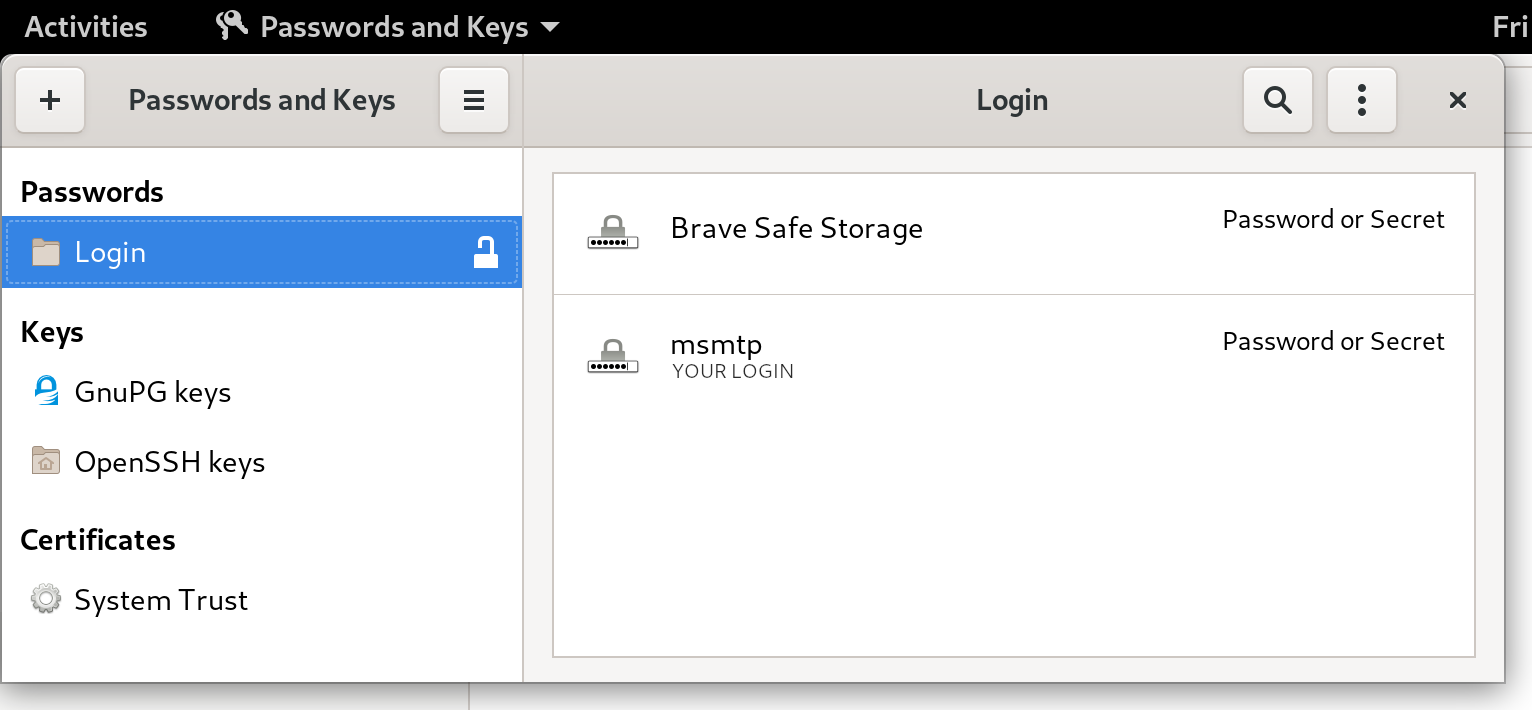
msmtp -t < message.txt
No need for a password anymore, msmtp got it from the system keyring! For more details on how msmtp handle the passwords, and to see what other methods are supported, refer to the extensive documentation. Use-cases and integration Let's go over a few use-cases, situations where you might end up sending emails from the command-line, and what configuration is required to make it work with msmtp. Git Send-Email Sending emails with git is a common workflow for some projects, like the Linux kernel. How does git send-email actually send emails? From the git-send-email manual page:
the built-in default is to search for sendmail in /usr/sbin, /usr/lib and $PATH if such program is available
It is possible to override this default though:
--smtp-server=
[...] Alternatively it can specify a full pathname of a sendmail-like program instead; the program must support the -i option.
So in order to use msmtp here, you'd add a snippet like that to your ~/.gitconfig file:
[sendemail]
    smtpserver = /usr/bin/msmtp
For a full guide, you can also refer to https://git-send-email.io. Debian developer tools Tools like bts or reportbug are also good examples of command-line tools that need to send emails. From the bts manual page:
--sendmail=SENDMAILCMD
Specify the sendmail command [...] Default is /usr/sbin/sendmail.
So if you want bts to send emails with msmtp instead of sendmail, you must use bts --sendmail='/usr/bin/msmtp -t'. Note that bts also loads settings from the file /etc/devscripts.conf and ~/.devscripts, so you could also set BTS_SENDMAIL_COMMAND='/usr/bin/msmtp -t' in one of those files. From the reportbug manual page:
--mta=MTA
Specify an alternate MTA, instead of /usr/sbin/sendmail (the default).
In order to use msmtp here, you'd write reportbug --mta=/usr/bin/msmtp. Note that reportbug reads it settings from /etc/reportbug.conf and ~/.reportbugrc, so you could as well set mta /usr/bin/msmtp in one of those files. So who is this sendmail again? By now, you probably noticed that sendmail seems to be considered the default tool for the job, the "traditional" command that has been around for ages. Rather than configuring every tool to use something else than sendmail, wouldn't it be simpler to actually replace sendmail by msmtp? Like, create a symlink that points to msmtp, something like ln -sr /usr/bin/msmtp /usr/sbin/sendmail? So that msmtp acts as a drop-in replacement for sendmail, and there's nothing else to configure? Answer is yes, kind of. Actually, the first msmtp feature that is listed on the homepage is "Sendmail compatible interface (command line options and exit codes)". Meaning that msmtp is a drop-in replacement for sendmail, that seems to be the intent. However, you should refrain from creating or modifying anything in /usr, as it's the territory of the package manager, apt. Any change in /usr might be overwritten by apt the next time you run an upgrade or install new packages. In the case of msmtp, there is actually a package named msmtp-mta that will create this symlink for you. So if you really want a definitive replacement for sendmail, there you go:
sudo apt install msmtp-mta
From this point, sendmail is now a symlink /usr/sbin/sendmail /usr/bin/msmtp, and there's no need to configure git, bts, reportbug or any other tool that would rely on sendmail. Everything should work "out of the box". Conclusion I hope that you enjoyed reading this article! If you have any comment, feel free to send me a short email, preferably from your terminal!

23 August 2020

Vincent Bernat: Zero-Touch Provisioning for Cisco IOS

The official documentation to automatically upgrade and configure on first boot a Cisco switch running on IOS, like a Cisco Catalyst 2960-X Series switch, is scarce on details. This note explains how to configure the ISC DHCP Server for this purpose.
When booting for the first time, Cisco IOS sends a DHCP request on all ports:
Dynamic Host Configuration Protocol (Discover)
    Message type: Boot Request (1)
    Hardware type: Ethernet (0x01)
    Hardware address length: 6
    Hops: 0
    Transaction ID: 0x0000117c
    Seconds elapsed: 0
    Bootp flags: 0x8000, Broadcast flag (Broadcast)
    Client IP address: 0.0.0.0
    Your (client) IP address: 0.0.0.0
    Next server IP address: 0.0.0.0
    Relay agent IP address: 0.0.0.0
    Client MAC address: Cisco_6c:12:c0 (b4:14:89:6c:12:c0)
    Client hardware address padding: 00000000000000000000
    Server host name not given
    Boot file name not given
    Magic cookie: DHCP
    Option: (53) DHCP Message Type (Discover)
    Option: (57) Maximum DHCP Message Size
    Option: (61) Client identifier
        Length: 25
        Type: 0
        Client Identifier: cisco-b414.896c.12c0-Vl1
    Option: (55) Parameter Request List
        Length: 12
        Parameter Request List Item: (1) Subnet Mask
        Parameter Request List Item: (66) TFTP Server Name
        Parameter Request List Item: (6) Domain Name Server
        Parameter Request List Item: (15) Domain Name
        Parameter Request List Item: (44) NetBIOS over TCP/IP Name Server
        Parameter Request List Item: (3) Router
        Parameter Request List Item: (67) Bootfile name
        Parameter Request List Item: (12) Host Name
        Parameter Request List Item: (33) Static Route
        Parameter Request List Item: (150) TFTP Server Address
        Parameter Request List Item: (43) Vendor-Specific Information
        Parameter Request List Item: (125) V-I Vendor-specific Information
    Option: (255) End
It requests a number of options, including the Bootfile name option 67, the TFTP server address option 150 and the Vendor-Identifying Vendor-Specific Information Option 125 or VIVSO. Option 67 provides the name of the configuration file located on the TFTP server identified by option 150. Option 125 includes the name of the file describing the Cisco IOS image to use to upgrade the switch. This file only contains the name of the tarball embedding the image.1 Configuring the ISC DHCP Server to answer with the TFTP server address and the name of the configuration file is simple enough:
filename "ob2-p2.example.com";
option tftp-server-address 172.16.15.253;
However, if you want to also provide the image for upgrade, you have to specify a hexadecimal-encoded string:2
option vivso 00:00:00:09:24:05:22:63:32:39:36:30:2d:6c:61:6e:62:61:73:65:6b:39:2d:74:61:72:2e:31:35:30:2d:32:2e:53:45:31:31:2e:74:78:74;
Having a large hexadecimal-encoded string inside a configuration file is quite unsatisfying. Instead, the ISC DHCP Server allows you to express this information in a more readable way using the option space statement:
# Create option space for Cisco and encapsulate it in VIVSO/vendor space
option space cisco code width 1 length width 1;
option cisco.auto-update-image code 5 = text;
option vendor.cisco code 9 = encapsulate cisco;
# Image description for Cisco IOS ZTP
option cisco.auto-update-image = "c2960-lanbasek9-tar.150-2.SE11.txt";
# Workaround for VIVSO option 125 not being sent
option vendor.iana code 0 = string;
option vendor.iana = 01:01:01;
Without the workaround mentioned in the last block, the ISC DHCP Server would not send back option 125. With such a configuration, it returns the following answer, including a harmless additional enterprise 0 encapsulated into option 125:
Dynamic Host Configuration Protocol (Offer)
    Message type: Boot Reply (2)
    Hardware type: Ethernet (0x01)
    Hardware address length: 6
    Hops: 0
    Transaction ID: 0x0000117c
    Seconds elapsed: 0
    Bootp flags: 0x8000, Broadcast flag (Broadcast)
    Client IP address: 0.0.0.0
    Your (client) IP address: 172.16.15.6
    Next server IP address: 0.0.0.0
    Relay agent IP address: 0.0.0.0
    Client MAC address: Cisco_6c:12:c0 (b4:14:89:6c:12:c0)
    Client hardware address padding: 00000000000000000000
    Server host name not given
    Boot file name: ob2-p2.example.com
    Magic cookie: DHCP
    Option: (53) DHCP Message Type (Offer)
    Option: (54) DHCP Server Identifier (172.16.15.252)
    Option: (51) IP Address Lease Time
    Option: (1) Subnet Mask (255.255.248.0)
    Option: (6) Domain Name Server
    Option: (3) Router
    Option: (150) TFTP Server Address
        Length: 4
        TFTP Server Address: 172.16.15.252
    Option: (125) V-I Vendor-specific Information
        Length: 49
        Enterprise: Reserved (0)
        Enterprise: ciscoSystems (9)
            Length: 36
            Option 125 Suboption: 5
                Length: 34
                Data: 63323936302d6c616e626173656b392d7461722e3135302d 
    Option: (255) End

  1. The reason of this indirection is still puzzling me. I suppose it could be because updating the image name directly in option 125 is quite a hassle.
  2. It contains the following information:
    • 0x00000009: Cisco s Enterprise Number,
    • 0x24: length of the enclosed data,
    • 0x05: Cisco s auto-update sub-option,
    • 0x22: length of the sub-option data, and
    • filename of the image description (c2960-lanbasek9-tar.150-2.SE11.txt).

Philipp Kern: Self-service buildd givebacks now use Salsa auth

As client certificates are on the way out and Debian's SSO solution is effectively not maintained any longer, I switched self-service buildd givebacks over to Salsa authentication. It lives again at https://buildd.debian.org/auth/giveback.cgi. For authorization you still need to be in the "debian" group for now, i.e. be a regular Debian member.For convenience the package status web interface now features an additional column "Actions" with generated "giveback" links.Please remember to file bugs if you give builds back because of flakiness of the package rather than the infrastructure and resist the temptation to use this excessively to let your package migrate. We do not want to end up with packages that require multiple givebacks to actually build in stable, as that would hold up both security and stable updates needlessly and complicate development.

22 August 2020

Norbert Preining: Converting html to mp4

Such an obvious problem, convert a piece of html/js/css, often with animations, to a video (mp4 or similar). We were just put before this problem for the TUG 2020 online conference. Searching the internet it turned up mostly web services, some of them even with lots of money to pay. At the end (below I will give a short history) it turned out to be rather simple.

The key is to use timesnap, a tool to take screenshots from web pages. It is actively maintained, and internally uses puppeteer, which in turn uses Google Chrome browser headless. This also means that rendering quality is very high. So having an html file available, with all the necessary assets, either online or local, one simply creates enough single screenshots per second so that they can be assembled later on into a video with ffmpeg. In our case, we wanted our leaders to last 10secs before the actual presentation video starts. I decided to render at 30fps, which left me with the simple invocation:
timesnap Leader.html --viewport=1920,1080 --fps=30 --duration=10 --output-pattern="leader-%03d.png"
followed by conversion of the various png images to an mp4:
ffmpeg -r 30 -f image2 -s 1920x1080 -i leader-%03d.png -vcodec libx264 -crf 25 -pix_fmt yuv420p leader.mp4
The -r is the fps, so needs to agree with the --fps above. Also the --viewport and -s values should better agree. -crf is the video quality, and -pix_fmt the pixel format. With that very simple and quick invocation a nice leader video was ready! History It was actually more complicated than normal. For similar problems, it usually takes me about 5min of googling and a bit of scripting, but this time, it was actually a long way. Simply searching for convert html to mp4 doesn t give a lot but web services, often paid for. At some point I came up with the idea to use Electron and led to Electron Recorder, which looked promising, but didn t work. A bit more searching led me to PhantomJS, which is not developed anymore, but there was some explanation how to dump frames using phantomjs and merge them using ffmpeg, very similar to the above. Unfortunately, the rendering of the html page by phantomjs was broken, and thus not usable. Thus I ventured off into searching for alternatives of PhantomJS, which brought me to puppeteer, and from there it wasn t too long a way that pointed me at timesnap. Till now it is surprising to me that such a basic task is neither well documented, so hopefully this page helps some users.

Jelmer Vernooij: Debian Janitor: > 60,000 Lintian Issues Automatically Fixed

The Debian Janitor is an automated system that commits fixes for (minor) issues in Debian packages that can be fixed by software. It gradually started proposing merges in early December. The first set of changes sent out ran lintian-brush on sid packages maintained in Git. This post is part of a series about the progress of the Janitor.

Scheduling Lintian Fixes To determine which packages to process, the Janitor looks at the import of lintian output across the archive that is available in UDD [1]. It will prioritize those packages with the most and more severe issues that it has fixers for. Once a package is selected, it will clone the packaging repository and run lintian-brush on it. Lintian-brush provides a framework for applying a set of fixers to a package. It will run each of a set of fixers in a pristine version of the repository, and handles most of the heavy lifting.
The Inner Workings of a Fixer Each fixer is just an executable which gets run in a clean checkout of the package, and can make changes there. Most of the fixers are written in Python or shell, but they can be in any language. The contract for fixers is pretty simple:
  • If the fixer exits with non-zero, the changes are reverted and fixer is considered to have failed
  • If it exits with zero and made changes, then it should write a summary of its changes to standard out
If a fixer is uncertain about the changes it has made, it should report so on standard output using a pseudo-header. By default, lintian-brush will discard any changes with uncertainty but if you are running it locally you can still apply them by specifying --uncertain. The summary message on standard out will be used for the commit message and (possibly) the changelog message, if the package doesn t use gbp dch.
Example Fixer Let s look at an example. The package priority extra is deprecated since Debian Policy 4.0.1 (released August 2 017) see Policy 2.5 "Priorities". Instead, most packages should use the optional priority. Lintian will warn when a package uses the deprecated extra value for the Priority - the associated tag is priority-extra-is-replaced-by-priority-optional. Lintian-brush has a fixer script that can automatically replace extra with optional . On systems that have lintian-brush installed, the source for the fixer lives in /usr/share/lintian-brush/fixers/priority-extra-is-replaced-by-priority-optional.py, but here is a copy of it for reference:
 1
 2
 3
 4
 5
 6
 7
 8
 9
10
11
12
13
#!/usr/bin/python3
from debmutate.control import ControlEditor
from lintian_brush.fixer import report_result, fixed_lintian_tag
with ControlEditor() as updater:
    for para in updater.paragraphs:
        if para.get("Priority") == "extra":
            para["Priority"] = "optional"
            fixed_lintian_tag(
                para, 'priority-extra-is-replaced-by-priority-optional')
report_result("Change priority extra to priority optional.")
This fixer is written in Python and uses the debmutate library to easily modify control files while preserving formatting or back out if it is not possible to preserve formatting. All the current fixers come with tests, e.g. for this particular fixer the tests can be found here: https://salsa.debian.org/jelmer/lintian-brush/-/tree/master/tests/priority-extra-is-replaced-by-priority-optional. For more details on writing new fixers, see the README for lintian-brush. For more details on debugging them, see the manual page.
Successes by fixer Here is a list of the fixers currently available, with the number of successful merges/pushes per fixer:
Lintian Tag Previously merged/pushed Ready but not yet merged/pushed
uses-debhelper-compat-file 4906 4161
upstream-metadata-file-is-missing 4281 3841
package-uses-old-debhelper-compat-version 4256 3617
upstream-metadata-missing-bug-tracking 2438 2995
out-of-date-standards-version 2062 2936
upstream-metadata-missing-repository 1936 2987
trailing-whitespace 1720 2295
insecure-copyright-format-uri 1791 1093
package-uses-deprecated-debhelper-compat-version 1391 1287
vcs-obsolete-in-debian-infrastructure 872 782
homepage-field-uses-insecure-uri 527 1111
vcs-field-not-canonical 850 655
debian-changelog-has-wrong-day-of-week 224 376
debian-watch-uses-insecure-uri 314 242
useless-autoreconf-build-depends 112 428
priority-extra-is-replaced-by-priority-optional 315 194
debian-rules-contains-unnecessary-get-orig-source-target 35 428
tab-in-license-text 125 320
debian-changelog-line-too-long 186 190
debian-rules-sets-dpkg-architecture-variable 69 166
debian-rules-uses-unnecessary-dh-argument 42 182
package-lacks-versioned-build-depends-on-debhelper 125 95
unversioned-copyright-format-uri 43 136
package-needs-versioned-debhelper-build-depends 127 50
binary-control-field-duplicates-source 34 134
renamed-tag 73 69
vcs-field-uses-insecure-uri 14 109
uses-deprecated-adttmp 13 91
debug-symbol-migration-possibly-complete 12 88
copyright-refers-to-symlink-license 51 48
debian-control-has-unusual-field-spacing 33 66
old-source-override-location 32 62
out-of-date-copyright-format 20 62
public-upstream-key-not-minimal 43 30
older-source-format 17 54
custom-compression-in-debian-source-options 12 57
copyright-refers-to-versionless-license-file 29 39
tab-in-licence-text 33 31
global-files-wildcard-not-first-paragraph-in-dep5-copyright 28 33
out-of-date-copyright-format-uri 9 50
field-name-typo-dep5-copyright 29 29
copyright-does-not-refer-to-common-license-file 13 42
debhelper-but-no-misc-depends 9 45
debian-watch-file-is-missing 11 41
debian-control-has-obsolete-dbg-package 8 40
possible-missing-colon-in-closes 31 13
unnecessary-testsuite-autopkgtest-field 32 9
missing-debian-source-format 7 33
debhelper-tools-from-autotools-dev-are-deprecated 9 29
vcs-field-mismatch 8 29
debian-changelog-file-contains-obsolete-user-emacs-setting 33 0
patch-file-present-but-not-mentioned-in-series 24 9
copyright-refers-to-versionless-license-file 22 9
debian-control-has-empty-field 25 6
missing-build-dependency-for-dh-addon 10 20
obsolete-field-in-dep5-copyright 15 13
xs-testsuite-field-in-debian-control 20 7
ancient-python-version-field 13 12
unnecessary-team-upload 19 5
misspelled-closes-bug 6 16
field-name-typo-in-dep5-copyright 1 20
transitional-package-not-oldlibs-optional 4 17
maintainer-script-without-set-e 9 11
dh-clean-k-is-deprecated 4 14
no-dh-sequencer 14 4
missing-vcs-browser-field 5 12
space-in-std-shortname-in-dep5-copyright 6 10
xc-package-type-in-debian-control 4 11
debian-rules-missing-recommended-target 4 10
desktop-entry-contains-encoding-key 1 13
build-depends-on-obsolete-package 4 9
license-file-listed-in-debian-copyright 1 12
missing-built-using-field-for-golang-package 9 4
unused-license-paragraph-in-dep5-copyright 4 7
missing-build-dependency-for-dh_command 6 4
comma-separated-files-in-dep5-copyright 3 6
systemd-service-file-refers-to-var-run 4 5
copyright-not-using-common-license-for-apache2 3 5
debian-tests-control-autodep8-is-obsolete 2 6
dh-quilt-addon-but-quilt-source-format 2 6
no-homepage-field 3 5
font-packge-not-multi-arch-foreign 1 6
homepage-in-binary-package 1 4
vcs-field-bitrotted 1 3
built-using-field-on-arch-all-package 2 1
copyright-should-refer-to-common-license-file-for-apache-2 1 2
debian-pyversions-is-obsolete 3 0
debian-watch-file-uses-deprecated-githubredir 1 1
executable-desktop-file 1 1
skip-systemd-native-flag-missing-pre-depends 1 1
vcs-field-uses-not-recommended-uri-format 1 1
init.d-script-needs-depends-on-lsb-base 1 0
maintainer-also-in-uploaders 1 0
public-upstream-keys-in-multiple-locations 1 0
wrong-debian-qa-group-name 1 0
Total 29656 32209

Footnotes
[1]temporarily unavailable due to Debian bug #960156 but the Janitor is relying on historical data

For more information about the Janitor's lintian-fixes efforts, see the landing page

21 August 2020

Reproducible Builds (diffoscope): diffoscope 157 released

The diffoscope maintainers are pleased to announce the release of diffoscope version 157. This version includes the following changes:
[ Chris Lamb ]
* Try obsensibly "data" files named .pgp against pgpdump to determine whether
  they are PGP files. (Closes: reproducible-builds/diffoscope#211)
* Don't raise an exception when we encounter XML files with "<!ENTITY>"
  declarations inside the DTD, or when a DTD or entity references an external
  resource. (Closes: reproducible-builds/diffoscope#212)
* Temporarily drop gnumeric from Build-Depends as it has been removed from
  testing due to Python 2.x deprecation. (Closes: #968742)
* Codebase changes:
  - Add support for multiple file extension matching; we previously supported
    only a single extension to match.
  - Move generation of debian/tests/control.tmp to an external script.
  - Move to our assert_diff helper entirely in the PGP tests.
  - Drop some unnecessary control flow, unnecessary dictionary comprehensions
    and some unused imports found via pylint.
* Include the filename in the "... not identified by any comparator"
  logging message.
You find out more by visiting the project homepage.

20 August 2020

Bits from Debian: Lenovo, Infomaniak, Google and Amazon Web Services (AWS), Platinum Sponsors of DebConf20

We are very pleased to announce that Lenovo, Infomaniak, Google and Amazon Web Services (AWS), have committed to supporting DebConf20 as Platinum sponsors. lenovologo As a global technology leader manufacturing a wide portfolio of connected products, including smartphones, tablets, PCs and workstations as well as AR/VR devices, smart home/office and data center solutions, Lenovo understands how critical open systems and platforms are to a connected world. infomaniaklogo Infomaniak is Switzerland's largest web-hosting company, also offering backup and storage services, solutions for event organizers, live-streaming and video on demand services. It wholly owns its datacenters and all elements critical to the functioning of the services and products provided by the company (both software and hardware). Googlelogo Google is one of the largest technology companies in the world, providing a wide range of Internet-related services and products such as online advertising technologies, search, cloud computing, software, and hardware. Google has been supporting Debian by sponsoring DebConf for more than ten years, and is also a Debian partner sponsoring parts of Salsa's continuous integration infrastructure within Google Cloud Platform. AWSlogo Amazon Web Services (AWS) is one of the world's most comprehensive and broadly adopted cloud platform, offering over 175 fully featured services from data centers globally (in 77 Availability Zones within 24 geographic regions). AWS customers include the fastest-growing startups, largest enterprises and leading government agencies. With these commitments as Platinum Sponsors, Lenovo, Infomaniak, Google and Amazon Web Services are contributing to make possible our annual conference, and directly supporting the progress of Debian and Free Software, helping to strengthen the community that continues to collaborate on Debian projects throughout the rest of the year. Thank you very much for your support of DebConf20! Participating in DebConf20 online The 21st Debian Conference is being held Online, due to COVID-19, from August 23rd to 29th, 2020. There are 7 days of activities, running from 10:00 to 01:00 UTC. Visit the DebConf20 website at https://debconf20.debconf.org to learn about the complete schedule, watch the live streaming and join the different communication channels for participating in the conference.

Ritesh Raj Sarraf: LUKS Headless Laptop

As we grow old, so do our computing machines. And just like we don t decommission ourselves, so should be the case of the machines. They should be semi-retired, delegating major tasks to newer machines while they can still serve some less demaning work: File Servers, UPNP Servers et cetera. It is common on a Debian installer based derivative, and otherwise too, to use block encryption on Linux. With machines from this decade, I think we ve always had CPU extension for encryption. So, as would be the usual case, all my laptops are block encrypted. But as they reach the phase of their life to retire and serving as a headless boss, it becomes cumbersome to keep feeding it a password and all the logistics involved to feed it. As such, I wanted to get rid of feeding it the password. Then, there s also the case of bad/faulty hardware, many of which mostly can temporarily fix their functionality when reset, which usually is to reboot the machine. I still recollect words of my Linux Guru - Dhiren Raj Bhandari - that many of the unexplainable errors can be resolved by just rebooting the machine. This was more than 20 years ago in the prime era of Microsoft Windows OS and the context back then was quite different, but yes, some bits of that saying still apply today. So I wanted my laptop, which had LUKS set up for 2 disks, to go password-less now. I stumbled across a slightly dated article where the author achieved similar results with keyscript. So the thing was doable. To my delight, Debian cryptsetup has the best setup and documentation in place to do it with just adding keyfiles
rrs@lenovo:~$ dd if=/dev/random of=sda7.key bs=1 count=512
512+0 records in
512+0 records out
512 bytes copied, 0.00540209 s, 94.8 kB/s
19:19            
rrs@lenovo:~$ dd if=/dev/random of=sdb1.key bs=1 count=512
512+0 records in
512+0 records out
512 bytes copied, 0.00536747 s, 95.4 kB/s
19:20            
rrs@lenovo:~$ sudo cryptsetup luksAddKey /dev/sda7 sda7.key 
[sudo] password for rrs: 
Enter any existing passphrase: 
No key available with this passphrase.
19:20         => 2  
rrs@lenovo:~$ sudo cryptsetup luksAddKey /dev/sda7 sda7.key 
Enter any existing passphrase: 
19:20            
rrs@lenovo:~$ sudo cryptsetup luksAddKey /dev/sdb1 sdb1.key 
Enter any existing passphrase: 
19:21            
and the nice integration in crypttab to ensure your keys propagate to initramfs
rrs@lenovo:~$ cat /etc/cryptsetup-initramfs/conf-hook 
#
# Configuration file for the cryptroot initramfs hook.
#
#
# KEYFILE_PATTERN: ...
#
# The value of this variable is interpreted as a shell pattern.
# Matching key files from the crypttab(5) are included in the initramfs
# image.  The associated devices can then be unlocked without manual
# intervention.  (For instance if /etc/crypttab lists two key files
# /etc/keys/ root,swap .key, you can set KEYFILE_PATTERN="/etc/keys/*.key"
# to add them to the initrd.)
#
# If KEYFILE_PATTERN if null or unset (default) then no key file is
# copied to the initramfs image.
#
# Note that the glob(7) is not expanded for crypttab(5) entries with a
# 'keyscript=' option.  In that case, the field is not treated as a file
# name but given as argument to the keyscript.
#
# WARNING: If the initramfs image is to include private key material,
# you'll want to create it with a restrictive umask in order to keep
# non-privileged users at bay.  For instance, set UMASK=0077 in
# /etc/initramfs-tools/initramfs.conf
#
KEYFILE_PATTERN="/etc/luks/sd*.key"
19:44            
The whole thing took me around 20-25 minutes, including drafting this post. From Retired Head and Password Prompt to Headless and Password-less. The beauty of Debian and FOSS

Next.

Previous.