Search Results: "ana"

12 August 2012

John Goerzen: A Verbose, Hands-On Nexus 7 Review

Some of you may have noticed that I am not a concise author. Perhaps that has something to do with the fact that I am not a concise reader. I like facts, details, and lots of them. So as a recent Nexus 7 purchaser, here you go. Genesis I ve long used Android devices, and last year had a company-issued Motorola Xoom, which was the first Google Experience tablet with Honeycomb. That tablet has specs roughly similar to iPads; its 10.1 screen was the same, the 1280 800 screen was better than the iPad available at the time, and its 730g weight identical to the early iPads (though 10% higher than the current iPad). I lost access to it when I changed jobs, and had been without a tablet until recently. Other devices I own are the Galaxy Nexus, sporting a 4.65 screen; and what s now called the Kindle Keyboard, with an eInk screen. I had been somewhat interested in the Kindle Fire, but the closed nature and limited capability of the system kept me away. The Nexus 7 reviews, however, were stunning, as was the price. $200 for a great tablet. I wound up buying the $250 16GB model. But not until after I spent a great deal of time thinking about size. Physical Size My main concern was that the Nexus 7 would be too small to be useful. I had never been particularly pleased with my input speed on the Xoom. I tried to touch type on it, but was just never fast enough to surpass frustratingly slow. I have long been a fast and accurate typist on keyboard; well over 100 words per minute, and it is frustrating when my fingers can t maintain that speed. I figured the situation would be even worse on the Nexus 7, given its smaller size. I also found the Xoom to sometimes feel a little small with the 10 screen, and was concerned about that as well. And finally, 7 doesn t sound all that much larger than 4.65 . However, having actually had the Nexus 7 for a little while now, I m very pleased with the size, and may even prefer it. The 10 tablets are just too big and heavy to comfortably hold in one hand, and I ve realized that part of my Xoom frustration was the fact that I had to set it down and prop it up for anything beyond very brief use. At 340g, the Nexus 7 is less than half the weight of the Xoom or iPad, and it makes a huge difference. While still nowhere near where I d be with a keyboard, two-thumb typing in portrait mode, or even something approaching touch typing in landscape mode, is possible on the Nexus 7. The screen size hasn t been a bother, at all. This may be due to the fact that it s higher resolution (it s 1280 800 like the Xoom, but those pixels are crammed into only 7 ). I think it s also partly due to the fact that the browser in Jelly Bean is significantly better than the one in Honeycomb, and perhaps that websites are better at tablet-friendliness, too. Overall, the Nexus 7 feels a lot farther from the size of a laptop than did the Xoom, and as such is more prone to come with me in lots of situations, I think. It works reasonably well with foldable Bluetooth keyboards, so when thinking about a laptop replacement or alternative, that might be the way I go. A Bluetooth mouse also works with it, though I found it didn t provide near the utility that a BT keyboard does. Display The display is both amazing and disappointing. Browse some photos and some of them will show up in eye-popping clarity. Websites display fine. But the screen can also take on a washed-out appearance at times. I am notoriously picky in my displays, and this bothered me enough that I researched it. Analysis has shown that poor firmware calibration has lead to the compression of highlights, which mirrors what I was seeing. I am mostly used to it by now, but it s a disappointment. Most of the time, though, the screen is excellent. In comparison to my eInk Kindle, however, I don t think any tablet will ever be as good for book reading. The eInk screen truly is easier on the eyes, and the reflection of overhead lights on the Nexus 7 display can be distracting at first. I have had occasional issues with it not registering touches properly. This is always cleared up by touching the power button to put the unit to sleep, then waking it back up. Other Hardware There are three hardware buttons: power and volume up/down. Physically, the device fits my hand well, though I might wish it was a little lighter like my Kindle. Charging is accomplished via high-power 2A micro-USB, and there is, of course, a headphone port. There is no alert LED like my Galaxy Nexus has, and no vibration feature. The speaker is on the back, and the microphones along the left side a position which, it appears, many Nexus 7 cases are blocking. Battery Life I am astonished at how good this device is battery-wise, especially compared to the battery disaster that is the Galaxy Nexus. Google claims the Nexus 7 can survive 8 hours of solid screen-on use, and I don t doubt it. Mine s never gotten low enough to get a solid measurement. Wifi The wifi works well, as far as it goes. The wifi doesn t support 802.11n in 5GHz, which although somewhat common for devices like this, is a bit of a disappointment. Software The big story about the Nexus 7 is Jelly Bean. I had used Honeycomb on the Xoom, and Ice Cream Sandwich on my Galaxy Nexus, so I m familiar with its predecessors. Let s take a look. Project Butter Much has been made of Project Butter, Google s attempt to optimize Android to improve its responsiveness and the smoothness of things like scrolling. I can say they have done quite well. This device is so smooth you don t notice how smooth it is. It wasn t until I had been using it for a bit that I really noticed. That s a job well-done. Chrome The browser in Jelly Bean is now called Chrome. I am not sure if this is just marketing or not. It doesn t really feel all that different from previous versions of the Android browser, and the changes have been along the lines of incremental changes Google has introduced before. One of the very best new features happens when you touch a link that is close to other links on a page. Rather than getting a pretty much random page, Chrome pops up a partial-screen zoom box showing the part of the page near where your finger touched. With everything showing up huge, it is now easy to touch the precise link you want. Do so, and the box goes away, and your page loads. I am amazed at how much improvement this one change brings. Compared to ICS Browser, bookmarks can be brought up quicker, and the tab interface is nicer. All is not perfect in the land of Chrome, however. It contains several regressions from the Ice Cream Sandwich browser. I have two complaints about bookmarks. One is that previous versions of the browser would show thumbnails of sites in the bookmark viewer. This was a nice navigation aid. Chrome shows only favorites icons, if one is available, or a generic icon if not. Also, the bookmarks synced with other Android devices are called, confusingly enough, Desktop Bookmarks now, and require an extra tap to access. I have had occasional trouble with Chrome not wanting to prompt for credentials for servers on my LAN that use HTTP auth. Chrome has also removed the ICS browser s ability to save a page, including all its elements, for offline viewing. Good for things like an airline checkin screen and such. I have no idea why Chrome removed this. I installed the Firefox Beta for Android, which also doesn t have the offline save feature, but it does have a save to PDF feature. Soft Keyboard The on-screen soft keyboard in Jelly Bean is a significant regression from previous versions of Android. My biggest complaint is the lack of visual feedback for keypresses. On earlier versions of Android, when you push a key, you ll see an image of it pop up on the screen, offset a little from the location of the key itself. In JB, all that happens is that the key itself changes colors. Not very helpful, because it is under your finger at the time. This small thing frustrates me to no end. The keyboard in ICS introduced some nice features as well, mainly long-presses as shortcuts to other features. For instance, you can long-press a key on the top row of letters to get numerals without having to switch to the number mode. Similarly, long press the period and you get other common punctuation. The JB keyboard removed both of those features. Thankfully, in the Market, there is an app called Ice Cream Sandwich Keyboard. It appears geared towards people running earlier versions of Android. Sadly, it is also a step up over what we have in JB. Google Now and Voice Recognition The other main headline feature in Jelly Bean is Google Now. The somewhat-competitor to Apple s Siri, Google Now takes a bit of a different approach than Apple. It is said that Siri is better than Google Now at responding to queries, but Google Now is better at predicting what you want to know before you ever ask. I haven t ever used Siri, but I would buy that explanation. Google Now is available with a swipe up from the bottom of the screen, or with a single touch from any Home screen. Bring it up and it shows you current information about what it thinks you need to know. Examples include weather and forecast information, time to get to home or work from your current location, alerts that you need to leave soon to get to a certain place on time, flight schedules, sports scores, etc. Google Now has been mostly a gimmick to me, but that may be because I fall outside its target demographic in significant ways. I live nowhere near a public transportation system, work at home for the most part, haven t flown wince I ve had the Nexus 7, don t follow sports, and already know how long it takes to get places (and when it varies, it s because of muddy roads or harvest neither things that traffic services know about.) The weather widget always seems to show the temperature from a couple of hours ago. It does show the weather in your current location. Well, mostly. I was in Newton, KS one day. I tapped on the icon for more detail. That simply took me to a Google search for weather Newton . Which showed me the weather for Newton, Massachusetts 1600 miles away. Fail. Speech recognition in JB is definitely improved. It is somewhat useful with Google Now. I like being able to simply say set alarm for 30 minutes. And it does it a lot quicker than I could in the interface. It s supposed to be able to let me bring up my contacts in the same way, but it is much more likely to try turning such an attempt into a Google search than an actual display of a contact. It s picky on the precise language used for setting an alarm too; say it slightly differently, and it s another Google search. JB also supports limited offline speech recognition. I say limited because it s a bit strange. I have, for instance, a Remember the Milk widget on my home screen. It has a microphone icon to use to speak a new reminder. Tap it, and you can t use it offline. It also has a button that brings up the on-screen keyboard. Do that, then touch the microphone on the keyboard, and you can use offline recognition. I have no idea how to explain this difference, since both are clearly using Google s engine. The speech recognition is indeed better, and might make it suitable for use instead of a keyboard for composing short texts and such. But it rarely produces even a sentence that I don t have to correct in some way, even now. Conclusion Despite some of its shortcomings, I am very fond of the Nexus 7. It is an excellent device. And at $200-$250, it is an AMAZING device. I am truly impressed with it, and don t regret my purchase at all.

11 August 2012

Julien Danjou: Sony Vaio Z Debian Linux support

I had to install Debian Wheezy on a brand new Sony Vaio Z laptop with the new Ivy Bridge architecture (SVZ1311C5E). I'll talk about this here, because it's always nice to know that new hardware works quite fine (or not) under Debian. Sony Vaio Z 2012 The laptop is delivered with Window 7, which I decided to remove entirely anyway, and replace with Debian. I've installed it with Linux 3.2 and then ran Linux 3.4, 3.5 and 3.6-rc1. USB booting Don't ask me why, nor an Ubuntu or Debian USB installation booted, blocked at SYSLINUX at best, or at a black screen. This does not work. I had to use PXE to install Debian. Storage The only thing that can be surprising, is that the 128 GB SSD storage is actually made of 2 64 GB Samsung SSD aggregated in a RAID 0 using Intel Rapid Storage Technology, previously known as Intel Matrix. This is supported by Linux using the dm-raid module. So this is a fake RAID, and you anyway can see the both drives as sda and sdb under Linux. Unfortunately, this kind of RAID is not supported correctly by GRUB, and I was unable to install it this way. Therefore, I decided to remove entirely this fake RAID (which is possible via the BIOS) and use a Linux software md RAID 0 instead, plus crypto on top of it. That I know well and I trust. :) Graphics The Intel HD Graphics 4000 works fine. I'm alsmo using the HDMI output, which works fine. There's some GPU hanging (as seen on screen and in kernel logs) in Linux up to 3.4, but with versions 3.5 and above, I didn't see any problem so far. Sound The Intel HDA sound card works pretty well, both for playing and recording. The main problem is that I hear a constant noise on the speakers, but tweaking the ALSA mixers ends it at some point. There's still probably a bug, not yet resolved in Linux 3.6-rc1. Keyboard The keyboard works fine, and the back-light too, via the sony-laptop kernel module. Wonderful. Touchpad Touchpad works fine. Fingerprint It does not work, and is not supported according to my research. Not that I care about, but don't count on it. It's an AuthenTec AES1660. Webcam It works perfectly. USB Well, USB 3.0 does not work. I had to disable XHCI in the BIOS and use the 2 ports as standard USB 2.0, otherwise I would just get errors from the kernel. Still not working with Linux 3.6-rc1, and I've no clue to debug, and do not use USB 3.0 yet, so WiFi The WiFi module (based on iwlwifi) works fine. The only problem with NetworkManager is that the sony-laptop offers a second rfkill switch and NM does not know how to handle it correctly. A bug isopened about this and I hope to be able to write a patch or something at some point. Also, there seems to be some quality issue with the iwlwifi driver and 802.11n at this point. I'm losing connection quite often when the signal drops below 40 %. Loading the module with 11n_disable=1 helps a lot. Ethernet The gigabit Realtek Ethernet controller works perfectly. Card reader Works perfectly.

10 August 2012

Matthew Garrett: Thoughts on the SUSE Secure Boot implementation

There's a post here describing SUSE's approach to implementing Secure Boot support. In summary, it's pretty similar to the approach we're taking in Fedora - a first stage shim loader is signed with a key in db, it loads a second stage bootloader (grub 2) that's signed with a key that's in shim, the second stage bootloader loads a signed kernel. The main difference between the approaches is the use of a separate key database in shim, whereas we are currently planning on using a built-in key and the contents of the firmware key database.

The main concern about using a separate key database is that applications are able to modify variable content at runtime. The Secure Boot databases are protected by requiring that any updates be signed, but this is less practical for scenarios where you want the user to be able to modify the database themselves while still protecting them from untrusted applications installing their own keys. SUSE have solved this problem by not setting the runtime access flag on the variable, meaning that it's inaccessible once ExitBootServices() has been called early in the init sequence. Since we only start running any untrusted code after ExitBootServices(), the variable can only be accessed by trusted code.

It's a wonderfully elegant solution. We've been planning on supporting user keys by trusting the contents of db, and the Windows 8 requirements specify that it must be possible for a physically present user to add keys to it. The problem there has been that different vendors offer different UI for this, in some cases even requiring that the keys be in different formats. Using an entirely separate database and offering support for enrolment in the early boot phase means that the UI and formats can be kept consistent, which makes it much easier for users to manage their own keys.

I suspect that we'll adopt this approach in Fedora as well - it doesn't allow anything that our solution wouldn't have, but it does make some of them easier. Full marks to SUSE on this.

comment count unavailable comments

9 August 2012

C.J. Adams-Collier: Linus on Instantiation and Armadaification

I feel a sense of pride when I think that I was involved in the development and maintenance of what was probably the first piece of software accepted into Debian which then had and still has direct up-stream support from Microsoft. The world is a better place for having Microsoft in it. The first operating system I ever ran on an 08086-based CPU was MS-DOS 2.x. I remember how thrilled I was when we got to see how my friend s 80286 system ran BBS software that would cause a modem to dial a local system and display the application as if it were running on a local machine. Totally sweet. When we were living at 6162 NE Middle in the nine-eight 292, we got an 80386 which ran Doom. Yeah, the original one, not the fancy new one with the double barrel shotgun, but it would probably run that one, too. It was also totally sweet and all thanks to our armadillo friends down south and partially thanks to their publishers, Apogee. I suckered my brothers into giving me their allowance from Dad one time so that we could all go in on a Sound Blaster Pro 16 sound card for the family s 386. I played a lot of Team Fortress and Q2CTF on that rig. I even attended the Quake 3 Arena launch party that happened at Zoid s place. I recall that he ported the original quake to Linux. I also recall there being naughty remarks included in the README.txt. When my older brother, Aaron turned 16, he was gifted a fancy car. When asked what type of car I would like when I turned 16, I said that I d prefer a computer instead. So I got a high-end 80486 with math co-processor. It could compile the kernel in 15 minutes flat. With all the bits turned on on in /usr/src/linux/.config. But this was later. I hadn t even heard of linux when I got my system. I wanted to be entertained by the thing. I made sure to get a CD-Rom and a sound card. I got on the beta for Ultima Online and spent a summer as a virtual collier. Digging stuff out of mines north of Britannia and hauling them to town to make weapons and armor out of them. And then setting out in said armor only to be PK d because I forgot healing potions and I was no good at fighting. While I was in the middle of all this gaming, my friend Lucas told me that I should try out this lynx thing that they run at the University of Washington. He heard that it was reported to run doom faster than it ran on MS-DOS. It turns out that it did, but that it was not, in fact, called lynx. Or pine. The Doom engine ran so fast that the video couldn t keep up. This was probably because they didn t use double buffering for frame display, since they didn t want to waste the time maintaining and switching context. I think I downloaded the boot/root 3.5 disk pair and was able to get the system to a shell with an on-phone assist from the Rev. I then promptly got lost in bash and the virtual terminals (OMG! I GET SIX CONSOLES!?) and bought a book on the subject. It shipped with slackware. Which I ran. Until Debian came along. Lucas also recommended that I try out this IRC thing, so I did. And I m still doing it on #linpeople just like I did back then. I learned to write Pascal on dos. Then I learned c while they were trying to teach me c++. I learned emacs and vi when I was attending North Kitsap High School. I learned sed and only a little awk when I took Running Start classes in Lynnwood at Edmonds Community College and perl & x.509 while attending Olympic Community College and simultaneously jr-administering Sinclair Communications. I studied TCP/IP, UNP, APUE, C and algorithms & data structures while preparing for an interview with a company whose CEO claimed to have invented SCSI. I learned PGP and PHP while writing web-based adware for this company. I didn t want to write ads and instead wanted to work in security, so took a job with Security Portal. While there, I wrote what one might call a blogging platform. It worked and made it possible for authors to write prose and poetry. Editors didn t have to manage a database in order to review and publish the posts that were ready. Everyone but me was able to avoid html and cgi. Then I sold pizza. Then I helped bring the bombay company onto the interwebs using the Amazon ECS (now AWS) platform. Then I helped support MaxDB. Then I helped develop and maintain the Amazon blogging platform. And then attempted to reduce the load on the Amazon pager system by doing and enforcing code reviews. It turns out that they prefer to run their support team at full bore and a load average of 16.
<iframe allowfullscreen="" frameborder="0" height="288" scrolling="no" src="http://www.youtube.com/embed/MShbP3OpASA" width="448"></iframe>
I am now, still, fully employed in an effort to make hard things possible. The hard thing we re working on now is the implementation and ongoing operations of distributed x.500 infrastructure. This includes request handling, processing and delivery of response ( la HTTP, SMTP, IMAP, SIP, RTP, RTSP, OCSP) including authentication, authorization and auditing (AAA) of all transactions. It s a hard thing to get right, but our product development team gets it right. Consistently and reliably. We make mistakes sometimes (sorry Bago), but we correct them and make the product better. I m the newest member of an R and d team (note: big R, little d) called NTR, which sits behind the firewall that is Product Development, out of production space. In a manner that reminds me of Debian Testing. We try new things. Our current project is to allow users to compare their current (cloud-based or iron-based) IT system with what their system would be like with a BIG-IP in front of it. I can probably come up with a demo if anyone s interested in checking it out. I ll go work on that now.

C.J. Adams-Collier: Linus on Instantiation and Armadaification

I feel a sense of pride when I think that I was involved in the development and maintenance of what was probably the first piece of software accepted into Debian which then had and still has direct up-stream support from Microsoft. The world is a better place for having Microsoft in it. The first operating system I ever ran on an 08086-based CPU was MS-DOS 2.x. I remember how thrilled I was when we got to see how my friend s 80286 system ran BBS software that would cause a modem to dial a local system and display the application as if it were running on a local machine. Totally sweet. When we were living at 6162 NE Middle in the nine-eight 292, we got an 80386 which ran Doom. Yeah, the original one, not the fancy new one with the double barrel shotgun, but it would probably run that one, too. It was also totally sweet and all thanks to our armadillo friends down south and partially thanks to their publishers, Apogee. I suckered my brothers into giving me their allowance from Dad one time so that we could all go in on a Sound Blaster Pro 16 sound card for the family s 386. I played a lot of Team Fortress and Q2CTF on that rig. I even attended the Quake 3 Arena launch party that happened at Zoid s place. I recall that he ported the original quake to Linux. I also recall there being naughty remarks included in the README.txt. When my older brother, Aaron turned 16, he was gifted a fancy car. When asked what type of car I would like when I turned 16, I said that I d prefer a computer instead. So I got a high-end 80486 with math co-processor. It could compile the kernel in 15 minutes flat. With all the bits turned on on in /usr/src/linux/.config. But this was later. I hadn t even heard of linux when I got my system. I wanted to be entertained by the thing. I made sure to get a CD-Rom and a sound card. I got on the beta for Ultima Online and spent a summer as a virtual collier. Digging stuff out of mines north of Britannia and hauling them to town to make weapons and armor out of them. And then setting out in said armor only to be PK d because I forgot healing potions and I was no good at fighting. While I was in the middle of all this gaming, my friend Lucas told me that I should try out this lynx thing that they run at the University of Washington. He heard that it was reported to run doom faster than it ran on MS-DOS. It turns out that it did, but that it was not, in fact, called lynx. Or pine. The Doom engine ran so fast that the video couldn t keep up. This was probably because they didn t use double buffering for frame display, since they didn t want to waste the time maintaining and switching context. I think I downloaded the boot/root 3.5 disk pair and was able to get the system to a shell with an on-phone assist from the Rev. I then promptly got lost in bash and the virtual terminals (OMG! I GET SIX CONSOLES!?) and bought a book on the subject. It shipped with slackware. Which I ran. Until Debian came along. Lucas also recommended that I try out this IRC thing, so I did. And I m still doing it on #linpeople just like I did back then. I learned to write Pascal on dos. Then I learned c while they were trying to teach me c++. I learned emacs and vi when I was attending North Kitsap High School. I learned sed and only a little awk when I took Running Start classes in Lynnwood at Edmonds Community College and perl & x.509 while attending Olympic Community College and simultaneously jr-administering Sinclair Communications. I studied TCP/IP, UNP, APUE, C and algorithms & data structures while preparing for an interview with a company whose CEO claimed to have invented SCSI. I learned PGP and PHP while writing web-based adware for this company. I didn t want to write ads and instead wanted to work in security, so took a job with Security Portal. While there, I wrote what one might call a blogging platform. It worked and made it possible for authors to write prose and poetry. Editors didn t have to manage a database in order to review and publish the posts that were ready. Everyone but me was able to avoid html and cgi. Then I sold pizza. Then I helped bring the bombay company onto the interwebs using the Amazon ECS (now AWS) platform. Then I helped support MaxDB. Then I helped develop and maintain the Amazon blogging platform. And then attempted to reduce the load on the Amazon pager system by doing and enforcing code reviews. It turns out that they prefer to run their support team at full bore and a load average of 16.
<iframe allowfullscreen="" frameborder="0" height="288" scrolling="no" src="http://www.youtube.com/embed/MShbP3OpASA" width="448"></iframe>
I am now, still, fully employed in an effort to make hard things possible. The hard thing we re working on now is the implementation and ongoing operations of distributed x.500 infrastructure. This includes request handling, processing and delivery of response ( la HTTP, SMTP, IMAP, SIP, RTP, RTSP, OCSP) including authentication, authorization and auditing (AAA) of all transactions. It s a hard thing to get right, but our product development team gets it right. Consistently and reliably. We make mistakes sometimes (sorry Bago), but we correct them and make the product better. I m the newest member of an R and d team (note: big R, little d) called NTR, which sits behind the firewall that is Product Development, out of production space. In a manner that reminds me of Debian Testing. We try new things. Our current project is to allow users to compare their current (cloud-based or iron-based) IT system with what their system would be like with a BIG-IP in front of it. I can probably come up with a demo if anyone s interested in checking it out. I ll go work on that now.

8 August 2012

Brett Parker: The Weirdness of People

OK - so you go to any place that has a social gathering, pub, club, bbq, anything - why is it that what invariably happens is that everyone manages to gather in the places that are most inconvienient?! E.g. in a pub, how is it that everyone gathers around the point that makes getting to the toilet difficult? Or outside? Why is it that at house type parties/bbqs everyone manages to end up in the kitchen?! (OK - I know that I'll probably be guilty of the kitchen thing, but meh!) - There must be something built in to us to end up gathering in the places that everyone is going to need to go sooner or later, are we really that social? Or is this just a need to be recognised? I don't really know... just that it's very annoying trying to get from the bar stool in the pub (where reading a book) to the toilet was a lot harder than it should have been!

Rapha&#235;l Hertzog: How to use quilt to manage patches in Debian packages

Most Debian source packages are using the 3.0 (quilt) format. This means that Debian changes to upstream files are managed in a quilt patch series. Knowledge of quilt is thus a must if you want to get involved in some serious packaging work. Don t worry, this tutorial will teach you how to use quilt in the context of Debian packaging. Pre-requisites Install the packaging-dev package to get a decent set of packages to do Debian packaging. It includes the quilt package.

$ sudo apt-get install packaging-dev
What s quilt? Read the description of the Debian package:
Quilt manages a series of patches by keeping track of the changes each of them makes. They are logically organized as a stack, and you can apply, un-apply, update them easily by traveling into the stack (push/pop). Quilt is good for managing additional patches applied to a package received as a tarball or maintained in another version control system. The stacked organization is proven to be efficient for the management of very large patch sets (more than hundred patches). As matter of fact, it was designed by and for Linux kernel hackers (Andrew Morton, from the -mm branch, is the original author), and its main use by the current upstream maintainer is to manage the (hundreds of) patches against the kernel made for the SUSE distribution.
The various files involved Stack of files PictureTo better understand the various quilt commands, you should have a basic idea of how the tool works. The stack of patches is maintained in a dedicated directory ( patches by default, but in Debian packages we override this value to debian/patches ). This directory contains the patch files and a series file that gives an ordered list of patches to apply. Example:
$ ls debian/patches/
01_use_stdlib_htmlparser_when_possible.diff
02_disable-sources-in-sphinxdoc.diff
03_manpage.diff
06_use_debian_geoip_database_as_default.diff
series
$ cat debian/patches/series
01_use_stdlib_htmlparser_when_possible.diff
02_disable-sources-in-sphinxdoc.diff
03_manpage.diff
06_use_debian_geoip_database_as_default.diff
When quilt is used, it also maintains some internal files in a directory of its own (it s named .pc ). This directory is used to know what patches are currently applied (.pc/applied-patches) and to keep backup copies of files modified by the various patches. Configuring quilt Before going further, you should put this in your ~/.quiltrc file:
for where in ./ ../ ../../ ../../../ ../../../../ ../../../../../; do
    if [ -e $ where debian/rules -a -d $ where debian/patches ]; then
        export QUILT_PATCHES=debian/patches
        break
    fi
done
This ensures that quilt will always use debian/patches instead of patches when your current directory is within a Debian source package where debian/patches exists. If you only use quilt for debian packaging, then you can be more expedient and put a simple export QUILT_PATCHES=debian/patches in that file. As a matter of personal preferences, I also have those lines in my ~/.quiltrc:
QUILT_PUSH_ARGS="--color=auto"
QUILT_DIFF_ARGS="--no-timestamps --no-index -p ab --color=auto"
QUILT_REFRESH_ARGS="--no-timestamps --no-index -p ab"
QUILT_DIFF_OPTS='-p'
It enables syntax coloring for the output of several commands and customizes the generated patches to get rid of useless information. I recommend you to use those settings too. Applying and unapplying patches, navigating in the stack of patches When you already have a patch series, you can navigate in the stack of patches so that any subset of consecutive patches (starting from the bottom) can be applied. quilt series will list all patches known by quilt. You can apply all patches with quilt push -a or unapply them all with quilt pop -a. You can also verify what patches are applied (quilt applied) or unapplied (quilt unapplied). quilt push applies the next unapplied patch (i.e. the patch returned by quilt next) and quilt pop unapplies the last applied patch (i.e. the patch returned by quilt top). You can give a patch name as parameter to quilt push/pop and it will apply/unapply all the patches required until the given patch is on the top. Here are some examples of navigation in a quilt patch series
$ quilt series
02_disable-sources-in-sphinxdoc.diff
03_manpage.diff
06_use_debian_geoip_database_as_default.diff
$ quilt applied
No patches applied
$ quilt next
02_disable-sources-in-sphinxdoc.diff
$ quilt push
Applying patch 02_disable-sources-in-sphinxdoc.diff
patching file docs/conf.py
Now at patch 02_disable-sources-in-sphinxdoc.diff
$ quilt push
Applying patch 03_manpage.diff
patching file docs/man/django-admin.1
Now at patch 03_manpage.diff
$ quilt applied
02_disable-sources-in-sphinxdoc.diff
03_manpage.diff
$ quilt unapplied
06_use_debian_geoip_database_as_default.diff
$ quilt pop -a
Removing patch 03_manpage.diff
Restoring docs/man/django-admin.1
Removing patch 02_disable-sources-in-sphinxdoc.diff
Restoring docs/conf.py
No patches applied
$ quilt push 03_manpage.diff
Applying patch 02_disable-sources-in-sphinxdoc.diff
patching file docs/conf.py
Applying patch 03_manpage.diff
patching file docs/man/django-admin.1
Now at patch 03_manpage.diff
$ quilt top
03_manpage.diff
Creating a new patch If there s no quilt series yet, you want to create the debian/patches directory first. If you already have one, you need to decide where to insert the new patch. Quilt will always add the new patch just after the patch which is currently on top. So if you want to add the patch at the end of the series, you need to run quilt push -a first. Then you can use quilt new name-of-my-patch.diff to tell quilt to insert a new empty patch after the current topmost patch. In this operation quilt does almost nothing except updating the series file and recording the fact that the new patch is applied (even if still empty at this point!). Now to add changes in this patch, you re supposed to modify files but only after having informed quilt of your intent to modify those files. You do this with quilt add file-to-modify. At this point quilt will make a backup copy of that file so that it can generate the final patch when you re done with your changes. It s quite common to forget this step and to be unable to generate the patch afterward. That s why I recommend you to use quilt edit file-to-modify which is a shorthand for doing quilt add and then opening the file in your favorite text editor. If you want, you can review your work in progress with quilt diff. When you re done with the changes, you should call quilt refresh to generate the patch (or to update it if it was already existing). And since you re a good packager, you call quilt header --dep3 -e to add DEP-3 meta-information to your patch header. Importing an external patch If someone else already prepared a patch, you can just import it right away with quilt import /tmp/the-patch. If you want to import it under a better name you can use the option -P better-patch-name . Like quilt new, it inserts the patch after the topmost patch. Updating patches for a new upstream version With some luck, your patches will still apply with some offsets in line numbers (quilt displays those offsets) and sometimes with some fuzz:
$ quilt push
[...]
Hunk #1 succeeded at 1362 (offset 11 lines).
Hunk #2 succeeded at 1533 with fuzz 1 (offset 4 lines).
[...]
While offsets are nothing to worry about (it means some lines were added and/or removed before the patched part), fuzz means that patch had to ignore some context lines to find the place where to apply the changes. In that case, you need to double check that patch did the right thing because it might have made changes somewhere where it shouldn t. Also, you ll have to update those patches because dpkg-source doesn t accept any fuzz. If you re confident that all patches are correctly applied by quilt, you can refresh them to get rid of those warnings:
$ quilt pop -a
[...]
$ while quilt push; do quilt refresh; done
That was for the easy case. Now let s deal with the case where some of the patches no longer apply. There s one case that is usually nice to have:
$ quilt push
Applying patch 04_hyphen-manpage.diff
patching file docs/man/django-admin.1
Hunk #1 FAILED at 194.
1 out of 1 hunk FAILED -- rejects in file docs/man/django-admin.1
Patch 04_hyphen-manpage.diff can be reverse-applied
When the patch can be reverse-applied, it means that the upstream authors included the Debian patch (or that they made the same change even though you forgot to forward the patch). You can thus get rid of it:
$ quilt delete -r 04_hyphen-manpage.diff
Removed patch 04_hyphen-manpage.diff
Note that without the -r the patch is only dropped from the series file. With -r the patch file is also removed. But there s a less desirable case where the patch is still relevant but it doesn t apply any longer:
$ quilt push
Applying patch 01_disable_broken_test.diff
patching file tests/regressiontests/test_utils/tests.py
Hunk #1 FAILED at 422.
1 out of 1 hunk FAILED -- rejects in file tests/regressiontests/test_utils/tests.py
Patch 01_disable_broken_test.diff does not apply (enforce with -f)
In that case, you should follow quilt s advice to force the patch application, manually apply the parts of the patch that were rejected, and then refresh the patch.
$ quilt push -f
Applying patch 01_disable_broken_test.diff
patching file tests/regressiontests/test_utils/tests.py
Hunk #1 FAILED at 422.
1 out of 1 hunk FAILED -- saving rejects to file tests/regressiontests/test_utils/tests.py.rej
Applied patch 01_disable_broken_test.diff (forced; needs refresh)
$ vim tests/regressiontests/test_utils/tests.py    
$ quilt refresh
Refreshed patch 01_disable_broken_test.diff
Other quilt commands You should probably read quilt s manual page too to learn about the various other commands and options that exist. There s at least quilt rename new-name that you can also find useful to rename the topmost patch (you can use -P patch-to-rename to rename a patch which is not currently at the top). Feedback Please leave comments if you have suggestions of improvements, or if there are some tips that are good to know. I might incorporate them in this article. Feel free to share this article with newbie packagers which are struggling with quilt. For your convenience, you can also refer to this article with this URL: http://raphaelhertzog.com/go/quilt
Found it useful? Be sure to not miss other packaging tips (or lessons), click here to subscribe to my free newsletter and get new articles by email.

2 comments Liked this article? Click here. My blog is Flattr-enabled.

Russell Coker: Hard Drives for Backup

The general trend seems to be that cheap hard drives are increasing in capacity faster than much of the data that is commonly stored. Back in 1998 I had a 3G disk in my laptop and about 800M was used for my home directory. Now I have 6.2G used for my home directory (and another 2G in ~/src) out of the 100G capacity in my laptop. So my space usage for my home directory has increased by a factor of about 8 while my space available has increased by a factor of about 30. When I had 800M for my home directory I saved space by cropping pictures for my web site and deleting the originals (thus losing some data I would rather have today) but now I just keep everything and it s still doesn t take up much of my hard drive. Similar trends apply to most systems that I use and that I run for my clients. Due to the availability of storage people are gratuitously using a lot of disk space. A relative recently took 10G of pictures on a holiday, her phone has 12G of internal storage so there was nothing stopping her. She might decide that half the pictures aren t that great if she had to save space, but that space is essentially free (she couldn t buy a cheaper phone with less storage) so there s no reason to delete any pictures. When considering backup methods one important factor is the ability to store all of one type of data on one backup device. Having a single backup span multiple disks, tapes, etc has a dramatic impact on the ease of recovery and the potential for data loss. Currently 3TB SATA disks are really cheap and 4TB disks are available but rather expensive. Currently only one of my clients has more than 4TB of data used for one purpose (IE a single filesystem) so apart from that client a single SATA disk can backup anything that I run. Benefits of Hard Drive Backup When using a hard drive there is an option to make it a bootable disk in the same format as the live disk. I haven t done this, but if you want the option of a quick recovery from a hardware failure then having a bootable disk with all the data on it is a good option. For example a server with software RAID-1 could have a backup disk that is configured as a degraded RAID-1 array. The biggest benefit is the ability to read a disk anywhere. I ve read many reports of tape drives being discovered to be defective at the least convenient time. With a SATA disk you can install it in any PC or put it in a USB bay if you have USB 3.0 or the performance penalty of USB 2.0 is bearable a USB 2.0 bay is great if you want to recover a single file, but if you want terabytes in a hurry then it won t do. A backup on a hard drive will typically use a common filesystem. For backing up Linux servers I generally use Ext3, at some future time I will move to BTRFS as having checksums on all data is a good feature for a backup. Using a regular filesystem means that I can access the data anywhere without needing any special software, I can run programs like diff on the backup, and I can export the backup via NFS or Samba if necessary. You never know how you will need to access your backup so it s best to keep your options open. Hard drive backups are the best solution for files that are accidentally deleted. You can have the first line of backups on a local server (or through a filesystem like BTRFS or ZFS that supports snapshots) and files can be recovered quickly. Even a SATA disk in a USB bay is very fast for recovering a single file. LTO tapes have a maximum capacity of 1.5TB at the moment and tape size has been increasing more slowly than disk size. Also LTO tapes have an expected lifetime of only 200 reads/writes of the entire tape. It seems to me that tapes don t provide a great benefit unless you are backing up enough data to need a tape robot. Problems with a Hard Drive Backup Hard drives tend not to survive being dropped so posting a hard drive for remote storage probably isn t a good option. This can be solved by transferring data over the Internet if the data isn t particularly big or doesn t change too much (I have a 400G data set backed up via rsync to another country because most of the data doesn t change over the course of a year). Also if the data is particularly small then solid state storage (which costs about $1 per GB) is a viable option, I run more than a few servers which could be entirely backed up to a 200G SSD. $200 for a single backup of 200G of data is a bit expensive, but the potential for saving time and money on the restore means that it can be financially viable. Some people claim that tape storage will better survive a Carrington Event than hard drives. I m fairly dubious about the benefits of this, if a hard drive in a Faraday Cage (such as a regular safe that is earthed) is going to be destroyed then you will probably worry about security of the food supply instead of your data. Maybe I should just add a disclaimer this backup system won t survive a zombie apocalypse . ;) It s widely regarded that tape storage lasts longer than hard drives. I doubt that this provides a real benefit as some of my personal servers are running on 20G hard drives from back when 20G was big. The fact that drives tend to last for more than 10 years combined with the fact that newer bigger drives are always being released means that important backups can be moved to bigger drives. As a general rule you should assume that anything which isn t regularly tested doesn t work. So whatever your backup method you should test it regularly and have multiple copies of the data to deal with the case when one copy becomes corrupt. The process of testing a backup can involve moving it to newer media. I ve seen it claimed that a benefit of tape storage is that part of the data can be recovered from a damaged tape. One problem with this is that part of a database often isn t particularly useful. Another issue is that in my experience hard drives usually don t fail entirely unless you drop them, drives usually fail a few sectors at a time. How to Implement Hard Drive Backup The most common need for backups is when someone deletes the wrong file. It s usually a small restore and you want it to be an easy process. The best solution to this is to have a filesystem with snapshots such as BTRFS or ZFS. In theory it shouldn t be too difficult to have a cron job manage snapshots, but as I ve only just started putting BTRFS and ZFS on servers I haven t got around to changing my backups. Snapshots won t cover more serious problems such as hardware, software, or user errors that wipe all the disks in a server. For example the only time I lost a significant amount of data from a hosted server was when the data center staff wiped it, so obviously good off-site backups are needed. The easiest way to deal with problems that wipe a server is to have data copied to another system. For remote backups you can rsync to a local system and then use cp -rl or your favorite snapshot system to make a hard linked copy of the tree. A really neat feature is the ZFS ability to send a filesystem snapshot (or the diff between two snapshots) to a remote system [1]. Once you have regular backups on local storage you can then copy them to removable disks as often as you wish, I think I ll have to install ZFS on some of my servers for the sole purpose of getting the send feature! There are NAS devices that provide similar functionality to the ZFS send/receive (maybe implemented with ZFS), but I m not a fan of cheap NAS devices [2]. It seems that the best way to address the first two needs of backup (fast local restore and resilience in the face of site failure) is to use ZFS snapshots on the server and ZFS send/receive to copy the data to another site. The next issue is that the backup server probably won t be big enough for all the archives and you want to be able to recover from a failure on the backup server. This requires some removable storage. The simplest removable backup is to use a SATA drive bay with eSATA and USB connectors. You use a regular filesystem like Ext3 and just copy the files on. It s easy, cheap, and requires no special skill or software. Requiring no special skill is important, you never know who will be called on to recover from backups. When a server is backing up another server by rsync (whether it s in the same rack or another country) you want the backup server to be reliable. However there is no requirement for a single reliable server and sometimes having multiple backup servers will be cheaper. At current purchase prices you can buy two cheap tower systems with 4*3TB disks for less money than a single server that has redundant PSUs and other high end server features. Having two cheap servers die at once seems quite unlikely so getting two backup servers would be the better choice. For filesystems that are bigger than 4TB a disk based backup would require backup software that handles multi part archives. One would hope that any software that is designed for tape backup would work well for this (consider a hard drive as a tape with a very fast seek), but often things don t work as desired. If anyone knows of a good Linux backup program that supports multiple 4TB SATA disks in eSATA or USB bays then please let me know. Conclusion BTRFS or ZFS snapshots are the best way of recovering from simple mistakes. ZFS send/receive seems to be the best way of synchronising updates to filesystems to other systems or sites. ZFS should be used for all servers. Even if you don t currently need send/receive you never know what the future requirements may be. Apart from needing huge amounts of RAM (one of my servers had OOM failures when it had a mere 4G of RAM) there doesn t seem to be any down-side to ZFS. I m unsure of whether to use BTRFS for removable backup disks. The immediate up-sides are checksums on all data and meta-data and the possibility of using built-in RAID-1 so that a random bad sector is unlikely to lose data. There is also the possibility of using snapshots on a removable backup disk (if the disk contains separate files instead of an archive). The down-sides are lack of support on older systems and the fact that BTRFS is fairly new. Have I missed anything? Related posts:
  1. New Storage Developments Eweek has an article on a new 1TB Seagate drive....
  2. IDE hard drives I just lent two 80G IDE drives to a friend,...
  3. Hot-swap Storage I recently had to decommission an old Linux server and...

Johannes Schauer: Bootstrappable Debian - How to help

TLDR: multiarch, multiarch, multiarch, cross buildability, staged build dependencies, wiki page, corrections/hints/requests to debian-bootstrap at lists.mister-muffin.de This summer (and this year's GSoC) is nearing its end and to make it easier for people to make use of the information my tools produced so far, I created a page in the Debian wiki. It lists not only the open issues I see but also statistics that I gathered using the output of my GSoC project. I want to use this blog post to make people aware of that page as well as to get some feedback on it and anything related to it. The biggest blocker my tools face, is that many packages are still missing multiarch information. As long as at least the basic packages do not have their cross build dependencies satisfied via multiarch for an existing foreign architecture, automated tools can not properly analyze the dependency situation in the bootstrapping case, when many packages of the new foreign architecture do not even exist yet. If Debian is supposed to be bootstrappable, then the first stage is to make a set of basic packages cross compile for an existing foreign architecture. Once this is possible, a tool of mine can analyze the cyclic build dependency situation that might occur when cross compiling for an architecture that does not exist yet. Then, staged cross builds can be used to cross compile a minimal foreign system. Due to missing multiarch classification, it is not known yet how big the cyclic build dependency situation is for the base packages. It is not only the conversion of packages to multiarch that is needed but also the adding of the :any (and rare cases :native) qualifier to build dependencies on M-A: allowed packages. Prominent build dependencies that should (but are not yet) be M-A: allowed are python and gettext. Both are needed as a build dependency by many packages of the base system. Unfortunately wanna-build does not understand qualifiers like :any and :native yet. Until it does, no package can be marked :any or :native and cross compilation of many base packages can not succeed. Once the point is reached, where a base system can be cross compiled from nothing, native compilation can start. Since native compilation doesnt depend on multiarch, the dependency situation when trying to natively compiling all of Debian from nothing is understood much better. Unfortunately, the cyclic build dependency situation is also much worse in the native case and there exists a big 1000 node strongly connected component of binary and source packages that all interdepend on each other. This dependency mess can be solved using three approaches: The wiki page gives many hints on how to find packages that each method can be applied to. Stage building is a tool that might be useful for cross building (we dont know for sure yet) but is definitely needed for native compilation. It is needed for native compilation because after all possible dependencies are moved to Build-Depends-Indep, the only other alternative to stage building for breaking dependency cycles is to cross build source packages. Since building a package without one of its build dependencies "staged" is often much easier than making the package in question cross compile, it is a preferred alternative. Once more packages have been made multiarch, it might be possible to prove that there is no alternative to introducing a notion of staged builds. Some people (wookey, Patrick McDermott, Guillem Jover, myself) decided that the following format to mark staged build dependencies would be preferred over others:

Build-Depends: huge (>= 1.0) [i386 arm] <!embedded !bootstrap>, tiny
The <> format was proposed by Guillem Jover in bug#661538. Patches for dpkg and dose3 are done. More people need to discuss about this format for a final decision on how to indicate staged build dependencies. For more information on the topic, have a look at the corresponding wiki page. Feel free to direct any comments/critique/hints to debian-bootstrap at lists.mister-muffin.de or directly to me.

Mart&iacute;n Ferrari: Debian whois: a proposal to increase visibility and recognition of contributors

Another great DebConf is over. Two weeks ago, I was lingering a little longer in Nicaragua, enjoying some tropical holidays, and having a few To as with some fellow debconfers in Granada, and I exposed some rough ideas I've been incubating in the back of my head for some days. Since it had a positive initial reaction from the table (Gregor already volunteered to help!), I want to show it to a larger audience, in the hopes of getting some useful feedback, ideas, and maybe even some volunteers! The trigger was Zack's Bits from the DPL talk, and Enrico's post on the same topic. We need to recognise more what people is doing in the project, much valuable work is done in the shadows, and it is in our interest to make the people doing that work feel acknowledged, feel they are part of the project. The core of my idea is to create a web service that, for each person known to the project (let's say, http://whois.debian.net/tincho), shows a simple page with information about the person, optionally a mugshot/hackergotchi, what are they working on, maybe some stats and links (the Debian portfolio stuff, for example), and the core of this idea badges of merit, and attribution for their contributions. What I picture is having badges that say: Closed X RC bugs , Active translator for Esperanto , #1 video team camera operator in DC12 , Created 100 bugs .. You get the idea. In this ugly mock I created with my null designing skills, the idea might be a little more clear.
An important feature of the project is that it will be just a collector of information distributed in different places: This way, every team or project in Debian that wants to give recognition to its volunteers would easily do it, without needing to dive into the details of the code, or dealing with much bureaucracy. Just a signed mail with the pointer to the source of the data would be sufficient. I think the more complex part of this project would be matching different identities to real persons, in a way similar to carnivore, so we can match between different email addresses, a name, a Debian or alioth user-id (if applicable), IRC nickname, or any other identification that might be used to distinguish a person inside Debian. This might sound scary, but I don't plan on exposing or crawling any identities that are not currently publicly exposed, I just want to be able to see in a single page all the information associated both with my debian.org email address and with my gmail one. I have some basic design ideas, but I don't want to make this post even longer than what it is now. Please get in touch if you have comments, ideas, or if you want to flame me. Tags: Planet Debian

5 August 2012

Dirk Eddelbuettel: Counting CRAN Package Depends, Imports and LinkingTo

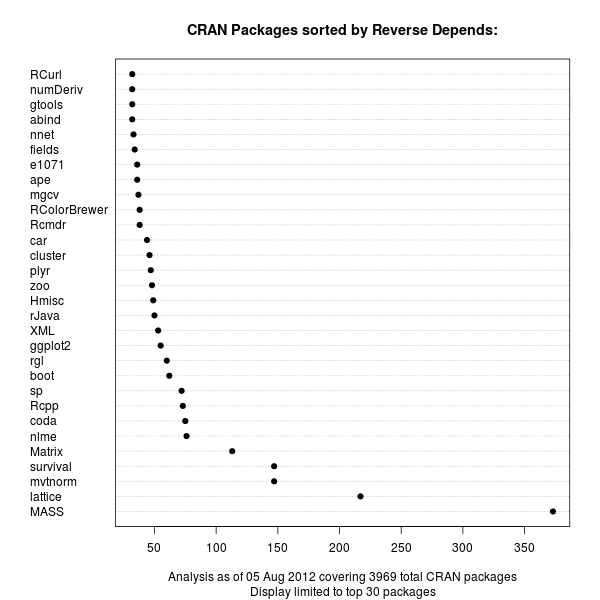
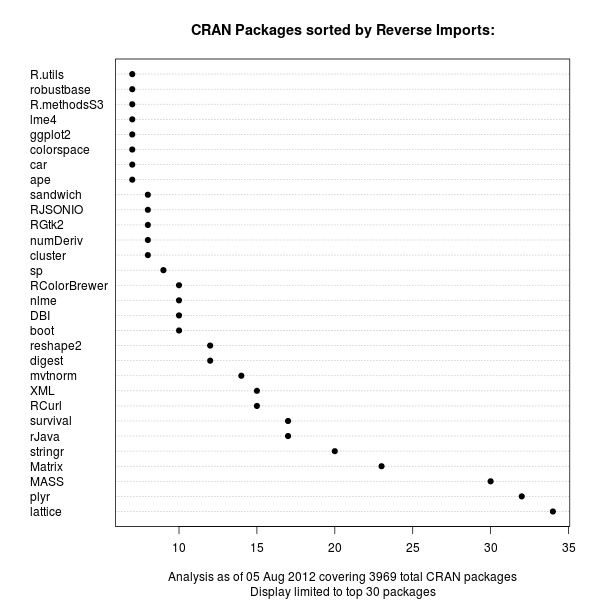
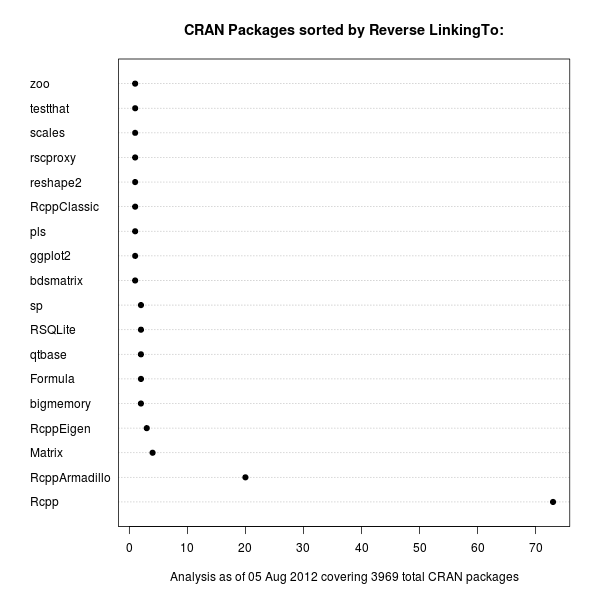
The recent update by S ren H jsgaard's to his gRbase package for graphical models made it the 75th package to depend on our Rcpp package for R and C++ integration. So in a lighthearted weekend moment, I tweeted about gRbase being number 75 for Rcpp to which Hadley replied, asking if Rcpp was in fact number one among R package Depends. Far from it, and I immediately replied listing lattice and Matrix as packages with way more other packages depending upon them. But as the question seemed deserving of a bit more analysis, I spent a few minutes on this and prepared three charts listing package in order of reverse Depends, reverse Imports and reverse LinkingTo. First off, the reverse Depends:. This is the standard means of declaring a dependence of one package upon another. CRAN package chart of Reverse Depends relations Unsurprisingly, the MASS package from the classic Venables and Ripley book comes first, with Deepayan Sarkar's powerful lattice package (also covered in a book) coming second. These are both recommended packages which are commonly distributed with R itself. Next are mvtnorm and survival. Our Rcpp is up there in the top-ten, but not a frontrunner. With the advent of namespaces a few R releases ago, it became possible to import functions from other packages. So the Imports: statement now provides an alternative to the (older) Depends:. The next chart displays the same relationship for Imports:: CRAN package chart of Reverse Imports relations Now lattice still leads, but Hadleys's plyr package grabbed the second spot just before MASS and Matrix. It is interesting to see that the sheer number of Imports: is still not where the Depends: are. On the other hand, we see a number of more recent packages popping up in the second chart. This may reflect more recent coding practices. It will be interesting to see how this stacks up over time when we revisit this chart. Lastly, we can also look at LinkingTo:, a declaration used to provide a C/C++-level dependency at the source code level. We use this in the Rcpp family to provide automatic resolution of the header files needed to compile against our packages. And unsurprisingly, because packages using Rcpp actually use its API (rather than R functions), the package is a little ahead of others. In the package we find three more packages of the Rcpp family, but only a limited number of other packages as C/C++-level dependencies are still somewhat rare in the R universe. There are also fewer packages overall making use of this mechanism. CRAN package chart of Reverse LinkingTo relations One could of course take this one level further and sum up dependencies in a recursive manner, or visualize the relationship differently. But these dotchart graphs provide a first visual description of the magnitude of Depends, Imports and LinkingTo among CRAN packages for R.

4 August 2012

Gerfried Fuchs: Mermaids Reloaded, Addendum

First things first: The issue with the feedback form is fixed. Sorry for the inconvenience. I'm not sure if you followed the schedule of this year's debconf closely, but there was an International Poetry Night happening. Given that Mermaids still is quite important for me, but also, that I like to write poetry every now and then, I had the idea spinning around in my head to present Mermaids there. The simple thought of that made me extremely nervous. Things happened as they liked to happen: the video streaming setup for debconf still was giving me a bit of headaches, and suddenly it was too late to print out the poem because I didn't even had CUPS installed on my new laptop. Also, having reread it recently I noticed that it wasn't flowing too well, so I was uncertain whether it would be possible to properly perform it. I attended nevertheless. It was rather cosy in El Panal, but still a fair amount of people there. And to my surprise, quite a lot of Debian people were presenting poetry. Some in Spanish, some in English, but also one in Japanese, one in German and even one Esperanto. I had the feeling that I really should present something too. I still was extremely nervous, but during the day I had opened some of my poems in the browser, so I started to write down The Girl and the Boy, and when Fito called me to the microphone, I think most people were able to tell how nervous I was about it. But it went well. It even went so well that I felt the need to perform another poem. I chose that's what friends are for, quickly scribbling it down in bad light. The choice was easy, given that it is one that means a lot to me and that an haiku already got presented. It was really a nice experience to not only write these poems and publishing them on deviantART and in my blog, but also to present them to a live audience. Then there was a break. Actually I thought it was over already, but they started a second round. And I somehow liked the way it worked out, so I started to dig for something else to present. I settled for Strange and Jonathan insisted on translating it into Spanish and present that version, too. His version wasn't in Haiku style, but I think it still was a very nice idea. It seem to have been received well, but given that I don't speak Spanish I can only hope he was able to catch the feelings that I did put into this short piece. I am confident he did well. :) As final piece I settled for another short piece, this time it was in German, Wahre Liebe. I think I was able to transport the feelings of it with adding pauses in certain spots, although I fear most people didn't get it because it was ... well, in German. Again, a fair amount of the people who presented poetry were from Debian, actually more than half of it I think. And I am wondering: When will the CfP for next year's debconf open so we can try to establish this event as regular debconf event? And who knows, maybe I'll find the courage then to perform Mermaids.

/personal permanent link Comments: 0 Flattr this

2 August 2012

Sorina Sandu: Status update - D-I improve network config

Hello!

Here's a short status update:

[1] http://bugs.debian.org/cgi-bin/bugreport.cgi?bug=682737
[2] http://anonscm.debian.org/gitweb/?p=d-i/netcfg.git;a=shortlog;h=refs/heads/people/sorina/write_config
[3] http://anonscm.debian.org/gitweb/?p=d-i/netcfg.git;a=shortlog;h=refs/heads/people/sorina/coding_style
[4] https://github.com/sorinasandu/Debian_Netcfg/tree/local_testing

Sorina

1 August 2012

Bdale Garbee: Early Retirement

I am pleased to announce that HP accepted my application for participation in this year's Enhanced Early Retirement program. After 26.5 years, my last day at HP will be 31 August 2012. This isn't because I have a problem with HP, quite the contrary! I feel immensely privileged to have worked on so many interesting things with so many smart people for so long. And there are many exciting things happening right now, including high profile projects like Odyssey and Moonshot expanding both ends of the server scaling continuum with Linux, and the immense commitment to and investment in Open Source represented by the use of Open Stack and Ubuntu LTS in building HP Cloud. The temptation to stay and continue to help guide HP's Open Source engagement was strong. I'm certainly under no pressure to leave... in fact, I think I managed to shock my management with my decision to retire! But I'm very excited about "taking a break" from full-time employment for a while to focus more time on things that matter a lot to me. My son and I have a number of projects we'd like to work on together as he enters high school. The side business I started two years ago with Keith Packard to design, build, and sell avionics solutions for high power model rockets is growing and could use more attention. I'm in the midst of designing the processor board for another amateur radio satellite. And of course, I'm looking forward to putting more "quality time" towards Free Software projects like FreedomBox and Debian! Since they do not depend on my employment status, I do not expect any immediate changes in the various roles I play outside of HP. I will continue to serve on the board of the Linux Foundation representing individual affiliates, on the board of the FreedomBox Foundation, as Chairman of the Debian Technical Committee, and as President of Software in the Public Interest. And while I hope to travel less than I have in recent years, I look forward to continuing to speak and otherwise participate in key Free Software conferences around the world from time to time. After I retire, the primary point of contact with HP on Open Source matters will be the Director of HP's Open Source Program Office, Phil Robb. But if there are open issues regarding HP and Open Source that I can help with over the next month, feel free to contact me and I'll see what I can do to help.

31 July 2012

Martin Pitt: My impressions from GUADEC

I have had the pleasure of attending GUADEC in full this year. TL;DR: A lot of great presentations + lots of hall conversations about QA stuff + the obligatory be er,ach = . Last year I just went to the hackfest, and I never made it to any previous one, so GUADEC 2012 was a kind of first-time experience for me. It was great to put some faces and personal impressions to a lot of the people I have worked with for many years, as well as catching up with others that I did meet before. I discussed various hardware/software testing stuff with Colin Walters, Matthias Clasen, Lennart Poettering, Bertrand Lorentz, and others, so I have a better idea how to proceed with automated testing in plumbing and GNOME now. It was also really nice to meet my fellow PyGObject co-maintainer Paolo Borelli, as well as seeing Simon Schampier and Ignacio Casal Quinteiro again. No need to replicate the whole schedule here (see for yourself on the interwebs), so I just want to point out some personal highlights in the presentations: There were a lot of other good ones, some of them technical and some amusing and enlightening, such as Frederico s review of the history of GNOME. On Monday I prepared and participated in a PyGObject hackfest, but I ll blog about this separately. I want to thank all presenters for the excellent program, as well as the tireless GUADEC organizer team for making everything so smooth and working flawlessly! Great Job, and see you again in Strasbourg or Brno!

Christian Perrier: Discovering a new package: HotelDruid

What is good in "my" job in Debian are opportunities to discover new interesting packages. While surveying the completion of debconf translations in unstable, I thus noticed a new package named "hoteldruid", that has a few questions and interaction with users. After my usual mumble because French and a few other languages were *finally* virtually 100% in unstable for a few days...... I went on my usual task in such cases: propose a review of debconf templates and package description to my fellow debian-l10n-english co-workers (/me bends to Justin B. Rye, our tireless, picky, efficient and very clever Master Reviewer for over 5 years now). Then I discovered what HotelDruid is about: this is a piece of PHP-based software meant to manage....an hotel or bed and breakfast...or any kind of such facility. Real end-user software. Really useful software. For real people...:-) Not the gazillionth obscure development language, or yet another encryption library, or yet another mysterious virtualization thing used by 10 people in the world (even if they host thousands of machines). These are the free software pieces I like the most. Probably Marco Maria Francesco De Santis (the upstream author and Debian package maintainer) somewhere in, I guess, Italy is running a small B&B (or maybe his parents, or his wife/cousin/whatever) *and* is a free software addict. And he wanted to run his business with free software. Same for this French genealogist who once wanted to display his data over the web (and make a real use of that obscure Ocaml language.....yes, pun itended to my friends, here). Of the person who wrote LedgerSMB to manage his business. Or those who use free software to manage hospitals (hi Andreas) or schools (hi DebianEdu folks...and special hi to Petter). Real software for real people. Of course, developed with obscure geeky things used only by those weird geeks who like to sometimes travel half a planet to just gather together and develop the best free operating system ever. Guess what? I like this! And guess what? I proposed the HotelDruid author to check whether we could imrove....translation, of course..:-)

Russell Coker: ZFS on Debian/Wheezy

As storage capacities increase the probability of data corruption increases as does the amount of time required for a fsck on a traditional filesystem. Also the capacity of disks is increasing a lot faster than the contiguous IO speed which means that the RAID rebuild time is increasing, for example my first hard disk was 70M and had a transfer rate of 500K/s which meant that the entire contents could be read in a mere 140 seconds! The last time I did a test on a more recent disk a 1TB SATA disk gave contiguous transfer rates ranging from 112MB/s to 52MB/s which meant that reading the entire contents took 3 hours and 10 minutes, and that problem is worse with newer bigger disks. The long rebuild times make greater redundancy more desirable. BTRFS vs ZFS Both BTRFS and ZFS checksum all data to cover the case where a disk returns corrupt data, they don t need a fsck program, and the combination of checksums and built-in RAID means that they should have less risk of data loss due to a second failure during rebuild. ZFS supports RAID-Z which is essentially a RAID-5 with checksums on all blocks to handle the case of corrupt data as well as RAID-Z2 which is a similar equivalent to RAID-6. RAID-Z is quite important if you don t want to have half your disk space taken up by redundancy or if you want to have your data survive the loss or more than one disk, so until BTRFS has an equivalent feature ZFS offers significant benefits. Also BTRFS is still rather new which is a concern for software that is critical to data integrity. I am about to install a system to be a file server and Xen server which probably isn t going to be upgraded a lot over the next few years. It will have 4 disks so ZFS with RAID-Z offers a significant benefit over BTRFS for capacity and RAID-Z2 offers a significant benefit for redundancy. As it won t be upgraded a lot I ll start with Debian/Wheezy even though it isn t released yet because the system will be in use without much change well after Squeeze security updates end. ZFS on Wheezy Getting ZFS to basically work isn t particularly hard, the ZFSonLinux.org site has the code and reasonable instructions for doing it [1]. The zfsonlinux code doesn t compile out of the box on Wheezy although it works well on Squeeze. I found it easier to get a the latest Ubuntu working with ZFS and then I rebuilt the Ubuntu packages for Debian/Wheezy and they worked. This wasn t particularly difficult but it s a pity that the zfsonlinux site didn t support recent kernels. Root on ZFS The complication with root on ZFS is that the ZFS FAQ recommends using whole disks for best performance so you can avoid alignment problems on 4K sector disks (which is an issue for any disk large enough that you want to use it with ZFS) [2]. This means you have to either use /boot on ZFS (which seems a little too experimental for me) or have a separate boot device. Currently I have one server running with 4*3TB disks in a RAID-Z array and a single smaller disk for the root filesystem. Having a fifth disk attached by duct-tape to a system that is only designed for four disks isn t ideal, but when you have an OS image that is backed up (and not so important) and a data store that s business critical (but not needed every day) then a failure on the root device can be fixed the next day without serious problems. But I want to fix this and avoid creating more systems like it. There is some good documentation on using Ubuntu with root on ZFS [3]. I considered using Ubuntu LTS for the server in question, but as I prefer Debian and I can recompile Ubuntu packages for Debian it seems that Debian is the best choice for me. I compiled those packages for Wheezy, did the install and DKMS build, and got ZFS basically working without much effort. The problem then became getting ZFS to work for the root filesystem. The Ubuntu packages didn t work with the Debian initramfs for some reason and modules failed to load. This wasn t necessarily a show-stopper as I can modify such things myself, but it s another painful thing to manage and another way that the system can potentially break on upgrade. The next issue is the unusual way that ZFS mounts filesystems. Instead of having block devices to mount and entries in /etc/fstab the ZFS system does things for you. So if you want a ZFS volume to be mounted as root you configure the mountpoint via the zfs set mountpoint command. This of course means that it doesn t get mounted if you boot with a different root filesystem and adds some needless pain to the process. When I encountered this I decided that root on ZFS isn t a good option. So for this new server I ll install it with an Ext4 filesystem on a RAID-1 device for root and /boot and use ZFS for everything else. Correct Alignment After setting up the system with a 4 disk RAID-1 (or mirror for the pedants who insist that true RAID-1 has only two disks) for root and boot I then created partitions for ZFS. According to fdisk output the partitions /dev/sda2, /dev/sdb2 etc had their first sector address as a multiple of 2048 which I presume addresses the alignment requirement for a disk that has 4K sectors. Installing ZFS deb http://www.coker.com.au wheezy zfs I created the above APT repository (only AMD64) for ZFS packages based on Darik Horn s Ubuntu packages (thanks for the good work Darik). Installing zfs-dkms, spl-dkms, and zfsutils gave a working ZFS system. I could probably have used Darik s binary packages but I think it s best to rebuild Ubuntu packages to use on Debian. The server in question hasn t gone live in production yet (it turns out that we don t have agreement on what the server will do). But so far it seems to be working OK. Related posts:
  1. Discovering OS Bugs and Using Snapshots I m running Debian/Unstable on an EeePC 701, I ve got an...
  2. Starting with BTRFS Based on my investigation of RAID reliability [1] I have...
  3. ZFS vs BTRFS on Cheap Dell Servers I previously wrote about my first experiences with BTRFS [1]....

30 July 2012

Johannes Schauer: port bootstrap build-ordering tool report 4

A copy of this post is sent to soc-coordination@lists.alioth.debian.org as well as to debian-bootstrap@lists.mister-muffin.de.

Diary

July 2
  • playing around with syntactic dependency graphs and how to use them to flatten dependencies

July 4
  • make work with dose 3.0.2
  • add linux-amd64 to source architectures
  • remove printing in build_compile_rounds
  • catch Not_found exception and print warning
  • use the whole installation set in crosseverything.ml instead of flattened dependencies
  • detect infinite loop and quit in crosseverything.ml
  • use globbing in _tags file
  • use wildcards and patsubst in makefile

July 5
  • throw a warning if there exist binary packages without source packages
  • add string_of_list and string_of_pkglist and adapt print_pkg_list and print_pkg_list_full to use them
  • fix and extend flatten_deps - now also tested with Debian Sid

July 6
  • do not exclude the crosscompiled packages from being compiled in crosseverything.ml
  • clean up basebuildsystem.ml, remove old code, use BootstrapCommon code
  • clean up basenocycles.ml, remove unused code and commented out code
  • add option to print statistics about the generated dependency graph
  • implement most_needed_fast_wrong as well as most_needed_slow_correct and make both available through the menu

July 7
  • allow to investigate all scc, not only the full graph and the scc containing the investigated package
  • handle Not_found in src_list_from_bin_list with warning message
  • handle the event of the whole archive actually being buildable
  • replace raise Failure with failwith
  • handle incorrectly typed package names
  • add first version of reduced_dist.ml to create a self-contained mini distribution out of a big one

July 8
  • add script to quickly check for binary packages without source package
  • make Debian Sid default in makefile
  • add *.d.byte files to .gitignore
  • README is helpful now
  • more pattern matching and recursiveness everywhere

July 9
  • fix termination condition of reduced_dist.ml
  • have precise as default ubuntu distribution
  • do not allow to investigate an already installable package

July 10
  • milestone: show all cycles in a graph
  • add copyright info (LGPL3+)

July 11
  • advice to use dose tools in README

July 16
  • write apt_pkg based python filter script replacing grep-dctrl

July 17
  • use Depsolver.listcheck more often
  • add dist_graph.ml
  • refactor dependency graph code into its own module

July 18
  • improve package selection for reduced_dist.ml
  • improve performance of cycle enumeration code

July 20
  • implement buildprofile support into dose3

July 22
  • let dist_graph.ml use commandline arguments

July 23
  • allow dose3 to generate source package lists without Build- Depends Conflicts -Indep

July 29
  • implement crosscompile support into dose3

Results

Readme There is not yet a writeup on how everything works and how all the pieces of the code work together but the current README file provides a short introduction on how to use the tools.
  • build and runtime dependencies
  • compile instructions
  • execution examples for each program
  • step by step guide how to analyze the dependency situation
  • explanation of general commandline options
A detailed writeup about the inner workings of everything will be part of a final documentation stage.

License All my code is now released under the terms of the LGPL either version 3, or (at your option) any later version. A special linking exception is made to the license which can be read at the top of the provided COPYING file. The exception is necessary because Ocaml links statically, which means that without that exception, the conditions of distribution would basically equal GPL3+.

reduced_dist.ml Especially the Debian archive is huge and one might want to work on a reduced selection of packages first. Having a smaller selection of the archive would be significantly faster and would also not add thousands of packages that are not important for an extended base system. I call a reduced distribution a set of source packages A and a set of binary packages B which fulfill the following three properties:
  • all source packages A must be buildable with only binary packages B being available
  • all binary packages B except for architecture:all packages must be buildable from source packages A
The set of binary packages B and source packages A can be retrieved using the reduced_dist program. It allows to either build the most minimal reduced distribution or one that includes a certain package selection. To filter out the package control stanzas for a reduced distribution from a full distribution, I originally used a call to grep-dctrl but later replaced that by a custom python script called filter-packages.py. This script uses python-apt to filter Packages and Sources files for a certain package selection.

dist_graph.ml It soon became obvious that there were not many independent dependency cycle situation but just one big scc that would contain 96% of the packages that are involved in build dependency cycles. Therefor it made sense to write a program that does not iteratively build the dependency graph starting from a single package, but which builds a dependency graph for a whole archive.

Cycles I can now enumerate all cycles in the dependency graph. I covered the theoretical part in another blog post and wrote an email about the achievement to the list. Both resources contain more links to the respective sourcecode. The dependency graph generated for Debian Sid has 39486 vertices. It has only one central scc with 1027 vertices and only eight other scc with 2 to 7 vertices. All the other source and binary packages in the dependency graph for the archive are degenerate components of length one. Obtaining the attached result took 4 hours on my machine (Core i5 @ 2.53GHz). 1.5 h of that were needed to build the dependency graph, the other 2.5 hours were needed to run johnson's algorithm on the result. Memory consumption of the program was at about 700 MB. It is to my joy that apparently the runtime of the cycle finding algorithm for a whole Debian Sid repository as well as the memory requirements are within orders of magnitude that are justifiable when being run on off-the-shelf hardware. It must also be noted that nothing is optimized for performance yet. A list of all cycles in Debian Sid up to length 4 can be retrieved from this email. This cycle analysis assumes that only essential packages, build-essential and dependencies and debhelper are available. Debhelper is not an essential or build-essential package but 79% of the archive build-depends on it. The most interesting cycles are probably those of length 2 that need packages that they build themselves. Noticeable examples for these situations are vala, python, mlton, fpc, sbcl and ghc. Languages seem love to need themselves to be built.

Buildprofiles There is a long discussion of how to encode staged build dependency information in source packages. While the initial idea was to use Build-Depends-StageN fields, this solution would duplicate large parts of the Build-Depends field, which leads to bitrot as well as it is inflexible to possible other build "profiles". To remedy the situation it was proposed to use field names like Build-Depends[stage1 embedded] but this would also duplicate information and would break with the rfc822 format of package description files. A document maintained by Guillem Jover gives even more ideas and details. Internally, Patrick and me decided for another idea of Guillem Jover to annotate staged build dependencies. The format reads like:
Build-Depends: huge (>= 1.0) [i386 arm] <!embedded !bootstrap>, tiny
So each build profile would follow a dependency in <> "brackets" an have a similar format as architecture options. Patrick has a patch for dpkg that implements this functionality while I patched dose3.

Dropping Build-Depends-Indep and Build-Conflicts-Indep When representing the dependencies of a source package, dose3 concatenates its Build-Depends and Build-Depends-Indep dependency information. So up to now, a source package could only be compiled, if it manages to compile all of its binary packages including architecture:all packages. But when bootstrapping a new architecture, it should be sufficient to only build the architecture dependent packages and therefor to only build the build-arch target in debian/rules and not the build-indep target. Only considering the Build-Depends field and dismissing the Build-Depends-Indep field, reduced the main scc from 1027 vertices to 979 vertices. The amount of cycles up to length four reduced from 276 to 206. Especially the cycles containing gtk-doc-tools, doxygen, debiandoc-sgml and texlive-latex-base got much less. Patrick managed to add a Build-Depends-Indep field to four packages so far which reduced the scc further by 14 vertices down to 965 vertices. So besides staged build dependencies and cross building there is now a third method that can be applied to break dependency cycles: add Build-Depends-Indep information to them or update existing information. I submitted a list of packages that have a binary-indep and/or a build-indep target in their debian/rules to the list. I also submitted a patch for dose3 to be able to specify to ignore Build-Depends-Indep and Build-Conflicts-Indep information.

Dose3 crossbuilding So far I only looked at dependency situations in the native case. While the native case contains a huge scc of about 1000 packages, the dependency situation will be much nicer when cross building. But dose3 was so far not able to simulate cross building of source packages. I wrote a patch that implements this functionality and will allow me to write programs that help analyze the cross-situation as well.

Debconf Presentation Wookey was giving a talk at debconf12 for which I was supplying him with slides. The slides in their final version can be downloaded here

Future Patrick maintains a list of "weak" build dependencies. Those are dependencies that are very likely to be droppable in either a staged build or using Build-Depends-Indep. I must make use of this list to make it easier to find packages that can easily be removed of their dependencies. I will have to implement support for resolving the main scc using staged build dependencies. Since it is unlikely that Patrick will be fast enough in supplying me with modified packages, I will need to create myself a database of dummy packages. Another open task is to allow to analyze the crossbuilding dependency situation. What I'm currently more or less waiting on is the inclusion of my patches into dose3 as well as a decision on the buildprofile format. More people need to discuss about it until it can be included into tools as well as policy. Every maintainer of a package can help making bootstrapping easier by making sure that as many dependencies as possible are part of the Build-Depends-Indep field.

29 July 2012

Gregor Herrmann: RC bugs 2012/27-30

during the last weeks I was quite busy with other things (like DebCamp, DebConf, & vacations), so this is a report covering 4 weeks. at least I managed to catch up during the last days a bit

28 July 2012

Vincent Bernat: Switching to the awesome window manager

I have happily used FVWM as my window manager for more than 10 years. However, I recently got tired of manually arranging windows and using the mouse so much. A window manager is one of the handful pieces of software getting in your way at every moment which explains why there are so many of them and why we might put so much time in it. I decided to try a tiling window manager. While i3 seemed pretty hot and powerful (watch the screencast!), I really wanted something configurable and extensible with some language. So far, the common choices are: I chose awesome, despite the fact that StumpWM vote for Lisp seemed a better fit (but it is more minimalist). I hope there is some parallel universe where I enjoy StumpWM. Visually, here is what I got so far: awesome dual screen setup

Awesome configuration Without a configuration file, awesome does nothing. It does not come with any hard-coded behavior: everything needs to be configured through its Lua configuration file. Of course, a default one is provided but you can also start from scratch. If you like to control your window manager, this is somewhat wonderful. awesome is well documented. The wiki provides a FAQ, a good introduction and the API reference is concise enough to be read from the top to the bottom. Knowing Lua is not mandatory since it is quite easy to dive into such a language. I have posted my configuration on GitHub. It should not be used as is but some snippets may be worth to be stolen and adapted into your own configuration. The following sections put light on some notable points.

Keybindings Ten years ago was the epoch of scavanger hunts to recover IBM Model M keyboards from waste containers. They were great to type on and they did not feature the infamous Windows keys. Nowadays, this is harder to get such a keyboard. All my keyboards now have Windows keys. This is a major change with respect to configure a window manager: the left Windows key is mapped to Mod4 and is usually unused by most applications and can therefore be dedicated to the window manager. The main problem with the ability to define many keybindings is to remember the less frequently used one. I have monkey-patched awful.key module to be able to attach a documentation string to a keybinding. I have documented the whole process on the awesome wiki. awesome online help

Quake console A Quake console is a drop-down terminal which can be toggled with some key. I was heavily relying on it in FVWM. I think this is still a useful addition to any awesome configuration. There are several possible solutions documented in the awesome wiki. I have added my own1 which works great for me. Quake console

XRandR XRandR is an extension which allows to dynamically reconfigure outputs: you plug an external screen to your laptop and you issue some command to enable it:
$ xrandr --output VGA-1 --auto --left-of LVDS-1
awesome detects the change and will restart automatically. Laptops usually come with a special key to enable/disable an external screen. Nowadays, this key does nothing unless configured appropriately. Out of the box, it is mapped to XF86Display symbol. I have associated this key to a function that will cycle through possible configurations depending on the plugged screens. For example, if I plug an external screen to my laptop, I can cycle through the following configurations:
  • only the internal screen,
  • only the external screen,
  • internal screen on the left, external screen on the right,
  • external screen on the left, internal screen on the right,
  • no change.
The proposed configuration is displayed using naughty, the notification system integrated in awesome. Notification of screen reconfiguration

Widgets I was previously using Conky to display various system-related information, like free space, CPU usage and network usage. awesome comes with widgets that can fit the same use. I am relying on vicious, a contributed widget manager, to manage most of them. It allows one to attach a function whose task is to fetch values to be displayed. This is quite powerful. Here is an example with a volume widget:
local volwidget = widget(  type = "textbox"  )
vicious.register(volwidget, vicious.widgets.volume,
         '<span font="Terminus 8">$2 $1%</span>',
        2, "Master")
volwidget:buttons(awful.util.table.join(
             awful.button(   , 1, volume.mixer),
             awful.button(   , 3, volume.toggle),
             awful.button(   , 4, volume.increase),
             awful.button(   , 5, volume.decrease)))
You can also use a function to format the text as you wish. For example, you can display a value in red if it is too low. Have a look at my battery widget for an example. Various widgets

Miscellaneous While I was working on my awesome configuration, I also changed some other desktop-related bits.

Keyboard configuration I happen to setup all my keyboards to use the QWERTY layout. I use a compose key to input special characters like . I have also recently use Caps Lock as a Control key. All this is perfectly supported since ages by X11 I am also mapping the Pause key to XF86ScreenSaver key symbol which will in turn be bound to a function that will trigger xautolock to lock the screen. Thanks to a great article about extending the X keyboard map with xkb, I discovered that X was able to switch from one layout to another using groups2. I finally opted for this simple configuration:
$ setxkbmap us,fr '' compose:rwin ctrl:nocaps grp:rctrl_rshift_toggle
$ xmodmap -e 'keysym Pause = XF86ScreenSaver'
I switch from us to fr by pressing both left Control and left Shift keys.

Getting rid of most GNOME stuff Less than one year ago, to take a step forward to the future, I started to heavily rely on some GNOME components like GNOME Display Manager, GNOME Power Manager, the screen saver, gnome-session, gnome-settings-daemon and others. I had numerous problems when I tried to setup everything without pulling the whole GNOME stack. At each GNOME update, something was broken: the screensaver didn t start automatically anymore until a full session restart or some keybindings were randomly hijacked by gnome-settings-daemon. Therefore, I have decided to get rid of most of those components. I have replaced GNOME Power Manager with system-level tools like sleepd and the PM utilities. I replaced the GNOME screensaver with i3lock and xautolock. GDM has been replaced by SLiM which now features ConsoleKit support3. I use ~/.gtkrc-2.0 and ~/.config/gtk-3.0/settings.ini to configure GTK+. The future will wait.

Terminal color scheme I am using rxvt-unicode as my terminal with a black background (and some light transparency). The default color scheme is suboptimal on the readability front. Sharing terminal color schemes seems a popular activity. I finally opted for the derp color scheme which brings a major improvement over the default configuration. Comparison of terminal color schemes I have also switched to Xft for font rendering using DejaVu Sans Mono as my default font (instead of fixed) with the following configuration in ~/.Xresources:
Xft.antialias: true
Xft.hinting: true
Xft.hintstyle: hintlight
Xft.rgba: rgb
URxvt.font: xft:DejaVu Sans Mono-8
URxvt.letterSpace: -1
The result is less crisp but seems a bit more readable. I may switch back in the future. Comparison of terminal fonts

Next steps My reliance to the mouse has been greatly reduced. However, I still need it for casual browsing. I am looking at luakit a WebKit-based browser extensible with Lua for this purpose.

  1. The console gets its own unique name. This allows awesome to reliably detect when it is spawned, even on restart. It is how the Quake console works in the mod of FVWM I was using.
  2. However, the layout is global, not per-window. If you are interested by a per-window layout, take a look at kbdd.
  3. Nowadays, you cannot really survive without ConsoleKit. Many PolicyKit policies do not rely on groups any more to grant access to your devices.

Next.

Previous.