Search Results: "nic"

12 July 2013

Justus Winter: Hi, I'm the one who wrote umount...

Everyone enjoys ASCII screenshots as much as I do, right? So here is the Hurd booting with my mtab-prototype bound to /run/mtab:
INIT: version 2.88 booting
Using makefile-style concurrent boot in runlevel S.
Activating swap...done.
Checking root file system...fsck from util-linux 2.20.1
hd2 : tray open or drive not ready
end_request: I/O error, dev 02:00, sector 0
/dev/hd0s1: clean, 44292/181056 files, 287759/723200 blocks
done.
Activating lvm and md swap...(default pager): Already paging to partition hd0s5!
done.
Checking file systems...fsck from util-linux 2.20.1
hd2 : tray open or drive not ready
end_request: I/O error, dev 02:00, sector 0
done.
Cleaning up temporary files... /tmp.
Mounting local filesystems...done.
Activating swapfile swap...(default pager): Already paging to partition hd0s5!
done.
Cleaning up temporary files....
Configuring network interfaces...inetutils-ifconfig: invalid arguments
ifup: failed to open pid file /run/network/ifup-/dev/eth0.pid: No such file or directory
Internet Systems Consortium DHCP Client 4.2.2
Copyright 2004-2011 Internet Systems Consortium.
All rights reserved.
For info, please visit https://www.isc.org/software/dhcp/
can't create /var/lib/dhcp/dhclient./dev/eth0.leases: No such file or directory
Listening on Socket//dev/eth0
Sending on   Socket//dev/eth0
DHCPDISCOVER on /dev/eth0 to 255.255.255.255 port 67 interval 4
DHCPREQUEST on /dev/eth0 to 255.255.255.255 port 67
DHCPOFFER from 10.0.2.2
DHCPACK from 10.0.2.2
can't create /var/lib/dhcp/dhclient./dev/eth0.leases: No such file or directory
bound to 10.0.2.15 -- renewal in 42550 seconds.
done.
Cleaning up temporary files....
Setting up X socket directories... /tmp/.X11-unix /tmp/.ICE-unix.
INIT: Entering runlevel: 2
Using makefile-style concurrent boot in runlevel 2.
Starting enhanced syslogd: rsyslogd.
Starting deferred execution scheduler: atd.
Starting periodic command scheduler: cron.
Starting system message bus: dbusFailed to set socket option"/var/run/dbus/system_bus_socket": Protocol not available.
Starting OpenBSD Secure Shell server: sshd.
GNU 0.3 (debian) (console)
login:
As you can see, the boot process looks quite clean. In particular, there are no issues left with Debians initscripts. The remaining noise comes from: This is accomplished by my mtab translator prototype. It's work in progress, but I have reworked and broken up my initial prototype. My initial prototype only patched libdiskfs, one of three libraries translator authors can use to write filesystem-like translators. I have made the necessary changes to the other two libraries and patched up any loose ends. This is the translator in action:
% fsysopts /run/mtab
/hurd/mtab /
% cat /run/mtab
/dev/hd0s1 / ext2fs writable,no-inherit-dir-group,store-type=typed 0 0
none /dev/ttyp0 /hurd/term name,/dev/ptyp0,type,pty-master 0 0
none /run /hurd/tmpfs writable,no-suid,no-exec,no-inherit-dir-group,no-sync,size=80484K 0 0
none /run/lock /hurd/tmpfs writable,no-suid,no-exec,no-inherit-dir-group,no-sync,size=5M 0 0
none /run/shm /hurd/tmpfs writable,no-suid,no-exec,no-inherit-dir-group,no-sync,size=259480K 0 0
I also patched the sysvinit package. My version includes and switches to runsystem.sysv that uses /sbin/init to start the system. It also carries all the necessary workarounds for the remaining sysvinit related issues. The resulting Debian/Hurd system is very nice, it is getting more and more similar to what a Debian user would expect: I have rebuild the hurd and sysvinit package and uploaded them into an apt repository:
deb http://teythoon.cryptobitch.de/gsoc/heap/debian unstable main
Please use unstable for now. Also make sure that you have a recovery plan for your Debian/Hurd installation if anything goes wrong. For your convenience there's a seed tarball containing packages with the appropriate sources.list.d snippets and the repository key: https://teythoon.cryptobitch.de/gsoc/heap/debian/seed.tar Currently /hurd/console is not started (I'll add a init script for that later), but for now you have to start a getty on the console. Make sure that your /etc/inittab contains a line like this:
7:2345:respawn:/sbin/getty 38400 console
The patched initscripts package contains the runsystem.sysv file and uses the Debian alternatives system to replace the runsystem.gnu variant. It also switches to the appropriate halt and reboot utilities. If you install the package, you must use halt-hurd or reboot-hurd to halt or reboot the system. Running halt or reboot is not harmful though, it just doesn't work. So here I am. I've been coding for the Hurd for four weeks now, and suddenly I'm the guy who wrote umount. My point is, if you ever wanted to work on an operating system, you might want to consider working on the Hurd. It the Debian/Hurd port is very decent and (according to #debian-hurds "Debian GNU/Hurd Doomsday-o-meter") 78.44% of all Debian packages are available, so you've got a familiar environment. Also, if your solution is right and your code is reasonably clean, it is not that hard to get your changes accepted. The list of open issues is long and might contain something that interests you. You could be the one implementing a read-ahead solution to massively improve Hurds overall performance. Also since Hurd is just a Hird of Unix replacing daemons running on-top the GNU Mach microkernel, most of the functionality lies within userspace processes. This makes the whole system very extensible and quite easy to work with. For an overview over the Hurd, see this page. Next week I'll focus on improving my mtab prototype, improving the sysvinit patches and upstreaming the ones that are ready. As always, in case I run out of stuff to do, I'll pick something from my list of issues, most likely the network related issues. In completely unrelated news, my Debian/Linux workstation died with a kernel panic while I was writing this blog entry. It's a good thing Emacs honors "save early, save often". M-x insert-monolithic-kernel-rant-here. This is it for this week, thanks for your attention :)

Daniel Pocock: Practical VPNs with strongSwan, Shorewall, Linux firewalls and OpenWRT routers

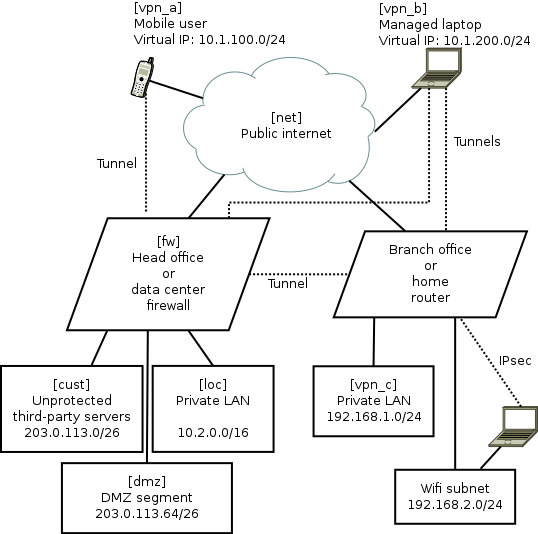
There is intense interest in communications privacy at the moment thanks to the Snowden scandal. Open source software has offered credible solutions for privacy and encryption for many years. Sadly, making these solutions work together is not always plug-and-play. In fact, secure networking, like VoIP, has been plagued by problems with interoperability and firewall/filtering issues although now the solutions are starting to become apparent. Here I will look at some of them, such as the use of firewall zones to simplify management or the use of ECDSA certificates to avoid UDP fragmentation problems. I've drawn together a lot of essential tips from different documents and mailing list discussions to demonstrate how to solve a real-world networking problem. A typical network scenario and requirements Here is a diagram of the network that will be used to help us examine the capabilities of these open source solutions. Some comments about the diagram:
  • The names in square brackets are the zones for Shorewall, they are explained later.
  • The dotted lines are IPsec tunnels over the untrusted Internet.
  • The road-warrior users (mobiles and laptops) get virtual IP addresses from the VPN gateway. The branch offices/home routers do not use virtual IPs.
  • The mobile phones are largely untrusted: easily lost or stolen, many apps have malware, they can only tunnel to the central VPN and only access a very limited range of services.
  • The laptops are managed devices so they are trusted with access to more services. For efficiency they can connect directly to branch office/home VPNs as well as the central server.
  • Smart-phone user browsing habits are systematically monitored by mobile companies with insidious links into mass-media and advertising. Road-warriors sometimes plug-in at client sites or hotels where IT staff may monitor their browsing. Therefore, all these users want to tunnel all their browsing through the VPN.
  • The central VPN gateway/firewall is running strongSwan VPN and Shorewall firewall on Linux. It could be Debian, Fedora or Ubuntu. Other open source platforms such as OpenBSD are also very well respected for building firewall and VPN solutions, but Shorewall, which is one of the key ingredients in this recipe, only works on Linux at present.
  • The branch office/home network could be another strongSwan/Shorewall server or it could also be an OpenWRT router
  • The default configuration for most wifi routers creates a bridge joining wifi users with wired LAN users. Not here, it has been deliberately configured as an independent network. Road-warriors who attach to the wifi must use VPN tunnelling to access the local wired network. In OpenWRT, it is relatively easy to make the Wifi network an independent subnet. This is an essential security precaution because wifi passwords should not be considered secure: they are often transmitted to third parties, for example, by the cloud backup service in many newer smart phones.
Package mayhem The major components are packaged on all the major Linux distributions. Nonetheless, in every case, I found that it is necessary to re-compile fresh strongSwan packages from sources. It is not so hard to do but it is necessary and worth the effort. Here are related blog entries where I provide the details about how to re-build fresh versions of the official packages with all necessary features enabled: Using X.509 certificates as a standard feature of the VPN For convenience, many people building a point-to-point VPN start with passwords (sometimes referred to as pre-shared keys (PSK)) as a security mechanism. As the VPN grows, passwords become unmanageable. In this solution, we only look at how to build a VPN secured by X.509 certificates. The certificate concept is not hard. In this scenario, there are a few things that make it particularly easy to work with certificates:
  • strongSwan comes with a convenient command line tool, ipsec pki. Many of it's functions are equivalent to things you can do with OpenSSL or GnuTLS. However, the ipsec pki syntax is much more lightweight and simply provides a convenient way to do the things you need to do when maintaining a VPN.
  • Many of the routine activities involved in certificate maintainence can be scripted. My recent blog about using Android clients with strongSwan gives a sample script demonstrating how ipsec pki commands can be used to prepare a PKCS#12 (.p12) file that can be easily loaded into an Android device using the SD-card.
  • For building a VPN, there is no need to use a public certificate authority such as Verisign. Consequently, there is no need to fill in all their forms or make any payments for each device/certificate. Some larger organisations do choose to outsource their certificate management to such firms. For smaller organisations, an effective and sometimes better solution can be achieved by maintaining the process in-house with a private root CA.
UDP fragmentation during IPsec IKEv2 key exchange and ECDSA A common problem for IPsec VPNs using X.509 certificates is the fragmentation of key exchange datagrams during session setup. Sometimes it works, sometimes it doesn't. Various workarounds exist, such as keeping copies of all certificates from potential peers on every host. As the network grows, this becomes inconvenient to maintain and to some extent it eliminates the benefits of using PKI. Fortunately, there is a solution: Elliptic Curve Cryptography (ECC). Many people currently use RSA key-pairs. Best practice suggests using RSA keys of at least 2048 bits and often 4096 bits. Using ECC with a smaller 384-bit key is considered to be equivalent to a 7680 bit RSA key pair. Consequently, ECDSA certificates are much smaller than RSA certificates. Furthermore, at these key sizes, the key exchange packets are almost always smaller than the typical 1500 byte MTU. A further demand for ECDSA is arising due to the use of ECC within smart cards. Many smartcards don't support any RSA key larger than 2048 bits. The highly secure 384-bit ECC key is implemented in quite a few common smart cards. Smart card vendors have shown a preference for the ECC keys due to the US Government's preference for ECC and the lower computational overheads make them more suitable for constrained execution environments. Anyone who wants to use smart cards as part of their VPN or general IT security now, or in the future, needs to consider ECC/ECDSA. Making the network simple with Shorewall zones For this example, we are not just taking some easy point-to-point example. We have a real-world, multi-site, multi-device network with road warriors. Simplifying this architecture is important to help us understand and secure it. The solution? Each of these is abstracted to a "zone" in Shorewall. In the diagram above, the zone names are in square brackets. The purpose of each zone is described below:
Zone name Description
loc This is the private LAN and contains servers like databases, private source code respositories and NFS file servers
dmz This is the DMZ and contains web servers that are accessible from the public internet. Some of these servers talk to databases or message queues in the LAN network loc
vpn_a These are road warriors that are not very trustworthy, such as mobile devices. They are occasionally stolen and usually full of spyware (referred to by users as "apps"). They have limited access to ports on some DMZ servers, e.g. for sending and receiving mail using SMTP and IMAP (those ports are not exposed to the public Internet at large). They use the VPN tunnel for general internet access/browsing, to avoid surveillance by their mobile carrier.
vpn_b These are managed laptops that have a low probability of malware infection. They may well be using smart cards for access control. Consequently, they are more trusted than the vpn_a users and have access to some extra intranet pages and file servers. Like the smart-phone users, they use the VPN tunnel for general internet access/browsing, to avoid surveillance by third-party wifi hotspot operators.
vpn_c This firewall zone represents remote sites with managed hardware, such as branch offices or home networks with IPsec routers running OpenWRT.
cust These are servers hosted for third-parties or collaborative testing/development purposes. They have their own firewall arrangements if necessary.
net This zone represents traffic from the public Internet.
A practical Shorewall configuration Shorewall is chosen to manage the iptables and ip6tables firewall rules. Shorewall provides a level of abstraction that makes netfilter much more manageable than manual iptables scripting. The Shorewall concept of zones is very similar to the zones implemented in OpenWRT and this is an extremely useful paradigm for firewall management. Practical configuration of Shorewall is very well explained in the Shorewall quick start. The one thing that is not immediately obvious is a strategy for planning the contents of the /etc/shorewall/policy and /etc/shorewall/rules files. The exact details for making it work effectively with a modern IPsec VPN are not explained in a single document, so I've gathered those details below as well. An effective way to plan the Shorewall zone configuration is with a table like this:
Destination zone
loc dmz vpn_a vpn_b vpn_c cust net
Source zone loc \
dmz ? \ X X X
vpn_a ? ? \ X X
vpn_b ? ? X \ X
vpn_c X \
cust X ? X X X \
net X ? X X X \
The symbols in the table are defined:
Symbol Meaning
ACCEPT in policy file
X REJECT or DROP in policy file
? REJECT or DROP in policy file, but ACCEPT some specific ports in the rules file
Naturally, this modelling technique is valid for both IPv4 and IPv6 firewalling (with Shorewall6) Looking at the diagram in two dimensions, it is easy to spot patterns. Each pattern can be condensed into a single entry in the rules file. For example, it is clear from the first row that the loc zone can access all other zones. That can be expressed very concisely with a single line in the policy file:
loc all ACCEPT
Specific Shorewall tips for use with IPsec VPNs and strongSwan Shorewall has several web pages dedicated to VPNs, including the IPsec specific documentation.. Personally, I found that I had to gather a few details from several of these pages to make an optimal solution. Here are those tips:
  • Ignore everything about the /etc/shorewall/tunnels file. It is not needed and not used any more
  • Name the VPN zones (we call them vpn_a, vpn_b and vpn_c) in the zones file but there is no need to put them in the /etc/shorewall/interfaces file.
  • The /etc/shorewall/hosts file is not just for hosts and can be used to specify network ranges, such as those associated with the VPN virtual IP addresses. The ranges you put in this file should match the rightsourceip pool assignments in strongSwan's /etc/ipsec.conf
  • One of the examples suggests using mss=1400 in the /etc/shorewall/zones file. I found that is too big and leads to packets being dropped in some situations. To start with, try a small value such as 1024 and then try larger values later after you prove everything works. Setting mss for IPsec appears to be essential.
  • Do not use the routefilter feature in the /etc/shorewall/interfaces file as it is not compatible with IPsec
Otherwise, just follow the typical examples from the Shorewall quick start guide and configure it to work the way you want. Here is an example /etc/shorewall/zones file:
fw firewall
net ipv4
dmz ipv4
loc ipv4
cust ipv4
vpn_a ipsec mode=tunnel mss=1024
vpn_b ipsec mode=tunnel mss=1024
vpn_c ipsec mode=tunnel mss=1024
Here is an example /etc/shorewall/hosts file describing the VPN ranges from the diagram:
vpn_a eth0:10.1.100.0/24 ipsec
vpn_b eth0:10.1.200.0/24 ipsec
vpn_c eth0:192.168.1.0/24 ipsec
Here is an example /etc/shorewall/policy file based on the table above:
loc all ACCEPT
vpn_c all ACCEPT
cust net ACCEPT
net cust ACCEPT
all all REJECT
Here is an example /etc/shorewall/rules file based on the network:
SECTION ALL
# allow connections to the firewall itself to start VPNs:
# Rule  source    dest    protocol/port details
ACCEPT   all       fw                ah
ACCEPT   all       fw                esp
ACCEPT   all       fw                udp 500
ACCEPT   all       fw                udp 4500
# allow access to HTTP servers in DMZ:
ACCEPT   all       dmz               tcp 80
# allow connections from HTTP servers to MySQL database in private LAN:
ACCEPT   dmz       loc:10.2.0.43     tcp 3306
# allow connections from all VPN users to IMAPS server in private LAN:
ACCEPT vpn_a,vpn_b,vpn_c loc:10.2.0.58 tcp 993
# allow VPN users (but not the smartphones in vpn_a) to the
# PostgresQL database for PostBooks accounting system:
ACCEPT vpn_b,vpn_c loc:10.2.0.48      tcp 5432
SECTION ESTABLISHED
ACCEPT   all       all
SECTION RELATED
ACCEPT   all       all
Once the files are created, Shorewall can be easily activated with:
# shorewall compile && shorewall restart
strongSwan IPsec VPN setup Like Shorewall, strongSwan is also very well documented and I'm just going to focus on those specific areas that are relevant to this type of VPN project.
  • Allow the road-warriors to send all browsing traffic over the VPN means including leftsubnet=0.0.0.0/0 in the VPN server's /etc/ipsec.conf file. Be wary though: sometimes the road-warriors start sending the DHCP renewal over the tunnel instead of to their local DHCP server.
  • As we are using Shorewall zones for firewalling, you must set the options leftfirewall=no and lefthostaccess=no in ipsec.conf. Shorewall already knows about the remote networks as they are defined in the /etc/shorewall/hosts file and so firewall rules don't need to be manipulated each time a tunnel goes up or down.
  • As discussed above, X.509 certificates are used for peer authentication. In the certificate Distinguished Name (DN), store the zone name in the Organizational Unit (OU) component, for example, OU=vpn_c, CN=gw.branch1.example.org
  • In the ipsec.conf file, match the users to connections using wildcard specifications such as rightid="OU=vpn_a, CN=*"
  • Put a subjectAltName with hostname in every certificate. The --san option to the ipsec pki commands adds the subjectAltName.
  • Keep the certificate distinguished names (DN) short, this makes the certificate smaller and reduces the risk of fragmented authentication packets. Many examples show a long and verbose DN such as C=GB, O=Acme World Wide Widget Corporation, OU=Engineering, CN=laptop1.eng.acme.example.org. On a private VPN, it is rarely necessary to have all that in the DN, just include OU for the zone name and CN for the host name.
  • As discussed above, use the ECDSA scheme for keypairs (not RSA) to ensure that the key exchange datagrams don't suffer from fragmentation problems. For example, generate a keypair with the command ipsec pki --gen --type ecdsa --size 384 > user1Key.der
  • Road warriors should have leftid=%fromcert in their ipsec.conf file. This forces them to use the Distinguished Name and not the subjectAltName (SAN) to identify themselves.
  • For road warriors who require virtual tunnel IPs, configure them to request both IPv4 and IPv6 addresses (dual stack) with leftsourceip=%config4,%config6 and on the VPN gateway, configure the ranges as arguments to rightsourceip
  • To ensure that roadwarriors query the LAN DNS, add the DNS settings to strongswan.conf and make sure road warriors are using a more recent strongSwan version that can dynamically update /etc/resolv.conf. Protecting DNS traffic is important for privacy reasons. It also makes sure that the road-warriors can discover servers that are not advertised in public DNS records.
Central firewall/VPN gateway configuration Although they are not present in the diagram, IPv6 networks are also configured in these strongSwan examples. It is very easy to combine IPv4 and IPv6 into a single /etc/ipsec.conf file. As long as the road-warriors have leftsourceip=%config4,%config6 in their own configurations, they will operate dual-stack IPv4/IPv6 whenver they connect to the VPN. Here is an example /etc/ipsec.conf for the central VPN gateway:
config setup
        charonstart=yes
        charondebug=all
        plutostart=no
conn %default
        ikelifetime=60m
        keylife=20m
        rekeymargin=3m
        keyingtries=1
        keyexchange=ikev2
conn branch1
        left=198.51.100.1
        leftsubnet=203.0.113.0/24,10.0.0.0/8,2001:DB8:12:80:/64
        leftcert=fw1Cert.der
        leftid=@fw1.example.org
        leftfirewall=no
        lefthostaccess=no
        right=%any
        rightid=@branch1-fw.example.org
        rightsubnet=192.168.1.0/24
        auto=add
conn rw_vpn_a
        left=198.51.100.1
        leftsubnet=0.0.0.0/0,::0/0
        leftcert=fw1Cert.der
        leftid=@fw1.example.org
        leftfirewall=no
        lefthostaccess=no
        right=%any
        rightid="OU=vpn_a, CN=*"
        rightsourceip=10.1.100.0/24,2001:DB8:1000:100::/64
        auto=add
conn rw_vpn_b
        left=198.51.100.1
        leftsubnet=0.0.0.0/0,::0/0
        leftcert=fw1Cert.der
        leftid=@fw1.example.org
        leftfirewall=no
        lefthostaccess=no
        right=%any
        rightid="OU=vpn_b, CN=*"
        rightsourceip=10.1.200.0/24,2001:DB8:1000:200::/64
        auto=add
Sample branch office or home router VPN configuration Here is an example /etc/ipsec.conf for the Linux server or OpenWRT VPN at the branch office or home:
conn head_office
        left=%defaultroute
        leftid=@branch1-fw.example.org
        leftcert=branch1-fwCert.der
        leftsubnet=192.168.1.0/24,2001:DB8:12:80:/64
        leftfirewall=no
        lefthostaccess=no
        right=fw1.example.org
        rightid=@fw1.example.org
        rightsubnet=203.0.113.0/24,10.0.0.0/8,2001:DB8:1000::/52
        auto=start
# notice we only allow vpn_b users, not vpn_a
# these users are given virtual IPs from our own
# 192.168.1.0 subnet
conn rw_vpn_b
        left=branch1-fw.example.org
        leftsubnet=192.168.1.0/24,2001:DB8:12:80:/64
        leftcert=branch1-fwCert.der
        leftid=@branch1-fw.example.org
        leftfirewall=no
        lefthostaccess=no
        right=%any
        rightid="OU=vpn_b, CN=*"
        rightsourceip=192.168.1.160/27,2001:DB8:12:80::8000/116
        auto=add
Further topics Shorewall and Shorewall6 don't currently support a unified configuration. This can make it slightly tedious to duplicate rules between the two IP variations. However, the syntax for IPv4 and IPv6 configuration is virtually identical. Shorewall only currently supports Linux netfilter rules. In theory it could be extended to support other types of firewall API, such as pf used by OpenBSD and the related BSD family of systems. A more advanced architecture would split the single firewall into multiple firewall hosts, like the inner and outer walls of a large castle. The VPN gateway would also become a standalone host in the DMZ. This would require more complex routing table entries. Smart cards with PIN numbers provide an effective form of two-factor authentication that can protect certificates for remote users. Smart cards are documented well by strongSwan already so I haven't repeated any of that material in this article. Managing a private X.509 certificate authority in practice may require slightly more effort than I've described, especially when an organisation grows. Small networks and home users don't need to worry about these details too much, but for most deployments it is necessary to consider things like certificate revocation lists and special schemes to protect the root certificate's private key. EJBCA is one open source project that might help. Some users may want to consider ways to prevent the road-warriors from accidentally browsing the Internet when the IPsec tunnel is not active. Such policies could be implemented with some basic iptables firewalls rules in the road-warrior devices. Summary Using these strategies and configuration tips, planning and building a VPN will hopefully be much simpler. Please feel free to ask questions on the mailing lists for any of the projects discussed in this blog.

11 July 2013

Joachim Breitner: Running Circle Packing in the Browser using Haste

Half a year ago, I wrote a small Haskell library called circle-packing to pack circles in a tight arrangement. I used this to experiment with the fay compiler, which compiles Haskell to JavaScript, and the result was quite nice. Recently, I was pointed to haste, another Haskell-to-JavaScript-compiler, and gave it a shot. It required no changes to my code, and after a bug in the compiler was fixed, I could successfully run the example compiled with haste. Some observations:

10 July 2013

Gerfried Fuchs: Caravan Palace

And now for something completely different. No, this blog entry isn't about the great Monty Python's, even though they definitely deserve to be brought to the attention of the still unenlightened. This is about something completely different music style wise. This is about Caravan Palace. I was recently introduced to this band, and I must say, they definitely have the swing. Just listen to them and feel your feed starting to move along. I hope you like the selection because I just started listening to them. They might not be the best options, but should get you started to get a feeling for the band. Like always, enjoy!

/music permanent link Comments: 0 Flattr this

9 July 2013

Soeren Sonnenburg: Shogun Toolbox Days 2013 Program and Updates

Dear all, we are excited that the first Shogun workshop, July 12-14 in Berlin, is getting closer. Thanks to all the people that signed up -- we are sure it will be a packed and inspiring weekend! We have finalized the schedule for Friday, July 12, taking place at the C-Base (see description below [1]). After an intro where everyone gets to know each other and where we introduce ourselves, Shogun, and Machine Learning in general, there will be some tutorials by Shogun developers. In addition, we will have discussions about various topics and various coffee breaks and lunch. Finally, we will enjoy a summer's evening in Berlin. On Saturday and Sunday, July 13-14 there will be hands on sessions at the Technical University Berlin [2], where developers are around for more close up discussions and practical guidance. Bring your Laptop if you want to try things. See the final schedule for more details [1]. We plan to do video recordings of all lectures and will have a live stream [3]. See you there! The Shogun-Team

Steve Kemp: lumail is complete

So, writing an email client, how did that turn out? Pretty damn well as it happens. My views continue to range from "email is easy" to "email is hard". But I'm now using my home-grown mail-client for 100% of my personal mail-handling. Writing a mail client did seem a little crazy when I started, but the problem breaks down into a few distinct steps and individually they're not so hard: Once you've got that you're almost 80% complete. You're just missing things like "delete", "reply", "compose", and those things are pretty simple to implement. I definitely made the right call in making it scriptable with Lua, because I've been able to write so many functions for working with mail. For example marking messages in all folders matching a regular expression. The code is pretty well structured, and now I've got TAB-completion support on all primitives and user-additions I'm finding it a lot nicer to use. The future? I'm not sure. But right now I'm very happy.

Wouter Verhelst: Mark groet 's morgens de dingen

Or, Mark greeting the things in the morning
Dag ventje met de fiets op de vaas met de bloem Hi little guy with the bike on the vase with the flower
ploem ploem ploum ploum
Dag stoel naast de tafel Hi chair besides the table
Dag brood op de tafel Hi bread on the table
Dag visserke-vis met de pijp Hi fishery-man with the pipe
en and
Dag visserke-vis met de pet Hi fishery-man with the hat
goeiendag good day
Daa-ag vis Bye-ee fish
Dag lieve vis Bye dear fish
Dag klein visselijn mijn Bye my little fishery-fish
The above is one of Paul van Ostaijen's poems, and is, in my opinion, one of his finest. I tried translating it to English so that my non-Dutch-speaking readers could appreciate it (Dutch-speaking readers will most likely already know it anyway), but it's almost impossible to properly translate it. In this poem, van Ostaijen invents a few words that aren't part of the Dutch language proper. A good example is 'visserke-vis'. The first part, 'visserke', is (now) a dialect diminutive of 'visser', which translates to "fisherman" (though it is likely that in Van Ostaijen's days, 'visserke' wasn't considered to be a dialect word). The second part, 'vis', is just Dutch for 'fish'. A literal translation would thus be 'fishereman-fish' On the other hand, given the relative similarity of both words, it is conceivable that Van Ostaijen is just playing with the sound of those words here (he does that later in the poem, anyway), and as such, it's not entirely clear whether he's talking about a fish with a pipe and a had, or about a fisherman with a pipe and a hat. It could be both. His use of the word 'Dag' adds to confusion. In Dutch, the word 'Dag' can be used as a greeting when seeing people for the first time in the morning, but it can also be used as a greeting when leaving people in the evening. Since this is used near the end of the poem, I translated it by using its second meaning; but it's also possible that Van Ostaijen is just playing with us. Of that final line, I should add that the size of the letters is not my doing; Van Ostaijen's original version contained this. In fact, he is known for his expressionistic way of using letters, and some of his other poems go into extremes with that; his wikipedia entry has a nice example. The final verse of the poem sounds pretty well, but defies all grammar. In proper grammar, the verse would read "Dag mijn klein visje". Van Ostaijen turns 'visje' into 'visselijn' so that it rhymes on 'mijn', and puts 'mijn' at the end. Whereas it's still possible to figure out a meaning of the first part of 'visserke-vis', this certainly isn't possible with 'visselijn'. It just isn't a word; all you can make of it is that he's talking about a fish. This certainly contradicts the idea that he was talking about a fisherman earlier. All in all, "Mark groet 's morgens de dingen" is a very funny poem; it describes a man or a boy who does nothing else than say hello to objects when he gets up in the morning; and though it's necessary to explain the language if you don't speak Dutch to fully appreciate it, the idea that there's much more to be found behind the words is most likely wrong. This is just silly amusement.

7 July 2013

Daniel Pocock: Melbourne and Detroit emergency call centers simultaneously fail

A co-incidence that caught my eye this week was the failure of emergency call centers in Melbourne, Australia and Detroit, USA. Melbourne's system failed at 19:00 local time on Friday, 5 July. Detroit's communications meltdown started at 05:00 local time on the same day. 19:00 - 05:00 = 14:00 hours, which is, co-incidentally, the difference in timezones between the two cities Detroit's failure was slashdotted, Melbourne's was not. Were there other cities that experienced this same outage on Friday? Just what could be going on then? Are they running their systems on a common cloud infrastructure that is not completely under the control of local technical staff? Was there an expired SSL certificate embedded in the application software, much like the certificate expiry that recently caused failure in Microsoft Azure? Using free and open source software is a life or death issue Are these systems based on free and open source software? Can the local authorities, their technical experts and auditors inspect the software to detect such issues ahead of time? Closed, proprietary outsourced solutions often take significant control away from the users of technology.

Paul Tagliamonte: Hy 0.9.10 released

A huge release, the combined 0.9.9 and 0.9.10 releases (I made a mistake releasing) are now tagged and pushed to pypi. It features a number of enhancements and fixes, and is just an absolute thrill to play with. Thanks to the contributors this cycle:
Bob Tolbert Christopher Allan Webber Duncan McGreggor Guillermo Vaya Joe H. Rahme Julien Danjou Konrad Hinsen Morten Linderud Nicolas Dandrimont Ralph Moritz rogererens Thomas Ballinger Tuukka Turto
Outstanding! New features are now being considered for 0.9.11. Thanks!

6 July 2013

Steve Kemp: This weekend I will be mostly upgrading to wheezy

Having migrated my websites away from my ssh/mail box I'm going to upgrade that this weekend. I've got my new mail client, lumail, working well enough to use exclusively, so the upgrade should be nice and simple. I spent a few hours last night removing packages from my ssh/mail box to trim it down. Removing a bunch of Perl modules I used in my CGI coding, removing services such as nfs-common, portmapper, etc. Today I'll have a stab at the upgrade. The only thing I have to be careful of is my backported/tweaked qpsmptd packages. I'll try the native wheezy version now it has caught up. (I don't use any of the standard qpsmtpd plugins at all. Instead I have a separate tree of my own custom anti-spam and virtual-hosting aware plugins. They all work in a unified fashion. Using these plugins against a new version of qpsmtpd should be just fine. But obviously I need to test that.) Work on Lumail is probably going to slow down now it is genuinely in use, but I'll keep an eye out for feature requests and missing primitives. Annoyingly I wasted 30 minutes just now implementing a plugin I'd already written: lumail issue #51. I also need to step-back this weekend and reassess my hosting. When I was tweaking my slaughter setup I recently realized I have more hosts than I thought: Total: 13 virtual machines. (+ one kvm-host)

5 July 2013

Francesca Ciceri: #debcraft: DIY projects to show your Debian love

The next August 16th, Debian will turn 20.
What are you planning to do to to celebrate?
Being a DIY geek, I decided to create some craft projects dedicated to the Universal Operating System. I'll publish them, one per week, on this blog with a detailed tutorial, released under a CC:BY-SA 3.0 license. If you have an original project dedicated to Debian (from cookies and cakes to knitted socks, from beaded earrings to handpainted mugs, from plushies to pottery, from glass arts to lettering and so on) join me!
Post a tutorial about your project on your blog (or if you don't have one, send me a mail and you'll publish it here as guest post) with the hashtag #debcraft and a free (as in freedom) license. Bonus points for project using recycled material :). Ready to start? Below my first one: swirl charms from plastic bottles.
please, do try this at home a couple of finished swirl This is a little tutorial on how to create swirl charms for keyrings from plastic bottles.
The project is really easy and quick to realize, the materials very common and the result quite pretty.
I found out that there are tons of tutorial in the Internet about how to make jewelry from PET bottles, and I'll surely give them a try (earrings, in particular, seem a good idea).
If you want some inspiration, I suggest you to check out the amazing work of Turkish artist Gulnur Ozdaglar who creates ethereal jewelry and everyday objects from plastic bottles.
"What is PET bottle?
A domesticated bottle kept for companionship or amusement."
Gulnur Ozdaglar
What you will need tools and materials needed In the pic there's also a soda can, because I thought it could be a good material too.
After some tests, I decided that soda cans would probably need some resin to make the edges less sharp and avoid cuts, so I think I'll experiment a bit more with them. Step 1 step 1: cut the swirl from plastic First of all, you'll need to cut out the swirl from the bottle.
I cut it in the upper part of the bottle, using a paper swirl as guide to cut the swirl shape as regular as I could. Step 2 step 2: melt the edges As the edges of the cut are a bit raw, I decided to lightly melt them with the lighter: be careful as if the plastic melt too much it will ruin our nice swirl. Also, remember to open a window while doing it: it's not a lot of melting but better safe than sorry. Step 3 step 3: punch a hole for the jumpring With a pin or a needle punch a hole in the upper part of the swirl, where the jumpring will be set to connect the swirl with the keychain ring. Now you need to decide which type of swirl do: for the painted one, follow step 4a; for the transparent one with the red embroidery, follow step 4b. Step 4a step 4a: paint the swirl Paint your swirl red, or of your favourite colour (I experimented a bit here, having lots of nail polish, and made also a purple one). Step 4b step 4b: punch more holes and sew with red thread With a pin or a needle, punch a series of holes, in the middle of the swirl, following the swirl shape.
Then embroider it using backstitch. Step 5 step 5: add the jumpring Add the jumpring, if you have a ready made one.
If not, use a pair of cutters to cut a little bit of metal wire and the pliers to create a ring with it, insert in the hole and close it. Step 6 step 6: add the metal keyring Connect the jumpring and the metal keyring. Congratulations: you now have a swirl shaped keycharm!

Justus Winter: mount, umount and mtab

This week was all about getting mount into shape, addind umount and hacking up a prototype for the mtab issue. With all my patches to mount the boot log looks like this:
INIT: version 2.88 booting
Using makefile-style concurrent boot in runlevel S.
Activating swap...done.
Checking root file system...fsck from util-linux 2.20.1
hd2 : tray open or drive not ready
end_request: I/O error, dev 02:00, sector 0
ext2fs_check_if_mount: Can't check if filesystem is mounted due to missing mtab file while determining whether /dev/hd0s1 is mounted.
/dev/hd0s1: clean, 44101/181056 files, 283413/723200 blocks
done.
Cleaning up temporary files... /tmp.
/etc/rcS.d/S06mtab.sh: 48: /etc/rcS.d/S06mtab.sh: cannot open /proc/mounts: No such file
Activating lvm and md swap...(default pager): Already paging to partition hd0s5!
done.
Checking file systems...fsck from util-linux 2.20.1
hd2 : tray open or drive not ready
end_request: I/O error, dev 02:00, sector 0
done.
Mounting local filesystems...done.
Activating swapfile swap...(default pager): Already paging to partition hd0s5!
done.
df: Warning: cannot read table of mounted file systems: No such file or directory
Cleaning up temporary files....
Configuring network interfaces...inetutils-ifconfig: invalid arguments
ifup: failed to open pid file /run/network/ifup-/dev/eth0.pid: No such file or directory
Internet Systems Consortium DHCP Client 4.2.2
Copyright 2004-2011 Internet Systems Consortium.
All rights reserved.
For info, please visit https://www.isc.org/software/dhcp/
can't create /var/lib/dhcp/dhclient./dev/eth0.leases: No such file or directory
Listening on Socket//dev/eth0
Sending on   Socket//dev/eth0
DHCPDISCOVER on /dev/eth0 to 255.255.255.255 port 67 interval 7
DHCPREQUEST on /dev/eth0 to 255.255.255.255 port 67
DHCPOFFER from 10.0.2.2
DHCPACK from 10.0.2.2
can't create /var/lib/dhcp/dhclient./dev/eth0.leases: No such file or directory
bound to 10.0.2.15 -- renewal in 42107 seconds.
done.
Cleaning up temporary files....
Setting up X socket directories... /tmp/.X11-unix /tmp/.ICE-unix.
INIT: Entering runlevel: 2
Using makefile-style concurrent boot in runlevel 2.
Starting enhanced syslogd: rsyslogd.
Starting deferred execution scheduler: atd.
Starting periodic command scheduler: cron.
Starting system message bus: dbusFailed to set socket option"/var/run/dbus/system_bus_socket": Protocol not available.
Starting OpenBSD Secure Shell server: sshd.
GNU 0.3 (debian) (console)
login:
As you can see, mountall.sh works fine now (it's the line about mounting local filesystems). This is a list of issues I tackled this week: Note that even though I've implemented umount, it doesn't actually work yet. That is because umount needs a mtab file or /proc/mounts to do anything, because you can either invoke umount with the mount point or the device and umount needs an mtab style file to figure out whether the argument is referring to the former or the latter. So the next big issue is the mtab issue. There is some information about that in the Hurd wiki, it even is a gsoc project idea of its own: http://www.gnu.org/software/hurd/community/gsoc/project_ideas/mtab.html But I need this now, this cannot wait for another gsoc. The implementation outlined by that page consists roughly of: If this hypothetical mtab translator is bound to say /proc/mounts this would solve all our problems:
% settrans -ca /proc/mounts /hurd/mtab /
As this involves adding a RPC procedure and keeping a list of passive and active translators, this involves some design decisions. As discussed in #hurd I hacked up a prototype and post it for review: http://lists.gnu.org/archive/html/bug-hurd/2013-07/msg00022.html As soon as I get the necessary feedback on this issue, I will get the implementation up to speed. Until then, I will pick another item from my status list, most probably the ifupdown issue. Speaking of feedback, all of my patches I sent last week were merged at the appropriate locations. That was really quick, many thanks for that :) While working on the mount issues, I frequently looked at the implementation of Linux' and FreeBSD's mount to see how --types is handled there. I must admit that I was not to keen about the idea of writing c again, but I was positively surprised by the code I've seen from Hurd so far. As Hurd is the operating system of the GNU system, its code is free to use any GNU extension to libc and gcc including nice stuff like nested functions. If you look at the different mount implementations, you'll find the Hurd version to be the most modern and clean one imho:
Linux
http://sources.debian.net/src/util-linux/2.20.1-5.4/mount/mount.c
FreeBSD
http://sources.debian.net/src/freebsd-utils/9.0%2Bds1-11/sbin/mount/mount.c
Hurd
http://sources.debian.net/src/hurd/20130620-1/utils/mount.c
See you next week :)

4 July 2013

Rog rio Brito: Playing with MOOCs

Not so much ago, we had a boom of new enterprises offering Massive Online Open Courses (MOOCs for short). First were Thrun and Norvig (Artificial Intelligence), with Widom (Introduction to Databases) and Ng (Machine Learning). Then, these initial experiments led to the creation of Udacity (founded by Thrun) and Coursera (founded by Ng and Koller). I have been keeping an eye on them for some time and, in fact, I have been contributing to a project similar to youtube-dl (which I package for Debian), but focused on downloading videos from Cousera, called coursera-dl. I started contributing to coursera-dl because I wanted to stratch some itches with downloading with aria2c, but soon the original author of the project granted me write permission to the repository and I have been one of the persons that commits the most, which is strange, since I was not the original creator of the program. So far, from the courses that grant certificates, I have concluded the following: I have to say that this have been a pleasant experience, with some of the courses being challenging, but not up to what an undergraduate course would be (and the fears of some people that such courses would threaten the conventional University-style model are a bit far at this point). Anyway, talking about challenging courses, in particular, prof. Umesh Vazirani's "Quantum Mechanics and Quantum Computation" had a lot of (computational) work and this was one of the courses that prompted me to use a computer algebra system for manipulating some tedious calculations. In particular, I used a mix of the online SAGE math server and Wolfram Alpha, whichever I found the syntax to be easier to use for the problem in question. It is with happiness that I see that there are efforts to get SAGE again packaged in Debian. Another (positively) surprising course has been Dan Boneh's "Introduction to Cryptography I", which was more theoretical and more serious than what I was expecting. It even included some nice proof sketches and discussion of recent results. The last course on cryptography that I took was in 1998 and a lot of things changed since then, including the way to think about cryptography. But more on that on a future post. There are some other courses that I may be completing soon and that I will post more about, with some reviews of the good and the bad parts of select ones.

John Goerzen: Sometimes, it s best not to know

Jacob, Oliver, and I were driving back home, about an 8-hour drive. At one point I heard Jacob say from the back seat, Oliver, you can t have my book. It has a bookmark in it! Aside from the apparent anti-sharing properties of bookmarks, I sort of smiled at Jacob inventing a bookmark. An hour later, I heard Oliver saying, Jacob, you can t have MY book. It has a bookmark too! And again I thought that sounded rather cute. The thought of traveling boys and they did travel very well bookmarking the books I brought for them was a nice one. And then I realized: I hadn t brought bookmarks. Or, as far as I could recall, bookmark-making material. I really wanted to say, Uhm, Jacob, just what did you make that bookmark from? But I didn t. I figured everyone would be happier not having to deal with that question.

3 July 2013

Matthew Garrett: Explaining Intel Rapid Start Technology

Recent Intel-based systems often implement something called Intel Rapid Start Technology. Like many things with the word "Technology" in the name, there's a large part of this that's marketing. The relatively small amount of technical documentation available implies that it's tied to your motherboard chipset and CPU, but as far as I can tell it's entirely implemented in firmware and could work just as well on, say, a Cyrix on a circa 1996 SIS-based motherboard if someone wrote the BIOS code[1]. But since nobody has, we're stuck with the vendors who've met Intel's requirements and licensed the code.

The concept of IRST is pretty simple. There's a firmware mechanism for setting a sleep timeout. If you suspend your computer and this timeout expires, it'll resume. However, instead of handing control back to the OS, the firmware just copies the entire contents of RAM to a special partition and turns the computer off. Next time you hit the power button, the firmware dumps the partition contents back into RAM and resumes as if nothing had changed. This takes a few seconds longer than resume from S3 but is far faster than resume from hibernation since it starts the moment the system gets power.

At a more technical level, it's a little more complicated. The first thing to know about this feature is that it's entirely invisible unless your hard drive is set up correctly. There needs to be a partition that's at least the size of your system's physical RAM. For GPT systems, this needs to have a type GUID of D3BFE2DE-3DAF-11DF-BA-40-E3A556D89593. For MBR systems, you need a partition type of 0x84[2]. If the firmware doesn't find an appropriate partition then the OS will get no indication that the firmware supports it. Boo.

(The second thing is that it seems like it really does have to be on an SSD, and if you try to do this on spinning media your firmware will ignore it anyway)

If all the prerequisites are in place, an ACPI device with an HID of INT3392 will exist. It has four methods associated with it: GFFS, SFFS, GFTV and SFTV. GFFS returns an integer representing the events that will cause the system to wake up from S3 and suspend to SSD. The system will wake after the timeout expires if bit 0 is set, and will wake when the battery becomes critically low if bit 1 is set. The other bits appear to be unused at the moment[3]. SFFS sets the wakeup events, using the same bit values as GFFS. GFTV returns an integer containing the current wakeup timeout in minutes. SFTV sets it. Values above 1440 (ie, 24 hours) seem to be considered invalid - if I set them the value instead ends up as 10 and the timeout flag gets cleared from the wakeup events field.

I've submitted a patch that adds a sysfs interface for setting these values, and unless anyone objects it'll probably end up in 3.11. There's still the remaining question of how userspace should make use of these, and also how installers should behave when it comes to systems that support IRST. As previously mentioned, there's no obvious indication to the OS that the feature is supported unless the appropriate partition already exists. The easiest way to deal with this is for installers to default to retaining any partitions with the magic IDs, but I'm still looking into whether it's possible to get the firmware to cough up some more information so it can be created automatically even if the drive's entirely blank.

And now, having got this working on a test machine, I just need to split my Thinkpad's swap partition in half and make sure it works here as well. Woo.

[1] Note: I am not going to do this.
[2] Conveniently, the same as the partition type that APM systems used for suspend to disk back when dubstep hadn't been invented yet
[3] At least, if you attempt to set them they get ignored.

comment count unavailable comments

2 July 2013

Dominique Dumont: Seeking help to update OpenSSH configuration editor (Config::Model)

Hello OpenSsh 6.0 has been out for more than a year and the OpenSSH configuration editor still lacks the new parameters introduced by this release (like AllowAgentForwarding). Technically, the task is not difficult, but I lack time to address it: I m swamped by real life job, maintenance of Config::Model, Debian packaging activities So I m looking for volunteer(s) to help me on Config::Model. Updating OpenSSH model is a great way to start ! If you want to help, please: Be sure that you won t be forgotten in the change log ;-) Feel free to contact config-model-users at lists.sourceforge.net to get help, exchange ideas, or to discuss how to handle deprecation or upgrade of OpenSSH parameters All the best update: OpenSSH project name was corrected after Rafal s comment.
Tagged: Config::Model, OpenSsh, Perl

Ondřej Čertík: My impressions from the SciPy 2013 conference

I have attended the SciPy 2013 conference in Austin, Texas. Here are my impressions.

Number one is the fact that the IPython notebook was used by pretty much everyone. I use it a lot myself, but I didn't realize how ubiquitous it has become. It is quickly becoming the standard now. The IPython notebook is using Markdown and in fact it is better than Rest. The way to remember the "[]()" syntax for links is that in regular text you put links into () parentheses, so you do the same in Markdown, and append [] for the text of the link. The other way to remember is that [] feel more serious and thus are used for the text of the link. I stressed several times to +Fernando Perez and +Brian Granger how awesome it would be to have interactive widgets in the notebook. Fortunately that was pretty much preaching to the choir, as that's one of the first things they plan to implement good foundations for and I just can't wait to use that.

It is now clear, that the IPython notebook is the way to store computations that I want to share with other people, or to use it as a "lab notebook" for myself, so that I can remember what exactly I did to obtain the results (for example how exactly I obtained some figures from raw data). In other words --- instead of having sets of scripts and manual bash commands that have to be executed in particular order to do what I want, just use IPython notebook and put everything in there.

Number two is that how big the conference has become since the last time I attended (couple years ago), yet it still has the friendly feeling. Unfortunately, I had to miss a lot of talks, due to scheduling conflicts (there were three parallel sessions), so I look forward to seeing them on video.

+Aaron Meurer and I have done the SymPy tutorial (see the link for videos and other tutorial materials). It's been nice to finally meet +Matthew Rocklin (very active SymPy contributor) in person. He also had an interesting presentation
about symbolic matrices + Lapack code generation. +Jason Moore presented PyDy.
It's been a great pleasure for us to invite +David Li (still a high school student) to attend the conference and give a presentation about his work on sympygamma.com and live.sympy.org.

It was nice to meet the Julia guys, +Jeff Bezanson and +Stefan Karpinski. I contributed the Fortran benchmarks on the Julia's website some time ago, but I had the feeling that a lot of them are quite artificial and not very meaningful. I think Jeff and Stefan confirmed my feeling. Julia seems to have quite interesting type system and multiple dispatch, that SymPy should learn from.

I met the VTK guys +Matthew McCormick and +Pat Marion. One of the keynotes was given by +Will Schroeder from Kitware about publishing. I remember him stressing to manage dependencies well as well as to use BSD like license (as opposed to viral licenses like GPL or LGPL). That opensource has pretty much won (i.e. it is now clear that that is the way to go).

I had great discussions with +Francesc Alted, +Andy Terrel, +Brett Murphy, +Jonathan Rocher, +Eric Jones, +Travis Oliphant, +Mark Wiebe, +Ilan Schnell, +St fan van der Walt, +David Cournapeau, +Anthony Scopatz, +Paul Ivanov, +Michael Droettboom, +Wes McKinney, +Jake Vanderplas, +Kurt Smith, +Aron Ahmadia, +Kyle Mandli, +Benjamin Root and others.


It's also been nice to have a chat with +Jason Vertrees and other guys from Schr dinger.

One other thing that I realized last week at the conference is that pretty much everyone agreed on the fact that NumPy should act as the default way to represent memory (no matter if the array was created in Fortran or other code) and allow manipulations on it. Faster libraries like Blaze or ODIN should then hook themselves up into NumPy using multiple dispatch. Also SymPy would then hook itself up so that it can be used with array operations natively. Currently SymPy does work with NumPy (see our tests for some examples what works), but the solution is a bit fragile (it is not possible to override NumPy behavior, but because NumPy supports general objects, we simply give it SymPy objects and things mostly work).

Similar to this, I would like to create multiple dispatch in SymPy core itself, so that other (faster) libraries for symbolic manipulation can hook themselves up, so that their own (faster) multiplication, expansion or series expansion would get called instead of the SymPy default one implemented in pure Python.

Other blog posts from the conference:

1 July 2013

Steve Kemp: So wheezy is fun..

Running a pristine operating system is fun. I keep going to run programs and finding they're not installed! For example I'd planned to re-deploy the Debian Administration code-base this evening, but couldn't because fabric is not contained in Wheezy (#714421). Thankfully backporting the package was trivial, but it was a minor stumbling block. I've hit a few of those recently. Still in happier new my lumail mail client can now handle both adding attachments to outgoing mails and extracting them from incoming mails. There are missing features which some people might expect and rely upon, such as: But that said the scripting primitives allow interesting things to be done and I'm enjoying the experience of writing something so "major". True I've got ~20 "stars" on github which isn't a great sign of popularity, but I have had some fun feedback and the client works for me. I'm going to have to spend a few days working on TAB-completion code that plays-nice with curses, because that's a major irritation (and you can't mix/match curses & readline, annoyingly). But otherwise I think we're getting close to being complete enough I'll slow down.

29 June 2013

Daniel Leidert: Getting the TP-Link TL-WN772N(C) USB WLAN stick to work

After installing Debian wheezy on the N54L microserver I wanted to setup a stable WLAN connection. The stick should have out-of-the-box kernel support. First I bought a cheap ISY IWL 2000 N150 WLAN USB micro adapter (probably a branded Belkin F7D1102). I contains a Realtek chipset and although it did seem to work on my laptop with Sid running, I did not get it to work on the server. I refused to download and compile third-party software. So I searched this site. I got the impression, that the "only" recent chipsets with reasonable support in the Linux kernel are Atheros chipsets(?). Checking the local suppliers I decided to buy a TP-Link TL-WN722NC USB stick. I've downloaded the firmware-atheros package and loaded the ath9k_htc module and voil , the stick is running:

ath9k_htc 48534 0
ath9k_common 12728 1 ath9k_htc
ath9k_hw 322112 2 ath9k_common,ath9k_htc
ath 21370 3 ath9k_hw,ath9k_common,ath9k_htc
mac80211 192806 1 ath9k_htc
cfg80211 137243 3 ath,mac80211,ath9k_htc
usbcore 128741 5 ehci_hcd,ohci_hcd,usbhid,ath9k_htc

[..]
Bus 001 Device 003: ID 0cf3:9271 Atheros Communications, Inc. AR9271 802.11n
Device Descriptor:
bLength 18
bDescriptorType 1
bcdUSB 2.00
bDeviceClass 255 Vendor Specific Class
bDeviceSubClass 255 Vendor Specific Subclass
bDeviceProtocol 255 Vendor Specific Protocol
bMaxPacketSize0 64
idVendor 0x0cf3 Atheros Communications, Inc.
idProduct 0x9271 AR9271 802.11n
bcdDevice 1.08
iManufacturer 16 ATHEROS
iProduct 32 USB2.0 WLAN
iSerial 48 12345
bNumConfigurations 1
[..]
To setup the connection I decided to install the network-manager package and write the configuration file myself:

[connection]
id=<myID>
uuid=<myUUID>
type=802-11-wireless
autoconnect=true

[802-11-wireless]
ssid=<mySSID>
mode=infrastructure
mac-address=<myMACADDR>
seen-bssids=<myBSSIDS>
security=802-11-wireless-security

[802-11-wireless-security]
key-mgmt=wpa-psk
psk=<myPASSPHR>

[ipv4]
method=auto

[ipv6]
method=auto

[..]
wlan1 IEEE 802.11bgn ESSID:"<ESSID>"
Mode:Managed Frequency:2.467 GHz Access Point: <MACADDR>
Bit Rate=54 Mb/s Tx-Power=20 dBm
Retry long limit:7 RTS thr:off Fragment thr:off
Encryption key:off
Power Management:off
Link Quality=49/70 Signal level=-61 dBm
Rx invalid nwid:0 Rx invalid crypt:0 Rx invalid frag:0
Tx excessive retries:0 Invalid misc:61 Missed beacon:0
[..]
The connection comes up and it seems pretty stable. After two weeks of operation there were still no connection losses or time outs. After lease time has been reached, the IP address gets renewed. And that's it! The stick runs perfectly fine for me and I'm happy with it.

28 June 2013

Daniel Leidert: Idea: A new toy (ein neues Spielzeug) ... HP Microserver N54L

Ich fertige regelm ig Backups meiner Systeme an. Diese werden auf der Systemplatte meines Notebooks abgelegt und via rsync auf mobilen Speicher dupliziert. Hierzu verwende ich eine USB-Festplatte. Diese enth lt auch Medien-Dateien und wird regelm ig an den Fernseher angeschlossen. Prinzipiell halte ich meine Daten daher f r sicher. Aber vor kurzem stie ich an die Grenzen ihrer Kapazit t. Schon l nger habe ich nach einer Alternative gesucht, nicht zuletzt da heute viel gr ere Festplatten m glich sind und mein Laptop ber einen eSATA-Anschluss verf gt, der schneller als USB2.0 ist. Meine bevorzugte Variante war ein FANTEC DB-ALU3e Geh use mit einer WD Red WD20EFRX 2TB (5400 RPM) Festplatte, die f r den 24/7 Betrieb zertifiziert ist (und zudem ber eine ausgezeichnete Reputation verf gt). Die Kombination lief sehr gut und schnell, sieht edel aus, ben tigt aber eine externe Stromversorgung. Ich kann Sie als Speicherl sung absolut empfehlen. Allerdings hatte ich zu diesem Zeitpunkt noch weitere Anspr che, die mit der o.g. L sung nicht zu befriedigen sind. So trage ich mich bereits l nger mit dem Gedanken an ein RAID-1-NAS. Au erdem spiegelt sich die Beanspruchung meiner Notebook-Festplatte durch das Pakete-Bauen f r Debian im S.M.A.R.T.-Status wieder. Daher wollte ich diese Arbeit an einen robusten lokalen buildd-Boliden abgeben und habe ber den Kauf eines g nstigen Rechners nachgedacht. Ein NAS verbraucht aber deutlich weniger Strom als ein Desktop-Rechner. Also wie l sst sich ein buildd und ein energiesparendes NAS vereinen? Per Zufall stie ich bei einem lokalen H ndler auf den HP ProLiant MicroServer N40L. Das Angebot klang super und so entschied ich mich zum Kauf meines neuen Spielzeuges: ein HP ProLiant MicroServer N54L, der zuk nftig folgende Aufgaben verrichten soll:
Datensicherung
Die Sicherung der Daten erfolgt cron-gesteuert auf den RAID-Verbund in eine gesonderte (verschl sselte) Partition. Der S.M.A.R.T.-Status der Festplatten wird via smartd berwacht. Sollte eine Platte kaputt gehen, bestehen gute Aussichten, die Daten zu retten. Eine zuk nftige Option w re auch noch ein RAID-6 Verbund.
NAS / File-Server
Das Ger t verf gt ber bis zu 6 SATA Anschl sse. Davon werden vier standardm ig via Wechselrahmen belegt. Die mitgelieferte 250GB Festplatte wird vorerst das Betriebssystem aufnehmen und an den drei verbleibenden Anschl ssen werden zun chst drei WD Red WD20EFRX 2TB (5400 RPM) Festplatten als RAID-5-Verbund f r den notwendigen Platz sorgen. Letzterer l sst sich ohne Erweiterung nur via Software-Raid und mdadm realisieren.
buildd
Betriebssystem wird Debian GNU/Linux. Der Hauptspeicher wird auf mindestens 8GB ECC-Ram aufger stet.
HTPC (XBMC)
Der Microserver l sst sich nicht als Massenspeicher an einen Fernseher anschlie en. Daher soll vorr. XBMC in Verbindung mit einem USB3.0 BR/DVD-Player den Server zum Entertainment-Ger t erheben.
Das ganze soll m glichst wenig Strom verbrauchen und leise sein. Zum Anschluss an das lokale Netzwerk habe ich mich f r WLAN entschieden, da kein Gigabit-Ethernet vorhanden ist. Folgende Teile ben tige ich f r "meinen" Server:
Server
HP ProLiant N54L MicroServer mit Turion II Neo 2,2 GHz, 2GB RAM/250GB HDD - ca. 200 EUR (lokal)
Bel ftung / Lautst rke
Scythe Slip Stream Geh usel fter 120mm 800RPM 11dB - ca. 9 EUR (SY1225SL12L)
Scythe Slip Stream Geh usel fter 120mm 500RPM 7,5dB - ca. 8 EUR (SY1225SL12SL)
Netzwerk
TP-Link TL-WN722N(C) 150Mbps USB-Adapter - ca. 15 EUR (TL-WN722N(C))
File-Server
3x WD Red WD20EFRX 2TB 5400 RPM SATA600 f r NAS 24/7 - ca. 95 EUR / St. (WD20EFRX)
buildd
8GB (2x4GB) Kingston ValueRAM DDR3-1333 CL9 ECC Modul RAM-Kit - ca. 85 EUR (KVR1333D3E9SK2/8G)
16GB (2x8GB) Kingston ValueRAM DDR3-1333 CL9 ECC Modul RAM-Kit - ca. 145 EUR (KVR1333D3E9SK2/16G)
HTPC
Sapphire Radeon HD 5450/6450/6570/6670/7750 PCIe 16x Low-Profile passiv/aktiv - ca. 25..100 EUR (11166-45-20G, 11190-09-20G, 11191-27-20G, 11191-02-20G, 11192-18-20G, 11202-10-20G)
SILVERSTONE PCIe 1x USB3.0 2xInt 2xExt - ca. 21 EUR (SST-EC04-P)
Logitech K400 od. Keysonic ACK-540RF - ca. 40 EUR (920-003100 bzw. ACK-540 RF)
BR/DVD-Player od. Brenner mit USB3.0 Anschluss - 50..100 EUR
LCD-Mod
LDC Display Modul mind. 4x20 - ca. 10 EUR
Interessant ist auch noch die Option einer echten RAID-Karte. Ich stie dabei auf die IBM ServeRAID M1015 (46M0831) und diesen Hinweis. Kauft man stattdessen den "Schl ssel" zur Freischaltung des vollen Funktionsumfanges, dann bezahlt man (lokal) zus tzlich ca. 150 EUR! Aber das nur BTW. N tzliche Links:

Next.

Previous.