Search Results: "cas"

21 August 2012

Mirco Bauer: Smuxi 0.8.10 "Tracy" Release

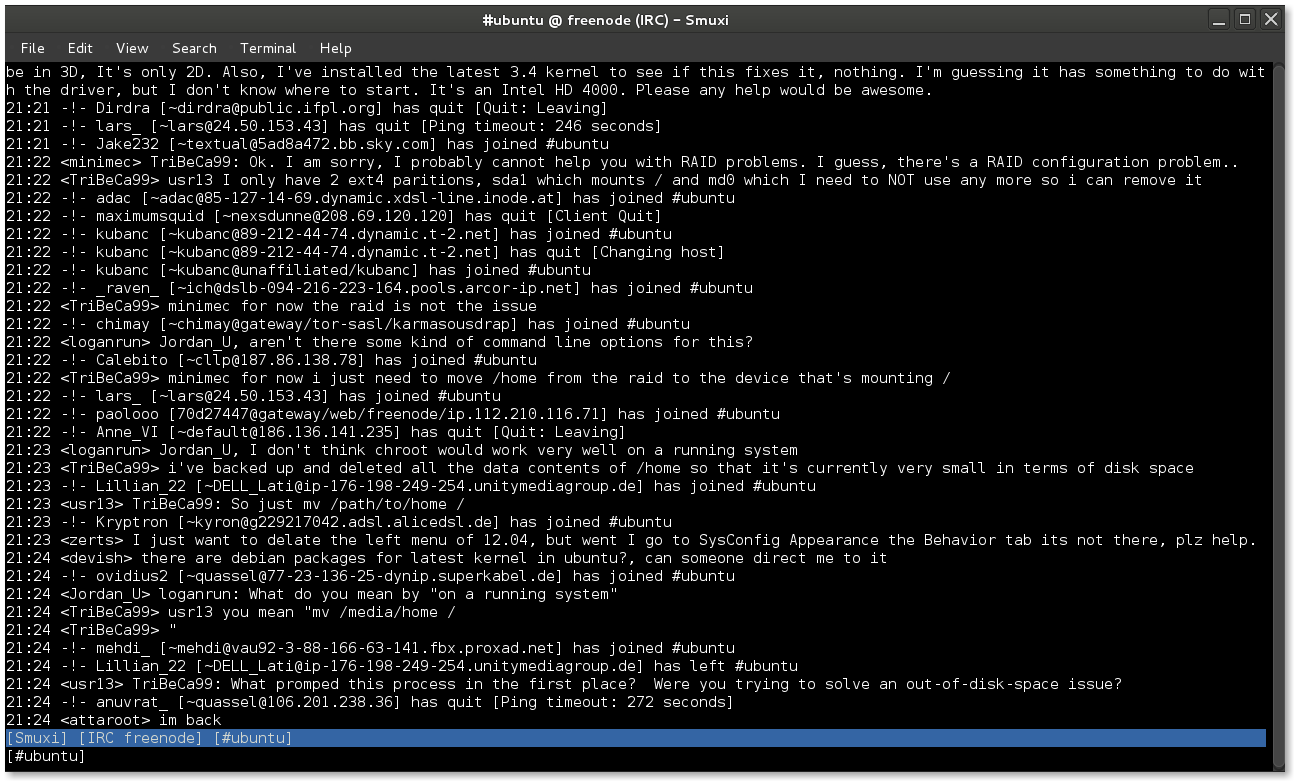
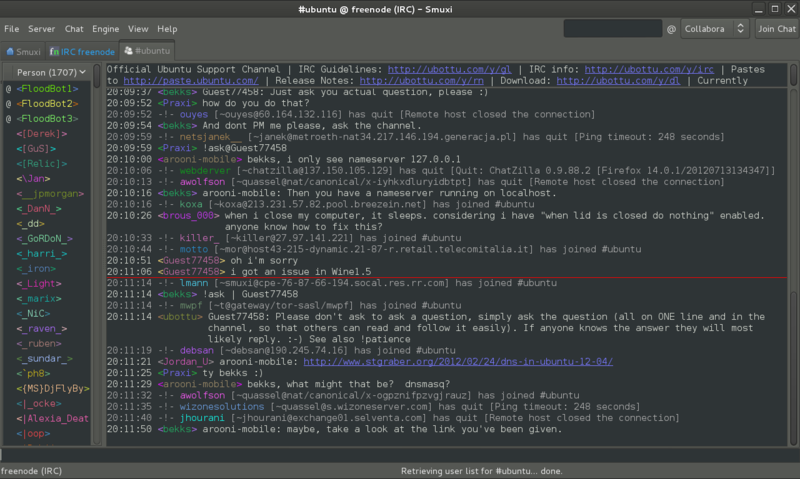
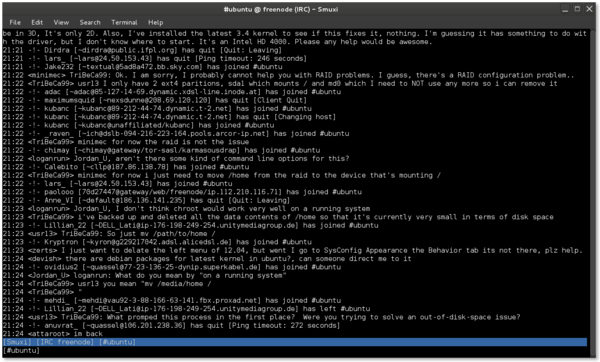
As longingly awaited I am very happy to announce Smuxi 0.8.10 codenamed "Tracy". During the development 8 bug reports and 15 feature requests in 136 commits were worked on making this release a major feature and minor bugfix release. Screenshot of Smuxi 0.8.10 in action Notable highlights in this release are: Integrated Spell Checking Everyone knows the "how do you spell that word again?" situation and either you don't care and send a possible typo or you go checking a dictionary which is kind of annoying. The good news is: with this release you no longer need to do that, as Smuxi includes automatic spell checking while you type messages. The bad news is that this feature is currently limited to Linux builds, and thus OSX and Windows build do not ship with it. The installers need to be extended and I haven't found pre-compiled OSX nor Windows binaries for the GTK+ spell checking library. Screenshot of Smuxi 0.8.10 showing spell checking in action Favicons for Server Tabs Distinguishing server tabs can be difficult, especially if you have plenty of them. All server tabs have the same icon so you need to search for the right name. I wondered why this issue doesn't happen so easily with a web browser which usually also has lots of tabs open. Besides the page name there is the favicon right in front. So why can't Smuxi make use of that simple but effective technology? Well, now it does! You connect to a known network, and Smuxi will download and show the favicon of the website. It just works and does everything in the background for you. Screenshot of Smuxi 0.8.10 showing favicons in action Quick Join Bar One thing that makes IRC really difficult for new comers is the important IRC concept that channels are network specific. So what happens is people try to find / join the channel they are looking for but on the wrong network. They have to connect to the right server/network and then switch to the right tab, before they can join the channel (using the /join command or join dialog). The developers of Smuxi had a brainstorming session and came up with something that should be easy enough for anyone to use and finally solves the issue: the quick join bar. You know which channel you want to join and which network, you enter the channel name, select the network from the list and hit the "Join Chat" button and you are done. Now Smuxi will do just the right thing for you and connects to that network if needed, joins the channel if needed, or switches to the channel if you are already there! Click here for a screencast of the Quick Join Bar in action Indention of multi-line messages Messages on IRC and also Twitter are often longer than a single line in Smuxi can show, thus it has to be split into a second line or more. The issue here is that the continuation line looks cluttered because it doesn't align with the first line. Here you can see an example for this issue: Screenshot of Smuxi 0.8.9 showing line breaks Ewww, that looks ugly, doesn't it? I will make this one short, here is the cure with indented multi-line messages: Screenshot of Smuxi 0.8.10 showing line breaks Enhanced Text Frontend The text frontend which is still in alpha state has received the following enhancements: new /exit command, new /help command, regular and xterm window title, and, several fixed crashes. Screenshot of Smuxi 0.8.10's text frontend Enhanced Commands The /network command by default shows now all connected and also available networks: Screenshot of Smuxi 0.8.10 showing network command The /connect command now allows you to connect by network name like this:




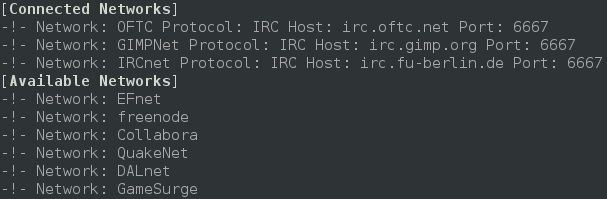
/connect freenode
Updated Translations
  • Portuguese (Pedro Ribeiro)
  • Chinese Simp (Dean Lee)
  • Danish (Joe Hansen)
  • Swedish (Martin Bagge)
  • Russian (Yuri Myasoedov)
New Translations
  • Croatian (Matias M)
  • partially Polish (lukasznaw)
Contributors Contributors to this release are the following people:
  • Mirco Bauer (126 commits)
  • Bianca Mix (translations)
  • Dean Lee (translations)
  • Joe Hansen (translations)
  • Yuri Myasoedov (translations)
  • Pedro Ribeiro (translations)
  • Matias M (translations)
  • Martin Bagge (translations)
  • lukasznaw (translations)
Thank you very much for your contributions to Smuxi! Already horny? Go here and get some! Update: Smuxi 0.8.10.1 About 2 months after the 0.8.10 release, Smuxi 0.8.10.1 with only important bugfixes and translation updates was released. This release includes the following 6 bugfixes: smuxi-server now honors the timezone of tweets, fixed a connection crash with InspIRCd-2.0 servers, quick join no longer opens another network tab, closing chats no longer crashes Smuxi sometimes, /connect irc.some-server.com works again and focusing the message area moves the focus back to the entry again.
Posted Tue Aug 21 23:16:05 2012

20 August 2012

Steve Kemp: Failing to debug a crash with epiphany-browser and webkit

Today I'm in bed, because I have le sniffles, and a painful headache. I'm using epiphany to write this post, via VNC to my main desktop, but I'm hating it as I've somehow evolved into a state where the following crashes my browser: Running under GDB shows nothing terribly helpful:
Program received signal SIGSEGV, Segmentation fault.
0x0000000000000000 in ?? ()
(gdb) bt
#0  0x0000000000000000 in ?? ()
#1  0x00007ffff51a0a46 in ?? () from /usr/lib/libwebkit-1.0.so.2
#2  0x00007ffff3d8f79d in ?? () from /usr/lib/libsoup-2.4.so.1
#3  0x00007ffff2a4947e in g_closure_invoke () from /usr/lib/libgobject-2.0.so.0
#4  0x00007ffff2a5f7f4 in ?? () from /usr/lib/libgobject-2.0.so.0
...
To get more detail I ran "apt-get install epiphany-browser-dbg" - this narrows down the crash, but not in a useful way:
Program received signal SIGSEGV, Segmentation fault.
0x0000000000000000 in ?? ()
(gdb) bt
#0  0x0000000000000000 in ?? ()
#1  0x00007ffff51a0a46 in finishedCallback (session=<value optimized out>, msg=0x7fffd801d9c0, data=<value optimized="optimized" out="out">) at ../WebCore/platform/network/soup/ResourceHandleSoup.cpp:329
#2  0x00007ffff3d8f79d in ?? () from /usr/lib/libsoup-2.4.so.1
#3  0x00007ffff2a4947e in g_closure_invoke () from /usr/lib/libgobject-2.0.so.0
#4  0x00007ffff2a5f7f4 in ?? () from /usr/lib/libgobject-2.0.so.0
..
So this crash happens in ResourceHandleSoup.cpp. Slowly I realized that this came from the webkit package. We see that the last call by name is to the function in line ResourceHandleSoup.cpp:329, that puts us at the last line of this function:
// Called at the end of the message, with all the necessary about the last informations.
// Doesn't get called for redirects.
static void finishedCallback(SoupSession *session, SoupMessage* msg, gpointer data)
 
    RefPtr<ResourceHandle> handle = adoptRef(static_cast<ResourceHandle*>(data));
    // TODO: maybe we should run this code even if there's no client?
    if (!handle)
        return;
    ResourceHandleInternal* d = handle->getInternal();
    ResourceHandleClient* client = handle->client();
    if (!client)
       return;
..
..
    client->didFinishLoading(handle.get());
 
So we see there is some validation that happens, then a call to "didFinishLoading" and somewhere shortly after that it dies. didFinishLoading looks trivial:
void WebCoreSynchronousLoader::didFinishLoading(ResourceHandle*)
 
      g_main_loop_quit(m_mainLoop);
      m_finished = true;
 
So my mental-debugging is stymied. I blame my headache. It looks like there is no obvious NULL-pointer deference, if we pretend client cannot be NULL. So the next step is to get the source, the build-dependencies and then build a debug version of webkit. I ran "apt-get source webkit", then editted the file ./debian/rules to add --enable-debug and rebuilt it:
skx@precious:~/Debian/epiphany/webkit-1.2.7$ DEB_BUILD_OPTIONS="nostrip noopt" debuild -sa
*time passes* The build fails:
  CXX    WebCore/svg/libwebkit_1_0_la-SVGUseElement.lo
../WebCore/svg/SVGUseElement.cpp: In member function  virtual void WebCore::SVGUseElement::insertedIntoDocument() :
../WebCore/svg/SVGUseElement.cpp:125: error:  class WebCore::Document  has no member named  isXHTMLDocument 
../WebCore/svg/SVGUseElement.cpp:125: error:  class WebCore::Document  has no member named  parser 
make[2]: *** [WebCore/svg/libwebkit_1_0_la-SVGUseElement.lo] Error 1
Ugh. So I guess we disable that "--enable-debug", and hope that "nostrip noopt" helps instead. *Thorin sits down and starts singing about gold* Finally the debugging build has finished and I've woken up again. Let us do this thing. I'd looked over the webkit tracker and the crashing bugs list in the meantime, but nothing jumped out at me as being similar to my issue. Anyway without the --enable-debug flag present in the call to ../configure the Debian webkit packages were built, eventually, and installed:
skx@precious:~/Debian/epiphany$ mv libwebkit-dev_1.2.7-0+squeeze2_amd64.deb x.deb
skx@precious:~/Debian/epiphany$ sudo dpkg --install libweb*deb
[sudo] password for skx:
(Reading database ... 173767 files and directories currently installed.)
Preparing to replace libwebkit-1.0-2 1.2.7-0+squeeze2 (using libwebkit-1.0-2_1.2.7-0+squeeze2_amd64.deb) ...
Unpacking replacement libwebkit-1.0-2 ...
Preparing to replace libwebkit-1.0-2-dbg 1.2.7-0+squeeze2 (using libwebkit-1.0-2-dbg_1.2.7-0+squeeze2_amd64.deb) ...
Unpacking replacement libwebkit-1.0-2-dbg ...
Preparing to replace libwebkit-1.0-common 1.2.7-0+squeeze2 (using libwebkit-1.0-common_1.2.7-0+squeeze2_all.deb) ...
Unpacking replacement libwebkit-1.0-common ...
Setting up libwebkit-1.0-common (1.2.7-0+squeeze2) ...
Setting up libwebkit-1.0-2 (1.2.7-0+squeeze2) ...
Setting up libwebkit-1.0-2-dbg (1.2.7-0+squeeze2) ...
skx@precious:~/Debian/epiphany$
Good news everybody: The crash still happens! Firing up GDB should hopefully reveal more details - but sadly it didn't.
Program received signal SIGSEGV, Segmentation fault.
0x0000000000000000 in ?? ()
(gdb) bt
#0  0x0000000000000000 in ?? ()
#1  0x00007ffff51a0a46 in finishedCallback (session=<value optimized="optimized" out="out">, msg=0xb03420, data=<value optimized="optimized" out="out">) at ../WebCore/platform/network/soup/ResourceHandleSoup.cpp:329
..
(gdb) up
#1  0x00007ffff51a0a46 in finishedCallback (session=<value optimized="optimized" out="out">, msg=0xb03420, data=<value optimized="optimized" out="out">) at ../WebCore/platform/network/soup/ResourceHandleSoup.cpp:329
329     client->didFinishLoading(handle.get());
(gdb) p client
$1 = <value optimized out>
At this point my head hurts too much, and I'm stuck. No quote today, I cannot be bothered.

NOKUBI Takatsugu: FSIJ join to Software Freedom Day

We, FSIJ join to Software Freedom Day 2012. Japanese Wiki page had publishd by Nobuhiro Iwamatsu, a developer of Debian Project. I prepared to broadcast the event by 100% Free Software, I can get many suggestion by the last article comments, thank you. The following is my recipie:
ffmpeg -s 320 240 -f video4linux2 -i /dev/video0 -b 128k \
-f alsa -ac 2 -i hw:0,0 -acodec vorbis -vcodec libtheora -r 25 -f ogg -\
oggfwd host.example 8000 passwd /test.ogv

19 August 2012

John Goerzen: Crazy Enough?

So far this year, I ve read somewhere in the neighborhood of 5000 pages. As I ve started to read more, I ve started to watch TV, movies, and Youtube less, because they are simply boring and shallow in comparison. War and Peace, in particular, deeply touched me. Lately I have been reading the Wheel of Time series, which has its own unique characteristics. Whether an epic (or super-epic, such as Wheel of Time) novel, or the Sherlock Holmes series, or nonfiction works, there is something magical about reading a book. We often see characters, real or fictional, that rise from obscurity to do great things for the world. We are transported in time and place to a time or place we will never be able to experience, perhaps because it is long past, or perhaps because it never was. But in any case, we can be inspired. I am reminded of this quote: The people crazy enough to think they can change the world are the ones that do. If someone told me that a street vendor in Tunisia would, in less than a year, cause the overthrow of 4 dictatorships and reform in a handful more, I would have, yes, thought that was crazy. And while Mohamed Bouazizi isn t a household name in much of the world, he managed exactly that. But not just him. It took crazy unarmed people to occupy Tahrir Square, some to die, for progress to be made in Egypt. This story is written all over history. People have done the impossible, have defied all odds, through sheer belief that they could. Civil rights have been granted due to the leaders we all know, but also due to the millions of marchers we don t. Changing the world doesn t have to mean that the world knows you. It just has to mean that you love the world, as Tolstoy pointed out:
Love hinders death. Love is life. All, everything that I understand, I understand only because I love. Everything is, everything exists, only because I love. Everything is united by it alone. Love is God, and to die means that I, a particle of love, shall return to the general and eternal source.
Whatever your stance on religion, this is a powerful quote. Sometimes particles of love might look crazy. But isn t it then that they are the most alive? Isn t it then that they are the greatest hindrance to death and despair?

Andrew Cater: Raspberry Pi - Debian Wheezy rather than Raspbian

I note that the Raspberry Pi folks are recommending the Raspbian fork of Debian for the Pi. This is the hard float port to ARM version 6 undertaken by Mike Thompson and Peter Green (who is also a Debian developer).

That being said, though, they have also released an armel copy that is fully binary compatible with Debian Wheezy for use with software that can't readily be rebuilt e.g. Oracle Java. This is understood to be slower than Raspbian but otherwise contains identical software.

The changes made by the Raspberry Pi folks are fairly minimalist: /opt contains some of the graphics example code which takes advantage of the non-free GPU and the raspi-config script under /usr/bin which allows initial configuration at first boot.

The /etc/apt/get/sources.list refers solely to Debian repositories and the software supplied by the Raspberry Pi project can be readily updated to latest Debian Wheezy. All in all a nice way to have a silent Debian machine in a tiny case.

18 August 2012

David Welton: Simple phone alerts with Gmail and Android

I have some long running server processes that I am going to launch soonish, and I want to be alerted when they're done. Using Gmail and Android, it's pretty easy:
  1. In Gmail, set up a new label, "Alerts" or something like that.
  2. Set up a filter in Gmail that matches messages along the lines of codered@example.com, and adds the Alerts label, does not skip the inbox and are always marked as important.
  3. Now, on your Android phone, in Gmail -> Settings -> Account settings (select the account) -> Sync inboxes and labels, and select your Alerts label.
  4. Then, go back and select Labels to Notify in settings, select "Alerts", and add it to "Notify in Status bar", select an appropriate ringtone, set vibrate to 'always', and deselect 'Notify once' - because we want to be notified any time an alert comes in.
That should do it - on your server, set up an alias in something like /etc/aliases that redirects email from the alert alias - codered in this case - to your own email address. Now, you can script alerts that will get their own ringtone on your phone like so: echo "Dave, I can't let you do that" mail -s "Warning, computer malfunction" codered@example.com Pretty simple and effective if you need a simple way for your computer to let you know that it needs attention right now.

16 August 2012

Lisandro Dami&aacute;n Nicanor P&eacute;rez Meyer: QExtSerialPort in Debian experimental

After some rants about the status of different Qt-based serial port libs, I'm happy to announce that today QExtSerialPort was accepted in Debian experimental (this last link may give a 404 for some time, that's ok).

A great effort was done upstream to put the source in a suitable state for being included in Debian. Thank you all guys!

I packaged a beta version, so I uploaded it to experimental.

In case you are wondering why packaging a lib with (yet) no apps depending on it, the answer is quite simple: there are lots of people already using it in it's home projects (me included). Now those projects have the chance to get into Debian too :-)

As a side note, there is also another nice implementation called QtSerialPort. I have also tested it and works pretty fine too. It aims to become part of Qt as an add-on someday.


Russ Allbery: Review: Getting Started with Dwarf Fortress

Review: Getting Started with Dwarf Fortress, by Peter Tyson
Publisher: O'Reilly
Copyright: May 2012
ISBN: 1-4493-1494-5
Format: Trade paperback
Pages: 219
If you're unfamiliar with Dwarf Fortress, you're in good company. Most people are, even people who play video games regularly. It was heavily inspired by roguelike games: games such as Hack and Rogue and their more recent variations, which have been around since the 1970s and are still frequently played with simple character graphics on 2D maps. Dwarf Fortress even has a roguelike gameplay mode, but the core of the game (and the only part of the game covered in this book) is the fortress mode, where the player controls a band of dwarfs in an attempt to construct and maintain a fortress. All of this is done (by default, at least) in a simulated-text interface filled with a barrage of strange characters and symbols. A Dwarf Fortress game in progress is almost incomprehensible to the uninitiated. (There are graphical tile sets available, but all the illustrations in this book assume the default display mode.) Dwarf Fortress gains its cult popularity (sufficient to support the primary developer solely through voluntary donations; the game is free) from the incredible depth and richness of the world. Almost everything is modeled in startling detail, down to the individual items of clothing that each dwarf wears, their personalities and history, and a considerable part of the industrial lifecycle of any goods that the fortress needs to produce (such as food and all-important alcohol). That's where this book comes in. The game is so massive and involves so many variables, industries, needs, requirements, and perils that the first-time player is likely to see their first games collapse due to resource problems they have no idea how to address. Getting Started with Dwarf Fortress walks the player through the initial fortress setup, the resource cycles, and the fundamentals of the various parts of the game one has to monitor. The fact that this discussion takes over 200 pages should give you an idea of the depth of the game. I should stop here and warn that, similar to my RPG sourcebook reviews, I read this book somewhat against its intended purpose. I haven't played Dwarf Fortress and don't currently intend to. It's not quite my game type: I don't like open world construction games in which it's possible to lose (and thereby lose all the things that one has built). But the idea of the game, the way it's developed, and the fact that O'Reilly would publish a book about it is so delightfully strange that I wanted to get a feel for the game without investing the time required to learn it. Thankfully, while the book is designed to be a tutorial, it also does an excellent job at conveying the feel of a game. Getting Started with Dwarf Fortress is divided into eleven chapters. After a chapter of introduction, it goes over site selection, some of the options for your initial party, and recommended settings for both. It then provides some advice for the initial rooms and initial fortress layout to get started. Subsequent chapters are more topic-oriented, covering food, merchants, resource management (including Strange Moods), digging, and the various chains of industry. The final chapters cover some of the more intricate details of dwarven life, such as justice, vampires, and hospitals, and then provide an introduction to the military and to dwarven engineering. The engineering chapter, in particular, makes it clear that vast complexity and possibility is left unexamined. One drawback of the printed version of the book (I don't know if this also applies to the ebook) is that all of the screen shots here are black and white. This makes Dwarf Fortress's already-forbidding presentation even more difficult to understand. At times, I had a hard time picking out features that were described in the text. A look at on-line screenshots quickly shows that color is massively helpful in making sense of all the little glyphs. I'm sure color printing would have made the printed version prohibitively expensive, but it is a loss. The text, though, is excellent. Not only is it clear and helpful (although with the caveat that I've not personally tested it), it captures much of the humor and feel of the game. Dwarf Fortress incorporates computer-generated storytelling that narrates the events of the game (and the backstory of the world), which has sparked a tradition of delightfully wry commentary on games, game mechanics, and events in the game (particularly the ones that cause the cascading destruction of the whole fortress). Tyson captures that tone brilliantly, weaving it throughout his descriptions. This is a tutorial that's genuinely fun to read. (Although the Tim Denee comics ending chapters sadly didn't work for me.) It's certainly possible to get started with Dwarf Fortress without this book. There are other tutorials on-line, as well as an impressively huge wiki. But this is a great introduction and is entertainment in its own right. If you've thought about playing the game, or if, like me, you want a good feel for what it's like without investing the time in actually playing it, I recommend it. I should probably note that this book covers Dwarf Fortress up to 0.34.07, and the dead tree version that I have obviously won't be further updated. O'Reilly does note on the back cover that if you purchase the ebook edition, it will receive free updates for the "life of the edition" (however long that is). If you're worried about subsequent changes in the game making the book obsolete (given the ongoing active development, this is something of a worry, although this book mostly covers fundamentals), you may want to grab the electronic version. Rating: 8 out of 10

14 August 2012

Sven Mueller: UK going completely crazy on cryptography law.

It seems that the UK government recently passed a law that makes it illegal to be unable to decrypt what the law enforcement entities think is encrypted: From http://falkvinge.net/2012/07/12/in-the-uk-you-will-go-to-jail-not-just-for-encryption-but-for-astronomical-noise-too/:
But it s worse than that. Much worse. You re not going to be sent to jail for refusal to give up encryption keys. You re going to be sent to jail for an inability to unlock something that the police think is encrypted. Yes, this is where the hairs rise on our arms: if you have a recorded file with radio noise from the local telescope that you use for generation of random numbers, and the police asks you to produce the decryption key to show them the three documents inside the encrypted container that your radio noise looks like, you will be sent to jail for up to five years for your inability to produce the imagined documents.
This is just insane. Edit: The law was created several years ago, but the blog post somehow made me think it was more recent.

Michal &#268;iha&#345;: Weblate 1.2

Quite on schedule, Weblate 1.2 has been released today. It comes with lot of improvements, especially for project admins, handling of po files and improved performance. Full list of changes for 1.2: You can find more information about Weblate on it's website, the code is hosted on Github. If you are curious how it looks, you can try it out on demo server. You can login there with demo account using demo password or register your own user. Ready to run appliances can be found in SUSE Studio Gallery. Weblate is also being used https://l10n.cihar.com/ as official translating service for phpMyAdmin, Gammu, Weblate itself and others. If you are free software project which would like to use Weblate, I'm happy to help you with set up or even host Weblate for you (this will be decided case by case as my hosting space is limited). Update: Weblate appliace has been updated to 1.2 as well.

Filed under: English Weblate 0 comments Flattr this!

13 August 2012

Jonathan Wiltshire: From building to demolishing

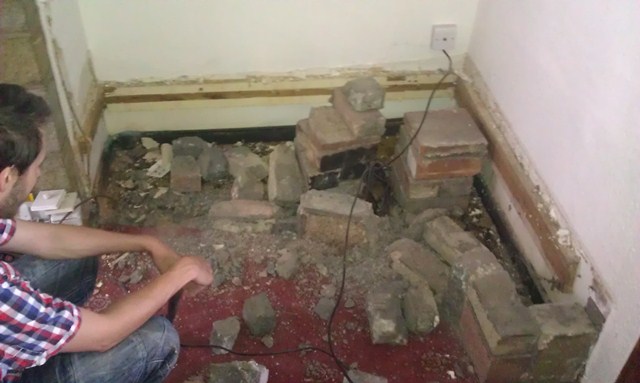
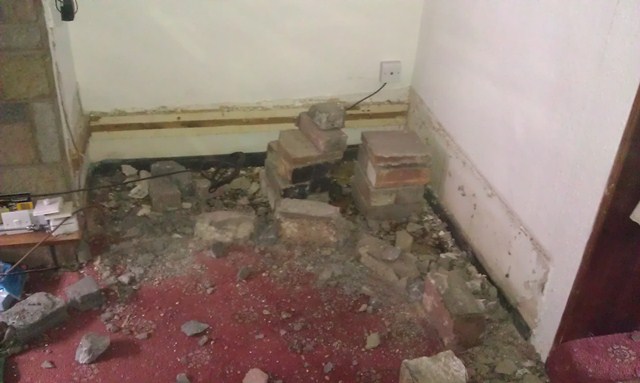
Building things is fun, but sometimes it s nice to have a little light relief with a sledgehammer. Saturday was one of those occasions; there is was a decorative wall in the corner of our lounge. It should have died about thirty years ago and I ve hated it ever since we moved in a year ago. First job was to remove the sockets and cable running up the side, which was a nice surprise in itself: Looks like whoever installed it believed that mastick and wallpaper is a suitable covering to stop drill bits. Hmm. Next we could take out the wall itself. In this case the wooden top was sealed down with more mastick and supported by piles of bricks, then the wall had been secured with concrete and not proper mortar. Fortunately a good sledgehammering soon took care of that: Those bricks truly were hideous, and they are all around the dodgy gas fire and another similar feature in the opposite corner of the room. Incidentally, the newly-revealed carpet in the void should also have died in the seventies (it went straight into the skip), but at least now we have some understanding of the mysterious wallpaper we found under the stairs. Finally we had enough room to work with surface trunking (a temporary housing until the gas pipe is removed and we can bury the cables properly): And the final result, with the sockets moved to a more sensible level and the cable properly protected, new LightwaveRF sockets in the corner and a shiny new aerial point ready for cabinets to go into the gap:
13/08: A couple of people pointed out that in the first photo, the offending cable is in a protected zone. This is true, but it wiggles half way round the room from the CU in a similar fashion first sometimes in trunking, sometimes clipped to the fireplace, and sometimes masticked and papered flush with the plaster surface.
From building to demolishing is a post from: jwiltshire.org.uk Flattr

John Goerzen: Summer

It s been a hot year in Kansas this year. Really hot. Our average high for July was 101F / 38C. It s also been extremely dry. So we haven t had too many pleasant opportunities to enjoy a bit of an upcycling project I had with the boys. When we renovated our old farmhouse, we had two chimneys removed. The bricks were saved in a large pile out back, and we haven t really touched them in the last 5 years. I got the idea at some point that it would be nice to have a fire ring on our yard. The boys love campfire-style cooking, and enjoy helping gather kindling and watching the fire grow. I had looked at fire rings in stores, but just couldn t bring myself to pay $60 or $100 or even more for what was really a piece of round metal. I decided we would find a way to build our own fire ring. So the idea of chimney bricks seemed perfect. Some of these bricks still have mortar on them, so the result is imperfect, but it is functional. More importantly, the boys helped. They picked out bricks one at a time, set them in the wheelbarrow (or even carried a few themselves, as Jacob insisted on doing sometimes.) Then we d dump them out on the ground, and I d make some attempt at making the thing round, while the boys would put them on the pile. We did this over the course of several evenings, with me filling in on some of it after they lost interest. When we got it done, they of course loved cooking outside. I made sure that we placed it in a place that will be in the shade every summer evening so we d be comfortable. I made no attempt to mortar it in; this way, it s easy to move or resize. And it s safer for the boys than a metal one, since the outer edge never even gets warm to the touch. Anyhow, it finally got a little cooler last week, so we cooked out there for dinner two days in a row. One day, after eating, the boys came back out to help put out the fire with the hose. After that, Jacob and I went out there to eat dessert. He sat on the grass, and I sat down next to him. He scooted over a bit to be closer to me. Pretty soon, Oliver came running out too, and sat on my lap. The three of us just sat there on the grass, eating our desserts and enjoying the evening. It s the kind of moment that makes a dad happy. The other evening, they again helped me put out the fire with a hose. They d been active that day, so after I finished hosing down the fire ring, I gave them each a small spray with the hose. After a brief flicker of indecision, they both decided this was hilarious. Jacob took off running, yelling You ll never catch me! (And clearly hoping I would.) Oliver copied him, and so I proceeded to chase them around the yard with a hose for quite awhile. There was much laughter from them, and they wound up totally soaked and happy. Another good evening. You never know what will happen outdoors, but so often it is very good.

12 August 2012

John Goerzen: A Verbose, Hands-On Nexus 7 Review

Some of you may have noticed that I am not a concise author. Perhaps that has something to do with the fact that I am not a concise reader. I like facts, details, and lots of them. So as a recent Nexus 7 purchaser, here you go. Genesis I ve long used Android devices, and last year had a company-issued Motorola Xoom, which was the first Google Experience tablet with Honeycomb. That tablet has specs roughly similar to iPads; its 10.1 screen was the same, the 1280 800 screen was better than the iPad available at the time, and its 730g weight identical to the early iPads (though 10% higher than the current iPad). I lost access to it when I changed jobs, and had been without a tablet until recently. Other devices I own are the Galaxy Nexus, sporting a 4.65 screen; and what s now called the Kindle Keyboard, with an eInk screen. I had been somewhat interested in the Kindle Fire, but the closed nature and limited capability of the system kept me away. The Nexus 7 reviews, however, were stunning, as was the price. $200 for a great tablet. I wound up buying the $250 16GB model. But not until after I spent a great deal of time thinking about size. Physical Size My main concern was that the Nexus 7 would be too small to be useful. I had never been particularly pleased with my input speed on the Xoom. I tried to touch type on it, but was just never fast enough to surpass frustratingly slow. I have long been a fast and accurate typist on keyboard; well over 100 words per minute, and it is frustrating when my fingers can t maintain that speed. I figured the situation would be even worse on the Nexus 7, given its smaller size. I also found the Xoom to sometimes feel a little small with the 10 screen, and was concerned about that as well. And finally, 7 doesn t sound all that much larger than 4.65 . However, having actually had the Nexus 7 for a little while now, I m very pleased with the size, and may even prefer it. The 10 tablets are just too big and heavy to comfortably hold in one hand, and I ve realized that part of my Xoom frustration was the fact that I had to set it down and prop it up for anything beyond very brief use. At 340g, the Nexus 7 is less than half the weight of the Xoom or iPad, and it makes a huge difference. While still nowhere near where I d be with a keyboard, two-thumb typing in portrait mode, or even something approaching touch typing in landscape mode, is possible on the Nexus 7. The screen size hasn t been a bother, at all. This may be due to the fact that it s higher resolution (it s 1280 800 like the Xoom, but those pixels are crammed into only 7 ). I think it s also partly due to the fact that the browser in Jelly Bean is significantly better than the one in Honeycomb, and perhaps that websites are better at tablet-friendliness, too. Overall, the Nexus 7 feels a lot farther from the size of a laptop than did the Xoom, and as such is more prone to come with me in lots of situations, I think. It works reasonably well with foldable Bluetooth keyboards, so when thinking about a laptop replacement or alternative, that might be the way I go. A Bluetooth mouse also works with it, though I found it didn t provide near the utility that a BT keyboard does. Display The display is both amazing and disappointing. Browse some photos and some of them will show up in eye-popping clarity. Websites display fine. But the screen can also take on a washed-out appearance at times. I am notoriously picky in my displays, and this bothered me enough that I researched it. Analysis has shown that poor firmware calibration has lead to the compression of highlights, which mirrors what I was seeing. I am mostly used to it by now, but it s a disappointment. Most of the time, though, the screen is excellent. In comparison to my eInk Kindle, however, I don t think any tablet will ever be as good for book reading. The eInk screen truly is easier on the eyes, and the reflection of overhead lights on the Nexus 7 display can be distracting at first. I have had occasional issues with it not registering touches properly. This is always cleared up by touching the power button to put the unit to sleep, then waking it back up. Other Hardware There are three hardware buttons: power and volume up/down. Physically, the device fits my hand well, though I might wish it was a little lighter like my Kindle. Charging is accomplished via high-power 2A micro-USB, and there is, of course, a headphone port. There is no alert LED like my Galaxy Nexus has, and no vibration feature. The speaker is on the back, and the microphones along the left side a position which, it appears, many Nexus 7 cases are blocking. Battery Life I am astonished at how good this device is battery-wise, especially compared to the battery disaster that is the Galaxy Nexus. Google claims the Nexus 7 can survive 8 hours of solid screen-on use, and I don t doubt it. Mine s never gotten low enough to get a solid measurement. Wifi The wifi works well, as far as it goes. The wifi doesn t support 802.11n in 5GHz, which although somewhat common for devices like this, is a bit of a disappointment. Software The big story about the Nexus 7 is Jelly Bean. I had used Honeycomb on the Xoom, and Ice Cream Sandwich on my Galaxy Nexus, so I m familiar with its predecessors. Let s take a look. Project Butter Much has been made of Project Butter, Google s attempt to optimize Android to improve its responsiveness and the smoothness of things like scrolling. I can say they have done quite well. This device is so smooth you don t notice how smooth it is. It wasn t until I had been using it for a bit that I really noticed. That s a job well-done. Chrome The browser in Jelly Bean is now called Chrome. I am not sure if this is just marketing or not. It doesn t really feel all that different from previous versions of the Android browser, and the changes have been along the lines of incremental changes Google has introduced before. One of the very best new features happens when you touch a link that is close to other links on a page. Rather than getting a pretty much random page, Chrome pops up a partial-screen zoom box showing the part of the page near where your finger touched. With everything showing up huge, it is now easy to touch the precise link you want. Do so, and the box goes away, and your page loads. I am amazed at how much improvement this one change brings. Compared to ICS Browser, bookmarks can be brought up quicker, and the tab interface is nicer. All is not perfect in the land of Chrome, however. It contains several regressions from the Ice Cream Sandwich browser. I have two complaints about bookmarks. One is that previous versions of the browser would show thumbnails of sites in the bookmark viewer. This was a nice navigation aid. Chrome shows only favorites icons, if one is available, or a generic icon if not. Also, the bookmarks synced with other Android devices are called, confusingly enough, Desktop Bookmarks now, and require an extra tap to access. I have had occasional trouble with Chrome not wanting to prompt for credentials for servers on my LAN that use HTTP auth. Chrome has also removed the ICS browser s ability to save a page, including all its elements, for offline viewing. Good for things like an airline checkin screen and such. I have no idea why Chrome removed this. I installed the Firefox Beta for Android, which also doesn t have the offline save feature, but it does have a save to PDF feature. Soft Keyboard The on-screen soft keyboard in Jelly Bean is a significant regression from previous versions of Android. My biggest complaint is the lack of visual feedback for keypresses. On earlier versions of Android, when you push a key, you ll see an image of it pop up on the screen, offset a little from the location of the key itself. In JB, all that happens is that the key itself changes colors. Not very helpful, because it is under your finger at the time. This small thing frustrates me to no end. The keyboard in ICS introduced some nice features as well, mainly long-presses as shortcuts to other features. For instance, you can long-press a key on the top row of letters to get numerals without having to switch to the number mode. Similarly, long press the period and you get other common punctuation. The JB keyboard removed both of those features. Thankfully, in the Market, there is an app called Ice Cream Sandwich Keyboard. It appears geared towards people running earlier versions of Android. Sadly, it is also a step up over what we have in JB. Google Now and Voice Recognition The other main headline feature in Jelly Bean is Google Now. The somewhat-competitor to Apple s Siri, Google Now takes a bit of a different approach than Apple. It is said that Siri is better than Google Now at responding to queries, but Google Now is better at predicting what you want to know before you ever ask. I haven t ever used Siri, but I would buy that explanation. Google Now is available with a swipe up from the bottom of the screen, or with a single touch from any Home screen. Bring it up and it shows you current information about what it thinks you need to know. Examples include weather and forecast information, time to get to home or work from your current location, alerts that you need to leave soon to get to a certain place on time, flight schedules, sports scores, etc. Google Now has been mostly a gimmick to me, but that may be because I fall outside its target demographic in significant ways. I live nowhere near a public transportation system, work at home for the most part, haven t flown wince I ve had the Nexus 7, don t follow sports, and already know how long it takes to get places (and when it varies, it s because of muddy roads or harvest neither things that traffic services know about.) The weather widget always seems to show the temperature from a couple of hours ago. It does show the weather in your current location. Well, mostly. I was in Newton, KS one day. I tapped on the icon for more detail. That simply took me to a Google search for weather Newton . Which showed me the weather for Newton, Massachusetts 1600 miles away. Fail. Speech recognition in JB is definitely improved. It is somewhat useful with Google Now. I like being able to simply say set alarm for 30 minutes. And it does it a lot quicker than I could in the interface. It s supposed to be able to let me bring up my contacts in the same way, but it is much more likely to try turning such an attempt into a Google search than an actual display of a contact. It s picky on the precise language used for setting an alarm too; say it slightly differently, and it s another Google search. JB also supports limited offline speech recognition. I say limited because it s a bit strange. I have, for instance, a Remember the Milk widget on my home screen. It has a microphone icon to use to speak a new reminder. Tap it, and you can t use it offline. It also has a button that brings up the on-screen keyboard. Do that, then touch the microphone on the keyboard, and you can use offline recognition. I have no idea how to explain this difference, since both are clearly using Google s engine. The speech recognition is indeed better, and might make it suitable for use instead of a keyboard for composing short texts and such. But it rarely produces even a sentence that I don t have to correct in some way, even now. Conclusion Despite some of its shortcomings, I am very fond of the Nexus 7. It is an excellent device. And at $200-$250, it is an AMAZING device. I am truly impressed with it, and don t regret my purchase at all.

11 August 2012

Paul Tagliamonte: fortunes-wilde

In case anyone s interested in such things, I ve packaged up some Oscar Wilde quotes, and threw them up on github (@fortunes-wilde) If a ton of people are interested, i ll consider maintaining it for real :)

Russ Allbery: Review: Design Patterns

Review: Design Patterns, by Erich Gamma, et al.
Author: Erich Gamma
Author: Richard Helm
Author: Ralph Johnson
Author: John Vlissides
Publisher: Addison-Wesley
Copyright: 1995
Printing: September 1999
ISBN: 0-201-63361-2
Format: Hardcover
Pages: 374
Design Patterns: Elements of Reusable Object-Oriented Software by the so-called "Gang of Four" (Gamma, Helm, Johnson, and Vlissides) is one of the best-known books ever written about software design, and one of the most widely cited. The language introduced here, including the names of specific design patterns, is still in widespread use in the software field, particularly with object-oriented languages. I've had a copy for years, on the grounds that it's one of those books one should have a copy of, but only recently got around to reading it. The goal of this book is to identify patterns of design that are widely used, and widely useful, for designing object-oriented software. It's specific to the object-oriented model; while some of the patterns could be repurposed for writing OO-style programs in non-OO languages, they are about inheritance, encapsulation, and data hiding and make deep use the facilities of object-oriented design. The patterns are very general, aiming for a description that's more general than any specific domain. They're also high-level, describing techniques and methods for constructing a software system, not algorithms. You couldn't encapsulate the ideas here in a library and just use them; they're ideas about program structure that could be applied to any program with the relevant problem. With the benefit of seventeen years of hindsight, I think the primary impact of this book has been on communication within the field. The ideas in here are not new to this book. Every pattern in Design Patterns was already in use in the industry before it was published; the goal was taxonomy, not innovation. One would not come to Design Patterns to learn how to program, although most introductory texts on object-oriented programming now borrow much of the pattern terminology. Rather, Design Patterns is as influential as it is because it introduced a shared terminology and a rigor around that terminology, allowing writers and programmers to put a name to specific program structures and thus talk about them more clearly. This also allows one to take a step back and see a particular structure in multiple programs, compare and contrast how it's used, and draw some general conclusions about where it would be useful. I have the feeling that the authors originally hoped the book would serve as a toolbox, but I think it's instead become more of a dictionary. The pattern names standardized here are widely used even by people who have never read this book, but I doubt many people regularly turn to this book for ideas for how to structure programs. Design Patterns is divided into two parts: a general introduction to and definition of a software pattern followed by a case study, and then a catalog of patterns. The catalog is divided into creational patterns (patterns for creating objects), structural patterns (patterns for composing objects into larger structures), and behavioral patterns (patterns for interactions between objects). Each pattern in turn follows a very rigid presentation structure consisting of the pattern name and high-level classification, its basic intent, other common names, a scenario that motivates the pattern, comments on the applicability of the pattern, the structure and classes or objects that make up the pattern, how those participants collaborate, how the pattern achieves its goals, comments on implementation issues, sample code, known uses of the pattern in real-world software, and related patterns. As with a dictionary, the authors go to great lengths to keep the structure, terminology, and graphical representations uniform throughout, and the cross-referencing is comprehensive (to the point of mild redundancy). As for the patterns themselves, their success, both as terminology and as useful design elements, varies. Some have become part of the core lexicon of object-oriented programming (Factory Method, Builder, Singleton), sometimes to the point of becoming syntactic elements in modern OO languages (Iterator). These are terms that working programmers use daily. Others aren't quite as widespread, but are immediately recognizable as part of the core toolkit of object-oriented programming (Adapter, Decorator, Proxy, Observer, Strategy, Template Method). In some cases, the technique remains widespread, but the name hasn't caught on (Command, for example, which will be immediately familiar but which I rarely hear called by that name outside of specific uses inside UI toolkits due to ambiguity of terms). Other patterns are abstract enough that it felt like a bit of a reach to assign a name to them (Bridge, Composite, Facade), and I don't think use of those names is common, but the entries are still useful for definitional clarity and for comparing similar approaches with different implications. Only one pattern (Interpreter) struck me as insufficiently generic to warrant recording in a catalog of this type. So far, so good, but the obvious question arises: if you've not already read this book, should you read it? I think the answer to that is debatable. The largest problem with Design Patterns is that it's old. It came late enough in the development of object-oriented programming that it does capture much of the foundation, but OO design has continued to change and grow, and some patterns have either been developed subsequently or have become far more important. For example, Model-View-Controller is conspicuous by its absence, mentioned only in passing in the discussion of the Observer pattern. Any pattern catalog written today would have an extensive discussion. Similarly absent are Inversion of Control and Data Access Object, which are much more central to the day-to-day world of the modern programmer than, say, Memento or Visitor. One could easily go on: Lazy Initialization, Mock Object, Null Object... everyone will have their own list. A related problem is that all the implementation examples are shown in either C++ or Smalltalk (occasionally both). Those were probably the best languages to use at the time, but it's doubtful a modern rewrite would choose them. Smalltalk, in particular, I found nearly incomprehensible for the uninitiated, to the point where I ignored the code and only read the surrounding English description. C++ fares better, but Design Patterns occasionally drifts off into tedious discussions of how to work around C++'s limitations in ways that are irrelevant to the pattern itself and would not be necessary in, say, Java or Python. (This is ameliorated by the fact that C++, unlike Smalltalk, is still in widespread use, so those discussions remain moderately helpful for some readers.) Design Patterns is not, therefore, a very good source for a working knowledge of the most common patterns in use today. It has also become somewhat obsolete via its own success: the concept of a design pattern has become so popular that nearly all introductory texts include at least a basic discussion of design patterns and an introduction to the most notable and useful patterns. I think that's a more comfortable and more efficient way to pick up the basics than reading through this book, which is somewhat dense and which expects from the reader a reasonably good working knowledge of object-oriented programming. And, once you have the basics, MVC, DAO, and similar design patterns are probably more important than the more subtle design patterns presented here. That said, I think the rigor of description and the comparisons and discussions here still have some value. Design Patterns encourages the reader to look at patterns from a higher-level perspective, to think about meta-patterns such as the balance between data hiding and access, or between structure designed for the present purpose and structure that's adaptable to future needs. It's also mildly interesting from a historical standpoint; one can see the inspiration for future language designers in how problems are described here, and see how many of the implementation issues and negative consequences have been corrected or simplified by richer language designs. Overall, I would hesitate to recommend buying this book today, particularly at new textbook prices. But if you're a working object-oriented software designer or programmer, I think it's worth checking out from a library (and, thanks to its influence, any library with a decent software design section will almost certainly have a copy). Read the overall discussion, skim the catalog, and read the discussion of the patterns that strike your interest. It may help provide some additional structure and perspective to how you think about OO design. Rating: 6 out of 10

10 August 2012

Petter Reinholdtsen: Notes on language codes for Norwegian docbook processing...

In docbook one can specify the language used at the top, and the processing pipeline will use this information to pick the correct translations for 'chapter', 'see also', 'index' etc. And for most languages used with docbook, I guess this work just fine. For example a German user can start the document with <book lang="de">, and the document will show up with the correct content with any of the docbook processors. This is not the case for the language I am working with at the moment, Norwegian Bokm l. For a while, I was confused about which language code to use, because I was unable to find any language code that would work across all tools. I am currently testing dblatex, xmlto, docbook-xsl, and dbtoepub, and they do not handle Norwegian Bokm l the same way. Some of them do not handle it at all. A bit of background information is probably needed to understand this mess. Norwegian is not one, but two written variants. The variants are Norwegian Nynorsk and Norwegian Bokm l. There are three two letter language codes associated with these languages, Norwegian is 'no', Norwegian Nynorsk is 'nn' and Norwegian Bokm l is 'nb'. Historically the 'no' language code was used for Norwegian Bokm l, but many years ago this was found to be bad idea, and the recommendation is to use the most specific language code instead, to avoid confusion. In the transition period it is a good idea to make sure 'no' was an alias for 'nb'. Back to docbook processing tools in Debian. The dblatex tool only understand 'nn'. There are translations for 'no', but not 'nb' (BTS #684391), but due to a bug (BTS #682936) the 'no' language code is not recognised. The docbook-xsl tool chain only recognise 'nn' and 'nb', but not 'no'. The xmlto tool only recognise 'nn' and 'nb', but not 'no'. The end result that there is no language code I can use to get the docbook file working with all of these tools at the same time. :( The correct solution is to use <book lang="nb">, but it will take time before that will work with all the free software docbook processors. :( Oh, the joy of well integrated tools. :/

NOKUBI Takatsugu: How do I broadcast video streaming with Free Software?

I, as a member of FSIJ, consider to broadcast a Software Freedome Day in Japan. In the past, I can do it with gstreamer and icecast2 in The 5th International GPLv3 Conference. Howerver, gstreamer command is very complex and the Interface had changed, so I can t re-do it by my old script. Usteram is easy to use, but it is not Free Software. I could find such packages in Debian repos: I ll try to use them and to find the good tool.

Matthew Garrett: Thoughts on the SUSE Secure Boot implementation

There's a post here describing SUSE's approach to implementing Secure Boot support. In summary, it's pretty similar to the approach we're taking in Fedora - a first stage shim loader is signed with a key in db, it loads a second stage bootloader (grub 2) that's signed with a key that's in shim, the second stage bootloader loads a signed kernel. The main difference between the approaches is the use of a separate key database in shim, whereas we are currently planning on using a built-in key and the contents of the firmware key database.

The main concern about using a separate key database is that applications are able to modify variable content at runtime. The Secure Boot databases are protected by requiring that any updates be signed, but this is less practical for scenarios where you want the user to be able to modify the database themselves while still protecting them from untrusted applications installing their own keys. SUSE have solved this problem by not setting the runtime access flag on the variable, meaning that it's inaccessible once ExitBootServices() has been called early in the init sequence. Since we only start running any untrusted code after ExitBootServices(), the variable can only be accessed by trusted code.

It's a wonderfully elegant solution. We've been planning on supporting user keys by trusting the contents of db, and the Windows 8 requirements specify that it must be possible for a physically present user to add keys to it. The problem there has been that different vendors offer different UI for this, in some cases even requiring that the keys be in different formats. Using an entirely separate database and offering support for enrolment in the early boot phase means that the UI and formats can be kept consistent, which makes it much easier for users to manage their own keys.

I suspect that we'll adopt this approach in Fedora as well - it doesn't allow anything that our solution wouldn't have, but it does make some of them easier. Full marks to SUSE on this.

comment count unavailable comments

9 August 2012

Don Armstrong: Migrating from Subversion to git with git-annex

Recently, I've started converting many of my subversion repositories to git, some of which contain fairly large files (2-3G). However, git can be slow to deal with repositories with large files, and it also isn't able to selectively discard unneeded files when disk space is pressing. Thankfully, git-annex resolves most of these problems with git, but the process required to use git-annex on a converted subversion repository is slightly complicated. Basic conversion of svn to git The basic conversion of svn to git is done using git-svn:
 git svn clone file:///srv/svn/foo --no-metadata -A authors.txt -T trunk foo
where /srv/svn/foo is the subversion repository, authors.txt is a list of login = Full Name <email@example.com> pairs matching each of the subversion commit authors, and foo is the git repository to create. git-svn has a ton of useful options, but the basic invocation above is all I'm concerned with. Migrating large files from git into git-annex In order to migrate from git to a git+git-annex setup, we'll have to walk the entire commit history, and edit each commit to instead store large files in git-annex, replacing the large file with a symlink, and finally eliminate all of the references to the old large objects, and do garbage collection. Because we may have the same file move around, we're going to use the git-annex SHA1 backend instead of the default WORM backend which is based on filename and size, and init git-annex.
  cd foo; echo '* annex.backend=SHA1' > .git/info/attributes
  git annex init
Then, we're going to filter out the large files using git filter-branch. To do that, we'll first, we'll create a little helper script git_annex_add.sh, which will remove the file from the git repository, add to git annex, and fix up the symlinks:
 #!/bin/bash
 f="$1";
 git rm --cached "$ f ";
 git annex add "$ f ";
 annexdest="$(/bin/readlink -v $ f )";
 ln -sf "$ annexdest#../../ " "$ f ";
 echo -n "Added: "
 ls -l "$ f ";
Then we will run filter-branch, and annex all files larger than 5 megabytes. [Tweak the find command if you want to do something different.]
 git filter-branch  --tag-name-filter cat --tree-filter \
'find . -ipath \*.git\* -prune -o -path \*.temp\* -prune -o -size +5M -type f -print0 xargs -0 -r -n1 ~/git_annex_add.sh;
 git reset HEAD .git-rewrite; :' -- master
This operation will take a while. [It would be better to do this during the initial svn git conversion, but since that requires more knowledge of git-svn, svn, git, and git-annex internals than I have, and I only have to do this once for each repository, it's not worth my time.] Now we have successfully switched everything to using git-annex, and we need to clean out the old references to the files:
 rm .git/svn -rf;
 rm -rf .git/refs/original .git/refs/remote/trunk .git/refs/remote/git-svn;
 git reflog expire --expire=now --all
 git gc --prune=now
 git gc --prune=now --aggressive
(I'm not sure if the last two commands need to be separate; I'm cargo culting a bit there.) Storing all git-annex files in a remote repository Because git-annex allows you to easily throw away files which are no longer referred to by the tip of any branch using git annex unneeded (and because I'd like all of the files on my central remote repository), I'm going to shove all of the git annex files into the remote bare repository. Normally, you would use git annex copy --to=remote; to do this, but because that only copies needed files, not everything, we'll have to do it manually. First, create the remote repository:
 git init --bare /srv/git/foo.git
 cd /srv/git/foo.git; git annex init foo.example.com
Add the remote to the local repository, push to the remote, and sync the objects and sync the annex:
 git remote add origin ssh://foo.example.com/srv/git/foo.git
 git push origin master
 rsync -avP .git/annex/objects ssh://foo.example.com/srv/git/foo.git/annex/.;
 git annex sync
Finally, on the remote, run git annex fsck to clean up the links to the imported objects:
 cd /srv/git/foo.git; git annex fsck;
Unresolved issues I don't know if the above works properly for branches. I suspect that it does not. I also have not exhaustively tested this methodology to verify that all of the history is present in every case. But hopefully this post (or some modification of it) will be helpful to you. Credit Many of the methodologies described here I originally found in tyger's git-annex forum post, the git gc stuff came from random google searches about shrinking git repositories, and the rsync suggestion came from joeyh (author of git-annex) and the other helpful denizens of #vcs-home on irc.oftc.net.

C.J. Adams-Collier: Linus on Instantiation and Armadaification

I feel a sense of pride when I think that I was involved in the development and maintenance of what was probably the first piece of software accepted into Debian which then had and still has direct up-stream support from Microsoft. The world is a better place for having Microsoft in it. The first operating system I ever ran on an 08086-based CPU was MS-DOS 2.x. I remember how thrilled I was when we got to see how my friend s 80286 system ran BBS software that would cause a modem to dial a local system and display the application as if it were running on a local machine. Totally sweet. When we were living at 6162 NE Middle in the nine-eight 292, we got an 80386 which ran Doom. Yeah, the original one, not the fancy new one with the double barrel shotgun, but it would probably run that one, too. It was also totally sweet and all thanks to our armadillo friends down south and partially thanks to their publishers, Apogee. I suckered my brothers into giving me their allowance from Dad one time so that we could all go in on a Sound Blaster Pro 16 sound card for the family s 386. I played a lot of Team Fortress and Q2CTF on that rig. I even attended the Quake 3 Arena launch party that happened at Zoid s place. I recall that he ported the original quake to Linux. I also recall there being naughty remarks included in the README.txt. When my older brother, Aaron turned 16, he was gifted a fancy car. When asked what type of car I would like when I turned 16, I said that I d prefer a computer instead. So I got a high-end 80486 with math co-processor. It could compile the kernel in 15 minutes flat. With all the bits turned on on in /usr/src/linux/.config. But this was later. I hadn t even heard of linux when I got my system. I wanted to be entertained by the thing. I made sure to get a CD-Rom and a sound card. I got on the beta for Ultima Online and spent a summer as a virtual collier. Digging stuff out of mines north of Britannia and hauling them to town to make weapons and armor out of them. And then setting out in said armor only to be PK d because I forgot healing potions and I was no good at fighting. While I was in the middle of all this gaming, my friend Lucas told me that I should try out this lynx thing that they run at the University of Washington. He heard that it was reported to run doom faster than it ran on MS-DOS. It turns out that it did, but that it was not, in fact, called lynx. Or pine. The Doom engine ran so fast that the video couldn t keep up. This was probably because they didn t use double buffering for frame display, since they didn t want to waste the time maintaining and switching context. I think I downloaded the boot/root 3.5 disk pair and was able to get the system to a shell with an on-phone assist from the Rev. I then promptly got lost in bash and the virtual terminals (OMG! I GET SIX CONSOLES!?) and bought a book on the subject. It shipped with slackware. Which I ran. Until Debian came along. Lucas also recommended that I try out this IRC thing, so I did. And I m still doing it on #linpeople just like I did back then. I learned to write Pascal on dos. Then I learned c while they were trying to teach me c++. I learned emacs and vi when I was attending North Kitsap High School. I learned sed and only a little awk when I took Running Start classes in Lynnwood at Edmonds Community College and perl & x.509 while attending Olympic Community College and simultaneously jr-administering Sinclair Communications. I studied TCP/IP, UNP, APUE, C and algorithms & data structures while preparing for an interview with a company whose CEO claimed to have invented SCSI. I learned PGP and PHP while writing web-based adware for this company. I didn t want to write ads and instead wanted to work in security, so took a job with Security Portal. While there, I wrote what one might call a blogging platform. It worked and made it possible for authors to write prose and poetry. Editors didn t have to manage a database in order to review and publish the posts that were ready. Everyone but me was able to avoid html and cgi. Then I sold pizza. Then I helped bring the bombay company onto the interwebs using the Amazon ECS (now AWS) platform. Then I helped support MaxDB. Then I helped develop and maintain the Amazon blogging platform. And then attempted to reduce the load on the Amazon pager system by doing and enforcing code reviews. It turns out that they prefer to run their support team at full bore and a load average of 16.
<iframe allowfullscreen="" frameborder="0" height="288" scrolling="no" src="http://www.youtube.com/embed/MShbP3OpASA" width="448"></iframe>
I am now, still, fully employed in an effort to make hard things possible. The hard thing we re working on now is the implementation and ongoing operations of distributed x.500 infrastructure. This includes request handling, processing and delivery of response ( la HTTP, SMTP, IMAP, SIP, RTP, RTSP, OCSP) including authentication, authorization and auditing (AAA) of all transactions. It s a hard thing to get right, but our product development team gets it right. Consistently and reliably. We make mistakes sometimes (sorry Bago), but we correct them and make the product better. I m the newest member of an R and d team (note: big R, little d) called NTR, which sits behind the firewall that is Product Development, out of production space. In a manner that reminds me of Debian Testing. We try new things. Our current project is to allow users to compare their current (cloud-based or iron-based) IT system with what their system would be like with a BIG-IP in front of it. I can probably come up with a demo if anyone s interested in checking it out. I ll go work on that now.

Next.

Previous.