Search Results: "ina"

24 January 2016

Wouter Verhelst: Playing with Letsencrypt

While I'm not convinced that encrypting everything by default is necessarily a good idea, it is certainly true that encryption has its uses. Unfortunately, for the longest time getting an SSL certificate from a CA was quite a hassle -- and then I'm not even mentioning the fact that it would cost money, too. In that light, the letsencrypt project is a useful alternative: rather than having to dabble with emails or webforms, letsencrypt does everything by way of a few scripts. Also, the letsencrypt CA is free to use, in contrast to many other certificate authorities. Of course, once you start scripting, it's easy to overdo it. When you go to the letsencrypt website and try to install their stuff, they point you to a "letsencrypt-auto" thing, which starts installing a python virtualenv and loads of other crap, just so we can talk to a server and get a certificate properly signed. I'm sure that makes sense for some people, and I'm also sure it makes some things significantly easier, but honestly, I think it's a bit overkill. Luckily, there is also a regular letsencrypt script that doesn't do all the virtualenv stuff, and which is already packaged for Debian, so installing that gets us rid of the overkill bits. It's not in stable, but it is an arch:all package. Unfortunately, not all dependencies are available in Jessie, but backporting it turned out to be not too complicated. Once the client is installed, you need to get it to obtain a certificate, and you need to have the certificate be activated for your webserver. By default, the letsencrypt client will update your server configuration for you, and run a temporary webserver, and do a whole lot of other things that I would rather not see it do. The good news, though, is that you can switch all that off. If you're willing to let it write a few files to your DocumentRoot, it can do the whole thing without any change to your system:
letsencrypt certonly -m <your mailaddress> --accept-tos --webroot -w \
    /path/to/DocumentRoot -d example.com -d www.example.com
In that command, the -m option (with mail address) and the --accept-tos option are only required the first time you ever run letsencrypt. Doing so creates an account for you at letsencrypt.org, without which you cannot get any certificates. The --accept-tos option specifies that you accept their terms of service, which you might want to read first before blindly accepting. If all goes well, letsencrypt will tell you that it wrote your account information and some certificates somewhere under /etc/letsencrypt. All that's left is to update your webserver configuration so that the certificates are actually used. No, I won't tell you how that's done -- if you need that information, it's probably better if you just use the apache or nginx plugin of letsencrypt, which updates your webserver's configuration automatically. But if you already know how to do so, and prefer to maintain your configuration by yourself, then it's good to know that it is at least possible. Since we specified two -d parameters, the certificate you get from the letsencrypt CA will have subjectAlternativeName fields, allowing you to use them for more than one domain name. I specified example.com and www.example.com as the valid names, but there is nothing in letsencrypt requiring that the domain names you specify share a suffix; so yes, it is certainly possible to have multiple domains on a single certificate, if you want that. Finally, you need to ensure that your certificates are renewed before they expire. The easiest way to do that is to add a cronjob, which runs letsencrypt again; only this time, you'll need slightly different options:
letsencrypt certonly --renew-by-default --webroot -w \
    /path/to/DocumentRoot -d domain.name.tld -d www.domain.name.tld
The --renew-by-default option tells letsencrypt that you want to renew your certificates, not create new ones. If you specify this, the old certificate will be revoked, and a new one will be generated, again with three months validity. The symlinks under /etc/letsencrypt/live will be updated, so if your webserver's configuration uses those as the path to your certificates, you don't need to update any configuration files (although you may need to restart your webserver). You'll also notice that the -m and --accept-tos options are not specified this time around; this is because those are only required when you want to create an account -- once that step has been taken, letsencrypt will read the necessary information from its configuration files (and creating a new account for every renewal is just silly). With that, you now have a working, browser-trusted, certificate. Update: fix mistake about installing on Jessie. It's possible (I've done so), but it's been a while and I forgot that I had to recompile several of letsencrypt's dependencies in order for it to be installable.
Petter Reinholdtsen: Creepy, visualise geotagged social media information - nice free software

Most people seem not to realise that every time they walk around with the computerised radio beacon known as a mobile phone their position is tracked by the phone company and often stored for a long time (like every time a SMS is received or sent). And if their computerised radio beacon is capable of running programs (often called mobile apps) downloaded from the Internet, these programs are often also capable of tracking their location (if the app requested access during installation). And when these programs send out information to central collection points, the location is often included, unless extra care is taken to not send the location. The provided information is used by several entities, for good and bad (what is good and bad, depend on your point of view). What is certain, is that the private sphere and the right to free movement is challenged and perhaps even eradicated for those announcing their location this way, when they share their whereabouts with private and public entities.

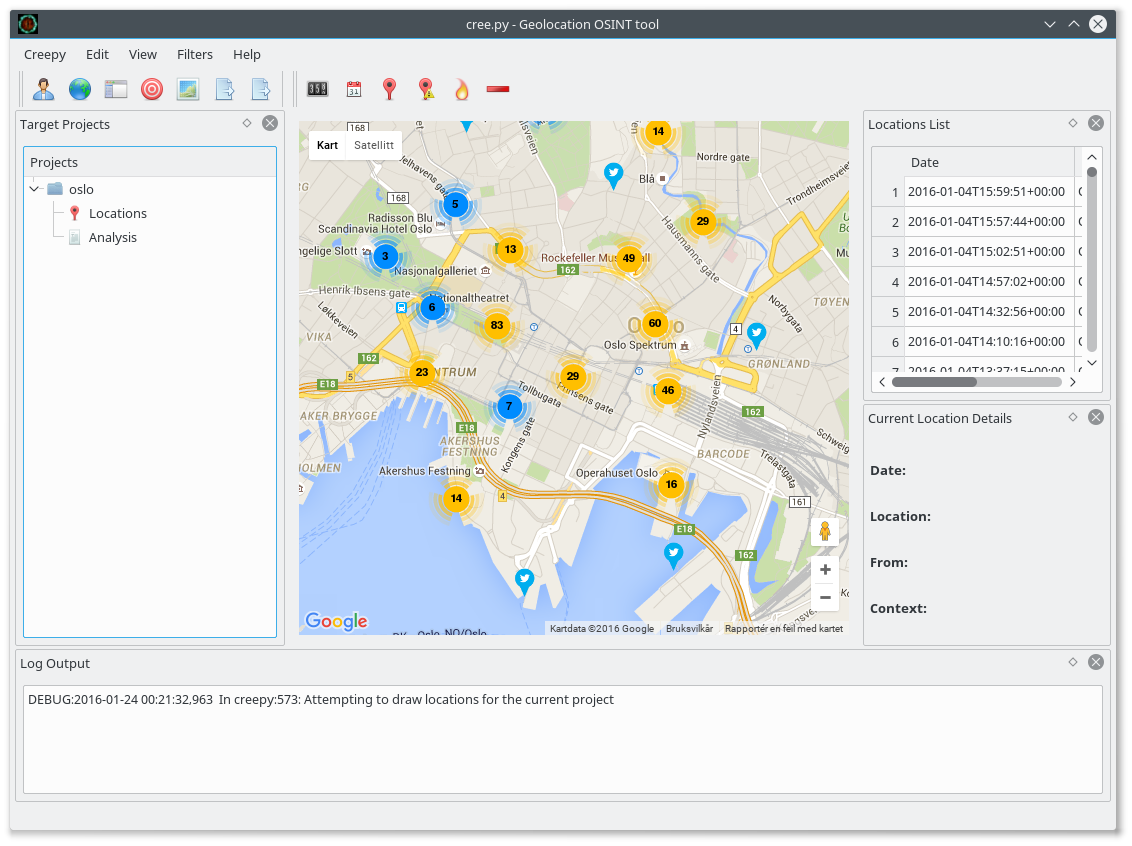
The phone company logs provide a register of locations to check out when one want to figure out what the tracked person was doing. It is unavailable for most of us, but provided to selected government officials, company staff, those illegally buying information from unfaithful servants and crackers stealing the information. But the public information can be collected and analysed, and a free software tool to do so is called Creepy or Cree.py. I discovered it when I read an article about Creepy in the Norwegian newspaper Aftenposten i November 2014, and decided to check if it was available in Debian. The python program was in Debian, but the version in Debian was completely broken and practically unmaintained. I uploaded a new version which did not work quite right, but did not have time to fix it then. This Christmas I decided to finally try to get Creepy operational in Debian. Now a fixed version is available in Debian unstable and testing, and almost all Debian specific patches are now included upstream. The Creepy program visualises geolocation information fetched from Twitter, Instagram, Flickr and Google+, and allow one to get a complete picture of every social media message posted recently in a given area, or track the movement of a given individual across all these services. Earlier it was possible to use the search API of at least some of these services without identifying oneself, but these days it is impossible. This mean that to use Creepy, you need to configure it to log in as yourself on these services, and provide information to them about your search interests. This should be taken into account when using Creepy, as it will also share information about yourself with the services. The picture above show the twitter messages sent from (or at least geotagged with a position from) the city centre of Oslo, the capital of Norway. One useful way to use Creepy is to first look at information tagged with an area of interest, and next look at all the information provided by one or more individuals who was in the area. I tested it by checking out which celebrity provide their location in twitter messages by checkout out who sent twitter messages near a Norwegian TV station, and next could track their position over time, making it possible to locate their home and work place, among other things. A similar technique have been used to locate Russian soldiers in Ukraine, and it is both a powerful tool to discover lying governments, and a useful tool to help people understand the value of the private information they provide to the public. The package is not trivial to backport to Debian Stable/Jessie, as it depend on several python modules currently missing in Jessie (at least python-instagram, python-flickrapi and python-requests-toolbelt). (I have uploaded the image to screenshots.debian.net and licensed it under the same terms as the Creepy program in Debian.)

23 January 2016

Dirk Eddelbuettel: RcppEigen 0.3.2.7.0

A new minor release of RcppEigen is now on CRAN and in Debian. It primarily upgrades to the recent 3.2.7 release of Eigen -- thanks once again to fine work by Yixuan Qiu. We also have one additonal PR by Alexey Stukalow who ensured that the fastLm() example will work fine with when the Intel MKL is used. The NEWS file entry follows.
Changes in RcppEigen version 0.3.2.7.0 (2016-01-18)
  • Updated to version 3.2.7 of Eigen
  • The fastLm example will not include the Lapack header if MKL is defined (thanks to PR #25 by Alexey Stukalow)
Courtesy of CRANberries, there is also a diffstat report for the most recent release.

This post by Dirk Eddelbuettel originated on his Thinking inside the box blog. Please report excessive re-aggregation in third-party for-profit settings.

Dirk Eddelbuettel: RcppCCTZ 0.0.3

Bradley White from the upstream CCTZ team prepared some more changes in CCTZ itself -- so a new RcppCCTZ version got to CRAN the other day catching up with these changes. CCTZ is a C++ library for translating between absolute and civil times using the rules of a time zone. It requires only a proper C++11 compiler and the standard IANA time zone data base which standard Unix, Linux, OS X, ... computers tend to have in /usr/share/zoneinfo. RcppCCTZ connects this library to R by relying on Rcpp. Changes in this version are summarized here:
Changes in version 0.0.3 (2016-01-17)
  • Synchronized with CCTZ upstream.
We also have a diff to the previous version thanks to CRANberries. More details, issue tickets etc at the GitHub repository.

This post by Dirk Eddelbuettel originated on his Thinking inside the box blog. Please report excessive re-aggregation in third-party for-profit settings.

21 January 2016

Tanguy Ortolo: Removing sam2p from Debian

Issues with sam2p and removal I have been maintaining the Debian package of sam2p for some time. Unfortunately, the upstream development of that program is no longer active, and it is using an old custom build chain that no longer works with recent version of GCC. This package is currently failing to build from source, and while I have been able to patch some issues in the past, and it may still be possible to fix it again, this is not really sustainable. I am therefore considering to remove sam2p from Debian, unless someone has a very good reason to keep it and is able and willing to maintain it.Alternative sam2p is a raster image conversion tool that can convert PNG and JPEG to EPS and PDF while keeping their compression, which is mostly useful to use them in documents compiled with LaTeX. Fortunately, the same can be done with ImageMagick. If you want to convert to EPS, you have to specify that you want EPS 2 or 3, otherwise it would produce EPS level 1 which does not provide native raster compression:
% convert debian-openlogo-raster100.png \
          eps3:debian-openlogo-raster100.eps
% convert debian-openlogo-raster100.png \
          debian-openlogo-raster100.pdf
% ls -lh
1.7K debian-openlogo-raster100.png
6.0K debian-openlogo-raster100.eps
8.8K debian-openlogo-raster100.pdf
% convert photograph.jpg eps3:photograph.eps
% convert photograph.jpg photograph.pdf
% ls -lh
657K photograph.jpg
662K photograph.eps
664K photograph.pdf
% convert scanned-document.png eps3:scanned-document.eps
% convert scanned-document.png scanned-document.pdf
140K scanned-document.png
145K scanned-document.eps
150K scanned-document.pdf
This is a bit less efficient than sam2p, as convert seems to add some fixed overhead, but it does keep the appropriate compression algorithm. See this documentation page from ImageMagick for more information. Using appropriate formats As a reminder, when writing LaTeX documents, depending on your build chain, you can use:
photographs
JPEG or EPS (converted from JPEG with ImageMagick);
raster drawings, screenshots
PNG or EPS (converted from PNG with ImageMagick);
vector graphics
PDF or EPS (convertes from SVG with Inkscape).

Jonas Smedegaard: IT@school

Siri and I are on a journey through India and Nepal, with the aim of learning about needs of Debian derivatives, to improve Debian and encourage closer integration.

Distribution IT@school is a distribution originally based on Debian, later rebased on Ubuntu. Next release will possibly again be a direct derivative of Debian, or maybe even - time will tell - a Debian pure blend.

Aim is education As its name indicates, IT@school is targeted at schools: The system is used in 8th - 10th grades of most (or all?) public primary schools in Kerala, Together with KEK members Anto and Fayad, Siri and I met with former and current key participants in the project where we learned about its history and current status, and discussed some differences between Ubuntu and Debian. IT@school has a strong emphasis on the educational aspect, arguably setting it apart from Skolelinux/DebianEdu which emphasizes the technical aspect of relieving teachers from admin tasks. In the early years of deployment the project faced many hardware issues - e.g. in getting sound cards to work. This was seen not as problems but as beneficial learning for the teachers facing those issues. Kerala public school system has set the standard for other states in India, but sadly political support within the state has been weak in recent years. It is hoped that next election - this April - will bring a positive change.

School book IT@school is accompagnied by a school book written specifically for use of the included tools. No explicit license is applied to the book (which means it defaults to classic copyright). Possibly it will get Creative Commons licensed. If the school book gets a DFSG-free license, several collaboration opportunities emerge: Currently the book is drafted in LibreOffice but then - due to state procedures - finalized with PageMaker. Would be interesting to setup an alternate process using only Free tools - either with Scribus or XeLaTeX. An important detail here is to ensure that the process supports malayalam script.

Curriculum Work is in progress mapping FLOSS tools to the state curriculum. I recommended to share that work publicly with a Free license, to encourage comparisons across countries, and invite collaboration e.g. with Skolelunux/DebianEdu.

Blend for SBCs Some Kerala higher education schools (sorry, don't remember which) have bought some thousands of RaspberryPi2. I suggested to create a Debian Blend for SBCs (Single Board Computers) - we will see what comes of that idea

Blend for education I also suggested to make a Debian blend around IT@school distribution itself, with its strong focus on educational content - i.e. not just as addon to technical tools but the primary purpose pulling in tools as needed.

Russell Coker: Finding Storage Performance Problems

Here are some basic things to do when debugging storage performance problems on Linux. It s deliberately not an advanced guide, I might write about more advanced things in a later post. Disk Errors When a hard drive is failing it often has to read sectors several times to get the right data, this can dramatically reduce performance. As most hard drives aren t monitored properly (email or SMS alerts on errors) it s quite common for the first notification about an impending failure to be user complaints about performance. View your kernel message log with the dmesg command and look in /var/log/kern.log (or wherever your system is configured to store kernel logs) for messages about disk read errors, bus resetting, and anything else unusual related to the drives. If you use an advanced filesystem like BTRFS or ZFS there are system commands to get filesystem information about errors. For BTRFS you can run btrfs device stats MOUNTPOINT and for ZFS you can run zpool status . Most performance problems aren t caused by failing drives, but it s a good idea to eliminate that possibility before you continue your investigation. One other thing to look out for is a RAID array where one disk is noticeably slower than the others. For example if you have a RAID-5 or RAID-6 array every drive should have almost the same number of reads and writes, if one disk in the array is at 99% performance capacity and the other disks are at 5% then it s an indication of a failing disk. This can happen even if SMART etc don t report errors. Monitoring IO The iostat program in the Debian sysstat package tells you how much IO is going to each disk. If you have physical hard drives sda, sdb, and sdc you could run the command iostat -x 10 sda sdb sdc to tell you how much IO is going to each disk over 10 second periods. You can choose various durations but I find that 10 seconds is long enough to give results that are useful. By default iostat will give stats on all block devices including LVM volumes, but that usually gives too much data to analyse easily. The most useful things that iostat tells you are the %util (the percentage utilisation anything over 90% is a serious problem), the reads per second r/s , and the writes per second w/s . The parameters to iostat for block devices can be hard drives, partitions, LVM volumes, encrypted devices, or any other type of block device. After you have discovered which block devices are nearing their maximum load you can discover which of the partitions, RAID arrays, or swap devices on that disk are causing the load in question. The iotop program in Debian (package iotop) gives a display that s similar to that of top but for disk io. It generally isn t essential (you can run ps ax grep D to get most of that information), but it is handy. It will tell you which programs are causing IO on a busy filesystem. This can be good when you have a busy system and don t know why. It isn t very useful if you have a system that is used for one task, EG a database server that is known to be busy doing database stuff. It s generally a good idea to have sysstat and iotop installed on all systems. If a system is experiencing severe performance problems you might not want to wait for new packages to be installed. In Debian the sysstat package includes the sar utility which can give historical information on system load. One benefit of using sar for diagnosing performance problems is that it shows you the time of day that has the most load which is the easiest time to diagnose performance problems. Swap Use Swap use sometimes confuses people. In many cases swap use decreases overall disk use, this is the design of the Linux paging algorithms. So if you have a server that accesses a lot of data it might swap out some unused programs to make more space for cache. When you have multiple virtual machines on one system sharing the same disks it can be difficult to determine the best allocation for RAM. If one VM has some applications allocating a lot of RAM but not using it much then it might be best to give it less RAM and force those applications into swap so that another VM can cache all the data it accesses a lot. The important thing is not the amount of swap that is allocated but the amount of IO that goes to the swap partition. Any significant amount of disk IO going to a swap device is a serious problem that can be solved by adding more RAM. Reads vs Writes The ratio of reads to writes depends on the applications and the amount of RAM. Some applications can have most of their reads satisfied from cache. For example an ideal configuration of a mail server will have writes significantly outnumber reads (I ve seen ratios of 5:1 for writes to reads on real mail servers). Ideally a mail server will cache all new mail for at least an hour and as the most prolific users check their mail more frequently than that most mail will be downloaded before it leaves the cache. If you have a mail server with reads outnumbering writes then it needs more RAM. RAM is cheap nowadays so if you don t want to compete with Gmail it should be cheap to buy enough RAM to cache all recent mail. The ratio of reads to writes is important because it s one way of quickly determining if you have enough RAM and adding RAM is often the cheapest way of improving performance. Unbalanced IO One common performance problem on systems with multiple disks is having more load going to some disks than to others. This might not be a problem (EG having cron jobs run on disks that are under heavy load while the web server accesses data from lightly loaded disks). But you need to consider whether it s desirable to have some disks under more load than others. The simplest solution to this problem is to just have a single RAID array for all data storage. This is also the solution that gives you the maximum available disk space if you use RAID-5 or RAID-6. A more complex option is to use some SSDs for things that require performance and disks for things that don t. This can be done with the ZIL and L2ARC features of ZFS or by just creating a filesystem on SSD for the data that is most frequently accessed. What Did I Miss? I m sure that I missed something, please let me know of any other basic things to do or suggestions for a post on more advanced things.

20 January 2016

Scott Kitterman: Python Packaging Build-Depends

As a follow-up to my last post where I discussed common Python packaging related errors, I thought it would be worth to have a separate post on how to decide on build-depends for Python (and Python3) packages. The python ecosystem has a lot of packages built around supporting multiple versions of python (really python3 now) in parallel. I m going to limit this post to packages you might need to build-depend on directly.

Python (2) Since Jessie (Debian 8), python2.7 has been the only supported python version. For development of Stretch and backports to Jessie there is no need to worry about multiple python versions. As a result, several all packages are (and will continue to be) equivalent to their non- all counterparts. We well continue to provide the all packages for backward compatibility, but they aren t really needed any more. python (or python-all) This is the package to build-depend on if your package is pure Python (no C extensions) and does not for some other reason need access to the Python header files (there are a handful of packages this latter caveat applies to, if you don t know if it applies to your package, it almost certainly doesn t). You should also build-depend on dh-python. It was originally shipped as part of the python package (and there is still an old version provided), but to get the most current code with new bug fixes and features, build-depend on dh-python. python-dev (or python-all-dev) If your package contains compiled C or C++ extensions, this package either provides or depends on the packages that provide all the header files you need. Do not also build-depend on python. python-dev depends on it and it is just an unneeded redundancy. python-dbg (or python-all-dbg) Add this if you build a -dbg package (not needed for -dbgsym). Other python packages There is not, AFAICT, any reason to build-dep on any of the other packages provided (e.g. libpython-dev). It is common to see things like python-all, python, python-dev, libpython-dev in build-depends. This could be simplified just to python-all-dev since it will pull the rest in.

Python3 Build-depends selection for Python 3 is generally similar, except that we continue to want to be able to support multiple python3 versions (as we currently support python3.4 and python3.5). There are a few differences: All or not -all Python3 transitions are much easier when C extensions are compiled for all supported versions. In many cases all that s needed if you use pybuild is to build-depend on python3-all-dev. While this is preferred, in many cases this would be technically challenging and not worth the trouble. This is mostly true for python3 based applications. Python3-all is mostly useful for running test suites against all supported python3 versions. Transitions As mentioned in the python section above, build-depends on python3- all- dev is generally only needed for compiled C extensions. For python3 these are also the packages that need to be rebuilt for a transition. Please avoid -dev build-depends whenever possible for non-compiled packages. Please keep your packages that do need rebuilding binNMU safe. Transitions happen in three stages:
  1. A new python3 version is added to supported python3 versions and packages that need rebuilding due to compiled code and that support multiple versions are binNMUed to add support for the new version.
  2. The default python3 is changed to be the new version and packages that only support a single python3 version are rebuilt.
  3. The old python3 version is dropped from supported versions and packages will multiple-version support are binNMUed to remove support for the dropped version.
This may seem complex (OK, it is a bit), but it enables a seamless transition for packages with multi-version support since they always support the default version. For packages that only support a single version there is an inevitable period when they go uninstallable once the default version has changed and until they can be rebuilt with the new default. Specific version requirements Please don t build-depend against specific python3 versions. Those don t show up in the transition tracker. Use X-Python3-Version (see python policy for details) to specify the version you need.

Summary Please check your packages and only build-depend on the -dev packages when you need it. Check for redundancy and remove it. Try and build for all python3 versions. Don t build-depend on specific python3 versions.

Steve Kemp: So life in Finland goes on

So after living here in Finland for 6 months I've now bought a flat. We have a few days to sort out mortgage paperwork, and assuming there are no problems we'll be moving into the new place on/around the 1st of March. Finally I'll be living in Finland, with a sauna of my very own. Interesting times. In more developer-friendly news I made a new release of Lumail with the integrated support for IMAP. Let us hope people like it.

18 January 2016

Elena 'valhalla' Grandi: BDFSM

BDFSM

Enrico Zini http://www.enricozini.org/ coined the BDSM Free Software Manifesto http://www.enricozini.org/2013/debian/notes-from-that-other-lightning-talk-session2/ (formerly Definition, which however isn't as precise as a description and more importantly doesn't fit in a cool geeky acronym):

I refuse to be bound by software I cannot negotiate with.


This begged to be turned into a cross-stitch wall hanging. I couldn't refuse.

Immagine/fotohttp://social.gl-como.it/photos/valhalla/image/75f28c7ef6c17319f09b858b882bca49

More information and context for the phrase can be found in the notes for Enrico's talk http://www.enricozini.org/2015/debian/standup-comedy-notes/ at DebConf 2015: "Enrico's Semi Serious Stand-up Comedy". Note that while fully textual, the topics may be considered not really SFW, and some of the links definitely aren't. It also includes many insights into the nature of collaboration and Free Software Communities, so I'd recommend reading it (and watching the video recording of the talk) anyway.

I've finally also published the pattern http://www.trueelena.org/computers/projects/bdfsm.html on my website:

* The image I've used while embroidering http://www.trueelena.org/computers/projects/bdfsm/bdfsm-pattern.png
* kxstitch project http://www.trueelena.org/computers/projects/bdfsm/bdfsm.kxs (converted now that kxstitch is back into Debian)
* kxstitch generated PDF http://www.trueelena.org/computers/projects/bdfsm/bdfsm-pattern.pdf

Edit: fixed broken links to kxstitch resources.

Russ Allbery: wallet 1.3

It's been over a year since the last release of the wallet, a system for storing and retrieving secure credentials (currently relying on Kerberos authentication). There were a ton of pending changes, mostly thanks to work from Jon Robertson and Bill MacAllister. I'm still really itching to rewrite all of this code, which is also part of why I haven't uploaded packages to Debian proper yet. I no longer like the way that I designed it, particularly in the Perl modules used by the server side, and want to rewrite it rather substantially. Thankfully, I'm starting to use it for work again, although only as a supplement to another in-house key management system. I might just barely be able to justify investing some effort in that as part of my job. We'll see. In the meantime, it feels awkward and clunky to work with, which makes me itch when I'm preparing new releases. In any event, this release adds preliminary support for using Active Directory as a backend for Kerberos keytabs, and adds both nested (ACLs that are groups of other ACLs) and external (run an external command to make authorization decisions) ACLs. It also adds a root instance variant of ldap-attr, and a new object type: password, which will automatically generate a password if one wasn't already stored. There are a few new wallet commands: update, which will always change the content of an object even if marked unchanging, and acl replace, which will replace all instances of an ACL as an owner field with some other ACL. There are also multiple new wallet reports, and various bug fixes to how ACLs are displayed. You can get the latest version from the wallet distribution page.

James McCoy: neovim-coming-to-debian

Almost 9 months after I took ownership of the Neovim RFP, I finally tagged & uploaded Neovim to Debian. It still has to go through the NEW queue, but it will soon be in an experimental release near you. I'm holding off uploading it to unstable for the time being for a couple reasons. Many thanks to Jason Pleau for working on getting the necessary parts of the Lua stack needed to support Neovim into Debian.

Russ Allbery: rra-c-util 5.10

Despite the name of the package, most of the changes in this release are actually to the Perl test infrastructure. I decided to finally standardize the versions of the modules embedded in wallet, but discovered the need to add an exclusion list so that I don't have to change the version of the schema module. (That currently drives database schema upgrades.) While doing that, I rediscovered that I have two versions of the module version check that shared a ton of code, so they've now been refactored into a module (and then debugged again, since I broke various things about the Automake integration). This release also fixes use of UNIX-specific path delimiters in my standard Perl docs/synopsis.t test, which fixed some failing tests in podlators. I would have been done with this somewhat sooner, but the Travis-CI tests for rra-c-util started failing in the IPv6 server test, and it took a lot of debugging to figure out why. It turned out that the environment allows creation of IPv6 sockets but not connecting to them, and my test for whether IPv6 was working didn't account for that. Now it does, so those tests are properly skipped when IPv6 is half-configured. You can get the latest version from the rra-c-util distribution page.

17 January 2016

Lunar: Reproducible builds: week 38 in Stretch cycle

What happened in the reproducible builds effort between January 10th and January 16th:

Toolchain fixes Benjamin Drung uploaded mozilla-devscripts/0.43 which sorts the file list in preferences files. Original patch by Reiner Herrmann. Lunar submitted an updated patch series to make timestamps in packages created by dpkg deterministic. To ensure that the mtimes in data.tar are reproducible, with the patches, dpkg-deb uses the --clamp-mtime option added in tar/1.28-1 when available. An updated package has been uploaded to the experimental repository. This removed the need for a modified debhelper as all required changes for reproducibility have been merged or are now covered by dpkg.

Packages fixed The following packages have become reproducible due to changes in their build dependencies: angband-doc, bible-kjv, cgoban, gnugo, pachi, wmpuzzle, wmweather, wmwork, xfaces, xnecview, xscavenger, xtrlock, virt-top. The following packages became reproducible after getting fixed: Some uploads fixed some reproducibility issues, but not all of them: Untested changes:

reproducible.debian.net Once again, Vagrant Cascadian is providing another armhf build system, allowing to run 6 more armhf builder jobs, right there. (h01ger) Stop requiring a modified debhelper and adapt to the latest dpkg experimental version by providing a predetermined identifier for the .buildinfo filename. (Mattia Rizzolo, h01ger) New X.509 certificates were set up for jenkins.debian.net and reproducible.debian.net using Let's Encrypt!. Thanks to GlobalSign for providing certificates for the last year free of charge. (h01ger)

Package reviews 131 reviews have been removed, 85 added and 32 updated in the previous week. FTBFS issues filled: 29. Thanks to Chris Lamb, Mattia Rizzolo, and Niko Tyni. New issue identified: timestamps_in_manpages_added_by_golang_cobra.

Misc. Most of the minutes from the meetings held in Athens in December 2015 are now available to the public.

Norbert Preining: Gaming: Portal Stories: Mel

The last days, after about 20 hours of gameplay, I have finally finished Portal Stories: Mel, the single player mod for Portal 2. After having played Portal and Portal 2, I have to say this one mod took be by surprise. I remember very well that, after having played through Portal 2 and found it to easy, I was pointed to Portal Stories: Mel in several comments, I thought Well, it cannot be that difficult! . I couldn t have been more wrong!
portal-stories-mel Portal Stories: Mel is really difficult, at least for me. I remember game sessions where I just started the game, looked at the configuration of the current riddle for 20min, and then quit the game without actually moving around an inch. This kind of logical riddles, paired with a certain element of action and speed, is exactly what I am enjoying.
portal-stories-mel-final It took me quite some time, and I have to admit, I had to cheat at some points during the game being stuck completely without an idea. Only the finish was a bit surprising surprisingly simple. The big boss at the end was not really worth it. Still, leaving the testing facilities at the end gave me some kind or relieve
portal-stories-mel-exit Considering that Portal Stories: Mel is something like a fan-art, developed by Prism Studios, a group made up of eight fans of the Portal games, this is a fantastic achievement. I really loved it, and I am deeply impressed by the ingenuity of the creators. Thanks!

16 January 2016

Russ Allbery: podlators 4.05

Getting all the details right in a highly portable Perl core module that tries to support very old versions of Perl is tricky! And I clearly didn't do a good job of documenting previous decisions. This release reintroduces pod2man.PL and pod2text.PL generator scripts to get the right Perl invocation. I thought ExtUtils::MakeMaker and Module::Build now took care of this, but apparently they only take care of this on UNIX platforms, not on the non-UNIX platforms that require special execution logic. Thanks to a patch by Niko Tyni, this version of Pod::Man also falls back to non-utf8 behavior if the utf8 option is specified but the Encode module doesn't exist. This can help with some cross-build situations. I also finally figured out the problem with occasional test failures on random platforms: I was trying to clean up the temporary directory used by tests after each test, but the CPAN test systems run all the tests in parallel, so the tests were racing with each other. This release just leaves the temporary directory around and deletes it in make clean. You can get the latest version from the podlators distribution page.

15 January 2016

Lars Wirzenius: Obnam 1.19 released (backup software)

I have just released version 1.19 of Obnam, the backup program. See the website at http://obnam.org for details on what the program does. The new version is available from git (see http://git.liw.fi) and as Debian packages from http://code.liw.fi/debian, and uploaded to Debian, and soon in unstable. The NEWS file extract below gives the highlights of what's new in this version. NOTE: Obnam has an EXPERIMENTAL repository format under development, called green-albatross. It is NOT meant for real use. It is likely to change in incompatible ways without warning. Do not use it unless you're willing to lose your backup. Version 1.19, released 2016-01-15 Bug fixes: Improvements to the manual: Improvements to functionality:

Mike Hommey: Announcing git-cinnabar 0.3.0

Git-cinnabar is a git remote helper to interact with mercurial repositories. It allows to clone, pull and push from/to mercurial remote repositories, using git. Get it on github. These release notes are also available on the git-cinnabar wiki. Development had been stalled for a few months, with many improvements in the
next branch without any new release. I used some time during the new year
break and after in order to straighten things up in order to create a new
release, delaying many of the originally planned changes to a future 0.4.0
release. What s new since 0.2.2? Development process changes Up to before this release closing in, the master branch was dedicated to
releases, and development was happening on the next branch, until a new
release happens. From now on, the release branch will take dot-release fixes and new
releases, while the master branch will receive all changes that are
validated through testing (currently semi-automatically tested with
out-of-tree tests based on four real-life mercurial repositories, with
some automated CI based on in-tree tests used in the future). The next branch will receive changes to be tested in CI when things
will be hooked up, and may have rewritten history as a consequence of
wanting passing tests on every commit on master.

Ian Wienand: Australia, ipv6 and dd-wrt

It seems that other than Internode, no Australian ISP has any details at all about native IPv6 deployment. Locally I am on Optus HFC, which I believe has been sold to the NBN, who I believe have since discovered that it is not quite what they thought it was. i.e. I think they have more problems than rolling out IPv6 and I won't hold my breath. So the only other option is to use a tunnel of some sort, and it seems there is really only one option with local presence via SixXS. There are other options, notably He.net, but they do not have Australian tunnel-servers. SixXS is the only one I could find with a tunnel in Sydney. So first sign up for an account there. The process was rather painless and my tunnel was provided quickly. After getting this, I got dd-wrt configured and working on my Netgear WNDR3700 V4. Here's my terse guide, cobbled together from other bits and pieces I found. I'm presuming you have a recent dd-wrt build that includes the aiccu tool to create the tunnel, and are pretty familiar with logging into it, etc. Firstly, on dd-wrt make sure you have JFFS2 turned on for somewhere to install scripts. Go Administration, JFFS2 Support, Internal Flash Storage, Enabled. Next, add the aiccu config file to /jffs/etc/aiccu.conf
# AICCU Configuration
# Login information
username USERNAME
password PASSWORD
# Protocol and server listed on your tunnel
protocol tic
server tic.sixxs.net
# Interface names to use
ipv6_interface sixxs
# The tunnel_id to use
# (only required when there are multiple tunnels in the list)
#tunnel_id <your tunnel id>
# Be verbose?
verbose false
# Daemonize?
daemonize true
# Require TLS?
requiretls true
# Set default route?
defaultroute true
Now you can add a script to bring up the tunnel and interface to /jffs/config/sixxs.ipup (make sure you make it executable) where you replace your tunnel address in the ip commands.
# wait until time is synced
while [  date +%Y  -eq 1970 ]; do
sleep 5
done
# check if aiccu is already running
if [ -n " ps grep etc/aiccu grep -v grep " ]; then
aiccu stop
sleep 1
killall aiccu
fi
# start aiccu
sleep 3
aiccu start /jffs/etc/aiccu.conf
sleep 3
ip -6 addr add 2001:....:....:....::/64 dev br0
ip -6 route add 2001:....:....:....::/64 dev br0
sleep 5
#### BEGIN FIREWALL RULES ####
WAN_IF=sixxs
LAN_IF=br0
#flush tables
ip6tables -F
#define policy
ip6tables -P INPUT DROP
ip6tables -P FORWARD DROP
ip6tables -P OUTPUT ACCEPT
# Input to the router
# Allow all loopback traffic
ip6tables -A INPUT -i lo -j ACCEPT
#Allow unrestricted access on internal network
ip6tables -A INPUT -i $LAN_IF -j ACCEPT
#Allow traffic related to outgoing connections
ip6tables -A INPUT -i $WAN_IF -m state --state RELATED,ESTABLISHED -j ACCEPT
# for multicast ping replies from link-local addresses (these don't have an
# associated connection and would otherwise be marked INVALID)
ip6tables -A INPUT -p icmpv6 --icmpv6-type echo-reply -s fe80::/10 -j ACCEPT
# Allow some useful ICMPv6 messages
ip6tables -A INPUT -p icmpv6 --icmpv6-type destination-unreachable -j ACCEPT
ip6tables -A INPUT -p icmpv6 --icmpv6-type packet-too-big -j ACCEPT
ip6tables -A INPUT -p icmpv6 --icmpv6-type time-exceeded -j ACCEPT
ip6tables -A INPUT -p icmpv6 --icmpv6-type parameter-problem -j ACCEPT
ip6tables -A INPUT -p icmpv6 --icmpv6-type echo-request -j ACCEPT
ip6tables -A INPUT -p icmpv6 --icmpv6-type echo-reply -j ACCEPT
# Forwarding through from the internal network
# Allow unrestricted access out from the internal network
ip6tables -A FORWARD -i $LAN_IF -j ACCEPT
# Allow some useful ICMPv6 messages
ip6tables -A FORWARD -p icmpv6 --icmpv6-type destination-unreachable -j ACCEPT
ip6tables -A FORWARD -p icmpv6 --icmpv6-type packet-too-big -j ACCEPT
ip6tables -A FORWARD -p icmpv6 --icmpv6-type time-exceeded -j ACCEPT
ip6tables -A FORWARD -p icmpv6 --icmpv6-type parameter-problem -j ACCEPT
ip6tables -A FORWARD -p icmpv6 --icmpv6-type echo-request -j ACCEPT
ip6tables -A FORWARD -p icmpv6 --icmpv6-type echo-reply -j ACCEPT
#Allow traffic related to outgoing connections
ip6tables -A FORWARD -i $WAN_IF -m state --state RELATED,ESTABLISHED -j ACCEPT
Now you can reboot, or run the script, and it should bring the tunnel up and you should be correclty firewalled such that packets get out, but nobody can get in. Back to the web-interface, you can now enable IPv6 with Setup, IPV6, Enable. You leave "IPv6 Type" as Native IPv6 from ISP. Then I enabled Radvd and added a custom config in the text-box to get DNS working with google DNS on hosts with:
interface br0
 
AdvSendAdvert on;
prefix 2001:....:....:....::/64
  
  ;
 RDNSS 2001:4860:4860::8888 2001:4860:4860::8844
  
  ;
 ;
(again, replace the prefix with your own) That is pretty much it; at this point, you should have an IPv6 network and it's most likely that all your network devices will "just work" with it. I got full scores on the IPv6 test sites on a range of devices. Unfortunately, even a geographically close tunnel still really kills latency; compare these two traceroutes:
$ mtr -r -c 1 google.com
Start: Fri Jan 15 14:51:18 2016
HOST: jj                          Loss%   Snt   Last   Avg  Best  Wrst StDev
1.  -- 2001:....:....:....::      0.0%     1    1.4   1.4   1.4   1.4   0.0
2.  -- gw-163.syd-01.au.sixxs.ne  0.0%     1   12.0  12.0  12.0  12.0   0.0
3.  -- ausyd01.sixxs.net          0.0%     1   13.5  13.5  13.5  13.5   0.0
4.  -- sixxs.sydn01.occaid.net    0.0%     1   13.7  13.7  13.7  13.7   0.0
5.  -- 15169.syd.equinix.com      0.0%     1   11.5  11.5  11.5  11.5   0.0
6.  -- 2001:4860::1:0:8613        0.0%     1   14.1  14.1  14.1  14.1   0.0
7.  -- 2001:4860::8:0:79a0        0.0%     1  115.1 115.1 115.1 115.1   0.0
8.  -- 2001:4860::8:0:8877        0.0%     1  183.6 183.6 183.6 183.6   0.0
9.  -- 2001:4860::1:0:66d6        0.0%     1  196.6 196.6 196.6 196.6   0.0
10. -- 2001:4860:0:1::72d         0.0%     1  189.7 189.7 189.7 189.7   0.0
11. -- kul01s07-in-x09.1e100.net  0.0%     1  194.9 194.9 194.9 194.9   0.0
$ mtr -4 -r -c 1 google.com
Start: Fri Jan 15 14:51:46 2016
HOST: jj                          Loss%   Snt   Last   Avg  Best  Wrst StDev
1. -- gateway                    0.0%     1    1.3   1.3   1.3   1.3   0.0
2. -- 10.50.0.1                  0.0%     1   11.0  11.0  11.0  11.0   0.0
3. -- ???                       100.0     1    0.0   0.0   0.0   0.0   0.0
4. -- ???                       100.0     1    0.0   0.0   0.0   0.0   0.0
5. -- ???                       100.0     1    0.0   0.0   0.0   0.0   0.0
6. -- riv4-ge4-1.gw.optusnet.co  0.0%     1   12.1  12.1  12.1  12.1   0.0
7. -- 198.142.187.20             0.0%     1   10.4  10.4  10.4  10.4   0.0
When you watch what is actually using ipv6 (the ipvfoo plugin for Chrome is pretty cool, it shows you what requests are going where), it's mostly all just traffic to really big sites (Google/Google Analytics, Facebook, Youtube, etc) who have figured out IPv6. Since these are exactly the type of places that have made efforts to get caching as close as possible to you (Google's mirror servers are within Optus' network, for example) and so you're really shooting yourself in the foot going around it using an external tunnel. The other thing is that I'm often hitting IPv6 mirrors and downloading larger things for work stuff (distro updates, git clones, image downloads, etc) which is slower and wasting someone else's bandwith for really no benefit. So while it's pretty cool to have an IPv6 address (and a fun experiment) I think I'm going to turn it off. One positive was that after running with it for about a month, nothing has broken -- which suggests that most consumer level gear in a typical house (phones, laptops, TVs, smart-watches, etc) is either ready or ignores it gracefully. Bring on native IPv6!

14 January 2016

Tiago Bortoletto Vaz: "Des pas sur la neige..." Orchestration

Des pas sur la neige ("Footprints in the Snow") is a beautiful piano piece from Debussy which I had the chance to orchestrate in the context of my music composition program at the university. I've received a few critics and some kind words about this work, so last year I decided to publish it somewhere. Then I completely forgot. Then this week I watched Youth, from Paolo Sorrentino, who's known for chosing lovely music for his lovely movies, and Debussy was there. I've got then some motivation and after a few adjustments here and there I uploaded the final score here. I've been using MuseScore, a free (libre) software for all my music work, even for less traditional notation.

Next.

Previous.