Search Results: "gt"

18 March 2021

Arturo Borrero Gonz lez: Debugging ip token set RTNETLINK error

Networking At the Wikimedia Foundation they configure basically all servers with IPv4/IPv6 dual stack, at least in the control plane interface (those used for SSH management, etc). IPv6 is not supported yet on the Cloud Services dataplane (openstack), but it will in the near future. An elegant solution for this IPv4/IPv6 dual stack configuration in the control plane is to embed the IPv4 address into the IPv6 address, something like this:
IPv4: 208.80.154.23
IPv6: 2620:0:861:1:208:80:154:23
                   ^^^^^^^^^^^^^
The gateways send prefix advertisements and by default IPv6 autoconfiguration uses such routers prefixes plus the interface MAC address to build the final address. This behavior can be somewhat changed, you can explicitly set some data instead of the MAC address for the kernel to use when building the final IPv6 address. The trick is to use the ip token command, and further context and reasoning for this can be seen in the puppet manifest that the SRE team uses to configure this:
The token command explicitly configures the lower 64 bits that will be used with any autoconf
address, as opposed to one derived from the macaddr. This aligns the autoconf-assigned address with
the fixed one set above, and can do so as a pre-up command to avoid ever having another address
even temporarily, when this is all set up before boot.
For example:
user@debian:~$ sudo ip token list
token ::208:80:154:23 dev eno1
token :: dev eno2
token :: dev eno3
token :: dev eno4
user@debian:~$ sudo ip token set dev eno2 ::beef
user@debian:~$ ip token get dev eno2
token ::beef dev eno2
user@debian:~$ ip token list
token ::208:80:154:23 dev eno1
token ::beef dev eno2
token :: dev eno3
token :: dev eno4
I was installing a new server the other day and the networking service (ifupdown) was failing to bring the interface up. The issue was the ip token command failing:
root@cloudgw2002-dev:~# ip token set ::10:192:20:18 dev eno1
RTNETLINK answers: Invalid argument
RTNETLINK error reporting is awful. What could be wrong about that command? Well, I had to dig into the kernel source code to try figuring out where was that EINVAL being generated. The routine can be seen in the function inet6_set_iftoken() (source):
static int inet6_set_iftoken(struct inet6_dev *idev, struct in6_addr *token)
 
	struct inet6_ifaddr *ifp;
	struct net_device *dev = idev->dev;
	bool clear_token, update_rs = false;
	struct in6_addr ll_addr;
	ASSERT_RTNL();
	if (!token)
		return -EINVAL;
	if (dev->flags & (IFF_LOOPBACK   IFF_NOARP))
		return -EINVAL;
	if (!ipv6_accept_ra(idev))
		return -EINVAL;
	if (idev->cnf.rtr_solicits == 0)
		return -EINVAL;
[..]
I couldn t identify the reason at first glance, apparently I pass every check in there: Something was wrong here. Upon deeper checks, I finally read the ipv6_accept_ra() function (source):
static inline bool ipv6_accept_ra(struct inet6_dev *idev)
 
	/* If forwarding is enabled, RA are not accepted unless the special
	 * hybrid mode (accept_ra=2) is enabled.
	 */
	return idev->cnf.forwarding ? idev->cnf.accept_ra == 2 :
	    idev->cnf.accept_ra;
 
That was it! Forwarding was enabled on the interface, and it shouldn t. I fixed my configuration with a simple patch for the sysctl configuration. Original issue on the Wikimedia Foundation ticketing system: Phabricator T277287

17 March 2021

Jonathan Carter: Free Software Activities 2021-02

The last few weeks was really tough time-wise due to a whole bunch of personal things requiring attention. At least that is cooling down now, in the meantime, here s last monght s uploads (16 days late, yikes!). Hope everyone is doing well out there. 2021-02-02: Upload package python-strictyaml (1.1.1-2) to Debian unstable (Initial source-only upload). 2021-02-03: Upload package bundlewrap (4.4.2-1) to Debian unstable. 2021-02-03: Upload package python-aniso8601 (8.1.1-1) to Debian unstable. 2021-02-15: Upload package desktop-base (11.0.1-1) to Debian unstable. 2021-02-15: Upload package rootskel-gtk (11.0.1) to Debian unstable. 2021-02-16: Upload package btfs (2.24-1) to Debian unstable. 2021-02-16: Upload package gnome-shell-extension-multi-monitors (23-1) to Debian unstable. 2021-02-16: Upload package xabacus (8.3.4-1) to Debian unstable. 2021-02-19: Upload package bundlewrap (4.5.0-1) to Debian unstable. 2021-02-19: Upload package calamares (3.2.36-1) to Debian unstable. 2021-02-19: Upload package calamares (3.2.36-1~bpo10+1) to Debian buster-backports. 2021-02-19: Upload package bundlewrap (4.5.1-1) to Debian unstable.

16 March 2021

Tianon Gravi: My Docker Install Process (re-redux)

See My Docker Install Process and My Docker Install Process (redux) . This one s going to be even more to-the-point.

grab Docker s APT repo GPG key
GNUPGHOME="$(mktemp -d)"; export GNUPGHOME
gpg --keyserver ha.pool.sks-keyservers.net --recv-keys 9DC858229FC7DD38854AE2D88D81803C0EBFCD88
sudo mkdir -p /etc/apt/tianon.gpg.d
gpg --export --armor 9DC858229FC7DD38854AE2D88D81803C0EBFCD88   sudo tee /etc/apt/tianon.gpg.d/docker.gpg.asc
rm -rf "$GNUPGHOME"

add Docker s APT source
source /etc/os-release
echo "deb [ arch=amd64 signed-by=/etc/apt/tianon.gpg.d/docker.gpg.asc ] https://download.docker.com/linux/debian $VERSION_CODENAME stable"   sudo tee /etc/apt/sources.list.d/docker.list
$ sudo apt update
...
Get:6 https://download.docker.com/linux/debian buster/stable amd64 Packages [17.8 kB]
...
Reading package lists... Done

exclude (unwated) CLI plugins
echo 'path-exclude /usr/libexec/docker/cli-plugins/*'   sudo tee /etc/dpkg/dpkg.cfg.d/unwanted-docker-cli-plugins

pin Docker versions
sudo vim /etc/apt/preferences.d/docker.pref
Package: *aufs* *rootless* cgroupfs-mount
Pin: version *
Pin-Priority: -10
Package: docker*
Pin: version 5:20.10*
Pin-Priority: 999
Package: containerd*
Pin: version 1.4*
Pin-Priority: 999

pre-configure Docker
sudo mkdir -p /etc/docker
sudo vim /etc/docker/daemon.json
 
	"storage-driver": "overlay2"
 

configure boot parameters
I usually set a few boot parameters as well (in /etc/default/grub s GRUB_CMDLINE_LINUX_DEFAULT option run sudo update-grub after adding these, space-separated).
  • cgroup_enable=memory enable memory accounting for containers (allows docker run --memory for setting hard memory limits on containers)
  • swapaccount=1 enable swap accounting for containers (allows docker run --memory-swap for setting hard swap memory limits on containers)
  • vsyscall=emulate allow older binaries to run (debian:wheezy, etc.; see docker/docker#28705)
  • systemd.legacy_systemd_cgroup_controller=yes newer versions of systemd may disable the legacy cgroup interfaces Docker currently uses; this instructs systemd to keep those enabled (for more details, see systemd/systemd#4628, opencontainers/runc#1175, docker/docker#28109)
    • NOTE: this one gets more complicated in Debian 11+ ( Bullseye ); possibly worth switching to cgroupv2 and systemd.unified_cgroup_hierarchy=1
All together:
...
GRUB_CMDLINE_LINUX_DEFAULT="cgroup_enable=memory swapaccount=1 vsyscall=emulate systemd.legacy_systemd_cgroup_controller=yes"
...
(Don t forget to sudo update-grub and potentially reboot check /proc/cmdline to verify.)

install Docker!
$ sudo apt-get install -V docker-ce
...
Unpacking containerd.io (1.4.4-1) ...
...
Unpacking docker-ce-cli (5:20.10.5~3-0~debian-buster) ...
...
Unpacking docker-ce (5:20.10.5~3-0~debian-buster) ...
...

$ sudo usermod -aG docker "$(id -un)"

15 March 2021

Matthew Garrett: Exploring my doorbell

I've talked about my doorbell before, but started looking at it again this week because sometimes it simply doesn't send notifications to my Home Assistant setup - the push notifications appear on my phone, but the doorbell simply doesn't trigger the HTTP callback it's meant to[1]. This is obviously suboptimal, but it's also tricky to debug a device when you have no access to it.

Normally I'd just head straight in with a screwdriver, but the doorbell is shared with the other units in this building and it seemed a little anti-social to interfere with a shared resource. So I bought some broken units from ebay and pulled one of them apart. There's several boards inside, but one of them had a conveniently empty connector at the top with "TX", "RX" and "GND" labelled. Sticking a USB-serial converter on this gave me output from U-Boot, and then kernel output. Confirmation that my doorbell runs Linux, but unfortunately it didn't give me a shell prompt. My next approach would often me to just dump the flash and look for vulnerabilities that way, but this device uses TSOP-48 packaged NAND flash rather than the more convenient SPI NOR flash that I already have adapters to access. Dumping this sort of NAND isn't terribly hard, but the easiest way to do it involves desoldering it from the board and plugging it into something like a Flashcat USB adapter, and my soldering's not good enough to put it back on the board afterwards. So I wanted another approach.

U-Boot gave a short countdown to hit a key before continuing with boot, and for once hitting a key actually did something. Unfortunately it then prompted for a password, and giving the wrong one resulted in boot continuing[2]. In the past I've had good luck forcing U-Boot to drop to a prompt by simply connecting one of the data lines on SPI flash to ground while it's trying to read the kernel - the failed read causes U-Boot to error out. It turns out the same works fine on raw NAND, so I just edited the kernel boot arguments to append "init=/bin/sh" and soon I had a shell.

From here on, things were made easier by virtue of the device using the YAFFS filesystem. Unlike many flash filesystems, it's read/write, so I could make changes that would persist through to the running system. There was a convenient copy of telnetd included, but it segfaulted on startup, which reduced its usefulness. Fortunately there was also a copy of Netcat[3]. If you make a fifo somewhere on the filesystem, you can cat the fifo to a shell, pipe the shell to a netcat listener, and then pipe netcat's output back to the fifo. The shell's output all gets passed to whatever connects to netcat, and whatever's sent to netcat gets passed through the fifo back to the shell. This is, obviously, horribly insecure, but it was enough to get a root shell over the network on the running device.

The doorbell runs various bits of software, one of which is Lighttpd to provide a local API and access to the device. Another component ("nxp-client") connects to the vendor's cloud infrastructure and passes cloud commands back to the local webserver. This is where I found something strange. Lighttpd was refusing to start because its modules wanted library symbols that simply weren't present on the device. My best guess is that a firmware update went wrong and left the device in a partially upgraded state - and without a working local webserver, there was no way to perform any further updates. This may explain why this doorbell was sitting on ebay.

Anyway. Now that I had shell, I could simply dump the flash by copying it directly off the /dev/mtdblock devices - since I had netcat, I could just pipe stuff through that back to my actual computer. Now I had access to the filesystem I could extract that locally and start digging into it more deeply. One incredibly useful tool for this is qemu-user. qemu is a general purpose hardware emulation platform, usually used to emulate entire systems. But in qemu-user mode, it instead only emulates the CPU. When a piece of code tries to make a system call to access the kernel, qemu-user translates that to the appropriate calling convention for the host kernel and makes that call instead. Combined with binfmt_misc, you can configure a Linux system to be able to run Linux binaries from other architectures. One of the best things about this is that, because they're still using the host convention for making syscalls, you can run the host strace on them and see what they're doing.

What I found was that nxp-client was calling back to the cloud platform, setting up an encrypted communication channel (using ChaCha20 and a bunch of key setup stuff I couldn't be bothered picking apart) and then waiting for commands from the cloud. It would then proxy those through to the local webserver. Since I couldn't run the local lighttpd, I just wrote a trivial Python app using http.server and waited to see what requests I got. The first was a GET to a CGI script called editcgi.cgi, along with a path name. I mocked up the GET request to respond with what was on the actual filesystem. The cloud then proceeded to POST to editcgi.cgi, with the same pathname and with new file contents. editcgi.cgi is apparently able to read and write to files on the filesystem.

But this is on the interface that's exposed to the cloud client, so this didn't appear immediately useful - and, indeed, trying to hit the same CGI binary over the local network gave me a 401 unauthorized error. There's a local API spec for these doorbells, but they all refer to scripts in the bha-api namespace, and this script was in the plain cgi-bin namespace. But then I noticed that the bha-api namespace didn't actually exist in the filesystem - instead, lighttpd's mod_alias was configured to rewrite requests to bha-api through to files in cgi-bin. And by using the documented API to get a session token, I could call editcgi.cgi to read and write arbitrary files on the doorbell. Which means I can drop an extra script in /etc/rc.d/rc3.d and get a shell on my doorbell.

This all requires the ability to have local authentication credentials, so it's not a big security deal other than it allowing you to retain access to a monitoring device even after you've moved out and had your credentials revoked. I'm sure it's all fine.

[1] I can ping the doorbell from the Home Assistant machine, so it's not that the network is flaky
[2] The password appears to be hy9$gnhw0z6@ if anyone else ends up in this situation
[3] https://twitter.com/mjg59/status/654578208545751040

comment count unavailable comments

14 March 2021

Russ Allbery: New experimental Big Eight Usenet signing key

I have finally done the work to create a new modern GnuPG signing key for control messages for the Big Eight hierarchies and wired it into the machinery that sends those control messages. I have sent one experimental checkgroups message signed with that key:
    <cmsg-20210314174844$1888@isc.org>
To test the automation, tomorrow the normal monthly checkgroups will be issued, which should result in two control messages, one signed with the new key and one with the old key. I've used the same key ID for the new key as the old key so that updating will be as simple as importing the new key. This key is currently EXPERIMENTAL and I reserve the right to reissue the key if anyone uncovers any problems. If you are in a position to do so, please try verifying the control messages with the new key and verify that the work properly. I plan on making this new key official some time next month and will post a more general announcement to news.announce.newgroups and news.admin.announce at that time. The new key, signed with my personal key and the old hierarchy control signing key, is available on my web site. (The Big Eight hierarchies need a more official information page for news administrators, I know, but one thing at a time.)

13 March 2021

Enrico Zini: nspawn-runner and ansible

This post is part of a series about trying to setup a gitlab runner based on systemd-nspawn. I published the polished result as nspawn-runner on GitHub. New goal: make it easier to configure and maintain chroots. For example, it should be possible to maintain a rolling testing or sid chroot without the need to manually log into it to run apt upgrade. It should be also be easy to have multiple runners reasonably in sync by carrying around a few simple configuration files, representing the set of images available to the CI. Ideally, those configuration files could simply be one ansible playbook per chroot. nspawn-runner could have a 'chroot-maintenance' command that runs all the playbooks on their corresponding chroots, and that would be all I need. ansible and systemd-nspawn ansible being inadequate as usual, it still does not have a nspawn or machinectl connector, even though the need is there, and one can find requests, pull requests, and implementation attempts by all sorts of people, including me. However, I don't want to have nspawn-runner depend on random extra plugins. There's a machinectl become plugin available in ansible from buster-backports, but no matter how I read its scant documentation, looked around the internet, and tried all sorts of things, I couldn't manage to figure out what it is for. This said, simply using systemd-nspawn instead of chroot is quite trivial: use ansible_connection: chroot, set ansible_chroot_exe to this shellscript, and it just works, with things properly mounted, internet access, correct hostnames, and everything:
#!/bin/sh
chroot="$1"
shift
exec systemd-nspawn --console=pipe -qD "$chroot" -- "$@"
I guess that's a, uhm, plan, I guess? Running playbooks As an initial prototype, I made nspawn check the list of chroots in /var/lib/nspawn-runner, and for each directory found there, check if there's an equivalent .yaml or .yml file next to nspawn-runner. For each chroot+playbook combination, it creates an inventory with the right setup, including the custom chroot command, and runs ansible-playbook. As a prototype it works. I assume once it will see usage there's going to be feedback and fine tuning; meanwhile, I have the beginning of some automated maintenance for the CI chroots. Next step It would be nice to also have nspawn-runner create the chroots from configuration files if they are missing, so that a new runner can be deployed with a minimal effort, and it will proceed to generate all the images required in a single command. For this, I'd like to find a clean way to store the chroot creation command inside the playbooks, to keep just one configuration file per chroot. I'd also like to have it flexible enough to run debootstrap, as well as commands for different distributions. Time will tell. This is probably enough for study/design posts on my blog. Further updates will be in the issue tracker.

Sean Whitton: lisp-use-for-transpose-chars

I had thought that Emacs C-t was mainly about correcting typos. It turns out to be extremely useful when working on Lisp macros which themselves write macros. This typically involves nested quasiquotation, where you can have multiple alternating sequences of open parentheses and backticks, or of commas, quotation marks and ampersats. While you re working on it you often need to reorder these character sequences and C-t does a great job.

Dima Kogan: Making the Supernova E3 tail light brighter

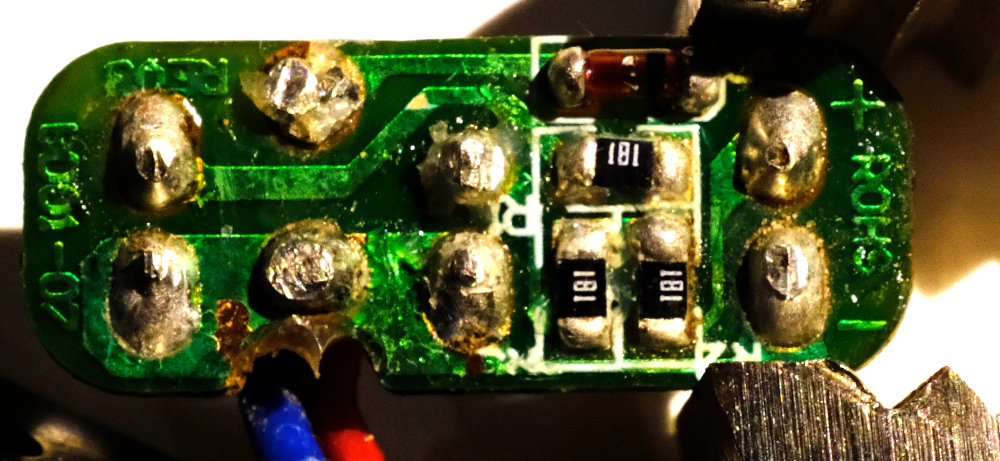
I got a dynamo hub for my bike and a fancy headlight. It's sweet, but I'm discovering that there're no standards for making tail lights work, so I just had to do some light reverse-engineering and soldering. And this is the findings. Different manufacturers do tail lights differently. Most tail lights are not connected directly to the dynamo, but to the headlight instead. Busch+M ller tail lights take an AC signal that looks very similar to what the hub is producing. You're not supposed to hook it up to the hub directly, but it does appear to work, and it's not clear how the headlight's tail-light output is different from the hub input. I haven't scoped it. Supernova tail lights work differently. Some guy on the internet reverse-engineered the headlight circuit showing an LM317 regulator producing 5.9V for the tail light. I have a Supernova E3 tail light (original one; model E161). The case says "6V", which is close to the 5.9V they give it. It wants its 6V, but I don't have a Supernova headlight, so I don't have 6V to give it. I do have a USB charger, so I have 5V instead. Giving it 5V does appear to work, but that results in less brightness than I would like. Presumably the voltage difference is to blame? I took apart the tail light. The circuitry is encased in hot glue. Scraping that off, we can see the action:
before.jpg
The circuit looks like this:
e3.svg
More or less, this is as expected. The circuit was designed to receive 6V, so the resistances (180 ohms) were selected to produce a certain amount of current. Given 5V, there's less current and less brightness. I can fix this by reducing the amount of resistance to bring the current levels up. I hooked up a power supply to produce 5V and 5.9V, and I measured the voltages in the circuit in those two states. Assume little accuracy in all of this
5V 5.9V
V across input diode 0.8V 0.8V
V across the resistors 2.37V 3.25V
V across the LEDs 1.83V 1.85V
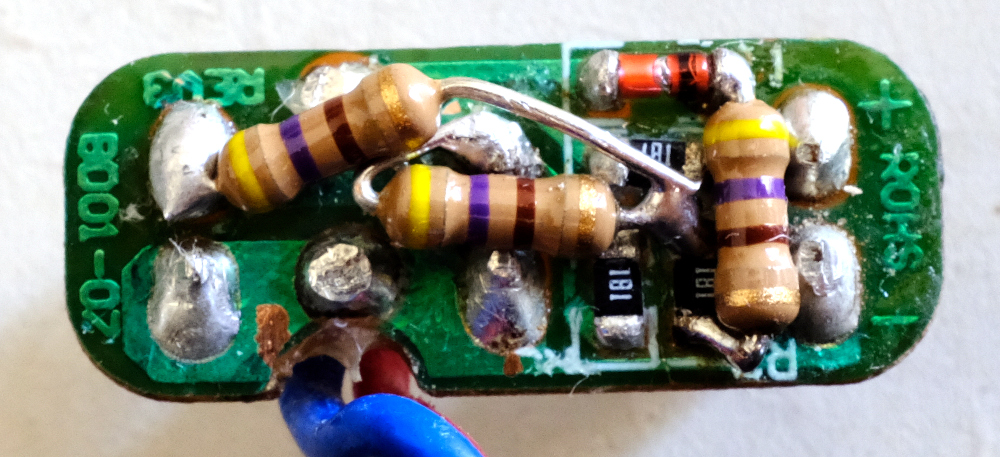
As expected, the voltages across the diodes are stable, and the resistors see the bulk of the voltage difference. The circuit designers wanted 3.25/180 ~ 18mA. With my reduced voltage I was getting 2.37/180 ~ 13mA instead. So I was 28% less bright than I should have been. That doesn't sound like a lot, but it's hard to tell by just looking at the thing. In any case, I can reduce the resistances to get the higher current at 5V: I want a resistance R of 180/3.25*2.37 ~ 131 ohms. In the interest of doing less work, I simply added more resistors in parallel instead of replacing the existing ones. So I need to add in parallel a resistance R such that 180R/(180+R) = 131. So I want a parallel R ~ 485 ohms. Looking through my box of parts, I don't have any nice surface-mount resistors with anywhere near the right resistance. But I do have through-hole ones at 470 ohms. Close-enough. I did some soldering gymnastics:
after.jpg
And I'm done. Haven't done any night rides outside yet with this setup, but in theory this should be bright-enough. And since the resistors are just burning off the excess voltage, and I'm giving it less voltage to burn off, I'm being more efficient than I would have been with 6V and the stock resistors.

Enrico Zini: Decameron and content warnings

Giovanni Boccaccio's Decameron is a book in which there's a pandemic, and a group of seven young women and three young men decide to practice social distancing in a secluded villa just outside of Florence. During two weeks of lockdown, they structure their time wisely, and among other things they spend the evenings telling each other stories. The book is a collection of those stories. The stories vary from the erotic to the tragic, and may trigger some reader. Boccaccio is aware of that, so he starts each chapter with a one line summary that is explicitly intended as a content warning, to give the reader a choice in whether to read the story, or skip to the next one. Boccaccio explains this in the book itself:
However, those who read these tales can leave those they dislike and read those they like. I do not want to deceive anybody, and so all these tales bear written at the head a title explaining what they contain. (link to version in original language)
On top of the very relatable setting, the diversity of stories, the empathy in the narration, the gender inclusivity, and the respect for the reader, it's a pretty good book. It should even be out of copyright! It was written around year 1350.

Enrico Zini: nspawn-runner and btrfs

This post is part of a series about trying to setup a gitlab runner based on systemd-nspawn. I published the polished result as nspawn-runner on GitHub. systemd-nspawn has an interesting --ephemeral option that sets up temporary copy-on-write filesystem snapshots on filesystems that support it, like btrfs. Using copy on write means that one could perform maintenance on the source chroots, without disrupting existing CI sessions. btrfs and copy on write btrfs snapshots work on subvolumes. As I understand it, if one uses btrfs subvolume create instead of mkdir, what is inside the resulting directory is managed as a subvolume that can be snapshotted and managed in all sorts of interesting ways. I managed to delete a subvolume equally well with btrfs subvolume delete and with rm -r. btrfs subvolume snapshot src dst is similar to cp -a, but it makes a copy-on-write snapshot of a btrfs subvolume. If I change nspawn-runner to manage each chroot in its own subvolume, I should be able to build on all these features, and systemd-nspawn should be able to do that, too. There's a cute shortcut to migrate a subdirectory to a subvolume: create the subvolume, then use cp -r --reflink to populate the subvolume with the directory contents. systemd-nspawn and btrfs Passing -x/--ephemeral to systemd-nspawn makes it do all the transient copy-on-write work automatically:
# systemd-nspawn -xD buster
Spawning container buster-7fd47ac79296c5d3 on /var/lib/nspawn-runner/t/.#machine.buster0939fbc61fcbca28.
Press ^] three times within 1s to kill container.
root@buster-7fd47ac79296c5d3:~# mkdir foo
root@buster-7fd47ac79296c5d3:~# ls -la
total 12
drwx------ 1 root root  62 Mar 13 16:30 .
drwxr-xr-x 1 root root 154 Mar 13 16:26 ..
-rw------- 1 root root 102 Mar 13 16:26 .bash_history
-rw-r--r-- 1 root root 570 Mar 13 16:26 .bashrc
-rw-r--r-- 1 root root 148 Mar 13 16:26 .profile
drwxr-xr-x 1 root root   0 Mar 13 16:30 foo
root@buster-7fd47ac79296c5d3:~# logout
Container buster-7fd47ac79296c5d3 exited successfully.
root@runner2:/var/lib/nspawn-runner/t# ls -la buster/root/
totale 12
drwx------ 1 root root  56 mar 13 16:26 .
drwxr-xr-x 1 root root 154 mar 13 16:26 ..
-rw------- 1 root root 102 mar 13 16:26 .bash_history
-rw-r--r-- 1 root root 570 mar 13 16:26 .bashrc
-rw-r--r-- 1 root root 148 mar 13 16:26 .profile
It also works on a directory that is not a subvolume, making reflinks of its contents instead of a subvolume snapshot, although this has a performance penalty on setup: Snapshotting a subvolume:
# time systemd-nspawn -xD buster ls
Spawning container buster-7ab8f4123420b5d5 on /var/lib/nspawn-runner/t/.#machine.bustercd54ef4971229ff5.
Press ^] three times within 1s to kill container.
bin  boot  dev  etc  home  lib  lib32  lib64  libx32  media  mnt  opt  proc  root  run  sbin  srv  sys  tmp  usr  var
Container buster-7ab8f4123420b5d5 exited successfully.
real    0m0,164s
user    0m0,032s
sys 0m0,014s
Reflink-ing a subdirectory:
# time systemd-nspawn -xD buster ls
Spawning container buster-ebc9dc77db0c972d on /var/lib/nspawn-runner/.#machine.buster2ecbcbd1a1a058b8.
Press ^] three times within 1s to kill container.
bin  boot  dev  etc  home  lib  lib32  lib64  libx32  media  mnt  opt  proc  root  run  sbin  srv  sys  tmp  usr  var
Container buster-ebc9dc77db0c972d exited successfully.
real    0m3,022s
user    0m0,326s
sys 0m2,406s
Detecting filesystem type I can change nspawn-runner to use btrfs-specific features only when /var/lib/nspawn-runner is on btrfs. Here's a command to detect the filesystem type:
# stat -f -c %T /var/lib/nspawn-runner/
btrfs
nspawn-runner updated I've refactored nspawn-runner splitting backend and frontend code, and implementing multiple backends based on what's the filesystem type of /var/lib/nspawn-runner/. It works really nicely, and with no special configuration required: if /var/lib/nspawn-runner is on btrfs, things run faster, with less kludges, and one can do maintenance on the base chroots without interfering with running CI jobs. Next step The next step is making it easier to configure and maintain chroots. For example, it should be possible to maintain a rolling testing or sid chroot without the need to manually log into it to run apt upgrade.

Jonathan Dowland: Internal Gotek

This is the eleventh part in a series of blog posts. The previous post was FlashFloppy OLED display. The whole series is available here: Amiga.
It's still mostly all quiet on the Amiga project front. The last few months with both my kids at home have been too difficult and busy with no time for side projects. Primary Schools in the UK went back this week, and I've finally got around to installing the Gotek floppy emulator inside the Amiga A500's chassis. I followed A short "Internal Gotek Floppy" Installation Guide , which explains that you don't need to print (or buy) a special mount for it: Simply removing the Gotek's top plastic case is enough for it to fit inside, and you can support it with some nuts and bolts.
Gotek bolted into place Gotek bolted into place
Easy in theory, but it still took me a while, with plenty of trial and error to line it up just right. I ended up using some M4 bolts and smaller (the kind that you use in electrical sockets) to support the bottom part of the Gotek case in three places: one, at the front, re-using an original vertical support for the old floppy drive; and two at the back, screwing through two holes in the A500's outer case and mainboard. If I'd chosen short enough bolts, the back of the Gotek case could have probably just rested on the ends of those bolts, but the ones I had were another few cm longer, so I drilled holes in the Gotek case to run the bolts through, and secured it with nuts.
Knob, display and mount, external Knob, display and mount, external
In that guide, the author has an OLED display for their Gotek that they wanted on the top of the Amiga case, so they fed the four tiny wires through the grill. I had a go at that, but I've got the OLED display and a rotary encoder, so that's 8 wires total, and damn fiddly. Instead for now I've just routed them all out through the hole left behind by the floppy drive's Button. I'm going to try and tidy it up with some heat shrink or similar. So finally, my Amiga is one "unit" again, without dangly bits hanging off it (if you ignore those 8 tiny wires for now) that I can move around to store or use much more easily.

Louis-Philippe V ronneau: Preventing an OpenPGP Smartcard from caching the PIN eternally

While I'm overall very happy about my migration to an OpenPGP hardware token, the process wasn't entirely seamless and I had to hack around some issues, for example the PIN caching behavior in GnuPG. As described in this bug the cache-ttl parameter in GnuPG is not implemented and thus does nothing. This means once you type in your PIN, it is cached for as long as the token is plugged. Security-wise, this is not great. Instead of manually disconnecting the token frequently, I've come up with a script that restarts scdameon if the token hasn't been used during the last X minutes. It seems to work well and I call it using this cron entry: */5 * * * * my_user /usr/local/bin/restart-scdaemon To get a log from scdaemon, you'll need a ~/.gnupg/scdaemon.conf file that looks like this:

debug-level basic
log-file /var/log/scdaemon.log
Hopefully it can be useful to others!
 #!/usr/bin/python3
# Copyright 2021, Louis-Philippe V ronneau <pollo@debian.org>
#
# This script is free software: you can redistribute it and/or modify it under
# the terms of the GNU General Public License as published by the Free Software
# Foundation, either version 3 of the License, or (at your option) any later
# version.
# 
# This script is distributed in the hope that it will be useful, but WITHOUT
# ANY WARRANTY; without even the implied warranty of MERCHANTABILITY or FITNESS
# FOR A PARTICULAR PURPOSE. See the GNU General Public License for more
# details.
# 
# You should have received a copy of the GNU General Public License along with
# this script. If not, see <http://www.gnu.org/licenses/>.
"""
This script restarts scdaemon after X minutes of inactivity to reset the PIN
cache. It is meant to be ran by cron each X/2 minutes.
This is needed because there is currently no way to set a cache time for
smartcards. See https://dev.gnupg.org/T3362#137811 for more details.
"""
import os
import sys
import subprocess
from datetime import datetime, timedelta
from argparse import ArgumentParser
p = ArgumentParser(description=__doc__)
p.add_argument('-l', '--log', default="/var/log/scdaemon.log",
               help='Path to the scdaemon log file.')
p.add_argument('-t', '--timeout', type=int, default="10",
               help=("Desired cache time in minutes."))
args = p.parse_args()
def get_last_line(scdaemon_log):
    """Returns the last line of the scdameon log file."""
    with open(scdaemon_log, 'rb') as f:
        f.seek(-2, os.SEEK_END)
        while f.read(1) != b'\n':
            f.seek(-2, os.SEEK_CUR)
        last_line = f.readline().decode()
    return last_line
def check_time(last_line, timeout):
    """Returns True if scdaemon hasn't been called since the defined timeout."""
    # We don't need to restart scdaemon if no gpg command has been run since
    # the last time it was restarted.
    should_restart = True
    if "OK closing connection" in last_line:
        should_restart = False
    else:
        last_time = datetime.strptime(last_line[:19], '%Y-%m-%d %H:%M:%S')
        now = datetime.now()
        delta = now - last_time
        if delta <= timedelta(minutes = timeout):
            should_restart = False
    return should_restart
def restart_scdaemon(scdaemon_log):
    """Restart scdaemon and verify the restart process was successful."""
    subprocess.run(['gpgconf', '--reload', 'scdaemon'], check=True)
    last_line = get_last_line(scdaemon_log)
    if "OK closing connection" not in last_line:
        sys.exit("Restarting scdameon has failed.")
def main():
    """Main function."""
    last_line = get_last_line(args.log)
    should_restart = check_time(last_line, args.timeout)
    if should_restart:
        restart_scdaemon(args.log)
if __name__ == "__main__":
    main()

12 March 2021

Ryan Kavanagh: Static Comments in Hugo

I switched from Jekyll to Hugo last week for a variety of reasons. One thing that was missing was a port of the jekyll-static-comments plugin that I used to use. I liked it because it saved readers from being tracked by Disqus or other comments solutions, and it required no javascript. To comment, users would email me their comment following a template attached to the bottom of each post. I then piped their email through a script to add it to the right post. As an added benefit, I could delegate comment spam detection to my mail server. I ve managed to reimplement this setup using Hugo. For those who are interested in a similar setup, here is what you need to do.

Pages with comments Instead of being single files, pages need to be leaf bundles. For example, this means that your blog post must be located at /content/blog/2021-03-12-static-comments-in-hugo/index.md instead of /content/blog/2021-03-12-static-comments-in-hugo.md. This lets you store the comments as page resources in the subdirectory /content/blog/2021-03-12-static-comments-in-hugo/comments/.

Partials You should create a comments.html partial and include it in the layout for the pages which should get comments:
<div class="post-comments">
  <p class="comment-notice"><b>Comments</b>: To comment on this post,
	send me an email following the template below. Your email address
	will not be posted, unless you choose to include it in
	the <span style="font-family: monospace;">link:</span> field.</p>
  <pre class="comment-notice">
To: Your Name &lt;your.email<span>@</span>example.org&gt;
Subject: [blog-comment]   .Page.RelPermalink  
post_id:   .Page.RelPermalink  
author: [How should you be identified? Usually your name or "Anonymous"]
link: [optional link to your website]
Your comments here. Markdown syntax accepted.</pre>
    $scratch := newScratch  
    $scratch.Set "comments" (.Resources.Match "comments/*yml")  
    if eq 1 (len ($scratch.Get "comments"))  
  <h2>1 Comment</h2>
    else  
  <h2>  len ($scratch.Get "comments")   Comments</h2>
    end  
    range ($scratch.Get "comments")  
  <div class="post-comment  % cycle 'odd', 'even' % ">
	  $comment := (.Content   transform.Unmarshal)  
	<span class="post-meta">
		 - $comment.date   dateFormat "Jan 2, 2006 at 15:04" - 
	</span>
	<h3 class="comment-header">
	    if $comment.link  
	  <a href="  $comment.link  ">  $comment.author  </a>
	    else  
	    $comment.author  
	    end  
	  <br />
	</h3>
	  $comment.comment   markdownify  
  </div>
    end  
</div>

Comments To associate comments received by email to posts, I pipe them from mutt (using the keybinding) to the following (admittedly janky) shell script. It takes the comment, reformats it appropriately, and puts it in the post s comments subdirectory. Note that it determines which filename to use based on the email s contents, so make sure to check that the email doesn t contain anything nefarious before you pipe it into the script!
#!/bin/sh
# Copyright (C) 2016-2021 Ryan Kavanagh <rak@rak.ac>
# Distributed under the ISC license
BLOG_BASE="/media/t/work/blog"
MESSAGE=$(cat)
EMAIL=$(echo "$ MESSAGE "   grep "From:"   sed -e 's/From[^<]*<\?\([^>]*\)>\?.*/\1/g;s/@/-at-/g')
DATE=$(echo "$ MESSAGE "   grep "Date:"   sed -e 's/Date:\s*//g'   xargs -0 date -Iseconds -u -d)
POST_ID=$(echo "$ MESSAGE "   grep "post_id:"   sed -e 's/post_id: //g')
COMMENTS_DIR="$ BLOG_BASE /content/$ POST_ID /comments/"
COMMENT_FILE="$ COMMENTS_DIR /$ DATE _$ EMAIL .yml"
# Strip out the email headers and whitespace until the start of the comment
COMMENT_WHOLE=$(echo "$ MESSAGE "   sed -e '/^\s*$/,$!d;/^[^\s]/,$!d')
# Indent everything after the comment header
COMMENT_INDENTED=$(echo "$ COMMENT_WHOLE "   sed -e '/^\s*$/,$ s/.*/  &/g ')
# And add the comment header
COMMENT_PREFIXED=$(echo "$ COMMENT_INDENTED "   sed -e '0,/^\s*$/ s/^\s*$/comment:  / ')
[ -d "$ COMMENTS_DIR " ]   mkdir -p "$ COMMENTS_DIR "
echo "Saving the comment to $ COMMENT_FILE "
echo "date: $ DATE "   tee "$ COMMENT_FILE "
echo "$ COMMENT_PREFIXED "   tee -a "$ COMMENT_FILE "
For example, the following comment in an email body:
post_id: /blog/2021-03-12-static-comments-in-hugo/
author: Ryan Kavanagh
link: https://rak.ac/
Dear self,
Here is a test comment for your blog post.
It supports *markdown* **syntax** and  stuff .
Best,
Yourself
results in a file content/blog/2021-03-12-static-comments-in-hugo/comments/2021-03-12T18:47:25+00:00_rak-at-example.org.yml containing:
date: 2021-03-12T18:47:25+00:00
post_id: /blog/2021-03-12-static-comments-in-hugo/
author: Ryan Kavanagh
link: https://rak.ac/
comment:  
  Dear self,

  Here is a test comment for your blog post.
  It supports *markdown* **syntax** and  stuff .

  Best,
  Yourself  
You can see the rendered output at the bottom of this page.

Reproducible Builds (diffoscope): diffoscope 169 released

The diffoscope maintainers are pleased to announce the release of diffoscope version 169. This version includes the following changes:
[ Chris Lamb ]
* Optimisations:
  - Use larger buffer/block sizes when extracting files from libarchive-
    based archives.
  - Use a much-shorter CSS class (instead of "diffponct") to dramatically
    reduce uncompressed HTML output.
* Logging improvements:
  - Don't emit "Unable to stat file" warning/debug messages; we have
    entirely-artificial directory entries such as ELF sections which, of
    course, never exist as filesystem files.
  - Don't emit a "Returning a FooContainer" logging message - we already emit
    "Instantiating a FooContainer" one and are unlikely to fail in the
    middle.
  - Format the report size logging messages when generating HTML reports.
  - Add the target directory when logging which directory we are extracting
    containers to.
* Miscellaneous:
  - Ignore "--debug" and similar arguments when creating a (hopefully useful)
    temporary directory.
  - Ensure all internal temporary directories have useful names.
  - Clarify a comment regarding diffoscope not extracting excluded files.
[ Vagrant Cascadian ]
* Skip a DEX-related test if the "procyon" tool is unavailable.
You find out more by visiting the project homepage.

11 March 2021

Vincent Fourmond: All tips and tricks about QSoas

I've decided to post regular summaries of all the articles written here about QSoas; this is the first post of this kind. All the articles related to QSoas can be found here also. The articles written here can be separated into several categories. Tutorials to analyze real data These are posts about how to reproduce the data analysis of published articles, including links to the original data so you can fully reproduce our results. These posts all have the label tutorial. All about fits QSoas has a particularly powerful interface for non-linear least square minimisations (fits): Meta-data Meta data describe the conditions in which experiments were performed. Quiz and their solutions Quiz are small problems that take some skill to solve; they can teach you a lot about how to work with QSoas. Other tips and tricks Release annoucements These have generally lot of general information about the possibilities in QSoas:
About QSoas QSoas is a powerful open source data analysis program that focuses on flexibility and powerful fitting capacities. It is released under the GNU General Public License. It is described in Fourmond, Anal. Chem., 2016, 88 (10), pp 5050 5052. Current version is 3.0. You can download its source code there (or clone from the GitHub repository) and compile it yourself, or buy precompiled versions for MacOS and Windows there.

10 March 2021

Sean Whitton: consfigurator 0.3.1

I d like to briefly introduce my new project, Consfigurator:
Consfigurator is a system for declarative configuration management using Common Lisp. You can use it to configure hosts as root, deploy services as unprivileged users, build and deploy containers, and produce disc images. [not all of these are implemented yet, but the design permits them to be] Consfigurator s design gives you a great deal of flexibility about how to control the hosts you want to configure. If there is a command you can run which will obtain input and output streams attached to an interactive POSIX sh running on the target host/container, then with a little glue code, you can use much of Consfigurator s functionality to configure that host/container. But if it is possible to get an implementation of Common Lisp started up on the host, then Configurator can transparently execute your deployment code over on the remote side, rather than exchanging information via POSIX sh. This lets you use the full power of Common Lisp to deploy your configuration. Configurator has convenient abstractions for combining these different ways to execute your configuration on hosts with different ways of connecting to them. Connections can be arbitrarily nested. For example, to combine SSHing to a Debian machine as an unprivileged user, using sudo to become root, and then starting up a Lisp image to execute your deployment code, you would evaluate
    (deploy ((:ssh (:sudo :as "spwhitton@athena.example.com") :debian-sbcl)) athena.example.com)
Declarative configuration management systems like Consfigurator and Propellor share a number of goals with projects like the GNU Guix System and NixOS. However, tools like Consfigurator and Propellor try to layer the power of declarative and reproducible configuration on top of traditional, battle-tested unix system administration infrastructure like apt, dpkg, yum, and distro package archives, rather than seeking to replace any of those. Let s get as much as we can out of all that existing distro policy-compliant work!
Please check out the user s manual, which includes a tutorial/quick start guide, and come join us in #consfigurator on irc.oftc.net. It s early days but you can already do a fair few things with Consfigurator. It s a good time to come help get all the basic properties defined!

Mike Hommey: 5 years ago, Firefox (re)entered Debian

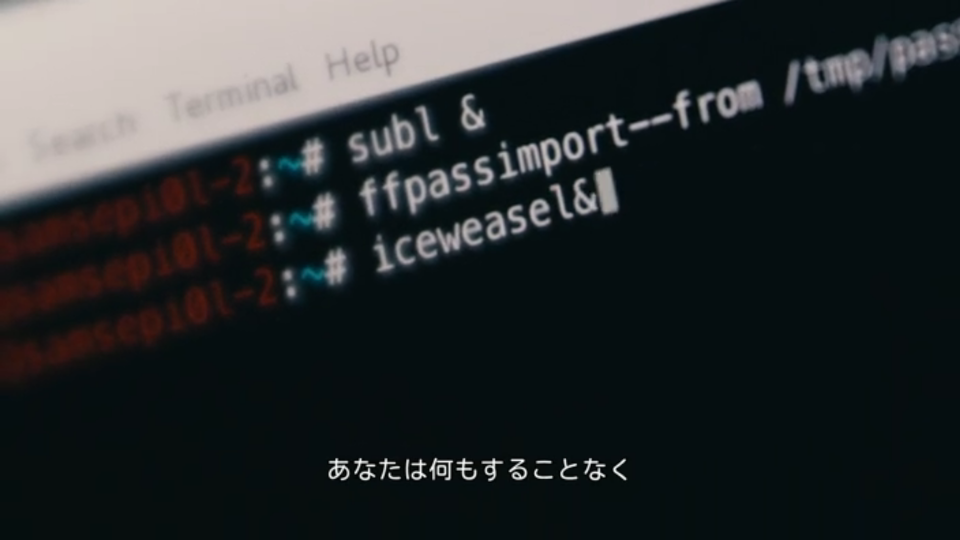
5 years ago today, I was declaring Iceweasel dead, and Firefox was making a come back in Debian. I hadn t planned to make this post, and in fact, I thought it had been much longer. But coincidentally, I was binge-watching Mr. Robot recently, which prominently featured Iceweasel. iceweasel command in a terminal Mr. Robot is set in the year 2015, and I was surprised that Iceweasel was being used, which led me to search for that post where I announced Firefox was back and realizing that we were close to the 5 years mark. Well, we are at the 5 years mark now. iceweasel start page I d normally say time flies, but it turns out it hasn t flown as much as I thought it did. I wonder if the interminable pandemic is to blame for that.

Dirk Eddelbuettel: RcppArmadillo 0.10.2.2.0 on CRAN: New Upstream Patch Release

armadillo image Armadillo is a powerful and expressive C++ template library for linear algebra aiming towards a good balance between speed and ease of use with a syntax deliberately close to a Matlab. RcppArmadillo integrates this library with the R environment and language and is widely used by (currently) 841 other packages on CRAN. This release brings us a second update within the Armadillo 10.2 series, one month after the initial release. Upstream work has commenced at a 10.3 series with first pre-releases which we are currently testing. If possible, CRAN release will continue to be at least one month apart (such as this time) but we continue to make interim releases available on the Rcpp drat repo repo. The full set of changes follows.

Changes in RcppArmadillo version 0.10.2.2.0 (2021-03-09)
  • Upgraded to Armadillo release 10.2.2 (Cicada Swarm)
    • faster handling of subcubes
    • added tgamma()
    • added .brief_print() for abridged printing of matrices & cubes
    • expanded forms of trimatu() and trimatl() with diagonal specification to handle sparse matrices
    • expanded eigs_sym() and eigs_gen() with optional shift-invert mode
  • Removed debian/ directory from repository as packaging is on salsa.debian.org.
  • Relaxed tolerance on two cube tests on Windows to accomodate new 'gcc10-UCRT' builder.

Courtesy of my CRANberries, there is a diffstat report relative to previous release. More detailed information is on the RcppArmadillo page. Questions, comments etc should go to the rcpp-devel mailing list off the R-Forge page. If you like this or other open-source work I do, you can sponsor me at GitHub.

This post by Dirk Eddelbuettel originated on his Thinking inside the box blog. Please report excessive re-aggregation in third-party for-profit settings.

9 March 2021

Matthew Garrett: Unauthenticated MQTT endpoints on Linksys Velop routers enable local DoS

(Edit: this is CVE-2021-1000002)

Linksys produces a series of wifi mesh routers under the Velop line. These routers use MQTT to send messages to each other for coordination purposes. In the version I tested against, there was zero authentication on this - anyone on the local network is able to connect to the MQTT interface on a router and send commands. As an example:
mosquitto_pub -h 192.168.1.1 -t "network/master/cmd/nodes_temporary_blacklist" -m ' "data": "client": "f8:16:54:43:e2:0c", "duration": "3600", "action": "start" '
will ask the router to block the client with MAC address f8:16:54:43:e2:0c from the network for an hour. Various other MQTT topics pass parameters to shell scripts without quoting them or escaping metacharacters, so more serious outcomes may be possible.

The vendor has released two firmware updates since report - I have not verified whether either fixes this, but the changelog does not indicate any security issues were addressed.

Timeline:

2020-07-30: Submitted through the vendor's security vulnerability report form, indicating that I plan to disclose in either 90 days or after a fix is released. The form turns out to file a Bugcrowd submission.
2020-07-30: I claim the Bugcrowd submission.
2020-08-19: Vendor acknowledges the issue, is able to reproduce and assigns it a P3 priority.
2020-12-15: I ask if there's an update.
2021-02-02: I ask if there's an update.
2021-02-03: Bugcrowd raise a blocker on the issue, asking the vendor to respond.
2021-02-17: I ask for permission to disclose.
2021-03-09: In the absence of any response from the vendor since 2020-08-19, I violate Bugcrowd disclosure policies and unilaterally disclose.

comment count unavailable comments

Emmanuel Kasper: Displaying CSV files in a readable way on the terminal

Until this week I did not know about the column command.

$ head -5 zillow.csv
"Index", "Living Space (sq ft)", "Beds", "Baths", "Zip", "Year", "List Price ($)"
1, 2222, 3, 3.5, 32312, 1981, 250000
2, 1628, 3, 2, 32308, 2009, 185000
3, 3824, 5, 4, 32312, 1954, 399000
4, 1137, 3, 2, 32309, 1993, 150000

Turned out this file is much more readable with a good pipe (and a large screen)
$ head -5 zillow.csv column --table --separator ,
"Index" "Living Space (sq ft)" "Beds" "Baths" "Zip" "Year" "List Price ($)"
1 2222 3 3.5 32312 1981 250000
2 1628 3 2 32308 2009 185000
3 3824 5 4 32312 1954 399000
4 1137 3 2 32309 1993 150000

column is part of util-linux and is thus available in all distributions.
Example file taken from this example list.

Next.

Previous.