Search Results: "sto"

26 December 2014

Sven Hoexter: on call one-liner: Who is sitting in my swap space?

A "nearly out of swap"-alarm during on call duty led me to quickly assemble a one-liner to grab a list of PIDs and the amount of memory swapped out from /proc/[pid]/smaps. That one-liner later got a bit polishing from my colleague H. to look like this:
for x in $(ps -eo pid h); do s=/proc/$ x /smaps; [ -e $ s  ] && awk -vp=$ x  'BEGIN   sum=0   /Swap:/   sum+=$2   END   if (sum!=0) print sum " PID " p ' $ s ; done   sort -rg
After I shared this one with some friends V. came up with a faster version (and properly formatted output :), that relies on the "VMSwap" value in /proc/[pid]/status. Since the one-liner above has to add up one "Swap" value per memory segment it's obvious why it's very slow on systems with many processes and a lot of memory.
awk 'BEGIN printf "%-7s %-16s %s (KB)\n", "PID","COMM","VMSWAP"   
if($1 == "Name:") n=$2 
if($1 == "Pid:") p=$2 
if($1 == "VmSwap:" && $2 != "0") printf "%-7s %-16s %s\n", p,n,$2   "sort -nrk3" 
 ' /proc/*/status
Drawback of this second version is that it relies on the "VmSwap" value which is only part of Linux 2.6.34 and later. It also ended up in the 2.6.32 based kernel of RHEL 6, so this one should work from RHEL 6 and Debian/wheezy onwards. The first version also works on RHEL 5 and Debian/squeeze since both have a (default) kernel with "CONFIG_PROC_PAGE_MONITOR" enabled, which is what you need to enable /proc/[pid]/smaps. Update: C.R. pointed out via mail that there is a versatile Python script smem. It's available in Debian and at least EPEL 6 and 7. Thanks for the hint. The usefulness of swap and why there is no automatic ressource assignment check and bookkeeping, based on calculations around things like the JVM -Xmx settings and other input, is a story on its own. There is room for improvement. A CMDB (Chapter 10.7) would be a starting point.

Ritesh Raj Sarraf: Linux Containers and Productization

Linux has improved many many things over the last couple of years. Of the many improvements, the one that I've started leveraging the most today, are Control Groups. In the past, when there was a need to build a prototype for a solution, we needed hardware. Then came the virtualization richness to Linux. It came in 2 major flavors, KVM (Full Virtualization) and Xen (Para Virtualization). Over the years, the difference of para vs full, for both the implementations, is almost none. KVM now has support for Para-Virtualizaiton, with para-virtualized drviers for most resource intensive tasks, like network and I/O. Similarly, Xen has Full Virtualization support with the help of Qemu-KVM. But, if you had to build a prototype implementation comprising of a multi node setup, virtualization could still be resource hungry. Otherwise too, if your focus was an application (say like a web framework), virtualization was an overkill. All thanks to Linux Containers, prototyping applicaiton based solutions, is now a breeze in Linux. The LXC project is very well designed, and well balanced, in terms of features (as compared to the recently introduced Docker implementation). From an application's point of view, linux containers provide virtualization for namespace, network and resources. Thus making more than 90% of your application's needs fulfilled. For some apps, where a dependency on the kernel is needed, linux containers will not serve the need. Beyond the defaults provided by the distribution, I like to create a base container with my customizations, as a template. This allows me to quickly create environements, without too much housekeeping to do for the initial setup. My base config, looks like:
rrs@learner:~$ sudo cat /var/lib/lxc/deb-template/config
[sudo] password for rrs:
# Template used to create this container: /usr/share/lxc/templates/lxc-debian
# Parameters passed to the template:
# For additional config options, please look at lxc.container.conf(5)
# CPU
lxc.cgroup.cpuset.cpus = 0,1
lxc.cgroup.cpu.shares = 1234
# Mem
lxc.cgroup.memory.limit_in_bytes = 2000M
lxc.cgroup.memory.soft_limit_in_bytes = 1500M
# Network
lxc.network.type = veth
lxc.network.hwaddr = 00:16:3e:0c:c5:d4
lxc.network.flags = up
lxc.network.link = lxcbr0
# Root file system
lxc.rootfs = /var/lib/lxc/deb-template/rootfs
# Common configuration
lxc.include = /usr/share/lxc/config/debian.common.conf
# Container specific configuration
lxc.mount = /var/lib/lxc/deb-template/fstab
lxc.utsname = deb-template
lxc.arch = amd64
# For apt
lxc.mount.entry = /var/cache/apt/archives var/cache/apt/archives none defaults,bind 0 0
23:07          
rrs@learner:~$
Some of the important settings to have in the templace are the mount point, to point to your local apt cache, and CPU and Memory limits. If there was one feature request to ask the LXC developers, I'd ask them to provide a util-lxc tools suite. Currently, to know the memory (soft/hard) allocation for the container, one needs to do the following:
rrs@learner:/sys/fs/cgroup/memory/lxc/deb-template$ cat memory.soft_limit_in_bytes memory.limit_in_bytes
1572864000
2097152000
23:21          
rrs@learner:/sys/fs/cgroup/memory/lxc/deb-template$ bc
bc 1.06.95
Copyright 1991-1994, 1997, 1998, 2000, 2004, 2006 Free Software Foundation, Inc.
This is free software with ABSOLUTELY NO WARRANTY.
For details type  warranty'.
1572864000/1024/1024
1500
quit
23:21          
rrs@learner:/sys/fs/cgroup/memory/lxc/deb-template$
Tools like lxc-cpuinfo, lxc-free would be much better. Finally, there's been a lot of buzz about Docker. Docker is an alternate product offering, like LXC, for Linux Containers. From what I have briefly looked at, docker doesn't seem to be providing any ground breaking new interface than what is already possible with LXC. It does take all the tidbit tools, and presents you with a unified docker interface. But other than that, I couldn't find it much appealing. And the assumption that the profiles should be pulled off the internet (Github ?) is not very exciting. I am hoping they do have other options, where dependence on the network is not really required.

Categories:

Keywords:

Ritesh Raj Sarraf: Linux Desktop in 2014

We are almost at the end of 2014. While 2014 has been a year with many mixed experiences, I think it does warrant one blog entry ;-) Recently, I've again started spending more time on Linux products / solutions, than spending time focused on a specfic subsystem. This change has been good. It has allowed me to re-cap all the advancements that have happened in the Linux world, umm... in the last 5 years. Once upon a time, the Linux kernel sucked on the Desktop. It led to many desktop improvement related initiatives. Many accepted in kernel, while others stood as it is (out-of-tree) still as of today. Over the years, there are many people that advocate for such out-of-tree features, for example the -ck patchset, claiming it has better performance. Most of the times, these are patches not carried by your distribution vendor, which leads you to alternate sources, if you want to try. Having some spare time, I tried the Alternative Kernel project. It is nothing but a bunch of patchsets, on top of the stock kernel. After trying it out, I must say that these patchsets are out-of-tree, for good. I hardly could make out any performance gain. But I did notice a considerable increase in the power consumption. On my stock Debian kernel, the power consumption lies around 15-18 W. That increased to 20+ W on the alternate kernels. I guess most advocates for the out-of-tree patchsets, only measure the 1-2% performance gain, where as completely neglect the fact that that kernel sleeps less often. But back to the generic Linux kernel performance problem...... Recently, in the last 2 years, the performance suckiness of the Linux kernel is hardly noticed. So what changed ? The last couple of years have seen a rise in high capacity RAM, at affordable consumer price. 8 - 16 GiB of RAM is common on laptops these days. If you go and look at the sucky bug report linked above, it is marked as closed, justified Working as Designed. The core problem with the bug reported, has to do with slow media. The Linux scheduler is (in?)efficient. It works hard to give you the best throughput and performance (for server workloads). I/O threads are a high priority task in the Linux kernel. Now map this scene to the typical Linux desktop. If you end up with doing too much buffered I/O, thus exhausting all your available cache, and trigger paging, you are in for some sweet experience. Given that the kernel highly priotizes I/O tasks, and if your underneath persistent storage device is slow (which is common if you have an external USB disk, or even an internal rotating magnetic disk), you end up blocking all your CPU cycles against the slow media. Which further leads to no available CPU cycles for your other desktop tasks. Hence, when you do I/O at such level, you find your desktop go terribly sluggish. It is not that your CPU is slow or in-capable. It is just that all your CPU slices are blocked. Blocked waiting for your write() to report a completion. So what exactly changed that we don't notice that problem any more ????
  1. RAM - Increase in RAM has led to more I/O be accommodated in cache. The best way to see this in action is to do a copy of a large file, something almost equivalent to the amount of RAM you have. But make sure it is less than the overall amount. For example, if you have 4 GiB of RAM, try copying a file of size 3.5 GiB in your graphical file manager. And at the same time, on the terminal, keep triggering the sync command. Check how long does it take for the sync to complete. By being able to cache large amount of data, the Linux kernel has been better at improving the overall performance in the eyes of the user.
  2. File System - But RAM is not alone. The file system has played a very important role too. Earlier, with ext3 file system, we had a commit interval of (5?) 30 seconds. That led to the above mentioned sync equivalent to get triggered every 30 secs. It was a safety measure to ensure, that at worst, you lose 30 secs worth of data. But it did hinder performance. With ext4, came delayed allocation. Delayed Allocation allowed the write() to return immediate while the data was in cache, and deferred the task of actual write() to the file system. This allowed for the allocator to find the best contiguous slot for the data to be written. Thus it improved the file system. It also brough corruption for some of the apps. :-)
  3. Solid State Drives - The file system and RAM alone aren't the sole factors that led to the drastic improvement in the overall experience of the Linux desktop. If you read through the bug report linked in this article, you'll find the core root cause to be slow persistent storage devices. Could the allocator have been improved (like Windows) to not be so pressing of the Linux desktop ? Maybe, yes. But that was a decision for the kernel devs and they believed (and believe) to keep those numbers to minimum. Thus for I/O, as for today, you have 3 schedulers and for CPU, just 1. What dramatically improved the overall Linux Desktop performance was the general availability of solid state devices. These device are real fast, which in effect made the write() calls return immediate, and did not block the CPU.
So, it was the advancement in both hardware and software that led to better overall desktop performance. Does the above mentioned bug still exist ? Yes. Its just that it is much harder to trigger it now. You'll have to ensure that you max out your cache and trigger paging. And then try to do ask for some CPU cycles. But it wasn't that back then we didn't use Linux on the desktop / laptop. It sure did suck more than, say, Windows. But hey, sometimes we have to eat our own dog food. Even then, there sure were some efforts to overcome the then limitations. The first and obvious one is the out-of-tree patchset. But ther were also some other efforts to improve the situation. The first such effort, that I can recollect, was ulatency. With Linux adding support for Control Groups, there were multiple avenues open on how to tackle and tame the resource starvation problem. The crux of the problem was that Linux gave way too much priority to the I/O tasks. I still wish Linux has a profile mechanism, where in on the kernel command line, we could specify what profile should Linux boot into. Anyways, with ulatency, we saw improvements in the Linux Desktop experience. ulatency had in-built policies to whitelist / blacklist a set of profiles. For example, KDE was a profile. Thus, ulatency would club all KDE processes into a group and give that group a higher precedence to ensure that it had its fair share of CPU cycles. Today, at almost the end of 2014, there are many more consumer of Linux's control groups. Prominent names would be: LXC and systemd. ulatency has hardly seen much development in the last year. Probably it is time for systemd to take over. systemd is expected to bring lots of features to the Linux world, thus bridging the (many) gap Linux has had on the desktop. It makes extensive use of Control Groups for a variety of (good) reasons, which has led it to be a linux-only product. I think it should have never marketed itself as the init daemon. It rather fits better when called as the System Management Daemon. The path to Linux Desktop looks much brighter in 2015 and beyond thanks to all the advancements that have happened so far. The other important players, who should be thanked are Mobile and Low Latency products (Android, ChromeBook), whose engagement to productize Linux has led to better features overall.

Categories:

Keywords:

Vasudev Kamath: Notes: LXC How-To

LXC - Linux Containers allows us to run multiple isolated Linux system under same control host. This will be useful for testing application without changing our existing system. To create an LXC container we use the lxc-create command, it can accepts the template option, with which we can choose the OS we would like to run under the virtual isolated environment. On a Debian system I see following templates supported
[vasudev@rudra: ~/ ]% ls /usr/share/lxc/templates
lxc-alpine*    lxc-archlinux*  lxc-centos*  lxc-debian*    lxc-fedora*  lxc-openmandriva*  lxc-oracle*  lxc-sshd*    lxc-ubuntu-cloud*
lxc-altlinux*  lxc-busybox*    lxc-cirros*  lxc-download*  lxc-gentoo*  lxc-opensuse*      lxc-plamo*   lxc-ubuntu*
For my application testing I wanted to create a Debian container for my By default the template provided by lxc package creates Debian stable container. This can be changed by passing the option to debootstrap after -- as shown below.
sudo MIRROR=http://localhost:9999/debian lxc-create -t debian \
     -f   container.conf -n container-name -- -r sid
-r switch is used to specify the release, MIRROR environment variable is used to choose the required Debian mirror. I wanted to use my own local approx installation, so I can save some bandwidth. container.conf is the configuration file used for creating the LXC, in my case it contains basic information on how container networking should b setup. The configuration is basically taken from LXC Debian wiki
lxc.utsname = aptoffline-dev
lxc.network.type = veth
lxc.network.flags = up
lxc.network.link = br0.1
lxc.network.name = eth0
lxc.network.ipv4 = 192.168.3.2/24
lxc.network.veth.pair = vethvm1
I'm using VLAN setup described in Debian wiki: LXC VLAN Networking page. Below is my interfaces file.
iface eth0.1 inet manual
iface br0.1  inet manual
   bridge_ports eth0.1
   bridge_fd 0
   bridge_maxwait 0
Before launching the LXC make sure you run below command
sudo ifup eth0.1
sudo ifup br0.1
# Also give ip to bridge in same subnet as lxc.network.ipv4
sudo ip addr add 192.168.3.1/24 dev br0.1
I'm giving ip address to bridge so that I can communicate with container from my control host, once it comes up. Now start the container using below command
sudo lxc-start -n container -d -c tty8
We are starting lxc in daemon mode and attaching it to console tty8. If you want, you can drop -d and -c option to start lxc in foreground. But its better you start it in background and attach using lxc-console command shown below.
sudo lxc-console -n container -t tty8
You can detach from console using Ctrl+a q combination and let lxc execute in background. Its also possible to simply ssh into the running container since we have enabled networking. Stopping the container should be done using lxc-stop command, but without -k switch (kill) this command never returned. Even with timeout container is not stopped.
sudo lxc-stop -n container
-r can be used for reboot of container. Since I couldn't get clean shutdown I normally attach the console and issue a halt command in container itself. Not sure if this is the right way, but it gets the thing done. I consider Linux container as a better alternative for spawning a virtual Linux environment instead of running a full blown VM like Virtualbox or VMware.

25 December 2014

Russ Allbery: Review: Bad Pharma

Review: Bad Pharma, by Ben Goldacre
Publisher: Faber and Faber
Copyright: 2012, 2013
Printing: 2014
ISBN: 0-86547-806-6
Format: Trade paperback
Pages: 397
If you have previously read Bad Science by Ben Goldacre, it's doubtful you need me to do anything other than point out that he has a new book. Oh, and it's subtitled How Drug Companies Mislead Doctors and Harm Patients, and it's written with the same indignant determination, clear explanation, and appreciation for real science as Bad Science. If you haven't read Bad Science, I recommend it. You don't have to read it before Bad Pharma, but it's a more approachable start, and a funnier book. Bad Science opens with some obviously horrible examples, and slowly develops the tools required to analyze more advanced and deceptive quackery. Bad Pharma jumps straight into the deep end of statistical biases in data, how and why they're introduced, and why they undermine your health care. This is a more serious book than Bad Science, since it lacks the medical quackery that is so ludicrous it's funny. Everything in Bad Science is successfully sold to someone there are people who believe in candling but most readers of the book can laugh a bit that anyone would believe in such things before getting to the parts of the book where the quackery is widespread and kills people. Bad Pharma focuses on the mainstream pharmaceutical industry and the way that it distorts the scientific process, which leads to serious consequences quite quickly. Goldacre is more pointedly on a mission here than in his previous book. This is not just an expos . It includes detailed recommendations for how to make the drug evaluation process better, and some specific ethical recommendations for doctors to avoid being unduly influenced by drug company marketing. But before that, he provides the best detailed explanation of how the drug research and approval process is supposed to work that I've seen. There's also a lot of good information about how to detect trials and related studies that haven't been done properly, and how to separate marketing language from scientific evidence. Goldacre wisely does not get into all the details of how to do a trial properly, which would be way beyond the scope of this book, but he does provide valuable rules of thumb and red flags that indicate when someone is probably not doing the trial properly. A point that's both frustrating and enlightening, and made very well by this book, is that fixing many of the problems with the drug approval process is not that difficult. Fixing all of them would be exceedingly difficult, of course, since they involve humans, complex financial motivations, the effectiveness of propaganda, and talented people who are paid well to create favorable impressions for new drugs. But we could get quite significant benefits from a few straightforward enhancements of the existing drug approval process, such as requiring that all clinical trials be pre-registered and all trial results published as a prerequisite for any drug approval. Goldacre makes his case for these changes forcefully and persuasively, and with justified anger. The current situation is bad enough for people like me who are only potential patients with no urgent medical issues. For a practicing doctor like Goldacre, it's infuriating to be actively denied the information required to effectively save people's lives. Normally, I find books like this interesting, but depressing and frustratingly limited. It's easy to write books about abuses that currently exist, or the limitations of the current approach. It's much harder to do what Goldacre does here: clearly describe the goals and ideals of drug testing for the lay reader, detail how the current approaches fall short of that goals, and then propose practical and concrete ways to correct the situation. And keep the details interesting and entertaining enough that I enjoyed reading every page of a nearly 400 page book. This is not a book that will fill you with trust or enthusiasm for the medical establishment (anywhere in the world). But it's still oddly comforting: we do know how to do these things properly, and occasionally we even act on that knowledge. These problems are serious, but they should provoke outrage partly because they're correctable and yet aren't being corrected. And there are doctors like Goldacre who are trying to push medicine towards proper use of evidence, research, and knowledge, instead of commercial manipulation. Recommended if you have any interest at all in how medicine or scientific research is actually done, and what its pitfalls look like. Rating: 8 out of 10

24 December 2014

Joey Hess: generating shell scripts from haskell using a shell monad

Shell script is the lingua franca of Unix, it's available everywhere and often the only reasonable choice to Get Stuff Done. But it's also clumsy and it's easy to write unsafe shell scripts, that forget to quote variables, typo names of functions, etc. Wouldn't it be nice if we could write code in some better language, that generated nicely formed shell scripts and avoided such gotchas? Today, I've built a Haskell monad that can generate shell code. Here's a fairly involved example. This demonstrates several features, including the variadic cmd, the ability to define shell functions, to bind and use shell variables, to build pipes (with the -:- operator), and to factor out generally useful haskell functions like pipeLess and promptFor ...
santa = script $ do
    hohoho <- func $
        cmd "echo" "Ho, ho, ho!" "Merry xmas!"
    hohoho
    promptFor "What's your name?" $ \name -> pipeLess $ do
        cmd "echo" "Let's see what's in" (val name <> quote "'s") "stocking!"
        forCmd (cmd "ls" "-1" (quote "/home/" <> val name)) $ \f -> do
            cmd "echo" "a shiny new" f
            hohoho
    cmd "rm" "/table/cookies" "/table/milk"
    hohoho
pipeLess :: Script () -> Script ()
pipeLess c = c - - cmd "less"
promptFor :: T.Text -> (Var -> Script ()) -> Script ()
promptFor prompt cont = do
    cmd "printf" (prompt <> " ")
    var <- newVar "prompt"
    readVar var
    cont var
When run, that haskell program generates this shell code. Which, while machine-generated, has nice indentation, and is generally pretty readable.
#!/bin/sh
f1 ()   :
    echo 'Ho, ho, ho!' 'Merry xmas!'
 
f1
printf 'What'"'"'s your name?  '
read '_prompt1'
(
    echo 'Let'"'"'s see what'"'"'s in' "$_prompt1"''"'"'s' 'stocking!'
    for _x1 in $(ls '-1' '/home/'"$_prompt1")
    do :
        echo 'a shiny new' "$_x1"
        f1
    done
)   (
    less
)
rm '/table/cookies' '/table/milk'
f1
Santa has already uploaded shell-monad to hackage and git. There's a lot of things that could be added to this library (if, while, redirection, etc), but I can already see using it in various parts of propellor and git-annex that need to generate shell code.

Chris Lamb: 8:20AM. Sunday, 22 December 2013

Running east into the sun, he hadn't seen another human for over half an hour. He navigates Westferry Circus and heads south, cutting from the road through to the riverside pathway. He keeps is breathing steady - no reason to hurry. The wind catches him from Westminster. It smells slightly salty but it's an ersatz attempt, nowhere near bracing enough to be a real sea breeze. Pressing on, the vacant citadel of Canary Wharf disappears behind him. But as the peninsula curves around, a man appears in the distance. Even half a mile away he looks out of place, or rather given the hour time. He's walking purposefully, but it doesn't feel the kind of route someone would be taking to work. He's not wearing quite enough clothes for the weather either, and homeless people are rarely made to feel welcome in the Docklands. His supermarket denim visibly flaps in the breeze. "Relaxed fit", they call it. When he gets within earshot the man cocks his head, not expecting to hear the regular cadence of approaching footsteps. He turns slightly to reveal he's cradling a large bottle of Coca-Cola, meekly wrapped in the swathing bands of two anonymously blue corner-shop plastic bags. The runner eyes the Coke greedily but can quickly see that it has already been opened, tainted. Although only a mouthful or so has gone, a brown froth sloshes against the top of the container. Amateur, he thinks. He'll regret that later. He looks back up to the man, who is now smiling at him. His left hand bccomes visible as he strides: a four-pack of Carling. The man laughs. "Oh, you and me mate are worlds apart!" the man shouts. It's immediately friendly. He starts to raise his Carling as but thinks better of it. It's momentarily awkward. "Worlds apart mate", the man continues. "Have a good one!" The runner smiles back. Only in time, the runner thinks. They both can't stop.

Gregor Herrmann: GDAC 2014/24

the last year hasn't been an easy one for debian. we've seen lots of fights, unproductive discussions, & in general behaviour which contributed to what enrico in his brilliant blog post called the "stink in the kitchen". people's feelings were hurt, some became less active, others resigned from a specific position or retired completely. it happened to me as well that reading through threads full of trolling, aggressiveness, finger-pointing, unrespectful or abusive behaviour, etc. made me frustrated, or sad, or angry, or all kinds of other negative feelings. but then I usually told myself: this is not the debian project as I know it; this is only a small part a part which urgently needs improvement! ; but if we only look at it alone, our picture of debian at large is distorted. the much bigger part of the debian life I know doesn't happen on this handful of high-profile mailing lists; it happens on dozens of specialized mailing lists, in many small IRC channels, in the BTS, & in in-person meetings. & what I see there is most of the time constructive, collaborative, respectful communication, & committed, helpful, funny, awesome people. the idea of this advent calendar was to give examples of some of my recent experiences which demonstrate what the bright side of debian is in my opinion & what contributes to my fun in debian. with the aim of sharing my impression that the proverbial "stink" is, if we take a step back, only one piece of the bigger picture, & that we shouldn't let ourselves get demotivated by only staring at this puzzle piece. thanks to all the awesome contributors for polishing existing & adding new shiny puzzle pieces to our common picture every day! finally: thanks for reading this series of posts, & especially thank you to all who provided positive feedback this in turn motivated me to follow through! & now: back to work, & don't forget to help cleaning the kitchen :)
this posting is part of GDAC (gregoa's debian advent calendar), a project to show the bright side of debian & why it's fun for me to contribute.

23 December 2014

Vincent Bernat: Eudyptula Challenge: superfast Linux kernel booting

The Eudyptula Challenge is a series of programming exercises for the Linux kernel, that start from a very basic Hello world kernel module, moving on up in complexity to getting patches accepted into the main Linux kernel source tree.
One of the first tasks of this quite interesting challenge is to compile and boot your own kernel. eudyptula-boot is a self-contained shell script to boot any kernel image to a shell. It is packed with the following features: In the following video, eudyptula-boot is used to boot the host kernel and execute a few commands:
In the next one, we use it to boot a custom kernel with an additional system call. This is the fifteenth task of the Eudyptula Challenge. A test program is used to check that the system call is working as expected. Additionaly, we demonstrate how to attach a debugger to the running kernel.
While this hack could be used to run containers3 with an increased isolation, the performance of the 9p filesystem is unfortunately quite poor.

  1. The only requirement is to have 9p virtio support enabled. This can easily be enabled with make kvmconfig.
  2. Only udev is started.
  3. A good way to start a container is to combine --root, --force and --exec parameters. Add --readwrite to the mix if you want to keep the modifications.

Michael Stapelberg: Debian Code Search: taming the latency tail

It s been a couple of weeks since I ve launched Debian Code Search Instant, so people have had the chance to use it for a while and that gives me plenty of data points to look at :-). For every query, I log the search term itself as well as the duration the query took to execute. That way, I can easily identify queries that take a long time and see why that is. There is a class of queries for which Debian Code Search (DCS) doesn t perform so well, and that s queries that consist of trigrams which are extremely common. Whenever DCS receives such a query, it needs to search through a lot of files. Note that it doesn t really matter if there are plenty of results or not it s the number of files that potentially contain a result which matters. One such query is arse (we get a lot of curse words). It consists of only two trigrams ( ars and rse ), which are extremely common in program source code. As a couple of examples, the terms parse , sparse , charset and coarse are all matched by that. As an aside, if you really want to search for just arse , use word boundaries, i.e. \barse\b , which also makes the query significantly faster. Fixing the overloaded frontend When DCS first received the query, arse would lead to our frontend server crashing. That was due to (intentionally) unoptimized code we were aggregating all search results from all 6 source backends in memory, sorted them, and then wrote them out to disk. I addressed this in commit d2922fe92 with the following measures:
  1. Instead of keeping the entire result in memory, just write the result to a temporary file on disk ( unsorted.json ) and store pointers into that file in memory, i.e. (offset, length) tuples. In order to sort the results, we also need to store the ranking and the path (to resolve ties and thereby guarantee a stable result order over multiple search queries). For grouping the results by source package, we need to keep the package name.
  2. If you think about it, you don t need the entire path in order to break a tie the hash is enough, as it defines an ordering. That ordering may be different, but any ordering is good enough for the purpose of merely breaking a tie in a deterministic way. I m using Go s hash/fnv, the only non-cryptographic (fast!) hash function that is included in Go s standard library.
  3. Since this was still leading to Out Of Memory errors, I decided to not store a copy of the package name in each search result, but rather use a pointer into a string pool containing all package names. The number of source package names is relatively small, in the order of 20,000, whereas the number of search results can be in the millions. Using the stringpool is a clear win the overhead in the case where #results < #srcpackages is negligible, but as soon as #results > #srcpackages, you save memory.
With all of that fixed, the query became at all possible, albeit with a runtime of around 20 minutes. Double Writing When running such a long-running query, I noticed that the query ran smooth for a while, but then it took multiple seconds without any visible progress at the end of the query before the results appeared. This was due to the frontend ranking the results and then converting unsorted.json into actual result pages. Since we provide results ordered by ranking, but also results grouped by source packages, it was writing every result twice to disk. What s even worse is that due to re-ordering, every read was essentially random (as opposed to sequential reads). What s even worse is that nobody will ever click through all the hundreds of thousands of result pages, so they are prepared entirely in vain. Therefore, with commit c744b236e I made the frontend generate these result pages on demand. This cut down the time for the ranking phase at the end of each query from 20-30 seconds (for big queries) to typically less than one second. Profiling/Monitoring After adding monitoring to each of the source-backends, I realized that during these long-running queries, the disk I/O and network I/O was nowhere near my expectations: each source-backend was sending only a low single-digit number of megabytes per second back to the frontend (typically somewhere between 1 MB/s and 3 MB/s). This didn t match up at all with the bandwidth I observed in earlier performance tests, so I used wget -O /dev/null to send a query and discard the result in order to get some theoretical performance numbers. Suddenly, I was getting more than 10 MB/s worth of results, maxing out the disks with a read rate of about 200 MB/s. So where is the bottleneck? I double-checked that neither the CPU on any of our VMs, nor the network between them was saturated. Note that as of this point, the CPU of the frontend was at roughly 70% (of one core), which didn t seem a lot to me. Then, I followed this excellent tutorial on profiling Go programs to see where the frontend is spending its time. Turns out, the biggest consumer of CPU time was the encoding/json Go package, which is used for deserializing results received from the backend and serializing them again before sending them to the client. Since I was curious about it for a while already, I decided to give cap n proto a try to replace JSON as serialization mechanism for communication between the source backends and the frontend. Switching to it (commit 8efd3b41) brought down the CPU load immensely, and made the query a bit faster. In addition, I killed the next biggest consumer: the lseek(2) syscall, which we used to call with SEEK_CUR and an offset of 0 so that it would tell us the current position. This was necessary in the first place because we don t know in advance how many bytes we re going to write when serializing a result to disk. The replacement is a neat little trick:
type countingWriter int64
func (c *countingWriter) Write(p []byte) (n int, err error)  
    *c += countingWriter(len(p))
    return len(p), nil
 
// [ ]
// Then, use an io.MultiWriter like this:
var written countingWriter
w := io.MultiWriter(s.tempFiles[backendidx], &written)
result.WriteJSON(w)
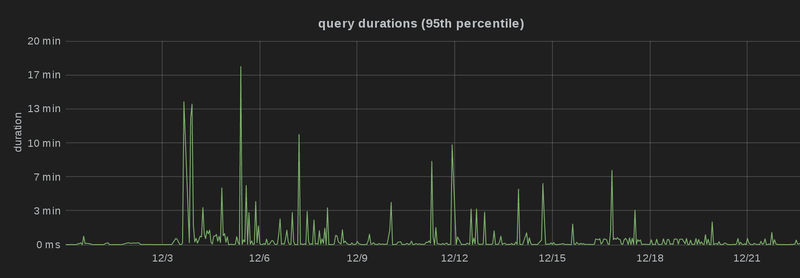
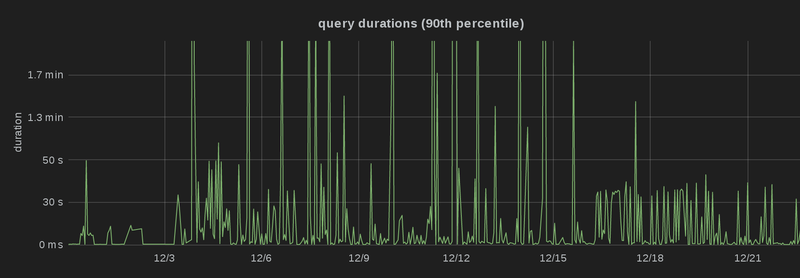
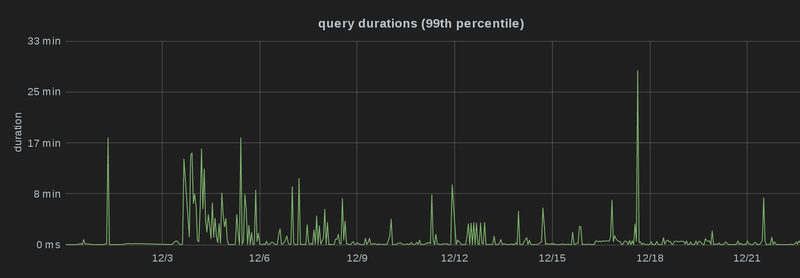
With some more profiling, the new bottleneck was suddenly the read(2) syscall, issued by the cap n proto deserialization, operating directly on the network connection buffer. strace revealed that crunching through the results of one source backend for a long query, read(2) was called about 250,000 times. By simply using a buffered reader (commit 684467ae), I could reduce that to about 2,000 times. Another bottleneck was the fact that for every processed result, the frontend needed to update the query state, which is shared amongst all goroutines (there is one goroutine for each source backend). All that parallelism isn t very effective if you need to synchronize the state updates in the end. So with commit 5d46a572, I refactored the state to be per-backend, so that locking is only necessary for the first couple of results, and the vast vast majority of results can be processed entirely without locking. This brought down the query time from 20 minutes to about 5 minutes, but I still wasn t happy with the bandwidth: the frontend was doing a bit over 10 MB/s of reads from all source backends combined, whereas with wget I could get around 40 MB/s with the same query. At this point, the CPU utilization was around 7% of one core on the frontend, and profiling didn t immediately reveal an obvious culprit. After a bit of experimenting (by commenting out code here and there ;-)), I figured out that the problem was that the frontend was still converting these results from capnproto buffers to JSON. While that doesn t take a lot of CPU time, it delays the network stream from the source-backend: once the local and remote TCP buffers are full, the source-backend will (intentionally!) not continue with its search, so that it doesn t run out of memory. I m still convinced that s a good idea, and in fact I was able to solve the problem in an elegant way: instead of writing JSON to disk and generating result pages on demand, we now write capnproto directly to disk (commit 466b7f3e) and convert it to JSON only before sending out the result pages. That decreases the overall CPU time since we only need to convert a small fraction of the results to JSON, but most importantly, the frontend is now not in the critical path anymore. It can directly pass the data through, and in fact it uses an io.TeeReader to do exactly that. Conclusion With all of these optimizations, we re now down to about 2.5 minutes for the search query arse , and the architecture of the system actually got simpler to reason about. Most importantly, though, the optimizations don t only play out for a single query, but for many different queries. I ve deployed the optimized version at the 15th of December 2014, and you can see that the 99th, 95th and 90th percentile latency dropped significantly, i.e. there are a lot fewer spikes than before, and more queries are processed faster, which is particularly obvious in the third graph (which is capped at 2 minutes):

Russ Allbery: Review: Wakulla Springs

Review: Wakulla Springs, by Andy Duncan & Ellen Klages
Publisher: Tor
Copyright: October, 2013
ASIN: B00EWZDPH4
Format: Kindle
Pages: 99
This is another nominee for the 2014 Hugo Awards (for works published in 2013), this time in the novella category. In this case, though, I read the free ebook version from Tor (Macmillan) rather than the version from the voter packet, since I usually grab all the free ebooks of Tor.com stories. (Even if I'm quite behind in reading them, since I don't read much short fiction.) As an independently-published novella, it gets its own review in the book category. Wakulla Springs is the story of three generations (and four protagonists) who lived near or visited Wakulla Springs in the Florida panhandle. This is a real place: a huge freshwater springs and underwater cave system, now protected as a national park. Two of the four episodes in this story revolve around the filming of movies: a Tarzan movie and Creature from the Black Lagoon. This actually happened as well, although of course the story takes liberties with the details. This is also the story of race relations in the American deep south: the tense and uncertain interactions between black locals and rich white people, both locals and people from the film industry who came for a brief time and then left again. It's also a story about water, swimming, and the sense of being part of the water and knowing it well. This story doesn't develop any particular point; rather, it's more of a collection of character sketches, grabbing moments in time, glimpsing what it's like to cross racial barriers and to feel at home with one's choices. It's also, in a nicely subtle way, about encountering mythical creatures that are not part of one's world. To the locals, the film stars who visit Wakulla Springs are as wild and strange as the imagined creatures of the swamp, and in their way even more foreign. What this is not, though, is science fiction, or even fantasy. One of the complaints I'd heard about Wakulla Springs in the context of the Hugos was that it didn't qualify as a genre story. I'm usually inclined to dismiss these sorts of complaints, since they're often put forth by people with a far narrower definition of genre than mine. But, having read this story, I have to concur. It's very well-written and engaging, but it's not genre in any sense that I'd define it. There are some rare mentions of mythical creatures, but only in ways that are part of the setting, and which are no more fantastic than I'd expect from many mainstream stories. I'm a bit baffled why an SFF publisher would have bought it for an explicitly SFF forum; I have to assume that it's just because it's well-written and the authors have both written SFF. That said, even though this is not the sort of story I'd normally seek out, I'm still glad I read it. I thought the best part of the story was the first, which follows a black woman who takes a job at the Wakulla Springs resort during the filming of a Tarzan movie. The color lines are simply taken for granted by everyone, but Johnny Weissmuller comes off very well in his fictional representation and adds an enthusiastic energy that plays off well against the thoughtful care of the protagonist. The second part echoes this with a boy as the protagonist, but shifts a generation later. This means the color line is fought instead of simply assumed, although with limited success. I thought this part of the story had the best descriptions of the joy of swimming, and once again the movie folks bring a disruptive and positive change to the tightly-drawn lines of local roles and politics. The third and fourth parts I found slighter, elaborating on the story by showing the reader glimpses of the later life of the first two protagonists, but not, I thought, adding anything fundamental to the story. I'm not sure this would be satisfying if you were looking for a science fiction or fantasy story, but it's a solid mainstream story about race, class, and the joy of knowing and feeling a place. It captures an angle of Hollywood that I've rarely seen in movies: a disruptive and almost subversive playfulness and energy that doesn't fix problems but that does provide moments of escape from the realities of the world, even outside of the film. Worth reading, particularly since it's free. Rating: 7 out of 10

22 December 2014

Michael Prokop: Ten years of Grml

* On 22nd of October 2004 an event called OS04 took place in Seifenfabrik Graz/Austria and it marked the first official release of the Grml project. Grml was initially started by myself in 2003 I registered the domain on September 16, 2003 (so technically it would be 11 years already :)). It started with a boot-disk, first created by hand and then based on yard. On 4th of October 2004 we had a first presentation of grml 0.09 Codename Bughunter at Kunstlabor in Graz. I managed to talk a good friend and fellow student Martin Hecher into joining me. Soon after Michael Gebetsroither and Andreas Gredler joined and throughout the upcoming years further team members (Nico Golde, Daniel K. Gebhart, Mario Lang, Gerfried Fuchs, Matthias Kopfermann, Wolfgang Scheicher, Julius Plenz, Tobias Klauser, Marcel Wichern, Alexander Wirt, Timo Boettcher, Ulrich Dangel, Frank Terbeck, Alexander Steinb ck, Christian Hofstaedtler) and contributors (Hermann Thomas, Andreas Krennmair, Sven Guckes, Jogi Hofm ller, Moritz Augsburger, ) joined our efforts. Back in those days most efforts went into hardware detection, loading and setting up the according drivers and configurations, packaging software and fighting bugs with lots of reboots (working on our custom /linuxrc for the initrd wasn t always fun). Throughout the years virtualization became more broadly available, which is especially great for most of the testing you need to do when working on your own (meta) distribution. Once upon a time udev became available and solved most of the hardware detection issues for us. Nowadays X.org doesn t even need a xorg.conf file anymore (at least by default). We have to acknowledge that Linux grew up over the years quite a bit (and I m wondering how we ll look back at the systemd discussions in a few years). By having Debian Developers within the team we managed to push quite some work of us back to Debian (the distribution Grml was and still is based on), years before the Debian Derivatives initiative appeared. We never stopped contributing to Debian though and we also still benefit from the Debian Derivatives initiative, like sharing issues and ideas on DebConf meetings. On 28th of May 2009 I myself became an official Debian Developer. Over the years we moved from private self-hosted infrastructure to company-sponsored systems, migrated from Subversion (brr) to Mercurial (2006) to Git (2008). Our Zsh-related work became widely known as grml-zshrc. jenkins.grml.org managed to become a continuous integration/deployment/delivery home e.g. for the dpkg, fai, initramfs-tools, screen and zsh Debian packages. The underlying software for creating Debian packages in a CI/CD way became its own project known as jenkins-debian-glue in August 2011. In 2006 I started grml-debootstrap, which grew into a reliable method for installing plain Debian (nowadays even supporting installation as VM, and one of my customers does tens of deployments per day with grml-debootstrap in a fully automated fashion). So one of the biggest achievements of Grml is from my point of view that it managed to grow several active and successful sub-projects under its umbrella. Nowadays the Grml team consists of 3 Debian Developers Alexander Wirt (formorer), Evgeni Golov (Zhenech) and myself. We couldn t talk Frank Terbeck (ft) into becoming a DM/DD (yet?), but he s an active part of our Grml team nonetheless and does a terrific job with maintaining grml-zshrc as well as helping out in Debian s Zsh packaging (and being a Zsh upstream committer at the same time makes all of that even better :)). My personal conclusion for 10 years of Grml? Back in the days when I was a student Grml was my main personal pet and hobby. Grml grew into an open source project which wasn t known just in Graz/Austria, but especially throughout the German system administration scene. Since 2008 I m working self-employed and mainly working on open source stuff, so I m kind of living a dream, which I didn t even have when I started with Grml in 2003. Nowadays with running my own business and having my own family it s getting harder for me to consider it still a hobby though, instead it s more integrated and part of my business which I personally consider both good and bad at the same time (for various reasons). Thanks so much to anyone of you, who was (and possibly still is) part of the Grml journey! Let s hope for another 10 successful years! Thanks to Max Amanshauser and Christian Hofstaedtler for reading drafts of this.

21 December 2014

Russ Allbery: Review: 2014 Hugos: Novelettes

Review: 2014 Hugos: Novelettes, edited by Loncon 3
Publisher: Loncon 3
Copyright: 2014
Format: Kindle
This is another weird "book review" covering the Hugo-nominated novelettes for the 2014 Hugos (given for works published in 2014) at Loncon 3, the 2014 Worldcon. The "editor" is the pool of attendees and supporting members who chose to nominate works, all of which had been previously edited by other editors in their original publication. I received all of these as part of the Hugo voter's packet for being a supporting member, but they all appear to be available for free on the Internet (at least at the time of this writing). "The Exchange Officers" by Brad Torgersen: An okay, if not particularly ground-breaking, military SF story, ruined for me by the ham-handed introduction of superficial jingoism. The protagonists are doing a tour as remote operators of humanoid battle suits in orbit: not a new premise, but a servicable one. Since this is military SF, they predictably have to defend a space installation against attackers. So we get a bit of drama, a bit of zero-g combat, and the fun of people learning how to remotely operate suits. You've probably read this before, but it passes the time reasonably well. Unfortunately, Torgersen decided to make the villains the Chinese military for no adequately-explained reason. (Well, I'm being kind; I suspect the reason is the standard yellow peril nonsense, but that's less generous.) So there is snide commentary about how only the military understand the Chinese threat and a fair bit of old-fashioned jingoism mixed in to the story, to its detriment. If you like this sort of thing, it's a typical example, although it escapes me why people thought it was exceptional enough to warrant nomination. (5) "The Lady Astronaut of Mars" by Mary Robinette Kowal: Once again, my clear favorite among the stories also won, which is a lovely pattern. Elma was the female astronaut in an alternate history in which manned space exploration continued to grow, leading to permanent settlement on Mars. She spent lots of time being photographed, being the smiling face of the space program, while her husband worked on the math and engineering of the launches. Now, she's an old woman, taking care of her failing and frail husband, her career behind her. Or so she thinks, before an offer that forces an impossible choice between space and staying with her husband for his final days. This is indeed the tear-jerker that it sounds like, but it's not as maudlin as it might sound. Kowal does an excellent job with Elma's characterization: she's no-nonsense, old enough to be confident in her opinions, and knows how to navigate through the world. The story is mixed with nostalgia and memories, including a reminder of just what Elma meant to others. It touches on heroism, symbolism, and the horrible choices around dying loved ones, but I thought it did so deftly and with grace. I was expecting the story to be too obvious, but I found I enjoyed the quotidian feel. It's not a story to read if you want to be surprised, but I loved the small touches. (9) "Opera Vita Aeterna" by Vox Day: Before the review, a note that I consider obligatory. The author of this story is an aggressively misogynistic white supremacist, well-known online for referring to black people as savages and arguing women should not be allowed to vote. To what extent you choose to take that into account when judging his fiction is up to you, but I don't think it should go unsaid. "Opera Vita Aeterna" is the story of a monastery in a typical fantasy world (at least as far as one can tell from this story; readers of Vox Day's fantasy series will probably know more background). At the start of the story, it gets an unexpected visit from an elf. Not just any elf, either, but one of the most powerful magicians of his society. He comes to the monastery out of curiousity about the god that the monks worship and stays for a project of illuminating their scriptures, while having theological debates with the abbot. This story is certainly not the offensive tirade that you might expect from its author. Its biggest problem is that nothing of substance happens in the story, either theologically or via more conventional action. It's a lot of description, a lot of talking, a lot of warmed-over Christian apologetics that dodges most of the hard problems, and a lot of assertions that the elf finds something of interest in this monastery. I can believe this could be the case, but Vox Day doesn't really show why. There is, at the end of the story, some actual drama, but I found it disappointing and pointless. It leads nowhere. The theology has the same problem: elves supposedly have no souls, which is should be the heart of a theological question or conflict Vox Day is constructing, but that conflict dies without any resolution. We know nothing more about the theology of this world at the end of the story than we do at the beginning. Some of the descriptions here aren't bad, and the atmosphere seems to want to develop into a story. But that development never happens, leaving the whole work feeling fundamentally pointless. (4) "The Truth of Fact, the Truth of Feelng" by Ted Chiang: This is another oddly-constructed story, although I think a bit more successful. It's a story in two interwoven parts. One is a fictional essay, told in a non-fiction style, about a man living in a future world with ubiquitous life recording and very efficient search software. Any part of one's life can be easily found and reviewed. The other is the story of a boy from a tribal culture during European colonialism. He learns to read and write, and from that a respect for written records, which come into conflict with the stories that the tribe elders tell about the past. The purpose of both of these stories is to question both the value and the implications of recording everything in a way that preserves and guarantees the facts instead of individual interpretations. The boy's story calls this into question; the narrator's story offers ambiguous support for its value and a deeper plea for giving people space to change. I found the style a bit difficult to get used to, since much of it did not feel like a story. But it grew on me as I read it, and the questions Chiang raises have stuck with me since. The problem of how and when to allow for change in others when we have perfect (or at least vastly improved) memory is both important and complicated, and this is one of the better presentations of the problem that I've seen. It's more of a think-y piece, and closer to non-fiction than a story, but I thought it was worth reading. (8) "The Waiting Stars" by Aliette de Bodard: I keep wanting to like de Bodard's space opera world of AIs and living ships, but it never quite works for me. I've read several stories set in this universe now, and it has some neat ideas, but I always struggle with the characters. This story at least doesn't have quite as much gruesome pregnancy as the previous ones (although there's still some). "The Waiting Stars" opens with a raid on a ship graveyard, an attempt to rescue and "reboot" an AI starship under the guidance of another Mind. This is intermixed with another story about a woman who was apparently rescued in childhood from birthing ship Minds and raised in a sort of foster institution. This feels like a flashback at first, but its interaction with the rest of the story is something more complicated. The conceptual trick de Bodard pulls here is thought-provoking, but once again I struggled to care about all of the characters. I also found the ending discouraging and unsatisfying, which didn't help. Someone who isn't me might really like this story, but it wasn't my thing. (6) Rating: 6 out of 10

Dirk Eddelbuettel: If only there was a Romeo somewhere ...

Attention: rant coming. You have been warned, and may want to tune out now. So the top of my Twitter timeline just had a re-tweet posting to this marvel on the state of Julia. I should have known better than to glance at it as it comes from someone providing (as per the side-bar) Thought leadership in Big Data, systems architecture and more. Reading something like this violates the first rule of airport book stores: never touch anything from the business school section, especially on (wait for it) leadership or, worse yet, thought leadership. But it is Sunday, my first cup of coffee still warm (after finalising two R package updates on GitHub, and one upload to CRAN) and so I read on. Only to be mildly appalled by the usual comparison to R based on the same old Fibonacci sequence. Look, I am as guilty as anyone of using it (for example all over chapter one of my Rcpp book), but at least I try to stress each and every time that this is kicking R where it is down as its (fairly) poor performance on functions calls (that is well-known and documented) obviously gets aggravated by recursive calls. But hey, for the record, let me restate those results. So Julia beats R by a factor of 385. But let's take a closer look. For n=25, I get R to take 241 milliseconds---as opposed to his 6905 milliseconds---simply by using the same function I use in every workshop, eg last used at Penn in November, which does not use the dreaded ifelse operator:
fibR <- function(n)  
  if (n < 2) return(n)
  return(fibR(n-1) + fibR(n-2))
 
Switching that to the standard C++ three-liner using Rcpp
library(Rcpp)
cppFunction('int fibCpp(int n)   
  if (n < 2) return(n);  
  return(fibCpp(n-1) + fibCpp(n-2));  
   ')
and running a standard benchmark suite gets us the usual result of
R> library(rbenchmark)
R> benchmark(fibR(25),fibCpp(25),order="relative")[,1:4]
        test replications elapsed relative
2 fibCpp(25)          100   0.048    1.000
1   fibR(25)          100  24.674  514.042
R> 
So for the record as we need this later: that is 48 milliseconds for 100 replications, or about 0.48 milliseconds per run. Now Julia. And of my standard Ubuntu server running the current release 14.10:
edd@max:~$ julia
ERROR: could not open file /home/edd//home/edd//etc/julia/juliarc.jl
 in include at boot.jl:238
edd@max:~$ 
So wait, what? You guys can't even ensure a working release on what is probably the most popular and common Linux installation? And I get to that after reading a post on the importance of "Community, Community, Community" and you can't even make sure this works on Ubuntu? Really? So a little bit of googling later, I see that julia -f is my friend for this flawed release, and I can try to replicate the original timing
edd@max:~$ julia -f
               _
   _       _ _(_)_        A fresh approach to technical computing
  (_)       (_) (_)       Documentation: http://docs.julialang.org
   _ _   _   _  __ _      Type "help()" to list help topics
               / _      
       _        (_        Version 0.2.1 (2014-02-11 06:30 UTC)
 _/  \__'_ _ _ \__'_      
 __/                      x86_64-linux-gnu
julia> fib(n) = n < 2 ? n : fib(n - 1) + fib(n - 2)
fib (generic function with 1 method)
julia> @elapsed fib(25)
0.002299559
julia> 
Interestingly the posts author claims 18 milliseconds. I see 2.3 milliseconds here. Maybe someone is having a hard time comparing things to the right of the decimal point. Or maybe his computer is an order of magnitude slower than mine. The more important thing is that Julia is of course faster than R (no surprise: LLVM at work) but also still a lot slower than a (trivial to write and deploy) C++ function. Nothing new here. So let's recap. Comparison to R was based on a flawed version of a function we only use when we deliberately want to put R down, can be improved significantly when using a better implementation, results are still off by order of magnitude to what was reported ("math is hard"), and the standard C / C++ way of doing things is still several times faster than our new saviour language---which I can't even launch on the current version of one of the more common free operating systems. Ok then. Someone please wake me up in a few years and I will try again. Now, coming to the end of the rant I should really stress that of course I too hope that Julia succeeds. Every user pulled away from Matlab is a win for all us. We're in this together and the endless navel gazing between ourselves is so tiresome and irrelevant. And as I argue here, even more so when we among ourselves stick to unfair comparisons as well as badly chosen implementation details. What matters are wins against the likes of Matlab, Excel, SAS and so on. Let's build on our joint strength. I am sure I will use Julia one day, and I am grateful for everyone helping with it---as a lot of help seems to be needed. In the meantime, and with CRAN at 6130 packages that just work I'll continue to make use of this amazing community and trying my bit to help it grow and prosper. As part of our joint community.

Steve McIntyre: UEFI Debian installer work for Jessie, part 2

A month ago , I wrote about my plans for improved (U)EFI support in Jessie. It's about time I gave an update on progress! I spoke about adding support for installing grub-efi into the removable media path (#746662). That went into Debian's grub packages already, but there were a couple of bugs. First of all, the code could end up prompting people about EFI questions even when they didn't have any grub-efi packages installed. Doh! (#773004). Then there was an unexpected bug with case-insensitive file name handling on FAT/VFAT filesystems (#773092). I've posted (and tested!) patches to fix both, hopefully in an upload any day now. Next, I mentioned getting i386 UEFI support going again. This is a major feature that a lot of people have been asking for. It's also going to involve quite a bit of effort... Our existing (amd64) UEFI-capable images in Debian use the standard x86 El Torito CD boot method, with two boot images provided. One of these images gives us the traditional isolinux BIOS-boot support. The second option is an alternate El Torito image, including at a 64-bit version of grub-efi. For most machines, this works just fine - the BIOS or UEFI firmware will automatically pick the correct image and everybody's happy. This even works on our multi-arch i386/amd64 CDs and DVDs - isolinux will boot either kernel from the first El Torito image, or the alternate UEFI image is amd64 only. However, I can now see that there's been a long-standing issue with those multi-arch images, and it's to do with Macs. On the advice of Matthew Garrett, I've borrowed an old 32-bit Intel Mac to help testing, and it's quite instructive in terms of buggy firmware! The firmware on older 32-bit Intel Macs crashes hard when it detects more than one El Torito boot image, and I've now seen this happen myself. I've not had any bug reports about this, so I can only assume that we haven't had many users try that image. As far as I can tell, they've been using the normal i386 images in BIOS boot mode, and then struggling to get bootloaders working afterwards. There are a number of different posts on the net explaining how to do that. That's OK, but... If I now start adding 32-bit UEFI support to our standard set of i386 images, this will prevent users of old Macs from installing Debian. I could just say "screw it" and decide to not support those users at all, but that's not a very nice thing to do. If we want to continue to support them and add 32-bit UEFI support, I'll have to add another flavour of i386 image, either a "Mac special" or a "32-bit UEFI special". I'm not keen on doing that if I could avoid it, but the two options are mutually exclusive. Given the Mac problem is only on older hardware which (hopefully!) will be dying out, I'll probably pick that one as the special-case CD, and I'll make an extra netinst flavour only for those users to boot off. So, I've started playing with i386 UEFI stuff in the last couple of weeks too. I almost immediately found some showstopper behaviour bugs in the i386 versions of efivar and efibootmgr (#773412 and #773007), but I've debugged these with our Debian maintainer (Jared Dominguez) and the upstream developer (Peter Jones) and fixes should be in Jessie very soon. As I mentioned last month, the machines that most people have been requesting support for are the latest Bay Trail-based laptops and tablets. There are using 64-bit Intel Atom CPUs, but crippled with 32-bit UEFI firmware with no BIOS compatibility mode. This makes for some interesting issues. It's probably impossible to get a true answer why these machines are so broken by design, but there are several rumours. As far as I can see, most of these machines seem to ship with a limited version of 32-bit Windows 8.1. 32-bit Windows is smaller than 64-bit Windows, so fits much better in limited on-board storage space. But 32-bit Windows won't boot from 64-bit UEFI, so the firmware needed buggering to match. Ugh! To support these Bay Trail machines properly, we'll want to add a 32-bit UEFI installation option to our 64-bit images. I can tweak our CDs so that both 32-bit and 64-bit versions of grub-efi are included, and the on-board UEFI will load the right one needed. Then I'll need to make sure that all the 64-bit images also include grub-efi-ia32-bin from now on. With some extra logic, we'll need to remember that these new machines need that package installing instead of grub-efi-amd64-bin. It shouldn't be too hard, but let's see! :-) So, I've been out and bought one of these machines, an Asus X205TA. Lucas agreed that Debian will reimburse me (thanks!), so I'm not stuck with spending my own money on an otherwise unwanted machine! I can see via Google that none of the mainstream Linux distros support the Bay Trail machines fully yet, so there's not a lot of documentation yet. Initial boot on the new machine was easy using a quick-hack i386 UEFI image on USB, but from there everything went downhill quickly. I'll need to investigate some more, but the laptop's own keyboard and trackpad are not detected by the installer system. Neither is its built-in WiFi. Yay! I had to go and dig out a USB hub to connect the installer image USB key, a keyboard, mouse and a USB hard drive to the machine, as it only has 2 USB ports. I've taken a complete backup of the on-board 32GB flash before I start experimenting, so I can restore the machine back to its virgin state for future testing. I guess I now have a project to keep me busy over Christmas...! In other news, we've been continuing work on UEFI support for and within the new arm64 port. My ARM/Linaro colleague Leif Lindholm has been back-porting upstream kernel features and bug fixes to make d-i work, and filing Debian bugs when silly things break on arm64 because people don't think about other architectures (e.g #773311, doh!). As there are more and more people interested in (U)EFI support these days, I've also proposed that we create a new debian-efi mailing list to help focus discussion. See #773327 and follow up there if you think you'd use the list too! You can help! Same as 2 years ago, I'll need help testing some of these images. For the 32-bit UEFI support, I now have some relevant hardware myself, but testing on other machines too will be very important! I'll start pushing unofficial Jessie EFI test images shortly - watch this space.

20 December 2014

Rudy Godoy: Apache Phoenix for Cloudera CDH

Apache Phoenix is a relational database layer over HBase delivered as a client-embedded JDBC driver targeting low latency queries over HBase data. Apache Phoenix takes your SQL query, compiles it into a series of HBase scans, and orchestrates the running of those scans to produce regular JDBC result sets. What the above statement means for developers or data scientists is that you can talk SQL to your HBase cluster. Sounds good right? Setting up Phoenix on Cloudera CDH can be really frustrating and time-consuming. I wrapped-up references from across the web with my own findings to have both play nice. Building Apache Phoenix Because of dependency mismatch for the pre-built binaries, supporting Cloudera s CDH requires to build Phoenix using the versions that match the CDH deployment. The CDH version I used is CDH4.7.0. This guide applies for any version of CDH4+. Note: You can find CDH components version in the CDH Packaging and Tarball Information section for the Cloudera Release Guide . Current release information (CDH5.2.1) is available in this link. Preparing Phoenix build environment Phoenix can be built using maven or gradle. General instructions can be found in the Building Phoenix Project webpage. Before building Phoenix you need to have: Checkout correct Phoenix branch Phoenix has two major release versions: Clone the Phoenix git repository
git clone https://github.com/apache/phoenix.git
Work with the correct branch
git fetch origin
git checkout 3.2
Modify dependencies to match CDH Before building Phoenix, you will need to modify the dependencies to match the version of CDH you are trying to support. Edit phoenix/pom.xml and do the following changes: Add Cloudera s Maven repository
+  <repository>
+  <id>cloudera</id>
+  https://repository.cloudera.com/artifactory/cloudera-repos/
+  </repository>
Change component versions to match CDH s.
  
-  <hadoop-one.version>1.0.4</hadoop-one.version>
-  <hadoop-two.version>2.0.4-alpha</hadoop-two.version>
+  <hadoop-one.version>2.0.0-mr1-cdh4.7.0</hadoop-one.version>
+  <hadoop-two.version>2.0.0-cdh4.7.0</hadoop-two.version>
  <!-- Dependency versions -->
-  <hbase.version>0.94.19
+  <hbase.version>0.94.15-cdh4.7.0
  <commons-cli.version>1.2</commons-cli.version>
-  <hadoop.version>1.0.4
+  <hadoop.version>2.0.0-cdh4.7.0
  <pig.version>0.12.0</pig.version>
  <jackson.version>1.8.8</jackson.version>
  <antlr.version>3.5</antlr.version>
  <log4j.version>1.2.16</log4j.version>
  <slf4j-api.version>1.4.3.jar</slf4j-api.version>
  <slf4j-log4j.version>1.4.3</slf4j-log4j.version>
-  <protobuf-java.version>2.4.0</protobuf-java.version>
+  <protobuf-java.version>2.4.0a</protobuf-java.version>
  <commons-configuration.version>1.6</commons-configuration.version>
  <commons-io.version>2.1</commons-io.version>
  <commons-lang.version>2.5</commons-lang.version>
Change target version, only if you are building for Java 6. CDH4 is built for JRE 6.
  <artifactId>maven-compiler-plugin</artifactId>
  <version>3.0</version>
  <configuration>
-  <source>1.7</source>
-  <target>1.7</target>
+  <source>1.6</source>
+  <target>1.6</target>
  </configuration>
Phoenix building Once, you have made the changes you are set to build Phoenix. Our CDH4.7.0 cluster uses Hadoop 2, so make sure to activate the hadoop2 profile.
mvn package -DskipTests -Dhadoop.profile=2
If everything goes well, you should see the following result:
[INFO] ------------------------------------------------------------------------
[INFO] Reactor Summary:
[INFO]
[INFO] Apache Phoenix .................................... SUCCESS [2.729s]
[INFO] Phoenix Hadoop Compatibility ...................... SUCCESS [0.882s]
[INFO] Phoenix Core ...................................... SUCCESS [24.040s]
[INFO] Phoenix - Flume ................................... SUCCESS [1.679s]
[INFO] Phoenix - Pig ..................................... SUCCESS [1.741s]
[INFO] Phoenix Hadoop2 Compatibility ..................... SUCCESS [0.200s]
[INFO] Phoenix Assembly .................................. SUCCESS [30.176s]
[INFO] ------------------------------------------------------------------------
[INFO] BUILD SUCCESS
[INFO] ------------------------------------------------------------------------
[INFO] Total time: 1:02.186s
[INFO] Finished at: Mon Dec 15 13:18:48 PET 2014
[INFO] Final Memory: 45M/1330M
[INFO] ------------------------------------------------------------------------
Phoenix Server component deployment Since Phoenix is a JDBC layer on top of HBase a server component has to be deployed on every HBase node. The goal is to have Phoenix server component added to HBase classpath. You can achieve this goal either by copying the server component directly to HBase s lib directory, or copy the component to an alternative path then modify HBase classpath definition. For the first approach, do:
cp phoenix-assembly/target/phoenix-3.2.3-SNAPSHOT-server.jar /opt/cloudera/parcels/CDH/lib/hbase/lib/
Note: In this case CDH is a synlink to the current active CDH version. For the second approach, do:
cp phoenix-assembly/target/phoenix-3.2.3-SNAPSHOT-server.jar /opt/phoenix/
Then add the following line to /etc/hbase/conf/hbase-env.sh
/etc/hbase/conf/hbase-env.sh
export HBASE_CLASSPATH_PREFIX=/opt/phoenix/phoenix-3.2.3-SNAPSHOT-server.jar
Wether you ve used any of the methods, you have to restart HBase. If you are using Cloudera Manager, restart the HBase service. To validate that Phoenix is on HBase class path, do:
sudo -u hbase hbase classpath   tr ':' '\n'   grep phoenix
Phoenix server validation Phoenix provides a set of client tools that you can use to validate the server component functioning. However, since we are supporting CDH4.7.0 we ll need to make few changes to such utilities so they use the correct dependencies. phoenix/bin/sqlline.py: sqlline.py is a wrapper for the JDBC client, it provides a SQL console interface to HBase through Phoenix.
index f48e527..bf06148 100755
--- a/bin/sqlline.py
+++ b/bin/sqlline.py
@@ -53,7 +53,8 @@ colorSetting = "true"
 if os.name == 'nt':
  colorSetting = "false"
-java_cmd = 'java -cp "' + phoenix_utils.hbase_conf_path + os.pathsep + phoenix_utils.phoenix_client_jar + \
+extrajars="/opt/cloudera/parcels/CDH/lib/hadoop/lib/commons-collections-3.2.1.jar:/opt/cloudera/parcels/CDH/lib/hadoop/hadoop-auth-2.0.0-cdh4.7.0.jar:/opt/cloudera/parcels/CDH/lib/hadoop/hadoop-common-2.0.0-cdh4.7.0.jar:/opt/cloudera/parcerls/CDH/lib/oozie/libserver/hbase-0.94.15-cdh4.7.0.jar"
+java_cmd = 'java -cp ".' + os.pathsep + extrajars + os.pathsep + phoenix_utils.hbase_conf_path + os.pathsep + phoenix_utils.phoenix_client_jar + \
  '" -Dlog4j.configuration=file:' + \
  os.path.join(phoenix_utils.current_dir, "log4j.properties") + \
  " sqlline.SqlLine -d org.apache.phoenix.jdbc.PhoenixDriver \
phoenix/bin/psql.py: psql.py is a wrapper tool that can be used to create and populate HBase tables.
index 34a95df..b61fde4 100755
--- a/bin/psql.py
+++ b/bin/psql.py
@@ -34,7 +34,8 @@ else:
 # HBase configuration folder path (where hbase-site.xml reside) for
 # HBase/Phoenix client side property override
-java_cmd = 'java -cp "' + phoenix_utils.hbase_conf_path + os.pathsep + phoenix_utils.phoenix_client_jar + \
+extrajars="/opt/cloudera/parcels/CDH/lib/hadoop/lib/commons-collections-3.2.1.jar:/opt/cloudera/parcels/CDH/lib/hadoop/hadoop-auth-2.0.0-cdh4.7.0.jar:/opt/cloudera/parcels/CDH/lib/hadoop/hadoop-common-2.0.0-cdh4.7.0.jar:/opt/cloudera/parcerls/CDH/lib/oozie/libserver/hbase-0.94.15-cdh4.7.0.jar"
+java_cmd = 'java -cp ".' + os.pathsep + extrajars + os.pathsep + phoenix_utils.hbase_conf_path + os.pathsep + phoenix_utils.phoenix_client_jar + \
  '" -Dlog4j.configuration=file:' + \
  os.path.join(phoenix_utils.current_dir, "log4j.properties") + \
  " org.apache.phoenix.util.PhoenixRuntime " + args
After you have done such changes you can test connectivity by issuing the following commands:
./bin/sqlline.py zookeeper.local
Setting property: [isolation, TRANSACTION_READ_COMMITTED]
issuing: !connect jdbc:phoenix:zookeeper.local none none org.apache.phoenix.jdbc.PhoenixDriver
Connecting to jdbc:phoenix:zookeeper.local
14/12/16 19:26:10 WARN conf.Configuration: dfs.df.interval is deprecated. Instead, use fs.df.interval
14/12/16 19:26:10 WARN conf.Configuration: hadoop.native.lib is deprecated. Instead, use io.native.lib.available
14/12/16 19:26:10 WARN conf.Configuration: fs.default.name is deprecated. Instead, use fs.defaultFS
14/12/16 19:26:10 WARN conf.Configuration: topology.script.number.args is deprecated. Instead, use net.topology.script.number.args
14/12/16 19:26:10 WARN conf.Configuration: dfs.umaskmode is deprecated. Instead, use fs.permissions.umask-mode
14/12/16 19:26:10 WARN conf.Configuration: topology.node.switch.mapping.impl is deprecated. Instead, use net.topology.node.switch.mapping.impl
14/12/16 19:26:11 WARN conf.Configuration: fs.default.name is deprecated. Instead, use fs.defaultFS
14/12/16 19:26:11 WARN util.NativeCodeLoader: Unable to load native-hadoop library for your platform... using builtin-java classes where applicable
14/12/16 19:26:12 WARN conf.Configuration: fs.default.name is deprecated. Instead, use fs.defaultFS
Connected to: Phoenix (version 3.2)
Driver: PhoenixEmbeddedDriver (version 3.2)
Autocommit status: true
Transaction isolation: TRANSACTION_READ_COMMITTED
Building list of tables and columns for tab-completion (set fastconnect to true to skip)...
77/77 (100%) Done
Done
sqlline version 1.1.2
0: jdbc:phoenix:zookeeper.local>
Then, you can either issue SQL-commands or Phoenix-commands.
0: jdbc:phoenix:zookeeper.local> !tables
+------------------------------------------+------------------------------------------+------------------------------------------+---------------------------+
  TABLE_CAT    TABLE_SCHEM    TABLE_NAME    TABLE_TYPE  
+------------------------------------------+------------------------------------------+------------------------------------------+---------------------------+
  null    SYSTEM    CATALOG    SYSTEM TABLE   
  null    SYSTEM    SEQUENCE    SYSTEM TABLE   
  null    SYSTEM    STATS    SYSTEM TABLE   
  null    null    STOCK_SYMBOL    TABLE   
  null    null    WEB_STAT    TABLE   
+------------------------------------------+------------------------------------------+------------------------------------------+---------------------------+

19 December 2014

Enrico Zini: upgrade-encrypted-cyanogenmod

Upgrade Cyanogenmod with an encrypted phone Cyanogenmod found an update, it downloaded it, then it rebooted to install it and nothing happened. It turns out that the update procedure cannot work if the zip file to install is in encrypted media, so a workaround is to move the zip into unencrypted external storage. As far as I know, my Nexus 4 has no unencrypted external storage. This is how I managed to upgrade it, I write it here so I can find it next time:
  1. enable USB debugging
  2. adb pull /cmupdater/cm-11-20141115-SNAPSHOT-M12-mako.zip
  3. adb reboot recovery
  4. choose "install zip from sideload"
  5. adb sideload cm-11-20141115-SNAPSHOT-M12-mako.zip

Steve Kemp: Switched to using attic for backups

Even though seeing the word attic reminds me too much of leaking roofs and CVS, I've switched to using the attic backup tool. I want a simple system which will take incremental backups, perform duplication-elimination (to avoid taking too much space), support encryption, and be fast. I stopped using backup2l because the .tar.gz files were too annoying, and it was too slow. I started using obnam because I respect Lars and his exceptionally thorough testing-regime, but had to stop using it when things started getting "too slow". I'll document the usage/installation in the future. For the moment the only annoyance is that it is contained in the Jessie archive, not the Wheezy one. Right now only 2/19 of my hosts are Jessie.

18 December 2014

Wouter Verhelst: Introducing libjoy

I've owned a Logitech Wingman Gamepad Extreme since pretty much forever, and although it's been battered over the years, it's still mostly functional. As a gamepad, it has 10 buttons. What's special about it, though, is that the device also has a mode in which a gravity sensor kicks in and produces two extra axes, allowing me to pretend I'm really talking to a joystick. It looks a bit weird though, since you end up playing your games by wobbling the gamepad around a bit. About 10 years ago, I first learned how to write GObjects by writing a GObject-based joystick API. Unfortunately, I lost the code at some point due to an overzealous rm -rf call. I had planned to rewrite it, but that never really happened. About a year back, I needed to write a user interface for a customer where a joystick would be a major part of the interaction. The code there was written in Qt, so I write an event-based joystick API in Qt. As it happened, I also noticed that jstest would output names for the actual buttons and axes; I had never noticed this, because due to my 10 buttons and 4 axes, which by default produce a lot of output, the jstest program would just scroll the names off my screen whenever I plugged it in. But the names are there, and it's not too difficult. Refreshing my memory on the joystick API made me remember how much fun it is, and I wrote the beginnings of what I (at the time) called "libgjs", for "Gobject JoyStick". I didn't really finish it though, until today. I did notice in the mean time that someone else released GObject bindings for javascript and also called that gjs, so in the interest of avoiding confusion I decided to rename my library to libjoy. Not only will this allow me all kinds of interesting puns like "today I am releasing more joy", it also makes for a more compact API (compare joy_stick_open() against gjs_joystick_open()). The library also comes with a libjoy-gtk that creates a GtkListStore* which is automatically updated as joysticks are added and removed to the system; and a joytest program, a graphical joystick test program which also serves as an example of how to use the API. still TODO: What's there is functional, though. Update: if you're going to talk about code, it's usually a good idea to link to said code. Thanks, Emanuele, for pointing that out ;-)

17 December 2014

Keith Packard: MST-monitors

Multi-Stream Transport 4k Monitors and X I'm sure you've seen a 4k monitor on a friends desk running Mac OS X or Windows and are all ready to go get one so that you can use it under Linux. Once you've managed to acquire one, I'm afraid you'll discover that when you plug it in, you're limited to 30Hz refresh rates at the full size, unless you're running a kernel that is version 3.17 or later. And then... Good Grief! What Is My Computer Doing! Ok, so now you're running version 3.17 and when X starts up, it's like you're using a gigantic version of Google Cardboard. Two copies of a very tall, but very narrow screen greets you. Welcome to MST island. In order to drive these giant new panels at full speed, there isn't enough bandwidth in the display hardware to individually paint each pixel once during each frame. So, like all good hardware engineers, they invented a clever hack. This clever hack paints the screen in parallel. I'm assuming that they've got two bits of display hardware, each one hooked up to half of the monitor. Now, each paints only half of the pixels, avoiding costly redesign of expensive silicon, at least that's my surmise. In the olden days, if you did this, you'd end up running two monitor cables to your computer, and potentially even having two video cards. Today, thanks to the magic of Display Port Multi-Stream Transport, we don't need all of that; instead, MST allows us to pack multiple cables-worth of data into a single cable. I doubt the inventors of MST intended it to be used to split a single LCD panel into multiple "monitors", but hardware engineers are clever folk and are more than capable of abusing standards like this when it serves to save a buck. Turning Two Back Into One We've got lots of APIs that expose monitor information in the system, and across which we might be able to wave our magic abstraction wand to fix this:
  1. The KMS API. This is the kernel interface which is used by all graphics stuff, including user-space applications and the frame buffer console. Solve the problem here and it works everywhere automatically.
  2. The libdrm API. This is just the KMS ioctls wrapped in a simple C library. Fixing things here wouldn't make fbcons work, but would at least get all of the window systems working.
  3. Every 2D X driver. (Yeah, we're trying to replace all of these with the one true X driver). Fixing the problem here would mean that all X desktops would work. However, that's a lot of code to hack, so we'll skip this.
  4. The X server RandR code. More plausible than fixing every driver, this also makes X desktops work.
  5. The RandR library. If not in the X server itself, how about over in user space in the RandR protocol library? Well, the problem here is that we've now got two of them (Xlib and xcb), and the xcb one is auto-generated from the protocol descriptions. Not plausible.
  6. The Xinerama code in the X server. Xinerama is how we did multi-monitor stuff before RandR existed. These days, RandR provides Xinerama emulation, but we've been telling people to switch to RandR directly.
  7. Some new API. Awesome. Ok, so if we haven't fixed this in any existing API we control (kernel/libdrm/X.org), then we effectively dump the problem into the laps of the desktop and application developers. Given how long it's taken them to adopt current RandR stuff, providing yet another complication in their lives won't make them very happy.
All Our APIs Suck Dave Airlie merged MST support into the kernel for version 3.17 in the simplest possible fashion -- pushing the problem out to user space. I was initially vaguely tempted to go poke at it and try to fix things there, but he eventually convinced me that it just wasn't feasible. It turns out that all of our fancy new modesetting APIs describe the hardware in more detail than any application actually cares about. In particular, we expose a huge array of hardware objects: Each of these objects exposes intimate details about the underlying hardware -- which of them can work together, and which cannot; what kinds of limits are there on data rates and formats; and pixel-level timing details about blanking periods and refresh rates. To make things work, some piece of code needs to actually hook things up, and explain to the user why the configuration they want just isn't possible. The sticking point we reached was that when an MST monitor gets plugged in, it needs two CRTCs to drive it. If one of those is already in use by some other output, there's just no way you can steal it for MST mode. Another problem -- we expose EDID data and actual video mode timings. Our MST monitor has two EDID blocks, one for each half. They happen to describe how they're related, and how you should configure them, but if we want to hide that from the application, we'll have to pull those EDID blocks apart and construct a new one. The same goes for video modes; we'll have to construct ones for MST mode. Every single one of our APIs exposes enough of this information to be dangerous. Every one, except Xinerama. All it talks about is a list of rectangles, each of which represents a logical view into the desktop. Did I mention we've been encouraging people to stop using this? And that some of them listened to us? Foolishly? Dave's Tiling Property Dave hacked up the X server to parse the EDID strings and communicate the layout information to clients through an output property. Then he hacked up the gnome code to parse that property and build a RandR configuration that would work. Then, he changed to RandR Xinerama code to also parse the TILE properties and to fix up the data seen by application from that. This works well enough to get a desktop running correctly, assuming that desktop uses Xinerama to fetch this data. Alas, gtk has been "fixed" to use RandR if you have RandR version 1.3 or later. No biscuit for us today. Adding RandR Monitors RandR doesn't have enough data types yet, so I decided that what we wanted to do was create another one; maybe that would solve this problem. Ok, so what clients mostly want to know is which bits of the screen are going to be stuck together and should be treated as a single unit. With current RandR, that's some of the information included in a CRTC. You pull the pixel size out of the associated mode, physical size out of the associated outputs and the position from the CRTC itself. Most of that information is available through Xinerama too; it's just missing physical sizes and any kind of labeling to help the user understand which monitor you're talking about. The other problem with Xinerama is that it cannot be configured by clients; the existing RandR implementation constructs the Xinerama data directly from the RandR CRTC settings. Dave's Tiling property changes edit that data to reflect the union of associated monitors as a single Xinerama rectangle. Allowing the Xinerama data to be configured by clients would fix our 4k MST monitor problem as well as solving the longstanding video wall, WiDi and VNC troubles. All of those want to create logical monitor areas within the screen under client control What I've done is create a new RandR datatype, the "Monitor", which is a rectangular area of the screen which defines a rectangular region of the screen. Each monitor has the following data: There are three requests to define, delete and list monitors. And that's it. Now, we want the list of monitors to completely describe the environment, and yet we don't want existing tools to break completely. So, we need some way to automatically construct monitors from the existing RandR state while still letting the user override portions of it as needed to explain virtual or tiled outputs. So, what I did was to let the client specify a list of outputs for each monitor. All of the CRTCs which aren't associated with an output in any client-defined monitor are then added to the list of monitors reported back to clients. That means that clients need only define monitors for things they understand, and they can leave the other bits alone and the server will do something sensible. The second tricky bit is that if you specify an empty rectangle at 0,0 for the pixel geometry, then the server will automatically compute the geometry using the list of outputs provided. That means that if any of those outputs get disabled or reconfigured, the Monitor associated with them will appear to change as well. Current Status Gtk+ has been switched to use RandR for RandR versions 1.3 or later. Locally, I hacked libXrandr to override the RandR version through an environment variable, set that to 1.2 and Gtk+ happily reverts back to Xinerama and things work fine. I suspect the plan here will be to have it use the new Monitors when present as those provide the same info that it was pulling out of RandR's CRTCs. KDE appears to still use Xinerama data for this, so it "just works". Where's the code As usual, all of the code for this is in a collection of git repositories in my home directory on fd.o:
git://people.freedesktop.org/~keithp/randrproto master
git://people.freedesktop.org/~keithp/libXrandr master
git://people.freedesktop.org/~keithp/xrandr master
git://people.freedesktop.org/~keithp/xserver randr-monitors
RandR protocol changes Here's the new sections added to randrproto.txt
                   
1.5. Introduction to version 1.5 of the extension
Version 1.5 adds monitors
   A 'Monitor' is a rectangular subset of the screen which represents
   a coherent collection of pixels presented to the user.
   Each Monitor is be associated with a list of outputs (which may be
   empty).
   When clients define monitors, the associated outputs are removed from
   existing Monitors. If removing the output causes the list for that
   monitor to become empty, that monitor will be deleted.
   For active CRTCs that have no output associated with any
   client-defined Monitor, one server-defined monitor will
   automatically be defined of the first Output associated with them.
   When defining a monitor, setting the geometry to all zeros will
   cause that monitor to dynamically track the bounding box of the
   active outputs associated with them
This new object separates the physical configuration of the hardware
from the logical subsets  the screen that applications should
consider as single viewable areas.
1.5.1. Relationship between Monitors and Xinerama
Xinerama's information now comes from the Monitors instead of directly
from the CRTCs. The Monitor marked as Primary will be listed first.
                   
5.6. Protocol Types added in version 1.5 of the extension
MONITORINFO   name: ATOM
          primary: BOOL
          automatic: BOOL
          x: INT16
          y: INT16
          width: CARD16
          height: CARD16
          width-in-millimeters: CARD32
          height-in-millimeters: CARD32
          outputs: LISTofOUTPUT  
                   
7.5. Extension Requests added in version 1.5 of the extension.
 
    RRGetMonitors
    window : WINDOW
      
    timestamp: TIMESTAMP
    monitors: LISTofMONITORINFO
 
    Errors: Window
    Returns the list of Monitors for the screen containing
    'window'.
    'timestamp' indicates the server time when the list of
    monitors last changed.
 
    RRSetMonitor
    window : WINDOW
    info: MONITORINFO
 
    Errors: Window, Output, Atom, Value
    Create a new monitor. Any existing Monitor of the same name is deleted.
    'name' must be a valid atom or an Atom error results.
    'name' must not match the name of any Output on the screen, or
    a Value error results.
    If 'info.outputs' is non-empty, and if x, y, width, height are all
    zero, then the Monitor geometry will be dynamically defined to
    be the bounding box of the geometry of the active CRTCs
    associated with them.
    If 'name' matches an existing Monitor on the screen, the
    existing one will be deleted as if RRDeleteMonitor were called.
    For each output in 'info.outputs, each one is removed from all
    pre-existing Monitors. If removing the output causes the list of
    outputs for that Monitor to become empty, then that Monitor will
    be deleted as if RRDeleteMonitor were called.
    Only one monitor per screen may be primary. If 'info.primary'
    is true, then the primary value will be set to false on all
    other monitors on the screen.
    RRSetMonitor generates a ConfigureNotify event on the root
    window of the screen.
 
    RRDeleteMonitor
    window : WINDOW
    name: ATOM
 
    Errors: Window, Atom, Value
    Deletes the named Monitor.
    'name' must be a valid atom or an Atom error results.
    'name' must match the name of a Monitor on the screen, or a
    Value error results.
    RRDeleteMonitor generates a ConfigureNotify event on the root
    window of the screen.
                   

Next.

Previous.