Search Results: "spa"

28 December 2012

Russ Allbery: Review: Perl Best Practices

Review: Perl Best Practices, by Damian Conway
Publisher: O'Reilly
Copyright: July 2005
Printing: April 2011
ISBN: 0-596-00173-8
Format: Trade paperback
Pages: 492
I had a rather bad first reaction to this book or, rather, the existence of this book. Some time ago, I started hearing about a new program named perlcritic that served as a lint program for Perl and decided to give it a try. I was taken aback by the flood of diagnostics, but even more taken aback by the fact that most of them were apparently explained only by a reference to a book that I didn't own. It struck me wrong in an open source project and gave me a negative reaction towards the book, which lingered for years. That was exacerbated by discovering that it recommended using use English in some circumstances, something that I consider to be a horrible idea. So, when a coworker recommended it and suggested I really should read it, I was dubious. I'm glad I gave it a chance, since it turns out that nearly all of my objections were based on misunderstandings or false information. (Well, except for the use English part, but more on that in a moment.) Perl Best Practices does provide a lot of advice, explaining that flood of diagnostics, but perlcritic also warns about the same thing repeatedly, inflating a handful of issues into a lot of messages. Most of the recommendations in Perl Best Practices were things I was doing already; most of the rest are entirely sensible. Also, perlcritic does come with complete explanations of its diagnostics once you know where they're hidden (the perldoc of Perl::Critic::Policy modules whose names you can get at by insisting perlcritic divulge them). And, even more delightfully, once I got past my objections, I discovered that Perl Best Practices is one of the best books on coding style that I've read. Coding style is a notoriously difficult subject, since nearly everyone is convinced their personal style is the best (or at least that they don't want to change). Conway acknowledges that up-front, and acknowledges that some things are just arbitrary and consistency with any rule set is better than following some specific rule set. He then spends surprisingly little time on the sorts of things that dominate most coding style discussions (indentation, spacing, commenting, etc.). Instead, this is primarily a book about how to write efficient and transparent Perl code, one that focuses much more on the content and structure of that code than on how it is indented. The best part is that there are no undefended rules here. Perl Best Practices contains 256 separate guidelines, some quite general ("Provide an optimal interface, rather than a minimal one") and some quite specific ("Pass constructor arguments as labeled values, using a hash reference"), but every one of them has a supporting argument and specific reasons behind it. Conway backs up every recommendation with code samples and practical scenarios showing the pluses and minuses of different approaches. This is a book unconcerned with being an authority; rather, it reads like optional advice from a good mentor, complete with insightful discussions on each point raised. You may come away from it disagreeing with Conway's specific recommendation (and I did, in several places), but you'll almost certainly be better-informed about the problem for having read it. Plus, this book is just fun to read. Admittedly, I love this sort of thing; I spend lots of time thinking about coding style in any language, and a lot more time refactoring coding style when working on my own projects to try to achieve clarity and simplicity. But even without sharing my love of the material, I think this book will be a delight for any practicing Perl programmer who hasn't yet read it. Conway clearly has a wealth of experience and years in the trenches of working with other people's Perl code. The examples he draws on are brief, comprehensible, and illuminating. He also gave me a tour of a variety of helper modules and libraries that I didn't know existed. List::Util is the most prominant example; this incredibly helpful supply of list manipulation functions that I've always half-known I wanted but never bothered to write is now part of Perl core (as of 5.7.3), so there's no reason to avoid it. You too can stop using grep when you actually mean first, or rewriting max in ad hoc ways. That does raise two of the rare flaws in this book, though. One is that I disagree (partially) with Conway's willingness to recommend non-core modules. He is a particular champion of the Readonly module over either normal file global variables or use constant, for very good reasons. But making Readonly a prerequisite for all other Perl code that one releases seems a bit annoying (speaking as someone who used to maintain local Perl installations). Maybe this isn't as big of a deal in these days of ubiquitous Linux distributions and willingness to use the CPAN shell, but I still dislike releasing code that depends on a half-dozen (or more) other CPAN modules for reasons of coding convenience and minor readability rather than core functionality. (His advocacy of Sub::Install raised similar objections.) The second flaw is not something Conway could have done anything about: this book is from 2005, and it's now 2012. Now, the Perl ecosystem is now quite mature, so that hampers the book much less than it would a corresponding book about Ruby or even Python. I also aim for compatibility with the oldest thing out there I know someone is still running, so I'm still hesitant to require anything newer than Perl 5.8. But still, this book was written seven years ago, and Perl is now at 5.14. In the meantime, we've seen core language features like given/when added, the addition of state variables, the need for substantial reworking of how Unicode I/O is handled, the addition of the new // operator, and the new package syntax, among many other things. The Perl taught here is a bit dated, and I would love to hear Conway's opinion about when (or if) to use say. Maybe someday we'll get a second edition. There are two other points that I do have to argue with. One is that Conway does advocate, in a limited way, use English. I could almost go along with his recommendation to use it only for those variables that one has to look up, except that in nearly every case there are other options and one can take the much better approach of simply not using those variables at all. But he then writes the remaining examples in the book using $EVAL_ERROR rather than $@, and I'm sorry, but no. One could not construct a more frustrating annoyance for an experienced Perl programmer than sending them on a futile hunt for where the global variable $EVAL_ERROR is defined. One can debate the merits of Larry Wall's original decision to use variables like $_, @_, $?, $!, and $?, but for better or ill this is Perl, and marginal readability gains for inexperienced programmers do not warrant confusing experienced programmers. This is particularly true when the use English variables are completely indistinguishable from normal global variables, and not infrequently look like a global variable that a programmer might choose. The second is more of an amusement that a real disagreement. Conway rightfully points out that Perl OO, and particularly the way that Perl stores object instance data, is awkward, and none of the commonly-used techniques are particularly satisfying. He then introduces a completely new way of doing instance data that, while having some advantages, has a very strange syntax and is utterly unlike how any OO code one finds in the wild is written. While the discussion of the problem that he's trying to solve is still interesting, I think the solutions he proposes will be more of a curiosity than a style that most programmers will adopt. But, those disagreements aside, I thoroughly enjoyed this book. I found it so engrossing that I kept reading it straight through a long train ride rather than switching to fiction halfway, like I do with most programming books. I've since recommended it to several other coworkers, and we're in the process of revising our internal Perl coding style based heavily on it. It's the sort of book that I expect to re-read several times to refresh my memory of Conway's analysis. If you've been avoiding this one due to misconceptions like I had, or because you think it might be too dry, or even just because you're afraid it's outdated, I strongly recommend it. If you're worried about the price of a printed (or electronic) book on this topic and you do Perl programming as part of your job, see if your employer will buy you a copy as training. It's worth it. I've been writing Perl professionally for more than fifteen years, and I learned a ton from this book. (And if it inspires you to change your coding style, take a look at perlcritic. It requires some configuration, and getting started is quite frustrating, but it reliably detects a surprisingly high percentage of the issues discussed here and can help a great deal in making the coding style shift stick until you can build new habits.) Rating: 9 out of 10

27 December 2012

Russ Allbery: Charity review

I'm thankfully in a place where I can afford to give money to charity, and I've slowly built up a set of charities that I give money to. But I've never been that systematic about it. I've had a vague target for how much I want to give, I add new charities when they seem neat, I'll rarely drop a charity when it doesn't seem to be effective, and I probably spread my money out too much. Recently, I followed a chain of blog references and discovered GiveWell, a site that's devoted to doing more in-depth analysis of charities than the basic financial analysis done by sites like Charity Navigator. In particular, they do literature surveys to try to dig into the effectiveness of particular interventions and take a closer look at how effectively a charity can use new donations. After reading quite a bit on their site and some related sites, I sat down yesterday and did a comprehensive review of my goals and principles and then put together a new plan. Some of that may be interesting to other people, so I'll write up that process here. This will be somewhat US-centric, since charities vary a lot by tax regime, but I think some of the general principles will still apply elsewhere. (But most of my specific examples will be US charities.) First, a few basic principles about charitable giving:
  1. Charity goals cannot be evaluated uniformly. Different types of organizations need different criteria. I've found that charities divide generally into ones that are trying to accomplish a specific task and ones that are trying to create political change. For the former, small and quiet organizations are often the best. For the latter, the charity has to get to a certain size before it's part of the conversation, and that involves a different set of tradeoffs.
  2. When you care about efficiency (number of lives saved or quality of life improvement per dollar spent), don't give money to organizations you've heard about via means other than word of mouth or third-party evaluations. This is for a simple reason: if the charity has successfully made you aware of it, that means they're advertising themselves to you. Advertising generally costs quite a bit of money. That's money they're not spending on whatever they're trying to accomplish. Excellent examples are many of the health research and education charities, such as the American Heart Association and the American Lung Association, or the massive disaster relief organizations like the American Red Cross. These are not efficient organizations. If you're trying to get the most impact for your dollar, this isn't a good place to spend it. As a special case of this, please don't ever give money to any organization that produces TV commercials showing starving children in Africa. If the commercial makes you want to give money, that's great; just don't give it to the organization on TV. TV commercials are extremely expensive, and those organizations are notorious for being some of the least efficient charities in existence (in some cases bordering on scams). You'll be lucky if 50% of your money actually goes to Africa, and the money that is spent probably isn't spent wisely.
  3. If your donation gets you a membership that comes with a glossy magazine, remember that means that the organization is spending your money producing that magazine. This is counted as program funding, not administrative costs, in sites like Charity Navigator because the charity probably counts the magazine as part of their educational mission. If you want to subscribe to the magazine and enjoy it, there's not necessarily anything wrong with this. But if you were giving them money to do something else, be aware that money is being used to produce the magazine (and the Christmas cards and the mailing labels and the tote bag) instead of doing things that you might consider program funding. For example, I stopped giving money to the Audubon Foundation because I want my environmental giving to go directly to protecting the environment, not towards printing calendars and making a glossy magazine full of bird pictures. As a counter-example, I consider the Southern Poverty Law Center to be one of the most effective US political charities, despite the fact that they produce a glossy magazine. That's because a large part of their mission is investigative reporting and research, and that magazine is how they publish that research. In this case, I both want to read the magazine and consider the magazine something that I'm happy to fund.
  4. Efficiency isn't everything. For some types of charities, the charity has to be huge in order to be effective. This is particularly true of political charities. For example, the ACLU is not a particularly efficient charity and has several fund-raising practices that I dislike. However, what the ACLU does requires that they have extensive media access and respect from legislators and the judicial system. It cannot be done effectively by a smaller and more efficient organization. Similar principles apply to a lot of political and environmental charities, and to some international aid charities such as Doctors without Borders (M decins Sans Fronti res).
If you're looking to increase the efficiency and effectiveness of your giving according to objective measures, I highly recommend reading through GiveWell's site. They recommend charities that avoid all the pitfalls above. You've probably never heard of them because they don't spend their money on advertising and marketing. However, keep in mind that efficiency isn't everything. With those principles in mind, and after doing a lot of reading on GiveWell, I redid my charity plan by dividing my giving up into five categories with different goals. Services. There are some things that I use that I think should be paid for by tax dollars but aren't, and are instead funded by charitable donations. I don't consider this charity in the same sense as the rest of this list. Rather, I'm paying for what I use plus some extra so that other people who can't afford it can use the service for free. Efficiency doesn't matter as much because there's usually only one organization supporting the thing that I personally use. Examples include my local PBS (public broadcasting) station, the non-profit that works with city government to support the local library system, and the trust that helps maintain the state parks where I go on vacation. Education. This is a special category for me since I regularly give money to the community college I attended. I know the region and the college and have some idea of what they need and what matters to the students there, so I can make specific choices. I give all the money in this category to the same place. Free software. Here, I know that my donations won't be used as efficiently in terms of quality of life as they could be if sent somewhere else, but this is my community and I want to support it because it's my community. Here, as with education, I have a lot more data and can pick and choose places that I think can use my money. Examples here are the Ada Initiative and the Free Software Foundation. Politics. This is the hardest area for efficiency, since it's so difficult to measure effectiveness in any organization where much of the goal of the organization is to persuade politicians or the general public. I try to measure effectiveness by how many concrete actions the organization takes (rather than press releases), which is easiest for organizations like the ACLU or the EFF that file lawsuits or legal documents and requests. As mentioned above, I think the standout in this area is the Southern Poverty Law Center, but political charities are so targeted that I give to multiple charities to cover my range of interests. I've found environmental charities particularly difficult to evaluate, but the one that appears the most effective to me so far is the Environmental Defense Fund, so that's where I concentrate my environmental money. I used to give to small political charities but have given up on that as basically useless, at least for national politics. I think the charity has to be of a minimum size to get anyone in government to listen to them. Poverty and Health. This is where efficiency matters much more than size. GiveWell's analysis is very interesting here, and sadly shows that most interventions either don't work or at least can't be proven to work. Here, I abandoned nearly all of my traditional large charities and have gone almost entirely with GiveWell's recommendations, with two exceptions. I still cycle money through Kiva (a microfinance support charity) because I have a bit of an emotional attachment to it, although microfinance is looking increasingly suspect as an effective charity method and I may yet drop them. And I still give money to Doctors without Borders because, despite being less efficient, I think their size and history has won them an international credibility that lets them get into areas that smaller, more efficient charities wouldn't be able to help. One of GiveWell's recommendations is my new favorite charity: GiveDirectly. All aid charities run a serious risk of having a colonialist bent, where rich countries come into poor countries and build things or tell them how to do things following the priorities of the rich countries. (This is one of the reasons why I prefer medical charities, since they're less susceptible to this.) GiveDirectly identifies the poorest people in a region (using a very transparent process) and transfers money to them directly using the M-Pesa cell system to spend however they choose, with no strings attached other than some due diligence to protect against fraud. This is refreshingly non-paternalistic and makes me far more comfortable than typical aid projects. Originally, I was going to assign money into those buckets and then break the buckets down further, but I ended up not quite doing that. The services bucket is more driven by the services I use than by an even allocation. Of the rest, it goes approximately three shares to poverty and health, two to politics, and one each to education and free software. I think I've managed to eliminate most of the places where I'm giving money to multiple organizations that do the same thing, but I'm still spreading my money rather widely and could stand to focus it more. That's hard, though; there are a lot of different things that I care about, and political charities in particular aren't very interchangeable. I'm currently not giving locally very much, which might be worth changing. The easiest way to do so would be to find a good local food bank and start donating to them (giving cash, not food). For a more comprehensive list of charities I support, see my charities link page.

Tanguy Ortolo: Tiling window managers

Floating and tiling window managers In the X Window System, the window manager is that piece of software that places your windows and allows you to move them, resize them, hide them, etc. If your windows have titles on top of them, with buttons to close them or reduce them, it is thanks to the window manager. There are two major types of window managers:
Floating window managers
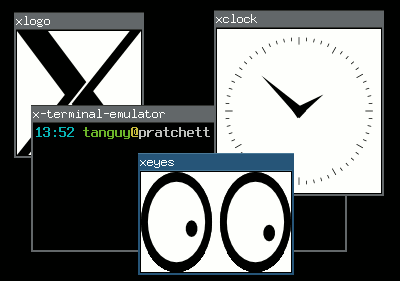
They are the most usual window managers, that allow you to place an size your windows freely on the screen, in a way where they are independent of each other, possibly overlapping, just as you would be able to place sheets of paper on your desk.
Tiling window managers
They are a more elitist type of window manager, that adjust the size and position of the windows so there is no overlapping and no space lost between windows, thus tiling the screen.
Four computer windows managed in floating mode

Floating window management

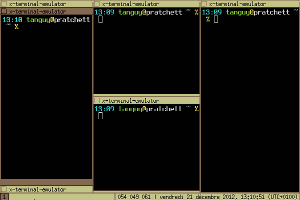
Four computer windows managed in tiling mode

Tiling window management

The frontier between these two types is not very tight, because some floating window managers have limited tiling features, and almost all the tiling window manager have floating modes for programs that are not adapted to tiling. For what it is worth, here is a report on my experience with three tiling window managers. Perhaps it may help people that are still hesitating to switch to tiling window management?Using tiling window managers Five years ago I switched to tiling window management, feeling that managing windows was the window manager's job (a quote from larswm). At that time, I started using wmii, then switched to awesome, and now I am trying i3.
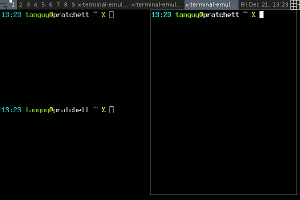
Screenshot of the wmii window manager

wmii: three columns, first one stacked ()

Screenshot of the awesome window manager

awesome: fair layout

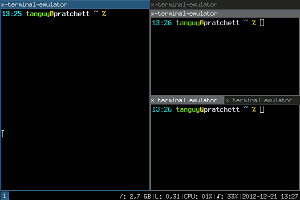
screenshot of the i3 window manager

i3: three containers, second one stacked, third one tabbed

For people in a hurry, here is a comparative table:
wmii awesome i3
Configuration Shell script Lua script config file
Scriptability any language, 9P-based Lua, API-based any language, socket-based
Layout simple, column-based automatic layout-based flexible, manual tiling-based
Multi-monitor sucks OK OK
Modern stuff XCB, Xft, notification area, dock windows XCB, Xft, notification area
Special features
  • tag-based workspace system
  • XDG convention to locate the config file
  • real framework for customization
  • powerful status bar
wmii wmii is a rather minimalist window manager which used to be part of the suckless project, but is now hosted at Google Code and seems to have lost all its documentation during the move (why is it that all the software I have seen hosted at Google Code or worst, at Launchpad, have almost not documentation, and never, ever a single screenshot?). It uses a column-based layout: you place windows in a number of columns, and for each column you can choose either vertical split, stacking or full column mode. This system is very simple to control flexible enough for most situations, but it does not allow for arbitrary tiling. It is fully scriptable in any language, in an interesting way: it exposes all its functions on a 9P virtual filesystem. In fact, wmii itself only implements window management functions, and all the user interaction logic takes place in a distinct script which calls that functions using that 9P filesystem. wmii comes with a default script, written in shell, which makes it a bit hard to extend, and slow if you start calling external programs such as grep, sed and co. You can script it in any language you like however, and there are some already made implementations in Ruby and Python IIRC. A special feature of wmii is that its workspaces are in fact tags, and that you can tag a window so that it will appear in several ones. While this is interesting, in practice I did not find much use for that feature. It is explicitly minimalist, and the developers used to impose themselves a limit on its numbers of lines of codes (not sure if this is still true with the switch to Google Code). While I was using it, it had no notification area, no support for Xft fonts and it sucked with multiple monitors, which is the reason I switched to awesome. awesome awesome is a very flexible window manager that provides advanced automatic layouts. It has become quite popular, and it has a very well documented wiki. It is not officially a tiling window manager but a framework window manager, and to emphasize on that it start in floating mode by default. I think most people use it in tiling mode however. It uses automatic layouts, that place your windows according to rules, for instance the fair layout, which tiles in columns and rows so that each window occupies a similar space. Thanks to that automation, this system is very easy to control and to get used to, and although it certainly does not allow arbitrary tiling, you can cycle between several available layouts which are suitable for most situations (most of them are entirely automatic, but some have parameters you can modify, such as the number and width of columns), and if you miss one, I think you can even code your own. It is fully scriptable using the Lua language. In fact, just as wmii, the user interaction logic is defined in the configuration file, which allows efficient customization. The Lua API is fully documented, and there is a series of useful libraries to extend the basic configuration in any way you like, which is why awesome calls itself a framework window manager . It is not designed to be minimalist, and it implements some modern stuff, such as using XCB rather than Xlib, a notification area, and specific support for dock or utility-type windows such as GIMP's tools. i3 i3 is a window manager inspired by wmii, although they do not have much in common in my opinion. for what I have seen, I think it would be closer the defunct Ion. It uses a layout based on manual splitting: as you open windows you can choose to split an existing window either vertically or horizontally, leading to arbitrarily complex layouts. In addition to that you can tab or stack windows in containers instead of splitting them. This system is very flexible but it requires more user intervention. In its standard mode of operation, i3 is simply configured in a regular way, which allows to customize the user interaction but not to script it in an arbitrary way. It offers an IPC system that can be used for that however, by the mean of a Unix socket, so it can actually be scripted in any language too if needed, although this possibility is probably not as popular and easy as with wmii and awesome. It implements modern features such as XCB, a notification area and a powerful status bar that uses the standard output of a dedicated program that is easy to replace by your own if you need.

Russ Allbery: Review: Science Fiction: The 101 Best Novels: 1985 2010

Review: Science Fiction: The 101 Best Novels: 1985 2010, by Damien Broderick & Paul Di Filippo
Publisher: Nonstop
Copyright: 2012
ISBN: 1-933065-39-7
Format: Trade paperback
Pages: 288
I like book reviews and lists of best novels, as a follower of my reviews probably noticed, so I couldn't resist when this collection made my radar. A follow-up to the earlier Science Fiction: The 101 Best Novels: 1949 1985 by David Pringle (which I have not read), it is a collection of short (two to three pages, generally) reviews of 101 recent SF novels. The date spread is fairly balanced: at least two novels from each year under consideration are featured, and no year gets more than seven or eight. The authors also clearly tried to cover the range of what falls under the science fiction genre, from alternate history through space opera and including novels normally marketed as mainstream, so the result should contain something to everyone's taste. With those characteristics, you may suspect that the "best" part of the title is a bit questionable, and you would be right. "101 of the better novels" would be a more accurate description. While most Hugo and Nebula winners are included here, the section is at times eclectic. But it's eclectic in the spirit of broad inclusiveness: Jumper, Temeraire, or The Hunger Games would normally not be included on this sort of list because they're too popular or "light," but they're here alongside more obscure books (at least for SF readers) like Galatea 2.2, Distance Haze, or My Dirty Little Book of Stolen Time. I doubt anyone will seriously argue that this selection should have replaced the Hugo or Nebula short lists, but one doesn't read review collections like this only to hear about books one already knows about. Those books one has either already read or already chosen not to read. The wide-ranging selection makes it likely that something here will be new to most readers. The authors, Damien Broderick and Paul Di Filippo, are known reviewers in the SF world, and I've read reviews from both of them before. I bought this book largely on the strength of Broderick's name, since I've usually enjoyed his contributions to The New York Review of Science Fiction. Paul Di Filippo was more of a gamble; he's one of the regular reviewers for Asimov's Science Fiction and not one of my favorites. But what I usually disliked about his columns was their focus on obscure small-press titles, graphic novels, and slipstream, so I was hoping that an SF review collection aiming towards the genre mainstream would be more to my taste. The result is mixed. There are things about this selection, and about the reviews, that I enjoyed, and there are other things I found quite annoying. First, the selection. I could (and will in a moment) talk about good and bad selections, but I also have a good statistical metric for at least the alignment of the authors' taste with mine. Of the 107 novels reviewed here (in several case, duologies and trilogies are given single entries), I've read 39, or a little over a third. (Note that I've read every Nebula or Hugo winner in that time period and most of the Hugo nominees, so that will give you a good feel for how broad-ranging this selection is, and how far afield of the normal award slates it goes.) My average rating for those 39 books was 7.49 (including four perfect 10s). By comparison, my average rating for Hugo winners is 6.68 and for Nebula winners is 7.10. There was one 4 (The White Queen) and one 5 (Red Mars), and in both cases I can see why they're here. Of the rest of the books I read I rated them all at least at 6 out of 10. At least among the books I've read, this seems to be a solid selection. Sometimes the details of those selections are odd, though. For example, the authors make an effort to limit the number of selections for each author, a wise choice since they're clearly going by diversity. But if one is operating within that limitation, choosing Ammonite over Slow River for Nicola Griffith, or particularly Ventus over Lady of Mazes or even Permanence for Karl Schroeder, is baffling. There were several similar places where I thought the selection for an author was obscure, minor, or just missed obvious alternatives. Perhaps this was to fill in one of the other breadth criteria, such as balancing number of novels per year or attempting to cover each subgenre. Also, if one is going to divide science fiction and fantasy and try to cover only the science fiction (a division that I think is quite difficult, which is why I don't do it, but it does have the merit of narrowing the field), including The Falling Woman is quite strange. It's a solid book, to be sure, and a Nebula winner. It is also quite straightforward contemporary fantasy involving ghosts and Mayan mythology, without a hint of science-fictional content. Making the protagonists archeologists and scientists doesn't make the book science fiction. The authors try to defend this (unpersuasively to me), but it wasn't the only instance here where I thought their line between science fiction and fantasy was a bit off. That said, there are a lot of great selections here, including books that I love but that aren't frequently picked for this sort of list (The Fortunate Fall, The Time Traveler's Wife, or China Mountain Zhang, for example). It's great to see underappreciated authors like Linda Nagata, Joan Slonczewski, and Karl Schroeder featured. But, of course, one doesn't buy this sort of book just for the list, if for no other reason than that lists aren't copyrightable and one can easily find the complete list of reviewed novels on the Internet (just one example that turned up in a search). Rather, one reads this sort of book for the reviews. And that's where this book moves onto more questionable ground. First, while I realize that everyone has different thresholds for what they consider spoilers and most professional reviewers are more cavalier about them than I am, Broderick and Di Filippo cross any line that I consider reasonable. Most of the reviews are okay, if skirting the limits, but in several places they give away key reveals of books or discuss plot twists right up to, or even including, the ending. The combined review of The Sparrow and Children of God is particularly egregious, containing unambiguous, book-destroying spoilers for The Sparrow. Giving away the ending of Ammonite is only slightly less bad. And those are just two examples I remember. This is not okay. The whole point of this sort of collection is to expose the reader to books they've not yet read but may want to. Proceeding to spoil the book for them in the course of the review is perverse. This alone would make me hesitant to recommend this collection. Second, quite a few of the reviews in this book are, for lack of a better term, emotionally overreaching. Here's an excerpt of a review picked at random (As She Climbed Across the Table by Jonathan Lethem) that will hopefully illustrate:
Lethem's beautifully balanced, metaphorically rich prose propels this blackly jolly fable to a surprising yet satisfying conclusion. By book's end, a sense that the author had accomplished his takeoff taxiing and was now fully in flight for more cosmopolitan cities pervades the pages.
What's "beautifully balanced prose"? Could you recognize it? Does that phrase communicate anything to you other than that the authors liked the book? The whole review collection is written with adjectives and metaphors like this, and after a while it all seems a bit much. It felt like the authors were straining for ways to describe how important or significant the books are and, in the process, lost sight of the basic goal of conveying information about the book. It feels overwrought rather than informative. Even if one is reviewing the books that one considers the pinnacle of achievement in science fiction, a conversational tone with concrete examples and specifics communicates more than impressive but slippery terms like "metaphorically rich." Lest I sound entirely negative, one thing that I did appreciate is that the reviews go to some effort (particularly for their short length) to put the work in the broader context of the field and within the author's oeuvre. Often there's some discussion of previous and subsequent work or related books, and the reviews that feature books from larger series provide good explanations for why those particular books were singled out. Sometimes the number of dangling references was frustrating; authors of these sorts of collections need to remember that most readers will not be as widely read, and reviewing books largely by comparison to other books runs the risk of missing the reader's knowledge entirely. But the reviews convey a real sense of SF as a broad conversation and provide a sense of the breadth and variety of themes and subgenres available. This is one of the fun explorations that this sort of catalog lets the authors and reader do together. Another, more minor, touch that I appreciated was the cover art. Each review leads with an image of the reviewed book's cover (alas, only in black and white for obvious printing reasons). But rather than taking the obvious approach of using the covers of the first releases, or the covers from a particular country, they're chosen from all of the world-wide editions in all their delightful variety. Typical artistic styles for book covers vary drastically between countries, and getting to see a sample of artwork from different markets is a treat. I want to recommend this book. It casts a much broader net than most collections of its kind and provides some needed attention to smaller corners of the genre. I was impressed by the book list before I bought it, and (with the inevitable quibbles) am even more impressed now that I've read it. Broderick and Di Filippo go out of their way to broaden the reader's horizon and open up new avenues for reading, which is one of the best things a review collection can do. But when reviewers don't avoid spoilers, I just can't recommend their work. For me, this is a cardinal sin. Combine that with a writing style that was occasionally overblown and overwritten and the merits don't quite overcome the flaws. I'm glad I read it; it got me excited about reading many books I've already purchased but not gotten to, and I got from it another slew of books to add to my to-purchase list. But I had to read it uncomfortably and lightly, constantly prepared to jump past a review that was too revealing. Rating: 6 out of 10

26 December 2012

Russ Allbery: Review: Code Name Verity

Review: Code Name Verity, by Elizabeth Wein
Publisher: Hyperion
Copyright: 2012
ISBN: 1-4231-5219-0
Format: Hardcover
Pages: 339
I don't read very much historical fiction, and I mostly avoid historical fiction from the 20th century. I'm particularly uninterested in reading about Nazis after the saturation programming in places like the History Channel and the number of alternative histories that involve them. I've read enough about World War II to last me a lifetime, and I also avoid books about people being tortured. When Code Name Verity showed up in reviews I read, I was therefore rather dubious: a book set during World War II featuring someone being tortured by Nazis seemed unlikely to appeal to me. But after two steller reviews from reviewers who don't give out top marks easily, I bought a copy with some trepidation. That was one of the best decisions that I've ever made. This is the sort of book that is severely hurt by spoilers. In a moment, I'm going to attempt the impossible dance of giving you a feeling for the book and why I love it so much without spoiling anything. But if you trust my taste in books, let me give you a short warning, and then I suggest you stop reading this review and just go read the book. I avoided as much information about it as possible before reading it and never regretted it. The short warning: This is a book that hurts. lightreads describes it as searing. I think that's a very good term. It's not that it's gruesome; there is torture, but most of it happens off-camera and the focus is on emotional reactions rather than physical description. But the story sneaks up on you with sudden flashes of insight, and parts of it are a gut punch. It's the kind of book that had me in tears for a quarter of the book. It's the kind of book that nearly has me in tears remembering it to write this review. So, you may want to save this one until you are in the mood for that kind of book. But, that warning aside, Code Name Verity is unspeakably brilliant. This is one of the best books I have ever read in my life. I will try to explain more, but if your tastes mostly align with mine, just stop here and go read it.
I AM A COWARD.
That's how Code Name Verity starts: the words of a captured female British agent in Nazi-occupied France. The book opens near the end of her interrogation (and torture). The important information has already been discussed, and now she's likely destined to be executed. For the last set of wireless codes, she's bought herself paper and two weeks to write, and is expected to record everything that she remembers about the British war effort. The pages of this book are that writing (quite literally in the frontpiece and part of the cover, which are beautifully designed). The way she chooses to approach that task is to tell a story about the person whose ID she had when she was captured, a story that becomes the recounting of how she ended up where she is. That story is the heart and soul of this book. It's about the war, yes, and about British operations during the war. But it's a story about airplanes, too, and about the Air Transport Auxiliary, and about women finding a place in the war (with just a bit of a fictional push, detailed by the author in an afterword, although not quite as much of one as you might expect). And it's a story of a friendship, an amazing friendship of two women who would have never met each other if it weren't for the war and its leveling and transcending of normal social separations. It's a story about a friendship of opposites, about two people who find ways to support each other, about two people who see the best in each other. This is quite possibly the best novel about a friendship that I've ever read. This story, by itself, is wonderful. The tone starts light and irreverant, with an undertone of complex despair and defiance that's hard to analyze. One wonders where it's going and whether any of this is relevant, and then it slowly draws in the reader and becomes utterly compelling. But that's only the start of what this book has in store. Wein does some amazing structural things here that turn and broaden and transform, things that absolutely should not be spoiled because experiencing them without advance knowledge is a breathtaking reading experience. And all the parts play off against each other with a confidence that lets Wein understate and even hint at deeper emotions and be completely confident that the reader is right where she wants them to be. It's not a one-trick book, nor is it one that's going to lose you in the structure, but it's a book that opens up layers as you read it and tempts you re-read it immediately with new eyes once you finish it. Except it hurts so much that re-reading it immediately might be more than your heart can take. Perhaps the most astonishing part of this book is the way it hits its emotional notes. It is a masterpiece of showing rather than telling. Wein undersells the emotions in exactly the right way to make them stronger and more effective, avoiding, in the process, multiple traps that I've rarely seen avoided. The ending is absolutely note-perfect to everything that's happened before in a way that I thought, five pages from the end, was going to be impossible to pull off, and gets even better the more that one thinks about it. And the whole book is like that. It's been a month and a half since I read this book, in part because I wasn't sure how to write this review, and I did not, in fact, manage to finish writing it without crying. If I didn't have to be on a train in eight hours from when I'm writing this (a few days before I post it), I'd start reading it again right now. I can't talk about most of the things that make it amazing with anyone who hasn't read it, but it really is that good. Rating: 10 out of 10

25 December 2012

Uwe Hermann: sigrok at the 29th Chaos Communication Congress (29c3)

29c3 logo Yup, it's been a while since my last blog post, but I'm not dead yet. Most of my spare time goes into sigrok development these days (open-source signal analysis suite for logic analyzers, oscilloscopes, multimeters, and lots more), but I'll try to revive my blog too. I have various microcontroller/embedded topics and devices I want to talk about in a small blog post series in the nearer future. But more on that later. Feel free to subscribe to the sigrok-devel mailing list, join us on IRC in #sigrok (Freenode) where most of the discussions take place, or follow our new sigrok blog (RSS) if you're interested in the ongoing sigrok developments. Anyway, for now just a quick announce: Same as last year, we will be at the Chaos Communication Congress (29c3), this time in Hamburg, Germany. The conference takes place from December 27th to 30th, 2012. We'll have a sigrok "assembly", likely in area 3b of the conference building, where we'll be hanging around, working on new sigrok features, new hardware drivers, new protocol decoders and various other things. We'll have lots of gear with us for demo and development purposes, including logic analyzers, oscilloscopes, MSOs, multimeters, and lots more. Bring your own device if you own models we don't yet support or know about. We'll be happy to have a look! Chat with us, give us your suggestions which features you'd like to see, which devices you want to be supported, which protocol decoders you'd like to have, or even help us write some drivers/decoders! Hope to see you there!

Petter Reinholdtsen: How to backport bitcoin-qt version 0.7.2-2 to Debian Squeeze

Let me start by wishing you all marry Christmas and a happy new year! I hope next year will prove to be a good year. Bitcoin, the digital decentralised "currency" that allow people to transfer bitcoins between each other with minimal overhead, is a very interesting experiment. And as I wrote a few days ago, the bitcoin situation in Debian is about to improve a bit. The new debian source package (version 0.7.2-2) was uploaded yesterday, and is waiting in the NEW queue for one of the ftpmasters to approve the new bitcoin-qt package name. And thanks to the great work of Jonas and the rest of the bitcoin team in Debian, you can easily test the package in Debian Squeeze using the following steps to get a set of working packages:
git clone git://git.debian.org/git/collab-maint/bitcoin
cd bitcoin
DEB_MAINTAINER_MODE=1 DEB_BUILD_OPTIONS=noupnp fakeroot debian/rules clean
DEB_BUILD_OPTIONS=noupnp git-buildpackage --git-ignore-new
You might have to install some build dependencies as well. The list of commands should give you two packages, bitcoind and bitcoin-qt, ready for use in a Squeeze environment. Note that the client will download the complete set of bitcoin "blocks", which need around 5.6 GiB of data on my machine at the moment. Make sure your ~/.bitcoin/ directory have lots of spare room if you want to download all the blocks. The client will warn if the disk is getting full, so there is not really a problem if you got too little room, but you will not be able to get all the features out of the client. As usual, if you use bitcoin and want to show your support of my activities, please send Bitcoin donations to my address 15oWEoG9dUPovwmUL9KWAnYRtNJEkP1u1b.

24 December 2012

Bastian Blank: Relaying e-mail over unreliable connections

Introduction I still prefer to handle all my mails at home. I got backup set-up on my own and have anything in direct access. This network is connected to the internet via an end-user DSL connection without a static IP-address and without any useful SLA. However relaying mails over such an unreliable connection is still an unsolved problem. There exists a lot of solutions for this problem. I'm currently building a new e-mail setup, so I tried to collect all the used and maybe possible solutions for the relay problem. I will show some of them.
Don't do it The easiest solution is to just don't try to collect mails at home. This solution is somewhat against the rules, but I know people who prefers it. Access to the mails is usually done with IMAP and a copy is made if needed. This is not really a solution, but it works for many people.
SMTP SMTP is the mail protocol used in the internet. It is used for all public mail exchanges. By itself it can't be used to submit mails to remote destinations With some preparations it can be used to relay mail over unreliable connections. There are three different turn commands in SMTP that can be used to start the mail flow. Two of them will be
VPN or dynamic DNS with TLS with or without extended turn (ETRN) Using SMTP themself is an easy solution. It can relay mails without much hasle But it needs either a fixed or authenticated connection. SMTP can use a fixed connection. This is usually provided by some sort of VPN. The VPN can be encrypted, but does not need to. This allow the MTA to connect to the downstream server if it is available. The other solution is to authenticate the downstream server. Authentication is available via TLS and X.509 certificates. It still needs some way to find it, but with dynamic DNS this is no real problem. Both variants can be combined with the extended turn command. Extended turn allows to request a queue flush for a domain. It can be used to request mails only to be delivered if the downstream server is available at all. This reduces the load on the MTA.
Authenticated turn (ATRN) On-demand mail relay is a rarely supported ESMTP feature. The Authenticated turn command effectively reverses the SMTP connection and allows, after authentication, the flow of mails from the server to the client via standard SMTP. There exists some stand-alone implementations, but no widely used MTA includes an implementation.
POP3/IMAP and fetchmail/getmail All e-mails can be delivered to mailboxes and retrieved by the end-users system and re-injected into the delivery system. Both fetchmail and getmail are able to retrieve mail from POP3 and IMAP servers. They are either directly delivered via a MDA like procmail or maildrop. Otherwise they are submitted via the sendmail interface or SMTP and delivered by the MTA. Neither POP3 nor IMAP have support for meta data like the real recipient or sender.
Mailbox per address The mails for each address are delivered to its own mailbox. This allows proper identification of the recipient address. It still have no real idea of the sender address. Because it needs to poll one mailbox per address, this highers the resources needed on both sides dramatically.
Multi-drop mailbox The mails for all addresses are delivered into one mailbox. The original recipient must be saved in a custom header to allow this information to be restored. Only one mailbox needs to be polled for mail addresses.
UUCP One of the oldest transports used for mail is UUCP. It effectively copies a file to a different system and pipes it into a program. UUCP can be used to transport mails in various ways.
rmail Each mail is copied verbatim to the client. It saves the sender address in form of a "From" pseudo header in the mail itself and supplies the recipient on the command-line. So it have access to both sender and recipient address.
Batched SMTP Batched SMTP transfers old-style SMTP transactions over UUCP The MTA (Exim supports this) or a special tool (in the bsmtpd package) writes this files and after a given time or size they are dispatched via UUCP to the remote system. The bsmtpd packages was removed from Debian some years ago.
Dovecot synchronization Dovecot support bi-directional synchronization of mailbox contents. It holds all data on both sides. The internal log is used to merge changes done on both sides, so it should not loose any data. This synchronization can be used to work with the data on both sides (via Dovecot of cause) or create backups. It needs shell access to the user owning the data on both sides.
Conclusions There is no one size fits all solution for this problem. If you admin the remote system, you can implement any of this solutions If it is managed by someone else you need good luck. Almost all solutions does not support current SMTP features. The one I'm really missing is DSN, aka configurable delivery notices. POP3 and IMAP handle already delivered mail and have no need for this. All UUCP variants does not handle it, because they are much older anyway. Only SMTP itself supports all of its features. I still use rmail over UUCP for my mails at home and it works flawless. UUCP itself runs over SSH, it can compress data on the fly and authenticate using private keys.

22 December 2012

Bartosz Feński: Two full-time days to work on Debian

My current employer as a benefit offers two days of paid volunteer time every calendar year. In September I decided to devote this time for Debian project. It wasn t easy to convince HR and my manager (hi Gloria ;) ) that such activity can be considered as volunteering but I eventually did it! So last Thursday and Friday were days I could spent working on my packages and other stuff related to Debian ;) Let s talk about effects. 5 packages updated, 16 bugs closed, more than 50 lintian warnings/errors solved. Here goes changelogs from updated packages:

calcurse (3.1.2-1) unstable; urgency=low
* The Akamai Technologies paid volunteer days release.
* Package made from scratch (this was funny experience):
- uses new quilt source format
- uses new copyright format
- uses debhelper compatibility level 9 w/hardening options
- uses the newest Standards-Version
* New upstream version:
- supports UTF8 (Closes: #558671)
- hopefully fixes problem with accented characters (Closes: #466010) -- Bartosz Fenski <fenio> Thu, 20 Dec 2012 13:51:08 +0100 httpie (0.3.1-1) unstable; urgency=low * The Akamai Technologies paid volunteer days release.
* Includes manual page (Closes: #673067)
Courtesy of Khalid El Fathi <khalid>. Thanks!
* New upstream version. (Closes: #693810)
- handles binary transfers properly (Closes: #689974) -- Bartosz Fenski <fenio> Thu, 20 Dec 2012 14:27:59 +0100 skipfish (2.10b-1) unstable; urgency=low * The Akamai Technologies paid volunteer days release.
* New upstream version.
* Bumped Standards-Version (no changes needed).
* Various path fixes because of upstream changes.
* Added new libpcre3-dev build dependency.
* Totally rewritten copyright file to comply with new copyright standard. -- Bartosz Fenski <fenio> Thu, 20 Dec 2012 14:59:36 +010 ipcalc (0.41-3) unstable; urgency=low * The Akamai Technologies paid volunteer days release.
* ACK previous NMU, thanks Christopher!
* Documents some missing features in the manpage (Closes: #588143)
Thanks Tanguy Ortolo <tanguy>!
* Fixes other minor problems in manpage (Closes: #688148)
* Description now says it's tool IPv4 only (Closes: #628955)
* Fixes lack of </table> tag when printing supernets (Closes: #600251)
* The following changes are courtesy of Jari Aalto <jari.aalto>:
- Remove deprecated dpatch and upgrade to packaging format "3.0 quilt".
- Update to Standards-Version to 3.9.3 and debhelper to 9.
- Add build-arch and build-indep targets; use dh_prep in rules file.
- Patch 03: update with "quilt refresh" to make it apply cleanly.
Thanks to these changes (Closes: #670737) -- Bartosz Fenski <fenio> Fri, 21 Dec 2012 12:30:11 +0100 netw-ib-ox-ag (5.39.0-1) unstable; urgency=low * The Akamai Technologies paid volunteer days release.
* New upstream version.
* Uses Homepage header. (Closes: #615219, #615294, #615321, #615436, #645522)
* Bumped Standards-Version (no changes needed).
* Switch to dpkg-source 3.0 (quilt) format)
* Fixes FTBFS on s390x and sparc64 (Closes: #639493)
* Fixes 29 (sic!) lintian warnings/errors thus many small changes
in packaging scripts.
-- Bartosz Fenski <fenio> Fri, 21 Dec 2012 15:38:29 +0200
Despite this I did something else. I sent end of the world joke-mail to debian-mentors mailing list stating (ignore the fact that my own server marked me as spammer; fixed already ;P) that I m going to review and try to upload every package that will be send to me during end-of-the-world day.
That action was quite successful although no package has been uploaded yet. I reviewed 4 of them and two more are yet to come. So it looks that these two days sponsored by Akamai motivated me enough to spent few more days or even months and help other people to contribute to Debian. Thank you Akamai!

Russell Coker: Everyone Needs a Tablet

Care2 has an interesting article about people being offended by a picture of a poor Afro-American boy using an iPad [1]. It seems that people object to poor people having what is in many ways the greatest educational tool available because it can also be seen as a status symbol. I wonder if one of the cheaper Android tablets (at 1/3 the price of an iPad or less) would get the same response. Dvice has an inspiring article by Evan Ackerman about an experiment where a large quantity of Motorolla Xoom tablets were delivered to Ethiopian kids who couldn t read and didn t know English [2]. The kids learned printed English and learned to hack the devices to enable all the hardware features! I don t expect that kids in first-world countries would get the same benefits as kids in countries such as the US and Australia are distracted by TV, games consoles, and other forms of entertainment that aren t readily available in Ethiopian villages. But the potential benefits for widespread deployment of tablets in the poorer parts of first-world countries seems significant. I think that the government of every first-world country should give a voucher to every resident who is more than two years old for a $100 discount off the list price of a tablet. If someone is happy with a cheap Android tablet then $100 will cover the prices. If they want something better then they can pay more. I m happy for wealthy people to get a $100 discount on the price of one of the more expensive tablets, it seems that means testing such government subsidies just causes political issues without saving much money. Apart from the obvious educational benefits for people who own tablets (which means adults as well as children) there are also benefits in having everyone own a tablet. If everyone owned a tablet then the resale price of a low-end tablet would approach zero and the resale price of even more desirable tablets such as the iPad would drop a lot. This would reduce the incentive to steal tablets and allow people to use them in situations where there is less safety. If most people felt safe to use a tablet computer on public transport and started doing educational things instead of reading newspapers then it would improve the overall education of the population. Newspapers generally aren t educational and in the case of News Corp publications and other tabloids you can become less well informed by reading them I believe that on average newspapers have a negative educational value in Australia. The cost of giving a $100 tablet voucher to every resident of Australia would be about $2,200,000,000 (plus administrative costs) which seems like a lot of money. But when compared to the costs of building infrastructure it s not significant. I ve just read some government announcements regarding transport budget which includes items such as $6,500,000 to determine the best route for a new rail line. So if we were to get 350 new rail lines (and we need more than this) then merely determining the routes would cost as much as getting a tablet for everyone in the country!

20 December 2012

Russell Coker: Samsung Galaxy S3 First Review with Power Case

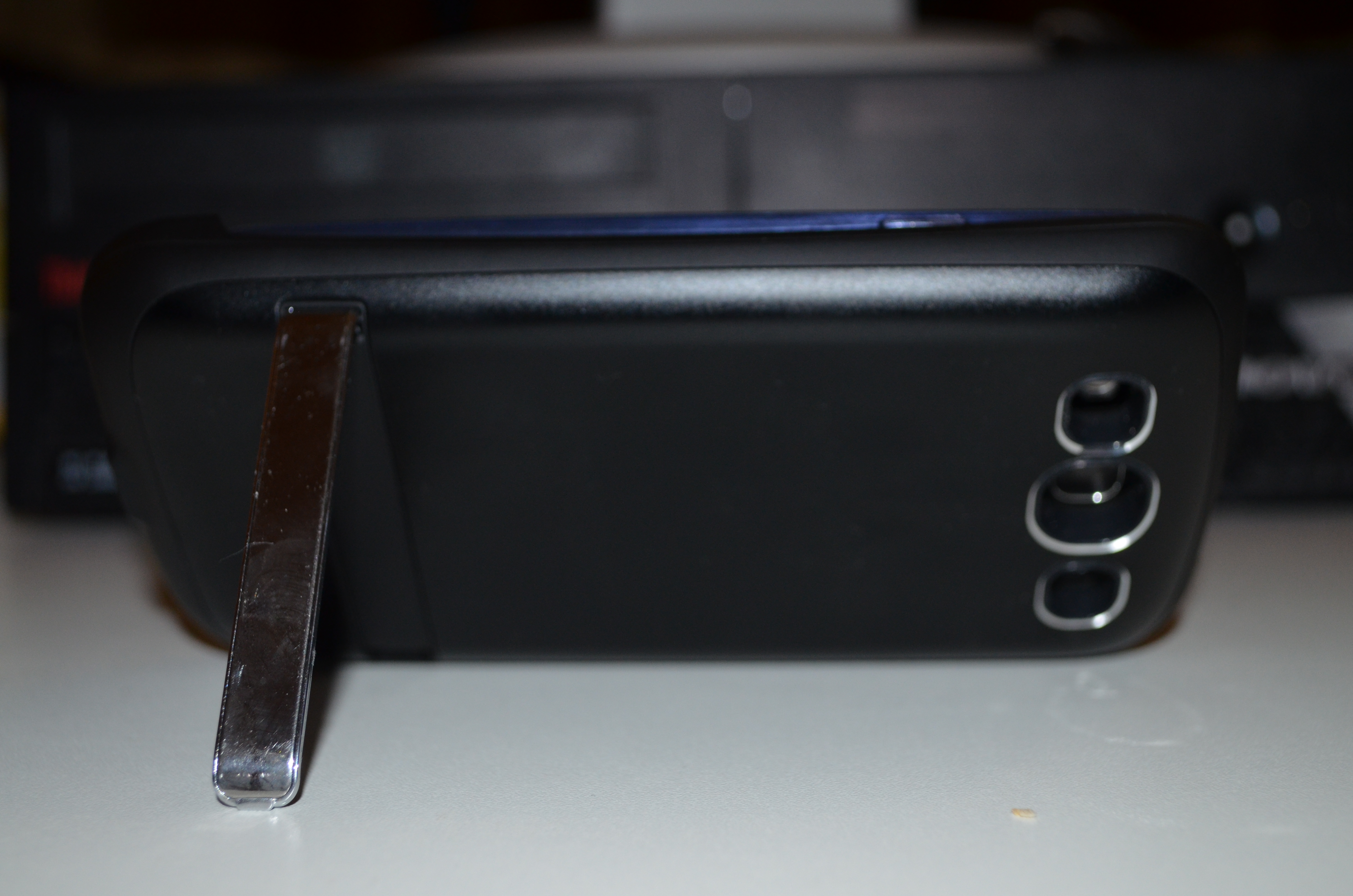
My new Samsung Galaxy S3 arrived a couple of days ago. Kogan added to the weirdness in their shipping that I documented in a previous post [1] by shipping the two phones on consecutive days with separate invoices for $789 each (as opposed to the $449 that I paid). This means that if customs were to track this down they could bust me for import duties (which apply whenever you order more than $1000 of electronics from another country) as multiple shipments in a small period of time are aggregated for tax purposes. It also means that it would be easy to defraud the tax office or an employer about the cost of the devices if I didn t blog about it Phone and Case Review back of power case with S3 installed next to back plastic of S3S3 and case next to each other To install the Samsung Galaxy S3 in the power case I bought from Kogan the back of the S3 has to be removed. One annoying implication of this is that when using the phone in it s case I will either have to carry the back of the phone with me or have no option of removing the case during the day. The phone has to slide in to the case from a small angle and if it s removed carelessly there seems to be a risk of breaking the power connector on the case. S3 on power case standedge view of S3 in power case stand The above photos show the kick-stand on the power case in use, I haven t yet had an opportunity to use the stand for anything other than photography and as it s made of thin plastic there s a reasonable chance that it will break off before I ever use it properly. One major deficiency of the power case is that it has no protection for the screen. The typical gel case will extend by about 2mm above the screen which means that you can place the phone screen-down on a table without a risk of scratching the screen. Also if a phone in a gel case is dropped on a hard surface it seems likely that the chance of the screen hitting a bump and cracking will be lower although I m not aware of any research regarding how well this theory works in practice. This combined with the fact that the power case is smooth and difficult to grip makes it quite unsuitable for regular use. I am concerned that the added mass of the power case would increase the risk of serious phone damage if it s dropped screen-down. I plan to buy a gel case ASAP which I will use most of the time. I will swap the gel case for the power case on the occasions when I expect to spend an extended period of time away from home or an office where I can charge my phone. The power case really should have been designed with a flange that extends above the level of the screen on all sites. It also shouldn t be smooth on the outside. Phone Review The Galaxy S3 equals the Galaxy S for the title of the most slippery phone I ve ever owned. This combined with the fact that the Galaxy S3 is slightly thinner and also 10% wider and longer makes it a more difficult phone to hold. It s a phone that really needs a case with a lot of grip. The camera is reasonable given the fact that any device that is 8.6mm thick will have a very small focal length and also a very small CCD for receiving light. The laws of physics just don t allow something the size of the Galaxy S3 to have a half-decent camera. My ideal mobile phone would be about the size of the Galaxy S3 with the power case, it would use the extra thickness for a big battery as well as a much longer focal length for the camera. I d like a phone to be about 16mm thick over most of it s area with a section that s 20mm for the camera. The burst shot mode (which allows you to take 20 pictures rapidly) is good for capturing certain types of relatively slow movement (EG someone s mouth moving when they talk). But it s no good at all if you try to pan the camera while doing burst mode. When I first started using the phone it gave me lots of hints about using various functions. This wasn t particularly useful for me as most things are obvious to anyone who has much experience with computers and the non-obvious things are probably going to be forgotten if you are doing something else when the help system prompts you. It will be useful for my sister in law who s getting the other phone, but the down-side of this is that I can t configure her phone before delivering it. She needs to use it first to see all the tips. The Galaxy S3 has a screen that s 4.8 diagonally which is slightly larger than the 4.0 screens of my previous Android phones (Sony Ericsson Xperia X10 and Samsung Galaxy S). That gives 44% more screen area which is a good thing. Unfortunately many apps seem to display the same amount of data, I had hoped that 44% more area and 140% more pixels would result in most apps displaying more data by default. Fortunately ConnectBot (my SSH client of choice) gives me 60 rows and 120 columns on the Galaxy S3 as opposed to the mere 31 rows and 80 columns on the Xperia X10. I don t use ConnectBot that often (a phone is a really bad ssh client no matter how you do it), but when I do it s really important and the extra space matters. The down-side of the larger screen for me is that the distance from the center of the palm of my hand to the end of my thumb is slightly less than 4.8 . This means that I can t hold the Galaxy S3 with one corner in the palm of my hand and still reach the far corner of the screen. So I am forced to hold the sides of the phone for one-handed use which means that it would be easier for it to slip out of my hand. A further complication is that the settings and back buttons are very close to the edge of the phone and can be hit by accident very easily. Hopefully a gel case will alleviate that. But I have never owned a hand-held device which was so difficult to hold in a stock configuration. According to AndroSensor (one of my favorite demo programs for showing useless things that a phone can do) the Galaxy S3 lacks support for measuring humidity and external temperature but it has all the other sensors. I think I can survive without knowing how hot and humid my pockets are, but it would still be nice to have every possible feature. The default partitioning of the phone storage is to have all internal storage used for applications and none used for a VFAT filesystem accessible over USB. It s nice that I won t run out of application storage space (a problem I ve had with every other Android device) but it does mean that I ll have to buy a micro SD card before I can use the phone properly. Micro SD storage costs about $1.50 per gig in the size range from 8G to 32G, it s not particularly expensive but it s annoying to have the phone not be fully usable right from the start. Without using a SD card I have to use gphoto2 to download pictures from the phone so it s fully usable in every way. But the cost of the power case, the gel case I m about to buy, and an SD card make the phone less of a bargain. The phone has more RAM, a faster CPU, and Android 4.1. These are all really good things, but nothing worth writing about in a review. Conclusions The power case is very poorly designed, I probably wouldn t buy it if I knew then what I know now. For one-handed phone use by someone like me with longer than average fingers a 4.0 phone is about the largest possible. This doesn t mean that phones should stay small, but it does mean that Apple weren t being entirely silly when they released all the 3.5 iPhones. Presumably a large portion of the population would find a 3.5 phone to be as usable as a 4.0 phone is for me. It now seems to me that as a 4.8 screen is going to be impractical for one-hand use by almost everyone the phone designers should concentrate more on larger phones similar to the Samsung Galaxy Note. I think that the 4.8 screen size may be ideal for some young children who could use it the way an adult might use a 7 tablet an Android phone seems to be a relatively common present for children in the 6-12 age range. Generally I think that no-one should ever buy a new phone or tablet without trying one of the same size. While I am happy with the S3 it really doesn t work in the way I expected. Having 2.9* as many characters on screen for ConnectBot is a massive benefit. If I ever write another magazine article on a hand-held device the extra size and resolution will really help if I found a suitable editor (please make suggestions in the comments). For the WordPress client to write long blog posts on it then the screen could potentially be reasonably useful, but so far it seems that it s more suited to reviewing posts and comments than to writing posts. Generally the Samsung Galaxy S3 is a good phone and I think it s great value for money when it s less than $500.

19 December 2012

Paul Tagliamonte: The most horrifying thing i've done -- or: hy

Hang tight folks, this is a trippy one: As many have noted in my most recent post, I ve taken a shine to lisps hosted in Python. While clojure-py is badass, it s not fit for using from python. I hit some problems in the way it handles atomic variable access (well atomic , it s actually not ;) ), so I ve decided to give it a shot myself. That s right. I wrote a Lisp. A very basic, unmacroed lisp, but a lisp. So, let s take a look a trivial hy file pair The first file (really_lisp.hy), is as follows:
; vim: tabstop=2 expandtab shiftwidth=2 softtabstop=2 filetype=lisp
; Copyright (c) Paul Tagliamonte, in sofar as any of this is at all
;  copyrightable.
(def hello "World!")
(def square (fn [arg]
  (* arg arg)))
(def factorial (fn [n]
  (if (<= n 1)
   1
   (* n (factorial (- n 1))))))
(def fib (fn [n]
  (if (< n 2)
    n
    (+ (fib (- n 1)) (fib (- n 2))))))
And, the example Python script example.py is as follows:
import hy.lang.importer
import really_lisp
print really_lisp.hello
# "World!"
print really_lisp.square(4)
# 16
print really_lisp.factorial(10)
# 3628800
print [really_lisp.fib(x) for x in range(1, 20)]
# [1, 1, 2, 3, 5, 8, 13, 21, 34, 55, 89, 144,
#        233, 377, 610, 987, 1597, 2584, 4181]
Please note two awesome things firstly, we re importing a non-python script into a Python module. Awesome. Secondly, we re able to access symbols natively, as well as functions. Let s also demonstrate the other way (just hython this time):
; vim: tabstop=2 expandtab shiftwidth=2 softtabstop=2 filetype=lisp
; Copyright (c) Paul Tagliamonte, in sofar as any of this is at all
;  copyrightable.
(puts "Hello, World!")
; "Hello, World!"
(import ["os"
         "sys"])
(puts (os.path.abspath "."))
; "/home/tag/tmp"
(puts sys.argv)
; ['/home/tag/.virtualenvs/hy/bin/hython', 'test.hy']
(sys.stdout.write "Fuggn' test\n")
; "Fuggn' test"
Naturally, not to be outdone, I decided to amp it up. Django in Lisp While insane, the big stuff looks like this: I ve replaced urls.py with urls.hy:
; vim: tabstop=2 expandtab shiftwidth=2 softtabstop=2 filetype=lisp
(import ["django.conf.urls"])
(def urlpatterns (django.conf.urls.patterns ""
  (django.conf.urls.url "^$" "djlisp.hellisp.views.home")
))
And, views.py with views.hy:
; vim: tabstop=2 expandtab shiftwidth=2 softtabstop=2 filetype=lisp
(import ["django.shortcuts"])
(def home (fn [request]
  (django.shortcuts.render_to_response "home.html"  )))
And lastly, the settings.hy file. I m not going to paste it because it s huge. But, it works!

18 December 2012

Petter Reinholdtsen: Ledger - double-entry accounting using text based storage format

A few days ago I came across a blog post from Joey Hess describing ledger and hledger, a text based system for double-entry accounting. I found it interesting, as I am involved with several organizations where accounting is an issue, and I have not really become too friendly with the different web based systems we use. I find it hard to find what I look for in the menus and even harder try to get sensible data out of the systems. Ledger seem different. The accounting data is kept in text files that can be stored in a version control system, and there are at least five different implementations able to read the format. An example entry look like this, and is simple enough that it will be trivial to generate entries based on CVS files fetched from the bank:
2004-05-27 Book Store
      Expenses:Books                 $20.00
      Liabilities:Visa
The concept seemed interesting enough for me to check it out and look for others using it. I found blog posts from Christine Spang, Pete Keen, Andrew Cantino and Ronald Ip describing how they use it, as well as a post from Bradley M. Kuhn at the Software Freedom Conservancy. All seemed like good recommendations fitting my need. The ledger package is available in Debian Squeeze, while the hledger package only is available in Debian Sid. As I use Squeeze, ledger seemed the best choice to get started. To get some real data to test on, I wrote a web scraper for LODO, the accounting system used by the NUUG association, and started to play with the data set. I'm not really deeply into accounting, but I am able to get a simple balance and accounting status for example using the "ledger balance" command. But I will have to gather more experience before I know if the ledger way is a good fit for the organisations I am involved in.

Dirk Eddelbuettel: RcppArmadillo 0.3.6.1

A first minor bug-fix update by Conrad to the 3.6 series of Armadillo arrived today as version 3.6.1, and we prepared a corresponding version 0.3.6.1 of RcppArmadillo, our wrapper for R and Armadillo. This is now on CRAN, and the changes are summarized below.
Changes in RcppArmadillo version 0.3.6.1 (2012-12-17)
  • Upgraded to Armadillo release Version 3.6.1
    • faster trace()
    • fix for handling sparse matrices by dot()
    • fixes for interactions between sparse and dense matrices
  • Now throws compiler error if Rcpp.h is included before RcppArmadillo.h (as the former is included automatically by the latter anyway, but template logic prefers this ordering).
Courtesy of CRANberries, there is also a diffstat report for the most recent release As always, more detailed information is on the RcppArmadillo page. Questions, comments etc should go to the rcpp-devel mailing list off the R-Forge page.

17 December 2012

Ian Campbell: Foreign Chroots with schroot and qemu

Since I've been working on qcontrol I've had need of a way to build packages in an ARM environment. Since all my native ARM hardware is "production" (at least so far as something can be production in a home environment) I prefer to avoid installing development tools on them. When I started looking into this all my ARM systems ran from relatively small flash devices which also ruled out the possibility of a development chroot. After search the web a bit I discovered that it is possible to use qemu-user-static together with [[!binfmt-support ]] to create cross architecture chroots which can be entered mostly transparently. It is also possible to combine this with schroot and sbuild which makes the day to day use pretty much the same as a native or biarch chroot. Since I've now had to rediscover how to do this twice (once for Sid and then again when I realized I also needed a Wheezy environment) I thought I should write it down for the benefit of my future self. First things first lets install the various packages which we need. As well as debootstrap to create the chroot we need qemu-user-static and binfmt-support to allow us to run ARM binaries:
$ sudo apt-get install debootstrap qemu-user-static binfmt-support
I'm using schroot's lvm-snapshot mode so we need an LVM volume, formatted with a filesystem and mounted in a temporary location:
$ sudo lvcreate -L8G -n sbuild-wheezy-armel /dev/VG
$ sudo mkfs.ext3 /dev/VG/sbuild-wheezy-armel
$ sudo mount /dev/VG/sbuild-wheezy-armel /mnt/
Next we need to create the chroot. For this we use debootstrap in foreign mode which does a 2 stage setup, firstly by using the --foreign option:
$ sudo debootstrap --variant=buildd --include=fakeroot,build-essential \
        --arch=armel --foreign \
        wheezy /mnt http://<DEBIAN-MIRROR>/debian/
Now we (temporarily) copy the qemu-arm-static binary into the chroot (at the place where binfmt-support expects it), change into the chroot and run debootstrap's second stage to finish the basic chroot setup:
$ sudo cp /usr/bin/qemu-arm-static /mnt/usr/bin/
$ sudo chroot /mnt
(chroot)# ./debootstrap/debootstrap --second-stage
(chroot)# exit
Now that we have a basic chroot in place it needs a little bit of tailoring. I've found the easiest way to do this is to use sbuild-createchroot and then tweak the result:
$ sudo sbuild-createchroot --arch=armel --foreign --setup-only \
    wheezy /mnt http://<DEBIAN-MIRROR>/debian/
If we were building a native chroot then we could have skipped the debootstrap stuff and let sbuild-createchroot handle things. Unfortunately this doesn't seem to play nicely with --foreign. Now we can remove the qemu-arm-static binary from the chroot. schroot will automatically bind mount the version from the host into the chroot which ensures it remains up to date. We can also unmount the chroot since we will let schroot manage that from here on:
$ sudo rm /mnt/usr/bin/qemu-arm-static
$ sudo umount /mnt
Next we need to tweak the resulting schroot/sbuild configuration since sbuild-createchroot assumes the use of schroot's directory mode. First remove the symlink to /mnt which it created:
$ sudo rm /etc/sbuild/chroot/wheezy-armel-sbuild
Lastly we need to edit /etc/schroot/chroot.d/wheezy-armel-sbuild-<SUFFIX> (where is randomly generated) and reconfigure it to use lvm-snapshot mode, by apply the following changes:
 [wheezy-armel-sbuild]
-type=directory
-directory=/mnt
+type=lvm-snapshot
+device=/dev/VG/sbuild-wheezy-armel
+lvm-snapshot-options=--size 2G
 description=Debian wheezy/armel autobuilder
 groups=root,sbuild
 root-groups=root,sbuild
 profile=sbuild
That's it, we now have a chroot which we can trivially invoke via sbuild to build armel packages:
$ sbuild --arch=armel --dist=wheezy <... other options...>
We can also use sbuild-update to keep the chroot up to date:
$ sudo sbuild-update -udcar wheezy-armel
You can also use schroot to login to the chroot directly, although for that case you'll likely want to create a different chroot using schroot's directory or block-device mode instead lvm-snapshot and drop some of the sbuild specific setup. I expect I'll blog about this configuration in some more detail at some point in the future since I'll want to document it to give a more convenient build environment for Xen on ARM than the build farm which we have at work.

Jaldhar Vyas: Heads Up: Latest Dovecot Package Loses Features

Sometimes it's easy to forget that Debian's unstable branch is...unstable. Unfortunately today I have to remind you of that unpleasant fact. Dovecot 2.1.7-6 which I just uploaded has removed some features present in -5. The reason for this is that I am trying to get dovecot in shape for Wheezy. Unfortunately, as I have been severely pressed for time these past few months, the process did not take place in quite as orderly a fashion as I had hoped. My -5 packages were deemed by the release managers to have too drastic changes for this stage of the pre-Wheezy freeze and this is an attempt to make things more acceptable to them. Hopefully this version will pass into testing without incident and as soon as it does, I will prepare -7 which will put these features back. So if you need any of them, you are advised to skip -6 and stay at -5 until that happens. If you are following testing there is another possible problem you might encounter. When -1 of this version was uploaded, certain extra conf files were accidently omitted from the package. This is also true of -2 which is currently in testing. It was fixed in -3 but that version (or -4 or -5) never made it into testing so -6 is potentially the first time you might be dealing with the conf file fix. If you have manually made changes to files in /etc/dovecot/conf.d make sure you have backups because they may get overriden (as dpkg will be unaware at that point that they are conffiles.) This is a one time only packaging error and will not be a problem going forward but I apologize in advance for any inconvenience caused. And this is a good time to ask anyone interested in Dovecot on Debian (and Ubuntu etc.) to volunteer to help maintain it. It is getting more and more popular at a time when I can give it less and less attention. It is vital that an important package like this needs is team-maintained and it kind of is but so far other people who have expressed an interest in joining the team have been similarly strapped for time so we still need more recruits. All the code is publically accessible at git://git.debian.org/git/collab-maint/dovecot.git and I would be happy to sponsor any non-DD/DMs who need it.

Russell Coker: Using BTRFS

I ve just installed BTRFS on some systems that matter to me. It is still regarded as experimental but Oracle supports it with their kernel so it can t be too bad and it s almost guaranteed that anything other than BTRFS or ZFS will lose data if you run as many systems as I do and I run lots of systems that don t have enough RAM for ZFS (4G isn t enough in my tests). So I have to use BTRFS. BTRFS and Virtual Machines I m running BTRFS for the DomUs on a virtual server which has 4G of RAM (and thus can t run ZFS). The way I have done this is to use ext4 on Linux software RAID-1 for the root filesystem on the Dom0 and use BTRFS for the rest. For BTRFS and virtual machines there seem to be two good options given that I want BTRFS to use it s own RAID-1 so that it can correct errors from a corrupted disk. One is to use a single BTRFS filesystem with RAID-1 for all the storage and then have each VM use a file on that big BTRFS filesystem for all it s storage. The other option is to have each virtual machine run BTRFS RAID-1. I ve created two LVM Volume Groups (VGs) named diska and diskb, each DomU has a Logical Volume (LV) from each VG and runs BTRFS. So if a disk becomes corrupt the DomU will have to figure out what the problem is and fix it. #!/bin/bash
for n in $(xm list cut -f1 -d\ egrep -v ^Name\ ^Domain-0) ; do
echo $n
ssh $n "btrfs scrub start -B -d /"
done I use the above script in a cron job from the Dom0 to scrub the BTRFS filesystems in the DomUs. I use the -B option so that I will receive email about any errors and so that there won t be multiple DomUs scrubbing at the same time (which would be really bad for performance). BTRFS and Workstations The first workstation installs of BTRFS that I did were similar to installations of Ext3/4 in that I had multiple filesystems on LVM block devices. This caused all the usual problems of filesystem sizes and also significantly hurt performance (sync seems to perform very badly on a BTRFS filesystem and it gets really bad with lots of BTRFS filesystems). BTRFS allows using subvolumes for snapshots and it s designed to handle large filesystems so there s no reason to have more than one filesystem IMHO. It seems to me that the only benefit in using multiple BTRFS filesystems on a system is if you want to use different RAID options. I presume that eventually the BTRFS developers will support different RAID options on a per-subvolume basis (they seem to want to copy all ZFS features). I would like to be able to configure /home to use 3 copies of all data and metadata on a workstation that only has a single disk. Currently I have some workstations using BTRFS with a BTRFS RAID-1 configuration for /home and a regular non-RAID configuration for everything else. But now it seems that this is a bad idea, I would be better off just using a single copy of all data on workstations (as I did for everything on workstations for the previous 15 years of running Linux desktop systems) and make backups that are frequent enough to not have a great risk. BTRFS and Servers One server that I run is primarily used as an NFS server and as a workstation. I have a pair of 3TB SATA disks in a BTRFS RAID-1 configuration mounted as /big and with subvolumes under /big for the various NFS exports. The system also has a 120G Intel SSD for /boot (Ext4) and the root filesystem which is BTRFS and also includes /home. The SSD gives really good read performance which is largely independent of what is done with the disks so booting and workstation use are very fast even when cron jobs are hitting the file server hard. The system has used a RAID-1 array of 1TB SATA disks for all it s storage ever since 1TB disks were big. So moving to a single storage device for /home is a decrease in theoretical reliability (in addition to the fact that a SSD might be less reliable than a traditional disk). The next thing that I am going to do is to install cron jobs that backup the root filesystem to something under /big. The server in question isn t used for anything that requires high uptime, so if the SSD dies entirely and I need to replace it with another boot device then it will be really annoying but it won t be a great problem. Snapshot Backups One of the most important uses of backups is to recover from basic user mistakes such as deleting the wrong file. To deal with this I wrote some scripts to create backups from a cron job. I put the snapshots of a subvolume under a subvolume named backup . A common use is to have everything on the root filesystem, /home as a subvolume, /home/backup as another subvolume, and then subvolumes for backups such as /home/backup/2012-12-17, /home/backup/2012-12-17:00:15, and /home/backup/2012-12-17:00:30. I make /home/backup world readable so every user can access their own backups without involving me, of course this means that if they make a mistake related to security then I would have to help them correct it but I don t expect my users to deal with security issues, if they accidentally grant inappropriate access to their files then I will be the one to notice and correct it. Here is a script I name btrfs-make-snapshot which has an optional first parameter -d to cause it do just display the btrfs commands it would run and not actually do anything. The second parameter is either minutes or days depending on whether you want to create a snapshot on a short interval (I use 15 minutes) or a daily snapshot. All other parameters are paths for subvolumes that are to be backed up: #!/bin/bash
set -e

# usage:
# btrfs-make-snapshot [-d] minutes days paths
# example:
# btrfs-make-snapshot minutes /home /mail

if [ "$1" == "-d" ]; then
BTRFS="echo btrfs"
shift
else
BTRFS=/sbin/btrfs
fi

if [ "$1" == "minutes" ]; then
DATE=$(date +%Y-%m-%d:%H:%M)
else
DATE=$(date +%Y-%m-%d)
fi
shift

for n in $* ; do
$BTRFS subvol snapshot -r $n $n/backup/$DATE
done Here is a script I name btrfs-remove-snapshots which removes old snapshots to free space. It has an optional first parameter -d to cause it do just display the btrfs commands it would run and not actually do anything. The next parameters are the number of minute based and day based snapshots to keep (I am currently experimenting with 100 100 for /home to keep 15 minute snapshots for 25 hours and daily snapshots for 100 days). After that is a list of filesystems to remove snapshots from. The removal will be from under the backup subvolume of the path in question. #!/bin/bash
set -e

# usage:
# btrfs-remove-snapshots [-d] MINSNAPS DAYSNAPS paths
# example:
# btrfs-remove-snapshots 100 100 /home /mail

if [ "$1" == "-d" ]; then
BTRFS="echo btrfs"
shift
else
BTRFS=/sbin/btrfs
fi

MINSNAPS=$1
shift
DAYSNAPS=$1
shift

for DIR in $* ; do
BASE=$(echo $DIR cut -c 2-200)
for n in $(btrfs subvol list $DIR grep $BASE/backup/.*: head -n -$MINSNAPS sed -e "s/^.* //"); do
$BTRFS subvol delete /$n
done
for n in $(btrfs subvol list $DIR grep $BASE/backup/ grep -v : head -n -$MINSNAPS sed -e "s/^.* //"); do
$BTRFS subvol delete /$n
done
done A Warning The Debian/Wheezy kernel (based on the upstream kernel 3.2.32) doesn t seem to cope well when you run out of space by making snapshots. I have a filesystem that I am still trying to recover after doing that. I ve just been buying larger storage devices for systems while migrating them to BTRFS, so I should be able to avoid running out of disk space again until I can upgrade to a kernel that fixes such bugs.

16 December 2012

Gregor Herrmann: RC bugs 2012/50

have I said before that we are running out of easy RC bugs? the list is a bit short this week: to make up for this poor performance, I've uploaded ~14 new lib.*-perl packages to the NEW queue yesterday & today :)

Joachim Breitner: Circle Packing

For an upcoming introductory Haskell talk of mine (next Tuesday in Karlsruhe please come and join if you will) I was looking into data visualization as a example application. With libraries like gloss, getting some nice vector graphics up and running within one talk is quite possible. For some reason, I want to arrange multiple circles of varying size so that they do not overlap and use as little space as possible. My first approach was to use general purpose optimizers such as cmaes, Numeric.GSL.Minimization from the hmatrix package and force-layout. I especially liked the interface of cmaes, which is able to minimize a function of, say, type [(String, Double, Double)] -> Double by automatically finding the values of type Double in the input, as described by Takayuki Muranushi. That would have looked great in the talk. Unfortunately, none of these libraries gave sufficient good results in a reasonable amount of time for this problem. I then reviewed some of the academic literature on the circle packing problem and there were some algorithms proposed, but no simple one and none of the papers had a concise pseudo-code description that I could transfer to Haskell. So eventually I set out to implement a relatively dump and slow greedy algorithm myself: I place one circle after another, starting with the largest, and among the valid positions where a new circle touches two already placed circles, I choose the positions closest to the center of mass. The result, available in the circle-packing package, looks surprisingly well, here visualized using the diagrams library (See the documentation of Optimisation.CirclePacking for the code used to generate that image):
Now showing just this image is not a very good way to demonstrate my code. A few years ago, I might have created a CGI script that would dynamically generate images based on your input. But not in 2012: Since my code is pure Haskell without fancy features like type classes, I can use the fay compiler to generate JavaScript code from it. Add a little Haskell code to interact with the HTML5 canvas and now you can interactively try out circle-packing in your browser. Oh, and while I am talking about neat tricks: You can put vector graphics in your haddock documentation, as I have done for Optimisation.CirclePacking, using the syntax <<<data:image/svg+xml;base64,PD94bWwgdmV...c3ZnPg==>>.

15 December 2012

Martin Pitt: Running a script with unshared mount namespace

When writing system integration tests it often happens that I want to mount some tmpfses over directories like /etc/postgresql/ or /home, and run the whole script with an unshared mount namespace so that (1) it does not interfere with the real system, and (2) is guaranteed to clean up after itself (unmounting etc.) after it ends in any possible way (including SIGKILL, which breaks usual cleanup methods like trap , finally , def tearDown() , atexit() and so on). In gvfs and postgresql-common s tests, which both have been around for a while, I prepare a set of shell commands in a variable and pipe that into unshare -m sh, but that has some major problems: It doesn t scale well to large programs, looks rather ugly, breaks syntax highlighting in editors, and it destroys the real stdin, so you cannot e. g. call a bash -i in your test for interactively debugging a failed test. I just changed postgresql-common s test runner to use unshare/tmpfses as well, and needed a better approach. What I eventually figured out preserves stdin, $0, and $@, and still looks like a normal script (i. e. not just a single big string). It still looks a bit hackish, but I can live with that:
#!/bin/sh
set -e
# call ourselves through unshare in a way that keeps normal stdin, $0, and CLI args
unshare -uim sh -- -c " tail -n +7 $0 " "$0" "$@"
exit $?
# unshared program starts here
set -e
echo "args: $@"
echo "mounting tmpfs"
mount -n -t tmpfs tmpfs /etc
grep /etc /proc/mounts
echo "done"
As Unix/Linux shebang parsing is rather limited, I didn t find a way to do something like
#!/usr/bin/env unshare -m sh
If anyone knows a trick which avoids the tail -n +7 hack and having to pay attention to passing around $@ , I d appreciate a comment how to simplify this.

Next.

Previous.