Search Results: "pere"

16 August 2012

Lisandro Damián Nicanor Pérez Meyer: QExtSerialPort in Debian experimental

After some rants about the status of different Qt-based serial port libs, I'm happy to announce that today QExtSerialPort was accepted in Debian experimental (this last link may give a 404 for some time, that's ok).

A great effort was done upstream to put the source in a suitable state for being included in Debian. Thank you all guys!

I packaged a beta version, so I uploaded it to experimental.

In case you are wondering why packaging a lib with (yet) no apps depending on it, the answer is quite simple: there are lots of people already using it in it's home projects (me included). Now those projects have the chance to get into Debian too :-)

As a side note, there is also another nice implementation called QtSerialPort. I have also tested it and works pretty fine too. It aims to become part of Qt as an add-on someday.


13 August 2012

Jonathan Wiltshire: From building to demolishing

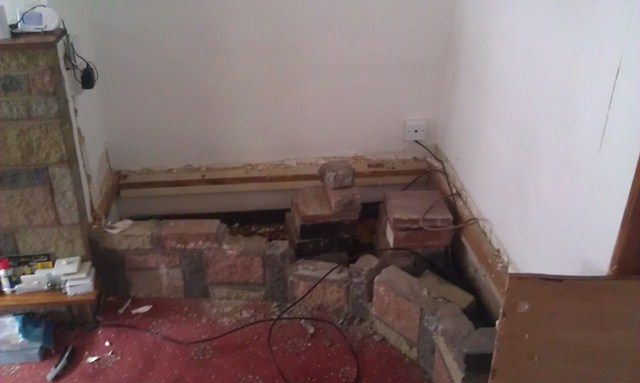
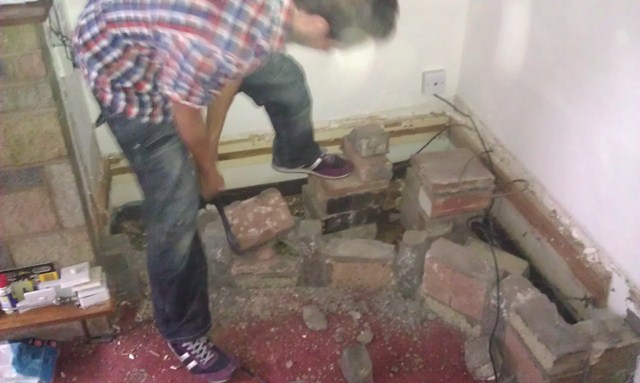
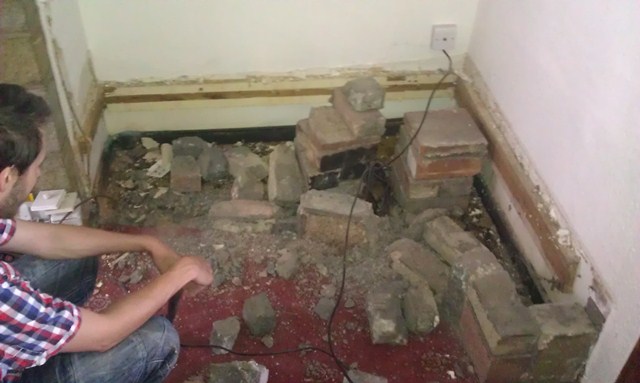
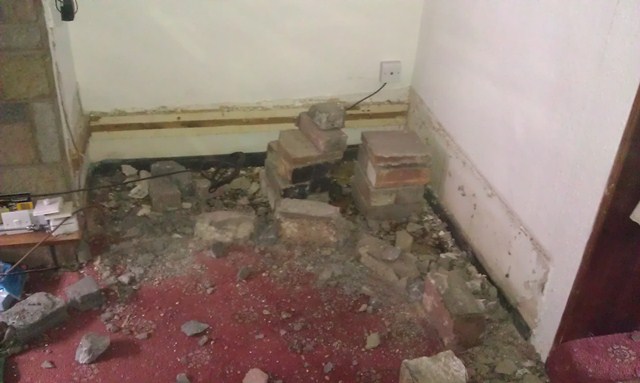
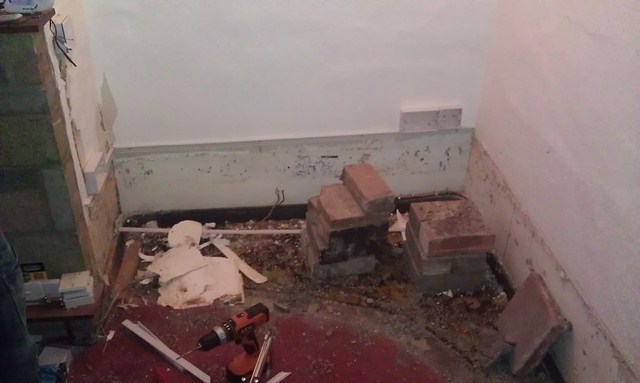
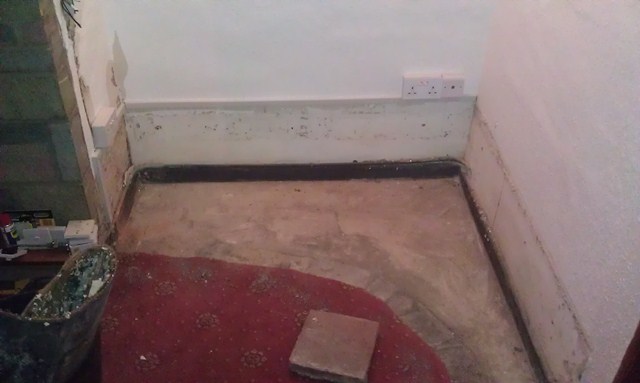
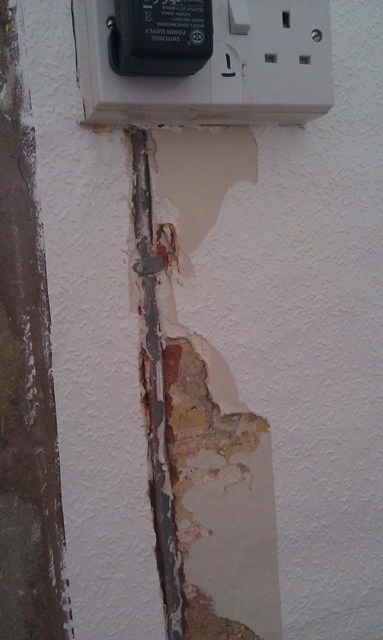
Building things is fun, but sometimes it s nice to have a little light relief with a sledgehammer. Saturday was one of those occasions; there is was a decorative wall in the corner of our lounge. It should have died about thirty years ago and I ve hated it ever since we moved in a year ago. First job was to remove the sockets and cable running up the side, which was a nice surprise in itself: Looks like whoever installed it believed that mastick and wallpaper is a suitable covering to stop drill bits. Hmm. Next we could take out the wall itself. In this case the wooden top was sealed down with more mastick and supported by piles of bricks, then the wall had been secured with concrete and not proper mortar. Fortunately a good sledgehammering soon took care of that: Those bricks truly were hideous, and they are all around the dodgy gas fire and another similar feature in the opposite corner of the room. Incidentally, the newly-revealed carpet in the void should also have died in the seventies (it went straight into the skip), but at least now we have some understanding of the mysterious wallpaper we found under the stairs. Finally we had enough room to work with surface trunking (a temporary housing until the gas pipe is removed and we can bury the cables properly): And the final result, with the sockets moved to a more sensible level and the cable properly protected, new LightwaveRF sockets in the corner and a shiny new aerial point ready for cabinets to go into the gap:
13/08: A couple of people pointed out that in the first photo, the offending cable is in a protected zone. This is true, but it wiggles half way round the room from the CU in a similar fashion first sometimes in trunking, sometimes clipped to the fireplace, and sometimes masticked and papered flush with the plaster surface.
From building to demolishing is a post from: jwiltshire.org.uk Flattr

10 August 2012

Petter Reinholdtsen: Notes on language codes for Norwegian docbook processing...

In docbook one can specify the language used at the top, and the processing pipeline will use this information to pick the correct translations for 'chapter', 'see also', 'index' etc. And for most languages used with docbook, I guess this work just fine. For example a German user can start the document with <book lang="de">, and the document will show up with the correct content with any of the docbook processors. This is not the case for the language I am working with at the moment, Norwegian Bokm l. For a while, I was confused about which language code to use, because I was unable to find any language code that would work across all tools. I am currently testing dblatex, xmlto, docbook-xsl, and dbtoepub, and they do not handle Norwegian Bokm l the same way. Some of them do not handle it at all. A bit of background information is probably needed to understand this mess. Norwegian is not one, but two written variants. The variants are Norwegian Nynorsk and Norwegian Bokm l. There are three two letter language codes associated with these languages, Norwegian is 'no', Norwegian Nynorsk is 'nn' and Norwegian Bokm l is 'nb'. Historically the 'no' language code was used for Norwegian Bokm l, but many years ago this was found to be bad idea, and the recommendation is to use the most specific language code instead, to avoid confusion. In the transition period it is a good idea to make sure 'no' was an alias for 'nb'. Back to docbook processing tools in Debian. The dblatex tool only understand 'nn'. There are translations for 'no', but not 'nb' (BTS #684391), but due to a bug (BTS #682936) the 'no' language code is not recognised. The docbook-xsl tool chain only recognise 'nn' and 'nb', but not 'no'. The xmlto tool only recognise 'nn' and 'nb', but not 'no'. The end result that there is no language code I can use to get the docbook file working with all of these tools at the same time. :( The correct solution is to use <book lang="nb">, but it will take time before that will work with all the free software docbook processors. :( Oh, the joy of well integrated tools. :/

31 July 2012

Petter Reinholdtsen: Best way to create a docbook book?

I tried to send this text to the docbook-apps mailing list at lists.oasis-open.org, but it only accept messages from subscribers and rejected my post, and I completely lack the bandwidth required to subscribe to another mailing list, so instead I try to post my message here and hope my blog readers can help me out. I am quite new to docbook processing, and am climbing a steep learning curve at the moment. To give you some background, I am working on a Norwegian translation of the book Free Culture by Lawrence Lessig, and I use docbook to handle the process. The files to build the book are available from github. The book got around 400 pages with parts, images, footnotes, tables, index entries etc, which has proven to be a challenge for the free software docbook processors. My build platform is Debian GNU/Linux Squeeze. I want to build PDF, EPUB and HTML version of the book, and have tried different tool chains to do the conversion from docbook to these formats. I am currently focusing on the PDF version, and have a few problems. So I wonder, what would be the best way to create the PDF version of this book? Are some of the bugs found above solved in new or experimental versions of some docbook tool chain? What about HTML and EPUB versions?

28 July 2012

Alberto Garc a: GUADEC 2012

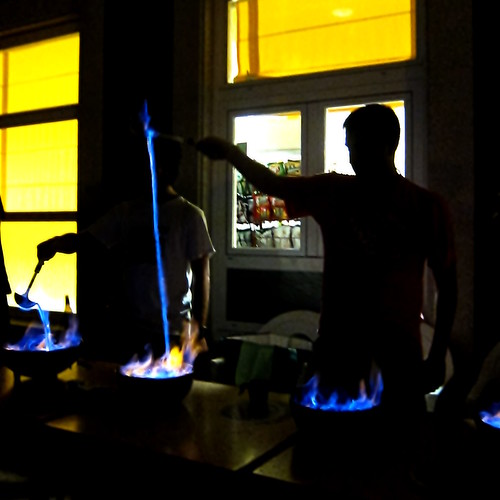
Third day of GUADEC already. And in Coru a! Coru a This is a very special city for me. I came here in 1996 to study Computer Science. Here I discovered UNIX for the first time, and spent hours learning how to use it. It s funny to see now those old UNIX servers being displayed in a small museum in the auditorium where the main track takes place. It was also here where I learnt about free software, installed my first Debian system, helped creating the local LUG and met the awesome people that founded Igalia with me. Then we went international, but our headquarters and many of our people are still here so I guess we can still call this home. So, needless to say, we are very happy to have GUADEC here this time. I hope you all are enjoying the conference as much as we are. I m quite satisfied with how it s been going so far, the local team has done a good job organising everything and taking care of lots of details to make the life of all attendees easier. I especially want to stress all the effort put into the network infrastructure, one of the best that I remember in a GUADEC conference. At Igalia we ve been very busy lately. We re putting lots of effort in making WebKit better, but our work is not limited to that. Our talks this year show some of the things we ve been doing: We are also coordinating 4 BOFs (a11y, GNOME OS, WebKit and Grilo) and hosted a UX hackfest in our offices before the conference. And we have a booth next to the info desk where you can get some merchandising and see our interactivity demos. WebKitGTK+ In case you missed the conference this year, all talks are being recorded and the videos are expected to be published really soon (before the end of the conference). So enjoy the remaining days of GUADEC, and enjoy Coru a! And of course if you re staying after the conference and want to know more about the city or about Galicia, don t hesitate to ask me or anyone from the local team, we ll be glad to help you. Queimada

21 July 2012

Petter Reinholdtsen: Free Culture in Norwegian - 5 chapters done, 74 percent left to do

I reported earlier that I am working on a norwegian version of the book Free Culture by Lawrence Lessig. Progress is good, and yesterday I got a major contribution from Anders Hagen Jarmund completing chapter six. The source files as well as a PDF and EPUB version of this book are available from github. I am happy to report that the draft for the first two chapters (preface, introduction) is complete, and three other chapters are also completely translated. This completes 26 percent of the number of strings (equivalent to paragraphs) in the book, and there is thus 74 percent left to translate. A graph of the progress is present at the bottom of the github project page. There is still room for more contributors. Get in touch or send github pull requests with fixes if you got time and are willing to help make this book make it to print. :) The book translation framework could also be a good basis for other translations, if you want the book to be available in your language.

16 July 2012

Petter Reinholdtsen: Call for help from docbook expert to tag Free Culture by Lawrence Lessig

I am currently working on a project to translate the book Free Culture by Lawrence Lessig to Norwegian. And the source we base our translation on is the docbook version, to allow us to use po4a and .po files to handle the translation, and for this to work well the docbook source document need to be properly tagged. The source files of this project is available from github. The problem is that the docbook source have flaws, and we have no-one involved in the project that is a docbook expert. Is there a docbook expert somewhere that is interested in helping us create a well tagged docbook version of the book, and adjust our build process for the PDF, EPUB and HTML version of the book? This will provide a well tagged English version (our source document), and make it a lot easier for us to create a good Norwegian version. If you can and want to help, please get in touch with me or fork the github project and send pull requests with fixes. :)

8 July 2012

Petter Reinholdtsen: Debian Edu interview: George Bredberg

The Debian Edu / Skolelinux project have users all over the globe, but until recently we have not known about any users in Norway's neighbour country Sweden. This changed when George Bredberg showed up in March this year on the mailing list, asking interesting questions about how to adjust and scale the just released Debian Edu Wheezy setup to his liking. He granted me an interview, and I am happy to share his answers with you here. Who are you, and how do you spend your days? I'm a 44 year old country guy that have been working 12 years at the same school as 50% IT-manager and 50% Teacher. My educational background is fil.kand in history and religious beliefs, an exam as a "folkhighschool" teacher, that is, for teaching grownups. In Norwegian I believe it's called "Vuxenupplaring". I also have a master in "Technology and social change". So I'm not really a tech guy, I just like to study how humans and technology interact and that is my perspective when working with IT. How did you get in contact with the Skolelinux/Debian Edu project? I have followed the Skolelinux project for quite some time by now. Earlier I tested out the K12-LTSP project, which we used for some time, but I really like the idea of having a distribution aimed to be a complete solution for schools with necessary tools integrated. When K12-LTSP abandoned that idea some years ago, I started to look more seriously into Skolelinux instead. What do you see as the advantages of Skolelinux/Debian Edu? The big point of Skolelinux to me is that it is a complete distribution, ready to install. It has LDAP-support, MS Windows integration tools and so forth already configured, saving an administrator a lot of time and headache. We were using another Linux based thin-client system called Thinlinc, that has served us very well. But that Skolelinux is based on VNC and LTSP, to me, is better when it comes to the kind of multimedia used in schools. That is showing videos from Youtube or educational TV. It is also easier to mix thin clients with workstations, since the user settings will be the same. In our VNC-based solution you had to "beat around the bush" by setting up a second, hidden, home-directory for user settings for the workstations, because they will be different from the ones used on the thin clients. Skolelinux support for diskless workstations are very convenient since a school today often need to use a class room projector showing videos in full screen. That is easily done with a small integrated media computer running as a diskless workstation. You have only two installs to update and configure. One for the thin clients and one for the workstations. Also saving a lot of time. Our old system was also based on Redhat and CentOS. They are both very nice distributions, but they are sometimes painfully slow when it comes to updating multimedia support and multimedia programs (even such as Gimp), leaving us with a bit "oldish" applications. Debian is quicker to update. What do you see as the disadvantages of Skolelinux/Debian Edu? Debian is a bit too quick when it comes to updating. As an example we use old HP terminals as thinclients, and two times already this year (2012) the updates you get from the repositories has stopped sound from working with them. It's a kernel/ALSA issue. So you have to be more careful properly testing the updates before you run them in a production environment. This has never happened with CentOS. I also would like to be able to set my own domain-settings at install time. In Skolelinux they are kind of hard coded into the distribution, when it comes to LDAP and at least samba integration. That is more a cosmetic/translation issue, and not a real problem. Running MS Windows applications within the Skolelinux environment needs to be better supported. That is, running them seamlessly via RDP, and support for single-sign on. That will make the transition to free software easier, because you can keep the applications you really need. No support will make it impossible if you work in a school where some applications can't be open source. As for us we really need to run Adobe InDesign in our journalist classes. We run a journalist education, and is one of the very few non university ones that is ok:d by Svenska journalistf rbundet (Swedish journalist association). Our education gives the pupils the right of membership there, once they are done. This is important if you want to get a job. Adobe InDesign is the program most commonly used in newspapers and magazines. We used Quark Express before, but they seem to loose there market to Adobe. The only "equivalent" to InDesign in the opensource world is Scribus, and its not advanced enough. At least not according to the teacher. I think it would be possible to use it, because they are not supposed to learn a program, they are supposed to learn how to edit and compile a newspaper. But politically at our school we are not there yet. And Scribus lacks a lot of things you find i InDesign. We used even a windows program for sound editing when it comes to the radio-journalist part. The year to come we are going to try Audacity. That software has the same kind of limitations compared to Adobe Audition, but that teacher is a bit more open minded. We have tried Ardour also, but that instead is more like a music studio program, not intended for the kind of editing taking place in a radio studio. Its way to complex and the GUI is to scattered when you only want to cut, make pass-overs, add extra channels and normalise. Those things you can do in Audacity, but its not as easy as in Audition. You have to do more things manually with envelopes, and that is a bit old fashion and timewasting. Its also harder to cut and move sound from one channel to another, which is a thing that you do frequently because you often find yourself needing to rearrange parts of the sound file. So, I am not sure we will succeed in replacing even Audition, but we will try. The problem is the students have certain expectations when they start an education towards a profession. So the programs has to look and feel professional. Good thing with radio, there are many programs out there, that radio studios use, so its not as standardised as Newspaper editing. That means, it does not really matter what program they learn, because once they start working they still have to learn the program the studio uses, so instead focus has to be to learn the editing part without to much focus on a specific software. Which free software do you use daily? Myself I'm running Linux Mint, or Ubuntu these days. I use almost only open source software, and preferably Linux based. When it comes to most used applications its OpenOffice, and Firefox (of course ;) ) Which strategy do you believe is the right one to use to get schools to use free software? To get schools to use free software there has to be good open source software that are windows based, to ease the transition. But it's also very important that the multimedia support is working flawlessly. The problems with Youtube, Twitter, Facebook and whatever will create problems when it comes to both teachers and students. Economy are also important for schools, so using thin clients, as long as they have good multimedia support, is a very good idea. It's also important that the open source software works even for the administration. It's hard to convince the teachers to stick with open source, if the principal has to run Windows. It also creates a problem if some classes has to use Windows for there tasks, since that will create a difference in "status" between classes, so a good support for running windows applications via the thin client (Linux) desktop is essential. At least at our school, where we have mixed level of educations, from high-school to journalist-school. Update 2012-07-09 08:30: Paul Wise tipped me on IRC about three useful sources related to Free Software for radio stations: the LWN article Radio station management with Airtime, Airtime which claim to be a Free open source radio automation software and Rivendell which claim to be complete radio broadcast automation solution. All of them seem useful to the aspiring radio producer.

Petter Reinholdtsen: Why do schools waste money on IT?

In the Debian Edu / Skolelinux project, we have realised that one of the major blockers for the project success is the purchasing skills in schools and municipalities. We provide what the happy users of Debian Edu / Skolelinux say they need and to a lower cost than the alternatives, and yet so few schools decide to use our solution. I was pleased to discover the same observation done by mySociety and Tom Steinberg in his blog post "Can you recognize the million pound chair?". Read it and weep for the spending of your tax money. Of course there are other factors involved as well, like our projects bad marketing skills and the Linux community fragmentation causing worry with the people on the outside, so we as a project need to keep working hard to gain users, but it is a up-hill battle when public decision makers are unable to understand computer system purchases.

7 July 2012

Petter Reinholdtsen: Free Timetabling Software - nice free software

Included in Debian Edu / Skolelinux is a large collection of end user and school specific software. It is one of the packages not installed by default but provided in the Debian archive for schools to install if they want to, is a system to automatically plan the school time table using information about available teachers, classes and rooms, combined with the list of required courses and how many hours each topic should receive. The software is named FET, and it provide a graphical user interface to input the required information, save the result in a fairly simple XML format, and generate time tables for both teachers and students. It is available both for Linux, MacOSX and Windows. This is the feature list, liftet from the project web site: I have not used it myself, as I am not involved in time table planning at a school, but it seem to work fine when I test it. If you need to set up your schools time table, and is tired of doing it manually, check it out. A quick summary on how to use it can be found in a blog post from MarvelSoft. If you find FET useful, please provide a recipe for the Debian Edu project in the Debian Edu HowTo section.

3 July 2012

Petter Reinholdtsen: Can Zimbra be told to send autoreplies to the From: address?

In the NUUG FiksGataMi project (Norwegian version of FixMyStreet from mySociety), we have discovered a problem with the municipalities using Zimbra. When FiksGataMi send a problem report to the government, the email From: address is set to the address of the person reporting the problem, while envelope sender is set to the FiksGataMi contact address. The intention is to make sure the municipality send any replies to the person reporting the problem, while any email delivery problems are sent to us in NUUG. This work well in most cases, but not for Karm y municipality using Zimbra. Karm y is using the vacation message function in Zimbra to send an automatic reply to report that the message has been received, and this message is sent to the envelope sender and not the address in the From: header. This causes the automatic message from Karm y to go to NUUGs request-tracker instance instead of to the person reporting the problem. We can not really change the envelope sender address, as this would make it impossible for us to discover when there are problems with the MTAs receiving problem reports. We have been in contact with the people at Karm y municipality, and they are willing to adjust Zimbra if something can be changed there to get a better behaviour. The default behaviour of Zimbra is as far as I can tell according to the specification in RFC 3834, which recommend that vacation messages are sent to the envelope sender and not to the From: address. But I wonder if it is possible to adjust or configure Zimbra to behave differently. Anyone know? Please let us know at fiksgatami (at) nuug.no.

26 June 2012

Petter Reinholdtsen: Debian Edu interview: Jos Luis Redrejo Rodr guez

I've been too busy at home, but finally I found time to wrap up another interview with the people behind Debian Edu and Skolelinux. This time we get to know Jos Luis Redrejo Rodr guez, one of our great helpers from Spain. His effort was the reason we added support for several desktop types (KDE, Gnome and most recently LXDE) in Debian Edu, and have all of these available in the recently published Debian Edu Squeeze version. Who are you, and how do you spend your days? I'm a father, teacher and engineer who is working for the Education ministry of the Region of Extremadura (Spain) in the implementation of ICT in schools How did you get in contact with the Skolelinux/Debian Edu project? At 2006, I verified that both, we in Extremadura and Skolelinux project, had been working in parallel for some years, doing very similar things, using very similar tools and with similar targets, so I decided it was time to join forces as much as possible. What do you see as the advantages of Skolelinux/Debian Edu? A community of highly skilled experts working together, with a really open schema of collaboration and work. I really love the concepts of Do-ocracy and Merit-ocracy and the way these concepts are been used everyday inside Debian Edu. What do you see as the disadvantages of Skolelinux/Debian Edu? Sometimes the differences in the implementations, laws or economical and technical resources in the different countries don't allow us to agree in the same solution for all of us, and several approaches are needed, what is a waste of effort. Also, there is a lack of more man power to be able to follow the fast evolution of the technologies in school. Which free software do you use daily? Debian, of course, and due to my kind of job I am most of my time between Iceweasel, Geany and Terminator. Which strategy do you believe is the right one to use to get schools to use free software? I think there is not a single strategy because there are very different scenarios: schools with mixed proprietary and free environments, schools using only workstations, other schools using laptops, netbooks, tablets, interactive white-boards, etc. Also the range of ages of the students is very broad and you can not use the same solutions for primary schools and secondary or even universities. So different strategies are needed. But, looking at these differences, and looking back to the things we've done and implemented, and the places were we have spent most of our forces, I think we should focus as much as possible in free multi-platform environments, using only standards tools, and moving more and more to Internet or network solutions that could be deployed using wireless. I think we'll see more and more personal devices in the schools, devices the students and teachers will take home with them, so the solutions must be able to be taken at home and continue working there.

24 June 2012

Petter Reinholdtsen: Song book for Computer Scientists

Many years ago, while studying Computer Science at the University of Troms , I started collecting computer related songs for use at parties. The original version was written in LaTeX, but a few years ago I got help from H kon W. Lie, one of the inventors of W3C CSS, to convert it to HTML while keeping the ability to create a nice book in PDF format. I have not had time to maintain the book for a while now, and guess I should put it up on some public version control repository where others can help me extend and update the book. If anyone is volunteering to help me with this, send me an email. Also let me know if there are songs missing in my book. I have not mentioned the book on my blog so far, and it occured to me today that I really should let all my readers share the joys of singing out load about programming, computers and computer networks. Especially now that Debconf 12 is about to start (and I am not going). Want to sing? Check out Petter's Computer Science Songbook.

Paul Tagliamonte: debian-desktop/7.0.0~exp2 in experimental

Mirroring my post to debian-desktop here:
Howdy, -desktop,
Hopefully we can contain the flame to the other thread.
desktop-base/7.0.0~exp2 has been accepted into experimental, for testing
by y'all (and generally interested folks) for feedback and testing
before pushing to unstable.
I urge y'all to give it a try and provide feedback on issues that you
may run into.
You can overlay experimental on any unstable install, and install
desktop-base by running:
    $ sudo apt-get -t experimental install desktop-base
For more information on using experimental, check out the wiki[1].
If you would care to test out the plymouth bootsplash, here's the short
version of how to get it running:
 1) Install plymouth via apt ($ sudo apt-get install plymouth)
 2) Set the theme to use  joy' ($ sudo /usr/sbin/plymouth-set-default-theme joy)
 3) Edit the file /etc/default/grub, and add
    "splash" to GRUB_CMDLINE_LINUX_DEFAULT
 4) update your initramfs ($ sudo update-initramfs -u)
Here's the full list of changes from the version in unstable:
    desktop-base (7.0.0~exp2) experimental; urgency=low
      * Remove GConf defaults, they are not used anymore.
      * Remove the GDM3 settings, since the configuration format for GDM
        change again, yay.
      * Add a dconf file for the new-style GDM3 configuration.
      * Add a XML file describing the available resolutions for the
        background (for use with GNOME).
      * postinst: use a higher priority for the 1920x1080 background.
      * Cleanup postinst/prerm/postrm.
      * Add a new alternative: desktop-background.xml.
      * Use it from the gsettings override.
      * Reload gdm3 after installation/removal.
      * Drop old libgnome2-common hack.
      * Clean up an alternative that is no longer available.
     -- Josselin Mouette <joss@debian.org>  Sat, 23 Jun 2012 23:28:15 +0200
    desktop-base (7.0.0~exp1) experimental; urgency=low
      [ Paul Tagliamonte ]
      * Adding myself as a maintainer
      * We've got a new theme --  joy' by Adrien Aubourg. Thanks, Adrien!
         - Theme added to backgrounds.
         - Theme added for Grub
         - Background changed for GDM3
         - Theme added for KDM & changed that to default.
         - Theme added for ksplash & changed to default.
      * Standards bump to 3.9.3
      * Pre-Dependency added for dpkg (>= 1.15.7.2~), since we use dpkg helpers
        in our preinst.
      * Add in Jonathan Carter's Plymouth theme.
      [ Jonathan Carter ]
      * Remove splashy theme since it's no longer available in archives
      [ Yves-Alexis Perez ]
      * Install emblem in the correct folder.
     -- Paul Tagliamonte <paultag@ubuntu.com>  Sat, 23 Jun 2012 13:00:47 +0200
I thank all of you dearly for putting up with this,
  Paul
[1]: http://wiki.debian.org/DebianExperimental

11 June 2012

Petter Reinholdtsen: Debian Edu - some ideas for the future versions

During my work on Debian Edu based on Squeeze, I came across some issues that should be addressed in the Wheezy release. I finally found time to wrap up my notes and provide quick summary of what I found, with a bit explanation. I guess we will discover more as we continue to work on the Wheezy version.

9 June 2012

Petter Reinholdtsen: TV with face recognition, for improved viewer experience

Slashdot got a story about Intel planning a TV with face recognition to recognise the viewer, and it occurred to me that it would be more interesting to turn it around, and do face recognition on the TV image itself. It could let the viewer know who is present on the screen, and perhaps look up their credibility, company affiliation, previous appearances etc for the viewer to better evaluate what is being said and done. That would be a feature I would be willing to pay for. I would not be willing to pay for a TV that point a camera on my household, like the big brother feature apparently proposed by Intel. It is the telescreen idea fetched straight out of the book 1984 by George Orwell.

8 June 2012

Lars Wirzenius: Obnam 1.0 (backup software); a story in many words

tl;dr: Version 1.0 of Obnam, my snapshotting, de-duplicating, encrypting backup program is released. See the end of this announcement for the details. Where we see the hero in his formative years; parental influence From the very beginning, my computing life has involved backups. In 1984, when I was 14, my father was an independent telecommunications consultant, which meant he needed a personal computer for writing reports. He bought a Luxor ABC-802, a Swedish computer with a Z80 microprocessor and two floppy drives. My father also taught me how to use it. When I needed to save files, he gave me not one, but two floppies, and explained that I should store my files one one, and then copy them to the other one every now and then. Later on, over the years, I've made backups from a hard disk (30 megabytes!) to a stack of floppies, to a tape drive installed into a floppy interface (400 megabytes!), to a DAT drive, and various other media. It was always a bit tedious. The start of the quest; lengthy justification for NIH In 2004, I decided to do a full backup, by burning a copy of all my files onto CD-R disks. It took me most of the day. Afterwards, I sat admiring the large stack of disks, and realized that I would not ever do that again. I'm too lazy for that. That I had done it once was an aberration in the space-time continuum. Switching to DVD-Rs instead CD-Rs would reduce to the number of disks to burn, but not enough: it would still take a stack of them. I needed something much better. I had a little experience with tape drives, and that was enough to convince me that I didn't want them. Tape drives are expensive hardware, and the tapes also cost money. If the drive goes bad, you have to get a compatible one, or all your backups are toast. The price per gigabyte was coming down fast for hard drives, and it was clear that they were about to be very competitive with tapes for price. I looked for backup programs that I could use for disk based backups. rsync, of course, was the obvious choice, but there were others. I ended up doing what many geeks do: I wrote my own wrapper around rsync. There's hundred, possibly thousands, of such wrappers around the Internet. I also got the idea that doing a startup to provide online backup space would be a really cool thing. However, I didn't really do anything about that until 2007. More on that later. The rsync wrapper script I wrote used hardlinked directory trees to provide a backup history, though not in the smart way that backuppc does it. The hardlinks were wonderful, because they were cheap, and provided de-duplication. They were also quite cumbersome, when I needed to move my backups to a new disk the first time. It turned out that a lot of tools deal very badly with directory trees with large numbers of hardlinks. I also decided I wanted encrypted backups. This led me to find duplicity, which is a nice program that does encrypted backups, but I had issues with some of its limitations. To fix those limitations, I would have had to re-design and possibly re-implement the entire program. The biggest limitation was that it treated backups as full backup, plus a sequence of incremental backups, which were deltas against the previous backup. Delta based incrementals make sense for tape drives. You run a full backup once, then incremental deltas for every day. When enough time has passed since the full backup, you do a new full backup, and then future incrementals are based on that. Repeat forever. I decided that this makes no sense for disk based backups. If I already have backed up a file, there's no point in making me backup it again, since it's already there on the same hard disk. It makes even less sense for online backups, since doing a new full backup would require me to transmit all the data all over again, even though it's already on the server. The first battle I could not find a program that did what I wanted to do, and like every good NIHolic, I started writing my own. After various aborted attempts, I started for real in 2006. Here is the first commit message:
revno: 1
committer: Lars Wirzenius <liw@iki.fi>
branch nick: wibbr
timestamp: Wed 2006-09-06 18:35:52 +0300
message:
  Initial commit.
wibbr was the placeholder name for Obnam until we came up with something better. We was myself and Richard Braakman, who was going to be doing the backup startup with me. We eventually founded the company near the end of 2006, and started doing business in 2007. However, we did not do very much business, and ran out of money in September 2007. We ended the backup startup experiment. That's when I took a job with Canonical, and Obnam became a hobby project of mine: I still wanted a good backup tool. In September 2007, Obnam was working, but it was not very good. For example, it was quite slow and wasteful of backup space. That version of Obnam used deltas, based on the rsync algorithm, to backup only changes. It did not require the user to do full and incremental backups manually, but essentially created an endless sequence of incrementals. It was possible to remove any generation, and Obnam would manage the deltas as necessary, keeping the ones needed for the remaining generations, and removing the rest. Obnam made it look as if each generation was independent of each other. The wasteful part was the way in which metadata about files was stored: each generation stored the full list of filenames and their permissions and other inode fields. This turned out to be bigger than my daily delta. The lost years; getting lost in the forest For the next two years, I did a little work on Obnam, but I did not make progress very fast. I changed the way metadata was stored, for example, but I picked another bad way of doing it: the new way was essentially building a tree of directory and file nodes, and any unchanged subtrees were shared between generations. This reduced the space overhead per generation, but made it quite slow to look up the metadata for any one file. The final battle; finding cows in the forest In 2009 I decided to leave Canonical and after that, my Obnam hobby picked up in speed again. Below is a table of the number of commits per year, from the very first commit (bzr log -n0 awk '/timestamp:/ print $3 ' sed 's/-.*//' uniq -c awk ' print $2, $1 ' tac):
2006 466
2007 353
2008 402
2009 467
2010 616
2011 790
2012 282
During most of 2010 and 2011 I was unemployed, and happily hacking Obnam, while moving to another country twice. I don't recommend that as a way to hack on hobby projects, but it worked for me. After Canonical, I decided to tackle the way Obnam stores data from a new angle. Richard told me about the copy-on-write (or COW) B-trees that btrfs uses, originally designed by Ohad Rodeh (see his paper for details), and I started reading about that. It turned out that they're pretty ideal for backups: each B-tree stores data about one generation. To start a new generation, you clone the previous generation's B-tree, and make any modifications you need. I implemented the B-tree library myself, in Python. I wanted something that was flexible about how and where I stored data, which the btrfs implementation did not seem to give me. (Also, I worship at the altar of NIH.) With the B-trees, doing file deltas from the previous generation no longer made any sense. I realized that it was, in any case, a better idea to store file data in chunks, and re-use chunks in different generations as needed. This makes it much easier to manage changes to files: with deltas, you need to keep a long chain of deltas and apply many deltas to reconstruct a particular version. With lists of chunks, you just get the chunks you need. The spin-off franchise; lost in a maze of dependencies, all alike In the process of developing Obnam, I have split off a number of helper programs and libraries: I have found it convenient to keep these split off, since I've been able to use them in other projects as well. However, it turns out that those installing Obnam don't like this: it would probably make sense to have a fat release with Obnam and all dependencies, but I haven't bothered to do that yet. The blurb; readers advised about blatant marketing The strong points of Obnam are, I think: Backups may be stored on local hard disks (e.g., USB drives), any locally mounted network file shares (NFS, SMB, almost anything with remotely Posix-like semantics), or on any SFTP server you have access to. What's not so strong is backing up online over SFTP, particularly with long round trip times to the server, or many small files to back up. That performance is Obnam's weakest part. I hope to fix that in the future, but I don't want to delay 1.0 for it. The big news; readers sighing in relief I am now ready to release version 1.0 of Obnam. Finally. It's been a long project, much longer than I expected, and much longer than was really sensible. However, it's ready now. It's not bug free, and it's not as fast as I would like, but it's time to declare it ready for general use. If nothing else, this will get more people to use it, and they'll find the remaining problems faster than I can do on my own. I have packaged Obnam for Debian, and it is in unstable, and will hopefully get into wheezy before the Debian freeze. I provide packages built for squeeze on my own repository, see the download page. The changes in the 1.0 release compared to the previous one: The future; not including winning lottery numbers I expect to get a flurry of bug reports in the near future as new people try Obnam. It will take a bit of effort dealing with that. Help is, of course, welcome! After that, I expect to be mainly working on Obnam performance for the foreseeable future. There may also be a FUSE filesystem interface for restoring from backups, and a continous backup version of Obnam. Plus other features, too. I make no promises about how fast new features and optimizations will happen: Obnam is a hobby project for me, and I work on it only in my free time. Also, I have a bunch of things that are on hold until I get Obnam into shape, and I may decide to do one of those things before the next big Obnam push. Where; the trail of an errant hacker I've developed Obnam in a number of physical locations, and I thought it might be interesting to list them: Espoo, Helsinki, Vantaa, Kotka, Raahe, Oulu, Tampere, Cambridge, Boston, Plymouth, London, Los Angeles, Auckland, Wellington, Christchurch, Portland, New York, Edinburgh, Manchester, San Giorgio di Piano. I've also hacked on Obnam in trains, on planes, and once on a ship, but only for a few minutes on the ship before I got seasick. Thank you; sincerely SEE ALSO

6 June 2012

Petter Reinholdtsen: Web service to look up HP and Dell computer hardware support status

A few days ago I reported how to get the support status out of Dell using an unofficial and undocumented SOAP API, which I since have found out was discovered by Daniel De Marco in february. Combined with my web scraping code for HP, Dell and IBM from 2009, I got inspired and wrote a web service based on Scraperwiki to make it easy to look up the support status and get a machine readable result back. This is what it look like at the moment when asking for the JSON output:
% GET https://views.scraperwiki.com/run/computer-hardware-support-status/?format=json&vendor=Dell&servicetag=2v1xwn1
supportstatus( "servicetag": "2v1xwn1", "warrantyend": "2013-11-24", "shipped": "2010-11-24", "scrapestamputc": "2012-06-06T20:26:56.965847", "scrapedurl": "http://143.166.84.118/services/assetservice.asmx?WSDL", "vendor": "Dell", "productid": "" )
%
It currently support Dell and HP, and I am hoping for help to add support for other vendors. The python source is available on Scraperwiki and I welcome help with adding more features.

2 June 2012

Petter Reinholdtsen: Debian Edu interview: Mike Gabriel

Back in 2010, Mike Gabriel showed up on the Debian Edu and Skolelinux mailing list. He quickly proved to be a valuable developer, and thanks to his tireless effort we now have Kerberos integrated into the Debian Edu Squeeze version. Who are you, and how do you spend your days? My name is Mike Gabriel, I am 38 years old and live near Kiel, Schleswig-Holstein, Germany. I live together with a wonderful partner (Angela Fu ) and two own children and two bonus children (contributed by Angela). During the day I am part-time employed as a system administrator and part-time working as an IT consultant. The consultancy work touches free software topics wherever and whenever possible. During the nights I am a free software developer. In the gaps I also train in becoming an osteopath. Starting in 2010 we (Andreas Buchholz, Angela Fu , Mike Gabriel) have set up a free software project in the area of Kiel that aims at introducing free software into schools. The project's name is "IT-Zukunft Schule" (IT future for schools). The project links IT skills with communication skills. How did you get in contact with the Skolelinux/Debian Edu project? While preparing our own customised Linux distribution for "IT-Zukunft Schule" we were repeatedly asked if we really wanted to reinvent the wheel. What schools really need is already available, people said. From this impulse we started evaluating other Linux distributions that target being used for school networks. At the end we short-listed two approaches and compared them: a commercial Linux distribution developed by a company in Bremen, Germany, and Skolelinux / Debian Edu. Between 12/2010 and 03/2011 we went to several events and met people being responsible for marketing and development of either of the distributions. Skolelinux / Debian Edu was by far much more convincing compared to the other product that got short-listed beforehand--across the full spectrum. What was most attractive for me personally: the perspective of collaboration within the developmental branch of the Debian Edu project itself. In parallel with this, we talked to many local and not-so-local people. People teaching at schools, headmasters, politicians, data protection experts, other IT professionals. We came to two conclusions: First, a technical conclusion: What schools need is available in bits and pieces here and there, and none of the solutions really fit by 100%. Any school we have seen has a very individual IT setup whereas most of each school's requirements could mapped by a standard IT solution. The requirement to this IT solution is flexibility and customisability, so that individual adaptations here and there are possible. In terms of re-distributing and rolling out such a standardised IT system for schools (a system that is still to some degree customisable) there is still a lot of work to do here locally. Debian Edu / Skolelinux has been our choice as the starting point. Second, a holistic conclusion: What schools need does not exist at all (or we missed it so far). There are several technical solutions for handling IT at schools that tend to make a good impression. What has been missing completely here in Germany, though, is the enrolment of people into using IT and teaching with IT. "IT-Zukunft Schule" tries to provide an approach for this. Only some schools have some sort of a media concept which explains, defines and gives guidance on how to use IT in class. Most schools in Northern Germany do not have an IT service provider, the school's IT equipment is managed by one or (if the school is lucky) two (admin) teachers, most of the workload these admin teachers get done in there spare time. We were surprised that only a very few admin teachers were networked with colleagues from other schools. Basically, every school here around has its individual approach of providing IT equipment to teachers and students and the exchange of ideas has been quasi non-existent until 2010/2011. Quite some (non-admin) teachers try to avoid using IT technology in class as a learning medium completely. Several reasons for this avoidance do exist. We discovered that no-one has ever taken a closer look at this social part of IT management in schools, so far. On our quest journey for a technical IT solution for schools, we discussed this issue with several teachers, headmasters, politicians, other IT professionals and they all confirmed: a holistic approach of considering IT management at schools, an approach that includes the people in place, will be new and probably a gain for all. What do you see as the advantages of Skolelinux/Debian Edu? There is a list of advantages: international context, openness to any kind of contributions, do-ocracy policy, the closeness to Debian, the different installation scenarios possible (from stand-alone workstation to complex multi-server sites), the transparency within project communication, honest communication within the group of developers, etc. What do you see as the disadvantages of Skolelinux/Debian Edu? Every coin has two sides: Technically: BTS issue #311188, tricky upgradability of a Debian Edu main server, network client installations on top of a plain vanilla Debian installation should become possible sometime in the near future, one could think about splitting the very complex package debian-edu-config into several portions (to make it easier for new developers to contribute). Another issue I see is that we (as Debian Edu developers) should find out more about the network of people who do the marketing for Debian Edu / Skolelinux. There is a very active group in Germany promoting Skolelinux on the bigger Linux Days within Germany. Are there other groups like that in other countries? How can we bring these marketing people together (marketing group A with group B and all of them with the group of Debian Edu developers)? During the last meeting of the German Skolelinux group, I got the impression of people there being rather disconnected from the development department of Debian Edu / Skolelinux. Which free software do you use daily? For my daily business, I do not use commercial software at all. For normal stuff I use Iceweasel/Firefox, Libreoffice.org. For serious text writing I prefer LaTeX. I use gimp, inkscape, scribus for more artistic tasks. I run virtual machines in KVM and Virtualbox. I am one of the upstream developers of X2Go. In 2010 I started the development of a Python based X2Go Client, called PyHoca-GUI. PyHoca-GUI has brought forth a Python X2Go Client API that currently is being integrated in Ubuntu's software center. For communications I have my own Kolab server running using Horde as web-based groupware client. For IRC I love to use irssi, for Jabber I have several clients that I use, mostly pidgin, though. I am also the Debian maintainer of Coccinella, a Jabber-based interactive whiteboard. My favourite terminal emulator is KDE's Yakuake. Which strategy do you believe is the right one to use to get schools to use free software? Communicate, communicate, communicate. Enrol people, enrol people, enrol people.

1 June 2012

Petter Reinholdtsen: SOAP based webservice from Dell to check server support status

A few years ago I wrote how to extract support status for your Dell and HP servers. Recently I have learned from colleges here at the University of Oslo that Dell have made this even easier, by providing a SOAP based web service. Given the service tag, one can now query the Dell servers and get machine readable information about the support status. This perl code demonstrate how to do it:
use strict;
use warnings;
use SOAP::Lite;
use Data::Dumper;
my $GUID = '11111111-1111-1111-1111-111111111111';
my $App = 'test';
my $servicetag = $ARGV[0] or die "Please supply a servicetag. $!\n";
my ($deal, $latest, @dates);
my $s = SOAP::Lite
    -> uri('http://support.dell.com/WebServices/')
    -> on_action( sub   join '', @_   )
    -> proxy('http://xserv.dell.com/services/assetservice.asmx')
    ;
my $a = $s->GetAssetInformation(
    SOAP::Data->name('guid')->value($GUID)->type(''),
    SOAP::Data->name('applicationName')->value($App)->type(''),
    SOAP::Data->name('serviceTags')->value($servicetag)->type(''),
);
print Dumper($a -> result) ;
The output can look like this:
$VAR1 =  
          'Asset' =>  
                     'Entitlements' =>  
                                       'EntitlementData' => [
                                                             
                                                              'EntitlementType' => 'Expired',
                                                              'EndDate' => '2009-07-29T00:00:00',
                                                              'Provider' => '',
                                                              'StartDate' => '2006-07-29T00:00:00',
                                                              'DaysLeft' => '0'
                                                             ,
                                                             
                                                              'EntitlementType' => 'Expired',
                                                              'EndDate' => '2007-07-29T00:00:00',
                                                              'Provider' => '',
                                                              'StartDate' => '2006-07-29T00:00:00',
                                                              'DaysLeft' => '0'
                                                             
                                                          ]
                                      ,
                     'AssetHeaderData' =>  
                                          'SystemModel' => 'GX620',
                                          'ServiceTag' => '8DSGD2J',
                                          'SystemShipDate' => '2006-07-29T19:00:00-05:00',
                                          'Buid' => '2323',
                                          'Region' => 'Europe',
                                          'SystemID' => 'PLX_GX620',
                                          'SystemType' => 'OptiPlex'
                                         
                    
         ;
I have not been able to find any documentation from Dell about this service outside the inline documentation, and according to one comment it can have stability issues, but it is a lot better than scraping HTML pages. :) Wonder if HP and other server vendors have a similar service. If you know of one, drop me an email. :)

Next.

Previous.