Search Results: "nma"

30 April 2010

Matt Brubeck: Fennec on Android: user feedback and next steps

Last month I joined Mozilla as a UI engineer on the Fennec (Mobile Firefox) project. Firefox is already available for Nokia's Maemo platform, and now a group of Mozilla programmers are porting it to Google's Android OS. This Tuesday they made an early preview build available for public feedback. Until now, the only people working on Firefox for Android were platform developers getting the back-end code to build and run. This week was the first time most other people including me got to try it out. We front-end developers and designers are now starting to adapt the user interface to Android. (The preview build used the look and feel of Firefox for Maemo, designed for rather different hardware and software.) Because we are an open source project, we like to share our work and hear your feedback even at this early stage of development. While I wasn't directly involved in the Android development effort, I spent some of my spare time this week talking to users via Twitter and our Android feedback group. Here's what I heard, in rough order of importance to users, plus some information on our future plans.1 We don't have a regular schedule yet for releasing new builds on Android. Once we get the code merged and automated build servers configured, we'll publish nightly builds of Firefox for Android alongside our Maemo and desktop nightlies. Later this year we will have alpha and beta versions, and hopefully a stable release. Until then, you can follow @MozMobile or Vlad (@vvuk) to hear about any new previews.
  1. Please remember I am still new to the project, and cannot speak for the whole team. This is a personal blog, not a Firefox roadmap!

Andrew Pollock: [tech] How to set up my Mustek 1200 UB Plus scanner under Linux

One for the note-to-self file... Strangely, it's labeled as a "Mustek 1200 UB Plus" on the unit itself, but lsusb says it's a "Ultima Electronics Corp. Artec Ultima 2000 (GT6801 based)/Lifetec LT9385/ScanMagic 1200 UB Plus Scanner" apt-get install xsane sane-utils http://www.meier-geinitz.de/sane/gt68xx-backend/ says I should be downloading sbfw.usb, which needs to go into /usr/share/sane/gt68xx Uncomment override "mustek-scanexpress-1200-ub-plus" in /etc/sane.d/gt68xx.conf adduser apollock scanner newgrp scanner scanimage -L should now report something like "device gt68xx:libusb:001:002' is a Mustek ScanExpress 1200 UB Plus flatbed scanner"

27 April 2010

Matthew Garrett: Radeon reclocking

Alex released another set of Radeon power management patches over the weekend, and I've been adding my own code on top of that (Alex's patches go on top of drm-next, mine go on top of there). I've left it stress-testing for a couple of hours without it falling over, which tells me that it's stable enough that I can feel smug. This is a pleasing counterpoint to the previous experiences I've been having, which have been rife with a heady mixture of chip lockups or kernel deadlocks. It turns out that gpus are hard.

There's a few things you need to know about gpus. The first is that if they're discrete devices they typically have their own memory controller and video memory. The second is that there's an impressive number of ways that you can end up touching that memory. The third is that they tend to get upset if something tries to touch that memory and the memory controller is in the middle of reclocking at the time.

The first and most obvious use of video memory is by the gpu itself. Accelerated operations on radeon are carried out by sending a command packet to the command processor. This is achieved by sharing a ring buffer between the cpu and the gpu, with the gpu reading packets out of that ring buffer and performing the operations contained within them. Many of these operations will touch video memory (that being the nature of most things you want a gpu to do), and if that happens bad things occur. Like the card locking up and potentially taking your PCI bus with it.

So, obviously, we don't want that to happen. The first thing we do is take a mutex that blocks any further accelerated operations from being submitted by userspace. Then we wait until we get an interrupt from the gpu telling us that the display engine has gone idle. The problem here is that we don't have a terribly good idea of how many more operations there are to complete and we don't know how long each of those operations is going to take, but this is less bad than some of the alternatives[1]. Jerome Glisse has some ideas on how to improve this to require less waiting, but the effects should still be pretty much invisible to the average user.

So we've stopped the command processor touching ram. Everything's good, right?

Well, not really. The obvious problem is that users typically want to display something, so there's a separate chunk of chip that's repeatedly copying video memory over to your monitor. That's got to go too. Thankfully, there's a convenient bit in the crtc registers that lets us turn that off, but the pretty unsurprising downside is that your screen goes blank while that's happening. So we don't want to do that. Instead, we try to perform the reclock while there's nothing being displayed on the screen - that is, while we're in the screen region where a crt's electron gun would be scanning back from the bottom of the screen to the top. It turns out that rather a lot of display assumptions depend on this happening even if there's no crt, no electron gun and no thick sheet of glass with a decent approximation of vacuum behind it, so we get to do this even if we're displaying to an LVDS. And we have about 400-500 microseconds to do it - an almost generous amount of time.

So we ask the hardware to generate an interrupt when we enter vblank and then we reclock. Except the hardware has an irritating habit of lying - sometimes we get the interrupt a line or two before vblank, sometimes we get it after we've already gone out the other side. Vexing, and not entirely solved yet - so sometimes you'll still get a single blank frame during reclock. But there are plans, and they'll probably even work.

At this point the acceleration hardware isn't touching the memory and the scanout hardware isn't touching the memory. Except it still crashes under some workloads. This one took me longer to track down, but the answer turned out to be pretty straightforward. Not all operations are accelerated. When they're not accelerated they have to be done in software. That means that the CPU has to write to the video memory itself. I'm sure you can see where this is going. This was fixed without too much trouble once I'd finished picking through the driver to work out every location where objects might be mapped into the CPU's address space, at which point it's a simple matter of unmapping them and blocking the fault handler from remapping them until the reclock is finished. Linux, thankfully, has lots of synchronisation primitives. And now everything works.

Except when it doesn't. This took a final period of head scratching, followed by the discovery that ttm (the memory allocator used by radeon) has a background thread that would occasionally fire to clean up objects. And by clean up objects, I mean change their mapping - which means updating their status in the gart, which means touching video memory. So, let's block that. And that tripped me off to the fact that even if it couldn't submit new commands, the CPU could still create or destroy objects - with the same consequences.

So, once all of these are blocked, video memory is quiescent and we can do what we want. And we do, at least once I'd sorted out the bits where I was taking locks in the wrong order and deadlocking. Depending on the powerplay tables available on your card we'll chose different rates and so your power savings will vary heavily depending on the values that your vendor provided, but the card I'm testing on sees a handy 30W drop at idle. Right now we're only changing clocks and not dropping voltage so there's potentially a little more to come.

While getting this stable was pretty miserable, the documented entry points for clock changing made a lot of this easier than it would otherwise have been. It's also probably worth noting that Intel's clock configuration registers are entirely missing from any public documentation and the dirver Intel submitted to make them work in their latest chips appeared to have been deliberately obfuscated, so thanks to AMD for making all of this possible.

[1] It's possible to insert various command packets that either indicate when they've passed or stall until a register value gets updated, but these either cause awkward problems with the cp locking or mean that the gui idle functionality never goes idle, so they're not ideal either.

16 March 2010

Russell Coker: Thinkpad T61

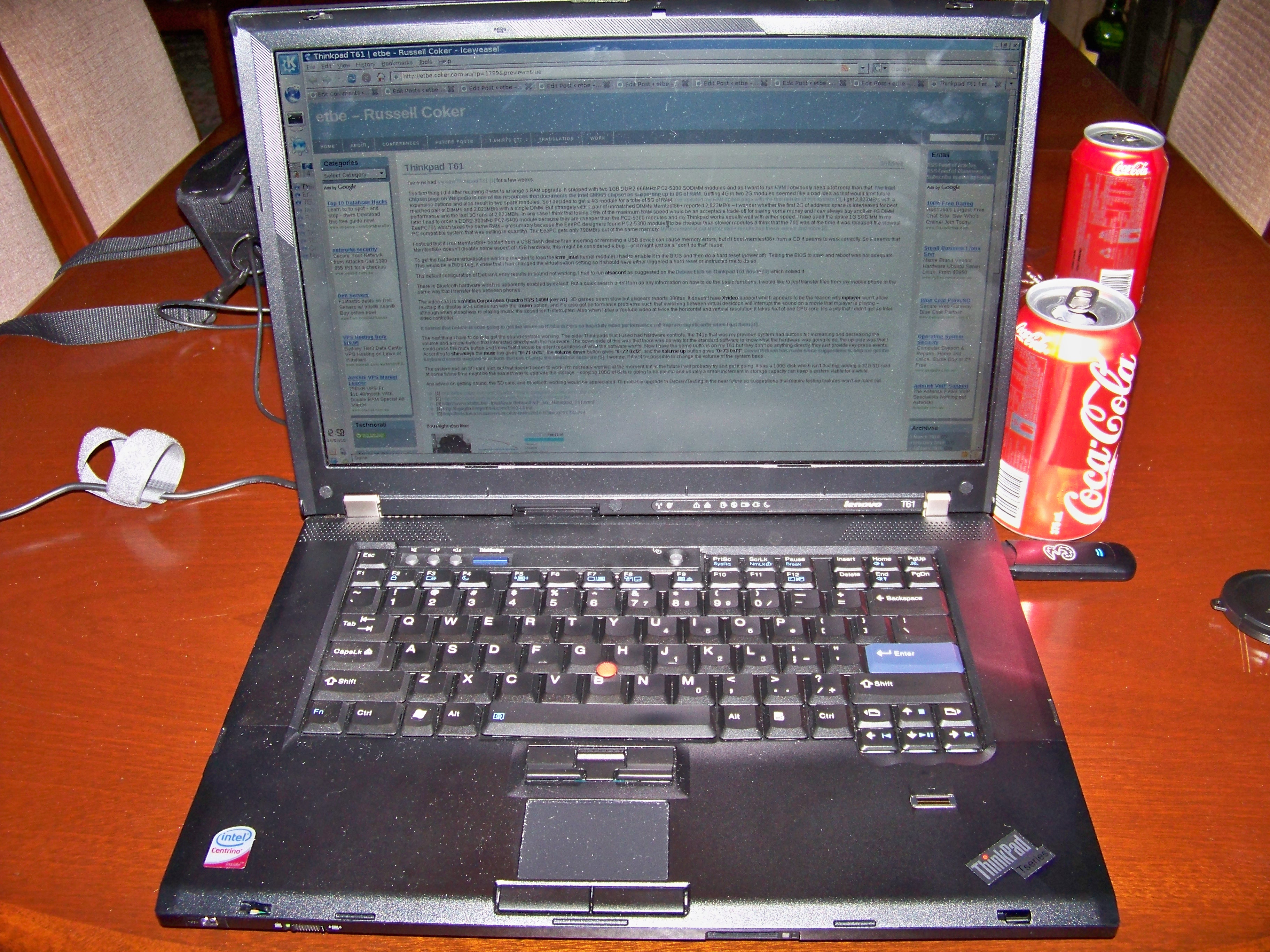
picture of my new Thinkpad T61 I ve now had my new Thinkpad T61 [1] for almost a month. The letters on the keyboard are not even starting to wear off which is unusual, either this Thinkpad is built with harder plastic than the older ones or I m typing more softly. Memory The first thing I did after receiving it was to arrange a RAM upgrade. It shipped with two 1GB DDR2 666MHz PC2-5300 SODIMM modules and as I want to run KVM I obviously need a lot more than that. The Intel Chipset page on Wikipedia is one of the resources that documents the Intel GM965 chipset as supporting up to 8G of RAM. Getting 4G in two 2G modules seemed like a bad idea as that would limit future expansion options and also result in two spare modules. So I decided to get a 4G module for a total of 5G of RAM. I ve updated my RAM speed page with the test results of this system [2], I get 2,823MB/s with a matched pair of DIMMs and 2,023MB/s with a single DIMM. But strangely with a pair of unmatched DIMMs Memtest86+ reported 2,823MB/s I wonder whether the first 2G of address space is interleaved for best performance and the last 3G runs at 2,023MB/s. In any case I think that losing 29% of the maximum RAM speed would be an acceptable trade-off for saving some money and I can always buy another 4G DIMM later. I had to order a DDR2-800MHz PC2-6400 module because they are cheaper than the PC2-5300 modules and my Thinkpad works equally well with either speed. I have used the spare 1G SODIMM in my EeePC701 which takes the same RAM presumably because the EeePC designers found PC2-5300 modules to be cheaper than slower modules (I think that the 701 was at the time it was released the slowest PC compatible system that was selling in quantity). The EeePC gets only 798MB/s out of the same memory. My document about Memtest86+ results has these results and more [2]. I noticed that if I run Memtest86+ booted from a USB flash device then inserting or removing a USB device can cause memory errors, but if I boot memtest86+ from a CD it seems to work correctly. So it seems that Memtest86+ doesn t disable some aspect of USB hardware, this might be considered a bug or it might just be a don t do that issue. Misc To get the hardware virtualisation working (needed to load the kvm_intel kernel module) I had to enable it in the BIOS and then do a hard reset (power off). Telling the BIOS to save and reboot was not adequate. This would be a BIOS bug, it knew that I had changed the virtualisation setting so it should have either triggered a hard reset or instructed me to do so. The default configuration of Debian/Lenny results in sound not working, I had to run alsaconf as suggested on the Debian Etch on Thinkpad T61 howto [3] which solved it. Generally I m happy with this system, the screen resolution is 1680*1050 which has 20% more pixels than the 1400*1050 screen on my Thinkpad T41p, it s a lot faster for CPU operations and should be a lot faster for video when I get the drivers sorted out (currently it s a lot slower), and I have virtualisation working again. But when you buy a system that s much like the last one but 6 years newer you expect it to be better. Generally the amount of effort involved in the process of buying a new system, upgrading the RAM to the desired specs, installing Linux and tweaking all the options is enough to make me want to wait at least another 6 years before buying another. Part of the reason for this difficulty is that I want to get so much functionality from the machine, a machine with more modest goals (such as a Netbook) takes a lot less time to configure. Problems There is Bluetooth hardware which is apparently enabled by default. But a quick search didn t turn up any information on how to do the basic functions, I would like to just transfer files from my mobile phone in the same way that I transfer files between phones. The video card is a nVidia Corporation Quadro NVS 140M (rev a1). 3D games seem slow but glxgears reports 300fps. It doesn t have Xvideo support which appears to be the reason why mplayer won t allow resizing it s display area unless run with the -zoom option, and it s also got performance problems such that switching between virtual desktops will interrupt the sound on a movie that mplayer is playing although when alsaplayer is playing music the sound isn t interrupted. Also when I play a Youtube video at twice the horizontal and vertical resolution it takes half of one CPU core. It s a pity that I didn t get an Intel video controller. It seems that Debian is soon going to get the Nouveau NVidia drivers so hopefully video performance will improve significantly when I get them [4]. The next thing I have to do is to get the sound controls working. The older Thinkpads that I used had hardware controls, the T41p that was my previous system had buttons for increasing and decreasing the volume and a mute button that interacted directly with the hardware. The down-side of this was that there was no way for the standard software to know what the hardware was going to do, the up-side was that I could press the mute button and know that it would be silent regardless of what the software wants. Now I have the same buttons on my T61 but they don t do anything directly, they just provide key-press events. According to showkeys the mute key gives 0 71 0xf1 , the volume down button gives 0 72 0xf2 , and the volume up button gives 0 73 0xf3 . Daniel Pittman has made some suggestions to help me get the keyboard events mapped to actions that can change the sound via software [5] which I haven t yet had time to investigate. I wonder if it will ever be possible to change the volume of the system beep. The system has an SD card slot, but that doesn t seem to work. I m not really worried at the moment but in the future I will probably try and get it going. It has a 100G disk which isn t that big, adding a 32G SD card at some future time might be the easiest way to upgrade the storage copying 100G of data is going to be painful and usually a small increment in storage capacity can keep a system viable for a while. Any advice on getting sound, the SD card, and Bluetooth working would be appreciated. I ll probably upgrade to Debian/Testing in the near future so suggestions that require testing features won t be ruled out.

26 February 2010

Martin F. Krafft: ACTA leak: no surprises about transparency blockers

The most common criticism of the Anti-Counterfeiting Trade Agreement (ACTA) is the lack of transparency. Before the nations disclose the terms of the agreement under negotiation, we are unable to gain an idea of the big picture, let alone voice our opinions and push for changes. Our politicians don t want us to know. We rely on leaked documents for our information. This is backwards in a world where a state should represent its people. This smells foul to me. There are undoubtedly some good reasons for the treaty, and if we can contain worldwide, large-scale trade of counterfeited goods and medicine, then that would be a net benefit to us all. However, we must not allow certain governments to succomb to the pressure of (commercially-motivated) lobbyists, to extend that pressure onto other nations using trade as a means of pressure, and to slash our freedom as if it were an inconvenient obstacle in their way. Only if the terms under negotiation become publicly available, and the public is given a voice, then we can help our governments in entering an agreement that is in the interest of its people, rather than a threat to us. It is hardly surprising that total capitalist nation USA are the strongest opponents of transparency, because the public might delay or even prevent the treaty. I was also not surprised to see South Korea and Germany in the list of supporters of secrecy either. It is interesting to see that the leaders of Singapore, Belgium, Portugal, and Denmark also seem to believe that these negotiations should be withheld from the public. Does anyone know about Switzerland? I tip my hat to New Zealand, Canada, Australia, Netherlands, Sweden, Finland, Ireland, Hungary, Poland, Estonia, and Austria for their support of transparency.

9 February 2010

Russell Coker: Web Site Validation

Over the last few days I ve got this blog and my documents blog to conform to valid XHTML according to the W3C validation service [1]. One significant change that I made was to use lower-case for HTML tags. For about 15 years I ve been using capitals for tags to make them stand out from content and my blogs are the latest in a long line of web sites with that. Naturally I wasn t going to correct 900 posts manually so I ran a series of SQL commands such as the following on my database server (where X is the Wordpress table prefix): update X_wp_posts set post_content = replace(post_content,'<PRE>','<pre>'); But make sure you have a good backup of your database before running SQL search and replace commands on your blog data. After running such commands about 90% of my blog posts conformed, so I only needed to edit about 90 posts to correct things. This process gave some real benefits. One issue is that an apostrophe in a URL must be quoted, otherwise some browsers will link to the desired URL and some will link to a truncated URL. Fixing a couple of variations of this problem resulted in some broken links being fixed. Another issue is that you can t have paragraphs (<p> tags) within list items, fixing this made some of my posts align correctly it was a tricky fix, in some cases I had to use <br/> to break up text in a list item and sometimes I replaced lists with different sections delimited by <h3> headings (which apparently is rumored to give better SEO). It would make a really nice Wordpress feature to be able to do W3C validation as part of the publishing process, ideally an attempt to publish or schedule a post would result in a message saying saved as a draft because it s not valid XHTML if the checks failed. The source to the W3C validation software is significantly larger than Wordpress [2], but it seems to me that there are two main types of Wordpress installations, small ones for personal use (which tend to be on fairly idle servers) and big ones that have so much traffic that the resource usage of validation would be nothing compared to the ongoing load. As there seems to be no way of validating my posts before publication my best option is the W3C button I now have on my blog. This allows me to validate the page at a click so while I can t entirely avoid the risk of publishing a post with invalid XHTML I can at least fix it rapidly enough that hardly anyone will notice. It also seems like a useful feature to have aggregators like Venus [3] check for valid HTML and not display posts unless they are valid. It s not a feature that could be enabled immediately (I m sure that if you click on this link to the W3C validation service [1] from a Planet feed you will see lots of errors and warnings), but once bloggers have time to fix their installation it would allow preventing some of the common annoyances of Planet installations. It s not uncommon on popular Planets to have unmatched tags in a post which results in significant amounts of the content being bold, underlined, in italics, or for the greatest annoyance struck-out. I know that this may be a controversial suggestion, but please consider why you are blogging if you are blogging for the benefit of your readers (which seems to be the case for everyone other than sploggers) then it seems that the readers will benefit more by not having a broken post syndicated than they would benefit from having it syndicated and thus messing up the display of many following posts. The next thing on my todo list in this regard is to do some tests of accessibility. The work that I have done to pass the XHTML validation tests has helped to some degree if nothing else the images now all have alt= descriptions, but I expect that it will be a lot of work. The Wordpress Codex has a page about accessibility, I haven t read all of it yet [4]. Does anyone have any recommendations for free automated systems that check web sites for accessibility? What would be ideal is a service that allows different levels of warnings, so instead of trying to fix all problems at once I could start by quickly fixing the most serious problems on the most popular posts and finish the job at some later date.

29 January 2010

Joey Hess: xmonad layouts for netbooks

How a window manager with tiling layouts makes a 1024x600 resolution livable. I spend a lot of time in front of a screen, and for the past year I have used only my netbook. No desktops, no laptops. Just a cheap $200 computer that is nearly a kid's toy. The most challenging thing about this is dealing with the 1024x600 screen resolution. When I moved to this screen from something with many more pixels, it at first seemed very cramped. After a year, I think that the most important part of coping with the small screen is the flexability and customizability of layouts provided by the Xmonad window manager. In this post I will explain a few layouts I have developed for fitting specific tasks onto the netbook screen. (I assume that you know maybe 0.1% of Haskell (about what I do), and can read Haskell code without having a brain aneurysm.) web browsing
It's important that the web browser have as few toolbars and other cruft as possible, as horizontal space is especially at a premium. I've configured both Epiphany and Firefox to put everything in one tool bar. But now I use Chromium, which comes pre-configured that way.
What the netbook is designed for. You just want a web browser, taking up the full screen, and with its own tabs. So far, so easy: that's Xmonad's Full layout. But, you sometimes want to see two websites side-by-side. This layout accomplishes that, allowing the sizes to be adjusted as needed. It also uses Xmonad's Magnifier to zoom the smaller window when it's focused, which is useful if you briefly need to see more of a web site.
mySplit = magnifiercz' 1.4 $ Tall nmaster delta ratio
    where
        -- The default number of windows in the master pane
        nmaster = 1
        -- Percent of screen to increment by when resizing panes
        delta   = 3/100
        -- Default proportion of screen occupied by master pane
        ratio   = 60/100
screenshot screenshot web development If you're doing web development, you'll want probably one big web browser window, but also with a nice wide terminal on the same screen, in order to see web server logs. A simple way to do this is to mirror Xmonad's Tall layout by 90 degrees.
myWide = Mirror $ Tall nmaster delta ratio
    where
        -- The default number of windows in the master pane
        nmaster = 1
        -- Percent of screen to increment by when resizing panes
        delta   = 3/100
        -- Default proportion of screen occupied by master pane
        ratio   = 80/100
The myWide layout uses the full screen width for a single terminal, and splits the width when there are more. This is sufficient for viewing logs and doing minor things at the shell prompt, in between testing the result in the web browser. Of course a terminal can be temporarily moved to the master area by pressing mod-return, if you need it to be larger. screenshot screenshot chat
Tips on configuring Pidgin for a netbook: Set it up to use vertical tabs to save horizontal space. Configure the input area to only 1 line tall, and turn off as much other cruft as you can. The menu bars, sadly, cannot be disabled, nor can the excessively large borders. In my screenshots, you can see that stuff wasting space that could be used to show four more lines of text.
For chat, you want to put the buddy list on the side of the screen, and use the rest for conversation windows. Xmonad's IM module takes care of allocating a sidebar on the screen for the buddy window. The rest of the screen can be occupied by any layout you choose. I like to have the conversation windows be as wide as possible, and typically only want to see two conversations at a time. But sometimes I might have a dozen visible. A good layout to cope with those needs is Grid.
myChat' l = withIM size roster l
    where
        -- Ratio of screen roster will occupy
        size = 1%5
        -- Match roster window
        roster = Title "Buddy List"
myChat = myChat' Grid
The withIM layout puts the buddy list on the left; I prefer it on the right for some reason, so I tweaked my layout to do that. All it took was using the reflectHoriz layout modifier to get a mirror image of the layout. Then I reflect the inner layout back to its normal orientation. Being able to throw in a few function calls and mutate a layout like that is where Xmonad shines.
myChat' l = reflectHoriz $ withIM size roster $
            reflectHoriz $ l
screenshot screenshot logs
Ever notice that tail -f wastes the last line of the terminal? On a netbook this matters. shorttail lets the last line be used.
I have a dedidated workspace that I use to tail logs, and as a place to send long-running tasks (such as compiles). The layout for this needs to keep windows wide, to see whole logged lines, but they need only be five or so lines tall. And it's convenient to have one bigger window with the small ones below. Xmonad has a perfect layout for this, called Dishes, because it's sorta like a stack of plates.
myDish = limitWindows 5 $ Dishes nmaster ratio
    where
        -- The default number of windows in the master pane
        nmaster = 1
        -- Default proportion of screen occupied by other panes
        ratio = 1/5
screenshot screenshot
In the second screenshot above, I have 6 windows open, but only 5 are visible. The limitWindows 5 accomplishes this. It's handy mostly because gnome-terminal has a bad habit of crashing when resized to 0x0. (That's gotta be a bug in something!)
Notice that the screenshots above also have Procmeter in a sidebar on the right. I (ab)used the withIM layout to do that:
myLogs' l = reflectHoriz $ withIM procmeterSize procmeter $
              reflectHoriz $ l
    where
        -- Ratio of screen procmeter will occupy
        procmeterSize = 1%7
        -- Match procmeter
        procmeter = ClassName "ProcMeter3"
myLogs = myLogs' myDish
coding Everything above was easy. Doing coding (or writing) on a small screen is where it gets hard. When I'm coding I want to have one window that is exactly 80 columns wide, and as tall as possible, where I do the main development. Then I need a minimum of two other windows also visible: one action window for running tests and the like, and one to view references (emails, man pages, other files, etc). I may need to view any of these windows fullscreen at any time, of course.
As an example of the three window rule: While I'm writing this post, I have a reference window open with my .xmonad/xmonad.hs, and an action window open where I am managing screenshots.
Often, deep into something, I will accumulate many other reference and action windows. But three seems to be the magic, minimum number for me; use of screen or anything else doesn't reduce it; if I can't see all three at once, I will waste time and concentration flipping back and forth. The Xmonad layout I've developed to handle this is based on the handy FixedColumn layout, which automatically keeps the master window 80 columns wide. I modify this by adding the Magnifier, so that my action and reference windows "pop out" over the master window when focused.
myCode = limitWindows 3 $ magnifiercz' 1.4 $ FixedColumn 1 20 80 10
The 1.4 was carefully tuned, to magnify a window to be big enough to be usable for editing, reading, or command-line, while not obscuring too much of the other two windows. And again I use limitWindows, to only show three windows, in order to keep them all as big as possible. Other windows are hidden offscreen, but I can rotate to them with alt-tab as needed. screenshot screenshot reading ebooks When I'm reading an ebook, I want to have the reader in the middle of the screen. But a widescreen netbook like mine is too wide to comfortably read text all the way across, so it's nice to have margins. (In the margins, I put terminals, or notes.) The ThreeColumns module has a layout that does just that.
myBook = ThreeColMid nmaster delta ratio
    where
        nmaster = 1
        -- Percent of screen to increment by when resizing panes
        delta   = 3/100
        -- Default proportion of screen occupied by master pane
        ratio   = 2/3
screenshot putting it all together I join all my layouts together, so Xmonad will allow switching between them. These three combinations all have the same layouts, only ordered differently, so that different workspaces can have different default layouts.
codeFirst  = myCode    myWide    myGrid    myDish
dishFirst  = myDish    myCode    myWide    myGrid
gridFirst  = myGrid    myDish    myCode    myWide
Xmonad layouts can be decorated with things like title bars. To save horizontal space, I leave off the title bars on layouts where they are not needed to disambiguate windows. Two helper functions can be applied to add or remove titles (and also cause the layout to avoid the Gnome panel.)
withTitles l = noFrillsDeco shrinkText myTheme (desktopLayoutModifiers l)
noTitles l = desktopLayoutModifiers l
I have semi-dedicated workspaces; one for each of the above activities. To assign a layout to a workspace, I use the PerWorkspace module.
Notice that the "web" workspace has only two available layouts. Meanwhile, the "book" workspace always uses the specialized myBook layout; I don't use that layout elsewhere.
perWS = onWorkspace "logs" (withTitles $ myLogs' dishFirst) $
        onWorkspace "web"  (noTitles   $ (mySplit   myWide)) $
        onWorkspace "chat" (noTitles   $ myChat' gridFirst) $
        onWorkspace "book" (noTitles   $ myBook) $
                           (withTitles $ codeFirst)
Finally, I allow toggling between the currently selected layout and fullscreen mode, and use smartBorders to avoid displaying borders when there is only one window onscreen.
myLayout = smartBorders $ toggleLayouts Full perWS
Xmonad layout optimised for the small screen of a netbook: Done! (For now...)
screenshots screenshots screenshots screenshots screenshots
PS: Thanks to #xmonad regulars for always having the answer I need up their sleeves.

22 December 2009

Julian Andres Klode: Nokia N900


Yesterday, an N900 I bought from Amazon Warehouse Deals arrived. The device is great, but I discovered today that the AV output only outputs sound on the right speaker and nothing on the left one. So it seems that I have to send it back and will thus not have a N900 during Christmas. Appart from that problem, the device works almost perfectly. The internet browsing experience is faboulus, the camera is good, and the device is fast; the screen is great and the speakers are great as well. The keyboard is easy to type with and you can type fast after a short time. The video player does not seem to like my H.264 files (the OpenMAX decoder fails whereas on my PC ffmpeg is able to play it). That s all for now, I ll write again when I have a N900 with working AV output. Posted in General

11 December 2009

Gustavo Noronha Silva: Regressions, ah, regressions

There are few things I really hate. One of them is regressions. Regressions are bad because they usually take away things we are used to rely on, and leave us with the idea that perhaps the technical improvements didn t really improve our lifes as a user, despite putting less burden on the developers. Software is made for users, after all. As part of my work on WebKitGTK+, I always keep an eye on regressions, both from previous WebKitGTK+ releases, and those imposed on embedding applications on their migration away from Gecko, and try to focus some of my efforts into lowering their numbers, whenever I can. In recent times I have worked on removing a few very user-visible regressions in Epiphany, which I see as the most demanding WebKitGTK+ user in GNOME, such as save page not working, missing
favicon support, failing to
perform server-pushed downloads (such as GMail attachments), and not being able to view source. An example of a regression from a previous version of WebKit also exists: in 1.1.17 we started advertising more than we should as supported by the HTML5 media player, causing download to be almost completely broken. All of these are working if you are using WebKit and Epiphany from trunk/master, so should be on the next development versions of WebKitGTK+ and Epiphany. Other people have also fixed many other regressions; a few examples: Xan has reimplemented the Epiphany customization of the context menu, Frederic Peters provided a work-around for mailto: links while we don t have SoupURILoader yet, and Joanmarie Diggs keeps rocking on the accessibility front! If you find regressions, keep them coming! If you have a patch, even better! =) Next week WebKitGTK+ team gets together to work furiously on improving WebKitGTK+ in a hackfest sponsored by Collabora, and Igalia, and hosted/organized by Igalia. While there I should also get my hands on one of these. Can t wait! =)

7 December 2009

Simon McVittie: RC Bugs of W48-W49

More release critical bug squashing of the "week" (fortnight, really): Removals from testing and proposed removals from unstable: Possible candidates for removal: Other drive-by QA:

Cyril Brulebois: RBCN

I really liked doing stuff like Zack s RCBW in the past, but nowadays I m busy with some buildds, reporting RC bugs because some maintainers don t test their uploads, as well as posting patches to fix FTBFS on GNU/kFreeBSD. But from time to time, it s also fun to close RC bugs. Here s a new concept (that I probably won t reproduce as regularly as Zack and his minions, though): RCBN for Release-Critical Bugs of the Night. Those are now closed: Many thanks to Peter Green, to Ruben Molina, and to Ilya Barygin for their patches. Special thanks to Richard Darst for orpie s patches: he even managed to get rid of embedded code copies while addressing the FTBFS. Nice! Unfortunately, in the same time, I had to open some FTBFS/RC bugs: So, what s next? Get back to work!

3 December 2009

Maximilian Attems: Vienna buying Office Licenses

When you just read the following sentence: "usage of a software, that can only be used together with the Internet Explorer". You already know the consequence that several hundreds Wienux boxes are gone.
Heavily disgusted by the waste of community money. The online local newspaper has a comment that seems quite to the point to me: "If as sysadmin you introduce Linux you'll be accounted for eventual failures, while with softies people just accept the shortcomings and won't blame you."
German source: Wiener Inkompetenz in IT Managment. P.S.: Wienux got setup by inexerienced people having no prior exposure to Open Source. The project setup included a calculated failure from the start.

20 November 2009

Neil Williams: po4a-build - one step docs translation

po4a, including the new po4a-build script, has been released and po4a (0.37.0-1) has been uploaded to Debian. This release also includes a fully updated Spanish translation, including the new po4a-build documentation, thanks to Omar Campagne.

po4a-build will be used as a build-dependency by emdebian-rootfs and svn-buildpackage (both due to have updated releases in a couple of days). (po4a-build itself was developed and tested within these packages - as 'genmanpages'.)

po4a-build is intended to make it as easy to produce translated documentation as it can be to produce the current untranslated content.

When po4a prepares the translated content as POD or DocBook XML, the final documentation can then be built using po4a-build. Both the untranslated and translated content is built as a single process, updating the POT files at the same time.

Existing build instructions are replaced by a single call to po4a-build and a simple configuration file is used to tell po4a-build how to build each element and which binary packages will include the translated and untranslated content.

See po4a-build (1) and po4a-build.conf (5) from the installed po4a package.

Feel free to try it out with any package that builds translated documentation, *especially* if it also builds binary gettext translations of program output without using autotools, e.g. perl scripts using $(MAKE) but not ./configure.

This should be a useful step in encouraging more packages to translate their script output and manpages. It is trivial to add translation to packages using the full autotools intltool setup, now po4a-build brings the same level of ease to packages only using $(MAKE). (If someone wants to investigate how CMake can do the same, let me know.)

http://alioth.debian.org/projects/po4a/

http://alioth.debian.org/frs/download.php/3183/po4a-v0.37.0.tar.gz

http://freshmeat.net/projects/po4a/releases
(0.37.0 announcement pending approval by FM)

19 October 2009

Julien Danjou: sysrqd 11

Just got a bug report (SIGPIPE when playing with nmap), so I released a 11th version of sysrqd.

1 October 2009

Gunnar Wolf: Strange scanning on my server?

Humm... Has anybody else seen a pattern like this? I am getting a flurry of root login attempts at my main server at the University since yesterday 7:30AM (GMT-5). Now, from the machines I run in the 132.248.0.0/16 network (UNAM), only two listen to the world with ssh at port 22 And yes, it is a very large network, but I am only getting this pattern on one of them (they are on different subnets, quite far apart). They are all attempting to log in as root, with a frequency that varies wildly, but is consistently over three times a minute right now. This is a sample of what I get in my logs: [update] Logs omitted from blog post, as it is too wide and breaks displays for most users. You can download the log file instead. Anyway This comes from all over the world, and all the attempts are made as root (no attempts from unprivileged users). Of course, I have PermitRootLogin to no in /etc/ssh/sshd_config, but I want to understand this as much as possible. Initially it struck me that most of the attempts appeared to come from Europe (quite atypical for the usual botnet distribution), so I passed my logs through:
  1. #!/usr/bin/perl
  2. use Geo::IP;
  3. use IO::File;
  4. use strict;
  5. my ($geoip, $fh, %by_ip, %by_ctry);
  6. $fh = IO::File->new('/tmp/sshd_log');
  7. $geoip=Geo::IP->new(GEOIP_STANDARD);
  8. while (my $lin = <$fh>) next unless $lin =~ /rhost=(\S+)/; $by_ip $1 ++ ;
  9. print " Incidence by IP:\n", "Num Ctry IP\n", ('='x60),"\n";
  10. for my $ip ( sort $by_ip $a <=> $by_ip $b keys %by_ip)
  11. my $ctry = ($ip =~ /^[\d\.]+$/) ?
  12. $geoip->country_code_by_addr($ip) :
  13. $geoip->country_code_by_name($ip);
  14. $by_ctry $ctry ++;
  15. printf "%3d %3s %s\n", $by_ip $ip , $ctry, $ip;
  16. print " Incidence by country:\n", "Num Country\n", "============\n";
  17. map printf "%3d %s\n", $by_ctry $_ , $_
  18. sort $by_ctry $b <=> $by_ctry $a
  19. keys(%by_ctry);
The top countries (where the number of attempts 5) are:
  1. 104 CN
  2. 78 US
  3. 58 BR
  4. 49 DE
  5. 43 PL
  6. 20 ES
  7. 20 IN
  8. 19 RU
  9. 17 CO
  10. 17 UA
  11. 16 IT
  12. 13 AR
  13. 12 ZA
  14. 10 CA
  15. 10 CH
  16. 8 GB
  17. 8 AT
  18. 8 JP
  19. 8 FR
  20. 7 KR
  21. 7 HK
  22. 7 PE
  23. 7 ID
  24. 6 PT
  25. 5 CZ
  26. 5 AU
  27. 5 BE
  28. 5 SE
  29. 5 RO
  30. 5 MX
I am attaching to this post the relevant log (filtering out all the information I could regarding legitimate users) as well as the full output. In case somebody has seen this kind of wormish botnetish behaviour lately please comment. [Update] I have tried getting some data regarding the attacking machines, running a simple nmap -O -vv against a random sample (five machines, I hope I am not being too agressive in anybody's eyes). They all seem to be running some flavor of Linux (according to the OS fingerprinting), but the list of open ports varies wildly I have seen the following:
  1. Not shown: 979 closed ports
  2. PORT STATE SERVICE
  3. 21/tcp open ftp
  4. 22/tcp open ssh
  5. 23/tcp open telnet
  6. 111/tcp open rpcbind
  7. 135/tcp filtered msrpc
  8. 139/tcp filtered netbios-ssn
  9. 445/tcp filtered microsoft-ds
  10. 593/tcp filtered http-rpc-epmap
  11. 992/tcp open telnets
  12. 1025/tcp filtered NFS-or-IIS
  13. 1080/tcp filtered socks
  14. 1433/tcp filtered ms-sql-s
  15. 1434/tcp filtered ms-sql-m
  16. 2049/tcp open nfs
  17. 4242/tcp filtered unknown
  18. 4444/tcp filtered krb524
  19. 6346/tcp filtered gnutella
  20. 6881/tcp filtered bittorrent-tracker
  21. 8888/tcp filtered sun-answerbook
  22. 10000/tcp open snet-sensor-mgmt
  23. 45100/tcp filtered unknown
  24. Device type: general purpose WAP PBX
  25. Running (JUST GUESSING) : Linux 2.6.X 2.4.X (96%), ( )
  26. Not shown: 993 filtered ports
  27. PORT STATE SERVICE
  28. 22/tcp open ssh
  29. 25/tcp open smtp
  30. 80/tcp open http
  31. 443/tcp open https
  32. 444/tcp open snpp
  33. 3389/tcp open ms-term-serv
  34. 4125/tcp closed rww
  35. Device type: general purpose phone WAP router
  36. Running (JUST GUESSING) : Linux 2.6.X (91%), ( )
  37. Not shown: 994 filtered ports
  38. PORT STATE SERVICE
  39. 22/tcp open ssh
  40. 25/tcp closed smtp
  41. 53/tcp closed domain
  42. 80/tcp open http
  43. 113/tcp closed auth
  44. 443/tcp closed https
  45. Device type: general purpose
  46. Running (JUST GUESSING) : Linux 2.6.X (90%)
  47. OS fingerprint not ideal because: Didn't receive UDP response. Please try again with -sSU
  48. Aggressive OS guesses: Linux 2.6.15 - 2.6.26 (90%), Linux 2.6.23 (89%), ( )
  49. Not shown: 982 closed ports
  50. PORT STATE SERVICE
  51. 21/tcp open ftp
  52. 22/tcp open ssh
  53. 37/tcp open time
  54. 80/tcp open http
  55. 113/tcp open auth
  56. 135/tcp filtered msrpc
  57. 139/tcp filtered netbios-ssn
  58. 445/tcp filtered microsoft-ds
  59. 1025/tcp filtered NFS-or-IIS
  60. 1080/tcp filtered socks
  61. 1433/tcp filtered ms-sql-s
  62. 1434/tcp filtered ms-sql-m
  63. 4242/tcp filtered unknown
  64. 4444/tcp filtered krb524
  65. 6346/tcp filtered gnutella
  66. 6881/tcp filtered bittorrent-tracker
  67. 8888/tcp filtered sun-answerbook
  68. 45100/tcp filtered unknown
  69. Device type: general purpose WAP broadband router
  70. Running (JUST GUESSING) : Linux 2.6.X 2.4.X (95%), ( )
  71. Not shown: 994 filtered ports
  72. PORT STATE SERVICE
  73. 22/tcp open ssh
  74. 25/tcp open smtp
  75. 53/tcp open domain
  76. 80/tcp open http
  77. 110/tcp open pop3
  78. 3389/tcp open ms-term-serv
  79. Warning: OSScan results may be unreliable because we could not find at least 1 open and 1 closed port
  80. Device type: firewall general purpose
  81. Running: Linux 2.6.X
  82. OS details: Smoothwall firewall (Linux 2.6.16.53), Linux 2.6.13 - 2.6.24, Linux 2.6.16
Of course, it strikes me that several among said machines seem to be Linuxes, but (appear to) run Microsoft services. Oh, and they also have P2P clients.
AttachmentSize
Results of parsing the logs21.58 KB
Relevant portion of the logs1.05 MB

John Goerzen: MoinMoin as a Personal Wiki, Zen To Done, And A Bit of Ikiwiki

Since I last evaluated and complained about wikis last year, I ve been using moinmoin for two sites: a public one and a personal one. The personal site has notes on various projects, and my task lists. I ve been starting out with the Zen To Done (ebook, PDF, paper) idea. It sounds great, by the way; a nice improvement on the better-known GTD. My To Do Page Anyhow, in MoinMoin, I have a ToDos page. At the top are links to pages with different tasks: personal, work, yard, etc. Below that, are the three big rocks (as ZTD calls them) for the day: three main goals for the day. I edit that section every day. The Calendar And below that, I use MoinMoin s excellent MonthCalendar macro. I have three calendars in a row: this month, next month, and last month. Each day on the calendar is a link to a wiki page; for instance, ToDos/Calendar/2009-10-01. The day has a red background if the wiki page exists, and white otherwise. So when I need to do something on or by a specific day, I click on the link, click my TaskTemplate, and create a simple wiki page. When I complete all the tasks for that day, I delete that day s wiki page (and can note what I did as the log message if I like). Very slick. The Task Lists My task pages are similar. They look like this:
= Personal =
<<NewPage(TaskTemplate,Create new task,@SELF)>> <<Navigation(children,1)>>
<<BR>>
So, my personal task page has a heading, then it has an input form with a text box and a button that says Create new task. Type something in and that becomes the name for a wiki page, and takes you do the editor to describe it. Below the button is a list of all the sub-pages under the Personal page, which represent the tasks. When a task is done, I delete the page and off the list it goes. I can move items from one list to another by renaming the page. It works very, very nicely. Collecting Part of both ZTD and GTD is that it must be very easy to get your thoughts down. The idea is that if you have to think, I ve got to remember this, then you ll be stressed and worried about the things you might be forgetting. I have a Collecting page, like the Personal or Work pages, that new items appear on when I m not editing my wiki. They get there by email. MoinMoin has a nice email system. I ve set up a secret email address. Mail sent there goes directly into MoinMoin. It does some checks on it, then looks at a combination of the From and Subject lines to decide what to do with it. If I name an existing page, it will append my message the the end. If it s a new page, it ll create it. I have it set up so that it takes the subject line as a page name to create/append to under ToDos/Collecting/$subject (by putting that as the name on the To line). So, on my computers, I have a newtodo script that invokes mail(1), asks for a subject, and optionally lets me supply a body. Quick and painless. Also, I ve added the address to my mobile phone s address book. That way I don t have to carry around pen and paper. Need to get down some thought ? No problem. Hit send email, pull the last address sent to, give it a subject and maybe a body. Very slick. Wiki Software As a way of updating my posts from last year: I ve been very happy with MoinMoin overall. It has some oddities, and the biggest one that concerns me is its attachment support. It doesn t let you specify a maximum upload size, and doesn t very well let you restrict attachment work to only certain people. But the biggest problem is that it doesn t track history on attachments. If a vandal deletes the attachment on a page, it s GONE. They expect to have that fixed in 2.0, coming out in approximately November, 2010. I also looked at Ikiwiki carefully over the past few days. Several things impressed me. First, everything can be in git. This makes for a very nice offline mode, better than Moin s offline sync. The comment module is nicer than anything in Moin, and the tagging system is as well. Ikiwiki truly could make a nice blog, and Moin just couldn t. It also puts backlinks at the bottom of each page automatically, a nice feature. And it s by Joey Hess, who writes very solid software. There are also some drawbacks. Chief on that list is that ikiwiki has no built-in history of a page feature. Click History and it expects to take you to gitweb or ViewVC or some such tool. That means that reverting a page requires either git access or cut and pasting. That s fine for me, but throwing newbies to gitweb suddenly might not be the most easy. Since ikiwiki is a (very smart) wiki compiler, its permission system is a lot less powerful than Moin s, and notably can t control read access to pages at all. If you need to do that, you d have to do it at the webserver level. It does have a calendar, but not one that works like Moin s does, though I could probably write one easily enough based on what s there. A few other minor nits: the email receiving feature is not as versatile as Moin s, you can t subscribe to get email notifications on certain pages (RSS feeds only, which would have to be manually tweaked later), and you can t easily modify the links at the top of each page or create personal bookmarks. Ikiwiki looks like an excellent tool, but just not quite the right fit for my needs right at the moment. I ve also started to look at DokuWiki a bit. I was initially scared off by all the plugins I d have to use, but it does look like a nice software. I also re-visited MediaWiki, and once again concluded that it is way too complicated for its own good. There are something like a dozen calendar plugins for it, some of which even are thought to work. The one that looked like the one I d use had a 7-step (2-page) installation process that involved manually running SQL commands and cutting and pasting some obscure HTML code with macros in it. No thanks.

27 September 2009

Carl Chenet: Python-keyring in Debian


I have been introducing the Python Keyring library in this previous post. At that time I was looking for a sponsor and thanks to Piotr O arowski, python-keyring is now available in Sid. What for ?
  • You can access the keyring you use on your system (Gnome-keyring, KWallet) to store your app s passwords.
  • It s a unified access to keyrings that the Python Keyring library provides, meaning you can easely write your own backend for your keyring software.
  • You can create your own keyring, crypted on a file, still with the same library.
  • Keyrings are cool and this library provides a great way to play with them, from your Python applications.
  • When mature, the Keyring library will be integrated in the official Python module getpass, which means you re not learning yet-another-soon-unmaintained library.
How ? The source package provides three binary packages :
  • python-keyring : the Keyring library without the support of both Gnome-keyring and KWallet.
  • python-keyring-gnome : the support for Gnome-keyring.
  • python-keyring-kwallet : the support for KWallet.
If you use passwords in your Python apps, it s worth to give python-keyring a try.

18 September 2009

Daniel Kahn Gillmor: Tools should be distinct from Services

Modern daemon implementations can be run in a variety of ways, in a range of contexts. The daemon software itself can be a useful tool in environments where the associated traditional system service is neither needed nor desired. Unfortunately, common debian packaging practice has a tendency to conflate the two ideas, leading to some potentially nasty problems where only the tool itself is needed, but the system service is set up anyway. How would i fix it? i'd suggest that we make a distinction between packages that provide tools and packages that provide system services. A package that provides the system service foo would need to depend on a package that provides the tool foo. But the tool foo should be available through the package manager without setting up a system service automatically. Bad Examples Here are some examples of this class of problem i've seen recently:
akonadi-server depends on mysql-server
akonadi is a project to provide extensible, cross-desktop storage for PIM data. It is a dependency of many pieces of the modern KDE4 desktop. Its current implementation relies on a private instantiation of mysqld, executed directly by the end user whose desktop is running. This means that a sysadmin who installs a graphical calendar application suddenly now has (in addition to the user-instantiated local mysqld running as the akonadi backend) a full-blown system RDBMS service running and potentially consuming resources on her machine.Wouldn't it be better if the /usr/sbin/mysqld tool itself was distinct from the system service?
puppetmaster depends on puppet
Puppet is a powerful framework for configuration management. A managed host installs the puppet package, which invokes a puppetd service to reconfigure the managed host by talking to a centralized server on the network. The central host installs the the puppetmaster package, which sets up a system puppetmasterd service. puppetmaster depends on puppet to make use of some of the functionality available in the package. But this means that the central host now has puppetd running, and is being configured through the system itself! While some people may prefer to configure their all-powerful central host through the same configuration management system, this presents a nasty potential failure mode: if the configuration management goes awry and makes the managed nodes inaccessible, it could potentially take itself out too. Shouldn't the puppet tools be distinct from the puppetd system service?
monkeysphere Build-Depends: openssh-server
The Monkeysphere is a framework for managing SSH authentication through the OpenPGP Web-of-Trust (i'm one of the authors). To ensure that the package interacts properly with the OpenSSH implementation, the monkeysphere source ships with a series of test suites that exercise both sshd and ssh.This means that anyone trying to build the monkeysphere package must pull in openssh-server to satisfy the build-depends, thereby inadvertently starting up a potentially powerful network service on their build machine and maybe exposing it to remote access that they didn't intend. Wouldn't it be better if the /usr/sbin/sshd tool was available without starting up the ssh system service?
Good ExamplesHere are some examples of debian packaging that already understand and implement this distinction in some way:
apache2.2-bin is distinct from apache2-mpm-foo
Debian's apache packaging recently transitioned to split the apache tool into a separate package (apache2.2-bin) from the packages that provide an apache system service (apache2-mpm-foo). So apache can now be run by a regular user, for example as part of gnome-user-share.
git-core is distinct from git-daemon-run
git-core provides the git daemon subcommand, which is a tool capable of providing network access to a git repo. However, it does not set up a system service by default. The git-daemon-run package provides a way for an admin to quickly set up a "typical" system service to offer networked git access.
vblade is distinct from vblade-persist
vblade offers a simple, powerful utility to export a single file or block device as an AoE device. vblade-persist (disclosure: i wrote vblade-persist) provides a system service to configure exported devices, supervise them, keep them in service across system reboots, etc.
Tools are not Services: a ProposalLet's consider an existing foo package which currently provides: I suggest that this should be split into two packages. foo-bin would contain the tool itself, and foo (which Depends: foo-bin) would contain the service configuration information, postinst scripts to set it up and start it, etc. This would mean that every instance of apt-get install foo in someone's notes would retain identical semantics to the past, but packages which need the tool (but not the service) can now depend on foo-bin instead, leaving the system with fewer resources consumed, and fewer unmanaged services running. For brand new packages (which don't have to account for a legacy of documentation which says apt-get install foo), i prefer the naming convention that the foo package includes the tool itself (after all, it does provide /usr/sbin/foo), and foo-service sets up a standard system service configured and running (and depends on foo). Side Effects This proposal would fix the problems noted above, but it would also offer some nice additional benefits. For example, it would make it easier to introduce an alternate system initialization process by creating alternate service packages (while leaving the tool package alone). Things like runit-services could become actual contenders for managing the running services, without colliding with the "stock" services installed by the bundled tool+service package. The ability to create alternate service packages would also mean that maintainers who prefer radically different configuration defaults could offer their service instantiations as distinct packages. For example, one system-wide foo daemon (foo-service) versus a separate instance of the foo daemon per user (foo-peruser-service) or triggering a daemon via inetd (foo-inetd-service). One negative side effect is that it adds some level of increased load on the package maintainers if the service package and the tool package both come from the same source package, then some work needs to be done to figure out how to split them. If the tool and service packages have separate sources (like vblade and vblade-persist) then some coordinating footwork needs to be done between the two packages when any incompatible changes happen. Questions? Disagreements? Next Steps? Do you disagree with this proposal? If so, why? Unfortunately (to my mind), Debian has a long history of packages which conflate tools with services. Policy section 9.3.2 can even be read as deliberately blurring the line (though i'd argue that a cautious reading suggests that my proposal is not in opposition to policy):
Packages that include daemons for system services should place scripts in /etc/init.d to start or stop services at boot time or during a change of runlevel.
I feel like this particular conflict must have been hashed out before at some level are there links to definitive discussion that i'm missing? Is there any reason we shouldn't push in general for this kind of distinction in debian daemon packages? Tags: daemons, packaging, policy

13 September 2009

Joachim Breitner: The Automatic Rule-Based Time Tracker

A while ago, I thought: I seem to be less productive than I used to be. Why might that be? Do I spend more and more time with e-Mails? Or is it something else? I couldn t tell, so I needed a time tracking tool. There are a few of those for Linux that allow you, while working, specify what you are doing and then generate statistics about it. This approach has a few disadvantages:So I created arbtt, the Automatic Rule-Based Time Tracker. It comes with a background program that is started with your desktop session and will, each minute, record what windows are open, which one is active, what their titles and corresponding programs are. It also checks how long the user has been idle. No interaction required, no distraction possible. This information is stored in a log file. A separate tool allows the user to investigate this data. It is called rule-based because the mapping from the raw data to sensible tags that give information about the time sample is specified by a simple, but hopefully sufficiently powerful language.A simple example for a rule that indicates the currently used program would be:
tag Program:$current.program,
The prefix Program: is a category. Arbtt will ensure that for each time sample and category, at most one tag is specified. A more complex rule is
current window $title =~ m!(?:~ home/jojo)/projekte/(?:programming/(?:haskell/)?)?([^/)]*)!
==> tag Project:$1,
which makes use of the fact that both GVim and gnome-terminal display the full path to the currently edited file resp. to the working directory in the window title. This rule will track all my projects separately, and even automatically pick up new projects when they appear! You can see more rules in the example file.The statistics program then allows you to query the tags with some options:
Usage: arbtt-stats [OPTIONS...]
-h, -? --help show this help
-V --version show the version number
-x TAG --exclude=TAG ignore samples containing this tag
-o TAG --only=TAG only consider samples containing this tag
--also-inactive include samples with the tag "inactive"
-m PERC --min-percentage=PERC do not show tags with a percentage lower than PERC% (default: 1)
-i --information show general statistics about the data
-t --total-time show total time for each tag
-c CATEGORY --category=CATEGORY show statistics about category CATEGORY
For example, if I want to know what folders I have open while using evolution, I can run arbtt-stats -o Program:evolution -c Evo-Folder -m 3 to see this:
Statistics for category Evo-Folder
==================================
Time Percentage
=========================++======================
Evo-Folder:Eingang 22h20m00s 17.0%
Evo-Folder:Bekannte 16h40m00s 12.7%
Evo-Folder:d-haskell 9h40m00s 7.4%
Evo-Folder:Itomig 8h20m00s 6.4%
Evo-Folder:Verschickt 7h40m00s 5.8%
Evo-Folder:pkg-fso-maint 7h00m00s 5.3%
Evo-Folder:Bugs 6h00m00s 4.6%
Evo-Folder:planet debian 4h00m00s 3.0%
(60 entries omitted) 4h49m00s 36.7%
(unmatched time) 8m00s 1.0%
One big advantage of this approach is that you do not need to know in advance what queries you are interested in. Since the rules are applied when you are evaluating your data, and not when recording it, you can add more tags and forgotten special cases later.At this point, a big warning is due: This program will record a lot of very sensitive information about you. Be aware of this before you start using arbtt, and make sure you protect your data. You can get rid of all logs by deleting ~/.arbtt/capture.log.I have published arbtt on hackage. If you have cabal-install installed, you can install it with cabal install arbtt. See the README file for more information about setting it up. Depending on the feedback I get I will also consider packaging it for Debian.If you want to contribute, you are very welcome. The code is available at the darcs repository http://darcs.nomeata.de/arbtt/ (DarcsWeb). See the README for some ideas what to implement and feel free to come up with new ideas.

5 September 2009

Neil Williams: po4a and translating manpages

po4a creates the meta files needed to generate the manpages but the actual generation process is a little awkward and tends to become heavily customised.

For emdebian-rootfs, I've now received the Portuguese translation and I've been improving the genmanpages script. It's now more general and easier to configure for different source packages. There remain a few hidden assumptions which I hope to fix in future.

#!/bin/sh
set -e

# Copyright (C) 2006-2009 Neil Williams
#
# This program is free software; you can redistribute it and/or modify
# it under the terms of the GNU General Public License as published by
# the Free Software Foundation; either version 3 of the License, or
# (at your option) any later version.
#
# This program is distributed in the hope that it will be useful,
# but WITHOUT ANY WARRANTY; without even the implied warranty of
# MERCHANTABILITY or FITNESS FOR A PARTICULAR PURPOSE. See the
# GNU General Public License for more details.
#
# You should have received a copy of the GNU General Public License
# along with this program. If not, see .

# name and location of the config file
# relative to the top level source directory of the translations
# i.e. the directory containing ./po/
CONFIG="doc/po4a.config"
# POTFILE path
POTFILE="po/emdebian-rootfs.pot"
# the binary packages that will contain generated manpages
BINARIES="emdebian-rootfs multistrap"
# the binary packages with manpages in Section 3.
HASMAN3="emdebian-rootfs"
# the binary packages using DocBook XML & xsltproc
XMLPACKAGES="emdebian-rootfs"
# the DocBook XML files (TODO: let this take paths)
XMLFILE="emdebian-rootfs.1.xml"
# the XSL file to use for Docbook XSL
XSLFILE="http://docbook.sourceforge.net/release/xsl/current/manpages/docbook.xsl"
# the POD files (TODO: let this take paths)
PODFILE="em_multistrap"
# the binary packages using POD
PODPACKAGES="multistrap"

# remember to add something to the clean:: rule in debian/rules
# to remove each binary package sub-directory.
# $(RM) -r doc/emdebian-rootfs doc/multistrap

# below this point, no changes should be needed.

wrap_langs ()
if [ -z "$LANGS" ]; then
echo "$1 $2" >> $CONFIG
else
echo "$1 $2 $3" >> $CONFIG
fi


if [ -f po4a.config ]; then
cd ../
fi
if [ -f ../po4a.config ]; then
cd ../../
fi

# calculate the langs, automatically.
LANGS= ls po/*.po 2>/dev/null true
if [ ! -z "$LANGS" ]; then
LANGS= ls po/*.po sed -e 's/.*\/\(.*\)\.po/\1 /' true
fi
if [ ! -z "$LANGS" ]; then
# LANGS should not include the specification, just the root.
LANGS= echo $LANGS sed -e 's/_.*//'
LANGS= echo $LANGS sed -e 's/@.*//'
LANGS= echo $LANGS sed -e 's/\+.*//'
echo "[po4a_langs] $LANGS" > $CONFIG
else
echo > $CONFIG
fi
wrap_langs "[po4a_paths]" "$POTFILE" "\$lang:po/\$lang.po"

for d in $BINARIES; do
for l in $LANGS; do
mkdir -p doc/$d/man/$l/man1/
if [ "$d" = "$HASMAN3" ]; then
mkdir -p doc/$d/man/$l/man3/
fi
done
mkdir -p doc/$d/man/man1/
if [ "$d" = "$HASMAN3" ]; then
mkdir -p doc/$d/man/man3/
fi
mkdir -p doc/pod/$l/
done
mkdir -p doc/html/

for file in ls doc/xml/*.xml ; do
xmllint --format "$file" --output "$file"
LOCAL= basename $file
wrap_langs "[type:docbook]" "$file" "\$lang:doc/xml/\$lang/$LOCAL"
done
# oops, this needs to be configurable
for file in em_multistrap; do
wrap_langs "[type: pod]" "$file" "\$lang:doc/pod/\$lang/$file"
done

# use -k to create all XML even if untranslated or the XSL breaks the build.
po4a -k 0 $CONFIG

for d in $BINARIES; do
for P in $XMLPACKAGES; do
for X in $XMLFILE; do
XML_CATALOG_FILES="/etc/xml/catalog" \
xsltproc -o doc/man/ --nonet $XSLFILE doc/xml/$X
done
if [ "$d" = "$HASMAN3" ]; then
mv doc/man/*.3 doc/$P/man/man3/
fi
mv doc/man/*.1 doc/$P/man/man1/
done
for POD in $PODPACKAGES; do
pod2man $PODFILE > doc/$POD/man/man1/$PODFILE.1
done
for l in $LANGS; do
for P in $XMLPACKAGES; do
for X in $XMLFILE; do
XML_CATALOG_FILES="/etc/xml/catalog" \
xsltproc -o doc/man/ --nonet $XSLFILE doc/xml/$l/$X
done
if [ "$d" = "$HASMAN3" ]; then
mv doc/man/*.3 doc/$P/man/$l/man3/
fi
mv doc/man/*.1 doc/$P/man/$l/man1/
done
for POD in $PODPACKAGES; do
pod2man doc/pod/$l/$PODFILE > doc/$POD/man/$l/man1/$PODFILE.1
done
done
done
for l in $LANGS; do
rm -rf doc/xml/$l
done
rm -rf doc/pod/

# the rest is specific to emdebian-rootfs - ignore.

# HTML versions, not packaged.
xsltproc -o doc/html/ --nonet \
http://docbook.sourceforge.net/release/xsl/current/html/chunk.xsl \
doc/xml/emdebian-rootfs.1.xml

for i in ls doc/html/*.html ; do
iconv -t utf-8 -f iso8859-1 $i > doc/html/tmp
sed < doc/html/tmp > $i -e 's:charset=ISO-8859-1:charset=UTF-8:'
done
rm -f doc/html/tmp


OK, more to be done here but it has a basic idea. The generated files are separated out into directories determined by the binary package name into which the manpages will be installed.

This gives a .install line something like:
doc/emdebian-rootfs/man/* ./usr/share/man/

This is important because it reduces the number of changes needed to add a new translation - in effect, only the $lang.po file itself.

It should at least give some ideas of what can be done.

Next.

Previous.