Search Results: "hertzog"

3 December 2010

Raphaël Hertzog: Librement: a new way to help people who want to contribute to free software

Find your way in the free software worldI have this project in my head, I want to work on it but I always lack the time. In order to go forward, I thought I could write about it, at least it would let me clarify my ideas and the core goals. So here I am, I will present you Librement (I have registered the alioth project but it s empty). The core goal is to make it easy for every user to contribute to free software in some way. I will now present the main features that I envision. Defining skills and interests In order to propose tasks that the user can do, we must have an idea of his skills. So on the first run (and later through a preferences menu) the user will be invited to define his skills: Maybe we can also ask which skills he would like to learn. Because contributing to free software is a nice opportunity to learn new skills! We should also find out what the user is interested in. What are his favorite free software projects? What kind of contributions would he like to do (documentation, translation, coding, bug fixing, bug triaging, creating artwork, donations, etc.)? Choose activities and pick concrete tasks Based on the user s skills and his interests, the software shows a list of possible activities. The user can then sort that list, from the most interesting one to those that he doesn t want to do. Each activity can generate concrete tasks. For example, the activity Do translation for Debian could generate a task Translate strings in debconf/fr.po or Review translations in partman/fr.po . Work on tasks When the user decides to work on a task, a step-by-step assistant helps him/her. It can automate some steps and provide explanations for the remaining ones, for example in the case of a translation for Debian: If the tasks is not completed in one go, the user can resume it the next time. Each free software project must provide some meta-information describing the various workflows involved for contributing to the different parts of the project. If necessary the project can also provide new plugins to support new operations that are not available in the default library. Setting goals In order to keep the user motivated, the software could track how much time he spent contributing to free software and it could verify if the user reached the goals he picked up for himself. Maybe it can also hook into the OMG Trophy Awarding System. The sky is the limit I hope that you now have a clearer idea of what this desktop application is supposed to be. There are literally hundreds of ways to contribute to free software and I like the idea that we can streamline the process for most users. All the plugins implementing activities can use local information (list of packages installed with their versions, configuration settings, etc.) to propose tasks targetted to the user and highly beneficial for the corresponding free software projects. For example, a bug tagged unreproducible might benefit from a few more users trying to reproduce it. The software could direct the user to this bug report if it detects that he/she runs the same version on the same architecture and that this software is regularly run on the system. Many projects have created operations or events to encourage people to contribute, they could all be implemented as dedicated activities in Librement. I m thinking of stuff like Gnome Love, Ubuntu s 5-a-day, Ubuntu s 100 papercuts, etc. Even for people who have no time to contribute, the application can still be useful by referencing the various ways to donate money (or material) to projects that they are using. Feedback welcome I m excited by the potential of such an application, but it s normal since it s my idea. Do you believe it can be useful and popular? Do you have ideas of exciting activities that such a framework can offer? PS: If you wonder how I came up with the name Librement , here s the explanation. It s a French word which means freely . And users who want to give back are trying to live up to the principles of free software, which I sum up by they are trying to live freely .
Follow me on Identi.ca, Twitter and Facebook. Or subscribe to this blog by RSS or by email.

11 comments Liked this article? Click here. My blog is Flattr-enabled.

1 December 2010

Raphaël Hertzog: Support 5 free software with Flattr

Flattr FOSS LogoA new month means new free software projects to support with Flattr FOSS. I m happy to see that it s gaining traction outside of the Debian world as well. I saw quite a few new entries for free software projects so that I don t have to fear running out of suggestions in the next few months. :-)
Let s go over the 5 projects that I recommend you for December:
  1. Getting Things GNOME (flattr link) is a GNOME task manager. Its name is a play on David Allen s Getting Things Done (GTD) but the software doesn t enforce the GTD methodology. You can implement GTD however since the software is very flexible and lets you organize the tasks with arbitrary tags. It s a promising software and it can be extended with many plugins.
  2. The W3C validator (flattr link) is used by thousands of web developers to verify that their HTML pages are well formed. But did you know that it was free software? Yes you can contribute code, or you can help them with a flattr.
  3. Bitlbee (flattr link) is a gateway between IRC and many other instant messaging protocols. Geeks are known to be IRC addicted (at least I am using it for Debian development) and with bitlbee it s one reason less to watch something else than the IRC client. :-)
  4. Arch Hurd (flattr link) is a port of the ArchLinux distribution to the GNU Hurd kernel.
  5. Paste.debian.net (flattr link) is a simple website where you can share some textual content for a limited amount of time (you usually paste the content from some other applications, hence its name). Very handy when you want to quickly show something to others on IRC. This service is run by Debian developer Alexander Wirt.
That s it for this month. A quick question to finish this issue: I count at least 15 Debian contributors using Flattr currently, would you be interested by a small directory listing them?

One comment Liked this article? Click here. My blog is Flattr-enabled.

29 November 2010

Raphaël Hertzog: How to find the right Debian packages: high-level search interface

The Debian archive is known to be one of the largest software collections available in the free software world. With more than 16,000 source packages and 30,000 binary packages, users sometimes have trouble finding packages that are relevant to them. Debian developer Enrico Zini has been working on infrastructure to solve this problem. During the recent mini-debconf Paris, Enrico gave a talk presenting what he has been working on in the last few years, which hasn t gotten yet the attention it deserves . Enrico is known in the Debian community for the introduction of debtags, a system used to classify all packages using facets. Each facet describes a specific kind of property: type of user-interface, programming language it s written in, type of document manipulated, purpose of the software, etc. His most recent work builds on that. It is available in Debian and Ubuntu in the apt-xapian-index package. Its purpose is to allow advanced queries over the database of available packages. Users of apt-xapian-index He started by presenting some early users of the infrastructure. The most widely know is Ubuntu s software center. Its search feature provides results almost instantly thanks to apt-xapian-index. But it is a very simple interface that doesn t exploit many of the advanced features provided by the apt-xapian-index. Another early adopter, making use of some more advanced features, is GoPlay!. It s a graphical user interface to find games. It makes use of debtags to classify games so that you can browse, for example, all 3D action/arcade games related to cars. GoPlay has even been extended to be a more generic debtags based package browser and the package now also provides GoLearn!, GoAdmin!, GoNet!, GoOffice!, GoSafe!, and GoWeb!. Fuss-launcher is an application launcher and not a package browser, but by using apt-xapian-index, it s able to reuse information provided at the package level to make it easier to find installed applications. Package descriptions tend to be more verbose than those embedded in .desktop files. Enrico also showed another nice feature to the audience: if you drag a document onto its window, it will show you a list of applications that can open it. Last but not least, apt-xapian-index provides a command line search tool that is vastly superior to the traditional apt-cache search: it s axi-cache search (axi stands for apt-xapian-index). Enrico compared the output of a search on the letter r . While apt-cache spits out an infinite list of packages containing this letter somewhere in the description, axi-cache only listed packages related to GNU R. He also demonstrated the contextual tab completion. It makes it easy to use debtags and to refine your search. Once you have typed a first keyword, the tab-completion for the second one only contains keywords or debtags that are actually able to provide more restrictive results. Advanced queries with logical operations (AND, OR, NOT, XOR) are also supported. Features of the backend Enrico then dived into the internals. Xapian s search engine is at the root of this infrastructure. He likes it because it s a simple library (i.e. no daemon) and it has nice Python bindings. While apt-xapian-index s core work is to index the descriptions of all the packages, it actually stores much more and can be easily extended with plugins (written in Python). For instance, the information stored encompasses: He already has plans to store more: adding popularity contest data (see wishlist bugs #602180 and #602182) will make it possible to sort query results in a useful way. The most widely used applications are good choices when it comes to community support, and they are likely of better quality due to the larger user base. Adding timestamps of the last installation/upgrade/removal, will make it easier to pin-point a regression to a specific package update. The generated index is world-readable and can be used from any application provided it can use the Xapian library which is written in C++ but has bindings for Perl, Python, PHP, Java, Tcl, C#, and Ruby. Call for experimentation Enrico believes that many useful applications have yet to be invented on top of apt-xapian-index s features. He s calling for experimentation and asking for new ideas. The only practical limit that he has encountered is the size of the index: currently it varies between 50 Mb (Debian unstable without translation) and 70 Mb (Debian stable/testing/unstable with one translation). He would like it to not grow over 100 Mb since it s installed by default (due to aptitude recommending it) and he s not comfortable with the idea of using more than 20% of the disk footprint of a basic install just for this service. That s why the index was configured to not store the position of the terms: it s thus not possible to find out packages whose description contains the word statistical immediately followed by the word computing . You can however find those which have both terms somewhere in their description. Enrico wondered if apt-xapian-index offers too much freedom. That could explain why few people experimented with it despite his numerous blog posts with code samples and information on how to get started using it. But it s not difficult to imagine use cases for this data. It could be used to extend tools like rc-alert or wnpp-alert, for example. They provide a long list of Debian packages that are looking for some help and are installed on the machine. With apt-xapian-index, it would be possible to restrict the results to the set of packages written in a specific programming language or for a particular desktop environment. The more likely explanation is that too few people know about the tool. There are many more itches to scratch where apt-xapian-index s features could be very useful, and my guess is that Enrico s wishes will eventually come true.
This article was first published in Linux Weekly News. Click here to subscribe to my newsletter and keep up with the Debian/Ubuntu news thanks to my monthly digest.

No comment Liked this article? Click here. My blog is Flattr-enabled.

25 November 2010

Raphaël Hertzog: People behind Debian: Colin Watson, the tireless man-db maintainer and a debian-installer developer

Colin Watson is not a high-profile Debian figure, you rarely see him on mailing lists but he cares a lot about Debian and you will see him on Debconf videos sharing many thoughtful comments. I have the pleasure to work with him on dpkg as he maintains the package in Ubuntu, but he does a lot of more interesting things. I also took the opportunity to ask some Ubuntu specific questions since he s worked for Canonical since the start. Read on. My questions are in bold, the rest is by Colin. Who are you? Hi. I m 32 years old, grew up in Belfast in Northern Ireland, but have been living in Cambridge, England, since I was 18. I m married with a stepson and a daughter. I became interested in Debian due to the critical mass of Debian work happening in Cambridge at the time (and perhaps more immediately because my roommate was running Debian: hey, what s that? ), started doing random bits of development in 2000, and joined as a developer in 2001 (a really exciting time, with lots of new people joining who became integral parts of the project). I d only really been intending to do QA work and various bits of packaging around the edges, and maybe some work on the BTS, but then Fabrizio Polacco died and I took over man-db from him, and it sort of snowballed from there. I graduated from university shortly before becoming a Debian developer. I worked for a web server company (Zeus), then a hardware cryptography company (nCipher), before moving to work for Canonical in 2004, since when I ve been working full-time on Ubuntu. By this point, I suspect that going back to work in an office every day would be pretty tough. What s your biggest achievement within Debian or Ubuntu? One thing I should say: I rarely start projects. Firstly I don t think I m very good at it, and secondly I much prefer coming on to an existing project and worrying away at all the broken bits, often after other people have got bored and wandered off to the next new and shiny thing. That s probably why I ended up in the GNU/Linux distribution world in the first place, rather than doing lots of upstream development from the start I like being able to polish things into a finished product that we can give to end users. So, I ve had my fingers in a lot of pies over the years, doing ongoing maintenance and fixing lots of bugs. I think the single project I m most proud of would have to be my work on the Debian installer. I joined that team in early 2004 (a few months before Canonical started up) partly because I was a release assistant at the time and it was an obvious hot-spot, and partly because I thought it d be a good idea to make sure it worked well on the shiny new G4 PowerBook I d just treated myself to. I ended up as one of the powerpc d-i port maintainers for a while (no longer, as that machine is dead), but I ve done a lot of core work as well: much of the work to put progress bars in front of absolutely everything that used to have piles of text output, rescue mode, the current kernel selection framework, a good deal of udev support, several significant debconf extensions, lots of os-prober work, and I think I can claim to be one of the few people who understands the partitioner almost top to bottom. :-) d-i is the very first thing many of our users see, and has a huge range of uses, from simple desktop installs to massive corporate deployments; it s unspeakably important that it works well, and it s a testament to its design that it s been able to trundle along without actually very much serious refactoring for the best part of five years now. I have a soft spot for man-db too. It was my first major project in Debian, starting out from an embarrassingly broken state, and is now nice and stable to the point where I recently had time to spawn a useful generic library out of it (libpipeline). What are your plans for Debian Wheezy? d-i has a lot of code to deal with disks and partitions. Of course a lot of it is in the partitioner, and for that we use libparted so we don t have to worry very much about the minutiae of device naming. But there are several other cases where we do need to care about naming, mainly before the partitioner when detecting disks, and after the partitioner when installing the boot loader. Back in etch, we introduced list-devices , which abstracted away the disk naming assumptions involved in hardware detection. In wheezy, I would like to take all the messy, duplicated, and error-prone code that handles disk naming in the boot loader installers, and design a simple interface to cover all of them. This has only got more important following the addition of the kFreeBSD and Hurd d-i ports in squeeze, but it bites us every time we notice that, say, CCISS arrays aren t handled consistently, and it s a pain to test all that duplicated code. I d also like to spread the use of libpipeline through C programs in the archive, which I think has potential to eliminate a class of security vulnerabilities in a much simpler way than was previously available. If you could spend all your time on Debian, what would you work on? I would love to systematically reduce the need for the current mass of boot loaders. There s a significant cost to having so much variation across architectures here: it s work that needs to be done in N different places, the wildly differing configuration means that d-i has to have huge piles of code to manage them all differently, and there are a bunch of strange arbitrary limitations on what you can do. The reason I m working on GRUB 2 is that, in my view, it s the project with the best chance of centralising all this duplicated work into a single place, and making it easier to bring up new hardware in future (in a way that doesn t compromise software freedom, as many proprietary boot loaders of the kind often found on phones do). Of course, with flexibility tends to come complexity, and some people have a natural objection to that and prefer something simpler. The things I don t quite have time to do here are to figure out a coherent way to address the specific over-complexity problems people have with the configuration framework while still keeping the flexibility we need, and to do enough QA and porting work to be able to roll out GRUB 2 at installation time to all the Debian architectures it theoretically supports. What s the biggest problem of Debian? Backbiting, and too much playing the man rather than the ball. With one or two honourable exceptions, I ve largely stopped reading most Debian mailing lists since it just never seems a productive way to spend time compared to writing code and fixing bugs; and yet I m conscious that they re one of the primary means of communication for the project and I m derelict in not taking part in them. I do find it a bit frustrating that people are seen primarily in terms of their affiliations. I suppose it s natural for people to see me as an Ubuntu guy , but I don t really see myself that way: I ve been working on Debian for nearly twice as long as I ve been working on Ubuntu, and, while I care a great deal about both projects, I ve put far more of my own personal time into Debian and I try to make sure that a decent number of the things I m involved with there aren t to do with work. Work/life separation is a good thing, not that I m very good at it. Generally speaking, when I m working on Debian, I m doing so as a Debian developer, because I want Debian to be better. When that s not the case, if it matters, I try to indicate it explicitly. You re working for Canonical since Ubuntu s inception. If you were Mark Shuttleworth, is there something that you would have done differently? We had many good intentions when we founded Ubuntu. We also had a huge amount of work to deliver, to the point where it wasn t at all clear whether it would be possible (the warty release was named based on the expectations of it, after all, and came out much more usable than we d dared to hope). In hindsight, it might have helped to be quieter about our good intentions, so that we could exceed expectations rather than in some cases failing to meet them. That might have set a very different tone early on. (Personally, I m happy I m not Mark. The decisions in my office are much easier to take.) It seems to me that the community part of Ubuntu is much more eager to cooperate with Debian than the corporate part. It s probably just that more and more Canonical employees are not former Debian contributors. Do you also have this feeling? Are there processes in place to ensure everybody at Canonical is trying to do the right thing towards Debian cooperation? Just to be clear, I m wearing my own hat here which, ironically, is a fedora rather than a company hat. It makes sense for Canonical to be taking on more non-Debian folks; after all, we can t simply hire from the Debian community forever, and a variety of backgrounds is healthy. As you say, it may well be natural that Ubuntu developers who don t work for Canonical are more likely to have a Debianish background, as it tends to take something significant to get people to switch to a very different family of GNU/Linux distributions, and changing jobs is one of the most obvious of those things. Certainly, there was a definite sense among the early developers that we were all part of the Debian family and cared about the success of Debian as well. As Ubuntu has developed its own identity, people involved in it now tend to care primarily about the success of Ubuntu. At the same time, pragmatically, it s still true that getting code changes into Debian is one of the most economical ways to land them; changes made in Debian or upstream land once and tend to stay in place, while changes made only in Ubuntu incur an ongoing merge overhead, which is not at all trivial. In many ways it s human nature to try to fulfil your immediate goals in the most direct way possible. If your goal is to deliver changes to Ubuntu users, then it s natural to concentrate on that rather than looking at the bigger picture (which takes experience). Debian developers often fail to send changes upstream for much the same reason, although there s more variation there because they re normally working on Debian of their own volition and thus tend to have wider goals; the economics are more or less parallel though. Thus, I think the best way to improve things is to make it the path of least resistance for Ubuntu developers to send changes to Debian. We re already seeing how this works with the Ubuntu MOTU group; if you send a patch for review, or work on merging a package from Debian, very often the response includes have you sent these changes to Debian? . We re working on both streamlining our code review through a regular patch pilot programme and requiring more code review for changes in general, so I think this will be a good opportunity to ask more people to work with Debian when they propose changes to Ubuntu. For myself, this may be obvious, but I notice that I m much better at getting changes into Debian when I already have commit access to the Debian package in question. All the work on improving collaborative maintenance in Debian can only help, for Ubuntu as well as for everyone else. It doesn t make so much difference for large changes that require extensive discussion, but there are lots of small changes too. Canonical is upstream of many software projects (unity, indicators infrastructure, etc.). Why aren t those software immediately packaged in Debian? Do you think we can get this to change? I m not sure what the right approach is here, particularly as I haven t been involved with much of that on the Ubuntu side. I suspect it would be helpful to look at this in a similar way to Ubuntu changes in general. It s understandable that those developers have getting changes into Ubuntu as their first goal. And yet, having code in Debian offers a wider, and often technically adept, audience, and most developers like having their code reach a wider audience even if it s not their first priority, particularly if that audience is likely to be able to help with finding problems and fixing bugs. It should be seen as something beneficial to both distributions. The hardest problems will be with things that aren t merely optional add-ons (which should generally be fairly non-controversial in Debian, given the breadth of the archive in general the existence of things like bzr and germinate as Debian packages was never a hard question), but which require changes in established packages. For example, gnome-power-manager in Ubuntu is built with application indicator support, and that s an important part of having a good indicator-based panel: a lot of the point of indicators is consistency. Since I do very little desktop work myself, I don t know exactly what would be involved in making it possible to choose this system based on a Debian desktop, but I think it s probably a bit more complicated than just making sure all the new packages exist in Debian too. Obviously you have to start somewhere. Is there someone in Debian that you admire for his contributions? Christian Perrier is absolutely tireless and has done superb things for the state of translations in Debian. And Russ Allbery, even aside from his fine ongoing work on policy, Lintian, and Kerberos, is a constant voice of sanity and calmness. Release management is incredibly hard work, as I know from my own experience, and anyone who can sustain involvement in it for a long period is somebody pretty special. Steve Langasek and I got involved at about the same time but he outlasted me by quite a few years. He deserves some kind of medal for everything he s done there.
Thank you to Colin for the time spent answering my questions. I hope you enjoyed reading his answers as I did. Subscribe to my newsletter to get my monthly summary of the Debian/Ubuntu news and to not miss further interviews. You can also follow along on Identi.ca, Twitter and Facebook.

11 comments Liked this article? Click here. My blog is Flattr-enabled.

22 November 2010

Raphaël Hertzog: How Ubuntu builds up on Debian

I have been asked how Ubuntu relates to Debian, and how packages flow from one to the other. So here s my attempt at clarifying the whole picture.

Where do the packages come from? Most packages are created by Debian contributors and they are uploaded in Debian unstable (or Debian experimental). New packages are reviewed by the Debian ftpmasters before being accepted in the official archive. The packages are held in the NEW queue until the review is over, and the time spent there varies between a few hours and a few months (usually they are processed within one week or two). Ubuntu imports all the official Debian packages, but they also add some packages of their own. About 7% of the Ubuntu packages are third-party software that have been packaged for Ubuntu but not for Debian. What are the changes made by Ubuntu? From all the source packages coming from Debian, 17% have additional changes made by Ubuntu. Many of them are part of the main repository, which is actively maintained by Canonical and Ubuntu core developers. The universe repository is usually closer to the official Debian packages. Many of the changes made by Ubuntu are the results of the decisions taken during the Ubuntu Developer Summit in order to reach specific goals: provide a better user interface, offer faster boot times, become a better platform for third-party software developers, offer a good integration with their online services (Launchpad, Ubuntu One), etc. Other changes are simply the result of fixing bugs reported by Ubuntu users. Note that even non-modified source packages will result in different binary packages for Ubuntu. That s because Ubuntu has made changes to the build environment. They only support Intel-based computers with a 686-class (or newer) CPU, they enable some compiler options that Debian doesn t, etc. And all binary packages are modified by a program called pkgbinarymangler. Ubuntu s release cycle and the relation with Debian Ubuntu releases every 6 months (that s what time based releases is about). Debian has a very different schedule. How does Ubuntu manage to reuse Debian s work? Ubuntu imports packages from Debian unstable (even experimental sometimes) to get the newest packages. If the Ubuntu package already has Ubuntu-specific changes, they merge their changes in the updated Debian package. Otherwise the Debian package is simply grabbed and rebuilt in Ubuntu. This works well because Debian unstable is much more usable than the name suggests. And this process only goes on during the first 2 months of the cycle (until the Debian Import Freeze), so there s plenty of time afterward to fix the biggest problems. In the third and fourth month, it s still possible to pick updated packages from Debian but it must be requested by a developer, it won t be done automatically. At the end of the fourth month, the feature freeze is put in place. The 2 months left are dedicated to bug fixing and polishing the distribution. There are various sub-freezes that happen in this period, you can check the Natty release schedule as an example. Picking updated packages from Debian is now the exception, it will only be allowed if the update on the Debian side is a bug-fix only release. Credits: some figures taken from a talk of Lucas Nussbaum, they were collected based on the packages available in the Lucid Lynx release of Ubuntu. Click here to subscribe to my newsletter and get my monthly update on what s going on in Debian and Ubuntu.

15 comments Liked this article? Click here. My blog is Flattr-enabled.

18 November 2010

Raphaël Hertzog: 4 tips to maintain a 3.0 (quilt) Debian source package in a VCS

Most Debian packages are managed with a version control system (VCS) like git, subversion, bazaar or mercurial. The particularities of the 3.0 (quilt) source format are not without consequences in terms of integration with the VCS. I ll give you some tips to have a smoother experience. All the samples given in the article assume that you use git as version control system. 1. Add .pc to the VCS ignore list .pc is the directory used by quilt to store its internal data (list of applied patches, backup of modified files). It s also created by dpkg-source so that quilt knows that the patches are in debian/patches (and not in patches which is the default directory used by quilt). For that reason, the directory is kept even if you unapply all the patches. However you don t want to store this directory in your repository, so it s best to put it in the VCS ignore list. With git you simply do:
$ echo ".pc" >>.gitignore
$ git add .gitignore
$ git commit -m "Ignore quilt dir"
The .gitignore file is ignored by dpkg-source, so you re not adding any noise to the generated source package. 2. Unapply patches after the build If you store upstream sources with non-applied patches (most people do), and if you don t build packages in a temporary build directory, then you probably want to unapply the patches after the build so that your repository is again in a clean status. You can do this by adding unapply-patches to debian/source/local-options:
$ echo "unapply-patches" >>debian/source/local-options
$ git add debian/source/local-options
$ git commit -m "Unapply patches after build"
svn-buildpackage always builds in a temporary directory so the repository is left exactly like it was before the build, this option is thus useless. git-buildpackage can also be told to build in a temporary directory with --git-export-dir=../build-area/ (the directory ../build-area/ is the one used by svn-buildpackage, so this option makes git-buildpackage behave like svn-buildpackage in that respect). 3. Manage your quilt patches as a git branch Instead of using quilt to manage the Debian-specific patches, it s possible to use git itself. git-buildpackage comes with gbp-pq ( Git-BuildPackage Patch Queue ): it can export the quilt serie in a git branch that you can manipulate like you want. Each commit represents a patch, so you want to rebase that branch to edit intermediary commits. Check out the upstream documentation of this tool to learn how to work with it. There s an alternative tool as well: git-dpm. Its website explains the principle very well. It s a more complicated than gbp-pq but it has the advantage of keeping the history of all branches used to generate the quilt series of all Debian releases. You might want to read a review made by Sam Hartman, it explains the limits of this tool. 4. Document how to review the changes One of the main benefit of this new source format is that it s easy to review changes because upstream changes are kept as separate patches properly documented (ideally using the DEP-3 format). With the tools above, the commit message becomes the patch header. Thus it s important to write meaningful commit messages. This works well as long as your workflow considers the Debian patches as a branch that you rebase on top of the upstream sources at each release. Some maintainers don t like this workflow and prefer to have the Debian changes applied directly in the packaging branch. They switch to a new upstream version by merging it in their packaging branch. In that case, it s difficult to generate a quilt serie out of the VCS. Instead, you should instruct dpkg-source to store all the changes in a single patch (which is then similar to the good old .diff.gz) and document in the header of that patch how the changes can be better reviewed, for example in the VCS web interface. You do the former with the --single-debian-patch option and the latter by writing the header in debian/source/patch-header:
$ echo "single-debian-patch" >> debian/source/local-options
$ cat >debian/source/patch-header <<END
This patch contains all the Debian-specific
changes mixed together. To review them
separately, please inspect the VCS history
at http://git.debian.org/?=collab-maint/foo.git
<put details="details" here="here" more="more">
END
Subscribe to this blog by RSS, by email or on Facebook.

11 comments Liked this article? Click here. My blog is Flattr-enabled.

16 November 2010

Lior Kaplan: SpaceFun is really fun!

With today regular update from unstable an update to desktop-base package has brought the SpaceFun theme to Debian. This change made my feel like a child with a new shiny toy (: Take you Valessio Brito for this theme it looks great. p.s. As Rapha l mentioned, help is needed to integrated the rest of the theme to other packages.
Filed under: Debian GNU/Linux

15 November 2010

Rapha&#235;l Hertzog: Save disk space by excluding useless files with dpkg

Most packages contain files that you don t need: for example translations in languages that you don t understand, or documentation that you don t read. Wouldn t it be nice if you could get rid of them and save a few megabytes? Good news: since dpkg 1.15.8 you can! dpkg has two options --path-include=glob-pattern and --path-exclude=glob-pattern that control what files are installed or not. The pattern work the same than what you re used to on the shell (see the glob(7) manual page). Passing those options on the command-line would be impractical, so the best way to use them is to put them in a file in /etc/dpkg/dpkg.cfg.d/. Beware, the order of the options does matter: when a file matches several options, the last one makes the decision. A typical usage is to first exclude a directory and then to re-include parts of that directory that you want to keep. For example if you want to drop gettext translations and translated manual pages except French, you could put this in /etc/dpkg/dpkg.cfg.d/excludes:
# Drop locales except French
path-exclude=/usr/share/locale/*
path-include=/usr/share/locale/fr/*
path-include=/usr/share/locale/locale.alias
# Drop translated manual pages except French
path-exclude=/usr/share/man/*
path-include=/usr/share/man/man[1-9]/*
path-include=/usr/share/man/fr*/*
Note that the files will vanish progressively every time that a package is upgraded. If you want to save space immediately, you have to reinstall the packages present in your system. aptitude reinstall or apt-get --reinstall install might help. In theory with aptitude you can even do aptitude reinstall ~i but it tends to not work because one package is not available (either because it was installed manually or because the installed version has been superseded by a newer version on the mirror).
Found it useful? Click here to see how you can encourage me to provide more articles like this one.

8 comments Liked this article? Click here. My blog is Flattr-enabled.

11 November 2010

Rapha&#235;l Hertzog: Debian Squeeze artwork selected by the desktop team

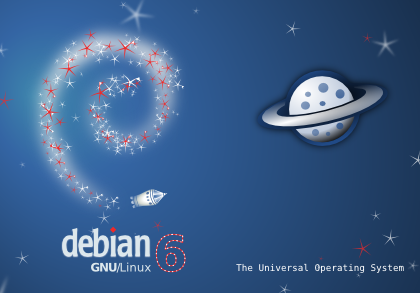
It looks like the desktop team has selected the artwork (including wallpaper and GDM theme) for the upcoming Debian 6.0 release. The winner of the small contest is SpaceFun by Valessio Brito. Included below is the splash screen, click here to see all the pictures. The other options in the poll were Nightly, Ciel and Lisp Machine. Thanks to the artists who participated in this contest! But the work is not over yet: while the artwork has been selected, it still needs to be integrated in the system. If you feel like helping by creating a theme for a display manager (GDM/KDM/SLIM) or for the Grub boot loader, please drop a mail to debian-desktop@lists.debian.org (subscribe here).
Be informed early by following me on Identi.ca, Twitter or Facebook.

16 comments Liked this article? Click here. My blog is Flattr-enabled.

Rapha&#235;l Hertzog: People behind Debian: Joey Hess of debhelper fame


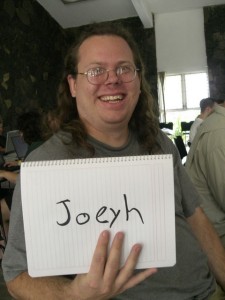
I decided recently to publish interviews from Debian contributors and I picked Joey Hess as my first target. He s one of the few who have heavily influenced Debian by creating software that have become building blocks of the project, like the debian-installer (Joey uses the shorthand d-i to refer to it). My questions are in bold, the rest is by Joey (except for the additional information that I inserted in italics). Who are you? Hello, I m Joey Hess. I m one of the oldtimers in Debian. Actually, I just checked, and there are still up to nineteen active Debian Developers who joined the project before I did, in 1996. I got started fairly young, and am just 34 years old. I spend part of my time working with Lars Wirzenius, another Debian oldtimer, on Branchable. It makes it dead-easy for anyone to make a website that is built from Git, using my Ikiwiki engine to do wiki and blog style things. These days I spend the rest of my time working on free software, when I should really be looking for work to pay the bills. What s your biggest achievement within Debian or Ubuntu? I guess I m mostly known by Debian developers for writing debhelper and perhaps debconf. Probably founding the Debian Installer project has been a bigger impact for users. I m fairly equally proud of all three projects. But while it might sound corny, I am more proud of the accumulation of all the smaller things done in the context of Debian. It s more of a deep connection to the project. All the bugs fixed, and filed, and packages uploaded, and late night discussions, and just being a part of the larger project. What are your plans for Debian Wheezy? Hmm, I stopped thinking of Debian releases by code names back around Slink. :) So, few specific plans for Wheezy. The main thing I would like to help make happen in Debian next is Constantly Usable Testing, and it transcends releases anyway. The only specific plans I have for Wheezy are that there will probably be a new debhelper compat level, and I hope d-i will finally switch to using git. RH: You can learn more about Constantly Usable Testing in my article Can Debian offer a Constantly Usable Testing distribution?. If you could spend all your time on Debian, what would you work on? Getting Debian on all these computers that we carry around in our pockets and can t easily run apt-get on and hack on. Phones that is. It s a bigger problem than just Debian, but I think Debian needs to find a way to be part of the eventual solution. The FreedomBox concept at least hints at a way around the current situation with embedded computers in general. What s the biggest problem of Debian? I believe that the biggest problem is institutional, social and technological inertia. Every specific case of something that frustrates me about Debian today can be traced back to that. You contribute regularly to Debian mailing lists, yet I don t remember any aggressive/frustrated mail of you. How do you manage that? Are you avoiding heated discussions? Rats, sounds like all my wonderful flames of years past have been forgotten! Seriously though, after I noticed thread patterns, I started trying to avoid participating in the bad patterns myself. Now I limit myself to one expression of an opinion, and I don t care who gets the last word. If people can t be convinced, it s time to find another approach to the problem. Also, code talks. Most of the programs you wrote for Debian are in Perl. Do you regret this choice? I love that question! No, no regrets. My only concern is whether the language limits contributors or users. I have not seen Perl significantly limiting the use of anything except for debconf (we had to rewrite it in C for d-i). And I do not notice fewer contributions to my Perl-based code than to other code. I do sometimes regret when someone tells me they had to learn or re-learn Perl to work on something I wrote. But while I m enjoying writing new things in Haskell now, and while I hope it will mean less maintenance burden later, I don t think using Haskell will make it easier for others to contribute to my programs. Anyway, for me the interesting thing about writing a program is the problem it solves and the decisions made doing it. Choice of language is one of the less interesting decisions. Is there someone in Debian that you admire for his contributions? Well, lots. You re tempting me to throw a dart at a map. So arbitrarily, I ll say Anthony Towns. We could all learn something from how he s approached making big, fundamental changes, like introducing Testing, and making Debian Maintainers happen.
Thank you to Joey for the time spent answering my questions. I hope you enjoyed reading his answers as I did. Subscribe to my newsletter and don t miss further interviews. You can also follow along on Identi.ca, Twitter and Facebook. PS: If you want to suggest me someone to interview, leave a comment or mail me.

3 comments Liked this article? Click here. My blog is Flattr-enabled.

8 November 2010

Rapha&#235;l Hertzog: 5 reasons why a Debian package is more than a simple file archive

Folder with gearsYou re probably manipulating Debian packages everyday, but do you know what those files are? This article will show you their bowels Surely they are more than file archives otherwise we would just use TAR archives (you know those files ending with .tar.gz). Let s have a look! 1. It s two TAR file archives in an AR file archive! A .deb file is actually an archive using the AR format, you can manipulate it with the ar command. This archive contains 3 files, you can check it yourself, download any .deb file and run ar t on it:

$ ar t gwibber_2.31.91-1_all.deb
debian-binary
control.tar.gz
data.tar.gz
debian-binary is a text file indicating the version of the format of the .deb file, the current version is 2.0 .
$ ar p gwibber_2.31.91-1_all.deb debian-binary
2.0
data.tar.gz contains the real files of the package, the content of that archive gets installed in your root directory when you run dpkg --unpack . But the most interesting part which truly makes .deb files more than a file archive is the last file. control.tar.gz contains meta-information used by the package manager. What are they?
$ ar p gwibber_2.31.91-1_all.deb control.tar.gz   tar tzf -
./
./postinst
./prerm
./preinst
./postrm
./conffiles
./md5sums
./control
2. It contains meta-information defining the package and its relationships The control file within the control.tar.gz archive is the most fundamental file. It contains basic information about the package like its name, its version, its description, the architecture it runs on, who is maintaining it and so on. It also contains dependency fields so that the package manager can ensure that everything needed by the package is installed before-hand. If you want to learn more about those fields, you can check Binary control files in the Debian Policy. Those information end up in /var/lib/dpkg/status once the package is installed. 3. It contains maintainer scripts so that everything can just work out of the box At various steps of the installation/upgrade/removal process, dpkg is executing the maintainer scripts provided by the package: Note that this description is largely simplified. In fact the scripts are executed on many other occasions with different parameters. There s an entire chapter of the Debian Policy dedicated to this topic. But you might find this wiki page easier to grasp: http://wiki.debian.org/MaintainerScripts. While this looks scary, it s a very important feature. It s required to cope with non-backwards compatible upgrades, to provide automatic configuration, to create system users on the fly, etc. 4. Configuration files are special files Unpacking a file archive overwrites the previous version of the files. This is the desired behavior when you upgrade a package, except for configuration files. You prefer not to loose your customizations, don t you? That s why packages can list configuration files in the conffiles file provided by control.tar.gz. That way dpkg will deal with them in a special way. 5. You can always add new meta-information And in fact many tools already exploit the possibility to provide supplementary files in control.tar.gz: Once installed, those files are kept by dpkg in /var/lib/dpkg/info/package.* along with maintainer scripts.
If you want to read more articles like this one, click here to subscribe to my free newsletter. You can also follow me on Identi.ca, Twitter and Facebook.

19 comments Liked this article? Click here. My blog is Flattr-enabled.

5 November 2010

Rapha&#235;l Hertzog: Managing distribution-specific patches with a common source package

In the comments of the article explaining how to generate different dependencies on Debian and Ubuntu with a common source package, I got asked if it was possible to apply a patch only in some distribution. And indeed it is. The source package format 3.0 (quilt) has a neat feature for this. Instead of unconditionally using debian/patches/series to look up patches, dpkg-source first tries to use debian/patches/vendor.series (where vendor is ubuntu, debian, etc.). Note that dpkg-source does not stack patches from multiple series file, it uses a single series file, the first that exists. So what s the best way to use this? Debian should always provide debian/patches/series, they are supposed to provide the default set of patches to use. Any derivative cooperating with Debian can maintain their own series files within the common VCS repository used for package maintenance. They can drop Debian-specific patches (say branding patches for example), and they can add their own on top of the remaining Debian patches. It s worth noting that it s the job of the maintainers to keep both series files in sync when needed. dpkg-source offers no way to have stacked series files (or dependencies between them). If you want to use quilt to edit an alternate series file, you can temporarily set the QUILT_SERIES environment variable to vendor.series . Just make sure to start from a clean state, i.e. no patches applied. Otherwise quilt will be confused by the sudden mismatch between the series file and its internal data (stored in the .pc directory).
Found it useful? Click here to see how you can encourage me to provide more articles like this one.

Flattr this Share/Bookmark No comment Support my work

4 November 2010

Michal &#268;iha&#345;: What things to flattr?

With increasing popularity of Flattr (114,057 has gone through the Flattr system in two months), several people start to recommend what things to flattr. I'm not going into this business, however they seem so find interesting things for me so you might like it as well. The Flattr Free and Open Source Software by Rapha l Hertzog is actually thing which has attracted me to the Flattr. It collects recommendations how to tag your free software on Flattr and each month it publishes five recommendations which projects to flattr. The other thing I've noticed is list made each month by Evgeni Golov, which I've mostly noticed because increasing popularity of phpMyAdmin on Flattr, because he was really fast in advertising it :-).

Filed under: Debian Phpmyadmin 5 comments Flattr this

3 November 2010

Rapha&#235;l Hertzog: Wiki page to share Debian presentations and associated templates

After having created my Debian presentation template, I wanted to share it so that future speakers can reuse my work. Surely there should be a place for this. I quickly found Ubuntu s dedicated wiki page, and for Debian the relevant place was on the website. However looking at that page, it s obvious that the website is not the proper place: the page has not been updated with new talks since 2005. It s just to much burden for any speaker. A wiki page is much more convenient in that regard. Switching to the wiki means we loose translations but that s still better than an outdated translated page on the website. So I went ahead, I created http://wiki.debian.org/Presentations and I filed a bug against www.debian.org to suggest to move the content to the wiki (see #601337) and to leave a link pointing to the new wiki page. So the content of the website needs to be injected into the wiki. This is an easy task for someone that wishes to start contributing to Debian. Thus it s your task. Once completed send a mail to 601337@bugs.debian.org to inform the webmasters that the wiki part of the work has been completed. They just have to drop the old pages and replace them with links to the wiki. PS: If you have given a Debian talk recently, please put your slides online and link to them on the new wiki page.

Flattr this Share/Bookmark 9 comments Support my work

Tim Retout: Flattr-y will get you nowhere

Dato pointed out on my post yesterday that I had omitted to link to the Ikea catalogue. And then it hit me - I am completely failing to monetize this blog! (Sadly, Ikea aren't in a position to give me any kickbacks right now.) Since my money would be spent on innovative Swedish design in any case, I present a new microdonations system: Flattr-pack. I'll add a "Flattr-pack this!" button to everything I write, and then you can send me furniture with one easy click. Unlike other systems, this has the advantage that no one will be taking a 10% cut of your donations. Awesome! Or maybe not. For those who don't know what I'm on about, Flattr is a website that lets you donate small amounts of money to other websites. It has been proposed to use this site to support free and open source software (FOSS). Now a quick modern anthropology lesson: in a 1998 essay titled "Homesteading the Noosphere", Eric Raymond conjectured that FOSS society is a gift economy; your reputation is proportional to how much you give away. At first sight, microdonations drop neatly into this system; after all, the users are giving money away, right? And yet somehow, I don't think those users are gaining much in terms of reputation. Not in the same way as if they reported bugs, say; joined a localization team; or even just turned up to conferences and volunteered to sit on the front desk. Both types of activity could be described as "donations" - but in one case, the donation benefits the whole community around the project, and in the other it goes to just a few top developers. It's a plain old exchange economy in disguise. I do hope that those users are not dissuaded from making the more generous donations just because it's more convenient to whip out a credit card. That would not be in their long-term interests, or those of the community as a whole. I fear this scheme could also incentivize some oddly inefficient behaviour; writing blog entries purely for their donation potential, say, or even content-free search-engine optimization posts. Speaking entirely personally, I do not plan to join in.

1 November 2010

Julien Valroff: Mini DebConf Paris 2010

I am now back home after 2 days spent at the first mini DebConf Paris. It was really nice to meet a lot of people, and to be able to discuss various aspects of Debian and Free Software in general. People came from all over Europe (at least from the UK, Spain, Italy, Germany, Switzerland, Austria, Greece, and obviously a majority of French people). All the talks I have been able to attend were really interesting, and some of the slides have already been made available by their author: I have also taken part to the keysigning party, which will now allows me to use my newly generated 4096R key. The group picture is also online, as well as a more comprehensive gallery. Thanks a lot to the organisation team, you guys have made an awesome work! See you all next year!

Rapha&#235;l Hertzog: 5 free software to support with Flattr

Flattr FOSS LogoIt s already the fourth issue of Flattr FOSS: it means 20 different projects using Flattr that I presented you. Here are the 5 suggestions for November:
  1. Redshift is a small utility that adjusts the color temperature of your screen to make it less aggressive on your eyes, in particular during evening/nights. It uses the time of the day and the geographic location to know whether it s night or day. I discovered it this summer and I liked it, although I m not running it permanently.
  2. Noscript is a Firefox plugin to control what sites can execute javascript, flash and other plugins. All those are creating supplementary security risks and you browse safer if you allow only some sites to run them. This is the number one entry on Flattr in the opensource category, it recently took the place of dpkg.
  3. phyMyAdmin is a web interface to manage MySQL databases. If you have such a database on a web-hosting service, you have likely already seen it in action. It s an award-winning software with a 12 year history, it s not so common for PHP applications. :-)
  4. Chromium maintenance in Debian. Chromium is a rapidly-evolving & complex software and Giuseppe Iuculano has been tirelessly working on packaging it. Almost alone within Debian. He deserves kudos for his work even though he reused work made by Fabien Tassin on the Ubuntu package.
  5. Dulwich is a pure-Python implementation of the Git file formats and protocols. It s an important building block for interoperability between Bazaar and Git: bzr-git (a Bazaar plugin providing Git integration) is notably using it. Given the large usage of bzr in Ubuntu and the popularity of Git world-wide, it s important to have such gateways.
This article is part of the Flattr FOSS project.
Update: mentioned the work of Fabien Tassin on the chromium package within Ubuntu.

Flattr this Share/Bookmark 6 comments Support my work

30 October 2010

Rapha&#235;l Hertzog: Latest features of dpkg-dev: debian packaging tools

I m attending the mini-Debconf Paris and I just gave a talk about the latest improvement of dpkg-dev the package providing the basic tools used to build Debian packages. Latest is a bit stretched since it embraces the last 2-3 years of development. My talk covered the following topics: The slides are relatively verbose so that you can understand them even if you did not attend the talk. Click here to get the slides. Related links This section points to various articles that cover more extensively some of the features mentioned in my talk. Concerning dpkg-source: Concerning dpkg-maintscript-helper: Concerning dpkg-vendor:

Flattr this Share/Bookmark One comment Support my work

29 October 2010

Rapha&#235;l Hertzog: Nice OpenOffice.org template for Debian presentations

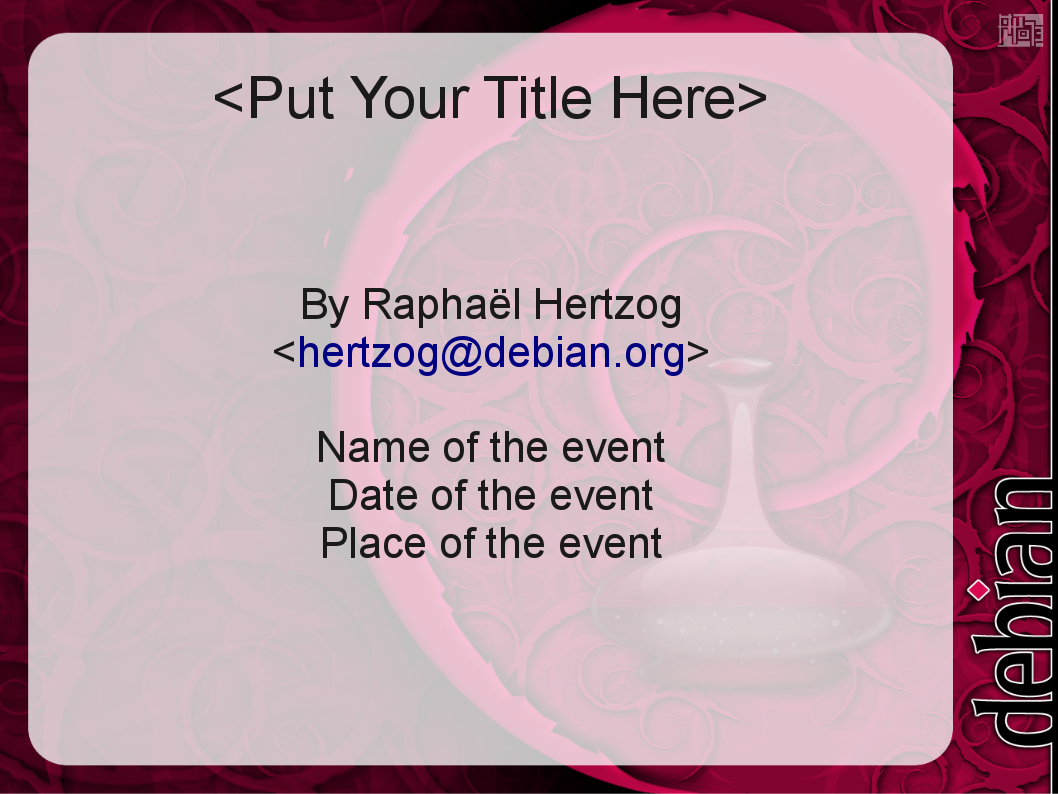
OpenOffice.org Impress Template for Debian Presentations While preparing for the upcoming mini-debconf Paris, I noticed that we don t have any good presentation template for OpenOffice.org Impress. I spent a few hours browsing Debian presentations put online by many speakers and was unable to find one that would suit me. This situation was clearly unacceptable and I decided to spend a few hours to fix this. I selected a very nice wallpaper created by Alexis Younes, used The Gimp to add a translucent white box so that the text can still be read, and combined all this in a OpenOffice.org Impress template. Click here to download the template. You can also get the Gimp XCF file for the background image. By the way, the same wallpaper has been used by Sam Hocevar to create nice-looking Debian business cards. PS: I contacted Alexis Younes by mail and he agreed to put the wallpapers under GPL-2+. It has been clarified on his webpage.
Follow me on Identi.ca, Twitter and Facebook.

Flattr this Share/Bookmark 6 comments Support my work

27 October 2010

Rapha&#235;l Hertzog: What Debian & Ubuntu topics would you like to read about?

A woman enjoying this blogAfter having looked back at the first months of this blog, I also want to look forward and see how I can improve its content. If you re a Debian/Ubuntu user and/or contributor, I want this blog to be a truly useful resource for you. What kind of articles would you like me to write? I have lots of ideas but I can t do everything. I ll share some of them so that you can discuss them: Pleases discuss and share your ideas in the comments. Don t limit yourself to the above list, you know better than me what you need: tell me what kind of documentation was lacking in your daily usage of Debian/Ubuntu, or what could have been better explained while you tried to contribute to Debian/Ubuntu. While I set no limits on Debian/Ubuntu topics that I accept to cover, my main focus is around documentation for end-users and/or contributors. If you prefer you can also send your feedback with Identi.ca, Twitter or leave a comment in the entry for this article in my facebook page.

Flattr this Share/Bookmark 11 comments Support my work

Next.

Previous.