Russ Allbery: Review: Riot Baby
| Publisher: | Tor.com |
| Copyright: | January 2020 |
| ISBN: | 1-250-21476-9 |
| Format: | Kindle |
| Pages: | 176 |
| Publisher: | Tor.com |
| Copyright: | January 2020 |
| ISBN: | 1-250-21476-9 |
| Format: | Kindle |
| Pages: | 176 |
Here is another monthly update covering what I have been doing in the free software world during August 2020 (previous month):
classproperty helper has been moved to django.utils.functional in newer versions of Django. [...]
INSTALLED_APPS during model setup. [...]
.d-style directories containing Javascript and CSS to drop unquote usage from the six compatibility library. [...]
2.86.0, 2.87.0, 2.88.0, 2.89.0, 2.90.0, 2.91.0 and 2.92.0, as well as made the following changes:
patch-not-forwarded-upstream tag for README files under debian/patches. (#968845)no-dh-sequencer tag due to indirect target dependences. (#968108)package-uses-old-debhelper-compat-version tag. [...]lintian salsa namespace. [...]lzip dependency in a previous debian/changelog entry. (#966817)generate-tag-summary release script to reflect change of tag definition filename extension change from .desc .tag. [...]spelling-error-in-rules-requires-root tag's severity; this is not a "spelling" check in the sense that it does not use our dictionary. [...]$skip_tag argument in the extract_service_file_values routine. [...]debian-installer component to allow all arguments from sources.list files (such as [check-valid-until=no]) in order that we can test the reproducibility of the installer images on the Reproducible Builds own testing infrastructure and sent a gentle ping to the team that maintains that code.
.buildinfo files within .deb archives [...].
muroar package that was discovered while doing reproducibility testing. (#968189)
tests.reproducible-builds.org. This month, I updated the self-serve package rescheduler to use HTML <pre> tags when dumping any debugging data. [...]
SOURCE_DATE_EPOCH age. [...]155, 156, 157 and 158 to Debian:
<!ENTITY> declarations inside the Document Type Definition (DTD), or when a DTD or entity references an external resource. (#212)pgpdump(1) can successfully parse some binary files, so check that the parsed output contains something sensible before accepting it. [...]gnumeric from the Debian build-dependies as it has been removed from the testing distribution. (#968742)fallback_recognises to prevent matching .xsb binary XML files.file(1) returns "data". (#211)ppudump version does not match our file header. [...]repr(object) output in "Calling external command" messages. [...]chrony [...], golang-1.8 [...], golang-go.crypto [...], golang-golang-x-net-dev [...], icingaweb2 [...], lua5.3 [...], mongodb [...], net-snmp, php7.0 [...], qt4-x11, qtbase-opensource-src, ruby-actionpack-page-caching [...], ruby-doorkeeper [...], ruby-json-jwt [...], ruby-kaminari [...], ruby-kaminari [...], ruby-rack-cors [...], shiro [...] & squirrelmail.
qtbase-opensource-src and ELA-261-1 for qt4-x11, two components of cross-platform C++ application framework. A specially-crafted XBM image file could have caused a buffer overread.
squirrelmail webmail client.
zabbix, the PHP-based monitoring system to fix a potential cross-site scripting vulnerability via <iframe> HTML elements.
ruby-websocket-extensions, a library for managing long-lived HTTP 'WebSocket' connections.

1.6.6-2 Enable TLS capabilities by default. (#968603)1.6.6-3 Add libio-socket-ssl-perl to test TLS support and perform a general package refresh.2.2.15-1 (unstable) New upstream bugfix release3.1-1 (experimental) New upstream release.2.2.15-2 (unstable) & 3.1-2 (experimental) Set the same PYTHONPATH when executing the runtime tests as we do in the package build. (#968577)2.0.0-43 Refresh packaging, and upload some changes from the Debian Janitor.2.0.0-44 Fix compatibility with GCC 10, restoring the missing /usr/bin/instant binary. (#968900)1.0.0-1) New upstream release to experimental.
| Series: | Discworld #15 |
| Publisher: | Harper |
| Copyright: | 1993 |
| Printing: | November 2013 |
| ISBN: | 0-06-223740-3 |
| Format: | Mass market |
| Pages: | 420 |
Cuddy had only been a guard for a few days but already he had absorbed one important and basic fact: it is almost impossible for anyone to be in a street without breaking the law.Vimes and Carrot are both excellent police officers, but in entirely different ways. Vimes treats being a cop as a working-class job and is inclined towards glumness and depression, but is doggedly persistent and unable to leave a problem alone. His ethics are covered by a thick layer of world-weary cynicism. Carrot is his polar opposite in personality: bright, endlessly cheerful, effortlessly charismatic, and determined to get along with everyone. On first appearance, this contrast makes Vimes seem wise and Carrot seem a bit dim. That is exactly what Pratchett is playing with and undermining in Men at Arms. Beneath Vimes's cynicism, he's nearly as idealistic as Carrot, even though he arrives at his ideals through grim contrariness. Carrot, meanwhile, is nowhere near as dim as he appears to be. He's certain about how he wants to interact with others and is willing to stick with that approach no matter how bad of an idea it may appear to be, but he's more self-aware than he appears. He and Vimes are identical in the strength of their internal self-definition. Vimes shows it through the persistent, grumpy stubbornness of a man devoted to doing an often-unpleasant job, whereas Carrot verbally steamrolls people by refusing to believe they won't do the right thing.
Colon thought Carrot was simple. Carrot often struck people as simple. And he was. Where people went wrong was thinking that simple meant the same thing as stupid.There's a lot going on in this book apart from the profiles of two very different models of cop. Alongside the mystery (which doubles as pointed commentary on the corrupting influence of violence and personal weaponry), there's a lot about dwarf/troll relations, a deeper look at the Ankh-Morpork guilds (including a horribly creepy clown guild), another look at how good Lord Vetinari is at running the city by anticipating how other people will react, a sarcastic dog named Gaspode (originally seen in Moving Pictures), and Pratchett's usual collection of memorable lines. It is also the origin of the now-rightfully-famous Vimes boots theory:
The reason that the rich were so rich, Vimes reasoned, was because they managed to spend less money. Take boots, for example. He earned thirty-eight dollars a month plus allowances. A really good pair of leather boots cost fifty dollars. But an affordable pair of boots, which were sort of OK for a season or two and then leaked like hell when the cardboard gave out, cost about ten dollars. Those were the kind of boots Vimes always bought, and wore until the soles were so thin that he could tell where he was in Ankh-Morpork on a foggy night by the feel of the cobbles. But the thing was that good boots lasted for years and years. A man who could afford fifty dollars had a pair of boots that'd still be keeping his feet dry in ten years' time, while the poor man who could only afford cheap boots would have spent a hundred dollars on boots in the same time and would still have wet feet. This was the Captain Samuel Vimes 'Boots' theory of socioeconomic unfairness.Men at Arms regularly makes lists of the best Discworld novels, and I can see why. At this point in the series, Pratchett has hit his stride. The plots have gotten deeper and more complex without losing the funny moments, movie and book references, and glorious turns of phrase. There is also a lot of life philosophy and deep characterization when one pays close attention to the characters.
He was one of those people who would recoil from an assault on strength, but attack weakness without mercy.My one complaint is that I found it a bit overstuffed with both characters and subplots, and as a result had a hard time following the details of the plot. I found myself wanting a timeline of the murders or a better recap from one of the characters. As always with Pratchett, the digressions are wonderful, but they do occasionally come at the cost of plot clarity. I'm not sure I recommend the present moment in the United States as the best time to read this book, although perhaps there is no better time for Carrot and Vimes to remind us what good cops look like. But regardless of when one reads it, it's an excellent book, one of the best in the Discworld series to this point. Followed, in publication order, by Soul Music. The next Watch book is Feet of Clay. Rating: 8 out of 10
Like each month, albeit a bit later due to vacation, here comes a report about the work of paid contributors to Debian LTS.
Individual reports
In July, 249.25 work hours have been dispatched among 14 paid contributors. Their reports are available:
No comment Liked this article? Click here. My blog is Flattr-enabled.
msmtp in this case) to talk to the GMail
servers on your behalf, and send emails, you can't just use your usual GMail
password. Instead, GMail requires you to generate so-called app passwords,
one for each application that needs to access your GMail account.
This approach has several advantages:
qwertyuiopqwerty. It's
supposed to be used from only one place, ie. from ONE application that is
installed on ONE device. That's why it's common to give it a name of the form
application@device, so in our case it could be msmtp@laptop, but really
it's free form, choose whatever name suits you, as long as it makes sense to
you.
So let's give a name to this app password, write it down for now, and we're
done with the GMail config.
Send your first email
Time to get started with msmtp.
First thing first, installation, trivial:
sudo apt install msmtp
# Write a dummy email
cat << EOF > message.txt
From: YOUR_LOGIN@gmail.com
To: SOMEONE_ELSE@SOMEWHERE_ELSE.com
Subject: Cafe Sua Da
Iced-coffee with condensed milk
EOF
# Send it
cat message.txt msmtp \
--auth=on --tls=on \
--host smtp.gmail.com \
--port 587 \
--user YOUR_LOGIN \
--read-envelope-from \
--read-recipients
# msmtp prompts you for your password:
# this is where goes the app password!
message.txt, we provided From: (the email address of the person
sending the email) and To: (the destination email address). Then we asked
msmtp to re-use those values to set the envelope of the email with
--read-envelope-from and --read-recipients.
What about the other parameters?
--auth=on because we want to authenticate with the server.--tls=on because we want to make sure that the communication with the
server is encrypted.--host and --port tells where to find the server. If you don't use GMail,
adjust that accordingly.--user is obviously your GMail username.~/.msmtprc and ~/.config/msmtp/config, at
your preference. In this tutorial we'll use ~/.msmtprc for brevity:
cat << 'EOF' > ~/.msmtprc
defaults
tls on
account gmail
auth on
host smtp.gmail.com
port 587
user YOUR_LOGIN
from YOUR_LOGIN@gmail.com
account default : gmail
EOF
defaults are the default values for all the following accounts.account are the settings specific to this account, until another
account line is found.# Write a dummy email. Note that the
# header 'From:' is no longer needed,
# it's already in '~/.msmtprc'.
cat << 'EOF' > message.txt
To: SOMEONE_ELSE@SOMEWHERE_ELSE.com
Subject: Flat White
The milky way for coffee
EOF
# Send it
cat message.txt msmtp \
--account default \
--read-recipients
--account default is not needed, as it's the default anyway if you
don't provide a --account argument. Furthermore --read-recipients can be
shortened as -t. So we can make it real short now:
msmtp -t < message.txt
msmtp >=
1.8.11-2, and you're all good to go. For those having an older version than
that however, you will have to install the package msmtp-gnome in order to
have msmtp built with libsecret support. Note that this package depends on
seahorse, hence it pulls in a good part of the GNOME stack when you install
it. For those not running GNOME, that's unfortunate. All of this was discussed
and fixed in #962689.
Alright! So let's just make sure that the libsecret tools are installed:
sudo apt install libsecret-tools
secret-tool store --label msmtp \
host smtp.gmail.com \
service smtp \
user YOUR_LOGIN
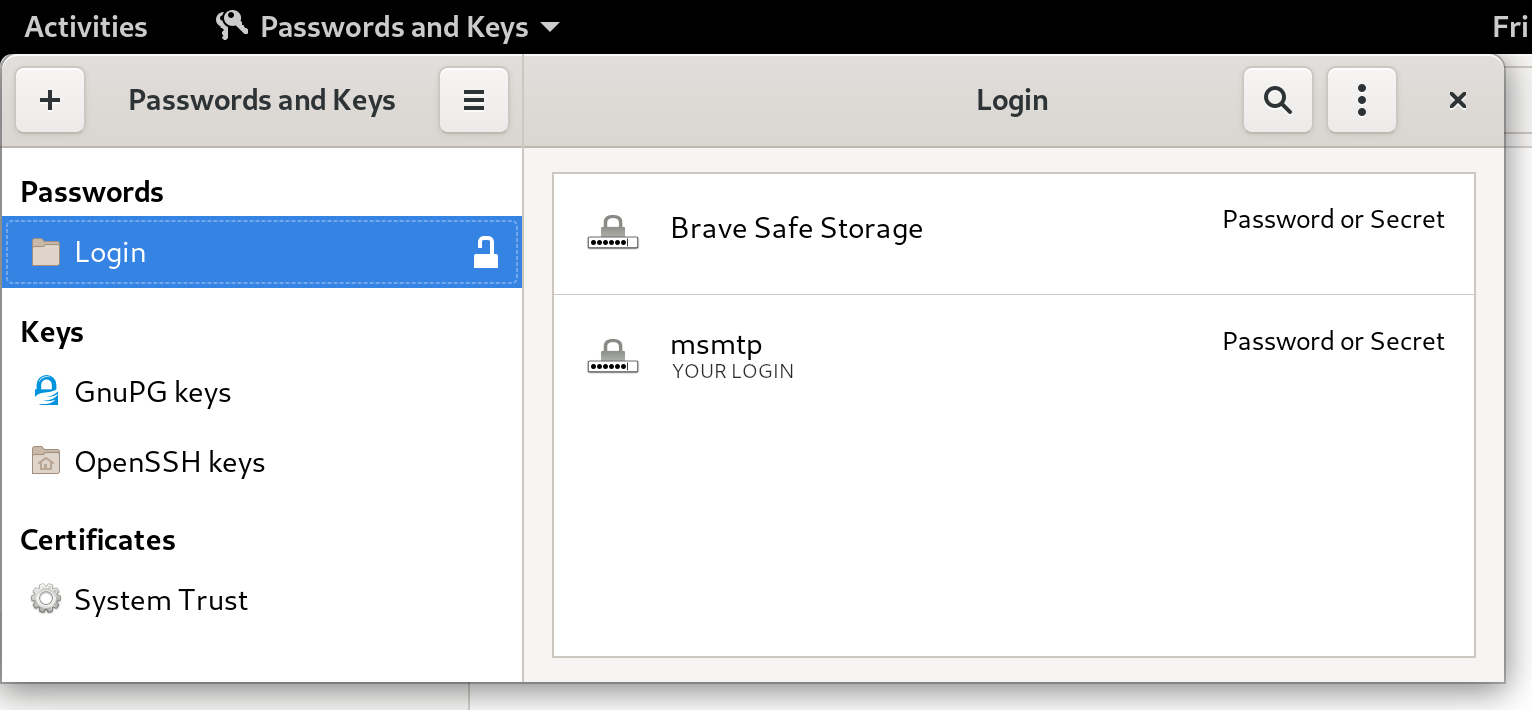
seahorse (for GNOME users), or kwalletmanager5
(for KDE users), and then you will see what passwords are stored in there.
Here's a screenshot of Seahorse, with a msmtp password stored:
Let's try to send an email again:
msmtp -t < message.txt
git send-email actually send emails? From the
git-send-email manual page:
the built-in default is to search for sendmail in /usr/sbin, /usr/lib and $PATH if such program is availableIt is possible to override this default though:
--smtp-server=So in order to use msmtp here, you'd add a snippet like that to your
[...] Alternatively it can specify a full pathname of a sendmail-like program instead; the program must support the -i option.
~/.gitconfig file:
[sendemail]
smtpserver = /usr/bin/msmtp
bts or reportbug are also good examples of command-line tools
that need to send emails.
From the bts manual page:
--sendmail=SENDMAILCMDSo if you want bts to send emails with msmtp instead of sendmail, you must use
Specify the sendmail command [...] Default is /usr/sbin/sendmail.
bts --sendmail='/usr/bin/msmtp -t'.
Note that bts also loads settings from the file /etc/devscripts.conf and
~/.devscripts, so you could also set BTS_SENDMAIL_COMMAND='/usr/bin/msmtp
-t' in one of those files.
From the reportbug manual page:
--mta=MTAIn order to use msmtp here, you'd write
Specify an alternate MTA, instead of /usr/sbin/sendmail (the default).
reportbug --mta=/usr/bin/msmtp.
Note that reportbug reads it settings from /etc/reportbug.conf and
~/.reportbugrc, so you could as well set mta /usr/bin/msmtp in one of those
files.
So who is this sendmail again?
By now, you probably noticed that sendmail seems to be considered the
default tool for the job, the "traditional" command that has been around for
ages.
Rather than configuring every tool to use something else than sendmail,
wouldn't it be simpler to actually replace sendmail by msmtp? Like, create a
symlink that points to msmtp, something like ln -sr /usr/bin/msmtp
/usr/sbin/sendmail? So that msmtp acts as a drop-in replacement for sendmail,
and there's nothing else to configure?
Answer is yes, kind of. Actually, the first msmtp feature
that is listed on the homepage is "Sendmail compatible interface (command
line options and exit codes)". Meaning that msmtp is a drop-in replacement
for sendmail, that seems to be the intent.
However, you should refrain from creating or modifying anything in /usr, as
it's the territory of the package manager, apt. Any change in /usr might be
overwritten by apt the next time you run an upgrade or install new packages.
In the case of msmtp, there is actually a package named msmtp-mta that will
create this symlink for you. So if you really want a definitive replacement for
sendmail, there you go:
sudo apt install msmtp-mta
/usr/sbin/sendmail
/usr/bin/msmtp, and there's no need to configure git, bts, reportbug or
any other tool that would rely on sendmail. Everything should work "out of the
box".
Conclusion
I hope that you enjoyed reading this article! If you have any comment, feel
free to send me a short email, preferably from your terminal!
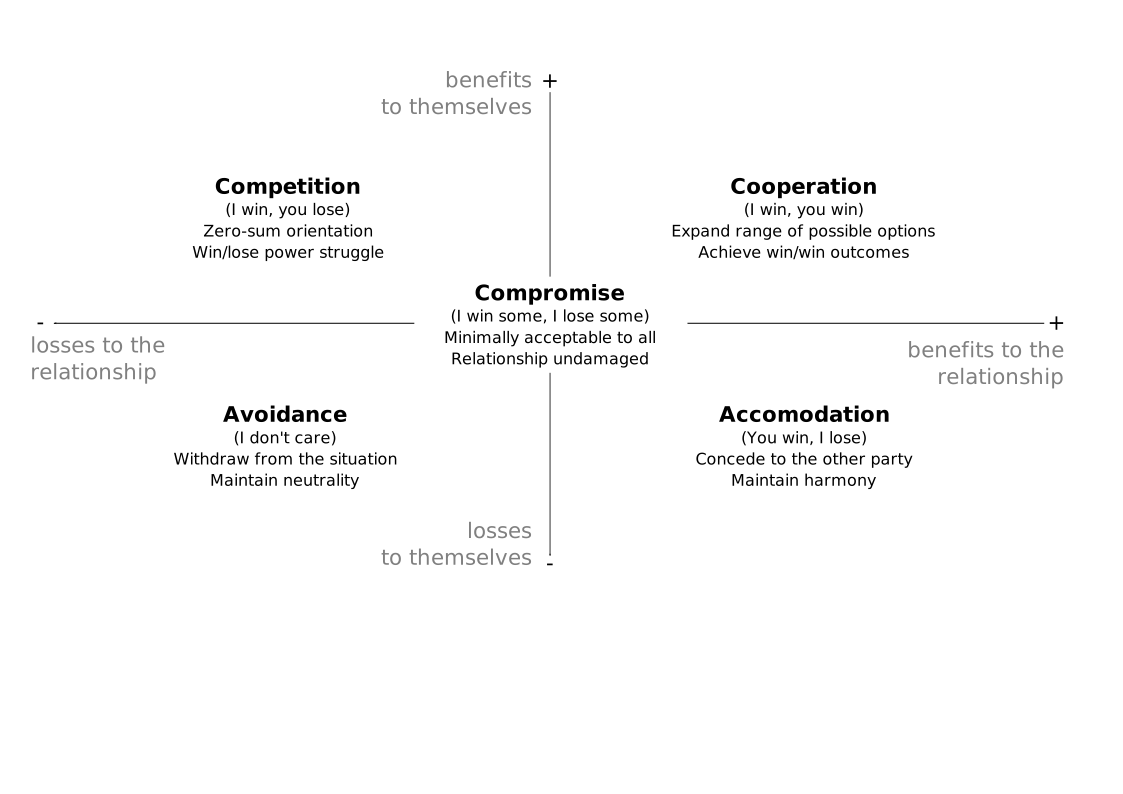
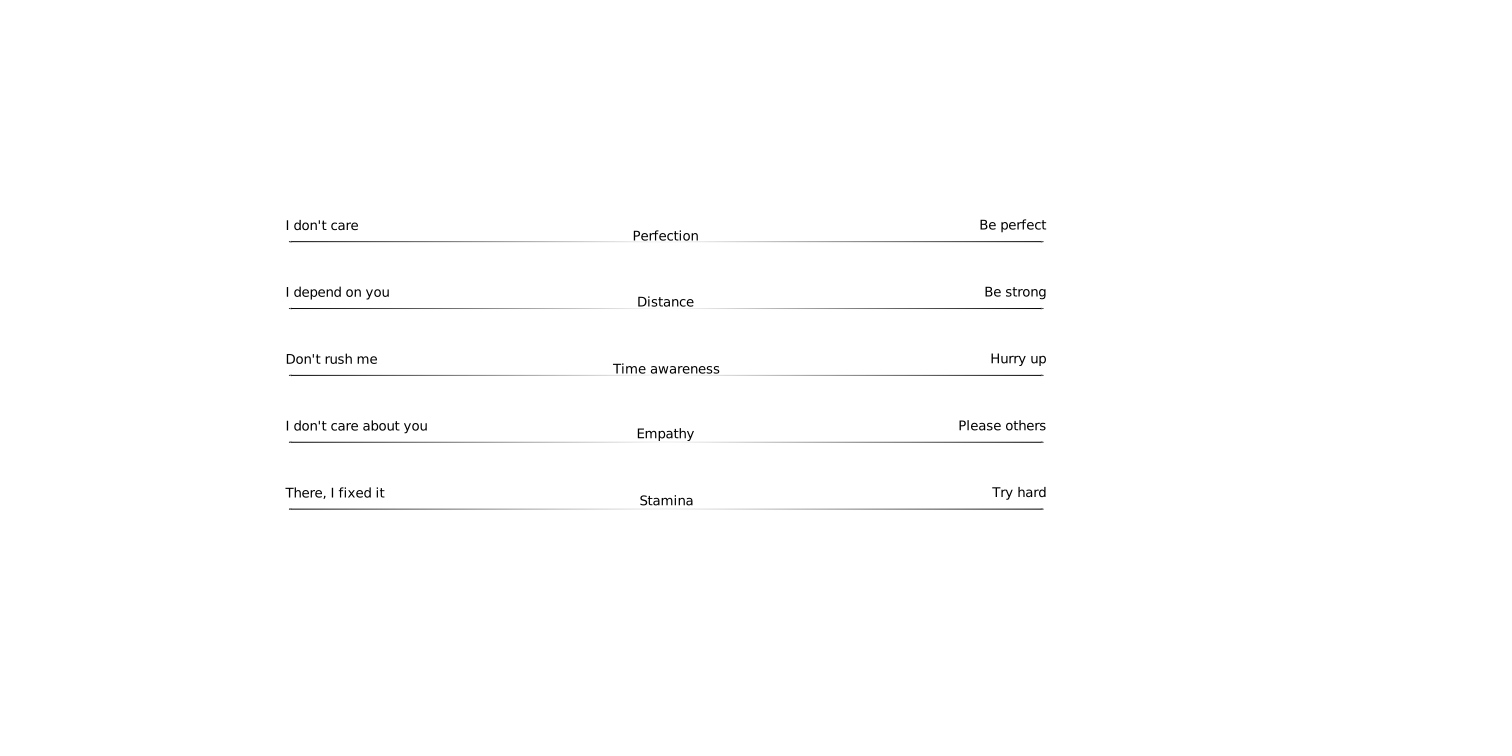
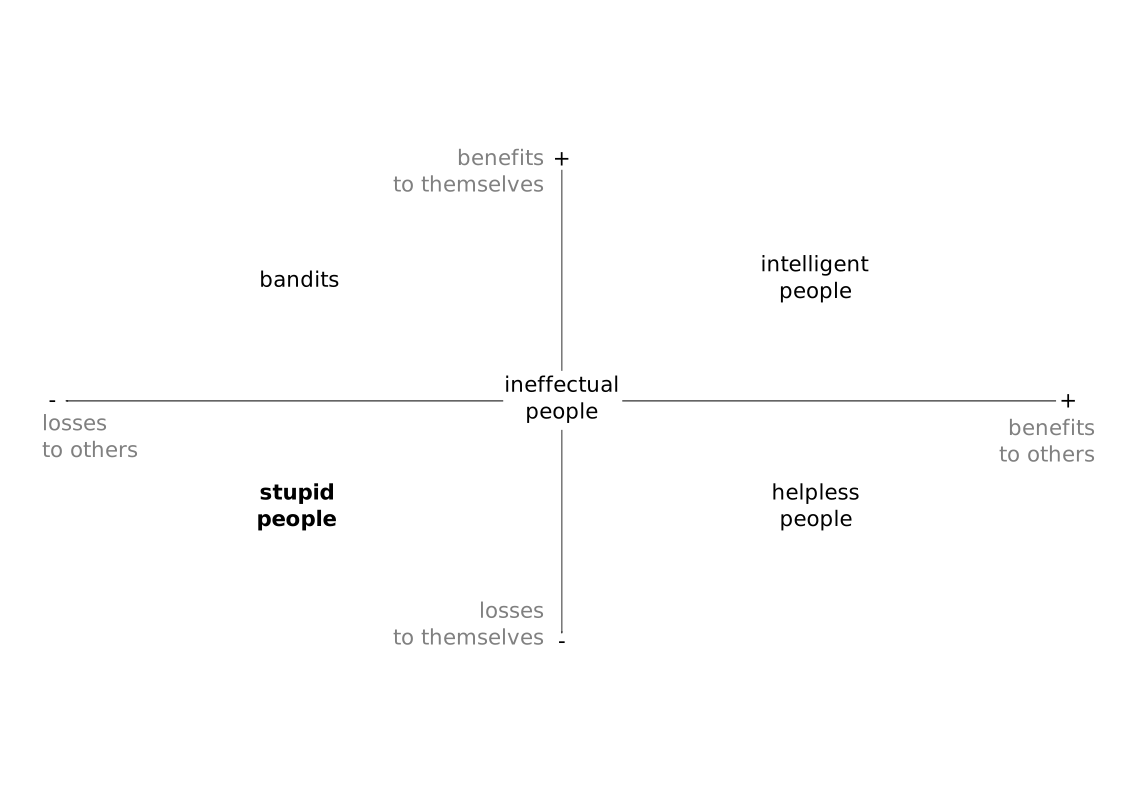
Our thoughts about cooperation aspects of doing things together. Sometimes in Debian we do work together with others, and sometimes we are a number of people who work alone, and happen to all upload their work in the same place. In times when we have needed to take important decisions together, this distinction has become crucial, and some of us might have found that we were not as good at cooperation as we would have thought. This talk is intended for everyone who is part of a larger community. We will show concepts and tools that we think could help understand and shape cooperation.Video of the talk: The slides have extensive notes: you can use View Notes in LibreOffice Impress to see them. Here are the Inkscape sources for the graphs: Here are links to resources quoted in the talk:
pollo asked:
How can we still have a good code review process without making it a "you need to be perfect" scenario? I often find picky code reviews help me write better code.Ulrike wrote a more detailed answer: Code reviews: from nitpicking to cooperation
apt install curl certbot /usr/bin/letsencrypt certonly --standalone -d j.example.com,auth.j.example.com -m you@example.com curl https://download.jitsi.org/jitsi-key.gpg.key gpg --dearmor > /etc/apt/jitsi-keyring.gpg echo "deb [signed-by=/etc/apt/jitsi-keyring.gpg] https://download.jitsi.org stable/" > /etc/apt/sources.list.d/jitsi-stable.list apt-get update apt-get -y install jitsi-meetWhen apt installs jitsi-meet and it s dependencies you get asked many questions for configuring things. Most of it works well. If you get the nginx certificate wrong or don t have the full chain then phone clients will abort connections for no apparent reason, it seems that you need to edit /etc/nginx/sites-enabled/j.example.com.conf to use the following ssl configuration:
ssl_certificate /etc/letsencrypt/live/j.example.com/fullchain.pem; ssl_certificate_key /etc/letsencrypt/live/j.example.com/privkey.pem;Then you have to edit /etc/prosody/conf.d/j.example.com.cfg.lua to use the following ssl configuration:
key = "/etc/letsencrypt/live/j.example.com/privkey.pem"; certificate = "/etc/letsencrypt/live/j.example.com/fullchain.pem";It seems that you need to have an /etc/hosts entry with the public IP address of your server and the names j.example.com j auth.j.example.com . Jitsi also appears to use the names speakerstats.j.example.com conferenceduration.j.example.com lobby.j.example.com conference.j.example.com conference.j.example.com internal.auth.j.example.com but they aren t required for a basic setup, I guess you could add them to /etc/hosts to avoid the possibility of strange errors due to it not finding an internal host name. There are optional features of Jitsi which require some of these names, but so far I ve only used the basic functionality. Access Control This section describes how to restrict conference creation to authenticated users. The secure-domain document [2] shows how to restrict access, but I ll summarise the basics. Edit /etc/prosody/conf.avail/j.example.com.cfg.lua and use the following line in the main VirtualHost section:
authentication = "internal_hashed"Then add the following section:
VirtualHost "guest.j.example.com"
authentication = "anonymous"
c2s_require_encryption = false
modules_enabled =
"turncredentials";
Edit /etc/jitsi/meet/j.example.com-config.js and add the following line:
anonymousdomain: 'guest.j.example.com',Edit /etc/jitsi/jicofo/sip-communicator.properties and add the following line:
org.jitsi.jicofo.auth.URL=XMPP:j.example.comThen run commands like the following to create new users who can create rooms:
prosodyctl register admin j.example.comThen restart most things (Prosody at least, maybe parts of Jitsi too), I rebooted the VM. Now only the accounts you created on the Prosody server will be able to create new meetings. You should be able to add, delete, and change passwords for users via prosodyctl while it s running once you have set this up. Conclusion Once I gave up on the idea of running Jitsi on the same server as anything else it wasn t particularly difficult to set up. Some bits were a little fiddly and hopefully this post will be a useful resource for people who have trouble understanding the documentation. Generally it s not difficult to install if it is the only thing running on a VM.
What is GameMode, what does it do? About two years ago, I ran into some bugs running a game on Debian, so installed Windows 10 on a spare computer and ran it on there. I learned that when you launch a game in Windows 10, it automatically disables notifications, screensaver, reduces power saving measures and gives the game maximum priority. I thought Oh, that s actually quite nice, but we probably won t see that kind of integration on Linux any time soon . The very next week, I read the initial announcement of GameMode, a tool from Feral Interactive that does a bunch of tricks to maximise performance for games running on Linux. When GameMode is invoked it:
How GameMode is invoked
Some newer games (proprietary games like Rise of the Tomb Raider , Total War Saga: Thrones of Britannia , Total War: WARHAMMER II , DiRT 4 and Total War: Three Kingdoms ) will automatically invoke GameMode if it s installed. For games that don t, you can manually evoke it using the gamemoderun command.
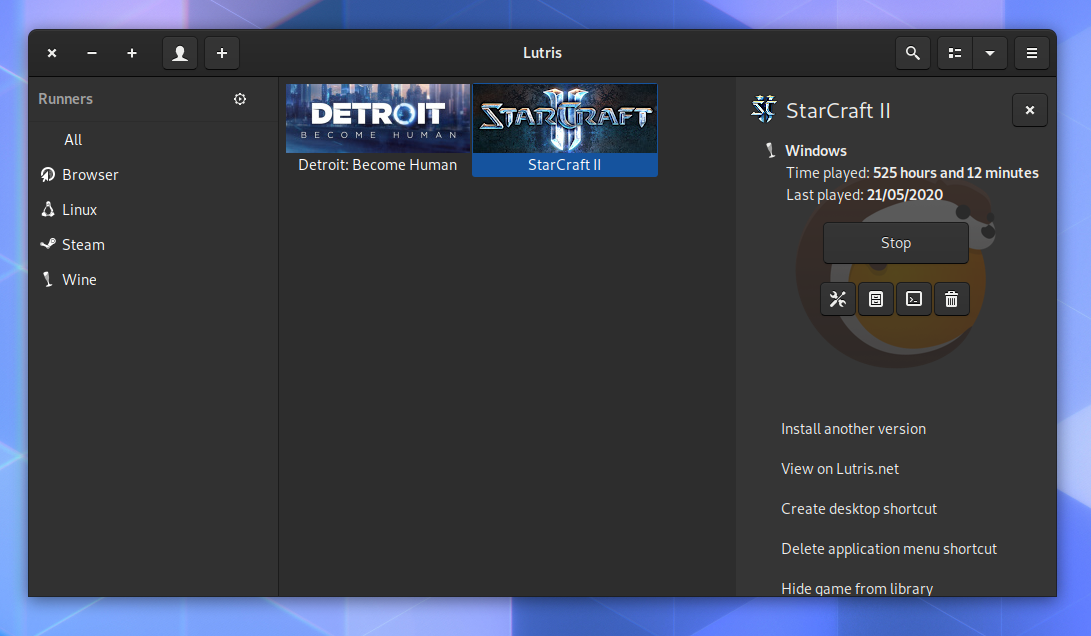
Lutris is a tool that makes it easy to install and run games on Linux, and it also integrates with GameMode. (Lutris is currently being packaged for Debian, hopefully it will make it in on time for Bullseye).
Screenshot of Lutris, a tool that makes it easy to install your non-Linux games, which also integrates with GameMode.
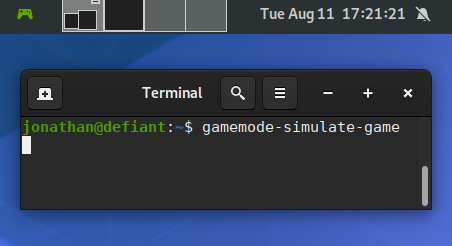
GameMode in Debian The latest GameMode is packaged in Debian (Stephan Lachnit and I maintain it in the Debian Games Team) and it s also available for Debian 10 (Buster) via buster-backports. All you need to do to get up and running with GameMode is to install the gamemode package. GameMode in Debian supports 64 bit and 32 bit mode, so running it with older games (and many proprietary games) still work. Some distributions (like Arch Linux), have dropped 32 bit support, so 32 bit games on such systems lose any kind of integration with GameMode even if you can get those games running via other wrappers on such systems. We also include a binary called gamemode-simulate-game (installed under /usr/games/). This is a minimalistic program that will invoke gamemode automatically for 10 seconds and then exit without an error if it was successful. Its source code might be useful if you d like to add GameMode support to your game, or patch a game in Debian to automatically invoke it. In Debian we install Gamemode s example config file to /etc/gamemode.ini where a user can customise their system-wide preferences, or alternatively they can place a copy of that in ~/.gamemode.ini with their personal preferences. In this config file, you can also choose to explicitly allow or deny games. GameMode might also be useful for many pieces of software that aren t games. I haven t done any benchmarks on such software yet, but it might be great for users who use CAD programs or use a combination of their CPU/GPU to crunch a large amount of data. I ve also packaged an extension for GNOME called gamemode-extension. The Debian package is called gnome-shell-extension-gamemode . You ll need to enable it using gnome-tweaks after installation, it will then display a green controller in your notification area whenever GameMode is active. It s only in testing/bullseye since it relies on a newer gnome-shell than what s available in buster.
Running gamemode-simulate-game, with the shell extension showing that it s activated in the top left corner.| Publisher: | Tor |
| Copyright: | February 2019 |
| Printing: | February 2020 |
| ISBN: | 1-4668-7113-X |
| Format: | Kindle |
| Pages: | 366 |
| Publisher: | PublicAffairs |
| Copyright: | 2013 |
| ISBN: | 1-61039-212-4 |
| Format: | Kindle |
| Pages: | 336 |
Like each month, here comes a report about the work of paid contributors to Debian LTS.
Individual reports
In June, 202.00 work hours have been dispatched among 12 paid contributors. Their reports are available:
No comment Liked this article? Click here. My blog is Flattr-enabled.
exfat-fuse package
or make sure you've version 1.3.0-2 or later installed. Then
you can just run mount /dev/sdX /mnt and everything should be fine.
Your result will look something like this:
$ mount grep sdb
/dev/sdb on /mnt type exfat (rw,relatime,fmask=0022,dmask=0022,iocharset=utf8,errors=remount-ro
In the past this basic mount invocation utilized the mount.exfat
helper, which was just a symlink to the helper which is shipped
as /sbin/mount.exfat-fuse. The link was dropped from the package
in 1.3.0-2. If you're running a not so standard setup, and would
like to keep an older version of exfat-fuse installed you must
invoke mount -i to prevent mount from loading any helper to mount
the filesystem. See also
man 8 mount.
For those who care, mstone@ and myself had a brief discussion
about this issue in
#963752,
which quickly brought me to the conclusion that it's in the best interest
of a majority of users to just drop the symlink from the package.
Sticking to the Fuse Driver
If you would like to stick to the fuse driver you can of course just do it.
I plan to continue to maintain all packages for the moment. Just keep the
exfat-fuse package installed and use the mount.exfat-fuse helper
directly. E.g.
$ sudo mount.exfat-fuse /dev/sdb /mnt
FUSE exfat 1.3.0
$ mount grep sdb
/dev/sdb on /mnt type fuseblk (rw,nosuid,nodev,relatime,user_id=0,group_id=0,default_permissions,allow_other,blksize=4096)
In case this is something you would like to make permanent, I would recommend
that you create yourself a mount.exfat symlink pointing at the
mount.exfat-fuse helper.
mkfs and fsck - exfat-utils vs exfatprogs
Beside of the filesystem access itself we now also have two implementations
of tooling, which support filesystem creation, fscking and label adjustment.
The older one is exfat-utils
by the creator of the fuse driver, which is also part of Debian since the
fuse driver was packaged in 2012. New in Debian is the
exfatprogs package
written by the Samsung engineers. And here the situation starts to get
a bit more complicated.
Both packages ship a mkfs.exfat and fsck.exfat tool, so we can not
co-install them. In the end both packages declare a conflict with each
other at the moment. As outlined in
this thread I do not plan to overcomplicate the situation by using
the alternatives system. I do feel strongly that this would just create
more confusion without a real benefit. Since the tools do not have
matching cli options, that could also cause additional issues and confusion.
I plan to keep that as is, at least for the bullseye release. Afterwards
it's possible, depending on how the usage evolves, to drop the
mkfs.exfat and fsck.exfat from exfat-utils, they are in fact
again only symlinks. pain point might be tools interfacing with the
differing implementations. Currently I see only three reverse depedencies,
so that should be manageable to consolidate if required.
Last but not least it might be relevant to mention that the exfat-utils
package also contains a dumpexfat tool which could be helpful if you're
more into forensics, or looking into other lower level analysis of an exFAT
filsystem. Thus there is a bit of an interest to have those tools co-installed
in some - I would say - niche cases.
buster-backports
Well if you use buster with a backports kernel you're a bit on your own.
In case you want to keep the fuse driver installed, but would still like to
mount, e.g. for testing, with the kernel exFAT driver, you must use mount -i.
I do not plan any uploads to buster-backports. If you need a mkfs.exfat
on buster, I would recommend to just use the one from exfat-utils for
now. It has been good enough for the past years, should not get sour
before the bullseye release, which ships exfatprogs for you.
Kudos
My sincere kudos go to:
I wrote the above in a response to the Qu bec government's survey about a possible tracing app. Update: a previous version of this article was titled plainly "on contact tracing". In case that was not obvious, I definitely do not object to contact tracing per se. I believe it's a fundamental, critical, and important part of fighting the epidemic and I think we should do it. I do not believe any engineer has found a proper way of doing it with "apps" so far, but I do not deny the utility and importance of "contact tracing" itself. Apologies for the confusion.
Pour une raison que je m'explique mal, le sondage m' t envoy en anglais, et j'ai donc crit ma r ponse dans la langue de Shakespeare au lieu de celle de moli re... Je serai heureux de fournir une traduction fran aise ceux ou celles qui en ont besoin...
| Publisher: | Saga |
| Copyright: | 2019 |
| ISBN: | 1-4814-4798-X |
| Format: | Kindle |
| Pages: | 355 |
Like each month, here comes a report about the work of paid contributors to Debian LTS.
Individual reports
In May, 198 work hours have been dispatched among 14 paid contributors. Their reports are available:
No comment Liked this article? Click here. My blog is Flattr-enabled.
Next.