Search Results: "ean"

26 April 2025

Dirk Eddelbuettel: RcppArmadillo 14.4.2-1 on CRAN: Another Small Upstream Fix

armadillo image Armadillo is a powerful and expressive C++ template library for linear algebra and scientific computing. It aims towards a good balance between speed and ease of use, has a syntax deliberately close to Matlab, and is useful for algorithm development directly in C++, or quick conversion of research code into production environments. RcppArmadillo integrates this library with the R environment and language and is widely used by (currently) 1245 other packages on CRAN, downloaded 39.4 million times (per the partial logs from the cloud mirrors of CRAN), and the CSDA paper (preprint / vignette) by Conrad and myself has been cited 628 times according to Google Scholar. A new release arriveed at CRAN yesterday with a fix for expmat() and adjustments for clang++-20. These changes since the last CRAN release are summarised below.

Changes in RcppArmadillo version 14.4.2-1 (2025-04-25)
  • Upgraded to Armadillo release 14.4.2 (Filtered Espresso)
    • Fix for expmat()
    • Workaround for bugs in clang 20 compiler
    • Micro-cleanup in one test file

Courtesy of my CRANberries, there is a diffstat report relative to previous release. More detailed information is on the RcppArmadillo page. Questions, comments etc should go to the rcpp-devel mailing list off the Rcpp R-Forge page.

This post by Dirk Eddelbuettel originated on his Thinking inside the box blog. If you like this or other open-source work I do, you can sponsor me at GitHub.

25 April 2025

Simon Josefsson: GitLab Runner with Rootless Privilege-less Capability-less Podman on riscv64

I host my own GitLab CI/CD runners, and find that having coverage on the riscv64 CPU architecture is useful for testing things. The HiFive Premier P550 seems to be a common hardware choice. The P550 is possible to purchase online. You also need a (mini-)ATX chassi, power supply (~500W is more than sufficient), PCI-to-M2 converter and a NVMe storage device. Total cost per machine was around $8k/ 8k for me. Assembly was simple: bolt everything, connect ATX power, connect cables for the front-panel, USB and and Audio. Be sure to toggle the physical power switch on the P550 before you close the box. Front-panel power button will start your machine. There is a P550 user manual available. Below I will guide you to install the GitLab Runner on the pre-installed Ubuntu 24.04 that ships with the P550, and configure it to use Podman in root-less mode and without the --privileged flag, without any additional capabilities like SYS_ADMIN. Presumably you want to migrate to some other OS instead; hey Trisquel 13 riscv64 I m waiting for you! I wouldn t recommend using this machine for anything sensitive, there is an awful lot of non-free and/or vendor-specific software installed, and the hardware itself is young. I am not aware of any riscv64 hardware that can run a libre OS, all of them appear to require non-free blobs and usually a non-mainline kernel.
apt-get install minicom
minicom -o -D /dev/ttyUSB3
#cmd: ifconfig
inet 192.168.0.2 netmask: 255.255.240.0
gatway 192.168.0.1
SOM_Mac0: 8c:00:00:00:00:00
SOM_Mac1: 8c:00:00:00:00:00
MCU_Mac: 8c:00:00:00:00:00
#cmd: setmac 0 CA:FE:42:17:23:00
The MAC setting will be valid after rebooting the carrier board!!!
MAC[0] addr set to CA:FE:42:17:23:00(ca:fe:42:17:23:0)
#cmd: setmac 1 CA:FE:42:17:23:01
The MAC setting will be valid after rebooting the carrier board!!!
MAC[1] addr set to CA:FE:42:17:23:01(ca:fe:42:17:23:1)
#cmd: setmac 2 CA:FE:42:17:23:02
The MAC setting will be valid after rebooting the carrier board!!!
MAC[2] addr set to CA:FE:42:17:23:02(ca:fe:42:17:23:2)
#cmd:
apt-get install openocd
wget https://raw.githubusercontent.com/sifiveinc/hifive-premier-p550-tools/refs/heads/master/mcu-firmware/stm32_openocd.cfg
echo 'acc115d283ff8533d6ae5226565478d0128923c8a479a768d806487378c5f6c3 stm32_openocd.cfg' sha256sum -c
openocd -f stm32_openocd.cfg &
telnet localhost 4444
...
echo 'ssh-ed25519 AAA...' > ~/.ssh/authorized_keys
sed -i 's;^#PasswordAuthentication.*;PasswordAuthentication no;' /etc/ssh/sshd_config
service ssh restart
parted /dev/nvme0n1 print
blkdiscard /dev/nvme0n1
parted /dev/nvme0n1 mklabel gpt
parted /dev/nvme0n1 mkpart jas-p550-nvm-02 ext2 1MiB 100% align-check optimal 1
parted /dev/nvme0n1 set 1 lvm on
partprobe /dev/nvme0n1
pvcreate /dev/nvme0n1p1
vgcreate vg0 /dev/nvme0n1p1
lvcreate -L 400G -n glr vg0
mkfs.ext4 -L glr /dev/mapper/vg0-glr
Now with a reasonable setup ready, let s install the GitLab Runner. The following is adapted from gitlab-runner s official installation instructions documentation. The normal installation flow doesn t work because they don t publish riscv64 apt repositories, so you will have to perform upgrades manually.
# wget https://s3.dualstack.us-east-1.amazonaws.com/gitlab-runner-downloads/latest/deb/gitlab-runner_riscv64.deb
# wget https://s3.dualstack.us-east-1.amazonaws.com/gitlab-runner-downloads/latest/deb/gitlab-runner-helper-images.deb
wget https://gitlab-runner-downloads.s3.amazonaws.com/v17.11.0/deb/gitlab-runner_riscv64.deb
wget https://gitlab-runner-downloads.s3.amazonaws.com/v17.11.0/deb/gitlab-runner-helper-images.deb
echo '68a4c2a4b5988a5a5bae019c8b82b6e340376c1b2190228df657164c534bc3c3 gitlab-runner-helper-images.deb' sha256sum -c
echo 'ee37dc76d3c5b52e4ba35cf8703813f54f536f75cfc208387f5aa1686add7a8c gitlab-runner_riscv64.deb' sha256sum -c
dpkg -i gitlab-runner-helper-images.deb gitlab-runner_riscv64.deb
Remember the NVMe device? Let s not forget to use it, to avoid wear and tear of the internal MMC root disk. Do this now before any files in /home/gitlab-runner appears, or you have to move them manually.
gitlab-runner stop
echo 'LABEL=glr /home/gitlab-runner ext4 defaults,noatime 0 1' >> /etc/fstab
systemctl daemon-reload
mount /home/gitlab-runner
Next install gitlab-runner and configure it. Replace token glrt-REPLACEME below with the registration token you get from your GitLab project s Settings -> CI/CD -> Runners -> New project runner. I used the tags riscv64 and a runner description of the hostname.
gitlab-runner register --non-interactive --url https://gitlab.com --token glrt-REPLACEME --name $(hostname) --executor docker --docker-image debian:stable
We install and configure gitlab-runner to use podman, and to use non-root user.
apt-get install podman
gitlab-runner stop
usermod --add-subuids 100000-165535 --add-subgids 100000-165535 gitlab-runner
You need to run some commands as the gitlab-runner user, but unfortunately some interaction between sudo/su and pam_systemd makes this harder than it should be. So you have to setup SSH for the user and login via SSH to run the commands. Does anyone know of a better way to do this?
# on the p550:
cp -a /root/.ssh/ /home/gitlab-runner/
chown -R gitlab-runner:gitlab-runner /home/gitlab-runner/.ssh/
# on your laptop:
ssh gitlab-runner@jas-p550-01
systemctl --user --now enable podman.socket
systemctl --user --now start podman.socket
loginctl enable-linger gitlab-runner gitlab-runner
systemctl status --user podman.socket
We modify /etc/gitlab-runner/config.toml as follows, replace 997 with the user id shown by systemctl status above. See feature flags documentation for more documentation.
...
[[runners]]
environment = ["FF_NETWORK_PER_BUILD=1", "FF_USE_FASTZIP=1"]
...
[runners.docker]
host = "unix:///run/user/997/podman/podman.sock"
Note that unlike the documentation I do not add the privileged = true parameter here. I will come back to this later. Restart the system to confirm that pushing a .gitlab-ci.yml with a job that uses the riscv64 tag like the following works properly.
dump-env-details-riscv64:
stage: build
image: riscv64/debian:testing
tags: [ riscv64 ]
script:
- set
Your gitlab-runner should now be receiving jobs and running them in rootless podman. You may view the log using journalctl as follows:
journalctl --follow _SYSTEMD_UNIT=gitlab-runner.service
To stop the graphical environment and disable some unnecessary services, you can use:
systemctl set-default multi-user.target
systemctl disable openvpn cups cups-browsed sssd colord
At this point, things were working fine and I was running many successful builds. Now starts the fun part with operational aspects! I had a problem when running buildah to build a new container from within a job, and noticed that aardvark-dns was crashing. You can use the Debian aardvark-dns binary instead.
wget http://ftp.de.debian.org/debian/pool/main/a/aardvark-dns/aardvark-dns_1.14.0-3_riscv64.deb
echo 'df33117b6069ac84d3e97dba2c59ba53775207dbaa1b123c3f87b3f312d2f87a aardvark-dns_1.14.0-3_riscv64.deb' sha256sum -c
mkdir t
cd t
dpkg -x ../aardvark-dns_1.14.0-3_riscv64.deb .
mv /usr/lib/podman/aardvark-dns /usr/lib/podman/aardvark-dns.ubuntu
mv usr/lib/podman/aardvark-dns /usr/lib/podman/aardvark-dns.debian
My setup uses podman in rootless mode without passing the privileged parameter or any add-cap parameters to add non-default capabilities. This is sufficient for most builds. However if you try to create container using buildah from within a job, you may see errors like this:
Writing manifest to image destination
Error: mounting new container: mounting build container "8bf1ec03d967eae87095906d8544f51309363ddf28c60462d16d73a0a7279ce1": creating overlay mount to /var/lib/containers/storage/overlay/23785e20a8bac468dbf028bf524274c91fbd70dae195a6cdb10241c345346e6f/merged, mount_data="lowerdir=/var/lib/containers/storage/overlay/l/I3TWYVYTRZ4KVYCT6FJKHR3WHW,upperdir=/var/lib/containers/storage/overlay/23785e20a8bac468dbf028bf524274c91fbd70dae195a6cdb10241c345346e6f/diff,workdir=/var/lib/containers/storage/overlay/23785e20a8bac468dbf028bf524274c91fbd70dae195a6cdb10241c345346e6f/work,volatile": using mount program /usr/bin/fuse-overlayfs: unknown argument ignored: lazytime
fuse: device not found, try 'modprobe fuse' first
fuse-overlayfs: cannot mount: No such file or directory
: exit status 1
According to GitLab runner security considerations, you should not enable the privileged = true parameter, and the alternative appears to run Podman as root with privileged=false. Indeed setting privileged=true as in the following example solves the problem, and I suppose running podman as root would too.
[[runners]]
[runners.docker]
privileged = true
Can we do better? After some experimentation, and reading open issues with suggested capabilities and configuration snippets, I ended up with the following configuration. It runs podman in rootless mode (as the gitlab-runner user) without --privileged, but add the CAP_SYS_ADMIN capability and exposes the /dev/fuse device. Still, this is running as non-root user on the machine, so I think it is an improvement compared to using --privileged and also compared to running podman as root.
[[runners]]
[runners.docker]
privileged = false
cap_add = ["SYS_ADMIN"]
devices = ["/dev/fuse"]
Still I worry about the security properties of such a setup, so I only enable these settings for a separately configured runner instance that I use when I need this docker-in-docker (oh, I meant buildah-in-podman) functionality. I found one article discussing Rootless Podman without the privileged flag that suggest isolation=chroot but I have yet to make this work. Suggestions for improvement are welcome. Happy Riscv64 Building! Update 2025-05-05: I was able to make it work without the SYS_ADMIN capability too, with a GitLab /etc/gitlab-runner/config.toml like the following:
[[runners]]
  [runners.docker]
    privileged = false
    devices = ["/dev/fuse"]
And passing --isolation chroot to Buildah like this:
buildah build --isolation chroot -t $CI_REGISTRY_IMAGE:name image/
I ve updated the blog title to add the word capability-less as well. I ve confirmed that the same recipe works on podman on a ppc64el platform too. Remaining loop-holes are escaping from the chroot into the non-root gitlab-runner user, and escalating that privilege to root. The /dev/fuse and sub-uid/gid may be privilege escalation vectors here, otherwise I believe you ve found a serious software security issue rather than a configuration mistake.

24 April 2025

Jonathan McDowell: Local Voice Assistant Step 1: An ATOM Echo voice satellite

Back when I setup my home automation I ended up with one piece that used an external service: Amazon Alexa. I d rather not have done this, but voice control is extremely convenient, both for us, and guests. Since then Home Assistant has done a lot of work in developing the capability of a local voice assistant - 2023 was their Year of Voice. I ve had brief looks at this in the past, but never quite had the time to dig into setting it up, and was put off by the fact a lot of the setup instructions were just Download our prebuilt components . While I admire the efforts to get Home Assistant fully packaged for Debian I accept that s a tricky proposition, and settle for running it in a venv on a Debian stable container. Voice requires a lot more binary components, and I want to have voice satellites in more than one location, so I set about trying to understand a bit better what I was deploying, and actually building the binary bits myself. This is the start of a write-up of that. I ll break it into a bunch of posts, trying to cover one bit in each, because otherwise this will get massive. Let s start with some requirements: My house server is an AMD Ryzen 7 5700G, so my expectation was that I d have enough local processing power to be able to do this. That turned out to be a valid assumption - speech to text really has come a long way in recent years. I m still running Home Assistant 2024.3.3 - the last one that supports (but complains about) Python 3.11. Trixie has started the freeze process, so once it releases I ll look at updating the HA install. For now what I have has turned out to be Good Enough, but I know there have been improvements upstream I m missing. Finally, before I get into the details, I should point out that if you just want to get started with a voice assistant on Home Assistant and don t care about what s under the hood, there are a bunch of more user friendly details on Home Assistant s site itself, and they have pre-built images you can just deploy. My first step was sorting out a voice satellite . This is the device that actually has a microphone and speaker and communicates with the main Home Assistant setup. I d seen the post about a $13 voice assistant, and as a result had an ATOM Echo sitting on my desk I hadn t got around to setting up. Here, we ignore a bit about delving into exactly what s going on under the hood, even if we re compiling locally. This is a constrained embedded device and while I m familiar with the ESP32 IDF build system I just accepted that using ESPHome and letting it do it s thing was the quickest way to get up and running. It is possible to do this all via the web with a pre-built image, but I wanted to change the wake word to Hey Jarvis rather than the default Okay Nabu , and that was a good reason to bother doing a local build. We ll get into actually building a voice satellite on Debian in later posts. I started with the default upstream assistant config and tweaked it a little for my setup:

diff of my configuration tweaks
$ diff -u m5stack-atom-echo.yaml assistant.yaml
--- m5stack-atom-echo.yaml    2025-04-18 13:41:21.812766112 +0100
+++ assistant.yaml  2025-01-20 17:33:24.918585244 +0000
@@ -1,7 +1,7 @@
 substitutions:
-  name: m5stack-atom-echo
+  name: study-atom-echo
   friendly_name: M5Stack Atom Echo
-  micro_wake_word_model: okay_nabu  # alexa, hey_jarvis, hey_mycroft are also supported
+  micro_wake_word_model: hey_jarvis  # alexa, hey_jarvis, hey_mycroft are also supported
 
 esphome:
   name: $ name 
@@ -16,15 +16,26 @@
     version: 4.4.8
     platform_version: 5.4.0
 
+# Enable logging
 logger:
+
+# Enable Home Assistant API
 api:
+  encryption:
+    key: "TGlrZVRoaXNJc1JlYWxseUl0Rm9vbGlzaFBlb3BsZSE="
 
 ota:
   - platform: esphome
-    id: ota_esphome
+    password: "itsnotarealthing"
 
 wifi:
+  ssid: "My Wifi Goes Here"
+  password: "AndThePasswordGoesHere"
+
+  # Enable fallback hotspot (captive portal) in case wifi connection fails
   ap:
+    ssid: "Study-Atom-Echo Fallback Hotspot"
+    password: "ThisIsRandom"
 
 captive_portal:

(I note that the current upstream config has moved on a bit since I first did this, but I double checked the above instructions still work at the time of writing. I end up pinning ESPHome to the right version below due to that.) It turns out to be fairly easy to setup ESPHome in a venv and get it to build + flash the image for you:
Instructions for building + flashing ESPHome to ATOM Echo
noodles@sevai:~$ python3 -m venv esphome-atom-echo
noodles@sevai:~$ . esphome-atom-echo/bin/activate
(esphome-atom-echo) noodles@sevai:~$ cd esphome-atom-echo/
(esphome-atom-echo) noodles@sevai:~/esphome-atom-echo$  pip install esphome==2024.12.4
Collecting esphome==2024.12.4
  Using cached esphome-2024.12.4-py3-none-any.whl (4.1 MB)
 
Successfully installed FontTools-4.57.0 PyYAML-6.0.2 appdirs-1.4.4 attrs-25.3.0 bottle-0.13.2 defcon-0.12.1 esphome-2024.12.4 esphome-dashboard-20241217.1 freetype-py-2.5.1 fs-2.4.16 gflanguages-0.7.3 glyphsLib-6.10.1 glyphsets-1.0.0 openstep-plist-0.5.0 pillow-10.4.0 platformio-6.1.16 protobuf-3.20.3 puremagic-1.27 ufoLib2-0.17.1 unicodedata2-16.0.0
(esphome-atom-echo) noodles@sevai:~/esphome-atom-echo$ esphome compile assistant.yaml 
INFO ESPHome 2024.12.4
INFO Reading configuration assistant.yaml...
INFO Updating https://github.com/esphome/esphome.git@pull/5230/head
INFO Updating https://github.com/jesserockz/esphome-components.git@None
 
Linking .pioenvs/study-atom-echo/firmware.elf
/home/noodles/.platformio/packages/toolchain-xtensa-esp32@8.4.0+2021r2-patch5/bin/../lib/gcc/xtensa-esp32-elf/8.4.0/../../../../xtensa-esp32-elf/bin/ld: missing --end-group; added as last command line option
RAM:   [=         ]  10.6% (used 34632 bytes from 327680 bytes)
Flash: [========  ]  79.8% (used 1463813 bytes from 1835008 bytes)
Building .pioenvs/study-atom-echo/firmware.bin
Creating esp32 image...
Successfully created esp32 image.
esp32_create_combined_bin([".pioenvs/study-atom-echo/firmware.bin"], [".pioenvs/study-atom-echo/firmware.elf"])
Wrote 0x176fb0 bytes to file /home/noodles/esphome-atom-echo/.esphome/build/study-atom-echo/.pioenvs/study-atom-echo/firmware.factory.bin, ready to flash to offset 0x0
esp32_copy_ota_bin([".pioenvs/study-atom-echo/firmware.bin"], [".pioenvs/study-atom-echo/firmware.elf"])
==================================================================================== [SUCCESS] Took 130.57 seconds ====================================================================================
INFO Successfully compiled program.
(esphome-atom-echo) noodles@sevai:~/esphome-atom-echo$ esphome upload --device /dev/serial/by-id/usb-Hades2001_M5stack_9552AF8367-if00-port0 assistant.yaml 
INFO ESPHome 2024.12.4
INFO Reading configuration assistant.yaml...
INFO Updating https://github.com/esphome/esphome.git@pull/5230/head
INFO Updating https://github.com/jesserockz/esphome-components.git@None
 
INFO Upload with baud rate 460800 failed. Trying again with baud rate 115200.
esptool.py v4.7.0
Serial port /dev/serial/by-id/usb-Hades2001_M5stack_9552AF8367-if00-port0
Connecting....
Chip is ESP32-PICO-D4 (revision v1.1)
Features: WiFi, BT, Dual Core, 240MHz, Embedded Flash, VRef calibration in efuse, Coding Scheme None
Crystal is 40MHz
MAC: 64:b7:08:8a:1b:c0
Uploading stub...
Running stub...
Stub running...
Configuring flash size...
Auto-detected Flash size: 4MB
Flash will be erased from 0x00010000 to 0x00176fff...
Flash will be erased from 0x00001000 to 0x00007fff...
Flash will be erased from 0x00008000 to 0x00008fff...
Flash will be erased from 0x00009000 to 0x0000afff...
Compressed 1470384 bytes to 914252...
Wrote 1470384 bytes (914252 compressed) at 0x00010000 in 82.0 seconds (effective 143.5 kbit/s)...
Hash of data verified.
Compressed 25632 bytes to 16088...
Wrote 25632 bytes (16088 compressed) at 0x00001000 in 1.8 seconds (effective 113.1 kbit/s)...
Hash of data verified.
Compressed 3072 bytes to 134...
Wrote 3072 bytes (134 compressed) at 0x00008000 in 0.1 seconds (effective 383.7 kbit/s)...
Hash of data verified.
Compressed 8192 bytes to 31...
Wrote 8192 bytes (31 compressed) at 0x00009000 in 0.1 seconds (effective 813.5 kbit/s)...
Hash of data verified.
Leaving...
Hard resetting via RTS pin...
INFO Successfully uploaded program.

And then you can watch it boot (this is mine already configured up in Home Assistant):
Watching the ATOM Echo boot
$ picocom --quiet --imap lfcrlf --baud 115200 /dev/serial/by-id/usb-Hades2001_M5stack_9552AF8367-if00-port0
I (29) boot: ESP-IDF 4.4.8 2nd stage bootloader
I (29) boot: compile time 17:31:08
I (29) boot: Multicore bootloader
I (32) boot: chip revision: v1.1
I (36) boot.esp32: SPI Speed      : 40MHz
I (40) boot.esp32: SPI Mode       : DIO
I (45) boot.esp32: SPI Flash Size : 4MB
I (49) boot: Enabling RNG early entropy source...
I (55) boot: Partition Table:
I (58) boot: ## Label            Usage          Type ST Offset   Length
I (66) boot:  0 otadata          OTA data         01 00 00009000 00002000
I (73) boot:  1 phy_init         RF data          01 01 0000b000 00001000
I (81) boot:  2 app0             OTA app          00 10 00010000 001c0000
I (88) boot:  3 app1             OTA app          00 11 001d0000 001c0000
I (96) boot:  4 nvs              WiFi data        01 02 00390000 0006d000
I (103) boot: End of partition table
I (107) esp_image: segment 0: paddr=00010020 vaddr=3f400020 size=58974h (362868) map
I (247) esp_image: segment 1: paddr=0006899c vaddr=3ffb0000 size=03400h ( 13312) load
I (253) esp_image: segment 2: paddr=0006bda4 vaddr=40080000 size=04274h ( 17012) load
I (260) esp_image: segment 3: paddr=00070020 vaddr=400d0020 size=f5cb8h (1006776) map
I (626) esp_image: segment 4: paddr=00165ce0 vaddr=40084274 size=112ach ( 70316) load
I (665) boot: Loaded app from partition at offset 0x10000
I (665) boot: Disabling RNG early entropy source...
I (677) cpu_start: Multicore app
I (677) cpu_start: Pro cpu up.
I (677) cpu_start: Starting app cpu, entry point is 0x400825c8
I (0) cpu_start: App cpu up.
I (695) cpu_start: Pro cpu start user code
I (695) cpu_start: cpu freq: 160000000
I (695) cpu_start: Application information:
I (700) cpu_start: Project name:     study-atom-echo
I (705) cpu_start: App version:      2024.12.4
I (710) cpu_start: Compile time:     Apr 18 2025 17:29:39
I (716) cpu_start: ELF file SHA256:  1db4989a56c6c930...
I (722) cpu_start: ESP-IDF:          4.4.8
I (727) cpu_start: Min chip rev:     v0.0
I (732) cpu_start: Max chip rev:     v3.99 
I (737) cpu_start: Chip rev:         v1.1
I (742) heap_init: Initializing. RAM available for dynamic allocation:
I (749) heap_init: At 3FFAE6E0 len 00001920 (6 KiB): DRAM
I (755) heap_init: At 3FFB8748 len 000278B8 (158 KiB): DRAM
I (761) heap_init: At 3FFE0440 len 00003AE0 (14 KiB): D/IRAM
I (767) heap_init: At 3FFE4350 len 0001BCB0 (111 KiB): D/IRAM
I (774) heap_init: At 40095520 len 0000AAE0 (42 KiB): IRAM
I (781) spi_flash: detected chip: gd
I (784) spi_flash: flash io: dio
I (790) cpu_start: Starting scheduler on PRO CPU.
I (0) cpu_start: Starting scheduler on APP CPU.
[I][logger:171]: Log initialized
[C][safe_mode:079]: There have been 0 suspected unsuccessful boot attempts
[D][esp32.preferences:114]: Saving 1 preferences to flash...
[D][esp32.preferences:143]: Saving 1 preferences to flash: 0 cached, 1 written, 0 failed
[I][app:029]: Running through setup()...
[C][esp32_rmt_led_strip:021]: Setting up ESP32 LED Strip...
[D][template.select:014]: Setting up Template Select
[D][template.select:023]: State from initial (could not load stored index): On device
[D][select:015]: 'Wake word engine location': Sending state On device (index 1)
[D][esp-idf:000]: I (100) gpio: GPIO[39]  InputEn: 1  OutputEn: 0  OpenDrain: 0  Pullup: 0  Pulldown: 0  Intr:0 
[D][binary_sensor:034]: 'Button': Sending initial state OFF
[C][light:021]: Setting up light 'M5Stack Atom Echo 8a1bc0'...
[D][light:036]: 'M5Stack Atom Echo 8a1bc0' Setting:
[D][light:041]:   Color mode: RGB
[D][template.switch:046]:   Restored state ON
[D][switch:012]: 'Use listen light' Turning ON.
[D][switch:055]: 'Use listen light': Sending state ON
[D][light:036]: 'M5Stack Atom Echo 8a1bc0' Setting:
[D][light:047]:   State: ON
[D][light:051]:   Brightness: 60%
[D][light:059]:   Red: 100%, Green: 89%, Blue: 71%
[D][template.switch:046]:   Restored state OFF
[D][switch:016]: 'timer_ringing' Turning OFF.
[D][switch:055]: 'timer_ringing': Sending state OFF
[C][i2s_audio:028]: Setting up I2S Audio...
[C][i2s_audio.microphone:018]: Setting up I2S Audio Microphone...
[C][i2s_audio.speaker:096]: Setting up I2S Audio Speaker...
[C][wifi:048]: Setting up WiFi...
[D][esp-idf:000]: I (206) wifi:
[D][esp-idf:000]: wifi driver task: 3ffc8544, prio:23, stack:6656, core=0
[D][esp-idf:000]: 
[D][esp-idf:000][wifi]: I (1238) system_api: Base MAC address is not set
[D][esp-idf:000][wifi]: I (1239) system_api: read default base MAC address from EFUSE
[D][esp-idf:000][wifi]: I (1274) wifi:
[D][esp-idf:000][wifi]: wifi firmware version: ff661c3
[D][esp-idf:000][wifi]: 
[D][esp-idf:000][wifi]: I (1274) wifi:
[D][esp-idf:000][wifi]: wifi certification version: v7.0
[D][esp-idf:000][wifi]: 
[D][esp-idf:000][wifi]: I (1286) wifi:
[D][esp-idf:000][wifi]: config NVS flash: enabled
[D][esp-idf:000][wifi]: 
[D][esp-idf:000][wifi]: I (1297) wifi:
[D][esp-idf:000][wifi]: config nano formating: disabled
[D][esp-idf:000][wifi]: 
[D][esp-idf:000][wifi]: I (1317) wifi:
[D][esp-idf:000][wifi]: Init data frame dynamic rx buffer num: 32
[D][esp-idf:000][wifi]: 
[D][esp-idf:000][wifi]: I (1338) wifi:
[D][esp-idf:000][wifi]: Init static rx mgmt buffer num: 5
[D][esp-idf:000][wifi]: 
[D][esp-idf:000][wifi]: I (1348) wifi:
[D][esp-idf:000][wifi]: Init management short buffer num: 32
[D][esp-idf:000][wifi]: 
[D][esp-idf:000][wifi]: I (1368) wifi:
[D][esp-idf:000][wifi]: Init dynamic tx buffer num: 32
[D][esp-idf:000][wifi]: 
[D][esp-idf:000][wifi]: I (1389) wifi:
[D][esp-idf:000][wifi]: Init static rx buffer size: 1600
[D][esp-idf:000][wifi]: 
[D][esp-idf:000][wifi]: I (1399) wifi:
[D][esp-idf:000][wifi]: Init static rx buffer num: 10
[D][esp-idf:000][wifi]: 
[D][esp-idf:000][wifi]: I (1419) wifi:
[D][esp-idf:000][wifi]: Init dynamic rx buffer num: 32
[D][esp-idf:000][wifi]: 
[D][esp-idf:000]: I (1441) wifi_init: rx ba win: 6
[D][esp-idf:000]: I (1441) wifi_init: tcpip mbox: 32
[D][esp-idf:000]: I (1450) wifi_init: udp mbox: 6
[D][esp-idf:000]: I (1450) wifi_init: tcp mbox: 6
[D][esp-idf:000]: I (1460) wifi_init: tcp tx win: 5760
[D][esp-idf:000]: I (1471) wifi_init: tcp rx win: 5760
[D][esp-idf:000]: I (1481) wifi_init: tcp mss: 1440
[D][esp-idf:000]: I (1481) wifi_init: WiFi IRAM OP enabled
[D][esp-idf:000]: I (1491) wifi_init: WiFi RX IRAM OP enabled
[C][wifi:061]: Starting WiFi...
[C][wifi:062]:   Local MAC: 64:B7:08:8A:1B:C0
[D][esp-idf:000][wifi]: I (1513) phy_init: phy_version 4791,2c4672b,Dec 20 2023,16:06:06
[D][esp-idf:000][wifi]: I (1599) wifi:
[D][esp-idf:000][wifi]: mode : sta (64:b7:08:8a:1b:c0)
[D][esp-idf:000][wifi]: 
[D][esp-idf:000][wifi]: I (1600) wifi:
[D][esp-idf:000][wifi]: enable tsf
[D][esp-idf:000][wifi]: 
[D][esp-idf:000][wifi]: I (1605) wifi:
[D][esp-idf:000][wifi]: Set ps type: 1
[D][esp-idf:000][wifi]: 
[D][wifi:482]: Starting scan...
[D][esp32.preferences:114]: Saving 1 preferences to flash...
[D][esp32.preferences:143]: Saving 1 preferences to flash: 1 cached, 0 written, 0 failed
[W][micro_wake_word:151]: Wake word detection can't start as the component hasn't been setup yet
[D][esp-idf:000][wifi]: I (1646) wifi:
[D][esp-idf:000][wifi]: Set ps type: 1
[D][esp-idf:000][wifi]: 
[W][component:157]: Component wifi set Warning flag: scanning for networks
 
[I][wifi:617]: WiFi Connected!
 
[D][wifi:626]: Disabling AP...
[C][api:026]: Setting up Home Assistant API server...
[C][micro_wake_word:062]: Setting up microWakeWord...
[C][micro_wake_word:069]: Micro Wake Word initialized
[I][app:062]: setup() finished successfully!
[W][component:170]: Component wifi cleared Warning flag
[W][component:157]: Component api set Warning flag: unspecified
[I][app:100]: ESPHome version 2024.12.4 compiled on Apr 18 2025, 17:29:39
 
[C][logger:185]: Logger:
[C][logger:186]:   Level: DEBUG
[C][logger:188]:   Log Baud Rate: 115200
[C][logger:189]:   Hardware UART: UART0
[C][esp32_rmt_led_strip:187]: ESP32 RMT LED Strip:
[C][esp32_rmt_led_strip:188]:   Pin: 27
[C][esp32_rmt_led_strip:189]:   Channel: 0
[C][esp32_rmt_led_strip:214]:   RGB Order: GRB
[C][esp32_rmt_led_strip:215]:   Max refresh rate: 0
[C][esp32_rmt_led_strip:216]:   Number of LEDs: 1
[C][template.select:065]: Template Select 'Wake word engine location'
[C][template.select:066]:   Update Interval: 60.0s
[C][template.select:069]:   Optimistic: YES
[C][template.select:070]:   Initial Option: On device
[C][template.select:071]:   Restore Value: YES
[C][gpio.binary_sensor:015]: GPIO Binary Sensor 'Button'
[C][gpio.binary_sensor:016]:   Pin: GPIO39
[C][light:092]: Light 'M5Stack Atom Echo 8a1bc0'
[C][light:094]:   Default Transition Length: 0.0s
[C][light:095]:   Gamma Correct: 2.80
[C][template.switch:068]: Template Switch 'Use listen light'
[C][template.switch:091]:   Restore Mode: restore defaults to ON
[C][template.switch:057]:   Optimistic: YES
[C][template.switch:068]: Template Switch 'timer_ringing'
[C][template.switch:091]:   Restore Mode: always OFF
[C][template.switch:057]:   Optimistic: YES
[C][factory_reset.button:011]: Factory Reset Button 'Factory reset'
[C][factory_reset.button:011]:   Icon: 'mdi:restart-alert'
[C][captive_portal:089]: Captive Portal:
[C][mdns:116]: mDNS:
[C][mdns:117]:   Hostname: study-atom-echo-8a1bc0
[C][esphome.ota:073]: Over-The-Air updates:
[C][esphome.ota:074]:   Address: study-atom-echo.local:3232
[C][esphome.ota:075]:   Version: 2
[C][esphome.ota:078]:   Password configured
[C][safe_mode:018]: Safe Mode:
[C][safe_mode:020]:   Boot considered successful after 60 seconds
[C][safe_mode:021]:   Invoke after 10 boot attempts
[C][safe_mode:023]:   Remain in safe mode for 300 seconds
[C][api:140]: API Server:
[C][api:141]:   Address: study-atom-echo.local:6053
[C][api:143]:   Using noise encryption: YES
[C][micro_wake_word:051]: microWakeWord:
[C][micro_wake_word:052]:   models:
[C][micro_wake_word:015]:     - Wake Word: Hey Jarvis
[C][micro_wake_word:016]:       Probability cutoff: 0.970
[C][micro_wake_word:017]:       Sliding window size: 5
[C][micro_wake_word:021]:     - VAD Model
[C][micro_wake_word:022]:       Probability cutoff: 0.500
[C][micro_wake_word:023]:       Sliding window size: 5
[D][api:103]: Accepted 192.168.39.6
[W][component:170]: Component api cleared Warning flag
[W][component:237]: Component api took a long time for an operation (58 ms).
[W][component:238]: Components should block for at most 30 ms.
[D][api.connection:1446]: Home Assistant 2024.3.3 (192.168.39.6): Connected successfully
[D][ring_buffer:034]: Created ring buffer with size 2048
[D][micro_wake_word:399]: Resetting buffers and probabilities
[D][micro_wake_word:195]: State changed from IDLE to START_MICROPHONE
[D][micro_wake_word:107]: Starting Microphone
[D][micro_wake_word:195]: State changed from START_MICROPHONE to STARTING_MICROPHONE
[D][esp-idf:000]: I (11279) I2S: DMA Malloc info, datalen=blocksize=1024, dma_buf_count=4
[D][micro_wake_word:195]: State changed from STARTING_MICROPHONE to DETECTING_WAKE_WORD

That s enough to get a voice satellite that can be configured up in Home Assistant; you ll need the ESPHome Integration added, then for the noise_psk key you use the same string as I have under api/encryption/key in my diff above (obviously do your own, I used dd if=/dev/urandom bs=32 count=1 base64 to generate mine). If you re like me and a compulsive VLANer and firewaller even within your own network then you need to allow Home Assistant to connect on TCP port 6053 to the ATOM Echo, and also allow access to/from UDP port 6055 on the Echo (it ll send audio from that port to Home Assistant, then receive back audio to the same port). At this point you can now shout Hey Jarvis, what time is it? at the Echo, and the white light will turn flashing blue (indicating it s heard the wake word). Which means we re ready to teach Home Assistant how to do something with the incoming audio.

23 April 2025

Thomas Lange: FAI 6.4 and new ISO images available

The new FAI release 6.4 comes with some nice new features. It now supports installing the Xfce edition of Linux Mint 22.1 'Xia'. There's now an additional Linux Mint ISO [1] which does an unattended Linux Mint installation via FAI and does not need a network connection because all packages are available on the ISO. The package_config configurations now support arbitrary boolean expressions with FAI classes like this:
PACKAGES install UBUNTU && XORG && ! MINT
If you use the command ifclass in customization scripts you can now also use these expressions. The tool fai-kvm for starting a KVM virtual machine now uses UEFI variables if the VM is started with an UEFI environment, so boot settings are saved during a reboot. For the installation of Rocky Linux and Almalinux in an UEFI environment some configuration files were added. New ISO images [2] are available but it may take some time until the FAIme service [3] will supports customized Linux Mint images.

Russell Coker: Last Post About the Yoga Gen3

Just over a year ago I bought myself a Thinkpad Yoga Gen 3 [1]. That is a nice machine and I really enjoyed using it. But a few months ago it started crashing and would often play some music on boot. The music is a diagnostic code that can be interpreted by the Lenovo Android app. Often the music translated to code 0284 TCG-compliant functionality-related error which suggests a motherboard problem. So I bought a new motherboard. The system still crashes with the new motherboard. It seems to only crash when on battery so that indicates that it might be a power issue causing the crashes. I configured the BIOS to disable the TPM and that avoided the TCG messages and tunes on boot but it still crashes. An additional problem is that the design of the Yoga series is that the keys retract when the system is opened past 180 degrees and when the lid is closed. After the motherboard replacement about half the keys don t retract which means that they will damage the screen more when the lid is closed (the screen was already damaged from the keys when I bought it). I think that spending more money on trying to fix this would be a waste. So I ll use it as a test machine and I might give it to a relative who needs a portable computer to be used when on power only. For the moment I m back to the Thinkpad X1 Carbon Gen 5 [2]. Hopefully the latest kernel changes to zswap and the changes to Chrome to suspend unused tabs will make up for more RAM use in other areas. Currently it seems to be giving decent performance with 8G of RAM and I usually don t notice any difference from the Yoga Gen 3. Now I m considering getting a Thinkpad X1 Carbon Extreme with a 4K display. But they seem a bit expensive at the moment. Currently there s only one on ebay Australia for $1200ono.

20 April 2025

Russ Allbery: Review: Up the Down Staircase

Review: Up the Down Staircase, by Bel Kaufman
Publisher: Vintage Books
Copyright: 1964, 1991, 2019
Printing: 2019
ISBN: 0-525-56566-3
Format: Kindle
Pages: 360
Up the Down Staircase is a novel (in an unconventional format, which I'll describe in a moment) about the experiences of a new teacher in a fictional New York City high school. It was a massive best-seller in the 1960s, including a 1967 movie, but seems to have dropped out of the public discussion. I read it from the library sometime in the late 1980s or early 1990s and have thought about it periodically ever since. It was Bel Kaufman's first novel. Sylvia Barrett is a new graduate with a master's degree in English, where she specialized in Chaucer. As Up the Down Staircase opens, it is her first day as an English teacher in Calvin Coolidge High School. As she says in a letter to a college friend:
What I really had in mind was to do a little teaching. "And gladly wolde he lerne, and gladly teche" like Chaucer's Clerke of Oxenford. I had come eager to share all I know and feel; to imbue the young with a love for their language and literature; to instruct and to inspire. What happened in real life (when I had asked why they were taking English, a boy said: "To help us in real life") was something else again, and even if I could describe it, you would think I am exaggerating.
She instead encounters chaos and bureaucracy, broken windows and mindless regulations, a librarian who is so protective of her books that she doesn't let any students touch them, a school guidance counselor who thinks she's Freud, and a principal whose sole interaction with the school is to occasionally float through on a cushion of cliches, dispensing utterly useless wisdom only to vanish again.
I want to take this opportunity to extend a warm welcome to all faculty and staff, and the sincere hope that you have returned from a healthful and fruitful summer vacation with renewed vim and vigor, ready to gird your loins and tackle the many important and vital tasks that lie ahead undaunted. Thank you for your help and cooperation in the past and future. Maxwell E. Clarke
Principal
In practice, the school is run by James J. McHare, Clarke's administrative assistant, who signs his messages JJ McH, Adm. Asst. and who Sylvia immediately starts calling Admiral Ass. McHare is a micro-managing control freak who spends the book desperately attempting to impose order over school procedures, the teachers, and the students, with very little success. The title of the book comes from one of his detention slips:
Please admit bearer to class Detained by me for going Up the Down staircase and subsequent insolence. JJ McH
The conceit of this book is that, except for the first and last chapters, it consists only of memos, letters, notes, circulars, and other paper detritus, often said to come from Sylvia's wastepaper basket. Sylvia serves as the first-person narrator through her long letters to her college friend, and through shorter but more frequent exchanges via intraschool memo with Beatrice Schachter, another English teacher at the same school, but much of the book lies outside her narration. The reader has to piece together what's happening from the discarded paper of a dysfunctional institution. Amid the bureaucratic and personal communications, there are frequent chapters with notes from the students, usually from the suggestion box that Sylvia establishes early in the book. These start as chaotic glimpses of often-misspelled wariness or open hostility, but over the course of Up the Down Staircase, some of the students become characters with fragmentary but still visible story arcs. This remains confusing throughout the novel there are too many students to keep them entirely straight, and several of them use pseudonyms for the suggestion box but it's the sort of confusion that feels like an intentional authorial choice. It mirrors the difficulty a teacher has in piecing together and remembering the stories of individual students in overstuffed classrooms, even if (like Sylvia and unlike several of her colleagues) the teacher is trying to pay attention. At the start, Up the Down Staircase reads as mostly-disconnected humor. There is a strong "kids say the darnedest things" vibe, which didn't entirely work for me, but the send-up of chaotic bureaucracy is both more sophisticated and more entertaining. It has the "laugh so that you don't cry" absurdity of a system with insufficient resources, entirely absent management, and colleagues who have let their quirks take over their personalities. Sylvia alternates between incredulity and stubbornness, and I think this book is at its best when it shows the small acts of practical defiance that one uses to carve out space and coherence from mismanaged bureaucracy. But this book is not just a collection of humorous anecdotes about teaching high school. Sylvia is sincere in her desire to teach, which crystallizes around, but is not limited to, a quixotic attempt to reach one delinquent that everyone else in the school has written off. She slowly finds her footing, she has a few breakthroughs in reaching her students, and the book slowly turns into an earnest portrayal of an attempt to make the system work despite its obvious unfitness for purpose. This part of the book is hard to review. Parts of it worked brilliantly; I could feel myself both adjusting my expectations alongside Sylvia to something less idealistic and also celebrating the rare breakthrough with her. Parts of it were weirdly uncomfortable in ways that I'm not sure I enjoyed. That includes Sylvia's climactic conversation with the boy she's been trying to reach, which was weirdly charged and ambiguous in a way that felt like the author's reach exceeding their grasp. One thing that didn't help my enjoyment is Sylvia's relationship with Paul Barringer, another of the English teachers and a frustrated novelist and poet. Everyone who works at the school has found their own way to cope with the stress and chaos, and many of the ways that seem humorous turn out to have a deeper logic and even heroism. Paul's, however, is to retreat into indifference and alcohol. He is a believable character who works with Kaufman's themes, but he's also entirely unlikable. I never understood why Sylvia tolerated that creepy asshole, let alone kept having lunch with him. It is clear from the plot of the book that Kaufman at least partially understands Paul's deficiencies, but that did not help me enjoy reading about him. This is a great example of a book that tried to do something unusual and risky and didn't entirely pull it off. I like books that take a risk, and sometimes Up the Down Staircase is very funny or suddenly insightful in a way that I'm not sure Kaufman could have reached with a more traditional novel. It takes a hard look at what it means to try to make a system work when it's clearly broken and you can't change it, and the way all of the characters arrive at different answers that are much deeper than their initial impressions was subtle and effective. It's the sort of book that sticks in your head, as shown by the fact I bought it on a whim to re-read some 35 years after I first read it. But it's not consistently great. Some parts of it drag, the characters are frustratingly hard to keep track of, and the emotional climax points are odd and unsatisfying, at least to me. I'm not sure whether to recommend it or not, but it's certainly unusual. I'm glad I read it again, but I probably won't re-read it for another 35 years, at least. If you are considering getting this book, be aware that it has a lot of drawings and several hand-written letters. The publisher of the edition I read did a reasonably good job formatting this for an ebook, but some of the pages, particularly the hand-written letters, were extremely hard to read on a Kindle. Consider paper, or at least reading on a tablet or computer screen, if you don't want to have to puzzle over low-resolution images. The 1991 trade paperback had a new introduction by the author, reproduced in the edition I read as an afterward (which is a better choice than an introduction). It is a long and fascinating essay from Kaufman about her experience with the reaction to this book, culminating in a passionate plea for supporting public schools and public school teachers. Kaufman's personal account adds a lot of depth to the story; I highly recommend it. Content note: Self-harm, plus several scenes that are closely adjacent to student-teacher relationships. Kaufman deals frankly with the problems of mostly-poor high school kids, including sexuality, so be warned that this is not the humorous romp that it might appear on first glance. A couple of the scenes made me uncomfortable; there isn't anything explicit, but the emotional overtones can be pretty disturbing. Rating: 7 out of 10

17 April 2025

Jonathan Dowland: Hledger UI themes

Last year I intended to write an update on my use of hledger, but that was waylaid for various reasons and I need to revisit how (if) I'm using it, so that's put off for longer. I do want to mention one contribution I made upstream: a dark theme for the UI, and some unfinished work on consistent colours. Consistent terminal colours are an interesting issue: the most common terminal colour modes (8 and 256) use indexing into a palette, but the definition of the colours is ambiguous: the 8-colour palette is formally specified by ANSI as names (red, green, etc.); the 256-colour palette is effectively defined by xterm (a useful chart) but I'm not sure all terminal emulators that support it have chosen the same colour values. A consequence of indexed-colour is that the end-user may redefine what the colour values are. Whether this is a good thing or a bad thing depends on your point of view. As an end-user, it's attractive to be able to tune the colour scheme; but as a software author, it means you have no real idea what your users are going to see, and matters like ensuring contrast are impossible. Some terminals support 24-bit "true" colour, in which the colours are specified as an RGB triplet. Using these mean the software author can be reasonably sure all users will see the same thing (for a fungible definition of "same"), at the cost of user configurability. However, since it's less well supported, we start having to worry about fallback behaviour. In the case of hledger-ui, which provides several colour schemes, that's probably OK, because the user configurability is achieved by choosing one of the schemes. (or writing your own, in extremis). However, the dark theme I contributed uses the 8-colour palette, in common with the other themes, and my explorations into using predictable colours are unfinished.

Arturo Borrero Gonz lez: My experience in the Debian LTS and ELTS projects

Debian Last year, I decided to start participating in the Debian LTS and ELTS projects. It was a great opportunity to engage in something new within the Debian community. I had been following these projects for many years, observing their evolution and how they gained traction both within the ecosystem and across the industry. I was curious to explore how contributors were working internally especially how they managed security patching and remediation for older software. I ve always felt this was a particularly challenging area, and I was fortunate to experience it firsthand. As of April 2025, the Debian LTS project was primarily focused on providing security maintenance for Debian 11 Bullseye. Meanwhile, the Debian ELTS project was targeting Debian 8 Jessie, Debian 9 Stretch, and Debian 10 Buster. During my time with the projects, I worked on a variety of packages and CVEs. Some of the most notable ones include: There are several technical highlights I d like to share things I learned or had to apply while participating: In March 2025, I decided to scale back my involvement in the projects due to some changes in my personal life. Still, this experience has been one of the highlights of my career, and I would definitely recommend it to others. I m very grateful for the warm welcome I received from the LTS/ELTS community, and I don t rule out the possibility of rejoining the LTS/ELTS efforts in the future. The Debian LTS/ELTS projects are currently coordinated by folks at Freexian. Many thanks to Freexian and sponsors for providing this opportunity!

16 April 2025

Otto Kek l inen: Going Full-Time as an Open Source Developer

Featured image of post Going Full-Time as an Open Source DeveloperAfter careful consideration, I ve decided to embark on a new chapter in my professional journey. I ve left my position at AWS to dedicate at least the next six months to developing open source software and strengthening digital ecosystems. My focus will be on contributing to Linux distributions (primarily Debian) and other critical infrastructure components that our modern society depends on, but which may not receive adequate attention or resources.


The Evolution of Open Source Open source won. Over the 25+ years I ve been involved in the open source movement, I ve witnessed its remarkable evolution. Today, Linux powers billions of devices from tiny embedded systems and Android smartphones to massive cloud datacenters and even space stations. Examine any modern large-scale digital system, and you ll discover it s built upon thousands of open source projects. I feel the priority for the open source movement should no longer be increasing adoption, but rather solving how to best maintain the vast ecosystem of software. This requires building robust institutions and processes to secure proper resourcing and ensure the collaborative development process remains efficient and leads to ever-increasing quality of software.

What is Special About Debian? Debian, established in 1993 by Ian Murdock, stands as one of these institutions that has demonstrated exceptional resilience. There is no single authority, but instead a complex web of various stakeholders, each with their own goals and sources of funding. Every idea needs to be championed at length to a wide audience and implemented through a process of organic evolution. Thanks to this approach, Debian has been consistently delivering production-quality, universally useful software for over three decades. Having been a Debian Developer for more than ten years, I m well-positioned to contribute meaningfully to this community. If your organization relies on Debian or its derivatives such as Ubuntu, and you re interested in funding cyber infrastructure maintenance by sponsoring Debian work, please don t hesitate to reach out. This could include package maintenance and version currency, improving automated upgrade testing, general quality assurance and supply chain security enhancements.
Best way to reach me is by e-mail otto at debian.org. You can also book a 15-minute chat with me for a quick introduction.

Grow or Die My four-year tenure as a Software Development Manager at Amazon Web Services was very interesting. I m grateful for my time at AWS and proud of my team s accomplishments, particularly for creating an open source contribution process that got Amazon from zero to the largest external contributor to the MariaDB open source database. During this time, I got to experience and witness a plethora of interesting things. I will surely share some of my key learnings in future blog posts. Unfortunately, the rate of progress in this mammoth 1.5 million employee organization was slowing down, and I didn t feel I learned much new in the last years. This realization, combined with the opportunity cost of not spending enough time on new cutting-edge technology, motivated me to take this leap. Being a full-time open source developer may not be financially the most lucrative idea, but I think it is an excellent way to force myself to truly assess what is important on a global scale and what areas I want to contribute to. Working fully on open source presents a fascinating duality: you re not bound by any external resource or schedule limitations, and can the progress you make is directly proportional to how much energy you decide to invest. Yet, you also depend on collaboration with people you might never meet and who are not financially incentivized to collaborate. This will undoubtedly expose me to all kinds of challenges. But what would be better in fostering holistic personal growth? I know that deep down in my DNA, I am not made to stay cozy or to do easy things. I need momentum. OK, let s get going

15 April 2025

Russell Coker: What Desktop PCs Need

It seems to me that we haven t had much change in the overall design of desktop PCs since floppy drives were removed, and modern PCs still have bays the size of 5.25 floppy drives despite having nothing modern that can fit in such spaces other than DVD drives (which aren t really modern) and carriers for 4*2.5 drives both of which most people don t use. We had the PC System Design Guide [1] which was last updated in 2001 which should have been updated more recently to address some of these issues, the thing that most people will find familiar in that standard is the colours for audio ports. Microsoft developed the Legacy Free PC [2] concept which was a good one. There s a lot of things that could be added to the list of legacy stuff to avoid, TPM 1.2, 5.25 drive bays, inefficient PSUs, hardware that doesn t sleep when idle or which prevents the CPU from sleeping, VGA and DVI ports, ethernet slower than 2.5Gbit, and video that doesn t include HDMI 2.1 or DisplayPort 2.1 for 8K support. There are recently released high-end PCs on sale right now with 1gbit ethernet as standard and hardly any PCs support resolutions above 4K properly. Here are some of the things that I think should be in a modern PC System Design Guide. Power Supply The power supply is a core part of the computer and it s central location dictates the layout of the rest of the PC. GaN PSUs are more power efficient and therefore require less cooling. A 400W USB power supply is about 1/4 the size of a standard PC PSU and doesn t have a cooling fan. A new PC standard should include less space for the PSU except for systems with multiple CPUs or that are designed for multiple GPUs. A Dell T630 server has an option of a 1600W PSU that is 20*8.5*4cm = 680cc. The typical dimensions of an ATX PSU are 15*8.6*14cm = 1806cc. The SFX (small form factor variant of ATX) PSU is 12.5*6.3*10cm = 787cc. There is a reason for the ATX and SFX PSUs having a much worse ratio of power to size and that is the airflow. Server class systems are designed for good airflow and can efficiently cool the PSU with less space and they are also designed for uses where people are less concerned about fan noise. But the 680cc used for a 1600W Dell server PSU that predates GaN technology could be used for a modern GaN PSU that supplies the ~600W needed for a modern PC while being quiet. There are several different smaller size PSUs for name-brand PCs (where compatibility with other systems isn t needed) that have been around for ~20 years but there hasn t been a standard so all white-box PC systems have had really large PSUs. PCs need USB-C PD ports that can charge a laptop etc. There are phones that can draw 80W for fast charging and it s not unreasonable to expect a PC to be able to charge a phone at it s maximum speed. GPUs should have USB-C alternate mode output and support full USB functionality over the cable as well as PD that can power the monitor. Having a monitor with a separate PSU, a HDMI or DP cable to the PC, and a USB cable between PC and monitor is an annoyance. There should be one cable between PC and monitor and then keyboard, mouse, etc should connect to the monior. All devices that are connected to a PC should use USB-C for power connection. That includes monitors that are using HDMI or DisplayPort for video, desktop switches, home Wifi APs, printers, and speakers (even when using line-in for the audio signal). The European Commission Common Charger Directive is really good but it only covers portable devices, keyboards, and mice. Motherboard Features Latest verions of Wifi and Bluetooth on the motherboard (this is becoming a standard feature). On motherboard video that supports 8K resolution. An option of a PCIe GPU is a good thing to have but it would be nice if the motherboard had enough video capabilities to satisfy most users. There are several options for video that have a higher resolution than 4K and making things just work at 8K means that there will be less e-waste in future. ECC RAM should be a standard feature on all motherboards, having a single bit error cause a system crash is a MS-DOS thing, we need to move past that. There should be built in hardware for monitoring the system status that is better than BIOS beeps on boot. Lenovo laptops have a feature for having the BIOS play a tune on a serious error with an Android app to decode the meaning of the tune, we could have a standard for this. For desktop PCs there should be a standard for LCD status displays similar to the ones on servers, this would be cheap if everyone did it. Case Features The way the Framework Laptop can be expanded with modules is really good [3]. There should be something similar for PC cases. While you can buy USB devices for these things they are messy and risk getting knocked out of their sockets when moving cables around. While the Framework laptop expansion cards are much more expensive than other devices with similar functions that are aimed at a mass market if there was a standard for PCs then the devices to fit them would become cheap. The PC System Design Guide specifies colors for ports (which is good) but not the feel of them. While some ports like Ethernet ports allow someone to feel which way the connector should go it isn t possible to easily feel which way a HDMI or DisplayPort connector should go. It would be good if there was a standard that required plastic spikes on one side or some other way of feeling which way a connector should go. GPU Placement In modern systems it s fairly common to have a high heatsink on the CPU with a fan to blow air in at the front and out the back of the PC. The GPU (which often dissipates twice as much heat as the CPU) has fans blowing air in sideways and not out the back. This gives some sort of compromise between poor cooling and excessive noise. What we need is to have air blown directly through a GPU heatsink and out of the case. One option for a tower case that needs minimal changes is to have the PCIe slot nearest the bottom of the case used for the GPU and have a grille in the bottom to allow air to go out, the case could have feet to keep it a few cm above the floor or desk. Another possibility is to have a PCIe slot parallel to the rear surface of the case (right angles to the other PCIe slots). A common case with desktop PCs is to have the GPU use more than half the total power of the PC. The placement of the GPU shouldn t be an afterthought, it should be central to the design. Is a PCIe card even a good way of installing a GPU? Could we have a standard GPU socket on the motherboard next to the CPU socket and use the same type of heatsink and fan for GPU and CPU? External Cooling There are a range of aftermarket cooling devices for laptops that push cool air in the bottom or suck it out the side. We need to have similar options for desktop PCs. I think it would be ideal to have a standard attachments for airflow on the front and back of tower PCs. The larger a fan is the slower it can spin to give the same airflow and therefore the less noise it will produce. Instead of just relying on 10cm fans at the front and back of a PC to push air in and suck it out you could have a conical rubber duct connected to a 30cm diameter fan. That would allow quieter fans to do most of the work in pushing air through the PC and also allow the hot air to be directed somewhere suitable. When doing computer work in summer it s not great to have a PC sending 300+W of waste heat into the room you are in. If it could be directed out a window that would be good. Noise For restricting noise of PCs we have industrial relations legislation that seems to basically require that workers not be exposed to noise louder than a blender, so if a PC is quieter than that then it s OK. For name brand PCs there are specs about how much noise is produced but there are usually caveats like under typical load or with a typical feature set that excuse them from liability if the noise is louder than expected. It doesn t seem possible for someone to own a PC, determine that the noise from it is what is acceptable, and then buy another that is close to the same. We need regulations about this, and the EU seems the best jurisdiction for it as they cover the purchase of a lot of computer equipment that is also sold without change in other countries. The regulations need to also cover updates, for example I have a Dell T630 which is unreasonably loud and Dell support doesn t have much incentive to be particularly helpful about it. BIOS updates routinely tweak things like fan speeds without the developers having an incentive to keep it as quiet as it was when it was sold. What Else? Please comment about other things you think should be standard PC features.

13 April 2025

Ben Hutchings: FOSS activity in January 2025

12 April 2025

Kalyani Kenekar: Nextcloud Installation HowTo: Secure Your Data with a Private Cloud

Logo NGinx Nextcloud is an open-source software suite that enables you to set up and manage your own cloud storage and collaboration platform. It offers a range of features similar to popular cloud services like Google Drive or Dropbox but with the added benefit of complete control over your data and the server where it s hosted. I wanted to have a look at Nextcloud and the steps to setup a own instance with a PostgreSQL based database together with NGinx as the webserver to serve the WebUI. Before doing a full productive setup I wanted to play around locally with all the needed steps and worked out all the steps within KVM machine. While doing this I wrote down some notes to mostly document for myself what I need to do to get a Nextcloud installation running and usable. So this manual describes how to setup a Nextcloud installation on Debian 12 Bookworm based on NGinx and PostgreSQL.

Nextcloud Installation

Install PHP and PHP extensions for Nextcloud Nextcloud is basically a PHP application so we need to install PHP packages to get it working in the end. The following steps are based on the upstream documentation about how to install a own Nextcloud instance. Installing the virtual package package php on a Debian Bookworm system would pull in the depending meta package php8.2. This package itself would then pull also the package libapache2-mod-php8.2 as an dependency which then would pull in also the apache2 webserver as a depending package. This is something I don t wanted to have as I want to use NGinx that is already installed on the system instead. To get this we need to explicitly exclude the package libapache2-mod-php8.2 from the list of packages which we want to install, to achieve this we have to append a hyphen - at the end of the package name, so we need to use libapache2-mod-php8.2- within the package list that is telling apt to ignore this package as an dependency. I ended up with this call to get all needed dependencies installed.
$ sudo apt install php php-cli php-fpm php-json php-common php-zip \
  php-gd php-intl php-curl php-xml php-mbstring php-bcmath php-gmp \
  php-pgsql libapache2-mod-php8.2-
  • Check php version (optional step) $ php -v
PHP 8.2.28 (cli) (built: Mar 13 2025 18:21:38) (NTS)
Copyright (c) The PHP Group
Zend Engine v4.2.28, Copyright (c) Zend Technologies
    with Zend OPcache v8.2.28, Copyright (c), by Zend Technologies
  • After installing all the packages, edit the php.ini file: $ sudo vi /etc/php/8.2/fpm/php.ini
  • Change the following settings per your requirements:
max_execution_time = 300
memory_limit = 512M
post_max_size = 128M
upload_max_filesize = 128M
  • To make these settings effective, restart the php-fpm service $ sudo systemctl restart php8.2-fpm

Install PostgreSQL, Create a database and user This manual assumes we will use a PostgreSQL server on localhost, if you have a server instance on some remote site you can skip the installation step here. $ sudo apt install postgresql postgresql-contrib postgresql-client
  • Check version after installation (optinal step): $ sudo -i -u postgres $ psql -version
  • This output will be seen: psql (15.12 (Debian 15.12-0+deb12u2))
  • Exit the PSQL shell by using the command \q. postgres=# \q
  • Exit the CLI of the postgres user: postgres@host:~$ exit

Create a PostgreSQL Database and User:
  1. Create a new PostgreSQL user (Use a strong password!): $ sudo -u postgres psql -c "CREATE USER nextcloud_user PASSWORD '1234';"
  2. Create new database and grant access: $ sudo -u postgres psql -c "CREATE DATABASE nextcloud_db WITH OWNER nextcloud_user ENCODING=UTF8;"
  3. (Optional) Check if we now can connect to the database server and the database in detail (you will get a question about the password for the database user!). If this is not working it makes no sense to proceed further! We need to fix first the access then! $ psql -h localhost -U nextcloud_user -d nextcloud_db or $ psql -h 127.0.0.1 -U nextcloud_user -d nextcloud_db
  • Log out from postgres shell using the command \q.

Download and install Nextcloud
  • Use the following command to download the latest version of Nextcloud: $ wget https://download.nextcloud.com/server/releases/latest.zip
  • Extract file into the folder /var/www/html with the following command: $ sudo unzip latest.zip -d /var/www/html
  • Change ownership of the /var/www/html/nextcloud directory to www-data. $ sudo chown -R www-data:www-data /var/www/html/nextcloud

Configure NGinx for Nextcloud to use a certificate In case you want to use self signed certificate, e.g. if you play around to setup Nextcloud locally for testing purposes you can do the following steps.
  • Generate the private key and certificate: $ sudo openssl req -x509 -nodes -days 365 -newkey rsa:2048 -keyout nextcloud.key -out nextcloud.crt $ sudo cp nextcloud.crt /etc/ssl/certs/ && sudo cp nextcloud.key /etc/ssl/private/
  • If you want or need to use the service of Let s Encrypt (or similar) drop the step above and create your required key data by using this command: $ sudo certbot --nginx -d nextcloud.your-domain.com You will need to adjust the path to the key and certificate in the next step!
  • Change the NGinx configuration: $ sudo vi /etc/nginx/sites-available/nextcloud.conf
  • Add the following snippet into the file and save it.
# /etc/nginx/sites-available/nextcloud.conf
upstream php-handler  
    #server 127.0.0.1:9000;
    server unix:/run/php/php8.2-fpm.sock;
 

# Set the  immutable  cache control options only for assets with a cache
# busting  v  argument

map $arg_v $asset_immutable  
    "" "";
    default ", immutable";
 

server  
    listen 80;
    listen [::]:80;
    # Adjust this to the correct server name!
    server_name nextcloud.local;

    # Prevent NGinx HTTP Server Detection
    server_tokens off;

    # Enforce HTTPS
    return 301 https://$server_name$request_uri;
 

server  
    listen 443      ssl http2;
    listen [::]:443 ssl http2;
    # Adjust this to the correct server name!
    server_name nextcloud.local;

    # Path to the root of your installation
    root /var/www/html/nextcloud;

    # Use Mozilla's guidelines for SSL/TLS settings
    # https://mozilla.github.io/server-side-tls/ssl-config-generator/
    # Adjust the usage and paths of the correct key data! E.g. it you want to use Let's Encrypt key material!
    ssl_certificate /etc/ssl/certs/nextcloud.crt;
    ssl_certificate_key /etc/ssl/private/nextcloud.key;
    # ssl_certificate /etc/letsencrypt/live/nextcloud.your-domain.com/fullchain.pem; 
    # ssl_certificate_key /etc/letsencrypt/live/nextcloud.your-domain.com/privkey.pem;

    # Prevent NGinx HTTP Server Detection
    server_tokens off;

    # HSTS settings
    # WARNING: Only add the preload option once you read about
    # the consequences in https://hstspreload.org/. This option
    # will add the domain to a hardcoded list that is shipped
    # in all major browsers and getting removed from this list
    # could take several months.
    #add_header Strict-Transport-Security "max-age=15768000; includeSubDomains; preload" always;

    # set max upload size and increase upload timeout:
    client_max_body_size 512M;
    client_body_timeout 300s;
    fastcgi_buffers 64 4K;

    # Enable gzip but do not remove ETag headers
    gzip on;
    gzip_vary on;
    gzip_comp_level 4;
    gzip_min_length 256;
    gzip_proxied expired no-cache no-store private no_last_modified no_etag auth;
    gzip_types application/atom+xml text/javascript application/javascript application/json application/ld+json application/manifest+json application/rss+xml application/vnd.geo+json application/vnd.ms-fontobject application/wasm application/x-font-ttf application/x-web-app-manifest+json application/xhtml+xml application/xml font/opentype image/bmp image/svg+xml image/x-icon text/cache-manifest text/css text/plain text/vcard text/vnd.rim.location.xloc text/vtt text/x-component text/x-cross-domain-policy;

    # Pagespeed is not supported by Nextcloud, so if your server is built
    # with the  ngx_pagespeed  module, uncomment this line to disable it.
    #pagespeed off;

    # The settings allows you to optimize the HTTP2 bandwidth.
    # See https://blog.cloudflare.com/delivering-http-2-upload-speed-improvements/
    # for tuning hints
    client_body_buffer_size 512k;

    # HTTP response headers borrowed from Nextcloud  .htaccess 
    add_header Referrer-Policy                   "no-referrer"       always;
    add_header X-Content-Type-Options            "nosniff"           always;
    add_header X-Frame-Options                   "SAMEORIGIN"        always;
    add_header X-Permitted-Cross-Domain-Policies "none"              always;
    add_header X-Robots-Tag                      "noindex, nofollow" always;
    add_header X-XSS-Protection                  "1; mode=block"     always;

    # Remove X-Powered-By, which is an information leak
    fastcgi_hide_header X-Powered-By;

    # Set .mjs and .wasm MIME types
    # Either include it in the default mime.types list
    # and include that list explicitly or add the file extension
    # only for Nextcloud like below:
    include mime.types;
    types  
        text/javascript js mjs;
        application/wasm wasm;
     

    # Specify how to handle directories -- specifying  /index.php$request_uri 
    # here as the fallback means that NGinx always exhibits the desired behaviour
    # when a client requests a path that corresponds to a directory that exists
    # on the server. In particular, if that directory contains an index.php file,
    # that file is correctly served; if it doesn't, then the request is passed to
    # the front-end controller. This consistent behaviour means that we don't need
    # to specify custom rules for certain paths (e.g. images and other assets,
    #  /updater ,  /ocs-provider ), and thus
    #  try_files $uri $uri/ /index.php$request_uri 
    # always provides the desired behaviour.
    index index.php index.html /index.php$request_uri;

    # Rule borrowed from  .htaccess  to handle Microsoft DAV clients
    location = /  
        if ( $http_user_agent ~ ^DavClnt )  
            return 302 /remote.php/webdav/$is_args$args;


    location = /robots.txt  
        allow all;
        log_not_found off;
        access_log off;
     

    # Make a regex exception for  /.well-known  so that clients can still
    # access it despite the existence of the regex rule
    #  location ~ /(\. autotest ...)  which would otherwise handle requests
    # for  /.well-known .
    location ^~ /.well-known  
        # The rules in this block are an adaptation of the rules
        # in  .htaccess  that concern  /.well-known .

        location = /.well-known/carddav   return 301 /remote.php/dav/;  
        location = /.well-known/caldav    return 301 /remote.php/dav/;  

        location /.well-known/acme-challenge      try_files $uri $uri/ =404;  
        location /.well-known/pki-validation      try_files $uri $uri/ =404;  

        # Let Nextcloud's API for  /.well-known  URIs handle all other
        # requests by passing them to the front-end controller.
        return 301 /index.php$request_uri;
     

    # Rules borrowed from  .htaccess  to hide certain paths from clients
    location ~ ^/(?:build tests config lib 3rdparty templates data)(?:$ /)    return 404;  
    location ~ ^/(?:\. autotest occ issue indie db_ console)                  return 404;  

    # Ensure this block, which passes PHP files to the PHP process, is above the blocks
    # which handle static assets (as seen below). If this block is not declared first,
    # then NGinx will encounter an infinite rewriting loop when it prepend  /index.php 
    # to the URI, resulting in a HTTP 500 error response.
    location ~ \.php(?:$ /)  
        # Required for legacy support
        rewrite ^/(?!index remote public cron core\/ajax\/update status ocs\/v[12] updater\/.+ ocs-provider\/.+ .+\/richdocumentscode(_arm64)?\/proxy) /index.php$request_uri;

        fastcgi_split_path_info ^(.+?\.php)(/.*)$;
        set $path_info $fastcgi_path_info;

        try_files $fastcgi_script_name =404;

        include fastcgi_params;
        fastcgi_param SCRIPT_FILENAME $document_root$fastcgi_script_name;
        fastcgi_param PATH_INFO $path_info;
        fastcgi_param HTTPS on;

        fastcgi_param modHeadersAvailable true;         # Avoid sending the security headers twice
        fastcgi_param front_controller_active true;     # Enable pretty urls
        fastcgi_pass php-handler;

        fastcgi_intercept_errors on;
        fastcgi_request_buffering off;

        fastcgi_max_temp_file_size 0;
     

    # Serve static files
    location ~ \.(?:css js mjs svg gif png jpg ico wasm tflite map ogg flac)$  
        try_files $uri /index.php$request_uri;
        # HTTP response headers borrowed from Nextcloud  .htaccess 
        add_header Cache-Control                     "public, max-age=15778463$asset_immutable";
        add_header Referrer-Policy                   "no-referrer"       always;
        add_header X-Content-Type-Options            "nosniff"           always;
        add_header X-Frame-Options                   "SAMEORIGIN"        always;
        add_header X-Permitted-Cross-Domain-Policies "none"              always;
        add_header X-Robots-Tag                      "noindex, nofollow" always;
        add_header X-XSS-Protection                  "1; mode=block"     always;
        access_log off;     # Optional: Don't log access to assets
     

    location ~ \.woff2?$  
        try_files $uri /index.php$request_uri;
        expires 7d;         # Cache-Control policy borrowed from  .htaccess 
        access_log off;     # Optional: Don't log access to assets
     

    # Rule borrowed from  .htaccess 
    location /remote  
        return 301 /remote.php$request_uri;
     

    location /  
        try_files $uri $uri/ /index.php$request_uri;
     
 
  • Symlink configuration site available to site enabled. $ ln -s /etc/nginx/sites-available/nextcloud.conf /etc/nginx/sites-enabled/
  • Restart NGinx and access the URI in the browser.
  • Go through the installation of Nextcloud.
  • The user data on the installation dialog should point e.g to administrator or similar, that user will become administrative access rights in Nextcloud!
  • To adjust the database connection detail you have to edit the file $install_folder/config/config.php. Means here in the example within this post you would need to modify /var/www/html/nextcloud/config/config.php to control or change the database connection.
---%<---
    'dbname' => 'nextcloud_db',
    'dbhost' => 'localhost', #(Or your remote PostgreSQL server address if you have.)
    'dbport' => '',
    'dbtableprefix' => 'oc_',
    'dbuser' => 'nextcloud_user',
    'dbpassword' => '1234', #(The password you set for database user.)
--->%---
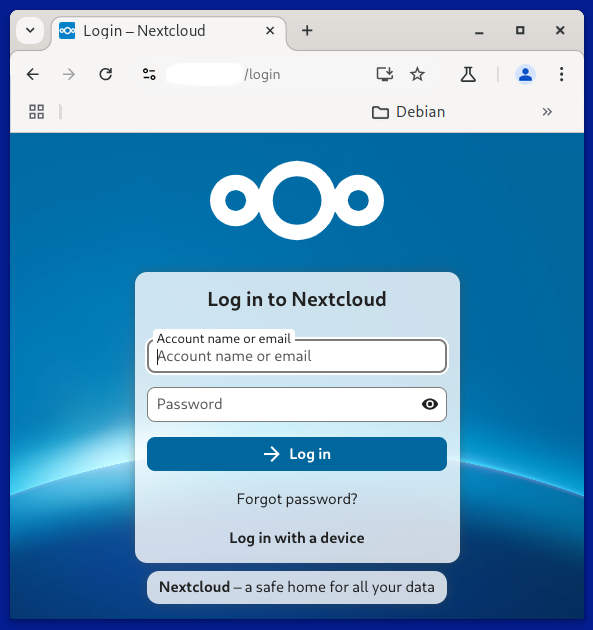
After the installation and setup of the Nextcloud PHP application there are more steps to be done. Have a look into the WebUI what you will need to do as additional steps like create a cronjob or tuning of some more PHP configurations. If you ve done all things correct you should see a login page similar to this: Login Page of your Nextcloud instance

Optional other steps for more enhanced configuration modifications

Move the data folder to somewhere else The data folder is the root folder for all user content. By default it is located in $install_folder/data, so in our case here it is in /var/www/html/nextcloud/data.
  • Move the data directory outside the web server document root. $ sudo mv /var/www/html/nextcloud/data /var/nextcloud_data
  • Ensure access permissions, mostly not needed if you move the folder. $ sudo chown -R www-data:www-data /var/nextcloud_data $ sudo chown -R www-data:www-data /var/www/html/nextcloud/
  • Update the Nextcloud configuration:
    1. Open the config/config.php file of your Nextcloud installation. $ sudo vi /var/www/html/nextcloud/config/config.php
    2. Update the datadirectory parameter to point to the new location of your data directory.
  ---%<---
     'datadirectory' => '/var/nextcloud_data'
  --->%---
  • Restart NGinx service: $ sudo systemctl restart nginx

Make the installation available for multiple FQDNs on the same server
  • Adjust the Nextcloud configuration to listen and accept requests for different domain names. Configure and adjust the key trusted_domains accordingly. $ sudo vi /var/www/html/nextcloud/config/config.php
  ---%<---
    'trusted_domains' => 
    array (
      0 => 'domain.your-domain.com',
      1 => 'domain.other-domain.com',
    ),
  --->%---
  • Create and adjust the needed site configurations for the webserver.
  • Restart the NGinx unit.

An error message about .ocdata might occur
  • .ocdata is not found inside the data directory
    • Create file using touch and set necessary permissions. $ sudo touch /var/nextcloud_data/.ocdata $ sudo chown -R www-data:www-data /var/nextcloud_data/

The password for the administrator user is unknown
  1. Log in to your server:
    • SSH into the server where your PostgreSQL database is hosted.
  2. Switch to the PostgreSQL user:
    • $ sudo -i -u postgres
  3. Access the PostgreSQL command line
    • psql
  4. List the databases: (If you re unsure which database is being used by Nextcloud, you can list all the databases by the list command.)
    • \l
  5. Switch to the Nextcloud database:
    • Switch to the specific database that Nextcloud is using.
    • \c nextclouddb
  6. Reset the password for the Nextcloud database user:
    • ALTER USER nextcloud_user WITH PASSWORD 'new_password';
  7. Exit the PostgreSQL command line:
    • \q
  8. Verify Database Configuration:
    • Check the database connection details in the config.php file to ensure they are correct. sudo vi /var/www/html/nextcloud/config/config.php
    • Replace nextcloud_db, nextcloud_user, and your_password with your actual database name, user, and password.
---%<---
    'dbname' => 'nextcloud_db',
    'dbhost' => 'localhost', #(or your PostgreSQL server address)
    'dbport' => '',
    'dbtableprefix' => 'oc_',
    'dbuser' => 'nextcloud_user',
    'dbpassword' => '1234', #(The password you set for nextcloud_user.)
--->%---
  1. Restart NGinx and access the UI through the browser.

11 April 2025

Reproducible Builds: Reproducible Builds in March 2025

Welcome to the third report in 2025 from the Reproducible Builds project. Our monthly reports outline what we ve been up to over the past month, and highlight items of news from elsewhere in the increasingly-important area of software supply-chain security. As usual, however, if you are interested in contributing to the Reproducible Builds project, please visit our Contribute page on our website. Table of contents:
  1. Debian bookworm live images now fully reproducible from their binary packages
  2. How NixOS and reproducible builds could have detected the xz backdoor
  3. LWN: Fedora change aims for 99% package reproducibility
  4. Python adopts PEP standard for specifying package dependencies
  5. OSS Rebuild real-time validation and tooling improvements
  6. SimpleX Chat server components now reproducible
  7. Three new scholarly papers
  8. Distribution roundup
  9. An overview of Supply Chain Attacks on Linux distributions
  10. diffoscope & strip-nondeterminism
  11. Website updates
  12. Reproducibility testing framework
  13. Upstream patches

Debian bookworm live images now fully reproducible from their binary packages Roland Clobus announced on our mailing list this month that all the major desktop variants (ie. Gnome, KDE, etc.) can be reproducibly created for Debian bullseye, bookworm and trixie from their (pre-compiled) binary packages. Building reproducible Debian live images does not require building from reproducible source code, but this is still a remarkable achievement. Some large proportion of the binary packages that comprise these live images can (and were) built reproducibly, but live image generation works at a higher level. (By contrast, full or end-to-end reproducibility of a bootable OS image will, in time, require both the compile-the-packages the build-the-bootable-image stages to be reproducible.) Nevertheless, in response, Roland s announcement generated significant congratulations as well as some discussion regarding the finer points of the terms employed: a full outline of the replies can be found here. The news was also picked up by Linux Weekly News (LWN) as well as to Hacker News.

How NixOS and reproducible builds could have detected the xz backdoor Julien Malka aka luj published an in-depth blog post this month with the highly-stimulating title How NixOS and reproducible builds could have detected the xz backdoor for the benefit of all . Starting with an dive into the relevant technical details of the XZ Utils backdoor, Julien s article goes on to describe how we might avoid the xz catastrophe in the future by building software from trusted sources and building trust into untrusted release tarballs by way of comparing sources and leveraging bitwise reproducibility, i.e. applying the practices of Reproducible Builds. The article generated significant discussion on Hacker News as well as on Linux Weekly News (LWN).

LWN: Fedora change aims for 99% package reproducibility Linux Weekly News (LWN) contributor Joe Brockmeier has published a detailed round-up on how Fedora change aims for 99% package reproducibility. The article opens by mentioning that although Debian has been working toward reproducible builds for more than a decade , the Fedora project has now:
progressed far enough that the project is now considering a change proposal for the Fedora 43 development cycle, expected to be released in October, with a goal of making 99% of Fedora s package builds reproducible. So far, reaction to the proposal seems favorable and focused primarily on how to achieve the goal with minimal pain for packagers rather than whether to attempt it.
The Change Proposal itself is worth reading:
Over the last few releases, we [Fedora] changed our build infrastructure to make package builds reproducible. This is enough to reach 90%. The remaining issues need to be fixed in individual packages. After this Change, package builds are expected to be reproducible. Bugs will be filed against packages when an irreproducibility is detected. The goal is to have no fewer than 99% of package builds reproducible.
Further discussion can be found on the Fedora mailing list as well as on Fedora s Discourse instance.

Python adopts PEP standard for specifying package dependencies Python developer Brett Cannon reported on Fosstodon that PEP 751 was recently accepted. This design document has the purpose of describing a file format to record Python dependencies for installation reproducibility . As the abstract of the proposal writes:
This PEP proposes a new file format for specifying dependencies to enable reproducible installation in a Python environment. The format is designed to be human-readable and machine-generated. Installers consuming the file should be able to calculate what to install without the need for dependency resolution at install-time.
The PEP, which itself supersedes PEP 665, mentions that there are at least five well-known solutions to this problem in the community .

OSS Rebuild real-time validation and tooling improvements OSS Rebuild aims to automate rebuilding upstream language packages (e.g. from PyPI, crates.io, npm registries) and publish signed attestations and build definitions for public use. OSS Rebuild is now attempting rebuilds as packages are published, shortening the time to validating rebuilds and publishing attestations. Aman Sharma contributed classifiers and fixes for common sources of non-determinism in JAR packages. Improvements were also made to some of the core tools in the project:
  • timewarp for simulating the registry responses from sometime in the past.
  • proxy for transparent interception and logging of network activity.
  • and stabilize, yet another nondeterminism fixer.

SimpleX Chat server components now reproducible SimpleX Chat is a privacy-oriented decentralised messaging platform that eliminates user identifiers and metadata, offers end-to-end encryption and has a unique approach to decentralised identity. Starting from version 6.3, however, Simplex has implemented reproducible builds for its server components. This advancement allows anyone to verify that the binaries distributed by SimpleX match the source code, improving transparency and trustworthiness.

Three new scholarly papers Aman Sharma of the KTH Royal Institute of Technology of Stockholm, Sweden published a paper on Build and Runtime Integrity for Java (PDF). The paper s abstract notes that Software Supply Chain attacks are increasingly threatening the security of software systems and goes on to compare build- and run-time integrity:
Build-time integrity ensures that the software artifact creation process, from source code to compiled binaries, remains untampered. Runtime integrity, on the other hand, guarantees that the executing application loads and runs only trusted code, preventing dynamic injection of malicious components.
Aman s paper explores solutions to safeguard Java applications and proposes some novel techniques to detect malicious code injection. A full PDF of the paper is available.
In addition, Hamed Okhravi and Nathan Burow of Massachusetts Institute of Technology (MIT) Lincoln Laboratory along with Fred B. Schneider of Cornell University published a paper in the most recent edition of IEEE Security & Privacy on Software Bill of Materials as a Proactive Defense:
The recently mandated software bill of materials (SBOM) is intended to help mitigate software supply-chain risk. We discuss extensions that would enable an SBOM to serve as a basis for making trust assessments thus also serving as a proactive defense.
A full PDF of the paper is available.
Lastly, congratulations to Giacomo Benedetti of the University of Genoa for publishing their PhD thesis. Titled Improving Transparency, Trust, and Automation in the Software Supply Chain, Giacomo s thesis:
addresses three critical aspects of the software supply chain to enhance security: transparency, trust, and automation. First, it investigates transparency as a mechanism to empower developers with accurate and complete insights into the software components integrated into their applications. To this end, the thesis introduces SUNSET and PIP-SBOM, leveraging modeling and SBOMs (Software Bill of Materials) as foundational tools for transparency and security. Second, it examines software trust, focusing on the effectiveness of reproducible builds in major ecosystems and proposing solutions to bolster their adoption. Finally, it emphasizes the role of automation in modern software management, particularly in ensuring user safety and application reliability. This includes developing a tool for automated security testing of GitHub Actions and analyzing the permission models of prominent platforms like GitHub, GitLab, and BitBucket.

Distribution roundup In Debian this month:
The IzzyOnDroid Android APK repository reached another milestone in March, crossing the 40% coverage mark specifically, more than 42% of the apps in the repository is now reproducible Thanks to funding by NLnet/Mobifree, the project was also to put more time into their tooling. For instance, developers can now run easily their own verification builder in less than 5 minutes . This currently supports Debian-based systems, but support for RPM-based systems is incoming. Future work in the pipeline, including documentation, guidelines and helpers for debugging.
Fedora developer Zbigniew J drzejewski-Szmek announced a work-in-progress script called fedora-repro-build which attempts to reproduce an existing package within a Koji build environment. Although the project s README file lists a number of fields will always or almost always vary (and there are a non-zero list of other known issues), this is an excellent first step towards full Fedora reproducibility (see above for more information).
Lastly, in openSUSE news, Bernhard M. Wiedemann posted another monthly update for his work there.

An overview of Supply Chain Attacks on Linux distributions Fenrisk, a cybersecurity risk-management company, has published a lengthy overview of Supply Chain Attacks on Linux distributions. Authored by Maxime Rinaudo, the article asks:
[What] would it take to compromise an entire Linux distribution directly through their public infrastructure? Is it possible to perform such a compromise as simple security researchers with no available resources but time?

diffoscope & strip-nondeterminism diffoscope is our in-depth and content-aware diff utility that can locate and diagnose reproducibility issues. This month, Chris Lamb made the following changes, including preparing and uploading versions 290, 291, 292 and 293 and 293 to Debian:
  • Bug fixes:
    • file(1) version 5.46 now returns XHTML document for .xhtml files such as those found nested within our .epub tests. [ ]
    • Also consider .aar files as APK files, at least for the sake of diffoscope. [ ]
    • Require the new, upcoming, version of file(1) and update our quine-related testcase. [ ]
  • Codebase improvements:
    • Ensure all calls to our_check_output in the ELF comparator have the potential CalledProcessError exception caught. [ ][ ]
    • Correct an import masking issue. [ ]
    • Add a missing subprocess import. [ ]
    • Reformat openssl.py. [ ]
    • Update copyright years. [ ][ ][ ]
In addition, Ivan Trubach contributed a change to ignore the st_size metadata entry for directories as it is essentially arbitrary and introduces unnecessary or even spurious changes. [ ]

Website updates Once again, there were a number of improvements made to our website this month, including:

Reproducibility testing framework The Reproducible Builds project operates a comprehensive testing framework running primarily at tests.reproducible-builds.org in order to check packages and other artifacts for reproducibility. In March, a number of changes were made by Holger Levsen, including:
  • reproduce.debian.net-related:
    • Add links to two related bugs about buildinfos.debian.net. [ ]
    • Add an extra sync to the database backup. [ ]
    • Overhaul description of what the service is about. [ ][ ][ ][ ][ ][ ]
    • Improve the documentation to indicate that need to fix syncronisation pipes. [ ][ ]
    • Improve the statistics page by breaking down output by architecture. [ ]
    • Add a copyright statement. [ ]
    • Add a space after the package name so one can search for specific packages more easily. [ ]
    • Add a script to work around/implement a missing feature of debrebuild. [ ]
  • Misc:
    • Run debian-repro-status at the end of the chroot-install tests. [ ][ ]
    • Document that we have unused diskspace at Ionos. [ ]
In addition:
  • James Addison made a number of changes to the reproduce.debian.net homepage. [ ][ ].
  • Jochen Sprickerhof updated the statistics generation to catch No space left on device issues. [ ]
  • Mattia Rizzolo added a better command to stop the builders [ ] and fixed the reStructuredText syntax in the README.infrastructure file. [ ]
And finally, node maintenance was performed by Holger Levsen [ ][ ][ ] and Mattia Rizzolo [ ][ ].

Upstream patches The Reproducible Builds project detects, dissects and attempts to fix as many currently-unreproducible packages as possible. We endeavour to send all of our patches upstream where appropriate. This month, we wrote a large number of such patches, including:
Finally, if you are interested in contributing to the Reproducible Builds project, please visit our Contribute page on our website. However, you can get in touch with us via:

Bits from Debian: Bits from the DPL

Dear Debian community, this is bits from DPL for March (sorry for the delay, I was waiting for some additional input). Conferences In March, I attended two conferences, each with a distinct motivation. I joined FOSSASIA to address the imbalance in geographical developer representation. Encouraging more developers from Asia to contribute to Free Software is an important goal for me, and FOSSASIA provided a valuable opportunity to work towards this. I also attended Chemnitzer Linux-Tage, a conference I have been part of for over 20 years. To me, it remains a key gathering for the German Free Software community a place where contributors meet, collaborate, and exchange ideas. I have a remark about submitting an event proposal to both FOSDEM and FOSSASIA: Cross distribution experience exchange
As Debian Project Leader, I have often reflected on how other Free Software distributions address challenges we all face. I am interested in discussing how we can learn from each other to improve our work and better serve our users. Recognizing my limited understanding of other distributions, I aim to bridge this gap through open knowledge exchange. My hope is to foster a constructive dialogue that benefits the broader Free Software ecosystem. Representatives of other distributions are encouraged to participate in this BoF whether as contributors or official co-speakers. My intention is not to drive the discussion from a Debian-centric perspective but to ensure that all distributions have an equal voice in the conversation.
This event proposal was part of my commitment from my 2024 DPL platform, specifically under the section "Reaching Out to Learn". Had it been accepted, I would have also attended FOSDEM. However, both FOSDEM and FOSSASIA rejected the proposal. In hindsight, reaching out to other distribution contributors beforehand might have improved its chances. I may take this approach in the future if a similar opportunity arises. That said, rejecting an interdistribution discussion without any feedback is, in my view, a missed opportunity for collaboration. FOSSASIA Summit The 14th FOSSASIA Summit took place in Bangkok. As a leading open-source technology conference in Asia, it brings together developers, startups, and tech enthusiasts to collaborate on projects in AI, cloud computing, IoT, and more. With a strong focus on open innovation, the event features hands-on workshops, keynote speeches, and community-driven discussions, emphasizing open-source software, hardware, and digital freedom. It fosters a diverse, inclusive environment and highlights Asia's growing role in the global FOSS ecosystem. I presented a talk on Debian as a Global Project and led a packaging workshop. Additionally, to further support attendees interested in packaging, I hosted an extra self-organized workshop at a hacker caf , initiated by participants eager to deepen their skills. There was another Debian related talk given by Ananthu titled "The Herculean Task of OS Maintenance - The Debian Way!" To further my goal of increasing diversity within Debian particularly by encouraging more non-male contributors I actively engaged with attendees, seeking opportunities to involve new people in the project. Whether through discussions, mentoring, or hands-on sessions, I aimed to make Debian more approachable for those who might not yet see themselves as contributors. I was fortunate to have the support of Debian enthusiasts from India and China, who ran the Debian booth and helped create a welcoming environment for these conversations. Strengthening diversity in Free Software is a collective effort, and I hope these interactions will inspire more people to get involved. Chemnitzer Linuxtage The Chemnitzer Linux-Tage (CLT) is one of Germany's largest and longest-running community-driven Linux and open-source conferences, held annually in Chemnitz since 2000. It has been my favorite conference in Germany, and I have tried to attend every year. Focusing on Free Software, Linux, and digital sovereignty, CLT offers a mix of expert talks, workshops, and exhibitions, attracting hobbyists, professionals, and businesses alike. With a strong grassroots ethos, it emphasizes hands-on learning, privacy, and open-source advocacy while fostering a welcoming environment for both newcomers and experienced Linux users. Despite my appreciation for the diverse and high-quality talks at CLT, my main focus was on connecting with people who share the goal of attracting more newcomers to Debian. Engaging with both longtime contributors and potential new participants remains one of the most valuable aspects of the event for me. I was fortunate to be joined by Debian enthusiasts staffing the Debian booth, where I found myself among both experienced booth volunteers who have attended many previous CLT events and young newcomers. This was particularly reassuring, as I certainly can't answer every detailed question at the booth. I greatly appreciate the knowledgeable people who represent Debian at this event and help make it more accessible to visitors. As a small point of comparison while FOSSASIA and CLT are fundamentally different events the gender ratio stood out. FOSSASIA had a noticeably higher proportion of women compared to Chemnitz. This contrast highlighted the ongoing need to foster more diversity within Free Software communities in Europe. At CLT, I gave a talk titled "Tausend Freiwillige, ein Ziel" (Thousand Volunteers, One Goal), which was video recorded. It took place in the grand auditorium and attracted a mix of long-term contributors and newcomers, making for an engaging and rewarding experience. Kind regards Andreas.

Gunnar Wolf: Culture as a positive freedom

This post is an unpublished review for La cultura libre como libertad positiva
Please note: This review is not meant to be part of my usual contributions to ACM's Computing Reviews . I do want, though, to share it with people that follow my general interests and such stuff.
This article was published almost a year ago, and I read it just after relocating from Argentina back to Mexico. I came from a country starting to realize the shock it meant to be ruled by an autocratic, extreme right-wing president willing to overrun its Legislative and bent on destroying the State itself not too different from what we are now witnessing on a global level. I have been a strong proponent and defender of Free Software and of Free Culture throughout my adult life. And I have been a Socialist since my early teenage years. I cannot say there is a strict correlation between them, but there is a big intersection of people and organizations who aligns to both sides And rtica (and Mariana Fossatti) are clearly among them. Freedom is a word that has brought us many misunderstanding throughout the past many decades. We will say that Freedom can only be brought hand-by-hand with Equality, Fairness and Tolerance. But the extreme-right wing (is it still bordering Fascism, or has it finally embraced it as its true self?) that has grown so much in many countries over the last years also seems to have appropriated the term, even taking it as their definition. In English (particularly, in USA English), liberty is a more patriotic term, and freedom is more personal (although the term used for the market is free market); in Spanish, we conflate them both under libre. Mariana refers to a third blog, by Rolando Astarita, where the author introduces the concepts positive and negative freedom/liberties. Astarita characterizes negative freedom as an individual s possibility to act without interferences or coertion, and is limited by other people s freedom, while positive freedom is the real capacity to exercise one s autonomy and achieve self-realization; this does not depend on a person on its own, but on different social conditions; Astarita understands the Marxist tradition to emphasize on the positive freedom. Mariana brings this definition to our usual discussion on licensing: If we follow negative freedom, we will understand free licenses as the idea of access without interference to cultural or information goods, as long as it s legal (in order not to infringe other s property rights). Licensing is seen as a private content, and each individual can grant access and use to their works at will. The previous definition might be enough for many, but she says, is missing something important. The practical effect of many individuals renouncing a bit of control over their property rights produce, collectively, the common goods. They constitute a pool of knowledge or culture that are no longer an individual, contractual issue, but grow and become social, collective. Negative freedom does not go further, but positive liberty allows broadening the horizon, and takes us to a notion of free culture that, by strengthening the commons, widens social rights. She closes the article by stating (and I ll happily sign as if they were my own words) that we are Free Culture militants not only because it affirms the individual sovereignty to deliver and receive cultural resources, in an intellectual property framework guaranteed by the state. Our militancy is of widening the cultural enjoying and participation to the collective through the defense of common cultural goods ( ) We want to build Free Culture for a Free Society. But a Free Society is not a society of free owners, but a society emancipated from the structures of economic power and social privilege that block this potential collective .

9 April 2025

Freexian Collaborators: Debian Contributions: Preparations for Trixie, Updated debvm, DebConf 25 registration website updates and more! (by Anupa Ann Joseph)

Debian Contributions: 2025-03 Contributing to Debian is part of Freexian s mission. This article covers the latest achievements of Freexian and their collaborators. All of this is made possible by organizations subscribing to our Long Term Support contracts and consulting services.

Preparing for Trixie, by Rapha l Hertzog As we are approaching the trixie freeze, it is customary for Debian developers to review their packages and clean them up in preparation for the next stable release. That s precisely what Rapha l did with publican, a package that had not seen any change since the last Debian release and that partially stopped working along the way due to a major Perl upgrade. While upstream s activity is close to zero, hope is not yet entirely gone as the git repository moved to a new location a couple of months ago and contained the required fix. Rapha l also developed another fix to avoid an annoying warning that was seen at runtime. Rapha l also ensured that the last upstream version of zim was uploaded to Debian unstable, and developed a fix for gnome-shell-extension-hamster to make it work with GNOME 48 and thus ensure that the package does not get removed from trixie.

Abseil and re2 transition in Debian, by Stefano Rivera One of the last transitions to happen for trixie was an update to abseil, bringing it up to 202407. This library is a dependency for one of Freexian s customers, as well as blocking newer versions of re2, a package maintained by Stefano. The transition had been stalled for several months while some issues with reverse dependencies were investigated and dealt with. It took a final push to make the transition happen, including fixing a few newly discovered problems downstream. The abseil package s autopkgtests were (trivially) broken by newer cmake versions, and some tests started failing on PPC64 (a known issue upstream).

debvm uploaded, by Helmut Grohne debvm is a command line tool for quickly creating a Debian-based virtual machine for testing purposes. Over time, it accumulated quite a few minor issues as well as CI failures. The most notorious one was an ARM32 failure present since August. It was diagnosed down to a glibc bug by Tj and Chris Hofstaedtler and little has happened since then. To have debvm work somewhat, it now contains a workaround for this situation. Few changes are expected to be noticeable, but related tools such as apt, file, linux, passwd, and qemu required quite a few adaptations all over the place. Much of the necessary debugging was contributed by others.

DebConf 25 Registration website, by Stefano Rivera and Santiago Ruano Rinc n DebConf 25, the annual Debian developer conference, is now open for registration. Other than preparing the conference website, getting there always requires some last minute changes to the software behind the registration interface and this year was no exception. Every year, the conference is a little different to previous years, and has some different details that need to be captured from attendees. And every year we make minor incremental improvements to fix long-standing problems. New concepts this year included: brunch, the closing talks on the departure day, venue security clearance, partial contributions towards food and accommodation bursaries, and attendee-selected bursary budgets.

Miscellaneous contributions
  • Helmut uploaded guess-concurrency incorporating feedback from others.
  • Helmut reacted to rebootstrap CI results and adapted it to cope with changes in unstable.
  • Helmut researched real world /usr-move fallout though little was actually attributable. He also NMUed systemd unsuccessfully.
  • Helmut sent 12 cross build patches.
  • Helmut looked into undeclared file conflicts in Debian more systematically and filed quite some bugs.
  • Helmut attended the cross/bootstrap sprint in W rzburg. A report of the event is pending.
  • Lucas worked on the CFP and tracks definition for DebConf 25.
  • Lucas worked on some bits involving Rails 7 transition.
  • Carles investigated why the job piuparts on salsa-ci/pipeline was passing but was failing on piuparts.debian.org for simplemonitor package. Created an issue and MR with a suggested fix, under discussion.
  • Carles improved the documentation of salsa-ci/pipeline: added documentation for different variables.
  • Carles made debian-history package reproducible (with help from Chris Lamb).
  • Carles updated simplemonitor package (new upstream version), prepared a new qdacco version (fixed bugs in qdacco, packaged with the upgrade from Qt 5 to Qt 6).
  • Carles reviewed and submitted translations to Catalan for adduser, apt, shadow, apt-listchanges.
  • Carles reviewed, created merge-requests for translations to Catalan of 38 packages (using po-debconf-manager tooling). Created 40 bug reports for some merge requests that haven t been actioned for some time.
  • Colin Watson fixed 59 RC bugs (including 26 packages broken by the long-overdue removal of dh-python s dependency on python3-setuptools), and upgraded 38 packages (mostly Python-related) to new upstream versions.
  • Colin worked with Pranav P to track down and fix a dnspython autopkgtest regression on s390x caused by an endianness bug in pylsqpack.
  • Colin fixed a time-based test failure in python-dateutil that would have triggered in 2027, and contributed the fix upstream.
  • Colin fixed debconf to automatically use the noninteractive frontend if stdin is not a terminal.
  • Stefano bisected and fixed a pypy translation regression on Debian stable and older on 32-bit ARM.
  • Emilio coordinated and helped finish various transitions in light of the transition freeze.
  • Thorsten Alteholz uploaded cups-filters to fix an FTBFS with a new upstream version of qpdf.
  • With the aim of enhancing the support for packages related to Software Bill of Materials (SBOMs) in recent industrial standards, Santiago has worked on finishing the packaging of and uploaded CycloneDX python library. There is on-going work about SPDX python tools, but it requires (build-)dependencies currently not shipped in Debian, such as owlrl and pyshacl.
  • Anupa worked with the Publicity team to announce the Debian 12.10 point release.
  • Anupa with the support of Santiago prepared an announcement and announced the opening of CfP and Registrations for DebConf 25.

4 April 2025

Gunnar Wolf: Naming things revisited

How long has it been since you last saw a conversation over different blogs syndicated at the same planet? Well, it s one of the good memories of the early 2010s. And there is an opportunity to re-engage! I came across Evgeni s post naming things is hard in Planet Debian. So, what names have I given my computers? I have had many since the mid-1990s I also had several during the decade before that, but before Linux, my computers didn t hve a formal name. Naming my computers something nice Linux gave me. I have forgotten many. Some of the names I have used:

Guido G nther: Booting an Android custom kernel on a Pixel 3a for QMI debugging

As you might know I'm not much of an Android user (let alone developer) but in order to figure out how something low level works you sometimes need to peek at how vendor kernels handles this. For that it is often useful to add additional debugging. One such case is QMI communication going on in Qualcomm SOCs. Joel Selvaraj wrote some nice tooling for this. To make use of this a rooted device and a small kernel patch is needed and what would be a no-brainer with Linux Mobile took me a moment to get it to work on Android. Here's the steps I took on a Pixel 3a to first root the device via Magisk, then build the patched kernel and put that into a boot.img to boot it. Flashing the factory image If you still have Android on the device you can skip this step. You can get Android 12 from developers.google.com. I've downloaded sargo-sp2a.220505.008-factory-071e368a.zip. Then put the device into Fastboot mode (Power + Vol-Down), connect it to your PC via USB, unzip/unpack the archive and reflash the phone:

unpack sargo-sp2a.220505.008-factory-071e368a.zip
./flash-all.sh
This wipes your device! I had to run it twice since it would time out on the first run. Note that this unpacked zip contains another zip (image-sargo-sp2a.220505.008.zip) which will become useful below. Enabling USB debugging Now boot Android and enable Developer mode by going to Settings About then touching Build Number (at the very bottom) 7 times. Go back one level, then go to System Developer Options and enable "USB Debugging". Obtaining boot.img There are several ways to get boot.img. If you just flashed Android above then you can fetch boot.img from the already mentioned image-sargo-sp2a.220505.008.zip:
unzip image-sargo-sp2a.220505.008.zip boot.img
If you want to fetch the exact boot.img from your device you can use TWRP (see the very end of this post). Becoming root with Magisk Being able to su via adb will later be useful to fetch kernel logs. For that we first download Magisk as APK. At the time of writing v28.1 is current. Once downloaded we upload the APK and the boot.img from the previous step onto the phone (which needs to have Android booted):
adb push Magisk-v28.1.apk /sdcard/Download
adb push boot.img /sdcard/Download
In Android open the Files app, navigate to /sdcard/Download and install the Magisk APK by opening the APK. We now want to patch boot.img to get su via adb to work (so we can run dmesg). This happens by hitting Install in the Magisk app, then "Select a file to patch". You then select the boot.img we just uploaded. The installation process will create a magisk_patched-<random>.img in /sdcard/Download. We can pull that file via adb back to our PC:
adb pull /sdcard/Download/magisk_patched-28100_3ucVs.img
Then reboot the phone into fastboot (adb reboot bootloader) and flash it (this is optional see below):
fastboot flash boot magisk_patched-28100_3ucVs.img
Now boot the phone again, open the Magisk app, go to SuperUser at the bottom and enable Shell. If you now connect to your phone via adb again and now su should work:
adb shell
su
As noted above if you want to keep your Android installation pristine you don't even need to flash this Magisk enabled boot.img. I've flashed it so I have su access for other operations too. If you don't want to flash it you can still test boot it via:
fastboot boot magisk_patched-28100_3ucVs.img
and then perform the same adb shell su check as above. Building the custom kernel For our QMI debugging to work we need to patch the kernel a bit and place that in boot.img too. So let's build the kernel first. For that we install the necessary tools (which are thankfully packaged in Debian) and fetch the Android kernel sources:
sudo apt install repo android-platform-tools-base kmod ccache build-essential mkbootimg
mkdir aosp-kernel && cd aosp-kernel
repo init -u https://android.googlesource.com/kernel/manifest -b android-msm-bonito-4.9-android12L
repo sync
With that we can apply Joel's kernel patches and also compile in the touch controller driver so we don't need to worry if the modules in the initramfs match the kernel. The kernel sources are in private/msm-google. I've just applied the diffs on top with patch and modified the defconfig and committed the changes. The resulting tree is here. We then build the kernel:
PATH=/usr/sbin:$PATH ./build_bonito.sh
The resulting kernel is at ./out/android-msm-pixel-4.9/private/msm-google/arch/arm64/boot/Image.lz4-dtb. In order to boot that kernel I found it to be the simplest to just replace the kernel in the Magisk patched boot.img as we have that already. In case you have already deleted that for any reason we can always fetch the current boot.img from the phone via TWRP (see below). Preparing a new boot.img To replace the kernel in our Magisk enabled magisk_patched-28100_3ucVs.img from above with the just built kernel we can use mkbootimgfor that. I basically copied the steps we're using when building the boot.img on the Linux Mobile side:
ARGS=$(unpack_bootimg --format mkbootimg --out tmp --boot_img magisk_patched-28100_3ucVs.img)
CLEAN_PARAMS="$(echo "$ ARGS "   sed -e "s/ --cmdline '.*'//" -e "s/ --board '.*'//")"
cp android-kernel/out/android-msm-pixel-4.9/private/msm-google/arch/arm64/boot/Image.lz4-dtb tmp/kernel
mkbootimg -o "boot.patched.img" $ CLEAN_PARAMS  --cmdline "$ ARGS "
This will give you a boot.patched.img with the just built kernel. Boot the new kernel via fastboot We can now boot the new boot.patched.img. No need to flash that onto the device for that:
fastboot boot boot.patched.img
Fetching the kernel logs With that we can fetch the kernel logs with the debug output via adb:
adb shell su -c 'dmesg -t' > dmesg_dump.xml
or already filtering out the QMI commands:
adb shell su -c 'dmesg -t'    grep "@QMI@"   sed -e "s/@QMI@//g" &> sargo_qmi_dump.xml
That's it. You can apply this method for testing out other kernel patches as well. If you want to apply the above to other devices you basically need to make sure you patch the right kernel sources, the other steps should be very similar. In case you just need a rooted boot.img for sargo you can find a patched one here. If this procedure can be improved / streamlined somehow please let me know. Appendix: Fetching boot.img from the phone If, for some reason you lost boot.img somewhere on the way you can always use TWRP to fetch the boot.img currently in use on your phone. First get TWRP for the Pixel 3a. You can boot that directly by putting your device into fastboot mode, then running:
fastboot boot twrp-3.7.1_12-1-sargo.img
Within TWRP select Backup Boot and backup the file. You can then use adb shell to locate the backup in /sdcard/TWRP/BACKUPS/ and pull it:
adb pull /sdcard/TWRP/BACKUPS/97GAY10PWS/2025-04-02--09-24-24_SP2A220505008/boot.emmc.win
You now have the device's boot.img on your PC and can e.g. replace the kernel or make modifications to the initramfs.

Evgeni Golov: naming things is hard

I got a new laptop (a Lenovo Thinkpad X1 Carbon Gen 12, more on that later) and as always with new pets, it needed a name. My naming scheme is roughly "short japanese words that somehow relate to the machine". The current (other) machines at home are (not all really in use): Then, I happen to rent a few servers: I also had machines in the past, that are no longer with me: And also servers from the past: So, what shall I call the new one? It will be "juuni" ( ), which means 12. Creative, huh?

2 April 2025

Paul Wise: FLOSS Activities March 2025

Changes

Issues

Sponsors The SWH work was sponsored. All other work was done on a volunteer basis.

Next.

Previous.